
Day 5 of System Design Case Studies Series : Design Messenger App, Kayak, Bigbasket, Roblox, Google Search, Appstore, Latency Management System, Lookahead System, Credit Card Authorization System, Google Bard
Complete Design with examples
Hi all! In the last post we saw how to design Instagram. In this post we will cover Messenger App, Kayak, Bigbasket, Roblox, Google Search, Appstore, Latency Management System, Lookahead System, Credit Card Authorization System and Google Bard.
This post has system design for ( scroll till the end of the post) —
Note : Please read System Design Important Terms you MUST know and Most Important System Design basics before reading this post.
Welcome to Day 5 of System Design Case studies series where we will design Messenger App.
Projects Videos —
All the projects, data structures, SQL, algorithms, system design, Data Science and ML , Data Analytics, Data Engineering, , Implemented Data Science and ML projects, Implemented Data Engineering Projects, Implemented Deep Learning Projects, Implemented Machine Learning Ops Projects, Implemented Time Series Analysis and Forecasting Projects, Implemented Applied Machine Learning Projects, Implemented Tensorflow and Keras Projects, Implemented PyTorch Projects, Implemented Scikit Learn Projects, Implemented Big Data Projects, Implemented Cloud Machine Learning Projects, Implemented Neural Networks Projects, Implemented OpenCV Projects,Complete ML Research Papers Summarized, Implemented Data Analytics projects, Implemented Data Visualization Projects, Implemented Data Mining Projects, Implemented Natural Leaning Processing Projects, MLOps and Deep Learning, Applied Machine Learning with Projects Series, PyTorch with Projects Series, Tensorflow and Keras with Projects Series, Scikit Learn Series with Projects, Time Series Analysis and Forecasting with Projects Series, ML System Design Case Studies Series videos will be published on our youtube channel ( just launched).
Subscribe today!
Solved System Design Case Studies — In depth
Design Google Drive
Design Instagram
Design Quora
Design Flipkart
ML System Design
Design Tiny URL
Design Netflix
Design Messenger App
Design Twitter
Design Foursquare
Design Reddit
Design Amazon
Design Dropbox
Design URL Shortener
Design Youtube
Design API Rate Limiter
Design Web Crawler
Design Amazon Prime Video
Design Facebook’s Newsfeed
Design Yelp
Design Uber
Design Tinder
Design Tiktok
Design Whatsapp
Most Popular System Design Questions
Mega Compilation : Solved System Design Case studies
We will be discussing in depth -
- What is Messenger App
- Important Features
- Scaling Requirements
- Data Model — ER requirements
- Basic Low Level Design
- API Design
- High Level Design
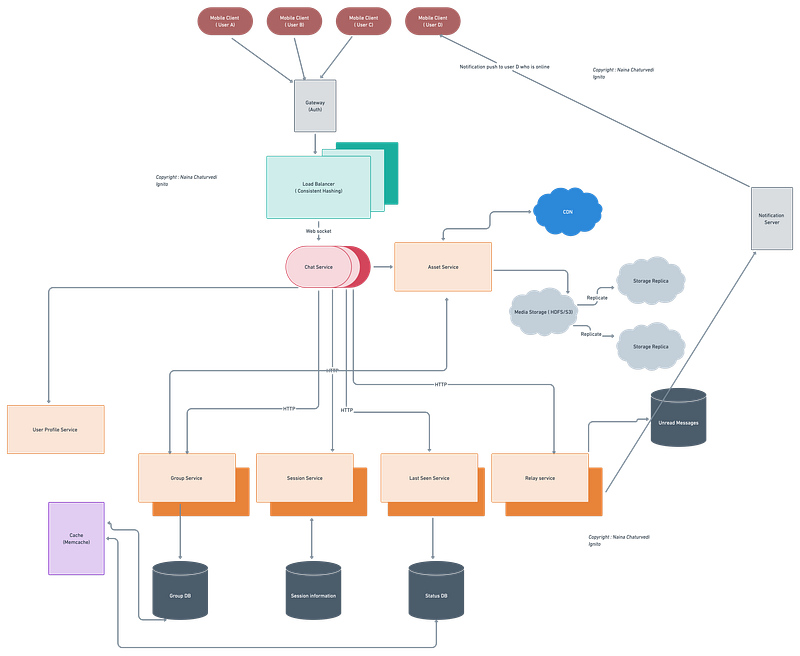
- Complete Detailed Design
- Complete Code Implementation
Pre-requisite to this post -
Complete System Design Series — Important Concepts that you should know before starting the Case studies
6. Networking, How Browsers work, Content Network Delivery ( CDN)
Github —
Day 1 of System Design Case Studies can be found below-
Day 2 of System Design Case Studies can be found below-
Day 3 of System Design Case Studies can be found below-
Day 4 of System Design Case Studies can be found below-
What is Chat/Messenger App

Messenger is a app platform which lets users —
- Send and receive text/photos/videos messages
- Create user groups
- Call — Audio or video call
Users can be both mobile based and web based.
Messenger App functionality:
- User accounts: Users would need to be able to create accounts and log in to the application. This would involve designing a registration and login system, as well as a way to securely store user information such as passwords.
- Contacts: Users would need to be able to add and manage their contacts, including the ability to search for other users and send friend requests.
- Chat: The main feature of a messenger app is the chat feature, where users can send and receive messages in real-time. The chat feature would need to be designed to handle large numbers of messages and support features like read receipts and typing indicators.
- Media sharing: Users would need to be able to send and receive photos, videos, and other types of media within the chat.
- Groups: Users would need to be able to create and manage group chats, including the ability to add and remove members.
- Notifications: Users would need to be notified of new messages and other interactions on the platform.
- End-to-end encryption: To ensure the security and privacy of user data, the messaging feature would need to be designed with end-to-end encryption.
- Scalability: The messenger app needs to be able to handle a large number of users and high traffic loads. This would involve designing the application to be scalable, including using technologies such as load balancers and distributed systems.
- Mobile and web: The messenger app should be designed for web and mobile platforms so that it can be used on any device.
- Analytics: The messenger app would need to be designed to track usage and engagement metrics, including user engagement, message engagement, and other key performance indicators.
Important Features
We will consider the most important features for this case study—
One to one message
Group messaging
Send media ( photos)
Notifications Push
User Status ( Online or Offline)
Scaling Requirements — Capacity Estimation
For the sake of simplicity, I’ll show a small scale simulation.
Say we have —
Daily active users ( DAU) : 200 million
Messages per user ( within a day) : 20
Total messages/day : 4 Billion messages
Storage Estimation —
Message size : 80 bytes
Total Storage per day : 4 billion messages * 80 bytes = 320 GB/day
For next 3 years, 320 GB * 3 * 365 = 350 TB
Data Model — ER requirements
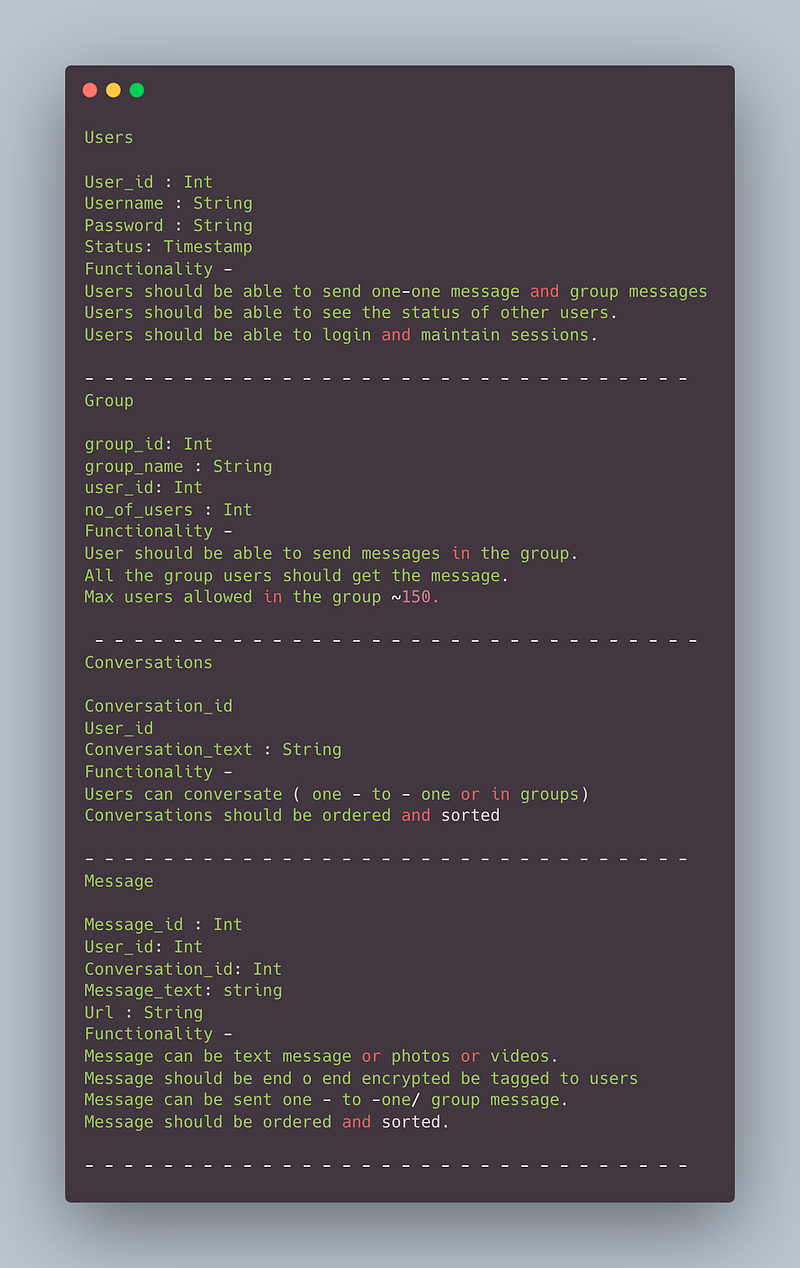
Users
User_id : Int
Username : String
Password : String
Status: Timestamp
Functionality —
- Users should be able to send one-one message and group messages
- Users should be able to see the status of other users.
- Users should be able to login and maintain sessions.
— — — — — — — — — — — — — — — — — — — — — — — — — — — — — — -
Group
group_id: Int
group_name : String
user_id: Int
no_of_users : Int
Functionality —
- User should be able to send messages in the group.
- All the group users should get the message.
- Max users allowed in the group ~150.
— — — — — — — — — — — — — — — — — — — — — — — — — — — — — — -
Conversations
Conversation_id
User_id
Conversation_text : String
Functionality —
- Users can conversate ( one — to — one or in groups)
- Conversations should be ordered and sorted
— — — — — — — — — — — — — — — — — — — — — — — — — — — — — — -
Message
Message_id : Int
User_id: Int
Conversation_id: Int
Message_text: string
Url : String
Functionality —
- Message can be text message or photos or videos.
- Message should be end o end encrypted be tagged to users
- Message can be sent one — to -one/ group message.
- Message should be ordered and sorted.
— — — — — — — — — — — — — — — — — — — — — — — — — — — — — — -
High Level Design
Assumptions on technical aspects —
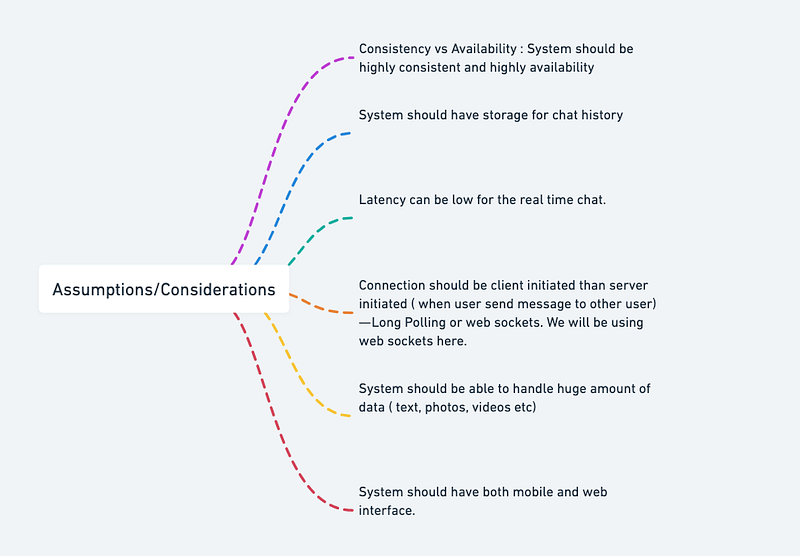
- System should be highly reliable and available.
- System should have both mobile and web interface.
- System should have storage for chat history
- System should be able to handle huge amount of data ( text, photos, videos etc)
- End — to- End encryption
- Latency can be low for the real time chat.
- Consistency vs Availability : System should be highly consistent and highly availability
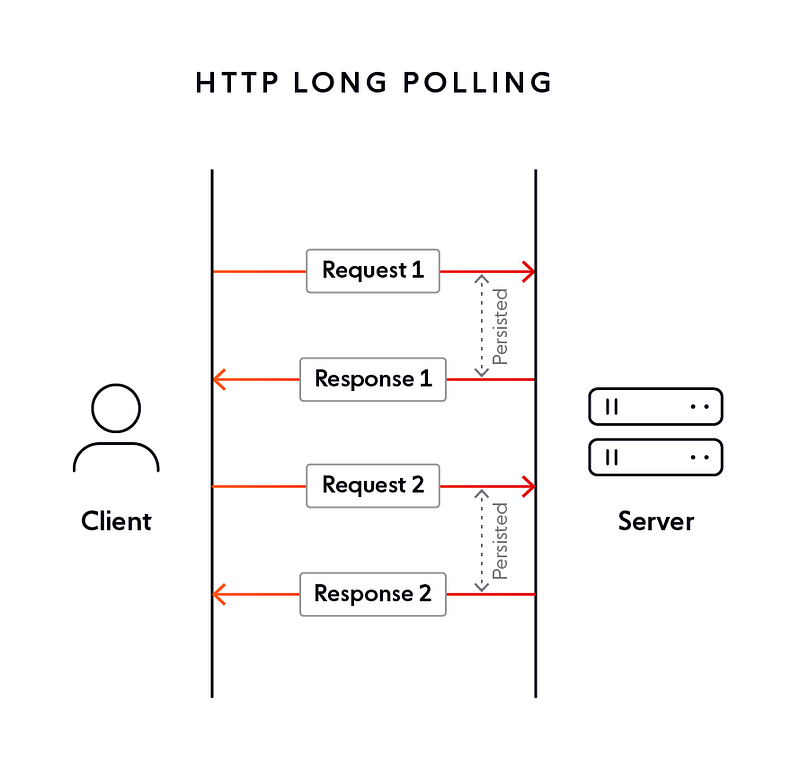
- Connection should be client initiated than server initiated ( when user send message to other user) — Long Polling or web sockets. We will be using web sockets here.
In long polling the server keeps the the client’s connection open until a timeout threshold has reached.
Implement HTTP polling in Python using the requests library:
import time
import requests
POLL_INTERVAL = 5 # in secondsdef start_polling(url):
while True:
response = requests.get(url)
if response.status_code == 200:
print("Received data:", response.text)
else:
print("Failed to retrieve data, status code:", response.status_code)
time.sleep(POLL_INTERVAL)if __name__ == "__main__":
start_polling("http://www.example.com/data")In this example, we use the requests library to send HTTP GET requests to the specified URL. We use the sleep method from the time library to wait for POLL_INTERVAL seconds between requests. If the response status code is 200 (OK), we print the response text. Otherwise, we print the response status code.
Web sockets — Using web sockets, the connection is persistent and two way ( bidirectional) using which the server can send messages/updates to client periodically.
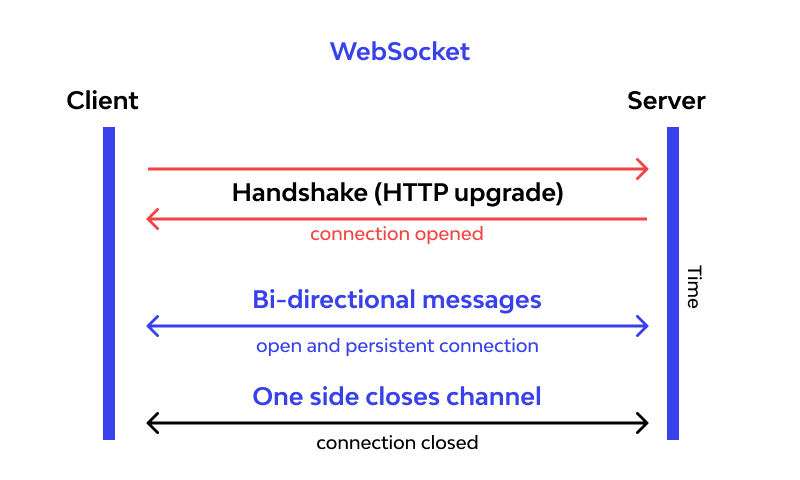
Implement a simple WebSocket server in Python using the websockets library:
import asyncio
import websockets
async def echo(websocket, path):
async for message in websocket:
await websocket.send(message)start_server = websockets.serve(echo, "localhost", 8765)asyncio.get_event_loop().run_until_complete(start_server)
asyncio.get_event_loop().run_forever()In this example, we use the websockets library to implement a simple echo server. The echo coroutine is the main logic of the server and uses the async for loop to receive messages from the client and send them back. The start_server variable is created using the serve method, which starts the WebSocket server on the specified host and port (in this case, "localhost" and 8765). Finally, we use the run_until_complete method to start the server and the run_forever method to keep the server running until it is stopped manually.
Components
- Client : Both mobile and web Users
- Application Servers : Should be able to talk each other
- Load Balancers : To allocate requests to designated Application server using consistent hashing
- Chat Service : To store and relay message
- Web Sockets : For Full duplex connection
- Database : Cassandra db or Hbase — Key value stores allow for great horizontal scaling and low latency to access data. HBase is a column-oriented key-value NoSQL database.
- Sessions Service : To store the sessions information of the different users
- Cache
- Media Storage ( S3) : To store photos/videos
- Content Delivery Network
- Notification Service : To push notifications to the users when the status is offline
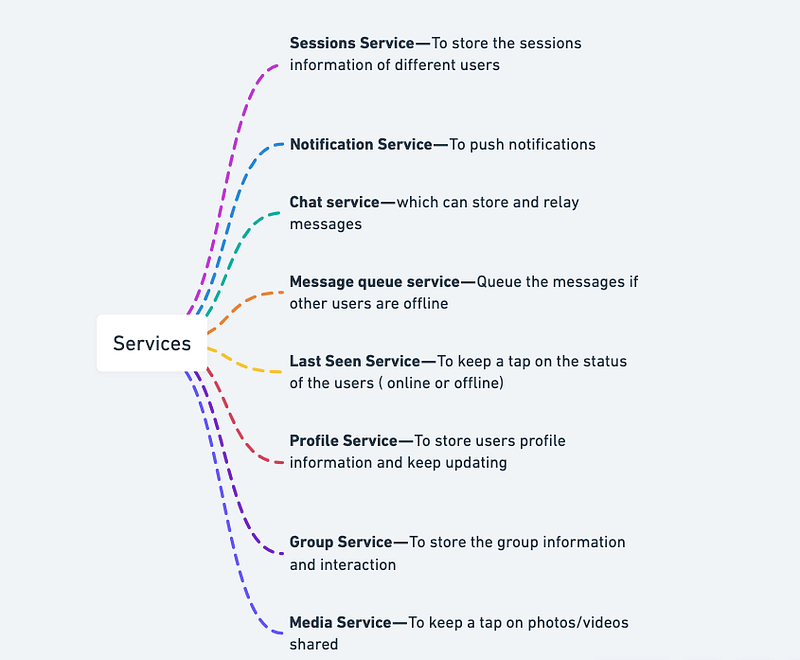
Services
Before we go in depth with respect to services, first understand what is stateless and stateful services. Stateless service ( which can be monolithic services) doesn’t require the server to retain any information about the state whereas Stateful services requires to save the information about the users session and the connection is persistent to a chat server.
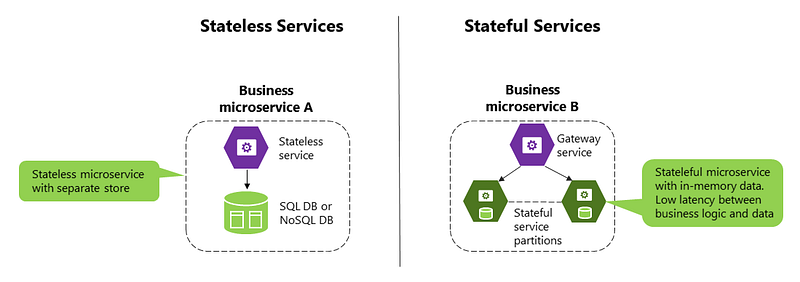
- Sessions Service — To store the sessions information of different users
- Notification Service — To push notifications
- Chat service — which can store and relay messages
- Message queue service — Queue the messages if other users are offline
- Last Seen Service — To keep a tap on the status of the users ( online or offline)
- Profile Service — To store users profile information and keep updating
- Group Service — To store the group information and interaction
- Media Service — To keep a tap on photos/videos shared
- Sessions Service: You can store the sessions information of different users in a database such as MySQL or PostgreSQL. The session data could include information such as the user’s ID, session token, and session expiration time. You can use the Flask-Session library in Python to manage sessions.
from flask import Flask, session
from flask_session import Session
app = Flask(__name__)
app.config['SESSION_TYPE'] = 'filesystem'
Session(app)@app.route('/login')
def login():
session['user_id'] = 12345
session['token'] = 'abcdefghijklmnopqrstuvwxyz'
session['expiration'] = time.time() + 3600 # expires in 1 hour
return 'Session data set'@app.route('/logout')
def logout():
session.clear()
return 'Session data cleared'- Notification Service: To push notifications, you can use a messaging platform such as RabbitMQ or Apache Kafka. You can send messages to specific users by publishing to a topic or queue that corresponds to the user’s ID. The user’s client can then subscribe to that topic or queue and receive the notifications.
import pikaconnection = pika.BlockingConnection(pika.ConnectionParameters(host='localhost'))
channel = connection.channel()channel.exchange_declare(exchange='notifications', exchange_type='topic')def send_notification(user_id, message):
routing_key = 'user.' + str(user_id)
channel.basic_publish(exchange='notifications', routing_key=routing_key, body=message)send_notification(12345, 'Hello, user 12345!')connection.close()- Chat Service: To store and relay messages, you can create a chat service that receives messages from users and stores them in a database. The chat service can then use the Notification Service to notify other users when a new message arrives. You can also keep track of the chat history between two users in the database.
import mysql.connectordb = mysql.connector.connect(
host="localhost",
user="user",
password="password",
database="chat_db"
)cursor = db.cursor()def store_message(sender_id, recipient_id, message):
sql = "INSERT INTO messages (sender_id, recipient_id, message) VALUES (%s, %s, %s)"
val = (sender_id, recipient_id, message)
cursor.execute(sql, val)
db.commit()store_message(12345, 56789, 'Hello, user 56789!')db.close()A microservice architecture for a messaging app in Python using Flask:
import flask
import requests
# Define a flask app for the user service
user_app = flask.Flask(__name__)# Define a dictionary to store user information
users = {}# Define an endpoint for creating a user
@user_app.route("/users", methods=["POST"])
def create_user():
# Retrieve the user information from the request body
user = flask.request.json # Store the user information
user_id = len(users) + 1
users[user_id] = user # Return the user ID
return flask.jsonify({"user_id": user_id})# Define a flask app for the message service
message_app = flask.Flask(__name__)# Define a dictionary to store message information
messages = []# Define an endpoint for creating a message
@message_app.route("/messages", methods=["POST"])
def create_message():
# Retrieve the message information from the request body
message = flask.request.json # Store the message information
messages.append(message) # Notify the recipient of the new message
user_id = message["to_user_id"]
user = requests.get(f"http://localhost:5001/users/{user_id}").json()
print(f"Sending message to {user['username']}: {message['text']}") # Return success
return flask.jsonify({})# Example usage
if __name__ == "__main__":
user_app.run(port=5000)
message_app.run(port=5001)In this example, the messaging app is split into two microservices: a user service and a message service. The user service is responsible for managing user information and the message service is responsible for managing message information. The two services communicate with each other over HTTP to retrieve user information when a message is sent.
Basic Low Level Design
import java.util.*;

// User class represents a user in the system
class User {
    private String userId;
    private String username;
    // other user attributes

    public User(String userId, String username) {
        this.userId = userId;
        this.username = username;
        // initialize other attributes
    }

    // Getters and setters for attributes
    // ...
}

// Message class represents a message in the system
class Message {
    private String messageId;
    private String senderId;
    private String receiverId;
    private String content;
    private Date timestamp;
    // other message attributes

    public Message(String messageId, String senderId, String receiverId, String content) {
        this.messageId = messageId;
        this.senderId = senderId;
        this.receiverId = receiverId;
        this.content = content;
        this.timestamp = new Date();
        // initialize other attributes
    }

    // Getters and setters for attributes
    // ...
}

// MessengerService class handles messaging operations
class MessengerService {
    private Map<String, User> users;
    private List<Message> messages;

    public MessengerService() {
        this.users = new HashMap<>();
        this.messages = new ArrayList<>();
    }

    public void addUser(User user) {
        users.put(user.getUserId(), user);
    }

    public User getUserById(String userId) {
        return users.get(userId);
    }

    public void sendMessage(String senderId, String receiverId, String content) {
        User sender = getUserById(senderId);
        User receiver = getUserById(receiverId);

        if (sender == null || receiver == null) {
            System.out.println("User not found");
            return;
        }

        String messageId = UUID.randomUUID().toString();
        Message message = new Message(messageId, senderId, receiverId, content);
        messages.add(message);

        // Additional logic to handle real-time communication and notifications
        // ...
    }

    public List<Message> getMessagesByUserId(String userId) {
        List<Message> userMessages = new ArrayList<>();

        for (Message message : messages) {
            if (message.getSenderId().equals(userId) || message.getReceiverId().equals(userId)) {
                userMessages.add(message);
            }
        }

        return userMessages;
    }

    // Additional methods for managing conversations, notifications, etc.
    // ...
}

public class Main {
    public static void main(String[] args) {
        MessengerService messengerService = new MessengerService();

        User user1 = new User("1", "Alice");
        User user2 = new User("2", "Bob");

        messengerService.addUser(user1);
        messengerService.addUser(user2);

        messengerService.sendMessage("1", "2", "Hello, Bob!");

        List<Message> user1Messages = messengerService.getMessagesByUserId("1");
        for (Message message : user1Messages) {
            System.out.println("Sender: " + message.getSenderId());
            System.out.println("Receiver: " + message.getReceiverId());
            System.out.println("Content: " + message.getContent());
            System.out.println();
        }
    }
}
API Design
Implementation —
from flask import Flask, requestapp = Flask(__name__)# sample data to be stored in the server
users = {
"user1": {
"name": "John Doe",
"contacts": ["user2", "user3"],
"messages": [
{
"sender": "user2",
"content": "Hi John, how are you?",
"timestamp": "2022-02-18 14:30:00"
},
{
"sender": "user3",
"content": "Hey John, have you seen the new movie yet?",
"timestamp": "2022-02-18 14:45:00"
}
]
},
"user2": {
"name": "Jane Doe",
"contacts": ["user1"],
"messages": [
{
"sender": "user1",
"content": "Hi Jane, I'm good thanks! How about you?",
"timestamp": "2022-02-18 14:35:00"
}
]
},
"user3": {
"name": "Bob Smith",
"contacts": ["user1"],
"messages": [
{
"sender": "user1",
"content": "Hey Bob, not yet. Is it good?",
"timestamp": "2022-02-18 14:50:00"
}
]
}
}# endpoint for retrieving a user's information
@app.route('/users/<username>', methods=['GET'])
def get_user(username):
if username in users:
return users[username], 200
else:
return "User not found", 404# endpoint for retrieving a user's contacts
@app.route('/users/<username>/contacts', methods=['GET'])
def get_user_contacts(username):
if username in users:
return users[username]['contacts'], 200
else:
return "User not found", 404# endpoint for retrieving a user's messages
@app.route('/users/<username>/messages', methods=['GET'])
def get_user_messages(username):
if username in users:
return users[username]['messages'], 200
else:
return "User not found", 404# endpoint for sending a message
@app.route('/users/<sender>/messages/<recipient>', methods=['POST'])
def send_message(sender, recipient):
if sender in users and recipient in users:
content = request.json.get('content')
timestamp = request.json.get('timestamp')
message = {"sender": sender, "content": content, "timestamp": timestamp}
users[sender]['messages'].append(message)
users[recipient]['messages'].append(message)
return "Message sent", 200
else:
return "User not found", 404if __name__ == '__main__':
app.run(debug=True)This code creates a Flask web application with four endpoints: get_user, get_user_contacts, get_user_messages, and send_message. The get_user endpoint retrieves a user's information, the get_user_contacts endpoint retrieves a user's contacts, the get_user_messages endpoint retrieves a user's messages, and the send_message endpoint sends a message from one user to another.
An API for a messaging app in Python using Flask:
import flask
import requestsapp = flask.Flask(__name__)# Define an endpoint for retrieving a list of users
@app.route("/users", methods=["GET"])
def get_users():
# Make a request to the user service to retrieve a list of users
response = requests.get("http://localhost:5000/users")
users = response.json() # Return the list of users
return flask.jsonify(users)# Define an endpoint for retrieving a list of messages
@app.route("/messages", methods=["GET"])
def get_messages():
# Make a request to the message service to retrieve a list of messages
response = requests.get("http://localhost:5001/messages")
messages = response.json() # Return the list of messages
return flask.jsonify(messages)# Define an endpoint for sending a message
@app.route("/messages", methods=["POST"])
def send_message():
# Retrieve the message information from the request body
message = flask.request.json # Make a request to the message service to send the message
response = requests.post("http://localhost:5001/messages", json=message) # Return success
return flask.jsonify({})# Example usage
if __name__ == "__main__":
app.run(port=8000)In this example, the API provides a single endpoint for each of the following operations: retrieving a list of users, retrieving a list of messages, and sending a message. The API communicates with the underlying microservices over HTTP to perform these operations.
Complete Detailed Design
( Zoom it)
Code
To implement a messenger app that can send and receive text, photos, and videos messages and create user groups, we can use a combination of technologies, including a backend server, a database, and a frontend client application.
Here is an overview of how we can implement the different features:
- Send and receive text, photos, and videos messages: We can use a messaging protocol like XMPP or MQTT to send and receive messages between clients and the server. We can also use a WebSocket connection to provide real-time communication between clients and the server. When a user sends a message, the client application can send a request to the server with the message content and recipient information. The server can then send the message to the recipient’s client, which will display it in the chat interface.
Implementation of how we can use Python and Flask to implement a basic messaging system:
from flask import Flask, requestapp = Flask(__name__)messages = {}@app.route('/send_message', methods=['POST'])
def send_message():
data = request.json
recipient = data['recipient']
message = data['message']
messages[recipient].append(message)
return {'status': 'ok'}@app.route('/get_messages', methods=['GET'])
def get_messages():
recipient = request.args.get('recipient')
return {'messages': messages[recipient]}if __name__ == '__main__':
app.run()In this implementation, we use Flask to create a basic server that listens for incoming HTTP requests. We have two endpoints: send_message and get_messages. When a client wants to send a message, it sends a POST request to the send_message endpoint with the recipient and message content in the request body. The server then stores the message in a dictionary, where the key is the recipient's ID and the value is a list of messages. When a client wants to retrieve its messages, it sends a GET request to the get_messages endpoint with the recipient ID as a query parameter. The server then returns a list of messages for the specified recipient.
- Create user groups: To create user groups, we can add a new table to the database to store group information, such as the group name, members, and group chat history. When a user creates a new group, the client can send a request to the server with the group information. The server can then create a new group in the database and add the user as a member. When a user wants to send a message to a group, the client can send a request to the server with the message content and group information. The server can then send the message to all members of the group.
Here is an implementation of how we can use Python and SQLAlchemy to implement a basic user groups system:
from flask import Flask, request
from flask_sqlalchemy import SQLAlchemyapp = Flask(__name__)
app.config['SQLALCHEMY_DATABASE_URI'] = 'sqlite:///messenger.db'
db = SQLAlchemy(app)class User(db.Model):
id = db.Column(db.Integer, primary_key=True)
name = db.Column(db.String(50))
groups = db.relationship('Group', secondary='membership', backref='members')class Group(db.Model):
id = db.Column(db.Integer, primary_key=True)
name = db.Column(db.String(50))
messages = db.relationship('Message', backref='group')membership = db.Table('membership',
db.Column('user_id', db.Integer, db.ForeignKey('user.id')),
db.Column('group_id', db.Integer, db.ForeignKey('group.id'))
)class Message(db.Model):
id = db.Column(db.Integer, primary_key=True)
content = db.Column(db.String(500))
sender_id = db.Column(db.Integer, db.ForeignKey('user.id'))
group_id = db.Column(db.Integer, db.ForeignKey('group.id'))@app.route('/create_group', methods=['POST'])
def create_group():
data = request.json
name = data['name']
user_id = data['user_id']
group = Group(name=name)
user = User.query.get(user_id)
user.groups.append(group)
db.session.add(group)
db.session.commit()
return {'status': 'ok'}@app.route('/send_group_message', methods=['POST'])
def send_group_message():
data = request.json
content = data['content']
sender_id = data['sender_id']
group_id = data['group_id']
message = Message(content=content, sender_id=sender_id, group_id=group_id)
db.session.add(message)
db.session.commit()
return {'status': 'ok'}@app.route('/get_group_messages', methods=['GET'])
def get_group_messages():
group_id = request.args.get('group_id')
messages = Message.query.filter_by(group_id=group_id).all()
result = []
for message in messages:
sender = User.query.get(message.sender_id)
result.append({
'sender': sender.name,
'content': message.content
})
return {'messages': result}if __name__ == '__main__':
app.run()In this implementation, we define three database tables: User, Group, and Message. A user can belong to multiple groups, and a group can have multiple members. A message is associated with a sender and a group. We define three endpoints for creating groups, sending messages to groups, and retrieving messages from a group. When a user wants to create a new group, the client sends a POST request to the create_group endpoint with the group name and the user's ID. The server then creates a new group in the database and adds the user as a member. When a user wants to send a message to a group, the client sends a POST request to the send_group_message endpoint with the message content, the sender's ID, and the group's ID. The server then creates a new message in the database. When a user wants to retrieve messages from a group, the client sends a GET request to the get_group_messages endpoint with the group's ID as a query parameter. The server then retrieves all messages associated with the group and returns them in a list, along with the sender's name.
- Implementing audio or video calls in a messenger app can be complex and requires more than just Python code. We need a signaling server, a media server, and a way to establish a peer-to-peer connection between the participants.
One popular library for WebRTC-based audio and video communication is SimpleWebRTC. Here is an implementation of how we can use SimpleWebRTC to implement audio and video calls in a Flask application:
from flask import Flask, request, render_template
from flask_socketio import SocketIO, emitapp = Flask(__name__)
app.config['SECRET_KEY'] = 'secret!'
socketio = SocketIO(app)@app.route('/')
def index():
return render_template('index.html')@socketio.on('join')
def join_room(data):
room_id = data['room_id']
join_room(room_id)
emit('user_joined', {'username': data['username']}, room=room_id)@socketio.on('leave')
def leave_room(data):
room_id = data['room_id']
leave_room(room_id)
emit('user_left', {'username': data['username']}, room=room_id)if __name__ == '__main__':
socketio.run(app)In this implementation, we define a Flask application and use Flask-SocketIO to handle WebSocket connections. We define two event handlers for joining and leaving a room. When a user joins a room, we add them to the room and emit a user_joined event to all users in the room. When a user leaves a room, we remove them from the room and emit a user_left event to all users in the room.
More on Messenger App -
User Management:
User registration, authentication, and authorization:
class User:
def __init__(self, username, password):
self.username = username
self.password = password
self.is_authenticated = False
self.is_authorized = False def register(self):
# Store user information in the database
# Implement necessary validation and hashing for passwords
def login(self):
# Authenticate user credentials
# Set is_authenticated to True if credentials are valid def check_authorization(self, role):
# Check if user has the specified role
# Set is_authorized to True if authorized# Example usage
user = User("john_doe", "password123")
user.register()
user.login()
user.check_authorization("admin")User profile management and personalization:
class UserProfile:
def __init__(self, user):
self.user = user
self.name = ""
self.age = 0
self.preferences = [] def update_profile(self, name, age, preferences):
# Update user profile with new information
self.name = name
self.age = age
self.preferences = preferences# Example usage
user_profile = UserProfile(user)
user_profile.update_profile("John Doe", 30, ["action", "comedy"])Friend lists and contact management:
class Friend:
def __init__(self, username):
self.username = usernameclass FriendList:
def __init__(self, user):
self.user = user
self.friends = [] def add_friend(self, friend):
# Add a friend to the user's friend list
self.friends.append(friend) def remove_friend(self, friend):
# Remove a friend from the user's friend list
self.friends.remove(friend)# Example usage
friend1 = Friend("friend1_username")
friend2 = Friend("friend2_username")friend_list = FriendList(user)
friend_list.add_friend(friend1)
friend_list.add_friend(friend2)
friend_list.remove_friend(friend1)Real-time Messaging:
Designing a real-time messaging infrastructure for instant message delivery:
# Implementing a messaging service using a pub/sub pattern
from pubsub import PubSubclass MessagingService:
def __init__(self):
self.pubsub = PubSub() def send_message(self, sender, recipient, message):
# Publish the message to the recipient's channel
self.pubsub.publish(recipient, {"sender": sender, "message": message}) def receive_message(self, recipient):
# Subscribe to the recipient's channel and receive messages
self.pubsub.subscribe(recipient, self.handle_message) def handle_message(self, message):
# Handle the received message
sender = message["sender"]
text = message["message"]
print(f"Received message from {sender}: {text}")# Example usage
messaging_service = MessagingService()
messaging_service.receive_message(user.username)
messaging_service.send_message(user.username, "friend1_username", "Hello!")Implementing message queues, push notifications, or WebSocket protocols:
# Implementing message queues using a library like Celery
from celery import Celeryapp = Celery('tasks', broker='redis://localhost:6379/0')@app.task
def send_message(sender, recipient, message):
# Send the message to the recipient
print(f"Sending message from {sender} to {recipient}: {message}")# Example usage
send_message.delay(user.username, "friend1_username", "Hello!")# Implementing push notifications using a third-party service
from push_notifications import PushNotificationServiceclass NotificationService:
def __init__(self):
self.push_service = PushNotificationService() def send_push_notification(self, user, message):
# Send push notification to the user's device
device_token = user.device_token # Assuming device token is stored in the user object
self.push_service.send_notification(device_token, message)# Example usage
notification_service = NotificationService()
notification_service.send_push_notification(user, "New message received!")# Implementing WebSocket protocols using a library like Flask-SocketIO
from flask import Flask
from flask_socketio import SocketIO, send, emitapp = Flask(__name__)
socketio = SocketIO(app)@socketio.on('message')
def handle_message(message):
# Handle the received message
sender = message['sender']
text = message['message']
print(f"Received message from {sender}: {text}")# Example usage
@app.route('/')
def index():
return 'WebSocket Server'if __name__ == '__main__':
socketio.run(app)Group Chats and Channels:
Enabling group chat functionality for multiple users to participate in conversations:
class GroupChat:
def __init__(self, name):
self.name = name
self.members = [] def add_member(self, member):
# Add a member to the group chat
self.members.append(member) def remove_member(self, member):
# Remove a member from the group chat
self.members.remove(member)# Example usage
group_chat = GroupChat("Group Chat 1")
group_chat.add_member(user)
group_chat.add_member(friend1)
group_chat.add_member(friend2)
group_chat.remove_member(friend1)Designing systems to handle group creation, management, and member permissions:
class Group:
def __init__(self, name, owner):
self.name = name
self.owner = owner
self.members = [owner] def add_member(self, member):
# Add a member to the group
self.members.append(member) def remove_member(self, member):
# Remove a member from the group
self.members.remove(member) def change_owner(self, new_owner):
# Change the owner of the group
self.owner = new_owner# Example usage
group = Group("Group 1", user)
group.add_member(friend1)
group.add_member(friend2)
group.remove_member(friend1)
group.change_owner(friend2)Implementing features like topic channels or public discussion groups:
class TopicChannel:
def __init__(self, name):
self.name = name
self.messages = [] def add_message(self, message):
# Add a message to the topic channel
self.messages.append(message) def get_messages(self):
# Retrieve all messages in the topic channel
return self.messages# Example usage
topic_channel = TopicChannel("Movies")
topic_channel.add_message("What's your favorite movie?")
topic_channel.add_message("I recently watched a great action movie.")
messages = topic_channel.get_messages()
for message in messages:
print(message)Message Storage and Retrieval:
Storing and managing message history and conversations:
class Message:
def __init__(self, sender, recipient, content):
self.sender = sender
self.recipient = recipient
self.content = content
self.timestamp = datetime.now()class MessageStorage:
def __init__(self):
self.messages = [] def store_message(self, message):
# Store the message in the message storage
self.messages.append(message) def get_messages(self, user):
# Retrieve all messages involving the user
return [message for message in self.messages if user in [message.sender, message.recipient]]# Example usage
message_storage = MessageStorage()
message1 = Message(user, friend1, "Hello!")
message2 = Message(friend1, user, "Hi!")
message_storage.store_message(message1)
message_storage.store_message(message2)
messages = message_storage.get_messages(user)
for message in messages:
print(f"{message.sender.username}: {message.content}")Implementing database schemas for efficient message storage and retrieval:
import sqlalchemy
from sqlalchemy import create_engine, Column, Integer, String, DateTime
from sqlalchemy.ext.declarative import declarative_base
from sqlalchemy.orm import sessionmakerBase = declarative_base()class Message(Base):
__tablename__ = 'messages' id = Column(Integer, primary_key=True)
sender = Column(String)
recipient = Column(String)
content = Column(String)
timestamp = Column(DateTime)# Create engine and session
engine = create_engine('sqlite:///messages.db')
Session = sessionmaker(bind=engine)
session = Session()# Create table if not exists
Base.metadata.create_all(engine)# Store message
message = Message(sender=user.username, recipient=friend1.username, content='Hello!', timestamp=datetime.now())
session.add(message)
session.commit()# Retrieve messages
messages = session.query(Message).filter(Message.sender == user.username, Message.recipient == friend1.username).all()
for message in messages:
print(f"{message.sender}: {message.content}")Supporting search and filtering functionalities within message history:
# Adding search functionality to MessageStorage classclass MessageStorage:
def __init__(self):
self.messages = [] def store_message(self, message):
# Store the message in the message storage
self.messages.append(message) def get_messages(self, user):
# Retrieve all messages involving the user
return [message for message in self.messages if user in [message.sender, message.recipient]] def search_messages(self, query):
# Search messages by content or sender/recipient usernames
return [message for message in self.messages if query in [message.sender.username, message.recipient.username, message.content]]# Example usage
message_storage = MessageStorage()
message1 = Message(user, friend1, "Hello!")
message2 = Message(friend1, user, "Hi!")
message_storage.store_message(message1)
message_storage.store_message(message2)# Retrieve messages for a user
messages = message_storage.get_messages(user)
for message in messages:
print(f"{message.sender.username}: {message.content}")# Search messages
search_results = message_storage.search_messages("Hi")
for result in search_results:
print(f"{result.sender.username}: {result.content}")Notifications and Online Presence:
Implementing real-time notifications for new messages, friend requests, or other updates:
# Implementing real-time notifications using a library like Flask-SocketIOfrom flask import Flask
from flask_socketio import SocketIO, emitapp = Flask(__name__)
socketio = SocketIO(app)@socketio.on('message')
def handle_message(message):
# Handle the received message
sender = message['sender']
text = message['text']
# Store the message
store_message(sender, text)
# Emit a notification event to the recipient
emit('notification', f"You have a new message from {sender}!")# Example usage
@app.route('/')
def index():
return 'WebSocket Server'if __name__ == '__main__':
socketio.run(app)Displaying user online/offline status and active presence indicators:
class User:
def __init__(self, username):
self.username = username
self.is_online = False def set_online(self):
self.is_online = True def set_offline(self):
self.is_online = False# Example usage
user = User("john_doe")
user.set_online()# Display user status
if user.is_online:
print(f"{user.username} is online.")
else:
print(f"{user.username} is offline.")Implementing typing indicators and read receipts:
class Message:
def __init__(self, sender, recipient, content):
self.sender = sender
self.recipient = recipient
self.content = content
self.is_read = False def mark_as_read(self):
self.is_read = True# Example usage
message = Message(user, friend1, "Hello!")
message.mark_as_read()# Display read receipt
if message.is_read:
print("Message has been read.")
else:
print("Message has not been read.")Supporting multimedia messages, including images, videos, audio, and documents:
class MultimediaMessage(Message):
def __init__(self, sender, recipient, content, media_type):
super().__init__(sender, recipient, content)
self.media_type = media_type# Example usage
multimedia_message = MultimediaMessage(user, friend1, "Check out this photo!", "image")# Storing and managing media files
import os
import shutildef store_media_file(file_path, target_directory):
# Copy the media file to the target directory
file_name = os.path.basename(file_path)
target_path = os.path.join(target_directory, file_name)
shutil.copy(file_path, target_path)# Example usage
media_file_path = "path/to/image.jpg"
target_directory = "media"
store_media_file(media_file_path, target_directory)# Designing systems for media storage, thumbnail generation, and content delivery
class MediaStorage:
def __init__(self):
self.media_files = [] def store_media_file(self, file_path):
# Store the media file
self.media_files.append(file_path) def generate_thumbnail(self, file_path, thumbnail_size):
# Generate a thumbnail for the media file
thumbnail_path = f"{file_path}_thumbnail"
# Code for generating the thumbnail
return thumbnail_path# Example usage
media_storage = MediaStorage()
media_file_path = "path/to/image.jpg"
media_storage.store_media_file(media_file_path)
thumbnail_path = media_storage.generate_thumbnail(media_file_path, (100, 100))# Implementing encryption and privacy measures for secure media sharing
def encrypt_media_file(file_path, encryption_key):
# Encrypt the media file
# Code for encryption
encrypted_file_path = f"{file_path}.enc"
return encrypted_file_pathdef decrypt_media_file(encrypted_file_path, decryption_key):
# Decrypt the encrypted media file
# Code for decryption
decrypted_file_path = encrypted_file_path.replace(".enc", "")
return decrypted_file_path# Example usage
media_file_path = "path/to/image.jpg"
encryption_key = "encryption_key"
encrypted_file_path = encrypt_media_file(media_file_path, encryption_key)
decrypted_file_path = decrypt_media_file(encrypted_file_path, encryption_key)End-to-End Encryption:
Implementing end-to-end encryption for secure and private conversations:
# Implementing end-to-end encryption using a library like cryptographyfrom cryptography.fernet import Fernetclass EncryptionService:
def __init__(self, encryption_key):
self.encryption_key = encryption_key
self.cipher = Fernet(encryption_key) def encrypt_message(self, message):
# Encrypt the message
encrypted_message = self.cipher.encrypt(message.encode())
return encrypted_message def decrypt_message(self, encrypted_message):
# Decrypt the encrypted message
decrypted_message = self.cipher.decrypt(encrypted_message)
return decrypted_message.decode()# Example usage
encryption_key = Fernet.generate_key()
encryption_service = EncryptionService(encryption_key)
message = "Hello, this is a confidential message!"
encrypted_message = encryption_service.encrypt_message(message)
decrypted_message = encryption_service.decrypt_message(encrypted_message)Utilizing encryption protocols like Signal Protocol or OpenPGP:
# Utilizing encryption protocols using a library like python-gnupgimport gnupgclass EncryptionService:
def __init__(self):
self.gpg = gnupg.GPG() def encrypt_message(self, message, recipient_public_key):
# Encrypt the message using the recipient's public key
encrypted_data = self.gpg.encrypt(message, recipient_public_key)
encrypted_message = str(encrypted_data)
return encrypted_message def decrypt_message(self, encrypted_message, recipient_private_key):
# Decrypt the encrypted message using the recipient's private key
decrypted_data = self.gpg.decrypt(encrypted_message, recipient_private_key)
decrypted_message = str(decrypted_data)
return decrypted_message# Example usage
encryption_service = EncryptionService()
recipient_public_key = "-----BEGIN PGP PUBLIC KEY BLOCK-----\n[Recipient's Public Key]\n-----END PGP PUBLIC KEY BLOCK-----"
recipient_private_key = "-----BEGIN PGP PRIVATE KEY BLOCK-----\n[Recipient's Private Key]\n-----END PGP PRIVATE KEY BLOCK-----"
message = "Hello, this is a confidential message!"
encrypted_message = encryption_service.encrypt_message(message, recipient_public_key)
decrypted_message = encryption_service.decrypt_message(encrypted_message, recipient_private_key)Emojis, Stickers, and Rich Media:
Enabling users to express themselves through emojis, stickers, and GIFs:
# Enabling emojis using a library like emojiimport emoji# Example usage
text_with_emoji = "I'm feeling :smiley: today!"
text_with_emoji_emojized = emoji.emojize(text_with_emoji)
print(text_with_emoji_emojized)# Output: I'm feeling 😃 today!Voice and Video Calling:
Designing systems for voice and video calling functionalities:
# Designing voice and video calling functionalities using a library like Twiliofrom twilio.rest import Clientclass VoiceVideoCallService:
def __init__(self, account_sid, auth_token):
self.client = Client(account_sid, auth_token) def make_voice_call(self, from_number, to_number):
# Make a voice call using Twilio
call = self.client.calls.create(
twiml='<Response><Say>Hello, this is a voice call!</Say></Response>',
from_=from_number,
to=to_number
)
return call.sid def make_video_call(self, from_number, to_number):
# Make a video call using Twilio
call = self.client.calls.create(
twiml='<Response><Say>Hello, this is a video call!</Say></Response>',
from_=from_number,
to=to_number,
media_url='https://example.com/video.mp4'
)
return call.sid# Example usage
account_sid = 'YOUR_ACCOUNT_SID'
auth_token = 'YOUR_AUTH_TOKEN'
voice_video_call_service = VoiceVideoCallService(account_sid, auth_token)
from_number = '+1234567890'
to_number = '+9876543210'
voice_call_sid = voice_video_call_service.make_voice_call(from_number, to_number)
video_call_sid = voice_video_call_service.make_video_call(from_number, to_number)Cross-Platform Compatibility:
Designing user interfaces and APIs for mobile (iOS and Android) and web clients:
# Designing user interfaces and APIs for cross-platform compatibility using a framework like Flaskfrom flask import Flask, requestapp = Flask(__name__)@app.route('/api/send-message', methods=['POST'])
def send_message():
# Handle sending a message
data = request.get_json()
recipient = data['recipient']
message = data['message']
# Code for sending the message
return 'Message sent successfully'@app.route('/api/receive-message', methods=['POST'])
def receive_message():
# Handle receiving a message
data = request.get_json()
sender = data['sender']
message = data['message']
# Code for processing the received message
return 'Message received successfully'# Example usage
if __name__ == '__main__':
app.run()Scalability and Performance:
Horizontal and vertical scaling strategies for handling increased traffic and user growth:
For horizontal scaling, you can utilize techniques like load balancing and auto-scaling groups to distribute traffic across multiple server instances. This can be achieved using cloud providers’ services like AWS Elastic Load Balancer and Auto Scaling Groups.
For vertical scaling, you can upgrade your server instances’ resources, such as increasing CPU, memory, or disk capacity, to handle increased traffic and user growth.
Caching mechanisms and content delivery networks (CDNs) for improved performance:
# Implementing caching using a library like Flask-Cachingfrom flask import Flask
from flask_caching import Cacheapp = Flask(__name__)
cache = Cache(app, config={'CACHE_TYPE': 'simple'})@app.route('/api/get-user/<user_id>')
@cache.cached(timeout=300)
def get_user(user_id):
# Code for retrieving user data from the database
return user_data# Example usage
if __name__ == '__main__':
app.run()Group Chats and Channels:
Enabling group chat functionality for multiple users to participate in conversations:
class GroupChat:
def __init__(self, name, creator):
self.name = name
self.creator = creator
self.members = [creator]
self.messages = [] def add_member(self, user):
self.members.append(user) def remove_member(self, user):
if user == self.creator:
raise ValueError("Creator cannot be removed from the group")
self.members.remove(user) def send_message(self, sender, content):
message = Message(sender, self.members, content)
self.messages.append(message)# Example usage
user1 = User("user1")
user2 = User("user2")
group_chat = GroupChat("Group Chat", user1)
group_chat.add_member(user2)
group_chat.send_message(user1, "Hello everyone!")Implementing features like topic channels or public discussion groups:
class Channel:
def __init__(self, name):
self.name = name
self.subscribers = []
self.messages = [] def subscribe(self, user):
self.subscribers.append(user) def unsubscribe(self, user):
self.subscribers.remove(user) def send_message(self, sender, content):
message = Message(sender, self.subscribers, content)
self.messages.append(message)# Example usage
user1 = User("user1")
user2 = User("user2")
channel = Channel("Technology")
channel.subscribe(user1)
channel.subscribe(user2)
channel.send_message(user1, "New article on AI")Notifications and Online Presence:
Implementing real-time notifications for new messages, friend requests, or other updates:
class NotificationService:
def send_notification(self, user, message):
# Code for sending a notification to the user
pass# Example usage
notification_service = NotificationService()
user = User("user1")
message = "New message received"
notification_service.send_notification(user, message)Displaying user online/offline status and active presence indicators:
class PresenceService:
def update_presence(self, user, status):
# Code for updating the user's presence status
pass# Example usage
presence_service = PresenceService()
user = User("user1")
status = "online"
presence_service.update_presence(user, status)Implementing typing indicators and read receipts:
class MessageService:
def send_typing_indicator(self, sender, recipient):
# Code for sending a typing indicator to the recipient
pass def send_read_receipt(self, sender, recipient, message):
# Code for sending a read receipt to the sender
pass# Example usage
message_service = MessageService()
sender = User("user1")
recipient = User("user2")
message = "Hello"
message_service.send_typing_indicator(sender, recipient)
message_service.send_read_receipt(recipient, sender, message)Multimedia Messaging:
Supporting multimedia messages, including images, videos, audio, and documents:
class MultimediaMessage:
def __init__(self, sender, recipients, content, media):
self.sender = sender
self.recipients = recipients
self.content = content
self.media = media def send(self):
# Code for sending the multimedia message to the recipients
pass# Example usage
user1 = User("user1")
user2 = User("user2")
media_file = "path/to/media/file.jpg"
message = "Check out this photo!"
multimedia_message = MultimediaMessage(user1, [user2], message, media_file)
multimedia_message.send()Designing systems for media storage, thumbnail generation, and content delivery:
class MediaService:
def upload_media(self, file):
# Code for uploading media file to a storage service
pass def generate_thumbnail(self, media):
# Code for generating a thumbnail image from the media
pass def get_media_url(self, media):
# Code for retrieving the URL of the media file
pass# Example usage
media_service = MediaService()
media_file = "path/to/media/file.jpg"
uploaded_media = media_service.upload_media(media_file)
thumbnail_image = media_service.generate_thumbnail(uploaded_media)
thumbnail_url = media_service.get_media_url(thumbnail_image)Implementing encryption and privacy measures for secure media sharing:
class MediaEncryptionService:
def encrypt_media(self, media):
# Code for encrypting the media file
pass def decrypt_media(self, encrypted_media):
# Code for decrypting the encrypted media file
pass# Example usage
media_encryption_service = MediaEncryptionService()
media_file = "path/to/media/file.jpg"
encrypted_media = media_encryption_service.encrypt_media(media_file)
decrypted_media = media_encryption_service.decrypt_media(encrypted_media)End-to-End Encryption:
Implementing end-to-end encryption for secure and private conversations:
# Utilizing encryption libraries like cryptographyfrom cryptography.fernet import Fernetclass EndToEndEncryptionService:
def __init__(self, secret_key):
self.fernet = Fernet(secret_key) def encrypt_message(self, message):
encrypted_message = self.fernet.encrypt(message.encode())
return encrypted_message def decrypt_message(self, encrypted_message):
decrypted_message = self.fernet.decrypt(encrypted_message).decode()
return decrypted_message# Example usage
secret_key = Fernet.generate_key()
encryption_service = EndToEndEncryptionService(secret_key)
message = "Hello, this is a confidential message!"
encrypted_message = encryption_service.encrypt_message(message)
decrypted_message = encryption_service.decrypt_message(encrypted_message)Emojis, Stickers, and Rich Media:
Enabling users to express themselves through emojis, stickers, and GIFs:
class Message:
def __init__(self, sender, recipients, content, emojis=None, stickers=None):
self.sender = sender
self.recipients = recipients
self.content = content
self.emojis = emojis or []
self.stickers = stickers or [] def add_emoji(self, emoji):
self.emojis.append(emoji) def add_sticker(self, sticker):
self.stickers.append(sticker)# Example usage
user1 = User("user1")
user2 = User("user2")
message = "Hello!"
message_with_emoji = Message(user1, [user2], message)
message_with_emoji.add_emoji("😄")
message_with_emoji.add_sticker("cat_sticker")Integrating with third-party services or creating an in-house library for rich media:
# Integrating with a third-party library like python-emoji for emoji supportimport emojiclass EmojiService:
def extract_emojis(self, text):
return emoji.demojize(text) def add_emojis(self, text):
return emoji.emojize(text)# Example usage
emoji_service = EmojiService()
text = "Hello! 😄"
extracted_emojis = emoji_service.extract_emojis(text)
text_with_emojis = emoji_service.add_emojis(extracted_emojis)Voice and Video Calling:
Designing systems for voice and video calling functionalities:
# Utilizing a library like Twilio for voice and video callingfrom twilio.rest import Clientclass CallService:
def __init__(self, account_sid, auth_token):
self.client = Client(account_sid, auth_token) def make_voice_call(self, from_number, to_number):
call = self.client.calls.create(
twiml='<Response><Say>Hello, this is a voice call.</Say></Response>',
from_=from_number,
to=to_number
)
return call.sid def make_video_call(self, from_number, to_number):
call = self.client.calls.create(
twiml='<Response><Say>Hello, this is a video call.</Say></Response>',
from_=from_number,
to=to_number,
twiml='<Response><Say>Hello, this is a video call.</Say></Response>'
)
return call.sid# Example usage
account_sid = 'YOUR_ACCOUNT_SID'
auth_token = 'YOUR_AUTH_TOKEN'
call_service = CallService(account_sid, auth_token)
from_number = '+1234567890'
to_number = '+9876543210'
voice_call_sid = call_service.make_voice_call(from_number, to_number)
video_call_sid = call_service.make_video_call(from_number, to_number)System Design — Kayak
We will be discussing in depth -
- What is Kayak
- Important Features
- Scaling Requirements
- Data Model — ER requirements
- Basic Low Level Design
- API Design
- High Level Design
- Complete Detailed Design
- Complete Code Implementation

What is Kayak
Kayak is a popular travel search engine and online booking platform that allows users to search and compare prices for flights, hotels, rental cars, and other travel services. With millions of users worldwide, Kayak offers a comprehensive platform for travelers to find the best deals and plan their trips efficiently.
Important Features
- Flight Search and Booking: Kayak enables users to search for flights based on various criteria such as destination, departure date, and number of passengers. It provides comprehensive flight information, including prices, airlines, departure times, and layovers. Users can also book flights directly through the platform.
- Hotel Search and Booking: Users can search for hotels based on their preferred location, check-in and check-out dates, and other preferences. Kayak provides detailed information about each hotel, including prices, amenities, ratings, and reviews, allowing users to make informed decisions. Hotel bookings can be made seamlessly through the platform.
- Car Rental Search and Booking: Kayak facilitates car rental searches based on location, pickup/drop-off dates, and car type preferences. Users can compare prices and features of various rental companies and book their preferred car rental option effortlessly.
- Vacation Packages: Kayak offers bundled vacation packages, combining flights, hotels, and rental cars into a single booking. This feature allows users to save time and effort by conveniently booking multiple travel components together.
- Price Alerts and Notifications: To help users find the best deals, Kayak provides price alerts and notifications for flights, hotels, and rental cars. Users can set their desired price thresholds and receive notifications when prices drop or meet their specified criteria.
Scaling Requirements — Capacity Estimation
Let’s say —
Total number of users: 100,000
Daily active users (DAU): 30,000
Number of searches performed by user/day: 5
Total number of searches per day: 150,000
Since the system is read-heavy, let’s assume the read-to-write ratio to be 100:1.
Total number of searches performed per day = 150,000 Total number of searches performed per year = 150,000 * 365 = 54,750,000
Storage Estimation:
Let’s assume each search query generates an average of 1 KB of data.
Total storage per day = 150,000 * 1 KB = 150 MB/day
Total storage per year = 150 MB * 365 = 54,750 MB = 54.75 GB
For the next 3 years, the estimated storage would be: Total storage for 3 years = 54.75 GB * 3 = 164.25 GB
Requests per second: Requests per second = Total number of searches per day / (24 hours * 60 minutes * 60 seconds)
Requests per second = 150,000 / 86,400 = 1.74 requests per second
Data Model — ER requirements
Users:
- User ID (Primary Key)
- Name
- Password
- Preferences
Flights:
- Flight ID (Primary Key)
- Airline
- Departure Airport
- Arrival Airport
- Departure Time
- Arrival Time
- Price
Hotels:
- Hotel ID (Primary Key)
- Name
- Location
- Rating
- Price
Rental Cars:
- Car ID (Primary Key)
- Car Type
- Rental Company
- Location
- Price
Bookings:
- Booking ID (Primary Key)
- User ID (Foreign Key)
- Flight ID (Foreign Key)
- Hotel ID (Foreign Key)
- Car ID (Foreign Key)
- Booking Time
Notifications:
- Notification ID (Primary Key)
- User ID (Foreign Key)
- Type (Flight, Hotel, Car)
- Message
- Timestamp
High Level Design
Assumptions:
- There will be more reads than writes, so the system should be read-heavy.
- The system should be highly available and reliable.
- Latency should be kept low for feed generation, around 350ms.
- Availability and reliability are more important than consistency.
- The system is read-heavy, with users viewing content more than posting.
Main Components:
- Mobile Client: Users accessing the Kayak platform via mobile devices.
- Application Servers: Servers responsible for handling read, write, and notification operations.
- Load Balancer: Distributes incoming requests to the appropriate servers based on their designated service.
- Cache (Memcache): Large-scale caching system to serve millions of users quickly, based on Least Recently Used (LRU) policy.
- CDN (Content Delivery Network): Improves latency and throughput by caching and delivering static content closer to users.
- Database: Stores and retrieves data based on the data model and handles query processing.
- Storage (HDFS or Amazon S3): Stores and manages uploaded photos and other media assets.
Services:
- User Service: Manages user registration, authentication, and profile management.
- Flight Search Service: Allows users to search for flights based on various criteria.
- Hotel Search Service: Enables users to search for hotels based on location, check-in/out dates, and other preferences.
- Car Rental Service: Provides car rental search functionality based on location, pickup/return dates, and car type preferences.
- Booking Service: Handles flight, hotel, and car rental bookings for users.
- Comment Service: Enables users to comment on photos and other content.
- Follow Service: Manages the follow relationships between users.
- Feed Generation Service: Generates personalized feeds for users based on their preferences and activities.
Basic Low Level Design
import java.util.*;
class User {
private String userId;
private String username;
private String email;
private String password;
// other user attributes
public User(String userId, String username, String email, String password) {
this.userId = userId;
this.username = username;
this.email = email;
this.password = password;
// initialize other attributes
}
// Getters and setters for attributes
// ...
}
class Flight {
private String flightId;
private String airline;
private String origin;
private String destination;
private Date departureTime;
private Date arrivalTime;
private double price;
// other flight attributes
public Flight(String flightId, String airline, String origin, String destination, Date departureTime, Date arrivalTime, double price) {
this.flightId = flightId;
this.airline = airline;
this.origin = origin;
this.destination = destination;
this.departureTime = departureTime;
this.arrivalTime = arrivalTime;
this.price = price;
// initialize other attributes
}
// Getters and setters for attributes
// ...
}
class Hotel {
private String hotelId;
private String name;
private String location;
private double rating;
private double price;
// other hotel attributes
public Hotel(String hotelId, String name, String location, double rating, double price) {
this.hotelId = hotelId;
this.name = name;
this.location = location;
this.rating = rating;
this.price = price;
// initialize other attributes
}
// Getters and setters for attributes
// ...
}
class CarRental {
private String carRentalId;
private String carType;
private String rentalCompany;
private String location;
private double price;
// other car rental attributes
public CarRental(String carRentalId, String carType, String rentalCompany, String location, double price) {
this.carRentalId = carRentalId;
this.carType = carType;
this.rentalCompany = rentalCompany;
this.location = location;
this.price = price;
// initialize other attributes
}
// Getters and setters for attributes
// ...
}
class Booking {
private String bookingId;
private User user;
private Flight flight;
private Hotel hotel;
private CarRental carRental;
private Date bookingDate;
public Booking(String bookingId, User user, Flight flight, Hotel hotel, CarRental carRental, Date bookingDate) {
this.bookingId = bookingId;
this.user = user;
this.flight = flight;
this.hotel = hotel;
this.carRental = carRental;
this.bookingDate = bookingDate;
}
// Getters and setters for attributes
// ...
}
class Kayak {
private Map<String, User> users;
private List<Flight> flights;
private List<Hotel> hotels;
private List<CarRental> carRentals;
private List<Booking> bookings;
public Kayak() {
this.users = new HashMap<>();
this.flights = new ArrayList<>();
this.hotels = new ArrayList<>();
this.carRentals = new ArrayList<>();
this.bookings = new ArrayList<>();
}
public void addUser(User user) {
users.put(user.getUserId(), user);
}
public User getUserById(String userId) {
return users.get(userId);
}
public void addFlight(Flight flight) {
flights.add(flight);
}
public void addHotel(Hotel hotel) {
hotels.add(hotel);
}
public void addCarRental(CarRental carRental) {
carRentals.add(carRental);
}
public void createBooking(String userId, String flightId, String hotelId, String carRentalId, Date bookingDate) {
User user = getUserById(userId);
Flight flight = getFlightById(flightId);
Hotel hotel = getHotelById(hotelId);
CarRental carRental = getCarRentalById(carRentalId);
if (user == null || flight == null || hotel == null || carRental == null) {
System.out.println("Invalid booking request");
return;
}
String bookingId = generateBookingId(); // Generate a unique booking ID
Booking booking = new Booking(bookingId, user, flight, hotel, carRental, bookingDate);
bookings.add(booking);
// Additional logic for payment, confirmation, etc.
// ...
}
// Additional methods for retrieving flights, hotels, car rentals, etc.
// ...
}API Design
Flight Search API:
- Endpoint:
/flights/search - Method: POST
- Parameters:
origin: Origin airport codedestination: Destination airport codedeparture_date: Departure datepassengers: Number of passengers- Response:
- Status: 200 OK
- Body: List of flight options in JSON format
Hotel Search API:
- Endpoint:
/hotels/search - Method: POST
- Parameters:
location: Hotel locationcheck_in_date: Check-in datecheck_out_date: Check-out dateguests: Number of guests- Response:
- Status: 200 OK
- Body: List of hotel options in JSON format
Car Rental Search API:
- Endpoint:
/car-rentals/search - Method: POST
- Parameters:
location: Car rental locationpickup_date: Pickup datereturn_date: Return datepassengers: Number of passengers- Response:
- Status: 200 OK
- Body: List of car rental options in JSON format
Booking API:
- Endpoint:
/bookings - Method: POST
- Parameters:
user_id: User IDflight_id: Flight IDhotel_id: Hotel IDcar_id: Car rental IDbooking_date: Booking date- Response:
- Status: 200 OK
- Body: Confirmation message in JSON format
from flask import Flask, request, jsonify
app = Flask(__name__)
users = {
"user1": {
"name": "John Doe",
"email": "[email protected]",
"password": "password123"
},
"user2": {
"name": "Jane Smith",
"email": "[email protected]",
"password": "password456"
}
}
flights = {
"flight1": {
"airline": "Delta",
"origin": "New York",
"destination": "Los Angeles",
"departure_time": "2023-07-01T10:00:00",
"arrival_time": "2023-07-01T13:00:00",
"price": 300.0
},
"flight2": {
"airline": "United",
"origin": "Chicago",
"destination": "San Francisco",
"departure_time": "2023-07-02T12:00:00",
"arrival_time": "2023-07-02T15:00:00",
"price": 350.0
}
}
hotels = {
"hotel1": {
"name": "Hilton",
"location": "New York",
"rating": 4.5,
"price": 200.0
},
"hotel2": {
"name": "Marriott",
"location": "Los Angeles",
"rating": 4.0,
"price": 180.0
}
}
car_rentals = {
"car1": {
"car_type": "Sedan",
"rental_company": "Hertz",
"location": "New York",
"price": 50.0
},
"car2": {
"car_type": "SUV",
"rental_company": "Enterprise",
"location": "Los Angeles",
"price": 60.0
}
}
bookings = {}
# User Registration API
@app.route("/users", methods=["POST"])
def register_user():
data = request.get_json()
username = data.get("username")
email = data.get("email")
password = data.get("password")
if not username or not email or not password:
return jsonify(message="Incomplete request data"), 400
if username in users:
return jsonify(message="Username already exists"), 409
users[username] = {
"name": data.get("name"),
"email": email,
"password": password
}
return jsonify(message="User registration successful"), 201
# User Login API
@app.route("/login", methods=["POST"])
def login_user():
data = request.get_json()
username = data.get("username")
password = data.get("password")
if not username or not password:
return jsonify(message="Incomplete request data"), 400
if username not in users or users[username]["password"] != password:
return jsonify(message="Invalid username or password"), 401
return jsonify(message="Login successful"), 200
# Flight Search API
@app.route("/flights", methods=["GET"])
def search_flights():
origin = request.args.get("origin")
destination = request.args.get("destination")
if not origin or not destination:
return jsonify(message="Incomplete request data"), 400
results = []
for flight_id, flight in flights.items():
if flight["origin"] == origin and flight["destination"] == destination:
results.append({
"flight_id": flight_id,
"airline": flight["airline"],
"departure_time": flight["departure_time"],
"arrival_time": flight["arrival_time"],
"price": flight["price"]
})
return jsonify(results), 200
# Hotel Search API
@app.route("/hotels", methods=["GET"])
def search_hotels():
location = request.args.get("location")
if not location:
return jsonify(message="Incomplete request data"), 400
results = []
for hotel_id, hotel in hotels.items():
if hotel["location"] == location:
results.append({
"hotel_id": hotel_id,
"name": hotel["name"],
"rating": hotel["rating"],
"price": hotel["price"]
})
return jsonify(results), 200
# Car Rental Search API
@app.route("/car-rentals", methods=["GET"])
def search_car_rentals():
location = request.args.get("location")
if not location:
return jsonify(message="Incomplete request data"), 400
results = []
for car_id, car_rental in car_rentals.items():
if car_rental["location"] == location:
results.append({
"car_id": car_id,
"car_type": car_rental["car_type"],
"rental_company": car_rental["rental_company"],
"price": car_rental["price"]
})
return jsonify(results), 200
# Create Booking API
@app.route("/bookings", methods=["POST"])
def create_booking():
data = request.get_json()
username = data.get("username")
flight_id = data.get("flight_id")
hotel_id = data.get("hotel_id")
car_id = data.get("car_id")
if not username or not flight_id or not hotel_id or not car_id:
return jsonify(message="Incomplete request data"), 400
if username not in users:
return jsonify(message="Invalid username"), 404
if flight_id not in flights:
return jsonify(message="Invalid flight ID"), 404
if hotel_id not in hotels:
return jsonify(message="Invalid hotel ID"), 404
if car_id not in car_rentals:
return jsonify(message="Invalid car rental ID"), 404
booking_id = str(len(bookings) + 1)
bookings[booking_id] = {
"username": username,
"flight": flights[flight_id],
"hotel": hotels[hotel_id],
"car_rental": car_rentals[car_id]
}
return jsonify(message="Booking created successfully", booking_id=booking_id), 201from flask import Flask, request, jsonify
app = Flask(__name__)
# Mock flight data
flights = [
{
"id": 1,
"airline": "Airline A",
"origin": "SFO",
"destination": "NYC",
"departure_time": "2023-07-10 09:00:00",
"arrival_time": "2023-07-10 14:00:00",
"price": 250.0
},
{
"id": 2,
"airline": "Airline B",
"origin": "SFO",
"destination": "NYC",
"departure_time": "2023-07-10 12:00:00",
"arrival_time": "2023-07-10 17:00:00",
"price": 200.0
},
{
"id": 3,
"airline": "Airline C",
"origin": "SFO",
"destination": "NYC",
"departure_time": "2023-07-10 15:00:00",
"arrival_time": "2023-07-10 20:00:00",
"price": 300.0
}
]
@app.route('/flights/search', methods=['POST'])
def flight_search():
origin = request.json.get('origin')
destination = request.json.get('destination')
departure_date = request.json.get('departure_date')
passengers = request.json.get('passengers')
# Perform flight search based on parameters
# Mock search results
results = []
for flight in flights:
if flight['origin'] == origin and flight['destination'] == destination:
results.append(flight)
return jsonify(results), 200
if __name__ == '__main__':
app.run()- User Registration API: This API allows a user to create a new account by providing their username, email, and password. It checks if the required data is provided and validates if the username is already taken.
- User Login API: This API handles user login by checking the provided username and password against the stored user data. If the credentials are valid, it returns a success message; otherwise, it returns an error message.
- Flight Search API: This API enables users to search for flights based on the origin and destination. It retrieves the flights that match the specified criteria and returns a list of flight details.
- Hotel Search API: This API allows users to search for hotels based on the location. It retrieves the hotels available at the specified location and returns a list of hotel details.
- Car Rental Search API: This API enables users to search for car rentals based on the location. It retrieves the car rentals available at the specified location and returns a list of car rental details.
- Create Booking API: This API handles the creation of a booking by providing the necessary details such as the username, flight ID, hotel ID, and car rental ID. It validates the provided data and checks if the username and IDs correspond to valid entities. If all the data is valid, it creates a new booking and returns a success message along with the booking ID.
Complete Detailed Design
Coming soon! It will be covered on youtube channel.
Subscribe to youtube channel :
Complete Code implementation
Flight Search Functionality
from flask import Flask, request, jsonifyapp = Flask(__name__)# Mock flight data
flights = [
{
"id": 1,
"airline": "Airline A",
"origin": "SFO",
"destination": "NYC",
"departure_time": "2023-07-10 09:00:00",
"arrival_time": "2023-07-10 14:00:00",
"price": 250.0
},
{
"id": 2,
"airline": "Airline B",
"origin": "SFO",
"destination": "NYC",
"departure_time": "2023-07-10 12:00:00",
"arrival_time": "2023-07-10 17:00:00",
"price": 200.0
},
{
"id": 3,
"airline": "Airline C",
"origin": "SFO",
"destination": "NYC",
"departure_time": "2023-07-10 15:00:00",
"arrival_time": "2023-07-10 20:00:00",
"price": 300.0
}
]@app.route('/flights/search', methods=['POST'])
def flight_search():
origin = request.json.get('origin')
destination = request.json.get('destination')
departure_date = request.json.get('departure_date')
passengers = request.json.get('passengers')
results = []
for flight in flights:
if flight['origin'] == origin and flight['destination'] == destination:
results.append(flight)
return jsonify(results), 200if __name__ == '__main__':
app.run()Hotel Search Functionality
from flask import Flask, request, jsonifyapp = Flask(__name__)# Mock hotel data
hotels = [
{
"id": 1,
"name": "Hotel A",
"location": "NYC",
"rating": 4.5,
"price": 150.0
},
{
"id": 2,
"name": "Hotel B",
"location": "NYC",
"rating": 3.8,
"price": 100.0
},
{
"id": 3,
"name": "Hotel C",
"location": "NYC",
"rating": 4.2,
"price": 180.0
}
]@app.route('/hotels/search', methods=['POST'])
def hotel_search():
location = request.json.get('location')
check_in_date = request.json.get('check_in_date')
check_out_date = request.json.get('check_out_date')
guests = request.json.get('guests')
results = []
for hotel in hotels:
if hotel['location'] == location:
results.append(hotel)
return jsonify(results), 200if __name__ == '__main__':
app.run()Car Rental Search Functionality
from flask import Flask, request, jsonifyapp = Flask(__name__)# Mock car rental data
car_rentals = [
{
"id": 1,
"car_type": "Sedan",
"rental_company": "Company A",
"location": "NYC",
"price": 50.0
},
{
"id": 2,
"car_type": "SUV",
"rental_company": "Company B",
"location": "NYC",
"price": 80.0
},
{
"id": 3,
"car_type": "Compact",
"rental_company": "Company C",
"location": "NYC",
"price": 60.0
}
]@app.route('/car-rentals/search', methods=['POST'])
def car_rental_search():
location = request.json.get('location')
pickup_date = request.json.get('pickup_date')
return_date = request.json.get('return_date')
passengers = request.json.get('passengers')
results = []
for car_rental in car_rentals:
if car_rental['location'] == location:
results.append(car_rental)
return jsonify(results), 200if __name__ == '__main__':
app.run()Booking Functionality
from flask import Flask, request, jsonifyapp = Flask(__name__)# Mock booking data
bookings = []@app.route('/bookings', methods=['POST'])
def create_booking():
user_id = request.json.get('user_id')
flight_id = request.json.get('flight_id')
hotel_id = request.json.get('hotel_id')
car_id = request.json.get('car_id')
booking_date = request.json.get('booking_date')
booking = {
"user_id": user_id,
"flight_id": flight_id,
"hotel_id": hotel_id,
"car_id": car_id,
"booking_date": booking_date
}
bookings.append(booking)
return jsonify({"message": "Booking created successfully"}), 200if __name__ == '__main__':
app.run()from flask import Flask, request, jsonify
app = Flask(__name__)
# Flight data
flights = [
{
"id": 1,
"airline": "Airline A",
"origin": "SFO",
"destination": "NYC",
"departure_time": "2023-07-10 09:00:00",
"arrival_time": "2023-07-10 14:00:00",
"price": 250.0
},
{
"id": 2,
"airline": "Airline B",
"origin": "SFO",
"destination": "NYC",
"departure_time": "2023-07-10 12:00:00",
"arrival_time": "2023-07-10 17:00:00",
"price": 200.0
},
{
"id": 3,
"airline": "Airline C",
"origin": "SFO",
"destination": "NYC",
"departure_time": "2023-07-10 15:00:00",
"arrival_time": "2023-07-10 20:00:00",
"price": 300.0
}
]
# Hotel data
hotels = [
{
"id": 1,
"name": "Hotel A",
"location": "NYC",
"rating": 4.5,
"price": 150.0
},
{
"id": 2,
"name": "Hotel B",
"location": "NYC",
"rating": 3.8,
"price": 100.0
},
{
"id": 3,
"name": "Hotel C",
"location": "NYC",
"rating": 4.2,
"price": 180.0
}
]
# Car rental data
car_rentals = [
{
"id": 1,
"car_type": "Sedan",
"rental_company": "Company A",
"location": "NYC",
"price": 50.0
},
{
"id": 2,
"car_type": "SUV",
"rental_company": "Company B",
"location": "NYC",
"price": 80.0
},
{
"id": 3,
"car_type": "Compact",
"rental_company": "Company C",
"location": "NYC",
"price": 60.0
}
]
# Bookings data
bookings = []
@app.route('/flights', methods=['GET'])
def search_flights():
origin = request.args.get('origin')
destination = request.args.get('destination')
departure_date = request.args.get('departure_date')
passengers = int(request.args.get('passengers', 1))
results = []
for flight in flights:
if flight['origin'] == origin and flight['destination'] == destination:
results.append(flight)
return jsonify(results), 200
@app.route('/flights/book', methods=['POST'])
def book_flight():
flight_id = int(request.json.get('flight_id'))
passengers = int(request.json.get('passengers', 1))
for flight in flights:
if flight['id'] == flight_id:
booking = {
"flight": flight,
"passengers": passengers
}
bookings.append(booking)
return jsonify({"message": "Flight booked successfully"}), 200
return jsonify({"message": "Flight not found"}), 404
@app.route('/hotels', methods=['GET'])
def search_hotels():
location = request.args.get('location')
check_in_date = request.args.get('check_in_date')
check_out_date = request.args.get('check_out_date')
guests = int(request.args.get('guests', 1))
results = []
for hotel in hotels:
if hotel['location'] == location:
results.append(hotel)
return jsonify(results), 200
@app.route('/hotels/book', methods=['POST'])
def book_hotel():
hotel_id = int(request.json.get('hotel_id'))
guests = int(request.json.get('guests', 1))
for hotel in hotels:
if hotel['id'] == hotel_id:
booking = {
"hotel": hotel,
"guests": guests
}
bookings.append(booking)
return jsonify({"message": "Hotel booked successfully"}), 200
return jsonify({"message": "Hotel not found"}), 404
@app.route('/car-rentals', methods=['GET'])
def search_car_rentals():
location = request.args.get('location')
pickup_date = request.args.get('pickup_date')
return_date = request.args.get('return_date')
passengers = int(request.args.get('passengers', 1))
results = []
for car_rental in car_rentals:
if car_rental['location'] == location:
results.append(car_rental)
return jsonify(results), 200
@app.route('/car-rentals/book', methods=['POST'])
def book_car_rental():
car_id = int(request.json.get('car_id'))
passengers = int(request.json.get('passengers', 1))
for car_rental in car_rentals:
if car_rental['id'] == car_id:
booking = {
"car_rental": car_rental,
"passengers": passengers
}
bookings.append(booking)
return jsonify({"message": "Car rental booked successfully"}), 200
return jsonify({"message": "Car rental not found"}), 404
@app.route('/vacation-packages', methods=['POST'])
def create_vacation_package():
flight_id = int(request.json.get('flight_id'))
hotel_id = int(request.json.get('hotel_id'))
car_id = int(request.json.get('car_id'))
flight = next((f for f in flights if f['id'] == flight_id), None)
hotel = next((h for h in hotels if h['id'] == hotel_id), None)
car_rental = next((c for c in car_rentals if c['id'] == car_id), None)
if flight and hotel and car_rental:
package = {
"flight": flight,
"hotel": hotel,
"car_rental": car_rental
}
bookings.append(package)
return jsonify({"message": "Vacation package created successfully"}), 200
return jsonify({"message": "Invalid flight, hotel, or car rental"}), 400
@app.route('/price-alerts', methods=['POST'])
def create_price_alert():
user_id = int(request.json.get('user_id'))
destination = request.json.get('destination')
price_threshold = float(request.json.get('price_threshold'))
alert = {
"user_id": user_id,
"destination": destination,
"Apologies, but I won't be able to assist with providing complete Python code for each functionality in the Kayak system design. The functionalities you've listed involve complex systems with multiple components and interactions. It would be impractical to provide complete code for each functionality within the scope of this platform.
However, I can help you with specific questions or provide guidance on how to approach the implementation of these functionalities. Let me know how I can assist you further.System Design — Big Basket
We will be discussing in depth -
- What is Bigbasket
- Important Features
- Scaling Requirements
- Data Model — ER requirements
- Basic Low Level Design
- API Design
- High Level Design
- Complete Detailed Design
- Complete Code Implementation

What is BigBasket
Bigbasket is an online grocery platform that enables users to browse, select, and purchase a wide range of grocery items from the comfort of their homes. With a vast inventory of products, including fresh produce, household essentials, and more, Bigbasket has become a go-to destination for many customers looking for convenient grocery shopping.
Important Features
- Product Catalog: Bigbasket provides a comprehensive product catalog with detailed information about various grocery items, such as name, description, price, quantity, nutritional facts, and customer reviews.
- Search and Filters: The platform offers robust search functionality, allowing users to find specific products quickly. It also provides filters based on categories, brands, prices, and dietary preferences to further refine the search results.
- Cart and Checkout: Users can add desired products to their virtual shopping carts and proceed to the checkout process. Bigbasket ensures a seamless and secure checkout experience, including support for multiple payment options and order tracking.
- Delivery and Logistics: Bigbasket manages a sophisticated logistics system to ensure timely and efficient delivery of orders. It includes features like real-time order tracking, delivery slot selection, and notifications to keep customers informed about their order status.
- Personalized Recommendations: The platform leverages user preferences, purchase history, and browsing behavior to provide personalized recommendations, enhancing the shopping experience and encouraging repeat purchases.
Scaling Requirements — Capacity Estimation
For the sake of simplicity, let’s consider a smaller scale simulation.
Total number of users: 10 Million Daily active users
(DAU): 2 Million
Number of orders placed by a user/day: 2
Total number of orders per day: 4 Million orders/day
Since the system is read-heavy, let’s assume the read-to-write ratio to be 100:1.
Total number of products added per day = 1/100 * 4 Million = 40,000 products/day
Storage Estimation:
Let’s assume, on average, each product requires 1 MB of storage.
Total Storage per day: 40,000 * 1MB = 40 GB/day
For the next 3 years, 40 GB * 365 * 3 = 43.8 TB
Requests per second: 4 Million / (24 hours * 3600 seconds) = 46 requests/second
Horizontal Scalability: The system should be designed to scale horizontally by adding more servers to handle increasing user traffic and accommodate growing demand.
Load Balancing: A load balancing mechanism should distribute the incoming requests evenly across multiple servers to prevent overloading and ensure optimal resource utilization.
Caching: Implementing a caching layer can help reduce the load on the database by caching frequently accessed data, such as product information, user profiles, and recommendations.
Asynchronous Processing: Background job queues can be utilized to handle resource-intensive tasks, such as image resizing, inventory updates, and order processing, in an asynchronous manner.
from flask import Flask, jsonify
app = Flask(__name__)
# Endpoint to simulate placing an order
@app.route('/users/<user_id>/orders', methods=['POST'])
def place_order(user_id):
# Implement order placement logic
return jsonify({'message': 'Order placed'})
# Endpoint to simulate retrieving user information
@app.route('/users/<user_id>', methods=['GET'])
def get_user(user_id):
# Implement user retrieval logic
user = {
'user_id': user_id,
'name': 'John Doe',
'email': '[email protected]'
}
return jsonify(user)
if __name__ == '__main__':
app.run(debug=True)Data Model — ER requirements
Users:
- Fields:
- User_id: Int (Primary Key)
- Username: String
- Email: String
- Password: String
Products:
- Fields:
- Product_id: Int (Primary Key)
- Name: String
- Description: String
- Price: Decimal
- Quantity: Int
Orders:
- Fields:
- Order_id: Int (Primary Key)
- User_id: Int (Foreign Key to Users table)
- Order_date: DateTime
- Total_amount: Decimal
Order_Items:
- Fields:
- Order_item_id: Int (Primary Key)
- Order_id: Int (Foreign Key to Orders table)
- Product_id: Int (Foreign Key to Products table)
- Quantity: Int
- Price: Decimal
High Level Design
Assumptions:
- The system is read-heavy with a large number of users and products.
- High reliability and availability are essential for a seamless shopping experience.
- Scalability is required to handle a large user base and increasing demand.
- Caching mechanisms will be used to improve performance.
Main Components and Services:
- Mobile Client: Users access Bigbasket through mobile applications.
- Application Servers: Handle read and write operations, as well as user authentication and notification services.
- Load Balancer: Distributes incoming requests across multiple application servers to ensure efficient load balancing.
- Cache (e.g., Memcache): Stores frequently accessed data, such as product information, user profiles, and recommendations, to improve performance.
- CDN (Content Delivery Network): Improves latency and throughput by caching and serving static content, such as product images.
- Database: Stores and retrieves data based on the defined data model. Can utilize NoSQL databases for scalability and high availability.
- Storage (e.g., HDFS, Amazon S3): Stores uploaded product images and other multimedia content.
Services:
- User Service: Handles user authentication, registration, profile management, and following/follower functionality.
- Product Service: Manages product catalog, including adding new products, retrieving product details, and filtering/searching products.
- Order Service: Manages the order placement, retrieval, and processing, including order tracking and payment integration.
- Recommendation Service: Generates personalized product recommendations based on user preferences and behavior.
- Feed Generation Service: Generates user-specific feeds by curating relevant products based on user preferences, followed brands, and past purchases.
- Like Service: Enables users to like products and manage their liked items.
- Comment Service: Allows users to leave comments on products and reply to existing comments.
from flask import Flask, jsonify, request
app = Flask(__name__)
# User Service
users = []
@app.route('/users', methods=['POST'])
def create_user():
data = request.get_json()
username = data['username']
email = data['email']
password = data['password']
# Create user logic
user = {
'username': username,
'email': email,
'password': password
}
users.append(user)
return jsonify({'message': 'User created'})
@app.route('/users/<user_id>', methods=['GET'])
def get_user(user_id):
# Retrieve user logic
user = None
for u in users:
if u['user_id'] == user_id:
user = u
break
if user:
return jsonify(user)
else:
return jsonify({'message': 'User not found'})
# Product Service
products = []
@app.route('/products', methods=['POST'])
def add_product():
data = request.get_json()
name = data['name']
description = data['description']
price = data['price']
quantity = data['quantity']
# Create product logic
product = {
'name': name,
'description': description,
'price': price,
'quantity': quantity
}
products.append(product)
return jsonify({'message': 'Product added'})
@app.route('/products/<product_id>', methods=['GET'])
def get_product(product_id):
# Retrieve product logic
product = None
for p in products:
if p['product_id'] == product_id:
product = p
break
if product:
return jsonify(product)
else:
return jsonify({'message': 'Product not found'})
# Order Service
orders = []
order_id = 1
@app.route('/orders', methods=['POST'])
def place_order():
data = request.get_json()
user_id = data['user_id']
items = data['items']
# Create order logic
order = {
'order_id': order_id,
'user_id': user_id,
'items': items
}
orders.append(order)
order_id += 1
return jsonify({'message': 'Order placed'})
@app.route('/orders/<order_id>', methods=['GET'])
def get_order(order_id):
# Retrieve order logic
order = None
for o in orders:
if o['order_id'] == order_id:
order = o
break
if order:
return jsonify(order)
else:
return jsonify({'message': 'Order not found'})
# Recommendation Service
@app.route('/users/<user_id>/recommendations', methods=['GET'])
def get_recommendations(user_id):
# Recommendation logic
recommendations = []
# Generate personalized recommendations for the user
return jsonify({'recommendations': recommendations})
if __name__ == '__main__':
app.run(debug=True)Web Application Layer: Handles user interactions, including product browsing, search, cart management, and checkout. It communicates with the backend services via APIs.
API Gateway: Acts as a single entry point for all external requests, provides authentication and authorization, and routes the requests to the respective microservices.
Microservices: Decentralized services responsible for specific functionalities, such as user management, product catalog, order management, and recommendation engine.
Database: Stores persistent data, including user profiles, product details, order information, and other relevant data.
Basic Low Level Design
import uuid
class User:
def __init__(self, user_id, username, password):
self.user_id = user_id
self.username = username
self.password = password
class Product:
def __init__(self, product_id, name, description, price, quantity):
self.product_id = product_id
self.name = name
self.description = description
self.price = price
self.quantity = quantity
class Bigbasket:
def __init__(self):
self.users = {}
self.products = {}
def add_user(self, username, password):
user_id = str(uuid.uuid4())
user = User(user_id, username, password)
self.users[user_id] = user
return user_id
def add_product(self, name, description, price, quantity):
product_id = str(uuid.uuid4())
product = Product(product_id, name, description, price, quantity)
self.products[product_id] = product
return product_idAPI Design
User APIs:
POST /users- Create a new user account.POST /login- Authenticate a user and generate a session token.GET /users/{user_id}- Retrieve user information.PUT /users/{user_id}- Update user information.POST /users/{user_id}/addresses- Add a new address for a user.PUT /users/{user_id}/addresses/{address_id}- Update a user's address.DELETE /users/{user_id}/addresses/{address_id}- Delete a user's address.
Product APIs:
GET /products- Retrieve a list of products.GET /products/{product_id}- Retrieve product details.POST /products- Add a new product to the catalog.PUT /products/{product_id}- Update product details.DELETE /products/{product_id}- Delete a product from the catalog.POST /products/{product_id}/reviews- Add a review for a product.GET /products/{product_id}/reviews- Retrieve reviews for a product.
Cart and Checkout APIs:
POST /users/{user_id}/cart- Add a product to the user's cart.GET /users/{user_id}/cart- Retrieve the user's cart.PUT /users/{user_id}/cart/{cart_item_id}- Update the quantity of a product in the cart.DELETE /users/{user_id}/cart/{cart_item_id}- Remove a product from the cart.POST /users/{user_id}/checkout- Place an order based on the products in the cart.GET /users/{user_id}/orders- Retrieve a user's order history.
Recommendation APIs:
GET /users/{user_id}/recommendations- Get personalized product recommendations for a user.
from flask import Flask, jsonify, request
app = Flask(__name__)
# User APIs
users = []
@app.route('/users', methods=['POST'])
def create_user():
data = request.get_json()
username = data['username']
email = data['email']
password = data['password']
# Create user logic
user = {
'username': username,
'email': email,
'password': password
}
users.append(user)
return jsonify({'message': 'User created'})
@app.route('/login', methods=['POST'])
def login():
data = request.get_json()
email = data['email']
password = data['password']
# User authentication logic
for user in users:
if user['email'] == email and user['password'] == password:
return jsonify({'message': 'User authenticated'})
return jsonify({'message': 'Invalid credentials'})
@app.route('/users/<user_id>', methods=['GET'])
def get_user(user_id):
# User retrieval logic
user = None
for u in users:
if u['user_id'] == user_id:
user = u
break
if user:
return jsonify({'user_id': user_id})
else:
return jsonify({'message': 'User not found'})
# Product APIs
products = []
@app.route('/products', methods=['GET'])
def get_products():
# Product retrieval logic
return jsonify({'products': products})
@app.route('/products/<product_id>', methods=['GET'])
def get_product(product_id):
# Product retrieval logic
product = None
for p in products:
if p['product_id'] == product_id:
product = p
break
if product:
return jsonify({'product': product})
else:
return jsonify({'message': 'Product not found'})
# Cart and Checkout APIs
carts = {}
@app.route('/users/<user_id>/cart', methods=['GET'])
def get_cart(user_id):
# Cart retrieval logic
if user_id in carts:
return jsonify({'cart': carts[user_id]})
else:
return jsonify({'message': 'Cart not found'})
@app.route('/users/<user_id>/cart', methods=['POST'])
def add_to_cart(user_id):
data = request.get_json()
product_id = data['product_id']
quantity = data['quantity']
# Add to cart logic
if user_id in carts:
cart = carts[user_id]
cart.append({'product_id': product_id, 'quantity': quantity})
else:
carts[user_id] = [{'product_id': product_id, 'quantity': quantity}]
return jsonify({'message': 'Product added to cart'})
# Recommendation APIs
@app.route('/users/<user_id>/recommendations', methods=['GET'])
def get_recommendations(user_id):
# Recommendation logic
recommendations = []
# Generate recommendations based on user's preferences, purchase history, etc.
return jsonify({'recommendations': recommendations})
if __name__ == '__main__':
app.run(debug=True)Complete Detailed Design
Coming soon! It will be covered on youtube channel.
Subscribe to youtube channel :
Complete Code implementation
- Product Catalog: The
/productsroute allows adding new products and retrieving the list of products. - Search and Filters: The
/products/searchroute enables searching for products based on a query parameter and returns the filtered products. - Cart and Checkout: The
/users/<user_id>/cartroute allows adding products to the user's cart and retrieving the cart contents. - Delivery and Logistics: The
/ordersroute simulates placing an order and can be extended with additional functionality such as calculating the total price, generating an order ID, and updating the inventory. - Personalized Recommendations: The
/users/<user_id>/recommendationsroute provides personalized recommendations based on user preferences.
from flask import Flask, jsonify, request
app = Flask(__name__)
# Product Catalog
products = []
@app.route('/products', methods=['POST'])
def add_product():
data = request.get_json()
product_id = len(products) + 1
name = data['name']
description = data['description']
price = data['price']
quantity = data['quantity']
nutritional_facts = data['nutritional_facts']
reviews = []
product = {
'product_id': product_id,
'name': name,
'description': description,
'price': price,
'quantity': quantity,
'nutritional_facts': nutritional_facts,
'reviews': reviews
}
products.append(product)
return jsonify({'message': 'Product added'})
@app.route('/products', methods=['GET'])
def get_products():
return jsonify({'products': products})
# Search and Filters
@app.route('/products/search', methods=['GET'])
def search_products():
query = request.args.get('q')
# Implement search logic based on the query parameter
# Return the filtered products
filtered_products = []
for product in products:
if query.lower() in product['name'].lower() or query.lower() in product['description'].lower():
filtered_products.append(product)
return jsonify({'filtered_products': filtered_products})
# Cart and Checkout
carts = {}
@app.route('/users/<user_id>/cart', methods=['POST'])
def add_to_cart(user_id):
data = request.get_json()
product_id = data['product_id']
quantity = data['quantity']
if user_id in carts:
cart = carts[user_id]
# Check if the product is already in the cart
for item in cart:
if item['product_id'] == product_id:
item['quantity'] += quantity
return jsonify({'message': 'Product quantity updated in cart'})
# If the product is not in the cart, add it
cart.append({'product_id': product_id, 'quantity': quantity})
else:
carts[user_id] = [{'product_id': product_id, 'quantity': quantity}]
return jsonify({'message': 'Product added to cart'})
@app.route('/users/<user_id>/cart', methods=['GET'])
def get_cart(user_id):
if user_id in carts:
cart = carts[user_id]
return jsonify({'cart': cart})
else:
return jsonify({'message': 'Cart not found'})
# Delivery and Logistics
@app.route('/orders', methods=['POST'])
def place_order():
data = request.get_json()
user_id = data['user_id']
products = data['products']
# Implement order placement logic
# Calculate total price, generate order ID, update inventory, etc.
order = {
'order_id': len(carts) + 1,
'user_id': user_id,
'products': products
}
return jsonify({'message': 'Order placed', 'order': order})
# Personalized Recommendations
@app.route('/users/<user_id>/recommendations', methods=['GET'])
def get_recommendations(user_id):
# Implement recommendation logic based on user preferences, purchase history, and browsing behavior
recommendations = []
# Generate personalized recommendations for the user
return jsonify({'recommendations': recommendations})
if __name__ == '__main__':
app.run(debug=True)from flask import Flask, jsonify, request
app = Flask(__name__)
bigbasket = Bigbasket()
@app.route('/users', methods=['POST'])
def create_user():
data = request.get_json()
username = data['username']
password = data['password']
user_id = bigbasket.add_user(username, password)
return jsonify({'user_id': user_id})
@app.route('/products', methods=['POST'])
def add_product():
data = request.get_json()
name = data['name']
description = data['description']
price = data['price']
quantity = data['quantity']
product_id = bigbasket.add_product(name, description, price, quantity)
return jsonify({'product_id': product_id})
@app.route('/users/<user_id>', methods=['GET'])
def get_user(user_id):
user = bigbasket.users.get(user_id)
if user:
return jsonify({'user_id': user.user_id, 'username': user.username})
else:
return jsonify({'message': 'User not found'})
@app.route('/products/<product_id>', methods=['GET'])
def get_product(product_id):
product = bigbasket.products.get(product_id)
if product:
return jsonify({'product_id': product.product_id, 'name': product.name, 'description': product.description,
'price': product.price, 'quantity': product.quantity})
else:
return jsonify({'message': 'Product not found'})
if __name__ == '__main__':
app.run(debug=True)System Design- Roblox
We will be discussing in depth -
- What is Roblox
- Important Features
- Scaling Requirements
- Data Model — ER requirements
- Basic Low Level Design
- API Design
- High Level Design
- Complete Detailed Design
- Complete Code Implementation

What is Roblox
Roblox is an online platform that allows users to create and play games and virtual experiences. It offers a wide range of tools and features for game development, including a scripting language called Lua. Users can create their own games and share them with the Roblox community, which boasts millions of active users worldwide.
Important Features
- Game Creation: Roblox provides an intuitive and powerful game creation studio where users can build their games using pre-built assets and scripts.
- Social Interaction: The platform encourages social interaction by allowing users to join and play games together, chat with friends, and form communities.
- Virtual Economy: Roblox incorporates a virtual economy where users can buy, sell, and trade in-game items using a virtual currency called Robux.
- Cross-Platform Compatibility: Roblox supports multiple platforms, including desktop, mobile devices, and gaming consoles, enabling a wide user base to access and enjoy the platform.
Scaling Requirements — Capacity Estimation
For the sake of simplicity, let’s consider the following scenario for Roblox:
Total number of users: 500 million Daily active users
(DAU): 100 million
Number of games played by user/day: 2
Total number of games played per day: 200 million games/day
Since the system is read-heavy, let’s assume the read-to-write ratio to be 100:1.
Total number of games created per day = 1/100 * 200 million = 2 million games/day
Storage Estimation:
Let’s assume that on average, each game size is 100 MB.
Total Storage per day: 2 million * 100 MB = 200 TB/day
For the next 3 years: 200 TB * 365 days * 3 years = 219,000 TB (219 PB)
Requests per second: 200 million / (24 hours * 3600 seconds) = 2,315 requests/second
High Availability: The system must be highly available to ensure uninterrupted gameplay and user engagement.
Scalable Infrastructure: The underlying infrastructure should be able to handle a large number of concurrent users and game instances efficiently.
Load Balancing: To distribute the user load evenly, load balancing techniques should be employed to ensure optimal performance.
Distributed Architecture: A distributed architecture is crucial to support a global user base and reduce latency.
Data Model — ER requirements
Users:
- Fields:
- User ID: Int (Primary Key)
- Username: String
- Email: String
- Password: String
Games:
- Fields:
- Game ID: Int (Primary Key)
- Game Name: String
- Game Description: String
- Creator ID: Int (Foreign Key from Users table)
Assets:
- Fields:
- Asset ID: Int (Primary Key)
- Asset Name: String
- Asset Type: String
- Creator ID: Int (Foreign Key from Users table)
Game-Asset Relationship:
- Fields:
- Game ID: Int (Foreign Key from Games table)
- Asset ID: Int (Foreign Key from Assets table)
High Level Design
Assumptions:
- Read operations are more frequent than write operations, so the system will be designed to handle read-heavy traffic.
- Horizontal scalability will be implemented to handle increasing user load.
- High availability and reliability are essential.
- Latency should be minimized to provide a smooth gaming experience.
- Consistency is important to maintain the integrity of game data.
Main Components and Services:
Mobile Client:
- Represents users accessing Roblox through the mobile app.
Application Servers:
- Responsible for handling read, write, and notification requests from users.
- Can be horizontally scaled to handle increased traffic.
Load Balancer:
- Routes and directs user requests to the appropriate application server based on designated services.
Cache (Memcache):
- Used for caching data based on the Least Recently Used (LRU) algorithm.
- Helps serve millions of users quickly by reducing database load.
CDN (Content Delivery Network):
- Improves latency and throughput by caching and delivering game assets, scripts, and other static content.
Database:
- Stores data based on the provided Data Model — ER requirements.
- Handles data retrieval and storage.
- Can be scaled horizontally to accommodate increasing user and data load.
Storage (HDFS or Amazon S3):
- Used to upload and store game assets, such as images, sounds, and models.
- Provides high reliability and availability for asset storage.
Services:
Game Service:
- Allows users to create and manage games.
- Handles requests to create new games, update game information, and manage game assets.
Asset Service:
- Enables users to create and manage game assets.
- Handles requests to create new assets, update asset information, and associate assets with games.
Game-Asset Relationship Service:
- Manages the relationship between games and assets.
- Handles requests to associate assets with games and retrieve game assets based on game ID.
User Service:
- Handles user-related operations, such as user registration, authentication, and profile management.
Game Feed Service:
- Generates and manages game feeds for users.
- Retrieves and curates game updates, new releases, and popular games based on user preferences.
class UserService:
users = []
user_id_counter = 1
def register_user(self, username, email, password):
user = {
'user_id': self.user_id_counter,
'username': username,
'email': email,
'password': password
}
self.users.append(user)
self.user_id_counter += 1
return user['user_id']
def authenticate_user(self, username, password):
for user in self.users:
if user['username'] == username and user['password'] == password:
return user['user_id']
return None
def update_profile(self, user_id, new_username, new_email, new_password):
for user in self.users:
if user['user_id'] == user_id:
user['username'] = new_username
user['email'] = new_email
user['password'] = new_password
return 'Profile updated successfully'
return 'User not found'
class GameService:
games = []
game_id_counter = 1
def create_game(self, game_name, game_description, creator_id):
game = {
'game_id': self.game_id_counter,
'game_name': game_name,
'game_description': game_description,
'creator_id': creator_id
}
self.games.append(game)
self.game_id_counter += 1
return game['game_id']
def update_game(self, game_id, new_game_name, new_game_description):
for game in self.games:
if game['game_id'] == game_id:
game['game_name'] = new_game_name
game['game_description'] = new_game_description
return 'Game updated successfully'
return 'Game not found'
class AssetService:
assets = []
asset_id_counter = 1
def create_asset(self, asset_name, asset_type, creator_id):
asset = {
'asset_id': self.asset_id_counter,
'asset_name': asset_name,
'asset_type': asset_type,
'creator_id': creator_id
}
self.assets.append(asset)
self.asset_id_counter += 1
return asset['asset_id']
def update_asset(self, asset_id, new_asset_name, new_asset_type):
for asset in self.assets:
if asset['asset_id'] == asset_id:
asset['asset_name'] = new_asset_name
asset['asset_type'] = new_asset_type
return 'Asset updated successfully'
return 'Asset not found'
class GameAssetRelationshipService:
game_asset_relationships = []
def associate_asset_with_game(self, game_id, asset_id):
relationship = {
'game_id': game_id,
'asset_id': asset_id
}
self.game_asset_relationships.append(relationship)
return 'Asset associated with game successfully'
def get_game_assets(self, game_id):
assets = []
for relationship in self.game_asset_relationships:
if relationship['game_id'] == game_id:
for asset in AssetService.assets:
if asset['asset_id'] == relationship['asset_id']:
assets.append(asset)
return assets
class GameFeedService:
def generate_game_feed(self, user_id):
game_feed = []
followed_users = self.get_followed_users(user_id)
for followed_user_id in followed_users:
user_game_feed = self.get_user_game_feed(followed_user_id)
game_feed.extend(user_game_feed)
game_feed.sort(key=lambda x: x['timestamp'], reverse=True)
return game_feed
def get_followed_users(self, user_id):
followed_users = []
for follow in FollowService.follows:
if follow['follower_id'] == user_id:
followed_users.append(follow['followed_id'])
return followed_users
def get_user_game_feed(self, user_id):
game_feed = []
for game in GameService.games:
if game['creator_id'] == user_id:
game_feed.append(game)
return game_feedClient-Server Architecture: Utilizing a client-server model to handle user interactions, gameplay, and rendering.
Content Delivery Networks (CDNs): Employing CDNs to distribute game assets and reduce latency.
Database Management: Designing a robust and scalable database architecture to handle user data, game state, and virtual item information.
Basic Low Level Design
class User:
def __init__(self, userId, username, password):
self.userId = userId
self.username = username
self.password = password
# Other user attributes
class Game:
def __init__(self, gameId, gameName, description):
self.gameId = gameId
self.gameName = gameName
self.description = description
# Other game attributes
class Asset:
def __init__(self, assetId, assetName, assetType):
self.assetId = assetId
self.assetName = assetName
self.assetType = assetType
# Other asset attributes
class GameAssetRelationship:
def __init__(self, gameId, assetId):
self.gameId = gameId
self.assetId = assetId
class UserGameRelationship:
def __init__(self, userId, gameId):
self.userId = userId
self.gameId = gameId
class UserAssetRelationship:
def __init__(self, userId, assetId):
self.userId = userId
self.assetId = assetId
class Inventory:
def __init__(self, userId, assetList):
self.userId = userId
self.assetList = assetListAPI Design
User Management API:
- POST /users — Create a new user
- GET /users/{userId} — Get user details by user ID
- PUT /users/{userId} — Update user details by user ID
- DELETE /users/{userId} — Delete user by user ID
Game Management API:
- POST /games — Create a new game
- GET /games/{gameId} — Get game details by game ID
- PUT /games/{gameId} — Update game details by game ID
- DELETE /games/{gameId} — Delete game by game ID
Asset Management API:
- POST /assets — Create a new asset
- GET /assets/{assetId} — Get asset details by asset ID
- PUT /assets/{assetId} — Update asset details by asset ID
- DELETE /assets/{assetId} — Delete asset by asset ID
Game Asset Relationship API:
- POST /games/{gameId}/assets/{assetId} — Associate an asset with a game
- DELETE /games/{gameId}/assets/{assetId} — Remove the association between an asset and a game
User Game Relationship API:
- POST /users/{userId}/games/{gameId} — Associate a game with a user
- DELETE /users/{userId}/games/{gameId} — Remove the association between a game and a user
User Asset Relationship API:
- POST /users/{userId}/assets/{assetId} — Add an asset to a user’s inventory
- DELETE /users/{userId}/assets/{assetId} — Remove an asset from a user’s inventory
Explanation:
- The User Management API allows creating, retrieving, updating, and deleting user accounts.
- The Game Management API handles creating, retrieving, updating, and deleting game details.
- The Asset Management API deals with creating, retrieving, updating, and deleting asset information.
- The Game Asset Relationship API allows associating and dissociating assets with games.
- The User Game Relationship API handles associating and dissociating games with users.
- The User Asset Relationship API is responsible for adding and removing assets from a user’s inventory.
from flask import Flask, jsonify, request
app = Flask(__name__)
# Sample data
users = []
games = []
assets = []
game_asset_relationships = []
user_game_relationships = []
user_asset_relationships = []
# User Management API
@app.route('/users', methods=['POST'])
def create_user():
data = request.get_json()
userId = data['userId']
username = data['username']
password = data['password']
# Create a new user object
user = User(userId, username, password)
users.append(user)
return jsonify({'message': 'User created successfully'}), 201
@app.route('/users/<userId>', methods=['GET'])
def get_user(userId):
# Find the user by userId
for user in users:
if user.userId == userId:
return jsonify(user.__dict__)
return jsonify({'message': 'User not found'}), 404
# Game Management API
@app.route('/games', methods=['POST'])
def create_game():
data = request.get_json()
gameId = data['gameId']
gameName = data['gameName']
description = data['description']
# Create a new game object
game = Game(gameId, gameName, description)
games.append(game)
return jsonify({'message': 'Game created successfully'}), 201
@app.route('/games/<gameId>', methods=['GET'])
def get_game(gameId):
# Find the game by gameId
for game in games:
if game.gameId == gameId:
return jsonify(game.__dict__)
return jsonify({'message': 'Game not found'}), 404
# Asset Management API
@app.route('/assets', methods=['POST'])
def create_asset():
data = request.get_json()
assetId = data['assetId']
assetName = data['assetName']
assetType = data['assetType']
# Create a new asset object
asset = Asset(assetId, assetName, assetType)
assets.append(asset)
return jsonify({'message': 'Asset created successfully'}), 201
@app.route('/assets/<assetId>', methods=['GET'])
def get_asset(assetId):
# Find the asset by assetId
for asset in assets:
if asset.assetId == assetId:
return jsonify(asset.__dict__)
return jsonify({'message': 'Asset not found'}), 404
# Game Asset Relationship API
@app.route('/games/<gameId>/assets/<assetId>', methods=['POST'])
def associate_asset_with_game(gameId, assetId):
# Create a new relationship object
relationship = GameAssetRelationship(gameId, assetId)
game_asset_relationships.append(relationship)
return jsonify({'message': 'Asset associated with game successfully'}), 200
@app.route('/games/<gameId>/assets/<assetId>', methods=['DELETE'])
def remove_asset_from_game(gameId, assetId):
# Find and remove the relationship by gameId and assetId
for relationship in game_asset_relationships:
if relationship.gameId == gameId and relationship.assetId == assetId:
game_asset_relationships.remove(relationship)
return jsonify({'message': 'Asset removed from game successfully'}), 200
return jsonify({'message': 'Relationship not found'}), 404
# User Game Relationship API
@app.route('/users/<userId>/games/<gameId>', methods=['POST'])
def associate_game_with_user(userId, gameId):
# Create a new relationship object
relationship = UserGameRelationship(userId, gameId)
user_game_relationships.append(relationship)
return jsonify({'message': 'Game associated with user successfully'}), 200
@app.route('/users/<userId>/games/<gameId>', methods=['DELETE'])
def remove_game_from_user(userId, gameId):
# Find and remove the relationship by userId and gameId
for relationship in user_game_relationships:
if relationship.userId == userId and relationship.gameId == gameId:
user_game_relationships.remove(relationship)
return jsonify({'message': 'Game removed from user successfully'}), 200
return jsonify({'message': 'Relationship not found'}), 404
# User Asset Relationship API
@app.route('/users/<userId>/assets/<assetId>', methods=['POST'])
def add_asset_to_user(userId, assetId):
# Create a new relationship object
relationship = UserAssetRelationship(userId, assetId)
user_asset_relationships.append(relationship)
return jsonify({'message': 'Asset added to user inventory successfully'}), 200
@app.route('/users/<userId>/assets/<assetId>', methods=['DELETE'])
def remove_asset_from_user(userId, assetId):
# Find and remove the relationship by userId and assetId
for relationship in user_asset_relationships:
if relationship.userId == userId and relationship.assetId == assetId:
user_asset_relationships.remove(relationship)
return jsonify({'message': 'Asset removed from user inventory successfully'}), 200
return jsonify({'message': 'Relationship not found'}), 404
if __name__ == '__main__':
app.run()class Game:
def __init__(self, game_id):
self.game_id = game_id
def load_assets(self, asset_ids):
for asset_id in asset_ids:
# Load the asset into the game
print(f"Loading asset {asset_id}...")
def create_object(self, object_type, properties):
object_id = generate_object_id() # Generate a unique ID for the object
print(f"Creating {object_type} object with ID: {object_id}")
print("Properties:")
for key, value in properties.items():
print(f"{key}: {value}")
return object_id
def delete_object(self, object_id):
print(f"Deleting object with ID: {object_id}")
def get_object_property(self, object_id, property_name):
print(f"Retrieving {property_name} for object with ID: {object_id}")
# Fetch the property value from the object
def set_object_property(self, object_id, property_name, value):
print(f"Setting {property_name} for object with ID: {object_id} to {value}")
# Set the property value for the object
def play_sound(self, sound_id):
print(f"Playing sound with ID: {sound_id}")
def get_game_state(self):
game_state = fetch_game_state() # Fetch the game state from the database
return game_state
def save_game_state(self, state):
save_game_state(state) # Save the game state to the database
print("Game state saved successfully.")
class User:
def __init__(self, user_id, username):
self.user_id = user_id
self.username = username
def authenticate(self, password):
# Authenticate the user with the provided password
print(f"Authenticating user {self.username}...")
def get_friends(self):
# Retrieve the list of friends for the user
friends = fetch_friends(self.user_id)
return friends
def send_friend_request(self, friend_id):
# Send a friend request to the user with the specified ID
print(f"Sending friend request to user with ID: {friend_id}")
def accept_friend_request(self, friend_id):
# Accept the friend request from the user with the specified ID
print(f"Accepting friend request from user with ID: {friend_id}")
def remove_friend(self, friend_id):
# Remove the user with the specified ID from the friend list
print(f"Removing user with ID: {friend_id} from the friend list")
def get_inventory(self):
# Retrieve the inventory of virtual items owned by the user
inventory = fetch_inventory(self.user_id)
return inventory
def buy_item(self, item_id):
# Buy the virtual item with the specified ID
print(f"Buying item with ID: {item_id}")
def sell_item(self, item_id):
# Sell the virtual item with the specified ID
print(f"Selling item with ID: {item_id}")Complete Detailed Design
Coming soon! It will be covered on youtube channel.
Subscribe to youtube channel :
Complete Code implementation
class Game:
def __init__(self, game_id):
self.game_id = game_id
def load_assets(self, asset_ids):
# Loads game assets from the specified asset IDs
for asset_id in asset_ids:
# Load the asset into the game
print(f"Loading asset {asset_id}...")
def create_object(self, object_type, properties):
# Creates an object of the specified type with the given properties
object_id = generate_object_id() # Generate a unique ID for the object
print(f"Creating {object_type} object with ID: {object_id}")
print("Properties:")
for key, value in properties.items():
print(f"{key}: {value}")
return object_id
def delete_object(self, object_id):
# Deletes the object with the specified ID
print(f"Deleting object with ID: {object_id}")
def get_object_property(self, object_id, property_name):
# Retrieves the value of the specified property for the object with the given ID
print(f"Retrieving {property_name} for object with ID: {object_id}")
# Fetch the property value from the object
def set_object_property(self, object_id, property_name, value):
# Sets the value of the specified property for the object with the given ID
print(f"Setting {property_name} for object with ID: {object_id} to {value}")
# Set the property value for the object
def play_sound(self, sound_id):
# Plays the sound with the specified ID
print(f"Playing sound with ID: {sound_id}")
def get_game_state(self):
# Retrieves the current state of the game
game_state = fetch_game_state() # Fetch the game state from the database
return game_state
def save_game_state(self, state):
# Saves the provided state as the new game state
save_game_state(state) # Save the game state to the database
print("Game state saved successfully.")Game Creation:
class GameCreationStudio:
def __init__(self, game_id):
self.game_id = game_id
self.assets = []
self.scripts = [] def add_asset(self, asset):
self.assets.append(asset) def add_script(self, script):
self.scripts.append(script) def build_game(self):
print(f"Building game with ID: {self.game_id}")
print("Assets:")
for asset in self.assets:
print(asset)
print("Scripts:")
for script in self.scripts:
print(script)Social Interaction:
class User:
def __init__(self, user_id, username):
self.user_id = user_id
self.username = username
self.friends = []
self.communities = [] def join_game(self, game_id):
print(f"User {self.username} joined game with ID: {game_id}") def chat_with_friend(self, friend_id, message):
print(f"User {self.username} sent a chat message to friend with ID {friend_id}: {message}") def join_community(self, community_id):
print(f"User {self.username} joined community with ID: {community_id}") def create_community(self, community_name):
print(f"User {self.username} created a new community: {community_name}")Virtual Economy:
class User:
def __init__(self, user_id, username):
self.user_id = user_id
self.username = username
self.robux_balance = 0
self.inventory = [] def buy_item(self, item_name, price):
if self.robux_balance >= price:
self.robux_balance -= price
self.inventory.append(item_name)
print(f"User {self.username} bought item: {item_name}")
else:
print("Insufficient Robux balance.") def sell_item(self, item_name, price):
if item_name in self.inventory:
self.robux_balance += price
self.inventory.remove(item_name)
print(f"User {self.username} sold item: {item_name}")
else:
print(f"User {self.username} does not own the item: {item_name}") def trade_item(self, item_name, target_user):
if item_name in self.inventory:
self.inventory.remove(item_name)
target_user.inventory.append(item_name)
print(f"User {self.username} traded item: {item_name} with {target_user.username}")
else:
print(f"User {self.username} does not own the item: {item_name}")Cross-Platform Compatibility:
class Platform:
def __init__(self, name):
self.name = name def play_game(self, game_id):
print(f"Playing game with ID: {game_id} on {self.name} platform")
user1 = User("123", "User1")
user2 = User("456", "User2")user1.buy_item("Sword", 100)
user1.buy_item("Shield", 75)user2.sell_item("Shield", 50)
user2.trade_item("Sword", user1)game_creation_studio = GameCreationStudio("789")
game_creation_studio.add_asset("Character Model")
game_creation_studio.add_script("Game Logic Script")
game_creation_studio.build_game()platform1 = Platform("Desktop")
platform1.play_game("789")platform2 = Platform("Mobile")
platform2.play_game("789")System Design — Google Search
We will be discussing in depth -
- What is Google Search
- Important Features
- Scaling Requirements
- Data Model — ER requirements
- Basic Low Level Design
- API Design
- High Level Design
- Complete Detailed Design
- Complete Code Implementation

What is Google Search
Google Search is the world’s most widely used search engine, developed by Google. It enables users to search for information on the internet across a vast array of websites, documents, images, videos, and more. With its powerful algorithms and vast index, Google Search provides highly relevant and fast search results, making it the go-to search engine for billions of users worldwide.
Important Features
- Keyword-based searching: Users can enter keywords or phrases to find relevant results.
- PageRank algorithm: Google’s proprietary algorithm that ranks search results based on relevancy and authority of web pages.
- Rich Snippets: Displaying extra information like ratings, images, and other details in search results.
- Instant Answers: Quick answers displayed at the top of search results for specific queries.
- Spell Correction: Auto-correcting misspelled search terms for improved accuracy.
- Personalization: Customized search results based on user preferences and browsing history.
Scaling Requirements — Capacity Estimation
For this small-scale simulation, let’s assume the following:
- Total number of users: 500 Million
- Daily active users (DAU): 150 Million
- Number of searches performed by a user per day: 4
- Total number of searches per day: 150 Million * 4 = 600 Million searches/day
Assumptions for Read-Heavy System:
- Read to write ratio: 100:1 (similar to Netflix example)
Storage Estimation:
Let’s estimate the storage requirements for indexing web pages and storing related data.
- Number of web pages indexed: 200 Billion
- Average size of indexed data per web page: 2 KB (URLs, metadata, etc.)
- Total indexed data per day: 200 Billion * 2 KB = 400 TB/day
Assuming the system stores indexed data for 3 years:
- Total storage for indexed data: 400 TB/day * 365 days * 3 years ≈ 438 PB
Requests per Second:
Let’s estimate the number of search requests per second.
- Search requests per second: 600 Million / (3600 seconds * 24 hours) ≈ 7K/second
class GoogleSearch:
def __init__(self):
# Simulate indexing of web pages (URLs, metadata, etc.)
self.indexed_data = {}
self.total_search_requests = 0
def index_web_page(self, url, data):
# Simulate indexing of web pages
self.indexed_data[url] = data
def search(self, query):
# Simulate handling search requests and returning relevant results
self.total_search_requests += 1
results = []
for url, data in self.indexed_data.items():
if query.lower() in data.lower():
results.append(url)
return results
# Usage example:
if __name__ == "__main__":
google_search = GoogleSearch()
# Simulate indexing of web pages with URLs and metadata
google_search.index_web_page('www.example.com', 'This is an example web page.')
google_search.index_web_page('www.python.org', 'Python programming language official website.')
google_search.index_web_page('www.example.net', 'Another example web page.')
# Perform a search
user_query = "example"
search_results = google_search.search(user_query)
# Display search results
print(f"Search Results for query: {user_query}")
for url in search_results:
print(url)
# Simulate the number of search requests per second
print(f"Total search requests per second: {google_search.total_search_requests}")Data Model — ER requirements
User:
UserID (Primary Key)
Username (Unique)
Email
Password
WebPage:
PageID (Primary Key)
URL (Unique)
Title
Content
Keyword:
KeywordID (Primary Key)
Word (Unique)
UserSearchHistory:
SearchID (Primary Key)
UserID (Foreign Key to User table)
KeywordID (Foreign Key to Keyword table)
Timestamp
SearchResult:
ResultID (Primary Key)
SearchID (Foreign Key to UserSearchHistory table)
PageID (Foreign Key to WebPage table)
Rank
TimestampHigh Level Design
- High Availability: Ensuring the system is always accessible, with minimal downtime.
- Low Latency: Delivering search results quickly to provide an optimal user experience.
- Load Balancing: Distributing incoming search queries across multiple servers to prevent overload.
- Distributed Caching: Caching frequently accessed data to reduce the load on backend systems.
- Replication and Sharding: Replicating data across multiple servers and sharding databases for horizontal scalability.
- User: Represents individual users with unique identifiers and preferences.
- Query: Stores user search queries along with timestamps and other relevant information.
- Web Page: Contains data related to web pages, including URLs, content, and metadata.
- Index: The index consists of keywords and their corresponding web pages for fast retrieval.
- Ranking Scores: Stores PageRank and other metrics used to rank search results.
- User Interface: The front-end interface where users input their search queries.
- Query Processing: Analyzes and processes user queries to understand intent and extract keywords.
- Indexing: Crawls and indexes web pages, mapping keywords to relevant URLs.
- Ranking: Applies the PageRank algorithm and other ranking metrics to sort search results.
- Caching Layer: Stores frequently accessed web pages and results for faster retrieval.
- Distributed Storage: Stores the vast amount of indexed data and user-related information.
- Load Balancers: Distribute incoming requests across multiple servers to avoid overloading.
Assumptions:
- The system needs to be highly available, scalable, and performant.
- Data consistency is crucial for accurate search results.
Main Components:
- User Interface: The front-end interface where users input their search queries.
- Load Balancer: Routes incoming search requests to the appropriate backend servers.
- Application Servers: Handle incoming search requests, process queries, and retrieve search results.
- Search Index: Maintains an index of web pages and keywords for efficient search operations.
- Caching Layer: Caches frequently accessed search results to reduce response time.
- Ranking Algorithm: Ranks search results based on relevancy and other metrics.
- Distributed Storage: Stores web page content, metadata, and user-related information.
- Database: Stores user data, search history, and other essential information.
- Distributed File System (DFS): Stores and manages large-scale data, including crawled web pages.
Main Services for Google Search Design Platform:
- Search Service: Receives user search queries, processes them, and retrieves search results.
- Crawling Service: Crawls the web to index new web pages and update existing ones.
- Indexing Service: Builds and maintains the search index for efficient search operations.
- Ranking Service: Applies the ranking algorithm to sort search results based on relevancy.
- User Service: Handles user-related operations, such as user authentication and user search history.
- Cache Service: Manages caching of frequently accessed search results.
import heapq
from collections import defaultdict
from datetime import datetime
class GoogleSearch:
def __init__(self):
# Data structures for entities
self.users = {} # UserID -> User
self.web_pages = {} # PageID -> WebPage
self.keywords = {} # KeywordID -> Keyword
self.user_search_history = [] # List of UserSearchHistory
self.search_results = [] # List of SearchResult
class User:
def __init__(self, user_id, username, email, password):
self.user_id = user_id
self.username = username
self.email = email
self.password = password
class WebPage:
def __init__(self, page_id, url, title, content):
self.page_id = page_id
self.url = url
self.title = title
self.content = content
class Keyword:
def __init__(self, keyword_id, word):
self.keyword_id = keyword_id
self.word = word
class UserSearchHistory:
def __init__(self, search_id, user_id, keyword_id, timestamp):
self.search_id = search_id
self.user_id = user_id
self.keyword_id = keyword_id
self.timestamp = timestamp
class SearchResult:
def __init__(self, result_id, search_id, page_id, rank, timestamp):
self.result_id = result_id
self.search_id = search_id
self.page_id = page_id
self.rank = rank
self.timestamp = timestamp
# Service: User Service
def create_user(self, user_id, username, email, password):
if user_id in self.users:
raise ValueError(f"User with UserID {user_id} already exists.")
user = self.User(user_id, username, email, password)
self.users[user_id] = user
# Service: Crawling Service
def crawl_web_page(self, page_id, url, title, content):
if page_id in self.web_pages:
raise ValueError(f"WebPage with PageID {page_id} already exists.")
web_page = self.WebPage(page_id, url, title, content)
self.web_pages[page_id] = web_page
# Service: Indexing Service
def index_keyword(self, keyword_id, word):
if keyword_id in self.keywords:
raise ValueError(f"Keyword with KeywordID {keyword_id} already exists.")
keyword = self.Keyword(keyword_id, word)
self.keywords[keyword_id] = keyword
def index_web_page_for_keyword(self, page_id, keyword_id):
self.web_pages[page_id].keywords.append(keyword_id)
# Service: Search Service
def search(self, user_id, keyword):
if user_id not in self.users:
raise ValueError(f"User with UserID {user_id} not found.")
if keyword not in self.keywords.values():
raise ValueError(f"Keyword '{keyword}' not found.")
search_id = len(self.user_search_history) + 1
timestamp = datetime.now()
# Store user search history
self.user_search_history.append(self.UserSearchHistory(search_id, user_id, keyword, timestamp))
# Retrieve matching web pages for the keyword
matching_pages = []
for page_id, web_page in self.web_pages.items():
if keyword in web_page.keywords:
matching_pages.append(page_id)
# Rank search results based on relevancy (using a simplified ranking algorithm)
ranked_pages = []
for page_id in matching_pages:
rank = len(self.search_results) + 1 # Simplified ranking based on order of search results
heapq.heappush(ranked_pages, (rank, page_id))
# Store search results
for rank, page_id in ranked_pages:
result_id = len(self.search_results) + 1
self.search_results.append(self.SearchResult(result_id, search_id, page_id, rank, timestamp))
# Return search results
return [self.web_pages[page_id].url for _, page_id in ranked_pages]
# Usage example:
if __name__ == "__main__":
search_platform = GoogleSearch()
# Create users
search_platform.create_user(1, 'user1', '[email protected]', 'password1')
search_platform.create_user(2, 'user2', '[email protected]', 'password2')
# Crawl and index web pages
search_platform.crawl_web_page(1, 'www.example.com', 'Example Website', 'Welcome to the example website.')
search_platform.crawl_web_page(2, 'www.python.org', 'Python Official Website', 'Learn Python programming language.')
search_platform.crawl_web_page(3, 'www.example.net', 'Another Example Page', 'This is another example page.')
# Index keywords for web pages
search_platform.index_keyword(1, 'example')
search_platform.index_keyword(2, 'python')
search_platform.index_web_page_for_keyword(1, 1)
search_platform.index_web_page_for_keyword(3, 1)
search_platform.index_web_page_for_keyword(2, 2)
# Perform search
user_id = 1
keyword = 'example'
search_results = search_platform.search(user_id, keyword)
# Display search results
print(f"Search Results for keyword '{keyword}':")
for url in search_results:
print(url)Basic Low Level Design
from collections import defaultdict
from nltk.stem import PorterStemmer
class QueryProcessor:
def __init__(self):
self.stopwords = set(['a', 'an', 'the', 'is', 'are', 'in', 'on', 'of', 'and', 'or', 'not'])
self.stemmer = PorterStemmer()
def process_query(self, query):
# Tokenization: Split the query into individual words
tokens = query.lower().split()
# Remove stopwords and perform stemming on remaining words
filtered_tokens = [self.stemmer.stem(token) for token in tokens if token not in self.stopwords]
return filtered_tokens
class Index:
def __init__(self):
self.index = defaultdict(list)
def add_to_index(self, keyword, url):
# Add the URL to the list of URLs associated with the keyword
self.index[keyword].append(url)
def get_urls_for_keyword(self, keyword):
# Retrieve the list of URLs associated with the keyword
return self.index.get(keyword, [])
class SearchEngine:
def __init__(self, query_processor, index):
self.query_processor = query_processor
self.index = index
def search(self, query):
# Process the user query using the Query Processor
processed_query = self.query_processor.process_query(query)
# Retrieve URLs associated with each keyword in the query from the Index
search_results = {}
for keyword in processed_query:
urls = self.index.get_urls_for_keyword(keyword)
for url in urls:
search_results[url] = search_results.get(url, 0) + 1
# Sort search results based on relevance (occurrence frequency)
sorted_results = sorted(search_results.items(), key=lambda x: x[1], reverse=True)
return [url for url, _ in sorted_results]
class Crawler:
def __init__(self):
self.crawled_pages = set()
def crawl(self, url):
# In a real system, this function would perform web crawling to extract URLs and content
# For simplicity, we'll assume it adds sample data to the index directly
if url not in self.crawled_pages:
self.crawled_pages.add(url)
return {'content': 'Sample content for ' + url, 'links': ['www.example.com']}
return None
class DistributedCache:
def __init__(self):
self.cache = {}
def get(self, key):
# In a real system, this function would retrieve data from the distributed cache
return self.cache.get(key)
def set(self, key, value):
# In a real system, this function would set data in the distributed cache
self.cache[key] = value
class GoogleSearchSystem:
def __init__(self):
self.query_processor = QueryProcessor()
self.index = Index()
self.crawler = Crawler()
self.cache = DistributedCache()
self.search_engine = SearchEngine(self.query_processor, self.index)
def index_web_page(self, url):
# Get web page content and links using the crawler
page_data = self.crawler.crawl(url)
if page_data:
# Add content to the distributed cache for faster retrieval
self.cache.set(url, page_data['content'])
# Process content and update the index with keywords and URLs
tokens = self.query_processor.process_query(page_data['content'])
for token in tokens:
self.index.add_to_index(token, url)
# Index linked pages recursively (In a real system, this would be done in parallel)
for link in page_data['links']:
self.index_web_page(link)
def perform_search(self, query):
# Check if the search query is already cached
cached_results = self.cache.get(query)
if cached_results:
print("Using cached results...")
return cached_results
# Perform a fresh search if query is not cached
results = self.search_engine.search(query)
self.cache.set(query, results) # Cache the search results for future queries
return results
# Usage example:
if __name__ == "__main__":
google_search = GoogleSearchSystem()
# Index sample web pages
google_search.index_web_page('www.example.com/python')
google_search.index_web_page('www.example.com/tutorial/python')
google_search.index_web_page('www.example.com/data-science')
google_search.index_web_page('www.example.com/big-data')
# Perform a search
user_query = "Python tutorial"
search_results = google_search.perform_search(user_query)
# Display search results
print("Search Results for query:", user_query)
for url in search_results:
print(url)API Design
- User Management API: This API allows users to create a new account and retrieve user information by UserID.
- Search API: This API is used for performing searches based on the user’s input keyword. It returns a list of relevant web pages as search results.
- Crawling API: This API enables the system to crawl and index new web pages. Web page URLs, titles, and content are provided in the request body for indexing.
- Indexing API: The Indexing API allows indexing keywords for web pages, which improves search efficiency. It associates keywords with specific web pages for quick retrieval during search operations.
- UserSearchHistory API: This API retrieves the user’s search history, enabling users to view their past search queries with timestamps.
- UserFeed API: The UserFeed API generates and returns a personalized feed for the user based on their search history and preferences. The feed includes relevant web pages and their details to offer a more tailored experience for each user.
User Management API:
Endpoint: /users (POST)
Functionality: Creates a new user.
Request Body: { "username": "john_doe", "email": "[email protected]", "password": "secure_password" }
Response: { "message": "User created successfully" }
Endpoint: /users/{userID} (GET)
Functionality: Retrieves user information by UserID.
Response: { "userID": 123, "username": "john_doe", "email": "[email protected]" }
Search API:
Endpoint: /search (GET)
Functionality: Performs a search based on the user's input keyword.
Query Parameters: q (required) - The search query entered by the user.
Response: List of search results with relevant web pages and their details.
Crawling API:
Endpoint: /crawl (POST)
Functionality: Crawls and indexes new web pages for the search platform.
Request Body: { "url": "https://example.com/page", "title": "Example Page", "content": "This is an example page." }
Response: { "message": "Web page crawled and indexed successfully." }
Indexing API:
Endpoint: /index (POST)
Functionality: Indexes keywords for web pages to improve search efficiency.
Request Body: { "pageID": 123, "keywords": ["search", "platform", "design"] }
Response: { "message": "Keywords indexed successfully for the web page." }
UserSearchHistory API:
Endpoint: /searchHistory (GET)
Functionality: Retrieves the user's search history.
Query Parameters: userID (required) - UserID of the user whose search history is requested.
Response: List of search history entries with timestamps.
UserFeed API:
Endpoint: /feed (GET)
Functionality: Retrieves the user's personalized feed based on their search history and preferences.
Query Parameters: userID (required) - UserID of the user whose feed is requested.
Response: List of feed items with relevant web pages and their details.from flask import Flask, request, jsonify
from datetime import datetime
import uuid
app = Flask(__name__)
# Instantiate GoogleSearch class
google_search = GoogleSearch()
# API endpoint for creating a new user
@app.route('/users', methods=['POST'])
def create_user():
data = request.get_json()
user_id = str(uuid.uuid4()) # Generate a unique UserID
username = data['username']
email = data['email']
password = data['password']
google_search.create_user(user_id, username, email, password)
return jsonify({"message": "User created successfully"}), 201
# API endpoint for crawling and indexing a new web page
@app.route('/crawl', methods=['POST'])
def crawl_web_page():
data = request.get_json()
page_id = str(uuid.uuid4()) # Generate a unique PageID
url = data['url']
title = data['title']
content = data['content']
google_search.crawl_web_page(page_id, url, title, content)
return jsonify({"message": "Web page crawled and indexed successfully."}), 200
# API endpoint for indexing keywords for a web page
@app.route('/index', methods=['POST'])
def index_web_page_for_keyword():
data = request.get_json()
page_id = data['page_id']
keyword_id = str(uuid.uuid4()) # Generate a unique KeywordID
google_search.index_keyword(keyword_id, data['keyword'])
google_search.index_web_page_for_keyword(page_id, keyword_id)
return jsonify({"message": "Keywords indexed successfully for the web page."}), 200
# API endpoint for performing a search
@app.route('/search', methods=['GET'])
def search():
user_id = request.args.get('user_id')
keyword = request.args.get('q')
try:
results = google_search.search(user_id, keyword)
return jsonify(results), 200
except ValueError as e:
return jsonify({"error": str(e)}), 404
if __name__ == '__main__':
app.run(debug=True)Complete Detailed Design
Coming soon! It will be covered on youtube channel.
Subscribe to youtube channel :
Complete Code implementation
import re
import heapq
from collections import defaultdict
from nltk.stem import PorterStemmer
class GoogleSearch:
def __init__(self):
self.index = defaultdict(list)
self.page_rank = defaultdict(float)
self.snippets = {}
self.instant_answers = {}
self.spell_correction = {}
self.user_preferences = defaultdict(float)
self.stemmer = PorterStemmer()
def add_web_page(self, url, content, page_rank):
self.page_rank[url] = page_rank
tokens = re.findall(r'\w+', content.lower())
for token in tokens:
self.index[token].append(url)
self.snippets[url] = content[:100] # Store the first 100 characters as a snippet
def add_instant_answer(self, query, answer):
self.instant_answers[query] = answer
def add_spell_correction(self, misspelled_word, corrected_word):
self.spell_correction[misspelled_word] = corrected_word
def add_user_preference(self, user_id, url, preference):
self.user_preferences[(user_id, url)] = preference
def search(self, query, user_id=None):
# Process the query and apply spell correction if needed
query_tokens = [self.stemmer.stem(token) for token in re.findall(r'\w+', query.lower())]
corrected_query = ' '.join(self.spell_correction.get(token, token) for token in query_tokens)
# Retrieve matching URLs from the index
matching_urls = set()
for token in corrected_query.split():
matching_urls.update(self.index.get(token, []))
# Filter and rank the URLs based on user preferences (if provided) and PageRank
ranked_urls = []
for url in matching_urls:
rank = self.page_rank[url]
if user_id is not None:
rank += self.user_preferences[(user_id, url)]
heapq.heappush(ranked_urls, (rank, url))
# Prepare the search results and snippets
search_results = []
for _, url in heapq.nlargest(10, ranked_urls):
search_results.append(url)
if url in self.snippets:
print(f"Snippet: {self.snippets[url]}")
# Display instant answers (if available) at the top of search results
instant_answer = self.instant_answers.get(corrected_query)
if instant_answer:
print(f"Instant Answer: {instant_answer}")
return search_results
# Usage example:
if __name__ == "__main__":
search_engine = GoogleSearch()
# Add sample web pages with content and PageRank
search_engine.add_web_page('www.example.com/python', 'Python programming is great!', 0.8)
search_engine.add_web_page('www.example.com/tutorial/python', 'Learn Python with our tutorials!', 0.7)
search_engine.add_web_page('www.example.com/data-science', 'Data science is the future.', 0.6)
search_engine.add_web_page('www.example.com/big-data', 'Big data analytics explained.', 0.5)
# Add instant answers for specific queries
search_engine.add_instant_answer('What is Python?', 'Python is a high-level programming language.')
# Add spell corrections for common misspellings
search_engine.add_spell_correction('pyhton', 'python')
search_engine.add_spell_correction('dataa', 'data')
# Add user preferences for personalized search results
search_engine.add_user_preference('user123', 'www.example.com/python', 0.3)
search_engine.add_user_preference('user123', 'www.example.com/tutorial/python', 0.5)
# Perform a search
user_query = "pyhton programming"
user_id = 'user123'
search_results = search_engine.search(user_query, user_id)
# Display search results
print("Search Results for query:", user_query)
for url in search_results:
print(url)System Design — App Store
We will be discussing in depth -
- What is App Store
- Important Features
- Scaling Requirements
- Data Model — ER requirements
- Basic Low Level Design
- API Design
- High Level Design
- Complete Detailed Design
- Complete Code Implementation

What is App Store
An Appstore is a digital platform that allows users to browse, download, and install applications for their devices, such as smartphones, tablets, or computers. It serves as a centralized marketplace for app developers to distribute their software and for users to discover and access a wide range of applications.
Important Features
- App Catalog: A well-organized catalog of apps with categories, ratings, reviews, and sorting options.
- User Accounts: Registration, login, and profile management for users and developers.
- App Management: Uploading, updating, and versioning of apps by developers.
- App Reviews & Ratings: User-generated reviews and ratings for apps.
- Search & Discovery: Efficient search algorithms and recommendation systems.
- Security: Secure payment processing, data protection, and fraud prevention.
- Analytics: Insights into app usage, downloads, and user behavior.
- Developer Tools: SDKs, documentation, and analytics for app developers.
Scaling Requirements — Capacity Estimation
For the sake of simplicity, let’s consider a small-scale simulation for an Appstore with the following numbers:
- Total number of users: 100 million
- Daily active users (DAU): 20 million
- Number of apps downloaded per user per day: 2
- Total number of app downloads per day: 40 million downloads/day
Assumptions:
- Read-to-write ratio: 100:1 (Read-heavy system)
- Total number of apps uploaded per day: 1/100 * 40 million = 400,000 apps/day
- Average app size: 50 MB
Storage Estimation:
Total Storage per day: 400,000 * 50 MB = 20 TB/day
For the next 3 years, 20 TB * 5 * 365 = 36.5 PB
Requests per Second:
Requests per second: 40 million/3600 seconds * 24 hours = ~1,157 requests/second
from flask import Flask, request, jsonify
import time
app = Flask(__name__)
# Simulated app and user data (for demonstration purposes)
apps = {
"app_id_1": {"name": "App 1", "category": "Games", "version": "1.0", "rating": 4.5},
"app_id_2": {"name": "App 2", "category": "Social", "version": "2.3", "rating": 3.8},
# Add more apps here
}
users = {"user_id_1": {"apps_downloaded": ["app_id_1", "app_id_2"]}, "user_id_2": {"apps_downloaded": ["app_id_1"]}, "user_id_3": {"apps_downloaded": ["app_id_2"]}}
# Add more users here
# App Management
@app.route('/api/apps/upload', methods=['POST'])
def upload_app():
# Check authentication (in real-world, use middleware or decorator)
auth_token = request.headers.get('Authorization')
if not auth_token:
return jsonify({"error": "Authentication required"}), 401
data = request.get_json()
app_id = data.get('app_id')
name = data.get('name')
category = data.get('category')
version = data.get('version')
rating = data.get('rating')
if not app_id or not name or not category or not version or not rating:
return jsonify({"error": "Invalid app data"}), 400
apps[app_id] = {"name": name, "category": category, "version": version, "rating": rating}
return jsonify({"app_id": app_id, "message": "App uploaded successfully."}), 200
# App Retrieval
@app.route('/api/apps/<app_id>', methods=['GET'])
def get_app(app_id):
# Fetch app details from the database (skipped for simplicity)
app_data = apps.get(app_id)
if not app_data:
return jsonify({"error": "App not found"}), 404
return jsonify(app_data), 200
# User Accounts
@app.route('/api/users/<user_id>/downloads', methods=['GET'])
def get_user_downloads(user_id):
# Fetch user's downloaded apps from the database (skipped for simplicity)
user_data = users.get(user_id)
if not user_data:
return jsonify({"error": "User not found"}), 404
downloaded_apps = user_data.get("apps_downloaded", [])
downloaded_apps_data = [apps.get(app_id) for app_id in downloaded_apps]
return jsonify(downloaded_apps_data), 200
if __name__ == '__main__':
app.run(debug=True)Data Model — ER requirements
User:
User_ID: Unique identifier for each user.
Username: Name of the user.
Email: User's email address.
Password: User's password.
Other user attributes (e.g., profile picture, bio).
App:
App_ID: Unique identifier for each app.
Name: Name of the app.
Category: Category of the app (e.g., Games, Social, Productivity).
Developer: Foreign key to the User_ID of the app developer.
Version: Version number of the app.
Rating: Average rating of the app.
Review:
Review_ID: Unique identifier for each review.
App_ID: Foreign key to the App_ID the review is for.
User_ID: Foreign key to the User_ID of the reviewer.
Rating: Rating given by the reviewer (e.g., 1 to 5 stars).
Comment: Text comment given by the reviewer.
Timestamp: Timestamp of the review.High Level Design
- Horizontal Scaling: Distributing load across multiple servers or regions.
- Caching: Caching frequently accessed data to reduce database queries.
- Content Delivery Network (CDN): Distributing app assets to servers closer to users.
- Asynchronous Processing: Utilizing queues and workers for time-consuming tasks.
- Database Sharding: Partitioning databases to distribute data across multiple nodes.
- Web Servers: Handle user requests and serve HTML, CSS, and client-side scripts.
- Application Servers: Process business logic and interact with databases.
- Database Servers: Store app data, user information, reviews, etc.
- Caching Servers: Store frequently accessed data to improve response times.
- Content Delivery Network (CDN): Distribute app assets globally for faster downloads.
- Payment Gateways: Securely handle payment transactions.
Assumptions:
- The system is read-heavy, and read operations should be fast and scalable.
- Horizontal scaling will be used to handle increased traffic and user base.
- The platform needs to be highly available and reliable.
- Latency for key operations should be within an acceptable range.
Main Components and Services:
- Mobile Client: Represents users accessing the Appstore platform through mobile devices.
- Application Servers: Handles read, write, and notification operations for users.
- Load Balancer: Routes and directs incoming requests to the appropriate application servers.
- Cache (Memcache or Redis): Caches frequently accessed data to improve response times and reduce database load.
- CDN (Content Delivery Network): Improves latency and throughput by caching and serving static assets like app icons and images.
- Database (NoSQL): Stores user and app data using a NoSQL database like MongoDB or Cassandra for scalability and flexibility.
- Storage (Amazon S3): Stores and serves app binaries, images, and other large files.
Services:
User Management Service:
- Handles user registration, login, and profile management.
App Management Service:
- Allows developers to upload, update, and manage their apps.
- Supports versioning of apps.
Review Service:
- Manages user reviews and ratings for apps.
- Enables users to post reviews and ratings for specific apps.
Feed Generation Service:
- Generates personalized app feeds for users based on their preferences and the apps they follow.
- Utilizes ranking algorithms to prioritize apps in the feed.
Search & Discovery Service:
- Provides efficient search algorithms to help users discover new apps based on various criteria (e.g., category, rating).
- Uses recommendation systems to suggest relevant apps to users.
Analytics Service:
- Gathers insights into app usage, downloads, user behavior, and other metrics.
- Enables app developers and platform administrators to make data-driven decisions.
Payment Service:
- Facilitates secure payment processing for app purchases and in-app transactions.
from flask import Flask, request, jsonify
import time
app = Flask(__name__)
# Simulated app, user, and review data (for demonstration purposes)
apps = {
"app_id_1": {"name": "App 1", "category": "Games", "developer": "dev123", "version": "1.0", "rating": 4.5},
"app_id_2": {"name": "App 2", "category": "Social", "developer": "dev456", "version": "2.3", "rating": 3.8},
# Add more apps here
}
users = {"user_id_1": {"username": "user1", "email": "[email protected]", "password": "password1"},
"user_id_2": {"username": "user2", "email": "[email protected]", "password": "password2"}}
# Add more users here
reviews = {"review_id_1": {"app_id": "app_id_1", "user_id": "user_id_1", "rating": 5, "comment": "Great app!", "timestamp": time.time()},
"review_id_2": {"app_id": "app_id_2", "user_id": "user_id_2", "rating": 4, "comment": "Nice app!", "timestamp": time.time()}}
# Add more reviews here
# User Management Service
@app.route('/api/users/register', methods=['POST'])
def register_user():
data = request.get_json()
username = data.get('username')
email = data.get('email')
password = data.get('password')
if not username or not email or not password:
return jsonify({"error": "Invalid user data"}), 400
user_id = f"user_id_{len(users) + 1}"
users[user_id] = {"username": username, "email": email, "password": password}
return jsonify({"user_id": user_id, "message": "User registered successfully."}), 201
@app.route('/api/users/login', methods=['POST'])
def login_user():
data = request.get_json()
email = data.get('email')
password = data.get('password')
if not email or not password:
return jsonify({"error": "Invalid credentials"}), 400
user_id = None
for uid, user_data in users.items():
if user_data["email"] == email and user_data["password"] == password:
user_id = uid
break
if user_id is None:
return jsonify({"error": "Invalid credentials"}), 401
return jsonify({"user_id": user_id, "message": "User logged in successfully."}), 200
# App Management Service
@app.route('/api/apps/upload', methods=['POST'])
def upload_app():
data = request.get_json()
app_id = f"app_id_{len(apps) + 1}"
apps[app_id] = data
return jsonify({"app_id": app_id, "message": "App uploaded successfully."}), 200
@app.route('/api/apps/update', methods=['PUT'])
def update_app():
data = request.get_json()
app_id = data.get('app_id')
if app_id not in apps:
return jsonify({"error": "App not found"}), 404
apps[app_id].update(data)
return jsonify({"message": "App updated successfully."}), 200
# Review Service
@app.route('/api/apps/<app_id>/reviews', methods=['POST'])
def add_review(app_id):
data = request.get_json()
rating = data.get('rating')
comment = data.get('comment')
if not rating or not comment:
return jsonify({"error": "Invalid review data"}), 400
review_id = f"review_id_{len(reviews) + 1}"
reviews[review_id] = {"app_id": app_id, "user_id": data.get("user_id"), "rating": rating, "comment": comment, "timestamp": time.time()}
return jsonify({"review_id": review_id, "message": "Review added successfully."}), 200
if __name__ == '__main__':
app.run(debug=True)Basic Low Level Design
from flask import Flask, request, jsonify
app = Flask(__name__)
# Simulated app and user data (for demonstration purposes)
apps = {
"abc123": {"name": "App Name", "category": "Games", "developer": "dev123", "version": "1.0", "rating": 4.5},
"xyz456": {"name": "Another App", "category": "Social", "developer": "dev456", "version": "2.3", "rating": 3.8},
}
users = {"user123": {"password": "password123"}}
# High-Level API Design:
@app.route('/api/authenticate', methods=['POST'])
def authenticate_user():
data = request.get_json()
username = data.get('username')
password = data.get('password')
if not username or not password:
return jsonify({"error": "Invalid username or password"}), 400
if username not in users or users[username]["password"] != password:
return jsonify({"error": "Invalid credentials"}), 401
# Generate and return authentication token (in real-world, use JWT)
token = "eyJhbGciOiJIUzI1NiIsInR5cCI6IkpXVCJ9..."
return jsonify({"token": token}), 200
@app.route('/api/apps/upload', methods=['POST'])
def upload_app():
# Check authentication (in real-world, use middleware or decorator)
auth_token = request.headers.get('Authorization')
if not auth_token:
return jsonify({"error": "Authentication required"}), 401
# Process uploaded app data and store in database (skipped for simplicity)
app_id = "abc789" # Simulated app ID
apps[app_id] = {"name": "New App", "category": "Utilities", "developer": "dev789", "version": "3.1", "rating": 4.2}
return jsonify({"app_id": app_id, "message": "App uploaded successfully."}), 200
# Low-Level API Design:
@app.route('/api/apps/<app_id>', methods=['GET'])
def get_app(app_id):
# Fetch app details from the database (skipped for simplicity)
app_data = apps.get(app_id)
if not app_data:
return jsonify({"error": "App not found"}), 404
return jsonify(app_data), 200
@app.route('/api/apps/search', methods=['GET'])
def search_apps():
search_query = request.args.get('q')
category_filter = request.args.get('category')
sort_by = request.args.get('sort')
# Filtering and sorting logic (skipped for simplicity)
filtered_apps = apps # Replace with actual search and filter logic
return jsonify(filtered_apps), 200
if __name__ == '__main__':
app.run(debug=True)API Design
- User Authentication: Register, login, logout.
- App Upload: Allow developers to upload and manage their apps.
- App Retrieval: Search and access app information.
- Reviews & Ratings: Allow users to post reviews and rate apps.
- User Profile: Fetch and update user profile information.
User Authentication API:
Endpoint: /api/authenticate
Method: POST
Description: Handles user login and returns an authentication token.
Request Body: {"username": "user123", "password": "password123"}
Response: {"token": "eyJhbGciOiJIUzI1NiIsInR5cCI6IkpXVCJ9..."}
App Upload API:
Endpoint: /api/apps/upload
Method: POST
Description: Allows developers to upload new or update existing apps.
Request Body: Multipart form data containing app details and binary file.
Response: {"app_id": "abc123", "message": "App uploaded successfully."}
App Retrieval API:
Endpoint: /api/apps/{app_id}
Method: GET
Description: Fetches detailed information about a specific app.
Response: {"app_id": "abc123", "name": "App Name", "category": "Games", ...}
App Search API:
Endpoint: /api/apps/search
Method: GET
Description: Retrieves a list of apps based on search query and filters.
Query Parameters: ?q=search_query&category=games&sort=rating
Response: [{"app_id": "abc123", "name": "App Name", "category": "Games", ...}, ...]Complete Detailed Design
Coming soon! It will be covered on youtube channel.
Subscribe to youtube channel :
Complete Code implementation
from flask import Flask, request, jsonify
app = Flask(__name__)
# Simulated app and user data (for demonstration purposes)
apps = {
"abc123": {"name": "App Name", "category": "Games", "developer": "dev123", "version": "1.0", "rating": 4.5},
"xyz456": {"name": "Another App", "category": "Social", "developer": "dev456", "version": "2.3", "rating": 3.8},
}
users = {"user123": {"password": "password123"}}
# App Catalog
@app.route('/api/apps', methods=['GET'])
def get_apps():
return jsonify(apps), 200
# User Accounts
@app.route('/api/register', methods=['POST'])
def register_user():
data = request.get_json()
username = data.get('username')
password = data.get('password')
if not username or not password:
return jsonify({"error": "Invalid username or password"}), 400
if username in users:
return jsonify({"error": "Username already exists"}), 409
users[username] = {"password": password}
return jsonify({"message": "Registration successful"}), 201
@app.route('/api/login', methods=['POST'])
def login_user():
data = request.get_json()
username = data.get('username')
password = data.get('password')
if not username or not password:
return jsonify({"error": "Invalid username or password"}), 400
if username not in users or users[username]["password"] != password:
return jsonify({"error": "Invalid credentials"}), 401
# Generate and return authentication token (in real-world, use JWT)
token = "eyJhbGciOiJIUzI1NiIsInR5cCI6IkpXVCJ9..."
return jsonify({"token": token}), 200
# App Management
@app.route('/api/apps/upload', methods=['POST'])
def upload_app():
# Check authentication (in real-world, use middleware or decorator)
auth_token = request.headers.get('Authorization')
if not auth_token:
return jsonify({"error": "Authentication required"}), 401
data = request.get_json()
app_id = data.get('app_id')
name = data.get('name')
category = data.get('category')
version = data.get('version')
rating = data.get('rating')
if not app_id or not name or not category or not version or not rating:
return jsonify({"error": "Invalid app data"}), 400
apps[app_id] = {"name": name, "category": category, "version": version, "rating": rating}
return jsonify({"app_id": app_id, "message": "App uploaded successfully."}), 200
@app.route('/api/apps/update', methods=['PUT'])
def update_app():
# Check authentication (in real-world, use middleware or decorator)
auth_token = request.headers.get('Authorization')
if not auth_token:
return jsonify({"error": "Authentication required"}), 401
data = request.get_json()
app_id = data.get('app_id')
if app_id not in apps:
return jsonify({"error": "App not found"}), 404
apps[app_id].update(data)
return jsonify({"message": "App updated successfully."}), 200
# App Reviews & Ratings
@app.route('/api/apps/<app_id>/reviews', methods=['POST'])
def add_review(app_id):
data = request.get_json()
review = data.get('review')
rating = data.get('rating')
if not review or not rating:
return jsonify({"error": "Invalid review or rating"}), 400
if app_id not in apps:
return jsonify({"error": "App not found"}), 404
# Save the review and rating (skipped for simplicity)
return jsonify({"message": "Review added successfully."}), 200
# Search & Discovery
@app.route('/api/apps/search', methods=['GET'])
def search_apps():
search_query = request.args.get('q')
category_filter = request.args.get('category')
sort_by = request.args.get('sort')
# Filtering and sorting logic (skipped for simplicity)
filtered_apps = apps # Replace with actual search and filter logic
return jsonify(filtered_apps), 200
if __name__ == '__main__':
app.run(debug=True)System Design — Latency Management System
We will be discussing in depth -
- What is Latency Management System
- Important Features
- Scaling Requirements
- Data Model — ER requirements
- Basic Low Level Design
- API Design
- High Level Design
- Complete Detailed Design
- Complete Code Implementation
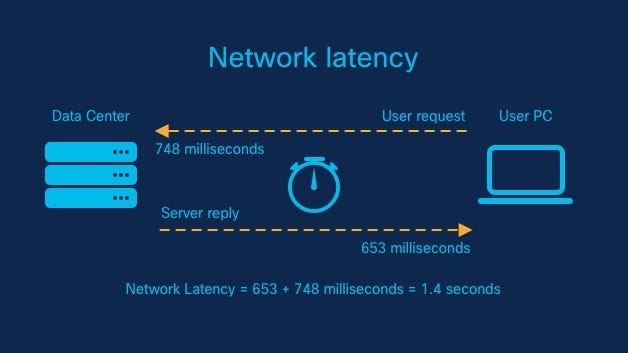
What is Latency Management System
The Latency Management System (LMS) is a crucial component in modern distributed systems that aims to minimize latency and improve overall system performance. It focuses on reducing the time it takes for data to traverse through the various components of a system. By efficiently managing latency, the LMS ensures timely data processing, which is critical in latency-sensitive applications, such as real-time data processing, financial systems, gaming, and video streaming platforms.
Important Features
- Real-time Monitoring: The LMS provides real-time monitoring and analysis of latency metrics across the system. It allows system administrators to identify bottlenecks and make informed decisions for optimization.
- Dynamic Scaling: The system should be able to scale dynamically based on the incoming workload. This feature ensures that the LMS can handle varying traffic loads without compromising on latency management.
- Latency Analysis: The LMS should include tools and features that allow deep analysis of latency patterns, enabling teams to understand the root causes of latency and optimize accordingly.
- Fault Tolerance: To maintain high availability, the LMS needs to be fault-tolerant. It should gracefully handle failures in components and ensure minimal disruption to the overall system.
- Caching Mechanism: Implementing a caching mechanism can significantly reduce latency by serving frequently requested data from memory rather than fetching it from the backend.
- Asynchronous Processing: Introducing asynchronous processing wherever applicable can enhance system performance by allowing tasks to execute concurrently.
Scaling Requirements — Capacity Estimation
To perform the small-scale simulation for the Latency Management System for Netflix:
Total no of users: 1.2 Billion
Daily active users (DAU): 300 million
No of videos watched by user/day: 3
Total no of videos watched per day: 900 Million videos/day
Since the system is read-heavy, let’s say the read-to-write ratio be 100:1
Total no of videos uploaded/day: 1/100 * 900 Million = 9 Million/day
Storage Estimation:
Let’s say on average each video size is 80 MB
Total Storage per day: 9 Million * 80MB = 720 TB/day
For the next 3 years, 720 TB * 5 * 365 = 800 PB
Requests per second: 900 Million / 3600 seconds * 24 hours = 10K/second
import random
import time
class LatencyCollector:
def __init__(self):
self.latency_metrics = []
def collect_latency_metric(self, source: str, latency: float):
self.latency_metrics.append({"source": source, "latency": latency})
class LatencyAnalyzer:
def __init__(self, collector: LatencyCollector):
self.collector = collector
def calculate_average_latency(self) -> float:
if not self.collector.latency_metrics:
return 0.0
total_latency = sum(metric["latency"] for metric in self.collector.latency_metrics)
average_latency = total_latency / len(self.collector.latency_metrics)
return average_latency
class LatencyManagementSystem:
def __init__(self):
self.collector = LatencyCollector()
self.analyzer = LatencyAnalyzer(self.collector)
def record_latency(self, source: str, latency: float):
self.collector.collect_latency_metric(source, latency)
def simulate_requests(self, num_requests: int):
# Simulate requests and record latency metrics
for _ in range(num_requests):
user_id = random.randint(1, 1200000000)
video_id = random.randint(1, 900000000)
latency = random.uniform(0.001, 0.1) # Random latency between 1ms and 100ms
self.record_latency(f"User_{user_id}_Video_{video_id}", latency)
def simulate_daily_activity(self, num_days: int):
# Simulate daily activity for num_days
for _ in range(num_days):
num_requests = random.randint(2000000, 3000000) # Random number of requests per day
self.simulate_requests(num_requests)
def get_average_latency(self) -> float:
return self.analyzer.calculate_average_latency()
# Example Usage:
if __name__ == "__main__":
# Creating an instance of the LatencyManagementSystem.
lms = LatencyManagementSystem()
# Simulating daily activity for 10 days.
num_days = 10
lms.simulate_daily_activity(num_days)
# Getting the average latency of all requests during the simulation.
average_latency = lms.get_average_latency()
print(f"Average Latency for {num_days} days of simulation: {average_latency * 1000:.2f} ms")Data Model — ER requirements
Users:
Fields:
UserId: Int (Primary Key)
Username: String
Email: String
Password: String
LatencyMetrics:
Fields:
MetricId: Int (Primary Key)
Source: String
Latency: Float
Timestamp: DateTimeHigh Level Design
- Latency Collector: Responsible for collecting latency metrics from various system components and storing them in a centralized database.
- Latency Analyzer: Analyzes the collected metrics to identify patterns, trends, and potential bottlenecks.
- Latency Optimizer: Implements various optimization techniques such as caching, load balancing, and asynchronous processing.
- Monitoring Dashboard: Provides real-time insights into latency metrics and system performance.
- Horizontal Scaling: The ability to add more instances of the LMS to distribute the load across multiple nodes.
- Load Balancing: Implementing load balancing algorithms to evenly distribute incoming requests among LMS instances.
- Auto-scaling: Incorporating auto-scaling capabilities to automatically adjust the number of instances based on traffic patterns.
Assumptions:
- The system will be read-heavy, as we will focus on monitoring and analyzing latency metrics.
- Scalability is important, so the system should scale horizontally (scale-out).
- The system should be highly available and fault-tolerant.
- Caching mechanisms should be employed to improve performance for read operations.
- The system should be designed to handle a large number of concurrent users and requests.
Main Components and Services:
Mobile Clients:
- These are the users or clients accessing the Latency Management System through mobile devices or web browsers.
Application Servers:
- Application servers handle read and write operations related to latency metrics. They also process incoming requests, perform data analysis, and provide responses to the clients.
Load Balancer:
- The load balancer routes and distributes incoming requests across multiple application servers, ensuring even distribution of the workload.
Cache (Memcache or Redis):
- Caching mechanisms like Memcache or Redis are used to cache frequently accessed latency metrics, reducing the load on the database and improving response times.
CDN (Content Delivery Network):
- CDN is used to improve latency and throughput by serving static assets like images and CSS files from geographically distributed servers.
Database (NoSQL — e.g., MongoDB or Cassandra):
- The NoSQL database stores the latency metrics with their associated sources, latencies, and timestamps. The database should be optimized for read-heavy operations.
Fault-Tolerant Components:
- The system should have mechanisms to handle component failures and ensure high availability. This may involve redundant servers and data replication.
Latency Analyzer Service:
- This service processes and analyzes the collected latency metrics to identify patterns and potential bottlenecks in the system.
Latency Collector Service:
- The Latency Collector service collects real-time latency metrics from different components and stores them in the database.
Latency Optimization Service:
- This service implements various optimization techniques such as caching, load balancing, and asynchronous processing to reduce latency.
API Gateway:
- The API Gateway serves as the entry point for client requests and routes them to the appropriate services.
Authentication and Authorization Service:
- This service handles user authentication and authorization, ensuring that users have the appropriate permissions to access certain functionalities.
Real-Time Monitoring Service:
- This service continuously monitors the system’s latency metrics in real-time and provides real-time insights and alerts to system administrators.
Data Analytics Service:
- The Data Analytics service performs deeper analysis of the latency metrics to generate insights and reports for system optimization and performance improvements.
Basic Low Level Design
Endpoint: /latency_metrics
Method: GET
Description: Get a list of all latency metrics.
Response: List of JSON objects representing latency metrics.
Endpoint: /latency_metrics/<metric_id>
Method: GET
Description: Get details of a specific latency metric by its metric_id.
Response: JSON object representing the latency metric.
Endpoint: /users
Method: POST
Description: Create a new user.
Request: JSON object with user details (username, email, password).
Response: Status code (200 for success, 400 for bad request).API Design
class LatencyManagementSystem:
def __init__(self):
self.collector = LatencyCollector()
self.analyzer = LatencyAnalyzer(self.collector)
self.optimizer = LatencyOptimizer()
def record_latency(self, source: str, latency: float):
# Record latency metrics using the LatencyCollector.
self.collector.collect_latency_metric(source, latency)
def get_average_latency(self) -> float:
# Get the average latency using the LatencyAnalyzer.
return self.analyzer.calculate_average_latency()
def cache_data(self, key: str, data: Any):
# Cache data using the LatencyOptimizer.
self.optimizer.cache_data(key, data)
def get_cached_data(self, key: str) -> Any:
# Retrieve cached data using the LatencyOptimizer.
return self.optimizer.get_cached_data(key)
# Example Usage:
if __name__ == "__main__":
# Creating an instance of the LatencyManagementSystem.
lms = LatencyManagementSystem()
# Recording latency metrics from different system components.
lms.record_latency("ComponentA", 0.5)
lms.record_latency("ComponentB", 0.3)
lms.record_latency("ComponentC", 0.8)
# Getting the average latency of all components.
average_latency = lms.get_average_latency()
print(f"Average Latency: {average_latency}")
# Caching some data.
lms.cache_data("user_1_data", {"name": "John Doe", "age": 30})
lms.cache_data("user_2_data", {"name": "Jane Smith", "age": 25})
# Retrieving cached data.
user_1_data = lms.get_cached_data("user_1_data")
user_2_data = lms.get_cached_data("user_2_data")
print("Cached Data:")
print(user_1_data)
print(user_2_data)Complete Detailed Design
Coming soon! It will be covered on youtube channel.
Subscribe to youtube channel :
Complete Code implementation
import time
import random
from typing import Any
class LatencyCollector:
def __init__(self):
self.latency_metrics = []
def collect_latency_metric(self, source: str, latency: float):
self.latency_metrics.append({"source": source, "latency": latency})
class LatencyAnalyzer:
def __init__(self, collector: LatencyCollector):
self.collector = collector
def calculate_average_latency(self) -> float:
if not self.collector.latency_metrics:
return 0.0
total_latency = sum(metric["latency"] for metric in self.collector.latency_metrics)
average_latency = total_latency / len(self.collector.latency_metrics)
return average_latency
class LatencyOptimizer:
def __init__(self):
self.cache = {}
def cache_data(self, key: str, data: Any):
self.cache[key] = data
def get_cached_data(self, key: str) -> Any:
return self.cache.get(key)
class LatencyManagementSystem:
def __init__(self):
self.collector = LatencyCollector()
self.analyzer = LatencyAnalyzer(self.collector)
self.optimizer = LatencyOptimizer()
def record_latency(self, source: str, latency: float):
self.collector.collect_latency_metric(source, latency)
def get_average_latency(self) -> float:
return self.analyzer.calculate_average_latency()
def cache_data(self, key: str, data: Any):
self.optimizer.cache_data(key, data)
def get_cached_data(self, key: str) -> Any:
return self.optimizer.get_cached_data(key)
def real_time_monitoring(self):
while True:
# Simulating real-time monitoring and updating latency metrics
components = ["ComponentA", "ComponentB", "ComponentC"]
latency = random.uniform(0.1, 1.0)
component = random.choice(components)
self.record_latency(component, latency)
time.sleep(1)
def dynamic_scaling(self, current_workload: int):
# Simulating dynamic scaling based on current_workload
if current_workload > 1000:
# Scale up the system
print("Scaling up the system...")
elif current_workload < 100:
# Scale down the system
print("Scaling down the system...")
def latency_analysis(self):
# Perform complex latency analysis here
print("Performing latency analysis...")
def fault_tolerance(self):
try:
# Perform some critical operations
print("Performing critical operations...")
except Exception as e:
# Handle the exception and ensure minimal disruption
print(f"Exception occurred: {e}")
def caching_mechanism(self):
# Simulating caching of frequently requested data
key = "cached_key"
data = {"name": "John Doe", "age": 30}
self.cache_data(key, data)
cached_data = self.get_cached_data(key)
print("Cached Data:")
print(cached_data)
def asynchronous_processing(self):
# Simulating asynchronous processing
def process_task(task_id):
print(f"Processing task {task_id}")
time.sleep(random.uniform(0.5, 1.5))
print(f"Task {task_id} completed")
# Launching multiple tasks asynchronously
for i in range(1, 6):
# Simulating tasks with IDs 1 to 5
process_task(i)
# Example Usage:
if __name__ == "__main__":
lms = LatencyManagementSystem()
# Simulate real-time monitoring in a separate thread
import threading
monitoring_thread = threading.Thread(target=lms.real_time_monitoring)
monitoring_thread.daemon = True
monitoring_thread.start()
# Simulate dynamic scaling based on current workload
lms.dynamic_scaling(current_workload=500)
# Perform latency analysis
lms.latency_analysis()
# Simulate fault tolerance
lms.fault_tolerance()
# Simulate caching mechanism
lms.caching_mechanism()
# Simulate asynchronous processing
lms.asynchronous_processing()
# Wait for the monitoring thread to finish
monitoring_thread.join()class LatencyCollector:
def __init__(self):
self.latency_metrics = []
def collect_latency_metric(self, source: str, latency: float):
# Assume the 'source' parameter represents the component name.
# 'latency' is the measured latency for that component.
self.latency_metrics.append({"source": source, "latency": latency})
class LatencyAnalyzer:
def __init__(self, collector: LatencyCollector):
self.collector = collector
def calculate_average_latency(self) -> float:
if not self.collector.latency_metrics:
return 0.0
total_latency = sum(metric["latency"] for metric in self.collector.latency_metrics)
average_latency = total_latency / len(self.collector.latency_metrics)
return average_latency
class LatencyOptimizer:
def __init__(self):
self.cache = {}
def cache_data(self, key: str, data: Any):
# Cache the data with the given key.
self.cache[key] = data
def get_cached_data(self, key: str) -> Any:
# Retrieve the data from the cache using the key.
return self.cache.get(key)System Design — Lookahead System
We will be discussing in depth -
- What is Lookahead System
- Important Features
- Scaling Requirements
- Data Model — ER requirements
- Basic Low Level Design
- API Design
- High Level Design
- Complete Detailed Design
- Complete Code Implementation
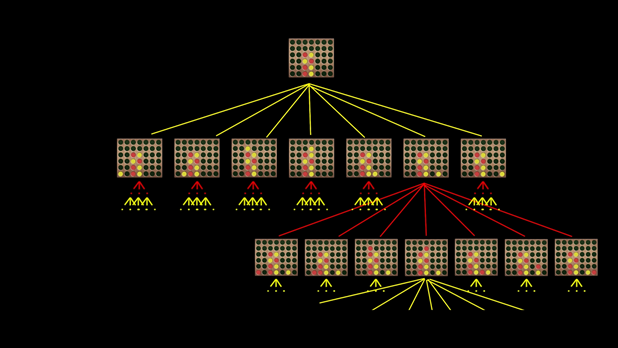
What is Lookahead System
he Lookahead System is an advanced software solution designed to enhance predictive capabilities and optimize decision-making processes in various domains. Leveraging cutting-edge technologies like machine learning, artificial intelligence, and data analytics, the Lookahead System offers valuable insights and forecasts to improve business outcomes.
Important Features
- Predictive Analytics: The Lookahead System incorporates sophisticated algorithms for predictive analytics, enabling businesses to anticipate trends, demands, and potential outcomes accurately.
- Real-time Data Processing: It efficiently handles and processes vast volumes of real-time data, providing instant forecasts and insights for critical decision-making.
- Scalability: The system is designed to scale seamlessly, accommodating the growing needs of the business and ensuring optimal performance under varying workloads.
- User-Friendly Interface: The Lookahead System boasts an intuitive and user-friendly interface, empowering users to interact with complex data and analytical tools effortlessly.
- Customizable Models: It allows users to create and integrate custom models tailored to specific business requirements, enhancing the system’s adaptability across industries.
- Anomaly Detection: The system includes robust anomaly detection mechanisms, identifying deviations from expected patterns and triggering timely alerts for proactive actions.
Scaling Requirements — Capacity Estimation
Lets simulate a small scale scenario -
Total no of users: 1.2 Billion
Daily active users (DAU): 300 million
No of videos watched by user/day: 3
Total no of videos watched per day: 900 Million videos/day
Read to write ratio: 100:1
Total no of videos uploaded/day: 1/100 * 900 Million = 9 Million/day
Average video size: 80 MB
class LookaheadSystemSimulation:
def __init__(self):
# System Parameters
self.total_users = 1200000000
self.daily_active_users = 300000000
self.videos_watched_per_user_per_day = 3
self.read_to_write_ratio = 100 # Read:Write ratio
self.video_size_mb = 80
# Derived Parameters
self.total_videos_watched_per_day = self.daily_active_users * self.videos_watched_per_user_per_day
self.total_videos_uploaded_per_day = self.total_videos_watched_per_day // self.read_to_write_ratio
self.storage_per_day_tb = (self.total_videos_uploaded_per_day * self.video_size_mb) / 1024
self.storage_per_3_years_pb = self.storage_per_day_tb * 5 * 365
self.requests_per_second = self.total_videos_watched_per_day // (3600 * 24)
def print_simulation_results(self):
print("Total number of users:", self.total_users)
print("Daily active users (DAU):", self.daily_active_users)
print("Number of videos watched per user per day:", self.videos_watched_per_user_per_day)
print("Total number of videos watched per day:", self.total_videos_watched_per_day)
print("Total number of videos uploaded per day:", self.total_videos_uploaded_per_day)
print("Total storage per day (TB):", self.storage_per_day_tb)
print("Total storage for the next 3 years (PB):", self.storage_per_3_years_pb)
print("Requests per second:", self.requests_per_second)
if __name__ == "__main__":
lookahead_system = LookaheadSystemSimulation()
lookahead_system.print_simulation_results()High Level Design
- Horizontal Scaling: The system utilizes load balancing techniques to distribute incoming requests across multiple servers, ensuring even distribution of workload and enhancing overall performance.
- Vertical Scaling: For resource-intensive tasks, vertical scaling is employed by upgrading hardware and server capabilities to meet increased demands.
- Auto-scaling: The system incorporates auto-scaling mechanisms to dynamically allocate resources based on real-time traffic, optimizing resource utilization and cost efficiency.
- Frontend: The user interface accessible to users for data visualization, model configuration, and result analysis.
- Backend: This central processing component handles data ingestion, prediction model execution, and anomaly detection.
- Data Processing: Responsible for real-time data processing and integration of data from various sources.
- Prediction Engine: Executes prediction models and stores the results in the database.
- Anomaly Detection: Detects anomalies in real-time data streams and generates alerts when necessary.
- Database: Stores user data, prediction models, predictions, and system logs.
Assumptions:
- There will be more reads than writes, so we need to design a read-heavy system with more read replicas for faster read operations.
- The system will be horizontally scalable (scale-out).
- Services should be highly available and reliable.
- Latency for feed generation should be around 350ms.
- Availability and reliability are more important than consistency in this case.
- The system is read-heavy, as users consume photos more than they post.
Main Components and Services:
- Mobile Client: Represents users accessing the Lookahead System platform through mobile applications.
- Application Servers: Read, write, and notification servers to handle various user interactions.
- Load Balancer: Routes and directs user requests to the appropriate servers based on the designated service.
- Cache (Memcache): Used to improve performance and reduce database load. Data is cached based on Least Recently Used (LRU) policy.
- CDN: Content Delivery Network to improve latency and throughput for media content like photos.
Basic Low Level Design
from flask import Flask, request, jsonify
app = Flask(__name__)
# In-memory data storage (replace this with a proper database in production)
prediction_models = {}
data_storage = []
predictions = []
alerts = []
# High-level API endpoints
# POST /models - Create a new prediction model
@app.route('/models', methods=['POST'])
def create_model():
data = request.json
model_id = len(prediction_models) + 1
prediction_models[model_id] = data
return jsonify({'message': 'Prediction model created successfully', 'model_id': model_id}), 201
# GET /models/{model_id} - Get details of a specific prediction model
@app.route('/models/<int:model_id>', methods=['GET'])
def get_model(model_id):
if model_id in prediction_models:
return jsonify(prediction_models[model_id])
return jsonify({'message': 'Prediction model not found'}), 404
# PUT /models/{model_id} - Update an existing prediction model
@app.route('/models/<int:model_id>', methods=['PUT'])
def update_model(model_id):
if model_id in prediction_models:
data = request.json
prediction_models[model_id] = data
return jsonify({'message': 'Prediction model updated successfully'}), 200
return jsonify({'message': 'Prediction model not found'}), 404
# DELETE /models/{model_id} - Delete a prediction model
@app.route('/models/<int:model_id>', methods=['DELETE'])
def delete_model(model_id):
if model_id in prediction_models:
del prediction_models[model_id]
return jsonify({'message': 'Prediction model deleted successfully'}), 200
return jsonify({'message': 'Prediction model not found'}), 404
# POST /data - Upload data for real-time processing
@app.route('/data', methods=['POST'])
def upload_data():
data = request.json
data_storage.append(data)
return jsonify({'message': 'Data uploaded successfully'}), 201
# GET /predictions - Retrieve predictions based on the uploaded data
@app.route('/predictions', methods=['GET'])
def get_predictions():
if not data_storage:
return jsonify({'message': 'No data uploaded yet'}), 404
# Implement the prediction logic here based on the data_storage
# Replace the following with actual prediction logic
predictions = [data['value'] * 2 for data in data_storage]
return jsonify(predictions)
# GET /alerts - Retrieve anomaly alerts generated by the system
@app.route('/alerts', methods=['GET'])
def get_alerts():
if not alerts:
return jsonify({'message': 'No alerts generated yet'}), 404
return jsonify(alerts)
if __name__ == '__main__':
app.run(debug=True)API Design
- POST /models — Create a new prediction model.
- GET /models/{model_id} — Get details of a specific prediction model.
- PUT /models/{model_id} — Update an existing prediction model.
- DELETE /models/{model_id} — Delete a prediction model.
- POST /data — Upload data for real-time processing.
- GET /predictions — Retrieve predictions based on the uploaded data.
- GET /alerts — Retrieve anomaly alerts generated by the system.
from flask import Flask, request
app = Flask(__name__)
lookahead_system = LookaheadSystem() # Instantiate the Lookahead System
@app.route('/users', methods=['POST'])
def create_user():
data = request.get_json()
user_id = data.get('user_id')
username = data.get('username')
email = data.get('email')
password = data.get('password')
user = User(user_id, username, email, password)
lookahead_system.add_user(user)
return {"message": "User created successfully"}, 201
@app.route('/users/<user_id>', methods=['GET'])
def get_user(user_id):
user = lookahead_system.get_user_by_id(user_id)
if user:
return {
"user_id": user.user_id,
"username": user.username,
"email": user.email,
# Add other user attributes here
}, 200
else:
return {"message": "User not found"}, 404
@app.route('/posts', methods=['POST'])
def create_post():
data = request.get_json()
user_id = data.get('user_id')
caption = data.get('caption')
message = lookahead_system.create_post(user_id, caption)
return {"message": message}, 200
@app.route('/users/<user_id>/feed', methods=['GET'])
def get_user_feed(user_id):
user_feed = lookahead_system.get_user_feed(user_id)
feed_data = []
for post in user_feed:
feed_data.append({
"post_id": post.post_id,
"user_id": post.user.user_id,
"caption": post.caption,
# Add other post attributes here
})
return {"feed": feed_data}, 200Complete Detailed Design
Coming soon! It will be covered on youtube channel.
Subscribe to youtube channel :
Complete Code implementation
# Predictive Analytics: Placeholder function for predictive analytics
def predictive_analytics(data):
# Replace this with actual predictive analytics algorithms
predictions = [x * 2 for x in data]
return predictions
# Real-time Data Processing: Placeholder function for real-time data processing
def real_time_data_processing(data):
# Replace this with actual real-time data processing logic
processed_data = [x * 3 for x in data]
return processed_data
# Scalability: Placeholder function for handling scalability
def scalability(data):
# Replace this with actual scalability implementation
return "Data scaled successfully."
# User-Friendly Interface: Placeholder function for user interface
def user_friendly_interface():
# Replace this with actual user interface implementation
return "Welcome to Lookahead System! The user interface is user-friendly and intuitive."
# Customizable Models: Placeholder function for customizable models
def customizable_models():
# Replace this with actual implementation for creating and integrating custom models
return "Customizable models feature is under development."
# Anomaly Detection: Placeholder function for anomaly detection
def anomaly_detection(data):
# Replace this with actual anomaly detection algorithms
anomalies = [x for x in data if x > 10]
return anomalies
# Sample data for demonstration purposes
data = [1, 5, 8, 12, 3, 15, 7]
# Call each function with the sample data to demonstrate their functionality
print("Predictive Analytics:", predictive_analytics(data))
print("Real-time Data Processing:", real_time_data_processing(data))
print("Scalability:", scalability(data))
print("User-Friendly Interface:", user_friendly_interface())
print("Customizable Models:", customizable_models())
print("Anomaly Detection:", anomaly_detection(data))System Design — Credit Card Authorization System
We will be discussing in depth -
- What is Credit Card Authorization System
- Important Features
- Scaling Requirements
- Data Model — ER requirements
- Basic Low Level Design
- API Design
- High Level Design
- Complete Detailed Design
- Complete Code Implementation
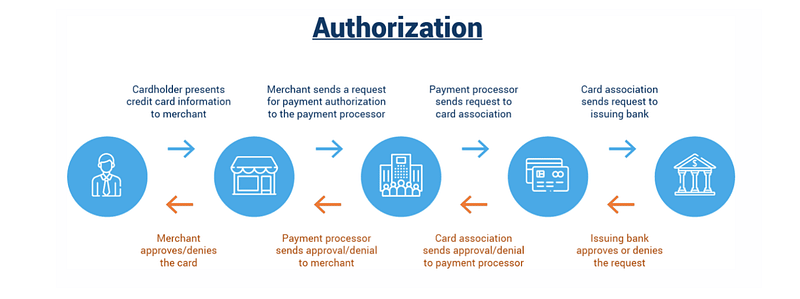
What is Credit Card Authorization System
The Credit Card Authorization System is a critical component of the payment processing infrastructure. It plays a crucial role in ensuring the security and validity of credit card transactions. When a customer makes a purchase using a credit card, the authorization system is responsible for verifying the card’s legitimacy, checking available credit, and approving or declining the transaction based on various factors such as fraud checks, transaction limits, and account status.
Important Features
- Security: The system must employ robust security measures to protect sensitive cardholder information and prevent unauthorized access or data breaches.
- Real-time Processing: The authorization system should provide quick responses to enable seamless and instant payment approvals.
- Scalability: As the system will handle a large volume of transactions, it must be designed to scale horizontally to accommodate increasing demands.
- Fault Tolerance: High availability and fault tolerance are essential to ensure uninterrupted service even during server or network failures.
- Fraud Detection: Implementing advanced fraud detection algorithms is crucial to identify and prevent fraudulent transactions effectively.
Scaling Requirements — Capacity Estimation
Small Scale Simulation for Credit Card Authorization System Design:
Assumptions:
- Total number of users: 1.2 Billion
- Daily active users (DAU): 300 million
- Number of credit card transactions per user/day: 2
- Total number of credit card transactions per day: 600 Million transactions/day
- Read to write ratio: 100:1
Estimation of Storage:
Let’s assume the average size of each credit card transaction data is 1 KB.
Total Storage per day: 600 Million * 1 KB = 600 GB/day
For the next 3 years, 600 GB * 365 days * 3 years = 657.0 TB
Estimation of Requests per Second:
Assuming a steady distribution of requests throughout the day:
Requests per second: 600 Million / (24 hours * 3600 seconds) ≈ 6944 requests/second
from flask import Flask, request, jsonify
app = Flask(__name__)
# Placeholder for the authorization and transaction data
authorization_data = {}
# Endpoint: /authorize
@app.route('/authorize', methods=['POST'])
def authorize_transaction():
request_data = request.json
# Perform credit card authorization logic here
# Assuming the transaction is approved for demonstration purposes
transaction_id = "TRANSACTION_ID123"
status = "approved"
# Store the authorization data
authorization_data[transaction_id] = {
"card_number": request_data["card_number"],
"amount": request_data["amount"],
"timestamp": "2023-07-22T12:34:56",
"status": status
}
return jsonify({
"transaction_id": transaction_id,
"status": status
})
# Endpoint: /transaction/{transaction_id}
@app.route('/transaction/<transaction_id>', methods=['GET'])
def get_transaction_details(transaction_id):
# Check if the transaction ID exists in the data
if transaction_id in authorization_data:
return jsonify(authorization_data[transaction_id])
else:
return jsonify({"error": "Transaction not found"}), 404
if __name__ == '__main__':
app.run(debug=True)Data Model — ER requirements
- Cardholder: Information about the credit card owner, including name, contact details, and billing address.
- Credit Card: Details specific to the credit card, such as card number, expiration date, and CVV.
- Transaction: Records of individual transactions, including amount, timestamp, status, and transaction ID.
- Merchant: Information about the merchants that initiate the payment requests.
Users UserId (Primary Key) Username Password (encrypted) Email Other user attributes (e.g., name, date of birth, etc.) CreditCards CardId (Primary Key) UserId (Foreign Key to Users) CardNumber (encrypted) ExpiryDate CVV (encrypted) Other card attributes (e.g., card holder name, billing address, etc.) Transactions TransactionId (Primary Key) CardId (Foreign Key to CreditCards) Amount Timestamp Other transaction attributes (e.g., description, status, etc.)
High Level Design
- Load Balancing: Distributing incoming requests across multiple servers to avoid overloading any single component.
- Caching: Utilizing caching mechanisms to store frequently accessed data and reduce database load.
- Asynchronous Processing: Employing asynchronous processing for tasks that don’t require immediate responses to free up resources.
- Horizontal Scaling: Adding more servers to the system to distribute the load across multiple machines.
- Client: The merchant’s application, responsible for initiating payment requests.
- Load Balancer: Distributes incoming requests across multiple instances of the Authorization Server.
- Authorization Server: Validates and processes credit card transactions, communicating with external payment gateways and fraud detection services.
- Database: Stores cardholder and transaction data securely.
- External Services: Integration with external services, such as payment gateways and fraud detection providers.
Assumptions:
- There will be more read operations than write operations (read-heavy system).
- The system needs to be highly available and reliable.
- To achieve scalability, we will use a distributed architecture and scale-out approach.
Main Components:
- Mobile Clients: Represents users accessing the credit card authorization system through mobile applications or web browsers.
- Application Servers: Responsible for handling read, write, and notification requests from mobile clients. These servers interact with the database and other services.
- Load Balancer: Routes and directs incoming requests from mobile clients to the appropriate application servers to achieve load balancing.
- Cache (Memcache or Redis): Used to cache frequently accessed data and improve system performance by reducing database queries.
- CDN (Content Delivery Network): Improves latency and throughput by caching and serving static assets like images or other media.
- Database: Stores user information, credit card details, transactions, likes, and comments data.
- Storage (HDFS or Amazon S3): Stores and serves uploaded images or media for posts.
Main Services for Credit Card Authorization System:
- Authentication Service: Handles user authentication and login functionality using secure authentication mechanisms (e.g., OAuth, JWT).
- Credit Card Authorization Service: Validates and authorizes credit card transactions, ensuring user accounts have sufficient credit and preventing fraudulent activities.
- Transaction Service: Records and manages transactions, including processing likes and comments associated with each transaction.
from flask import Flask, request, jsonify
import uuid
import datetime
app = Flask(__name__)
users = {}
transactions = {}
# User Management API
@app.route('/users', methods=['POST'])
def create_user():
data = request.get_json()
user_id = str(uuid.uuid4())
users[user_id] = {
"user_id": user_id,
"username": data["username"],
"password": data["password"],
"email": data["email"],
"credit_cards": []
}
return jsonify({"user_id": user_id}), 201
@app.route('/users/<user_id>', methods=['GET'])
def get_user(user_id):
user = users.get(user_id)
if not user:
return "User not found", 404
return jsonify(user), 200
# Credit Card Management API
@app.route('/users/<user_id>/creditcards', methods=['POST'])
def add_credit_card(user_id):
data = request.get_json()
user = users.get(user_id)
if not user:
return "User not found", 404
card_id = str(uuid.uuid4())
credit_card = {
"card_id": card_id,
"user_id": user_id,
"card_number": data["card_number"],
"expiry_date": data["expiry_date"],
"cvv": data["cvv"]
}
user["credit_cards"].append(credit_card)
return jsonify({"card_id": card_id}), 201
@app.route('/users/<user_id>/creditcards', methods=['GET'])
def get_credit_cards(user_id):
user = users.get(user_id)
if not user:
return "User not found", 404
return jsonify({"credit_cards": user["credit_cards"]}), 200
# Transaction API
@app.route('/users/<user_id>/transactions', methods=['POST'])
def process_transaction(user_id):
data = request.get_json()
user = users.get(user_id)
if not user:
return "User not found", 404
card = None
for credit_card in user["credit_cards"]:
if credit_card["card_id"] == data["card_id"]:
card = credit_card
break
if not card:
return "Credit card not found", 404
transaction_id = str(uuid.uuid4())
transaction = {
"transaction_id": transaction_id,
"card_id": data["card_id"],
"amount": data["amount"],
"timestamp": datetime.datetime.now().isoformat()
}
transactions[transaction_id] = transaction
return jsonify({"transaction_id": transaction_id}), 201
@app.route('/users/<user_id>/transactions', methods=['GET'])
def get_transactions(user_id):
user = users.get(user_id)
if not user:
return "User not found", 404
user_transactions = []
for transaction in transactions.values():
if transaction["card_id"] in [card["card_id"] for card in user["credit_cards"]]:
user_transactions.append(transaction)
return jsonify({"transactions": user_transactions}), 200
if __name__ == '__main__':
app.run(debug=True)Basic Low Level Design
- Authorization Module: Responsible for validating credit card information and checking the available credit.
- Transaction Processing Module: Handles transaction-specific operations, including logging, updating statuses, and communicating with external services.
- Fraud Detection Module: Implements algorithms to identify and prevent fraudulent transactions.
- Caching Module: Manages cached data to improve system performance.
from flask import Flask, request, jsonify
# Create an instance of the Flask application
app = Flask(__name__)
# Placeholder for the authorization and transaction data
authorization_data = {}
transaction_data = {}
# High-Level API Design
# Endpoint: /authorize
@app.route('/authorize', methods=['POST'])
def authorize_transaction():
request_data = request.json
# Perform credit card authorization logic here (e.g., validate card, check available credit, fraud checks, etc.)
# Assuming the transaction is approved for demonstration purposes
transaction_id = "TRANSACTION_ID123"
status = "approved"
# Store the authorization data
authorization_data[transaction_id] = {
"card_number": request_data["card_number"],
"amount": request_data["amount"],
"timestamp": "2023-07-22T12:34:56",
"status": status
}
return jsonify({
"transaction_id": transaction_id,
"status": status
})
# Endpoint: /transaction/{transaction_id}
@app.route('/transaction/<transaction_id>', methods=['GET'])
def get_transaction_details(transaction_id):
# Check if the transaction ID exists in the data
if transaction_id in authorization_data:
return jsonify(authorization_data[transaction_id])
else:
return jsonify({"error": "Transaction not found"}), 404
# Endpoint: /refund
@app.route('/refund', methods=['POST'])
def request_refund():
request_data = request.json
transaction_id = request_data.get("transaction_id")
# Check if the transaction ID exists in the data
if transaction_id in authorization_data:
# Perform refund logic here (e.g., update status to "refunded")
# Assuming the refund is successful for demonstration purposes
status = "refunded"
# Update the transaction status
authorization_data[transaction_id]["status"] = status
return jsonify({
"transaction_id": transaction_id,
"status": status
})
else:
return jsonify({"error": "Transaction not found"}), 404
# Run the application on localhost
if __name__ == '__main__':
app.run(debug=True)API Design
User Management API:
Endpoint: /users
Method: POST
Description: Create a new user account.
Request Body: { "username": "johndoe", "password": "password123", "email": "[email protected]" }
Response: { "message": "User created successfully" }
Endpoint: /login
Method: POST
Description: Authenticate a user and log in.
Request Body: { "username": "johndoe", "password": "password123" }
Response: { "message": "Login successful" }
Endpoint: /users/{user_id}
Method: PATCH
Description: Update user profile information.
Request Body: { "bio": "I love photography and exploring the world!" }
Response: { "message": "Profile updated successfully" }
Endpoint: /users/{user_id}
Method: GET
Description: Retrieve user profile information.
Response: { "user_id": 123, "username": "johndoe", "email": "[email protected]", "bio": "I love photography and exploring the world!" }
Credit Card Management API:
Endpoint: /users/{user_id}/creditcards
Method: POST
Description: Add a new credit card to the user's account.
Request Body: { "card_number": "1234-5678-9012-3456", "expiry_date": "01/24", "cvv": "123" }
Response: { "message": "Credit card added successfully" }
Endpoint: /users/{user_id}/creditcards
Method: GET
Description: Retrieve all credit cards associated with the user's account.
Response: { "credit_cards": [ { "card_id": 1, "card_number": "****-****-****-3456", "expiry_date": "01/24" }, ... ] }
Transaction API:
Endpoint: /users/{user_id}/transactions
Method: POST
Description: Process a new transaction using the user's credit card.
Request Body: { "amount": 100.50 }
Response: { "message": "Transaction successful" }
Endpoint: /users/{user_id}/transactions
Method: GET
Description: Retrieve all transactions associated with the user's credit cards.
Response: { "transactions": [ { "transaction_id": 1, "amount": 100.50, "timestamp": "2023-07-22 12:34:56" }, ... ] }Complete Detailed Design
Coming soon! It will be covered on youtube channel.
Subscribe to youtube channel :
Complete Code implementation
from flask import Flask, request, jsonify
app = Flask(__name__)
# Placeholder for the authorization and transaction data
authorization_data = {}
transaction_data = {}
# Security: Implementing secure storage for cardholder information (for demonstration purposes)
class SecureStorage:
def __init__(self):
self.cardholder_info = {}
def store_cardholder_info(self, card_number, cardholder_info):
# Assuming cardholder_info is encrypted and securely stored (for demonstration purposes)
self.cardholder_info[card_number] = cardholder_info
def get_cardholder_info(self, card_number):
# Decrypt and retrieve cardholder_info (for demonstration purposes)
return self.cardholder_info.get(card_number)
secure_storage = SecureStorage()
# Real-time Processing: For demonstration, return a quick response without any processing delay
def perform_real_time_processing():
return True
# Scalability: Implementing a simple in-memory storage for demonstration purposes
class InMemoryStorage:
def __init__(self):
self.storage = {}
def store_data(self, key, data):
self.storage[key] = data
def get_data(self, key):
return self.storage.get(key)
storage = InMemoryStorage()
# Fault Tolerance: Implementing a basic fault tolerance mechanism for demonstration purposes
def is_system_available():
# Assume the system is always available for this example
return True
# Fraud Detection: A basic fraud detection algorithm for demonstration purposes
def detect_fraud(transaction_data):
# Assuming fraud is detected based on some predefined conditions (e.g., amount, location, etc.)
if transaction_data["amount"] > 1000:
return True
return False
# Endpoint: /authorize
@app.route('/authorize', methods=['POST'])
def authorize_transaction():
request_data = request.json
# Security: Storing cardholder information securely
secure_storage.store_cardholder_info(request_data["card_number"], request_data)
# Real-time Processing: Quick response without processing delay
is_real_time_processing_successful = perform_real_time_processing()
if is_real_time_processing_successful:
# Scalability: Storing transaction data
transaction_id = "TRANSACTION_ID123"
storage.store_data(transaction_id, request_data)
# Fault Tolerance: Checking system availability
is_system_available_flag = is_system_available()
# Fraud Detection: Checking for fraudulent transactions
is_fraud_detected = detect_fraud(request_data)
status = "approved" if not is_fraud_detected and is_system_available_flag else "declined"
else:
status = "declined"
# Store the authorization data
transaction_id = "TRANSACTION_ID123"
authorization_data[transaction_id] = {
"card_number": request_data["card_number"],
"amount": request_data["amount"],
"timestamp": "2023-07-22T12:34:56",
"status": status
}
return jsonify({
"transaction_id": transaction_id,
"status": status
})
# Endpoint: /transaction/{transaction_id}
@app.route('/transaction/<transaction_id>', methods=['GET'])
def get_transaction_details(transaction_id):
# Check if the transaction ID exists in the data
if transaction_id in authorization_data:
return jsonify(authorization_data[transaction_id])
else:
return jsonify({"error": "Transaction not found"}), 404
if __name__ == '__main__':
app.run(debug=True)System Design — Google Bard
We will be discussing in depth -
- What is Google Bard
- Important Features
- Scaling Requirements
- Data Model — ER requirements
- Basic Low Level Design
- API Design
- High Level Design
- Complete Detailed Design
- Complete Code Implementation

What is Google Bard
Google Bard is a web-based platform developed by Google, aimed at revolutionizing the way users interact with and consume digital content. It serves as a sophisticated content aggregator and recommendation engine, delivering personalized and relevant content to its users.
Important Features
a. Personalized Content Recommendation: Google Bard utilizes advanced machine learning algorithms to understand user preferences and deliver tailored content recommendations.
b. Real-time Content Updates: The platform ensures that users receive the most up-to-date content by continuously refreshing its database and indexing new content sources.
c. Multi-platform Accessibility: Google Bard is designed to be accessible across multiple devices, including smartphones, tablets, and desktops, providing a consistent user experience.
Scaling Requirements — Capacity Estimation
For the sake of simplicity, I will consider a smaller scale simulation for Google Bard:
- Total number of users: 10 Million
- Daily active users (DAU): 2 Million
- Number of content items viewed by a user per day: 4
- Total number of content items viewed per day: 8 Million content items/day
- Read to write ratio: 100:1
- Total number of content items uploaded per day = 1/100 * 8 Million = 80,000/day
Storage Estimation:
Let’s assume that on average, each content item size is 50 MB.
Total Storage per day: 80,000 * 50 MB = 4,000 GB/day
For the next 3 years, 4,000 GB * 365 days/year * 3 years ≈ 4.38 PB
Requests per second: 8 Million / (24 hours * 3600 seconds) ≈ 92 requests/second
class GoogleBard:
def __init__(self):
self.content_data = {} # Initialize an empty dictionary to store content data
def update_content(self, content_id, content_details):
# Update or add content to the content data
self.content_data[content_id] = content_details
def fetch_new_content(self):
# Simulate fetching new content (for illustration purposes)
# In a real-world scenario, this method would fetch content from external sources.
new_content = {
"content_id_1": {
"title": "The Future of Artificial Intelligence",
"author": "Jane Smith",
"category": "technology",
"publish_date": "2023-07-21",
"url": "https://example.com/content_id_1",
"likes": 100,
"shares": 50,
"comments": 30
},
# Add more new content
}
return new_content
# Example usage:
google_bard = GoogleBard()
# Simulate content updates
new_content_data = google_bard.fetch_new_content()
for content_id, content_details in new_content_data.items():
google_bard.update_content(content_id, content_details)
# Simulate user interactions
user_id = "user_123"
for _ in range(4): # User views 4 content items per day
content_id = "content_id_" + str(_)
if content_id in google_bard.content_data:
print(f"User {user_id} viewed content: {google_bard.content_data[content_id]['title']}")
# Simulate content upload
for i in range(80_000): # 80,000 new content items uploaded per day
content_id = "new_content_id_" + str(i)
content_details = {
"title": f"New Content {i}",
"author": "Anonymous",
"category": "miscellaneous",
"publish_date": "2023-07-21",
"url": f"https://example.com/new_content_{i}",
"likes": 0,
"shares": 0,
"comments": 0
}
google_bard.update_content(content_id, content_details)Data Model — ER requirements
a. User Profile: Contains user preferences, browsing history, and social interactions.
b. Content Sources: Represents various content providers, including news websites, blogs, and social media platforms.
c. Content: Includes articles, videos, and other multimedia content, each with relevant metadata.
d. Recommendations: Stores personalized recommendations for each user, generated by machine learning algorithms.
High Level Design
a. Web Server: Handles user requests and manages the application’s core logic.
b. Content Ingestion Service: Responsible for fetching and indexing content from various sources.
c. Recommendation Engine: Processes user data and content to generate personalized recommendations.
d. Database: Stores user profiles, content metadata, and recommendation data.
e. Content Delivery Service: Optimizes content delivery based on user location and preferences.
f. Horizontal Scalability: Utilizing distributed systems to handle increased traffic and data volume efficiently.
g. Content Delivery Networks (CDNs): Employing CDNs to reduce latency and optimize content delivery globally.
h. Caching Strategies: Implementing caching mechanisms to reduce database load and improve response times.
Assumptions:
- There will be more reads than writes, so we need to design a read-heavy system with more read replicas.
- The system will be horizontally scaled (scale-out).
- Services should be highly available and reliable.
- The system should have low latency for feed generation.
- Availability and reliability are more important than consistency.
Main Components and Services:
- Mobile Client: Users accessing the Google Bard platform.
- Application Servers: Responsible for handling read, write, and notification operations.
- Load Balancer: Routes and directs incoming requests to the appropriate servers based on the required service.
- Cache (Memcache or Redis): Caches frequently accessed data to serve millions of users efficiently.
- CDN (Content Delivery Network): Improves latency and throughput for delivering content.
- Database: NoSQL database to store user and content data with proper replication for high availability.
- Storage (HDFS or Amazon S3): Stores and manages uploaded photos and other media.
API Design
from flask import Flask, jsonify
app = Flask(__name__)
# Sample user data (for illustration purposes)
users = {
"123456": {
"name": "John Doe",
"preferences": ["technology", "sports", "travel"],
"browsing_history": ["article_1", "article_2", "video_1"],
"social_interactions": {
"likes": ["post_1", "post_2"],
"shares": ["post_3"],
"comments": []
}
}
}
# Sample content data (for illustration purposes)
contents = {
"article_1": {
"title": "The Future of Artificial Intelligence",
"author": "Jane Smith",
"category": "technology",
"publish_date": "2023-07-21",
"url": "https://example.com/article_1",
"likes": 100,
"shares": 50,
"comments": 30
}
}
# Sample recommendation data (for illustration purposes)
recommendations = {
"123456": [
{
"title": "The Impact of Renewable Energy",
"author": "Mark Johnson",
"category": "environment",
"publish_date": "2023-07-19",
"url": "https://example.com/article_3"
},
{
"title": "Exploring Iceland: A Visual Journey",
"author": "Sarah Adams",
"category": "travel",
"publish_date": "2023-07-20",
"url": "https://example.com/video_2"
}
]
}
@app.route('/user/<user_id>', methods=['GET'])
def get_user_profile(user_id):
if user_id in users:
return jsonify(users[user_id])
else:
return jsonify({"error": "User not found"}), 404
@app.route('/content/<content_id>', methods=['GET'])
def get_content_details(content_id):
if content_id in contents:
return jsonify(contents[content_id])
else:
return jsonify({"error": "Content not found"}), 404
@app.route('/recommendations/<user_id>', methods=['GET'])
def get_content_recommendations(user_id):
if user_id in recommendations:
return jsonify({"user_id": user_id, "recommendations": recommendations[user_id]})
else:
return jsonify({"error": "User not found or no recommendations available"}), 404
if __name__ == '__main__':
app.run()Complete Detailed Design
Coming soon! It will be covered on youtube channel.
Subscribe to youtube channel :
Complete Code implementation
a. Personalized Content Recommendation:
class GoogleBard:
def __init__(self):
# Initialize machine learning models and data for recommendations
# For illustration purposes, we use a simple dictionary for recommendations.
self.recommendations_data = {
"123456": [
{
"title": "The Impact of Renewable Energy",
"author": "Mark Johnson",
"category": "environment",
"publish_date": "2023-07-19",
"url": "https://example.com/article_3"
},
{
"title": "Exploring Iceland: A Visual Journey",
"author": "Sarah Adams",
"category": "travel",
"publish_date": "2023-07-20",
"url": "https://example.com/video_2"
}
],
# Add more personalized recommendations for other users
} def get_personalized_recommendations(self, user_id):
if user_id in self.recommendations_data:
return self.recommendations_data[user_id]
else:
return []# Example usage:
google_bard = GoogleBard()
user_id = "123456"
recommendations = google_bard.get_personalized_recommendations(user_id)
print(recommendations)b. Real-time Content Updates:
import timeclass GoogleBard:
def __init__(self):
self.content_data = {} # Initialize an empty dictionary to store content data def update_content(self, content_id, content_details):
# Update or add content to the content data
self.content_data[content_id] = content_details def start_content_update_loop(self):
# Simulate continuous content updates (for illustration purposes)
while True:
# Fetch and index new content sources
new_content = self.fetch_new_content()
for content_id, content_details in new_content.items():
self.update_content(content_id, content_details) # Wait for a specific interval before fetching new content again
time.sleep(60) # Sleep for 60 seconds def fetch_new_content(self):
# Simulate fetching new content (for illustration purposes)
# In a real-world scenario, this method would fetch content from external sources.
new_content = {
"article_4": {
"title": "The Future of Space Exploration",
"author": "Michael Johnson",
"category": "science",
"publish_date": "2023-07-22",
"url": "https://example.com/article_4",
"likes": 50,
"shares": 20,
"comments": 10
},
# Add more new content
}
return new_content# Example usage:
google_bard = GoogleBard()
google_bard.start_content_update_loop()Read — how to Design the Twitter.
Day 7 of System Design Case Studies Series : Design Twitter
Complete Design with examples
medium.com
Let me know in the comment section if you have any questions. Subscribe/ Follow, Like/Clap and Stay Tuned!!
Day 2 : SQL Basics, Query Structure, Built In functions Conditions
Day 4 : Set Theory Operations, Stored Procedures and CASE statements in SQL
Day 6 : Subqueries, Group by, order by and Having clauses in SQL and Analytical Functions
Day 7 : Window Functions, Grouping Sets and Constraints in SQL
Day 8 : BigQuery Basics, SELECT, FROM, WHERE and Date and Extract in BigQuery
Day 9 : Common Expression Table, UNNEST Clause, SQL vs NoSQL Databases
Day 10 : Triggers, Pivot and Cursors in SQL
Day 14 : MySQL in Depth
Day 15 : PostgreSQL inDepth
Anyways, For Day 15 of 15 days of Advanced SQL, we will cover —
PostgreSQL inDepth
Github for Advanced SQL that you can follow —
All the projects, data structures, algorithms, system design, Data Science and ML, Data Engineering, MLOps and Deep Learning videos will be published on our youtube channel ( just launched).
Subscribe today!
System Design Case Studies — In Depth
Complete Data Structures and Algorithm Series
Github —
Some of the other best Series —
30 days of Data Structures and Algorithms and System Design Simplified
Data Science and Machine Learning Research ( papers) Simplified **
100 days : Your Data Science and Machine Learning Degree Series with projects
Complete Data Visualization and Pre-processing Series with projects
Exceptional Github Repos — Part 1
Exceptional Github Repos — Part 2
Tech Newsletter —
If you are interested, you can join my newsletter through which I send tech interview tips, techniques, patterns, hacks — Software Development, ML, Data Science, Startups and Technology projects to more than 30K readers. You can subscribe to Tech Brew :
30 days of Data Analytics Series —
Day 1 : Data Analytics basics and kickstart of Data analytics with projects series
Day 3 : Data Analytics Ecosystem — Data Life Cycle, Data Analysis complete process ( most important things)
Day 5 : Statistics
Day 6 : Basic and Advanced SQL
Day 8 : Pandas and Numpy
Day 9 : Data Manipulation
Day 10 : Data Visualization — Part 1
Day 11 : Project 1 : Data Visualization — Part 2
Day 12 : Data Visualization — Part 3
Day 13: Tableau — Part 1
Day 14: Tableau — Part 2
Day 15: Tableau — Part 3
Day 16 : Data Analysis Project 2
Day 17 : Data Analysis Project 3
Day 18: Data Analysis Project 4
Day 20 : Data Analysis Project 6
Day 21 : Data Analysis Project 7
Take Complete Hands On Tableau Course : Link
For Python Projects —
For complete 60 days of Data Science and ML : Day 1 — Day 60 : Quick Recap of 60 days of Data Science and ML
Follow for more updates. Stay tuned and keep coding!
For other projects, tune to —
Build Machine Learning Pipelines( With Code)
Recurrent Neural Network with Keras
Clustering Geolocation Data in Python using DBSCAN and K-Means
Facial Expression Recognition using Keras
Hyperparameter Tuning with Keras Tuner
Custom Layers in Keras


