
Day 4 of System Design Case Studies Series : Design Instagram, Robinhood, Swiggy, CashApp, Google Duo, Audible, Pokemon Go, Calm
Complete Design with examples
Hello peeps! Welcome to Day 4 of System Design Case studies series where we will design Instagram, Robinhood, Swiggy, CashApp, Google Duo, Audible, Pokemon Go and Calm.
This post has system design for ( scroll till the end of the post) —
Note : Please read System Design Important Terms you MUST know and Most Important System Design basics before reading this post.
Projects Videos —
All the projects, data structures, SQL, algorithms, system design, Data Science and ML , Data Analytics, Data Engineering, , Implemented Data Science and ML projects, Implemented Data Engineering Projects, Implemented Deep Learning Projects, Implemented Machine Learning Ops Projects, Implemented Time Series Analysis and Forecasting Projects, Implemented Applied Machine Learning Projects, Implemented Tensorflow and Keras Projects, Implemented PyTorch Projects, Implemented Scikit Learn Projects, Implemented Big Data Projects, Implemented Cloud Machine Learning Projects, Implemented Neural Networks Projects, Implemented OpenCV Projects,Complete ML Research Papers Summarized, Implemented Data Analytics projects, Implemented Data Visualization Projects, Implemented Data Mining Projects, Implemented Natural Leaning Processing Projects, MLOps and Deep Learning, Applied Machine Learning with Projects Series, PyTorch with Projects Series, Tensorflow and Keras with Projects Series, Scikit Learn Series with Projects, Time Series Analysis and Forecasting with Projects Series, ML System Design Case Studies Series videos will be published on our youtube channel ( just launched).
Subscribe today!
Tech Newsletter —
If you are interested, you can join my newsletter through which I send tech interview tips, techniques, patterns, hacks — Software Development, ML, Data Science, Startups and Technology projects to more than 30K readers. You can subscribe to Tech Brew :
Solved System Design Case Studies
Design Google Drive
Design Instagram
Design Quora
Design Flipkart
ML System Design
Design Tiny URL
Design Netflix
Design Messenger App
Design Twitter
Design Foursquare
Design Reddit
Design Amazon
Design Dropbox
Design URL Shortener
Design Youtube
Design API Rate Limiter
Design Web Crawler
Design Amazon Prime Video
Design Facebook’s Newsfeed
Design Yelp
Design Uber
Design Tinder
Design Tiktok
Design Whatsapp
Most Popular System Design Questions
Mega Compilation : Solved System Design Case studies
Complete Data Structures and Algorithm Series
Github —
We will be discussing in depth -
- What is Instagram
- Important Features
- Scaling Requirements
- Data Model — ER requirements
- High Level Design
- Basic Low Level Design
- API Design
- Complete Detailed Design
Pre-requisite to this post is Day1 and Day 2 of System Design Case Studies-
Day 1 of System Design Case Studies can be found below-
Day 2 of System Design Case Studies can be found below-
Day 3 of System Design Case Studies can be found below-
What is Instagram?

Instagram is a social networking platform where users can —
- Upload and share Photos and videos
- Follow other users
- Chat with other people
- Can control the visibility of their content by making it public ( accessible to everyone) or private ( accessible to the people who follow)
- Create stories
- Tag another user/location in the post ( photo/video)
- Watch the feed of other users they follow.
Some key components of the Instagram design would include:
- User accounts: Users would need to be able to create accounts and log in to the application. This would involve designing a registration and login system, as well as a way to securely store user information such as passwords.
- Profile creation: Users would need to be able to create and edit their own profiles, which would include things like a profile picture, bio, and contact information.
- Feed: The main feature of Instagram is the feed, where users can view posts from the people they follow. The feed would need to be designed to show posts in reverse chronological order and include features like pagination to handle a large number of posts.
- Posting: Users would need to be able to create and post new content, including photos and videos, as well as add captions, tags, and locations.
- Search: A search feature would need to be implemented so that users can find other users and posts by searching for keywords or hashtags.
- Notifications: Users would need to be notified of new posts from the people they follow, comments on their posts, and other interactions on the platform.
- Direct messaging: Users would need to be able to send direct messages to other users and view their message history.
- Scalability: Instagram needs to be able to handle a large number of users and high traffic loads. This would involve designing the application to be scalable, including using technologies such as load balancers and distributed systems.
- Security: Instagram would need to be designed with security in mind, to protect user data and prevent unauthorized access.
- Mobile and web: Instagram should be designed for web and mobile platforms so that it can be used on any device.
- Analytics: The Instagram platform would need to be designed to track usage and engagement metrics, including user engagement, post engagement, and other key performance indicators.
In this post we will design Instagram ( simple version) with the most important features and components.
Lets dive in!
1. Important Features
We will pick most important features based on the functionality of the instagram.
Upload Images
Follow other instagram users
Like and comments
Generate feed for the users
2. Scaling Requirements
Let’s say, we have —
No of photos uploaded by each user/month = 3
No of active users/month = 30 million
Size of each Photo : 10 MB
Total = 30⁷ * 10 * 3 = 900 TB of storage is what we need every month
Storage space ( for photos) needed for 5 years :
900 * 12 * 5 = 54 PB
Assumption : I have taken a very small scale just to keep things simple ( in reality insta has more than 2 billion users).
For example, if the current Instagram system can handle 10 million users and the expected growth rate is 10% per month, the scaling requirements can be calculated as follows:
- After 1 month: 11 million users
- After 2 months: 12.1 million users
- After 3 months: 13.31 million users
- After 1 year: 19.1 million users
3. Data Model-Entity Relationship
We will be using NoSQL databases to store the photo data in the form of a key value store as well capture the relationship between the different entities. We need high reliability wrt data.
— — — — — — — — — — — — — — — — — — — — — — — — — — — — — — — —
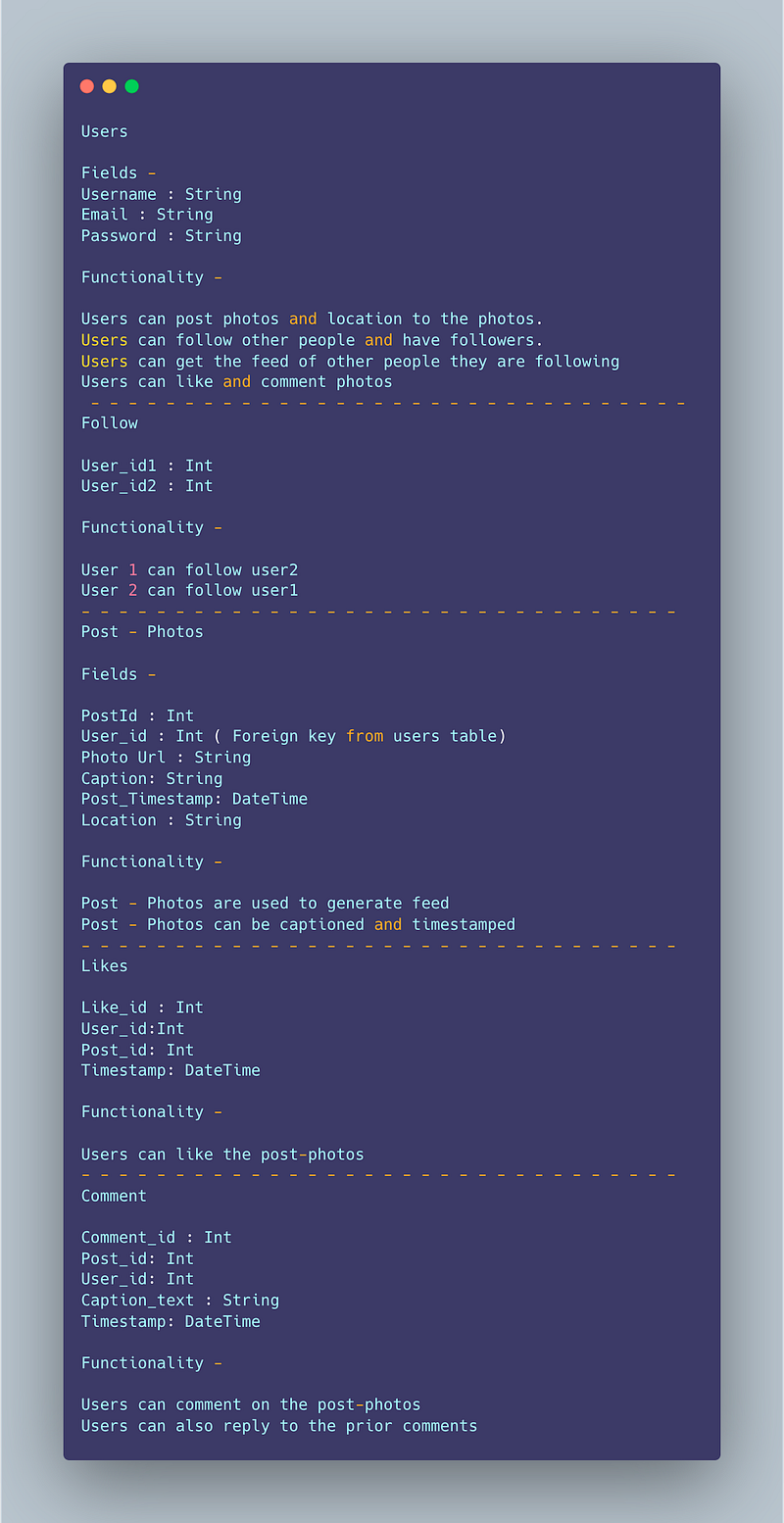
Users
Fields -
Username : String
Email : String
Password : String
Functionality —
Users can post photos and location to the photos.
Users can follow other people and have followers.
Users can get the feed of other people they are following
Users can like and comment photos
— — — — — — — — — — — — — — — — — — — — — — — — — — — — — — — —
Follow
User_id1 : Int
User_id2 : Int
Functionality —
User 1 can follow user2
User 2 can follow user1
— — — — — — — — — — — — — — — — — — — — — — — — — — — — — — — —
Post — Photos
Fields —
PostId : Int
User_id : Int ( Foreign key from users table)
Photo Url : String
Caption: String
Post_Timestamp: DateTime
Location : String
Functionality —
Post — Photos are used to generate feed
Post — Photos can be captioned and timestamped
— — — — — — — — — — — — — — — — — — — — — — — — — — — — — — — —
Likes
Like_id : Int
User_id:Int
Post_id: Int
Timestamp: DateTime
Functionality —
Users can like the post-photos
— — — — — — — — — — — — — — — — — — — — — — — — — — — — — — — —
Comment
Comment_id : Int
Post_id: Int
User_id: Int
Caption_text : String
Timestamp: DateTime
Functionality —
Users can comment on the post-photos
Users can also reply to the prior comments
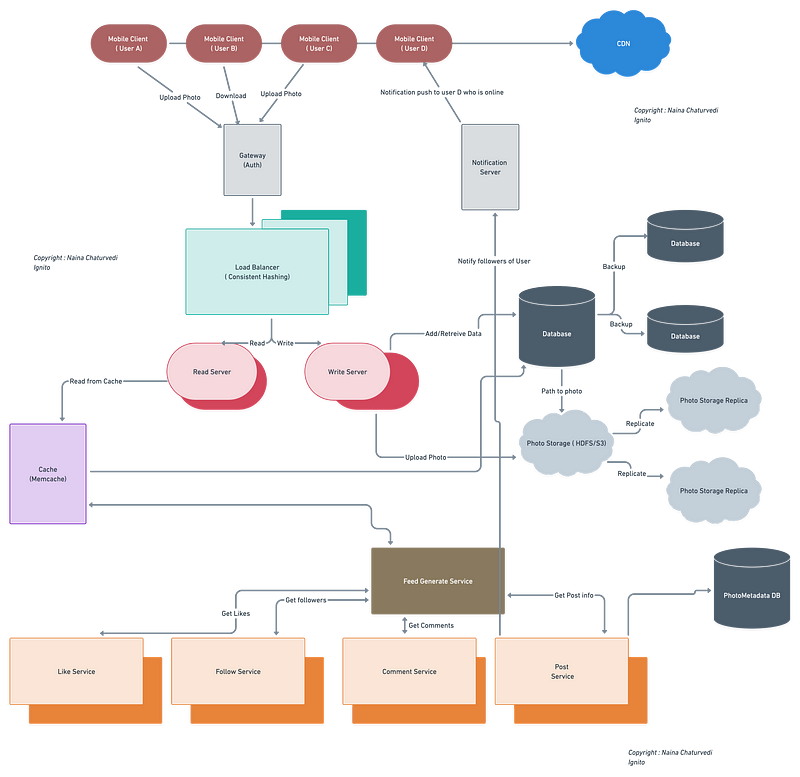
4. High Level Design
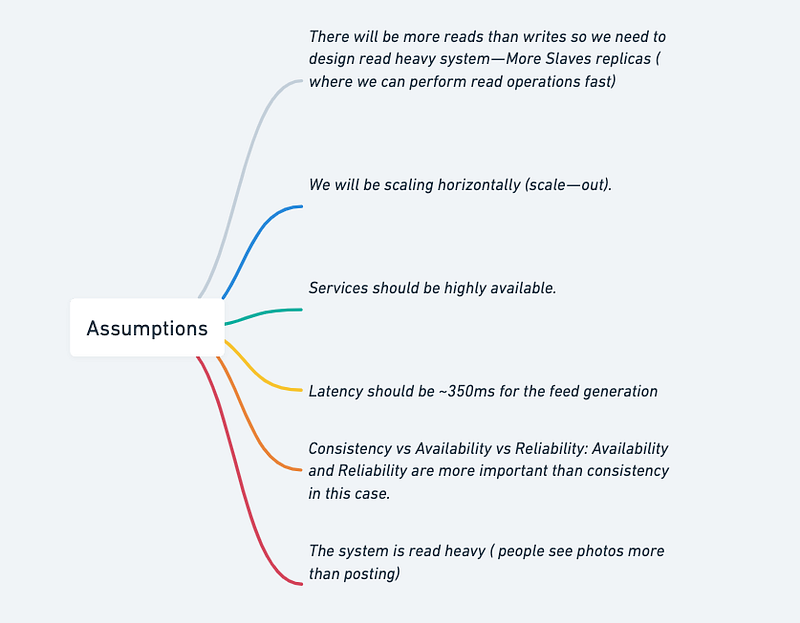
Assumptions
- There will be more reads than writes so we need to design read heavy system — More Slaves replicas ( where we can perform read operations fast)
- We will be scaling horizontally (scale — out).
- Services should be highly available.
- Latency should be ~350ms for the feed generation.
- Consistency vs Availability vs Reliability: Availability and Reliability are more important than consistency in this case.
- The system is read heavy ( people see photos more than posting)
— — — — — — — — — — — — — — — — — — — — — — — — — — — — — — — —
Main Components —
Mobile Client : These are users accessing instagram
Application Servers : Read, write and notification server
Load Balancer : Route and direct the requests to the required server performing designated service.
Cache (Memcache) : It’s a massive system to serve million of users fast. We will be caching the data based on LRU.
CDN : To improve the latency and throughput.
Database : To store the data based on the Data model above and fetch data from the Storage using the required path.
Storage (HDFS or Amazon S3) : To upload and store the photos.
Here is a high-level overview of how Instagram works :
- Front-end: The front-end of Instagram is built using React Native and is responsible for handling user interactions and displaying the user interface. It communicates with the back-end through APIs to request data or perform actions such as posting a new photo.
- Back-end: The back-end of Instagram is built using a combination of technologies including Python, Django, and PostgreSQL. It acts as the server-side component that receives requests from the front-end and processes them.
- Database: Instagram uses a relational database management system, such as PostgreSQL, to store user data, including user profiles, photos, and captions. The database is optimized for fast read and write operations to handle the large number of requests made by users.
- Content Delivery Network (CDN): Instagram uses a CDN to store and distribute media files, such as photos and videos, to users. The CDN is used to reduce the load on the back-end servers and improve the overall performance and speed of the system.
- Image Processing: Instagram uses image processing algorithms to handle the processing of photos uploaded by users. This includes tasks such as resizing, cropping, and filtering images.
- Notifications: Instagram uses a notification system to inform users of various events, such as when someone likes their photo or starts following them. The notifications are sent in real-time and can be received on the front-end through push notifications or through email.
- Search: Instagram provides a search feature that allows users to find other users, photos, and hashtags. The search feature is powered by a combination of algorithms that consider various factors, such as the relevance and popularity of the content.
These are the main components of the Instagram system. The interactions between these components are complex and optimized for high performance and scalability, which enables Instagram to handle millions of concurrent users and handle billions of photos and videos.
Here’s an example implementation of the Instagram architecture in Python:
class User:
    def __init__(self, username, password):
        self.username = username
        self.password = password
        self.following = []
        self.posts = []

    def follow(self, user):
        self.following.append(user)

    def post(self, post):
        self.posts.append(post)

    def get_feed(self):
        feed = []
        for user in self.following:
            feed += user.posts
        return feed

class Post:
    def __init__(self, caption, image_path):
        self.caption = caption
        self.image_path = image_path

    def __repr__(self):
        return f"{self.caption} ({self.image_path})"

class ImageProcessor:
    @staticmethod
    def resize(image_path, size):
        # resize the image and save it to the same path
        pass

    @staticmethod
    def filter(image_path, filter):
        # apply the filter to the image and save it to the same path
        pass

class NotificationService:
    def notify(self, user, message):
        # send a notification to the user
        pass

class Instagram:
    def __init__(self):
        self.users = []
        self.image_processor = ImageProcessor()
        self.notification_service = NotificationService()

    def sign_up(self, username, password):
        user = User(username, password)
        self.users.append(user)
        return user

    def post(self, user, caption, image_path):
        image_processor.resize(image_path, (1024, 1024))
        post = Post(caption, image_path)
        user.post(post)
        self.notify_followers(user, post)

    def notify_followers(self, user, post):
        message = f"{user.username} posted a new photo: {post}"
        for follower in user.following:
            self.notification_service.notify(follower, message)

instagram = Instagram()
alice = instagram.sign_up("alice", "password123")
bob = instagram.sign_up("bob", "password456")
charlie = instagram.sign_up("charlie", "password789")alice.follow(bob)bob.post("Here's a photo", "bob_photo.jpg")feed = alice.get_feed()
print(feed) # [Here's a photo (bob_photo.jpg)]In this example, the User class represents a user of Instagram. The User class has several methods, such as follow and post, that allow a user to interact with the system. The Post class represents a photo or video that a user can post on Instagram, and the ImageProcessor class provides methods to resize and filter images. The NotificationService class sends notifications to users when events occur, such as when someone posts a new post.
— — — — — — — — — — — — — — — — — — — — — — — — — — — — — — — —
Services we need —
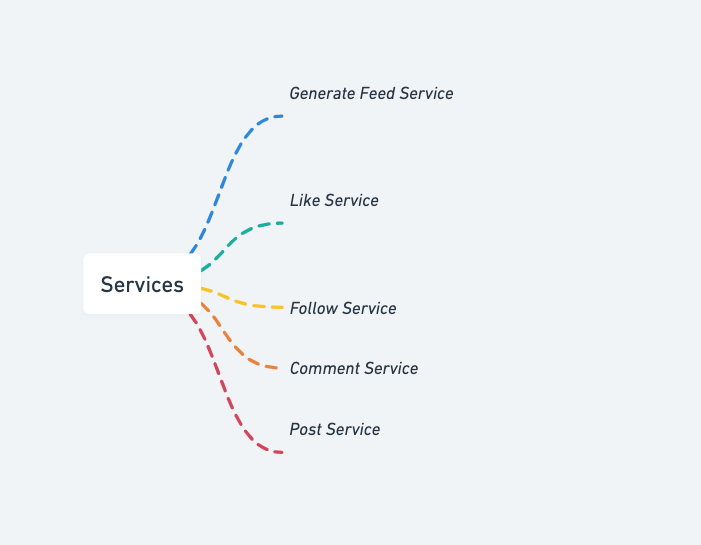
- Like Service
- Follow Service
- Comment Service
- Post Service
- Generate Feed service
To fetch the recent, most popular and relevant photos of people user follows
Let’s say to create the news feed, the system pulls 50 photos on the timeline. To do so, the application server will fetch the metadata of recent 50 photos from the people’s post which the user follows.
Then submit these 50 photos to the ranking algorithm which will score it based on the likeness, comments, user activity etc.
To achieve great efficiency in feed generation, we should dedicate designated servers which continuously keep generating the feed for the users and store it in a table.
The moment user login the system, the servers fetch the feed by querying the above table and show the results and store the timestamp.
Feed generation service —
A feed generation service for Instagram is a program that collects and curates content from various Instagram accounts and displays them in a user-friendly feed. The service can filter content based on certain criteria like hashtags, locations, or specific user accounts, and can also sort the content by date or popularity.
Implementation of a feed generation service for Instagram using Python and the Instagram API:
import requests
import json
# Define the Instagram API endpoint
base_url = 'https://graph.instagram.com/'# Define the access token for the API
access_token = '<YOUR_ACCESS_TOKEN_HERE>'# Define the endpoint for the user's feed
feed_endpoint = f'{base_url}me/media?fields=id,caption,media_type,media_url,permalink,thumbnail_url,timestamp&access_token={access_token}'# Define the function to retrieve the user's Instagram feed
def get_feed():
# Send a GET request to the feed endpoint
response = requests.get(feed_endpoint) # Decode the response as JSON
data = json.loads(response.text) # Extract the relevant data from the response
feed = []
for post in data['data']:
feed_item = {
'id': post['id'],
'caption': post.get('caption', {}).get('text', ''),
'media_type': post['media_type'],
'media_url': post['media_url'],
'permalink': post['permalink'],
'thumbnail_url': post['thumbnail_url'],
'timestamp': post['timestamp']
}
feed.append(feed_item) return feedIn this implementation, we first define the Instagram API endpoint and the access token needed to make API requests. We then define the endpoint for the user’s feed and a function to retrieve the feed data. The function sends a GET request to the feed endpoint and decodes the response as JSON. We then extract the relevant data from each post in the response and append it to a list, which is returned as the final feed data.
Like Service:
A like service allows users to like a specific post on Instagram.
Here’s an implementation of a like service using Python and the Instagram API:
import requests# Define the Instagram API endpoint
base_url = 'https://graph.instagram.com/'# Define the access token for the API
access_token = '<YOUR_ACCESS_TOKEN_HERE>'# Define the function to like a post
def like_post(post_id):
# Define the endpoint for liking a post
like_endpoint = f'{base_url}{post_id}/likes' # Send a POST request to the like endpoint
response = requests.post(like_endpoint, params={'access_token': access_token}) # Check the response status code
if response.status_code == 200:
print('Post liked successfully!')
else:
print('Unable to like post.')In this implementation, we define the Instagram API endpoint and the access token needed to make API requests. We then define a function to like a specific post, which takes the post ID as an argument. The function sends a POST request to the Instagram API endpoint for liking a post, with the post ID and access token as parameters. If the request is successful, the function prints a message indicating that the post was liked successfully.
Follow Service:
A follow service allows users to follow another user on Instagram.
Here’s an implementation of a follow service using Python and the Instagram API:
import requests# Define the Instagram API endpoint
base_url = 'https://graph.instagram.com/'# Define the access token for the API
access_token = '<YOUR_ACCESS_TOKEN_HERE>'# Define the function to follow a user
def follow_user(user_id):
# Define the endpoint for following a user
follow_endpoint = f'{base_url}{user_id}/follow' # Send a POST request to the follow endpoint
response = requests.post(follow_endpoint, params={'access_token': access_token}) # Check the response status code
if response.status_code == 200:
print('User followed successfully!')
else:
print('Unable to follow user.')In this implementation, we define the Instagram API endpoint and the access token needed to make API requests. We then define a function to follow a specific user, which takes the user ID as an argument. The function sends a POST request to the Instagram API endpoint for following a user, with the user ID and access token as parameters. If the request is successful, the function prints a message indicating that the user was followed successfully.
Basic Low Level Design
import java.util.*;

class User {
    private String userId;
    private String username;
    private String password;
    // other user attributes

    public User(String userId, String username, String password) {
        this.userId = userId;
        this.username = username;
        this.password = password;
        // initialize other attributes
    }

    // Getters and setters for attributes
    // ...
}

class Post {
    private String postId;
    private User user;
    private String caption;
    // other post attributes

    public Post(String postId, User user, String caption) {
        this.postId = postId;
        this.user = user;
        this.caption = caption;
        // initialize other attributes
    }

    // Getters and setters for attributes
    // ...
}

class Instagram {
    private Map<String, User> users;
    private List<Post> posts;

    public Instagram() {
        this.users = new HashMap<>();
        this.posts = new ArrayList<>();
    }

    public void addUser(User user) {
        users.put(user.getUserId(), user);
    }

    public User getUserById(String userId) {
        return users.get(userId);
    }

    public void createPost(String userId, String caption) {
        User user = getUserById(userId);

        if (user == null) {
            System.out.println("User not found");
            return;
        }

        String postId = generatePostId(); // Generate a unique post ID
        Post post = new Post(postId, user, caption);
        posts.add(post);

        // Additional logic to update user's feed, notify followers, etc.
        // ...
    }

    public List<Post> getFeed(String userId) {
        List<Post> userFeed = new ArrayList<>();

        for (Post post : posts) {
            if (post.getUser().getUserId().equals(userId)) {
                userFeed.add(post);
            }
        }

        return userFeed;
    }

    // Additional methods for handling likes, comments, follow/unfollow, etc.
    // ...
}

public class Main {
    public static void main(String[] args) {
        Instagram instagram = new Instagram();

        User user1 = new User("1", "Alice", "password");
        User user2 = new User("2", "Bob", "password");

        instagram.addUser(user1);
        instagram.addUser(user2);

        instagram.createPost("1", "Hello, world!");

        List<Post> user1Feed = instagram.getFeed("1");
        for (Post post : user1Feed) {
            System.out.println("User: " + post.getUser().getUsername());
            System.out.println("Caption: " + post.getCaption());
            System.out.println();
        }
    }
}
API Design
Implementation —
from flask import Flask, requestapp = Flask(__name__)# sample data to be stored in the server
users = {
"user1": {
"name": "John Doe",
"followers": ["user2", "user3"],
"following": ["user2", "user3"],
"posts": [
{
"id": 1,
"caption": "This is my first post!",
"image_url": "https://example.com/images/post1.jpg",
"timestamp": "2022-02-18 14:30:00"
},
{
"id": 2,
"caption": "Another post!",
"image_url": "https://example.com/images/post2.jpg",
"timestamp": "2022-02-18 14:35:00"
}
]
},
"user2": {
"name": "Jane Doe",
"followers": ["user1"],
"following": ["user1"],
"posts": [
{
"id": 3,
"caption": "Hello world!",
"image_url": "https://example.com/images/post3.jpg",
"timestamp": "2022-02-18 14:40:00"
}
]
},
"user3": {
"name": "Bob Smith",
"followers": ["user1"],
"following": ["user1"],
"posts": []
}
}# endpoint for retrieving a user's information
@app.route('/users/<username>', methods=['GET'])
def get_user(username):
if username in users:
return users[username], 200
else:
return "User not found", 404# endpoint for following a user
@app.route('/users/<follower>/follow/<following>', methods=['POST'])
def follow_user(follower, following):
if follower in users and following in users:
if following not in users[follower]['following']:
users[follower]['following'].append(following)
users[following]['followers'].append(follower)
return "User followed", 200
else:
return "User not found", 404# endpoint for unfollowing a user
@app.route('/users/<follower>/unfollow/<following>', methods=['POST'])
def unfollow_user(follower, following):
if follower in users and following in users:
if following in users[follower]['following']:
users[follower]['following'].remove(following)
users[following]['followers'].remove(follower)
return "User unfollowed", 200
else:
return "User not found", 404# endpoint for creating a post
@app.route('/users/<username>/posts', methods=['POST'])
def create_post(username):
if username in users:
caption = request.json.get('caption')
image_url = request.json.get('image_url')
timestamp = request.json.get('timestamp')
post_id = len(users[username]['posts']) + 1
post = {"id": post_id, "caption": caption, "image_url": image_url, "timestamp": timestamp}
users[username]['posts'].append(post)
return "Post created", 200
else:
return "User not found", 404# endpoint for retrieving all posts from followed users
@app.route('/users/<username>/feed', methods=['GET'])
def get_feed(username):
if username in users:
feed = []
for user in users[username]['following']:
feed.extend(users[user]['posts'])
sorted_feed = sorted(feed, key=lambda post: post['timestamp'], reverse=True)
return {"feed": sorted_feed}, 200
else:
return "User not found", 404- User management API: This API would be responsible for allowing users to sign up, log in, and manage their profiles. It would likely include endpoints for creating a new account, logging in, updating profile information, and retrieving profile information.
from flask import Flask, request

app = Flask(__name__)

# Hardcoded list of users for demonstration purposes
users = [
    {
        "id": 1,
        "username": "johndoe",
        "email": "[email protected]",
        "password": "password123",
        "bio": "I love photography and exploring the world!",
    }
]

# Endpoint for creating a new account
@app.route("/users", methods=["POST"])
def create_user():
    data = request.get_json()
    new_user = {
        "id": len(users) + 1,
        "username": data["username"],
        "email": data["email"],
        "password": data["password"],
        "bio": "",
    }
    users.append(new_user)
    return {"message": "User created successfully"}, 201

# Endpoint for logging in
@app.route("/login", methods=["POST"])
def login():
    data = request.get_json()
    for user in users:
        if user["username"] == data["username"] and user["password"] == data["password"]:
            return {"message": "Login successful"}, 200
    return {"message": "Login failed"}, 401

# Endpoint for updating profile information
@app.route("/users/<int:user_id>", methods=["PATCH"])
def update_user(user_id):
    data = request.get_json()
    for user in users:
        if user["id"] == user_id:
            user["bio"] = data["bio"]
            return {"message": "Profile updated successfully"}, 200
    return {"message": "User not found"}, 404

# Endpoint for retrieving profile information
@app.route("/users/<int:user_id>", methods=["GET"])
def get_user(user_id):
    for user in users:
        if user["id"] == user_id:
            return user, 200
return {"message": "User not found"}, 404- Content management API: This API would be responsible for allowing users to upload, retrieve, and delete photos and videos. It would likely include endpoints for uploading a new photo, retrieving a specific photo, and deleting a photo.
// Endpoint for uploading a new photo
POST /photos
{
    "image_url": "https://s3.amazonaws.com/instagram-photos/johndoe/123456.jpg",
    "caption": "Exploring the mountains 🏔️ #nature #adventure"
}
// Endpoint for retrieving a specific photo
GET /photos/{photo_id}// Endpoint for deleting a photo
DELETE /photos/{photo_id}- Image processing API: This API would be responsible for processing images and videos as they are uploaded to Instagram. It would likely include endpoints for processing a new photo and retrieving the processed photo.
// Endpoint for processing a new photo
POST /images/process
{
    "image_url": "https://s3.amazonaws.com/instagram-photos/johndoe/123456.jpg"
}
// Endpoint for retrieving the processed photo
GET /images/processed/{photo_id}- Notifications API: This API would be responsible for sending notifications to users. It would likely include endpoints for sending a new notification, retrieving a list of notifications, and marking a notification as read.
// Endpoint for sending a new notification
POST /notifications
{
    "recipient_id": 123456,
    "message": "John Doe just liked your photo!"
}
// Endpoint for retrieving a list of notifications
GET /notifications?user_id=123456// Endpoint for marking a notification as read
PATCH /notifications/{notification_id}
{
"read": true
}6. Complete (Detailed) Design
(Zoom it)
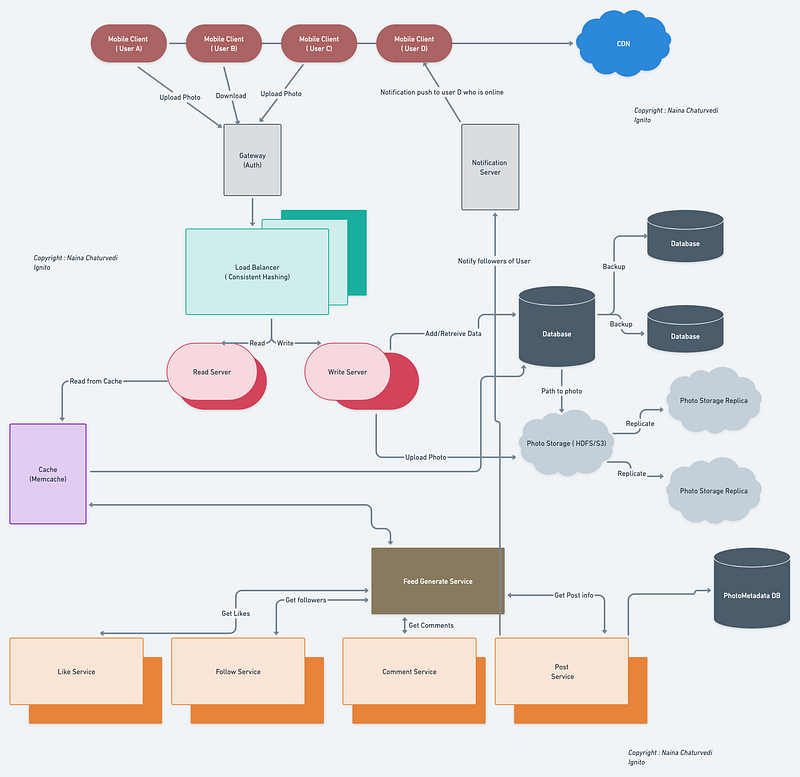
Code
Implement the features using the Instagram API and Python code:
Upload and share Photos and videos
To upload a photo or video to Instagram, we can use the media endpoint of the API. Here's an implementation of how to upload a photo:
import requests# Set up authentication
api_key = 'your_api_key'
api_secret = 'your_api_secret'
access_token = 'your_access_token'
auth = (api_key, api_secret)# Set up request parameters
url = 'https://api.instagram.com/v1/media/upload/'
image_path = '/path/to/image.jpg'
caption = 'Check out my cool photo!'# Upload the image
files = {'photo': open(image_path, 'rb')}
response = requests.post(url, files=files, auth=auth)# Get the media ID from the response
media_id = response.json()['media_id']# Use the media ID to create a post
url = 'https://api.instagram.com/v1/media/'
data = {'access_token': access_token, 'media_id': media_id, 'caption': caption}
response = requests.post(url, data=data)Follow other users
To follow another user, we can use the follows endpoint of the API. Here's an implementation of how to follow a user:
import requests# Set up authentication
api_key = 'your_api_key'
api_secret = 'your_api_secret'
access_token = 'your_access_token'
auth = (api_key, api_secret)# Set up request parameters
url = 'https://api.instagram.com/v1/users/{user-id}/follows/'
user_id = '123456'# Follow the user
data = {'access_token': access_token}
response = requests.post(url.format(user_id=user_id), data=data, auth=auth)Chat with other people
Here's an implementation of how to send a DM:
from instagram_private_api import Client, ClientCompatPatch# Set up authentication
username = 'your_username'
password = 'your_password'
api = Client(username, password)
api.login()# Set up request parameters
user_id = '123456'
text = 'Hey, how are you?'# Send the DM
api.direct_message(user_id, text)Control visibility of content
To control the visibility of Instagram content, users can make their posts either public (accessible to everyone) or private (accessible to their followers only). To implement this using Python, we can use the instabot library.
Here's an implementation code snippet that illustrates how to set the visibility of a post:
# Install instabot library using pip: pip install instabotfrom instabot import Bot# Create a new bot instance
bot = Bot()# Login to Instagram
username = "your_username"
password = "your_password"
bot.login(username=username, password=password)# Upload a post and set its visibility
post_path = "path/to/post.jpg"
caption = "This is my post!"
is_private = True # Set to True for a private post and False for a public post
bot.upload_photo(photo=post_path, caption=caption, is_private=is_private)# Logout from Instagram
bot.logout()In this implementation, we first create a new Bot instance and login to Instagram using the login method. We then upload a post using the upload_photo method and set its visibility by passing the is_private parameter. Setting is_private to True makes the post private and visible only to the user's followers, while setting it to False makes the post public and visible to everyone.
Creating Instagram Stories:
To create Instagram stories using Python, we can again use the instabot library. Here's an implementation code snippet that illustrates how to create a story:
# Install instabot library using pip: pip install instabotfrom instabot import Bot# Create a new bot instance
bot = Bot()# Login to Instagram
username = "your_username"
password = "your_password"
bot.login(username=username, password=password)# Upload a story
story_path = "path/to/story.jpg"
bot.upload_story_photo(story_path)# Logout from Instagram
bot.logout()In this implementation, we first create a new Bot instance and login to Instagram using the login method. We then upload a story using the upload_story_photo method.
Tagging Another User/Location in an Instagram Post:
To tag another user or location in an Instagram post using Python, we can use the instabot library again. Here's an implementation code snippet that illustrates how to tag another user and a location in a post:
# Install instabot library using pip: pip install instabotfrom instabot import Bot# Create a new bot instance
bot = Bot()# Login to Instagram
username = "your_username"
password = "your_password"
bot.login(username=username, password=password)# Upload a post and tag a user and a location
post_path = "path/to/post.jpg"
caption = "Check out this place @user and @location"
user_id = bot.get_user_id_from_username("user")
location_id = bot.search_location("location")[0].get("location_id")
bot.upload_photo(photo=post_path, caption=caption, user_tags=[{"user_id": user_id}, {"location_id": location_id}])# Logout from Instagram
bot.logout()In this implementation, we first create a new Bot instance and login to Instagram using the login method. We then upload a post using the upload_photo method and tag a user and a location by passing a list of dictionaries to the user_tags parameter. Each dictionary contains the user_id or location_id of the user or location to be tagged.
Watching the Feed of Other Users on Instagram:
To watch the feed of other users on Instagram using Python, we can use the instaloader library. Here's an implementation code snippet that illustrates how to do this:
# Install instaloader library using pip: pip install instaloaderimport instaloader# Create a new Instaloader instance
L = instaloader.Instaloader()# Login to Instagram (optional)
username = "your_username"
password = "your_password"
L.context.log("Logging in...")
L.interactive_login(username=username, password=password)# Get a user's profile
user = instaloader.Profile.from_username(L.context, "username")# Print the user's latest feed posts
for post in user.get_feed_posts():
print(post)# Logout from Instagram (optional)
L.context.log("Logging out...")
L.close()In this implementation, we first create a new Instaloader instance. We can optionally login to Instagram using the interactive_login method. We then get a user's profile using the Profile.from_username method and print the user's latest feed posts using a for loop and the get_feed_posts method.
More on Instagram —
User Management:
User authentication and authorization: User authentication is the process of verifying the identity of a user, typically through credentials such as username and password. User authorization involves granting or denying access to certain resources based on the user’s privileges and roles.
Code for user authentication using Flask in Python:
from flask import Flask, request, jsonify, make_responseapp = Flask(__name__)# Dummy user data for demonstration
users = [
{"id": 1, "username": "john", "password": "password1"},
{"id": 2, "username": "jane", "password": "password2"}
]@app.route("/login", methods=["POST"])
def login():
username = request.json.get("username")
password = request.json.get("password") # Find user by username
user = next((user for user in users if user["username"] == username), None) if user and user["password"] == password:
# Generate and return authentication token
token = generate_auth_token(user["id"])
return jsonify({"token": token}) # Unauthorized access
return make_response("Invalid username or password", 401)# Dummy token generation for demonstration
def generate_auth_token(user_id):
# Implement token generation logic here
return "dummy_token"if __name__ == "__main__":
app.run()User registration, login, and password management: User registration allows new users to create an account. Login enables existing users to authenticate and access their accounts. Password management involves features such as resetting passwords, enforcing password policies, and securing password storage.
Code for user registration using Flask in Python:
from flask import Flask, request, jsonify, make_responseapp = Flask(__name__)# Dummy user data for demonstration
users = []@app.route("/register", methods=["POST"])
def register():
username = request.json.get("username")
password = request.json.get("password") # Check if username is already taken
if any(user["username"] == username for user in users):
return make_response("Username already exists", 409) # Create a new user
user = {"username": username, "password": password}
users.append(user) return jsonify({"message": "User registered successfully"})if __name__ == "__main__":
app.run()User profiles and settings: User profiles contain information about a user, such as their bio, profile picture, and social media links. User settings allow users to customize their account preferences, privacy settings, notification preferences, etc.
Code for updating user profile using Flask in Python:
from flask import Flask, request, jsonify, make_responseapp = Flask(__name__)# Dummy user data for demonstration
users = [
{"id": 1, "username": "john", "bio": "Hello, I'm John"}
]@app.route("/profile/<int:user_id>", methods=["GET", "PUT"])
def profile(user_id):
if request.method == "GET":
# Get user profile
user = next((user for user in users if user["id"] == user_id), None)
if user:
return jsonify(user)
return make_response("User not found", 404) elif request.method == "PUT":
# Update user profile
user = next((user for user in users if user["id"] == user_id), None)
if user:
user["bio"] = request.json.get("bio")
return jsonify({"message": "Profile updated successfully"})
return make_response("User not found", 404)if __name__ == "__main__":
app.run()User privacy and security: User privacy and security involve implementing measures to protect user data and ensure confidentiality, integrity, and availability. This includes mechanisms such as data encryption, secure transmission of information, access control, and compliance with privacy regulations.
Code for encrypting user passwords using the bcrypt library in Python:
import bcrypt# Hash and store user password during registration
def register(username, password):
hashed_password = bcrypt.hashpw(password.encode(), bcrypt.gensalt())
# Store hashed_password in the database# Validate user password during login
def login(username, password):
# Retrieve hashed_password from the database based on the username
hashed_password = "retrieve hashed password from database"
if bcrypt.checkpw(password.encode(), hashed_password):
# Passwords match, allow login
return True
else:
# Passwords don't match, deny login
return FalsePosting and Content Management:
Uploading and storing photos/videos: To upload and store photos/videos, you need a file storage system. You can use cloud storage services like Amazon S3, Google Cloud Storage, or Azure Blob Storage. These services provide APIs to upload and retrieve files.
Code for uploading a file using Flask and storing it in Amazon S3:
import boto3
from botocore.exceptions import NoCredentialsError
from flask import Flask, request, jsonifyapp = Flask(__name__)# Configure Amazon S3 credentials
AWS_ACCESS_KEY = "your-access-key"
AWS_SECRET_KEY = "your-secret-key"
BUCKET_NAME = "your-bucket-name"s3 = boto3.client("s3", aws_access_key_id=AWS_ACCESS_KEY, aws_secret_access_key=AWS_SECRET_KEY)@app.route("/upload", methods=["POST"])
def upload_file():
if "file" not in request.files:
return jsonify({"message": "No file uploaded"}) file = request.files["file"] try:
# Upload file to Amazon S3
s3.upload_fileobj(file, BUCKET_NAME, file.filename)
return jsonify({"message": "File uploaded successfully"})
except NoCredentialsError:
return jsonify({"message": "Amazon S3 credentials not found"})if __name__ == "__main__":
app.run()Captioning and tagging posts: Allowing users to add captions and tags to their posts involves storing and associating this metadata with the respective posts in the database.
Code for adding captions and tags to a post using Flask in Python:
from flask import Flask, request, jsonify, make_responseapp = Flask(__name__)# Dummy post data for demonstration
posts = [
{"id": 1, "caption": "Beautiful sunset", "tags": ["sunset", "nature"]}
]@app.route("/post/<int:post_id>", methods=["GET", "PUT"])
def post(post_id):
if request.method == "GET":
# Get post details
post = next((post for post in posts if post["id"] == post_id), None)
if post:
return jsonify(post)
return make_response("Post not found", 404) elif request.method == "PUT":
# Update post caption and tags
post = next((post for post in posts if post["id"] == post_id), None)
if post:
post["caption"] = request.json.get("caption")
post["tags"] = request.json.get("tags")
return jsonify({"message": "Post updated successfully"})
return make_response("Post not found", 404)if __name__ == "__main__":
app.run()Post metadata management (likes, comments, timestamps, etc.): Post metadata management involves storing and managing additional information associated with posts, such as the number of likes, comments, timestamps, etc. This information is typically stored in a database and updated as users interact with the posts.
Code for managing post metadata using Flask in Python:
from flask import Flask, request, jsonify, make_responseapp = Flask(__name__)# Dummy post data for demonstration
posts = [
{"id": 1, "caption": "Beautiful sunset", "likes": 10, "comments": 3}
]@app.route("/post/<int:post_id>/like", methods=["POST"])
def like_post(post_id):
post = next((post for post in posts if post["id"] == post_id), None)
if post:
post["likes"] += 1
return jsonify({"message": "Post liked successfully"})
return make_response("Post not found", 404)@app.route("/post/<int:post_id>/comment", methods=["POST"])
def add_comment(post_id):
comment = request.json.get("comment")
post = next((post for post in posts if post["id"] == post_id), None)
if post:
post["comments"].append(comment)
return jsonify({"message": "Comment added successfully"})
return make_response("Post not found", 404)if __name__ == "__main__":
app.run()Image and video processing (filters, cropping, resizing, etc.): Image and video processing involves applying various transformations and enhancements to multimedia content, such as applying filters, cropping, resizing, and other image/video editing operations. Libraries like OpenCV or Pillow can be used for image processing tasks.
Code for resizing an image using Pillow in Python:
from PIL import Imagedef resize_image(image_path, width, height):
image = Image.open(image_path)
resized_image = image.resize((width, height))
resized_image.save("resized_image.jpg")# Example usage
resize_image("original_image.jpg", 800, 600)Handling multimedia content storage and retrieval efficiently: Efficiently handling multimedia content storage and retrieval often involves leveraging cloud-based object storage systems, such as Amazon S3, Azure Blob Storage, or Google Cloud Storage. These services provide scalable and reliable storage solutions for storing and retrieving multimedia files.
Code for retrieving a file from Amazon S3 using the Boto3 library in Python:
import boto3def get_file_from_s3(bucket_name, file_key, local_file_path):
s3 = boto3.client("s3")
s3.download_file(bucket_name, file_key, local_file_path)# Example usage
get_file_from_s3("your-bucket-name", "file.jpg", "local_file.jpg")Feed Generation and Personalization:
Generating personalized feeds for each user: To generate personalized feeds, you can consider various factors such as the user’s preferences, followed accounts, engagement history, and relevance of posts. This can be achieved through algorithms that analyze user behavior and content characteristics.
Code for generating a personalized feed based on user preferences:
def generate_personalized_feed(user_id):
# Retrieve user preferences from the database
user_preferences = get_user_preferences(user_id) # Query and filter posts based on user preferences
personalized_posts = query_posts_with_preferences(user_preferences) return personalized_postsAlgorithmic sorting and ranking of posts: To sort and rank posts algorithmically, you can consider factors such as recency, popularity, relevance, and user engagement. Algorithms like collaborative filtering, content-based filtering, or hybrid approaches can be used to determine the order of posts in a user’s feed.
Code for sorting posts based on popularity:
def sort_posts_by_popularity(posts):
# Sort posts based on popularity metrics (e.g., likes, comments)
sorted_posts = sorted(posts, key=lambda post: post['likes'] + post['comments'], reverse=True)
return sorted_postsHandling user preferences and interests: To handle user preferences and interests, you can provide features for users to indicate their preferences during onboarding or allow them to customize their interests in their profile settings. You can store this information in the database and use it to personalize the user’s feed.
Code for updating user preferences in the database:
def update_user_preferences(user_id, preferences):
# Update user preferences in the database
user = get_user(user_id)
user['preferences'] = preferences
save_user(user)Incorporating relevance and engagement metrics: Relevance and engagement metrics help determine the suitability of posts for a user’s feed. These metrics can be based on factors like post content, user interactions, click-through rates, or machine learning models trained on user behavior.
Code for calculating engagement score for a post:
def calculate_engagement_score(post):
# Calculate engagement score based on post likes, comments, and other relevant metrics
engagement_score = post['likes'] + post['comments']
return engagement_scoreSocial Features:
Following/followers system: Implementing a following/followers system allows users to follow other users and view their posts in their feed. This involves storing and managing user relationships in the database.
Code for implementing a following/followers system:
def follow_user(user_id, target_user_id):
# Add target_user_id to the list of followed users for user_id
user = get_user(user_id)
user['following'].append(target_user_id)
save_user(user)def get_followers(user_id):
# Retrieve followers for a given user_id from the database
user = get_user(user_id)
followers = user['followers']
return followersLike and comment functionality: Implementing like and comment functionality allows users to interact with posts by liking and leaving comments. This involves updating post metadata and storing comments in the database.
Code for adding a comment to a post:
def add_comment(post_id, user_id, comment_text):
# Create a new comment
comment = {'user_id': user_id, 'text': comment_text} # Add comment to the post in the database
post = get_post(post_id)
post['comments'].append(comment)
save_post(post)Direct messaging and chat features: Implementing direct messaging and chat features enables users to communicate privately with each other. This involves storing and managing messages between users in the database.
Code for sending a direct message:
def send_direct_message(sender_id, receiver_id, message_text):
# Create a new message
message = {'sender_id': sender_id, 'receiver_id': receiver_id, 'text': message_text} # Store the message in the database
save_message(message)Notifications and activity feed: Implementing notifications and activity feeds keeps users updated on relevant actions and events. This involves storing notifications and generating personalized activity feeds based on user interactions.
Code for sending a notification:
def send_notification(user_id, message):
# Create a new notification
notification = {'user_id': user_id, 'message': message} # Store the notification in the database
save_notification(notification)Discovering and exploring content: Implementing features for discovering and exploring content allows users to find new posts, accounts, or trending topics. This can be achieved through algorithms, trending sections, or personalized recommendations.
Code for retrieving trending posts:
def get_trending_posts():
# Query and retrieve trending posts from the database
trending_posts = query_trending_posts()
return trending_postsSearch and Discovery:
Implementing search functionality: Search functionality allows users to find specific content based on search queries. This involves indexing relevant data and implementing search algorithms.
Code for implementing search functionality using Elasticsearch:
from elasticsearch import Elasticsearch# Connect to Elasticsearch
es = Elasticsearch()def search_posts(query):
# Perform a search query on Elasticsearch
result = es.search(index='posts', body={'query': {'match': {'caption': query}}})
return result['hits']['hits']Supporting various search criteria (hashtags, users, locations, etc.): To support various search criteria, you can expand the search functionality to include filters based on hashtags, users, locations, or other relevant attributes.
Code for searching posts by hashtag:
def search_posts_by_hashtag(hashtag):
# Query and retrieve posts based on the specified hashtag
hashtagged_posts = query_posts_by_hashtag(hashtag)
return hashtagged_postsTrending and popular content: To display trending and popular content, you can track engagement metrics such as likes, comments, and views. This information can be used to determine which posts are currently popular or trending.
Code for retrieving popular posts:
def get_popular_posts():
# Query and retrieve popular posts based on engagement metrics
popular_posts = query_popular_posts()
return popular_postsRecommendations based on user interests: To provide recommendations based on user interests, you can analyze user behavior, preferences, and interactions to suggest relevant content. This can be achieved through collaborative filtering, content-based filtering, or machine learning-based recommendation algorithms.
Code for generating content recommendations:
def generate_content_recommendations(user_id):
# Retrieve user preferences and behavior from the database
user_preferences = get_user_preferences(user_id)
user_behavior = get_user_behavior(user_id) # Use machine learning models or recommendation algorithms to generate recommendations
recommendations = generate_recommendations(user_preferences, user_behavior)
return recommendationsPrivacy and Security:
User privacy settings: Implementing user privacy settings allows users to control the visibility of their profile, posts, and other personal information. This involves providing options to set privacy preferences and ensuring that the system respects those settings.
Code for updating user privacy settings:
def update_privacy_settings(user_id, privacy_preferences):
# Update user's privacy settings in the database
user = get_user(user_id)
user['privacy_settings'] = privacy_preferences
save_user(user)Content visibility and control: To manage content visibility and control, you can implement privacy options for individual posts. This allows users to choose the audience for each post, such as public, followers-only, or specific groups.
Code for setting post visibility:
def set_post_visibility(post_id, visibility):
# Update the visibility of the post in the database
post = get_post(post_id)
post['visibility'] = visibility
save_post(post)Reporting and blocking mechanisms: Implementing reporting and blocking mechanisms allows users to report inappropriate or abusive content and block other users. This involves providing reporting options, handling reported content, and managing blocked users.
Code for reporting a post:
def report_post(post_id, user_id, report_reason):
# Create a report entry in the database
report = {'post_id': post_id, 'user_id': user_id, 'reason': report_reason}
save_report(report)Data encryption and protection: To ensure data privacy and protection, you can implement encryption mechanisms to secure sensitive user data, such as passwords, authentication tokens, and other personally identifiable information. Python provides various libraries for data encryption, such as cryptography.
Code for encrypting user passwords:
from cryptography.fernet import Fernetdef encrypt_password(password):
# Generate encryption key
key = Fernet.generate_key() # Create encryption cipher
cipher = Fernet(key) # Encrypt password
encrypted_password = cipher.encrypt(password.encode()) return encrypted_password, keyScalability and Performance:
Handling a large user base and high traffic: To handle a large user base and high traffic, you can employ horizontal scaling techniques, such as load balancing and distributed system architectures. This allows you to distribute the workload across multiple servers or instances to handle increased traffic and accommodate a growing user base.
Code for configuring a load balancer:
# Configure load balancer settings
load_balancer = configure_load_balancer()# Route incoming requests to backend servers
def handle_request(request):
backend_server = load_balancer.route_request(request)
response = backend_server.process_request(request)
return responseCaching and content delivery networks (CDNs): Caching and CDNs help improve performance by storing frequently accessed data closer to the user. You can use caching techniques, such as Redis or Memcached, to cache database queries, user profiles, or frequently accessed content. Additionally, CDNs can be used to cache and serve static assets, such as images and videos, reducing the load on the main server.
Code for using Redis caching:
import redis# Connect to Redis cache
cache = redis.Redis(host='localhost', port=6379)# Retrieve data from cache or database
def get_data(key):
if cache.exists(key):
return cache.get(key)
else:
data = query_data_from_database(key)
cache.set(key, data)
return dataOptimizing database queries and storage: To optimize database queries and storage, you can employ techniques like indexing, query optimization, and using appropriate database technologies. This helps improve query performance and overall system efficiency.
Code for optimizing database queries using an index:
# Create an index on the 'username' column for faster lookup
db.create_index('users', 'username')# Retrieve user by username using the index
def get_user_by_username(username):
user = db.query('users', {'username': username}, use_index=True)
return userData Storage and Management:
Storing user data (profiles, posts, etc.): You can store user data, such as profiles and posts, in a database. You can use either a relational database like MySQL or PostgreSQL, or a NoSQL database like MongoDB or Cassandra, depending on your requirements.
Code for storing user profile in MongoDB:
from pymongo import MongoClient# Connect to MongoDB
client = MongoClient('mongodb://localhost:27017/')# Insert user profile into 'users' collection
def create_user_profile(profile):
db = client['instagram']
users_collection = db['users']
users_collection.insert_one(profile)Relational and non-relational databases: Relational databases use structured data models with predefined schemas, while non-relational databases allow more flexible data modeling. Choose the appropriate database technology based on factors like data structure, scalability, and transactional requirements.
Code for querying posts from a relational database:
import psycopg2# Connect to PostgreSQL database
conn = psycopg2.connect(host='localhost', dbname='instagram', user='user', password='password')# Query posts from the 'posts' table
def get_posts():
cur = conn.cursor()
cur.execute('SELECT * FROM posts')
posts = cur.fetchall()
cur.close()
return postsFile storage for multimedia content: To store and manage multimedia content, such as photos and videos, you can use file storage systems or cloud storage services like Amazon S3 or Google Cloud Storage. Store the file path or reference in the database for retrieval.
Code for storing an uploaded photo on Amazon S3:
import boto3# Create an S3 client
s3 = boto3.client('s3')def upload_photo(photo, bucket_name, file_name):
# Upload the photo to the specified S3 bucket
s3.upload_fileobj(photo, bucket_name, file_name)
def get_photo_url(bucket_name, file_name):
# Generate a pre-signed URL for the photo in S3
url = s3.generate_presigned_url('get_object', Params={'Bucket': bucket_name, 'Key': file_name})
return urlData partitioning and sharding strategies: To handle large-scale data storage, you can implement data partitioning and sharding strategies. This involves dividing the data across multiple databases or shards based on specific criteria, such as user ID, geographic location, or time.
Code for sharding user data based on user ID:
def save_user(user):
user_id = user['id']
shard_id = calculate_shard_id(user_id)
shard = get_shard_connection(shard_id)
shard.save_user(user)def get_user(user_id):
shard_id = calculate_shard_id(user_id)
shard = get_shard_connection(shard_id)
return shard.get_user(user_id)System Design — Robinhood
We will be discussing in depth -
- What is Robinhood
- Important Features
- Scaling Requirements
- Data Model — ER requirements
- High Level Design
- Basic Low Level Design
- API Design
- Complete Detailed Design
- Complete code Implementation

What is Robinhood
Robinhood is a popular commission-free trading platform that allows users to invest in stocks, options, cryptocurrencies, and other financial instruments. It provides a user-friendly interface and democratizes access to the stock market by eliminating traditional trading fees.
Important Features
- Commission-free Trading: Robinhood revolutionized the brokerage industry by introducing commission-free trading, enabling users to buy and sell stocks without paying any fees.
- User-Friendly Interface: The platform offers a simple and intuitive user interface, making it easy for both experienced and novice investors to navigate and execute trades.
- Fractional Shares: Robinhood allows users to buy fractional shares of stocks, making it affordable for investors with limited capital to invest in high-priced stocks.
- Real-Time Market Data: Users have access to real-time market data, including stock prices, charts, and news, empowering them to make informed investment decisions.
- Easy Account Setup: Robinhood streamlines the account setup process, allowing users to create an account quickly and start investing within minutes.
- Mobile Application: The platform offers a mobile application that enables users to trade on the go, providing convenience and accessibility.
Scaling Requirements — Capacity Estimation
For the sake of simplicity, let’s assume the following:
Total number of users: 50 million
Daily active users (DAU): 10 million
Number of trades executed by a user/day: 5
Total number of trades executed per day: 50 million trades/day
Since Robinhood is a trading platform, the system is both read and write heavy. Let’s assume a read-to-write ratio of 10:1.
Total number of trades written per day: 50 million trades Total number of trades read per day: 500 million trades
Storage Estimation:
Let’s assume each trade takes approximately 1 KB of storage.
Total storage per day for trades: 50 million trades * 1 KB = 50 GB/day
For the next 3 years, the total storage required: 50 GB/day * 365 days/year * 3 years = 54.75 TB
Requests per second:
Assuming the system operates 24/7, we can estimate the requests per second.
Requests per second: 500 million trades / (24 hours * 3600 seconds) = 5,787 requests/second
- Horizontal Scalability: The system should be able to scale horizontally by adding more servers or instances to distribute the load efficiently.
- Elasticity: The ability to scale resources up or down dynamically based on demand is crucial to handle peak trading periods effectively.
- High Availability: The system should be designed to minimize downtime and ensure that trading services are available to users at all times.
- Performance Optimization: The architecture should be optimized to handle a high volume of concurrent user requests with minimal latency.
Data Model — ER requirements
Users:
- Fields:
- User ID: Integer
- Username: String
- Email: String
- Password: String
Stocks:
- Fields:
- Stock ID: Integer
- Symbol: String
- Name: String
- Current Price: Float
- Historical Data: JSON
Orders:
- Fields:
- Order ID: Integer
- User ID: Integer (Foreign key from Users)
- Stock ID: Integer (Foreign key from Stocks)
- Order Type: String (Buy/Sell)
- Quantity: Integer
- Timestamp: DateTime
Transactions:
- Fields:
- Transaction ID: Integer
- Order ID: Integer (Foreign key from Orders)
- Price: Float
- Quantity: Integer
- Timestamp: DateTime
High Level Design
Assumptions:
- The system is read-heavy as users often check their portfolio and stock prices.
- Horizontal scalability is required to handle the increasing number of users and transactions.
- High availability and fault tolerance are crucial to ensure uninterrupted trading services
User Management: Handles user authentication, registration, and account management.
Trading Engine: Executes buy and sell orders, verifies user balances, and updates transaction records.
Stock Price Service: Fetches real-time stock prices from market data providers.
Database: Stores user information, stock data, orders, and transactions.
External Integrations: Interfaces with third-party services for market data, account verification, and regulatory compliance.
Main Components:
User Management:
- Responsible for user registration, authentication, and account management.
- Manages user information and authentication tokens.
Trading Engine:
- Executes buy and sell orders, validates user balances, and updates transaction records.
- Handles order matching and ensures transaction integrity.
Stock Price Service:
- Retrieves real-time stock prices from market data providers.
- Stores and updates stock price information in a cache for fast access.
Database:
- Stores user information, stock data, orders, and transactions.
- Utilizes a scalable and reliable database system (e.g., sharded NoSQL database) for efficient data storage and retrieval.
External Integrations:
- Interfaces with market data providers for real-time stock prices and market information.
- Integrates with third-party services for regulatory compliance and account verification.
Services:
User Registration and Authentication Service:
- Allows users to register and create an account.
- Handles user authentication and generates access tokens for secure API interactions.
Stock Information Service:
- Provides endpoints to retrieve stock details, including current price, historical data, and related news.
- Utilizes the Stock Price Service and external market data providers to fetch real-time stock information.
Order Placement Service:
- Allows users to place buy and sell orders.
- Validates user balances, checks stock availability, and updates order and transaction records.
- Handles order matching and execution.
Account Management Service:
- Enables users to view their account balance, transaction history, and portfolio details.
- Retrieves and aggregates data from the database for efficient presentation to users.
External Integration Services:
- Handles integrations with third-party services for regulatory compliance, such as KYC (Know Your Customer) verification and anti-money laundering checks.
- Communicates with external APIs to ensure compliance and seamless account verification processes.
Basic Low Level Design
class User:
def __init__(self, user_id, username, password):
self.user_id = user_id
self.username = username
self.password = password
# Other user attributes
class Stock:
def __init__(self, stock_id, symbol, name, current_price):
self.stock_id = stock_id
self.symbol = symbol
self.name = name
self.current_price = current_price
# Other stock attributes
class Order:
def __init__(self, order_id, user, stock, order_type, quantity):
self.order_id = order_id
self.user = user
self.stock = stock
self.order_type = order_type
self.quantity = quantity
# Other order attributes
class Transaction:
def __init__(self, transaction_id, order, price, quantity):
self.transaction_id = transaction_id
self.order = order
self.price = price
self.quantity = quantity
# Other transaction attributes
class Robinhood:
def __init__(self):
self.users = []
self.stocks = []
self.orders = []
self.transactions = []
def add_user(self, user):
self.users.append(user)
def add_stock(self, stock):
self.stocks.append(stock)
def place_order(self, order):
self.orders.append(order)
def execute_transaction(self, transaction):
self.transactions.append(transaction)
# Other methods for managing users, stocks, orders, transactions, etc.API Design
- User Registration and Authentication: Endpoints for user registration, login, and token-based authentication.
- Stock Information: Endpoints to retrieve stock details, including current price, historical data, and related news.
- Order Placement: Endpoints for placing buy and sell orders, verifying user balances, and updating order status.
- Account Management: Endpoints for managing user accounts, including balance information, transaction history, and portfolio details.
User Registration API:
- Endpoint:
/users/register - Method: POST
- Parameters:
username: User's desired usernameemail: User's email addresspassword: User's password- Description: This API allows users to register for a new account in Robinhood. It accepts the user’s desired username, email, and password as parameters and creates a new user in the system.
User Login API:
- Endpoint:
/users/login - Method: POST
- Parameters:
username: User's usernamepassword: User's password- Description: This API allows users to log in to their Robinhood account. It verifies the provided username and password and returns a token or session ID for subsequent API calls.
Stock Information API:
- Endpoint:
/stocks/{symbol} - Method: GET
- Parameters:
symbol: Stock symbol (e.g., AAPL, GOOGL)- Description: This API retrieves information about a specific stock based on its symbol. It returns the stock’s current price, name, and other relevant data.
Place Order API:
- Endpoint:
/orders - Method: POST
- Parameters:
user_id: ID of the user placing the orderstock_id: ID of the stock being tradedorder_type: Type of order (buy/sell)quantity: Number of shares to be bought/sold- Description: This API allows users to place buy or sell orders for a specific stock. It accepts the user ID, stock ID, order type, and quantity as parameters and creates a new order in the system.
Execute Transaction API:
- Endpoint:
/transactions - Method: POST
- Parameters:
order_id: ID of the order being executedprice: Price at which the transaction is executedquantity: Number of shares traded- Description: This API allows the system to execute a transaction based on a previously placed order. It accepts the order ID, transaction price, and quantity as parameters and creates a new transaction record in the system.
from flask import Flask, request, jsonify
app = Flask(__name__)
# Endpoint for user registration
@app.route('/register', methods=['POST'])
def register_user():
# Retrieve user data from the request body
data = request.json
# Perform user registration logic
# ...
return jsonify({'message': 'User registered successfully'})
# Endpoint for user login
@app.route('/login', methods=['POST'])
def login_user():
# Retrieve user credentials from the request body
data = request.json
# Perform user authentication logic
# ...
return jsonify({'message': 'User logged in successfully'})
# Endpoint for retrieving stock information
@app.route('/stocks/<symbol>', methods=['GET'])
def get_stock_info(symbol):
# Retrieve stock information based on the symbol
# ...
return jsonify(stock_info)
# Endpoint for placing a buy order
@app.route('/orders/buy', methods=['POST'])
def place_buy_order():
# Retrieve order data from the request body
data = request.json
# Perform buy order placement logic
# ...
return jsonify({'message': 'Buy order placed successfully'})
# Endpoint for placing a sell order
@app.route('/orders/sell', methods=['POST'])
def place_sell_order():
# Retrieve order data from the request body
data = request.json
# Perform sell order placement logic
# ...
return jsonify({'message': 'Sell order placed successfully'})
# Endpoint for retrieving user account balance
@app.route('/account/balance', methods=['GET'])
def get_account_balance():
# Retrieve user account balance
# ...
return jsonify(account_balance)
if __name__ == '__main__':
app.run()from flask import Flask, request, jsonify
app = Flask(__name__)
# User service
@app.route('/users/register', methods=['POST'])
def register_user():
# User registration logic
# ...
return jsonify({'message': 'User registered successfully'})
@app.route('/users/login', methods=['POST'])
def login_user():
# User login logic
# ...
return jsonify({'message': 'User logged in successfully'})
# Stock service
@app.route('/stocks/<symbol>', methods=['GET'])
def get_stock_info(symbol):
# Stock information retrieval logic
# ...
return jsonify(stock_info)
# Trading service
@app.route('/orders/buy', methods=['POST'])
def place_buy_order():
# Buy order placement logic
# ...
return jsonify({'message': 'Buy order placed successfully'})
@app.route('/orders/sell', methods=['POST'])
def place_sell_order():
# Sell order placement logic
# ...
return jsonify({'message': 'Sell order placed successfully'})
# Account service
@app.route('/account/balance', methods=['GET'])
def get_account_balance():
# Account balance retrieval logic
# ...
return jsonify(account_balance)
if __name__ == '__main__':
app.run()Complete Detailed Design
Coming soon! It will be covered on youtube channel.
Subscribe to youtube channel :
Complete Code implementation
class Robinhood:
def __init__(self):
self.users = []
self.stocks = []
self.market_data = {}
def register_user(self, username, password):
user = {'username': username, 'password': password, 'balance': 0, 'portfolio': {}}
self.users.append(user)
return user
def login_user(self, username, password):
for user in self.users:
if user['username'] == username and user['password'] == password:
return user
return None
def buy_stock(self, user, stock_symbol, quantity):
stock = self._get_stock(stock_symbol)
if stock is None:
return "Stock not found"
stock_price = stock['price']
total_cost = stock_price * quantity
if user['balance'] < total_cost:
return "Insufficient funds"
fractional_shares = quantity % 1
if fractional_shares > 0:
self._update_portfolio(user, stock_symbol, quantity - fractional_shares)
else:
self._update_portfolio(user, stock_symbol, quantity)
user['balance'] -= total_cost
return "Stock purchased successfully"
def sell_stock(self, user, stock_symbol, quantity):
stock = self._get_stock(stock_symbol)
if stock is None:
return "Stock not found"
stock_price = stock['price']
if stock_symbol not in user['portfolio'] or user['portfolio'][stock_symbol] < quantity:
return "Insufficient shares"
total_cost = stock_price * quantity
user['balance'] += total_cost
self._update_portfolio(user, stock_symbol, -quantity)
return "Stock sold successfully"
def add_stock(self, stock_symbol, price):
stock = {'symbol': stock_symbol, 'price': price}
self.stocks.append(stock)
def update_stock_price(self, stock_symbol, price):
stock = self._get_stock(stock_symbol)
if stock is not None:
stock['price'] = price
def _get_stock(self, stock_symbol):
for stock in self.stocks:
if stock['symbol'] == stock_symbol:
return stock
return None
def _update_portfolio(self, user, stock_symbol, quantity):
if stock_symbol in user['portfolio']:
user['portfolio'][stock_symbol] += quantity
else:
user['portfolio'][stock_symbol] = quantity
# Example usage
robinhood = Robinhood()
# Register a user
user = robinhood.register_user('john123', 'password123')
# Login
user = robinhood.login_user('john123', 'password123')
# Add stocks
robinhood.add_stock('AAPL', 150.25)
robinhood.add_stock('GOOGL', 2500.00)
# Buy stocks
robinhood.buy_stock(user, 'AAPL', 5)
robinhood.buy_stock(user, 'GOOGL', 2.5)
# Sell stocks
robinhood.sell_stock(user, 'AAPL', 2)
robinhood.sell_stock(user, 'GOOGL', 1.5)
# Update stock price
robinhood.update_stock_price('AAPL', 160.75)from flask import Flask, request, jsonify
app = Flask(__name__)
users = []
stocks = []
orders = []
transactions = []
# User Registration API
@app.route('/users/register', methods=['POST'])
def register_user():
data = request.get_json()
username = data['username']
email = data['email']
password = data['password']
user_id = len(users) + 1
user = {
'user_id': user_id,
'username': username,
'email': email,
'password': password
}
users.append(user)
return jsonify({'message': 'User registered successfully'})
# User Login API
@app.route('/users/login', methods=['POST'])
def login_user():
data = request.get_json()
username = data['username']
password = data['password']
for user in users:
if user['username'] == username and user['password'] == password:
return jsonify({'message': 'Login successful'})
return jsonify({'message': 'Invalid credentials'}), 401
# Stock Information API
@app.route('/stocks/<symbol>', methods=['GET'])
def get_stock(symbol):
for stock in stocks:
if stock['symbol'] == symbol:
return jsonify(stock)
return jsonify({'message': 'Stock not found'}), 404
# Place Order API
@app.route('/orders', methods=['POST'])
def place_order():
data = request.get_json()
user_id = data['user_id']
stock_id = data['stock_id']
order_type = data['order_type']
quantity = data['quantity']
order_id = len(orders) + 1
order = {
'order_id': order_id,
'user_id': user_id,
'stock_id': stock_id,
'order_type': order_type,
'quantity': quantity
}
orders.append(order)
return jsonify({'message': 'Order placed successfully'})
# Execute Transaction API
@app.route('/transactions', methods=['POST'])
def execute_transaction():
data = request.get_json()
order_id = data['order_id']
price = data['price']
quantity = data['quantity']
transaction_id = len(transactions) + 1
transaction = {
'transaction_id': transaction_id,
'order_id': order_id,
'price': price,
'quantity': quantity
}
transactions.append(transaction)
return jsonify({'message': 'Transaction executed successfully'})
if __name__ == '__main__':
app.run()System Design — Swiggy
We will be discussing in depth -
- What is Swiggy
- Important Features
- Scaling Requirements
- Data Model — ER requirements
- High Level Design
- Basic Low Level Design
- API Design
- Complete Detailed Design
- Complete code Implementation
What is Swiggy
Swiggy is an online food ordering and delivery platform that connects users with local restaurants and delivery partners. It allows customers to order food from a wide range of restaurants through its mobile app or website, and ensures prompt delivery to the customers’ doorsteps.
Important Features
a) User Registration and Authentication: Swiggy provides a seamless registration and login process for users to create and manage their accounts.
b) Restaurant Listing and Search: Users can browse through a variety of restaurants based on location, cuisine, ratings, and reviews.
c) Menu and Order Management: Swiggy enables users to view menus, customize orders, and place food orders from the desired restaurant.
d) Real-Time Order Tracking: Swiggy offers a live tracking feature that allows users to monitor the status and location of their food delivery in real-time.
e) Payment Integration: Swiggy supports multiple payment options, including credit/debit cards, digital wallets, and cash on delivery.
f) Ratings and Reviews: Users can provide feedback and ratings for restaurants and delivery partners based on their experience.
g) Customer Support: Swiggy provides customer support channels to address queries, complaints, and provide assistance to users.
Scaling Requirements — Capacity Estimation
Assumptions:
Total number of users: 50,000
Daily active users (DAU): 15,000
Average number of orders placed by a user per day: 2
Total number of orders placed per day: 30,000
Storage Estimation:
- Let’s assume each order generates an average of 1 MB of data (including order details, user information, etc.)
- Total storage per day: 30,000 * 1 MB = 30 GB/day
For the next 3 years:
- Total storage for 3 years: 30 GB * 365 days * 3 years = 32.85 TB
Requests per second:
- Assuming peak hours account for 30% of the total daily orders:
- Peak orders per second: 30,000 * 0.3 / (24 hours * 60 minutes * 60 seconds) ≈ 0.35 orders/second
Data Model — ER requirements
Users:
- Fields: UserId, Name, Email, Password, Phone, Address
Restaurants:
- Fields: RestaurantId, Name, Address, Cuisine, Rating
Menu:
- Fields: MenuItemId, RestaurantId, Name, Description, Price
Orders:
- Fields: OrderId, UserId, RestaurantId, Status, TotalAmount, OrderTime
OrderItems:
- Fields: OrderItemId, OrderId, MenuItemId, Quantity, Price
Payments:
- Fields: PaymentId, OrderId, UserId, Amount, PaymentTime, Status
Reviews:
- Fields: ReviewId, UserId, RestaurantId, Rating, Comment, Timestamp
Users can register and log in to the system using their email and password.
Users can search for restaurants based on various criteria like cuisine, location, etc.
Users can view restaurant details including its name, address, cuisine, and rating.
Users can view the menu of a restaurant, including the menu items, descriptions, and prices.
Users can place an order by selecting items from the menu and specifying the quantity.
Users can track the status of their orders in real-time.
Users can make payments for their orders using various payment methods.
Users can rate and review restaurants based on their experience.
High Level Design
a) User Interface: The user interface allows customers to interact with the application, browse restaurants, place orders, and track deliveries.
b) Application Servers: These servers handle the logic and processing of user requests, manage user sessions, and communicate with external services.
c) Database Servers: The database servers store and retrieve data related to users, restaurants, menus, orders, and reviews.
d) External Services: Swiggy integrates with external services for various functionalities such as payment processing, location tracking, and SMS notifications.
e) Caching Layer: A caching layer can be employed to store frequently accessed data and improve system performance.
User Management:
- Handles user registration, authentication, and authorization.
Restaurant Management:
- Manages restaurant information, including details, menu, and ratings.
Order Management:
- Handles order placement, tracking, and cancellation.
Payment Integration:
- Integrates with payment gateways for secure and seamless payments.
Review and Rating Management:
- Allows users to submit reviews and ratings for restaurants.
Main Components and Services:
Mobile/Web Clients:
- Interfaces for users to interact with the Swiggy system.
User Service:
- Responsible for user registration, login, and authentication.
Restaurant Service:
- Manages restaurant information, including details, menu, and ratings.
Order Service:
- Handles order placement, tracking, and cancellation.
Payment Service:
- Integrates with payment gateways to process payments.
Review Service:
- Manages user reviews and ratings for restaurants.
Notification Service:
- Sends notifications to users regarding order updates, payment status, etc.
External Services:
- Integration with external services like SMS gateways for OTP verification, payment gateways for secure payments, etc.
from flask import Flask, jsonify, request
app = Flask(__name__)
# User Service
@app.route('/api/users/register', methods=['POST'])
def register_user():
user_data = request.get_json()
# Logic to create a new user in the database
# Example logic: Save user data in the database
user_id = save_user_to_database(user_data)
return jsonify({'message': 'User registered successfully', 'user_id': user_id})
@app.route('/api/users/login', methods=['POST'])
def login_user():
login_data = request.get_json()
username = login_data['username']
password = login_data['password']
# Logic to verify user credentials and generate authentication token
# Example logic: Check if the username and password match
if username == 'example_user' and password == 'example_password':
token = generate_auth_token()
return jsonify({'message': 'User logged in successfully', 'token': token})
else:
return jsonify({'message': 'Invalid credentials'})
# Restaurant Service
@app.route('/api/restaurants', methods=['GET'])
def get_restaurants():
# Logic to fetch a list of restaurants from the database
restaurants = fetch_restaurants_from_database()
return jsonify({'message': 'List of restaurants', 'restaurants': restaurants})
@app.route('/api/restaurants/<int:restaurant_id>', methods=['GET'])
def get_restaurant(restaurant_id):
# Logic to fetch the details of the specified restaurant from the database
restaurant = fetch_restaurant_from_database(restaurant_id)
if restaurant:
return jsonify({'message': 'Restaurant details', 'restaurant': restaurant})
else:
return jsonify({'message': 'Restaurant not found'})
# Order Service
@app.route('/api/orders', methods=['POST'])
def place_order():
order_data = request.get_json()
# Logic to create a new order in the database
order_id = create_order_in_database(order_data)
return jsonify({'message': 'Order placed successfully', 'order_id': order_id})
@app.route('/api/orders/<int:order_id>', methods=['GET'])
def get_order(order_id):
# Logic to fetch the details of the specified order from the database
order = fetch_order_from_database(order_id)
if order:
return jsonify({'message': 'Order details', 'order': order})
else:
return jsonify({'message': 'Order not found'})
@app.route('/api/orders/<int:order_id>', methods=['PUT'])
def update_order(order_id):
order_data = request.get_json()
# Logic to update the details of the specified order in the database
update_order_in_database(order_id, order_data)
return jsonify({'message': 'Order updated successfully'})
@app.route('/api/orders/<int:order_id>', methods=['DELETE'])
def cancel_order(order_id):
# Logic to cancel the specified order in the database
cancel_order_in_database(order_id)
return jsonify({'message': 'Order canceled successfully'})
# Payment Service
@app.route('/api/payments', methods=['POST'])
def initiate_payment():
payment_data = request.get_json()
# Logic to initiate a payment for the order
payment_id = initiate_payment_for_order(payment_data)
return jsonify({'message': 'Payment initiated', 'payment_id': payment_id})
@app.route('/api/payments/<int:payment_id>', methods=['GET'])
def get_payment(payment_id):
# Logic to fetch the details of the specified payment from the database
payment = fetch_payment_from_database(payment_id)
if payment:
return jsonify({'message': 'Payment details', 'payment': payment})
else:
return jsonify({'message': 'Payment not found'})
# Review Service
@app.route('/api/restaurants/<int:restaurant_id>/reviews', methods=['POST'])
def submit_review(restaurant_id):
review_data = request.get_json()
# Logic to create a new review for the specified restaurant in the database
review_id = create_review_for_restaurant(review_data, restaurant_id)
return jsonify({'message': 'Review submitted', 'review_id': review_id})
@app.route('/api/restaurants/<int:restaurant_id>/reviews', methods=['GET'])
def get_reviews(restaurant_id):
# Logic to fetch the reviews of the specified restaurant from the database
reviews = fetch_reviews_for_restaurant(restaurant_id)
return jsonify({'message': 'Restaurant reviews', 'reviews': reviews})
# Placeholder functions for database operations, replace with your actual implementation
def save_user_to_database(user_data):
# Save user data to the database and return the user ID
# ...
return 1
def generate_auth_token():
# Generate an authentication token for the user
# ...
return 'example_token'
def fetch_restaurants_from_database():
# Fetch a list of restaurants from the database
# ...
return []
def fetch_restaurant_from_database(restaurant_id):
# Fetch the details of the specified restaurant from the database
# ...
return None
def create_order_in_database(order_data):
# Create a new order in the database and return the order ID
# ...
return 1
def fetch_order_from_database(order_id):
# Fetch the details of the specified order from the database
# ...
return None
def update_order_in_database(order_id, order_data):
# Update the details of the specified order in the database
# ...
pass
def cancel_order_in_database(order_id):
# Cancel the specified order in the database
# ...
pass
def initiate_payment_for_order(payment_data):
# Initiate a payment for the order and return the payment ID
# ...
return 1
def fetch_payment_from_database(payment_id):
# Fetch the details of the specified payment from the database
# ...
return None
def create_review_for_restaurant(review_data, restaurant_id):
# Create a new review for the specified restaurant in the database and return the review ID
# ...
return 1
def fetch_reviews_for_restaurant(restaurant_id):
# Fetch the reviews of the specified restaurant from the database
# ...
return []
if __name__ == '__main__':
app.run()Basic Low Level Design
from flask import Flask, jsonify, request
app = Flask(__name__)
# User class
class User:
def __init__(self, user_id, name, address):
self.user_id = user_id
self.name = name
self.address = address
self.order_history = []
# Restaurant class
class Restaurant:
def __init__(self, restaurant_id, name, menu, ratings):
self.restaurant_id = restaurant_id
self.name = name
self.menu = menu
self.ratings = ratings
# Order class
class Order:
def __init__(self, order_id, user_id, restaurant_id, items):
self.order_id = order_id
self.user_id = user_id
self.restaurant_id = restaurant_id
self.items = items
self.status = 'Placed'
# Sample data for demonstration
users = {
'user1': User('user1', 'John Doe', '123 Main St'),
'user2': User('user2', 'Jane Smith', '456 Elm St')
}
restaurants = {
'restaurant1': Restaurant('restaurant1', 'Pizza Place', ['Margherita', 'Pepperoni'], 4.5),
'restaurant2': Restaurant('restaurant2', 'Burger Joint', ['Cheeseburger', 'Veggie Burger'], 4.2)
}
orders = {}
# User API
@app.route('/api/users/register', methods=['POST'])
def register_user():
data = request.get_json()
user_id = data['user_id']
name = data['name']
address = data['address']
users[user_id] = User(user_id, name, address)
return jsonify({'message': 'User registered successfully'})
@app.route('/api/users/login', methods=['POST'])
def login_user():
data = request.get_json()
user_id = data['user_id']
if user_id in users:
return jsonify({'message': 'User logged in successfully'})
else:
return jsonify({'message': 'User not found'})
@app.route('/api/users/<user_id>/profile', methods=['GET'])
def get_user_profile(user_id):
if user_id in users:
user = users[user_id]
return jsonify({'user_id': user.user_id, 'name': user.name, 'address': user.address})
else:
return jsonify({'message': 'User not found'})
# Restaurant API
@app.route('/api/restaurants', methods=['GET'])
def get_restaurants():
restaurant_list = []
for restaurant in restaurants.values():
restaurant_list.append({'restaurant_id': restaurant.restaurant_id, 'name': restaurant.name})
return jsonify({'restaurants': restaurant_list})
@app.route('/api/restaurants/<restaurant_id>', methods=['GET'])
def get_restaurant(restaurant_id):
if restaurant_id in restaurants:
restaurant = restaurants[restaurant_id]
return jsonify({'restaurant_id': restaurant.restaurant_id, 'name': restaurant.name, 'menu': restaurant.menu, 'ratings': restaurant.ratings})
else:
return jsonify({'message': 'Restaurant not found'})
# Order API
@app.route('/api/orders', methods=['POST'])
def place_order():
data = request.get_json()
order_id = data['order_id']
user_id = data['user_id']
restaurant_id = data['restaurant_id']
items = data['items']
order = Order(order_id, user_id, restaurant_id, items)
orders[order_id] = order
user = users[user_id]
user.order_history.append(order)
return jsonify({'message': 'Order placed successfully'})
@app.route('/api/orders/<order_id>', methods=['GET'])
def get_order(order_id):
if order_id in orders:
order = orders[order_id]
return jsonify({'order_id': order.order_id, 'user_id': order.user_id, 'restaurant_id': order.restaurant_id, 'items': order.items, 'status': order.status})
else:
return jsonify({'message': 'Order not found'})
@app.route('/api/orders/<order_id>', methods=['PUT'])
def update_order(order_id):
if order_id in orders:
data = request.get_json()
status = data['status']
order = orders[order_id]
order.status = status
return jsonify({'message': 'Order updated successfully'})
else:
return jsonify({'message': 'Order not found'})
if __name__ == '__main__':
app.run()API Design
User Registration and Authentication:
POST /api/users/register- Register a new user account.POST /api/users/login- Authenticate and log in a user.
Restaurant Listing and Search:
GET /api/restaurants- Get a list of available restaurants.GET /api/restaurants/{restaurant_id}- Get details of a specific restaurant.
Menu and Order Management:
GET /api/restaurants/{restaurant_id}/menu- Get the menu of a restaurant.POST /api/orders- Place a new order.GET /api/orders/{order_id}- Get details of a specific order.PUT /api/orders/{order_id}- Update an existing order.DELETE /api/orders/{order_id}- Cancel an order.
Real-Time Order Tracking:
GET /api/orders/{order_id}/track- Get real-time tracking information for an order.
Payment Integration:
POST /api/payments- Initiate a payment for an order.GET /api/payments/{payment_id}- Get details of a specific payment.
Ratings and Reviews:
POST /api/restaurants/{restaurant_id}/reviews- Submit a review for a restaurant.GET /api/restaurants/{restaurant_id}/reviews- Get reviews for a specific restaurant.
User Registration and Authentication:
from flask import Flask, request, jsonifyapp = Flask(__name__)users = [] # List to store registered users# Endpoint to register a new user
@app.route('/api/users/register', methods=['POST'])
def register_user():
data = request.json
email = data['email']
password = data['password'] # Check if the user already exists
for user in users:
if user['email'] == email:
return jsonify({'message': 'User already exists'}) # Create a new user
new_user = {
'email': email,
'password': password
} # Add the new user to the list
users.append(new_user) return jsonify({'message': 'User registered successfully'})# Endpoint to authenticate and log in a user
@app.route('/api/users/login', methods=['POST'])
def login_user():
data = request.json
email = data['email']
password = data['password'] # Find the user in the list
for user in users:
if user['email'] == email and user['password'] == password:
return jsonify({'message': 'User logged in successfully'}) return jsonify({'message': 'Invalid credentials'})if __name__ == '__main__':
app.run()Restaurant Listing and Search:
from flask import Flask, jsonifyapp = Flask(__name__)restaurants = [
{
'id': 1,
'name': 'Restaurant 1',
'cuisine': 'Italian'
},
{
'id': 2,
'name': 'Restaurant 2',
'cuisine': 'Indian'
}
]# Endpoint to get a list of available restaurants
@app.route('/api/restaurants', methods=['GET'])
def get_restaurants():
return jsonify(restaurants)# Endpoint to get details of a specific restaurant
@app.route('/api/restaurants/<int:restaurant_id>', methods=['GET'])
def get_restaurant(restaurant_id):
for restaurant in restaurants:
if restaurant['id'] == restaurant_id:
return jsonify(restaurant) return jsonify({'message': 'Restaurant not found'})if __name__ == '__main__':
app.run()Menu and Order Management:
from flask import Flask, request, jsonifyapp = Flask(__name__)menus = {
1: {
'id': 1,
'name': 'Restaurant 1',
'menu': ['Pizza', 'Pasta', 'Salad']
},
2: {
'id': 2,
'name': 'Restaurant 2',
'menu': ['Biryani', 'Curry', 'Naan']
}
}orders = []# Endpoint to get the menu of a restaurant
@app.route('/api/restaurants/<int:restaurant_id>/menu', methods=['GET'])
def get_menu(restaurant_id):
if restaurant_id in menus:
return jsonify(menus[restaurant_id]['menu']) return jsonify({'message': 'Menu not found'})# Endpoint to place a new order
@app.route('/api/orders', methods=['POST'])
def place_order():
data = request.json
restaurant_id = data['restaurant_id']
items = data['items'] # Check if the restaurant exists
if restaurant_id not in menus:
return jsonify({'message': 'Restaurant not found'}) # Create a new order
new_order = {
'restaurant_id': restaurant_id,
'items': items
} # Add the new order to the list
orders.append(new_order) return jsonify({'message': 'Order placed successfully'})# Endpoint to get details of a specific order
@app.route('/api/orders/<int:order_id>', methods=['GET'])
def get_order(order_id):
for order in orders:
if order['id'] == order_id:
return jsonify(order) return jsonify({'message': 'Order not found'})# Endpoint to update an existing order
@app.route('/api/orders/<int:order_id>', methods=['PUT'])
def update_order(order_id):
data = request.json
items = data['items'] for order in orders:
if order['id'] == order_id:
order['items'] = items
return jsonify({'message': 'Order updated successfully'}) return jsonify({'message': 'Order not found'})# Endpoint to cancel an order
@app.route('/api/orders/<int:order_id>', methods=['DELETE'])
def cancel_order(order_id):
for order in orders:
if order['id'] == order_id:
orders.remove(order)
return jsonify({'message': 'Order canceled successfully'}) return jsonify({'message': 'Order not found'})if __name__ == '__main__':
app.run()Complete Detailed Design
Coming soon! It will be covered on youtube channel.
Subscribe to youtube channel :
Complete Code implementation
from flask import Flask, jsonify, request
app = Flask(__name__)
# User Registration and Authentication
@app.route('/api/users/register', methods=['POST'])
def register_user():
# Code for user registration
user_data = request.get_json()
# Extract user registration data from the request
username = user_data.get('username')
email = user_data.get('email')
password = user_data.get('password')
# Perform user registration logic (e.g., create a new user in the database)
# ...
return jsonify({'message': 'User registered successfully'})
@app.route('/api/users/login', methods=['POST'])
def login_user():
# Code for user login
login_data = request.get_json()
# Extract user login data from the request
username = login_data.get('username')
password = login_data.get('password')
# Perform user login logic (e.g., verify user credentials)
# ...
return jsonify({'message': 'User logged in successfully'})
# Restaurant Listing and Search
@app.route('/api/restaurants', methods=['GET'])
def get_restaurants():
# Code to retrieve restaurants
# ...
@app.route('/api/restaurants/<restaurant_id>', methods=['GET'])
def get_restaurant(restaurant_id):
# Code to retrieve a specific restaurant
# ...
# Menu and Order Management
@app.route('/api/restaurants/<restaurant_id>/menu', methods=['GET'])
def get_menu(restaurant_id):
# Code to retrieve the menu of a restaurant
# ...
@app.route('/api/orders', methods=['POST'])
def place_order():
# Code to place a new order
order_data = request.get_json()
# Extract order data from the request
# ...
# Perform order placement logic (e.g., create a new order in the database)
# ...
return jsonify({'message': 'Order placed successfully'})
@app.route('/api/orders/<order_id>', methods=['GET'])
def get_order(order_id):
# Code to retrieve a specific order
# ...
@app.route('/api/orders/<order_id>', methods=['PUT'])
def update_order(order_id):
# Code to update an existing order
order_data = request.get_json()
# Extract updated order data from the request
# ...
# Perform order update logic (e.g., update the order details in the database)
# ...
return jsonify({'message': 'Order updated successfully'})
# Real-Time Order Tracking
@app.route('/api/orders/<order_id>/track', methods=['GET'])
def track_order(order_id):
# Code to track an order in real-time
# ...
# Payment Integration
@app.route('/api/payments', methods=['POST'])
def initiate_payment():
# Code to initiate a payment
payment_data = request.get_json()
# Extract payment data from the request
# ...
# Perform payment initiation logic (e.g., initiate the payment process)
# ...
return jsonify({'message': 'Payment initiated'})
@app.route('/api/payments/<payment_id>', methods=['GET'])
def get_payment(payment_id):
# Code to retrieve a specific payment
# ...
# Ratings and Reviews
@app.route('/api/restaurants/<restaurant_id>/reviews', methods=['POST'])
def submit_review(restaurant_id):
# Code to submit a review for a restaurant
review_data = request.get_json()
# Extract review data from the request
# ...
# Perform review submission logic (e.g., create a new review in the database)
# ...
return jsonify({'message': 'Review submitted'})
@app.route('/api/restaurants/<restaurant_id>/reviews', methods=['GET'])
def get_reviews(restaurant_id):
# Code to retrieve reviews for a specific restaurant
# ...
if __name__ == '__main__':
app.run()System Design — Cash App
We will be discussing in depth -
- What is CashApp
- Important Features
- Scaling Requirements
- Data Model — ER requirements
- High Level Design
- Basic Low Level Design
- API Design
- Complete Detailed Design
- Complete code Implementation

What is CashApp
CashApp is a mobile payment application developed by Square Inc. It allows users to send and receive money from friends and family, make online payments, and even invest in stocks and Bitcoin. CashApp provides a seamless and convenient way for individuals to manage their finances and engage in various financial activities through a single platform.
Important Features
- Send and Receive Money: CashApp enables users to instantly send and receive money from their contacts using their mobile phones. It supports both peer-to-peer transactions and transactions with businesses.
- Cash Card: Users can request a physical Cash Card linked to their CashApp account, which functions as a debit card. The Cash Card allows users to make purchases using the funds available in their CashApp balance.
- Investment Options: CashApp provides users with the ability to invest in stocks and cryptocurrencies like Bitcoin. This feature allows users to grow their wealth and manage their investments within the app.
- Cash Boost: CashApp offers a feature called Cash Boost, which provides users with personalized discounts and rewards when using their Cash Card at select merchants.
- Bitcoin Trading: Users can buy and sell Bitcoin directly within the app. CashApp provides a simplified interface for cryptocurrency trading, allowing users to easily enter the world of digital currencies.
Scaling Requirements — Capacity Estimation
For the sake of simplicity, let’s consider the following numbers and examples:
Total number of users: 100 million
Daily active users (DAU): 20 million
Number of transactions per user/day: 5
Total number of transactions per day: 100 million transactions/day
Assuming the system is read-heavy, we can consider a read-to-write ratio of 100:1.
Total number of transactions uploaded per day:
Number of transactions uploaded per day = 1/100 * 100 million = 1 million transactions/day
Storage Estimation:
Let’s assume each transaction occupies 10 KB of storage.
Total storage per day = 1 million * 10 KB = 10 GB/day
Over the next 3 years, the estimated storage required would be:
Total storage for 3 years = 10 GB/day * 3 years * 365 days = 10.95 TB
Requests per Second:
Considering the transaction rate, let’s calculate the requests per second (RPS):
Requests per second = Total number of transactions per day / (3600 seconds * 24 hours)
Requests per second = 100 million / (3600 * 24) = 1,157 requests per second (approx.)
Horizontal Scalability: The system should be designed to handle a growing user base and increasing transaction volumes. This can be achieved through load balancing and horizontal scaling of application servers.
High Availability: CashApp needs to be highly available to ensure users can access their funds and perform transactions at all times. Utilizing redundant systems, failover mechanisms, and data replication can help achieve high availability.
Performance Optimization: Efficient database indexing, caching mechanisms, and optimizing code execution are crucial for maintaining system performance and responsiveness.
Resilience and Fault Tolerance: The system should be resilient to failures and capable of recovering from them quickly. Implementing backup and recovery strategies, as well as incorporating redundancy in critical components, helps ensure fault tolerance.
Data Model — ER requirements
Users:
- Fields:
- User ID (Primary Key)
- Username
- Password
Transactions:
- Fields:
- Transaction ID (Primary Key)
- Sender ID (Foreign Key referencing Users)
- Receiver ID (Foreign Key referencing Users)
- Amount
- Timestamp
Cash Cards:
- Fields:
- Card ID (Primary Key)
- User ID (Foreign Key referencing Users)
- Card Number
- Expiration Date
Investments:
- Fields:
- Investment ID (Primary Key)
- User ID (Foreign Key referencing Users)
- Stock Symbol
- Quantity
Comments:
- Fields:
- Comment ID (Primary Key)
- User ID (Foreign Key referencing Users)
- Post ID (Foreign Key referencing Posts)
- Caption Text
- Timestamp
High Level Design
Assumptions:
- CashApp will be a read-heavy system.
- High availability and reliability are crucial.
- Latency should be kept within a certain range.
- Availability and reliability are prioritized over consistency.
Main Components:
- Mobile Client: Users accessing CashApp through mobile devices.
- Application Servers: Responsible for handling read, write, and notification operations.
- Load Balancer: Routes and directs requests to the appropriate servers based on the designated service.
- Cache (e.g., Memcache): Caches data to serve users faster, implementing LRU (Least Recently Used) caching.
- CDN (Content Delivery Network): Improves latency and throughput by caching and delivering content efficiently.
- Database: Stores data based on the defined ER model and retrieves data using appropriate queries.
- Storage (e.g., HDFS or Amazon S3): Stores and manages uploaded photos securely.
- Client Applications: CashApp provides mobile applications for iOS and Android platforms, offering an intuitive user interface for performing transactions and managing accounts.
- Authentication and Authorization: This component handles user authentication and authorization, ensuring secure access to CashApp accounts.
- Payment Processing: Responsible for processing transactions, validating funds, and updating account balances accordingly.
- Database Management: Manages the persistent storage of user data, transaction records, and account information. Relational databases, such as MySQL or PostgreSQL, can be used to store and retrieve data efficiently.
Basic Low Level Design
- Client-Server Communication: The client application communicates with the server using RESTful APIs over HTTPS. The server processes requests, performs necessary validations, and returns appropriate responses.
- Data Storage and Retrieval: Relational databases are utilized to store user information, transaction records, and account details. Proper indexing and query optimization techniques ensure efficient data retrieval.
- Caching Mechanisms: Caching frequently accessed data, such as user account balances, can significantly improve performance. Technologies like Redis or Memcached can be employed for caching purposes.
- Transaction Processing: When a transaction is initiated, the system validates the availability of funds, updates account balances, and records the transaction details for auditing purposes.
class User:
def __init__(self, user_id, username, password):
self.user_id = user_id
self.username = username
self.password = password
# Other user attributes
class Transaction:
def __init__(self, transaction_id, sender_id, receiver_id, amount):
self.transaction_id = transaction_id
self.sender_id = sender_id
self.receiver_id = receiver_id
self.amount = amount
# Other transaction attributes
class CashCard:
def __init__(self, card_id, user_id, card_number, expiration_date):
self.card_id = card_id
self.user_id = user_id
self.card_number = card_number
self.expiration_date = expiration_date
# Other card attributes
class Investment:
def __init__(self, investment_id, user_id, stock_symbol, quantity):
self.investment_id = investment_id
self.user_id = user_id
self.stock_symbol = stock_symbol
self.quantity = quantity
# Other investment attributes
class Like:
def __init__(self, like_id, user_id, post_id):
self.like_id = like_id
self.user_id = user_id
self.post_id = post_id
# Other like attributes
class Comment:
def __init__(self, comment_id, user_id, post_id, caption_text):
self.comment_id = comment_id
self.user_id = user_id
self.post_id = post_id
self.caption_text = caption_text
# Other comment attributes
class Post:
def __init__(self, post_id, user_id, photo_url, caption, timestamp, location):
self.post_id = post_id
self.user_id = user_id
self.photo_url = photo_url
self.caption = caption
self.timestamp = timestamp
self.location = location
# Other post attributes
class CashApp:
def __init__(self):
self.users = {}
self.transactions = []
self.cash_cards = {}
self.investments = {}
self.likes = {}
self.comments = {}
self.posts = {}
# Methods to add, retrieve, and update user data
def add_user(self, user):
self.users[user.user_id] = user
def get_user_by_id(self, user_id):
return self.users.get(user_id)
# Methods to perform transactions
def create_transaction(self, transaction):
self.transactions.append(transaction)
# Methods to manage cash cards
def add_cash_card(self, cash_card):
self.cash_cards[cash_card.card_id] = cash_card
def get_cash_card_by_id(self, card_id):
return self.cash_cards.get(card_id)
# Methods to manage investments
def add_investment(self, investment):
self.investments[investment.investment_id] = investment
def get_investment_by_id(self, investment_id):
return self.investments.get(investment_id)
# Methods to manage likes and comments
def add_like(self, like):
self.likes[like.like_id] = like
def add_comment(self, comment):
self.comments[comment.comment_id] = comment
# Methods to manage posts
def add_post(self, post):
self.posts[post.post_id] = postAPI Design
- User Management APIs: These APIs handle user registration, login, and profile management.
- Transaction APIs: Responsible for initiating, processing, and querying transaction details.
- Account APIs: Enable users to view their account details, balances, and transaction histories.
- Cash Card APIs: Facilitate management of Cash Cards, including activation, deactivation, and balance inquiries.
- Investment APIs: Allow users to perform investment-related operations, such as buying and selling stocks or cryptocurrencies.
User Management APIs:
User Registration API
- Endpoint:
/api/users/register - Method:
POST - Description: Registers a new user in CashApp.
- Request body:
{ "name": "John Doe", "email": "[email protected]", "password": "password123" }- Response:
{ "message": "User registered successfully" }
User Login API
- Endpoint:
/api/users/login - Method:
POST - Description: Authenticates a user and generates an access token.
- Request body:
{ "email": "[email protected]", "password": "password123" }- Response:
{ "access_token": "eyJhbGciOiJIUzI1NiIsInR5cCI6IkpXVCJ9...", "token_type": "Bearer" }
Transaction APIs:
- Create Transaction API
- Endpoint:
/api/transactions/create - Method:
POST - Description: Creates a new transaction between two CashApp users.
- Request body:
{ "sender_id": "user123", "receiver_id": "user456", "amount": 100.50 }- Response:
{ "message": "Transaction created successfully" }
Get Transaction API
- Endpoint:
/api/transactions/{transaction_id} - Method:
GET - Description: Retrieves details of a specific transaction.
- Response:
{ "transaction_id": "transaction123", "sender_id": "user123", "receiver_id": "user456", "amount": 100.50, "timestamp": "2023-07-08T10:30:00Z", "status": "completed" }
Account APIs:
- Get Account Balance API
- Endpoint:
/api/accounts/{user_id}/balance - Method:
GET - Description: Retrieves the account balance of a user.
- Response:
{ "user_id": "user123", "balance": 500.25 }
Get Account Transactions API
- Endpoint:
/api/accounts/{user_id}/transactions - Method:
GET - Description: Retrieves the transaction history of a user.
- Response:
{ "user_id": "user123", "transactions": [ { "transaction_id": "transaction123", "sender_id": "user123", "receiver_id": "user456", "amount": 100.50, "timestamp": "2023-07-08T10:30:00Z", "status": "completed" }, { "transaction_id": "transaction456", "sender_id": "user789", "receiver_id": "user123", "amount": 50.75, "timestamp": "2023-07-08T11:00:00Z", "status": "completed" } ] }
Cash Card APIs:
- Activate Cash Card API
- Endpoint:
/api/cash-cards/activate - Method:
POST - Description: Activates a Cash Card for a user.
- Request body:
{ "user_id": "user123", "card_number": "1234567890123456", "expiration_date": "12/25"- Response:
{ "message": "Cash Card activated successfully" }
Get Cash Card Balance API
- Endpoint:
/api/cash-cards/{card_id}/balance - Method:
GET - Description: Retrieves the balance of a Cash Card.
- Response:
{ "card_id": "card123", "balance": 250.75 }
Investment APIs:
Buy Stock API
- Endpoint:
/api/investments/stocks/buy - Method:
POST - Description: Allows a user to buy stocks.
- Request body:
{ "user_id": "user123", "stock_symbol": "AAPL", "quantity": 10 }- Response:
{ "message": "Stocks bought successfully" }
Sell Stock API
- Endpoint:
/api/investments/stocks/sell - Method:
POST - Description: Allows a user to sell stocks.
- Request body:
{ "user_id": "user123", "stock_symbol": "AAPL", "quantity": 5 }- Response:
{ "message": "Stocks sold successfully" }
from flask import Flask, request, jsonify
app = Flask(__name__)
# User Registration API
@app.route('/api/users/register', methods=['POST'])
def register_user():
# Handle user registration logic here
# ...
response = {"message": "User registered successfully"}
return jsonify(response)
# User Login API
@app.route('/api/users/login', methods=['POST'])
def login_user():
# Handle user login logic here
# ...
response = {
"access_token": "eyJhbGciOiJIUzI1NiIsInR5cCI6IkpXVCJ9...",
"token_type": "Bearer"
}
return jsonify(response)
# Create Transaction API
@app.route('/api/transactions/create', methods=['POST'])
def create_transaction():
# Extract transaction details from the request body
sender_id = request.json['sender_id']
receiver_id = request.json['receiver_id']
amount = request.json['amount']
# Handle transaction creation logic here
#...
response = {"message": "Transaction created successfully"}
return jsonify(response)
# Get Transaction API
@app.route('/api/transactions/<transaction_id>', methods=['GET'])
def get_transaction(transaction_id):
# Handle transaction retrieval logic here
# ...
response = {
"transaction_id": transaction_id,
"sender_id": "user123",
"receiver_id": "user456",
"amount": 100.50,
"timestamp": "2023-07-08T10:30:00Z",
"status": "completed"
}
return jsonify(response)
if __name__ == '__main__':
app.run()from flask import Flask, request
app = Flask(__name__)
cash_app = CashApp()
# Endpoint for creating a new user account
@app.route("/users", methods=["POST"])
def create_user():
data = request.get_json()
user_id = data["user_id"]
username = data["username"]
password = data["password"]
user = User(user_id, username, password)
cash_app.add_user(user)
return {"message": "User created successfully"}, 201
# Endpoint for retrieving user information
@app.route("/users/<user_id>", methods=["GET"])
def get_user(user_id):
user = cash_app.get_user_by_id(user_id)
if user:
return {
"user_id": user.user_id,
"username": user.username,
# Include other user attributes
}, 200
else:
return {"message": "User not found"}, 404
# Endpoint for updating user information
@app.route("/users/<user_id>", methods=["PATCH"])
def update_user(user_id):
data = request.get_json()
user = cash_app.get_user_by_id(user_id)
if user:
# Update user attributes
user.username = data.get("username", user.username)
user.password = data.get("password", user.password)
# Update other user attributes
return {"message": "User updated successfully"}, 200
else:
return {"message": "User not found"}, 404
# Endpoint for deleting a user account
@app.route("/users/<user_id>", methods=["DELETE"])
def delete_user(user_id):
user = cash_app.get_user_by_id(user_id)
if user:
# Delete user from the CashApp system
del cash_app.users[user_id]
return {"message": "User deleted successfully"}, 200
else:
return {"message": "User not found"}, 404Complete Detailed Design
Coming soon! It will be covered on youtube channel.
Subscribe to youtube channel :
Complete Code implementation
Send and Receive Money:
def send_money(sender, receiver, amount):
sender_balance = get_account_balance(sender)
receiver_balance = get_account_balance(receiver) if sender_balance >= amount:
deduct_amount(sender, amount)
increase_amount(receiver, amount)
update_transaction_records(sender, receiver, amount, "completed")
return "Money sent successfully"
else:
update_transaction_records(sender, receiver, amount, "failed")
return "Insufficient funds"def receive_money(sender, receiver, amount):
increase_amount(receiver, amount)
update_transaction_records(sender, receiver, amount, "completed")
return "Money received successfully"Cash Card:
class CashCard:
def __init__(self, card_number, expiration_date):
self.card_number = card_number
self.expiration_date = expiration_datedef request_cash_card(user):
cash_card = CashCard(generate_card_number(), generate_expiration_date())
associate_cash_card(user, cash_card)
return cash_carddef make_purchase(cash_card, amount):
if cash_card.balance >= amount:
deduct_amount_from_cash_card(cash_card, amount)
update_transaction_records(cash_card, amount, "completed")
return "Purchase made successfully"
else:
update_transaction_records(cash_card, amount, "failed")
return "Insufficient funds on the Cash Card"Investment Options:
class Investment:
def __init__(self, symbol, quantity):
self.symbol = symbol
self.quantity = quantitydef buy_stock(user, symbol, quantity):
stock_price = get_stock_price(symbol)
purchase_amount = stock_price * quantity if user.balance >= purchase_amount:
deduct_amount(user, purchase_amount)
add_investment(user, Investment(symbol, quantity))
update_transaction_records(user, purchase_amount, "completed")
return "Stocks bought successfully"
else:
update_transaction_records(user, purchase_amount, "failed")
return "Insufficient funds to buy stocks"def sell_stock(user, symbol, quantity):
stock_price = get_stock_price(symbol)
sale_amount = stock_price * quantity if has_sufficient_stocks(user, symbol, quantity):
decrease_stocks(user, symbol, quantity)
increase_amount(user, sale_amount)
update_transaction_records(user, sale_amount, "completed")
return "Stocks sold successfully"
else:
update_transaction_records(user, sale_amount, "failed")
return "Insufficient stocks to sell"Cash Boost:
class CashBoost:
def __init__(self, merchant, discount):
self.merchant = merchant
self.discount = discountdef apply_cash_boost(user, cash_card, merchant):
cash_boost = get_cash_boost_for_merchant(merchant) if cash_boost:
discount = calculate_discount(cash_boost.discount, cash_card.balance)
discounted_amount = cash_card.balance - discount update_transaction_records(cash_card, discounted_amount, "completed")
return "Cash boost applied successfully"
else:
update_transaction_records(cash_card, cash_card.balance, "completed")
return "No cash boost available for this merchant"Bitcoin Trading:
def buy_bitcoin(user, amount):
bitcoin_price = get_bitcoin_price()
purchase_amount = bitcoin_price * amount if user.balance >= purchase_amount:
deduct_amount(user, purchase_amount)
increase_bitcoin_holdings(user, amount)
update_transaction_records(user, purchase_amount, "completed")
return "Bitcoin bought successfully"
else:
update_transaction_records(user, purchase_amount, "failed")
return "Insufficient funds to buy Bitcoin"def sell_bitcoin(user, amount):
bitcoin_price = get_bitcoin_price()
sale_amount = bitcoin_price * amount if has_sufficient_bitcoin_holdings(user, amount):
decrease_bitcoin_holdings(user, amount)
increase_amount(user, sale_amount)
update_transaction_records(user, sale_amount, "completed")
return "Bitcoin sold successfully"
else:
update_transaction_records(user, sale_amount, "failed")
return "Insufficient Bitcoin holdings to sell"System Design — Google Duo
We will be discussing in depth -
- What is Google Duo
- Important Features
- Scaling Requirements
- Data Model — ER requirements
- High Level Design
- Basic Low Level Design
- API Design
- Complete Detailed Design
- Complete code Implementation

What is Google Duo
Google Duo is a real-time video and audio communication application developed by Google. It was launched in 2016 and is available for Android, iOS, and web platforms. The app is designed to provide seamless and reliable video calling experiences even in low-bandwidth conditions.
Important Features
a. High-Quality Video Calls: Duo ensures high-definition video calls, adapting to network conditions for the best possible quality.
b. Low-Bandwidth Mode: It employs WebRTC technology to enable smooth calls even on slower internet connections.
c. Cross-Platform Support: Duo works on Android, iOS, and web browsers, allowing users to connect across different devices.
d. Knock-Knock: This unique feature allows users to preview the caller’s video before answering the call, adding a personal touch.
e. End-to-End Encryption: Security and privacy are crucial in Duo, as all calls are encrypted end-to-end.
Scaling Requirements — Capacity Estimation
For the sake of simplicity, let’s consider a smaller scale simulation for Google Duo:
- Total number of users: 100 million
- Daily active users (DAU): 20 million
- Number of video calls made by user/day: 2
- Total number of video calls per day: 40 million video calls/day
- Read to write ratio: 50:1 (since Google Duo involves real-time communication, it will have a balanced read-write load)
- Total number of video call requests made per day: 800 million/day
- Total number of video call requests per second: 800 million / 24 hours / 3600 seconds ≈ 9,260 requests/second
Video call duration: On average, each video call lasts 5 minutes (300 seconds).
Average video size per minute: 5 MB (for a lower-quality video call)
Storage Estimation:
Let’s estimate the storage requirements for Google Duo:
- Total number of videos uploaded per day: 40 million video calls/day
- Video call duration: 5 minutes (300 seconds)
- Average video size per minute: 5 MB
Total storage per day: 40 million * 300 seconds * 5 MB ≈ 60 TB/day
For the next 3 years: 60 TB/day * 365 days * 3 years ≈ 65 PB
class GoogleDuo:
def __init__(self):
# Initialize any necessary components for Google Duo
pass
def start_video_call(self, user_id: int, contact_id: int) -> bool:
# Simulate the logic for starting a video call between two users
# Your implementation for starting a video call goes here
print(f"User {user_id} is starting a video call with user {contact_id}.")
return True
def end_video_call(self, user_id: int, contact_id: int) -> bool:
# Simulate the logic for ending an ongoing video call
# Your implementation for ending a video call goes here
print(f"User {user_id} has ended the video call with user {contact_id}.")
return True
if __name__ == "__main__":
google_duo = GoogleDuo()
# Simulate video call requests
for i in range(800_000_000):
user_id = i % 100_000_000 # Simulating 100 million users
contact_id = (i + 1) % 100_000_000
google_duo.start_video_call(user_id, contact_id)
# Simulate video call duration (5 minutes)
# ...
# Simulate ending video calls
for i in range(800_000_000):
user_id = i % 100_000_000 # Simulating 100 million users
contact_id = (i + 1) % 100_000_000
google_duo.end_video_call(user_id, contact_id)
Data Model — ER requirements
a. User: Stores user profiles with attributes like user ID, name, email, and settings.
b. Contacts: Keeps track of a user’s contacts, mapping them to their respective user IDs.
c. Call Logs: Records call history, including timestamps, participants, call duration, and call status.
d. Notifications: Manages push notifications for incoming calls, ensuring real-time alerts to users.
Users:
- Fields:
- User_id: int (Primary Key)
- Username: str
- Email: str
- Password: str
Contacts:
- Fields:
- Contact_id: int (Primary Key)
- User_id: int (Foreign Key from Users table)
- Contact_name: str
Video Calls:
- Fields:
- Call_id: int (Primary Key)
- Caller_id: int (Foreign Key from Users table)
- Receiver_id: int (Foreign Key from Users table)
- Call_start_time: datetime
- Call_end_time: datetime
Messages:
- Fields:
- Message_id: int (Primary Key)
- Sender_id: int (Foreign Key from Users table)
- Receiver_id: int (Foreign Key from Users table)
- Message_text: str
- Timestamp: datetime
High Level Design
Assumptions:
The system is read-heavy, as users watch more videos and view messages than they post or send.
High availability and low latency are crucial for real-time communication.
The system should be horizontally scalable to handle a large number of concurrent users.
a. Client Applications: Android, iOS, and web apps that handle the user interface and call initiation.
b. Signaling Servers: Responsible for coordinating call setup and tear-down, including managing call invitations and user availability.
c. Media Servers: Handle media streams, encoding, decoding, and transmission of audio and video data.
d. STUN/TURN Servers: Assist in establishing peer-to-peer connections for users behind NAT or firewalls.
e. Data Servers: Store and manage user data, call logs, and contacts.
f. WebRTC: Used for real-time communication, enabling peer-to-peer media transmission.
g. VP9 and Opus: Video and audio codecs ensuring high-quality compression and playback.
h. HTTP/2: Facilitates efficient communication between clients and servers, reducing latency.
i. Protocol Buffers: For efficient serialization and deserialization of data.
Basic Low Level Design
Mobile Client:
- These are users accessing Google Duo through their mobile devices.
Application Servers:
- Read, write, and handle real-time communication between users during video calls and messages.
Load Balancer:
- Routes and directs incoming requests to the appropriate application servers.
Cache (Memcache or Redis):
- Caches frequently accessed data, such as user profiles and recent video call messages, to reduce database load and improve response times.
WebSockets:
- Facilitates real-time bidirectional communication between users during video calls and messages.
CDN (Content Delivery Network):
- Improves the latency and throughput for delivering media (images, videos) during video calls.
Database:
- Stores user information, video call logs, and message history.
Storage (HDFS or Amazon S3):
- To upload and store media files exchanged during video calls.
# Low-level API implementation
class Authentication:
@staticmethod
def login(username: str, password: str) -> bool:
# Implementation for user authentication (dummy implementation)
if username == "user" and password == "pass":
return True
else:
return False
class Contacts:
@staticmethod
def get_contacts(user_id: int) -> List[str]:
# Implementation for retrieving contacts (dummy implementation)
if user_id == 12345:
return ["Contact1", "Contact2", "Contact3"]
else:
return []
class CallManagement:
@staticmethod
def start_video_call(user_id: int, contact: str) -> bool:
# Implementation for call initiation (dummy implementation)
if user_id == 12345 and contact in ["Contact1", "Contact2", "Contact3"]:
print(f"User {user_id} is calling {contact}.")
return True
else:
return False
class CallStatus:
@staticmethod
def get_call_status(user_id: int) -> str:
# Implementation for call status retrieval (dummy implementation)
if user_id == 12345:
return "Call in progress"
else:
return "No ongoing call"
# Example usage:
if __name__ == "__main__":
# Sample usage of high-level API functionalities
user_id = 12345
username = "user"
password = "pass"
contact_to_call = "Contact1"
if Authentication.login(username, password):
print("User authentication successful.")
contacts = Contacts.get_contacts(user_id)
print("User's contacts:", contacts)
if contact_to_call in contacts:
if CallManagement.start_video_call(user_id, contact_to_call):
print(f"Call to {contact_to_call} initiated.")
call_status = CallStatus.get_call_status(user_id)
print("Call status:", call_status)
else:
print("Failed to initiate the call.")
else:
print(f"{contact_to_call} is not in the user's contacts.")
else:
print("User authentication failed.")API Design
a. User Authentication: Granting secure access to user profiles and contacts.
b. Call Initiation: Allowing developers to initiate video and audio calls programmatically.
c. Call Status and Logs: Providing insights into ongoing and past calls for analysis.
Authentication:
- Function:
login(username: str, password: str) -> bool - Description: Authenticates a user with their username and password.
- Return Value: Returns
Trueif authentication is successful,Falseotherwise.
Contacts:
- Function:
get_contacts(user_id: int) -> List[str] - Description: Retrieves the list of contacts for a given user.
- Return Value: Returns a list of contact names.
Call Management:
- Function:
start_video_call(user_id: int, contact: str) -> bool - Description: Initiates a video call from the user to the specified contact.
- Return Value: Returns
Trueif the call initiation is successful,Falseotherwise.
Call Status:
- Function:
get_call_status(user_id: int) -> str - Description: Retrieves the status of the ongoing call for the given user.
- Return Value: Returns a string indicating the call status (e.g., “Call in progress,” “Call ended,” etc.)
from flask import Flask, request
app = Flask(__name__)
google_duo = GoogleDuo()
# User Registration and Authentication
@app.route('/users', methods=['POST'])
def registerUser():
data = request.get_json()
userId = data['userId']
username = data['username']
password = data['password']
user = User(userId, username, password)
google_duo.addUser(user)
return {"message": "User registration successful"}, 201
# Get User Profile
@app.route('/users/<userId>', methods=['GET'])
def getUserProfile(userId):
user = google_duo.getUserById(userId)
if user:
return {
"userId": user.userId,
"username": user.username,
"followers": user.followers,
"following": user.contacts,
"posts": [
{
"postId": post.postId,
"caption": post.caption,
"imageUrl": post.imageUrl,
"timestamp": post.timestamp.isoformat()
}
for post in user.posts
]
}, 200
else:
return {"message": "User not found"}, 404
# Create Post
@app.route('/users/<userId>/posts', methods=['POST'])
def createPost(userId):
user = google_duo.getUserById(userId)
if not user:
return {"message": "User not found"}, 404
data = request.get_json()
caption = data.get('caption', '')
imageUrl = data.get('imageUrl', '')
timestamp = datetime.now()
google_duo.createPost(userId, caption, imageUrl, timestamp)
return {"message": "Post created successfully"}, 201Services for Google Duo:
User Registration and Authentication Service:
- Allows users to register and authenticate their accounts to access Google Duo features.
Contact Management Service:
- Manages user contacts, allowing users to add, remove, and search for contacts.
Video Call Service:
- Facilitates real-time video call communication between users and logs video call details.
Message Service:
- Handles real-time messaging between users, including text messages and media sharing.
Notification Service:
- Sends push notifications to notify users about incoming video calls or messages.
Presence Service:
- Tracks user presence (online, offline) to display contact availability.
Feed Generation Service:
- Generates and curates a user’s feed to show recent video call activity and messages.
Media Storage Service:
- Stores and retrieves media files exchanged during video calls.
# High-Level API Design
class GoogleDuoAPI:
def __init__(self):
# Initialize any necessary components or configurations here
pass
def login(self, username: str, password: str) -> bool:
# Function for user authentication
# Implement the authentication logic here
if username == "user" and password == "pass":
return True
else:
return False
def get_contacts(self, user_id: int) -> list:
# Function to retrieve the list of contacts for a user
# Implement the logic to fetch the user's contacts here
if user_id == 12345:
return ["Contact1", "Contact2", "Contact3"]
else:
return []
def start_video_call(self, user_id: int, contact: str) -> bool:
# Function to initiate a video call to a contact
# Implement the logic for call initiation here
if user_id == 12345 and contact in ["Contact1", "Contact2", "Contact3"]:
print(f"User {user_id} is calling {contact}.")
return True
else:
return False
def get_call_status(self, user_id: int) -> str:
# Function to retrieve the status of the ongoing call for a user
# Implement the logic to get the call status here
if user_id == 12345:
return "Call in progress"
else:
return "No ongoing call"
# Example usage:
if __name__ == "__main__":
google_duo = GoogleDuoAPI()
# Sample usage of high-level API functionalities
user_id = 12345
username = "user"
password = "pass"
contact_to_call = "Contact1"
if google_duo.login(username, password):
print("User authentication successful.")
contacts = google_duo.get_contacts(user_id)
print("User's contacts:", contacts)
if contact_to_call in contacts:
if google_duo.start_video_call(user_id, contact_to_call):
print(f"Call to {contact_to_call} initiated.")
call_status = google_duo.get_call_status(user_id)
print("Call status:", call_status)
else:
print("Failed to initiate the call.")
else:
print(f"{contact_to_call} is not in the user's contacts.")
else:
print("User authentication failed.")Complete Detailed Design
Coming soon! It will be covered on youtube channel.
Subscribe to youtube channel :
Complete Code implementation
from datetime import datetime
class UserRegistrationAuthenticationService:
def __init__(self):
self.users = {}
self.next_user_id = 1
def register_user(self, username: str, email: str, password: str) -> int:
user_id = self.next_user_id
self.next_user_id += 1
self.users[user_id] = {
'username': username,
'email': email,
'password': password
}
return user_id
def authenticate_user(self, email: str, password: str) -> int:
for user_id, user_data in self.users.items():
if user_data['email'] == email and user_data['password'] == password:
return user_id
return -1
class ContactManagementService:
def __init__(self):
self.contacts = {}
def add_contact(self, user_id: int, contact_name: str) -> bool:
if user_id not in self.contacts:
self.contacts[user_id] = set()
self.contacts[user_id].add(contact_name)
return True
def remove_contact(self, user_id: int, contact_name: str) -> bool:
if user_id in self.contacts and contact_name in self.contacts[user_id]:
self.contacts[user_id].remove(contact_name)
return True
return False
def search_contacts(self, user_id: int, query: str) -> list:
if user_id in self.contacts:
return [contact for contact in self.contacts[user_id] if query in contact]
return []
class VideoCallService:
def __init__(self):
self.video_calls = {}
def start_video_call(self, caller_id: int, receiver_id: int) -> bool:
call_id = len(self.video_calls) + 1
call_details = {
'caller_id': caller_id,
'receiver_id': receiver_id,
'call_start_time': datetime.now(),
'call_end_time': None
}
self.video_calls[call_id] = call_details
return True
def end_video_call(self, call_id: int) -> bool:
if call_id in self.video_calls:
self.video_calls[call_id]['call_end_time'] = datetime.now()
return True
return False
class MessageService:
def __init__(self):
self.messages = {}
def send_message(self, sender_id: int, receiver_id: int, message_text: str) -> bool:
message_id = len(self.messages) + 1
message_details = {
'sender_id': sender_id,
'receiver_id': receiver_id,
'message_text': message_text,
'timestamp': datetime.now()
}
if receiver_id not in self.messages:
self.messages[receiver_id] = []
self.messages[receiver_id].append(message_details)
return True
def get_user_messages(self, user_id: int) -> list:
if user_id in self.messages:
return self.messages[user_id]
return []
if __name__ == "__main__":
# Example Usage
user_service = UserRegistrationAuthenticationService()
contact_service = ContactManagementService()
video_call_service = VideoCallService()
message_service = MessageService()
# Register users and authenticate
user1_id = user_service.register_user("user1", "[email protected]", "password1")
user2_id = user_service.register_user("user2", "[email protected]", "password2")
authenticated_user1_id = user_service.authenticate_user("[email protected]", "password1")
authenticated_user2_id = user_service.authenticate_user("[email protected]", "password2")
# Add contacts
contact_service.add_contact(authenticated_user1_id, "user2")
contact_service.add_contact(authenticated_user2_id, "user1")
# Start a video call
video_call_service.start_video_call(authenticated_user1_id, authenticated_user2_id)
# Send a message
message_service.send_message(authenticated_user1_id, authenticated_user2_id, "Hello from user1")
message_service.send_message(authenticated_user2_id, authenticated_user1_id, "Hi from user2")
# Get messages for a user
user1_messages = message_service.get_user_messages(authenticated_user1_id)
user2_messages = message_service.get_user_messages(authenticated_user2_id)
print("User1 Messages:", user1_messages)
print("User2 Messages:", user2_messages)System Design — Audible
We will be discussing in depth -
- What is Audible
- Important Features
- Scaling Requirements
- Data Model — ER requirements
- High Level Design
- Basic Low Level Design
- API Design
- Complete Detailed Design
- Complete code Implementation

What is Audible
Audible is a popular audiobook service provided by Amazon, allowing users to listen to a vast collection of audiobooks, podcasts, and original audio content.
Important Features
- Audiobook Library: Audible provides a vast library of audiobooks across various genres and categories, ensuring a diverse selection for users.
- Personalization: The platform offers personalized recommendations based on users’ listening history and preferences.
- Multi-platform Support: Audible is accessible across devices, including smartphones, tablets, computers, and smart speakers, providing a seamless listening experience.
- Offline Listening: Users can download audiobooks for offline listening, making it convenient for users on the go or with limited internet connectivity.
- Whispersync for Voice: This feature synchronizes audiobooks with Kindle eBooks, allowing users to seamlessly switch between reading and listening.
- Membership Benefits: Audible offers different membership tiers with benefits like monthly credits, exclusive discounts, and access to Audible Originals.
Scaling Requirements — Capacity Estimation
Let’s assume —
- Total number of users: 100 million
- Daily active users (DAU): 20 million
- Average number of audiobooks listened to by a user per day: 2
- Total number of audiobooks listened per day: 40 million audiobooks/day
Since Audible is read-heavy, let’s assume the read-to-write ratio to be 200:1.
- Total number of audiobooks uploaded per day: 40 million / 200 = 200,000 audiobooks/day
Storage Estimation:
Assuming the average audiobook size is 50 MB:
- Total storage per day: 200,000 audiobooks * 50 MB = 10 TB/day
Over the next 3 years:
- Total storage needed: 10 TB/day * 365 days/year * 3 years = 10 TB * 1,095 = 10,950 TB or approximately 11 PB
Requests per Second:
To calculate the number of requests per second, let’s assume the average duration of an audiobook is 6 hours (360 minutes):
- Total listening time per day: 40 million audiobooks * 360 minutes = 14,400 million minutes
- Requests per second: 14,400 million minutes / (24 hours * 3600 seconds) = 166,667 requests per second
import random
import time
# Hypothetical data
total_users = 100_000_000
daily_active_users = 20_000_000
audiobooks_per_user_per_day = 2
# Function to simulate user behavior
def simulate_user_activity():
user_id = random.randint(1, total_users)
audiobooks_listened = random.sample(range(1, 1_000_000), audiobooks_per_user_per_day)
return user_id, audiobooks_listened
# Function to simulate processing and reading from storage
def process_audiobook(audiobook_id):
# Simulate processing time
processing_time = random.uniform(0.001, 0.01)
time.sleep(processing_time)
return f"Audiobook {audiobook_id} processed."
if __name__ == "__main__":
# Simulate user activity for a day
for _ in range(daily_active_users):
user_id, audiobooks_listened = simulate_user_activity()
print(f"User {user_id} listened to Audiobooks: {audiobooks_listened}")
# Simulate processing audiobooks
for audiobook_id in range(1, 1_000_001):
process_audiobook(audiobook_id)
print(f"Audiobook {audiobook_id} processed.")
Data Model — ER requirements
Users:
- Fields: User ID, Username, Email, Password, Membership Level
Audiobooks:
- Fields: Audiobook ID, Title, Author, Genre, Duration, File URL
Purchase History:
- Fields: Purchase ID, User ID (Foreign key from Users), Audiobook ID (Foreign key from Audiobooks), Purchase Timestamp
Reviews and Ratings:
- Fields: Review ID, User ID (Foreign key from Users), Audiobook ID (Foreign key from Audiobooks), Rating (1 to 5), Review Text, Review Timestamp
Recommendations:
- Fields: Recommendation ID, User ID (Foreign key from Users), Recommended Audiobook IDs (Foreign key from Audiobooks)
High Level Design
Assumptions:
- High reliability and data integrity are crucial.
- The system is read-heavy due to more audiobook consumption.
- Horizontal scaling is required for handling the large user base.
Main Components and Services:
- Mobile Clients: Audible app for users to access and listen to audiobooks.
- Application Servers: Responsible for handling read and write operations, user authentication, and managing user activities.
- Load Balancer: Distributes incoming requests across multiple application servers.
- Cache (Memcache or Redis): Caches frequently accessed data like user profiles and audiobook metadata to improve response times.
- Content Delivery Network (CDN): Distributes audiobook files to different geographic locations for faster downloads.
- Database: NoSQL databases for storing user data, audiobook metadata, and user activity records.
- Storage (Amazon S3): Stores the actual audiobook files.
- Search Service: Provides efficient search capabilities for audiobooks based on title, author, genre, etc.
- Recommendation Service: Generates personalized audiobook recommendations for users based on their listening history and preferences.
Services:
User Service:
- User registration and authentication.
- Managing user profiles and membership levels.
- User activity tracking and reporting.
Audiobook Service:
- Uploading audiobook files to storage (Amazon S3).
- Storing audiobook metadata in the database.
- Providing information about audiobooks (title, author, genre, duration) for search and recommendation.
Purchase Service:
- Handling audiobook purchases and transactions.
- Storing purchase history for users.
- Review and Rating Service:
- Allowing users to rate and write reviews for audiobooks.
- Storing reviews and ratings in the database.
Recommendation Service:
- Generating personalized audiobook recommendations for users.
- Utilizing machine learning algorithms to improve recommendations over time.
Feed Generation Service:
- Creating and updating the user’s feed with recommended and recently purchased audiobooks.
Database Selection: Choose a scalable and reliable database to store user data, audiobook metadata, and related information.
Caching: Implement caching mechanisms to reduce database load and improve response times.
Content Delivery Network (CDN): Utilize a CDN to efficiently serve audiobook files to users across the globe.
Load Balancing: Use load balancing techniques to distribute traffic evenly across multiple servers.
Replication and Backup: Set up database replication and regular backups to ensure data integrity and availability.
import uuid
import random
import time
# Simplified user and audiobook data (replace this with data from a database)
users = {
'user1': {'username': 'user1', 'email': '[email protected]', 'password': 'password1', 'membership_level': 'silver'},
'user2': {'username': 'user2', 'email': '[email protected]', 'password': 'password2', 'membership_level': 'gold'}
}
audiobooks = {
'book1': {'title': 'Book 1', 'author': 'Author 1', 'genre': 'Fiction', 'duration': '5h'},
'book2': {'title': 'Book 2', 'author': 'Author 2', 'genre': 'Fantasy', 'duration': '3h'}
}
# User Service
def register_user(username, email, password):
user_id = str(uuid.uuid4())
user_data = {'username': username, 'email': email, 'password': password, 'membership_level': 'free'}
users[user_id] = user_data
return user_id
def login_user(username, password):
for user_id, user_data in users.items():
if user_data['username'] == username and user_data['password'] == password:
return user_id
return None
# Audiobook Service
def upload_audiobook(title, author, genre, duration):
audiobook_id = str(uuid.uuid4())
audiobook_data = {'title': title, 'author': author, 'genre': genre, 'duration': duration}
audiobooks[audiobook_id] = audiobook_data
return audiobook_id
def get_audiobook_metadata(audiobook_id):
return audiobooks.get(audiobook_id)
# Recommendation Service
def generate_personalized_recommendations(user_id):
user_data = users.get(user_id)
if not user_data:
return []
# Dummy logic: Return random audiobooks as recommendations
recommended_audiobooks = random.sample(list(audiobooks.values()), 3)
return recommended_audiobooks
if __name__ == '__main__':
# User Service - Register and Login Users
user_id1 = register_user('user1', '[email protected]', 'password1')
user_id2 = register_user('user2', '[email protected]', 'password2')
user_id1_login = login_user('user1', 'password1')
user_id2_login = login_user('user2', 'password2')
print(f"User1 ID: {user_id1}, User1 Login ID: {user_id1_login}")
print(f"User2 ID: {user_id2}, User2 Login ID: {user_id2_login}")
# Audiobook Service - Upload Audiobooks and Get Metadata
audiobook_id1 = upload_audiobook('Book 1', 'Author 1', 'Fiction', '5h')
audiobook_id2 = upload_audiobook('Book 2', 'Author 2', 'Fantasy', '3h')
audiobook_data1 = get_audiobook_metadata(audiobook_id1)
audiobook_data2 = get_audiobook_metadata(audiobook_id2)
print(f"Audiobook 1 Data: {audiobook_data1}")
print(f"Audiobook 2 Data: {audiobook_data2}")
# Recommendation Service - Generate Personalized Recommendations
user1_recommendations = generate_personalized_recommendations(user_id1)
user2_recommendations = generate_personalized_recommendations(user_id2)
print(f"User1 Recommendations: {user1_recommendations}")
print(f"User2 Recommendations: {user2_recommendations}")Basic Low Level Design
import os
from flask import Flask, request, send_file
app = Flask(__name__)
audiobooks_folder = './audiobooks/' # Assuming audiobooks are stored in this folder
@app.route('/audiobooks/search', methods=['GET'])
def search_audiobooks():
query = request.args.get('query')
genre = request.args.get('genre')
author = request.args.get('author')
# Implement search logic based on the provided parameters
filtered_audiobooks = [book for book in audiobooks if
(query.lower() in book['title'].lower() or query.lower() in book['author'].lower()) and
(not genre or genre.lower() == book['genre'].lower()) and
(not author or author.lower() == book['author'].lower())]
if filtered_audiobooks:
return jsonify(filtered_audiobooks), 200
else:
return jsonify({'message': 'No audiobooks found'}), 404
@app.route('/audiobooks/stream/<int:audiobook_id>', methods=['GET'])
def stream_audiobook(audiobook_id):
audiobook_file = f'{audiobooks_folder}audiobook_{audiobook_id}.mp3'
if not os.path.exists(audiobook_file):
return jsonify({'message': 'Audiobook not found'}), 404
return send_file(audiobook_file, as_attachment=True)
@app.route('/recommendations', methods=['GET'])
def get_recommendations():
# Your implementation of audiobook recommendations API goes here
pass
if __name__ == '__main__':
app.run(debug=True)API Design
- User Authentication API: Handles user login and authentication processes.
- Audiobook Search API: Allows users to search for audiobooks based on various criteria like title, author, or genre.
- Audiobook Streaming API: Facilitates the streaming of audiobooks to users’ devices.
4. Recommendation API: Provides personalized audiobook recommendations based on user preferences.
5. User Authentication API:
- Endpoint:
/auth/login - Method: POST
- Description: This API handles user login and authentication.
- Request Parameters:
username: User's username or email.password: User's password.- Response:
- Success (HTTP 200 OK): Returns a JSON Web Token (JWT) for further authenticated requests.
- Failure (HTTP 401 Unauthorized): Invalid credentials or user not found.
6. Audiobook Search API:
- Endpoint:
/audiobooks/search - Method: GET
- Description: Allows users to search for audiobooks based on various criteria.
- Request Parameters:
query: Search query string.genre: Genre filter (optional).author: Author name filter (optional).
Response:
- Success (HTTP 200 OK): Returns a JSON array of audiobooks matching the search criteria.
- Failure (HTTP 404 Not Found): No audiobooks found matching the query.
7. Audiobook Streaming API:
- Endpoint:
/audiobooks/stream/{audiobook_id} - Method: GET
- Description: Facilitates the streaming of audiobooks to users’ devices.
- Request Parameters:
audiobook_id: ID of the audiobook to be streamed.- Response:
- Success (HTTP 200 OK): Streams the audiobook file in chunks to the client.
- Failure (HTTP 404 Not Found): Audiobook not found.
8. Recommendation API:
- Endpoint:
/recommendations - Method: GET
- Description: Provides personalized audiobook recommendations based on user preferences.
- Request Parameters:
user_id: ID of the user for whom recommendations are requested.- Response:
- Success (HTTP 200 OK): Returns a JSON array of recommended audiobooks based on user preferences.
- Failure (HTTP 404 Not Found): User not found or no recommendations available.
API Design for Audible System:
User Management API:
POST /users: Create a new user account.
POST /login: Log in a user with username and password.
GET /users/{user_id}: Retrieve user information by user ID.
PATCH /users/{user_id}: Update user profile information.
Audiobooks API:
GET /audiobooks: Retrieve a list of all available audiobooks.
GET /audiobooks/{audiobook_id}: Retrieve information about a specific audiobook by audiobook ID.
POST /audiobooks: Upload a new audiobook to the platform.
Purchases API:
POST /users/{user_id}/purchases: Purchase an audiobook by a user.
GET /users/{user_id}/purchases: Retrieve the purchase history of a user.
Reviews and Ratings API:
POST /audiobooks/{audiobook_id}/reviews: Post a new review for an audiobook.
GET /audiobooks/{audiobook_id}/reviews: Retrieve all reviews for an audiobook.
POST /audiobooks/{audiobook_id}/ratings: Rate an audiobook.
GET /audiobooks/{audiobook_id}/ratings: Retrieve the average rating for an audiobook.
Explanation of APIs:
User Management API:
/users: This endpoint allows users to create a new account with a username, email, and password.
/login: Users can log in with their username and password.
/users/{user_id}: This endpoint retrieves user information by user ID.
/users/{user_id}: Users can update their profile information using this endpoint.
Audiobooks API:
/audiobooks: Users can retrieve a list of all available audiobooks.
/audiobooks/{audiobook_id}: This endpoint allows users to retrieve information about a specific audiobook by its ID.
/audiobooks: Publishers can upload new audiobooks to the platform.
Purchases API:
/users/{user_id}/purchases: Users can purchase an audiobook, associating it with their user ID.
/users/{user_id}/purchases: Retrieve the purchase history of a user.
Reviews and Ratings API:
/audiobooks/{audiobook_id}/reviews: Users can post a new review for an audiobook, associating it with the audiobook ID.
/audiobooks/{audiobook_id}/reviews: Retrieve all reviews for an audiobook.
/audiobooks/{audiobook_id}/ratings: Users can rate an audiobook, associating the rating with the audiobook ID.
/audiobooks/{audiobook_id}/ratings: Retrieve the average rating for an audiobook.Complete Detailed Design
Coming soon! It will be covered on youtube channel.
Subscribe to youtube channel :
Complete Code implementation
from flask import Flask, request
app = Flask(__name__)
users = []
@app.route("/users", methods=["POST"])
def create_user():
data = request.get_json()
new_user = {
"user_id": len(users) + 1,
"username": data["username"],
"email": data["email"],
"password": data["password"],
"purchases": [],
"reviews": [],
"ratings": []
}
users.append(new_user)
return {"message": "User created successfully"}, 201
@app.route("/login", methods=["POST"])
def login():
data = request.get_json()
for user in users:
if user["username"] == data["username"] and user["password"] == data["password"]:
return {"message": "Login successful"}, 200
return {"message": "Login failed"}, 401
@app.route("/users/<int:user_id>", methods=["GET"])
def get_user(user_id):
for user in users:
if user["user_id"] == user_id:
return user, 200
return {"message": "User not found"}, 404
@app.route("/users/<int:user_id>", methods=["PATCH"])
def update_user(user_id):
data = request.get_json()
for user in users:
if user["user_id"] == user_id:
user["email"] = data["email"]
user["password"] = data["password"]
return {"message": "User profile updated successfully"}, 200
return {"message": "User not found"}, 404
if __name__ == "__main__":
app.run()# Sample data for audiobook library
audiobook_library = [
{
'title': 'Book1',
'author': 'Author1',
'genre': 'Fiction',
'platform_support': ['smartphone', 'tablet', 'computer', 'smart_speaker'],
'offline_listening': True,
'whispersync_for_voice': True
},
{
'title': 'Book2',
'author': 'Author2',
'genre': 'Fantasy',
'platform_support': ['smartphone', 'tablet', 'computer'],
'offline_listening': True,
'whispersync_for_voice': False
},
# Add more audiobooks...
]
# Sample data for user listening history and preferences (replace this with actual user data from a database)
user_data = {
'user1': {
'listening_history': ['Book1', 'Book2'],
'preferences': {'genre': 'Fiction', 'platform': 'smartphone'}
},
'user2': {
'listening_history': ['Book1'],
'preferences': {'genre': 'Fantasy', 'platform': 'tablet'}
},
# Add more users' data...
}
# Function to get personalized audiobook recommendations for a user
def get_personalized_recommendations(user_id):
user_preferences = user_data.get(user_id)
if not user_preferences:
return []
genre_preference = user_preferences['preferences']['genre']
platform_preference = user_preferences['preferences']['platform']
recommendations = []
for audiobook in audiobook_library:
if audiobook['genre'] == genre_preference and platform_preference in audiobook['platform_support']:
recommendations.append(audiobook)
return recommendations
# Function to check if a user can use Whispersync for Voice feature
def can_use_whispersync_for_voice(user_id):
user_listening_history = user_data.get(user_id, {}).get('listening_history', [])
return all(audiobook['whispersync_for_voice'] for audiobook in audiobook_library if audiobook['title'] in user_listening_history)
# Function to get the membership benefits for a user
def get_membership_benefits(user_id):
# Sample benefits for different membership tiers (replace this with actual benefits data from a database)
membership_tiers = {
'free': {'monthly_credits': 0, 'exclusive_discounts': False, 'access_to_originals': False},
'silver': {'monthly_credits': 1, 'exclusive_discounts': False, 'access_to_originals': False},
'gold': {'monthly_credits': 2, 'exclusive_discounts': True, 'access_to_originals': False},
'platinum': {'monthly_credits': 2, 'exclusive_discounts': True, 'access_to_originals': True},
}
user_membership_tier = 'free' # Replace this with actual user membership tier data from a database
return membership_tiers.get(user_membership_tier, {})
if __name__ == '__main__':
# Sample usage of the functions
user_id = 'user1'
print(f"Personalized Recommendations for {user_id}: {get_personalized_recommendations(user_id)}")
print(f"Can {user_id} use Whispersync for Voice? {can_use_whispersync_for_voice(user_id)}")
print(f"Membership Benefits for {user_id}: {get_membership_benefits(user_id)}")System Design — Pokemon Go
We will be discussing in depth -
- What is Pokemon Go
- Important Features
- Scaling Requirements
- Data Model — ER requirements
- High Level Design
- Basic Low Level Design
- API Design
- Complete Detailed Design
- Complete code Implementation

What is Pokemon Go
Pokémon Go is a popular augmented reality (AR) mobile game developed by Niantic in collaboration with Nintendo and The Pokémon Company. The game allows players to explore the real world while capturing virtual Pokémon creatures using their smartphones. The game combines GPS technology, AR features, and location-based gameplay to create an immersive experience for players.
Important Features
- Pokémon Catching: Players can discover and capture Pokémon in various real-world locations.
- PokéStops and Gyms: Key points of interest in the real world where players can collect items and engage in battles.
- Augmented Reality: Using the smartphone’s camera, players can see Pokémon in the real world through AR technology.
- Social Features: Players can join teams, participate in events, and trade Pokémon with others.
- Raids and Battles: Cooperative raids against powerful Pokémon and player-versus-player battles.
- In-App Purchases: Players can buy items and upgrades using real money.
Scaling Requirements — Capacity Estimation
Let’s assume —
- Total number of users: 200 million
- Daily active users (DAU): 50 million
- Number of Pokémon caught by a user per day: 10
- Total number of Pokémon caught per day: 500 million Pokémon/day
- Read to write ratio: 100:1
- Total number of Pokémon spawned per day: 1/100 * 500 million = 5 million/day
Storage Estimation:
Let’s assume each Pokémon’s data (including its ID, name, type, CP, HP, owner ID) requires an average of 1 KB of storage.
- Total Storage per day: 5 million * 1 KB = 5 GB/day
- For the next 3 years: 5 GB * 365 * 3 = 5475 GB (approximately 5.5 TB)
Requests per Second:
Considering an even distribution of users throughout the day:
- Requests per second = 500 million Pokémon/day / (24 hours * 3600 seconds) ≈ 5787 requests/second
import random
class User:
def __init__(self, user_id, name):
self.user_id = user_id
self.name = name
class Pokemon:
def __init__(self, pokemon_id, name, type_, cp, hp, owner_id):
self.pokemon_id = pokemon_id
self.name = name
self.type = type_
self.cp = cp
self.hp = hp
self.owner_id = owner_id
def catch_pokemon(user, pokemon_id, name, type_, cp, hp):
new_pokemon = Pokemon(pokemon_id, name, type_, cp, hp, user.user_id)
# Store the new Pokémon in the database or in-memory data structure.
def spawn_pokemon():
pokemon_id = random.randint(1, 151) # Assuming 151 Pokémon in the game.
name = f"Pokemon{pokemon_id}"
type_ = "Normal" # For simplicity, let's assume all spawned Pokémon have the "Normal" type.
cp = random.randint(10, 1000)
hp = random.randint(10, 200)
return pokemon_id, name, type_, cp, hp
def get_user_pokemons(user):
# Retrieve and return all Pokémon caught by the user from the database or in-memory data structure.
pass
if __name__ == "__main__":
users = [User(user_id, f"User{user_id}") for user_id in range(1, 201)] # Create 200 users.
# Simulating catching Pokémon by users.
for user in users:
for _ in range(10):
pokemon_id, name, type_, cp, hp = spawn_pokemon()
catch_pokemon(user, pokemon_id, name, type_, cp, hp)
# Displaying the Pokémon caught by each user.
for user in users:
user_pokemons = get_user_pokemons(user)
print(f"{user.name}'s Pokémon:")
for pokemon in user_pokemons:
print(f"- {pokemon.name} (Type: {pokemon.type}, CP: {pokemon.cp}, HP: {pokemon.hp})")Data Model — ER requirements
Entities:
- Player (ID, Name, Team, Inventory, Achievements)
- Pokémon (ID, Name, Type, CP, HP, Owner)
- PokéStop (ID, Location, Items)
- Gym (ID, Location, Leader, Pokémon Defending)
- Events (ID, Type, Location, Schedule)
Relationships:
- Player-Pokémon (One-to-Many): Each player can have multiple Pokémon.
- Player-Inventory (One-to-One): Each player has a unique inventory.
- Pokémon-Owner (Many-to-One): Multiple Pokémon can be owned by one player.
- Gym-Pokémon (Many-to-Many): Multiple Pokémon can defend a gym, and a Pokémon can defend multiple gyms.
- PokéStop-Items (One-to-Many): Each PokéStop can have multiple items.
User:
- userId (String): Unique identifier for the user.
- username (String): User’s username.
- password (String): User’s password.
- Other attributes: Additional attributes related to the user.
Pokémon:
- pokemonId (String): Unique identifier for the Pokémon.
- name (String): Pokémon’s name.
- type (String): Pokémon’s type.
- CP (Integer): Combat Power of the Pokémon.
- HP (Integer): Hit Points of the Pokémon.
- owner (User): The user who owns the Pokémon.
- Other attributes: Additional attributes related to the Pokémon.
High Level Design
Assumptions:
- The system will handle millions of players.
- The system will be read-heavy as players view more content than they post.
- Horizontal scaling will be used for high availability and reliability.
- The system will use NoSQL databases for efficient read operations.
- Mobile Client: Represents users accessing Pokémon Go through mobile devices.
- Application Servers: Handle read, write, and notification operations.
- Load Balancer: Routes and directs requests to the appropriate servers.
- Cache (Memcache): Caches frequently accessed data to improve response times.
- CDN (Content Delivery Network): Improves latency and throughput for serving images and other media.
- Database: Uses NoSQL databases to store player and Pokémon data.
- Storage (e.g., Amazon S3): Stores uploaded photos and other media content.
class User:
def __init__(self, user_id, username, password):
self.user_id = user_id
self.username = username
self.password = password
# Other user attributes
class Pokemon:
def __init__(self, pokemon_id, name, type_, cp, hp, owner):
self.pokemon_id = pokemon_id
self.name = name
self.type = type_
self.cp = cp
self.hp = hp
self.owner = owner
# Other Pokemon attributes
class PokemonGo:
def __init__(self):
self.users = {}
self.pokemons = []
def add_user(self, user):
self.users[user.user_id] = user
def get_user_by_id(self, user_id):
return self.users.get(user_id)
def capture_pokemon(self, user_id, name, type_, cp, hp):
user = self.get_user_by_id(user_id)
if user is None:
print("User not found")
return
pokemon_id = len(self.pokemons) + 1
pokemon = Pokemon(pokemon_id, name, type_, cp, hp, user)
self.pokemons.append(pokemon)
def get_pokemon_details(self, pokemon_id):
for pokemon in self.pokemons:
if pokemon.pokemon_id == pokemon_id:
return {
"pokemon_id": pokemon.pokemon_id,
"name": pokemon.name,
"type": pokemon.type,
"cp": pokemon.cp,
"hp": pokemon.hp,
"owner": {
"user_id": pokemon.owner.user_id,
"username": pokemon.owner.username
}
}
return None
if __name__ == "__main__":
pokemon_go = PokemonGo()
user1 = User(1, "Ash Ketchum", "pikachu123")
pokemon_go.add_user(user1)
pokemon_go.capture_pokemon(user_id=1, name="Pikachu", type_="Electric", cp=100, hp=50)
pokemon_details = pokemon_go.get_pokemon_details(pokemon_id=1)
if pokemon_details:
print("Pokemon Details:")
print(pokemon_details)
else:
print("Pokemon not found")Basic Low Level Design
from flask import Flask, request, jsonify
app = Flask(__name__)
class User:
def __init__(self, user_id, username, password):
self.user_id = user_id
self.username = username
self.password = password
# Other user attributes
class Pokemon:
def __init__(self, pokemon_id, name, type_, cp, hp, owner):
self.pokemon_id = pokemon_id
self.name = name
self.type = type_
self.cp = cp
self.hp = hp
self.owner = owner
# Other Pokemon attributes
class PokemonGo:
def __init__(self):
self.users = {}
self.pokemons = []
# API endpoint for adding a new user
def add_user(self, user):
self.users[user.user_id] = user
# API endpoint for capturing a new Pokemon
def capture_pokemon(self, user_id, name, type_, cp, hp):
user = self.get_user_by_id(user_id)
if user is None:
return "User not found", 404
pokemon_id = len(self.pokemons) + 1
pokemon = Pokemon(pokemon_id, name, type_, cp, hp, user)
self.pokemons.append(pokemon)
return "Pokemon captured successfully", 201
def get_user_by_id(self, user_id):
return self.users.get(user_id)
# API endpoint for retrieving Pokemon details
def get_pokemon_details(self, pokemon_id):
for pokemon in self.pokemons:
if pokemon.pokemon_id == pokemon_id:
return {
"pokemon_id": pokemon.pokemon_id,
"name": pokemon.name,
"type": pokemon.type,
"cp": pokemon.cp,
"hp": pokemon.hp,
"owner": {
"user_id": pokemon.owner.user_id,
"username": pokemon.owner.username
}
}
return "Pokemon not found", 404
# Create an instance of PokemonGo
pokemon_go = PokemonGo()
# Endpoint for capturing a new Pokemon
@app.route('/pokemon/capture', methods=['POST'])
def capture_pokemon():
data = request.get_json()
user_id = data.get('user_id')
name = data.get('name')
type_ = data.get('type')
cp = data.get('cp')
hp = data.get('hp')
response, status_code = pokemon_go.capture_pokemon(user_id, name, type_, cp, hp)
return jsonify(response), status_code
# Endpoint for retrieving Pokemon details
@app.route('/pokemon/<int:pokemon_id>', methods=['GET'])
def get_pokemon_details(pokemon_id):
response, status_code = pokemon_go.get_pokemon_details(pokemon_id)
return jsonify(response), status_code
if __name__ == '__main__':
app.run(debug=True)Capturing a New Pokemon (using API):
import requests
# Endpoint for capturing a new Pokemon
def capture_pokemon(user_id, name, type_, cp, hp):
url = 'http://127.0.0.1:5000/pokemon/capture'
data = {
"user_id": user_id,
"name": name,
"type": type_,
"cp": cp,
"hp": hp
}
response = requests.post(url, json=data)
if response.status_code == 201:
print("Pokemon captured successfully!")
else:
print("Failed to capture Pokemon.")
# Example usage
capture_pokemon(user_id=1, name="Pikachu", type_="Electric", cp=100, hp=50)Retrieving Pokemon Details (using API):
import requests
# Endpoint for retrieving Pokemon details
def get_pokemon_details(pokemon_id):
url = f'http://127.0.0.1:5000/pokemon/{pokemon_id}'
response = requests.get(url)
if response.status_code == 200:
pokemon_details = response.json()
print("Pokemon Details:")
print(pokemon_details)
else:
print("Pokemon not found.")
# Example usage
get_pokemon_details(pokemon_id=1)API Design
Player API:
- Functionality: Get player details, register a new player, and update player information.
class Player:
def __init__(self, player_id, name, team):
self.player_id = player_id
self.name = name
self.team = team
self.inventory = {}
def update_name(self, new_name):
self.name = new_name
def add_item_to_inventory(self, item_id, quantity):
if item_id in self.inventory:
self.inventory[item_id] += quantity
else:
self.inventory[item_id] = quantity
def remove_item_from_inventory(self, item_id, quantity):
if item_id in self.inventory:
self.inventory[item_id] -= quantity
if self.inventory[item_id] <= 0:
del self.inventory[item_id]
# Example Usage:
player1 = Player(1, "Ash Ketchum", "Mystic")
player1.add_item_to_inventory("pokeball", 10)
player1.update_name("Ash K.")
Pokémon API:
- Functionality: Get Pokémon details, catch a new Pokémon, and manage a player’s Pokémon inventory.
class Pokemon:
def __init__(self, pokemon_id, name, type_, cp, hp, owner_id):
self.pokemon_id = pokemon_id
self.name = name
self.type = type_
self.cp = cp
self.hp = hp
self.owner_id = owner_id
# Function to catch a new Pokémon
def catch_pokemon(player, pokemon_id, name, type_, cp, hp):
new_pokemon = Pokemon(pokemon_id, name, type_, cp, hp, player.player_id)
# Add the new Pokémon to the player's inventory or database.
# Function to get all Pokémon of a player
def get_player_pokemons(player):
player_pokemons = [] # Retrieve Pokémon data from the player's inventory or database.
return player_pokemons
# Example Usage:
catch_pokemon(player1, 25, "Pikachu", "Electric", 1200, 100)
player1_pokemons = get_player_pokemons(player1)PokéStops API:
- Functionality: Get PokéStop details, collect items from PokéStops, and spin PokéStops.
class PokeStop:
def __init__(self, stop_id, location):
self.stop_id = stop_id
self.location = location
# Function to spin a PokéStop
def spin_pokestop(player, pokestop):
# Retrieve items from the PokéStop and add them to the player's inventory.
# Example Usage:
pokestop1 = PokeStop(101, "Coordinates of PokéStop 1")
spin_pokestop(player1, pokestop1)from flask import Flask, request, jsonify
app = Flask(__name__)
# Player Management API
@app.route("/player", methods=["POST"])
def register_player():
data = request.json
player_id = data["player_id"]
name = data["name"]
team = data["team"]
player = Player(player_id, name, team)
# Store the player in the database or in-memory data structure.
return jsonify({"message": "Player registered successfully!"})
@app.route("/player/<int:player_id>", methods=["GET"])
def get_player(player_id):
# Fetch player details from the database or in-memory data structure.
return jsonify(player_details)
@app.route("/player/<int:player_id>", methods=["PUT"])
def update_player(player_id):
data = request.json
new_name = data["name"]
# Update the player's name in the database or in-memory data structure.
return jsonify({"message": "Player name updated successfully!"})
# Pokémon Management API
@app.route("/pokemon/catch", methods=["POST"])
def catch_pokemon_endpoint():
data = request.json
player_id = data["player_id"]
pokemon_id = data["pokemon_id"]
name = data["name"]
type_ = data["type"]
cp = data["cp"]
hp = data["hp"]
player = get_player_by_id(player_id)
if not player:
return jsonify({"error": "Player not found"}), 404
catch_pokemon(player, pokemon_id, name, type_, cp, hp)
return jsonify({"message": "Pokémon caught successfully!"})
@app.route("/pokemon/<int:player_id>", methods=["GET"])
def get_player_pokemons_endpoint(player_id):
player = get_player_by_id(player_id)
if not player:
return jsonify({"error": "Player not found"}), 404
player_pokemons = get_player_pokemons(player)
return jsonify(player_pokemons)
# PokéStops API
@app.route("/pokestop/<int:player_id>", methods=["POST"])
def spin_pokestop_endpoint(player_id):
player = get_player_by_id(player_id)
if not player:
return jsonify({"error": "Player not found"}), 404
pokestop = get_closest_pokestop(player.location)
spin_pokestop(player, pokestop)
return jsonify({"message": "PokéStop spun successfully!"})
if __name__ == "__main__":
    app.run()
Complete Detailed Design
Coming soon! It will be covered on youtube channel.
Subscribe to youtube channel :
Complete Code implementation
import random
class Player:
def __init__(self, player_id, name, team):
self.player_id = player_id
self.name = name
self.team = team
self.inventory = {}
class Pokemon:
def __init__(self, pokemon_id, name, type_, cp, hp, owner_id):
self.pokemon_id = pokemon_id
self.name = name
self.type = type_
self.cp = cp
self.hp = hp
self.owner_id = owner_id
def catch_pokemon(player, pokemon_id, name, type_, cp, hp):
new_pokemon = Pokemon(pokemon_id, name, type_, cp, hp, player.player_id)
add_pokemon_to_inventory(player, new_pokemon)
def add_pokemon_to_inventory(player, pokemon):
if 'pokemons' not in player.inventory:
player.inventory['pokemons'] = []
player.inventory['pokemons'].append(pokemon)
def get_player_pokemons(player):
if 'pokemons' not in player.inventory:
return []
return player.inventory['pokemons']
if __name__ == "__main__":
player1 = Player(1, "Ash Ketchum", "Mystic")
player2 = Player(2, "Gary Oak", "Valor")
# Simulating catching Pokémon by player1 and player2
catch_pokemon(player1, 25, "Pikachu", "Electric", 1200, 100)
catch_pokemon(player2, 7, "Squirtle", "Water", 900, 80)
catch_pokemon(player2, 4, "Charmander", "Fire", 1000, 90)
# Displaying the captured Pokémon for each player
player1_pokemons = get_player_pokemons(player1)
player2_pokemons = get_player_pokemons(player2)
print(f"{player1.name}'s Pokémons:")
for pokemon in player1_pokemons:
print(f"- {pokemon.name} (Type: {pokemon.type}, CP: {pokemon.cp}, HP: {pokemon.hp})")
print(f"{player2.name}'s Pokémons:")
for pokemon in player2_pokemons:
print(f"- {pokemon.name} (Type: {pokemon.type}, CP: {pokemon.cp}, HP: {pokemon.hp})")System Design — Calm Meditation App
We will be discussing in depth -
- What is Calm Meditation App
- Important Features
- Scaling Requirements
- Data Model — ER requirements
- High Level Design
- Basic Low Level Design
- API Design
- Complete Detailed Design
- Complete code Implementation
What is Calm Meditation App
Calm is a popular meditation and mindfulness app that provides users with a variety of guided meditation sessions, soothing music, sleep stories, and relaxation techniques to help reduce stress, improve focus, and promote better sleep.
Important Features
a) Guided Meditations: Calm offers a wide range of guided meditation sessions led by experienced instructors to cater to different needs, such as stress reduction, better sleep, focus improvement, and more.
b) Sleep Stories: The app includes narrated bedtime stories designed to help users relax and fall asleep more easily.
c) Music for Relaxation: Calm provides a collection of calming music and sounds to aid relaxation and meditation sessions.
d) Breathing Exercises: The app offers breathing exercises to help users regulate their breath and reduce anxiety.
e) Personalization: Calm allows users to customize their meditation experience by selecting session lengths, preferred instructors, and meditation themes.
f) Reminders and Notifications: Users can set reminders and receive notifications to encourage regular meditation practice.
Scaling Requirements — Capacity Estimation
Let’s assume —
- Total number of users: 1.2 Billion
- Daily active users (DAU): 300 Million
- Number of meditation sessions per user per day: 3
- Total number of meditation sessions watched per day: 900 Million sessions/day
- Read to write ratio: 100:1
Storage Estimation:
- Average size of each meditation session: 50 MB
- Total storage per day: 9 Million * 50 MB = 450 TB/day
- Storage for the next 3 years: 450 TB * 5 * 365 = 820 PB
Requests per Second:
Total requests per second: 900 Million / (3600 seconds * 24 hours) ≈ 10,416 requests/second
Data Model — ER requirements
Users
- Fields:
- User ID: Integer (Primary Key)
- Username: String
- Email: String
- Password: String
MeditationSessions (Post — Photos)
- Fields:
- Session ID: Integer (Primary Key)
- User ID: Integer (Foreign Key from Users table)
- Photo URL: String
- Caption: String
- Post Timestamp: DateTime
- Location: String
a) User Profile: Information about users, including name, email, preferences, and meditation history.
b) Meditation Sessions: Details about different meditation sessions, including titles, durations, instructors, and themes.
c) Sleep Stories: Information about bedtime stories, including titles, narrators, and durations.
d) Music Tracks: Details about calming music and sounds, including titles and durations.
e) User Progress: Records user’s progress, such as completed meditation sessions, total time spent meditating, and achievements.
import random
class User:
def __init__(self, user_id):
self.user_id = user_id
def watch_meditation_session(self):
# Simulating watching a meditation session
return random.randint(1, 100)
class MeditationSession:
def __init__(self, session_id, title, duration, instructor, theme):
self.session_id = session_id
self.title = title
self.duration = duration
self.instructor = instructor
self.theme = theme
class Storage:
def __init__(self):
self.users = {}
self.meditation_sessions = {}
def add_user(self, user):
self.users[user.user_id] = user
def add_meditation_session(self, meditation_session):
self.meditation_sessions[meditation_session.session_id] = meditation_session
def get_user(self, user_id):
return self.users.get(user_id)
def get_meditation_session(self, session_id):
return self.meditation_sessions.get(session_id)
# Simulation
storage = Storage()
# Adding users to the system
for user_id in range(1, 1200000000):
user = User(user_id)
storage.add_user(user)
# Adding meditation sessions to the system
for session_id in range(1, 900000001):
session = MeditationSession(session_id, "Meditation Title", "20 minutes", "John Doe", "Stress Reduction")
storage.add_meditation_session(session)
# Simulating user activity for a day
total_views = 0
for user_id in range(1, 300000001):
user = storage.get_user(user_id)
for _ in range(3):
meditation_session_id = user.watch_meditation_session()
meditation_session = storage.get_meditation_session(meditation_session_id)
if meditation_session:
total_views += 1
print(f"Total meditation sessions watched per day: {total_views}")High Level Design
Assumptions:
- The system is read-heavy, as users view more content than they post.
- The system will be scaled horizontally (scale-out).
- High availability and reliability are critical.
- Latency should be around 350ms for feed generation.
- Availability and reliability take precedence over strict consistency.
a) Frontend: The user-facing interface accessible through mobile and web platforms, enabling users to access meditation sessions, sleep stories, and music tracks, as well as manage their profiles and preferences.
b) Backend Services: The core business logic and data processing occur here. This includes user authentication, session management, and content delivery.
c) Database: Stores user profiles, meditation sessions, sleep stories, music tracks, and other relevant data.
d) Content Delivery Network (CDN): To ensure efficient and speedy delivery of media content to users across different geographical locations.
e) Third-Party Integrations: Integration with payment gateways, analytics tools, and other third-party services.
a) User Authentication: Implement secure authentication methods like OAuth or JWT to manage user logins and sessions.
b) Content Storage: Utilize a distributed file storage system to store and retrieve audio files for meditation sessions, sleep stories, and music.
c) Database Management: Choose an appropriate database system (e.g., SQL or NoSQL) for efficient storage and retrieval of user data.
d) Caching: Implement caching mechanisms to reduce database load and enhance response times for frequently accessed data.
Main Components:
- Mobile Client: Represents users accessing the Calm Meditation app from their mobile devices.
- Application Servers: Handle read, write, and notification requests from the mobile clients.
- Load Balancer: Routes requests to the appropriate application server based on designated services.
- Cache (Memcache): Used for caching data based on Least Recently Used (LRU) to serve millions of users quickly.
- CDN (Content Delivery Network): Improves latency and throughput by caching and delivering static content like images and media files.
- Database: NoSQL databases to store photo data and capture relationships between entities. Ensures high reliability.
- Storage (HDFS or Amazon S3): Used to upload and store photos.
Basic Low Level Design
# Low-Level API Design using Flask (without Flask-RESTful)
from flask import Flask, request, jsonify
app = Flask(__name__)
# In a real application, the user data would be stored securely in a database
# For demonstration purposes, we'll use a simple dictionary to store user data
users = {
"[email protected]": {
"user_id": "12345",
"password": "user_password"
}
}
@app.route('/api/auth/login', methods=['POST'])
def login():
data = request.get_json()
email = data.get('email')
password = data.get('password')
user = users.get(email)
if user and user['password'] == password:
# In a real application, generate and return a secure access token using a library like PyJWT
access_token = "generated_access_token"
response = {
"user_id": user['user_id'],
"access_token": access_token,
"token_type": "Bearer"
}
return jsonify(response), 200
else:
return jsonify({"message": "Invalid credentials"}), 401
@app.route('/api/meditations/<meditation_id>', methods=['GET'])
def get_meditation(meditation_id):
# In a real application, retrieve meditation details from the database
# For demonstration purposes, we'll use a simple dictionary to store meditation data
meditations = {
"123": {
"meditation_id": "123",
"title": "Mindfulness Meditation",
"duration": "20 minutes",
"instructor": "John Doe",
"theme": "Stress Reduction"
}
}
meditation = meditations.get(meditation_id)
if meditation:
return jsonify(meditation), 200
else:
return jsonify({"message": "Meditation not found"}), 404
if __name__ == '__main__':
app.run(debug=True)API Design
a) Endpoint for User Profile:
/api/users/{user_id}- GET/PUT to retrieve and update user profiles.
b) Endpoint for Meditation Sessions:
/api/meditations/{meditation_id}- GET to fetch details about a specific meditation session.
c) Endpoint for Sleep Stories:
/api/sleep-stories/{story_id}- GET to retrieve details about a specific sleep story.
d) Endpoint for Music Tracks:
/api/music/{track_id}- GET to fetch details about a specific music track.
# High-Level API Design using Flask-RESTful
from flask import Flask
from flask_restful import Api, Resource, reqparse
app = Flask(__name__)
api = Api(app)
# In a real application, the user data would be stored securely in a database
# For demonstration purposes, we'll use a simple dictionary to store user data
users = {
"[email protected]": {
"user_id": "12345",
"password": "user_password"
}
}
class UserLogin(Resource):
def post(self):
parser = reqparse.RequestParser()
parser.add_argument('email', type=str, required=True)
parser.add_argument('password', type=str, required=True)
data = parser.parse_args()
email = data['email']
password = data['password']
user = users.get(email)
if user and user['password'] == password:
# In a real application, generate and return a secure access token using a library like PyJWT
access_token = "generated_access_token"
response = {
"user_id": user['user_id'],
"access_token": access_token,
"token_type": "Bearer"
}
return response, 200
else:
return {"message": "Invalid credentials"}, 401
api.add_resource(UserLogin, '/api/auth/login')
class Meditation(Resource):
def get(self, meditation_id):
# In a real application, retrieve meditation details from the database
# For demonstration purposes, we'll use a simple dictionary to store meditation data
meditations = {
"123": {
"meditation_id": "123",
"title": "Mindfulness Meditation",
"duration": "20 minutes",
"instructor": "John Doe",
"theme": "Stress Reduction"
}
}
meditation = meditations.get(meditation_id)
if meditation:
return meditation, 200
else:
return {"message": "Meditation not found"}, 404
api.add_resource(Meditation, '/api/meditations/<string:meditation_id>')
if __name__ == '__main__':
app.run(debug=True)Complete Detailed Design
Coming soon! It will be covered on youtube channel.
Subscribe to youtube channel :
Complete Code implementation
class User:
def __init__(self, user_id, username, email, password):
self.user_id = user_id
self.username = username
self.email = email
self.password = password
# Other user attributes (e.g., preferences, settings, etc.)
class MeditationSession:
def __init__(self, session_id, user_id, photo_url, caption, post_timestamp, location):
self.session_id = session_id
self.user_id = user_id
self.photo_url = photo_url
self.caption = caption
self.post_timestamp = post_timestamp
self.location = location
# Other meditation session attributes
class Like:
def __init__(self, like_id, user_id, session_id, timestamp):
self.like_id = like_id
self.user_id = user_id
self.session_id = session_id
self.timestamp = timestamp
# Other like attributes
class Comment:
def __init__(self, comment_id, user_id, session_id, caption_text, timestamp):
self.comment_id = comment_id
self.user_id = user_id
self.session_id = session_id
self.caption_text = caption_text
self.timestamp = timestamp
# Other comment attributes
class Follow:
def __init__(self, follower_id, followed_id):
self.follower_id = follower_id
self.followed_id = followed_idRead Design the Messenger System —
Complete System Design Series.
6. Networking, How Browsers work, Content Network Delivery ( CDN)
Github —
Subscribe/ Follow, Like/Clap and Stay Tuned!!
Day 2 : SQL Basics, Query Structure, Built In functions Conditions
Day 4 : Set Theory Operations, Stored Procedures and CASE statements in SQL
Day 6 : Subqueries, Group by, order by and Having clauses in SQL and Analytical Functions
Day 7 : Window Functions, Grouping Sets and Constraints in SQL
Day 8 : BigQuery Basics, SELECT, FROM, WHERE and Date and Extract in BigQuery
Day 9 : Common Expression Table, UNNEST Clause, SQL vs NoSQL Databases
Day 10 : Triggers, Pivot and Cursors in SQL
Day 14 : MySQL in Depth
Day 15 : PostgreSQL inDepth
Anyways, For Day 15 of 15 days of Advanced SQL, we will cover —
PostgreSQL inDepth
Github for Advanced SQL that you can follow —
All the projects, data structures, algorithms, system design, Data Science and ML, Data Engineering, MLOps and Deep Learning videos will be published on our youtube channel ( just launched).
Subscribe today!
System Design Case Studies — In Depth
Complete Data Structures and Algorithm Series
Github —
Some of the other best Series —
30 days of Data Structures and Algorithms and System Design Simplified
Data Science and Machine Learning Research ( papers) Simplified **
100 days : Your Data Science and Machine Learning Degree Series with projects
Complete Data Visualization and Pre-processing Series with projects
Exceptional Github Repos — Part 1
Exceptional Github Repos — Part 2
Tech Newsletter —
If you are interested, you can join my newsletter through which I send tech interview tips, techniques, patterns, hacks — Software Development, ML, Data Science, Startups and Technology projects to more than 30K readers. You can subscribe to Tech Brew :
For Python Projects —
For complete 60 days of Data Science and ML : Day 1 — Day 60 : Quick Recap of 60 days of Data Science and ML
Follow for more updates. Stay tuned and keep coding!
For other projects, tune to —
Build Machine Learning Pipelines( With Code)
Recurrent Neural Network with Keras
Clustering Geolocation Data in Python using DBSCAN and K-Means
Facial Expression Recognition using Keras
Hyperparameter Tuning with Keras Tuner
Custom Layers in Keras


