
Day 15 of 15 Days of Advanced SQL Series

Welcome back peeps. Hope all’s well.
Happy to share that this is the last post of 15 days of Advanced SQL and what we have covered so far is listed below —
Day 2 : SQL Basics, Query Structure, Built In functions Conditions
Day 4 : Set Theory Operations, Stored Procedures and CASE statements in SQL
Day 6 : Subqueries, Group by, order by and Having clauses in SQL and Analytical Functions
Day 7 : Window Functions, Grouping Sets and Constraints in SQL
Day 8 : BigQuery Basics, SELECT, FROM, WHERE and Date and Extract in BigQuery
Day 9 : Common Expression Table, UNNEST Clause, SQL vs NoSQL Databases
Day 10 : Triggers, Pivot and Cursors in SQL
Day 14 : MySQL in Depth
Day 15 : PostgreSQL and MongoDB inDepth
Github for Advanced SQL that you can follow —
Projects Videos —
All the projects, data structures, SQL, algorithms, system design, Data Science and ML , Data Analytics, Data Engineering, , Implemented Data Science and ML projects, Implemented Data Engineering Projects, Implemented Deep Learning Projects, Implemented Machine Learning Ops Projects, Implemented Time Series Analysis and Forecasting Projects, Implemented Applied Machine Learning Projects, Implemented Tensorflow and Keras Projects, Implemented PyTorch Projects, Implemented Scikit Learn Projects, Implemented Big Data Projects, Implemented Cloud Machine Learning Projects, Implemented Neural Networks Projects, Implemented OpenCV Projects,Complete ML Research Papers Summarized, Implemented Data Analytics projects, Implemented Data Visualization Projects, Implemented Data Mining Projects, Implemented Natural Leaning Processing Projects, MLOps and Deep Learning, Applied Machine Learning with Projects Series, PyTorch with Projects Series, Tensorflow and Keras with Projects Series, Scikit Learn Series with Projects, Time Series Analysis and Forecasting with Projects Series, ML System Design Case Studies Series videos will be published on our youtube channel ( just launched).
Subscribe today!
System Design Case Studies — In Depth
Complete Data Structures and Algorithm Series
Github —
Let’s get started with Day 15.
PostgreSQL is a powerful, open-source, object-relational database management system (ORDBMS). It is known for its reliability, stability, and robustness.
- PostgreSQL stores data in tables, which are organized into a schema. Each table has a set of columns and rows, similar to a spreadsheet. The data in each column must be of a specific data type, such as integer, text, or date.
- When a query is executed in PostgreSQL, the query optimizer analyses the query and generates an execution plan. The execution plan is a set of instructions that the database uses to retrieve the requested data. The optimizer uses statistics about the table and indexes to determine the most efficient way to execute the query.
- PostgreSQL uses a multi-version concurrency control (MVCC) system to handle concurrent access to the same data. This allows multiple users to read and write to the same table at the same time without interfering with each other.
- In addition to its powerful query engine, PostgreSQL also includes a variety of features such as support for full-text search, spatial data, and user-defined functions written in a variety of programming languages.
- It also supports data replication and high availability, which allows to have multiple copies of the data and failover mechanisms to ensure that the service is always available in case of any failure.
Overall, PostgreSQL is a highly customizable and extensible database management system that is well-suited for a wide range of use cases, from small applications to large-scale, high-traffic systems.
MongoDB is a NoSQL, cross-platform, document-oriented database management system. It uses a document data model, where data is represented in BSON (binary JSON) format, which is similar to JSON format.
This data model allows MongoDB to handle unstructured data, such as images, videos, and audio files, in addition to traditional structured data such as numbers, strings, and dates. MongoDB allows for easy scalability, high performance and high availability, due to its built-in sharding and automatic failover capabilities.
Note : A full course on practical PostgreSQL and MongoDB is under progress and would be published here (subscribe today) —
We have already covered an introduction to PostgreSQL database in our previous post (Day 13).
PostgreSQL is a very powerful open source relational database system which is widely used by the developers to build robust applications and let administrators protect data securely and provide data integrity. It has many query optimizations features, indexing techniques and supports ACID properties.
Some important functions —
CONCAT(): The CONCAT() function is used to concatenate two or more strings together.
-- Concatenate two strings
SELECT CONCAT('Hello', 'World') AS result;
EXTRACT(): The EXTRACT() function is used to extract a specific part of a date or timestamp, such as year, month, day, hour, etc.
-- Extract the year from a date column
SELECT EXTRACT(YEAR FROM date_column) AS year FROM your_table;
COALESCE(): The COALESCE() function is used to return the first non-null value from a set of values.
-- Return the first non-null value from multiple columns
SELECT COALESCE(column1, column2, column3) AS result FROM your_table;
DATE_TRUNC(): The DATE_TRUNC() function is used to truncate a date or timestamp to a specified precision, such as year, month, day, etc.
-- Truncate a date column to the month precision
SELECT DATE_TRUNC('month', date_column) AS truncated_date FROM your_table;
STRING_AGG(): The STRING_AGG() function is used to concatenate values from multiple rows into a single string, with a specified delimiter.
-- Concatenate values from multiple rows into a single string with a comma delimiter
SELECT STRING_AGG(column_name, ', ') AS concatenated_values FROM your_table;
JSONB Functions: PostgreSQL provides a rich set of functions for working with JSONB data type, which allows storing and querying JSON documents.
-- Extract value from JSON document
SELECT jsonb_extract_path('{"name": "John", "age": 30}', 'name');
-- Check if JSON document contains a specific key
SELECT '{"name": "John", "age": 30}'::jsonb ? 'age';-- Modify JSON document by adding or updating a key-value pair
SELECT jsonb_set('{"name": "John"}', '{age}', '30'::jsonb, true);Window Functions: Window functions perform calculations across a set of rows that are related to the current row. They allow you to perform complex aggregations and calculations without the need for subqueries or joins.
-- Calculate the average salary for each department, along with the total and rank
SELECT department, AVG(salary) OVER (PARTITION BY department) AS avg_salary,
       SUM(salary) OVER (PARTITION BY department) AS total_salary,
       RANK() OVER (PARTITION BY department ORDER BY salary DESC) AS rank
FROM employees;
Common Table Expressions (CTEs): CTEs are temporary result sets that can be used within a query. They allow you to break down complex queries into more manageable and readable parts.
-- Use CTE to calculate the total sales for each product category
WITH category_sales AS (
    SELECT category, SUM(sales) AS total_sales
    FROM sales
    GROUP BY category
)
SELECT category, total_sales
FROM category_sales
ORDER BY total_sales DESC;
Full-Text Search Functions: PostgreSQL provides full-text search capabilities, allowing you to perform advanced text search operations.
-- Search for documents containing specific keywords
SELECT *
FROM documents
WHERE to_tsvector('english', content) @@ to_tsquery('english', 'search keywords');
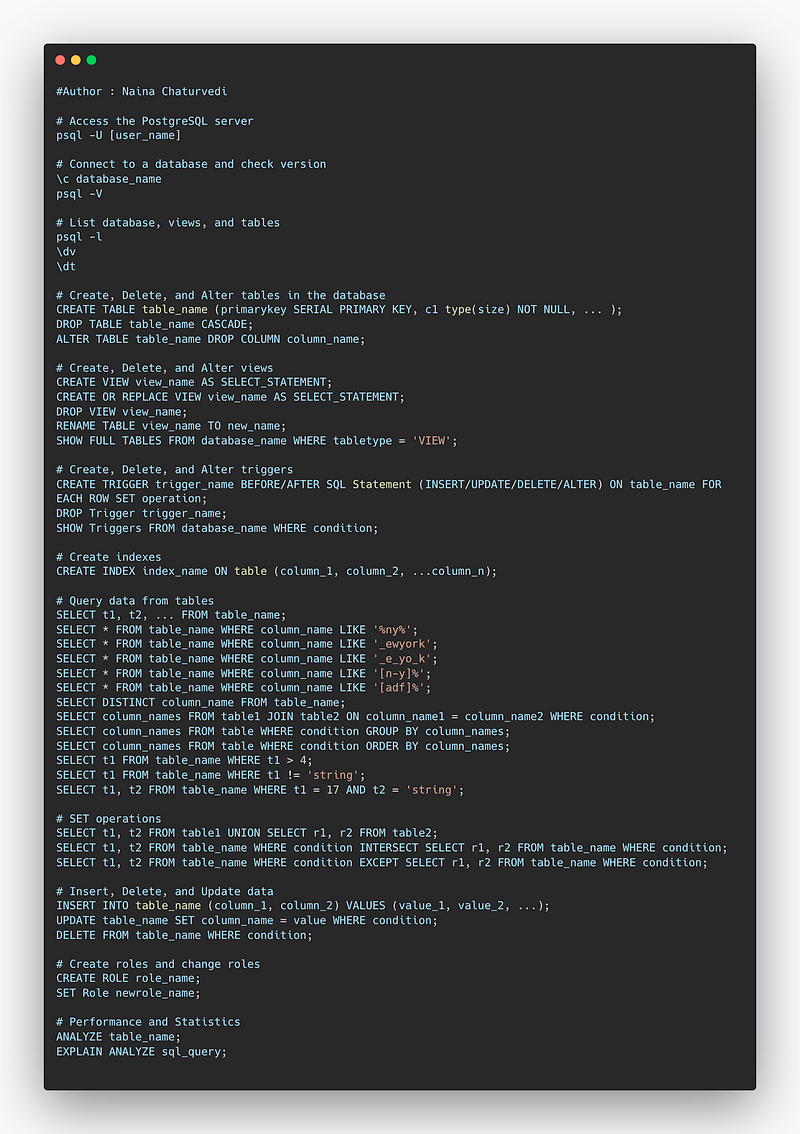
In this post we will go in depth and cover the most important constructs of PostgreSQL.
- Access the PostgreSQL server
- Connect to a database
- List database, views and tables
- Create, Delete and Alter databases
- Views and Indexes
- Query data from tables
- SET operations
- Insert, Delete and Update
- Performance and Statistics
Implementation —
import psycopg2

# Access the PostgreSQL server
conn = psycopg2.connect(
    host="your_host",
    database="your_database",
    user="your_username",
    password="your_password"
)

# Connect to a database
cur = conn.cursor()
cur.execute("SELECT version();")
print(cur.fetchone()[0])

# List databases
cur.execute("SELECT datname FROM pg_database;")
databases = cur.fetchall()
print("Databases:")
for db in databases:
    print(db[0])

# List views
cur.execute("SELECT table_name FROM information_schema.views WHERE table_schema = 'public';")
views = cur.fetchall()
print("Views:")
for view in views:
    print(view[0])

# List tables
cur.execute("SELECT table_name FROM information_schema.tables WHERE table_schema = 'public' AND table_type = 'BASE TABLE';")
tables = cur.fetchall()
print("Tables:")
for table in tables:
    print(table[0])

# Create a database
cur.execute("CREATE DATABASE new_database;")
conn.commit()
print("New database created.")

# Delete a database
cur.execute("DROP DATABASE existing_database;")
conn.commit()
print("Existing database deleted.")

# Alter a database
cur.execute("ALTER DATABASE existing_database RENAME TO new_name;")
conn.commit()
print("Database name altered.")

# Create a view
cur.execute("CREATE VIEW new_view AS SELECT * FROM table_name;")
conn.commit()
print("New view created.")

# Create an index
cur.execute("CREATE INDEX idx_column ON table_name (column_name);")
conn.commit()
print("Index created.")

# Query data from a table
cur.execute("SELECT * FROM table_name WHERE condition;")
data = cur.fetchall()
for row in data:
    print(row)

# Perform SET operations
cur.execute("SELECT * FROM table1 UNION SELECT * FROM table2;")
union_result = cur.fetchall()
print("Union result:")
for row in union_result:
    print(row)

# Insert data into a table
cur.execute("INSERT INTO table_name (column1, column2) VALUES (%s, %s);", (value1, value2))
conn.commit()
print("Data inserted.")

# Delete data from a table
cur.execute("DELETE FROM table_name WHERE condition;")
conn.commit()
print("Data deleted.")

# Update data in a table
cur.execute("UPDATE table_name SET column1 = %s WHERE condition;", (new_value,))
conn.commit()
print("Data updated.")

# Get performance statistics
cur.execute("EXPLAIN ANALYZE SELECT * FROM table_name;")
performance_stats = cur.fetchall()
for stat in performance_stats:
    print(stat[0])

# Close the cursor and connection
cur.close()
conn.close()
Let’s get started with important constructs.
Access the PostgreSQL server
To access the server from psql
Syntax —
psql -U [user_name];
Connect to a database and check version
- To connect to a database —
Syntax —
\c database_name
2. Check version
Syntax —
psql -V
List database, views and tables
- List database
Syntax —
psql -l
2. List views
Syntax —
\dv
3. List tables
Syntax —
\dt
Create, Delete and Alter table in the database
- Create new table Database
Syntax —
CREATE TABLE table_name
( primarykey SERIAL PRIMARY KEY, c1 type(size) NOT NULL, … );
2. Delete Table
Syntax —
DROP TABLE table_name CASCADE;
3. Alter Table
Syntax —
ALTER TABLE table_name DROP COLUMN column_name;
Views , triggers and Indexes
1.Create a new view
Syntax —
CREATE VIEW view_name
As SELECT_STATEMENT;
2. Create or replace a view
Syntax —
CREATE OR REPLACE VIEW view_name
As SELECT_STATEMENT;
3.Drop a view
Syntax —
DROP VIEW view_name;
4. Rename a view
Syntax —
RENAME TABLE view_name
TO new_name;
5. Show views
Syntax —
SHOW FULL TABLES
FROM database_name
WHERE tabletype = ‘VIEW’;
Triggers
- Create a new trigger
Syntax —
CREATE TRIGGER trigger_name
BEFORE/AFTER
SQL Statement (INSERT/UPDATE/DELETE/ALTER)
ON table_name
FOR EACH ROW SET operation;
2. Drop a trigger
Syntax —
DROP Trigger trigger_name;
3. Show triggers
Syntax —
SHOW Triggers FROM database_name
WHERE condition
Indexes
To create Indexes —
CREATE INDEX index_name
ON table (column_1, column_2, …column_n)
Query data from tables
- Select
Syntax —
SELECT t1, t2, … FROM table_name;
2. Search using like
Syntax —
SELECT * FROM table_name WHERE column_name LIKE ‘%ny%’
SELECT * FROM table_name WHERE column_name LIKE ‘_ewyork’
SELECT * FROM table_name WHERE column_name LIKE ‘_e_yo_k’
SELECT * FROM table_name WHERE column_name LIKE ‘[n-y]%’
SELECT * FROM table_name WHERE column_name LIKE ‘[adf]%’
3. Distinct
Syntax —
SELECT DISTINCT (column_name) FROM table_name;
4. Joins
Syntax —
SELECT column_names
FROM table1 JOIN table2
ON column_name1 = column_name2
WHERE condition
5. Group by
Syntax —
SELECT column_names
FROM table
WHERE condition
GROUP BY column_names
6. Order by
Syntax —
SELECT column_names
FROM table
WHERE condition
ORDER BY column_names
7. Filter Data
Syntax —
Select t1
from table_name
Where t1 > 4
Using other comparison Operator —
Select t1
from table_name
Where t1 != ‘string’
Select t1,t2
from table_name
Where t1 == 17 AND t2 == ‘string’
SET operations
For UNION
Syntax —
Select t1, t2 FROM table1 UNION Select r1, r2 FROM table2
INTERSECT
Syntax —
Select t1, t2
FROM table_name
WHERE Condition
INTERSECT
Select r1, r2
FROM table_name
WHERE Condition
EXCEPT
Syntax —
Select t1, t2
FROM table_name
WHERE Condition
EXCEPT
Select r1, r2
FROM table_name
WHERE Condition
Insert, Delete and Update
- Insert
Syntax —
Insert into table_name ( column_1, column_2) values (values_1,values_2,…values_n);
2. Update
Syntax —
Update table_name SET Column_name = value where Condition;
3. Delete
Syntax —
Delete FROM table_name;
Create Roles and Change the Roles
Create Role
Syntax —
CREATE ROLE role_name;
Change the Role
Syntax —
SET Role newrole_name;
Performance and Statistics
For statistics collection
Syntax —
ANALYZE table_name;
To show and execute query plan
Syntax —
EXPLAIN ANALYZE sql_query;
Snippet —
MongoDB
MongoDB works by storing data in a document format, where each document is a collection of key-value pairs. These documents are stored in collections, which are similar to tables in a relational database.
Each document in a collection can have a unique structure, meaning that the fields in one document do not have to match the fields in another document within the same collection.
- When a client sends a request to MongoDB, the request is passed to the MongoDB server, which then performs the requested operation on the appropriate collection or document. The MongoDB server uses a storage engine to handle the underlying storage and retrieval of data. The default storage engine is called WiredTiger, but MongoDB also supports other storage engines such as MMAPv1 and RocksDB.
- One of the key features of MongoDB is its ability to scale horizontally. This is achieved through a process called sharding, where data is split across multiple servers, called shards. Each shard is responsible for storing a portion of the data, and the MongoDB server uses a routing process to determine which shard a particular request should be sent to.
- MongoDB also provides automatic failover capabilities, where if a primary server goes down, a secondary server is automatically promoted to primary to ensure high availability. Additionally, MongoDB has built-in support for replica sets, which are groups of servers that maintain a copy of the same data, providing additional redundancy and failover protection.
Overall, MongoDB is designed to provide a flexible, high-performance, and highly available system for storing and querying large amounts of unstructured data.
Some important functions —
Find: The find function is used to query documents in a collection based on specified criteria.
// Find documents in the "users" collection where the age is greater than 25
db.users.find({ age: { $gt: 25 } });
InsertOne: The insertOne function is used to insert a single document into a collection.
// Insert a new document into the "users" collection
db.users.insertOne({ name: "John", age: 30 });
UpdateOne: The updateOne function is used to update a single document in a collection.
// Update the document with name "John" in the "users" collection, set age to 35
db.users.updateOne({ name: "John" }, { $set: { age: 35 } });
DeleteOne: The deleteOne function is used to delete a single document from a collection.
// Delete the document with name "John" from the "users" collection
db.users.deleteOne({ name: "John" });
Aggregate: The aggregate function is used to perform advanced aggregation operations on a collection, such as grouping, sorting, and calculating aggregate values.
// Calculate the average age of users in the "users" collection
db.users.aggregate([
  { $group: { _id: null, avgAge: { $avg: "$age" } } }
]);
$lookup: The $lookup function is used for performing a left outer join between two collections and retrieving matched documents from the joined collection.
// Perform a left outer join between "orders" and "customers" collections
db.orders.aggregate([
  {
    $lookup: {
      from: "customers",
      localField: "customerId",
      foreignField: "_id",
      as: "customer"
    }
  }
]);
$group: The $group function is used for grouping documents based on specified criteria and performing aggregate operations on grouped data.
// Group documents in the "orders" collection by customerId and calculate the total amount for each customer
db.orders.aggregate([
  {
    $group: {
      _id: "$customerId",
      totalAmount: { $sum: "$amount" }
    }
  }
]);
$unwind: The $unwind function is used to deconstruct an array field and generate a new document for each element of the array.
// Unwind the "tags" array field in the "articles" collection
db.articles.aggregate([
  { $unwind: "$tags" }
]);
$push: The $push function is used to add a value to an array field in a document.
// Add a new tag to the "tags" array field in the document with _id "12345" in the "articles" collection
db.articles.updateOne(
  { _id: "12345" },
  { $push: { tags: "newtag" } }
);
$regex: The $regex function is used for performing regular expression-based pattern matching in queries.
// Find documents in the "users" collection where the name starts with "J"
db.users.find({ name: { $regex: "^J" } });
Here are some important MongoDB commands and examples:
show dbs- This command is used to display all the databases in the MongoDB server.use <dbname>- This command is used to switch to a specific database. For example,use testdbwill switch to the "testdb" database.db.createCollection(name, options)- This command is used to create a new collection in the current database. For example,db.createCollection("employees")will create a new collection named "employees" in the current database.db.collection.insert(document)- This command is used to insert a new document into a collection. For example,db.employees.insert({name: "John Doe", age: 30, job: "Developer"})will insert a new document into the "employees" collection.db.collection.find()- This command is used to find all documents in a collection. For example,db.employees.find()will return all documents in the "employees" collection.db.collection.update(query, update, options)- This command is used to update documents in a collection. For example,db.employees.update({name: "John Doe"}, {$set: {age: 35}})will update the document where the name is "John Doe" and set the age to 35.db.collection.remove(query, justOne)- This command is used to remove documents from a collection. For example,db.employees.remove({name: "John Doe"})will remove the document where the name is "John Doe" from the "employees" collection.db.collection.drop()- This command is used to delete a collection. For example,db.employees.drop()will delete the "employees" collection.db.collection.count()- This command is used to count the number of documents in a collection. For example,db.employees.count()will return the number of documents in the "employees" collection.db.runCommand({command: value})- This command is used to run any MongoDB command. For example,db.runCommand({ping:1})will return the status of the MongoDB server.
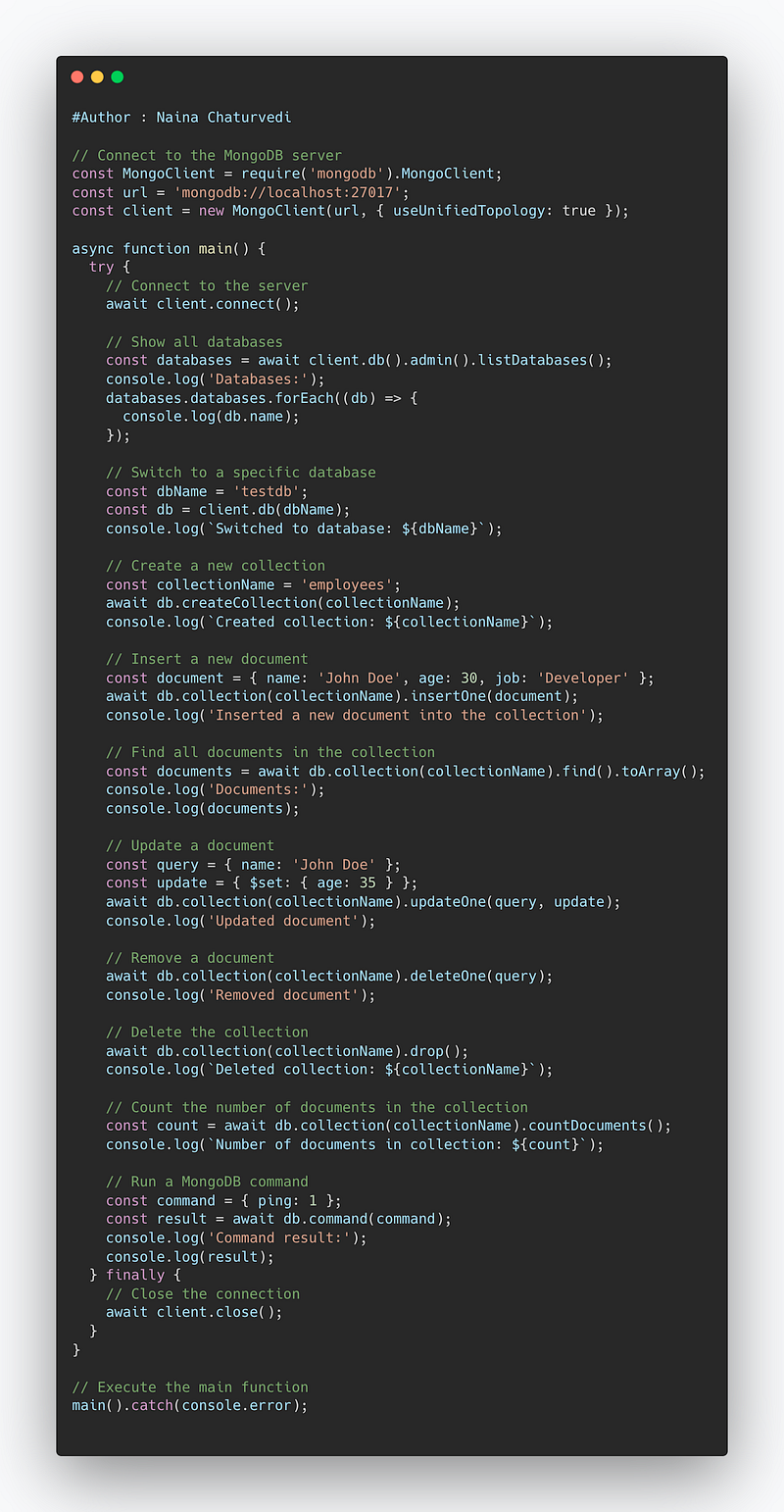
Implementation —
// Connect to the MongoDB server
const MongoClient = require('mongodb').MongoClient;
const url = 'mongodb://localhost:27017';
const client = new MongoClient(url, { useUnifiedTopology: true });

async function main() {
  try {
    // Connect to the server
    await client.connect();

    // Show all databases
    const databases = await client.db().admin().listDatabases();
    console.log('Databases:');
    databases.databases.forEach((db) => {
      console.log(db.name);
    });

    // Switch to a specific database
    const dbName = 'testdb';
    const db = client.db(dbName);
    console.log(`Switched to database: ${dbName}`);

    // Create a new collection
    const collectionName = 'employees';
    await db.createCollection(collectionName);
    console.log(`Created collection: ${collectionName}`);

    // Insert a new document
    const document = { name: 'John Doe', age: 30, job: 'Developer' };
    await db.collection(collectionName).insertOne(document);
    console.log('Inserted a new document into the collection');

    // Find all documents in the collection
    const documents = await db.collection(collectionName).find().toArray();
    console.log('Documents:');
    console.log(documents);

    // Update a document
    const query = { name: 'John Doe' };
    const update = { $set: { age: 35 } };
    await db.collection(collectionName).updateOne(query, update);
    console.log('Updated document');

    // Remove a document
    await db.collection(collectionName).deleteOne(query);
    console.log('Removed document');

    // Delete the collection
    await db.collection(collectionName).drop();
    console.log(`Deleted collection: ${collectionName}`);

    // Count the number of documents in the collection
    const count = await db.collection(collectionName).countDocuments();
    console.log(`Number of documents in collection: ${count}`);

    // Run a MongoDB command
    const command = { ping: 1 };
    const result = await db.command(command);
    console.log('Command result:');
    console.log(result);
  } finally {
    // Close the connection
    await client.close();
  }
}

// Execute the main function
main().catch(console.error);
There are several ways to use MongoDB:
- Using the MongoDB shell: MongoDB comes with a command-line interface called the Mongo shell, which can be used to interact with the MongoDB server. This is the most direct way to interact with MongoDB and is useful for performing administrative tasks or running quick queries. To start the Mongo shell, open a terminal and type “mongo”.
- Using a MongoDB driver: MongoDB drivers are available for most popular programming languages such as Python, Java, C#, and JavaScript. These drivers allow you to interact with MongoDB from your application code.
- Using MongoDB Compass: MongoDB Compass is a graphical user interface (GUI) for MongoDB that allows you to interact with MongoDB in a more user-friendly way. It provides a visual representation of your data, allows you to run queries and perform administrative tasks, and even provides a built-in tool for monitoring and troubleshooting.
- Using MongoDB Atlas: MongoDB Atlas is a fully managed MongoDB service provided by MongoDB Inc. It runs on the cloud and provides an easy way to set up, operate, and scale MongoDB clusters.
Snippet —
That’s it for now. Start with Day 1 of 15 days of Advanced SQL series
Let me know if you have questions in the comment section below. Subscribe/ Follow, Like/Clap as it would encourage me to write more in my free time
Stay Tuned!!
Read More —
11 most important System Design Base Concepts
6. Networking, How Browsers work, Content Network Delivery ( CDN)
13. System Design Template — How to solve any System Design Question
Some of the other best Series —
30 days of Data Structures and Algorithms and System Design Simplified
Data Science and Machine Learning Research ( papers) Simplified **
100 days : Your Data Science and Machine Learning Degree Series with projects
Complete Data Visualization and Pre-processing Series with projects
Exceptional Github Repos — Part 1
Exceptional Github Repos — Part 2
Tech Newsletter —
If you are interested, you can join my newsletter through which I send tech interview tips, techniques, patterns, hacks — Software Development, ML, Data Science, Startups and Technology projects to more than 30K readers. You can subscribe to Tech Brew :
For Python Projects —
For complete 60 days of Data Science and ML : Day 1 — Day 60 : Quick Recap of 60 days of Data Science and ML
Follow for more updates. Stay tuned and keep coding!
For other projects, tune to —
Build Machine Learning Pipelines( With Code)
Recurrent Neural Network with Keras
Clustering Geolocation Data in Python using DBSCAN and K-Means
Facial Expression Recognition using Keras
Hyperparameter Tuning with Keras Tuner
Custom Layers in Keras


