avatarNaina Chaturvedi

Free AI web copilot to create summaries, insights and extended knowledge, download it at here

22575

Abstract

quire high read and write throughput.</i></li><li><i>SQL databases, also known as relational databases, are based on the relational model and use structured query language (SQL) to manage and manipulate data. They store data in tables with defined schema, and relationships between data are defined by foreign keys. Examples of SQL databases include MySQL, PostgreSQL, and Microsoft SQL Server.</i></li><li><i>NoSQL databases, on the other hand, are non-relational and do not use SQL as their primary language. They are designed to handle large amounts of unstructured or semi-structured data, and are often more flexible and scalable than SQL databases. Examples of NoSQL databases include MongoDB, Cassandra, and Redis.</i></li></ul><h1 id="2aba">Introduction to MySQL</h1><figure id="ad78"><img src="https://cdn-images-1.readmedium.com/v2/resize:fit:800/0*lqHVa9cYdM4ppPyX.jpg"><figcaption>Pic credits : holistics</figcaption></figure><p id="ae80">MySQL is the most popular open source DBMS which is extremely scalable, reliable, fast and easy to use. It’s system is client-server system which mainly consists of multithreaded SQL server and multiple clients.</p><blockquote id="346a"><p>MySQL databases are relational which means the the data is organized in the form of tables, rows, columns and views and rules are established for the relationships between the different tables, data fields — such as one to one, one to many, many to one and many to many.</p></blockquote><p id="b11b">It has a unique architecture and gives developers great productivity for using Triggers, Stored procedures and Views.</p><p id="0dc9">Some of the other advantages of using MySQL is — replication, high availability, high performance, easy deployment, security and scalability.</p><p id="cc0b"><b>Some important functions —</b></p><p id="a2d7">COUNT(): The <code>COUNT()</code> function is used to count the number of rows returned by a query or the number of occurrences of a specific value in a column.</p><div id="2315"><pre><span class="hljs-comment">-- Count the number of rows in a table</span> <span class="hljs-keyword">SELECT</span> <span class="hljs-built_in">COUNT</span>(<span class="hljs-operator"></span>) <span class="hljs-keyword">FROM</span> your_table;</pre></div><div id="2535"><pre><span class="hljs-comment">-- Count the number of occurrences of a specific value in a column</span> <span class="hljs-keyword">SELECT</span> COUNT(<span class="hljs-built_in">column_name</span>) <span class="hljs-keyword">FROM</span> your_table <span class="hljs-keyword">WHERE</span> <span class="hljs-built_in">column_name</span> = <span class="hljs-string">'value'</span>;</pre></div><p id="35e0">SUM(): The <code>SUM()</code> function is used to calculate the sum of values in a column.</p><div id="0a4a"><pre><span class="hljs-comment">-- Calculate the sum of values in a column</span> <span class="hljs-keyword">SELECT</span> <span class="hljs-built_in">SUM</span>(column_name) <span class="hljs-keyword">FROM</span> your_table;</pre></div><p id="fcd2">AVG(): The <code>AVG()</code> function is used to calculate the average value of a column.</p><div id="323c"><pre><span class="hljs-comment">-- Calculate the average value of a column</span> <span class="hljs-keyword">SELECT</span> <span class="hljs-built_in">AVG</span>(column_name) <span class="hljs-keyword">FROM</span> your_table;</pre></div><p id="ad50">MIN(): The <code>MIN()</code> function is used to find the minimum value in a column.</p><div id="afaa"><pre><span class="hljs-comment">-- Find the minimum value in a column</span> <span class="hljs-keyword">SELECT</span> <span class="hljs-built_in">MIN</span>(column_name) <span class="hljs-keyword">FROM</span> your_table;</pre></div><p id="3786">MAX(): The <code>MAX()</code> function is used to find the maximum value in a column.</p><div id="7273"><pre><span class="hljs-comment">-- Find the maximum value in a column</span> <span class="hljs-keyword">SELECT</span> <span class="hljs-built_in">MAX</span>(column_name) <span class="hljs-keyword">FROM</span> your_table;</pre></div><p id="0850">CONCAT(): The <code>CONCAT()</code> function is used to concatenate two or more strings together.</p><div id="2974"><pre><span class="hljs-comment">-- Concatenate two columns together</span> <span class="hljs-keyword">SELECT</span> CONCAT(column1, column2) <span class="hljs-keyword">FROM</span> your_table;</pre></div><p id="e136">GROUP_CONCAT(): The <code>GROUP_CONCAT()</code> function is used to concatenate values from multiple rows into a single string, grouped by a specific column.</p><div id="1f37"><pre>-- Concatenate values <span class="hljs-keyword">from</span> multiple rows <span class="hljs-keyword">into</span> a <span class="hljs-type">single</span> <span class="hljs-type">string</span> <span class="hljs-keyword">SELECT</span> column1, GROUP_CONCAT(column2) <span class="hljs-keyword">FROM</span> your_table <span class="hljs-keyword">GROUP</span> <span class="hljs-keyword">BY</span> column1;</pre></div><p id="5271">DATE_FORMAT(): The <code>DATE_FORMAT()</code> function is used to format dates or timestamps according to a specific format.</p><div id="8b6f"><pre><span class="hljs-comment">-- Format a date column as "YYYY-MM-DD"</span> <span class="hljs-keyword">SELECT</span> DATE_FORMAT(date_column, <span class="hljs-string">'%Y-%m-%d'</span>) <span class="hljs-keyword">FROM</span> your_table;</pre></div><p id="4484">IFNULL(): The <code>IFNULL()</code> function is used to replace NULL values with a specified value.</p><div id="fbf9"><pre><span class="hljs-comment">-- Replace NULL values with a default value</span> <span class="hljs-keyword">SELECT</span> IFNULL(column_name, <span class="hljs-string">'N/A'</span>) <span class="hljs-keyword">FROM</span> your_table;</pre></div><p id="0787">CASE statement: The <code>CASE</code> statement is used to perform conditional logic within a query and return different values based on specified conditions.</p><div id="f056"><pre>-- Perform conditional logic <span class="hljs-keyword">using</span> <span class="hljs-keyword">CASE</span> statement <span class="hljs-keyword">SELECT</span> column_name, <span class="hljs-keyword">CASE</span> <span class="hljs-keyword">WHEN</span> condition1 <span class="hljs-keyword">THEN</span> result1 <span class="hljs-keyword">WHEN</span> condition2 <span class="hljs-keyword">THEN</span> result2 <span class="hljs-keyword">ELSE</span> result3 <span class="hljs-keyword">END</span> <span class="hljs-keyword">AS</span> calculated_column <span class="hljs-keyword">FROM</span> your_table;</pre></div><p id="45c3">ROW_NUMBER(): The <code>ROW_NUMBER()</code> function is used to assign a unique sequential number to each row in the result set, based on the specified ordering.</p><div id="5d4e"><pre><span class="hljs-comment">-- Assign a sequential number to each row</span> <span class="hljs-keyword">SELECT</span> <span class="hljs-built_in">ROW_NUMBER</span>() <span class="hljs-keyword">OVER</span> (<span class="hljs-keyword">ORDER</span> <span class="hljs-keyword">BY</span> column_name) <span class="hljs-keyword">AS</span> row_number, column_name <span class="hljs-keyword">FROM</span> your_table;</pre></div><p id="5ab3"><b><i>I’ll be covering MySQL in detail on Day 14 of 15 days of Advanced SQL.</i></b></p><h1 id="a795">Introduction to PostgreSQL</h1><figure id="b0a2"><img src="https://cdn-images-1.readmedium.com/v2/resize:fit:800/0*n4hxLDwfbXUgMZX2.png"><figcaption>Pic credits : G2</figcaption></figure><p id="177b">Started out as a project in 1986, PostgreSQL is a relational DBMS which is open source and has many features such as — Multi version concurrency, point in time recovery, async replication, SQL sub selects, Views, Transaction, Trigger, Complex SQL queries etc.</p><p id="1a46">It stores the data securely and supports the best practices. It helps developers build fault tolerant applications and protect data integrity.</p><p id="7953">It has many popular use cases such as — Geospatial database, Federated hub database, LAPP open source stack and General purpose OLTP database.</p><p id="2503">CONCAT(): The <code>CONCAT()</code> function is used to concatenate two or more strings together.</p><div id="3689"><pre><span class="hljs-comment">-- Concatenate two strings</span> <span class="hljs-keyword">SELECT</span> CONCAT(<span class="hljs-string">'Hello'</span>, <span class="hljs-string">'World'</span>) <span class="hljs-keyword">AS</span> <span class="hljs-keyword">result</span>;</pre></div><p id="e4d3">EXTRACT(): The <code>EXTRACT()</code> function is used to extract a specific part of a date or timestamp, such as year, month, day, hour, etc.</p><div id="e2fa"><pre><span class="hljs-comment">-- Extract the year from a date column</span> <span class="hljs-keyword">SELECT</span> <span class="hljs-built_in">EXTRACT</span>(<span class="hljs-keyword">YEAR</span> <span class="hljs-keyword">FROM</span> date_column) <span class="hljs-keyword">AS</span> <span class="hljs-keyword">year</span> <span class="hljs-keyword">FROM</span> your_table;</pre></div><p id="7038">COALESCE(): The <code>COALESCE()</code> function is used to return the first non-null value from a set of values.</p><div id="896b"><pre><span class="hljs-comment">-- Return the first non-null value from multiple columns</span> <span class="hljs-keyword">SELECT</span> <span class="hljs-built_in">COALESCE</span>(column1, column2, column3) <span class="hljs-keyword">AS</span> <span class="hljs-keyword">result</span> <span class="hljs-keyword">FROM</span> your_table;</pre></div><p id="2440">DATE_TRUNC(): The <code>DATE_TRUNC()</code> function is used to truncate a date or timestamp to a specified precision, such as year, month, day, etc.</p><div id="403a"><pre><span class="hljs-comment">-- Truncate a date column to the month precision</span> <span class="hljs-keyword">SELECT</span> DATE_TRUNC(<span class="hljs-string">'month'</span>, date_column) <span class="hljs-keyword">AS</span> truncated_date <span class="hljs-keyword">FROM</span> your_table;</pre></div><p id="ee6e">STRING_AGG(): The <code>STRING_AGG()</code> function is used to concatenate values from multiple rows into a single string, with a specified delimiter.</p><div id="cc59"><pre><span class="hljs-comment">-- Concatenate values from multiple rows into a single string with a comma delimiter</span> <span class="hljs-keyword">SELECT</span> STRING_AGG(column_name, <span class="hljs-string">', '</span>) <span class="hljs-keyword">AS</span> concatenated_values <span class="hljs-keyword">FROM</span> your_table;</pre></div><p id="5084">JSONB Functions: PostgreSQL provides a rich set of functions for working with JSONB data type, which allows storing and querying JSON documents.</p><div id="0f4a"><pre>-- <span class="hljs-title class_">Extract</span> value <span class="hljs-keyword">from</span> <span class="hljs-title class_">JSON</span> <span class="hljs-variable language_">document</span> <span class="hljs-variable constant_">SELECT</span> <span class="hljs-title function_">jsonb_extract_path</span>(<span class="hljs-string">'{"name": "John", "age": 30}'</span>, <span class="hljs-string">'name'</span>); </pre></div><div id="7814"><pre><span class="hljs-comment">-- Check if JSON document contains a specific key</span> <span class="hljs-keyword">SELECT</span> '{<span class="hljs-string">"name"</span>: <span class="hljs-string">"John"</span>, <span class="hljs-string">"age"</span>: <span class="hljs-number">30</span>}'::jsonb ? <span class="hljs-symbol">'age</span>'; </pre></div><div id="94a3"><pre><span class="hljs-comment">-- Modify JSON document by adding or updating a key-value pair</span> <span class="hljs-keyword">SELECT</span> jsonb_set(<span class="hljs-string">'{"name": "John"}'</span>, <span class="hljs-string">'{age}'</span>, <span class="hljs-string">'30'</span>::<span class="hljs-type">jsonb</span>, <span class="hljs-keyword">true</span>);</pre></div><p id="2675">Window Functions: Window functions perform calculations across a set of rows that are related to the current row. They allow you to perform complex aggregations and calculations without the need for subqueries or joins.</p><div id="5f95"><pre><span class="hljs-comment">-- Calculate the average salary for each department, along with the total and rank</span> <span class="hljs-keyword">SELECT</span> department, <span class="hljs-built_in">AVG</span>(salary) <span class="hljs-keyword">OVER</span> (<span class="hljs-keyword">PARTITION</span> <span class="hljs-keyword">BY</span> department) <span class="hljs-keyword">AS</span> avg_salary, <span class="hljs-built_in">SUM</span>(salary) <span class="hljs-keyword">OVER</span> (<span class="hljs-keyword">PARTITION</span> <span class="hljs-keyword">BY</span> department) <span class="hljs-keyword">AS</span> total_salary, <span class="hljs-built_in">RANK</span>() <span class="hljs-keyword">OVER</span> (<span class="hljs-keyword">PARTITION</span> <span class="hljs-keyword">BY</span> department <span class="hljs-keyword">ORDER</span> <span class="hljs-keyword">BY</span> salary <span class="hljs-keyword">DESC</span>) <span class="hljs-keyword">AS</span> rank <span class="hljs-keyword">FROM</span> employees;</pre></div><p id="3414">Common Table Expressions (CTEs): CTEs are temporary result sets that can be used within a query. They allow you to break down complex queries into more manageable and readable parts.</p><div id="7b30"><pre>-- Use CTE <span class="hljs-keyword">to</span> calculate the total sales <span class="hljs-keyword">for</span> <span class="hljs-keyword">each</span> product category <span class="hljs-keyword">WITH</span> category_sales <span class="hljs-keyword">AS</span> ( <span class="hljs-keyword">SELECT</span> category, SUM(sales) <span class="hljs-keyword">AS</span> total_sales <span class="hljs-keyword">FROM</span> sales <span class="hljs-keyword">GROUP</span> <span class="hljs-keyword">BY</span> category ) <span class="hljs-keyword">SELECT</span> category, total_sales <span class="hljs-keyword">FROM</span> category_sales <span class="hljs-keyword">ORDER</span> <span class="hljs-keyword">BY</span> total_sales DESC;</pre></div><p id="eac3">Full-Text Search Functions: PostgreSQL provides full-text search capabilities, allowing you to perform advanced text search operations.</p><div id="ee43"><pre><span class="hljs-comment">-- Search for documents containing specific keywords</span> <span class="hljs-keyword">SELECT</span> <span class="hljs-operator"></span> <span class="hljs-keyword">FROM</span> documents <span class="hljs-keyword">WHERE</span> to_tsvector(<span class="hljs-string">'english'</span>, content) @@ to_tsquery(<span class="hljs-string">'english'</span>, <span class="hljs-string">'search keywords'</span>);</pre></div><p id="3a39"><b><i>I’ll be covering PostgreSQL in detail on Day 15 of 15 days of Advanced SQL.</i></b></p><p id="bee6"><b>Comparison between MySQL and PostgreSQL —</b></p><figure id="fd9c"><img src="https://cdn-images-1.readmedium.com/v2/resize:fit:800/0*8LSbkSuWJ9Chv0rj"><figcaption>Pic credits : devcomm</figcaption></figure><h1 id="6076">Introduction to MongoDB</h1><figure id="3c21"><img src="https://cdn-images-1.readmedium.com/v2/resize:fit:800/0*_5VVs1h8VYjQ40_z.png"><figcaption>pic credits : iconape</figcaption></figure><p id="9cda">MongoDB is a no SQL, document database which is written in C++. It stores the data in the JSON format and works best for the unstructured data.</p><p id="09ad">It is used when you need high availability of data with automatic, fast and instant data recovery. Also, in those situations when you have an unstable schema and you want to reduce the schema migration cost.</p><p id="d5d8">It stores unstructured data and run complex queries on both cloud and onsite deployments.</p><p id="5baf">It has robust documentation and community support and supports built in replication, auto elections and sharding.</p><p id="4fe3">Its use cases include real time analytics, IOT, mobile apps data.</p><p id="906d">Find: The find function is used to query documents in a collection based on specified criteria.</p><div id="69b8"><pre><span class="hljs-comment">// Find documents in the "users" collection where the age is greater than 25</span> db.users.<span class="hljs-title function_ invoke__">find</span>({ <span class="hljs-attr">age</span>: { <span class="hljs-variable">gt</span>: <span class="hljs-number">25</span> } });</pre></div><p id="bd0e">InsertOne: The insertOne function is used to insert a single document into a collection.</p><div id="2581"><pre><span class="hljs-comment">// Insert a new document into the "users" collection</span> db.users.<span class="hljs-title function_ invoke__">insertOne</span>({ <span class="hljs-attr">name</span>: <span class="hljs-string">"John"</span>, <span class="hljs-attr">age</span>: <span class="hljs-number">30</span> });</pre></div><p id="0003">UpdateOne: The updateOne function is used to update a single document in a collection.</p><div id="fa52"><pre><span class="hljs-comment">// Update the document with name "John" in the "users" collection, set age to 35</span> db.users.<span class="hljs-title function_ invoke__">updateOne</span>({ <span class="hljs-attr">name</span>: <span class="hljs-string">"John"</span> }, { <span class="hljs-variable">set</span>: { <span class="hljs-attr">age</span>: <span class="hljs-number">35</span> } });</pre></div><p id="0ddf">DeleteOne: The deleteOne function is used to delete a single document from a collection.</p><div id="d434"><pre>// Delete the document <span class="hljs-keyword">with</span> name <span class="hljs-string">"John"</span> <span class="hljs-keyword">from</span> the <span class="hljs-string">"users"</span> collection db.users.deleteOne({ name: <span class="hljs-string">"John"</span> });</pre></div><p id="9bf5">Aggregate: The aggregate function is used to perform advanced aggregation operations on a collection, such as grouping, sorting, and calculating aggregate values.</p><div id="6b1f"><pre><span class="hljs-comment">// Calculate the average age of users in the "users" collection</span> db.users.<span class="hljs-title function_ invoke__">aggregate</span>([ { <span class="hljs-variable">group</span>: { <span class="hljs-attr">_id</span>: <span class="hljs-literal">null</span>, <span class="hljs-attr">avgAge</span>: { <span class="hljs-variable">avg</span>: <span class="hljs-string">"<span class="hljs-subst">age</span>"</span> } } } ]);</pre></div><p id="811d">lookup: The lookup function is used for performing a left outer join between two collections and retrieving matched documents from the joined collection.</p><div id="53f0"><pre><span class="hljs-comment">// Perform a left outer join between "orders" and "customers" collections</span> db.orders.<span class="hljs-title function_ invoke__">aggregate</span>([ { <span class="hljs-variable">lookup</span>: { <span class="hljs-attr">from</span>: <span class="hljs-string">"customers"</span>, <span class="hljs-attr">localField</span>: <span class="hljs-string">"customerId"</span>, <span class="hljs-attr">foreignField</span>: <span class="hljs-string">"_id"</span>, <span class="hljs-attr">as</span>: <span class="hljs-string">"customer"</span> } } ]);</pre></div><p id="3351">group: The group function is used for grouping documents based on specified criteria and performing aggregate operations on grouped data.</p><div id="dd97"><pre><span class="hljs-comment">// Group documents in the "orders" collection by customerId and calculate the total amount for each customer</span> db.orders.<span class="hljs-title function_ invoke__">aggregate</span>([ { <span class="hljs-variable">group</span>: { <span class="hljs-attr">_id</span>: <span class="hljs-string">"<span class="hljs-subst">customerId</span>"</span>, <span class="hljs-attr">totalAmount</span>: { <span class="hljs-variable">sum</span>: <span class="hljs-string">"<span class="hljs-subst">amount</span>"</span> } } } ]);</pre></div><p id="75d5">unwind: The unwind function is used to deconstruct an array field and generate a new document for each element of the array.</p><div id="df86"><pre>// Unwind the <span class="hljs-string">"tags"</span> array field <span class="hljs-keyword">in</span> the <span class="hljs-string">"articles"</span> collection db.articles.aggregate([ { <span class="hljs-variable">unwind</span>: <span class="hljs-string">"<span class="hljs-variable">tags</span>"</span> } ]);</pre></div><p id="853c">push: The push function is used to add a value to an array field in a document.</p><div id="bfa5"><pre><span class="hljs-comment">// Add a new tag to the "tags" array field in the document with _id "12345" in the "articles" collection</span> db.articles.<span class="hljs-title function_ invoke__">updateOne</span>( { <span class="hljs-attr">_id</span>: <span class="hljs-string">"12345"</span> }, { <span class="hljs-variable">push</span>: { <span class="hljs-attr">tags</span>: <span class="hljs-string">"newtag"</span> } } );</pre></div><p id="510d">regex: The regex function is used for performing regular expression-based pattern matching in queries .</p><div id="0221"><pre><span class="hljs-comment">// Find documents in the "users" collection where the name starts with "J"</span> db.users.<span class="hljs-title function_ invoke__">find</span>({ <span class="hljs-attr">name</span>: { <span class="hljs-variable">regex</span>: <span class="hljs-string">"^J"</span> } });</pre></div><p id="9fbc"><b><i>I’ll be covering Mongodb in detail as the bonus post of 15 days of Advanced SQL.</i></b></p><p id="a30b"><b>Comparison between MongoDB, PostgreSQL and MySQL —</b></p><figure id="c8e1"><img src="https://cdn-images-1.readmedium.com/v2/resize:fit:800/0*3YsIZSb5k8PMI6yc.png"><figcaption>Pic credits : kitrun</figcaption></figure><h1 id="f36c">Introduction to SQL and NoSQL Databases</h1><h2 id="67de">SQL</h2><p id="6ac2">As you design large systems ( or even smaller ones), you need to decide the inflow-processing and outflow of data coming- and getting processed in the system.</p><p id="d097">Data is generally organized in tables as rows and columns where columns represents attributes and rows represent records and keys have logical relationships. The SQL db schema always shows relational, tabular data following the ACID properties.<

Options

/p><figure id="54aa"><img src="https://cdn-images-1.readmedium.com/v2/resize:fit:800/0*vfuWqUXVTW0dug5G.png"><figcaption>Pic credits : SQLsevr</figcaption></figure><p id="069b" type="7">There are two types of databases to consider — SQL and NoSQL databases.</p><p id="0113">SQL databases have predefined schema and the data is organized/displayed in the form of tables. These databases use SQL ( Structured Query Language) to define, manipulate, update the data.</p><figure id="1b92"><img src="https://cdn-images-1.readmedium.com/v2/resize:fit:800/0*vjs5g47VDvIRKrE0.png"><figcaption>Pic credits : xmlz</figcaption></figure><p id="03f3">Relational databases like MS SQL Server, PostgreSQL, Sybase, MySQL Database, Oracle, etc. use SQL.</p><h2 id="934a">NoSQL</h2><figure id="ab09"><img src="https://cdn-images-1.readmedium.com/v2/resize:fit:800/0*-eyS8y1eBZ9ucl34.png"><figcaption>Pic credits : scylladb</figcaption></figure><p id="3245">NoSQL databases on the other side, have no predefined schema which adds to more flexibility to use the formats that best suits the data — Work with graphs, column-oriented data, key-value and documents etc. They are generally preferred for hierarchical data, graphs ( e.g. social network) and to work with large data.</p><p id="adf5">Some examples — Wide-column use Cassandra and HBase, Graph use Neo4j, Document use MongoDB and CouchDB, Key-value use Redis and DynamoDB,</p><p id="a37f">A good comparison —</p><figure id="a616"><img src="https://cdn-images-1.readmedium.com/v2/resize:fit:800/0*vstEqRIbUqvbDKzB"><figcaption>Pic credits : Clouder</figcaption></figure><p id="6ddb"><b>One of the important question that you might be asked, when to use which db?</b></p><p id="7bc7"><b>When use SQL databases?</b></p><p id="67d9">When you want to —</p><blockquote id="340a"><p>1. Scale Vertically — increase the processing power of your hardware</p></blockquote><blockquote id="0c6d"><p>2. Work with predefined schema</p></blockquote><blockquote id="3d74"><p>3. Process queries and joins against structured data</p></blockquote><blockquote id="b412"><p>4. Optimize the storage</p></blockquote><blockquote id="75d9"><p>5. Data is small</p></blockquote><p id="a577"><b>When to use NoSQL databases?</b></p><p id="eba5">When you want to —</p><blockquote id="5410"><p>1. Scale horizontally</p></blockquote><blockquote id="7561"><p>2. Work with graphs, column-oriented data, key-value and documents etc</p></blockquote><blockquote id="08d5"><p>3. Use multiple languages to query</p></blockquote><blockquote id="1c5f"><p>4. Work with dynamic schema that has no predefined schema</p></blockquote><blockquote id="bb77"><p>5. Large Data</p></blockquote><p id="f9be">Implementation —</p><div id="0c2c"><pre>--<span class="hljs-variable constant_">SQL</span> <span class="hljs-title class_">Database</span> -- <span class="hljs-title class_">Create</span> a table <span class="hljs-keyword">for</span> storing users <span class="hljs-variable constant_">CREATE</span> <span class="hljs-variable constant_">TABLE</span> users ( id <span class="hljs-variable constant_">INT</span> <span class="hljs-variable constant_">PRIMARY</span> <span class="hljs-variable constant_">KEY</span>, name <span class="hljs-title function_">VARCHAR</span>(<span class="hljs-number">50</span>), email <span class="hljs-title function_">VARCHAR</span>(<span class="hljs-number">100</span>) );

-- <span class="hljs-title class_">Insert</span> a user into the table <span class="hljs-variable constant_">INSERT</span> <span class="hljs-variable constant_">INTO</span> users (id, name, email) <span class="hljs-variable constant_">VALUES</span> (<span class="hljs-number">1</span>, <span class="hljs-string">'John Doe'</span>, <span class="hljs-string">'[email protected]'</span>);

-- <span class="hljs-title class_">Retrieve</span> all users <span class="hljs-keyword">from</span> the table <span class="hljs-variable constant_">SELECT</span> * <span class="hljs-variable constant_">FROM</span> users;

--<span class="hljs-title class_">NoSQL</span> (<span class="hljs-title class_">MongoDB</span>) <span class="hljs-title class_">Database</span>:

<span class="hljs-comment">// Connect to the MongoDB database</span> <span class="hljs-keyword">const</span> <span class="hljs-title class_">MongoClient</span> = <span class="hljs-built_in">require</span>(<span class="hljs-string">'mongodb'</span>).<span class="hljs-property">MongoClient</span>; <span class="hljs-keyword">const</span> url = <span class="hljs-string">'mongodb://localhost:27017'</span>; <span class="hljs-keyword">const</span> dbName = <span class="hljs-string">'mydatabase'</span>;

<span class="hljs-title class_">MongoClient</span>.<span class="hljs-title function_">connect</span>(url, <span class="hljs-keyword">function</span>(<span class="hljs-params">err, client</span>) { <span class="hljs-keyword">if</span> (err) <span class="hljs-keyword">throw</span> err;

<span class="hljs-comment">// Access the database</span> <span class="hljs-keyword">const</span> db = client.<span class="hljs-title function_">db</span>(dbName);

<span class="hljs-comment">// Create a collection for storing users</span> <span class="hljs-keyword">const</span> usersCollection = db.<span class="hljs-title function_">collection</span>(<span class="hljs-string">'users'</span>);

<span class="hljs-comment">// Insert a user into the collection</span> usersCollection.<span class="hljs-title function_">insertOne</span>({ <span class="hljs-attr">id</span>: <span class="hljs-number">1</span>, <span class="hljs-attr">name</span>: <span class="hljs-string">'John Doe'</span>, <span class="hljs-attr">email</span>: <span class="hljs-string">'[email protected]'</span> }, <span class="hljs-keyword">function</span>(<span class="hljs-params">err, result</span>) { <span class="hljs-keyword">if</span> (err) <span class="hljs-keyword">throw</span> err;

<span class="hljs-comment">// Retrieve all users from the collection</span>
usersCollection.<span class="hljs-title function_">find</span>().<span class="hljs-title function_">toArray</span>(<span class="hljs-keyword">function</span>(<span class="hljs-params">err, users</span>) {
  <span class="hljs-keyword">if</span> (err) <span class="hljs-keyword">throw</span> err;

  <span class="hljs-variable language_">console</span>.<span class="hljs-title function_">log</span>(users);

  <span class="hljs-comment">// Close the database connection</span>
  client.<span class="hljs-title function_">close</span>();
});

}); });</pre></div><h1 id="8cec">That’s it for now.</h1><h1 id="a4bc">Find Day 14 Below —</h1><div id="423a" class="link-block"> <a href="https://readmedium.com/day-14-of-15-days-of-advanced-sql-series-c6126c3e8601"> <div> <div> <h2>Day 14 of 15 Days of Advanced SQL Series</h2> <div><h3>Welcome back peeps. Hope all’s well.</h3></div> <div><p>medium.com</p></div> </div> <div> <div style="background-image: url(https://miro.readmedium.com/v2/resize:fit:320/0*YAc5d5WgAKbZNdU0.jpeg)"></div> </div> </div> </a> </div><p id="00f9"><b><i>Let me know if you have questions in the comment section below. Subscribe/ Follow, Like/Clap as it would encourage me to write more in my free time</i></b></p><p id="6bdd"><b><i>Stay Tuned!!</i></b></p><h2 id="1275">Read More —</h2><h1 id="e6db">11 most important System Design Base Concepts</h1><blockquote id="07c4"><p><a href="https://readmedium.com/complete-system-design-series-part-1-45bf9c8654bc"><b>1. System design basics</b></a></p></blockquote><blockquote id="5e90"><p><a href="https://readmedium.com/complete-system-design-series-part-2-922f45f2faaf"><b>2. Horizontal and vertical scaling</b></a></p></blockquote><blockquote id="e615"><p><a href="https://readmedium.com/part-3-complete-system-design-series-e1362baa8a4c"><b>3. Load balancing and Message queues</b></a></p></blockquote><blockquote id="ba0d"><p><a href="https://readmedium.com/part-4-complete-system-design-series-138bc9fbcfc0"><b>4. High level design and low level design, Consistent Hashing, Monolithic and Microservices architecture</b></a></p></blockquote><blockquote id="9480"><p><a href="https://readmedium.com/part-5-complete-system-design-series-4b9b04f23608"><b>5. Caching, Indexing, Proxies</b></a></p></blockquote><blockquote id="786d"><p><a href="https://readmedium.com/part-6-complete-system-design-series-59a2d8bbf1ed"><b>6. Networking, How Browsers work, Content Network Delivery ( CDN)</b></a></p></blockquote><blockquote id="1e02"><p><a href="https://readmedium.com/part-7-complete-system-design-series-1bef528923d6"><b>7. Database Sharding, CAP Theorem, Database schema Design</b></a></p></blockquote><blockquote id="ed73"><p><a href="https://readmedium.com/part-8-complete-system-design-series-57bc88433c8e"><b>8. Concurrency, API, Components + OOP + Abstraction</b></a></p></blockquote><blockquote id="6213"><p><a href="https://readmedium.com/part-9-complete-system-design-series-df975c85ec51"><b>9. Estimation and Planning, Performance</b></a></p></blockquote><blockquote id="c502"><p><b>10. <a href="https://readmedium.com/part-10-complete-system-design-series-523b4dd978bf?sk=741f92929c8639a2e4cf218521e8cc4a">Map Reduce, Patterns and Microservices</a></b></p></blockquote><blockquote id="967c"><p><b>11. <a href="https://naina0412.medium.com/part-11-complete-system-design-series-9c8efbc0237a?sk=5bddf2adc78ea4947ae88ab21c94af1c">SQL vs NoSQL and Cloud</a></b></p></blockquote><blockquote id="767e"><p><a href="https://readmedium.com/most-popular-system-design-questions-mega-compilation-45218129fe26"><b>12. Most Popular System Design Questions</b></a></p></blockquote><blockquote id="33a4"><p><b>13. <a href="https://readmedium.com/day-3-of-system-design-case-studies-series-875df4b766b9?sk=1133c9135f849f4497400a6b9caf5c2e">System Design Template — How to solve any System Design Question</a></b></p></blockquote><blockquote id="7526"><p><a href="https://readmedium.com/quick-roundup-solved-system-design-case-studies-6ad776d437cf?sk=e42f56968e1b592382f484c222e7c111"><b>14. Quick RoundUp : Solved System Design Case Studies</b></a></p></blockquote><h1 id="c583">Some of the other best Series —</h1><blockquote id="ca4e"><p><a href="https://readmedium.com/day-1-day-60-quick-recap-of-60-days-of-data-science-and-ml-6fc021643d1?sk=4e75e043b7630a9f963562ebac94e129"><b>60 days of Data Science and ML Series with projects</b></a></p></blockquote><blockquote id="1ff6"><p><a href="https://readmedium.com/quick-recap-30-days-of-natural-language-processing-nlp-with-projects-series-ceb674e3c09b?sk=ca09b27b3d5867f23ab4dc367b6c0c32"><b>30 Days of Natural Language Processing ( NLP) Series</b></a></p></blockquote><blockquote id="c2cf"><p><a href="https://readmedium.com/day-1-of-30-days-of-machine-learning-ops-7c299e4b09be?sk=4ab48350a5c359fc157109e48b1d738f"><b>30 days of Machine Learning Ops</b></a></p></blockquote><blockquote id="5c01"><p><a href="https://readmedium.com/day-1-of-30-days-of-data-structures-and-algorithms-and-system-design-simplified-dsa-and-system-965e860ec677?sk=aa49bdbc46a72f600cb51774f0aea6b6"><b>30 days of Data Structures and Algorithms and System Design Simplified</b></a></p></blockquote><blockquote id="f2fd"><p><a href="https://readmedium.com/day-1-of-60-days-of-deep-learning-with-projects-series-4a5caa305cf6?sk=89f3d43dd450035546bf3a8cf85bb125"><b>60 Days of Deep Learning with Projects Series</b></a></p></blockquote><blockquote id="b8a0"><p><a href="https://readmedium.com/day-1-of-30-days-of-data-engineering-894822fcb128?sk=76ba558bfe2d9f85cbe741e505295531"><b>30 days of Data Engineering with projects Series</b></a></p></blockquote><blockquote id="9d85"><p><a href="https://readmedium.com/day-1-data-science-and-ml-research-papers-simplified-a68b00a3b1c4?sk=56136229ff738bd734f19d2b6953f78c"><b>Data Science and Machine Learning Research ( papers) Simplified</b></a><b> **</b></p></blockquote><blockquote id="fb06"><p><a href="https://readmedium.com/100-days-your-data-science-and-ml-degree-part-3-c621ecfdf711?sk=1a8c7b0c204d73432d56b7d1a3a26474"><b>100 days : Your Data Science and Machine Learning Degree Series with projects</b></a></p></blockquote><blockquote id="5203"><p><a href="https://ai.plainenglish.io/23-data-science-techniques-you-should-know-61bc2c9d1b3a?sk=1680c36193eb22198974c9008d62a33c"><b>23 Data Science Techniques You Should Know</b></a></p></blockquote><blockquote id="ac12"><p><a href="https://readmedium.com/mega-post-tech-interview-the-only-list-of-questions-you-need-to-practice-ee349ea197bb?sk=fac3614684daff4b50a70c0a71e4d528"><b>Tech Interview Series — Curated List of coding questions</b></a></p></blockquote><blockquote id="dede"><p><a href="https://readmedium.com/system-design-made-easy-quick-recap-of-complete-system-design-34af7e3aedfb?sk=bdd6a19edc1f3ce4a5064923f5b68721"><b>Complete System Design with most popular Questions Series</b></a></p></blockquote><blockquote id="6508"><p><a href="https://readmedium.com/complete-data-preprocessing-and-data-visualization-with-projects-mega-compilation-part-2-41584ef0920e?sk=842390da51689b8d43148c3980570db0"><b>Complete Data Visualization and Pre-processing Series with projects</b></a></p></blockquote><blockquote id="409a"><p><a href="https://readmedium.com/complete-python-and-projects-mega-compilation-7ec8f7adfe71?sk=ee0ecf43f23c6dd44dd35d984b3e5df4"><b>Complete Python Series with Projects</b></a></p></blockquote><blockquote id="67e0"><p><a href="https://readmedium.com/complete-advanced-python-with-projects-mega-compilation-part-6-729c1826032b?sk=7faffe20f8039fa57099f7a372b6d665"><b>Complete Advanced Python Series with Projects</b></a></p></blockquote><blockquote id="4ded"><p><a href="https://readmedium.com/my-list-of-kaggle-best-notebooks-topic-wise-data-science-and-machine-learning-part-2-84772863e9ae?sk=5ed02e419854a6c11add3ddc1e52947f"><b>Kaggle Best Notebooks that will teach you the most</b></a></p></blockquote><blockquote id="4b2e"><p><a href="https://medium.datadriveninvestor.com/the-complete-developers-guide-to-git-6a23125996e1?sk=e30479bbe713930ea93018e1a46d9185"><b>Complete Developers Guide to Git</b></a></p></blockquote><blockquote id="732e"><p><a href="https://readmedium.com/6-exceptional-github-repos-for-all-developers-part-1-21e8fa04e150?sk=9140b249af6fe73d45717185fad48962"><b>Exceptional Github Repos</b></a><b> — Part 1</b></p></blockquote><blockquote id="7079"><p><a href="https://readmedium.com/6-exceptional-github-repos-for-all-developers-part-2-3eec9a68c31c?sk=8e31d0eb7eb1d2d0bbbcecaa66bd4e7e"><b>Exceptional Github Repos</b></a><b> — Part 2</b></p></blockquote><blockquote id="d9c6"><p><a href="https://medium.datadriveninvestor.com/best-resources-for-data-science-and-machine-learning-full-list-5ceb9a2791bf?sk=cf85b2cef95560c58509877a794577ff"><b>All the Data Science and Machine Learning Resources</b></a></p></blockquote><blockquote id="b2cb"><p><a href="https://medium.datadriveninvestor.com/210-machine-learning-projects-with-source-code-that-you-can-build-today-721b035649e0?sk=da5f593572a0261a6314afad99a0356c"><b>210 Machine Learning Projects</b></a></p></blockquote><h2 id="9083">Tech Newsletter —</h2><blockquote id="f86c"><p>If you are interested, you can join my newsletter through which I send tech interview tips, techniques, patterns, hacks — Software Development, ML, Data Science, Startups and Technology projects to more than 30K readers. You can subscribe to <b>Tech Brew :</b></p></blockquote><div id="8d5c" class="link-block"> <a href="https://naina0405.substack.com/"> <div> <div> <h2>Ignito</h2> <div><h3>Data Science, ML, AI and more… Click to read Ignito, by Naina Chaturvedi, a Substack publication. Launched 7 months…</h3></div> <div><p>naina0405.substack.com</p></div> </div> <div> <div style="background-image: url(https://miro.readmedium.com/v2/resize:fit:320/0*_ER1J-h50iqAjH70)"></div> </div> </div> </a> </div><p id="eb48"><b><i>For Python Projects —</i></b></p><div id="22a4" class="link-block"> <a href="https://readmedium.com/complete-python-and-projects-mega-compilation-7ec8f7adfe71"> <div> <div> <h2>Complete Python And Projects — Mega Compilation</h2> <div><h3>Everything that you need to know in Python with Projects…</h3></div> <div><p>medium.com</p></div> </div> <div> <div style="background-image: url(https://miro.readmedium.com/v2/resize:fit:320/0*NnCSMN6etFjjw4Jn.jpg)"></div> </div> </div> </a> </div><div id="471c" class="link-block"> <a href="https://medium.datadriveninvestor.com/analyzing-video-using-python-opencv-and-numpy-5471cab200c4"> <div> <div> <h2>Analyzing Video using Python, OpenCV and NumPy</h2> <div><h3>With Code Implementation…</h3></div> <div><p>medium.datadriveninvestor.com</p></div> </div> <div> <div style="background-image: url(https://miro.readmedium.com/v2/resize:fit:320/0*PYNCDW3IXI2BcT5f.jpg)"></div> </div> </div> </a> </div><p id="f199"><b><i>For complete 60 days of Data Science and ML : Day 1 — Day 60 : Quick Recap of 60 days of Data Science and ML</i></b></p><div id="9d77" class="link-block"> <a href="https://readmedium.com/day-1-day-60-quick-recap-of-60-days-of-data-science-and-ml-6fc021643d1"> <div> <div> <h2>Day 1 — Day 60 : Quick Recap of 60 days of Data Science and ML</h2> <div><h3>Connect the ML dots…</h3></div> <div><p>medium.com</p></div> </div> <div> <div style="background-image: url(https://miro.readmedium.com/v2/resize:fit:320/0*ZfJ1yKIzPLGABAI_.png)"></div> </div> </div> </a> </div><p id="1253"><b><i>Follow for more updates. Stay tuned and keep coding!</i></b></p><h1 id="21c3">For other projects, tune to —</h1><p id="b31f"><b>Build Machine Learning Pipelines( With Code)</b></p><div id="5b37" class="link-block"> <a href="https://medium.datadriveninvestor.com/build-machine-learning-pipelines-with-code-part-1-bd3ed7152124"> <div> <div> <h2>Build Machine Learning Pipelines( With Code) — Part 1</h2> <div><h3>Complete implementation…</h3></div> <div><p>medium.datadriveninvestor.com</p></div> </div> <div> <div style="background-image: url(https://miro.readmedium.com/v2/resize:fit:320/0*KdToBD8RDMBH4jXM.png)"></div> </div> </div> </a> </div><p id="946c"><b>Recurrent Neural Network with Keras</b></p><div id="f317" class="link-block"> <a href="https://medium.datadriveninvestor.com/recurrent-neural-network-with-keras-b5b5f6fe5187"> <div> <div> <h2>Recurrent Neural Network with Keras</h2> <div><h3>Project Implementation and cheatsheet…</h3></div> <div><p>medium.datadriveninvestor.com</p></div> </div> <div> <div style="background-image: url(https://miro.readmedium.com/v2/resize:fit:320/0*xs3Dya3qQBx6IU7C.png)"></div> </div> </div> </a> </div><p id="ec53"><b>Clustering Geolocation Data in Python using DBSCAN and K-Means</b></p><div id="2b3e" class="link-block"> <a href="https://medium.datadriveninvestor.com/clustering-geolocation-data-in-python-using-dbscan-and-k-means-3705d9f44522"> <div> <div> <h2>Clustering Geolocation Data in Python using DBSCAN and K-Means</h2> <div><h3>Project Implementation…</h3></div> <div><p>medium.datadriveninvestor.com</p></div> </div> <div> <div style="background-image: url(https://miro.readmedium.com/v2/resize:fit:320/0*0uPCZnohdaPCO4NN.png)"></div> </div> </div> </a> </div><p id="a29c"><b>Facial Expression Recognition using Keras</b></p><div id="ccaa" class="link-block"> <a href="https://medium.datadriveninvestor.com/facial-expression-recognition-using-keras-cbdd661a0a54"> <div> <div> <h2>Facial Expression Recognition using Keras</h2> <div><h3>Project Implementation…</h3></div> <div><p>medium.datadriveninvestor.com</p></div> </div> <div> <div style="background-image: url(https://miro.readmedium.com/v2/resize:fit:320/0*CGch7hzdjg1fpgKy.jpg)"></div> </div> </div> </a> </div><p id="0db7"><b>Hyperparameter Tuning with Keras Tuner</b></p><div id="6dff" class="link-block"> <a href="https://medium.datadriveninvestor.com/hyperparameter-tuning-with-keras-tuner-3a609d3fd85b"> <div> <div> <h2>Hyperparameter Tuning with Keras Tuner</h2> <div><h3>Project Implementation….</h3></div> <div><p>medium.datadriveninvestor.com</p></div> </div> <div> <div style="background-image: url(https://miro.readmedium.com/v2/resize:fit:320/0*jlaEz8AZaptNWHEr.png)"></div> </div> </div> </a> </div><p id="fed8"><b>Custom Layers in Keras</b></p><div id="e4fd" class="link-block"> <a href="https://medium.datadriveninvestor.com/custom-layers-in-keras-de5f793217aa"> <div> <div> <h2>Custom Layers in Keras</h2> <div><h3>Code implementation …</h3></div> <div><p>medium.datadriveninvestor.com</p></div> </div> <div> <div style="background-image: url(https://miro.readmedium.com/v2/resize:fit:320/0*1IH67KJadqeqeO01.png)"></div> </div> </div> </a> </div></article></body>

Day 13 of 15 Days of Advanced SQL Series

Pic credits : ntspl

Welcome back peeps. Hope all’s well.

Day 1 : SQL Basics and Kick start of Advanced SQL Series

Day 2 : SQL Basics, Query Structure, Built In functions Conditions

Day 3 : Most Important Commands, Joins and Filters

Day 4 : Set Theory Operations, Stored Procedures and CASE statements in SQL

Day 5 : Wildcards, Aggregation and Sequences in SQL

Day 6 : Subqueries, Group by, order by and Having clauses in SQL and Analytical Functions

Day 7 : Window Functions, Grouping Sets and Constraints in SQL

Day 8 : BigQuery Basics, SELECT, FROM, WHERE and Date and Extract in BigQuery

Day 9 : Common Expression Table, UNNEST Clause, SQL vs NoSQL Databases

Day 10 : Triggers, Pivot and Cursors in SQL

Day 11 : Views, Indexes and Auto Increment in SQL

Day 12 : Query optimizations, Performance tuning in SQL

Day 13 : Introduction to MySQL, PostgreSQL and Mongo DB, Comparison between MySQL and PostgreSQL and Mongo DB, Introduction to SQL and NoSQL Databases

Day 14 : MySQL in Depth

Day 15 : PostgreSQL inDepth

Anyways, For Day 13 of 15 days of Advanced SQL, we will cover —

Introduction to MySQL

Introduction to PostgreSQL

Introduction to MongoDB

Comparison between MySQL and PostgreSQL and Mongo DB

Introduction to SQL and NoSQL Databases

Github for Advanced SQL that you can follow —

Projects Videos —

All the projects, data structures, SQL, algorithms, system design, Data Science and ML , Data Analytics, Data Engineering, , Implemented Data Science and ML projects, Implemented Data Engineering Projects, Implemented Deep Learning Projects, Implemented Machine Learning Ops Projects, Implemented Time Series Analysis and Forecasting Projects, Implemented Applied Machine Learning Projects, Implemented Tensorflow and Keras Projects, Implemented PyTorch Projects, Implemented Scikit Learn Projects, Implemented Big Data Projects, Implemented Cloud Machine Learning Projects, Implemented Neural Networks Projects, Implemented OpenCV Projects,Complete ML Research Papers Summarized, Implemented Data Analytics projects, Implemented Data Visualization Projects, Implemented Data Mining Projects, Implemented Natural Leaning Processing Projects, MLOps and Deep Learning, Applied Machine Learning with Projects Series, PyTorch with Projects Series, Tensorflow and Keras with Projects Series, Scikit Learn Series with Projects, Time Series Analysis and Forecasting with Projects Series, ML System Design Case Studies Series videos will be published on our youtube channel ( just launched).

Subscribe today!

System Design Case Studies — In Depth

Design Instagram

Design Messenger App

Design Twitter

Design URL Shortener

Design Dropbox

Design Youtube

Design API Rate Limiter

Design Web Crawler

Design Facebook’s Newsfeed

Design Yelp

Design Uber

Design Tinder

Design Tiktok

Design Whatsapp

Most Popular System Design Questions

Mega Compilation : Solved System Design Case studies

Complete Data Structures and Algorithm Series

Complexity Analysis

Backtracking

Sliding Window

Greedy Technique

Two pointer Technique

Arrays

Linked List

Strings

Stack

Queues

Hash Table/Hashing

Binary Search

1- D Dynamic Programming

Divide and Conquer Technique

Recursion

Github —

Let’s get started with Day 13.

  • MySQL is an open-source relational database management system (RDBMS) that is widely used in web applications and other software that require a reliable, high-performance data storage. It is known for its ease of use and low cost, and it supports a wide range of programming languages and platforms.
  • PostgreSQL is an open-source relational database management system (RDBMS) that is known for its robustness, scalability, and compliance with SQL standards. It is often used in high-traffic web applications, data warehousing, and other mission-critical tasks.
  • MongoDB is an open-source, document-oriented NoSQL database management system that is designed for scalability and high performance. It uses a JSON-like document data model, which allows for more flexible and dynamic data schema. MongoDB is often used in big data, real-time analytics, and other applications that require high read and write throughput.
  • MySQL and PostgreSQL are both relational databases and use SQL as their primary language. Both are widely used and have a large community of users and developers. MySQL is generally considered to be more lightweight and easy to use, while PostgreSQL is known for its robustness, compliance with SQL standards and scalability. MongoDB is a NoSQL database and it uses document-based data model and it’s more flexible and dynamic compared to relational databases. MongoDB is more suitable for big data, real-time analytics and other applications that require high read and write throughput.
  • SQL databases, also known as relational databases, are based on the relational model and use structured query language (SQL) to manage and manipulate data. They store data in tables with defined schema, and relationships between data are defined by foreign keys. Examples of SQL databases include MySQL, PostgreSQL, and Microsoft SQL Server.
  • NoSQL databases, on the other hand, are non-relational and do not use SQL as their primary language. They are designed to handle large amounts of unstructured or semi-structured data, and are often more flexible and scalable than SQL databases. Examples of NoSQL databases include MongoDB, Cassandra, and Redis.

Introduction to MySQL

Pic credits : holistics

MySQL is the most popular open source DBMS which is extremely scalable, reliable, fast and easy to use. It’s system is client-server system which mainly consists of multithreaded SQL server and multiple clients.

MySQL databases are relational which means the the data is organized in the form of tables, rows, columns and views and rules are established for the relationships between the different tables, data fields — such as one to one, one to many, many to one and many to many.

It has a unique architecture and gives developers great productivity for using Triggers, Stored procedures and Views.

Some of the other advantages of using MySQL is — replication, high availability, high performance, easy deployment, security and scalability.

Some important functions —

COUNT(): The COUNT() function is used to count the number of rows returned by a query or the number of occurrences of a specific value in a column.

-- Count the number of rows in a table
SELECT COUNT(*) FROM your_table;
-- Count the number of occurrences of a specific value in a column
SELECT COUNT(column_name) FROM your_table WHERE column_name = 'value';

SUM(): The SUM() function is used to calculate the sum of values in a column.

-- Calculate the sum of values in a column
SELECT SUM(column_name) FROM your_table;

AVG(): The AVG() function is used to calculate the average value of a column.

-- Calculate the average value of a column
SELECT AVG(column_name) FROM your_table;

MIN(): The MIN() function is used to find the minimum value in a column.

-- Find the minimum value in a column
SELECT MIN(column_name) FROM your_table;

MAX(): The MAX() function is used to find the maximum value in a column.

-- Find the maximum value in a column
SELECT MAX(column_name) FROM your_table;

CONCAT(): The CONCAT() function is used to concatenate two or more strings together.

-- Concatenate two columns together
SELECT CONCAT(column1, column2) FROM your_table;

GROUP_CONCAT(): The GROUP_CONCAT() function is used to concatenate values from multiple rows into a single string, grouped by a specific column.

-- Concatenate values from multiple rows into a single string
SELECT column1, GROUP_CONCAT(column2) FROM your_table GROUP BY column1;

DATE_FORMAT(): The DATE_FORMAT() function is used to format dates or timestamps according to a specific format.

-- Format a date column as "YYYY-MM-DD"
SELECT DATE_FORMAT(date_column, '%Y-%m-%d') FROM your_table;

IFNULL(): The IFNULL() function is used to replace NULL values with a specified value.

-- Replace NULL values with a default value
SELECT IFNULL(column_name, 'N/A') FROM your_table;

CASE statement: The CASE statement is used to perform conditional logic within a query and return different values based on specified conditions.

-- Perform conditional logic using CASE statement
SELECT column_name,
       CASE
           WHEN condition1 THEN result1
           WHEN condition2 THEN result2
           ELSE result3
       END AS calculated_column
FROM your_table;

ROW_NUMBER(): The ROW_NUMBER() function is used to assign a unique sequential number to each row in the result set, based on the specified ordering.

-- Assign a sequential number to each row
SELECT ROW_NUMBER() OVER (ORDER BY column_name) AS row_number, column_name FROM your_table;

I’ll be covering MySQL in detail on Day 14 of 15 days of Advanced SQL.

Introduction to PostgreSQL

Pic credits : G2

Started out as a project in 1986, PostgreSQL is a relational DBMS which is open source and has many features such as — Multi version concurrency, point in time recovery, async replication, SQL sub selects, Views, Transaction, Trigger, Complex SQL queries etc.

It stores the data securely and supports the best practices. It helps developers build fault tolerant applications and protect data integrity.

It has many popular use cases such as — Geospatial database, Federated hub database, LAPP open source stack and General purpose OLTP database.

CONCAT(): The CONCAT() function is used to concatenate two or more strings together.

-- Concatenate two strings
SELECT CONCAT('Hello', 'World') AS result;

EXTRACT(): The EXTRACT() function is used to extract a specific part of a date or timestamp, such as year, month, day, hour, etc.

-- Extract the year from a date column
SELECT EXTRACT(YEAR FROM date_column) AS year FROM your_table;

COALESCE(): The COALESCE() function is used to return the first non-null value from a set of values.

-- Return the first non-null value from multiple columns
SELECT COALESCE(column1, column2, column3) AS result FROM your_table;

DATE_TRUNC(): The DATE_TRUNC() function is used to truncate a date or timestamp to a specified precision, such as year, month, day, etc.

-- Truncate a date column to the month precision
SELECT DATE_TRUNC('month', date_column) AS truncated_date FROM your_table;

STRING_AGG(): The STRING_AGG() function is used to concatenate values from multiple rows into a single string, with a specified delimiter.

-- Concatenate values from multiple rows into a single string with a comma delimiter
SELECT STRING_AGG(column_name, ', ') AS concatenated_values FROM your_table;

JSONB Functions: PostgreSQL provides a rich set of functions for working with JSONB data type, which allows storing and querying JSON documents.

-- Extract value from JSON document
SELECT jsonb_extract_path('{"name": "John", "age": 30}', 'name'); 
-- Check if JSON document contains a specific key
SELECT '{"name": "John", "age": 30}'::jsonb ? 'age'; 
-- Modify JSON document by adding or updating a key-value pair
SELECT jsonb_set('{"name": "John"}', '{age}', '30'::jsonb, true);

Window Functions: Window functions perform calculations across a set of rows that are related to the current row. They allow you to perform complex aggregations and calculations without the need for subqueries or joins.

-- Calculate the average salary for each department, along with the total and rank
SELECT department, AVG(salary) OVER (PARTITION BY department) AS avg_salary,
       SUM(salary) OVER (PARTITION BY department) AS total_salary,
       RANK() OVER (PARTITION BY department ORDER BY salary DESC) AS rank
FROM employees;

Common Table Expressions (CTEs): CTEs are temporary result sets that can be used within a query. They allow you to break down complex queries into more manageable and readable parts.

-- Use CTE to calculate the total sales for each product category
WITH category_sales AS (
    SELECT category, SUM(sales) AS total_sales
    FROM sales
    GROUP BY category
)
SELECT category, total_sales
FROM category_sales
ORDER BY total_sales DESC;

Full-Text Search Functions: PostgreSQL provides full-text search capabilities, allowing you to perform advanced text search operations.

-- Search for documents containing specific keywords
SELECT *
FROM documents
WHERE to_tsvector('english', content) @@ to_tsquery('english', 'search keywords');

I’ll be covering PostgreSQL in detail on Day 15 of 15 days of Advanced SQL.

Comparison between MySQL and PostgreSQL —
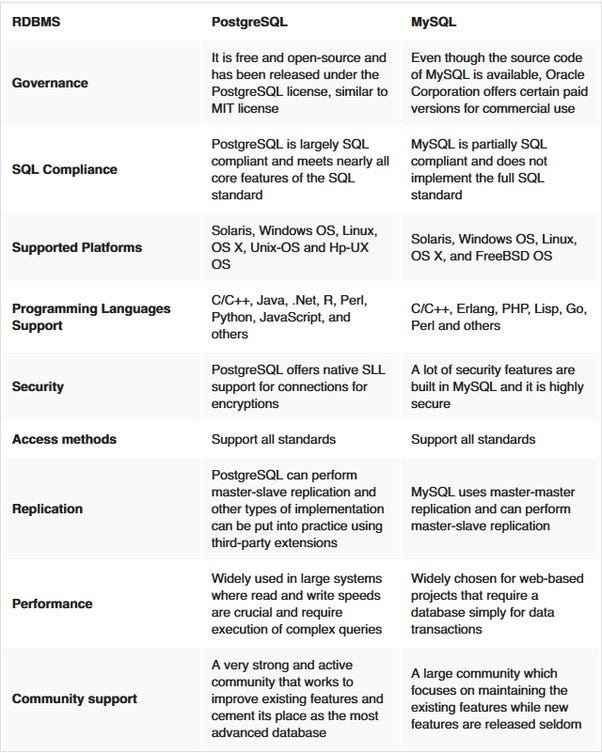
Pic credits : devcomm

Introduction to MongoDB

pic credits : iconape

MongoDB is a no SQL, document database which is written in C++. It stores the data in the JSON format and works best for the unstructured data.

It is used when you need high availability of data with automatic, fast and instant data recovery. Also, in those situations when you have an unstable schema and you want to reduce the schema migration cost.

It stores unstructured data and run complex queries on both cloud and onsite deployments.

It has robust documentation and community support and supports built in replication, auto elections and sharding.

Its use cases include real time analytics, IOT, mobile apps data.

Find: The find function is used to query documents in a collection based on specified criteria.

// Find documents in the "users" collection where the age is greater than 25
db.users.find({ age: { $gt: 25 } });

InsertOne: The insertOne function is used to insert a single document into a collection.

// Insert a new document into the "users" collection
db.users.insertOne({ name: "John", age: 30 });

UpdateOne: The updateOne function is used to update a single document in a collection.

// Update the document with name "John" in the "users" collection, set age to 35
db.users.updateOne({ name: "John" }, { $set: { age: 35 } });

DeleteOne: The deleteOne function is used to delete a single document from a collection.

// Delete the document with name "John" from the "users" collection
db.users.deleteOne({ name: "John" });

Aggregate: The aggregate function is used to perform advanced aggregation operations on a collection, such as grouping, sorting, and calculating aggregate values.

// Calculate the average age of users in the "users" collection
db.users.aggregate([
  { $group: { _id: null, avgAge: { $avg: "$age" } } }
]);

$lookup: The $lookup function is used for performing a left outer join between two collections and retrieving matched documents from the joined collection.

// Perform a left outer join between "orders" and "customers" collections
db.orders.aggregate([
  {
    $lookup: {
      from: "customers",
      localField: "customerId",
      foreignField: "_id",
      as: "customer"
    }
  }
]);

$group: The $group function is used for grouping documents based on specified criteria and performing aggregate operations on grouped data.

// Group documents in the "orders" collection by customerId and calculate the total amount for each customer
db.orders.aggregate([
  {
    $group: {
      _id: "$customerId",
      totalAmount: { $sum: "$amount" }
    }
  }
]);

$unwind: The $unwind function is used to deconstruct an array field and generate a new document for each element of the array.

// Unwind the "tags" array field in the "articles" collection
db.articles.aggregate([
  { $unwind: "$tags" }
]);

$push: The $push function is used to add a value to an array field in a document.

// Add a new tag to the "tags" array field in the document with _id "12345" in the "articles" collection
db.articles.updateOne(
  { _id: "12345" },
  { $push: { tags: "newtag" } }
);

$regex: The $regex function is used for performing regular expression-based pattern matching in queries .

// Find documents in the "users" collection where the name starts with "J"
db.users.find({ name: { $regex: "^J" } });

I’ll be covering Mongodb in detail as the bonus post of 15 days of Advanced SQL.

Comparison between MongoDB, PostgreSQL and MySQL —
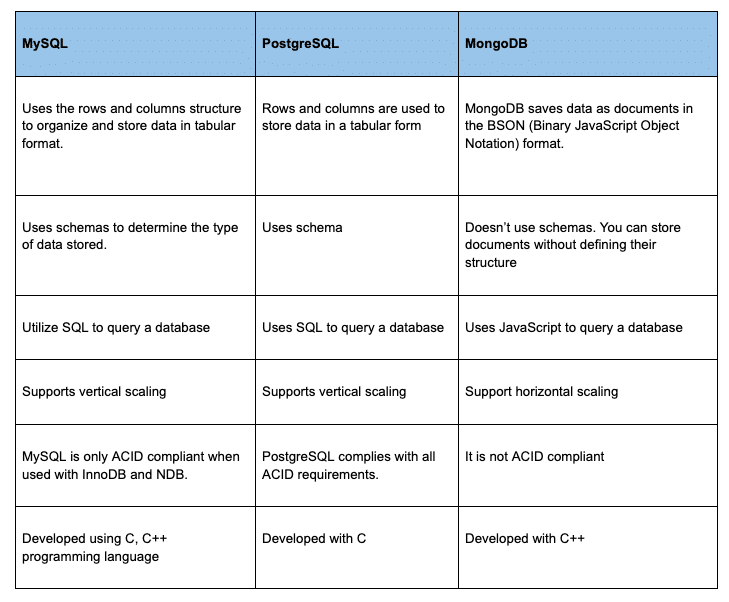
Pic credits : kitrun

Introduction to SQL and NoSQL Databases

SQL

As you design large systems ( or even smaller ones), you need to decide the inflow-processing and outflow of data coming- and getting processed in the system.

Data is generally organized in tables as rows and columns where columns represents attributes and rows represent records and keys have logical relationships. The SQL db schema always shows relational, tabular data following the ACID properties.
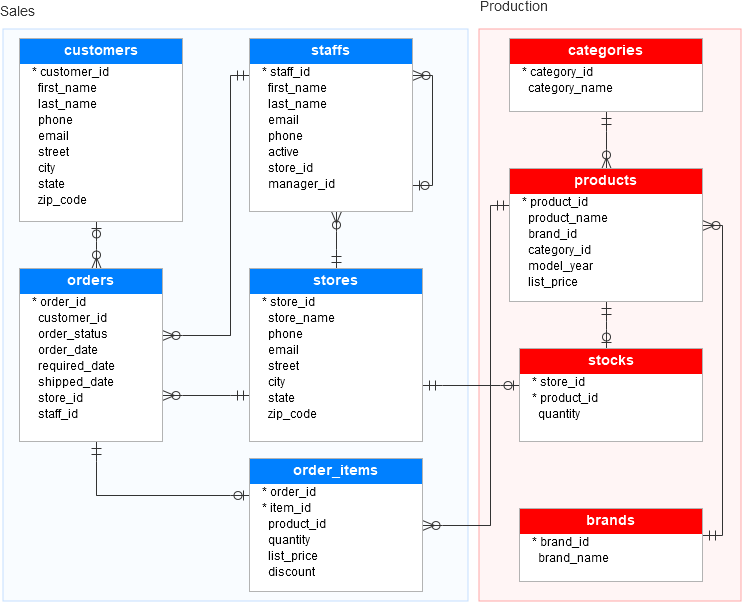
Pic credits : SQLsevr

There are two types of databases to consider — SQL and NoSQL databases.

SQL databases have predefined schema and the data is organized/displayed in the form of tables. These databases use SQL ( Structured Query Language) to define, manipulate, update the data.
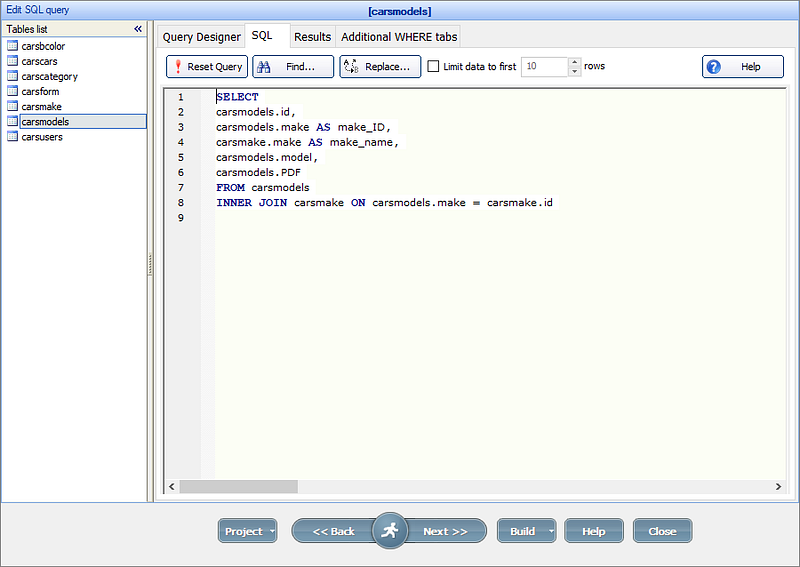
Pic credits : xmlz

Relational databases like MS SQL Server, PostgreSQL, Sybase, MySQL Database, Oracle, etc. use SQL.

NoSQL
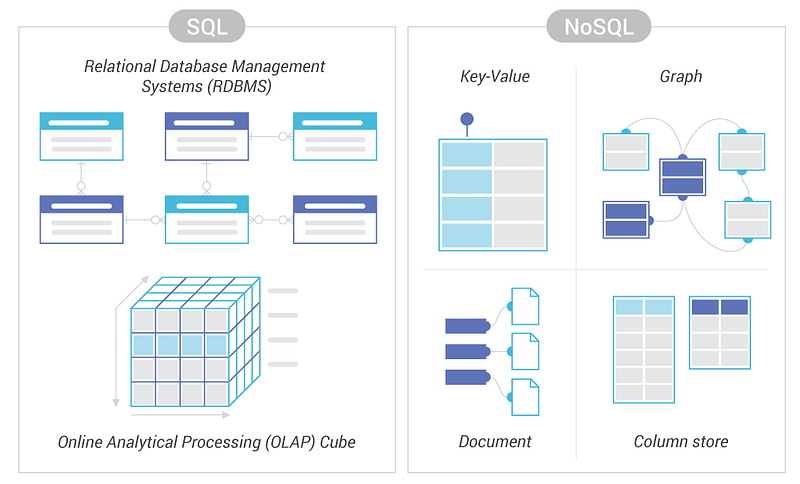
Pic credits : scylladb

NoSQL databases on the other side, have no predefined schema which adds to more flexibility to use the formats that best suits the data — Work with graphs, column-oriented data, key-value and documents etc. They are generally preferred for hierarchical data, graphs ( e.g. social network) and to work with large data.

Some examples — Wide-column use Cassandra and HBase, Graph use Neo4j, Document use MongoDB and CouchDB, Key-value use Redis and DynamoDB,

A good comparison —
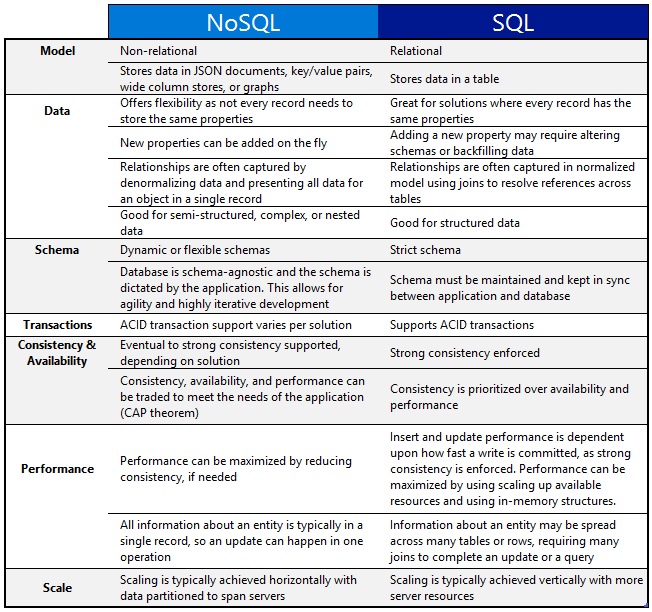
Pic credits : Clouder

One of the important question that you might be asked, when to use which db?

When use SQL databases?

When you want to —

1. Scale Vertically — increase the processing power of your hardware

2. Work with predefined schema

3. Process queries and joins against structured data

4. Optimize the storage

5. Data is small

When to use NoSQL databases?

When you want to —

1. Scale horizontally

2. Work with graphs, column-oriented data, key-value and documents etc

3. Use multiple languages to query

4. Work with dynamic schema that has no predefined schema

5. Large Data

Implementation —

--SQL Database
-- Create a table for storing users
CREATE TABLE users (
  id INT PRIMARY KEY,
  name VARCHAR(50),
  email VARCHAR(100)
);

-- Insert a user into the table
INSERT INTO users (id, name, email)
VALUES (1, 'John Doe', '[email protected]');

-- Retrieve all users from the table
SELECT * FROM users;

--NoSQL (MongoDB) Database:

// Connect to the MongoDB database
const MongoClient = require('mongodb').MongoClient;
const url = 'mongodb://localhost:27017';
const dbName = 'mydatabase';

MongoClient.connect(url, function(err, client) {
  if (err) throw err;

  // Access the database
  const db = client.db(dbName);

  // Create a collection for storing users
  const usersCollection = db.collection('users');

  // Insert a user into the collection
  usersCollection.insertOne({ id: 1, name: 'John Doe', email: '[email protected]' }, function(err, result) {
    if (err) throw err;

    // Retrieve all users from the collection
    usersCollection.find().toArray(function(err, users) {
      if (err) throw err;

      console.log(users);

      // Close the database connection
      client.close();
    });
  });
});

That’s it for now.

Find Day 14 Below —

Let me know if you have questions in the comment section below. Subscribe/ Follow, Like/Clap as it would encourage me to write more in my free time

Stay Tuned!!

Read More —

11 most important System Design Base Concepts

1. System design basics

2. Horizontal and vertical scaling

3. Load balancing and Message queues

4. High level design and low level design, Consistent Hashing, Monolithic and Microservices architecture

5. Caching, Indexing, Proxies

6. Networking, How Browsers work, Content Network Delivery ( CDN)

7. Database Sharding, CAP Theorem, Database schema Design

8. Concurrency, API, Components + OOP + Abstraction

9. Estimation and Planning, Performance

10. Map Reduce, Patterns and Microservices

11. SQL vs NoSQL and Cloud

12. Most Popular System Design Questions

13. System Design Template — How to solve any System Design Question

14. Quick RoundUp : Solved System Design Case Studies

Some of the other best Series —

60 days of Data Science and ML Series with projects

30 Days of Natural Language Processing ( NLP) Series

30 days of Machine Learning Ops

30 days of Data Structures and Algorithms and System Design Simplified

60 Days of Deep Learning with Projects Series

30 days of Data Engineering with projects Series

Data Science and Machine Learning Research ( papers) Simplified **

100 days : Your Data Science and Machine Learning Degree Series with projects

23 Data Science Techniques You Should Know

Tech Interview Series — Curated List of coding questions

Complete System Design with most popular Questions Series

Complete Data Visualization and Pre-processing Series with projects

Complete Python Series with Projects

Complete Advanced Python Series with Projects

Kaggle Best Notebooks that will teach you the most

Complete Developers Guide to Git

Exceptional Github Repos — Part 1

Exceptional Github Repos — Part 2

All the Data Science and Machine Learning Resources

210 Machine Learning Projects

Tech Newsletter —

If you are interested, you can join my newsletter through which I send tech interview tips, techniques, patterns, hacks — Software Development, ML, Data Science, Startups and Technology projects to more than 30K readers. You can subscribe to Tech Brew :

For Python Projects —

For complete 60 days of Data Science and ML : Day 1 — Day 60 : Quick Recap of 60 days of Data Science and ML

Follow for more updates. Stay tuned and keep coding!

For other projects, tune to —

Build Machine Learning Pipelines( With Code)

Recurrent Neural Network with Keras

Clustering Geolocation Data in Python using DBSCAN and K-Means

Facial Expression Recognition using Keras

Hyperparameter Tuning with Keras Tuner

Custom Layers in Keras

Software Development
Programming
Tech
Data Science
Machine Learning
Recommended from ReadMedium