
Day 3 of 15 Days of Advanced SQL Series
Welcome back peeps. Hope all’s well. Last two weeks have been crazy busy at work for me (plus I was traveling).
Day 2 : SQL Basics, Query Structure, Built In functions Conditions
Day 4 : Set Theory Operations, Stored Procedures and CASE statements in SQL
Day 6 : Subqueries, Group by, order by and Having clauses in SQL and Analytical Functions
Day 7 : Window Functions, Grouping Sets and Constraints in SQL
Day 8 : BigQuery Basics, SELECT, FROM, WHERE and Date and Extract in BigQuery
Day 9 : Common Expression Table, UNNEST Clause, SQL vs NoSQL Databases
Day 10 : Triggers, Pivot and Cursors in SQL
Day 14 : MySQL in Depth
Day 15 : PostgreSQL inDepth
Anyways, For Day 3 of 15 days of Advanced SQL, we will cover —
Most Important Commands — Part 2
Joins
Filters
Github for Advanced SQL that you can follow —
Projects Videos —
All the projects, data structures, SQL, algorithms, system design, Data Science and ML , Data Analytics, Data Engineering, , Implemented Data Science and ML projects, Implemented Data Engineering Projects, Implemented Deep Learning Projects, Implemented Machine Learning Ops Projects, Implemented Time Series Analysis and Forecasting Projects, Implemented Applied Machine Learning Projects, Implemented Tensorflow and Keras Projects, Implemented PyTorch Projects, Implemented Scikit Learn Projects, Implemented Big Data Projects, Implemented Cloud Machine Learning Projects, Implemented Neural Networks Projects, Implemented OpenCV Projects,Complete ML Research Papers Summarized, Implemented Data Analytics projects, Implemented Data Visualization Projects, Implemented Data Mining Projects, Implemented Natural Leaning Processing Projects, MLOps and Deep Learning, Applied Machine Learning with Projects Series, PyTorch with Projects Series, Tensorflow and Keras with Projects Series, Scikit Learn Series with Projects, Time Series Analysis and Forecasting with Projects Series, ML System Design Case Studies Series videos will be published on our youtube channel ( just launched).
Subscribe today!
System Design Case Studies — In Depth
Complete Data Structures and Algorithm Series
Github —
Let’s get started with Day 3 .
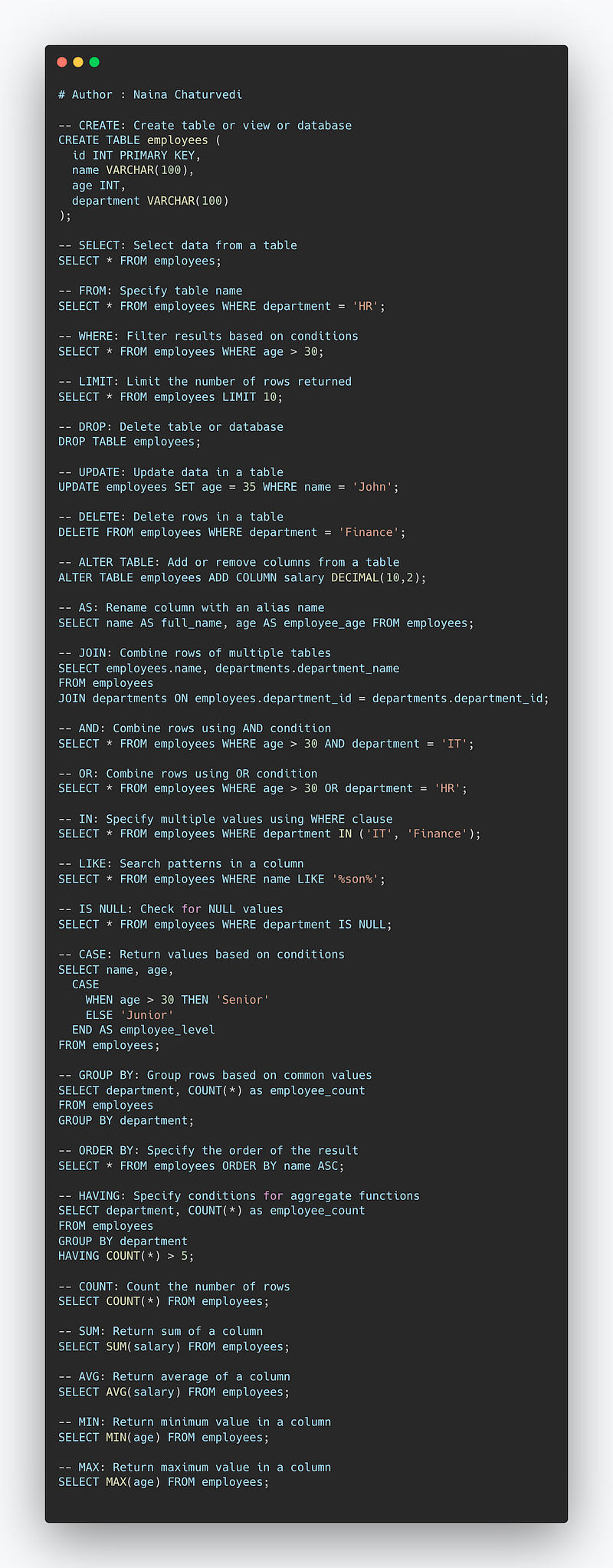
First we will start with most important and useful commands that you should know and their syntax can be found here.
- CREATE — To create table or view or database
- SELECT — To select the data values from the table in a database
- FROM — To specify table name from where we are retrieving the records
- WHERE — To filter the results based on the condition specified in the where clause
- LIMIT — To limit the number of rows returned as the result
- DROP — To delete the table or database
- UPDATE — To update the data in the table
- DELETE — To delete the rows in the table
- ALTER TABLE — To add or remove columns from the table
- AS — To rename column with an alias name
- JOIN — To combine the rows of 2 or more tables
- AND — To combine rows in which records from both/more table are evaluated using And condition
- OR — To combine rows in which records from both/more table are evaluated using Or condition
- IN — To specify multiple values using the where clause/condition
- LIKE — To search/identify the patterns in the column
- IS NULL — To check and return those rows that contains NULL values
- CASE — To return values after evaluating the specified condition
- GROUP BY — To group rows which consist of same values into the summary rows/columns
- ORDER BY — To specify the order of the result returned ( ASC or DESC)
- HAVING — To specify conditions for aggregate functions
- COUNT — To count the number of rows
- SUM — To return sum of the column
- AVG — To return average of the column
- MIN — To return min value in the column
- MAX — To return max value in the column
Implementation —
-- CREATE: Create table or view or database
CREATE TABLE employees (
  id INT PRIMARY KEY,
  name VARCHAR(100),
  age INT,
  department VARCHAR(100)
);

-- SELECT: Select data from a table
SELECT * FROM employees;

-- FROM: Specify table name
SELECT * FROM employees WHERE department = 'HR';

-- WHERE: Filter results based on conditions
SELECT * FROM employees WHERE age > 30;

-- LIMIT: Limit the number of rows returned
SELECT * FROM employees LIMIT 10;

-- DROP: Delete table or database
DROP TABLE employees;

-- UPDATE: Update data in a table
UPDATE employees SET age = 35 WHERE name = 'John';

-- DELETE: Delete rows in a table
DELETE FROM employees WHERE department = 'Finance';

-- ALTER TABLE: Add or remove columns from a table
ALTER TABLE employees ADD COLUMN salary DECIMAL(10,2);

-- AS: Rename column with an alias name
SELECT name AS full_name, age AS employee_age FROM employees;

-- JOIN: Combine rows of multiple tables
SELECT employees.name, departments.department_name
FROM employees
JOIN departments ON employees.department_id = departments.department_id;

-- AND: Combine rows using AND condition
SELECT * FROM employees WHERE age > 30 AND department = 'IT';

-- OR: Combine rows using OR condition
SELECT * FROM employees WHERE age > 30 OR department = 'HR';

-- IN: Specify multiple values using WHERE clause
SELECT * FROM employees WHERE department IN ('IT', 'Finance');

-- LIKE: Search patterns in a column
SELECT * FROM employees WHERE name LIKE '%son%';

-- IS NULL: Check for NULL values
SELECT * FROM employees WHERE department IS NULL;

-- CASE: Return values based on conditions
SELECT name, age,
  CASE
    WHEN age > 30 THEN 'Senior'
    ELSE 'Junior'
  END AS employee_level
FROM employees;

-- GROUP BY: Group rows based on common values
SELECT department, COUNT(*) as employee_count
FROM employees
GROUP BY department;

-- ORDER BY: Specify the order of the result
SELECT * FROM employees ORDER BY name ASC;

-- HAVING: Specify conditions for aggregate functions
SELECT department, COUNT(*) as employee_count
FROM employees
GROUP BY department
HAVING COUNT(*) > 5;

-- COUNT: Count the number of rows
SELECT COUNT(*) FROM employees;

-- SUM: Return sum of a column
SELECT SUM(salary) FROM employees;

-- AVG: Return average of a column
SELECT AVG(salary) FROM employees;

-- MIN: Return minimum value in a column
SELECT MIN(age) FROM employees;

-- MAX: Return maximum value in a column
SELECT MAX(age) FROM employees;
Snippet —
JOINS
Before we start with joins, one must understand the points explained below—
Primary Keys : These are fields/keys in a table which uniquely identifies each record. These are used to join tables.
Foreign Keys : These are fields/keys in a table which the references the primary key of the other table.
Relationships : Relations between the tables can be one to one, one to many and many to many. In one to one relationships, a record in one table is uniquely related to exactly one record in the other table. On the other side, One to many relationships, a record in one table can be related to one or more records in the other table. Lastly, in many to many one or more records in one table are related to one or more records in the other table.
What is a Join?
In SQL, a join operation combines rows from two or more tables based on a related column between them. The purpose of a join is to retrieve data from multiple tables as if they were a single table.
The most common type of join is the INNER JOIN, which is also the default type of join if no specific type is specified.
The join is performed by using the JOIN keyword, followed by the name of the table to be joined and the ON keyword, followed by the condition that relates the tables.
A join is nothing but a construct used to combine rows from two or more tables based on a related/common column between them. It matches the related columns values in two or more tables.
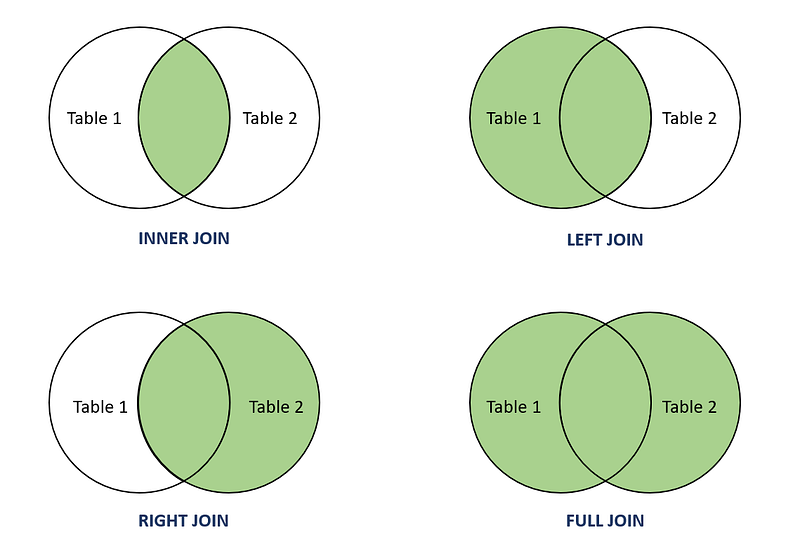
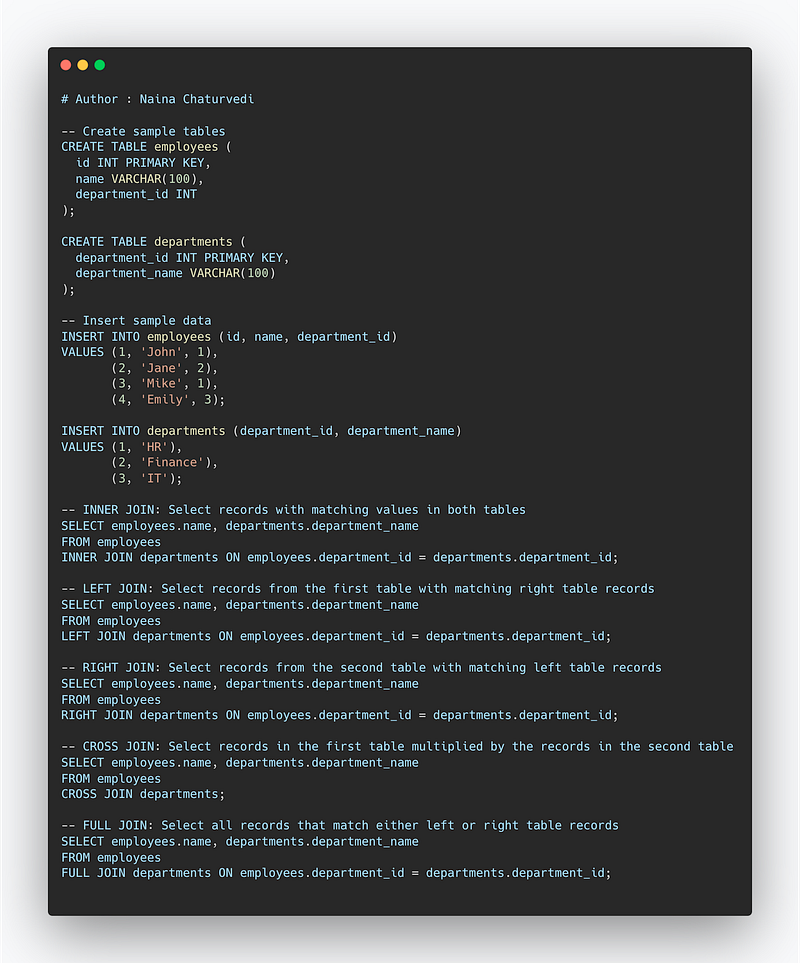
INNER JOIN: Select records that have matching values in both tables.
LEFT JOIN: Select records from the first (left-most) table with matching right table records.
RIGHT JOIN: Select records from the second (right-most) table with matching left table records.
CROSS JOIN : Select records in the first table multiplied by the records in the second table.
FULL JOIN: Selects all records that match either left or right table records.
Format —
SELECT column_names
FROM table1 JOIN table2
ON column_name1 = column_name2
WHERE condition
Format —
Inner JoinSELECT column_namesFROM table1 INNER JOIN table2ON column_name1 = column_name2WHERE condition-------------------------------Left JoinSELECT column_namesFROM table1 Left JOIN table2ON column_name1 = column_name2WHERE condition-----------------Right JoinSELECT column_namesFROM table1 Right JOIN table2ON column_name1 = column_name2WHERE condition-------------Full JoinSELECT column_namesFROM table1 FULL OUTER JOIN table2ON column_name1 = column_name2WHERE condition-------------Cross JoinSELECT column_namesFROM table1 CROSS JOIN table2Snippet —
Filtering the Data
In SQL, the WHERE clause is used to filter the data retrieved by a query. The WHERE clause is added to a SELECT, UPDATE, or DELETE statement and specifies the conditions that must be met for a row to be included in the result set or to be updated or deleted.
For filtering, two types of operators are used —
- Comparison Operators : < , >, !=, ==
- Text Operators, LIKE
WHERE is used to filter the rows that meet certain condition or criteria.
LIKE operator % is used to filter/replace any number of characters.
Multiple conditions can be specified in the WHERE clause using logical operators such as AND and OR.
For example, the following query will return all rows from the “employees” table where the “salary” is greater than 50000 and the “age” is greater than 30:
Syntax —
Select t1
from table_name
where t1 LIKE ‘%condition’
For Filtering using Comparison Based Operators —
Syntax —
Select t1
from table_name
Where t1 > 4
Using other comparison Operator —
Select t1
from table_name
Where t1 != ‘string’
Select t1,t2
from table_name
Where t1 == 17 AND t2 == ‘string’
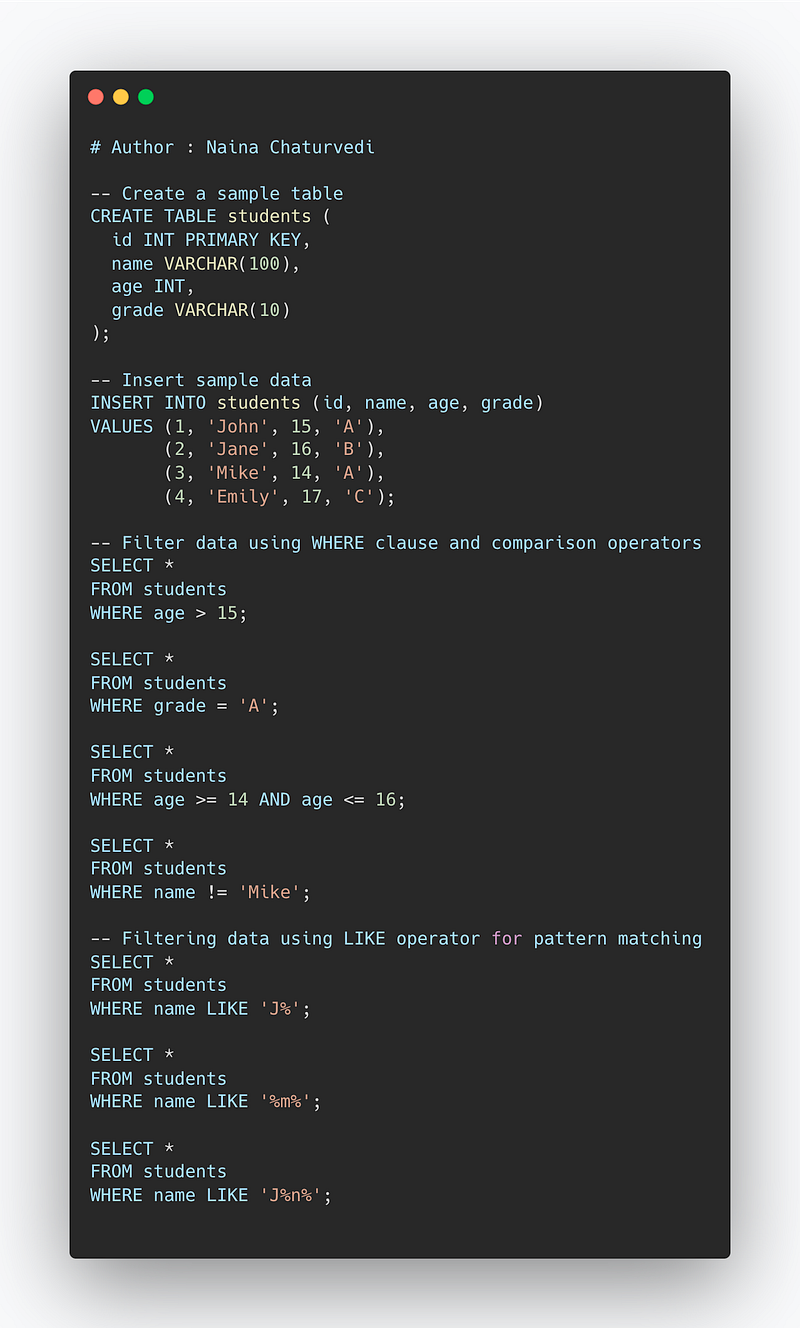
Implementation —
-- Create a sample table
CREATE TABLE students (
  id INT PRIMARY KEY,
  name VARCHAR(100),
  age INT,
  grade VARCHAR(10)
);

-- Insert sample data
INSERT INTO students (id, name, age, grade)
VALUES (1, 'John', 15, 'A'),
       (2, 'Jane', 16, 'B'),
       (3, 'Mike', 14, 'A'),
       (4, 'Emily', 17, 'C');

-- Filter data using WHERE clause and comparison operators
SELECT *
FROM students
WHERE age > 15;

SELECT *
FROM students
WHERE grade = 'A';

SELECT *
FROM students
WHERE age >= 14 AND age <= 16;

SELECT *
FROM students
WHERE name != 'Mike';

-- Filtering data using LIKE operator for pattern matching
SELECT *
FROM students
WHERE name LIKE 'J%';

SELECT *
FROM students
WHERE name LIKE '%m%';

SELECT *
FROM students
WHERE name LIKE 'J%n%';
Snippet —
That’s it for now.
Find Day 4 Below:
Let me know if you have questions in the comment section below. Subscribe/ Follow, Like/Clap as it would encourage me to write more in my free time
Stay Tuned!!
Read More —
11 most important System Design Base Concepts
6. Networking, How Browsers work, Content Network Delivery ( CDN)
13. System Design Template — How to solve any System Design Question
Some of the other best Series —
30 days of Data Structures and Algorithms and System Design Simplified
Data Science and Machine Learning Research ( papers) Simplified **
100 days : Your Data Science and Machine Learning Degree Series with projects
Complete Data Visualization and Pre-processing Series with projects
Exceptional Github Repos — Part 1
Exceptional Github Repos — Part 2
Tech Newsletter —
If you are interested, you can join my newsletter through which I send tech interview tips, techniques, patterns, hacks — Software Development, ML, Data Science, Startups and Technology projects to more than 30K readers. You can subscribe to Tech Brew :
For Python Projects —
For complete 60 days of Data Science and ML : Day 1 — Day 60 : Quick Recap of 60 days of Data Science and ML
Follow for more updates. Stay tuned and keep coding!
For other projects, tune to —
Build Machine Learning Pipelines( With Code)
Recurrent Neural Network with Keras
Clustering Geolocation Data in Python using DBSCAN and K-Means
Facial Expression Recognition using Keras
Hyperparameter Tuning with Keras Tuner
Custom Layers in Keras


