
Part 3 — Complete System Design Series
System Design Made Easy…
Welcome back peeps. In the last part ( link below) we covered system design basics and horizontal and vertical scaling with our pasta resto story.
Note : Please read System Design Important Terms you MUST know before reading this post.
Projects Videos —
All the projects, data structures, SQL, algorithms, system design, Data Science and ML , Data Analytics, Data Engineering, , Implemented Data Science and ML projects, Implemented Data Engineering Projects, Implemented Deep Learning Projects, Implemented Machine Learning Ops Projects, Implemented Time Series Analysis and Forecasting Projects, Implemented Applied Machine Learning Projects, Implemented Tensorflow and Keras Projects, Implemented PyTorch Projects, Implemented Scikit Learn Projects, Implemented Big Data Projects, Implemented Cloud Machine Learning Projects, Implemented Neural Networks Projects, Implemented OpenCV Projects,Complete ML Research Papers Summarized, Implemented Data Analytics projects, Implemented Data Visualization Projects, Implemented Data Mining Projects, Implemented Natural Leaning Processing Projects, MLOps and Deep Learning, Applied Machine Learning with Projects Series, PyTorch with Projects Series, Tensorflow and Keras with Projects Series, Scikit Learn Series with Projects, Time Series Analysis and Forecasting with Projects Series, ML System Design Case Studies Series videos will be published on our youtube channel ( just launched).
Subscribe today!
Solved System Design Case Studies — In depth
Design Google Drive
Design Instagram
Design Quora
Design Foursquare
Design Flipkart
ML System Design
Design Tiny URL
Design Netflix
Design Messenger App
Design Twitter
Design Reddit
Design Amazon
Design Dropbox
Design URL Shortener
Design Youtube
Design API Rate Limiter
Design Web Crawler
Design Amazon Prime Video
Design Facebook’s Newsfeed
Design Yelp
Design Uber
Design Tinder
Design Tiktok
Design Whatsapp
Most Popular System Design Questions
Mega Compilation : Solved System Design Case studies
Complete Data Structures and Algorithm Series
Github —
All the Complete System Design Series Parts —
6. Networking, How Browsers work, Content Network Delivery ( CDN)
Moving forward with our pasta resto story, this is the part 3 of the system design series where we will be covering —
1.Load Balancing
2. Message Queues
Part 1 of this series can be found here —
Part 2 of this series can be found here —
And Most popular System Design Questions —
In the part 3, I’ll take examples to make concepts more comprehensible for you.
So, last I checked our pasta resto went viral and there are now hundreds of customers flocking in to taste the delicious pasta. Our revised requirements to accommodate and serve the increasing demands are —
1. Place — Need more places to serve people at different locations
2. Chefs/Cook — Need to hire more chefs to cook and serve the orders as soon as possible and optimize the whole workload
3. Waiters/Servers — Need to hire more waiters/servers to serve hundreds of customers, give the best customer experience and great quality of service
4. Customers — Ever growing so there’s need a waiting area and approx. serving time estimate so that customers don’t leave hungry due to long queues.
5. Money — Need more money to open more chains at different locations.
6. Receptionist — Who can manage and well allot the load i.e customers
7. Software — Where you can store the customer details in case there’s a prior reservation made.
Now let’s get started!
Load Balancing
Pasta resto case :
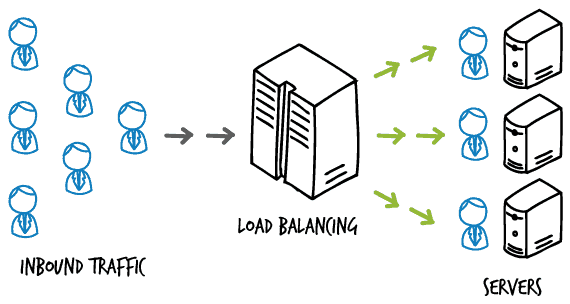
Keeping in mind the revised requirements, the owner of the pasta resto hires a receptionist to manage the customer load and direct it well to the dedicated servers/waiters who can turn in the orders to multiple chefs. Here the receptionist is doing the job of load balancing and her/his efforts improves the improves performance and throughput overall.
So what is a Load Balancing in technical terms?
It’s a technique of distributing tasks over a set of servers/machines to improve the performance, throughput, high availability, redundancy and reliability of the system. Not just it enables horizontal scaling but also dynamic resizing/scaling.
Load balancing is the process of distributing network traffic across multiple servers or network devices to ensure that no single device is overwhelmed with too much traffic. This is done in order to improve the overall performance and availability of the system.
There are several ways to accomplish load balancing, including:
- DNS Load Balancing: This method uses the Domain Name System (DNS) to distribute traffic across multiple servers. When a client requests a specific domain name, the DNS server responds with the IP address of a server that is currently available to handle the request.
- Hardware Load Balancing: This method uses specialized hardware devices, such as load balancers, to distribute traffic. These devices sit in front of a group of servers and use various algorithms, such as round robin or least connections, to distribute incoming traffic.
- Software Load Balancing: This method uses software running on servers or on the network to distribute traffic. This could include using a reverse proxy or a load balancer built into the web server software itself.
- Cloud-based Load Balancing: This method utilizes cloud providers’ services such as Amazon Elastic Load Balancer, Azure Load Balancer, and Google Cloud Load Balancer to distribute traffic across multiple servers.
Load balancing is a crucial technique for ensuring high availability and scalability of web applications, e-commerce sites, and other systems that receive a high volume of traffic. It helps to distribute the traffic among multiple servers, providing a better performance and reducing the risk of a single point of failure.
Why use load balancing?
- Availability and Redundancy
- Increased security
- Minimize server response time
- low cost
- Flexibility in adjusting to the needs
- Efficiency
- Provides Abstraction
- Improve downtime ( thus performance)
- Scalable
System Design analogy :

Load balancer helps to address two critical issues —
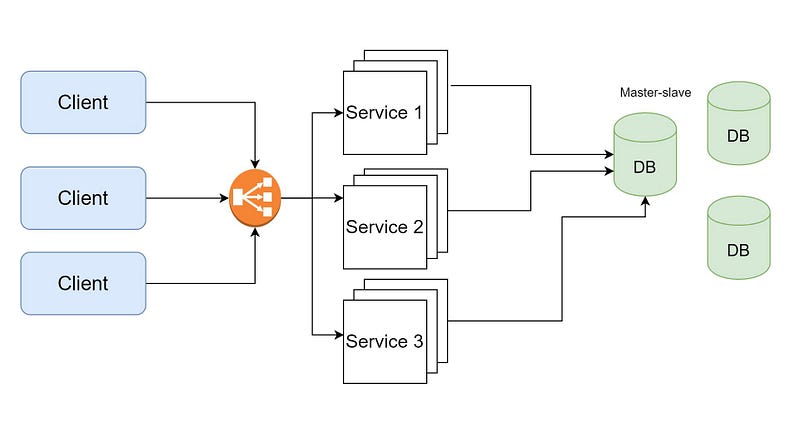
- Single point of failure : If one server/machine goes down, then whole ecosystem becomes unavailable for the users for certain period of time.
- Node/server overloading : When the server gets overloaded with millions of requests hitting it every minute.
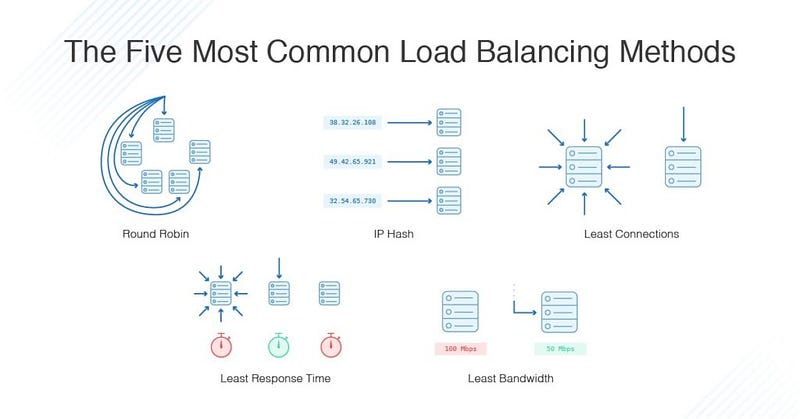
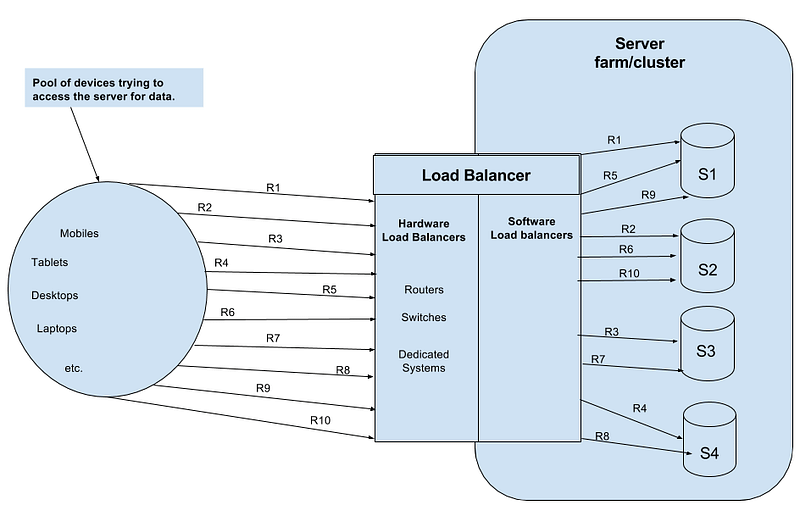
Load balancers are generally placed between client and servers, application servers, application servers — cache servers — database servers etc. There are two types of load balancers — hardware load balancers and software load balancers. They can also be divided into Load balancer < Master> and < Slave> or
Here is an example of how to implement load balancing using the Flask framework in Python:
from flask import Flask
from flask_socketio import SocketIO
import eventlet
app = Flask(__name__)
socketio = SocketIO(app)@socketio.on('message')
def handle_message(message):
print('Received message: %s' % message)if __name__ == '__main__':
eventlet.wsgi.server(eventlet.listen(('', 5000)), app)This code sets up a Flask application that listens on port 5000 and listens for incoming messages using the Flask-SocketIO library. When a message is received, the handle_message function is executed and the message is printed to the console.
To implement load balancing, you can run multiple instances of this application on different servers, and then use a load balancer to distribute incoming requests evenly across all instances. There are many load balancing solutions available, both hardware-based and software-based, such as HAProxy, NGINX, and Amazon ELB.
Here is an example of how to configure HAProxy to balance incoming requests between two instances of the Flask application:
global
    maxconn 256
defaults
mode http
timeout connect 5000ms
timeout client 50000ms
timeout server 50000msfrontend http-in
bind *:80
default_backend serversbackend servers
server server1 127.0.0.1:5000 weight 1 maxconn 32
server server2 127.0.0.1:5001 weight 1 maxconn 32This HAProxy configuration binds to port 80 and listens for incoming HTTP requests. The servers backend contains two servers, server1 and server2, which are the two instances of the Flask application running on ports 5000 and 5001, respectively. Requests are distributed evenly between the two servers using a simple round-robin algorithm.
Lastly, let’s talk about the load balancing algorithms . There are 5 major load balancing algorithms —
- Round robin — handles load in a rotating sequential order.
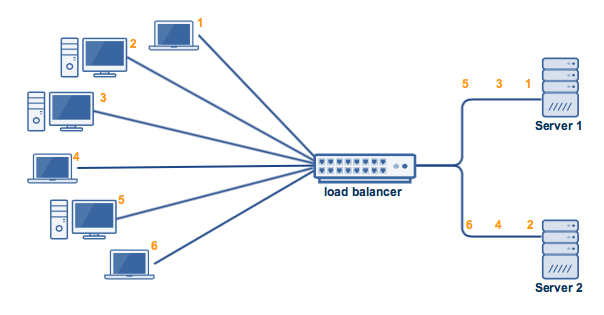
- Least connections — Server having the least number of active connections are first sent the requests.
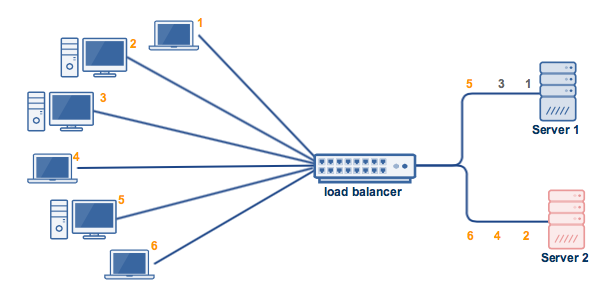
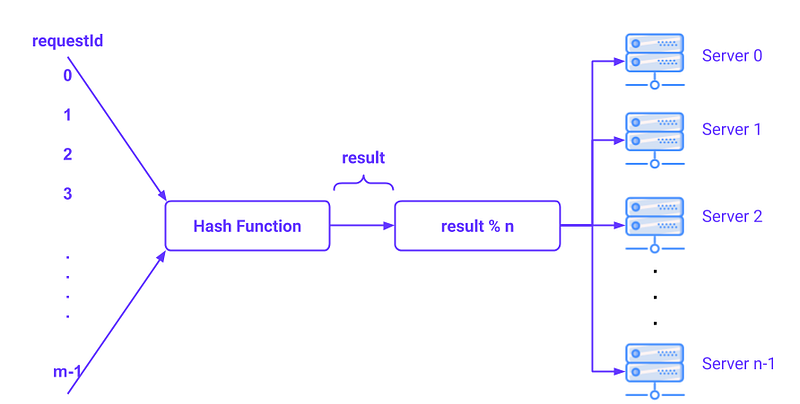
- IP hash — In the hash key is calculated based on the source and destination IP address in a request which decides the specific server to which request should be sent to.
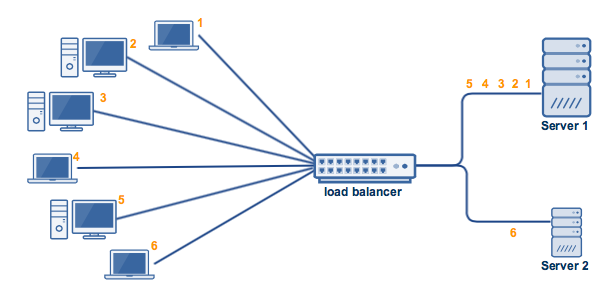
- Weighted least connections —Just like weighted round robin, in weighted least connections the servers are categorized based on their processing capacities.So, the requests are distributed based on the capacity and no of active connections.
- In order to implement load balancing, a load balancer is typically placed in front of the resources that are being balanced. The load balancer receives incoming requests and then forwards them to one of the available resources based on the chosen load balancing technique.
- The load balancer also monitors the health of the resources and can remove resources that are no longer available from the pool of available resources. This helps to ensure that the system continues to operate even if individual resources fail.
In conclusion, load balancing is a technique used to distribute workloads evenly across multiple resources in order to optimize resource utilization and minimize downtime. Load balancing can be implemented using several different techniques, including Round Robin, Least Connections, IP Hash, and Source IP Affinity. A load balancer is typically placed in front of the resources that are being balanced, and monitors the health of the resources to ensure that the system continues to operate even if individual resources fail.
Message Queues
Pasta resto case :
Now back to our pasta resto story. Our pasta resto became popular and hundreds of customers are now queuing up to get a taste of the delicious pasta. These customers form a line i.e queue and wait in line until the receptionist assigns a table to the customer one by one asynchronously.
So what is message Queue?
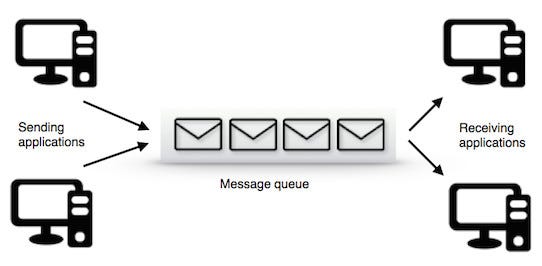
Message queues are nothing bit temporary buffers placed between users/applications and servers to store the message requests and process them in FIFO order asynchronously until the requests/messages are delivered to the desired server.
Why use message Queues?
- Helps in independent scaling of different components of the system
- Async in nature
- Improves reliability and efficiency of the system
A message queue is a software component that allows applications to communicate asynchronously by passing messages between them. It serves as a buffer, holding messages that are sent by one application until they can be received and processed by another application.
Message queues are typically used to decouple applications and services, so that they can operate independently of each other. This allows for greater flexibility and scalability, as new services can be added or removed without affecting the other components of the system.
Here are some of the key features and benefits of message queues:
- Asynchronous communication: Applications can send messages to a message queue without waiting for an immediate response, which allows them to continue processing other tasks.
- Durability: Messages are typically stored on disk, so they can survive system crashes or other failures.
- Load balancing: Message queues can distribute messages across multiple consumers, allowing for load balancing and failover.
- Prioritization: Messages can be prioritized, so that important messages are processed first.
- Routing: Messages can be routed to different destinations based on their content or other attributes.
There are many message queueing systems available, such as RabbitMQ, Apache Kafka, and Amazon SQS, each with their own unique features and capabilities. Some of them are open-source and others are commercial.
Implementing message queues can vary depending on the programming language and platform you are using. Here is an example of how to implement a message queue using the RabbitMQ library in Python:
import pikadef callback(ch, method, properties, body):
print("Received message: %r" % body)connection = pika.BlockingConnection(pika.ConnectionParameters('localhost'))
channel = connection.channel()channel.queue_declare(queue='hello')channel.basic_consume(queue='hello',
auto_ack=True,
on_message_callback=callback)print('Waiting for messages. To exit press CTRL+C')
channel.start_consuming()This code creates a connection to a RabbitMQ message broker running on localhost. Then, it declares a queue named ‘hello’ and starts a consumer that will listen for messages on that queue. When a message is received, the callback function is executed, which simply prints the message to the console.
Here is an example of how to publish messages to the queue:
import pikaconnection = pika.BlockingConnection(pika.ConnectionParameters('localhost'))
channel = connection.channel()channel.queue_declare(queue='hello')channel.basic_publish(exchange='',
routing_key='hello',
body='Hello World!')print("Sent 'Hello World!'")
connection.close()This code creates a connection to the RabbitMQ message broker, declares the ‘hello’ queue, and then publishes a message to the queue with the basic_publish method. The exchange parameter is set to an empty string, which means that messages will be sent directly to the named queue (in this case, 'hello').
In summary, message queues are a powerful tool for building distributed systems that can handle large amounts of data and handle failures gracefully. They allow for decoupling of different components of an application and enables them to work independently, providing a better scalability and fault-tolerance.
Load Balancing:
# Import required libraries
import http.server
import socketserver
# Define the port number and handler
PORT = 8000
Handler = http.server.SimpleHTTPRequestHandler# Create a TCP/IP socket server with load balancing
with socketserver.ForkingTCPServer(("", PORT), Handler) as httpd:
print("Server running at port", PORT)
httpd.serve_forever()In the above code, we have created a TCP/IP socket server with load balancing using the ForkingTCPServer class from the socketserver library. This server listens on a specified port number (in this case, 8000) and forks a new process for each incoming request. This allows the server to handle multiple requests simultaneously and distribute the load across multiple processes.
Message Queues:
# Import required libraries
import queue
import threading
# Define the message queue
msg_queue = queue.Queue()# Define the producer thread function
def producer():
while True:
# ...generate message...
msg_queue.put(msg)# Define the consumer thread function
def consumer():
while True:
msg = msg_queue.get()
# ...process message...
msg_queue.task_done()# Create the producer and consumer threads
t1 = threading.Thread(target=producer)
t2 = threading.Thread(target=consumer)# Start the threads
t1.start()
t2.start()# Wait for the threads to finish
t1.join()
t2.join()In the above code, we have defined a message queue using the Queue class from the queue library. We then define a producer thread function that generates messages and puts them into the message queue, and a consumer thread function that gets messages from the message queue and processes them. We create two threads, one for the producer and one for the consumer, and start them. Finally, we wait for the threads to finish using the join() method. This allows us to implement a simple message queue system that can handle multiple producers and consumers simultaneously.
More on Load balancing —
Load Balancing Algorithms:
Round-Robin Algorithm:
- Characteristics: Each request is sequentially distributed to the available servers in a circular manner.
- Pros: Simplicity, even distribution of traffic among servers.
- Cons: Inefficient if servers have different processing capacities, doesn’t consider server health.
Least Connection Algorithm:
Implementation:
- Characteristics: Directs the request to the server with the fewest active connections.
- Pros: Efficient utilization of server resources, suitable for long-lived connections.
- Cons: Requires tracking the number of connections on each server, may not consider server capacity.
Weighted Round-Robin Algorithm:
- Characteristics: Assigns weights to servers and distributes requests based on their weight values.
- Pros: Allows assigning more traffic to high-capacity servers, accommodates server capacity variations.
- Cons: Requires adjusting weights accurately, may cause imbalances if weights are not set correctly.
Real-world examples:
- Round-robin: Suitable for simple web applications with multiple identical servers.
- Least connection: Ideal for long-polling or streaming applications where connections are held open for extended periods.
- Weighted round-robin: Useful when some servers have more processing power or need to handle a higher load due to specific tasks.
Load Balancing Techniques:
Layer 4 (Transport Layer) vs. Layer 7 (Application Layer) Load Balancing:
- Layer 4: Load balancing based on information from transport layer protocols like TCP or UDP headers.
- Layer 7: Load balancing based on application-specific data, such as HTTP headers, URL, or cookies.
Connection-based vs. Request-based Load Balancing:
- Connection-based: Balancing traffic based on established connections, where subsequent requests from the same client are routed to the same server.
- Request-based: Each request is independently load balanced, allowing different requests from the same client to be routed to different servers.
Session Persistence and Sticky Sessions:
- Session persistence (or affinity): Ensures that all requests from a specific client session are directed to the same server.
- Sticky sessions: Achieved by using techniques like cookies or source IP hashing to maintain session affinity.
Health Checks and Failure Detection Mechanisms:
- Health checks: Regularly monitoring server health by sending probes to ensure servers are responsive and functioning correctly.
- Failure detection: Detecting server failures based on health check responses or network-level failure detection mechanisms.
Deployment Models:
Hardware vs. Software Load Balancers:
- Hardware load balancer: A dedicated physical appliance that performs load balancing functions. It often offers high performance and specialized features but can be costly and less flexible.
- Software load balancer: Implemented as software running on commodity hardware or virtual machines. It provides flexibility, scalability, and can be easily integrated into existing infrastructure, but its performance may be lower compared to dedicated hardware.
Local (On-Premises) vs. Global (Cloud-Based) Load Balancers:
- Local load balancer: Deployed on-premises within a private data center, providing load balancing for local applications and services.
- Global load balancer: Deployed in a cloud environment, distributing traffic across multiple data centers or regions, enabling high availability and scalability for globally distributed applications.
Load Balancing in Containerized Environments (e.g., Kubernetes):
- Load balancing in Kubernetes: In Kubernetes clusters, a load balancer can be provisioned using an Ingress controller or a service of type LoadBalancer. It routes traffic to containers based on defined rules, ensuring scalability and fault tolerance.
Scalability and High Availability:
Horizontal Scaling and Load Balancing:
- Horizontal scaling: Increasing the number of servers or instances to handle higher loads, achieved by adding more resources in parallel.
- Load balancing enables distributing traffic across these instances to optimize resource utilization and prevent overload on individual servers.
Scaling Techniques: Auto-Scaling and Dynamic Provisioning:
- Auto-scaling: Automatically adjusting the number of instances based on predefined metrics such as CPU utilization, network traffic, or queue length.
- Dynamic provisioning: Automatically provisioning additional resources, such as virtual machines or containers, to meet increased demand, ensuring rapid scaling and resource availability.
Redundancy and Fault Tolerance in Load Balancing Architectures:
- Redundancy: Deploying multiple load balancers in an active-passive or active-active configuration to ensure high availability and eliminate single points of failure.
- Fault tolerance: Implementing health checks and failure detection mechanisms to detect and route traffic away from failed or unhealthy servers, ensuring continuous service availability.
Active-Passive vs. Active-Active Load Balancing Setups:
- Active-passive setup: One load balancer actively handles incoming traffic while the others remain idle. Failover occurs when the active load balancer becomes unavailable.
- Active-active setup: Multiple load balancers share the traffic load simultaneously, providing higher scalability and fault tolerance. Each load balancer actively participates in handling requests.
Load Balancing Considerations for Specific Applications:
Web Applications and HTTP Load Balancing:
- HTTP load balancing: Distributing HTTP/HTTPS requests across multiple web servers to optimize performance, handle high traffic, and ensure fault tolerance. It may consider factors like URL, session persistence, or content-based routing.
Load Balancing for Databases:
- Database load balancing: Balancing traffic across multiple database servers to improve performance and avoid overloading a single database. It may involve techniques such as sharding, replication, or clustering.
Load Balancing for Real-Time Applications (e.g., Streaming, Gaming):
- Load balancing for real-time applications: Balancing traffic for applications that require low-latency and real-time data processing, such as live streaming or online gaming. It involves minimizing latency, maintaining session persistence, and optimizing server selection.
Load Balancing for Microservices Architectures:
- Load balancing in microservices: Distributing requests across multiple microservices instances to ensure scalability and fault tolerance. Load balancing can be implemented at the service mesh level or through API gateways.
Monitoring Key Metrics:
- Response time: Measure the time taken by the load balancer to respond to a request, including the time taken for processing and forwarding the request to a backend server.
- Throughput: Calculate the number of requests processed by the load balancer per unit of time, indicating the load balancer’s capacity.
- Error rate: Monitor the percentage of requests that result in errors or failures, helping identify issues with backend servers or configuration.
- Server health: Track the availability and health of backend servers, including metrics like CPU usage, memory utilization, and network latency.
Load Balancing Performance Analysis and Optimization Techniques:
- Load balancer configuration tuning: Adjust load balancer settings, such as connection timeout, keep-alive intervals, or load balancing algorithms, to optimize performance based on observed metrics.
- Caching and content delivery: Implement caching mechanisms at the load balancer level to store and serve frequently accessed content, reducing the load on backend servers and improving response time.
- Content compression: Compressing data before transmitting it to clients can reduce bandwidth usage and improve response time.
- Load testing and capacity planning: Perform load tests to simulate high traffic scenarios and identify potential bottlenecks. Use the results to plan for capacity upgrades or optimize load balancing configurations.
Capacity Planning and Forecasting:
- Analyze historical traffic patterns and growth trends to forecast future capacity requirements.
- Scale load balancers and backend infrastructure proactively based on projected traffic increases.
- Utilize auto-scaling capabilities to automatically adjust resources based on real-time demand.
Security Considerations:
Load Balancing and SSL/TLS Termination:
- SSL/TLS termination: Load balancers can offload SSL/TLS encryption and decryption, improving server performance and simplifying certificate management. However, secure communication between the load balancer and backend servers must be ensured.
Protection Against Distributed Denial-of-Service (DDoS) Attacks:
- Implement rate limiting and request validation mechanisms to prevent excessive requests or malicious traffic from overwhelming the load balancer and backend servers.
- Utilize DDoS mitigation services or specialized hardware to detect and mitigate large-scale DDoS attacks.
Network Security Considerations in Load Balancing:
- Implement access controls and firewall rules at the load balancer to restrict unauthorized access to backend servers.
- Ensure secure communication channels between the load balancer and backend servers, using techniques such as VPNs or private network connections.
Case Studies and Real-World Examples:
Examining Load Balancing Implementations in Popular Systems and Platforms:
- Amazon Web Services (AWS) Elastic Load Balancer (ELB) and Application Load Balancer (ALB).
- NGINX Load Balancer.
- Microsoft Azure Load Balancer.
- Google Cloud Load Balancing.
Understanding How Large-Scale Services Achieve Load Balancing:
- Netflix: Uses a combination of load balancing algorithms, dynamic scaling, and fault tolerance mechanisms to distribute traffic across its streaming servers.
- Google: Utilizes global load balancing across multiple data centers to ensure high availability and efficient handling of user requests.
- Facebook: Implements load balancing techniques to distribute traffic across its vast infrastructure, handling millions of concurrent users.
How Load Balancer Works —
A load balancer is a crucial component of a distributed system that distributes incoming network traffic across multiple servers, ensuring efficient resource utilization, high availability, and scalability. Let’s delve into the detailed steps of how a load balancer works internally:
- Client sends a request: The client initiates a request by sending it to the load balancer. This request can be an HTTP request, TCP connection, or any other network protocol.
- Load balancer receives the request: The load balancer acts as an entry point and intercepts the incoming request. It is responsible for managing and directing traffic.
- Load balancing algorithm selection: The load balancer selects an appropriate load balancing algorithm to determine which backend server should handle the request. This choice depends on factors such as the algorithm configured (e.g., round-robin, least connection), server health, and other load balancing policies.
- Backend server selection: Using the selected load balancing algorithm, the load balancer chooses a backend server from the pool of available servers. The selection can be based on different criteria, such as server capacity, current load, or specialized requirements (e.g., SSL termination).
- Connection establishment: The load balancer establishes a connection with the selected backend server on behalf of the client. This can involve creating a new connection or reusing an existing connection from a connection pool.
- Request forwarding: Once the connection is established, the load balancer forwards the client’s request to the chosen backend server. The request contains all the necessary information for the server to process it, such as the original client IP address, headers, and payload.
- Backend server processes the request: The backend server receives the forwarded request from the load balancer and starts processing it based on the application logic or services hosted on that server.
- Response generation: After processing the request, the backend server generates a response containing the requested data or performs the required action.
- Response routing: The load balancer intercepts the response from the backend server and ensures that it is sent back to the original client that initiated the request. It maintains the necessary mappings and information to route the response correctly.
- Load balancer monitoring and health checks: In the background, the load balancer continuously monitors the health and availability of backend servers. It performs health checks by periodically sending probes or monitoring server metrics (e.g., response time, CPU usage). If a server is deemed unhealthy or unresponsive, the load balancer may mark it as unavailable and stop sending requests to it.
- Load balancer scaling and dynamic provisioning: Load balancers can dynamically adjust their capacity based on the current traffic load. They can scale up by adding more backend servers or scale down by removing servers when the demand decreases. This scalability is often automated using techniques such as auto-scaling and dynamic provisioning.
- Session persistence and sticky sessions: Some applications require maintaining session affinity, where subsequent requests from a client are directed to the same backend server to preserve session state. Load balancers can achieve this by using session cookies, source IP hashing, or other techniques to ensure that requests from the same client are consistently routed to the same server.
Implementation —
import random

# List of backend servers
backend_servers = ["192.168.1.1", "192.168.1.2", "192.168.1.3"]

# Load balancing algorithm: Random selection
def random_selection():
    return random.choice(backend_servers)

# Handle client request
def handle_request():
    # Step 1: Client sends a request

    # Step 2: Load balancer receives the request

    # Step 3: Load balancing algorithm selection
    selected_server = random_selection()

    # Step 4: Backend server selection

    # Step 5: Connection establishment
    connection = establish_connection(selected_server)

    # Step 6: Request forwarding
    forward_request(connection)

    # Step 7: Backend server processes the request

    # Step 8: Response generation

    # Step 9: Response routing
    return route_response(connection)

# Establish connection with a backend server
def establish_connection(server):
    print("Establishing connection with server:", server)
    # Code to establish a connection with the server
    return connection

# Forward request to the backend server
def forward_request(connection):
    print("Forwarding request to the backend server")
    # Code to send the request through the connection

# Route the response back to the client
def route_response(connection):
    print("Routing response back to the client")
    # Code to receive the response from the connection and route it back to the client

# Main function
if __name__ == "__main__":
    # Step 10: Load balancer monitoring and health checks

    # Step 11: Load balancer scaling and dynamic provisioning

    # Step 12: Session persistence and sticky sessions

    # Handle client request
    response = handle_request()
    print("Received response:", response)
Read Part 4 next:
Keep learning and coding :)
Complete Advanced SQL Series
Day 2 : SQL Basics, Query Structure, Built In functions Conditions
Day 4 : Set Theory Operations, Stored Procedures and CASE statements in SQL
Day 6 : Subqueries, Group by, order by and Having clauses in SQL and Analytical Functions
Day 7 : Window Functions, Grouping Sets and Constraints in SQL
Day 8 : BigQuery Basics, SELECT, FROM, WHERE and Date and Extract in BigQuery
Day 9 : Common Expression Table, UNNEST Clause, SQL vs NoSQL Databases
Day 10 : Triggers, Pivot and Cursors in SQL
Day 14 : MySQL in Depth
Day 15 : PostgreSQL inDepth
Github for Advanced SQL that you can follow —
All the projects, data structures, algorithms, system design, Data Science and ML, Data Engineering, MLOps and Deep Learning videos will be published on our youtube channel ( just launched).
Subscribe today!
System Design Case Studies — In Depth
Complete Data Structures and Algorithm Series
Github —
Some of the other best Series —
30 days of Data Structures and Algorithms and System Design Simplified
100 days : Your Data Science and Machine Learning Degree Series with projects
Complete Data Visualization and Pre-processing Series with projects
Tech Newsletter —
If you are interested, you can join my newsletter through which I send tech interview tips, techniques, patterns, hacks — Software Development, ML, Data Science, Startups and Technology projects to more than 30K readers. You can subscribe to Tech Brew :
30 days of Data Analytics Series —
Day 1 : Data Analytics basics and kickstart of Data analytics with projects series
Day 3 : Data Analytics Ecosystem — Data Life Cycle, Data Analysis complete process ( most important things)
Day 5 : Statistics
Day 6 : Basic and Advanced SQL
Day 8 : Pandas and Numpy
Day 9 : Data Manipulation
Day 10 : Data Visualization — Part 1
Day 11 : Project 1 : Data Visualization — Part 2
Day 12 : Data Visualization — Part 3
Day 13: Tableau — Part 1
Day 14: Tableau — Part 2
Day 15: Tableau — Part 3
Day 16 : Data Analysis Project 2
Day 17 : Data Analysis Project 3
Day 18: Data Analysis Project 4
Day 20 : Data Analysis Project 6
Day 21 : Data Analysis Project 7
Take Complete Hands On Tableau Course : Link
For Python Projects —
For complete 60 days of Data Science and ML : Day 1 — Day 60 : Quick Recap of 60 days of Data Science and ML
Follow for more updates. Stay tuned and keep coding!
For other projects, tune to —
Build Machine Learning Pipelines( With Code)
Recurrent Neural Network with Keras
Clustering Geolocation Data in Python using DBSCAN and K-Means
Facial Expression Recognition using Keras
Hyperparameter Tuning with Keras Tuner
Custom Layers in Keras


