
Day 9 of 30 days of Data Analytics with Projects Series
Welcome back peeps. This is Day 9 of 30 days of data analytics.
What’s covered in the Data Analytics Series till now —
Day 1 : Data Analytics basics and kickstart of Data analytics with projects series
Day 3 : Data Analytics Ecosystem — Data Life Cycle, Data Analysis complete process ( most important things)
Day 5 : Statistics
Day 6 : Basic and Advanced SQL
Day 8 : Pandas and Numpy
Day 9 : Data Manipulation
In this post we will cover data manipulation as follows —
Data manipulation refers to the process of modifying and manipulating data in a database or other data storage system. This can include adding, deleting, or modifying data, as well as reorganizing, cleaning, and transforming data.
Data manipulation is typically done using SQL (Structured Query Language) commands, although other programming languages can also be used.
Some common data manipulation tasks include:
- Adding new data: This can include inserting new rows of data into a table, as well as importing data from external sources.
- Updating data: This can include modifying existing data in a table, such as changing a specific value or updating multiple rows of data at once.
- Deleting data: This can include removing specific rows of data from a table, as well as deleting entire tables or databases.
- Sorting and filtering data: This can include organizing data in a specific order, such as by date or alphabetically, as well as filtering data to only display certain rows based on certain criteria.
- Joining and merging data: This can include combining data from multiple tables or sources, such as merging data from two different databases.
- Transforming data: This can include reformatting data, such as converting data from one data type to another, or aggregating data to summarize it.
Code Implementation —
import pandas as pd

# Creating a DataFrame
data = {'Name': ['John', 'Alice', 'Bob', 'Emily'],
        'Age': [25, 30, 28, 35],
        'City': ['New York', 'Paris', 'London', 'Tokyo']}
df = pd.DataFrame(data)

# Adding new data
new_data = {'Name': 'Mark', 'Age': 27, 'City': 'Sydney'}
df = df.append(new_data, ignore_index=True)

# Updating data
df.loc[df['Name'] == 'Alice', 'Age'] = 31

# Deleting data
df = df.drop(index=2)

# Sorting and filtering data
df = df.sort_values('Age', ascending=False)
filtered_df = df[df['Age'] > 28]

# Joining and merging data
data2 = {'Name': ['John', 'Alice', 'Bob'],
         'Salary': [5000, 6000, 4500]}
df2 = pd.DataFrame(data2)
merged_df = pd.merge(df, df2, on='Name', how='left')

# Transforming data
df['City'] = df['City'].str.upper()

# Outputting the final DataFrame
print(df)
print(filtered_df)
print(merged_df)
Projects Videos —
All the projects, data structures, SQL, algorithms, system design, Data Science and ML , Data Analytics, Data Engineering, , Implemented Data Science and ML projects, Implemented Data Engineering Projects, Implemented Deep Learning Projects, Implemented Machine Learning Ops Projects, Implemented Time Series Analysis and Forecasting Projects, Implemented Applied Machine Learning Projects, Implemented Tensorflow and Keras Projects, Implemented PyTorch Projects, Implemented Scikit Learn Projects, Implemented Big Data Projects, Implemented Cloud Machine Learning Projects, Implemented Neural Networks Projects, Implemented OpenCV Projects,Complete ML Research Papers Summarized, Implemented Data Analytics projects, Implemented Data Visualization Projects, Implemented Data Mining Projects, Implemented Natural Leaning Processing Projects, MLOps and Deep Learning, Applied Machine Learning with Projects Series, PyTorch with Projects Series, Tensorflow and Keras with Projects Series, Scikit Learn Series with Projects, Time Series Analysis and Forecasting with Projects Series, ML System Design Case Studies Series videos will be published on our youtube channel ( just launched).
Subscribe today!
Data Manipulation
Missing Data
Noisy Data
Outliers Detection
Join
Melt
Cut
Transform
Clean
Slicing
Reshaping
Filter
Group by
Label Encoding
Pivot and Merge
Concatenate
MultiIndexing
Stacking
Hierarchical indexing
Aggregate
Summarize data
Code Implementation —
import pandas as pd
import numpy as np

# Create sample DataFrame
data = {
    'A': [1, 2, np.nan, 4, 5],
    'B': [6, 7, 8, 9, np.nan],
    'C': [10, 11, 12, 13, 14]
}
df = pd.DataFrame(data)

# Missing Data
df.fillna(0, inplace=True)  # Fill missing values with 0

# Noisy Data
df['A'] = df['A'] + np.random.normal(0, 0.1, len(df))  # Add noise to column A

# Outliers Detection
def detect_outliers(data, threshold=3):
    z_scores = (data - data.mean()) / data.std()
    outliers = np.abs(z_scores) > threshold
    return outliers

outliers = detect_outliers(df['A'])
df['A'][outliers] = np.nan  # Replace outliers with NaN

# Join
df2 = pd.DataFrame({'D': [15, 16, 17, 18, 19]})
df = df.join(df2)

# Melt
df_melted = pd.melt(df, id_vars=['D'], value_vars=['A', 'B', 'C'], var_name='Variable', value_name='Value')

# Cut
df['Bins'] = pd.cut(df['A'], bins=[0, 2, 5, np.inf], labels=['Low', 'Medium', 'High'])

# Transform
df['A_squared'] = df['A'].transform(lambda x: x ** 2)

# Clean
df.dropna(inplace=True)  # Remove rows with missing values

# Slicing
df_sliced = df.iloc[1:3, 1:4]  # Select rows 1 and 2, columns 1, 2, and 3

# Reshaping
df_pivoted = df.pivot(index='D', columns='Bins', values='A')

# Filter
df_filtered = df[df['A'] > 2]  # Filter rows where column A > 2

# Group by
df_grouped = df.groupby('Bins').mean()  # Calculate the mean for each group

# Label Encoding
df['Bins_encoded'] = df['Bins'].astype('category').cat.codes

# Pivot and Merge
df_pivot = df.pivot(index='D', columns='Bins', values='A')
df_merge = pd.merge(df, df_pivot, on='D')

# Concatenate
df_concat = pd.concat([df, df_pivot], axis=1)

# MultiIndexing
df_multiindexed = df.set_index(['D', 'Bins'])

# Stacking
df_stacked = df_multiindexed.stack()

# Hierarchical indexing
df_hierarchical = df.set_index(['D', 'Bins'])

# Aggregate
df_aggregated = df.groupby('Bins').agg({'A': 'sum', 'C': 'mean'})

# Summarize data
df_summary = df.describe()
Lets get started!
Pandas Series and DataFrame
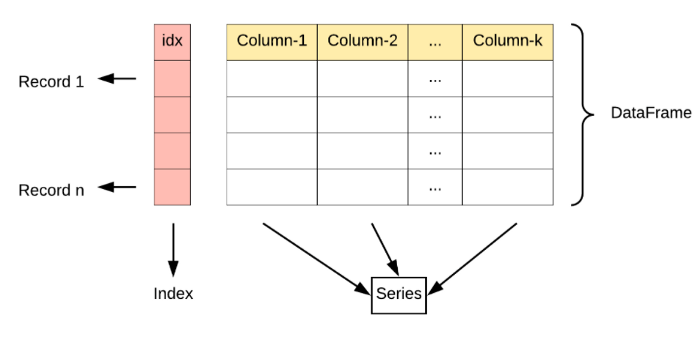
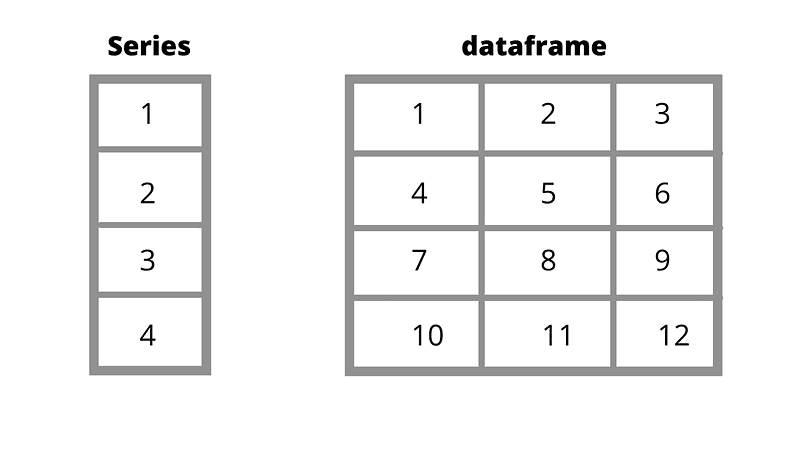
Pandas Series is a one-dimensional labeled array capable of holding data of any type (integer, string, float, python objects, etc.). Series in Pandas returns both values and indexes associated with it.
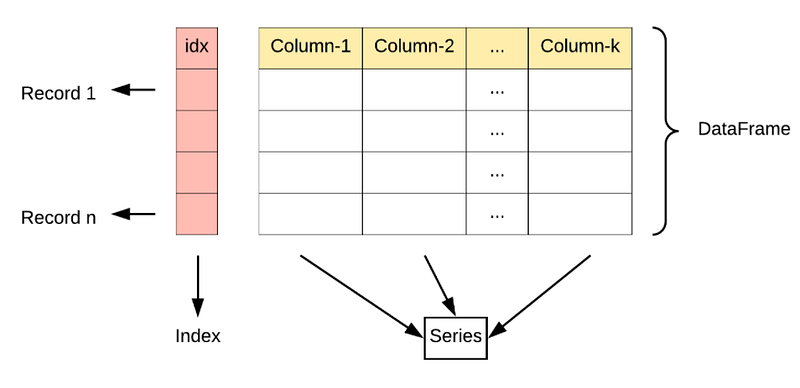
Pandas DataFrame is two-dimensional size-mutable, a heterogeneous tabular data structure with labeled axes (rows and columns). A Data frame is a two-dimensional data structure, i.e. data is aligned in a tabular fashion in rows and columns.
A Pandas Series is a one-dimensional array of indexed data. It can be created from a list or array as follows -
To create Pandas Series —
pd.Series(data, index=index)
Example -
s = pd.Series([1, 1.5, 1.75,])
Pandas DataFrame is an analog of a two-dimensional array with both flexible row indices and flexible column names.
To create Pandas DataFrame —
pd.DataFrame(data, index=index)
Example -
pd.DataFrame(Data, index=index)
A Pandas Index is an immutable array or as an ordered set
Example -
i = pd.Index([2, 3, 5, 7, 11])
Data Processing
It’s a technique/process which involves conversion of data into usable and desired form. Data processing starts with data in its raw form and converts it into a more readable format ( image, graph, table, vector file, audio, charts etc)
Mega Compilation : Complete Tech Interview Series Roundup — Part 1
Three types of Data Processing : Manual data processing, Mechanical data processing and Electronic data processing
Various tools —
Calculation and Analysis tools — Excel and Calculators — tools that help in applying relevant formulas to process the whole data
Statistical Tools — SAS
Database tools — Oracle, MongoDb, Hadoop etc that help in processing large amounts of data
Data Cleaning
Data Cleaning is the process of correcting or removing incorrect, incomplete, or duplicate data within a given dataset. Proper data cleaning can make or break your project. Hence, data science professionals usually spend a very large portion of their time on Data Cleaning.
The golden rule is — Better data beats fancier algorithms
Ask Questions -
Completeness: Does the given data include all required information?
Validity: Does the given data correspond with business rules and/or restrictions?
Uniformity: Is the given data specified using consistent units of measurement?
Consistency: Is the given data consistent across your datasets?
Accuracy: Is the given data close to the true values?
Data Cleaning is an important process and it starts with removing unwanted samples/observations in the given dataset
Missing Data
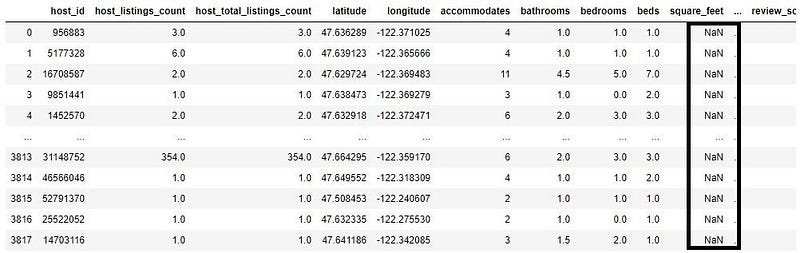
Missing data is the data that is not captured for a variable for the observation in question. If the missing values are not handled properly by the data science professional, then he may end up drawing an inaccurate inference about the data. Missing data reduces the statistical power of the analysis, which can distort the validity of the results.
Hence, it is very important to handle missing data because any statistical results based on a dataset with non-random missing values could be biased and lead to inaccurate results in the end
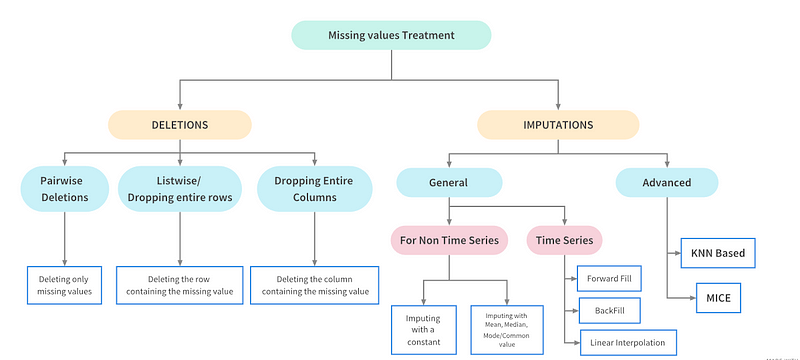
Ways to Handle Missing Values
Drop missing values
Ignore tuples with missing values
Imputation etc
Code Implementation —
import pandas as pd
import numpy as np

# Create sample DataFrame
data = {
    'A': [1, 2, np.nan, 4, 5],
    'B': [6, 7, 8, 9, np.nan],
    'C': [10, np.nan, 12, 13, 14]
}
df = pd.DataFrame(data)

# Drop missing values
df_dropped = df.dropna()  # Drop rows with any missing values
df_dropped_column = df.dropna(axis=1)  # Drop columns with any missing values

# Ignore tuples with missing values
df_ignore = df.dropna(how='any')  # Drop rows with any missing values

# Imputation
df_imputed_mean = df.fillna(df.mean())  # Fill missing values with column mean
df_imputed_median = df.fillna(df.median())  # Fill missing values with column median
df_imputed_custom = df.fillna({'A': 0, 'B': 1, 'C': 2})  # Fill missing values with custom values

print(df_dropped)
print(df_dropped_column)
print(df_ignore)
print(df_imputed_mean)
print(df_imputed_median)
print(df_imputed_custom)
Noisy Data
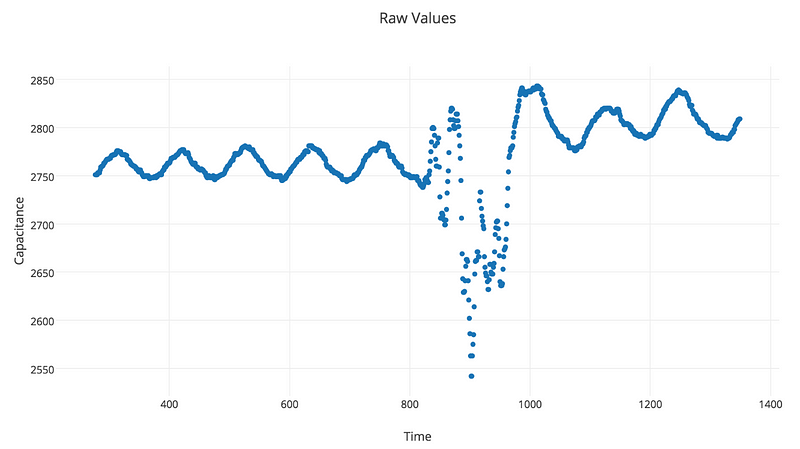
Noise unwanted/meaningless data items, features or records which don’t help in explaining the feature itself, or the relationship between feature & target. The occurrences of noisy data in data set can significantly impact prediction of any meaningful information and causes the algorithms to miss out patterns in the data. Noise in data set dramatically led to decreased classification accuracy and poor prediction results. It can be — certain anomalies in features & target, irrelevant/weak features and noisy records.
Therefore, it becomes important for any data scientist to take care as well as eliminate noise when applying any algorithm over a noisy data.
Techniques to handle Noisy data —
Binning
import pandas as pd
import numpy as np

# Create sample DataFrame
data = {
    'Age': [25, 30, 35, 40, 45, 50, 55, 60, 65, 70],
    'Income': [50000, 60000, 70000, 80000, 90000, 100000, 110000, 120000, 130000, 140000]
}
df = pd.DataFrame(data)

# Binning
df['AgeBin'] = pd.cut(df['Age'], bins=[0, 30, 40, 50, 100], labels=['Young', 'Adult', 'Middle-aged', 'Senior'])

print(df)
Regression
from sklearn.linear_model import LinearRegression

# Create sample data
X = np.array([1, 2, 3, 4, 5]).reshape(-1, 1)
y = np.array([2, 4, 6, 8, 10])

# Regression
regression = LinearRegression()
regression.fit(X, y)

# Predict
X_new = np.array([6, 7, 8]).reshape(-1, 1)
predictions = regression.predict(X_new)

print(predictions)
Clustering
from sklearn.cluster import KMeans
from sklearn.datasets import make_blobs

# Create sample data
X, _ = make_blobs(n_samples=100, centers=3, random_state=0)

# Clustering
kmeans = KMeans(n_clusters=3, random_state=0)
kmeans.fit(X)

# Predict
new_data = np.array([[0, 0], [4, 4]])
predictions = kmeans.predict(new_data)

print(predictions)
Outlier Detection
An outlier is an observation that diverges from an overall pattern on a sample. Outliers are extreme values that deviate from other observations on data , they may indicate a variability in a measurement, experimental errors. The presence of outliers in a classification or regression dataset can result in a poor fit and lower predictive modeling performance and can skew statistical measures and data distributions, providing a misleading representation of the underlying data and relationships. Outlier Detection is the technique of detecting and subsequently excluding outliers from a given set of data.
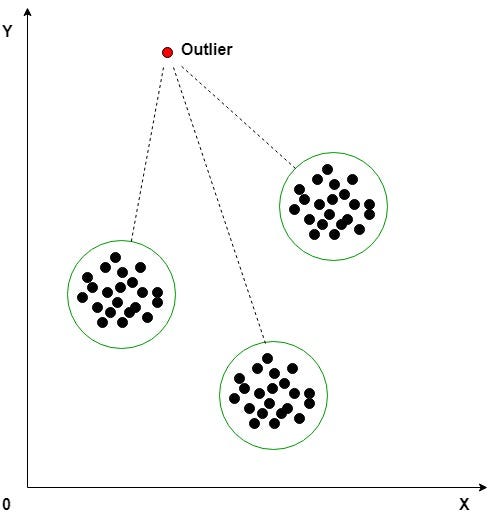
Types of Outliers —
Global Outliers : point value is far outside the entirety of the data set
Contextual Outliers : point value which significantly deviates from the rest of the data points in the same context
Collective Outliers : point value as a collection deviate significantly from the entire data set
Code Implementation —
import numpy as np
import pandas as pd
from sklearn.ensemble import IsolationForest
from sklearn.neighbors import LocalOutlierFactor
from sklearn.cluster import DBSCAN

# Create sample data
data = {
    'Feature1': [1, 2, 3, 4, 1000],
    'Feature2': [5, 6, 7, 8, 2000],
    'Context': ['A', 'A', 'A', 'A', 'B']
}
df = pd.DataFrame(data)

# Global Outliers
global_outliers = []
for feature in df.columns:
    z_scores = (df[feature] - df[feature].mean()) / df[feature].std()
    global_outliers.extend(df[abs(z_scores) > 3].index)

# Contextual Outliers
contextual_outliers = []
for context in df['Context'].unique():
    context_data = df[df['Context'] == context]
    for feature in df.columns[:-1]:
        z_scores = (context_data[feature] - context_data[feature].mean()) / context_data[feature].std()
        contextual_outliers.extend(context_data[abs(z_scores) > 3].index)

# Collective Outliers using DBSCAN
X = df.drop('Context', axis=1)
dbscan = DBSCAN(eps=0.3, min_samples=2)
dbscan.fit(X)
collective_outliers = np.where(dbscan.labels_ == -1)[0]

# Print the outliers
print("Global Outliers:", global_outliers)
print("Contextual Outliers:", contextual_outliers)
print("Collective Outliers:", collective_outliers)One hot encoding
One hot encoding is used for treating categorical variables. One hot encoding creates new (binary) columns, indicating the presence of each possible value from the original data
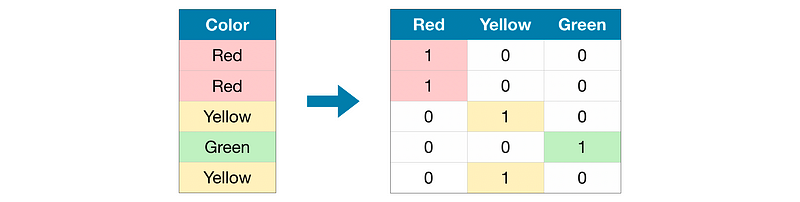
It simply creates additional features based on the number of unique values in the categorical feature
One hot encoder only takes numerical categorical values, hence any value of string type should be label encoded before one-hot encoded
One hot encoding makes our training data more useful and expressive, and it can be rescaled easily
Label Encoding
Label Encoding is used to handle categorical variables. In this technique, each label is assigned a unique integer based on alphabetical ordering.
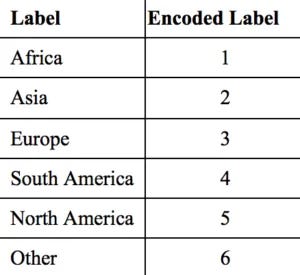
Sklearn provides a method for encoding the categories of categorical features into numeric values
Label encoder encodes labels with credit between 0 and n-1 classes where n is the number of diverse labels
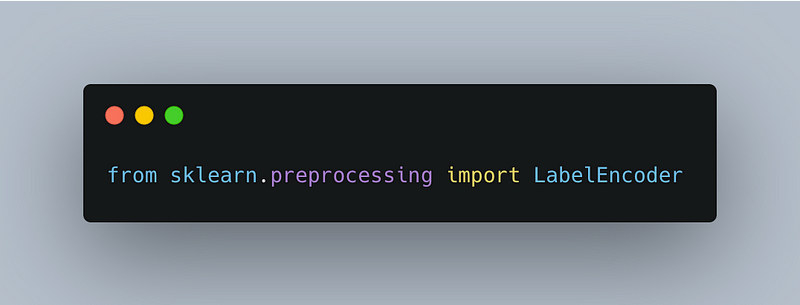
It can be implemented using preprocessing module from sklearn package and them import LabelEncoder class as below:
Pandas Series
Pandas Series is a one-dimensional labeled array capable of holding data of any type.
s = pd.Series([100,290,40,199,76])
s
Output —
0     100
1     290
2     40
3    199
4     76
dtype: int64To check the type —
type(s)Output —
pandas.core.series.SeriesSeries.axes attribute returns a list of row axis labels of the given Series object.
s.axesOutput —
[RangeIndex(start=0, stop=5, step=1)]Checking the DataType of the Series
s.dtypeOutput —
dtype('int64')Series.size — Size attribute returns the number of elements in the underlying data for the given series objects.
s.sizeOutput —
5ndim attribute returns the number of dimensions of the underlying data, by definition it is 1 for series objects.
s.ndimOutput —
1Series.values attribute return Series as ndarray or ndarray-like depending on the dtype.
s.valuesOutput —
array([ 100, 290, 40, 199, 76], dtype=int64)We can also specify our Indexes in Strings/Objects.
s1 = pd.Series([1,2,4,5,6],index = ["First","Zero","Second","Third","Fourth"])Output —
First     1
Zero      2
Second    4
Third     5
Fourth    6
dtype: int64
If we are using the string based indexes and if we run sort_index() throughout the series, then it will arrange the Series elements on the basis of alphabetically.
s1.sort_index()Output —
First     1
Fourth    6
Second    4
Third     5
Zero      2
dtype: int64
Creating Series with Dictionaries
ages = {'Andrew':31,"Kate":45,"Matthew":26,"Helen":19}
new_ages = pd.Series(ages)
new_ages
Output —
Andrew     31
Kate       45
Matthew    26
Helen      19
dtype: int64
If we only want to select a Particular elements from the dictionary then we can use index.
pd.Series(ages,index =["Andrew","Helen"])Output —
Andrew    31
Helen     19
dtype: int64
Creating Pandas Series by Numpy Arrays
import numpy as npWe can also create series using numpy.
n_one = np.array([1,2,3,4])
pd.Series(n_one)
Output —
0    1
1    2
2    3
3    4
dtype: int32
Merging Two Series (Concat)
s1 = pd.Series([2,3,55,2,6,44])
s2 = pd.Series([42,32,34,2,1,4,42])
pd.concat([s1,s2])
Output —
0       2
1       3
2      55
3       2
4       6
5      44
0      42
1      32
2      34
3       2
4       1
5       4
6      42
dtype: int64
we can use selection and use different selectors to select specific elements from the Series.
l = pd.Series([11,12,13,14,15,16])
l[0:3]
Output —
0    11
1    12
2    13
dtype: int64
Pandas DataFrame
Creating a DataFrame
names = {"Names":["Allen","Rob","Harold","Amy"],"Age":[21,11,13,15]}# Creating a DataFrame using a Dictionary.new_dic = pd.DataFrame(names)
new_dic["Age"]Output —
0    21
1    11
2    13
3    15
Name: Age, dtype: int64We can also Assign Column name —
var = [10,30,20,89,48,40]
df = pd.DataFrame(var,columns = ["Variables"])
We can also create DataFrames from Numpy —
arr = np.random.randint(10,size = (5,2))
arr
Output —
array([[5, 0],
       [6, 3],
       [8, 0],
       [2, 2],
       [8, 0]])
We can assign them the columns name —
new_arr= pd.DataFrame(arr,columns = ["Var1","Var2"])DataFrame.axes attribute access a group of rows and columns by label(s) or a boolean array in the given DataFrame.
new_arr.axesOutput —
[RangeIndex(start=0, stop=5, step=1), Index(['Var1', 'Var2'], dtype='object')]To determine shape —
new_arr.shapeOutput —
(5, 2)Checking the Dimension of the DataFrame
new_arr.ndimOutput —
(5, 2)Checking the total number of elements in the DataFrame
new_arr.sizeOutput —
10Getting the Columns Names from the DataFrame
new_arr.columnsOutput —
Index(['Var1', 'Var2'], dtype='object')Index — The index (row labels) of the DataFrame. It basically tells us that how many rows our DataFrame has.
new_arr.indexOutput —
RangeIndex(start=0, stop=5, step=1)Values — DataFrame.values attribute return a Numpy representation of the given DataFrame.
new_arr.valuesOutput —
array([[5, 0],
       [6, 3],
       [8, 0],
       [2, 2],
       [8, 0]])
Accessing the rows of the DataFrame
dfc = pd.DataFrame({"Name":["Josh","Rachel","Tim","Kate","Zach","Andrew"],"Age":[11,13,16,12,14,18],"Salary":[10000,23000,18000,3900000,19000,24000]})Output —
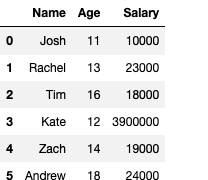
dfc.AgeOutput —
0    11
1    13
2    16
3    12
4    14
5    18
Name: Age, dtype: int64
Now if we want to access the rows specific —
dfc["Age"][3]Output —
12Filtering
employees = pd.DataFrame({"Name":["Josh","Mike","Julia","Sergio"],
                          "Department":["IT","Human Resources","Finance","Supply Chain"],"Income":[4800,5200,6600,5700],
"Age":[24,28,33,41]})
employees
Output —
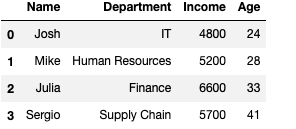
Now, if want to check according to Specific Department —
employees["Department"] == "IT"Output —
0     True
1    False
2    False
3    False
Name: Department, dtype: boolWe can also use the loc[] Operator and it gives us the flexibility to choose from between various Departments
employees.loc[employees["Department"] == "IT","Name"]Output —
0    Josh
Name: Name, dtype: object
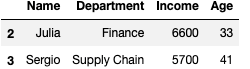
Now if we want to know the salary of the employees based on some arithmetic conditions
employees[employees["Income"] >5500]Output —
employees[(employees["Age"]>30) | (employees["Department"] == "HR")]Output —
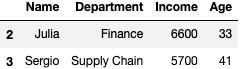
To get opposite of a filter use ~(Tilde) sign —
employees[~(employees["Age"]<35)]Output —

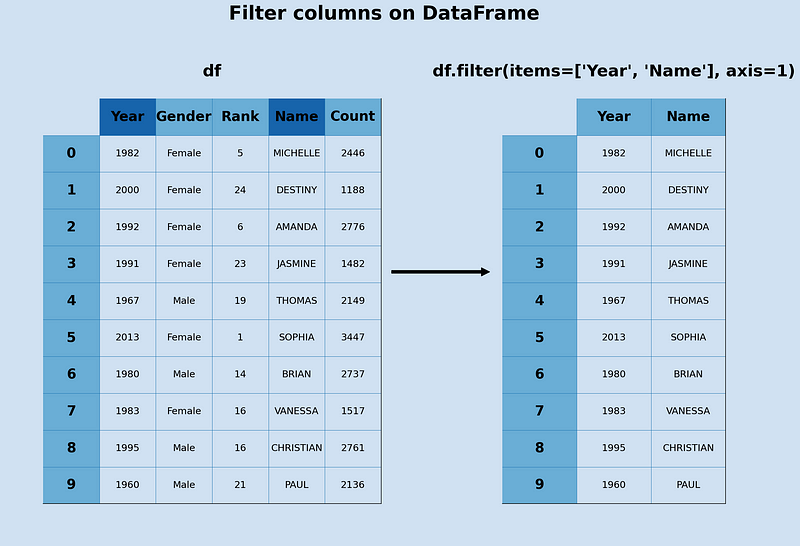
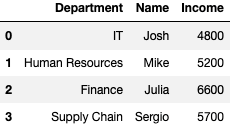
Filtering with Filter () Function —
employees.filter(items=["Department","Name","Income"])Output —
Adding Rows — append()
employees.append({"Name":"Romeo"},ignore_index=True)Output —
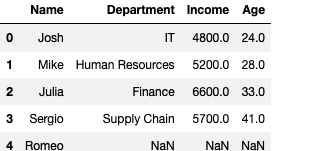
It adds automatically to the end of dataframe. But we need to add all values, otherwise it gives nan.
employees.append({"Name":"Romeo","Age":26,"Department":"IT","Income":5500},ignore_index=True)Output —
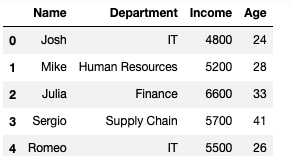
Removing Rows —
employees.drop(employees[employees["Age"]>30].index)Output —
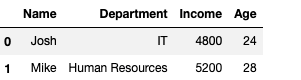
Joins
Used to merge DataFrames.
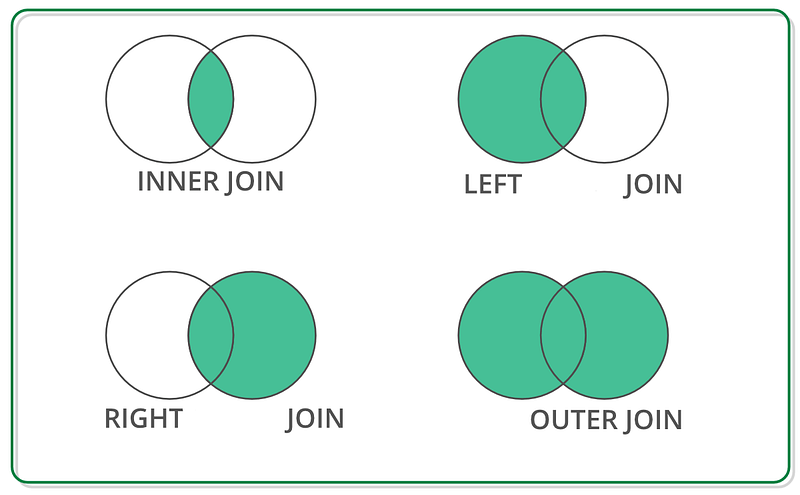
Inner Join :- Returns records that have matching values in both tables.
Left Join :- Returns all the rows from the left table that are specified in the left outer join clause.
Right Join :- Returns all records from the right table, and the matched records from the left table.
Full Join :- Returns all records when there is a match in either left or right table.
Cross Join :- Returns all possible combinations of rows from two tables.
Inner Join —
c1 = pd.DataFrame({"Name":['Amy','Allen','Alice','Anderson','Amanda'],"Age":[21,22,26,29,32],"Roll Number":[12,19,29,10,8]})c2 =pd.DataFrame({"Marks":[90,89,82,98,85],"Roll Number":[1,90,29,48,67]})Use join= “inner”
pd.concat([c1,c2],join= "inner")Full Join — Returns all records when there is a match in either left or right table.
pd.concat([c1,c2],join = "outer",ignore_index=True)Left Join — Returns all the rows from the left table that are specified in the left outer join clause, not just the rows in which the columns match.
pd.merge(c1,c2,how ="left")Right Join :- Returns all records from the right table, and the matched records from the left table.
pd.merge(c1,c2,how ="right")Aggregate Functions
- sum() : To compute the sum of a specific Column.
- min() : To compute minimum value of each Column
- max() : To compute maximum value of each Column
- std() : To compute Standard Deviation of each column
- var() : To Compute variance of each column
- describe() : To compute statistical summary
- count() : To count elements by elements.
- value_count() : To count value in column
- mean() : To Compute Mean of each column
- median() : Compute Median of each column
Implementation —
#Create dataframe eemployeeemployees = pd.DataFrame({"Name":["A","B","C","D","E","F"],"Department":["Finance","Human Resources","Finance","Supply Chain","IT","Marketing"],"Income":[3000,6000,8000,5500,2300,4400],"Age":[20,25,30,40,21,42]})employees.count()employees["Department"].value_counts()employees.mean()employees["Income"].sum()employees["Age"].min()employees["Age"].max()employees["Age"].std()employees.var()employees.describe()Transforming Data Frames
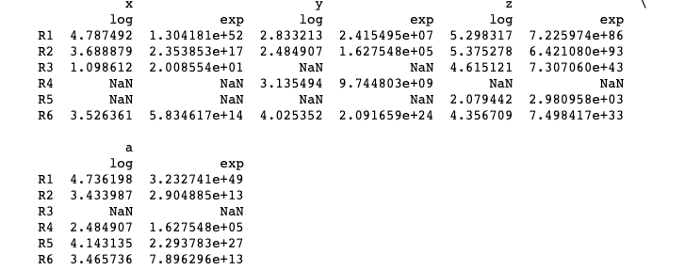
Pandas Transform helps in creating a DataFrame with transformed values and has the same axis length as its own.
Syntax: df.transform(function, axis=0, *args, **kwargs)
where function — Function for transforming the data axis : 0 for rows and 1 for column *args : Positional arguments **kwargs : Keyword arguments
Implementation —
import pandas as pd

df = pd.DataFrame({"x":[120, 40, 3, None, None,34],
                   "y":[17, 12, None, 23, None,56],
                   "z":[200, 216, 101, None, 8,78],
                   "a":[114, 31, None, 12, 63,32]})

index_ = ['R1', 'R2', 'R3', 'R4', 'R5','R6']df.index = index_res = df.transform(func = ['log', 'exp'])

print(res)
Output —
Grouping
- Split Object
- Applying groupby Function
employees = pd.DataFrame({"Name":["A","B","C","D","E","F"], "Department":["Finance","Human Resources","Finance","Supply Chain","IT","Marketing"], "Income":[3000,6000,8000,5500,2300,4400], "Age":[20,25,30,40,21,42]})emp = employees.groupby("Department")
employees.groupby("Department").mean()Hierarchical indexing
Hierarchical indexing is the technique in which we set more than one column name as the index. set_index() function is used for when doing hierarchical indexing.
Implementation —
index = pd.MultiIndex.from_product([[2020, 2021], [3, 4]],
                                   names=['year', 'round'])
columns = pd.MultiIndex.from_product([['Claire', 'Kassi', 'Suer'], ['Engg', 'Maths']],
                                     names=['subject', 'class'])data = np.round(np.random.randn(4, 6), 1)
data[:, ::3] *= 5
data += 19df = pd.DataFrame(data, index=index, columns=columns)
Indexing data frames
Indexing means to selecting all/particular rows and columns of data from a DataFrame. In pandas it can be done using three constructs —
.loc() : location based
It has methods like scalar label, list of labels, slice object etc
.iloc() : Interger based
.ix() : Both integer and location based
Implementation —
import pandas as pd
import numpy as npdf = pd.DataFrame(np.random.randn(4, 3),
index = ['a','b','c','d'], columns = ['X', 'Y', 'Z'])
print (df.loc['c']> 0)
Output —
X    False
Y     True
Z     True
Name: c, dtype: boolImplementation —
import pandas as pd
import numpy as npdf = pd.DataFrame(np.random.randn(8, 4), columns = ['X', 'Y', 'Z', 'A'])# Slicing through list of values
print (df.iloc[[1, 2, 3], [1, 3]])
Output —
Y         A
1  0.566221  1.934828
2 -1.814986 -1.829436
3 -0.264360  0.860286
Some other common techniques include:
- Using SQL commands: SQL (Structured Query Language) is a programming language used to manage and manipulate data in relational databases. Common SQL commands used for data manipulation include SELECT, INSERT, UPDATE, and DELETE. These commands can be used to add, modify, and remove data in a database.
- Using a Data Manipulation Language (DML): DML is a subset of SQL commands that are used to manipulate data in a database, including SELECT, INSERT, UPDATE, and DELETE. These commands are used to add, modify, and remove data in a database.
- Using a programming language: Programming languages such as Python, R, and Java can be used to manipulate data in a variety of data storage systems, including databases, spreadsheets, and text files. These languages can be used to read, write, and manipulate data using a variety of libraries and modules.
- Using a Data Visualization tool: Data visualization tools such as Tableau, Power BI, and Excel can be used to manipulate data through a graphical user interface (GUI) rather than writing code. These tools can be used to create charts, tables, and pivot tables, filter, sort, and group data, and create calculated fields.
- Using an ETL (Extract-Transform-Load) tool: An ETL tool can be used to extract data from multiple sources, transform it, and load it into a target data storage system. This can be useful for data integration and data warehousing, where data from multiple sources needs to be consolidated and cleaned before it can be used for analysis.
- Using cloud-based platforms: Cloud-based platforms such as AWS (Amazon Web Services), Azure, and GCP (Google Cloud Platform) provide a variety of services for data manipulation, such as data warehousing, data lakes, and data pipelines. These platforms can be used to extract, transform, and load data from various sources, and perform data manipulation tasks at scale.
That’s it for now. Day 10 coming soon!
Complete System Design Series Parts —
6. Networking, How Browsers work, Content Network Delivery ( CDN)
Github —
Keep learning and coding :)
For Python Projects —
For complete 60 days of Data Science and ML : Day 1 — Day 60 : Quick Recap of 60 days of Data Science and ML
Follow for more updates. Stay tuned and keep coding!
For other projects, tune to —
Build Machine Learning Pipelines( With Code)
Recurrent Neural Network with Keras
Clustering Geolocation Data in Python using DBSCAN and K-Means
Facial Expression Recognition using Keras
Hyperparameter Tuning with Keras Tuner
Custom Layers in Keras


