
Part 6 — Complete System Design Series
System Design Made Easy…
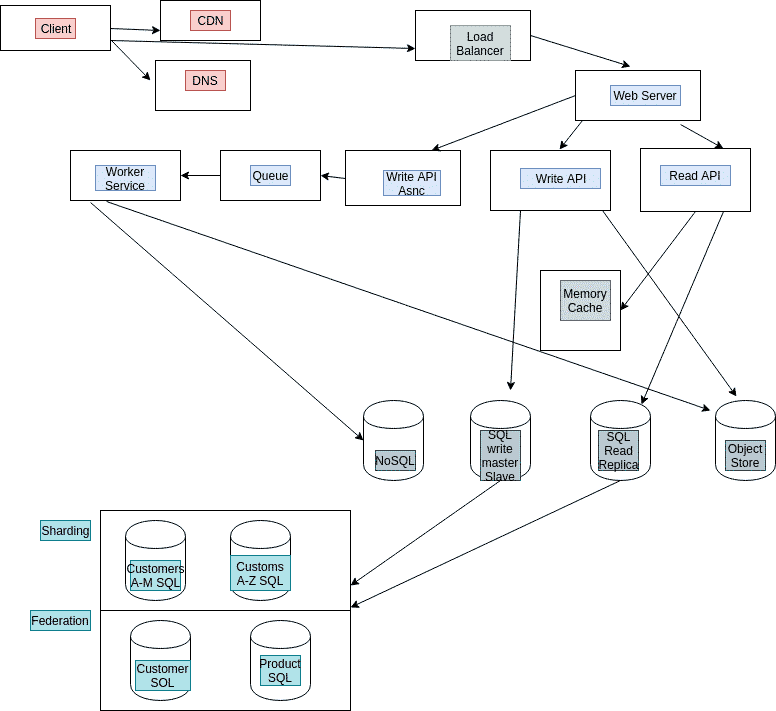
Welcome back peeps. In the last part ( links below) we covered in detail ( with examples)—
Projects Videos —
All the projects, data structures, SQL, algorithms, system design, Data Science and ML , Data Analytics, Data Engineering, , Implemented Data Science and ML projects, Implemented Data Engineering Projects, Implemented Deep Learning Projects, Implemented Machine Learning Ops Projects, Implemented Time Series Analysis and Forecasting Projects, Implemented Applied Machine Learning Projects, Implemented Tensorflow and Keras Projects, Implemented PyTorch Projects, Implemented Scikit Learn Projects, Implemented Big Data Projects, Implemented Cloud Machine Learning Projects, Implemented Neural Networks Projects, Implemented OpenCV Projects,Complete ML Research Papers Summarized, Implemented Data Analytics projects, Implemented Data Visualization Projects, Implemented Data Mining Projects, Implemented Natural Leaning Processing Projects, MLOps and Deep Learning, Applied Machine Learning with Projects Series, PyTorch with Projects Series, Tensorflow and Keras with Projects Series, Scikit Learn Series with Projects, Time Series Analysis and Forecasting with Projects Series, ML System Design Case Studies Series videos will be published on our youtube channel ( just launched).
Subscribe today!
Solved System Design Case Studies — In depth
Design Instagram
Design Messenger App
Design Twitter
Design URL Shortener
Design Dropbox
Design Youtube
Design API Rate Limiter
Design Web Crawler
Design Facebook’s Newsfeed
Design Yelp
Design Uber
Design Tinder
Design Tiktok
Design Whatsapp
Most Popular System Design Questions
Mega Compilation : Solved System Design Case studies
All the Complete System Design Series Parts —
6. Networking, How Browsers work, Content Network Delivery ( CDN)
Moving forward, this is the part 6 of the system design series where we will be covering —
- Networking
- How Browsers work
- Content Network Delivery ( CDN)
Part 1 of this series can be found here —
Part 2 of this series can be found here —
Part 3 of this series can be found here —
Part 4 of this series can be found here —
Part 5 of this series can be found here —
And Most popular System Design Questions —
Let’s dive in!
Note : Please read System Design Important Terms you MUST know before reading this post.
Networking
Pasta Resto case:
So let’s get back to our pasta resto. To run a restaurant, you need a lot of things — raw material, waiters/servers, place, customers, chefs, power supply, kitchen items, and so on! And all these need to work in parallel and consistently, share things for the resto to run smoothly without any failures, communication gaps, give great customer experience, generate good profits etc. Your resto is nothing but a network of things and people who work synchronously-asynchronously.
System Design Analogy:
Applying the same analogy, networking is nothing but interconnected devices that can exchange data-messages and share resources amongst themselves/with outside world based in the system protocols/rules, technologies and algorithms that govern these devices inner workings.
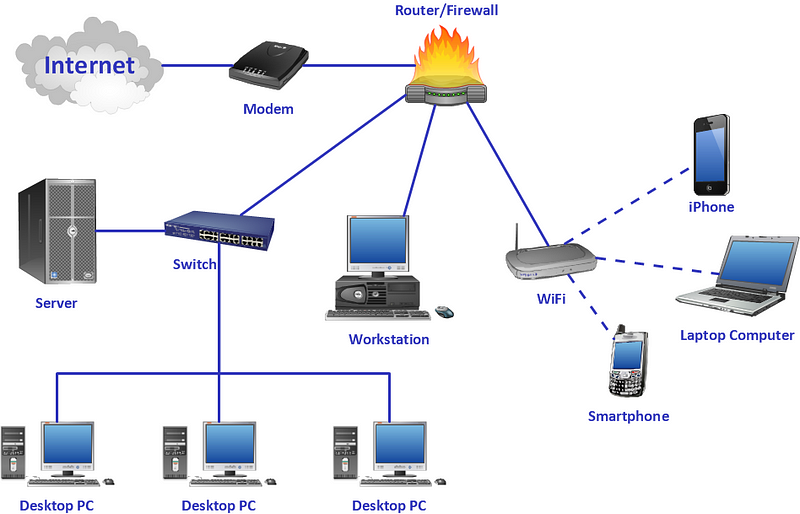
It’s the study of how computers and other devices communicate with each other over a network. Networking enables devices to share resources and exchange information, and is a critical component of modern computing systems.
The field of networking encompasses a wide range of technologies and protocols, including:
- Network topologies, such as star, bus, and ring, which describe the physical and logical layout of a network.
- Network protocols, such as TCP/IP, which define the rules and procedures for communication between devices.
- Routing algorithms, which determine the best path for data to travel from one device to another.
- Network security, which encompasses techniques to protect networks and the data that travels over them from unauthorized access, interference, and damage.
- Wireless networking, which enables devices to communicate without a physical connection.
- Cloud computing, which enables networks to scale up and down dynamically based on demand.
Every device on the network has a unique IP address and hardware address used to identify the device. Routers are responsible for sending information from one network to another and switches connect/manages node-node communication to ensure data packets reach their destination. Ports which are designated some numbers are used to identify specific connection between different network devices.
Here’s a simple example of networking in Python using the sockets library:
import socketdef start_server():
server_socket = socket.socket(socket.AF_INET, socket.SOCK_STREAM)
server_socket.bind(('0.0.0.0', 5000))
server_socket.listen() while True:
client_socket, client_address = server_socket.accept()
print(f"Accepted connection from {client_address}")
client_socket.send(b"Hello, client!")
client_socket.close()def start_client():
client_socket = socket.socket(socket.AF_INET, socket.SOCK_STREAM)
client_socket.connect(('localhost', 5000))
response = client_socket.recv(1024)
print(f"Received: {response.decode()}")
client_socket.close()if __name__ == '__main__':
start_server()
start_client()This code demonstrates a simple client-server communication using sockets. The start_server function starts a server that listens on port 5000 and accepts incoming connections. The start_client function connects to the server and sends a message. The server sends a response back to the client, which is then printed.
The network forms different topologies —
Bus network topology
Ring topology
Star Network Topology
Mesh topology
Hybrid topology
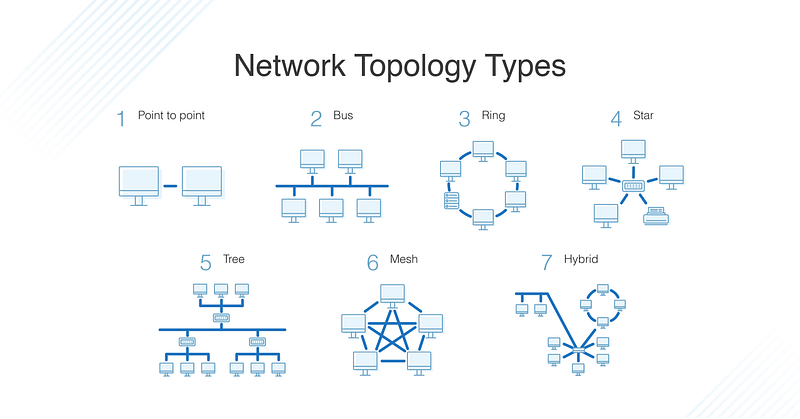
Network topologies refer to the physical and logical layout of a network, and how the devices on the network are connected to one another. Some common types of network topologies include:
- Star topology: In this layout, all devices are connected to a central hub or switch, creating a star-like structure. This is a popular choice for small networks because it is relatively easy to set up and troubleshoot.
- Bus topology: In this layout, all devices are connected to a single cable, called a bus, which acts as a backbone for the network. This topology is simple to set up but can be prone to failure if the bus cable is damaged.
- Ring topology: In this layout, all devices are connected to one another in a closed loop. Data is passed along the loop in one direction, and each device acts as a repeater to boost the signal before passing it on to the next device.
- Mesh topology: In this layout, each device is connected to every other device. This provides multiple paths for data to travel, making it highly resilient to failure. However, it can be more complex to set up and manage.
- Tree topology: In this layout, the network is organized in a tree structure, with the root node connected to one or more other nodes, which in turn connect to other nodes. This is a hierarchical structure of star topologies connected to each other.
- Hybrid topology: A combination of two or more basic topologies.
Bus Network Topology:
In a bus network topology, all devices are connected to a single cable called the bus. Each device is connected to the bus through a connector called a tap. Data is transmitted in both directions on the bus, and all devices on the network can receive the data. Here’s an implementation of how to implement a simple bus network using Python and the socket library:
import socket# Define the IP address and port number for the server
HOST = '127.0.0.1'
PORT = 8000# Create a socket object for the server
server_socket = socket.socket(socket.AF_INET, socket.SOCK_STREAM)# Bind the socket to the IP address and port number
server_socket.bind((HOST, PORT))# Listen for incoming connections
server_socket.listen()# Accept incoming connections
while True:
client_socket, address = server_socket.accept()
print(f'Connected by {address}') # Receive data from the client
data = client_socket.recv(1024) # Send data to all devices on the bus
for i in range(255):
bus_socket = socket.socket(socket.AF_INET, socket.SOCK_STREAM)
bus_socket.settimeout(0.1)
try:
bus_socket.connect((f'192.168.0.{i}', PORT))
bus_socket.send(data)
print(f'Sent data to device at 192.168.0.{i}')
except:
pass # Close the client socket
client_socket.close()In this implementation, we use Python’s socket library to create a server that listens for incoming connections. When a client connects, the server receives data from the client and sends it to all devices on the bus by iterating over all possible IP addresses in the range of 192.168.0.1 to 192.168.0.255.
Ring Topology:
In a ring network topology, all devices are connected in a closed loop, with each device connected to the two adjacent devices in the loop. Data is transmitted in one direction around the loop. Here’s an implementation of how to implement a simple ring network using Python and the socket library:
import socket# Define the IP addresses and port numbers for the devices in the ring
devices = [
('192.168.0.1', 8000),
('192.168.0.2', 8000),
('192.168.0.3', 8000),
('192.168.0.4', 8000),
('192.168.0.5', 8000)
]# Create a socket object for each device in the ring
sockets = [socket.socket(socket.AF_INET, socket.SOCK_STREAM) for _ in range(len(devices))]# Connect each socket to the two adjacent sockets in the ring
for i in range(len(sockets)):
sockets[i].connect(devices[(i-1)%len(devices)])
sockets[i].connect(devices[(i+1)%len(devices)])# Send data around the ring
data = b'Hello, world!'
sockets[0].send(data)
while True:
for i in range(len(sockets)):
data = sockets[i].recv(1024)
sockets[(i+1)%len(sockets)].send(data)In this implementation, we create a ring network consisting of five devices, each represented by a socket object. We connect each socket to the two adjacent sockets in the ring using the modulo operator to ensure that the first and last devices are connected to each other. We then send data around the ring by sending it from the first device and passing it along to the next device in the ring.
Star Network Topology:
In a star network topology, all devices are connected to a central hub or switch. Data is transmitted from the sending device to the hub, which then forwards the data to the receiving device. Here’s an example of how to implement a simple star network using Python and the socket library:
import socket# Define the IP addresses and port numbers for the devices in the star
devices = [
('192.168.0.1', 8000),
('192.168.0.2', 8000),
('192.168.0.3', 8000),
('192.168.0.4', 8000),
('192.168.0.5', 8000)
]# Create a socket object for each device in the star
sockets = [socket.socket(socket.AF_INET, socket.SOCK_STREAM) for _ in range(len(devices))]# Connect each socket to the central hub
for socket in sockets:
socket.connect(('192.168.0.100', 8000))# Send data from one device to another
data = b'Hello, world!'
sockets[0].send(data)
data = sockets[1].recv(1024)
print(data)In this implementation, we create a star network consisting of five devices and a central hub represented by a socket object. We connect each device to the hub using the hub’s IP address and port number. We then send data from the first device to the second device by sending it to the hub, which forwards it to the second device.
Mesh Topology:
In a mesh network topology, each device is connected to every other device in the network. Data can be transmitted directly from the sending device to the receiving device without passing through any intermediate devices. Here’s an implementation of how to implement a simple mesh network using Python and the socket library:
import socket# Define the IP addresses and port numbers for the devices in the mesh
devices = [
('192.168.0.1', 8000),
('192.168.0.2', 8000),
('192.168.0.3', 8000),
('192.168.0.4', 8000),
('192.168.0.5', 8000)
]# Create a socket object for each device in the mesh
sockets = [socket.socket(socket.AF_INET, socket.SOCK_STREAM) for _ in range(len(devices))]# Connect each socket to every other socket in the mesh
for i in range(len(sockets)):
for j in range(len(sockets)):
if i != j:
sockets[i].connect(devices[j])# Send data from one device to another
data = b'Hello, world!'
sockets[0].sendto(data, devices[1])
data, address = sockets[1].recvfrom(1024)
print(data)In this implementation, we create a mesh network consisting of five devices represented by socket objects. We connect each device to every other device in the mesh using nested for loops to iterate over all possible pairs of devices. We then send data from the first device to the second device by specifying the destination address in the sendto() method, and receive the data on the second device using the recvfrom() method.
Hybrid Topology:
A hybrid topology is a combination of two or more of the above topologies. For example, a network might consist of a star topology with each star point connected to a bus network. Here’s an implementation of how to implement a simple hybrid network using Python and the socket library:
import socket

# Define the IP addresses and port numbers for the devices in the hybrid network
bus_devices = [
    ('192.168.0.1', 8000),
    ('192.168.0.2', 8000),
    ('192.168.0.3', 8000)
]

star_devices = [
    ('192.168.1.1', 8000),
    ('192.168.1.2', 8000),
    ('192.168.1.3', 8000),
    ('192.168.1.4', 8000),
    ('192.168.1.5', 8000)
]

# Create a socket object for each device in the hybrid network
bus_sockets = [socket.socket(socket.AF_INET, socket.SOCK_STREAM) for _ in range(len(bus_devices))]
star_sockets = [socket.socket(socket.AF_INET, socket.SOCK_STREAM) for _ in range(len(star_devices))]

# Connect each socket in the bus network to the other sockets in the bus network
for i in range(len(bus_sockets)):
    for j in range(len(bus_sockets)):
        if i != j:
            bus_sockets[i].connect(bus_devices[j])

# Connect each socket in the star network to the central hub
for socket in star_sockets:
    socket.connect(('192.168.1.100', 8000))

# Send data from one device to another
data = b'Hello, world!'
bus_sockets[0].send(data)
data = star_sockets[1].recv(1024)
print(data)
The choice of topology depends on the specific requirements of the network, such as the number of devices, the type of data being transferred, and the level of fault tolerance required.
The routing between the routers is governed by routing protocols ( as covered below in detail) —
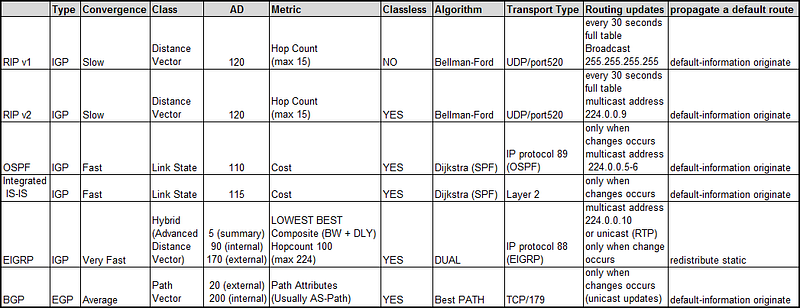
As far as the system design is concerned, you should know —
1.How a network works
2. How routing protocols work.
Routing protocols are the set of rules and procedures used by routers to determine the best path for data to travel from one device to another on a network. Routing protocols use a variety of algorithms to determine the best path, including distance-vector algorithms, link-state algorithms, and hybrid algorithms.
- Distance-vector protocols, such as Routing Information Protocol (RIP), use a routing table that lists the distance (in terms of number of hops) to each destination network. Each router sends its routing table to its neighbors, and they in turn update their own tables with the information received. This process continues until all routers on the network have a complete and accurate routing table.
- Link-state protocols, such as Open Shortest Path First (OSPF), use a different approach. Each router sends information about the state of its directly connected links to all other routers in the network. Each router then uses this information to build a map of the entire network, and calculates the best path to each destination using a shortest path algorithm such as Dijkstra’s algorithm.
- Hybrid protocols combine elements of both distance-vector and link-state protocols, and are designed to overcome the limitations of both. For example, EIGRP (Enhanced Interior Gateway Routing Protocol) uses a distance-vector algorithm, but also exchanges more detailed information about the state of the network than traditional distance-vector protocols, allowing for more efficient and accurate routing decisions.
The distance vector protocol is a routing algorithm that determines the best path for routing packets based on the distance to the destination.
Implementation in Python using the networkx and bellmanford modules:
import networkx as nx
import bellmanford as bf
# Create a graph with weighted edges
G = nx.Graph()
G.add_edge(1, 2, weight=5)
G.add_edge(1, 3, weight=2)
G.add_edge(2, 4, weight=4)
G.add_edge(3, 4, weight=1)# Calculate the shortest path using Bellman-Ford algorithm
for node in G.nodes:
distance, path = bf.bellman_ford(G, node)
print(f"Node {node}: {distance}")In the above code, we have created a graph with weighted edges using the networkx module. We have used the bellman_ford method from the bellmanford module to calculate the shortest path for each node in the graph. The distance variable contains the shortest distance from the source node to each node in the graph, and the path variable contains the path to the destination node.
Link state protocol:
The link state protocol is a routing algorithm that determines the best path for routing packets based on the state of the links in the network.
Implementation in Python using the networkx and dijkstra modules:
import networkx as nx
import dijkstra as dj
# Create a graph with weighted edges
G = nx.Graph()
G.add_edge(1, 2, weight=5)
G.add_edge(1, 3, weight=2)
G.add_edge(2, 4, weight=4)
G.add_edge(3, 4, weight=1)# Calculate the shortest path using Dijkstra algorithm
for node in G.nodes:
distance, path = dj.dijkstra(G, node)
print(f"Node {node}: {distance}")In the above code, we have created a graph with weighted edges using the networkx module. We have used the dijkstra method from the dijkstra module to calculate the shortest path for each node in the graph. The distance variable contains the shortest distance from the source node to each node in the graph, and the path variable contains the path to the destination node.
Overall, routing protocols play a crucial role in the functioning of networks, and are designed to optimize network performance, reliability, and scalability.
How browsers work?
Pasta Resto case:
So customers are flocking in at your pasta restaurant and to manage the rush, you developed a simple application on your iphone. As soon as customers arrive, they need to click this application, enter their details like name, address, phone no etc and lastly their dish of choice. Once its done, you allocate the table based on the data they have entered ( like dish preference, group size)
System Design Analogy:
Applying the same analogy, browsers are used to present the website/resource you would like to visit say, for example google.com by sending the request to the server and displaying it on their browser window. Two concepts that are important —
HTTP request — Request sent by the user over HTTP
HTTP response — Answer returned by the server ( if located) to the user over HTTP
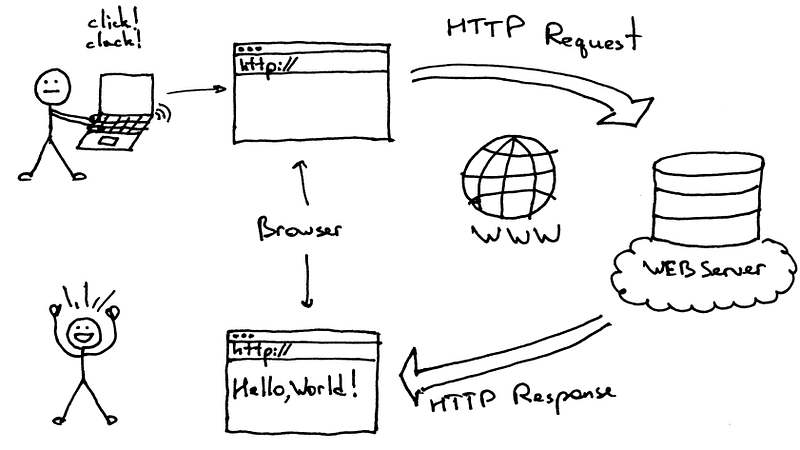
But is it that easy?
Between Request and response, there are a lot of things that happen. Some concepts you should —
load balancing : Covered in this part
HTTP and TCP
DNS, caching : Covered in this part
Proxies, CDN etc : Covered in this part
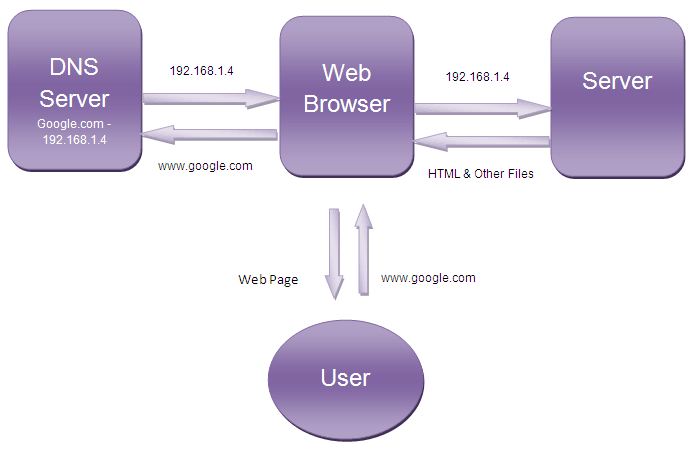
Lets try to understand what happens when you —
Type www.google.com in your browser
Then the browser finds the IP address for the domain using Domain Name Service ( DNS) → Once the IP address is found, it initiates and establishes a connection ( 3 ways handshake) → Then it sends HTTP request to the server → server receives the request and figures out the HTTP response and sends it to the client→ Lastly, the browser receives the response and renders it and displays the content as a web page → Responses are stored in the cache.
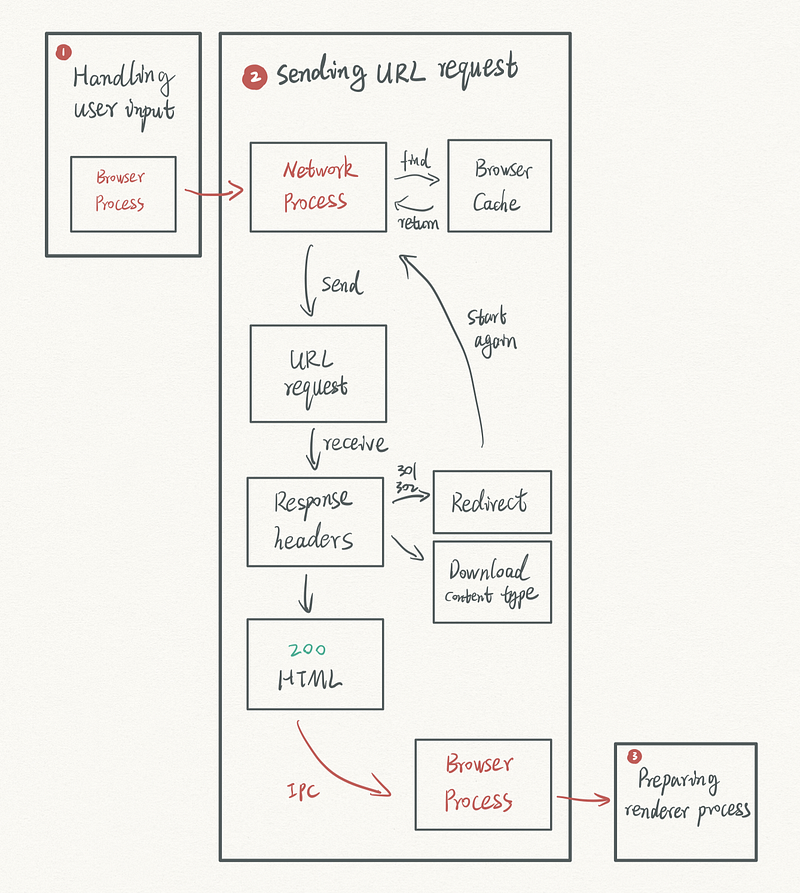
Browsers are software applications that are used to access and view web pages on the internet. They work by sending a request to a web server for a specific web page, and then displaying the contents of that page on the user’s computer.
When you enter a URL (Uniform Resource Locator) into the address bar of a browser, the browser first checks the local cache (a temporary storage area) to see if a copy of the requested page is already stored there. If it is, the browser will display the cached version of the page. If the page is not in the cache, the browser sends a request to the web server where the page is hosted.
The request is sent using the HTTP (Hypertext Transfer Protocol) or HTTPS (HTTP Secure), which is a communication protocol used for transmitting data over the internet. The request includes information such as the URL, the type of browser being used, and any cookies (small text files) that may be stored on the user’s computer.
The web server receives the request and processes it by looking up the requested page in its file system. If the page is found, the server sends it back to the browser in the form of an HTTP response, which includes the contents of the page (usually in HTML — Hypertext Markup Language) and any associated resources (such as images, stylesheets, or scripts).
The browser then renders the HTML, CSS and JavaScript code to display the final webpage. The browser also handles any links or form submissions on the page, and sends further requests to the server as necessary.
Here’s a simple example of how you could implement a web browser in Python using the urllib library:
import urllib.requestdef fetch_url(url):
response = urllib.request.urlopen(url)
return response.read().decode()if __name__ == '__main__':
content = fetch_url('https://www.google.com')
print(content)This code implements a simple web browser that fetches the contents of a URL using the urllib.request.urlopen function. The fetch_url function takes a URL as an argument and returns the contents of that URL as a string. In this example, the browser fetches the contents of the Google homepage and prints the result.
Overall, the browser acts as an intermediary between the user and the web, handling the technical details of requesting and displaying web pages, and providing features such as caching, bookmarks, and history to make the web browsing experience more convenient for the user.
CDN
Pasta Resto case:
So, now since your pasta restaurant is famous but you are unable to cater to the customers coming in rush from different locations and need more time to cater to their orders with great turn around time. As a solution, you as an owner opens one more branch of your resto. The second one also becomes famous and now customers write to you ( as a feedback) to open your resto at other rush locations since they have to drive and wait for a long time wrt prior two places.
As an owner you think it’s a great idea. So, you open more branches of your pasta resto to cater to the customer to their nearest possible location and get great reviews/feedbacks → happy customer → more profits!
System Design Analogy:
Taking the same analogy forward, in system design, Content Network Delivery caters to the users by serving their requests by quickly transferring the data back and forth.
CDN is nothing but geographically distributed group of servers that work together to provide fast delivery of data requested. You can see Netflix, Amazon etc using CDN’s extensively to provide turn around time.
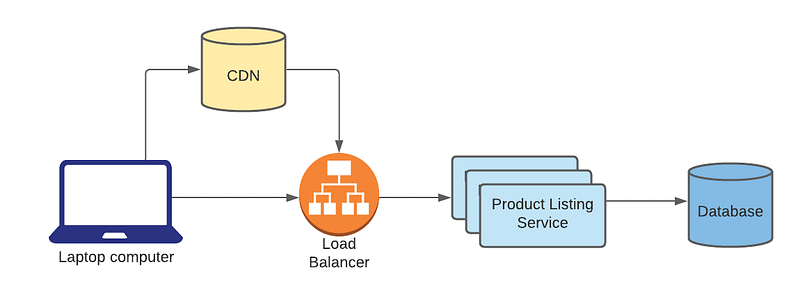
CDN stores the HTML pages images, videos, files, websites replica and as soon as they are requested by the user, it just forwards it.
The main goal of a CDN is to reduce latency, increase availability, and improve the overall user experience by delivering content from a server that is geographically close to the user.
Here’s how CDN works in system design:
- A user requests a web page from a website.
- The request is directed to the nearest CDN server, instead of the origin server.
- The CDN server checks its cache for a copy of the requested content. If it finds a copy, it serves the cached content to the user.
- If the CDN server doesn’t have a cached copy, it will request the content from the origin server.
- The origin server responds with the requested content, which is then cached by the CDN server.
- The CDN server serves the content to the user and also stores a copy of the content in its cache.
- Subsequent requests for the same content can be served from the CDN cache, reducing the load on the origin server and improving the user’s experience by serving the content from a geographically closer server.
A Content Delivery Network (CDN) is a distributed network of servers that are strategically placed in various locations around the world. The purpose of a CDN is to deliver web content to users as quickly and efficiently as possible, by serving the content from a server that is geographically closest to the user.
When a user requests a web page or other content from a website, the request is typically sent to the origin server where the website is hosted. However, if the website is using a CDN, the request is redirected to a nearby CDN server (called an “edge server”) that has a cached copy of the requested content. By delivering the content from a nearby server, the CDN reduces the time it takes for the content to reach the user, and also reduces the load on the origin server.
However, here’s a simple example of how you could implement caching using Python:
import requestsCACHE = {}def fetch_url(url):
if url in CACHE:
return CACHE[url] response = requests.get(url)
CACHE[url] = response.content
return response.contentif __name__ == '__main__':
content = fetch_url('https://www.google.com')
print(content)This code implements a simple cache using a dictionary CACHE to store the contents of fetched URLs. When the fetch_url function is called, it checks if the requested URL is in the cache. If it is, it returns the cached content. If it's not, it fetches the content using the requests library, stores it in the cache, and returns the content.
CDNs are particularly useful for websites that have a global audience, as they can help ensure that the content is delivered quickly and reliably to users all over the world. They are also useful for websites that have a high volume of traffic, as they can help distribute the load and prevent the origin server from becoming overwhelmed.
CDNs are also used to deliver different types of files and media like images, videos, javascript, and css files, as they can reduce the load time of the website by caching and delivering them from the edge servers.
Overall, CDNs are an important part of the infrastructure of many modern websites, and play a key role in ensuring that web content is delivered quickly and reliably to users all over the world.
Why use Content Delivery Networks?
Increase and boost content availability
Improve turn around times to user requests
Improve loading time ( page load time)
Improves customer experience
Reduces the bandwidth cost by using caching and optimizes the process
When a user requests a web page or other content from a website that is using a CDN, the request is typically sent to the nearest edge server. The edge server then checks its local cache to see if it has a copy of the requested content. If it does, it serves the content to the user from the cache, reducing the time it takes for the content to reach the user.
If the edge server does not have a cached copy of the requested content, it will forward the request to the origin server. The origin server then sends a copy of the content to the edge server, which caches it for future use. The edge server then serves the content to the user, and also stores a copy of the content in its cache for future requests.
By distributing copies of the website’s content across a network of edge servers, the CDN is able to reduce the time it takes for the content to reach the user, and also reduces the load on the origin server.
CDNs also uses different techniques to optimize the content delivery such as:
- Compression: to reduce the size of files to be delivered faster
- Minification: to reduce the size of the files to be delivered faster
- Browser caching: to enable the browser to cache files and reduce the number of requests to the server
CDNs also use load balancers to distribute the traffic among the servers and ensure availability and reliability of the service.
Here’s an example of how you could implement content compression in a Content Delivery Network (CDN) using Python:
import gzip
import io
import requests
def compress_content(content):
compressed_content = io.BytesIO()
with gzip.GzipFile(fileobj=compressed_content, mode='w') as gzip_file:
gzip_file.write(content)
compressed_content.seek(0)
return compressed_content.read()def fetch_url_with_compression(url):
response = requests.get(url)
compressed_content = compress_content(response.content)
return compressed_contentif __name__ == '__main__':
content = fetch_url_with_compression('https://www.google.com')
print(content)This code uses the gzip library to compress the contents of a URL fetched using the requests library. The compress_content function takes the contents of a URL as input, compresses it using gzip, and returns the compressed content as a byte array.
The fetch_url_with_compression function fetches the content of a URL, compresses it using compress_content, and returns the compressed content.
Here’s an example of how you could implement minification in a Content Delivery Network (CDN) using Python:
def minify_content(content):
    lines = content.splitlines()
    minified = ''
    for line in lines:
        line = line.strip()
        if line:
            minified += line + ' '
    return minified
if __name__ == '__main__':
content = '''
New York is also a major hub for the arts and entertainment, with numerous world-renowned museums, theaters, and galleries. Beyond the city, the state is dotted with picturesque small towns and rolling hills, offering a perfect contrast to the hustle and bustle of the city. From the Adirondack Mountains to the Finger Lakes region and Niagara Falls, New York has a lot to offer for both residents and tourists alike.
'''
minified = minify_content(content)
print(minified)This code implements a simple function minify_content which takes in a string of content and returns a minified version of it. The function splits the content into lines, removes leading and trailing whitespace from each line, and concatenates the lines into a single string, separated by spaces.
Here’s an example of how you could implement browser caching in a Content Delivery Network (CDN) using Python:
import requestsCACHE = {}def fetch_url(url, cache_valid=False):
if cache_valid and url in CACHE:
return CACHE[url] response = requests.get(url)
CACHE[url] = response.content
return response.contentif __name__ == '__main__':
content = fetch_url('https://www.google.com')
print(content)
content = fetch_url('https://www.google.com', cache_valid=True)
print(content)This code implements a simple cache using a dictionary CACHE to store the contents of fetched URLs. The fetch_url function takes a URL and a cache_valid flag as input. If cache_valid is set to True and the requested URL is in the cache, the cached content is returned. If the URL is not in the cache or cache_valid is False, the content is fetched using the requests library, stored in the cache, and returned.
Overall, CDNs work by distributing copies of a website’s content across a network of edge servers that are strategically placed in various locations around the world, in order to deliver web content to users as quickly and efficiently as possible.
More on Networking, Browsers and CDN —
Networking refers to the practice of connecting computers and other devices to share resources and communicate with each other. It involves the transmission and exchange of data through network protocols. The OSI (Open Systems Interconnection) and TCP/IP (Transmission Control Protocol/Internet Protocol) models are commonly used to understand the layers and protocols involved in network communication. Key concepts include IP addressing, routing, and subnetting.
# Code example - IP addressing
import ipaddress
ip = ipaddress.ip_address('192.168.0.1')
print(ip)network = ipaddress.ip_network('192.168.0.0/24')
print(network)Network Protocols:
Network protocols are rules and procedures that govern the communication between devices in a network. Common network protocols include TCP (Transmission Control Protocol), UDP (User Datagram Protocol), HTTP (Hypertext Transfer Protocol), and DNS (Domain Name System). These protocols work together in a protocol stack, with each layer encapsulating data in packets for transmission.
# Code example - TCP socket communication
import socket
# Server side
server_socket = socket.socket(socket.AF_INET, socket.SOCK_STREAM)
server_socket.bind(('localhost', 8080))
server_socket.listen(1)
print('Server listening...')client_socket, address = server_socket.accept()
print('Connected by', address)data = client_socket.recv(1024)
print('Received:', data)client_socket.sendall(b'Hello from the server!')
client_socket.close()# Client side
client_socket = socket.socket(socket.AF_INET, socket.SOCK_STREAM)
client_socket.connect(('localhost', 8080))client_socket.sendall(b'Hello from the client!')
data = client_socket.recv(1024)
print('Received:', data)client_socket.close()Network Topologies and Architectures:
Network topologies define the physical or logical arrangement of devices in a network. Examples include star, mesh, and bus topologies. Local Area Networks (LANs) cover a small geographical area, while Wide Area Networks (WANs) and Metropolitan Area Networks (MANs) span larger areas. Network architectures, such as client-server and peer-to-peer, determine how devices interact and share resources.
# Code example - Creating a simple LAN using Python sockets
import socket
server_socket = socket.socket(socket.AF_INET, socket.SOCK_STREAM)
server_socket.bind(('localhost', 8080))
server_socket.listen(1)
print('Server listening...')client_socket, address = server_socket.accept()
print('Connected by', address)data = client_socket.recv(1024)
print('Received:', data)client_socket.sendall(b'Hello from the server!')
client_socket.close()# Client side
client_socket = socket.socket(socket.AF_INET, socket.SOCK_STREAM)
client_socket.connect(('localhost', 8080))client_socket.sendall(b'Hello from the client!')
data = client_socket.recv(1024)
print('Received:', data)client_socket.close()Network Performance Optimization:
Network performance optimization involves maximizing the efficiency and speed of data transmission in a network. Considerations include bandwidth (the amount of data that can be transmitted in a given time), latency (the time delay in data transmission), and throughput (the rate at which data is successfully delivered). Quality of Service (QoS) techniques and traffic shaping can be used to prioritize and manage network traffic. Network monitoring and performance measurement tools help analyze and optimize network performance.
# Code example - Network performance measurement using ping
import subprocess
hostname = 'www.example.com'
ping_command = ['ping', '-c', '5', hostname]result = subprocess.run(ping_command, capture_output=True, text=True)
output = result.stdoutprint(output)How Browsers Work:
Web browsers are software applications that allow users to access and view websites. They consist of various components, such as the user interface (UI) and user experience (UX), rendering engine, networking and data fetching module, HTML parsing and DOM construction, CSS parsing and styling, and JavaScript execution and rendering.
Browser Rendering Engine:
The rendering engine is responsible for rendering and displaying web content. It handles tasks like layout, rendering, and executing scripts. Different rendering engines exist, such as Blink (used by Chrome), Gecko (used by Firefox), and WebKit (used by Safari).
Browser Architecture and Components:
Web browsers have a user interface (UI) that provides a way for users to interact with the browser. The networking and data fetching module handles the communication with web servers to fetch resources. HTML parsing and DOM construction convert HTML markup into a Document Object Model (DOM) that represents the structure of the web page. CSS parsing and styling apply styles to the DOM elements. JavaScript execution and rendering handle the execution of JavaScript code and updating the DOM accordingly.
Browser Caching and Performance:
Caching strategies for web resources improve browser performance by storing copies of resources locally. Techniques such as HTTP caching headers and ETags control caching behavior. Optimizations like resource bundling, minification (removing unnecessary characters from code), and compression reduce resource size and improve loading speed.
Browser Security:
Browsers implement security models to protect users from malicious activities. The same-origin policy restricts scripts from accessing data across different domains. Sandboxing isolates web content from the rest of the system. Security features like cookies, cross-site scripting prevention, and Content Security Policy (CSP) enhance browser security.
Content Delivery Networks (CDNs):
CDNs (Content Delivery Networks) are distributed networks of servers that deliver web content to users based on their geographic location. They improve website performance by reducing latency and offloading server load. CDNs store cached copies of content in multiple locations for efficient delivery.
Content Distribution and Replication:
CDNs use content replication strategies to distribute and replicate web content across their network of servers. Caching and edge servers play a crucial role in storing and delivering cached content. Dynamic content delivery and edge computing enable CDNs to handle dynamic web applications and execute code at the network edge.
CDN Performance and Load Balancing:
Load balancing techniques distribute incoming requests across multiple servers in a CDN to optimize performance and handle increased traffic. Anycast routing and DNS-based load balancing help direct user requests to the nearest CDN server. CDN performance optimization techniques include caching strategies, compression, and content preloading.
CDN Security and DDoS Mitigation:
CDNs provide security features to protect against Distributed Denial of Service (DDoS) attacks, which aim to overwhelm a website or network with traffic. CDNs implement measures such as rate limiting, traffic filtering, and caching to mitigate DDoS attacks. Secure content delivery is achieved through SSL/TLS encryption and support for HTTPS.
# Code example - Configuring SSL/TLS encryption in a CDN
from flask import Flask
from OpenSSL import SSL
app = Flask(__name__)# Generate a self-signed SSL certificate
context = SSL.Context(SSL.PROTOCOL_TLSv1_2)
context.load_cert_chain(certfile='server.crt', keyfile='server.key')@app.route('/')
def hello():
return 'Hello, World!'if __name__ == '__main__':
app.run(ssl_context=context)Web Application Firewall (WAF) capabilities in CDNs:
CDNs often include Web Application Firewall (WAF) capabilities to protect websites and applications from common web-based attacks, such as SQL injection, cross-site scripting (XSS), and cross-site request forgery (CSRF). WAFs analyze incoming traffic, detect suspicious patterns, and block malicious requests.
CDN Analytics and Reporting:
CDNs provide analytics and reporting tools to monitor CDN performance, track user behavior, and analyze traffic patterns. Real-time and historical data analysis helps optimize content delivery, identify performance bottlenecks, and make informed decisions. CDN log analysis and reporting offer insights into CDN usage, cache efficiency, and potential security threats.
# Code example - Analyzing CDN logs using Python and pandas
import pandas as pd
# Load CDN logs into a pandas DataFrame
logs = pd.read_csv('cdn_logs.csv')# Perform data analysis and generate reports
total_requests = logs.shape[0]
unique_visitors = logs['visitor_ip'].nunique()
response_codes = logs['response_code'].value_counts()print('Total Requests:', total_requests)
print('Unique Visitors:', unique_visitors)
print('Response Codes:')
print(response_codes)That’s it for now!
Part 7 of Complete System Design Series
Keep learning and coding :)
Day 2 : SQL Basics, Query Structure, Built In functions Conditions
Day 4 : Set Theory Operations, Stored Procedures and CASE statements in SQL
Day 6 : Subqueries, Group by, order by and Having clauses in SQL and Analytical Functions
Day 7 : Window Functions, Grouping Sets and Constraints in SQL
Day 8 : BigQuery Basics, SELECT, FROM, WHERE and Date and Extract in BigQuery
Day 9 : Common Expression Table, UNNEST Clause, SQL vs NoSQL Databases
Day 10 : Triggers, Pivot and Cursors in SQL
Day 14 : MySQL in Depth
Day 15 : PostgreSQL inDepth
Anyways, For Day 15 of 15 days of Advanced SQL, we will cover —
PostgreSQL inDepth
Github for Advanced SQL that you can follow —
All the projects, data structures, algorithms, system design, Data Science and ML, Data Engineering, MLOps and Deep Learning videos will be published on our youtube channel ( just launched).
Subscribe today!
System Design Case Studies — In Depth
Complete Data Structures and Algorithm Series
Github —
Some of the other best Series —
30 days of Data Structures and Algorithms and System Design Simplified
100 days : Your Data Science and Machine Learning Degree Series with projects
Complete Data Visualization and Pre-processing Series with projects
Tech Newsletter —
If you are interested, you can join my newsletter through which I send tech interview tips, techniques, patterns, hacks — Software Development, ML, Data Science, Startups and Technology projects to more than 30K readers. You can subscribe to Tech Brew :
For Python Projects —
For complete 60 days of Data Science and ML : Day 1 — Day 60 : Quick Recap of 60 days of Data Science and ML
Follow for more updates. Stay tuned and keep coding!
For other projects, tune to —
Build Machine Learning Pipelines( With Code)
Recurrent Neural Network with Keras
Clustering Geolocation Data in Python using DBSCAN and K-Means
Facial Expression Recognition using Keras
Hyperparameter Tuning with Keras Tuner
Custom Layers in Keras


