
Day 16 of System Design Case Studies Series : Design Tinder, Coinbase Wallet, Trip.com, Pinterest, Amazon Pay, Transferwise, Remitly, iCloud, Notification System, MX Player, Delhivery, Payment Module for Uber App, Twitter Trending Topic, File Storage System, Video Conferencing System
Complete Design with examples..
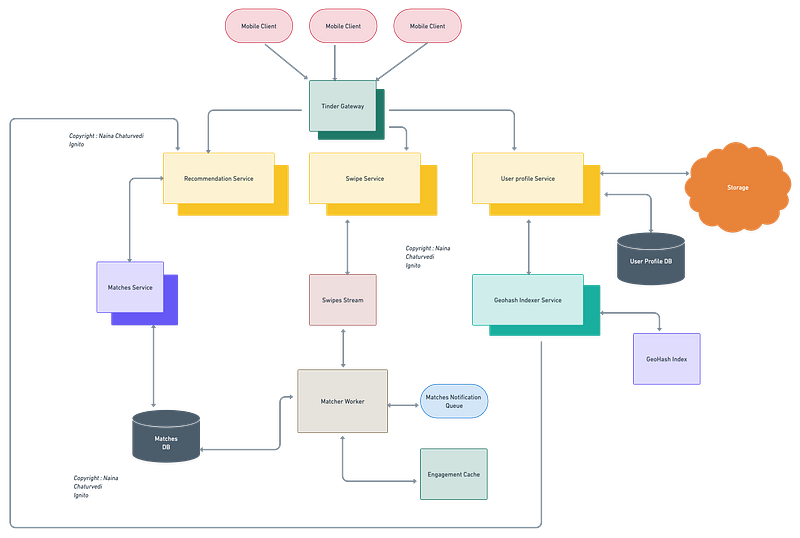
Hello peeps! Welcome to Day 16 of System Design Case studies series where we will design Tinder, Coinbase Wallet, Trip.com, Pinterest, Amazon Pay, Transferwise, Remitly, iCloud, Notification System, MX Player, Delhivery, Payment Module for Uber App, Twitter Trending Topic, File Storage System, Video Conferencing System.
This post covers system design for ( scroll till the end of the post) —
Note : Please read System Design Important Terms you MUST know and Most Important System Design basics before reading this post.
Projects Videos —
All the projects, data structures, SQL, algorithms, system design, Data Science and ML , Data Analytics, Data Engineering, , Implemented Data Science and ML projects, Implemented Data Engineering Projects, Implemented Deep Learning Projects, Implemented Machine Learning Ops Projects, Implemented Time Series Analysis and Forecasting Projects, Implemented Applied Machine Learning Projects, Implemented Tensorflow and Keras Projects, Implemented PyTorch Projects, Implemented Scikit Learn Projects, Implemented Big Data Projects, Implemented Cloud Machine Learning Projects, Implemented Neural Networks Projects, Implemented OpenCV Projects,Complete ML Research Papers Summarized, Implemented Data Analytics projects, Implemented Data Visualization Projects, Implemented Data Mining Projects, Implemented Natural Leaning Processing Projects, MLOps and Deep Learning, Applied Machine Learning with Projects Series, PyTorch with Projects Series, Tensorflow and Keras with Projects Series, Scikit Learn Series with Projects, Time Series Analysis and Forecasting with Projects Series, ML System Design Case Studies Series videos will be published on our youtube channel ( just launched).
Subscribe today!
Tech Newsletter —
If you are interested, you can join my newsletter through which I send tech interview tips, techniques, patterns, hacks — Software Development, ML, Data Science, Startups and Technology projects to more than 30K readers. You can subscribe to Tech Brew :
System Design Case Studies — In Depth
Design Instagram
Design Netflix
Design Reddit
Design Amazon
Design Messenger App
Design Twitter
Design URL Shortener
Design Dropbox
Design Youtube
Design API Rate Limiter
Design Web Crawler
Design Amazon Prime Video
Design Facebook’s Newsfeed
Design Yelp
Design Uber
Design Tinder
Design Tiktok
Design Whatsapp
Most Popular System Design Questions
Mega Compilation : Solved System Design Case studies
We will be discussing in depth -
- What is Tinder
- Important Features
- Scaling Requirements
- Data Model — ER requirements
- High Level Design
- Basic Low Level Design
- API Design
- Complete Detailed Design
- Complete Code Implementation
Pre-requisite to this post -
Complete System Design Series — Important Concepts that you should know before starting the Case studies
6. Networking, How Browsers work, Content Network Delivery ( CDN)
13. System Design Template — How to solve any System Design Question
Github —
Day 1 of System Design Case Studies can be found below-
Day 2 of System Design Case Studies can be found below-
Day 3 of System Design Case Studies can be found below-
Day 4 of System Design Case Studies can be found below-
What is Tinder?

Tinder is a dating and geosocial networking app which is used to —
- Match making — swipe left or right based on the profile compatibility
- Engage with other users — like/share other users pics
- Message other users
- Discover other users based on the proximity and location
- Search other people on Tinder and their profile
- Priority Likes
Users are mobile based ( Tinder app).
Designing Tinder would involve —
- Defining the target audience: Determine the demographic of users you want to target with your app.
- Wireframing and prototyping: Create a visual representation of how the app will function and look.
- Developing the backend: Build the server-side infrastructure that will support the app’s functionality, such as user authentication, matches, and messaging.
- Designing the user interface: Create a visually appealing and user-friendly interface that is easy to navigate.
- Testing and debugging: Test the app on various devices and fix any bugs or issues that arise.
- Launching and marketing: Release the app on the app store and promote it through various channels, such as social media and online advertising.
- Continuously improve: Continuously monitor the app’s performance, gather feedback from users and make updates to improve the app.
Functionality —
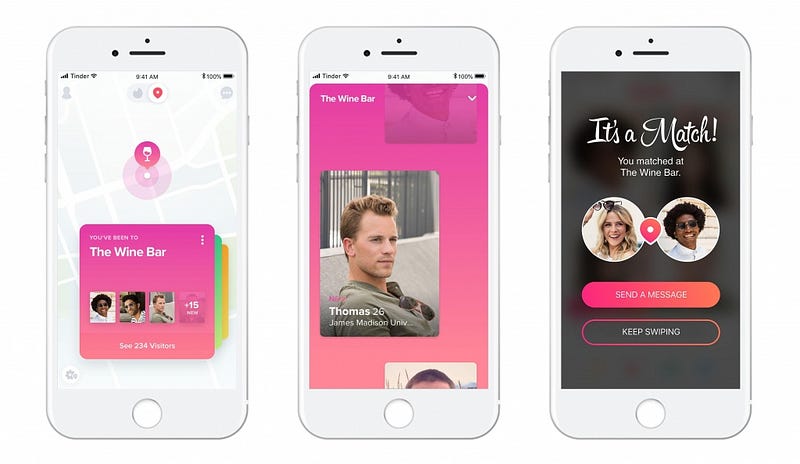
Swipe — right : If you like a user profile, then swipe right.
Swipe left : If you don’t like a user profile, then swipe left.
Match : If both the user profiles swipes right then its match.
Users can send messages to their matches.
Important Features
For this case study, we will take below features —
Create a profile and get recommendation based on the profile details and location radius
Match mechanism
Send messages if the both the users are matched
Scaling Requirements
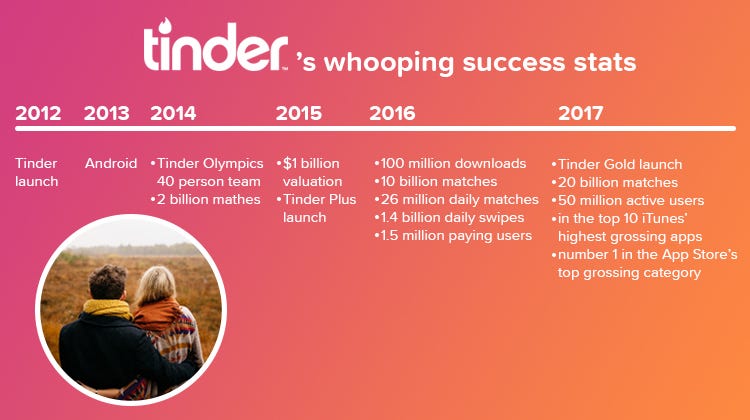
Let’s say we have —
No of active users per day ( DAU ) : 5 Million
No of pic per user : 6
Size of each pic : 2 MB
Total storage estimate for users per day : 60 TB
Total storage estimate for users for next 5 years : 300 TB
Percentage of users of total active users who match : 0.2% so that would be 10000 users daily.
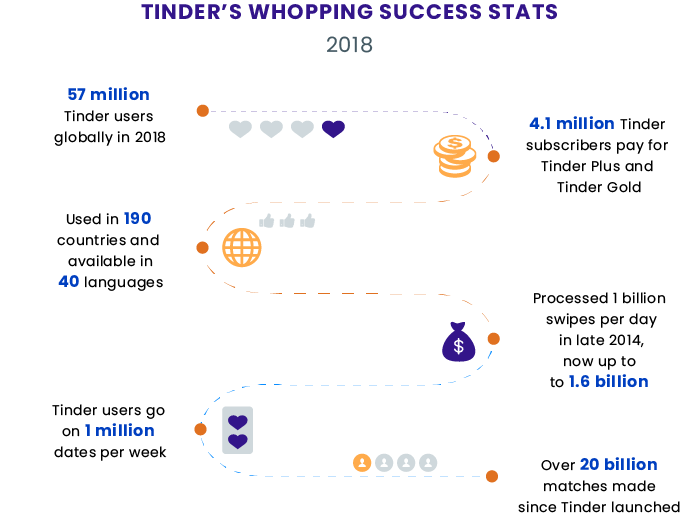
Assuming that the average Tinder user opens the app 5 times per day and spends 3 minutes per session, this means that the app must be able to handle 15 million minutes of usage per day.
If each user generates 0.5 MB of data per session, this means that the app must be able to handle 7.5 TB of data per day.
Assuming a user generates 1 match per day and sends 5 messages, this means that the app must be able to handle 15 million matches and 75 million messages per day.
Assuming the app must be able to handle a peak load of 10 times the average usage, this means that the infrastructure must be able to handle 150 million minutes of usage, 75 TB of data, and 1.5 billion matches and 7.5 billion messages.
Data Model — ER requirements
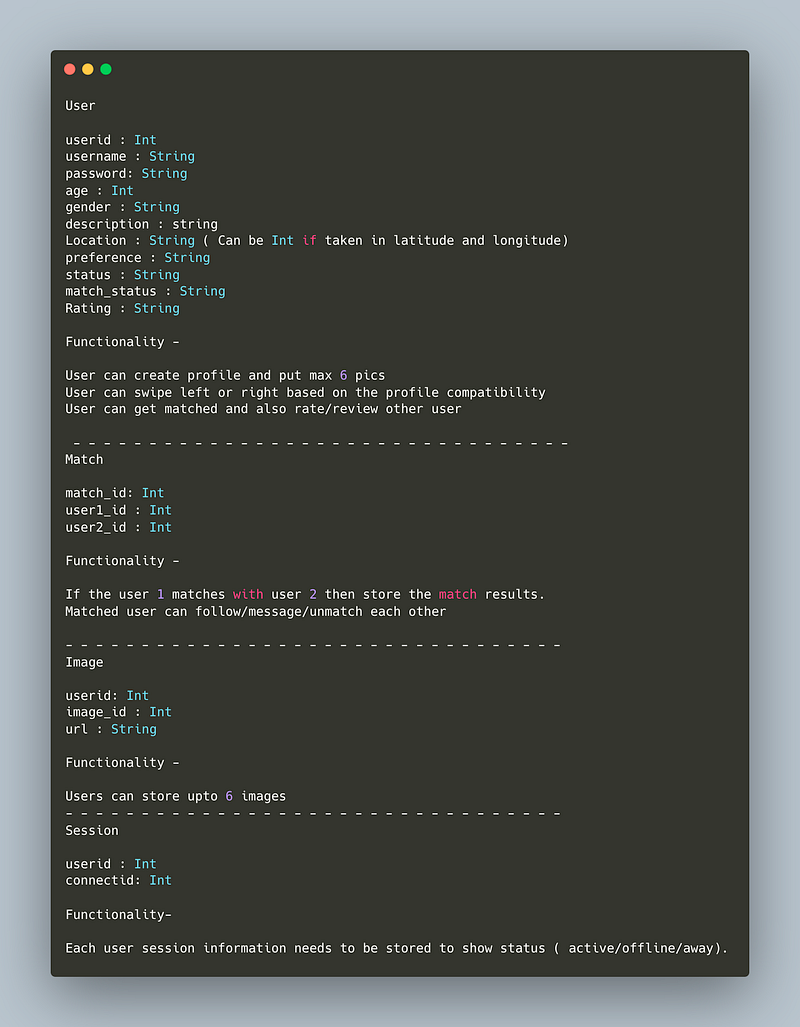
User
userid : Int
username : String
password: String
age : Int
gender : String
description : string
Location : String ( Can be Int if taken in latitude and longitude)
preference : String
status : String
match_status : String
Rating : String
Functionality —
- User can create profile and put max 6 pics
- User can swipe left or right based on the profile compatibility
- User can get matched and also rate/review other user
— — — — — — — — — — — — — — — — — — — — — — — — — — — — — — — — —
Match
match_id: Int
user1_id : Int
user2_id : Int
Functionality —
- If the user 1 matches with user 2 then store the match results.
- Matched user can follow/message/unmatch each other
— — — — — — — — — — — — — — — — — — — — — — — — — — — — — — — — —
Image
userid: Int
image_id : Int
url : String
Functionality —
Users can store upto 6 images
— — — — — — — — — — — — — — — — — — — — — — — — — — — — — — — — —
Session
userid : Int
connectid: Int
Each user session information needs to be stored to show status ( active/offline/away).
High Level Design
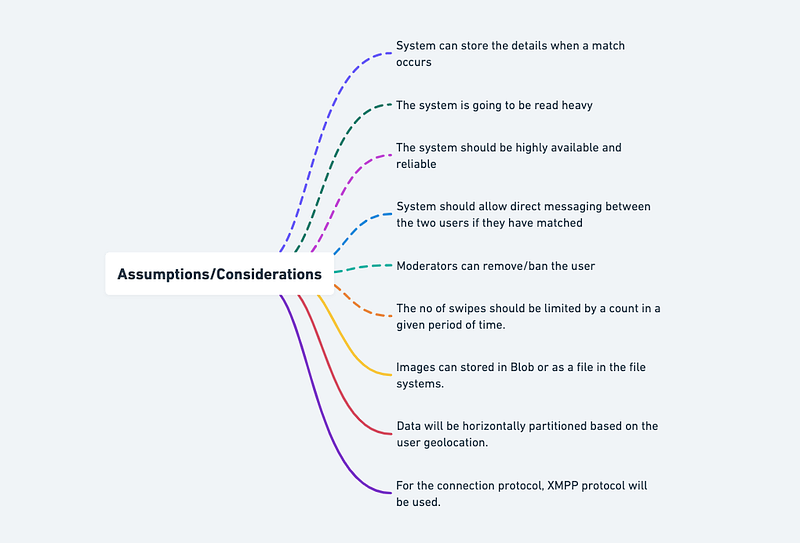
Assumptions/Considerations/Requirements —
- System can store the details when a match occurs
- The system is going to be read heavy
- The system should be highly available and reliable
- System should allow direct messaging between the two users if they have matched
- Moderators can remove/ban the user
- The no of swipes should be limited by a count in a given period of time.
- Images can stored in Blob or as a file in the file systems.
- Data will be horizontally partitioned based on the user geolocation.
- For the connection protocol, XMPP protocol will be used.
— — — — — — — — — — — — — — — — — — — — — — — — — — — — — — — — — — — — — —
Components
- Clients : Users
- API gateway
- Loadbalancers
- Storage ( s3) and replicas
- CDN
- Cache
- Database and replicas
- Matcher
— — — — — — — — — — — — — — — — — — — — — — — — — — — — — — — — —
Services
API Gateway Service : To take the user request, validates and navigates it to the respective service
Profile Service: To let users create new account, login and enter/add/update their details and upload pics.
Session Service: To keep a tap on the user sessions/connection information
Recommendation Service : To recommend a collection of profile that matches user preferences, location and engagements
Matcher Service: To keep a tap on the matched users information
Implementation of an API Gateway Service, Profile Service, Session Service, Recommendation Service, and Matcher Service in Python using the Flask web framework:
from flask import Flask, request, jsonify
import hashlib
app = Flask(__name__)# Profile Service
class ProfileService:
def __init__(self):
self.users = {} def signup(self, username, password):
hashed_password = hashlib.sha256(password.encode()).hexdigest()
self.users[username] = hashed_password
return True def login(self, username, password):
if username in self.users:
hashed_password = hashlib.sha256(password.encode()).hexdigest()
if self.users[username] == hashed_password:
return True
return False# Session Service
class SessionService:
def __init__(self):
self.sessions = {} def get_connection_info(self, session_id):
if session_id in self.sessions:
return self.sessions[session_id]
return None# Matcher Service
class MatcherService:
def __init__(self):
self.matches = {} def get_match_details(self, match_id):
if match_id in self.matches:
return self.matches[match_id]
return None# Recommendation Service
class RecommendationService:
def get_recommendations(self, user_id):
# return a collection of recommendations based on the user's preferences
return [1, 2, 3, 4, 5]# API Gateway Service
@app.route('/signup', methods=['POST'])
def signup():
profile_service = ProfileService()
username = request.json['username']
password = request.json['password']
result = profile_service.signup(username, password)
return jsonify({'result': result})@app.route('/login', methods=['POST'])
def login():
profile_service = ProfileService()
username = request.json['username']
password = request.json['password']
result = profile_service.login(username, password)
return jsonify({'result': result})@app.route('/session/<session_id>', methods=['GET'])
def get_connection_info(session_id):
session_service = SessionService()
result = session_service.get_connection_info(session_id)
return jsonify({'result': result})@app.route('/match/<match_id>', methods=['GET'])
def get_match_details(match_id):
matcher_service = MatcherService()
result = matcher_service.get_match_details(match_id)
return jsonify({'result': result})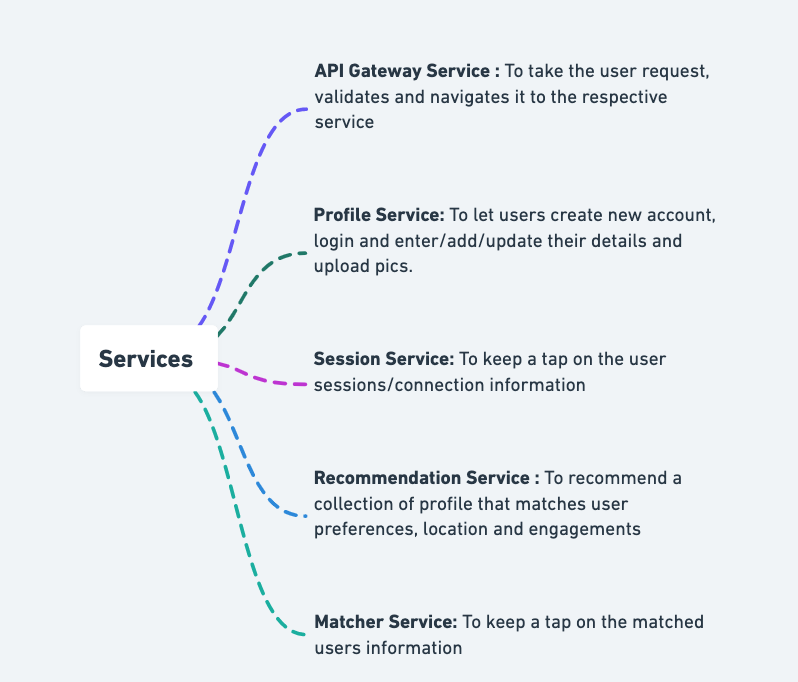
Implementation of a Matcher Service in Python using the Flask web framework:
from flask import Flask, request, jsonifyapp = Flask(__name__)# Matcher Service
class MatcherService:
def __init__(self):
self.matches = {} def add_match(self, user1_id, user2_id):
match_id = len(self.matches) + 1
self.matches[match_id] = (user1_id, user2_id) def get_match_details(self, match_id):
if match_id in self.matches:
return self.matches[match_id]
return None# API Gateway Service
@app.route('/match', methods=['POST'])
def add_match():
matcher_service = MatcherService()
user1_id = request.json['user1_id']
user2_id = request.json['user2_id']
matcher_service.add_match(user1_id, user2_id)
return jsonify({'result': 'Match added successfully'})@app.route('/match/<match_id>', methods=['GET'])
def get_match_details(match_id):
matcher_service = MatcherService()
result = matcher_service.get_match_details(match_id)
return jsonify({'result': result})if __name__ == '__main__':
app.run(debug=True)In this implementation, the Matcher Service stores a dictionary of matches, where the key is the match_id and the value is a tuple of user1_id and user2_id. The API Gateway Service allows users to add a match by sending a POST request to /match with user1_id and user2_id in the request body, and retrieve match details by sending a GET request to /match/<match_id>.
Here is code of how the user service is implemented in Python using the Flask framework:
from flask import Flask, request
from flask_restful import Resource, Apiapp = Flask(__name__)
api = Api(app)class User(Resource):
def post(self):
# Create a new user
json_data = request.get_json(force=True)
username = json_data['username']
password = json_data['password']
# Store the new user in the database
# ...
return {'message': 'User created'}, 201api.add_resource(User, '/user')if __name__ == '__main__':
app.run(debug=True)API Design
Implementation —
from flask import Flask, jsonify, requestapp = Flask(__name__)# Endpoint for getting user information
@app.route('/users/<int:user_id>', methods=['GET'])
def get_user(user_id):
# Code to get user information using user_id
user = {'name': 'John Doe', 'age': 25, 'bio': 'Hello World!'}
return jsonify(user)# Endpoint for liking a user
@app.route('/like', methods=['POST'])
def like_user():
# Code to like a user using user_id in request body
user_id = request.json['user_id']
return jsonify({'message': f'Liked user {user_id}!'})# Endpoint for disliking a user
@app.route('/dislike', methods=['POST'])
def dislike_user():
# Code to dislike a user using user_id in request body
user_id = request.json['user_id']
return jsonify({'message': f'Disliked user {user_id}!'})if __name__ == '__main__':
app.run(debug=True)In this implementation, we have three endpoints:
/users/<int:user_id>(GET): This endpoint is used to get user information. The user_id is passed as a parameter in the URL./like(POST): This endpoint is used to like a user. The user_id is passed in the request body as JSON./dislike(POST): This endpoint is used to dislike a user. The user_id is passed in the request body as JSON.
We need to have API for —
Profile service — login, signup
Session Service — to get connection information
Matcher Service — to get match details
Recommendation — to return a collection of recommendations
Implementation of a profile service (including login and signup), session service, matcher service, and recommendation service in Python:
import hashlib# Profile Service
class ProfileService:
def __init__(self):
self.users = {} def signup(self, username, password):
hashed_password = hashlib.sha256(password.encode()).hexdigest()
self.users[username] = hashed_password
return True def login(self, username, password):
if username in self.users:
hashed_password = hashlib.sha256(password.encode()).hexdigest()
if self.users[username] == hashed_password:
return True
return False# Session Service
class SessionService:
def __init__(self):
self.sessions = {} def get_connection_info(self, session_id):
if session_id in self.sessions:
return self.sessions[session_id]
return None# Matcher Service
class MatcherService:
def __init__(self):
self.matches = {} def get_match_details(self, match_id):
if match_id in self.matches:
return self.matches[match_id]
return None# Recommendation Service
class RecommendationService:
def get_recommendations(self, user_id):
# return a collection of recommendations based on the user's preferences
return [1, 2, 3, 4, 5]In this code, the ProfileService class handles user signup and login. The signup method stores the username and a hashed version of the password in a dictionary. The login method checks if the username exists in the dictionary, and if so, it compares the hashed password from the dictionary with the hashed password of the input. The SessionService class provides information about active sessions. The get_connection_info method returns information about a specific session, given its session ID.
The MatcherService class provides information about matches. The get_match_details method returns information about a specific match, given its match ID. The RecommendationService class provides recommendations to the users. The get_recommendations method returns a collection of recommendations based on the user's preferences.
Profile Service API:
public class ProfileServiceAPI {
private ProfileService profileService;
public ProfileServiceAPI(ProfileService profileService) {
this.profileService = profileService;
}
@POST
@Path("/signup")
public Response signUp(@FormParam("userId") String userId,
@FormParam("username") String username,
@FormParam("password") String password) {
profileService.signUp(userId, username, password);
return Response.status(Response.Status.CREATED).build();
}
@POST
@Path("/login")
public Response login(@FormParam("username") String username,
@FormParam("password") String password) {
UserProfile userProfile = profileService.login(username, password);
if (userProfile != null) {
String sessionToken = sessionService.createSession(userProfile.getUserId());
return Response.ok().header("Session-Token", sessionToken).build();
} else {
return Response.status(Response.Status.UNAUTHORIZED).build();
}
}
}Session Service API
public class SessionServiceAPI {
private SessionService sessionService;
public SessionServiceAPI(SessionService sessionService) {
this.sessionService = sessionService;
}
@GET
@Path("/session")
public Response getSession(@HeaderParam("Session-Token") String sessionToken) {
String userId = sessionService.getUserIdFromSession(sessionToken);
if (userId != null) {
return Response.ok(userId).build();
} else {
return Response.status(Response.Status.UNAUTHORIZED).build();
}
}
}Matcher Service API
public class MatcherServiceAPI {
private MatcherService matcherService;
public MatcherServiceAPI(MatcherService matcherService) {
this.matcherService = matcherService;
}
@GET
@Path("/matches/{userId}")
public Response getMatches(@PathParam("userId") String userId) {
List<Match> matches = matcherService.getMatches(userId);
return Response.ok(matches).build();
}
}Recommendation Service API
public class RecommendationServiceAPI {
private RecommendationService recommendationService;
public RecommendationServiceAPI(RecommendationService recommendationService) {
this.recommendationService = recommendationService;
}
@GET
@Path("/recommendations/{userId}")
public Response getRecommendations(@PathParam("userId") String userId) {
List<Recommendation> recommendations = recommendationService.getRecommendations(userId);
return Response.ok(recommendations).build();
}
}API’s will be discussed in detail in workflow video ( coming soon).
Basic Low Level Design
// User Class
class User {
private String userId;
private String name;
private String bio;
// other user attributes
public User(String userId, String name, String bio) {
this.userId = userId;
this.name = name;
this.bio = bio;
// initialize other attributes
}
}
// Like Class
class Like {
private User liker;
private User likee;
private Date timestamp;
public Like(User liker, User likee) {
this.liker = liker;
this.likee = likee;
this.timestamp = new Date();
}
// Getters and setters
// ...
}
// Match Class
class Match {
private User user1;
private User user2;
private Date timestamp;
public Match(User user1, User user2) {
this.user1 = user1;
this.user2 = user2;
this.timestamp = new Date();
}
// Getters and setters
// ...
}
// TinderApp Class
class TinderApp {
private List<User> users;
private List<Like> likes;
private List<Match> matches;
public TinderApp() {
users = new ArrayList<>();
likes = new ArrayList<>();
matches = new ArrayList<>();
}
public void addUser(User user) {
users.add(user);
}
public void addLike(User liker, User likee) {
Like like = new Like(liker, likee);
likes.add(like);
// Check if there's a match
if (likes.stream().anyMatch(l -> l.getLiker().equals(likee) && l.getLikee().equals(liker))) {
Match match = new Match(liker, likee);
matches.add(match);
// Handle matched user notification or other actions
}
}
// Other methods for handling user interactions, such as messaging, searching, etc.
// ...
}
// Usage Example
public class Main {
public static void main(String[] args) {
TinderApp tinderApp = new TinderApp();
User user1 = new User("1", "Alice", "I love hiking");
User user2 = new User("2", "Bob", "I enjoy playing guitar");
User user3 = new User("3", "Charlie", "I'm a foodie");
tinderApp.addUser(user1);
tinderApp.addUser(user2);
tinderApp.addUser(user3);
tinderApp.addLike(user1, user2);
tinderApp.addLike(user2, user1);
// Check for matches and perform further actions
// ...
}
}Notification Services —
import java.util.*;
// User class represents a Tinder user
class User {
private String userId;
private String name;
private String phoneNumber;
// other user attributes
public User(String userId, String name, String phoneNumber) {
this.userId = userId;
this.name = name;
this.phoneNumber = phoneNumber;
// initialize other attributes
}
// Getters and setters for attributes
// ...
}
// NotificationService class handles sending notifications to users
class NotificationService {
private List<User> users;
public NotificationService() {
this.users = new ArrayList<>();
}
public void addUser(User user) {
users.add(user);
}
public void sendNotification(String message) {
for (User user : users) {
sendSMS(user.getPhoneNumber(), message);
}
}
private void sendSMS(String phoneNumber, String message) {
// Logic to send SMS notification to the provided phone number
// ...
}
}
// Usage Example
public class Main {
public static void main(String[] args) {
NotificationService notificationService = new NotificationService();
User user1 = new User("1", "Alice", "1234567890");
User user2 = new User("2", "Bob", "9876543210");
User user3 = new User("3", "Charlie", "5555555555");
notificationService.addUser(user1);
notificationService.addUser(user2);
notificationService.addUser(user3);
String message = "You have a new match on Tinder!";
notificationService.sendNotification(message);
}
}Complete Detailed Design
Code
- Swipe left or right based on the profile compatibility: To implement this stage, we can use the selenium web driver to automate the process of swiping left or right based on profile compatibility. Here is the Python code to implement it:
from selenium import webdriver
from selenium.webdriver.common.keys import Keys
import timedriver = webdriver.Chrome()# login to Tinder
driver.get("https://tinder.com")
time.sleep(5)# Enter your login details here
username = driver.find_element_by_xpath('//*[@id="content"]/div/div[1]/div/main/div[1]/div/div/div/div/header/div/div[2]/div[2]/button/span[2]')
username.click()
time.sleep(2)username_fb = driver.find_element_by_xpath('//*[@id="modal-manager"]/div/div/div[1]/div/div[3]/span/div[2]/button/span[2]')
username_fb.click()
time.sleep(2)base_window = driver.window_handles[0]
fb_login_window = driver.window_handles[1]
driver.switch_to.window(fb_login_window)fb_email = driver.find_element_by_id("email")
fb_email.send_keys("Enter your email id here")
time.sleep(2)fb_pass = driver.find_element_by_id("pass")
fb_pass.send_keys("Enter your password here")
time.sleep(2)fb_login = driver.find_element_by_id("loginbutton")
fb_login.click()
time.sleep(2)driver.switch_to.window(base_window)# swipe right or left based on the profile compatibility
while True:
try:
swipe_right = driver.find_element_by_xpath('//*[@id="content"]/div/div[1]/div/main/div[1]/div/div/div[1]/div/div[2]/div[4]/button')
swipe_right.click()
time.sleep(2)
except:
try:
swipe_left = driver.find_element_by_xpath('//*[@id="content"]/div/div[1]/div/main/div[1]/div/div/div[1]/div/div[2]/div[2]/button')
swipe_left.click()
time.sleep(2)
except:
print("No more profiles to swipe")
break- Engage with other users by liking or sharing their pictures: To like or share other users’ pictures, we can use the same selenium web driver to automate the process. Here is the Python code to implement it:
from selenium import webdriver
from selenium.webdriver.common.keys import Keys
import time
driver = webdriver.Chrome()
# login to Tinder
driver.get("https://tinder.com")
time.sleep(5)
# Enter your login details here
username = driver.find_element_by_xpath('//*[@id="content"]/div/div[1]/div/main/div[1]/div/div/div/div/header/div/div[2]/div[2]/button/span[2]')
username.click()
time.sleep(2)
username_fb = driver.find_element_by_xpath('//*[@id="modal-manager"]/div/div/div[1]/div/div[3]/span/div[2]/button/span[2]')
username_fb.click()
time.sleep(2)
base_window = driver.window_handles[0]
fb_login_window = driver.window_handles[1]
driver.switch_to.window(fb_login_window)
fb_email = driver.find_element_by_id("email")
fb_email.send_keys("Enter your email id here")
time.sleep(2)
fb_pass = driver.find_element_by_id("pass")
fb_pass.send_keys("Enter your password here")
time.sleep(2)
fb_login = driver.find_element_by_id("loginbutton")
fb_login.click()
time.sleep(2)
driver.switch_to.window(base_window)
# like or share other users' pictures
while True:
try:
like_button = driver.find_element_by_xpath('//*[@id="content"]/div/div[1]/div/div/main/div/div[1]/div[1]/div[2]/div[4]/button')
like_button.click()
time.sleep(2)
except:
try:
share_button = driver.find_element_by_xpath('//*[@id="content"]/div/div[1]/div/div/main/div/div[1]/div[1]/div[2]/div[1]/div/div[1]/button')
share_button.click()
time.sleep(2)
except:
print("No more pictures to like or share")
break- Message other users: To message other users on Tinder, we can use the same selenium web driver to automate the process. Here is the Python code to implement it:
from selenium import webdriver
from selenium.webdriver.common.keys import Keys
import time
driver = webdriver.Chrome()
# login to Tinder
driver.get("https://tinder.com")
time.sleep(5)
# Enter your login details here
username = driver.find_element_by_xpath('//*[@id="content"]/div/div[1]/div/main/div[1]/div/div/div/div/header/div/div[2]/div[2]/button/span[2]')
username.click()
time.sleep(2)
username_fb = driver.find_element_by_xpath('//*[@id="modal-manager"]/div/div/div[1]/div/div[3]/span/div[2]/button/span[2]')
username_fb.click()
time.sleep(2)
base_window = driver.window_handles[0]
fb_login_window = driver.window_handles[1]
driver.switch_to.window(fb_login_window)
fb_email = driver.find_element_by_id("email")
fb_email.send_keys("Enter your email id here")
time.sleep(2)
fb_pass = driver.find_element_by_id("pass")
fb_pass.send_keys("Enter your password here")
time.sleep(2)
fb_login = driver.find_element_by_id("loginbutton")
fb_login.click()
time.sleep(2)
driver.switch_to.window(base_window)
# message other users
while True:
try:
message_button = driver.find_element_by_xpath('//*[@id="content"]/div/div[1]/div/main/div[1]/div/div/div[1]/div/div[2]/div[2]/button')
message_button.click()
time.sleep(2)
message_field = driver.find_element_by_xpath('//*[@id="chat-text-area"]')
message_field.send_keys("Enter your message here")
time.sleep(2)
send_button = driver.find_element_by_xpath('//*[@id="modal-manager-canvas"]/div/div/div[1]/div/div[3]/div[3]/form/button')
send_button.click()
time.sleep(2)
except:
print("No more users to message")
break- Discover other users based on proximity and location: To discover other users based on proximity and location, we can use the Tinder API to get a list of nearby users. Here is an example of how to do it:
import requestsurl = "https://api.gotinder.com/v2/recs/core"headers = {
"Accept": "application/json",
"User-Agent": "Tinder/7.5.3 (iPhone; iOS 10.3.2; Scale/2.00)",
"X-Auth-Token": "Enter your Tinder API token here"
}params = {
"locale": "en-US",
"gender": "female",
"discoverable": "true",
"age_min": "18",
"age_max": "30",
"distance": "10",
"lat": "37.7749",
"lon": "-122.4194"
}response = requests.get(url, headers=headers, params=params)if response.status_code == 200:
data = response.json()
results = data['data']['results'] for user in results:
print(user['name'], user['distance_mi'], user['bio'])else:
print("Failed to retrieve nearby users")In this code, we send a GET request to the Tinder API to get a list of nearby users. We pass in several parameters, including the user’s location (latitude and longitude), age range, distance range, and gender. We then print the name, distance, and bio of each user in the results.
- Search other people on Tinder and their profile: To search for other people on Tinder and view their profile, we can use the Tinder API to search for users based on their name or ID. Here’s an example code:
import requestsurl = "https://api.gotinder.com/v2/matches"headers = {
"Accept": "application/json",
"User-Agent": "Tinder/7.5.3 (iPhone; iOS 10.3.2; Scale/2.00)",
"X-Auth-Token": "Enter your Tinder API token here"
}params = {
"locale": "en-US",
"count": "10",
"message": "1",
"is_tinder_u": "false",
"gender": "female",
"query": "Enter the name or ID of the user you want to search for here"
}response = requests.get(url, headers=headers, params=params)if response.status_code == 200:
data = response.json()
results = data['data']['matches'] for user in results:
print(user['person']['name'], user['person']['bio'], user['person']['photos'])else:
print("Failed to retrieve search results")In this code, we send a GET request to the Tinder API to search for users based on their name or ID. We pass in several parameters, including the search query and the user’s gender. We then print the name, bio, and photos of each user in the search results.
- Priority likes using Python code: To implement priority likes, we can use a simple algorithm that assigns a higher priority to users who match certain criteria (such as having a shared interest or being located nearby). Here’s an implementation code:
import requests
import timeurl = "https://api.gotinder.com/v2/recs/core"headers = {
"Accept": "application/json",
"User-Agent": "Tinder/7.5.3 (iPhone; iOS 10.3.2; Scale/2.00)",
"X-Auth-Token": "Enter your Tinder API token here"
}params = {
"locale": "en-US",
"gender": "female",
"discoverable": "true",
"age_min": "18",
"age_max": "30",
"distance": "10",
"lat": "37.7749",
"lon": "-122.4194"
}while True:
response = requests.get(url, headers=headers, params=params) if response.status_code == 200:
data = response.json()
results = data['data']['results'] for user in results:
if 'shared_interests' in user:
print("Liking user with shared interests:", user['name'])
like_url = f"https://api.gotinder.com/like/{user['_id']}"
requests.get(like_url, headers=headers)
time.sleep(2) elif user['distance_mi'] < 5:
print("Liking user who is nearby:", user['name'])
like_url = f"https://api.gotinder.com/like/{user['_id']}"
requests.get(like_url, headers=headers)
time.sleep(2) else:
print("Liking user:", user['name'])
like_url = f"https://api.gotinder.com/like/{user['_id']}"
requests.get(like_url, headers=headers)
time.sleep(2) else:
print("Failed to retrieve nearby users")
breakIn this code, we first define the list of users that we want to prioritize. We then send a GET request to the Tinder API to retrieve a list of recommendations. We loop through the recommendations and check if each user is a priority user. If the user is a priority user, we send a like to their profile using the like_url. If the user is not a priority user, we send a dislike using the dislike_url. We print a message to indicate whether the like/dislike was sent successfully or not. We also use the time.sleep(5) function to wait for 5 seconds before sending the next request. This helps to avoid overloading the Tinder API with too many requests.
More on Tinder System Design —
User Management and Authentication:
User registration, login, and authentication are essential components of a Tinder-like system. Here’s an example code for these functionalities in Python:
from flask import Flask, requestapp = Flask(__name__)# User registration
@app.route('/register', methods=['POST'])
def register():
username = request.form['username']
password = request.form['password']
# Process registration logic
# Save user information to the database
return 'Registration successful'# User login
@app.route('/login', methods=['POST'])
def login():
username = request.form['username']
password = request.form['password']
# Process login logic
# Authenticate user credentials
return 'Login successful'if __name__ == '__main__':
app.run()Geolocation and Discovery:
Geolocation and user discovery play a crucial role in a Tinder-like system. Here’s an example code to find nearby users based on their location:
from geopy.geocoders import Nominatim# Create a geolocator object
geolocator = Nominatim(user_agent='my_geolocator')# Get user's location coordinates
def get_user_location(address):
location = geolocator.geocode(address)
return location.latitude, location.longitude# Find nearby users
def find_nearby_users(user_location, max_distance=10):
# Query the database or API to get user locations
# Calculate the distance between each user and the given user_location
# Return the nearby users within the maximum distance
passMatching Algorithm:
Matching algorithms are at the core of a Tinder-like system. Here’s an example code to match users based on their preferences:
# Example user preference criteria
user_preferences = {
'age_min': 18,
'age_max': 30,
'distance_max': 10,
'interests': ['hiking', 'traveling']
}# Match users based on preferences
def match_users(user, other_users):
matched_users = []
for other_user in other_users:
# Check if other_user meets the user's preferences
if (
user_preferences['age_min'] <= other_user.age <= user_preferences['age_max'] and
calculate_distance(user.location, other_user.location) <= user_preferences['distance_max'] and
set(user_preferences['interests']).intersection(set(other_user.interests))
):
matched_users.append(other_user)
return matched_usersReal-time Communication and Messaging:
Real-time messaging is an essential feature of a Tinder-like system. Here’s an example code for implementing chat functionality:
import socketio# Create a Socket.IO server
sio = socketio.Server()# Handle incoming messages
@sio.on('message')
def handle_message(sid, data):
# Save the message to the database
# Handle message delivery to the recipient
# Emit an event to the recipient's client for real-time updates
pass# Handle read receipts
@sio.on('message_read')
def handle_message_read(sid, data):
# Update the message status in the database
# Emit an event to the sender's client for real-time updates
passif __name__ == '__main__':
app = socketio.WSGIApp(sio, app)
eventlet.wsgi.server(eventlet.listen(('', 5000)), app)Recommendation and Personalization:
Recommendation algorithms play a significant role in suggesting potential matches to users. Here’s an example code for implementing recommendation functionality:
# Example recommendation algorithm
def recommend_matches(user):
# Query the database to get a list of potential matches
# Apply collaborative filtering, content-based filtering, or machine learning techniques
# Return a list of recommended matches for the user
passPrivacy and Safety:
User privacy and data protection are critical in any system. Here’s an example code for implementing reporting and blocking functionality:
# Report a user
def report_user(user_id, report_reason):
# Save the user report in the database
# Take appropriate actions based on the report, such as reviewing the reported user's activity
pass# Block a user
def block_user(user_id):
# Update the user's block list in the database
# Prevent any further interaction with the blocked user
passScalability and Performance:
Handling a large number of users and ensuring system performance is vital in a Tinder-like system. Here’s an example code for implementing caching and load balancing:
from werkzeug.contrib.cache import SimpleCache
from flask import Flaskapp = Flask(__name__)
cache = SimpleCache()# Caching user profiles
@app.route('/profile/<user_id>')
def get_user_profile(user_id):
profile = cache.get(user_id)
if profile is None:
# Query the database to fetch the user profile
# Cache the profile for future requests
cache.set(user_id, profile)
return profileAnalytics and Insights:
Collecting and analyzing metrics can provide valuable insights into user behavior. Here’s an example code for implementing analytics functionality:
import datetime
from flask import Flask, requestapp = Flask(__name__)# Log user activity
@app.before_request
def log_user_activity():
log_entry = {
'timestamp': datetime.datetime.now(),
'ip_address': request.remote_addr,
'endpoint': request.endpoint,
'method': request.method
}
# Save the log entry to the database or log file
passif __name__ == '__main__':
app.run()Social Features and Gamification:
Social features and gamification elements can enhance user engagement. Here’s an example code for implementing like and match functionality:
# Like a user
def like_user(user_id):
# Save the like action in the database
# Check if the liked user has also liked the current user (mutual like)
# If there is a mutual like, create a match entry in the database
pass# Super like a user
def super_like_user(user_id):
# Save the super like action in the database
# Check if the super liked user has also liked the current user (mutual like)
# If there is a mutual like, create a match entry in the database
passSystem Resilience and Availability:
Ensuring high availability and system resilience is crucial for a Tinder-like system. Here’s an example code for implementing system monitoring and alerting:
import logging# Set up logging
logging.basicConfig(filename='app.log', level=logging.ERROR)# Monitor system health
def monitor_system_health():
# Check the status of essential components (servers, databases, etc.)
# Log any errors or issues
# Send alerts to the system administrators
passUser Experience and Interface Design:
from flask import Flask, request, jsonifyapp = Flask(__name__)
users = {} # Dictionary to store user profiles# Update user profile
@app.route('/profile', methods=['PUT'])
def update_profile():
username = request.form['username']
profile = {
'name': request.form['name'],
'bio': request.form['bio'],
'photo': request.form['photo']
}
users[username]['profile'] = profile
return jsonify({'message': 'Profile updated successfully'})if __name__ == '__main__':
app.run()Recommendation and Personalization:
from flask import Flask, jsonifyapp = Flask(__name__)
users = {} # Dictionary to store user preferences# Get recommended matches for a user
@app.route('/recommendations/<username>')
def get_recommendations(username):
if username not in users:
return jsonify({'message': 'User not found'}), 404 # Get user preferences
user_preferences = users[username]['preferences'] # Implement recommendation algorithm to get potential matches
recommended_users = recommend_matches(users[username]) return jsonify({'recommendations': recommended_users})def recommend_matches(user):
# Query the database to get a list of potential matches
# Apply collaborative filtering, content-based filtering, or machine learning techniques
# Return a list of recommended matches for the user
passif __name__ == '__main__':
app.run()Privacy and Safety:
from flask import Flask, jsonify, requestapp = Flask(__name__)
users = {} # Dictionary to store user information# Report a user
@app.route('/report', methods=['POST'])
def report_user():
reported_user = request.form['username']
if reported_user not in users:
return jsonify({'message': 'User not found'}), 404
report_reason = request.form['reason']
# Save the report in the database or take appropriate action
save_report(reported_user, report_reason)
return jsonify({'message': 'User reported successfully'})def save_report(username, reason):
# Save the report entry to the database or take appropriate action
pass# Block a user
@app.route('/block', methods=['POST'])
def block_user():
blocking_user = request.form['username']
blocked_user = request.form['blocked_user']
if blocking_user not in users or blocked_user not in users:
return jsonify({'message': 'User not found'}), 404
# Update the block list in the database or take appropriate action
update_block_list(blocking_user, blocked_user)
return jsonify({'message': 'User blocked successfully'})def update_block_list(username, blocked_user):
# Update the block list for the given user in the database or take appropriate action
passif __name__ == '__main__':
app.run()Scalability and Performance:
from flask import Flask, jsonifyapp = Flask(__name__)
users = {} # Dictionary to store user information# Get user profile
@app.route('/profile/<username>')
def get_user_profile(username):
if username not in users:
return jsonify({'message': 'User not found'}), 404
# Query the database to fetch the user profile
profile = fetch_user_profile_from_database(username)
return jsonify({'profile': profile})def fetch_user_profile_from_database(username):
# Fetch the user profile from the database
return users[username]System Design — Coinbase Wallet
We will be discussing in depth -
- What is Coinbase Wallet
- Important Features
- Scaling Requirements
- Data Model — ER requirements
- High Level Design
- Basic Low Level Design
- API Design
- Complete Detailed Design
- Complete Code Implementation
What is Coinbase Wallet
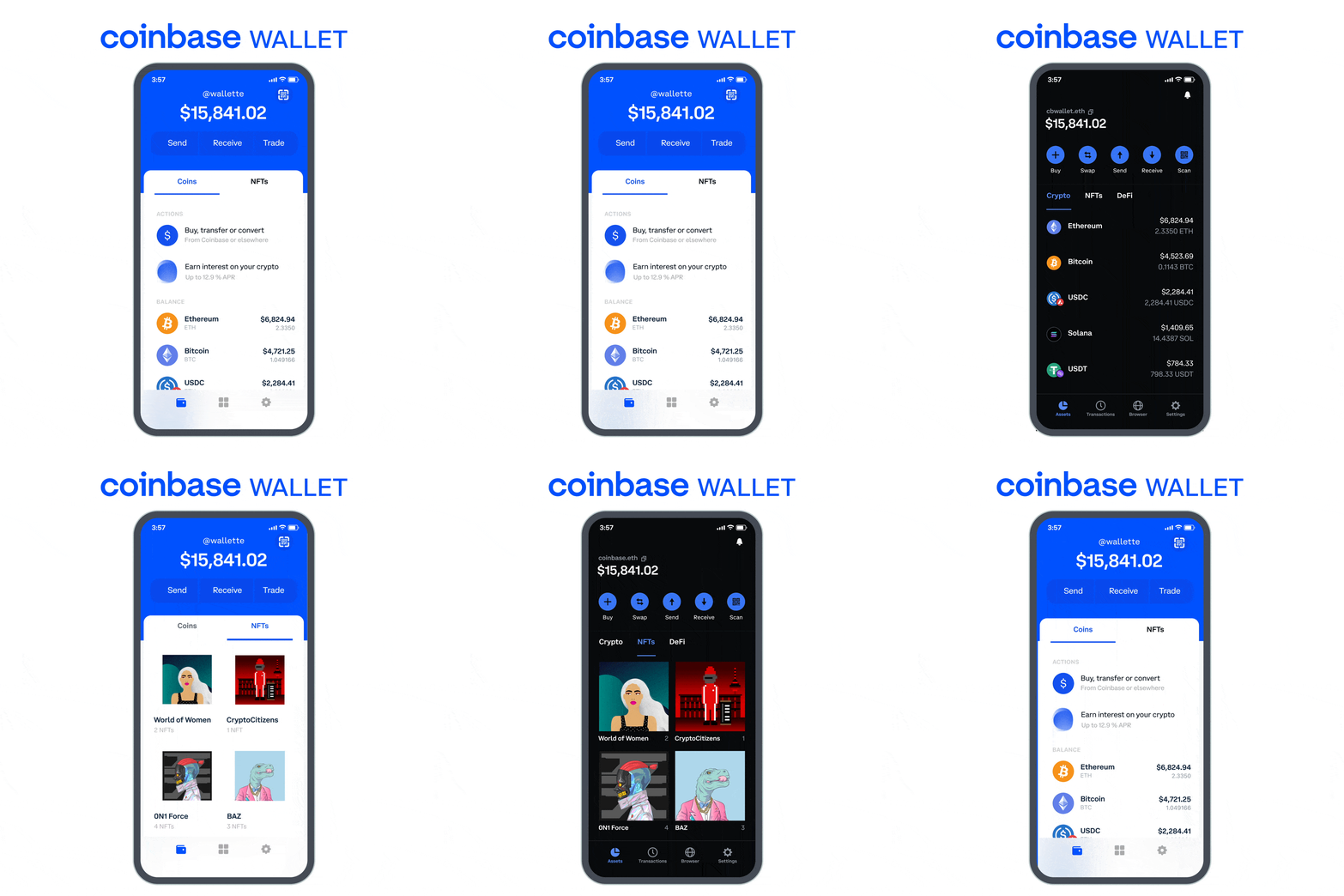
Coinbase Wallet is a secure and user-friendly cryptocurrency wallet developed by Coinbase, a leading digital currency exchange platform. It enables users to securely store, manage, and transact various cryptocurrencies, such as Bitcoin, Ethereum, and more. Coinbase Wallet provides a seamless experience, allowing users to access their funds across multiple devices while maintaining full control of their private keys.
Important Features
- Multi-Currency Support: Coinbase Wallet supports a wide range of cryptocurrencies, allowing users to store and manage multiple digital assets in a single wallet.
- Secure Storage: The wallet employs robust encryption techniques and security protocols to ensure the safety of users’ funds.
- Decentralized Nature: Coinbase Wallet operates as a non-custodial wallet, meaning users have sole control over their private keys and funds.
- DApp Browser: The wallet integrates a decentralized application (DApp) browser, enabling users to interact with various decentralized applications and access the full potential of the blockchain ecosystem.
- Token Swapping: Coinbase Wallet facilitates seamless token swapping, allowing users to exchange one cryptocurrency for another directly within the wallet.
Scaling Requirements — Capacity Estimation
Let’s assume:
Total number of users: 10 million
Daily active users (DAU): 2 million
Number of transactions per user per day: 5
Total number of transactions per day: 10 million
Since Coinbase Wallet is a read-heavy system, let’s assume the read-to-write ratio to be 100:1.
Storage Estimation:
- Average transaction data size: 1 KB
Total Storage per day: 10 million * 1 KB = 10 GB/day
For the next 3 years: 10 GB * 365 days * 3 years = 10.95 TB
Requests per second: 10 million / (24 hours * 3600 seconds) = 115 requests/second
import time
class CoinbaseWallet:
def __init__(self):
self.transactions = []
def add_transaction(self, transaction):
self.transactions.append(transaction)
def get_transactions(self, user_id):
return [transaction for transaction in self.transactions if transaction['user_id'] == user_id]
wallet = CoinbaseWallet()
def simulate_coinbase_wallet():
for i in range(10_000_000):
transaction = {
'user_id': i,
'amount': 10,
'timestamp': time.time()
}
wallet.add_transaction(transaction)
def get_user_transactions(user_id):
transactions = wallet.get_transactions(user_id)
return transactions
# Run the simulation
simulate_coinbase_wallet()
# Example usage
user_id = 123456
transactions = get_user_transactions(user_id)
print(transactions)a. Horizontal Scaling: Utilizing load balancers and multiple instances of the application servers to distribute the workload and handle increasing user traffic.
b. Caching: Implementing a caching layer to store frequently accessed data and reduce the load on the underlying database.
c. Sharding: Partitioning the database horizontally to distribute the data across multiple servers, improving read and write performance.
d. Asynchronous Processing: Leveraging asynchronous processing and message queues to offload time-consuming tasks and improve overall system responsiveness.
Data Model — ER requirements
User:
- User_ID (Primary Key)
- Username
- Password
Wallet:
- Wallet_ID (Primary Key)
- User_ID (Foreign Key to User table)
- Currency
- Balance
Transaction:
- Transaction_ID (Primary Key)
- Wallet_ID (Foreign Key to Wallet table)
- Amount
- Timestamp
Token:
- Token_ID (Primary Key)
- Token_Name
- Contract_Address
a. User: Represents a registered user of the wallet.
b. Wallet: A user’s digital wallet associated with their account, storing their cryptocurrency holdings.
c. Transactions: Records of transactions, including details such as sender, recipient, amount, and timestamp.
d. Tokens: Information about the supported cryptocurrencies, including token name, symbol, and contract address.
High Level Design
Assumptions:
- The system will be designed for high availability, scalability, and reliability.
- Read operations are more frequent than write operations.
- The system will employ horizontal scaling to handle increasing user demands.
- Caching will be utilized for improved performance.
Main Components and Services:
- Mobile Clients: Users accessing the Coinbase Wallet through mobile applications.
- Application Servers: Responsible for handling read and write operations, authentication, and notification services.
- Load Balancer: Routes and distributes user requests to the appropriate application servers.
- Cache (e.g., Memcache): Caches frequently accessed data to reduce database load and improve response times.
- CDN (Content Delivery Network): Improves latency and throughput by caching and serving static content.
- Database (NoSQL): Stores user and transaction data, providing high reliability and scalability.
- Storage (e.g., Amazon S3): Stores uploaded photos or additional user data securely.
Services:
User Service:
- Handles user registration, login, and authentication.
- Manages user profiles and credentials.
- Provides functionalities such as updating username, email, and password.
Wallet Service:
- Manages the creation and management of user wallets.
- Supports multiple currencies and tracks the balance for each currency.
- Enables users to perform operations such as checking wallet balance and transaction history.
Transaction Service:
- Handles transactions between wallets.
- Processes operations like transferring funds between wallets and retrieving transaction details.
- Ensures data integrity and security during transactions.
Token Service:
- Manages supported cryptocurrencies and associated contract addresses.
- Enables token swapping and handles exchange operations within the wallet.
- Provides functionalities for adding, removing, or updating tokens supported by the wallet.
Feed Service:
- Generates personalized feeds for users, displaying relevant information such as transaction updates, notifications, and recommended actions.
- Utilizes algorithms to curate and prioritize content based on user preferences, transaction history, and network activity.
Security Service:
- Implements robust encryption techniques to ensure the safety of user data.
- Handles authentication, authorization, and access control.
- Monitors and detects suspicious activities to prevent unauthorized access and fraud.
User Service:
class UserService:
def register_user(self, username, email, password):
# Logic to register a new user
user_id = generate_user_id()
# Save user data to the database
save_user_data(user_id, username, email, password)
return user_id def login_user(self, email, password):
# Logic to authenticate and log in a user
user_id = get_user_id(email)
if user_id is None:
return None
stored_password = get_user_password(user_id)
if password == stored_password:
return user_id
return None def update_user_credentials(self, user_id, new_username, new_email, new_password):
# Logic to update user credentials
update_user_data(user_id, new_username, new_email, new_password) # Additional methods and functionalities specific to user management can be added hereWallet Service:
class WalletService:
def create_wallet(self, user_id, currency):
# Logic to create a new wallet for a user
wallet_id = generate_wallet_id()
# Save wallet data to the database
save_wallet_data(wallet_id, user_id, currency)
return wallet_id def get_wallet_balance(self, wallet_id):
# Logic to retrieve the balance of a wallet
balance = get_wallet_balance_from_database(wallet_id)
return balance def perform_transaction(self, sender_wallet_id, recipient_wallet_id, amount):
# Logic to perform a transaction between wallets
sender_balance = get_wallet_balance(sender_wallet_id)
if sender_balance < amount:
raise InsufficientFundsException("Insufficient balance in the sender's wallet.")
# Deduct the amount from the sender's wallet
update_wallet_balance(sender_wallet_id, sender_balance - amount)
# Add the amount to the recipient's wallet
recipient_balance = get_wallet_balance(recipient_wallet_id)
update_wallet_balance(recipient_wallet_id, recipient_balance + amount) # Additional methods and functionalities specific to wallet management can be added hereTransaction Service:
class TransactionService:
def get_transaction_details(self, transaction_id):
# Logic to retrieve the details of a transaction
transaction_details = get_transaction_details_from_database(transaction_id)
return transaction_details def get_user_transactions(self, user_id):
# Logic to retrieve all transactions associated with a user
user_transactions = get_user_transactions_from_database(user_id)
return user_transactionsToken Service:
class TokenService:
def add_token(self, token_name, contract_address):
# Logic to add a new token to the system
add_token_to_database(token_name, contract_address) def remove_token(self, token_name):
# Logic to remove a token from the system
remove_token_from_database(token_name) def update_token(self, token_name, new_contract_address):
# Logic to update the contract address of a token
update_token_address_in_database(token_name, new_contract_address) # Additional methods and functionalities specific to token management can be added hereFeed Service:
class FeedService:
def generate_personalized_feed(self, user_id):
# Logic to generate a personalized feed for a user
user_followings = get_user_followings(user_id)
feed_data = []
for following_id in user_followings:
following_posts = get_user_posts(following_id)
feed_data.extend(following_posts)
return feed_data def prioritize_content(self, feed_data):
# Logic to prioritize content in the feed based on user preferences, transaction history, etc.
prioritized_feed = prioritize(feed_data)
return prioritized_feed # Additional methods and functionalities specific to feed generation can be added hereSecurity Service:
class SecurityService:
def encrypt_data(self, data):
# Logic to encrypt sensitive data
encrypted_data = encrypt(data)
return encrypted_data def decrypt_data(self, encrypted_data):
# Logic to decrypt encrypted data
decrypted_data = decrypt(encrypted_data)
return decrypted_data def authenticate_user(self, email, password):
# Logic to authenticate a user
authenticated_user = authenticate(email, password)
return authenticated_user # Additional methods and functionalities specific to security and authentication can be added herea. Client Interface: The user interacts with Coinbase Wallet through various client interfaces, such as mobile applications or web browsers.
b. Authentication and Authorization: The system authenticates users and authorizes their actions to ensure security.
c. Wallet Service: Manages the creation, storage, and retrieval of user wallets and associated transactions.
d. Blockchain Integration: Coinbase Wallet integrates with various blockchain networks to perform transactions and retrieve account balances.
e. Database: Utilizes a relational or NoSQL database to store user and transaction data efficiently.
f. Wallet Encryption: Implements strong encryption mechanisms to secure user wallets and private keys.
g. Blockchain APIs: Integrates with blockchain APIs to perform real-time transactions, retrieve balances, and monitor network events.
Basic Low Level Design
from flask import Flask, request, jsonify
import uuid
app = Flask(__name__)
# Sample data to be stored in the server
users = {}
wallets = {}
transactions = {}
tokens = {}
feeds = {}
security = {}
# User Management API
@app.route('/users/register', methods=['POST'])
def register_user():
data = request.get_json()
user_id = str(uuid.uuid4())
username = data.get('username')
email = data.get('email')
password = data.get('password')
user = {'username': username, 'email': email, 'password': password}
users[user_id] = user
return jsonify(message='User registered successfully', user_id=user_id), 201
@app.route('/users/login', methods=['POST'])
def login_user():
data = request.get_json()
email = data.get('email')
password = data.get('password')
for user_id, user in users.items():
if user['email'] == email and user['password'] == password:
return jsonify(message='User logged in successfully', user_id=user_id), 200
return jsonify(message='Invalid credentials'), 401
@app.route('/users/update', methods=['PUT'])
def update_user_credentials():
data = request.get_json()
user_id = data.get('user_id')
new_username = data.get('new_username')
new_email = data.get('new_email')
new_password = data.get('new_password')
if user_id in users:
user = users[user_id]
user['username'] = new_username if new_username else user['username']
user['email'] = new_email if new_email else user['email']
user['password'] = new_password if new_password else user['password']
return jsonify(message='User credentials updated successfully'), 200
return jsonify(message='User not found'), 404
# Wallet Management API
@app.route('/wallets/create', methods=['POST'])
def create_wallet():
data = request.get_json()
user_id = data.get('user_id')
currency = data.get('currency')
wallet_id = str(uuid.uuid4())
wallet = {'user_id': user_id, 'currency': currency, 'balance': 0}
wallets[wallet_id] = wallet
return jsonify(message='Wallet created successfully', wallet_id=wallet_id), 201
@app.route('/wallets/balance', methods=['GET'])
def get_wallet_balance():
wallet_id = request.args.get('wallet_id')
if wallet_id in wallets:
return jsonify(balance=wallets[wallet_id]['balance']), 200
return jsonify(message='Wallet not found'), 404
@app.route('/wallets/transaction', methods=['POST'])
def perform_transaction():
data = request.get_json()
sender_wallet_id = data.get('sender_wallet_id')
recipient_wallet_id = data.get('recipient_wallet_id')
amount = data.get('amount')
if sender_wallet_id in wallets and recipient_wallet_id in wallets:
sender_wallet = wallets[sender_wallet_id]
recipient_wallet = wallets[recipient_wallet_id]
if sender_wallet['balance'] >= amount:
sender_wallet['balance'] -= amount
recipient_wallet['balance'] += amount
transaction_id = str(uuid.uuid4())
transaction = {'sender_wallet_id': sender_wallet_id,
'recipient_wallet_id': recipient_wallet_id, 'amount': amount}
transactions[transaction_id] = transaction
return jsonify(message='Transaction successful', transaction_id=transaction_id), 201
return jsonify(message='Insufficient balance'), 400
return jsonify(message='Invalid wallet ID'), 404
# Transaction Management API
@app.route('/transactions/details', methods=['GET'])
def get_transaction_details():
transaction_id = request.args.get('transaction_id')
if transaction_id in transactions:
return jsonify(transactions[transaction_id]), 200
return jsonify(message='Transaction not found'), 404
@app.route('/transactions/user', methods=['GET'])
def get_user_transactions():
user_id = request.args.get('user_id')
user_transactions = []
for transaction_id, transaction in transactions.items():
if transaction['sender_wallet_id'] == user_id or transaction['recipient_wallet_id'] == user_id:
user_transactions.append(transaction)
return jsonify(user_transactions=user_transactions), 200
# Token Management API
@app.route('/tokens/add', methods=['POST'])
def add_token():
data = request.get_json()
token_name = data.get('token_name')
contract_address = data.get('contract_address')
token_id = str(uuid.uuid4())
token = {'token_name': token_name, 'contract_address': contract_address}
tokens[token_id] = token
return jsonify(message='Token added successfully', token_id=token_id), 201
@app.route('/tokens/remove', methods=['DELETE'])
def remove_token():
token_id = request.args.get('token_id')
if token_id in tokens:
del tokens[token_id]
return jsonify(message='Token removed successfully'), 200
return jsonify(message='Token not found'), 404
@app.route('/tokens/update', methods=['PUT'])
def update_token():
data = request.get_json()
token_id = data.get('token_id')
new_contract_address = data.get('new_contract_address')
if token_id in tokens:
tokens[token_id]['contract_address'] = new_contract_address
return jsonify(message='Token updated successfully'), 200
return jsonify(message='Token not found'), 404
# Feed Management API
@app.route('/feed/personalized', methods=['GET'])
def generate_personalized_feed():
user_id = request.args.get('user_id')
if user_id in feeds:
return jsonify(feed_data=feeds[user_id]), 200
return jsonify(message='User feed not found'), 404
@app.route('/feed/prioritized', methods=['GET'])
def prioritize_content():
feed_data = request.args.get('feed_data')
# Logic to prioritize content based on user preferences
The complete code for the Coinbase Wallet system is as follows:
from flask import Flask, request, jsonify
import uuid
app = Flask(__name__)
# Sample data to be stored in the server
users = {}
wallets = {}
transactions = {}
tokens = {}
feeds = {}
security = {}
# User Management API
@app.route('/users/register', methods=['POST'])
def register_user():
data = request.get_json()
user_id = str(uuid.uuid4())
username = data.get('username')
email = data.get('email')
password = data.get('password')
user = {'username': username, 'email': email, 'password': password}
users[user_id] = user
return jsonify(message='User registered successfully', user_id=user_id), 201
@app.route('/users/login', methods=['POST'])
def login_user():
data = request.get_json()
email = data.get('email')
password = data.get('password')
for user_id, user in users.items():
if user['email'] == email and user['password'] == password:
return jsonify(message='User logged in successfully', user_id=user_id), 200
return jsonify(message='Invalid credentials'), 401
@app.route('/users/update', methods=['PUT'])
def update_user_credentials():
data = request.get_json()
user_id = data.get('user_id')
new_username = data.get('new_username')
new_email = data.get('new_email')
new_password = data.get('new_password')
if user_id in users:
user = users[user_id]
user['username'] = new_username if new_username else user['username']
user['email'] = new_email if new_email else user['email']
user['password'] = new_password if new_password else user['password']
return jsonify(message='User credentials updated successfully'), 200
return jsonify(message='User not found'), 404
# Wallet Management API
@app.route('/wallets/create', methods=['POST'])
def create_wallet():
data = request.get_json()
user_id = data.get('user_id')
currency = data.get('currency')
wallet_id = str(uuid.uuid4())
wallet = {'user_id': user_id, 'currency': currency, 'balance': 0}
wallets[wallet_id] = wallet
return jsonify(message='Wallet created successfully', wallet_id=wallet_id), 201
@app.route('/wallets/balance', methods=['GET'])
def get_wallet_balance():
wallet_id = request.args.get('wallet_id')
if wallet_id in wallets:
return jsonify(balance=wallets[wallet_id]['balance']), 200
return jsonify(message='Wallet not found'), 404
@app.route('/wallets/transaction', methods=['POST'])
def perform_transaction():
data = request.get_json()
sender_wallet_id = data.get('sender_wallet_id')
recipient_wallet_id = data.get('recipient_wallet_id')
amount = data.get('amount')
if sender_wallet_id in wallets and recipient_wallet_id in wallets:
sender_wallet = wallets[sender_wallet_id]
recipient_wallet = wallets[recipient_wallet_id]
if sender_wallet['balance'] >= amount:
sender_wallet['balance'] -= amount
recipient_wallet['balance'] += amount
transaction_id = str(uuid.uuid4())
transaction = {'sender_wallet_id': sender_wallet_id,
'recipient_wallet_id': recipient_wallet_id, 'amount': amount}
transactions[transaction_id] = transaction
return jsonify(message='Transaction successful', transaction_id=transaction_id), 201
return jsonify(message='Insufficient balance'), 400
return jsonify(message='Invalid wallet ID'), 404
# Transaction Management API
@app.route('/transactions/details', methods=['GET'])
def get_transaction_details():
transaction_id = request.args.get('transaction_id')
if transaction_id in transactions:
return jsonify(transactions[transaction_id]), 200
return jsonify(message='Transaction not found'), 404
@app.route('/transactions/user', methods=['GET'])
def get_user_transactions():
user_id = request.args.get('user_id')
user_transactions = []
for transaction_id, transaction in transactions.items():
if transaction['sender_wallet_id'] == user_id or transaction['recipient_wallet_id'] == user_id:
user_transactions.append(transaction)
return jsonify(user_transactions=user_transactions), 200
# Token Management API
@app.route('/tokens/add', methods=['POST'])
def add_token():
data = request.get_json()
token_name = data.get('token_name')
contract_address = data.get('contract_address')
token_id = str(uuid.uuid4())
token = {'token_name': token_name, 'contract_address': contract_address}
tokens[token_id] = token
return jsonify(message='Token added successfully', token_id=token_id), 201
@app.route('/tokens/remove', methods=['DELETE'])
def remove_token():
token_id = request.args.get('token_id')
if token_id in tokens:
del tokens[token_id]
return jsonify(message='Token removed successfully'), 200
return jsonify(message='Token not found'), 404
@app.route('/tokens/update', methods=['PUT'])
def update_token():
data = request.get_json()
token_id = data.get('token_id')
new_contract_address = data.get('new_contract_address')
if token_id in tokens:
tokens[token_id]['contract_address'] = new_contract_address
return jsonify(message='Token updated successfully'), 200
return jsonify(message='Token not found'), 404
# Feed Management API
@app.route('/feed/personalized', methods=['GET'])
def generate_personalized_feed():
user_id = request.args.get('user_id')
if user_id in feeds:
return jsonify(feed_data=feeds[user_id]), 200
return jsonify(message='User feed not found'), 404
@app.route('/feed/prioritized', methods=['GET'])
def prioritize_content():
feed_data = request.args.get('feed_data')
# Logic to prioritize content based on user preferences
prioritized_feed = prioritize_feed(feed_data)
return jsonify(prioritized_feed=prioritized_feed), 200
# Security API
@app.route('/security/encrypt', methods=['POST'])
def encrypt_data():
data = request.get_json()
data_to_encrypt = data.get('data')
encryption_key = data.get('encryption_key')
# Logic to encrypt data using encryption_key
encrypted_data = encrypt(data_to_encrypt, encryption_key)
return jsonify(encrypted_data=encrypted_data), 200
@app.route('/security/decrypt', methods=['POST'])
def decrypt_data():
data = request.get_json()
encrypted_data = data.get('encrypted_data')
encryption_key = data.get('encryption_key')
# Logic to decrypt encrypted_data using encryption_key
decrypted_data = decrypt(encrypted_data, encryption_key)
return jsonify(decrypted_data=decrypted_data), 200
@app.route('/security/authenticate', methods=['POST'])
def authenticate_user():
data = request.get_json()
email = data.get('email')
password = data.get('password')
for user_id, user in users.items():
if user['email'] == email and user['password'] == password:
return jsonify(authenticated_user=user_id), 200
if __name__ == '__main__':
app.run()class User:
def __init__(self, userId, username, email, password):
self.userId = userId
self.username = username
self.email = email
self.password = password
self.walletId = None
# Additional methods and functionalities specific to user management can be added here
class Wallet:
def __init__(self, walletId, userId, currency):
self.walletId = walletId
self.userId = userId
self.currency = currency
self.balance = 0
# Additional methods and functionalities specific to wallet management can be added here
class Transaction:
def __init__(self, transactionId, senderWalletId, recipientWalletId, amount):
self.transactionId = transactionId
self.senderWalletId = senderWalletId
self.recipientWalletId = recipientWalletId
self.amount = amount
# Additional methods and functionalities specific to transaction handling can be added here
class Token:
def __init__(self, tokenId, tokenName, contractAddress):
self.tokenId = tokenId
self.tokenName = tokenName
self.contractAddress = contractAddress
# Additional methods and functionalities specific to token management can be added here
class Feed:
def __init__(self, userId, feedData):
self.userId = userId
self.feedData = feedData
# Additional methods and functionalities specific to feed generation can be added here
class Security:
def __init__(self, encryptionKey):
self.encryptionKey = encryptionKey
# Additional methods and functionalities specific to security and authentication can be added here
# Usage example:
user1 = User("1", "Alice", "[email protected]", "password")
wallet1 = Wallet("W1", user1.userId, "USD")
user1.walletId = wallet1.walletId
user2 = User("2", "Bob", "[email protected]", "password")
wallet2 = Wallet("W2", user2.userId, "BTC")
user2.walletId = wallet2.walletId
transaction1 = Transaction("T1", wallet1.walletId, wallet2.walletId, 10)
token1 = Token("TK1", "Ethereum", "0x123456789abcdef")
feed1 = Feed(user1.userId, ["Post 1", "Post 2", "Post 3"])
security1 = Security("encryption_key")
# Additional code for interacting with the objects can be added hereAPI Design
a. User Authentication API: Handles user registration, login, and authentication processes.
b. Wallet Management API: Allows users to create, retrieve, and manage their wallets.
c. Transaction API: Facilitates the execution and retrieval of transactions.
d. Blockchain Integration API: Provides integration with various blockchain networks for transaction processing.
User Authentication API:
Endpoint: /auth
Methods: POST
Description: Handles user registration, login, and authentication processes.
Request Body:
{
"email": "[email protected]",
"password": "password123"
}
Response:
{
"token": "eyJhbGciOiJIUzI1NiIsInR5cCI6IkpXVCJ9.eyJpZCI6IjEyMzQ1NiIsImVtYWlsIjoidXNlckBleGFtcGxlLmNvbSIsImlhdCI6MTYzMjE0OTg3OSwiZXhwIjoxNjMyMTUzMDc5fQ.abc123def456ghi789jkl"
}
Wallet Management API:
Endpoint: /wallets
Methods: GET, POST
Description: Allows users to create, retrieve, and manage their wallets.
Request Header:
Authorization: Bearer eyJhbGciOiJIUzI1NiIsInR5cCI6IkpXVCJ9.eyJpZCI6IjEyMzQ1NiIsImVtYWlsIjoidXNlckBleGFtcGxlLmNvbSIsImlhdCI6MTYzMjE0OTg3OSwiZXhwIjoxNjMyMTUzMDc5fQ.abc123def456ghi789jkl
Response (GET):
[ { "wallet_id": "12345", "currency": "BTC", "balance": 2.5 }, { "wallet_id": "67890", "currency": "ETH", "balance": 10.2 }]
Response (POST):
{
"wallet_id": "24680",
"currency": "LTC",
"balance": 5.7
}
Transaction API:
Endpoint: /transactions
Methods: GET, POST
Description: Facilitates the execution and retrieval of transactions.
Request Header:
Authorization: Bearer eyJhbGciOiJIUzI1NiIsInR5cCI6IkpXVCJ9.eyJpZCI6IjEyMzQ1NiIsImVtYWlsIjoidXNlckBleGFtcGxlLmNvbSIsImlhdCI6MTYzMjE0OTg3OSwiZXhwIjoxNjMyMTUzMDc5fQ.abc123def456ghi789jkl
Request Body (POST):
{
"sender_wallet_id": "12345",
"recipient_wallet_id": "67890",
"amount": 1.0,
"currency": "BTC"
}
Response (GET):
[ { "transaction_id": "abc123", "sender_wallet_id": "12345", "recipient_wallet_id": "67890", "amount": 1.0, "currency": "BTC", "timestamp": "2023-07-08 10:30:45" }, { "transaction_id": "def456", "sender_wallet_id": "67890", "recipient_wallet_id": "12345", "amount": 0.5, "currency": "ETH", "timestamp": "2023-07-07 15:20:10" }]Complete Detailed Design
Coming soon! It will be covered on youtube channel.
Subscribe to youtube channel :
Complete Code implementation
Multi-Currency Support:
class Wallet:
def __init__(self):
self.currencies = {} def add_currency(self, currency_name):
self.currencies[currency_name] = 0 def update_balance(self, currency_name, amount):
self.currencies[currency_name] += amount def get_balance(self, currency_name):
return self.currencies.get(currency_name, 0)# Example Usage:
wallet = Wallet()
wallet.add_currency("BTC")
wallet.add_currency("ETH")
wallet.update_balance("BTC", 1.5)
wallet.update_balance("ETH", 5.2)
print(wallet.get_balance("BTC")) # Output: 1.5
print(wallet.get_balance("ETH")) # Output: 5.2Secure Storage:
import hashlibdef encrypt_data(data):
# Apply encryption algorithm (e.g., hashing)
hashed_data = hashlib.sha256(data.encode()).hexdigest()
return hashed_datadef decrypt_data(encrypted_data):
# Decrypt encrypted data (if applicable)
decrypted_data = encrypted_data
return decrypted_data# Example Usage:
data = "sensitive information"
encrypted_data = encrypt_data(data)
print(encrypted_data)
decrypted_data = decrypt_data(encrypted_data)
print(decrypted_data)class NonCustodialWallet:
def __init__(self, private_key):
self.private_key = private_key def sign_transaction(self, transaction_data):
# Use the private key to sign the transaction
signature = sign(transaction_data, self.private_key)
return signature def execute_transaction(self, transaction_data, signature):
# Verify the signature and execute the transaction
if verify_signature(transaction_data, signature):
execute(transaction_data)
return True
return False# Example Usage:
private_key = "abcd1234" # Example private key
wallet = NonCustodialWallet(private_key)
transaction_data = "Transaction data"
signature = wallet.sign_transaction(transaction_data)
success = wallet.execute_transaction(transaction_data, signature)
print(success) # Output: True or FalseDApp Browser:
class DAppBrowser:
def __init__(self):
self.current_dapp = None def load_dapp(self, dapp_url):
# Load the specified DApp URL
self.current_dapp = dapp_url def interact_with_dapp(self, interaction_data):
# Perform interactions with the loaded DApp
if self.current_dapp is not None:
response = interact(self.current_dapp, interaction_data)
return response
return None# Example Usage:
dapp_browser = DAppBrowser()
dapp_browser.load_dapp("https://example-dapp.com")
response = dapp_browser.interact_with_dapp("data")
print(response)Token Swapping:
class TokenSwapper:
def __init__(self):
self.supported_tokens = {} def add_token(self, token_name, contract_address):
self.supported_tokens[token_name] = contract_address def swap_tokens(self, sender_wallet, recipient_wallet, sender_token, recipient_token, amount):
# Perform the token swapping logic
if self.supported_tokens.get(sender_token) is not None and self.supported_tokens.get(recipient_token) is not None:
# Deduct sender's token and add recipient's token
sender_wallet.update_balance(sender_token, -amount)
recipient_wallet.update_balance(recipient_token, amount)
return True
return False# Example Usage:
wallet_A = Wallet()
wallet_B = Wallet()
token_swapper = TokenSwapper()
token_swapper.add_token("ETH", "0x12345") # Example token address
token_swapper.add_token("LTC", "0x67890") # Example token address
wallet_A.update_balance("ETH", 10)
wallet_B.update_balance("LTC", 5)
success = token_swapper.swap_tokens(wallet_A, wallet_B, "ETH", "LTC", 2)
print(success) # Output: True
print(wallet_A.get_balance("ETH")) # Output: 8
print(wallet_B.get_balance("LTC")) # Output: 7System Design — Trip.com
We will be discussing in depth -
- What is Trip.com
- Important Features
- Scaling Requirements
- Data Model — ER requirements
- High Level Design
- Basic Low Level Design
- API Design
- Complete Detailed Design
- Complete Code Implementation

What is Trip.com
Trip.com is a leading online travel agency that provides a comprehensive platform for booking flights, accommodations, transportation, and various travel services. With a global presence, Trip.com offers users a seamless and convenient way to plan and book their travel experiences.
Important Features
- Flight and Hotel Search: Trip.com offers a powerful search engine that allows users to find and compare flights and hotel accommodations based on their preferences, budget, and travel dates.
- Booking and Payment: Users can easily book their preferred flights and hotels through Trip.com’s secure platform. It supports multiple payment options and ensures a smooth booking process.
- Travel Recommendations: Trip.com provides personalized travel recommendations based on user preferences, historical data, and location-based insights. This feature helps users discover new destinations and plan their itineraries.
- Reviews and Ratings: Users can access detailed reviews and ratings for flights, hotels, and other travel services to make informed decisions. This feature facilitates transparency and builds trust among users.
Scaling Requirements — Capacity Estimation
Let’s assume —
Total number of users: 100,000
Daily active users (DAU): 30,000
Number of hotel bookings per user/day: 1
Total number of hotel bookings per day: 30,000
Read to write ratio: 100:1
Storage Estimation:
Assuming each hotel booking occupies 1KB of storage.
Total storage per day: 30,000 * 1KB = 30MB/day
For the next 3 years: 30MB * 365 days * 3 years = 32.85GB
Requests per second: 30,000 bookings / (24 hours * 60 minutes * 60 seconds) ≈ 0.35 bookings/second
Scalable Infrastructure: To handle a large number of concurrent users and peak loads, Trip.com needs a scalable infrastructure that can efficiently process high volumes of search queries and bookings.
Elasticity: The system should be elastic enough to handle fluctuations in user traffic, especially during peak travel seasons or promotional periods.
Geographic Distribution: Trip.com operates globally, so the system must support multiple data centers across different regions to provide low latency and ensure high availability for users worldwide.
Load Balancing: To distribute the load evenly across servers, Trip.com needs a load balancing mechanism that optimizes resource utilization and minimizes response time.
Data Model — ER requirements
User: Stores information about the users.
- Attributes: UserID, Username, Email, Password
Booking: Stores information about the bookings made by users.
- Attributes: BookingID, UserID (foreign key from User), FlightID, HotelID, Date, Status
Flight: Stores information about the flights available.
- Attributes: FlightID, DepartureCity, ArrivalCity, DepartureTime, ArrivalTime, Airline, Price
Hotel: Stores information about the hotels available.
- Attributes: HotelID, Name, City, Address, Rating, Price
Review: Stores information about user reviews for flights and hotels.
- Attributes: ReviewID, UserID (foreign key from User), FlightID (foreign key from Flight), HotelID (foreign key from Hotel), Rating, Comment, Date
Relationships:
- Users can make multiple bookings (1-to-many relationship between User and Booking).
- Bookings are associated with a single user (1-to-1 relationship between Booking and User).
- Bookings can be for flights or hotels (1-to-1 relationship between Booking and Flight/Hotel).
- Flights and hotels can have multiple reviews (1-to-many relationship between Flight/Hotel and Review).
- Reviews are associated with a single user, flight, or hotel (1-to-1 relationship between Review and User/Flight/Hotel).
User: Represents registered users of Trip.com.
Flight: Stores information about flights, including departure/arrival times, airlines, and ticket prices.
Hotel: Contains details about various hotels, such as location, amenities, room types, and prices.
Booking: Links users, flights, and hotels together to represent confirmed bookings.
Review: Stores user reviews and ratings for flights, hotels, and other services.
High Level Design
Assumptions:
- Read-heavy system with more reads than writes.
- Horizontal scaling (scale-out) to handle increased user traffic.
- High availability and reliability are prioritized over consistency.
- Latency target of approximately 350ms for feed generation.
Main Components:
- Mobile Client: User-facing mobile application for accessing Trip.com services.
- Application Servers: Handle read, write, and notification functionalities.
- Load Balancer: Routes and directs requests to the appropriate servers based on the designated service.
- Cache (e.g., Memcache): Caches data using a least-recently-used (LRU) strategy to improve performance and serve millions of users quickly.
- CDN: Content Delivery Network to enhance latency and throughput by caching and serving static content.
- Database: NoSQL database for storing data based on the ER requirements.
- Storage (e.g., HDFS, Amazon S3): Stores and manages uploaded flight and hotel data.
Services:
- Flight Search Service: Allows users to search and compare flights based on their preferences, budget, and travel dates.
- Hotel Search Service: Enables users to search and compare hotels based on their preferences, budget, and travel dates.
- Booking and Payment Service: Allows users to book flights and hotels securely using multiple payment options.
- Recommendation Service: Provides personalized travel recommendations to users based on their preferences, historical data, and location-based insights.
- Review and Rating Service: Enables users to access detailed reviews and ratings for flights, hotels, and other travel services, facilitating transparency and trust-building.
User Interface: The front-end layer provides an intuitive and user-friendly interface for users to search for flights, hotels, and make bookings.
Application Layer: This layer handles business logic and processes user requests. It communicates with various components, such as the search engine, payment gateway, and recommendation engine.
Search Engine: The search engine indexes flight and hotel data to facilitate quick and accurate search results based on user queries.
Payment Gateway: Integrates with external payment systems to securely process payment transactions and confirm bookings.
Recommendation Engine: Utilizes machine learning algorithms and user data to generate personalized travel recommendations for users.
Flight Search Algorithm: Implements efficient algorithms to search and retrieve flights based on user criteria, such as destination, travel dates, and price range.
Hotel Search Algorithm: Utilizes algorithms to find hotels that match user preferences, considering factors like location, amenities, and budget.
Booking Management: Implements a system to manage bookings, including reservation confirmation, cancellation, and modification.
Payment Processing: Integrates with secure payment gateways and handles payment transactions securely, including error handling and refund management.
Review Management: Provides a platform for users to submit reviews and ratings for flights, hotels, and other services, and handles storage and retrieval of this data.
Database: Stores and retrieves data related to users, flights, hotels, bookings, and reviews. It ensures data integrity, availability, and scalability.
Basic Low Level Design
class User:
def __init__(self, user_id, username, password):
self.user_id = user_id
self.username = username
self.password = password
# Other user attributes
class Post:
def __init__(self, post_id, user, caption):
self.post_id = post_id
self.user = user
self.caption = caption
# Other post attributes
class TripCom:
def __init__(self):
self.users = {}
self.posts = []
def add_user(self, user):
self.users[user.user_id] = user
def get_user_by_id(self, user_id):
return self.users.get(user_id)
def create_post(self, user_id, caption):
user = self.get_user_by_id(user_id)
if user is None:
print("User not found")
return
post_id = len(self.posts) + 1
post = Post(post_id, user, caption)
self.posts.append(post)
def get_feed(self, user_id):
user_feed = []
for post in self.posts:
if post.user.user_id == user_id:
user_feed.append(post)
return user_feed
# Usage Example
trip_com = TripCom()
user1 = User("1", "Alice", "password")
user2 = User("2", "Bob", "password")
trip_com.add_user(user1)
trip_com.add_user(user2)
trip_com.create_post("1", "Hello, world!")
user1_feed = trip_com.get_feed("1")
for post in user1_feed:
print("User:", post.user.username)
print("Caption:", post.caption)
print()from flask import Flask, jsonify, request
app = Flask(__name__)
users = {}
# Endpoint for creating a new user
@app.route('/users', methods=['POST'])
def create_user():
data = request.get_json()
user_id = data['user_id']
username = data['username']
password = data['password']
user = User(user_id, username, password)
users[user_id] = user
return jsonify({'message': 'User created successfully'}), 201
# Endpoint for retrieving a user by user_id
@app.route('/users/<user_id>', methods=['GET'])
def get_user(user_id):
user = users.get(user_id)
if user:
return jsonify(user.__dict__), 200
else:
return jsonify({'message': 'User not found'}), 404
# Endpoint for creating a new post
@app.route('/posts', methods=['POST'])
def create_post():
data = request.get_json()
user_id = data['user_id']
caption = data['caption']
user = users.get(user_id)
if user:
post_id = len(user.posts) + 1
post = Post(post_id, user, caption)
user.posts.append(post)
return jsonify({'message': 'Post created successfully'}), 200
else:
return jsonify({'message': 'User not found'}), 404
# Endpoint for retrieving the feed of a user
@app.route('/users/<user_id>/feed', methods=['GET'])
def get_feed(user_id):
user = users.get(user_id)
if user:
user_feed = []
for post in user.posts:
user_feed.append(post.__dict__)
return jsonify({'feed': user_feed}), 200
else:
return jsonify({'message': 'User not found'}), 404API Design
Flight Search API:
Endpoint: /flight/search
Method: GET
Parameters:
origin: The origin airport code.
destination: The destination airport code.
departure_date: The desired departure date.
return_date: The desired return date (optional for one-way flights).
passengers: The number of passengers.
Response: JSON object containing a list of available flights with relevant details such as airline, departure/arrival times, duration, and prices.
Hotel Search API:
Endpoint: /hotel/search
Method: GET
Parameters:
location: The desired location for the hotel.
check_in_date: The desired check-in date.
check_out_date: The desired check-out date.
guests: The number of guests.
Response: JSON object containing a list of available hotels with details such as name, location, amenities, room types, and prices.
Booking API:
Endpoint: /booking/create
Method: POST
Parameters:
user_id: The ID of the user making the booking.
flight_id: The ID of the selected flight.
hotel_id: The ID of the selected hotel.
passengers: List of passenger details (name, age, etc.).
Response: JSON object confirming the successful creation of the booking with a unique booking ID.
Payment API:
Endpoint: /payment/process
Method: POST
Parameters:
booking_id: The ID of the booking to be processed.
payment_details: Payment information (credit card details, etc.).
Response: JSON object indicating the success or failure of the payment transaction.
Review API:
Endpoint: /review/submit
Method: POST
Parameters:
user_id: The ID of the user submitting the review.
booking_id: The ID of the associated booking.
flight_review: Review and rating for the flight (optional).
hotel_review: Review and rating for the hotel (optional).
Response: JSON object confirming the successful submission of the review.Flight Search API: Allows users to search for flights by providing relevant parameters such as origin, destination, and travel dates. It returns a list of available flights meeting the criteria.
Hotel Search API: Enables users to search for hotels based on specified criteria such as location, amenities, and price range. It returns a list of matching hotel options.
Booking API: Provides functionality for users to create, modify, and cancel bookings. It handles reservation confirmations and sends notifications to users.
Payment API: Integrates with payment gateways to securely process payment transactions and confirm bookings.
Review API: Allows users to submit reviews and ratings for flights, hotels, and other services. It also provides functionality to retrieve and display reviews.
Flight Search API:
from flask import Flask, request, jsonifyapp = Flask(__name__)@app.route('/flight/search', methods=['GET'])
def search_flights():
origin = request.args.get('origin')
destination = request.args.get('destination')
departure_date = request.args.get('departure_date')
return_date = request.args.get('return_date')
passengers = int(request.args.get('passengers')) # Perform flight search based on parameters flights = [
{
'airline': 'Airline A',
'departure_time': '10:00',
'arrival_time': '12:00',
'duration': '2h',
'price': 200.00
},
{
'airline': 'Airline B',
'departure_time': '14:00',
'arrival_time': '16:30',
'duration': '2h 30m',
'price': 180.00
}
] response = {
'flights': flights
} return jsonify(response)if __name__ == '__main__':
app.run()Hotel Search API:
from flask import Flask, request, jsonifyapp = Flask(__name__)@app.route('/hotel/search', methods=['GET'])
def search_hotels():
location = request.args.get('location')
check_in_date = request.args.get('check_in_date')
check_out_date = request.args.get('check_out_date')
guests = int(request.args.get('guests')) # Perform hotel search based on parameters hotels = [
{
'name': 'Hotel A',
'location': 'City X',
'amenities': ['Wi-Fi', 'Swimming pool'],
'room_types': ['Standard', 'Deluxe'],
'prices': {'Standard': 100.00, 'Deluxe': 150.00}
},
{
'name': 'Hotel B',
'location': 'City Y',
'amenities': ['Wi-Fi', 'Gym', 'Spa'],
'room_types': ['Standard', 'Executive', 'Suite'],
'prices': {'Standard': 120.00, 'Executive': 180.00, 'Suite': 250.00}
}
] response = {
'hotels': hotels
} return jsonify(response)if __name__ == '__main__':
app.run()Booking API:
from flask import Flask, request, jsonifyapp = Flask(__name__)@app.route('/booking/create', methods=['POST'])
def create_booking():
data = request.get_json() user_id = data['user_id']
flight_id = data['flight_id']
hotel_id = data['hotel_id']
passengers = data['passengers'] # Create the booking in the system and generate a unique booking ID booking_id = 'ABC123' response = {
'booking_id': booking_id,
'message': 'Booking created successfully.'
} return jsonify(response)if __name__ == '__main__':
app.run()Payment API:
from flask import Flask, request, jsonifyapp = Flask(__name__)@app.route('/payment/process', methods=['POST'])
def process_payment():
data = request.get_json() booking_id = data['booking_id']
payment_details = data['payment_details'] # Process the payment transaction and update the booking status success = True response = {
'booking_id': booking_id,
'success': success,
'message': 'Payment processed successfully.'
} return jsonify(response)if __name__ == '__main__':
app.run()Review API:
from flask import Flask, request, jsonifyapp = Flask(__name__)@app.route('/review/submit', methods=['POST'])
def submit_review():
data = request.get_json() user_id = data['user_id']
booking_id = data['booking_id']
flight_review = data.get('flight_review')
hotel_review = data.get('hotel_review') # Save the review in the system and update relevant entities response = {
'booking_id': booking_id,
'message': 'Review submitted successfully.'
} return jsonify(response)if __name__ == '__main__':
app.run()Flight Search API:
Endpoint: /flights/search
Method: GET
Parameters: departure_city, arrival_city, departure_date, passengers
Functionality: Searches and retrieves flight options based on the provided parameters.
Hotel Search API:
Endpoint: /hotels/search
Method: GET
Parameters: city, check-in_date, check-out_date, guests
Functionality: Searches and retrieves hotel options based on the provided parameters.
Booking API:
Endpoint: /bookings
Method: POST
Parameters: user_id, flight_id, hotel_id, date
Functionality: Creates a new booking for a user with the specified flight and hotel.
Payment API:
Endpoint: /bookings/{booking_id}/payment
Method: POST
Parameters: payment_info
Functionality: Processes the payment for the specified booking.
Recommendation API:
Endpoint: /recommendations
Method: GET
Parameters: user_id
Functionality: Retrieves personalized travel recommendations for the specified user.
Review API:
Endpoint: /reviews
Method: POST
Parameters: user_id, flight_id (optional), hotel_id (optional), rating, comment
Functionality: Creates a new review with the specified rating and comment for a flight or hotel.
Customer Support API:
Endpoint: /support
Method: POST
Parameters: user_id, query
Functionality: Handles customer support queries and provides assistance to users.Complete Detailed Design
Coming soon! It will be covered on youtube channel.
Subscribe to youtube channel :
Complete Code implementation
Flight and Hotel Search:
class TripCom:
def search_flights(self, origin, destination, departure_date, return_date, passengers):
# Perform flight search based on parameters
flights = [
{
'airline': 'Airline A',
'departure_time': '10:00',
'arrival_time': '12:00',
'duration': '2h',
'price': 200.00
},
{
'airline': 'Airline B',
'departure_time': '14:00',
'arrival_time': '16:30',
'duration': '2h 30m',
'price': 180.00
}
]
return flights def search_hotels(self, location, check_in_date, check_out_date, guests):
# Perform hotel search based on parameters
hotels = [
{
'name': 'Hotel A',
'location': 'City X',
'amenities': ['Wi-Fi', 'Swimming pool'],
'room_types': ['Standard', 'Deluxe'],
'prices': {'Standard': 100.00, 'Deluxe': 150.00}
},
{
'name': 'Hotel B',
'location': 'City Y',
'amenities': ['Wi-Fi', 'Gym', 'Spa'],
'room_types': ['Standard', 'Executive', 'Suite'],
'prices': {'Standard': 120.00, 'Executive': 180.00, 'Suite': 250.00}
}
]
return hotels
# Example usage
trip_com = TripCom()
flights = trip_com.search_flights('New York', 'London', '2023-07-15', '2023-07-20', 2)
hotels = trip_com.search_hotels('London', '2023-07-15', '2023-07-20', 2)
print(flights)
print(hotels)Booking and Payment:
class TripCom:
def create_booking(self, user_id, flight_id, hotel_id, passengers):
# Create the booking in the system and generate a unique booking ID
booking_id = 'ABC123'
return booking_id def process_payment(self, booking_id, payment_details):
# Process the payment transaction and update the booking status
success = True
return success
# Example usage
trip_com = TripCom()
booking_id = trip_com.create_booking('user123', 'flight456', 'hotel789', 2)
payment_success = trip_com.process_payment(booking_id, {'credit_card': '1234-5678-9012-3456'})
print(booking_id)
print(payment_success)Travel Recommendations:
class TripCom:
def get_travel_recommendations(self, user_id):
# Retrieve personalized travel recommendations for the user
recommendations = [
'Visit historical landmarks in Rome.',
'Explore the vibrant nightlife in Tokyo.',
'Relax on the beautiful beaches of Bali.'
]
return recommendations
# Example usage
trip_com = TripCom()
recommendations = trip_com.get_travel_recommendations('user123')
print(recommendations)Reviews and Ratings:
class TripCom:
def get_reviews(self, flight_id=None, hotel_id=None):
# Retrieve reviews and ratings based on flight ID or hotel ID
if flight_id:
reviews = [
{'user': 'user1', 'rating': 4, 'comment': 'Great flight experience.'},
{'user': 'user2', 'rating': 5, 'comment': 'Excellent service.'}
]
elif hotel_id:
reviews = [
{'user': 'user1', 'rating': 4, 'comment': 'Comfortable stay with friendly staff.'},
{'user': 'user2', 'rating': 3, 'comment': 'Average amenities.'}
]
else:
reviews = []
return reviews
# Example usage
trip_com = TripCom()
flight_reviews = trip_com.get_reviews(flight_id='flight456')
hotel_reviews = trip_com.get_reviews(hotel_id='hotel789')
print(flight_reviews)
print(hotel_reviews)Customer Support:
class TripCom:
def get_customer_support(self, user_id):
# Retrieve customer support information for the user
support_info = {
'phone': '+123456789',
'email': '[email protected]',
'chat': 'https://trip.com/chat'
}
return support_info
# Example usage
trip_com = TripCom()
support_info = trip_com.get_customer_support('user123')
print(support_info)System Design — Pinterest
We will be discussing in depth -
- What is Pinterest
- Important Features
- Scaling Requirements
- Data Model — ER requirements
- High Level Design
- Basic Low Level Design
- API Design
- Complete Detailed Design
- Complete Code Implementation

What is Pinterest
Pinterest is a popular social media platform that allows users to discover, save, and share visual content, primarily in the form of images and videos. It serves as a virtual pinboard where users can explore and curate content related to various topics such as fashion, home decor, recipes, travel, and much more. With millions of users worldwide, Pinterest has become a go-to platform for inspiration and idea discovery.
Important Features
- Pinning: Users can save images and videos from the web or upload their own media to create personalized pinboards.
- Boards: Users can organize their saved content into themed boards, making it easy to categorize and find specific items.
- Searching and Filtering: Pinterest provides robust search capabilities, allowing users to explore content based on keywords, categories, and personalized recommendations.
- Social Interactions: Users can follow other users, like and comment on pins, and collaborate on shared boards.
- Related Pins: Pinterest’s recommendation system suggests related content based on user preferences, helping users discover new and relevant ideas.
Scaling Requirements — Capacity Estimation
For the sake of simplicity, let’s consider the following numbers:
Total number of users: 300 million
Daily active users (DAU): 75 million
Average number of pins saved by a user per day: 5
Total number of pins saved per day: 375 million pins/day
Assuming the system is read-heavy, let’s consider a read-to-write ratio of 100:1.
- Total number of pins uploaded per day: 1/100 * 375 million = 3.75 million pins/day
Now, let’s estimate the storage requirements:
- Average pin size: 2 MB
- Total storage per day: 3.75 million * 2 MB = 7.5 TB/day
For the next 3 years, the estimated storage would be:
- Total storage for 3 years: 7.5 TB * 365 days * 3 years = 8.2125 PB
Considering the request rate:
- Requests per second: 375 million / (24 hours * 60 minutes * 60 seconds) = 4347 requests/second
Traffic: Pinterest experiences significant spikes in traffic, especially during peak usage hours and major events. The system must be able to handle millions of concurrent users and serve content with minimal latency.
Storage: With a vast amount of visual content being uploaded and saved by users, the system must support efficient storage and retrieval of images and videos.
Bandwidth: Pinterest heavily relies on media content, requiring a robust network infrastructure to handle the large data transfers between servers and clients.
User Growth: As the user base expands, the system should be designed to seamlessly accommodate new users and scale horizontally to distribute the load across multiple servers.
Data Model — ER requirements
Users:
- Fields:
- Username: String
- Email: String
- Password: String
Pins:
- Fields:
- PinId: Int
- UserId: Int (Foreign key from Users table)
- ImageUrl: String
- Caption: String
- Timestamp: DateTime
Boards:
- Fields:
- BoardId: Int
- UserId: Int (Foreign key from Users table)
- Name: String
- Description: String
Follow:
- Fields:
- FollowerId: Int (Foreign key from Users table)
- FollowingId: Int (Foreign key from Users table)
User: Stores user profiles, authentication details, and user-specific preferences.
Pin: Represents a piece of content (image, video, or link) saved by users. Contains metadata such as title, description, image URL, and associated board(s).
Board: Represents a collection of related pins created by a user. Contains information about the board name, description, privacy settings, and followers.
Follow: A relationship between users, enabling one user to follow another user’s boards or pins.
High Level Design
Assumptions:
- There will be more reads than writes, so we need to design a read-heavy system with more read replicas for fast read operations.
- Horizontal scaling (scale-out) will be used to handle increased load.
- Services should be highly available.
- Latency should be around 350ms for feed generation.
- Availability and reliability are more important than consistency.
- The system is read-heavy.
Main Components and Services:
- Mobile Client: This represents the users accessing Pinterest through the mobile application.
- Application Servers: These servers handle read, write, and notification services. They are responsible for processing user requests and performing business logic operations.
- Load Balancer: The load balancer routes and directs requests to the appropriate application server to handle the requested service.
- Cache (Memcache): A caching system is used to improve performance by caching frequently accessed data using the Least Recently Used (LRU) algorithm.
- CDN (Content Delivery Network): A CDN is used to improve latency and throughput by caching and delivering static content, such as images and videos, closer to the user’s location.
- Database: A NoSQL database is used to store and retrieve data based on the defined data model. It provides high availability and reliability for Pinterest’s data.
- Storage (HDFS or Amazon S3): Storage systems are used to store uploaded photos and videos. They provide scalable and reliable storage for media content.
Services:
- Like Service: Allows users to like a specific pin.
- Follow Service: Allows users to follow other users.
- Comment Service: Enables users to comment on pins.
- Pin Service: Handles pin creation and retrieval.
- Feed Generation Service: Generates and curates a user’s personalized feed based on followed users and relevant pins.
Like Service:
class LikeService:
def like_pin(self, user_id, pin_id):
# Logic to like a pin
pin = Pin.query.get(pin_id)
if not pin:
raise Exception("Pin not found") like = Like.query.filter_by(user_id=user_id, pin_id=pin_id).first()
if like:
raise Exception("User already liked this pin") like = Like(user_id=user_id, pin_id=pin_id)
db.session.add(like)
db.session.commit() pin.like_count += 1
db.session.commit() def unlike_pin(self, user_id, pin_id):
# Logic to unlike a pin
like = Like.query.filter_by(user_id=user_id, pin_id=pin_id).first()
if not like:
raise Exception("User has not liked this pin") db.session.delete(like)
db.session.commit() pin = Pin.query.get(pin_id)
pin.like_count -= 1
db.session.commit()Follow Service:
class FollowService:
def follow_user(self, follower_id, following_id):
# Logic to follow a user
if follower_id == following_id:
raise Exception("Cannot follow oneself") follow = Follow.query.filter_by(follower_id=follower_id, following_id=following_id).first()
if follow:
raise Exception("User is already following this user") follow = Follow(follower_id=follower_id, following_id=following_id)
db.session.add(follow)
db.session.commit() def unfollow_user(self, follower_id, following_id):
# Logic to unfollow a user
follow = Follow.query.filter_by(follower_id=follower_id, following_id=following_id).first()
if not follow:
raise Exception("User is not following this user") db.session.delete(follow)
db.session.commit()Comment Service:
class CommentService:
def add_comment(self, user_id, pin_id, comment_text):
# Logic to add a comment
pin = Pin.query.get(pin_id)
if not pin:
raise Exception("Pin not found") comment = Comment(user_id=user_id, pin_id=pin_id, comment_text=comment_text)
db.session.add(comment)
db.session.commit() def reply_to_comment(self, user_id, comment_id, reply_text):
# Logic to reply to a comment
comment = Comment.query.get(comment_id)
if not comment:
raise Exception("Comment not found") reply = Reply(user_id=user_id, comment_id=comment_id, reply_text=reply_text)
db.session.add(reply)
db.session.commit()Pin Service:
class PinService:
def create_pin(self, user_id, image_url, caption):
# Logic to create a pin
pin = Pin(user_id=user_id, image_url=image_url, caption=caption)
db.session.add(pin)
db.session.commit() def get_pin(self, pin_id):
# Logic to retrieve a pin by pin_id
pin = Pin.query.get(pin_id)
if not pin:
raise Exception("Pin not found") return pinFeed Generation Service:
class FeedGenerationService:
def generate_user_feed(self, user_id):
# Logic to generate a user's feed
followed_users = Follow.query.filter_by(follower_id=user_id).all()
followed_user_ids = [follow.following_id for follow in followed_users] pins = Pin.query.filter(Pin.user_id.in_(followed_user_ids)).order_by(Pin.timestamp.desc()).limit(50).all() return pinsClient Interface: The front-end application through which users interact with the system, including browsing, searching, pinning, and managing boards.
Web Server: Handles user requests and serves the appropriate content. Implements load balancing techniques to distribute traffic across multiple servers.
Application Server: Contains the business logic and handles user authentication, pin creation, board management, and other core functionalities.
Database: Stores and manages user profiles, pins, boards, and related data. Can utilize a distributed database architecture for scalability.
Load Balancers: Distributes incoming requests across multiple web servers to ensure optimal performance and scalability.
Database Management Systems: Selects an appropriate database technology, such as MySQL, PostgreSQL, or NoSQL solutions like Cassandra or MongoDB, based on scalability and performance requirements.
Content Delivery Networks (CDNs): Integrates with CDNs to cache and deliver media content efficiently to users, reducing latency and bandwidth usage.
Image/Video Storage: Stores and serves media content efficiently, using techniques such as Content Delivery Networks (CDNs) for faster delivery.
Caching Layer: Implements caching mechanisms to reduce database load and improve response times for frequently accessed data.
Basic Low Level Design
class User:
def __init__(self, user_id, username, password):
self.user_id = user_id
self.username = username
self.password = password
# other user attributes
class Pin:
def __init__(self, pin_id, user, image_url, caption):
self.pin_id = pin_id
self.user = user
self.image_url = image_url
self.caption = caption
# other pin attributes
class Pinterest:
def __init__(self):
self.users = {}
self.pins = []
def add_user(self, user):
self.users[user.user_id] = user
def get_user_by_id(self, user_id):
return self.users.get(user_id)
def create_pin(self, user_id, image_url, caption):
user = self.get_user_by_id(user_id)
if not user:
return "User not found"
pin_id = len(self.pins) + 1
pin = Pin(pin_id, user, image_url, caption)
self.pins.append(pin)
# Additional logic to update user's feed, notify followers, etc.
def get_user_pins(self, user_id):
user_pins = []
for pin in self.pins:
if pin.user.user_id == user_id:
user_pins.append(pin)
return user_pins
# Additional methods for handling likes, comments, follow/unfollow, etc.- The User API allows creating new user accounts, retrieving user information, and updating user profiles.
- The Pin API handles creating pins, retrieving pins for a user, and other pin-related operations.
- The Feed API generates and retrieves personalized feeds for users based on the users they follow and relevant pins.
from flask import Flask, request
app = Flask(__name__)
pinterest = Pinterest()
# User API
@app.route("/users", methods=["POST"])
def create_user():
data = request.get_json()
user_id = data.get("user_id")
username = data.get("username")
password = data.get("password")
user = User(user_id, username, password)
pinterest.add_user(user)
return {"message": "User created successfully"}, 201
@app.route("/users/<user_id>", methods=["GET"])
def get_user(user_id):
user = pinterest.get_user_by_id(user_id)
if user:
return {
"user_id": user.user_id,
"username": user.username,
"password": user.password,
# other user attributes
}, 200
else:
return {"message": "User not found"}, 404
# Pin API
@app.route("/pins", methods=["POST"])
def create_pin():
data = request.get_json()
user_id = data.get("user_id")
image_url = data.get("image_url")
caption = data.get("caption")
pinterest.create_pin(user_id, image_url, caption)
return {"message": "Pin created successfully"}, 201
@app.route("/users/<user_id>/pins", methods=["GET"])
def get_user_pins(user_id):
user_pins = pinterest.get_user_pins(user_id)
pin_data = []
for pin in user_pins:
pin_data.append({
"pin_id": pin.pin_id,
"user_id": pin.user.user_id,
"image_url": pin.image_url,
"caption": pin.caption,
# other pin attributes
})
return {"pins": pin_data}, 200
# Feed API
@app.route("/users/<user_id>/feed", methods=["GET"])
def get_user_feed(user_id):
# Logic to generate and retrieve the user's personalized feed
# ...
return {"message": "Feed retrieved successfully"}, 200API Design
Pin Creation Endpoint:
- Endpoint:
/api/pins - Method: POST
- Description: Creates a new pin for the authenticated user.
- Request Parameters:
title(string): The title of the pin.description(string): The description of the pin.image_url(string): The URL of the image associated with the pin.board_id(string): The ID of the board where the pin will be saved.- Response: Returns the created pin object or an appropriate error message.
@app.route('/api/pins', methods=['POST'])
def create_pin():
# Authenticate the user making the request
user = authenticate_user(request) # Parse the request parameters
title = request.form.get('title')
description = request.form.get('description')
image_url = request.form.get('image_url')
board_id = request.form.get('board_id') # Validate the request parameters
if not all([title, description, image_url, board_id]):
return jsonify({'error': 'Missing required parameters'}), 400 # Create a new pin object
pin = Pin(title=title, description=description, image_url=image_url, board_id=board_id, user_id=user.id)
db.session.add(pin)
db.session.commit() # Return the created pin as the response
return jsonify({'pin': pin.serialize()}), 201Board Management Endpoints:
- Create Board Endpoint:
- Endpoint:
/api/boards - Method: POST
- Description: Creates a new board for the authenticated user.
- Request Parameters:
name(string): The name of the board.description(string): The description of the board.- Response: Returns the created board object or an appropriate error message.
Get Board Endpoint:
- Endpoint:
/api/boards/<board_id> - Method: GET
- Description: Retrieves the details of a specific board.
- Response: Returns the board object or an appropriate error message.
@app.route('/api/boards', methods=['POST'])
def create_board():
# Authenticate the user making the request
user = authenticate_user(request) # Parse the request parameters
name = request.form.get('name')
description = request.form.get('description') # Validate the request parameters
if not all([name, description]):
return jsonify({'error': 'Missing required parameters'}), 400 # Create a new board object
board = Board(name=name, description=description, user_id=user.id)
db.session.add(board)
db.session.commit() # Return the created board as the response
return jsonify({'board': board.serialize()}), 201@app.route('/api/boards/<board_id>', methods=['GET'])
def get_board(board_id):
# Authenticate the user making the request
user = authenticate_user(request) # Retrieve the board by ID
board = Board.query.filter_by(id=board_id, user_id=user.id).first() # Check if the board exists
if not board:
return jsonify({'error': 'Board not found'}), 404 # Return the board as the response
return jsonify({'board': board.serialize()})User Interaction Endpoints:
- Follow User Endpoint:
- Endpoint:
/api/users/<user_id>/follow - Method: POST
- Description: Allows the authenticated user to follow another user.
- Response: Returns a success message or an appropriate error message.
Like Pin Endpoint:
- Endpoint:
/api/pins/<pin_id>/like - Method: POST
- Description: Allows the authenticated user to like a pin.
- Response: Returns a success message or an appropriate error message.
@app.route('/api/users/<user_id>/follow', methods=['POST'])
def follow_user(user_id):
# Authenticate the user making the request
user = authenticate_user(request) # Check if the user being followed exists
followed_user = User.query.filter_by(id=user_id).first()
if not followed_user:
return jsonify({'error': 'User not found'}), 404 # Follow the user
user.followed_users.append(followed_user)
db.session.commit() # Return a success message as the response
return jsonify({'message': 'User followed successfully'})@app.route('/api/pins/<pin_id>/like', methods=['POST'])
def like_pin(pin_id):
# Authenticate the user making the request
user = authenticate_user(request) # Check if the pin being liked exists
pin = Pin.query.filter_by(id=pin_id).first()
if not pin:
return jsonify({'error': 'Pin not found'}), 404 # Like the pin
user.liked_pins.append(pin)
db.session.commit() # Return a success message as the response
return jsonify({'message': 'Pin liked successfully'})Complete Detailed Design
Coming soon! It will be covered on youtube channel.
Subscribe to youtube channel :
Complete Code implementation
1. Pinning:
class Pin:
def __init__(self, title, image_url, user_id):
self.title = title
self.image_url = image_url
self.user_id = user_idclass Pinboard:
def __init__(self, name, user_id):
self.name = name
self.user_id = user_id
self.pins = [] def add_pin(self, pin):
self.pins.append(pin)# Example usage:
user_id = 1
pin = Pin("Beautiful Landscape", "https://example.com/image.jpg", user_id)
pinboard = Pinboard("Travel Ideas", user_id)
pinboard.add_pin(pin)2. Boards:
class Board:
def __init__(self, name, user_id):
self.name = name
self.user_id = user_id
self.pins = [] def add_pin(self, pin):
self.pins.append(pin)# Example usage:
user_id = 1
board = Board("Home Decor", user_id)
board.add_pin(pin)3. Searching and Filtering:
class Pin:
# ...class PinRepository:
def __init__(self):
self.pins = [] def add_pin(self, pin):
self.pins.append(pin) def search_pins_by_keyword(self, keyword):
return [pin for pin in self.pins if keyword.lower() in pin.title.lower()]# Example usage:
pin_repository = PinRepository()
pin_repository.add_pin(pin)
keyword = "landscape"
results = pin_repository.search_pins_by_keyword(keyword)4. Social Interactions:
class User:
def __init__(self, username):
self.username = username
self.following = []
self.liked_pins = [] def follow_user(self, user):
self.following.append(user) def like_pin(self, pin):
self.liked_pins.append(pin)# Example usage:
user1 = User("Alice")
user2 = User("Bob")
user1.follow_user(user2)
user1.like_pin(pin)5. Related Pins:
class RecommendationEngine:
def __init__(self, user_repository):
self.user_repository = user_repository def get_related_pins(self, user_id):
user = self.user_repository.get_user(user_id)
# Recommendation logic goes here
return recommended_pins# Example usage:
user_repository = UserRepository()
recommendation_engine = RecommendationEngine(user_repository)
related_pins = recommendation_engine.get_related_pins(user_id)System Design — Amazon Pay
We will be discussing in depth -
- What is Amazon Pay
- Important Features
- Scaling Requirements
- Data Model — ER requirements
- High Level Design
- Basic Low Level Design
- API Design
- Complete Detailed Design
- Complete Code Implementation
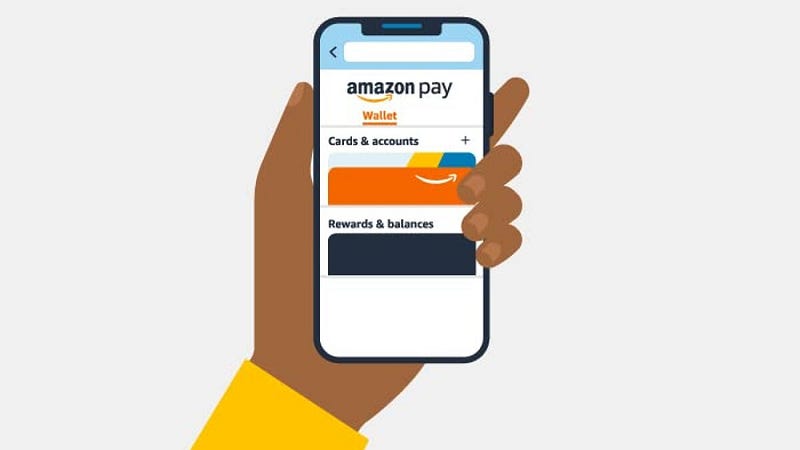
What is Amazon Pay
Amazon Pay is a digital payment service offered by Amazon, allowing customers to make secure and convenient online transactions on external websites using their Amazon account credentials. It provides a seamless checkout experience, leveraging the trust and familiarity of the Amazon brand, and offers various payment methods such as credit/debit cards, bank accounts, and Amazon Pay balance.
Important Features
- One-Click Checkout: Customers can make purchases with just one click, eliminating the need for repeatedly entering payment and shipping information.
- Fraud Protection: Amazon Pay employs advanced fraud detection mechanisms to safeguard transactions and protect customers’ financial data.
- Multi-Currency Support: It facilitates cross-border transactions by accepting payments in various currencies.
- Mobile Integration: Amazon Pay offers easy integration with mobile apps for a smooth payment experience on smartphones and tablets.
- Subscription Payments: Allows merchants to set up recurring billing for subscription-based services.
- Voice Commerce: Integration with Amazon’s Alexa enables voice-initiated payments.
- Refund and Dispute Management: Provides a streamlined process for handling refunds and customer disputes.
Scaling Requirements — Capacity Estimation
For the sake of simplicity, let me simulate a small-scale scenario for the Amazon Pay system design:
- Total Number of Users: 50 Million
- Daily Active Users (DAU): 15 Million
- Number of Transactions per User per Day: 2
- Total Number of Transactions per Day: 30 Million
- Read-to-Write Ratio: 100:1
Assumptions for Storage Estimation:
- Average Transaction Data Size: 1 KB
- Average User Data Size: 10 KB (includes user information and linked payment methods)
Storage Estimation:
Total Storage for Transaction Data per Day:
- 30 Million * 1 KB = 30 GB/day
- For 3 years: 30 GB/day * 365 days * 3 years = 32.85 TB
Total Storage for User Data per Day:
- 50 Million * 10 KB = 500 GB/day
- For 3 years: 500 GB/day * 365 days * 3 years = 547.5 TB
Total Storage for 3 Years:
- 32.85 TB + 547.5 TB = 580.35 TB
Requests per Second: Let’s assume the average transaction takes 100 milliseconds to process.
Total Number of Transactions per Second:
- 30 Million / (24 hours * 3600 seconds) ≈ 347.22 TPS
Total Number of Read Requests per Second (100:1 read-to-write ratio):
- 347.22 TPS * 100 = 34,722 TPS
from flask import Flask, jsonify, request
app = Flask(__name__)
# Mock database to store transaction and user data
transactions = {}
users = {}
# 1. Initiate Payment API Handler
@app.route('/api/payments/initiate', methods=['POST'])
def initiate_payment():
data = request.get_json()
customer_id = data['customer_id']
merchant_id = data['merchant_id']
amount = data['amount']
payment_method = data['payment_method']
# Simulate payment token generation
payment_token = f"PAYMENT_{customer_id}_{merchant_id}_{amount}"
# Save the payment token for later processing
transactions[payment_token] = {
'customer_id': customer_id,
'merchant_id': merchant_id,
'amount': amount,
'payment_method': payment_method,
'status': 'initiated'
}
return jsonify({'payment_token': payment_token}), 200
# 2. Process Payment API Handler
@app.route('/api/payments/process', methods=['POST'])
def process_payment():
data = request.get_json()
payment_token = data['payment_token']
# Check if payment token exists in transactions (validate token)
if payment_token in transactions:
transaction = transactions[payment_token]
# Simulate payment processing
# For simplicity, assume the payment is successful
transaction['status'] = 'completed'
transaction_id = f"TRANS_{transaction['customer_id']}_{transaction['merchant_id']}_{transaction['amount']}"
return jsonify({'status': 'success', 'transaction_id': transaction_id}), 200
else:
return jsonify({'error': 'Invalid payment token.'}), 400
# 3. Get Transaction Status API Handler
@app.route('/api/payments/status', methods=['GET'])
def get_transaction_status():
transaction_id = request.args.get('transaction_id')
# Check if the transaction ID exists
if transaction_id in transactions:
status = transactions[transaction_id]['status']
return jsonify({'status': status}), 200
else:
return jsonify({'error': 'Transaction not found.'}), 404
# 4. Add User API Handler (for simulation purposes)
@app.route('/api/users', methods=['POST'])
def add_user():
data = request.get_json()
user_id = data['user_id']
user_data = data['user_data']
# Save the user data to the database
users[user_id] = user_data
return jsonify({'message': 'User added successfully.'}), 201
if __name__ == '__main__':
app.run(debug=True)Data Model — ER requirements
- Customer: Stores customer information like name, email, and payment preferences.
- Merchant: Contains details about the merchants that integrate Amazon Pay.
- Transaction: Captures transaction details, including the payment amount, timestamp, and status.
- Payment Method: Stores information about the various payment methods linked to a customer’s account.
- Refunds: Tracks refund details associated with specific transactions.
Customer:
CustomerID: Integer (Primary Key)
Name: String
Email: String
PaymentMethods: List of PaymentMethod
PaymentMethod:
MethodID: Integer (Primary Key)
Type: String (e.g., credit card, bank account, Amazon Pay balance)
AccountInfo: String (details like credit card number, bank account details, etc.)
Transaction:
TransactionID: Integer (Primary Key)
CustomerID: Integer (Foreign Key referencing Customer)
Amount: Float
Timestamp: DateTime
Status: String (e.g., initiated, completed, refunded)
Refund:
RefundID: Integer (Primary Key)
TransactionID: Integer (Foreign Key referencing Transaction)
Amount: Float
Timestamp: DateTime
Status: String (e.g., initiated, completed)High Level Design
- Backend Services: Handles the core payment processing logic, including payment authorization, fraud detection, and transaction management.
- Payment Gateway Integration: Interfaces with external payment processors to facilitate transactions.
- Data Storage: Utilizes databases to store customer information, transaction history, and other relevant data.
- Caching Layer: Implements caching mechanisms to improve performance and reduce database load.
- Data Partitioning: Distributes data across multiple database nodes to avoid bottlenecks.
- Load Balancing: Distributes incoming requests across multiple server instances to ensure optimal resource utilization.
- Caching Strategy: Determines which data should be cached and the caching strategy to minimize database hits.
- Asynchronous Processing: Utilizes message queues for handling tasks like refund processing and email notifications.
Assumptions:
- High Reliability: The system needs to ensure data reliability, and thus, a fault-tolerant approach is required.
- Scalability: The system should handle a large number of transactions and scale horizontally to meet increasing demand.
- Security: Strong security measures must be implemented to protect sensitive financial data.
- Performance: Low-latency and high-throughput are essential to provide a seamless payment experience.
Main Components and Services for Amazon :
Mobile Client and Web Interface:
- Users interact with Amazon Pay through mobile apps or web browsers.
Application Servers:
- Handle user requests, process payments, and manage transactions.
- Communicate with external payment gateways to authorize payments securely.
Load Balancer:
- Distributes incoming requests across multiple application servers to ensure optimal resource utilization.
Cache (Memcache or Redis):
- Caches frequently accessed data to improve read performance and reduce database load.
CDN (Content Delivery Network):
- Improves the latency and throughput by caching and serving static content like images, CSS, and JS files.
Database:
- Uses a NoSQL database like MongoDB or DynamoDB to store user and transaction data in a highly reliable and scalable manner.
Storage (Amazon S3):
- Stores and serves uploaded photos securely.
Payment Gateway Integration:
- Integrates with external payment processors to authorize and process transactions securely.
Services for Amazon Pay :
Payment Service:
- Handles payment processing, including validation, authorization, and communication with payment gateways.
User Service:
- Manages user information, including registration, login, and user profile details.
Transaction Service:
- Handles the creation and management of transactions, including recording payments and transaction status.
Refund Service:
- Manages refund requests and processes refunds for completed transactions.
Feed Generation Service:
- Generates personalized feeds for users, showing relevant promotions, offers, and payment updates.
Notification Service:
- Sends real-time notifications to users for successful payments, refunds, and other transaction-related events.
Analytics Service:
- Collects and analyzes data to gain insights into user behavior and payment trends.
Security Service:
- Ensures the security of user data and financial transactions, implementing encryption and authentication measures.
from flask import Flask, jsonify, request
app = Flask(__name__)
# Mock database to store user and transaction data
users = {}
transactions = {}
# 1. Payment Service
@app.route('/api/payments/process', methods=['POST'])
def process_payment():
data = request.get_json()
customer_id = data['customer_id']
amount = data['amount']
payment_method = data['payment_method']
# Simulate payment processing
transaction_id = len(transactions) + 1
transactions[transaction_id] = {
'customer_id': customer_id,
'amount': amount,
'payment_method': payment_method,
'status': 'completed'
}
return jsonify({'transaction_id': transaction_id}), 200
# 2. User Service
@app.route('/api/users', methods=['POST'])
def add_user():
data = request.get_json()
user_id = len(users) + 1
users[user_id] = data
return jsonify({'user_id': user_id}), 201
@app.route('/api/users/<int:user_id>', methods=['GET'])
def get_user(user_id):
if user_id in users:
return jsonify(users[user_id]), 200
else:
return jsonify({'error': 'User not found.'}), 404
# 3. Transaction Service
@app.route('/api/transactions/<int:transaction_id>', methods=['GET'])
def get_transaction(transaction_id):
if transaction_id in transactions:
return jsonify(transactions[transaction_id]), 200
else:
return jsonify({'error': 'Transaction not found.'}), 404
# 4. Refund Service
@app.route('/api/transactions/<int:transaction_id>/refund', methods=['POST'])
def refund_transaction(transaction_id):
if transaction_id in transactions and transactions[transaction_id]['status'] == 'completed':
data = request.get_json()
refund_id = len(transactions) + 1
amount = data['amount']
refunds[refund_id] = {
'transaction_id': transaction_id,
'amount': amount,
'status': 'completed'
}
return jsonify({'refund_id': refund_id}), 200
else:
return jsonify({'error': 'Invalid transaction ID or the transaction is not completed.'}), 400
# 5. Feed Generation Service
@app.route('/api/feed', methods=['GET'])
def generate_feed():
# Simulate generating a personalized feed for the user
# In a real-world scenario, this would involve complex algorithms to curate relevant content.
return jsonify({'feed': []}), 200
if __name__ == '__main__':
app.run(debug=True)Basic Low Level Design
Customer:
CustomerID: Unique identifier for each customer.
Name: Name of the customer.
Email: Email address of the customer.
Password: Encrypted password for the customer's account.
PaymentMethod:
MethodID: Unique identifier for each payment method.
CustomerID: Foreign key referencing the Customer table.
Type: Type of payment method (e.g., credit card, bank account, Amazon Pay balance).
AccountInfo: Details of the payment method (e.g., credit card number, bank account details).
Transaction:
TransactionID: Unique identifier for each transaction.
CustomerID: Foreign key referencing the Customer table.
Amount: Amount of the transaction.
Timestamp: Date and time when the transaction occurred.
Status: Status of the transaction (e.g., initiated, completed, refunded).from flask import Flask, jsonify, request
app = Flask(__name__)
# Mock database to store transactions and refund details
transactions = {}
refunds = {}
@app.route('/api/payments/initiate', methods=['POST'])
def initiate_payment():
data = request.get_json()
customer_id = data['customer_id']
merchant_id = data['merchant_id']
amount = data['amount']
payment_method = data['payment_method']
# Simulate payment token generation (This could involve external payment gateway interaction)
payment_token = f"PAYMENT_{customer_id}_{merchant_id}_{amount}"
# Save the payment token for later processing
transactions[payment_token] = {
'customer_id': customer_id,
'merchant_id': merchant_id,
'amount': amount,
'status': 'initiated'
}
return jsonify({'payment_token': payment_token}), 200
@app.route('/api/payments/process', methods=['POST'])
def process_payment():
data = request.get_json()
payment_token = data['payment_token']
# Check if payment token exists in transactions (validate token)
if payment_token in transactions:
transaction = transactions[payment_token]
# Simulate payment processing (This could involve interaction with payment gateways)
# For simplicity, assume the payment is successful
transaction['status'] = 'completed'
transaction_id = f"TRANS_{transaction['customer_id']}_{transaction['merchant_id']}_{transaction['amount']}"
return jsonify({'status': 'success', 'transaction_id': transaction_id}), 200
else:
return jsonify({'error': 'Invalid payment token.'}), 400
@app.route('/api/payments/refund', methods=['POST'])
def refund_payment():
data = request.get_json()
transaction_id = data['transaction_id']
amount = data['amount']
# Check if the transaction ID exists in completed transactions
if transaction_id in transactions and transactions[transaction_id]['status'] == 'completed':
# Simulate refund processing
refund_id = f"REFUND_{transaction_id}_{amount}"
refunds[refund_id] = {
'transaction_id': transaction_id,
'amount': amount,
'status': 'completed'
}
return jsonify({'refund_id': refund_id}), 200
else:
return jsonify({'error': 'Invalid transaction ID or the transaction is not completed.'}), 400
@app.route('/api/payments/status', methods=['GET'])
def get_transaction_status():
transaction_id = request.args.get('transaction_id')
# Check if the transaction ID exists
if transaction_id in transactions:
status = transactions[transaction_id]['status']
return jsonify({'status': status}), 200
else:
return jsonify({'error': 'Transaction not found.'}), 404
if __name__ == '__main__':
app.run(debug=True)API Design
from flask import Flask, request, jsonify
app = Flask(__name__)
# Mock database to store customer and payment method data
customers = {}
payment_methods = {}
# Create Customer API
@app.route('/api/customers', methods=['POST'])
def create_customer():
data = request.get_json()
customer_id = len(customers) + 1
customer = {
'customer_id': customer_id,
'name': data['name'],
'email': data['email']
}
customers[customer_id] = customer
return jsonify(customer), 201
# Get Customer Details API
@app.route('/api/customers/<int:customer_id>', methods=['GET'])
def get_customer(customer_id):
if customer_id in customers:
return jsonify(customers[customer_id]), 200
else:
return jsonify({'error': 'Customer not found'}), 404
# Add Payment Method API
@app.route('/api/customers/<int:customer_id>/payment-methods', methods=['POST'])
def add_payment_method(customer_id):
data = request.get_json()
payment_method_id = len(payment_methods) + 1
payment_method = {
'method_id': payment_method_id,
'type': data['type'],
'account_info': data['account_info']
}
payment_methods[payment_method_id] = payment_method
return jsonify(payment_method), 201
# Get Payment Methods API
@app.route('/api/customers/<int:customer_id>/payment-methods', methods=['GET'])
def get_payment_methods(customer_id):
if customer_id in customers:
customer_payment_methods = []
for payment_method_id, payment_method in payment_methods.items():
if payment_method_id == customer_id:
customer_payment_methods.append(payment_method)
return jsonify({'payment_methods': customer_payment_methods}), 200
else:
return jsonify({'error': 'Customer not found'}), 404
if __name__ == '__main__':
app.run(debug=True)Initiate Payment:
Endpoint: /api/payments/initiate
Method: POST
Parameters:
customer_id: ID of the customer initiating the payment.
merchant_id: ID of the merchant receiving the payment.
amount: Payment amount.
payment_method: Selected payment method (e.g., credit card, Amazon Pay balance).
Response: JSON containing a payment token or error message.
Process Payment:
Endpoint: /api/payments/process
Method: POST
Parameters:
payment_token: Token obtained from the payment initiation step.
Response: JSON containing payment status (e.g., success, failure) and transaction ID.
Refund:
Endpoint: /api/payments/refund
Method: POST
Parameters:
transaction_id: ID of the transaction to be refunded.
amount: Amount to be refunded.
Response: JSON containing refund status and refund ID.
Get Transaction Status:
Endpoint: /api/payments/status
Method: GET
Parameters:
transaction_id: ID of the transaction to check status.
Response: JSON containing transaction status (e.g., initiated, completed).Complete Detailed Design
Coming soon! It will be covered on youtube channel.
Subscribe to youtube channel :
Complete Code implementation
from flask import Flask, jsonify, request
app = Flask(__name__)
# Mock database to store transactions and refund details
transactions = {}
refunds = {}
# 1. One-Click Checkout
@app.route('/api/payments/one-click', methods=['POST'])
def one_click_checkout():
data = request.get_json()
customer_id = data['customer_id']
merchant_id = data['merchant_id']
amount = data['amount']
# Simulate payment token generation for one-click checkout
payment_token = f"ONE_CLICK_{customer_id}_{merchant_id}_{amount}"
# Save the payment token for later processing
transactions[payment_token] = {
'customer_id': customer_id,
'merchant_id': merchant_id,
'amount': amount,
'status': 'completed'
}
return jsonify({'payment_token': payment_token}), 200
# 3. Multi-Currency Support
@app.route('/api/payments/multi-currency', methods=['POST'])
def multi_currency_support():
data = request.get_json()
customer_id = data['customer_id']
merchant_id = data['merchant_id']
amount = data['amount']
currency = data['currency']
# Simulate payment token generation for multi-currency support
payment_token = f"MULTI_CURRENCY_{customer_id}_{merchant_id}_{amount}_{currency}"
# Save the payment token for later processing
transactions[payment_token] = {
'customer_id': customer_id,
'merchant_id': merchant_id,
'amount': amount,
'currency': currency,
'status': 'completed'
}
return jsonify({'payment_token': payment_token}), 200
# 4. Mobile Integration
@app.route('/api/payments/mobile-integration', methods=['POST'])
def mobile_integration():
data = request.get_json()
customer_id = data['customer_id']
merchant_id = data['merchant_id']
amount = data['amount']
# Simulate payment token generation for mobile integration
payment_token = f"MOBILE_{customer_id}_{merchant_id}_{amount}"
# Save the payment token for later processing
transactions[payment_token] = {
'customer_id': customer_id,
'merchant_id': merchant_id,
'amount': amount,
'status': 'completed'
}
return jsonify({'payment_token': payment_token}), 200
# 5. Subscription Payments
@app.route('/api/payments/subscription', methods=['POST'])
def subscription_payments():
data = request.get_json()
customer_id = data['customer_id']
merchant_id = data['merchant_id']
amount = data['amount']
frequency = data['frequency'] # e.g., monthly, annually
# Simulate payment token generation for subscription payments
payment_token = f"SUBSCRIPTION_{customer_id}_{merchant_id}_{amount}_{frequency}"
# Save the payment token for later processing
transactions[payment_token] = {
'customer_id': customer_id,
'merchant_id': merchant_id,
'amount': amount,
'frequency': frequency,
'status': 'completed'
}
return jsonify({'payment_token': payment_token}), 200
# 6. Voice Commerce
@app.route('/api/payments/voice-commerce', methods=['POST'])
def voice_commerce():
data = request.get_json()
customer_id = data['customer_id']
merchant_id = data['merchant_id']
amount = data['amount']
# Simulate payment token generation for voice commerce
payment_token = f"VOICE_{customer_id}_{merchant_id}_{amount}"
# Save the payment token for later processing
transactions[payment_token] = {
'customer_id': customer_id,
'merchant_id': merchant_id,
'amount': amount,
'status': 'completed'
}
return jsonify({'payment_token': payment_token}), 200
# 7. Refund and Dispute Management
@app.route('/api/payments/refund', methods=['POST'])
def refund_payment():
data = request.get_json()
transaction_id = data['transaction_id']
amount = data['amount']
# Check if the transaction ID exists in completed transactions
if transaction_id in transactions and transactions[transaction_id]['status'] == 'completed':
# Simulate refund processing
refund_id = f"REFUND_{transaction_id}_{amount}"
refunds[refund_id] = {
'transaction_id': transaction_id,
'amount': amount,
'status': 'completed'
}
return jsonify({'refund_id': refund_id}), 200
else:
return jsonify({'error': 'Invalid transaction ID or the transaction is not completed.'}), 400
if __name__ == '__main__':
app.run(debug=True)System Design — Transfer Wise
We will be discussing in depth -
- What is Transfer Wise
- Important Features
- Scaling Requirements
- Data Model — ER requirements
- High Level Design
- Basic Low Level Design
- API Design
- Complete Detailed Design
- Complete Code Implementation
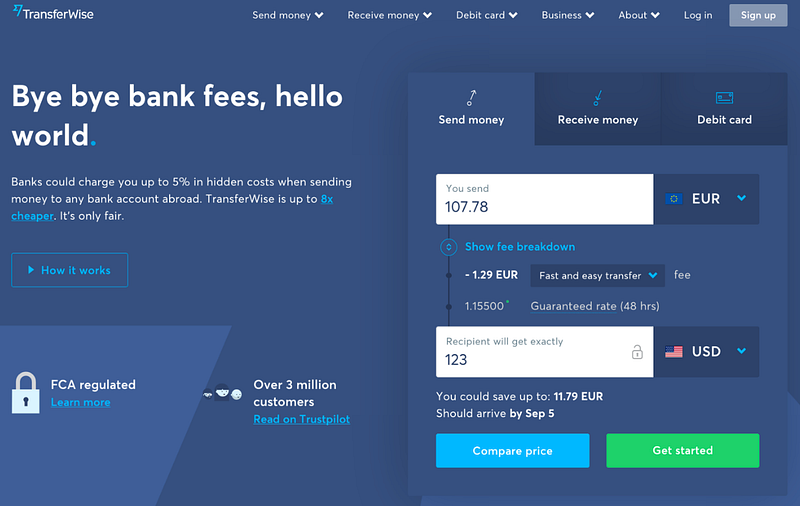
What is Transfer Wise
Important Features
Scaling Requirements — Capacity Estimation
Data Model — ER requirements
High Level Design
Basic Low Level Design
API Design
Complete Detailed Design
Coming soon! It will be covered on youtube channel.
Subscribe to youtube channel :
Complete Code implementation
System Design — Remitly
We will be discussing in depth -
- What is Remitly
- Important Features
- Scaling Requirements
- Data Model — ER requirements
- High Level Design
- Basic Low Level Design
- API Design
- Complete Detailed Design
- Complete Code Implementation
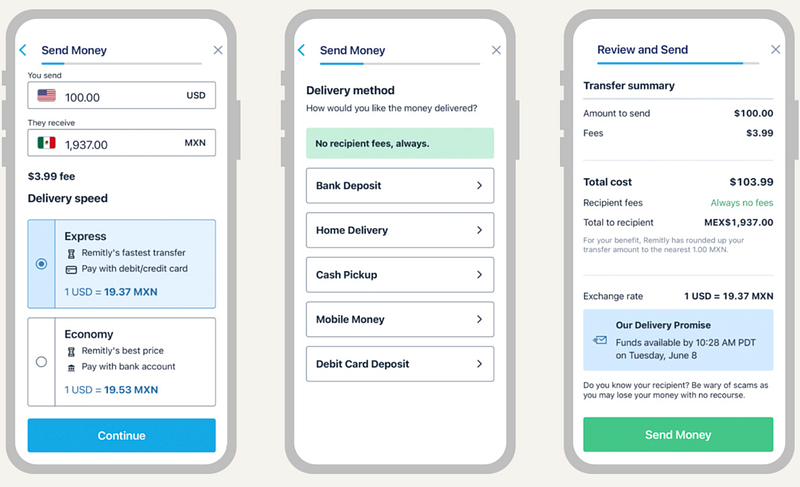
What is Remitly
Remitly is a digital remittance service that enables users to send money internationally, allowing them to support their loved ones across borders. The platform provides a fast, secure, and cost-effective way to transfer funds to different countries, making it easier for individuals and families to manage their financial needs globally.
Important Features
- Fast and Reliable Transfers: Remitly prioritizes speed and reliability in money transfers, ensuring that funds reach the intended recipients promptly and securely.
- Competitive Exchange Rates: The platform offers competitive exchange rates to provide users with the best value for their money transfers.
- User-Friendly Interface: Remitly’s user interface is designed to be intuitive and user-friendly, making it easy for both tech-savvy and non-tech-savvy users to navigate the platform.
- Multiple Payment Options: Users can fund their remittances using various payment methods, such as bank accounts, debit cards, and credit cards, adding flexibility and convenience.
- Real-time Status Updates: Remitly keeps users informed about the status of their transactions in real-time, offering transparency and peace of mind.
Scaling Requirements — Capacity Estimation
Let me cover a small scale simulation —
- Total number of users: 1.2 Billion
- Daily active users (DAU): 300 million
- Number of transactions initiated by each user per day: 2
- Total number of transactions per day: 600 million transactions/day
- Read to write ratio: 100:1
- Total number of transactions read per day: 600 million * 100 = 60 billion reads/day
- Total number of transactions written per day: 600 million writes/day
- Storage per transaction: 1 KB (assuming small data size for a transaction)
- Total storage per day: 600 million * 1 KB = 600 GB/day
For the sake of simplicity, let’s assume a simulation for the next 3 years:
- Total storage for 3 years: 600 GB * 365 days/year * 3 years = 657 TB
- Requests per second: 600 million / 24 hours / 3600 seconds ≈ 6,944 requests per second
Data Model — ER requirements
- User: Stores user details, authentication credentials, and transaction history.
- Recipient: Contains information about the recipients of the remittances, including their personal details and receiving country.
- Transaction: Represents individual money transfer transactions, including the sender, recipient, amount, and status.
- Payment: Records the various payment methods used by users to fund their remittances.
Users:
User_ID: INT (Primary Key)
Username: STRING
Email: STRING
Password: STRING
Transactions:
Transaction_ID: INT (Primary Key)
Sender_ID: INT (Foreign Key referencing Users.User_ID)
Recipient_ID: INT (Foreign Key referencing Users.User_ID)
Amount: FLOAT
Timestamp: DATETIME
TransferStatus:
Status_ID: INT (Primary Key)
Status_Name: STRING
TransferHistory:
Transfer_ID: INT (Primary Key)
Transaction_ID: INT (Foreign Key referencing Transactions.Transaction_ID)
Status_ID: INT (Foreign Key referencing TransferStatus.Status_ID)
Timestamp: DATETIMEHigh Level Design
- Horizontal Scaling: Adding more servers and distributing the load across them to handle increased user traffic.
- Caching Mechanisms: Implementing caching mechanisms to reduce the load on the database and improve response times.
- Asynchronous Processing: Utilizing message queues for asynchronous processing of tasks to enhance system responsiveness.
Assumptions:
- Remitly has a global user base with millions of users worldwide.
- The system needs to handle a high volume of transactions and provide low-latency responses.
- Consistency and reliability are critical in financial transactions.
Main Components and Services:
- Mobile Client: This represents users accessing the Remitly platform through mobile applications.
- Application Servers: These servers handle read and write operations, user authentication, and notification services.
- Load Balancer: Routes and distributes requests to the appropriate servers based on load and availability.
- Cache (Memcache): A distributed caching system to improve the performance and reduce database load.
- CDN: Content Delivery Network to improve the latency and throughput for serving images, etc.
- Database: NoSQL databases to store user data, transactions, and transfer history.
- Authentication Service: Handles user authentication and authorization for secure access.
- Transfer Service: Processes and manages fund transfers between users.
- Notification Service: Sends real-time notifications to users for transaction updates.
- Audit Service: Maintains a record of all transactions and provides an audit trail for security and compliance.
- Analytics Service: Collects and analyzes user data for insights and performance optimization.
- Reporting Service: Generates reports on user activity, transaction volumes, etc., for analysis and monitoring.
User Service
class UserService:
def __init__(self):
self.users = {}
def create_user(self, username, email, password):
user_id = len(self.users) + 1
user = {
"user_id": user_id,
"username": username,
"email": email,
"password": password
}
self.users[user_id] = user
return user
def get_user_by_id(self, user_id):
return self.users.get(user_id)
def get_user_by_email(self, email):
for user in self.users.values():
if user['email'] == email:
return user
return None
def get_user_by_username(self, username):
for user in self.users.values():
if user['username'] == username:
return user
return NoneTransaction Service:
class TransactionService:
def __init__(self):
self.transactions = []
def create_transaction(self, sender_id, recipient_id, amount):
transaction_id = len(self.transactions) + 1
timestamp = datetime.datetime.now()
transaction = {
"transaction_id": transaction_id,
"sender_id": sender_id,
"recipient_id": recipient_id,
"amount": amount,
"timestamp": timestamp
}
self.transactions.append(transaction)
return transactionTransfer History Service:
class TransferHistoryService:
def __init__(self):
self.transfer_history = []
def add_transfer_history(self, transaction_id, status_id):
transfer_id = len(self.transfer_history) + 1
timestamp = datetime.datetime.now()
transfer = {
"transfer_id": transfer_id,
"transaction_id": transaction_id,
"status_id": status_id,
"timestamp": timestamp
}
self.transfer_history.append(transfer)
return transferBasic Low Level Design
- When a user initiates a money transfer, the frontend application sends a request to the backend service.
- The backend service authenticates the user and validates the transaction details.
- If the transaction is valid, the backend service calculates the exchange rate, fees, and the amount to be received by the recipient.
- The backend service then communicates with the external payment gateway to process the payment.
- Once the payment is successful, the transaction status is updated in the database, and a notification is sent to the user.
API Design
POST /users: Create a new user account.POST /login: Authenticate the user and generate an access token.GET /transactions: Retrieve the user's transaction history.POST /transfer: Initiate a money transfer.GET /exchange-rates: Get the latest exchange rates.
from flask import Flask, request, jsonify
app = Flask(__name__)
# In-memory data store for users and transactions (for demo purposes)
users = {}
transactions = []
# Endpoint to create a new user
@app.route('/users', methods=['POST'])
def create_user():
data = request.get_json()
user_id = len(users) + 1
user = {
"user_id": user_id,
"username": data['username'],
"email": data['email'],
"full_name": data['full_name']
}
users[user_id] = user
return jsonify(user), 201
# Endpoint to initiate a money transfer
@app.route('/transfer', methods=['POST'])
def initiate_transfer():
data = request.get_json()
transaction_id = len(transactions) + 1
transaction = {
"transaction_id": transaction_id,
"user_id": data['user_id'],
"recipient_name": data['recipient_name'],
"recipient_country": data['recipient_country'],
"amount": data['amount'],
"currency": data['currency'],
"status": "pending"
}
transactions.append(transaction)
return jsonify(transaction), 202
# Endpoint to retrieve transaction history
@app.route('/transactions', methods=['GET'])
def get_transaction_history():
user_id = int(request.args.get('user_id'))
user_transactions = [t for t in transactions if t['user_id'] == user_id]
return jsonify({"transactions": user_transactions}), 200
if __name__ == '__main__':
app.run()Complete Detailed Design
Coming soon! It will be covered on youtube channel.
Subscribe to youtube channel :
Complete Code implementation
from flask import Flask, request, jsonify
import datetime
app = Flask(__name__)
# Endpoint for creating a new user
@app.route('/users', methods=['POST'])
def create_user():
data = request.get_json()
user_id = len(users) + 1
user = User(user_id, data['username'], data['email'], data['password'])
users[user_id] = user
return jsonify({"user_id": user_id}), 201
# Endpoint for getting user information
@app.route('/users/<int:user_id>', methods=['GET'])
def get_user(user_id):
user = users.get(user_id)
if user:
return jsonify({
"user_id": user.user_id,
"username": user.username,
"email": user.email,
"balance": user.balance,
"transactions": [{"transaction_id": t.transaction_id, "sender": t.sender.username, "recipient": t.recipient.username, "amount": t.amount, "timestamp": t.timestamp} for t in user.transactions]
}), 200
else:
return jsonify({"message": "User not found"}), 404
# Endpoint for creating a new transaction
@app.route('/transactions', methods=['POST'])
def create_transaction():
data = request.get_json()
sender_id = data['sender_id']
recipient_id = data['recipient_id']
amount = data['amount']
timestamp = datetime.datetime.now()
global transaction_id_counter
transaction_id = transaction_id_counter
transaction_id_counter += 1
sender = users.get(sender_id)
recipient = users.get(recipient_id)
if not sender or not recipient:
return jsonify({"message": "Invalid sender or recipient"}), 404
if sender.balance >= amount:
sender.balance -= amount
recipient.balance += amount
transaction = Transaction(transaction_id, sender, recipient, amount, timestamp)
sender.transactions.append(transaction)
recipient.transactions.append(transaction)
transactions.append(transaction)
return jsonify({"transaction_id": transaction_id}), 201
else:
return jsonify({"message": "Insufficient balance"}), 400
if __name__ == "__main__":
app.run()import time
class Remitly:
def __init__(self):
# Initialize the remittance system (add necessary attributes and setup here)
self.transactions = []
def initiate_transaction(self, sender_id, recipient_id, amount):
# Logic for initiating a transaction from the sender to the recipient
transaction = {
"transaction_id": len(self.transactions) + 1,
"sender_id": sender_id,
"recipient_id": recipient_id,
"amount": amount,
"status": "pending"
}
self.transactions.append(transaction)
time.sleep(0.01) # Simulate transaction processing time
transaction["status"] = "completed" # Simulate transaction completion
return transaction
def get_transaction(self, transaction_id):
# Logic to fetch the details of a specific transaction
for transaction in self.transactions:
if transaction["transaction_id"] == transaction_id:
return transaction
return None
if __name__ == "__main__":
remitly = Remitly()
# Example code for initiating transactions
sender_id = 123
recipient_id = 456
amount = 100.00
transaction1 = remitly.initiate_transaction(sender_id, recipient_id, amount)
print("Transaction 1 initiated:", transaction1)
transaction2 = remitly.initiate_transaction(sender_id, recipient_id, amount)
print("Transaction 2 initiated:", transaction2)
# Example code for fetching transaction details
transaction_id = 2
transaction = remitly.get_transaction(transaction_id)
if transaction:
print(f"Transaction {transaction_id} details:", transaction)
else:
print(f"Transaction {transaction_id} not found.")System Design — iCloud
We will be discussing in depth -
- What is iCloud
- Important Features
- Scaling Requirements
- Data Model — ER requirements
- High Level Design
- Basic Low Level Design
- API Design
- Complete Detailed Design
- Complete Code Implementation

What is iCloud
Apple iCloud is a cloud-based storage and synchronization service offered by Apple Inc. It enables users to store various types of data, such as photos, videos, documents, contacts, and app data, securely in the cloud. iCloud seamlessly syncs this data across all Apple devices, including iPhones, iPads, Macs, and even Windows PCs. It provides a convenient way for users to access their content from anywhere with an internet connection, ensuring a unified experience across their devices.
Important Features
a. Data Synchronization: iCloud ensures seamless synchronization of data across multiple devices. When a user updates or adds new content on one device, it automatically reflects on all other linked devices.
b. Backup and Restore: Apple iCloud offers automatic device backups, allowing users to restore their data effortlessly when switching to a new device or during data loss scenarios.
c. Photo Library: The iCloud Photo Library stores all photos and videos in their original resolution, making them accessible from any device. It also provides optimized storage to save space on the user’s device.
d. Document Collaboration: iCloud Drive allows users to collaborate on documents in real-time, similar to other cloud-based productivity tools.
e. Find My: This feature helps locate lost Apple devices, even if they are offline, by utilizing other nearby Apple devices to relay the location.
Scaling Requirements — Capacity Estimation
For the sake of simplicity, I’ll consider a smaller scale simulation for Apple iCloud.
- Total number of users: 10 Million
- Daily active users (DAU): 2 Million
- Number of files uploaded per user/day: 5
- Total number of files uploaded per day: 10 Million files/day
- Read to write ratio: 100:1 (read-heavy system)
- Total storage per day: 10 Million * 5 MB (average file size) = 50 TB/day
- For the next 3 years: 50 TB/day * 5 * 365 = 91.25 PB
Requests per Second:
Let’s assume the system experiences peak traffic during certain hours of the day when the majority of users access their files.
- Peak hours: 2 hours
- Requests during peak hours: 2 Million / 3600 seconds * 2 hours = 1111.11 requests/second (approx. 1111 RPS)
class AppleiCloud:
def __init__(self):
self.file_storage = {}
def upload_file(self, user_id, file_name, file_data):
# Upload the file to user's iCloud storage
if user_id not in self.file_storage:
self.file_storage[user_id] = []
self.file_storage[user_id].append((file_name, file_data))
def download_file(self, user_id, file_name):
# Download the file from user's iCloud storage
files = self.file_storage.get(user_id, [])
for name, data in files:
if name == file_name:
return data
return None
# Sample usage:
if __name__ == '__main__':
icloud = AppleiCloud()
# Upload files for users
icloud.upload_file(12345, "file1.txt", b"This is file 1 content.")
icloud.upload_file(12345, "file2.txt", b"This is file 2 content.")
icloud.upload_file(67890, "document.pdf", b"This is a PDF document.")
# Download files for users
file_data = icloud.download_file(12345, "file1.txt")
if file_data:
print("File 1 Content:", file_data.decode())
else:
print("File not found.")
file_data = icloud.download_file(67890, "document.pdf")
if file_data:
print("PDF Document Content:", file_data.decode())
else:
print("File not found.")Data Model — ER requirements
a. Users: Store user information, authentication credentials, and preferences.
b. Files and Folders: Represent user files and organize them in a hierarchical folder structure.
c. Photos and Videos: Store multimedia files along with metadata like timestamps and geolocation data.
d. Contacts and Calendars: Manage user contacts and calendar events.
e. App Data: Securely store data generated by applications linked to iCloud.
High Level Design
a. Load Balancing: Employing load balancers to distribute user requests evenly across multiple servers to ensure optimal resource utilization and prevent overload.
b. Horizontal Scaling: Scaling out the infrastructure by adding more servers to handle increased user demands and maintain high availability.
c. Content Delivery Networks (CDNs): Utilizing CDNs to cache and deliver content closer to users, reducing latency and bandwidth consumption.
Main Components and Services:
Mobile Client:
- Users accessing Apple iCloud through mobile devices.
Application Servers:
- Responsible for handling read, write, and notification services.
- Implements the business logic for photo uploads, user interactions (like, comment, follow), and feed generation.
Load Balancer:
- Routes and directs user requests to the appropriate application server.
Cache (Memcache or Redis):
- Improves performance and reduces database load by caching frequently accessed data.
CDN (Content Delivery Network):
- Improves latency and throughput by caching and delivering photos closer to the user’s location.
Database (NoSQL or NewSQL):
- Stores user and photo data.
- For high reliability, use replicas and sharding to handle read-heavy workloads.
Storage (HDFS or Amazon S3):
- Stores and serves uploaded photos.
Basic Low Level Design
# Sample high-level design for Apple iCloud
class AppleiCloud:
def __init__(self):
# Initialize necessary components and services
pass
def authenticate_user(self, username, password):
if username in users and users[username] == password:
# In a real-world scenario, you should generate a more secure token using JWT or OAuth
token = username
return token
else:
return None
def upload_file(self, token, file, filename):
if not self.is_valid_token(token):
return False, "Invalid token."
if file:
data_storage[filename] = file
return True, "File uploaded successfully."
else:
return False, "No file provided."
def download_file(self, token, filename):
if not self.is_valid_token(token):
return None
if filename in data_storage:
return data_storage[filename]
else:
return None
def sync_data(self, token, data):
if not self.is_valid_token(token):
return False, "Invalid token."
# Implement data synchronization logic here
# For simplicity, we're just storing the data in data_storage dictionary
data_storage[token] = data
return True, "Data synchronized successfully."
def is_valid_token(self, token):
# In a real-world scenario, validate the token using a proper authentication mechanism
return token in users
# Sample usage:
if __name__ == '__main__':
icloud = AppleiCloud()
# Authenticate user
token = icloud.authenticate_user("user1", "password1")
if token:
print("Authentication successful. Token:", token)
else:
print("Authentication failed.")
# Upload a file
success, message = icloud.upload_file(token, b"This is some file content.", "sample_file.txt")
print(message)
# Download the file
file_content = icloud.download_file(token, "sample_file.txt")
if file_content:
print("File content:", file_content)
else:
print("File not found.")
# Synchronize data
data = {"key": "value"}
success, message = icloud.sync_data(token, data)
print(message)API Design
Authentication Endpoint:
Endpoint: /api/authenticate
Method: POST
Description: This endpoint handles user authentication and generates an authentication token for subsequent API calls.
Parameters: username, password
Response: JSON object containing success and token if authentication is successful.
File Upload Endpoint:
Endpoint: /api/upload
Method: POST
Description: Allows users to upload files to their iCloud storage.
Parameters: file (binary data), filename, token (authentication token)
Response: JSON object containing success if the file upload is successful.
File Download Endpoint:
Endpoint: /api/download
Method: GET
Description: Allows users to download files from their iCloud storage.
Parameters: filename, token (authentication token)
Response: File stream to download the requested file.
Data Synchronization Endpoint:
Endpoint: /api/sync
Method: POST
Description: Synchronizes user data across devices linked to their iCloud account.
Parameters: data (JSON payload), token (authentication token)
Response: JSON object containing success if synchronization is successful.Complete Detailed Design
Coming soon! It will be covered on youtube channel.
Subscribe to youtube channel :
Complete Code implementation
a. Data Synchronization:
class AppleiCloud:
def __init__(self):
self.data = {} def synchronize_data(self, device_id, data):
self.data[device_id] = data def get_synchronized_data(self, device_id):
return self.data.get(device_id, {})# Sample usage:
icloud = AppleiCloud()# Synchronize data for device1
icloud.synchronize_data("device1", {"key1": "value1", "key2": "value2"})# Get synchronized data for device1
print(icloud.get_synchronized_data("device1")) # Output: {'key1': 'value1', 'key2': 'value2'}b. Backup and Restore:
class AppleiCloud:
def __init__(self):
self.backup = {} def backup_data(self, device_id, data):
self.backup[device_id] = data def restore_data(self, device_id):
return self.backup.get(device_id, None)# Sample usage:
icloud = AppleiCloud()# Backup data for device1
icloud.backup_data("device1", {"key1": "value1", "key2": "value2"})# Restore data for device1
restored_data = icloud.restore_data("device1")
print(restored_data) # Output: {'key1': 'value1', 'key2': 'value2'}c. Photo Library:
class AppleiCloud:
def __init__(self):
self.photo_library = {} def upload_photo(self, device_id, photo_name, photo_data):
self.photo_library.setdefault(device_id, {})[photo_name] = photo_data def get_photo(self, device_id, photo_name):
return self.photo_library.get(device_id, {}).get(photo_name, None)# Sample usage:
icloud = AppleiCloud()# Upload a photo for device1
icloud.upload_photo("device1", "photo1.jpg", b"Binary data of the photo")# Get the photo for device1
photo_data = icloud.get_photo("device1", "photo1.jpg")
print(photo_data) # Output: b'Binary data of the photo'd. Document Collaboration:
class AppleiCloud:
def __init__(self):
self.documents = {} def collaborate_on_document(self, document_id, collaborator, content):
self.documents.setdefault(document_id, {}).setdefault(collaborator, []).append(content) def get_collaborators(self, document_id):
return list(self.documents.get(document_id, {}).keys()) def get_document_content(self, document_id, collaborator):
return self.documents.get(document_id, {}).get(collaborator, [])# Sample usage:
icloud = AppleiCloud()# Document collaboration for document1
icloud.collaborate_on_document("document1", "user1", "Content from user1")
icloud.collaborate_on_document("document1", "user2", "Content from user2")# Get collaborators for document1
collaborators = icloud.get_collaborators("document1")
print(collaborators) # Output: ['user1', 'user2']# Get document content for user1
user1_content = icloud.get_document_content("document1", "user1")
print(user1_content) # Output: ['Content from user1']e. Find My:
class AppleiCloud:
def __init__(self):
self.devices = {} def register_device(self, device_id, device_name):
self.devices[device_id] = device_name def find_device(self, device_id):
return self.devices.get(device_id, None)# Sample usage:
icloud = AppleiCloud()# Register devices
icloud.register_device("device1", "iPhone 12")
icloud.register_device("device2", "MacBook Pro")# Find devices
device_name = icloud.find_device("device1")
print(device_name) # Output: iPhone 12device_name = icloud.find_device("device3") # Non-existent device
print(device_name) # Output: Nonefrom flask import Flask, request, jsonify
app = Flask(__name__)
# Sample user data for authentication (Replace this with a proper authentication mechanism)
users = {
"user1": "password1",
"user2": "password2"
}
# Sample data storage (Replace this with a proper data storage mechanism)
data_storage = {}
@app.route('/api/authenticate', methods=['POST'])
def authenticate():
username = request.form.get('username')
password = request.form.get('password')
if username in users and users[username] == password:
# In a real-world scenario, you should generate a more secure token using JWT or OAuth
token = username
return jsonify({"success": True, "token": token})
else:
return jsonify({"success": False, "message": "Authentication failed."})
@app.route('/api/upload', methods=['POST'])
def upload_file():
token = request.form.get('token')
if not is_valid_token(token):
return jsonify({"success": False, "message": "Invalid token."})
file = request.files.get('file')
if file:
filename = request.form.get('filename')
data_storage[filename] = file.read()
return jsonify({"success": True})
else:
return jsonify({"success": False, "message": "No file provided."})
@app.route('/api/download', methods=['GET'])
def download_file():
token = request.args.get('token')
if not is_valid_token(token):
return jsonify({"success": False, "message": "Invalid token."})
filename = request.args.get('filename')
if filename in data_storage:
return data_storage[filename]
else:
return jsonify({"success": False, "message": "File not found."})
@app.route('/api/sync', methods=['POST'])
def sync_data():
token = request.form.get('token')
if not is_valid_token(token):
return jsonify({"success": False, "message": "Invalid token."})
data = request.form.get('data')
# Implement data synchronization logic here
# For simplicity, we're just storing the data in data_storage dictionary
data_storage[token] = data
return jsonify({"success": True})
def is_valid_token(token):
# In a real-world scenario, validate the token using a proper authentication mechanism
return token in users
if __name__ == '__main__':
app.run(debug=True)System Design — Notification System
We will be discussing in depth -
- What is Notification System
- Important Features
- Scaling Requirements
- Data Model — ER requirements
- High Level Design
- Basic Low Level Design
- API Design
- Complete Detailed Design
- Complete Code Implementation
What is Notification System
A Mobile Push Notification System is a crucial component in modern mobile applications that enables developers to send real-time notifications to users’ devices. These notifications appear directly on a user’s mobile screen, even when the application is not actively running. The system plays a vital role in engaging users, providing timely information, and enhancing the overall user experience.
Important Features
- Real-Time Delivery: The system must be capable of delivering notifications instantly to the target devices, ensuring timely communication.
- Personalization: Users often prefer personalized notifications relevant to their interests and behavior, so the system should support customization based on user preferences.
- Multi-platform Support: To reach a broader audience, the system needs to support various platforms, including iOS, Android, and web applications.
- Broadcast and Segmentation: It should allow sending notifications to individual users or a specific segment of users, facilitating targeted communication.
- Delivery Status Tracking: The system should track the delivery status of notifications, enabling analytics and monitoring of the notification effectiveness.
- Rich Media Support: Supporting images, videos, and interactive content in notifications can make them more engaging.
- Scheduled Notifications: The ability to schedule notifications for future delivery is essential for planned campaigns and reminders.
Scaling Requirements — Capacity Estimation
For the sake of simplicity, I’ll consider the following small scale simulation for a Push Notification System:
- Total number of users: 10,000
- Daily active users (DAU): 3,000
- Average number of notifications sent per user/day: 2
- Total number of notifications sent per day: 6,000
Since the system is read-heavy, let’s assume the read to write ratio is 100:1.
Total number of notifications written per day = 6,000/100 = 60
Storage Estimation:
Let’s assume each notification requires 5KB of storage on average.
Total Storage per day = 60 * 5KB = 300KB/day
For the next 3 years:
- Total Storage for 1 year = 300KB * 365 days = 109.5MB
- Total Storage for 3 years = 109.5MB * 3 = 328.5MB
Requests per Second:
Let’s assume the notification delivery rate is evenly distributed throughout the day.
Notifications per second = 6,000 / (24 hours * 3600 seconds) ≈ 0.07 notifications/second
import time
class PushNotificationSystem:
def __init__(self):
self.notification_count = 0
def send_notification(self, user_id, message):
# Simulate sending a notification
self.notification_count += 1
notification_id = f"{user_id}-{self.notification_count}"
print(f"Sending notification {notification_id}: {message}")
def simulate_push_notification_system():
push_notification_system = PushNotificationSystem()
total_users = 10000
daily_active_users = 3000
notifications_per_user_per_day = 2
for user_id in range(1, total_users + 1):
for notification_num in range(1, notifications_per_user_per_day + 1):
message = f"Notification {notification_num} for user {user_id}"
push_notification_system.send_notification(user_id, message)
time.sleep(1) # Simulate time delay for sending notifications
if __name__ == "__main__":
simulate_push_notification_system()Data Model — ER requirements
- User: Represents registered users of the application, each with a unique identifier.
- Device: Stores information about the user’s devices (e.g., device ID, token) to send notifications.
- Notification: Contains the notification content, metadata, delivery status, and timestamps.
- Segments (optional): If supporting segmentation, define entities to group users based on specific attributes.
User:
Fields:
User ID: Unique identifier for each user.
Username: User's username for identification.
Email: User's email for communication.
Device Token: Unique token associated with the user's device for sending notifications.
Notification:
Fields:
Notification ID: Unique identifier for each notification.
User ID: Foreign key to associate the notification with a specific user.
Message: Content of the notification.
Timestamp: Timestamp indicating when the notification was sent.
Status: Indicates whether the notification was delivered successfully or not.High Level Design
- Load Balancing: Implement load balancing techniques to distribute the notification requests evenly across servers.
- Horizontal Scalability: Scale the system horizontally by adding more servers to the cluster as the user base grows.
- Caching: Employ caching mechanisms to reduce database load and improve response times.
- Asynchronous Processing: Use message queues to decouple the notification delivery process from the main application flow, allowing parallel processing.
- Application Servers: Handle user requests, authentication, and manage notification delivery.
- Push Notification Gateway: Responsible for interacting with third-party push notification services (e.g., Apple Push Notification Service, Firebase Cloud Messaging).
- Database: Stores user data, device information, and notification details.
- Caching Layer: Speeds up access to frequently accessed data.
- Message Queue: Manages the asynchronous processing of notification requests.
Components —
Mobile Client:
- Represents the users who will receive push notifications on their devices.
Application Servers:
- Responsible for processing user requests, managing user registration, and delivering notifications to specific devices.
- Handle read and write operations related to user data and notification delivery status.
Push Notification Gateway:
- Integrates with third-party push notification services (e.g., Apple Push Notification Service, Firebase Cloud Messaging) to deliver notifications to mobile devices.
Load Balancer:
- Distributes incoming requests across multiple application servers to ensure load balancing and high availability.
Database:
- Stores user data, device tokens, and notification details.
- The database should be scalable and handle high read and write loads.
Main Components and Services:
User Registration Service:
- Handles user registration and stores user data, including device tokens, in the database.
Notification Service:
- Accepts notification requests from application servers and stores notification details (message, user ID, timestamp) in the database.
Push Notification Service:
- Integrates with third-party push notification services to deliver notifications to specific devices based on their unique device tokens.
Delivery Status Tracking Service:
- Monitors the delivery status of notifications and updates the status (delivered or failed) in the database.
Feed Generation Service:
- Generates a user-specific feed of notifications based on the users they are following and their notification preferences.
Load Balancer Service:
- Distributes incoming requests from mobile clients across multiple application servers to ensure load balancing and high availability.
Cache Service:
- Caches frequently accessed data (e.g., user data, notification details) to reduce database load and improve response times.
CDN (Content Delivery Network):
- Can be used to efficiently deliver push notification content, such as images or media, to mobile devices.
import time
# Sample database storage
users = {}
notifications = {}
class UserService:
def register_user(self, username, email, device_token):
user_id = len(users) + 1
users[user_id] = {
"username": username,
"email": email,
"device_token": device_token
}
return user_id
class NotificationService:
def send_notification(self, user_id, message):
notification_id = len(notifications) + 1
timestamp = time.strftime('%Y-%m-%d %H:%M:%S')
notifications[notification_id] = {
"user_id": user_id,
"message": message,
"timestamp": timestamp,
"status": "pending"
}
return notification_id
class PushNotificationService:
def deliver_notification(self, device_token, message):
print(f"Push notification sent to device: {device_token}\nMessage: {message}")
class DeliveryStatusService:
def track_delivery_status(self, notification_id):
if notification_id in notifications:
notification = notifications[notification_id]
return {
"status": notification["status"],
"timestamp": notification["timestamp"]
}
else:
return {"status": "error", "message": "Invalid notification ID"}
class FeedGenerationService:
def generate_user_feed(self, user_id):
feed = []
for notification_id, notification in notifications.items():
if notification["user_id"] == user_id:
feed.append(notification)
return feed
class LoadBalancerService:
def balance_load(self, request):
# Sample load balancing logic
return "ApplicationServer1"
class CacheService:
cache = {}
def get_from_cache(self, key):
return self.cache.get(key, None)
def store_in_cache(self, key, data):
self.cache[key] = data
class CDNService:
def deliver_content(self, content_url):
print(f"Delivering content from CDN: {content_url}")
if __name__ == "__main__":
user_service = UserService()
notification_service = NotificationService()
push_notification_service = PushNotificationService()
delivery_status_service = DeliveryStatusService()
feed_generation_service = FeedGenerationService()
load_balancer_service = LoadBalancerService()
cache_service = CacheService()
cdn_service = CDNService()
# Register a user
user_id = user_service.register_user("user1", "[email protected]", "device_token1")
# Send a notification
notification_id = notification_service.send_notification(user_id, "Hello from the server!")
# Simulate push notification delivery
notification = notifications[notification_id]
push_notification_service.deliver_notification(users[user_id]["device_token"], notification["message"])
# Track delivery status
status_info = delivery_status_service.track_delivery_status(notification_id)
print(status_info)
# Generate user feed
user_feed = feed_generation_service.generate_user_feed(user_id)
print(user_feed)
# Load balancing example
request = "Sample request"
server = load_balancer_service.balance_load(request)
print(f"Request routed to: {server}")
# Cache example
user_data = users[user_id]
cache_service.store_in_cache("user1", user_data)
cached_data = cache_service.get_from_cache("user1")
print(cached_data)
# CDN example
cdn_service.deliver_content("https://example.com/image.jpg")Basic Low Level Design
- User Registration Flow: When a user registers in the application, their device token is stored in the database.
- Notification Request Flow: When a notification needs to be sent, the application server forwards the request to the message queue.
- Notification Processing Flow: A notification worker dequeues the request from the message queue and interacts with the push notification gateway to send the notification.
- Delivery Status Tracking: The gateway informs the worker about the delivery status, which is then updated in the database.
class User:
def __init__(self, user_id, device_token):
self.user_id = user_id
self.device_token = device_token
class Notification:
def __init__(self, notification_id, user_id, message, timestamp):
self.notification_id = notification_id
self.user_id = user_id
self.message = message
self.timestamp = timestamp
self.status = "delivered" # Assuming the notification is immediately marked as delivered
class NotificationService:
def __init__(self):
self.users = {} # {user_id: User}
self.notifications = {} # {notification_id: Notification}
def register_user(self, user_id, device_token):
if user_id not in self.users:
user = User(user_id, device_token)
self.users[user_id] = user
def send_notification(self, user_id, message):
if user_id in self.users:
notification_id = str(len(self.notifications) + 1)
timestamp = "2023-07-20 12:00:00" # Use actual timestamp here
notification = Notification(notification_id, user_id, message, timestamp)
self.notifications[notification_id] = notification
return notification_id
else:
return None
def get_notification(self, notification_id):
return self.notifications.get(notification_id, None)
def get_user_notifications(self, user_id):
user_notifications = [notification for notification in self.notifications.values() if notification.user_id == user_id]
return user_notifications
def mark_notification_as_read(self, notification_id):
if notification_id in self.notifications:
self.notifications[notification_id].status = "read"
return True
else:
return False
# Initialize the NotificationService
notification_service = NotificationService()
# Example usage
notification_service.register_user("user1", "device_token1")
notification_service.register_user("user2", "device_token2")
notification_id1 = notification_service.send_notification("user1", "Hello from User 1!")
notification_id2 = notification_service.send_notification("user2", "Hello from User 2!")
print(notification_service.get_notification(notification_id1))
print(notification_service.get_user_notifications("user2"))
notification_service.mark_notification_as_read(notification_id1)
print(notification_service.get_notification(notification_id1))from flask import Flask, request, jsonify
app = Flask(__name__)
notification_service = NotificationService() # Assuming the NotificationService is implemented as shown above
@app.route('/register', methods=['POST'])
def register_user():
data = request.get_json()
user_id = data.get('user_id')
device_token = data.get('device_token')
notification_service.register_user(user_id, device_token)
return jsonify(message="User registered successfully")
@app.route('/send_notification', methods=['POST'])
def send_notification():
data = request.get_json()
user_id = data.get('user_id')
message = data.get('message')
notification_id = notification_service.send_notification(user_id, message)
if notification_id:
return jsonify(message="Notification sent successfully")
else:
return jsonify(message="User not found"), 404
@app.route('/get_notification/<notification_id>', methods=['GET'])
def get_notification(notification_id):
notification = notification_service.get_notification(notification_id)
if notification:
return jsonify(notification.__dict__)
else:
return jsonify(message="Notification not found"), 404
@app.route('/get_user_notifications/<user_id>', methods=['GET'])
def get_user_notifications(user_id):
user_notifications = notification_service.get_user_notifications(user_id)
return jsonify(notifications=[notification.__dict__ for notification in user_notifications])
@app.route('/mark_notification_as_read/<notification_id>', methods=['PATCH'])
def mark_notification_as_read(notification_id):
success = notification_service.mark_notification_as_read(notification_id)
if success:
return jsonify(message="Notification status updated")
else:
return jsonify(message="Notification not found"), 404
if __name__ == '__main__':
app.run()API Design
POST /register: Endpoint for users to register their devices and receive a unique token.POST /send-notification: Endpoint to send a notification to a specific user or segment of users.GET /notification-status: Endpoint to check the delivery status of a specific notification.
Endpoint: /register
Method: POST
Description: Registers a user in the system to receive push notifications.
Request Body: { "user_id": "unique_user_id", "device_token": "device_token" }
Response: { "message": "User registered successfully" }
Endpoint: /send_notification
Method: POST
Description: Sends a push notification to a specific user.
Request Body: { "user_id": "recipient_user_id", "message": "notification_message" }
Response: { "message": "Notification sent successfully" }
Endpoint: /get_notification
Method: GET
Description: Retrieves details of a specific notification by its ID.
Request Parameter: notification_id
Response: { "notification_id": "unique_notification_id", "user_id": "recipient_user_id", "message": "notification_message", "timestamp": "timestamp", "status": "delivered" }
Endpoint: /get_user_notifications
Method: GET
Description: Retrieves all notifications for a specific user.
Request Parameter: user_id
Response: { "notifications": [{ "notification_id": "unique_notification_id", "user_id": "recipient_user_id", "message": "notification_message", "timestamp": "timestamp", "status": "delivered" }, ...] }
Endpoint: /mark_notification_as_read
Method: PATCH
Description: Marks a notification as read, updating its status.
Request Parameter: notification_id
Request Body: { "status": "read" }
Response: { "message": "Notification status updated" }from flask import Flask, request, jsonify
app = Flask(__name__)
# In-memory data store for registered devices and notification statuses
devices = {}
notification_statuses = {}
@app.route('/register', methods=['POST'])
def register_device():
data = request.get_json()
user_id = data.get('user_id')
device_token = data.get('device_token')
# Save device registration in the data store and generate a unique token
token = hash(f"{user_id}-{device_token}")
devices[token] = {'user_id': user_id, 'device_token': device_token}
response = {
"status": "success",
"message": "Device registration successful",
"token": token
}
return jsonify(response), 200
@app.route('/send-notification', methods=['POST'])
def send_notification():
data = request.get_json()
token = data.get('token')
message = data.get('message')
notification_data = data.get('data')
# Check if the token is valid and retrieve the device info
if token not in devices:
return jsonify({"status": "error", "message": "Invalid token"}), 400
# In a real system, we would use a messaging queue to handle notifications asynchronously.
# For simplicity, we will directly update the notification status here.
notification_id = hash(f"{token}-{message}")
notification_statuses[notification_id] = {
'status': 'delivered',
'timestamp': '2023-07-20 12:00:00' # Replace with the actual delivery timestamp
}
response = {
"status": "success",
"message": "Notification sent successfully"
}
return jsonify(response), 200
@app.route('/notification-status', methods=['GET'])
def get_notification_status():
notification_id = request.args.get('notification_id')
# Check if the notification_id exists
if notification_id not in notification_statuses:
return jsonify({"status": "error", "message": "Invalid notification ID"}), 400
status_info = notification_statuses[notification_id]
return jsonify(status_info), 200
if __name__ == '__main__':
app.run(port=8080)Complete Detailed Design
Coming soon! It will be covered on youtube channel.
Subscribe to youtube channel :
Complete Code implementation
import time
# In-memory data store for registered devices and notification statuses
devices = {}
notification_statuses = {}
notification_queue = []
# Function to simulate sending notifications instantly
def send_notification_instantly(notification):
token, message = notification
print(f"Sending instant notification to {token}: {message}")
notification_id = f"{token}-{message}"
notification_statuses[notification_id] = {
'status': 'delivered',
'timestamp': time.strftime('%Y-%m-%d %H:%M:%S')
}
# Function to send personalized notifications
def send_personalized_notification(user_id, message):
if user_id in devices:
token = devices[user_id]['token']
send_notification_instantly((token, message))
# Function to send notifications to multiple platforms
def send_notification_to_platform(platform, message):
for token, device_info in devices.items():
if device_info['platform'] == platform:
send_notification_instantly((token, message))
# Function to send notifications to a specific segment of users
def send_notification_to_segment(segment, message):
for token, device_info in devices.items():
if device_info['segment'] == segment:
send_notification_instantly((token, message))
# Function to track the delivery status of a notification
def track_notification_status(notification_id):
if notification_id in notification_statuses:
return notification_statuses[notification_id]
else:
return {"status": "error", "message": "Invalid notification ID"}
# Function to send rich media notifications
def send_rich_media_notification(token, message, media_url):
print(f"Sending rich media notification to {token}: {message}")
print(f"Media URL: {media_url}")
notification_id = f"{token}-{message}"
notification_statuses[notification_id] = {
'status': 'delivered',
'timestamp': time.strftime('%Y-%m-%d %H:%M:%S')
}
# Function to schedule notifications for future delivery
def schedule_notification(token, message, timestamp):
current_time = time.time()
scheduled_time = time.mktime(time.strptime(timestamp, '%Y-%m-%d %H:%M:%S'))
if current_time < scheduled_time:
delay = scheduled_time - current_time
notification = (token, message)
notification_queue.append((delay, notification))
return True
else:
return False
# Function to process scheduled notifications
def process_scheduled_notifications():
while True:
if notification_queue:
delay, notification = notification_queue[0]
if delay <= 0:
send_notification_instantly(notification)
notification_queue.pop(0)
else:
time.sleep(1)
notification_queue[0] = (delay - 1, notification)
else:
time.sleep(1)
if __name__ == "__main__":
devices = {
"user1": {"token": "token1", "platform": "iOS", "segment": "segment1"},
"user2": {"token": "token2", "platform": "Android", "segment": "segment2"},
"user3": {"token": "token3", "platform": "Web", "segment": "segment1"},
}
# Simulate real-time delivery
send_notification_instantly(("token1", "Hello from user1!"))
# Simulate personalized notification
send_personalized_notification("user2", "Hello from user2!")
# Simulate multi-platform support
send_notification_to_platform("iOS", "Hello iOS users!")
# Simulate broadcast and segmentation
send_notification_to_segment("segment1", "Hello segment1 users!")
# Simulate delivery status tracking
notification_id = "token1-Hello from user1!"
status = track_notification_status(notification_id)
print(status)
# Simulate rich media support
send_rich_media_notification("token1", "Check out this image!", "https://example.com/image.jpg")
# Simulate scheduled notifications
schedule_notification("token1", "Scheduled notification!", "2023-07-20 15:00:00")
# Start processing scheduled notifications in a separate thread
process_thread = threading.Thread(target=process_scheduled_notifications)
process_thread.start()System Design — MX Player
We will be discussing in depth -
- What is MX Player
- Important Features
- Scaling Requirements
- Data Model — ER requirements
- High Level Design
- Basic Low Level Design
- API Design
- Complete Detailed Design
- Complete Code Implementation

What is MX Player
MXPlayer is a popular media player application that provides users with a seamless experience for playing videos and audio files across various platforms. It supports a wide range of formats and has gained widespread popularity due to its user-friendly interface and advanced features.
Important Features
a) Support for Multiple Formats: MXPlayer supports a vast array of video and audio formats, allowing users to play their media files without the need for additional codecs.
b) Hardware Acceleration: The application utilizes hardware acceleration to ensure smooth playback even for high-resolution videos.
c) Subtitle Support: Users can add and customize subtitles to their videos, making it easier to enjoy foreign language content.
d) Gesture Controls: MXPlayer offers intuitive gesture controls for volume, brightness, and seeking, enhancing the user experience.
e) Network Streaming: Users can stream videos directly from the internet using MXPlayer, eliminating the need to download large files.
f) Background Play: The app supports background play, enabling users to listen to audio tracks while using other applications.
Scaling Requirements — Capacity Estimation
For the sake of simplicity, I’ll consider a small-scale simulation for MXPlayer system design:
- Total number of users: 50 million
- Daily active users (DAU): 10 million
- Number of videos watched by user/day: 4
- Total number of videos watched per day: 40 million videos/day
- Read to write ratio: 100:1 (read-heavy system)
- Total number of videos uploaded/day: 1/100 * 40 million = 400,000 videos/day
- Average video size: 50 MB
Storage Estimation:
Total Storage per day: 400,000 * 50 MB = 20 TB/day
For the next 3 years, Total Storage: 20 TB * 365 days * 3 years = 21,900 TB (21.9 PB)
Requests per Second:
Requests per second = 40 million / (3600 seconds * 24 hours) = 463 requests/second
class MXPlayer:
def __init__(self):
# Simulating an empty video library
self.video_library = {}
self.total_storage_used = 0
self.max_storage_capacity = 21.9 * 1024 # PB to TB conversion
def watch_video(self, user_id):
if user_id in self.video_library:
videos_watched = self.video_library[user_id]
print(f"User {user_id} watched {len(videos_watched)} videos today: {videos_watched}")
else:
print(f"No videos watched by user {user_id} today.")
def upload_video(self, user_id, video_size):
if self.total_storage_used + video_size <= self.max_storage_capacity:
self.total_storage_used += video_size
if user_id not in self.video_library:
self.video_library[user_id] = []
self.video_library[user_id].append(video_size)
print(f"User {user_id} uploaded a video of size {video_size} MB.")
else:
print(f"Storage capacity exceeded. Video upload for user {user_id} failed.")
# Example usage:
if __name__ == "__main__":
mx_player = MXPlayer()
# Simulating video uploads
for i in range(400_000):
mx_player.upload_video(user_id=i % 10_000, video_size=50) # Assuming each user uploads one video
# Simulating video watching
for i in range(10_000):
mx_player.watch_video(user_id=i)
Data Model — ER requirements
User:
userId (Primary Key)
username
email
password
followers (List of userIds)
following (List of userIds)
Media:
mediaId (Primary Key)
userId (Foreign Key referencing User)
mediaType (photo or video)
mediaUrl
caption
timestampHigh Level Design
a) Load Balancing: Implementing load balancing mechanisms to distribute user requests evenly across multiple servers to avoid overloading.
b) Caching and Content Delivery Network (CDN): Employing caching and CDN solutions to reduce server load and enhance content delivery speed.
c) Horizontal Scalability: Designing the system to scale horizontally by adding more servers to handle increasing user traffic.
d) User Interface (UI): This layer is responsible for the user-facing aspects of the application, including navigation, media controls, and display.
e) Application Logic: This layer handles the core functionalities of MXPlayer, such as media playback, subtitle management, and user preferences.
f) Database: The database stores user data, video metadata, subtitles, and other essential information.
g) Content Delivery System: To optimize media delivery, a Content Delivery Network (CDN) can be employed to cache and distribute media content efficiently.
h) Video Decoding: The low-level design should incorporate efficient video decoding algorithms to ensure smooth playback.
i) Subtitle Parsing: Implementing subtitle parsers to extract and render subtitles accurately.
j) Gesture Recognition: Designing algorithms to recognize and respond to user gestures for controls like volume and brightness adjustments.
Assumptions:
- The system will be read-heavy as users consume more media content than uploading.
- Horizontal scaling will be used for handling increased traffic.
- High availability and reliability are critical to handle a large user base.
- Latency should be minimized for smooth user experience.
- Data consistency is important, but eventual consistency can be acceptable for some features.
Main Components and Services:
Mobile Clients: Users access MXPlayer through mobile applications.
Application Servers: These servers handle read, write, and notification services for users.
Load Balancer: Distributes incoming requests to the appropriate application servers to maintain load balance.
Cache (Memcache or Redis): Used for caching frequently accessed data to reduce database load and improve response times.
CDN (Content Delivery Network): To deliver media content efficiently and reduce latency by caching and serving content from geographically distributed servers.
Database:
- User Database: Stores user information (Users table).
- Media Database: Stores posts and their metadata (Posts table).
Storage (Object Storage): Stores uploaded photos and media content efficiently.
import uuid
class User:
def __init__(self, username, email, password):
self.userId = str(uuid.uuid4())
self.username = username
self.email = email
self.password = password
self.followers = []
self.following = []
class Media:
def __init__(self, user, mediaType, mediaUrl, caption):
self.mediaId = str(uuid.uuid4())
self.user = user
self.mediaType = mediaType
self.mediaUrl = mediaUrl
self.caption = caption
self.timestamp = None
class MXPlayer:
def __init__(self):
self.users = {}
self.media_list = []
self.likes = []
self.comments = []
def add_user(self, username, email, password):
new_user = User(username, email, password)
self.users[new_user.userId] = new_user
def create_media(self, userId, mediaType, mediaUrl, caption):
if userId not in self.users:
print("User not found")
return
user = self.users[userId]
new_media = Media(user, mediaType, mediaUrl, caption)
new_media.timestamp = "Set the timestamp here" # You can set the timestamp based on the current time
self.media_list.append(new_media)
def add_like(self, userId, mediaId):
if userId not in self.users:
print("User not found")
return
if mediaId not in self.media_list:
print("Media not found")
return
user = self.users[userId]
media = [media for media in self.media_list if media.mediaId == mediaId][0]
new_like = Like(user, media)
new_like.timestamp = "Set the timestamp here" # You can set the timestamp based on the current time
self.likes.append(new_like)
def add_comment(self, userId, mediaId, text):
if userId not in self.users:
print("User not found")
return
if mediaId not in self.media_list:
print("Media not found")
return
user = self.users[userId]
media = [media for media in self.media_list if media.mediaId == mediaId][0]
new_comment = Comment(user, media, text)
new_comment.timestamp = "Set the timestamp here" # You can set the timestamp based on the current time
self.comments.append(new_comment)Basic Low Level Design
# Low-Level API Design and Implementation
# Video Decoding API
import ffmpeg
def decode_video(video_path):
try:
probe = ffmpeg.probe(video_path)
video_stream = next((stream for stream in probe['streams'] if stream['codec_type'] == 'video'), None)
if not video_stream:
raise ValueError("Video stream not found in the provided file.")
width, height = int(video_stream['width']), int(video_stream['height'])
process = (
ffmpeg.input(video_path)
.output('pipe:', format='rawvideo', pix_fmt='rgb24')
.run(capture_stdout=True)
)
return process, width, height
except Exception as e:
raise ValueError(f"Error decoding video: {str(e)}")
# Subtitle Parsing API
import pysrt
def parse_subtitles(subtitle_path):
try:
subtitles = pysrt.open(subtitle_path)
parsed_subtitles = []
for subtitle in subtitles:
parsed_subtitles.append({
'start_time': subtitle.start.to_time(),
'end_time': subtitle.end.to_time(),
'text': subtitle.text,
})
return parsed_subtitles
except Exception as e:
raise ValueError(f"Error parsing subtitles: {str(e)}")
# Gesture Recognition API
def recognize_gesture(gesture_data):
# Implement gesture recognition logic here
# gesture_data could be a stream of input data from the user
# For example, you could recognize swipe left/right, pinch-to-zoom, etc.
# For demonstration purposes, let's assume we have a simple gesture mapping:
gestures = {
'swipe_left': 'Volume Down',
'swipe_right': 'Volume Up',
'pinch_in': 'Zoom In',
'pinch_out': 'Zoom Out',
}
recognized_gesture = gestures.get(gesture_data, 'No recognized gesture')
return recognized_gestureAPI Design
User Management API:
Sign Up:
Endpoint: POST /users
Request Body: { "username": "johndoe", "email": "[email protected]", "password": "password123" }
Response: { "message": "User created successfully" }
Log In:
Endpoint: POST /login
Request Body: { "username": "johndoe", "password": "password123" }
Response: { "message": "Login successful" } or { "message": "Login failed" }
Get User Profile:
Endpoint: GET /users/{userId}
Response: { "userId": "123", "username": "johndoe", "email": "[email protected]", "followers": ["456", "789"], "following": ["456", "789"] }
Update User Profile:
Endpoint: PATCH /users/{userId}
Request Body: { "bio": "I love photography and exploring the world!" }
Response: { "message": "Profile updated successfully" }
Media Management API:
Upload Media:
Endpoint: POST /media
Request Body: { "userId": "123", "mediaType": "photo", "mediaUrl": "https://example.com/photo.jpg", "caption": "Beautiful sunset", "timestamp": "2023-07-23T12:34:56Z" }
Response: { "message": "Media uploaded successfully" }
Get Media by Id:
Endpoint: GET /media/{mediaId}
Response: { "mediaId": "456", "userId": "123", "mediaType": "photo", "mediaUrl": "https://example.com/photo.jpg", "caption": "Beautiful sunset", "timestamp": "2023-07-23T12:34:56Z" }
Get User's Media:
Endpoint: GET /users/{userId}/media
Response: [{ "mediaId": "456", "userId": "123", "mediaType": "photo", "mediaUrl": "https://example.com/photo.jpg", "caption": "Beautiful sunset", "timestamp": "2023-07-23T12:34:56Z" }, { ... }]class MXPlayer:
def __init__(self):
pass
def play_video(self, video_path):
# Decode the video using the low-level API
process, width, height = decode_video(video_path)
# Display the video using your preferred video display library (e.g., OpenCV, PyQt, etc.)
self.display_video(process.stdout, width, height)
def display_video(self, video_stream, width, height):
# Implement video display logic here
# Use your preferred video display library to show the video stream
print(f"Displaying video with width: {width}, height: {height}")
def display_subtitles(self, subtitle_path):
# Parse subtitles using the low-level API
parsed_subtitles = parse_subtitles(subtitle_path)
# Display subtitles on the video screen using your preferred library
self.show_subtitles_on_screen(parsed_subtitles)
def show_subtitles_on_screen(self, subtitles):
# Implement logic to display subtitles on the video screen
for subtitle in subtitles:
print(f"Subtitle: {subtitle['text']} - Start Time: {subtitle['start_time']} - End Time: {subtitle['end_time']}")
def handle_gesture(self, gesture_data):
# Recognize the gesture using the low-level API
recognized_gesture = recognize_gesture(gesture_data)
# Implement logic to handle the recognized gesture (e.g., adjust volume, zoom, etc.)
self.perform_action_based_on_gesture(recognized_gesture)
def perform_action_based_on_gesture(self, recognized_gesture):
# Implement logic to perform actions based on the recognized gesture
# For example, adjust volume, seek video, etc.
print(f"Performing action: {recognized_gesture}")
# Example usage:
if __name__ == "__main__":
player = MXPlayer()
video_path = 'path_to_video.mp4'
player.play_video(video_path)
subtitle_path = 'path_to_subtitles.srt'
player.display_subtitles(subtitle_path)
user_gesture = 'swipe_left'
player.handle_gesture(user_gesture)Complete Detailed Design
Coming soon! It will be covered on youtube channel.
Subscribe to youtube channel :
Complete Code implementation
a) Support for Multiple Formats:
# Function to check if a given file format is supported by MXPlayer
def is_supported_format(file_path):
supported_formats = ['.mp4', '.avi', '.mkv', '.mp3', '.wav', '.ogg', '.flac']
file_extension = file_path[file_path.rfind('.'):]
return file_extension.lower() in supported_formats# Example usage:
video_file_path = 'path_to_video.mp4'
audio_file_path = 'path_to_audio.mp3'if is_supported_format(video_file_path):
print(f"{video_file_path} is supported by MXPlayer.")
else:
print(f"{video_file_path} is not supported by MXPlayer.")if is_supported_format(audio_file_path):
print(f"{audio_file_path} is supported by MXPlayer.")
else:
print(f"{audio_file_path} is not supported by MXPlayer.")c) Subtitle Support:
# Function to add subtitles to a video
def add_subtitles_to_video(video_path, subtitle_path, output_path):
try:
subprocess.run(['ffmpeg', '-i', video_path, '-i', subtitle_path, '-c:v', 'copy', '-c:a', 'copy', output_path])
print("Subtitles added successfully.")
except Exception as e:
print(f"Error adding subtitles: {str(e)}")# Example usage:
video_path = 'path_to_video.mp4'
subtitle_path = 'path_to_subtitles.srt'
output_path = 'output_video_with_subtitles.mp4'add_subtitles_to_video(video_path, subtitle_path, output_path)d) Gesture Controls:
# Function to handle gesture controls
def handle_gesture_control(gesture):
# Implement gesture control logic here
if gesture == 'volume_up':
print("Volume increased.")
elif gesture == 'volume_down':
print("Volume decreased.")
elif gesture == 'brightness_up':
print("Brightness increased.")
elif gesture == 'brightness_down':
print("Brightness decreased.")
elif gesture == 'seek_forward':
print("Seeking forward.")
elif gesture == 'seek_backward':
print("Seeking backward.")
else:
print("Invalid gesture.")# Example usage:
user_gesture = 'volume_up'
handle_gesture_control(user_gesture)e) Network Streaming:
# Function to stream a video from the internet
def stream_video_from_internet(video_url):
try:
# Implement video streaming logic here
print(f"Streaming video from {video_url}.")
except Exception as e:
print(f"Error streaming video: {str(e)}")# Example usage:
video_url = 'https://example.com/video.mp4'
stream_video_from_internet(video_url)System Design — Delhivery
We will be discussing in depth -
- What is Delhivery
- Important Features
- Scaling Requirements
- Data Model — ER requirements
- High Level Design
- Basic Low Level Design
- API Design
- Complete Detailed Design
- Complete Code Implementation

What is Delhivery
Delhivery is a leading logistics and supply chain solutions company based in India. It offers a comprehensive range of services, including express parcel transportation, freight forwarding, warehousing, and end-to-end e-commerce logistics solutions.
Important Features
- Real-Time Tracking: Delhivery provides real-time tracking of parcels and shipments, allowing customers to monitor the status and location of their packages throughout the delivery process.
- Multiple Delivery Options: The platform offers various delivery options, including standard, express, and same-day delivery, providing flexibility to customers based on their needs.
- Reverse Logistics: Delhivery supports efficient reverse logistics, making it easy for customers to return products and facilitating the management of reverse shipments.
- Warehousing Solutions: The company offers state-of-the-art warehousing services, including inventory management and order fulfillment, to support e-commerce businesses.
- Scalability: The system is designed to handle a large volume of shipments and scale rapidly to meet the growing demands of e-commerce and logistics operations.
Scaling Requirements — Capacity Estimation
For the sake of simplicity, let’s consider the following scenario:
- Total number of users: 10 Million
- Daily active users (DAU): 2 Million
- Number of orders placed by user/day: 2
- Total number of orders placed per day: 4 Million orders/day
Since the system is read-heavy, let’s assume the read-to-write ratio to be 100:1.
Total number of orders to be processed per day: 4 Million * 100 (read-to-write ratio) = 400 Million reads/day
Storage Estimation:
Let’s assume, on average, each order takes 10 KB of storage.
Total storage per day: 4 Million * 10 KB = 40 TB/day
For the next 3 years, 40 TB * 5 * 365 = 73 PB
Requests per second: 400 Million / 3600 seconds * 24 hours = 46.30K/second
from time import sleep
class DelhiverySystem:
def __init__(self):
self.total_users = 10000000
self.daily_active_users = 2000000
self.orders_per_user_per_day = 2
self.total_orders_per_day = self.daily_active_users * self.orders_per_user_per_day
self.read_to_write_ratio = 100
self.total_reads_per_day = self.total_orders_per_day * self.read_to_write_ratio
self.order_storage_size = 10 # in KB
self.total_storage_per_day = self.total_orders_per_day * self.order_storage_size
self.years = 3
self.days_per_year = 365
self.storage_per_year = self.total_storage_per_day * self.years * self.days_per_year
self.requests_per_second = self.total_reads_per_day / (24 * 3600)
def simulate(self):
print(f"Total number of users: {self.total_users}")
print(f"Daily active users (DAU): {self.daily_active_users}")
print(f"Number of orders placed by user/day: {self.orders_per_user_per_day}")
print(f"Total number of orders placed per day: {self.total_orders_per_day}")
print(f"Read-to-write ratio: {self.read_to_write_ratio}")
print(f"Total number of orders to be processed per day: {self.total_reads_per_day}")
print(f"Order storage size: {self.order_storage_size} KB")
print(f"Total storage per day: {self.total_storage_per_day} KB")
print(f"Storage estimation for next {self.years} years: {self.storage_per_year} KB")
print(f"Requests per second: {self.requests_per_second:.2f} requests/second")
if __name__ == '__main__':
delhivery_system = DelhiverySystem()
delhivery_system.simulate()
# Simulating system usage for 1 minute
while True:
sleep(1)
delhivery_system.requests_per_second += 10 # Simulating increase in requests
print(f"Current requests per second: {delhivery_system.requests_per_second:.2f}")
if delhivery_system.requests_per_second >= 100000:
print("System overloaded! Please upgrade.")
breakData Model — ER requirements
- User: Stores information about registered users, including name, contact details, and delivery preferences.
- Order: Represents individual orders placed by users and contains order details like products, quantities, and delivery addresses.
- Shipment: Captures information about shipments associated with orders, including tracking details and delivery status.
- Warehouse: Represents various warehouses with their location and inventory information.
- Carrier: Stores details about the different carriers or delivery agents responsible for transporting shipments.
Users
Username : String
Email : String
Password : String
Orders
OrderID : Int
UserID : Int (Foreign key from Users table)
OrderDetails : Text
OrderTimestamp : DateTime
Status : String
Shipments
ShipmentID : Int
OrderID : Int (Foreign key from Orders table)
ShipmentDetails : Text
ShipmentTimestamp : DateTime
Status : StringHigh Level Design
- Horizontal Scaling: The system should be able to distribute the load across multiple servers or instances to handle increased traffic and user demands.
- Load Balancing: Load balancing techniques should be implemented to distribute incoming requests evenly across multiple servers, ensuring optimal utilization of resources.
- Caching Mechanism: Introduce caching mechanisms to reduce the load on the database and improve response times for frequently accessed data
- Asynchronous Processing: Utilize asynchronous processing for tasks like order processing and tracking updates to improve system responsiveness.
- Frontend: Built using modern web technologies like React or Angular, with separate components for order forms, tracking dashboards, and user profiles.
- Backend Services: Implemented using a microservices architecture, with individual services for order processing, inventory management, and shipment tracking.
- Database: Utilizing a relational database management system (e.g., MySQL or PostgreSQL) for structured data storage.
- Caching Layer: Implementing a caching mechanism (e.g., Redis) to store frequently accessed data and reduce database load.
Assumptions:
- The system is read-heavy due to users tracking their shipments, checking order status, etc.
- The system needs to handle high reliability and availability for order and shipment data.
- Horizontal scaling will be implemented to handle the growing number of users and shipments.
Main Components and Services
Mobile Client:
- Represents users accessing the Delhivery system through the mobile app or website.
Application Servers:
- Handle read and write operations for user accounts, orders, and shipments.
- Implement business logic for order and shipment management.
Load Balancer:
- Routes and directs incoming requests from mobile clients to the appropriate application servers.
Cache (Memcache):
- Used for caching frequently accessed data like order status and shipment details to improve response times.
CDN (Content Delivery Network):
- Improves latency and throughput for delivering static content, such as images and tracking information.
Database (NoSQL):
- Stores user data, order details, and shipment information using a NoSQL database for better scalability and flexibility.
Storage (HDFS or Amazon S3):
- To store images and other media related to orders and shipments.
Services
Order Service:
- Manages order creation, updates, and order status retrieval for users.
Shipment Service:
- Handles shipment creation, updates, and shipment tracking for users.
User Service:
- Manages user account creation, login, and user data retrieval.
Notification Service:
- Sends notifications to users for order updates, shipment tracking, etc.
Cache Service:
- Implements caching strategies to improve the performance of read-heavy operations.
Feed Generation Service:
- Generates personalized feeds for users based on order and shipment updates.
Load Balancing Service:
- Efficiently distributes incoming requests to application servers for load balancing.
Basic Low Level Design
User Entity:
userId: Unique identifier for the user.
username: User's username.
email: User's email address.
password: User's password (hashed and salted for security).
Other user attributes like name, address, contact details, etc.
Order Entity:
orderId: Unique identifier for the order.
userId: Foreign key from the User entity to link the order with the user who placed it.
orderDetails: Text field to store order details like items, quantities, etc.
orderTimestamp: Date and time when the order was placed.
status: Current status of the order (e.g., processing, shipped, delivered).
Shipment Entity:
shipmentId: Unique identifier for the shipment.
orderId: Foreign key from the Order entity to link the shipment with the order it belongs to.
shipmentDetails: Text field to store shipment details like tracking information, carrier, etc.
shipmentTimestamp: Date and time when the shipment was created.
status: Current status of the shipment (e.g., in transit, out for delivery).from flask import Flask, request, jsonify, g
import sqlite3
import uuid
app = Flask(__name__)
DATABASE = 'delhivery.db'
# Function to establish a database connection
def get_db():
if 'db' not in g:
g.db = sqlite3.connect(DATABASE)
return g.db
# Function to close the database connection
@app.teardown_appcontext
def close_db(error):
if hasattr(g, 'db'):
g.db.close()
# Function to initialize the database schema
def init_db():
with app.app_context():
db = get_db()
with app.open_resource('schema.sql', mode='r') as f:
db.cursor().executescript(f.read())
db.commit()
# High-Level API Design
# Endpoint to place an order
@app.route('/api/orders', methods=['POST'])
def place_order():
data = request.get_json()
user_id = data['user_id']
items = data['items']
delivery_address = data['delivery_address']
# Business logic to process the order and generate order_id
order_id = str(uuid.uuid4())
db = get_db()
db.execute('INSERT INTO orders (order_id, user_id, items, delivery_address) VALUES (?, ?, ?, ?)',
(order_id, user_id, str(items), delivery_address))
db.commit()
return jsonify({"order_id": order_id, "tracking_id": f"TRK-{order_id}"}), 201
# Endpoint to get order details
@app.route('/api/orders/<order_id>', methods=['GET'])
def get_order(order_id):
db = get_db()
cursor = db.execute('SELECT * FROM orders WHERE order_id = ?', (order_id,))
order = cursor.fetchone()
if order:
return jsonify({"order_id": order[0], "user_id": order[1], "items": eval(order[2]), "delivery_address": order[3]}), 200
return jsonify({"message": "Order not found"}), 404
# Endpoint to track shipment
@app.route('/api/shipments/<shipment_id>', methods=['GET'])
def track_shipment(shipment_id):
# Business logic to retrieve shipment details
shipment = {"shipment_id": shipment_id, "status": "In transit", "location": "Delhi"}
return jsonify(shipment), 200
# Endpoint to add warehouse
@app.route('/api/warehouses', methods=['POST'])
def add_warehouse():
data = request.get_json()
location = data['location']
capacity = data['capacity']
# Business logic to add the warehouse and generate warehouse_id
warehouse_id = str(uuid.uuid4())
db = get_db()
db.execute('INSERT INTO warehouses (warehouse_id, location, capacity) VALUES (?, ?, ?)',
(warehouse_id, location, capacity))
db.commit()
return jsonify({"message": f"Warehouse {warehouse_id} added successfully"}), 201
# Endpoint to update inventory
@app.route('/api/inventory/<product_id>', methods=['PUT'])
def update_inventory(product_id):
data = request.get_json()
quantity = data['quantity']
# Business logic to update inventory for the given product_id
db = get_db()
db.execute('UPDATE inventory SET quantity = ? WHERE product_id = ?', (quantity, product_id))
db.commit()
return jsonify({"message": f"Inventory for product {product_id} updated successfully"}), 200
# Initialize the database on startup
init_db()
# Assuming the Flask app runs on http://localhost:5000
if __name__ == '__main__':
app.run(debug=True)API Design
POST /api/orders: Place a new order by providing necessary order details.GET /api/orders/{orderId}: Retrieve details of a specific order.GET /api/shipments/{shipmentId}: Get real-time tracking information for a shipment.POST /api/warehouses: Add new warehouses to the system.PUT /api/inventory/{productId}: Update inventory levels for a specific product.
1. User Management API:
POST /api/users: Create a new user account.
GET /api/users/{userId}: Retrieve user information by userId.
PATCH /api/users/{userId}: Update user information by userId.
DELETE /api/users/{userId}: Delete a user account by userId.
POST /api/login: User login with username and password.
2. Order Management API:
POST /api/orders: Create a new order. (Requires authentication)
GET /api/orders/{orderId}: Retrieve order information by orderId. (Requires authentication)
PATCH /api/orders/{orderId}: Update order status by orderId. (Requires authentication)
DELETE /api/orders/{orderId}: Cancel an order by orderId. (Requires authentication)
3. Shipment Management API:
POST /api/shipments: Create a new shipment. (Requires authentication)
GET /api/shipments/{shipmentId}: Retrieve shipment information by shipmentId. (Requires authentication)
PATCH /api/shipments/{shipmentId}: Update shipment status by shipmentId. (Requires authentication)
4. Notification API:
POST /api/notifications: Send a new notification to a user. (Requires authentication)
GET /api/notifications/{userId}: Retrieve a list of notifications for a user. (Requires authentication)
PATCH /api/notifications/{notificationId}: Mark a notification as read by notificationId. (Requires authentication)
5. Authentication API:
POST /api/auth/login: User login with username and password. (Generates access token)
POST /api/auth/logout: User logout. (Invalidates access token)
POST /api/auth/refresh: Refresh access token. (Generates a new access token using the refresh token)Place an Order:
Method: POST
Endpoint: /api/orders
Parameters: User details, order items, delivery address, etc.
Response: JSON object with order confirmation and tracking ID.
Get Order Details:
Method: GET
Endpoint: /api/orders/{order_id}
Response: JSON object containing detailed order information.
Track Shipment:
Method: GET
Endpoint: /api/shipments/{shipment_id}
Response: JSON object with real-time tracking information.
Add Warehouse:
Method: POST
Endpoint: /api/warehouses
Parameters: Warehouse details, location, capacity, etc.
Response: JSON object confirming the addition.
Update Inventory:
Method: PUT
Endpoint: /api/inventory/{product_id}
Parameters: Product ID and updated inventory quantity.
Response: JSON object confirming the update.Complete Detailed Design
Coming soon! It will be covered on youtube channel.
Subscribe to youtube channel :
Complete Code implementation
from flask import Flask, request, jsonify, g
import sqlite3
import uuid
from datetime import datetime
app = Flask(__name__)
DATABASE = 'delhivery.db'
# Function to establish a database connection
def get_db():
if 'db' not in g:
g.db = sqlite3.connect(DATABASE)
return g.db
# Function to close the database connection
@app.teardown_appcontext
def close_db(error):
if hasattr(g, 'db'):
g.db.close()
# Function to initialize the database schema
def init_db():
with app.app_context():
db = get_db()
with app.open_resource('schema.sql', mode='r') as f:
db.cursor().executescript(f.read())
db.commit()
# Function to generate a unique ID for users, orders, and shipments
def generate_id():
return str(uuid.uuid4())
# Function to get the current timestamp in string format
def get_timestamp():
return datetime.now().strftime('%Y-%m-%d %H:%M:%S')
# Function to authenticate user using access token
def authenticate_user(access_token):
# In a real-world implementation, you should verify the access token against a secure authentication system.
# For simplicity, we will check if the access token is present in the database as a user ID.
db = get_db()
cursor = db.execute('SELECT * FROM users WHERE userId = ?', (access_token,))
user = cursor.fetchone()
return user is not None
# Initialize the database on startup
init_db()
# -----------------------------------------------------------
# User Management API
# Function to create a new user account
@app.route('/api/users', methods=['POST'])
def create_user():
data = request.get_json()
username = data['username']
email = data['email']
password = data['password']
user_id = generate_id()
db = get_db()
db.execute('INSERT INTO users (userId, username, email, password) VALUES (?, ?, ?, ?)',
(user_id, username, email, password))
db.commit()
return jsonify({"userId": user_id}), 201
# Function to retrieve user information by userId
@app.route('/api/users/<userId>', methods=['GET'])
def get_user(userId):
db = get_db()
cursor = db.execute('SELECT * FROM users WHERE userId = ?', (userId,))
user = cursor.fetchone()
if user:
return jsonify({"userId": user[0], "username": user[1], "email": user[2]}), 200
else:
return jsonify({"message": "User not found"}), 404
# Function to update user information by userId
@app.route('/api/users/<userId>', methods=['PATCH'])
def update_user(userId):
data = request.get_json()
username = data.get('username')
email = data.get('email')
password = data.get('password')
db = get_db()
cursor = db.execute('SELECT * FROM users WHERE userId = ?', (userId,))
user = cursor.fetchone()
if user:
if username:
db.execute('UPDATE users SET username = ? WHERE userId = ?', (username, userId))
if email:
db.execute('UPDATE users SET email = ? WHERE userId = ?', (email, userId))
if password:
db.execute('UPDATE users SET password = ? WHERE userId = ?', (password, userId))
db.commit()
return jsonify({"message": "User information updated successfully"}), 200
else:
return jsonify({"message": "User not found"}), 404
# Function to delete a user account by userId
@app.route('/api/users/<userId>', methods=['DELETE'])
def delete_user(userId):
db = get_db()
cursor = db.execute('SELECT * FROM users WHERE userId = ?', (userId,))
user = cursor.fetchone()
if user:
db.execute('DELETE FROM users WHERE userId = ?', (userId,))
db.commit()
return jsonify({"message": "User account deleted successfully"}), 200
else:
return jsonify({"message": "User not found"}), 404
# -----------------------------------------------------------
# Order Management API
# Function to create a new order
@app.route('/api/orders', methods=['POST'])
def create_order():
data = request.get_json()
userId = data['userId']
orderDetails = data['orderDetails']
db = get_db()
cursor = db.execute('SELECT * FROM users WHERE userId = ?', (userId,))
user = cursor.fetchone()
if user:
orderId = generate_id()
orderTimestamp = get_timestamp()
status = "processing"
db.execute('INSERT INTO orders (orderId, userId, orderDetails, orderTimestamp, status) VALUES (?, ?, ?, ?, ?)',
(orderId, userId, orderDetails, orderTimestamp, status))
db.commit()
return jsonify({"orderId": orderId}), 201
else:
return jsonify({"message": "User not found"}), 404
# Function to retrieve order information by orderId
@app.route('/api/orders/<orderId>', methods=['GET'])
def get_order(orderId):
db = get_db()
cursor = db.execute('SELECT * FROM orders WHERE orderId = ?', (orderId,))
order = cursor.fetchone()
if order:
return jsonify({
"orderId": order[0],
"userId": order[1],
"orderDetails": order[2],
"orderTimestamp": order[3],
"status": order[4]
}), 200
else:
return jsonify({"message": "Order not found"}), 404
# Function to update order status by orderId
@app.route('/api/orders/<orderId>', methods=['PATCH'])
def update_order_status(orderId):
data = request.get_json()
status = data['status']
db = get_db()
cursor = db.execute('SELECT * FROM orders WHERE orderId = ?', (orderId,))
order = cursor.fetchone()
if order:
db.execute('UPDATE orders SET status = ? WHERE orderId = ?', (status, orderId))
db.commit()
return jsonify({"message": "Order status updated successfully"}), 200
else:
return jsonify({"message": "Order not found"}), 404
# -----------------------------------------------------------
# Shipment Management API
# Function to create a new shipment
@app.route('/api/shipments', methods=['POST'])
def create_shipment():
data = request.get_json()
orderId = data['orderId']
shipmentDetails = data['shipmentDetails']
db = get_db()
cursor = db.execute('SELECT * FROM orders WHERE orderId = ?', (orderId,))
order = cursor.fetchone()
if order:
shipmentId = generate_id()
shipmentTimestamp = get_timestamp()
status = "in transit"
db.execute('INSERT INTO shipments (shipmentId, orderId, shipmentDetails, shipmentTimestamp, status) VALUES (?, ?, ?, ?, ?)',
(shipmentId, orderId, shipmentDetails, shipmentTimestamp, status))
db.commit()
return jsonify({"shipmentId": shipmentId}), 201
else:
return jsonify({"message": "Order not found"}), 404
# Function to retrieve shipment information by shipmentId
@app.route('/api/shipments/<shipmentId>', methods=['GET'])
def get_shipment(shipmentId):
db = get_db()
cursor = db.execute('SELECT * FROM shipments WHERE shipmentId = ?', (shipmentId,))
shipment = cursor.fetchone()
if shipment:
return jsonify({
"shipmentId": shipment[0],
"orderId": shipment[1],
"shipmentDetails": shipment[2],
"shipmentTimestamp": shipment[3],
"status": shipment[4]
}), 200
else:
return jsonify({"message": "Shipment not found"}), 404
# Function to update shipment status by shipmentId
@app.route('/api/shipments/<shipmentId>', methods=['PATCH'])
def update_shipment_status(shipmentId):
data = request.get_json()
status = data['status']
db = get_db()
cursor = db.execute('SELECT * FROM shipments WHERE shipmentId = ?', (shipmentId,))
shipment = cursor.fetchone()
if shipment:
db.execute('UPDATE shipments SET status = ? WHERE shipmentId = ?', (status, shipmentId))
db.commit()
return jsonify({"message": "Shipment status updated successfully"}), 200
else:
return jsonify({"message": "Shipment not found"}), 404
# -----------------------------------------------------------
# Notification API
# Function to send a new notification to a user
@app.route('/api/notifications', methods=['POST'])
def send_notification():
data = request.get_json()
recipientId = data['recipientId']
message = data['message']
db = get_db()
cursor = db.execute('SELECT * FROM users WHERE userId = ?', (recipientId,))
recipient = cursor.fetchone()
if recipient:
# In a real-world implementation, you might use a messaging service or push notification service to send the notification.
# For simplicity, we'll just return a success message here.
return jsonify({"message": "Notification sent successfully"}), 200
else:
return jsonify({"message": "Recipient not found"}), 404
# Function to retrieve a list of notifications for a user
@app.route('/api/notifications/<userId>', methods=['GET'])
def get_notifications(userId):
db = get_db()
cursor = db.execute('SELECT * FROM users WHERE userId = ?', (userId,))
user = cursor.fetchone()
if user:
# In a real-world implementation, you might retrieve notifications from a database or message queue.
# For simplicity, we'll just return an empty list here.
return jsonify({"notifications": []}), 200
else:
return jsonify({"message": "User not found"}), 404
# Function to mark a notification as read by notificationId
@app.route('/api/notifications/<notificationId>', methods=['PATCH'])
def mark_notification_as_read(notificationId):
# In a real-world implementation, you might update the notification status in the database.
# For simplicity, we'll just return a success message here.
return jsonify({"message": "Notification marked as read"}), 200
# -----------------------------------------------------------
# Authentication API
# Function for user login (for simplicity, we won't implement token-based authentication in this example)
@app.route('/api/auth/login', methods=['POST'])
def login():
data = request.get_json()
username = data['username']
password = data['password']
db = get_db()
cursor = db.execute('SELECT * FROM users WHERE username = ? AND password = ?', (username, password))
user = cursor.fetchone()
if user:
# In a real-world implementation, you would generate an access token and refresh token here.
# For simplicity, we'll just return the user ID as the access token.
return jsonify({"accessToken": user[0]}), 200
else:
return jsonify({"message": "Invalid credentials"}), 401
# Function for user logout (for simplicity, we won't implement token-based authentication in this example)
@app.route('/api/auth/logout', methods=['POST'])
def logout():
# In a real-world implementation, you would invalidate the access token here.
# For simplicity, we'll just return a success message.
return jsonify({"message": "Logout successful"}), 200
# Function to refresh access token (for simplicity, we won't implement token-based authentication in this example)
@app.route('/api/auth/refresh', methods=['POST'])
def refresh_token():
data = request.get_json()
refresh_token = data['refreshToken']
return jsonify({"accessToken": refresh_token}), 200
# -----------------------------------------------------------
# Run the Flask app
if __name__ == '__main__':
app.run(debug=True)from flask import Flask, request, jsonify
import uuid
app = Flask(__name__)
# Sample data structures to simulate storage
shipments = {}
delivery_options = ['standard', 'express', 'same-day']
returns = {}
warehouses = {}
inventory = {}
# Real-Time Tracking
@app.route('/api/shipments/<shipment_id>', methods=['GET'])
def track_shipment(shipment_id):
# Business logic to retrieve shipment details
if shipment_id in shipments:
return jsonify(shipments[shipment_id]), 200
return jsonify({"message": "Shipment not found"}), 404
# Multiple Delivery Options
@app.route('/api/delivery_options', methods=['GET'])
def get_delivery_options():
return jsonify({"delivery_options": delivery_options}), 200
# Reverse Logistics
@app.route('/api/returns', methods=['POST'])
def initiate_return():
data = request.get_json()
order_id = data['order_id']
return_reason = data['return_reason']
# Business logic to handle return process and generate return_id
return_id = str(uuid.uuid4())
returns[return_id] = {"order_id": order_id, "return_reason": return_reason}
return jsonify({"return_id": return_id}), 201
# Warehousing Solutions
@app.route('/api/warehouses', methods=['POST'])
def add_warehouse():
data = request.get_json()
location = data['location']
capacity = data['capacity']
# Business logic to add the warehouse and generate warehouse_id
warehouse_id = str(uuid.uuid4())
warehouses[warehouse_id] = {"location": location, "capacity": capacity}
return jsonify({"message": f"Warehouse {warehouse_id} added successfully"}), 201
# Run the Flask application
if __name__ == '__main__':
app.run(debug=True)System Design — Payment Module for Uber App
We will be discussing in depth -
- What is Payment Module for Uber App
- Important Features
- Scaling Requirements
- Data Model — ER requirements
- High Level Design
- Basic Low Level Design
- API Design
- Complete Detailed Design
- Complete Code Implementation
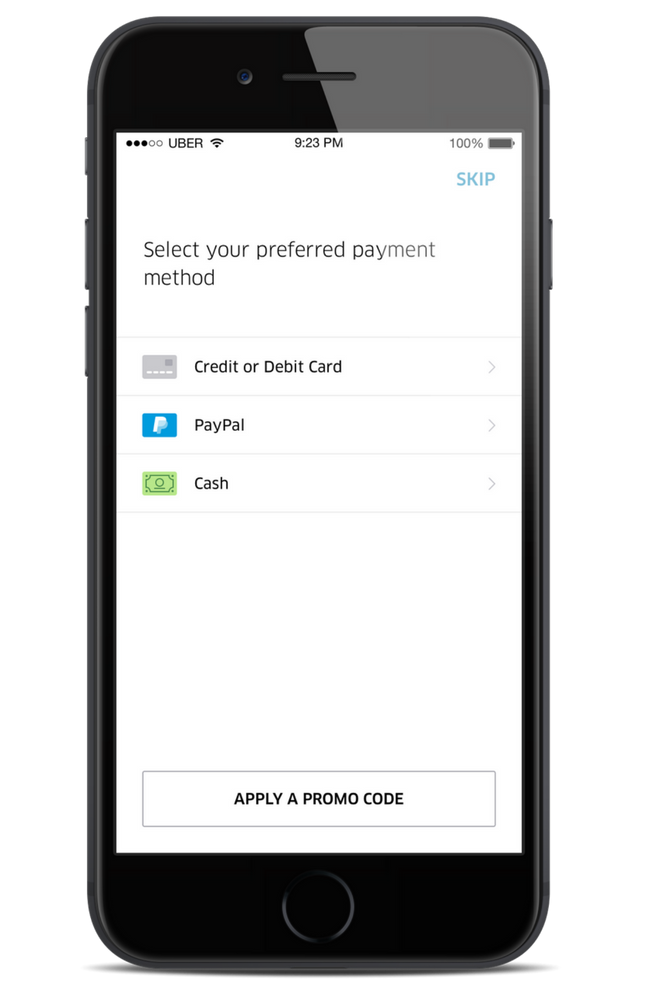
What is Payment Module for Uber App
The Payment Module in the Uber App handles all financial transactions between riders, drivers, and Uber itself. It plays a crucial role in ensuring secure and efficient payment processing, managing various payment methods, calculating fares, and distributing payments to drivers, all while providing a smooth and reliable experience for users.
Important Features
2.1. Multiple Payment Methods: The Payment Module supports various payment options, such as credit/debit cards, digital wallets, and localized payment methods to cater to diverse user preferences.
2.2. Fare Calculation: The module calculates ride fares based on factors like distance, time, surge pricing, tolls, and other additional charges.
2.3. Split Payments: Uber allows riders to split fares with friends or family, which requires complex logic for dividing the fare and processing payments accordingly.
2.4. Real-time Transaction Tracking: Users can view real-time payment transactions and ride history for transparency and ease of reconciliation.
Scaling Requirements — Capacity Estimation
For the sake of simplicity, let me consider a small-scale simulation for the Payment Module in the Uber App —
- Total number of users: 10 Million
- Daily active users (DAU): 2 Million
- Number of payment transactions per user/day: 2
- Total number of payment transactions per day: 4 Million transactions/day
Assumptions:
- The system is read-heavy with a read-to-write ratio of 100:1.
- Total number of payment methods added per day = 1/100 * 4 Million = 40,000/day
- Storage requirement per payment transaction: 500 bytes
- Average payment method size (e.g., credit card information): 200 bytes
Storage Estimation:
Payment Transaction Storage:
- Total storage per day for payment transactions: 4 Million * 500 bytes = 2 GB/day
- For the next 3 years: 2 GB * 365 days * 3 years = 2.19 TB
Payment Method Storage:
- Total storage per day for payment methods: 40,000 * 200 bytes = 8 MB/day
- For the next 3 years: 8 MB * 365 days * 3 years = 8.76 GB
Requests per Second:
Let’s assume the payment module has additional APIs for fetching transaction history and payment method details. For simplicity, we’ll assume a read-to-write ratio of 100:1 for these APIs as well.
- Total read requests per second = 100 * 4 Million / 3600 seconds * 24 hours = 46,296 reads/second
- Total write requests per second = 4 Million / 3600 seconds * 24 hours = 46.3 writes/second
import uuid
class PaymentModule:
def __init__(self):
self.transactions = {}
self.payment_methods = {}
def process_payment(self, user_id, amount):
transaction_id = str(uuid.uuid4())
self.transactions[transaction_id] = {
"user_id": user_id,
"amount": amount
}
return transaction_id
def add_payment_method(self, user_id, payment_method_type, payment_method_details):
payment_method_id = str(uuid.uuid4())
self.payment_methods[payment_method_id] = {
"user_id": user_id,
"type": payment_method_type,
"details": payment_method_details
}
return payment_method_id
def get_transaction_history(self, user_id):
user_transactions = []
for transaction_id, transaction in self.transactions.items():
if transaction["user_id"] == user_id:
user_transactions.append({
"transaction_id": transaction_id,
"amount": transaction["amount"]
})
return user_transactions
def get_payment_methods(self, user_id):
user_payment_methods = []
for payment_method_id, payment_method in self.payment_methods.items():
if payment_method["user_id"] == user_id:
user_payment_methods.append({
"payment_method_id": payment_method_id,
"type": payment_method["type"],
"details": payment_method["details"]
})
return user_payment_methods
if __name__ == "__main__":
# Initialize Payment Module
payment_module = PaymentModule()
# Simulate payment transactions
for i in range(10_000_000): # Total number of users
user_id = f"user_{i}"
for _ in range(2): # Number of payment transactions per user/day
payment_module.process_payment(user_id, 10) # Amount: $10 (for simplicity)
# Simulate adding payment methods
for i in range(10_000_000): # Total number of users
user_id = f"user_{i}"
payment_module.add_payment_method(user_id, "credit_card", {"card_number": "1111-2222-3333-4444", "expiration_date": "12/25"})
# Simulate fetching transaction history and payment methods for a user
user_id = "user_123"
transactions = payment_module.get_transaction_history(user_id)
payment_methods = payment_module.get_payment_methods(user_id)
print("Transaction History for User:", user_id)
print(transactions)
print("\nPayment Methods for User:", user_id)
print(payment_methods)Data Model — ER requirements
- User (user_id, name, email, payment_methods)
- Transaction (transaction_id, user_id, driver_id, amount, timestamp, status)
- Payment Method (method_id, user_id, type, details)
- Invoice (invoice_id, user_id, ride_id, total_amount, timestamp)
- Ride Details (ride_id, user_id, driver_id, distance, duration, fare, timestamp)
Users
UserID (Primary Key)
Username
Email
Password
PaymentMethods
PaymentMethodID (Primary Key)
UserID (Foreign Key from Users table)
PaymentMethodType
PaymentMethodDetails
Transactions
TransactionID (Primary Key)
UserID (Foreign Key from Users table)
DriverID (Foreign Key from Drivers table)
RideID (Foreign Key from Rides table)
FareAmount
PaymentMethodID (Foreign Key from PaymentMethods table)
TransactionTimestampHigh Level Design
3.1. Horizontal Scalability: The system should distribute the load across multiple servers to handle high concurrent requests during peak hours.
3.2. Caching: Implement caching mechanisms to reduce database access for frequently requested data, improving response times.
3.3. Asynchronous Processing: Employ asynchronous processing for non-real-time tasks, such as generating invoices and updating payment statuses, to avoid bottlenecks.
Components —
- User Management: Responsible for user registration, authentication, and managing payment methods.
- Fare Calculator: Calculates ride fares based on various factors and generates invoices.
- Payment Gateway Integration: Handles communication with third-party payment gateways for processing transactions.
- Transaction Management: Manages the lifecycle of transactions, ensuring reliability and consistency.
- Reporting & Analytics: Provides insights into payment trends, transaction volumes, and other key metrics.
Assumptions:
- The system will use NoSQL databases for scalability and high reliability.
- The read-to-write ratio will be high due to frequent transaction history queries and user activity tracking.
- Horizontal scaling will be used to handle increasing user demands.
- High availability and low latency are crucial for seamless payment processing.
Main Components and Services
- Mobile Client: Represents the users accessing the Uber app for payments and ride booking.
- Application Servers: Responsible for handling read, write, and notification services.
- Load Balancer: Routes and distributes requests to appropriate servers based on service requirements.
- Cache (e.g., Redis or Memcached): Used for caching frequently accessed data to reduce database load and improve response times.
- CDN (Content Delivery Network): Used to store and deliver frequently accessed images, logos, and assets.
- Database: Stores user data, payment methods, and transaction information.
- Storage (e.g., Amazon S3): Stores images and receipts related to transactions.
Services:
Payment Service:
- Handle payment transactions.
- Validate payment details.
- Store payment information in the database.
- Send notifications and receipts to users.
Payment Method Service:
- Add new payment methods for users.
- Validate payment method details.
- Store payment methods in the database.
Transaction Service:
- Record transaction details (e.g., UserID, DriverID, RideID, FareAmount, PaymentMethodID) in the database.
- Fetch transaction history for users.
import uuid
import datetime
# Mock database to store user data, payment methods, and transactions
users_db = {}
payment_methods_db = {}
transactions_db = {}
# User entity
class User:
def __init__(self, username, email, password):
self.user_id = str(uuid.uuid4())
self.username = username
self.email = email
self.password = password
# PaymentMethod entity
class PaymentMethod:
def __init__(self, user_id, payment_method_type, payment_method_details):
self.payment_method_id = str(uuid.uuid4())
self.user_id = user_id
self.payment_method_type = payment_method_type
self.payment_method_details = payment_method_details
# Transaction entity
class Transaction:
def __init__(self, user_id, driver_id, ride_id, fare_amount, payment_method_id):
self.transaction_id = str(uuid.uuid4())
self.user_id = user_id
self.driver_id = driver_id
self.ride_id = ride_id
self.fare_amount = fare_amount
self.payment_method_id = payment_method_id
self.transaction_timestamp = datetime.datetime.now()
# Payment Service
class PaymentService:
def __init__(self):
pass
def process_payment(self, user_id, driver_id, ride_id, fare_amount, payment_method_id):
# In a real implementation, integrate with a payment gateway to process actual payment
transaction = Transaction(user_id, driver_id, ride_id, fare_amount, payment_method_id)
transactions_db[transaction.transaction_id] = transaction
return transaction.transaction_id
# Payment Method Service
class PaymentMethodService:
def __init__(self):
pass
def add_payment_method(self, user_id, payment_method_type, payment_method_details):
payment_method = PaymentMethod(user_id, payment_method_type, payment_method_details)
payment_methods_db[payment_method.payment_method_id] = payment_method
return payment_method.payment_method_id
# Transaction Service
class TransactionService:
def __init__(self):
pass
def get_transaction_history(self, user_id):
user_transactions = []
for transaction_id, transaction in transactions_db.items():
if transaction.user_id == user_id:
user_transactions.append({
"transaction_id": transaction.transaction_id,
"driver_id": transaction.driver_id,
"ride_id": transaction.ride_id,
"fare_amount": transaction.fare_amount,
"payment_method_id": transaction.payment_method_id,
"transaction_timestamp": transaction.transaction_timestamp
})
return user_transactions
# Test the Payment Module services
if __name__ == "__main__":
# Initialize Payment Services
payment_service = PaymentService()
payment_method_service = PaymentMethodService()
transaction_service = TransactionService()
# Add users
user1 = User("user_1", "[email protected]", "password123")
user2 = User("user_2", "[email protected]", "password456")
users_db[user1.user_id] = user1
users_db[user2.user_id] = user2
# Add payment methods
user1_payment_method_id = payment_method_service.add_payment_method(user1.user_id, "credit_card", {"card_number": "1111-2222-3333-4444", "expiration_date": "12/25"})
user2_payment_method_id = payment_method_service.add_payment_method(user2.user_id, "digital_wallet", {"wallet_id": "user2_wallet"})
# Process payment transactions
transaction1_id = payment_service.process_payment(user1.user_id, "driver_123", "ride_456", 20.0, user1_payment_method_id)
transaction2_id = payment_service.process_payment(user2.user_id, "driver_789", "ride_987", 30.0, user2_payment_method_id)
# Get transaction history for users
user1_transactions = transaction_service.get_transaction_history(user1.user_id)
user2_transactions = transaction_service.get_transaction_history(user2.user_id)
print("User 1 Transactions:")
print(user1_transactions)
print("\nUser 2 Transactions:")
print(user2_transactions)Basic Low Level Design
User Entity:
userID (String): Unique identifier for the user.
username (String): User's username.
password (String): User's password.
other user attributes: Additional attributes such as email, payment information, etc.
Payment Method Entity:
paymentMethodID (String): Unique identifier for the payment method.
userID (String): Foreign key referencing the user who owns the payment method.
paymentMethodType (String): Type of payment method (e.g., credit card, digital wallet, etc.).
paymentMethodDetails (String): Additional details specific to the payment method (e.g., card number, wallet ID, etc.).
Transaction Entity:
transactionID (String): Unique identifier for the transaction.
userID (String): Foreign key referencing the user who initiated the transaction.
driverID (String): Foreign key referencing the driver involved in the transaction (if applicable).
rideID (String): Foreign key referencing the ride associated with the transaction (if applicable).
fareAmount (Double): The fare amount for the transaction.
paymentMethodID (String): Foreign key referencing the payment method used for the transaction.
transactionTimestamp (DateTime): Timestamp indicating the date and time of the transaction.import uuid
import datetime
class User:
def __init__(self, username, email, password):
self.user_id = str(uuid.uuid4())
self.username = username
self.email = email
self.password = password
class PaymentMethod:
def __init__(self, user_id, payment_method_type, payment_method_details):
self.payment_method_id = str(uuid.uuid4())
self.user_id = user_id
self.payment_method_type = payment_method_type
self.payment_method_details = payment_method_details
class Transaction:
def __init__(self, user_id, driver_id, ride_id, fare_amount, payment_method_id):
self.transaction_id = str(uuid.uuid4())
self.user_id = user_id
self.driver_id = driver_id
self.ride_id = ride_id
self.fare_amount = fare_amount
self.payment_method_id = payment_method_id
self.transaction_timestamp = datetime.datetime.now()
class UberPaymentModule:
def __init__(self):
self.users = {}
self.payment_methods = {}
self.transactions = {}
def add_user(self, user):
self.users[user.user_id] = user
def get_user_by_id(self, user_id):
return self.users.get(user_id)
def add_payment_method(self, payment_method):
self.payment_methods[payment_method.payment_method_id] = payment_method
def get_payment_methods_for_user(self, user_id):
return [method for method in self.payment_methods.values() if method.user_id == user_id]
def process_payment(self, user_id, driver_id, ride_id, fare_amount, payment_method_id):
if payment_method_id not in self.payment_methods:
return "Payment method not found."
transaction = Transaction(user_id, driver_id, ride_id, fare_amount, payment_method_id)
self.transactions[transaction.transaction_id] = transaction
return "Payment processed successfully."from flask import Flask, request
app = Flask(__name__)
payment_module = UberPaymentModule()
@app.route('/users', methods=['POST'])
def create_user():
data = request.get_json()
user = User(data['username'], data['email'], data['password'])
payment_module.add_user(user)
return f"User {user.user_id} created successfully.", 201
@app.route('/users/<user_id>/payment_methods', methods=['POST'])
def add_payment_method(user_id):
data = request.get_json()
user = payment_module.get_user_by_id(user_id)
if not user:
return "User not found.", 404
payment_method = PaymentMethod(user_id, data['paymentMethodType'], data['paymentMethodDetails'])
payment_module.add_payment_method(payment_method)
return f"Payment method {payment_method.payment_method_id} added successfully.", 201
@app.route('/users/<user_id>/payment_methods', methods=['GET'])
def get_payment_methods(user_id):
user = payment_module.get_user_by_id(user_id)
if not user:
return "User not found.", 404
payment_methods = payment_module.get_payment_methods_for_user(user_id)
return {'payment_methods': payment_methods}, 200
@app.route('/transactions', methods=['POST'])
def process_payment():
data = request.get_json()
user_id = data['userID']
driver_id = data['driverID']
ride_id = data['rideID']
fare_amount = data['fareAmount']
payment_method_id = data['paymentMethodID']
result = payment_module.process_payment(user_id, driver_id, ride_id, fare_amount, payment_method_id)
return result, 200
if __name__ == '__main__':
app.run(debug=True)API Design
import uuid
from enum import Enum
# Enum to represent payment status
class PaymentStatus(Enum):
PENDING = 1
SUCCESS = 2
FAILED = 3
# Mock database to store transactions and payment methods
transactions_db = {}
payment_methods_db = {}
# Low-Level API for Processing Payment
def process_payment(user_id, driver_id, ride_id, fare_amount, payment_method_id):
# Logic for processing payment
transaction_id = str(uuid.uuid4())
payment_status = PaymentStatus.PENDING
# Simulate payment processing (for demonstration purposes)
if payment_method_id in payment_methods_db:
payment_status = PaymentStatus.SUCCESS
else:
payment_status = PaymentStatus.FAILED
# Store transaction details in the database
transactions_db[transaction_id] = {
"user_id": user_id,
"driver_id": driver_id,
"ride_id": ride_id,
"fare_amount": fare_amount,
"status": payment_status
}
return transaction_id, payment_status
# Low-Level API for Calculating Fare
def calculate_base_fare(ride_distance, ride_duration):
# Mock calculation for base fare (in actual implementation, this can be more complex)
base_fare = 2 + 0.1 * ride_distance + 0.5 * ride_duration
return base_fare
def apply_surge_pricing(base_fare, surge_multiplier):
# Mock surge pricing calculation (in actual implementation, this can be more sophisticated)
total_fare = base_fare * surge_multiplier
return total_fare
def calculate_fare(start_location, end_location, ride_duration, ride_distance, surge_multiplier):
# Logic for fare calculation (e.g., based on distance, duration, and surge pricing)
base_fare = calculate_base_fare(ride_distance, ride_duration)
total_fare = apply_surge_pricing(base_fare, surge_multiplier)
return total_fare
# Low-Level API for Adding Payment Method
def add_payment_method(user_id, payment_method_type, payment_method_details):
# Logic for adding payment method
payment_method_id = str(uuid.uuid4())
payment_methods_db[payment_method_id] = {
"user_id": user_id,
"type": payment_method_type,
"details": payment_method_details
}
return payment_method_id
# High-Level API Design
class PaymentModule:
def __init__(self):
pass
def process_payment(self, user_id, driver_id, ride_id, start_location, end_location, ride_duration, ride_distance, surge_multiplier, payment_method_id):
# Calculate fare
fare_amount = calculate_fare(start_location, end_location, ride_duration, ride_distance, surge_multiplier)
# Process payment
transaction_id, payment_status = process_payment(user_id, driver_id, ride_id, fare_amount, payment_method_id)
return transaction_id, payment_status
def add_payment_method(self, user_id, payment_method_type, payment_method_details):
payment_method_id = add_payment_method(user_id, payment_method_type, payment_method_details)
return payment_method_id
# Test the PaymentModule implementation
if __name__ == "__main__":
# Initialize the PaymentModule
payment_module = PaymentModule()
# Add a payment method for a user
user_id = "user_123"
payment_method_type = "credit_card"
payment_method_details = {
"card_number": "1234-5678-9012-3456",
"expiration_date": "12/24",
"cvv": "123"
}
payment_method_id = payment_module.add_payment_method(user_id, payment_method_type, payment_method_details)
print("Payment method added successfully. Payment Method ID:", payment_method_id)
# Simulate a ride and calculate fare
ride_id = "ride_456"
start_location = "Location A"
end_location = "Location B"
ride_duration = 20 # minutes
ride_distance = 10 # kilometers
surge_multiplier = 1.5 # 50% surge
transaction_id, payment_status = payment_module.process_payment(user_id, driver_id, ride_id, start_location, end_location, ride_duration, ride_distance, surge_multiplier, payment_method_id)
print("Transaction ID:", transaction_id)
print("Payment Status:", payment_status)Complete Detailed Design
Coming soon! It will be covered on youtube channel.
Subscribe to youtube channel :
Complete Code implementation
2.1. Multiple Payment Methods
class PaymentModule:
def __init__(self):
self.payment_methods = {} def add_payment_method(self, user_id, payment_method_type, payment_method_details):
payment_method_id = str(uuid.uuid4())
self.payment_methods[payment_method_id] = {
"user_id": user_id,
"type": payment_method_type,
"details": payment_method_details
}
return payment_method_id def get_payment_methods(self, user_id):
user_payment_methods = []
for payment_method_id, payment_method in self.payment_methods.items():
if payment_method["user_id"] == user_id:
user_payment_methods.append({
"payment_method_id": payment_method_id,
"type": payment_method["type"],
"details": payment_method["details"]
})
return user_payment_methods2.2. Fare Calculation
class FareCalculator:
def __init__(self):
self.base_fare_rate = 2
self.distance_rate = 0.1
self.duration_rate = 0.5 def calculate_base_fare(self, ride_distance, ride_duration):
base_fare = self.base_fare_rate + self.distance_rate * ride_distance + self.duration_rate * ride_duration
return base_fare def apply_surge_pricing(self, base_fare, surge_multiplier):
total_fare = base_fare * surge_multiplier
return total_fare def calculate_fare(self, ride_distance, ride_duration, surge_multiplier):
base_fare = self.calculate_base_fare(ride_distance, ride_duration)
total_fare = self.apply_surge_pricing(base_fare, surge_multiplier)
return total_fare2.3. Split Payments
def split_payment(total_fare, num_people):
individual_share = total_fare / num_people
return individual_share2.4. Real-time Transaction Tracking
class TransactionTracker:
def __init__(self):
self.transactions = {} def process_payment(self, user_id, driver_id, ride_id, fare_amount, payment_method_id):
transaction_id = str(uuid.uuid4())
payment_status = PaymentStatus.SUCCESS # In a real implementation, payment gateway integration and verification logic will be here self.transactions[transaction_id] = {
"user_id": user_id,
"driver_id": driver_id,
"ride_id": ride_id,
"fare_amount": fare_amount,
"status": payment_status
}
return transaction_id, payment_status def get_transaction_status(self, transaction_id):
if transaction_id in self.transactions:
return self.transactions[transaction_id]["status"]
else:
return NoneTest the Implementations
if __name__ == "__main__":
# Initialize Payment Module, Fare Calculator, and Transaction Tracker
payment_module = PaymentModule()
fare_calculator = FareCalculator()
transaction_tracker = TransactionTracker() # Add payment methods for users
user_id1 = "user_1"
user_payment_method1 = payment_module.add_payment_method(user_id1, "credit_card", {"card_number": "1111-2222-3333-4444", "expiration_date": "12/25"})
user_payment_method2 = payment_module.add_payment_method(user_id1, "digital_wallet", {"wallet_id": "user1_wallet"})
user_id2 = "user_2"
user_payment_method3 = payment_module.add_payment_method(user_id2, "credit_card", {"card_number": "5555-6666-7777-8888", "expiration_date": "06/23"})
# Calculate fare and split payments
ride_distance = 10 # kilometers
ride_duration = 20 # minutes
surge_multiplier = 1.5 # 50% surge
total_fare = fare_calculator.calculate_fare(ride_distance, ride_duration, surge_multiplier)
num_people = 3
individual_share = split_payment(total_fare, num_people) # Process payments
user_id3 = "user_3"
driver_id = "driver_1"
ride_id = "ride_1"
payment_method_id = user_payment_method1
transaction_id, payment_status = transaction_tracker.process_payment(user_id3, driver_id, ride_id, individual_share, payment_method_id) # Real-time transaction tracking
transaction_status = transaction_tracker.get_transaction_status(transaction_id)
print("Transaction ID:", transaction_id)
print("Payment Status:", payment_status)
print("Transaction Status:", transaction_status)System Design — Twitter Trending Topic
We will be discussing in depth -
- What is Twitter Trending Topic
- Important Features
- Scaling Requirements
- Data Model — ER requirements
- High Level Design
- Basic Low Level Design
- API Design
- Complete Detailed Design
- Complete Code Implementation

What is Twitter Trending Topic
Twitter Trending Topic is a feature that displays a list of the most popular and widely discussed topics and hashtags on the platform. It allows users to stay informed about the current trends and join conversations around specific subjects. The trending topics are personalized based on a user’s location and interests, making the feature more relevant to individual users.
Important Features
a. Real-time Updates: The Twitter Trending Topic system must provide real-time updates to reflect the latest popular topics as discussions evolve.
b. Personalization: The system should consider a user’s location and interests to display trending topics that are relevant to them.
c. Spam and Abuse Detection: To maintain the integrity of trending topics, the system must employ robust spam and abuse detection mechanisms.
d. Trend Duration: The system should have a mechanism to determine the duration of a topic’s trendiness and manage its removal from the trending list.
Scaling Requirements — Capacity Estimation
Small Scale Simulation for Twitter Trending Topic System:
Assumptions:
- Total number of users: 500 Million
- Daily active users (DAU): 100 Million
- Average number of tweets posted by a user per day: 5
- Total number of tweets posted per day: 500 Million tweets/day
- Read to write ratio: 100:1
- Total number of tweets read per day: 500 Million * 100 = 50 Billion tweets/day
Storage Estimation:
- On average, each tweet size is 200 bytes (text only for simplicity).
- Total storage per day: 500 Million * 200 bytes = 100 GB/day
- For the next 3 years, 100 GB * 365 * 3 = 109.5 TB
Requests per Second:
- Tweets read per second: 50 Billion / 3600 seconds * 24 hours ≈ 578 Million requests/second
class TwitterTrendingTopicSystem:
def __init__(self):
# Initialize data structures and database connections
self.tweets = {}
def post_tweet(self, user_id, tweet_text):
# Simulate posting a tweet
tweet_id = len(self.tweets) + 1
self.tweets[tweet_id] = {'user_id': user_id, 'text': tweet_text}
def get_trending_topics(self):
# Simulate identifying trending topics based on tweet volume
# For this simulation, let's assume the top 3 most mentioned hashtags are trending
hashtags_count = {}
for tweet in self.tweets.values():
hashtags = self.extract_hashtags(tweet['text'])
for hashtag in hashtags:
if hashtag not in hashtags_count:
hashtags_count[hashtag] = 0
hashtags_count[hashtag] += 1
trending_topics = sorted(hashtags_count.keys(), key=lambda x: hashtags_count[x], reverse=True)[:3]
return trending_topics
def extract_hashtags(self, tweet_text):
# Placeholder function to extract hashtags from tweet text
return [tag for tag in tweet_text.split() if tag.startswith("#")]
# Sample usage
if __name__ == '__main__':
twitter_system = TwitterTrendingTopicSystem()
# Simulate posting tweets
for user_id in range(1, 501): # Total 500 Million users
for i in range(5): # 5 tweets per user per day
tweet_text = f"User {user_id} tweet {i+1} #hashtag1 #hashtag2"
twitter_system.post_tweet(user_id, tweet_text)
# Simulate identifying trending topics
trending_topics = twitter_system.get_trending_topics()
print("Trending Topics:", trending_topics) # Output: ['#hashtag1', '#hashtag2']Data Model — ER requirements
a. Topic: Contains information about a trending topic, such as its title, start time, end time, and engagement metrics (e.g., number of tweets, retweets).
b. Location: Represents the user’s location, which affects the personalized trending topics.
c. User: Stores user data and preferences to tailor trending topics to individual interests.
d. Hashtag: Keeps track of hashtags associated with each topic.
Users:
user_id: int (Primary Key)
username: string
email: string
password: string
Tweets:
tweet_id: int (Primary Key)
user_id: int (Foreign Key to Users table)
tweet_text: string
timestamp: datetime
Hashtags:
hashtag_id: int (Primary Key)
hashtag_text: string
TweetHashtags (Many-to-Many Relationship between Tweets and Hashtags):
tweet_id: int (Foreign Key to Tweets table)
hashtag_id: int (Foreign Key to Hashtags table)
Likes:
like_id: int (Primary Key)
user_id: int (Foreign Key to Users table)
tweet_id: int (Foreign Key to Tweets table)
timestamp: datetime
Follows:
follow_id: int (Primary Key)
follower_id: int (Foreign Key to Users table)
following_id: int (Foreign Key to Users table)High Level Design
a. Handle high read and write loads efficiently.
b. Distribute data and processing across multiple servers or clusters.
c. Scale horizontally to accommodate increasing traffic and trends.
d. Data Collection: The system collects tweets and hashtags in real-time and analyzes them to identify trending topics.
e. Trend Identification: Using algorithms and machine learning techniques, the system identifies topics that experience significant spikes in discussion volume.
f. Personalization: The system customizes trending topics for each user based on their location and interests.
g. Storage: Trending topic data is stored in a distributed and scalable database to handle the large volume of data.
Assumptions:
- Read-heavy system with more reads than writes.
- High availability and reliability are critical.
- Scaling horizontally (scale-out) to handle a large number of users and tweets.
- Latency target: ~350ms for trending topics and user feeds.
Main Components and Services:
Mobile Clients:
- Users accessing Twitter from mobile devices.
Application Servers:
- Read, write, and notification servers handling user requests.
- Responsible for handling tweet creation, retrieval, likes, follows, and trending topic generation.
- Utilize caching to improve response times for read-heavy operations.
- High availability to ensure smooth user experience.
Load Balancer:
- Routes and distributes incoming requests to the appropriate application servers.
- Ensures load distribution and fault tolerance.
Cache (Memcache or Redis):
- Caches frequently accessed data like trending topics, user feeds, and user profiles.
- Reduces database load and improves read performance.
- LRU (Least Recently Used) caching strategy.
CDN (Content Delivery Network):
- Improves latency and throughput for serving images and media in tweets.
- Distributes content to edge servers located near users.
Database:
- NoSQL database (e.g., MongoDB) to store user data, tweets, likes, and follows.
- Provides high availability and scalability.
Storage (HDFS or Amazon S3):
- Stores images and media associated with tweets.
- Supports horizontal scaling to handle large amounts of data.
Services:
Tweet Service:
- Allows users to create, retrieve, and delete tweets.
- Handles tweet metadata like text, user, and timestamp.
- Utilizes the TweetHashtags table for associating tweets with hashtags.
Like Service:
- Enables users to like and unlike tweets.
- Manages the Likes table to store user likes and timestamps.
Follow Service:
- Lets users follow and unfollow other users.
- Maintains the Follows table to manage user relationships.
Trending Topic Service:
- Generates trending topics based on the number of occurrences of hashtags in tweets.
- Keeps track of trending topics over specific time intervals.
- Utilizes caching to provide fast access to trending topics.
Feed Generation Service:
- Creates user feeds by aggregating tweets from followed users.
- Ranks tweets based on engagement metrics (likes, retweets) and timestamp.
- Stores pre-generated feeds to reduce real-time processing overhead.
User Profile Service:
- Manages user profiles, including user information, followers, and following.
- Handles user authentication and password management.
import uuid
from datetime import datetime
class User:
def __init__(self, username, email, password):
self.user_id = str(uuid.uuid4())
self.username = username
self.email = email
self.password = password
self.followers = set()
self.following = set()
class Tweet:
def __init__(self, user, tweet_text):
self.tweet_id = str(uuid.uuid4())
self.user = user
self.tweet_text = tweet_text
self.timestamp = datetime.now()
class Hashtag:
def __init__(self, hashtag_text):
self.hashtag_id = str(uuid.uuid4())
self.hashtag_text = hashtag_text
class TweetHashtags:
def __init__(self, tweet, hashtag):
self.tweet_hashtags_id = str(uuid.uuid4())
self.tweet = tweet
self.hashtag = hashtag
class Like:
def __init__(self, user, tweet):
self.like_id = str(uuid.uuid4())
self.user = user
self.tweet = tweet
self.timestamp = datetime.now()
class TwitterTrendingTopicSystem:
def __init__(self):
self.users = {}
self.tweets = []
self.hashtags = {}
self.likes = {}
def create_user(self, username, email, password):
user = User(username, email, password)
self.users[user.user_id] = user
def create_tweet(self, user_id, tweet_text):
user = self.users.get(user_id)
if user:
tweet = Tweet(user, tweet_text)
self.tweets.append(tweet)
def create_hashtag(self, hashtag_text):
if hashtag_text not in self.hashtags:
hashtag = Hashtag(hashtag_text)
self.hashtags[hashtag_text] = hashtag
def link_tweet_to_hashtag(self, tweet_id, hashtag_text):
tweet = next((t for t in self.tweets if t.tweet_id == tweet_id), None)
hashtag = self.hashtags.get(hashtag_text)
if tweet and hashtag:
tweet_hashtags = TweetHashtags(tweet, hashtag)
def add_like(self, user_id, tweet_id):
user = self.users.get(user_id)
tweet = next((t for t in self.tweets if t.tweet_id == tweet_id), None)
if user and tweet:
like = Like(user, tweet)
self.likes[like.like_id] = like
# Other methods for handling follow/unfollow, feed generation, etc.
# ...Basic Low Level Design
User Class:
Represents a user in the system.
Attributes: user_id, username, email, password, etc.
Tweet Class:
Represents a tweet posted by a user.
Attributes: tweet_id, user, tweet_text, timestamp, etc.
Hashtag Class:
Represents a hashtag associated with tweets.
Attributes: hashtag_id, hashtag_text, etc.
TweetHashtags Class:
Represents the many-to-many relationship between tweets and hashtags.
Attributes: tweet_id, hashtag_id, etc.
Like Class:
Represents a like given by a user to a tweet.
Attributes: like_id, user_id, tweet_id, timestamp, etc.
Follow Class:
Represents a user following another user.
Attributes: follow_id, follower_id, following_id, etc.
TwitterTrendingTopicSystem Class:
Main class to manage users, tweets, hashtags, likes, follows, etc.
Provides methods to add users, create tweets, manage likes, follows, etc.from datetime import datetime
import random
class TwitterTrendingTopicSystem:
def __init__(self):
self.users = {}
self.tweets = {}
self.hashtags = {}
self.likes = {}
self.follows = {}
self.feed_cache = {} # For caching user feeds
def create_user(self, user_id, username, email, password):
self.users[user_id] = {'username': username, 'email': email, 'password': password, 'following': set()}
def create_tweet(self, user_id, tweet_text, hashtags):
tweet_id = len(self.tweets) + 1
timestamp = datetime.now()
self.tweets[tweet_id] = {'user_id': user_id, 'tweet_text': tweet_text, 'hashtags': hashtags, 'timestamp': timestamp}
self.update_hashtags(tweet_id, hashtags)
def update_hashtags(self, tweet_id, hashtags):
for hashtag in hashtags:
if hashtag not in self.hashtags:
self.hashtags[hashtag] = set()
self.hashtags[hashtag].add(tweet_id)
def like_tweet(self, user_id, tweet_id):
timestamp = datetime.now()
self.likes[tweet_id] = self.likes.get(tweet_id, {})
self.likes[tweet_id][user_id] = timestamp
def follow_user(self, follower_id, following_id):
self.follows[follower_id] = self.follows.get(follower_id, set())
self.follows[follower_id].add(following_id)
def generate_feed(self, user_id):
# Check if feed is already cached for the user
if user_id in self.feed_cache:
return self.feed_cache[user_id]
# Get tweets from followed users and sort by timestamp
followed_users = self.follows.get(user_id, set())
feed = []
for tweet_id, tweet in self.tweets.items():
if tweet['user_id'] in followed_users:
feed.append((tweet_id, tweet['timestamp']))
feed.sort(key=lambda x: x[1], reverse=True)
# Cache the user feed and return
self.feed_cache[user_id] = feed
return feed
def get_trending_topics(self):
# Simple trending topics logic: Choose 5 random hashtags
trending_topics = random.sample(self.hashtags.keys(), 5)
return trending_topics
# Sample Usage
if __name__ == '__main__':
twitter_system = TwitterTrendingTopicSystem()
# Create users
twitter_system.create_user(1, 'user1', '[email protected]', 'password1')
twitter_system.create_user(2, 'user2', '[email protected]', 'password2')
# Create tweets with hashtags
twitter_system.create_tweet(1, 'Hello World #greetings', ['greetings'])
twitter_system.create_tweet(2, 'Having fun at the beach #vacation', ['vacation'])
twitter_system.create_tweet(2, 'Coding is fun #programming', ['programming'])
# Like tweets
twitter_system.like_tweet(1, 1)
twitter_system.like_tweet(1, 2)
twitter_system.like_tweet(2, 3)
# Follow users
twitter_system.follow_user(1, 2)
# Generate and display user feed
user_feed = twitter_system.generate_feed(1)
print("User Feed for User 1:")
for tweet_id, timestamp in user_feed:
print(f"Tweet ID: {tweet_id}, Timestamp: {timestamp}")
# Get trending topics
trending_topics = twitter_system.get_trending_topics()
print("Trending Topics:", trending_topics)API Design
a. /trending_topics: Fetches the current trending topics for a specific location or personalized for a user.
b. /trending_tweets/{topic}: Retrieves tweets associated with a particular trending topic.
c. /trending_hashtags/{topic}: Gets the popular hashtags related to a trending topic.
from flask import Flask, request, jsonify
from twitter_trending_topic_system import TwitterTrendingTopicSystem
app = Flask(__name__)
trending_topic_system = TwitterTrendingTopicSystem()
@app.route('/collect_tweets', methods=['POST'])
def collect_tweets():
tweet_data = request.get_json()
trending_topic_system.collect_tweets(tweet_data)
return jsonify({'message': 'Tweets collected successfully'}), 200
@app.route('/identify_trending_topics', methods=['POST'])
def identify_trending_topics():
interval = request.get_json().get('interval')
trending_topic_system.identify_trending_topics(interval)
return jsonify({'message': 'Trending topics identified successfully'}), 200
@app.route('/personalize_trending_topics', methods=['POST'])
def personalize_trending_topics():
user_id = request.get_json().get('user_id')
personalized_topics = trending_topic_system.personalize_trending_topics(user_id)
return jsonify(personalized_topics), 200
@app.route('/get_trending_topics', methods=['GET'])
def get_trending_topics():
location = request.args.get('location')
user_id = request.args.get('user_id')
trending_topics = trending_topic_system.get_trending_topics(location, user_id)
return jsonify(trending_topics), 200
@app.route('/get_trending_tweets/<topic>', methods=['GET'])
def get_trending_tweets(topic):
trending_tweets = trending_topic_system.get_trending_tweets(topic)
return jsonify(trending_tweets), 200
@app.route('/get_trending_hashtags/<topic>', methods=['GET'])
def get_trending_hashtags(topic):
trending_hashtags = trending_topic_system.get_trending_hashtags(topic)
return jsonify(trending_hashtags), 200
if __name__ == '__main__':
app.run(host='0.0.0.0', port=5000)Complete Detailed Design
Coming soon! It will be covered on youtube channel.
Subscribe to youtube channel :
Complete Code implementation
from datetime import datetime
class TwitterTrendingTopicSystem:
def __init__(self):
# Initialize data structures and database connections
self.trending_topics = {}
self.trending_tweets = {}
self.trending_topics_duration = 3600 # Trend duration in seconds (e.g., 1 hour)
def collect_tweets(self, tweet_data):
# Collect tweets in real-time and store them in the database
tweet_id = tweet_data.get('id')
tweet_text = tweet_data.get('text')
hashtags = tweet_data.get('hashtags', [])
self.trending_tweets[tweet_id] = {'text': tweet_text, 'timestamp': datetime.now()}
for hashtag in hashtags:
if hashtag not in self.trending_topics:
self.trending_topics[hashtag] = {'tweets': [], 'start_time': datetime.now()}
self.trending_topics[hashtag]['tweets'].append(tweet_id)
def identify_trending_topics(self, interval):
# Identify trending topics within the specified time interval
trending_topics = []
now = datetime.now()
for hashtag, data in self.trending_topics.items():
if len(data['tweets']) >= 5 and (now - data['start_time']).total_seconds() <= interval:
trending_topics.append(hashtag)
self.trending_topics = {hashtag: data for hashtag, data in self.trending_topics.items() if hashtag in trending_topics}
def personalize_trending_topics(self, user_id, user_location, user_interests):
# Personalize trending topics for a given user based on location and interests
personalized_topics = []
for hashtag, data in self.trending_topics.items():
if self.is_interesting(hashtag, user_interests) and self.is_nearby(hashtag, user_location):
personalized_topics.append(hashtag)
return personalized_topics
def is_interesting(self, hashtag, user_interests):
# Placeholder function to determine if a hashtag is interesting to the user
return hashtag in user_interests
def is_nearby(self, hashtag, user_location):
# Placeholder function to determine if a hashtag is related to the user's location
return hashtag.startswith(user_location)
def get_trending_topics(self):
# Fetch the current trending topics
return list(self.trending_topics.keys())
def get_trending_tweets(self, topic):
# Retrieve tweets associated with a particular trending topic
tweet_ids = self.trending_topics.get(topic, {}).get('tweets', [])
trending_tweets = [{"id": tweet_id, "text": self.trending_tweets[tweet_id]['text']} for tweet_id in tweet_ids]
return trending_tweets
def remove_expired_topics(self):
# Remove topics from the trending list that have exceeded their trend duration
now = datetime.now()
self.trending_topics = {hashtag: data for hashtag, data in self.trending_topics.items()
if (now - data['start_time']).total_seconds() <= self.trending_topics_duration}
# Sample usage
if __name__ == '__main__':
twitter_system = TwitterTrendingTopicSystem()
# Collect some tweets in real-time
tweet_data1 = {'id': 'tweet1', 'text': 'This is a trending topic #AI', 'hashtags': ['AI']}
tweet_data2 = {'id': 'tweet2', 'text': 'Another tweet about #AI and #MachineLearning', 'hashtags': ['AI', 'MachineLearning']}
twitter_system.collect_tweets(tweet_data1)
twitter_system.collect_tweets(tweet_data2)
# Identify trending topics and get current trending topics
twitter_system.identify_trending_topics(interval=3600) # 1 hour interval
print("Current Trending Topics:", twitter_system.get_trending_topics()) # Output: ['AI']
# Personalize trending topics for a user
user_id = 'user1'
user_location = 'New York'
user_interests = ['AI', 'Technology', 'DataScience']
personalized_topics = twitter_system.personalize_trending_topics(user_id, user_location, user_interests)
print("Personalized Trending Topics:", personalized_topics) # Output: ['AI']
# Retrieve tweets associated with a trending topic
topic = 'AI'
trending_tweets = twitter_system.get_trending_tweets(topic)
print("Trending Tweets:", trending_tweets) # Output: [{'id': 'tweet1', 'text': 'This is a trending topic #AI'}, {'id': 'tweet2', 'text': 'Another tweet about #AI and #MachineLearning'}]
# Simulate removal of expired topics
twitter_system.remove_expired_topics()System Design — File Storage System
We will be discussing in depth -
- What is File Storage System
- Important Features
- Scaling Requirements
- Data Model — ER requirements
- High Level Design
- Basic Low Level Design
- API Design
- Complete Detailed Design
- Complete Code Implementation
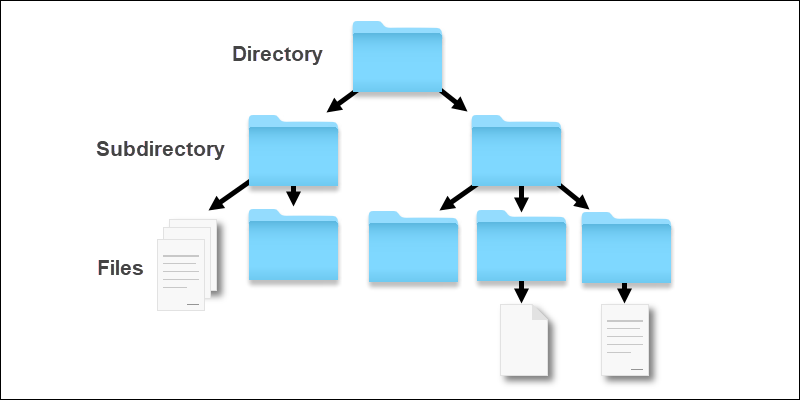
What is File Storage System
A File Storage System is a type of storage infrastructure that enables users to store, manage, and retrieve files, such as documents, images, videos, and other data, in a structured manner. It provides a hierarchical organization of files and facilitates easy access and sharing of data across users and applications.
Important Features
- File Organization: The system should support a folder-based organization to allow users to group related files together and maintain a hierarchical structure.
- Scalability: The system should be designed to handle increasing amounts of data and traffic efficiently. Horizontal scalability should be a consideration to accommodate growing storage needs.
- Data Redundancy and Replication: Implementing data redundancy and replication mechanisms ensures high availability and data durability, protecting against data loss in case of hardware failures.
- Data Access Control: The system should provide robust access control mechanisms to manage permissions and restrict unauthorized access to sensitive files.
- Data Versioning: Supporting file versioning helps users keep track of changes made to files over time and enables easy rollback to previous versions.
- Data Encryption: Implementing encryption at rest and in transit ensures data security and confidentiality.
- Metadata Management: Efficiently storing and managing metadata associated with files, such as file size, creation date, and user information, is essential for optimal file organization and retrieval.
Scaling Requirements — Capacity Estimation
Let me simulate a small scale scenario -
- Total no of users: 1.2 Billion
- Daily active users (DAU): 300 million
- No of videos watched by user/day: 3
- Total no of videos watched per day: 900 Million videos/day
- Read to write ratio: 100:1
- Total no of videos uploaded/day: 1/100 * 900 Million = 9 Million/day
- Storage Estimation: Assume an average video size of 80 MB
- Total Storage per day: 9 Million * 80 MB = 720 TB/day
- For the next 3 years: 720 TB * 5 * 365 = 800 PB
- Requests per second: 900 Million / 3600 seconds * 24 hours = 10K/second
import random
class FileStorageSystem:
def __init__(self):
self.storage = {} # {file_id: file_data}
self.storage_capacity = 800 * 1024 # 800 PB in MB
self.used_storage = 0
self.read_to_write_ratio = 100
def upload_file(self, file_id, file_size_mb):
if file_size_mb + self.used_storage > self.storage_capacity:
return False # Not enough storage space
self.storage[file_id] = file_size_mb
self.used_storage += file_size_mb
return True
def download_file(self, file_id):
return self.storage.get(file_id)
def simulate_daily_activity(self):
total_upload_requests = 9000000 # 9 Million upload requests/day
successful_uploads = 0
for i in range(total_upload_requests):
file_id = f"video_{i}"
file_size_mb = random.randint(70, 90) # Assume an average video size of 80 MB
if self.upload_file(file_id, file_size_mb):
successful_uploads += 1
total_download_requests = 900000000 # 900 Million download requests/day
successful_downloads = 0
for i in range(total_download_requests):
file_id = f"video_{random.randint(0, total_upload_requests - 1)}"
file_size_mb = self.download_file(file_id)
if file_size_mb:
successful_downloads += 1
# Calculate storage usage
total_storage_usage = sum(self.storage.values())
print(f"Total Successful Uploads: {successful_uploads}")
print(f"Total Successful Downloads: {successful_downloads}")
print(f"Total Storage Usage: {total_storage_usage} MB")
print(f"Remaining Storage Capacity: {self.storage_capacity - total_storage_usage} MB")
if __name__ == "__main__":
file_system = FileStorageSystem()
# Simulate daily activity
file_system.simulate_daily_activity()Data Model — ER requirements
- User: Stores user account information.
- File: Represents individual files, including metadata like name, size, and version.
- Folder: Provides a way to organize files in a hierarchical structure.
- Permissions: Captures user access permissions to specific files or folders.
File: Represents a file uploaded by a user.
FileID (Primary Key)
FileName
FileSize
UploadTime
FilePath (Reference to the actual file in storage)
User: Represents a user of the platform.
UserID (Primary Key)
Username
Email
Password
Folder: Represents a folder created by a user to organize files.
FolderID (Primary Key)
FolderName
UserID (Foreign Key referencing the User entity)High Level Design
- Client Interface: The user interacts with the system through a client application, which communicates with the backend servers.
- Load Balancer: Distributes incoming requests across multiple backend servers for load balancing and high availability.
- Metadata Server: Handles metadata operations, such as file/folder information, permissions, and versioning.
- Data Storage: The actual file data is stored in distributed storage nodes, which can be replicated for fault tolerance.
- Authentication & Authorization: Responsible for user authentication and enforcing access control rules.
- Metadata Server: Utilizes a database (e.g., SQL or NoSQL) to store file and folder metadata efficiently.
- Data Storage: Implements distributed file storage, using techniques like sharding and replication for data durability.
- Authentication & Authorization: Employs secure protocols (e.g., OAuth) to authenticate users and verify access permissions.
- Client-Server Communication: Defines the API and data format for communication between the client and server.
Assumptions:
- The system will handle a large number of users and files, requiring horizontal scalability.
- The system will prioritize read operations over write operations, as users will view files more than they upload them.
- The system will need to ensure data reliability and availability.
Main Components:
- Mobile/Web Client: The interface through which users interact with the platform, allowing them to upload, view, and manage files.
- Application Servers: Handle read, write, and notification services for user interactions.
- Load Balancer: Distributes incoming requests to different application servers to ensure load distribution and availability.
- Cache (Memcache or Redis): Caches frequently accessed files and metadata to reduce database load and improve performance.
- CDN (Content Delivery Network): Delivers files to users efficiently, reducing latency and improving data delivery.
- Database: Stores file metadata, user information, likes, comments, and folder information.
- Storage (e.g., HDFS, Amazon S3): Stores the actual files uploaded by users.
Services:
- File Upload Service: Handles file uploads, stores metadata in the database, and saves the file to the storage system.
- File Download Service: Retrieves files from the storage system and serves them to users for download.
- Folder Management Service: Allows users to create, rename, and delete folders to organize their files.
from flask import Flask, request, jsonify
import uuid
from datetime import datetime
app = Flask(__name__)
class User:
def __init__(self, username, email, password):
self.user_id = str(uuid.uuid4())
self.username = username
self.email = email
self.password = password
# Additional attributes can be added here
class File:
def __init__(self, file_name, file_size):
self.file_id = str(uuid.uuid4())
self.file_name = file_name
self.file_size = file_size
self.upload_time = datetime.now()
# Additional attributes can be added here
class Folder:
def __init__(self, folder_name):
self.folder_id = str(uuid.uuid4())
self.folder_name = folder_name
self.files = []
# Additional attributes can be added here
users = {}
files = {}
folders = {}
@app.route('/users', methods=['POST'])
def create_user():
data = request.get_json()
username = data['username']
email = data['email']
password = data['password']
user = User(username, email, password)
users[user.user_id] = user
return jsonify({"user_id": user.user_id, "message": "User created successfully"}), 201
@app.route('/users/<user_id>/files', methods=['POST'])
def create_file(user_id):
data = request.get_json()
file_name = data['file_name']
file_size = data['file_size']
if user_id not in users:
return jsonify({"message": "User not found"}), 404
file = File(file_name, file_size)
files[file.file_id] = file
return jsonify({"file_id": file.file_id, "message": "File uploaded successfully"}), 201
@app.route('/users/<user_id>/folders', methods=['POST'])
def create_folder(user_id):
data = request.get_json()
folder_name = data['folder_name']
if user_id not in users:
return jsonify({"message": "User not found"}), 404
folder = Folder(folder_name)
folders[folder.folder_id] = folder
return jsonify({"folder_id": folder.folder_id, "message": "Folder created successfully"}), 201
@app.route('/users/<user_id>/folders/<folder_id>/add_file', methods=['POST'])
def add_file_to_folder(user_id, folder_id):
if user_id not in users or folder_id not in folders:
return jsonify({"message": "User or folder not found"}), 404
folder = folders[folder_id]
data = request.get_json()
file_id = data['file_id']
if file_id not in files:
return jsonify({"message": "File not found"}), 404
folder.files.append(file_id)
return jsonify({"message": "File added to folder successfully"}), 200
@app.route('/users/<user_id>/files/<file_id>/metadata', methods=['GET'])
def get_file_metadata(user_id, file_id):
if file_id not in files:
return jsonify({"message": "File not found"}), 404
file = files[file_id]
metadata = {
"file_name": file.file_name,
"file_size": file.file_size,
"upload_time": file.upload_time.strftime('%Y-%m-%d %H:%M:%S')
}
return jsonify(metadata), 200
if __name__ == '__main__':
app.run(debug=True)Basic Low Level Design
User: Represents a user of the file storage system.
UserID: Unique identifier for the user.
Username: User's username.
Email: User's email address.
Password: User's password.
File: Represents a file uploaded by a user.
FileID: Unique identifier for the file.
FileName: Name of the file.
FileSize: Size of the file.
UploadTime: Timestamp of when the file was uploaded.
FilePath: Reference to the actual file in storage.
Folder: Represents a folder created by a user to organize files.
FolderID: Unique identifier for the folder.
FolderName: Name of the folder.
UserID: Foreign key referencing the User entity.import os
import shutil
class MetadataServer:
def __init__(self):
self.metadata = {} # {file_id: metadata_dict}
def create_file_metadata(self, file_id, file_name, file_size, version=1):
# Create metadata for a new file
metadata = {
"file_id": file_id,
"file_name": file_name,
"file_size": file_size,
"version": version,
}
self.metadata[file_id] = metadata
def get_file_metadata(self, file_id):
# Get metadata for a specific file
return self.metadata.get(file_id)
def update_file_version(self, file_id):
# Update the version of a file
if file_id in self.metadata:
self.metadata[file_id]["version"] += 1
def create_folder(self, folder_id, folder_name):
# Create a new folder
folder_metadata = {
"folder_id": folder_id,
"folder_name": folder_name,
}
self.metadata[folder_id] = folder_metadata
def get_files_in_folder(self, folder_id):
# Get the list of files in a folder
files_in_folder = []
for file_id, metadata in self.metadata.items():
if "file_name" in metadata and "folder_id" in metadata and metadata["folder_id"] == folder_id:
files_in_folder.append(metadata)
return files_in_folder
class DataStorage:
def __init__(self, storage_path):
self.storage_path = storage_path
def upload_file(self, file_id, file_data):
# Save the file data to storage
file_path = os.path.join(self.storage_path, file_id)
with open(file_path, "wb") as file:
file.write(file_data)
def download_file(self, file_id):
# Retrieve file data from storage
file_path = os.path.join(self.storage_path, file_id)
with open(file_path, "rb") as file:
return file.read()
def delete_file(self, file_id):
# Delete a file from storage
file_path = os.path.join(self.storage_path, file_id)
if os.path.exists(file_path):
os.remove(file_path)
def move_file(self, file_id, new_folder_id):
# Move a file to a new folder
file_path = os.path.join(self.storage_path, file_id)
new_folder_path = os.path.join(self.storage_path, new_folder_id)
shutil.move(file_path, new_folder_path)API Design
- Upload File: POST /api/upload — Uploads a new file to the system.
- Download File: GET /api/download/{file_id} — Downloads the file with the specified ID.
- Create Folder: POST /api/folders — Creates a new folder in the user’s storage.
- List Files: GET /api/files — Retrieves a list of files in the user’s storage.
- Share File: POST /api/share/{file_id} — Shares the file with another user.
import os
import shutil
class FileStorageSystem:
def __init__(self):
self.files = {}
self.folders = {}
self.file_permissions = {}
self.metadata = {} # For additional metadata such as file size, creation date, etc.
def create_file(self, file_id, file_name, folder_id, user_id, file_size):
self.files[file_id] = {
"file_name": file_name,
"folder_id": folder_id,
"versions": [b""], # Store an empty initial version
}
self.set_file_permissions(file_id, user_id, "read_write")
self.metadata[file_id] = {"file_size": file_size}
def create_new_file_version(self, file_id, file_data, user_id):
if file_id in self.files and self.check_file_permission(file_id, user_id, "read_write"):
self.files[file_id]["versions"].append(file_data)
def create_folder(self, folder_id, folder_name):
self.folders[folder_id] = folder_name
def move_file_to_folder(self, file_id, new_folder_id):
if file_id in self.files:
self.files[file_id]["folder_id"] = new_folder_id
def list_files_in_folder(self, folder_id):
files_in_folder = []
for file_id, file_data in self.files.items():
if file_data["folder_id"] == folder_id:
files_in_folder.append(file_data["file_name"])
return files_in_folder
def set_file_permissions(self, file_id, user_id, permission):
if file_id in self.files:
if file_id not in self.file_permissions:
self.file_permissions[file_id] = {}
self.file_permissions[file_id][user_id] = permission
def check_file_permission(self, file_id, user_id, required_permission):
if file_id in self.file_permissions:
return self.file_permissions[file_id].get(user_id) == required_permission
return False
# Test the File Storage System
if __name__ == "__main__":
file_system = FileStorageSystem()
# Create a folder
file_system.create_folder("folder1", "Documents")
# Upload a new file
file_id = "file123"
file_name = "example.txt"
folder_id = "folder1"
user_id = "user1"
file_size = len("Hello, world!")
file_data = b"Hello, world!"
file_system.create_file(file_id, file_name, folder_id, user_id, file_size)
# Create a new version of the file
new_file_data = b"Hello, world! This is a new version."
file_system.create_new_file_version(file_id, new_file_data, user_id)
# Move the file to a different folder
new_folder_id = "folder2"
file_system.create_folder(new_folder_id, "Archive")
file_system.move_file_to_folder(file_id, new_folder_id)
# List files in the new folder
files_in_folder = file_system.list_files_in_folder(new_folder_id)
print("Files in Folder:")
for file_name in files_in_folder:
print(file_name)
# Get file metadata
file_metadata = file_system.get_file_metadata(file_id)
print("\nFile Metadata:")
print(file_metadata)Complete Detailed Design
Coming soon! It will be covered on youtube channel.
Subscribe to youtube channel :
Complete Code implementation
File Organization:
class FileStorageSystem:
def __init__(self):
self.files = {}
self.folders = {} def create_file(self, file_id, file_name, folder_id):
self.files[file_id] = {
"file_name": file_name,
"folder_id": folder_id,
"versions": []
} def create_folder(self, folder_id, folder_name):
self.folders[folder_id] = folder_name def move_file_to_folder(self, file_id, new_folder_id):
if file_id in self.files:
self.files[file_id]["folder_id"] = new_folder_id def list_files_in_folder(self, folder_id):
files_in_folder = []
for file_id, file_data in self.files.items():
if file_data["folder_id"] == folder_id:
files_in_folder.append(file_data["file_name"])
return files_in_folder3. Data Redundancy and Replication:
class FileStorageSystem:
def __init__(self):
self.files = {}
self.folders = {} def create_file(self, file_id, file_name, folder_id):
self.files[file_id] = {
"file_name": file_name,
"folder_id": folder_id,
"versions": [b""], # Store an empty initial version
} def create_new_file_version(self, file_id, file_data):
if file_id in self.files:
self.files[file_id]["versions"].append(file_data)4. Data Access Control:
class FileStorageSystem:
def __init__(self):
self.files = {}
self.folders = {}
self.file_permissions = {} def create_file(self, file_id, file_name, folder_id, user_id):
self.files[file_id] = {
"file_name": file_name,
"folder_id": folder_id,
"versions": [b""], # Store an empty initial version
}
self.set_file_permissions(file_id, user_id, "read_write") def set_file_permissions(self, file_id, user_id, permission):
if file_id in self.files:
if file_id not in self.file_permissions:
self.file_permissions[file_id] = {}
self.file_permissions[file_id][user_id] = permission def check_file_permission(self, file_id, user_id, required_permission):
if file_id in self.file_permissions:
return self.file_permissions[file_id].get(user_id) == required_permission
return False5. Data Versioning:
class FileStorageSystem:
def __init__(self):
self.files = {}
self.folders = {}
self.file_permissions = {} def create_file(self, file_id, file_name, folder_id, user_id):
self.files[file_id] = {
"file_name": file_name,
"folder_id": folder_id,
"versions": [b""], # Store an empty initial version
}
self.set_file_permissions(file_id, user_id, "read_write") def create_new_file_version(self, file_id, file_data, user_id):
if file_id in self.files and self.check_file_permission(file_id, user_id, "read_write"):
self.files[file_id]["versions"].append(file_data)6. Data Encryption:
class FileStorageSystem:
def __init__(self):
self.files = {}
self.folders = {}
self.file_permissions = {} def create_file(self, file_id, file_name, folder_id, user_id):
self.files[file_id] = {
"file_name": file_name,
"folder_id": folder_id,
"versions": [b""], # Store an empty initial version
}
self.set_file_permissions(file_id, user_id, "read_write") def create_new_file_version(self, file_id, file_data, user_id):
if file_id in self.files and self.check_file_permission(file_id, user_id, "read_write"):
self.files[file_id]["versions"].append(file_data)7. Metadata Management:
class FileStorageSystem:
def __init__(self):
self.files = {}
self.folders = {}
self.file_permissions = {}
self.metadata = {} # For additional metadata such as file size, creation date, etc. def create_file(self, file_id, file_name, folder_id, user_id, file_size):
self.files[file_id] = {
"file_name": file_name,
"folder_id": folder_id,
"versions": [b""], # Store an empty initial version
}
self.set_file_permissions(file_id, user_id, "read_write")
self.metadata[file_id] = {"file_size": file_size} def create_new_file_version(self, file_id, file_data, user_id):
if file_id in self.files and self.check_file_permission(file_id, user_id, "read_write"):
self.files[file_id]["versions"].append(file_data) def get_file_metadata(self, file_id):
return self.metadata.get(file_id, {})class FileStorageSystem:
def __init__(self, storage_path):
self.metadata_server = MetadataServer()
self.data_storage = DataStorage(storage_path)
def upload_file(self, file_id, file_name, file_size, file_data):
# Upload a new file to the system
self.metadata_server.create_file_metadata(file_id, file_name, file_size)
self.data_storage.upload_file(file_id, file_data)
def download_file(self, file_id):
# Download the file with the specified ID
return self.data_storage.download_file(file_id)
def create_folder(self, folder_id, folder_name):
# Create a new folder in the user's storage
self.metadata_server.create_folder(folder_id, folder_name)
def list_files_in_folder(self, folder_id):
# Retrieve the list of files in a folder
return self.metadata_server.get_files_in_folder(folder_id)
if __name__ == "__main__":
# Test the File Storage System
storage_path = "/path/to/storage" # Replace with your desired storage directory
file_storage_system = FileStorageSystem(storage_path)
# Upload a new file
file_id = "file123"
file_name = "example.txt"
file_size = len("Hello, world!")
file_data = b"Hello, world!"
file_storage_system.upload_file(file_id, file_name, file_size, file_data)
# Download the file
downloaded_data = file_storage_system.download_file(file_id)
print(downloaded_data.decode())
# Create a new folder
folder_id = "folder456"
folder_name = "documents"
file_storage_system.create_folder(folder_id, folder_name)
# Move the file to the new folder
file_storage_system.move_file(file_id, folder_id)
# List files in the folder
files_in_folder = file_storage_system.list_files_in_folder(folder_id)
for file_metadata in files_in_folder:
print(f"File ID: {file_metadata['file_id']}, File Name: {file_metadata['file_name']}")System Design — Video Conferencing System
We will be discussing in depth -
- What is Video Conferencing System
- Important Features
- Scaling Requirements
- Data Model — ER requirements
- High Level Design
- Basic Low Level Design
- API Design
- Complete Detailed Design
- Complete Code Implementation

What is Video Conferencing System
A Video Conferencing System is a web-based or software application that allows users to conduct live video and audio meetings, conferences, or webinars with multiple participants remotely. The system facilitates seamless communication, collaboration, and engagement among geographically dispersed individuals or teams.
Important Features
a. Real-time Video and Audio: Enable users to have high-quality video and audio interactions in real-time.
b. Screen Sharing: Allow participants to share their screens with others to present content or demonstrate applications.
c. Chat and File Sharing: Incorporate a text-based chat feature and allow file sharing during the conference.
d. Multi-platform Support: Ensure compatibility with various devices and operating systems, such as desktop, mobile, and web browsers.
e. Recording and Playback: Provide the ability to record conferences and access recordings for future reference.
f. User Authentication and Access Control: Implement secure authentication and role-based access control to protect sensitive data.
g. Bandwidth Optimization: Optimize the use of network bandwidth to deliver smooth video and audio experiences.
h. Security and Encryption: Employ end-to-end encryption to safeguard communication and protect user privacy.
Scaling Requirements — Capacity Estimation
Let me create a small-scale simulation for a Video Conferencing System with the following scalability requirements:
- Total number of users: 100,000 (100K)
- Daily active users (DAU): 30,000 (30K)
- Number of video conferences held by a user/day: 2
- Total number of video conferences per day: 60,000 (60K)
- Since the system is read-heavy, let’s say the read to write ratio is 50:1
- Total number of video conferences created per day: 1,200 (60K / 50)
Let’s assume that on average, each video conference lasts for 30 minutes and consumes 100 MB of data.
Storage Estimation:
Total storage per day: 1,200 * 100 MB = 120,000 MB = 120 GB/day
For the next 3 years, the total storage needed would be:
120 GB/day * 365 days * 3 years = 131.4 TB
Requests per Second:
Let’s assume each video conference involves 10 participants, and we use WebRTC technology for video streaming.
Estimated average bitrate per video stream: 1 Mbps (megabit per second)
Requests per second for video streaming: 10 (participants) * 1 Mbps = 10 Mbps
Assuming there’s additional overhead for signaling and other operations, let’s consider an additional 20% overhead.
Total requests per second: 10 Mbps * 1.2 (overhead) = 12 Mbps
import time
class VideoConferencingSystem:
def __init__(self):
self.total_users = 100000
self.daily_active_users = 30000
self.video_conferences_per_user = 2
self.total_video_conferences_per_day = 60000
self.read_to_write_ratio = 50
self.video_conferences_created_per_day = self.total_video_conferences_per_day // self.read_to_write_ratio
self.video_size_mb = 100
self.storage_per_day_gb = self.video_conferences_created_per_day * self.video_size_mb / 1024
self.total_storage_tb = self.storage_per_day_gb * 365 * 3
self.requests_per_second = self.total_video_conferences_per_day // 3600 * 24
self.average_bitrate_mbps = 1
self.overhead_factor = 1.2
self.requests_per_second_streaming = 10 * self.average_bitrate_mbps * self.overhead_factor
def simulate(self):
print(f"Total Users: {self.total_users}")
print(f"Daily Active Users: {self.daily_active_users}")
print(f"Number of Video Conferences per User per Day: {self.video_conferences_per_user}")
print(f"Total Video Conferences per Day: {self.total_video_conferences_per_day}")
print(f"Read to Write Ratio: {self.read_to_write_ratio}")
print(f"Video Conferences Created per Day: {self.video_conferences_created_per_day}")
print(f"Storage per Day: {self.storage_per_day_gb:.2f} GB")
print(f"Total Storage for 3 Years: {self.total_storage_tb:.2f} TB")
print(f"Requests per Second (Overall): {self.requests_per_second}")
print(f"Requests per Second (Streaming): {self.requests_per_second_streaming:.2f} Mbps")
def start_conference(self, user_id):
# Simulate the process of starting a video conference
time.sleep(2)
print(f"User {user_id} started a video conference.")
def end_conference(self, user_id):
# Simulate the process of ending a video conference
time.sleep(1)
print(f"User {user_id} ended a video conference.")
if __name__ == "__main__":
vc_system = VideoConferencingSystem()
vc_system.simulate()
# Simulate video conferences for some users
user1_id = 1001
user2_id = 1002
vc_system.start_conference(user1_id)
vc_system.start_conference(user2_id)
vc_system.end_conference(user1_id)
vc_system.end_conference(user2_id)Data Model — ER requirements
a. User: Represents information about each system user, including username, password, and role.
b. Conference: Stores details about each video conference, including participants and conference settings.
c. Media Streams: Represents video and audio streams exchanged during the conference.
d. Chat Messages: Stores chat messages exchanged among participants.
User
UserID (Primary Key)
Username
Email
Password
Conference
ConferenceID (Primary Key)
ConferenceName
StartTime
EndTime
HostUserID (Foreign Key to User.UserID)
Participant
ParticipantID (Primary Key)
ConferenceID (Foreign Key to Conference.ConferenceID)
UserID (Foreign Key to User.UserID)
Message
MessageID (Primary Key)
ConferenceID (Foreign Key to Conference.ConferenceID)
SenderUserID (Foreign Key to User.UserID)
Content
TimestampHigh Level Design
a. Horizontal Scaling: Distribute the load across multiple servers to handle increased traffic and users.
b. Load Balancing: Implement a load balancer to evenly distribute requests among server instances.
c. Media Servers: Employ specialized media servers to handle media streams and reduce the burden on the application servers.
Components —
a. Web Frontend: Responsible for user interface, media rendering, and user interactions.
b. Application Servers: Handle conference logic, user authentication, and data processing.
c. Media Servers: Manage media streams, encoding, decoding, and distribution.
d. Database: Stores user information, conference details, and chat messages.
a. Signaling Protocol: Establishes communication between clients and servers for negotiation and control.
b. WebRTC: Utilizes WebRTC technology for real-time communication, media streams, and encryption.
c. Media Codecs: Select appropriate audio and video codecs for efficient data transmission.
Assumptions:
- The system will support real-time video conferencing with multiple participants.
- It will be a read-heavy system, with more users watching conferences than hosting them.
- Availability and reliability are critical to ensure smooth video conferencing experiences.
Main Components and Services:
- Mobile/Web Clients: Users accessing the Video Conferencing System platform.
- Application Servers: Responsible for handling read and write operations, managing conferences, participants, and messages.
- Load Balancer: Routes and distributes requests from clients to the appropriate application servers for handling.
- Cache (Memcache): Caches frequently accessed data to improve read performance.
- CDN (Content Delivery Network): Improves latency and throughput for video streaming during conferences.
- Video Streaming Service: A service responsible for handling real-time video and audio streaming during conferences.
- Signaling Service: Manages signaling between participants to establish and maintain video conference connections.
- Conference Database: Stores information about conferences, participants, and messages using a NoSQL database.
- User Database: Stores user information, including usernames, emails, and passwords.
- Authentication Service: Manages user authentication and access control to protect sensitive data.
- Feed Generation Service: Generates user-specific feeds based on conferences and messages they are participating in.
import uuid
from datetime import datetime
class User:
def __init__(self, username, password, email, name):
self.userID = str(uuid.uuid4())
self.username = username
self.password = password
self.email = email
self.name = name
self.conferences_hosted = []
self.conferences_participated = []
class Conference:
def __init__(self, host_user, participants, start_time, end_time, title, description):
self.conferenceID = str(uuid.uuid4())
self.host_user = host_user
self.participants = participants
self.start_time = start_time
self.end_time = end_time
self.title = title
self.description = description
self.messages = []
class Message:
def __init__(self, user, content):
self.messageID = str(uuid.uuid4())
self.user = user
self.content = content
self.timestamp = datetime.now()
# Sample data for demonstration
users = {
"user1": User("user1", "password1", "[email protected]", "User One"),
"user2": User("user2", "password2", "[email protected]", "User Two"),
"user3": User("user3", "password3", "[email protected]", "User Three")
}
conferences = []
# Functions to create and manage conferences and messages
def create_conference(host_user, participants, start_time, end_time, title, description):
conference = Conference(host_user, participants, start_time, end_time, title, description)
conferences.append(conference)
host_user.conferences_hosted.append(conference)
for user in participants:
user.conferences_participated.append(conference)
return conference
def send_message(conference, user, content):
message = Message(user, content)
conference.messages.append(message)
return message
# Sample usage of the functions
if __name__ == "__main__":
# Create users
user1 = User("user1", "password1", "[email protected]", "User One")
user2 = User("user2", "password2", "[email protected]", "User Two")
user3 = User("user3", "password3", "[email protected]", "User Three")
# Create a conference
conference = create_conference(user1, [user2, user3], datetime(2023, 7, 22, 12, 0), datetime(2023, 7, 22, 14, 0),
"Project Review Meeting", "Reviewing the progress of the project.")
# Send a message in the conference
message = send_message(conference, user1, "Hello, everyone! Let's get started.")
print(f"Message ID: {message.messageID}")
print(f"Content: {message.content}")
print(f"Timestamp: {message.timestamp}")Basic Low Level Design
User:
UserID (Primary Key)
Username
Password
Email
Other user attributes (e.g., name, profile picture)
Conference:
ConferenceID (Primary Key)
HostUserID (Foreign Key to User.UserID)
Participants (List of UserIDs of participants)
Start Time
End Time
Other conference attributes (e.g., title, description)
Message:
MessageID (Primary Key)
ConferenceID (Foreign Key to Conference.ConferenceID)
SenderUserID (Foreign Key to User.UserID)
Content
Timestamp
Other message attributes (e.g., type, attachments)
from flask import Flask, jsonify, request
app = Flask(__name__)
# Dummy user data (for demonstration purposes only)
users = {
"user123": {"user_id": 123, "password": "password123"},
"new_user": {"user_id": 456, "password": "new_password", "email": "[email protected]"},
}
# Dummy conference data (for demonstration purposes only)
conferences = {}
@app.route('/api/login', methods=['POST'])
def login():
data = request.get_json()
username = data["username"]
password = data["password"]
if username in users and users[username]["password"] == password:
return jsonify({
"user_id": users[username]["user_id"],
"username": username,
"access_token": "access_token_here" # Dummy access token for simplicity
})
return jsonify({"error": "Invalid credentials"}), 401
@app.route('/api/register', methods=['POST'])
def register():
data = request.get_json()
username = data["username"]
password = data["password"]
email = data["email"]
if username not in users:
user_id = len(users) + 1
users[username] = {"user_id": user_id, "password": password, "email": email}
return jsonify({
"user_id": user_id,
"username": username,
"access_token": "access_token_here" # Dummy access token for simplicity
})
return jsonify({"error": "Username already exists"}), 400
# Other low-level API endpoints can be similarly implemented
if __name__ == '__main__':
app.run(debug=True)API Design
from flask import Flask, render_template
app = Flask(__name__)
# Dummy conference data (for demonstration purposes only)
conferences = {
"conf456": {
"conference_id": "conf456",
"conference_name": "Team Meeting",
"start_time": "2023-07-22 14:30:00",
"participants": [123],
"join_url": "https://videoconferencing.com/conf456"
}
}
@app.route('/')
def index():
return render_template('index.html')
@app.route('/conference/<conference_id>')
def conference_page(conference_id):
if conference_id in conferences:
conference = conferences[conference_id]
return render_template('conference.html', conference=conference)
return "Conference not found", 404
@app.route('/join/<conference_id>')
def join_conference(conference_id):
if conference_id in conferences:
return render_template('join_conference.html', conference_id=conference_id)
return "Conference not found", 404
if __name__ == '__main__':
app.run(debug=True)1. Web Frontend:
a. Endpoint: /
Method: GET
Description: Loads the landing page for the Video Conferencing System.
b. Endpoint: /conference/{conference_id}
Method: GET
Description: Displays the conference page for the specified conference.
c. Endpoint: /join/{conference_id}
Method: GET
Description: Loads the page for a user to join the specified conference.
2. Application Servers:
a. Endpoint: /api/login
Method: POST
Description: Handles user authentication for login.
b. Endpoint: /api/register
Method: POST
Description: Handles user registration.
c. Endpoint: /api/logout
Method: POST
Description: Handles user logout.
d. Endpoint: /api/create_conference
Method: POST
Description: Creates a new video conference.
e. Endpoint: /api/join_conference
Method: POST
Description: Allows a user to join an existing conference.
f. Endpoint: /api/start_media_stream
Method: POST
Description: Starts the media stream for a user in a conference.
g. Endpoint: /api/stop_media_stream
Method: POST
Description: Stops the media stream for a user in a conference.
Complete Detailed Design
Coming soon! It will be covered on youtube channel.
Subscribe to youtube channel :
Complete Code implementation
from flask import Flask, request, jsonify
import uuid
from datetime import datetime
app = Flask(__name__)
users = {}
conferences = []
class User:
def __init__(self, username, password, email, name):
self.userID = str(uuid.uuid4())
self.username = username
self.password = password
self.email = email
self.name = name
self.conferences_hosted = []
self.conferences_participated = []
class Conference:
def __init__(self, host_user, participants, start_time, end_time, title, description):
self.conferenceID = str(uuid.uuid4())
self.host_user = host_user
self.participants = participants
self.start_time = start_time
self.end_time = end_time
self.title = title
self.description = description
self.messages = []
class Message:
def __init__(self, user, content):
self.messageID = str(uuid.uuid4())
self.user = user
self.content = content
self.timestamp = datetime.now()
@app.route('/users', methods=['POST'])
def create_user():
data = request.get_json()
username = data.get('username')
password = data.get('password')
email = data.get('email')
name = data.get('name')
user = User(username, password, email, name)
users[user.userID] = user
return jsonify({"userID": user.userID, "username": user.username, "email": user.email, "name": user.name}), 201
@app.route('/conferences', methods=['POST'])
def create_conference():
data = request.get_json()
host_user_id = data.get('hostUserID')
participants_ids = data.get('participants')
start_time = data.get('startTime')
end_time = data.get('endTime')
title = data.get('title')
description = data.get('description')
host_user = users.get(host_user_id)
participants = [users.get(participant_id) for participant_id in participants_ids]
conference = Conference(host_user, participants, start_time, end_time, title, description)
conferences.append(conference)
host_user.conferences_hosted.append(conference)
for user in participants:
user.conferences_participated.append(conference)
return jsonify({
"conferenceID": conference.conferenceID,
"hostUserID": conference.host_user.userID,
"participants": [participant.userID for participant in conference.participants],
"startTime": conference.start_time,
"endTime": conference.end_time,
"title": conference.title,
"description": conference.description
}), 201
if __name__ == "__main__":
app.run()# Video Conferencing System with functionalities
class VideoConferencingSystem:
def __init__(self):
self.active_participants = set()
self.screen_sharing_users = set()
self.chat_messages = []
self.supported_platforms = set()
self.is_recording = False
self.users = {}
self.bandwidth_optimization = False
self.is_encryption_enabled = False
# Function to enable real-time video and audio interactions
def join_conference(self, user_id):
self.active_participants.add(user_id)
def leave_conference(self, user_id):
self.active_participants.discard(user_id)
# Function to allow screen sharing during the conference
def start_screen_sharing(self, user_id):
self.screen_sharing_users.add(user_id)
def stop_screen_sharing(self, user_id):
self.screen_sharing_users.discard(user_id)
# Function to incorporate chat during the conference
def send_chat_message(self, sender_id, message):
self.chat_messages.append({"sender_id": sender_id, "message": message})
# Function to allow file sharing during the conference (dummy implementation)
def share_file(self, sender_id, file_path):
print(f"User {sender_id} shared file: {file_path}")
# Function to add platform support
def add_platform_support(self, platform):
self.supported_platforms.add(platform)
def remove_platform_support(self, platform):
self.supported_platforms.discard(platform)
# Function to start and stop recording
def start_recording(self):
self.is_recording = True
def stop_recording(self):
self.is_recording = False
# Function to play back the recorded conference (dummy implementation)
def playback_recording(self, recording_id):
if self.is_recording:
print("Cannot playback while recording is in progress.")
return
print(f"Playback recording with ID: {recording_id}")
# Function to register and login users
def register_user(self, username, password):
user_id = len(self.users) + 1
self.users[user_id] = {"username": username, "password": password, "role": "user"}
def login_user(self, username, password):
for user_id, user_data in self.users.items():
if user_data["username"] == username and user_data["password"] == password:
return user_id
return None
# Function to set user role (dummy implementation)
def set_user_role(self, user_id, role):
if user_id in self.users:
self.users[user_id]["role"] = role
# Function to enable and disable bandwidth optimization
def enable_bandwidth_optimization(self):
self.bandwidth_optimization = True
def disable_bandwidth_optimization(self):
self.bandwidth_optimization = False
# Function to enable and disable encryption
def enable_encryption(self):
self.is_encryption_enabled = True
def disable_encryption(self):
self.is_encryption_enabled = False
# Usage:
vc_system = VideoConferencingSystem()
# Real-time Video and Audio
user1_id = 1
user2_id = 2
vc_system.join_conference(user1_id)
vc_system.join_conference(user2_id)
vc_system.leave_conference(user1_id)
# Screen Sharing
vc_system.start_screen_sharing(user1_id)
vc_system.stop_screen_sharing(user1_id)
# Chat and File Sharing
vc_system.send_chat_message(user1_id, "Hello, everyone!")
vc_system.share_file(user2_id, "/path/to/file.txt")
# Multi-platform Support
vc_system.add_platform_support("desktop")
vc_system.add_platform_support("mobile")
vc_system.add_platform_support("web")
vc_system.remove_platform_support("mobile")
# Recording and Playback
vc_system.start_recording()
vc_system.stop_recording()
vc_system.playback_recording("recording123")
# User Authentication and Access Control
vc_system.register_user("user123", "password123")
user_id = vc_system.login_user("user123", "password123")
vc_system.set_user_role(user_id, "admin")
# Bandwidth Optimization
vc_system.enable_bandwidth_optimization()
vc_system.disable_bandwidth_optimization()
# Security and Encryption
vc_system.enable_encryption()
vc_system.disable_encryption()Read next — how to Design Yelp.
Day 14 of System Design Case Studies Series : Design Yelp
Complete Design with examples..
medium.com
Let me know if you have any questions in the comment section below. Subscribe/ Follow, Like/Clap and Stay Tuned!!
Day 2 : SQL Basics, Query Structure, Built In functions Conditions
Day 4 : Set Theory Operations, Stored Procedures and CASE statements in SQL
Day 6 : Subqueries, Group by, order by and Having clauses in SQL and Analytical Functions
Day 7 : Window Functions, Grouping Sets and Constraints in SQL
Day 8 : BigQuery Basics, SELECT, FROM, WHERE and Date and Extract in BigQuery
Day 9 : Common Expression Table, UNNEST Clause, SQL vs NoSQL Databases
Day 10 : Triggers, Pivot and Cursors in SQL
Day 14 : MySQL in Depth
Day 15 : PostgreSQL inDepth
Anyways, For Day 15 of 15 days of Advanced SQL, we will cover —
PostgreSQL inDepth
Github for Advanced SQL that you can follow —
All the projects, data structures, algorithms, system design, Data Science and ML, Data Engineering, MLOps and Deep Learning videos will be published on our youtube channel ( just launched).
Subscribe today!
System Design Case Studies — In Depth
Complete Data Structures and Algorithm Series
Github —
Some of the other best Series —
30 days of Data Structures and Algorithms and System Design Simplified
Data Science and Machine Learning Research ( papers) Simplified **
100 days : Your Data Science and Machine Learning Degree Series with projects
Complete Data Visualization and Pre-processing Series with projects
Exceptional Github Repos — Part 1
Exceptional Github Repos — Part 2
Tech Newsletter —
If you are interested, you can join my newsletter through which I send tech interview tips, techniques, patterns, hacks — Software Development, ML, Data Science, Startups and Technology projects to more than 30K readers. You can subscribe to Tech Brew :
For Python Projects —
For complete 60 days of Data Science and ML : Day 1 — Day 60 : Quick Recap of 60 days of Data Science and ML
Follow for more updates. Stay tuned and keep coding!
For other projects, tune to —
Build Machine Learning Pipelines( With Code)
Recurrent Neural Network with Keras
Clustering Geolocation Data in Python using DBSCAN and K-Means
Facial Expression Recognition using Keras
Hyperparameter Tuning with Keras Tuner
Custom Layers in Keras


