Free AI web copilot to create summaries, insights and extended knowledge, download it at here
23536
Abstract
ursor <span class="hljs-keyword">INTO</span> <span class="hljs-variable">@employee_id</span>, <span class="hljs-variable">@salary</span>;
WHILE @<span class="hljs-variable">@FETCH_STATUS</span> <span class="hljs-operator">=</span> <span class="hljs-number">0</span>
<span class="hljs-keyword">BEGIN</span>
<span class="hljs-comment">-- Process the current row</span>
<span class="hljs-comment">-- For example, update the salary based on some condition</span>
IF <span class="hljs-variable">@salary</span> <span class="hljs-operator"><</span> <span class="hljs-number">50000</span>
<span class="hljs-keyword">BEGIN</span>
<span class="hljs-keyword">UPDATE</span> employees
<span class="hljs-keyword">SET</span> salary <span class="hljs-operator">=</span> salary <span class="hljs-operator">*</span> <span class="hljs-number">1.1</span>
<span class="hljs-keyword">WHERE</span> employee_id <span class="hljs-operator">=</span> <span class="hljs-variable">@employee_id</span>;
<span class="hljs-keyword">END</span>;
<span class="hljs-keyword">FETCH</span> NEXT <span class="hljs-keyword">FROM</span> employee_cursor <span class="hljs-keyword">INTO</span> <span class="hljs-variable">@employee_id</span>, <span class="hljs-variable">@salary</span>;
<span class="hljs-keyword">END</span>;
<span class="hljs-keyword">CLOSE</span> employee_cursor;
<span class="hljs-keyword">DEALLOCATE</span> employee_cursor;</pre></div><h1 id="1536">Triggers in SQL</h1><p id="2b8d">Triggers are an important concept in SQL. These are nothing but event driven SQL queries which are stored in the memory and fired when required.</p><p id="0e68">The benefits of using triggers are reduce computational times, reuse of the code, helps check integrity of the database and detect any error or issues with the code.</p><p id="d876">There are two types of Triggers —</p><p id="0bd7"><b>Statement Level Triggers</b></p><p id="dc03">Triggers of this kind run only once irrespective of how many rows are involved.</p><p id="37c3"><b>Row level Triggers</b></p><p id="d6ef">In this the triggers run multiple times and changes are done in the rows on which SQL queries are triggered.</p><p id="6d04"><b>Syntax —</b></p><blockquote id="acd6"><p>CREATE TRIGGER trigger_name</p></blockquote><blockquote id="89f6"><p>BEFORE/AFTER</p></blockquote><blockquote id="eb40"><p>SQL Statement (INSERT/UPDATE/DELETE/ALTER)</p></blockquote><blockquote id="650d"><p>ON table_name</p></blockquote><blockquote id="f94c"><p>FOR EACH ROW SET operation</p></blockquote><p id="02d3">Triggers are set before and after the SQL statements.</p><p id="c4bf"><b>Implementation —</b></p><div id="5776"><pre><span class="hljs-comment">-- Creating a Trigger Example</span>
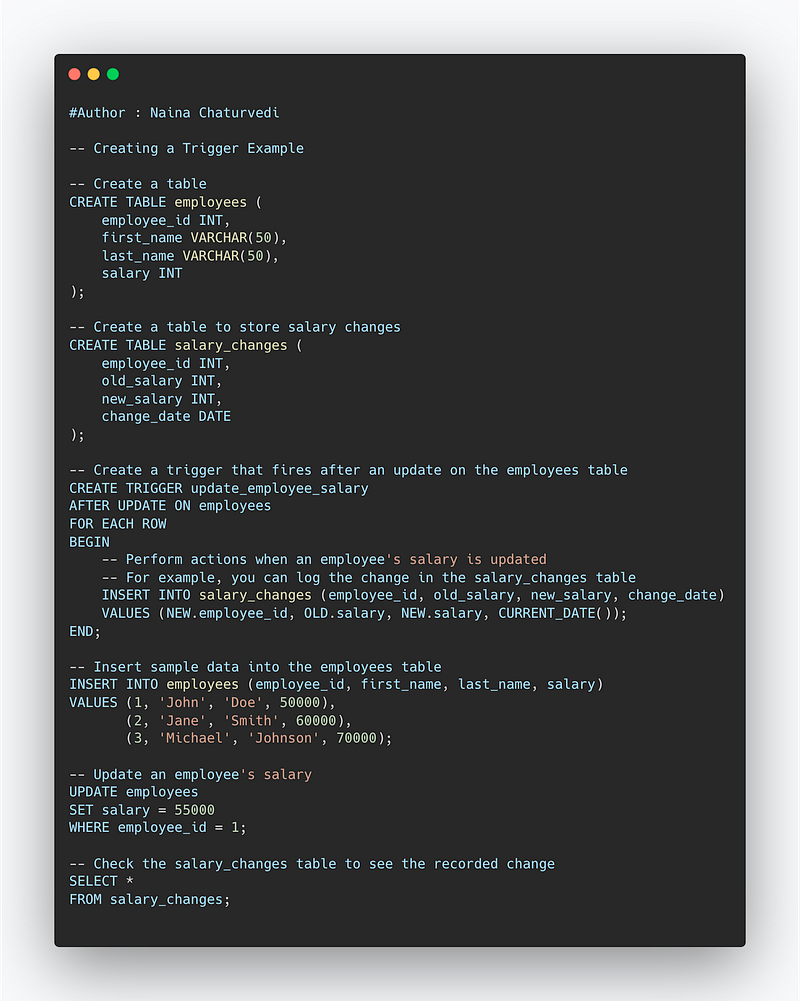
<span class="hljs-comment">-- Create a table</span>
<span class="hljs-keyword">CREATE</span> <span class="hljs-keyword">TABLE</span> employees (
employee_id <span class="hljs-type">INT</span>,
first_name <span class="hljs-type">VARCHAR</span>(<span class="hljs-number">50</span>),
last_name <span class="hljs-type">VARCHAR</span>(<span class="hljs-number">50</span>),
salary <span class="hljs-type">INT</span>
);
<span class="hljs-comment">-- Create a table to store salary changes</span>
<span class="hljs-keyword">CREATE</span> <span class="hljs-keyword">TABLE</span> salary_changes (
employee_id <span class="hljs-type">INT</span>,
old_salary <span class="hljs-type">INT</span>,
new_salary <span class="hljs-type">INT</span>,
change_date <span class="hljs-type">DATE</span>
);
<span class="hljs-comment">-- Create a trigger that fires after an update on the employees table</span>
<span class="hljs-keyword">CREATE</span> <span class="hljs-keyword">TRIGGER</span> update_employee_salary
AFTER <span class="hljs-keyword">UPDATE</span> <span class="hljs-keyword">ON</span> employees
<span class="hljs-keyword">FOR</span> <span class="hljs-keyword">EACH</span> <span class="hljs-type">ROW</span>
<span class="hljs-keyword">BEGIN</span>
<span class="hljs-comment">-- Perform actions when an employee's salary is updated</span>
<span class="hljs-comment">-- For example, you can log the change in the salary_changes table</span>
<span class="hljs-keyword">INSERT</span> <span class="hljs-keyword">INTO</span> salary_changes (employee_id, old_salary, new_salary, change_date)
<span class="hljs-keyword">VALUES</span> (NEW.employee_id, OLD.salary, NEW.salary, <span class="hljs-built_in">CURRENT_DATE</span>());
<span class="hljs-keyword">END</span>;
<span class="hljs-comment">-- Insert sample data into the employees table</span>
<span class="hljs-keyword">INSERT</span> <span class="hljs-keyword">INTO</span> employees (employee_id, first_name, last_name, salary)
<span class="hljs-keyword">VALUES</span> (<span class="hljs-number">1</span>, <span class="hljs-string">'John'</span>, <span class="hljs-string">'Doe'</span>, <span class="hljs-number">50000</span>),
(<span class="hljs-number">2</span>, <span class="hljs-string">'Jane'</span>, <span class="hljs-string">'Smith'</span>, <span class="hljs-number">60000</span>),
(<span class="hljs-number">3</span>, <span class="hljs-string">'Michael'</span>, <span class="hljs-string">'Johnson'</span>, <span class="hljs-number">70000</span>);
<span class="hljs-comment">-- Update an employee's salary</span>
<span class="hljs-keyword">UPDATE</span> employees
<span class="hljs-keyword">SET</span> salary <span class="hljs-operator">=</span> <span class="hljs-number">55000</span>
<span class="hljs-keyword">WHERE</span> employee_id <span class="hljs-operator">=</span> <span class="hljs-number">1</span>;
<span class="hljs-comment">-- Check the salary_changes table to see the recorded change</span>
<span class="hljs-keyword">SELECT</span> <span class="hljs-operator">*</span>
<span class="hljs-keyword">FROM</span> salary_changes;</pre></div><p id="993d"><b>Example —</b></p><blockquote id="8319"><p>CREATE TRIGGER experience_years AFTER UPDATE ON Employee</p></blockquote><blockquote id="29e5"><p>FOR<b> </b>EACH ROW SET @exp_years = @exp_years + 3</p></blockquote><blockquote id="3626"><p>UPDATE Employee</p></blockquote><blockquote id="a594"><p>SET exp_years = 20</p></blockquote><blockquote id="7292"><p>WHERE experience = 2</p></blockquote><p id="bfcc"><b>Snippet —</b></p><figure id="6a28"><img src="https://cdn-images-1.readmedium.com/v2/resize:fit:800/1*9tPsl-mNqJTXlUuN84mCGA.png"><figcaption></figcaption></figure><h1 id="3b72">Pivot in SQL</h1><p id="3c84">Pivot is an important function in SQL which allows us to aggregate the results and rotate rows into columns which is also called as cross tabulation.</p><p id="947f"><b>Syntax —</b></p><blockquote id="3561"><p>SELECT t1, t2,</p></blockquote><blockquote id="48b9"><p>pivot_value1, pivot_value2, pivot_value3 … pivot_value_n</p></blockquote><blockquote id="9fb5"><p>FROM</p></blockquote><blockquote id="a616"><p>src_table</p></blockquote><blockquote id="2b7b"><p>PIVOT</p></blockquote><blockquote id="536a"><p>(aggregate_function(column_names)</p></blockquote><blockquote id="c7de"><p>FOR pivot_column</p></blockquote><blockquote id="6b74"><p>IN (pivot_value1, pivot_value2, pivot_value3 … pivot_value_n)</p></blockquote><p id="f88b"><b>Implementation —</b></p><div id="c069"><pre><span class="hljs-comment">-- Creating a Pivot Example</span>
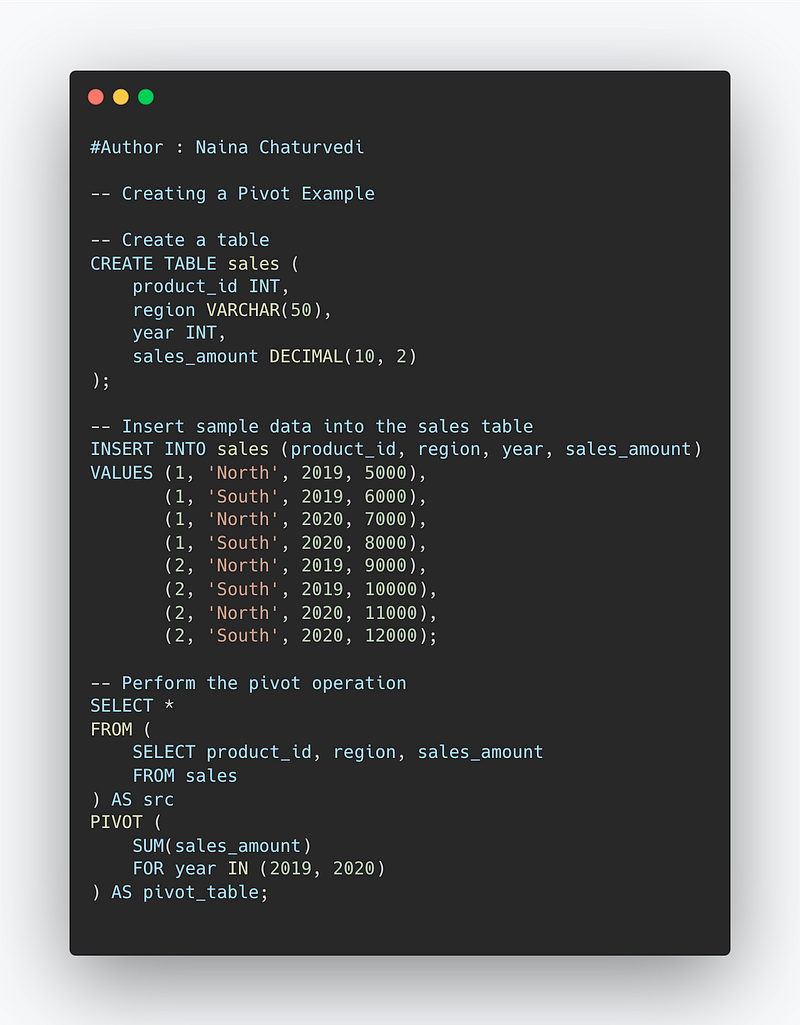
<span class="hljs-comment">-- Create a table</span>
<span class="hljs-keyword">CREATE</span> <span class="hljs-keyword">TABLE</span> sales (
product_id <span class="hljs-type">INT</span>,
region <span class="hljs-type">VARCHAR</span>(<span class="hljs-number">50</span>),
<span class="hljs-keyword">year</span> <span class="hljs-type">INT</span>,
sales_amount <span class="hljs-type">DECIMAL</span>(<span class="hljs-number">10</span>, <span class="hljs-number">2</span>)
);
<span class="hljs-comment">-- Insert sample data into the sales table</span>
<span class="hljs-keyword">INSERT</span> <span class="hljs-keyword">INTO</span> sales (product_id, region, <span class="hljs-keyword">year</span>, sales_amount)
<span class="hljs-keyword">VALUES</span> (<span class="hljs-number">1</span>, <span class="hljs-string">'North'</span>, <span class="hljs-number">2019</span>, <span class="hljs-number">5000</span>),
(<span class="hljs-number">1</span>, <span class="hljs-string">'South'</span>, <span class="hljs-number">2019</span>, <span class="hljs-number">6000</span>),
(<span class="hljs-number">1</span>, <span class="hljs-string">'North'</span>, <span class="hljs-number">2020</span>, <span class="hljs-number">7000</span>),
(<span class="hljs-number">1</span>, <span class="hljs-string">'South'</span>, <span class="hljs-number">2020</span>, <span class="hljs-number">8000</span>),
(<span class="hljs-number">2</span>, <span class="hljs-string">'North'</span>, <span class="hljs-number">2019</span>, <span class="hljs-number">9000</span>),
(<span class="hljs-number">2</span>, <span class="hljs-string">'South'</span>, <span class="hljs-number">2019</span>, <span class="hljs-number">10000</span>),
(<span class="hljs-number">2</span>, <span class="hljs-string">'North'</span>, <span class="hljs-number">2020</span>, <span class="hljs-number">11000</span>),
(<span class="hljs-number">2</span>, <span class="hljs-string">'South'</span>, <span class="hljs-number">2020</span>, <span class="hljs-number">12000</span>);
<span class="hljs-comment">-- Perform the pivot operation</span>
<span class="hljs-keyword">SELECT</span> <span class="hljs-operator">*</span>
<span class="hljs-keyword">FROM</span> (
<span class="hljs-keyword">SELECT</span> product_id, region, sales_amount
<span class="hljs-keyword">FROM</span> sales
) <span class="hljs-keyword">AS</span> src
PIVOT (
<span class="hljs-built_in">SUM</span>(sales_amount)
<span class="hljs-keyword">FOR</span> <span class="hljs-keyword">year</span> <span class="hljs-keyword">IN</span> (<span class="hljs-number">2019</span>, <span class="hljs-number">2020</span>)
) <span class="hljs-keyword">AS</span> pivot_table;</pre></div><p id="56b2"><b>Example —</b></p><blockquote id="4424"><p>SELECT * FROM (</p></blockquote><blockquote id="de00"><p>SELECT salary, year(date) year, month(date) month,</p></blockquote><blockquote id="1269"><p>FROM employee_salary</p></blockquote><blockquote id="b7e0"><p>WHERE date BETWEEN DATE ‘2021–01–01’ AND DATE ‘2019–08–31’)</p></blockquote><blockquote id="7022"><p>PIVOT (</p></blockquote><blockquote id="9c8b"><p>CAST(avg(salary) AS DECIMAL(2,1))</p></blockquote><blockquote id="8fc8"><p>FOR month in ( months_name))</p></blockquote><blockquote id="91f6"><p>ORDER BY year ASC</p></blockquote><p id="2b2d">Snippet —</p><figure id="5beb"><img src="https://cdn-images-1.readmedium.com/v2/resize:fit:800/1*gn3rqLTpdSWCztxjOx0SkA.png"><figcaption></figcaption></figure><p id="d83f">The aggregate function are used to perform calculation on multiple rows/values and return a single result as the answer. It ignores NULL values when performing aggregation.</p><p id="a872">Some of the most important aggregate functions are —</p><ul><li>COUNT() — To count the number of rows</li><li>SUM() — To return sum of the column</li><li>AVG () — To return average of the column</li><li>MIN() — To return min value in the column</li><li>MAX() — To return max value in the column</li></ul><p id="d49f"><b>Format —</b></p><blockquote id="fce0"><p>Count(column_name)</p></blockquote><blockquote id="bc60"><p>Sum(column_name)</p></blockquote><blockquote id="1cae"><p>Avg(column_name)</p></blockquote><blockquote id="39be"><p>Min(column_name)</p></blockquote><blockquote id="78a1"><p>Max(column_name)</p></blockquote><p id="e515"><b>Implementation —</b></p><div id="326a"><pre><span class="hljs-comment">-- Using Aggregate Functions Example</span>
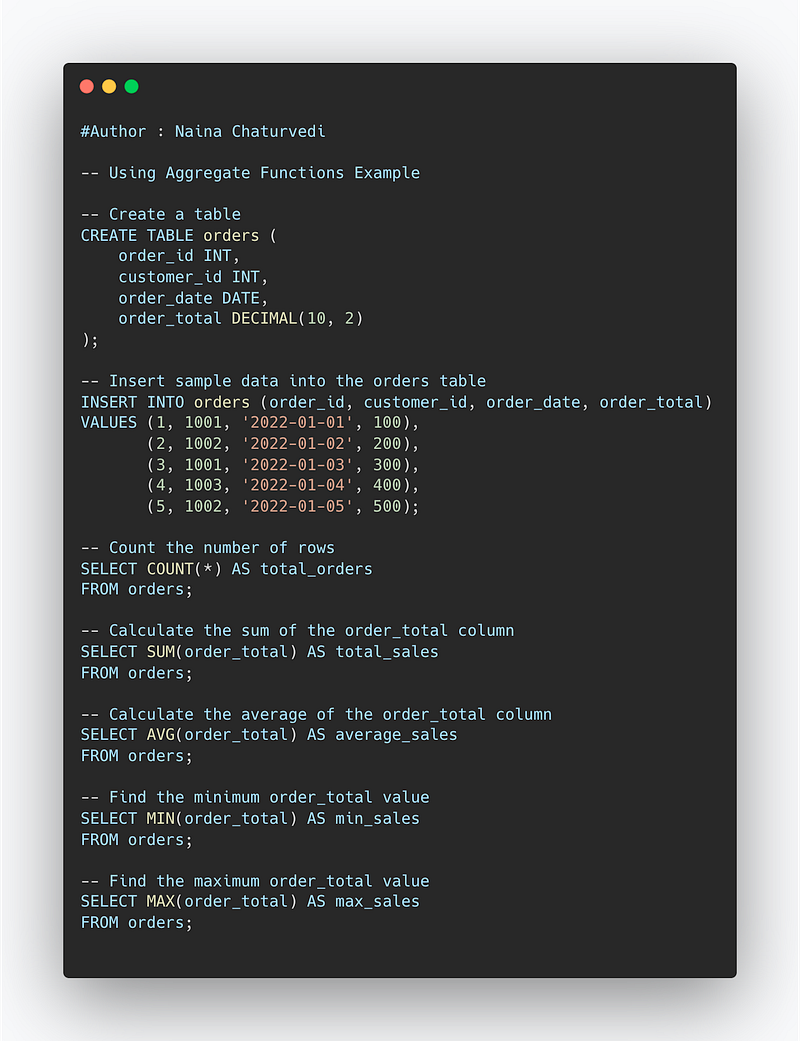
<span class="hljs-comment">-- Create a table</span>
<span class="hljs-keyword">CREATE</span> <span class="hljs-keyword">TABLE</span> orders (
order_id <span class="hljs-type">INT</span>,
customer_id <span class="hljs-type">INT</span>,
order_date <span class="hljs-type">DATE</span>,
order_total <span class="hljs-type">DECIMAL</span>(<span class="hljs-number">10</span>, <span class="hljs-number">2</span>)
);
<span class="hljs-comment">-- Insert sample data into the orders table</span>
<span class="hljs-keyword">INSERT</span> <span class="hljs-keyword">INTO</span> orders (order_id, customer_id, order_date, order_total)
<span class="hljs-keyword">VALUES</span> (<span class="hljs-number">1</span>, <span class="hljs-number">1001</span>, <span class="hljs-string">'2022-01-01'</span>, <span class="hljs-number">100</span>),
(<span class="hljs-number">2</span>, <span class="hljs-number">1002</span>, <span class="hljs-string">'2022-01-02'</span>, <span class="hljs-number">200</span>),
(<span class="hljs-number">3</span>, <span class="hljs-number">1001</span>, <span class="hljs-string">'2022-01-03'</span>, <span class="hljs-number">300</span>),
(<span class="hljs-number">4</span>, <span class="hljs-number">1003</span>, <span class="hljs-string">'2022-01-04'</span>, <span class="hljs-number">400</span>),
(<span class="hljs-number">5</span>, <span class="hljs-number">1002</span>, <span class="hljs-string">'2022-01-05'</span>, <span class="hljs-number">500</span>);
<span class="hljs-comment">-- Count the number of rows</span>
<span class="hljs-keyword">SELECT</span> <span class="hljs-built_in">COUNT</span>(<span class="hljs-operator">*</span>) <span class="hljs-keyword">AS</span> total_orders
<span class="hljs-keyword">FROM</span> orders;
<span class="hljs-comment">-- Calculate the sum of the order_total column</span>
<span class="hljs-keyword">SELECT</span> <span class="hljs-built_in">SUM</span>(order_total) <span class="hljs-keyword">AS</span> total_sales
<span class="hljs-keyword">FROM</span> orders;
<span class="hljs-comment">-- Calculate the average of the order_total column</span>
<span class="hljs-keyword">SELECT</span> <span class="hljs-built_in">AVG</span>(order_total) <span class="hljs-keyword">AS</span> average_sales
<span class="hljs-keyword">FROM</span> orders;
<span class="hljs-comment">-- Find the minimum order_total value</span>
<span class="hljs-keyword">SELECT</span> <span class="hljs-built_in">MIN</span>(order_total) <span class="hljs-keyword">AS</span> min_sales
<span class="hljs-keyword">FROM</span> orders;
<span class="hljs-comment">-- Find the maximum order_total value</span>
<span class="hljs-keyword">SELECT</span> <span class="hljs-built_in">MAX</span>(order_total) <span class="hljs-keyword">AS</span> max_sales
<span class="hljs-keyword">FROM</span> orders;</pre></div><p id="932b"><b>Example —</b></p><blockquote id="cef3"><p>SELECT COUNT(employee_id)</p></blockquote><blockquote id="0c53"><p>FROM employee_table</p></blockquote><blockquote id="4012"><p>WHERE salary > 40000</p></blockquote><blockquote id="8a28"><p>SELECT MAX(salary)</p></blockquote><blockquote id="319e"><p>FROM employee_table</p></blockquote><blockquote id="806a"><p>SELECT MIN(salary)</p></blockquote><blockquote id="26d8"><p>FROM employee_table</p></blockquote><blockquote id="7de0"><p>SELECT AVG(salary)</p></blockquote><blockquote id="626b"><p>FROM employee_table</p></blockquote><blockquote id="bc91"><p>SELECT SUM(salary)</p></blockquote><blockquote id="5572"><p>FROM employee_table</p></blockquote><p id="2828"><b>Snippet —</b></p><figure id="f8a8"><img src="https://cdn-images-1.readmedium.com/v2/resize:fit:800/1*6UIlsMRsPUeM8aXBp8jwIQ.png"><figcaption></figcaption></figure><h1 id="f455">Cursors in SQL</h1><p id="cfaf">Cursors allow to store the db tables and points as a context pointer to the memory area which stores the SQL statements which are required to be executed.</p><p id="8131"><b>There are two types of cursors —</b></p><ol><li>Implicit cursors — used internally by the SQL when running any Data Manipulation Query statement.</li><li>Explicit cursors — declared and used by the user externally.</li></ol><p id="9b5d"><b>Syntax —</b></p><p id="57a8"><i>DECLARE cursor_name CURSOR FOR sql_statement</i></p><p id="752e"><b>Implementation —</b></p><div id="7773"><pre><span class="hljs-comment">-- Using Cursors Example</span>
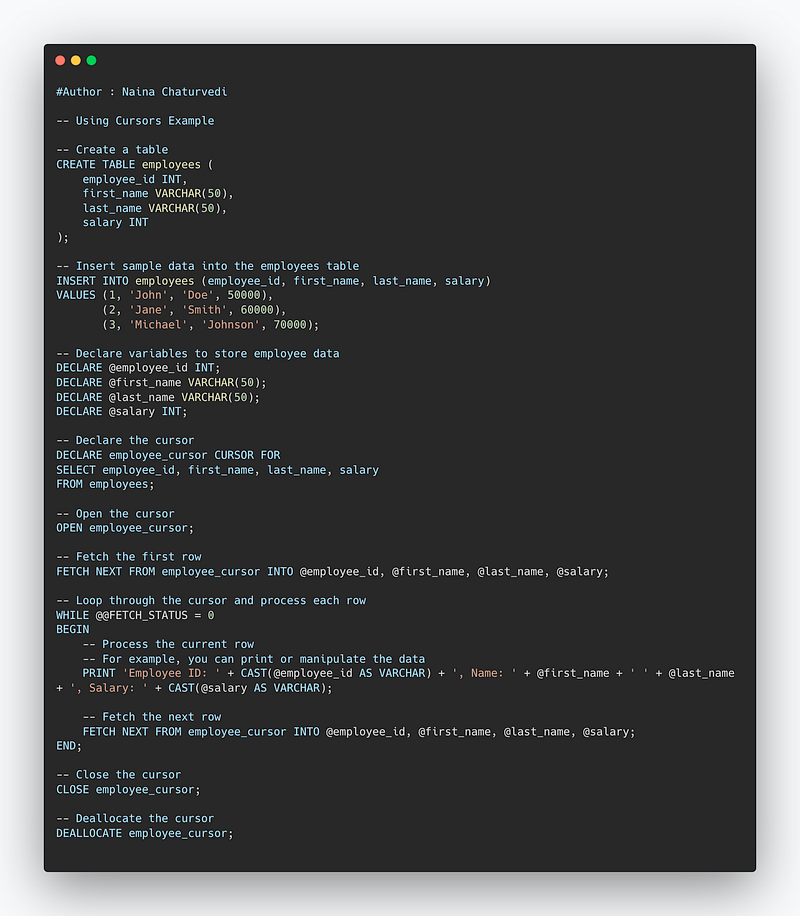
<span class="hljs-comment">-- Create a table</span>
<span class="hljs-keyword">CREATE</span> <span class="hljs-keyword">TABLE</span> employees (
employee_id <span class="hljs-type">INT</span>,
first_name <span class="hljs-type">VARCHAR</span>(<span class="hljs-number">50</span>),
last_name <span class="hljs-type">VARCHAR</span>(<span class="hljs-number">50</span>),
salary <span class="hljs-type">INT</span>
);
<span class="hljs-comment">-- Insert sample data into the employees table</span>
<span class="hljs-keyword">INSERT</span> <span class="hljs-keyword">INTO</span> employees (employee_id, first_name, last_name, salary)
<span class="hljs-keyword">VALUES</span> (<span class="hljs-number">1</span>, <span class="hljs-string">'John'</span>, <span class="hljs-string">'Doe'</span>, <span class="hljs-number">50000</span>),
(<span class="hljs-number">2</span>, <span class="hljs-string">'Jane'</span>, <span class="hljs-string">'Smith'</span>, <span class="hljs-number">60000</span>),
(<span class="hljs-number">3</span>, <span class="hljs-string">'Michael'</span>, <span class="hljs-string">'Johnson'</span>, <span class="hljs-number">70000</span>);
<span class="hljs-comment">-- Declare variables to store employee data</span>
<span class="hljs-keyword">DECLARE</span> <span class="hljs-variable">@employee_id</span> <span class="hljs-type">INT</span>;
<span class="hljs-keyword">DECLARE</span> <span class="hljs-variable">@first_name</span> <span class="hljs-type">VARCHAR</span>(<span class="hljs-number">50</span>);
<span class="hljs-keyword">DECLARE</span> <span class="hljs-variable">@last_name</span> <span class="hljs-type">VARCHAR</span>(<span class="hljs-number">50</span>);
<span class="hljs-keyword">DECLARE</span> <span class="hljs-variable">@salary</span> <span class="hljs-type">INT</span>;
<span class="hljs-comment">-- Declare the cursor</span>
<span class="hljs-keyword">DECLARE</span> employee_cursor <span class="hljs-keyword">CURSOR</span> <span class="hljs-keyword">FOR</span>
<span class="hljs-keyword">SELECT</span> employee_id, first_name, last_name, salary
<span class="hljs-keyword">FROM</span> employees;
<span class="hljs-comment">-- Open the cursor</span>
<span class="hljs-keyword">OPEN</span> employee_cursor;
<span class="hljs-comment">-- Fetch the first row</span>
<span class="hljs-keyword">FETCH</span> NEXT <span class="hljs-keyword">FROM</span> employee_cursor <span class="hljs-keyword">INTO</span> <span class="hljs-variable">@employee_id</span>, <span class="hljs-variable">@first_name</span>, <span class="hljs-variable">@last_name</span>, <span class="hljs-variable">@salary</span>;
<span class="hljs-comment">-- Loop through the cursor and process each row</span>
WHILE @<span class="hljs-variable">@FETCH_STATUS</span> <span class="hljs-operator">=</span> <span class="hljs-number">0</span>
<span class="hljs-keyword">BEGIN</span>
<span class="hljs-comment">-- Process the current row</span>
<span class="hljs-comment">-- For example, you can print or manipulate the data</span>
PRINT <span class="hljs-string">'Employee ID: '</span> <span class="hljs-operator">+</span> <span class="hljs-built_in">CAST</span>(<span class="hljs-variable">@employee_id</span> <span class="hljs-keyword">AS</span> <span class="hljs-type">VARCHAR</span>) <span class="hljs-operator">+</span> <span class="hljs-string">', Name: '</span> <span class="hljs-operator">+</span> <span class="hljs-variable">@first_name</span> <span class="hljs-operator">+</span> <span class="hljs-string">' '</span> <span class="hljs-operator">+</span> <span class="hljs-variable">@last_name</span> <span class="hljs-operator">+</span> <span class="hljs-string">', Salary: '</span> <span class="hljs-operator">+</span> <span class="hljs-built_in">CAST</span>(<span class="hljs-variable">@salary</span> <span class="hljs-keyword">AS</span> <span class="hljs-type">VARCHAR</span>);
<span class="hljs-comment">-- Fetch the next row</span>
<span class="hljs-keyword">FETCH</span> NEXT <span class="hljs-keyword">FROM</span> employee_cursor <span class="hljs-keyword">INTO</span> <span class="hljs-variable">@employee_id</span>, <span class="hljs-variable">@first_name</span>, <span class="hljs-variable">@last_name</span>, <span class="hljs-variable">@salary</span>;
<span class="hljs-keyword">END</span>;
<span class="hljs-comment">-- Close the cursor</span>
<span class="hljs-keyword">CLOSE</span> employee_cursor;
<span class="hljs-comment">-- Deallocate the cursor</span>
<span class="hljs-keyword">DEALLOCATE</span> employee_cursor;</pre></div><p id="3cfe"><b>Example —</b></p><blockquote id="6d1d"><p>CREATE PROCEDURE employee_db()</p></blockquote><blockquote id="966f"><p>BEGIN</p></blockquote><blockquote id="3033"><p>Declare employee_Id varchar(10)</p></blockquote><blockquote id="577f"><p>Declare cursor_name CURSOR FOR SELECT emp_id FROM Employee</p></blockquote><blockquote id="74a7"><p>SELECT * FROM Employee</p></blockquote><blockquote id="4d64"><p>OPEN cursor_name</p></blockquote><blockquote id="343b"><p>FETCH cursor_name INTO employee_Id;</p></blockquote><blockquote id="7ae0"><p>CLOSE cursor_name</p></blockquote><blockquote id="f0e8"><p>END</p></blockquote><p id="0bc3"><b>Snippet —</b></p><figure id="8bbe"><img src="https://cdn-images-1.readmedium.com/v2/resize:fit:800/1*6FcMHttFSJIBbIP4dHipfw.png"><figcaption></figcaption></figure><p id="62bd"><b>Complete Implementation —</b></p><div id="156a"><pre><span class="hljs-selector-tag">--</span> <span class="hljs-selector-tag">Creating</span> <span class="hljs-selector-tag">a</span> <span class="hljs-selector-tag">Trigger</span>, <span class="hljs-selector-tag">Pivot</span>, <span class="hljs-selector-tag">and</span> <span class="hljs-selector-tag">Cursor</span> <span class="hljs-selector-tag">Example</span>
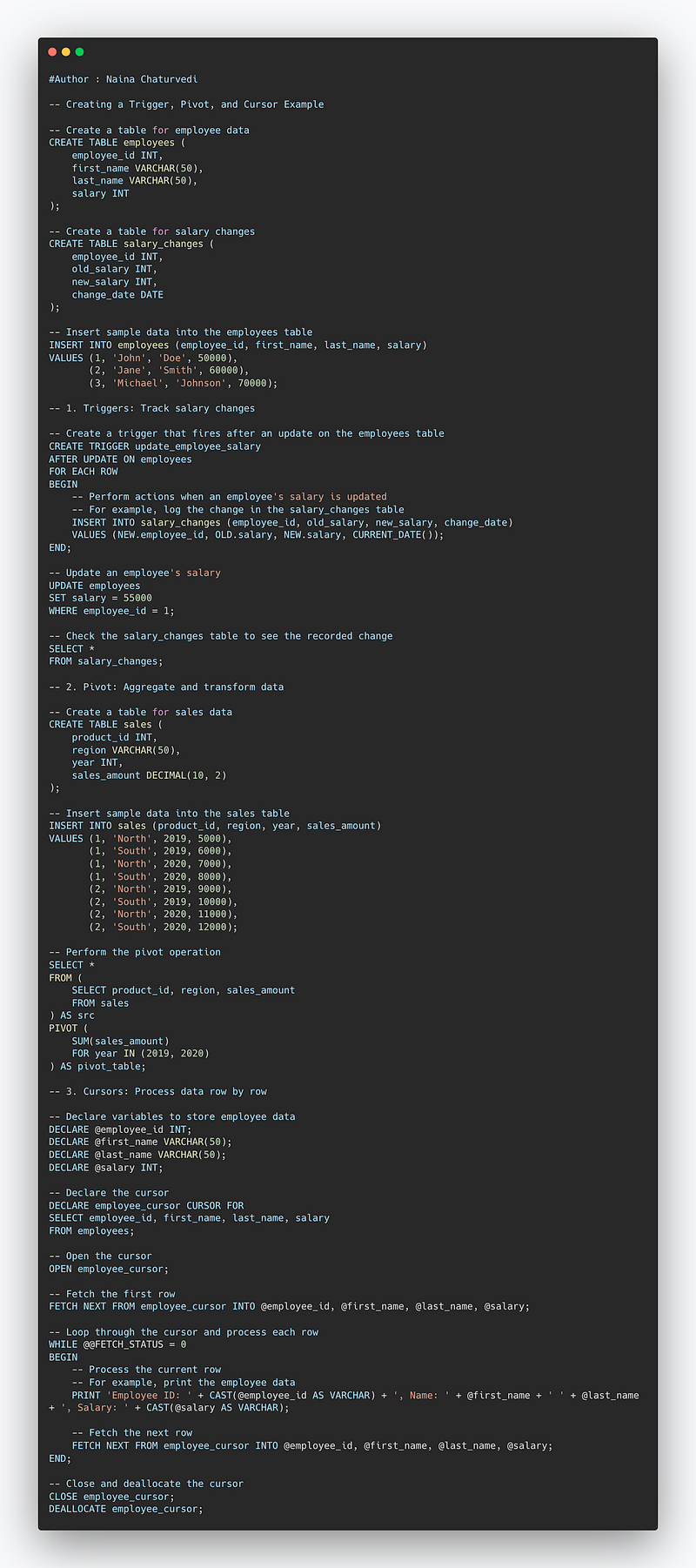
<span class="hljs-selector-tag">--</span> <span class="hljs-selector-tag">Create</span> <span class="hljs-selector-tag">a</span> <span class="hljs-selector-tag">table</span> <span class="hljs-selector-tag">for</span> <span class="hljs-selector-tag">employee</span> <span class="hljs-selector-tag">data</span>
<span class="hljs-selector-tag">CREATE</span> <span class="hljs-selector-tag">TABLE</span> <span class="hljs-selector-tag">employees</span> (
employee_id INT,
first_name <span class="hljs-built_in">VARCHAR</span>(<span class="hljs-number">50</span>),
last_name <span class="hljs-built_in">VARCHAR</span>(<span class="hljs-number">50</span>),
salary INT
);
<span class="hljs-selector-tag">--</span> <span class="hljs-selector-tag">Create</span> <span class="hljs-selector-tag">a</span> <span class="hljs-selector-tag">table</span> <span class="hljs-selector-tag">for</span> <span class="hljs-selector-tag">salary</span> <span class="hljs-selector-tag">changes</span>
<span class="hljs-selector-tag">CREATE</span> <span class="hljs-selector-tag">TABLE</span> <span class="hljs-selector-tag">salary_changes</span> (
employee_id INT,
old_salary INT,
new_salary INT,
change_date DATE
);
<span class="hljs-selector-tag">--</span> <span class="hljs-selector-tag">Insert</span> <span class="hljs-selector-tag">sample</span> <span
Options
class="hljs-selector-tag">data</span> <span class="hljs-selector-tag">into</span> <span class="hljs-selector-tag">the</span> <span class="hljs-selector-tag">employees</span> <span class="hljs-selector-tag">table</span>
<span class="hljs-selector-tag">INSERT</span> <span class="hljs-selector-tag">INTO</span> <span class="hljs-selector-tag">employees</span> (employee_id, first_name, last_name, salary)
<span class="hljs-selector-tag">VALUES</span> (<span class="hljs-number">1</span>, <span class="hljs-string">'John'</span>, <span class="hljs-string">'Doe'</span>, <span class="hljs-number">50000</span>),
(<span class="hljs-number">2</span>, <span class="hljs-string">'Jane'</span>, <span class="hljs-string">'Smith'</span>, <span class="hljs-number">60000</span>),
(<span class="hljs-number">3</span>, <span class="hljs-string">'Michael'</span>, <span class="hljs-string">'Johnson'</span>, <span class="hljs-number">70000</span>);
<span class="hljs-selector-tag">--</span> <span class="hljs-number">1</span>. <span class="hljs-selector-tag">Triggers</span>: <span class="hljs-selector-tag">Track</span> <span class="hljs-selector-tag">salary</span> <span class="hljs-selector-tag">changes</span>
<span class="hljs-selector-tag">--</span> <span class="hljs-selector-tag">Create</span> <span class="hljs-selector-tag">a</span> <span class="hljs-selector-tag">trigger</span> <span class="hljs-selector-tag">that</span> <span class="hljs-selector-tag">fires</span> <span class="hljs-selector-tag">after</span> <span class="hljs-selector-tag">an</span> <span class="hljs-selector-tag">update</span> <span class="hljs-selector-tag">on</span> <span class="hljs-selector-tag">the</span> <span class="hljs-selector-tag">employees</span> <span class="hljs-selector-tag">table</span>
<span class="hljs-selector-tag">CREATE</span> <span class="hljs-selector-tag">TRIGGER</span> <span class="hljs-selector-tag">update_employee_salary</span>
<span class="hljs-selector-tag">AFTER</span> <span class="hljs-selector-tag">UPDATE</span> <span class="hljs-selector-tag">ON</span> <span class="hljs-selector-tag">employees</span>
<span class="hljs-selector-tag">FOR</span> <span class="hljs-selector-tag">EACH</span> <span class="hljs-selector-tag">ROW</span>
<span class="hljs-selector-tag">BEGIN</span>
<span class="hljs-selector-tag">--</span> <span class="hljs-selector-tag">Perform</span> <span class="hljs-selector-tag">actions</span> <span class="hljs-keyword">when</span> an employee's salary is updated
-- For example, log the change in the salary_changes table
INSERT INTO salary_changes (employee_id, old_salary, new_salary, change_date)
VALUES (NEW.employee_id, OLD.salary, NEW.salary, <span class="hljs-built_in">CURRENT_DATE</span>());
END;
-- Update an employee's salary
UPDATE employees
SET salary = <span class="hljs-number">55000</span>
WHERE employee_id = <span class="hljs-number">1</span>;
-- Check the salary_changes table to see the recorded change
SELECT *
FROM salary_changes;
-- <span class="hljs-number">2</span>. <span class="hljs-attribute">Pivot</span>: Aggregate <span class="hljs-keyword">and</span> transform data
-- Create a table for sales data
CREATE TABLE sales (
product_id INT,
region <span class="hljs-built_in">VARCHAR</span>(<span class="hljs-number">50</span>),
year INT,
sales_amount <span class="hljs-built_in">DECIMAL</span>(<span class="hljs-number">10</span>, <span class="hljs-number">2</span>)
);
-- Insert sample data into the sales table
INSERT INTO sales (product_id, region, year, sales_amount)
VALUES (<span class="hljs-number">1</span>, <span class="hljs-string">'North'</span>, <span class="hljs-number">2019</span>, <span class="hljs-number">5000</span>),
(<span class="hljs-number">1</span>, <span class="hljs-string">'South'</span>, <span class="hljs-number">2019</span>, <span class="hljs-number">6000</span>),
(<span class="hljs-number">1</span>, <span class="hljs-string">'North'</span>, <span class="hljs-number">2020</span>, <span class="hljs-number">7000</span>),
(<span class="hljs-number">1</span>, <span class="hljs-string">'South'</span>, <span class="hljs-number">2020</span>, <span class="hljs-number">8000</span>),
(<span class="hljs-number">2</span>, <span class="hljs-string">'North'</span>, <span class="hljs-number">2019</span>, <span class="hljs-number">9000</span>),
(<span class="hljs-number">2</span>, <span class="hljs-string">'South'</span>, <span class="hljs-number">2019</span>, <span class="hljs-number">10000</span>),
(<span class="hljs-number">2</span>, <span class="hljs-string">'North'</span>, <span class="hljs-number">2020</span>, <span class="hljs-number">11000</span>),
(<span class="hljs-number">2</span>, <span class="hljs-string">'South'</span>, <span class="hljs-number">2020</span>, <span class="hljs-number">12000</span>);
-- Perform the pivot operation
SELECT *
FROM (
SELECT product_id, region, sales_amount
FROM sales
) AS src
PIVOT (
<span class="hljs-built_in">SUM</span>(sales_amount)
FOR year IN (<span class="hljs-number">2019</span>, <span class="hljs-number">2020</span>)
) AS pivot_table;
-- <span class="hljs-number">3</span>. <span class="hljs-attribute">Cursors</span>: Process data row by row
-- Declare variables to store employee data
DECLARE <span class="hljs-variable">@employee_id</span> INT;
DECLARE <span class="hljs-variable">@first_name</span> <span class="hljs-built_in">VARCHAR</span>(<span class="hljs-number">50</span>);
DECLARE <span class="hljs-variable">@last_name</span> <span class="hljs-built_in">VARCHAR</span>(<span class="hljs-number">50</span>);
DECLARE <span class="hljs-variable">@salary</span> INT;
-- Declare the cursor
DECLARE employee_cursor CURSOR FOR
SELECT employee_id, first_name, last_name, salary
FROM employees;
-- Open the cursor
OPEN employee_cursor;
-- Fetch the first row
FETCH NEXT FROM employee_cursor INTO <span class="hljs-variable">@employee_id</span>, <span class="hljs-variable">@first_name</span>, <span class="hljs-variable">@last_name</span>, <span class="hljs-variable">@salary</span>;
-- Loop through the cursor <span class="hljs-keyword">and</span> process each row
WHILE <span class="hljs-variable">@@FETCH_STATUS</span> = <span class="hljs-number">0</span>
BEGIN
-- Process the current row
-- For example, print the employee data
PRINT <span class="hljs-string">'Employee ID: '</span> + <span class="hljs-built_in">CAST</span>(<span class="hljs-variable">@employee_id</span> AS VARCHAR) + <span class="hljs-string">', Name: '</span> + <span class="hljs-variable">@first_name</span> + <span class="hljs-string">' '</span> + <span class="hljs-variable">@last_name</span> + <span class="hljs-string">', Salary: '</span> + <span class="hljs-built_in">CAST</span>(<span class="hljs-variable">@salary</span> AS VARCHAR);
-- Fetch the next row
FETCH NEXT FROM employee_cursor INTO <span class="hljs-variable">@employee_id</span>, <span class="hljs-variable">@first_name</span>, <span class="hljs-variable">@last_name</span>, <span class="hljs-variable">@salary</span>;
END;
-- Close <span class="hljs-keyword">and</span> deallocate the cursor
CLOSE employee_cursor;
DEALLOCATE employee_cursor;</pre></div><p id="085f"><b>Snippet —</b></p><figure id="53cb"><img src="https://cdn-images-1.readmedium.com/v2/resize:fit:800/1*nSf11jarMGLcOcildOi7Cw.png"><figcaption></figcaption></figure><h1 id="f4a6">That’s it for now.</h1><h1 id="ee1e">Find Day 11 Below :</h1><div id="0108" class="link-block">
<a href="https://readmedium.com/day-11-of-15-days-of-advanced-sql-series-fbb863662786">
<div>
<div>
<h2>Day 11 of 15 Days of Advanced SQL Series</h2>
<div><h3>Welcome back peeps. Hope all’s well. Last two weeks have been crazy busy at work for me (plus I was traveling).</h3></div>
<div><p>medium.com</p></div>
</div>
<div>
<div style="background-image: url(https://miro.readmedium.com/v2/resize:fit:320/0*ewlnCvkT5G38kkEb.png)"></div>
</div>
</div>
</a>
</div><p id="00f9"><b><i>Let me know if you have questions in the comment section below. Subscribe/ Follow, Like/Clap as it would encourage me to write more in my free time</i></b></p><p id="6bdd"><b><i>Stay Tuned!!</i></b></p><h2 id="1275">Read More —</h2><h1 id="e6db">11 most important System Design Base Concepts</h1><blockquote id="07c4"><p><a href="https://readmedium.com/complete-system-design-series-part-1-45bf9c8654bc"><b>1. System design basics</b></a></p></blockquote><blockquote id="5e90"><p><a href="https://readmedium.com/complete-system-design-series-part-2-922f45f2faaf"><b>2. Horizontal and vertical scaling</b></a></p></blockquote><blockquote id="e615"><p><a href="https://readmedium.com/part-3-complete-system-design-series-e1362baa8a4c"><b>3. Load balancing and Message queues</b></a></p></blockquote><blockquote id="ba0d"><p><a href="https://readmedium.com/part-4-complete-system-design-series-138bc9fbcfc0"><b>4. High level design and low level design, Consistent Hashing, Monolithic and Microservices architecture</b></a></p></blockquote><blockquote id="9480"><p><a href="https://readmedium.com/part-5-complete-system-design-series-4b9b04f23608"><b>5. Caching, Indexing, Proxies</b></a></p></blockquote><blockquote id="786d"><p><a href="https://readmedium.com/part-6-complete-system-design-series-59a2d8bbf1ed"><b>6. Networking, How Browsers work, Content Network Delivery ( CDN)</b></a></p></blockquote><blockquote id="1e02"><p><a href="https://readmedium.com/part-7-complete-system-design-series-1bef528923d6"><b>7. Database Sharding, CAP Theorem, Database schema Design</b></a></p></blockquote><blockquote id="ed73"><p><a href="https://readmedium.com/part-8-complete-system-design-series-57bc88433c8e"><b>8. Concurrency, API, Components + OOP + Abstraction</b></a></p></blockquote><blockquote id="6213"><p><a href="https://readmedium.com/part-9-complete-system-design-series-df975c85ec51"><b>9. Estimation and Planning, Performance</b></a></p></blockquote><blockquote id="c502"><p><b>10. <a href="https://readmedium.com/part-10-complete-system-design-series-523b4dd978bf?sk=741f92929c8639a2e4cf218521e8cc4a">Map Reduce, Patterns and Microservices</a></b></p></blockquote><blockquote id="967c"><p><b>11. <a href="https://naina0412.medium.com/part-11-complete-system-design-series-9c8efbc0237a?sk=5bddf2adc78ea4947ae88ab21c94af1c">SQL vs NoSQL and Cloud</a></b></p></blockquote><blockquote id="767e"><p><a href="https://readmedium.com/most-popular-system-design-questions-mega-compilation-45218129fe26"><b>12. Most Popular System Design Questions</b></a></p></blockquote><blockquote id="33a4"><p><b>13. <a href="https://readmedium.com/day-3-of-system-design-case-studies-series-875df4b766b9?sk=1133c9135f849f4497400a6b9caf5c2e">System Design Template — How to solve any System Design Question</a></b></p></blockquote><blockquote id="7526"><p><a href="https://readmedium.com/quick-roundup-solved-system-design-case-studies-6ad776d437cf?sk=e42f56968e1b592382f484c222e7c111"><b>14. Quick RoundUp : Solved System Design Case Studies</b></a></p></blockquote><h1 id="c583">Some of the other best Series —</h1><blockquote id="ca4e"><p><a href="https://readmedium.com/day-1-day-60-quick-recap-of-60-days-of-data-science-and-ml-6fc021643d1?sk=4e75e043b7630a9f963562ebac94e129"><b>60 days of Data Science and ML Series with projects</b></a></p></blockquote><blockquote id="1ff6"><p><a href="https://readmedium.com/quick-recap-30-days-of-natural-language-processing-nlp-with-projects-series-ceb674e3c09b?sk=ca09b27b3d5867f23ab4dc367b6c0c32"><b>30 Days of Natural Language Processing ( NLP) Series</b></a></p></blockquote><blockquote id="c2cf"><p><a href="https://readmedium.com/day-1-of-30-days-of-machine-learning-ops-7c299e4b09be?sk=4ab48350a5c359fc157109e48b1d738f"><b>30 days of Machine Learning Ops</b></a></p></blockquote><blockquote id="5c01"><p><a href="https://readmedium.com/day-1-of-30-days-of-data-structures-and-algorithms-and-system-design-simplified-dsa-and-system-965e860ec677?sk=aa49bdbc46a72f600cb51774f0aea6b6"><b>30 days of Data Structures and Algorithms and System Design Simplified</b></a></p></blockquote><blockquote id="f2fd"><p><a href="https://readmedium.com/day-1-of-60-days-of-deep-learning-with-projects-series-4a5caa305cf6?sk=89f3d43dd450035546bf3a8cf85bb125"><b>60 Days of Deep Learning with Projects Series</b></a></p></blockquote><blockquote id="b8a0"><p><a href="https://readmedium.com/day-1-of-30-days-of-data-engineering-894822fcb128?sk=76ba558bfe2d9f85cbe741e505295531"><b>30 days of Data Engineering with projects Series</b></a></p></blockquote><blockquote id="9d85"><p><a href="https://readmedium.com/day-1-data-science-and-ml-research-papers-simplified-a68b00a3b1c4?sk=56136229ff738bd734f19d2b6953f78c"><b>Data Science and Machine Learning Research ( papers) Simplified</b></a><b> **</b></p></blockquote><blockquote id="fb06"><p><a href="https://readmedium.com/100-days-your-data-science-and-ml-degree-part-3-c621ecfdf711?sk=1a8c7b0c204d73432d56b7d1a3a26474"><b>100 days : Your Data Science and Machine Learning Degree Series with projects</b></a></p></blockquote><blockquote id="5203"><p><a href="https://ai.plainenglish.io/23-data-science-techniques-you-should-know-61bc2c9d1b3a?sk=1680c36193eb22198974c9008d62a33c"><b>23 Data Science Techniques You Should Know</b></a></p></blockquote><blockquote id="ac12"><p><a href="https://readmedium.com/mega-post-tech-interview-the-only-list-of-questions-you-need-to-practice-ee349ea197bb?sk=fac3614684daff4b50a70c0a71e4d528"><b>Tech Interview Series — Curated List of coding questions</b></a></p></blockquote><blockquote id="dede"><p><a href="https://readmedium.com/system-design-made-easy-quick-recap-of-complete-system-design-34af7e3aedfb?sk=bdd6a19edc1f3ce4a5064923f5b68721"><b>Complete System Design with most popular Questions Series</b></a></p></blockquote><blockquote id="6508"><p><a href="https://readmedium.com/complete-data-preprocessing-and-data-visualization-with-projects-mega-compilation-part-2-41584ef0920e?sk=842390da51689b8d43148c3980570db0"><b>Complete Data Visualization and Pre-processing Series with projects</b></a></p></blockquote><blockquote id="409a"><p><a href="https://readmedium.com/complete-python-and-projects-mega-compilation-7ec8f7adfe71?sk=ee0ecf43f23c6dd44dd35d984b3e5df4"><b>Complete Python Series with Projects</b></a></p></blockquote><blockquote id="67e0"><p><a href="https://readmedium.com/complete-advanced-python-with-projects-mega-compilation-part-6-729c1826032b?sk=7faffe20f8039fa57099f7a372b6d665"><b>Complete Advanced Python Series with Projects</b></a></p></blockquote><blockquote id="4ded"><p><a href="https://readmedium.com/my-list-of-kaggle-best-notebooks-topic-wise-data-science-and-machine-learning-part-2-84772863e9ae?sk=5ed02e419854a6c11add3ddc1e52947f"><b>Kaggle Best Notebooks that will teach you the most</b></a></p></blockquote><blockquote id="4b2e"><p><a href="https://medium.datadriveninvestor.com/the-complete-developers-guide-to-git-6a23125996e1?sk=e30479bbe713930ea93018e1a46d9185"><b>Complete Developers Guide to Git</b></a></p></blockquote><blockquote id="732e"><p><a href="https://readmedium.com/6-exceptional-github-repos-for-all-developers-part-1-21e8fa04e150?sk=9140b249af6fe73d45717185fad48962"><b>Exceptional Github Repos</b></a><b> — Part 1</b></p></blockquote><blockquote id="7079"><p><a href="https://readmedium.com/6-exceptional-github-repos-for-all-developers-part-2-3eec9a68c31c?sk=8e31d0eb7eb1d2d0bbbcecaa66bd4e7e"><b>Exceptional Github Repos</b></a><b> — Part 2</b></p></blockquote><blockquote id="d9c6"><p><a href="https://medium.datadriveninvestor.com/best-resources-for-data-science-and-machine-learning-full-list-5ceb9a2791bf?sk=cf85b2cef95560c58509877a794577ff"><b>All the Data Science and Machine Learning Resources</b></a></p></blockquote><blockquote id="b2cb"><p><a href="https://medium.datadriveninvestor.com/210-machine-learning-projects-with-source-code-that-you-can-build-today-721b035649e0?sk=da5f593572a0261a6314afad99a0356c"><b>210 Machine Learning Projects</b></a></p></blockquote><h2 id="9083">Tech Newsletter —</h2><blockquote id="f86c"><p>If you are interested, you can join my newsletter through which I send tech interview tips, techniques, patterns, hacks — Software Development, ML, Data Science, Startups and Technology projects to more than 30K readers. You can subscribe to <b>Tech Brew :</b></p></blockquote><div id="8d5c" class="link-block">
<a href="https://naina0405.substack.com/">
<div>
<div>
<h2>Ignito</h2>
<div><h3>Data Science, ML, AI and more… Click to read Ignito, by Naina Chaturvedi, a Substack publication. Launched 7 months…</h3></div>
<div><p>naina0405.substack.com</p></div>
</div>
<div>
<div style="background-image: url(https://miro.readmedium.com/v2/resize:fit:320/0*_ER1J-h50iqAjH70)"></div>
</div>
</div>
</a>
</div><p id="eb48"><b><i>For Python Projects —</i></b></p><div id="22a4" class="link-block">
<a href="https://readmedium.com/complete-python-and-projects-mega-compilation-7ec8f7adfe71">
<div>
<div>
<h2>Complete Python And Projects — Mega Compilation</h2>
<div><h3>Everything that you need to know in Python with Projects…</h3></div>
<div><p>medium.com</p></div>
</div>
<div>
<div style="background-image: url(https://miro.readmedium.com/v2/resize:fit:320/0*NnCSMN6etFjjw4Jn.jpg)"></div>
</div>
</div>
</a>
</div><div id="471c" class="link-block">
<a href="https://medium.datadriveninvestor.com/analyzing-video-using-python-opencv-and-numpy-5471cab200c4">
<div>
<div>
<h2>Analyzing Video using Python, OpenCV and NumPy</h2>
<div><h3>With Code Implementation…</h3></div>
<div><p>medium.datadriveninvestor.com</p></div>
</div>
<div>
<div style="background-image: url(https://miro.readmedium.com/v2/resize:fit:320/0*PYNCDW3IXI2BcT5f.jpg)"></div>
</div>
</div>
</a>
</div><p id="f199"><b><i>For complete 60 days of Data Science and ML : Day 1 — Day 60 : Quick Recap of 60 days of Data Science and ML</i></b></p><div id="9d77" class="link-block">
<a href="https://readmedium.com/day-1-day-60-quick-recap-of-60-days-of-data-science-and-ml-6fc021643d1">
<div>
<div>
<h2>Day 1 — Day 60 : Quick Recap of 60 days of Data Science and ML</h2>
<div><h3>Connect the ML dots…</h3></div>
<div><p>medium.com</p></div>
</div>
<div>
<div style="background-image: url(https://miro.readmedium.com/v2/resize:fit:320/0*ZfJ1yKIzPLGABAI_.png)"></div>
</div>
</div>
</a>
</div><p id="1253"><b><i>Follow for more updates. Stay tuned and keep coding!</i></b></p><h1 id="21c3">For other projects, tune to —</h1><p id="b31f"><b>Build Machine Learning Pipelines( With Code)</b></p><div id="5b37" class="link-block">
<a href="https://medium.datadriveninvestor.com/build-machine-learning-pipelines-with-code-part-1-bd3ed7152124">
<div>
<div>
<h2>Build Machine Learning Pipelines( With Code) — Part 1</h2>
<div><h3>Complete implementation…</h3></div>
<div><p>medium.datadriveninvestor.com</p></div>
</div>
<div>
<div style="background-image: url(https://miro.readmedium.com/v2/resize:fit:320/0*KdToBD8RDMBH4jXM.png)"></div>
</div>
</div>
</a>
</div><p id="946c"><b>Recurrent Neural Network with Keras</b></p><div id="f317" class="link-block">
<a href="https://medium.datadriveninvestor.com/recurrent-neural-network-with-keras-b5b5f6fe5187">
<div>
<div>
<h2>Recurrent Neural Network with Keras</h2>
<div><h3>Project Implementation and cheatsheet…</h3></div>
<div><p>medium.datadriveninvestor.com</p></div>
</div>
<div>
<div style="background-image: url(https://miro.readmedium.com/v2/resize:fit:320/0*xs3Dya3qQBx6IU7C.png)"></div>
</div>
</div>
</a>
</div><p id="ec53"><b>Clustering Geolocation Data in Python using DBSCAN and K-Means</b></p><div id="2b3e" class="link-block">
<a href="https://medium.datadriveninvestor.com/clustering-geolocation-data-in-python-using-dbscan-and-k-means-3705d9f44522">
<div>
<div>
<h2>Clustering Geolocation Data in Python using DBSCAN and K-Means</h2>
<div><h3>Project Implementation…</h3></div>
<div><p>medium.datadriveninvestor.com</p></div>
</div>
<div>
<div style="background-image: url(https://miro.readmedium.com/v2/resize:fit:320/0*0uPCZnohdaPCO4NN.png)"></div>
</div>
</div>
</a>
</div><p id="a29c"><b>Facial Expression Recognition using Keras</b></p><div id="ccaa" class="link-block">
<a href="https://medium.datadriveninvestor.com/facial-expression-recognition-using-keras-cbdd661a0a54">
<div>
<div>
<h2>Facial Expression Recognition using Keras</h2>
<div><h3>Project Implementation…</h3></div>
<div><p>medium.datadriveninvestor.com</p></div>
</div>
<div>
<div style="background-image: url(https://miro.readmedium.com/v2/resize:fit:320/0*CGch7hzdjg1fpgKy.jpg)"></div>
</div>
</div>
</a>
</div><p id="0db7"><b>Hyperparameter Tuning with Keras Tuner</b></p><div id="6dff" class="link-block">
<a href="https://medium.datadriveninvestor.com/hyperparameter-tuning-with-keras-tuner-3a609d3fd85b">
<div>
<div>
<h2>Hyperparameter Tuning with Keras Tuner</h2>
<div><h3>Project Implementation….</h3></div>
<div><p>medium.datadriveninvestor.com</p></div>
</div>
<div>
<div style="background-image: url(https://miro.readmedium.com/v2/resize:fit:320/0*jlaEz8AZaptNWHEr.png)"></div>
</div>
</div>
</a>
</div><p id="fed8"><b>Custom Layers in Keras</b></p><div id="e4fd" class="link-block">
<a href="https://medium.datadriveninvestor.com/custom-layers-in-keras-de5f793217aa">
<div>
<div>
<h2>Custom Layers in Keras</h2>
<div><h3>Code implementation …</h3></div>
<div><p>medium.datadriveninvestor.com</p></div>
</div>
<div>
<div style="background-image: url(https://miro.readmedium.com/v2/resize:fit:320/0*1IH67KJadqeqeO01.png)"></div>
</div>
</div>
</a>
</div></article></body>