
Day 9 of 15 Days of Advanced SQL Series
Welcome back peeps. Hope all’s well. Last two weeks have been crazy busy at work for me (plus I was traveling).
Day 2 : SQL Basics, Query Structure, Built In functions Conditions
Day 4 : Set Theory Operations, Stored Procedures and CASE statements in SQL
Day 6 : Subqueries, Group by, order by and Having clauses in SQL and Analytical Functions
Day 7 : Window Functions, Grouping Sets and Constraints in SQL
Day 8 : BigQuery Basics, SELECT, FROM, WHERE and Date and Extract in BigQuery
Day 9 : Common Expression Table, UNNEST Clause, SQL vs NoSQL Databases
Day 10 : Triggers, Pivot and Cursors in SQL
Day 14 : MySQL in Depth
Day 15 : PostgreSQL inDepth
Anyways, For Day 9 of 15 days of Advanced SQL, we will cover —
Common Expression Table
UNNEST Clause
SQL vs NoSQL Databases
Github for Advanced SQL that you can follow —
Projects Videos —
All the projects, data structures, SQL, algorithms, system design, Data Science and ML , Data Analytics, Data Engineering, , Implemented Data Science and ML projects, Implemented Data Engineering Projects, Implemented Deep Learning Projects, Implemented Machine Learning Ops Projects, Implemented Time Series Analysis and Forecasting Projects, Implemented Applied Machine Learning Projects, Implemented Tensorflow and Keras Projects, Implemented PyTorch Projects, Implemented Scikit Learn Projects, Implemented Big Data Projects, Implemented Cloud Machine Learning Projects, Implemented Neural Networks Projects, Implemented OpenCV Projects,Complete ML Research Papers Summarized, Implemented Data Analytics projects, Implemented Data Visualization Projects, Implemented Data Mining Projects, Implemented Natural Leaning Processing Projects, MLOps and Deep Learning, Applied Machine Learning with Projects Series, PyTorch with Projects Series, Tensorflow and Keras with Projects Series, Scikit Learn Series with Projects, Time Series Analysis and Forecasting with Projects Series, ML System Design Case Studies Series videos will be published on our youtube channel ( just launched).
Subscribe today!
System Design Case Studies — In Depth
Complete Data Structures and Algorithm Series
Github —
Let’s get started with Day 9.
- The UNNEST clause is used in SQL to expand an array or a map data type into a set of rows. It is often used in conjunction with the CROSS JOIN clause to join the expanded set of rows with another table.
Implementation —
SELECT column1, column2, unnested_column
FROM your_table, UNNEST(array_column) AS unnested_column- SQL databases, also known as relational databases, are based on the relational model and use structured query language (SQL) to manage and manipulate data. Examples of SQL databases include MySQL, PostgreSQL, and Microsoft SQL Server.
- NoSQL databases, on the other hand, are non-relational and do not use SQL as their primary language. They are designed to handle large amounts of unstructured or semi-structured data, and are often more flexible and scalable than SQL databases. Examples of NoSQL databases include MongoDB, Cassandra, and Redis.
Common Expression Table
In order to simplify the complex queries, make them more readable and query against them, Common Table Expressions is used. Common Table Expressions is nothing but a query whose result set you can reference in a later section of your query i.e it returns a temporary table that you return within your query. It uses the WITH clause.
Format —
WITH CTE_expression_name AS (
SELECT column_name
FROM table
WHERE condition)
SELECT column_name
FROM table
INNER JOIN CTE_expression_name on condition
Implementation —
WITH sales_data AS (
  SELECT
    order_date,
    customer_id,
    SUM(total_amount) AS total_sales
  FROM
    orders
  GROUP BY
    order_date,
    customer_id
)
SELECT
  order_date,
  customer_id,
  total_sales
FROM
  sales_data
WHERE
  total_sales > 1000;
UNNEST Clause
UNNEST is used to flatten the arrays. UNNEST takes an array and in turn returns a table with a single row for each element in the array. It destroys the order of array elements.
Format —
SELECT column_name, COUNT(column_name) as counts
FROM table,
UNNEST(array) as alias_name
WHERE condition
GROUP BY column_name
ORDER BY column_name [ASC or DESC]
Implementation —
SELECT
  customer_id,
  order_id,
  product_name
FROM
  orders,
  UNNEST(products) AS product_name;
SQL vs NoSQL Databases
SQL
As you design large systems ( or even smaller ones), you need to decide the inflow-processing and outflow of data coming- and getting processed in the system.
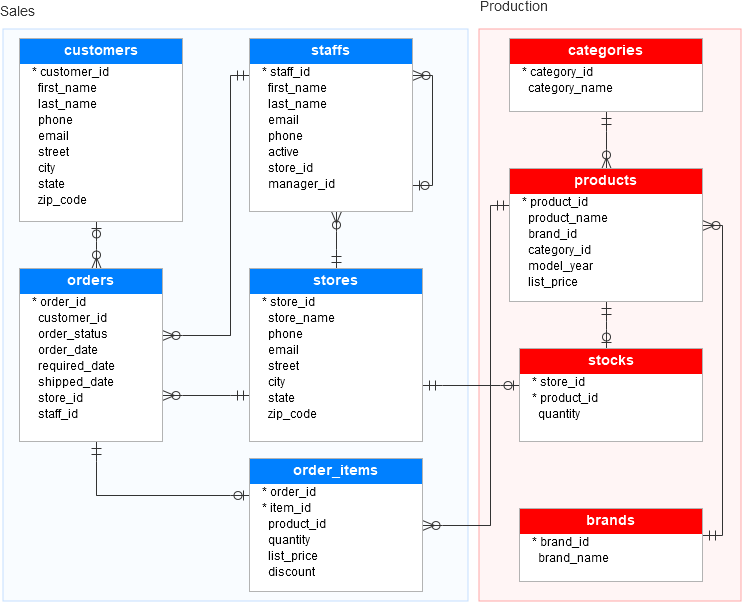
Data is generally organized in tables as rows and columns where columns represents attributes and rows represent records and keys have logical relationships. The SQL db schema always shows relational, tabular data following the ACID properties.
There are two types of databases to consider — SQL and NoSQL databases.
SQL databases have predefined schema and the data is organized/displayed in the form of tables. These databases use SQL ( Structured Query Language) to define, manipulate, update the data.
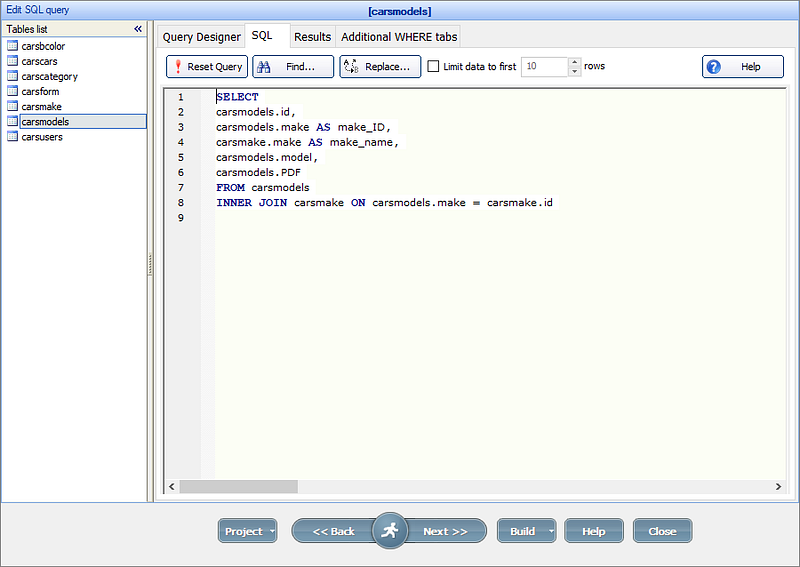
Relational databases like MS SQL Server, PostgreSQL, Sybase, MySQL Database, Oracle, etc. use SQL.
NoSQL
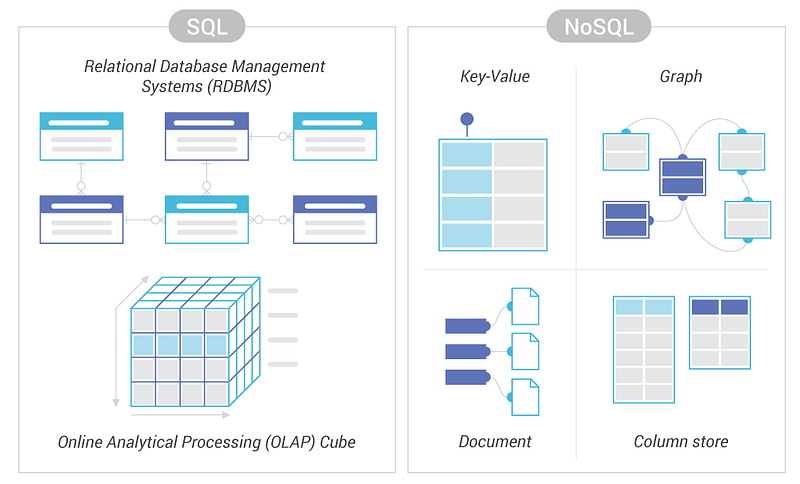
NoSQL databases on the other side, have no predefined schema which adds to more flexibility to use the formats that best suits the data — Work with graphs, column-oriented data, key-value and documents etc. They are generally preferred for hierarchical data, graphs ( e.g. social network) and to work with large data.
Some examples — Wide-column use Cassandra and HBase, Graph use Neo4j, Document use MongoDB and CouchDB, Key-value use Redis and DynamoDB,
A good comparison —
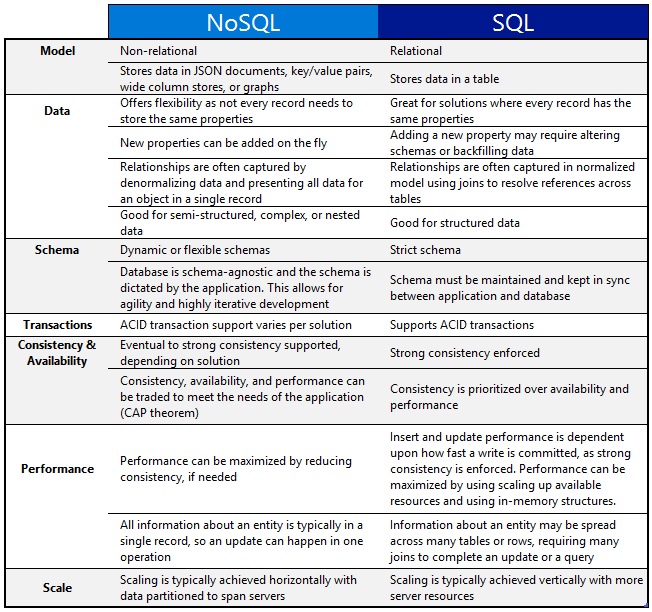
One of the important question that you might be asked, when to use which db?
When use SQL databases?
When you want to —
1. Scale Vertically — increase the processing power of your hardware
2. Work with predefined schema
3. Process queries and joins against structured data
4. Optimize the storage
5. Data is small
When to use NoSQL databases?
When you want to —
1. Scale horizontally
2. Work with graphs, column-oriented data, key-value and documents etc
3. Use multiple languages to query
4. Work with dynamic schema that has no predefined schema
5. Large Data
Implementation —
-- SQL Database Example
-- Create a table in a SQL database
CREATE TABLE employees (
  id INT PRIMARY KEY,
  name VARCHAR(50),
  department VARCHAR(50)
);

-- Insert data into the table
INSERT INTO employees (id, name, department)
VALUES (1, 'John Doe', 'Sales'),
       (2, 'Jane Smith', 'Marketing'),
       (3, 'Mike Johnson', 'Finance');

-- Query data from the table
SELECT * FROM employees WHERE department = 'Sales';

-- NoSQL Database Example
-- Create a collection in a NoSQL database
db.createCollection('customers');

-- Insert documents into the collection
db.customers.insertMany([
  {
    id: 1,
    name: 'John Doe',
    email: '[email protected]'
  },
  {
    id: 2,
    name: 'Jane Smith',
    email: '[email protected]'
  },
  {
    id: 3,
    name: 'Mike Johnson',
    email: '[email protected]'
  }
]);

-- Query data from the collection
db.customers.find({ name: 'John Doe' });
That’s it for now.
Find Day 10 Below —
Let me know if you have questions in the comment section below. Subscribe/ Follow, Like/Clap as it would encourage me to write more in my free time
Stay Tuned!!
Read More —
11 most important System Design Base Concepts
6. Networking, How Browsers work, Content Network Delivery ( CDN)
13. System Design Template — How to solve any System Design Question
Some of the other best Series —
30 days of Data Structures and Algorithms and System Design Simplified
Data Science and Machine Learning Research ( papers) Simplified **
100 days : Your Data Science and Machine Learning Degree Series with projects
Complete Data Visualization and Pre-processing Series with projects
Exceptional Github Repos — Part 1
Exceptional Github Repos — Part 2
Tech Newsletter —
If you are interested, you can join my newsletter through which I send tech interview tips, techniques, patterns, hacks — Software Development, ML, Data Science, Startups and Technology projects to more than 30K readers. You can subscribe to Tech Brew :
For Python Projects —
For complete 60 days of Data Science and ML : Day 1 — Day 60 : Quick Recap of 60 days of Data Science and ML
Follow for more updates. Stay tuned and keep coding!
For other projects, tune to —
Build Machine Learning Pipelines( With Code)
Recurrent Neural Network with Keras
Clustering Geolocation Data in Python using DBSCAN and K-Means
Facial Expression Recognition using Keras
Hyperparameter Tuning with Keras Tuner
Custom Layers in Keras


