
Day 9 of System Design Case Studies Series : Design Dropbox, DoorDash, Paypal, Disney+Hotstar, Spotify, Wechat, Weibo, Medium.com, Unsplash
Complete Design with examples
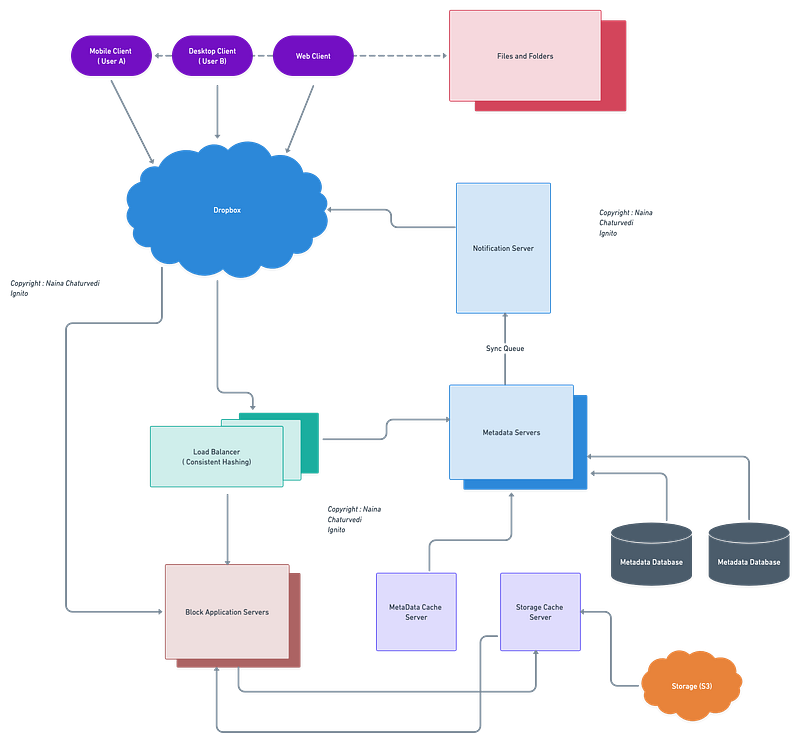
Hello peeps! Welcome to Day 9 of System Design Case studies series where we will design Dropbox, Doordash, Disney+Hotstar, Spotify, Wechat, Weibo, Medium.com and Unsplash.
This post covers system design for ( scroll till the end of the post) —
Note : Please read System Design Important Terms you MUST know and Most Important System Design basics before reading this post.
Projects Videos —
All the projects, data structures, SQL, algorithms, system design, Data Science and ML , Data Analytics, Data Engineering, , Implemented Data Science and ML projects, Implemented Data Engineering Projects, Implemented Deep Learning Projects, Implemented Machine Learning Ops Projects, Implemented Time Series Analysis and Forecasting Projects, Implemented Applied Machine Learning Projects, Implemented Tensorflow and Keras Projects, Implemented PyTorch Projects, Implemented Scikit Learn Projects, Implemented Big Data Projects, Implemented Cloud Machine Learning Projects, Implemented Neural Networks Projects, Implemented OpenCV Projects,Complete ML Research Papers Summarized, Implemented Data Analytics projects, Implemented Data Visualization Projects, Implemented Data Mining Projects, Implemented Natural Leaning Processing Projects, MLOps and Deep Learning, Applied Machine Learning with Projects Series, PyTorch with Projects Series, Tensorflow and Keras with Projects Series, Scikit Learn Series with Projects, Time Series Analysis and Forecasting with Projects Series, ML System Design Case Studies Series videos will be published on our youtube channel ( just launched).
Subscribe today!
Solved System Design Case Studies — In depth
Design Instagram
Design Messenger App
Design Twitter
Design URL Shortener
Design Dropbox
Design Youtube
Design API Rate Limiter
Design Web Crawler
Design Facebook’s Newsfeed
Design Yelp
Design Uber
Design Tinder
Design Tiktok
Design Whatsapp
Most Popular System Design Questions
Mega Compilation : Solved System Design Case studies
We will be discussing in depth -
- What is Dropbox
- Important Features
- Scaling Requirements
- Data Model — ER requirements
- High Level Design
- Basic Low Level Design
- API Design
- Complete Detailed Design
- Code Implementation
Pre-requisite to this post -
Complete System Design Series — Important Concepts that you should know before starting the Case studies
6. Networking, How Browsers work, Content Network Delivery ( CDN)
13. System Design Template — How to solve any System Design Question
Github —
Day 1 of System Design Case Studies can be found below-
Day 2 of System Design Case Studies can be found below-
Day 3 of System Design Case Studies can be found below-
Day 4 of System Design Case Studies can be found below-
What is Drop box?

Dropbox like google drive is a cloud file storage sync service which is used to —
- Store files ( documents/photos/videos etc)
- Access/download the files from any machine
- Sync all the files
- Edit/collaborate docs with other users
- Share the files with anyone
- Search for the files etc
Users can be mobile or web based. It supports all file formats and the files in the storage must be encrypted.
Dropbox functionalities and key components -
- File Storage: The core component of Dropbox is the file storage system, which allows users to upload, download, and access files from anywhere.
- User Authentication: Users need to create an account and sign in to access their files. The system should use secure methods such as password hashing and encryption to protect user information.
- Synchronization: Dropbox should automatically synchronize the files across all the devices where the user has installed the app, so that the user always has the latest version of the files.
- File Sharing: Users should be able to share files and folders with other users, either by generating a link or by inviting them to collaborate on a folder.
- File Collaboration: Dropbox should allow multiple users to work on the same document simultaneously. It should also provide a way to view the revision history of a document and revert to previous versions.
- Backup and Recovery: Dropbox should automatically back up the files and provide a way for users to restore deleted or lost files.
- Security: Dropbox should implement security features such as encryption, two-factor authentication, and remote wipe to protect user data.
- Mobile Access: Dropbox should provide mobile apps for iOS and Android devices, so that users can access their files from their smartphones and tablets.
- Integrations: Dropbox should integrate with other tools such as Microsoft Office, Google Docs, and Slack to enhance collaboration and productivity.
- User interface: Dropbox should provide an intuitive and user-friendly interface, which makes it easy to navigate and access the different functions of the app.
But why Cloud based Storage?
- Scalability — Highly scalable i.e as long as you pay for the storage you will never run out of storage.
- Availability — Data availability everywhere and anytime.
- Reliability — Cloud storage ensures there’s no data loss by creating replicas of the data stored on different servers located at different places geographically.
Before we take a deep dive in the design, understand HDFS.
In system design map reduce ( HDFS systems) is a batch processing technique in which the engine takes huge amounts of data, processes ( map and reduce) and gives the output.
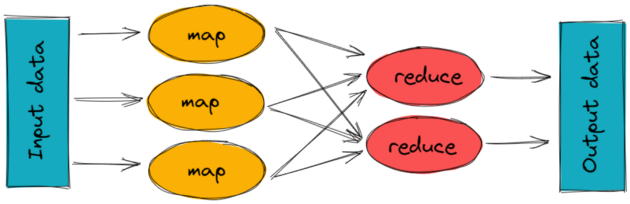
To track the progress of each job — task tracker and job tracker are used. Job tracker manages all the resources and jobs and schedules across the cluster.
The task tracker are called slaves that work on the directives of job trackers and deployed on each node in the cluster.
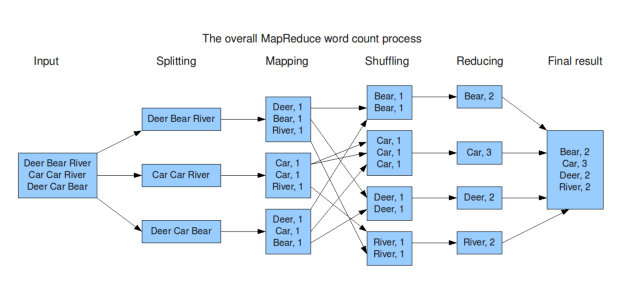
An example of MapReduce code in Python:
from collections import defaultdictdef map_func(inputs):
results = defaultdict(list)
for input in inputs:
words = input.split()
for word in words:
results[word].append(1)
return results.items()def reduce_func(item):
word, occurrences = item
return (word, sum(occurrences))def map_reduce(inputs):
mapped = map_func(inputs)
grouped = defaultdict(list)
for key, value in mapped:
grouped[key].append(value)
return [reduce_func(group) for group in grouped.items()]inputs = ["apple pear banana", "pear banana", "apple pear", "apple", "pear banana apple"]
print(map_reduce(inputs))This code implements a simple word count example, where the input is a list of strings and the output is a list of tuples (word, count) indicating the number of occurrences of each word in the input. The code uses the map_func function to map the input to intermediate key-value pairs, the reduce_func function to reduce the intermediate values for each key to a single output value, and the map_reduce function to coordinate the map and reduce phases.
Important Features
Upload and Download Files/Folders
See file history and revisions
Synchronize Folders
Send notification to the user if any edits have been made on the file(s)
Scaling Requirements — Capacity Estimation
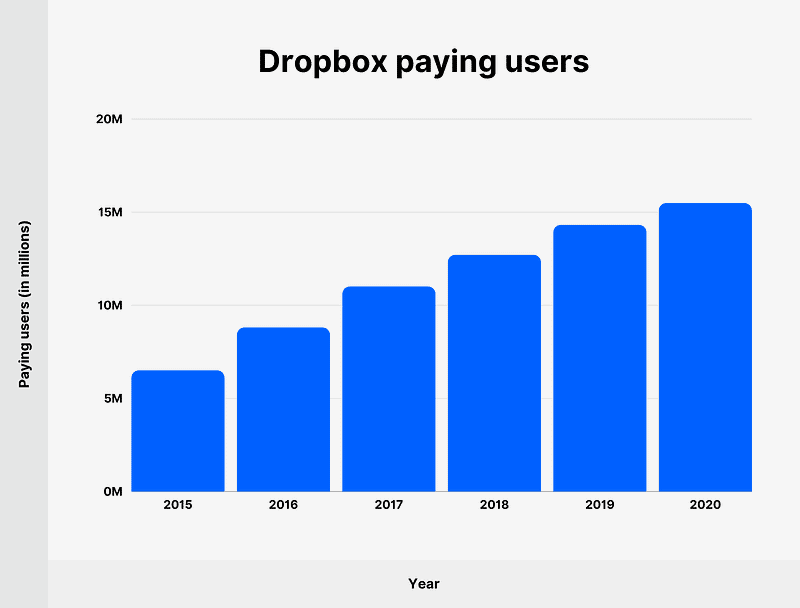
For the sake of simplicity, we will make a small scale simulation.
Let’s say, we have —
No of users per day ( DAU) : 20 Million
Read to the write ratio is 1:1
No of signed up users : 40 Million
Every user gets free space : 15 GB
No of files users upload per day : 4
Size of the file : 800KB
Total Storage needed is 40 Million * 15 GB = 600 PB
Number of request/query/transactions per second for upload —
20 Million * 4 /24/3600 = 926
Peak rate = 926 * 2 = 1852
Data Model — ER requirements
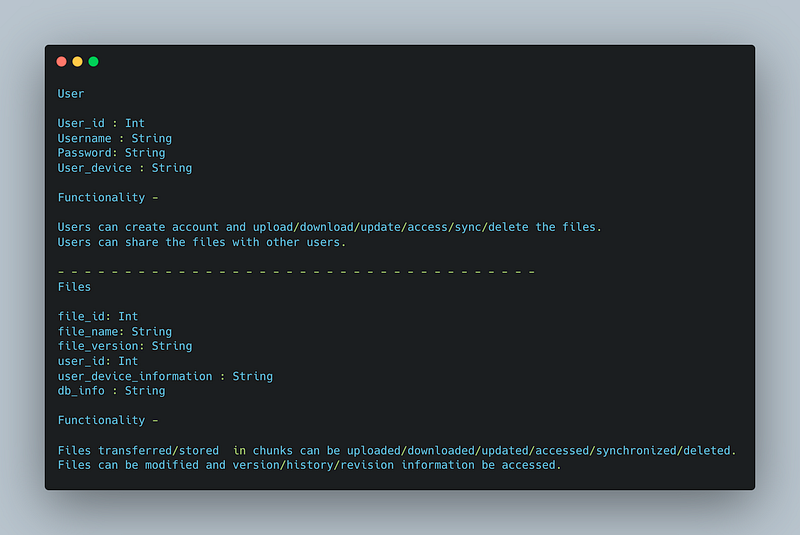
User
user_id : Int
Username : String
Password: String
User_device : String
Functionality —
Users can create account and upload/download/update/access/sync/delete the files.
Users can share the files with other users.
— — — — — — — — — — — — — — — — — — — — — — — — — — — — — — — — — — — —
Files
file_id: Int
file_name: String
file_version: String
user_id: Int
user_device_information : String
db_info : String
Functionality —
Files transferred/stored in chunks can be uploaded/downloaded/updated/accessed/synchronized/deleted.
Files can be modified and version/history/revision information be accessed.
High Level Design
Assumptions
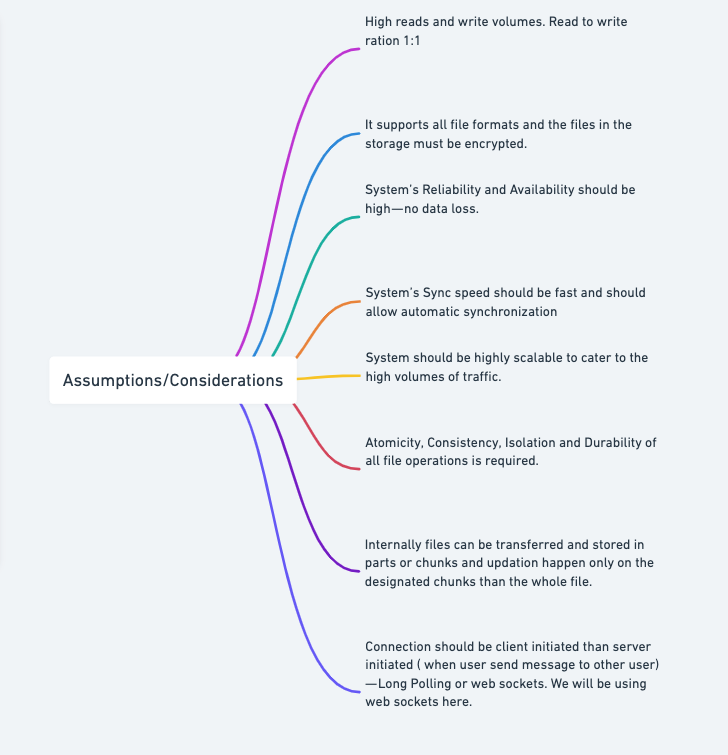
- High reads and write volumes. Read to write ration 1:1
- It supports all file formats and the files in the storage must be encrypted.
- Files must be less than 15GB
- System’s Reliability and Availability should be high — no data loss.
- System’s Sync speed should be fast and should allow automatic synchronization
- System should be highly scalable to cater to the high volumes of traffic.
- Atomicity, Consistency, Isolation and Durability of all file operations is required.
- Internally files can be transferred and stored in parts or chunks and updation happen only on the designated chunks than the whole file ( HDFS)
- Connection should be client initiated than server initiated ( when user send message to other user) — Long Polling or web sockets. We will be using web sockets here.
In long polling the server keeps the the client’s connection open until a timeout threshold has reached.
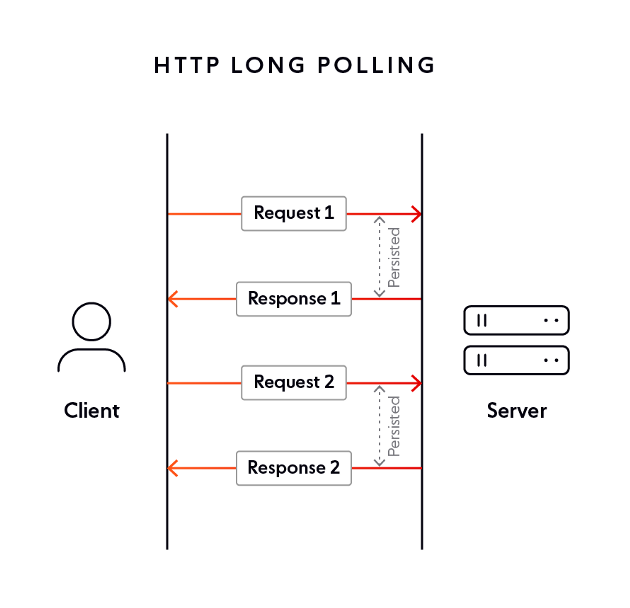
Long polling is a technique used in computer programming to emulate pushing data from a server to a client. Instead of having the client constantly request new data from the server, the client makes a single request, which the server holds open until new data is available or a predetermined timeout is reached. Here’s a simple implementation of long polling in Python using the Flask framework:
from flask import Flask, jsonify
from threading import Lock
app = Flask(__name__)
lock = Lock()# a list to store the events
events = []# endpoint to retrieve the events
@app.route("/poll")
def poll():
# lock the events list to ensure that no events are added while being read
with lock:
# if there are no events, hold the request open until there are
if not events:
lock.release()
sleep(60)
lock.acquire()
# return the events as a JSON object
return jsonify(events)# endpoint to add events
@app.route("/add_event", methods=["POST"])
def add_event():
# lock the events list to ensure that no events are added while being read
with lock:
# add the new event to the events list
events.append("new event")
return "Event added."if __name__ == "__main__":
app.run()In this code, the /poll endpoint implements the long polling behavior. When a client makes a request to this endpoint, the server will hold the request open until either new data is added to the events list or the timeout of 60 seconds is reached. The /add_event endpoint allows you to add new events to the events list. Note that both endpoints use a lock to ensure that the events list is not modified while being read.
— — — — — — — — — — — — — — — — — — — — — — — — — — — — — — — — — — — —
Components
Client Application : Users
Load balancers : To allocate requests to designated server using consistent hashing
Servers : Metadata Server ( Store metadata information of files, version information), Sync server ( notify all the users about the changes/updates on the files and sync efficiently) and Block server ( to upload/download files)
Cloud Storage ( S3) : To store the files and folders
Database : Cassandra ( The metadata database should store information like — 1. Chunks 2. File version information 3. User information 4. Device information)
Cache : Store hot entries
— — — — — — — — — — — — — — — — — — — — — — — — — — — — — — — — — — — —
Services
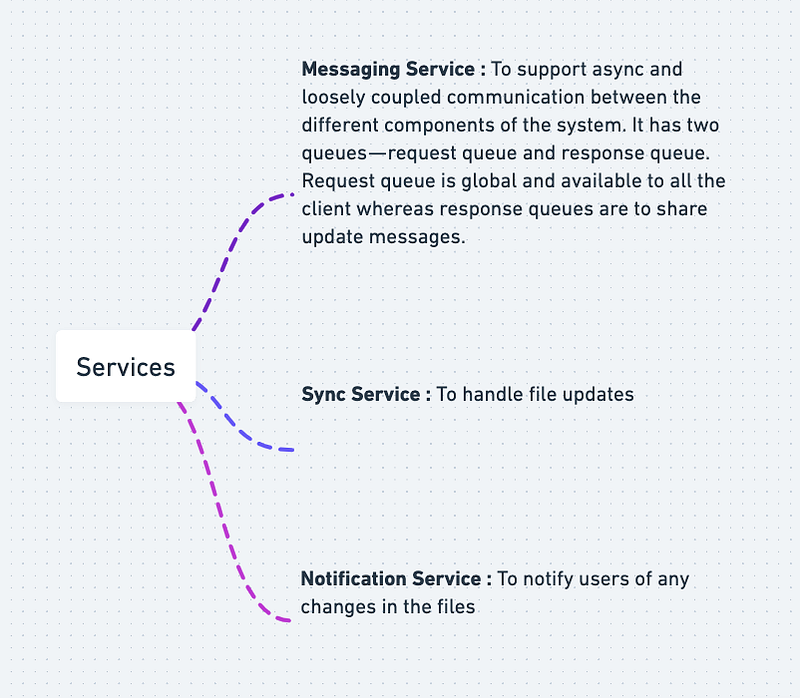
Messaging Service : To support async and loosely coupled communication between the different components of the system. It has two queues — request queue and response queue. Request queue is global and available to all the client whereas response queues are to share update messages.
Sync Service : To handle file updates
Notification Service : To notify users of any changes in the files
Basic implementation of these services in Python:
import queueclass MessagingService:
def __init__(self):
self.request_queue = queue.Queue()
self.response_queues = {} def add_response_queue(self, key, response_queue):
self.response_queues[key] = response_queue def get_request_queue(self):
return self.request_queue def get_response_queue(self, key):
return self.response_queues.get(key)
class SyncService:
def __init__(self, messaging_service):
self.messaging_service = messaging_service
self.files = {} def update_file(self, file_name, content):
self.files[file_name] = content
response_queue = self.messaging_service.get_response_queue("notification_service")
response_queue.put(f"File {file_name} was updated") def get_files(self):
return self.files
class NotificationService:
def __init__(self, messaging_service):
self.messaging_service = messaging_service
self.response_queue = queue.Queue()
self.messaging_service.add_response_queue("notification_service", self.response_queue) def get_updates(self):
while True:
try:
yield self.response_queue.get(block=False)
except queue.Empty:
breakIn this code, the MessagingService holds two queues: request_queue and response_queues. The request_queue is a global queue that is available to all clients, while response_queues is a dictionary that stores separate response queues for different services, using their keys as keys in the dictionary. The SyncService is responsible for updating files and sending updates to the NotificationService through the response_queue. The NotificationService listens to its response_queue and yields updates to the client.
A microservice in Python for Dropbox:
import flask
import gridfs
import pymongoapp = flask.Flask(__name__)# Connect to the database
client = pymongo.MongoClient("mongodb://localhost:27017/")
db = client["dropbox"]
fs = gridfs.GridFS(db)# Define an endpoint for uploading a file
@app.route("/files", methods=["POST"])
def upload_file():
# Retrieve the file from the request
file = flask.request.files["file"] # Save the file to the database
file_id = fs.put(file) # Return the ID of the saved file
return flask.jsonify({"file_id": str(file_id)})# Define an endpoint for downloading a file
@app.route("/files/<file_id>", methods=["GET"])
def download_file(file_id):
# Retrieve the file from the database
file = fs.get(file_id) # Return the file
return flask.send_file(file)# Example usage
if __name__ == "__main__":
app.run(port=5002)In this code, the microservice provides two endpoints for the following operations: uploading a file and downloading a file. The microservice uses MongoDB’s GridFS to store the files, which allows for efficient storage of large files.
Basic Low Level Design
import java.util.*;
class User {
private String username;
private List<String> files;
public User(String username) {
this.username = username;
this.files = new ArrayList<>();
}
public String getUsername() {
return username;
}
public List<String> getFiles() {
return files;
}
public void uploadFile(String filename) {
files.add(filename);
System.out.println("File '" + filename + "' uploaded successfully.");
}
public void downloadFile(String filename) {
if (files.contains(filename)) {
System.out.println("Downloading file '" + filename + "'...");
// Logic for downloading the file
System.out.println("File '" + filename + "' downloaded successfully.");
} else {
System.out.println("File '" + filename + "' not found.");
}
}
}
class DropboxSystem {
private Map<String, User> users;
public DropboxSystem() {
this.users = new HashMap<>();
}
public void registerUser(String username) {
if (!users.containsKey(username)) {
User newUser = new User(username);
users.put(username, newUser);
System.out.println("User '" + username + "' registered successfully.");
} else {
System.out.println("Username '" + username + "' is already taken.");
}
}
public User getUser(String username) {
return users.get(username);
}
}
public class DropboxApp {
public static void main(String[] args) {
DropboxSystem dropbox = new DropboxSystem();
// Register users
dropbox.registerUser("user1");
dropbox.registerUser("user2");
// Upload files
User user1 = dropbox.getUser("user1");
user1.uploadFile("file1.txt");
user1.uploadFile("file2.txt");
// Download files
User user2 = dropbox.getUser("user2");
user2.downloadFile("file1.txt");
user2.downloadFile("file3.txt");
}
}API Design
Implementation —
from flask import Flask, jsonify, request
import dropboxapp = Flask(__name__)# Initialize Dropbox API client
ACCESS_TOKEN = "YOUR_ACCESS_TOKEN"
dbx = dropbox.Dropbox(ACCESS_TOKEN)# Endpoint for uploading a file to Dropbox
@app.route('/upload', methods=['POST'])
def upload_file():
# Get file from request
file = request.files['file']
# Upload file to Dropbox
dbx.files_upload(file.read(), '/' + file.filename)
# Return success message
return jsonify({'message': 'File uploaded successfully'})# Endpoint for getting metadata of a file on Dropbox
@app.route('/metadata/<path:path>', methods=['GET'])
def get_file_metadata(path):
# Get file metadata from Dropbox
metadata = dbx.files_get_metadata('/' + path)
# Return file metadata
if isinstance(metadata, dropbox.files.FileMetadata):
file_metadata = {
'name': metadata.name,
'size': metadata.size,
'client_modified': metadata.client_modified,
'server_modified': metadata.server_modified,
'path_lower': metadata.path_lower,
'path_display': metadata.path_display
}
return jsonify(file_metadata)
else:
folder_metadata = {
'name': metadata.name,
'path_lower': metadata.path_lower,
'path_display': metadata.path_display,
'contents': []
}
for entry in metadata.entries:
if isinstance(entry, dropbox.files.FileMetadata):
file_metadata = {
'name': entry.name,
'size': entry.size,
'client_modified': entry.client_modified,
'server_modified': entry.server_modified,
'path_lower': entry.path_lower,
'path_display': entry.path_display
}
folder_metadata['contents'].append(file_metadata)
else:
folder_metadata['contents'].append({'name': entry.name})
return jsonify(folder_metadata)# Endpoint for downloading a file from Dropbox
@app.route('/download/<path:path>', methods=['GET'])
def download_file(path):
# Download file from Dropbox
_, file = dbx.files_download('/' + path)
# Return file data
return file.content# Endpoint for deleting a file from Dropbox
@app.route('/delete/<path:path>', methods=['DELETE'])
def delete_file(path):
# Delete file from Dropbox
dbx.files_delete('/' + path)
# Return success message
return jsonify({'message': 'File deleted successfully'})if __name__ == '__main__':
app.run(debug=True)In this implementation, we have four endpoints:
/upload(POST): This endpoint is used to upload a file to Dropbox. The file is passed in the request body as a binary stream./metadata/<path:path>(GET): This endpoint is used to get metadata of a file or folder on Dropbox. The path is passed as part of the endpoint URL. If the path is a folder, the endpoint will return metadata of all files and subfolders inside the folder./download/<path:path>(GET): This endpoint is used to download a file from Dropbox. The path is passed as part of the endpoint URL./delete/<path:path>(DELETE): This endpoint is used to delete a file from Dropbox. The path is passed as part of the endpoint URL.
API will be needed for 3 tasks—
- Upload a file
- Download a file
- Get file history information
An API implemention of Dropbox application:
import flask
import gridfs
import pymongoapp = flask.Flask(__name__)# Connect to the database
client = pymongo.MongoClient("mongodb://localhost:27017/")
db = client["dropbox"]
fs = gridfs.GridFS(db)# Define an endpoint for uploading a file
@app.route("/files", methods=["POST"])
def upload_file():
# Retrieve the file from the request
file = flask.request.files["file"] # Save the file to the database
file_id = fs.put(file) # Return the ID of the saved file
return flask.jsonify({"file_id": str(file_id)})# Define an endpoint for downloading a file
@app.route("/files/<file_id>", methods=["GET"])
def download_file(file_id):
# Retrieve the file from the database
file = fs.get(file_id) # Return the file
return flask.send_file(file)# Example usage
if __name__ == "__main__":
app.run(port=5002)In this example, the API provides two endpoints for the following operations: uploading a file and downloading a file. The API uses MongoDB’s GridFS to store the files, which allows for efficient storage of large files.
API design will be elaborately discussed in the workflow video (coming soon).
Complete Detailed Design
(Zoom it)
Code
Here’s the code implementation
- Upload files
To upload files to Dropbox, we use the files_upload method. Here's an implementation of how to upload a file called example.txt to the root folder of your Dropbox account:
with open("example.txt", "rb") as f:
dbx.files_upload(f.read(), "/example.txt")- Download files
To download files from Dropbox, we use the files_download method. Here's an implementation of how to download a file called example.txt from your Dropbox account:
_, res = dbx.files_download("/example.txt")
data = res.content
with open("example.txt", "wb") as f:
f.write(data)- Sync files
To sync files between your local computer and Dropbox, we can use the files_list_folder method to get a list of files and their metadata in a folder, and then use the files_download method to download any files that are missing or out of date. Here's an implementation of how to sync all files in a folder called my_folder:
import osLOCAL_FOLDER = "my_folder"if not os.path.exists(LOCAL_FOLDER):
os.makedirs(LOCAL_FOLDER)result = dbx.files_list_folder("/" + LOCAL_FOLDER)for entry in result.entries:
local_path = os.path.join(LOCAL_FOLDER, entry.name)
if not os.path.exists(local_path) or entry.server_modified > os.path.getmtime(local_path):
_, res = dbx.files_download(entry.path_lower)
data = res.content
with open(local_path, "wb") as f:
f.write(data)- Edit/collaborate docs with other users
To edit or collaborate on documents with other users, we can use the Dropbox Paper API. The Dropbox Paper API allows us to create, edit, and manage Paper documents. Here’s an implementation of how to create a new Paper document:
import dropbox
from dropbox.paper import PaperDocCreateUpdatePolicyTOKEN = 'YOUR_ACCESS_TOKEN'dbx = dropbox.Dropbox(TOKEN)
paper_api = dropbox.paper.PaperApi(dbx)title = "My new Paper document"
content = "This is my new Paper document."doc = paper_api.docs_create(title, import_format="markdown")
paper_api.docs_update(
doc.doc_id,
revision=PaperDocCreateUpdatePolicy.overwrite.any(),
contents=content
)- Share files with anyone
To share files with anyone, we can use the sharing_create_shared_link_with_settings method. Here's an implementation of how to create a shared link for a file called example.txt:
link = dbx.sharing_create_shared_link_with_settings("/example.txt").url
print(link)This will generate a shared link that can be used to access the file from any device.
- Search for files
To search for files in Dropbox, we can use the files_search method. Here's an implementation of how to search for files that contain the word "example":
results = dbx.files_search("", "example").matchesfor result in results:
print(result.metadata.path_display)This will print a list of files that match the search query.
More about Dropbox System Design —
User Management:
User registration, authentication, and authorization.
class User:
def __init__(self, username, password):
self.username = username
self.password = passwordclass UserManager:
def __init__(self):
self.users = [] def register_user(self, username, password):
new_user = User(username, password)
self.users.append(new_user) def authenticate_user(self, username, password):
for user in self.users:
if user.username == username and user.password == password:
return True
return False def authorize_user(self, username, role):
# Implement your authorization logic here
passUser profile management and personalization.
class UserProfile:
def __init__(self, user):
self.user = user
self.bio = ""
self.profile_picture = "" def update_bio(self, new_bio):
self.bio = new_bio def update_profile_picture(self, new_picture):
self.profile_picture = new_picture def get_profile_info(self):
return {
"username": self.user.username,
"bio": self.bio,
"profile_picture": self.profile_picture
}Handling user connections (sharing and collaboration):
class ConnectionManager:
def __init__(self):
self.connections = {} def add_connection(self, user1, user2):
if user1.username not in self.connections:
self.connections[user1.username] = []
if user2.username not in self.connections:
self.connections[user2.username] = [] self.connections[user1.username].append(user2)
self.connections[user2.username].append(user1) def get_connections(self, user):
if user.username in self.connections:
return self.connections[user.username]
else:
return [] def remove_connection(self, user1, user2):
if user1.username in self.connections and user2 in self.connections[user1.username]:
self.connections[user1.username].remove(user2)
if user2.username in self.connections and user1 in self.connections[user2.username]:
self.connections[user2.username].remove(user1)File Storage and Synchronization:
Designing systems for storing and synchronizing files across devices.
class File:
def __init__(self, file_id, file_name, content):
self.file_id = file_id
self.file_name = file_name
self.content = contentclass FileStorageSystem:
def __init__(self):
self.files = [] def upload_file(self, file_id, file_name, content):
new_file = File(file_id, file_name, content)
self.files.append(new_file) def download_file(self, file_id):
for file in self.files:
if file.file_id == file_id:
return file def delete_file(self, file_id):
for file in self.files:
if file.file_id == file_id:
self.files.remove(file)
breakHandling file uploads, downloads, and versioning.
class FileVersion:
def __init__(self, file_id, version_number, content):
self.file_id = file_id
self.version_number = version_number
self.content = content
class FileVersioningSystem:
def __init__(self):
self.file_versions = {}
def upload_file_version(self, file_id, content):
if file_id not in self.file_versions:
self.file_versions[file_id] = []
version_number = len(self.file_versions[file_id]) + 1
new_version = FileVersion(file_id, version_number, content)
self.file_versions[file_id].append(new_version)
def download_file_version(self, file_id, version_number):
if file_id in self.file_versions:
for version in self.file_versions[file_id]:
if version.version_number == version_number:
return version
def get_latest_file_version(self, file_id):
if file_id in self.file_versions:
return self.file_versions[file_id][-1]
def delete_file_versions(self, file_id):
if file_id in self.file_versions:
del self.file_versions[file_id]Implementing conflict resolution mechanisms:
class ConflictResolver:
def __init__(self):
self.conflicts = []
def detect_conflict(self, file_id):
# Implement conflict detection logic here
pass
def resolve_conflict(self, file_id):
# Implement conflict resolution logic here
passFile Chunking and Deduplication:
Breaking files into smaller chunks for efficient storage and transfer.
class FileChunk:
def __init__(self, chunk_id, content):
self.chunk_id = chunk_id
self.content = content
class FileChunkingSystem:
def __init__(self):
self.file_chunks = {}
def break_file_into_chunks(self, file_id, content):
if file_id not in self.file_chunks:
self.file_chunks[file_id] = []
# Logic to break the file into smaller chunks
# ...
# Create and store file chunks
chunk_id = 1
for chunk_content in chunks:
chunk = FileChunk(chunk_id, chunk_content)
self.file_chunks[file_id].append(chunk)
chunk_id += 1
def get_file_chunks(self, file_id):
if file_id in self.file_chunks:
return self.file_chunks[file_id]
else:
return []
def delete_file_chunks(self, file_id):
if file_id in self.file_chunks:
del self.file_chunks[file_id]Implementing deduplication techniques to eliminate redundant chunks.
class DeduplicationSystem:
def __init__(self):
self.unique_chunks = {}
def deduplicate_chunks(self, file_chunks):
deduplicated_chunks = []
for chunk in file_chunks:
if chunk.content not in self.unique_chunks:
self.unique_chunks[chunk.content] = chunk
deduplicated_chunks.append(chunk)
else:
deduplicated_chunks.append(self.unique_chunks[chunk.content])
return deduplicated_chunks
def delete_chunk(self, chunk):
if chunk.content in self.unique_chunks:
del self.unique_chunks[chunk.content]Data replication and distribution functionality:
class DataCenter:
def __init__(self, data_center_id, location):
self.data_center_id = data_center_id
self.location = location
self.data = {} def store_data(self, key, value):
self.data[key] = value def retrieve_data(self, key):
if key in self.data:
return self.data[key]
else:
return Noneclass DataReplicationSystem:
def __init__(self):
self.data_centers = [] def add_data_center(self, data_center):
self.data_centers.append(data_center) def replicate_data(self, key, value):
for data_center in self.data_centers:
data_center.store_data(key, value) def retrieve_data(self, key):
for data_center in self.data_centers:
data = data_center.retrieve_data(key)
if data:
return data return NoneImplementing data distribution mechanisms for efficient file access:
class DataDistributionSystem:
def __init__(self):
self.data_centers = [] def add_data_center(self, data_center):
self.data_centers.append(data_center) def distribute_file(self, file_id):
for data_center in self.data_centers:
data_center.store_file(file_id) def access_file(self, file_id):
for data_center in self.data_centers:
file = data_center.retrieve_file(file_id)
if file:
return file return NoneHandling data consistency and synchronization:
class DataConsistencyManager:
def __init__(self):
self.data_centers = [] def add_data_center(self, data_center):
self.data_centers.append(data_center) def synchronize_data(self, key, value):
for data_center in self.data_centers:
data_center.store_data(key, value) def maintain_consistency(self):
for data_center in self.data_centers:
data_center.update_data_from_other_centers(self.data_centers)class DataCenter:
def __init__(self, data_center_id, location):
self.data_center_id = data_center_id
self.location = location
self.data = {} def store_data(self, key, value):
self.data[key] = value def retrieve_data(self, key):
if key in self.data:
return self.data[key]
else:
return None def update_data_from_other_centers(self, other_centers):
for center in other_centers:
if center.data_center_id != self.data_center_id:
self.data.update(center.data)Sharing and collaboration functionality:
class File:
def __init__(self, file_id, file_name, content):
self.file_id = file_id
self.file_name = file_name
self.content = content
self.shared_with = [] def share_with_user(self, user):
if user not in self.shared_with:
self.shared_with.append(user) def unshare_with_user(self, user):
if user in self.shared_with:
self.shared_with.remove(user)class User:
def __init__(self, username):
self.username = usernameclass FileManager:
def __init__(self):
self.files = [] def create_file(self, file_id, file_name, content):
new_file = File(file_id, file_name, content)
self.files.append(new_file) def share_file_with_user(self, file_id, user):
file = self.find_file(file_id)
if file:
file.share_with_user(user) def unshare_file_with_user(self, file_id, user):
file = self.find_file(file_id)
if file:
file.unshare_with_user(user) def find_file(self, file_id):
for file in self.files:
if file.file_id == file_id:
return file return NoneImplementing access control mechanisms (read-only, read-write, etc.):
class File:
def __init__(self, file_id, file_name, content):
self.file_id = file_id
self.file_name = file_name
self.content = content
self.shared_with = {}
def share_with_user(self, user, access_level):
self.shared_with[user.username] = access_level
def unshare_with_user(self, user):
if user.username in self.shared_with:
del self.shared_with[user.username]
def get_access_level(self, user):
if user.username in self.shared_with:
return self.shared_with[user.username]
else:
return Noneclass User:
def __init__(self, username):
self.username = usernameclass FileManager:
def __init__(self):
self.files = []
def create_file(self, file_id, file_name, content):
new_file = File(file_id, file_name, content)
self.files.append(new_file)
def share_file_with_user(self, file_id, user, access_level):
file = self.find_file(file_id)
if file:
file.share_with_user(user, access_level)
def unshare_file_with_user(self, file_id, user):
file = self.find_file(file_id)
if file:
file.unshare_with_user(user)
def get_access_level(self, file_id, user):
file = self.find_file(file_id)
if file:
return file.get_access_level(user)
else:
return None
def find_file(self, file_id):
for file in self.files:
if file.file_id == file_id:
return file
return NoneSupporting collaboration features like comments and annotations:
class Comment:
def __init__(self, comment_id, user, message):
self.comment_id = comment_id
self.user = user
self.message = message
class Annotation:
def __init__(self, annotation_id, user, content):
self.annotation_id = annotation_id
self.user = user
self.content = content
class File:
def __init__(self, file_id, file_name, content):
self.file_id = file_id
self.file_name = file_name
self.content = content
self.shared_with = []
self.comments = []
self.annotations = []
def share_with_user(self, user):
if user not in self.shared_with:
self.shared_with.append(user)
def unshare_with_user(self, user):
if user in self.shared_with:
self.shared_with.remove(user)
def add_comment(self, comment_id, user, message):
comment = Comment(comment_id, user, message)
self.comments.append(comment)
def delete_comment(self, comment_id):
for comment in self.comments:
if comment.comment_id == comment_id:
self.comments.remove(comment)
def add_annotation(self, annotation_id, user, content):
annotation = Annotation(annotation_id, user, content)
self.annotations.append(annotation)
def delete_annotation(self, annotation_id):
for annotation in self.annotations:
if annotation.annotation_id == annotation_id:
self.annotations.remove(annotation)
def get_comments(self):
return self.comments
def get_annotations(self):
return self.annotations
class User:
def __init__(self, username):
self.username = username
class FileManager:
def __init__(self):
self.files = []
def create_file(self, file_id, file_name, content):
new_file = File(file_id, file_name, content)
self.files.append(new_file)
def share_file_with_user(self, file_id, user):
file = self.find_file(file_id)
if file:
file.share_with_user(user)
def unshare_file_with_user(self, file_id, user):
file = self.find_file(file_id)
if file:
file.unshare_with_user(user)
def add_comment_to_file(self, file_id, comment_id, user, message):
file = self.find_file(file_id)
if file:
file.add_comment(comment_id, user, message)
def delete_comment_from_file(self, file_id, comment_id):
file = self.find_file(file_id)
if file:
file.delete_comment(comment_id)
def add_annotation_to_file(self, file_id, annotation_id, user, content):
file = self.find_file(file_id)
if file:
file.add_annotation(annotation_id, user, content)
def delete_annotation_from_file(self, file_id, annotation_id):
file = self.find_file(file_id)
if file:
file.delete_annotation(annotation_id)
def find_file(self, file_id):
for file in self.files:
if file.file_id == file_id:
return file
return NoneConflict Resolution and Version Control:
Designing systems to handle conflicts when multiple users modify the same file. Implementing version control mechanisms to track and manage file versions. Enabling file restore and recovery options.
class File:
def __init__(self, file_id, file_name, content):
self.file_id = file_id
self.file_name = file_name
self.content = content
self.versions = [] def update_content(self, new_content, user):
version = Version(len(self.versions) + 1, new_content, user)
self.versions.append(version)
self.content = new_content def restore_to_version(self, version_number):
for version in self.versions:
if version.version_number == version_number:
self.content = version.content
breakclass Version:
def __init__(self, version_number, content, user):
self.version_number = version_number
self.content = content
self.user = userclass User:
def __init__(self, username):
self.username = usernameclass FileManager:
def __init__(self):
self.files = [] def create_file(self, file_id, file_name, content):
new_file = File(file_id, file_name, content)
self.files.append(new_file) def find_file(self, file_id):
for file in self.files:
if file.file_id == file_id:
return file return None def update_file_content(self, file_id, new_content, user):
file = self.find_file(file_id)
if file:
file.update_content(new_content, user) def restore_file_to_version(self, file_id, version_number):
file = self.find_file(file_id)
if file:
file.restore_to_version(version_number)File Indexing and Search:
Building indexing systems to enable fast and efficient file search. Implementing full-text search or metadata-based search capabilities. Supporting advanced search features like filtering and sorting.
class File:
def __init__(self, file_id, file_name, content):
self.file_id = file_id
self.file_name = file_name
self.content = contentclass SearchEngine:
def __init__(self):
self.index = {} def index_file(self, file):
keywords = self.extract_keywords(file)
for keyword in keywords:
if keyword in self.index:
self.index[keyword].append(file)
else:
self.index[keyword] = [file] def search_files_by_keyword(self, keyword):
if keyword in self.index:
return self.index[keyword]
else:
return [] def extract_keywords(self, file):
# Perform keyword extraction logic here
# This can be based on full-text search or metadata extraction
# Return a list of keywords for the file
return []class FileManager:
def __init__(self):
self.files = []
self.search_engine = SearchEngine() def create_file(self, file_id, file_name, content):
new_file = File(file_id, file_name, content)
self.files.append(new_file)
self.search_engine.index_file(new_file) def search_files_by_keyword(self, keyword):
return self.search_engine.search_files_by_keyword(keyword)Data Encryption and Security:
Implementing strong encryption mechanisms for data at rest and in transit. Ensuring secure access controls and authentication. Addressing data privacy and compliance requirements.
import hashlib
class File:
def __init__(self, file_id, file_name, content):
self.file_id = file_id
self.file_name = file_name
self.content = content
class EncryptionManager:
@staticmethod
def encrypt_data(data):
# Implement encryption logic here
# Return encrypted data
return hashlib.sha256(data.encode()).hexdigest()
@staticmethod
def decrypt_data(encrypted_data):
# Implement decryption logic here
# Return decrypted data
return encrypted_data
class FileManager:
def __init__(self):
self.files = []
self.encryption_manager = EncryptionManager()
def create_file(self, file_id, file_name, content):
encrypted_content = self.encryption_manager.encrypt_data(content)
new_file = File(file_id, file_name, encrypted_content)
self.files.append(new_file)
def get_file_content(self, file_id):
file = self.find_file(file_id)
if file:
encrypted_content = file.content
decrypted_content = self.encryption_manager.decrypt_data(encrypted_content)
return decrypted_content
else:
return None
def find_file(self, file_id):
for file in self.files:
if file.file_id == file_id:
return file
return None
class User:
def __init__(self, username, password):
self.username = username
self.password = password
class AuthenticationManager:
def __init__(self):
self.users = []
def register_user(self, username, password):
new_user = User(username, password)
self.users.append(new_user)
def authenticate_user(self, username, password):
for user in self.users:
if user.username == username and user.password == password:
return True
return False
# Usage example
auth_manager = AuthenticationManager()
auth_manager.register_user("user1", "password123")
file_manager = FileManager()
file_manager.create_file(1, "example.txt", "Hello, World!")
username = "user1"
password = "password123"
if auth_manager.authenticate_user(username, password):
file_content = file_manager.get_file_content(1)
print(file_content)
else:
print("Authentication failed.")Client Applications and APIs:
Designing user-friendly client applications for different platforms (desktop, web, mobile). Providing robust and well-documented APIs for third-party developers. Handling authentication, rate limiting, and data access controls.
class ClientApplication:
def __init__(self, platform):
self.platform = platformclass API:
def __init__(self):
self.endpoints = {} def register_endpoint(self, endpoint, handler):
self.endpoints[endpoint] = handler def handle_request(self, endpoint, request):
if endpoint in self.endpoints:
handler = self.endpoints[endpoint]
return handler(request)
else:
return "Endpoint not found."class AuthenticationManager:
def __init__(self):
self.users = {} def register_user(self, username, password):
self.users[username] = password def authenticate_user(self, username, password):
if username in self.users and self.users[username] == password:
return True
else:
return False# API endpoint handlers
def handle_login(request):
username = request["username"]
password = request["password"]
auth_manager = AuthenticationManager()
if auth_manager.authenticate_user(username, password):
return "Login successful."
else:
return "Login failed."def handle_file_upload(request):
# Handle file upload logic here
return "File uploaded successfully."# Usage example
api = API()
api.register_endpoint("/login", handle_login)
api.register_endpoint("/upload", handle_file_upload)# Client application example
desktop_app = ClientApplication("Desktop")# Handling login request
login_request = {
"username": "user1",
"password": "password123"
}
login_response = api.handle_request("/login", login_request)
print(login_response)# Handling file upload request
upload_request = {
"file_name": "example.txt",
"file_data": "Lorem ipsum dolor sit amet."
}
upload_response = api.handle_request("/upload", upload_request)
print(upload_response)Backup and Disaster Recovery:
Designing backup and disaster recovery mechanisms to ensure data durability. Implementing data replication and backup strategies across multiple locations. Handling data recovery in case of system failures or data corruption.
class DataStore:
def __init__(self):
self.data = {} def get(self, key):
return self.data.get(key) def set(self, key, value):
self.data[key] = valueclass BackupManager:
def __init__(self, data_store):
self.data_store = data_store
self.backup = {} def perform_backup(self):
self.backup = self.data_store.data.copy() def restore_backup(self):
self.data_store.data = self.backupclass DisasterRecoveryManager:
def __init__(self, data_store, backup_manager):
self.data_store = data_store
self.backup_manager = backup_manager def handle_system_failure(self):
self.backup_manager.restore_backup()# Usage example
datastore = DataStore()
backup_manager = BackupManager(datastore)
dr_manager = DisasterRecoveryManager(datastore, backup_manager)# Storing data in the data store
datastore.set("key1", "value1")# Performing backup
backup_manager.perform_backup()# Simulating system failure
datastore.set("key1", "corrupted_value")# Handling system failure and restoring backup
dr_manager.handle_system_failure()# Retrieving data from the data store after recovery
recovered_value = datastore.get("key1")
print(recovered_value)System Design — Doordash
We will be discussing in depth -
- What is Doordash
- Important Features
- Scaling Requirements
- Data Model — ER requirements
- High Level Design
- Basic Low Level Design
- API Design
- Complete Detailed Design
- Code Implementation

What is Doordash?
DoorDash is an on-demand food delivery platform that connects customers with local restaurants and delivery drivers. It allows users to order food from a wide range of restaurants through a user-friendly mobile application or website. DoorDash handles the entire delivery process, from order placement to food delivery, making it a popular choice for convenient food delivery services.
Important Features
- Restaurant Selection: DoorDash provides a vast selection of restaurants, allowing users to explore and choose from a variety of cuisines and dining options.
- Real-time Tracking: Users can track the progress of their food delivery in real-time, ensuring transparency and giving them an estimated time of arrival (ETA).
- Seamless Ordering: DoorDash offers a seamless ordering experience, allowing users to customize their orders, apply discounts, and make secure payments.
- Ratings and Reviews: Users can leave ratings and reviews for restaurants and delivery drivers, enabling others to make informed choices.
- Customer Support: DoorDash provides customer support to address any issues or concerns related to orders, deliveries, or general inquiries.
Scaling Requirements — Capacity Estimation
For the sake of simplicity, let’s consider a small-scale simulation for DoorDash with the following numbers:
- Total number of users: 100,000
- Daily active users (DAU): 20,000
- Number of orders placed by user/day: 2
- Total number of orders placed per day: 40,000 orders/day
Since the system is read-heavy, let’s assume the read-to-write ratio to be 100:1.
- Total number of orders created per day: 40,000
- Total number of orders read per day: 4,000,000
Storage Estimation:
Let’s assume an average order size of 1 KB.
- Total storage per day: 40,000 * 1 KB = 40 MB/day
For the next 3 years, the estimated storage would be:
- 40 MB * 365 days * 3 years = 43.8 GB
Requests per second:
- 4,000,000 orders/day / (24 hours * 3600 seconds) = 46 orders/second
Data Model — ER requirements
- User: Represents registered users of the DoorDash platform.
- Restaurant: Contains information about the restaurants available on the platform.
- Menu: Stores the menu items offered by each restaurant.
- Order: Represents a customer’s food order, including details such as the items ordered, delivery address, and payment information.
- Delivery Driver: Stores information about the delivery drivers, including their availability and assigned deliveries.
- Rating and Review: Contains ratings and reviews given by users for restaurants and delivery drivers.
Users:
Fields:
- User ID: Integer (Primary Key)
- Username: String
- Email: String
- Password: String
Restaurants:
Fields:
- Restaurant ID: Integer (Primary Key)
- Name: String
- Location: String
- Cuisine: String
- Menu: JSON or String
- ReviewID: String
Orders:
Fields:
- Order ID: Integer (Primary Key)
- User ID: Integer (Foreign Key referencing Users table)
- Restaurant ID: Integer (Foreign Key referencing Restaurants table)
- Order Items: JSON or String
- Total Amount: Float
- Order Status: String
High Level Design
Client Application: A mobile or web application that allows users to interact with the DoorDash platform.
Load Balancer: Distributes incoming requests across multiple servers to ensure optimal load distribution.
API Server: Handles incoming requests, validates and processes them, and interacts with the underlying services.
Restaurant Service: Manages restaurant-related operations, such as searching for restaurants, retrieving menus, and handling orders.
Order Service: Handles order placement, tracking, and management, including assigning drivers and updating order statuses.
Driver Service: Manages driver-related operations, such as driver availability, assignment, and location tracking.
Payment Service: Handles secure payment processing and integration with third-party payment providers.
Review Service: Manages customer reviews and ratings for restaurants and drivers.
Database: Stores and retrieves data related to users, restaurants, orders, drivers, and reviews.
[Mobile Clients] <--> [Load Balancer] <--> [Application Servers] <--> [Cache]
| | |
[User Service] [Restaurant Service] [Order Service]
|
[Payment Service]
|
[Notifications Service]
|
[Database (RDBMS)]
|
[Storage (HDFS/S3)]
|
[CDN (Content Delivery Network)]Main Components
- Mobile Clients: Users access the DoorDash app on their mobile devices to browse restaurants, place orders, and track deliveries.
- Load Balancer: Distributes incoming requests across multiple application servers to achieve load balancing, scalability, and high availability.
- Application Servers: Handle user requests, perform business logic, and interact with various services. They ensure the smooth functioning of the system and handle read-heavy operations efficiently.
- Cache: Stores frequently accessed data, such as restaurant details, menus, and user profiles, to reduce the load on the database and improve response times.
- CDN: Caches and delivers static content, such as restaurant images and menu photos, to enhance performance and reduce latency. It helps in quickly serving static content to users.
- Database: Stores and manages the data required for the DoorDash system. It includes user information, restaurant details, order information, and other relevant data. A relational database management system (RDBMS) can be used for structured data storage.
- Storage: Stores media files, such as restaurant images and menu photos, that are not suitable for the database. A distributed file system like HDFS or cloud storage service like Amazon S3 can be used for efficient storage and retrieval of large files.
Services:
- User Service: Handles user-related operations, such as user registration, authentication, user profile management, and user preferences.
- Restaurant Service: Manages restaurant-related operations, including searching for restaurants based on location and cuisine, retrieving menus, and accessing restaurant details.
- Order Service: Facilitates order placement, order tracking, and order management for both users and restaurants. It handles actions like creating new orders, updating order status, and providing real-time tracking information.
- Payment Service: Integrates with payment gateways to process secure and seamless transactions for user payments.
- Notifications Service: Sends notifications to users and restaurants regarding order status updates, promotions, and other relevant information. It handles real-time delivery of notifications using push notifications or other messaging mechanisms.
Basic Low Level Design
import java.util.*;
class User {
private String userId;
private String username;
private String password;
// other user attributes
public User(String userId, String username, String password) {
this.userId = userId;
this.username = username;
this.password = password;
// initialize other attributes
}
// Getters and setters for attributes
public String getUserId() {
return userId;
}
public String getUsername() {
return username;
}
public String getPassword() {
return password;
}
// ...
}
class Restaurant {
private String restaurantId;
private String name;
// other restaurant attributes
public Restaurant(String restaurantId, String name) {
this.restaurantId = restaurantId;
this.name = name;
// initialize other attributes
}
// Getters and setters for attributes
public String getRestaurantId() {
return restaurantId;
}
public String getName() {
return name;
}
// ...
}
class Order {
private String orderId;
private User user;
private Restaurant restaurant;
// other order attributes
public Order(String orderId, User user, Restaurant restaurant) {
this.orderId = orderId;
this.user = user;
this.restaurant = restaurant;
// initialize other attributes
}
// Getters and setters for attributes
public String getOrderId() {
return orderId;
}
public User getUser() {
return user;
}
public Restaurant getRestaurant() {
return restaurant;
}
// ...
}
class DoorDash {
private Map<String, User> users;
private Map<String, Restaurant> restaurants;
private List<Order> orders;
public DoorDash() {
this.users = new HashMap<>();
this.restaurants = new HashMap<>();
this.orders = new ArrayList<>();
}
public void addUser(User user) {
users.put(user.getUserId(), user);
}
public User getUserById(String userId) {
return users.get(userId);
}
public void addRestaurant(Restaurant restaurant) {
restaurants.put(restaurant.getRestaurantId(), restaurant);
}
public Restaurant getRestaurantById(String restaurantId) {
return restaurants.get(restaurantId);
}
public void createOrder(String userId, String restaurantId) {
User user = getUserById(userId);
Restaurant restaurant = getRestaurantById(restaurantId);
if (user == null || restaurant == null) {
System.out.println("User or restaurant not found");
return;
}
String orderId = generateOrderId(); // Generate a unique order ID
Order order = new Order(orderId, user, restaurant);
orders.add(order);
// Additional logic for order processing, payment, etc.
// ...
}
// Additional methods for retrieving user orders, restaurant orders, etc.
// ...
}
public class Main {
public static void main(String[] args) {
DoorDash doorDash = new DoorDash();
User user1 = new User("1", "Alice", "password");
User user2 = new User("2", "Bob", "password");
doorDash.addUser(user1);
doorDash.addUser(user2);
Restaurant restaurant1 = new Restaurant("1", "Pizza Hut");
Restaurant restaurant2 = new Restaurant("2", "McDonald's");
doorDash.addRestaurant(restaurant1);
doorDash.addRestaurant(restaurant2);
doorDash.createOrder("1", "1");
// Additional code for retrieving orders, displaying information, etc.
// ...
}
}API Design
User Registration and Authentication API:
- `POST /api/register`: Creates a new user account with the provided details.
- `POST /api/login`: Authenticates a user and generates an access token for further API requests
from flask import Flask, request, jsonify
app = Flask(__name__)
@app.route('/api/register', methods=['POST'])
def register_user():
# Handle registration logic and store user details
return jsonify({'message': 'User registered successfully'})
@app.route('/api/login', methods=['POST'])
def login_user():
# Handle authentication logic and generate access token
return jsonify({'access_token': 'your_access_token'})
if __name__ == '__main__':
app.run()Restaurant Search and Ordering API:
GET /api/restaurants: Retrieves a list of available restaurants.GET /api/restaurants/{restaurant_id}: Retrieves detailed information about a specific restaurant.POST /api/orders: Places a new food order for the authenticated user.
@app.route('/api/restaurants', methods=['GET'])
def get_restaurants():
# Retrieve and return a list of restaurants
return jsonify({'restaurants': ['Restaurant A', 'Restaurant B']})
@app.route('/api/restaurants/<restaurant_id>', methods=['GET'])
def get_restaurant(restaurant_id):
# Retrieve and return details of the specified restaurant
return jsonify({'restaurant': restaurant_id})
@app.route('/api/orders', methods=['POST'])
def place_order():
# Handle order placement logic
return jsonify({'message': 'Order placed successfully'})
if __name__ == '__main__':
app.run()Real-time Tracking API:
GET /api/orders/{order_id}/status: Retrieves the real-time status of a food order.
@app.route('/api/orders/<order_id>/status', methods=['GET'])
def get_order_status(order_id):
# Retrieve and return the status of the specified order
return jsonify({'status': 'In Progress'})
if __name__ == '__main__':
app.run()User Management API:
GET /api/users/{user_id}: Retrieves detailed information about a specific user.PUT /api/users/{user_id}: Updates the details of a specific user.DELETE /api/users/{user_id}: Deletes a specific user.
@app.route('/api/users/<user_id>', methods=['GET'])
def get_user(user_id):
# Retrieve and return details of the specified user
return jsonify({'user': user_id})
@app.route('/api/users/<user_id>', methods=['PUT'])
def update_user(user_id):
# Update the details of the specified user
return jsonify({'message': 'User updated successfully'})
@app.route('/api/users/<user_id>', methods=['DELETE'])
def delete_user(user_id):
# Delete the specified user
return jsonify({'message': 'User deleted successfully'})
if __name__ == '__main__':
app.run()Delivery Driver Management API:
GET /api/drivers: Retrieves a list of available delivery drivers.GET /api/drivers/{driver_id}: Retrieves detailed information about a specific delivery driver.POST /api/drivers: Creates a new delivery driver account.
@app.route('/api/drivers', methods=['GET'])
def get_drivers():
# Retrieve and return a list of drivers
return jsonify({'drivers': ['Driver A', 'Driver B']})
@app.route('/api/drivers/<driver_id>', methods=['GET'])
def get_driver(driver_id):
# Retrieve and return details of the specified driver
return jsonify({'driver': driver_id})
@app.route('/api/drivers', methods=['POST'])
def create_driver():
# Create a new driver account
return jsonify({'message': 'Driver created successfully'})
if __name__ == '__main__':
app.run()Complete Detailed Design
Coming soon! It will be covered on youtube channel.
Subscribe to youtube channel :
Complete Code implementation
Restaurant Selection:
class Restaurant:
def __init__(self, name, cuisine):
self.name = name
self.cuisine = cuisine
class DoorDash:
def __init__(self):
self.restaurants = []
def add_restaurant(self, name, cuisine):
restaurant = Restaurant(name, cuisine)
self.restaurants.append(restaurant)
def get_restaurants(self):
return self.restaurants
# Example usage
doordash = DoorDash()
doordash.add_restaurant("Restaurant A", "Italian")
doordash.add_restaurant("Restaurant B", "Mexican")
doordash.add_restaurant("Restaurant C", "Japanese")
restaurants = doordash.get_restaurants()
for restaurant in restaurants:
print(f"Name: {restaurant.name}, Cuisine: {restaurant.cuisine}")
Real-time Tracking:
class Order:
def __init__(self, order_id, status):
self.order_id = order_id
self.status = status
class DoorDash:
def __init__(self):
self.orders = []
def track_order(self, order_id):
for order in self.orders:
if order.order_id == order_id:
return order.status
return None
def update_order_status(self, order_id, status):
for order in self.orders:
if order.order_id == order_id:
order.status = status
break
def place_order(self, order_id):
order = Order(order_id, "In Progress")
self.orders.append(order)
# Example usage
doordash = DoorDash()
doordash.place_order("12345")
print(doordash.track_order("12345")) # Output: In Progress
doordash.update_order_status("12345", "Delivered")
print(doordash.track_order("12345")) # Output: Delivered
Seamless Ordering:
class Order:
def __init__(self, order_id, items, discounts, payment):
self.order_id = order_id
self.items = items
self.discounts = discounts
self.payment = payment
class DoorDash:
def __init__(self):
self.orders = []
def place_order(self, order_id, items, discounts, payment):
order = Order(order_id, items, discounts, payment)
self.orders.append(order)
return order
def get_order_details(self, order_id):
for order in self.orders:
if order.order_id == order_id:
return {
'order_id': order.order_id,
'items': order.items,
'discounts': order.discounts,
'payment': order.payment
}
return None
# Example usage
doordash = DoorDash()
order = doordash.place_order("12345", ["Pizza", "Burger"], ["10% off"], "Credit Card")
order_details = doordash.get_order_details("12345")
print(order_details)
Ratings and Reviews:
class Restaurant:
def __init__(self, name):
self.name = name
self.reviews = []
def add_review(self, review):
self.reviews.append(review)
class DoorDash:
def __init__(self):
self.restaurants = []
def add_restaurant(self, name):
restaurant = Restaurant(name)
self.restaurants.append(restaurant)
def leave_review(self, restaurant_name, review):
for restaurant in self.restaurants:
if restaurant.name == restaurant_name:
restaurant.add_review(review)
break
def get_reviews(self, restaurant_name):
for restaurant in self.restaurants:
if restaurant.name == restaurant_name:
return restaurant.reviews
return None
# Example usage
doordash = DoorDash()
doordash.add_restaurant("Restaurant A")
doordash.leave_review("Restaurant A", "Great food and service!")
doordash.leave_review("Restaurant A", "Highly recommended!")
reviews = doordash.get_reviews("Restaurant A")
print(reviews)
Customer Support:
class CustomerSupport:
def __init__(self):
self.inquiries = []
def submit_inquiry(self, inquiry):
self.inquiries.append(inquiry)
return inquiry
def get_inquiry_details(self, inquiry_id):
for inquiry in self.inquiries:
if inquiry['inquiry_id'] == inquiry_id:
return inquiry
return None
# Example usage
customer_support = CustomerSupport()
inquiry = customer_support.submit_inquiry({
'inquiry_id': '9876',
'message': 'I have an issue with my order.'
})
inquiry_details = customer_support.get_inquiry_details('9876')
print(inquiry_details)from flask import Flask, request, jsonify
app = Flask(__name__)
# Placeholder data for restaurants, orders, and delivery drivers
restaurants = [
{
'id': 1,
'name': 'Restaurant A',
'location': 'Location A',
'cuisine': 'Cuisine A',
'menu': {
'item1': 'Description 1',
'item2': 'Description 2'
}
},
{
'id': 2,
'name': 'Restaurant B',
'location': 'Location B',
'cuisine': 'Cuisine B',
'menu': {
'item3': 'Description 3',
'item4': 'Description 4'
}
}
]
orders = [
{
'id': 1,
'user_id': 1,
'restaurant_id': 1,
'order_items': ['item1', 'item2'],
'total_amount': 25.99,
'order_status': 'In Progress'
},
{
'id': 2,
'user_id': 2,
'restaurant_id': 2,
'order_items': ['item3', 'item4'],
'total_amount': 32.50,
'order_status': 'Delivered'
}
]
drivers = [
{
'id': 1,
'name': 'Driver A',
'availability': True,
'assigned_deliveries': []
},
{
'id': 2,
'name': 'Driver B',
'availability': False,
'assigned_deliveries': [1]
}
]
ratings_reviews = [
{
'restaurant_id': 1,
'rating': 4.5,
'review': 'Great food and service!'
},
{
'restaurant_id': 2,
'rating': 3.8,
'review': 'Decent food, but late delivery.'
}
]
# Restaurant Search and Ordering API
@app.route('/api/restaurants', methods=['GET'])
def get_restaurants():
return jsonify({'restaurants': restaurants})
@app.route('/api/restaurants/<int:restaurant_id>', methods=['GET'])
def get_restaurant(restaurant_id):
restaurant = next((r for r in restaurants if r['id'] == restaurant_id), None)
if restaurant:
return jsonify({'restaurant': restaurant})
else:
return jsonify({'message': 'Restaurant not found'})
@app.route('/api/orders', methods=['POST'])
def place_order():
# Handle order placement logic
return jsonify({'message': 'Order placed successfully'})
# Real-time Tracking API
@app.route('/api/orders/<int:order_id>/status', methods=['GET'])
def get_order_status(order_id):
order = next((o for o in orders if o['id'] == order_id), None)
if order:
return jsonify({'status': order['order_status']})
else:
return jsonify({'message': 'Order not found'})
# User Management API
@app.route('/api/users/<int:user_id>', methods=['GET'])
def get_user(user_id):
# Retrieve and return details of the specified user
return jsonify({'user': user_id})
@app.route('/api/users/<int:user_id>', methods=['PUT'])
def update_user(user_id):
# Update the details of the specified user
return jsonify({'message': 'User updated successfully'})
@app.route('/api/users/<int:user_id>', methods=['DELETE'])
def delete_user(user_id):
# Delete the specified user
return jsonify({'message': 'User deleted successfully'})
# Delivery Driver Management API
@app.route('/api/drivers', methods=['GET'])
def get_drivers():
return jsonify({'drivers': drivers})
@app.route('/api/drivers/<int:driver_id>', methods=['GET'])
def get_driver(driver_id):
driver = next((d for d in drivers if d['id'] == driver_id), None)
if driver:
return jsonify({'driver': driver})
else:
return jsonify({'message': 'Driver not found'})
@app.route('/api/drivers', methods=['POST'])
def create_driver():
# Create a new driver account
return jsonify({'message': 'Driver created successfully'})
if __name__ == '__main__':
app.run()System Design — Paypal
We will be discussing in depth -
- What is Paypal
- Important Features
- Scaling Requirements
- Data Model — ER requirements
- High Level Design
- Basic Low Level Design
- API Design
- Complete Detailed Design
- Code Implementation

What is Paypal
PayPal is a digital payment platform that allows users to make online transactions, transfer funds, and store money securely. It offers a convenient and reliable way to send and receive payments globally, supporting various currencies and payment methods.
Important Features
- User Registration and Account Management: PayPal allows users to create accounts, link multiple payment sources (e.g., bank accounts, credit cards), and manage their financial information securely.
- Fund Transfer: Users can transfer funds between PayPal accounts, send money to others, or make payments to merchants.
- Buyer and Seller Protection: PayPal offers buyer and seller protection programs to ensure secure transactions and mitigate fraudulent activities.
- International Payments: PayPal supports transactions in multiple currencies and facilitates cross-border payments, making it a versatile global payment solution.
- Mobile Support: PayPal provides mobile applications for seamless payment experiences on smartphones and tablets.
- Payment APIs: PayPal offers robust APIs that enable businesses to integrate PayPal as a payment option on their websites or applications.
Scaling Requirements — Capacity Estimation
Let’s assume —
Total Number of Users: 100 Million
Daily Active Users (DAU): 20 Million
Number of Transactions per User per Day: 5
Total Number of Transactions per Day: 100 Million transactions/day
Read-to-Write Ratio: 100:1
Total Number of Transactions Written per Day: 1 Million transactions/day
Storage Estimation:
- Average Transaction Size: 1 KB
- Total Storage per Day: 1 Million * 1 KB = 1 GB/day
- Storage Requirement for 3 Years: 1 GB * 365 days * 3 years = 1,095 GB (1.095 TB)
Requests per Second:
- Transactions per Second: 1 Million transactions/day / 24 hours / 3600 seconds = ~11 transactions/second
Accommodate millions of concurrent users and handle a large number of transactions simultaneously.
Ensure low latency and high throughput to maintain a smooth user experience.
Scale horizontally to distribute load across multiple servers and handle peak traffic efficiently.
Employ caching mechanisms and distributed data stores to optimize performance and reduce database load.
Implement fault-tolerant and redundant architecture to ensure high availability and minimize downtime.
class PayPalSystem:
def __init__(self):
self.users = {}
self.transactions = []
def create_user(self, user_id):
# Logic to create a new user
pass
def process_transaction(self, user_id, amount):
# Logic to process a transaction for a user
pass
def get_transaction_history(self, user_id):
# Logic to retrieve transaction history for a user
pass
# Usage example:
paypal_system = PayPalSystem()
# Create users
for i in range(100_000_000):
user_id = f"user_{i}"
paypal_system.create_user(user_id)
# Process transactions
for i in range(1_000_000):
user_id = f"user_{i % 100_000_000}"
amount = i % 10
paypal_system.process_transaction(user_id, amount)
# Get transaction history for a user
user_id = "user_12345"
transaction_history = paypal_system.get_transaction_history(user_id)
print(transaction_history)Data Model — ER requirements
Users: Fields:
- User_id: Unique identifier for each user
- Username: User’s username
- Email: User’s email address
- Password: User’s password
Payment Sources: Fields:
- Source_id: Unique identifier for each payment source
- User_id: Foreign key referencing the user who owns the payment source
- Type: Type of payment source (e.g., bank account, credit card)
- Details: Payment source details (e.g., account number, card details)
Transactions: Fields:
- Transaction_id: Unique identifier for each transaction
- User_id: Foreign key referencing the user who initiated the transaction
- Amount: Transaction amount
- Currency: Currency used in the transaction
- Timestamp: Timestamp indicating when the transaction occurred
Comments: Fields:
- Comment_id: Unique identifier for each comment
- User_id: Foreign key referencing the user who made the comment
- Transaction_id: Foreign key referencing the transaction the comment is related to
- Text: Text content of the comment
- Timestamp: Timestamp indicating when the comment was made
High Level Design
Assumptions:
- The system will have a large number of concurrent users and high transaction volume.
- Availability, reliability, and scalability are crucial.
- Read operations are more frequent than write operations.
- Low latency is desired for a smooth user experience.
Main Components and Services:
Mobile/Web Clients:
- Users access PayPal’s services through mobile applications or web browsers.
Application Servers:
- Handle user requests, process transactions, and perform business logic.
- Responsible for authentication, authorization, and session management.
Load Balancer:
- Distributes incoming requests across multiple application servers to achieve scalability and high availability.
Cache (Memcache):
- Stores frequently accessed data to improve response time and reduce load on databases.
- Caches user information, transaction history, and other frequently accessed data.
Content Delivery Network (CDN):
- Accelerates content delivery by caching static resources and distributing them across geographically distributed servers.
Database:
- Stores and manages user data, transaction information, and other related data.
- Utilizes NoSQL databases for scalability and flexibility.
Storage (Object Storage):
- Stores user-uploaded files, such as profile pictures or documents.
- Utilizes scalable object storage systems, such as Amazon S3, to handle large amounts of data.
Payment Gateway Integration:
- Integrates with external payment gateways to process payments securely and efficiently.
Security Systems:
- Implements robust security measures, including encryption, access control, and fraud detection mechanisms, to protect user data and prevent unauthorized access.
Analytics and Reporting:
- Provides data analysis and reporting capabilities to gain insights into user behavior, transaction patterns, and system performance.
Web/Application Servers: Handle user requests, authentication, and authorization.
Payment Processing System: Responsible for validating and processing transactions securely.
Database Management System: Stores user and transaction data, providing fast and reliable access.
Caching Layer: Improves performance by caching frequently accessed data.
Security Systems: Implement robust security measures, including encryption and fraud detection.
Messaging Queues: Facilitate communication between different components of the system.
Server Clustering: Employ load balancers to distribute traffic across multiple servers, ensuring high availability and scalability.
Database Sharding: Partition user and transaction data across multiple database servers to distribute the load and improve performance.
Caching Strategies: Utilize caching mechanisms such as Redis or Memcached to store frequently accessed data and reduce database hits.
Data Replication: Replicate data across multiple data centers for redundancy and disaster recovery purposes.
Basic Low Level Design
class User:
def __init__(self, userId, username, email, password):
self.userId = userId
self.username = username
self.email = email
self.password = password
class PaymentSource:
def __init__(self, sourceId, userId, type, details):
self.sourceId = sourceId
self.userId = userId
self.type = type
self.details = details
class Transaction:
def __init__(self, transactionId, userId, amount, currency, timestamp):
self.transactionId = transactionId
self.userId = userId
self.amount = amount
self.currency = currency
self.timestamp = timestamp
class Like:
def __init__(self, likeId, userId, transactionId, timestamp):
self.likeId = likeId
self.userId = userId
self.transactionId = transactionId
self.timestamp = timestamp
class Comment:
def __init__(self, commentId, transactionId, userId, caption, timestamp):
self.commentId = commentId
self.transactionId = transactionId
self.userId = userId
self.caption = caption
self.timestamp = timestamp
class PayPalSystem:
def __init__(self):
self.users = {}
self.paymentSources = {}
self.transactions = []
self.likes = []
self.comments = []
def create_user(self, userId, username, email, password):
user = User(userId, username, email, password)
self.users[userId] = user
def get_user(self, userId):
return self.users.get(userId)
def link_payment_source(self, sourceId, userId, type, details):
paymentSource = PaymentSource(sourceId, userId, type, details)
self.paymentSources[sourceId] = paymentSource
def create_transaction(self, transactionId, userId, amount, currency, timestamp):
transaction = Transaction(transactionId, userId, amount, currency, timestamp)
self.transactions.append(transaction)
def create_like(self, likeId, userId, transactionId, timestamp):
like = Like(likeId, userId, transactionId, timestamp)
self.likes.append(like)
def create_comment(self, commentId, transactionId, userId, caption, timestamp):
comment = Comment(commentId, transactionId, userId, caption, timestamp)
self.comments.append(comment)API Design
User Registration: Endpoint: POST /users/register
Request:
{
"name": "John Doe",
"email": "[email protected]",
"password": "mysecretpassword"
}Response:
{
"user_id": "1234567890",
"message": "User registered successfully"
}Fund Transfer: Endpoint: POST /transactions/transfer
Request:
{
"sender_id": "1234567890",
"receiver_id": "0987654321",
"amount": 100.00,
"currency": "USD",
"description": "Payment for services"
}Response:
{
"transaction_id": "abcdef123456",
"message": "Funds transferred successfully"
}Transaction History: Endpoint: GET /users/{user_id}/transactions
Response:
{
"transactions": [
{
"transaction_id": "abcdef123456",
"sender_id": "1234567890",
"receiver_id": "0987654321",
"amount": 100.00,
"currency": "USD",
"description": "Payment for services",
"timestamp": "2023-07-07 10:30:00"
},
{
"transaction_id": "xyz987654321",
"sender_id": "0987654321",
"receiver_id": "1234567890",
"amount": 50.00,
"currency": "USD",
"description": "Refund for purchase",
"timestamp": "2023-07-06 15:45:00"
}
]
}User Registration: Endpoint: POST /users/register
Request Handling:
from flask import Flask, request, jsonifyapp = Flask(__name__)@app.route('/users/register', methods=['POST'])
def register_user():
name = request.json.get('name')
email = request.json.get('email')
password = request.json.get('password')
# Validate and process registration logic
# Store user details in the database
return jsonify({
"user_id": "1234567890",
"message": "User registered successfully"
})if __name__ == '__main__':
app.run()Fund Transfer: Endpoint: POST /transactions/transfer
Request Handling:
from flask import Flask, request, jsonifyapp = Flask(__name__)@app.route('/transactions/transfer', methods=['POST'])
def transfer_funds():
sender_id = request.json.get('sender_id')
receiver_id = request.json.get('receiver_id')
amount = request.json.get('amount')
currency = request.json.get('currency')
description = request.json.get('description')
# Validate and process fund transfer logic
# Update sender and receiver account balances
# Log the transaction details
return jsonify({
"transaction_id": "abcdef123456",
"message": "Funds transferred successfully"
})if __name__ == '__main__':
app.run()Transaction History: Endpoint: GET /users/{user_id}/transactions
Request Handling:
from flask import Flask, request, jsonifyapp = Flask(__name__)@app.route('/users/<user_id>/transactions', methods=['GET'])
def get_transaction_history(user_id):
# Fetch transaction history for the given user_id from the database
transactions = [
{
"transaction_id": "abcdef123456",
"sender_id": "1234567890",
"receiver_id": "0987654321",
"amount": 100.00,
"currency": "USD",
"description": "Payment for services",
"timestamp": "2023-07-07 10:30:00"
},
{
"transaction_id": "xyz987654321",
"sender_id": "0987654321",
"receiver_id": "1234567890",
"amount": 50.00,
"currency": "USD",
"description": "Refund for purchase",
"timestamp": "2023-07-06 15:45:00"
}
]
return jsonify({
"transactions": transactions
})if __name__ == '__main__':
app.run()Complete Detailed Design
Coming soon! It will be covered on youtube channel.
Subscribe to youtube channel :
Complete Code implementation
class User:
def __init__(self, user_id, username, email, password):
self.user_id = user_id
self.username = username
self.email = email
self.password = password
self.payment_sources = []
def add_payment_source(self, payment_source):
self.payment_sources.append(payment_source)
def get_payment_sources(self):
return self.payment_sources
class PaymentSource:
def __init__(self, source_id, type, details):
self.source_id = source_id
self.type = type
self.details = details
class PayPal:
def __init__(self):
self.users = {}
def register_user(self, user_id, username, email, password):
user = User(user_id, username, email, password)
self.users[user_id] = user
def get_user(self, user_id):
return self.users.get(user_id)
def link_payment_source(self, user_id, source_id, type, details):
user = self.get_user(user_id)
if user:
payment_source = PaymentSource(source_id, type, details)
user.add_payment_source(payment_source)
# User Registration and Account Management
paypal = PayPal()
paypal.register_user("123", "John", "[email protected]", "password")
# Linking Payment Sources
paypal.link_payment_source("123", "1", "bank_account", "1234567890")
paypal.link_payment_source("123", "2", "credit_card", "************1234")
# Fund Transfer
def transfer_funds(sender_id, receiver_id, amount):
sender = paypal.get_user(sender_id)
receiver = paypal.get_user(receiver_id)
if sender and receiver:
# Perform fund transfer logic
print(f"Transfer {amount} from {sender.username} to {receiver.username}")
transfer_funds("123", "456", 100.0)
# Buyer and Seller Protection
def enable_protection(transaction_id):
# Enable buyer and seller protection for the transaction
print(f"Protection enabled for transaction {transaction_id}")
enable_protection("789")
# International Payments
def make_international_payment(user_id, amount, currency):
user = paypal.get_user(user_id)
if user:
# Perform international payment logic
print(f"Payment of {amount} {currency} made by {user.username}")
make_international_payment("123", 50.0, "USD")
# Mobile Support
def make_mobile_payment(user_id, amount):
user = paypal.get_user(user_id)
if user:
# Perform mobile payment logic
print(f"Mobile payment of {amount} made by {user.username}")
make_mobile_payment("123", 20.0)
# Payment APIs
class PaymentAPI:
def process_payment(self, user_id, amount):
user = paypal.get_user(user_id)
if user:
# Process payment using PayPal's API
print(f"Payment of {amount} processed for user {user.username}")
payment_api = PaymentAPI()
payment_api.process_payment("123", 50.0)from flask import Flask, jsonify, request
app = Flask(__name__)
paypal_system = PayPalSystem()
@app.route("/users", methods=["POST"])
def create_user():
data = request.get_json()
userId = data["userId"]
username = data["username"]
email = data["email"]
password = data["password"]
paypal_system.create_user(userId, username, email, password)
return jsonify({"message": "User created successfully"}), 201
@app.route("/users/<userId>", methods=["GET"])
def get_user(userId):
user = paypal_system.get_user(userId)
if user:
return jsonify(user.__dict__), 200
else:
return jsonify({"message": "User not found"}), 404
@app.route("/payment-sources", methods=["POST"])
def link_payment_source():
data = request.get_json()
sourceId = data["sourceId"]
userId = data["userId"]
type = data["type"]
details = data["details"]
paypal_system.link_payment_source(sourceId, userId, type, details)
return jsonify({"message": "Payment source linked successfully"}), 201
@app.route("/transactions", methods=["POST"])
def create_transaction():
data = request.get_json()
transactionId = data["transactionId"]
userId = data["userId"]
amount = data["amount"]
currency = data["currency"]
timestamp = data["timestamp"]
paypal_system.create_transaction(transactionId, userId, amount, currency, timestamp)
return jsonify({"message": "Transaction created successfully"}), 201
@app.route("/likes", methods=["POST"])
def create_like():
data = request.get_json()
likeId = data["likeId"]
userId = data["userId"]
transactionId = data["transactionId"]
timestamp = data["timestamp"]
paypal_system.create_like(likeId, userId, transactionId, timestamp)
return jsonify({"message": "Like created successfully"}), 201
@app.route("/comments", methods=["POST"])
def create_comment():
data = request.get_json()
commentId = data["commentId"]
transactionId = data["transactionId"]
userId = data["userId"]
caption = data["caption"]
timestamp = data["timestamp"]
paypal_system.create_comment(commentId, transactionId, userId, caption, timestamp)
return jsonify({"message": "Comment created successfully"}), 201System Design — Disney+Hotstar
We will be discussing in depth -
- What is Disney+ Hotstar
- Important Features
- Scaling Requirements
- Data Model — ER requirements
- High Level Design
- Basic Low Level Design
- API Design
- Complete Detailed Design
- Code Implementation

What is Disney + Hotstar
Disney Hotstar is a popular streaming platform that offers a wide range of content from Disney, Pixar, Marvel, Star Wars, and other renowned production studios. It provides users with access to a vast library of movies, TV shows, and live sports events. With a seamless user experience and a rich content catalog, Disney Hotstar has gained significant popularity among viewers worldwide.
Important Features
- Content Library: The platform offers an extensive collection of movies, TV shows, and live sports events, catering to a diverse range of viewer preferences.
- Live Streaming: Users can enjoy live streaming of sports events, including cricket, football, and more, allowing them to watch their favorite games in real-time.
- Multiple Device Support: Disney Hotstar is accessible on various devices, such as smartphones, tablets, smart TVs, and web browsers, providing flexibility and convenience to users.
- Personalized Recommendations: The platform employs advanced recommendation algorithms to suggest content based on user preferences, viewing history, and engagement patterns.
- Multi-Language Support: Disney Hotstar offers content in multiple languages, allowing users to enjoy their favorite movies and shows in their preferred language.
Scaling Requirements — Capacity Estimation
Let’s assume —
- Total number of users: 1 billion
- Daily active users (DAU): 250 million
- Number of videos watched by user/day: 4
- Total number of videos watched per day: 1 billion videos/day
Since the system is read-heavy, let’s assume the read-to-write ratio to be 100:1.
- Total number of videos uploaded per day:
- Total number of videos uploaded per day = 1/100 * Total number of videos watched per day
- Total number of videos uploaded per day = 1/100 * 1 billion = 10 million videos/day
Storage Estimation:
- Let’s assume that, on average, each video size is 100 MB.
- Total Storage per day = Total number of videos uploaded per day * Average video size
- Total Storage per day = 10 million * 100 MB = 1 PB/day
- For the next 3 years: 1 PB * 3 years = 3 PB
Requests per second:
Requests per second = Total number of videos watched per day / (3600 seconds * 24 hours)
Requests per second = 1 billion / (3600 * 24) = 11,574 requests/second
Horizontal Scalability: The system should be able to handle an increasing number of concurrent users by horizontally scaling the infrastructure. This involves adding more servers or instances to distribute the load effectively.
Content Delivery Network (CDN): Employing a CDN is crucial to serve content efficiently to users across different geographic locations, reducing latency and improving overall performance.
Caching: Implementing caching mechanisms at various levels (e.g., edge servers, application servers, and databases) can significantly enhance response times and reduce the load on the backend systems.
Auto-scaling: Disney Hotstar should leverage auto-scaling capabilities to automatically adjust the resources based on demand, ensuring optimal performance during peak load periods.
Data Model — ER requirements
Users:
- Fields: User_id, Username, Email, Password
Videos:
- Fields: Video_id, User_id (Foreign key from Users table), Video_Title, Video_Url, Description, Upload_Timestamp, Duration
Likes:
- Fields: Like_id, User_id, Video_id, Timestamp
Comments:
- Fields: Comment_id, Video_id, User_id, Comment_Text, Timestamp
Followers:
- Fields: Follower_id, User_id
High Level Design
Assumptions:
- More reads than writes, so the system should be read-heavy.
- Horizontal scaling (scale-out) for handling increasing user load.
- Services should be highly available.
- Latency for video streaming should be around 350ms.
- Availability and reliability are more important than consistency.
- The system is read-heavy (users watch videos more than uploading).
Main Components and Services:
- Mobile Client: Users accessing Disney Hotstar through mobile devices.
- Application Servers: Handle read, write, and notification services.
- Load Balancer: Routes and directs requests to the appropriate servers based on the designated service.
- Cache (Memcache): Caches data based on the Least Recently Used (LRU) algorithm to serve millions of users quickly.
- CDN: Improves latency and throughput by caching and delivering video content to users.
- Database: Stores data based on the data model and fetches data from storage using the required path.
- Storage (HDFS or Amazon S3): Uploads and stores video files.
- Services:
- Like Service: Allows users to like a specific video.
- Follow Service: Enables users to follow other users.
- Comment Service: Allows users to comment on videos and reply to previous comments.
- Video Upload Service: Handles video uploads, including title, description, and duration.
- Video Streaming Service: Streams videos to users, ensuring low latency and high availability.
- Feed Generation Service: Fetches recent, popular, and relevant videos from users followed by the current user to create a personalized feed.
Frontend: The user-facing interface through which users can browse and access content. It communicates with the backend services to retrieve and display relevant information.
Backend Services: This comprises various microservices responsible for handling different functionalities, such as user management, content management, playback management, and recommendation generation.
Content Delivery Network (CDN): A distributed network of servers that caches and delivers content to users, reducing latency and improving overall performance.
Database: Stores user information, content metadata, playback history, and recommendations. It should be scalable, highly available, and capable of handling a large volume of data.
Basic Low Level Design
User Registration:
- Endpoint:
/users/register - Method:
POST - Description: This API allows users to register a new account on Disney+ Hotstar.
User Login:
- Endpoint:
/users/login - Method:
POST - Description: This API allows users to log in to their Disney+ Hotstar account.
Get User Profile:
- Endpoint:
/users/profile - Method:
GET - Description: This API retrieves the user’s profile information.
Content Categories:
- Endpoint:
/content/categories - Method:
GET - Description: This API retrieves the list of available content categories on Disney+ Hotstar.
Content Details:
- Endpoint:
/content/{content_id} - Method:
GET - Description: This API retrieves the detailed information of a specific content item.
Create Playlist:
- Endpoint:
/playlist - Method:
POST - Description: This API allows users to create a new playlist.
Add Content to Playlist:
- Endpoint:
/playlist/{playlist_id}/content - Method:
POST - Description: This API allows users to add content (e.g., movies, TV shows) to a playlist.
Get Playlist:
- Endpoint:
/playlist/{playlist_id} - Method:
GET - Description: This API retrieves the details of a specific playlist.
Search Content:
- Endpoint:
/content/search - Method:
GET - Description: This API allows users to search for content based on keywords.
Recommended Content:
- Endpoint:
/content/recommended - Method:
GET - Description: This API retrieves the recommended content for the user based on preferences and viewing history.
class User:
def __init__(self, user_id, username, password):
self.user_id = user_id
self.username = username
self.password = password
# Other user attributes
class Video:
def __init__(self, video_id, user, title, url, description):
self.video_id = video_id
self.user = user
self.title = title
self.url = url
self.description = description
# Other video attributes
class Hotstar:
def __init__(self):
self.users = {}
self.videos = {}
def add_user(self, user):
self.users[user.user_id] = user
def get_user_by_id(self, user_id):
return self.users.get(user_id)
def upload_video(self, user_id, title, url, description):
user = self.get_user_by_id(user_id)
if user:
video_id = len(self.videos) + 1
video = Video(video_id, user, title, url, description)
self.videos[video_id] = video
return video
return None
def get_video_by_id(self, video_id):
return self.videos.get(video_id)
# Additional methods for handling likes, comments, follow/unfollow, etc.
# ...API Design
User Registration:
- Endpoint:
/users/register - Method:
POST - Description: This API allows users to register a new account on Disney+ Hotstar.
- Request Body:
{ "username": "john_doe", "email": "[email protected]", "password": "password123" }- Response:
{ "message": "User registered successfully", "user_id": "12345" }
User Login:
- Endpoint:
/users/login - Method:
POST - Description: This API allows users to log in to their Disney+ Hotstar account.
- Request Body:
{ "username": "john_doe", "password": "password123" }- Response:
{ "message": "Login successful", "access_token": "eyJhbGciOiJIUzI1NiIsInR5cCI6IkpXVCJ9..." }
Get User Profile:
- Endpoint:
/users/profile - Method:
GET - Description: This API retrieves the user’s profile information.
- Request Header:
Authorization: Bearer <access_token>- Response:
{ "username": "john_doe", "email": "[email protected]", "full_name": "John Doe", "profile_picture": "https://example.com/profile/john_doe.jpg" ... }
Get Content Categories:
- Endpoint:
/content/categories - Method:
GET - Description: This API retrieves the list of available content categories on Disney+ Hotstar.
- Response:
{ "categories": [ "Movies", "TV Shows", "Sports", ... ] }
Get Content by Category:
- Endpoint:
/content/{category} - Method:
GET - Description: This API retrieves the content (e.g., movies, TV shows) within a specific category.
- Response:
{ "category": "Movies", "content": [ { "id": "12345", "title": "Avengers: Endgame", "description": "The Avengers must...", "thumbnail_url": "https://example.com/thumbnails/avengers_endgame.jpg", ... }, ... ] }
Get Content Details:
- Endpoint:
/content/{content_id} - Method:
GET - Description: This API retrieves the detailed information of a specific content item.
- Response:
{ "id": "12345", "title": "Avengers: Endgame", "description": "The Avengers must...", "release_date": "2019-04-26", "duration": "3h 2min", "genre": ["Action", "Adventure", "Sci-Fi"], "directors": ["Anthony Russo", "Joe Russo"], "cast": ["Robert Downey Jr.", "Chris Evans", ...], "thumbnail_url": "https://example.com/thumbnails/avengers_endgame.jpg", "video_url": "https://example.com/videos/avengers_endgame.mp4", ... }
Create Playlist:
- Endpoint:
/playlist - Method:
POST - Description: This API allows users to create a new playlist.
- Request Header:
Authorization: Bearer <access_token>- Request Body:
{ "name": "Favorites", "description": "My favorite movies and TV shows" }- Response:
{ "message": "Playlist created successfully", "playlist_id": "54321" }
Add Content to Playlist:
- Endpoint:
/playlist/{playlist_id}/content - Method:
POST - Description: This API allows users to add content (e.g., movies, TV shows) to a playlist.
- Request Header:
Authorization: Bearer <access_token>- Request Body:
{ "content_id": "12345" }- Response:
{ "message": "Content added to playlist successfully", "content_id": "12345", "playlist_idHere's the implementation of the low-level API design for the Disney+ Hotstar system using Flask in Python:
from flask import Flask, request, jsonify, abort
app = Flask(__name__)
users = []
videos = []
# User Management API
@app.route('/users', methods=['POST'])
def create_user():
data = request.get_json()
username = data.get('username')
password = data.get('password')
email = data.get('email')
# Validate request body
if not username or not password or not email:
abort(400, 'Missing required fields')
# Create new user
user = {
'username': username,
'password': password,
'email': email
# Other user attributes
}
users.append(user)
return jsonify(message='User created successfully'), 201
@app.route('/users/<int:user_id>', methods=['GET'])
def get_user(user_id):
for user in users:
if user['id'] == user_id:
return jsonify(user), 200
abort(404, 'User not found')
@app.route('/users/<int:user_id>/videos', methods=['POST'])
def upload_video(user_id):
data = request.get_json()
title = data.get('title')
url = data.get('url')
description = data.get('description')
# Validate request body
if not title or not url:
abort(400, 'Missing required fields')
# Find user
user = None
for u in users:
if u['id'] == user_id:
user = u
break
if not user:
abort(404, 'User not found')
# Create new video
video = {
'title': title,
'url': url,
'description': description,
# Other video attributes
}
videos.append(video)
return jsonify(video), 201
# Content Management API
@app.route('/videos/<int:video_id>', methods=['GET'])
def get_video(video_id):
for video in videos:
if video['id'] == video_id:
return jsonify(video), 200
abort(404, 'Video not found')
@app.route('/videos/<int:video_id>', methods=['DELETE'])
def delete_video(video_id):
for video in videos:
if video['id'] == video_id:
videos.remove(video)
return jsonify(message='Video deleted successfully'), 204
abort(404, 'Video not found')
# Likes API
@app.route('/videos/<int:video_id>/likes', methods=['POST'])
def like_video(video_id):
# Check if video exists
video = next((v for v in videos if v['id'] == video_id), None)
if not video:
abort(404, 'Video not found')
# Perform like operation (e.g., update video object, add like to database, etc.)
return jsonify(message='Video liked successfully'), 200
@app.route('/videos/<int:video_id>/likes', methods=['GET'])
def get_likes(video_id):
# Check if video exists
video = next((v for v in videos if v['id'] == video_id), None)
if not video:
abort(404, 'Video not found')
# Retrieve list of likes for the video (e.g., from database)
likes = [] # Placeholder for demonstration
return jsonify(likes), 200
# Comments API
@app.route('/videos/<int:video_id>/comments', methods=['POST'])
def add_comment(video_id):
# Check if video exists
video = next((v for v in videos if v['id'] == video_id), None)
if not video:
abort(404, 'Video not found')
data = request.get_json()
user_id = data.get('user_id')
comment_text = data.get('comment_text')
# Validate request body
if not user_id or not comment_text:
abort(400, 'Missing required fields')
# Perform comment operation (e.g., update video object, add comment to database, etc.)
return jsonify(message='Comment added successfully'), 200
@app.route('/videos/<int:video_id>/comments', methods=['GET'])
def get_comments(video_id):
# Check if video exists
video = next((v for v in videos if v['id'] == video_id), None)
if not video:
abort(404, 'Video not found')
# Retrieve list of comments for the video (e.g., from database)
comments = [] # Placeholder for demonstration
return jsonify(comments), 200
if __name__ == '__main__':
app.run()Complete Detailed Design
Coming soon! It will be covered on youtube channel.
Subscribe to youtube channel :
Complete Code implementation
Content Library:
class Content:
def __init__(self, id, title, genre, release_date, language):
self.id = id
self.title = title
self.genre = genre
self.release_date = release_date
self.language = languageclass ContentLibrary:
def __init__(self):
self.contents = [] def add_content(self, content):
self.contents.append(content) def get_contents(self):
return self.contents# Example usage:
content_library = ContentLibrary()
content1 = Content(1, "Movie 1", "Action", "2023-01-01", "English")
content2 = Content(2, "Movie 2", "Comedy", "2023-02-01", "Hindi")
content_library.add_content(content1)
content_library.add_content(content2)
all_contents = content_library.get_contents()
for content in all_contents:
print(content.title)Live Streaming:
class LiveStreaming:
def __init__(self):
self.live_events = [] def add_live_event(self, event):
self.live_events.append(event) def get_live_events(self):
return self.live_events# Example usage:
live_streaming = LiveStreaming()
event1 = "Cricket Match"
event2 = "Football Match"
live_streaming.add_live_event(event1)
live_streaming.add_live_event(event2)
all_events = live_streaming.get_live_events()
for event in all_events:
print(event)Multiple Device Support:
class Device:
def __init__(self, name):
self.name = nameclass DeviceSupport:
def __init__(self):
self.devices = [] def add_device(self, device):
self.devices.append(device) def get_devices(self):
return self.devices# Example usage:
device_support = DeviceSupport()
device1 = Device("Smartphone")
device2 = Device("Tablet")
device3 = Device("Smart TV")
device4 = Device("Web Browser")
device_support.add_device(device1)
device_support.add_device(device2)
device_support.add_device(device3)
device_support.add_device(device4)
all_devices = device_support.get_devices()
for device in all_devices:
print(device.name)Personalized Recommendations:
class User:
def __init__(self, id, name):
self.id = id
self.name = nameclass Recommendation:
def __init__(self, content, user):
self.content = content
self.user = userclass RecommendationEngine:
def __init__(self):
self.recommendations = [] def add_recommendation(self, recommendation):
self.recommendations.append(recommendation) def get_recommendations(self, user):
user_recommendations = []
for recommendation in self.recommendations:
if recommendation.user.id == user.id:
user_recommendations.append(recommendation.content)
return user_recommendations# Example usage:
recommendation_engine = RecommendationEngine()
user1 = User(1, "John")
user2 = User(2, "Emma")
content1 = Content(1, "Movie 1", "Action", "2023-01-01", "English")
content2 = Content(2, "Movie 2", "Comedy", "2023-02-01", "Hindi")
recommendation1 = Recommendation(content1, user1)
recommendation2 = Recommendation(content2, user2)
recommendation_engine.add_recommendation(recommendation1)
recommendation_engine.add_recommendation(recommendation2)
user1_recommendations = recommendation_engine.get_recommendations(user1)
for recommendation in user1_recommendations:
print(recommendation.title)Multi-Language Support:
class Language:
def __init__(self, name):
self.name = nameclass LanguageSupport:
def __init__(self):
self.languages = [] def add_language(self, language):
self.languages.append(language) def get_languages(self):
return self.languages# Example usage:
language_support = LanguageSupport()
language1 = Language("English")
language2 = Language("Hindi")
language3 = Language("Spanish")
language_support.add_language(language1)
language_support.add_language(language2)
language_support.add_language(language3)
all_languages = language_support.get_languages()
for language in all_languages:
print(language.name)from datetime import datetime
class LikeService:
def __init__(self):
self.likes = []
def like_post(self, user_id, video_id):
like_id = len(self.likes) + 1
timestamp = datetime.now()
like = {
'like_id': like_id,
'user_id': user_id,
'video_id': video_id,
'timestamp': timestamp
}
self.likes.append(like)
print('Post liked successfully!')
def get_likes(self, video_id):
video_likes = []
for like in self.likes:
if like['video_id'] == video_id:
video_likes.append(like)
return video_likes
class FollowService:
def __init__(self):
self.followers = []
def follow_user(self, user_id, follower_id):
follow = {
'user_id': user_id,
'follower_id': follower_id
}
self.followers.append(follow)
print('User followed successfully!')
def get_followers(self, user_id):
user_followers = []
for follow in self.followers:
if follow['user_id'] == user_id:
user_followers.append(follow)
return user_followers
class CommentService:
def __init__(self):
self.comments = []
def add_comment(self, user_id, video_id, comment_text):
comment_id = len(self.comments) + 1
timestamp = datetime.now()
comment = {
'comment_id': comment_id,
'user_id': user_id,
'video_id': video_id,
'comment_text': comment_text,
'timestamp': timestamp
}
self.comments.append(comment)
print('Comment added successfully!')
def get_comments(self, video_id):
video_comments = []
for comment in self.comments:
if comment['video_id'] == video_id:
video_comments.append(comment)
return video_comments
class VideoUploadService:
def __init__(self):
self.videos = []
def upload_video(self, user_id, video_title, video_url, description, duration):
video_id = len(self.videos) + 1
timestamp = datetime.now()
video = {
'video_id': video_id,
'user_id': user_id,
'video_title': video_title,
'video_url': video_url,
'description': description,
'duration': duration,
'upload_timestamp': timestamp
}
self.videos.append(video)
print('Video uploaded successfully!')
def get_user_videos(self, user_id):
user_videos = []
for video in self.videos:
if video['user_id'] == user_id:
user_videos.append(video)
return user_videos
class GenerateFeedService:
def __init__(self):
self.videos = []
def add_video(self, video):
self.videos.append(video)
def generate_feed(self, user_id):
followed_users_videos = []
for video in self.videos:
if video['user_id'] in FollowService().get_followers(user_id):
followed_users_videos.append(video)
sorted_videos = sorted(followed_users_videos, key=lambda x: x['upload_timestamp'], reverse=True)
return sorted_videos[:50]System Design — Spotify
We will be discussing in depth -
- What is Spotify
- Important Features
- Scaling Requirements
- Data Model — ER requirements
- High Level Design
- Basic Low Level Design
- API Design
- Complete Detailed Design
- Code Implementation

What is Spotify
Spotify is a popular music streaming platform that allows users to access a vast library of songs, albums, and playlists from various genres. It provides a seamless experience for music enthusiasts, offering features like personalized recommendations, playlist creation, social sharing, and more. To support its massive user base and deliver uninterrupted music streaming, Spotify requires a robust and scalable system design.
Important Features
- Music Catalog: Spotify maintains a vast collection of songs, albums, and artists. It allows users to search, browse, and discover new music.
- Personalized Recommendations: Spotify leverages machine learning algorithms to analyze user preferences and provide personalized song recommendations based on factors like listening history, liked songs, and user-generated playlists.
- Playlists and Collections: Users can create and manage their own playlists, follow other users’ playlists, and save songs to their library for easy access.
- Social Interactions: Spotify enables users to follow friends, share playlists, collaborate on playlists, and see what their friends are listening to. It also supports integration with social media platforms.
- Offline Playback: Users can download songs and playlists for offline listening, allowing them to enjoy music even without an internet connection.
Scaling Requirements — Capacity Estimation
For the sake of simplicity, let’s assume the following:
Total number of users: 500 million
Daily active users (DAU): 100 million
Number of songs listened to by user/day: 5
Total number of songs listened per day: 500 million songs/day
Since the system is read-heavy, let’s say the read-to-write ratio is 100:1.
Total number of songs uploaded/day = 1/100 * 500 million = 5 million/day
Storage Estimation:
Let’s assume on average each song size is 5 MB.
Total Storage per day: 5 million * 5 MB = 25 TB/day
For the next 3 years, 25 TB * 5 * 365 = 45 PB
Requests per second: 500 million / 3600 seconds * 24 hours = 14K/second
Horizontal Scaling: The system should be designed to scale horizontally by adding more servers or instances to handle increased traffic and user demands.
Caching: Implementing caching mechanisms at various levels can significantly improve system performance and reduce load on backend servers. Caches can be used for popular songs, playlists, and user data.
Load Balancing: Load balancing techniques such as round-robin, least connections, or consistent hashing can distribute incoming requests across multiple servers to avoid bottlenecks.
Replication and Sharding: Data replication and sharding can be employed to distribute the database load across multiple servers and ensure data redundancy and high availability.
Content Delivery Network (CDN): Leveraging a CDN can help deliver music content efficiently by caching it in multiple geographic locations, reducing latency, and improving streaming quality.
Data Model — ER requirements
User:
- Username: String
- Email: String
- Password: String
Song:
- Song ID: Integer (Primary Key)
- Title: String
- Artist: String
- Duration: String
Playlist:
- Playlist ID: Integer (Primary Key)
- Name: String
- Owner: Integer (Foreign Key to User)
Like:
- Like ID: Integer (Primary Key)
- User ID: Integer (Foreign Key to User)
- Song ID: Integer (Foreign Key to Song)
- Timestamp: DateTime
Comment:
- Comment ID: Integer (Primary Key)
- User ID: Integer (Foreign Key to User)
- Song ID: Integer (Foreign Key to Song)
- Caption Text: String
- Timestamp: DateTime
High Level Design
Assumptions:
- The system is read-heavy, with more users listening to songs than uploading.
- Scalability and high availability are important.
- Latency should be low for a smooth user experience.
Main Components:
- Mobile Client: The application used by users to access Spotify.
- Application Servers: Handle read and write operations, as well as notification services.
- Load Balancer: Distributes incoming requests to the appropriate servers.
- Cache (Memcache): Caches frequently accessed data to improve performance.
- Content Delivery Network (CDN): Improves latency and throughput by caching and delivering music content.
- Database: Stores and retrieves data based on the data model.
- Storage: Stores music files and metadata.
Services
- Song Service: Manages song-related operations, such as retrieving song details, uploading new songs, and updating song metadata.
- User Service: Handles user-related operations, such as user authentication, registration, and profile management.
- Playlist Service: Manages playlist-related operations, including creating playlists, adding/removing songs, and retrieving playlist details.
- Like Service: Allows users to like songs and tracks the number of likes for each song.
- Comment Service: Enables users to comment on songs and tracks the comments along with timestamps.
- Recommendation Service: Analyzes user preferences and listening history to provide personalized song recommendations.
- Feed Generation Service: Generates a personalized feed for each user, showcasing recommended songs, liked songs by friends, and new releases from followed artists.
class SongService:
def __init__(self):
self.songs = {}
def get_song_details(self, song_id):
if song_id in self.songs:
return self.songs[song_id]
else:
return None
def upload_song(self, title, artist, duration):
song_id = len(self.songs) + 1
song = {'song_id': song_id, 'title': title, 'artist': artist, 'duration': duration}
self.songs[song_id] = song
return song_id
def update_song_metadata(self, song_id, metadata):
if song_id in self.songs:
song = self.songs[song_id]
song['title'] = metadata['title']
song['artist'] = metadata['artist']
song['duration'] = metadata['duration']
self.songs[song_id] = song
return True
else:
return False
class UserService:
def __init__(self):
self.users = {}
self.user_id_counter = 1
def authenticate_user(self, username, password):
for user_id, user in self.users.items():
if user['username'] == username and user['password'] == password:
return user_id
return None
def register_user(self, username, email, password):
user_id = self.user_id_counter
user = {'user_id': user_id, 'username': username, 'email': email, 'password': password}
self.users[user_id] = user
self.user_id_counter += 1
return user_id
def update_profile(self, user_id, profile_data):
if user_id in self.users:
user = self.users[user_id]
user['username'] = profile_data['username']
user['email'] = profile_data['email']
self.users[user_id] = user
return True
else:
return False
class PlaylistService:
def __init__(self):
self.playlists = {}
self.playlist_id_counter = 1
def create_playlist(self, user_id, name):
playlist_id = self.playlist_id_counter
playlist = {'playlist_id': playlist_id, 'name': name, 'owner': user_id, 'songs': []}
self.playlists[playlist_id] = playlist
self.playlist_id_counter += 1
return playlist_id
def add_song_to_playlist(self, playlist_id, song_id):
if playlist_id in self.playlists:
playlist = self.playlists[playlist_id]
playlist['songs'].append(song_id)
self.playlists[playlist_id] = playlist
return True
else:
return False
def remove_song_from_playlist(self, playlist_id, song_id):
if playlist_id in self.playlists:
playlist = self.playlists[playlist_id]
if song_id in playlist['songs']:
playlist['songs'].remove(song_id)
self.playlists[playlist_id] = playlist
return True
return False
def get_playlist_details(self, playlist_id):
if playlist_id in self.playlists:
return self.playlists[playlist_id]
else:
return None
class LikeService:
def __init__(self):
self.likes = {}
self.like_id_counter = 1
def like_song(self, user_id, song_id):
like_id = self.like_id_counter
like = {'like_id': like_id, 'user_id': user_id, 'song_id': song_id}
self.likes[like_id] = like
self.like_id_counter += 1
return like_id
def unlike_song(self, like_id):
if like_id in self.likes:
del self.likes[like_id]
return True
else:
return False
class CommentService:
def __init__(self):
self.comments = {}
self.comment_id_counter = 1
def add_comment(self, user_id, song_id, comment_text):
comment_id = self.comment_id_counter
comment = {'comment_id': comment_id, 'user_id': user_id, 'song_id': song_id, 'comment_text': comment_text}
self.comments[comment_id] = comment
self.comment_id_counter += 1
return comment_id
def reply_to_comment(self, parent_comment_id, user_id, song_id, comment_text):
reply_id = self.comment_id_counter
reply = {'comment_id': reply_id, 'user_id': user_id, 'song_id': song_id, 'comment_text': comment_text}
self.comments[reply_id] = reply
self.comment_id_counter += 1
# Example usage of the services
song_service = SongService()
user_service = UserService()
playlist_service = PlaylistService()
like_service = LikeService()
comment_service = CommentService()
# Upload a song
song_id = song_service.upload_song('Song Title', 'Artist Name', 180)
# Register a user
user_id = user_service.register_user('username', '[email protected]', 'password')
# Create a playlist
playlist_id = playlist_service.create_playlist(user_id, 'My Playlist')
# Add the song to the playlist
playlist_service.add_song_to_playlist(playlist_id, song_id)
# Like the song
like_id = like_service.like_song(user_id, song_id)
# Add a comment
comment_id = comment_service.add_comment(user_id, song_id, 'Great song!')
# Reply to a comment
reply_id = comment_service.reply_to_comment(comment_id, user_id, song_id, 'Thank you!')
# Get song details
song_details = song_service.get_song_details(song_id)
print(song_details)
# Get playlist details
playlist_details = playlist_service.get_playlist_details(playlist_id)
print(playlist_details)User Management: Handles user authentication, registration, and profile management.
Music Catalog Service: Manages the collection of songs, artists, and albums. Provides search functionality, recommendations, and metadata retrieval.
Playlist Management: Allows users to create, modify, and manage their playlists. Handles operations like adding or removing songs from playlists.
Social Interaction: Facilitates social features like following friends, sharing playlists, and displaying friend activity.
Audio Streaming: Handles the streaming of music content to users, ensuring low latency, continuous playback, and support for offline mode.
Basic Low Level Design
User Management API:
/users(POST): Create a new user account./users/{user_id}(GET): Get user details by user_id./users/{user_id}(PATCH): Update user profile information.
Playlist API:
/users/{user_id}/playlists(POST): Create a new playlist for a user./users/{user_id}/playlists/{playlist_id}(GET): Get playlist details by playlist_id./users/{user_id}/playlists/{playlist_id}(PATCH): Update playlist details by playlist_id./users/{user_id}/playlists/{playlist_id}(DELETE): Delete a playlist by playlist_id./users/{user_id}/playlists/{playlist_id}/songs(POST): Add a song to a playlist./users/{user_id}/playlists/{playlist_id}/songs/{song_id}(DELETE): Remove a song from a playlist.
Song API:
/songs/{song_id}(GET): Get song details by song_id./songs(POST): Upload a new song./songs/{song_id}(PATCH): Update song details by song_id./songs/{song_id}(DELETE): Delete a song by song_id.
Like API:
/users/{user_id}/playlists/{playlist_id}/songs/{song_id}/like(POST): Like a song./users/{user_id}/playlists/{playlist_id}/songs/{song_id}/like(DELETE): Unlike a song.
Comment API:
/users/{user_id}/playlists/{playlist_id}/songs/{song_id}/comments(POST): Add a comment to a song./users/{user_id}/playlists/{playlist_id}/songs/{song_id}/comments/{comment_id}(PATCH): Update a comment./users/{user_id}/playlists/{playlist_id}/songs/{song_id}/comments/{comment_id}(DELETE): Delete a comment.
Search API:
/search/songs?q={keyword}(GET): Search for songs based on a keyword./search/playlists?q={keyword}(GET): Search for playlists based on a keyword.
class User:
def __init__(self, user_id, username, email, password):
self.user_id = user_id
self.username = username
self.email = email
self.password = password
self.playlists = []
class Playlist:
def __init__(self, playlist_id, name, owner_id):
self.playlist_id = playlist_id
self.name = name
self.owner_id = owner_id
self.songs = []
class Song:
def __init__(self, song_id, title, artist, duration):
self.song_id = song_id
self.title = title
self.artist = artist
self.duration = duration
def __str__(self):
return f"{self.title} by {self.artist}"
class Spotify:
def __init__(self):
self.users = {}
self.playlists = {}
self.songs = {}
self.user_id_counter = 1
self.playlist_id_counter = 1
self.song_id_counter = 1
def create_user(self, username, email, password):
user_id = str(self.user_id_counter)
user = User(user_id, username, email, password)
self.users[user_id] = user
self.user_id_counter += 1
return user
def get_user_by_id(self, user_id):
return self.users.get(user_id)
def create_playlist(self, user_id, name):
owner = self.get_user_by_id(user_id)
if owner:
playlist_id = str(self.playlist_id_counter)
playlist = Playlist(playlist_id, name, owner.user_id)
owner.playlists.append(playlist)
self.playlists[playlist_id] = playlist
self.playlist_id_counter += 1
return playlist
def get_playlist_by_id(self, playlist_id):
return self.playlists.get(playlist_id)
def add_song_to_playlist(self, playlist_id, song_id):
playlist = self.get_playlist_by_id(playlist_id)
song = self.get_song_by_id(song_id)
if playlist and song:
playlist.songs.append(song)
return True
return False
def create_song(self, title, artist, duration):
song_id = str(self.song_id_counter)
song = Song(song_id, title, artist, duration)
self.songs[song_id] = song
self.song_id_counter += 1
return song
def get_song_by_id(self, song_id):
return self.songs.get(song_id)API Design
User Management API
Endpoint: /users
GET /users/{user_id}: Retrieves user information based on the user ID.POST /users: Creates a new user account.PUT /users/{user_id}: Updates user information.DELETE /users/{user_id}: Deletes a user account.
Music Catalog API
Endpoint: /music
GET /music/{song_id}: Retrieves song details based on the song ID.GET /music/artists/{artist_id}: Retrieves artist information based on the artist ID.GET /music/albums/{album_id}: Retrieves album details based on the album ID.GET /music/search?q={query}: Searches for songs, artists, or albums based on the provided query.
Playlist Management API
Endpoint: /playlists
GET /playlists/{playlist_id}: Retrieves playlist details based on the playlist ID.POST /playlists: Creates a new playlist.PUT /playlists/{playlist_id}: Updates playlist details.DELETE /playlists/{playlist_id}: Deletes a playlist.POST /playlists/{playlist_id}/songs: Adds a song to a playlist.DELETE /playlists/{playlist_id}/songs/{song_id}: Removes a song from a playlist.
Social Interaction API
Endpoint: /social
GET /social/friends/{user_id}: Retrieves the list of friends for a given user.POST /social/friends/{user_id}: Adds a friend for a given user.DELETE /social/friends/{user_id}/{friend_id}: Removes a friend for a given user.GET /social/activities/{user_id}: Retrieves the recent activities of a user's friends.
Audio Streaming API
Endpoint: /audio
GET /audio/{song_id}/stream: Streams the audio content of a song.
# Low-Level API Design and Python Code Implementation
# Playlist Management API
@app.route('/playlists', methods=['POST'])
def create_playlist():
# Create a new playlist
data = request.get_json()
# Process the request and store playlist information in the database
# Return the newly created playlist information
playlist = {'playlist_id': '456', 'name': data['name'], 'songs': []}
return jsonify(playlist), 201
@app.route('/playlists/<playlist_id>', methods=['PUT'])
def update_playlist(playlist_id):
# Update playlist details
data = request.get_json()
# Process the request and update playlist information in the database
# Return the updated playlist information
playlist = {'playlist_id': playlist_id, 'name': data['name'], 'songs': data['songs']}
return jsonify(playlist)
@app.route('/playlists/<playlist_id>', methods=['DELETE'])
def delete_playlist(playlist_id):
# Delete a playlist
# Process the request and remove the playlist from the database
return '', 204
@app.route('/playlists/<playlist_id>/songs', methods=['POST'])
def add_song_to_playlist(playlist_id):
# Add a song to a playlist
data = request.get_json()
# Process the request and update the playlist in the database by adding the song
# Return the updated playlist information
playlist = {'playlist_id': playlist_id, 'name': 'My Playlist', 'songs': ['song1', 'song2', 'song3', data['song_id']]}
return jsonify(playlist)
@app.route('/playlists/<playlist_id>/songs/<song_id>', methods=['DELETE'])
def remove_song_from_playlist(playlist_id, song_id):
# Remove a song from a playlist
# Process the request and update the playlist in the database by removing the song
playlist = {'playlist_id': playlist_id, 'name': 'My Playlist', 'songs': ['song1', 'song2', 'song3']}
if song_id in playlist['songs']:
playlist['songs'].remove(song_id)
return jsonify(playlist)
# Social Interaction API
@app.route('/social/friends/<user_id>', methods=['POST'])
def add_friend(user_id):
# Add a friend for a given user
data = request.get_json()
# Process the request and update the user's friend list in the database
return '', 204
@app.route('/social/friends/<user_id>/<friend_id>', methods=['DELETE'])
def remove_friend(user_id, friend_id):
# Remove a friend for a given user
# Process the request and update the user's friend list in the database
return '', 204
@app.route('/social/activities/<user_id>', methods=['GET'])
def get_friend_activities(user_id):
# Retrieve the recent activities of a user's friends
# Process the request and fetch the activities from the database
activities = ['activity1', 'activity2', 'activity3']
return jsonify(activities)
# Audio Streaming API
@app.route('/audio/<song_id>/stream', methods=['GET'])
def stream_audio(song_id):
# Stream the audio content of a song
# Implement audio streaming logic here
return 'Streaming audio for song ID: ' + song_id
if __name__ == '__main__':
app.run()Complete Detailed Design
Coming soon! It will be covered on youtube channel.
Subscribe to youtube channel :
Complete Code implementation
Music Catalog
class Song:
def __init__(self, title, artist, duration):
self.title = title
self.artist = artist
self.duration = durationclass Album:
def __init__(self, title, artist, release_date, songs):
self.title = title
self.artist = artist
self.release_date = release_date
self.songs = songsclass MusicCatalog:
def __init__(self):
self.songs = []
self.albums = [] def add_song(self, title, artist, duration):
song = Song(title, artist, duration)
self.songs.append(song) def add_album(self, title, artist, release_date, songs):
album = Album(title, artist, release_date, songs)
self.albums.append(album) def search_song(self, query):
result = []
for song in self.songs:
if query.lower() in song.title.lower():
result.append(song)
return result def get_recommendations(self, user):
# Logic to generate personalized song recommendations based on user preferences
recommendations = []
# Recommendation generation logic goes here
return recommendationsPlaylists and Collections
class Playlist:
def __init__(self, name, owner):
self.name = name
self.owner = owner
self.songs = [] def add_song(self, song):
self.songs.append(song) def remove_song(self, song):
self.songs.remove(song)class User:
def __init__(self, username):
self.username = username
self.playlists = [] def create_playlist(self, name):
playlist = Playlist(name, self)
self.playlists.append(playlist)
return playlist def add_song_to_playlist(self, playlist, song):
if playlist in self.playlists:
playlist.add_song(song) def remove_song_from_playlist(self, playlist, song):
if playlist in self.playlists:
playlist.remove_song(song)Social Interactions
class User:
def __init__(self, username):
self.username = username
self.following = []
self.playlists = []
self.friends = [] def follow_playlist(self, playlist):
if playlist not in self.playlists:
self.following.append(playlist) def unfollow_playlist(self, playlist):
if playlist in self.following:
self.following.remove(playlist) def add_friend(self, friend):
if friend not in self.friends:
self.friends.append(friend) def remove_friend(self, friend):
if friend in self.friends:
self.friends.remove(friend)Offline Playback
class User:
def __init__(self, username):
self.username = username
self.downloaded_songs = []
self.downloaded_playlists = [] def download_song(self, song):
if song not in self.downloaded_songs:
self.downloaded_songs.append(song) def remove_downloaded_song(self, song):
if song in self.downloaded_songs:
self.downloaded_songs.remove(song) def download_playlist(self, playlist):
if playlist not in self.downloaded_playlists:
self.downloaded_playlists.append(playlist) def remove_downloaded_playlist(self, playlist):
if playlist in self.downloaded_playlists:
self.downloaded_playlists.remove(playlist)from flask import Flask, request
app = Flask(__name__)
spotify = Spotify()
# User Management API
@app.route('/users', methods=['POST'])
def create_user():
data = request.get_json()
username = data.get('username')
email = data.get('email')
password = data.get('password')
user = spotify.create_user(username, email, password)
return f"User created with ID: {user.user_id}", 201
@app.route('/users/<user_id>', methods=['GET'])
def get_user(user_id):
user = spotify.get_user_by_id(user_id)
if user:
return f"User: {user.username}, Email: {user.email}", 200
return "User not found", 404
# Playlist API
@app.route('/users/<user_id>/playlists', methods=['POST'])
def create_playlist(user_id):
data = request.get_json()
name = data.get('name')
playlist = spotify.create_playlist(user_id, name)
if playlist:
return f"Playlist created with ID: {playlist.playlist_id}", 201
return "User not found", 404
@app.route('/playlists/<playlist_id>', methods=['GET'])
def get_playlist(playlist_id):
playlist = spotify.get_playlist_by_id(playlist_id)
if playlist:
return f"Playlist: {playlist.name}, Owner: {playlist.owner_id}", 200
return "Playlist not found", 404
# Song API
@app.route('/songs', methods=['POST'])
def create_song():
data = request.get_json()
title = data.get('title')
artist = data.get('artist')
duration = data.get('duration')
song = spotify.create_song(title, artist, duration)
return f"Song created with ID: {song.song_id}", 201
@app.route('/songs/<song_id>', methods=['GET'])
def get_song(song_id):
song = spotify.get_song_by_id(song_id)
if song:
return f"Song: {song.title}, Artist: {song.artist}", 200
return "Song not found", 404
# Add song to playlist API
@app.route('/playlists/<playlist_id>/songs/<song_id>', methods=['POST'])
def add_song_to_playlist(playlist_id, song_id):
success = spotify.add_song_to_playlist(playlist_id, song_id)
if success:
return "Song added to playlist", 200
return "Playlist or song not found", 404System Design — Wechat
We will be discussing in depth -
- What is Wechat
- Important Features
- Scaling Requirements
- Data Model — ER requirements
- High Level Design
- Basic Low Level Design
- API Design
- Complete Detailed Design
- Code Implementation

What is Wechat
WeChat is a multi-purpose messaging, social media, and mobile payment app developed by Tencent. It is widely used in China and has over a billion monthly active users. WeChat offers various features, including instant messaging, voice and video calls, social networking, news feed, mini-programs, and online payment services.
Important Features
a) Instant Messaging: WeChat allows users to send text messages, voice messages, images, and videos in real-time.
b) Voice and Video Calls: Users can make high-quality voice and video calls within the app.
c) Social Networking: WeChat provides a social networking platform where users can share updates, photos, and videos.
d) Moments: Users can post updates on their Moments timeline, similar to a news feed.
e) Mini-Programs: WeChat offers mini-programs, which are lightweight apps that can be used within the WeChat ecosystem.
f) Mobile Payments: WeChat Pay enables users to make secure mobile payments for various services, including online shopping, utilities, transportation, and more.
Scaling Requirements — Capacity Estimation
Let’s say —
Total number of users: 1.5 Billion
Daily active users (DAU): 400 million
Number of messages sent by user/day: 10
Total number of messages sent per day: 4 Billion messages/day
Since the system is read-heavy, let’s assume the read-to-write ratio is 100:1.
Total number of messages received per day = 4 Billion Total number of messages sent per day = 400 Million
Storage Estimation:
Let’s assume the average message size is 10 KB.
Total storage per day: (4 Billion + 400 Million) * 10 KB = 44 TB/day For the next 3 years: 44 TB * 365 * 3 = 48.06 PB
Requests per second: (4 Billion + 400 Million) / (3600 seconds * 24 hours) = 54K/second
a) Horizontal Scalability: The system should support adding more servers to distribute the load and handle increasing user demands.
b) Message Queues: Implementing message queues to handle message processing and decouple message producers and consumers.
c) Caching: Utilizing caching mechanisms to reduce the load on databases and improve response times.
d) Load Balancing: Employing load balancing techniques to distribute incoming requests across multiple servers.
e) Database Sharding: Partitioning the user data across multiple database servers to improve database performance and scalability.
Data Model — ER requirements
Users:
- Fields:
- User_ID: String (Primary Key)
- Username: String
- Email: String
- Password: String
Messages:
- Fields:
- Message_ID: String (Primary Key)
- Sender_ID: String (Foreign Key referencing Users User_ID)
- Receiver_ID: String (Foreign Key referencing Users User_ID)
- Content: String
- Timestamp: DateTime
High Level Design
Assumptions:
- There will be more reads than writes, so the system should be optimized for read-heavy operations.
- The system should be highly available and scalable.
- Latency for message delivery should be low.
- Consistency is more important than availability.
Main Components and Services:
Mobile Clients:
- These are the users accessing the WeChat messaging app through their mobile devices.
Application Servers:
- Responsible for handling read and write operations, as well as managing notifications.
- Handle message sending and delivery, user authentication, and authorization.
Load Balancer:
- Routes and directs the incoming requests from mobile clients to the appropriate application servers.
- Distributes the load evenly among the servers.
Cache (Memcache):
- Used for caching frequently accessed data to improve performance.
- Caches user profiles, recent conversations, and other frequently accessed data.
Database:
- Stores user data, including user profiles and message history.
- Utilizes NoSQL databases, such as MongoDB or Cassandra, to provide scalability and flexibility.
Services:
Message Service:
- Responsible for sending and delivering messages between users.
- Handles message encryption and decryption for secure communication.
User Service:
- Manages user authentication, authorization, and user profile information.
- Handles user registration, login, and user profile updates.
Notification Service:
- Sends real-time notifications to users for new messages and other relevant events.
- Utilizes push notifications to deliver notifications to mobile clients.
Search Service:
- Provides a search functionality for users to find and connect with other users.
- Enables searching for users by username, email, or other criteria.
Analytics Service:
- Collects and analyzes user data to gain insights into user behavior and improve the user experience.
- Generates usage reports and statistics.
a) User Management: Authentication, authorization, and user profile management.
b) Messaging Infrastructure: Handling real-time messaging, message queues, and message delivery.
c) Social Networking: Implementing features like Moments, user feeds, and user interactions.
d) Mini-Programs: Developing a platform to support lightweight mini-programs within WeChat.
e) Payment Gateway: Integrating a secure and reliable payment gateway for mobile payments.
Basic Low Level Design
class User:
def __init__(self, user_id, username, password, email, bio=None):
self.user_id = user_id
self.username = username
self.password = password
self.email = email
self.bio = bio
self.followers = []
self.following = []
self.posts = []
class Post:
def __init__(self, post_id, user, caption, image_url, timestamp):
self.post_id = post_id
self.user = user
self.caption = caption
self.image_url = image_url
self.timestamp = timestamp
class WeChat:
def __init__(self):
self.users = {}
self.posts = []
def add_user(self, user):
self.users[user.user_id] = user
def get_user_by_id(self, user_id):
return self.users.get(user_id)
def create_post(self, user_id, caption, image_url, timestamp):
user = self.get_user_by_id(user_id)
if user is None:
print("User not found")
return
post_id = len(self.posts) + 1
post = Post(post_id, user, caption, image_url, timestamp)
self.posts.append(post)
user.posts.append(post)
def get_user_feed(self, user_id):
user = self.get_user_by_id(user_id)
if user is None:
print("User not found")
return []
feed = []
for post in self.posts:
if post.user.user_id in user.following:
feed.append(post)
return feedAPI Design
User Management API:
- Register a new user:
POST /api/users Request Body: { "username": "example_user", "password": "password123" }- Login:
POST /api/login Request Body: { "username": "example_user", "password": "password123" }- Get user profile:
GET /api/users/{user_id}
Messaging API:
- Send a text message:
POST /api/messages Request Body: { "sender_id": "user_id", "receiver_id": "user_id", "content": "Hello, how are you?" }- Retrieve a conversation:
GET /api/conversations/{conversation_id}- Get unread message count:
GET /api/messages/unread/{user_id}
Social Networking API:
- Post an update on Moments:
POST /api/moments Request Body: { "user_id": "user_id", "content": "Having a great day!" }- Get Moments feed:
GET /api/moments/feed/{user_id}
Mini-Programs API:
- Get a list of available mini-programs:
GET /api/mini-programs- Launch a specific mini-program:
POST /api/mini-programs/{program_id}/launch Request Body: { "user_id": "user_id" }
Payment API:
- Create a payment request:
POST /api/payments Request Body: { "user_id": "user_id", "amount": 10.99, "description": "Purchase of item XYZ" }- Process payment callback:
POST /api/payments/callback Request Body: { "transaction_id": "transaction_id", "status": "success" }
User Management API Implementation:
class User:
def __init__(self, username, password):
self.username = username
self.password = password
self.user_id = generate_user_id()def register_user(username, password):
# Validate input data
if not username or not password:
return {
"error": "Invalid username or password."
} # Check if the user already exists
if is_user_exists(username):
return {
"error": "User already exists."
} # Create a new user object
new_user = User(username, password) # Store the user in the database or perform any necessary operations return {
"message": "User registration successful.",
"user_id": new_user.user_id
}def login(username, password):
# Validate credentials
if not username or not password:
return {
"error": "Invalid username or password."
} # Check if the user exists in the database
user = get_user_by_username(username)
if not user:
return {
"error": "User does not exist."
} # Verify the password
if user.password != password:
return {
"error": "Incorrect password."
} # Generate authentication token
auth_token = generate_auth_token() # Return token or error response
return {
"message": "Login successful.",
"auth_token": auth_token
}def get_user_profile(user_id):
# Retrieve user profile from the database
user = get_user_by_id(user_id) if not user:
return {
"error": "User not found."
} # Return user profile or error response
return {
"username": user.username,
"user_id": user.user_id
}Messaging API Implementation:
class Message:
def __init__(self, sender_id, receiver_id, content):
self.message_id = generate_message_id()
self.sender_id = sender_id
self.receiver_id = receiver_id
self.content = content
self.timestamp = get_current_timestamp()def send_message(sender_id, receiver_id, content):
# Validate sender and receiver IDs
if not sender_id or not receiver_id:
return {
"error": "Invalid sender or receiver ID."
} # Create a new message object
new_message = Message(sender_id, receiver_id, content) # Store the message in the database or perform any necessary operations # Send a notification to the receiver return {
"message": "Message sent successfully.",
"message_id": new_message.message_id
}def get_conversation(conversation_id):
# Retrieve conversation from the database
conversation = get_conversation_by_id(conversation_id) if not conversation:
return {
"error": "Conversation not found."
} # Return conversation or error response
return {
"conversation_id": conversation.conversation_id,
"messages": conversation.messages
}def get_unread_message_count(user_id):
# Retrieve unread message count from the database
unread_count = get_unread_message_count_by_user_id(user_id) # Return count or error response
return {
"unread_count": unread_count
}Social Networking API Implementation:
class Moment:
def __init__(self, user_id, content):
self.moment_id = generate_moment_id()
self.user_id = user_id
self.content = content
self.timestamp = get_current_timestamp()def post_moment(user_id, content):
# Validate user ID
if not user_id:
return {
"error": "Invalid user ID."
} # Create a new moment object
new_moment = Moment(user_id, content) # Store the moment in the database or perform any necessary operations return {
"message": "Moment posted successfully.",
"moment_id": new_moment.moment_id
}def get_moments_feed(user_id):
# Retrieve moments from friends and connections
moments_feed = get_moments_feed_by_user_id(user_id) # Return moments feed or error response
return {
"moments": moments_feed
}Mini-Programs API Implementation:
class MiniProgram:
def __init__(self, program_id, program_name):
self.program_id = program_id
self.program_name = program_namedef get_mini_programs():
# Retrieve available mini-programs from the database
mini_programs = get_all_mini_programs() # Return mini-programs list or error response
return {
"mini_programs": mini_programs
}def launch_mini_program(program_id, user_id):
# Validate program ID and user ID
if not program_id or not user_id:
return {
"error": "Invalid program ID or user ID."
} # Launch the mini-program or perform any necessary operations return {
"message": "Mini-program launched successfully."
}Payment API Implementation:
class PaymentRequest:
def __init__(self, user_id, amount, description):
self.payment_id = generate_payment_id()
self.user_id = user_id
self.amount = amount
self.description = description
self.timestamp = get_current_timestamp()
self.status = "pending"def create_payment_request(user_id, amount, description):
# Validate user ID, amount, and description
if not user_id or not amount or not description:
return {
"error": "Invalid user ID, amount, or description."
} # Create a new payment request object
new_payment_request = PaymentRequest(user_id, amount, description) # Store the payment request in the database or perform any necessary operations return {
"message": "Payment request created successfully.",
"payment_id": new_payment_request.payment_id
}def process_payment_callback(transaction_id, status):
# Validate transaction ID and status
if not transaction_id or not status:
return {
"error": "Invalid transaction ID or status."
} # Update payment status in the database or perform any necessary operations return {
"message": "Payment callback processed successfully."
}Complete Detailed Design
Coming soon! It will be covered on youtube channel.
Subscribe to youtube channel :
Complete Code implementation
Instant Messaging:
class Message:
def __init__(self, sender_id, receiver_id, content, message_type):
self.sender_id = sender_id
self.receiver_id = receiver_id
self.content = content
self.message_type = message_type
self.timestamp = get_current_timestamp()def send_message(sender_id, receiver_id, content, message_type):
new_message = Message(sender_id, receiver_id, content, message_type)
# Implement the logic to send the message in real-time
return "Message sent successfully."def receive_message(message):
# Implement the logic to receive and process the message in real-time
print("Received message:", message.content)Voice and Video Calls:
class Call:
def __init__(self, caller_id, receiver_id, call_type):
self.caller_id = caller_id
self.receiver_id = receiver_id
self.call_type = call_type
self.timestamp = get_current_timestamp()def make_call(caller_id, receiver_id, call_type):
new_call = Call(caller_id, receiver_id, call_type)
# Implement the logic to initiate the voice or video call
return "Call initiated successfully."def receive_call(call):
# Implement the logic to handle and process the incoming call
print("Incoming", call.call_type, "call from", call.caller_id)c) Social Networking:
class Post:
def __init__(self, user_id, content, media):
self.user_id = user_id
self.content = content
self.media = media
self.timestamp = get_current_timestamp()class User:
def __init__(self, user_id, username):
self.user_id = user_id
self.username = username
self.posts = []def create_post(user_id, content, media):
new_post = Post(user_id, content, media)
# Store the post in the user's profile or perform any necessary operations
return "Post created successfully."def get_user_posts(user_id):
# Retrieve the user's posts from the database or user's profile
user = get_user_by_id(user_id)
if user:
return user.posts
else:
return []def like_post(user_id, post_id):
# Implement the logic to handle post likes
return "Post liked successfully."d) Moments:
class Moment:
def __init__(self, user_id, content, media):
self.user_id = user_id
self.content = content
self.media = media
self.timestamp = get_current_timestamp()class User:
def __init__(self, user_id, username):
self.user_id = user_id
self.username = username
self.moments = []def post_moment(user_id, content, media):
new_moment = Moment(user_id, content, media)
# Store the moment in the user's moments or perform any necessary operations
return "Moment posted successfully."def get_user_moments(user_id):
# Retrieve the user's moments from the database or user's profile
user = get_user_by_id(user_id)
if user:
return user.moments
else:
return []def delete_moment(user_id, moment_id):
# Implement the logic to delete a specific moment
return "Moment deleted successfully."e) Mini-Programs:
class MiniProgram:
def __init__(self, program_id, program_name):
self.program_id = program_id
self.program_name = program_namedef launch_mini_program(user_id, program_id):
# Implement the logic to launch the specified mini-program for the user
return "Mini-program launched successfully."def get_available_mini_programs():
# Retrieve the list of available mini-programs from the database or any source
return ["Program 1", "Program 2", "Program 3"]def uninstall_mini_program(user_id, program_id):
# Implement the logic to uninstall the specified mini-program for the user
return "Mini-program uninstalled successfully."f) Mobile Payments:
class Payment:
def __init__(self, user_id, amount, description):
self.user_id = user_id
self.amount = amount
self.description = description
self.timestamp = get_current_timestamp()
self.status = "pending"def make_payment(user_id, amount, description):
new_payment = Payment(user_id, amount, description)
# Implement the logic to process the payment and update the status
return "Payment processed successfully."def get_payment_status(payment_id):
# Retrieve the payment status from the database or any source
return "Success" # Or "Pending", "Failed", etc.from flask import Flask, request, jsonify
app = Flask(__name__)
wechat = WeChat()
# Endpoint for creating a user
@app.route("/users", methods=["POST"])
def create_user():
data = request.get_json()
user_id = data.get("user_id")
username = data.get("username")
password = data.get("password")
email = data.get("email")
bio = data.get("bio")
user = User(user_id, username, password, email, bio)
wechat.add_user(user)
return jsonify({"message": "User created successfully"}), 201
# Endpoint for creating a post
@app.route("/users/<user_id>/posts", methods=["POST"])
def create_post(user_id):
user = wechat.get_user_by_id(user_id)
if user is None:
return jsonify({"message": "User not found"}), 404
data = request.get_json()
caption = data.get("caption")
image_url = data.get("image_url")
timestamp = data.get("timestamp")
wechat.create_post(user_id, caption, image_url, timestamp)
return jsonify({"message": "Post created successfully"}), 200
# Endpoint for getting the user's feed
@app.route("/users/<user_id>/feed", methods=["GET"])
def get_feed(user_id):
user = wechat.get_user_by_id(user_id)
if user is None:
return jsonify({"message": "User not found"}), 404
feed = wechat.get_user_feed(user_id)
feed_data = []
for post in feed:
feed_data.append({
"post_id": post.post_id,
"user_id": post.user.user_id,
"caption": post.caption,
"image_url": post.image_url,
"timestamp": post.timestamp
})
return jsonify({"feed": feed_data}), 200System Design — Weibo
We will be discussing in depth -
- What is Weibo
- Important Features
- Scaling Requirements
- Data Model — ER requirements
- High Level Design
- Basic Low Level Design
- API Design
- Complete Detailed Design
- Code Implementation

What is Weibo
Weibo is a popular social media platform in China that allows users to post, share, and interact with messages, images, and videos. It combines elements of microblogging and social networking, providing a platform for users to express themselves, follow others, and participate in discussions.
Important Features
- User Registration and Authentication: Weibo allows users to create accounts, login, and authenticate their identity.
- Posting and Sharing: Users can create and share posts, including text, images, and videos, with their followers and the public.
- Following and Followers: Users can follow other users and receive updates from their followed accounts.
- Comments and Likes: Users can comment on posts and like them to express their opinions and show appreciation.
- Trending Topics: Weibo highlights popular and trending topics to keep users informed about current events and discussions.
- Direct Messaging: Users can send private messages to each other for personal communication.
- Search Functionality: Weibo provides a search feature to find specific posts, users, or trending topics.
Scaling Requirements — Capacity Estimation
Let’s assume —
Total number of users: 500 million Daily active users (DAU): 100 million Number of posts viewed by user/day: 5 Total number of posts viewed per day: 500 million posts/day
Since the system is read-heavy, let’s assume the read-to-write ratio is 200:1.
Total number of posts uploaded per day = 1/200 * 500 million = 2.5 million posts/day
Storage Estimation:
Assuming an average post size of 2MB:
Total storage per day: 2.5 million * 2MB = 5TB/day
For the next 3 years, the estimated storage would be 5TB * 365 days * 3 years = 5.47 PB
Requests per second: 500 million / (24 hours * 3600 seconds) = 5,787 requests per second
Horizontal scaling: Distributing the load across multiple servers to handle increasing user requests.
Caching: Implementing caching mechanisms to reduce database queries and improve response times.
Load balancing: Distributing incoming requests evenly across multiple servers to prevent overloading.
Database sharding: Partitioning the database to distribute data across multiple servers for improved performance and scalability.
Data Model — ER requirements
Users: Fields:
- User_id: Integer (Primary key)
- Username: String
- Email: String
- Password: String
Posts: Fields:
- Post_id: Integer (Primary key)
- User_id: Integer (Foreign key referencing Users.User_id)
- Content: String
- Timestamp: DateTime
- Location: String
Likes: Fields:
- Like_id: Integer (Primary key)
- User_id: Integer (Foreign key referencing Users.User_id)
- Post_id: Integer (Foreign key referencing Posts.Post_id)
- Timestamp: DateTime
Comments: Fields:
- Comment_id: Integer (Primary key)
- Post_id: Integer (Foreign key referencing Posts.Post_id)
- User_id: Integer (Foreign key referencing Users.User_id)
- Caption_text: String
- Timestamp: DateTime
Follows: Fields:
- Follow_id: Integer (Primary key)
- Follower_id: Integer (Foreign key referencing Users.User_id)
- Following_id: Integer (Foreign key referencing Users.User_id)
High Level Design
Assumptions:
- Read-heavy system: Optimize for read operations.
- Horizontal scaling: Scale-out approach to handle increased load.
- High availability: Ensure system availability.
- Latency: Target response time of approximately 350ms for feed generation.
- Availability and reliability prioritized over strict consistency.
- Read operations are more frequent than write operations.
Main Components and Services:
- Mobile Clients: Users accessing Weibo via mobile devices.
- Application Servers: Handle read, write, and notification services.
- Load Balancer: Distributes requests to appropriate servers.
- Cache (Memcache): Caches frequently accessed data for fast retrieval.
- Content Delivery Network (CDN): Improves latency and throughput by caching and delivering content closer to users.
- Database: Stores data based on the data model and retrieves data using efficient queries.
- Storage (HDFS or Amazon S3): Stores and serves photos and other media content.
- Like Service: Handles likes on posts.
- Follow Service: Manages the follow relationships between users.
- Comment Service: Manages comments on posts.
- Post Service: Handles post creation and retrieval.
- Feed Generation Service: Generates and curates user feeds based on followed users and relevant content.
Feed Generation Service:
- Fetches metadata of recent posts from followed users.
- Applies ranking algorithms based on factors like likes, comments, and user activity.
- Dedicated servers continuously generate and store feeds in a table.
- Upon user login, servers fetch the feed by querying the feed table and display the results while storing the timestamp.
Like Service:
- Allows users to like posts.
- Implements functionality for adding and removing likes.
- Manages associations between users, posts, and timestamps.
Follow Service:
- Enables users to follow other users.
- Implements functionality for adding and removing follow relationships.
- Tracks follower and following associations between users.
Comment Service:
- Allows users to comment on posts.
- Manages comment creation, retrieval, and replies to existing comments.
- Associates comments with specific posts, users, and timestamps.
Post Service:
- Handles post creation and retrieval.
- Manages post content, timestamps, and associations with users.
- User Management: Handles user registration, authentication, and profile management.
- Post Management: Manages the creation, retrieval, and deletion of posts.
- Relationship Management: Handles following and follower relationships between users.
- Content Management: Stores and retrieves post comments and likes.
- Search and Trending: Manages the search functionality and identifies trending topics.
Basic Low Level Design
from flask import Flask, request
app = Flask(__name__)
# Sample data to be stored in the server
users = {}
posts = {}
comments = {}
comment_id_counter = 1
# Low-Level Design Classes
class User:
def __init__(self, user_id, username, password):
self.user_id = user_id
self.username = username
self.password = password
self.followers = []
self.following = []
class Post:
def __init__(self, post_id, user, content):
self.post_id = post_id
self.user = user
self.content = content
self.likes = []
self.comments = []
class Comment:
def __init__(self, comment_id, user, content):
self.comment_id = comment_id
self.user = user
self.content = content
self.replies = []
# API Endpoints
# User Management API
@app.route("/users", methods=["POST"])
def create_user():
data = request.get_json()
user_id = data["user_id"]
username = data["username"]
password = data["password"]
user = User(user_id, username, password)
users[user_id] = user
return {"message": "User created successfully"}, 201
@app.route("/users/<user_id>", methods=["GET"])
def get_user(user_id):
if user_id in users:
user = users[user_id]
return {
"user_id": user.user_id,
"username": user.username,
"password": user.password,
"followers": user.followers,
"following": user.following
}, 200
else:
return {"message": "User not found"}, 404
# Post API
@app.route("/posts", methods=["POST"])
def create_post():
data = request.get_json()
user_id = data["user_id"]
content = data["content"]
if user_id in users:
user = users[user_id]
post_id = len(posts) + 1
post = Post(post_id, user, content)
posts[post_id] = post
return {"message": "Post created successfully"}, 201
else:
return {"message": "User not found"}, 404
@app.route("/posts/<post_id>", methods=["GET"])
def get_post(post_id):
if post_id in posts:
post = posts[post_id]
return {
"post_id": post.post_id,
"user_id": post.user.user_id,
"content": post.content,
"likes": post.likes,
"comments": post.comments
}, 200
else:
return {"message": "Post not found"}, 404
# Like API
@app.route("/posts/<post_id>/likes", methods=["POST"])
def like_post(post_id):
data = request.get_json()
user_id = data["user_id"]
if post_id in posts and user_id in users:
post = posts[post_id]
user = users[user_id]
post.likes.append(user_id)
return {"message": "Post liked successfully"}, 200
else:
return {"message": "Post or user not found"}, 404
# Comment API
@app.route("/posts/<post_id>/comments", methods=["POST"])
def add_comment(post_id):
data = request.get_json()
user_id = data["user_id"]
content = data["content"]
if post_id in posts and user_id in users:
post = posts[post_id]
user = users[user_id]
comment_id = comment_id_counter
comment = Comment(comment_id, user, content)
comments[comment_id] = comment
post.comments.append(comment_id)
comment_id_counter += 1
return {"message": "Comment added successfully"}, 200
else:
return {"message": "Post or user not found"}, 404
@app.route("/comments/<comment_id>/replies", methods=["POST"])
def reply_to_comment(comment_id):
data = request.get_json()
user_id = data["user_id"]
content = data["content"]
if comment_id in comments and user_id in users:
comment = comments[comment_id]
user = users[user_id]
reply_id = comment_id_counter
reply = Comment(reply_id, user, content)
comments[reply_id] = reply
comment.replies.append(reply_id)
comment_id_counter += 1
return {"message": "Reply added successfully"}, 200
else:
return {"message": "Comment or user not found"}, 404
# Follow API
@app.route("/users/<follower_id>/follow/<following_id>", methods=["POST"])
def follow_user(follower_id, following_id):
if follower_id in users and following_id in users:
follower = users[follower_id]
following = users[following_id]
follower.following.append(following_id)
following.followers.append(follower_id)
return {"message": "User followed successfully"}, 200
else:
return {"message": "User not found"}, 404
# Search API
@app.route("/search/posts", methods=["GET"])
def search_posts():
keyword = request.args.get("q")
matching_posts = []
for post in posts.values():
if keyword in post.content:
matching_posts.append({
"post_id": post.post_id,
"user_id": post.user.user_id,
"content": post.content
})
return {"posts": matching_posts}, 200
if __name__ == "__main__":
    app.run()
API Design
User API:
register_user(username, password, email): Registers a new user with the provided username, password, and email.login_user(username, password): Authenticates the user with the provided username and password.get_user_profile(user_id): Retrieves the profile information of a user based on the user ID.update_user_profile(user_id, profile_data): Updates the profile information of a user with the provided data.
Post API:
create_post(user_id, content): Creates a new post with the given content for the user identified by user ID.get_post(post_id): Retrieves a specific post based on the post ID.delete_post(post_id): Deletes a post with the given post ID.get_user_posts(user_id): Retrieves all posts created by a specific user identified by user ID.
Comment API:
add_comment(user_id, post_id, content): Adds a comment to a post with the provided user ID, post ID, and content.delete_comment(comment_id): Deletes a comment with the given comment ID.get_post_comments(post_id): Retrieves all comments associated with a specific post identified by post ID.
Relationship API:
follow_user(user_id, target_user_id): Establishes a follow relationship between the user identified by user ID and the target user identified by target_user_id.unfollow_user(user_id, target_user_id): Removes the follow relationship between the user identified by user ID and the target user identified by target_user_id.get_user_followers(user_id): Retrieves all followers of a specific user identified by user ID.get_user_following(user_id): Retrieves all users followed by a specific user identified by user ID.
Search API:
search_posts(keyword): Retrieves posts containing the provided keyword.search_users(keyword): Retrieves users with usernames or profiles containing the provided keyword.get_trending_topics(): Retrieves the currently trending topics on Weibo.
# User API
users = {} # In-memory storage for user data
def register_user(username, password, email):
user_id = generate_user_id() # Generate a unique user ID
user = {
'user_id': user_id,
'username': username,
'password': password,
'email': email,
'profile': {}
}
users[user_id] = user # Store user data in the users dictionary
return user_id
def login_user(username, password):
for user_id, user in users.items():
if user['username'] == username and user['password'] == password:
return user_id
return None
def get_user_profile(user_id):
if user_id in users:
return users[user_id]['profile']
return None
def update_user_profile(user_id, profile_data):
if user_id in users:
users[user_id]['profile'] = profile_data
# Post API
posts = {} # In-memory storage for post data
def create_post(user_id, content):
post_id = generate_post_id() # Generate a unique post ID
post = {
'post_id': post_id,
'user_id': user_id,
'content': content,
'comments': []
}
posts[post_id] = post # Store post data in the posts dictionary
return post_id
def get_post(post_id):
if post_id in posts:
return posts[post_id]
return None
def delete_post(post_id):
if post_id in posts:
del posts[post_id]
def get_user_posts(user_id):
user_posts = []
for post_id, post in posts.items():
if post['user_id'] == user_id:
user_posts.append(post)
return user_posts
# Comment API
comments = {} # In-memory storage for comment data
def add_comment(user_id, post_id, content):
comment_id = generate_comment_id() # Generate a unique comment ID
comment = {
'comment_id': comment_id,
'user_id': user_id,
'post_id': post_id,
'content': content
}
if post_id in posts:
posts[post_id]['comments'].append(comment_id) # Add comment ID to the post's comments list
comments[comment_id] = comment # Store comment data in the comments dictionary
return comment_id
def delete_comment(comment_id):
if comment_id in comments:
comment = comments[comment_id]
if comment['post_id'] in posts:
posts[comment['post_id']]['comments'].remove(comment_id) # Remove comment ID from the post's comments list
del comments[comment_id]
def get_post_comments(post_id):
if post_id in posts:
comment_ids = posts[post_id]['comments']
post_comments = []
for comment_id in comment_ids:
if comment_id in comments:
post_comments.append(comments[comment_id])
return post_comments
return None
# Relationship API
follow_relationships = {} # In-memory storage for follow relationships
def follow_user(user_id, target_user_id):
follow_relationships.setdefault(user_id, set()).add(target_user_id)
def unfollow_user(user_id, target_user_id):
if user_id in follow_relationships and target_user_id in follow_relationships[user_id]:
follow_relationships[user_id].remove(target_user_id)
def get_user_followers(user_id):
return follow_relationships.get(user_id, set())
def get_user_following(user_id):
following = set()
for user, targets in follow_relationships.items():
if user_id in targets:
following.add(user)
return following
# Search API
def search_posts(keyword):
matched_posts = []
for post_id, post in posts.items():
if keyword in post['content']:
matched_posts.append(post)
return matched_posts
def search_users(keyword):
matched_users = []
for user_id, user in users.items():
if keyword in user['username'] or keyword in user['profile']:
matched_users.append(user)
return matched_users
def get_trending_topics():
# Implementation to retrieve trending topics
...import psycopg2
# Database Connection Setup
conn = psycopg2.connect(
host="your_host",
database="your_database",
user="your_username",
password="your_password"
)
cur = conn.cursor()
# User Operations
def create_user(user_data):
query = "INSERT INTO users (username, password, email) VALUES (%s, %s, %s) RETURNING user_id"
cur.execute(query, (user_data['username'], user_data['password'], user_data['email']))
user_id = cur.fetchone()[0]
conn.commit()
return user_id
def get_user(user_id):
query = "SELECT * FROM users WHERE user_id = %s"
cur.execute(query, (user_id,))
user_data = cur.fetchone()
return user_data
def update_user(user_id, updated_data):
query = "UPDATE users SET username = %s, password = %s, email = %s WHERE user_id = %s"
cur.execute(query, (updated_data['username'], updated_data['password'], updated_data['email'], user_id))
conn.commit()
# Post Operations
def create_post(post_data):
query = "INSERT INTO posts (user_id, content) VALUES (%s, %s) RETURNING post_id"
cur.execute(query, (post_data['user_id'], post_data['content']))
post_id = cur.fetchone()[0]
conn.commit()
return post_id
def get_post(post_id):
query = "SELECT * FROM posts WHERE post_id = %s"
cur.execute(query, (post_id,))
post_data = cur.fetchone()
return post_data
def delete_post(post_id):
query = "DELETE FROM posts WHERE post_id = %s"
cur.execute(query, (post_id,))
conn.commit()
# Comment Operations
def create_comment(comment_data):
query = "INSERT INTO comments (user_id, post_id, content) VALUES (%s, %s, %s) RETURNING comment_id"
cur.execute(query, (comment_data['user_id'], comment_data['post_id'], comment_data['content']))
comment_id = cur.fetchone()[0]
conn.commit()
return comment_id
def delete_comment(comment_id):
query = "DELETE FROM comments WHERE comment_id = %s"
cur.execute(query, (comment_id,))
conn.commit()
def get_post_comments(post_id):
query = "SELECT * FROM comments WHERE post_id = %s"
cur.execute(query, (post_id,))
comments = cur.fetchall()
return comments
# Relationship Operations
def add_follower(user_id, target_user_id):
query = "INSERT INTO followers (user_id, follower_user_id) VALUES (%s, %s)"
cur.execute(query, (target_user_id, user_id))
conn.commit()
def remove_follower(user_id, target_user_id):
query = "DELETE FROM followers WHERE user_id = %s AND follower_user_id = %s"
cur.execute(query, (target_user_id, user_id))
conn.commit()
def get_user_followers(user_id):
query = "SELECT follower_user_id FROM followers WHERE user_id = %s"
cur.execute(query, (user_id,))
followers = cur.fetchall()
return [follower[0] for follower in followers]
def get_user_following(user_id):
query = "SELECT user_id FROM followers WHERE follower_user_id = %s"
cur.execute(query, (user_id,))
following = cur.fetchall()
return [followed[0] for followed in following]
# Search Operations
def search_posts(keyword):
query = "SELECT * FROM posts WHERE content LIKE %s"
cur.execute(query, ('%' + keyword + '%',))
matched_posts = cur.fetchall()
return matched_posts
def search_users(keyword):
query = "SELECT * FROM users WHERE username LIKE %s OR email LIKE %s"
cur.execute(query, ('%' + keyword + '%', '%' + keyword + '%'))
matched_users = cur.fetchall()
return matched_users
def get_trending_topics():
# Implementation to retrieve the currently trending topics from the database
...Complete Detailed Design
Coming soon! It will be covered on youtube channel.
Subscribe to youtube channel :
Complete Code implementation
# User Registration and Authentication
users = {}
def register_user(username, password, email):
if username in users:
return "Username already exists"
user_id = generate_user_id()
users[username] = {
'user_id': user_id,
'username': username,
'password': password,
'email': email
}
return "User registered successfully"
def login_user(username, password):
if username in users and users[username]['password'] == password:
return "Login successful"
return "Invalid credentials"
# Posting and Sharing
posts = {}
def create_post(user_id, content):
post_id = generate_post_id()
post = {
'post_id': post_id,
'user_id': user_id,
'content': content
}
posts[post_id] = post
return "Post created successfully"
def share_post(user_id, post_id):
if post_id in posts:
shared_post = posts[post_id].copy()
shared_post['user_id'] = user_id
posts[generate_post_id()] = shared_post
return "Post shared successfully"
return "Invalid post ID"
# Following and Followers
follow_relationships = {}
def follow_user(user_id, target_user_id):
follow_relationships.setdefault(user_id, set()).add(target_user_id)
return "User followed successfully"
def unfollow_user(user_id, target_user_id):
if user_id in follow_relationships and target_user_id in follow_relationships[user_id]:
follow_relationships[user_id].remove(target_user_id)
return "User unfollowed successfully"
return "Invalid user or relationship does not exist"
def get_followers(user_id):
if user_id in follow_relationships:
return follow_relationships[user_id]
return []
def get_following(user_id):
following = set()
for user, targets in follow_relationships.items():
if user_id in targets:
following.add(user)
return following
# Comments and Likes
comments = {}
likes = {}
def add_comment(user_id, post_id, content):
comment_id = generate_comment_id()
comment = {
'comment_id': comment_id,
'user_id': user_id,
'post_id': post_id,
'content': content
}
if post_id in posts:
posts[post_id].setdefault('comments', []).append(comment_id)
comments[comment_id] = comment
return "Comment added successfully"
return "Invalid post ID"
def delete_comment(comment_id):
if comment_id in comments:
comment = comments[comment_id]
if comment['post_id'] in posts:
posts[comment['post_id']]['comments'].remove(comment_id)
del comments[comment_id]
return "Comment deleted successfully"
return "Invalid comment ID"
def like_post(user_id, post_id):
if post_id in posts:
likes.setdefault(post_id, set()).add(user_id)
return "Post liked successfully"
return "Invalid post ID"
def unlike_post(user_id, post_id):
if post_id in likes and user_id in likes[post_id]:
likes[post_id].remove(user_id)
return "Post unliked successfully"
return "Invalid post ID or user has not liked the post"
def get_post_comments(post_id):
if post_id in posts:
return posts[post_id].get('comments', [])
return []
def get_post_likes(post_id):
if post_id in likes:
return likes[post_id]
return []
# Trending Topics
trending_topics = []
def add_trending_topic(topic):
trending_topics.append(topic)
return "Trending topic added successfully"
def remove_trending_topic(topic):
if topic in trending_topics:
trending_topics.remove(topic)
return "Trending topic removed successfully"
return "Trending topic not found"
def get_trending_topics():
return trending_topics
# Direct Messaging
messages = {}
def send_message(sender_id, receiver_id, message):
message_id = generate_message_id()
message_data = {
'message_id': message_id,
'sender_id': sender_id,
'receiver_id': receiver_id,
'message': message
}
messages.setdefault(receiver_id, []).append(message_data)
return "Message sent successfully"
def get_messages(user_id):
if user_id in messages:
return messages[user_id]
return []
# Search Functionality
def search_posts(keyword):
matched_posts = []
for post_id, post in posts.items():
if keyword in post['content']:
matched_posts.append(post)
return matched_posts
def search_users(keyword):
matched_users = []
for username, user_data in users.items():
if keyword in username:
matched_users.append(user_data)
return matched_users
def search_trending_topics(keyword):
matched_topics = []
for topic in trending_topics:
if keyword in topic:
matched_topics.append(topic)
return matched_topicsSystem Design — Medium.com
We will be discussing in depth -
- What is Medium.com
- Important Features
- Scaling Requirements
- Data Model — ER requirements
- High Level Design
- Basic Low Level Design
- API Design
- Complete Detailed Design
- Code Implementation

What is Medium.com
medium.com is an online publishing platform that provides a space for writers, bloggers, and content creators to share their ideas, stories, and expertise with a large audience. It allows users to create, publish, and interact with articles through features like comments, likes, and sharing. The platform also incorporates social features, enabling users to follow their favorite authors, publications, and topics.
Important Features
a. User Management: medium.com allows users to sign up, create profiles, and manage their articles, preferences, and interactions.
b. Article Creation and Editing: Users can write, format, and publish their articles, including the ability to add images, videos, and other multimedia content.
c. Social Interactions: Users can comment on articles, like, bookmark, and share them with others.
d. Discovery and Recommendations: medium.com provides personalized article recommendations based on user preferences, topics of interest, and reading history.
e. Publications and Collections: Users can create and manage their own publications or contribute to existing ones. Articles can be organized into collections for easier navigation.
f. Notifications: Users receive notifications for activities related to their articles, comments, and interactions.
Scaling Requirements — Capacity Estimation
For the sake of simplicity, let’s consider a small-scale simulation for Medium.com.
Total number of users: 10 million
Daily active users (DAU): 2 million
Number of articles read by user/day: 5
Total number of articles read per day: 10 million articles/day
Since the system is read-heavy, let’s assume the read-to-write ratio to be 100:1.
Total number of articles published/day = 1/100 * 10 million = 100,000 articles/day
Storage Estimation:
Let’s assume, on average, each article size is 1 MB.
Total storage per day: 100,000 * 1 MB = 100 GB/day
For the next 3 years, the storage required will be: 100 GB * 365 days * 3 years = 109.5 TB
Requests per second: 10 million articles / (24 hours * 3600 seconds) = 115 articles/second
a. Horizontal Scaling: Distributing the workload across multiple servers to handle concurrent requests and increase throughput.
b. Caching: Implementing caching mechanisms to store frequently accessed data and reduce database load.
c. Load Balancing: Using load balancers to evenly distribute incoming requests across multiple servers to avoid overloading a single server.
d. Database Sharding: Partitioning the database horizontally to distribute data across multiple servers, improving read and write performance.
Data Model — ER requirements
User:
- Fields: UserID (Primary Key), Username, Email, Password
Article:
- Fields: ArticleID (Primary Key), Title, Content, UserID (Foreign Key)
Comment:
- Fields: CommentID (Primary Key), Content, UserID (Foreign Key), ArticleID (Foreign Key)
Like:
- Fields: LikeID (Primary Key), UserID (Foreign Key), ArticleID (Foreign Key)
Publication:
- Fields: PublicationID (Primary Key), Name, OwnerID (Foreign Key)
Relationships:
- User and Article: One-to-Many (A user can have multiple articles)
- Article and Comment: One-to-Many (An article can have multiple comments)
- User and Comment: One-to-Many (A user can have multiple comments)
- User and Like: One-to-Many (A user can have multiple likes)
- Article and Like: One-to-Many (An article can have multiple likes)
- User and Publication: One-to-Many (A user can have multiple publications)
- Publication and Article: One-to-Many (A publication can have multiple articles)
High Level Design
Assumptions:
- More reads than writes, so the system is read-heavy
- High availability and reliability are crucial
- Latency target of ~350ms for feed generation
- Availability and reliability take priority over consistency
Main Components:
- Mobile Client: Users accessing Medium.com through the mobile app
- Application Servers: Responsible for handling read, write, and notification operations
- Load Balancer: Routes and directs requests to the appropriate servers
- Cache (Memcache): Used for caching data based on the least-recently-used (LRU) algorithm to improve performance
- CDN: Content Delivery Network to improve latency and throughput by caching static content
- Database: NoSQL database to store and retrieve data based on the data model (e.g., user, article, comment, like, publication)
- Storage (HDFS or Amazon S3): To store and serve multimedia content (e.g., images, videos) associated with articles
Services:
- Like Service: Handles likes on articles
- Follow Service: Manages user follows/followers relationships
- Comment Service: Allows users to comment on articles and manage comments
- Post Service: Handles article creation, editing, and deletion
- Feed Generation Service: Generates personalized feeds for users based on their preferences, followed users, and relevant articles
- Notification Service: Sends notifications to users for activities related to their articles, comments, and interactions
Like Service:
class LikeService:
def like_post(self, user_id, article_id):
# Logic to handle liking a post
print(f"User {user_id} liked Article {article_id}.")# Example usage:
like_service = LikeService()
like_service.like_post(1234, 5678)Follow Service:
class FollowService:
def follow_user(self, user_id1, user_id2):
# Logic to handle user1 following user2
print(f"User {user_id1} followed User {user_id2}.")# Example usage:
follow_service = FollowService()
follow_service.follow_user(1234, 5678)Comment Service:
class CommentService:
def add_comment(self, user_id, article_id, comment):
# Logic to handle adding a comment to an article
print(f"User {user_id} added a comment to Article {article_id}: {comment}.")# Example usage:
comment_service = CommentService()
comment_service.add_comment(1234, 5678, "Great article!")Post Service:
class PostService:
def create_article(self, user_id, title, content):
# Logic to handle creating a new article
print(f"User {user_id} created a new article: {title}") def edit_article(self, user_id, article_id, new_content):
# Logic to handle editing an existing article
print(f"User {user_id} edited Article {article_id} with new content: {new_content}")# Example usage:
post_service = PostService()
post_service.create_article(1234, "Introduction to System Design", "bcd")
post_service.edit_article(1234, 5678, "Updated content...")Feed Generation Service:
class FeedGenerationService:
def generate_feed(self, user_id):
# Logic to generate personalized feed for the user
print(f"Generating feed for User {user_id}")# Example usage:
feed_service = FeedGenerationService()
feed_service.generate_feed(1234)Notification Service:
class NotificationService:
def send_notification(self, user_id, notification):
# Logic to send a notification to the user
print(f"Sending notification to User {user_id}: {notification}")# Example usage:
notification_service = NotificationService()
notification_service.send_notification(1234, "You have a new comment on your article.")a. User Interface: The front-end application responsible for rendering the user interface and handling user interactions.
b. Application Servers: Handle user requests, process business logic, and interact with the database.
c. Database: Stores user data, articles, comments, and other relevant information.
d. Content Delivery Network (CDN): Caches and delivers static content like images, CSS, and JavaScript files to improve performance.
Basic Low Level Design
User Management API:
POST /users: Create a new user.GET /users/{user_id}: Get user information by user ID.PATCH /users/{user_id}: Update user information by user ID.DELETE /users/{user_id}: Delete a user by user ID.
Article Management API:
POST /users/{user_id}/articles: Create a new article for a user.GET /articles/{article_id}: Get article information by article ID.PATCH /articles/{article_id}: Update article information by article ID.DELETE /articles/{article_id}: Delete an article by article ID.
Comment Management API:
POST /articles/{article_id}/comments: Add a new comment to an article.GET /comments/{comment_id}: Get comment information by comment ID.PATCH /comments/{comment_id}: Update comment information by comment ID.DELETE /comments/{comment_id}: Delete a comment by comment ID.
Like Management API:
POST /articles/{article_id}/likes: Like an article.DELETE /articles/{article_id}/likes/{like_id}: Unlike an article by like ID.
Following/Follower API:
POST /users/{user_id}/follow/{followed_user_id}: Follow a user.DELETE /users/{user_id}/unfollow/{unfollowed_user_id}: Unfollow a user.
from flask import Flask, jsonify, request
app = Flask(__name__)
users = {}
articles = {}
comments = {}
# User Management API
@app.route('/users', methods=['POST'])
def create_user():
data = request.get_json()
user_id = data['user_id']
username = data['username']
email = data['email']
password = data['password']
user = User(user_id, username, email, password)
users[user_id] = user
return jsonify({'message': 'User created successfully'})
@app.route('/users/<user_id>', methods=['GET'])
def get_user(user_id):
if user_id in users:
user = users[user_id]
return jsonify({'user_id': user.user_id, 'username': user.username, 'email': user.email})
else:
return jsonify({'message': 'User not found'}), 404
# Article Management API
@app.route('/articles', methods=['POST'])
def create_article():
data = request.get_json()
article_id = data['article_id']
title = data['title']
content = data['content']
user_id = data['user_id']
if user_id not in users:
return jsonify({'message': 'User not found'}), 404
user = users[user_id]
article = Article(article_id, title, content, user)
user.articles.append(article)
articles[article_id] = article
return jsonify({'message': 'Article created successfully'})
@app.route('/articles/<article_id>', methods=['GET'])
def get_article(article_id):
if article_id in articles:
article = articles[article_id]
return jsonify({'article_id': article.article_id, 'title': article.title, 'content': article.content})
else:
return jsonify({'message': 'Article not found'}), 404
# Comment Management API
@app.route('/articles/<article_id>/comments', methods=['POST'])
def create_comment(article_id):
data = request.get_json()
comment_id = data['comment_id']
content = data['content']
user_id = data['user_id']
if user_id not in users:
return jsonify({'message': 'User not found'}), 404
if article_id not in articles:
return jsonify({'message': 'Article not found'}), 404
user = users[user_id]
article = articles[article_id]
comment = Comment(comment_id, content, user)
article.comments.append(comment)
comments[comment_id] = comment
return jsonify({'message': 'Comment created successfully'})
@app.route('/comments/<comment_id>', methods=['GET'])
def get_comment(comment_id):
if comment_id in comments:
comment = comments[comment_id]
return jsonify({'comment_id': comment.comment_id, 'content': comment.content})
else:
return jsonify({'message': 'Comment not found'}), 404
if __name__ == '__main__':
app.run()class User:
def __init__(self, user_id, username, email, password):
self.user_id = user_id
self.username = username
self.email = email
self.password = password
self.articles = []
class Article:
def __init__(self, article_id, title, content, user):
self.article_id = article_id
self.title = title
self.content = content
self.user = user
self.comments = []
class Comment:
def __init__(self, comment_id, content, user):
self.comment_id = comment_id
self.content = content
self.user = userAPI Design
User Authentication API:
- Endpoint: POST /api/auth/login
- Description: Authenticates a user with their credentials and returns an access token.
- Request Body:
{ "username": "example_user", "password": "password123" }- Response:
{ "access_token": "eyJhbGciOiJIUzI1NiIsInR5cCI6IkpXVCJ9...", "token_type": "Bearer" }
Article Creation API:
- Endpoint: POST /api/articles
- Description: Creates a new article for the authenticated user.
- Request Body:
{ "title": "Introduction to System Design", "content": "Lorem ipsum dolor sit amet, consectetur adipiscing elit...", "tags": ["system-design", "medium.com"], "publication_id": null }- Response:
Comment Management API:
- Endpoint: POST /api/articles/{article_id}/comments
- Description: Adds a comment to the specified article.
- Request Body:
{ "content": "Great article! Thanks for sharing." }- Response:
{ "id": 9876, "content": "Great article! Thanks for sharing.", "author": { "id": 1234, "username": "example_user" }, "created_at": "2023-07-08T11:00:00Z" }
User Management API:
- Endpoint: GET /api/users/{user_id}
- Description: Retrieves user information based on the user ID.
- Response:
{ "id": 1234, "username": "example_user", "email": "[email protected]", "created_at": "2023-01-01T08:00:00Z" }
Article Retrieval API:
- Endpoint: GET /api/articles/{article_id}
- Description: Retrieves the details of a specific article.
Publication Management API:
- Endpoint: POST /api/publications
- Description: Creates a new publication for the authenticated user.
- Request Body:
{ "name": "Tech Insights", "description": "A publication for technology enthusiasts." }- Response:
{ "id": 5678, "name": "Tech Insights", "description": "A publication for technology enthusiasts.", "owner": { "id": 1234, "username": "example_user" }, "created_at": "2023-07-08T12:00:00Z" }
from flask import Flask, jsonify
app = Flask(__name__)
# Mock data for demonstration purposes
users = {
1234: {
"id": 1234,
"username": "example_user",
"email": "[email protected]",
"created_at": "2023-01-01T08:00:00Z"
}
}
articles = {
1234: {
"id": 1234,
"title": "Introduction to System Design",
"content": "Lorem ipsum dolor sit amet, consectetur adipiscing elit...",
"tags": ["system-design", "medium.com"],
"publication_id": None,
"author_id": 5678,
"created_at": "2023-07-08T10:30:00Z"
}
}
@app.route("/api/users/<int:user_id>", methods=["GET"])
def get_user(user_id):
user = users.get(user_id)
if user:
return jsonify(user), 200
else:
return jsonify({"error": "User not found"}), 404
@app.route("/api/articles/<int:article_id>", methods=["GET"])
def get_article(article_id):
article = articles.get(article_id)
if article:
author_id = article["author_id"]
author = users.get(author_id)
article["author"] = author
return jsonify(article), 200
else:
return jsonify({"error": "Article not found"}), 404
@app.route("/api/publications", methods=["POST"])
def create_publication():
# Placeholder code for creating a new publication
publication = {
"id": 5678,
"name": "Tech Insights",
"description": "A publication for technology enthusiasts.",
"owner_id": 1234,
"created_at": "2023-07-08T12:00:00Z"
}
return jsonify(publication), 201
if __name__ == "__main__":
app.run()Complete Detailed Design
Coming soon! It will be covered on youtube channel.
Subscribe to youtube channel :
Complete Code implementation
a. User Management:
class User:
def __init__(self, username, email):
self.username = username
self.email = email
self.articles = []
self.preferences = []
self.interactions = [] def create_profile(self):
# Logic to create a user profile
print("User profile created successfully.") def manage_articles(self):
# Logic to manage user articles
print("User articles managed successfully.") def manage_preferences(self):
# Logic to manage user preferences
print("User preferences managed successfully.") def manage_interactions(self):
# Logic to manage user interactions
print("User interactions managed successfully.")# Example usage:
user = User("example_user", "[email protected]")
user.create_profile()
user.manage_articles()
user.manage_preferences()
user.manage_interactions()b. Article Creation and Editing:
class Article:
def __init__(self, title, content):
self.title = title
self.content = content
self.images = []
self.videos = []
self.multimedia = [] def add_image(self, image):
# Logic to add an image to the article
self.images.append(image)
print("Image added to the article.") def add_video(self, video):
# Logic to add a video to the article
self.videos.append(video)
print("Video added to the article.") def format_article(self):
# Logic to format the article
print("Article formatted successfully.") def publish_article(self):
# Logic to publish the article
print("Article published successfully.")# Example usage:
article = Article("Introduction to System Design", "Lorem ipsum dolor sit amet...")
article.add_image("image.jpg")
article.add_video("video.mp4")
article.format_article()
article.publish_article()c. Social Interactions:
class Article:
def __init__(self, title, content):
self.title = title
self.content = content
self.comments = []
self.likes = 0
self.bookmarked = False
self.shared = False def add_comment(self, comment):
# Logic to add a comment to the article
self.comments.append(comment)
print("Comment added to the article.") def like_article(self):
# Logic to like the article
self.likes += 1
print("Article liked.") def bookmark_article(self):
# Logic to bookmark the article
self.bookmarked = True
print("Article bookmarked.") def share_article(self):
# Logic to share the article
self.shared = True
print("Article shared.")# Example usage:
article = Article("Introduction to System Design", "Lorem ipsum dolor sit amet...")
article.add_comment("Great article!")
article.like_article()
article.bookmark_article()
article.share_article()d. Discovery and Recommendations:
class Article:
def __init__(self, title, content):
self.title = title
self.content = content def get_personalized_recommendations(self, user):
# Logic to get personalized recommendations for the user
print(f"Retrieving personalized recommendations for user {user.username}")# Example usage:
article = Article("Introduction to System Design", "Lorem ipsum dolor sit amet...")
user = User("example_user", "[email protected]")
article.get_personalized_recommendations(user)e. Publications and Collections:
class Publication:
def __init__(self, name, owner):
self.name = name
self.owner = owner
self.articles = [] def create_collection(self, name):
# Logic to create a new collection
print(f"Collection '{name}' created.") def add_article_to_collection(self, collection, article):
# Logic to add an article to a collection
collection.articles.append(article)
print(f"Article added to collection '{collection.name}'.")# Example usage:
publication = Publication("Tech Insights", user)
publication.create_collection("System Design Collection")
publication.add_article_to_collection("System Design Collection", article)f. Notifications:
class User:
def __init__(self, username, email):
self.username = username
self.email = email
self.notifications = [] def receive_notification(self, notification):
# Logic to receive a notification
self.notifications.append(notification)
print(f"Received notification: {notification}")# Example usage:
user = User("example_user", "[email protected]")
notification = "You have a new comment on your article."
user.receive_notification(notification)System Design — Unsplash
We will be discussing in depth -
- What is Unsplash
- Important Features
- Scaling Requirements
- Data Model — ER requirements
- High Level Design
- Basic Low Level Design
- API Design
- Complete Detailed Design
- Code Implementation

What is Unsplash
Unsplash is a popular platform that offers high-quality, free-to-use images to creators, designers, and developers worldwide. It serves as a vast repository of visually appealing photographs and illustrations contributed by a thriving community of photographers and artists. The website’s system design plays a critical role in ensuring the platform’s performance, scalability, and seamless user experience.
Important Features
- Image Upload and Management: Users can upload their images to Unsplash, which are then reviewed and curated by the platform’s administrators. An efficient system for handling image upload, storage, and retrieval is crucial for maintaining a vast and diverse image library.
- Search and Discovery: The website allows users to search for images based on keywords, categories, and tags. Efficient indexing and search algorithms are necessary to ensure quick and accurate search results.
- User Accounts and Profiles: Users can create accounts, manage their profiles, and keep track of their uploaded images. An authentication system and user database are essential components of this feature.
- Download and Licensing: Unsplash offers images under the Creative Commons Zero (CC0) license, allowing users to download, modify, and use images freely. The platform must implement mechanisms to track image downloads and license details.
Scaling Requirements — Capacity Estimation
For the sake of simplicity, let meconsider a small-scale simulation for the Unsplash Free Image Website :
- Total number of users: 10 million
- Daily active users (DAU): 2 million
- Number of images viewed by a user per day: 5
- Total number of image views per day: 10 million images/day
- Read-to-write ratio: 100:1
Assuming that for each image view, we need to perform a read operation, and for each image upload, we need to perform a write operation.
- Total number of images uploaded per day = (Total image views per day) / (Read-to-write ratio) = 10 million / 100 = 100,000 images/day
Storage Estimation:
- Let’s assume that on average, each image size is 2 MB.
- Total storage per day = (Total images uploaded per day) * (Average image size) = 100,000 * 2 MB = 200 GB/day
- For the next 3 years (considering 365 days per year):
- Total storage for 3 years = (Total storage per day) * (3 years) = 200 GB/day * 3 years = 219 TB
Requests per Second:
- Assuming uniform distribution of requests throughout the day, we’ll consider requests per hour instead of per second.
- Requests per hour = (Total image views per day) / (24 hours) = 10 million / 24 ≈ 416,667 requests/hour
Data Model — ER requirements
- User: Information related to user accounts, profiles, and preferences.
- Image: Contains details about each uploaded image, including metadata, tags, and licensing information.
- Category: Represents different image categories for efficient organization and browsing.
- Download History: Tracks the history of image downloads by users for licensing purposes.
User
UserID: Int (Primary Key)
Username: String
Email: String
Password: String
Image
ImageID: Int (Primary Key)
UserID: Int (Foreign Key referencing User.UserID)
ImageURL: String
Caption: String
UploadTimestamp: DateTime
LikesCount: Int
CommentsCount: IntHigh Level Design
- Load Balancing: Implement a load balancer to distribute incoming traffic across multiple servers to prevent overload on any single instance.
- Caching Mechanism: Introduce caching mechanisms (e.g., Content Delivery Networks) to reduce server load and improve response times for frequently accessed images.
- Horizontal Scaling: The architecture should support horizontal scaling, allowing additional servers to be added to the system easily as traffic increases.
- Database Sharding: To handle the vast amount of data, the database should be sharded to distribute data across multiple database servers.
Components —
- Web Servers: Handle user requests, authentication, and serve web pages.
- Application Servers: Manage image uploads, processing, and interactions with the database.
- Database Servers: Store user data, image metadata, and download history.
- Object Storage: Stores the actual image files and provides fast retrieval.
- Caching Layer: Reduces the load on the database by caching frequently accessed data.
Image Upload Flow: When a user uploads an image, it goes through validation, processing, and is stored in object storage. The image metadata is saved in the database.
- Search and Discovery: Implement an indexing system that efficiently organizes images based on keywords, categories, and tags. Optimize search algorithms for faster retrieval.
- User Accounts and Authentication: Use secure authentication protocols to manage user accounts and sessions.
- Download and Licensing: Track image downloads and licensing details in the database.
Assumptions:
- The system is read-heavy, with more image views and user interactions than image uploads.
- The focus is on high availability and low latency for image retrieval and interactions.
Main Components:
- Web and Mobile Clients: Users access the Unsplash Free Image Website through web and mobile clients.
- Application Servers: Responsible for handling user requests, image upload, image retrieval, and user interactions like likes and comments. They communicate with the database and cache.
- Load Balancer: Distributes incoming user requests across multiple application servers to maintain system load balance.
- Cache (Memcache or Redis): Caches frequently accessed images and metadata to reduce database load and improve response times.
- CDN (Content Delivery Network): Improves image loading speed and reduces server load by caching and delivering images from servers geographically closer to the user.
- Database (NoSQL): Stores the data with a NoSQL database (e.g., MongoDB, Cassandra) to handle large volumes of image metadata and user interactions efficiently.
- Object Storage (Amazon S3): Stores the actual image files and serves them directly to users to reduce server load and improve scalability.
- User Authentication: Handles user authentication and security mechanisms to ensure secure access to user accounts.
- Feed Generation Service: Generates personalized feeds for users based on the users they follow and the images they interact with.
Main Services for Unsplash Free Image Website-
- Image Upload Service: Handles image uploads from users, stores images in object storage, and saves image metadata in the database.
- Image Retrieval Service: Retrieves images and their metadata from the database and serves them to users.
Basic Low Level Design
import uuid
class User:
def __init__(self, username, password, email):
self.user_id = str(uuid.uuid4())
self.username = username
self.password = password
self.email = email
self.images = []
self.following = set()
self.followers = set()
def create_image(self, image_url, caption):
image = Image(image_url, caption, self)
self.images.append(image)
return image
class Image:
def __init__(self, image_url, caption, user):
self.image_id = str(uuid.uuid4())
self.image_url = image_url
self.caption = caption
self.user = user
self.likes = set()
self.comments = []
def add_like(self, user):
self.likes.add(user)
def add_comment(self, user, comment_text):
comment = f"{user.username}: {comment_text}"
self.comments.append(comment)
# Additional methods for handling likes, comments, etc.
# ...
class UnsplashFreeImageWebsite:
def __init__(self):
self.users = {}
self.images = {}
def create_user(self, username, password, email):
if username in self.users:
raise ValueError("Username already exists")
user = User(username, password, email)
self.users[username] = user
return user
def create_image(self, username, image_url, caption):
user = self.users.get(username)
if not user:
raise ValueError("User not found")
image = user.create_image(image_url, caption)
self.images[image.image_id] = image
return image
# Sample Usage:
website = UnsplashFreeImageWebsite()
user1 = website.create_user("john_doe", "password123", "[email protected]")
user2 = website.create_user("jane_smith", "pass123", "[email protected]")
image1 = website.create_image("john_doe", "https://example.com/image1.jpg", "Beautiful sunset")
image2 = website.create_image("jane_smith", "https://example.com/image2.jpg", "Nature's beauty")
image1.add_like(user2)
image2.add_comment(user1, "Amazing shot!")# Assuming the web framework is Flask for the implementation
from flask import Flask, request, jsonify
app = Flask(__name__)
# In-memory data for demonstration purposes, replace with database in production
users = [{'username': 'user1', 'password': 'password1'}]
images = []
# High-Level API Implementations
@app.route('/images/search', methods=['GET'])
def search_images():
query = request.args.get('query')
page = int(request.args.get('page', 1))
per_page = int(request.args.get('per_page', 10))
# Implement image search logic here based on query, pagination, and per_page
# For demonstration purposes, returning a list of dummy image objects
return jsonify(images[per_page * (page - 1): per_page * page])
@app.route('/images/upload', methods=['POST'])
def upload_image():
# Authenticate the user using the JWT token (not shown here for simplicity)
file = request.files.get('file')
title = request.form.get('title', '')
description = request.form.get('description', '')
tags = request.form.get('tags', '').split(',')
# Implement image upload and metadata storage logic here
# For demonstration purposes, storing dummy image metadata
images.append({
'file': file.filename,
'title': title,
'description': description,
'tags': tags
})
return jsonify({'message': 'Image uploaded successfully!'})
@app.route('/users/login', methods=['POST'])
def login_user():
username = request.form.get('username')
password = request.form.get('password')
# Implement user authentication logic here
if {'username': username, 'password': password} in users:
# For demonstration purposes, returning a dummy JWT token
token = 'dummy_jwt_token'
return jsonify({'token': token})
else:
return jsonify({'message': 'Invalid credentials'}), 401
@app.route('/users/register', methods=['POST'])
def register_user():
username = request.form.get('username')
password = request.form.get('password')
# Implement user registration logic here
users.append({'username': username, 'password': password})
return jsonify({'message': 'User registered successfully!'})
@app.route('/users/profile', methods=['GET'])
def get_user_profile():
# Authenticate the user using the JWT token (not shown here for simplicity)
# Implement user profile retrieval logic here
# For demonstration purposes, returning a dummy user profile
profile = {'username': 'user1', 'email': '[email protected]', 'images_uploaded': 5}
return jsonify(profile)
if __name__ == '__main__':
app.run()API Design
User Management API:
Endpoint for creating a new user account
POST /users
Request Body: { "username": "john_doe", "password": "password123", "email": "[email protected]" }
Response: { "user_id": "123", "username": "john_doe", "email": "[email protected]" }
Endpoint for logging in
POST /login
Request Body: { "username": "john_doe", "password": "password123" }
Response: { "message": "Login successful" }
Endpoint for updating user profile
PATCH /users/{user_id}
Request Body: { "username": "new_username" }
Response: { "message": "Profile updated successfully" }
Endpoint for retrieving user profile
GET /users/{user_id}
Response: { "user_id": "123", "username": "john_doe", "email": "[email protected]" }
Image Management API:
Endpoint for uploading a new image
POST /images
Request Body: { "user_id": "123", "image_url": "https://example.com/image.jpg", "caption": "Beautiful sunset" }
Response: { "image_id": "456", "user_id": "123", "image_url": "https://example.com/image.jpg", "caption": "Beautiful sunset" }
Endpoint for retrieving a specific image
GET /images/{image_id}
Response: { "image_id": "456", "user_id": "123", "image_url": "https://example.com/image.jpg", "caption": "Beautiful sunset" }
Endpoint for deleting an image
DELETE /images/{image_id}
Response: { "message": "Image deleted successfully" }
Like and Comment API:
Endpoint for liking an image
POST /images/{image_id}/like
Request Body: { "user_id": "123" }
Response: { "message": "Image liked successfully" }
Endpoint for commenting on an image
POST /images/{image_id}/comment
Request Body: { "user_id": "123", "comment": "Great shot!" }
Response: { "message": "Comment added successfully" }
Endpoint for retrieving likes and comments on an image
GET /images/{image_id}/interactions
Response: { "likes": ["user1", "user2"], "comments": ["user3: Great shot!", "user4: Nice photo!"] }
Follow API:
Endpoint for following a user
POST /users/{user_id}/follow
Request Body: { "follower_id": "123" }
Response: { "message": "User followed successfully" }
Endpoint for unfollowing a user
DELETE /users/{user_id}/unfollow
Request Body: { "follower_id": "123" }
Response: { "message": "User unfollowed successfully" }
Feed Generation API:
Endpoint for retrieving the user's feed
GET /users/{user_id}/feed
Response: { "feed": [list of images in reverse chronological order] }Image Search API
Endpoint: /images/search
Method: GET
Parameters:
query: (required) The search query for images.
page: (optional) The page number for paginated results.
per_page: (optional) The number of images per page.
Response: List of image objects containing metadata.
Image Upload API
Endpoint: /images/upload
Method: POST
Parameters:
file: (required) The image file to be uploaded.
title: (optional) The title of the image.
description: (optional) Description of the image.
tags: (optional) List of tags associated with the image.
Response: Status indicating successful upload.
User Authentication API
Endpoint: /users/login
Method: POST
Parameters:
username: (required) The username of the user.
password: (required) The password of the user.
Response: JSON Web Token (JWT) for authentication.
User Registration API
Endpoint: /users/register
Method: POST
Parameters:
username: (required) The desired username for registration.
password: (required) The password for the new account.
Response: Status indicating successful registration.
User Profile API
Endpoint: /users/profile
Method: GET
Parameters: None
Response: User profile information.Complete Detailed Design
Coming soon! It will be covered on youtube channel.
Subscribe to youtube channel :
Complete Code implementation
from flask import Flask, request, jsonify
app = Flask(__name__)
# In-memory data for demonstration purposes, replace with database in production
users = []
images = []
# Image Upload and Management
@app.route('/images/upload', methods=['POST'])
def upload_image():
# Authenticate the user using the JWT token (not shown here for simplicity)
file = request.files.get('file')
title = request.form.get('title', '')
description = request.form.get('description', '')
tags = request.form.get('tags', '').split(',')
# In a real-world scenario, you would save the image file to object storage and
# store the image metadata in the database
images.append({
'file': file.filename,
'title': title,
'description': description,
'tags': tags
})
return jsonify({'message': 'Image uploaded successfully!'})
# Search and Discovery
@app.route('/images/search', methods=['GET'])
def search_images():
query = request.args.get('query')
# Implement image search logic here based on query, indexing, and search algorithms
# For demonstration purposes, returning a list of dummy image objects
return jsonify(images)
# User Accounts and Profiles
@app.route('/users/register', methods=['POST'])
def register_user():
username = request.form.get('username')
password = request.form.get('password')
# In a real-world scenario, you would store user details in the database
users.append({'username': username, 'password': password})
return jsonify({'message': 'User registered successfully!'})
@app.route('/users/login', methods=['POST'])
def login_user():
username = request.form.get('username')
password = request.form.get('password')
# Implement user authentication logic here
# For demonstration purposes, returning a dummy JWT token
token = 'dummy_jwt_token'
return jsonify({'token': token})
# Download and Licensing
# In a real-world scenario, you would implement a proper licensing mechanism
@app.route('/images/download/<int:image_id>', methods=['GET'])
def download_image(image_id):
# Implement download tracking logic here
# For demonstration purposes, returning a dummy image download link
return jsonify({'download_link': f'/images/{image_id}/download'})
# API Integration
# In a real-world scenario, you would document the API endpoints and responses
# and provide proper error handling
@app.route('/api/documentation', methods=['GET'])
def api_documentation():
return jsonify({
'endpoints': {
'/images/search': 'Search for images',
'/images/upload': 'Upload an image',
'/users/register': 'Register a new user',
'/users/login': 'Authenticate user and get JWT token',
'/images/download/<int:image_id>': 'Download an image'
},
'documentation': 'https://your-api-documentation-link.com'
})
if __name__ == '__main__':
app.run()Read next — how to Design the Youtube.
Let me know if you have any questions in the comment section below. Subscribe/ Follow, Like/Clap and Stay Tuned!!
Day 2 : SQL Basics, Query Structure, Built In functions Conditions
Day 4 : Set Theory Operations, Stored Procedures and CASE statements in SQL
Day 6 : Subqueries, Group by, order by and Having clauses in SQL and Analytical Functions
Day 7 : Window Functions, Grouping Sets and Constraints in SQL
Day 8 : BigQuery Basics, SELECT, FROM, WHERE and Date and Extract in BigQuery
Day 9 : Common Expression Table, UNNEST Clause, SQL vs NoSQL Databases
Day 10 : Triggers, Pivot and Cursors in SQL
Day 14 : MySQL in Depth
Day 15 : PostgreSQL inDepth
Anyways, For Day 15 of 15 days of Advanced SQL, we will cover —
PostgreSQL inDepth
Github for Advanced SQL that you can follow —
All the projects, data structures, algorithms, system design, Data Science and ML, Data Engineering, MLOps and Deep Learning videos will be published on our youtube channel ( just launched).
Subscribe today!
System Design Case Studies — In Depth
Complete Data Structures and Algorithm Series
Github —
Some of the other best Series —
30 days of Data Structures and Algorithms and System Design Simplified
Data Science and Machine Learning Research ( papers) Simplified **
100 days : Your Data Science and Machine Learning Degree Series with projects
Complete Data Visualization and Pre-processing Series with projects
Exceptional Github Repos — Part 1
Exceptional Github Repos — Part 2
Tech Newsletter —
If you are interested, you can join my newsletter through which I send tech interview tips, techniques, patterns, hacks — Software Development, ML, Data Science, Startups and Technology projects to more than 30K readers. You can subscribe to Tech Brew :
For Python Projects —
For complete 60 days of Data Science and ML : Day 1 — Day 60 : Quick Recap of 60 days of Data Science and ML
Follow for more updates. Stay tuned and keep coding!
For other projects, tune to —
Build Machine Learning Pipelines( With Code)
Recurrent Neural Network with Keras
Clustering Geolocation Data in Python using DBSCAN and K-Means
Facial Expression Recognition using Keras
Hyperparameter Tuning with Keras Tuner
Custom Layers in Keras


