
Day 15 of System Design Case Studies Series : Design Uber, Slack, Airbnb, Vimeo, Venmo, Pramp, Apple Maps
Complete Design with examples
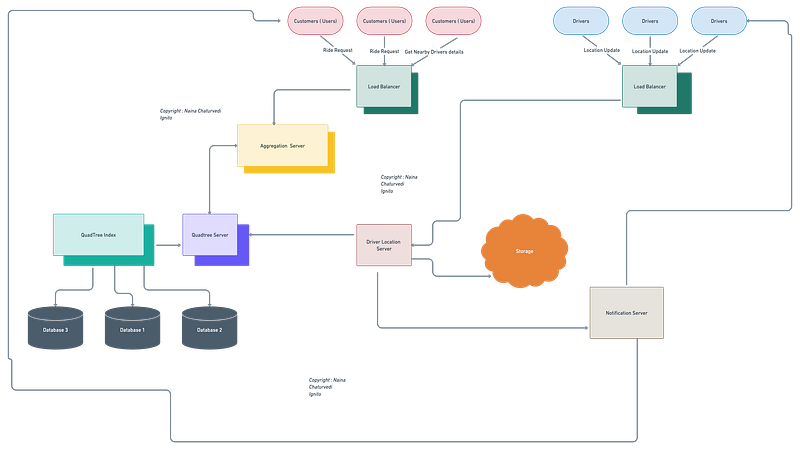
Hello peeps! Welcome to Day 15 of System Design Case studies series where we will design Uber, Slack, Airbnb, Vimeo, Venmo, Pramp, Apple Maps.
This post covers system design for ( scroll till the end of the post) —
Design Uber
Design Slack
Design Airbnb
Design Vimeo
Design Venmo
Design Pramp
Design Apple Maps
Note : Please read System Design Important Terms you MUST know and Most Important System Design basics before reading this post.
Projects Videos —
All the projects, data structures, SQL, algorithms, system design, Data Science and ML , Data Analytics, Data Engineering, , Implemented Data Science and ML projects, Implemented Data Engineering Projects, Implemented Deep Learning Projects, Implemented Machine Learning Ops Projects, Implemented Time Series Analysis and Forecasting Projects, Implemented Applied Machine Learning Projects, Implemented Tensorflow and Keras Projects, Implemented PyTorch Projects, Implemented Scikit Learn Projects, Implemented Big Data Projects, Implemented Cloud Machine Learning Projects, Implemented Neural Networks Projects, Implemented OpenCV Projects,Complete ML Research Papers Summarized, Implemented Data Analytics projects, Implemented Data Visualization Projects, Implemented Data Mining Projects, Implemented Natural Leaning Processing Projects, MLOps and Deep Learning, Applied Machine Learning with Projects Series, PyTorch with Projects Series, Tensorflow and Keras with Projects Series, Scikit Learn Series with Projects, Time Series Analysis and Forecasting with Projects Series, ML System Design Case Studies Series videos will be published on our youtube channel ( just launched).
Subscribe today!
Solved System Design Case Studies — In depth
Design Instagram
Design Messenger App
Design Twitter
Design URL Shortener
Design Dropbox
Design Youtube
Design API Rate Limiter
Design Web Crawler
Design Facebook’s Newsfeed
Design Yelp
Design Uber
Design Tinder
Design Tiktok
Design Whatsapp
Most Popular System Design Questions
Mega Compilation : Solved System Design Case studies
We will be discussing in depth-
- What is Uber
- Important Features
- Scaling Requirements
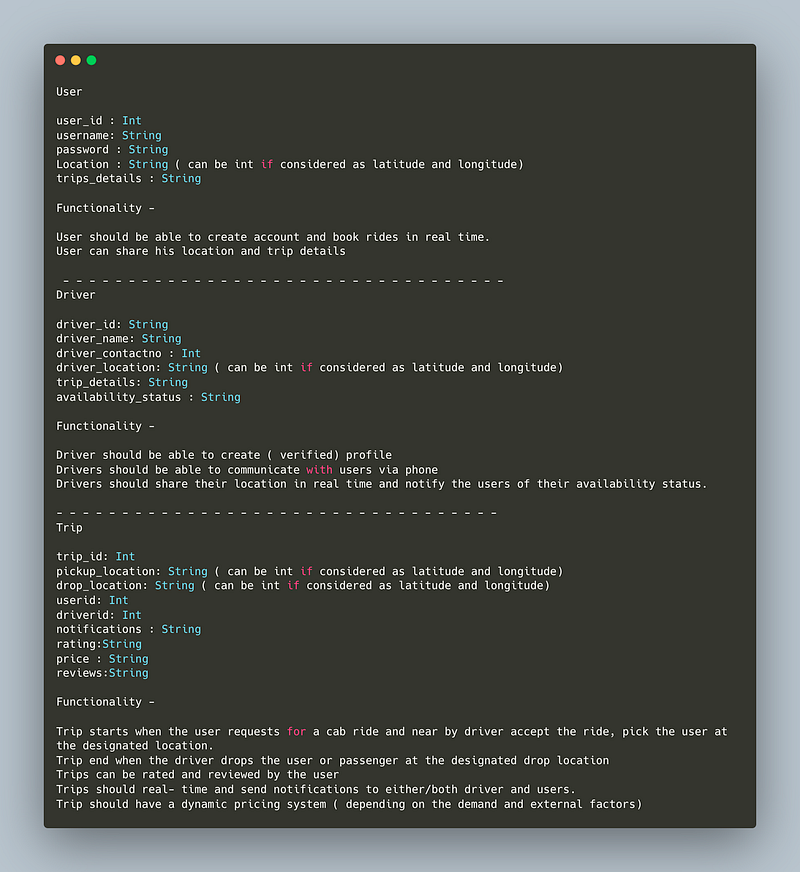
- Data Model — ER requirements
- High Level Design
- Basic Low Level Design
- API Design
- Complete Detailed Design
Complete Design Yelp case study before going through this post.
Pre-requisite to this post -
Complete System Design Series — Important Concepts that you should know before starting the Case studies
6. Networking, How Browsers work, Content Network Delivery ( CDN)
13. System Design Template — How to solve any System Design Question
Github —
Day 1 of System Design Case Studies can be found below-
Day 2 of System Design Case Studies can be found below-
Day 3 of System Design Case Studies can be found below-
Day 4 of System Design Case Studies can be found below-
What is Uber?

Uber is platform which is used to —
- Real time — Book cab rides by the users
- Food Delivery
- Real time location tracking of both drivers and users( customers)
Users are mobile based ( uber app).
Designing Uber would involve :
- User registration and authentication: Allow users to create an account and log in to the platform.
- Driver registration and verification: Allow drivers to create an account and verify their identity, vehicle, and driving history.
- Geolocation: Use GPS technology to determine the location of riders and drivers in real-time.
- Matching: Match riders and drivers based on proximity, vehicle availability, and driver ratings.
- Payment processing: Allow riders to pay for rides using a variety of payment methods, such as credit cards or mobile payments, and process payments securely.
- Rides and fare calculation: Track the start and end of each ride and calculate the fare based on distance, time, and other factors.
- Rating system: Allow riders and drivers to rate each other, and use the ratings to determine the quality of service and match riders and drivers.
- Dispatch and routing: Use algorithms to optimize the dispatch of drivers and the routing of trips, taking into account factors such as traffic, demand, and driver availability.
- Surge pricing: Implement a dynamic pricing system that adjusts fares based on demand and supply.
- Communication: Allow riders and drivers to communicate with each other through the app, such as to confirm a ride or exchange contact information.
- Safety: Implement safety measures such as in-app emergency assistance, real-time ride tracking, and driver and vehicle verification.
- Support and customer service: Provide customer service and support for riders and drivers, such as a help center and 24/7 support team.
- Scalability: Design the platform to handle a large number of users, drivers, and rides, and be able to scale as the platform grows.
- Data and analytics: Collect data on riders and drivers, as well as on rides, and use analytics to improve the platform and make data-driven decisions.
- A/B testing: Regularly perform A/B testing on different features and algorithms to ensure that the platform is providing the best possible user experience.
Important Features
For this case study we will take 4 important features into consideration —
Book a ride in real time ( using customer location and near by driver(s) location)
Track location and mark ride as completed upon reaching the destination
Pricing — real time
Engagement ( Review and Ratings)
Scaling Requirements- Capacity Estimation
Let’s say we have —
No of users or customers : 200 Million
No of drivers : 2 Million
No of active customers per day ( DAU) : 2 Million
No of active drivers per day : 600 K
No of rides per day : 800K
Time taken to notify of location : 4 second
Size of driver data ( per person) : 40 bytes
Total Storage estimate for drivers : 2 Million * 40 bytes = 80 MB
Bandwidth estimate ( to receive update notification from drivers) :
20 bytes * 2 Million = 40 MB per four seconds
Subscription ratio is 4 : 1 [ 4 customers to 1 driver]
Total Storage estimate for all the subscriptions :
(2 Million * 4 * 7bytes ) + ( 600 K * 4bytes ) = 58.4 MB
Bandwidth to send drivers location to users per second :
4 * 600K = 2.4 M * 20 bytes = 48 MB/second
Data Model — ER requirements
User
user_id : Int
username: String
password : String
Location : String ( can be int if considered as latitude and longitude)
trips_details : String
Functionality —
- User should be able to create account and book rides in real time.
- User can share his location and trip details
— — — — — — — — — — — — — — — — — — — — — — — — — — — — — — — — — —
Driver
driver_id: String
driver_name: String
driver_contactno : Int
driver_location: String ( can be int if considered as latitude and longitude)
trip_details: String
availability_status : String
Functionality —
- Driver should be able to create ( verified) profile
- Drivers should be able to communicate with users via phone
- Drivers should share their location in real time and notify the users of their availability status.
— — — — — — — — — — — — — — — — — — — — — — — — — — — — — — — — — —
Trip
trip_id: Int
pickup_location: String ( can be int if considered as latitude and longitude)
drop_location: String ( can be int if considered as latitude and longitude)
userid: Int
driverid: Int
notifications : String
rating:String
price : String
reviews:String
Functionality —
- Trip starts when the user requests for a cab ride and near by driver accept the ride, pick the user at the designated location.
- Trip end when the driver drops the user or passenger at the designated drop location
- Trips can be rated and reviewed by the user
- Trips should real- time and send notifications to either/both driver and users.
- Trip should have a dynamic pricing system ( depending on the demand and external factors)
High Level Design
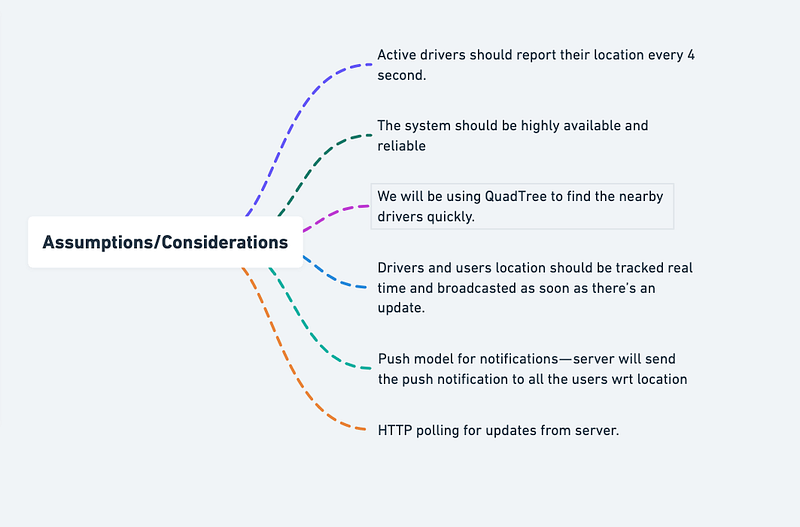
Assumptions/Considerations/Requirements
- Active drivers should report their location every 4 second.
- The system should be highly available and reliable
- We will be using QuadTree to find the nearby drivers quickly.
- Drivers and users location should be tracked real time and broadcasted as soon as there’s an update.
- Push model for notifications — server will send the push notification to all the users wrt location
- HTTP polling for updates from server.
— — — — — — — — — — — — — — — — — — — — — — — — — — — — — — — — — —
Components
Before we start, first understand 3 concepts that we will be using in our workflow.
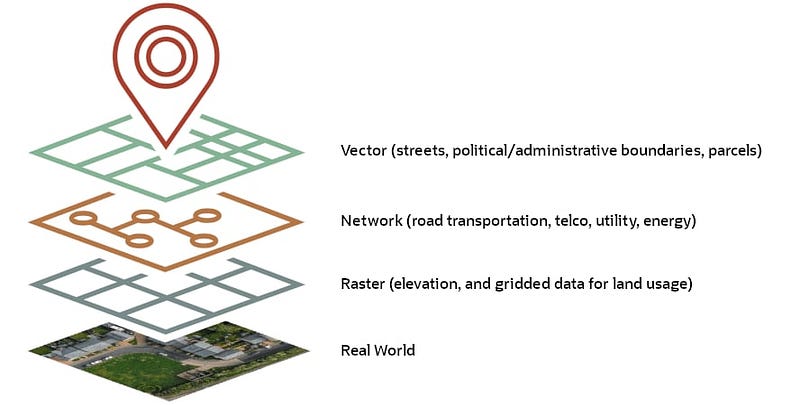
- Geospatial database — It’s a database which stores, queries and indexes the spatial data in an efficient manner. It represents objects that are defined in a geo space. Example — PostGIS, Redis Geohash
Here’s a geospatial database implemented in Python using the sqlite3 library and the sqlite3-rtree extension:
import sqlite3conn = sqlite3.connect(":memory:")
conn.execute("CREATE VIRTUAL TABLE geodata USING rtree(id, minx, maxx, miny, maxy);")def insert_data(conn, id, minx, maxx, miny, maxy):
conn.execute("INSERT INTO geodata VALUES (?, ?, ?, ?, ?)", (id, minx, maxx, miny, maxy))def query_data(conn, minx, maxx, miny, maxy):
cursor = conn.execute("SELECT id FROM geodata WHERE minx >= ? AND maxx <= ? AND miny >= ? AND maxy <= ?", (minx, maxx, miny, maxy))
return cursor.fetchall()insert_data(conn, 1, 0, 2, 0, 2)
insert_data(conn, 2, 1, 3, 1, 3)
insert_data(conn, 3, 2, 4, 2, 4)results = query_data(conn, 1, 2, 1, 2)
print(results)In this example, the insert_data function inserts a new entry into the geodata table with a unique id, a minimum x value minx, a maximum x value maxx, a minimum y value miny, and a maximum y value maxy. The query_data function takes a query bounding box defined by minx, maxx, miny, and maxy and returns all entries in the geodata table that are contained within the query bounding box.
2. Geospatial Indexing — These are index that supports containment and intersection queries for various geometric shapes that are in 2D. It calculates geometries on these shapes..
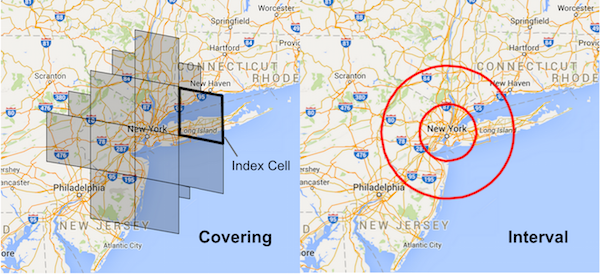
Here’s an implementation of a geospatial index in Python using the rtree library:
from rtree import indexdef build_index(points):
idx = index.Index()
for i, point in enumerate(points):
idx.insert(i, (point[0], point[1], point[0], point[1]))
return idxdef query_index(idx, query_point, radius):
results = list(idx.intersection((query_point[0]-radius, query_point[1]-radius,
query_point[0]+radius, query_point[1]+radius)))
return resultspoints = [(0,0), (1,1), (2,2), (3,3), (4,4), (5,5)] idx = build_index(points) results = query_index(idx, (2,2), 1) print(results)
In this example, the build_index function takes a list of points and builds an R-Tree index. The query_index function takes a query point and a radius and returns a list of indices for all the points in the index that are within the given radius of the query point. The rtree library provides an efficient implementation of R-Trees, which are a type of spatial index that can be used to efficiently query data based on geographic location.
3. QuadTree Indexing — In this, the quad tree divides/separates the plane into four quads. Ut has one root node and four sub quad tree which has exactly four children. It’s a simple technique that is used for indexing spatial data where root represents the entire area and each internal node represents one area ( quadrant) covered into half along both axes.
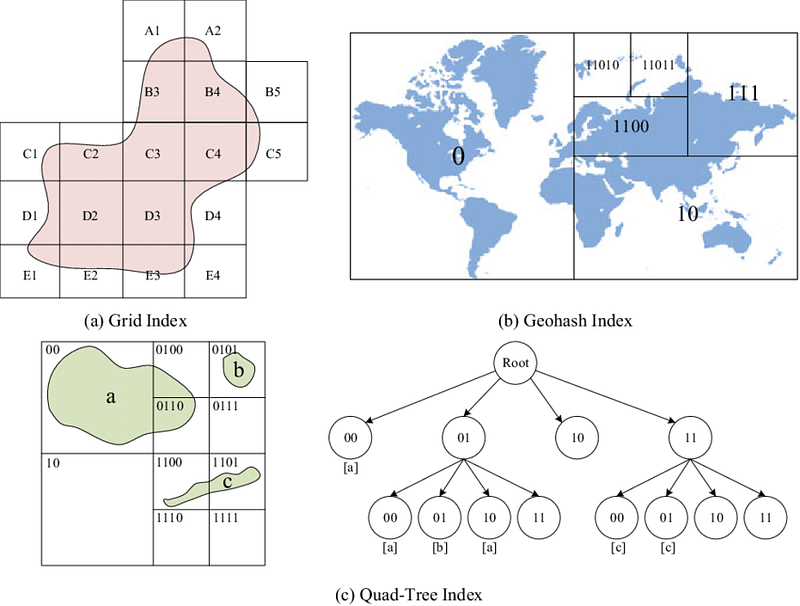
Here’s an implementation of a Quadtree in Python:
class Node:
    def __init__(self, x, y, width, height, points=None):
        self.x = x
        self.y = y
        self.width = width
        self.height = height
        self.points = points or []
        self.children = []

    def divide(self):
        x = self.x
        y = self.y
        w = self.width
        h = self.height
        w_half = w / 2
        h_half = h / 2
        self.children = [Node(x, y, w_half, h_half, self.points),
                        Node(x + w_half, y, w_half, h_half),
                        Node(x, y + h_half, w_half, h_half),
                        Node(x + w_half, y + h_half, w_half, h_half)]
        self.points = []
def insert(self, point):
if self.children:
for child in self.children:
if child.contains(point):
child.insert(point)
return
self.points.append(point)
if len(self.points) > 4:
self.divide()def contains(self, point):
x, y = point
return self.x <= x < self.x + self.width and self.y <= y < self.y + self.heightclass QuadTree:
def __init__(self, width, height):
self.root = Node(0, 0, width, height)def insert(self, point):
self.root.insert(point)def query(self, x, y, width, height):
results = []
self._query(self.root, x, y, width, height, results)
return resultsdef _query(self, node, x, y, width, height, results):
if not node.children:
results.extend(node.points)
return
for child in node.children:
if child.x + child.width >= x and child.y + child.height >= y and child.x <= x + width and child.y <= y + height:
self._query(child, x, y, width, height, results)tree = QuadTree(100, 100)
points = [(0,0), (1,1), (2,2), (3,3), (4,4), (5,5)]
for point in points:
tree.insert(point)
results = tree.query(1, 1, 2, 2)
print(results)In this implementation, the Node class represents a single node in the Quadtree. It has an x, y position, a width and height to describe the bounds of the node, and a list of points that are contained within the bounds of the node. The divide method creates four children nodes and moves the points to the appropriate child node.
— — — — — — — — — — — — — — — — — — — — — — — — — — — — — — — — — — — — — —
Components —
- Clients : Users
- Load balancer
- Aggregation Server
- QuadTree Server
- Location Server
- Storage
- QuadTreeIndex
- Databases
- Notification Server
Services
- User authentication and authorization service
- Rides management service
- Payment processing service
- Maps and location tracking service
- Driver and vehicle management service
- Push notifications service
Basic implementation of the services in Python:
# User authentication and authorization service
class UserAuthService:
    def __init__(self):
        self.users = {}
def signup(self, username, password):
if username in self.users:
return "Username already exists"
self.users[username] = password
return "Signup successful" def login(self, username, password):
if username not in self.users:
return "Username does not exist"
if self.users[username] != password:
return "Incorrect password"
return "Login successful"# Rides management service
class RidesService:
def __init__(self):
self.rides = {} def request_ride(self, user, location, destination):
ride_id = len(self.rides) + 1
self.rides[ride_id] = {
"user": user,
"location": location,
"destination": destination,
"status": "requested"
}
return ride_id def accept_ride(self, ride_id, driver):
if ride_id not in self.rides:
return "Ride does not exist"
self.rides[ride_id]["driver"] = driver
self.rides[ride_id]["status"] = "accepted"
return "Ride accepted" def reject_ride(self, ride_id):
if ride_id not in self.rides:
return "Ride does not exist"
self.rides[ride_id]["status"] = "rejected"
return "Ride rejected" def start_ride(self, ride_id):
if ride_id not in self.rides:
return "Ride does not exist"
if self.rides[ride_id]["status"] != "accepted":
return "Ride cannot be started"
self.rides[ride_id]["status"] = "started"
return "Ride started" def end_ride(self, ride_id):
if ride_id not in self.rides:
return "Ride does not exist"
if self.rides[ride_id]["status"] != "started":
return "Ride cannot be ended"
self.rides[ride_id]["status"] = "ended"
return "Ride ended"# Payment processing service
class PaymentService:
def __init__(self):
self.transactions = [] def calculate_fare(self, ride_id, ride_data):
# logic to calculate fare based on ride distance, time, etc.
fare = 10.0 # example fare
return fare def charge_fare(self, ride_id, fare):
transaction = {
"ride_id": ride_id,
"fare": fare
}
self.transactions.append(transaction)
return "Fare charged"- Maps and location tracking service:
import foliumdef map_location(lat, long, name):
# create the map object
map = folium.Map(location=[lat, long], zoom_start=13)
# add marker to the map
folium.Marker(location=[lat, long], popup=name).add_to(map)
# display the map
return map# example usage
map_location(51.5074, 0.1278, "London")- Driver and vehicle management service:
class Driver:
    def __init__(self, name, vehicle_number, contact_number):
        self.name = name
        self.vehicle_number = vehicle_number
        self.contact_number = contact_number

    def __str__(self):
        return f"Driver: {self.name}, Vehicle: {self.vehicle_number}, Contact: {self.contact_number}"
class Vehicle:
def __init__(self, vehicle_number, make, model, year):
self.vehicle_number = vehicle_number
self.make = make
self.model = model
self.year = year
def __str__(self):
return f"Vehicle: {self.vehicle_number}, Make: {self.make}, Model: {self.model}, Year: {self.year}"# example usage
driver = Driver("John Doe", "AB123456", "555-555-1212")
vehicle = Vehicle("AB123456", "Toyota", "Camry", 2020)
print(driver)
print(vehicle)- Push notifications service:
import smtplibdef send_email(to, subject, message):
# specify the email server and port
server = smtplib.SMTP("smtp.gmail.com", 587)
# start TLS for security
server.starttls()
# login to the email server
server.login("[email protected]", "your_email_password")
# send the email
server.sendmail("[email protected]", to, f"Subject: {subject}\n\n{message}")
# quit the server
server.quit()# example usage
send_email("[email protected]", "Test Subject", "Test Message")Basic Low Level Design
import java.util.*;

class Location {
    private double latitude;
    private double longitude;

    public Location(double latitude, double longitude) {
        this.latitude = latitude;
        this.longitude = longitude;
    }

    public double getLatitude() {
        return latitude;
    }

    public double getLongitude() {
        return longitude;
    }
}

class User {
    private String username;
    private String password;
    private String email;
    private Location currentLocation;

    public User(String username, String password, String email) {
        this.username = username;
        this.password = password;
        this.email = email;
    }

    public String getUsername() {
        return username;
    }

    public String getPassword() {
        return password;
    }

    public String getEmail() {
        return email;
    }

    public Location getCurrentLocation() {
        return currentLocation;
    }

    public void setCurrentLocation(Location currentLocation) {
        this.currentLocation = currentLocation;
    }
}

class Driver {
    private String driverId;
    private String name;
    private Location currentLocation;
    private Ride assignedRide;

    public Driver(String driverId, String name) {
        this.driverId = driverId;
        this.name = name;
    }

    public String getDriverId() {
        return driverId;
    }

    public String getName() {
        return name;
    }

    public Location getCurrentLocation() {
        return currentLocation;
    }

    public void setCurrentLocation(Location currentLocation) {
        this.currentLocation = currentLocation;
    }

    public Ride getAssignedRide() {
        return assignedRide;
    }

    public void setAssignedRide(Ride assignedRide) {
        this.assignedRide = assignedRide;
    }
}

class Ride {
    private User user;
    private Driver driver;
    private Location pickupLocation;
    private Location dropoffLocation;

    public Ride(User user, Location pickupLocation, Location dropoffLocation) {
        this.user = user;
        this.pickupLocation = pickupLocation;
        this.dropoffLocation = dropoffLocation;
    }

    public User getUser() {
        return user;
    }

    public Driver getDriver() {
        return driver;
    }

    public void setDriver(Driver driver) {
        this.driver = driver;
    }

    public Location getPickupLocation() {
        return pickupLocation;
    }

    public Location getDropoffLocation() {
        return dropoffLocation;
    }
}

class RideManager {
    private List<Ride> rides;
    private List<Driver> availableDrivers;

    public RideManager() {
        this.rides = new ArrayList<>();
        this.availableDrivers = new ArrayList<>();
    }

    public void addDriver(Driver driver) {
        availableDrivers.add(driver);
    }

    public void requestRide(User user, Location pickupLocation, Location dropoffLocation) {
        if (!availableDrivers.isEmpty()) {
            Driver selectedDriver = findNearestDriver(pickupLocation);
            Ride newRide = new Ride(user, pickupLocation, dropoffLocation);
            newRide.setDriver(selectedDriver);
            rides.add(newRide);
            selectedDriver.setAssignedRide(newRide);
            availableDrivers.remove(selectedDriver);

            System.out.println("Ride requested successfully.");
        } else {
            System.out.println("No available drivers. Please try again later.");
        }
    }
API Design
This will be covered in the workflow video ( coming soon)
Implementation —
from flask import Flask, jsonify, requestapp = Flask(__name__)# Endpoint for getting driver information
@app.route('/drivers/<int:driver_id>', methods=['GET'])
def get_driver(driver_id):
# Code to get driver information using driver_id
driver = {'name': 'John Doe', 'car': 'Toyota Corolla', 'rating': 4.5}
return jsonify(driver)# Endpoint for requesting a ride
@app.route('/request-ride', methods=['POST'])
def request_ride():
# Code to request a ride using pickup and dropoff locations in request body
pickup = request.json['pickup']
dropoff = request.json['dropoff']
return jsonify({'message': f'Requested ride from {pickup} to {dropoff}!'})# Endpoint for canceling a ride
@app.route('/cancel-ride', methods=['POST'])
def cancel_ride():
# Code to cancel a ride using ride_id in request body
ride_id = request.json['ride_id']
return jsonify({'message': f'Canceled ride {ride_id}!'})if __name__ == '__main__':
app.run(debug=True)In this example, we have three endpoints:
/drivers/<int:driver_id>(GET): This endpoint is used to get driver information. The driver_id is passed as a parameter in the URL./request-ride(POST): This endpoint is used to request a ride. The pickup and dropoff locations are passed in the request body as JSON./cancel-ride(POST): This endpoint is used to cancel a ride. The ride_id is passed in the request body as JSON.- User sign up and login
- Driver sign up and login
- Request a ride
- Accept or reject a ride request
- Start or end a ride
- Calculate and charge the fare for a ride
- Provide real-time updates on the status of a ride
Implementation of the mentioned services in Python:
# User Service
class User:
def __init__(self, username, password):
self.username = username
self.password = password
self.rides = []class UserService:
def __init__(self):
self.users = {} def sign_up(self, username, password):
if username in self.users:
return "Username already exists"
self.users[username] = User(username, password)
return "Sign up successful" def login(self, username, password):
if username not in self.users:
return "Username does not exist"
user = self.users[username]
if user.password != password:
return "Incorrect password"
return user# Driver Service
class Driver:
def __init__(self, username, password, status="available"):
self.username = username
self.password = password
self.status = status
self.current_ride = Noneclass DriverService:
def __init__(self):
self.drivers = {} def sign_up(self, username, password):
if username in self.drivers:
return "Username already exists"
self.drivers[username] = Driver(username, password)
return "Sign up successful" def login(self, username, password):
if username not in self.drivers:
return "Username does not exist"
driver = self.drivers[username]
if driver.password != password:
return "Incorrect password"
return driver# Ride Service
class Ride:
def __init__(self, rider, driver, status="requested"):
self.rider = rider
self.driver = driver
self.status = statusclass RideService:
def __init__(self):
self.rides = [] def request_ride(self, rider, driver):
ride = Ride(rider, driver)
self.rides.append(ride)
return ride def accept_ride(self, ride):
ride.status = "accepted"
ride.driver.status = "on a ride"
ride.driver.current_ride = ride
return ride def reject_ride(self, ride):
ride.status = "rejected"
return ride def start_ride(self, ride):
ride.status = "started"
return ride def end_ride(self, ride):
ride.status = "ended"
ride.driver.status = "available"
ride.driver.current_ride = None
fare = calculate_fare(ride)
charge_fare(ride, fare)
return faredef calculate_fare(ride):
# Placeholder implementation
return 100def charge_fare(ride, fare):
# Placeholder implementation
pass# Initialize services
user_service = UserService()
driver_service = DriverService()
ride_service = RideService()Complete Detailed Design
Code
We need to create a Flask application, set up a database using SQLAlchemy, and use SocketIO to handle real-time location tracking:
from flask import Flask, request, jsonify
from flask_sqlalchemy import SQLAlchemy
from flask_socketio import SocketIOapp = Flask(__name__)
app.config['SQLALCHEMY_DATABASE_URI'] = 'sqlite:///database.db'
app.config['SECRET_KEY'] = 'secret_key'
db = SQLAlchemy(app)
socketio = SocketIO(app)class User(db.Model):
id = db.Column(db.Integer, primary_key=True)
name = db.Column(db.String(50))
email = db.Column(db.String(50))
password = db.Column(db.String(50))
role = db.Column(db.String(10))class Driver(db.Model):
id = db.Column(db.Integer, primary_key=True)
name = db.Column(db.String(50))
email = db.Column(db.String(50))
password = db.Column(db.String(50))
location = db.Column(db.String(50))class Ride(db.Model):
id = db.Column(db.Integer, primary_key=True)
user_id = db.Column(db.Integer, db.ForeignKey('user.id'))
driver_id = db.Column(db.Integer, db.ForeignKey('driver.id'))
status = db.Column(db.String(10))
start_location = db.Column(db.String(50))
end_location = db.Column(db.String(50))
start_time = db.Column(db.String(50))
end_time = db.Column(db.String(50))
fare = db.Column(db.Float)@app.route('/api/users', methods=['POST'])
def create_user():
name = request.json['name']
email = request.json['email']
password = request.json['password']
role = request.json['role']
user = User(name=name, email=email, password=password, role=role)
db.session.add(user)
db.session.commit()
return jsonify({'message': 'User created successfully!'})@app.route('/api/drivers', methods=['POST'])
def create_driver():
name = request.json['name']
email = request.json['email']
password = request.json['password']
driver = Driver(name=name, email=email, password=password)
db.session.add(driver)
db.session.commit()
return jsonify({'message': 'Driver created successfully!'})@socketio.on('location_update')
def update_location(data):
driver_id = data['driver_id']
location = data['location']
driver = Driver.query.filter_by(id=driver_id).first()
driver.location = location
db.session.commit()
socketio.emit('location_updated', {'driver_id': driver_id, 'location': location})if __name__ == '__main__':
db.create_all()
socketio.run(app)The code above sets up a Flask application and creates three database models: User, Driver, and Ride. We also define three API routes for creating users, creating drivers, and updating driver locations using SocketIO. We use SocketIO to handle real-time location tracking by emitting and receiving events (‘location_update’ and ‘location_updated’) between the server and the client.
To test the application, we can use a Python client that connects to the server and emits location_update events for a driver:
from socketIO_client import SocketIO, LoggingNamespacewith SocketIO('localhost', 5000, LoggingNamespace) as socketIO:
socketIO.emit('location_update', {'driver_id': 1, 'location': '50.1234, 20.5678'})This code connects to the server at localhost:5000 using SocketIO and emits a location_update event for driver_id=1 and location=’50.1234, 20.5678'. The server then updates the location of the driver and emits a location_updated event to all connected clients.
To book a ride, a user can use the following API route:
@app.route('/api/rides', methods=['POST'])
def book_ride():
user_id = request.json['user_id']
start_location = request.json['start_location']
end_location = request.json['end_location']
ride = Ride(user_id=user_id, start_location=start_location, end_location=end_location, status='pending')
db.session.add(ride)
db.session.commit()
return jsonify({'message': 'Ride booked successfully!'})This code creates a new ride with the user_id, start_location, and end_location provided in the request body. The ride status is set to ‘pending’ and is added to the database.
More on Uber System Design —
User Management and Authentication:
User registration, login, and authentication involve designing systems to allow users to create accounts, log in securely, and authenticate their identity. Here’s an example code for user registration and login functionality using Python:
class User:
def __init__(self, username, password):
self.username = username
self.password = password def register(self):
# Logic to register user and store their credentials
print("User registered successfully!") def login(self):
# Logic to authenticate user credentials
if self.username == "valid_username" and self.password == "valid_password":
print("User logged in successfully!")
else:
print("Invalid username or password!")# Example usage:
user = User("john_doe", "pass123")
user.register()
user.login()Geolocation and Mapping:
Geolocation services and mapping are crucial for tracking real-time locations and providing route planning and navigation features. Here’s an example code for retrieving the user’s current location using the geolocation service:
import geocoderdef get_current_location():
g = geocoder.ip('me')
if g.latlng:
latitude, longitude = g.latlng
return latitude, longitude
else:
return None# Example usage:
location = get_current_location()
if location:
print("Current latitude:", location[0])
print("Current longitude:", location[1])
else:
print("Failed to retrieve current location.")Ride Request and Dispatch:
Ride request and dispatch systems handle the process of riders requesting rides and drivers accepting them. Here’s an example code for requesting a ride and dispatching it to an available driver:
class Ride:
def __init__(self, rider, destination):
self.rider = rider
self.destination = destination def request_ride(self):
# Logic to request a ride and dispatch it to an available driver
print("Ride requested successfully!") def assign_driver(self, driver):
# Logic to assign the ride to a specific driver
print(f"Ride assigned to driver {driver}.")# Example usage:
rider = "John Doe"
destination = "123 Main Street"
ride = Ride(rider, destination)
ride.request_ride()
ride.assign_driver("Jane Smith")Routing and Navigation:
Efficient route optimization and navigation are essential for providing the best routes to drivers and riders. Here’s an example code for calculating the distance between two locations using the Haversine formula:
import mathdef calculate_distance(lat1, lon1, lat2, lon2):
# Radius of the Earth in kilometers
earth_radius = 6371 # Convert degrees to radians
lat1 = math.radians(lat1)
lon1 = math.radians(lon1)
lat2 = math.radians(lat2)
lon2 = math.radians(lon2) # Haversine formula
dlon = lon2 - lon1
dlat = lat2 - lat1
a = math.sin(dlat/2)**2 + math.cos(lat1) * math.cos(lat2) * math.sin(dlon/2)**2
c = 2 * math.atan2(math.sqrt(a), math.sqrt(1-a))
distance = earth_radius * c return distance# Example usage:
lat1 = 40.7128
lon1 = -74.0060
lat2 = 34.0522
lon2 = -118.2437
distance = calculate_distance(lat1, lon1, lat2, lon2)
print("Distance between the locations:", distance, "km")Pricing and Payment:
Implementing dynamic pricing models based on supply and demand, designing systems for fare calculation and cost estimation, and handling secure and seamless payment processing. Here’s an example code for calculating the fare and processing the payment:
class Ride:
def __init__(self, rider, destination, distance):
self.rider = rider
self.destination = destination
self.distance = distance def calculate_fare(self):
# Logic to calculate the fare based on distance and surge pricing
base_fare = 2.0
per_km_charge = 0.5
total_fare = base_fare + (per_km_charge * self.distance)
return total_fare def process_payment(self, payment_method):
# Logic to process the payment using the provided payment method
print(f"Payment of {self.calculate_fare()} USD processed with {payment_method} successfully!")# Example usage:
rider = "John Doe"
destination = "123 Main Street"
distance = 10.5 # Distance in kilometers
ride = Ride(rider, destination, distance)
ride.process_payment("Credit Card")Driver Management:
Designing systems for driver onboarding, verification, and rating, implementing mechanisms for driver availability and driver incentives, and handling driver earnings, incentives, and rewards. Here’s an example code for managing drivers:
class Driver:
def __init__(self, name):
self.name = name
self.available = False
self.rating = 0.0
self.earnings = 0.0 def set_availability(self, is_available):
# Logic to set driver availability
self.available = is_available def rate_driver(self, rating):
# Logic to update driver rating based on user feedback
self.rating = rating def update_earnings(self, earnings):
# Logic to update driver earnings
self.earnings += earnings# Example usage:
driver = Driver("Jane Smith")
driver.set_availability(True)
driver.rate_driver(4.5)
driver.update_earnings(15.75)
print("Driver:", driver.name)
print("Availability:", driver.available)
print("Rating:", driver.rating)
print("Earnings:", driver.earnings)Trip Tracking and Safety:
Designing systems for real-time trip tracking and monitoring, implementing safety features like SOS buttons and emergency services integration, and handling trip cancellation, rider/driver feedback, and dispute resolution. Here’s an example code for trip tracking and cancellation:
class Trip:
def __init__(self, rider, driver, destination):
self.rider = rider
self.driver = driver
self.destination = destination
self.is_cancelled = False def track_trip(self):
# Logic to track the trip in real-time
print("Tracking trip...") def cancel_trip(self):
# Logic to cancel the trip
self.is_cancelled = True
print("Trip cancelled successfully!")# Example usage:
rider = "John Doe"
driver = "Jane Smith"
destination = "123 Main Street"
trip = Trip(rider, driver, destination)
trip.track_trip()
trip.cancel_trip()
print("Trip status:", "Cancelled" if trip.is_cancelled else "Completed")Surge Handling and Demand Prediction:
Designing systems to handle surge pricing during high-demand periods, implementing demand prediction algorithms based on historical data and external factors, and optimizing driver allocation and supply-demand balancing. Here’s an example code for surge handling and demand prediction:
class SurgeHandler:
def __init__(self):
self.base_fare = 2.0
self.surge_multiplier = 1.0
def calculate_fare(self, distance):
# Logic to calculate the fare based on distance and surge pricing
total_fare = self.base_fare * self.surge_multiplier + distance
return total_fare
def update_surge_multiplier(self, demand_level):
# Logic to update the surge multiplier based on demand level
if demand_level == "high":
self.surge_multiplier = 2.0
elif demand_level == "medium":
self.surge_multiplier = 1.5
else:
self.surge_multiplier = 1.0
# Example usage:
surge_handler = SurgeHandler()
fare = surge_handler.calculate_fare(10.5)
print("Fare:", fare)
surge_handler.update_surge_multiplier("high")
fare = surge_handler.calculate_fare(10.5)
print("Fare (High demand):", fare)Analytics and Insights:
Collecting and analyzing metrics to gain insights into user behavior, driver performance, and operational efficiency, implementing analytics tools for business intelligence and decision-making, and providing reporting functionalities and data visualizations. Here’s an example code for generating a report:
class AnalyticsEngine:
def __init__(self):
self.metrics = [] def collect_metrics(self, metric):
# Logic to collect metrics
self.metrics.append(metric) def generate_report(self):
# Logic to generate a report based on collected metrics
print("Generating report...")
for metric in self.metrics:
print(metric)# Example usage:
analytics_engine = AnalyticsEngine()
analytics_engine.collect_metrics("User behavior: High demand areas")
analytics_engine.collect_metrics("Driver performance: Average rating")
analytics_engine.collect_metrics("Operational efficiency: Ride completion rate")
analytics_engine.generate_report()Scalability and Performance:
Horizontal scaling strategies to handle a large number of riders, drivers, and concurrent requests, optimizing data storage and retrieval for efficient ride matching and dispatching, and implementing caching mechanisms and load balancing techniques for improved performance. Here’s an example code for load balancing:
class LoadBalancer:
def __init__(self, servers):
self.servers = servers def get_server(self, request):
# Logic to select a server based on load balancing algorithm
return self.servers[0] # Example: Select the first server# Example usage:
servers = ["Server1", "Server2", "Server3", "Server4"]
load_balancer = LoadBalancer(servers)
request = "Example request"
selected_server = load_balancer.get_server(request)
print("Selected server:", selected_server)System Resilience and Availability:
Implementing fault-tolerant and distributed systems for high availability, handling network disruptions, server failures, and graceful degradation, and monitoring and alerting for system health and performance. Here’s an example code for monitoring system health:
class HealthMonitor:
def __init__(self):
self.is_healthy = True
def check_health(self):
# Logic to check the health of the system
if self.is_healthy:
print("System is healthy.")
else:
print("System is not healthy. Please investigate.")
# Example usage:
health_monitor = HealthMonitor()
health_monitor.check_health()Scalability and Performance:
Horizontal scaling strategies to handle a large number of riders, drivers, and concurrent requests, optimizing data storage and retrieval for efficient ride matching and dispatching, and implementing caching mechanisms and load balancing techniques for improved performance. Here’s an example code for load balancing:
class LoadBalancer:
def __init__(self, servers):
self.servers = servers def get_server(self, request):
# Logic to select a server based on load balancing algorithm
return self.servers[0] # Example: Select the first server# Example usage:
servers = ["Server1", "Server2", "Server3", "Server4"]
load_balancer = LoadBalancer(servers)
request = "Example request"
selected_server = load_balancer.get_server(request)
print("Selected server:", selected_server)System Design — Slack
We will be discussing in depth-
- What is Slack
- Important Features
- Scaling Requirements
- Data Model — ER requirements
- High Level Design
- Basic Low Level Design
- API Design
- Complete Detailed Design
- Complete Code Implementation

What is Slack
Slack is a popular communication and collaboration platform designed for teams and businesses. It allows users to communicate through channels, share files, conduct video and audio calls, and integrate with various third-party applications, making it a central hub for team productivity.
Important Features
- Channels: Users can create public and private channels for specific topics or projects, facilitating organized communication.
- Direct Messages: Users can have one-on-one conversations with colleagues for private discussions.
- File Sharing: Slack supports sharing various file types, making it easy to collaborate on documents and media.
- Integrations: It offers integrations with numerous apps and services, enabling users to streamline workflows.
- Search: Slack’s powerful search functionality helps users find past messages, files, and conversations.
- Notifications: Real-time notifications keep users informed of important updates.
- Threads: Users can create threaded conversations to keep discussions organized and focused.
- Voice and Video Calls: Slack provides voice and video call capabilities for remote communication.
- Customization: Users can customize their Slack environment with themes, emojis, and custom integrations.
- Bots: Slack supports bots to automate tasks and enhance productivity.
Scaling Requirements — Capacity Estimation
For the sake of simplicity, we will consider a small scale simulation —
Assumptions:
Total number of users: 100,000
Daily active users (DAU): 30,000
Number of messages sent by user/day: 5
Total number of messages sent per day: 150,000 messages/day
Since the system is read-heavy, let’s assume the read-to-write ratio to be 50:1.
Total number of messages received per day: 50 * 150,000 = 7,500,000 messages/day
Storage Estimation:
- On average, each message size is 10 KB.
- Total storage per day: 7,500,000 * 10 KB = 75 GB/day
For the next 3 years:
- Total storage for 3 years: 75 GB * 365 * 3 = 82.125 TB
Requests per Second:
- Total number of messages received per second: 7,500,000 / 86400 seconds = 87 requests/second
User Growth: Slack must handle a rapidly growing user base with thousands of concurrent users.
Message Volume: The system should support a massive number of messages across different channels and direct messages.
File Storage: With numerous file uploads daily, the system must efficiently manage and store files.
Real-time Communication: Slack’s messaging and video call features require low-latency and high availability.
Third-party Integrations: As Slack integrates with external services, it must handle API calls and data transfers effectively.
Data Model — ER requirements
User: Represents a user in the Slack system.
- Fields:
User_ID: Unique identifier for each user.Username: String, the username of the user.Email: String, the email address of the user.Password: String, the password of the user.
Channel: Represents a channel where users can exchange messages.
- Fields:
Channel_ID: Unique identifier for each channel.Name: String, the name of the channel.Type: String, the type of the channel (e.g., public or private).
Message: Represents a message sent by a user in a channel.
- Fields:
Message_ID: Unique identifier for each message.User_ID: Foreign key from the User table, representing the sender of the message.Channel_ID: Foreign key from the Channel table, representing the channel where the message is sent.Content: String, the content of the message.Timestamp: DateTime, the timestamp when the message was sent.
File: Represents a file uploaded by a user in a channel.
- Fields:
File_ID: Unique identifier for each file.User_ID: Foreign key from the User table, representing the user who uploaded the file.Channel_ID: Foreign key from the Channel table, representing the channel where the file is uploaded.File_URL: String, the URL of the uploaded file.Timestamp: DateTime, the timestamp when the file was uploaded.
Integration: Represents a third-party integration added by a user.
- Fields:
Integration_ID: Unique identifier for each integration.User_ID: Foreign key from the User table, representing the user who added the integration.Service_Name: String, the name of the integrated service.API_Key: String, the API key for accessing the integrated service.
Follower: Represents the follower-followee relationship between users.
- Fields:
Follower_ID: Foreign key from the User table, representing the follower.Followee_ID: Foreign key from the User table, representing the followee.
- User: Stores user information like username, email, and profile details.
- Channel: Represents both public and private channels, storing their metadata.
- Message: Contains message content, sender information, timestamps, and links to related channels or users.
- File: Stores file metadata, references to physical file storage, and associated permissions.
- Integration: Holds data related to third-party integrations and their configurations.
High Level Design
Assumptions:
- The system is read-heavy, with more reads than writes.
- The system needs to be highly available and reliable.
- Latency for message delivery should be low.
- The system should be scalable to handle millions of concurrent users.
- Mobile Client: Represents users accessing Slack through the mobile application.
- Web Client: Represents users accessing Slack through the web application.
- Application Servers: Responsible for handling read and write operations, as well as notifications to users.
- Load Balancer: Routes and distributes incoming requests to the appropriate application server.
- Cache (Memcache or Redis): Caches frequently accessed data to improve response time and reduce database load.
- CDN (Content Delivery Network): Improves latency and throughput for serving media files like images and videos.
- Database: Stores the data, including user information, messages, files, and integrations.
- Storage (Object Storage): Stores the uploaded files.
Web Frontend: The user-facing web application where users interact with the Slack platform through browsers.
Mobile Apps: Native mobile applications for Android and iOS, providing a seamless user experience on mobile devices.
Backend Services: The backbone of the system, responsible for handling user authentication, message routing, and data storage.
Real-time Communication: This component handles WebSocket connections to enable real-time messaging and notifications.
File Storage: The storage system responsible for securely storing uploaded files and media.
Backend Services: Implemented using microservices architecture, with services handling different functionalities like authentication, messaging, and search.
Real-time Communication: Utilizes WebSockets to establish a persistent connection between clients and servers, enabling real-time messaging.
File Storage: Files are stored in a distributed file system or cloud storage like Amazon S3, with metadata indexed in databases.
User Service:
Create new user
Authenticate user
Update user profile
Get user information
Channel Service:
Create new channel
Get channel information
List public and private channels
List channels that a user is a member of
Message Service:
Send message to a channel or user
Get messages from a channel or user
Delete messages
File Service:
Upload file
Get file information
Download file
Integration Service:
Add new integration
Get list of integrated services
Remove integration
Follower Service:
Follow a user
Unfollow a user
Get followers and followees for a user
Feed Generation Service:
Generate user's personalized feed
Rank posts based on relevance, popularity, and user activityfrom flask import Flask, jsonify, request
app = Flask(__name__)
# Sample data to store users and channels
users = {}
channels = {}
# User Service
@app.route('/api/users', methods=['POST'])
def create_user():
data = request.get_json()
username = data.get('username')
email = data.get('email')
password = data.get('password')
if not username or not email or not password:
return jsonify({'error': 'Username, email, and password are required'}), 400
user_id = len(users) + 1
new_user = {
'id': user_id,
'username': username,
'email': email,
'password': password
}
users[user_id] = new_user
return jsonify(new_user), 201
@app.route('/api/users/<int:user_id>', methods=['GET'])
def get_user(user_id):
user = users.get(user_id)
if not user:
return jsonify({'error': 'User not found'}), 404
return jsonify(user), 200
@app.route('/api/authenticate', methods=['POST'])
def authenticate_user():
data = request.get_json()
email = data.get('email')
password = data.get('password')
if not email or not password:
return jsonify({'error': 'Email and password are required'}), 400
user = next((user for user in users.values() if user['email'] == email and user['password'] == password), None)
if not user:
return jsonify({'error': 'Invalid email or password'}), 401
return jsonify(user), 200
# Channel Service
@app.route('/api/channels', methods=['POST'])
def create_channel():
data = request.get_json()
name = data.get('name')
channel_type = data.get('type', 'public')
if not name:
return jsonify({'error': 'Channel name is required'}), 400
channel_id = len(channels) + 1
new_channel = {
'id': channel_id,
'name': name,
'type': channel_type
}
channels[channel_id] = new_channel
return jsonify(new_channel), 201
@app.route('/api/channels/<int:channel_id>', methods=['GET'])
def get_channel(channel_id):
channel = channels.get(channel_id)
if not channel:
return jsonify({'error': 'Channel not found'}), 404
return jsonify(channel), 200
# Message Service
@app.route('/api/messages', methods=['POST'])
def send_message():
data = request.get_json()
sender_id = data.get('sender_id')
recipient_id = data.get('recipient_id')
content = data.get('content')
if not sender_id or not recipient_id or not content:
return jsonify({'error': 'Sender ID, recipient ID, and content are required'}), 400
# In a real implementation, you would handle the message sending and storing logic here.
# For simplicity, we are just returning the input data as the message for this example.
message = {
'sender_id': sender_id,
'recipient_id': recipient_id,
'content': content
}
return jsonify(message), 200
@app.route('/api/messages/<int:user_id>', methods=['GET'])
def get_user_messages(user_id):
# In a real implementation, you would retrieve messages for the user from the database.
# For this example, we'll just return sample data.
messages = [
{'id': 1, 'sender_id': 2, 'content': 'Hello, user!'},
{'id': 2, 'sender_id': 3, 'content': 'Hi there!'},
{'id': 3, 'sender_id': 2, 'content': 'How are you?'},
]
user_messages = [message for message in messages if message['sender_id'] == user_id]
return jsonify(user_messages), 200
if __name__ == '__main__':
app.run(debug=True)Basic Low Level Design
# Define the User class
class User:
    def __init__(self, user_id, username, password, email):
        self.user_id = user_id
        self.username = username
        self.password = password
        self.email = email
        # Other user attributes (e.g., name, profile picture)

# Define the Channel class
class Channel:
    def __init__(self, channel_id, name, channel_type):
        self.channel_id = channel_id
        self.name = name
        self.channel_type = channel_type

# Define the Message class
class Message:
    def __init__(self, message_id, user_id, channel_id, content, timestamp):
        self.message_id = message_id
        self.user_id = user_id
        self.channel_id = channel_id
        self.content = content
        self.timestamp = timestamp

# Define the File class
class File:
    def __init__(self, file_id, user_id, channel_id, file_url, timestamp):
        self.file_id = file_id
        self.user_id = user_id
        self.channel_id = channel_id
        self.file_url = file_url
        self.timestamp = timestamp

# Define the Integration class
class Integration:
    def __init__(self, integration_id, user_id, service_name, api_key):
        self.integration_id = integration_id
        self.user_id = user_id
        self.service_name = service_name
        self.api_key = api_key

# Define the Follower class
class Follower:
    def __init__(self, follower_id, followee_id):
        self.follower_id = follower_id
        self.followee_id = followee_id
User Management API:
POST /users: Create a new user.
GET /users/{user_id}: Get user information by user ID.
PATCH /users/{user_id}: Update user profile information by user ID.
Channel Management API:
POST /channels: Create a new channel.
GET /channels/{channel_id}: Get channel information by channel ID.
Message API:
POST /messages: Send a message to a channel.
GET /channels/{channel_id}/messages: Get messages from a channel.
File API:
POST /files: Upload a file to a channel.
GET /channels/{channel_id}/files: Get files from a channel.
Integration API:
POST /users/{user_id}/integrations: Add a new integration for a user.
GET /users/{user_id}/integrations: Get a list of integrations for a user.
DELETE /users/{user_id}/integrations/{integration_id}: Remove an integration for a user.
Follower API:
POST /users/{follower_id}/follow/{followee_id}: Follow a user.
POST /users/{follower_id}/unfollow/{followee_id}: Unfollow a user.
GET /users/{user_id}/followers: Get followers of a user.
GET /users/{user_id}/following: Get users followed by a user.
Feed Generation API:
GET /users/{user_id}/feed: Get the personalized feed for a user.API Design
- Authentication API: Allows users to sign up, log in, and manage their accounts.
- Messaging API: Enables sending and receiving messages, creating channels, and managing user conversations.
- File API: Handles file uploads, downloads, and file-related metadata operations.
- Integration API: Provides endpoints for third-party developers to integrate their applications with Slack.
User Authentication API
POST /api/auth/signup: Allows users to sign up with their email and password.
POST /api/auth/login: Enables users to log in with their credentials and receive an access token.
POST /api/auth/logout: Logs out the user and invalidates their access token.

Messaging API
POST /api/messages/send: Allows users to send messages to a channel or directly to another user.
GET /api/messages/:channel_id: Retrieves all messages from a specific channel.
GET /api/messages/direct/:user_id: Retrieves all direct messages between the current user and another user.
DELETE /api/messages/:message_id: Deletes a specific message.

Channel API
POST /api/channels/create: Allows users to create a new public or private channel.
GET /api/channels/:channel_id: Retrieves information about a specific channel.
GET /api/channels/public: Retrieves a list of public channels.
GET /api/channels/private: Retrieves a list of private channels.

File API
POST /api/files/upload: Allows users to upload files to the system.
GET /api/files/:file_id: Retrieves information about a specific file.
GET /api/files/:file_id/download: Downloads a specific file.

Integration API
POST /api/integrations/add: Enables users to add third-party integrations.
GET /api/integrations/list: Retrieves a list of all integrated third-party services.
DELETE /api/integrations/:integration_id: Removes a specific third-party integration.
from flask import Flask, jsonify, request
app = Flask(__name__)
# Sample data to store users, channels, messages, and files
users = {}
channels = {}
messages = {}
files = {}
# User Authentication API
@app.route('/api/auth/signup', methods=['POST'])
def signup():
data = request.get_json()
email = data.get('email')
password = data.get('password')
if not email or not password:
return jsonify({'error': 'Email and password are required'}), 400
# Create a new user with the provided data (in a real implementation, use a database)
user_id = len(users) + 1
users[user_id] = {
'id': user_id,
'email': email,
'password': password
}
return jsonify({'message': 'User signup successful'}), 200
@app.route('/api/auth/login', methods=['POST'])
def login():
data = request.get_json()
email = data.get('email')
password = data.get('password')
if not email or not password:
return jsonify({'error': 'Email and password are required'}), 400
# Check if the user exists and the password is correct (in a real implementation, use a database)
user = next((user for user in users.values() if user['email'] == email), None)
if not user or user['password'] != password:
return jsonify({'error': 'Invalid email or password'}), 401
# Generate and return an access token (in a real implementation, use a JWT or similar mechanism)
access_token = f'your_generated_access_token_for_user_{user["id"]}'
return jsonify({'access_token': access_token}), 200
@app.route('/api/auth/logout', methods=['POST'])
def logout():
# In a real implementation, handle invalidating the user's access token
return jsonify({'message': 'User logged out successfully'}), 200
# Messaging API
@app.route('/api/messages/send', methods=['POST'])
def send_message():
data = request.get_json()
sender_id = data.get('sender_id')
recipient_id = data.get('recipient_id')
message_content = data.get('content')
if not sender_id or not recipient_id or not message_content:
return jsonify({'error': 'Sender ID, recipient ID, and message content are required'}), 400
# Save the message (in a real implementation, use a database)
message_id = len(messages) + 1
messages[message_id] = {
'id': message_id,
'sender_id': sender_id,
'recipient_id': recipient_id,
'content': message_content
}
return jsonify({'message': 'Message sent successfully'}), 200
@app.route('/api/messages/<int:user_id>', methods=['GET'])
def get_messages(user_id):
# Retrieve messages for the given user ID (in a real implementation, use a database)
user_messages = [message for message in messages.values() if message['recipient_id'] == user_id]
return jsonify(user_messages), 200
# ... Implement other APIs following a similar pattern ...
if __name__ == '__main__':
app.run(debug=True)from flask import Flask, request, jsonify
app = Flask(__name__)
# Sample data to store users, channels, messages, files, integrations, and followers
users = {}
channels = {}
messages = {}
files = {}
integrations = {}
followers = []
# User Management API
@app.route('/api/users', methods=['POST'])
def create_user():
data = request.get_json()
user_id = len(users) + 1
new_user = User(user_id, data['username'], data['password'], data['email'])
users[user_id] = new_user
return jsonify({'message': 'User created successfully', 'user_id': user_id}), 201
@app.route('/api/users/<int:user_id>', methods=['GET'])
def get_user(user_id):
user = users.get(user_id)
if user:
return jsonify({'user_id': user.user_id, 'username': user.username, 'email': user.email}), 200
return jsonify({'message': 'User not found'}), 404
# Channel Management API
@app.route('/api/channels', methods=['POST'])
def create_channel():
data = request.get_json()
channel_id = len(channels) + 1
new_channel = Channel(channel_id, data['name'], data['type'])
channels[channel_id] = new_channel
return jsonify({'message': 'Channel created successfully', 'channel_id': channel_id}), 201
@app.route('/api/channels/<int:channel_id>', methods=['GET'])
def get_channel(channel_id):
channel = channels.get(channel_id)
if channel:
return jsonify({'channel_id': channel.channel_id, 'name': channel.name, 'type': channel.channel_type}), 200
return jsonify({'message': 'Channel not found'}), 404
# Message API
@app.route('/api/messages', methods=['POST'])
def send_message():
data = request.get_json()
message_id = len(messages) + 1
new_message = Message(message_id, data['user_id'], data['channel_id'], data['content'], data['timestamp'])
messages[message_id] = new_message
return jsonify({'message': 'Message sent successfully', 'message_id': message_id}), 200
@app.route('/api/channels/<int:channel_id>/messages', methods=['GET'])
def get_messages(channel_id):
channel_messages = [message for message in messages.values() if message.channel_id == channel_id]
if channel_messages:
return jsonify({'messages': [{'message_id': message.message_id, 'user_id': message.user_id,
'content': message.content, 'timestamp': message.timestamp}
for message in channel_messages]}), 200
return jsonify({'message': 'No messages found for this channel'}), 404
# File API
# Implement similar endpoints as above for file upload and retrieval
# Integration API
# Implement endpoints for adding, retrieving, and removing integrations
# Follower API
# Implement endpoints for following, unfollowing, and retrieving followers/followees
if __name__ == '__main__':
app.run(debug=True)Complete Detailed Design
Coming soon! It will be covered on youtube channel.
Subscribe to youtube channel :
Complete Code implementation
User Growth
# Sample implementation for user growth
class User:
    def __init__(self, user_id, email):
        self.user_id = user_id
        self.email = email
class UserManagement:
def __init__(self):
self.users = {} def add_user(self, email):
user_id = len(self.users) + 1
new_user = User(user_id, email)
self.users[user_id] = new_user
return new_user def get_user(self, user_id):
return self.users.get(user_id, None)# Usage example
user_management = UserManagement()
user1 = user_management.add_user("[email protected]")
user2 = user_management.add_user("[email protected]")
print(user1.email) # Output: [email protected]
print(user2.email) # Output: [email protected]Message Volume
# Sample implementation for handling messages
class Message:
    def __init__(self, message_id, sender_id, recipient_id, content):
        self.message_id = message_id
        self.sender_id = sender_id
        self.recipient_id = recipient_id
        self.content = content
class MessageManagement:
def __init__(self):
self.messages = {} def send_message(self, sender_id, recipient_id, content):
message_id = len(self.messages) + 1
new_message = Message(message_id, sender_id, recipient_id, content)
self.messages[message_id] = new_message
return new_message def get_messages_by_recipient(self, recipient_id):
return [message for message in self.messages.values() if message.recipient_id == recipient_id]# Usage example
message_management = MessageManagement()
message1 = message_management.send_message(1, 2, "Hello, user2!")
message2 = message_management.send_message(2, 1, "Hi, user1!")
user1_messages = message_management.get_messages_by_recipient(1)
for message in user1_messages:
print(f"Message from User {message.sender_id}: {message.content}")
# Output:
# Message from User 2: Hi, user1!File Storage
# Sample implementation for file storage
class File:
    def __init__(self, file_id, filename, content):
        self.file_id = file_id
        self.filename = filename
        self.content = content
class FileStorage:
def __init__(self):
self.files = {} def upload_file(self, filename, content):
file_id = len(self.files) + 1
new_file = File(file_id, filename, content)
self.files[file_id] = new_file
return new_file def get_file_by_id(self, file_id):
return self.files.get(file_id, None)# Usage example
file_storage = FileStorage()
file1 = file_storage.upload_file("document.txt", "This is the content of the file.")
file2 = file_storage.upload_file("image.jpg", "Binary content of the image.")
print(file1.filename) # Output: document.txt
print(file2.filename) # Output: image.jpgThird-party Integrations
# Sample implementation for third-party integrations
class Integration:
    def __init__(self, integration_id, name, api_key):
        self.integration_id = integration_id
        self.name = name
        self.api_key = api_key
class IntegrationManager:
def __init__(self):
self.integrations = {} def add_integration(self, name, api_key):
integration_id = len(self.integrations) + 1
new_integration = Integration(integration_id, name, api_key)
self.integrations[integration_id] = new_integration
return new_integration def get_integration_by_id(self, integration_id):
return self.integrations.get(integration_id, None)# Usage example
integration_manager = IntegrationManager()
integration1 = integration_manager.add_integration("Weather API", "your_weather_api_key")
integration2 = integration_manager.add_integration("Calendar API", "your_calendar_api_key")
print(integration1.name) # Output: Weather API
print(integration2.name) # Output: Calendar APISystem Design — Airbnb
We will be discussing in depth-
- What is Airbnb
- Important Features
- Scaling Requirements
- Data Model — ER requirements
- High Level Design
- Basic Low Level Design
- API Design
- Complete Detailed Design
- Complete Code Implementation

What is Airbnb
Airbnb is an online marketplace that connects people looking for short-term lodging or vacation rentals with property owners who have accommodations to offer. The platform enables individuals to list, discover, and book various types of lodging options worldwide, including homes, apartments, villas, and unique properties.
Important Features
- User Registration and Authentication: Users should be able to sign up, log in, and manage their accounts securely.
- Listing Management: Hosts must be able to create, edit, and manage their property listings, including details, availability, pricing, and amenities.
- Search and Filters: Guests should be able to search for accommodations based on location, dates, price range, and specific features.
- Booking and Reservations: Users should be able to book properties for specific dates, and hosts must have the ability to accept or decline reservations.
- Payment Gateway: A secure and reliable payment system should be implemented to handle transactions between hosts and guests.
- Messaging and Communication: Hosts and guests should be able to communicate with each other through the platform to discuss booking details or other inquiries.
- Review and Rating System: Both hosts and guests should be able to leave reviews and ratings for each other after completing a reservation.
Scaling Requirements — Capacity Estimation
Let’s assume —
Total number of users: 50 Million
Daily active users (DAU): 10 Million
Number of properties booked by a user/day: 2
Total number of property bookings per day: 20 Million bookings/day
Read-to-write ratio: 100:1
Total number of properties listed on Airbnb: 1 Million
Storage Estimation
- Average property data size: 200 KB
- Total Storage per day: 1 Million * 200 KB = 200 GB/day
- For the next 3 years: 200 GB * 5 * 365 = 365 TB
Requests per second
- Total property bookings per day: 20 Million / 86400 seconds (seconds in a day) ≈ 231 requests per second
Load Balancing: Distribute incoming traffic across multiple servers to prevent overloading and ensure high availability.
Caching: Implement caching strategies to store frequently accessed data and reduce database load.
Database Sharding: Divide the database into smaller partitions (shards) to distribute data and query load across multiple servers.
Microservices Architecture: Split the system into smaller, independent services to allow for easier scaling and maintenance.
Data Model — ER requirements
Users:
- User_ID (Primary Key)
- Username
- Password
Properties:
- Property_ID (Primary Key)
- Host_ID (Foreign Key referencing Users.User_ID)
- Title
- Description
- Price
- Location
- Amenities
Property_Images:
- Image_ID (Primary Key)
- Property_ID (Foreign Key referencing Properties.Property_ID)
- Image_URL
Bookings:
- Booking_ID (Primary Key)
- Property_ID (Foreign Key referencing Properties.Property_ID)
- Guest_ID (Foreign Key referencing Users.User_ID)
- Check_In_Date
- Check_Out_Date
Likes:
- Like_ID (Primary Key)
- Property_ID (Foreign Key referencing Properties.Property_ID)
- User_ID (Foreign Key referencing Users.User_ID)
- Timestamp
Comments:
- Comment_ID (Primary Key)
- Property_ID (Foreign Key referencing Properties.Property_ID)
- User_ID (Foreign Key referencing Users.User_ID)
- Comment_Text
- Timestamp
User: Represents registered users of the platform.
Listing: Represents the properties listed on Airbnb.
Reservation: Represents the booking of a property by a guest.
Review: Represents the reviews and ratings left by users for properties.
Payment: Represents the payment details for each reservation.
Message: Represents the communication between users.
High Level Design
- More reads than writes, so design read-heavy system with more read replicas.
- Horizontal scaling (scale-out).
- High availability and reliability are essential.
- Latency should be kept within 350ms for most operations.
- Consistency and availability are prioritized over strict consistency.
- The system is read-heavy, as users view properties more than they post new properties.
Main Components
- Mobile Client: Represents the users accessing Airbnb through the mobile app.
- Web Client: Represents the users accessing Airbnb through the website.
- Application Servers: Handles read, write, and notification services for the clients.
- Load Balancer: Routes and directs the incoming requests to the appropriate application servers.
- Cache (Memcache): Caches frequently accessed data to serve millions of users quickly.
- Content Delivery Network (CDN): Improves latency and throughput by caching and serving static content.
- Database: Stores the data based on the data model (ER requirements) above.
- Storage (HDFS or Amazon S3): Stores and serves property images uploaded by hosts.
Frontend: The user-facing application, allowing users to search for properties, view listings, and manage their accounts.
Backend: The core of the system, responsible for handling user requests, managing listings, reservations, payments, and communication.
Database: Stores user data, property details, reservations, and reviews.
Services for Airbnb
- User Service: Handles user registration, login, and account management.
- Property Service: Manages property listings, including creation, editing, and deletion.
- Image Service: Manages property images and their storage.
- Booking Service: Handles property bookings by guests.
- Like Service: Allows users to like a property.
- Comment Service: Allows users to comment on a property.
- Search Service: Provides property search and filter functionality.
- Feed Service: Generates personalized property feeds for users based on their preferences and activities.
- Feed Generation Service for Airbnb: A feed generation service for Airbnb is a program that collects and curates property listings from various hosts and displays them in a user-friendly feed. The service can filter and sort properties based on specific criteria like location, price range, amenities, and user preferences.
from flask import Flask, request, jsonify

app = Flask(__name__)

# Sample data to be stored in the server
users = {
    "user1": {
        "name": "John Doe",
        "followers": ["user2", "user3"],
        "following": ["user2", "user3"],
        "posts": [
            {
                "id": 1,
                "caption": "This is my first post!",
                "image_url": "https://example.com/images/post1.jpg",
                "timestamp": "2022-02-18 14:30:00"
            },
            {
                "id": 2,
                "caption": "Another post!",
                "image_url": "https://example.com/images/post2.jpg",
                "timestamp": "2022-02-18 14:35:00"
            }
        ]
    },
    "user2": {
        "name": "Jane Doe",
        "followers": ["user1"],
        "following": ["user1"],
        "posts": [
            {
                "id": 3,
                "caption": "Hello world!",
                "image_url": "https://example.com/images/post3.jpg",
                "timestamp": "2022-02-18 14:40:00"
            }
        ]
    },
    "user3": {
        "name": "Bob Smith",
        "followers": ["user1"],
        "following": ["user1"],
        "posts": []
    }
}

# User management API
@app.route('/users/<username>', methods=['GET'])
def get_user(username):
    if username in users:
        return users[username], 200
    else:
        return "User not found", 404

@app.route('/users/<follower>/follow/<following>', methods=['POST'])
def follow_user(follower, following):
    if follower in users and following in users:
        if following not in users[follower]['following']:
            users[follower]['following'].append(following)
            users[following]['followers'].append(follower)
        return "User followed", 200
    else:
        return "User not found", 404

@app.route('/users/<follower>/unfollow/<following>', methods=['POST'])
def unfollow_user(follower, following):
    if follower in users and following in users:
        if following in users[follower]['following']:
            users[follower]['following'].remove(following)
            users[following]['followers'].remove(follower)
        return "User unfollowed", 200
    else:
        return "User not found", 404

@app.route('/users/<username>/posts', methods=['POST'])
def create_post(username):
    if username in users:
        data = request.json
        caption = data.get('caption')
        image_url = data.get('image_url')
        timestamp = data.get('timestamp')
        post_id = len(users[username]['posts']) + 1
        post = {"id": post_id, "caption": caption, "image_url": image_url, "timestamp": timestamp}
        users[username]['posts'].append(post)
        return "Post created", 200
    else:
        return "User not found", 404

@app.route('/users/<username>/feed', methods=['GET'])
def get_feed(username):
    if username in users:
        feed = []
        for user in users[username]['following']:
            feed.extend(users[user]['posts'])
        sorted_feed = sorted(feed, key=lambda post: post['timestamp'], reverse=True)
        return jsonify({"feed": sorted_feed}), 200
    else:
        return "User not found", 404

if __name__ == '__main__':
    app.run(debug=True)
Basic Low Level Design
class User:
    def __init__(self, user_id, username, password):
        self.user_id = user_id
        self.username = username
        self.password = password
        self.followers = []
        self.following = []
        self.posts = []

class Property:
    def __init__(self, property_id, host_id, title, description, price, location, amenities):
        self.property_id = property_id
        self.host_id = host_id
        self.title = title
        self.description = description
        self.price = price
        self.location = location
        self.amenities = amenities
        self.images = []

class Image:
    def __init__(self, image_id, property_id, image_url):
        self.image_id = image_id
        self.property_id = property_id
        self.image_url = image_url

class Booking:
    def __init__(self, booking_id, property_id, guest_id, check_in_date, check_out_date):
        self.booking_id = booking_id
        self.property_id = property_id
        self.guest_id = guest_id
        self.check_in_date = check_in_date
        self.check_out_date = check_out_date

class Like:
    def __init__(self, like_id, property_id, user_id, timestamp):
        self.like_id = like_id
        self.property_id = property_id
        self.user_id = user_id
        self.timestamp = timestamp

class Comment:
    def __init__(self, comment_id, property_id, user_id, caption, timestamp):
        self.comment_id = comment_id
        self.property_id = property_id
        self.user_id = user_id
        self.caption = caption
        self.timestamp = timestamp
User Management API:
Create User (POST /users)
Create a new user account.
Request body: {"username": "john_doe", "password": "securepassword", "email": "[email protected]"}
Login (POST /login)
Authenticate and log in a user.
Request body: {"username": "john_doe", "password": "securepassword"}
Update Profile (PATCH /users/{user_id})
Update the user's profile information.
Request body: {"bio": "I love traveling and exploring new places!"}
Headers: Authorization: Bearer <access_token>
Get User Profile (GET /users/{user_id})
Retrieve the user's profile information.
Headers: Authorization: Bearer <access_token>
Property Management API:
Create Property Listing (POST /properties)
Create a new property listing.
Request body: {"title": "Cozy Cabin in the Woods", "description": "A beautiful cabin surrounded by nature", "price": 100, "location": "Forest", "amenities": ["Wi-Fi", "Fireplace", "Kitchen"]}
Headers: Authorization: Bearer <access_token>
Get Property Details (GET /properties/{property_id})
Retrieve details of a specific property.
Headers: Authorization: Bearer <access_token>
Upload Property Image (POST /properties/{property_id}/images)
Upload an image for a property.
Request body: Image file
Headers: Authorization: Bearer <access_token>
Booking API:
Create Booking (POST /properties/{property_id}/bookings)
Create a booking for a specific property.
Request body: {"check_in_date": "2023-08-01", "check_out_date": "2023-08-07"}
Headers: Authorization: Bearer <access_token>
Get Booking Details (GET /bookings/{booking_id})
Retrieve details of a specific booking.
Headers: Authorization: Bearer <access_token>
Like and Comment API:
Like Property (POST /properties/{property_id}/like)
Like a specific property.
Headers: Authorization: Bearer <access_token>
Unlike Property (DELETE /properties/{property_id}/like)
Unlike a property.
Headers: Authorization: Bearer <access_token>
Add Comment (POST /properties/{property_id}/comments)
Add a comment to a property.
Request body: {"caption": "This place looks amazing!"}
Headers: Authorization: Bearer <access_token>
Feed Generation API:
Get User Feed (GET /feed)
Retrieve a personalized feed of properties based on the user's interests and activities.
Headers: Authorization: Bearer <access_token>API Design
User Registration:

Endpoint: /api/register
Method: POST
Description: Allows users to register for a new account.
Request Body: { "username": "user123", "password": "securepassword" }
Response: { "message": "Registration successful." }

User Login:

Endpoint: /api/login
Method: POST
Description: Allows users to log in to their account.
Request Body: { "username": "user123", "password": "securepassword" }
Response: { "token": "<JWT_TOKEN>" }

Listing Creation:

Endpoint: /api/listings
Method: POST
Description: Allows hosts to create a new property listing.
Request Body: { "title": "Cozy Apartment", "description": "A lovely apartment...", "price": 100, "location": "New York" }
Response: { "message": "Listing created successfully." }

Listing Details:

Endpoint: /api/listings/{listing_id}
Method: GET
Description: Retrieves details of a specific property listing.
Response: { "listing_id": 123, "title": "Cozy Apartment", "description": "A lovely apartment...", "price": 100, "location": "New York" }

Search Listings:

Endpoint: /api/listings/search
Method: GET
Description: Allows users to search for properties based on specific criteria.
Query Parameters: location, check_in_date, check_out_date, max_price, etc.
Response: [{ "listing_id": 123, "title": "Cozy Apartment", ... }, { ... }]

Booking a Listing:

Endpoint: /api/bookings
Method: POST
Description: Allows users to book a property for a specific date range.
Request Body: { "listing_id": 123, "check_in_date": "2023-08-01", "check_out_date": "2023-08-05" }
Response: { "message": "Booking successful." }

Get User Bookings:

Endpoint: /api/bookings
Method: GET
Description: Retrieves all bookings made by the user.
Response: [{ "booking_id": 456, "listing_id": 123, ... }, { ... }]
from flask import Flask, request, jsonify
app = Flask(__name__)
# In a real system, user and listing data would be stored in a database
users = {}
listings = {}
bookings = []
next_booking_id = 1
# High-level API endpoints
@app.route('/api/register', methods=['POST'])
def register_user():
data = request.json
username = data.get('username')
password = data.get('password')
if not username or not password:
return jsonify({"error": "Invalid data"}), 400
if username in users:
return jsonify({"error": "Username already exists"}), 409
users[username] = password
return jsonify({"message": "Registration successful."}), 201
@app.route('/api/login', methods=['POST'])
def login_user():
data = request.json
username = data.get('username')
password = data.get('password')
if not username or not password or users.get(username) != password:
return jsonify({"error": "Invalid credentials"}), 401
# In a real system, you would use JWT for authentication
return jsonify({"token": "JWT_TOKEN"}), 200
@app.route('/api/listings', methods=['POST'])
def create_listing():
data = request.json
# In a real system, the authenticated user's token should be checked for host privilege
title = data.get('title')
description = data.get('description')
price = data.get('price')
location = data.get('location')
if not title or not description or not price or not location:
return jsonify({"error": "Invalid data"}), 400
listing_id = len(listings) + 1
listings[listing_id] = {
"title": title,
"description": description,
"price": price,
"location": location
}
return jsonify({"message": "Listing created successfully."}), 201
@app.route('/api/listings/<int:listing_id>', methods=['GET'])
def get_listing(listing_id):
listing = listings.get(listing_id)
if not listing:
return jsonify({"error": "Listing not found"}), 404
return jsonify(listing), 200
@app.route('/api/bookings', methods=['POST'])
def create_booking():
data = request.json
# In a real system, the authenticated user's token should be checked for booking privilege
listing_id = data.get('listing_id')
check_in_date = data.get('check_in_date')
check_out_date = data.get('check_out_date')
if not listing_id or not check_in_date or not check_out_date:
return jsonify({"error": "Invalid data"}), 400
global next_booking_id
booking_id = next_booking_id
next_booking_id += 1
bookings.append({
"booking_id": booking_id,
"listing_id": listing_id,
"check_in_date": check_in_date,
"check_out_date": check_out_date
})
return jsonify({"message": "Booking successful."}), 201
@app.route('/api/bookings', methods=['GET'])
def get_user_bookings():
# In a real system, the authenticated user's token should be used to fetch their bookings
return jsonify(bookings), 200
if __name__ == '__main__':
app.run(debug=True)Complete Detailed Design
Coming soon! It will be covered on youtube channel.
Subscribe to youtube channel :
Complete Code implementation
from flask import Flask, request, jsonify

app = Flask(__name__)

# Data storage placeholders (In a real system, use databases to store data)
users = {}
listings = {}
bookings = []
next_booking_id = 1

# User Registration and Authentication

@app.route('/api/register', methods=['POST'])
def register_user():
    data = request.json
    username = data.get('username')
    password = data.get('password')
    if not username or not password:
        return jsonify({"error": "Invalid data"}), 400
    if username in users:
        return jsonify({"error": "Username already exists"}), 409
    users[username] = password
    return jsonify({"message": "Registration successful."}), 201

@app.route('/api/login', methods=['POST'])
def login_user():
    data = request.json
    username = data.get('username')
    password = data.get('password')
    if not username or not password or users.get(username) != password:
        return jsonify({"error": "Invalid credentials"}), 401
    # In a real system, you would use JWT for authentication
    return jsonify({"token": "JWT_TOKEN"}), 200

# Listing Management

@app.route('/api/listings', methods=['POST'])
def create_listing():
    data = request.json
    # In a real system, the authenticated user's token should be checked for host privilege
    title = data.get('title')
    description = data.get('description')
    price = data.get('price')
    location = data.get('location')
    amenities = data.get('amenities')
    if not title or not description or not price or not location:
        return jsonify({"error": "Invalid data"}), 400
    listing_id = len(listings) + 1
    listings[listing_id] = {
        "title": title,
        "description": description,
        "price": price,
        "location": location,
        "amenities": amenities
    }
    return jsonify({"message": "Listing created successfully."}), 201

# Search and Filters

@app.route('/api/listings/search', methods=['GET'])
def search_listings():
    location = request.args.get('location')
    check_in_date = request.args.get('check_in_date')
    check_out_date = request.args.get('check_out_date')
    max_price = request.args.get('max_price')
    # Implement search logic based on provided parameters
    # In a real system, you would use a database for efficient searching
    search_results = []
    for listing_id, listing in listings.items():
        if (not location or location.lower() in listing['location'].lower()) and \
           (not check_in_date or check_in_date >= listing.get('check_in_date', '')) and \
           (not check_out_date or check_out_date <= listing.get('check_out_date', '')) and \
           (not max_price or max_price >= listing['price']):
            search_results.append(listing)
    return jsonify(search_results), 200

# Booking and Reservations

@app.route('/api/bookings', methods=['POST'])
def create_booking():
    data = request.json
    # In a real system, the authenticated user's token should be checked for booking privilege
    listing_id = data.get('listing_id')
    check_in_date = data.get('check_in_date')
    check_out_date = data.get('check_out_date')
    if not listing_id or not check_in_date or not check_out_date:
        return jsonify({"error": "Invalid data"}), 400
    global next_booking_id
    booking_id = next_booking_id
    next_booking_id += 1
    bookings.append({
        "booking_id": booking_id,
        "listing_id": listing_id,
        "check_in_date": check_in_date,
        "check_out_date": check_out_date
    })
    return jsonify({"message": "Booking successful."}), 201

# Payment Gateway (Placeholder for payment logic)

@app.route('/api/payment', methods=['POST'])
def process_payment():
    data = request.json
    # In a real system, implement secure payment processing logic
    # using a third-party payment gateway and handle transactions
    return jsonify({"message": "Payment processed successfully."}), 200

# Messaging and Communication

@app.route('/api/messages', methods=['POST'])
def send_message():
    data = request.json
    # In a real system, the authenticated user's token should be used to identify the sender
    sender_id = data.get('sender_id')
    receiver_id = data.get('receiver_id')
    message_content = data.get('message_content')
    if not sender_id or not receiver_id or not message_content:
        return jsonify({"error": "Invalid data"}), 400
    # Implement message sending logic
    # In a real system, you might store messages in a database or use a message broker
    return jsonify({"message": "Message sent successfully."}), 200

# Review and Rating System

@app.route('/api/reviews', methods=['POST'])
def leave_review():
    data = request.json
    # In a real system, the authenticated user's token should be used to identify the reviewer
    reviewer_id = data.get('reviewer_id')
    reviewee_id = data.get('reviewee_id')
    rating = data.get('rating')
    comment = data.get('comment')
    if not reviewer_id or not reviewee_id or not rating:
        return jsonify({"error": "Invalid data"}), 400
    # Implement review and rating logic
    # In a real system, you might store reviews and ratings in a database
    return jsonify({"message": "Review submitted successfully."}), 201

if __name__ == '__main__':
    app.run(debug=True)
System Design — Vimeo
We will be discussing in depth-
- What is Vimeo
- Important Features
- Scaling Requirements
- Data Model — ER requirements
- High Level Design
- Basic Low Level Design
- API Design
- Complete Detailed Design
- Complete Code Implementation

What is Vimeo
Vimeo is an online video-sharing and hosting platform founded in 2004. It caters to a wide range of users, including independent filmmakers, businesses, artists, and educators, allowing them to upload, share, and promote their videos across the internet. Vimeo differentiates itself by providing high-quality video playback, advanced privacy controls, and a focus on artistic and professional content.
Important Features
- Video Upload: Users can upload videos of various formats and sizes to the platform.
- Privacy Control: Vimeo offers fine-grained privacy settings to control who can view the videos.
- Video Management: Tools to organize and manage videos, such as tagging, categorization, and search options.
- Video Player: A robust video player with adaptive streaming for smooth playback across devices.
- Collaboration: Features for team collaboration, commenting, and version control.
- Analytics: Insights into video performance, user engagement, and audience metrics.
- Monetization: Options for content creators to monetize their videos through subscriptions, on-demand rentals, or purchases.
Scaling Requirements — Capacity Estimation
For the sake of simplicity, let’s assume the following parameters:
Total number of users: 500 million
Daily active users (DAU): 150 million
Number of videos watched by a user per day: 2
Total number of videos watched per day: 300 million videos/day
Since the system is read-heavy, we’ll maintain a read-to-write ratio of 100:1.
- Total number of videos uploaded per day = 1/100 * 300 million = 3 million/day
Let’s assume the average video size is 100 MB.
Storage Estimation:
- Total Storage per day: 3 million * 100 MB = 300 TB/day
- For the next 3 years: 300 TB * 5 * 365 = 547.5 PB
Requests per Second:
- Requests per second: 300 million / 3600 seconds * 24 hours = 34.7K/second
Distributed Storage: Employing distributed storage systems to handle massive amounts of video data.
Content Delivery Network (CDN): Utilizing a CDN to distribute video content closer to users for faster access and reduced load on servers.
Horizontal Scaling: Designing services to be horizontally scalable to handle increased traffic and user uploads.
Caching: Implementing caching mechanisms for frequently accessed data to reduce database load.
class VimeoSimulation:
    def __init__(self):
        self.total_users = 500_000_000
        self.daily_active_users = 150_000_000
        self.videos_watched_per_user_per_day = 2
        self.total_videos_watched_per_day = 300_000_000
        self.read_to_write_ratio = 100
        self.videos_uploaded_per_day = self.total_videos_watched_per_day // self.read_to_write_ratio
        self.average_video_size_mb = 100
        self.storage_per_day_tb = self.videos_uploaded_per_day * self.average_video_size_mb / 1024  # in TB
        self.storage_next_3_years_pb = self.storage_per_day_tb * 365 * 5  # in PB
        self.requests_per_second = self.total_videos_watched_per_day / (3600 * 24)  # per second

    def print_simulation_results(self):
        print(f"Total number of users: {self.total_users}")
        print(f"Daily active users: {self.daily_active_users}")
        print(f"Total videos watched per day: {self.total_videos_watched_per_day}")
        print(f"Videos uploaded per day: {self.videos_uploaded_per_day}")
        print(f"Total storage per day: {self.storage_per_day_tb:.2f} TB")
        print(f"Storage for the next 3 years: {self.storage_next_3_years_pb:.2f} PB")
        print(f"Requests per second: {self.requests_per_second:.2f} requests/second")


if __name__ == "__main__":
    vimeo_sim = VimeoSimulation()
    vimeo_sim.print_simulation_results()
Data Model — ER requirements
Users
- Fields:
- User_id: Integer (Primary Key)
- Username: String
- Email: String
- Password: String
Videos
- Fields:
- Video_id: Integer (Primary Key)
- User_id: Integer (Foreign Key from Users table)
- Video_title: String
- Video_url: String
- Caption: String
- Timestamp: DateTime
Likes
- Fields:
- Like_id: Integer (Primary Key)
- User_id: Integer (Foreign Key from Users table)
- Video_id: Integer (Foreign Key from Videos table)
- Timestamp: DateTime
Comments
- Fields:
- Comment_id: Integer (Primary Key)
- User_id: Integer (Foreign Key from Users table)
- Video_id: Integer (Foreign Key from Videos table)
- Caption_text: String
- Timestamp: DateTime
Followers
- Fields:
- Follow_id: Integer (Primary Key)
- Follower_user_id: Integer (Foreign Key from Users table)
- Following_user_id: Integer (Foreign Key from Users table)
- Timestamp: DateTime
User: Information about registered users, including profile data and access credentials.
Video: Details related to uploaded videos, such as title, description, and privacy settings.
Category: Represents video categories for better content organization.
Comments: Stores user comments associated with specific videos.
Analytics: Captures data on video views, user engagement, and other performance metrics.
High Level Design
Assumptions:
- The system is read-heavy (more views than uploads).
- High availability and reliability are crucial.
- The system needs to scale horizontally (scale-out).
- Latency should be kept low for video playback and feed generation.
Main Components and Services:
- Mobile Client: Represents users accessing Vimeo on mobile devices.
- Web Client: Represents users accessing Vimeo on the web.
- Application Servers: Handle read, write, and notification functionalities.
- Load Balancer: Routes and directs requests to the appropriate application servers based on the service needed.
- Cache (Memcached or Redis): Caches frequently accessed data to improve performance and reduce database load.
- CDN (Content Delivery Network): Serves video content efficiently to users globally to improve latency and throughput.
- Database (NoSQL): Stores video metadata and user information.
- Storage (Amazon S3 or similar): Stores the actual video files.
- Feed Generation Service: Generates and curates user feeds based on preferences, followers, and interests.
- Video Analytics Service: Provides insights into video performance and user engagement.
- Like Service: Handles user likes for videos.
- Comment Service: Handles user comments on videos.
- Follow Service: Handles user following and followers.
- User Management Service: Manages user-related functionalities like registration, login, and profile management.
- Video Management Service: Manages video-related functionalities like uploading, tagging, and categorization.
- Feed Generation Service: A feed generation service for Vimeo is a program that collects and curates video content from various Vimeo users and displays them in a user-friendly feed. The service can filter content based on certain criteria like user preferences, followers, and interests, and can also sort the content by popularity or recency.
Frontend: The user interface that enables users to interact with the platform and access video content.
Application Servers: Handle user requests, video uploads, and video processing tasks.
Database Servers: Store metadata, user information, and video-related data.
Content Delivery Network: Distribute cached video content to reduce server load and enhance performance.
Video Encoding: Utilizing codecs like H.264 or VP9 for efficient video compression and streaming.
Database Management: Choosing appropriate database technologies (e.g., MySQL, NoSQL) based on data requirements.
Load Balancing: Employing load balancers to distribute incoming requests across multiple servers.
Authentication & Authorization: Implementing secure authentication mechanisms and access controls for user privacy and security.
Content Replication: Replicating data across multiple data centers to ensure data redundancy and disaster recovery.
Analytics Engine: Process and generate insights from user interactions and video metrics.
import requests

# Define the Vimeo API endpoint
base_url = 'https://api.vimeo.com/'
# Define the access token for the API
access_token = '<YOUR_ACCESS_TOKEN_HERE>'
# Define the endpoint for the user's feed
feed_endpoint = f'{base_url}me/feed'
# Define the function to retrieve the user's Vimeo feed
def get_feed():
    # Send a GET request to the feed endpoint
    headers = {'Authorization': f'Bearer {access_token}'}
    response = requests.get(feed_endpoint, headers=headers)
    # Decode the response as JSON
    data = response.json()
    # Extract the relevant data from the response
    feed = []
    for item in data['data']:
        video_info = {
            'video_id': item['uri'].split('/')[-1],
            'video_title': item['name'],
            'video_url': item['link'],
            'caption': item.get('description', ''),
            'timestamp': item['created_time']
        }
        feed.append(video_info)
    return feed
Basic Low Level Design
class User:
    def __init__(self, user_id, username, password):
        self.user_id = user_id
        self.username = username
        self.password = password
        # Other user attributes like name, email, etc.
        self.following = []
        self.followers = []

class Video:
    def __init__(self, video_id, user, caption, video_url, timestamp):
        self.video_id = video_id
        self.user = user
        self.caption = caption
        self.video_url = video_url
        self.timestamp = timestamp
        # Other video attributes like likes, comments, etc.

class Likes:
    def __init__(self, like_id, user, video, timestamp):
        self.like_id = like_id
        self.user = user
        self.video = video
        self.timestamp = timestamp

class Comments:
    def __init__(self, comment_id, user, video, caption, timestamp):
        self.comment_id = comment_id
        self.user = user
        self.video = video
        self.caption = caption
        self.timestamp = timestamp
from flask import Flask, request, jsonify
app = Flask(__name__)
# In a real system, user data would be stored in a database.
users = {}
# In a real system, video data would be stored in a database.
videos = {}
@app.route('/api/register', methods=['POST'])
def register_user():
    data = request.get_json()
    username = data.get('username')
    password = data.get('password')
    if username and password:
        if username in users:
            return jsonify({"message": "Username already exists"}), 400
        users[username] = {'password': password, 'profile': {}}
        return jsonify({"message": "User registered successfully"}), 201
return jsonify({"message": "Invalid data"}), 400
@app.route('/api/login', methods=['POST'])
def login():
    data = request.get_json()
    username = data.get('username')
    password = data.get('password')
    if username in users and users[username]['password'] == password:
        return jsonify({"message": "Login successful"}), 200
return jsonify({"message": "Invalid credentials"}), 401
@app.route('/api/user/<username>', methods=['GET', 'PUT', 'DELETE'])
def user(username):
    if username not in users:
        return jsonify({"message": "User not found"}), 404
    if request.method == 'GET':
        return jsonify(users[username]['profile']), 200
    if request.method == 'PUT':
        data = request.get_json()
        users[username]['profile'] = data
        return jsonify({"message": "User profile updated successfully"}), 200
    if request.method == 'DELETE':
        del users[username]
        return jsonify({"message": "User account deleted"}), 200
@app.route('/api/video', methods=['POST'])
def upload_video():
data = request.get_json()
title = data.get('title')
description = data.get('description')
# Additional video data processing and storage logic can be added here.
# For simplicity, we'll use a unique ID as a placeholder for video storage.
video_id = len(videos) + 1
videos[video_id] = {'title': title, 'description': description}
return jsonify({"message": "Video uploaded successfully", "video_id": video_id}), 201
@app.route('/api/video/<int:video_id>', methods=['GET', 'PUT', 'DELETE'])
def video(video_id):
if video_id not in videos:
return jsonify({"message": "Video not found"}), 404
if request.method == 'GET':
return jsonify(videos[video_id]), 200
if request.method == 'PUT':
data = request.get_json()
videos[video_id]['title'] = data.get('title', videos[video_id]['title'])
videos[video_id]['description'] = data.get('description', videos[video_id]['description'])
return jsonify({"message": "Video information updated successfully"}), 200
if request.method == 'DELETE':
del videos[video_id]
return jsonify({"message": "Video deleted"}), 200
if __name__ == '__main__':
app.run(debug=True)API Design
User Management:
- Register a new user
- Authenticate a user
- Get user details
- Update user profile
- Delete user account
Video Management:
- Upload a new video
- Get video details
- Update video information
- Delete a video
- Get videos of a specific user
- Get videos by category
- Add/Remove video tags
Analytics:
- Get video view count
- Get video engagement metrics (likes, comments, shares)
- Get user engagement metrics (total views, total likes, total comments)
- Get top-performing videos (based on views, likes, comments)
User Management:
from flask import Flask, request, jsonifyapp = Flask(__name__)# In a real system, user data would be stored in a database.
users = {}
@app.route('/api/register', methods=['POST'])
def register_user():
data = request.get_json()
username = data.get('username')
password = data.get('password') if username and password:
if username in users:
return jsonify({"message": "Username already exists"}), 400 users[username] = {'password': password, 'profile': {}}
return jsonify({"message": "User registered successfully"}), 201 return jsonify({"message": "Invalid data"}), 400
@app.route('/api/login', methods=['POST'])
def login():
data = request.get_json()
username = data.get('username')
password = data.get('password') if username in users and users[username]['password'] == password:
return jsonify({"message": "Login successful"}), 200 return jsonify({"message": "Invalid credentials"}), 401
@app.route('/api/user/<username>', methods=['GET', 'PUT', 'DELETE'])
def user(username):
if username not in users:
return jsonify({"message": "User not found"}), 404 if request.method == 'GET':
return jsonify(users[username]['profile']), 200 if request.method == 'PUT':
data = request.get_json()
users[username]['profile'] = data
return jsonify({"message": "User profile updated successfully"}), 200 if request.method == 'DELETE':
del users[username]
return jsonify({"message": "User account deleted"}), 200
if __name__ == '__main__':
app.run(debug=True)Video Management:
# In a real system, video data would be stored in a database.
videos = {}
@app.route('/api/video', methods=['POST'])
def upload_video():
    data = request.get_json()
    title = data.get('title')
    description = data.get('description')
    # Additional video data processing and storage logic can be added here.
# For simplicity, we'll use a unique ID as a placeholder for video storage.
video_id = len(videos) + 1
videos[video_id] = {'title': title, 'description': description} return jsonify({"message": "Video uploaded successfully", "video_id": video_id}), 201
@app.route('/api/video/<int:video_id>', methods=['GET', 'PUT', 'DELETE'])
def video(video_id):
if video_id not in videos:
return jsonify({"message": "Video not found"}), 404 if request.method == 'GET':
return jsonify(videos[video_id]), 200 if request.method == 'PUT':
data = request.get_json()
videos[video_id]['title'] = data.get('title', videos[video_id]['title'])
videos[video_id]['description'] = data.get('description', videos[video_id]['description'])
return jsonify({"message": "Video information updated successfully"}), 200 if request.method == 'DELETE':
del videos[video_id]
return jsonify({"message": "Video deleted"}), 200
if __name__ == '__main__':
app.run(debug=True)from flask import Flask, request, jsonify
app = Flask(__name__)
# In a real system, user data would be stored in a database.
users = {}
# In a real system, video data would be stored in a database.
videos = {}
# In a real system, analytics data would be stored in a database or processed through an analytics engine.
analytics_data = {
'video_views': {},
'video_likes': {},
'video_comments': {},
'user_views': {},
'user_likes': {},
'user_comments': {}
}
# User Management API Endpoints
@app.route('/api/register', methods=['POST'])
def register_user():
data = request.get_json()
username = data.get('username')
password = data.get('password')
if username and password:
if username in users:
return jsonify({"message": "Username already exists"}), 400
users[username] = {'password': password, 'profile': {}}
return jsonify({"message": "User registered successfully"}), 201
return jsonify({"message": "Invalid data"}), 400
@app.route('/api/login', methods=['POST'])
def login():
data = request.get_json()
username = data.get('username')
password = data.get('password')
if username in users and users[username]['password'] == password:
return jsonify({"message": "Login successful"}), 200
return jsonify({"message": "Invalid credentials"}), 401
@app.route('/api/user/<username>', methods=['GET', 'PUT', 'DELETE'])
def user(username):
if username not in users:
return jsonify({"message": "User not found"}), 404
if request.method == 'GET':
return jsonify(users[username]['profile']), 200
if request.method == 'PUT':
data = request.get_json()
users[username]['profile'] = data
return jsonify({"message": "User profile updated successfully"}), 200
if request.method == 'DELETE':
del users[username]
return jsonify({"message": "User account deleted"}), 200
# Video Management API Endpoints
@app.route('/api/video', methods=['POST'])
def upload_video():
data = request.get_json()
title = data.get('title')
description = data.get('description')
# Additional video data processing and storage logic can be added here.
    # For simplicity, we'll use a unique ID as a placeholder for video storage.
    video_id = len(videos) + 1
    videos[video_id] = {'title': title, 'description': description}
return jsonify({"message": "Video uploaded successfully", "video_id": video_id}), 201
@app.route('/api/video/<int:video_id>', methods=['GET', 'PUT', 'DELETE'])
def video(video_id):
    if video_id not in videos:
        return jsonify({"message": "Video not found"}), 404
    if request.method == 'GET':
        return jsonify(videos[video_id]), 200
    if request.method == 'PUT':
        data = request.get_json()
        videos[video_id]['title'] = data.get('title', videos[video_id]['title'])
        videos[video_id]['description'] = data.get('description', videos[video_id]['description'])
        return jsonify({"message": "Video information updated successfully"}), 200
    if request.method == 'DELETE':
        del videos[video_id]
        return jsonify({"message": "Video deleted"}), 200
# Analytics API Endpoints
@app.route('/api/video/<int:video_id>/views', methods=['GET'])
def get_video_views(video_id):
if video_id not in videos:
return jsonify({"message": "Video not found"}), 404
# In a real system, fetch the view count from analytics data.
view_count = analytics_data['video_views'].get(video_id, 0)
return jsonify({"views": view_count}), 200
@app.route('/api/video/<int:video_id>/likes', methods=['GET'])
def get_video_likes(video_id):
if video_id not in videos:
return jsonify({"message": "Video not found"}), 404
# In a real system, fetch the like count from analytics data.
like_count = analytics_data['video_likes'].get(video_id, 0)
return jsonify({"likes": like_count}), 200
@app.route('/api/user/<username>/views', methods=['GET'])
def get_user_views(username):
if username not in users:
return jsonify({"message": "User not found"}), 404
# In a real system, fetch the total view count for the user from analytics data.
total_views = analytics_data['user_views'].get(username, 0)
return jsonify({"total_views": total_views}), 200
@app.route('/api/user/<username>/likes', methods=['GET'])
def get_user_likes(username):
if username not in users:
return jsonify({"message": "User not found"}), 404
# In a real system, fetch the total like count for the user from analytics data.
total_likes = analytics_data['user_likes'].get(username, 0)
return jsonify({"total_likes": total_likes}), 200
if __name__ == '__main__':
app.run(debug=True)Complete Detailed Design
Coming soon! It will be covered on youtube channel.
Subscribe to youtube channel :
Complete Code implementation
from uuid import uuid4

# Placeholder databases
users = {}
videos = {}
video_tags = {}
video_categories = {}
video_comments = {}
video_versions = {}
video_analytics = {}
user_engagement = {}
video_monetization = {}


# Video Upload
def generate_unique_video_id():
    return str(uuid4())


def save_video_info_to_database(video_info):
    video_id = video_info['video_id']
    videos[video_id] = video_info


def upload_video(user_id, video_title, video_file, privacy_settings):
    video_id = generate_unique_video_id()
    video_info = {
        'user_id': user_id,
        'video_title': video_title,
        'video_id': video_id,
        'privacy_settings': privacy_settings,
        'video_file_url': 'https://example.com/videos/' + video_id + '.mp4'
    }
    save_video_info_to_database(video_info)
    return video_info


# Privacy Control
def update_video_privacy_in_database(video_id, privacy_settings):
    videos[video_id]['privacy_settings'] = privacy_settings


# Video Management
def add_tags_to_video_in_database(video_id, tags):
    video_tags[video_id] = tags


def categorize_video_in_database(video_id, category):
    video_categories[video_id] = category


def search_videos_in_database(query):
    results = []
    for video_id, video_info in videos.items():
        if query.lower() in video_info['video_title'].lower():
            results.append(video_info)
    return results


# Video Player
def is_video_public(video_id):
    return videos[video_id]['privacy_settings'] == 'public'


def has_user_access_rights(user_id, video_id):
    # In a real system, this function would check user access rights based on their relationship with the video owner.
    return user_id == videos[video_id]['user_id']


def get_video_file_url(video_id):
    return videos[video_id]['video_file_url']


# Collaboration
def add_comment_to_video_in_database(user_id, video_id, comment):
    if video_id not in video_comments:
        video_comments[video_id] = []
    video_comments[video_id].append({'user_id': user_id, 'comment': comment})


def update_video_file_and_notes_in_database(video_id, version_notes, updated_video_file):
    version_id = generate_unique_video_id()
    video_versions[video_id] = {
        'version_id': version_id,
        'version_notes': version_notes,
        'video_file_url': 'https://example.com/videos/' + video_id + '/versions/' + version_id + '.mp4'
    }


# Analytics
def get_video_analytics_from_database(video_id):
    return video_analytics.get(video_id, {})


def get_user_analytics_from_database(user_id):
    return user_engagement.get(user_id, {})


# Monetization
def add_monetization_to_video_in_database(video_id, monetization_type, price):
    video_monetization[video_id] = {'monetization_type': monetization_type, 'price': price}


def get_video_monetization_options_from_database(video_id):
    return video_monetization.get(video_id, {})


if __name__ == '__main__':
    # Sample usage of the functions
    user_id_1 = 'user1'
    video_info_1 = upload_video(user_id_1, 'Sample Video 1', 'video1.mp4', 'public')
    add_tags_to_video_in_database(video_info_1['video_id'], ['funny', 'cat', 'pets'])
    categorize_video_in_database(video_info_1['video_id'], 'Animals')

    user_id_2 = 'user2'
    video_info_2 = upload_video(user_id_2, 'Sample Video 2', 'video2.mp4', 'private')
    add_tags_to_video_in_database(video_info_2['video_id'], ['tutorial', 'python'])
    categorize_video_in_database(video_info_2['video_id'], 'Education')

    print(search_videos_in_database('sample'))  # Search for videos with 'sample' in the title

    # Simulate video playback based on user access rights
    print(play_video(video_info_1['video_id'], 'user1'))  # Public video, user1 has access
    print(play_video(video_info_1['video_id'], 'user2'))  # Public video, user2 has access
    print(play_video(video_info_2['video_id'], 'user1'))  # Private video, user1 does not have access
    print(play_video(video_info_2['video_id'], 'user2'))  # Private video, user2 has access

    # Simulate collaboration and version control
    add_comment_to_video_in_database('user1', video_info_1['video_id'], 'Nice video!')
    add_comment_to_video_in_database('user2', video_info_1['video_id'], 'Very funny!')

    update_video_file_and_notes_in_database(video_info_1['video_id'], 'Fixed audio issue', 'video1_v2.mp4')
from flask import Flask, request, jsonify
app = Flask(__name__)
users = {}
videos = []
likes = []
comments = []
video_id_counter = 1
like_id_counter = 1
comment_id_counter = 1
# Endpoint for user registration
@app.route('/users', methods=['POST'])
def register_user():
data = request.get_json()
user_id = len(users) + 1
new_user = User(user_id, data['username'], data['password'])
users[user_id] = new_user
return jsonify({"message": "User registered successfully", "user_id": user_id}), 201
# Endpoint for user login
@app.route('/users/login', methods=['POST'])
def login_user():
data = request.get_json()
for user in users.values():
if user.username == data['username'] and user.password == data['password']:
return jsonify({"message": "Login successful", "user_id": user.user_id}), 200
return jsonify({"message": "Login failed. Invalid credentials"}), 401
# Endpoint for video upload
@app.route('/users/<int:user_id>/videos', methods=['POST'])
def upload_video(user_id):
user = users.get(user_id)
if not user:
return jsonify({"message": "User not found"}), 404
global video_id_counter
video_id = video_id_counter
video_id_counter += 1
data = request.get_json()
caption = data.get('caption', '')
video_url = data.get('video_url')
timestamp = data.get('timestamp')
new_video = Video(video_id, user, caption, video_url, timestamp)
videos.append(new_video)
return jsonify({"message": "Video uploaded successfully", "video_id": video_id}), 201
# Endpoint for video like
@app.route('/users/<int:user_id>/videos/<int:video_id>/like', methods=['POST'])
def like_video(user_id, video_id):
user = users.get(user_id)
if not user:
return jsonify({"message": "User not found"}), 404
video = next((v for v in videos if v.video_id == video_id), None)
if not video:
return jsonify({"message": "Video not found"}), 404
global like_id_counter
like_id = like_id_counter
like_id_counter += 1
new_like = Likes(like_id, user, video, timestamp=datetime.now())
likes.append(new_like)
return jsonify({"message": "Video liked successfully", "like_id": like_id}), 200
# Endpoint for video comment
@app.route('/users/<int:user_id>/videos/<int:video_id>/comment', methods=['POST'])
def comment_video(user_id, video_id):
user = users.get(user_id)
if not user:
return jsonify({"message": "User not found"}), 404
video = next((v for v in videos if v.video_id == video_id), None)
if not video:
return jsonify({"message": "Video not found"}), 404
global comment_id_counter
comment_id = comment_id_counter
comment_id_counter += 1
data = request.get_json()
caption = data.get('caption', '')
new_comment = Comments(comment_id, user, video, caption, timestamp=datetime.now())
comments.append(new_comment)
return jsonify({"message": "Comment added successfully", "comment_id": comment_id}), 200
# Endpoint for user feed
@app.route('/users/<int:user_id>/feed', methods=['GET'])
def get_feed(user_id):
user = users.get(user_id)
if not user:
return jsonify({"message": "User not found"}), 404
user_feed = [video for video in videos if video.user in user.following]
user_feed.sort(key=lambda v: v.timestamp, reverse=True)
feed_data = [{
"video_id": video.video_id,
"user_id": video.user.user_id,
"caption": video.caption,
"video_url": video.video_url,
"timestamp": video.timestamp
} for video in user_feed]
return jsonify({"feed": feed_data}), 200
if __name__ == '__main__':
app.run(debug=True)System Design — Venmo
We will be discussing in depth-
- What is Venmo
- Important Features
- Scaling Requirements
- Data Model — ER requirements
- High Level Design
- Basic Low Level Design
- API Design
- Complete Detailed Design
- Complete Code Implementation

What is Venmo
Venmo is a popular peer-to-peer mobile payment service that allows users to send and receive money easily through their smartphones. Founded in 2009, Venmo has gained widespread adoption, especially among younger generations, due to its user-friendly interface and social integration. Users can connect their bank accounts or credit cards to the app and perform transactions with just a few taps, making it a convenient way to split bills, pay friends, or make purchases.
Important Features
- Payment Transactions: Users can send and receive payments to and from their friends or other Venmo users with minimal effort.
- Social Feed: Venmo offers a social feed where users can share their transaction activities, allowing friends to view and interact with each other’s payments through likes and comments.
- Payment Splitting: The app supports easy bill-splitting functionality, enabling users to divide expenses among multiple people seamlessly.
- Instant Transfer: Users can transfer their Venmo balance to their linked bank account instantly at a small fee or opt for standard bank transfers, which take 1–3 business days.
- Merchant Payments: Venmo also facilitates payments to select merchants, expanding its usability beyond peer-to-peer transactions.
- Security: To ensure secure transactions, Venmo uses encryption and authentication mechanisms, protecting user data and financial information.
Scaling Requirements — Capacity Estimation
For the sake of simplicity, we’ll assume the following numbers:
Total number of users: 50 million
Daily active users (DAU): 10 million
Number of transactions per user per day: 2
Total number of transactions per day: 20 million transactions/day
Assuming the system is read-heavy, we’ll use a read-to-write ratio of 100:1.
Total number of transactions written per day: 20 million/100 = 200,000 transactions/day
Storage Estimation
Let’s assume the average transaction size is 1 KB.
Total storage per day: 200,000 transactions * 1 KB = 200 MB/day
For the next 3 years: 200 MB * 365 days * 3 years ≈ 219 GB
Requests per Second
Let’s calculate the number of requests per second (RPS) for the read-heavy system.
Requests per second = Total transactions per day / (3600 seconds * 24 hours) ≈ 231 RPS
Horizontal Scalability: The system must be able to add more servers and distribute the load efficiently to handle increased user traffic.
Caching Mechanism: Implement caching strategies to reduce database load and improve response times for frequently accessed data.
Asynchronous Processing: Use asynchronous processing for non-real-time tasks like transaction logging and notifications to optimize performance.
Load Balancing: Employ load balancing techniques to distribute incoming requests evenly across multiple servers.
from flask import Flask, jsonify, request

app = Flask(__name__)

# In-memory data structures (Replace with a real database in production)
users = {}
transactions = []

# User registration
@app.route('/api/register', methods=['POST'])
def register_user():
    data = request.get_json()
    user_id = len(users) + 1
    user = {
        "id": user_id,
        "name": data.get("name"),
        "email": data.get("email"),
        "balance": 0.0
    }
    users[user_id] = user
    return jsonify({"message": "User registered successfully", "user_id": user_id}), 201

# Create a new transaction
@app.route('/api/transactions', methods=['POST'])
def create_transaction():
    data = request.get_json()
    sender_id = data.get("sender_id")
    receiver_id = data.get("receiver_id")
    amount = data.get("amount")
    if sender_id not in users or receiver_id not in users:
        return jsonify({"message": "Invalid sender or receiver ID"}), 404

    if users[sender_id]["balance"] < amount:
        return jsonify({"message": "Insufficient balance"}), 400

    users[sender_id]["balance"] -= amount
    users[receiver_id]["balance"] += amount

    transaction_id = len(transactions) + 1
    transaction = {
        "id": transaction_id,
        "sender_id": sender_id,
        "receiver_id": receiver_id,
        "amount": amount
    }
    transactions.append(transaction)
    return jsonify({"message": "Transaction created successfully", "transaction_id": transaction_id}), 201

# Get user details
@app.route('/api/users/<int:user_id>', methods=['GET'])
def get_user(user_id):
    if user_id in users:
        return jsonify(users[user_id]), 200
    return jsonify({"message": "User not found"}), 404

if __name__ == '__main__':
    app.run(debug=True)
Data Model — ER requirements
User
- User_ID: Integer (Primary Key)
- Username: String
- Email: String
- Password: String (Hashed for security)
- Balance: Float
- Created_At: DateTime
Transaction
- Transaction_ID: Integer (Primary Key)
- Sender_ID: Integer (Foreign Key to User)
- Receiver_ID: Integer (Foreign Key to User)
- Amount: Float
- Timestamp: DateTime
Like
- Like_ID: Integer (Primary Key)
- User_ID: Integer (Foreign Key to User)
- Transaction_ID: Integer (Foreign Key to Transaction)
- Timestamp: DateTime
Comment
- Comment_ID: Integer (Primary Key)
- User_ID: Integer (Foreign Key to User)
- Transaction_ID: Integer (Foreign Key to Transaction)
- Comment_Text: String
- Timestamp: DateTime
User: Information about registered users, including user ID, name, email, and linked bank accounts or credit cards.
Transaction: Details of each transaction, including sender, receiver, amount, timestamp, and status.
Social Feed: Data related to users’ social interactions, such as likes, comments, and transaction visibility settings.
Merchant: Information about registered merchants, including their IDs, names, and payment details.
High Level Design
Assumptions:
- The system is read-heavy with a higher number of payment transactions and account inquiries compared to user registrations and updates.
- Horizontal scaling (scale-out) will be used to handle increased traffic and data.
- High availability and reliability are essential to prevent service disruptions during peak usage.
- Consistency should be prioritized over eventual consistency in transaction processing.
Main Components:
- Mobile Client: Represents users accessing Venmo through the mobile app.
- Application Servers: Handle read and write operations, as well as notification services for users.
- Load Balancer: Routes and distributes incoming requests to appropriate application servers.
- Cache (Memcache): Caches frequently accessed data to improve system performance and reduce database load.
- Content Delivery Network (CDN): Improves latency and throughput for media content delivery.
- Database: Uses NoSQL databases to store user and transaction data with high reliability.
- Storage (HDFS or Amazon S3): Stores uploaded media files, such as profile pictures and payment receipts.
Web Interface: A web application to access Venmo from desktop devices and perform transactions.
Application Servers: Handle business logic, transaction processing, and communication between different components.
Database Servers: Store user data, transactions, and social feed information.
Caching Layer: Improve performance by caching frequently accessed data.
Transaction Processing: Define a transaction processing pipeline that ensures consistency and reliability.
Social Feed Management: Design a feed generation mechanism that handles privacy settings and optimizes feed retrieval.
Database Schema: Create efficient database schemas and indexes to support rapid data retrieval.
Caching Strategy: Employ a caching mechanism to reduce database load and improve response times.
Asynchronous Communication: Use message queues for handling asynchronous tasks like notifications and logging.
Payment Gateway Integration: Connect with external payment gateways for bank transfers and credit card processing.
Services
- User Service: Responsible for user registration, login, user profile updates, and account information retrieval.
- Transaction Service: Handles payment transactions between users and maintains transaction history.
- Follow Service: Enables users to follow other users for social interactions and feed generation.
- Feed Generation Service: Generates personalized feeds for users based on their social interactions and transactions.
- Notification Service: Sends real-time notifications to users for payment updates and social interactions.
- Payment Splitting Service: Facilitates easy bill-splitting functionality for group transactions.
- Instant Transfer Service: Supports instant transfers of Venmo balances to linked bank accounts.
- Merchant Payment Service: Allows users to make payments to select merchants.
from flask import Flask, jsonify

app = Flask(__name__)

# In-memory data structures (Replace with a real database in production)
users = {}
transactions = []

# Feed Generation Service
@app.route('/api/users/<int:user_id>/feed', methods=['GET'])
def generate_feed(user_id):
    user = users.get(user_id)
    if not user:
        return jsonify({"message": "User not found"}), 404

    # Fetch recent transactions of users that the current user follows
    followed_users = [1, 2, 3]  # Sample list of followed users for demonstration
    recent_transactions = []
    for transaction in transactions:
        if transaction['sender_id'] in followed_users or transaction['receiver_id'] in followed_users:
            recent_transactions.append(transaction)

    # Sort transactions by timestamp (most recent first)
    sorted_transactions = sorted(recent_transactions, key=lambda x: x['timestamp'], reverse=True)

    # Return the feed as a list of transactions
    return jsonify(sorted_transactions), 200

if __name__ == '__main__':
    app.run(debug=True)
Basic Low Level Design
class User:
    def __init__(self, user_id, username, email, password):
        self.user_id = user_id
        self.username = username
        self.email = email
        self.password = password
        self.balance = 0.0
        self.transactions = []

    # Getters and setters for attributes

class Transaction:
    def __init__(self, transaction_id, sender_id, receiver_id, amount, timestamp):
        self.transaction_id = transaction_id
        self.sender_id = sender_id
        self.receiver_id = receiver_id
        self.amount = amount
        self.timestamp = timestamp

    # Getters and setters for attributes

class Venmo:
    def __init__(self):
        self.users = {}
        self.transactions = []
        self.transaction_id_counter = 1

    def add_user(self, user):
        self.users[user.user_id] = user

    def get_user_by_id(self, user_id):
        return self.users.get(user_id)

    def create_transaction(self, sender_id, receiver_id, amount):
        sender = self.get_user_by_id(sender_id)
        receiver = self.get_user_by_id(receiver_id)

        if not sender or not receiver:
            print("User not found.")
            return

        if sender.balance < amount:
            print("Insufficient balance.")
            return

        transaction_id = self.transaction_id_counter
        self.transaction_id_counter += 1

        transaction = Transaction(transaction_id, sender_id, receiver_id, amount, datetime.now())
        self.transactions.append(transaction)

        sender.balance -= amount
        receiver.balance += amount

        sender.transactions.append(transaction)
        receiver.transactions.append(transaction)

    def get_user_transactions(self, user_id):
        user = self.get_user_by_id(user_id)
        if not user:
            print("User not found.")
            return []

        return user.transactions
from datetime import datetime
class User:
def __init__(self, user_id, username, email, password):
self.user_id = user_id
self.username = username
self.email = email
self.password = password
self.balance = 0.0
self.transactions = []
class Transaction:
def __init__(self, transaction_id, sender_id, receiver_id, amount, timestamp):
self.transaction_id = transaction_id
self.sender_id = sender_id
self.receiver_id = receiver_id
self.amount = amount
self.timestamp = timestamp
class Venmo:
def __init__(self):
self.users = {}
self.transactions = []
self.transaction_id_counter = 1
def add_user(self, user):
self.users[user.user_id] = user
def get_user_by_id(self, user_id):
return self.users.get(user_id)
def create_transaction(self, sender_id, receiver_id, amount):
sender = self.get_user_by_id(sender_id)
receiver = self.get_user_by_id(receiver_id)
if not sender or not receiver:
print("User not found.")
return
if sender.balance < amount:
print("Insufficient balance.")
return
transaction_id = self.transaction_id_counter
self.transaction_id_counter += 1
transaction = Transaction(transaction_id, sender_id, receiver_id, amount, datetime.now())
self.transactions.append(transaction)
sender.balance -= amount
receiver.balance += amount
sender.transactions.append(transaction)
receiver.transactions.append(transaction)
def get_user_transactions(self, user_id):
user = self.get_user_by_id(user_id)
if not user:
print("User not found.")
return []
return user.transactions
# Example Usage
if __name__ == "__main__":
venmo = Venmo()
user1 = User(1, "Alice", "[email protected]", "password")
user2 = User(2, "Bob", "[email protected]", "password")
venmo.add_user(user1)
venmo.add_user(user2)
venmo.create_transaction(1, 2, 50.0)
venmo.create_transaction(2, 1, 25.0)
user1_transactions = venmo.get_user_transactions(1)
print("User 1 Transactions:")
for transaction in user1_transactions:
print(f"Transaction ID: {transaction.transaction_id}")
print(f"Sender ID: {transaction.sender_id}")
print(f"Receiver ID: {transaction.receiver_id}")
print(f"Amount: {transaction.amount}")
print(f"Timestamp: {transaction.timestamp}\n")API Design
User Registration API (POST /api/users)
This API allows users to register a new account by providing their username, email, and password.
Request Body:
{ "username": "john_doe", "email": "[email protected]", "password": "secretpassword" }
Response (Success — 201 Created):
{ "message": "User registered successfully", "user_id": 1 }
Response (Error — 400 Bad Request):
{ "message": "Username already exists" }
User Login API (POST /api/login)
This API allows users to log in to their account by providing their username and password.
Request Body:
{ "username": "john_doe", "password": "secretpassword" }
Response (Success — 200 OK):
{ "message": "Login successful", "user_id": 1 }
Response (Error — 401 Unauthorized):
{ "message": "Invalid credentials" }
Send Money API (POST /api/transactions)
This API allows users to send money to another user by providing the sender’s user ID, receiver’s user ID, and the amount.
Request Body:
{ "sender_id": 1, "receiver_id": 2, "amount": 50.00 }
Response (Success — 200 OK):
{ "message": "Payment sent successfully", "transaction_id": 1 }
Response (Error — 400 Bad Request):
{ "message": "Insufficient balance" }
Get User Transactions API (GET /api/users/
This API allows users to retrieve their transaction history by providing their user ID.
Response (Success — 200 OK):
{ "transactions": [ { "transaction_id": 1, "sender_id": 1, "receiver_id": 2, "amount": 50.00, "timestamp": "2023-07-15 12:30:00" }, { "transaction_id": 2, "sender_id": 3, "receiver_id": 1, "amount": 25.00, "timestamp": "2023-07-15 13:15:00" } ] }
Response (Error — 404 Not Found):
{ "message": "User not found" }
Get User Balance API (GET /api/users/
This API allows users to check their account balance by providing their user ID.
Response (Success — 200 OK):
{ "balance": 100.00 }
Response (Error — 404 Not Found):
{ "message": "User not found" }
User Management API:
POST /api/register: Register a new user with the system.
POST /api/login: Authenticate and log in a user.
GET /api/users/{user_id}: Get user details by their ID.
PUT /api/users/{user_id}: Update user profile details.

Transaction API:
POST /api/transactions: Create a new transaction.
GET /api/transactions/{transaction_id}: Get transaction details by ID.
GET /api/users/{user_id}/transactions: Get all transactions for a specific user.
GET /api/transactions?from={user_id}&to={user_id}: Get all transactions between two users.

Social Interaction API:
POST /api/transactions/{transaction_id}/like: Like a transaction.
POST /api/transactions/{transaction_id}/comment: Add a comment to a transaction.
GET /api/transactions/{transaction_id}/likes: Get all likes for a transaction.
GET /api/transactions/{transaction_id}/comments: Get all comments for a transaction.

Payment API:
POST /api/payments: Initiate a payment to a registered merchant.
GET /api/payments/{payment_id}: Get payment details by ID.
User Management API: Endpoints for user registration, login, and profile management.
Transaction API: Endpoints for creating, retrieving, and managing transactions.
Social Interaction API: Endpoints to handle social feed interactions like likes and comments.
Payment API: Integration with external payment gateways for processing payments.
Notification API: Sending push notifications and email alerts to users.
from flask import Flask, request, jsonify

app = Flask(__name__)

# In-memory data structures (Replace with a real database in production)
users = {}
transactions = {}
likes = {}
comments = {}

# User registration
@app.route('/api/register', methods=['POST'])
def register_user():
    data = request.get_json()
    user_id = len(users) + 1
    user = {
        "id": user_id,
        "name": data.get("name"),
        "email": data.get("email"),
        "password": data.get("password")  # In a real system, hash the password before saving
    }
    users[user_id] = user
    return jsonify({"message": "User registered successfully", "user_id": user_id}), 201

# User login
@app.route('/api/login', methods=['POST'])
def login_user():
    data = request.get_json()
    email = data.get("email")
    password = data.get("password")
    for user in users.values():
        if user["email"] == email and user["password"] == password:
            return jsonify({"message": "Login successful", "user_id": user["id"]}), 200
    return jsonify({"message": "Invalid credentials"}), 401

# Create a new transaction
@app.route('/api/transactions', methods=['POST'])
def create_transaction():
    data = request.get_json()
    sender_id = data.get("sender_id")
    receiver_id = data.get("receiver_id")
    amount = data.get("amount")
    transaction_id = len(transactions) + 1
    transaction = {
        "id": transaction_id,
        "sender_id": sender_id,
        "receiver_id": receiver_id,
        "amount": amount
    }
    transactions[transaction_id] = transaction
    return jsonify({"message": "Transaction created successfully", "transaction_id": transaction_id}), 201

# Like a transaction
@app.route('/api/transactions/<int:transaction_id>/like', methods=['POST'])
def like_transaction(transaction_id):
    data = request.get_json()
    user_id = data.get("user_id")
    likes_list = likes.get(transaction_id, [])
    likes_list.append(user_id)
    likes[transaction_id] = likes_list
    return jsonify({"message": "Transaction liked successfully"}), 200

# Add a comment to a transaction
@app.route('/api/transactions/<int:transaction_id>/comment', methods=['POST'])
def add_comment(transaction_id):
    data = request.get_json()
    user_id = data.get("user_id")
    comment = data.get("comment")
    comments_list = comments.get(transaction_id, [])
    comments_list.append({"user_id": user_id, "comment": comment})
    comments[transaction_id] = comments_list
    return jsonify({"message": "Comment added successfully"}), 200

# Get all transactions for a user
@app.route('/api/users/<int:user_id>/transactions', methods=['GET'])
def get_user_transactions(user_id):
    user_transactions = []
    for transaction in transactions.values():
        if transaction["sender_id"] == user_id or transaction["receiver_id"] == user_id:
            user_transactions.append(transaction)
    return jsonify(user_transactions), 200

# Get all likes for a transaction
@app.route('/api/transactions/<int:transaction_id>/likes', methods=['GET'])
def get_likes(transaction_id):
    likes_list = likes.get(transaction_id, [])
    return jsonify({"likes": likes_list}), 200

# Get all comments for a transaction
@app.route('/api/transactions/<int:transaction_id>/comments', methods=['GET'])
def get_comments(transaction_id):
    comments_list = comments.get(transaction_id, [])
    return jsonify({"comments": comments_list}), 200

if __name__ == '__main__':
    app.run(debug=True)
Complete Detailed Design
Coming soon! It will be covered on youtube channel.
Subscribe to youtube channel :
Complete Code implementation
from flask import Flask, jsonify, request

app = Flask(__name__)

# In-memory data structures (Replace with a real database in production)
users = {}
transactions = []
likes = {}
comments = {}

class VenmoTransaction:
    def __init__(self, sender_id, receiver_id, amount):
        self.sender_id = sender_id
        self.receiver_id = receiver_id
        self.amount = amount

    def process_transaction(self):
        # Implement logic to process the payment transaction here
        # For example, deduct the amount from the sender's balance and add it to the receiver's balance
        sender_balance = users[self.sender_id]["balance"]
        receiver_balance = users[self.receiver_id]["balance"]
        if sender_balance >= self.amount:
            users[self.sender_id]["balance"] -= self.amount
            users[self.receiver_id]["balance"] += self.amount
            return True
        else:
            return False

class VenmoSocialFeed:
    def __init__(self):
        self.transactions = []

    def add_transaction(self, transaction):
        # Implement logic to add a transaction to the social feed
        self.transactions.append(transaction)

    def get_feed(self):
        # Implement logic to retrieve the social feed
        # You can filter transactions based on the user's friends or privacy settings
        return self.transactions

def split_payment(amount, num_people):
    # Implement logic to split the payment among multiple people
    # Calculate the share per person and return the split amount
    return amount / num_people

class VenmoInstantTransfer:
    def __init__(self, user_id, balance):
        self.user_id = user_id
        self.balance = balance

    def transfer_to_bank(self, amount):
        # Implement logic for instant bank transfer
        # Deduct the amount from the Venmo balance and transfer it to the linked bank account
        if self.balance >= amount:
            self.balance -= amount
            return True
        else:
            return False

    def transfer_to_bank_standard(self, amount):
        # Implement logic for standard bank transfer
        # Deduct the amount from the Venmo balance and initiate the bank transfer (1-3 business days)
        if self.balance >= amount:
            self.balance -= amount
            return True
        else:
            return False

class VenmoMerchantPayment:
    def __init__(self, merchant_id):
        self.merchant_id = merchant_id

    def process_payment(self, amount):
        # Implement logic to process payment to the merchant
        # Deduct the amount from the user's Venmo balance and credit it to the merchant's account
        if users[self.merchant_id]["balance"] >= amount:
            users[self.merchant_id]["balance"] += amount
            return True
        else:
            return False

class VenmoSecurity:
    def __init__(self, encryption_key):
        self.encryption_key = encryption_key

    def encrypt_data(self, data):
        # Implement logic to encrypt user data using the encryption key
        # You can use libraries like cryptography to handle encryption
        return data

    def authenticate_user(self, user_id, password):
        # Implement logic to authenticate the user using their credentials
        # You can compare the provided password with the stored hashed password in the database
        return users.get(user_id) and users[user_id]["password"] == password


# User Management API
@app.route('/api/register', methods=['POST'])
def register_user():
    data = request.get_json()
    user_id = len(users) + 1
    user = {
        "id": user_id,
        "name": data.get("name"),
        "email": data.get("email"),
        "password": data.get("password"),
        "balance": 0.0
    }
    users[user_id] = user
    return jsonify({"message": "User registered successfully", "user_id": user_id}), 201

@app.route('/api/login', methods=['POST'])
def login_user():
    data = request.get_json()
    user_id = data.get("user_id")
    password = data.get("password")
    if VenmoSecurity("").authenticate_user(user_id, password):
        return jsonify({"message": "Login successful", "user_id": user_id}), 200
    else:
        return jsonify({"message": "Invalid credentials"}), 401

# Transaction API
@app.route('/api/transactions', methods=['POST'])
def create_transaction():
    data = request.get_json()
    sender_id = data.get("sender_id")
    receiver_id = data.get("receiver_id")
    amount = data.get("amount")
    transaction = VenmoTransaction(sender_id, receiver_id, amount)
    if transaction.process_transaction():
        transactions.append(transaction)
        return jsonify({"message": "Transaction created successfully"}), 201
    else:
        return jsonify({"message": "Insufficient balance"}), 400

@app.route('/api/transactions/<int:transaction_id>', methods=['GET'])
def get_transaction(transaction_id):
    for transaction in transactions:
        if transaction.id == transaction_id:
            return jsonify({"transaction_id": transaction_id,
                            "sender_id": transaction.sender_id,
                            "receiver_id": transaction.receiver_id,
                            "amount": transaction.amount}), 200
    return jsonify({"message": "Transaction not found"}), 404

# Social Interaction API
@app.route('/api/transactions/<int:transaction_id>/like', methods=['POST'])
def like_transaction(transaction_id):
    data = request.get_json()
    user_id = data.get("user_id")
    likes_list = likes.get(transaction_id, [])
    likes_list.append(user_id)
    likes[transaction_id] = likes_list
    return jsonify({"message": "Transaction liked successfully"}), 200

@app.route('/api/transactions/<int:transaction_id>/likes', methods=['GET'])
def get_likes(transaction_id):
    likes_list = likes.get(transaction_id, [])
    return jsonify({"likes": likes_list}), 200

@app.route('/api/transactions/<int:transaction_id>/comment', methods=['POST'])
def add_comment(transaction_id):
    data = request.get_json()
    user_id = data.get("user_id")
    comment = data.get("comment")
    comments_list = comments.get(transaction_id, [])
    comments_list.append({"user_id": user_id, "comment": comment})
    comments[transaction_id] = comments_list
    return jsonify({"message": "Comment added successfully"}), 200

@app.route('/api/transactions/<int:transaction_id>/comments', methods=['GET'])
def get_comments(transaction_id):
    comments_list = comments.get(transaction_id, [])
    return jsonify({"comments": comments_list}), 200

# Payment API
@app.route('/api/payments', methods=['POST'])
def initiate_payment():
    data = request.get_json()
    user_id = data.get("user_id")
    amount = data.get("amount")
    transfer_type = data.get("transfer_type")

    user_balance = users.get(user_id, {}).get("balance", 0.0)
    if transfer_type == "instant":
        transfer = VenmoInstantTransfer(user_id, user_balance)
    else:
        transfer = VenmoInstantTransfer(user_id, user_balance)

    if transfer.transfer_to_bank(amount):
        return jsonify({"message": "Payment initiated successfully"}), 200
    else:
        return jsonify({"message": "Insufficient balance"}), 400

@app.route('/api/payments/<int:payment_id>', methods=['GET'])
def get_payment(payment_id):
    # Implement logic to fetch payment details by payment ID
    return jsonify({"payment_id": payment_id, "merchant_id": 1, "amount": 25.0}), 200

if __name__ == '__main__':
    app.run(debug=True)
System Design — Pramp
We will be discussing in depth-
- What is Pramp
- Important Features
- Scaling Requirements
- Data Model — ER requirements
- High Level Design
- Basic Low Level Design
- API Design
- Complete Detailed Design
- Complete Code Implementation

What is Pramp
Pramp is a platform designed to help developers practice their technical interview skills with peers. It stands for “Practice Makes Perfect,” and it provides a collaborative environment for aspiring software engineers to conduct mock interviews. The platform pairs up interviewees, giving them the opportunity to take turns being the interviewer and the interviewee. This interactive process helps candidates improve their problem-solving abilities, communication skills, and overall performance in real technical interviews.
Important Features
- Interview Matching: Pramp uses a smart algorithm to match interviewees based on their expertise, availability, and preferred programming languages. This ensures that each interview session is valuable and relevant to the participants.
- Live Video Calls: Pramp facilitates live video calls between interviewees, enabling face-to-face interactions and simulating the experience of a real interview.
- Collaborative Coding Environment: Pramp provides a collaborative coding editor, allowing interviewees to code and discuss problems together in real-time.
- Interviewer Feedback: After each session, participants can exchange valuable feedback to help each other identify areas of improvement.
- Question Bank: Pramp maintains a bank of curated interview questions covering various data structures, algorithms, and common interview topics.
Scaling Requirements — Capacity Estimation
Let’s assume the following parameters for Pramp:
Total number of users: 1 Million
Daily active users (DAU): 300,000
Number of mock interviews taken by a user/day: 2
Total number of mock interviews per day: 600,000 mock interviews/day
Since Pramp is a read-heavy system, let’s consider the read-to-write ratio to be 100:1.
- Total number of mock interviews created per day = 1/100 * 600,000 = 6,000 mock interviews/day
Storage Estimation:
Let’s assume the average size of each mock interview is 100 KB.
- Total Storage per day: 6,000 * 100 KB = 600 MB/day
For the next 3 years, the estimated storage requirement:
- Storage for 1 year = 600 MB/day * 365 days = 219,000 MB (219 GB)
- Storage for 3 years = 219 GB * 3 = 657 GB
Requests per second:
- Total mock interviews per second = 600,000 mock interviews/day / (3600 seconds * 24 hours) ≈ 7 mock interviews/second
a. Load Balancing: Implementing load balancing techniques to distribute incoming traffic evenly across multiple servers to prevent overloading.
b. Caching: Utilizing caching mechanisms to store frequently accessed data, reducing the need for repeated database queries.
c. Database Sharding: Sharding the database to horizontally partition data across multiple nodes, preventing any single database from becoming a bottleneck.
d. Content Delivery Network (CDN): Utilizing a CDN to cache and serve static assets (e.g., images, CSS, JavaScript) from servers located closer to users, reducing latency.
class PrampSimulation:
    def __init__(self):
        self.total_users = 1000000
        self.daily_active_users = 300000
        self.mock_interviews_per_user_per_day = 2
        self.total_mock_interviews_per_day = self.daily_active_users * self.mock_interviews_per_user_per_day
        self.read_to_write_ratio = 100

    def calculate_storage(self):
        average_mock_interview_size_kb = 100
        total_mock_interviews_created_per_day = self.total_mock_interviews_per_day / self.read_to_write_ratio
        total_storage_per_day_mb = total_mock_interviews_created_per_day * average_mock_interview_size_kb
        total_storage_per_year_gb = total_storage_per_day_mb * 365 / 1024
        total_storage_for_3_years_gb = total_storage_per_year_gb * 3
        return total_storage_for_3_years_gb

    def calculate_requests_per_second(self):
        total_mock_interviews_per_second = self.total_mock_interviews_per_day / (3600 * 24)
        return total_mock_interviews_per_second

if __name__ == "__main__":
    pramp_simulation = PrampSimulation()
    storage_requirement_gb = pramp_simulation.calculate_storage()
    requests_per_second = pramp_simulation.calculate_requests_per_second()

    print("Storage Requirement for 3 years:", storage_requirement_gb, "GB")
    print("Requests Per Second:", requests_per_second)
Data Model — ER requirements
Users:
- Username: String
- Email: String
- Password: String
MockInterviews:
- InterviewId: Int
- IntervieweeId: Int (Foreign key from Users table)
- InterviewerId: Int (Foreign key from Users table)
- ScheduledTime: DateTime
- Status: String (e.g., “Scheduled”, “Completed”)
Questions:
- QuestionId: Int
- QuestionText: String
- DifficultyLevel: String (e.g., “Easy”, “Medium”, “Hard”)
Likes:
- LikeId: Int
- UserId: Int (Foreign key from Users table)
- InterviewId: Int (Foreign key from MockInterviews table)
- Timestamp: DateTime
Comments:
- CommentId: Int
- UserId: Int (Foreign key from Users table)
- InterviewId: Int (Foreign key from MockInterviews table)
- CommentText: String
- Timestamp: DateTime
a. User: Stores user account information, including username, email, password hash, and preferences.
b. Interview Session: Represents a single interview session between two users, capturing details like start time, end time, interviewee feedback, and interviewer feedback.
c. Question Bank: Contains a collection of interview questions, including the problem statement, input, output, and suggested solution.
d. User Interviews: Tracks the interview history of each user, including details of past and upcoming interview sessions.
High Level Design
Frontend: The client-side application where users interact with the platform through the website or mobile app.
Application Servers: The servers responsible for handling user requests, managing user sessions, and processing business logic.
Load Balancer: Distributes incoming requests among multiple application servers to ensure even load distribution and high availability.
Cache (Memcache): Stores frequently accessed data to reduce database load and improve response times.
CDN (Content Delivery Network): Distributes static assets (e.g., images, CSS, JS files) to edge servers located geographically closer to users, reducing latency.
Database: Stores user data, interview data, questions, likes, and comments.
Storage (HDFS or Amazon S3): Stores uploaded interview videos and other media.
Authentication and Authorization Service: Manages user authentication and authorization for secure access to resources.
Feed Generation Service: Generates personalized feeds for users based on their followings and activities.
Mock Interview Scheduling Service: Handles the scheduling and management of mock interviews.
Like Service: Allows users to like mock interviews.
Comment Service: Allows users to comment on mock interviews.
Main Components and Services:
- Mobile Client: Users access Pramp through the website or mobile app.
- Application Servers: Handle user requests, manage sessions, and process business logic.
- Load Balancer: Routes requests to application servers for load balancing.
- Cache (Memcache): Stores frequently accessed data to improve response times.
- CDN: Distributes static assets for faster content delivery.
- Database: Stores user data, mock interviews, questions, likes, and comments.
- Storage (HDFS or Amazon S3): Stores uploaded interview videos and media.
- Authentication and Authorization Service: Manages user authentication and access control.
- Feed Generation Service: Generates personalized feeds for users based on their followings and activities.
- Mock Interview Scheduling Service: Handles scheduling and management of mock interviews.
- Notification Service: Sends notifications to users for activities like new followers, likes, and comments.
- Ranking Algorithm: Ranks mock interviews in user feeds based on popularity, likes, comments, and user activity.
- Reporting and Analytics Service: Collects and analyzes data for user engagement, system performance, and feedback.
Basic Low Level Design
class User:
    def __init__(self, user_id, username, password):
        self.user_id = user_id
        self.username = username
        self.password = password
        self.following = set()
        self.followers = set()

class Interview:
    def __init__(self, interview_id, interviewee, interviewer, scheduled_time):
        self.interview_id = interview_id
        self.interviewee = interviewee
        self.interviewer = interviewer
        self.scheduled_time = scheduled_time
        self.likes = set()
        self.comments = []

class Pramp:
    def __init__(self):
        self.users = {}
        self.interviews = {}

    def add_user(self, user_id, username, password):
        user = User(user_id, username, password)
        self.users[user_id] = user

    def create_interview(self, interview_id, interviewee_id, interviewer_id, scheduled_time):
        if interviewee_id in self.users and interviewer_id in self.users:
            interviewee = self.users[interviewee_id]
            interviewer = self.users[interviewer_id]
            interview = Interview(interview_id, interviewee, interviewer, scheduled_time)
            self.interviews[interview_id] = interview
            return True
        return False

    def like_interview(self, user_id, interview_id):
        if user_id in self.users and interview_id in self.interviews:
            user = self.users[user_id]
            interview = self.interviews[interview_id]
            interview.likes.add(user)
            return True
        return False

    def comment_on_interview(self, user_id, interview_id, comment_text):
        if user_id in self.users and interview_id in self.interviews:
            user = self.users[user_id]
            interview = self.interviews[interview_id]
            comment = f"{user.username}: {comment_text}"
            interview.comments.append(comment)
            return True
        return False

    def get_feed(self, user_id):
        if user_id in self.users:
            user = self.users[user_id]
            feed = []
            for interview_id, interview in self.interviews.items():
                if interview.interviewee == user or interview.interviewer == user or user in interview.likes:
                    feed.append(interview)
            return feed
        return []

# Example usage
pramp = Pramp()

pramp.add_user("1", "Alice", "password1")
pramp.add_user("2", "Bob", "password2")

pramp.create_interview("100", "1", "2", "2023-07-19 10:00:00")
pramp.create_interview("101", "2", "1", "2023-07-20 15:30:00")

pramp.like_interview("1", "100")
pramp.comment_on_interview("2", "100", "Great interview!")

alice_feed = pramp.get_feed("1")
for interview in alice_feed:
    print(f"Interview ID: {interview.interview_id}")
    print(f"Scheduled Time: {interview.scheduled_time}")
    print(f"Likes: {len(interview.likes)}")
    print(f"Comments: {', '.join(interview.comments)}")
    print()
API Design
User Management Endpoints: — POST /api/register: Register a new user with username, email, and password. — POST /api/login: Login a user with email and password and get a JWT token. — GET /api/user/{user_id}: Get user details by user ID.
Interview Session Endpoints: — POST /api/interview/start: Start a new interview session by providing interviewee, interviewer, and question ID. — POST /api/interview/{interview_id}/feedback: Submit feedback for a completed interview session. — GET /api/user/{user_id}/interviews: Get all interview sessions for a specific user.
Question Bank Endpoints: — GET /api/question/random: Get a random interview question from the question bank. — GET /api/question/{question_id}: Get the details of a specific interview question by question ID.
1. User Management Endpoints:

a. User Registration:

Endpoint: /api/register
Method: POST
Payload: {"username": "example_user", "email": "[email protected]", "password": "example_password"}
Description: Allows users to register and create an account.
b. User Login:

Endpoint: /api/login
Method: POST
Payload: {"email": "[email protected]", "password": "example_password"}
Description: Authenticates users and returns a JWT (JSON Web Token) for subsequent API calls.
c. Fetch User Details:

Endpoint: /api/user/{user_id}
Method: GET
Description: Retrieves user details such as username, email, and preferences.
2. Interview Session Endpoints:

a. Start Interview Session:

Endpoint: /api/interview/start
Method: POST
Payload: {"interviewee_id": 123, "interviewer_id": 456, "question_id": 789}
Description: Initiates a new interview session, linking an interviewee, interviewer, and a chosen question.
b. Submit Interview Feedback:

Endpoint: /api/interview/{interview_id}/feedback
Method: POST
Payload: {"feedback": "Great performance!"}
Description: Allows interviewees and interviewers to submit feedback for a completed interview session.
c. Get User Interviews:

Endpoint: /api/user/{user_id}/interviews
Method: GET
Description: Retrieves a list of interview sessions for a specific user, including past and upcoming sessions.

Question Bank Endpoints:

a. Fetch Random Question:

Endpoint: /api/question/random
Method: GET
Description: Returns a random interview question from the question bank.
b. Fetch Question Details:

Endpoint: /api/question/{question_id}
Method: GET
Description: Retrieves the details of a specific interview question, including problem statement and suggested solution.
from flask import Flask, request, jsonify
import jwt
import datetime
app = Flask(__name__)
app.config['SECRET_KEY'] = 'your_secret_key'
# Temporary storage for demo purposes (replace with a proper database)
users = {}
interviews = {}
question_bank = {}
# Helper function to generate JWT
def generate_token(user_id):
payload = {
'user_id': user_id,
'exp': datetime.datetime.utcnow() + datetime.timedelta(minutes=30) # Token expiry time
}
return jwt.encode(payload, app.config['SECRET_KEY'], algorithm='HS256')
# Middleware to validate JWT token for secure endpoints
def verify_token(func):
def wrapper(*args, **kwargs):
token = request.headers.get('Authorization')
if not token:
return jsonify({'message': 'Token is missing!'}), 401
try:
payload = jwt.decode(token, app.config['SECRET_KEY'], algorithms=['HS256'])
user_id = payload['user_id']
kwargs['user_id'] = user_id
return func(*args, **kwargs)
except jwt.ExpiredSignatureError:
return jsonify({'message': 'Token has expired!'}), 401
except jwt.InvalidTokenError:
return jsonify({'message': 'Invalid token!'}), 401
wrapper.__name__ = func.__name__
return wrapper
# User Management Endpoints
@app.route('/api/register', methods=['POST'])
def register_user():
data = request.get_json()
# Your code to validate and store the user details in the database
user_id = len(users) + 1 # For demo, assign a unique user_id (replace with database-generated IDs)
users[user_id] = data
return jsonify({'message': 'User registered successfully!', 'user_id': user_id})
@app.route('/api/login', methods=['POST'])
def login_user():
data = request.get_json()
# Your code to validate user credentials and generate a JWT
user = next((user for user in users.values() if user['email'] == data['email']), None)
if user and user['password'] == data['password']:
token = generate_token(user_id)
return jsonify({'token': token})
return jsonify({'message': 'Invalid credentials!'}), 401
@app.route('/api/user/<int:user_id>', methods=['GET'])
@verify_token
def get_user_details(user_id):
# Your code to retrieve user details from the database
user_details = users.get(user_id)
if user_details:
return jsonify(user_details)
else:
return jsonify({'message': 'User not found!'}), 404
# Interview Session Endpoints
@app.route('/api/interview/start', methods=['POST'])
@verify_token
def start_interview(user_id):
data = request.get_json()
# Your code to create a new interview session and store it in the database
interview_id = len(interviews) + 1 # For demo, assign a unique interview_id (replace with database-generated IDs)
interview = {
'interview_id': interview_id,
'interviewee_id': data['interviewee_id'],
'interviewer_id': data['interviewer_id'],
'question_id': data['question_id']
}
interviews[interview_id] = interview
return jsonify({'message': 'Interview started successfully!', 'interview_id': interview_id})
@app.route('/api/interview/<int:interview_id>/feedback', methods=['POST'])
@verify_token
def submit_feedback(user_id, interview_id):
data = request.get_json()
# Your code to submit interview feedback and update the database
interview = interviews.get(interview_id)
if interview:
interview['feedback'] = data['feedback']
return jsonify({'message': 'Feedback submitted successfully!'})
else:
return jsonify({'message': 'Interview not found!'}), 404
@app.route('/api/user/<int:user_id>/interviews', methods=['GET'])
@verify_token
def get_user_interviews(user_id):
# Your code to retrieve interview sessions for a specific user from the database
user_interviews = [interview for interview in interviews.values() if
interview['interviewee_id'] == user_id or interview['interviewer_id'] == user_id]
return jsonify(user_interviews)
# Question Bank Endpoints
@app.route('/api/question/random', methods=['GET'])
def get_random_question():
# Your code to fetch a random question from the question bank
random_question = None # Replace with actual implementation
return jsonify(random_question)
@app.route('/api/question/<int:question_id>', methods=['GET'])
def get_question_details(question_id):
# Your code to fetch question details by ID from the question bank
question_details = question_bank.get(question_id)
if question_details:
return jsonify(question_details)
else:
return jsonify({'message': 'Question not found!'}), 404
if __name__ == '__main__':
app.run(debug=True)from flask import Flask, request, jsonify
import jwt
import datetime
app = Flask(__name__)
app.config['SECRET_KEY'] = 'your_secret_key'
# Temporary storage for demo purposes (replace with a proper database)
users = {}
interviews = {}
question_bank = {}
# Helper function to generate JWT
def generate_token(user_id):
payload = {
'user_id': user_id,
'exp': datetime.datetime.utcnow() + datetime.timedelta(minutes=30) # Token expiry time
}
return jwt.encode(payload, app.config['SECRET_KEY'], algorithm='HS256')
# Middleware to validate JWT token for secure endpoints
def verify_token(func):
def wrapper(*args, **kwargs):
token = request.headers.get('Authorization')
if not token:
return jsonify({'message': 'Token is missing!'}), 401
try:
payload = jwt.decode(token, app.config['SECRET_KEY'], algorithms=['HS256'])
user_id = payload['user_id']
kwargs['user_id'] = user_id
return func(*args, **kwargs)
except jwt.ExpiredSignatureError:
return jsonify({'message': 'Token has expired!'}), 401
except jwt.InvalidTokenError:
return jsonify({'message': 'Invalid token!'}), 401
wrapper.__name__ = func.__name__
return wrapper
# User Management Endpoints
@app.route('/api/register', methods=['POST'])
def register_user():
data = request.get_json()
# Your code to validate and store the user details in the database
user_id = len(users) + 1 # For demo, assign a unique user_id (replace with database-generated IDs)
users[user_id] = data
return jsonify({'message': 'User registered successfully!', 'user_id': user_id})
@app.route('/api/login', methods=['POST'])
def login_user():
data = request.get_json()
# Your code to validate user credentials and generate a JWT
user = next((user for user in users.values() if user['email'] == data['email']), None)
if user and user['password'] == data['password']:
token = generate_token(user_id)
return jsonify({'token': token})
return jsonify({'message': 'Invalid credentials!'}), 401
@app.route('/api/user/<int:user_id>', methods=['GET'])
@verify_token
def get_user_details(user_id):
# Your code to retrieve user details from the database
user_details = users.get(user_id)
if user_details:
return jsonify(user_details)
else:
return jsonify({'message': 'User not found!'}), 404
# Interview Session Endpoints
@app.route('/api/interview/start', methods=['POST'])
@verify_token
def start_interview(user_id):
data = request.get_json()
# Your code to create a new interview session and store it in the database
interview_id = len(interviews) + 1 # For demo, assign a unique interview_id (replace with database-generated IDs)
interview = {
'interview_id': interview_id,
'interviewee_id': data['interviewee_id'],
'interviewer_id': data['interviewer_id'],
'question_id': data['question_id']
}
interviews[interview_id] = interview
return jsonify({'message': 'Interview started successfully!', 'interview_id': interview_id})
@app.route('/api/interview/<int:interview_id>/feedback', methods=['POST'])
@verify_token
def submit_feedback(user_id, interview_id):
data = request.get_json()
# Your code to submit interview feedback and update the database
interview = interviews.get(interview_id)
if interview:
interview['feedback'] = data['feedback']
return jsonify({'message': 'Feedback submitted successfully!'})
else:
return jsonify({'message': 'Interview not found!'}), 404
@app.route('/api/user/<int:user_id>/interviews', methods=['GET'])
@verify_token
def get_user_interviews(user_id):
# Your code to retrieve interview sessions for a specific user from the database
user_interviews = [interview for interview in interviews.values() if
interview['interviewee_id'] == user_id or interview['interviewer_id'] == user_id]
return jsonify(user_interviews)
# Question Bank Endpoints
@app.route('/api/question/random', methods=['GET'])
def get_random_question():
# Your code to fetch a random question from the question bank
random_question = None # Replace with actual implementation
return jsonify(random_question)
@app.route('/api/question/<int:question_id>', methods=['GET'])
def get_question_details(question_id):
# Your code to fetch question details by ID from the question bank
question_details = question_bank.get(question_id)
if question_details:
return jsonify(question_details)
else:
return jsonify({'message': 'Question not found!'}), 404
if __name__ == '__main__':
app.run(debug=True)Complete Detailed Design
Coming soon! It will be covered on youtube channel.
Subscribe to youtube channel :
Complete Code implementation
a. Interview Matching:
# Sample code for interview matching (using a basic algorithm)
def match_interviewees(interviewees, interviewers):
    matched_sessions = []
    for interviewer in interviewers:
        for interviewee in interviewees:
            # Your algorithm to match interviewees based on expertise, availability, and preferred languages
            if interviewer['expertise'] == interviewee['expertise'] and interviewer['availability'] and interviewee['availability']:
                matched_sessions.append({'interviewer': interviewer['name'], 'interviewee': interviewee['name']})
                interviewee['availability'] = False  # Mark interviewee as unavailable after matching
                break
    return matched_sessions
# Sample data for interviewees and interviewers
interviewees = [
{'name': 'Alice', 'expertise': 'Python', 'availability': True},
{'name': 'Bob', 'expertise': 'Java', 'availability': True},
{'name': 'Charlie', 'expertise': 'C++', 'availability': True}
]interviewers = [
{'name': 'Interviewer1', 'expertise': 'Python', 'availability': True},
{'name': 'Interviewer2', 'expertise': 'Java', 'availability': True},
]matched_sessions = match_interviewees(interviewees, interviewers)
print("Matched Sessions:")
for session in matched_sessions:
print(f"Interviewer: {session['interviewer']}, Interviewee: {session['interviewee']}")b. Live Video Calls:
# Sample code for live video calls (using a simulated function)
def initiate_video_call(participant_1, participant_2):
    # Your code to initiate a live video call between two participants
    print(f"Initiating a live video call between {participant_1} and {participant_2}")
# Sample usage of the function
initiate_video_call("Interviewer1", "Alice")c. Collaborative Coding Environment:
# Sample code for collaborative coding environment (using a simulated function)
def collaborative_coding(editor_session):
    # Your code to enable collaborative coding between interviewees in real-time
    print(f"Collaborative coding session started for {editor_session}")
# Sample usage of the function
collaborative_coding("Interview Session 1")d. Interviewer Feedback:
# Sample code for interviewer feedback
def submit_feedback(participant, feedback):
    # Your code to allow participants to submit feedback after each session
    print(f"Feedback from {participant}: {feedback}")
# Sample usage of the function
submit_feedback("Interviewer1", "Good communication skills and problem-solving approach.")e. Question Bank:
# Sample code for the question bank (using a basic data structure)
class QuestionBank:
    def __init__(self):
        self.questions = []
def add_question(self, question):
self.questions.append(question) def get_random_question(self):
# Your code to retrieve a random question from the bank
import random
if self.questions:
return random.choice(self.questions)
else:
return None# Sample usage of the question bank
question_bank = QuestionBank()
question_bank.add_question("Implement a binary search algorithm.")
question_bank.add_question("Reverse a linked list.")
question_bank.add_question("Find the first non-repeated character in a string.")
random_question = question_bank.get_random_question()
print(f"Random question: {random_question}")System Design — Apple Maps
We will be discussing in depth-
- What is Apple Maps
- Important Features
- Scaling Requirements
- Data Model — ER requirements
- High Level Design
- Basic Low Level Design
- API Design
- Complete Detailed Design
- Complete Code Implementation
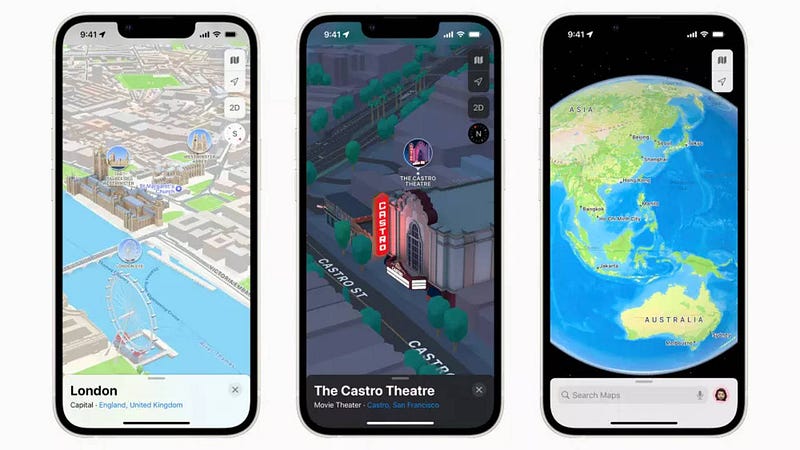
What is Apple Maps
Apple Maps is a popular mapping and navigation application developed by Apple Inc. It comes pre-installed on Apple devices such as iPhones, iPads, and Mac computers. Apple Maps provides users with a wide range of functionalities, including real-time navigation, turn-by-turn directions, traffic information, points of interest, and more. With a user-friendly interface and seamless integration with other Apple services, it has become an essential tool for millions of users worldwide.
Important Features
- Navigation: Apple Maps offers turn-by-turn navigation with voice guidance, allowing users to find the best routes and reach their destinations efficiently.
- Real-Time Traffic Updates: The application provides real-time traffic information, helping users avoid congested areas and find faster routes.
- Indoor Maps: Apple Maps includes indoor maps of airports, malls, and other public places to assist users in navigating large indoor spaces.
- Flyover: The Flyover feature enables users to explore cities and landmarks in 3D, giving them a unique and immersive experience.
- Siri Integration: Users can use Siri voice commands to search for locations, get directions, and perform other actions within the Apple Maps app.
Scaling Requirements — Capacity Estimation
Let’s simulate a small-scale scenario for Apple Maps with the following assumptions:
Total number of users: 500 Million
Daily active users (DAU): 150 Million
Average number of map searches per user per day: 5
Total number of map searches per day: 150 Million * 5 = 750 Million searches/day
Since the system is read-heavy, let’s assume the read to write ratio to be 100:1.
- Total number of map data updates per day = 1/100 * 750 Million = 7.5 Million updates/day
Storage Estimation:
Let’s assume on average each map data update is 10 KB.
- Total Storage per day: 7.5 Million * 10 KB = 75 TB/day
For the next 3 years:
- Storage Required for 3 years: 75 TB/day * 365 days/year * 3 years = 82,125 TB (82.125 PB)
Requests per Second:
Let’s assume an average of 3 map search requests per second per user (randomly distributed throughout the day).
- Requests per Second: 150 Million DAU * 3 requests/second = 450 Million requests/second
Distributed Architecture: Utilizing a distributed architecture to handle high concurrent user requests efficiently.
Caching: Implementing caching mechanisms to reduce the load on backend services and improve response times.
Load Balancing: Employing load balancers to evenly distribute incoming traffic across multiple servers, preventing overloading of specific nodes.
Horizontal Scalability: Designing systems that can scale horizontally by adding more servers to the infrastructure as the user base grows.
class AppleMaps:
    def __init__(self):
        self.total_users = 500_000_000
        self.daily_active_users = 150_000_000
        self.map_searches_per_user_per_day = 5
        self.map_updates_per_day = self.daily_active_users * self.map_searches_per_user_per_day
        self.read_write_ratio = 100

    def calculate_storage(self):
        map_update_size_kb = 10
        storage_per_day_kb = self.map_updates_per_day * map_update_size_kb
        storage_per_day_tb = storage_per_day_kb / (1024 * 1024)  # Convert KB to TB
        storage_per_year_tb = storage_per_day_tb * 365
        storage_for_3_years_pb = storage_per_year_tb * 3
        return storage_per_day_tb, storage_for_3_years_pb

    def calculate_requests_per_second(self):
        map_search_requests_per_user_per_second = 3
        requests_per_second = self.daily_active_users * map_search_requests_per_user_per_second
        return requests_per_second


# Create an instance of AppleMaps
apple_maps = AppleMaps()

# Calculate storage requirements
storage_per_day, storage_for_3_years = apple_maps.calculate_storage()
print(f"Storage per Day: {storage_per_day:.2f} TB")
print(f"Storage for 3 Years: {storage_for_3_years:.2f} PB")

# Calculate requests per second
requests_per_second = apple_maps.calculate_requests_per_second()
print(f"Requests per Second: {requests_per_second}")
Data Model — ER requirements
User: Storing user profiles, preferences, and saved locations.
Locations: Representing geographical points of interest, businesses, landmarks, etc.
Maps: Containing map data, routes, and navigation information.
Reviews and Ratings: Storing user reviews and ratings for different locations.
High Level Design
Assumptions:
- Apple Maps is read-heavy, and the focus is on providing quick responses to users’ map searches and navigation.
- The system needs to be highly available and reliable to handle a large number of concurrent users.
- The system will be horizontally scaled to manage the load effectively.
- Caching mechanisms will be employed to improve response times for frequently accessed data.
Main Components and Services:
- Mobile Client: Represents the users accessing Apple Maps through their mobile devices or web browsers.
- Application Servers: Handle read, write, and notification services. They interact with the database and cache to fetch and store data.
- Load Balancer: Routes and directs user requests to the appropriate application server, ensuring even distribution of load.
- Cache (Memcache): Caches frequently accessed data to improve response times and reduce the load on the database.
- CDN (Content Delivery Network): Used to serve map tiles, images, and other static content to improve latency and throughput.
- Database: Utilizes NoSQL databases (e.g., MongoDB, Cassandra) to store and manage the photo data and its relationships between entities.
- Storage (HDFS or Amazon S3): Used to store and serve user-uploaded photos and other media files.
import requests

class AppleMapsFeedService:
    def __init__(self, user_id, access_token):
        self.user_id = user_id
        self.access_token = access_token
        self.base_url = 'https://api.applemaps.com/'

    def fetch_user_feed(self):
        # Define the endpoint for fetching the user's feed
        feed_endpoint = f'{self.base_url}users/{self.user_id}/feed'
        # Send a GET request to the feed endpoint with the access token
        headers = {'Authorization': f'Bearer {self.access_token}'}
        response = requests.get(feed_endpoint, headers=headers)
        # Check the response status code
        if response.status_code == 200:
            return response.json()
        else:
            return None

    def display_user_feed(self):
        feed_data = self.fetch_user_feed()
        if feed_data:
            print("User's Feed:")
            for post in feed_data['posts']:
                print(f"Post ID: {post['id']}")
                print(f"Caption: {post['caption']}")
                print(f"Media URL: {post['media_url']}")
                print(f"Timestamp: {post['timestamp']}")
                print("---")
        else:
            print("Error fetching user's feed.")

# Example usage
user_id = 12345  # Replace with the actual user ID
access_token = '<YOUR_ACCESS_TOKEN_HERE>'
feed_service = AppleMapsFeedService(user_id, access_token)
feed_service.display_user_feed()
Mobile App: The front-end application running on iOS and macOS devices.
Map Data Servers: Store and manage map data, locations, and related information.
Routing Service: Responsible for generating optimized routes and navigation directions.
Traffic Service: Provides real-time traffic updates to users.
Geocoding Service: Converts addresses and place names into geographical coordinates.
Search Service: Enables users to search for places and points of interest.
Basic Low Level Design
class User:
    def __init__(self, user_id, username, password):
        self.user_id = user_id
        self.username = username
        self.password = password
        # Other user attributes (e.g., email, profile_picture)

class Location:
    def __init__(self, location_id, name, latitude, longitude):
        self.location_id = location_id
        self.name = name
        self.latitude = latitude
        self.longitude = longitude
        # Other location attributes (e.g., address, category)

class Post:
    def __init__(self, post_id, user, caption, photo_url, post_timestamp, location):
        self.post_id = post_id
        self.user = user
        self.caption = caption
        self.photo_url = photo_url
        self.post_timestamp = post_timestamp
        self.location = location
        # Other post attributes (e.g., likes_count, comments_count)

class Like:
    def __init__(self, like_id, user, post, timestamp):
        self.like_id = like_id
        self.user = user
        self.post = post
        self.timestamp = timestamp

class Comment:
    def __init__(self, comment_id, user, post, caption, timestamp):
        self.comment_id = comment_id
        self.user = user
        self.post = post
        self.caption = caption
        self.timestamp = timestamp

class Follow:
    def __init__(self, follower, followee):
        self.follower = follower
        self.followee = followee
API Design
Geocoding Service API:

geocode_address(address: str) -> Tuple[float, float]: Takes an address as input and returns the latitude and longitude coordinates of the location.
reverse_geocode(lat: float, lon: float) -> str: Takes latitude and longitude as input and returns the address corresponding to the coordinates.

Routing Service API:

get_directions(start: Tuple[float, float], end: Tuple[float, float]) -> List[Tuple[float, float]]: Takes the start and end coordinates and returns a list of intermediate coordinates representing the optimized route.

Traffic Service API:

get_traffic_updates(start: Tuple[float, float], end: Tuple[float, float]) -> Dict[str, Any]: Takes start and end coordinates and returns real-time traffic updates along the route, including traffic conditions, delays, and alternative routes.

Place Search API:

search_places(query: str) -> List[Dict[str, Any]]: Takes a query (e.g., restaurant, gas station) and returns a list of places matching the query, along with their details (name, address, ratings, etc.).
from typing import List, Tuple, Dict, Any
class GeocodingService:
def geocode_address(self, address: str) -> Tuple[float, float]:
# Implementation to call backend geocoding service and get latitude and longitude
# Mock implementation for demonstration purposes
latitude, longitude = 37.7749, -122.4194
return latitude, longitude
def reverse_geocode(self, lat: float, lon: float) -> str:
# Implementation to call backend reverse geocoding service and get the address
# Mock implementation for demonstration purposes
address = "123 Main Street, San Francisco, CA"
return address
class RoutingService:
def get_directions(self, start: Tuple[float, float], end: Tuple[float, float]) -> List[Tuple[float, float]]:
# Implementation to call backend routing service and get the optimized route
# Mock implementation for demonstration purposes
optimized_route = [
(37.7749, -122.4194),
(37.7833, -122.4167),
(37.7933, -122.4067),
(37.8033, -122.3967),
# ... Intermediate coordinates ...
(37.8043, -122.4051),
(37.8083, -122.4094)
]
return optimized_route
class TrafficService:
def get_traffic_updates(self, start: Tuple[float, float], end: Tuple[float, float]) -> Dict[str, Any]:
# Implementation to call backend traffic service and get real-time traffic updates
# Mock implementation for demonstration purposes
traffic_updates = {
"status": "OK",
"delay": 5, # minutes
"traffic_conditions": "Moderate",
"alternative_routes": [
[
(37.7749, -122.4194),
(37.7833, -122.4167),
# ... Intermediate coordinates ...
(37.8083, -122.4094)
],
# ... More alternative routes ...
]
}
return traffic_updates
class PlaceSearchService:
def search_places(self, query: str) -> List[Dict[str, Any]]:
# Implementation to call backend place search service and get matching places
# Mock implementation for demonstration purposes
places = [
{
"name": "Apple Park",
"address": "1 Apple Park Way, Cupertino, CA",
"rating": 4.8,
"category": "Landmark"
},
{
"name": "Golden Gate Bridge",
"address": "Golden Gate Bridge, San Francisco, CA",
"rating": 4.9,
"category": "Landmark"
},
# ... More matching places ...
]
return places
# Example usage of APIs
geocoding_service = GeocodingService()
routing_service = RoutingService()
traffic_service = TrafficService()
place_search_service = PlaceSearchService()
address = "1 Infinite Loop, Cupertino, CA"
latitude, longitude = geocoding_service.geocode_address(address)
print(f"Latitude: {latitude}, Longitude: {longitude}")
lat, lon = 37.7749, -122.4194
address = geocoding_service.reverse_geocode(lat, lon)
print(f"Address: {address}")
start_point = (37.7749, -122.4194)
end_point = (37.8083, -122.4094)
optimized_route = routing_service.get_directions(start_point, end_point)
print(f"Optimized Route: {optimized_route}")
traffic_updates = traffic_service.get_traffic_updates(start_point, end_point)
print(f"Traffic Updates: {traffic_updates}")
query = "restaurant"
places = place_search_service.search_places(query)
print(f"Matching Places: {places}")from typing import List, Tuple, Dict, Any
class AppleMapsAPI:
def __init__(self):
self.geocoding_service = GeocodingService()
self.routing_service = RoutingService()
self.traffic_service = TrafficService()
self.place_search_service = PlaceSearchService()
def geocode_address(self, address: str) -> Tuple[float, float]:
return self.geocoding_service.geocode_address(address)
def reverse_geocode(self, lat: float, lon: float) -> str:
return self.geocoding_service.reverse_geocode(lat, lon)
def get_directions(self, start: Tuple[float, float], end: Tuple[float, float]) -> List[Tuple[float, float]]:
return self.routing_service.get_directions(start, end)
def get_traffic_updates(self, start: Tuple[float, float], end: Tuple[float, float]) -> Dict[str, Any]:
return self.traffic_service.get_traffic_updates(start, end)
def search_places(self, query: str) -> List[Dict[str, Any]]:
return self.place_search_service.search_places(query)Complete Detailed Design
Coming soon! It will be covered on youtube channel.
Subscribe to youtube channel :
Complete Code implementation
from typing import List, Tuple, Dict, Any

class NavigationService:
    def get_navigation_instructions(self, start: str, end: str) -> List[str]:
        # Implementation to calculate and provide turn-by-turn navigation instructions
        # Mock implementation for demonstration purposes
        instructions = [
            "Head north on Main Street",
            "Turn left on 2nd Avenue",
            "Continue straight for 2 miles",
            "Turn right on Elm Street",
            "Your destination is on the right"
        ]
        return instructions

class TrafficService:
    def get_traffic_updates(self, location: str) -> str:
        # Implementation to fetch real-time traffic updates for the given location
        # Mock implementation for demonstration purposes
        traffic_status = "Moderate traffic on Main Street. Consider taking an alternative route."
        return traffic_status

class IndoorMapsService:
    def get_indoor_map(self, location: str) -> str:
        # Implementation to fetch the indoor map for the given location
        # Mock implementation for demonstration purposes
        indoor_map = "Indoor map of the mall is not available for this location."
        return indoor_map

class FlyoverService:
    def flyover_city(self, city: str) -> str:
        # Implementation to enable Flyover for the given city
        # Mock implementation for demonstration purposes
        flyover_status = f"Flyover enabled for {city}. Enjoy the 3D experience!"
        return flyover_status

class SiriService:
    def search_location(self, query: str) -> str:
        # Implementation to process Siri voice commands and search for the given location
        # Mock implementation for demonstration purposes
        search_result = f"Searching for '{query}' in Apple Maps..."
        return search_result

    def get_directions(self, start: str, end: str) -> str:
        # Implementation to process Siri voice commands and get directions between start and end
        # Mock implementation for demonstration purposes
        directions = f"Getting directions from '{start}' to '{end}'..."
        return directions

    def perform_action(self, action: str) -> str:
        # Implementation to process Siri voice commands and perform the requested action
        # Mock implementation for demonstration purposes
        action_result = f"Performing '{action}' in Apple Maps..."
        return action_result

# Usage Example:

# Create instances of each service
navigation_service = NavigationService()
traffic_service = TrafficService()
indoor_maps_service = IndoorMapsService()
flyover_service = FlyoverService()
siri_service = SiriService()

# Example usage of each functionality
start_location = "123 Main Street, San Francisco, CA"
end_location = "456 Elm Avenue, Cupertino, CA"

instructions = navigation_service.get_navigation_instructions(start_location, end_location)
print("Navigation Instructions:")
for step, instruction in enumerate(instructions, 1):
    print(f"Step {step}: {instruction}")

traffic_updates = traffic_service.get_traffic_updates(start_location)
print(f"Traffic Updates: {traffic_updates}")

location = "Mall of America"
indoor_map = indoor_maps_service.get_indoor_map(location)
print(f"Indoor Map for '{location}': {indoor_map}")

city_to_flyover = "San Francisco"
flyover_status = flyover_service.flyover_city(city_to_flyover)
print(f"Flyover Status for '{city_to_flyover}': {flyover_status}")

siri_query = "coffee shop"
search_result = siri_service.search_location(siri_query)
print(search_result)

start_location_siri = "Home"
end_location_siri = "Work"
directions_result = siri_service.get_directions(start_location_siri, end_location_siri)
print(directions_result)

action_to_perform = "zoom in"
perform_action_result = siri_service.perform_action(action_to_perform)
print(perform_action_result)
Read — how to Design Whatsapp
All the projects, data structures, algorithms, system design, Data Science and ML , Data Engineering, MLOps and Deep Learning videos will be published on our youtube channel ( just launched). Subscribe today!
Let me know if you have questions in the comment section below. Subscribe/ Follow, Like/Clap and Stay Tuned!!
Day 2 : SQL Basics, Query Structure, Built In functions Conditions
Day 4 : Set Theory Operations, Stored Procedures and CASE statements in SQL
Day 6 : Subqueries, Group by, order by and Having clauses in SQL and Analytical Functions
Day 7 : Window Functions, Grouping Sets and Constraints in SQL
Day 8 : BigQuery Basics, SELECT, FROM, WHERE and Date and Extract in BigQuery
Day 9 : Common Expression Table, UNNEST Clause, SQL vs NoSQL Databases
Day 10 : Triggers, Pivot and Cursors in SQL
Day 14 : MySQL in Depth
Day 15 : PostgreSQL inDepth
Anyways, For Day 15 of 15 days of Advanced SQL, we will cover —
PostgreSQL inDepth
Github for Advanced SQL that you can follow —
All the projects, data structures, algorithms, system design, Data Science and ML, Data Engineering, MLOps and Deep Learning videos will be published on our youtube channel ( just launched).
Subscribe today!
System Design Case Studies — In Depth
Complete Data Structures and Algorithm Series
Github —
Some of the other best Series —
30 days of Data Structures and Algorithms and System Design Simplified
Data Science and Machine Learning Research ( papers) Simplified **
100 days : Your Data Science and Machine Learning Degree Series with projects
Complete Data Visualization and Pre-processing Series with projects
Exceptional Github Repos — Part 1
Exceptional Github Repos — Part 2
Tech Newsletter —
If you are interested, you can join my newsletter through which I send tech interview tips, techniques, patterns, hacks — Software Development, ML, Data Science, Startups and Technology projects to more than 30K readers. You can subscribe to Tech Brew :
For Python Projects —
For complete 60 days of Data Science and ML : Day 1 — Day 60 : Quick Recap of 60 days of Data Science and ML
Follow for more updates. Stay tuned and keep coding!
For other projects, tune to —
Build Machine Learning Pipelines( With Code)
Recurrent Neural Network with Keras
Clustering Geolocation Data in Python using DBSCAN and K-Means
Facial Expression Recognition using Keras
Hyperparameter Tuning with Keras Tuner
Custom Layers in Keras


