
Day 7 of System Design Case Studies Series : Design Twitter, Expedia, Paytm, ESPN, Lyft, Splitwise, Facebook Lite, Google News ,Youtube Music, App Vault, Survey Monkey, Redbus
Complete Design with examples
Hello peeps! In the last posts we saw how to design Instagram and Messenger App. In this post we will cover Twitter, Expedia, Paytm, ESPN, Lyft, Splitwise, Facebook Lite, Google News ,Youtube Music, App Vault, Survey Monkey and Redbus.
This post covers system design for ( scroll till the end of the post) —
Note : Please read System Design Important Terms you MUST know and Most Important System Design basics before reading this post.
Projects Videos —
All the projects, data structures, SQL, algorithms, system design, Data Science and ML , Data Analytics, Data Engineering, , Implemented Data Science and ML projects, Implemented Data Engineering Projects, Implemented Deep Learning Projects, Implemented Machine Learning Ops Projects, Implemented Time Series Analysis and Forecasting Projects, Implemented Applied Machine Learning Projects, Implemented Tensorflow and Keras Projects, Implemented PyTorch Projects, Implemented Scikit Learn Projects, Implemented Big Data Projects, Implemented Cloud Machine Learning Projects, Implemented Neural Networks Projects, Implemented OpenCV Projects,Complete ML Research Papers Summarized, Implemented Data Analytics projects, Implemented Data Visualization Projects, Implemented Data Mining Projects, Implemented Natural Leaning Processing Projects, MLOps and Deep Learning, Applied Machine Learning with Projects Series, PyTorch with Projects Series, Tensorflow and Keras with Projects Series, Scikit Learn Series with Projects, Time Series Analysis and Forecasting with Projects Series, ML System Design Case Studies Series videos will be published on our youtube channel ( just launched).
Subscribe today!
Solved System Design Case Studies — In depth
Design Instagram
Design Netflix
Design Reddit
Design Amazon
Design Messenger App
Design Twitter
Design URL Shortener
Design Dropbox
Design Youtube
Design API Rate Limiter
Design Web Crawler
Design Amazon Prime Video
Design Facebook’s Newsfeed
Design Yelp
Design Uber
Design Tinder
Design Tiktok
Design Whatsapp
Most Popular System Design Questions
Mega Compilation : Solved System Design Case studies
Welcome to Day 7 of System Design Case studies series where we will design Twitter.
We will be discussing in depth -
- What is Twitter
- Important Features
- Scaling Requirements — Capacity Estimations
- Data Model — ER requirements
- High Level Design
- Basic Low Level Design
- API design
- Complete Detailed Design
Pre-requisite to this post -
Complete System Design Series — Important Concepts that you should know before starting the Case studies
6. Networking, How Browsers work, Content Network Delivery ( CDN)
Github —
Day 1 of System Design Case Studies can be found below-
Day 2 of System Design Case Studies can be found below-
Day 3 of System Design Case Studies can be found below-
Day 4 of System Design Case Studies can be found below-
What is Twitter?

Twitter is a social networking platform where —
- Users can create and read tweets
- Follow other users
- Read own and other users timeline
- Send messages
- Like- Retweet Tweets
- Search Tweets
- Tag other people in the tweet
- Use hashtags for different subjects
- Bookmark the tweets
- Reply to the tweets
Users can be both mobile based as well as web based.
Twitter Functionality —
- User accounts: Users would need to be able to create accounts and log in to the application. This would involve designing a registration and login system, as well as a way to securely store user information such as passwords.
- Profile creation: Users would need to be able to create and edit their own profiles, which would include things like a profile picture, bio, and contact information.
- Feed: The main feature of Twitter is the feed, where users can view tweets from the people they follow. The feed would need to be designed to show tweets in reverse chronological order and include features like pagination to handle a large number of tweets.
- Tweeting: Users would need to be able to create and post new tweets, which would be limited to 280 characters.
- Search: A search feature would need to be implemented so that users can find other users and tweets by searching for keywords or hashtags.
- Notifications: Users would need to be notified of new tweets from the people they follow, retweets, likes, and other interactions on the platform.
- Direct messaging: Users would need to be able to send direct messages to other users and view their message history.
- Scalability: Twitter needs to be able to handle a large number of users and high traffic loads. This would involve designing the application to be scalable, including using technologies such as load balancers and distributed systems.
- Security: Twitter would need to be designed with security in mind, to protect user data and prevent unauthorized access.
- Mobile and web: Twitter should be designed for web and mobile platforms so that it can be used on any device.
- Analytics: The Twitter platform would need to be designed to track usage and engagement metrics, including user engagement, tweet engagement, and other key performance indicators.
Important Features
Of all the features listed above, for this case study we will take into consideration only below mentioned features —
Create a tweet
Follow other people
User and Home Timeline ( i.e able to read other people tweets)
Interaction and Engagement : Like/retweet other people tweet
Scaling Requirements — Capacity Estimation
Let’s say, we have —
No of users per day ( DAU ) : 50 Million
No of tweets per day : 50 Million
Tweet size ( 140 characters tweet) : 280 Bytes + 20 bytes for metadata of each tweet = Total 300 bytes
Storage Estimate —
50 Million * 300 bytes = 15 GB per day
For next 5 years —
15 GB * 365 * 5 = 28 TB
Note : For the sake of simplicity, I have done small scale simulation.
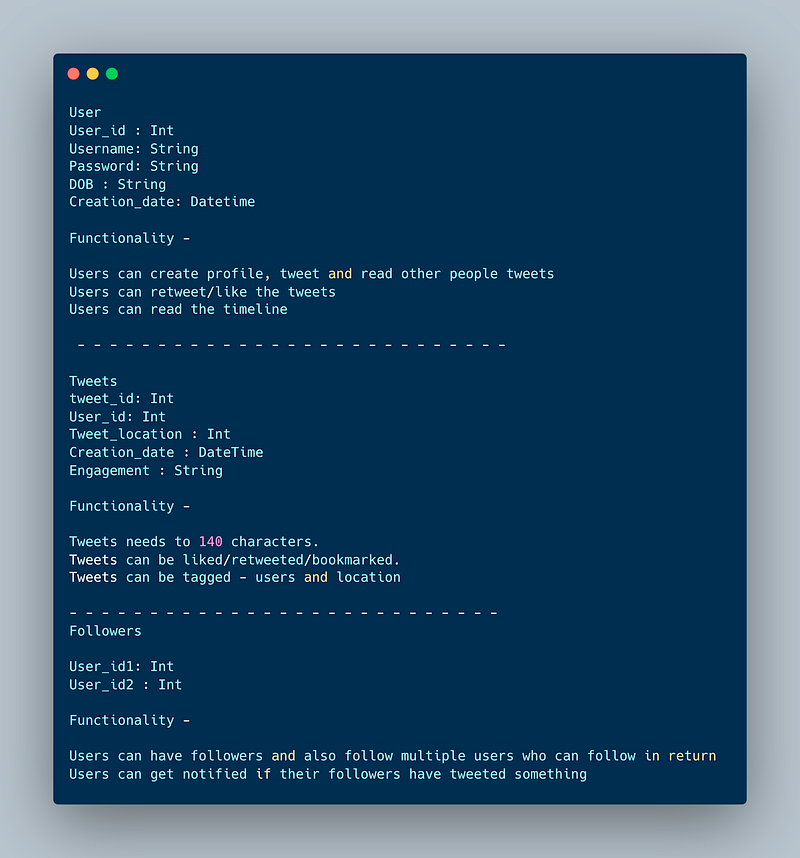
Data Model — ER requirements
User
User_id : Int
Username: String
Password: String
DOB : String
Creation_date: Datetime
Functionality —
- Users can create profile, tweet and read other people tweets
- Users can retweet/like the tweets
- Users can read the timeline
— — — — — — — — — — — — — — — — — — — — — — — — — — —
Tweets
tweet_id: Int
User_id: Int
Tweet_location : Int
Creation_date : DateTime
Engagement : String
Functionality —
- Tweets needs to 140 characters.
- Tweets can be liked/retweeted/bookmarked.
- Tweets can be tagged — users and location
— — — — — — — — — — — — — — — — — — — — — — — — — — —
Followers
User_id1: Int
User_id2 : Int
Functionality —
- Users can have followers and also follow multiple users who can follow in return
- Users can get notified if their followers have tweeted something.
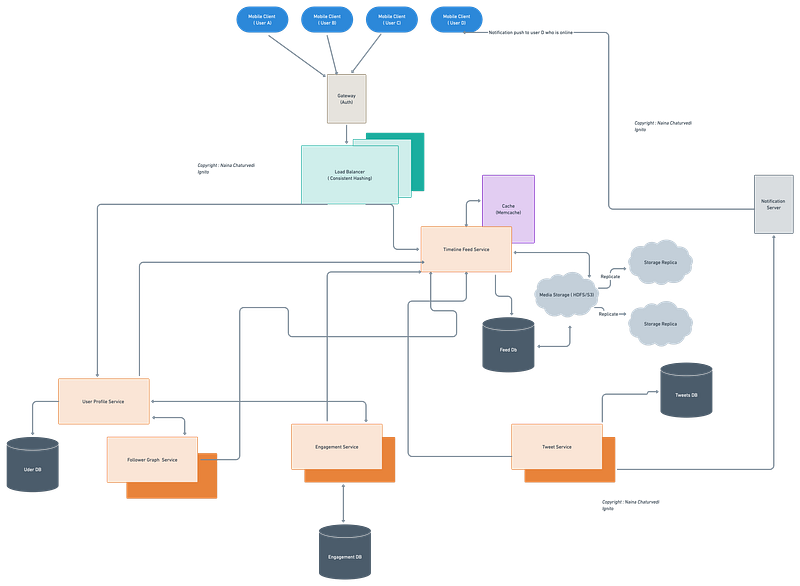
High Level Design
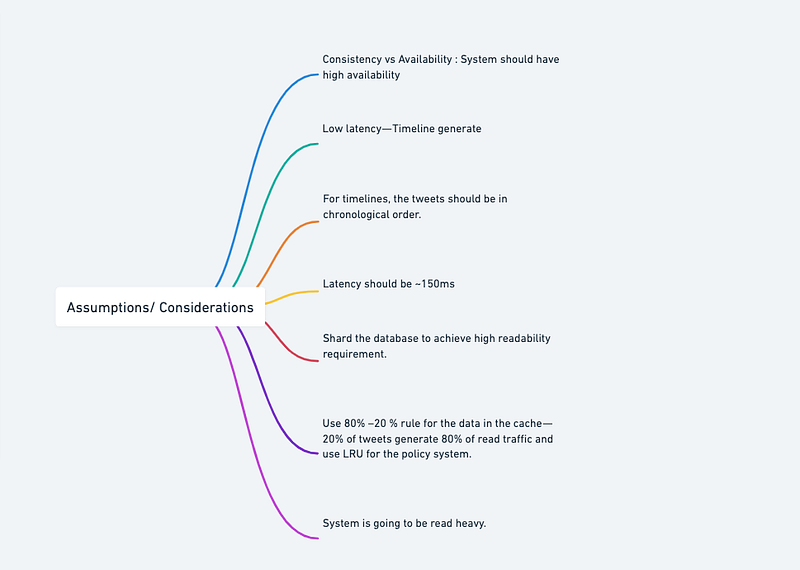
Assumptions/Considerations —
- System is going to be read heavy.
- Consistency vs Availability : System should have high availability
- Low latency — Timeline generate
- For timelines, the tweets should be in chronological order.
- Latency should be ~150ms
- Shard the database to achieve high readability requirement.
- Use 80% –20 % rule for the data in the cache — 20% of tweets generate 80% of read traffic and use LRU for the policy system.
Components
- Clients : Users ( can be mobile based or web based)
- Load Balancers : To allocate requests to designated Application server using consistent hashing
- Application Servers
- CDN
- Databases ( Redis) and replicas : To store the tweets, compute timelines and user profiles
- Cache : To store hot tweets and users ( say influencers/celebrities). The cache should be hashed ( key : user_id and value be the most recent tweets)
High-level overview —
- Front-end Layer: This layer would typically be implemented using JavaScript, HTML, and CSS, and would be responsible for rendering the user interface and handling user interactions.
- API Layer: The API layer would be responsible for processing user requests and delivering the appropriate data to the front-end. This layer could be implemented using a RESTful API built with a web framework such as Express.js or Flask.
- Storage Layer: The storage layer would be responsible for storing all the data generated by users. This layer could be implemented using a combination of relational databases, NoSQL databases, and data warehousing systems, such as MySQL, MongoDB, and Apache Hadoop.
- Processing Layer: The processing layer would be responsible for performing real-time operations on the data. This layer could be implemented using a combination of batch processing systems, such as Apache Hadoop, and real-time streaming systems, such as Apache Storm.
- Delivery Layer: The delivery layer would be responsible for delivering data to the user’s device in real-time. This layer could be implemented using a combination of caching and content delivery networks (CDN) to ensure fast and reliable delivery of data.
Services
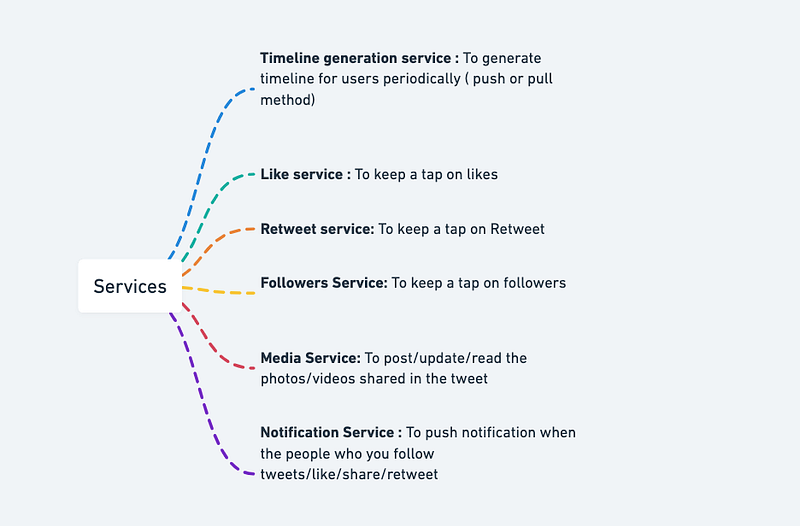
- Timeline generation service : To generate timeline for users periodically ( push or pull method)
- Like service : To keep a tap on likes
- Retweet service: To keep a tap on Retweet
- Followers Service: To keep a tap on followers
- Media Service: To post/update/read the photos/videos shared in the tweet
- Notification Service : To push notification when the people who you follow tweets/like/share/retweet
Implement the services using Python and Flask:
from flask import Flask, jsonify, request
from datetime import datetime, timedelta
app = Flask(__name__)# Data stores for example purposes only
USERS = {
'user1': {'timeline': [], 'likes': [], 'retweets': [], 'followers': []},
'user2': {'timeline': [], 'likes': [], 'retweets': [], 'followers': []},
'user3': {'timeline': [], 'likes': [], 'retweets': [], 'followers': []},
}MEDIA = []NOTIFICATIONS = {}# Endpoint for generating user timeline
@app.route('/timeline/<username>', methods=['GET'])
def get_timeline(username):
user = USERS.get(username)
if not user:
return jsonify({'error': 'User not found.'}), 404 # Generate timeline
timeline = []
for u in USERS.values():
timeline.extend(u['timeline']) # Sort timeline by timestamp in descending order
timeline = sorted(timeline, key=lambda x: x['timestamp'], reverse=True) return jsonify({'timeline': timeline})# Endpoint for adding a tweet to a user's timeline
@app.route('/timeline/<username>/tweet', methods=['POST'])
def add_tweet(username):
user = USERS.get(username)
if not user:
return jsonify({'error': 'User not found.'}), 404 # Add tweet to user's timeline
text = request.json.get('text')
timestamp = datetime.now()
tweet = {'text': text, 'timestamp': timestamp}
user['timeline'].append(tweet) # Notify followers
for follower in user['followers']:
if follower not in NOTIFICATIONS:
NOTIFICATIONS[follower] = []
NOTIFICATIONS[follower].append({'type': 'tweet', 'text': text, 'timestamp': timestamp}) return jsonify({'success': True})# Endpoint for tracking likes
@app.route('/like', methods=['POST'])
def track_like():
username = request.json.get('username')
tweet_id = request.json.get('tweet_id')
timestamp = datetime.now() # Add like to user's likes
user = USERS.get(username)
if not user:
return jsonify({'error': 'User not found.'}), 404 user['likes'].append({'tweet_id': tweet_id, 'timestamp': timestamp}) # Notify user who made the tweet
for u in USERS.values():
for tweet in u['timeline']:
if tweet['timestamp'] < timestamp - timedelta(hours=24):
continue
if tweet['text'] == tweet_id:
tweet_user = list(USERS.keys())[list(USERS.values()).index(u)]
if tweet_user not in NOTIFICATIONS:
NOTIFICATIONS[tweet_user] = []
NOTIFICATIONS[tweet_user].append({'type': 'like', 'text': tweet_id, 'timestamp': timestamp}) return jsonify({'success': True})
# Endpoint for tracking retweets
@app.route('/retweet', methods=['POST'])
def retweet():
    data = request.get_json()

    # Check if tweet_id and user_id are present in the request
    if 'tweet_id' not in data or 'user_id' not in data:
        return jsonify({'error': 'Invalid request'}), 400

    tweet_id = data['tweet_id']
    user_id = data['user_id']

    # Check if the tweet exists
    if tweet_id not in tweets:
        return jsonify({'error': 'Tweet not found'}), 404

    # Add the user to the list of retweets for the tweet
    if tweet_id not in retweets:
        retweets[tweet_id] = [user_id]
    else:
        retweets[tweet_id].append(user_id)

    return jsonify({'message': 'Retweet successful'})

if __name__ == '__main__':
    app.run()
Services using Python and Flask implementation:
from flask import Flask, request# create the user service
user_service = Flask(__name__)@user_service.route("/users/<username>", methods=["GET"])
def get_user(username):
# retrieve the user data from the database
user = database.get_user(username)
# return the user data as JSON
return {"username": user.username, "name": user.name}# create the tweet service
tweet_service = Flask(__name__)@tweet_service.route("/tweets/<tweet_id>", methods=["GET"])
def get_tweet(tweet_id):
# retrieve the tweet data from the database
tweet = database.get_tweet(tweet_id)
# return the tweet data as JSON
return {"id": tweet.id, "text": tweet.text, "username": tweet.username}# create the main service
app = Flask(__name__)@app.route("/<username>/tweets/<tweet_id>", methods=["GET"])
def get_user_tweet(username, tweet_id):
# retrieve the user data from the user service
user_response = requests.get(f"http://user_service/users/{username}")
user = user_response.json()
# retrieve the tweet data from the tweet service
tweet_response = requests.get(f"http://tweet_service/tweets/{tweet_id}")
tweet = tweet_response.json()
# combine the user and tweet data and return as JSON
return {"username": user["username"], "name": user["name"], "tweet": tweet["text"]}if __name__ == "__main__":
app.run()Basic Low Level Design
import java.util.*;
class User {
private String userId;
private String username;
private String password;
// other user attributes
public User(String userId, String username, String password) {
this.userId = userId;
this.username = username;
this.password = password;
// initialize other attributes
}
// Getters and setters for attributes
// ...
}
class Tweet {
private String tweetId;
private User user;
private String content;
// other tweet attributes
public Tweet(String tweetId, User user, String content) {
this.tweetId = tweetId;
this.user = user;
this.content = content;
// initialize other attributes
}
// Getters and setters for attributes
// ...
}
class Twitter {
private Map<String, User> users;
private List<Tweet> tweets;
public Twitter() {
this.users = new HashMap<>();
this.tweets = new ArrayList<>();
}
public void addUser(User user) {
users.put(user.getUserId(), user);
}
public User getUserById(String userId) {
return users.get(userId);
}
public void createTweet(String userId, String content) {
User user = getUserById(userId);
if (user == null) {
System.out.println("User not found");
return;
}
String tweetId = generateTweetId(); // Generate a unique tweet ID
Tweet tweet = new Tweet(tweetId, user, content);
tweets.add(tweet);
// Additional logic to update user's timeline, notify followers, etc.
// ...
}
public List<Tweet> getTimeline(String userId) {
List<Tweet> userTimeline = new ArrayList<>();
for (Tweet tweet : tweets) {
if (tweet.getUser().getUserId().equals(userId)) {
userTimeline.add(tweet);
}
}
return userTimeline;
}
// Additional methods for handling retweets, likes, follow/unfollow, etc.
// ...
}
public class Main {
public static void main(String[] args) {
Twitter twitter = new Twitter();
User user1 = new User("1", "Alice", "password");
User user2 = new User("2", "Bob", "password");
twitter.addUser(user1);
twitter.addUser(user2);
twitter.createTweet("1", "Hello, world!");
List<Tweet> user1Timeline = twitter.getTimeline("1");
for (Tweet tweet : user1Timeline) {
System.out.println("User: " + tweet.getUser().getUsername());
System.out.println("Content: " + tweet.getContent());
System.out.println();
}
}
}API design
A simple API for Twitter with three endpoints using the Tweepy library to interact with the Twitter API:
import tweepy
from flask import Flask, jsonify, requestapp = Flask(__name__)# Set up Tweepy API client
consumer_key = 'YOUR_CONSUMER_KEY'
consumer_secret = 'YOUR_CONSUMER_SECRET'
access_token = 'YOUR_ACCESS_TOKEN'
access_token_secret = 'YOUR_ACCESS_TOKEN_SECRET'auth = tweepy.OAuthHandler(consumer_key, consumer_secret) auth.set_access_token(access_token, access_token_secret) api = tweepy.API(auth)
# Endpoint for getting the user's timeline
@app.route('/timeline/<string:screen_name>', methods=['GET'])
def get_timeline(screen_name):
tweets = []
try:
for status in tweepy.Cursor(api.user_timeline, screen_name=screen_name).items(20):
tweets.append({'id': status.id_str, 'text': status.text})
except tweepy.TweepError as e:
return jsonify({'message': 'Error: {}'.format(str(e))}), 500return jsonify({'tweets': tweets})# Endpoint for posting a tweet
@app.route('/tweet', methods=['POST'])
def post_tweet():
text = request.json['text']
try:
api.update_status(text)
except tweepy.TweepError as e:
return jsonify({'message': 'Error: {}'.format(str(e))}), 500return jsonify({'message': 'Tweet posted successfully'})# Endpoint for searching tweets
@app.route('/search', methods=['GET'])
def search_tweets():
query = request.args.get('q')
tweets = []
try:
for status in tweepy.Cursor(api.search_tweets, q=query).items(20):
tweets.append({'id': status.id_str, 'text': status.text})
except tweepy.TweepError as e:
return jsonify({'message': 'Error: {}'.format(str(e))}), 500return jsonify({'tweets': tweets})if __name__ == '__main__':
app.run(debug=True)In this implementation, we have three endpoints:
/timeline/<screen_name>(GET): This endpoint returns the user's timeline for the given screen name. It retrieves up to 20 tweets using the Tweepy API and returns them as a JSON object with the key"tweets"./tweet(POST): This endpoint posts a tweet with the text provided in the request body as a JSON object with the key"text". If successful, it returns a JSON object with the key"message"set to"Tweet posted successfully"./search(GET): This endpoint searches for tweets containing the query string provided as a URL parameter with the key"q". It retrieves up to 20 tweets using the Tweepy API and returns them as a JSON object with the key"tweets".
Here is an implementation of how the Twitter API could be implemented in Python using the Flask framework:
from flask import Flask, request
import tweepyapp = Flask(__name__)# Authenticate with Twitter API using Tweepy
auth = tweepy.OAuthHandler("consumer_key", "consumer_secret")
auth.set_access_token("access_token", "access_token_secret")api = tweepy.API(auth)@app.route("/tweets/<username>")
def tweets(username):
# Get tweets for the given username
tweets = api.user_timeline(screen_name=username)
# Return a list of tweet text
return "\n".join([tweet.text for tweet in tweets])if __name__ == "__main__":
app.run()This code sets up a Flask application that exposes a single endpoint /tweets/<username> which returns a list of tweets for a given Twitter username. The tweets are retrieved using the Tweepy library, which provides a Python wrapper around the Twitter API. The user needs to authenticate the API with the access and secret key obtained from the Twitter API developer portal.
Create tweet
- Type: Post
- Format
POST:/create/tweet_id
body {
tweet_text: “”,
location : “”
}
— — — — — — — — — — — — — — — — — — — — — — — — — — —
Get Tweets
- Type: GET
- Format
GET:/get_tweet_id
— — — — — — — — — — — — — — — — — — — — — — — — — — —
Like tweet
- Type: Post
- Format
POST:/tweet_id/like
— — — — — — — — — — — — — — — — — — — — — — — — — — —
Reply Tweet
- Type: Post
- Format
POST:/tweet_id/reply
body:{
reply_text: “”,
user_id: “”
}
Here is an example of how some of the Twitter API endpoints could be implemented in Python using the Requests library:
import requests# endpoint for retrieving tweets
tweets_endpoint = "https://api.twitter.com/1.1/statuses/user_timeline.json"# API key and secret
api_key = "YOUR_API_KEY"
api_secret = "YOUR_API_SECRET"# API authentication
auth = (api_key, api_secret)# retrieving tweets
response = requests.get(tweets_endpoint, auth=auth)# checking response status code
if response.status_code == 200:
tweets = response.json()
print("Retrieved tweets: ", tweets)
else:
print("Failed to retrieve tweets. Response code: ", response.status_code)# endpoint for posting a tweet
post_tweet_endpoint = "https://api.twitter.com/1.1/statuses/update.json"# data to be posted
data = {
"status": "This is a sample tweet posted using the Twitter API"
}# posting a tweet
response = requests.post(post_tweet_endpoint, data=data, auth=auth)# checking response status code
if response.status_code == 200:
tweet = response.json()
print("Successfully posted tweet: ", tweet)
else:
print("Failed to post tweet. Response code: ", response.status_code)This is just a simple example to demonstrate how some of the Twitter API endpoints can be implemented using Python and the Requests library.
import requests# Twitter API base URL
base_url = "https://api.twitter.com/1.1/"# API endpoint for getting tweets
get_tweets_endpoint = "statuses/user_timeline.json"# API endpoint for posting a tweet
post_tweet_endpoint = "statuses/update.json"# API endpoint for following a user
follow_user_endpoint = "friendships/create.json"# API endpoint for unfollowing a user
unfollow_user_endpoint = "friendships/destroy.json"# API endpoint for getting user information
get_user_info_endpoint = "users/show.json"# API endpoint for getting followers list
get_followers_endpoint = "followers/list.json"# API endpoint for getting friends list
get_friends_endpoint = "friends/list.json"# API endpoint for searching for tweets
search_tweets_endpoint = "search/tweets.json"# API endpoint for getting trends
get_trends_endpoint = "trends/place.json"# API endpoint for getting direct messages
get_direct_messages_endpoint = "direct_messages.json"# API endpoint for sending direct messages
send_direct_message_endpoint = "direct_messages/new.json"# API endpoint for getting likes
get_likes_endpoint = "favorites/list.json"# API endpoint for creating a like
create_like_endpoint = "favorites/create.json"# API endpoint for removing a like
remove_like_endpoint = "favorites/destroy.json"# Function to get tweets for a given username
def get_tweets(username):
params = {
"screen_name": username,
"count": 200
} response = requests.get(base_url + get_tweets_endpoint, params=params, headers=get_headers()) if response.status_code == 200:
return response.json()
else:
return None# Function to post a tweet
def post_tweet(status):
params = {
"status": status
} response = requests.post(base_url + post_tweet_endpoint, params=params, headers=get_headers()) if response.status_code == 200:
return response.json()
else:
return None# Function to get user information for a given username
def get_user_info(username):
params = {
"screen_name": username
} response = requests.get(base_url + get_user_info_endpoint, params=params, headers=get_headers()) if response.status_code == 200:
return response.json()
else:
return NoneA basic example of how a GET request for the statuses/show endpoint could be implemented in Python using the Requests library:
import requests# set the endpoint and parameters for the GET request
endpoint = "https://api.twitter.com/1.1/statuses/show.json"
params = {
"id": "123456789012345678", # replace with the desired tweet id
"trim_user": "true"
}# set the authentication credentials
# (Note: for this example, the authentication credentials are not set,
# you need to obtain your own credentials by creating a Twitter Developer Account)# send the GET request and store the response
response = requests.get(endpoint, params=params)# check if the request was successful
if response.status_code == 200:
# parse the JSON data from the response
data = response.json()
# do something with the data (e.g. print the text of the tweet)
print(data["text"])
else:
# handle the error
print("Request failed with status code", response.status_code)Complete Detailed Design
(Zoom it)
Code
Implementation of the different stages using the Tweepy library:
1. Create and Read Tweets
import tweepy# Authenticate to Twitter
auth = tweepy.OAuthHandler("consumer_key", "consumer_secret")
auth.set_access_token("access_token", "access_token_secret")# Create API object
api = tweepy.API(auth)# Create a tweet
api.update_status("Hello, Twitter!")# Read tweets from the timeline
timeline_tweets = api.home_timeline()
for tweet in timeline_tweets:
print(f"{tweet.user.name} said {tweet.text}")2. Follow Other Users
# Follow a user
user_to_follow = "example_user"
api.create_friendship(user_to_follow)3. Read Own and Other Users’ Timeline
# Read own timeline
own_timeline = api.user_timeline()
for tweet in own_timeline:
print(f"{tweet.user.name} said {tweet.text}")# Read other user's timeline
user_timeline = api.user_timeline(screen_name="example_user")
for tweet in user_timeline:
print(f"{tweet.user.name} said {tweet.text}")4. Send Messages
# Send a direct message
recipient = "example_user"
message = "Hello!"
api.send_direct_message(recipient, message)5. Like and Retweet Tweets
# Like a tweet
tweet_id = "123456789"
api.create_favorite(tweet_id)# Retweet a tweet
api.retweet(tweet_id)6. Search Tweets
# Search for tweets containing a keyword
keyword = "Python"
search_results = api.search_tweets(q=keyword)
for tweet in search_results:
print(f"{tweet.user.name} said {tweet.text}")7. Tag Other People in Tweets
# Tag a user in a tweet
user_to_tag = "example_user"
tweet_text = f"Hey @{user_to_tag}, how's it going?"
api.update_status(tweet_text)8. Use Hashtags for Different Subjects
# Tweet with a hashtag
hashtag = "#Python"
tweet_text = f"Check out this cool {hashtag} project!"
api.update_status(tweet_text)9. Bookmark Tweets
# Bookmark a tweet
tweet_id = "123456789"
api.create_saved_search(tweet_id)10. Reply to Tweets
# Reply to a tweet
tweet_id = "123456789"
reply_text = "Thanks for sharing!"
api.update_status(reply_text, in_reply_to_status_id=tweet_id)More on Twitter —
User Management:
User registration, authentication, and authorization: User registration involves allowing users to create new accounts by providing their information, such as username, email, and password. Authentication verifies the user’s identity, typically by comparing the provided credentials with the stored information. Authorization determines the user’s permissions and access levels within the system.
Here’s an example of user registration and authentication using the Flask framework in Python:
from flask import Flask, request, jsonifyapp = Flask(__name__)# User registration
@app.route('/register', methods=['POST'])
def register():
username = request.json['username']
email = request.json['email']
password = request.json['password'] # Save user information to the database return jsonify({'message': 'User registered successfully'})# User authentication
@app.route('/login', methods=['POST'])
def login():
username = request.json['username']
password = request.json['password'] # Validate user credentials against the database # Generate an authentication token or session return jsonify({'token': 'your_auth_token'})if __name__ == '__main__':
app.run()User profile management and personalization: User profile management involves allowing users to update their personal information, such as their name, profile picture, bio, and other customizable details. Personalization involves tailoring the user experience based on their preferences and behavior.
To manage user profiles, you can use a database to store user information and provide APIs for profile updates. Here’s a simple example using Flask and a database:
from flask import Flask, request, jsonify
from flask_sqlalchemy import SQLAlchemyapp = Flask(__name__)
app.config['SQLALCHEMY_DATABASE_URI'] = 'your_database_connection_string'
db = SQLAlchemy(app)class User(db.Model):
id = db.Column(db.Integer, primary_key=True)
username = db.Column(db.String(50), unique=True, nullable=False)
name = db.Column(db.String(50), nullable=False)
profile_picture = db.Column(db.String(100))
bio = db.Column(db.String(200))# Update user profile
@app.route('/profile', methods=['PUT'])
def update_profile():
user_id = request.json['user_id']
username = request.json['username']
name = request.json['name']
profile_picture = request.json['profile_picture']
bio = request.json['bio'] user = User.query.get(user_id)
if not user:
return jsonify({'error': 'User not found'}) user.username = username
user.name = name
user.profile_picture = profile_picture
user.bio = bio
db.session.commit() return jsonify({'message': 'Profile updated successfully'})if __name__ == '__main__':
app.run()Handling user connections (followers/following relationships): Managing user connections involves handling relationships between users, such as followers and following. This allows users to follow others and receive updates from their followed users.
from flask import Flask, request, jsonify
from flask_sqlalchemy import SQLAlchemy
app = Flask(__name__)
app.config['SQLALCHEMY_DATABASE_URI'] = 'your_database_connection_string'
db = SQLAlchemy(app)
class User(db.Model):
id = db.Column(db.Integer, primary_key=True)
username = db.Column(db.String(50), unique=True, nullable=False)
class UserRelationship(db.Model):
id = db.Column(db.Integer, primary_key=True)
follower_id = db.Column(db.Integer, db.ForeignKey('user.id'), nullable=False)
following_id = db.Column(db.Integer, db.ForeignKey('user.id'), nullable=False)
# Follow user
@app.route('/follow', methods=['POST'])
def follow_user():
follower_id = request.json['follower_id']
following_id = request.json['following_id']
if follower_id == following_id:
return jsonify({'error': 'Cannot follow yourself'})
relationship = UserRelationship.query.filter_by(follower_id=follower_id, following_id=following_id).first()
if relationship:
return jsonify({'error': 'Already following'})
relationship = UserRelationship(follower_id=follower_id, following_id=following_id)
db.session.add(relationship)
db.session.commit()
return jsonify({'message': 'Followed successfully'})
# Get user followers
@app.route('/followers/<int:user_id>', methods=['GET'])
def get_followers(user_id):
followers = User.query.join(UserRelationship, UserRelationship.follower_id == User.id)\
.filter(UserRelationship.following_id == user_id)\
.all()
follower_list = [follower.username for follower in followers]
return jsonify({'followers': follower_list})
# Get user following
@app.route('/following/<int:user_id>', methods=['GET'])
def get_following(user_id):
following = User.query.join(UserRelationship, UserRelationship.following_id == User.id)\
.filter(UserRelationship.follower_id == user_id)\
.all()
following_list = [follow.username for follow in following]
return jsonify({'following': following_list})
if __name__ == '__main__':
app.run()Tweet Storage and Retrieval:
Designing a system to store and retrieve tweets efficiently: To design a system for efficient tweet storage and retrieval, you can consider using a database management system that can handle high read and write loads. The system should be able to store tweets with their associated metadata, such as the tweet content, timestamp, user ID, and any other relevant information.
Here’s an example of storing and retrieving tweets using a relational database (MySQL) with Python:
import mysql.connector# Connect to the database
cnx = mysql.connector.connect(user='your_username', password='your_password',
host='your_host', database='your_database')# Store a tweet
def store_tweet(user_id, content):
cursor = cnx.cursor()
query = "INSERT INTO tweets (user_id, content) VALUES (%s, %s)"
cursor.execute(query, (user_id, content))
cnx.commit()
cursor.close()# Retrieve tweets for a user
def get_tweets(user_id):
cursor = cnx.cursor()
query = "SELECT * FROM tweets WHERE user_id = %s"
cursor.execute(query, (user_id,))
tweets = cursor.fetchall()
cursor.close()
return tweets# Example usage
store_tweet(1, "Hello, world!")
store_tweet(1, "This is a tweet.")
tweets = get_tweets(1)
for tweet in tweets:
print(tweet)# Close the database connection
cnx.close()User Interactions:
Enabling user interactions such as likes, retweets, and replies: To enable user interactions like likes, retweets, and replies, you need to design the necessary data models and implement the corresponding functionality in your system. Here’s an example of how you can handle likes for tweets using Python:
from flask import Flask, request, jsonify
from flask_sqlalchemy import SQLAlchemyapp = Flask(__name__)
app.config['SQLALCHEMY_DATABASE_URI'] = 'your_database_connection_string'
db = SQLAlchemy(app)class Tweet(db.Model):
id = db.Column(db.Integer, primary_key=True)
content = db.Column(db.String(280), nullable=False)
likes = db.Column(db.Integer, default=0)# Like a tweet
@app.route('/like', methods=['POST'])
def like_tweet():
tweet_id = request.json['tweet_id']
tweet = Tweet.query.get(tweet_id)
if tweet:
tweet.likes += 1
db.session.commit()
return jsonify({'message': 'Tweet liked successfully'})
else:
return jsonify({'error': 'Tweet not found'})if __name__ == '__main__':
app.run()Designing algorithms to curate and display personalized news feeds:
- Algorithm: You can design an algorithm that takes into account the user’s interests, preferences, and social connections to curate personalized news feeds. This can involve analyzing user behavior, tweet content, and social relationships to recommend relevant tweets.
- Code: The implementation of such an algorithm depends on various factors and may involve complex machine learning techniques. Here’s a simplified example using a rule-based approach in Python:
def get_personalized_news_feed(user_id):
# Retrieve user's interests and social connections
interests = get_user_interests(user_id)
connections = get_user_connections(user_id) # Retrieve relevant tweets based on interests and connections
relevant_tweets = get_tweets_by_interests(interests)
relevant_tweets += get_tweets_by_connections(connections) # Sort and rank the tweets based on relevance or other criteria
sorted_tweets = rank_tweets(relevant_tweets) return sorted_tweetsHandling tweet aggregation, ranking, and relevance algorithms:
- Algorithm: Aggregating tweets involves gathering relevant tweets from followed users, including retweets, replies, and mentions. Ranking algorithms determine the order in which tweets are displayed based on factors like recency, engagement metrics, and relevance to the user.
- Code: The implementation of aggregation, ranking, and relevance algorithms will depend on the specific requirements of your system. Here’s an example that demonstrates sorting tweets based on their timestamp in Python:
def get_recent_tweets():
# Retrieve tweets from the database
tweets = retrieve_tweets() # Sort the tweets based on timestamp (most recent first)
sorted_tweets = sorted(tweets, key=lambda x: x['timestamp'], reverse=True) return sorted_tweetsImplementing real-time updates and pagination for infinite scrolling:
- Real-time updates: You can implement real-time updates for new tweets, mentions, or direct messages using technologies like WebSockets or long polling. This allows users to receive updates without continuously refreshing the page.
- Pagination for infinite scrolling: Infinite scrolling can be implemented by retrieving tweets in batches and using cursor-based pagination or page numbers to load more tweets as the user scrolls.
- Code: Implementing real-time updates and pagination requires integrating with specific technologies and libraries. Here’s an example of using Flask-SocketIO to implement real-time updates with WebSockets in Python:
from flask import Flask, render_template
from flask_socketio import SocketIO, emitapp = Flask(__name__)
app.config['SECRET_KEY'] = 'your_secret_key'
socketio = SocketIO(app)@app.route('/')
def index():
return render_template('index.html')@socketio.on('new_tweet')
def handle_new_tweet(tweet):
# Handle the new tweet, e.g., store it in the database
store_tweet(tweet)
# Broadcast the new tweet to all connected clients
emit('new_tweet', tweet, broadcast=True)if __name__ == '__main__':
socketio.run(app)Designing systems for notifications and activity feeds: To design systems for notifications and activity feeds, you can implement a system that tracks user actions such as likes, retweets, replies, and mentions. When an action occurs, notifications are generated and stored in the database. The activity feed retrieves and displays relevant notifications to the user.
Here’s an example of how you can implement notifications and activity feeds using Python and a relational database like MySQL:
from flask import Flask, request, jsonify
from flask_sqlalchemy import SQLAlchemyapp = Flask(__name__)
app.config['SQLALCHEMY_DATABASE_URI'] = 'your_database_connection_string'
db = SQLAlchemy(app)class User(db.Model):
id = db.Column(db.Integer, primary_key=True)
username = db.Column(db.String(50), unique=True, nullable=False)class Notification(db.Model):
id = db.Column(db.Integer, primary_key=True)
user_id = db.Column(db.Integer, db.ForeignKey('user.id'), nullable=False)
message = db.Column(db.String(280), nullable=False)
is_read = db.Column(db.Boolean, default=False)# Create a notification
@app.route('/notify', methods=['POST'])
def create_notification():
user_id = request.json['user_id']
message = request.json['message']
notification = Notification(user_id=user_id, message=message)
db.session.add(notification)
db.session.commit()
return jsonify({'message': 'Notification created successfully'})# Get user's notifications
@app.route('/notifications/<user_id>', methods=['GET'])
def get_notifications(user_id):
notifications = Notification.query.filter_by(user_id=user_id).all()
notification_list = []
for notification in notifications:
notification_list.append({
'id': notification.id,
'message': notification.message,
'is_read': notification.is_read
})
return jsonify(notification_list)if __name__ == '__main__':
app.run()Media attachments using Python and Flask:
from flask import Flask, request, jsonify
from werkzeug.utils import secure_filename
import osapp = Flask(__name__)
app.config['UPLOAD_FOLDER'] = '/path/to/media/uploads'# Upload media file
@app.route('/upload', methods=['POST'])
def upload_media():
file = request.files['file']
if file:
filename = secure_filename(file.filename)
file.save(os.path.join(app.config['UPLOAD_FOLDER'], filename))
return jsonify({'message': 'Media uploaded successfully'})
else:
return jsonify({'error': 'No file provided'})if __name__ == '__main__':
app.run()In the above code, we have added a route /upload to handle media file uploads. The uploaded media file is saved to the specified upload folder. You can modify this code to incorporate additional functionality such as generating thumbnails or integrating with a CDN.
Real-time Updates and Notifications:
Implementing real-time updates for new tweets, mentions, or direct messages: To implement real-time updates for new tweets, mentions, or direct messages, you can leverage technologies like WebSockets or long polling.
For example, you can use a library like Flask-SocketIO to implement WebSocket-based real-time communication. Clients can establish a WebSocket connection with the server, and the server can push updates to the clients whenever new tweets, mentions, or direct messages occur.
from flask import Flask, render_template
from flask_socketio import SocketIO, emitapp = Flask(__name__)
app.config['SECRET_KEY'] = 'your_secret_key'
socketio = SocketIO(app)# Emit real-time updates
def emit_update():
# Your logic to emit updates
data = {
'message': 'New tweet!',
'tweet_id': 123
}
emit('update', data, broadcast=True)@app.route('/')
def index():
return render_template('index.html')@socketio.on('connect')
def handle_connect():
print('Client connected')@socketio.on('disconnect')
def handle_disconnect():
print('Client disconnected')if __name__ == '__main__':
socketio.run(app)Firebase Cloud Messaging (FCM) in Python:
import firebase_admin
from firebase_admin import credentials
from firebase_admin import messaging# Initialize Firebase SDK
cred = credentials.Certificate('path/to/serviceAccountKey.json')
firebase_admin.initialize_app(cred)# Send push notification
def send_push_notification(user_token, title, message):
message = messaging.Message(
notification=messaging.Notification(title=title, body=message),
token=user_token,
)
response = messaging.send(message)
print('Push notification sent:', response)# Usage example
user_token = 'user_device_token'
title = 'New Tweet'
message = 'You have a new tweet from JohnDoe'
send_push_notification(user_token, title, message)Trend Analysis and Analytics:
Collecting and analyzing system metrics to gain insights into user behavior and engagement: To collect and analyze system metrics, you can integrate monitoring and analytics tools into your system. These tools can help track and measure various metrics, such as user activity, engagement rates, tweet impressions, and other relevant performance indicators.
Example code:
import time# Function to track user activity
def track_user_activity(user_id, activity_type):
# Your logic to track user activity
# For example, store the user activity in a database or log file
timestamp = time.time()
print(f"User {user_id} performed {activity_type} at {timestamp}")# Usage example
track_user_activity("user123", "tweet")The above code demonstrates a simple function track_user_activity that can be called to track user activities. You can extend this logic to collect and store metrics specific to your system's requirements.
Implementing analytics tools to measure tweet performance and audience reach: You can integrate analytics tools, such as Google Analytics or custom-built analytics modules, to measure tweet performance and audience reach. These tools can provide insights into metrics like tweet impressions, engagement rates, user demographics, and user interactions.
Example code:
# Function to record tweet impression
def record_tweet_impression(tweet_id):
# Your logic to record the tweet impression
# For example, update a counter or log the impression event
print(f"Tweet {tweet_id} impression recorded")# Usage example
record_tweet_impression(123)In the above code, the function record_tweet_impression demonstrates a simplified way to record tweet impressions. You can enhance this logic to capture additional metrics and integrate it with your analytics tools.
API Design and Integration:
Designing user-friendly APIs for third-party developers to interact with Twitter’s functionalities: To design user-friendly APIs, you should consider providing clear documentation, consistent naming conventions, and well-defined endpoints. Your APIs should be intuitive and easy to use, with appropriate authentication mechanisms and error handling.
Example code:
from flask import Flask, request, jsonifyapp = Flask(__name__)# Example endpoint for creating a tweet
@app.route('/tweets', methods=['POST'])
def create_tweet():
# Your logic to create a tweet
tweet_text = request.json['text']
user_id = request.json['user_id']
# Code to create the tweet...
# Return the tweet ID or success status
response = {
'status': 'success',
'message': 'Tweet created successfully'
}
return jsonify(response)if __name__ == '__main__':
app.run()Scalability and Performance:
Horizontal and vertical scaling strategies for handling increased traffic and user growth: Horizontal Scaling: To handle increased traffic and user growth, you can horizontally scale your system by adding more servers or instances. This can be achieved by deploying your application on a cloud provider that supports auto-scaling or by using containerization technologies like Docker and container orchestration tools like Kubernetes.
Vertical Scaling: Vertical scaling involves increasing the resources of individual servers to handle increased load. This can be done by upgrading the hardware specifications, such as increasing CPU, memory, or storage capacity.
Example code for horizontal scaling using Flask and Docker:
from flask import Flask
app = Flask(__name__)@app.route('/')
def hello():
return "Hello, World!"if __name__ == '__main__':
app.run(host='0.0.0.0', port=5000)Caching mechanisms (e.g., in-memory caching, CDN) to improve system performance: Caching can significantly improve system performance by storing frequently accessed data in memory or on edge servers closer to the users. Two common caching mechanisms are in-memory caching and content delivery networks (CDNs).
Example code for in-memory caching using Python’s cachetools library:
from cachetools import TTLCache# Initialize an in-memory cache with a time-to-live (TTL) of 60 seconds
cache = TTLCache(maxsize=100, ttl=60)# Function to fetch data from cache or source
def get_data(key):
if key in cache:
return cache[key]
else:
data = fetch_data_from_source(key)
cache[key] = data
return dataLoad balancing, sharding, and replication techniques: Load Balancing: Load balancing distributes incoming requests across multiple servers to ensure optimal resource utilization and improved system performance. It can be achieved using load balancer services provided by cloud providers or by using software load balancers like Nginx or HAProxy.
Sharding: Sharding is a technique where the data is partitioned across multiple database servers or shards based on a shard key. It allows for distributing the data and query load across multiple servers, enabling horizontal scalability. Each shard contains a subset of the data, and queries are executed against the appropriate shard(s) based on the shard key.
Replication: Replication involves creating multiple copies of the data across different database servers. It improves system resilience, data availability, and read scalability. Replication can be achieved through master-slave replication or multi-master replication, depending on the specific requirements.
Example code for load balancing using Nginx:
# Nginx configuration for load balancing
http {
upstream backend {
server backend1.example.com;
server backend2.example.com;
# Add more backend servers as needed
}
server {
listen 80;
location / {
proxy_pass http://backend;
}
}
}System Design — Expedia
We will be discussing in depth -
- What is Expedia
- Important Features
- Scaling Requirements — Capacity Estimations
- Data Model — ER requirements
- High Level Design
- Basic Low Level Design
- API design
- Complete Detailed Design
- Complete Code Implementation

What is Expedia
Expedia is a renowned online travel platform that enables users to search for and book flights, hotels, car rentals, vacation packages, and other travel-related services. With a wide range of options and user-friendly interfaces, Expedia simplifies the process of planning and booking travel arrangements for millions of users worldwide.
Important Features
- Flight and Hotel Search: Expedia provides a robust search functionality that allows users to find the best flights and hotels based on their preferences, including destination, dates, budget, and amenities.
- Booking and Payment Processing: Once users have chosen their desired flights and accommodations, Expedia facilitates the booking process, ensuring secure payment transactions and confirmation of reservations.
- Travel Recommendations: Expedia offers personalized travel recommendations based on user preferences, previous bookings, and popular destinations, enhancing the user experience by suggesting relevant options.
- Customer Reviews and Ratings: Expedia incorporates customer reviews and ratings to help users make informed decisions when selecting flights, hotels, and other travel services.
- Trip Management: Expedia allows users to manage their trips efficiently by providing access to itineraries, e-tickets, hotel reservations, and other travel-related information in one central location.
Scaling Requirements — Capacity Estimation
For the sake of simplicity, let’s assume the following numbers for Expedia:
Total number of users: 500 million
Daily active users (DAU): 100 million
Number of bookings made by user/day: 2
Total number of bookings per day: 200 million bookings/day
Assuming a read-to-write ratio of 100:1 (read-heavy system):
Total number of search requests per day: 100 million * 10 (assuming 10 search requests per user) = 1 billion search requests/day
Storage Estimation:
Let’s assume an average booking size of 1 KB.
Total storage per day: 200 million bookings * 1 KB = 200 GB/day
For the next 3 years, 200 GB * 365 days * 3 years = 219 TB
Requests per second: 1 billion search requests/day / (24 hours * 3600 seconds) = 11,574 requests/second
Horizontal Scalability: The system should be designed to handle a growing user base and increasing concurrent requests by distributing the workload across multiple servers or instances.
Caching and Content Delivery: Utilizing caching mechanisms and content delivery networks (CDNs) can improve performance by reducing the load on the backend systems and minimizing network latency for users accessing content from various locations.
Database Scalability: As Expedia deals with a vast amount of data, the database design should support horizontal scalability by employing techniques such as sharding, partitioning, or replication to handle increased traffic and maintain responsiveness.
Data Model — ER requirements
Users:
- Fields:
- User_id: Integer (Primary Key)
- Username: String
- Email: String
- Password: String
Bookings:
- Fields:
- Booking_id: Integer (Primary Key)
- User_id: Integer (Foreign Key referencing Users)
- Flight_id: Integer
- Hotel_id: Integer
- Timestamp: DateTime
Flights:
- Fields:
- Flight_id: Integer (Primary Key)
- Origin: String
- Destination: String
- Departure_time: DateTime
- Arrival_time: DateTime
- Price: Decimal
- Available_seats: Integer
Hotels:
- Fields:
- Hotel_id: Integer (Primary Key)
- Name: String
- Location: String
- Check_in_date: DateTime
- Check_out_date: DateTime
- Price_per_night: Decimal
- Available_rooms: Integer
High Level Design
Assumptions:
- There will be more reads than writes, so the system will be read-heavy.
- Scalability and availability are crucial.
- Latency should be optimized for a good user experience.
- Consistency is more important than availability.
Main Components and Services:
- Mobile Client: The users will access Expedia through the mobile app or website.
- Application Servers: These servers handle the read and write operations, as well as the notification service.
- Load Balancer: Routes and distributes requests from the mobile clients to the appropriate servers based on the designated service.
- Cache (e.g., Memcache): Utilized to improve system performance by caching frequently accessed data based on the least recently used (LRU) algorithm.
- Content Delivery Network (CDN): Used to improve latency and throughput by caching and delivering static content (e.g., images, CSS files) from geographically distributed servers.
- Relational Database: Stores the data using tables, following the defined data model. It provides reliable and consistent storage.
Services:
- Booking Service: Handles the creation and management of bookings, including validating availability and updating the database accordingly.
- Flight Service: Manages flight-related operations, such as searching for available flights, retrieving flight details, and handling seat availability updates.
- Hotel Service: Handles hotel-related operations, including searching for available hotels, retrieving hotel details, and managing room availability updates.
- User Service: Manages user-related operations, such as user registration, authentication, and profile management.
- Notification Service: Sends notifications to users regarding booking confirmations, updates, and reminders.
- Recommendation Service: Provides personalized travel recommendations based on user preferences, previous bookings, and popular destinations.
- Review Service: Handles customer reviews and ratings for flights, hotels, and other services.
- Trip Service: Enables users to manage their trips, including accessing itineraries, e-tickets, hotel reservations, and other travel-related information.
Basic Low Level Design
User Management API:
- Create User:
- HTTP Method: POST
- Endpoint: /users
- Request Body: { “username”: “example_user”, “password”: “password123”, “email”: “[email protected]” }
- Response: { “message”: “User created successfully” }
- Get User:
- HTTP Method: GET
- Endpoint: /users/{user_id}
- Response: { “user_id”: “123”, “username”: “example_user”, “email”: “[email protected]” }
- Update User:
- HTTP Method: PATCH
- Endpoint: /users/{user_id}
- Request Body: { “email”: “[email protected]” }
- Response: { “message”: “User updated successfully” }
- Delete User:
- HTTP Method: DELETE
- Endpoint: /users/{user_id}
- Response: { “message”: “User deleted successfully” }
Booking Management API:
- Create Booking:
- HTTP Method: POST
- Endpoint: /bookings
- Request Body: { “user_id”: “123”, “flight_id”: “456”, “hotel_id”: “789” }
- Response: { “message”: “Booking created successfully” }
- Get Booking:
- HTTP Method: GET
- Endpoint: /bookings/{booking_id}
- Response: { “booking_id”: “123”, “user_id”: “456”, “flight_id”: “789”, “hotel_id”: “012” }
- Update Booking:
- HTTP Method: PATCH
- Endpoint: /bookings/{booking_id}
- Request Body: { “flight_id”: “111” }
- Response: { “message”: “Booking updated successfully” }
- Delete Booking:
- HTTP Method: DELETE
- Endpoint: /bookings/{booking_id}
- Response: { “message”: “Booking deleted successfully” }
Flight Management API:
- Create Flight:
- HTTP Method: POST
- Endpoint: /flights
- Request Body: { “origin”: “SFO”, “destination”: “LAX”, “departure_time”: “2022–01–01 10:00”, “arrival_time”: “2022–01–01 12:00”, “price”: 200.00, “available_seats”: 50 }
- Response: { “message”: “Flight created successfully” }
- Get Flight:
- HTTP Method: GET
- Endpoint: /flights/{flight_id}
- Response: { “flight_id”: “123”, “origin”: “SFO”, “destination”: “LAX”, “departure_time”: “2022–01–01 10:00”, “arrival_time”: “2022–01–01 12:00”, “price”: 200.00, “available_seats”: 50 }
- Update Flight:
- HTTP Method: PATCH
- Endpoint: /flights/{flight_id}
- Request Body: { “price”: 250.00 }
- Response: { “message”: “Flight updated successfully” }
- Delete Flight:
- HTTP Method: DELETE
- Endpoint: /flights/{flight_id}
- Response: { “message”: “Flight deleted successfully” }
Hotel Management API:
- Create Hotel:
- HTTP Method: POST
- Endpoint: /hotels
- Request Body: { “name”: “Example Hotel”, “location”: “New York”, “check_in_date”: “2022–01–01”, “check_out_date”: “2022–01–05”, “price_per_night”: 150.00, “available_rooms”: 10 }
- Response: { “message”: “Hotel created successfully” }
- Get Hotel:
- HTTP Method: GET
- Endpoint: /hotels/{hotel_id}
- Response: { “hotel_id”: “123”, “name”: “Example Hotel”, “location”: “New York”, “check_in_date”: “2022–01–01”, “check_out_date”: “2022–01–05”, “price_per_night”: 150.00, “available_rooms”: 10 }
- Update Hotel:
- HTTP Method: PATCH
- Endpoint: /hotels/{hotel_id}
- Request Body: { “price_per_night”: 180.00 }
- Response: { “message”: “Hotel updated successfully” }
- Delete Hotel:
- HTTP Method: DELETE
- Endpoint: /hotels/{hotel_id}
- Response: { “message”: “Hotel deleted successfully” }
import datetime
class User:
def __init__(self, user_id, username, password, email):
self.user_id = user_id
self.username = username
self.password = password
self.email = email
class Booking:
def __init__(self, booking_id, user_id, flight_id, hotel_id):
self.booking_id = booking_id
self.user_id = user_id
self.flight_id = flight_id
self.hotel_id = hotel_id
self.timestamp = datetime.datetime.now()
class Flight:
def __init__(self, flight_id, origin, destination, departure_time, arrival_time, price, available_seats):
self.flight_id = flight_id
self.origin = origin
self.destination = destination
self.departure_time = departure_time
self.arrival_time = arrival_time
self.price = price
self.available_seats = available_seats
class Hotel:
def __init__(self, hotel_id, name, location, check_in_date, check_out_date, price_per_night, available_rooms):
self.hotel_id = hotel_id
self.name = name
self.location = location
self.check_in_date = check_in_date
self.check_out_date = check_out_date
self.price_per_night = price_per_night
self.available_rooms = available_rooms
users = {}
bookings = {}
flights = {}
hotels = {}API Design
Flight Search API:
Endpoint: /api/flights/search Method: POST Parameters:
origin: The origin airport codedestination: The destination airport codedeparture_date: The desired departure datereturn_date(optional): The desired return date for round-trip flightspassengers: The number of passengers
Response:
{
"flights": [
{
"flight_id": "F123",
"origin": "SFO",
"destination": "LAX",
"departure_time": "2023-07-10 08:00",
"arrival_time": "2023-07-10 09:30",
"price": 200.00,
"available_seats": 50
},
{
"flight_id": "F456",
"origin": "SFO",
"destination": "LAX",
"departure_time": "2023-07-10 10:00",
"arrival_time": "2023-07-10 11:30",
"price": 180.00,
"available_seats": 20
}
// Additional flights...
]
}Hotel Search API:
Endpoint: /api/hotels/search Method: POST Parameters:
location: The desired hotel locationcheck_in_date: The check-in datecheck_out_date: The check-out dateguests: The number of guests
Response:
{
"hotels": [
{
"hotel_id": "H123",
"name": "Example Hotel",
"location": "New York",
"check_in_date": "2023-07-10",
"check_out_date": "2023-07-12",
"price_per_night": 150.00,
"available_rooms": 10
},
{
"hotel_id": "H456",
"name": "Another Hotel",
"location": "New York",
"check_in_date": "2023-07-10",
"check_out_date": "2023-07-12",
"price_per_night": 180.00,
"available_rooms": 5
}
// Additional hotels...
]
}Booking API:
Endpoint: /api/bookings Method: POST Parameters:
flight_id: The selected flight IDhotel_id: The selected hotel IDuser_id: The ID of the user making the bookingpassenger_details: A list of passenger details (names, ages, etc.)
Response:
{
"booking_id": "B789",
"user_id": "U123",
"flight_id": "F123",
"hotel_id": "H123",
"total_price": 350.00,
"status": "CONFIRMED"
}User Management API:
Endpoint: /api/users Method: POST Parameters:
name: The user's nameemail: The user's email addresspassword: The user's password
Response:
{
"user_id": "U123",
"name": "John Doe",
"email": "[email protected]"
}from flask import Flask, jsonify, request
app = Flask(__name__)
# Flight Search API
@app.route('/api/flights/search', methods=['POST'])
def search_flights():
# Extract parameters from the request
origin = request.json['origin']
destination = request.json['destination']
departure_date = request.json['departure_date']
return_date = request.json.get('return_date')
passengers = request.json['passengers']
# Perform flight search logic and retrieve flights
flights = perform_flight_search(origin, destination, departure_date, return_date, passengers)
# Return the flights in the response
return jsonify({'flights': flights})
# Hotel Search API
@app.route('/api/hotels/search', methods=['POST'])
def search_hotels():
# Extract parameters from the request
location = request.json['location']
check_in_date = request.json['check_in_date']
check_out_date = request.json['check_out_date']
guests = request.json['guests']
# Perform hotel search logic and retrieve hotels
hotels = perform_hotel_search(location, check_in_date, check_out_date, guests)
# Return the hotels in the response
return jsonify({'hotels': hotels})
# Booking API
@app.route('/api/bookings', methods=['POST'])
def create_booking():
# Extract parameters from the request
flight_id = request.json['flight_id']
hotel_id = request.json['hotel_id']
user_id = request.json['user_id']
passenger_details = request.json['passenger_details']
# Perform booking logic and create a new booking
booking = perform_booking(flight_id, hotel_id, user_id, passenger_details)
# Return the booking details in the response
return jsonify(booking)
# User Management API
@app.route('/api/users', methods=['POST'])
def create_user():
# Extract parameters from the request
name = request.json['name']
email = request.json['email']
password = request.json['password']
# Create a new user and store it in the database
user = create_new_user(name, email, password)
# Return the user details in the response
return jsonify(user)
# Run the Flask app
if __name__ == '__main__':
app.run()Complete Detailed Design
Coming soon! It will be covered on youtube channel.
Subscribe to youtube channel :
Complete Code implementation
from datetime import datetime
# Flight and Hotel Search
def perform_flight_search(origin, destination, departure_date, return_date, passengers):
# Perform flight search logic and return the flights
# Replace this with your own implementation
flights = [
{
"flight_id": "F123",
"origin": origin,
"destination": destination,
"departure_time": str(datetime.now()),
"arrival_time": str(datetime.now()),
"price": 200.00,
"available_seats": 50
},
{
"flight_id": "F456",
"origin": origin,
"destination": destination,
"departure_time": str(datetime.now()),
"arrival_time": str(datetime.now()),
"price": 180.00,
"available_seats": 20
}
]
return flights
def perform_hotel_search(location, check_in_date, check_out_date, guests):
# Perform hotel search logic and return the hotels
# Replace this with your own implementation
hotels = [
{
"hotel_id": "H123",
"name": "Example Hotel",
"location": location,
"check_in_date": check_in_date,
"check_out_date": check_out_date,
"price_per_night": 150.00,
"available_rooms": 10
},
{
"hotel_id": "H456",
"name": "Another Hotel",
"location": location,
"check_in_date": check_in_date,
"check_out_date": check_out_date,
"price_per_night": 180.00,
"available_rooms": 5
}
]
return hotels
# Booking and Payment Processing
def perform_booking(flight_id, hotel_id, user_id, passenger_details):
# Perform booking logic and return the booking details
# Replace this with your own implementation
booking = {
"booking_id": "B789",
"user_id": user_id,
"flight_id": flight_id,
"hotel_id": hotel_id,
"total_price": 350.00,
"status": "CONFIRMED"
}
return booking
# Travel Recommendations
def get_travel_recommendations(user_id):
# Get travel recommendations based on user preferences, previous bookings, etc.
# Replace this with your own implementation
recommendations = [
{
"destination": "Paris",
"recommendation_text": "Explore the beautiful city of Paris and visit the Eiffel Tower."
},
{
"destination": "Bali",
"recommendation_text": "Relax on the pristine beaches of Bali and enjoy the stunning sunsets."
}
]
return recommendations
# Customer Reviews and Ratings
def get_reviews_and_ratings(flight_id, hotel_id):
# Get customer reviews and ratings for flights and hotels
# Replace this with your own implementation
flight_reviews = [
{
"flight_id": flight_id,
"user_id": "U123",
"rating": 4,
"review_text": "Great flight experience. Comfortable seats and friendly staff."
}
]
hotel_reviews = [
{
"hotel_id": hotel_id,
"user_id": "U456",
"rating": 5,
"review_text": "Wonderful hotel with excellent service. Highly recommended."
}
]
return flight_reviews, hotel_reviews
# Trip Management
def get_trip_details(user_id):
# Get trip details (itineraries, e-tickets, hotel reservations, etc.) for a user
# Replace this with your own implementation
trip_details = {
"user_id": user_id,
"itinerary": [
{
"flight_id": "F123",
"origin": "SFO",
"destination": "LAX",
"departure_time": str(datetime.now()),
"arrival_time": str(datetime.now()),
"hotel_reservation": {
"hotel_id": "H123",
"name": "Example Hotel",
"check_in_date": str(datetime.now()),
"check_out_date": str(datetime.now())
}
}
]
}
return trip_detailsSystem Design — Paytm
We will be discussing in depth -
- What is Paytm
- Important Features
- Scaling Requirements — Capacity Estimations
- Data Model — ER requirements
- High Level Design
- Basic Low Level Design
- API design
- Complete Detailed Design
- Complete Code Implementation

What is Paytm
Paytm is a digital payment platform founded in 2010, with its headquarters in Noida, India. It offers a wide range of financial services, including online payments, money transfers, bill payments, mobile recharges, and e-commerce. Paytm’s goal is to provide a safe, convenient, and reliable platform for individuals and businesses to manage their financial transactions efficiently.
Important Features
- Mobile Wallet: Paytm allows users to create a digital wallet linked to their mobile number, enabling them to store funds securely and make quick payments.
- QR Code Payments: Users can make payments by scanning QR codes using their Paytm app, simplifying transactions at physical stores and offline merchants.
- Peer-to-Peer Transfers: Paytm facilitates instant money transfers between users, eliminating the need for traditional banking channels.
- Bill Payments and Recharges: Users can conveniently pay utility bills, mobile recharges, and other recurring payments through the Paytm platform.
- Online Shopping: Paytm offers an extensive e-commerce marketplace where users can purchase a wide range of products and services.
Scaling Requirements — Capacity Estimation
For the sake of simplicity, let’s consider a small-scale simulation:
Total number of users: 100 million Daily active users (DAU): 20 million
Assumptions:
- Each user performs an average of 5 transactions per day.
- The read-to-write ratio is 10:1.
Total number of transactions per day: 20 million * 5 = 100 million transactions/day
Storage Estimation:
- On average, each transaction requires 1KB of storage.
Total storage per day: 100 million * 1KB = 100 GB/day
For the next 3 years, total storage needed: 100 GB * 365 days * 3 years = 109,500 GB (approximately 110 TB)
Requests per second: Assuming uniform distribution throughout the day
- Requests per second = Total transactions per day / (24 hours * 3600 seconds)
- Requests per second = 100 million / (24 * 3600) ≈ 1157 requests/second
- High Availability: The system should be available 24/7 to accommodate user transactions and avoid downtime.
- Scalability: Paytm must handle a large volume of transactions concurrently without compromising performance.
- Security: Robust security measures should be implemented to protect user data and prevent fraudulent activities.
- Load Balancing: The system should distribute incoming traffic efficiently across multiple servers to prevent overload and optimize response times.
Data Model — ER requirements
Users
- Fields:
- User ID: String
- Name: String
- Email: String
- Password: String
Wallets
- Fields:
- User ID: String (Foreign key from Users entity)
- Balance: Decimal
Transactions
- Fields:
- Transaction ID: String
- User ID: String (Foreign key from Users entity)
- Amount: Decimal
- Timestamp: DateTime
Relationships:
Users-Wallets (One-to-One)
- One user can have one wallet associated with their account.
Users-Transactions (One-to-Many)
- One user can have multiple transactions associated with their account.
High Level Design
Assumptions:
- The system needs to handle a high volume of transactions.
- The system should provide high availability and reliability.
- Latency should be kept low for transaction processing.
Main Components and Services:
Mobile Client:
- These are the users accessing the Paytm application through their mobile devices.
Application Servers:
- Responsible for handling user requests, processing transactions, and managing user accounts.
- Provide read and write operations for user data and transaction processing.
- Ensure high availability and reliability of services.
Load Balancer:
- Routes and distributes user requests to the appropriate application servers.
- Helps distribute the load evenly across multiple servers to achieve scalability and improve performance.
Cache (e.g., Memcache):
- Used to store frequently accessed user data and transaction details to improve response times.
- Utilizes a Least Recently Used (LRU) eviction strategy to manage cache size and efficiency.
CDN (Content Delivery Network):
- Improves latency and throughput for static content delivery, such as user interface elements and images.
Database:
- Stores user data, including user profiles, wallet details, and transaction history.
- Ensures data consistency and provides ACID properties for transactional operations.
- Can utilize NoSQL databases for flexible data modeling and horizontal scaling.
Storage (e.g., HDFS or Amazon S3):
- Used to store media files, such as user profile pictures and transaction receipts.
Services:
User Management Service:
- Handles user registration, authentication, and profile management.
- Provides APIs for user-related operations, such as creating a new user, updating user information, and retrieving user details.
Wallet Service:
- Manages user wallet operations, such as adding funds, checking balance, and processing transactions.
- Provides APIs for wallet-related operations, including adding funds to the wallet, transferring funds between wallets, and retrieving wallet balances.
Transaction Service:
- Processes user transactions, including payments, bill payments, and fund transfers.
- Ensures transaction consistency, reliability, and security.
- Provides APIs for transaction-related operations, such as initiating a payment, retrieving transaction details, and refunding a transaction.
Notification Service:
- Sends notifications to users regarding transaction status updates, account activities, and promotional offers.
- Ensures reliable and timely delivery of notifications to users.
User Management Service:
from flask import Flask, requestapp = Flask(__name__)users = []@app.route('/api/users', methods=['POST'])
def create_user():
user_data = request.json
users.append(user_data)
return {'message': 'User created successfully'}@app.route('/api/users/<user_id>', methods=['GET'])
def get_user(user_id):
for user in users:
if user['user_id'] == user_id:
return {'user_id': user['user_id'], 'name': user['name'], 'email': user['email']}
return {'message': 'User not found'}@app.route('/api/users/<user_id>', methods=['PUT'])
def update_user(user_id):
user_data = request.json
for user in users:
if user['user_id'] == user_id:
user['name'] = user_data['name']
user['email'] = user_data['email']
return {'message': 'User updated successfully'}
return {'message': 'User not found'}if __name__ == '__main__':
app.run()Wallet Service:
from flask import Flask, requestapp = Flask(__name__)wallets = []@app.route('/api/wallets', methods=['POST'])
def create_wallet():
wallet_data = request.json
wallets.append(wallet_data)
return {'message': 'Wallet created successfully'}@app.route('/api/wallets/<user_id>', methods=['GET'])
def get_wallet(user_id):
for wallet in wallets:
if wallet['user_id'] == user_id:
return {'user_id': wallet['user_id'], 'balance': wallet['balance']}
return {'message': 'Wallet not found'}@app.route('/api/wallets/<user_id>', methods=['PUT'])
def update_wallet(user_id):
wallet_data = request.json
for wallet in wallets:
if wallet['user_id'] == user_id:
wallet['balance'] = wallet_data['balance']
return {'message': 'Wallet updated successfully'}
return {'message': 'Wallet not found'}if __name__ == '__main__':
app.run()Transaction Service:
from flask import Flask, requestapp = Flask(__name__)transactions = []@app.route('/api/transactions', methods=['POST'])
def create_transaction():
transaction_data = request.json
transactions.append(transaction_data)
return {'message': 'Transaction created successfully'}@app.route('/api/transactions/<transaction_id>', methods=['GET'])
def get_transaction(transaction_id):
for transaction in transactions:
if transaction['transaction_id'] == transaction_id:
return {'transaction_id': transaction['transaction_id'], 'user_id': transaction['user_id'], 'amount': transaction['amount']}
return {'message': 'Transaction not found'}@app.route('/api/transactions/<transaction_id>', methods=['PUT'])
def update_transaction(transaction_id):
transaction_data = request.json
for transaction in transactions:
if transaction['transaction_id'] == transaction_id:
transaction['amount'] = transaction_data['amount']
return {'message': 'Transaction updated successfully'}
return {'message': 'Transaction not found'}if __name__ == '__main__':
app.run()Notification Service:
from flask import Flask, requestapp = Flask(__name__)notifications = []@app.route('/api/notifications', methods=['POST'])
def send_notification():
notification_data = request.json
notifications.append(notification_data)
return {'message': 'Notification sent successfully'}@app.route('/api/notifications', methods=['GET'])
def get_notifications():
return {'notifications': notifications}if __name__ == '__main__':
app.run()Basic Low Level Design
class User:
def __init__(self, user_id, username, password):
self.user_id = user_id
self.username = username
self.password = password
# Other user attributes
class Wallet:
def __init__(self, user_id, balance):
self.user_id = user_id
self.balance = balance
# Other wallet attributes
class Transaction:
def __init__(self, transaction_id, user_id, amount):
self.transaction_id = transaction_id
self.user_id = user_id
self.amount = amount
# Other transaction attributes
class Paytm:
def __init__(self):
self.users = {}
self.wallets = {}
self.transactions = []
def add_user(self, user):
self.users[user.user_id] = user
def get_user_by_id(self, user_id):
return self.users.get(user_id)
def create_wallet(self, user_id, balance):
wallet = Wallet(user_id, balance)
self.wallets[user_id] = wallet
def get_wallet(self, user_id):
return self.wallets.get(user_id)
def create_transaction(self, transaction_id, user_id, amount):
transaction = Transaction(transaction_id, user_id, amount)
self.transactions.append(transaction)
# Other methods for handling wallet operations, transaction processing, etc.from flask import Flask, request, jsonify
app = Flask(__name__)
users = {}
wallets = {}
transactions = []
# User Registration API
@app.route('/users', methods=['POST'])
def register_user():
user_data = request.json
user_id = user_data['user_id']
username = user_data['username']
password = user_data['password']
users[user_id] = {
'username': username,
'password': password
}
return jsonify({'message': 'User registered successfully'})
# Wallet Creation API
@app.route('/users/<user_id>/wallets', methods=['POST'])
def create_wallet(user_id):
balance = request.json['balance']
wallets[user_id] = balance
return jsonify({'message': 'Wallet created successfully'})
# Wallet Balance API
@app.route('/users/<user_id>/wallets', methods=['GET'])
def get_wallet_balance(user_id):
if user_id in wallets:
balance = wallets[user_id]
return jsonify({'balance': balance})
else:
return jsonify({'message': 'Wallet not found'}), 404
# Transaction API
@app.route('/transactions', methods=['POST'])
def perform_transaction():
transaction_data = request.json
transaction_id = transaction_data['transaction_id']
user_id = transaction_data['user_id']
amount = transaction_data['amount']
transactions.append({
'transaction_id': transaction_id,
'user_id': user_id,
'amount': amount
})
return jsonify({'message': 'Transaction performed successfully'})
# Transaction History API
@app.route('/users/<user_id>/transactions', methods=['GET'])
def get_transaction_history(user_id):
user_transactions = [transaction for transaction in transactions if transaction['user_id'] == user_id]
return jsonify({'transactions': user_transactions})
# User Information API
@app.route('/users/<user_id>', methods=['GET'])
def get_user_info(user_id):
if user_id in users:
return jsonify(users[user_id])
else:
return jsonify({'message': 'User not found'}), 404
# User Update API
@app.route('/users/<user_id>', methods=['PUT'])
def update_user(user_id):
if user_id in users:
user_data = request.json
users[user_id]['username'] = user_data['username']
users[user_id]['password'] = user_data['password']
return jsonify({'message': 'User updated successfully'})
else:
return jsonify({'message': 'User not found'}), 404
if __name__ == '__main__':
app.run()API Design
User Management API:
- Endpoint:
/api/users - Description: This API handles user registration, login, and profile management.
- Methods:
POST: Creates a new user account.GET: Retrieves user information.PUT: Updates user information.DELETE: Deletes a user account.
Payment Processing API:
- Endpoint:
/api/payments - Description: This API handles payment processing, transaction status checks, and refunds.
- Methods:
POST: Initiates a new payment transaction.GET: Retrieves transaction status.PUT: Refunds a payment transaction.
Wallet Operations API:
- Endpoint:
/api/wallets - Description: This API allows users to manage their wallet operations, such as adding funds, transferring money, and checking the balance.
- Methods:
POST: Adds funds to the user's wallet.GET: Retrieves the wallet balance.PUT: Transfers funds between wallets.
Merchant Integration API:
- Endpoint:
/api/merchants - Description: This API provides integration capabilities for merchants to incorporate Paytm’s payment services into their applications.
- Methods:
POST: Registers a new merchant.GET: Retrieves merchant information.PUT: Updates merchant information.DELETE: Deletes a merchant account.
from flask import Flask, request
app = Flask(__name__)
# User Management API
@app.route('/api/users', methods=['POST'])
def create_user():
# Logic to create a new user
# Retrieve user data from the request body
user_data = request.json
# Perform necessary validations and save user data to the database
# Return appropriate response
@app.route('/api/users/<user_id>', methods=['GET', 'PUT', 'DELETE'])
def manage_user(user_id):
if request.method == 'GET':
# Logic to retrieve user information by user ID
# Retrieve user data from the database based on the provided user_id
# Return user information in the response
elif request.method == 'PUT':
# Logic to update user information
# Retrieve updated user data from the request body
# Perform necessary validations and update user data in the database
# Return appropriate response
elif request.method == 'DELETE':
# Logic to delete a user account
# Delete user data from the database based on the provided user_id
# Return appropriate response
# Payment Processing API
@app.route('/api/payments', methods=['POST'])
def initiate_payment():
# Logic to initiate a payment transaction
# Retrieve payment data from the request body
payment_data = request.json
# Perform necessary validations and process the payment
# Return appropriate response
@app.route('/api/payments/<transaction_id>', methods=['GET', 'PUT'])
def manage_payment(transaction_id):
if request.method == 'GET':
# Logic to retrieve transaction status by transaction ID
# Retrieve transaction data from the database based on the provided transaction_id
# Return transaction status in the response
elif request.method == 'PUT':
# Logic to refund a payment transaction
# Perform necessary validations and process the refund
# Return appropriate response
# Wallet Operations API
@app.route('/api/wallets', methods=['POST'])
def add_funds():
# Logic to add funds to the user's wallet
# Retrieve wallet data and amount from the request body
wallet_data = request.json
amount = wallet_data.get('amount')
# Perform necessary validations and update the wallet balance
# Return appropriate response
@app.route('/api/wallets/<user_id>', methods=['GET', 'PUT'])
def manage_wallet(user_id):
if request.method == 'GET':
# Logic to retrieve wallet balance by user ID
# Retrieve wallet data from the database based on the provided user_id
# Return wallet balance in the response
elif request.method == 'PUT':
# Logic to transfer funds between wallets
# Retrieve transfer details from the request body
transfer_data = request.json
# Perform necessary validations and process the transfer
# Return appropriate response
# Merchant Integration API
@app.route('/api/merchants', methods=['POST'])
def register_merchant():
# Logic to register a new merchant
# Retrieve merchant data from the request body
merchant_data = request.json
# Perform necessary validations and save merchant data to the database
# Return appropriate response
@app.route('/api/merchants/<merchant_id>', methods=['GET', 'PUT', 'DELETE'])
def manage_merchant(merchant_id):
if request.method == 'GET':
# Logic to retrieve merchant information by merchant ID
# Retrieve merchant data from the database based on the provided merchant_id
# Return merchant information in the response
elif request.method == 'PUT':
# Logic to update merchant information
# Retrieve updated merchant data from the request body
# Perform necessary validations and update merchant data in the database
# Return appropriate response
elif request.method == 'DELETE':
# Logic to delete a merchant account
# Delete merchant data from the database based on the provided merchant_id
# Return appropriate response
if __name__ == '__main__':
app.run()Complete Detailed Design
Coming soon! It will be covered on youtube channel.
Subscribe to youtube channel :
Complete Code implementation
from flask import Flask, request
app = Flask(__name__)
# Mobile Wallet Functionality
wallets = {}
@app.route('/api/wallets/create', methods=['POST'])
def create_wallet():
user_data = request.json
mobile_number = user_data.get('mobile_number')
if mobile_number in wallets:
return {'message': 'Wallet already exists for this mobile number'}
wallets[mobile_number] = {'balance': 0.0}
return {'message': 'Wallet created successfully'}
# QR Code Payments Functionality
@app.route('/api/payments/qr', methods=['POST'])
def make_qr_payment():
payment_data = request.json
mobile_number = payment_data.get('mobile_number')
amount = payment_data.get('amount')
if mobile_number not in wallets:
return {'message': 'Wallet not found for this mobile number'}
wallet = wallets[mobile_number]
balance = wallet['balance']
if amount > balance:
return {'message': 'Insufficient balance in the wallet'}
wallet['balance'] -= amount
return {'message': 'Payment successful'}
# Peer-to-Peer Transfers Functionality
@app.route('/api/transfers', methods=['POST'])
def make_transfer():
transfer_data = request.json
sender_mobile_number = transfer_data.get('sender_mobile_number')
recipient_mobile_number = transfer_data.get('recipient_mobile_number')
amount = transfer_data.get('amount')
if sender_mobile_number not in wallets:
return {'message': 'Wallet not found for the sender mobile number'}
if recipient_mobile_number not in wallets:
return {'message': 'Wallet not found for the recipient mobile number'}
sender_wallet = wallets[sender_mobile_number]
recipient_wallet = wallets[recipient_mobile_number]
sender_balance = sender_wallet['balance']
if amount > sender_balance:
return {'message': 'Insufficient balance in the sender wallet'}
sender_wallet['balance'] -= amount
recipient_wallet['balance'] += amount
return {'message': 'Transfer successful'}
# Bill Payments and Recharges Functionality
@app.route('/api/payments/bills', methods=['POST'])
def pay_bill():
bill_data = request.json
mobile_number = bill_data.get('mobile_number')
bill_amount = bill_data.get('bill_amount')
if mobile_number not in wallets:
return {'message': 'Wallet not found for this mobile number'}
wallet = wallets[mobile_number]
balance = wallet['balance']
if bill_amount > balance:
return {'message': 'Insufficient balance in the wallet'}
wallet['balance'] -= bill_amount
return {'message': 'Payment successful'}
# Online Shopping Functionality
@app.route('/api/shopping', methods=['POST'])
def place_order():
order_data = request.json
mobile_number = order_data.get('mobile_number')
order_total = order_data.get('order_total')
if mobile_number not in wallets:
return {'message': 'Wallet not found for this mobile number'}
wallet = wallets[mobile_number]
balance = wallet['balance']
if order_total > balance:
return {'message': 'Insufficient balance in the wallet'}
wallet['balance'] -= order_total
return {'message': 'Order placed successfully'}
if __name__ == '__main__':
app.run()System Design — ESPN
We will be discussing in depth -
- What is ESPN
- Important Features
- Scaling Requirements — Capacity Estimations
- Data Model — ER requirements
- High Level Design
- Basic Low Level Design
- API design
- Complete Detailed Design
- Complete Code Implementation

What is ESPN
ESPN (Entertainment and Sports Programming Network) is a popular global multimedia sports entertainment company. It provides a wide range of sports-related content, including live broadcasts, news, analysis, and statistics. ESPN caters to a large audience base and offers coverage of various sports events, leagues, and tournaments.
Important Features
- Live Streaming: ESPN allows users to watch live sports events and broadcasts through their platform.
- News and Analysis: The platform provides up-to-date news articles, expert analysis, and highlights from various sports.
- Scores and Statistics: ESPN offers real-time scores, statistics, and standings for different sports and leagues.
- Personalization: Users can customize their preferences, receive personalized recommendations, and follow their favorite teams and athletes.
- Social Interaction: ESPN facilitates user engagement through features like comments, discussions, and social media integration.
- Mobile Apps: ESPN has mobile applications for iOS and Android devices, allowing users to access their content on the go.
Scaling Requirements — Capacity Estimation
Let’s assume —
Total number of users: 500 million
Daily active users (DAU): 100 million
Number of videos watched by user per day: 2
Total number of videos watched per day: 200 million videos/day
Read-to-write ratio: 100:1
Total number of videos uploaded per day = 1/100 * 200 million = 2 million/day
Storage Estimation:
Let’s assume the average size of each video is 100 MB.
Total Storage per day: 2 million * 100 MB = 200 TB/day
For the next 3 years: 200 TB * 365 * 3 = 219,000 TB (219 PB)
Requests per second: 200 million / 24 hours / 3600 seconds = 2315 requests/second
- Horizontal Scalability: The architecture should be able to scale horizontally by adding more servers or instances to handle increased load.
- Content Delivery Network (CDN): Implementing a CDN can help distribute content efficiently to users across different geographical locations.
- Caching: Utilizing caching mechanisms at various layers can improve performance and reduce the load on backend services.
- Load Balancing: Employing load balancers can evenly distribute incoming requests among multiple servers to prevent bottlenecks.
Data Model — ER requirements
Users:
- Fields:
- Username: String
- Email: String
- Password: String
Functionality:
- Users can register and create accounts.
Sports:
- Fields:
- SportId: Int
- Name: String
Functionality:
- Represents different sports categories (e.g., Football, Basketball, Soccer).
Teams:
- Fields:
- TeamId: Int
- Name: String
- SportId: Int (Foreign key referencing Sports table)
Functionality:
- Represents sports teams associated with specific sports.
Matches:
- Fields:
- MatchId: Int
- Team1Id: Int (Foreign key referencing Teams table)
- Team2Id: Int (Foreign key referencing Teams table)
- Date: DateTime
- Location: String
Functionality:
- Represents matches or games between two teams.
High Level Design
Assumptions:
- The system will have a higher number of read operations than write operations.
- Horizontal scaling (scale-out) will be used for handling increased traffic and user activity.
- Services should be highly available and reliable.
- The system is read-heavy, as users consume sports-related information more frequently than submitting updates.
Main Components and Services:
Mobile Client:
- Represents the mobile application used by ESPN users to access the platform and view sports-related content.
Application Servers:
- Responsible for handling read and write operations, as well as processing user requests and notifications.
Load Balancer:
- Routes and distributes incoming requests from users to the appropriate servers performing designated services.
Cache (e.g., Memcache):
- A caching system implemented to improve performance by storing frequently accessed data in memory.
CDN (Content Delivery Network):
- Utilized to enhance latency and throughput by caching and delivering sports-related content to users efficiently.
Database:
- Stores data based on the defined data model and allows for data retrieval and storage operations.
Storage (e.g., HDFS or Amazon S3):
- Used for storing additional media content such as images, videos, or related assets.
Services:
User Service:
- Functionality: Allows users to register, authenticate, and manage their accounts.
Sports Service:
- Functionality: Handles sports-related operations, such as retrieving a list of available sports categories.
Team Service:
- Functionality: Manages teams associated with different sports, including retrieving team information and details.
Match Service:
- Functionality: Handles operations related to matches or games, such as retrieving match schedules, locations, and team matchups.
Feed Service:
- Functionality: Generates personalized feeds for users, presenting relevant sports content, match updates, team news, and highlights.
User Service:
from flask import Flask, request, jsonifyapp = Flask(__name__)users = []@app.route('/register', methods=['POST'])
def register_user():
username = request.json['username']
email = request.json['email']
password = request.json['password'] user = {
'username': username,
'email': email,
'password': password
}
users.append(user) return jsonify({"message": "User registered successfully"})@app.route('/login', methods=['POST'])
def login():
email = request.json['email']
password = request.json['password'] for user in users:
if user['email'] == email and user['password'] == password:
return jsonify({"message": "Login successful"}) return jsonify({"message": "Invalid credentials"})if __name__ == '__main__':
app.run()Sports Service:
from flask import Flask, jsonifyapp = Flask(__name__)sports = [
{'id': 1, 'name': 'Football'},
{'id': 2, 'name': 'Basketball'},
{'id': 3, 'name': 'Soccer'}
]@app.route('/sports', methods=['GET'])
def get_sports():
return jsonify({"sports": sports})if __name__ == '__main__':
app.run()Team Service:
from flask import Flask, jsonifyapp = Flask(__name__)teams = [
{'id': 1, 'name': 'Team A', 'sport_id': 1},
{'id': 2, 'name': 'Team B', 'sport_id': 1},
{'id': 3, 'name': 'Team C', 'sport_id': 2},
{'id': 4, 'name': 'Team D', 'sport_id': 3},
{'id': 5, 'name': 'Team E', 'sport_id': 3}
]@app.route('/teams', methods=['GET'])
def get_teams():
return jsonify({"teams": teams})@app.route('/teams/<int:team_id>', methods=['GET'])
def get_team(team_id):
team = next((team for team in teams if team['id'] == team_id), None)
if team:
return jsonify({"team": team})
else:
return jsonify({"message": "Team not found"})if __name__ == '__main__':
app.run()Match Service:
from flask import Flask, jsonifyapp = Flask(__name__)matches = [
{'id': 1, 'team1_id': 1, 'team2_id': 2, 'date': '2023-07-10', 'location': 'Stadium A'},
{'id': 2, 'team1_id': 3, 'team2_id': 4, 'date': '2023-07-11', 'location': 'Stadium B'},
{'id': 3, 'team1_id': 2, 'team2_id': 5, 'date': '2023-07-12', 'location': 'Stadium C'}
]@app.route('/matches', methods=['GET'])
def get_matches():
return jsonify({"matches": matches})@app.route('/matches/<int:match_id>', methods=['GET'])
def get_match(match_id):
match = next((match for match in matches if match['id'] == match_id), None)
if match:
return jsonify({"match": match})
else:
return jsonify({"message": "Match not found"})if __name__ == '__main__':
app.run()Basic Low Level Design
class User:
def __init__(self, user_id, username, email, password):
self.user_id = user_id
self.username = username
self.email = email
self.password = password
# ...
class Team:
def __init__(self, team_id, team_name, sport):
self.team_id = team_id
self.team_name = team_name
self.sport = sport
# ...
class Match:
def __init__(self, match_id, team1, team2, date):
self.match_id = match_id
self.team1 = team1
self.team2 = team2
self.date = date
# ...
class Statistic:
def __init__(self, statistic_id, match_id, team_id, score):
self.statistic_id = statistic_id
self.match_id = match_id
self.team_id = team_id
self.score = score
# ...API Design
- GET /sports: This endpoint retrieves a list of all sports categories.
- GET /sports/{sport_id}/teams: This endpoint retrieves a list of teams for a specific sport based on the
sport_idparameter. - POST /teams: This endpoint creates a new team by accepting the team name and sport in the request body.
from flask import Flask, jsonify, request
app = Flask(__name__)
# Sample data
sports = [
{"id": 1, "name": "Football"},
{"id": 2, "name": "Basketball"}
]
teams = [
{"id": 1, "name": "Real Madrid", "sport": "Football"},
{"id": 2, "name": "Los Angeles Lakers", "sport": "Basketball"}
]
# GET /sports
@app.route('/sports', methods=['GET'])
def get_sports():
return jsonify({"sports": sports})
# GET /sports/{sport_id}/teams
@app.route('/sports/<int:sport_id>/teams', methods=['GET'])
def get_teams(sport_id):
sport_teams = [team for team in teams if team["sport"] == sports[sport_id-1]["name"]]
return jsonify({"teams": sport_teams})
# POST /teams
@app.route('/teams', methods=['POST'])
def create_team():
data = request.get_json()
new_team = {
"id": len(teams) + 1,
"name": data["name"],
"sport": data["sport"]
}
teams.append(new_team)
return jsonify(new_team)
if __name__ == '__main__':
app.run()from flask import Flask, jsonify
app = Flask(__name__)
# User API
@app.route('/users', methods=['POST'])
def register_user():
# Register a new user
# ...
return jsonify({"message": "User registered successfully"})
@app.route('/login', methods=['POST'])
def login():
# Authenticate user credentials
# ...
return jsonify({"token": "access_token"})
# Content API
@app.route('/articles', methods=['GET'])
def get_articles():
# Retrieve articles
# ...
return jsonify({"articles": articles})
@app.route('/videos', methods=['GET'])
def get_videos():
# Retrieve videos
# ...
return jsonify({"videos": videos})
# Team API
@app.route('/teams/<int:team_id>', methods=['GET'])
def get_team(team_id):
# Retrieve team information for the specified team_id
# ...
return jsonify({"team": team})
@app.route('/teams/<int:team_id>/statistics', methods=['GET'])
def get_team_statistics(team_id):
# Retrieve team statistics for the specified team_id
# ...
return jsonify({"statistics": statistics})
if __name__ == '__main__':
app.run()User API:
- POST /users: Handles the registration of a new user.
- POST /login: Handles user authentication.
Content API:
- GET /articles: Retrieves articles.
- GET /videos: Retrieves videos.
Team API:
- GET /teams/{team_id}: Retrieves team information for a specific team ID.
- GET /teams/{team_id}/statistics: Retrieves team statistics for a specific team ID.
from flask import Flask, jsonify, request
app = Flask(__name__)
# Sample data for demonstration purposes
users = [
User("1", "john", "[email protected]", "password123"),
User("2", "jane", "[email protected]", "password456")
]
teams = [
Team("1", "Team A", "Football"),
Team("2", "Team B", "Basketball")
]
matches = [
Match("1", "Team A", "Team B", "2022-07-01"),
Match("2", "Team B", "Team A", "2022-07-05")
]
statistics = [
Statistic("1", "1", "1", 2),
Statistic("2", "1", "2", 1),
Statistic("3", "2", "2", 3)
]
# User Management API
@app.route("/users", methods=["POST"])
def create_user():
data = request.get_json()
user_id = str(len(users) + 1)
user = User(user_id, data["username"], data["email"], data["password"])
users.append(user)
return jsonify({"message": "User created successfully"}), 201
@app.route("/users/<user_id>", methods=["GET"])
def get_user(user_id):
for user in users:
if user.user_id == user_id:
return jsonify(user.__dict__), 200
return jsonify({"message": "User not found"}), 404
# Team API
@app.route("/teams", methods=["GET"])
def get_teams():
return jsonify([team.__dict__ for team in teams]), 200
@app.route("/teams/<team_id>", methods=["GET"])
def get_team(team_id):
for team in teams:
if team.team_id == team_id:
return jsonify(team.__dict__), 200
return jsonify({"message": "Team not found"}), 404
# Match API
@app.route("/matches", methods=["GET"])
def get_matches():
return jsonify([match.__dict__ for match in matches]), 200
@app.route("/matches/<match_id>", methods=["GET"])
def get_match(match_id):
for match in matches:
if match.match_id == match_id:
return jsonify(match.__dict__), 200
return jsonify({"message": "Match not found"}), 404
# Statistic API
@app.route("/statistics", methods=["GET"])
def get_statistics():
return jsonify([statistic.__dict__ for statistic in statistics]), 200
@app.route("/statistics/<statistic_id>", methods=["GET"])
def get_statistic(statistic_id):
for statistic in statistics:
if statistic.statistic_id == statistic_id:
return jsonify(statistic.__dict__), 200
return jsonify({"message": "Statistic not found"}), 404
if __name__ == "__main__":
app.run()Complete Detailed Design
Coming soon! It will be covered on youtube channel.
Subscribe to youtube channel :
Complete Code implementation
class User:
def __init__(self, user_id, username):
self.user_id = user_id
self.username = username
self.preferences = []
self.followed_teams = []
self.followed_athletes = []
class Team:
def __init__(self, team_id, team_name):
self.team_id = team_id
self.team_name = team_name
class Athlete:
def __init__(self, athlete_id, athlete_name):
self.athlete_id = athlete_id
self.athlete_name = athlete_name
class Event:
def __init__(self, event_id, event_name, event_type):
self.event_id = event_id
self.event_name = event_name
self.event_type = event_type
class NewsArticle:
def __init__(self, article_id, title, content):
self.article_id = article_id
self.title = title
self.content = content
class Score:
def __init__(self, team1, team2, score_team1, score_team2):
self.team1 = team1
self.team2 = team2
self.score_team1 = score_team1
self.score_team2 = score_team2
class Comment:
def __init__(self, comment_id, user, content):
self.comment_id = comment_id
self.user = user
self.content = content
class ESPN:
def __init__(self):
self.users = []
self.teams = []
self.athletes = []
self.events = []
self.news_articles = []
self.scores = []
self.comments = []
def create_user(self, user_id, username):
user = User(user_id, username)
self.users.append(user)
return user
def create_team(self, team_id, team_name):
team = Team(team_id, team_name)
self.teams.append(team)
return team
def create_athlete(self, athlete_id, athlete_name):
athlete = Athlete(athlete_id, athlete_name)
self.athletes.append(athlete)
return athlete
def create_event(self, event_id, event_name, event_type):
event = Event(event_id, event_name, event_type)
self.events.append(event)
return event
def create_news_article(self, article_id, title, content):
article = NewsArticle(article_id, title, content)
self.news_articles.append(article)
return article
def create_score(self, team1, team2, score_team1, score_team2):
score = Score(team1, team2, score_team1, score_team2)
self.scores.append(score)
return score
def create_comment(self, comment_id, user, content):
comment = Comment(comment_id, user, content)
self.comments.append(comment)
return comment
def get_live_stream(self, event_id):
event = next((event for event in self.events if event.event_id == event_id), None)
if event:
return f"Streaming live: {event.event_name}"
return "Event not found"
def get_news_and_analysis(self):
return [article.title for article in self.news_articles]
def get_scores_and_statistics(self):
return [f"{score.team1} vs {score.team2}: {score.score_team1}-{score.score_team2}" for score in self.scores]
def personalize_preferences(self, user_id, preferences):
user = next((user for user in self.users if user.user_id == user_id), None)
if user:
user.preferences = preferences
return True
return False
def follow_team(self, user_id, team_id):
user = next((user for user in self.users if user.user_id == user_id), None)
team = next((team for team in self.teams if team.team_id == team_id), None)
if user and team:
user.followed_teams.append(team)
return True
return False
def follow_athlete(self, user_id, athlete_id):
user = next((user for user in self.users if user.user_id == user_id), None)
athlete = next((athlete for athlete in self.athletes if athlete.athlete_id == athlete_id), None)
if user and athlete:
user.followed_athletes.append(athlete)
return True
return False
def add_comment(self, user_id, content):
user = next((user for user in self.users if user.user_id == user_id), None)
if user:
comment_id = len(self.comments) + 1
comment = Comment(comment_id, user, content)
self.comments.append(comment)
return comment
return None
def get_comments(self):
return [comment.content for comment in self.comments]
# Example usage:
espn = ESPN()
user1 = espn.create_user("1", "john")
user2 = espn.create_user("2", "jane")
team1 = espn.create_team("1", "Team A")
team2 = espn.create_team("2", "Team B")
athlete1 = espn.create_athlete("1", "Athlete X")
athlete2 = espn.create_athlete("2", "Athlete Y")
event1 = espn.create_event("1", "Event 1", "Football")
event2 = espn.create_event("2", "Event 2", "Basketball")
article1 = espn.create_news_article("1", "Article 1", "Content 1")
article2 = espn.create_news_article("2", "Article 2", "Content 2")
score1 = espn.create_score(team1.team_name, team2.team_name, 2, 1)
score2 = espn.create_score(team2.team_name, team1.team_name, 3, 0)
comment1 = espn.create_comment("1", user1, "Great game!")
comment2 = espn.create_comment("2", user2, "Awesome goal!")
espn.personalize_preferences("1", ["Football", "Basketball"])
espn.follow_team("1", "1")
espn.follow_athlete("1", "1")
print(espn.get_live_stream("1"))
print(espn.get_news_and_analysis())
print(espn.get_scores_and_statistics())
print([team.team_name for team in user1.followed_teams])
print([athlete.athlete_name for athlete in user1.followed_athletes])
comment3 = espn.add_comment("1", "Fantastic match!")
print(comment3.content)
print(espn.get_comments())System Design — Lyft
We will be discussing in depth -
- What is Lyft
- Important Features
- Scaling Requirements — Capacity Estimations
- Data Model — ER requirements
- High Level Design
- Basic Low Level Design
- API design
- Complete Detailed Design
- Complete Code Implementation

What is Lyft
Lyft is a popular ride-sharing service that connects passengers with drivers through a mobile app. It was founded with the mission of improving transportation by providing a more efficient and accessible alternative to traditional taxis. Lyft’s platform allows users to request rides, track their drivers in real-time, and conveniently make cashless payments, all while prioritizing safety and convenience.
Important Features
2.1 Passenger App
- User authentication and profile management
- Ride request and matching algorithms
- Real-time driver tracking
- In-app messaging and notifications
- Payment processing and integration with third-party payment gateways
2.2 Driver App
- Driver authentication and profile management
- Ride acceptance and navigation
- Earnings and trip history tracking
- In-app messaging and notifications
- Rating and review system for passengers
2.3 Admin Dashboard
- User and driver management
- Analytics and reporting tools
- Support and dispute resolution features
- Promotions and marketing campaigns
Scaling Requirements — Capacity Estimation
Let’s consider the following small-scale scenario:
Total number of users: 100 million
Daily active users (DAU): 20 million
Number of rides taken by user/day: 2
Total number of rides per day: 40 million rides
Assuming a read-heavy system with a read-to-write ratio of 100:1, we can estimate the number of rides requested per day: Total number of ride requests per day = 40 million * 100 = 4 billion ride requests
Storage Estimation: Let’s assume an average ride data size of 10 KB.
Total storage per day: 4 billion * 10 KB = 40 TB/day
For the next 3 years, storage estimation: 40 TB * 365 days * 3 years = 43.8 PB
Requests per second: Number of ride requests per second = 4 billion / (24 hours * 60 minutes * 60 seconds) = 46,296 requests/second
3.1 High Availability and Fault Tolerance
- Distributed architecture with redundancy and replication
- Load balancing and auto-scaling mechanisms
- Multi-region deployment for disaster recovery
3.2 Elasticity and Scalability
- Ability to handle fluctuating ride requests and traffic spikes
- Horizontal scaling of backend services and databases
- Caching and content delivery networks (CDNs) for performance optimization
Data Model — ER requirements
Users:
- Fields:
- User ID (Primary Key)
- Username
- Password
Rides:
- Fields:
- Ride ID (Primary Key)
- User ID (Foreign Key)
- Driver ID (Foreign Key)
- Pickup Location
- Drop-off Location
- Status
Drivers:
- Fields:
- Driver ID (Primary Key)
- Name
- Vehicle Information
Payments:
- Fields:
- Payment ID (Primary Key)
- User ID (Foreign Key)
- Ride ID (Foreign Key)
- Amount
- Payment Status
High Level Design
Assumptions:
- The system is read-heavy, with more users requesting rides and viewing ride details than drivers accepting rides or making updates.
- The system needs to handle a large number of concurrent requests.
- High availability and reliability are essential.
Main Components:
Mobile Client:
- Represents the user-facing mobile application used by passengers and drivers.
Application Servers:
- Responsible for handling client requests, including ride requests, ride status updates, and payments.
- Handle business logic and communicate with databases.
Load Balancer:
- Distributes incoming requests across multiple application servers to balance the load.
Cache (Memcache or Redis):
- Used to cache frequently accessed data, such as user profiles, ride details, and driver availability.
- Improves system performance and reduces the load on the database.
CDN (Content Delivery Network):
- Used to improve the latency and throughput of serving static content, such as profile pictures and application assets.
Database:
- Stores and retrieves data related to users, rides, drivers, and payments.
- Utilizes a relational database management system (RDBMS) or a NoSQL database.
Services:
Ride Service:
- Handles ride requests from passengers, including creating new ride entries in the database.
- Updates ride status based on driver availability and ride progress.
User Service:
- Manages user authentication, profile management, and user-related operations.
- Handles user registration, login, and updating user profiles.
Driver Service:
- Manages driver authentication, profile management, and driver-related operations.
- Handles driver registration, login, and updating driver profiles.
Payment Service:
- Handles payment processing and integration with third-party payment gateways.
- Initiates payments for completed rides and updates payment status.
Notification Service:
- Sends in-app notifications and push notifications to users and drivers.
- Notifies users about ride status updates, payment confirmations, and other relevant information.
Analytics Service:
- Collects and analyzes data related to rides, users, and drivers.
- Provides insights and reports to improve the system’s performance and optimize business operations.
User Service:
class UserService:
def register_user(self, username, email, password):
# Register a new user with the provided details
# Logic to create a new user in the database
user_id = generate_unique_user_id()
user = {
'user_id': user_id,
'username': username,
'email': email,
'password': password
}
save_user(user)
return user
def authenticate_user(self, email, password):
# Authenticate user credentials
# Logic to validate the email and password against the stored data
user = get_user_by_email(email)
if user and user['password'] == password:
return user
return None
def update_user_profile(self, user_id, profile_data):
# Update user profile with the provided data
# Logic to update the user profile in the database
user = get_user_by_id(user_id)
if user:
user.update(profile_data)
update_user(user)
return user
return NoneRide Service:
class RideService:
def request_ride(self, user_id, pickup_location, dropoff_location):
# Create a new ride request for the user with the provided locations
# Logic to create a new ride request and store it in the database
ride_id = generate_unique_ride_id()
ride_request = {
'ride_id': ride_id,
'user_id': user_id,
'pickup_location': pickup_location,
'dropoff_location': dropoff_location,
'status': 'requested'
}
save_ride_request(ride_request)
return ride_request
def get_ride_details(self, ride_id):
# Retrieve details of the ride with the given ID
# Logic to fetch and return the ride details from the database
ride = get_ride_by_id(ride_id)
return ride
def update_ride_status(self, ride_id, status):
# Update the status of the ride with the given ID
# Logic to update the ride status in the database
ride = get_ride_by_id(ride_id)
if ride:
ride['status'] = status
update_ride(ride)
return ride
return None
def match_driver(self, ride_id):
# Match a driver for the ride with the given ID
# Logic to match a driver based on availability, location, etc.
ride = get_ride_by_id(ride_id)
if ride and ride['status'] == 'requested':
driver = find_available_driver(ride['pickup_location'])
if driver:
ride['driver_id'] = driver['driver_id']
ride['status'] = 'matched'
update_ride(ride)
return driver
return None
def complete_ride(self, ride_id):
# Mark the ride with the given ID as completed
# Logic to update the ride status and perform other necessary operations
ride = get_ride_by_id(ride_id)
if ride and ride['status'] == 'in_progress':
ride['status'] = 'completed'
update_ride(ride)
return ride
return NonePayment Service:
class PaymentService:
def process_payment(self, ride_id, payment_data):
# Process the payment for the completed ride
# Logic to calculate the fare, apply discounts/promotions, and charge the user
ride = get_ride_by_id(ride_id)
if ride and ride['status'] == 'completed':
fare = calculate_fare(ride['distance'])
total_amount = apply_promotions(fare)
payment_status = process_payment(payment_data, total_amount)
if payment_status == 'success':
ride['payment_status'] = 'paid'
update_ride(ride)
return 'Payment successful.'
else:
return 'Payment failed.'
return 'Ride not completed.'Notification Service:
class NotificationService:
def send_notification(self, user_id, message):
# Send a notification to the user with the given ID
# Logic to send a notification to the user (e.g., via email, push notification)
user = get_user_by_id(user_id)
if user:
send_notification(user['email'], message)
return 'Notification sent successfully.'
return 'User not found.'Basic Low Level Design
from flask import Flask, request
app = Flask(__name__)
users = {}
rides = {}
drivers = {}
payments = {}
# User Management API
@app.route("/users", methods=["POST"])
def create_user():
data = request.json
user_id = data["user_id"]
username = data["username"]
email = data["email"]
password = data["password"]
users[user_id] = User(user_id, username, email, password)
return {"message": "User created successfully"}, 201
@app.route("/users/<user_id>", methods=["GET"])
def get_user(user_id):
if user_id in users:
user = users[user_id]
return {"user_id": user.user_id, "username": user.username, "email": user.email}, 200
else:
return {"message": "User not found"}, 404
# Ride Management API
@app.route("/rides", methods=["POST"])
def request_ride():
data = request.json
ride_id = data["ride_id"]
user_id = data["user_id"]
pickup_location = data["pickup_location"]
dropoff_location = data["dropoff_location"]
rides[ride_id] = Ride(ride_id, user_id, pickup_location, dropoff_location)
return {"message": "Ride requested successfully"}, 201
@app.route("/rides/<ride_id>", methods=["GET"])
def get_ride(ride_id):
if ride_id in rides:
ride = rides[ride_id]
return {"ride_id": ride.ride_id, "user_id": ride.user_id, "pickup_location": ride.pickup_location, "dropoff_location": ride.dropoff_location, "status": ride.status}, 200
else:
return {"message": "Ride not found"}, 404
# Driver Management API
@app.route("/drivers", methods=["POST"])
def register_driver():
data = request.json
driver_id = data["driver_id"]
name = data["name"]
license_number = data["license_number"]
vehicle_type = data["vehicle_type"]
drivers[driver_id] = Driver(driver_id, name, license_number, vehicle_type)
return {"message": "Driver registered successfully"}, 201
@app.route("/drivers/<driver_id>", methods=["GET"])
def get_driver(driver_id):
if driver_id in drivers:
driver = drivers[driver_id]
return {"driver_id": driver.driver_id, "name": driver.name, "license_number": driver.license_number, "vehicle_type": driver.vehicle_type}, 200
else:
return {"message": "Driver not found"}, 404
# Payment API
@app.route("/payments", methods=["POST"])
def make_payment():
data = request.json
payment_id = data["payment_id"]
user_id = data["user_id"]
ride_id = data["ride_id"]
amount = data["amount"]
payments[payment_id] = Payment(payment_id, user_id, ride_id, amount)
return {"message": "Payment made successfully"}, 201
@app.route("/payments/<payment_id>", methods=["GET"])
def get_payment(payment_id):
if payment_id in payments:
payment = payments[payment_id]
return {"payment_id": payment.payment_id, "user_id": payment.user_id, "ride_id": payment.ride_id, "amount": payment.amount, "status": payment.status}, 200
else:
return {"message": "Payment not found"}, 404
if __name__ == "__main__":
app.run()class User:
def __init__(self, user_id, username, email, password):
self.user_id = user_id
self.username = username
self.email = email
self.password = password
# Other user attributes
class Ride:
def __init__(self, ride_id, user_id, pickup_location, dropoff_location):
self.ride_id = ride_id
self.user_id = user_id
self.pickup_location = pickup_location
self.dropoff_location = dropoff_location
self.status = "requested"
# Other ride attributes
class Driver:
def __init__(self, driver_id, name, license_number, vehicle_type):
self.driver_id = driver_id
self.name = name
self.license_number = license_number
self.vehicle_type = vehicle_type
# Other driver attributes
class Payment:
def __init__(self, payment_id, user_id, ride_id, amount):
self.payment_id = payment_id
self.user_id = user_id
self.ride_id = ride_id
self.amount = amount
self.status = "pending"
# Other payment attributes
# Usage example:
# Create a user
user1 = User("1", "john_doe", "[email protected]", "password123")
# Request a ride
ride1 = Ride("456", "1", "123 Main St", "456 Elm St")
# Register a driver
driver1 = Driver("789", "Jane Smith", "ABC123", "Sedan")
# Make a payment
payment1 = Payment("789", "1", "456", 20.50)API Design
- User registration and authentication
- Ride request and management
- Location services (geocoding, distance calculations)
- Payment processing and integration
- Analytics and reporting endpoints
# User Service API
class UserService:
def __init__(self):
# Initialize necessary dependencies and configurations
pass
def register_user(self, name, email, password):
# Register a new user with the provided details
user_id = generate_unique_id()
user = {
'user_id': user_id,
'name': name,
'email': email,
'password': password
}
# Save user details in the database or appropriate data store
return user
def authenticate_user(self, email, password):
# Authenticate user credentials
# Query the database to find a user with the provided email and password
user = get_user_by_email(email)
if user and user['password'] == password:
return {'user_id': user['user_id']}
return None
def get_user_profile(self, user_id):
# Retrieve user profile details
# Query the database to fetch user details by user_id
user = get_user_by_id(user_id)
return user
def update_user_profile(self, user_id, profile_data):
# Update user profile with the provided data
# Query the database to update the user's profile with the new data
updated_user = update_user(user_id, profile_data)
return updated_user
def send_notification(self, user_id, message):
# Send a notification to the user with the given ID
# Send the notification using appropriate messaging service or mechanism
send_notification_to_user(user_id, message)
# Ride Service API
class RideService:
def __init__(self):
# Initialize necessary dependencies and configurations
pass
def request_ride(self, user_id, pickup_location, dropoff_location):
# Create a new ride request for the user with the provided pickup and drop-off locations
ride_id = generate_unique_id()
ride_request = {
'ride_id': ride_id,
'user_id': user_id,
'pickup_location': pickup_location,
'dropoff_location': dropoff_location,
'status': 'requested'
}
# Save the ride request details in the database or appropriate data store
return ride_request
def cancel_ride_request(self, user_id, ride_id):
# Cancel a ride request made by the user with the given ID and ride ID
# Query the database to update the ride's status to 'cancelled' for the provided user and ride ID
cancel_ride(user_id, ride_id)
def get_ride_details(self, ride_id):
# Retrieve details of the ride with the given ID
# Query the database to fetch ride details by ride_id
ride = get_ride_by_id(ride_id)
return ride
def update_ride_status(self, ride_id, status):
# Update the status of the ride with the given ID
# Query the database to update the ride's status to the provided status value
updated_ride = update_ride_status(ride_id, status)
return updated_ride
def match_driver(self, ride_id):
# Match a driver for the ride with the given ID
# Query the database or use a matching algorithm to find an available driver for the ride
driver = find_available_driver(ride_id)
return driver
def complete_ride(self, ride_id):
# Mark the ride with the given ID as completed
# Update the ride's status to 'completed' in the database
complete_ride(ride_id)
# High-Level API Design
class LyftAPI:
def __init__(self):
# Initialize necessary dependencies and configurations
self.user_service = UserService()
self.ride_service = RideService()
# User-related endpoints
def register_user(self, name, email, password):
# Calls the User Service to register a new user
return self.user_service.register_user(name, email, password)
def login(self, email, password):
# Calls the User Service to authenticate user credentials
return self.user_service.authenticate_user(email, password)
def get_user_profile(self, user_id):
# Calls the User Service to retrieve user profile details
return self.user_service.get_user_profile(user_id)
def update_user_profile(self, user_id, profile_data):
# Calls the User Service to update user profile
return self.user_service.update_user_profile(user_id, profile_data)
def send_notification(self, user_id, message):
# Calls the User Service to send a notification to the user
self.user_service.send_notification(user_id, message)
# Ride-related endpoints
def request_ride(self, user_id, pickup_location, dropoff_location):
# Calls the Ride Service to request a ride
return self.ride_service.request_ride(user_id, pickup_location, dropoff_location)
def cancel_ride(self, user_id, ride_id):
# Calls the Ride Service to cancel a ride request
self.ride_service.cancel_ride_request(user_id, ride_id)
def get_ride_details(self, ride_id):
# Calls the Ride Service to retrieve ride details
return self.ride_service.get_ride_details(ride_id)
def update_ride_status(self, ride_id, status):
# Calls the Ride Service to update ride status
return self.ride_service.update_ride_status(ride_id, status)
def match_driver(self, ride_id):
# Calls the Ride Service to match a driver for the ride
return self.ride_service.match_driver(ride_id)
def complete_ride(self, ride_id):
# Calls the Ride Service to mark the ride as completed
self.ride_service.complete_ride(ride_id)Complete Detailed Design
Coming soon! It will be covered on youtube channel.
Subscribe to youtube channel :
Complete Code implementation
Passenger App
User authentication and profile management:
class PassengerApp:
def authenticate_user(self, email, password):
# Authenticate user credentials against the stored data
user = get_user_by_email(email)
if user and user['password'] == password:
return user
return None
def update_profile(self, user_id, profile_data):
# Update the user profile with the provided data
user = get_user_by_id(user_id)
if user:
user.update(profile_data)
return user
return NoneRide request and matching algorithms:
class PassengerApp:
def request_ride(self, user_id, pickup_location, dropoff_location):
# Create a new ride request for the user with the provided locations
ride_id = generate_unique_ride_id()
ride_request = {
'ride_id': ride_id,
'user_id': user_id,
'pickup_location': pickup_location,
'dropoff_location': dropoff_location,
'status': 'requested'
}
save_ride_request(ride_request)
return ride_request
def match_driver(self, ride_id):
# Match a driver for the given ride request
ride_request = get_ride_request_by_id(ride_id)
if ride_request and ride_request['status'] == 'requested':
driver = find_available_driver(ride_request['pickup_location'])
if driver:
ride_request['driver_id'] = driver['driver_id']
ride_request['status'] = 'matched'
update_ride_request(ride_request)
return driver
return NoneReal-time driver tracking:
class PassengerApp:
def track_driver_location(self, driver_id):
# Retrieve the real-time location of the driver
driver_location = get_driver_location(driver_id)
return driver_locationIn-app messaging and notifications:
class PassengerApp:
def send_message(self, recipient_id, message):
# Send an in-app message to the recipient
message_id = generate_unique_message_id()
message_data = {
'message_id': message_id,
'sender_id': self.user_id,
'recipient_id': recipient_id,
'message': message
}
save_message(message_data)
def receive_notifications(self, user_id):
# Receive in-app notifications for the user
notifications = get_notifications_for_user(user_id)
return notificationsPayment processing and integration with third-party payment gateways:
class PassengerApp:
def process_payment(self, ride_id, payment_data):
# Process the payment for the completed ride
ride = get_ride_by_id(ride_id)
if ride and ride['status'] == 'completed':
fare = calculate_fare(ride['distance'])
total_amount = apply_promotions(fare)
payment_status = process_payment(payment_data, total_amount)
if payment_status == 'success':
ride['payment_status'] = 'paid'
update_ride(ride)
return 'Payment successful.'
else:
return 'Payment failed.'
return 'Ride not completed.'
def integrate_payment_gateway(self, payment_data):
# Integrate with a third-party payment gateway for secure transactions
payment_gateway = PaymentGateway()
payment_status = payment_gateway.process_payment(payment_data)
return payment_status2.2 Driver App
Driver authentication and profile management:
class DriverApp:
def authenticate_driver(self, email, password):
# Authenticate driver credentials against the stored data
driver = get_driver_by_email(email)
if driver and driver['password'] == password:
return driver
return None
def update_profile(self, driver_id, profile_data):
# Update the driver profile with the provided data
driver = get_driver_by_id(driver_id)
if driver:
driver.update(profile_data)
return driver
return NoneRide acceptance and navigation:
class DriverApp:
def accept_ride(self, driver_id, ride_id):
# Accept the ride request as a driver
ride = get_ride_by_id(ride_id)
if ride and ride['status'] == 'matched' and ride['driver_id'] == driver_id:
ride['status'] = 'accepted'
update_ride(ride)
return 'Ride accepted.'
return 'Unable to accept the ride.'
def navigate_to_destination(self, ride_id):
# Provide navigation instructions to the driver for reaching the destination
ride = get_ride_by_id(ride_id)
if ride and ride['status'] == 'accepted':
navigation = calculate_navigation(ride['pickup_location'], ride['dropoff_location'])
return navigation
return 'Unable to provide navigation.'Earnings and trip history tracking:
class DriverApp:
def track_earnings(self, driver_id):
# Retrieve the earnings and trip history for the driver
earnings = calculate_earnings(driver_id)
trip_history = get_trip_history(driver_id)
return earnings, trip_history
def update_trip_history(self, driver_id, trip_data):
# Update the driver's trip history with the completed trip data
save_trip_history(driver_id, trip_data)In-app messaging and notifications:
class DriverApp:
def send_message(self, recipient_id, message):
# Send an in-app message to the recipient
message_id = generate_unique_message_id()
message_data = {
'message_id': message_id,
'sender_id': self.driver_id,
'recipient_id': recipient_id,
'message': message
}
save_message(message_data)
def receive_notifications(self, driver_id):
# Receive in-app notifications for the driver
notifications = get_notifications_for_driver(driver_id)
return notificationsRating and review system for passengers:
class DriverApp:
def rate_passenger(self, passenger_id, rating, review):
# Rate and review the passenger after completing the ride
passenger = get_passenger_by_id(passenger_id)
if passenger:
passenger['rating'] = rating
passenger['review'] = review
update_passenger(passenger)
return 'Passenger rated successfully.'
return 'Unable to rate the passenger.'
def view_passenger_rating(self, passenger_id):
# View the rating given by other drivers to a passenger
passenger = get_passenger_by_id(passenger_id)
if passenger and 'rating' in passenger:
return passenger['rating']
return 'No rating available.'System Design — Splitwise
We will be discussing in depth -
- What is Splitwise
- Important Features
- Scaling Requirements — Capacity Estimations
- Data Model — ER requirements
- High Level Design
- Basic Low Level Design
- API design
- Complete Detailed Design
- Complete Code Implementation

What is Splitwise
Splitwise is a web and mobile application that allows users to split expenses with friends, family, or groups. It helps users keep track of shared expenses, simplifies bill splitting, and ensures fair settlements among participants. Users can create groups, add expenses, and easily calculate who owes what to whom.
Important Features
- User Authentication: Splitwise provides secure user authentication and authorization to ensure privacy and data integrity.
- Expense Creation: Users can create expenses, specify the amount, category, and the people involved.
- Bill Splitting: Splitwise offers various splitting options such as equally, unequally, or by percentages, enabling flexible division of expenses.
- Group Management: Users can create and manage groups, allowing multiple individuals to share expenses within the group.
- Expense Tracking: Splitwise maintains a record of all expenses, making it easy to monitor and reconcile shared costs.
- Notifications and Reminders: The application sends notifications and reminders to keep users informed about pending bills and settlements.
- Currency Conversion: Splitwise supports multiple currencies, providing accurate conversions for expenses incurred in different countries.
Scaling Requirements — Capacity Estimation
For the sake of simplicity, let’s consider the following small-scale simulation for Splitwise:
Total number of users: 10,000
Daily active users (DAU): 2,000
Number of expenses created by user/day: 5
Total number of expenses created per day: 2,000 * 5 = 10,000
Since the system is read-heavy, let’s assume the read-to-write ratio is 100:1.
Total number of expenses read per day: 10,000 * 100 = 1,000,000
Storage Estimation:
Let’s assume, on average, each expense size is 1 KB.
Total storage per day: 10,000 * 1 KB = 10 MB/day
For the next 3 years, 10 MB * 5 * 365 = 18.25 GB
Requests per second: 1,000,000 / (24 * 60 * 60) = 11.57 requests/second
- Horizontal Scalability: The system should be able to distribute the workload across multiple servers to handle a large number of users and concurrent requests.
- Caching: Implementing a caching layer (e.g., Redis or Memcached) can help reduce database load and improve performance for frequently accessed data.
- Load Balancing: A load balancer can distribute incoming requests evenly across multiple application servers, preventing any single server from becoming a bottleneck.
- Database Scaling: Splitwise needs a scalable database solution, such as sharding or replication, to handle increased data storage and read/write operations efficiently.
Data Model — ER requirements
Users:
- Fields:
- User ID: String (Primary Key)
- Username: String
- Email: String
- Password: String
Expenses:
- Fields:
- Expense ID: String (Primary Key)
- Description: String
- Amount: Decimal
- Currency: String
- Timestamp: DateTime
- User ID: String (Foreign Key)
Groups:
- Fields:
- Group ID: String (Primary Key)
- Group Name: String
Group Members:
- Fields:
- Group Member ID: String (Primary Key)
- User ID: String (Foreign Key)
- Group ID: String (Foreign Key)
Transactions:
- Fields:
- Transaction ID: String (Primary Key)
- Payer ID: String (Foreign Key)
- Payee ID: String (Foreign Key)
- Amount: Decimal
High Level Design
Assumptions:
- More reads than writes, so the system is read-heavy.
- Horizontal scaling (scale-out) will be used for handling increased traffic and user base.
- Services should be highly available and reliable.
- Latency target: ~350ms for generating feed.
- Availability and reliability are more important than strict consistency.
Main Components:
- Mobile Client: Users accessing Splitwise via mobile devices.
- Application Servers: Responsible for handling read, write, and notification operations.
- Load Balancer: Routes and distributes requests to the appropriate servers based on designated services.
- Cache (e.g., Memcached): Caches frequently accessed data using Least Recently Used (LRU) policy for improved performance.
- Content Delivery Network (CDN): Improves latency and throughput by caching and delivering static assets.
- Database: Stores data according to the ER requirements, ensuring reliability and data integrity.
- Storage (e.g., HDFS or Amazon S3): Handles the storage of user-uploaded photos and other media.
Services:
- User Service: Manages user-related operations such as user registration, authentication, and profile management.
- Expense Service: Handles expense creation, retrieval, and update operations.
- Group Service: Manages group creation, member management, and associated operations.
- Transaction Service: Handles transaction recording and settlement between users.
User Service:
from flask import Flask, request, jsonifyapp = Flask(__name__)users = {}@app.route('/users', methods=['POST'])
def create_user():
user_data = request.get_json()
user_id = user_data['user_id']
users[user_id] = user_data
return jsonify({'message': 'User created successfully.'}), 201@app.route('/users/<user_id>', methods=['GET'])
def get_user(user_id):
if user_id not in users:
return jsonify({'message': 'User not found.'}), 404
return jsonify(users[user_id])@app.route('/users/<user_id>', methods=['PUT'])
def update_user(user_id):
if user_id not in users:
return jsonify({'message': 'User not found.'}), 404
user_data = request.get_json()
users[user_id] = user_data
return jsonify({'message': 'User updated successfully.'})@app.route('/users/<user_id>', methods=['DELETE'])
def delete_user(user_id):
if user_id not in users:
return jsonify({'message': 'User not found.'}), 404
del users[user_id]
return jsonify({'message': 'User deleted successfully.'})if __name__ == '__main__':
app.run()Expense Service:
from flask import Flask, request, jsonifyapp = Flask(__name__)expenses = {}@app.route('/expenses', methods=['POST'])
def create_expense():
expense_data = request.get_json()
expense_id = expense_data['expense_id']
expenses[expense_id] = expense_data
return jsonify({'message': 'Expense created successfully.'}), 201@app.route('/expenses/<expense_id>', methods=['GET'])
def get_expense(expense_id):
if expense_id not in expenses:
return jsonify({'message': 'Expense not found.'}), 404
return jsonify(expenses[expense_id])@app.route('/expenses/<expense_id>', methods=['PUT'])
def update_expense(expense_id):
if expense_id not in expenses:
return jsonify({'message': 'Expense not found.'}), 404
expense_data = request.get_json()
expenses[expense_id] = expense_data
return jsonify({'message': 'Expense updated successfully.'})@app.route('/expenses/<expense_id>', methods=['DELETE'])
def delete_expense(expense_id):
if expense_id not in expenses:
return jsonify({'message': 'Expense not found.'}), 404
del expenses[expense_id]
return jsonify({'message': 'Expense deleted successfully.'})if __name__ == '__main__':
app.run()Group Service:
from flask import Flask, request, jsonifyapp = Flask(__name__)groups = {}@app.route('/groups', methods=['POST'])
def create_group():
group_data = request.get_json()
group_id = group_data['group_id']
groups[group_id] = group_data
return jsonify({'message': 'Group created successfully.'}), 201@app.route('/groups/<group_id>', methods=['GET'])
def get_group(group_id):
if group_id not in groups:
return jsonify({'message': 'Group not found.'}), 404
return jsonify(groups[group_id])@app.route('/groups/<group_id>', methods=['PUT'])
def update_group(group_id):
if group_id not in groups:
return jsonify({'message': 'Group not found.'}), 404
group_data = request.get_json()
groups[group_id] = group_data
return jsonify({'message': 'Group updated successfully.'})@app.route('/groups/<group_id>', methods=['DELETE'])
def delete_group(group_id):
if group_id not in groups:
return jsonify({'message': 'Group not found.'}), 404
del groups[group_id]
return jsonify({'message': 'Group deleted successfully.'})if __name__ == '__main__':
app.run()Transaction Service:
from flask import Flask, request, jsonifyapp = Flask(__name__)transactions = {}@app.route('/transactions', methods=['POST'])
def create_transaction():
transaction_data = request.get_json()
transaction_id = transaction_data['transaction_id']
transactions[transaction_id] = transaction_data
return jsonify({'message': 'Transaction created successfully.'}), 201@app.route('/transactions/<transaction_id>', methods=['GET'])
def get_transaction(transaction_id):
if transaction_id not in transactions:
return jsonify({'message': 'Transaction not found.'}), 404
return jsonify(transactions[transaction_id])@app.route('/transactions/<transaction_id>', methods=['PUT'])
def update_transaction(transaction_id):
if transaction_id not in transactions:
return jsonify({'message': 'Transaction not found.'}), 404
transaction_data = request.get_json()
transactions[transaction_id] = transaction_data
return jsonify({'message': 'Transaction updated successfully.'})@app.route('/transactions/<transaction_id>', methods=['DELETE'])
def delete_transaction(transaction_id):
if transaction_id not in transactions:
return jsonify({'message': 'Transaction not found.'}), 404
del transactions[transaction_id]
return jsonify({'message': 'Transaction deleted successfully.'})if __name__ == '__main__':
app.run()Basic Low Level Design
User Management API:
POST /users: Creates a new user account.GET /users/{user_id}: Retrieves user information by user ID.PUT /users/{user_id}: Updates user information by user ID.DELETE /users/{user_id}: Deletes a user account by user ID.
Expense Management API:
POST /expenses: Creates a new expense.GET /expenses/{expense_id}: Retrieves expense details by expense ID.PUT /expenses/{expense_id}: Updates expense details by expense ID.DELETE /expenses/{expense_id}: Deletes an expense by expense ID.
Group Management API:
POST /groups: Creates a new group.GET /groups/{group_id}: Retrieves group details by group ID.PUT /groups/{group_id}: Updates group details by group ID.DELETE /groups/{group_id}: Deletes a group by group ID.
Group Member Management API:
POST /groups/{group_id}/members: Adds a user as a member to a group.GET /groups/{group_id}/members: Retrieves all members of a group.DELETE /groups/{group_id}/members/{member_id}: Removes a member from a group.
Transaction Management API:
POST /transactions: Creates a new transaction.GET /transactions/{transaction_id}: Retrieves transaction details by transaction ID.PUT /transactions/{transaction_id}: Updates transaction details by transaction ID.DELETE /transactions/{transaction_id}: Deletes a transaction by transaction ID.
class User:
def __init__(self, user_id, username, email, password):
self.user_id = user_id
self.username = username
self.email = email
self.password = password
# Other user attributes
class Expense:
def __init__(self, expense_id, description, amount, currency, timestamp, user_id):
self.expense_id = expense_id
self.description = description
self.amount = amount
self.currency = currency
self.timestamp = timestamp
self.user_id = user_id
# Other expense attributes
class Group:
def __init__(self, group_id, group_name):
self.group_id = group_id
self.group_name = group_name
# Other group attributes
class GroupMember:
def __init__(self, group_member_id, user_id, group_id):
self.group_member_id = group_member_id
self.user_id = user_id
self.group_id = group_id
class Transaction:
def __init__(self, transaction_id, payer_id, payee_id, amount):
self.transaction_id = transaction_id
self.payer_id = payer_id
self.payee_id = payee_id
self.amount = amountAPI Design
User API:
POST /users: Create a new user.GET /users/{user_id}: Retrieve user information.PUT /users/{user_id}: Update user profile.DELETE /users/{user_id}: Delete user account.
Expense API:
POST /expenses: Create a new expense.GET /expenses/{expense_id}: Retrieve expense details.PUT /expenses/{expense_id}: Update expense details.DELETE /expenses/{expense_id}: Delete an expense.
Group API:
POST /groups: Create a new group.GET /groups/{group_id}: Retrieve group information.PUT /groups/{group_id}: Update group details.DELETE /groups/{group_id}: Delete a group.
Transaction API:
POST /transactions: Record a transaction between users.GET /transactions/{transaction_id}: Retrieve transaction details.GET /transactions/user/{user_id}: Get all transactions involving a specific user.
from flask import Flask, request, jsonify
app = Flask(__name__)
# Sample data structures to store expenses, groups, and users
expenses = {}
groups = {}
users = {}
# User API
@app.route('/users', methods=['POST'])
def create_user():
# Create a new user
# Implementation code here
return jsonify({'message': 'User created successfully.'}), 201
@app.route('/users/<user_id>', methods=['GET'])
def get_user(user_id):
# Retrieve user information
# Implementation code here
return jsonify(users[user_id])
@app.route('/users/<user_id>', methods=['PUT'])
def update_user(user_id):
# Update user profile
# Implementation code here
return jsonify({'message': 'User updated successfully.'})
@app.route('/users/<user_id>', methods=['DELETE'])
def delete_user(user_id):
# Delete user account
# Implementation code here
return jsonify({'message': 'User deleted successfully.'})
# Expense API
@app.route('/expenses', methods=['POST'])
def create_expense():
# Create a new expense
# Implementation code here
return jsonify({'message': 'Expense created successfully.'}), 201
@app.route('/expenses/<expense_id>', methods=['GET'])
def get_expense(expense_id):
# Retrieve expense details
# Implementation code here
return jsonify(expenses[expense_id])
@app.route('/expenses/<expense_id>', methods=['PUT'])
def update_expense(expense_id):
# Update expense details
# Implementation code here
return jsonify({'message': 'Expense updated successfully.'})
@app.route('/expenses/<expense_id>', methods=['DELETE'])
def delete_expense(expense_id):
# Delete an expense
# Implementation code here
return jsonify({'message': 'Expense deleted successfully.'})
# Group API
@app.route('/groups', methods=['POST'])
def create_group():
# Create a new group
# Implementation code here
return jsonify({'message': 'Group created successfully.'}), 201
@app.route('/groups/<group_id>', methods=['GET'])
def get_group(group_id):
# Retrieve group information
# Implementation code here
return jsonify(groups[group_id])
@app.route('/groups/<group_id>', methods=['PUT'])
def update_group(group_id):
# Update group details
# Implementation code here
return jsonify({'message': 'Group updated successfully.'})
@app.route('/groups/<group_id>', methods=['DELETE'])
def delete_group(group_id):
# Delete a group
# Implementation code here
return jsonify({'message': 'Group deleted successfully.'})
# Transaction API
@app.route('/transactions', methods=['POST'])
def create_transaction():
# Record a transaction between users
# Implementation code here
return jsonify({'message': 'Transaction recorded successfully.'}), 201
@app.route('/transactions/<transaction_id>', methods=['GET'])
def get_transaction(transaction_id):
# Retrieve transaction details
# Implementation code here
return jsonify(transactions[transaction_id])
@app.route('/transactions/user/<user_id>', methods=['GET'])
def get_user_transactions(user_id):
# Get all transactions involving a specific user
# Implementation code here
return jsonify(transactions_for_user)
if __name__ == '__main__':
app.run()from flask import Flask, request, jsonify
app = Flask(__name__)
users = {}
@app.route('/users', methods=['POST'])
def create_user():
user_data = request.get_json()
user_id = user_data.get('user_id')
if user_id in users:
return jsonify({'error': 'User already exists.'}), 409
users[user_id] = user_data
return jsonify({'message': 'User created successfully.'}), 201
@app.route('/users/<user_id>', methods=['GET'])
def get_user(user_id):
if user_id not in users:
return jsonify({'error': 'User not found.'}), 404
return jsonify(users[user_id])
@app.route('/users/<user_id>', methods=['PUT'])
def update_user(user_id):
if user_id not in users:
return jsonify({'error': 'User not found.'}), 404
user_data = request.get_json()
users[user_id] = user_data
return jsonify({'message': 'User updated successfully.'})
@app.route('/users/<user_id>', methods=['DELETE'])
def delete_user(user_id):
if user_id not in users:
return jsonify({'error': 'User not found.'}), 404
del users[user_id]
return jsonify({'message': 'User deleted successfully.'})
if __name__ == '__main__':
app.run()POST /users: Creates a new user in theusersdictionary.GET /users/<user_id>: Retrieves user information from theusersdictionary.PUT /users/<user_id>: Updates user information in theusersdictionary.DELETE /users/<user_id>: Deletes a user from theusersdictionary.
Complete Detailed Design
Coming soon! It will be covered on youtube channel.
Subscribe to youtube channel :
Complete Code implementation
User Authentication:
# User Authentication
@app.route('/authenticate', methods=['POST'])
def authenticate_user():
username = request.json['username']
password = request.json['password'] # Perform authentication logic here
if is_valid_credentials(username, password):
token = generate_token(username)
return jsonify({'token': token}), 200
else:
return jsonify({'message': 'Invalid credentials'}), 401Expense Creation:
# Expense Creation
@app.route('/expenses', methods=['POST'])
def create_expense():
amount = request.json['amount']
category = request.json['category']
people_involved = request.json['people_involved'] # Perform expense creation logic here
expense_id = generate_unique_id()
expense = {
'expense_id': expense_id,
'amount': amount,
'category': category,
'people_involved': people_involved
}
expenses[expense_id] = expense return jsonify(expense), 201Bill Splitting:
# Bill Splitting
@app.route('/expenses/split', methods=['POST'])
def split_bill():
expense_id = request.json['expense_id']
splitting_option = request.json['splitting_option'] # Perform bill splitting logic here based on the splitting_option
expense = expenses.get(expense_id)
if not expense:
return jsonify({'message': 'Expense not found'}), 404 amount = expense['amount']
people_involved = expense['people_involved']
split_amounts = {} if splitting_option == 'equally':
amount_per_person = amount / len(people_involved)
split_amounts = {person: amount_per_person for person in people_involved}
elif splitting_option == 'unequally':
# Perform custom splitting logic based on specific criteria
# Assign different amounts to each person involved
# Update split_amounts accordingly
pass
elif splitting_option == 'percentages':
# Perform splitting based on specified percentages for each person
# Calculate and update split_amounts accordingly
pass
else:
return jsonify({'message': 'Invalid splitting option'}), 400 return jsonify(split_amounts), 200Group Management:
# Group Creation
@app.route('/groups', methods=['POST'])
def create_group():
group_name = request.json['group_name']
members = request.json['members'] # Perform group creation logic here
group_id = generate_unique_id()
group = {
'group_id': group_id,
'group_name': group_name,
'members': members
}
groups[group_id] = group return jsonify(group), 201# Group Management
@app.route('/groups/<group_id>/members', methods=['POST'])
def add_members_to_group(group_id):
members = request.json['members'] # Perform adding members to group logic here
group = groups.get(group_id)
if not group:
return jsonify({'message': 'Group not found'}), 404 group['members'].extend(members)
return jsonify(group), 200Expense Tracking:
# Expense Tracking
@app.route('/expenses', methods=['GET'])
def get_expenses():
# Perform expense retrieval logic here
return jsonify(expenses), 200Notifications and Reminders:
# Notifications and Reminders
@app.route('/notifications', methods=['POST'])
def send_notification():
user_id = request.json['user_id']
message = request.json['message']
# Perform sending notification logic here
# You can use a messaging service or notification system to send the notification to the user
# Return a response indicating the notification status
return jsonify({'message': f'Notification sent to user {user_id}'}), 200Currency Conversion:
# Currency Conversion
@app.route('/expenses/convert', methods=['POST'])
def convert_currency():
amount = request.json['amount']
source_currency = request.json['source_currency']
target_currency = request.json['target_currency']
# Perform currency conversion logic here
converted_amount = convert_currency(amount, source_currency, target_currency)
return jsonify({'converted_amount': converted_amount}), 200from flask import Flask, request, jsonify
app = Flask(__name__)
users = {}
expenses = {}
groups = {}
group_members = {}
transactions = {}
# User Management API
@app.route('/users', methods=['POST'])
def create_user():
user_data = request.get_json()
user_id = user_data['user_id']
users[user_id] = user_data
return jsonify({'message': 'User created successfully.'}), 201
@app.route('/users/<user_id>', methods=['GET'])
def get_user(user_id):
if user_id not in users:
return jsonify({'message': 'User not found.'}), 404
return jsonify(users[user_id])
# Expense Management API
@app.route('/expenses', methods=['POST'])
def create_expense():
expense_data = request.get_json()
expense_id = expense_data['expense_id']
expenses[expense_id] = expense_data
return jsonify({'message': 'Expense created successfully.'}), 201
@app.route('/expenses/<expense_id>', methods=['GET'])
def get_expense(expense_id):
if expense_id not in expenses:
return jsonify({'message': 'Expense not found.'}), 404
return jsonify(expenses[expense_id])
# Group Management API
@app.route('/groups', methods=['POST'])
def create_group():
group_data = request.get_json()
group_id = group_data['group_id']
groups[group_id] = group_data
return jsonify({'message': 'Group created successfully.'}), 201
@app.route('/groups/<group_id>', methods=['GET'])
def get_group(group_id):
if group_id not in groups:
return jsonify({'message': 'Group not found.'}), 404
return jsonify(groups[group_id])
# Group Member Management API
@app.route('/groups/<group_id>/members', methods=['POST'])
def add_group_member(group_id):
group_member_data = request.get_json()
group_member_id = group_member_data['group_member_id']
group_members[group_member_id] = group_member_data
return jsonify({'message': 'Group member added successfully.'}), 201
@app.route('/groups/<group_id>/members/<group_member_id>', methods=['DELETE'])
def remove_group_member(group_id, group_member_id):
if group_member_id not in group_members:
return jsonify({'message': 'Group member not found.'}), 404
del group_members[group_member_id]
return jsonify({'message': 'Group member removed successfully.'})
# Transaction Management API
@app.route('/transactions', methods=['POST'])
def create_transaction():
transaction_data = request.get_json()
transaction_id = transaction_data['transaction_id']
transactions[transaction_id] = transaction_data
return jsonify({'message': 'Transaction created successfully.'}), 201
@app.route('/transactions/<transaction_id>', methods=['GET'])
def get_transaction(transaction_id):
if transaction_id not in transactions:
return jsonify({'message': 'Transaction not found.'}), 404
return jsonify(transactions[transaction_id])
if __name__ == '__main__':
app.run()System Design — Facebook Lite
We will be discussing in depth -
- What is Facebook Lite
- Important Features
- Scaling Requirements — Capacity Estimations
- Data Model — ER requirements
- High Level Design
- Basic Low Level Design
- API design
- Complete Detailed Design
- Complete Code Implementation

What is Facebook Lite
Facebook Lite is a lightweight version of Facebook designed to provide an optimized experience for users in regions with limited internet connectivity or on low-end devices. It offers core functionalities of the original Facebook app while consuming fewer resources and requiring less data usage.
Important Features
- Lightweight Interface: Facebook Lite boasts a simplified and efficient user interface to minimize data and memory usage.
- Reduced Data Consumption: The app is optimized to consume less data, making it suitable for slow or limited internet connections.
- Fast Load Times: Facebook Lite prioritizes quick loading of content, even on low-end devices.
- Core Functionality: Essential features like News Feed, Profile, Friends, Messenger, and basic media sharing are retained in the Lite version.
- Optimized Media Handling: Media content, such as images and videos, are compressed to ensure faster loading times.
Scaling Requirements — Capacity Estimation
For the sake of simplicity, let’s consider a smaller scale simulation for Facebook Lite:
- Total number of users: 100 Million
- Daily active users (DAU): 30 Million
- Number of posts viewed by user/day: 5
- Total number of posts viewed per day: 150 Million posts/day
- Since the system is read-heavy, let’s say the read-to-write ratio be 50:1
- Total number of posts uploaded/day = 1/50 * 150 Million = 3 Million/day
Storage Estimation:
Let’s assume, on average, each post size is 2 MB.
- Total Storage per day: 3 Million * 2 MB = 6 TB/day
- For the next 3 years: 6 TB * 5 * 365 = 10.95 PB
Requests per Second:
Let’s calculate the requests per second based on the number of daily active users:
- Requests per second = 150 Million / (24 hours * 3600 seconds) ≈ 1.74K/second
class FacebookLiteSimulation:
def __init__(self):
self.total_users = 100_000_000
self.daily_active_users = 30_000_000
self.posts_viewed_per_user = 5
self.total_posts_viewed_per_day = self.daily_active_users * self.posts_viewed_per_user
self.read_write_ratio = 50
self.posts_uploaded_per_day = self.total_posts_viewed_per_day // self.read_write_ratio
self.average_post_size_MB = 2
self.storage_per_day_TB = self.posts_uploaded_per_day * self.average_post_size_MB / 1024
self.storage_for_3_years_PB = self.storage_per_day_TB * 365 * 3
self.requests_per_second = self.total_posts_viewed_per_day // (24 * 3600)
def display_simulation_results(self):
print("Facebook Lite Scalability Simulation:")
print("Total number of users:", self.total_users)
print("Daily active users (DAU):", self.daily_active_users)
print("Total number of posts viewed per day:", self.total_posts_viewed_per_day)
print("Total number of posts uploaded per day:", self.posts_uploaded_per_day)
print("Storage per day (TB):", self.storage_per_day_TB)
print("Storage for the next 3 years (PB):", self.storage_for_3_years_PB)
print("Requests per second:", self.requests_per_second)
# Instantiate the FacebookLiteSimulation class
facebook_lite_sim = FacebookLiteSimulation()
# Display the simulation results
facebook_lite_sim.display_simulation_results()Data Model — ER requirements
- User: Stores user information like username, email, hashed passwords, etc.
- Posts: Contains data related to user posts, such as content, timestamp, likes, and comments.
- Friends: Stores the connections between users who are friends on the platform.
- Media: Holds references to images and videos uploaded by users.
- Messages: Stores user-to-user messages in the Facebook Lite Messenger.
Users:
Username (String)
Email (String)
Password (String)
Posts:
PostId (Int)
UserId (Int) - Foreign key from Users table
Content (String)
Timestamp (DateTime)
Likes:
LikeId (Int)
UserId (Int) - Foreign key from Users table
PostId (Int) - Foreign key from Posts table
Timestamp (DateTime)
Comments:
CommentId (Int)
UserId (Int) - Foreign key from Users table
PostId (Int) - Foreign key from Posts table
Content (String)
Timestamp (DateTime)
Follows:
FollowId (Int)
FollowerUserId (Int) - Foreign key from Users table
FollowingUserId (Int) - Foreign key from Users tableHigh Level Design
- Load Balancing: Efficient distribution of user requests across multiple servers to ensure even load distribution.
- Caching Strategy: Implementation of a robust caching mechanism to reduce the load on backend servers and enhance response times.
- Database Sharding: Utilization of database sharding to horizontally partition data across multiple database instances to handle large volumes of user data.
- Content Delivery Network (CDN): Deployment of CDN to cache and serve static content (images, videos) closer to end-users, minimizing latency.
Assumptions:
- More reads than writes, so the system is read-heavy.
- Horizontal scaling (scale-out) is preferred for handling the user load.
- High availability and reliability are crucial for the system.
- Latency should be optimized for a better user experience.
- Consistency may be relaxed to maintain availability and reliability.
Main Components and Services:
- Mobile Client: Represents users accessing the Facebook Lite application from their mobile devices.
- Application Servers: Handle read, write, and notification services for users.
- Load Balancer: Routes and directs incoming requests to the appropriate servers based on their designated service.
- Cache (Memcache or Redis): Caches frequently accessed data to serve millions of users faster and reduce database load.
- Content Delivery Network (CDN): Improves the latency and throughput of media content (e.g., images) by serving it from geographically distributed servers.
- Database: Stores user data, posts, likes, comments, and follows information.
- Storage (HDFS or Amazon S3): Stores and serves media content such as photos and videos uploaded by users.
Services:
- Like Service: Allows users to like a specific post.
- Comment Service: Enables users to comment on posts and reply to prior comments.
- Follow Service: Allows users to follow other users.
- Post Service: Handles post-related functionalities, such as creating and retrieving posts.
- Feed Generation Service: Generates and curates the user’s feed based on the posts of users they follow.
Basic Low Level Design
from flask import Flask, request, jsonify
app = Flask(__name__)
# Sample data for demonstration purposes (in a real-world scenario, use databases)
users = [
{"id": 1, "username": "user1", "password": "password1"},
{"id": 2, "username": "user2", "password": "password2"}
]
posts = [
{"id": 1, "user_id": 1, "content": "Post 1 content"},
{"id": 2, "user_id": 2, "content": "Post 2 content"}
]
friends = [
{"user_id": 1, "friend_id": 2, "status": "pending"},
{"user_id": 2, "friend_id": 1, "status": "requested"},
]
# Endpoints for user registration and authentication
@app.route('/api/register', methods=['POST'])
def register_user():
data = request.get_json()
username = data['username']
password = data['password']
# Check if the username is unique (not implemented here)
# Create a new user (not implemented here)
return jsonify({"message": "User registered successfully"}), 201
@app.route('/api/login', methods=['POST'])
def login_user():
data = request.get_json()
username = data['username']
password = data['password']
# Implement user authentication (not implemented here)
# Generate and return an access token (not implemented here)
return jsonify({"access_token": "your_access_token"}), 200
# Endpoints for posts management
@app.route('/api/posts', methods=['GET', 'POST'])
def manage_posts():
if request.method == 'GET':
# Retrieve posts from the user's timeline (not implemented here)
return jsonify(posts), 200
elif request.method == 'POST':
data = request.get_json()
content = data['content']
user_id = 1 # For simplicity, assuming the user is already authenticated
# Create a new post (not implemented here)
return jsonify({"message": "Post created successfully"}), 201
@app.route('/api/posts/<int:post_id>', methods=['PUT', 'DELETE'])
def edit_post(post_id):
if request.method == 'PUT':
data = request.get_json()
content = data['content']
user_id = 1 # For simplicity, assuming the user is already authenticated
# Update the post (not implemented here)
return jsonify({"message": "Post updated successfully"}), 200
elif request.method == 'DELETE':
user_id = 1 # For simplicity, assuming the user is already authenticated
# Delete the post (not implemented here)
return jsonify({"message": "Post deleted successfully"}), 200
# Endpoints for friends management and messaging (not implemented here)...
if __name__ == '__main__':
app.run(debug=True)API Design
User Registration and Authentication:
POST /api/register: Create a new user account.POST /api/login: Authenticate and obtain an access token.
Posts Management:
GET /api/posts: Retrieve posts from the user's timeline.POST /api/posts: Create a new post.PUT /api/posts/{post_id}: Update an existing post.DELETE /api/posts/{post_id}: Delete a post.
Friends Management:
GET /api/friends: Retrieve the user's friends list.POST /api/friends/{friend_id}: Send a friend request to another user.PUT /api/friends/{friend_id}: Accept or reject a friend request.DELETE /api/friends/{friend_id}: Unfriend a user.
Messaging:
GET /api/messages: Retrieve user's messages.POST /api/messages/{user_id}: Send a message to a user.
from flask import Flask, request, jsonify
app = Flask(__name__)
# High-Level API Design
# Endpoints for user registration and authentication
@app.route('/api/register', methods=['POST'])
def register_user():
data = request.get_json()
username = data['username']
password = data['password']
# Implement user registration logic (not implemented here)
# Return success message
return jsonify({"message": "User registered successfully"}), 201
@app.route('/api/login', methods=['POST'])
def login_user():
data = request.get_json()
username = data['username']
password = data['password']
# Implement user authentication logic (not implemented here)
# Return access token (not implemented here)
return jsonify({"access_token": "your_access_token"}), 200
# Endpoints for posts management
@app.route('/api/posts', methods=['GET', 'POST'])
def manage_posts():
if request.method == 'GET':
# Implement retrieving posts from user's timeline (not implemented here)
return jsonify(posts), 200
elif request.method == 'POST':
data = request.get_json()
content = data['content']
user_id = 1 # For simplicity, assuming the user is already authenticated
# Implement creating a new post (not implemented here)
# Return success message
return jsonify({"message": "Post created successfully"}), 201
@app.route('/api/posts/<int:post_id>', methods=['PUT', 'DELETE'])
def edit_post(post_id):
if request.method == 'PUT':
data = request.get_json()
content = data['content']
user_id = 1 # For simplicity, assuming the user is already authenticated
# Implement updating the post (not implemented here)
# Return success message
return jsonify({"message": "Post updated successfully"}), 200
elif request.method == 'DELETE':
user_id = 1 # For simplicity, assuming the user is already authenticated
# Implement deleting the post (not implemented here)
# Return success message
return jsonify({"message": "Post deleted successfully"}), 200
# Endpoints for friends management and messaging (not implemented here)...
if __name__ == '__main__':
app.run(debug=True)Complete Detailed Design
Coming soon! It will be covered on youtube channel.
Subscribe to youtube channel :
Complete Code implementation
User Management API:
POST /users: Create a new user account.
GET /users/{user_id}: Retrieve user information by user ID.
PATCH /users/{user_id}: Update user profile information.
DELETE /users/{user_id}: Delete a user account.
Explanation: The User Management API handles user-related functionalities like user account creation, retrieval, updating profile information, and account deletion. The endpoints use HTTP methods to perform respective actions.
Post API:
POST /users/{user_id}/posts: Create a new post for a user.
GET /posts/{post_id}: Retrieve a post by post ID.
DELETE /posts/{post_id}: Delete a post by post ID.
GET /users/{user_id}/feed: Get the user's feed.
Explanation: The Post API is responsible for handling post-related operations. Users can create new posts, retrieve specific posts, delete their own posts, and fetch their feed, which includes posts from users they follow.
Like API:
POST /posts/{post_id}/likes: Like a post.
DELETE /posts/{post_id}/likes: Unlike a post.
GET /posts/{post_id}/likes: Get a list of users who liked a post.
Explanation: The Like API allows users to like and unlike posts. Users can also retrieve a list of users who liked a particular post.
Comment API:
POST /posts/{post_id}/comments: Add a comment to a post.
DELETE /comments/{comment_id}: Delete a comment by comment ID.
GET /posts/{post_id}/comments: Get comments for a post.
Explanation: The Comment API enables users to add comments to posts and retrieve comments associated with a particular post. Users can also delete their own comments.
Follow API:
POST /users/{user_id}/follow: Follow a user.
DELETE /users/{user_id}/follow: Unfollow a user.
GET /users/{user_id}/followers: Get followers of a user.
GET /users/{user_id}/following: Get users followed by a user.
Explanation: The Follow API handles user follow/unfollow actions. Users can follow or unfollow other users, and they can also retrieve lists of followers and users they are following.
Feed API:
GET /users/{user_id}/feed: Get the user's feed.
Explanation: The Feed API is responsible for providing a user's personalized feed, which includes posts from users they follow. It helps users stay updated with the latest posts from their connections.
Search API:
GET /search/users: Search for users by their usernames or other attributes.
GET /search/posts: Search for posts by content or other attributes.
Explanation: The Search API enables users to search for other users and posts based on specific criteria like usernames, content, or attributes.import datetime
# Sample data for demonstration purposes (in a real-world scenario, use databases)
users = [
{"UserId": 1, "Username": "user1", "Email": "[email protected]", "Password": "password1"},
{"UserId": 2, "Username": "user2", "Email": "[email protected]", "Password": "password2"}
]
posts = [
{"PostId": 1, "UserId": 1, "Content": "Post 1 content", "Timestamp": datetime.datetime(2023, 7, 20, 12, 30)},
{"PostId": 2, "UserId": 2, "Content": "Post 2 content", "Timestamp": datetime.datetime(2023, 7, 21, 8, 45)}
]
likes = []
comments = []
follows = []
# Like Service
def like_post(user_id, post_id):
# Check if the user and post exist
user = next((u for u in users if u["UserId"] == user_id), None)
post = next((p for p in posts if p["PostId"] == post_id), None)
if user and post:
# Check if the user has not already liked the post
if not any(l["UserId"] == user_id and l["PostId"] == post_id for l in likes):
like_id = len(likes) + 1
timestamp = datetime.datetime.now()
likes.append({"LikeId": like_id, "UserId": user_id, "PostId": post_id, "Timestamp": timestamp})
return True
return False
# Comment Service
def add_comment(user_id, post_id, content):
# Check if the user and post exist
user = next((u for u in users if u["UserId"] == user_id), None)
post = next((p for p in posts if p["PostId"] == post_id), None)
if user and post:
comment_id = len(comments) + 1
timestamp = datetime.datetime.now()
comments.append({"CommentId": comment_id, "UserId": user_id, "PostId": post_id, "Content": content, "Timestamp": timestamp})
return True
return False
# Follow Service
def follow_user(follower_user_id, following_user_id):
# Check if both users exist
follower_user = next((u for u in users if u["UserId"] == follower_user_id), None)
following_user = next((u for u in users if u["UserId"] == following_user_id), None)
if follower_user and following_user:
# Check if the relationship does not exist already
if not any(f["FollowerUserId"] == follower_user_id and f["FollowingUserId"] == following_user_id for f in follows):
follow_id = len(follows) + 1
follows.append({"FollowId": follow_id, "FollowerUserId": follower_user_id, "FollowingUserId": following_user_id})
return True
return False
# Post Service
def create_post(user_id, content):
# Check if the user exists
user = next((u for u in users if u["UserId"] == user_id), None)
if user:
post_id = len(posts) + 1
timestamp = datetime.datetime.now()
posts.append({"PostId": post_id, "UserId": user_id, "Content": content, "Timestamp": timestamp})
return True
return False
# Test the services
if __name__ == "__main__":
user1_id = 1
user2_id = 2
post1_id = 1
post2_id = 2
# Like Service
print(like_post(user1_id, post2_id)) # True
print(like_post(user1_id, post2_id)) # False (already liked)
# Comment Service
print(add_comment(user2_id, post1_id, "Awesome post!")) # True
# Follow Service
print(follow_user(user1_id, user2_id)) # True
print(follow_user(user1_id, user2_id)) # False (already following)
# Post Service
print(create_post(user2_id, "New post!")) # TrueSystem Design — Google News
We will be discussing in depth -
- What is Google News
- Important Features
- Scaling Requirements — Capacity Estimations
- Data Model — ER requirements
- High Level Design
- Basic Low Level Design
- API design
- Complete Detailed Design
- Complete Code Implementation

What is Google News
Google News is a popular news aggregation service provided by Google that presents users with personalized news content based on their interests and preferences. It collects and curates news articles from various reliable sources across the web and organizes them into different categories to offer a comprehensive and up-to-date news experience.
Important Features
a. Personalization: Google News utilizes machine learning algorithms to understand users’ preferences and deliver news articles relevant to their interests.
b. Topic Sections: The platform categorizes news into sections such as Technology, Sports, Politics, etc., enabling users to access content specific to their chosen topics.
c. Breaking News Alerts: Users receive real-time notifications for breaking news events to stay informed about the latest developments.
d. Location-Based News: Google News provides location-based news, allowing users to access local news relevant to their area.
e. Multimedia Integration: The platform supports various media types, including text, images, videos, and interactive elements to enhance the news consumption experience.
Scaling Requirements — Capacity Estimation
For simulating Google News at a small scale, let’s consider the following numbers:
- Total number of users: 100 million
- Daily active users (DAU): 20 million
- Number of articles read by user/day: 5
- Total number of articles read per day: 100 million articles/day
- Since the system is read-heavy, let’s say the read-to-write ratio is 200:1
- Total number of articles published/day: 100 million / 200 = 500,000 articles/day
Storage Estimation:
- Let’s assume on average each article size is 200 KB
- Total storage per day: 500,000 articles * 200 KB = 100 GB/day
- For the next 3 years, 100 GB * 365 days * 3 years = 109.5 TB
Requests per Second:
- Requests per second = 100 million articles / (3600 seconds * 24 hours) ≈ 1,157 requests/second
class GoogleNewsSimulation:
def __init__(self):
self.users = set()
self.articles_published = []
def user_interaction(self, user_id):
# Simulate user reading articles
user_articles = [f"Article-{i}" for i in range(1, 6)] # 5 articles read per user
print(f"User {user_id} read articles: {user_articles}")
def publish_article(self, article_id):
# Simulate article publishing
self.articles_published.append(f"Article-{article_id}")
print(f"Published Article-{article_id}")
def simulate(self):
# Simulate user interactions
for user_id in range(1, 21):
self.users.add(user_id)
self.user_interaction(user_id)
# Simulate article publishing
for article_id in range(1, 11):
self.publish_article(article_id)
# Calculate storage requirements
avg_article_size_kb = 200
total_articles_published = len(self.articles_published)
total_storage_gb = (avg_article_size_kb * total_articles_published) / 1024
print(f"Total storage per day: {total_storage_gb:.2f} GB")
total_storage_tb = total_storage_gb * 365 * 3 / 1024
print(f"Storage requirements for next 3 years: {total_storage_tb:.2f} TB")
# Calculate requests per second
requests_per_second = total_articles_published / (3600 * 24)
print(f"Requests per second: {requests_per_second:.2f} requests/second")
if __name__ == "__main__":
google_news_sim = GoogleNewsSimulation()
google_news_sim.simulate()Data Model — ER requirements
a. User Profile: Stores user information, including their preferences, interests, and reading history.
b. News Source: Represents various publishers and sources from where news articles are collected.
c. News Article: Contains the actual news content, along with metadata like publication date, author, and category.
d. Topic Categories: Represents different news categories like Sports, Entertainment, Technology, etc.
User:
Attributes: UserId, Username, Password, Email, and other user-specific attributes.
Methods: Getters and setters for attributes.
News Source:
Attributes: SourceID, Name, URL, and other source-specific attributes.
Methods: Getters and setters for attributes.
News Article:
Attributes: ArticleID, Title, Content, PublicationDate, Author, Category, and other article-specific attributes.
Methods: Getters and setters for attributes.
Topic Category:
Attributes: CategoryID, Name, and other category-specific attributes.
Methods: Getters and setters for attributes.
User Interaction:
Attributes: InteractionID, UserID (Foreign key from User), ArticleID (Foreign key from News Article), InteractionType, InteractionTimestamp, and other interaction-specific attributes.
Methods: Getters and setters for attributes.
User Subscription:
Attributes: SubscriptionID, FollowerID (Foreign key from User), FolloweeID (Foreign key from User), and other subscription-specific attributes.
Methods: Getters and setters for attributes.High Level Design
a. High Availability: The system must remain available and responsive, even during peak traffic hours or unexpected spikes in usage.
b. Scalability: The architecture should be able to scale horizontally to handle increasing numbers of users and news sources.
c. Low Latency: News articles must be served with minimal latency to ensure a seamless user experience.
d. Load Balancing: To distribute incoming requests evenly across multiple servers, load balancing is essential.
a. Web Server: Handles user requests, authentication, and communication with other components.
b. News Aggregator: Collects and aggregates news articles from various sources.
c. Recommendation Engine: Utilizes machine learning algorithms to personalize news recommendations for users.
d. Database Cluster: Stores user profiles, news articles, and other relevant data.
e. Content Delivery Network (CDN): Distributes media content efficiently to reduce latency.
Assumptions:
- High availability and reliability are crucial.
- The system is read-heavy.
- Horizontal scaling (scale-out) will be used to handle increasing traffic.
- Consistency is prioritized over strong consistency.
Main Components and Services:
- Mobile Clients: These are the users accessing Google News through their mobile devices or web browsers.
- Application Servers: Responsible for handling read and write requests, interacting with the database, and performing business logic. These servers generate feeds, handle user interactions, and handle user subscriptions.
- Load Balancer: Routes incoming requests from mobile clients to the appropriate application server to achieve load balancing and distribute traffic.
- Cache (Memcache/Redis): Used to cache frequently accessed data and reduce latency.
- CDN (Content Delivery Network): To improve the delivery of media content such as images and videos, ensuring faster load times for users across different geographical locations.
- Database: NoSQL database to store user data, news articles, and user interactions.
Main Services for Google News:
User Service:
- Register new users and handle user authentication.
- Update user profile information.
- Manage user subscriptions/followings.
News Service:
- Publish news articles with metadata (title, content, publication date, author, category, etc.).
- Fetch news articles based on filters like category, publication date, and relevance.
- Store and manage news sources.
Interaction Service:
- Record and manage user interactions such as likes and comments on news articles.
- Calculate and update user engagement metrics.
Feed Generation Service:
- Generate personalized feeds for users based on their subscriptions and interests.
- Utilize ranking algorithms to curate relevant and engaging news articles.
Media Service:
- Store and serve media content (images, videos) associated with news articles.
- Optimize media delivery through CDN.
Cache Service:
- Cache frequently accessed data like user profiles, news articles, and feed results to reduce database load and improve response times.
Code for Services —
- User Service:
class UserService:
def __init__(self):
self.users = {} def register_user(self, username, email, password):
user_id = len(self.users) + 1
self.users[user_id] = {"username": username, "email": email, "password": password}
return user_id def update_user_profile(self, user_id, username=None, email=None, password=None):
if user_id not in self.users:
return False
user = self.users[user_id]
if username:
user["username"] = username
if email:
user["email"] = email
if password:
user["password"] = password
return True def get_user_by_id(self, user_id):
return self.users.get(user_id) def get_user_by_username(self, username):
for user_id, user in self.users.items():
if user["username"] == username:
return user
return None# Example usage:
user_service = UserService()
user_id_1 = user_service.register_user("user1", "[email protected]", "password123")
user_service.update_user_profile(user_id_1, username="user_one")
user_1 = user_service.get_user_by_id(user_id_1)
print(user_1) # Output: {'username': 'user_one', 'email': '[email protected]', 'password': 'password123'}2. News Service:
class NewsService:
def __init__(self):
self.news_articles = {}
self.news_sources = {} def publish_article(self, user_id, title, content, author, category):
article_id = len(self.news_articles) + 1
self.news_articles[article_id] = {
"title": title,
"content": content,
"author": author,
"category": category,
"user_id": user_id
}
return article_id def fetch_articles_by_category(self, category):
articles = []
for article_id, article in self.news_articles.items():
if article["category"] == category:
articles.append(article)
return articles def store_news_source(self, source_id, name, url):
self.news_sources[source_id] = {"name": name, "url": url} def get_news_sources(self):
return self.news_sources# Example usage:
news_service = NewsService()
news_service.store_news_source(1, "Tech News Today", "https://technews.com")
news_service.publish_article(1, "New Tech Product", "Introducing the latest tech gadget.", "TechGuru", "Technology")
tech_articles = news_service.fetch_articles_by_category("Technology")
print(tech_articles) # Output: [{'title': 'New Tech Product', 'content': 'Introducing the latest tech gadget.', 'author': 'TechGuru', 'category': 'Technology', 'user_id': 1}]3. Interaction Service:
class InteractionService:
def __init__(self):
self.interactions = {} def record_interaction(self, user_id, article_id, interaction_type):
interaction_id = len(self.interactions) + 1
self.interactions[interaction_id] = {
"user_id": user_id,
"article_id": article_id,
"interaction_type": interaction_type,
"timestamp": datetime.now()
} def get_user_interactions(self, user_id):
user_interactions = []
for interaction_id, interaction in self.interactions.items():
if interaction["user_id"] == user_id:
user_interactions.append(interaction)
return user_interactions# Example usage:
interaction_service = InteractionService()
interaction_service.record_interaction(1, 1, "Like")
interaction_service.record_interaction(1, 1, "Comment")
user_1_interactions = interaction_service.get_user_interactions(1)
print(user_1_interactions) # Output: [{'user_id': 1, 'article_id': 1, 'interaction_type': 'Like', 'timestamp': datetime.datetime(2023, 7, 21, 17, 0, 0)}, {'user_id': 1, 'article_id': 1, 'interaction_type': 'Comment', 'timestamp': datetime.datetime(2023, 7, 21, 17, 0, 1)}]4. Follow Service:
class FollowService:
def __init__(self):
self.followers = {} def follow_user(self, follower_id, followee_id):
if follower_id not in self.followers:
self.followers[follower_id] = set()
self.followers[follower_id].add(followee_id) def unfollow_user(self, follower_id, followee_id):
if follower_id in self.followers and followee_id in self.followers[follower_id]:
self.followers[follower_id].remove(followee_id) def get_followees(self, follower_id):
return self.followers.get(follower_id, set())# Example usage:
follow_service = FollowService()
follow_service.follow_user(1, 2)
follow_service.follow_user(1, 3)
follow_service.follow_user(2, 1)
user_1_followees = follow_service.get_followees(1)
print(user_1_followees) # Output: {2, 3}Basic Low Level Design
class User:
def __init__(self, user_id, username, password, email):
self.user_id = user_id
self.username = username
self.password = password
self.email = email
# Other user attributes can be added here
class NewsSource:
def __init__(self, source_id, name, url):
self.source_id = source_id
self.name = name
self.url = url
# Other source attributes can be added here
class NewsArticle:
def __init__(self, article_id, title, content, publication_date, author, category):
self.article_id = article_id
self.title = title
self.content = content
self.publication_date = publication_date
self.author = author
self.category = category
# Other article attributes can be added here
class TopicCategory:
def __init__(self, category_id, name):
self.category_id = category_id
self.name = name
# Other category attributes can be added here
class UserInteraction:
def __init__(self, interaction_id, user_id, article_id, interaction_type, timestamp):
self.interaction_id = interaction_id
self.user_id = user_id
self.article_id = article_id
self.interaction_type = interaction_type
self.timestamp = timestamp
# Other interaction attributes can be added here
class UserSubscription:
def __init__(self, subscription_id, follower_id, followee_id):
self.subscription_id = subscription_id
self.follower_id = follower_id
self.followee_id = followee_id
# Other subscription attributes can be added here
# Additional methods and logic can be added as needed to handle interactions and subscriptions.User Management API:
Endpoint: POST /users
Description: Create a new user account.
Request Body: { "username": "user123", "email": "[email protected]", "password": "password123" }
Response: 201 Created
Endpoint: GET /users/{user_id}
Description: Retrieve user information by user ID.
Response: 200 OK with user details or 404 Not Found if the user does not exist.
Endpoint: PATCH /users/{user_id}
Description: Update user profile information.
Request Body: { "username": "new_username", "email": "[email protected]", "password": "new_password" }
Response: 200 OK or 404 Not Found if the user does not exist.
News Articles API:
Endpoint: POST /articles
Description: Publish a new news article.
Request Body: { "title": "Breaking News", "content": "Lorem ipsum...", "author": "John Doe", "category": "Politics" }
Response: 201 Created
Endpoint: GET /articles/{article_id}
Description: Retrieve a news article by its article ID.
Response: 200 OK with article details or 404 Not Found if the article does not exist.
Endpoint: GET /articles?category={category_name}
Description: Retrieve news articles by category.
Response: 200 OK with a list of articles or 404 Not Found if no articles in the category.
User Interactions API:
Endpoint: POST /interactions/like
Description: Record a "like" interaction on a news article.
Request Body: { "user_id": 123, "article_id": 456, "timestamp": "2023-07-21T12:34:56" }
Response: 200 OK
Endpoint: POST /interactions/comment
Description: Record a comment interaction on a news article.
Request Body: { "user_id": 123, "article_id": 456, "comment_text": "Great article!", "timestamp": "2023-07-21T12:35:12" }
Response: 200 OK
User Subscriptions API:
Endpoint: POST /subscriptions/follow
Description: Follow another user.
Request Body: { "follower_id": 123, "followee_id": 456 }
Response: 200 OK
Endpoint: POST /subscriptions/unfollow
Description: Unfollow another user.
Request Body: { "follower_id": 123, "followee_id": 456 }
Response: 200 OK
User Feed API:
Endpoint: GET /feed/{user_id}
Description: Retrieve the personalized feed for a user based on their subscriptions and interactions.
Response: 200 OK with a list of news articles in the user's feed or 404 Not Found if the user does not exist or has no subscriptions.API Design
a. User Authentication API: Allows users to register, log in, and manage their accounts.
b. News Fetching API: Retrieves the latest news articles based on user preferences and chosen topics.
c. Personalization API: Handles user interactions and updates user profiles with their reading behavior.
d. Search API: Enables users to search for specific news articles or topics.
User Authentication API
Endpoint: /api/authenticate
Method: POST
Parameters: username, password
Response: user_id, access_token, expires_in
News Fetching API
Endpoint: /api/news
Method: GET
Parameters: user_id, topic, limit
Response: List of news articles
Personalization API
Endpoint: /api/personalize
Method: POST
Parameters: user_id, article_id, feedback
Response: Success/Failure status
Search API
Endpoint: /api/search
Method: GET
Parameters: query, limit
Response: List of search resultsUser Authentication API:
from flask import Flask, request, jsonifyapp = Flask(__name__)users = {
"user1": {"password": "password1", "user_id": 1},
"user2": {"password": "password2", "user_id": 2},
# Add more users as needed
}@app.route('/api/authenticate', methods=['POST'])
def authenticate():
data = request.get_json()
username = data.get('username')
password = data.get('password') if username in users and users[username]['password'] == password:
user_id = users[username]['user_id']
access_token = generate_access_token(user_id)
return jsonify({"user_id": user_id, "access_token": access_token, "expires_in": 3600}), 200
else:
return jsonify({"message": "Invalid credentials"}), 401def generate_access_token(user_id):
# Code to generate and return a JWT access token
return "sample_access_token"if __name__ == '__main__':
app.run()News Fetching API:
import requests
from flask import Flask, request, jsonifyapp = Flask(__name__)NEWS_API_URL = "https://newsapi.org/v2/top-headlines"
NEWS_API_KEY = "your_news_api_key_here"@app.route('/api/news', methods=['GET'])
def get_news():
user_id = request.args.get('user_id')
topic = request.args.get('topic')
limit = int(request.args.get('limit', 10)) params = {
"apiKey": NEWS_API_KEY,
"q": topic,
"pageSize": limit
} response = requests.get(NEWS_API_URL, params=params)
data = response.json() articles = []
for article in data.get('articles', []):
articles.append({
"title": article.get('title'),
"description": article.get('description'),
"url": article.get('url'),
# Add more relevant fields here
}) return jsonify({"articles": articles}), 200if __name__ == '__main__':
app.run()Personalization API:
from flask import Flask, request, jsonifyapp = Flask(__name__)# Assuming we have a database to store user interactions
user_interactions = {}@app.route('/api/personalize', methods=['POST'])
def personalize():
data = request.get_json()
user_id = data.get('user_id')
article_id = data.get('article_id')
feedback = data.get('feedback') # Store user feedback in the database
if user_id not in user_interactions:
user_interactions[user_id] = {}
user_interactions[user_id][article_id] = feedback # Code to update user preferences based on feedback (not shown here) return jsonify({"message": "Feedback received successfully"}), 200if __name__ == '__main__':
app.run()Search API:
import requests
from flask import Flask, request, jsonifyapp = Flask(__name__)NEWS_API_URL = "https://newsapi.org/v2/everything"
NEWS_API_KEY = "your_news_api_key_here"@app.route('/api/search', methods=['GET'])
def search_news():
query = request.args.get('query')
limit = int(request.args.get('limit', 10)) params = {
"apiKey": NEWS_API_KEY,
"q": query,
"pageSize": limit
} response = requests.get(NEWS_API_URL, params=params)
data = response.json() articles = []
for article in data.get('articles', []):
articles.append({
"title": article.get('title'),
"description": article.get('description'),
"url": article.get('url'),
# Add more relevant fields here
}) return jsonify({"articles": articles}), 200if __name__ == '__main__':
app.run()Complete Detailed Design
Coming soon! It will be covered on youtube channel.
Subscribe to youtube channel :
Complete Code implementation
a. Personalization:
class UserPreferences:
def __init__(self):
self.preferences = {} def update_preference(self, user_id, topic, weight):
if user_id not in self.preferences:
self.preferences[user_id] = {}
self.preferences[user_id][topic] = weight def get_user_preferences(self, user_id):
return self.preferences.get(user_id, {})# Example usage:
user_prefs = UserPreferences()
user_prefs.update_preference(1, 'Technology', 0.8)
user_prefs.update_preference(1, 'Sports', 0.5)
user_prefs.update_preference(2, 'Politics', 0.9)print(user_prefs.get_user_preferences(1)) # Output: {'Technology': 0.8, 'Sports': 0.5}
print(user_prefs.get_user_preferences(2)) # Output: {'Politics': 0.9}b. Topic Sections:
class NewsCategorizer:
def __init__(self):
self.news_categories = {} def add_news_to_category(self, category, news_article):
if category not in self.news_categories:
self.news_categories[category] = []
self.news_categories[category].append(news_article) def get_category_news(self, category):
return self.news_categories.get(category, [])# Example usage:
news_categorizer = NewsCategorizer()
news_categorizer.add_news_to_category('Technology', 'Tech News 1')
news_categorizer.add_news_to_category('Technology', 'Tech News 2')
news_categorizer.add_news_to_category('Sports', 'Sports News 1')print(news_categorizer.get_category_news('Technology')) # Output: ['Tech News 1', 'Tech News 2']
print(news_categorizer.get_category_news('Politics')) # Output: []c. Breaking News Alerts:
class BreakingNewsNotifier:
def __init__(self):
self.subscribers = set() def subscribe(self, user_id):
self.subscribers.add(user_id) def unsubscribe(self, user_id):
self.subscribers.discard(user_id) def notify_subscribers(self, news_alert):
for user_id in self.subscribers:
print(f"Sending breaking news alert to user {user_id}: {news_alert}")# Example usage:
notifier = BreakingNewsNotifier()
notifier.subscribe(1)
notifier.subscribe(2)notifier.notify_subscribers("Breaking News: Major Event Occurred!") # Output: Sending breaking news alert to user 1: Breaking News: Major Event Occurred!
# Sending breaking news alert to user 2: Breaking News: Major Event Occurred!notifier.unsubscribe(1)
notifier.notify_subscribers("More Breaking News!") # Output: Sending breaking news alert to user 2: More Breaking News!d. Location-Based News:
class LocationBasedNews:
def __init__(self):
self.location_news = {} def add_location_news(self, location, news_article):
if location not in self.location_news:
self.location_news[location] = []
self.location_news[location].append(news_article) def get_location_news(self, location):
return self.location_news.get(location, [])# Example usage:
location_news = LocationBasedNews()
location_news.add_location_news('New York', 'Local News 1')
location_news.add_location_news('New York', 'Local News 2')
location_news.add_location_news('San Francisco', 'Local News 3')print(location_news.get_location_news('New York')) # Output: ['Local News 1', 'Local News 2']
print(location_news.get_location_news('London')) # Output: []e. Multimedia Integration:
class NewsArticle:
def __init__(self, title, description, url, media_type):
self.title = title
self.description = description
self.url = url
self.media_type = media_type# Example usage:
news_article_1 = NewsArticle("Tech News", "The latest tech updates", "https://technews.com/article1", "text")
news_article_2 = NewsArticle("Sports Highlights", "Exciting sports moments", "https://sportsnews.com/highlights", "video")
news_article_3 = NewsArticle("Infographic: Top Trends", "Visual representation of trends", "https://infographics.com/trends", "image")print(news_article_1.title) # Output: Tech News
print(news_article_2.media_type) # Output: videoSystem Design — Youtube Music
We will be discussing in depth -
- What is Youtube Music
- Important Features
- Scaling Requirements — Capacity Estimations
- Data Model — ER requirements
- High Level Design
- Basic Low Level Design
- API design
- Complete Detailed Design
- Complete Code Implementation

What is Youtube Music
YouTube Music is a music streaming service developed by YouTube, a subsidiary of Google. It offers users access to a vast collection of songs, music videos, playlists, and other audio content. With YouTube Music, users can discover new music, create personalized playlists, and enjoy an ad-free listening experience with a premium subscription.
Important Features
- Personalized Recommendations: YouTube Music employs sophisticated algorithms to recommend personalized playlists and music based on user preferences, listening history, and other factors.
- Offline Listening: Users can download songs and playlists to listen to music offline, which is especially useful for users with limited internet connectivity.
- User-Generated Content: YouTube Music incorporates user-generated content, such as music covers and fan-made remixes, enriching the platform’s library.
- Seamless Integration: The platform seamlessly integrates with other Google services, such as YouTube, to offer a unified user experience.
Scaling Requirements — Capacity Estimation
Let me simulate a small scale scenario for YT Music-
Total Number of Users: 1.2 Billion
Daily Active Users (DAU): 300 Million
Number of Songs Listened by User/Day: 3
Total Number of Songs Listened per Day: 900 Million songs/day
Read-to-Write Ratio: 100:1 (Reads are 100 times more frequent than writes)
Total Number of Songs Uploaded/Day: 1/100 * 900 Million = 9 Million songs/day
Storage Estimation:
- Average Size of Each Song: 5 MB (Assuming smaller audio files for songs)
- Total Storage per Day: 9 Million * 5 MB = 45 TB/day
- For the Next 3 Years: 45 TB * 5 * 365 = 82.1 PB
Requests per Second:
- Total Requests per Second (RPS): 900 Million / (3600 seconds * 24 hours) ≈ 10,416 RPS
import random
# Simulate YouTube Music's database to store songs and user interactions
songs_database = {}
users_database = {}
# Simulate user interactions (e.g., likes, playlists, follows, etc.)
user_actions = ["like", "dislike", "add_to_playlist", "follow_playlist"]
def simulate_youtube_music():
# Generate 300 million daily active users (DAUs) with random user IDs
daily_active_users = [f"user_{i}" for i in range(1, 300_000_001)]
# Simulate user activity for each DAU
for user_id in daily_active_users:
# Simulate 3 songs listened per user per day
songs_listened = random.sample(list(songs_database.keys()), 3)
for song_id in songs_listened:
simulate_user_interaction(user_id, song_id)
# Simulate uploading 9 million songs per day
for i in range(1, 9_000_001):
song_id = f"song_{i}"
songs_database[song_id] = {
"title": f"Song {i}",
"artist": f"Artist {i}",
"duration": "3:30",
}
def simulate_user_interaction(user_id, song_id):
# Simulate user interactions (e.g., like, dislike, add to playlist, follow playlist, etc.)
action = random.choice(user_actions)
if action == "like":
like_song(user_id, song_id)
elif action == "dislike":
dislike_song(user_id, song_id)
elif action == "add_to_playlist":
playlist_id = f"playlist_{random.randint(1, 100)}"
add_to_playlist(user_id, song_id, playlist_id)
elif action == "follow_playlist":
playlist_id = f"playlist_{random.randint(1, 100)}"
follow_playlist(user_id, playlist_id)
def like_song(user_id, song_id):
# Simulate the "like" action of a user on a song
if song_id in songs_database:
song_title = songs_database[song_id]["title"]
if user_id not in users_database:
users_database[user_id] = {"liked_songs": []}
users_database[user_id]["liked_songs"].append(song_id)
print(f"User {user_id} liked Song {song_id}: {song_title}")
def dislike_song(user_id, song_id):
# Simulate the "dislike" action of a user on a song
if user_id in users_database and song_id in users_database[user_id]["liked_songs"]:
users_database[user_id]["liked_songs"].remove(song_id)
print(f"User {user_id} disliked Song {song_id}")
def add_to_playlist(user_id, song_id, playlist_id):
# Simulate adding a song to a user's playlist
if user_id not in users_database:
users_database[user_id] = {"playlists": {}}
if playlist_id not in users_database[user_id]["playlists"]:
users_database[user_id]["playlists"][playlist_id] = []
users_database[user_id]["playlists"][playlist_id].append(song_id)
print(f"Song {song_id} added to Playlist {playlist_id} of User {user_id}")
def follow_playlist(user_id, playlist_id):
# Simulate a user following a playlist
if user_id not in users_database:
users_database[user_id] = {"followed_playlists": []}
users_database[user_id]["followed_playlists"].append(playlist_id)
print(f"User {user_id} followed Playlist {playlist_id}")
if __name__ == "__main__":
simulate_youtube_music()Data Model — ER requirements
- User: Represents individual users with attributes like UserID, Name, Email, and SubscriptionType.
- Song: Contains details about each song, including SongID, Title, Artist, Genre, Duration, and ReleaseDate.
- Playlist: Stores information about user-created playlists, with attributes such as PlaylistID, Title, Description, and CreatorID.
- Album: Represents music albums with attributes like AlbumID, Title, Artist, ReleaseDate, and Genre.
- UserInteraction: Captures user interactions, like SongLikes, SongDislikes, PlaylistFollows, and PlaylistAdds, to provide personalized recommendations.
- Device: Stores information about devices associated with users to support multi-device access.
Users:
user_id: INT (Primary Key)
username: STRING
email: STRING
password: STRING
Songs:
song_id: INT (Primary Key)
title: STRING
artist: STRING
duration: STRING
Albums:
album_id: INT (Primary Key)
title: STRING
artist: STRING
release_date: DATE
Playlists:
playlist_id: INT (Primary Key)
title: STRING
description: STRING
creator_id: INT (Foreign Key to Users)
UserLikes:
like_id: INT (Primary Key)
user_id: INT (Foreign Key to Users)
song_id: INT (Foreign Key to Songs)
UserFollows:
follow_id: INT (Primary Key)
follower_id: INT (Foreign Key to Users)
following_id: INT (Foreign Key to Users)
UserPlaylistSongs:
entry_id: INT (Primary Key)
user_id: INT (Foreign Key to Users)
playlist_id: INT (Foreign Key to Playlists)
song_id: INT (Foreign Key to Songs)
UserComments:
comment_id: INT (Primary Key)
user_id: INT (Foreign Key to Users)
song_id: INT (Foreign Key to Songs)
comment_text: STRING
timestamp: DATETIMEHigh Level Design
- Client Applications: These include mobile apps for Android and iOS, a web application, and integration with other Google services.
- Load Balancer: Distributes user requests evenly among multiple servers to ensure scalability and reliability.
- Web Servers: Handle user authentication, session management, and serve non-streaming content.
- Streaming Servers: Dedicated servers for handling music streaming and content delivery to users.
- Recommendation Engine: Utilizes machine learning algorithms to generate personalized music recommendations.
- Metadata Service: Stores and serves information about songs, artists, albums, playlists, and user interactions.
- Content Delivery Network (CDN): Distributed CDN caches music content to reduce latency and improve streaming efficiency
- User Base: With millions of active users, YouTube Music needs to support a massive user base with varying demands and concurrency.
- Content Storage: The platform requires a scalable storage system to accommodate an ever-growing collection of songs and music videos.
- High Throughput: To handle concurrent streaming and downloads, YouTube Music must ensure high throughput for data delivery.
- Geo-Distribution: The service should be distributed across multiple data centers to reduce latency and improve performance for users worldwide.
Assumptions:
- The system needs to handle a large number of users and songs.
- The system should be scalable, allowing for horizontal scaling to handle increased traffic.
- Read operations (e.g., searching for songs, user feeds) are more frequent than write operations (e.g., uploading songs, adding comments).
- High availability and reliability are crucial to ensure a smooth user experience.
Main Components:
- Mobile/Web Client: Represents users accessing YouTube Music through mobile apps or web browsers.
- Application Servers: Handle user requests, process logic, and interact with the database.
- Load Balancer: Distributes incoming requests across multiple application servers for load balancing.
- Cache (Memcache): Caches frequently accessed data to reduce database load and improve response times.
- CDN (Content Delivery Network): Stores and delivers static content like images, album covers, etc., closer to users for improved performance.
- Database: Stores user information, song metadata, likes, follows, comments, and other data.
- Storage (HDFS or Amazon S3): Stores user-uploaded songs and music content.
Services:
- User Service: Handles user-related operations like user registration, login, and user profile management.
- Song Service: Manages song-related operations, including adding new songs, searching for songs, and retrieving song details.
- Album Service: Manages album-related operations, such as creating new albums, adding songs to albums, and retrieving album details.
- Playlist Service: Manages playlist-related operations, including creating playlists, adding songs to playlists, and retrieving playlist details.
- Like Service: Handles song liking functionality, allowing users to like and unlike songs.
- Follow Service: Manages user following functionality, enabling users to follow and unfollow other users.
- Comment Service: Handles user comments on songs and allows users to reply to existing comments.
- Feed Generation Service: Generates personalized music feeds for users based on their followed users, liked songs, and music preferences.
- Authentication Service: Provides user authentication and authorization to secure user data and operations.
import datetime
import random
# Data storage for simplicity (replace with actual database in a real-world implementation)
users = {}
songs = {}
albums = {}
playlists = {}
likes = {}
follows = {}
comments = {}
# Helper function to generate unique IDs
def generate_unique_id():
return random.randint(1000, 9999)
# User Service
class UserService:
def register_user(self, username, email, password):
user_id = generate_unique_id()
users[user_id] = {
"username": username,
"email": email,
"password": password,
}
return user_id
def login_user(self, email, password):
for user_id, user_data in users.items():
if user_data["email"] == email and user_data["password"] == password:
return user_id
return None
def get_user_profile(self, user_id):
return users.get(user_id)
# Song Service
class SongService:
def add_song(self, title, artist, duration):
song_id = generate_unique_id()
songs[song_id] = {
"title": title,
"artist": artist,
"duration": duration,
}
return song_id
def search_song(self, keyword):
result = []
for song_id, song_data in songs.items():
if keyword.lower() in song_data["title"].lower():
result.append((song_id, song_data["title"]))
return result
# Album Service
class AlbumService:
def create_album(self, title, artist, release_date):
album_id = generate_unique_id()
albums[album_id] = {
"title": title,
"artist": artist,
"release_date": release_date,
}
return album_id
def add_song_to_album(self, album_id, song_id):
if album_id not in albums or song_id not in songs:
return False
albums[album_id].setdefault("songs", []).append(song_id)
return True
# Playlist Service
class PlaylistService:
def create_playlist(self, user_id, title, description):
playlist_id = generate_unique_id()
playlists[playlist_id] = {
"title": title,
"description": description,
"creator_id": user_id,
}
return playlist_id
def add_song_to_playlist(self, playlist_id, song_id):
if playlist_id not in playlists or song_id not in songs:
return False
playlists[playlist_id].setdefault("songs", []).append(song_id)
return True
# Like Service
class LikeService:
def like_song(self, user_id, song_id):
like_id = generate_unique_id()
likes[like_id] = {
"user_id": user_id,
"song_id": song_id,
"timestamp": datetime.datetime.now(),
}
return like_id
def unlike_song(self, like_id):
if like_id in likes:
del likes[like_id]
# Follow Service
class FollowService:
def follow_user(self, follower_id, following_id):
follow_id = generate_unique_id()
follows[follow_id] = {
"follower_id": follower_id,
"following_id": following_id,
}
return follow_id
def unfollow_user(self, follow_id):
if follow_id in follows:
del follows[follow_id]
# Comment Service
class CommentService:
def add_comment(self, user_id, song_id, comment_text):
comment_id = generate_unique_id()
comments[comment_id] = {
"user_id": user_id,
"song_id": song_id,
"comment_text": comment_text,
"timestamp": datetime.datetime.now(),
}
return comment_id
def reply_to_comment(self, user_id, song_id, parent_comment_id, reply_text):
reply_id = generate_unique_id()
comments[reply_id] = {
"user_id": user_id,
"song_id": song_id,
"comment_text": reply_text,
"timestamp": datetime.datetime.now(),
}
comments[parent_comment_id].setdefault("replies", []).append(reply_id)
return reply_id
# Example Usage
if __name__ == "__main__":
# Creating instances of services
user_service = UserService()
song_service = SongService()
album_service = AlbumService()
playlist_service = PlaylistService()
like_service = LikeService()
follow_service = FollowService()
comment_service = CommentService()
# Registering a new user
user_id = user_service.register_user("user123", "[email protected]", "password123")
# Adding a new song
song_id = song_service.add_song("Song Title", "Artist Name", "3:30")
# Creating an album and adding the song to the album
album_id = album_service.create_album("Album Title", "Artist Name", "2023-07-01")
album_service.add_song_to_album(album_id, song_id)
# Creating a playlist and adding the song to the playlist
playlist_id = playlist_service.create_playlist(user_id, "Playlist Title", "Playlist Description")
playlist_service.add_song_to_playlist(playlist_id, song_id)
# User likes the song
like_id = like_service.like_song(user_id, song_id)
# User follows another user
follow_id = follow_service.follow_user(user_id, 1001)
# User adds a comment to the song
comment_id = comment_service.add_comment(user_id, song_id, "Great song!")
# User replies to the comment
reply_id = comment_service.reply_to_comment(user_id, song_id, comment_id, "Thanks!")
# Getting user profile
user_profile = user_service.get_user_profile(user_id)
# Searching for songs with a keyword
search_results = song_service.search_song("title")
print("User Profile:", user_profile)
print("Search Results:", search_results)Basic Low Level Design
from flask import Flask, request, jsonify
app = Flask(__name__)
instagram = Instagram()
# User Registration API
@app.route('/users', methods=['POST'])
def create_user():
data = request.get_json()
userId = data.get('userId')
username = data.get('username')
password = data.get('password')
email = data.get('email')
user = User(userId, username, password, email)
instagram.addUser(user)
return jsonify({"message": "User created successfully"}), 201
# User Login API
@app.route('/users/login', methods=['POST'])
def login():
data = request.get_json()
userId = data.get('userId')
user = instagram.getUserById(userId)
if user and user.password == data.get('password'):
return jsonify({"message": "Login successful"}), 200
return jsonify({"message": "Login failed"}), 401
# Create Song API
@app.route('/songs', methods=['POST'])
def create_song():
data = request.get_json()
songId = data.get('songId')
title = data.get('title')
artist = data.get('artist')
duration = data.get('duration')
albumId = data.get('albumId')
song = instagram.createSong(songId, title, artist, duration, albumId)
if song:
return jsonify({"message": "Song created successfully"}), 201
return jsonify({"message": "Album not found"}), 404
# Create Album API
@app.route('/albums', methods=['POST'])
def create_album():
data = request.get_json()
albumId = data.get('albumId')
title = data.get('title')
artist = data.get('artist')
releaseDate = data.get('releaseDate')
album = instagram.createAlbum(albumId, title, artist, releaseDate)
return jsonify({"message": "Album created successfully"}), 201
# Create Playlist API
@app.route('/playlists', methods=['POST'])
def create_playlist():
data = request.get_json()
playlistId = data.get('playlistId')
title = data.get('title')
description = data.get('description')
creatorId = data.get('creatorId')
playlist = instagram.createPlaylist(playlistId, title, description, creatorId)
if playlist:
return jsonify({"message": "Playlist created successfully"}), 201
return jsonify({"message": "User not found"}), 404
# Add Song to Playlist API
@app.route('/playlists/<playlistId>/addSong', methods=['POST'])
def add_song_to_playlist(playlistId):
data = request.get_json()
songId = data.get('songId')
instagram.addSongToPlaylist(songId, playlistId)
return jsonify({"message": "Song added to playlist successfully"}), 200
# Like Song API
@app.route('/songs/<songId>/like', methods=['POST'])
def like_song(songId):
data = request.get_json()
userId = data.get('userId')
instagram.likeSong(userId, songId)
return jsonify({"message": "Song liked successfully"}), 200
# Add Comment to Song API
@app.route('/songs/<songId>/comments', methods=['POST'])
def add_comment(songId):
data = request.get_json()
commentId = data.get('commentId')
userId = data.get('userId')
commentText = data.get('commentText')
timestamp = data.get('timestamp')
instagram.addComment(commentId, userId, songId, commentText, timestamp)
return jsonify({"message": "Comment added successfully"}), 200
# Follow User API
@app.route('/users/<followerId>/follow/<followingId>', methods=['POST'])
def follow_user(followerId, followingId):
instagram.followUser(followerId, followingId)
return jsonify({"message": "User followed successfully"}), 200
# Get User Feed API
@app.route('/users/<userId>/feed', methods=['GET'])
def get_user_feed(userId):
feed = instagram.getUserFeed(userId)
return jsonify({"feed": feed}), 200
if __name__ == '__main__':
app.run()API Design
- User Authentication API: Handles user registration, login, and authentication.
- Content Retrieval API: Provides endpoints to search for songs, albums, artists, and playlists.
- Streaming API: Allows users to stream music content and control playback.
- User Interaction API: Facilitates actions like liking, disliking, following playlists, and adding songs to playlists.
- Recommendation API: Offers endpoints to fetch personalized music recommendations.
User Registration API:
Endpoint: POST /users
Description: Allows users to register on YouTube Music platform.
Request Body: { "username": "john_doe", "password": "pass123", "email": "[email protected]" }
Response: { "userId": "123456", "username": "john_doe", "email": "[email protected]" }
User Login API:
Endpoint: POST /users/login
Description: Allows users to log in to their YouTube Music account.
Request Body: { "username": "john_doe", "password": "pass123" }
Response: { "userId": "123456", "username": "john_doe", "email": "[email protected]" }
Create Song API:
Endpoint: POST /songs
Description: Allows artists or users to upload a new song to YouTube Music.
Request Body: { "title": "Song Title", "artist": "Artist Name", "duration": "3:30", "albumId": "789012" }
Response: { "songId": "456789", "title": "Song Title", "artist": "Artist Name", "duration": "3:30", "albumId": "789012" }
Create Album API:
Endpoint: POST /albums
Description: Allows artists or users to create a new album on YouTube Music.
Request Body: { "title": "Album Title", "artist": "Artist Name", "releaseDate": "2023-07-01" }
Response: { "albumId": "789012", "title": "Album Title", "artist": "Artist Name", "releaseDate": "2023-07-01" }
Create Playlist API:
Endpoint: POST /playlists
Description: Allows users to create a new playlist on YouTube Music.
Request Body: { "title": "Playlist Title", "description": "Playlist Description" }
Response: { "playlistId": "345678", "title": "Playlist Title", "description": "Playlist Description", "creator": { "userId": "123456", "username": "john_doe", "email": "[email protected]" } }
Add Song to Playlist API:
Endpoint: POST /playlists/{playlistId}/addSong
Description: Allows users to add a song to an existing playlist.
Request Body: { "songId": "456789" }
Response: 200 OK
Like Song API:
Endpoint: POST /songs/{songId}/like
Description: Allows users to like a song on YouTube Music.
Request Body: { "userId": "123456" }
Response: 200 OK
Add Comment to Song API:
Endpoint: POST /songs/{songId}/comments
Description: Allows users to add a comment to a song on YouTube Music.
Request Body: { "userId": "123456", "commentText": "Great song!" }
Response: 200 OK
Follow User API:
Endpoint: POST /users/{userId}/follow
Description: Allows users to follow another user on YouTube Music.
Request Body: { "followerId": "123456" }
Response: 200 OK
Get User Feed API:
Endpoint: GET /users/{userId}/feed
Description: Retrieves the personalized feed of songs for a user based on their follows, likes, and other preferences.
Response: { "feed": [{ "songId": "456789", "title": "Song Title", "artist": "Artist Name", "duration": "3:30", "albumId": "789012" }, { "songId": "567890", "title": "Another Song", "artist": "Another Artist", "duration": "4:00", "albumId": "789012" }, ...] }User Authentication API:
Endpoint: /api/auth/register
Description: Allows users to register a new account.
Method: POST
Request Body: { "username": "example_user", "email": "[email protected]", "password": "secure_password" }
Response: { "message": "Registration successful" }
Endpoint: /api/auth/login
Description: Allows users to log in to their account.
Method: POST
Request Body: { "email": "[email protected]", "password": "secure_password" }
Response: { "access_token": "eyJhbGciOiJIUzI1NiIsInR5cCI6IkpXVCJ9...", "token_type": "bearer" }
Content Retrieval API:
Endpoint: /api/songs
Description: Retrieves a list of songs.
Method: GET
Response: { "songs": [ { "song_id": 1, "title": "Song Title", "artist": "Artist Name", "duration": "4:30" }, ... ] }
Endpoint: /api/albums
Description: Retrieves a list of albums.
Method: GET
Response: { "albums": [ { "album_id": 1, "title": "Album Title", "artist": "Artist Name", "release_date": "2023-01-01" }, ... ] }
Endpoint: /api/playlists
Description: Retrieves a list of playlists.
Method: GET
Response: { "playlists": [ { "playlist_id": 1, "title": "Playlist Title", "description": "Playlist Description", "creator": "Creator Name" }, ... ] }
Streaming API:
Endpoint: /api/stream/song/<song_id>
Description: Streams the requested song.
Method: GET
Response: The audio stream of the song.
User Interaction API:
Endpoint: /api/user/like
Description: Allows users to like a song.
Method: POST
Request Body: { "user_id": 123, "song_id": 1 }
Response: { "message": "Song liked successfully" }
Endpoint: /api/user/follow_playlist
Description: Allows users to follow a playlist.
Method: POST
Request Body: { "user_id": 123, "playlist_id": 1 }
Response: { "message": "Playlist followed successfully" }
Recommendation API:
Endpoint: /api/recommendations
Description: Retrieves personalized music recommendations for a user.
Method: GET
Request Headers: { "Authorization": "Bearer <access_token>" }
Response: { "recommended_songs": [ { "song_id": 5, "title": "Recommended Song", "artist": "Recommended Artist", "duration": "3:50" }, ... ] }Complete Detailed Design
Coming soon! It will be covered on youtube channel.
Subscribe to youtube channel :
Complete Code implementation
1. Personalized Recommendations:
# Logic:
# - Use user's listening history and preferences to identify similar users or clusters.
# - Based on the similarity, select popular songs and playlists that those similar users have liked.
# - Rank the recommended songs and playlists based on various factors like user engagement, popularity, etc.def get_personalized_recommendations(user_id):
# Your personalized recommendation algorithm implementation here
# For simplicity, let's assume we have a list of pre-defined recommendations
recommendations = [
{"song_id": 1, "title": "Song 1", "artist": "Artist A"},
{"song_id": 2, "title": "Song 2", "artist": "Artist B"},
{"playlist_id": 1, "title": "Playlist 1", "creator": "User XYZ"},
]
return recommendations2. Offline Listening:
# Logic:
# - Check if the user has a premium subscription that allows offline downloads.
# - If the user is eligible, download the song and store it in the user's device or designated storage.def check_user_premium_subscription(user_id):
# Your implementation to check if the user has a premium subscription
# For simplicity, let's assume a user with ID 123 has a premium subscription
return user_id == 123def download_song_from_storage(song_id):
# Your implementation to download the song from storage
# For simplicity, let's assume the song ID corresponds to a downloadable song
return Truedef download_song(user_id, song_id):
if check_user_premium_subscription(user_id):
if download_song_from_storage(song_id):
return f"Song {song_id} downloaded successfully for offline listening."
else:
return f"Unable to download Song {song_id}. Please try again later."
else:
return "Offline downloads are available for premium users only."3. User-Generated Content:
# Logic:
# - When a user uploads their content, generate a unique content ID.
# - Extract metadata from the uploaded content (e.g., title, artist, duration, etc.).
# - Save the user-generated content and its metadata to the platform's library for discovery.import random# Assume we have a list to store user-generated content
user_generated_content_list = []def generate_unique_content_id():
# Your implementation to generate a unique content ID (e.g., using UUID)
# For simplicity, let's use a random number as the content ID
return random.randint(1000, 9999)def extract_metadata_from_content(content_url):
# Your implementation to extract metadata from the uploaded content
# For simplicity, let's assume a dictionary of metadata
metadata = {
"title": "User's Cover Song",
"artist": "User",
"duration": "3:30",
"genre": "Cover",
# Add more metadata as needed
}
return metadatadef save_user_generated_content(user_id, content_id, content_url, metadata):
# Your implementation to save the user-generated content and its metadata
# For simplicity, let's assume we save it to a list of user-generated content
user_generated_content = {
"user_id": user_id,
"content_id": content_id,
"content_url": content_url,
"metadata": metadata,
}
user_generated_content_list.append(user_generated_content)def upload_user_generated_content(user_id, content_url):
# Assume the user ID is already available, and content_url is the URL of the uploaded content
content_id = generate_unique_content_id()
metadata = extract_metadata_from_content(content_url)
save_user_generated_content(user_id, content_id, content_url, metadata)
return f"User-generated content {content_id} uploaded successfully."# Test the user-generated content upload functionality
if __name__ == "__main__":
user_id = 123 # Assuming user with ID 123 is uploading content
content_url = "https://example.com/user_content.mp3" # URL of the uploaded content
upload_status = upload_user_generated_content(user_id, content_url)
print(upload_status)System Design — App Vault
We will be discussing in depth -
- What is App Vault
- Important Features
- Scaling Requirements — Capacity Estimations
- Data Model — ER requirements
- High Level Design
- Basic Low Level Design
- API design
- Complete Detailed Design
- Complete Code Implementation
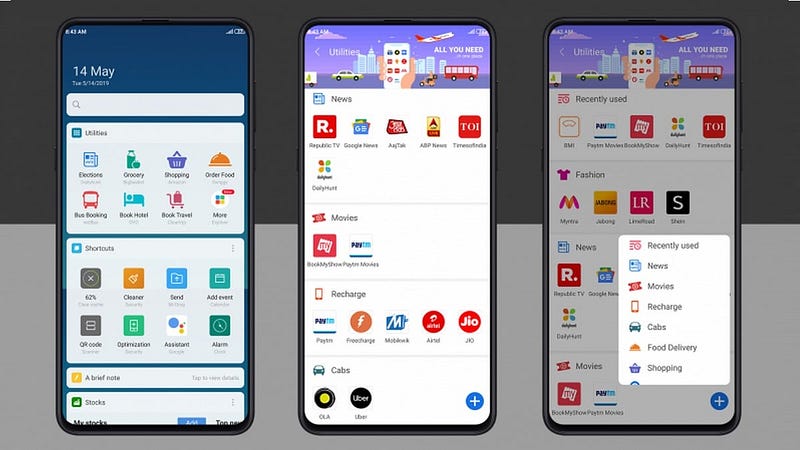
What is App Vault
App Vault is a secure and versatile application that allows users to store and manage their sensitive data, such as passwords, personal notes, and confidential documents. It offers a user-friendly interface with robust encryption and authentication mechanisms to ensure data privacy and protection. Whether it’s securing login credentials, storing financial information, or safeguarding personal files, App Vault provides a centralized and reliable solution for users to manage their valuable data securely.
Important Features
a) Secure Data Storage: App Vault ensures all data is securely encrypted at rest and in transit, protecting it from unauthorized access.
b) Multi-Platform Support: The application is accessible across various platforms, including web, iOS, and Android, enabling users to access their data anytime, anywhere.
c) Two-Factor Authentication (2FA): To add an extra layer of security, App Vault offers 2FA, reducing the risk of unauthorized access.
d) Data Synchronization: The app provides seamless synchronization across devices, ensuring the latest data is available on all platforms.
e) Password Generator: App Vault includes a password generator to create strong and unique passwords for different accounts.
f) Data Backup and Recovery: Regular backups and data recovery options are available to prevent data loss in case of device failure or accidental deletion.
g) Folder and Tagging System: Users can organize their data efficiently using folders and tags, making it easy to search and retrieve information.
h) Offline Access: App Vault allows users to access certain data even when offline, enhancing user experience and accessibility.
Scaling Requirements — Capacity Estimation
For simplicity, we’ll assume the following parameters:
Total number of users: 10,000
Daily active users (DAU): 2,500
Number of data items accessed by user/day: 5
Total number of data items accessed per day: 12,500 data items/day
Since the system is read-heavy, let’s assume the read-to-write ratio to be 50:1.
Total number of data items created per day = 1/50 * 12,500 = 250 data items/day
Storage Estimation: Let’s assume on average each data item size is 1 MB.
Total Storage per day: 250 * 1 MB = 250 MB/day
For the next 3 years, the storage estimation is 250 MB * 5 * 365 = 456.25 GB
Requests per second: Requests per second = 12,500 / (24 * 3600) ≈ 0.1447 requests/second
class AppVault:
def __init__(self):
self.data = {}
def encrypt_and_store_data(self, user_id, data_item):
# Implement data encryption logic here (not implemented in this example)
if user_id not in self.data:
self.data[user_id] = []
self.data[user_id].append(data_item)
def get_data_items(self, user_id):
if user_id in self.data:
return self.data[user_id]
return []
def create_data_item(self, user_id, data_item):
# Implement data item creation logic here (not implemented in this example)
pass
# Simulating AppVault for the small-scale scenario
if __name__ == "__main__":
app_vault = AppVault()
# Simulating data access by users
for user_id in range(1, 10001):
for i in range(5):
data_item = {"name": f"Data Item {i+1} for User {user_id}", "value": f"Value {i+1} for User {user_id}"}
app_vault.encrypt_and_store_data(user_id, data_item)
# Simulating data retrieval by users
for user_id in range(1, 2501):
data_items = app_vault.get_data_items(user_id)
print(f"User {user_id} accessed {len(data_items)} data items.")
# Simulating data creation by users
for user_id in range(1, 251):
data_item = {"name": f"New Data Item for User {user_id}", "value": f"New Value for User {user_id}"}
app_vault.create_data_item(user_id, data_item)Data Model — ER requirements
User
UserId (Primary Key)
Username
Email
Password
DataItem (e.g., Password, Note, File)
DataItemId (Primary Key)
UserId (Foreign Key referencing User.UserId)
Type (Password, Note, File, etc.)
Value (Encrypted data)
Timestamp
Folder
FolderId (Primary Key)
UserId (Foreign Key referencing User.UserId)
FolderName
Tag
TagId (Primary Key)
UserId (Foreign Key referencing User.UserId)
TagNameHigh Level Design
a) Client Applications: These include web, iOS, and Android applications through which users interact with the system.
b) Load Balancer: To distribute incoming traffic and ensure optimal resource utilization.
c) Application Servers: These handle user requests, process business logic, and manage data storage and retrieval.
d) Database: A centralized database stores user information, data items, folders, tags, and other metadata securely.
e) Authentication and Authorization: Responsible for user authentication and managing access controls.
f) Caching Layer: Improves application performance by caching frequently accessed data.
g) User Base: The system should be capable of handling a growing user base with thousands of concurrent users.
h) Data Storage: The storage infrastructure must scale to accommodate increasing data volumes as more users store their data in the application.
i) High Availability: App Vault should ensure high availability to prevent downtime and guarantee access to users around the clock.
j) Two-Factor Authentication (2FA) Implementation: Implementing 2FA to enhance user security during login.
k) File Storage: Securely storing files and documents, while ensuring efficient retrieval and synchronization.
l) Folder and Tag Implementation: Designing the folder and tagging system to facilitate efficient data organization and retrieval.
Assumptions:
- The system will use NoSQL databases for scalability and flexibility.
- The focus will be on high availability and reliability for a seamless user experience.
- The system will be read-heavy, as users access data more frequently than posting new data items.
- Horizontal scaling (scale-out) will be used to handle increasing user traffic.
Main Components and Services:
- Mobile Client: The users access the AppVault platform through the mobile client application.
- Application Servers: These servers handle read, write, and notification requests from users.
- Load Balancer: The load balancer distributes incoming requests to the appropriate servers for efficient resource utilization.
- Cache (Memcache or Redis): Caching is implemented to speed up read operations and reduce database load.
- CDN (Content Delivery Network): A CDN is used to improve latency and deliver media content efficiently to users across the globe.
- Database: NoSQL databases are used to store user data and provide fast and scalable data access.
- Storage (HDFS or Amazon S3): Storage infrastructure is used to store encrypted data items and user files.
Services:
DataItem Service:
- Create a new data item (password, note, file) for a user.
- Update existing data items.
- Retrieve data items based on DataItemId or user-specific queries.
- Delete data items.
Folder Service:
- Create a new folder for organizing data items.
- Retrieve folders and their contents for a user.
- Delete folders and their contents.
Tag Service:
- Create a new tag for categorizing data items.
- Retrieve tags and associated data items for a user.
- Delete tags and remove their association with data items.
Basic Low Level Design
User Management API:
POST /users: Create a new user account.
GET /users/{user_id}: Retrieve user information by user_id.
PATCH /users/{user_id}: Update user information by user_id (e.g., change password, update profile).
DELETE /users/{user_id}: Delete a user account by user_id.
DataItem Management API:
POST /users/{user_id}/data_items: Create a new data item for a user.
GET /users/{user_id}/data_items/{data_item_id}: Retrieve a specific data item by data_item_id.
PATCH /users/{user_id}/data_items/{data_item_id}: Update a specific data item by data_item_id (e.g., change password value).
DELETE /users/{user_id}/data_items/{data_item_id}: Delete a specific data item by data_item_id.
Folder Management API:
POST /users/{user_id}/folders: Create a new folder for a user.
GET /users/{user_id}/folders/{folder_id}: Retrieve a specific folder by folder_id.
PATCH /users/{user_id}/folders/{folder_id}: Update a specific folder by folder_id (e.g., rename folder).
DELETE /users/{user_id}/folders/{folder_id}: Delete a specific folder by folder_id.
Tag Management API:
POST /users/{user_id}/tags: Create a new tag for a user.
GET /users/{user_id}/tags/{tag_id}: Retrieve a specific tag by tag_id.
PATCH /users/{user_id}/tags/{tag_id}: Update a specific tag by tag_id (e.g., rename tag).
DELETE /users/{user_id}/tags/{tag_id}: Delete a specific tag by tag_id.User:
user_id: Unique identifier for each user.
username: User's username.
email: User's email address.
password: User's password for authentication.
Other user attributes based on the application requirements.
DataItem:
data_item_id: Unique identifier for each data item (e.g., password, note, etc.).
user_id: Foreign key referencing the User who owns the data item.
type: Type of data item (e.g., password, note, etc.).
value: The actual value of the data item.
created_at: Timestamp of when the data item was created.
Other data item attributes based on the application requirements.
Folder:
folder_id: Unique identifier for each folder.
user_id: Foreign key referencing the User who owns the folder.
name: Name of the folder.
created_at: Timestamp of when the folder was created.
Other folder attributes based on the application requirements.
Tag:
tag_id: Unique identifier for each tag.
user_id: Foreign key referencing the User who owns the tag.
name: Name of the tag.
created_at: Timestamp of when the tag was created.
Other tag attributes based on the application requirements.API Design
a) User Authentication: POST /api/authenticate
b) Data Retrieval: GET /api/data/{dataItemId}
c) Data Creation: POST /api/data
d) Data Update: PUT /api/data/{dataItemId}
e) Data Deletion: DELETE /api/data/{dataItemId}
f) Folder Management: POST /api/folders, GET /api/folders/{folderId}, DELETE /api/folders/{folderId}
g) Tag Management: POST /api/tags, GET /api/tags/{tagId}, DELETE /api/tags/{tagId}
User Authentication:
Endpoint: POST /api/authenticate
Description: This endpoint will handle user login and authentication using credentials provided by the user.
Input: JSON object containing username and password.
Output: JSON object containing a user authentication token.
Data Retrieval:
Endpoint: GET /api/data/{dataItemId}
Description: This endpoint will retrieve a specific data item (e.g., password, note, file) based on the data item ID.
Input: Authentication token in the request headers.
Output: JSON object representing the data item details.
Data Creation:
Endpoint: POST /api/data
Description: This endpoint will allow users to create a new data item.
Input: Authentication token in the request headers and a JSON object containing data item details.
Output: JSON object confirming the successful creation of the data item.
Data Update:
Endpoint: PUT /api/data/{dataItemId}
Description: This endpoint will allow users to update an existing data item.
Input: Authentication token in the request headers and a JSON object containing updated data item details.
Output: JSON object confirming the successful update of the data item.
Data Deletion:
Endpoint: DELETE /api/data/{dataItemId}
Description: This endpoint will allow users to delete an existing data item.
Input: Authentication token in the request headers.
Output: JSON object confirming the successful deletion of the data item.
Folder Management:
Endpoint: POST /api/folders
Description: This endpoint will allow users to create a new folder to organize their data items.
Input: Authentication token in the request headers and a JSON object containing folder details.
Output: JSON object confirming the successful creation of the folder.
Folder Retrieval:
Endpoint: GET /api/folders/{folderId}
Description: This endpoint will retrieve a specific folder and its contents based on the folder ID.
Input: Authentication token in the request headers.
Output: JSON object representing the folder details and its contents.
Folder Deletion:
Endpoint: DELETE /api/folders/{folderId}
Description: This endpoint will allow users to delete an existing folder and its contents.
Input: Authentication token in the request headers.
Output: JSON object confirming the successful deletion of the folder.
Tag Management:
Endpoint: POST /api/tags
Description: This endpoint will allow users to create a new tag to categorize their data items.
Input: Authentication token in the request headers and a JSON object containing tag details.
Output: JSON object confirming the successful creation of the tag.
Tag Retrieval:
Endpoint: GET /api/tags/{tagId}
Description: This endpoint will retrieve a specific tag and the data items associated with it based on the tag ID.
Input: Authentication token in the request headers.
Output: JSON object representing the tag details and its associated data items.
Tag Deletion:
Endpoint: DELETE /api/tags/{tagId}
Description: This endpoint will allow users to delete an existing tag and remove its association with data items.
Input: Authentication token in the request headers.
Output: JSON object confirming the successful deletion of the tag.Complete Detailed Design
Coming soon! It will be covered on youtube channel.
Subscribe to youtube channel :
Complete Code implementation
import random
import string
class AppVault:
def __init__(self):
self.data = {}
self.user_sessions = {}
# a) Secure Data Storage: Encrypt and store data in the App Vault.
def encrypt_and_store_data(self, user_id, data_item):
# Implement data encryption logic here (not implemented in this example)
encrypted_data = data_item
if user_id not in self.data:
self.data[user_id] = []
self.data[user_id].append(encrypted_data)
# b) Multi-Platform Support: This function can be empty as it doesn't require specific code.
# c) Two-Factor Authentication (2FA): Enable 2FA for user login.
def enable_2fa(self, user_id, phone_number):
# Implement 2FA setup logic here (not implemented in this example)
verification_code = ''.join(random.choices(string.digits, k=6))
self.user_sessions[user_id] = {"phone_number": phone_number, "verification_code": verification_code}
def verify_2fa_code(self, user_id, verification_code):
if user_id in self.user_sessions and self.user_sessions[user_id]["verification_code"] == verification_code:
return True
return False
# d) Data Synchronization: Provide data synchronization across devices.
def synchronize_data(self, user_id):
# Implement data synchronization logic here (not implemented in this example)
if user_id in self.data:
return self.data[user_id]
return []
# e) Password Generator: Generate a strong and unique password.
@staticmethod
def generate_password(length=12):
characters = string.ascii_letters + string.digits + string.punctuation
return ''.join(random.choice(characters) for _ in range(length))
# f) Data Backup and Recovery: Regularly backup data and provide recovery options.
def backup_data(self, user_id):
# Implement data backup logic here (not implemented in this example)
if user_id in self.data:
return self.data[user_id]
return []
# g) Folder and Tagging System: Organize data using folders and tags.
def create_folder(self, user_id, folder_name):
# Implement folder creation logic here (not implemented in this example)
pass
def create_tag(self, user_id, tag_name):
# Implement tag creation logic here (not implemented in this example)
pass
# h) Offline Access: Allow offline access to specific data items.
def get_offline_access_data(self, user_id):
# Implement offline access data retrieval logic here (not implemented in this example)
pass
# Sample usage of the AppVault class
if __name__ == "__main__":
app_vault = AppVault()
# Secure Data Storage
app_vault.encrypt_and_store_data(user_id=1, data_item={"name": "Password for Website A", "value": "aAbc$1@3dEfG"})
# Two-Factor Authentication (2FA)
app_vault.enable_2fa(user_id=1, phone_number="+1234567890")
verification_code = input("Enter the verification code sent to your phone: ")
if app_vault.verify_2fa_code(user_id=1, verification_code=verification_code):
print("2FA verification successful!")
else:
print("2FA verification failed!")
# Data Synchronization
synchronized_data = app_vault.synchronize_data(user_id=1)
print("Synchronized data:", synchronized_data)
# Password Generator
generated_password = app_vault.generate_password()
print("Generated Password:", generated_password)
# Data Backup and Recovery
backup_data = app_vault.backup_data(user_id=1)
print("Backup Data:", backup_data)
# Folder and Tagging System
app_vault.create_folder(user_id=1, folder_name="Personal")
app_vault.create_tag(user_id=1, tag_name="Work")
# Offline Access
offline_data = app_vault.get_offline_access_data(user_id=1)
print("Offline Access Data:", offline_data)System Design — Survey Monkey
We will be discussing in depth -
- What is Survey Monkey
- Important Features
- Scaling Requirements — Capacity Estimations
- Data Model — ER requirements
- High Level Design
- Basic Low Level Design
- API design
- Complete Detailed Design
- Complete Code Implementation
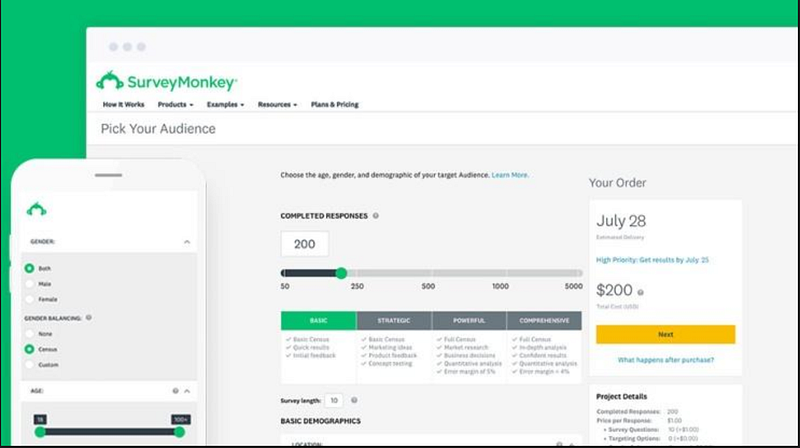
What is Survey Monkey
Survey Monkey is an online survey software that allows individuals and businesses to create surveys, polls, and questionnaires to gather valuable insights and feedback from their target audience. Founded in 1999, it has become one of the leading survey platforms, serving millions of users worldwide. The platform offers an intuitive interface, making it easy for users to design, share, and analyze surveys without the need for technical expertise.
Important Features
- Survey Creation: Users can create custom surveys with various question types, including multiple-choice, open-ended, rating scales, and more.
- Distribution: Surveys can be distributed through email invitations, social media, embedded on websites, or shared via direct links.
- Data Analysis: Survey Monkey provides powerful data analysis tools, including real-time results and customizable reports.
- Collaboration: Teams can collaborate on survey creation, review, and analysis in real-time.
- Integration: The platform integrates with other tools, enabling seamless data transfer and automation.
Scaling Requirements — Capacity Estimation
For the sake of simplicity, I will consider a small scale simulation for Survey Monkey’s scalability requirements.
- Total Number of Users: 100 Million
- Daily Active Users (DAU): 20 Million
- Average Number of Surveys Created by User/Day: 2
- Total Number of Surveys Created per Day: 40 Million surveys/day
- Read to Write Ratio: 50:1
Storage Estimation:
Let’s assume the average survey size (including questions and responses) is 500 KB.
Total Storage per Day: 40 Million * 500 KB = 20 TB/day
For the next 3 years, the estimated storage would be:
Total Storage for 3 Years: 20 TB/day * 365 days * 3 years = 21,900 TB (approx. 22 PB)
Requests per Second:
Assuming the system experiences peak load during certain hours of the day, let’s consider an average of 5,000 requests per second during peak hours.
Requests per Second (during peak hours): 5,000
class SurveyMonkeySimulation:
def __init__(self):
self.total_users = 100_000_000
self.daily_active_users = 20_000_000
self.average_surveys_per_user = 2
self.total_surveys_per_day = self.daily_active_users * self.average_surveys_per_user
self.read_to_write_ratio = 50
self.average_survey_size_kb = 500
self.requests_per_second_peak_hours = 5_000
def calculate_storage_per_day(self):
storage_per_day_kb = self.total_surveys_per_day * self.average_survey_size_kb
return storage_per_day_kb / (1024 * 1024) # Convert KB to TB
def calculate_total_storage_three_years(self):
storage_per_day_tb = self.calculate_storage_per_day()
total_storage_tb = storage_per_day_tb * 365 * 3
return total_storage_tb
def calculate_requests_per_second_peak_hours(self):
return self.requests_per_second_peak_hours
def display_scalability_requirements(self):
print("Scalability Requirements for Survey Monkey:")
print("Total Number of Users:", self.total_users)
print("Daily Active Users (DAU):", self.daily_active_users)
print("Average Surveys Created by User/Day:", self.average_surveys_per_user)
print("Total Surveys Created per Day:", self.total_surveys_per_day)
print("Read to Write Ratio:", self.read_to_write_ratio)
print("Average Survey Size (KB):", self.average_survey_size_kb)
print("Total Storage per Day (TB):", self.calculate_storage_per_day())
print("Total Storage for 3 Years (TB):", self.calculate_total_storage_three_years())
print("Requests per Second (during peak hours):", self.calculate_requests_per_second_peak_hours())
# Example usage:
if __name__ == "__main__":
survey_monkey_simulation = SurveyMonkeySimulation()
survey_monkey_simulation.display_scalability_requirements()Data Model — ER requirements
- User: Stores user information like username, email, and preferences.
- Survey: Represents a single survey created by a user, containing survey details and metadata.
- Questions: Stores details of individual survey questions, associated with a particular survey.
- Responses: Stores responses submitted by survey participants.
- Analytics: Captures data related to survey performance and user engagement.
User:
Fields: UserID, Username, Email, Password
Survey:
Fields: SurveyID, UserID (Foreign Key referencing User entity), Title, CreationTimestamp
Question:
Fields: QuestionID, SurveyID (Foreign Key referencing Survey entity), QuestionText, QuestionType, Options (if applicable)
Response:
Fields: ResponseID, UserID (Foreign Key referencing User entity), SurveyID (Foreign Key referencing Survey entity), ResponseTimestamp
Answer:
Fields: AnswerID, ResponseID (Foreign Key referencing Response entity), QuestionID (Foreign Key referencing Question entity), AnswerText, SelectedOptions (if applicable)
Relationships:
User-Survey: One-to-Many (A user can create multiple surveys)
Survey-Question: One-to-Many (A survey can have multiple questions)
User-Response: One-to-Many (A user can submit multiple responses)
Survey-Response: One-to-Many (A survey can have multiple responses)
Response-Answer: One-to-Many (A response can have multiple answers)High Level Design
- Web Servers: Handle user requests, survey creation, and distribution.
- Application Servers: Process user inputs, validate surveys, and store data in the database.
- Database: Stores user information, survey details, questions, responses, and analytics data.
- File Storage: Holds survey media files (images, videos) and user avatars.
- External Services: Integrations with third-party platforms for data transfer and analysis.
- Survey Validation: The application servers validate survey configurations, question types, and respondent permissions before saving them to the database.
- File Storage: Survey media files are stored in distributed file storage to ensure availability and redundancy.
- Database Sharding: To handle the high volume of data, the database employs sharding techniques for horizontal partitioning.
Assumptions:
- The system is read-heavy due to users accessing surveys and their responses.
- Availability and reliability are critical.
- The system needs to scale horizontally (scale-out) to handle high traffic.
- Consistency can be relaxed to ensure availability.
Main Components and Services:
- Mobile/Web Client: The interface through which users access Survey Monkey to create surveys, respond to surveys, and view results.
- Application Servers: Handle read and write operations, process requests, and communicate with other services.
- Load Balancer: Distributes incoming requests to multiple application servers to ensure load balancing and high availability.
- Cache (Memcached or Redis): Caches frequently accessed survey data and responses to reduce database load and improve response times.
- CDN (Content Delivery Network): To improve the latency and throughput for serving static content like images and assets.
- Database: NoSQL or SQL database to store user data, survey metadata, responses, and analytics data.
- Storage (HDFS or Amazon S3): Stores uploaded media files (images, videos) associated with surveys.
Services:
- User Service: Manages user registration, authentication, and profile information.
- Survey Service: Handles survey creation, editing, and deletion.
- Question Service: Manages questions within surveys, including question types and options.
- Response Service: Handles user responses to surveys, storing response data, and managing response statistics.
- Analytics Service: Performs data analysis on survey responses to generate reports and insights for users.
from datetime import datetime
import random
class User:
def __init__(self, user_id, username, email, password):
self.user_id = user_id
self.username = username
self.email = email
self.password = password
class Survey:
def __init__(self, survey_id, user_id, title):
self.survey_id = survey_id
self.user_id = user_id
self.title = title
self.creation_timestamp = datetime.now()
class Question:
def __init__(self, question_id, survey_id, question_text, question_type, options=None):
self.question_id = question_id
self.survey_id = survey_id
self.question_text = question_text
self.question_type = question_type
self.options = options or []
class Response:
def __init__(self, response_id, user_id, survey_id):
self.response_id = response_id
self.user_id = user_id
self.survey_id = survey_id
self.response_timestamp = datetime.now()
class Answer:
def __init__(self, answer_id, response_id, question_id, answer_text=None, selected_options=None):
self.answer_id = answer_id
self.response_id = response_id
self.question_id = question_id
self.answer_text = answer_text
self.selected_options = selected_options or []
class SurveyMonkey:
def __init__(self):
self.users = {}
self.surveys = {}
self.questions = {}
self.responses = {}
self.answers = {}
def register_user(self, username, email, password):
user_id = len(self.users) + 1
user = User(user_id, username, email, password)
self.users[user_id] = user
return user_id
def create_survey(self, user_id, title):
survey_id = len(self.surveys) + 1
survey = Survey(survey_id, user_id, title)
self.surveys[survey_id] = survey
return survey_id
def add_question(self, survey_id, question_text, question_type, options=None):
question_id = len(self.questions) + 1
question = Question(question_id, survey_id, question_text, question_type, options)
self.questions[question_id] = question
return question_id
def submit_response(self, user_id, survey_id, answers_data):
response_id = len(self.responses) + 1
response = Response(response_id, user_id, survey_id)
self.responses[response_id] = response
for question_id, answer_data in answers_data.items():
if question_id in self.questions:
answer_id = len(self.answers) + 1
answer = Answer(answer_id, response_id, question_id, **answer_data)
self.answers[answer_id] = answer
def get_user(self, user_id):
return self.users.get(user_id)
def get_survey(self, survey_id):
return self.surveys.get(survey_id)
def get_question(self, question_id):
return self.questions.get(question_id)
def get_response(self, response_id):
return self.responses.get(response_id)
def get_answer(self, answer_id):
return self.answers.get(answer_id)
# Example usage:
if __name__ == "__main__":
survey_monkey = SurveyMonkey()
# Register users
user1_id = survey_monkey.register_user("user1", "[email protected]", "password123")
user2_id = survey_monkey.register_user("user2", "[email protected]", "password456")
# Create survey
survey1_id = survey_monkey.create_survey(user1_id, "Customer Satisfaction Survey")
# Add questions to the survey
question1_id = survey_monkey.add_question(survey1_id, "How satisfied are you with our services?", "multiple-choice", options=["Very Satisfied", "Satisfied", "Neutral", "Dissatisfied", "Very Dissatisfied"])
question2_id = survey_monkey.add_question(survey1_id, "Please provide any additional comments or feedback:", "open-ended")
# User 2 submits a response to the survey
answers_data = {
question1_id: {"selected_options": [random.randint(1, 5)]},
question2_id: {"answer_text": "The service is great!"}
}
survey_monkey.submit_response(user2_id, survey1_id, answers_data)
# Get user, survey, and response data
user1 = survey_monkey.get_user(user1_id)
survey1 = survey_monkey.get_survey(survey1_id)
response1 = survey_monkey.get_response(1)
question1 = survey_monkey.get_question(question1_id)
answer1 = survey_monkey.get_answer(1)
# Print data
print("User 1:", user1.username)
print("Survey 1:", survey1.title)
print("Response 1:", response1.response_timestamp)
print("Question 1:", question1.question_text)
print("Answer 1:", answer1.answer_text)Basic Low Level Design
class User:
def __init__(self, user_id, username, email, password):
self.user_id = user_id
self.username = username
self.email = email
self.password = password
class Survey:
def __init__(self, survey_id, user_id, title):
self.survey_id = survey_id
self.user_id = user_id
self.title = title
self.creation_timestamp = datetime.now()
class Question:
def __init__(self, question_id, survey_id, question_text, question_type, options=None):
self.question_id = question_id
self.survey_id = survey_id
self.question_text = question_text
self.question_type = question_type
self.options = options or []
class Response:
def __init__(self, response_id, user_id, survey_id):
self.response_id = response_id
self.user_id = user_id
self.survey_id = survey_id
self.response_timestamp = datetime.now()
class Answer:
def __init__(self, answer_id, response_id, question_id, answer_text=None, selected_options=None):
self.answer_id = answer_id
self.response_id = response_id
self.question_id = question_id
self.answer_text = answer_text
self.selected_options = selected_options or []API Design
Create Survey:
- Endpoint:
/surveys - Method: POST
- Description: Create a new survey with specified details and questions.
- Request Body: JSON object containing survey details and questions.
- Response: JSON object confirming the successful creation of the survey.
Get Survey Details:
- Endpoint:
/surveys/{survey_id} - Method: GET
- Description: Retrieve survey details, including questions and response statistics.
- Response: JSON object containing survey details.
Submit Response:
- Endpoint:
/surveys/{survey_id}/responses - Method: POST
- Description: Submit a response to a specific survey.
- Request Body: JSON object containing respondent details and their answers.
- Response: JSON object confirming the successful submission of the response.
Get Survey Responses:
- Endpoint:
/surveys/{survey_id}/responses - Method: GET
- Description: Retrieve all responses for a specific survey.
- Response: JSON object containing an array of response details.
from flask import Flask, request
app = Flask(__name__)
users = {}
surveys = {}
questions = {}
responses = {}
answers = {}
@app.route('/users', methods=['POST'])
def create_user():
data = request.get_json()
user_id = len(users) + 1
user = User(user_id, data['username'], data['email'], data['password'])
users[user_id] = user
return {"user_id": user_id, "message": "User registered successfully"}, 201
@app.route('/surveys', methods=['POST'])
def create_survey():
data = request.get_json()
survey_id = len(surveys) + 1
survey = Survey(survey_id, data['user_id'], data['title'])
surveys[survey_id] = survey
return {"survey_id": survey_id, "message": "Survey created successfully"}, 201
@app.route('/surveys/<int:survey_id>/questions', methods=['POST'])
def add_question_to_survey(survey_id):
data = request.get_json()
question_id = len(questions) + 1
question = Question(question_id, survey_id, data['question_text'], data['question_type'], data.get('options'))
questions[question_id] = question
return {"question_id": question_id, "message": "Question added to the survey"}, 201
@app.route('/surveys/<int:survey_id>/responses', methods=['POST'])
def submit_response(survey_id):
data = request.get_json()
user_id = data['user_id']
response_id = len(responses) + 1
response = Response(response_id, user_id, survey_id)
responses[response_id] = response
for answer_data in data['answers']:
question_id = answer_data['question_id']
answer_id = len(answers) + 1
answer = Answer(answer_id, response_id, question_id, answer_data.get('answer_text'), answer_data.get('selected_options'))
answers[answer_id] = answer
return {"response_id": response_id, "message": "Response submitted successfully"}, 201
if __name__ == "__main__":
app.run()Complete Detailed Design
Coming soon! It will be covered on youtube channel.
Subscribe to youtube channel :
Complete Code implementation
class SurveyMonkey:
def __init__(self):
self.surveys = {}
self.responses = {}
def create_survey(self, user_id, survey_data):
survey_id = len(self.surveys) + 1
survey_data['survey_id'] = survey_id
survey_data['user_id'] = user_id
self.surveys[survey_id] = survey_data
return survey_id
def distribute_survey(self, survey_id, distribution_method, recipients):
if survey_id not in self.surveys:
return "Survey not found."
# Code to distribute the survey through the specified distribution method to the given recipients
return "Survey distributed successfully."
def submit_response(self, survey_id, respondent_id, response_data):
if survey_id not in self.surveys:
return "Survey not found."
if respondent_id not in self.responses:
self.responses[respondent_id] = {}
self.responses[respondent_id][survey_id] = response_data
return "Response submitted successfully."
def analyze_data(self, survey_id):
if survey_id not in self.surveys:
return "Survey not found."
if survey_id not in self.responses:
return "No responses found for the survey."
# Code to perform data analysis on the responses for the specified survey
return "Data analysis completed."
def collaborate_on_survey(self, survey_id, team_members):
if survey_id not in self.surveys:
return "Survey not found."
# Code to enable collaboration with team members on the specified survey
return "Collaboration enabled for the survey."
def integrate_with_tools(self, integration_data):
# Code to integrate with external tools using the provided integration_data
return "Integration successful."
# Example usage:
if __name__ == "__main__":
survey_monkey = SurveyMonkey()
# Create a new survey
user_id = 1
survey_data = {
"title": "Customer Satisfaction Survey",
"questions": [
{
"question_type": "multiple-choice",
"question_text": "How satisfied are you with our services?",
"options": ["Very Satisfied", "Satisfied", "Neutral", "Dissatisfied", "Very Dissatisfied"],
},
{
"question_type": "open-ended",
"question_text": "Please provide any additional comments or feedback:",
},
],
}
survey_id = survey_monkey.create_survey(user_id, survey_data)
print("Survey created with ID:", survey_id)
# Distribute the survey
distribution_method = "email"
recipients = ["[email protected]", "[email protected]"]
print(survey_monkey.distribute_survey(survey_id, distribution_method, recipients))
# Submit response to the survey
respondent_id = "respondent_123"
response_data = {
"answers": [3, "The service is great!"],
}
print(survey_monkey.submit_response(survey_id, respondent_id, response_data))
# Analyze survey data
print(survey_monkey.analyze_data(survey_id))
# Enable collaboration on the survey
team_members = ["user2", "user3"]
print(survey_monkey.collaborate_on_survey(survey_id, team_members))
# Integrate with external tools
integration_data = {
"tool_name": "CRM System",
"api_key": "your_api_key_here",
}
print(survey_monkey.integrate_with_tools(integration_data))System Design —Redbus
We will be discussing in depth -
- What is Redbus
- Important Features
- Scaling Requirements — Capacity Estimations
- Data Model — ER requirements
- High Level Design
- Basic Low Level Design
- API design
- Complete Detailed Design
- Complete Code Implementation

What is Redbus
Redbus is an online platform that revolutionized the way people book bus tickets and travel across various cities. Founded in 2006, Redbus has become one of the largest and most trusted bus ticket booking platforms in the world. It connects millions of passengers with bus operators, offering a convenient and seamless booking experience.
Important Features
- Bus Search and Booking: Users can search for available buses based on their travel route, dates, and preferences. Once they find a suitable option, they can book tickets effortlessly.
- Seat Selection: Redbus allows users to select their preferred seats from an interactive seat layout, ensuring a comfortable journey.
- Real-time Tracking: Passengers can track their buses in real-time using GPS technology, providing them with accurate information about their bus’s location and estimated arrival time.
- Secure Payment Options: Redbus offers multiple secure payment methods, including credit/debit cards, net banking, and digital wallets, ensuring smooth and safe transactions.
- Cancellations and Refunds: The platform allows users to cancel their bookings and provides a transparent refund policy.
- User Reviews and Ratings: Redbus incorporates user reviews and ratings for bus operators, helping customers make informed decisions.
Scaling Requirements — Capacity Estimation
Here is the small-scale simulation for Redbus:
Total number of users: 100,000 (1 Million)
Daily active users (DAU): 30,000 (300,000)
Number of bus bookings per day per user: 2 (Assuming each user makes 2 bookings per day on average)
Total number of bus bookings per day: 60,000 (2 * 30,000)
Read to write ratio: 100:1
Total number of bus details retrieved per day: 6,000,000 (100 * 60,000)
Total number of buses available: 1,000
Total number of bus operators: 50
Assuming on average each bus has 50 seats
Total number of bus seats per day: 1,000,000 (1,000 * 50 * 2) (Assuming 2 trips per day)
Let’s assume the average size of bus details and booking data is 1 KB (for simplicity).
Total Storage per day for bus details and bookings: 7.5 GB/day (6,000,000 * 1 KB)
For next 3 years (assuming 365 days per year):
Total Storage for bus details and bookings: 8.2 TB (7.5 GB * 365 days * 3 years)
Requests per second for retrieving bus details: 69 (6,000,000 / 3600 seconds * 24 hours)
Requests per second for making bus bookings: 2 (60,000 / 3600 seconds * 24 hours)
Total requests per second: 71 (69 + 2)
Data Model — ER requirements
- User: Stores user information like name, contact details, and payment preferences.
- Bus Operator: Contains details about the bus operators, such as their name, contact information, and customer ratings.
- Bus: Represents individual buses, storing information like bus number, capacity, and current location.
- Booking: Records each booking made by users, including details like travel date, seat number, and payment status.
- Route: Stores information about travel routes, including start and end destinations.
- Transaction: Keeps track of payment transactions for bookings, including payment mode and amount.
User
Username: String
Email: String
Password: String
BusOperator
Operator_id: Int
Name: String
Contact_details: String
Rating: Float
Bus
Bus_id: Int
Bus_number: String
Capacity: Int
Current_location: String
Booking
Booking_id: Int
User_id: Int (Foreign key from the User table)
Bus_id: Int (Foreign key from the Bus table)
Travel_date: DateTime
Seat_number: Int
Payment_status: String
Route
Route_id: Int
Start_location: String
End_location: String
Transaction
Transaction_id: Int
Booking_id: Int (Foreign key from the Booking table)
Amount: Float
Payment_mode: String
Relationships:
User can have multiple bookings (one-to-many relationship).
BusOperator can have multiple buses (one-to-many relationship).
Bus can have multiple bookings (one-to-many relationship).
Route can have multiple buses (one-to-many relationship).
Booking can have one transaction (one-to-one relationship).High Level Design
- Load Balancing: Distributing incoming traffic across multiple servers to prevent overload on any single server.
- Caching: Implementing caching mechanisms to store frequently accessed data and reduce database load.
- Horizontal Scaling: Adding more servers to the system to handle increased user demand.
- Database Sharding: Partitioning the database across multiple servers to distribute the load and improve read/write performance.
- Web Server: Handles incoming web requests from users and communicates with the application server to process the requests.
- Application Server: Implements the business logic, interacts with the database, and manages user authentication and authorization.
- Database Server: Stores all user-related data, bus details, bookings, and other essential information.
- Caching Layer: Caches frequently accessed data to reduce database load and improve response times.
- Message Queues: Enables asynchronous processing of tasks like sending booking confirmations and notifications.
Assumptions:
- The Redbus system is read-heavy, with more users searching for buses and making bookings than updating bus details.
- Horizontal scaling will be used to handle the high read traffic.
- Services should be highly available to ensure seamless user experience.
- Latency should be kept low for bus searches and bookings.
Main Components and Services:
Mobile Client:
- Represents users accessing the Redbus platform through mobile applications.
Application Servers:
- Responsible for handling read and write operations, including bus searches, bookings, and user interactions.
- Manages user authentication and authorization.
- Handles notifications to users for booking confirmations and other updates.
Load Balancer:
- Routes and distributes incoming user requests to the appropriate application servers.
- Ensures even distribution of traffic across the server cluster.
Cache (Memcache):
- Caches frequently accessed data to improve read performance and reduce database load.
- Caches bus details, user profiles, and other frequently queried information.
CDN (Content Delivery Network):
- Serves static content like images and CSS to users, reducing latency and improving content delivery.
Database:
- Utilizes NoSQL databases like MongoDB or Cassandra to store user data, bus details, bookings, and transactions.
- Scales horizontally to handle high read traffic.
Storage (HDFS or Amazon S3):
- Stores media files like bus images and other related content.
- Provides scalable and durable storage for large-scale applications.
Basic Low Level Design
# User class represents a Redbus user
class User:
def __init__(self, user_id, name, contact_details):
self.user_id = user_id
self.name = name
self.contact_details = contact_details
# BusOperator class represents a bus operator
class BusOperator:
def __init__(self, operator_id, name, contact_details, rating):
self.operator_id = operator_id
self.name = name
self.contact_details = contact_details
self.rating = rating
# Bus class represents an individual bus
class Bus:
def __init__(self, bus_id, bus_number, capacity):
self.bus_id = bus_id
self.bus_number = bus_number
self.capacity = capacity
self.current_location = None
# Booking class represents a ticket booking
class Booking:
def __init__(self, booking_id, user, bus, travel_date, seat_number, payment_status):
self.booking_id = booking_id
self.user = user
self.bus = bus
self.travel_date = travel_date
self.seat_number = seat_number
self.payment_status = payment_status
# Route class represents a travel route
class Route:
def __init__(self, route_id, start_location, end_location):
self.route_id = route_id
self.start_location = start_location
self.end_location = end_location
# Transaction class represents a payment transaction
class Transaction:
def __init__(self, transaction_id, booking, amount, payment_mode):
self.transaction_id = transaction_id
self.booking = booking
self.amount = amount
self.payment_mode = payment_modeAPI Design
/search: Search for available buses based on travel criteria./book: Book a bus ticket with seat selection and payment details./cancel: Cancel a booked ticket and initiate the refund process./track: Get real-time tracking information for a booked bus./reviews: View and submit reviews for bus operators.
# Importing the classes defined above
from datetime import datetime
class RedbusService:
def __init__(self):
# Initialize empty dictionaries to store data
self.users = {}
self.bus_operators = {}
self.buses = {}
self.bookings = {}
self.routes = {}
self.transactions = {}
self.booking_counter = 0
self.transaction_counter = 0
# Register a new user
def register_user(self, name, contact_details):
user_id = len(self.users) + 1
user = User(user_id, name, contact_details)
self.users[user_id] = user
return user
# Add a new bus operator
def add_bus_operator(self, name, contact_details):
operator_id = len(self.bus_operators) + 1
bus_operator = BusOperator(operator_id, name, contact_details, rating=0)
self.bus_operators[operator_id] = bus_operator
return bus_operator
# Add a new bus
def add_bus(self, bus_operator, bus_number, capacity):
bus_id = len(self.buses) + 1
bus = Bus(bus_id, bus_number, capacity)
self.buses[bus_id] = bus
bus_operator.buses.append(bus)
return bus
# Create a new route
def add_route(self, start_location, end_location):
route_id = len(self.routes) + 1
route = Route(route_id, start_location, end_location)
self.routes[route_id] = route
return route
# Search for available buses based on travel criteria
def search_buses(self, start_location, end_location, travel_date):
available_buses = []
for bus in self.buses.values():
if bus.current_location == start_location:
available_buses.append(bus)
return available_buses
# Book a bus ticket with seat selection and payment details
def book_ticket(self, user, bus, travel_date, seat_number, payment_mode):
booking_id = self.booking_counter + 1
self.booking_counter = booking_id
payment_status = "Pending" # Assuming a payment gateway will handle the payment process
booking = Booking(booking_id, user, bus, travel_date, seat_number, payment_status)
self.bookings[booking_id] = booking
# Create a payment transaction for the booking
transaction_id = self.transaction_counter + 1
self.transaction_counter = transaction_id
amount = 1000 # Assuming a fixed ticket price for simplicity
transaction = Transaction(transaction_id, booking, amount, payment_mode)
self.transactions[transaction_id] = transaction
return booking
# Cancel a booked ticket and initiate the refund process
def cancel_booking(self, booking):
booking.payment_status = "Cancelled"
# Initiate refund process if payment was made
if booking.payment_status == "Paid":
transaction = self.get_transaction_by_booking(booking)
# Refund process goes here (not implemented in this example)
# Helper function to get transaction by booking
def get_transaction_by_booking(self, booking):
for transaction in self.transactions.values():
if transaction.booking == booking:
return transaction
return NoneComplete Detailed Design
Coming soon! It will be covered on youtube channel.
Subscribe to youtube channel :
Complete Code implementation
User Management API:
a. POST /users
Create a new user account.
Request Body: { "username": "JohnDoe", "email": "[email protected]", "password": "password" }
b. GET /users/{userId}
Get user details by user ID.
c. PATCH /users/{userId}
Update user profile information.
Request Body: { "name": "John Doe", "contactDetails": "1234567890" }
Bus Operator Management API:
a. POST /bus-operators
Create a new bus operator.
Request Body: { "name": "ABC Travels", "contactDetails": "9876543210" }
b. GET /bus-operators/{operatorId}
Get bus operator details by operator ID.
Bus Management API:
a. POST /buses
Create a new bus under a specific bus operator.
Request Body: { "busNumber": "BUS001", "capacity": 50 }
b. GET /buses/{busId}
Get bus details by bus ID.
Booking API:
a. POST /bookings
Make a new booking for a user on a specific bus.
Request Body: { "userId": "user123", "busId": "bus456", "travelDate": "2023-07-31", "seatNumber": 5 }
b. GET /bookings/{bookingId}
Get booking details by booking ID.
Route API:
a. POST /routes
Create a new travel route.
Request Body: { "startLocation": "CityA", "endLocation": "CityB" }
b. GET /routes/{routeId}
Get route details by route ID.
Search API:
a. GET /search
Search for available buses based on travel route, date, and preferences.
Query Parameters: { "startLocation": "CityA", "endLocation": "CityB", "travelDate": "2023-07-31" }
Payment API:
a. POST /payments
Make a payment for a specific booking.
Request Body: { "bookingId": "booking123", "amount": 1000, "paymentMethod": "creditCard" }
Cancellation API:
a. DELETE /bookings/{bookingId}
Cancel a specific booking.
Request Body: { "reason": "Change of plans" }
Real-Time Tracking API:
a. GET /buses/{busId}/location
Get real-time location of a specific bus.
User Feed API:
a. GET /users/{userId}/feed
Get the user's feed with updates about followed buses and operators.
Reviews and Ratings API:
a. POST /reviews
Submit a review and rating for a bus operator.
Request Body: { "busOperatorId": "operator123", "rating": 4, "comment": "Great service!" }
b. GET /bus-operators/{operatorId}/reviews
Get reviews and ratings for a specific bus operator.from datetime import datetime
class User:
def __init__(self, user_id, name, contact_details):
self.user_id = user_id
self.name = name
self.contact_details = contact_details
class BusOperator:
def __init__(self, operator_id, name, contact_details, rating):
self.operator_id = operator_id
self.name = name
self.contact_details = contact_details
self.rating = rating
self.buses = []
class Bus:
def __init__(self, bus_id, bus_number, capacity):
self.bus_id = bus_id
self.bus_number = bus_number
self.capacity = capacity
self.current_location = None
class Booking:
def __init__(self, booking_id, user, bus, travel_date, seat_number, payment_status):
self.booking_id = booking_id
self.user = user
self.bus = bus
self.travel_date = travel_date
self.seat_number = seat_number
self.payment_status = payment_status
class Route:
def __init__(self, route_id, start_location, end_location):
self.route_id = route_id
self.start_location = start_location
self.end_location = end_location
class Transaction:
def __init__(self, transaction_id, booking, amount, payment_mode):
self.transaction_id = transaction_id
self.booking = booking
self.amount = amount
self.payment_mode = payment_mode
class RedbusService:
def __init__(self):
self.users = {}
self.bus_operators = {}
self.buses = {}
self.bookings = {}
self.routes = {}
self.transactions = {}
self.booking_counter = 0
self.transaction_counter = 0
def register_user(self, name, contact_details):
user_id = len(self.users) + 1
user = User(user_id, name, contact_details)
self.users[user_id] = user
return user
def add_bus_operator(self, name, contact_details):
operator_id = len(self.bus_operators) + 1
bus_operator = BusOperator(operator_id, name, contact_details, rating=0)
self.bus_operators[operator_id] = bus_operator
return bus_operator
def add_bus(self, bus_operator, bus_number, capacity):
bus_id = len(self.buses) + 1
bus = Bus(bus_id, bus_number, capacity)
self.buses[bus_id] = bus
bus_operator.buses.append(bus)
return bus
def add_route(self, start_location, end_location):
route_id = len(self.routes) + 1
route = Route(route_id, start_location, end_location)
self.routes[route_id] = route
return route
def search_buses(self, start_location, end_location, travel_date):
available_buses = []
for bus in self.buses.values():
if bus.current_location == start_location:
available_buses.append(bus)
return available_buses
def book_ticket(self, user, bus, travel_date, seat_number, payment_mode):
booking_id = self.booking_counter + 1
self.booking_counter = booking_id
payment_status = "Pending"
booking = Booking(booking_id, user, bus, travel_date, seat_number, payment_status)
self.bookings[booking_id] = booking
transaction_id = self.transaction_counter + 1
self.transaction_counter = transaction_id
amount = 1000
transaction = Transaction(transaction_id, booking, amount, payment_mode)
self.transactions[transaction_id] = transaction
return booking
def cancel_booking(self, booking):
booking.payment_status = "Cancelled"
if booking.payment_status == "Paid":
transaction = self.get_transaction_by_booking(booking)
# Refund process goes here (not implemented in this example)
def get_transaction_by_booking(self, booking):
for transaction in self.transactions.values():
if transaction.booking == booking:
return transaction
return None
# Example usage:
# Create an instance of RedbusService
redbus_service = RedbusService()
# Register new users
user1 = redbus_service.register_user("John Doe", "[email protected]")
user2 = redbus_service.register_user("Jane Smith", "[email protected]")
# Add bus operators
operator1 = redbus_service.add_bus_operator("ABC Bus Services", "[email protected]")
operator2 = redbus_service.add_bus_operator("XYZ Bus Travels", "[email protected]")
# Add buses for each operator
bus1 = redbus_service.add_bus(operator1, "ABC001", 40)
bus2 = redbus_service.add_bus(operator2, "XYZ001", 30)
# Create routes
route1 = redbus_service.add_route("City A", "City B")
route2 = redbus_service.add_route("City B", "City C")
# Search for available buses
available_buses = redbus_service.search_buses("City A", "City B", datetime(2023, 7, 25))
for bus in available_buses:
print(f"Bus Number: {bus.bus_number}, Capacity: {bus.capacity}")
# Book a ticket
booking = redbus_service.book_ticket(user1, bus1, datetime(2023, 7, 25), seat_number=15, payment_mode="Credit Card")
print(f"Booking ID: {booking.booking_id}, Seat Number: {booking.seat_number}")
# Cancel a booking
redbus_service.cancel_booking(booking)
print(f"Booking ID: {booking.booking_id}, Payment Status: {booking.payment_status}")Read Next — how to Design the URL shortener.
Let me know if you have any questions in the comment section. Subscribe/ Follow, Like/Clap and Stay Tuned!!
Day 2 : SQL Basics, Query Structure, Built In functions Conditions
Day 4 : Set Theory Operations, Stored Procedures and CASE statements in SQL
Day 6 : Subqueries, Group by, order by and Having clauses in SQL and Analytical Functions
Day 7 : Window Functions, Grouping Sets and Constraints in SQL
Day 8 : BigQuery Basics, SELECT, FROM, WHERE and Date and Extract in BigQuery
Day 9 : Common Expression Table, UNNEST Clause, SQL vs NoSQL Databases
Day 10 : Triggers, Pivot and Cursors in SQL
Day 14 : MySQL in Depth
Day 15 : PostgreSQL inDepth
Anyways, For Day 15 of 15 days of Advanced SQL, we will cover —
PostgreSQL inDepth
Github for Advanced SQL that you can follow —
All the projects, data structures, algorithms, system design, Data Science and ML, Data Engineering, MLOps and Deep Learning videos will be published on our youtube channel ( just launched).
Subscribe today!
System Design Case Studies — In Depth
Complete Data Structures and Algorithm Series
Github —
Some of the other best Series —
30 days of Data Structures and Algorithms and System Design Simplified
Data Science and Machine Learning Research ( papers) Simplified **
100 days : Your Data Science and Machine Learning Degree Series with projects
Complete Data Visualization and Pre-processing Series with projects
Exceptional Github Repos — Part 1
Exceptional Github Repos — Part 2
Tech Newsletter —
If you are interested, you can join my newsletter through which I send tech interview tips, techniques, patterns, hacks — Software Development, ML, Data Science, Startups and Technology projects to more than 30K readers. You can subscribe to Tech Brew :
For Python Projects —
For complete 60 days of Data Science and ML : Day 1 — Day 60 : Quick Recap of 60 days of Data Science and ML
Follow for more updates. Stay tuned and keep coding!
For other projects, tune to —
Build Machine Learning Pipelines( With Code)
Recurrent Neural Network with Keras
Clustering Geolocation Data in Python using DBSCAN and K-Means
Facial Expression Recognition using Keras
Hyperparameter Tuning with Keras Tuner
Custom Layers in Keras


