
Day 8 of System Design Case Studies Series : Design URL shortener, Agoda, Razorpay, Apple Music, CricHD, Alibaba, Substack, Instant Messenger, Hacker News, Facebook Timeline, Online Poker Game, Amazon Locker
Complete Design with examples
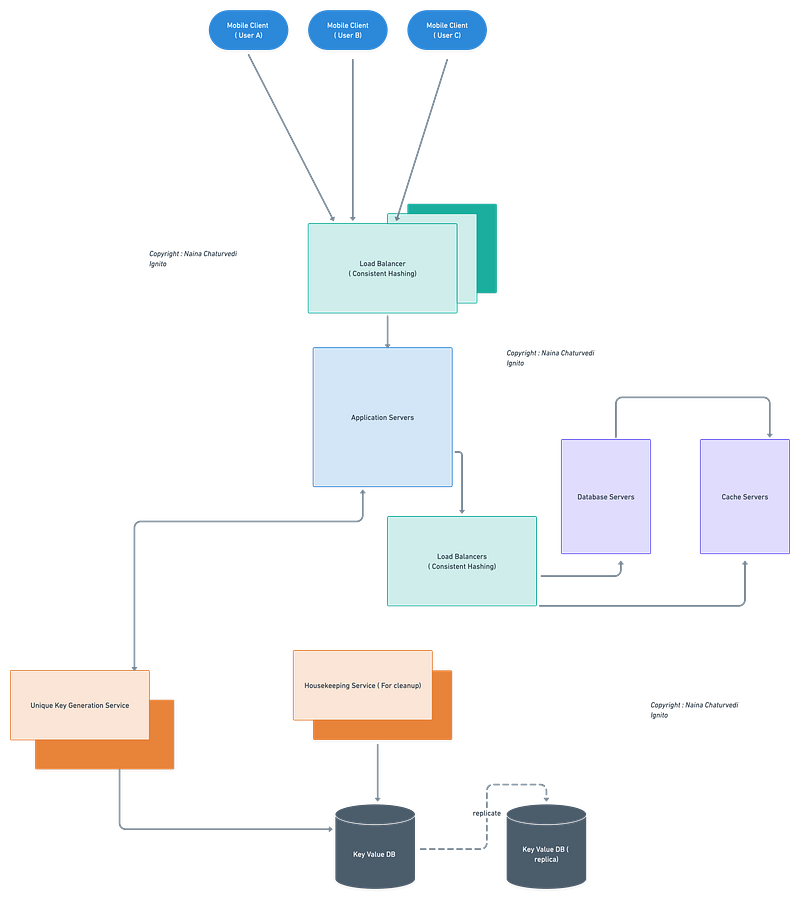
Hello peeps! Welcome to Day 8 of System Design Case studies series where we will design URL Shortener, Agoda, Razorpay, Apple Music, CricHD, Alibaba, Substack, Instant Messenger, Hacker News, Facebook Timeline, Online Poker Game and Amazon Locker.
This post has system design for ( scroll till the end of the post) —
Note : Please read System Design Important Terms you MUST know and Most Important System Design basics before reading this post.
Projects Videos —
All the projects, data structures, SQL, algorithms, system design, Data Science and ML , Data Analytics, Data Engineering, , Implemented Data Science and ML projects, Implemented Data Engineering Projects, Implemented Deep Learning Projects, Implemented Machine Learning Ops Projects, Implemented Time Series Analysis and Forecasting Projects, Implemented Applied Machine Learning Projects, Implemented Tensorflow and Keras Projects, Implemented PyTorch Projects, Implemented Scikit Learn Projects, Implemented Big Data Projects, Implemented Cloud Machine Learning Projects, Implemented Neural Networks Projects, Implemented OpenCV Projects,Complete ML Research Papers Summarized, Implemented Data Analytics projects, Implemented Data Visualization Projects, Implemented Data Mining Projects, Implemented Natural Leaning Processing Projects, MLOps and Deep Learning, Applied Machine Learning with Projects Series, PyTorch with Projects Series, Tensorflow and Keras with Projects Series, Scikit Learn Series with Projects, Time Series Analysis and Forecasting with Projects Series, ML System Design Case Studies Series videos will be published on our youtube channel ( just launched).
Subscribe today!
Solved System Design Case Studies — In depth
Design Instagram
Design Messenger App
Design Twitter
Design URL Shortener
Design Dropbox
Design Youtube
Design API Rate Limiter
Design Web Crawler
Design Facebook’s Newsfeed
Design Yelp
Design Uber
Design Tinder
Design Tiktok
Design Whatsapp
Most Popular System Design Questions
Mega Compilation : Solved System Design Case studies
We will be discussing in depth -
- What is URL shortener
- Important Features
- Scaling Requirements
- Data Model — ER requirements
- High Level Design
- Basic Low Level Design
- API Design
- Complete Detailed Design
- Code implementation
Pre-requisite to this post -
Complete System Design Series — Important Concepts that you should know before starting the Case studies
6. Networking, How Browsers work, Content Network Delivery ( CDN)
13. System Design Template — How to solve any System Design Question
Github —
Day 1 of System Design Case Studies can be found below-
Day 2 of System Design Case Studies can be found below-
Day 3 of System Design Case Studies can be found below-
Day 4 of System Design Case Studies can be found below-
What is URL shortener
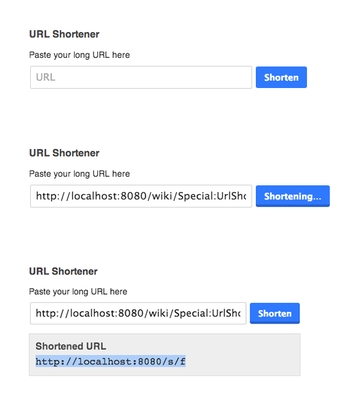
URL shortener is a service which —
- Takes a long URL and creates a shorter URL
- Takes Short URL and redirects the user to the original Long URL
Examples — goo.gl, tinyurl etc
Shortened URL should be random and unique. It should be a combination of characters ( A-Z, a-z) and numbers ( 0–9).
Some key components of URL shortener ( functionalities):
- Shortening algorithm: The URL shortener would need to have a way to convert long URLs into shorter, unique codes. This could be achieved using a hash function or a base-conversion algorithm.
- Redirection: The short code generated by the shortening algorithm needs to be associated with the original URL, and the short code should redirect the user to the original URL when clicked.
- URL storage: The original URLs and the associated short codes need to be stored in a database, and should be designed to handle a large number of records.
- User accounts: Users should have the ability to create an account and have their own custom short URLs.
- Analytics: The URL shortener would need to track usage and engagement metrics, including click-through rate and number of clicks for each shortened link.
- Security: The shortener would need to be designed with security in mind, to protect user data and prevent unauthorized access.
- Scalability: The URL shortener needs to be able to handle a large number of requests and high traffic loads. This would involve designing the application to be scalable, including using technologies such as load balancers and distributed systems.
- API: The URL shortener should provide an API to enable developers to shorten and expand URLs programmatically.
- Custom short domains: The shortener should allow users to use their own custom short domains to shorten the URLs.
- Link Expiration: The shortener should allow users to set expiration date for shortened links.
Let’s understand 3 more concepts which will be used later in the detailed design.
Zookeeper
It’s a component that retains the count ( similar to apache kafka) and assign random number ranges for each server.
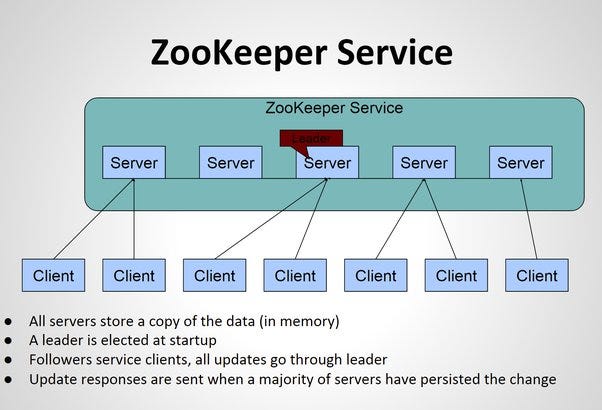
In a distributed system, ZooKeeper is a software service that acts as a centralized coordination service for distributed systems. It allows for maintaining configuration information, naming, providing distributed synchronization, and providing group services. The function of ZooKeeper is to coordinate and manage the distributed systems, by providing a simple and reliable interface for distributed applications to access and update the configuration information, and to coordinate and synchronize the activities of the distributed systems. The role of a ZooKeeper is similar to a traditional zookeeper, in that it is responsible for maintaining the overall health and well-being of the distributed system, and ensuring that it runs smoothly and efficiently.
A simple ZooKeeper client in Python using the kazoo library:
import time
from kazoo.client import KazooClient
zk = KazooClient(hosts='127.0.0.1:2181')
zk.start()# Create a node in ZooKeeper
zk.create("/myapp/node1", b"data1", makepath=True)# Read the data stored in the node
data, stat = zk.get("/myapp/node1")
print("Node data:", data.decode())# Update the data stored in the node
zk.set("/myapp/node1", b"data2")
data, stat = zk.get("/myapp/node1")
print("Updated node data:", data.decode())# Delete the node
zk.delete("/myapp/node1")# Check if the node exists
if zk.exists("/myapp/node1"):
print("Node exists")
else:
print("Node does not exist")zk.stop()In this example, we start by creating a connection to the ZooKeeper server using the KazooClient class. We then create a node in ZooKeeper by calling the create method. The get method is used to read the data stored in the node, and the set method is used to update the data stored in the node. The delete method is used to delete the node, and the exists method is used to check if the node still exists. Finally, we close the connection to the ZooKeeper server by calling stop.
Base 62
Base 62 is an encoding scheme which uses 62 characters ( a-z, A-Z) and numbers (0–9) is 26+26+10 = 62.
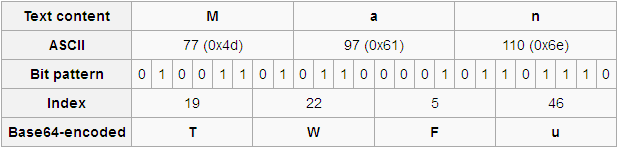
Base 62 is a numeral system that uses 62 as its base, rather than the common base of 10 used in the decimal system or base 16 used in the hexadecimal system. In base 62, there are 62 different digits or characters that can be used to represent numbers, rather than the 10 digits used in the decimal system. These 62 characters typically include the digits 0–9, the uppercase and lowercase letters of the English alphabet, and other characters such as +, /, or -. Using base 62 allows for a more compact representation of numbers, as fewer characters are needed to represent a given value than in base 10 or base 16. It is often used in shortening URL, encoding unique id and other similar use cases.
MD5 Hash
It’s a cryptographic hash algorithm which is used to generate 128 bit digest when a string of any length is input using the complex maths formula. It converts data into blocks of specific sizes.
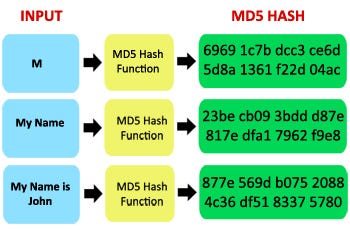
MD5 (Message-Digest algorithm 5) is a widely-used cryptographic hash function that produces a 128-bit (16-byte) hash value, typically expressed as a 32-digit hexadecimal number. It is a one-way function, meaning that it takes an input (or ‘message’) and returns a fixed-size string of characters, which is a ‘digest’ that is unique to the original input. The same input will always produce the same output, but even a small change to the input will produce a very different output.
Here’s an example of how to calculate the MD5 hash of a string in Python:
import hashlibdef get_md5_hash(data):
md5 = hashlib.md5()
md5.update(data.encode())
return md5.hexdigest()data = "Hello World!"
hash = get_md5_hash(data)
print("MD5 hash of '{}': {}".format(data, hash))In this example, we first import the hashlib library and define a function get_md5_hash that takes a string as input and returns its MD5 hash. To calculate the hash, we create an instance of the md5 hash function from the hashlib library. We then use the update method to add the data to the hash function, and finally use the hexdigest method to get the hexadecimal representation of the hash. In this example, the output of the program is the MD5 hash of the string "Hello World!". Note that the update method expects the input data to be of type bytes, so we need to encode the input string to bytes using the encode method before passing it to update.
It is commonly used to verify the integrity of files, to ensure that a transferred file has been received without any errors, and to check for duplicates in a large data set. It is also used in various encryption and authentication protocols, such as storing hashed passwords in a database.
Important Features
Convert Long URL to Tiny URL
Convert Tiny URL into Long URL
Scaling Requirements — Capacity Estimation
Let’s say —
About ~80 Million URL’s are generated everyday.
Write operations per second —
80Million/24/3600 = 930 write operations per second
Let’ assume, read to write ratio is 8:1, then read operations per second —
930 * 8 = 7440 read operations per second
Average URL length is 90bytes
Storage Requirement —
80 Million * 90 = 7GB /day
No of records after 5 years —
80Million * 365 * 5 = 146 Billion
For next 5 years, the storage requirements would be —
90Bytes * 5 * 146 Billion = 65.7 TB
Data Model — ER requirements
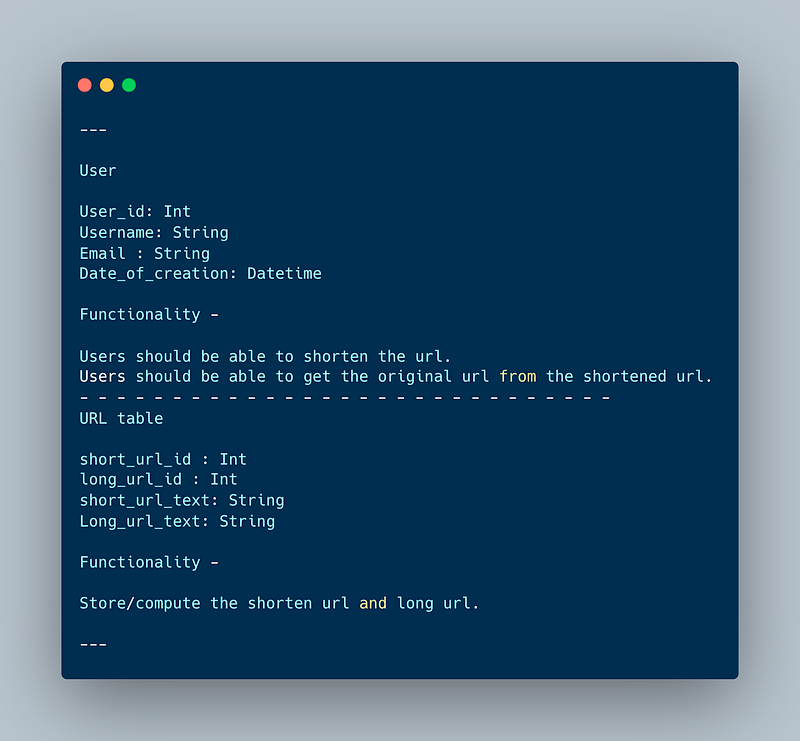
User
User_id: Int
Username: String
Email : String
Date_of_creation: Datetime
Functionality —
Users should be able to shorten the url.
Users should be able to get the original url from the shortened url.
— — — — — — — — — — — — — — — — — — — — — — — — — — — — —
URL table
short_url_id : Int
long_url_id : Int
short_url_text: String
Long_url_text: String
Functionality —
Store/compute the shorten url and long url.
High Level Design
Assumptions /Considerations
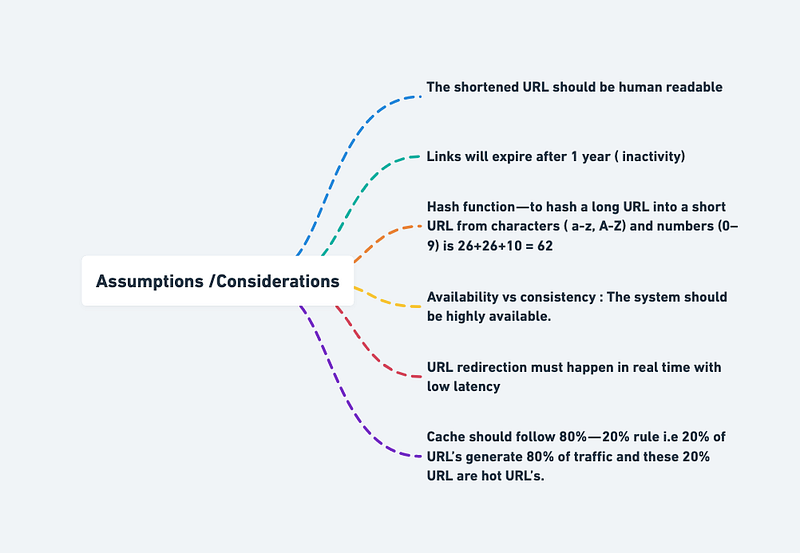
- The shortened URL should be human readable
- Links will expire after 1 year ( inactivity)
- Hash function — to hash a long URL into a short URL from characters ( a-z, A-Z) and numbers (0–9) is 26+26+10 = 62
- Availability vs consistency : The system should be highly available.
- URL redirection must happen in real time with low latency
- Cache should follow 80% — 20% rule i.e 20% of URL’s generate 80% of traffic and these 20% URL are hot URL’s.
— — — — — — — — — — — — — — — — — — — — — — — — — — — — — -
Components
- Mobile/Web based Clients : Users
- Load Balancers : To allocate requests to designated Application server using consistent hashing
- Application servers and Database servers
- NoSQL Database and replicas : Cassandra ( Key Value Store)
- Cache Server
— — — — — — — — — — — — — — — — — — — — — — — — — — — — — -
Services
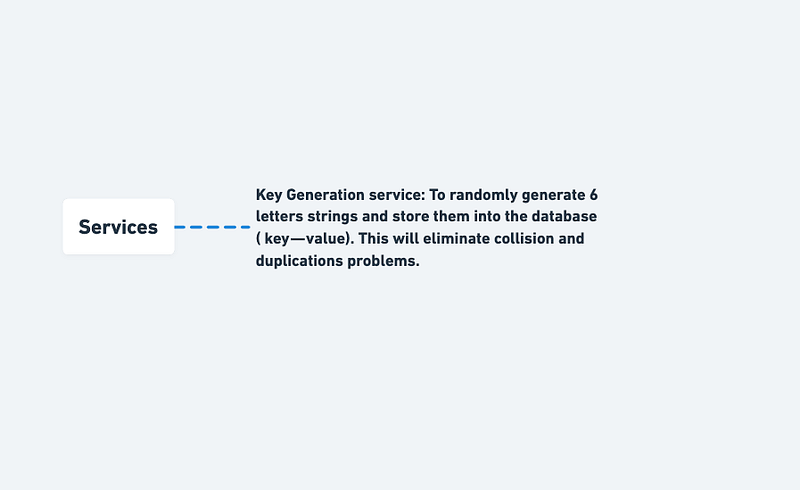
Key Generation service: To randomly generate 6 letters strings and store them into the database ( key — value). This will eliminate collision and duplications problems.
A microservice in Python that implements the functionality of a URL shortener:
import flask
import pymongo
app = flask.Flask(__name__)# Connect to the database
client = pymongo.MongoClient("mongodb://localhost:27017/")
db = client["url_shortener"]
urls = db["urls"]# Define an endpoint for shortening a URL
@app.route("/shorten", methods=["POST"])
def shorten_url():
# Retrieve the URL to be shortened from the request
long_url = flask.request.form["long_url"] # Generate a unique identifier for the URL
url_id = generate_unique_id() # Store the URL in the database
urls.insert_one({"_id": url_id, "long_url": long_url}) # Return the shortened URL
return flask.jsonify({"short_url": f"http://localhost:5002/{url_id}"})# Define an endpoint for resolving a shortened URL
@app.route("/<url_id>", methods=["GET"])
def resolve_url(url_id):
# Retrieve the long URL from the database
url = urls.find_one({"_id": url_id}) # Return the long URL
return flask.redirect(url["long_url"])# Example usage
if __name__ == "__main__":
app.run(port=5002)In this example, the microservice provides two endpoints for the following operations: shortening a URL and resolving a shortened URL. The microservice uses MongoDB to store the URLs, and the unique identifier for each URL is generated using a generate_unique_id function (which is not shown in this code).
API Design
Implementation —
from flask import Flask, jsonify, request
import string
import random
import redis
app = Flask(__name__)# Initialize Redis client
redis_client = redis.Redis(host='localhost', port=6379, db=0)# Endpoint for shortening a URL
@app.route('/shorten', methods=['POST'])
def shorten_url():
# Get URL from request
url = request.json['url']
# Generate short code
short_code = generate_short_code()
# Store short code and URL in Redis
redis_client.set(short_code, url)
# Return short URL
short_url = request.host_url + short_code
return jsonify({'short_url': short_url})# Endpoint for redirecting a short URL to the original URL
@app.route('/<string:short_code>', methods=['GET'])
def redirect_url(short_code):
# Get URL from Redis
url = redis_client.get(short_code)
# Redirect to original URL
if url:
return redirect(url.decode(), code=302)
else:
return jsonify({'message': 'Short code not found'})# Helper function for generating a random short code
def generate_short_code():
characters = string.ascii_letters + string.digits
while True:
short_code = ''.join(random.choice(characters) for i in range(6))
if not redis_client.get(short_code):
return short_codeif __name__ == '__main__':
app.run(debug=True)In this implementation, we have two endpoints:
/shorten(POST): This endpoint is used to shorten a URL. The URL is passed in the request body as a JSON object with the key"url". The endpoint generates a random short code and stores the short code and the original URL in Redis. It then returns the short URL as a JSON object with the key"short_url"./<short_code>(GET): This endpoint is used to redirect a short URL to the original URL. The short code is passed as part of the endpoint URL. The endpoint retrieves the original URL from Redis and redirects the request to the original URL using a 302 redirect.
Shorten the link
- Type : POST
- POST:/data/shorten
Body{
long _url = “”
}
— — — — — — — — — — — — — — — — — — — — — — — — — — — — — -
URL redirection
- Type : GET
- GET :api/data/shortURL
Here’s an example of a basic implementation of a URL shortener API in Python using the Flask framework:
from flask import Flask, request
import hashlib
import jsonapp = Flask(__name__)# Create a database to store the mapping of short URLs to original URLs
short_to_long_url_mapping = {}
long_to_short_url_mapping = {}# Define the hash function to generate a unique short URL
def get_short_url(long_url):
# Use the SHA-256 hash function to generate a unique hash for the long URL
hash = hashlib.sha256(long_url.encode()).hexdigest()[:6]
# Return the shortened URL
return "http://example.com/" + hash# Route to handle URL shortening requests
@app.route("/shorten", methods=["POST"])
def shorten_url():
# Extract the long URL from the request body
long_url = request.get_json()["long_url"]
# Check if the long URL has already been shortened
if long_url in long_to_short_url_mapping:
return json.dumps({"short_url": long_to_short_url_mapping[long_url]})
# If the long URL has not been shortened, generate a new short URL
short_url = get_short_url(long_url)
# Store the mapping of the short URL to the long URL
short_to_long_url_mapping[short_url] = long_url
long_to_short_url_mapping[long_url] = short_url
# Return the short URL
return json.dumps({"short_url": short_url})# Route to handle URL redirects
@app.route("/<short_url>")
def redirect_url(short_url):
# Look up the long URL associated with the short URL
long_url = short_to_long_url_mapping.get(short_url)
# If the short URL is not in the database, return an error
if not long_url:
return "Error: URL not found", 404
# Otherwise, redirect to the long URL
return redirect(long_url)if __name__ == "__main__":
app.run(debug=True)Basic Low Level Design
import java.util.HashMap;
import java.util.Map;
import java.util.Random;
class URLShortener {
private Map<String, String> shortToOriginal;
private Map<String, String> originalToShort;
private static final String CHARACTERS = "abcdefghijklmnopqrstuvwxyzABCDEFGHIJKLMNOPQRSTUVWXYZ0123456789";
private static final int SHORT_LENGTH = 6;
public URLShortener() {
this.shortToOriginal = new HashMap<>();
this.originalToShort = new HashMap<>();
}
public String shortenURL(String originalURL) {
if (originalToShort.containsKey(originalURL)) {
return originalToShort.get(originalURL);
} else {
String shortURL = generateShortURL();
shortToOriginal.put(shortURL, originalURL);
originalToShort.put(originalURL, shortURL);
return shortURL;
}
}
public String getOriginalURL(String shortURL) {
return shortToOriginal.get(shortURL);
}
private String generateShortURL() {
StringBuilder sb = new StringBuilder();
Random random = new Random();
for (int i = 0; i < SHORT_LENGTH; i++) {
int index = random.nextInt(CHARACTERS.length());
sb.append(CHARACTERS.charAt(index));
}
return sb.toString();
}
}
public class URLShortenerApp {
public static void main(String[] args) {
URLShortener urlShortener = new URLShortener();
// Shorten URLs
String shortURL1 = urlShortener.shortenURL("https://www.example.com/page1");
String shortURL2 = urlShortener.shortenURL("https://www.example.com/page2");
String shortURL3 = urlShortener.shortenURL("https://www.example.com/page3");
// Retrieve original URLs
String originalURL1 = urlShortener.getOriginalURL(shortURL1);
String originalURL2 = urlShortener.getOriginalURL(shortURL2);
String originalURL3 = urlShortener.getOriginalURL(shortURL3);
System.out.println("Original URL for " + shortURL1 + ": " + originalURL1);
System.out.println("Original URL for " + shortURL2 + ": " + originalURL2);
System.out.println("Original URL for " + shortURL3 + ": " + originalURL3);
}
}Complete Detailed Design
( Zoom it)
Code
URL shortening is a technique where a long URL is shortened to a shorter version that redirects to the original URL. This is useful in situations where long URLs are difficult to share or remember, such as on social media platforms or in text messages.
In this task, we will implement a URL shortener using Python.
To implement a URL shortener, we will make use of a third-party library called pyshorteners. This library provides an easy-to-use API for shortening and expanding URLs. To install this library, you can use pip:
pip install pyshorteners
Here is the Python code for a URL shortener that takes a long URL and creates a shorter URL:
import pyshorteners# Create an instance of the pyshorteners.Shortener() class
shortener = pyshorteners.Shortener()# Long URL to be shortened
long_url = "https://www.example.com/a/very/long/url"# Shorten the URL
short_url = shortener.tinyurl.short(long_url)# Print the shortened URL
print("Short URL:", short_url)In this code, we first import the pyshorteners library and create an instance of the Shortener() class. We then define the long URL that we want to shorten, and call the short() method of the Shortener() instance to generate a shortened URL. Finally, we print the shortened URL.
To redirect a user from a short URL to the original long URL, we can make use of the expand() method of the Shortener() class. Here is the code for redirecting a user from a short URL to the original long URL:
import pyshorteners# Create an instance of the pyshorteners.Shortener() class
shortener = pyshorteners.Shortener()# Short URL to be expanded
short_url = "https://tinyurl.com/abc123"# Expand the URL
long_url = shortener.expand(short_url)# Redirect the user to the long URL
print("Redirecting to:", long_url)In this code, we first import the pyshorteners library and create an instance of the Shortener() class. We then define the short URL that we want to expand, and call the expand() method of the Shortener() instance to retrieve the original long URL. Finally, we print the long URL and redirect the user to that URL.
More on URL shortener System Design —
URL Shortening Algorithm:
To generate unique and short URLs, we can use a combination of alphanumeric characters. One commonly used technique is base62 encoding, which uses the characters [A-Z], [a-z], and [0–9] to represent the URL.
Here’s an example of a URL shortening algorithm using base62 encoding in Python:
import stringdef shorten_url(url):
characters = string.ascii_letters + string.digits
base = len(characters)
short_url = "" # Convert the URL into a unique integer
url_hash = hash(url) # Convert the integer into a base62 representation
while url_hash > 0:
url_hash, remainder = divmod(url_hash, base)
short_url = characters[remainder] + short_url return short_url# Example usage
long_url = "https://www.example.com/some/long/url"
short_url = shorten_url(long_url)
print(short_url)URL Redirection:
To handle URL redirection from the shortened URL to the original URL, we can use a lookup mechanism that maps the shortened URL to the original URL in a database.
Here’s an example of a URL redirection system in Python:
import sqlite3
from flask import Flask, redirect, abortapp = Flask(__name__)
db = sqlite3.connect("urls.db") # Assuming a SQLite database@app.route("/<short_url>")
def redirect_url(short_url):
# Look up the original URL in the database
cursor = db.cursor()
cursor.execute("SELECT original_url FROM urls WHERE short_url=?", (short_url,))
result = cursor.fetchone() if result:
original_url = result[0]
return redirect(original_url, code=301) # Perform a 301 redirect
else:
abort(404) # Short URL not foundif __name__ == "__main__":
app.run()Link Analytics and Tracking:
To collect and analyze click data for link analytics, we can record each click event and associated information such as the referring URL and geographic information in a database.
Here’s an example of a link analytics and tracking system in Python:
import sqlite3db = sqlite3.connect("analytics.db") # Assuming a SQLite databasedef track_click(short_url, referring_url, country):
# Save the click event in the database
cursor = db.cursor()
cursor.execute("INSERT INTO clicks (short_url, referring_url, country) VALUES (?, ?, ?)",
(short_url, referring_url, country))
db.commit()# Example usage
short_url = "abc123"
referring_url = "https://www.referrer.com"
country = "US"
track_click(short_url, referring_url, country)Scalability and Performance:
Horizontal and Vertical Scaling:
Horizontal scaling involves adding more servers or instances to handle increased traffic and URL generation. It can be achieved by distributing the workload across multiple servers.
Vertical scaling involves increasing the resources (CPU, memory, etc.) of an existing server to handle increased traffic and URL generation.
# Horizontal scaling example using multiple server instances
def handle_request(request):
# Handle request logic
pass# Vertical scaling example using multithreading
import threadingdef handle_request(request):
# Handle request logic
passdef start_server():
# Start the server
pass# Create multiple threads to handle requests concurrently
for i in range(5):
t = threading.Thread(target=start_server)
t.start()Caching Mechanisms:
Caching mechanisms improve system performance by storing frequently accessed data in a cache, reducing the need to fetch the data from the original source repeatedly. In-memory caching and content delivery networks (CDNs) are common caching techniques.
# In-memory caching example using Python dictionary
cache = {}def get_from_cache(key):
if key in cache:
return cache[key]
else:
# Fetch data from the database
data = fetch_from_database(key)
cache[key] = data
return data# CDN caching example using Flask-Caching extension
from flask import Flask
from flask_caching import Cacheapp = Flask(__name__)
cache = Cache(app, config={'CACHE_TYPE': 'simple'})@app.route('/data/<key>')
@cache.cached(timeout=300) # Cache the response for 300 seconds (5 minutes)
def get_data(key):
# Fetch data from the database
data = fetch_from_database(key)
return dataif __name__ == '__main__':
app.run()Load Balancing, Sharding, and Replication:
Load balancing distributes incoming requests across multiple servers to evenly distribute the load and prevent any single server from being overwhelmed.
Sharding involves partitioning the data across multiple database instances to distribute the load and improve performance.
Replication involves creating copies of the data on multiple servers to ensure fault tolerance and improve read performance.
Implementation of load balancing, sharding, and replication may depend on the specific technologies and frameworks used. Here’s an example of load balancing using a reverse proxy server like Nginx:
# Nginx configuration example for load balancing
http {
upstream backend {
server backend1.example.com;
server backend2.example.com;
server backend3.example.com;
} server {
listen 80;
location / {
proxy_pass http://backend;
}
}
}Data Storage and Persistence:
Designing systems to store and retrieve shortened URLs and their mappings:
# Example using a relational database (SQLite)
import sqlite3def store_url_mapping(short_url, original_url):
conn = sqlite3.connect('url_shortener.db')
cursor = conn.cursor()
cursor.execute('INSERT INTO url_mappings (short_url, original_url) VALUES (?, ?)', (short_url, original_url))
conn.commit()
conn.close()def get_original_url(short_url):
conn = sqlite3.connect('url_shortener.db')
cursor = conn.cursor()
cursor.execute('SELECT original_url FROM url_mappings WHERE short_url = ?', (short_url,))
result = cursor.fetchone()
conn.close()
return result[0] if result else NoneChoosing appropriate database technologies (e.g., relational, NoSQL) for efficient data storage:
# Example using a NoSQL database (MongoDB)
from pymongo import MongoClientclient = MongoClient('mongodb://localhost:27017/')
db = client['url_shortener']def store_url_mapping(short_url, original_url):
db.url_mappings.insert_one({'short_url': short_url, 'original_url': original_url})def get_original_url(short_url):
result = db.url_mappings.find_one({'short_url': short_url})
return result['original_url'] if result else NoneHandling data consistency and durability:
# Example using transaction for data consistency in a relational database (SQLite)
import sqlite3def store_url_mapping(short_url, original_url):
conn = sqlite3.connect('url_shortener.db')
cursor = conn.cursor()
try:
conn.execute('BEGIN')
cursor.execute('INSERT INTO url_mappings (short_url, original_url) VALUES (?, ?)', (short_url, original_url))
conn.commit()
except Exception as e:
conn.execute('ROLLBACK')
raise e
finally:
conn.close()Customization and Vanity URLs:
Implementing features to allow users to customize their shortened URLs:
# Example allowing users to customize their shortened URLs
def create_custom_short_url(custom_alias, original_url):
# Check if the custom alias is available
if is_custom_alias_available(custom_alias):
store_url_mapping(custom_alias, original_url)
return custom_alias
else:
# Handle conflict or provide alternative options
return generate_alternative_short_url()def is_custom_alias_available(custom_alias):
# Check if the custom alias is available in the database
return not get_original_url(custom_alias)def generate_alternative_short_url():
# Generate alternative short URL using a different algorithm or approach
passHandling reserved keywords, restrictions, and conflicts:
# Example handling reserved keywords and restrictions
RESERVED_KEYWORDS = ['admin', 'settings', 'dashboard']def is_custom_alias_available(custom_alias):
# Check if the custom alias is available in the database and not a reserved keyword
return not get_original_url(custom_alias) and custom_alias not in RESERVED_KEYWORDSEnabling vanity URLs for branding purposes:
# Example allowing vanity URLs for branding purposes
def create_vanity_url(original_url, vanity_domain):
vanity_url = generate_vanity_url(vanity_domain)
store_url_mapping(vanity_url, original_url)
return vanity_urldef generate_vanity_url(vanity_domain):
# Generate a vanity URL based on the provided vanity domain and other criteria
passUser Management and Authentication:
Implementing user registration and authentication:
# Example implementing user registration and authentication
import bcrypt
def register_user(username, password):
# Hash the password before storing it in the database
hashed_password = bcrypt.hashpw(password.encode(), bcrypt.gensalt())
store_user(username, hashed_password)
def authenticate_user(username, password):
# Retrieve the user's hashed password from the database
hashed_password = get_user_password(username)
if hashed_password and bcrypt.checkpw(password.encode(), hashed_password.encode()):
# Passwords match, authentication successful
return True
else:
# Invalid username or password
return FalseHandling user profiles, permissions, and access controls:
# Example handling user profiles, permissions, and access controls
def create_user_profile(user_id, profile_data):
# Store the user's profile data in the database
store_user_profile(user_id, profile_data)
def get_user_permissions(user_id):
# Retrieve the user's permissions from the database
return get_permissions(user_id)
def has_permission(user_id, permission):
# Check if the user has the specified permission
user_permissions = get_user_permissions(user_id)
return permission in user_permissionsIntegrating with third-party authentication providers (e.g., OAuth):
# Example integrating with third-party authentication providers using OAuth
from oauthlib.oauth2 import BackendApplicationClient
from requests_oauthlib import OAuth2Session
def authenticate_with_oauth(client_id, client_secret, oauth_token_url):
client = BackendApplicationClient(client_id=client_id)
oauth = OAuth2Session(client=client)
token = oauth.fetch_token(token_url=oauth_token_url, client_id=client_id, client_secret=client_secret)
# Access protected resources using the obtained token
response = oauth.get('https://api.example.com/protected_resource')
return response.json()API Design and Integration:
Designing user-friendly APIs for integrating the URL shortener service:
# Example designing user-friendly APIs using Flask framework
from flask import Flask, request, jsonifyapp = Flask(__name__)@app.route('/shorten', methods=['POST'])
def shorten_url():
original_url = request.form['url']
short_url = shorten(original_url)
return jsonify({'short_url': short_url})@app.route('/analytics', methods=['GET'])
def get_link_analytics():
short_url = request.args.get('short_url')
link_analytics = get_link_analytics(short_url)
return jsonify(link_analytics)@app.route('/redirect/<short_url>', methods=['GET'])
def redirect_url(short_url):
original_url = get_original_url(short_url)
if original_url:
# Perform redirection
return redirect(original_url, code=301)
else:
# Handle invalid or expired URLs
return jsonify({'error': 'Invalid or expired URL'})if __name__ == '__main__':
app.run()Handling API authentication, rate limiting, and data access controls:
# Example handling API authentication, rate limiting, and data access controls using Flask framework
from flask import Flask, request, jsonifyapp = Flask(__name__)@app.route('/shorten', methods=['POST'])
@authenticate_api_request
@rate_limit_exceeded
def shorten_url():
original_url = request.form['url']
short_url = shorten(original_url)
return jsonify({'short_url': short_url})@app.route('/analytics', methods=['GET'])
@authenticate_api_request
@rate_limit_exceeded
def get_link_analytics():
short_url = request.args.get('short_url')
link_analytics = get_link_analytics(short_url)
return jsonify(link_analytics)@app.route('/redirect/<short_url>', methods=['GET'])
def redirect_url(short_url):
original_url = get_original_url(short_url)
if original_url:
# Perform redirection
return redirect(original_url, code=301)
else:
# Handle invalid or expired URLs
return jsonify({'error': 'Invalid or expired URL'})if __name__ == '__main__':
app.run()Providing comprehensive documentation and SDKs for developers:
# Example providing comprehensive documentation and SDKs for developers
# You can use tools like Swagger or Flask-RESTful to generate API documentation# Documentation for API endpoints and their functionalities
"""
POST /shorten
Description: Shortens a given URL.
Parameters:
- url: The original URL to be shortened.
Returns:
- short_url: The shortened URL.GET /analytics
Description: Retrieves analytics data for a given shortened URL.
Parameters:
- short_url: The shortened URL.
Returns:
- link_analytics: Analytics data for the shortened URL.GET /redirect/<short_url>
Description: Performs a redirection to the original URL associated with the given shortened URL.
Parameters:
- short_url: The shortened URL.
Returns:
- Redirects to the original URL or returns an error if the URL is invalid or expired.
"""# SDK for integrating with the URL shortener service
class URLShortenerClient:
def __init__(self, base_url, api_key):
self.base_url = base_url
self.api_key = api_key def shorten_url(self, original_url):
# Implementation of the SDK function to shorten a URL
endpoint = '/shorten'
headers = {'Authorization': self.api_key}
data = {'url': original_url}
response = requests.post(self.base_url + endpoint, headers=headers, data=data)
return response.json() def get_link_analytics(self, short_url):
# Implementation of the SDK function to retrieve link analytics
endpoint = '/analytics'
headers = {'Authorization': self.api_key}
params = {'short_url': short_url}
response = requests.get(self.base_url + endpoint, headers=headers, params=params)
return response.json() def redirect_url(self, short_url):
# Implementation of the SDK function to perform URL redirection
endpoint = '/redirect/' + short_url
Error Handling and Monitoring:
Designing error handling mechanisms for unexpected scenarios involves identifying potential errors and exceptions that can occur in the URL shortener system and implementing strategies to handle them effectively. This includes proper error messages, logging error details for debugging purposes, and providing fallback mechanisms in case of failures.
Implementing logging and monitoring systems is crucial for system health and performance. Logging allows capturing important events, errors, and informational messages that occur during the operation of the system. Monitoring systems help track the system’s performance metrics, such as response time, throughput, and resource utilization, to identify bottlenecks and optimize the system.
Implementing alerts and notifications is important to ensure prompt actions in case of critical errors or system downtime. This can involve sending notifications via email, SMS, or other communication channels to the system administrators or relevant stakeholders.
Here’s an example of implementing error handling, logging, and monitoring using Python’s logging module:
import logging# Configure the logger
logging.basicConfig(filename='url_shortener.log', level=logging.ERROR, format='%(asctime)s %(levelname)s %(message)s')def shorten_url(url):
try:
# Code for shortening the URL
# ...
return short_url
except Exception as e:
logging.error('An error occurred while shortening the URL: %s', str(e))
return Nonedef redirect_url(short_url):
try:
# Code for redirecting to the original URL
# ...
return original_url
except Exception as e:
logging.error('An error occurred while redirecting the URL: %s', str(e))
return Nonedef monitor_system():
# Code for monitoring system health and performance
# ...def send_alert(message):
# Code for sending alerts and notifications
# ...# Example usage
short_url = shorten_url('https://www.example.com')
if short_url is None:
send_alert('Error occurred while shortening the URL')original_url = redirect_url('abc123')
if original_url is None:
send_alert('Error occurred while redirecting the URL')monitor_system()Error Handling and Monitoring section, as well as the Compliance and Legal Considerations section:
import logging
import smtplib# Configure the logger
logging.basicConfig(filename='url_shortener.log', level=logging.ERROR, format='%(asctime)s %(levelname)s %(message)s')def shorten_url(url):
try:
# Code for shortening the URL
# ...
return short_url
except Exception as e:
logging.error('An error occurred while shortening the URL: %s', str(e))
return Nonedef redirect_url(short_url):
try:
# Code for redirecting to the original URL
# ...
return original_url
except Exception as e:
logging.error('An error occurred while redirecting the URL: %s', str(e))
return Nonedef monitor_system():
# Code for monitoring system health and performance
# ...def send_alert(message):
# Code for sending alerts and notifications
try:
# Code for sending email alert
smtp_server = 'smtp.example.com'
sender_email = 'alerts@example.com'
receiver_email = 'admin@example.com'
subject = 'URL Shortener Alert'
body = message email_message = f"Subject: {subject}\n\n{body}" with smtplib.SMTP(smtp_server) as server:
server.sendmail(sender_email, receiver_email, email_message) except Exception as e:
logging.error('An error occurred while sending an alert: %s', str(e))def handle_error_and_alert():
# Example usage
short_url = shorten_url('https://www.example.com')
if short_url is None:
send_alert('Error occurred while shortening the URL') original_url = redirect_url('abc123')
if original_url is None:
send_alert('Error occurred while redirecting the URL') monitor_system()def handle_compliance():
# Code for handling compliance and legal considerations
# ...# Example usage
handle_error_and_alert()
handle_compliance()System Design — Agoda
We will be discussing in depth -
- What is Agoda
- Important Features
- Scaling Requirements
- Data Model — ER requirements
- High Level Design
- Basic Low Level Design
- API Design
- Complete Detailed Design
- Code implementation

What is Agoda
Agoda is a prominent online travel booking platform that connects travelers with a vast selection of accommodation options worldwide. It offers a user-friendly interface for searching, booking, and managing hotel reservations, vacation rentals, flights, and other travel-related services.
Important Features
- Search and Filtering: Agoda provides a comprehensive search functionality to allow users to find suitable accommodations based on their preferences, such as location, price range, amenities, and user ratings.
- User Profiles and Personalization: Registered users can create profiles, save favorite properties, and receive personalized recommendations based on their browsing and booking history.
- Booking and Payment: Agoda enables users to make secure bookings and facilitates various payment methods to ensure a seamless and convenient transaction experience.
- Reviews and Ratings: Users can read and submit reviews and ratings for properties, helping others make informed decisions.
- Multi-Language and Multi-Currency Support: Agoda supports multiple languages and currencies to cater to a diverse global user base.
Scaling Requirements — Capacity Estimation
Let’s assume —
Total number of users: 100 million
Daily active users (DAU): 20 million
Number of accommodations booked by user/day: 2
Total number of accommodations booked per day: 40 million accommodations/day
Since the system is read-heavy, let’s assume the read-to-write ratio to be 100:1.
Total number of accommodations listed per day = 1/100 * 40 million = 400,000 accommodations/day
Storage Estimation:
Let’s assume an average size of each accommodation listing to be 1 MB.
Total Storage per day: 400,000 * 1 MB = 400 GB/day
For the next 3 years, 400 GB * 365 * 3 = 438.3 TB
Requests per second: 40 million / (24 hours * 3600 seconds) = 462 requests/second
Horizontal Scalability: The architecture should be able to scale horizontally by adding more servers or instances to distribute the load and handle increased user demand.
Caching: Implementing a caching layer can help improve performance and reduce database load by storing frequently accessed data in memory.
Load Balancing: Utilizing load balancers will distribute incoming traffic across multiple servers, ensuring optimal resource utilization and preventing bottlenecks.
Database Scaling: The data storage layer should support horizontal scaling to handle the increasing volume of user and property data efficiently.
Data Model — ER requirements
Users:
- Fields: UserID, Username, Email, Password
Properties:
- Fields: PropertyID, Name, Location, Price, Amenities
Bookings:
- Fields: BookingID, UserID, PropertyID, CheckInDate, CheckOutDate, Guests
Reviews:
- Fields: ReviewID, PropertyID, UserID, Rating, Comment
Relationships:
- Users can have multiple Bookings (one-to-many relationship).
- Properties can have multiple Reviews (one-to-many relationship).
- Users can post multiple Reviews (one-to-many relationship).
High Level Design
Assumptions:
- The system is read-heavy with more users searching for properties than posting.
- Availability and reliability are more important than consistency.
- The system should handle a large number of concurrent requests and provide low latency.
Main Components:
- Mobile Client: Represents the users accessing Agoda through mobile devices.
- Application Servers: Handle user requests, perform business logic, and interact with other components.
- Load Balancer: Routes and distributes incoming requests to application servers.
- Cache (Memcache): Stores frequently accessed data to improve performance.
- CDN: Content Delivery Network to optimize latency and throughput.
- Database: Stores data using a NoSQL database, ensuring high reliability.
- Storage (e.g., HDFS or Amazon S3): Stores and retrieves property photos.
Services:
- Search and Filtering Service: Provides search functionality for users to find suitable properties based on location, price range, amenities, etc.
- User Management Service: Handles user registration, authentication, and profile management.
- Booking and Payment Service: Facilitates secure property bookings and payment transactions.
- Review Service: Manages the submission and retrieval of property reviews and ratings.
- Feed Generation Service: Generates personalized feeds for users based on their preferences and browsing history.
class SearchAndFilterService:
def search_properties(self, location, price_range, amenities):
filtered_properties = []
for property in properties:
if property.location == location and \
property.price >= price_range[0] and property.price <= price_range[1] and \
all(amenity in property.amenities for amenity in amenities):
filtered_properties.append(property)
return filtered_properties
class UserManagementService:
def register_user(self, user):
# Logic for user registration
users.append(user)
def authenticate_user(self, username, password):
for user in users:
if user.username == username and user.password == password:
return True
return False
def update_profile(self, user_id, new_data):
for user in users:
if user.user_id == user_id:
# Update user profile data
user.username = new_data.get('username', user.username)
user.password = new_data.get('password', user.password)
# Update other user attributes
break
class BookingAndPaymentService:
def create_booking(self, user_id, property_id, check_in_date, check_out_date, guests):
booking_id = len(bookings) + 1
booking = Booking(booking_id, user_id, property_id, check_in_date, check_out_date, guests)
bookings.append(booking)
return booking_id
def make_payment(self, booking_id, payment_info):
for booking in bookings:
if booking.booking_id == booking_id:
# Process payment using payment_info
break
class ReviewService:
def submit_review(self, user_id, property_id, rating, comment):
review_id = len(reviews) + 1
review = Review(review_id, user_id, property_id, rating, comment)
reviews.append(review)
def get_reviews(self, property_id):
property_reviews = []
for review in reviews:
if review.property_id == property_id:
property_reviews.append(review)
return property_reviews
class FeedGenerationService:
def generate_feed(self, user_id):
user_feed = []
user_preferences = get_user_preferences(user_id)
for property in properties:
if property.location in user_preferences['locations'] and \
property.price <= user_preferences['max_price'] and \
any(amenity in property.amenities for amenity in user_preferences['amenities']):
user_feed.append(property)
return user_feed
# Example usage of the services
search_service = SearchAndFilterService()
filtered_properties = search_service.search_properties("New York", [100, 200], ["WiFi", "Pool"])
user_service = UserManagementService()
user_service.register_user(user)
booking_service = BookingAndPaymentService()
booking_id = booking_service.create_booking(user_id, property_id, check_in_date, check_out_date, guests)
review_service = ReviewService()
review_service.submit_review(user_id, property_id, rating, comment)
feed_service = FeedGenerationService()
user_feed = feed_service.generate_feed(user_id)User Interface: The front-end layer responsible for rendering the Agoda website or mobile app and providing an intuitive user experience.
Application Servers: The middle-tier servers that handle business logic, process user requests, and communicate with other system components.
Database: The backend storage layer where user data, property information, bookings, reviews, and other relevant data are stored.
External Services: Integration with external services like payment gateways, geolocation APIs, and third-party accommodation providers.
Caching Layer: A cache system to store frequently accessed data and improve performance.
Basic Low Level Design
class User:
def __init__(self, user_id, username, password):
self.user_id = user_id
self.username = username
self.password = password
# Other user attributes
class Property:
def __init__(self, property_id, name, location, price, amenities):
self.property_id = property_id
self.name = name
self.location = location
self.price = price
self.amenities = amenities
# Other property attributes
class Booking:
def __init__(self, booking_id, user_id, property_id, check_in_date, check_out_date, guests):
self.booking_id = booking_id
self.user_id = user_id
self.property_id = property_id
self.check_in_date = check_in_date
self.check_out_date = check_out_date
self.guests = guests
# Other booking attributes
class Review:
def __init__(self, review_id, property_id, user_id, rating, comment):
self.review_id = review_id
self.property_id = property_id
self.user_id = user_id
self.rating = rating
self.comment = comment
# Other review attributes
class Agoda:
def __init__(self):
self.users = {}
self.properties = {}
self.bookings = {}
self.reviews = {}
# Initialize other data structures
def add_user(self, user):
self.users[user.user_id] = user
def get_user_by_id(self, user_id):
return self.users.get(user_id)
def add_property(self, property):
self.properties[property.property_id] = property
def get_property_by_id(self, property_id):
return self.properties.get(property_id)
def create_booking(self, booking):
self.bookings[booking.booking_id] = booking
def create_review(self, review):
self.reviews[review.review_id] = review
# Additional methods for handling other operationsAPI Design
User Registration API:
- Endpoint:
/api/users/register - Method: POST
- Description: Allows users to register a new account on Agoda.
- Request Body:
{ "name": "John Doe", "email": "[email protected]", "password": "password123" }- Success (200 OK):
{ "message": "User registered successfully.", "user_id": "123456789" }- Error (4xx/5xx):
{ "error": "Invalid request. Please provide valid user details." }
Property Search API:
- Endpoint:
/api/properties/search - Method: GET
- Description: Retrieves a list of properties based on search criteria.
- Query Parameters:
location(required): Location of the desired property.check_in(required): Check-in date inYYYY-MM-DDformat.check_out(required): Check-out date inYYYY-MM-DDformat.guests(optional): Number of guests.- Response:
- Success (200 OK):
{ "properties": [ { "property_id": "abcd1234", "name": "Agoda Hotel", "location": "City X", "price": 100, "rating": 4.5 }, { "property_id": "efgh5678", "name": "Agoda Resort", "location": "Beach Y", "price": 200, "rating": 4.8 } ] }- Error (4xx/5xx):
{ "error": "Invalid request. Please provide valid search criteria." }
Booking Creation API:
- Endpoint:
/api/bookings/create - Method: POST
- Description: Creates a new booking for a specific property.
- Request Body:
{ "user_id": "123456789", "property_id": "abcd1234", "check_in": "2023-07-10", "check_out": "2023-07-15", "guests": 2 }- Response:
- Success (200 OK):
{ "message": "Booking created successfully.", "booking_id": "xyz987654" }- Error (4xx/5xx):
{ "error": "Invalid request. Please provide valid booking details." }
from flask import Flask, request, jsonify
app = Flask(__name__)
# User Registration API
@app.route('/api/users/register', methods=['POST'])
def register_user():
user_data = request.get_json()
# Perform validation and user registration logic
# ...
return jsonify({
"message": "User registered successfully.",
"user_id": "123456789"
}), 200
# Property Search API
@app.route('/api/properties/search', methods=['GET'])
def search_properties():
location = request.args.get('location')
check_in = request.args.get('check_in')
check_out = request.args.get('check_out')
guests = request.args.get('guests')
# Perform property search logic
# ...
properties = [
{
"property_id": "abcd1234",
"name": "Agoda Hotel",
"location": "City X",
"price": 100,
"rating": 4.5
},
{
"property_id": "efgh5678",
"name": "Agoda Resort",
"location": "Beach Y",
"price": 200,
"rating": 4.8
}
]
return jsonify({"properties": properties}), 200
# Booking Creation API
@app.route('/api/bookings/create', methods=['POST'])
def create_booking():
booking_data = request.get_json()
# Perform validation and booking creation logic
# ...
return jsonify({
"message": "Booking created successfully.",
"booking_id": "xyz987654"
}), 200
# Run the Flask application
if __name__ == '__main__':
app.run()Complete Detailed Design
Coming soon! It will be covered on youtube channel.
Subscribe to youtube channel :
Complete Code implementation
Search and Filtering:
def search_accommodations(location, price_range, amenities, user_ratings):
# Perform search and filtering logic based on the provided parameters
filtered_accommodations = []
for accommodation in accommodations:
if accommodation.location == location and \
accommodation.price in price_range and \
all(amenity in accommodation.amenities for amenity in amenities) and \
accommodation.rating >= user_ratings:
filtered_accommodations.append(accommodation)
return filtered_accommodationsUser Profiles and Personalization:
class User:
def __init__(self, user_id, name, email):
self.user_id = user_id
self.name = name
self.email = email
self.favorite_properties = [] def add_favorite_property(self, property_id):
self.favorite_properties.append(property_id) def get_personalized_recommendations(self):
# Perform personalized recommendation logic based on user's browsing and booking history
recommended_properties = []
# Logic to determine recommended properties based on user's history
return recommended_propertiesBooking and Payment:
class Booking:
def __init__(self, booking_id, user_id, property_id, check_in, check_out, guests):
self.booking_id = booking_id
self.user_id = user_id
self.property_id = property_id
self.check_in = check_in
self.check_out = check_out
self.guests = guests def make_payment(self, payment_method):
# Perform payment processing logic using the provided payment method
# Logic to process payment
return "Payment successful"Reviews and Ratings:
class Review:
def __init__(self, property_id, user_id, rating, comment):
self.property_id = property_id
self.user_id = user_id
self.rating = rating
self.comment = comment def submit_review(self):
# Perform review submission logic
# Logic to submit a review
return "Review submitted successfully" @staticmethod
def get_reviews(property_id):
# Retrieve the reviews for the specified property
property_reviews = []
# Logic to retrieve reviews for the property
return property_reviewsMulti-Language and Multi-Currency Support:
class Agoda:
def __init__(self, language, currency):
self.language = language
self.currency = currency def set_language(self, language):
self.language = language def set_currency(self, currency):
self.currency = currency def convert_currency(self, amount, target_currency):
# Perform currency conversion logic using exchange rates
converted_amount = 0.0
# Logic to convert amount to the target currency
return converted_amountUser Management API:
POST /users: Creates a new user account.GET /users/{user_id}: Retrieves user information by user ID.PATCH /users/{user_id}: Updates user information.DELETE /users/{user_id}: Deletes a user account.
Property Management API:
POST /properties: Adds a new property.GET /properties/{property_id}: Retrieves property information by property ID.PATCH /properties/{property_id}: Updates property information.DELETE /properties/{property_id}: Deletes a property.
Booking API:
POST /bookings: Creates a new booking.GET /bookings/{booking_id}: Retrieves booking information by booking ID.PATCH /bookings/{booking_id}: Updates booking information.DELETE /bookings/{booking_id}: Cancels a booking.
Review API:
POST /reviews: Creates a new review.GET /reviews/{review_id}: Retrieves review information by review ID.PATCH /reviews/{review_id}: Updates review information.DELETE /reviews/{review_id}: Deletes a review.
from flask import Flask, request
app = Flask(__name__)
agoda = Agoda()
# User Management API
@app.route('/users', methods=['POST'])
def create_user():
data = request.get_json()
user = User(data['user_id'], data['username'], data['password'])
agoda.add_user(user)
return {'message': 'User created successfully'}, 201
@app.route('/users/<user_id>', methods=['GET'])
def get_user(user_id):
user = agoda.get_user_by_id(user_id)
if user:
return {
'user_id': user.user_id,
'username': user.username,
# Include other user attributes as needed
}, 200
else:
return {'message': 'User not found'}, 404
# Property Management API
@app.route('/properties', methods=['POST'])
def create_property():
data = request.get_json()
property = Property(data['property_id'], data['name'], data['location'], data['price'], data['amenities'])
agoda.add_property(property)
return {'message': 'Property added successfully'}, 201
@app.route('/properties/<property_id>', methods=['GET'])
def get_property(property_id):
property = agoda.get_property_by_id(property_id)
if property:
return {
'property_id': property.property_id,
'name': property.name,
# Include other property attributes as needed
}, 200
else:
return {'message': 'Property not found'}, 404
# Booking API
@app.route('/bookings', methods=['POST'])
def create_booking():
data = request.get_json()
booking = Booking(data['booking_id'], data['user_id'], data['property_id'], data['check_in_date'], data['check_out_date'], data['guests'])
agoda.create_booking(booking)
return {'message': 'Booking created successfully'}, 201
# Review API
@app.route('/reviews', methods=['POST'])
def create_review():
data = request.get_json()
review = Review(data['review_id'], data['property_id'], data['user_id'], data['rating'], data['comment'])
agoda.create_review(review)
return {'message': 'Review created successfully'}, 201
if __name__ == '__main__':
app.run()System Design — Razorpay
We will be discussing in depth -
- What is Razorpay
- Important Features
- Scaling Requirements
- Data Model — ER requirements
- High Level Design
- Basic Low Level Design
- API Design
- Complete Detailed Design
- Code implementation

What is Razorpay
Razorpay is a robust and user-friendly online payment gateway that enables businesses to accept and process digital payments securely. With a mission to simplify online transactions, Razorpay provides a wide range of payment solutions, including payment links, subscriptions, UPI (Unified Payments Interface), wallet options, and more.
Important Features
- Payment Gateway: Razorpay offers a reliable and secure payment gateway that allows businesses to accept payments from multiple sources, such as credit cards, debit cards, net banking, UPI, and popular digital wallets.
- Payment Links: This feature allows businesses to generate customized payment links and share them with customers via various channels like email, SMS, or social media. Customers can click on these links to make payments conveniently.
- Subscription Billing: Razorpay supports subscription-based billing models, enabling businesses to set up recurring payments for services or products. It provides automated billing cycles, trial periods, and subscription management capabilities.
- Smart Routing: Razorpay’s smart routing algorithm automatically directs transactions to the most reliable payment gateway based on factors like success rates, currency, and payment mode. This ensures high transaction success rates and better customer experience.
- Payment Reconciliation: Razorpay provides detailed transaction reports, settlement summaries, and reconciliation tools to simplify the accounting process for businesses. This feature helps in tracking and managing payment-related data efficiently.
- Developer-friendly APIs: Razorpay offers robust APIs and SDKs (Software Development Kits) that allow seamless integration with various platforms, including websites, mobile applications, and e-commerce platforms. It provides extensive documentation and developer support to ensure a smooth integration process.
Scaling Requirements — Capacity Estimation
For the sake of simplicity, let’s consider a smaller scale simulation for Razorpay:
Total number of users: 10 million
Daily active users (DAU): 2 million
Number of transactions per user per day: 2
Total number of transactions per day: 4 million transactions/day
Since the system is read-heavy, let’s assume the read-to-write ratio to be 100:1
Total number of transactions recorded per day: 4 million / 100 = 40,000 transactions/day
Storage Estimation:
Let’s assume each transaction record is approximately 1 KB in size.
Total storage per day: 40,000 transactions/day * 1 KB = 40 MB/day
For the next 3 years, 40 MB * 365 days * 3 years = 43.8 GB
Requests per second: 4 million transactions / (24 hours * 3600 seconds) = 46 requests/second
- Horizontal Scalability: The system should be able to handle increased transaction loads by adding more servers or instances. This allows for better distribution of workload and ensures high availability during peak periods.
- Caching Mechanism: Implementing an efficient caching mechanism reduces the load on the database by storing frequently accessed data in memory. This improves response times and overall system performance.
- Distributed Load Balancing: To distribute incoming traffic evenly across multiple servers, a load balancer is used. This helps in preventing overloading of any specific server and ensures optimal resource utilization.
- Database Sharding: To manage the growing volume of transaction data, the system can employ database sharding. Sharding involves partitioning the database across multiple servers to distribute the data load and improve query performance.
Data Model — ER requirements
Users:
- Fields:
- User ID: Integer (Primary Key)
- Username: String
- Email: String
- Password: String
Transactions:
- Fields:
- Transaction ID: Integer (Primary Key)
- User ID: Integer (Foreign Key referencing Users)
- Amount: Decimal
- Currency: String
- Timestamp: DateTime
Payment Methods:
- Fields:
- Payment Method ID: Integer (Primary Key)
- User ID: Integer (Foreign Key referencing Users)
- Method Type: String
- Card Number: String
- Expiry Date: String
High Level Design
Assumptions:
- Razorpay needs to handle a high volume of transactions.
- The system should be designed to handle high availability and reliability.
- The system should have low latency for payment processing.
Main Components :
- Mobile Clients: These are the users accessing the Razorpay system through mobile applications.
- Application Servers: These servers handle the processing of payment requests, user authentication, and other business logic.
- Load Balancer: The load balancer routes and distributes incoming requests across multiple application servers to ensure efficient utilization of resources and high availability.
- Cache (Memcache): The caching system improves performance by storing frequently accessed data in memory, such as user details and payment method information.
- CDN (Content Delivery Network): The CDN improves the delivery of static assets and reduces latency by caching and serving them from edge servers located closer to the users.
- Database: The database stores the user information, transaction records, and payment method details.
- Storage (HDFS or Amazon S3): The storage system is used to store additional data, such as transaction logs and backup files.
Services:
- Payment Service: This service handles payment processing, including authorization, capturing payments, and refunding payments.
- User Service: The user service manages user registration, authentication, and profile management.
- Transaction Service: The transaction service handles the creation and retrieval of transaction records, as well as transaction history.
- Payment Method Service: This service manages payment methods associated with user accounts, allowing users to add, update, or remove payment methods.
- Analytics Service: The analytics service collects and analyzes transaction data to provide insights, fraud detection, and reporting features.
- Notification Service: The notification service sends email or push notifications to users for transaction updates, payment reminders, or other relevant information.
from datetime import datetime
class RazorpayPaymentService:
def __init__(self):
# Initialize payment service configuration
self.payment_gateway = "Razorpay"
def process_payment(self, user_id, amount, currency):
# Logic to process payment using Razorpay payment gateway
# Implementation details omitted
transaction_id = self.generate_transaction_id()
timestamp = datetime.now()
# Perform necessary operations to process the payment
print(f"Payment processed for user {user_id}. Transaction ID: {transaction_id}. Amount: {amount} {currency}.")
return transaction_id
def generate_transaction_id(self):
# Logic to generate a unique transaction ID
# Implementation details omitted
# Generate a unique transaction ID based on timestamp or other criteria
return "TXN123456789" # Placeholder value
class RazorpayUserService:
def __init__(self):
# Initialize user service configuration
pass
def register_user(self, username, email, password):
# Logic to register a new user
# Implementation details omitted
# Perform necessary operations to register the user
print(f"New user registered: {username} ({email})")
def authenticate_user(self, email, password):
# Logic to authenticate a user
# Implementation details omitted
# Perform necessary operations to authenticate the user
user_id = self.get_user_id_by_email(email)
if user_id:
print(f"User {user_id} authenticated successfully.")
else:
print("Invalid credentials.")
def get_user_id_by_email(self, email):
# Logic to retrieve user ID by email
# Implementation details omitted
# Retrieve user ID based on the provided email
return "user123" # Placeholder value
class RazorpayTransactionService:
def __init__(self):
# Initialize transaction service configuration
pass
def get_transaction_details(self, transaction_id):
# Logic to retrieve transaction details
# Implementation details omitted
# Retrieve transaction details based on the provided transaction ID
transaction_details = {
"transaction_id": transaction_id,
"amount": 1000,
"currency": "INR",
"timestamp": datetime.now()
}
return transaction_details
def get_transaction_history(self, user_id):
# Logic to retrieve transaction history for a user
# Implementation details omitted
# Retrieve transaction history based on the provided user ID
transaction_history = [
{"transaction_id": "TXN123", "amount": 500, "currency": "INR", "timestamp": datetime.now()},
{"transaction_id": "TXN456", "amount": 750, "currency": "USD", "timestamp": datetime.now()}
]
return transaction_history
class RazorpayPaymentMethodService:
def __init__(self):
# Initialize payment method service configuration
pass
def add_payment_method(self, user_id, method_type, card_number, expiry_date):
# Logic to add a payment method for a user
# Implementation details omitted
# Perform necessary operations to add the payment method
print(f"Payment method added for user {user_id}. Method Type: {method_type}. Card Number: {card_number}.")
def update_payment_method(self, user_id, method_type, card_number, expiry_date):
# Logic to update a payment method for a user
# Implementation details omitted
# Perform necessary operations to update the payment method
print(f"Payment method updated for user {user_id}. Method Type: {method_type}. Card Number: {card_number}.")
def remove_payment_method(self, user_id, method_type, card_number):
# Logic to remove a payment method for a user
# Implementation details omitted
# Perform necessary operations to remove the payment method
print(f"Payment method removed for user {user_id}. Method Type: {method_type}. Card Number: {card_number}.")
class RazorpayAnalyticsService:
def __init__(self):
# Initialize analytics service configuration
pass
def analyze_transactions(self, transaction_history):
# Logic to analyze transaction data
# Implementation details omitted
# Perform necessary operations to analyze transaction history and provide insights
print("Analyzing transaction data...")
# Placeholder logic: Print transaction details
for transaction in transaction_history:
print(f"Transaction ID: {transaction['transaction_id']}, Amount: {transaction['amount']} {transaction['currency']}")
def detect_fraudulent_transactions(self, transaction_history):
# Logic to detect fraudulent transactions
# Implementation details omitted
# Perform necessary operations to detect fraudulent transactions in the transaction history
print("Detecting fraudulent transactions...")
# Placeholder logic: Print transaction details
for transaction in transaction_history:
print(f"Transaction ID: {transaction['transaction_id']}, Amount: {transaction['amount']} {transaction['currency']}")
class RazorpayNotificationService:
def __init__(self):
# Initialize notification service configuration
pass
def send_notification(self, user_id, message):
# Logic to send a notification to a user
# Implementation details omitted
# Perform necessary operations to send the notification
print(f"Notification sent to user {user_id}: {message}")
# Example usage:
# Payment Service
payment_service = RazorpayPaymentService()
transaction_id = payment_service.process_payment(user_id="user123", amount=1000, currency="INR")
transaction_details = payment_service.get_transaction_details(transaction_id)
print("Transaction Details:", transaction_details)
# User Service
user_service = RazorpayUserService()
user_service.register_user(username="JohnDoe", email="[email protected]", password="password123")
user_service.authenticate_user(email="[email protected]", password="password123")
# Transaction Service
transaction_service = RazorpayTransactionService()
transaction_history = transaction_service.get_transaction_history(user_id="user123")
print("Transaction History:")
for transaction in transaction_history:
print(transaction)
# Payment Method Service
payment_method_service = RazorpayPaymentMethodService()
payment_method_service.add_payment_method(user_id="user123", method_type="Credit Card", card_number="**** **** **** 1234", expiry_date="12/24")
payment_method_service.update_payment_method(user_id="user123", method_type="Credit Card", card_number="**** **** **** 5678", expiry_date="06/26")
payment_method_service.remove_payment_method(user_id="user123", method_type="Credit Card", card_number="**** **** **** 1234")
# Analytics Service
analytics_service = RazorpayAnalyticsService()
analytics_service.analyze_transactions(transaction_history)
analytics_service.detect_fraudulent_transactions(transaction_history)
# Notification Service
notification_service = RazorpayNotificationService()
notification_service.send_notification(user_id="user123", message="Payment received successfully!")- Frontend Interface: The frontend interface handles user interactions and provides a seamless payment experience. It integrates with Razorpay’s APIs for processing transactions.
- API Gateway: Acts as the entry point for external requests and forwards them to the appropriate microservices within the system. It provides authentication, rate limiting, and request/response handling.
- Payment Processing: This component handles payment validation, authorization, and settlement processes. It interacts with external payment gateways, banks, and financial institutions to process the transactions securely.
- Database: Stores transactional data, user information, and other related entities. It should be scalable, highly available, and capable of handling high write and read loads.
- Analytics & Reporting: This component collects and analyzes transaction data to provide insights, generate reports, and facilitate reconciliation processes.
Basic Low Level Design
class User:
def __init__(self, user_id, username, password):
self.user_id = user_id
self.username = username
self.password = password
# Other user attributes
class Transaction:
def __init__(self, transaction_id, user, amount, currency):
self.transaction_id = transaction_id
self.user = user
self.amount = amount
self.currency = currency
# Other transaction attributes
class Razorpay:
def __init__(self):
self.users = {}
self.transactions = []
def add_user(self, user):
self.users[user.user_id] = user
def get_user_by_id(self, user_id):
return self.users.get(user_id)
def create_transaction(self, user_id, amount, currency):
user = self.get_user_by_id(user_id)
if user:
transaction_id = generate_transaction_id()
transaction = Transaction(transaction_id, user, amount, currency)
self.transactions.append(transaction)
# Additional logic to process the transaction
else:
print("User not found.")
def generate_transaction_id(self):
# Logic to generate a unique transaction ID
passAPI Design
import requests
class RazorpayAPI:
def __init__(self, api_key, api_secret):
self.api_key = api_key
self.api_secret = api_secret
def create_payment(self, amount, currency, method, customer_details):
url = "https://api.razorpay.com/v1/payments"
headers = {
"Content-Type": "application/json",
"Authorization": f"Basic {self.api_key}:{self.api_secret}"
}
data = {
"amount": amount,
"currency": currency,
"method": method,
"customer_details": customer_details
}
response = requests.post(url, json=data, headers=headers)
if response.status_code == 200:
payment_id = response.json().get("id")
return payment_id
else:
raise Exception("Failed to create payment")
def fetch_payment_details(self, payment_id):
url = f"https://api.razorpay.com/v1/payments/{payment_id}"
headers = {
"Content-Type": "application/json",
"Authorization": f"Basic {self.api_key}:{self.api_secret}"
}
response = requests.get(url, headers=headers)
if response.status_code == 200:
payment_details = response.json()
return payment_details
else:
raise Exception("Failed to fetch payment details")
def capture_payment(self, payment_id, amount):
url = f"https://api.razorpay.com/v1/payments/{payment_id}/capture"
headers = {
"Content-Type": "application/json",
"Authorization": f"Basic {self.api_key}:{self.api_secret}"
}
data = {
"amount": amount
}
response = requests.post(url, json=data, headers=headers)
if response.status_code == 200:
payment_status = response.json().get("status")
return payment_status
else:
raise Exception("Failed to capture payment")
def refund_payment(self, payment_id, amount):
url = f"https://api.razorpay.com/v1/payments/{payment_id}/refund"
headers = {
"Content-Type": "application/json",
"Authorization": f"Basic {self.api_key}:{self.api_secret}"
}
data = {
"amount": amount
}
response = requests.post(url, json=data, headers=headers)
if response.status_code == 200:
refund_status = response.json().get("status")
return refund_status
else:
raise Exception("Failed to refund payment")
# Example Usage
razorpay_api = RazorpayAPI("<your_api_key>", "<your_api_secret>")
# Create Payment
payment_id = razorpay_api.create_payment(1000, "INR", "card", {"name": "John Doe", "email": "[email protected]"})
# Fetch Payment Details
payment_details = razorpay_api.fetch_payment_details(payment_id)
# Capture Payment
capture_status = razorpay_api.capture_payment(payment_id, 1000)
# Refund Payment
refund_status = razorpay_api.refund_payment(payment_id, 500)- Create Payment: This endpoint allows merchants to initiate a payment transaction. It requires parameters such as the amount, currency, payment method, and customer details. Upon successful creation, it returns a unique payment ID.
- Fetch Payment Details: Merchants can use this endpoint to retrieve the details of a specific payment using its payment ID. It returns information such as the payment status, amount, customer details, and payment method.
- Webhook Notification: Razorpay sends webhook notifications to the merchant’s server for important events, such as successful payment, failed payment, or refund. The merchant needs to configure a webhook URL to receive these notifications.
- Capture Payment: This endpoint is used to capture an authorized but uncaptured payment. It requires the payment ID and the amount to be captured. On successful capture, the payment status is updated accordingly.
- Refund Payment: Merchants can initiate a refund for a payment using this endpoint. It requires the payment ID and the refund amount. The refund status and details are returned upon successful refund.
- Subscription Management: This set of endpoints enables merchants to manage subscription-based billing. It includes endpoints for creating subscriptions, fetching subscription details, updating subscriptions, and canceling subscriptions.
from fastapi import FastAPI, HTTPException
from pydantic import BaseModel
app = FastAPI()
class Payment(BaseModel):
amount: float
currency: str
method: str
customer_details: dict
@app.post("/payments")
def create_payment(payment: Payment):
# Code to create a payment in Razorpay
payment_id = create_payment_in_razorpay(payment.amount, payment.currency, payment.method, payment.customer_details)
if payment_id:
return {"payment_id": payment_id}
else:
raise HTTPException(status_code=500, detail="Failed to create payment")
@app.get("/payments/{payment_id}")
def get_payment(payment_id: str):
# Code to fetch payment details from Razorpay
payment_details = fetch_payment_details_from_razorpay(payment_id)
if payment_details:
return payment_details
else:
raise HTTPException(status_code=404, detail="Payment not found")
@app.post("/payments/{payment_id}/capture")
def capture_payment(payment_id: str, amount: float):
# Code to capture a payment in Razorpay
capture_status = capture_payment_in_razorpay(payment_id, amount)
if capture_status:
return {"status": capture_status}
else:
raise HTTPException(status_code=500, detail="Failed to capture payment")
@app.post("/payments/{payment_id}/refund")
def refund_payment(payment_id: str, amount: float):
# Code to refund a payment in Razorpay
refund_status = refund_payment_in_razorpay(payment_id, amount)
if refund_status:
return {"status": refund_status}
else:
raise HTTPException(status_code=500, detail="Failed to refund payment")Complete Detailed Design
Coming soon! It will be covered on youtube channel.
Subscribe to youtube channel :
Complete Code implementation
class RazorpayPaymentGateway:
def __init__(self):
# Initialize payment gateway configuration
self.payment_gateway = "Razorpay"
def accept_payment(self, payment_details):
# Logic to accept payments using Razorpay payment gateway
# Implementation details omitted
# Perform necessary operations to accept payment
print(f"Payment of {payment_details['amount']} {payment_details['currency']} accepted using Razorpay")
def generate_payment_link(self, amount, currency, customer_email):
# Logic to generate payment link using Razorpay
# Implementation details omitted
payment_link = f"https://razorpay.com/payment-link/{customer_email}?amount={amount}¤cy={currency}"
return payment_link
class RazorpaySubscription:
def __init__(self):
# Initialize subscription billing configuration
self.billing_system = "Razorpay"
def create_subscription(self, customer_id, plan_id, start_date, trial_days):
# Logic to create a subscription using Razorpay
# Implementation details omitted
# Perform necessary operations to create a subscription
print(f"Subscription created for customer {customer_id} with plan {plan_id} starting on {start_date} with {trial_days} days trial")
def update_subscription(self, subscription_id, new_plan_id):
# Logic to update a subscription using Razorpay
# Implementation details omitted
# Perform necessary operations to update the subscription
print(f"Subscription {subscription_id} updated with new plan {new_plan_id}")
class RazorpaySmartRouting:
def __init__(self):
# Initialize smart routing configuration
self.smart_routing_enabled = True
def route_transaction(self, transaction_details):
# Logic to route a transaction using Razorpay's smart routing algorithm
# Implementation details omitted
# Perform necessary operations to route the transaction
print("Transaction routed using Razorpay's smart routing")
class RazorpayPaymentReconciliation:
def __init__(self):
# Initialize payment reconciliation configuration
self.reconciliation_enabled = True
def generate_transaction_report(self, start_date, end_date):
# Logic to generate transaction report using Razorpay
# Implementation details omitted
# Perform necessary operations to generate the transaction report
print(f"Transaction report generated for the period {start_date} to {end_date}")
class RazorpayAPI:
def __init__(self):
# Initialize API configuration
self.api_key = "your_api_key"
self.api_secret = "your_api_secret"
def integrate_with_website(self):
# Logic to integrate Razorpay API with website
# Implementation details omitted
# Perform necessary operations to integrate with the website
print("Integrated Razorpay API with website")
def integrate_with_mobile_app(self):
# Logic to integrate Razorpay API with mobile app
# Implementation details omitted
# Perform necessary operations to integrate with the mobile app
print("Integrated Razorpay API with mobile app")
def integrate_with_ecommerce_platform(self):
# Logic to integrate Razorpay API with ecommerce platform
# Implementation details omitted
# Perform necessary operations to integrate with the ecommerce platform
print("Integrated Razorpay API with ecommerce platform")
# Example usage:
# Payment Gateway
payment_gateway = RazorpayPaymentGateway()
payment_details = {
"amount": 1000,
"currency": "INR",
"customer_email": "[email protected]"
}
payment_gateway.accept_payment(payment_details)
# Payment Links
payment_link_generator = RazorpayPaymentGateway()
amount = 500
currency = "USD"
customer_email = "[email protected]"
payment_link = payment_link_generator.generate_payment_link(amount, currency, customer_email)
print("Payment Link:", payment_link)
# Subscription Billing
subscription_manager = RazorpaySubscription()
customer_id = "customer_123"
plan_id = "plan_456"
start_date = "2023-07-01"
trial_days = 7
subscription_manager.create_subscription(customer_id, plan_id, start_date, trial_days)
# Smart Routing
smart_router = RazorpaySmartRouting()
transaction_details = {
"amount": 2000,
"currency": "INR",
"success_rate": 0.85
}
smart_router.route_transaction(transaction_details)
# Payment Reconciliation
payment_reconciler = RazorpayPaymentReconciliation()
start_date = "2023-06-01"
end_date = "2023-06-30"
payment_reconciler.generate_transaction_report(start_date, end_date)
# Developer-friendly APIs
razorpay_api = RazorpayAPI()
razorpay_api.integrate_with_website()
razorpay_api.integrate_with_mobile_app()
razorpay_api.integrate_with_ecommerce_platform()from flask import Flask, request, jsonify
app = Flask(__name__)
razorpay = Razorpay() # Assuming the Razorpay class is already defined
@app.route("/users", methods=["POST"])
def register_user():
data = request.get_json()
user_id = data["user_id"]
username = data["username"]
password = data["password"]
user = User(user_id, username, password)
razorpay.add_user(user)
return jsonify({"message": "User registered successfully"}), 200
@app.route("/login", methods=["POST"])
def authenticate_user():
data = request.get_json()
username = data["username"]
password = data["password"]
user = razorpay.authenticate_user(username, password)
if user:
return jsonify({"message": "Authentication successful"}), 200
else:
return jsonify({"message": "Authentication failed"}), 401
@app.route("/users/<user_id>/transactions", methods=["POST"])
def create_transaction(user_id):
data = request.get_json()
amount = data["amount"]
currency = data["currency"]
razorpay.create_transaction(user_id, amount, currency)
return jsonify({"message": "Transaction created successfully"}), 200
@app.route("/users/<user_id>/transactions", methods=["GET"])
def get_transaction_history(user_id):
transaction_history = razorpay.get_transaction_history(user_id)
return jsonify(transaction_history), 200
@app.route("/users/<user_id>", methods=["GET"])
def get_user(user_id):
user = razorpay.get_user_by_id(user_id)
if user:
return jsonify(user.__dict__), 200
else:
return jsonify({"message": "User not found"}), 404
@app.route("/users/<user_id>/transactions/<transaction_id>", methods=["GET"])
def get_transaction(user_id, transaction_id):
transaction = razorpay.get_transaction(user_id, transaction_id)
if transaction:
return jsonify(transaction.__dict__), 200
else:
return jsonify({"message": "Transaction not found"}), 404
if __name__ == "__main__":
app.run()System Design — Apple Music
We will be discussing in depth -
- What is Apple Music
- Important Features
- Scaling Requirements
- Data Model — ER requirements
- High Level Design
- Basic Low Level Design
- API Design
- Complete Detailed Design

What is Apple Music
Apple Music is a popular music streaming service offered by Apple Inc. It allows users to stream and download a vast collection of music from various genres and artists. With a seamless integration across Apple devices, Apple Music provides a personalized and immersive music experience for millions of users worldwide.
Important Features
- Music Library: Apple Music offers a comprehensive music library with millions of songs, albums, playlists, and music videos. Users can discover new music, create playlists, and access their favorite songs on-demand.
- Personalized Recommendations: The platform utilizes advanced algorithms and machine learning techniques to provide personalized recommendations based on users’ listening history, preferences, and curated playlists.
- Radio Stations: Apple Music offers a wide range of radio stations curated by experts and renowned artists. Users can tune in to live radio shows, explore different genres, and discover new music.
- Offline Listening: Users can download their favorite songs and playlists for offline listening, enabling uninterrupted music playback even without an internet connection.
- Social Integration: Apple Music allows users to connect with friends, follow their favorite artists, and share their music preferences on social media platforms. It fosters a sense of community among music enthusiasts.
Scaling Requirements — Capacity Estimation
Let’s assume —
Total number of users: 500 million
Daily active users (DAU): 100 million
Number of songs listened to by a user per day: 5
Total number of songs listened to per day: 500 million
Assuming a read-heavy system with a read-to-write ratio of 100:1, we can estimate the number of songs uploaded per day:
Total number of songs uploaded per day = 1/100 * 500 million = 5 million
Storage Estimation:
Let’s assume an average song size of 5 MB.
Total Storage per day: 5 million * 5 MB = 25 TB/day
Over the next 3 years, the estimated storage requirement will be:
Total Storage over 3 years = 25 TB/day * 365 days * 3 years = 27.375 PB
Requests per Second:
To estimate the requests per second, we’ll consider the average number of songs streamed per second:
Requests per second = 500 million / (24 hours * 3600 seconds) = 5,787 songs/second
Load Balancing: Implementing load balancers to distribute incoming requests evenly across multiple servers to prevent overloading and ensure high availability.
Caching: Utilizing caching techniques to reduce the load on backend servers, improve response times, and enhance scalability.
Content Delivery Networks (CDNs): Leveraging CDNs to deliver music content efficiently by caching and distributing it across multiple geographic locations.
Horizontal Scaling: Scaling horizontally by adding more servers to the system to handle increased user traffic and provide optimal performance.
Database Sharding: Implementing database sharding to horizontally partition the database and distribute data across multiple nodes to improve read/write performance.
Data Model — ER requirements
User Entity:
- Fields: User_id, Username, Email, Password
- Relationships: Users can have multiple playlists, likes, and comments
Song Entity:
- Fields: Song_id, Title, Artist, Album, Duration
- Relationships: Songs can be part of multiple albums and playlists, can have multiple likes and comments
Album Entity:
- Fields: Album_id, Title, Artist, Release_date
- Relationships: Albums can contain multiple songs
Playlist Entity:
- Fields: Playlist_id, Title
- Relationships: Playlists can contain multiple songs and are associated with a specific user
Like Entity:
- Fields: Like_id, User_id, Song_id
- Relationships: Likes are associated with a user and a specific song
Comment Entity:
- Fields: Comment_id, User_id, Song_id, Text, Timestamp
- Relationships: Comments are associated with a user and a specific song
High Level Design
Assumptions:
- Apple Music will have a large user base with millions of active users.
- The system will primarily handle read operations for browsing and streaming music.
- The system should provide high availability, low latency, and scalability.
Main Components and Services:
- Mobile Clients: These are the user-facing applications for accessing Apple Music on mobile devices, providing interfaces for browsing, searching, and streaming music.
- Application Servers: These servers handle the business logic and orchestrate the flow of data between clients, databases, and external services. They handle user authentication, playlist management, and content recommendation.
- Load Balancer: The load balancer distributes incoming requests from mobile clients to multiple application servers, ensuring even distribution of the workload and improving scalability and fault tolerance.
- Caching Layer: A caching layer, such as Memcached or Redis, can be utilized to cache frequently accessed data, reducing the load on databases and improving response times.
- Content Delivery Network (CDN): A CDN can be employed to cache and distribute music content, such as songs, albums, and playlists, across multiple geographic locations, improving the delivery speed and reducing latency.
- Database: The database stores the data related to users, songs, albums, playlists, likes, and comments. It should be scalable, highly available, and capable of handling a large volume of read operations.
- Storage: The storage component is responsible for storing the actual music files, such as songs and albums, in a reliable and scalable manner. It can leverage cloud-based storage services like Amazon S3 or a distributed file system like HDFS.
- Recommendation Engine: This service utilizes advanced algorithms and machine learning techniques to analyze user preferences, listening history, and behavior to provide personalized music recommendations.
- Authentication and Authorization: This service handles user authentication and authorization, ensuring secure access to user accounts and protecting sensitive information.
- Music Metadata Management: This service manages and stores metadata related to songs, albums, artists, and genres, enabling efficient search and retrieval of music content.
- Like and Comment Services: These services handle user interactions such as liking songs, albums, or playlists, as well as posting comments and managing replies.
Client Applications: Native mobile apps for iOS and Android, along with a web application, provide user interfaces for browsing, searching, and streaming music.
Authentication and Authorization: This component handles user authentication, authorization, and session management, ensuring secure access to user accounts.
Content Delivery System: The system utilizes CDNs for efficient content delivery, reducing latency and providing faster access to music files.
Recommendation Engine: Powered by machine learning algorithms, this component generates personalized music recommendations based on user preferences, listening history, and contextual data.
Metadata Management: This component manages and stores metadata related to songs, albums, artists, playlists, and genres. It ensures data consistency and availability.
User Interaction Management: This component handles user interactions, such as likes, dislikes, ratings, and comments, and stores them for future analysis and personalization.
Basic Low Level Design
from flask import Flask, request, jsonify
app = Flask(__name__)
# Data Storage
users = {}
songs = {}
playlists = {}
likes = {}
comments = {}
# User Class
class User:
def __init__(self, user_id, username, password, email):
self.user_id = user_id
self.username = username
self.password = password
self.email = email
self.playlists = []
# Song Class
class Song:
def __init__(self, song_id, title, artist, album, duration):
self.song_id = song_id
self.title = title
self.artist = artist
self.album = album
self.duration = duration
self.likes = []
self.comments = []
# Playlist Class
class Playlist:
def __init__(self, playlist_id, title):
self.playlist_id = playlist_id
self.title = title
self.songs = []
# User Management API - Create a new user account
@app.route('/users', methods=['POST'])
def create_user():
data = request.get_json()
user_id = len(users) + 1
username = data.get('username')
password = data.get('password')
email = data.get('email')
user = User(user_id, username, password, email)
users[user_id] = user
return jsonify(message="User created successfully"), 201
# Song Management API - Add a new song to the music library
@app.route('/songs', methods=['POST'])
def add_song():
data = request.get_json()
song_id = len(songs) + 1
title = data.get('title')
artist = data.get('artist')
album = data.get('album')
duration = data.get('duration')
song = Song(song_id, title, artist, album, duration)
songs[song_id] = song
return jsonify(message="Song added successfully"), 201
# Playlist Management API - Create a new playlist for a specific user
@app.route('/users/<int:user_id>/playlists', methods=['POST'])
def create_playlist(user_id):
data = request.get_json()
playlist_id = len(playlists) + 1
title = data.get('title')
playlist = Playlist(playlist_id, title)
user = users.get(user_id)
if user:
user.playlists.append(playlist)
playlists[playlist_id] = playlist
return jsonify(message="Playlist created successfully"), 201
else:
return jsonify(message="User not found"), 404
# Like API - Like a specific song for a user
@app.route('/users/<int:user_id>/likes', methods=['POST'])
def like_song(user_id):
data = request.get_json()
song_id = data.get('song_id')
user = users.get(user_id)
song = songs.get(song_id)
if user and song:
song.likes.append(user)
likes[(user_id, song_id)] = True
return jsonify(message="Song liked successfully"), 200
else:
return jsonify(message="User or song not found"), 404
# Comment API - Add a comment on a specific song for a user
@app.route('/users/<int:user_id>/comments', methods=['POST'])
def add_comment(user_id):
data = request.get_json()
song_id = data.get('song_id')
text = data.get('text')
user = users.get(user_id)
song = songs.get(song_id)
if user and song:
comment_id = len(song.comments) + 1
comment = {
'comment_id': comment_id,
'user_id': user_id,
'song_id': song_id,
'text': text
}
song.comments.append(comment)
comments[comment_id] = comment
return jsonify(message="Comment added successfully"), 200
else:
return jsonify(message="User or song not found"), 404
# Search API - Search for songs or albums based on a given query
@app.route('/search', methods=['GET'])
def search():
query = request.args.get('q')
search_results = []
for song in songs.values():
if query.lower() in song.title.lower() or query.lower() in song.album.lower() or query.lower() in song.artist.lower():
search_results.append(song)
return jsonify(songs=search_results)
# Playlist API - Get details of a specific playlist for a user
@app.route('/users/<int:user_id>/playlists/<int:playlist_id>', methods=['GET'])
def get_playlist(user_id, playlist_id):
user = users.get(user_id)
playlist = playlists.get(playlist_id)
if user and playlist in user.playlists:
return jsonify(playlist=playlist.__dict__), 200
else:
return jsonify(message="User or playlist not found"), 404
# User Feed API - Get the user's personalized feed with recommended songs and playlists
@app.route('/users/<int:user_id>/feed', methods=['GET'])
def get_feed(user_id):
user = users.get(user_id)
if user:
feed = []
for playlist in user.playlists:
feed.extend(playlist.songs)
return jsonify(feed=feed), 200
else:
return jsonify(message="User not found"), 404
if __name__ == '__main__':
app.run(debug=True)API Design
User Management API:
- Endpoint: POST /users
- Description: Create a new user account.
- Request body: { “username”: “john123”, “password”: “password123”, “email”: “[email protected]” }
Song Management API:
- Endpoint: POST /songs
- Description: Add a new song to the music library.
- Request body: { “title”: “Song Title”, “artist”: “Artist Name”, “album”: “Album Name”, “duration”: 240 }
Playlist Management API:
- Endpoint: POST /users/{userId}/playlists
- Description: Create a new playlist for a specific user.
- Request body: { “title”: “My Playlist”, “songs”: [ “songId1”, “songId2” ] }
Like API:
- Endpoint: POST /users/{userId}/likes
- Description: Like a specific song for a user.
- Request body: { “songId”: “songId1” }
Comment API:
- Endpoint: POST /users/{userId}/comments
- Description: Add a comment on a specific song for a user.
- Request body: { “songId”: “songId1”, “text”: “Great song!” }
Search API:
- Endpoint: GET /search?q={query}
- Description: Search for songs or albums based on a given query.
- Response: List of songs or albums matching the query.
Playlist API:
- Endpoint: GET /users/{userId}/playlists/{playlistId}
- Description: Get details of a specific playlist for a user.
- Response: Playlist information with associated songs.
User Feed API:
- Endpoint: GET /users/{userId}/feed
- Description: Get the user’s personalized feed with recommended songs and playlists.
- Response: User’s feed containing recommended songs and playlists.
from flask import Flask, request, jsonify
app = Flask(__name__)
# Data Storage
users = {}
songs = {}
playlists = {}
likes = {}
comments = {}
# User Class
class User:
def __init__(self, user_id, username, password, email):
self.user_id = user_id
self.username = username
self.password = password
self.email = email
self.playlists = []
# Song Class
class Song:
def __init__(self, song_id, title, artist, album, duration):
self.song_id = song_id
self.title = title
self.artist = artist
self.album = album
self.duration = duration
self.likes = []
self.comments = []
# Playlist Class
class Playlist:
def __init__(self, playlist_id, title):
self.playlist_id = playlist_id
self.title = title
self.songs = []
# User Management API - Create a new user account
@app.route('/users', methods=['POST'])
def create_user():
data = request.get_json()
user_id = len(users) + 1
username = data.get('username')
password = data.get('password')
email = data.get('email')
user = User(user_id, username, password, email)
users[user_id] = user
return jsonify(message="User created successfully"), 201
# Song Management API - Add a new song to the music library
@app.route('/songs', methods=['POST'])
def add_song():
data = request.get_json()
song_id = len(songs) + 1
title = data.get('title')
artist = data.get('artist')
album = data.get('album')
duration = data.get('duration')
song = Song(song_id, title, artist, album, duration)
songs[song_id] = song
return jsonify(message="Song added successfully"), 201
# Playlist Management API - Create a new playlist for a specific user
@app.route('/users/<int:user_id>/playlists', methods=['POST'])
def create_playlist(user_id):
data = request.get_json()
playlist_id = len(playlists) + 1
title = data.get('title')
playlist = Playlist(playlist_id, title)
user = users.get(user_id)
if user:
user.playlists.append(playlist)
playlists[playlist_id] = playlist
return jsonify(message="Playlist created successfully"), 201
else:
return jsonify(message="User not found"), 404
# Like API - Like a specific song for a user
@app.route('/users/<int:user_id>/likes', methods=['POST'])
def like_song(user_id):
data = request.get_json()
song_id = data.get('song_id')
user = users.get(user_id)
song = songs.get(song_id)
if user and song:
song.likes.append(user)
likes[(user_id, song_id)] = True
return jsonify(message="Song liked successfully"), 200
else:
return jsonify(message="User or song not found"), 404
# Comment API - Add a comment on a specific song for a user
@app.route('/users/<int:user_id>/comments', methods=['POST'])
def add_comment(user_id):
data = request.get_json()
song_id = data.get('song_id')
text = data.get('text')
user = users.get(user_id)
song = songs.get(song_id)
if user and song:
comment_id = len(song.comments) + 1
comment = {
'comment_id': comment_id,
'user_id': user_id,
'song_id': song_id,
'text': text
}
song.comments.append(comment)
comments[comment_id] = comment
return jsonify(message="Comment added successfully"), 200
else:
return jsonify(message="User or song not found"), 404
# Search API - Search for songs or albums based on a given query
@app.route('/search', methods=['GET'])
def search():
query = request.args.get('q')
search_results = []
for song in songs.values():
if query.lower() in song.title.lower() or query.lower() in song.album.lower() or query.lower() in song.artist.lower():
search_results.append(song.__dict__)
return jsonify(songs=search_results)
# Playlist API - Get details of a specific playlist for a user
@app.route('/users/<int:user_id>/playlists/<int:playlist_id>', methods=['GET'])
def get_playlist(user_id, playlist_id):
user = users.get(user_id)
playlist = playlists.get(playlist_id)
if user and playlist in user.playlists:
return jsonify(playlist=playlist.__dict__), 200
else:
return jsonify(message="User or playlist not found"), 404
# User Feed API - Get the user's personalized feed with recommended songs and playlists
@app.route('/users/<int:user_id>/feed', methods=['GET'])
def get_feed(user_id):
user = users.get(user_id)
if user:
feed = []
for playlist in user.playlists:
feed.extend(playlist.songs)
return jsonify(feed=feed), 200
else:
return jsonify(message="Usernot found"), 404
if __name__ == '__main__':
app.run(debug=True)Complete Detailed Design
Coming soon! It will be covered on youtube channel.
Subscribe to youtube channel :
System Design — CricHD
We will be discussing in depth -
- What is CricHD
- Important Features
- Scaling Requirements
- Data Model — ER requirements
- High Level Design
- Basic Low Level Design
- API Design
- Complete Detailed Design
- Code implementation

What is CricHD
Crichd is an online platform designed to provide cricket enthusiasts with seamless access to live cricket matches and related content. With Crichd, users can watch matches in real-time, access match highlights, view player statistics, and engage with a vibrant cricket community. The platform supports a wide range of devices, including desktops, smartphones, and smart TVs.
Important Features
- Live Streaming: Crichd enables users to watch live cricket matches from various leagues and tournaments.
- Match Highlights: Users can catch up on the most exciting moments of a match through curated highlights.
- Player Statistics: Crichd offers comprehensive player profiles and statistics, allowing fans to track their favorite players’ performance.
- Commentary and Analysis: Users can access live commentary and post-match analysis to gain deeper insights into the game.
- Social Interaction: Crichd facilitates user engagement through chat forums, polls, and social media integration.
- Personalization: The platform provides personalized recommendations based on user preferences and viewing history.
Scaling Requirements — Capacity Estimation
Let’s assume —
Total number of users: 100 Million
Daily active users (DAU): 20 Million
Number of videos watched by user/day: 2
Total number of videos watched per day: 40 Million videos/day
Since the system is read-heavy, let’s assume the read-to-write ratio to be 100:1.
Total number of videos uploaded/day = 1/100 * 40 Million = 400,000 videos/day
Storage Estimation: Let’s assume the average size of each video is 100 MB.
Total Storage per day: 400,000 * 100 MB = 40 TB/day
For the next 3 years, the estimated storage will be: 40 TB * 365 days * 3 years = 43,800 TB = 43.8 PB
Requests per second: 40 Million / 3600 seconds * 24 hours = 11.1K/second
To ensure a smooth and responsive user experience, Crichd needs to handle a large number of concurrent users during peak times, such as major cricket tournaments. The system must be capable of scaling horizontally by adding more servers and load balancers to distribute the incoming traffic efficiently. Additionally, a robust content delivery network (CDN) should be employed to reduce latency and improve streaming performance across different geographical regions.
Data Model — ER requirements
Users:
- Fields:
- User_id: Int (Primary Key)
- Username: String
- Email: String
- Password: String
Matches:
- Fields:
- Match_id: Int (Primary Key)
- Team1: String
- Team2: String
- Venue: String
- Date: Date
- Status: String
Videos:
- Fields:
- Video_id: Int (Primary Key)
- Match_id: Int (Foreign Key to Matches.Match_id)
- Video_url: String
- Caption: String
- Timestamp: DateTime
Likes:
- Fields:
- Like_id: Int (Primary Key)
- User_id: Int (Foreign Key to Users.User_id)
- Video_id: Int (Foreign Key to Videos.Video_id)
- Timestamp: DateTime
Comments:
- Fields:
- Comment_id: Int (Primary Key)
- User_id: Int (Foreign Key to Users.User_id)
- Video_id: Int (Foreign Key to Videos.Video_id)
- Caption_text: String
- Timestamp: DateTime
High Level Design
Assumptions:
- There will be more reads than writes, so the system should be designed to handle read-heavy traffic.
- Scalability is essential, and the system should be able to handle a large number of concurrent users.
- Availability and reliability are crucial for providing a seamless streaming experience.
- Latency should be minimized to ensure smooth video playback.
Main Components and Services:
Mobile/Web Clients:
- These are the users accessing the Crichd streaming service through mobile or web applications.
Application Servers:
- Responsible for handling read and write operations.
- Serve requests from the clients, process business logic, and interact with the database.
- Perform operations such as video streaming, likes, comments, and user authentication.
Load Balancer:
- Routes and distributes incoming requests from clients to multiple application servers to ensure scalability and high availability.
- Helps distribute the load evenly and handle traffic spikes effectively.
Cache (e.g., Memcache, Redis):
- Used to cache frequently accessed data to improve performance and reduce load on the database.
- Caches user profiles, video metadata, and other frequently requested data to minimize database queries.
Content Delivery Network (CDN):
- Distributes video content to various geographical locations, reducing latency and improving streaming performance.
- Caches video files at edge servers strategically placed near the users’ locations for faster content delivery.
Database:
- Stores user data, match details, video metadata, likes, comments, and other relevant information.
- Utilizes NoSQL databases (e.g., MongoDB, Cassandra) for flexibility and scalability.
- Ensures high reliability and availability to maintain data integrity.
Services:
Video Streaming Service:
- Handles the streaming of live cricket matches and recorded videos.
- Retrieves video files from storage or CDN and delivers them to the clients for playback.
- Supports adaptive streaming to adjust video quality based on the user’s network conditions.
Like Service:
- Manages user likes for videos.
- Provides the ability for users to like a specific video.
- Stores the relationship between users and videos they have liked.
Comment Service:
- Manages user comments on videos.
- Enables users to post comments and replies on videos.
- Stores the relationship between users, videos, and their associated comments.
User Authentication Service:
- Handles user authentication and authorization.
- Verifies user credentials and provides access tokens or sessions for authenticated users.
- Ensures secure access to user-specific functionalities.
Recommendation Service:
- Provides personalized recommendations to users based on their preferences and viewing history.
- Utilizes machine learning algorithms to analyze user behavior and suggest relevant videos or matches.
Feed Generation Service:
- Generates personalized feeds for users based on the videos they follow and interact with.
- Aggregates video content, applies ranking algorithms, and presents a curated feed to each user.
- Supports functionalities like displaying recent, popular, and relevant videos in the user’s feed.
from flask import Flask, jsonify, request
app = Flask(__name__)
# Sample data
users = {
"user1": {"username": "John", "email": "[email protected]"},
"user2": {"username": "Alice", "email": "[email protected]"}
}
matches = {
"match1": {"team1": "Team A", "team2": "Team B", "venue": "Stadium X"},
"match2": {"team1": "Team C", "team2": "Team D", "venue": "Stadium Y"}
}
# User API endpoints
@app.route("/users/<user_id>", methods=["GET"])
def get_user(user_id):
if user_id in users:
user = users[user_id]
return jsonify(user), 200
else:
return jsonify({"message": "User not found"}), 404
@app.route("/users", methods=["POST"])
def create_user():
data = request.get_json()
user_id = data.get("user_id")
username = data.get("username")
email = data.get("email")
user = {"username": username, "email": email}
users[user_id] = user
return jsonify({"message": "User created successfully"}), 201
# Match API endpoints
@app.route("/matches/<match_id>", methods=["GET"])
def get_match(match_id):
if match_id in matches:
match = matches[match_id]
return jsonify(match), 200
else:
return jsonify({"message": "Match not found"}), 404
# Live Streaming Service
@app.route("/matches/<match_id>/stream", methods=["GET"])
def live_stream(match_id):
if match_id in matches:
# Code for live streaming logic
return jsonify({"message": "Live streaming for match {} is available".format(match_id)}), 200
else:
return jsonify({"message": "Match not found"}), 404
# Match Highlights Service
@app.route("/matches/<match_id>/highlights", methods=["GET"])
def match_highlights(match_id):
if match_id in matches:
# Code for retrieving match highlights
return jsonify({"message": "Match highlights for match {} are available".format(match_id)}), 200
else:
return jsonify({"message": "Match not found"}), 404
# Player Statistics Service
@app.route("/matches/<match_id>/players/<player_id>/stats", methods=["GET"])
def player_stats(match_id, player_id):
if match_id in matches:
# Code for retrieving player statistics
return jsonify({"message": "Player statistics for player {} in match {} are available".format(player_id, match_id)}), 200
else:
return jsonify({"message": "Match not found"}), 404
# Commentary and Analysis Service
@app.route("/matches/<match_id>/commentary", methods=["GET"])
def commentary(match_id):
if match_id in matches:
# Code for retrieving live commentary and analysis
return jsonify({"message": "Commentary and analysis for match {} are available".format(match_id)}), 200
else:
return jsonify({"message": "Match not found"}), 404
# Social Interaction Service
@app.route("/matches/<match_id>/interactions", methods=["POST"])
def social_interaction(match_id):
if match_id in matches:
data = request.get_json()
interaction_type = data.get("type")
# Code for handling different types of social interactions (chat forums, polls, social media integration)
return jsonify({"message": "Social interaction ({}) for match {} has been recorded".format(interaction_type, match_id)}), 200
else:
return jsonify({"message": "Match not found"}), 404
if __name__ == "__main__":
app.run()User Interface: A responsive and intuitive web application interface to provide access to Crichd’s features.
Authentication and Authorization: A secure authentication system to verify user credentials and manage access control.
Content Management System: A robust CMS to handle content ingestion, storage, and metadata management.
Streaming Infrastructure: A scalable and reliable streaming infrastructure utilizing CDNs for efficient content delivery.
Recommendation Engine: A recommendation system that utilizes machine learning algorithms to personalize user recommendations based on their preferences and behavior.
Analytics and Monitoring: Tools and services to monitor system performance, track user behavior, and generate insights for further improvements.
Basic Low Level Design
GET /users/<user_id>: Retrieves user information based on the user ID.POST /users: Creates a new user.GET /matches/<match_id>: Retrieves match information based on the match ID.GET /videos/<video_id>: Retrieves video information based on the video ID.GET /likes/<like_id>: Retrieves like information based on the like ID.GET /comments/<comment_id>: Retrieves comment information based on the comment ID.
class User:
def __init__(self, user_id, username, password):
self.user_id = user_id
self.username = username
self.password = password
# Other user attributes
class Match:
def __init__(self, match_id, team1, team2, venue, date, status):
self.match_id = match_id
self.team1 = team1
self.team2 = team2
self.venue = venue
self.date = date
self.status = status
# Other match attributes
class Video:
def __init__(self, video_id, match_id, video_url, caption, timestamp):
self.video_id = video_id
self.match_id = match_id
self.video_url = video_url
self.caption = caption
self.timestamp = timestamp
# Other video attributes
class Like:
def __init__(self, like_id, user_id, video_id, timestamp):
self.like_id = like_id
self.user_id = user_id
self.video_id = video_id
self.timestamp = timestamp
# Other like attributes
class Comment:
def __init__(self, comment_id, user_id, video_id, caption_text, timestamp):
self.comment_id = comment_id
self.user_id = user_id
self.video_id = video_id
self.caption_text = caption_text
self.timestamp = timestamp
# Other comment attributesUser Management API:
- Create User: This API allows creating a new user in the system.
- Endpoint:
POST /users - Request Body:
{ "username": "john", "email": "[email protected]", "password": "password" } - Response:
{ "message": "User created successfully" }
Get User: This API retrieves user information based on the user ID.
- Endpoint:
GET /users/{user_id} - Response: User object
Update User: This API updates user information based on the user ID.
- Endpoint:
PATCH /users/{user_id} - Request Body:
{ "username": "john_doe" } - Response:
{ "message": "User updated successfully" }
Match API:
- Get Match: This API retrieves match information based on the match ID.
- Endpoint:
GET /matches/{match_id} - Response: Match object
- Get Match Videos: This API retrieves videos related to a specific match.
- Endpoint:
GET /matches/{match_id}/videos - Response: List of Video objects
Video API:
- Get Video: This API retrieves video information based on the video ID.
- Endpoint:
GET /videos/{video_id} - Response: Video object
Like Video: This API allows a user to like a video.
- Endpoint:
POST /videos/{video_id}/like - Request Body:
{ "user_id": "user1" } - Response:
{ "message": "Video liked successfully" }
Comment on Video: This API allows a user to comment on a video.
- Endpoint:
POST /videos/{video_id}/comment - Request Body:
{ "user_id": "user1", "comment": "Great shot!" } - Response:
{ "message": "Comment added successfully" }
Feed API:
- Get User Feed: This API retrieves a user’s personalized feed.
- Endpoint:
GET /users/{user_id}/feed - Response: List of Video objects
from flask import Flask, jsonify, request
from datetime import datetime
app = Flask(__name__)
class User:
def __init__(self, user_id, username, password):
self.user_id = user_id
self.username = username
self.password = password
class Match:
def __init__(self, match_id, team1, team2, venue, date, status):
self.match_id = match_id
self.team1 = team1
self.team2 = team2
self.venue = venue
self.date = date
self.status = status
class Video:
def __init__(self, video_id, match_id, video_url, caption, timestamp):
self.video_id = video_id
self.match_id = match_id
self.video_url = video_url
self.caption = caption
self.timestamp = timestamp
class Like:
def __init__(self, like_id, user_id, video_id, timestamp):
self.like_id = like_id
self.user_id = user_id
self.video_id = video_id
self.timestamp = timestamp
class Comment:
def __init__(self, comment_id, user_id, video_id, caption_text, timestamp):
self.comment_id = comment_id
self.user_id = user_id
self.video_id = video_id
self.caption_text = caption_text
self.timestamp = timestamp
# Sample data
users = {
"user1": User("user1", "John", "password1"),
"user2": User("user2", "Alice", "password2")
}
matches = {
"match1": Match("match1", "Team A", "Team B", "Stadium X", datetime.now(), "In Progress"),
"match2": Match("match2", "Team C", "Team D", "Stadium Y", datetime.now(), "Upcoming")
}
videos = {
"video1": Video("video1", "match1", "https://example.com/video1.mp4", "Great shot!", datetime.now()),
"video2": Video("video2", "match2", "https://example.com/video2.mp4", "Amazing goal!", datetime.now())
}
likes = {
"like1": Like("like1", "user1", "video1", datetime.now()),
"like2": Like("like2", "user2", "video1", datetime.now())
}
comments = {
"comment1": Comment("comment1", "user1", "video1", "Awesome!", datetime.now()),
"comment2": Comment("comment2", "user2", "video1", "Well played!", datetime.now())
}
# User API endpoints
@app.route("/users/<user_id>", methods=["GET"])
def get_user(user_id):
if user_id in users:
user = users[user_id]
return jsonify({"user_id": user.user_id, "username": user.username}), 200
else:
return jsonify({"message": "User not found"}), 404
@app.route("/users", methods=["POST"])
def create_user():
data = request.json
user_id = data["user_id"]
username = data["username"]
password = data["password"]
user = User(user_id, username, password)
users[user_id] = user
return jsonify({"message": "User created successfully"}), 201
# Match API endpoints
@app.route("/matches/<match_id>", methods=["GET"])
def get_match(match_id):
if match_id in matches:
match = matches[match_id]
return jsonify({"match_id": match.match_id, "team1": match.team1, "team2": match.team2}), 200
else:
return jsonify({"message": "Match not found"}), 404
# Video API endpoints
@app.route("/videos/<video_id>", methods=["GET"])
def get_video(video_id):
if video_id in videos:
video = videos[video_id]
return jsonify({"video_id": video.video_id, "match_id": video.match_id, "caption": video.caption}), 200
else:
return jsonify({"message": "Video not found"}), 404
# Like API endpoints
@app.route("/likes/<like_id>", methods=["GET"])
def get_like(like_id):
if like_id in likes:
like = likes[like_id]
return jsonify({"like_id": like.like_id, "user_id": like.user_id, "video_id": like.video_id}), 200
else:
return jsonify({"message": "Like not found"}), 404
# Comment API endpoints
@app.route("/comments/<comment_id>", methods=["GET"])
def get_comment(comment_id):
if comment_id in comments:
comment = comments[comment_id]
return jsonify({"comment_id": comment.comment_id, "user_id": comment.user_id, "video_id": comment.video_id}), 200
else:
return jsonify({"message": "Comment not found"}), 404
if __name__ == "__main__":
app.run()API Design
User Authentication API:
- Use Python’s Flask or Django framework to handle HTTP requests.
- Implement functions for user login and registration, validating credentials, and generating access tokens or sessions.
- Utilize authentication middleware to verify token/session validity before granting access to protected endpoints.
Match API:
- Implement a function to fetch a list of matches from the database and serialize the data into JSON format for the response.
- Create a function to retrieve detailed information about a specific match based on the provided match_id.
Player API:
- Develop functions to retrieve player information from the database and serialize the data into JSON format.
- Implement a function to fetch details about a specific player based on the provided player_id.
Streaming API:
- Integrate a third-party streaming service (e.g., YouTube Live) to obtain the streaming URL for a particular match.
- Implement a function to fetch the streaming URL or details from the streaming service based on the provided match_id.
Recommendation API:
- Utilize machine learning models or collaborative filtering algorithms to generate personalized recommendations for users.
- Develop a function to retrieve recommended matches or players based on the user’s preferences and serialize the data into JSON format.
from flask import Flask, jsonify, request
app = Flask(__name__)
# User Authentication API
@app.route('/api/auth/login', methods=['POST'])
def login():
username = request.json.get('username')
password = request.json.get('password')
# Implement login logic here
# Verify username and password, generate token/session
return jsonify({'token': 'your_token_here'})
@app.route('/api/auth/register', methods=['POST'])
def register():
username = request.json.get('username')
password = request.json.get('password')
email = request.json.get('email')
# Implement registration logic here
# Create new user, store credentials in the database
return jsonify({'message': 'User registered successfully'})
# Match API
@app.route('/api/matches', methods=['GET'])
def get_matches():
# Fetch matches from the database
matches = [{'match_id': '1', 'team1': 'Team A', 'team2': 'Team B', 'start_time': '2023-07-10', 'end_time': '2023-07-12'},
{'match_id': '2', 'team1': 'Team C', 'team2': 'Team D', 'start_time': '2023-07-13', 'end_time': '2023-07-15'}]
return jsonify(matches)
@app.route('/api/matches/<match_id>', methods=['GET'])
def get_match(match_id):
# Fetch match details from the database based on match_id
match = {'match_id': match_id, 'team1': 'Team A', 'team2': 'Team B', 'venue': 'Stadium X', 'date': '2023-07-10', 'status': 'Live'}
return jsonify(match)
# Player API
@app.route('/api/players', methods=['GET'])
def get_players():
# Fetch players from the database
players = [{'player_id': '1', 'name': 'Player A', 'team': 'Team A', 'country': 'Country X'},
{'player_id': '2', 'name': 'Player B', 'team': 'Team B', 'country': 'Country Y'}]
return jsonify(players)
@app.route('/api/players/<player_id>', methods=['GET'])
def get_player(player_id):
# Fetch player details from the database based on player_id
player = {'player_id': player_id, 'name': 'Player A', 'age': 28, 'batting_average': 45.75, 'bowling_average': 32.40}
return jsonify(player)
# Streaming API
@app.route('/api/stream/<match_id>', methods=['GET'])
def get_stream(match_id):
# Fetch streaming URL or details from the streaming service based on match_id
stream = {'stream_url': 'your_stream_url_here'}
return jsonify(stream)
# Recommendation API
@app.route('/api/recommendations/<user_id>', methods=['GET'])
def get_recommendations(user_id):
# Fetch recommended matches or players for the user from the recommendation engine
recommendations = [{'match_id': '1', 'team1': 'Team A', 'team2': 'Team B'},
{'match_id': '2', 'team1': 'Team C', 'team2': 'Team D'}]
return jsonify(recommendations)
if __name__ == '__main__':
    app.run()
Complete Detailed Design
Coming soon! It will be covered on youtube channel.
Subscribe to youtube channel :
Complete Code implementation
Live Streaming:
@app.route('/api/live_stream/<int:match_id>', methods=['GET'])
def live_stream(match_id):
# Retrieve live streaming URL or details based on match_id
streaming_url = get_streaming_url(match_id)
if streaming_url:
return jsonify({'stream_url': streaming_url})
else:
return jsonify({'message': 'Live streaming not available for this match'})Match Highlights:
@app.route('/api/match_highlights/<int:match_id>', methods=['GET'])
def match_highlights(match_id):
# Retrieve curated match highlights based on match_id
highlights = get_match_highlights(match_id)
if highlights:
return jsonify({'highlights': highlights})
else:
return jsonify({'message': 'No highlights available for this match'})Player Statistics:
@app.route('/api/player_stats/<int:player_id>', methods=['GET'])
def player_stats(player_id):
# Retrieve player statistics based on player_id
stats = get_player_statistics(player_id)
if stats:
return jsonify({'player_stats': stats})
else:
return jsonify({'message': 'Player statistics not available'})Commentary and Analysis:
@app.route('/api/commentary/<int:match_id>', methods=['GET'])
def commentary(match_id):
# Retrieve live commentary and analysis based on match_id
commentary_data = get_commentary(match_id)
if commentary_data:
return jsonify({'commentary': commentary_data})
else:
return jsonify({'message': 'Commentary and analysis not available for this match'})Social Interaction:
@app.route('/api/chat_forum', methods=['GET'])
def chat_forum():
# Retrieve chat forum messages
messages = get_chat_forum_messages()
return jsonify({'messages': messages})@app.route('/api/polls', methods=['GET'])
def polls():
# Retrieve available polls
polls_data = get_polls()
return jsonify({'polls': polls_data})@app.route('/api/social_media_integration', methods=['POST'])
def social_media_integration():
# Handle social media integration logic
# Process social media posts, comments, etc.
return jsonify({'message': 'Social media integration successful'})Personalization:
@app.route('/api/recommendations/<int:user_id>', methods=['GET'])
def recommendations(user_id):
# Retrieve personalized recommendations for the user based on user_id
recommendations = get_personalized_recommendations(user_id)
return jsonify({'recommendations': recommendations})System Design — Alibaba
We will be discussing in depth -
- What is Alibaba
- Important Features
- Scaling Requirements
- Data Model — ER requirements
- High Level Design
- Basic Low Level Design
- API Design
- Complete Detailed Design
- Code implementation

What is Alibaba
Alibaba is a multinational conglomerate and one of the world’s largest e-commerce companies. It was founded in 1999 by Jack Ma and is headquartered in Hangzhou, China. Alibaba operates various online platforms that facilitate business-to-business, business-to-consumer, and consumer-to-consumer transactions. It provides a wide range of services including e-commerce, retail, cloud computing, digital media, and entertainment.
Important Features
- E-commerce Platform: Alibaba offers a robust and user-friendly e-commerce platform where businesses and individuals can buy and sell products and services.
- Payment Systems: Alibaba has developed secure and reliable payment systems, such as Alipay, to facilitate online transactions.
- Logistics and Supply Chain Management: The company has built a comprehensive logistics network to ensure efficient delivery and management of goods.
- Cloud Computing: Alibaba Cloud provides scalable and reliable cloud computing services, including storage, networking, and data analytics.
- Artificial Intelligence: Alibaba utilizes AI technologies for various purposes, such as personalized recommendations, image recognition, and natural language processing.
- Cross-border Trade: Alibaba enables international trade by connecting global buyers and suppliers through its platforms, such as Alibaba.com and AliExpress.
Scaling Requirements — Capacity Estimation
For the sake of simplicity, let’s consider the following scenario:
- Total number of users: 2 Billion
- Daily active users (DAU): 500 million
- Average number of products viewed by user/day: 5
- Total number of products viewed per day: 2.5 Billion products/day
- Read-to-write ratio: 100:1 (read-heavy system)
- Total number of products uploaded/day: 1/100 * 2.5 Billion = 25 Million products/day
Storage Estimation:
- Average size of each product: 100 KB
- Total storage per day: 25 Million * 100 KB = 2.5 TB/day
- For the next 3 years: 2.5 TB * 5 * 365 = 4.56 PB
Requests per second:
- Number of read requests per second: 2.5 Billion / (3600 seconds * 24 hours) = 29.06K/sec
High Availability: The system should be designed to ensure maximum uptime and minimal service disruptions, even during peak traffic.
Elasticity: The infrastructure should be scalable horizontally and vertically to handle varying load demands.
Distributed Architecture: The system should be distributed across multiple regions and data centers to improve performance, fault tolerance, and reduce latency.
Load Balancing: Load balancing techniques should be implemented to distribute incoming traffic evenly across multiple servers.
Caching: Caching mechanisms, such as content delivery networks (CDNs) and in-memory caches, should be employed to reduce latency and improve response times.
Auto-scaling: Automated mechanisms should be in place to dynamically allocate resources based on demand, ensuring optimal resource utilization.
Data Model — ER requirements
User:
- UserId: Int (Primary Key)
- Username: String
- Email: String
- Password: String
Product:
- ProductId: Int (Primary Key)
- SellerId: Int (Foreign Key referencing User.UserId)
- Name: String
- Description: String
- Price: Decimal
- Inventory: Int
Order:
- OrderId: Int (Primary Key)
- UserId: Int (Foreign Key referencing User.UserId)
- ProductId: Int (Foreign Key referencing Product.ProductId)
- Quantity: Int
- OrderDate: DateTime
Review:
- ReviewId: Int (Primary Key)
- UserId: Int (Foreign Key referencing User.UserId)
- ProductId: Int (Foreign Key referencing Product.ProductId)
- Rating: Int
- Comment: String
- ReviewDate: DateTime
High Level Design
Assumptions:
- The system should handle a high volume of concurrent users.
- The system should be horizontally scalable to accommodate increasing user demands.
- Availability and reliability are crucial aspects of the system.
- Caching and load balancing mechanisms should be implemented for performance optimization.
- Security measures, such as encryption and authentication, need to be in place to protect user data.
Main Components and Services:
User Management:
- User registration and authentication services.
- User profile management (username, email, password).
- User authorization and access control.
Product Management:
- Product listing, creation, and modification services.
- Inventory management and tracking.
- Product search and filtering functionality.
Order Management:
- Order placement and processing services.
- Order tracking and status updates.
- Payment processing and integration with secure payment systems.
Reviews and Ratings:
- Review submission and management services.
- Rating calculation and aggregation.
- Integration with the product detail page to display reviews.
Search and Recommendation:
- Search functionality to allow users to find products based on keywords, categories, and other attributes.
- Recommendation engine to provide personalized product recommendations based on user preferences and behavior.
Caching and Load Balancing:
- Implement caching mechanisms to improve response times and reduce database load.
- Utilize load balancers to distribute incoming traffic across multiple servers for better performance and fault tolerance.
Security and Privacy:
- Implement encryption and secure communication protocols (e.g., HTTPS) to protect sensitive user data.
- Ensure proper user authentication and authorization mechanisms to safeguard user accounts.
- Apply data privacy measures and comply with relevant regulations (e.g., GDPR) to protect user privacy.
# User Management Service
class UserManagementService:
def register_user(self, username, email, password):
# Logic for user registration
user_id = generate_user_id()
user = User(user_id, username, email, password)
save_user_to_database(user)
return user_id
def authenticate_user(self, email, password):
# Logic for user authentication
user = get_user_by_email(email)
if user is not None and user.password == password:
return user.user_id
return None
def update_user_profile(self, user_id, username, email, password):
# Logic for updating user profile
user = get_user_by_id(user_id)
if user is not None:
user.username = username
user.email = email
user.password = password
save_user_to_database(user)
return True
return False
# Product Management Service
class ProductManagementService:
def create_product(self, seller_id, name, description, price, inventory):
# Logic for creating a new product
product_id = generate_product_id()
product = Product(product_id, seller_id, name, description, price, inventory)
save_product_to_database(product)
return product_id
def update_product(self, product_id, name, description, price, inventory):
# Logic for updating product details
product = get_product_by_id(product_id)
if product is not None:
product.name = name
product.description = description
product.price = price
product.inventory = inventory
save_product_to_database(product)
return True
return False
def search_products(self, keyword):
# Logic for searching products based on a keyword
products = search_products_by_keyword(keyword)
return products
# Order Management Service
class OrderManagementService:
def place_order(self, user_id, product_id, quantity):
# Logic for placing an order
product = get_product_by_id(product_id)
if product is not None and product.inventory >= quantity:
order_id = generate_order_id()
order = Order(order_id, user_id, product_id, quantity)
save_order_to_database(order)
reduce_product_inventory(product_id, quantity)
return order_id
return None
def get_order_status(self, order_id):
# Logic for getting the status of an order
order = get_order_by_id(order_id)
if order is not None:
return order.status
return None
# Review and Rating Service
class ReviewRatingService:
def submit_review(self, user_id, product_id, rating, comment):
# Logic for submitting a review
review_id = generate_review_id()
review = Review(review_id, user_id, product_id, rating, comment)
save_review_to_database(review)
return review_id
def get_product_reviews(self, product_id):
# Logic for retrieving reviews of a product
reviews = get_reviews_by_product_id(product_id)
return reviews
# Example usage of the services
user_service = UserManagementService()
product_service = ProductManagementService()
order_service = OrderManagementService()
review_service = ReviewRatingService()
# User Management Service
user_id = user_service.register_user("username", "[email protected]", "password")
authenticated_user_id = user_service.authenticate_user("[email protected]", "password")
user_service.update_user_profile(user_id, "new_username", "[email protected]", "new_password")
# Product Management Service
product_id = product_service.create_product(seller_id, "Product Name", "Product Description", 9.99, 100)
product_service.update_product(product_id, "New Product Name", "New Product Description", 19.99, 50)
search_results = product_service.search_products("keyword")
# Order Management Service
order_id = order_service.place_order(user_id, product_id, 2)
order_status = order_service.get_order_status(order_id)
# Review and Rating Service
review_id = review_service.submit_review(user_id, product_id, 4, "Great product!")
product_reviews = review_service.get_product_reviews(product_id)Microservices Architecture: Alibaba’s system can be designed using a microservices architecture to ensure modularity, scalability, and fault isolation.
Service Orchestration: A service orchestration layer can be implemented to coordinate communication and workflows between different microservices.
Distributed Storage: Alibaba can leverage distributed storage systems, such as NoSQL databases or distributed file systems, to handle large volumes of data and provide high availability.
Message Queues: A message queue system can be used to decouple components and enable asynchronous processing of tasks.
Content Delivery Networks (CDNs): CDNs can be employed to cache and serve static content efficiently, reducing latency and network congestion.
Basic Low Level Design
class User:
def __init__(self, user_id, username, password):
self.user_id = user_id
self.username = username
self.password = password
# other user attributes
class Product:
def __init__(self, product_id, seller_id, name, price, inventory):
self.product_id = product_id
self.seller_id = seller_id
self.name = name
self.price = price
self.inventory = inventory
# other product attributes
class Alibaba:
def __init__(self):
self.users = {}
self.products = []
def add_user(self, user):
self.users[user.user_id] = user
def get_user_by_id(self, user_id):
return self.users.get(user_id)
def create_product(self, seller_id, name, price, inventory):
product_id = len(self.products) + 1
product = Product(product_id, seller_id, name, price, inventory)
self.products.append(product)
# Additional methods for searching, purchasing, and managing productsAPI Design
User Management API:
- Endpoint:
/users - Methods:
POST - Description: This API allows users to create a new account.
- Request Payload:
{ "username": "john_doe", "password": "password123" }- Response: HTTP status code indicating the success or failure of the account creation process.
from flask import Flask, requestapp = Flask(__name__)
alibaba = Alibaba()@app.route("/users", methods=["POST"])
def create_user():
data = request.get_json()
user_id = len(alibaba.users) + 1
user = User(user_id, data["username"], data["password"])
alibaba.add_user(user)
return {"message": "User created successfully"}, 201Product Management API:
- Endpoint:
/products - Methods:
POST - Description: This API allows sellers to create a new product listing.
- Request Payload:
{ "seller_id": 1, "name": "Product A", "price": 9.99, "inventory": 100 }- Response: HTTP status code indicating the success or failure of the product creation process.
@app.route("/products", methods=["POST"])
def create_product():
data = request.get_json()
seller_id = data["seller_id"]
name = data["name"]
price = data["price"]
inventory = data["inventory"]
alibaba.create_product(seller_id, name, price, inventory)
return {"message": "Product created successfully"}, 201Product Search API:
- Endpoint:
/products - Methods:
GET - Description: This API allows users to search for products based on various criteria.
- Request Parameters:
query: The search query entered by the user (optional).category: The category of products to filter the search results (optional).- Response: A list of products matching the search criteria.
@app.route("/products", methods=["GET"])
def search_products():
query = request.args.get("query")
category = request.args.get("category")
# Perform product search based on query and category
# Return the search results as a JSON response
return {"results": search_results}Product Purchase API:
- Endpoint:
/products/{product_id}/purchase - Methods:
POST - Description: This API allows users to purchase a specific product.
- Request Parameters:
product_id: The ID of the product to purchase.user_id: The ID of the user making the purchase.quantity: The quantity of the product to purchase.- Response: HTTP status code indicating the success or failure of the purchase process.
@app.route("/products/<int:product_id>/purchase", methods=["POST"])
def purchase_product(product_id):
data = request.get_json()
user_id = data["user_id"]
quantity = data["quantity"]
# Perform the purchase logic
# Return the purchase status as a JSON response
return {"message": "Purchase successful"}# Import necessary libraries
from flask import Flask, request, jsonify
# Create Flask application
app = Flask(__name__)
# Define endpoint for product listing
@app.route('/products', methods=['GET'])
def get_product_list():
# Retrieve query parameters
category = request.args.get('category')
min_price = request.args.get('min_price')
max_price = request.args.get('max_price')
# Perform filtering based on query parameters (simplified example)
filtered_products = filter_products(category, min_price, max_price)
# Prepare response data
response = {
'status': 'success',
'data': filtered_products
}
# Return JSON response
return jsonify(response), 200
# Helper function for filtering products (simplified example)
def filter_products(category, min_price, max_price):
# Perform actual filtering based on provided parameters
# (This function would typically interact with the database or data storage)
# Placeholder example with static data
products = [
{'id': 1, 'name': 'Product 1', 'price': 100, 'category': 'Electronics'},
{'id': 2, 'name': 'Product 2', 'price': 50, 'category': 'Clothing'},
{'id': 3, 'name': 'Product 3', 'price': 200, 'category': 'Electronics'},
{'id': 4, 'name': 'Product 4', 'price': 150, 'category': 'Home'},
]
filtered_products = []
for product in products:
if (not category or product['category'] == category) and \
(not min_price or product['price'] >= int(min_price)) and \
(not max_price or product['price'] <= int(max_price)):
filtered_products.append(product)
return filtered_products
# Run the Flask application
if __name__ == '__main__':
app.run()from flask import Flask
from flask_restful import Api, Resource, reqparse
app = Flask(__name__)
api = Api(app)
# Define request parser for validation
product_parser = reqparse.RequestParser()
product_parser.add_argument('category', type=str)
product_parser.add_argument('min_price', type=float)
product_parser.add_argument('max_price', type=float)
# Define the ProductList resource
class ProductList(Resource):
def get(self):
# Parse and validate the request arguments
args = product_parser.parse_args()
# Perform filtering based on request arguments (simplified example)
filtered_products = filter_products(args['category'], args['min_price'], args['max_price'])
# Prepare response data
response = {
'status': 'success',
'data': filtered_products
}
return response, 200
# Helper function for filtering products (simplified example)
def filter_products(category, min_price, max_price):
# Perform actual filtering based on provided parameters
# (This function would typically interact with the database or data storage)
# Placeholder example with static data
products = [
{'id': 1, 'name': 'Product 1', 'price': 100, 'category': 'Electronics'},
{'id': 2, 'name': 'Product 2', 'price': 50, 'category': 'Clothing'},
{'id': 3, 'name': 'Product 3', 'price': 200, 'category': 'Electronics'},
{'id': 4, 'name': 'Product 4', 'price': 150, 'category': 'Home'},
]
filtered_products = []
for product in products:
if (not category or product['category'] == category) and \
(not min_price or product['price'] >= min_price) and \
(not max_price or product['price'] <= max_price):
filtered_products.append(product)
return filtered_products
# Add the ProductList resource to the API with its corresponding URL
api.add_resource(ProductList, '/products')
# Run the Flask application
if __name__ == '__main__':
app.run()Complete Detailed Design
Coming soon! It will be covered on youtube channel.
Subscribe to youtube channel :
Complete Code implementation
E-commerce Platform:
class EcommercePlatform:
def __init__(self):
self.products = [] def add_product(self, product):
self.products.append(product) def remove_product(self, product):
self.products.remove(product) def get_products(self):
return self.products# Usage example:
platform = EcommercePlatform()
platform.add_product("Product 1")
platform.add_product("Product 2")
print(platform.get_products())
platform.remove_product("Product 1")
print(platform.get_products())Payment Systems:
class PaymentSystem:
def __init__(self):
self.balance = 0 def deposit(self, amount):
self.balance += amount def withdraw(self, amount):
if self.balance >= amount:
self.balance -= amount
else:
print("Insufficient balance") def get_balance(self):
return self.balance# Usage example:
payment_system = PaymentSystem()
payment_system.deposit(1000)
payment_system.withdraw(500)
print(payment_system.get_balance())Logistics and Supply Chain Management:
class LogisticsManager:
def __init__(self):
self.packages = [] def add_package(self, package):
self.packages.append(package) def remove_package(self, package):
self.packages.remove(package) def get_packages(self):
return self.packages# Usage example:
logistics_manager = LogisticsManager()
logistics_manager.add_package("Package 1")
logistics_manager.add_package("Package 2")
print(logistics_manager.get_packages())
logistics_manager.remove_package("Package 1")
print(logistics_manager.get_packages())Cloud Computing:
class CloudComputing:
def __init__(self):
self.storage = []
self.networking = []
self.data_analytics = [] def add_storage(self, storage):
self.storage.append(storage) def add_networking(self, networking):
self.networking.append(networking) def add_data_analytics(self, data_analytics):
self.data_analytics.append(data_analytics) def get_storage(self):
return self.storage def get_networking(self):
return self.networking def get_data_analytics(self):
return self.data_analytics# Usage example:
cloud_computing = CloudComputing()
cloud_computing.add_storage("Storage 1")
cloud_computing.add_networking("Networking 1")
cloud_computing.add_data_analytics("Data Analytics 1")
print(cloud_computing.get_storage())
print(cloud_computing.get_networking())
print(cloud_computing.get_data_analytics())Artificial Intelligence:
class ArtificialIntelligence:
def __init__(self):
self.recommendations = []
self.image_recognition = []
self.nlp = [] def add_recommendation(self, recommendation):
self.recommendations.append(recommendation) def add_image_recognition(self, image_recognition):
self.image_recognition.append(image_recognition) def add_nlp(self, nlp):
self.nlp.append(nlp) def get_recommendations(self):
return self.recommendations def get_image_recognition(self):
return self.image_recognition def get_nlp(self):
return self.nlp# Usage example:
ai = ArtificialIntelligence()
ai.add_recommendation("Recommendation 1")
ai.add_image_recognition("Image Recognition 1")
ai.add_nlp("Natural Language Processing 1")
print(ai.get_recommendations())
print(ai.get_image_recognition())
print(ai.get_nlp())Cross-border Trade:
class CrossBorderTrade:
def __init__(self):
self.buyers = []
self.suppliers = [] def add_buyer(self, buyer):
self.buyers.append(buyer) def add_supplier(self, supplier):
self.suppliers.append(supplier) def get_buyers(self):
return self.buyers def get_suppliers(self):
return self.suppliers# Usage example:
cross_border_trade = CrossBorderTrade()
cross_border_trade.add_buyer("Buyer 1")
cross_border_trade.add_buyer("Buyer 2")
cross_border_trade.add_supplier("Supplier 1")
print(cross_border_trade.get_buyers())
print(cross_border_trade.get_suppliers())System Design — Substack
We will be discussing in depth -
- What is Substack
- Important Features
- Scaling Requirements
- Data Model — ER requirements
- High Level Design
- Basic Low Level Design
- API Design
- Complete Detailed Design
- Code implementation

What is Substack
Substack is a subscription-based publishing platform that enables writers to create and distribute newsletters to their audience. It provides a user-friendly interface for authors to compose and publish their content, while allowing readers to subscribe to their favorite newsletters and receive regular updates via email. Substack also offers monetization options, allowing authors to charge for premium content or offer paid subscriptions.
Important Features
- User Registration and Authentication: Substack provides a seamless user registration process and ensures secure authentication for both authors and readers.
- Newsletter Creation and Publishing: Authors can compose, format, and publish newsletters using a rich text editor with features like embedding media, adding images, and organizing content.
- Subscription Management: Readers can easily discover and subscribe to newsletters of their interest, manage their subscription preferences, and receive email notifications for new issues.
- Monetization Options: Substack facilitates monetization by enabling authors to offer paid subscriptions, create premium content, or receive voluntary contributions from readers.
- Audience Interaction: Substack allows readers to engage with authors through comments, feedback, and replies, fostering a sense of community.
- Analytics and Insights: Authors can access analytics to track newsletter performance, including subscriber growth, open rates, and engagement metrics.
Scaling Requirements — Capacity Estimation
Let’s assume —
- Total number of users: 10 million
- Daily active users (DAU): 2 million
- Average number of newsletters read by a user per day: 2
- Total number of newsletters read per day: 4 million newsletters/day
- Read-to-write ratio: 100:1 (as in the Netflix example)
- Total number of newsletters created per day: 1/100 * 4 million = 40,000 newsletters/day
Storage Estimation: Let’s assume an average newsletter size of 1 MB.
Total storage per day: 40,000 newsletters * 1 MB = 40 GB/day
For the next 3 years: 40 GB * 365 days * 3 years = 43.8 TB
Requests per second: 4 million newsletters / (3600 seconds * 24 hours) = 46 newsletters/second
Horizontal Scalability: The platform should be designed to handle a high volume of concurrent user interactions, such as reading newsletters, subscribing, and commenting.
Content Distribution: Efficient content delivery mechanisms, like content caching and content delivery networks (CDNs), should be employed to serve newsletters to readers across different geographical regions.
Robust Data Storage: The system should employ scalable and fault-tolerant databases to handle large amounts of user-generated content, including newsletters, user profiles, and subscription data.
Data Model — ER requirements
Users:
- Username: String
- Email: String
- Password: String
Posts:
- PostId: Int
- User_id: Int (Foreign key referencing Users table)
- Content: String
- Timestamp: DateTime
Likes:
- Like_id: Int
- User_id: Int (Foreign key referencing Users table)
- Post_id: Int (Foreign key referencing Posts table)
- Timestamp: DateTime
Comments:
- Comment_id: Int
- Post_id: Int (Foreign key referencing Posts table)
- User_id: Int (Foreign key referencing Users table)
- Caption_text: String
- Timestamp: DateTime
High Level Design
Assumptions:
- There will be more reads than writes, so the system should be optimized for read operations.
- Horizontal scaling will be used to handle increasing user demand.
- High availability and reliability are crucial for the system.
- Latency for feed generation should be around 350ms.
- Consistency and reliability are more important than strict consistency.
Main Components and Services:
Mobile Client:
- Represents users accessing Substack via mobile devices.
Application Servers:
- Responsible for handling read and write operations, as well as notification services.
Load Balancer:
- Routes and directs requests to the appropriate servers based on the designated services.
Cache (e.g., Memcache):
- Utilized to improve performance by caching frequently accessed data based on the Least Recently Used (LRU) strategy.
CDN (Content Delivery Network):
- Enhances latency and throughput by caching and delivering static content closer to the users.
Database:
- Stores data based on the defined data model, allowing for efficient retrieval and storage.
- NoSQL databases, like MongoDB or Cassandra, may be suitable for storing key-value pairs and capturing entity relationships.
Storage (e.g., Amazon S3):
- Used to upload and store photos, providing a reliable and scalable solution.
Services:
Like Service:
- Enables users to like a specific post.
- Utilizes the data model to associate users with posts and timestamps.
Follow Service:
- Allows users to follow other users.
- Captures the relationship between User_id1 and User_id2.
Comment Service:
- Provides functionality for users to comment on posts and reply to prior comments.
- Stores the comment text, timestamps, and associations with the respective post and user.
Post Service:
- Handles the creation and storage of posts.
- Stores the post content, timestamps, and associations with the respective user.
Generate Feed Service:
- Fetches recent, popular, and relevant posts from the users that the current user follows.
- Utilizes ranking algorithms to score posts based on factors like likes, comments, and user activity.
- Generates and stores user-specific feeds for efficient retrieval during login.
from datetime import datetime
# User service
class UserService:
def __init__(self):
self.users = []
def register_user(self, username, email, password):
user = {
'username': username,
'email': email,
'password': password
}
self.users.append(user)
def get_user_by_username(self, username):
for user in self.users:
if user['username'] == username:
return user
return None
# Post service
class PostService:
def __init__(self):
self.posts = []
self.post_id = 1
def create_post(self, user_id, content):
post = {
'post_id': self.post_id,
'user_id': user_id,
'content': content,
'timestamp': datetime.now()
}
self.posts.append(post)
self.post_id += 1
return post
def get_post_by_id(self, post_id):
for post in self.posts:
if post['post_id'] == post_id:
return post
return None
# Like service
class LikeService:
def __init__(self):
self.likes = []
self.like_id = 1
def add_like(self, user_id, post_id):
like = {
'like_id': self.like_id,
'user_id': user_id,
'post_id': post_id,
'timestamp': datetime.now()
}
self.likes.append(like)
self.like_id += 1
def get_likes_for_post(self, post_id):
return [like for like in self.likes if like['post_id'] == post_id]
# Comment service
class CommentService:
def __init__(self):
self.comments = []
self.comment_id = 1
def add_comment(self, user_id, post_id, caption_text):
comment = {
'comment_id': self.comment_id,
'user_id': user_id,
'post_id': post_id,
'caption_text': caption_text,
'timestamp': datetime.now()
}
self.comments.append(comment)
self.comment_id += 1
def get_comments_for_post(self, post_id):
return [comment for comment in self.comments if comment['post_id'] == post_id]
# Follow service
class FollowService:
def __init__(self):
self.follows = []
def add_follow(self, user_id1, user_id2):
follow = {
'user_id1': user_id1,
'user_id2': user_id2
}
self.follows.append(follow)
def get_followers_for_user(self, user_id):
return [follow['user_id1'] for follow in self.follows if follow['user_id2'] == user_id]
def get_following_for_user(self, user_id):
return [follow['user_id2'] for follow in self.follows if follow['user_id1'] == user_id]
# Usage example
user_service = UserService()
post_service = PostService()
like_service = LikeService()
comment_service = CommentService()
follow_service = FollowService()
# Register users
user_service.register_user('user1', '[email protected]', 'password1')
user_service.register_user('user2', '[email protected]', 'password2')
# Create posts
post1 = post_service.create_post(1, 'This is my first post!')
post2 = post_service.create_post(2, 'Hello world!')
# Add likes
like_service.add_like(1, 1)
like_service.add_like(2, 1)
# Add comments
comment_service.add_comment(1, 1, 'Great post!')
comment_service.add_comment(2, 1, 'Nice!')
# Add follows
follow_service.add_follow(1, 2)
# Retrieve user-specific data
user1 = user_service.get_user_by_username('user1')
user2 = user_service.get_user_by_username('user2')
post1_likes = like_service.get_likes_for_post(1)
post1_comments = comment_service.get_comments_for_post(1)
user1_followers = follow_service.get_followers_for_user(1)
user1_following = follow_service.get_following_for_user(1)
print("User 1:", user1)
print("User 2:", user2)
print("Likes for Post 1:", post1_likes)
print("Comments for Post 1:", post1_comments)
print("User 1's followers:", user1_followers)
print("User 1's following:", user1_following)Frontend Application: Responsible for the user interface, providing authoring tools, subscription management, and reader interactions.
Backend Services: Handle core functionalities like user authentication, newsletter creation, content storage, subscription management, and payment processing.
Databases: Store user profiles, newsletter metadata, subscriptions, comments, and payment information.
Caching and CDN: Improve content delivery performance by caching frequently accessed newsletters and utilizing CDN services for global distribution.
Basic Low Level Design
from flask import Flask, request
app = Flask(__name__)
class User:
def __init__(self, user_id, username, password):
self.user_id = user_id
self.username = username
self.password = password
# other user attributes
class Newsletter:
def __init__(self, newsletter_id, author, title):
self.newsletter_id = newsletter_id
self.author = author
self.title = title
# other newsletter attributes
class Substack:
def __init__(self):
self.users = []
self.newsletters = []
def add_user(self, user):
self.users.append(user)
def add_newsletter(self, newsletter):
self.newsletters.append(newsletter)
substack = Substack()
@app.route('/users', methods=['POST'])
def register_user():
data = request.get_json()
user_id = len(substack.users) + 1
user = User(user_id, data['username'], data['password'])
substack.add_user(user)
return {
'user_id': user.user_id,
'message': 'User registered successfully'
}
@app.route('/newsletters', methods=['POST'])
def create_newsletter():
data = request.get_json()
newsletter_id = len(substack.newsletters) + 1
newsletter = Newsletter(newsletter_id, data['author'], data['title'])
substack.add_newsletter(newsletter)
return {
'newsletter_id': newsletter.newsletter_id,
'message': 'Newsletter created successfully'
}
@app.route('/users/<int:user_id>', methods=['GET'])
def get_user(user_id):
for user in substack.users:
if user.user_id == user_id:
return {
'user_id': user.user_id,
'username': user.username,
'password': user.password
}
return 'User not found', 404
@app.route('/newsletters/<int:newsletter_id>', methods=['GET'])
def get_newsletter(newsletter_id):
for newsletter in substack.newsletters:
if newsletter.newsletter_id == newsletter_id:
return {
'newsletter_id': newsletter.newsletter_id,
'author': newsletter.author,
'title': newsletter.title
}
return 'Newsletter not found', 404
@app.route('/users/<int:user_id>/subscribe/<int:newsletter_id>', methods=['POST'])
def subscribe_to_newsletter(user_id, newsletter_id):
user = None
newsletter = None
for u in substack.users:
if u.user_id == user_id:
user = u
break
for n in substack.newsletters:
if n.newsletter_id == newsletter_id:
newsletter = n
break
if user and newsletter:
# Perform subscription logic
return 'User subscribed to the newsletter'
else:
return 'User or newsletter not found', 404
@app.route('/users/<int:user_id>/unsubscribe/<int:newsletter_id>', methods=['POST'])
def unsubscribe_from_newsletter(user_id, newsletter_id):
user = None
newsletter = None
for u in substack.users:
if u.user_id == user_id:
user = u
break
for n in substack.newsletters:
if n.newsletter_id == newsletter_id:
newsletter = n
break
if user and newsletter:
# Perform unsubscription logic
return 'User unsubscribed from the newsletter'
else:
return 'User or newsletter not found', 404
if __name__ == '__main__':
app.run()API Design
User Management API: This API handles user-related operations, including registration, login, and profile management.
from flask import Flask, requestapp = Flask(__name__)@app.route('/api/register', methods=['POST'])
def register_user():
# Handle user registration logic
username = request.json['username']
email = request.json['email']
password = request.json['password']
# Perform registration process
# Return success response or appropriate error message@app.route('/api/login', methods=['POST'])
def login_user():
# Handle user login logic
username = request.json['username']
password = request.json['password']
# Perform login process
# Return success response or appropriate error message@app.route('/api/user/profile', methods=['GET'])
def get_user_profile():
# Handle fetching user profile logic
user_id = request.args.get('user_id')
# Retrieve user profile information from the database
# Return user profile data or appropriate error messageif __name__ == '__main__':
app.run()Newsletter API: This API enables authors to create, edit, and retrieve newsletters.
from flask import Flask, requestapp = Flask(__name__)@app.route('/api/newsletter', methods=['POST'])
def create_newsletter():
# Handle creating a new newsletter
author_id = request.json['author_id']
title = request.json['title']
content = request.json['content']
# Perform newsletter creation process
# Return success response or appropriate error message@app.route('/api/newsletter/<newsletter_id>', methods=['PUT'])
def edit_newsletter(newsletter_id):
# Handle editing an existing newsletter
title = request.json['title']
content = request.json['content']
# Perform newsletter editing process
# Return success response or appropriate error message@app.route('/api/newsletter/<newsletter_id>', methods=['GET'])
def get_newsletter(newsletter_id):
# Handle fetching a specific newsletter
# Retrieve newsletter data from the database
# Return newsletter data or appropriate error messageif __name__ == '__main__':
app.run()from flask import Flask, request
from low_level_api import register_user, login_user, get_user_profile, create_newsletter, edit_newsletter, get_newsletterapp = Flask(__name__)@app.route('/api/user/register', methods=['POST'])
def high_level_register_user():
return register_user(request.json)@app.route('/api/user/login', methods=['POST'])
def high_level_login_user():
return login_user(request.json)@app.route('/api/user/profile', methods=['GET'])
def high_level_get_user_profile():
user_id = request.args.get('user_id')
return get_user_profile(user_id)@app.route('/api/newsletter', methods=['POST'])
def high_level_create_newsletter():
return create_newsletter(request.json)@app.route('/api/newsletter/<newsletter_id>', methods=['PUT'])
def high_level_edit_newsletter(newsletter_id):
return edit_newsletter(newsletter_id, request.json)@app.route('/api/newsletter/<newsletter_id>', methods=['GET'])
def high_level_get_newsletter(newsletter_id):
return get_newsletter(newsletter_id)if __name__ == '__main__':
app.run()Complete Detailed Design
Coming soon! It will be covered on youtube channel.
Subscribe to youtube channel :
Complete Code implementation
User Registration and Authentication:
class User:
def __init__(self, username, email, password):
self.username = username
self.email = email
self.password = passwordclass Substack:
def __init__(self):
self.users = [] def register_user(self, username, email, password):
user = User(username, email, password)
self.users.append(user) def authenticate_user(self, username, password):
for user in self.users:
if user.username == username and user.password == password:
return True
return Falsesubstack = Substack()
substack.register_user("john_doe", "[email protected]", "password123")
authenticated = substack.authenticate_user("john_doe", "password123")
print("Authentication successful:", authenticated)Newsletter Creation and Publishing:
class Newsletter:
def __init__(self, author, title, content):
self.author = author
self.title = title
self.content = contentclass Substack:
def __init__(self):
self.newsletters = [] def create_newsletter(self, author, title, content):
newsletter = Newsletter(author, title, content)
self.newsletters.append(newsletter) def publish_newsletter(self, newsletter):
print("Publishing Newsletter")
print("Author:", newsletter.author)
print("Title:", newsletter.title)
print("Content:", newsletter.content)substack = Substack()
substack.create_newsletter("John Doe", "Weekly Digest", "Lorem ipsum dolor sit amet...")
newsletter = substack.newsletters[0]
substack.publish_newsletter(newsletter)Subscription Management:
class User:
def __init__(self, username):
self.username = username
self.subscriptions = [] def subscribe_to_newsletter(self, newsletter):
self.subscriptions.append(newsletter) def unsubscribe_from_newsletter(self, newsletter):
self.subscriptions.remove(newsletter)class Substack:
def __init__(self):
self.users = []
self.newsletters = [] def create_newsletter(self, author, title, content):
newsletter = Newsletter(author, title, content)
self.newsletters.append(newsletter) def subscribe_user_to_newsletter(self, username, newsletter_title):
user = self.get_user(username)
newsletter = self.get_newsletter(newsletter_title)
if user and newsletter:
user.subscribe_to_newsletter(newsletter) def unsubscribe_user_from_newsletter(self, username, newsletter_title):
user = self.get_user(username)
newsletter = self.get_newsletter(newsletter_title)
if user and newsletter:
user.unsubscribe_from_newsletter(newsletter) def get_user(self, username):
for user in self.users:
if user.username == username:
return user
return None def get_newsletter(self, title):
for newsletter in self.newsletters:
if newsletter.title == title:
return newsletter
return NoneMonetization Options: (Example with paid subscriptions)
class User:
def __init__(self, username):
self.username = username
self.subscriptions = []
self.paid_subscriptions = [] def subscribe_to_newsletter(self, newsletter):
self.subscriptions.append(newsletter) def purchase_paid_subscription(self, newsletter):
self.paid_subscriptions.append(newsletter)class Substack:
def __init__(self):
self.users = []
self.newsletters = [] def create_newsletter(self, author, title, content):
newsletter = Newsletter(author, title, content)
self.newsletters.append(newsletter) def subscribe_user_to_newsletter(self, username, newsletter_title):
user = self.get_user(username)
newsletter = self.get_newsletter(newsletter_title)
if user and newsletter:
user.subscribe_to_newsletter(newsletter) def purchase_subscription(self, username, newsletter_title):
user = self.get_user(username)
newsletter = self.get_newsletter(newsletter_title)
if user and newsletter:
user.purchase_paid_subscription(newsletter) def get_user(self, username):
for user in self.users:
if user.username == username:
return user
return None def get_newsletter(self, title):
for newsletter in self.newsletters:
if newsletter.title == title:
return newsletter
return NoneAudience Interaction:
class Comment:
def __init__(self, user, content):
self.user = user
self.content = contentclass Newsletter:
def __init__(self, author, title, content):
self.author = author
self.title = title
self.content = content
self.comments = [] def add_comment(self, user, content):
comment = Comment(user, content)
self.comments.append(comment)class Substack:
def __init__(self):
self.newsletters = [] def create_newsletter(self, author, title, content):
newsletter = Newsletter(author, title, content)
self.newsletters.append(newsletter) def add_comment_to_newsletter(self, newsletter_title, user, content):
newsletter = self.get_newsletter(newsletter_title)
if newsletter:
newsletter.add_comment(user, content) def get_newsletter(self, title):
for newsletter in self.newsletters:
if newsletter.title == title:
return newsletter
return Nonesubstack = Substack()
Analytics and Insights:
class Newsletter:
def __init__(self, author, title, content):
self.author = author
self.title = title
self.content = content
self.subscribers = [] def add_subscriber(self, user):
self.subscribers.append(user) def get_subscriber_count(self):
return len(self.subscribers)class Substack:
def __init__(self):
self.newsletters = [] def create_newsletter(self, author, title, content):
newsletter = Newsletter(author, title, content)
self.newsletters.append(newsletter) def subscribe_user_to_newsletter(self, newsletter_title, user):
newsletter = self.get_newsletter(newsletter_title)
if newsletter:
newsletter.add_subscriber(user) def get_newsletter(self, title):
for newsletter in self.newsletters:
if newsletter.title == title:
return newsletter
return Nonesubstack = Substack()
System Design — Instant Messenger
We will be discussing in depth -
- What is Instant Messenger
- Important Features
- Scaling Requirements
- Data Model — ER requirements
- High Level Design
- Basic Low Level Design
- API Design
- Complete Detailed Design
- Code implementation

What is Instant Messenger
Instant Messenger (IM) is a real-time communication application that enables users to exchange text messages, multimedia files, and other content over the internet. It facilitates instant, one-to-one or group messaging between individuals and allows for seamless and quick interactions.
Important Features
- Real-Time Messaging: Users can exchange messages in real-time, enabling instant communication.
- User Authentication: Secure login and authentication mechanisms to ensure privacy and data protection.
- Contacts and Friends List: Ability to add, manage, and organize contacts or friends for easy messaging.
- Presence Status: Displaying the online/offline status of contacts to know their availability.
- Message Delivery and Read Receipts: Indicating the status of sent messages, such as delivered and read.
- Multimedia Sharing: Supporting the exchange of images, videos, and files alongside text messages.
- Push Notifications: Sending notifications to users for new messages or updates even when the app is not active.
- Emojis and Stickers: Allowing users to express emotions and add fun elements to their conversations.
- Group Chats: Enabling users to create and participate in group conversations with multiple participants.
- Message Search: Facilitating quick searching of past conversations for specific messages.
- End-to-End Encryption: Ensuring that messages are encrypted and secure from unauthorized access.
Scaling Requirements — Capacity Estimation
Let’s do a smaill scale simualtion for IM:
Scalability Requirements:
- Total number of users: 1.2 Billion
- Daily active users (DAU): 300 million
- Average number of messages sent by a user per day: 10
- Total number of messages sent per day: 3 Billion messages/day
- Read-to-write ratio: 100:1
Storage Estimation:
- Let’s assume on average each message size is 1KB
- Total Storage per day: 3 Billion * 1KB = 3 TB/day
- For the next 3 years: 3 TB * 5 * 365 = 5.475 PB
Requests per Second:
- Messages sent per second: 3 Billion / (24 hours * 3600 seconds) ≈ 34,722 messages/second
class InstantMessenger:
def __init__(self):
self.users = {}
self.messages = []
def send_message(self, sender_id, receiver_id, content):
# Check if both sender and receiver exist
if sender_id not in self.users or receiver_id not in self.users:
return "Invalid sender or receiver"
# Create a new message and add it to the messages list
message = {
"sender_id": sender_id,
"receiver_id": receiver_id,
"content": content
}
self.messages.append(message)
return "Message sent successfully"
def add_user(self, user_id, username):
# Add a new user to the system
self.users[user_id] = {"user_id": user_id, "username": username}
def get_user_messages(self, user_id):
# Retrieve all messages for a given user
user_messages = [message for message in self.messages if message['sender_id'] == user_id or message['receiver_id'] == user_id]
return user_messages
if __name__ == '__main__':
# Create an instance of the InstantMessenger
im = InstantMessenger()
# Add users to the system
for user_id in range(1, 300001): # Assuming user IDs start from 1 and go up to 300,000
im.add_user(user_id, f"user_{user_id}")
# Simulate message sending for a day
for _ in range(10): # Assume 10 iterations for 10 days
for user_id in range(1, 300001):
# Simulate sending 10 messages by each user
for i in range(10):
receiver_id = user_id + 1 if user_id < 300000 else 1 # Loop around users for simplicity
message_content = f"Hello from user_{user_id}, message {i+1}"
im.send_message(user_id, receiver_id, message_content)
# Retrieve messages for a specific user (e.g., user with ID 1)
user1_messages = im.get_user_messages(1)
for message in user1_messages:
print(f"From: user_{message['sender_id']} To: user_{message['receiver_id']} Content: {message['content']}")Data Model — ER requirements
- User: Stores user details such as UserID, Username, Password, Email, etc.
- Contact/Friend: Represents the relationship between users, indicating who are contacts or friends.
- Message: Contains message details such as MessageID, Content, Timestamp, SenderID, ReceiverID, etc.
- Group: Stores information about group chats, including GroupID, GroupName, Members, etc.
High Level Design
- Horizontal Scalability: The system should be able to distribute the load across multiple servers to handle increased user traffic.
- Data Partitioning: Messages and user data should be partitioned to avoid hotspots and distribute the database load.
- Caching: Implementing caching mechanisms to reduce database queries and improve response times.
- Load Balancing: Using load balancers to distribute incoming requests evenly among multiple servers.
- Asynchronous Processing: Decoupling time-consuming tasks (e.g., message delivery) to be processed asynchronously.
- Client Application: Responsible for rendering the user interface, managing user interactions, and sending/receiving messages through APIs.
- API Gateway: Acts as an entry point for client requests, authenticates users, and forwards requests to appropriate services.
- User Service: Handles user-related operations such as user creation, authentication, and friend management.
- Message Service: Manages message-related operations like sending, receiving, and deleting messages.
- Group Service: Handles group chat operations, including group creation and member management.
- Push Notification Service: Sends push notifications to users for new messages or updates.
- WebSockets: Enables real-time bidirectional communication between the server and the client.
- Caching Service: Stores frequently accessed data to reduce database queries and improve performance.
- Mobile Client: Users will access the Instant Messenger platform through mobile applications.
- Application Servers: Responsible for handling read, write, and notification services. These servers manage user authentication, message sending, receiving, and processing various user actions.
- Load Balancer: Routes and directs incoming requests from mobile clients to the appropriate application servers based on load distribution.
- Cache (Memcache): Caches frequently accessed data, such as user details and recent messages, to reduce database queries and improve response times.
- Database: Stores user data, messages, contacts, and group information.
Main Components and Services
User Service:
- User Registration: Allows users to register with a unique username, email, and password.
- User Login: Authenticates users with their credentials and provides access to the Instant Messenger platform.
- User Profile: Retrieves user details such as username, email, and other profile information.
Message Service:
- Send Message: Enables users to send messages to other users or groups.
- Receive Message: Delivers messages to the intended recipients and notifies them of new messages.
- Message History: Retrieves the message history for a user or group.
Contact Service:
- Add Contact: Allows users to add other users as contacts for easy messaging.
- Remove Contact: Enables users to remove contacts from their contact list.
Group Service:
- Create Group: Allows users to create new groups for group conversations.
- Add/Remove Group Members: Enables users to add or remove members from a group.
Feed Generation Service:
- Generates and curates the user’s feed, showing recent and relevant messages from contacts and groups.
Notification Service:
- Sends push notifications to users for new messages, contact requests, and group invitations.
Search Service:
- Facilitates quick searching of past conversations and users.
Encryption Service:
- Ensures end-to-end encryption for messages to ensure data security and privacy.
class InstantMessenger:
def __init__(self):
self.users = {}
self.messages = []
self.contacts = {}
self.groups = {}
self.feed = {}
# User Service
def register_user(self, username, email, password):
user_id = len(self.users) + 1
user = {
"user_id": user_id,
"username": username,
"email": email,
"password": password
}
self.users[user_id] = user
return user
def login_user(self, username, password):
for user in self.users.values():
if user['username'] == username and user['password'] == password:
return user
return None
def get_user_profile(self, user_id):
return self.users.get(user_id, None)
# Message Service
def send_message(self, sender_id, receiver_id, content):
message_id = len(self.messages) + 1
message = {
"message_id": message_id,
"sender_id": sender_id,
"receiver_id": receiver_id,
"content": content
}
self.messages.append(message)
self._notify_receiver(receiver_id, message)
return message
def _notify_receiver(self, receiver_id, message):
# Simulating push notifications
print(f"Notification: You have a new message from {message['sender_id']}")
def get_user_messages(self, user_id):
user_messages = [message for message in self.messages if message['sender_id'] == user_id or message['receiver_id'] == user_id]
return user_messages
# Contact Service
def add_contact(self, user_id, contact_id):
if user_id not in self.contacts:
self.contacts[user_id] = set()
self.contacts[user_id].add(contact_id)
def remove_contact(self, user_id, contact_id):
if user_id in self.contacts:
self.contacts[user_id].discard(contact_id)
# Group Service
def create_group(self, group_name, user_ids):
group_id = len(self.groups) + 1
group = {
"group_id": group_id,
"group_name": group_name,
"members": user_ids
}
self.groups[group_id] = group
return group
def add_member_to_group(self, group_id, user_id):
if group_id in self.groups:
self.groups[group_id]["members"].append(user_id)
def remove_member_from_group(self, group_id, user_id):
if group_id in self.groups:
self.groups[group_id]["members"].remove(user_id)
# Feed Generation Service
def generate_feed(self, user_id):
user_contacts = self.contacts.get(user_id, set())
user_groups = [group for group in self.groups.values() if user_id in group["members"]]
feed = self.get_user_messages(user_id)
for contact_id in user_contacts:
feed.extend(self.get_user_messages(contact_id))
for group in user_groups:
for member_id in group["members"]:
if member_id != user_id:
feed.extend(self.get_user_messages(member_id))
self.feed[user_id] = sorted(feed, key=lambda x: x['message_id'], reverse=True)[:50]
def get_user_feed(self, user_id):
return self.feed.get(user_id, [])
# Notification Service
def send_notification(self, user_id, notification):
# Simulating push notifications
print(f"Notification to User {user_id}: {notification}")
# Search Service
def search_messages(self, query):
search_results = [message for message in self.messages if query in message['content']]
return search_results
def search_users(self, query):
search_results = [user for user in self.users.values() if query in user['username']]
return search_results
# Encryption Service
def encrypt_message(self, message_content):
# Implement encryption logic here (e.g., using cryptography libraries)
encrypted_content = "Encrypted: " + message_content
return encrypted_content
def decrypt_message(self, encrypted_content):
# Implement decryption logic here (e.g., using cryptography libraries)
decrypted_content = encrypted_content.replace("Encrypted: ", "")
return decrypted_content
if __name__ == '__main__':
im = InstantMessenger()
# User Service
user1 = im.register_user("user1", "[email protected]", "password1")
user2 = im.register_user("user2", "[email protected]", "password2")
user1 = im.login_user("user1", "password1")
user2 = im.login_user("user2", "password2")
user1_profile = im.get_user_profile(user1['user_id'])
user2_profile = im.get_user_profile(user2['user_id'])
# Message Service
im.send_message(user1['user_id'], user2['user_id'], "Hello, User2!")
im.send_message(user2['user_id'], user1['user_id'], "Hi, User1!")
user1_messages = im.get_user_messages(user1['user_id'])
user2_messages = im.get_user_messages(user2['user_id'])
# Contact Service
im.add_contact(user1['user_id'], user2['user_id'])
im.remove_contact(user1['user_id'], user2['user_id'])
# Group Service
group1 = im.create_group("Family Group", [user1['user_id'], user2['user_id']])
im.add_member_to_group(group1['group_id'], user1['user_id'])
im.remove_member_from_group(group1['group_id'], user1['user_id'])
# Feed Generation Service
im.generate_feed(user1['user_id'])
user1_feed = im.get_user_feed(user1['user_id'])
# Notification Service
im.send_notification(user2['user_id'], "You have a new message from User1!")
# Search Service
search_results = im.search_messages("Hello")
# Encryption Service
encrypted_message = im.encrypt_message("Hello, User2!")
decrypted_message = im.decrypt_message(encrypted_message)Basic Low Level Design
# Sample data to represent user and message storage (Replace this with a database in a real implementation)
users = {
1: {"id": 1, "username": "user1", "password": "password1"},
2: {"id": 2, "username": "user2", "password": "password2"},
# Add more users as needed
}
messages = []
# Function to register a new user
def register_user(username, password):
# Check if the user already exists
for user in users.values():
if user['username'] == username:
return None, "Username already exists"
# Generate a unique user ID
user_id = max(users.keys()) + 1 if users else 1
# Create a new user and store in the user dictionary
user = {"id": user_id, "username": username, "password": password}
users[user_id] = user
return user, "User created successfully"
# Function to authenticate a user
def login_user(username, password):
# Check if the user exists and the password is correct
for user in users.values():
if user['username'] == username and user['password'] == password:
return user, "Login successful"
return None, "Invalid username or password"
# Function to send a message
def send_message(sender_id, receiver_id, content):
# Check if both sender and receiver exist
if sender_id not in users or receiver_id not in users:
return None, "Invalid sender or receiver"
# Create a new message and add it to the messages list
message = {
"sender_id": sender_id,
"receiver_id": receiver_id,
"content": content
}
messages.append(message)
return message, "Message sent successfully"
# Test the functions
if __name__ == '__main__':
# Test user registration
user1, msg1 = register_user("user1", "password1")
print(msg1) # Output: User created successfully
user2, msg2 = register_user("user2", "password2")
print(msg2) # Output: User created successfully
_, msg3 = register_user("user1", "password123")
print(msg3) # Output: Username already exists
# Test user login
_, login_msg1 = login_user("user1", "password1")
print(login_msg1) # Output: Login successful
_, login_msg2 = login_user("user2", "password123")
print(login_msg2) # Output: Invalid username or password
# Test sending a message
message, send_msg = send_message(sender_id=user1['id'], receiver_id=user2['id'], content="Hello, User2!")
print(send_msg) # Output: Message sent successfullyAPI Design
User API:
/users/register(POST): Register a new user./users/login(POST): Authenticate a user./users/{user_id}/friends(GET): Get the list of user's friends/contacts.
Message API:
/messages/send(POST): Send a message to a user or group./messages/{message_id}(GET): Get details of a specific message./messages/search(GET): Search for messages based on content or timestamps.
Group API:
/groups/create(POST): Create a new group chat./groups/{group_id}/add_member(POST): Add a user to a group./groups/{group_id}/remove_member(POST): Remove a user from a group.
Push Notification API:
/notifications/register(POST): Register a device for push notifications./notifications/unregister(POST): Unregister a device from push notifications.
from flask import Flask, request
app = Flask(__name__)
instant_messenger = InstantMessenger()
# User Registration API
@app.route("/users/register", methods=["POST"])
def register_user():
data = request.json
user_id = str(len(instant_messenger.users) + 1)
username = data.get("username")
password = data.get("password")
user = User(user_id, username, password)
instant_messenger.add_user(user)
return {
"user_id": user_id,
"username": username,
}, 201
# Send Message API
@app.route("/messages/send", methods=["POST"])
def send_message():
data = request.json
sender_id = data.get("sender_id")
receiver_id = data.get("receiver_id")
content = data.get("content")
message = instant_messenger.send_message(sender_id, receiver_id, content)
if message:
return {
"message_id": message.message_id,
"sender": message.sender.username,
"receiver": message.receiver.username,
"content": message.content,
}, 200
else:
return {"message": "User not found"}, 404
# Get Messages API
@app.route("/messages/get/<user_id>", methods=["GET"])
def get_user_messages(user_id):
user_messages = instant_messenger.get_user_messages(user_id)
if user_messages:
messages_data = []
for message in user_messages:
messages_data.append({
"message_id": message.message_id,
"sender": message.sender.username,
"receiver": message.receiver.username,
"content": message.content,
})
return {"messages": messages_data}, 200
else:
return {"message": "User not found or no messages found"}, 404
# Run the Flask app
if __name__ == "__main__":
app.run()Complete Detailed Design
Coming soon! It will be covered on youtube channel.
Subscribe to youtube channel :
Complete Code implementation
# Real-Time Messaging
class InstantMessenger:
def __init__(self):
self.users = {}
self.messages = []
def send_message(self, sender_id, receiver_id, content):
# Check if both sender and receiver exist
if sender_id not in self.users or receiver_id not in self.users:
return "Invalid sender or receiver"
# Create a new message and add it to the messages list
message = {
"sender_id": sender_id,
"receiver_id": receiver_id,
"content": content
}
self.messages.append(message)
return "Message sent successfully"
# User Authentication
def login_user(username, password, users):
# Check if the user exists and the password is correct
for user_id, user in users.items():
if user['username'] == username and user['password'] == password:
return user_id, "Login successful"
return None, "Invalid username or password"
# Contacts and Friends List
def add_contact(user_id, contact_id, contacts):
# Check if the user exists
if user_id not in contacts:
return "Invalid user"
# Add the contact
contacts[user_id].add(contact_id)
return "Contact added successfully"
# Presence Status
def set_presence_status(user_id, status, presence_status):
presence_status[user_id] = status
return "Presence status updated successfully"
# Message Delivery and Read Receipts
def mark_message_delivered(message_id, delivered_status, messages):
# Check if the message exists
for message in messages:
if message['message_id'] == message_id:
message['delivered'] = delivered_status
return "Message delivery status updated successfully"
return "Invalid message ID"
def mark_message_read(message_id, read_status, messages):
# Check if the message exists
for message in messages:
if message['message_id'] == message_id:
message['read'] = read_status
return "Message read status updated successfully"
return "Invalid message ID"
# Multimedia Sharing
def share_multimedia(sender_id, receiver_id, content, media_type, messages):
# Check if both sender and receiver exist
if sender_id not in self.users or receiver_id not in self.users:
return "Invalid sender or receiver"
# Create a new message and add it to the messages list
message = {
"sender_id": sender_id,
"receiver_id": receiver_id,
"content": content,
"media_type": media_type
}
messages.append(message)
return "Multimedia shared successfully"
# Push Notifications
def send_push_notification(user_id, notification, push_notifications):
push_notifications[user_id] = notification
return "Push notification sent successfully"
# Emojis and Stickers
def add_emoji_sticker(message_id, emoji_sticker, messages):
# Check if the message exists
for message in messages:
if message['message_id'] == message_id:
if 'emojis_stickers' not in message:
message['emojis_stickers'] = []
message['emojis_stickers'].append(emoji_sticker)
return "Emoji/Sticker added successfully"
return "Invalid message ID"
# Group Chats
def create_group(group_name, members, groups):
# Generate a unique group ID
group_id = max(groups.keys()) + 1 if groups else 1
# Create the group and add it to the groups dictionary
group = {"group_id": group_id, "group_name": group_name, "members": members}
groups[group_id] = group
return "Group created successfully"
def add_member_to_group(group_id, member_id, groups):
# Check if the group exists
if group_id not in groups:
return "Invalid group ID"
# Add the member to the group
groups[group_id]["members"].append(member_id)
return "Member added to the group successfully"
# Message Search
def search_messages(query, messages):
# Search for messages based on content or timestamps
search_results = []
for message in messages:
if query in message['content']:
search_results.append(message)
return search_results
# End-to-End Encryption
def encrypt_message(message_content):
# Implement encryption logic here (e.g., using cryptography libraries)
encrypted_content = "Encrypted: " + message_content
return encrypted_content
def decrypt_message(encrypted_content):
# Implement decryption logic here (e.g., using cryptography libraries)
decrypted_content = encrypted_content.replace("Encrypted: ", "")
return decrypted_content
if __name__ == '__main__':
# Usage example
im = InstantMessenger()
im.users = {
1: {"username": "user1", "password": "password1"},
2: {"username": "user2", "password": "password2"},
}
im.send_message(1, 2, "Hello, User2!") # Output: "Message sent successfully"
im.set_presence_status(1, "online") # Output: "Presence status updated successfully"
im.add_contact(1, 2) # Output: "Contact added successfully"
im.messages = [
{"message_id": 1, "sender_id": 1, "receiver_id": 2, "content": "Hello, User2!", "delivered": True, "read": False},
]
mark_message_delivered(1, True) # Output: "Message delivery status updated successfully"
mark_message_read(1, True) # Output: "Message read status updated successfully"
share_multimedia(1, 2, "cat.jpg", "image") # Output: "Multimedia shared successfully"
send_push_notification(2, "You have a new message from User1!") # Output: "Push notification sent successfully"
add_emoji_sticker(1, "🙂") # Output: "Emoji/Sticker added successfully"
groups = {}
create_group("Family Group", [1, 2], groups) # Output: "Group created successfully"
add_member_to_group(1, 3, groups) # Output: "Member added to the group successfully"
search_results = search_messages("Hello", im.messages) # Output: [{'message_id': 1, 'sender_id': 1, 'receiver_id': 2, 'content': 'Hello, User2!', 'delivered': True, 'read': False}]
encrypted_message = encrypt_message("Hello, User2!") # Output: Encrypted message using encryption logic
decrypted_message = decrypt_message(encrypted_message) # Output: "Hello, User2!"System Design — Hacker News
We will be discussing in depth -
- What is Hacker News
- Important Features
- Scaling Requirements
- Data Model — ER requirements
- High Level Design
- Basic Low Level Design
- API Design
- Complete Detailed Design
- Code implementation

What is Hacker News
Hacker News is a social news website that focuses on computer science, entrepreneurship, and technology-related topics. It was created by Paul Graham, the co-founder of Y Combinator, and is popular among developers, entrepreneurs, and tech enthusiasts. Users can submit links to interesting articles, ask questions, and participate in discussions by upvoting and commenting on posts.
Important Features
- User Registration and Authentication: Users can create accounts and log in to participate in discussions and engage with the community.
- Post Submission: Users can submit links to articles or ask questions, which will be visible to other users on the platform.
- Voting System: Users can upvote or downvote posts and comments, which influences the visibility and ranking of the content.
- Commenting System: Users can comment on posts and reply to other comments, promoting discussions and interactions.
- Moderation: Implementing moderation features to control spam and maintain the quality of content.
- User Profiles: Each user has a profile that showcases their submitted posts, comments, and voting history.
- Real-time Updates: Users should see new posts, comments, and votes in real-time without the need for manual refreshing.
Scaling Requirements — Capacity Estimation
Small scale Simulation for Hacker News:
Assumptions:
- Total number of users: 10 Million
- Daily active users (DAU): 2 Million
- Number of posts viewed by a user/day: 5
- Total number of posts viewed per day: 10 Million posts/day
- Since the system is read-heavy, let’s assume the read-to-write ratio to be 50:1.
- Total number of posts submitted/day = 1/50 * 10 Million = 200,000 posts/day
Storage estimation:
- Average size of a post: 10 KB
- Total Storage per day: 200,000 * 10 KB = 2,000,000 KB = 1.86 GB/day
- For the next 3 years: 1.86 GB * 365 days * 3 years ≈ 2.04 TB
- Requests per second: 10 Million / 3600 seconds * 24 hours ≈ 120 requests/second
Data Model — ER requirements
- User: Stores user details like username, email, password, etc.
- Post: Represents each submitted link/article with metadata like title, URL, timestamp, and vote count.
- Comment: Stores comments made by users on posts, with references to the parent post and user who made the comment.
- Vote: Records votes made by users on posts and comments.
User
ID (Primary Key)
Username (Unique)
Email (Unique)
Password
Registration Date
Last Login Date
Post
ID (Primary Key)
Title
Content
AuthorID (Foreign Key referencing User.ID)
Creation Timestamp
Last Updated Timestamp
Comment
ID (Primary Key)
PostID (Foreign Key referencing Post.ID)
Parent Comment ID (Foreign Key referencing Comment.ID, for replies)
AuthorID (Foreign Key referencing User.ID)
Content
Creation Timestamp
Last Updated Timestamp
Vote
ID (Primary Key)
UserID (Foreign Key referencing User.ID)
Target Type (Post or Comment)
Target ID (Foreign Key referencing Post.ID or Comment.ID)
Vote Type (Upvote or Downvote)
Creation TimestampHigh Level Design
- Web Servers: Responsible for handling incoming HTTP requests from users’ browsers and serving HTML pages.
- Application Servers: Process the business logic, handle authentication, and interact with the database.
- Database Servers: Store user data, posts, comments, votes, etc.
- Caching Layer: Stores frequently accessed data to reduce database load.
- Content Delivery Network (CDN): Serves static content like images, CSS, and JavaScript for faster delivery.
- Background Workers: Perform asynchronous tasks such as sending emails and processing notifications.
- Load Balancing: Distributing incoming traffic across multiple servers to prevent overload on any one server.
- Caching: Implementing caching mechanisms to reduce database and server load.
- Database Scaling: Utilizing sharding, partitioning, or NoSQL solutions to handle increasing amounts of data.
- Content Delivery Network (CDN): Using a CDN to serve static assets and reduce latency for users across the globe.
- Asynchronous Processing: Offloading resource-intensive tasks to background workers to maintain responsiveness.
Assumptions:
- There will be more reads than writes, so the system is read-heavy.
- Users should have real-time updates on posts and comments.
- The system needs to be highly available and scalable to handle millions of users.
Main Components:
- Web Servers: Handle incoming HTTP requests from users’ browsers.
- Application Servers: Perform business logic, handle authentication, and process user requests.
- Database Servers: Store user data, posts, comments, and votes.
- Cache Servers: Cache frequently accessed data to reduce database load.
- Load Balancer: Distributes incoming traffic across multiple servers to ensure even distribution.
- Content Delivery Network (CDN): Serves static assets for faster delivery to users across the globe.
Services for Hacker News System:
User Service:
- Register User: Allows users to create accounts and store user information in the database.
- Login/Authentication: Handles user login and authentication using secure mechanisms.
- User Profile: Fetches and displays user profiles with their submitted posts, comments, and voting history.
Post Service:
- Create Post: Allows users to submit new posts and store post information in the database.
- View Post: Retrieves and displays posts with comments, votes, and author information.
- Update Post: Enables users to edit and update their posts.
Comment Service:
- Add Comment: Allows users to comment on posts and store comment information in the database.
- Reply to Comment: Allows users to reply to existing comments and store the reply information.
Vote Service:
- Upvote/Downvote Post: Allows users to upvote or downvote posts and store vote information.
- Upvote/Downvote Comment: Allows users to upvote or downvote comments and store vote information.
Feed Generation Service:
- Generates personalized news feeds for users based on the posts of users they follow.
- Utilizes ranking algorithms to prioritize relevant, popular, and recent posts.
Real-time Updates Service:
- Provides real-time updates to users for new posts, comments, and votes.
- Utilizes WebSockets or similar technologies to push updates instantly.
Moderation Service:
- Implements moderation features to control spam, offensive content, and maintain content quality.
Basic Low Level Design
User Entity:
- userId: Unique identifier for each user.
- username: User’s username.
- password: User’s password.
- otherUserAttributes: Any other attributes related to the user, e.g., email, registration date, etc.
Post Entity:
- postId: Unique identifier for each post.
- user: Reference to the User entity, representing the author of the post.
- caption: The caption or text associated with the post.
- otherPostAttributes: Any other attributes related to the post, e.g., creation timestamp, likes count, etc.
Comment Entity:
- commentId: Unique identifier for each comment.
- post: Reference to the Post entity that the comment belongs to.
- user: Reference to the User entity, representing the author of the comment.
- content: The content or text of the comment.
- otherCommentAttributes: Any other attributes related to the comment, e.g., creation timestamp, likes count, etc.
from flask import Flask, request, jsonify
app = Flask(__name__)
# Dummy in-memory data storage (simplified for demonstration)
users = []
posts = []
comments = []
votes = []
# User Service
def register_user(username, email, password):
new_user = {'username': username, 'email': email, 'password': password, 'posts': [], 'comments': []}
users.append(new_user)
return new_user
def get_user_by_username(username):
for user in users:
if user['username'] == username:
return user
return None
@app.route('/api/register', methods=['POST'])
def api_register_user():
data = request.json
username = data.get('username')
email = data.get('email')
password = data.get('password')
if not username or not email or not password:
return jsonify({'error': 'All fields are required.'}), 400
if get_user_by_username(username):
return jsonify({'error': 'Username already exists.'}), 409
new_user = register_user(username, email, password)
return jsonify({'message': 'Registration successful.', 'user': new_user}), 201
# Post Service
def create_post(author_id, title, content):
new_post = {'title': title, 'content': content, 'author_id': author_id, 'comments': []}
posts.append(new_post)
user = get_user_by_id(author_id)
user['posts'].append(new_post)
return new_post
def get_post_by_id(post_id):
for post in posts:
if post['id'] == post_id:
return post
return None
@app.route('/api/posts', methods=['POST'])
def api_create_post():
data = request.json
author_id = data.get('author_id')
title = data.get('title')
content = data.get('content')
if not author_id or not title or not content:
return jsonify({'error': 'Author ID, title, and content are required.'}), 400
user = get_user_by_id(author_id)
if not user:
return jsonify({'error': 'User not found.'}), 404
new_post = create_post(author_id, title, content)
return jsonify({'message': 'Post created successfully.', 'post': new_post}), 201
# Comment Service
def add_comment(post_id, author_id, content):
post = get_post_by_id(post_id)
if not post:
return None
new_comment = {'post_id': post_id, 'author_id': author_id, 'content': content}
comments.append(new_comment)
post['comments'].append(new_comment)
return new_comment
def get_comment_by_id(comment_id):
for comment in comments:
if comment['id'] == comment_id:
return comment
return None
@app.route('/api/comments', methods=['POST'])
def api_add_comment():
data = request.json
post_id = data.get('post_id')
author_id = data.get('author_id')
content = data.get('content')
if not post_id or not author_id or not content:
return jsonify({'error': 'Post ID, author ID, and content are required.'}), 400
post = get_post_by_id(post_id)
if not post:
return jsonify({'error': 'Post not found.'}), 404
user = get_user_by_id(author_id)
if not user:
return jsonify({'error': 'User not found.'}), 404
new_comment = add_comment(post_id, author_id, content)
if not new_comment:
return jsonify({'error': 'Failed to add comment.'}), 500
return jsonify({'message': 'Comment added successfully.', 'comment': new_comment}), 201
# Vote Service
def vote(voter_id, target_type, target_id, vote_type):
new_vote = {'voter_id': voter_id, 'target_type': target_type, 'target_id': target_id, 'vote_type': vote_type}
votes.append(new_vote)
return new_vote
@app.route('/api/votes', methods=['POST'])
def api_vote():
data = request.json
voter_id = data.get('voter_id')
target_type = data.get('target_type')
target_id = data.get('target_id')
vote_type = data.get('vote_type')
if not voter_id or not target_type or not target_id or not vote_type:
return jsonify({'error': 'Voter ID, target type, target ID, and vote type are required.'}), 400
new_vote = vote(voter_id, target_type, target_id, vote_type)
return jsonify({'message': 'Vote recorded successfully.', 'vote': new_vote}), 201
if __name__ == '__main__':
app.run()API Design
- User API: Endpoints for user registration, authentication, and profile management.
- Post API: Endpoints for submitting, retrieving, and voting on posts.
- Comment API: Endpoints for commenting on posts and replying to comments.
- Moderation API: Endpoints for moderation actions, such as flagging or reporting content.
- Real-time API: Implement WebSocket or similar technology for real-time updates.
from flask import Flask, Blueprint, request, jsonify
app = Flask(__name__)
user_api = Blueprint('user_api', __name__)
post_api = Blueprint('post_api', __name__)
# In-memory data storage
users = []
posts = []
# Helper function to find a user by their username
def find_user_by_username(username):
for user in users:
if user['username'] == username:
return user
return None
@user_api.route('/register', methods=['POST'])
def register_user():
data = request.json
username = data.get('username')
email = data.get('email')
password = data.get('password')
# Basic input validation
if not username or not email or not password:
return jsonify({'error': 'All fields are required.'}), 400
# Check if the username already exists
if find_user_by_username(username):
return jsonify({'error': 'Username already exists.'}), 409
# Create a new user
new_user = {'username': username, 'email': email, 'password': password}
users.append(new_user)
return jsonify({'message': 'Registration successful.'}), 201
@post_api.route('/submit', methods=['POST'])
def submit_post():
data = request.json
title = data.get('title')
url = data.get('url')
username = data.get('username') # In a real-world scenario, this would be obtained from user authentication.
# Basic input validation
if not title or not url or not username:
return jsonify({'error': 'Title, URL, and username are required.'}), 400
# Check if the user exists
user = find_user_by_username(username)
if not user:
return jsonify({'error': 'User not found.'}), 404
# Create a new post
new_post = {'title': title, 'url': url, 'username': username, 'votes': 0}
posts.append(new_post)
return jsonify({'message': 'Post submitted successfully.'}), 201
@post_api.route('/vote', methods=['POST'])
def vote_post():
data = request.json
post_title = data.get('post_title')
username = data.get('username') # In a real-world scenario, this would be obtained from user authentication.
vote_type = data.get('vote_type') # 'upvote' or 'downvote'
# Basic input validation
if not post_title or not username or vote_type not in ['upvote', 'downvote']:
return jsonify({'error': 'Invalid input data.'}), 400
# Find the post
for post in posts:
if post['title'] == post_title:
# Check if the user exists
user = find_user_by_username(username)
if not user:
return jsonify({'error': 'User not found.'}), 404
# Upvote or downvote the post
if vote_type == 'upvote':
post['votes'] += 1
else:
post['votes'] -= 1
return jsonify({'message': 'Vote recorded successfully.'}), 200
return jsonify({'error': 'Post not found.'}), 404
if __name__ == '__main__':
app.register_blueprint(user_api, url_prefix='/api/users')
app.register_blueprint(post_api, url_prefix='/api/posts')
app.run()Complete Detailed Design
Coming soon! It will be covered on youtube channel.
Subscribe to youtube channel :
Complete Code implementation
from flask import Flask, request, jsonify
app = Flask(__name__)
# In-memory data storage (simplified for demonstration)
users = []
posts = []
comments = []
# User Registration and Authentication
@app.route('/api/register', methods=['POST'])
def register_user():
data = request.json
username = data.get('username')
password = data.get('password')
# Basic input validation
if not username or not password:
return jsonify({'error': 'All fields are required.'}), 400
# Check if the username already exists
for user in users:
if user['username'] == username:
return jsonify({'error': 'Username already exists.'}), 409
new_user = {'username': username, 'password': password, 'posts': [], 'comments': [], 'votes': {}}
users.append(new_user)
return jsonify({'message': 'Registration successful.'}), 201
# Post Submission
@app.route('/api/submit_post', methods=['POST'])
def submit_post():
data = request.json
title = data.get('title')
content = data.get('content')
username = data.get('username')
# Basic input validation
if not title or not content or not username:
return jsonify({'error': 'Title, content, and username are required.'}), 400
# Find the user
user = None
for u in users:
if u['username'] == username:
user = u
break
if not user:
return jsonify({'error': 'User not found.'}), 404
new_post = {'title': title, 'content': content, 'author': username, 'votes': 0, 'comments': []}
posts.append(new_post)
user['posts'].append(new_post)
return jsonify({'message': 'Post submitted successfully.'}), 201
# Voting System
@app.route('/api/vote', methods=['POST'])
def vote_post():
data = request.json
post_id = data.get('post_id')
username = data.get('username')
vote_type = data.get('vote_type') # 'upvote' or 'downvote'
# Basic input validation
if not post_id or not username or vote_type not in ['upvote', 'downvote']:
return jsonify({'error': 'Invalid input data.'}), 400
# Find the post
post = None
for p in posts:
if p['id'] == post_id:
post = p
break
if not post:
return jsonify({'error': 'Post not found.'}), 404
# Find the user
user = None
for u in users:
if u['username'] == username:
user = u
break
if not user:
return jsonify({'error': 'User not found.'}), 404
# Apply the vote to the post
if vote_type == 'upvote':
post['votes'] += 1
else:
post['votes'] -= 1
# Store the vote in the user's vote history
user['votes'][post_id] = vote_type
return jsonify({'message': 'Vote recorded successfully.'}), 200
# Commenting System
@app.route('/api/comment', methods=['POST'])
def add_comment():
data = request.json
post_id = data.get('post_id')
username = data.get('username')
content = data.get('content')
# Basic input validation
if not post_id or not username or not content:
return jsonify({'error': 'Post ID, username, and content are required.'}), 400
# Find the post
post = None
for p in posts:
if p['id'] == post_id:
post = p
break
if not post:
return jsonify({'error': 'Post not found.'}), 404
# Find the user
user = None
for u in users:
if u['username'] == username:
user = u
break
if not user:
return jsonify({'error': 'User not found.'}), 404
new_comment = {'content': content, 'author': username, 'votes': 0}
comments.append(new_comment)
post['comments'].append(new_comment)
user['comments'].append(new_comment)
return jsonify({'message': 'Comment added successfully.'}), 201
# Moderation (not implemented in this simplified version)
# User Profiles
@app.route('/api/user_profile/<username>', methods=['GET'])
def get_user_profile(username):
# Find the user
user = None
for u in users:
if u['username'] == username:
user = u
break
if not user:
return jsonify({'error': 'User not found.'}), 404
return jsonify(user)
# Real-time Updates (not implemented in this simplified version)
if __name__ == '__main__':
app.run()System Design — Facebook Timeline Function
We will be discussing in depth -
- What is Facebook Timeline Function
- Important Features
- Scaling Requirements
- Data Model — ER requirements
- High Level Design
- Basic Low Level Design
- API Design
- Complete Detailed Design
- Code implementation

What is Facebook Timeline Function
Facebook Timeline is a feature that allows users to create a chronological profile of their life events, activities, and shared content on the Facebook platform. It presents a personalized history of a user’s posts, photos, videos, and other interactions, providing an engaging way for users to reminisce and share their life journey with friends and followers.
Important Features
- Chronological Ordering: Facebook Timeline displays content in reverse-chronological order, showing the most recent events first.
- Multimedia Content: Users can add various types of media to their timeline, including photos, videos, and shared posts.
- Life Events: Users can highlight significant life events, such as birthdays, graduations, new jobs, and relationships.
- Privacy Controls: Facebook Timeline offers privacy settings that allow users to control who can view specific posts and events on their timeline.
- Activity Log: Users can review and manage all their past activities on Facebook through the activity log, ensuring transparency and control over their data.
- Featured Posts: The ability to pin or feature important posts or life events to make them more prominent on the timeline.
Scaling Requirements — Capacity Estimation
For the sake of simplicity, I’ll consider a smaller user base:
- Total number of users: 100,000
- Daily active users (DAU): 30,000
- Number of posts by user/day: 5
- Total number of posts per day: 150,000 posts/day
Since the system is read-heavy, let’s assume the read-to-write ratio is 50:1.
- Total number of posts read per day: 150,000 * 50 = 7,500,000 reads/day
- Total number of posts written per day: 150,000 writes/day
Let’s estimate the storage:
- On average, each post size is 1 MB.
- Total storage per day: 150,000 * 1 MB = 150 GB/day
- For the next 3 years: 150 GB * 365 * 3 = 164.25 TB
Requests per second:
- Posts read per second: 7,500,000 / (3600 seconds * 24 hours) ≈ 87 requests/second
- Posts written per second: 150,000 / (3600 seconds * 24 hours) ≈ 2 requests/second
import random
from datetime import datetime, timedelta
class FacebookTimeline:
def __init__(self):
self.posts = {}
def add_post(self, user_id, content):
if user_id not in self.posts:
self.posts[user_id] = []
post = {
"post_id": len(self.posts[user_id]) + 1,
"content": content,
"timestamp": datetime.now()
}
self.posts[user_id].append(post)
def get_timeline(self, user_id):
if user_id in self.posts:
return sorted(self.posts[user_id], key=lambda x: x["timestamp"], reverse=True)
return []
if __name__ == "__main__":
facebook = FacebookTimeline()
users = [f"user{i}" for i in range(1, 100001)]
# Simulating daily activity
for _ in range(30_000):
user_id = random.choice(users)
num_posts = random.randint(1, 5)
for _ in range(num_posts):
content = f"This is post {random.randint(1, 1000)} by {user_id}"
facebook.add_post(user_id, content)
# Get timeline for a random user
user_id = random.choice(users)
timeline = facebook.get_timeline(user_id)
print(f"Timeline for user {user_id}:")
for post in timeline:
print(f"Post {post['post_id']}: {post['content']} ({post['timestamp']})")Data Model — ER requirements
- User: Represents registered users with attributes like UserID, Name, Email, PasswordHash, etc.
- Timeline: Each user has a corresponding Timeline with attributes like TimelineID, UserID (foreign key), CreationDate, LastUpdateDate, etc.
- Posts: Represents individual posts with attributes like PostID, UserID (foreign key), Content, MediaType, PostDate, etc.
- LifeEvents: Stores user life events with attributes like EventID, UserID (foreign key), EventType, EventDate, Description, etc.
User:
userId (unique identifier for users)
username (user's display name)
email (user's email address)
password (user's password)
other attributes (e.g., profile picture, bio, etc.)
Post:
postId (unique identifier for posts)
userId (foreign key from the User table to identify the post owner)
content (text or media content of the post)
timestamp (timestamp indicating when the post was created)
other attributes (e.g., location, likes count, comments count, etc.)
Follow:
followerId (foreign key from the User table to identify the follower)
followeeId (foreign key from the User table to identify the user being followed)
Like:
likeId (unique identifier for likes)
userId (foreign key from the User table to identify the user who liked the post)
postId (foreign key from the Post table to identify the post that was liked)
timestamp (timestamp indicating when the like was added)
Comment:
commentId (unique identifier for comments)
userId (foreign key from the User table to identify the user who commented)
postId (foreign key from the Post table to identify the post on which the comment was made)
content (text content of the comment)
timestamp (timestamp indicating when the comment was added)High Level Design
- High User Traffic: Facebook has billions of active users, so the system must handle a massive number of concurrent requests.
- Storage: As users add multimedia content to their timelines, the system needs to handle and efficiently store large amounts of data.
- High Availability: The Timeline should be accessible and responsive at all times, even during peak usage.
- Data Consistency: Ensuring consistency across distributed servers is crucial to maintaining accurate timelines.
- Frontend: Responsible for user interactions, rendering the timeline UI, and making API calls to the backend.
- Web Servers: Handle user requests from the frontend, perform authentication, and route requests to appropriate backend services.
- Load Balancer: Distributes incoming requests across multiple web servers to ensure optimal utilization and availability.
- Backend Services: Consist of various microservices, including User Service, Timeline Service, Post Service, Life Event Service, etc.
- Database Servers: Store user data, posts, and timeline information in a distributed and scalable database.
- Caching Layer: Employ caching mechanisms to reduce database load and improve response times for frequently accessed content.
Assumptions:
- The system is read-heavy, as users spend more time viewing posts than creating them.
- There will be more reads than writes, so we need a read-heavy system with more replicas for read operations.
- Horizontal scaling will be used for handling increased traffic.
- Services should be highly available.
- Latency should be low for an optimal user experience.
- Consistency is essential for ensuring users see the latest content.
- Caching mechanisms will be used to reduce database load and improve response times.
Main Components and Services:
- Mobile Client: Represents users accessing the Facebook Timeline platform through mobile devices.
- Application Servers: Handle read, write, and notification requests from the mobile clients.
- Load Balancer: Routes and directs incoming requests to the appropriate servers based on designated services.
- Cache (Memcache or Redis): Used to cache frequently accessed data and reduce database load.
- CDN: Improves latency and throughput by caching and serving static content like images.
- Database: Stores user data, posts, likes, and comments.
Services:
User Service:
- Register new users with a unique UserID.
- Authenticate user login using email and password.
Post Service:
- Allow users to create new posts and associate them with their UserID.
- Retrieve posts for a user’s timeline based on their UserID.
- Support post updates and deletions.
Like Service:
- Allow users to like posts and store their UserID and the PostID they liked.
- Provide functionality to unlike a post if required.
Comment Service:
- Allow users to add comments to posts and store the CommentID, UserID, PostID, and comment text.
- Support comment replies and nested comments.
Follow Service:
- Enable users to follow other users by storing their UserID and the UserID they are following.
Feed Generation Service:
- Generate the user’s timeline feed by fetching recent posts from users they follow.
- Sort and rank posts based on activity (likes, comments) to provide a relevant and engaging feed.
Basic Low Level Design
import random
from datetime import datetime, timedelta
class FacebookTimeline:
def __init__(self):
self.users = {}
self.posts = {}
self.likes = {}
self.comments = {}
def add_user(self, user_id, username, email, password):
self.users[user_id] = {
"username": username,
"email": email,
"password": password
}
def create_post(self, user_id, content):
if user_id not in self.posts:
self.posts[user_id] = []
post_id = len(self.posts[user_id]) + 1
timestamp = datetime.now()
post = {
"post_id": post_id,
"user_id": user_id,
"content": content,
"timestamp": timestamp
}
self.posts[user_id].append(post)
return post_id
def like_post(self, user_id, post_id):
if post_id not in self.likes:
self.likes[post_id] = []
self.likes[post_id].append(user_id)
def get_timeline(self, user_id):
timeline = []
for user in self.users.values():
if user_id != user["user_id"]:
for post in self.posts.get(user["user_id"], []):
timeline.append(post)
timeline.sort(key=lambda x: x["timestamp"], reverse=True)
return timeline
def add_comment(self, user_id, post_id, text):
if post_id not in self.comments:
self.comments[post_id] = []
comment_id = len(self.comments[post_id]) + 1
timestamp = datetime.now()
comment = {
"comment_id": comment_id,
"post_id": post_id,
"user_id": user_id,
"text": text,
"timestamp": timestamp
}
self.comments[post_id].append(comment)
return comment_id
def get_comments(self, post_id):
return self.comments.get(post_id, [])
# Example usage:
timeline = FacebookTimeline()
# Create users
timeline.add_user(1, "user1", "[email protected]", "password1")
timeline.add_user(2, "user2", "[email protected]", "password2")
timeline.add_user(3, "user3", "[email protected]", "password3")
# User1 creates a post
post_id1 = timeline.create_post(1, "This is post 1 by user1")
# User2 likes the post
timeline.like_post(2, post_id1)
# User2 adds a comment
timeline.add_comment(2, post_id1, "This is a comment by user2 on post 1")
# User3 adds a comment
timeline.add_comment(3, post_id1, "This is a comment by user3 on post 1")
# Get User1's timeline
user1_timeline = timeline.get_timeline(1)
print(f"User1's Timeline:")
for post in user1_timeline:
print(f"Post {post['post_id']}: {post['content']} ({post['timestamp']})")
comments = timeline.get_comments(post['post_id'])
for comment in comments:
print(f" Comment {comment['comment_id']}: {comment['text']} ({comment['timestamp']})")API Design
POST /api/user/register: Register a new user.POST /api/user/login: Authenticate user login.GET /api/user/{userID}/timeline: Retrieve a user's timeline.POST /api/user/{userID}/post: Add a new post to the user's timeline.PUT /api/user/{userID}/post/{postID}: Update an existing post.DELETE /api/user/{userID}/post/{postID}: Delete a post from the timeline.
User Service API:
1. POST /api/user/register:
Request:
{
"name": "John Doe",
"email": "[email protected]",
"password": "strong_password"
}Response (Success):
{
"userID": "user123",
"name": "John Doe",
"email": "[email protected]",
"token": "eyJhbGciOiJIUzI1NiIsInR5cCI6IkpXVCJ9... (JWT token)"
}Response (Error):
{
"error": "User with this email already exists."
}2. POST /api/user/login:
Request:
{
"email": "[email protected]",
"password": "strong_password"
}Response (Success):
{
"userID": "user123",
"name": "John Doe",
"email": "[email protected]",
"token": "eyJhbGciOiJIUzI1NiIsInR5cCI6IkpXVCJ9... (JWT token)"
}Response (Error):
{
"error": "Invalid credentials. Please try again."
}Timeline Service API:
1. GET /api/user/{userID}/timeline:
Response (Success):
{
"userID": "user123",
"name": "John Doe",
"timeline": [
{
"postID": "post1",
"content": "Had a great day at the beach!",
"postDate": "2023-07-20T12:30:00",
"mediaType": "photo",
"mediaURL": "https://example.com/image123.jpg"
},
{
"postID": "post2",
"content": "Excited about the new project.",
"postDate": "2023-07-19T14:45:00",
"mediaType": "text"
}
]
}2. POST /api/user/{userID}/post:
Request:
{
"content": "Enjoying a delicious meal.",
"mediaType": "photo",
"mediaURL": "https://example.com/image456.jpg"
}Response (Success):
{
"postID": "post3",
"content": "Enjoying a delicious meal.",
"postDate": "2023-07-21T09:15:00",
"mediaType": "photo",
"mediaURL": "https://example.com/image456.jpg"
}3. PUT /api/user/{userID}/post/{postID}:
Request:
{
"content": "Enjoying a delicious meal with friends.",
"mediaType": "photo",
"mediaURL": "https://example.com/image456.jpg"
}Response (Success):
{
"postID": "post3",
"content": "Enjoying a delicious meal with friends.",
"postDate": "2023-07-21T09:15:00",
"mediaType": "photo",
"mediaURL": "https://example.com/image456.jpg"
}Response (Error):
{
"error": "You are not authorized to edit this post."
}4. DELETE /api/user/{userID}/post/{postID}:
Response (Success):
{
"message": "Post with ID post3 has been deleted."
}Response (Error):
{
"error": "You are not authorized to delete this post."
}User Service API:
from flask import Flask, request, jsonifyapp = Flask(__name__)users = {}@app.route('/api/user/register', methods=['POST'])
def register_user():
data = request.json
email = data['email']
if email in users:
return jsonify({"error": "User with this email already exists."}), 400
# ... Code to register user and generate token ...
return jsonify({"userID": user_id, "name": data['name'], "email": email, "token": token}), 201@app.route('/api/user/login', methods=['POST'])
def login_user():
data = request.json
email = data['email']
if email not in users or users[email]['password'] != data['password']:
return jsonify({"error": "Invalid credentials. Please try again."}), 401
# ... Code to generate token ...
return jsonify({"userID": users[email]['userID'], "name": users[email]['name'], "email": email, "token": token}), 200if __name__ == '__main__':
app.run(debug=True)Timeline Service API:
from flask import Flask, request, jsonifyapp = Flask(__name__)timeline_data = {
"user123": {
"name": "John Doe",
"timeline": [
{
"postID": "post1",
"content": "Had a great day at the beach!",
"postDate": "2023-07-20T12:30:00",
"mediaType": "photo",
"mediaURL": "https://example.com/image123.jpg"
},
{
"postID": "post2",
"content": "Excited about the new project.",
"postDate": "2023-07-19T14:45:00",
"mediaType": "text"
}
]
}
}@app.route('/api/user/<string:user_id>/timeline', methods=['GET'])
def get_user_timeline(user_id):
if user_id not in timeline_data:
return jsonify({"error": "User not found."}), 404
return jsonify(timeline_data[user_id]), 200@app.route('/api/user/<string:user_id>/post', methods=['POST'])
def add_post_to_timeline(user_id):
data = request.json
# ... Code to validate and add the post to the timeline ...
post = {
"postID": "post3",
"content": data['content'],
"postDate": "2023-07-21T09:15:00",
"mediaType": data['mediaType'],
"mediaURL": data['mediaURL']
}
timeline_data[user_id]['timeline'].append(post)
return jsonify(post), 201@app.route('/api/user/<string:user_id>/post/<string:post_id>', methods=['PUT', 'DELETE'])
def edit_or_delete_post(user_id, post_id):
# ... Code to edit or delete the post ...
if request.method == 'PUT':
# ... Code to update the post ...
return jsonify(updated_post), 200
elif request.method == 'DELETE':
# ... Code to delete the post ...
return jsonify({"message": f"Post with ID {post_id} has been deleted."}), 200if __name__ == '__main__':
app.run(debug=True)Complete Detailed Design
Coming soon! It will be covered on youtube channel.
Subscribe to youtube channel :
Complete Code implementation
from datetime import datetime
class FacebookTimeline:
def __init__(self):
self.posts = []
def add_post(self, content, media_type=None, media_url=None):
post = {
"content": content,
"media_type": media_type,
"media_url": media_url,
"timestamp": datetime.now()
}
self.posts.append(post)
def get_timeline(self):
return sorted(self.posts, key=lambda x: x["timestamp"], reverse=True)
def add_life_event(self, event):
self.posts.append({
"content": f"Life Event: {event}",
"timestamp": datetime.now()
})
def set_privacy(self, post_index, privacy):
if 0 <= post_index < len(self.posts):
self.posts[post_index]["privacy"] = privacy
def view_activity_log(self):
return self.posts
def feature_post(self, post_index):
if 0 <= post_index < len(self.posts):
self.posts.insert(0, self.posts.pop(post_index))
# Example usage:
timeline = FacebookTimeline()
timeline.add_post("Had a great day at the beach!", "photo", "https://example.com/beach.jpg")
timeline.add_post("Excited about the new project.", "text")
timeline.add_life_event("Birthday")
timeline.add_life_event("Graduation")
timeline.set_privacy(0, "Friends")
timeline.set_privacy(1, "Public")
print("Timeline:")
print(timeline.get_timeline())
print("\nActivity Log:")
print(timeline.view_activity_log())
timeline.feature_post(2)
print("\nFeatured Timeline:")
print(timeline.get_timeline())System Design — Online Poker Game
We will be discussing in depth -
- What is Online Poker Game
- Important Features
- Scaling Requirements
- Data Model — ER requirements
- High Level Design
- Basic Low Level Design
- API Design
- Complete Detailed Design
- Code implementation

What is Online Poker Game
Online Poker Game is a popular virtual version of the classic card game, Poker, that allows players from around the world to enjoy the excitement and thrill of poker online. The game enables multiple players to participate in real-time, providing an engaging and interactive platform for poker enthusiasts to showcase their skills and compete with others.
Important Features
- User Authentication and Registration: A secure user authentication system with options for registration and login is essential to ensure that players can create accounts and access the platform securely.
- Lobby and Game Selection: A user-friendly lobby interface is crucial for players to view available poker tables, choose stakes, game types, and find opponents to play against.
- Real-Time Gameplay: Online Poker Game should facilitate real-time gameplay with minimal latency to ensure an immersive and seamless gaming experience.
- Gameplay Options: The game should offer various poker variations like Texas Hold’em, Omaha, Seven-card stud, etc., to cater to a wide range of players’ preferences.
- In-Game Chat: Including an in-game chat feature allows players to interact, enhancing the social aspect of the game.
- Game History and Statistics: Keeping track of game history and providing player statistics helps in engaging users and improving their overall experience.
- Secure Transactions: Implementing a secure payment gateway for depositing and withdrawing money is crucial for real-money poker games.
- Anti-Cheating Measures: Integrating measures to detect and prevent cheating is essential to maintain a fair gaming environment.
Scaling Requirements — Capacity Estimation
For the sake of simplicity, let’s consider a small scale simulation for an Online Poker Game.
Assumptions:
- Total number of users: 10,000
- Daily active users (DAU): 2,000
- Number of poker games played by user/day: 5
- Total number of poker games played per day: 10,000 games/day
- Read to write ratio: 100:1
Storage Estimation:
- Let’s assume each poker game generates approximately 100 KB of data.
- Total Storage per day: 10,000 games/day * 100 KB = 1 GB/day
- For the next 3 years: 1 GB/day * 365 * 3 = 1.095 TB
Requests per Second:
- Requests per second = 10,000 games/day / (24 hours * 3600 seconds) = ~0.12 requests/second
from flask import Flask, request, jsonify
app = Flask(__name__)
# Data structures to simulate game data
games = {}
@app.route('/create_game', methods=['POST'])
def create_game():
data = request.get_json()
game_id = data.get('game_id')
# Check if the game_id already exists
if game_id in games:
return jsonify({'message': 'Game ID already exists'}), 400
# Store the game data
games[game_id] = data
return jsonify({'message': 'Game created successfully'}), 201
@app.route('/get_game/<int:game_id>', methods=['GET'])
def get_game(game_id):
# Check if the game_id exists
if game_id not in games:
return jsonify({'message': 'Game not found'}), 404
# Return the game data
return jsonify(games[game_id]), 200
@app.route('/play_game/<int:game_id>', methods=['POST'])
def play_game(game_id):
# Check if the game_id exists
if game_id not in games:
return jsonify({'message': 'Game not found'}), 404
# Simulate game play logic
data = games[game_id]
player_id = request.get_json().get('player_id')
action = request.get_json().get('action')
# Perform the player action on the game data (e.g., bet, fold, etc.)
return jsonify({'message': f'Player {player_id} performed action: {action}'}), 200
if __name__ == '__main__':
app.run()Data Model — ER requirements
- User: Stores user information such as username, email, password, and account balance.
- Game: Represents individual poker games with attributes like game type, stakes, start time, and end time.
- Table: Each table hosts one game and has attributes like table ID, maximum number of players, and current players seated.
- Player: Represents a player’s association with a specific table, including attributes like player ID, seat number, and status (active, folded, etc.).
- Cards: Stores information about each card in the deck, including its value and suit.
- Chat: Manages in-game chat messages with attributes like message ID, sender, receiver, and timestamp.
+--------------------+ +--------------------+
| Users | | Games |
+--------------------+ +--------------------+
| UserId (Primary Key)|----------<| GameId (Primary Key)|
| Username | | GameName |
| Email | | GameType |
| Password | | Stakes |
+--------------------+ | CreatorUserId (FK) |
+--------------------+
|
|
|
v
+-------------------+
| UserGames |
+-------------------+
| UserGameId (PK) |
| UserId (FK) |
| GameId (FK) |
| JoinedAt |
+-------------------+High Level Design
- Traffic Handling: The system should be able to handle a large number of concurrent players, table creations, and game updates without significant performance degradation.
- Database Scalability: As the user base grows, the database should be able to handle the increasing load efficiently.
- Load Balancing: Implementing load balancing mechanisms is essential to distribute traffic evenly across multiple servers and prevent bottlenecks.
- Caching Strategy: Caching frequently accessed data can significantly reduce database load and improve response times.
- Frontend: Responsible for the user interface, game representation, and communication with backend services.
- Backend Application: Manages game logic, user authentication, and game state management.
- Game Engine: Implements the rules of poker and ensures fair gameplay.
- Database: Stores user data, game information, and chat messages.
Assumptions:
- The system is read-heavy, with more users viewing ongoing games than creating new games.
- The system needs to be highly available and reliable.
- The system should be able to handle real-time updates and interactions during gameplay.
- Players will have the option to follow and interact with each other during the game.
Main Components and Services for Online Poker Game:
- Mobile Client: Users will access the Online Poker Game through mobile applications or web browsers.
- Application Servers: These servers will handle the business logic, including game management, user authentication, and real-time interactions.
- Load Balancer: To distribute incoming requests to different application servers for load balancing.
- Cache (Memcache): Used to store frequently accessed data and improve response time.
- CDN: Content Delivery Network to optimize and deliver static assets like images and media.
- Database: NoSQL databases for storing user and game-related data.
- WebSocket Server: To enable real-time communication and game updates between players during gameplay.
Services:
- Authentication Service: Responsible for user registration, login, and token-based authentication.
- Game Management Service: Handles the creation, management, and deletion of poker games.
- User Interaction Service: Manages user interactions, such as following other players and sending/receiving game invites.
- Gameplay Service: Implements the rules and logic for different poker game variations.
- Real-Time Communication Service: Enables real-time communication between players during gameplay.
- Feed Generation Service: Generates and updates user-specific feeds based on the games they follow and their interactions.
- Payment Service: Integrates with a secure payment gateway to handle real-money transactions for players.
- Anti-Cheating Service: Implements algorithms and mechanisms to detect and prevent cheating during gameplay.
- Analytics Service: Collects and analyzes user activity data to gain insights into player behavior and game performance.
- Notification Service: Sends real-time notifications to players about game invites, updates, and other relevant events.
- Image/Video Processing Service: Handles image and video processing, including image resizing and thumbnail generation.
- Storage Service: Stores images, videos, and other media assets in a scalable and reliable storage system.
Authentication Service:
- Functionality: User registration, login, and token-based authentication.
# authentication_service.py
from flask import Flask, request, jsonify
import bcrypt
import jwt
from datetime import datetime, timedeltaapp = Flask(__name__)# Dummy database for user storage
users = {} # {username: {'password': hashed_password, 'user_id': user_id}}# Secret key for JWT
SECRET_KEY = 'your_secret_key'
@app.route('/register', methods=['POST'])
def register():
data = request.get_json()
username = data.get('username')
password = data.get('password')
if not username or not password:
return jsonify({'message': 'Username and password are required'}), 400 if username in users:
return jsonify({'message': 'Username already exists'}), 400 hashed_password = bcrypt.hashpw(password.encode('utf-8'), bcrypt.gensalt())
user_id = len(users) + 1
users[username] = {'password': hashed_password, 'user_id': user_id}
return jsonify({'message': 'Registration successful'}), 201
@app.route('/login', methods=['POST'])
def login():
data = request.get_json()
username = data.get('username')
password = data.get('password')
if not username or not password or username not in users or not bcrypt.checkpw(password.encode('utf-8'), users[username]['password']):
return jsonify({'message': 'Invalid credentials'}), 401 # Generate and return JWT token upon successful login
token = jwt.encode({'user_id': users[username]['user_id'], 'exp': datetime.utcnow() + timedelta(days=1)}, SECRET_KEY, algorithm='HS256')
return jsonify({'message': 'Login successful', 'token': token}), 200
if __name__ == '__main__':
app.run()Game Management Service:
- Functionality: Creation, management, and deletion of poker games.
# game_management_service.py
from flask import Flask, request, jsonify
import uuidapp = Flask(__name__)# Dummy database for game storage
games = {} # {game_id: {'game_name': name, 'game_type': type, 'stakes': stakes, 'creator_user_id': creator_user_id}}
@app.route('/create_game', methods=['POST'])
def create_game():
data = request.get_json()
game_name = data.get('game_name')
game_type = data.get('game_type')
stakes = data.get('stakes')
creator_user_id = data.get('creator_user_id') game_id = str(uuid.uuid4())
games[game_id] = {'game_name': game_name, 'game_type': game_type, 'stakes': stakes, 'creator_user_id': creator_user_id}
return jsonify({'message': 'Game created successfully', 'game_id': game_id}), 201
@app.route('/get_game/<game_id>', methods=['GET'])
def get_game(game_id):
if game_id not in games:
return jsonify({'message': 'Game not found'}), 404 return jsonify(games[game_id]), 200
@app.route('/delete_game/<game_id>', methods=['DELETE'])
def delete_game(game_id):
if game_id not in games:
return jsonify({'message': 'Game not found'}), 404 del games[game_id]
return jsonify({'message': 'Game deleted successfully'}), 200
if __name__ == '__main__':
app.run()Basic Low Level Design
from flask import Flask, request, jsonify
app = Flask(__name__)
users = {} # Dictionary to store registered users
tables = {} # Dictionary to store created poker tables
messages = [] # List to store chat messages
# User Authentication API
@app.route('/register', methods=['POST'])
def register():
data = request.get_json()
username = data.get('username')
password = data.get('password')
if not username or not password:
return jsonify({'message': 'Username and password are required'}), 400
if username in users:
return jsonify({'message': 'Username already exists'}), 400
users[username] = {'password': password}
return jsonify({'message': 'Registration successful'}), 201
@app.route('/login', methods=['POST'])
def login():
data = request.get_json()
username = data.get('username')
password = data.get('password')
if not username or not password or username not in users or users[username]['password'] != password:
return jsonify({'message': 'Invalid credentials'}), 401
return jsonify({'message': 'Login successful', 'token': 'your_generated_token'}), 200
# Game Management API
@app.route('/create_table', methods=['POST'])
def create_table():
data = request.get_json()
# Extract table parameters like game type, stakes, etc.
# Validate the data and create a new table entry in tables dictionary
table_id = 'your_generated_table_id'
tables[table_id] = {'params': data}
return jsonify({'message': 'Table created', 'table_id': table_id}), 201
@app.route('/join_table', methods=['POST'])
def join_table():
data = request.get_json()
table_id = data.get('table_id')
if table_id not in tables:
return jsonify({'message': 'Table not found'}), 404
# Handle player joining the table
return jsonify({'message': 'Joined table successfully'}), 200
@app.route('/start_game', methods=['POST'])
def start_game():
data = request.get_json()
table_id = data.get('table_id')
if table_id not in tables:
return jsonify({'message': 'Table not found'}), 404
# Check if the table has enough players and start the game
return jsonify({'message': 'Game started'}), 200
@app.route('/end_game', methods=['POST'])
def end_game():
data = request.get_json()
table_id = data.get('table_id')
if table_id not in tables:
return jsonify({'message': 'Table not found'}), 404
# End the game and calculate winners
return jsonify({'message': 'Game ended'}), 200
# Gameplay API
@app.route('/bet', methods=['POST'])
def bet():
data = request.get_json()
# Validate data and handle betting logic
return jsonify({'message': 'Bet placed'}), 200
@app.route('/fold', methods=['POST'])
def fold():
data = request.get_json()
# Validate data and handle folding logic
return jsonify({'message': 'Folded'}), 200
@app.route('/show_cards', methods=['POST'])
def show_cards():
data = request.get_json()
# Validate data and handle showing cards logic
return jsonify({'message': 'Cards shown'}), 200
# Chat API
@app.route('/send_message', methods=['POST'])
def send_message():
data = request.get_json()
sender = data.get('sender')
receiver = data.get('receiver')
message = data.get('message')
if not sender or not receiver or not message:
return jsonify({'message': 'Sender, receiver, and message are required'}), 400
# Add the message to the messages list or save it in the database
messages.append({'sender': sender, 'receiver': receiver, 'message': message})
return jsonify({'message': 'Message sent'}), 200
if __name__ == '__main__':
app.run()API Design
- User Authentication API: Endpoints for user registration and login.
- Game Management API: Facilitates creating and joining tables, starting games, and ending games.
- Gameplay API: Allows players to perform actions like betting, folding, and showing cards during gameplay.
- Chat API: Handles in-game chat messages between players.
User Authentication API:
POST /register: Allows a user to register with the system.
POST /login: Allows a registered user to log in and receive an authentication token.
Game Management API:
POST /create_table: Creates a new poker table with specified parameters like game type and stakes.
POST /join_table: Allows a user to join an existing poker table with a given table ID.
POST /start_game: Starts the game on a table with sufficient players.
POST /end_game: Ends the game and calculates winners on a table.
Gameplay API:
POST /bet: Allows a player to place a bet during their turn.
POST /fold: Allows a player to fold their hand during their turn.
POST /show_cards: Allows a player to reveal their cards after the game is over.
Chat API:
POST /send_message: Allows a user to send a chat message during gameplay.Complete Detailed Design
Coming soon! It will be covered on youtube channel.
Subscribe to youtube channel :
Complete Code implementation
User Authentication and Registration:
from flask import Flask, request, jsonify
import bcryptapp = Flask(__name__)users = {} # Dictionary to store registered users
@app.route('/register', methods=['POST'])
def register():
data = request.get_json()
username = data.get('username')
password = data.get('password')
if not username or not password:
return jsonify({'message': 'Username and password are required'}), 400 if username in users:
return jsonify({'message': 'Username already exists'}), 400 hashed_password = bcrypt.hashpw(password.encode('utf-8'), bcrypt.gensalt())
users[username] = {'password': hashed_password}
return jsonify({'message': 'Registration successful'}), 201
@app.route('/login', methods=['POST'])
def login():
data = request.get_json()
username = data.get('username')
password = data.get('password')
if not username or not password or username not in users or not bcrypt.checkpw(password.encode('utf-8'), users[username]['password']):
return jsonify({'message': 'Invalid credentials'}), 401 return jsonify({'message': 'Login successful', 'token': 'your_generated_token'}), 200
if __name__ == '__main__':
app.run()Lobby and Game Selection:
from flask import Flask, jsonifyapp = Flask(__name__)# Placeholder data for available poker tables
poker_tables = [
{'id': 1, 'game_type': 'Texas Hold\'em', 'stakes': 'Low', 'players': 3},
{'id': 2, 'game_type': 'Omaha', 'stakes': 'High', 'players': 2},
{'id': 3, 'game_type': 'Seven-card Stud', 'stakes': 'Medium', 'players': 4},
]
@app.route('/get_tables', methods=['GET'])
def get_tables():
return jsonify(poker_tables), 200
@app.route('/join_table/<int:table_id>', methods=['POST'])
def join_table(table_id):
table = next((t for t in poker_tables if t['id'] == table_id), None)
if table is None:
return jsonify({'message': 'Table not found'}), 404 # Handle player joining the table
return jsonify({'message': 'Joined table successfully'}), 200
if __name__ == '__main__':
app.run()Real-Time Gameplay and In-Game Chat:
For real-time gameplay and chat, you can extend the WebSocket implementation using Flask-SocketIO. The following example demonstrates the server-side code:
from flask import Flask, render_template
from flask_socketio import SocketIO, emitapp = Flask(__name__)
socketio = SocketIO(app)# Dictionary to store active game rooms
active_game_rooms = {}
@app.route('/')
def index():
return render_template('index.html')
@socketio.on('connect')
def handle_connect():
# Handle new player connection
emit('message', {'data': 'Connected successfully'})
@socketio.on('disconnect')
def handle_disconnect():
# Handle player disconnection
pass
@socketio.on('join_game')
def handle_join_game(data):
game_room_id = data.get('game_room_id')
if game_room_id not in active_game_rooms:
# Handle error if the game room does not exist
pass # Handle player joining the game room
join_room(game_room_id)
emit('message', {'data': 'You joined the game'}, room=request.sid)
@socketio.on('chat_message')
def handle_chat_message(data):
game_room_id = data.get('game_room_id')
sender = data.get('sender')
message = data.get('message')
if game_room_id not in active_game_rooms:
# Handle error if the game room does not exist
pass # Handle the received chat message and broadcast it to all players in the same game
emit('chat_message', {'sender': sender, 'message': message}, room=game_room_id)
if __name__ == '__main__':
socketio.run(app)System Design — Amazon Locker
We will be discussing in depth -
- What is Amazon Locker
- Important Features
- Scaling Requirements
- Data Model — ER requirements
- High Level Design
- Basic Low Level Design
- API Design
- Complete Detailed Design
- Code implementation
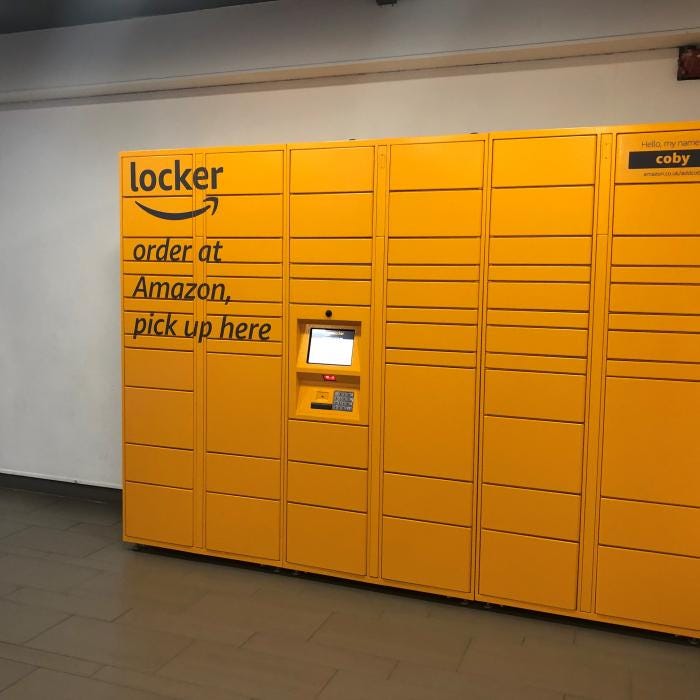
What is Amazon Locker
Amazon Locker is a convenient and secure self-service delivery and pick-up solution provided by Amazon. It aims to address the challenges of delivering packages to customers who may not have a fixed delivery address or prefer not to have packages delivered to their homes or workplaces.
Important Features
- Secure Storage: Amazon Lockers are equipped with robust security measures, including secure access codes and video surveillance, ensuring the safety of packages.
- Contactless Pickup and Drop-off: Users can easily pick up and drop off packages without any human interaction, making it a convenient and efficient solution.
- Multiple Locker Sizes: Lockers come in various sizes to accommodate packages of different dimensions, enhancing flexibility for customers and delivery personnel.
- 24/7 Accessibility: Amazon Lockers are accessible 24/7, allowing customers to pick up their packages at their convenience.
Scaling Requirements — Capacity Estimation
Smalll scale simulation of Amazon locker, let’s say —
Total number of users: 1.2 Billion
- Daily active users (DAU): 300 Million
- Number of packages picked up by user/day: 3
- Total number of packages picked up per day: 900 Million packages/day
- Read to write ratio: 100:1 (read-heavy system)
- Total number of packages delivered/day = 1/100 * 900 Million = 9 Million/day
Storage Estimation:
- Let’s assume, on average, each package’s size is 5 MB.
- Total Storage per day: 9 Million * 5 MB = 45 TB/day
- For the next 3 years, 45 TB * 5 * 365 = 82.125 PB (Petabytes)
Requests per Second:
- Requests per second = 900 Million / (3600 seconds * 24 hours) ≈ 10,416 requests/second
class AmazonLocker:
def __init__(self):
self.locker_locations = {} # Simulating locker locations
self.packages = {} # Simulating package data
def add_locker_location(self, location_id, location_name, total_lockers):
# Simulating adding a locker location with specified number of lockers
self.locker_locations[location_id] = {'name': location_name, 'total_lockers': total_lockers}
def add_package(self, package_id, package_size, locker_location):
# Simulating adding a package to a locker location
if locker_location not in self.locker_locations:
return "Locker location not found."
if package_id in self.packages:
return "Package ID already exists."
self.packages[package_id] = {'size': package_size, 'location': locker_location}
self.locker_locations[locker_location]['total_lockers'] -= 1
def pickup_package(self, package_id):
# Simulating the process of picking up a package
if package_id not in self.packages:
return "Package not found."
locker_location = self.packages[package_id]['location']
self.locker_locations[locker_location]['total_lockers'] += 1
del self.packages[package_id]
return "Package picked up successfully."
# Creating an instance of AmazonLocker
amazon_locker = AmazonLocker()
# Adding a locker location with 1000 lockers
amazon_locker.add_locker_location(1, "Main Street Locker", 1000)
# Adding a package to the locker location with package_id and size 5 MB
amazon_locker.add_package("PKG123", 5, 1)
# Picking up the package with package_id "PKG123"
result = amazon_locker.pickup_package("PKG123")
print(result) # Output: Package picked up successfully.Data Model — ER requirements
- Locker: Represents an individual locker unit with a unique identifier and its current status (e.g., available, occupied).
- User: Stores user information, including unique user IDs, delivery preferences, and historical usage.
- Package: Represents a package with attributes such as size, delivery status, and recipient details.
- Location: Stores information about each locker location, including its address and available locker capacities.
User
user_id: int (Primary Key)
username: string
email: string
password: string
LockerLocation
location_id: int (Primary Key)
location_name: string
total_lockers: int
Locker
locker_id: int (Primary Key)
location_id: int (Foreign Key to LockerLocation)
occupied: bool
Package
package_id: int (Primary Key)
user_id: int (Foreign Key to User)
locker_id: int (Foreign Key to Locker)
photo_url: string
caption: string
post_timestamp: datetime
location: stringHigh Level Design
- User Interface: A user-friendly interface that allows customers to select an Amazon Locker location during checkout and receive their pickup codes.
- Locker Management Service: Responsible for tracking locker availability, assigning lockers to packages, and managing package pickup.
- Package Delivery Service: Handles the process of delivering packages from fulfillment centers to the selected Amazon Locker locations.
- Authentication and Security: Ensures secure access to lockers through unique pickup codes and authentication mechanisms.
- Location Expansion: The system should be easily scalable to add new locker locations in various geographic regions.
- Concurrent Users: The design must handle a large number of concurrent users accessing the lockers during peak times.
- Storage Capacity: The system should efficiently manage and allocate locker storage space for different package sizes.
- Redundancy and High Availability: To ensure continuous service, the system should be resilient with redundant components and high availability architecture.
Assumptions:
- The system is read-heavy with more package pickups (reads) than package uploads (writes).
- High reliability and availability are critical for package pickups and deliveries.
Main Components and Services:
- Mobile Client: Represents the users accessing the Amazon Locker platform through a mobile application.
- Application Servers: Handle read, write, and notification operations for the Amazon Locker platform.
- Load Balancer: Routes and directs requests from mobile clients to the appropriate application servers to balance the load.
- Cache (Memcache): Caches frequently accessed data to improve response times for read-heavy operations.
- CDN (Content Delivery Network): Improves the latency and throughput for delivering package-related data to users.
- Database (NoSQL): Stores data related to users, lockers, packages, follows, likes, and comments.
- Storage (HDFS or Amazon S3): Stores and manages the actual package photos and related metadata.
Main Services for Amazon Locker System:
- Package Service: Handles operations related to packages, such as uploading new packages, associating packages with lockers, and retrieving package information.
- User Service: Manages user-related operations, including user registration, authentication, and fetching user information.
- Locker Service: Manages the state of lockers, including marking them as occupied or available.
Basic Low Level Design
from flask import Flask, request, jsonify
import datetime
app = Flask(__name__)
# Sample data to be stored in the server
users = {}
locker_locations = {}
lockers = {}
packages = {}
follows = {}
likes = {}
comments = {}
# Endpoint for creating a new user
@app.route('/users', methods=['POST'])
def create_user():
data = request.json
user_id = len(users) + 1
user = User(user_id, data['username'], data['email'], data['password'])
users[user_id] = user
return jsonify(user.__dict__), 201
# Endpoint for retrieving user information
@app.route('/users/<int:user_id>', methods=['GET'])
def get_user(user_id):
user = users.get(user_id)
if user:
return jsonify(user.__dict__), 200
else:
return "User not found", 404
# Endpoint for adding a new locker location
@app.route('/locker_locations', methods=['POST'])
def add_locker_location():
data = request.json
location_id = len(locker_locations) + 1
location = LockerLocation(location_id, data['location_name'], data['total_lockers'])
locker_locations[location_id] = location
return jsonify(location.__dict__), 201
# Endpoint for adding a new locker
@app.route('/lockers', methods=['POST'])
def add_locker():
data = request.json
locker_id = len(lockers) + 1
locker = Locker(locker_id, data['location_id'])
lockers[locker_id] = locker
return jsonify(locker.__dict__), 201
# Endpoint for creating a new package
@app.route('/packages', methods=['POST'])
def create_package():
data = request.json
package_id = len(packages) + 1
user_id = data['user_id']
locker_id = data['locker_id']
photo_url = data['photo_url']
caption = data['caption']
post_timestamp = datetime.datetime.now()
location = data['location']
package = Package(package_id, user_id, locker_id, photo_url, caption, post_timestamp, location)
packages[package_id] = package
return jsonify(package.__dict__), 201
# Endpoint for retrieving package information
@app.route('/packages/<int:package_id>', methods=['GET'])
def get_package(package_id):
package = packages.get(package_id)
if package:
return jsonify(package.__dict__), 200
else:
return "Package not found", 404
if __name__ == '__main__':
app.run()API Design
User API
select_locker_location(user_id: str, location_id: str) -> str: Allows users to select an Amazon Locker location during checkout and returns a unique pickup code.
get_user_orders(user_id: str) -> List[Dict[str, Any]]: Retrieves a list of the user's past orders and their delivery status.
Locker API
get_available_lockers(location_id: str) -> List[str]: Returns a list of available locker IDs at a specific location.
assign_locker(package_id: str, locker_id: str) -> bool: Assigns a package to a specific locker.
Package API
create_package(package_details: Dict[str, Any]) -> str: Creates a new package with the provided details and returns the package ID.
get_package_details(package_id: str) -> Dict[str, Any]: Retrieves the details of a specific package.
update_package_status(package_id: str, status: str) -> bool: Updates the delivery status of a package.# Data structures to simulate the database
users = {}
lockers = {}
packages = {}
# User API
def select_locker_location(user_id: str, location_id: str) -> str:
# Check if the user exists in the database
if user_id not in users:
return "User not found."
# Fetch available lockers at the specified location
available_lockers = get_available_lockers(location_id)
# Choose a locker randomly for simplicity (in a real system, a more sophisticated logic would be used)
if not available_lockers:
return "No lockers available at the selected location."
selected_locker = available_lockers[0]
# Assign the locker to the user's package
assign_locker(user_id, selected_locker)
return f"Your pickup code for Locker {selected_locker} is: {users[user_id]['pickup_code']}"
def get_user_orders(user_id: str) -> List[Dict[str, Any]]:
# Check if the user exists in the database
if user_id not in users:
return []
# In a real system, retrieve the user's orders and their delivery status from the database
return users[user_id].get('orders', [])
# Locker API
def get_available_lockers(location_id: str) -> List[str]:
# In a real system, fetch available lockers at the specified location from the database
# For this example, we assume all lockers are available
return [locker_id for locker_id, locker in lockers.items() if locker['location'] == location_id and not locker['occupied']]
def assign_locker(user_id: str, locker_id: str) -> bool:
# Check if the locker exists in the database
if locker_id not in lockers:
return False
# Check if the locker is available
if lockers[locker_id]['occupied']:
return False
# Assign the locker to the user's package
users[user_id]['assigned_locker'] = locker_id
# Update the locker status to occupied
lockers[locker_id]['occupied'] = True
return True
# Package API
def create_package(package_details: Dict[str, Any]) -> str:
# Generate a unique package ID (in a real system, this would be done differently)
package_id = f"PKG-{len(packages) + 1}"
# Add the package to the database
packages[package_id] = package_details
return package_id
def get_package_details(package_id: str) -> Dict[str, Any]:
# Check if the package exists in the database
if package_id not in packages:
return {}
return packages[package_id]
def update_package_status(package_id: str, status: str) -> bool:
# Check if the package exists in the database
if package_id not in packages:
return False
# Update the package status
packages[package_id]['status'] = status
return TrueComplete Detailed Design
Coming soon! It will be covered on youtube channel.
Subscribe to youtube channel :
Complete Code implementation
Secure Storage:
# Function to simulate the secure storage feature
def secure_storage(package_id: str, access_code: str) -> bool:
# Simulate the process of locking the locker and associating the access code with the package
if package_id in packages and not packages[package_id]['locked']:
packages[package_id]['access_code'] = access_code
packages[package_id]['locked'] = True
return True
return FalseContactless Pickup and Drop-off:
# Function to simulate contactless pickup and drop-off
def contactless_pickup_dropoff(package_id: str) -> bool:
# Simulate the process of unlocking the locker and removing the package
if package_id in packages and packages[package_id]['locked']:
packages[package_id]['locked'] = False
return True
return FalseMultiple Locker Sizes:
# Function to add a new locker with a specified size
def add_locker(locker_id: str, size: str):
lockers[locker_id] = {'size': size, 'occupied': False}Mobile Integration:
# Function to generate a unique pickup code and associate it with a package
def generate_pickup_code(package_id: str) -> str:
# Simulate the process of generating a unique pickup code for the package
pickup_code = f"CODE-{package_id[-3:]}"
packages[package_id]['pickup_code'] = pickup_code
return pickup_codeRead next — how to Design the Dropbox.
Day 9 of System Design Case Studies Series : Design Dropbox
Complete Design with examples
medium.com
Let me know if you have any questions in the comment section below. Subscribe/ Follow, Like/Clap and Stay Tuned!!
Day 2 : SQL Basics, Query Structure, Built In functions Conditions
Day 4 : Set Theory Operations, Stored Procedures and CASE statements in SQL
Day 6 : Subqueries, Group by, order by and Having clauses in SQL and Analytical Functions
Day 7 : Window Functions, Grouping Sets and Constraints in SQL
Day 8 : BigQuery Basics, SELECT, FROM, WHERE and Date and Extract in BigQuery
Day 9 : Common Expression Table, UNNEST Clause, SQL vs NoSQL Databases
Day 10 : Triggers, Pivot and Cursors in SQL
Day 14 : MySQL in Depth
Day 15 : PostgreSQL inDepth
Anyways, For Day 15 of 15 days of Advanced SQL, we will cover —
PostgreSQL inDepth
Github for Advanced SQL that you can follow —
All the projects, data structures, algorithms, system design, Data Science and ML, Data Engineering, MLOps and Deep Learning videos will be published on our youtube channel ( just launched).
Subscribe today!
System Design Case Studies — In Depth
Complete Data Structures and Algorithm Series
Github —
Some of the other best Series —
30 days of Data Structures and Algorithms and System Design Simplified
Data Science and Machine Learning Research ( papers) Simplified **
100 days : Your Data Science and Machine Learning Degree Series with projects
Complete Data Visualization and Pre-processing Series with projects
Exceptional Github Repos — Part 1
Exceptional Github Repos — Part 2
Tech Newsletter —
If you are interested, you can join my newsletter through which I send tech interview tips, techniques, patterns, hacks — Software Development, ML, Data Science, Startups and Technology projects to more than 30K readers. You can subscribe to Tech Brew :
For Python Projects —
For complete 60 days of Data Science and ML : Day 1 — Day 60 : Quick Recap of 60 days of Data Science and ML
Follow for more updates. Stay tuned and keep coding!
For other projects, tune to —
Build Machine Learning Pipelines( With Code)
Recurrent Neural Network with Keras
Clustering Geolocation Data in Python using DBSCAN and K-Means
Facial Expression Recognition using Keras
Hyperparameter Tuning with Keras Tuner
Custom Layers in Keras


