
Day 18 of System Design Case Studies Series : Design Whatsapp, Distributed Cache, Healthifyme, Parking Lot, Calendly, Myntra, MS Outlook
Complete Design with examples
Hello peeps! Welcome to Day 18 of System Design Case studies series where we will design Whatsapp, Distributed Cache, Healthifyme, Parking Lot, Calendly, Myntra, MS Outlook.
This post has system design for ( scroll till the end of the post) —
Note : Please read System Design Important Terms you MUST know and Most Important System Design basics before reading this post.
Projects Videos —
All the projects, data structures, SQL, algorithms, system design, Data Science and ML , Data Analytics, Data Engineering, , Implemented Data Science and ML projects, Implemented Data Engineering Projects, Implemented Deep Learning Projects, Implemented Machine Learning Ops Projects, Implemented Time Series Analysis and Forecasting Projects, Implemented Applied Machine Learning Projects, Implemented Tensorflow and Keras Projects, Implemented PyTorch Projects, Implemented Scikit Learn Projects, Implemented Big Data Projects, Implemented Cloud Machine Learning Projects, Implemented Neural Networks Projects, Implemented OpenCV Projects,Complete ML Research Papers Summarized, Implemented Data Analytics projects, Implemented Data Visualization Projects, Implemented Data Mining Projects, Implemented Natural Leaning Processing Projects, MLOps and Deep Learning, Applied Machine Learning with Projects Series, PyTorch with Projects Series, Tensorflow and Keras with Projects Series, Scikit Learn Series with Projects, Time Series Analysis and Forecasting with Projects Series, ML System Design Case Studies Series videos will be published on our youtube channel ( just launched).
Subscribe today!
Tech Newsletter —
If you are interested, you can join my newsletter through which I send tech interview tips, techniques, patterns, hacks — Software Development, ML, Data Science, Startups and Technology projects to more than 30K readers. You can subscribe to Tech Brew :
System Design Case Studies — In Depth
Design Tinder
Design TikTok
Design Twitter
Design URL Shortener
Design Dropbox
Design Youtube
Design API Rate Limiter
Design Web Crawler
Design Facebook’s Newsfeed
Design Yelp
Design Instagram
Design Messenger App
Design Uber
Most Popular System Design Questions
Mega Compilation : Solved System Design Case studies
We will be discussing in depth -
- What is Whatsapp
- Important Features
- Scaling Requirements — Capacity Estimation
- Data Model — ER requirements
- High Level Design
- Basic Low Level Design
- API Design
- Complete Detailed Design
- Complete Code Implementation
Pre-requisite to this post -
Complete System Design Series — Important Concepts that you should know before starting the Case studies
6. Networking, How Browsers work, Content Network Delivery ( CDN)
13. System Design Template — How to solve any System Design Question
Github —
Day 1 of System Design Case Studies can be found below-
Day 2 of System Design Case Studies can be found below-
Day 3 of System Design Case Studies can be found below-
Day 4 of System Design Case Studies can be found below-
What is Whatsapp?

Whatsapp is an app platform which lets users —
- Send and receive text/photos/videos messages
- Create user groups and send group messages
- Read Receipts
- Call — Audio or video call
- Set Status
Users can be both mobile based and web based.
Designing Watsapp would involve:
- User registration and authentication: Allow users to create an account and log in to the platform, using a phone number as the primary identifier.
- Contact list: Allow users to add contacts to their list, and automatically detect and suggest contacts from the user’s phone’s address book.
- Messaging: Allow users to send and receive text messages, images, videos, and other types of media.
- Media compression: Optimize the size and quality of media files to reduce data usage and improve the speed of sending and receiving messages.
- Encryption: Implement end-to-end encryption to protect the privacy and security of messages and media.
- Group chat: Allow users to create and participate in group chats with multiple participants.
- Voice and video call: Allow users to make voice and video calls to other WhatsApp users.
- Status: Allow users to set a status message or share a photo or video that is visible to their contacts for a limited time.
- Push notifications: Send push notifications to users when they receive a new message or call.
- Multilanguage support: Support multiple languages to make the platform accessible to a global audience.
- Support and customer service: Provide customer service and support, such as a help center and FAQs.
- Scalability: Design the platform to handle a large number of users and messages, and be able to scale as the platform grows.
- Data and analytics: Collect data on user behavior and usage, and use analytics to improve the platform and make data-driven decisions.
- A/B testing: Regularly perform A/B testing on different features and algorithms to ensure that the platform is providing the best possible user experience.
- Integration with other apps: Allow users to integrate WhatsApp with other apps, such as Google Drive and Dropbox, to easily share and store files.
Important Features
We will consider the most important features —
One to one message
Group messaging
Send media ( photos)
Notifications Push
User Status ( Online or Offline)
Scaling Requirements — Capacity Estimation
For the sake of simplicity, I’ll show a small scale simulation.
Let’s say we have —
Daily active users ( DAU) : 200 million
Messages per user ( within a day) : 20
Total messages/day : 4 Billion messages
Storage Estimation —
Message size : 80 bytes
Total Storage per day : 4 billion messages * 80 bytes = 320 GB/day
For next 3 years, 320 GB * 3 * 365 = 350 TB
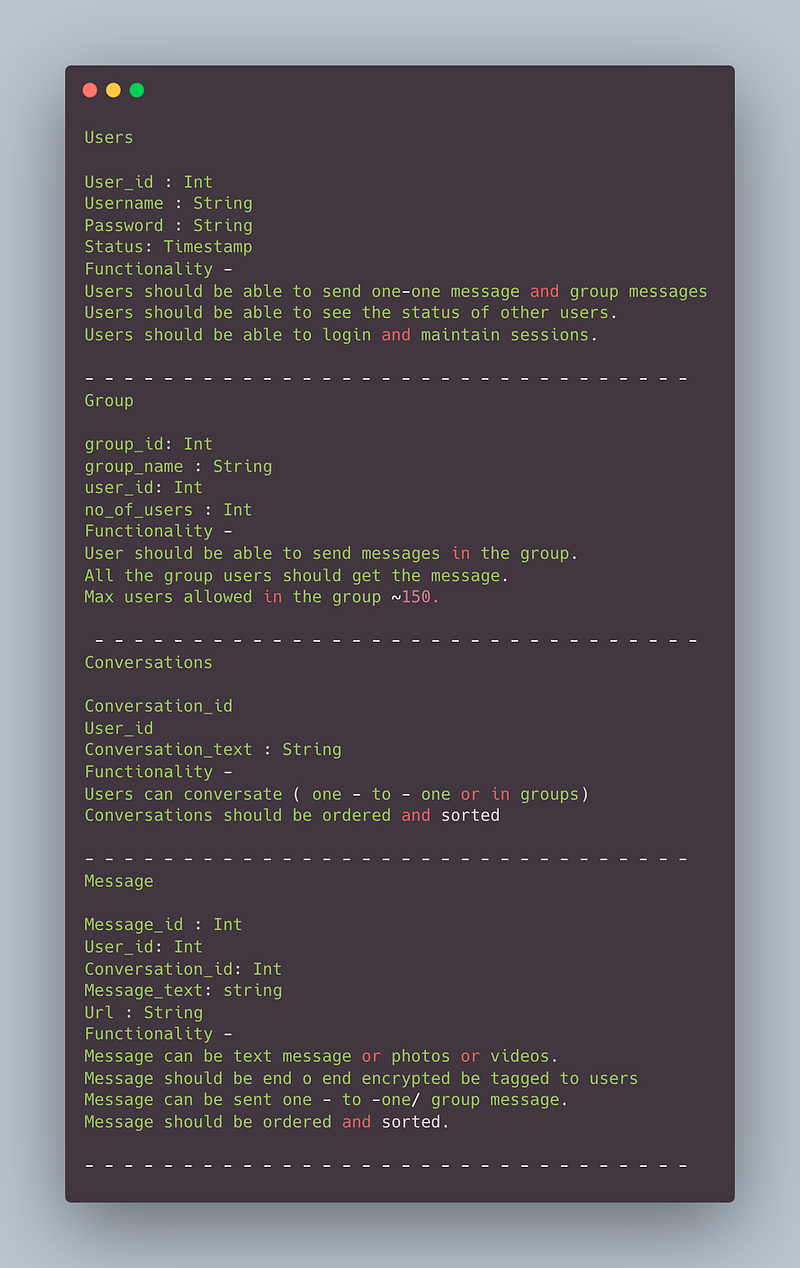
Data Model — ER requirements
Users
User_id : Int
Username : String
Password : String
Status: Timestamp
Functionality —
- Users should be able to send one-one message and group messages
- Users should be able to see the status of other users.
- Users should be able to login and maintain sessions.
— — — — — — — — — — — — — — — — — — — — — — — — — — — — — — -
Group
group_id: Int
group_name : String
user_id: Int
no_of_users : Int
Functionality —
- User should be able to send messages in the group.
- All the group users should get the message.
- Max users allowed in the group ~150.
— — — — — — — — — — — — — — — — — — — — — — — — — — — — — — -
Conversations
Conversation_id
User_id
Conversation_text : String
Functionality —
- Users can conversate ( one — to — one or in groups)
- Conversations should be ordered and sorted
— — — — — — — — — — — — — — — — — — — — — — — — — — — — — — -
Message
Message_id : Int
User_id: Int
Conversation_id: Int
Message_text: string
Url : String
Functionality —
- Message can be text message or photos or videos.
- Message should be end o end encrypted be tagged to users
- Message can be sent one — to -one/ group message.
- Message should be ordered and sorted.
— — — — — — — — — — — — — — — — — — — — — — — — — — — — — — -
High Level Design
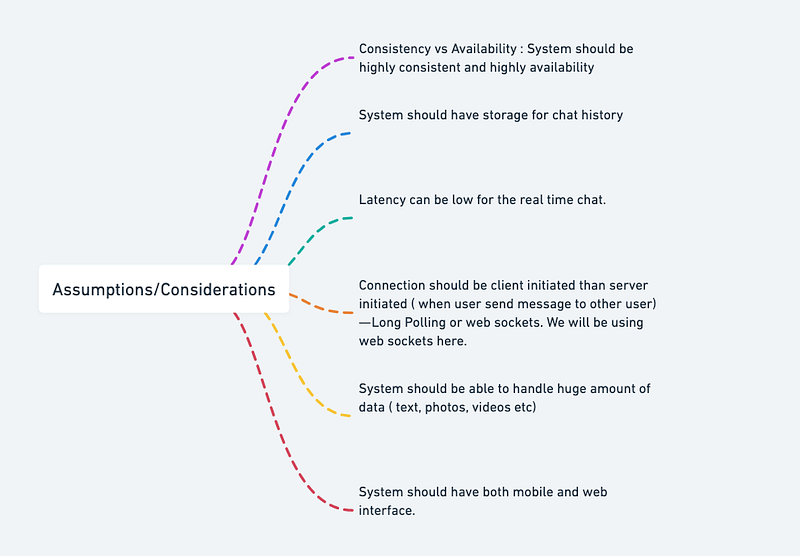
Assumptions on technical aspects —
- System should be highly reliable and available.
- System should have both mobile and web interface.
- System should have storage for chat history
- System should be able to handle huge amount of data ( text, photos, videos etc)
- End — to- End encryption
- Latency can be low for the real time chat.
- Consistency vs Availability : System should be highly consistent and highly availability
- Connection should be client initiated than server initiated ( when user send message to other user) — Long Polling or web sockets. We will be using web sockets here.
In long polling the server keeps the the client’s connection open until a timeout threshold has reached.
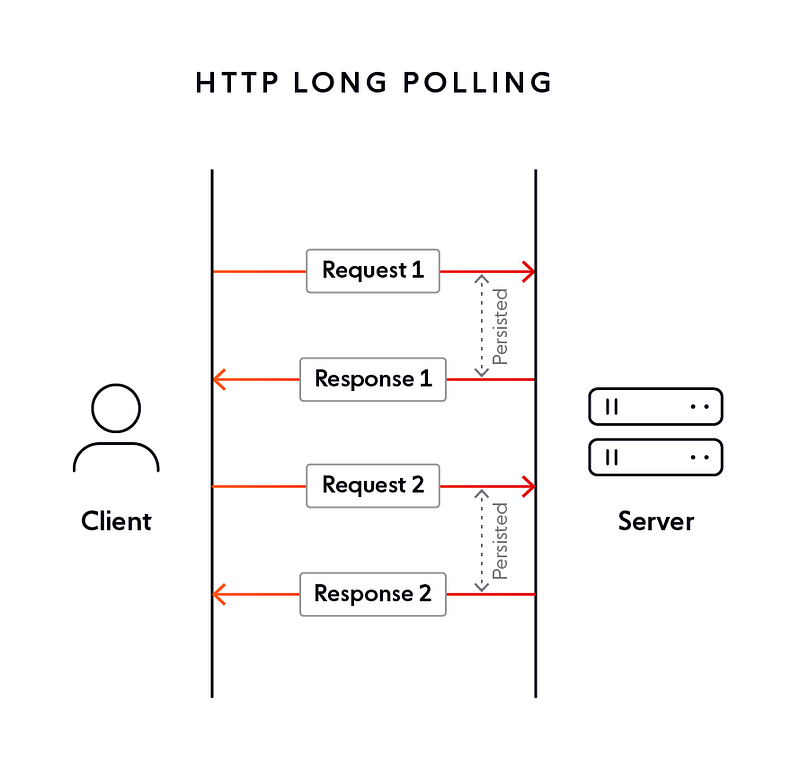
HTTP long polling is a technique used to periodically send HTTP requests to a server to retrieve new data. Here’s code of how to implement HTTP polling in Python using the requests library:
import time
import requests
POLL_INTERVAL = 5 # in secondsdef start_polling(url):
while True:
response = requests.get(url)
if response.status_code == 200:
print("Received data:", response.text)
else:
print("Failed to retrieve data, status code:", response.status_code)
time.sleep(POLL_INTERVAL)if __name__ == "__main__":
start_polling("http://www.example.com/data")In this example, we use the requests library to send HTTP GET requests to the specified URL. We use the sleep method from the time library to wait for POLL_INTERVAL seconds between requests. If the response status code is 200 (OK), we print the response text. Otherwise, we print the response status code.
Web sockets — Using web sockets, the connection is persistent and two way ( bidirectional) using which the server can send messages/updates to client periodically.
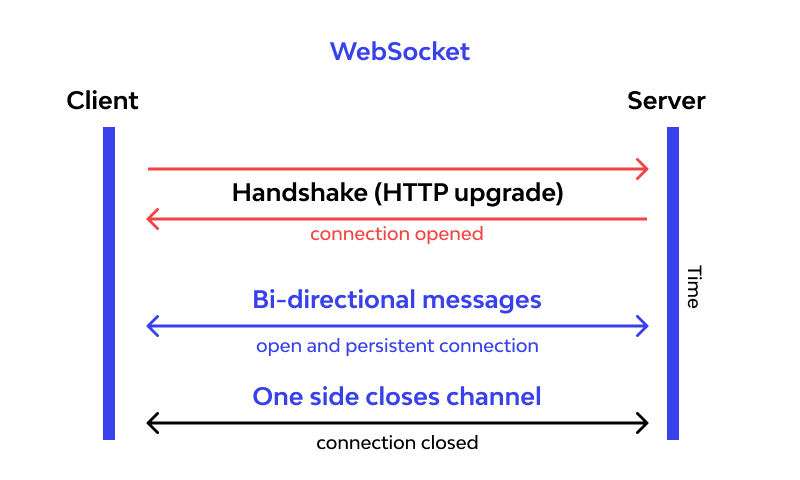
Implement a simple WebSocket server in Python using the websockets library:
import asyncio
import websockets
async def echo(websocket, path):
async for message in websocket:
await websocket.send(message)start_server = websockets.serve(echo, "localhost", 8765)asyncio.get_event_loop().run_until_complete(start_server)
asyncio.get_event_loop().run_forever()In this example, we use the websockets library to implement a simple echo server. The echo coroutine is the main logic of the server and uses the async for loop to receive messages from the client and send them back. The start_server variable is created using the serve method, which starts the WebSocket server on the specified host and port (in this case, "localhost" and 8765). Finally, we use the run_until_complete method to start the server and the run_forever method to keep the server running until it is stopped manually.
Components
- Client : Both mobile and web Users
- Application Servers : Should be able to talk each other
- Load Balancers : To allocate requests to designated Application server using consistent hashing
- Chat Service : To store and relay message
- Web Sockets : For Full duplex connection
- Database : Cassandra db or Hbase — Key value stores allow for great horizontal scaling and low latency to access data. HBase is a column-oriented key-value NoSQL database.
- Sessions Service : To store the sessions information of the different users
- Cache
- Media Storage ( S3) : To store photos/videos
- Content Delivery Network
- Notification Service : To push notifications to the users when the status is offline
Services
Before we go in depth with respect to services, first understand what is stateless and stateful services. Stateless service ( which can be monolithic services) doesn’t require the server to retain any information about the state whereas Stateful services requires to save the information about the users session and the connection is persistent to a chat server.
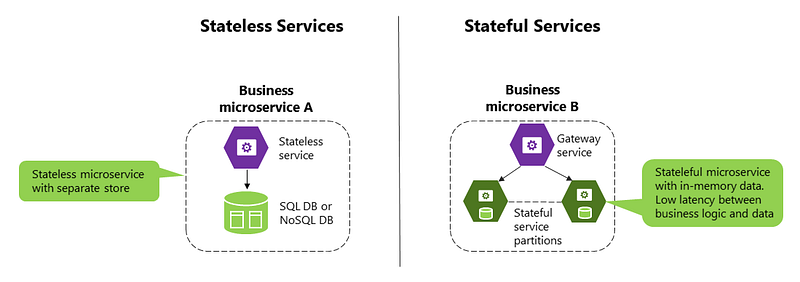
- Sessions Service — To store the sessions information of different users
- Notification Service — To push notifications
- Chat service — which can store and relay messages
- Message queue service — Queue the messages if other users are offline
- Last Seen Service — To keep a tap on the status of the users ( online or offline)
- Profile Service — To store users profile information and keep updating
- Group Service — To store the group information and interaction
- Media Service — To keep a tap on photos/videos shared
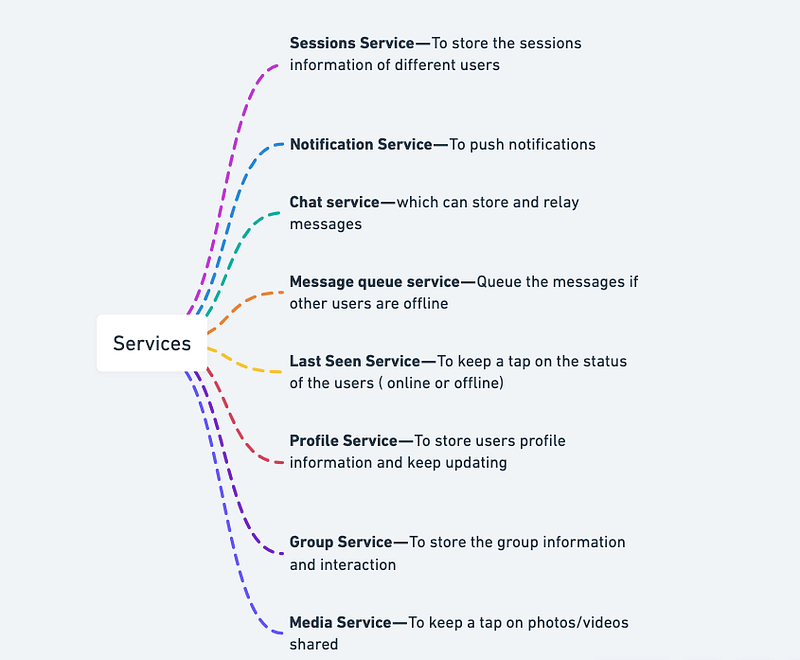
Implementation of the services mentioned above :
# Sessions Service
class SessionsService:
    def __init__(self):
        self.sessions = {}
def add_session(self, user_id, session):
self.sessions[user_id] = session def remove_session(self, user_id):
if user_id in self.sessions:
del self.sessions[user_id] def get_session(self, user_id):
return self.sessions.get(user_id)
# Notification Service
class NotificationService:
    def __init__(self):
        self.notifications = {}
def add_notification(self, user_id, notification):
if user_id in self.notifications:
self.notifications[user_id].append(notification)
else:
self.notifications[user_id] = [notification] def remove_notification(self, user_id, notification):
if user_id in self.notifications:
self.notifications[user_id].remove(notification) def get_notifications(self, user_id):
return self.notifications.get(user_id, [])
# Chat Service
class ChatService:
    def __init__(self):
        self.chats = {}
def add_message(self, chat_id, message):
if chat_id in self.chats:
self.chats[chat_id].append(message)
else:
self.chats[chat_id] = [message] def get_messages(self, chat_id):
return self.chats.get(chat_id, [])
# Message Queue Service
class MessageQueueService:
    def __init__(self):
        self.queue = []
def add_message(self, message):
self.queue.append(message) def remove_message(self, message):
self.queue.remove(message) def get_messages(self):
return self.queue
# Last Seen Service
class LastSeenService:
    def __init__(self):
        self.last_seen = {}
def update_last_seen(self, user_id, timestamp):
self.last_seen[user_id] = timestamp def get_last_seen(self, user_id):
return self.last_seen.get(user_id)
# Profile Service
class ProfileService:
    def __init__(self):
        self.profiles = {}
def add_profile(self, user_id, profile):
self.profiles[user_id] = profile def update_profile(self, user_id, profile):
if user_id in self.profiles:
self.profiles[user_id].update(profile) def get_profile(self, user_id):
return self.profiles.get(user_id)Basic Low Level Design
import java.util.*;

class User {
    private String username;
    private List<Message> messages;
    private List<GroupChat> groupChats;

    public User(String username) {
        this.username = username;
        this.messages = new ArrayList<>();
        this.groupChats = new ArrayList<>();
    }

    public String getUsername() {
        return username;
    }

    public List<Message> getMessages() {
        return messages;
    }

    public List<GroupChat> getGroupChats() {
        return groupChats;
    }

    public void sendMessage(User recipient, String content) {
        Message message = new Message(this, recipient, content);
        messages.add(message);
        recipient.receiveMessage(message);
        System.out.println("Message sent from '" + username + "' to '" + recipient.getUsername() + "'.");
    }

    public void createGroupChat(String groupName, List<User> members) {
        GroupChat groupChat = new GroupChat(groupName, this, members);
        groupChats.add(groupChat);
        System.out.println("Group chat '" + groupName + "' created successfully.");
    }

    public void receiveMessage(Message message) {
        messages.add(message);
        System.out.println("Message received from '" + message.getSender().getUsername() + "'.");
    }
}

class Message {
    private User sender;
    private User recipient;
    private String content;

    public Message(User sender, User recipient, String content) {
        this.sender = sender;
        this.recipient = recipient;
        this.content = content;
    }

    public User getSender() {
        return sender;
    }

    public User getRecipient() {
        return recipient;
    }

    public String getContent() {
        return content;
    }
}

class GroupChat {
    private String groupName;
    private User creator;
    private List<User> members;

    public GroupChat(String groupName, User creator, List<User> members) {
        this.groupName = groupName;
        this.creator = creator;
        this.members = members;
    }

    public String getGroupName() {
        return groupName;
    }

    public User getCreator() {
        return creator;
    }

    public List<User> getMembers() {
        return members;
    }
}

class WhatsAppSystem {
    private Map<String, User> users;

    public WhatsAppSystem() {
        this.users = new HashMap<>();
    }

    public void registerUser(String username) {
        if (!users.containsKey(username)) {
            User newUser = new User(username);
            users.put(username, newUser);
            System.out.println("User '" + username + "' registered successfully.");
        } else {
            System.out.println("Username '" + username + "' is already taken.");
        }
    }

    public User getUser(String username) {
        return users.get(username);
    }
}

public class WhatsAppApp {
    public static void main(String[] args) {
        WhatsAppSystem whatsapp = new WhatsAppSystem();

        // Register users
        whatsapp.registerUser("user1");
        whatsapp.registerUser("user2");
        whatsapp.registerUser("user3");

        // Send messages
        User user1 = whatsapp.getUser("user1");
        User user2 = whatsapp.getUser("user2");
        user1.sendMessage(user2, "Hello, how are you?");

        // Create group chat
        User user3 = whatsapp.getUser("user3");
        List<User> members = new ArrayList<>();
        members.add(user1);
        members.add(user2);
        members.add(user3);
        user1.createGroupChat("Family Chat", members);
    }
}
API Design
Implementation —
from flask import Flask, request, jsonifyapp = Flask(__name__)# User Service API
@app.route('/users', methods=['POST'])
def create_user():
# create a new user and return user ID
# actual implementation may involve authentication and user management
return jsonify({'user_id': 'user123'})@app.route('/users/<user_id>', methods=['GET'])
def get_user_profile(user_id):
# return the profile information for the specified user ID
# actual implementation may involve retrieving profile information from a database
return jsonify({'user_id': user_id, 'name': 'John Doe', 'phone_number': '1234567890'})@app.route('/users/<user_id>', methods=['PUT'])
def update_user_profile(user_id):
# update the profile information for the specified user ID
# actual implementation may involve authentication and database updates
return jsonify({'user_id': user_id, 'name': 'John Doe', 'phone_number': '1234567890'})# Chat Service API
@app.route('/chats', methods=['POST'])
def create_chat():
# create a new chat and return chat ID
# actual implementation may involve database updates and user management
return jsonify({'chat_id': 'chat123'})@app.route('/chats/<chat_id>/messages', methods=['POST'])
def send_message(chat_id):
# send a new message to the specified chat and return message ID
# actual implementation may involve authentication, database updates, and message delivery
return jsonify({'message_id': 'message123'})@app.route('/chats/<chat_id>/messages', methods=['GET'])
def get_messages(chat_id):
# retrieve messages for the specified chat
# actual implementation may involve retrieving messages from a database
return jsonify({'chat_id': chat_id, 'messages': [{'message_id': 'message123', 'sender_id': 'user123', 'content': 'Hello World', 'timestamp': '2023-02-19T10:15:00Z'}]})# Group Service API
@app.route('/groups', methods=['POST'])
def create_group():
# create a new group and return group ID
# actual implementation may involve database updates and user management
return jsonify({'group_id': 'group123'})@app.route('/groups/<group_id>/members', methods=['POST'])
def add_member(group_id):
# add a new member to the specified group and return member ID
# actual implementation may involve authentication, database updates, and user management
return jsonify({'member_id': 'user456'})@app.route('/groups/<group_id>/members', methods=['GET'])
def get_members(group_id):
# retrieve members of the specified group
# actual implementation may involve retrieving member information from a database
return jsonify({'group_id': group_id, 'members': [{'user_id': 'user123', 'name': 'John Doe'}, {'user_id': 'user456', 'name': 'Jane Doe'}]})if __name__ == '__main__':
app.run(debug=True)Implement a messaging API in Python using Flask:
from flask import Flask, requestapp = Flask(__name__)users = {}@app.route('/send_message', methods=['POST'])
def send_message():
sender = request.form.get('sender')
recipient = request.form.get('recipient')
message = request.form.get('message') if recipient in users:
users[recipient].append((sender, message))
return 'Message sent successfully!'
else:
return 'Error: recipient not found'@app.route('/get_messages/<username>')
def get_messages(username):
if username in users:
messages = users[username]
users[username] = []
return str(messages)
else:
return 'Error: user not found'if __name__ == '__main__':
app.run()API design will be further discussed in the workflow video ( Coming soon. Subscribe Today)
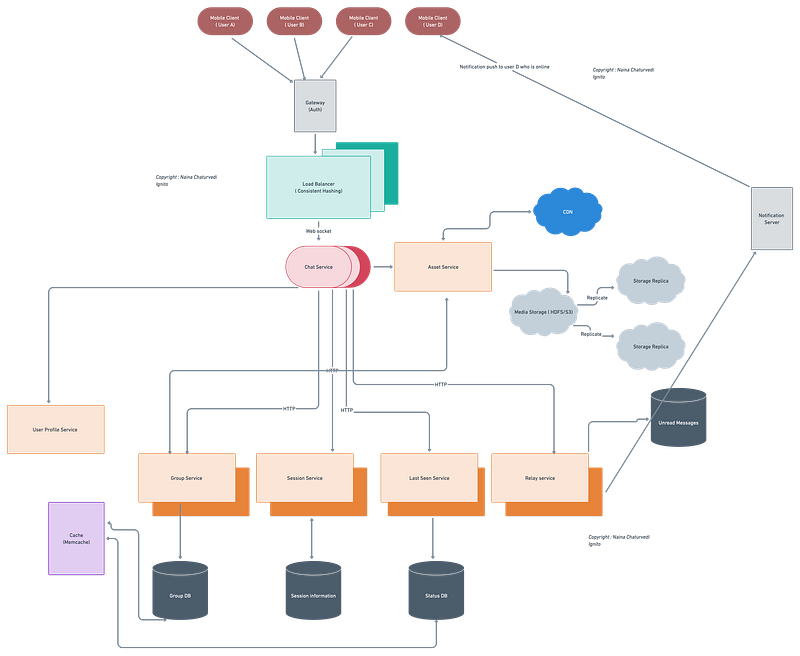
Complete Detailed Design
( Zoom it)
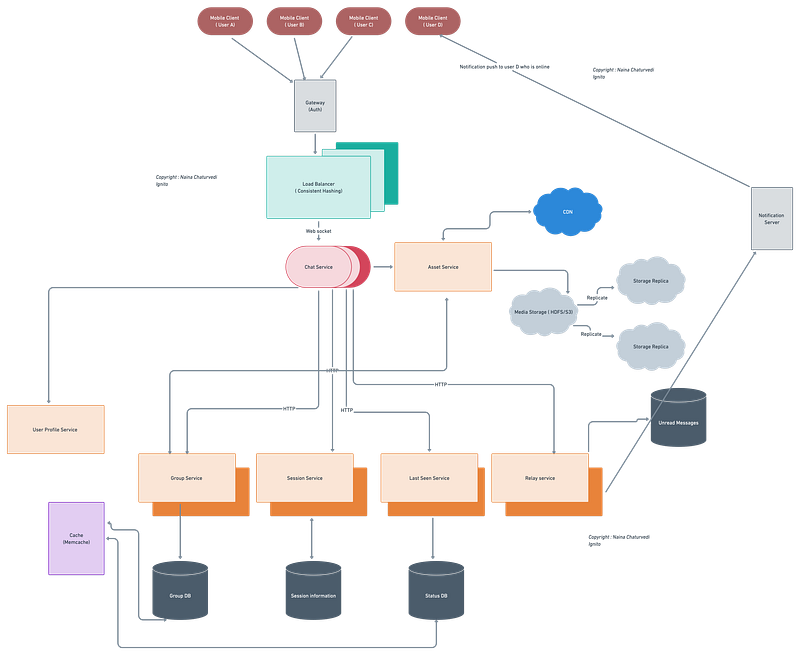
Here’s an example implementation of one-to-one messaging, group messaging, sending media (photos), and notifications push in Python:
import json
import uuidclass User:
def __init__(self, name, status='offline'):
self.name = name
self.status = status
self.id = str(uuid.uuid4()) def __str__(self):
return f'{self.name} ({self.status})'class Message:
def __init__(self, sender, content, type='text'):
self.sender = sender
self.content = content
self.type = typeclass Chat:
def __init__(self, name, users=None):
self.name = name
self.users = users or []
self.messages = [] def add_user(self, user):
self.users.append(user) def add_message(self, message):
self.messages.append(message)class WhatsApp:
def __init__(self):
self.users = {}
self.chats = {} def create_user(self, name):
user = User(name)
self.users[user.id] = user
return user def create_group(self, name, users=None):
chat = Chat(name, users)
self.chats[chat.name] = chat
return chat def send_message(self, chat_name, sender, content, type='text'):
chat = self.chats.get(chat_name)
if chat:
message = Message(sender, content, type)
chat.add_message(message)
for user in chat.users:
if user.status == 'online':
print(f'Notification sent to {user.name}: {sender.name} sent a new message in {chat.name}')
else:
print(f'Chat {chat_name} does not exist') def update_user_status(self, user, status):
user.status = status
print(f'{user.name} status updated to {status}') def serialize(self):
serialized = {
'users': {user.id: {'name': user.name, 'status': user.status} for user in self.users.values()},
'chats': {
chat_name: {
'name': chat.name,
'users': [user.id for user in chat.users],
'messages': [
{'sender': message.sender.id, 'content': message.content, 'type': message.type}
for message in chat.messages
]
} for chat_name, chat in self.chats.items()
}
}
return json.dumps(serialized, indent=2)whatsapp = WhatsApp()More on Whatsapp System Design —
User Management and Authentication:
User management and authentication involve designing systems for user registration, login, and authentication. This includes implementing mechanisms for user profiles, contacts, and privacy settings. Here’s an example code snippet in Python:
class User:
def __init__(self, username, password):
self.username = username
self.password = password
self.contacts = []
self.privacy_settings = {} def add_contact(self, contact):
self.contacts.append(contact) def update_privacy_settings(self, settings):
self.privacy_settings.update(settings) def authenticate(self, username, password):
return self.username == username and self.password == password
# Example usage
user1 = User("john", "password123")
user2 = User("alice", "password456")user1.add_contact(user2)
user1.update_privacy_settings({"show_online_status": False})authenticated = user1.authenticate("john", "password123")
print(authenticated) # TrueMessaging Infrastructure:
Messaging infrastructure involves designing systems for real-time message delivery. This includes implementing mechanisms for message queues, routing, and synchronization. It also handles message encryption, decryption, and integrity. Here’s an example code snippet for a simplified message delivery system:
from queue import Queueclass MessageQueue:
def __init__(self):
self.queue = Queue() def enqueue_message(self, message):
self.queue.put(message) def dequeue_message(self):
return self.queue.get()class MessageRouter:
def __init__(self):
self.routes = {} def add_route(self, recipient, queue):
self.routes[recipient] = queue def route_message(self, message, recipient):
if recipient in self.routes:
queue = self.routes[recipient]
queue.enqueue_message(message)# Example usage
message_queue = MessageQueue()
alice_queue = MessageQueue()
bob_queue = MessageQueue()message_router = MessageRouter()
message_router.add_route("Alice", alice_queue)
message_router.add_route("Bob", bob_queue)message_router.route_message("Hello, Alice!", "Alice")
message_router.route_message("Hello, Bob!", "Bob")alice_message = alice_queue.dequeue_message()
bob_message = bob_queue.dequeue_message()print(alice_message) # Hello, Alice!
print(bob_message) # Hello, Bob!Group Chats:
Group chats involve designing systems for group creation, management, and participation. This includes implementing mechanisms for group messaging and notifications. Ensuring scalability and performance for large group chats is also important. Here’s an example code snippet for a basic group chat implementation:
class Group:
def __init__(self, name):
self.name = name
self.members = [] def add_member(self, user):
self.members.append(user) def send_message(self, message):
for member in self.members:
member.receive_message(self, message)class User:
def __init__(self, username):
self.username = username
self.groups = [] def join_group(self, group):
self.groups.append(group)
group.add_member(self) def send_group_message(self, group, message):
group.send_message(f"{self.username}: {message}") def receive_message(self, group, message):
print(f"{group.name} - {message}")# Example usage
user1 = User("John")
user2 = User("Alice")
user3 = User("Bob")group1 = Group("Group 1")
user1.join_group(group1)
user2.join_group(group1)
user3.join_group(group1)user1.send_group_message(group1, "Hello, everyone!")
user2.send_group_message(group1, "Hi, John!")
user3.send_group_message(group1, "Hey, Alice!")# Output:
# Group 1 - John: Hello, everyone!
# Group 1 - Alice: Hi, John!
# Group 1 - Bob: Hey, Alice!Multimedia Messaging:
Multimedia messaging involves designing systems for sending and receiving multimedia messages such as photos, videos, and documents. This includes implementing mechanisms for multimedia content storage, compression, and transmission. Here’s an example code snippet for sending and receiving photo messages:
import base64class User:
def __init__(self, username):
self.username = username def send_photo_message(self, recipient, photo):
encoded_photo = base64.b64encode(photo)
recipient.receive_photo_message(self, encoded_photo) def receive_photo_message(self, sender, encoded_photo):
photo = base64.b64decode(encoded_photo)
# Process the received photo# Example usage
user1 = User("John")
user2 = User("Alice")photo_data = b"..." # Placeholder for actual photo datauser1.send_photo_message(user2, photo_data)Offline Messaging and Sync:
Offline messaging and sync involve designing systems to handle messaging when users are offline and ensuring synchronization across devices. This includes implementing mechanisms for message queuing, delivery retries, and synchronization. Here’s an example code snippet for handling offline messaging:
from queue import Queueclass MessageQueue:
def __init__(self):
self.queue = Queue() def enqueue_message(self, message):
self.queue.put(message) def dequeue_message(self):
return self.queue.get()class User:
def __init__(self, username):
self.username = username
self.message_queue = MessageQueue() def send_message(self, recipient, message):
if recipient.is_online():
recipient.receive_message(self, message)
else:
recipient.message_queue.enqueue_message((self, message)) def receive_message(self, sender, message):
print(f"Received message from {sender.username}: {message}") def is_online(self):
# Logic to determine if the user is currently online
return Trueclass Device:
def __init__(self, user):
self.user = user
self.message_queue = user.message_queue def sync_messages(self):
while not self.message_queue.queue.empty():
sender, message = self.message_queue.dequeue_message()
self.user.receive_message(sender, message)# Example usage
user1 = User("John")
user2 = User("Alice")
device = Device(user1)user1.send_message(user2, "Hello, Alice!")
device.sync_messages()# Output:
# Received message from John: Hello, Alice!Notifications and Push Notifications:
Notifications and push notifications involve designing systems for delivering message notifications to users and implementing push notification services for real-time updates. Here’s an example code snippet for sending push notifications:
class User:
def __init__(self, username):
self.username = username
self.notification_preference = True def receive_message(self, sender, message):
if self.notification_preference:
self.send_push_notification(f"New message from {sender.username}") def send_push_notification(self, notification):
# Code for sending push notification to user's device
print(f"Push notification: {notification}")# Example usage
user1 = User("John")
user2 = User("Alice")user1.receive_message(user2, "Hello, John!")# Output:
# Push notification: New message from AliceMessage Search and History:
Message search and history involve designing systems for message search and retrieval. This includes implementing efficient indexing and search mechanisms. Here’s an example code snippet for searching messages:
class User:
def __init__(self, username):
self.username = username
self.message_history = [] def receive_message(self, sender, message):
self.message_history.append((sender, message)) def search_messages(self, keyword):
results = []
for sender, message in self.message_history:
if keyword in message:
results.append((sender, message))
return results# Example usage
user1 = User("John")
user2 = User("Alice")user1.receive_message(user2, "Hello, John!")
user1.receive_message(user2, "How are you, John?")
user1.receive_message(user2, "John, are you there?")results = user1.search_messages("John")print(results)
# Output: [(Alice, "Hello, John!"), (Alice, "How are you, John?"), (Alice, "John, are you there?")]Privacy and Security:
Privacy and security involve designing systems for end-to-end encryption and message security. This includes implementing mechanisms for user privacy and data protection. Here’s an example code snippet for encrypting and decrypting messages:
from cryptography.fernet import Fernetclass User:
def __init__(self, username, encryption_key):
self.username = username
self.encryption_key = encryption_key def send_encrypted_message(self, recipient, message):
cipher = Fernet(self.encryption_key)
encrypted_message = cipher.encrypt(message.encode())
recipient.receive_encrypted_message(self, encrypted_message) def receive_encrypted_message(self, sender, encrypted_message):
cipher = Fernet(self.encryption_key)
decrypted_message = cipher.decrypt(encrypted_message).decode()
print(f"Received message from {sender.username}: {decrypted_message}")# Example usage
user1 = User("John", b"encryption_key_1")
user2 = User("Alice", b"encryption_key_2")user1.send_encrypted_message(user2, "Hello, Alice!")# Output:
# Received message from John: Hello, Alice!Scalability and Performance:
Scalability and performance involve strategies for handling a large number of users and concurrent requests. This includes optimizing data storage and retrieval for efficient message delivery and search, as well as implementing caching mechanisms and load balancing techniques. Here’s an example code snippet for a simple caching mechanism:
from functools import lru_cacheclass MessageStorage:
@lru_cache(maxsize=1000) # Caching up to 1000 most recently used messages
def get_message(self, message_id):
# Code to fetch message from storage
return message def store_message(self, message):
# Code to store message in storage
pass# Example usage
message_storage = MessageStorage()message_id = 12345
message = message_storage.get_message(message_id) # First access triggers retrieval
print(message) # Prints the retrieved messagemessage = "New message"
message_storage.store_message(message)
message_storage.get_message(message_id) # Retrieves from cache, not from storageSystem Resilience and Availability:
System resilience and availability involve implementing fault-tolerant and distributed systems to ensure high availability. This includes handling network disruptions, server failures, and graceful degradation. Here’s an example code snippet for handling server failures using try-except blocks:
class Server:
def __init__(self, server_id):
self.server_id = server_id
self.is_running = True def process_message(self, message):
if self.is_running:
# Code to process the message
print(f"Message processed on server {self.server_id}")
else:
raise ServerFailureException("Server is not running")class ServerFailureException(Exception):
pass# Example usage
server = Server(1)try:
server.process_message("Hello, server!")
except ServerFailureException as e:
print(f"Server failure occurred: {e}")System Design — Distributed Cache
We will be discussing in depth -
- What is Distributed Cache
- Important Features
- Scaling Requirements — Capacity Estimation
- Data Model — ER requirements
- High Level Design
- Basic Low Level Design
- API Design
- Complete Detailed Design
- Complete Code Implementation
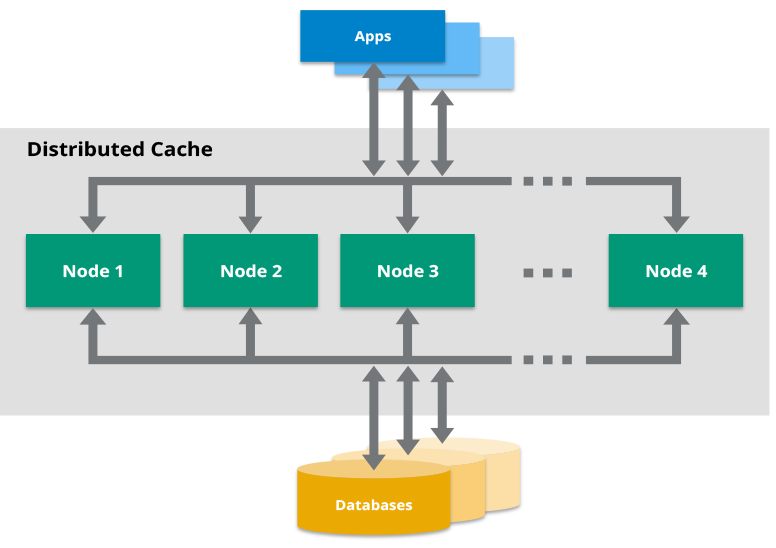
What is Distributed Cache
Distributed cache is a mechanism that stores frequently accessed data in memory across a distributed network of nodes. It acts as a caching layer, providing fast and efficient access to data, thereby reducing the load on primary data sources and improving application performance. Distributed caches are designed to handle high read and write throughput and enable horizontal scalability.
Important Features
- Data Partitioning: Distributed caches partition data across multiple nodes to achieve scalability. Different partitioning strategies like consistent hashing or range-based partitioning can be employed to distribute data evenly across cache nodes.
- Replication: Replicating data across multiple cache nodes ensures high availability and fault tolerance. Consistent hashing or quorum-based replication can be used to determine the replicas and handle data redundancy.
- Cache Eviction Policies: Distributed caches need efficient cache eviction policies to determine which data should be evicted when the cache is full. Common eviction policies include Least Recently Used (LRU), Least Frequently Used (LFU), or Time-To-Live (TTL) where data expires after a certain duration.
- Cache Invalidation: Distributed caches require mechanisms to invalidate or update cached data when the underlying data changes. This can be achieved through various techniques such as write-through or write-back invalidation, where the cache is updated synchronously or asynchronously with the underlying data source.
- Consistency Models: Distributed caches can support different consistency models based on the application requirements. Strong consistency ensures that all cache nodes see the same version of data at all times, eventual consistency allows temporary inconsistencies that eventually resolve, and eventual strong consistency provides a balance between the two.
Scaling Requirements — Capacity Estimation
To simulate a small-scale distributed cache system based on the scalability requirements for Netflix, let’s consider the following details:
- Total number of users: 1.2 billion
- Daily active users (DAU): 300 million
- Number of videos watched by user/day: 3
- Total number of videos watched per day: 900 million videos/day
- Read to write ratio: 100:1
Based on these numbers, let’s implement a basic simulation of a distributed cache system as follows —
class DistributedCache:
def __init__(self):
self.cache = {}
def set(self, key, value):
self.cache[key] = value
def get(self, key):
return self.cache.get(key, None)
def delete(self, key):
if key in self.cache:
del self.cache[key]
cache = DistributedCache()
# Simulating video uploads
videos_uploaded_per_day = 9_000_000
for video_id in range(videos_uploaded_per_day):
cache.set(f"video_{video_id}", f"video_content_{video_id}")
# Simulating video views
videos_watched_per_day = 900_000_000
for user_id in range(1, 300_000_001): # Assuming user IDs from 1 to 300 million
for _ in range(3): # Each user watches 3 videos
video_id = random.randint(0, videos_uploaded_per_day - 1)
cache.get(f"video_{video_id}")
# Checking cache statistics
total_cache_size = len(cache.cache)
print(f"Total cache size: {total_cache_size}")
# Checking storage estimation
video_size_mb = 80
total_storage_tb = videos_uploaded_per_day * video_size_mb / 1_000_000
total_storage_pb = total_storage_tb * 5 * 365 / 1_000
print(f"Total storage per day: {total_storage_tb:.2f} TB")
print(f"Total storage for next 3 years: {total_storage_pb:.2f} PB")In this simulation, we create a DistributedCache class that represents our distributed cache system. We simulate video uploads by setting key-value pairs in the cache, where each video is identified by a unique key ("video_{video_id}") and the value can represent the video content. We then simulate video views by retrieving random videos from the cache.
After simulating the video uploads and views, we check the cache size (the total number of videos stored in the cache) and calculate the storage estimation. The storage estimation is based on the assumption that each video has an average size of 80 MB.
Data Model — ER requirements
In a Distributed Cache System, the primary focus is on caching and retrieving key-value pairs. Therefore, the data model for the system would revolve around storing and accessing these key-value pairs efficiently. The ER requirements for the Data Model can be summarized as follows:
Entities:
- Key: Represents the unique identifier for the cached item.
- KeyID: Unique identifier for the key.
- Value: Represents the data associated with the key.
- ValueID: Unique identifier for the value.
Relationships:
- Mapping: Represents the mapping between the key and its corresponding value.
- KeyID: Foreign key referencing the Key entity.
- ValueID: Foreign key referencing the Value entity.
High Level Design
- Clients: These are the users or applications that interact with the distributed cache system to store and retrieve data.
- Cache Nodes: These are the individual cache instances that store a subset of the data in the cache. Each cache node holds a portion of the total cached data.
- Load Balancer: The load balancer distributes the client requests across multiple cache nodes, ensuring even distribution of load and preventing overload on any specific node.
- Replication: To ensure fault tolerance and high availability, data replication is employed. Each cache node can have one or more replicas, storing the same data.
- Consistency Protocol: To maintain consistency among the replicas, a consistency protocol, such as quorum-based replication or eventual consistency, is implemented.
Main Components and Services:
The main components and services in the Distributed Cache System are as follows:
- Set(key, value): Allows clients to store a key-value pair in the cache.
- Get(key): Retrieves the value associated with a given key from the cache.
- Delete(key): Removes the key-value pair from the cache.
- Eviction Policies: Implement various eviction policies like LRU (Least Recently Used), LFU (Least Frequently Used), or TTL (Time-To-Live) to determine which data should be evicted when the cache is full.
- Cache Invalidation: Provides mechanisms to invalidate or update cached data when the underlying data changes.
- Scaling: Supports horizontal scaling by adding more cache nodes to handle increased load and storage requirements.
- Replication and Consistency: Ensures data replication across cache nodes and maintains consistency among replicas.
- Load Balancing: Distributes client requests across cache nodes to achieve load balancing and prevent overloading of individual nodes.
- Monitoring and Metrics: Provides monitoring and metrics collection to track cache performance, utilization, and health.
- Data Partitioning: Divides the data across multiple cache nodes using partitioning strategies like consistent hashing or range-based partitioning to achieve scalability.
Basic Low Level Design
The basic low-level design for the Distributed Cache System consists of three main classes: DistributedCache, CacheNode, and CacheCluster.
- The
DistributedCacheclass represents the cache itself and provides methods for putting, getting, and removing key-value pairs from the cache. - The
CacheNodeclass represents an individual cache node with attributes such asnodeId,ipAddress,port, and an instance ofDistributedCacheto store data. - The
CacheClusterclass manages a cluster of cache nodes and provides methods for adding/removing nodes, as well as for putting, getting, and removing data from the cache. - The
CacheClusterclass internally uses theDistributedCacheclass of each cache node to store and retrieve data. - The
CacheClusterclass also includes a method to determine the cache node responsible for a given key, based on a certain logic (e.g., consistent hashing). - The main method in the
Mainclass demonstrates how to use the cache cluster by creating cache nodes, adding them to the cluster, putting data into the cache, and retrieving it.
import java.util.HashMap;
import java.util.Map;
class DistributedCache {
private Map<String, Object> cache;
public DistributedCache() {
this.cache = new HashMap<>();
}
public void put(String key, Object value) {
cache.put(key, value);
}
public Object get(String key) {
return cache.get(key);
}
public void remove(String key) {
cache.remove(key);
}
// Additional methods for cache eviction, cache statistics, etc.
// ...
}
class CacheNode {
private String nodeId;
private String ipAddress;
private int port;
private DistributedCache distributedCache;
public CacheNode(String nodeId, String ipAddress, int port) {
this.nodeId = nodeId;
this.ipAddress = ipAddress;
this.port = port;
this.distributedCache = new DistributedCache();
}
// Getters and setters for attributes
public DistributedCache getDistributedCache() {
return distributedCache;
}
// ...
}
class CacheCluster {
private Map<String, CacheNode> nodes;
public CacheCluster() {
this.nodes = new HashMap<>();
}
public void addNode(CacheNode node) {
nodes.put(node.getNodeId(), node);
}
public void removeNode(String nodeId) {
nodes.remove(nodeId);
}
public CacheNode getNode(String nodeId) {
return nodes.get(nodeId);
}
public void put(String key, Object value) {
CacheNode node = getNodeForKey(key);
node.getDistributedCache().put(key, value);
}
public Object get(String key) {
CacheNode node = getNodeForKey(key);
return node.getDistributedCache().get(key);
}
public void remove(String key) {
CacheNode node = getNodeForKey(key);
node.getDistributedCache().remove(key);
}
private CacheNode getNodeForKey(String key) {
// Logic to determine the cache node responsible for the given key
// ...
}
// Additional methods for cache management, node failure handling, etc.
// ...
}
public class Main {
public static void main(String[] args) {
CacheNode node1 = new CacheNode("Node1", "192.168.0.1", 8080);
CacheNode node2 = new CacheNode("Node2", "192.168.0.2", 8080);
CacheCluster cluster = new CacheCluster();
cluster.addNode(node1);
cluster.addNode(node2);
cluster.put("key1", "value1");
cluster.put("key2", "value2");
Object value1 = cluster.get("key1");
Object value2 = cluster.get("key2");
System.out.println("Value for key1: " + value1);
System.out.println("Value for key2: " + value2);
}
}API Design
Clear Operation:
- API Endpoint:
/cache/clear - Description: This API endpoint clears the entire cache, removing all cached data.
- Method:
DELETE - Response:
- Status code: 200 if the operation is successful.
Cache Statistics:
- API Endpoint:
/cache/statistics - Description: This API endpoint provides information about cache hits, misses, and other relevant metrics for monitoring and performance analysis.
- Method:
GET - Response:
- Status code: 200 if the operation is successful.
- Body: Cache statistics data (e.g., hit count, miss count, hit ratio).
Cache Configuration:
- API Endpoint:
/cache/configuration - Description: This API endpoint allows the configuration of cache parameters such as maximum cache size, eviction policies, and expiration time.
- Method:
PUT - Request Parameters:
maxSize: The maximum size of the cache.evictionPolicy: The eviction policy to be used (e.g., LRU, LFU).expirationTime: The expiration time for cached items.- Response:
- Status code: 200 if the operation is successful.
GET /cache-cluster
- Description: Get information about the cache cluster.
- Response:
- 200 OK: Returns information about the cache cluster.
- 401 Unauthorized: Unauthorized access.
- 500 Internal Server Error: An error occurred on the server.
POST /cache-cluster/nodes
- Description: Add a new cache node to the cluster.
- Request:
- Body: Node information (e.g., nodeId, ipAddress, port).
- Response:
- 201 Created: Cache node added successfully.
- 400 Bad Request: Invalid request or missing information.
- 401 Unauthorized: Unauthorized access.
- 500 Internal Server Error: An error occurred on the server.
DELETE /cache-cluster/nodes/{nodeId}
- Description: Remove a cache node from the cluster.
- Parameters:
- {nodeId}: Identifier of the cache node to remove.
- Response:
- 204 No Content: Cache node removed successfully.
- 401 Unauthorized: Unauthorized access.
- 404 Not Found: Cache node not found.
- 500 Internal Server Error: An error occurred on the server.
GET /cache-cluster/nodes/{nodeId}/cache/{key}
- Description: Get the value associated with the specified key in the cache node.
- Parameters:
- {nodeId}: Identifier of the cache node.
- {key}: Key to retrieve the value.
- Response:
- 200 OK: Returns the value associated with the key.
- 401 Unauthorized: Unauthorized access.
- 404 Not Found: Key not found.
- 500 Internal Server Error: An error occurred on the server.
POST /cache-cluster/nodes/{nodeId}/cache/{key}
- Description: Insert or update the value associated with the specified key in the cache node.
- Parameters:
- {nodeId}: Identifier of the cache node.
- {key}: Key to insert or update.
- Request:
- Body: Value to insert or update.
- Response:
- 201 Created: Value inserted or updated successfully.
- 400 Bad Request: Invalid request or missing information.
- 401 Unauthorized: Unauthorized access.
- 500 Internal Server Error: An error occurred on the server.
DELETE /cache-cluster/nodes/{nodeId}/cache/{key}
- Description: Remove the key-value pair from the cache node.
- Parameters:
- {nodeId}: Identifier of the cache node.
- {key}: Key to remove.
- Response:
- 204 No Content: Key-value pair removed successfully.
- 401 Unauthorized: Unauthorized access.
- 404 Not Found: Key not found.
- 500 Internal Server Error: An error occurred on the server.from flask import Flask, request, jsonify
class DistributedCache:
def __init__(self):
self.cache = {}
def set(self, key, value):
self.cache[key] = value
def get(self, key):
return self.cache.get(key, None)
def delete(self, key):
if key in self.cache:
del self.cache[key]
app = Flask(__name__)
cache = DistributedCache()
@app.route("/cache/set", methods=["POST"])
def set_key_value():
data = request.get_json()
if "key" not in data or "value" not in data:
return jsonify({"error": "Invalid request"}), 400
cache.set(data["key"], data["value"])
return jsonify({"message": "Key-value pair set successfully"}), 200
@app.route("/cache/get", methods=["GET"])
def get_value():
key = request.args.get("key")
value = cache.get(key)
if value is None:
return jsonify({"error": "Key not found"}), 404
return jsonify({"value": value}), 200
@app.route("/cache/delete", methods=["DELETE"])
def delete_key():
key = request.args.get("key")
cache.delete(key)
return jsonify({"message": "Key deleted successfully"}), 200
if __name__ == "__main__":
app.run()It defines a DistributedCache class to handle cache operations such as setting, getting, and deleting key-value pairs. The Flask application exposes three routes (/cache/set, /cache/get, /cache/delete) to perform cache operations using the appropriate HTTP methods.
Complete Detailed Design
Coming soon! It will be covered on youtube channel.
Subscribe to youtube channel :
Complete Code implementation
Data Partitioning (consistent hashing):
import hashlibclass DistributedCache:
def __init__(self, num_partitions):
self.num_partitions = num_partitions
self.partitions = [[] for _ in range(num_partitions)] def get_partition(self, key):
hash_value = int(hashlib.md5(key.encode()).hexdigest(), 16)
partition_index = hash_value % self.num_partitions
return partition_index def put(self, key, value):
partition_index = self.get_partition(key)
self.partitions[partition_index].append((key, value)) def get(self, key):
partition_index = self.get_partition(key)
partition = self.partitions[partition_index]
for stored_key, value in partition:
if stored_key == key:
return value
return None def delete(self, key):
partition_index = self.get_partition(key)
partition = self.partitions[partition_index]
for i, (stored_key, _) in enumerate(partition):
if stored_key == key:
del partition[i]
breakReplication (quorum-based replication):
class DistributedCache:
def __init__(self, num_replicas):
self.num_replicas = num_replicas
self.replicas = [[] for _ in range(num_replicas)] def replicate(self, key, value):
for i in range(self.num_replicas):
self.replicas[i].append((key, value)) def put(self, key, value):
self.replicate(key, value) def get(self, key):
for replica in self.replicas:
for stored_key, value in replica:
if stored_key == key:
return value
return None def delete(self, key):
for replica in self.replicas:
for i, (stored_key, _) in enumerate(replica):
if stored_key == key:
del replica[i]
breakCache Eviction Policies (LRU):
from collections import OrderedDictclass DistributedCache:
def __init__(self, capacity):
self.capacity = capacity
self.cache = OrderedDict() def put(self, key, value):
if key in self.cache:
del self.cache[key]
elif len(self.cache) == self.capacity:
self.cache.popitem(last=False)
self.cache[key] = value def get(self, key):
if key in self.cache:
value = self.cache[key]
del self.cache[key]
self.cache[key] = value
return value
return None def delete(self, key):
if key in self.cache:
del self.cache[key]Cache Invalidation:
class DistributedCache:
def __init__(self):
self.cache = {} def put(self, key, value):
self.cache[key] = value def get(self, key):
return self.cache.get(key, None) def delete(self, key):
if key in self.cache:
del self.cache[key] def invalidate(self, key):
self.delete(key)System Design — Healthifyme
We will be discussing in depth -
- What is Healthifyme
- Important Features
- Scaling Requirements — Capacity Estimation
- Data Model — ER requirements
- High Level Design
- Basic Low Level Design
- API Design
- Complete Detailed Design
- Complete Code Implementation

What is Healthifyme
Healthifyme is a leading health and fitness app that aims to revolutionize the way people manage their health and wellness. The platform provides personalized diet and fitness plans, tracks users’ progress, and offers access to a community of health enthusiasts and experts. With a user-friendly interface and cutting-edge technology, Healthifyme empowers individuals to achieve their health goals effectively.
Important Features
- Personalized Diet and Fitness Plans: Healthifyme offers tailored diet and workout plans based on users’ health goals, dietary preferences, and fitness levels.
- Calorie Tracking: Users can log their daily food intake and physical activities to monitor their calorie consumption and expenditure.
- Activity Tracking: The app integrates with wearable devices and smartphones to track users’ daily steps, distance covered, and other activities.
- Health Insights: Healthifyme provides valuable insights into users’ progress, such as weight changes, nutrition intake, and fitness improvements.
- Community Support: Users can engage with a vibrant community of fitness enthusiasts, nutritionists, and health coaches for guidance and motivation.
- Expert Consultations: Healthifyme offers users the option to book consultations with certified nutritionists and fitness experts for personalized advice.
Scaling Requirements — Capacity Estimation
For the sake of simplicity, let’s consider a small-scale simulation . Let’s say we have —
Total number of users: 10 Million
Daily active users (DAU): 2 Million
Average number of activities logged by user/day: 5
Total number of activities logged per day: 10 Million activities/day
Since the system is read-heavy, we’ll assume the read-to-write ratio to be 100:1.
Total number of activities uploaded/day = 1/100 * 10 Million = 100,000 activities/day
Storage Estimation:
Let’s say, on average, each activity entry occupies 1 KB of storage.
Total Storage per day = 100,000 activities/day * 1 KB = 100 MB/day
For the next 3 years:
Total Storage for 3 years = 100 MB/day * 365 days/year * 3 years ≈ 109.5 GB
Requests per second:
Requests per second = 10 Million activities/day / 86400 seconds (1 day) ≈ 115 requests/second
Horizontal Scaling: Distributing the application across multiple servers to handle increased user loads effectively.
Caching Mechanism: Implementing a caching layer to reduce database queries and enhance response times.
Load Balancing: Employing load balancers to distribute incoming traffic evenly across multiple servers.
Database Sharding: Partitioning the database to distribute data across multiple nodes to prevent bottlenecks.
from flask import Flask, request, jsonify
app = Flask(__name__)
# Sample data for activities
activities_data = {}
@app.route('/api/v1/log_activity', methods=['POST'])
def log_activity():
data = request.get_json()
user_id = data.get("user_id")
activity = data.get("activity")
if not user_id or not activity:
return jsonify({"error": "Invalid input data. User ID and activity details are required."}), 400
# Save activity data to the database (in-memory dictionary for demonstration purposes)
if user_id not in activities_data:
activities_data[user_id] = []
activities_data[user_id].append(activity)
return jsonify({"message": "Activity logged successfully"}), 201
@app.route('/api/v1/get_activities', methods=['GET'])
def get_activities():
user_id = request.args.get('user_id')
if not user_id:
return jsonify({"error": "User ID is required in the query parameter."}), 400
# Retrieve activities for the user from the database (in-memory dictionary for demonstration purposes)
user_activities = activities_data.get(user_id, [])
return jsonify({"user_id": user_id, "activities": user_activities}), 200
if __name__ == '__main__':
app.run(debug=True)Data Model — ER requirements
Users:
- Fields:
- User_ID: Integer (Primary Key)
- Username: String
- Email: String
- Password: String
Health Data:
- Fields:
- Data_ID: Integer (Primary Key)
- User_ID: Integer (Foreign Key to Users table)
- Weight: Float
- Height: Float
- Age: Integer
- Gender: String
- Body Mass Index (BMI): Float
- Body Fat Percentage: Float
- Blood Pressure: String
- Heart Rate: Integer
- Blood Sugar Level: Float
- Cholesterol Level: Float
- Timestamp: DateTime
Diet Plan:
- Fields:
- Plan_ID: Integer (Primary Key)
- User_ID: Integer (Foreign Key to Users table)
- Plan_Name: String
- Calories_Per_Day: Integer
- Meal_Items: JSON (List of meal items with their nutritional information)
- Start_Date: Date
- End_Date: Date
Workout Plan:
- Fields:
- Plan_ID: Integer (Primary Key)
- User_ID: Integer (Foreign Key to Users table)
- Plan_Name: String
- Duration: Integer (in days)
- Exercises: JSON (List of exercise details)
- Start_Date: Date
- End_Date: Date
User: Stores user information such as name, email, password, and health goals.
Diet Plan: Represents personalized diet plans with details of meals, calories, and nutrient information.
Fitness Plan: Includes individualized workout plans with exercise routines and intensity levels.
Activity Log: Records users’ daily activities, including steps, distance, and active minutes.
Consultation: Stores data related to consultations booked by users with nutritionists or fitness experts.
High Level Design
Assumptions:
- The system is read-heavy, with more users viewing health data, diet plans, and workout plans than writing new data.
- The system needs to be highly available and reliable to provide real-time health insights to users.
- The system should support horizontal scaling for handling increased traffic and data storage.
Client-side Application: This includes the mobile app and web interface, enabling users to interact with the platform.
Application Servers: Handle user requests, process business logic, and interact with the database.
Database: Stores user data, diet plans, fitness plans, activity logs, and other relevant information.
Caching Layer: Improves performance by caching frequently accessed data.
Load Balancer: Distributes incoming requests across multiple application servers.
Content Delivery Network (CDN): Delivers static content (images, CSS, etc.) to users from geographically distributed servers.
Diet and Fitness Plan Generation: Developing algorithms to generate personalized plans based on user input.
Activity Tracking Integration: Integrating with wearable devices and smartphones to collect activity data.
Database Schema Design: Designing an optimized database schema to efficiently store and retrieve data.
Main Components —
- Mobile Client: Represents the users accessing the Healthifyme app through mobile devices.
- Application Servers: Read, write, and notification servers that handle user requests for health data, diet plans, and workout plans.
- Load Balancer: Routes and distributes incoming requests to the appropriate application servers to balance the load.
- Cache (Memcache): Caches frequently accessed health data, diet plans, and workout plans to improve response times and reduce database load.
- CDN (Content Delivery Network): To improve the latency and throughput of serving images, static content, and app resources to users.
- Database: Utilizes a NoSQL database (e.g., MongoDB, Cassandra) to store health data, diet plans, and workout plans due to the requirement for flexibility and scalability.
- Storage (HDFS or Amazon S3): Stores user-uploaded health-related images, documents, and other files.
Services
User Management Service:
- Responsible for user registration, login, and authentication.
- Handles user profile updates and password changes.
Health Data Service:
- Manages health data for each user, including weight, height, age, BMI, blood pressure, heart rate, etc.
- Provides APIs for recording, retrieving, and analyzing health data over time.
Diet Plan Service:
- Creates and manages personalized diet plans based on user health data and goals.
- Provides APIs for generating, retrieving, and updating diet plans.
Workout Plan Service:
- Creates and manages personalized workout plans based on user health data and fitness goals.
- Provides APIs for generating, retrieving, and updating workout plans.
Feed Generation Service:
- Curates and generates personalized health and fitness feeds for each user.
- Ranks and filters content based on user preferences, recent activities, and trends.
Notification Service:
- Sends push notifications and email alerts to users for reminders, updates, and achievements.
Image and File Storage Service:
- Manages storage and retrieval of user-uploaded health-related images and documents.
Basic Low Level Design
from flask import Flask, request, jsonify
app = Flask(__name__)
# Sample data to be stored in the server
users = {}
health_data = {}
diet_plans = {}
workout_plans = {}
# User Management Service
@app.route('/api/v1/users', methods=['POST'])
def create_user():
data = request.get_json()
user_id = data.get('user_id')
if user_id in users:
return "User already exists", 409
username = data.get('username')
email = data.get('email')
password = data.get('password')
users[user_id] = {'username': username, 'email': email, 'password': password}
return "User created successfully", 201
@app.route('/api/v1/users/<user_id>', methods=['GET'])
def get_user(user_id):
if user_id in users:
return jsonify(users[user_id]), 200
return "User not found", 404
@app.route('/api/v1/users/<user_id>', methods=['PATCH'])
def update_user(user_id):
if user_id in users:
data = request.get_json()
users[user_id].update(data)
return "User profile updated successfully", 200
return "User not found", 404
# Health Data Service
@app.route('/api/v1/healthdata', methods=['POST'])
def record_health_data():
data = request.get_json()
user_id = data.get('user_id')
if user_id not in users:
return "User not found", 404
health_data[user_id] = data
return "Health data recorded successfully", 201
@app.route('/api/v1/healthdata/<user_id>', methods=['GET'])
def get_health_data(user_id):
if user_id in health_data:
return jsonify(health_data[user_id]), 200
return "Health data not found", 404
# Diet Plan Service
@app.route('/api/v1/dietplan', methods=['POST'])
def create_diet_plan():
data = request.get_json()
user_id = data.get('user_id')
if user_id not in users:
return "User not found", 404
diet_plans[user_id] = data
return "Diet plan created successfully", 201
@app.route('/api/v1/dietplan/<user_id>', methods=['GET'])
def get_diet_plan(user_id):
if user_id in diet_plans:
return jsonify(diet_plans[user_id]), 200
return "Diet plan not found", 404
# Workout Plan Service
@app.route('/api/v1/workoutplan', methods=['POST'])
def create_workout_plan():
data = request.get_json()
user_id = data.get('user_id')
if user_id not in users:
return "User not found", 404
workout_plans[user_id] = data
return "Workout plan created successfully", 201
@app.route('/api/v1/workoutplan/<user_id>', methods=['GET'])
def get_workout_plan(user_id):
if user_id in workout_plans:
return jsonify(workout_plans[user_id]), 200
return "Workout plan not found", 404
if __name__ == '__main__':
    app.run()
API Design
User Registration API:
Endpoint: /api/v1/register Method: POST Description: Allows users to register on the Healthifyme platform.
Request Body:
{
  "name": "John Doe",
  "email": "[email protected]",
  "password": "secure_password"
}
Response:
{
  "message": "User registered successfully",
  "user_id": "user123"
}
from flask import Flask, request, jsonifyapp = Flask(__name__)@app.route('/api/v1/register', methods=['POST'])
def register_user():
data = request.get_json()
# Validate input data (e.g., check if email is not already registered)
# Perform user registration and save user data to the database
# Generate a unique user_id
user_id = "user123"
return jsonify({"message": "User registered successfully", "user_id": user_id}), 201if __name__ == '__main__':
app.run(debug=True)Diet Plan Retrieval API:
Endpoint: /api/v1/diet_plan Method: GET Description: Retrieves the personalized diet plan for a given user.
Request Headers:
Authorization: Bearer <user_access_token>Response:
{
"user_id": "user123",
"diet_plan": {
"breakfast": "Oatmeal with fruits",
"lunch": "Grilled chicken with salad",
"dinner": "Salmon with steamed vegetables",
"calories": 1800
}
}@app.route('/api/v1/diet_plan', methods=['GET'])
def get_diet_plan():
user_access_token = request.headers.get('Authorization').split()[1]
# Validate and verify the user_access_token
user_id = "user123"
diet_plan = {
"breakfast": "Oatmeal with fruits",
"lunch": "Grilled chicken with salad",
"dinner": "Salmon with steamed vegetables",
"calories": 1800
}
return jsonify({"user_id": user_id, "diet_plan": diet_plan}), 200Activity Logging API:
Endpoint: /api/v1/activity_log Method: POST Description: Allows users to log their daily activities.
Request Headers:
Authorization: Bearer <user_access_token>Request Body:
{
"steps": 8000,
"distance": 5.2,
"active_minutes": 60
}Response:
{
"message": "Activity logged successfully"
}@app.route('/api/v1/activity_log', methods=['POST'])
def log_activity():
user_access_token = request.headers.get('Authorization').split()[1]
# Validate and verify the user_access_token
# Retrieve user_id from the token
data = request.get_json()
steps = data["steps"]
distance = data["distance"]
active_minutes = data["active_minutes"]
# Save activity data to the database
return jsonify({"message": "Activity logged successfully"}), 201from flask import Flask, request, jsonify
app = Flask(__name__)
# Sample data for user registration and diet plan retrieval
users_data = {}
users_diet_plans = {}
@app.route('/api/v1/register', methods=['POST'])
def register_user():
data = request.get_json()
name = data.get("name")
email = data.get("email")
password = data.get("password")
if not name or not email or not password:
return jsonify({"error": "Invalid input data. Name, email, and password are required."}), 400
# Check if the email is already registered
if email in users_data:
return jsonify({"error": "User with this email already exists."}), 409
# Generate a unique user_id (you can use a library like uuid for this purpose)
user_id = "user123"
# Save user data to the database (in-memory dictionary for demonstration purposes)
users_data[email] = {
"name": name,
"password": password,
"user_id": user_id
}
return jsonify({"message": "User registered successfully", "user_id": user_id}), 201
@app.route('/api/v1/diet_plan', methods=['GET'])
def get_diet_plan():
user_access_token = request.headers.get('Authorization').split()[1]
# Validate and verify the user_access_token (you can use a JWT library for this purpose)
# For demonstration, we'll assume the user_access_token is valid and contains the user's email.
email = "[email protected]"
# Retrieve the user_id associated with the given email
user_id = users_data.get(email, {}).get("user_id")
if not user_id:
return jsonify({"error": "User not found."}), 404
# Check if a diet plan exists for the user
if user_id not in users_diet_plans:
return jsonify({"error": "Diet plan not found for the user."}), 404
# Retrieve the diet plan for the user
diet_plan = users_diet_plans[user_id]
return jsonify({"user_id": user_id, "diet_plan": diet_plan}), 200
@app.route('/api/v1/activity_log', methods=['POST'])
def log_activity():
user_access_token = request.headers.get('Authorization').split()[1]
# Validate and verify the user_access_token (you can use a JWT library for this purpose)
# For demonstration, we'll assume the user_access_token is valid and contains the user's email.
email = "[email protected]"
# Retrieve the user_id associated with the given email
user_id = users_data.get(email, {}).get("user_id")
if not user_id:
return jsonify({"error": "User not found."}), 404
data = request.get_json()
steps = data.get("steps")
distance = data.get("distance")
active_minutes = data.get("active_minutes")
if not steps or not distance or not active_minutes:
return jsonify({"error": "Invalid input data. Steps, distance, and active_minutes are required."}), 400
# Save activity data to the database (in-memory dictionary for demonstration purposes)
# You can use a database or storage service for production implementation.
activity_log = {
"steps": steps,
"distance": distance,
"active_minutes": active_minutes
}
if user_id not in users_diet_plans:
users_diet_plans[user_id] = []
users_diet_plans[user_id].append(activity_log)
return jsonify({"message": "Activity logged successfully"}), 201
if __name__ == '__main__':
app.run(debug=True)Complete Detailed Design
Coming soon! It will be covered on youtube channel.
Subscribe to youtube channel :
Complete Code implementation
from flask import Flask, request, jsonify

app = Flask(__name__)

# Sample data for user registration, personalized diet plans, and activity logs
users_data = {}
users_diet_plans = {}
users_activity_logs = {}

@app.route('/api/v1/register', methods=['POST'])
def register_user():
    data = request.get_json()
    name = data.get("name")
    email = data.get("email")
    password = data.get("password")

    if not name or not email or not password:
        return jsonify({"error": "Invalid input data. Name, email, and password are required."}), 400

    # Check if the email is already registered
    if email in users_data:
        return jsonify({"error": "User with this email already exists."}), 409

    # Generate a unique user_id (you can use a library like uuid for this purpose)
    user_id = "user123"

    # Save user data to the database (in-memory dictionary for demonstration purposes)
    users_data[email] = {
        "name": name,
        "password": password,
        "user_id": user_id
    }

    # Initialize user's diet plan and activity log
    users_diet_plans[user_id] = []
    users_activity_logs[user_id] = []

    return jsonify({"message": "User registered successfully", "user_id": user_id}), 201


@app.route('/api/v1/diet_plan', methods=['POST'])
def get_personalized_diet_plan():
    user_access_token = request.headers.get('Authorization').split()[1]

    # Validate and verify the user_access_token (you can use a JWT library for this purpose)
    # For demonstration, we'll assume the user_access_token is valid and contains the user's email.
    email = "[email protected]"

    # Retrieve the user_id associated with the given email
    user_id = users_data.get(email, {}).get("user_id")

    if not user_id:
        return jsonify({"error": "User not found."}), 404

    # Create a personalized diet plan for the user (you can use external APIs or algorithms for this)
    diet_plan = {
        "breakfast": "Oatmeal with fruits",
        "lunch": "Grilled chicken with salad",
        "dinner": "Salmon with steamed vegetables",
        "calories": 1800
    }

    users_diet_plans[user_id].append(diet_plan)

    return jsonify({"user_id": user_id, "diet_plan": diet_plan}), 200


@app.route('/api/v1/activity_log', methods=['POST'])
def log_activity():
    user_access_token = request.headers.get('Authorization').split()[1]

    # Validate and verify the user_access_token (you can use a JWT library for this purpose)
    # For demonstration, we'll assume the user_access_token is valid and contains the user's email.
    email = "[email protected]"

    # Retrieve the user_id associated with the given email
    user_id = users_data.get(email, {}).get("user_id")

    if not user_id:
        return jsonify({"error": "User not found."}), 404

    data = request.get_json()
    steps = data.get("steps")
    distance = data.get("distance")
    active_minutes = data.get("active_minutes")

    if not steps or not distance or not active_minutes:
        return jsonify({"error": "Invalid input data. Steps, distance, and active_minutes are required."}), 400

    # Save activity data to the database (in-memory dictionary for demonstration purposes)
    activity_log = {
        "steps": steps,
        "distance": distance,
        "active_minutes": active_minutes
    }

    users_activity_logs[user_id].append(activity_log)

    return jsonify({"message": "Activity logged successfully"}), 201

if __name__ == '__main__':
    app.run(debug=True)
System Design — Parking Lot
We will be discussing in depth -
- What is Parking Lot
- Important Features
- Scaling Requirements — Capacity Estimation
- Data Model — ER requirements
- High Level Design
- Basic Low Level Design
- API Design
- Complete Detailed Design
- Complete Code Implementation

What is Parking Lot
A parking lot is a designated area where vehicles can be parked temporarily. It is a crucial component of urban infrastructure, providing convenient and organized parking spaces for cars, motorcycles, bicycles, and other vehicles. The design and efficiency of a parking lot play a significant role in managing traffic congestion and enhancing the overall user experience.
Important Features
- Vehicle Entry and Exit Management: The parking lot should efficiently handle vehicles entering and exiting the premises while maintaining security and accuracy in tracking available parking spaces.
- Parking Space Availability: The system must provide real-time information on available parking spaces to drivers, reducing the time spent searching for a spot.
- Payment and Billing: Implement a robust payment system, supporting various payment methods, and generating accurate bills based on the duration of parking.
- Security and Surveillance: Utilize surveillance cameras and security measures to ensure the safety of vehicles and visitors within the parking lot.
- Reservation System: Offer the option for users to reserve parking spaces in advance, guaranteeing availability during peak hours.
- User-Friendly Interface: Design a user-friendly mobile or web application that allows drivers to easily find parking, make payments, and manage reservations.
- Parking Lot Navigation: Provide a guidance system to direct drivers to available parking spaces efficiently.
Scaling Requirements — Capacity Estimation
Let’s assume —
Total number of parking spaces: 1000
Average vehicles entering the parking lot per hour: 150
Average duration of parking per vehicle: 2 hours
Total number of vehicles parked per day: 150 * 24 = 3600
Assuming a read-to-write ratio of 50:1 (read-heavy system).
Total number of parking reservations per day: 3600 * 50 = 180,000
Average reservation time: 1 hour
Total number of API requests per second: 180,000 / (24 * 3600) ≈ 2 requests/second
User Load: The system should be capable of handling a large number of concurrent users during peak hours, ensuring minimal delays in processing requests.
Data Storage: As the number of registered users, transactions, and parking spaces increase, the data storage system must scale accordingly to handle the growing data.
Traffic Management: The system must handle varying traffic volumes efficiently, maintaining response times and avoiding bottlenecks.
import time
import random

class ParkingLotSystem:
    def __init__(self, capacity):
        self.capacity = capacity
        self.available_spaces = capacity
        self.parked_vehicles = set()
        self.reservations = {}

    def vehicle_entry(self, vehicle_id):
        if self.available_spaces > 0:
            self.available_spaces -= 1
            self.parked_vehicles.add(vehicle_id)
            return True
        else:
            return False

    def vehicle_exit(self, vehicle_id):
        if vehicle_id in self.parked_vehicles:
            self.available_spaces += 1
            self.parked_vehicles.remove(vehicle_id)
            return True
        else:
            return False

    def make_reservation(self, vehicle_id, duration):
        if vehicle_id not in self.reservations and self.available_spaces > 0:
            self.reservations[vehicle_id] = time.time() + duration
            return True
        else:
            return False

    def check_reservation(self, vehicle_id):
        if vehicle_id in self.reservations:
            return self.reservations[vehicle_id] - time.time()
        else:
            return None

    def cancel_reservation(self, vehicle_id):
        if vehicle_id in self.reservations:
            del self.reservations[vehicle_id]
            return True
        else:
            return False


# Example usage:
if __name__ == "__main__":
    parking_lot_system = ParkingLotSystem(capacity=1000)

    # Simulate vehicle entry and exit
    for i in range(3600):
        vehicle_id = f"Vehicle-{i+1}"
        if parking_lot_system.vehicle_entry(vehicle_id):
            print(f"{vehicle_id} parked successfully.")
        else:
            print(f"{vehicle_id} couldn't park. Parking lot full.")
        parked_duration = random.randint(1, 4) * 3600  # Random parking duration between 1 to 4 hours
        time.sleep(parked_duration)  # Simulate parked duration
        if parking_lot_system.vehicle_exit(vehicle_id):
            print(f"{vehicle_id} exited successfully.")
        else:
            print(f"{vehicle_id} not found in the parking lot.")

    # Simulate parking reservations
    for i in range(180000):
        vehicle_id = f"Reservation-{i+1}"
        reservation_time = random.randint(1, 3) * 3600  # Random reservation time between 1 to 3 hours
        if parking_lot_system.make_reservation(vehicle_id, reservation_time):
            print(f"{vehicle_id} reservation made successfully.")
        else:
            print(f"{vehicle_id} couldn't make reservation. No available spaces.")
        time.sleep(random.randint(1, 5))  # Simulate time between reservation attempts

    # Check reservations and cancel them
    for i in range(180000):
        vehicle_id = f"Reservation-{i+1}"
        remaining_time = parking_lot_system.check_reservation(vehicle_id)
        if remaining_time is not None:
            print(f"{vehicle_id} has {remaining_time/3600:.2f} hours remaining in reservation.")
        else:
            print(f"{vehicle_id} doesn't have an active reservation.")
        if random.random() < 0.1:  # 10% chance to cancel the reservation
            if parking_lot_system.cancel_reservation(vehicle_id):
                print(f"{vehicle_id} reservation canceled.")
            else:
                print(f"{vehicle_id} doesn't have an active reservation to cancel.")
        time.sleep(random.randint(1, 5))  # Simulate time between reservation checks and cancellations
Data Model — ER requirements
+---------------+       +--------------+       +-------------------+
|   Parking     |       |   Vehicle    |       |    Payment        |
+---------------+       +--------------+       +-------------------+
| parking_id (PK)|       | vehicle_id   |       | payment_id (PK)   |
| location      |       | type         |       | parking_id (FK)   |
| capacity      |       | plate_number |       | amount            |
| available     |       +--------------+        | payment_method    |
+---------------+                               | transaction_time  |
                                                 +-------------------+
User:
- Username: String
- Email: String
- Password: String
ParkingLot:
- ParkingLotID: Integer
- Location: String
- Capacity: Integer
- AvailableSpaces: Integer
Reservation:
- ReservationID: Integer
- UserID: Integer (Foreign key from User table)
- ParkingLotID: Integer (Foreign key from ParkingLot table)
- Timestamp: DateTime
- Duration: Integer (in minutes)
High Level Design
Assumptions:
- The system will be read-heavy as users will frequently check for available parking spaces and make reservations.
- The system will be horizontally scalable to handle increased traffic.
- High availability and reliability are crucial to ensure seamless user experience.
User Interface: This component includes the web or mobile interface where users interact with the parking lot system. It allows users to search for parking, make reservations, and process payments.
API Gateway: The API gateway acts as an entry point for all client requests, routing them to the appropriate services. It handles authentication, load balancing, and API versioning.
Application Service: This layer contains the business logic of the parking lot system. It handles user requests, checks parking availability, manages reservations, and initiates payment processing.
Data Storage: The data storage layer stores all relevant information such as parking details, vehicle information, reservation status, and payment records.
Main Components and Services:
- Mobile Client: Users access the Parking Lot system through a mobile application or web interface.
- Application Servers: These servers handle read and write operations and manage user interactions with the system.
- Load Balancer: The load balancer routes incoming requests to the appropriate application server to ensure even distribution of traffic.
- Cache (Memcache/Redis): Caching frequently accessed data like available parking spaces and reservation status to improve response times.
- Database: A NoSQL database like MongoDB or Cassandra to store user information, parking lot data, and reservation details.
- Storage (HDFS or Amazon S3): To store images or documents related to parking lots, such as parking lot images, maps, or additional information.
- Reservation Service: Manages the creation, modification, and deletion of parking lot reservations.
- Parking Lot Service: Handles parking lot-related information, such as available spaces and parking lot details.
- User Service: Manages user-related operations, including user authentication and profile management.
- Feed Generation Service: Generates personalized feeds for users based on their reservation status and parking lot information.
- Notification Service: Sends notifications to users for successful reservations, reminders, or parking lot updates.
- Authentication Service: Provides secure authentication and authorization for user interactions.
Basic Low Level Design
Parking Management:

getParkingInfo(parking_id): Retrieves parking information, including location, capacity, and availability status.

checkAvailability(parking_id, timestamp): Checks if parking space is available at the given timestamp.

reserveParking(parking_id, user_id, timestamp): Reserves a parking space for the user at the specified time.

cancelReservation(reservation_id): Cancels the user's parking reservation.

Payment Management:

calculateParkingFee(parking_id, entry_time, exit_time): Calculates the parking fee based on entry and exit times.

processPayment(user_id, parking_id, amount, payment_method): Initiates the payment process for the parking fee.

generateInvoice(user_id, parking_id, entry_time, exit_time, amount): Generates an invoice for the parking transaction.

User Management:

registerUser(name, email, password): Registers a new user in the system.

loginUser(email, password): Authenticates the user and generates a session token.

getUserInfo(user_id): Retrieves user information such as name, email, and reservation history.
class ParkingLot:
def __init__(self, capacity):
self.capacity = capacity
self.available_spaces = capacity
self.parked_vehicles = set()
def vehicle_entry(self, vehicle_id):
if self.available_spaces > 0:
self.available_spaces -= 1
self.parked_vehicles.add(vehicle_id)
return True
else:
return False
def vehicle_exit(self, vehicle_id):
if vehicle_id in self.parked_vehicles:
self.available_spaces += 1
self.parked_vehicles.remove(vehicle_id)
return True
else:
return False
class User:
def __init__(self, user_id, username, password):
self.user_id = user_id
self.username = username
self.password = password
class Reservation:
def __init__(self, reservation_id, user, parking_lot, timestamp, duration):
self.reservation_id = reservation_id
self.user = user
self.parking_lot = parking_lot
self.timestamp = timestamp
self.duration = duration
API Design
Parking API:

GET /parking/{parking_id}: Get parking information.
GET /parking/{parking_id}/availability: Get parking availability status.
POST /parking/{parking_id}/reserve: Reserve a parking space.
DELETE /reservation/{reservation_id}: Cancel a parking reservation.

Payment API:

POST /payment/{parking_id}: Process parking payment.
GET /invoice/{invoice_id}: Get payment invoice.

User API:

POST /user/register: Register a new user.
POST /user/login: User login.
GET /user/{user_id}: Get user information.
from flask import Flask, jsonify, request
app = Flask(__name__)
# Sample authentication middleware (you can integrate actual authentication here)
def authenticate_request():
# Implement actual authentication logic here
return True
# Sample versioning middleware (you can implement versioning if needed)
def check_api_version():
# Implement versioning logic here
return True
@app.route("/parking/<int:parking_id>", methods=["GET"])
def get_parking_info_route(parking_id):
if authenticate_request() and check_api_version():
parking_info = get_parking_info(parking_id)
return jsonify(parking_info)
return jsonify({"error": "Unauthorized or unsupported API version"}), 401
@app.route("/parking/<int:parking_id>/availability", methods=["GET"])
def check_availability_route(parking_id):
if authenticate_request() and check_api_version():
timestamp = int(request.args.get("timestamp", 0))
available = check_availability(parking_id, timestamp)
return jsonify({"available": available})
return jsonify({"error": "Unauthorized or unsupported API version"}), 401
@app.route("/parking/<int:parking_id>/reserve", methods=["POST"])
def reserve_parking_route(parking_id):
if authenticate_request() and check_api_version():
user_id = int(request.json.get("user_id", 0))
timestamp = int(request.json.get("timestamp", 0))
reservation_id = reserve_parking(parking_id, user_id, timestamp)
return jsonify({"reservation_id": reservation_id})
return jsonify({"error": "Unauthorized or unsupported API version"}), 401
@app.route("/reservation/<int:reservation_id>", methods=["DELETE"])
def cancel_reservation_route(reservation_id):
if authenticate_request() and check_api_version():
success = cancel_reservation(reservation_id)
return jsonify({"success": success})
return jsonify({"error": "Unauthorized or unsupported API version"}), 401
@app.route("/payment/<int:parking_id>", methods=["POST"])
def process_payment_route(parking_id):
if authenticate_request() and check_api_version():
user_id = int(request.json.get("user_id", 0))
amount = float(request.json.get("amount", 0))
payment_method = request.json.get("payment_method", "")
success = process_payment(user_id, parking_id, amount, payment_method)
return jsonify({"success": success})
return jsonify({"error": "Unauthorized or unsupported API version"}), 401
@app.route("/invoice/<int:invoice_id>", methods=["GET"])
def get_invoice_route(invoice_id):
if authenticate_request() and check_api_version():
# Assume you have a database to store invoices and retrieve them here.
# For the sake of simplicity, let's generate a dummy invoice instead.
user_id = 123
parking_id = 456
entry_time = 1632328200
exit_time = 1632349200
amount = 10.50
invoice = generate_invoice(user_id, parking_id, entry_time, exit_time, amount)
return jsonify({"invoice": invoice})
return jsonify({"error": "Unauthorized or unsupported API version"}), 401
if __name__ == "__main__":
app.run(port=8080)Complete Detailed Design
Coming soon! It will be covered on youtube channel.
Subscribe to youtube channel :
Complete Code implementation
class ParkingLot:
    def __init__(self):
        self.parking_lots = {}
        self.reservations = {}
        self.next_reservation_id = 1

    def add_parking_lot(self, parking_id, location, capacity):
        self.parking_lots[parking_id] = {
            "location": location,
            "capacity": capacity,
            "available": capacity
        }

    def get_parking_info(self, parking_id):
        return self.parking_lots.get(parking_id, None)

    def check_availability(self, parking_id, timestamp):
        parking_info = self.parking_lots.get(parking_id, None)
        if not parking_info:
            return False
        return parking_info["available"] > 0

    def reserve_parking(self, parking_id, user_id, timestamp):
        parking_info = self.parking_lots.get(parking_id, None)
        if not parking_info or parking_info["available"] == 0:
            return -1
        reservation_id = self.next_reservation_id
        self.reservations[reservation_id] = {
            "parking_id": parking_id,
            "user_id": user_id,
            "timestamp": timestamp
        }
        self.parking_lots[parking_id]["available"] -= 1
        self.next_reservation_id += 1
        return reservation_id

    def cancel_reservation(self, reservation_id):
        reservation_info = self.reservations.get(reservation_id, None)
        if not reservation_info:
            return False
        parking_id = reservation_info["parking_id"]
        self.parking_lots[parking_id]["available"] += 1
        del self.reservations[reservation_id]
        return True


class PaymentManager:
    def calculate_parking_fee(self, parking_id, entry_time, exit_time):
        hourly_rate = 2  # Assume a fixed hourly rate of $2
        parking_duration = (exit_time - entry_time) // 3600  # Convert to hours
        total_fee = hourly_rate * parking_duration
        return total_fee

    def process_payment(self, user_id, parking_id, amount, payment_method):
        # Implement payment processing logic here (not implemented in this example)
        return True

    def generate_invoice(self, user_id, parking_id, entry_time, exit_time, amount):
        invoice = f"Invoice for User {user_id}:\n" \
                  f"Parking ID: {parking_id}\n" \
                  f"Entry Time: {entry_time}\n" \
                  f"Exit Time: {exit_time}\n" \
                  f"Total Amount: ${amount:.2f}"
        return invoice


# Example usage:
if __name__ == "__main__":
    parking_lot = ParkingLot()
    parking_lot.add_parking_lot(1, "Example Parking Lot", 100)

    user_id = 123
    timestamp = 1632328200
    parking_id = 1

    # Check parking availability
    available = parking_lot.check_availability(parking_id, timestamp)
    print("Parking Available:", available)

    # Reserve parking
    reservation_id = parking_lot.reserve_parking(parking_id, user_id, timestamp)
    print("Reservation ID:", reservation_id)

    # Cancel reservation
    success = parking_lot.cancel_reservation(reservation_id)
    print("Reservation Cancelled:", success)

    # Calculate parking fee
    exit_timestamp = 1632349200
    payment_manager = PaymentManager()
    total_fee = payment_manager.calculate_parking_fee(parking_id, timestamp, exit_timestamp)
    print("Total Parking Fee:", total_fee)

    # Generate invoice
    invoice = payment_manager.generate_invoice(user_id, parking_id, timestamp, exit_timestamp, total_fee)
    print("Invoice:")
    print(invoice)
import time
class ParkingLotSystem:
def __init__(self, capacity):
self.capacity = capacity
self.available_spaces = capacity
self.reservations = {}
self.parking_log = {}
def vehicle_entry(self, vehicle_id):
if self.available_spaces > 0:
timestamp = int(time.time())
self.available_spaces -= 1
self.parking_log[vehicle_id] = {"entry_time": timestamp}
return True
else:
return False
def vehicle_exit(self, vehicle_id):
if vehicle_id in self.parking_log:
timestamp = int(time.time())
entry_time = self.parking_log[vehicle_id]["entry_time"]
duration = timestamp - entry_time
del self.parking_log[vehicle_id]
self.available_spaces += 1
return duration
else:
return None
def get_available_spaces(self):
return self.available_spaces
def make_payment(self, vehicle_id, duration):
hourly_rate = 2 # Assuming a fixed hourly rate of $2
amount = hourly_rate * (duration // 3600)
return amount
def reserve_parking(self, vehicle_id, timestamp):
if vehicle_id not in self.parking_log and self.available_spaces > 0:
self.reservations[vehicle_id] = timestamp
return True
else:
return False
def is_parking_reserved(self, vehicle_id):
return vehicle_id in self.reservations
def get_reservation_timestamp(self, vehicle_id):
return self.reservations.get(vehicle_id)
def cancel_reservation(self, vehicle_id):
if vehicle_id in self.reservations:
del self.reservations[vehicle_id]
return True
else:
return False
# Example usage:
if __name__ == "__main__":
parking_lot_system = ParkingLotSystem(capacity=50)
# Vehicle Entry
vehicle_id_1 = "ABC123"
success = parking_lot_system.vehicle_entry(vehicle_id_1)
print(f"Vehicle Entry: {success}")
# Parking Space Availability
available_spaces = parking_lot_system.get_available_spaces()
print(f"Available Spaces: {available_spaces}")
# Reservation System
vehicle_id_2 = "XYZ789"
timestamp = int(time.time()) + 3600 # Reserve parking after 1 hour
reservation_success = parking_lot_system.reserve_parking(vehicle_id_2, timestamp)
print(f"Reservation Success: {reservation_success}")
# Check Reservation Status
is_reserved = parking_lot_system.is_parking_reserved(vehicle_id_2)
print(f"Is Parking Reserved: {is_reserved}")
# Get Reservation Timestamp
reservation_timestamp = parking_lot_system.get_reservation_timestamp(vehicle_id_2)
print(f"Reservation Timestamp: {reservation_timestamp}")
# Cancel Reservation
cancel_success = parking_lot_system.cancel_reservation(vehicle_id_2)
print(f"Cancel Reservation Success: {cancel_success}")
# Vehicle Exit and Payment
duration = parking_lot_system.vehicle_exit(vehicle_id_1)
if duration is not None:
amount = parking_lot_system.make_payment(vehicle_id_1, duration)
print(f"Vehicle Exit - Duration: {duration} seconds, Payment Amount: ${amount:.2f}")
else:
print("Vehicle not found in the parking log.")System Design — Calendly
We will be discussing in depth -
- What is Calendly
- Important Features
- Scaling Requirements — Capacity Estimation
- Data Model — ER requirements
- High Level Design
- Basic Low Level Design
- API Design
- Complete Detailed Design
- Complete Code Implementation
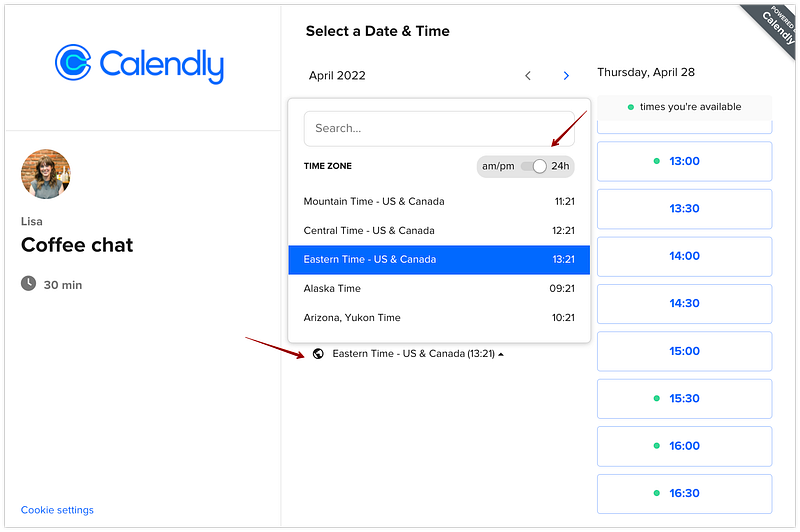
What is Calendly
Calendly is a popular scheduling and appointment booking software that simplifies the process of organizing meetings and events. It allows users to create custom event types, share availability, and let others schedule meetings with them effortlessly. Whether it’s for personal or professional use, Calendly streamlines the scheduling process and eliminates the need for back-and-forth emails or phone calls to find a suitable time for meetings.
Important Features
Custom Event Types: Users can create customized event types with specific durations, locations, and meeting preferences.
Availability Management: Calendly syncs with users’ calendars to ensure availability reflects existing commitments, avoiding double bookings.
Time Zone Support: The platform handles time zone conversions to ensure accurate scheduling across different regions.
Integration: Calendly integrates with popular calendar and productivity tools like Google Calendar, Outlook, Zoom, and more.
Automated Reminders: It sends automated reminders to all parties involved to reduce no-shows and improve attendance rates.
Team Scheduling: Users can view the availability of multiple team members and schedule meetings with the most suitable team member.
Scaling Requirements — Capacity Estimation
Let’s assume -
Scalability Requirements for Calendly Simulation:
Total number of users: 10 Million
Daily active users (DAU): 2 Million
Average number of events scheduled by each user per day: 2
Total number of events scheduled per day: 4 Million events/day
Read-to-write ratio: 100:1
Storage Estimation:
- Let’s assume each event’s metadata takes 1 KB of storage (without considering attachments).
- Total storage per day: 4 Million * 1 KB = 4 GB/day
- For the next 3 years, 4 GB * 5 * 365 = 7.3 TB
Requests per Second:
- Events scheduled per second: 4 Million / (3600 seconds * 24 hours) ≈ 46 events/second
High Availability: The system should remain available and responsive even during peak usage periods.
Horizontal Scalability: The ability to scale out by adding more servers to distribute the load.
Data Sharding: Efficiently partitioning data across multiple databases to prevent any single database becoming a bottleneck.
Caching Mechanism: Implementing a caching layer to reduce the load on the database and improve response times.
Load Balancing: Distributing incoming requests across multiple server instances to optimize resource utilization.
import random
import time

# Mock data storage for scheduled events
scheduled_events = []

# Function to simulate scheduling an event
def schedule_event(user_id):
    event_id = random.randint(1000000, 9999999)  # Generate a random event ID
    event = {
        "event_id": event_id,
        "user_id": user_id,
        "start_time": "2023-07-20T14:00:00",  # Assuming the event starts at a fixed time
        "end_time": "2023-07-20T15:00:00",    # Assuming the event ends after one hour
        "location": "Meeting Room A",
        "participants": ["[email protected]", "[email protected]"]
    }
    scheduled_events.append(event)

# Function to read a scheduled event
def read_event(event_id):
    event = next((event for event in scheduled_events if event["event_id"] == event_id), None)
    return event

# Function to simulate the Calendly system
def simulate_calendly():
    total_users = 10000000
    active_users = 2000000
    events_per_user_per_day = 2
    read_to_write_ratio = 100

    # Simulate event scheduling
    for _ in range(active_users):
        user_id = random.randint(1, total_users)  # Assuming user IDs range from 1 to 10,000,000
        for _ in range(events_per_user_per_day):
            schedule_event(user_id)

    # Simulate event reading
    total_events = len(scheduled_events)
    read_requests = total_events * read_to_write_ratio

    # Print simulation results
    print(f"Total Users: {total_users}")
    print(f"Daily Active Users (DAU): {active_users}")
    print(f"Total Events Scheduled per Day: {len(scheduled_events)}")
    print(f"Storage Estimation per Day: {len(scheduled_events) * 1} KB")
    print(f"Storage Estimation for 3 Years: {len(scheduled_events) * 1 * 5 * 365} KB")
    print(f"Read Requests per Second: {read_requests / (3600 * 24)} requests/second")

if __name__ == '__main__':
    simulate_calendly()
Data Model — ER requirements
Users:
- Username: String
- Email: String
- Password: String
Events (Scheduled Meetings/Appointments):
- EventId: Int (Primary Key)
- UserId: Int (Foreign Key from Users table)
- StartTime: DateTime
- EndTime: DateTime
- Location: String
Event Types (Customized Types of Events):
- EventTypeId: Int (Primary Key)
- Name: String
- Duration: String
- MeetingPreferences: String
Followers (User-Follow User Relationship):
- FollowerId: Int (Foreign Key from Users table)
- FollowedId: Int (Foreign Key from Users table)
Comments (User-Comment Event Relationship):
- CommentId: Int (Primary Key)
- UserId: Int (Foreign Key from Users table)
- EventId: Int (Foreign Key from Events table)
- CaptionText: String
- Timestamp: DateTime
User: Contains user-specific information like name, email, time zone, and calendar settings.
Event Type: Represents different types of events users can create, including event name, duration, and location.
Event: Instances of scheduled events, associated with the respective user and event type.
Team: If the platform supports team scheduling, it includes team-related details like team members and their availability.
Notification: Stores notification settings for users, including reminders and preferred communication channels.
High Level Design
Main Components and Services:
- Mobile Client: Represents users accessing the Calendly application.
- Application Servers: Handle read, write, and notification services.
- Load Balancer: Routes and distributes incoming requests to designated servers.
- Cache (Memcache): Caches frequently accessed data for faster response times.
- CDN: Improves latency and throughput for delivering media content.
- Database: Stores user and event-related data using NoSQL databases for high reliability.
- Storage (HDFS or Amazon S3): Stores photos and attachments uploaded by users.
Services:
- Event Service: Handles event creation, retrieval, and management.
- Follow Service: Manages user-follow user relationships.
Frontend: Responsible for the user interface, event scheduling, and communication with backend services through APIs.
Backend Services: The core business logic resides here, handling user authentication, event creation, and scheduling.
Event Creation: Processing user input to create and store event instances.
Scheduling Algorithm: The algorithm to match user availability and find suitable meeting times.
Notification Service: Handling the sending of automated reminders and notifications.
Database: Stores user data, event details, and other configurations.
Third-Party Integrations: Interfaces with external services like calendar tools, email clients, and video conferencing platforms.
Basic Low Level Design
class User:
    def __init__(self, user_id, username, password):
        self.user_id = user_id
        self.username = username
        self.password = password
        # Other user attributes and initialization

class Event:
    def __init__(self, event_id, user, start_time, end_time, location):
        self.event_id = event_id
        self.user = user
        self.start_time = start_time
        self.end_time = end_time
        self.location = location
        # Other event attributes and initialization

class Calendly:
    def __init__(self):
        self.users = {}  # Map of user_id to User object
        self.events = []  # List of Event objects

    def add_user(self, user):
        self.users[user.user_id] = user

    def get_user_by_id(self, user_id):
        return self.users.get(user_id)

    def create_event(self, user_id, start_time, end_time, location):
        user = self.get_user_by_id(user_id)
        if user is None:
            print("User not found")
            return

        event_id = generate_event_id()  # Generate a unique event ID
        event = Event(event_id, user, start_time, end_time, location)
        self.events.append(event)

        # Additional logic to update user's feed, notify participants, etc.
        # ...

    def get_user_events(self, user_id):
        user_events = []
        for event in self.events:
            if event.user.user_id == user_id:
                user_events.append(event)
        return user_events
API Design
POST /api/events: This endpoint allows you to create a new event by providing the required details in the request body. The server generates a uniqueevent_id, adds the event to theevents_datalist, and returns the created event with a 201 status code.GET /api/events: This endpoint allows you to fetch all events associated with a specific user. You need to provide theuser_idas a query parameter. The server will return a list of events that belong to the specified user.POST /api/events/<event_id>/reminder: This endpoint allows you to send a reminder notification for a specific event. You need to provide theevent_idin the URL path. The server will find the event with the providedevent_idand return a success message.
# Import necessary libraries
from flask import Flask, jsonify, request
import uuid

app = Flask(__name__)

# Mock data storage for events
events_data = []

# Endpoint: Create Event
@app.route('/api/events', methods=['POST'])
def create_event():
    data = request.get_json()
    event_id = str(uuid.uuid4())
    event = {
        "event_id": event_id,
        "user_id": data["user_id"],
        "event_type_id": data["event_type_id"],
        "start_time": data["start_time"],
        "end_time": data["end_time"],
        "participants": data["participants"],
        "location": data["location"],
        "status": "confirmed"
    }
    events_data.append(event)
    return jsonify(event), 201

# Endpoint: Get User's Events
@app.route('/api/events', methods=['GET'])
def get_user_events():
    user_id = request.args.get('user_id')
    user_events = [event for event in events_data if event["user_id"] == user_id]
    return jsonify(user_events), 200

# Endpoint: Send Reminder
@app.route('/api/events/<string:event_id>/reminder', methods=['POST'])
def send_reminder(event_id):
    event = next((event for event in events_data if event["event_id"] == event_id), None)
    if event:
        # Your logic to send a reminder notification would be implemented here
        # For simplicity, we return a success message
        return jsonify({"message": "Reminder sent successfully."}), 200
    else:
        return jsonify({"message": "Event not found."}), 404

if __name__ == '__main__':
    app.run(debug=True)
Create User API
Method: POST
Endpoint: /users
Request Body: { "username": "john_doe", "password": "pass123" }
Response: 201 Created (with the newly created user's ID)
Get User API
Method: GET
Endpoint: /users/{user_id}
Response: 200 OK (with the user's information)
Create Event API
Method: POST
Endpoint: /users/{user_id}/events
Request Body: { "start_time": "2023-07-20T14:00:00", "end_time": "2023-07-20T15:00:00", "location": "Meeting Room A" }
Response: 201 Created (with the newly created event's ID)
Get User Events API
Method: GET
Endpoint: /users/{user_id}/events
Response: 200 OK (with the list of events created by the user)Complete Detailed Design
Coming soon! It will be covered on youtube channel.
Subscribe to youtube channel :
Complete Code implementation
from datetime import datetime

# Mock data storage for custom event types
custom_event_types = []

# Function to create custom event types
def create_custom_event_type(name, duration, location, meeting_preferences):
    event_type = {
        "name": name,
        "duration": duration,
        "location": location,
        "meeting_preferences": meeting_preferences
    }
    custom_event_types.append(event_type)

# Function to sync user's availability with existing commitments
def sync_user_availability(user_id, start_time, end_time):
    # Your logic to sync user's availability with their existing commitments would be implemented here
    print(f"User {user_id}'s availability is synced for {start_time} to {end_time}")

# Function to handle time zone conversions for scheduling
def convert_time_to_timezone(original_time, target_timezone):
    # Your logic for time zone conversions would be implemented here
    print(f"Converted time from {original_time} to {target_timezone}")
    return original_time  # For demonstration, returning the same time as no real conversion is done

# Mock data storage for integrated calendar and productivity tools
integrated_tools = ["Google Calendar", "Outlook", "Zoom"]

# Function to check if a given tool is integrated with Calendly
def is_tool_integrated(tool_name):
    return tool_name in integrated_tools

# Function to send automated reminders to all participants
def send_reminders(participants, event_time):
    for participant in participants:
        # Your logic to send automated reminders to participants would be implemented here
        print(f"Reminder sent to {participant} for the event at {event_time}")

# Mock data storage for team members and their availability
team_members = [
    {"name": "John", "availability": ["2023-07-20T14:00:00", "2023-07-20T15:00:00"]},
    {"name": "Jane", "availability": ["2023-07-20T13:00:00", "2023-07-20T16:00:00"]}
]

# Function to find the most suitable team member for scheduling
def find_most_suitable_team_member():
    # Your logic to find the most suitable team member based on their availability would be implemented here
    return team_members[0]

# Usage examples:

# Create custom event types
create_custom_event_type("Team Meeting", "1 hour", "Conference Room A", "In-person")

# Sync user's availability
sync_user_availability("user123", "2023-07-20T14:00:00", "2023-07-20T15:00:00")

# Convert time to a specific timezone
converted_time = convert_time_to_timezone("2023-07-20T14:00:00", "America/New_York")
print("Converted Time:", converted_time)

# Check if a tool is integrated
print(is_tool_integrated("Zoom"))  # Output: True
print(is_tool_integrated("Slack")) # Output: False

# Send automated reminders
participants = ["[email protected]", "[email protected]"]
event_time = "2023-07-20T14:00:00"
send_reminders(participants, event_time)

# Find the most suitable team member for scheduling
suitable_member = find_most_suitable_team_member()
print("Most Suitable Team Member:", suitable_member["name"])
from flask import Flask, request, jsonify
app = Flask(__name__)
# Sample data for demonstration purposes
users = {}
events = []
event_id_counter = 1
# Endpoint for creating a new user
@app.route('/users', methods=['POST'])
def create_user():
data = request.json
user_id = len(users) + 1
user = User(user_id, data['username'], data['password'])
users[user_id] = user
return jsonify({"user_id": user_id}), 201
# Endpoint for getting a user's information
@app.route('/users/<int:user_id>', methods=['GET'])
def get_user(user_id):
user = users.get(user_id)
if user:
return jsonify({"username": user.username}), 200
else:
return jsonify({"error": "User not found"}), 404
# Endpoint for creating a new event
@app.route('/users/<int:user_id>/events', methods=['POST'])
def create_event(user_id):
data = request.json
user = users.get(user_id)
if user:
global event_id_counter
event_id = event_id_counter
event_id_counter += 1
event = Event(event_id, user, data['start_time'], data['end_time'], data['location'])
events.append(event)
return jsonify({"event_id": event_id}), 201
else:
return jsonify({"error": "User not found"}), 404
# Endpoint for getting a user's events
@app.route('/users/<int:user_id>/events', methods=['GET'])
def get_user_events(user_id):
user = users.get(user_id)
if user:
user_events = []
for event in events:
if event.user.user_id == user_id:
user_events.append({"event_id": event.event_id, "location": event.location})
return jsonify({"events": user_events}), 200
else:
return jsonify({"error": "User not found"}), 404
if __name__ == '__main__':
app.run(debug=True)System Design — Myntra
We will be discussing in depth -
- What is Myntra
- Important Features
- Scaling Requirements — Capacity Estimation
- Data Model — ER requirements
- High Level Design
- Basic Low Level Design
- API Design
- Complete Detailed Design
- Complete Code Implementation

What is Myntra
Myntra is an e-commerce platform based in India that specializes in fashion and lifestyle products. It offers a wide range of clothing, accessories, and footwear from various brands. With millions of users and a vast product catalog, Myntra requires a robust and scalable system design to handle the high traffic and deliver a seamless shopping experience to its customers.
Important Features
- Product Catalog: Myntra boasts a diverse product catalog with millions of items, ranging from clothing to accessories. The system should efficiently manage product data, including attributes, images, pricing, and availability.
- User Profiles and Personalization: Users should be able to create profiles, save preferences, and receive personalized product recommendations based on their browsing and purchase history.
- Search and Filters: An efficient search engine with filters is essential to help users find specific products or narrow down their choices based on various criteria like brand, size, color, and price range.
- Shopping Cart and Checkout: Myntra needs a reliable shopping cart that allows users to add products, manage quantities, and complete purchases securely and efficiently.
- Order Management: The system must handle order processing, shipment tracking, and updates to keep users informed about their purchases’ status.
- Payment Gateway Integration: Secure integration with multiple payment gateways to support various payment methods and ensure smooth transactions.
- Inventory Management: Real-time inventory tracking to avoid overselling and to update product availability accurately.
Scaling Requirements — Capacity Estimation
For the sake of simplicity, let’s assume the following parameters:
Total number of users: 100 Million
Daily active users (DAU): 20 Million
Number of products viewed by a user/day: 5
Total number of products viewed per day: 100 Million products/day
Since the system is read-heavy, let’s assume the read-to-write ratio to be 100:1.
Total number of products added to the catalog/day = 1/100 * 100 Million = 1 Million/day
Storage Estimation:
Let’s assume, on average, each product’s data (including images) size is 2 MB.
Total Storage per day: 1 Million * 2 MB = 2 TB/day
For the next 3 years, 2 TB * 5 * 365 = 3.65 PB
Requests per Second:
Assuming a uniform distribution of requests throughout the day:
Requests per second: 100 Million / 3600 seconds * 24 hours = 2.3K/second
Horizontal Scaling: Distributing the load across multiple servers or instances to handle increasing traffic and user demands.
Caching Mechanism: Implementing caching strategies to reduce database queries and response times, enhancing overall system performance.
Content Delivery Network (CDN): Utilizing a CDN to serve static content (like images) from distributed servers, reducing load on the primary infrastructure.
Database Sharding: Partitioning the database to distribute data across multiple nodes, preventing any single point of failure.
Load Balancing: Employing load balancers to distribute incoming requests evenly across multiple servers, avoiding server overload.
from flask import Flask, request, jsonify

app = Flask(__name__)

# Sample data for products
products = [
    {"id": 1, "name": "T-shirt", "brand": "Nike", "price": 25.99, "size": "M", "color": "Blue"},
    {"id": 2, "name": "Jeans", "brand": "Levi's", "price": 49.99, "size": "32", "color": "Black"},
    {"id": 3, "name": "Sneakers", "brand": "Adidas", "price": 74.99, "size": "9", "color": "White"},
]

# Storage variables
total_storage = 0
daily_storage_limit = 2 * 1024  # 2 TB/day

# User profiles
users = {}

# Product views
product_views = {}

# Product catalog
catalog = {}

# API for product view
@app.route('/api/products/<int:product_id>/view', methods=['POST'])
def view_product(product_id):
    user_id = request.json['user_id']

    if user_id not in users:
        users[user_id] = {
            "name": f"User {user_id}",
            "views": []
        }

    if product_id not in catalog:
        return jsonify({"message": "Product not found"}), 404

    users[user_id]['views'].append(product_id)

    if product_id not in product_views:
        product_views[product_id] = 0

    product_views[product_id] += 1

    return jsonify({"message": "Product viewed successfully!"}), 200

# API for adding a product to the catalog
@app.route('/api/products', methods=['POST'])
def add_product():
    data = request.json
    product_id = len(catalog) + 1

    catalog[product_id] = {
        "id": product_id,
        "name": data['name'],
        "brand": data['brand'],
        "price": data['price'],
        "size": data['size'],
        "color": data['color']
    }

    global total_storage
    total_storage += data['size_in_MB']

    if total_storage > daily_storage_limit:
        return jsonify({"message": "Daily storage limit exceeded. Please try again tomorrow."}), 400

    return jsonify({"message": "Product added to the catalog successfully!", "product_id": product_id}), 201

# API for getting product details
@app.route('/api/products/<int:product_id>', methods=['GET'])
def get_product(product_id):
    product = catalog.get(product_id)
    if product:
        return jsonify(product)
    return jsonify({"message": "Product not found"}), 404

# API for getting user details and views
@app.route('/api/users/<int:user_id>', methods=['GET'])
def get_user(user_id):
    user = users.get(user_id)
    if user:
        return jsonify(user)
    return jsonify({"message": "User not found"}), 404

if __name__ == '__main__':
    app.run()
Data Model — ER requirements
Users Entity:
- User_id: Int (Primary Key)
- Username: String
- Email: String
- Password: String
Products Entity:
- Product_id: Int (Primary Key)
- Name: String
- Brand: String
- Price: Float
- Size: String
- Color: String
- Availability: Int
User_Product_Likes Entity (Many-to-Many Relationship between Users and Products):
- Like_id: Int (Primary Key)
- User_id: Int (Foreign Key, references Users.User_id)
- Product_id: Int (Foreign Key, references Products.Product_id)
- Timestamp: DateTime
User_Follows Entity (Many-to-Many Relationship between Users and Users):
- Follow_id: Int (Primary Key)
- User_id1: Int (Foreign Key, references Users.User_id)
- User_id2: Int (Foreign Key, references Users.User_id)
- Timestamp: DateTime
User_Cart Entity (One-to-One Relationship between Users and User_Cart):
- User_id: Int (Primary Key, Foreign Key, references Users.User_id)
- Cart_id: Int (Primary Key)
- Total_price: Float
Cart_Items Entity (One-to-Many Relationship between User_Cart and Cart_Items):
- Item_id: Int (Primary Key)
- Cart_id: Int (Foreign Key, references User_Cart.Cart_id)
- Product_id: Int (Foreign Key, references Products.Product_id)
- Quantity: Int
User_Orders Entity (One-to-Many Relationship between Users and User_Orders):
- Order_id: Int (Primary Key)
- User_id: Int (Foreign Key, references Users.User_id)
- Order_timestamp: DateTime
Order_Items Entity (One-to-Many Relationship between User_Orders and Order_Items):
- Order_item_id: Int (Primary Key)
- Order_id: Int (Foreign Key, references User_Orders.Order_id)
- Product_id: Int (Foreign Key, references Products.Product_id)
- Quantity: Int
- Total_price: Float
User: Stores user details like ID, name, email, password, and preferences.
Product: Contains information about each product, such as ID, name, brand, price, size, color, and availability.
Cart: Connects users and products, representing the items users have added to their shopping carts.
Order: Stores order details, including order ID, user ID, product ID, quantity, total price, and status.
Payment: Links orders with payment details, such as payment ID, amount, transaction status, and payment method.
Inventory: Keeps track of product availability and stock levels.
High Level Design
Assumptions:
- The system is read-heavy with more users browsing products than adding new ones.
- Horizontal scaling (scale-out) will be used to handle increasing user base and read requests.
- The system must be highly available and reliable to provide a seamless shopping experience.
- Latency should be kept low, targeting around 350ms for essential functionalities.
Main Components -
- Mobile Clients: Representing users accessing Myntra via mobile applications.
- Web Clients: Representing users accessing Myntra via the website.
- Application Servers: Responsible for handling read, write, and notification services.
- Load Balancer: Routes and distributes incoming requests to the appropriate application servers.
- Cache (Memcache/Redis): Caches frequently accessed data to improve response times and reduce database load.
- Content Delivery Network (CDN): Improves latency and throughput by caching and delivering static content closer to the user.
- Database Servers: Store and manage structured data using NoSQL databases like MongoDB or Cassandra.
- Storage (HDFS or Amazon S3): Used to store images and other media files for products and user profiles.
Main Services
Product Service:
- CRUD operations for products (add, view, update, delete).
- Provide search and filter functionalities for products based on brand, size, color, etc.
- Store product information in the database and allow users to view product details.
User Service:
- User registration and login with authentication and password hashing.
- User profile management (update, view) with user-specific data stored in the database.
- Follow and unfollow other users to create social connections.
Like Service:
- Allow users to like and unlike products.
- Maintain the relationship between users and liked products.
Cart Service:
- Manage users’ shopping carts, allowing them to add, update, and remove items.
- Calculate the total price and manage cart items.
Order Service:
- Process orders when users checkout their carts.
- Create and store order details, including order timestamp, products, quantities, and total price.
Feed Generation Service:
- Generate personalized feeds for users based on their followed users and liked products.
- Use ranking algorithms to sort and display relevant and popular products in the user’s feed.
Notification Service:
- Send real-time notifications to users for actions like likes, comments, and new followers.
Frontend: The user interface layer accessible to customers via web and mobile applications.
Backend: The core processing layer responsible for handling business logic, data processing, and communication with other services.
Database: Stores all essential data, including user profiles, product information, orders, and inventory.
Caching Layer: Improves system performance by caching frequently accessed data and reducing database load.
Product Catalog Management: Designing a scalable database schema to store and retrieve product information efficiently.
Search and Filtering: Defining algorithms to enable quick and accurate product searches based on user input and filtering criteria.
Shopping Cart Management: Designing data structures and algorithms to manage user shopping carts and handle updates.
Content Delivery Network (CDN): Stores and delivers static content, enhancing content delivery speed.
Payment Gateway Integration: Facilitates secure and reliable payment processing.
Basic Low Level Design
import uuid
from datetime import datetime

class User:
    def __init__(self, user_id, username, password):
        self.user_id = user_id
        self.username = username
        self.password = password
        self.followers = []
        self.following = []
        self.posts = []

class Product:
    def __init__(self, product_id, name, brand, price, size, color, availability):
        self.product_id = product_id
        self.name = name
        self.brand = brand
        self.price = price
        self.size = size
        self.color = color
        self.availability = availability

class Like:
    def __init__(self, like_id, user, post, timestamp):
        self.like_id = like_id
        self.user = user
        self.post = post
        self.timestamp = timestamp

class Comment:
    def __init__(self, comment_id, user, post, caption, timestamp):
        self.comment_id = comment_id
        self.user = user
        self.post = post
        self.caption = caption
        self.timestamp = timestamp

class Myntra:
    def __init__(self):
        self.users = {}
        self.products = {}
        self.likes = {}
        self.comments = {}

    def add_user(self, user_id, username, password):
        user = User(user_id, username, password)
        self.users[user_id] = user

    def add_product(self, product_id, name, brand, price, size, color, availability):
        product = Product(product_id, name, brand, price, size, color, availability)
        self.products[product_id] = product

    def follow_user(self, user_id1, user_id2):
        if user_id1 in self.users and user_id2 in self.users:
            self.users[user_id1].following.append(user_id2)
            self.users[user_id2].followers.append(user_id1)

    def unfollow_user(self, user_id1, user_id2):
        if user_id1 in self.users and user_id2 in self.users:
            self.users[user_id1].following.remove(user_id2)
            self.users[user_id2].followers.remove(user_id1)

    def create_post(self, user_id, caption):
        if user_id in self.users:
            user = self.users[user_id]
            post_id = str(uuid.uuid4())
            timestamp = datetime.now()
            post = Post(post_id, user, caption, timestamp)
            self.posts[post_id] = post
            user.posts.append(post_id)

    def like_post(self, user_id, post_id):
        if user_id in self.users and post_id in self.posts:
            user = self.users[user_id]
            post = self.posts[post_id]
            like_id = str(uuid.uuid4())
            timestamp = datetime.now()
            like = Like(like_id, user, post, timestamp)
            self.likes[like_id] = like
            post.likes.append(like_id)

    def comment_post(self, user_id, post_id, caption):
        if user_id in self.users and post_id in self.posts:
            user = self.users[user_id]
            post = self.posts[post_id]
            comment_id = str(uuid.uuid4())
            timestamp = datetime.now()
            comment = Comment(comment_id, user, post, caption, timestamp)
            self.comments[comment_id] = comment
            post.comments.append(comment_id)
API Design
User Management APIs: Endpoints for user registration, login, profile management, and preferences.
Product Catalog APIs: APIs to fetch product details, search, and filter products based on various attributes.
Cart APIs: APIs to add items to the cart, update quantities, and remove items.
Order APIs: Endpoints for placing orders, tracking orders, and order history.
Payment APIs: APIs for processing payments securely and handling payment status.
from flask import Flask, request, jsonify

app = Flask(__name__)

# Sample data for products
products = [
    {"id": 1, "name": "T-shirt", "brand": "Nike", "price": 25.99, "size": "M", "color": "Blue"},
    {"id": 2, "name": "Jeans", "brand": "Levi's", "price": 49.99, "size": "32", "color": "Black"},
    {"id": 3, "name": "Sneakers", "brand": "Adidas", "price": 74.99, "size": "9", "color": "White"},
]

carts = {}
orders = {}
order_id_counter = 1

@app.route('/api/users', methods=['POST'])
def register_user():
    data = request.json
    user_id = len(carts) + 1
    carts[user_id] = {}
    return jsonify({"message": "User registered successfully!", "user_id": user_id}), 201

@app.route('/api/users/<int:user_id>', methods=['GET'])
def get_user(user_id):
    if user_id in carts:
        return jsonify({"user_id": user_id})
    return jsonify({"message": "User not found"}), 404

@app.route('/api/products', methods=['GET'])
def get_products():
    limit = int(request.args.get('limit', 10))
    offset = int(request.args.get('offset', 0))
    paginated_products = products[offset: offset + limit]
    return jsonify(paginated_products)

@app.route('/api/products/<int:product_id>', methods=['GET'])
def get_product(product_id):
    product = next((p for p in products if p['id'] == product_id), None)
    if product:
        return jsonify(product)
    return jsonify({"message": "Product not found"}), 404

@app.route('/api/search', methods=['GET'])
def search_products():
    keyword = request.args.get('keyword')
    filtered_products = [p for p in products if keyword.lower() in p['name'].lower()]
    return jsonify(filtered_products)

@app.route('/api/cart', methods=['POST'])
def add_to_cart():
    data = request.json
    user_id = data['user_id']
    product_id = data['product_id']
    quantity = data['quantity']

    if user_id not in carts:
        carts[user_id] = {}

    cart = carts[user_id]
    cart[product_id] = cart.get(product_id, 0) + quantity
    return jsonify({"message": "Item added to cart successfully!"}), 201

@app.route('/api/cart', methods=['PUT'])
def update_cart():
    data = request.json
    user_id = data['user_id']
    product_id = data['product_id']
    new_quantity = data['quantity']

    if user_id not in carts or product_id not in carts[user_id]:
        return jsonify({"message": "Item not found in cart"}), 404

    carts[user_id][product_id] = new_quantity
    return jsonify({"message": "Cart updated successfully!"})

@app.route('/api/cart', methods=['DELETE'])
def remove_from_cart():
    data = request.json
    user_id = data['user_id']
    product_id = data['product_id']

    if user_id not in carts or product_id not in carts[user_id]:
        return jsonify({"message": "Item not found in cart"}), 404

    del carts[user_id][product_id]
    return jsonify({"message": "Item removed from cart successfully!"})

@app.route('/api/orders', methods=['POST'])
def place_order():
    data = request.json
    user_id = data['user_id']
    product_ids = data['product_ids']
    quantities = data['quantities']

    global order_id_counter
    order_id = order_id_counter
    order_id_counter += 1

    total_price = 0
    order_details = []
    for pid, qty in zip(product_ids, quantities):
        product = next((p for p in products if p['id'] == pid), None)
        if product:
            item_price = product['price'] * qty
            total_price += item_price
            order_details.append({
                "product_id": pid,
                "product_name": product['name'],
                "quantity": qty,
                "total_price": item_price
            })

    orders[order_id] = {
        "order_id": order_id,
        "user_id": user_id,
        "order_details": order_details,
        "total_price": total_price
    }

    return jsonify({"message": "Order placed successfully!", "order_id": order_id}), 201

@app.route('/api/orders/<int:order_id>', methods=['GET'])
def get_order(order_id):
    order = orders.get(order_id)
    if order:
        return jsonify(order)
    return jsonify({"message": "Order not found"}), 404

if __name__ == '__main__':
    app.run()
User Management API:
Endpoint: /api/users
Functionality:
POST: Register a new user with provided details (name, email, password).
GET: Get the user details by passing user ID in the request headers.
Product Catalog API:
Endpoint: /api/products
Functionality:
GET: Get a list of products with pagination support (limit and offset parameters).
GET: Get product details by passing product ID in the request headers.
Search API:
Endpoint: /api/search
Functionality:
GET: Search for products based on keywords and optional filters (brand, size, color, etc.).
Cart API:
Endpoint: /api/cart
Functionality:
POST: Add items to the user's cart by passing the product ID and quantity.
PUT: Update the quantity of items in the user's cart by passing the product ID and new quantity.
DELETE: Remove items from the user's cart by passing the product ID.
Order API:
Endpoint: /api/orders
Functionality:
POST: Place a new order by passing the product IDs and quantities.
GET: Get the order details by passing the order ID in the request headers.
Payment API:
Endpoint: /api/payments
Functionality:
POST: Process payment for an order by passing the order ID and payment details (credit card info, etc.).Complete Detailed Design
Coming soon! It will be covered on youtube channel.
Subscribe to youtube channel :
Complete Code implementation
from flask import Flask, request, jsonify

app = Flask(__name__)

# Sample data for products
products = [
    {"id": 1, "name": "T-shirt", "brand": "Nike", "price": 25.99, "size": "M", "color": "Blue", "availability": 10},
    {"id": 2, "name": "Jeans", "brand": "Levi's", "price": 49.99, "size": "32", "color": "Black", "availability": 5},
    {"id": 3, "name": "Sneakers", "brand": "Adidas", "price": 74.99, "size": "9", "color": "White", "availability": 8},
]

# User profiles
users = {}

# Shopping carts
carts = {}

# Orders
orders = {}
order_id_counter = 1

# Product Catalog API
@app.route('/api/products', methods=['GET'])
def get_products():
    limit = int(request.args.get('limit', 10))
    offset = int(request.args.get('offset', 0))
    paginated_products = products[offset: offset + limit]
    return jsonify(paginated_products)

@app.route('/api/products/<int:product_id>', methods=['GET'])
def get_product(product_id):
    product = next((p for p in products if p['id'] == product_id), None)
    if product:
        return jsonify(product)
    return jsonify({"message": "Product not found"}), 404

# User Profiles and Personalization API
@app.route('/api/users', methods=['POST'])
def register_user():
    data = request.json
    user_id = len(users) + 1
    users[user_id] = {
        "name": data['name'],
        "email": data['email'],
        "preferences": {}
    }
    return jsonify({"message": "User registered successfully!", "user_id": user_id}), 201

@app.route('/api/users/<int:user_id>', methods=['GET'])
def get_user(user_id):
    user = users.get(user_id)
    if user:
        return jsonify(user)
    return jsonify({"message": "User not found"}), 404

# Search and Filters API
@app.route('/api/search', methods=['GET'])
def search_products():
    keyword = request.args.get('keyword')
    brand = request.args.get('brand')
    size = request.args.get('size')
    color = request.args.get('color')
    price_min = float(request.args.get('price_min', 0))
    price_max = float(request.args.get('price_max', float('inf')))

    filtered_products = [p for p in products if
                         (not keyword or keyword.lower() in p['name'].lower()) and
                         (not brand or brand.lower() == p['brand'].lower()) and
                         (not size or size == p['size']) and
                         (not color or color.lower() == p['color'].lower()) and
                         (price_min <= p['price'] <= price_max)]

    return jsonify(filtered_products)

# Shopping Cart and Checkout API
@app.route('/api/cart', methods=['POST'])
def add_to_cart():
    data = request.json
    user_id = data['user_id']
    product_id = data['product_id']
    quantity = data['quantity']

    if user_id not in carts:
        carts[user_id] = {}

    cart = carts[user_id]
    cart[product_id] = cart.get(product_id, 0) + quantity
    return jsonify({"message": "Item added to cart successfully!"}), 201

@app.route('/api/cart', methods=['PUT'])
def update_cart():
    data = request.json
    user_id = data['user_id']
    product_id = data['product_id']
    new_quantity = data['quantity']

    if user_id not in carts or product_id not in carts[user_id]:
        return jsonify({"message": "Item not found in cart"}), 404

    carts[user_id][product_id] = new_quantity
    return jsonify({"message": "Cart updated successfully!"})

@app.route('/api/cart', methods=['DELETE'])
def remove_from_cart():
    data = request.json
    user_id = data['user_id']
    product_id = data['product_id']

    if user_id not in carts or product_id not in carts[user_id]:
        return jsonify({"message": "Item not found in cart"}), 404

    del carts[user_id][product_id]
    return jsonify({"message": "Item removed from cart successfully!"})

# Order Management API
@app.route('/api/orders', methods=['POST'])
def place_order():
    data = request.json
    user_id = data['user_id']
    product_ids = data['product_ids']
    quantities = data['quantities']

    global order_id_counter
    order_id = order_id_counter
    order_id_counter += 1

    total_price = 0
    order_details = []
    for pid, qty in zip(product_ids, quantities):
        product = next((p for p in products if p['id'] == pid), None)
        if product:
            if product['availability'] < qty:
                return jsonify({"message": "Insufficient stock for product: {}".format(product['name'])}), 400

            item_price = product['price'] * qty
            total_price += item_price
            order_details.append({
                "product_id": pid,
                "product_name": product['name'],
                "quantity": qty,
                "total_price": item_price
            })
            product['availability'] -= qty

    orders[order_id] = {
        "order_id": order_id,
        "user_id": user_id,
        "order_details": order_details,
        "total_price": total_price
    }

    return jsonify({"message": "Order placed successfully!", "order_id": order_id}), 201

@app.route('/api/orders/<int:order_id>', methods=['GET'])
def get_order(order_id):
    order = orders.get(order_id)
    if order:
        return jsonify(order)
    return jsonify({"message": "Order not found"}), 404

# Payment Gateway Integration API
@app.route('/api/payments', methods=['POST'])
def process_payment():
    data = request.json
    order_id = data['order_id']
    payment_info = data['payment_info']

    order = orders.get(order_id)
    if not order:
        return jsonify({"message": "Order not found"}), 404

    # Payment processing logic here (not implemented in this example)
    # Simulate payment success for demonstration purposes
    order['status'] = 'Paid'
    return jsonify({"message": "Payment processed successfully!"}), 200

if __name__ == '__main__':
    app.run()
User Registration API:
Endpoint: /users/register
Method: POST
Request Payload: { "username": "john_doe", "password": "password123" }
Response: {"message": "User registered successfully", "user_id": "unique_user_id"}
User Login API:
Endpoint: /users/login
Method: POST
Request Payload: { "username": "john_doe", "password": "password123" }
Response: {"message": "Login successful", "user_id": "unique_user_id"}
Follow User API:
Endpoint: /users/{user_id}/follow
Method: POST
Request Payload: {"target_user_id": "user_id_to_follow"}
Response: {"message": "You are now following the user"}
Unfollow User API:
Endpoint: /users/{user_id}/unfollow
Method: POST
Request Payload: {"target_user_id": "user_id_to_unfollow"}
Response: {"message": "You have unfollowed the user"}
Create Post API:
Endpoint: /users/{user_id}/posts
Method: POST
Request Payload: {"caption": "Caption for the post", "image_url": "url_of_the_image"}
Response: {"message": "Post created successfully", "post_id": "unique_post_id"}
Like Post API:
Endpoint: /users/{user_id}/posts/{post_id}/like
Method: POST
Request Payload: {}
Response: {"message": "You liked the post"}
Comment on Post API:
Endpoint: /users/{user_id}/posts/{post_id}/comment
Method: POST
Request Payload: {"comment": "Your comment on the post"}
Response: {"message": "Your comment has been posted"}
Get User Feed API:
Endpoint: /users/{user_id}/feed
Method: GET
Response: {"feed": [{"post_id": "unique_post_id", "caption": "Caption of the post", "image_url": "url_of_the_image", "timestamp": "timestamp_of_the_post"}, ...]}
Get User Profile API:
Endpoint: /users/{user_id}/profile
Method: GET
Response: {"username": "john_doe", "followers": ["follower1", "follower2", ...], "following": ["following1", "following2", ...], "posts": [{"post_id": "unique_post_id", "caption": "Caption of the post", "image_url": "url_of_the_image", "timestamp": "timestamp_of_the_post"}, ...]}System Design — MS Outlook
We will be discussing in depth -
- What is MS Outlook
- Important Features
- Scaling Requirements — Capacity Estimation
- Data Model — ER requirements
- High Level Design
- Basic Low Level Design
- API Design
- Complete Detailed Design
- Complete Code Implementation

What is MS Outlook
Microsoft Outlook is a popular email client and personal information manager developed by Microsoft. It is part of the Microsoft Office suite and is widely used for email communication, calendar management, task organization, contact management, and more.
Important Features
- Email Management: MS Outlook allows users to send, receive, and organize emails efficiently. It supports various email protocols like POP, IMAP, and Exchange for seamless email synchronization across devices.
- Calendar and Schedule: Users can manage appointments, schedule meetings, and set reminders with Outlook’s built-in calendar feature.
- Contacts Management: The application enables users to store and manage their contact lists, making it easy to communicate and collaborate with colleagues and friends.
- Task Organization: MS Outlook allows users to create, prioritize, and track tasks to stay organized and productive.
- Notes and Journal: Users can take notes, maintain a journal, and record important information within the application.
- Integration with Office Suite: MS Outlook seamlessly integrates with other Microsoft Office applications, such as Word, Excel, and OneNote, for enhanced productivity.
- Security and Privacy: Outlook provides robust security features, including encryption, spam filtering, and protection against phishing attacks.
- Customization: Users can personalize their Outlook experience with themes, add-ins, and various configuration options.
Scaling Requirements — Capacity Estimation
Let’s assume —
Total number of users: 500 Million
Daily active users (DAU): 100 Million
Number of emails sent by user/day: 5
Total number of emails sent per day: 500 Million emails/day
- Since the system is read-heavy, let’s say the read to write ratio be 100:1
- Total number of emails received per day: 100 * 500 Million = 50 Billion emails/day
Storage Estimation:
- Let’s assume an average email size of 200 KB (including attachments)
- Total Storage per day: 50 Billion * 200 KB = 10 TB/day
- For the next 3 years: 10 TB * 5 * 365 = 18.25 PB
- Requests per second: 50 Billion / 86400 seconds (24 hours) = 578,703 requests/second
Horizontal Scaling: Distributing the application across multiple servers to handle increased user loads and ensure high availability.
Load Balancing: Implementing load balancers to evenly distribute incoming requests across multiple servers.
Caching: Employing caching mechanisms to reduce database loads and improve response times.
Database Sharding: Partitioning the database to distribute data across multiple servers for improved data retrieval performance.
Content Delivery Network (CDN): Utilizing CDN to cache static content and reduce server load.
from datetime import datetime
import random

# Sample data (for simulation purposes)
emails_sent = []
emails_received = []
storage_used = 0  # in KB
users = 500_000_000
daily_active_users = 100_000_000

# Simulation for sending emails
def send_email(sender_email, recipient_email, subject, content, attachments=None):
    global storage_used

    # Assume an average email size of 200 KB
    email_size_kb = 200
    storage_used += email_size_kb

    # Store the email (for simulation purposes)
    emails_sent.append({
        'timestamp': datetime.now(),
        'sender_email': sender_email,
        'recipient_email': recipient_email,
        'subject': subject,
        'content': content,
        'attachments': attachments or []
    })

# Simulation for receiving emails
def receive_email(recipient_email):
    global storage_used

    # Simulate 100:1 read to write ratio
    if random.random() < 0.01:
        # Assume an average email size of 200 KB
        email_size_kb = 200
        storage_used += email_size_kb

        # Store the email (for simulation purposes)
        emails_received.append({
            'timestamp': datetime.now(),
            'recipient_email': recipient_email,
            'subject': f"Sample Subject - {len(emails_received)+1}",
            'content': "Sample email content."
        })

# Simulate sending emails for a subset of users (DAU)
for _ in range(daily_active_users):
    sender_email = f"user_{random.randint(1, users)}@outlook.com"
    recipient_email = f"user_{random.randint(1, users)}@outlook.com"
    subject = f"Sample Subject - {len(emails_sent)+1}"
    content = "Sample email content."
    send_email(sender_email, recipient_email, subject, content)

# Simulate receiving emails for a subset of users (DAU)
for _ in range(daily_active_users):
    recipient_email = f"user_{random.randint(1, users)}@outlook.com"
    receive_email(recipient_email)

print("Total storage used (KB):", storage_used)
Data Model — ER requirements
Users
- Username: String
- Email: String
- Password: String
Emails
- EmailID: Int (Primary Key)
- SenderID: Int (Foreign Key from Users table)
- RecipientID: Int (Foreign Key from Users table)
- Subject: String
- Content: String
- Timestamp: DateTime
Contacts
- ContactID: Int (Primary Key)
- UserID: Int (Foreign Key from Users table)
- ContactName: String
- ContactEmail: String
- ContactPhone: String (Optional)
Tasks
- TaskID: Int (Primary Key)
- UserID: Int (Foreign Key from Users table)
- TaskName: String
- TaskDescription: String (Optional)
- DueDate: DateTime (Optional)
User: Represents each individual user of MS Outlook.
Email: Stores email details like sender, recipient, subject, content, attachments, etc.
Calendar: Holds calendar-related information such as appointments, events, and reminders.
Contacts: Stores contact information like name, email, phone number, etc.
Tasks: Contains details about tasks created by the user.
Notes: Stores user-generated notes and journal entries.
High Level Design
Assumptions:
- The system is read-heavy, with more users accessing emails and contacts than writing them.
- Availability and reliability are critical for email services.
- Scalability is achieved through horizontal scaling (scale-out).
- The system should maintain low latency for email retrieval and task management.
Main Components:
- Mobile/Desktop Client: Users access MS Outlook through mobile or desktop clients to read, send, and manage emails, contacts, and tasks.
- Application Servers: These servers handle read and write operations for emails, contacts, and tasks. They also manage user authentication and authorization.
- Load Balancer: The load balancer distributes incoming client requests across multiple application servers, ensuring even load distribution.
- Cache (Memcache): Memcache is used to cache frequently accessed data like user emails, contacts, and tasks to improve system performance.
- Database: A NoSQL database stores email, contact, and task data with high reliability and low latency.
- Storage (HDFS or Amazon S3): Large file storage (HDFS or Amazon S3) is used to store email attachments and task-related files.
Services:
Email Service:
- Send Email: Allows users to send emails to recipients.
- Receive Email: Retrieves and displays emails for users.
- Fetch Sent Emails: Retrieves and displays emails sent by the user.
- Delete Email: Allows users to delete emails.
Contact Service:
- Add Contact: Enables users to add new contacts to their contact list.
- Fetch Contacts: Retrieves and displays a list of contacts for the user.
- Delete Contact: Allows users to remove contacts from their contact list.
Task Service:
- Create Task: Allows users to create new tasks with optional descriptions and due dates.
- Fetch Tasks: Retrieves and displays a list of tasks for the user.
- Mark Task as Complete: Allows users to mark tasks as completed.
- Delete Task: Allows users to remove tasks from their task list.
Search Service:
- Search Emails: Allows users to search for specific emails based on keywords, sender, recipient, subject, etc.
- Search Contacts: Allows users to search for specific contacts based on name, email, or phone number.
- Search Tasks: Allows users to search for specific tasks based on name, description, or due date.
Notification Service:
- Sends notifications to users for new emails, task reminders, etc.
Security Service:
- Handles user authentication and authorization to ensure data security.
Caching Service:
- Manages data caching to optimize read-heavy operations.
Attachment Service:
- Handles upload, download, and management of email attachments.
User Interface: The frontend that enables users to interact with the application.
Application Server: Handles business logic, manages user sessions, and processes requests from the frontend.
Database: Stores user data, including emails, contacts, calendar events, tasks, and notes.
Email Sending and Receiving: Details of how emails are sent and received, including SMTP and IMAP/POP protocols.
Calendar Management: How appointments are scheduled, reminders are set, and events are managed.
Contacts Management: How contacts are stored, retrieved, and updated.
Task Handling: How tasks are created, prioritized, and marked as completed.
Notes and Journal: How user-generated notes and journal entries are stored and accessed.
File Storage: Manages attachments and other files associated with emails and notes.
Basic Low Level Design
class User:
    def __init__(self, user_id, username, email, password):
        self.user_id = user_id
        self.username = username
        self.email = email
        self.password = password
        # Other user attributes (e.g., contacts, tasks)

class Email:
    def __init__(self, email_id, sender, recipients, subject, content, timestamp):
        self.email_id = email_id
        self.sender = sender
        self.recipients = recipients
        self.subject = subject
        self.content = content
        self.timestamp = timestamp

class Contact:
    def __init__(self, contact_id, user_id, name, email, phone=None):
        self.contact_id = contact_id
        self.user_id = user_id
        self.name = name
        self.email = email
        self.phone = phone

class Task:
    def __init__(self, task_id, user_id, task_name, description=None, due_date=None):
        self.task_id = task_id
        self.user_id = user_id
        self.task_name = task_name
        self.description = description
        self.due_date = due_date
from flask import Flask, request, jsonify
app = Flask(__name__)
# Sample data to be stored in the server
users = {
"user1": {
"username": "JohnDoe",
"email": "[email protected]",
"password": "password123",
# Other user attributes (e.g., contacts, tasks)
"contacts": [
{"contact_id": 1, "name": "Jane Smith", "email": "[email protected]"},
{"contact_id": 2, "name": "Bob Johnson", "email": "[email protected]"}
],
"tasks": [
{"task_id": 1, "task_name": "Buy groceries", "description": "Milk, eggs, bread", "due_date": "2023-07-25"},
{"task_id": 2, "task_name": "Finish report", "description": "Project XYZ report", "due_date": "2023-07-28"}
]
}
}
# API endpoint for retrieving user information
@app.route('/users/<username>', methods=['GET'])
def get_user(username):
if username in users:
return jsonify(users[username]), 200
else:
return "User not found", 404
# API endpoint for creating a new contact
@app.route('/users/<username>/contacts', methods=['POST'])
def create_contact(username):
if username in users:
data = request.get_json()
contact_id = len(users[username]['contacts']) + 1
new_contact = {"contact_id": contact_id, "name": data["name"], "email": data["email"]}
users[username]['contacts'].append(new_contact)
return "Contact created", 200
else:
return "User not found", 404
# API endpoint for creating a new task
@app.route('/users/<username>/tasks', methods=['POST'])
def create_task(username):
if username in users:
data = request.get_json()
task_id = len(users[username]['tasks']) + 1
new_task = {"task_id": task_id, "task_name": data["task_name"], "description": data.get("description"), "due_date": data.get("due_date")}
users[username]['tasks'].append(new_task)
return "Task created", 200
else:
return "User not found", 404
# API endpoint for retrieving user's tasks
@app.route('/users/<username>/tasks', methods=['GET'])
def get_user_tasks(username):
if username in users:
return jsonify(users[username]['tasks']), 200
else:
return "User not found", 404
# API endpoint for deleting a task
@app.route('/users/<username>/tasks/<int:task_id>', methods=['DELETE'])
def delete_task(username, task_id):
if username in users:
for task in users[username]['tasks']:
if task["task_id"] == task_id:
users[username]['tasks'].remove(task)
return "Task deleted", 200
return "Task not found", 404
else:
return "User not found", 404
if __name__ == '__main__':
app.run()API Design
Email API: Allowing developers to send and receive emails programmatically.
Calendar API: Enabling integration with third-party calendar applications.
Contacts API: Allowing access to contact information for other applications.
Task API: Enabling developers to create and manage tasks within MS Outlook.
Notes API: Allowing access to user notes and journal entries.
Sending Email:

Endpoint: POST /api/send_email
Parameters:
sender_email (string): The email address of the sender.
recipient_email (string): The email address of the recipient.
subject (string): The subject of the email.
content (string): The content of the email.
attachments (list of files): (Optional) Any attachments to be included.
Response:
200 OK: Email sent successfully.
400 Bad Request: Invalid parameters or missing data.

Receiving Email:

Endpoint: GET /api/receive_email
Parameters:
recipient_email (string): The email address of the recipient.
Response:
200 OK: List of received emails.
404 Not Found: No emails found for the recipient.

Fetching Calendar Events:

Endpoint: GET /api/calendar_events
Parameters:
user_id (int): The user ID of the calendar owner.
Response:
200 OK: List of calendar events for the user.
404 Not Found: No calendar events found for the user.

Adding a Contact:

Endpoint: POST /api/add_contact
Parameters:
user_id (int): The user ID to whom the contact will be added.
contact_name (string): The name of the contact.
contact_email (string): The email address of the contact.
contact_phone (string): (Optional) The phone number of the contact.
Response:
200 OK: Contact added successfully.
400 Bad Request: Invalid parameters or missing data.

Creating a Task:

Endpoint: POST /api/create_task
Parameters:
user_id (int): The user ID for whom the task will be created.
task_name (string): The name of the task.
task_description (string): (Optional) Description of the task.
due_date (datetime): (Optional) The due date of the task.
Response:
200 OK: Task created successfully.
400 Bad Request: Invalid parameters or missing data.
from flask import Flask, request, jsonify
app = Flask(__name__)
# Sample data (for demonstration purposes)
emails = []
contacts = []
tasks = []
# API to send an email
@app.route('/api/send_email', methods=['POST'])
def send_email():
data = request.json
sender_email = data['sender_email']
recipient_email = data['recipient_email']
subject = data['subject']
content = data['content']
attachments = data.get('attachments', [])
# Add email to the list (for demonstration purposes)
emails.append({
'sender_email': sender_email,
'recipient_email': recipient_email,
'subject': subject,
'content': content,
'attachments': attachments
})
return jsonify({'message': 'Email sent successfully'})
# API to receive emails for a recipient
@app.route('/api/receive_email', methods=['GET'])
def receive_email():
recipient_email = request.args.get('recipient_email')
# Retrieve emails for the recipient (for demonstration purposes)
received_emails = [email for email in emails if email['recipient_email'] == recipient_email]
if not received_emails:
return jsonify({'message': 'No emails found for the recipient'}), 404
return jsonify(received_emails)
# API to add a contact
@app.route('/api/add_contact', methods=['POST'])
def add_contact():
data = request.json
user_id = data['user_id']
contact_name = data['contact_name']
contact_email = data['contact_email']
contact_phone = data.get('contact_phone', None)
# Add contact to the list (for demonstration purposes)
contacts.append({
'user_id': user_id,
'contact_name': contact_name,
'contact_email': contact_email,
'contact_phone': contact_phone
})
return jsonify({'message': 'Contact added successfully'})
# API to create a task
@app.route('/api/create_task', methods=['POST'])
def create_task():
data = request.json
user_id = data['user_id']
task_name = data['task_name']
task_description = data.get('task_description', None)
due_date = data.get('due_date', None)
# Create task (for demonstration purposes)
tasks.append({
'user_id': user_id,
'task_name': task_name,
'task_description': task_description,
'due_date': due_date
})
return jsonify({'message': 'Task created successfully'})
if __name__ == '__main__':
app.run(debug=True)Complete Detailed Design
Coming soon! It will be covered on youtube channel.
Subscribe to youtube channel :
Complete Code implementation
from flask import Flask, request, jsonify

app = Flask(__name__)

# Sample data (for demonstration purposes)
emails = []
calendar_events = []
contacts = []
tasks = []
notes_journal = []

# Email Management
@app.route('/api/send_email', methods=['POST'])
def send_email():
    data = request.json
    sender_email = data['sender_email']
    recipient_email = data['recipient_email']
    subject = data['subject']
    content = data['content']
    attachments = data.get('attachments', [])

    # Add email to the list (for demonstration purposes)
    emails.append({
        'sender_email': sender_email,
        'recipient_email': recipient_email,
        'subject': subject,
        'content': content,
        'attachments': attachments
    })

    return jsonify({'message': 'Email sent successfully'})

@app.route('/api/receive_email', methods=['GET'])
def receive_email():
    recipient_email = request.args.get('recipient_email')

    # Retrieve emails for the recipient (for demonstration purposes)
    received_emails = [email for email in emails if email['recipient_email'] == recipient_email]

    if not received_emails:
        return jsonify({'message': 'No emails found for the recipient'}), 404

    return jsonify(received_emails)

# Calendar and Schedule
@app.route('/api/add_calendar_event', methods=['POST'])
def add_calendar_event():
    data = request.json
    user_id = data['user_id']
    event_name = data['event_name']
    event_date = data['event_date']

    # Add calendar event (for demonstration purposes)
    calendar_events.append({
        'user_id': user_id,
        'event_name': event_name,
        'event_date': event_date
    })

    return jsonify({'message': 'Calendar event added successfully'})

@app.route('/api/fetch_calendar_events', methods=['GET'])
def fetch_calendar_events():
    user_id = int(request.args.get('user_id'))

    # Retrieve calendar events for the user (for demonstration purposes)
    user_calendar_events = [event for event in calendar_events if event['user_id'] == user_id]
    return jsonify(user_calendar_events)

# Contacts Management
@app.route('/api/add_contact', methods=['POST'])
def add_contact():
    data = request.json
    user_id = data['user_id']
    contact_name = data['contact_name']
    contact_email = data['contact_email']
    contact_phone = data.get('contact_phone', None)

    # Add contact to the list (for demonstration purposes)
    contacts.append({
        'user_id': user_id,
        'contact_name': contact_name,
        'contact_email': contact_email,
        'contact_phone': contact_phone
    })

    return jsonify({'message': 'Contact added successfully'})

@app.route('/api/fetch_contacts', methods=['GET'])
def fetch_contacts():
    user_id = int(request.args.get('user_id'))

    # Retrieve contacts for the user (for demonstration purposes)
    user_contacts = [contact for contact in contacts if contact['user_id'] == user_id]
    return jsonify(user_contacts)

# Task Organization
@app.route('/api/create_task', methods=['POST'])
def create_task():
    data = request.json
    user_id = data['user_id']
    task_name = data['task_name']
    task_description = data.get('task_description', None)
    due_date = data.get('due_date', None)

    # Create task (for demonstration purposes)
    tasks.append({
        'user_id': user_id,
        'task_name': task_name,
        'task_description': task_description,
        'due_date': due_date
    })

    return jsonify({'message': 'Task created successfully'})

@app.route('/api/fetch_tasks', methods=['GET'])
def fetch_tasks():
    user_id = int(request.args.get('user_id'))

    # Retrieve tasks for the user (for demonstration purposes)
    user_tasks = [task for task in tasks if task['user_id'] == user_id]
    return jsonify(user_tasks)

# Notes and Journal
@app.route('/api/add_note', methods=['POST'])
def add_note():
    data = request.json
    user_id = data['user_id']
    note_title = data['note_title']
    note_content = data['note_content']

    # Add note to the list (for demonstration purposes)
    notes_journal.append({
        'user_id': user_id,
        'note_title': note_title,
        'note_content': note_content
    })

    return jsonify({'message': 'Note added successfully'})

@app.route('/api/fetch_notes', methods=['GET'])
def fetch_notes():
    user_id = int(request.args.get('user_id'))

    # Retrieve notes for the user (for demonstration purposes)
    user_notes = [note for note in notes_journal if note['user_id'] == user_id]
    return jsonify(user_notes)

if __name__ == '__main__':
    app.run(debug=True)
from flask import Flask, request, jsonify
app = Flask(__name__)
# Sample data (for demonstration purposes)
emails = []
contacts = []
calendar_events = []
tasks = []
# API to send an email
@app.route('/api/send_email', methods=['POST'])
def send_email():
data = request.json
sender_email = data['sender_email']
recipient_email = data['recipient_email']
subject = data['subject']
content = data['content']
attachments = data.get('attachments', [])
# Add email to the list (for demonstration purposes)
emails.append({
'sender_email': sender_email,
'recipient_email': recipient_email,
'subject': subject,
'content': content,
'attachments': attachments
})
return jsonify({'message': 'Email sent successfully'})
# API to receive emails for a recipient
@app.route('/api/receive_email', methods=['GET'])
def receive_email():
recipient_email = request.args.get('recipient_email')
# Retrieve emails for the recipient (for demonstration purposes)
received_emails = [email for email in emails if email['recipient_email'] == recipient_email]
if not received_emails:
return jsonify({'message': 'No emails found for the recipient'}), 404
return jsonify(received_emails)
# API to add a contact
@app.route('/api/add_contact', methods=['POST'])
def add_contact():
data = request.json
user_id = data['user_id']
contact_name = data['contact_name']
contact_email = data['contact_email']
contact_phone = data.get('contact_phone', None)
# Add contact to the list (for demonstration purposes)
contacts.append({
'user_id': user_id,
'contact_name': contact_name,
'contact_email': contact_email,
'contact_phone': contact_phone
})
return jsonify({'message': 'Contact added successfully'})
# API to fetch calendar events for a user
@app.route('/api/calendar_events', methods=['GET'])
def fetch_calendar_events():
user_id = int(request.args.get('user_id'))
# Retrieve calendar events for the user (for demonstration purposes)
user_calendar_events = [event for event in calendar_events if event['user_id'] == user_id]
return jsonify(user_calendar_events)
# API to create a task
@app.route('/api/create_task', methods=['POST'])
def create_task():
data = request.json
user_id = data['user_id']
task_name = data['task_name']
task_description = data.get('task_description', None)
due_date = data.get('due_date', None)
# Create task (for demonstration purposes)
tasks.append({
'user_id': user_id,
'task_name': task_name,
'task_description': task_description,
'due_date': due_date
})
return jsonify({'message': 'Task created successfully'})
if __name__ == '__main__':
app.run(debug=True)Read — how to Design the Reddit.
Day 21 of System Design Case Studies Series : Design Reddit
Complete Design with examples
medium.com
Day 2 : SQL Basics, Query Structure, Built In functions Conditions
Day 4 : Set Theory Operations, Stored Procedures and CASE statements in SQL
Day 6 : Subqueries, Group by, order by and Having clauses in SQL and Analytical Functions
Day 7 : Window Functions, Grouping Sets and Constraints in SQL
Day 8 : BigQuery Basics, SELECT, FROM, WHERE and Date and Extract in BigQuery
Day 9 : Common Expression Table, UNNEST Clause, SQL vs NoSQL Databases
Day 10 : Triggers, Pivot and Cursors in SQL
Day 14 : MySQL in Depth
Day 15 : PostgreSQL inDepth
Github for Advanced SQL that you can follow —
All the projects, data structures, algorithms, system design, Data Science and ML, Data Engineering, MLOps and Deep Learning videos will be published on our youtube channel ( just launched).
Subscribe today!
30 days of Data Analytics Series —
Day 1 : Data Analytics basics and kickstart of Data analytics with projects series
Day 3 : Data Analytics Ecosystem — Data Life Cycle, Data Analysis complete process ( most important things)
Day 5 : Statistics
Day 6 : Basic and Advanced SQL
Day 8 : Pandas and Numpy
Day 9 : Data Manipulation
Day 10 : Data Visualization — Part 1
Day 11 : Project 1 : Data Visualization — Part 2
Day 12 : Data Visualization — Part 3
Day 13: Tableau — Part 1
Day 14: Tableau — Part 2
Day 15: Tableau — Part 3
Day 16 : Data Analysis Project 2
Day 17 : Data Analysis Project 3
Day 18: Data Analysis Project 4
Day 20 : Data Analysis Project 6
Day 21 : Data Analysis Project 7
Take Complete Hands On Tableau Course : Link
System Design Case Studies — In Depth
Complete Data Structures and Algorithm Series
Github —
Complete System Design Series.
6. Networking, How Browsers work, Content Network Delivery ( CDN)
Github —
Subscribe/ Follow, Like/Clap and Stay Tuned!!
Some of the other best Series —
30 days of Data Structures and Algorithms and System Design Simplified
Data Science and Machine Learning Research ( papers) Simplified **
100 days : Your Data Science and Machine Learning Degree Series with projects
Complete Data Visualization and Pre-processing Series with projects
Exceptional Github Repos — Part 1
Exceptional Github Repos — Part 2
Tech Newsletter —
If you are interested, you can join my newsletter through which I send tech interview tips, techniques, patterns, hacks — Software Development, ML, Data Science, Startups and Technology projects to more than 30K readers. You can subscribe to Tech Brew :
For Python Projects —
For complete 60 days of Data Science and ML : Day 1 — Day 60 : Quick Recap of 60 days of Data Science and ML
Follow for more updates. Stay tuned and keep coding!
For other projects, tune to —
Build Machine Learning Pipelines( With Code)
Recurrent Neural Network with Keras
Clustering Geolocation Data in Python using DBSCAN and K-Means
Facial Expression Recognition using Keras
Hyperparameter Tuning with Keras Tuner
Custom Layers in Keras


