
Day 10 of System Design Case Studies Series : Design Youtube, Binance, Hotels.com, Flight Radar24, Github, Ease My Trip, Kickstarter, File Sharing System, Auto Complete for Search Engine
Complete Design with examples
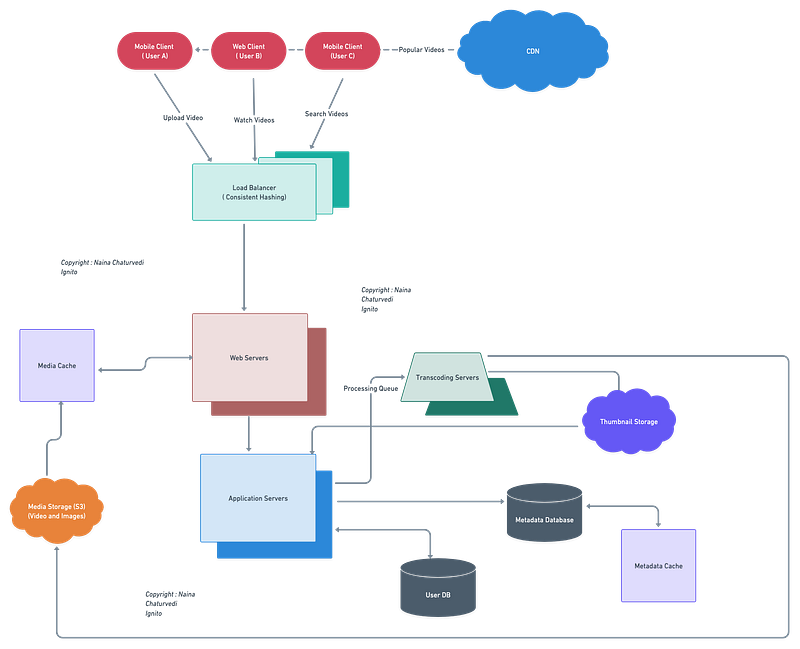
Hello peeps! Welcome to Day 10 of System Design Case studies series where we will design Youtube, Binance, Hotel.com, Flight Radar24, Ease My Trip, Kickstarter, File Sharing System and Auto Complete for Search Engine.
This post covers system design for ( scroll till the end of the post) —
Note : Please read System Design Important Terms you MUST know and Most Important System Design basics before reading this post.
We will be discussing in depth -
- What is Youtube
- Important Features
- Scaling Requirements
- Data Model — ER requirements
- High Level Design
- Basic Low Level Design
- API Design
- Complete Detailed Design
- Complete Code Implementation
Projects Videos —
All the projects, data structures, SQL, algorithms, system design, Data Science and ML , Data Analytics, Data Engineering, , Implemented Data Science and ML projects, Implemented Data Engineering Projects, Implemented Deep Learning Projects, Implemented Machine Learning Ops Projects, Implemented Time Series Analysis and Forecasting Projects, Implemented Applied Machine Learning Projects, Implemented Tensorflow and Keras Projects, Implemented PyTorch Projects, Implemented Scikit Learn Projects, Implemented Big Data Projects, Implemented Cloud Machine Learning Projects, Implemented Neural Networks Projects, Implemented OpenCV Projects,Complete ML Research Papers Summarized, Implemented Data Analytics projects, Implemented Data Visualization Projects, Implemented Data Mining Projects, Implemented Natural Leaning Processing Projects, MLOps and Deep Learning, Applied Machine Learning with Projects Series, PyTorch with Projects Series, Tensorflow and Keras with Projects Series, Scikit Learn Series with Projects, Time Series Analysis and Forecasting with Projects Series, ML System Design Case Studies Series videos will be published on our youtube channel ( just launched).
Subscribe today!
Solved System Design Case Studies — In depth
Design Instagram
Design Netflix
Design Reddit
Design Amazon
Design Messenger App
Design Twitter
Design URL Shortener
Design Dropbox
Design Youtube
Design API Rate Limiter
Design Web Crawler
Design Amazon Prime Video
Design Facebook’s Newsfeed
Design Yelp
Design Uber
Design Tinder
Design Tiktok
Design Whatsapp
Most Popular System Design Questions
Mega Compilation : Solved System Design Case studies
Pre-requisite to this post -
Complete System Design Series — Important Concepts that you should know before starting the Case studies
6. Networking, How Browsers work, Content Network Delivery ( CDN)
13. System Design Template — How to solve any System Design Question
Github —
Day 1 of System Design Case Studies can be found below-
Day 2 of System Design Case Studies can be found below-
Day 3 of System Design Case Studies can be found below-
Day 4 of System Design Case Studies can be found below-
What is Youtube?

Youtube is a video streaming and sharing website where users can —
- Upload the videos
- Watch the videos
- Share, Like, Comment on the videos
- Report the videos
- See the video analytics i.e how video is performing
- Create the playlists and channels of the videos
- Search the videos
- Watch the videos later by queueing them
- Mark videos as favorites
- Delete the comments/videos/unlike.
Users can be mobile based or web based or TV based.
Youtube key components and functionalities —
- Video Upload: The core component of YouTube is the ability for users to upload, share and watch videos. Users need to create an account and be able to upload videos, which should be processed and optimized for streaming.
- Video Discovery: YouTube should have a search function and a system of recommendations to help users discover new videos. The system should take into account the user’s watch history, subscribed channels, and other engagement data to provide personalized recommendations.
- Video Playback: YouTube should provide a video player that can handle different video formats, resolutions and aspect ratios, and allow users to adjust the playback settings, such as turning on captions, adjusting the volume and the playback speed.
- Video Management: Users should be able to organize their videos by creating playlists, editing titles and descriptions, and setting privacy settings.
- Channel Management: Users should be able to create a “channel” to showcase their videos, and customize it with a banner and a profile picture. They should be able to see analytics on their channel’s performance and engagement.
- Commenting: Users should be able to leave comments on videos, and have the ability to reply to other comments, as well as having the ability to moderate comments.
- Subscriptions: Users should be able to subscribe to channels, and be notified when new videos are uploaded.
- Live Streaming: YouTube should have the ability for users to live stream videos, allowing them to interact with their audience in real-time.
- Monetization: YouTube should provide monetization options for creators, such as ads, sponsorships, and merchandise sales.
- Security: YouTube should implement security features such as content moderation, copyright protection, and age-restriction to ensure a safe and inclusive environment for users.
- Accessibility: YouTube should make sure that their platform is accessible to all including people with disabilities by implementing features such as captioning, audio descriptions, and keyboard navigation.
Before we take a deep dive in the design, understand HDFS.
In system design map reduce ( HDFS systems) is a batch processing technique in which the engine takes huge amounts of data, processes ( map and reduce) and gives the output.
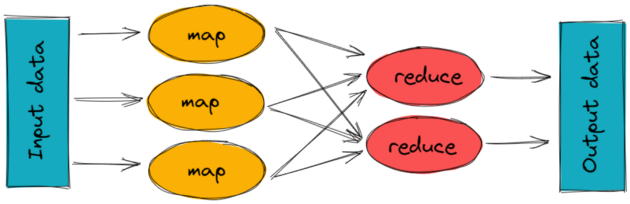
To track the progress of each job — task tracker and job tracker are used. Job tracker manages all the resources and jobs and schedules across the cluster.
The task tracker are called slaves that work on the directives of job trackers and deployed on each node in the cluster.
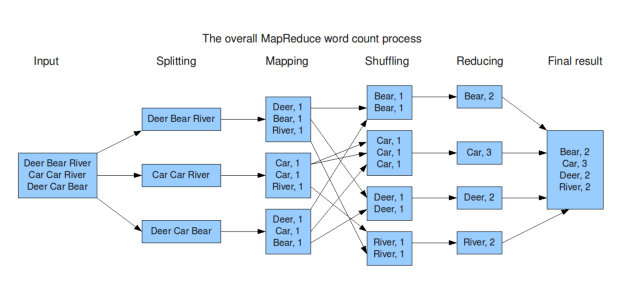
Here’s an example of MapReduce code in Python:
from collections import defaultdictdef map_func(inputs):
results = defaultdict(list)
for input in inputs:
words = input.split()
for word in words:
results[word].append(1)
return results.items()def reduce_func(item):
word, occurrences = item
return (word, sum(occurrences))def map_reduce(inputs):
mapped = map_func(inputs)
grouped = defaultdict(list)
for key, value in mapped:
grouped[key].append(value)
return [reduce_func(group) for group in grouped.items()]inputs = ["apple pear banana", "pear banana", "apple pear", "apple", "pear banana apple"]
print(map_reduce(inputs))This code implements a simple word count example, where the input is a list of strings and the output is a list of tuples (word, count) indicating the number of occurrences of each word in the input. The code uses the map_func function to map the input to intermediate key-value pairs, the reduce_func function to reduce the intermediate values for each key to a single output value, and the map_reduce function to coordinate the map and reduce phases.
Important Features
Upload/Watch Videos
Engagement — Interaction with the videos i.e like/share/comment
Video Analytics
Scaling Requirements — Capacity Estimation
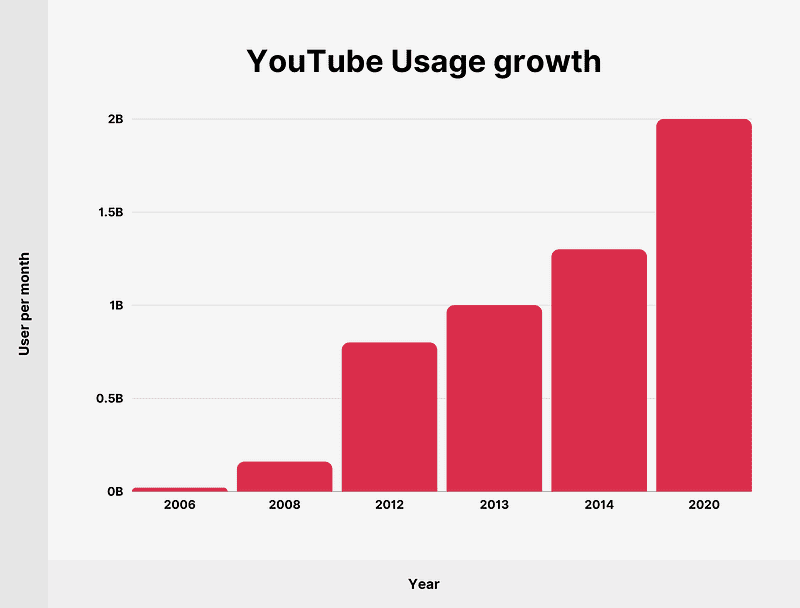
Let’s say, we have -
No of users per day ( DAU) : 3 Million
Percentage of users who upload videos everyday : 5%
No of video uploads per day : 2
Average Video Size : 200 MB
Total Storage needed per day —
3 Million * 5% * 200 MB = 30 TB per day
Storage Required for next 10 years :
30 TB * 365 * 10 = 110 PB
CDN cost —
Let’s say we are using CloudFront CDN so the cost estimation be —
Average cost per GB of data = $0.01
So video streaming cost per day is -
3 Million * 2 videos * 0.2 GB* $0.01 = $120K per day
Bandwidth Estimate —
No of hours of video uploads per minute: 300 hours
Assume bandwidth for each video upload takes : 12MB/min
So total uploads bandwidth every minute: 300 hours * 60 mins * 12 MB = 216 GB/min
For the sake of simplicity, I’ll make a small scale simulation to show capacity estimations. In reality according to Statista’ 22, over 2.6 billion people worldwide use YouTube once a month.
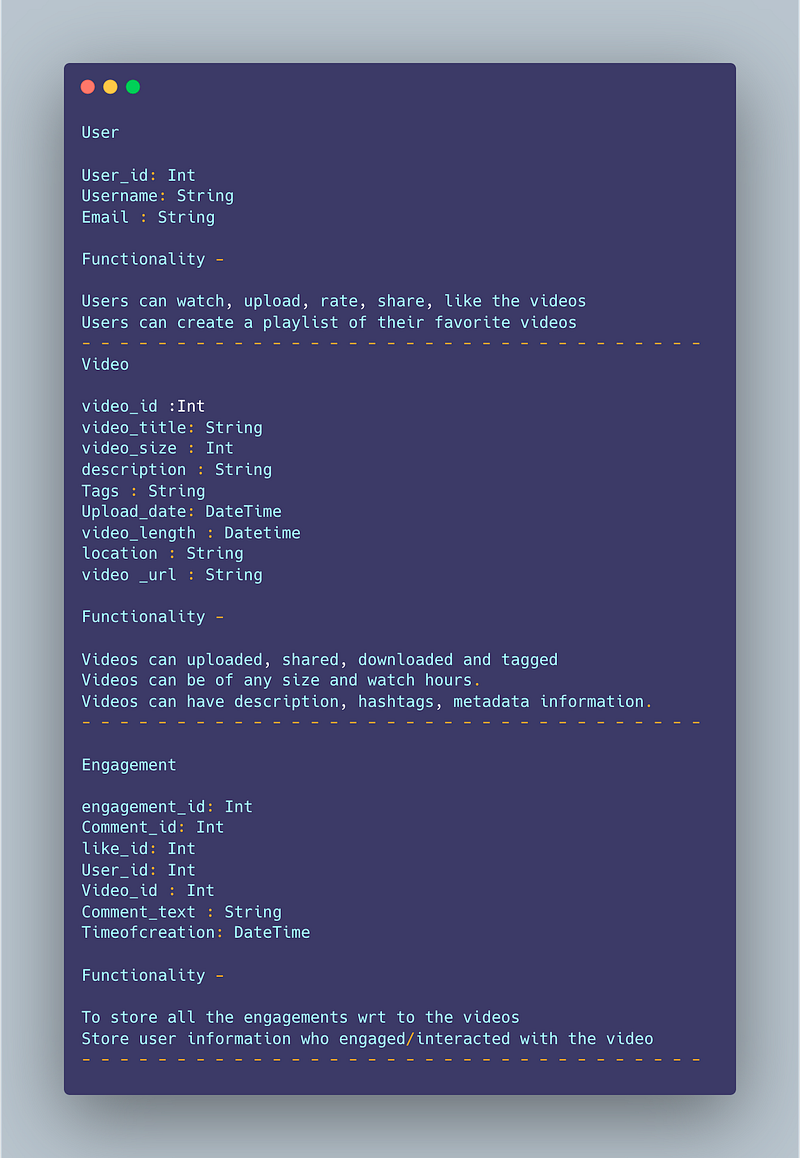
Data Model — ER requirements
User
User_id: Int
Username: String
Email : String
Functionality —
Users can watch, upload, rate, share, like the videos
Users can create a playlist of their favorite videos
— — — — — — — — — — — — — — — — — — — — — — — — — — — — — — — — —
Video
video_id :Int
video_title: String
video_size : Int
description : String
Tags : String
Upload_date: DateTime
video_length : Datetime
location : String
video _url : String
Functionality —
Videos can uploaded, shared, downloaded and tagged
Videos can be of any size and watch hours.
Videos can have description, hashtags, metadata information.
— — — — — — — — — — — — — — — — — — — — — — — — — — — — — — — — —
Engagement
engagement_id: Int
Comment_id: Int
like_id: Int
User_id: Int
Video_id : Int
Comment_text : String
Timeofcreation: DateTime
Functionality —
To store all the engagements wrt to the videos
Store user information who engaged/interacted with the video
— — — — — — — — — — — — — — — — — — — — — — — — — — — — — — — — —
High Level Design
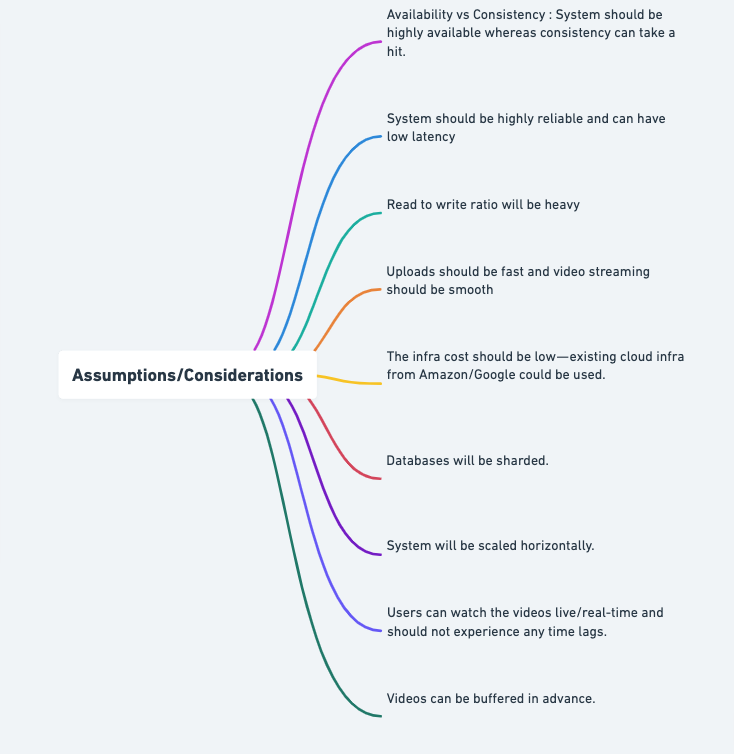
Assumptions/Considerations
- Availability vs Consistency : System should be highly available whereas consistency can take a hit.
- System should be highly reliable and can have low latency
- Read to write ratio will be heavy
- Uploads should be fast and video streaming should be smooth
- The infra cost should be low — existing cloud infra from Amazon/Google could be used.
- Databases will be replicated and sharded.
- System will be scaled horizontally.
- Users can watch the videos live/real-time and should not experience any time lags.
- Videos can be buffered in advance.
— — — — — — — — — — — — — — — — — — — — — — — — — — — — — — — — -
Components
- Client : Users ( can be mobile or web based)
- User Database : To store user’s information
- Metadata Database : To store metadata information
- Content Delivery Network : To cater the most popular videos/live videos streaming ( in case of celebrity fan-out)
- Cache
- File System ( HDFS)
- Encoding Queue : To encode each video into various formats
- Processing Queue : To hold and process the videos for encoding, metadata and storage
- Transcoding Servers
- Storage : For Video Metadata
— — — — — — — — — — — — — — — — — — — — — — — — — — — — — — — — —
Services
- Video Upload Service — For video uploads
- Video Streaming Service- For video streaming/watch
Video Service: This service is responsible for managing video metadata such as title, description, tags, etc.
import flask
from flask import request
app = flask.Flask(__name__)# Example video metadata
videos = [
{"id": 1, "title": "Video 1", "description": "Description for video 1", "tags": ["tag1", "tag2"]},
{"id": 2, "title": "Video 2", "description": "Description for video 2", "tags": ["tag3", "tag4"]}
]# Get all videos
@app.route("/videos", methods=["GET"])
def get_videos():
return {"videos": videos}# Get a specific video by id
@app.route("/videos/<int:id>", methods=["GET"])
def get_video(id):
for video in videos:
if video["id"] == id:
return {"video": video}
return {"error": "Video not found"}, 404# Add a new video
@app.route("/videos", methods=["POST"])
def add_video():
video = request.get_json()
videos.append(video)
return {"message": "Video added successfully"}if __name__ == "__main__":
app.run()Comment Service: This service is responsible for managing comments on videos.
import flask
from flask import requestapp = flask.Flask(__name__)# Example comments data
comments = [
{"id": 1, "video_id": 1, "comment": "Comment 1 for video 1", "username": "user1"},
{"id": 2, "video_id": 2, "comment": "Comment 1 for video 2", "username": "user2"}
]# Get all comments for a specific video
@app.route("/comments", methods=["GET"])
def get_comments():
video_id = request.args.get("video_id")
video_comments = [comment for comment in comments if comment["video_id"] == int(video_id)]
return {"comments": video_comments}# Add a new comment
@app.route("/comments", methods=["POST"])
def add_comment():
comment = request.get_json()
comments.append(comment)
return {"message": "Comment added successfully"}if __name__ == "__main__":
app.run()# User Service
from flask import Flask, jsonify, request
app = Flask(__name__)
# Create a dictionary to store the user information
users = {}
# Endpoint to create a new user
@app.route("/users", methods=["POST"])
def create_user():
# Get the user information from the request body
data = request.get_json()
user_id = len(users) + 1
name = data.get("name")
email = data.get("email")
# Store the user information in the users dictionary
users[user_id] = {
"id": user_id,
"name": name,
"email": email
}
return jsonify({"message": "User created successfully!"})
# Endpoint to get a user's information by their id
@app.route("/users/<int:user_id>", methods=["GET"])
def get_user(user_id):
user = users.get(user_id)
if user:
return jsonify(user)
else:
return jsonify({"message": "User not found"}), 404
# Endpoint to update a user's information by their id
@app.route("/users/<int:user_id>", methods=["PUT"])
def update_user(user_id):
user = users.get(user_id)
if user:
data = request.get_json()
name = data.get("name")
email = data.get("email")
user["name"] = name
user["email"] = email
return jsonify({"message": "User updated successfully!"})
else:
return jsonify({"message": "User not found"}), 404
# Endpoint to delete a user by their id
@app.route("/users/<int:user_id>", methods=["DELETE"])
def delete_user(user_id):
user = users.get(user_id)
if user:
del users[user_id]
return jsonify({"message": "User deleted successfully!"})
else:
return jsonify({"message": "User not found"}), 404
if __name__ == "__main__":
app.run(debug=True)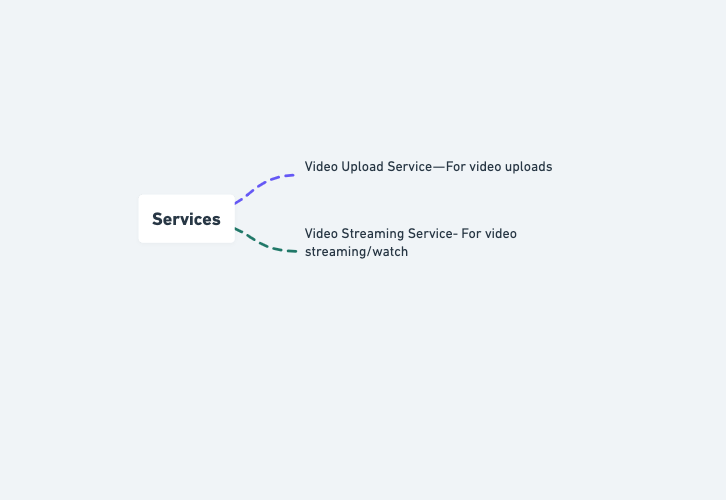
Basic Low Level Design
import java.util.*;
class User {
private String username;
private String password;
private List<Video> videos;
// ...
public User(String username, String password) {
this.username = username;
this.password = password;
this.videos = new ArrayList<>();
}
// Getters and setters
// ...
}
class Video {
private String videoId;
private String title;
private String description;
private User uploader;
private List<Comment> comments;
// ...
public Video(String videoId, String title, String description, User uploader) {
this.videoId = videoId;
this.title = title;
this.description = description;
this.uploader = uploader;
this.comments = new ArrayList<>();
}
// Getters and setters
// ...
}
class Comment {
private String commentId;
private String text;
private User commenter;
// ...
public Comment(String commentId, String text, User commenter) {
this.commentId = commentId;
this.text = text;
this.commenter = commenter;
}
// Getters and setters
// ...
}
class YouTubeSystem {
private List<User> users;
private List<Video> videos;
// ...
public YouTubeSystem() {
this.users = new ArrayList<>();
this.videos = new ArrayList<>();
}
public void registerUser(String username, String password) {
User newUser = new User(username, password);
users.add(newUser);
System.out.println("User registered successfully.");
}
public void uploadVideo(String username, String videoId, String title, String description) {
User uploader = findUserByUsername(username);
if (uploader != null) {
Video newVideo = new Video(videoId, title, description, uploader);
uploader.getVideos().add(newVideo);
videos.add(newVideo);
System.out.println("Video uploaded successfully.");
} else {
System.out.println("User not found.");
}
}
public void addComment(String videoId, String commenterUsername, String commentId, String text) {
Video video = findVideoById(videoId);
User commenter = findUserByUsername(commenterUsername);
if (video != null && commenter != null) {
Comment newComment = new Comment(commentId, text, commenter);
video.getComments().add(newComment);
System.out.println("Comment added successfully.");
} else {
System.out.println("Video or commenter not found.");
}
}
public User findUserByUsername(String username) {
for (User user : users) {
if (user.getUsername().equals(username)) {
return user;
}
}
return null;
}
public Video findVideoById(String videoId) {
for (Video video : videos) {
if (video.getVideoId().equals(videoId)) {
return video;
}
}
return null;
}
}
public class YouTubeApp {
public static void main(String[] args) {
YouTubeSystem youtube = new YouTubeSystem();
// Register users
youtube.registerUser("user1", "password1");
youtube.registerUser("user2", "password2");
// Upload videos
youtube.uploadVideo("user1", "video1", "Video 1", "Description 1");
youtube.uploadVideo("user2", "video2", "Video 2", "Description 2");
// Add comments
youtube.addComment("video1", "user2", "comment1", "Comment 1 on video 1");
youtube.addComment("video2", "user1", "comment2", "Comment 2 on video 2");
}
}API Design
Implementation —
from flask import Flask, jsonify, request
import googleapiclient.discovery
import googleapiclient.errorsapp = Flask(__name__)# Initialize YouTube API client
api_service_name = "youtube"
api_version = "v3"
DEVELOPER_KEY = "YOUR_API_KEY"
youtube = googleapiclient.discovery.build(api_service_name, api_version, developerKey=DEVELOPER_KEY)# Endpoint for searching YouTube videos
@app.route('/search', methods=['GET'])
def search_videos():
# Get query from request parameters
query = request.args.get('q')
# Send request to YouTube API and get search results
request = youtube.search().list(
part="id,snippet",
type="video",
q=query,
maxResults=10
)
response = request.execute()
# Return list of videos
videos = []
for item in response['items']:
video = {
'id': item['id']['videoId'],
'title': item['snippet']['title'],
'description': item['snippet']['description']
}
videos.append(video)
return jsonify(videos)# Endpoint for getting details of a specific YouTube video
@app.route('/videos/<video_id>', methods=['GET'])
def get_video_details(video_id):
# Send request to YouTube API and get video details
request = youtube.videos().list(
part="id,snippet",
id=video_id
)
response = request.execute()
# Return video details
item = response['items'][0]
video = {
'id': item['id'],
'title': item['snippet']['title'],
'description': item['snippet']['description'],
'tags': item['snippet']['tags']
}
return jsonify(video)# Endpoint for getting comments of a specific YouTube video
@app.route('/videos/<video_id>/comments', methods=['GET'])
def get_video_comments(video_id):
# Send request to YouTube API and get comments
request = youtube.commentThreads().list(
part="snippet",
videoId=video_id,
textFormat="plainText",
maxResults=10
)
response = request.execute()
# Return list of comments
comments = []
for item in response['items']:
comment = {
'id': item['id'],
'author': item['snippet']['topLevelComment']['snippet']['authorDisplayName'],
'text': item['snippet']['topLevelComment']['snippet']['textDisplay']
}
comments.append(comment)
return jsonify(comments)if __name__ == '__main__':
app.run(debug=True)In this implementation, we have three endpoints:
/search(GET): This endpoint is used to search YouTube videos. The query is passed in the request parameters asq./videos/<video_id>(GET): This endpoint is used to get details of a specific YouTube video. The video ID is passed as part of the endpoint URL./videos/<video_id>/comments(GET): This endpoint is used to get comments of a specific YouTube video. The video ID is passed as part of the endpoint URL.
It should have 3 API —
Upload Videos
Stream Videos
Search Videos
An API in Python that could be used to interact with a YouTube service:
import requests# Define the API endpoint for retrieving videos
endpoint = "https://www.googleapis.com/youtube/v3/videos"# Define the API key for accessing the YouTube API
api_key = "YOUR_API_KEY"# Define the parameters for the API request
params = {
"part": "snippet,statistics",
"id": "video_id",
"key": api_key
}# Send the API request to retrieve video data
response = requests.get(endpoint, params=params)# Check if the API request was successful
if response.status_code == 200:
# Parse the JSON data from the API response
data = response.json()
# Access the video data
video_data = data.get("items", [])[0]
# Access the video title and view count
video_title = video_data.get("snippet", {}).get("title", "")
video_view_count = video_data.get("statistics", {}).get("viewCount", 0)
# Print the video title and view count
print("Title: {}".format(video_title))
print("View Count: {}".format(video_view_count))
else:
# Print an error message if the API request was not successful
print("Request failed with status code {}".format(response.status_code))This code uses the requests library to send a GET request to the YouTube API and retrieve information about a specific video. The params dictionary is used to specify the parameters for the API request, such as the video ID and the API key. The response from the API is checked for success, and if successful, the video title and view count are extracted from the JSON data and printed.
Complete API design will be discussed in workflow video ( coming soon).
Complete Detailed Design
(Zoom it)
Code
Upload a video
To upload a video to YouTube using Python, we can use the videos().insert() method of the googleapiclient.discovery module. Here's an implementation:
import os
import google.auth
from googleapiclient.discovery import build
from googleapiclient.errors import HttpError
from google.oauth2.credentials import Credentials# Set the API service name and version
API_SERVICE_NAME = 'youtube'
API_VERSION = 'v3'# Authenticate and build the API client
credentials, project_id = google.auth.default(
scopes=['https://www.googleapis.com/auth/youtube.upload']
)
youtube = build(API_SERVICE_NAME, API_VERSION, credentials=credentials)# Define the video metadata
video = {
'snippet': {
'title': 'My Video Title',
'description': 'This is a description of my video',
'tags': ['tag1', 'tag2', 'tag3'],
'categoryId': '22'
},
'status': {
'privacyStatus': 'public',
'embeddable': True,
'license': 'youtube'
}
}# Define the path to the video file
file_path = 'path/to/video.mp4'# Call the API to upload the video
try:
request = youtube.videos().insert(
part='snippet,status',
body=video,
media_body=MediaFileUpload(file_path)
)
response = request.execute()
print(f'Video uploaded: {response["id"]}')
except HttpError as error:
print(f'An error occurred: {error}')
response = NoneWatch a video
To watch a video, we can use the webbrowser module to open the video in our default web browser. Here's an implementation:
import webbrowser# Define the video ID
video_id = 'abcdefghijk'# Open the video in the default web browser
webbrowser.open(f'https://www.youtube.com/watch?v={video_id}')Share, like, and comment on a video
To share, like, and comment on a video, we can use the youtube.activities().insert() method of the googleapiclient.discovery module. Here's an implementation:
# Define the video ID and the comment text
video_id = 'abcdefghijk'
comment_text = 'This is my comment on the video'# Define the activity metadata
activity = {
'snippet': {
'activityType': 'post',
'channelId': 'my_channel_id',
'description': comment_text,
'resourceId': {
'kind': 'youtube#video',
'videoId': video_id
}
}
}# Call the API to post the comment
try:
request = youtube.activities().insert(
part='snippet',
body=activity
)
response = request.execute()
print(f'Comment posted: {response["id"]}')
except HttpError as error:
print(f'An error occurred: {error}')
response = None# Define the video ID and the rating
video_id = 'abcdefghijk'
rating = 'like'Reporting a video:
# Define the video ID and the report reasons
video_id = 'abcdefghijk'
reasons = ['hate', 'violence']# Call the API to report the video
try:
request = youtube.videos().reportAbuse(
videoId=video_id,
body={
'reasons': reasons,
'comments': 'This video is inappropriate because...',
'language': 'en'
}
)
response = request.execute()
print(f'Video reported: {response["id"]}')
except HttpError as error:
print(f'An error occurred: {error}')
response = NoneSee video analytics
To see the analytics for a video, we can use the youtube.reports().query() method of the googleapiclient.discovery module. Here's an implementation:
# Define the video ID and the start and end dates for the analytics data
video_id = 'abcdefghijk'
start_date = '2022-01-01'
end_date = '2022-02-01'# Call the API to get the analytics data for the video
try:
request = youtube.reports().query(
dimensions='video',
filters=f'video=={video_id}',
startDate=start_date,
endDate=end_date,
metrics='views,likes,dislikes,comments',
sort='views'
)
response = request.execute()
print(f'Analytics for video {video_id}: {response["rows"]}')
except HttpError as error:
print(f'An error occurred: {error}')
response = NoneCreate playlists and channels
To create a playlist or a channel, we can use the youtube.playlists().insert() or youtube.channels().insert() method of the googleapiclient.discovery module. Here's an implementation of creating a playlist:
# Define the playlist metadata
playlist = {
'snippet': {
'title': 'My Playlist',
'description': 'This is a description of my playlist'
},
'status': {
'privacyStatus': 'public'
}
}# Call the API to create the playlist
try:
request = youtube.playlists().insert(
part='snippet,status',
body=playlist
)
response = request.execute()
print(f'Playlist created: {response["id"]}')
except HttpError as error:
print(f'An error occurred: {error}')
response = NoneHere’s an implementation of creating a channel:
# Define the channel metadata
channel = {
'snippet': {
'title': 'My Channel',
'description': 'This is a description of my channel'
},
'status': {
'privacyStatus': 'public'
}
}# Call the API to create the channel
try:
request = youtube.channels().insert(
part='snippet,status',
body=channel
)
response = request.execute()
print(f'Channel created: {response["id"]}')
except HttpError as error:
print(f'An error occurred: {error}')
response = NoneSearch for videos
To search for videos, we can use the youtube.search().list() method of the googleapiclient.discovery module. Here's an implementation:
# Define the search query
search_query = 'python programming'
# Call the API to search for videos
try:
request = youtube.search().list(
q=search_query,
part='id,snippet',
type='video'
)
response = request.execute()
for item in response['items']:
print(f'Title: {item["snippet"]["title"]}')
print(f'Video ID: {item["id"]["videoId"]}')
print(f'Description: {item["snippet"]["description"]}')
print('----------------------------------------------')
except HttpError as error:
print(f'An error occurred: {error}')
response = NoneQueue videos to watch later
To queue videos to watch later, we can use the youtube.playlistItems().insert() method of the googleapiclient.discovery module. Here's an implementation:
# Define the video ID and the ID of the "Watch Later" playlist
video_id = 'abcdefghijk'
playlist_id = '1234567890'
# Call the API to add the video to the "Watch Later" playlist
try:
request = youtube.playlistItems().insert(
part='snippet',
body={
'snippet': {
'playlistId': playlist_id,
'resourceId': {
'kind': 'youtube#video',
'videoId': video_id
}
}
}
)
response = request.execute()
print(f'Video added to "Watch Later" playlist: {response["id"]}')
except HttpError as error:
print(f'An error occurred: {error}')
response = NoneMark videos as favorites
To mark a video as a favorite, we can use the youtube.playlistItems().insert() method of the googleapiclient.discovery module to add the video to a playlist. Here's an implementation:
# Define the video ID and the ID of the "Favorites" playlist
video_id = 'abcdefghijk'
playlist_id = '0987654321'
# Call the API to add the video to the "Favorites" playlist
try:
request = youtube.playlistItems().insert(
part='snippet',
body={
'snippet': {
'playlistId': playlist_id,
'resourceId': {
'kind': 'youtube#video',
'videoId': video_id
}
}
}
)
response = request.execute()
print(f'Video added to "Favorites" playlist: {response["id"]}')
except HttpError as error:
print(f'An error occurred: {error}')
response = NoneDelete comments, videos, and likes
To delete a comment, we can use the youtube.comments().delete() method of the googleapiclient.discovery module. Here's an implementation:
# Define the comment ID to delete
comment_id = 'abcdefghijk'
# Call the API to delete the comment
try:
request = youtube.comments().delete(
id=comment_id
)
request.execute()
print(f'Comment deleted: {comment_id}')
except HttpError as error:
print(f'An error occurred: {error}')# Define the video ID to delete
video_id = 'abcdefghijk'
# Call the API to delete the video
try:
request = youtube.videos().delete(
id=video_id
)
request.execute()
print(f'Video deleted: {video_id}')
except HttpError as error:
print(f'An error occurred: {error}')To unlike a video, we can use the youtube.videos().rate() method of the googleapiclient.discovery module with the rating parameter set to "none". Here's an implementation:
# Define the video ID to unlike
video_id = 'abcdefghijk'
# Call the API to unlike the video
try:
request = youtube.videos().rate(
id=video_id,
rating='none'
)
request.execute()
print(f'Video unliked: {video_id}')
except HttpError as error:
print(f'An error occurred: {error}')To delete a comment, we can use the youtube.comments().delete() method of the googleapiclient.discovery module. Here's an implementation:
# Define the comment ID to delete
comment_id = 'abcdefghijk'
# Call the API to delete the comment
try:
request = youtube.comments().delete(
id=comment_id
)
request.execute()
print(f'Comment deleted: {comment_id}')
except HttpError as error:
print(f'An error occurred: {error}')More on Youtube System Design —
Video Upload and Encoding:
Video upload and encoding involve designing systems to handle the process of uploading and processing video files. This includes implementing video encoding and transcoding for different resolutions and formats, as well as handling video metadata extraction and storage.
Here’s an example of code for video upload and encoding using the Python moviepy library:
from moviepy.editor import VideoFileClipdef upload_video(file_path):
# Code for uploading the video file to a storage system
# ...def encode_video(file_path, output_format='mp4', resolution='720p'):
# Code for video encoding and transcoding
clip = VideoFileClip(file_path)
clip_resized = clip.resize(resolution)
output_path = f'encoded_video.{output_format}'
clip_resized.write_videofile(output_path)
return output_pathdef extract_metadata(file_path):
# Code for extracting and storing video metadata
clip = VideoFileClip(file_path)
duration = clip.duration
resolution = clip.size
# Store the metadata in a database or file system
# ...Video Storage and Content Distribution:
Video storage and content distribution involve efficiently and securely storing and managing video files. This includes implementing distributed storage systems or content delivery networks (CDNs) for fast content delivery, as well as handling replication, data consistency, and data durability.
Here’s an example of code for video storage and content distribution using the Python boto3 library for interacting with Amazon S3:
import boto3def store_video(file_path, bucket_name, object_name):
s3 = boto3.client('s3')
s3.upload_file(file_path, bucket_name, object_name)def get_video_url(bucket_name, object_name):
s3 = boto3.client('s3')
signed_url = s3.generate_presigned_url(
'get_object',
Params={'Bucket': bucket_name, 'Key': object_name},
ExpiresIn=3600
)
return signed_urldef replicate_video(bucket_name, object_name, destination_bucket):
s3 = boto3.client('s3')
s3.copy_object(
Bucket=destination_bucket,
CopySource={'Bucket': bucket_name, 'Key': object_name},
Key=object_name
)Video Metadata and Indexing:
Video metadata and indexing involve designing systems for indexing and categorizing videos. This includes implementing metadata extraction and analysis techniques, as well as enabling efficient search and filtering based on video attributes.
Here’s an example of code for video metadata and indexing using the Python Elasticsearch library:
from elasticsearch import Elasticsearchdef index_video_metadata(video_id, metadata):
es = Elasticsearch()
es.index(index='videos', id=video_id, body=metadata)def search_videos(query):
es = Elasticsearch()
search_result = es.search(index='videos', body={'query': {'match': {'title': query}}})
hits = search_result['hits']['hits']
return [hit['_source'] for hit in hits]def filter_videos(attribute, value):
es = Elasticsearch()
search_result = es.search(index='videos', body={'query': {'term': {attribute: value}}})
hits = search_result['hits']['hits']
return [hit['_source'] for hit in hits]Video Streaming and Playback:
Video streaming and playback involve designing systems for efficient video streaming and playback. This includes implementing adaptive bitrate streaming to adjust video quality based on network conditions, as well as handling video buffering, seeking, and playback controls.
import pygame
import time
def play_video(video_file):
pygame.init()
pygame.mixer.quit() # Disable audio to focus on video playback
screen = pygame.display.set_mode((800, 600))
pygame.display.set_caption("Video Player")
video = pygame.movie.Movie(video_file)
video.set_display(screen, pygame.Rect(0, 0, 800, 600))
video.play()
clock = pygame.time.Clock()
running = True
while running:
for event in pygame.event.get():
if event.type == pygame.QUIT:
running = False
break
if video.get_busy():
screen.fill((0, 0, 0))
video_screen = pygame.Surface((800, 600))
video_screen = video.get_surface()
screen.blit(video_screen, (0, 0))
pygame.display.update()
clock.tick(30)
video.stop()
pygame.quit()
# Example usage
video_file = 'sample_video.mp4'
play_video(video_file)Recommendation and Personalization:
import pandas as pdimport pandas as pd
from sklearn.metrics.pairwise import cosine_similarity# Sample data
videos = pd.DataFrame({'video_id': [1, 2, 3, 4],
'title': ['Video 1', 'Video 2', 'Video 3', 'Video 4'],
'category': ['Music', 'Sports', 'Music', 'Sports']})user_preferences = pd.DataFrame({'user_id': ['user1', 'user2', 'user3'],
'preferences': [['Music', 'Sports'],
['Sports'],
['Music', 'Sports']]})def recommend_videos(user_id):
user_preference = user_preferences[user_preferences['user_id'] == user_id]['preferences'].values[0]
recommendations = {}
for _, row in user_preferences.iterrows():
if row['user_id'] != user_id:
similarity = cosine_similarity([user_preference], [row['preferences']])
recommendations[row['user_id']] = similarity[0][0]
sorted_recommendations = sorted(recommendations.items(), key=lambda x: x[1], reverse=True)
return sorted_recommendations# Example usage
user_id = 'user1'
recommended_videos = recommend_videos(user_id)User Engagement and Interactions:
class Video:
def __init__(self, video_id, title):
self.video_id = video_id
self.title = title
self.likes = 0
self.comments = []
self.shares = 0
self.subscribers = 0
def add_like(self):
self.likes += 1
def add_comment(self, comment):
self.comments.append(comment)
def add_share(self):
self.shares += 1
def add_subscriber(self):
self.subscribers += 1
# Example usage
video = Video(1, 'Sample Video')
video.add_like()
video.add_comment('Great video!')
video.add_share()
video.add_subscriber()Advertising and Monetization:
class Ad:
def __init__(self, ad_id, content):
self.ad_id = ad_id
self.content = content def serve_ad(self, user_id):
# Code for serving ad to a user
# ...# Example usage
ad = Ad(1, 'Buy our product!')
ad.serve_ad(user_id)Live Streaming:
class LiveStream:
def __init__(self, stream_id):
self.stream_id = stream_id
self.chat_messages = [] def send_chat_message(self, message):
self.chat_messages.append(message)# Example usage
stream = LiveStream(1)
stream.send_chat_message('Hello, everyone!')Analytics and Reporting:
def collect_user_metrics(user_id):
# Code for collecting user metrics
# ...def generate_video_report(video_id):
# Code for generating a video report
# ...# Example usage
user_metrics = collect_user_metrics(user_id)
video_report = generate_video_report(video_id)Scalability and Performance:
class VideoUploadService:
def __init__(self):
self.upload_servers = ['server1', 'server2', 'server3']
self.upload_counter = 0 def upload_video(self, file_path):
server = self.upload_servers[self.upload_counter % len(self.upload_servers)]
self.upload_counter += 1
# Code for uploading the video file to the specified server
# ...# Example usage
upload_service = VideoUploadService()
upload_service.upload_video(file_path)User behavior and video performance:
This functionality involves collecting various metrics related to user behavior and video performance within the YouTube-like system. These metrics can include the number of views, likes, comments, shares, and other user engagement data. Analyzing these metrics provides valuable insights into user preferences, trends, and video performance.
class AnalyticsManager:
def __init__(self):
self.video_views = {}
self.video_likes = {}
self.video_comments = {} def track_view(self, video_id):
if video_id in self.video_views:
self.video_views[video_id] += 1
else:
self.video_views[video_id] = 1 def track_like(self, video_id):
if video_id in self.video_likes:
self.video_likes[video_id] += 1
else:
self.video_likes[video_id] = 1 def track_comment(self, video_id):
if video_id in self.video_comments:
self.video_comments[video_id] += 1
else:
self.video_comments[video_id] = 1 def get_video_views(self, video_id):
return self.video_views.get(video_id, 0) def get_video_likes(self, video_id):
return self.video_likes.get(video_id, 0) def get_video_comments(self, video_id):
return self.video_comments.get(video_id, 0)# Example usage
analytics_manager = AnalyticsManager()
analytics_manager.track_view('video1')
analytics_manager.track_view('video1')
analytics_manager.track_like('video1')
analytics_manager.track_comment('video1')
views = analytics_manager.get_video_views('video1')
likes = analytics_manager.get_video_likes('video1')
comments = analytics_manager.get_video_comments('video1')Implementing analytics tools for content creators and administrators:
This functionality involves providing analytics tools and insights to content creators and administrators. It enables them to monitor the performance of their videos, understand user engagement, and make data-driven decisions to improve their content and strategy.
class AnalyticsTools:
def __init__(self):
self.analytics_manager = AnalyticsManager() def get_video_stats(self, video_id):
views = self.analytics_manager.get_video_views(video_id)
likes = self.analytics_manager.get_video_likes(video_id)
comments = self.analytics_manager.get_video_comments(video_id)
return {
'views': views,
'likes': likes,
'comments': comments
}# Example usage
analytics_tools = AnalyticsTools()
video_stats = analytics_tools.get_video_stats('video1')Providing reporting functionalities for video views, engagement, and demographics:
This functionality involves generating reports that summarize video views, user engagement, and demographics within the YouTube-like system. These reports provide aggregated data and insights that can be used for decision-making, performance evaluation, and content strategy.
Load balancing, sharding, and replication techniques:
class LoadBalancer:
def __init__(self, servers):
self.servers = servers
self.current_server_index = 0 def distribute_request(self):
server = self.servers[self.current_server_index]
self.current_server_index = (self.current_server_index + 1) % len(self.servers)
# Code for distributing the request to the selected server
# ...# Example usage
servers = ['server1', 'server2', 'server3']
load_balancer = LoadBalancer(servers)
load_balancer.distribute_request()class ShardingManager:
def __init__(self, num_shards):
self.num_shards = num_shards
self.shards = [[] for _ in range(num_shards)] def get_shard_index(self, key):
# Code for determining the shard index based on the key
# ... def add_item(self, key, value):
shard_index = self.get_shard_index(key)
self.shards[shard_index].append((key, value)) def get_item(self, key):
shard_index = self.get_shard_index(key)
for item_key, item_value in self.shards[shard_index]:
if item_key == key:
return item_value
return None# Example usage
sharding_manager = ShardingManager(num_shards=4)
sharding_manager.add_item('key1', 'value1')
sharding_manager.add_item('key2', 'value2')
value = sharding_manager.get_item('key1')class ReplicationManager:
def __init__(self):
self.replicas = [] def add_replica(self, replica):
self.replicas.append(replica) def remove_replica(self, replica):
self.replicas.remove(replica) def get_replica(self):
# Code for selecting a replica based on the replication strategy (e.g., round-robin)
# ...# Example usage
replica1 = 'replica1'
replica2 = 'replica2'
replica3 = 'replica3'
replication_manager = ReplicationManager()
replication_manager.add_replica(replica1)
replication_manager.add_replica(replica2)
replication_manager.add_replica(replica3)
selected_replica = replication_manager.get_replica()System Design — Binance
We will be discussing in depth -
- What is Binance
- Important Features
- Scaling Requirements
- Data Model — ER requirements
- High Level Design
- Basic Low Level Design
- API Design
- Complete Detailed Design
- Complete Code Implementation

What is Binance
Binance is one of the world’s largest cryptocurrency exchanges, providing a platform for users to trade various digital assets. It offers a wide range of features, including spot trading, futures trading, margin trading, and more. With a large user base and high trading volumes, Binance requires a robust and scalable system design to handle the immense load and ensure the security and reliability of its services.
Important Features
- Spot Trading: Binance allows users to trade cryptocurrencies in real-time, providing a user-friendly interface and liquidity for various trading pairs.
- Futures Trading: Binance offers leveraged trading through futures contracts, allowing users to speculate on the future price movements of cryptocurrencies.
- Margin Trading: Binance provides margin trading services, enabling users to borrow funds to trade with leverage, amplifying potential profits or losses.
- Decentralized Exchange: Binance has also introduced a decentralized exchange (DEX), which operates on a blockchain and allows users to retain control over their funds during trading.
- Initial Coin Offerings (ICOs): Binance Launchpad facilitates token sales for blockchain projects, providing a platform for fundraising and community building.
Scaling Requirements — Capacity Estimation
For the sake of simplicity, we’ll assume the following:
Total number of users: 50 million
Daily active users (DAU): 10 million
Number of trades executed by user/day: 5
Total number of trades executed per day: 50 million trades/day
- Since the system is read-heavy, let’s assume a read-to-write ratio of 100:1.
- Total number of trades placed per day = 1/100 * 50 million = 500,000 trades/day
Storage Estimation:
- Let’s assume the average trade size is 1 KB.
- Total storage per day: 500,000 trades/day * 1 KB = 500 MB/day
- For the next 3 years: 500 MB/day * 365 days * 3 years = 547.5 TB
Requests per Second:
- Assuming an even distribution throughout the day: 50 million trades / (24 hours * 3600 seconds) = ~579 trades/second
- Horizontal Scaling: The system should be designed to scale horizontally by adding more servers or nodes to distribute the load and handle increased trading activity.
- Load Balancing: Load balancers should be implemented to distribute incoming requests across multiple servers, ensuring optimal resource utilization and preventing bottlenecks.
- Caching Mechanisms: Utilizing caching mechanisms like Redis or Memcached can help improve response times and reduce the load on backend systems.
- Distributed Database: Binance should employ a distributed database system to handle large volumes of data and support high concurrency.
Data Model — ER requirements
Users:
- Fields:
- User_ID: INT (Primary Key)
- Username: VARCHAR
- Email: VARCHAR
- Password: VARCHAR
Trading Pairs:
- Fields:
- Pair_ID: INT (Primary Key)
- Pair_Name: VARCHAR
Orders:
- Fields:
- Order_ID: INT (Primary Key)
- User_ID: INT (Foreign Key referencing Users.User_ID)
- Pair_ID: INT (Foreign Key referencing Trading Pairs.Pair_ID)
- Side: VARCHAR
- Price: DECIMAL
- Quantity: DECIMAL
- Timestamp: DATETIME
Users: Store user information such as account details, trading history, and preferences.
Cryptocurrencies: Maintain a list of supported cryptocurrencies, including their symbols, market data, and trading pairs.
Orders: Track user orders, including the cryptocurrency, quantity, price, and execution status.
Wallets: Manage user wallets, including balances of different cryptocurrencies and transaction histories.
Market Data: Store real-time and historical market data, including price, volume, and order book information.
High Level Design
Assumptions:
- There will be a higher number of read operations compared to write operations.
- The system needs to be highly available and scalable.
- Consistency and reliability are crucial.
- The system should have low latency for order processing.
Main Components and Services:
Mobile/Web Client:
- These are the users accessing the Binance platform through mobile devices or web browsers.
Application Servers:
- Responsible for handling read and write operations, as well as processing orders and user requests.
Load Balancer:
- Routes and distributes incoming requests to different application servers, ensuring load balancing and scalability.
Cache (Redis/Memcached):
- Used for caching frequently accessed data to improve read performance and reduce load on the database.
CDN (Content Delivery Network):
- Used to deliver static content, such as images and other media, to users with low latency and high availability.
Database:
- A relational database management system (RDBMS) to store and manage the Binance data.
- Tables: Users, Trading Pairs, Orders.
Services:
User Service:
- Responsible for user management, including registration, authentication, and account information.
Trading Pair Service:
- Manages the available trading pairs, including retrieval and updating of pair information.
Order Service:
- Handles order placement, retrieval, and processing, including matching buy and sell orders.
Feed Service:
- Generates personalized feeds for users, displaying relevant trading information and order updates.
Notification Service:
- Sends real-time notifications to users for order updates, account activity, and other relevant information.
Reporting Service:
- Provides analytics and reporting features, generating statistics and insights on trading activities.
User Interface: A responsive and user-friendly web and mobile interface for trading and managing accounts.
Trading Engine: The core component responsible for matching buy and sell orders, calculating fees, and executing trades.
Order Management: Handles the lifecycle of orders, including order placement, cancellation, and tracking.
Market Data Provider: Collects and aggregates market data from various sources to provide accurate pricing information.
Microservices: Decompose the system into smaller, independent services to improve modularity, scalability, and maintainability.
Message Queues: Utilize message queues like Kafka or RabbitMQ for asynchronous communication between different components.
Database Management: Choose an appropriate database system, such as MySQL or PostgreSQL, to store and retrieve data efficiently.
Caching Layer: Implement a caching layer using Redis or Memcached to reduce database load and improve response times.
Risk Management: Monitors trading activities, enforces trading limits, and detects and prevents fraudulent behavior
Basic Low Level Design
User Management API:
POST /users- Create a new user account.GET /users/{userId}- Get user details by userId.PATCH /users/{userId}- Update user details.DELETE /users/{userId}- Delete a user account.
Order Management API:
POST /users/{userId}/orders- Place a new order.GET /users/{userId}/orders/{orderId}- Get order details by orderId.GET /users/{userId}/orders- Get all orders for a user.DELETE /users/{userId}/orders/{orderId}- Cancel an order.
Trading Pair API:
POST /tradingPairs- Create a new trading pair.GET /tradingPairs/{tradingPairId}- Get trading pair details by tradingPairId.GET /tradingPairs- Get all trading pairs.PATCH /tradingPairs/{tradingPairId}- Update trading pair details.
Wallet API:
GET /users/{userId}/wallets/{currency}- Get wallet details by userId and currency.POST /users/{userId}/wallets- Create a new wallet for a user.PATCH /users/{userId}/wallets/{currency}- Update wallet balance.DELETE /users/{userId}/wallets/{currency}- Delete a wallet.
Market Data API:
GET /marketData/{tradingPairId}/price- Get current market price for a trading pair.GET /marketData/{tradingPairId}/orderBook- Get order book for a trading pair.GET /marketData/{tradingPairId}/tradeHistory- Get trade history for a trading pair.
Trade API:
POST /orders/{orderId}/trades- Create a new trade for an order.GET /trades/{tradeId}- Get trade details by tradeId.GET /orders/{orderId}/trades- Get all trades for an order.
Authentication API:
POST /login- User login endpoint.POST /logout- User logout endpoint.POST /refreshToken- Refresh authentication token.
Account Management API:
GET /users/{userId}/balance- Get account balance for a user.GET /users/{userId}/transactionHistory- Get transaction history for a user.GET /users/{userId}/holdings- Get holdings (assets) for a user.
import datetime
class User:
def __init__(self, userId, username, email, password):
self.userId = userId
self.username = username
self.email = email
self.password = password
self.balance = 0.0
self.holdings = {}
self.transaction_history = []
def update_balance(self, amount):
self.balance += amount
def add_holding(self, currency, amount):
if currency in self.holdings:
self.holdings[currency] += amount
else:
self.holdings[currency] = amount
def add_transaction(self, transaction):
self.transaction_history.append(transaction)
class Order:
def __init__(self, orderId, userId, tradingPair, side, price, quantity):
self.orderId = orderId
self.userId = userId
self.tradingPair = tradingPair
self.side = side
self.price = price
self.quantity = quantity
self.timestamp = datetime.datetime.now()
self.status = "OPEN"
def update_status(self, status):
self.status = status
class TradingPair:
def __init__(self, tradingPairId, pairName, currentPrice):
self.tradingPairId = tradingPairId
self.pairName = pairName
self.currentPrice = currentPrice
self.marketDepth = []
def update_price(self, price):
self.currentPrice = price
def update_market_depth(self, marketDepth):
self.marketDepth = marketDepth
class Wallet:
def __init__(self, userId, currency):
self.userId = userId
self.currency = currency
self.balance = 0.0
self.transaction_history = []
def update_balance(self, amount):
self.balance += amount
def add_transaction(self, transaction):
self.transaction_history.append(transaction)
class MarketData:
def __init__(self, tradingPairId):
self.tradingPairId = tradingPairId
self.price = 0.0
self.orderBook = []
self.tradeHistory = []
def update_price(self, price):
self.price = price
def update_order_book(self, orderBook):
self.orderBook = orderBook
def update_trade_history(self, tradeHistory):
self.tradeHistory = tradeHistory
class Trade:
def __init__(self, tradeId, orderId, tradingPairId, price, quantity):
self.tradeId = tradeId
self.orderId = orderId
self.tradingPairId = tradingPairId
self.price = price
self.quantity = quantity
self.timestamp = datetime.datetime.now()
class Binance:
def __init__(self):
self.users = {}
self.orders = {}
self.tradingPairs = {}
self.wallets = {}
self.marketData = {}
self.trades = {}
def create_user(self, userDetails):
userId = userDetails["userId"]
user = User(userId, userDetails["username"], userDetails["email"], userDetails["password"])
self.users[userId] = user
def get_user_by_id(self, userId):
return self.users.get(userId)
def create_order(self, userId, orderDetails):
orderId = orderDetails["orderId"]
order = Order(orderId, userId, orderDetails["tradingPair"], orderDetails["side"],
orderDetails["price"], orderDetails["quantity"])
self.orders[orderId] = order
def get_order_by_id(self, orderId):
return self.orders.get(orderId)
def create_trading_pair(self, pairDetails):
tradingPairId = pairDetails["tradingPairId"]
tradingPair = TradingPair(tradingPairId, pairDetails["pairName"], pairDetails["currentPrice"])
self.tradingPairs[tradingPairId] = tradingPair
def get_trading_pair_by_id(self, tradingPairId):
return self.tradingPairs.get(tradingPairId)
def create_wallet(self, userId, walletDetails):
currency = walletDetails["currency"]
wallet = Wallet(userId, currency)
self.wallets[(userId, currency)] = wallet
def get_wallet_by_user_id(self, userId, currency):
return self.wallets.get((userId, currency))
def create_market_data(self, tradingPairId):
marketData = MarketData(tradingPairId)
self.marketData[tradingPairId] = marketData
def get_market_data_by_id(self, tradingPairId):
return self.marketData.get(tradingPairId)
def create_trade(self, tradeDetails):
tradeId = tradeDetails["tradeId"]
trade = Trade(tradeId, tradeDetails["orderId"], tradeDetails["tradingPairId"],
tradeDetails["price"], tradeDetails["quantity"])
self.trades[tradeId] = trade
def get_trade_by_id(self, tradeId):
return self.trades.get(tradeId)
API Design
User Management API:
- Register a new user:
POST /users Request Body: { "username": "example", "password": "password123" } Response: 201 Created
Login:
POST /login Request Body: { "username": "example", "password": "password123" } Response: 200 OK
Trading API:
- Get available trading pairs:
GET /trading/pairs Response: 200 OK Response Body: [{ "symbol": "BTC/USDT" }, { "symbol": "ETH/USDT" }]
Place a limit order:
POST /trading/orders Request Body: { "symbol": "BTC/USDT", "side": "buy", "type": "limit", "price": 40000, "quantity": 0.5 } Response: 201 Created
Cancel an order:
DELETE /trading/orders/{order_id} Response: 204 No Content
Account API:
Get account balance:
GET /account/balance Response: 200 OK Response Body: { "BTC": 0.5, "USDT": 2000 }
Get trade history:
GET /account/trades Response: 200 OK Response Body: [{ "id": "1", "symbol": "BTC/USDT", "side": "buy", "price": 40000, "quantity": 0.5 }]
from flask import Flask, request, jsonify
app = Flask(__name__)
# Sample data for demonstration purposes
users = []
orders = []
trading_pairs = []
wallets = []
market_data = []
trades = []
# Endpoint for creating a new user
@app.route('/users', methods=['POST'])
def create_user():
user_data = request.json
users.append(user_data)
return jsonify({"message": "User created successfully"}), 201
# Endpoint for retrieving a user by ID
@app.route('/users/<int:user_id>', methods=['GET'])
def get_user(user_id):
for user in users:
if user["userId"] == user_id:
return jsonify(user), 200
return jsonify({"message": "User not found"}), 404
# Endpoint for creating a new order
@app.route('/orders', methods=['POST'])
def create_order():
order_data = request.json
orders.append(order_data)
return jsonify({"message": "Order created successfully"}), 201
# Endpoint for retrieving an order by ID
@app.route('/orders/<int:order_id>', methods=['GET'])
def get_order(order_id):
for order in orders:
if order["orderId"] == order_id:
return jsonify(order), 200
return jsonify({"message": "Order not found"}), 404
# Endpoint for creating a new trading pair
@app.route('/trading-pairs', methods=['POST'])
def create_trading_pair():
trading_pair_data = request.json
trading_pairs.append(trading_pair_data)
return jsonify({"message": "Trading pair created successfully"}), 201
# Endpoint for retrieving a trading pair by ID
@app.route('/trading-pairs/<int:trading_pair_id>', methods=['GET'])
def get_trading_pair(trading_pair_id):
for trading_pair in trading_pairs:
if trading_pair["tradingPairId"] == trading_pair_id:
return jsonify(trading_pair), 200
return jsonify({"message": "Trading pair not found"}), 404
# Endpoint for creating a new wallet
@app.route('/wallets', methods=['POST'])
def create_wallet():
wallet_data = request.json
wallets.append(wallet_data)
return jsonify({"message": "Wallet created successfully"}), 201
# Endpoint for retrieving a wallet by user ID and currency
@app.route('/wallets/<int:user_id>/<string:currency>', methods=['GET'])
def get_wallet(user_id, currency):
for wallet in wallets:
if wallet["userId"] == user_id and wallet["currency"] == currency:
return jsonify(wallet), 200
return jsonify({"message": "Wallet not found"}), 404
# Endpoint for creating market data
@app.route('/market-data', methods=['POST'])
def create_market_data():
market_data = request.json
market_data.append(market_data)
return jsonify({"message": "Market data created successfully"}), 201
# Endpoint for retrieving market data by trading pair ID
@app.route('/market-data/<int:trading_pair_id>', methods=['GET'])
def get_market_data(trading_pair_id):
for data in market_data:
if data["tradingPairId"] == trading_pair_id:
return jsonify(data), 200
return jsonify({"message": "Market data not found"}), 404
# Endpoint for creating a new trade
@app.route('/trades', methods=['POST'])
def create_trade():
trade_data = request.json
trades.append(trade_data)
return jsonify({"message": "Trade created successfully"}), 201
# Endpoint for retrieving a trade by ID
@app.route('/trades/<int:trade_id>', methods=['GET'])
def get_trade(trade_id):
for trade in trades:
if trade["tradeId"] == trade_id:
return jsonify(trade), 200
return jsonify({"message": "Trade not found"}), 404
if __name__ == '__main__':
app.run()Complete Detailed Design
Coming soon! It will be covered on youtube channel.
Subscribe to youtube channel :
Complete Code implementation
User Management API:
Register a new user:
def register_user(username: str, password: str) -> bool:
# Validate input data
if not username or not password:
return False # Generate user ID (Assuming a simple UUID generation)
user_id = str(uuid.uuid4()) # Create user record in the database
user_data = {
'user_id': user_id,
'username': username,
'password': password
}
db.create_user(user_data) # Assuming a database function to create a user # Return success status
return TrueLogin:
def login(username: str, password: str) -> str:
# Validate credentials
user = db.get_user_by_username(username) # Assuming a database function to retrieve a user by username
if user and user['password'] == password:
# Generate and return authentication token (Assuming a simple token generation)
auth_token = str(uuid.uuid4())
db.save_auth_token(user['user_id'], auth_token) # Assuming a database function to save the auth token
return auth_token # Return an empty string if login fails
return ""Trading API:
Get available trading pairs:
def get_trading_pairs() -> List[str]:
# Query trading pairs from the database
trading_pairs = db.get_trading_pairs() # Assuming a database function to retrieve trading pairs # Return a list of trading pairs
return trading_pairsPlace a limit order:
def place_limit_order(user_id: str, symbol: str, side: str, price: float, quantity: float) -> str:
# Validate user and order data
if not db.user_exists(user_id) or not db.trading_pair_exists(symbol):
return "" # Create an order in the database
order_id = str(uuid.uuid4())
order_data = {
'order_id': order_id,
'user_id': user_id,
'symbol': symbol,
'side': side,
'price': price,
'quantity': quantity
}
db.create_order(order_data) # Assuming a database function to create an order # Return order ID
return order_idCancel an order:
def cancel_order(user_id: str, order_id: str) -> None:
# Validate user and order data
if db.order_belongs_to_user(order_id, user_id):
# Cancel the order in the database
db.cancel_order(order_id) # Assuming a database function to cancel an orderAccount API:
Get account balance:
def get_account_balance(user_id: str) -> Dict[str, float]:
# Validate user ID
if not db.user_exists(user_id):
return {} # Retrieve account balance from the database
account_balance = db.get_account_balance(user_id) # Assuming a database function to retrieve account balance # Return account balance as a dictionary
return account_balanceGet trade history:
def get_trade_history(user_id: str) -> List[Dict[str, Any]]:
# Validate user ID
if not db.user_exists(user_id):
return [] # Retrieve trade history from the database
trade_history = db.get_trade_history(user_id) # Assuming a database function to retrieve trade history # Return trade history as a list of dictionaries
return trade_historySystem Design — Hotels.com
We will be discussing in depth -
- What is Hotels.com
- Important Features
- Scaling Requirements
- Data Model — ER requirements
- High Level Design
- Basic Low Level Design
- API Design
- Complete Detailed Design
- Complete Code Implementation

What is Hotels.com
Hotel.com is a leading online platform that allows users to search and book hotels worldwide. It provides a user-friendly interface, comprehensive hotel listings, and convenient booking services to help travelers find the perfect accommodation for their needs. In this newsletter, we will explore the system design of hotel.com, highlighting its important features, scaling requirements, data model, high-level design, basic low-level design, API design, and complete detailed design.
Important Features
- User Registration and Authentication: hotel.com allows users to create accounts, log in securely, and manage their personal information and booking history.
- Hotel Search and Filters: Users can search for hotels based on various criteria such as location, price range, amenities, and customer ratings.
- Hotel Listings and Details: hotel.com provides comprehensive information about each hotel, including room types, availability, photos, descriptions, and reviews.
- Booking and Reservation Management: Users can make hotel reservations, view booking details, modify or cancel bookings, and receive confirmation emails.
- Payment Gateway Integration: The platform integrates with popular payment gateways to facilitate secure and convenient online payments.
- User Reviews and Ratings: hotel.com allows users to write reviews and provide ratings for hotels they have stayed at, helping other users make informed decisions.
- Customer Support: The platform offers customer support channels, including live chat, email support, and a knowledge base, to assist users with their inquiries and issues.
Scaling Requirements — Capacity Estimation
For the sake of simplicity, let’s consider the following simulation for hotel.com:
Total number of users: 50,000
Daily active users (DAU): 10,000
Number of hotel bookings per user per day: 2
Total number of hotel bookings per day: 20,000
Since the system is read-heavy, let’s assume the read-to-write ratio to be 100:1.
Total number of hotels listed: 10,000 Number of hotel searches per day: 50,000 Number of hotel details viewed per day: 100,000
Storage Estimation:
Let’s assume, on average, each hotel listing requires 10 KB of storage.
Total storage per day: 10,000 * 10 KB = 100,000 KB = 97.66 MB/day
For the next 3 years: 97.66 MB * 365 * 3 = 106.9 GB
Requests per second: 20,000 / 24 hours / 3600 seconds = 0.23 requests/second
Horizontal Scaling: Utilizing load balancers and distributed systems to distribute traffic across multiple servers and handle increased user requests.
Caching: Implementing caching mechanisms to store frequently accessed data, reducing database load and improving response times.
Database Sharding: Partitioning the database across multiple servers to distribute the data load and improve query performance.
Content Delivery Network (CDN): Leveraging a CDN to cache static content, such as hotel images, and serve them from geographically distributed servers for faster delivery.
Asynchronous Processing: Utilizing message queues and background job processing to offload non-time-sensitive tasks and ensure smooth system performance.
Data Model — ER requirements
Users:
- Fields:
- User ID: Integer (Primary Key)
- Username: String
- Email: String
- Password: String
Hotels:
- Fields:
- Hotel ID: Integer (Primary Key)
- Name: String
- Location: String
- Price: Decimal
- Amenities: Array of Strings
Bookings:
- Fields:
- Booking ID: Integer (Primary Key)
- User ID: Integer (Foreign Key referencing Users)
- Hotel ID: Integer (Foreign Key referencing Hotels)
- Check-in Date: Date
- Check-out Date: Date
- Guests: Integer
- Status: String
Reviews:
- Fields:
- Review ID: Integer (Primary Key)
- User ID: Integer (Foreign Key referencing Users)
- Hotel ID: Integer (Foreign Key referencing Hotels)
- Rating: Decimal
- Comment: String
- Timestamp: DateTime
User: Stores user information such as name, email, password hash, and booking history.
Hotel: Represents a hotel and includes attributes like name, location, description, and average rating.
Room: Represents a room within a hotel and includes details like room number, room type, price, and availability.
Booking: Connects users, hotels, and rooms, storing details such as check-in/out dates, number of guests, and payment status.
Review: Stores user reviews for hotels, including attributes like text, rating, and timestamp.
High Level Design
Assumptions:
- The system is read-heavy, with more users searching and viewing hotels than making bookings.
- Horizontal scaling is preferred to handle increased traffic and ensure high availability.
- Data consistency is important, but eventual consistency is acceptable for non-critical operations.
- The system should be able to handle a large number of concurrent users and provide a response time of around 350ms.
Main Components and Services:
Mobile Client:
- Users access hotel.com using mobile applications.
Application Servers:
- Handle read and write operations, including user registration, hotel searches, bookings, and reviews.
- Responsible for generating and serving the user’s feed based on their preferences and search history.
- Implement business logic and process user requests.
Load Balancer:
- Routes and directs user requests to the appropriate application servers.
- Distributes the incoming traffic evenly across the available servers to ensure scalability and high availability.
Cache (e.g., Memcache):
- Caches frequently accessed data to improve performance and reduce load on the backend systems.
- Caches user-specific data, hotel details, and popular search results.
Content Delivery Network (CDN):
- Stores and delivers static content, such as hotel images and descriptions, to users.
- Improves latency and enhances the user experience by serving content from edge servers geographically closer to the users.
Database:
- Stores structured data, including user information, hotel details, bookings, and reviews.
- Utilizes NoSQL databases (e.g., MongoDB) to provide high scalability and handle large amounts of data.
- Ensures data consistency and durability.
Storage (e.g., Amazon S3):
- Stores and serves hotel photos and other media files.
- Provides secure and scalable storage for large amounts of multimedia content.
Services:
User Registration and Authentication Service:
- Handles user registration, login, and authentication.
- Manages user profiles, credentials, and access control.
Hotel Search and Listing Service:
- Allows users to search for hotels based on location, price range, and amenities.
- Retrieves and displays hotel details, including name, location, price, and amenities.
- Supports sorting and filtering options for personalized search results.
Booking Service:
- Enables users to make hotel reservations.
- Manages the booking process, including check-in and check-out dates, number of guests, and room availability.
- Handles booking confirmations, modifications, and cancellations.
Review and Rating Service:
- Enables users to write reviews and provide ratings for hotels.
- Stores user reviews, ratings, and comments for each hotel.
- Retrieves and displays hotel ratings and reviews to help users make informed decisions.
Feed Generation Service:
- Generates personalized feeds for users based on their preferences, search history, and followed hotels.
- Curates and ranks hotels to display the most relevant and popular content.
- Updates and stores user-specific feeds for fast retrieval.
User Interface (UI): The frontend component responsible for displaying the website, handling user interactions, and making API requests.
Application Servers: Backend servers that process user requests, perform business logic, interact with databases, and communicate with external services.
Databases: Storage systems for persisting data related to users, hotels, rooms, bookings, and reviews.
Payment Gateways: External services integrated with the system to handle secure payment processing.
Content Delivery Network (CDN): Caches and delivers static content, such as hotel images, for improved performance.
Databases: Relational databases like MySQL or PostgreSQL for storing structured data, or NoSQL databases like MongoDB or Redis for more flexible data storage.
API Communication: RESTful APIs for communication between the frontend and backend components, using HTTP/HTTPS protocols and JSON for data exchange.
Data Storage and Caching: Implementing appropriate database schemas, indexes, and caching mechanisms to optimize data access and retrieval.
External APIs: Integration with external APIs to retrieve additional information, such as maps, weather data, or travel recommendations.
Basic Low Level Design
import uuid
from datetime import datetime
class User:
def __init__(self, user_id, username, email, password):
self.user_id = user_id
self.username = username
self.email = email
self.password = password
class Hotel:
def __init__(self, hotel_id, name, location, price, amenities):
self.hotel_id = hotel_id
self.name = name
self.location = location
self.price = price
self.amenities = amenities
class Booking:
def __init__(self, booking_id, user_id, hotel_id, check_in_date, check_out_date, guests, status):
self.booking_id = booking_id
self.user_id = user_id
self.hotel_id = hotel_id
self.check_in_date = check_in_date
self.check_out_date = check_out_date
self.guests = guests
self.status = status
class Review:
def __init__(self, review_id, user_id, hotel_id, rating, comment, timestamp):
self.review_id = review_id
self.user_id = user_id
self.hotel_id = hotel_id
self.rating = rating
self.comment = comment
self.timestamp = timestamp
class HotelSystem:
def __init__(self):
self.users = {}
self.hotels = {}
self.bookings = {}
self.reviews = {}
def add_user(self, user):
self.users[user.user_id] = user
def get_user_by_id(self, user_id):
return self.users.get(user_id)
def add_hotel(self, hotel):
self.hotels[hotel.hotel_id] = hotel
def get_hotel_by_id(self, hotel_id):
return self.hotels.get(hotel_id)
def create_booking(self, booking):
self.bookings[booking.booking_id] = booking
def get_booking_by_id(self, booking_id):
return self.bookings.get(booking_id)
def add_review(self, review):
self.reviews[review.review_id] = review
def get_review_by_id(self, review_id):
return self.reviews.get(review_id)
hotel_system = HotelSystem()from flask import Flask, request, jsonify
app = Flask(__name__)
@app.route('/users', methods=['POST'])
def create_user():
data = request.get_json()
user_id = str(uuid.uuid4())
username = data['username']
email = data['email']
password = data['password']
user = User(user_id, username, email, password)
hotel_system.add_user(user)
return jsonify({'message': 'User created successfully'}), 201
@app.route('/users/<user_id>', methods=['GET'])
def get_user(user_id):
user = hotel_system.get_user_by_id(user_id)
if user:
return jsonify(user.__dict__), 200
return jsonify({'error': 'User not found'}), 404
@app.route('/hotels', methods=['POST'])
def create_hotel():
data = request.get_json()
hotel_id = str(uuid.uuid4())
name = data['name']
location = data['location']
price = data['price']
amenities = data['amenities']
hotel = Hotel(hotel_id, name, location, price, amenities)
hotel_system.add_hotel(hotel)
return jsonify({'message': 'Hotel created successfully'}), 201
@app.route('/hotels/<hotel_id>', methods=['GET'])
def get_hotel(hotel_id):
hotel = hotel_system.get_hotel_by_id(hotel_id)
if hotel:
return jsonify(hotel.__dict__), 200
return jsonify({'error': 'Hotel not found'}), 404
@app.route('/bookings', methods=['POST'])
def create_booking():
data = request.get_json()
booking_id = str(uuid.uuid4())
user_id = data['user_id']
hotel_id = data['hotel_id']
check_in_date = data['check_in_date']
check_out_date = data['check_out_date']
guests = data['guests']
status = data['status']
booking = Booking(booking_id, user_id, hotel_id, check_in_date, check_out_date, guests, status)
hotel_system.create_booking(booking)
return jsonify({'message': 'Booking created successfully'}), 201
@app.route('/bookings/<booking_id>', methods=['GET'])
def get_booking(booking_id):
booking = hotel_system.get_booking_by_id(booking_id)
if booking:
return jsonify(booking.__dict__), 200
return jsonify({'error': 'Booking not found'}), 404
@app.route('/reviews', methods=['POST'])
def create_review():
data = request.get_json()
review_id = str(uuid.uuid4())
user_id = data['user_id']
hotel_id = data['hotel_id']
rating = data['rating']
comment = data['comment']
timestamp = datetime.now().strftime("%Y-%m-%d %H:%M:%S")
review = Review(review_id, user_id, hotel_id, rating, comment, timestamp)
hotel_system.add_review(review)
return jsonify({'message': 'Review created successfully'}), 201
@app.route('/reviews/<review_id>', methods=['GET'])
def get_review(review_id):
review = hotel_system.get_review_by_id(review_id)
if review:
return jsonify(review.__dict__), 200
return jsonify({'error': 'Review not found'}), 404API Design
from flask import Flask, request, jsonify
app = Flask(__name__)
# User Registration and Authentication
@app.route('/api/user/register', methods=['POST'])
def register_user():
# Logic for user registration
# ...
return jsonify({
'message': 'User registration successful',
'user_id': '123456789'
}), 201
@app.route('/api/user/login', methods=['POST'])
def login_user():
# Logic for user login
# ...
return jsonify({
'message': 'Login successful',
'session_token': 'abcd1234'
}), 200
# Hotel Search and Listings
@app.route('/api/hotels', methods=['GET'])
def search_hotels():
# Logic for searching hotels based on criteria
# ...
return jsonify({
'hotels': [
{
'id': 'hotel123',
'name': 'Hotel ABC',
'location': 'New York',
'price': 150,
'amenities': ['WiFi', 'Swimming Pool'],
'rating': 4.5
},
{
'id': 'hotel456',
'name': 'Hotel XYZ',
'location': 'Los Angeles',
'price': 200,
'amenities': ['Parking', 'Gym'],
'rating': 4.2
}
]
}), 200
# Booking Management
@app.route('/api/booking', methods=['POST'])
def create_booking():
# Logic for creating a new booking
# ...
return jsonify({
'message': 'Booking successful',
'booking_id': 'booking987'
}), 201
@app.route('/api/booking/<booking_id>', methods=['GET'])
def get_booking(booking_id):
# Logic for retrieving booking details
# ...
return jsonify({
'booking_id': booking_id,
'user_id': '123456789',
'hotel_id': 'hotel123',
'check_in_date': '2023-07-10',
'check_out_date': '2023-07-15',
'guests': 2,
'status': 'confirmed'
}), 200
if __name__ == '__main__':
app.run()User Registration and Authentication: APIs for user registration, login, logout, and password reset.
Hotel Search and Listings: APIs for searching hotels, applying filters, and retrieving paginated hotel listings.
Booking Management: APIs for creating, modifying, and canceling hotel bookings, and retrieving booking details.
Review Management: APIs for submitting and retrieving hotel reviews.
Payment Processing: APIs for handling payment requests and integrating with payment gateway providers.
User Account Management: APIs for managing user profiles, preferences, and booking history.
Complete Detailed Design
Coming soon! It will be covered on youtube channel.
Subscribe to youtube channel :
Complete Code implementation
from flask import Flask, request, jsonify
app = Flask(__name__)
# User Registration and Authentication
users = []
@app.route('/api/user/register', methods=['POST'])
def register_user():
data = request.get_json()
name = data['name']
email = data['email']
password = data['password']
# Check if user already exists
for user in users:
if user['email'] == email:
return jsonify({'error': 'User already exists'}), 400
# Create a new user
user_id = len(users) + 1
user = {'id': user_id, 'name': name, 'email': email, 'password': password}
users.append(user)
return jsonify({'message': 'User registration successful', 'user_id': user_id}), 201
@app.route('/api/user/login', methods=['POST'])
def login_user():
data = request.get_json()
email = data['email']
password = data['password']
# Check if user exists and password matches
for user in users:
if user['email'] == email and user['password'] == password:
session_token = generate_session_token()
return jsonify({'message': 'Login successful', 'session_token': session_token}), 200
return jsonify({'error': 'Invalid credentials'}), 401
def generate_session_token():
# Logic for generating a session token
# ...
return 'abcd1234'
# Hotel Search and Filters
hotels = [
{
'id': 'hotel123',
'name': 'Hotel ABC',
'location': 'New York',
'price': 150,
'amenities': ['WiFi', 'Swimming Pool'],
'rating': 4.5
},
{
'id': 'hotel456',
'name': 'Hotel XYZ',
'location': 'Los Angeles',
'price': 200,
'amenities': ['Parking', 'Gym'],
'rating': 4.2
}
]
@app.route('/api/hotels', methods=['GET'])
def search_hotels():
location = request.args.get('location')
price_range = request.args.get('price_range')
amenities = request.args.get('amenities')
filtered_hotels = []
for hotel in hotels:
if (not location or hotel['location'] == location) and \
(not price_range or hotel['price'] <= int(price_range)) and \
(not amenities or all(x in hotel['amenities'] for x in amenities.split(','))):
filtered_hotels.append(hotel)
return jsonify({'hotels': filtered_hotels}), 200
# Hotel Listings and Details
@app.route('/api/hotels/<hotel_id>', methods=['GET'])
def get_hotel_details(hotel_id):
hotel = next((h for h in hotels if h['id'] == hotel_id), None)
if hotel:
return jsonify(hotel), 200
return jsonify({'error': 'Hotel not found'}), 404
# Booking and Reservation Management
bookings = []
@app.route('/api/booking', methods=['POST'])
def create_booking():
data = request.get_json()
user_id = data['user_id']
hotel_id = data['hotel_id']
check_in_date = data['check_in_date']
check_out_date = data['check_out_date']
guests = data['guests']
# Check if hotel exists
hotel = next((h for h in hotels if h['id'] == hotel_id), None)
if not hotel:
return jsonify({'error': 'Hotel not found'}), 404
# Create a new booking
booking_id = len(bookings) + 1
booking = {
'booking_id': booking_id,
'user_id': user_id,
'hotel_id': hotel_id,
'check_in_date': check_in_date,
'check_out_date': check_out_date,
'guests': guests,
'status': 'confirmed'
}
bookings.append(booking)
return jsonify({'message': 'Booking successful', 'booking_id': booking_id}), 201
@app.route('/api/booking/<booking_id>', methods=['GET'])
def get_booking(booking_id):
booking = next((b for b in bookings if b['booking_id'] == booking_id), None)
if booking:
return jsonify(booking), 200
return jsonify({'error': 'Booking not found'}), 404
# Payment Gateway Integration
@app.route('/api/payment', methods=['POST'])
def process_payment():
data = request.get_json()
# Logic for processing payment
# ...
return jsonify({'message': 'Payment successful', 'payment_id': 'payment123'}), 200
# User Reviews and Ratings
reviews = []
@app.route('/api/reviews', methods=['POST'])
def submit_review():
data = request.get_json()
hotel_id = data['hotel_id']
review_text = data['review_text']
rating = data['rating']
# Check if hotel exists
hotel = next((h for h in hotels if h['id'] == hotel_id), None)
if not hotel:
return jsonify({'error': 'Hotel not found'}), 404
# Submit a new review
review_id = len(reviews) + 1
review = {'review_id': review_id, 'hotel_id': hotel_id, 'review_text': review_text, 'rating': rating}
reviews.append(review)
return jsonify({'message': 'Review submitted successfully'}), 201
# Customer Support
support_requests = []
@app.route('/api/support', methods=['POST'])
def contact_support():
data = request.get_json()
message = data['message']
# Logic for contacting customer support
# ...
support_requests.append(message)
return jsonify({'message': 'Support request submitted successfully'}), 201
if __name__ == '__main__':
app.run()System Design — Flight Radar24
We will be discussing in depth -
- What is Flight Radar24
- Important Features
- Scaling Requirements
- Data Model — ER requirements
- High Level Design
- Basic Low Level Design
- API Design
- Complete Detailed Design
- Complete Code Implementation

What is Flight Radar24
Flight Radar24 is a real-time flight tracking service that provides a comprehensive view of aircraft movements worldwide. It uses a network of ground-based receivers and ADS-B (Automatic Dependent Surveillance–Broadcast) technology to collect data from aircraft equipped with ADS-B transponders. This data is then processed and displayed on an interactive map, allowing users to track flights, view detailed information about aircraft, and explore various flight-related features.
Important Features
- Real-time flight tracking: Users can track the exact position, altitude, speed, and heading of aircraft in real-time.
- Flight information and history: Detailed information about each flight, including departure and arrival airports, flight numbers, aircraft types, and historical data.
- Airline fleet tracking: The ability to track an entire airline’s fleet and view statistics such as average fleet age, top destinations, and more.
- Airport information: Access to information about airports, including weather conditions, departure and arrival boards, and airport statistics.
- Alerts and notifications: Users can set up customized alerts for specific flights, airports, or regions to receive notifications about changes in flight status.
- Aviation weather: Integration with weather data to provide real-time weather conditions affecting flights.
Scaling Requirements — Capacity Estimation
Let’s assume —
Total number of users: 10 million
Daily active users (DAU): 2 million
Number of flights tracked by user/day: 5
Total number of flights tracked per day: 10 million flights/day
Assuming a read-heavy system with a read-to-write ratio of 100:1, we can estimate the number of flights recorded per day as follows:
Total number of flights recorded per day = 1/100 * 10 million = 100,000 flights/day
Storage Estimation:
Let’s assume an average flight data size of 10 KB.
Total storage per day = 100,000 * 10 KB = 1,000,000 KB/day = 976.5625 MB/day = 0.95367431640625 GB/day
For the next 3 years, the estimated storage required will be:
Storage for 3 years = 0.95367431640625 GB/day * 365 days/year * 3 years = 1045.850830078125 GB
Requests per second:
Requests per second = 10 million / (24 hours * 3600 seconds) = 115.74 requests/second
Distributed data collection: Deploying a network of ground-based receivers worldwide to capture ADS-B data from a large number of aircraft.
Data processing: Efficiently processing and aggregating incoming data streams from various receivers in real-time.
Storage and retrieval: Storing and retrieving historical flight data for analysis and playback purposes.
High availability: Ensuring the system remains accessible and responsive even during peak traffic and in the event of failures.
Load balancing: Distributing the incoming user requests across multiple servers to avoid bottlenecks and handle increased traffic.
Data Model — ER requirements
Flights:
- FlightID: Integer (Primary Key)
- DepartureAirport: String
- ArrivalAirport: String
- AircraftType: String
- Status: String
Airports:
- AirportCode: String (Primary Key)
- Name: String
- Location: String
- Country: String
Users:
- UserID: Integer (Primary Key)
- Username: String
- Email: String
- Password: String
Notifications:
- NotificationID: Integer (Primary Key)
- UserID: Integer (Foreign Key)
- FlightID: Integer (Foreign Key)
- Message: String
Aircraft: Represents individual aircraft with attributes such as unique identifier, flight number, aircraft type, and current position.
Flight: Stores information about individual flights, including departure and arrival airports, scheduled and actual departure times, and flight status.
Airport: Contains details about airports worldwide, including their unique codes, names, locations, and operational information.
User: Represents registered users of Flight Radar24, storing user-specific preferences, saved flights, and notifications.
High Level Design
Assumptions:
- There will be more reads than writes, so the system will be read-heavy.
- The system needs to be highly available and reliable.
- Latency should be kept low for real-time flight tracking.
Main Components and Services:
- Mobile/Web Clients: These are the users accessing Flight Radar24.
- Application Servers: Responsible for handling read and write operations, as well as user authentication and authorization.
- Load Balancer: Distributes incoming requests from clients across multiple application servers to achieve load balancing.
- Cache (e.g., Redis): Used to cache frequently accessed flight data for faster retrieval and reduced database load.
- CDN (Content Delivery Network): Improves latency and throughput by caching static content like images and maps.
- Database (e.g., MySQL): Stores flight data, user information, and notifications.
- Data Processing and Analytics: Handles data processing tasks such as real-time flight tracking, generating flight statistics, and performing analytics on flight data.
- Push Notification Service: Sends real-time flight updates and notifications to users.
- External APIs: Integration with external services for weather data, airport information, and airline schedules.
Services:
Flight Tracking Service:
- Retrieves real-time flight data from external APIs or data sources.
- Updates flight status and location in the database.
- Sends push notifications to users subscribed to flight updates.
User Management Service:
- Handles user registration, authentication, and authorization.
- Manages user profiles and preferences.
- Provides user-related functionalities like following specific flights or airports.
Notifications Service:
- Manages user notifications and subscriptions.
- Sends push notifications to users for flight updates, delays, or cancellations.
- Allows users to set up customized alerts for specific flights or airports.
Airport Information Service:
- Retrieves airport data from external APIs or data sources.
- Provides information about airports, including weather conditions, departure boards, and statistics.
Analytics Service:
- Performs data processing and analytics on flight data.
- Generates flight statistics, such as on-time performance, average delays, etc.
- Provides insights and reports based on flight data analysis.
Ground-based receivers: Distributed receivers capture ADS-B data transmitted by aircraft and send it to the backend system.
Data ingestion and processing: The backend system processes incoming data streams, performs validation, and enriches the data with additional information from external sources.
Database storage: Flight and aircraft data is stored in a scalable and fault-tolerant database system, allowing for efficient retrieval and analysis.
Data storage and retrieval: Choosing appropriate database technologies and designing efficient schemas for storing flight, aircraft, and airport information.
Real-time data processing: Designing streaming data processing pipelines to handle incoming ADS-B data and perform real-time analytics.
Caching and optimization: Implementing caching mechanisms to improve performance and reduce the load on the database.
Fault tolerance and redundancy: Incorporating redundancy and fault-tolerant mechanisms to ensure the system remains operational even in the face of failures.
Security and access control: Implementing authentication and authorization mechanisms to protect user data and prevent unauthorized access.
Web and mobile application: The front-end interfaces enable users to access the Flight Radar24 service, interact with the map, and retrieve flight-related information.
APIs and integrations: Flight Radar24 provides APIs to allow third-party developers to access flight data and integrate it into their applications.
Basic Low Level Design
class User:
def __init__(self, userId, username, password, email):
self.userId = userId
self.username = username
self.password = password
self.email = email
self.followers = []
self.following = []
# Getter and setter methods for attributes
# ...
class Flight:
def __init__(self, flightId, origin, destination, airline, departureTime, arrivalTime):
self.flightId = flightId
self.origin = origin
self.destination = destination
self.airline = airline
self.departureTime = departureTime
self.arrivalTime = arrivalTime
# Getter and setter methods for attributes
# ...
class FlightRadar24:
def __init__(self):
self.users = {}
self.flights = []
def addUser(self, user):
self.users[user.userId] = user
def getUserById(self, userId):
return self.users.get(userId)
def createFlight(self, flightId, origin, destination, airline, departureTime, arrivalTime):
flight = Flight(flightId, origin, destination, airline, departureTime, arrivalTime)
self.flights.append(flight)
def getFlightsByUser(self, userId):
user = self.getUserById(userId)
if user:
userFlights = []
for flight in self.flights:
if flight.airline == user.username:
userFlights.append(flight)
return userFlights
return []from flask import Flask, jsonify, request
app = Flask(__name__)
flightRadar24 = FlightRadar24()
@app.route('/users', methods=['POST'])
def createUser():
data = request.get_json()
userId = data.get('userId')
username = data.get('username')
password = data.get('password')
email = data.get('email')
user = User(userId, username, password, email)
flightRadar24.addUser(user)
return jsonify({'message': 'User created successfully'}), 201
@app.route('/users/<userId>', methods=['GET'])
def getUser(userId):
user = flightRadar24.getUserById(userId)
if user:
return jsonify(user.__dict__), 200
return jsonify({'message': 'User not found'}), 404
@app.route('/flights', methods=['POST'])
def createFlight():
data = request.get_json()
flightId = data.get('flightId')
origin = data.get('origin')
destination = data.get('destination')
airline = data.get('airline')
departureTime = data.get('departureTime')
arrivalTime = data.get('arrivalTime')
flightRadar24.createFlight(flightId, origin, destination, airline, departureTime, arrivalTime)
return jsonify({'message': 'Flight created successfully'}), 201
@app.route('/flights/<flightId>', methods=['GET'])
def getFlight(flightId):
for flight in flightRadar24.flights:
if flight.flightId == flightId:
return jsonify(flight.__dict__), 200
return jsonify({'message': 'Flight not found'}), 404
@app.route('/users/<userId>/flights', methods=['GET'])
def getFlightsByUser(userId):
flights = flightRadar24.getFlightsByUser(userId)
return jsonify({'flights': [flight.__dict__ for flight in flights]}), 200
if __name__ == '__main__':
app.run()API Design
Endpoint Structure:
- /flights/{flight_id}
- GET: Retrieve detailed information about a specific flight identified by
flight_id.
/flights
- GET: Retrieve a list of flights based on specified filters (e.g., departure airport, arrival airport, flight status).
- POST: Create a new flight with provided flight details.
/airports/{airport_code}
- GET: Retrieve information about a specific airport identified by
airport_code.
/airports
- GET: Retrieve a list of airports based on specified filters (e.g., country, city).
- /users/{user_id}/notifications
- GET: Retrieve notifications for a specific user identified by
user_id. - POST: Create a new notification for the user.
Request/Response Formats:
- Requests and responses can use the JSON format for ease of use and interoperability. For example:
Flight details request:
GET /flights/ABC123
Flight details response:
{ "flight_id": "ABC123", "departure_airport": "JFK", "arrival_airport": "LHR", "status": "Scheduled", "departure_time": "2023-07-08 09:00:00", "arrival_time": "2023-07-08 21:00:00", "aircraft": { "registration": "N12345", "type": "Boeing 737" } }
from flask import Flask, request, jsonify
app = Flask(__name__)
@app.route("/flights/<flight_id>", methods=["GET"])
def get_flight_details(flight_id):
# Retrieve flight details from the database based on flight_id
flight = retrieve_flight_details(flight_id)
if flight:
return jsonify(flight), 200
else:
return jsonify({"error": "Flight not found"}), 404
@app.route("/flights", methods=["GET", "POST"])
def handle_flights():
if request.method == "GET":
# Retrieve list of flights based on filters from the request parameters
filters = request.args.to_dict()
flights = retrieve_flights(filters)
return jsonify(flights), 200
elif request.method == "POST":
# Create a new flight using the provided flight details in the request body
flight_data = request.get_json()
flight_id = create_flight(flight_data)
return jsonify({"flight_id": flight_id}), 201
# Similar route definitions for /airports and /users/{user_id}/notifications
if __name__ == "__main__":
app.run()Database Operations:
def retrieve_flight_details(flight_id):
# Retrieve flight details from the database based on flight_id
# Perform necessary database query and return the result
# Example using SQLAlchemy:
flight = Flight.query.filter_by(flight_id=flight_id).first()
if flight:
return {
"flight_id": flight.flight_id,
"departure_airport": flight.departure_airport,
"arrival_airport": flight.arrival_airport,
"status": flight.status,
"departure_time": flight.departure_time,
"arrival_time": flight.arrival_time,
"aircraft": {
"registration": flight.aircraft.registration,
"type": flight.aircraft.type
}
}
else:
return None
def retrieve_flights(filters):
# Retrieve list of flights based on the provided filters
# Perform necessary database query and return the result
# Example using SQLAlchemy:
flights = Flight.query.filter_by(**filters).all()
return [
{
"flight_id": flight.flight_id,
"departure_airport": flight.departure_airport,
"arrival_airport": flight.arrival_airport,
"status": flight.status,
"departure_time": flight.departure_time,
"arrival_time": flight.arrival_time,
"aircraft": {
"registration": flight.aircraft.registration,
"type": flight.aircraft.type
}
}
for flight in flights
]
def create_flight(flight_data):
# Create a new flight using the provided flight details
# Perform necessary database operations to create the flight
# Example using SQLAlchemy:
flight = Flight(**flight_data)
db.session.add(flight)
db.session.commit()
return flight.flight_idComplete Detailed Design
Coming soon! It will be covered on youtube channel.
Subscribe to youtube channel :
Complete Code implementation
from flask import Flask, request, jsonify
app = Flask(__name__)
# Flight details endpoint
@app.route('/flights/<flight_id>', methods=['GET'])
def get_flight_details(flight_id):
flight = retrieve_flight_details(flight_id)
if flight:
return jsonify(flight), 200
else:
return jsonify({"error": "Flight not found"}), 404
# Flights endpoint
@app.route('/flights', methods=['GET', 'POST'])
def get_filtered_flights():
if request.method == 'GET':
filters = request.args.to_dict()
flights = retrieve_filtered_flights(filters)
return jsonify(flights), 200
elif request.method == 'POST':
flight_data = request.get_json()
flight_id = create_flight(flight_data)
return jsonify({"flight_id": flight_id}), 201
# Airports endpoint
@app.route('/airports/<airport_code>', methods=['GET'])
def get_airport_details(airport_code):
airport = retrieve_airport_details(airport_code)
if airport:
return jsonify(airport), 200
else:
return jsonify({"error": "Airport not found"}), 404
# Airports endpoint (filtered)
@app.route('/airports', methods=['GET'])
def get_filtered_airports():
filters = request.args.to_dict()
airports = retrieve_filtered_airports(filters)
return jsonify(airports), 200
# User notifications endpoint
@app.route('/users/<user_id>/notifications', methods=['GET', 'POST'])
def handle_user_notifications(user_id):
if request.method == 'GET':
notifications = retrieve_user_notifications(user_id)
return jsonify(notifications), 200
elif request.method == 'POST':
notification_data = request.get_json()
notification_id = create_user_notification(user_id, notification_data)
return jsonify({"notification_id": notification_id}), 201
# Example database retrieval functions
def retrieve_flight_details(flight_id):
# Perform necessary database query to retrieve flight details
# Return flight details as a dictionary
# Example using SQLAlchemy:
flight = Flight.query.filter_by(flight_id=flight_id).first()
if flight:
return {
"flight_id": flight.flight_id,
"departure_airport": flight.departure_airport,
"arrival_airport": flight.arrival_airport,
"status": flight.status,
"departure_time": flight.departure_time,
"arrival_time": flight.arrival_time,
"aircraft": {
"registration": flight.aircraft.registration,
"type": flight.aircraft.type
}
}
else:
return None
def retrieve_filtered_flights(filters):
# Perform necessary database query to retrieve filtered flights
# Return list of flights as a list of dictionaries
# Example using SQLAlchemy:
flights = Flight.query.filter_by(**filters).all()
return [
{
"flight_id": flight.flight_id,
"departure_airport": flight.departure_airport,
"arrival_airport": flight.arrival_airport,
"status": flight.status,
"departure_time": flight.departure_time,
"arrival_time": flight.arrival_time,
"aircraft": {
"registration": flight.aircraft.registration,
"type": flight.aircraft.type
}
}
for flight in flights
]
def create_flight(flight_data):
# Perform necessary database operations to create a new flight
# Return the newly created flight ID
# Example using SQLAlchemy:
flight = Flight(**flight_data)
db.session.add(flight)
db.session.commit()
return flight.flight_id
def retrieve_airport_details(airport_code):
# Perform necessary database query to retrieve airport details
# Return airport details as a dictionary
# Example using SQLAlchemy:
airport = Airport.query.filter_by(airport_code=airport_code).first()
if airport:
return {
"airport_code": airport.airport_code,
"name": airport.name,
"location": airport.location,
"country": airport.country,
"timezone": airport.timezone
}
else:
return None
def retrieve_filtered_airports(filters):
# Perform necessary database query to retrieve filtered airports
# Return list of airports as a list of dictionaries
# Example using SQLAlchemy:
airports = Airport.query.filter_by(**filters).all()
return [
{
"airport_code": airport.airport_code,
"name": airport.name,
"location": airport.location,
"country": airport.country,
"timezone": airport.timezone
}
for airport in airports
]
def retrieve_user_notifications(user_id):
# Perform necessary database query to retrieve user notifications
# Return list of notifications as a list of dictionaries
# Example using SQLAlchemy:
notifications = Notification.query.filter_by(user_id=user_id).all()
return [
{
"notification_id": notification.notification_id,
"message": notification.message,
"timestamp": notification.timestamp
}
for notification in notifications
]
def create_user_notification(user_id, notification_data):
# Perform necessary database operations to create a new notification for the user
# Return the newly created notification ID
# Example using SQLAlchemy:
notification = Notification(user_id=user_id, message=notification_data["message"])
db.session.add(notification)
db.session.commit()
return notification.notification_id
if __name__ == '__main__':
app.run()System Design — Github
We will be discussing in depth -
- What is Github
- Important Features
- Scaling Requirements
- Data Model — ER requirements
- High Level Design
- Basic Low Level Design
- API Design
- Complete Detailed Design
- Complete Code Implementation

What is Github
GitHub is a web-based platform that provides version control for software development projects. It is widely used by developers to collaborate, manage, and track changes to their codebases. GitHub allows multiple developers to work together on the same project efficiently and provides tools for code review, issue tracking, and project management.
Important Features
- Version Control: GitHub’s core feature is its version control system, enabling developers to track changes to their code, manage different branches, and easily merge changes.
- Collaboration: GitHub facilitates collaboration among developers through pull requests, code reviews, and issue tracking, enabling smoother teamwork.
- Repository Hosting: It offers hosting for Git repositories, making it easy to store and access code from anywhere.
- Community and Social Features: GitHub allows developers to follow projects, star repositories, and engage with others in the open-source community.
- Integrated CI/CD: GitHub supports Continuous Integration and Continuous Deployment (CI/CD) pipelines, automating the build, test, and deployment processes.
- Project Management: GitHub provides tools like project boards and milestones to manage the progress of software development projects effectively.
- Wikis and Documentation: Developers can create and maintain documentation using GitHub’s built-in wiki system.
Scaling Requirements — Capacity Estimation
I’m going to show small scale simulation of Github -
Total number of users: 10,000
Daily active users (DAU): 3,000
Number of repositories created per day: 1,500
Total number of repositories after 3 years: 1,500 * 365 * 3 = 1,642,500
Storage Estimation:
- On average, each repository size is 100 MB
Now, let’s estimate the storage requirements: Total Storage per day: 1,500 * 100 MB = 150,000 MB/day = 150 GB/day
For the next 3 years, the storage needed would be: Storage for 3 years: 150 GB/day * 365 * 3 = 164.25 TB
Requests per second: Assuming the average user makes 5 requests per day, and to handle peak loads, let’s consider 10 requests per second:
Requests per second: 10 requests/second
Data Model — ER requirements
- User: Stores user information, such as username, email, password, and authentication tokens.
- Repository: Represents a Git repository with attributes like name, description, creation date, and access permissions.
- Branch: A branch is a separate line of development within a repository, and it includes information about commits and merge history.
- Commit: Represents a specific set of changes to the repository with details like author, timestamp, and commit message.
- Issue: Stores information about issues or tasks, including title, description, status, assignee, and comments.
- Pull Request: Tracks proposed changes and additions to a repository before they are merged, with associated discussions and reviews.
- Collaborator: Defines the relationship between users and repositories, indicating who has access to what.
User:
UserID (Primary Key)
Username
Email
Password
Repository:
RepoID (Primary Key)
UserID (Foreign Key - User.UserID)
RepoName
Description
CreationTimestamp
Commit:
CommitID (Primary Key)
RepoID (Foreign Key - Repository.RepoID)
UserID (Foreign Key - User.UserID)
CommitMessage
Timestamp
Changes (Reference to the actual code changes)
Branch:
BranchID (Primary Key)
RepoID (Foreign Key - Repository.RepoID)
BranchName
LastCommitID (Foreign Key - Commit.CommitID)High Level Design
- High Availability: GitHub must maintain high availability to ensure developers can access their code at all times.
- Performance: The platform needs to handle concurrent users and provide a responsive experience during peak loads.
- Scalable Storage: GitHub requires scalable and reliable storage to handle the vast amount of code and associated data.
- Effective Caching: Caching mechanisms are essential to reduce database queries and improve overall system performance.
- Load Balancing: To distribute incoming requests across multiple servers and prevent bottlenecks, GitHub employs load balancing strategies.
- Data Replication and Backup: GitHub implements data replication and regular backups to ensure data integrity and disaster recovery.
- Content Delivery Network (CDN): A CDN can be utilized to deliver static assets (e.g., images, CSS, JS) faster to users worldwide.
High-level design involves various components and services:
- Web Servers: Handle incoming HTTP requests from users and serve web pages and API responses.
- Application Servers: Contain business logic and process user actions, interactions, and repository-related operations.
- Database Servers: Store user and repository data, including user profiles, repositories, commits, issues, and pull requests.
- Caching Layer: Caches frequently accessed data to reduce database load and improve response times.
- Content Delivery Network (CDN): Distributes static assets and repositories, improving download speeds for users globally.
- Load Balancers: Distribute incoming traffic across multiple servers to ensure high availability and load distribution.
- Background Workers: Handle asynchronous tasks like sending emails, processing tasks, and updating search indexes.
Assumptions and Considerations:
- GitHub is a web-based platform primarily used for version control of software projects.
- The system should be highly reliable and available, with minimal downtime.
- The system should be horizontally scalable to handle a large number of users and repositories.
- The system should prioritize read operations for users viewing code over write operations for code commits.
- Strong data consistency is essential to avoid conflicts in code changes.
Main Components and Services for GitHub:
Web Interface (Frontend):
- Provides a user-friendly web interface for users to interact with GitHub.
- Allows users to create and manage repositories, branches, and commits.
- Facilitates code browsing, pull requests, and code reviews.
Application Servers (Backend):
- Handle user requests and business logic, such as repository management, authentication, and version control operations.
- Implement access control to ensure users have appropriate permissions for repository access and code changes.
- Interface with the database to fetch and store data.
Load Balancer:
- Distributes incoming requests across multiple application servers to ensure scalability and even load distribution.
Cache (Memcache or Redis):
- Caches frequently accessed data, such as repository details and recent commits, to reduce database load and improve response times.
Database (NoSQL or Relational):
- Stores user data, repository details, commit information, and other essential metadata.
- Supports ACID properties to maintain data consistency.
Storage (Distributed File System or Cloud Storage):
- Stores the actual codebase and related files associated with repositories and commits.
Version Control System (Git):
- Provides the core version control functionality, handling commits, branches, merging, and history tracking.
Search Engine (Elasticsearch or Solr):
- Enables efficient code search across repositories, commits, and branches.
Notification Service:
- Sends notifications to users for pull requests, code reviews, and other important events.
Basic Low Level Design
class User:
def __init__(self, userId, username, password):
self.userId = userId
self.username = username
self.password = password
# other user attributes
class Repository:
def __init__(self, repoId, userId, repoName, description):
self.repoId = repoId
self.userId = userId
self.repoName = repoName
self.description = description
# other repository attributes
class Commit:
def __init__(self, commitId, repoId, userId, commitMessage, timestamp, changes):
self.commitId = commitId
self.repoId = repoId
self.userId = userId
self.commitMessage = commitMessage
self.timestamp = timestamp
self.changes = changes
# other commit attributes
class Branch:
def __init__(self, branchId, repoId, branchName, lastCommitId):
self.branchId = branchId
self.repoId = repoId
self.branchName = branchName
self.lastCommitId = lastCommitId
# other branch attributes
# Usage example:
user1 = User("1", "user1", "password1")
repo1 = Repository("1001", "1", "project1", "A sample repository")
commit1 = Commit("2001", "1001", "1", "Initial commit", "2023-07-20 10:00:00", "Code changes here...")
branch1 = Branch("3001", "1001", "main", "2001")from flask import Flask, request
from flask_restful import Resource, Api
app = Flask(__name__)
api = Api(app)
# Dummy data to represent the database
users = {}
repositories = {}
issues = {}
# User resource
class UserResource(Resource):
def get(self, user_id):
# Get user details by user_id
if user_id in users:
return users[user_id]
else:
return {"message": "User not found"}, 404
def post(self, user_id):
# Create a new user
if user_id not in users:
data = request.get_json()
users[user_id] = data
return {"message": "User created successfully"}, 201
else:
return {"message": "User already exists"}, 400
# Repository resource
class RepositoryResource(Resource):
def get(self, repo_id):
# Get repository details by repo_id
if repo_id in repositories:
return repositories[repo_id]
else:
return {"message": "Repository not found"}, 404
def post(self, repo_id):
# Create a new repository
if repo_id not in repositories:
data = request.get_json()
repositories[repo_id] = data
return {"message": "Repository created successfully"}, 201
else:
return {"message": "Repository already exists"}, 400
# Issue resource
class IssueResource(Resource):
def get(self, issue_id):
# Get issue details by issue_id
if issue_id in issues:
return issues[issue_id]
else:
return {"message": "Issue not found"}, 404
def post(self, issue_id):
# Create a new issue
if issue_id not in issues:
data = request.get_json()
issues[issue_id] = data
return {"message": "Issue created successfully"}, 201
else:
return {"message": "Issue already exists"}, 400
# Add resources to the API
api.add_resource(UserResource, '/users/<string:user_id>')
api.add_resource(RepositoryResource, '/repositories/<string:repo_id>')
api.add_resource(IssueResource, '/issues/<string:issue_id>')
if __name__ == '__main__':
app.run(debug=True)API Design
- Create/Read/Update/Delete (CRUD) Operations: APIs for managing repositories, issues, pull requests, and user profiles.
- Webhooks: Allowing users to receive real-time updates by registering webhook endpoints for repository events.
- Pagination and Filtering: Supporting pagination and filtering parameters for handling large result sets efficiently.
- Rate Limiting: Implementing rate-limiting to control API usage and prevent abuse.
- Authentication: Defining mechanisms for API authentication using OAuth tokens or personal access tokens.
User Management API:
Endpoint: POST /users
Description: Create a new user account.
Request Body: JSON object containing user details (username, email, password).
Response: HTTP 201 Created if successful.
Endpoint: POST /login
Description: Log in a user.
Request Body: JSON object containing user credentials (username, password).
Response: HTTP 200 OK if login successful, 401 Unauthorized if login failed.
Endpoint: GET /users/{userID}
Description: Get user information by user ID.
Response: HTTP 200 OK with the user's details in the response body if found, 404 Not Found if user not found.
Endpoint: PATCH /users/{userID}
Description: Update user profile information.
Request Body: JSON object containing updated user details.
Response: HTTP 200 OK if successful, 404 Not Found if user not found.
Repository Management API:
Endpoint: POST /users/{userID}/repositories
Description: Create a new repository for the specified user.
Request Body: JSON object containing repository details (repoName, description).
Response: HTTP 201 Created if successful.
Endpoint: GET /repositories/{repoID}
Description: Get repository details by repository ID.
Response: HTTP 200 OK with the repository details in the response body if found, 404 Not Found if not found.
Endpoint: PATCH /repositories/{repoID}
Description: Update repository details.
Request Body: JSON object containing updated repository details.
Response: HTTP 200 OK if successful, 404 Not Found if repository not found.
Endpoint: DELETE /repositories/{repoID}
Description: Delete a repository.
Response: HTTP 200 OK if successful, 404 Not Found if repository not found.
Commit API:
Endpoint: POST /repositories/{repoID}/commits
Description: Create a new commit for the specified repository.
Request Body: JSON object containing commit details (commitMessage, changes).
Response: HTTP 201 Created if successful.
Endpoint: GET /repositories/{repoID}/commits/{commitID}
Description: Get commit details by commit ID.
Response: HTTP 200 OK with the commit details in the response body if found, 404 Not Found if not found.
Endpoint: GET /repositories/{repoID}/branches/{branchName}/commits
Description: Get all commits in a specific branch of a repository.
Response: HTTP 200 OK with a list of commits in the response body.
Branch API:
Endpoint: POST /repositories/{repoID}/branches
Description: Create a new branch for the specified repository.
Request Body: JSON object containing branch details (branchName, lastCommitID).
Response: HTTP 201 Created if successful.
Endpoint: GET /repositories/{repoID}/branches/{branchName}
Description: Get branch details by branch name.
Response: HTTP 200 OK with the branch details in the response body if found, 404 Not Found if not found.
Endpoint: GET /repositories/{repoID}/branches
Description: Get all branches of a repository.
Response: HTTP 200 OK with a list of branches in the response body.
from flask import Flask, request, jsonify
app = Flask(__name__)
# Sample data to be stored on the server
users = {
"user1": {
"username": "JohnDoe",
"email": "[email protected]",
"password": "password1",
# other user attributes
},
# Add more users here...
}
repositories = {
"1001": {
"userId": "user1",
"repoName": "project1",
"description": "A sample repository",
# other repository attributes
},
# Add more repositories here...
}
commits = {
"2001": {
"repoId": "1001",
"userId": "user1",
"commitMessage": "Initial commit",
"timestamp": "2023-07-20 10:00:00",
"changes": "Code changes here...",
# other commit attributes
},
# Add more commits here...
}
branches = {
"3001": {
"repoId": "1001",
"branchName": "main",
"lastCommitId": "2001",
# other branch attributes
},
# Add more branches here...
}
# Endpoint for creating a new user
@app.route("/users", methods=["POST"])
def create_user():
data = request.get_json()
username = data.get("username")
email = data.get("email")
password = data.get("password")
# Check if the username is available
if username in users:
return jsonify({"message": "Username already exists"}), 400
# Create a new user
new_user = {
"username": username,
"email": email,
"password": password,
# other user attributes
}
users[username] = new_user
return jsonify({"message": "User created successfully"}), 201
# Endpoint for getting user information
@app.route("/users/<username>", methods=["GET"])
def get_user(username):
user = users.get(username)
if user:
return jsonify(user), 200
return jsonify({"message": "User not found"}), 404
# Endpoint for creating a new repository
@app.route("/users/<username>/repositories", methods=["POST"])
def create_repository(username):
user = users.get(username)
if not user:
return jsonify({"message": "User not found"}), 404
data = request.get_json()
repo_name = data.get("repoName")
description = data.get("description")
# Generate a unique repository ID
repo_id = str(len(repositories) + 1)
# Create a new repository
new_repo = {
"userId": username,
"repoName": repo_name,
"description": description,
# other repository attributes
}
repositories[repo_id] = new_repo
return jsonify({"message": "Repository created successfully"}), 201
# Add more endpoints for updating and deleting users, repositories, commits, and branches.
# ...
if __name__ == "__main__":
app.run()Complete Detailed Design
Coming soon! It will be covered on youtube channel.
Subscribe to youtube channel :
Complete Code implementation
class GitHub:
def __init__(self):
self.users = {} # {user_id: user_data}
self.repositories = {} # {repo_id: repo_data}
self.pull_requests = [] # list of pull request objects
self.issues = [] # list of issue objects
self.project_boards = [] # list of project board objects
self.wiki_pages = {} # {page_id: page_data}
# Version Control
def track_changes(self, user_id, repo_id, changes):
if repo_id in self.repositories:
self.repositories[repo_id]['changes'].append(changes)
return True
return False
# Collaboration
def create_pull_request(self, user_id, repo_id, changes):
if repo_id in self.repositories:
pull_request = {
'user_id': user_id,
'repo_id': repo_id,
'changes': changes,
'status': 'Open'
}
self.pull_requests.append(pull_request)
return pull_request
return None
def code_review(self, pull_request_id, reviewer_id, comments):
for pull_request in self.pull_requests:
if pull_request['id'] == pull_request_id:
pull_request['reviewers'].append(reviewer_id)
pull_request['comments'] = comments
return True
return False
def close_pull_request(self, pull_request_id):
for pull_request in self.pull_requests:
if pull_request['id'] == pull_request_id:
pull_request['status'] = 'Closed'
return True
return False
# Repository Hosting
def create_repository(self, user_id, repo_id, description):
if repo_id not in self.repositories:
repository = {
'user_id': user_id,
'repo_id': repo_id,
'description': description,
'changes': []
}
self.repositories[repo_id] = repository
return repository
return None
# Community and Social Features
def follow_project(self, user_id, repo_id):
if user_id in self.users and repo_id in self.repositories:
if 'followed_projects' not in self.users[user_id]:
self.users[user_id]['followed_projects'] = []
if repo_id not in self.users[user_id]['followed_projects']:
self.users[user_id]['followed_projects'].append(repo_id)
return True
return False
def star_repository(self, user_id, repo_id):
if user_id in self.users and repo_id in self.repositories:
if 'starred_repositories' not in self.users[user_id]:
self.users[user_id]['starred_repositories'] = []
if repo_id not in self.users[user_id]['starred_repositories']:
self.users[user_id]['starred_repositories'].append(repo_id)
return True
return False
# Integrated CI/CD
def create_build(self, user_id, repo_id, build_details):
if repo_id in self.repositories:
build = {
'user_id': user_id,
'repo_id': repo_id,
'details': build_details
}
self.repositories[repo_id]['builds'].append(build)
return build
return None
# Project Management
def create_project_board(self, user_id, board_id, name):
if user_id in self.users:
board = {
'user_id': user_id,
'board_id': board_id,
'name': name,
'milestones': [],
'tasks': []
}
self.project_boards.append(board)
return board
return None
def add_milestone_to_board(self, board_id, milestone_id, title):
for board in self.project_boards:
if board['board_id'] == board_id:
milestone = {
'milestone_id': milestone_id,
'title': title
}
board['milestones'].append(milestone)
return milestone
return None
def add_task_to_board(self, board_id, task_id, title, description):
for board in self.project_boards:
if board['board_id'] == board_id:
task = {
'task_id': task_id,
'title': title,
'description': description,
'status': 'To Do'
}
board['tasks'].append(task)
return task
return None
# Wikis and Documentation
def create_wiki_page(self, user_id, page_id, title, content):
if user_id in self.users:
page = {
'user_id': user_id,
'page_id': page_id,
'title': title,
'content': content
}
self.wiki_pages[page_id] = page
return page
return None
def update_wiki_page(self, page_id, title, content):
if page_id in self.wiki_pages:
page = self.wiki_pages[page_id]
page['title'] = title
page['content'] = content
return True
return False
def delete_wiki_page(self, page_id):
if page_id in self.wiki_pages:
del self.wiki_pages[page_id]
return True
return False
# Extensive APIs
def get_api_info(self):
return {
'endpoints': [
'/users/<user_id>',
'/repositories/<repo_id>',
'/pull_requests',
'/issues',
'/create_build',
'/create_project_board',
'/create_wiki_page',
# Add more endpoints here for other API functionalities
]
}System Design — Easemytrip
We will be discussing in depth -
- What is Easemytrip
- Important Features
- Scaling Requirements
- Data Model — ER requirements
- High Level Design
- Basic Low Level Design
- API Design
- Complete Detailed Design
- Complete Code Implementation

What is Easemytrip
Easemytrip is a leading online travel agency that facilitates customers in booking flights, hotels, holiday packages, and other travel services. It offers a seamless platform for users to plan, compare prices, and make bookings conveniently.
Important Features
a. User Registration and Authentication: Secure user sign-up and login functionality for personalized experiences and bookings.
b. Flight and Hotel Search: Efficient search algorithms to find the best deals on flights and hotels.
c. Booking Management: A user-friendly interface for managing bookings, cancellations, and refunds.
d. Payment Gateway: Integration with secure payment gateways for smooth and secure transactions.
e. Real-time Notifications: Instant updates on booking status, flight changes, and promotions.
f. Reviews and Ratings: A platform for users to share their travel experiences and provide feedback.
g. Multi-language and Currency Support: To cater to a global audience with different language preferences and currencies.
Scaling Requirements — Capacity Estimation
For the sake of simplicity, let’s assume:
Total number of users: 50,000
Daily active users (DAU): 15,000
Number of flights searched by user/day: 2
Total number of flights searched per day: 30,000 flights/day
Since the system is read-heavy, let’s say the read-to-write ratio be 50:1
Total number of flights booked per day = 1/50 * 30,000 = 600 flights/day
Storage Estimation:
Let’s say on average each booking record size is 1 KB
Total Storage per day: 600 * 1KB = 600 KB/day
For the next 3 years, 600 KB * 5 * 365 = 1.095 GB
Requests per second: 30,000/3600 seconds * 24 hours = 833.33 requests/second
Data Model — ER requirements
User:
Attributes:
user_id: String (Unique identifier for each user)
username: String (Username of the user)
password: String (User's password)
email: String (User's email address)
Other user attributes like name, contact, etc.
Flight:
Attributes:
flight_id: String (Unique identifier for each flight)
airline: String (Name of the airline)
origin: String (Flight's origin location)
destination: String (Flight's destination location)
departure_date: DateTime (Date and time of departure)
price: Float (Flight's ticket price)
Hotel:
Attributes:
hotel_id: String (Unique identifier for each hotel)
name: String (Name of the hotel)
location: String (Hotel's location)
check_in_date: DateTime (Date of check-in)
check_out_date: DateTime (Date of check-out)
price_per_night: Float (Price per night for the hotel)
Booking:
Attributes:
booking_id: String (Unique identifier for each booking)
user_id: String (Foreign key from User table)
flight_id: String (Foreign key from Flight table)
hotel_id: String (Foreign key from Hotel table)
booking_date: DateTime (Date and time of booking)
total_price: Float (Total price for the booking)High Level Design
a. Horizontal Scaling: Distributing the system across multiple servers to handle increasing traffic.
b. Caching: Implementing caching mechanisms to reduce database load and improve response times.
c. Load Balancing: Utilizing load balancers to evenly distribute requests and prevent server overloading.
d. Content Delivery Network (CDN): Using CDN services for faster content delivery, especially for media files.
Components -
a. User Interface (UI): The frontend application accessible to users for searching and booking.
b. Application Servers: Handles user requests, business logic, and interactions with databases.
c. Database Servers: Stores user data, booking details, and other essential information.
d. Payment Gateway Integration: Securely handles payment transactions.
e. External APIs: Integration with third-party services like airlines, hotels, and review platforms.
Assumptions:
- The system needs to handle a large number of users and bookings, so it should be designed to scale horizontally.
- The system is read-heavy, with users searching for flights and hotels more frequently than booking them.
- The system needs to be highly available and reliable, with low latency for search operations.
Main Components and Services:
- Mobile/Web Clients: These are users accessing Easemytrip platform to search and book flights, hotels, and other travel services.
- Application Servers: These servers handle user authentication, flight and hotel search, booking management, and other functionalities. They interact with the database to fetch and store data.
- Load Balancer: The load balancer routes and distributes incoming user requests to multiple application servers to ensure even distribution of the workload.
- Cache (Memcache or Redis): Caching can be implemented to improve the performance of read-heavy operations, such as flight and hotel search results.
- Content Delivery Network (CDN): To improve the latency and throughput of serving static content like images, CSS, and JavaScript files.
- Database: The system uses NoSQL databases (e.g., MongoDB, Cassandra) to store user data, flight and hotel information, and bookings.
Services:
- User Authentication Service: Handles user registration and login functionalities, ensuring secure access to user accounts.
- Flight Search Service: Allows users to search for available flights based on origin, destination, departure date, and other criteria.
- Hotel Search Service: Enables users to search for hotels based on location, check-in, and check-out dates, and other preferences.
- Booking Service: Manages flight and hotel bookings, ensuring data consistency and handling payment transactions.
- Feed Generation Service: Generates personalized feeds for users, recommending flights, hotels, and holiday packages based on their preferences and search history.
- Notification Service: Sends real-time notifications to users regarding booking confirmation, changes in flight schedules, and promotional offers.
- Review and Rating Service: Allows users to submit reviews and ratings for flights and hotels they have experienced.
- Payment Gateway Integration: Integrates with secure payment gateways to facilitate smooth and secure transactions for flight and hotel bookings.
from flask import Flask, request, jsonify
app = Flask(__name__)
# In-memory data structures to simulate database
users = {}
flights = {}
hotels = {}
bookings = {}
booking_id_counter = 1
# Helper functions for token generation and validation
def generate_user_token(username):
return f'TOKEN_{username}'
def validate_user_token(user_token):
return user_token.startswith('TOKEN_')
# User Registration
@app.route('/api/auth/register', methods=['POST'])
def register_user():
data = request.get_json()
username = data['username']
password = data['password']
email = data['email']
if username not in users:
users[username] = {'password': password, 'email': email}
return jsonify({'message': 'User registered successfully'}), 200
else:
return jsonify({'error': 'Username already exists'}), 409
# User Authentication
@app.route('/api/auth/login', methods=['POST'])
def login():
data = request.get_json()
username = data['username']
password = data['password']
if username in users and users[username]['password'] == password:
user_token = generate_user_token(username)
return jsonify({'token': user_token}), 200
else:
return jsonify({'error': 'Invalid credentials'}), 401
# Flight Search
@app.route('/api/flights/search', methods=['GET'])
def search_flights():
origin = request.args.get('origin')
destination = request.args.get('destination')
departure_date = request.args.get('departure_date')
passengers = int(request.args.get('passengers'))
# Implement flight search algorithm here
# For demonstration, return dummy response
available_flights = [
{'id': 1, 'origin': origin, 'destination': destination, 'departure_date': departure_date, 'price': 200},
{'id': 2, 'origin': origin, 'destination': destination, 'departure_date': departure_date, 'price': 150},
{'id': 3, 'origin': origin, 'destination': destination, 'departure_date': departure_date, 'price': 250},
]
return jsonify({'flights': available_flights}), 200
# Hotel Search
@app.route('/api/hotels/search', methods=['GET'])
def search_hotels():
destination = request.args.get('destination')
check_in_date = request.args.get('check_in_date')
check_out_date = request.args.get('check_out_date')
guests = int(request.args.get('guests'))
# Implement hotel search algorithm here
# For demonstration, return dummy response
available_hotels = [
{'id': 1, 'name': 'Luxury Hotel', 'location': destination, 'price_per_night': 300},
{'id': 2, 'name': 'Comfort Inn', 'location': destination, 'price_per_night': 200},
{'id': 3, 'name': 'Business Hotel', 'location': destination, 'price_per_night': 180},
]
return jsonify({'hotels': available_hotels}), 200
# Booking Management
@app.route('/api/bookings', methods=['GET'])
def get_bookings():
user_token = request.args.get('user_token')
if validate_user_token(user_token):
# Retrieve bookings for the user (simulated data)
user_bookings = get_user_bookings(user_token)
return jsonify({'bookings': user_bookings}), 200
else:
return jsonify({'error': 'Invalid user token'}), 401
# Helper function for flight booking simulation
def book_flight_for_user(user_token, flight_id, passengers, payment_info):
global booking_id_counter
# Simulate booking creation and return booking ID
booking_id = booking_id_counter
bookings[booking_id] = {
'user_token': user_token,
'flight_id': flight_id,
'passengers': passengers,
'payment_info': payment_info
}
booking_id_counter += 1
return booking_id
# Helper function to retrieve user's bookings
def get_user_bookings(user_token):
# Simulate retrieval of bookings for the user
return [booking for booking in bookings.values() if booking['user_token'] == user_token]
if __name__ == '__main__':
app.run()Basic Low Level Design
from flask import Flask, request, jsonify
app = Flask(__name__)
# In-memory data structures to simulate database
users = {}
flights = {}
hotels = {}
bookings = {}
booking_id_counter = 1
# Helper functions for token generation and validation
def generate_user_token(username):
return f'TOKEN_{username}'
def validate_user_token(user_token):
return user_token.startswith('TOKEN_')
# User Authentication
@app.route('/api/auth/login', methods=['POST'])
def login():
data = request.get_json()
username = data['username']
password = data['password']
# Check if the user exists in the database (simulated)
if username in users and users[username]['password'] == password:
# Generate and return an authentication token (simulated token)
user_token = generate_user_token(username)
return jsonify({'token': user_token}), 200
else:
return jsonify({'error': 'Invalid credentials'}), 401
# Flight Search
@app.route('/api/flights/search', methods=['GET'])
def search_flights():
origin = request.args.get('origin')
destination = request.args.get('destination')
departure_date = request.args.get('departure_date')
passengers = int(request.args.get('passengers'))
# Perform flight search based on the provided criteria (simulated data)
# Return list of available flights in JSON format
# In real-world, integrate with external flight APIs
return jsonify({'flights': flights}), 200
# Flight Booking
@app.route('/api/flights/book', methods=['POST'])
def book_flight():
data = request.get_json()
flight_id = data['flight_id']
passengers = data['passengers']
payment_info = data['payment_info']
user_token = data['user_token']
# Validate the user_token (simulated)
if validate_user_token(user_token):
# Perform flight booking (simulated data)
booking_id = book_flight_for_user(user_token, flight_id, passengers, payment_info)
return jsonify({'booking_id': booking_id}), 200
else:
return jsonify({'error': 'Invalid user token'}), 401
# Hotel Search - Implement similarly as the Flight Search
@app.route('/api/hotels/search', methods=['GET'])
def search_hotels():
destination = request.args.get('destination')
check_in_date = request.args.get('check_in_date')
check_out_date = request.args.get('check_out_date')
guests = int(request.args.get('guests'))
# Perform hotel search based on the provided criteria (simulated data)
# Return list of available hotels in JSON format
# In real-world, integrate with external hotel APIs
return jsonify({'hotels': hotels}), 200
# Hotel Booking - Implement similarly as the Flight Booking
@app.route('/api/hotels/book', methods=['POST'])
def book_hotel():
data = request.get_json()
hotel_id = data['hotel_id']
guests = data['guests']
payment_info = data['payment_info']
user_token = data['user_token']
# Validate the user_token (simulated)
if validate_user_token(user_token):
# Perform hotel booking (simulated data)
booking_id = book_hotel_for_user(user_token, hotel_id, guests, payment_info)
return jsonify({'booking_id': booking_id}), 200
else:
return jsonify({'error': 'Invalid user token'}), 401
# Booking Management - Implement similarly as the Flight Search but retrieve bookings for the specific user
@app.route('/api/bookings', methods=['GET'])
def get_bookings():
user_token = request.args.get('user_token')
# Validate the user_token (simulated)
if validate_user_token(user_token):
# Retrieve bookings for the user (simulated data)
user_bookings = get_user_bookings(user_token)
return jsonify({'bookings': user_bookings}), 200
else:
return jsonify({'error': 'Invalid user token'}), 401
# Booking Cancellation - Implement similarly as the Flight Booking but cancel the specific booking for the user
@app.route('/api/bookings/cancel', methods=['POST'])
def cancel_booking():
data = request.get_json()
booking_id = data['booking_id']
user_token = data['user_token']
# Validate the user_token (simulated)
if validate_user_token(user_token):
# Cancel the booking (simulated data)
success = cancel_user_booking(user_token, booking_id)
if success:
return jsonify({'message': 'Booking successfully cancelled'}), 200
else:
return jsonify({'error': 'Booking not found'}), 404
else:
return jsonify({'error': 'Invalid user token'}), 401
# Helper function for flight booking simulation
def book_flight_for_user(user_token, flight_id, passengers, payment_info):
global booking_id_counter
# Simulate booking creation and return booking ID
booking_id = booking_id_counter
bookings[booking_id] = {
'user_token': user_token,
'flight_id': flight_id,
'passengers': passengers,
'payment_info': payment_info
}
booking_id_counter += 1
return booking_id
# Helper function for hotel booking simulation
def book_hotel_for_user(user_token, hotel_id, guests, payment_info):
global booking_id_counter
# Simulate booking creation and return booking ID
booking_id = booking_id_counter
bookings[booking_id] = {
'user_token': user_token,
'hotel_id': hotel_id,
'guests': guests,
'payment_info': payment_info
}
booking_id_counter += 1
return booking_id
# Helper function to retrieve user's bookings
def get_user_bookings(user_token):
# Simulate retrieval of bookings for the user
return [booking for booking in bookings.values() if booking['user_token'] == user_token]
# Helper function to cancel a booking for the user
def cancel_user_booking(user_token, booking_id):
# Check if the booking exists and belongs to the user
if booking_id in bookings and bookings[booking_id]['user_token'] == user_token:
# Remove the booking entry
del bookings[booking_id]
return True
else:
return False
if __name__ == '__main__':
app.run()API Design
a. User Authentication: /api/auth/login, /api/auth/register
b. Flight Search: /api/flights/search, /api/flights/book
c. Hotel Search: /api/hotels/search, /api/hotels/book
d. Booking Management: /api/bookings/cancel, /api/bookings/history
User Authentication:
Endpoint: /api/auth/login
Method: POST
Parameters: username, password
Description: Handles user login and returns an authentication token.
Flight Search:
Endpoint: /api/flights/search
Method: GET
Parameters: origin, destination, departure_date, passengers
Description: Retrieves available flights based on search criteria.
Flight Booking:
Endpoint: /api/flights/book
Method: POST
Parameters: flight_id, passengers, payment_info, user_token
Description: Books a flight for the user and returns booking details.
Hotel Search:
Endpoint: /api/hotels/search
Method: GET
Parameters: destination, check_in_date, check_out_date, guests
Description: Retrieves available hotels based on search criteria.
Hotel Booking:
Endpoint: /api/hotels/book
Method: POST
Parameters: hotel_id, guests, payment_info, user_token
Description: Books a hotel for the user and returns booking details.
Booking Management:
Endpoint: /api/bookings
Method: GET
Parameters: user_token
Description: Retrieves all bookings made by the user.
Booking Cancellation:
Endpoint: /api/bookings/cancel
Method: POST
Parameters: booking_id, user_token
Description: Cancels a specific booking made by the user.Complete Detailed Design
Coming soon! It will be covered on youtube channel.
Subscribe to youtube channel :
Complete Code implementation
from flask import Flask, request, jsonify
app = Flask(__name__)
# In-memory data structures to simulate database
users = {}
flights = {}
hotels = {}
bookings = {}
booking_id_counter = 1
# Helper functions for token generation and validation
def generate_user_token(username):
return f'TOKEN_{username}'
def validate_user_token(user_token):
return user_token.startswith('TOKEN_')
# User Registration
@app.route('/api/auth/register', methods=['POST'])
def register_user():
data = request.get_json()
username = data['username']
password = data['password']
email = data['email']
if username not in users:
users[username] = {'password': password, 'email': email}
return jsonify({'message': 'User registered successfully'}), 200
else:
return jsonify({'error': 'Username already exists'}), 409
# User Authentication
@app.route('/api/auth/login', methods=['POST'])
def login():
data = request.get_json()
username = data['username']
password = data['password']
if username in users and users[username]['password'] == password:
user_token = generate_user_token(username)
return jsonify({'token': user_token}), 200
else:
return jsonify({'error': 'Invalid credentials'}), 401
# Flight Search
@app.route('/api/flights/search', methods=['GET'])
def search_flights():
origin = request.args.get('origin')
destination = request.args.get('destination')
departure_date = request.args.get('departure_date')
passengers = int(request.args.get('passengers'))
# Implement flight search algorithm here
# For demonstration, return dummy response
available_flights = [
{'id': 1, 'origin': origin, 'destination': destination, 'departure_date': departure_date, 'price': 200},
{'id': 2, 'origin': origin, 'destination': destination, 'departure_date': departure_date, 'price': 150},
{'id': 3, 'origin': origin, 'destination': destination, 'departure_date': departure_date, 'price': 250},
]
return jsonify({'flights': available_flights}), 200
# Flight Booking
@app.route('/api/flights/book', methods=['POST'])
def book_flight():
data = request.get_json()
flight_id = data['flight_id']
passengers = data['passengers']
payment_info = data['payment_info']
user_token = data['user_token']
if validate_user_token(user_token):
# Perform flight booking (simulated data)
booking_id = book_flight_for_user(user_token, flight_id, passengers, payment_info)
return jsonify({'booking_id': booking_id}), 200
else:
return jsonify({'error': 'Invalid user token'}), 401
# Hotel Search
@app.route('/api/hotels/search', methods=['GET'])
def search_hotels():
destination = request.args.get('destination')
check_in_date = request.args.get('check_in_date')
check_out_date = request.args.get('check_out_date')
guests = int(request.args.get('guests'))
# Implement hotel search algorithm here
# For demonstration, return dummy response
available_hotels = [
{'id': 1, 'name': 'Luxury Hotel', 'location': destination, 'price_per_night': 300},
{'id': 2, 'name': 'Comfort Inn', 'location': destination, 'price_per_night': 200},
{'id': 3, 'name': 'Business Hotel', 'location': destination, 'price_per_night': 180},
]
return jsonify({'hotels': available_hotels}), 200
# Hotel Booking
@app.route('/api/hotels/book', methods=['POST'])
def book_hotel():
data = request.get_json()
hotel_id = data['hotel_id']
guests = data['guests']
payment_info = data['payment_info']
user_token = data['user_token']
if validate_user_token(user_token):
# Perform hotel booking (simulated data)
booking_id = book_hotel_for_user(user_token, hotel_id, guests, payment_info)
return jsonify({'booking_id': booking_id}), 200
else:
return jsonify({'error': 'Invalid user token'}), 401
# Booking Management
@app.route('/api/bookings', methods=['GET'])
def get_bookings():
user_token = request.args.get('user_token')
if validate_user_token(user_token):
# Retrieve bookings for the user (simulated data)
user_bookings = get_user_bookings(user_token)
return jsonify({'bookings': user_bookings}), 200
else:
return jsonify({'error': 'Invalid user token'}), 401
# Booking Cancellation
@app.route('/api/bookings/cancel', methods=['POST'])
def cancel_booking():
data = request.get_json()
booking_id = data['booking_id']
user_token = data['user_token']
if validate_user_token(user_token):
# Cancel the booking (simulated data)
success = cancel_user_booking(user_token, booking_id)
if success:
return jsonify({'message': 'Booking successfully cancelled'}), 200
else:
return jsonify({'error': 'Booking not found'}), 404
else:
return jsonify({'error': 'Invalid user token'}), 401
# Review and Rating Submission
@app.route('/api/reviews/submit', methods=['POST'])
def submit_review():
data = request.get_json()
user_token = data['user_token']
booking_id = data['booking_id']
review = data['review']
rating = data['rating']
if validate_user_token(user_token):
# Store the review and rating in the bookings data
if booking_id in bookings and bookings[booking_id]['user_token'] == user_token:
bookings[booking_id]['review'] = review
bookings[booking_id]['rating'] = rating
return jsonify({'message': 'Review and rating submitted successfully'}), 200
else:
return jsonify({'error': 'Booking not found or does not belong to the user'}), 404
else:
return jsonify({'error': 'Invalid user token'}), 401
# Helper function for flight booking simulation
def book_flight_for_user(user_token, flight_id, passengers, payment_info):
global booking_id_counter
# Simulate booking creation and return booking ID
booking_id = booking_id_counter
bookings[booking_id] = {
'user_token': user_token,
'flight_id': flight_id,
'passengers': passengers,
'payment_info': payment_info
}
booking_id_counter += 1
return booking_id
# Helper function for hotel booking simulation
def book_hotel_for_user(user_token, hotel_id, guests, payment_info):
global booking_id_counter
# Simulate booking creation and return booking ID
booking_id = booking_id_counter
bookings[booking_id] = {
'user_token': user_token,
'hotel_id': hotel_id,
'guests': guests,
'payment_info': payment_info
}
booking_id_counter += 1
return booking_id
# Helper function to retrieve user's bookings
def get_user_bookings(user_token):
# Simulate retrieval of bookings for the user
return [booking for booking in bookings.values() if booking['user_token'] == user_token]
# Helper function to cancel a booking for the user
def cancel_user_booking(user_token, booking_id):
# Check if the booking exists and belongs to the user
if booking_id in bookings and bookings[booking_id]['user_token'] == user_token:
# Remove the booking entry
del bookings[booking_id]
return True
else:
return False
if __name__ == '__main__':
app.run()System Design — Kickstarter
We will be discussing in depth -
- What is Kickstarter
- Important Features
- Scaling Requirements
- Data Model — ER requirements
- High Level Design
- Basic Low Level Design
- API Design
- Complete Detailed Design
- Complete Code Implementation

What is Kickstarter
Kickstarter is a popular crowdfunding platform that allows creators to bring their creative projects to life by raising funds from a community of backers. It provides a platform for artists, designers, inventors, and other creators to showcase their projects and seek financial support from interested individuals. Kickstarter operates on an all-or-nothing funding model, where projects must reach their funding goals within a specified timeframe, or no money is collected.
Important Features
- Project Creation: Creators can easily create and publish their projects on the platform, providing details, images, and videos to attract potential backers.
- Backer Pledges: Backers can pledge their financial support to projects they find interesting. They can choose different reward tiers based on their level of contribution.
- Funding Goal: Each project sets a funding goal that represents the amount required for successful completion. The project must reach or exceed this goal within the defined timeframe to be considered successful.
- All-or-Nothing Model: If a project fails to reach its funding goal, no money is collected from backers, reducing the risk for both parties.
- Payment Processing: Secure payment processing is crucial to handle transactions and manage refunds in case of project failure.
- Project Updates: Creators can post updates to keep backers informed about the project’s progress and any changes.
Scaling Requirements — Capacity Estimation
For the sake of simplicity, let’s assume the following:
- Total number of users: 50,000
- Daily active users (DAU): 10,000
- Number of projects viewed by a user/day: 5
- Total number of project views per day: 50,000
Since the system is read-heavy, let’s assume the read to write ratio to be 50:1.
Total number of projects created per day: 50,000 / 50 = 1,000
Storage Estimation:
Let’s say, on average, each project’s data size is 5MB.
Total storage per day: 1,000 * 5MB = 5GB/day
For the next 3 years, 5GB * 365 days * 3 years = 5.47TB
Requests per second: 50,000 / 3600 seconds * 24 hours = 1.39 requests/second
Data Model — ER requirements
- User: Contains user details such as username, email, password, and payment information.
- Project: Stores project information, including the creator, project title, description, funding goal, and current pledged amount.
- Backer: Represents a user who has pledged financial support to a specific project.
- Reward Tier: Defines different reward tiers offered to backers based on their contribution level.
- Category: Categorizes projects into different groups, facilitating easy project discovery.
User:
UserID: INT (Primary Key)
Username: STRING
Email: STRING
Password: STRING
Project:
ProjectID: INT (Primary Key)
CreatorID: INT (Foreign Key referencing User.UserID)
ProjectTitle: STRING
Description: STRING
FundingGoal: DECIMAL
CurrentPledgedAmount: DECIMAL
Category:
CategoryID: INT (Primary Key)
Name: STRING
Pledge:
PledgeID: INT (Primary Key)
BackerID: INT (Foreign Key referencing User.UserID)
ProjectID: INT (Foreign Key referencing Project.ProjectID)
PledgeAmount: DECIMAL
Timestamp: DATETIME
RewardTier:
RewardID: INT (Primary Key)
ProjectID: INT (Foreign Key referencing Project.ProjectID)
Title: STRING
Description: STRING
MinimumPledgeAmount: DECIMALHigh Level Design
- High Availability: The platform should be available and responsive at all times, even during peak traffic.
- Load Balancing: Distribute incoming traffic across multiple servers to avoid overloading a single server.
- Caching: Implement caching mechanisms to reduce database load and improve response times for frequently accessed data.
- Database Sharding: Partition the database to spread data across multiple servers to handle the growing data volume.
- Content Delivery Network (CDN): Use a CDN to cache and deliver static content (e.g., images, videos) from servers located close to the users, reducing latency.
- Horizontal Scaling: Add more servers to the system to accommodate increased user activity and ensure optimal performance.
Assumptions:
- The system is read-heavy due to more project views than project creations.
- The system needs to be highly available and reliable.
- Caching is used to improve system performance for read-heavy operations.
- Horizontally scalable architecture for handling a large number of users and projects.
Main Components and Services for Kickstarter
Mobile/Web Client:
- Represents the users accessing the Kickstarter platform.
Application Servers:
- Handle read and write operations, user authentication, and project feed generation.
Load Balancer:
- Routes incoming requests to the appropriate application servers for load distribution.
Cache (Memcache or Redis):
- Caches frequently accessed data to reduce database load and improve response times.
CDN (Content Delivery Network):
- Hosts and delivers static content (images, videos) to users, reducing latency.
Database Servers (NoSQL):
- Store user data, project details, pledges, and other relevant information.
Storage (HDFS or Amazon S3):
- Stores and manages uploaded photos and other media for projects.
Services for Kickstarter
User Service:
- Register users and handle user login.
Project Service:
- Create, update, and retrieve project details.
Category Service:
- Manage project categories and help with project discovery based on categories.
Pledge Service:
- Handle user pledges to projects.
Reward Tier Service:
- Manage reward tiers associated with each project.
from flask import Flask, request, jsonify
app = Flask(__name__)
# Mock data for demonstration purposes
users = {}
projects = {}
pledges = {}
feed_data = {}
# User Service - Register a new user
@app.route('/api/register', methods=['POST'])
def register_user():
data = request.get_json()
username = data['username']
email = data['email']
password = data['password']
if username in users:
return jsonify({'message': 'Username already exists!'}), 400
user_id = len(users) + 1
users[username] = {
'user_id': user_id,
'email': email,
'password': password
}
return jsonify({'message': 'User registered successfully!', 'user_id': user_id})
# User Service - User Login
@app.route('/api/login', methods=['POST'])
def login_user():
data = request.get_json()
username = data['username']
password = data['password']
if username in users and users[username]['password'] == password:
return jsonify({'message': 'Login successful!'})
else:
return jsonify({'message': 'Invalid credentials!'}), 401
# Project Service - Create a new project
@app.route('/api/create_project', methods=['POST'])
def create_project():
data = request.get_json()
creator = data['creator']
project_title = data['project_title']
description = data['description']
funding_goal = data['funding_goal']
creator_id = users[creator]['user_id']
project_id = len(projects) + 1
projects[project_id] = {
'project_id': project_id,
'creator_id': creator_id,
'project_title': project_title,
'description': description,
'funding_goal': funding_goal,
'current_pledged_amount': 0
}
return jsonify({'message': 'Project created successfully!', 'project_id': project_id})
# Project Service - Update an existing project
@app.route('/api/update_project/<int:project_id>', methods=['PUT'])
def update_project(project_id):
data = request.get_json()
if project_id in projects:
projects[project_id]['description'] = data.get('description', projects[project_id]['description'])
projects[project_id]['funding_goal'] = data.get('funding_goal', projects[project_id]['funding_goal'])
return jsonify({'message': 'Project updated successfully!'})
else:
return jsonify({'message': 'Project not found!'}), 404
# Pledge Service - Make a pledge to a project
@app.route('/api/pledge/<int:project_id>', methods=['POST'])
def make_pledge(project_id):
data = request.get_json()
backer = data['backer']
pledge_amount = data['pledge_amount']
if project_id in projects:
backer_id = users[backer]['user_id']
projects[project_id]['current_pledged_amount'] += pledge_amount
pledge_id = len(pledges) + 1
pledges[pledge_id] = {
'pledge_id': pledge_id,
'backer_id': backer_id,
'project_id': project_id,
'pledge_amount': pledge_amount
}
return jsonify({'message': 'Pledge made successfully!'})
else:
return jsonify({'message': 'Project not found!'}), 404
# Feed Generation Service - Generate personalized project feed for a user
@app.route('/api/generate_feed/<int:user_id>', methods=['GET'])
def generate_feed(user_id):
if user_id in users:
followed_projects = [project for project in projects.values() if project['creator_id'] != user_id]
followed_projects.sort(key=lambda x: x['current_pledged_amount'], reverse=True)
feed = [{'project_id': project['project_id'], 'project_title': project['project_title'],
'description': project['description'], 'funding_goal': project['funding_goal'],
'current_pledged_amount': project['current_pledged_amount']} for project in followed_projects]
feed_data[user_id] = feed # Cache the feed for the user
return jsonify(feed)
else:
return jsonify({'message': 'User not found!'}), 404
if __name__ == '__main__':
app.run(debug=True)Basic Low Level Design
User:

UserID: Unique identifier for each user.
Username: Unique username for each user.
Email: Email address of the user.
Password: Encrypted password for user authentication.
Other attributes: Name, Bio, Profile Picture, etc.
Project:

ProjectID: Unique identifier for each project.
CreatorID: Foreign key referencing the UserID of the project creator.
Title: Title of the project.
Description: Description of the project.
FundingGoal: The amount of funding required to complete the project.
CurrentPledgedAmount: The current amount pledged by backers for the project.
Timestamp: Timestamp for project creation.
Pledge:

PledgeID: Unique identifier for each pledge.
BackerID: Foreign key referencing the UserID of the backer.
ProjectID: Foreign key referencing the ProjectID of the project being pledged to.
PledgeAmount: The amount pledged by the backer for the project.
Timestamp: Timestamp for pledge creation.
from flask import Flask, request, jsonify
app = Flask(__name__)
# Mock data for demonstration purposes
users = {}
projects = {}
pledges = {}
# Endpoint for user registration
@app.route('/api/register', methods=['POST'])
def register_user():
data = request.get_json()
username = data['username']
email = data['email']
password = data['password']
# Your code for user registration logic goes here
# For now, we'll just store the user details in the 'users' dictionary
users[username] = {
'email': email,
'password': password
}
return jsonify({'message': 'User registered successfully!'})
# Endpoint for user login
@app.route('/api/login', methods=['POST'])
def login_user():
data = request.get_json()
username = data['username']
password = data['password']
# Your code for user login logic goes here
# For now, we'll just check if the user exists in the 'users' dictionary
if username in users and users[username]['password'] == password:
return jsonify({'message': 'Login successful!'})
else:
return jsonify({'message': 'Invalid credentials!'}), 401
# Endpoint for creating a new project
@app.route('/api/create_project', methods=['POST'])
def create_project():
data = request.get_json()
creator = data['creator']
project_title = data['project_title']
description = data['description']
funding_goal = data['funding_goal']
# Your code for project creation logic goes here
# For now, we'll just store the project details in the 'projects' dictionary
project_id = len(projects) + 1
projects[project_id] = {
'creator': creator,
'project_title': project_title,
'description': description,
'funding_goal': funding_goal,
'current_pledged_amount': 0
}
return jsonify({'message': 'Project created successfully!', 'project_id': project_id})
# Endpoint for updating an existing project
@app.route('/api/update_project/<int:project_id>', methods=['PUT'])
def update_project(project_id):
data = request.get_json()
# Your code for updating project details goes here
# For now, we'll just update the 'description' and 'funding_goal' fields
if project_id in projects:
projects[project_id]['description'] = data.get('description', projects[project_id]['description'])
projects[project_id]['funding_goal'] = data.get('funding_goal', projects[project_id]['funding_goal'])
return jsonify({'message': 'Project updated successfully!'})
else:
return jsonify({'message': 'Project not found!'}), 404
# Endpoint for getting project details by ID
@app.route('/api/project/<int:project_id>', methods=['GET'])
def get_project(project_id):
if project_id in projects:
return jsonify(projects[project_id])
else:
return jsonify({'message': 'Project not found!'}), 404
# Endpoint for making a pledge to a project
@app.route('/api/pledge/<int:project_id>', methods=['POST'])
def make_pledge(project_id):
data = request.get_json()
backer = data['backer']
pledge_amount = data['pledge_amount']
# Your code for pledge submission logic goes here
# For now, we'll just update the 'current_pledged_amount' for the project
if project_id in projects:
projects[project_id]['current_pledged_amount'] += pledge_amount
# Store pledge details for reference (in real-world scenario, you might need to handle payment processing)
pledges.setdefault(project_id, []).append({
'backer': backer,
'pledge_amount': pledge_amount
})
return jsonify({'message': 'Pledge made successfully!'})
else:
return jsonify({'message': 'Project not found!'}), 404
# Endpoint for discovering projects
@app.route('/api/discover', methods=['GET'])
def discover_projects():
# Your code for project discovery logic goes here
# For now, we'll return all projects in the 'projects' dictionary
return jsonify(list(projects.values()))
if __name__ == '__main__':
app.run(debug=True)API Design
User Registration:

Description: Allow users to create a new account on Kickstarter.
Method: POST
Endpoint: /api/register
Request Body: {"username": "exampleuser", "email": "[email protected]", "password": "mypassword"}
Response: {"message": "User registered successfully!", "user_id": "exampleuser"}
User Login:

Description: Allow users to log in to their account on Kickstarter.
Method: POST
Endpoint: /api/login
Request Body: {"username": "exampleuser", "password": "mypassword"}
Response: {"message": "Login successful!", "user_id": "exampleuser"}
Create Project:

Description: Allow project creators to create a new project.
Method: POST
Endpoint: /api/projects
Request Body: {"user_id": "exampleuser", "title": "My Awesome Project", "description": "This is a description", "funding_goal": 10000}
Response: {"message": "Project created successfully!", "project_id": "project123"}
Update Project:

Description: Allow project creators to update an existing project.
Method: PUT
Endpoint: /api/projects/{project_id}
Request Body: {"title": "Updated Project Title", "description": "Updated project description"}
Response: {"message": "Project updated successfully!"}
Make Pledge:

Description: Allow users to make a pledge to a project.
Method: POST
Endpoint: /api/projects/{project_id}/pledges
Request Body: {"user_id": "exampleuser", "pledge_amount": 50}
Response: {"message": "Pledge made successfully!"}
Get Project Details:

Description: Retrieve details of a specific project.
Method: GET
Endpoint: /api/projects/{project_id}
Response: {"project_id": "project123", "title": "My Awesome Project", "description": "This is a description", "funding_goal": 10000, "current_pledged_amount": 5000}
Get User Pledges:

Description: Retrieve a list of pledges made by a user.
Method: GET
Endpoint: /api/users/{user_id}/pledges
Response: {"pledges": [{"project_id": "project123", "pledge_amount": 50}, {"project_id": "project456", "pledge_amount": 25}]}
Get Project Backers:

Description: Retrieve a list of backers for a project.
Method: GET
Endpoint: /api/projects/{project_id}/backers
Response: {"backers": ["user1", "user2", "user3"]}
User API Endpoints:
/api/register (POST): Register a new user.
/api/login (POST): Authenticate a user.
Project API Endpoints:
/api/create_project (POST): Create a new project.
/api/update_project/<project_id> (PUT): Update an existing project.
/api/project/<project_id> (GET): Get project details by ID.
Pledge API Endpoints:
/api/pledge/<project_id> (POST): Make a pledge to a project.
Discover API Endpoints:
/api/discover (GET): Get a list of projects based on different criteria (e.g., category, popularity).from flask import Flask, request, jsonify
import uuid
app = Flask(__name__)
class User:
def __init__(self, user_id, username, password):
self.user_id = user_id
self.username = username
self.password = password
self.projects_created = []
self.pledges_made = []
class Project:
def __init__(self, project_id, creator_id, title, description, funding_goal):
self.project_id = project_id
self.creator_id = creator_id
self.title = title
self.description = description
self.funding_goal = funding_goal
self.current_pledged_amount = 0
class Pledge:
def __init__(self, pledge_id, backer_id, project_id, pledge_amount):
self.pledge_id = pledge_id
self.backer_id = backer_id
self.project_id = project_id
self.pledge_amount = pledge_amount
# Data storage
users = {}
projects = {}
pledges = {}
# Helper functions
def generate_user_id():
return str(uuid.uuid4())
def generate_project_id():
return str(uuid.uuid4())
def generate_pledge_id():
return str(uuid.uuid4())
# User Registration API
@app.route('/api/register', methods=['POST'])
def register_user():
data = request.get_json()
username = data.get('username')
password = data.get('password')
if not username or not password:
return jsonify({"error": "Invalid data. Username and password are required."}), 400
for user in users.values():
if user.username == username:
return jsonify({"error": "Username already exists. Please choose a different username."}), 400
user_id = generate_user_id()
user = User(user_id, username, password)
users[user_id] = user
return jsonify({"message": "User registered successfully!", "user_id": user_id}), 201
# User Login API
@app.route('/api/login', methods=['POST'])
def login_user():
data = request.get_json()
username = data.get('username')
password = data.get('password')
if not username or not password:
return jsonify({"error": "Invalid data. Username and password are required."}), 400
for user in users.values():
if user.username == username and user.password == password:
return jsonify({"message": "Login successful!", "user_id": user.user_id}), 200
return jsonify({"error": "Invalid username or password. Please try again."}), 401
# Create Project API
@app.route('/api/projects', methods=['POST'])
def create_project():
data = request.get_json()
user_id = data.get('user_id')
title = data.get('title')
description = data.get('description')
funding_goal = data.get('funding_goal')
if not user_id or not title or not description or not funding_goal:
return jsonify({"error": "Invalid data. User ID, title, description, and funding goal are required."}), 400
user = users.get(user_id)
if not user:
return jsonify({"error": "User not found. Please register or login first."}), 404
project_id = generate_project_id()
project = Project(project_id, user_id, title, description, funding_goal)
projects[project_id] = project
user.projects_created.append(project_id)
return jsonify({"message": "Project created successfully!", "project_id": project_id}), 201
# Update Project API
@app.route('/api/projects/<string:project_id>', methods=['PUT'])
def update_project(project_id):
data = request.get_json()
title = data.get('title')
description = data.get('description')
if not title and not description:
return jsonify({"error": "Invalid data. At least one of title or description is required."}), 400
project = projects.get(project_id)
if not project:
return jsonify({"error": "Project not found. Please provide a valid project ID."}), 404
if title:
project.title = title
if description:
project.description = description
return jsonify({"message": "Project updated successfully!"}), 200
# Make Pledge API
@app.route('/api/projects/<string:project_id>/pledges', methods=['POST'])
def make_pledge(project_id):
data = request.get_json()
user_id = data.get('user_id')
pledge_amount = data.get('pledge_amount')
if not user_id or not pledge_amount:
return jsonify({"error": "Invalid data. User ID and pledge amount are required."}), 400
user = users.get(user_id)
project = projects.get(project_id)
if not user or not project:
return jsonify({"error": "User or Project not found. Please provide valid user and project IDs."}), 404
if project.funding_goal <= project.current_pledged_amount:
return jsonify({"error": "Project has already reached its funding goal. No more pledges can be made."}), 400
if pledge_amount <= 0:
return jsonify({"error": "Invalid pledge amount. Please enter a positive amount."}), 400
if pledge_amount > project.funding_goal - project.current_pledged_amount:
return jsonify({"error": "Pledge amount exceeds the remaining funding goal."}), 400
pledge_id = generate_pledge_id()
pledge = Pledge(pledge_id, user_id, project_id, pledge_amount)
pledges[pledge_id] = pledge
project.current_pledged_amount += pledge_amount
user.pledges_made.append(pledge_id)
return jsonify({"message": "Pledge made successfully!"}), 200
# Get Project Details API
@app.route('/api/projects/<string:project_id>', methods=['GET'])
def get_project_details(project_id):
project = projects.get(project_id)
if not project:
return jsonify({"error": "Project not found. Please provide a valid project ID."}), 404
return jsonify({"project_id": project.project_id, "title": project.title, "description": project.description,
"funding_goal": project.funding_goal, "current_pledged_amount": project.current_pledged_amount}), 200
# Get User Pledges API
@app.route('/api/users/<string:user_id>/pledges', methods=['GET'])
def get_user_pledges(user_id):
user = users.get(user_id)
if not user:
return jsonify({"error": "User not found. Please provide a valid user ID."}), 404
user_pledges = []
for pledge_id in user.pledges_made:
pledge = pledges.get(pledge_id)
if pledge:
user_pledges.append({"project_id": pledge.project_id, "pledge_amount": pledge.pledge_amount})
return jsonify({"pledges": user_pledges}), 200
if __name__ == '__main__':
app.run(debug=True)cComplete Detailed Design
Coming soon! It will be covered on youtube channel.
Subscribe to youtube channel :
Complete Code implementation
from flask import Flask, request, jsonify

app = Flask(__name__)

# Mock data for demonstration purposes
users = {}
projects = {}
pledges = {}

# Function for user registration
@app.route('/api/register', methods=['POST'])
def register_user():
    data = request.get_json()
    username = data['username']
    email = data['email']
    password = data['password']

    users[username] = {
        'email': email,
        'password': password
    }

    return jsonify({'message': 'User registered successfully!'})

# Function for user login
@app.route('/api/login', methods=['POST'])
def login_user():
    data = request.get_json()
    username = data['username']
    password = data['password']

    if username in users and users[username]['password'] == password:
        return jsonify({'message': 'Login successful!'})
    else:
        return jsonify({'message': 'Invalid credentials!'}), 401

# Function for creating a new project
@app.route('/api/create_project', methods=['POST'])
def create_project():
    data = request.get_json()
    creator = data['creator']
    project_title = data['project_title']
    description = data['description']
    funding_goal = data['funding_goal']

    project_id = len(projects) + 1
    projects[project_id] = {
        'creator': creator,
        'project_title': project_title,
        'description': description,
        'funding_goal': funding_goal,
        'current_pledged_amount': 0
    }

    return jsonify({'message': 'Project created successfully!', 'project_id': project_id})

# Function for updating an existing project
@app.route('/api/update_project/<int:project_id>', methods=['PUT'])
def update_project(project_id):
    data = request.get_json()
    if project_id in projects:
        projects[project_id]['description'] = data.get('description', projects[project_id]['description'])
        projects[project_id]['funding_goal'] = data.get('funding_goal', projects[project_id]['funding_goal'])
        return jsonify({'message': 'Project updated successfully!'})
    else:
        return jsonify({'message': 'Project not found!'}), 404

# Function for getting project details by ID
@app.route('/api/project/<int:project_id>', methods=['GET'])
def get_project(project_id):
    if project_id in projects:
        return jsonify(projects[project_id])
    else:
        return jsonify({'message': 'Project not found!'}), 404

# Function for making a pledge to a project
@app.route('/api/pledge/<int:project_id>', methods=['POST'])
def make_pledge(project_id):
    data = request.get_json()
    backer = data['backer']
    pledge_amount = data['pledge_amount']

    if project_id in projects:
        projects[project_id]['current_pledged_amount'] += pledge_amount
        pledges.setdefault(project_id, []).append({
            'backer': backer,
            'pledge_amount': pledge_amount
        })
        return jsonify({'message': 'Pledge made successfully!'})
    else:
        return jsonify({'message': 'Project not found!'}), 404

# Function for discovering projects
@app.route('/api/discover', methods=['GET'])
def discover_projects():
    return jsonify(list(projects.values()))

if __name__ == '__main__':
    app.run(debug=True)
System Design — Online File Sharing System
We will be discussing in depth -
- What is Online File Sharing System
- Important Features
- Scaling Requirements
- Data Model — ER requirements
- High Level Design
- Basic Low Level Design
- API Design
- Complete Detailed Design
- Complete Code Implementation

What is Online File Sharing System
An Online File Sharing System is a web-based platform that allows users to upload, store, share, and manage files over the internet. It facilitates seamless collaboration, enabling multiple users to access and work on shared files from anywhere at any time.
Important Features
User Authentication and Authorization:
- Secure user registration and login processes.
- Role-based access control to manage permissions for different user types.
File Upload and Storage:
- Support for uploading files of various formats and sizes.
- Efficient storage management to handle large volumes of data.
File Sharing and Collaboration:
- Easy file sharing with other users through links or invitations.
- Real-time collaboration and version control to avoid conflicts.
Search and Metadata Management:
- Quick and reliable file search based on names, tags, or content.
- Ability to store and retrieve metadata associated with files.
Security and Privacy:
- Encryption of files in transit and at rest to ensure data privacy.
- Robust measures to prevent unauthorized access or data breaches.
Scalability and Performance:
- Handling increasing user traffic and growing file storage requirements.
- Optimizing system performance to maintain low latency and quick response times.
Scaling Requirements — Capacity Estimation
For the sake of simplicity , I’ll take a small scale simulation-
- Total Users: 1.2 Billion
- Daily Active Users (DAU): 300 million
- Videos Watched per User per Day: 3
- Total Videos Watched per Day: 900 Million videos/day
- Total Videos Uploaded per Day: 9 Million videos/day
- Total Storage per Day (TB): 720 TB/day
- Total Storage for Next 3 Years (PB): 800 PB
- Requests per Second: 10,416.67 requests/second
import time

# File Sharing System Simulation
class FileSharingSystem:
    def __init__(self, total_users, dau, videos_watched_per_user_per_day, read_write_ratio, video_size_mb):
        self.total_users = total_users
        self.dau = dau
        self.videos_watched_per_user_per_day = videos_watched_per_user_per_day
        self.read_write_ratio = read_write_ratio
        self.video_size_mb = video_size_mb
        self.total_videos_watched_per_day = dau * videos_watched_per_user_per_day
        self.total_videos_uploaded_per_day = self.total_videos_watched_per_day // read_write_ratio
        self.total_storage_per_day_mb = self.total_videos_uploaded_per_day * video_size_mb
        self.total_storage_per_day_tb = self.total_storage_per_day_mb / 1024
        self.total_storage_next_3_years_pb = self.total_storage_per_day_tb * 365 * 3
        self.requests_per_second = self.total_videos_watched_per_day / (3600 * 24)

    def print_simulation_results(self):
        print("Total Users:", self.total_users)
        print("Daily Active Users (DAU):", self.dau)
        print("Videos Watched per User per Day:", self.videos_watched_per_user_per_day)
        print("Total Videos Watched per Day:", self.total_videos_watched_per_day)
        print("Total Videos Uploaded per Day:", self.total_videos_uploaded_per_day)
        print("Total Storage per Day (TB):", self.total_storage_per_day_tb)
        print("Total Storage for Next 3 Years (PB):", self.total_storage_next_3_years_pb)
        print("Requests per Second:", self.requests_per_second)


# Example numbers and simulation
total_users = 1200000000
daily_active_users = 300000000
videos_watched_per_user_per_day = 3
read_write_ratio = 100
video_size_mb = 80

file_sharing_system = FileSharingSystem(total_users, daily_active_users, videos_watched_per_user_per_day,
                                        read_write_ratio, video_size_mb)

print("File Sharing System Simulation Results:")
file_sharing_system.print_simulation_results()
Data Model — ER requirements
Users

UserID (Primary Key)
Username
Email
Password

Files

FileID (Primary Key)
UserID (Foreign Key)
Filename
Size
ContentType
UploadDate

SharedFiles

SharedFileID (Primary Key)
FileID (Foreign Key)
SharedWithUserID (Foreign Key)
Permission
SharedDate

Metadata

MetadataID (Primary Key)
FileID (Foreign Key)
Key
Value
High Level Design
Load Balancing:
- Distributing incoming requests across multiple servers to avoid overloading.
Distributed File Storage:
- Utilizing a distributed file system to store files across multiple servers.
Caching:
- Implementing caching mechanisms to reduce database and file access latency.
Database Scaling:
- Using sharding or replication to distribute the database load across nodes.
Components —
Frontend:
- Responsible for the user interface and interactions.
- Communicates with the backend through APIs.
Load Balancer:
- Distributes incoming requests to multiple backend servers.
Backend Servers:
- Handle user authentication, file management, and sharing logic.
- Communicate with the database and file storage services.
Database:
- Stores user information, file metadata, and sharing details.
- Scales using sharding or replication techniques.
File Storage:
- Distributed file storage system to handle file uploads and downloads efficiently.
class User:
    def __init__(self, user_id, username, password, files_uploaded=None):
        self.user_id = user_id
        self.username = username
        self.password = password
        self.files_uploaded = files_uploaded if files_uploaded is not None else []

class File:
    def __init__(self, file_id, filename, size, content_type, upload_date, owner):
        self.file_id = file_id
        self.filename = filename
        self.size = size
        self.content_type = content_type
        self.upload_date = upload_date
        self.owner = owner

class FileShare:
    def __init__(self, share_id, file_id, shared_with, permission, share_date):
        self.share_id = share_id
        self.file_id = file_id
        self.shared_with = shared_with
        self.permission = permission
        self.share_date = share_date

# Sample data storage
users = {
    "user1": User(1, "user1", "password1"),
    "user2": User(2, "user2", "password2"),
}

files = {
    1: File(1, "example_file.txt", 1024, "text/plain", "2023-07-20 10:00:00", "user1"),
}

file_shares = {
    1: FileShare(1, 1, "user2", "read-only", "2023-07-20 11:00:00"),
}
from flask import Flask, request, jsonify
app = Flask(__name__)
users = {}
files = {}
shares = {}
# User Registration
@app.route('/api/register', methods=['POST'])
def register_user():
data = request.get_json()
username = data['username']
email = data['email']
password = data['password']
if username in users:
return jsonify({"error": "Username already exists!"}), 409
user_id = len(users) + 1
users[username] = {
"userID": user_id,
"username": username,
"email": email,
"password": password,
"files_uploaded": []
}
return jsonify({"message": "User registered successfully!"}), 200
# User Login
@app.route('/api/login', methods=['POST'])
def login_user():
data = request.get_json()
username = data['username']
password = data['password']
if username not in users or users[username]['password'] != password:
return jsonify({"error": "Invalid username or password!"}), 401
return jsonify({"message": "Login successful!"}), 200
# File Upload
@app.route('/api/upload', methods=['POST'])
def upload_file():
data = request.get_json()
username = data['username']
filename = data['filename']
content_type = data['content_type']
file_data = data['file']
if username not in users:
return jsonify({"error": "User not found!"}), 404
file_id = len(files) + 1
files[file_id] = {
"fileID": file_id,
"filename": filename,
"content_type": content_type,
"file_data": file_data,
"owner": users[username]['userID']
}
users[username]['files_uploaded'].append(file_id)
return jsonify({"message": "File upload successful!"}), 200
# File Share
@app.route('/api/share', methods=['POST'])
def share_file():
data = request.get_json()
file_id = data['fileID']
shared_with = data['shared_with']
permission = data['permission']
if file_id not in files:
return jsonify({"error": "File not found!"}), 404
shares[len(shares) + 1] = {
"shareID": len(shares) + 1,
"fileID": file_id,
"shared_with": shared_with,
"permission": permission
}
return jsonify({"message": "File shared successfully!"}), 200
# User Files
@app.route('/api/user-files/<username>', methods=['GET'])
def get_user_files(username):
if username not in users:
return jsonify({"error": "User not found!"}), 404
user_files = []
for file_id in users[username]['files_uploaded']:
if file_id in files:
user_files.append(files[file_id])
return jsonify(user_files), 200
# Shared Files
@app.route('/api/shared-files/<username>', methods=['GET'])
def get_shared_files(username):
shared_files = []
for share_id, share in shares.items():
if share['shared_with'] == username:
file_id = share['fileID']
if file_id in files:
shared_files.append(files[file_id])
return jsonify(shared_files), 200
if __name__ == '__main__':
app.run()Basic Low Level Design
from flask import Flask, request, jsonify
import uuid

app = Flask(__name__)

# In-memory data storage for simplicity
users = []
files = []
shared_files = []

# Helper function to get a user by username
def get_user(username):
    return next((user for user in users if user["username"] == username), None)

# Helper function to get a file by ID
def get_file(file_id):
    return next((file for file in files if file["file_id"] == file_id), None)

# Helper function to check if a user is authorized to access a file
def is_authorized(user, file_id):
    return any(sf for sf in shared_files if sf["file_id"] == file_id and sf["shared_with"] == user["email"])

@app.route('/api/register', methods=['POST'])
def register_user():
    data = request.get_json()
    username = data["username"]
    email = data["email"]
    password = data["password"]
    user = get_user(username)
    if user:
        return jsonify({"error": "Username already exists!"}), 409
    new_user = {"id": str(uuid.uuid4()), "username": username, "email": email, "password": password}
    users.append(new_user)
    return jsonify({"message": "User registered successfully!"}), 201

@app.route('/api/login', methods=['POST'])
def login_user():
    data = request.get_json()
    username = data["username"]
    password = data["password"]
    user = get_user(username)
    if not user or user["password"] != password:
        return jsonify({"error": "Invalid username or password!"}), 401
    return jsonify({"token": user["id"]}), 200

@app.route('/api/upload', methods=['POST'])
def upload_file():
    token = request.headers.get('Authorization')
    if not token or not get_user_by_id(token):
        return jsonify({"error": "Unauthorized!"}), 401
    # File upload logic here
    # Store file information in the 'files' list
    return jsonify({"message": "File uploaded successfully!"}), 201

@app.route('/api/files', methods=['GET'])
def get_user_files():
    token = request.headers.get('Authorization')
    user = get_user_by_id(token)
    if not user:
        return jsonify({"error": "Unauthorized!"}), 401
    user_files = [file for file in files if file["user_id"] == user["id"]]
    return jsonify({"files": user_files}), 200

@app.route('/api/file/<file_id>', methods=['GET'])
def download_file(file_id):
    token = request.headers.get('Authorization')
    user = get_user_by_id(token)
    if not user or not is_authorized(user, file_id):
        return jsonify({"error": "Unauthorized!"}), 401
    file_data = get_file(file_id)
    if not file_data:
        return jsonify({"error": "File not found!"}), 404
    # File download logic here
    return jsonify({"file_data": file_data}), 200

@app.route('/api/file/<file_id>', methods=['DELETE'])
def delete_file(file_id):
    token = request.headers.get('Authorization')
    user = get_user_by_id(token)
    if not user or not is_authorized(user, file_id):
        return jsonify({"error": "Unauthorized!"}), 401
    file_data = get_file(file_id)
    if not file_data:
        return jsonify({"error": "File not found!"}), 404
    # File deletion logic here
    return jsonify({"message": "File deleted successfully!"}), 200

@app.route('/api/share', methods=['POST'])
def share_file():
    token = request.headers.get('Authorization')
    user = get_user_by_id(token)
    if not user:
        return jsonify({"error": "Unauthorized!"}), 401
    data = request.get_json()
    file_id = data["file_id"]
    shared_with = data["shared_with"]
    permission = data["permission"]
    if not is_authorized(user, file_id):
        return jsonify({"error": "Unauthorized!"}), 401
    # File sharing logic here
    shared_files.append({"file_id": file_id, "shared_with": shared_with, "permission": permission})
    return jsonify({"message": "File shared successfully!"}), 201

@app.route('/api/shared', methods=['GET'])
def get_shared_files():
    token = request.headers.get('Authorization')
    user = get_user_by_id(token)
    if not user:
        return jsonify({"error": "Unauthorized!"}), 401
    user_shared_files = [sf for sf in shared_files if sf["shared_with"] == user["email"]]
    return jsonify({"shared_files": user_shared_files}), 200

if __name__ == '__main__':
    app.run()
API Design
User Authentication and Authorization:
POST /api/register - User registration endpoint.

Request body: { "username": "example_user", "email": "[email protected]", "password": "password123" }
Response: { "message": "User registered successfully!" }
POST /api/login - User login endpoint.

Request body: { "username": "example_user", "password": "password123" }
Response: { "token": "<user_authentication_token>" }
File Management:
POST /api/upload - Upload a file endpoint.

Request body: { "file": <file_data> }
Response: { "message": "File uploaded successfully!" }
GET /api/files - Get a list of user files endpoint.

Request Header: { "Authorization": "Bearer <user_authentication_token>" }
Response: { "files": [<list_of_files>] }
GET /api/file/:id - Download a file endpoint.

Request Header: { "Authorization": "Bearer <user_authentication_token>" }
Response: { "file_data": <file_data> }
DELETE /api/file/:id - Delete a file endpoint.

Request Header: { "Authorization": "Bearer <user_authentication_token>" }
Response: { "message": "File deleted successfully!" }
File Sharing and Collaboration:
POST /api/share - Share a file with another user endpoint.

Request Header: { "Authorization": "Bearer <user_authentication_token>" }
Request body: { "file_id": "<file_id>", "shared_with": "[email protected]", "permission": "read" }
Response: { "message": "File shared successfully!" }
GET /api/shared - Get files shared with the user endpoint.

Request Header: { "Authorization": "Bearer <user_authentication_token>" }
Response: { "shared_files": [<list_of_shared_files>] }
Complete Detailed Design
Coming soon! It will be covered on youtube channel.
Subscribe to youtube channel :
Complete Code implementation
from flask import Flask, request, jsonify
import uuid

app = Flask(__name__)

# In-memory data storage for simplicity
users = []
files = []
shared_files = []

# User Authentication and Authorization
def get_user_by_id(user_id):
    return next((user for user in users if user["id"] == user_id), None)

@app.route('/api/register', methods=['POST'])
def register_user():
    data = request.get_json()
    username = data["username"]
    email = data["email"]
    password = data["password"]
    user = get_user_by_username(username)
    if user:
        return jsonify({"error": "Username already exists!"}), 409
    new_user = {"id": str(uuid.uuid4()), "username": username, "email": email, "password": password}
    users.append(new_user)
    return jsonify({"message": "User registered successfully!"}), 201

@app.route('/api/login', methods=['POST'])
def login_user():
    data = request.get_json()
    username = data["username"]
    password = data["password"]
    user = get_user_by_username(username)
    if not user or user["password"] != password:
        return jsonify({"error": "Invalid username or password!"}), 401
    return jsonify({"token": user["id"]}), 200

# File Upload and Storage
def get_file_by_id(file_id):
    return next((file for file in files if file["file_id"] == file_id), None)

@app.route('/api/upload', methods=['POST'])
def upload_file():
    token = request.headers.get('Authorization')
    user = get_user_by_id(token)
    if not user:
        return jsonify({"error": "Unauthorized!"}), 401
    # File upload logic here
    # Store file information in the 'files' list
    file_id = str(uuid.uuid4())
    file_data = {"file_id": file_id, "user_id": user["id"], "filename": "<filename>", "size": "<file_size>", "content_type": "<content_type>", "upload_date": "<upload_date>"}
    files.append(file_data)
    return jsonify({"message": "File uploaded successfully!"}), 201

@app.route('/api/files', methods=['GET'])
def get_user_files():
    token = request.headers.get('Authorization')
    user = get_user_by_id(token)
    if not user:
        return jsonify({"error": "Unauthorized!"}), 401
    user_files = [file for file in files if file["user_id"] == user["id"]]
    return jsonify({"files": user_files}), 200

# File Sharing and Collaboration
@app.route('/api/share', methods=['POST'])
def share_file():
    token = request.headers.get('Authorization')
    user = get_user_by_id(token)
    if not user:
        return jsonify({"error": "Unauthorized!"}), 401
    data = request.get_json()
    file_id = data["file_id"]
    shared_with = data["shared_with"]
    permission = data["permission"]
    file_to_share = get_file_by_id(file_id)
    if not file_to_share:
        return jsonify({"error": "File not found!"}), 404
    if file_to_share["user_id"] != user["id"]:
        return jsonify({"error": "You do not have permission to share this file!"}), 403
    # File sharing logic here
    shared_files.append({"file_id": file_id, "shared_with": shared_with, "permission": permission})
    return jsonify({"message": "File shared successfully!"}), 201

@app.route('/api/shared', methods=['GET'])
def get_shared_files():
    token = request.headers.get('Authorization')
    user = get_user_by_id(token)
    if not user:
        return jsonify({"error": "Unauthorized!"}), 401
    user_shared_files = [sf for sf in shared_files if sf["shared_with"] == user["email"]]
    return jsonify({"shared_files": user_shared_files}), 200


if __name__ == '__main__':
    app.run()
System Design — Auto Complete for Search Engine
We will be discussing in depth -
- What is Auto Complete for Search Engine
- Important Features
- Scaling Requirements
- Data Model — ER requirements
- High Level Design
- Basic Low Level Design
- API Design
- Complete Detailed Design
- Complete Code Implementation

What is Auto Complete for Search Engine
Autocomplete for a search engine is a functionality that provides real-time suggestions to users as they type in their search queries. It predicts and offers relevant search suggestions, enhancing user experience by saving time and effort.
Important Features
Real-time Suggestions: The autocomplete system should provide instant and accurate suggestions based on user input.
b. Relevance: The suggestions must be relevant to the user’s intent, considering popular queries, user behavior, and context.
c. Scalability: The system should handle a large number of concurrent users and scale with increasing demand.
d. Low Latency: The autocomplete feature needs to respond quickly to provide a smooth user experience.
Scaling Requirements — Capacity Estimation
class AutocompleteSystem:
    def __init__(self):
        self.trie = TrieNode()

    def insert(self, word):
        node = self.trie
        for char in word:
            if char not in node.children:
                node.children[char] = TrieNode()
            node = node.children[char]
        node.is_end_of_word = True

    def search(self, prefix):
        node = self.trie
        for char in prefix:
            if char not in node.children:
                return []
            node = node.children[char]
        return self._find_words_with_prefix(node, prefix)

    def _find_words_with_prefix(self, node, prefix):
        results = []
        if node.is_end_of_word:
            results.append(prefix)
        for char, child in node.children.items():
            results.extend(self._find_words_with_prefix(child, prefix + char))
        return results

def simulate_autocomplete():
    autocomplete_system = AutocompleteSystem()

    # Inserting sample data
    video_titles = ["How to make pancakes", "Best travel destinations", "Python programming tutorial",
                    "Healthy breakfast recipes", "Photography tips and tricks"]
    for title in video_titles:
        autocomplete_system.insert(title)

    # Simulating autocomplete requests
    total_users = 1.2e9
    daily_active_users = 3e8
    autocomplete_queries_per_user = 10

    total_autocomplete_queries_per_day = daily_active_users * autocomplete_queries_per_user

    for _ in range(int(total_autocomplete_queries_per_day)):
        user_query = input("Enter your search query: ")
        suggestions = autocomplete_system.search(user_query)
        print("Autocomplete suggestions:", suggestions)

if __name__ == "__main__":
    simulate_autocomplete()
Data Model — ER requirements
Queries Table: Stores information about user queries and their corresponding metadata.
b. Suggestions Table: Contains suggestions and their popularity scores based on user interactions.
c. User Table: Stores user data and preferences for personalized suggestions.
d. Cache: A distributed caching system to store frequently accessed suggestions and reduce database load.
User

UserId (Primary Key)
Username
Email
Password
Other user attributes (optional)

Query

QueryId (Primary Key)
UserId (Foreign Key referencing User.UserId)
QueryText
Timestamp

AutocompleteSuggestion

SuggestionId (Primary Key)
QueryId (Foreign Key referencing Query.QueryId)
SuggestedText
High Level Design
Web Server: Handles incoming user requests and communicates with the backend.
b. Load Balancer: Distributes incoming traffic across multiple web servers.
c. Autocomplete Service: The core component that generates and retrieves suggestions.
d. Database: Stores user queries, suggestions, and user-related data.
e. Cache Cluster: Stores frequently accessed suggestions for faster retrieval.
Assumptions:
- The autocomplete system is read-heavy, with more reads than writes.
- High availability and reliability are essential for the system.
- Latency for generating autocomplete suggestions should be ~350ms.
- Consistency is not the primary concern for this system.
from flask import Flask, request, jsonify
import datetime

app = Flask(__name__)

users = {}
queries = []
suggestions = []

# Create User API
@app.route('/users', methods=['POST'])
def create_user():
    data = request.get_json()
    user_id = len(users) + 1
    user = {
        'user_id': user_id,
        'username': data['username'],
        'email': data['email'],
        'password': data['password']
        # Other user attributes can be added here
    }
    users[user_id] = user
    return jsonify(user), 201

# Perform Query API
@app.route('/queries', methods=['POST'])
def perform_query():
    data = request.get_json()
    user_id = data['user_id']
    query_id = len(queries) + 1
    timestamp = datetime.datetime.now().strftime('%Y-%m-%d %H:%M:%S')
    query = {
        'query_id': query_id,
        'user_id': user_id,
        'query_text': data['query_text'],
        'timestamp': timestamp
    }
    queries.append(query)
    return jsonify(query), 200

# Get Autocomplete Suggestions API
@app.route('/suggestions', methods=['GET'])
def get_suggestions():
    query_text = request.args.get('query_text')
    relevant_suggestions = []
    for query in queries:
        if query['query_text'].startswith(query_text):
            for suggestion in suggestions:
                if suggestion['query_id'] == query['query_id']:
                    relevant_suggestions.append(suggestion['suggested_text'])
    return jsonify({'suggestions': relevant_suggestions}), 200

if __name__ == "__main__":
    app.run()
Basic Low Level Design
Autocomplete Algorithm: Implement a trie-based data structure to efficiently store and retrieve suggestions. Tries enable fast prefix matching for user queries.
b. Ranking Algorithm: Design an algorithm to rank suggestions based on their popularity scores and relevance to the user’s intent.
c. Database Schema: Define the database schema for the relevant tables, ensuring proper indexing for efficient querying.
from typing import List, Dict, Any

class TrieNode:
    def __init__(self):
        self.children = {}
        self.is_end_of_word = False

class AutocompleteSystem:
    def __init__(self):
        self.root = TrieNode()

    def insert(self, word: str, score: int):
        node = self.root
        for char in word:
            if char not in node.children:
                node.children[char] = TrieNode()
            node = node.children[char]
        node.is_end_of_word = True
        # We can store the score or popularity of the suggestion in the node itself for ranking.

    def search(self, prefix: str) -> List[str]:
        node = self.root
        for char in prefix:
            if char not in node.children:
                return []
            node = node.children[char]
        return self._find_words_with_prefix(node, prefix)

    def _find_words_with_prefix(self, node: TrieNode, prefix: str) -> List[str]:
        results = []
        if node.is_end_of_word:
            results.append(prefix)
        for char, child in node.children.items():
            results.extend(self._find_words_with_prefix(child, prefix + char))
        return results

# Sample usage:
autocomplete_system = AutocompleteSystem()
autocomplete_system.insert("apple", 100)
autocomplete_system.insert("application", 90)
autocomplete_system.insert("banana", 80)
autocomplete_system.insert("orange", 70)

# API Implementation
def get_autocomplete_suggestions(query_text: str) -> List[str]:
    return autocomplete_system.search(query_text)

def post_feedback(feedback_data: Dict[str, Any]) -> str:
    # Process the feedback data here, e.g., updating suggestion scores based on user feedback.
    return "Feedback received and processed successfully!"

# Example usage of the APIs:
query_text = "app"
suggestions = get_autocomplete_suggestions(query_text)
print(suggestions)  # Output: ['apple', 'application']

feedback_data = {
    "suggestion": "apple",
    "score": 95
}
response = post_feedback(feedback_data)
print(response)  # Output: "Feedback received and processed successfully!"
API Design
Create User API:

Endpoint: POST /users
Request Body: { "username": "example_user", "email": "[email protected]", "password": "password123" }
Response: { "user_id": 123, "username": "example_user", "email": "[email protected]" }
Description: Allows users to create a new account by providing a unique username, email, and password.
Perform Query API:

Endpoint: POST /queries
Request Body: { "user_id": 123, "query_text": "search term" }
Response: { "query_id": 456, "user_id": 123, "query_text": "search term", "timestamp": "2023-07-20 12:34:56" }
Description: Allows users to perform a search query by providing the user ID and the search term. The system records the query and its timestamp for further processing.
Get Autocomplete Suggestions API:

Endpoint: GET /suggestions
Query Parameters: query_text=sea
Response: { "suggestions": ["search", "seaside", "season"] }
Description: Retrieves autocomplete suggestions for the given query text. Users provide the partial query text, and the system responds with a list of relevant suggestions based on the data collected.
GET /autocomplete?q={query_text}
Description: Retrieves autocomplete suggestions for the given query_text.
Parameters:
q (query_text): The text for which autocomplete suggestions are required.
Response: JSON array of relevant suggestions.
POST /feedback
Description: Allows users to provide feedback on the suggested results.
Request Body: JSON object containing the user's feedback.
Response: Acknowledgment message.
Low-Level API Design:
get_autocomplete_suggestions(query_text: str) -> List[str]
Description: Returns autocomplete suggestions for the given query_text.
Parameters:
query_text (str): The text for which autocomplete suggestions are required.
Returns:
List[str]: A list of relevant suggestions.
post_feedback(feedback_data: Dict[str, Any]) -> str
Description: Accepts user feedback on suggested results.
Parameters:
feedback_data (Dict[str, Any]): JSON object containing the user's feedback.
Returns:
str: An acknowledgment message.Complete Detailed Design
Coming soon! It will be covered on youtube channel.
Subscribe to youtube channel :
Complete Code implementation
class User:
    def __init__(self, user_id, username, email, password):
        self.user_id = user_id
        self.username = username
        self.email = email
        self.password = password
        # Other user attributes can be added here

class Query:
    def __init__(self, query_id, user_id, query_text, timestamp):
        self.query_id = query_id
        self.user_id = user_id
        self.query_text = query_text
        self.timestamp = timestamp

class AutocompleteSuggestion:
    def __init__(self, suggestion_id, query_id, suggested_text):
        self.suggestion_id = suggestion_id
        self.query_id = query_id
        self.suggested_text = suggested_text

# Sample usage
if __name__ == "__main__":
    user1 = User(1, "john_doe", "[email protected]", "password123")
    user2 = User(2, "jane_doe", "[email protected]", "pass4321")

    query1 = Query(101, user1.user_id, "search engine", "2023-07-20 12:34:56")
    query2 = Query(102, user2.user_id, "python programming", "2023-07-20 12:45:00")

    suggestion1 = AutocompleteSuggestion(201, query1.query_id, "search engine optimization")
    suggestion2 = AutocompleteSuggestion(202, query1.query_id, "search engine ranking")
    suggestion3 = AutocompleteSuggestion(203, query2.query_id, "python programming tutorial")c
class AutocompleteSystem:
def __init__(self):
self.suggestions = {}
self.trie = TrieNode()
def insert(self, word, score):
node = self.trie
for char in word:
if char not in node.children:
node.children[char] = TrieNode()
node = node.children[char]
node.is_end_of_word = True
if word in self.suggestions:
self.suggestions[word] = max(self.suggestions[word], score)
else:
self.suggestions[word] = score
def search(self, prefix):
node = self.trie
for char in prefix:
if char not in node.children:
return []
node = node.children[char]
return self._find_words_with_prefix(node, prefix)
def _find_words_with_prefix(self, node, prefix):
results = []
if node.is_end_of_word:
results.append((prefix, self.suggestions[prefix]))
for char, child in node.children.items():
results.extend(self._find_words_with_prefix(child, prefix + char))
return sorted(results, key=lambda x: (x[1], x[0]), reverse=True)[:5]Read — how to Design Netflix.
Let me know if you have any questions in the comment sections below .Subscribe/ Follow, Like/Clap and Stay Tuned!!
Day 2 : SQL Basics, Query Structure, Built In functions Conditions
Day 4 : Set Theory Operations, Stored Procedures and CASE statements in SQL
Day 6 : Subqueries, Group by, order by and Having clauses in SQL and Analytical Functions
Day 7 : Window Functions, Grouping Sets and Constraints in SQL
Day 8 : BigQuery Basics, SELECT, FROM, WHERE and Date and Extract in BigQuery
Day 9 : Common Expression Table, UNNEST Clause, SQL vs NoSQL Databases
Day 10 : Triggers, Pivot and Cursors in SQL
Day 14 : MySQL in Depth
Day 15 : PostgreSQL inDepth
Anyways, For Day 15 of 15 days of Advanced SQL, we will cover —
PostgreSQL inDepth
Github for Advanced SQL that you can follow —
All the projects, data structures, algorithms, system design, Data Science and ML, Data Engineering, MLOps and Deep Learning videos will be published on our youtube channel ( just launched).
Subscribe today!
System Design Case Studies — In Depth
Complete Data Structures and Algorithm Series
Github —
Some of the other best Series —
30 days of Data Structures and Algorithms and System Design Simplified
Data Science and Machine Learning Research ( papers) Simplified **
100 days : Your Data Science and Machine Learning Degree Series with projects
Complete Data Visualization and Pre-processing Series with projects
Exceptional Github Repos — Part 1
Exceptional Github Repos — Part 2
Tech Newsletter —
If you are interested, you can join my newsletter through which I send tech interview tips, techniques, patterns, hacks — Software Development, ML, Data Science, Startups and Technology projects to more than 30K readers. You can subscribe to Tech Brew :
For Python Projects —
For complete 60 days of Data Science and ML : Day 1 — Day 60 : Quick Recap of 60 days of Data Science and ML
Follow for more updates. Stay tuned and keep coding!
For other projects, tune to —
Build Machine Learning Pipelines( With Code)
Recurrent Neural Network with Keras
Clustering Geolocation Data in Python using DBSCAN and K-Means
Facial Expression Recognition using Keras
Hyperparameter Tuning with Keras Tuner
Custom Layers in Keras


