
Part 5— Complete System Design Series
System Design Made Easy…
Welcome back peeps. In the last part ( links below) we covered —
Projects Videos —
All the projects, data structures, SQL, algorithms, system design, Data Science and ML , Data Analytics, Data Engineering, , Implemented Data Science and ML projects, Implemented Data Engineering Projects, Implemented Deep Learning Projects, Implemented Machine Learning Ops Projects, Implemented Time Series Analysis and Forecasting Projects, Implemented Applied Machine Learning Projects, Implemented Tensorflow and Keras Projects, Implemented PyTorch Projects, Implemented Scikit Learn Projects, Implemented Big Data Projects, Implemented Cloud Machine Learning Projects, Implemented Neural Networks Projects, Implemented OpenCV Projects,Complete ML Research Papers Summarized, Implemented Data Analytics projects, Implemented Data Visualization Projects, Implemented Data Mining Projects, Implemented Natural Leaning Processing Projects, MLOps and Deep Learning, Applied Machine Learning with Projects Series, PyTorch with Projects Series, Tensorflow and Keras with Projects Series, Scikit Learn Series with Projects, Time Series Analysis and Forecasting with Projects Series, ML System Design Case Studies Series videos will be published on our youtube channel ( just launched).
Subscribe today!
Solved System Design Case Studies — In depth
Design Instagram
Design Messenger App
Design Twitter
Design URL Shortener
Design Dropbox
Design Youtube
Design API Rate Limiter
Design Web Crawler
Design Facebook’s Newsfeed
Design Yelp
Design Uber
Design Tinder
Design Tiktok
Design Whatsapp
Most Popular System Design Questions
Mega Compilation : Solved System Design Case studies
Complete Data Structures and Algorithm Series
Github —
All the Complete System Design Series Parts —
6. Networking, How Browsers work, Content Network Delivery ( CDN)
Moving forward, this is the part 5 of the system design series where we will be covering —
- Caching
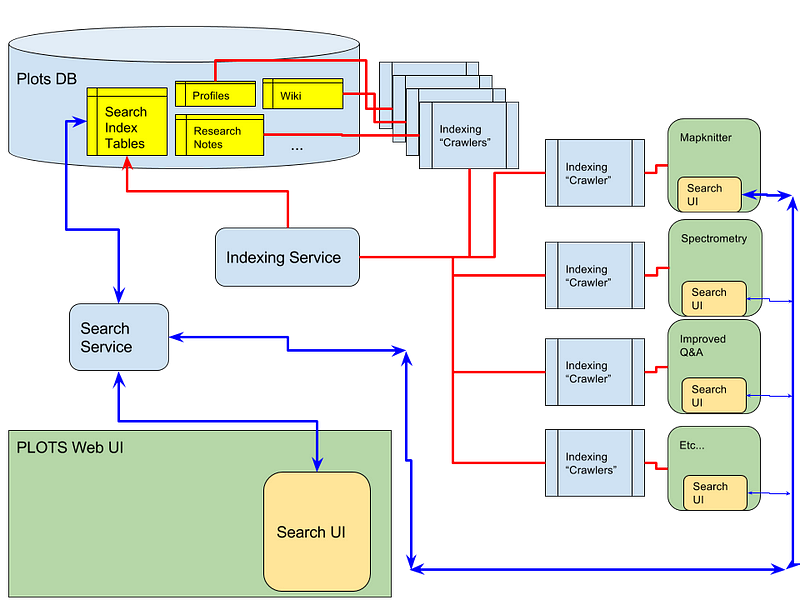
- Indexing
- Proxies
Note : Please read System Design Important Terms you MUST know before reading this post.
Let’s dive in!
Caching
Pasta Resto Case:
So, let’s go back to our pasta dish. As an owner you have observed that from the menu Rigatoni and Cannelloni has been ordered the most being the customer’s favorite and Linguine being ordered the least. So, to earn more you ask the chef to cook and reserve in advance the Rigatoni and Cannelloni pasta to cater to the demand in the shortest possible time i.e say if 10 customers place order for Rigatoni at the same time, the turn around serve time be < 3 minutes since it’s cooked and reserved in advance. Contrary to this, say someone orders Linguine and since its been the least ordered pasta, the chef has to cook it from the start i.e no advance reserves of Linguine and then serve it which makes the turn around time >15 minutes. Also, with the few recent orders of Linguine, you record the estimate somewhere and revise your observations.
System Design Analogy:
Taking the same analogy, in system design cache plays a very important role to cater to the million user requests every minute i.e to improve user experience. So what is caching?
Caching is a technique which is based on the principal of locality — stores the copies of most frequently used/accessed data in a small and faster memory to improve —
Data retrieval times
Compute costs
User Experience
Throughput
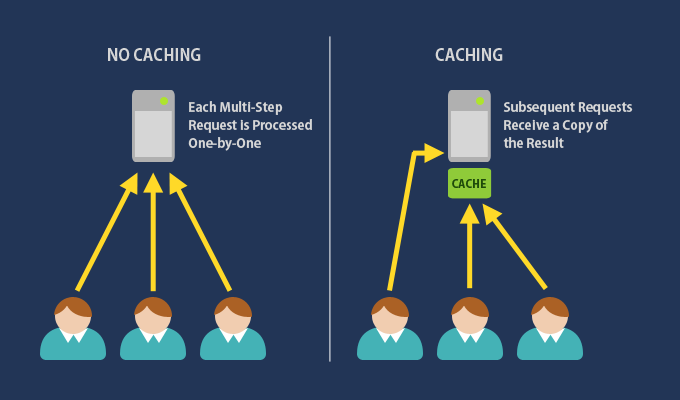
Caching has two types of localities — Temporal (recently referenced data to be accessed again) and Spatial( data stored next to recently referenced data to be accessed again). There are two types of caching —
Lazy Caching — data is not available in cache and we fetch the data upon receiving a request and storing it.
Eager Caching — all the recently referenced data is stored in the memory and refreshed at the specific intervals
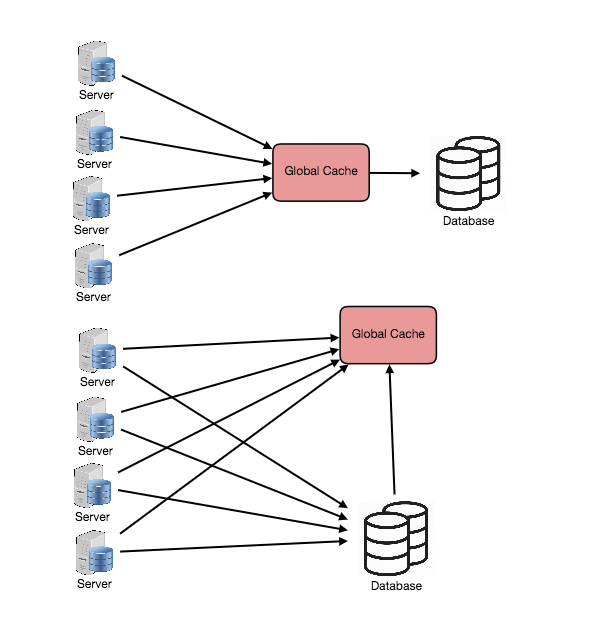
Cache can be in-memory application cache ( stored in application memory) or distributed in-memory cache( data is stored in caching servers like Memcached or Redis — caters well to multiple read and write requests on the same cache at the same time) or Global Cache ( all the servers/nodes use the same single cache space and the cache itself is reponsible for eviction as well fetching data to avoid request flooding for the same data from multiple users at the same time)
Cache hit and cache write
Three concepts that are very important while trying to understand caching are —
Cache Hit — In simple terms, cache hit is the process in which the user request is fulfilled by the cache i.e the requested file is available in the cache and the moment user requests it, the cache fulfills the request.
Cache Miss — When the requested file/data is not present in the cache
Cache Write — When cache miss occurs, the application reads the data from the database and writes it to the cache after catering to the user’s request.
Caching is the process of storing frequently accessed data in a temporary storage area, called a cache, so that it can be quickly retrieved without having to fetch it again from the original source. The goal of caching is to improve the performance and responsiveness of a system by reducing the time and resources required to access the data.
Here is a simple implementation of caching in Python using a dictionary as the cache store:
cache = {}def get_data_from_cache(key):
if key in cache:
return cache[key]
else:
return Nonedef set_data_in_cache(key, value):
cache[key] = valuedef get_data(key):
data = get_data_from_cache(key)
if data is None:
data = retrieve_data_from_remote_source(key)
set_data_in_cache(key, data)
return dataIn this example, the cache dictionary acts as the cache store. The get_data_from_cache function is used to retrieve data from the cache, and the set_data_in_cache function is used to store data in the cache. The get_data function combines these two functions to first check if the data is in the cache and, if not, to retrieve the data from the remote source and store it in the cache for future use.
There are several types of caching, including:
- Browser caching: This type of caching is done by web browsers, which store frequently accessed web pages and their associated resources, such as images and scripts, in the browser’s cache. This allows the browser to quickly retrieve the content from the cache instead of having to fetch it from the server again.
Browser caching is a type of caching that is done by web browsers, which store frequently accessed web pages and their associated resources, such as images and scripts, in the browser’s cache. This allows the browser to quickly retrieve the content from the cache instead of having to fetch it from the server again. When a user visits a website, their browser will store the web page and any associated resources in its cache. The next time the user visits the website, the browser will check its cache to see if it already has a cached version of the web page. If it does, it will retrieve the cached version from the local cache, rather than sending a request to the server for the web page. This can significantly reduce the amount of time it takes for a web page to load, as the browser can quickly retrieve the cached resources without having to wait for them to be fetched from the server.
Implementation: To enable browser caching on your website, you can add caching headers to your server responses. These headers tell the browser how long it should cache the resources for.
Implementation in Python using Flask:
from flask import Flask, make_response
from datetime import datetime, timedelta
app = Flask(__name__)@app.route('/')
def index():
# Generate the response
response = make_response('Hello, World!') # Set caching headers to allow the browser to cache the resource for 1 hour
expires_time = datetime.now() + timedelta(hours=1)
response.headers['Cache-Control'] = 'public, max-age=3600'
response.headers['Expires'] = expires_time.strftime('%a, %d %b %Y %H:%M:%S GMT') return responseif __name__ == '__main__':
app.run()In this implementation, we’re using the Flask web framework to create a simple web application that returns the text “Hello, World!” when the user visits the root URL (“/”). We’re setting the caching headers using the response.headers dictionary. The Cache-Control header is set to allow caching by public clients and to cache the resource for a maximum of 1 hour (3600 seconds). The Expires header is set to a time 1 hour in the future, which tells the browser when it should expire the cached resource. With these caching headers in place, the browser will cache the web page for 1 hour, allowing subsequent visits to the website to be faster as the browser can retrieve the cached version of the web page without needing to send a request to the server.
- Server caching: This type of caching is done by servers, which store frequently accessed data, such as database query results, in a cache. This allows the server to quickly retrieve the data from the cache instead of having to fetch it from the database again.
Implementation of server caching using Flask-Caching in Python:
from flask import Flask
from flask_caching import Cacheapp = Flask(__name__)# Configure Flask-Caching to use a memory cache
cache = Cache(app, config={'CACHE_TYPE': 'simple'})@app.route('/users/<int:user_id>')
@cache.cached(timeout=60)
def get_user(user_id):
# Fetch user data from the database
data = fetch_user_data_from_database(user_id)
return jsonify(data)In this implementation, we’re using Flask-Caching to configure a simple memory cache for our Flask application. We’re then defining a route for the /users/<user_id> endpoint that takes a user_id parameter. We’re using the cache.cached() decorator to enable caching for this route. The timeout parameter specifies how long the cached data should be valid (in seconds). In this example, we're caching the data for 60 seconds. The get_user() function fetches the user data from the database using a hypothetical fetch_user_data_from_database() function, and returns the data in JSON format using the jsonify() function from Flask. With this caching implementation in place, subsequent calls to the /users/<user_id> endpoint with the same user_id parameter will retrieve the data from the cache instead of fetching it from the database again, improving the performance of our server.
- CDN caching: Content Delivery Network (CDN) caching is a distributed caching system that stores frequently accessed content, such as images and videos, on servers located at the edge of the network. This allows the content to be quickly retrieved from a nearby server instead of having to fetch it from the original server.
Implementation of CDN caching using the Cloudflare API in Python:
import requests# Set up Cloudflare API credentials and zone ID
auth_email = '[email protected]'
auth_key = 'your_cloudflare_api_key'
zone_id = 'your_cloudflare_zone_id'def get_image(image_url):
# Set up Cloudflare API request headers
headers = {'X-Auth-Email': auth_email, 'X-Auth-Key': auth_key} # Check if the image is already cached on Cloudflare
response = requests.get(f'https://api.cloudflare.com/client/v4/zones/{zone_id}/cache?files={image_url}', headers=headers)
if response.json()['result'][image_url]['cache_status'] == 'cached':
# If the image is cached on Cloudflare, retrieve it from the cache
response = requests.get(image_url, headers=headers)
return response.content # If the image is not cached on Cloudflare, fetch it from the original server
response = requests.get(image_url)
image_data = response.content # Cache the image on Cloudflare
response = requests.post(f'https://api.cloudflare.com/client/v4/zones/{zone_id}/purge_cache', headers=headers, json={'files': [image_url]})
if response.json()['success']:
return image_data- Application caching: This type of caching is done by an application, which stores frequently accessed data, such as user session data, in a cache. This allows the application to quickly retrieve the data from the cache instead of having to fetch it from the database again.
Application caching is a type of caching that is done by an application, which stores frequently accessed data, such as user session data, in a cache. This allows the application to quickly retrieve the data from the cache instead of having to fetch it from the database again.
Cachetools is a Python library that provides various caching implementations, including LRU (Least Recently Used) and TTL (Time To Live) caches. Using cachetools, we can easily implement application caching in our Python code.
Implementation of application caching using a LRU cache with a maximum size of 100:
from cachetools import LRUCache# Create an LRU cache with a maximum size of 100
cache = LRUCache(maxsize=100)def get_user_data(user_id):
# Check if the data is already in the cache
data = cache.get(user_id)
if data:
return data # If the data is not in the cache, fetch it from the database
data = fetch_user_data_from_database(user_id) # Add the data to the cache
cache[user_id] = data return dataIn this implementation, we’re using the cachetools library to create an LRU cache with a maximum size of 100. This means that the cache will hold a maximum of 100 items, and when the cache is full, the least recently used item will be evicted to make room for a new item. We’re also defining a get_user_data function that takes a user_id parameter. The function first checks if the data is already in the cache using the cache.get() method. If the data is in the cache, it returns the cached data. If the data is not in the cache, it fetches the data from the database using a hypothetical fetch_user_data_from_database() function, adds the data to the cache using the cache.__setitem__() method, and then returns the data. With this caching implementation in place, subsequent calls to get_user_data() with the same user_id parameter will retrieve the data from the cache instead of fetching it from the database again, improving the performance of our application.
Caching can be implemented in different ways, including in-memory caching, disk caching, and distributed caching. Caching can improve the performance and responsiveness of a system by reducing the time and resources required to access the data. However, caching also has some drawbacks, such as increased memory usage, the possibility of stale data and the need for cache invalidation. To avoid these drawbacks, caching should be implemented strategically, taking into account the specific needs and requirements of the system.
Cache ratio is calculated as — how many user requests a cache is able to fulfill successfully as compared to how many user requests it receives.
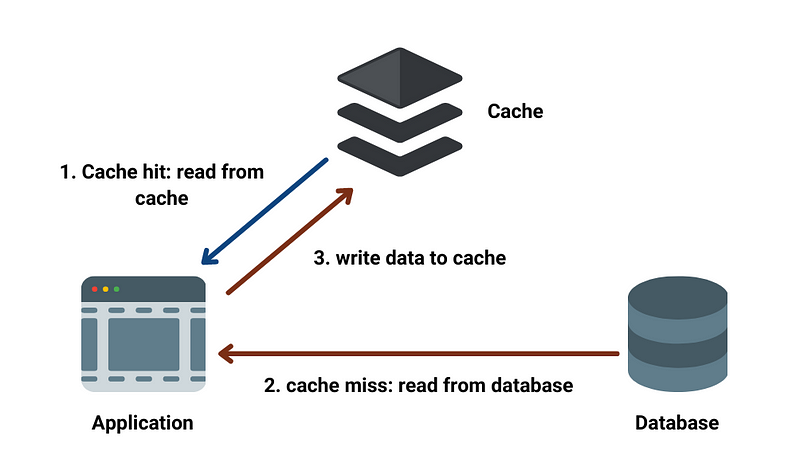
The internal workings of a cache vary depending on the type of cache and the specific implementation, but generally involve the following steps:
- Lookup: When a request for data is made, the cache first checks if the requested data is present in the cache.
- Retrieval: If the data is found in the cache, it is retrieved and returned to the caller. This is called a cache hit.
- Loading: If the data is not found in the cache, it must be loaded from the underlying data source and stored in the cache. This is called a cache miss.
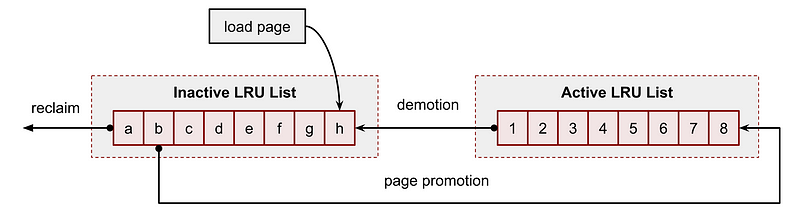
- Eviction: As the cache fills up, older or less frequently used data may be evicted to make room for new data. The eviction strategy used can vary, but common strategies include least recently used (LRU), least frequently used (LFU), and random eviction.
- Updating: When data is updated in the underlying data source, the cache must also be updated to ensure that the cache remains consistent with the data source.
By keeping frequently accessed data in a fast, local cache, caching can significantly improve system performance by reducing the number of expensive data lookups and reducing the latency of data access. However, caching can also introduce some challenges, such as cache consistency and invalidation, that must be managed to ensure that the cache remains correct and up-to-date.
How does cache eviction work?
It works in many ways but below three are most important ones—
FIFO ( First In first Out) — evict the data entry that was added first
LRU ( Least Recently used) — evict the data entry which is not accessed/used recently
LFU ( Least frequently used) — evict the data entry which is used/accessed least frequently
I would recommend reading this paper by FB engineers which covers caching and memcache in detail.
Indexing
Pasta Resto Case
Let’s say, you hired 10 chefs and as soon as the order comes from the customer, the waiter just passes to the any chef he sees at the first sight. But what happens if two chefs simultaneously read the placed order and start cooking same order?
Food + efforts + time = wasted
So, how to make it efficient? Let’s say there are 10 pasta dished in the menu and each chef has their own special pasta dish that they can cook brilliantly. So, allot one pasta dish number to one chef and all the orders wrt to that pasta dish get served to respective chef only. So to summarize, you actually indexed chef based on their speciality pasta dishes to make the process faster, organized and ofcourse, efficient.
System Design Analogy
On the same lines, in system design, indexing is an excellent way to improve data retrieval — data base performance. Indexes are nothing but reference to respective data entries in the database and as soon as any user demands data by passing the index ( which can be a primary key) then the respective data entry is pulled out and passed on as the result.
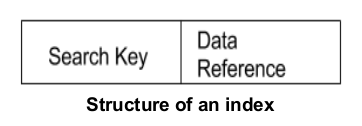
Indexing not just happens for the databased but also for the files. Let’s say you want to pull full record of a student ( which is in the form of a file) then you do it by give file number (i.e index) with which the respective file can be pulled immediately.
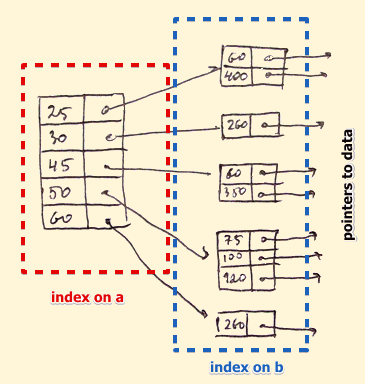
There are three Indexing methods —
Secondary Indexing — retrieves data using virtual references or pointers to the data location.
Multilevel Indexing — divides the main to smaller blocks and they as a whole form a singleton unit.
Clustered Indexing — In order to reduce the cost of indexing and make it more efficient, the data records are stored in the same space/file/location.
Indexing is a way of organizing data in a database to allow for faster access and retrieval of records. In a relational database, an index is a separate data structure that maps the values of a specific column in a table to the corresponding rows in the table.
Here is a simple implementation of indexing in Python using a dictionary as the index store:
index = {}def create_index(data, index_field):
for i, row in enumerate(data):
field_value = row[index_field]
if field_value in index:
index[field_value].append(i)
else:
index[field_value] = [i]def query_index(field_value):
if field_value in index:
return [data[i] for i in index[field_value]]
else:
return []data = [
{"name": "John", "age": 32},
{"name": "Jane", "age": 28},
{"name": "Jim", "age": 35}
]create_index(data, "name")
results = query_index("Jane")
print(results)In this example, the index dictionary acts as the index store. The create_index function builds the index by iterating over the data and mapping the values of the index_field column to the corresponding rows in the data. The query_index function then uses the index to quickly retrieve the rows associated with a specific value of the index_field.
Why use Indexing?
Well, think in terms of zetabytes of data that organizations deal with everyday. So, indexing helps in —
- Improving the speed of data access/retrieval
- Reducing the number of expensive I/O operations
- Providing better organization and management of multilevel data records
Proxies
Pasta Resto Case
Coming back to our pasta restaurant. Let’s say you as a customer wants to place an order. Do you directly go to the chef and tell them you want say xyz dish or you call the waiter to place your order?
Now let’s talk about waiters/servers in detail. Their job is not only serve the order but also to create abstraction and prioritization of requests i.e hide what happens after you place the order, apart from food how to cater well to each customer, which customer to prioritize, how to help customer choose a dish and sides in case they are divided over multiple options, how your dish is prepared, which area of the resto you can access, how tips really work etc. They are the ones responsible for adding a layer of abstraction, security, flexibility, caching the information for the customers and centralizing the services offered by the pasta resto into a single unified interface/person .
System Design Analogy
Taking the same analogy forward, in the system design proxies play an important role of coordinating user requests, handling concurrent requests, filtering user request, transforming user requests by adding an additional layer of encryption or header information or compression information and then forwarding the user request to the server.
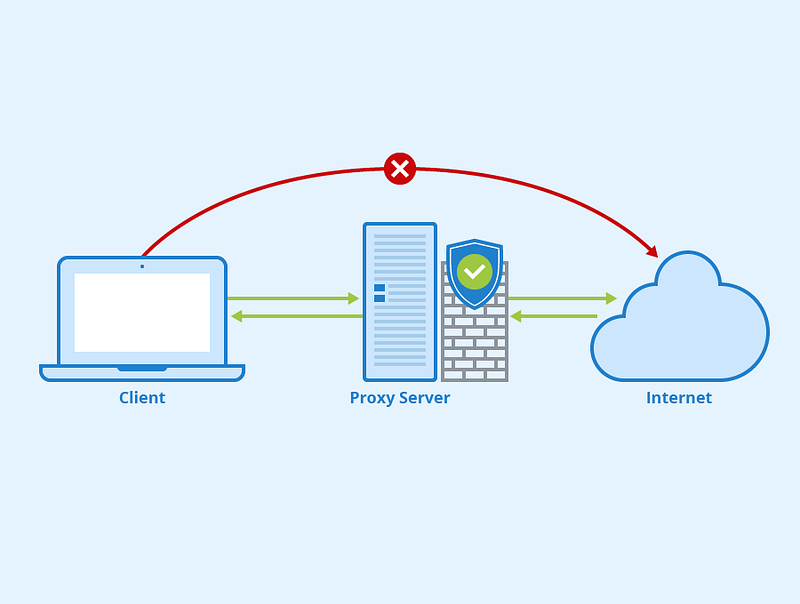
In simple terms, proxy is nothing but a server that’s placed between client and server and when these clients/user machines send the request, proxy intercepts them and forward the requests to the servers on the client’s behalf.
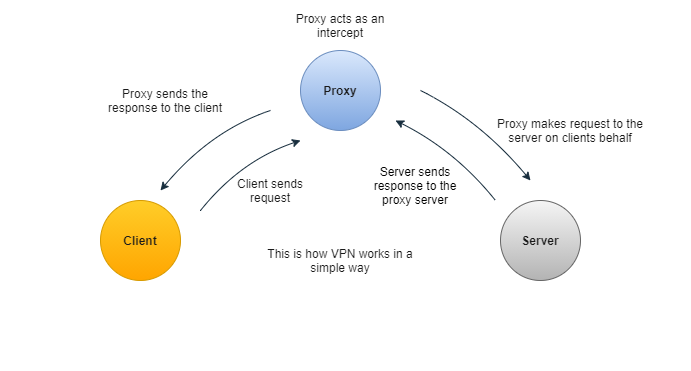
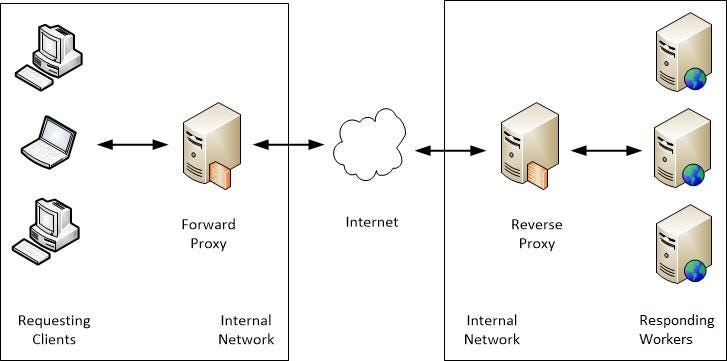
There are two types of proxies —
Forward Proxy — sits as a middle man and forwards the client’s request to servers. They act on behalf of clients.
Reverse Proxy — Opposite of forward proxy, where the proxy server sits between servers and returns the response from the server to the client.
A proxy is a server or software system that acts as an intermediary between a client and a server. It is used to forward requests from clients to the intended server and then returning the server’s response back to the client. Proxies are often used for a variety of purposes, such as:
- Caching: Proxies can cache frequently requested content, so that it can be quickly retrieved from the proxy instead of having to fetch it from the original server. This can help improve performance and reduce load on the server.
- Security: Proxies can be used to filter or block certain types of requests or to provide an additional layer of security by hiding the IP addresses of the clients.
- Anonymity: Proxies can be used to hide the IP address of the client and make it difficult to track their online activities.
- Access control: Proxies can be used to control access to certain resources by only allowing requests from authorized clients.
- Content modification: Proxies can be used to change the content of a request or a response, for example, to add or remove certain headers, to translate the content, or to compress the data.
There are several types of proxies, including:
- Forward proxies: These are used by clients to access resources on the internet. They receive a request from a client and forward it to the intended server.
- Reverse proxies: These are used by servers to handle requests from clients. They receive a request from a client and forward it to the appropriate server.
- Transparent proxies: These are used to intercept and modify requests and responses, but the client is not aware that the request is being handled by a proxy.
- SOCKS proxy: It’s a type of proxy that establishes a TCP connection to another server on behalf of a client, then routes all the traffic back and forth between the client and the server.
Proxies can be used for a variety of purposes, such as to improve performance, provide security, or to filter or modify requests and responses.
Here is a simple implementation of a proxy in Python using the socket module:
import socketdef start_proxy_server():
proxy_socket = socket.socket(socket.AF_INET, socket.SOCK_STREAM)
proxy_socket.bind(("0.0.0.0", 8080))
proxy_socket.listen(5)
while True:
client_socket, client_address = proxy_socket.accept()
handle_client_request(client_socket)def handle_client_request(client_socket):
request = client_socket.recv(4096)
if not request:
client_socket.close()
return # parse the request to get the target host and port
target_host, target_port = parse_request(request) # create a socket to the target server
target_socket = socket.socket(socket.AF_INET, socket.SOCK_STREAM)
target_socket.connect((target_host, target_port)) # forward the request to the target server
target_socket.sendall(request) # receive the response from the target server
response = bytearray()
while True:
chunk = target_socket.recv(4096)
if not chunk:
break
response += chunk # forward the response back to the client
client_socket.sendall(response) # close the sockets
client_socket.close()
target_socket.close()def parse_request(request):
# code to parse the request and return the target host and port
passif __name__ == "__main__":
start_proxy_server()In this example, the start_proxy_server function creates a socket and listens for incoming client connections. When a client connects, the handle_client_request function is called to handle the request. The function parses the request to get the target host and port, creates a socket to the target server, forwards the request to the target server, receives the response from the target server, and forwards the response back to the client. The parse_request function is a stub that you would need to implement to parse the request and return the target host and port.
In summary, proxies are intermediaries that handle requests and responses between a client and a server. They can be used for various purposes such as caching, security, anonymity, and access control and can be implemented in different ways, including forward proxies, reverse proxies, transparent proxies, and SOCKS proxy.
Caching:
Caching is the technique of storing frequently accessed data in memory for faster access.
Implementation in Python using the lru_cache decorator from the functools module:
import functools@functools.lru_cache(maxsize=128)
def fibonacci(n):
if n < 2:
return n
return fibonacci(n-1) + fibonacci(n-2)# Example usage
fibonacci(10)In the above code, we have defined a fibonacci function that recursively calculates the nth Fibonacci number. We have decorated this function with lru_cache decorator, which caches the results of the function with a maximum size of 128 entries. When the function is called with the same input, the cached result is returned instead of recalculating the result.
Indexing:
Indexing is the technique of creating indexes on specific fields in a database to speed up search queries.
Implementation in Python using the create_index method from the pymongo module:
import pymongoclient = pymongo.MongoClient()
db = client.mydatabase
collection = db.mycollectioncollection.create_index('myfield')# Example search query using the index
results = collection.find({'myfield': 'some_value'})In the above code, we have connected to a MongoDB database and created an index on the myfield field in the mycollection collection. When we search for documents with a specific value in the myfield field, the indexed field is used for faster search.
Proxies:
Proxies are intermediate servers that act as an intermediary between clients and servers, forwarding requests and responses between them.
Implementation in Python using the requests module:
import requestsproxies = {
'http': 'http://10.10.1.10:3128',
'https': 'http://10.10.1.10:1080',
}response = requests.get('http://www.example.com', proxies=proxies)# Example usage with authentication
proxies_with_auth = {
'http': 'http://user:[email protected]:3128',
'https': 'http://user:[email protected]:1080',
}response = requests.get('http://www.example.com', proxies=proxies_with_auth)In the above code, we have defined a proxies dictionary with the proxy server configuration, and passed it to the get method of the requests module. The proxies dictionary contains the proxy server URL for both http and https requests. We can also use the proxies dictionary to provide authentication credentials for the proxy server.
More on Caching, Indexing and Proxies —
Caching is the process of storing frequently accessed or computationally expensive data in a temporary storage area, called a cache, for faster retrieval and improved performance. The purpose of caching is to reduce latency, decrease the load on backend resources, and enhance overall system responsiveness.
Benefits and Trade-offs of Caching:
Benefits:
- Improved performance and reduced response times.
- Lower resource utilization and reduced load on backend systems.
- Enhanced scalability by handling increased traffic without overwhelming backend resources.
- Mitigation of network latency by serving content from a nearby cache location.
Trade-offs:
- Increased memory or storage requirements to maintain the cache.
- Potential for stale or outdated data if not properly managed.
- Additional complexity in cache management and invalidation.
Common Use Cases and Scenarios Where Caching is Beneficial:
- Web applications: Caching static content (images, CSS, JavaScript) and dynamic content (database query results, API responses) to reduce database load and improve page load times.
- Content Delivery Networks (CDNs): Caching and distributing content closer to end users for faster delivery and reduced bandwidth consumption.
- Distributed systems: Caching frequently accessed data across multiple nodes to reduce network latency and improve system performance.
- Database systems: Caching query results or frequently accessed data to reduce the number of database queries and improve response times.
Caching Strategies and Techniques:
Overview of Different Caching Strategies:
- In-memory caching: Storing data in memory for ultra-fast access. Commonly used for small to medium-sized datasets.
- Disk caching: Caching data on disk for larger datasets or when persistence is required.
- Distributed caching: Caching data across multiple nodes in a distributed system for improved scalability and fault tolerance.
Cache Eviction Policies:
- LRU (Least Recently Used): Evicts the least recently used items from the cache.
- LFU (Least Frequently Used): Evicts the least frequently accessed items from the cache.
- Other policies include FIFO (First In, First Out), LIFO (Last In, First Out), and random eviction.
Cache Invalidation Mechanisms:
- Time-based invalidation: Setting an expiration time for cached items and removing them after the expiration.
- Event-based invalidation: Invalidating cache entries based on specific events or triggers, such as data updates or changes.
- Manual invalidation: Explicitly removing or updating cache entries based on application logic or user actions.
Cache Consistency Models:
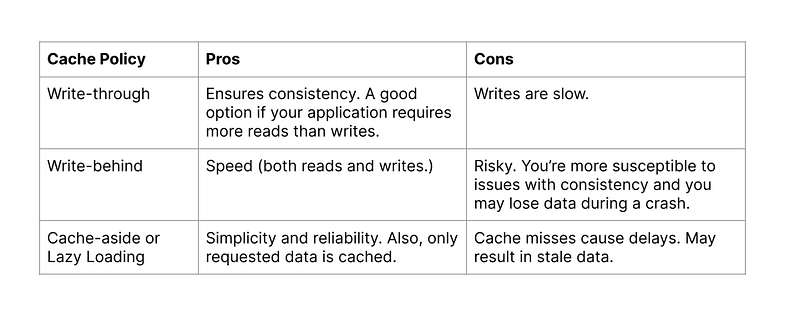
- Write-through: Updates are written to the cache and backend storage simultaneously, ensuring consistency but potentially impacting write performance.
- Write-back: Updates are written to the cache first, and the backend storage is asynchronously updated. Provides better write performance but introduces the risk of data loss in case of cache failure.
- Read-through: If an item is not found in the cache, it is fetched from the backend storage and added to the cache before returning the result.
- Read-around: The cache is bypassed for specific items, and reads go directly to the backend storage. Useful for large or infrequently accessed items to prevent cache pollution.
Caching in Web Applications:
Caching Static Content:
# Python Flask example of caching static content
from flask import Flask, send_from_directory
from flask_caching import Cache
app = Flask(__name__)
cache = Cache(app, config={'CACHE_TYPE': 'simple'})
@app.route('/static/<path:filename>')
@cache.cached(timeout=3600) # Cache static content for 1 hour
def serve_static(filename):
return send_from_directory(app.static_folder, filename)
if __name__ == '__main__':
app.run()Caching Dynamic Content:
# Python Flask example of caching dynamic content
from flask import Flask, request, make_response
from flask_caching import Cache

app = Flask(__name__)
cache = Cache(app, config={'CACHE_TYPE': 'simple'})

@app.route('/api/data')
@cache.cached(timeout=60, query_string=True)  # Cache API response for 1 minute, considering query parameters
def get_data():
    # Fetch data from backend or perform expensive computation
    data = fetch_data_from_backend(request.args.get('param'))
    return make_response(data, 200)

if __name__ == '__main__':
    app.run()
Caching Strategies for Different Layers:
- Client-side caching: Caching content on the client’s browser using mechanisms such as HTTP caching headers (e.g., cache-control, etag) or local storage.
- CDN caching: Caching content at the edge servers of a content delivery network, closer to end users, to reduce latency and bandwidth usage.
- Server-side caching: Caching content on the server-side using techniques like in-memory caching or disk caching. Can be implemented at the application level or by using caching frameworks or libraries.
Cache-Aside vs. Cache-As-You-Go Patterns:
- Cache-aside pattern: The application code is responsible for explicitly reading from and writing to the cache. The cache is not automatically updated when data changes in the backend storage. The application first checks the cache and fetches data from the storage if not found in the cache.
- Cache-as-you-go pattern: The cache is automatically updated as data is accessed or modified in the backend storage. The cache acts as a transparent layer between the application and the storage, handling cache updates and invalidation automatically.
Caching in Distributed Systems:
Distributed Caching Architectures:
- Cache clusters: Multiple cache nodes are connected and operate together to store and retrieve cached data. Each node can handle a portion of the cache data.
- Cache grids: Distributed caches that span multiple nodes or machines, providing scalability and fault tolerance. Data is partitioned and distributed across the nodes.
Consistency and Synchronization Challenges in Distributed Caching:
- Maintaining cache consistency across multiple nodes: Ensuring that data remains consistent in a distributed cache when updates or invalidations occur.
- Synchronization of cache updates: Coordinating cache updates to avoid conflicts and inconsistencies when multiple nodes try to update the same data simultaneously.
Cache Coherence and Cache Invalidation Strategies in Distributed Environments:
- Cache coherence: Ensuring that all nodes in a distributed cache have consistent copies of the data, even when updates occur.
- Cache invalidation: Mechanisms to remove or update cache entries when data changes to maintain consistency between the cache and backend storage. Techniques include broadcasting invalidation messages or using a distributed event bus.
Performance Monitoring and Optimization:
Monitoring Cache Hit/Miss Rates, Eviction Rates, and Cache Performance Metrics:
- Track the number of cache hits and misses to measure cache effectiveness.
- Monitor eviction rates to understand cache size and capacity requirements.
- Measure cache performance metrics such as response time, latency, and throughput.
Techniques for Cache Performance Optimization:
- Cache warming: Preloading frequently accessed or critical data into the cache during startup or low-traffic periods to minimize cache misses.
- Pre-fetching: Anticipating future data needs and proactively loading them into the cache to reduce response time.
- Tuning cache size and capacity based on workload patterns and performance analysis.
Indexing:
Indexing is a technique used to improve the speed and efficiency of data retrieval operations by creating specialized data structures that allow for quick access to specific data points.
Benefits and Trade-offs of Indexing:
Benefits:
- Improved query performance: Indexing allows for faster data retrieval by reducing the number of disk I/O operations.
- Efficient data filtering: Indexes enable efficient filtering and selection of data based on specific conditions, improving query execution time.
- Enhanced data organization: Indexing structures provide a logical order to the data, making it easier to locate and navigate through the dataset.
Trade-offs:
- Increased storage requirements: Indexes require additional storage space to maintain the index structures, which can increase the overall data footprint.
- Overhead during data modification: Maintaining indexes introduces overhead when inserting, updating, or deleting data, as the indexes must be updated to reflect the changes.
- Index maintenance: Indexes need to be periodically optimized and rebuilt to ensure optimal performance, which can impact system resources.
Common Use Cases and Scenarios Where Indexing is Beneficial:
- Relational databases: Indexing is widely used in relational databases to speed up query execution and improve overall system performance.
- Full-text search: Indexing techniques are employed in search engines to enable fast and efficient text-based searches across large volumes of documents.
- Structured and semi-structured data: Indexing is useful in scenarios where data is organized in tables, arrays, or other structured formats, allowing for faster data retrieval.
- Unstructured data: Indexing techniques, such as full-text indexing, are used to index unstructured data like documents, enabling efficient keyword-based searches.
Indexing Techniques:
Overview of Different Indexing Techniques:
- B-tree: A balanced tree structure commonly used in databases for efficient range queries and sorted data retrieval.
- Hash indexes: Utilize a hash function to directly map keys to index entries, providing constant-time lookups.
- Full-text indexes: Specifically designed for text-based search, allowing for efficient keyword-based queries and relevance ranking.
- Bitmap indexes: Utilize bitmap vectors to represent the presence or absence of values for a specific attribute, enabling fast set-based operations.
Indexing Data Structures and Algorithms:
- B-tree: Implements a balanced search tree structure to enable efficient range queries and sorted data retrieval.
- Hash table: Utilizes a hash function and an array-based data structure to enable constant-time lookups.
- Inverted index: Stores a mapping from terms or keywords to the documents or data points where they occur, enabling fast text-based searches.
Indexing in Databases:
Indexing Strategies for Relational Databases:
- Primary keys: Unique identifiers for each row in a table, providing fast access to specific rows.
- Secondary indexes: Indexes created on non-primary key columns to speed up queries that involve those columns.
- Composite indexes: Indexes created on multiple columns to improve query performance for multi-column conditions.
Indexing for Specific Query Types:
- Range queries: Indexing techniques like B-trees are effective for optimizing range-based queries, where a specific range of values needs to be retrieved.
- Text search: Full-text indexing techniques are employed to enable efficient keyword-based searches in textual data, considering factors like relevance and ranking.
Index Optimization and Maintenance:
- Index fragmentation reduction: Regularly defragmenting indexes to minimize fragmentation and maintain optimal performance.
- Query optimization: Analyzing query patterns and using database query optimizers to suggest the most effective indexes for specific queries.
- Regular index statistics updates: Updating index statistics to provide accurate information to the query optimizer for query plan generation.
Indexing in Search Engines (continued):
Inverted Indexes and Term-Based Indexing:
- Inverted index: A data structure that maps terms or keywords to the documents or data points in which they occur. It allows for efficient keyword-based searches by providing quick access to the relevant documents.
- Term-based indexing: Indexing is performed based on individual terms or keywords extracted from the documents. Each term is associated with a list of document references, enabling efficient retrieval of documents containing specific terms.
Ranking and Relevance Algorithms:
- Ranking algorithms: Used to determine the relevance of documents based on various factors, such as keyword frequency, document popularity, and relevance signals.
- Relevance algorithms: Employed to calculate the relevance of a document to a given query by analyzing factors like term frequency, inverse document frequency, and proximity of terms.
Performance Monitoring and Optimization:
Monitoring Index Performance and Usage:
- Tracking index usage statistics: Monitoring the number of index lookups, updates, and disk I/O operations to identify performance bottlenecks.
- Analyzing query execution plans: Examining the query plans generated by the database or search engine to identify potential areas for optimization.
- Measuring query response time: Monitoring the time taken to execute queries involving indexed data to assess the performance impact of indexing.
Index Optimization Techniques:
- Index fragmentation reduction: Regularly reorganizing or rebuilding indexes to minimize fragmentation and improve data locality.
- Query optimization: Analyzing query patterns, identifying frequently executed queries, and optimizing them by creating appropriate indexes or rewriting queries.
- Index statistics updates: Keeping index statistics up to date to enable the query optimizer to make informed decisions about index usage and query plans.
Proxies:
Proxies act as intermediaries between clients and servers, forwarding client requests to servers and returning responses back to the clients. They provide additional functionality, such as caching, load balancing, security, and performance optimization.
Benefits and Use Cases of Using Proxies:
- Enhanced security: Proxies can act as a barrier between clients and servers, protecting the internal network from direct access and providing security features like access control and traffic filtering.
- Performance optimization: Proxies can cache frequently accessed content, compress data, and optimize network traffic, resulting in improved performance and reduced bandwidth usage.
- Load balancing: Proxies distribute client requests across multiple servers to achieve load balancing and handle increased traffic efficiently.
- Anonymity and privacy: Proxies can hide the client’s IP address, providing anonymity and privacy protection.
Types of Proxies:
- Forward proxy: Represents clients and forwards their requests to servers on behalf of the clients. The clients are aware of the proxy’s existence.
- Reverse proxy: Represents servers and accepts requests from clients on behalf of the servers. The clients are unaware of the backend servers and communicate only with the reverse proxy.
Forward Proxies:
Role and Functions of a Forward Proxy:
- A forward proxy sits between client applications and the internet, intercepting and forwarding requests from clients to external servers.
- Functions of a forward proxy include:
- Caching: Storing and serving cached content to clients, reducing bandwidth usage and improving response times.
- Access control: Enforcing access policies and filtering requests based on various criteria like IP address, URL, or content type.
- Anonymity: Hiding the client’s identity by forwarding requests on behalf of the client, protecting privacy.
Caching and Load Balancing with Forward Proxies:
- Caching: A forward proxy can cache responses from external servers, allowing subsequent requests for the same content to be served directly from the cache, reducing response times and network traffic.
- Load balancing: By intercepting client requests, a forward proxy can distribute the requests across multiple backend servers, achieving load balancing and improved scalability.
Forward Proxies —
Security Features Provided by Forward Proxies:
- Content filtering: Forward proxies can analyze incoming requests and responses, filtering out malicious content or blocking access to specific websites based on defined security policies.
- Authentication and access control: Proxies can enforce authentication mechanisms and access control rules, ensuring that only authorized clients can access the requested resources.
- SSL/TLS termination: Forward proxies can handle SSL/TLS encryption and decryption on behalf of clients, offloading the resource-intensive encryption process from backend servers.
- Protocol validation: Proxies can validate incoming requests and responses for compliance with protocol standards, preventing potential security vulnerabilities and attacks.
- Anonymity and privacy protection: Forward proxies can mask the client’s IP address, providing anonymity and protecting privacy by keeping client identities hidden from external servers.
Reverse Proxies:
Role and Functions of a Reverse Proxy:
- A reverse proxy stands between the clients and backend servers, acting as the public-facing entry point for client requests and distributing those requests to the appropriate servers.
- Functions of a reverse proxy include:
- Load balancing: Distributing incoming client requests across multiple backend servers to achieve load balancing and improve scalability.
- SSL termination: Handling SSL/TLS encryption and decryption for incoming requests, offloading the processing from backend servers.
- Caching: Caching responses from backend servers to serve subsequent requests directly from the cache, reducing the load on backend resources.
- Web application firewall (WAF) capabilities: Protecting backend servers by inspecting and filtering incoming requests, identifying and blocking potential security threats.
Load Balancing and High Availability with Reverse Proxies:
- Load balancing: Reverse proxies distribute incoming client requests across multiple backend servers based on defined algorithms (e.g., round-robin, least connections) to evenly distribute the workload and optimize resource utilization.
- High availability: By acting as a single entry point, reverse proxies can monitor the health of backend servers and route requests to available servers, ensuring continuous service availability even if some servers fail.
- Session persistence: Reverse proxies can maintain session affinity, ensuring that subsequent requests from a client are always routed to the same backend server to maintain session state.
SSL Termination and Encryption Offloading:
- Reverse proxies can handle SSL/TLS encryption and decryption on behalf of backend servers, relieving them of the computational burden associated with cryptographic operations.
- SSL termination occurs at the reverse proxy, allowing the communication between the client and proxy to be encrypted, while the traffic between the proxy and backend servers can be transmitted in plain HTTP.
Web Application Firewall (WAF) Capabilities:
- Reverse proxies can include web application firewall capabilities, inspecting incoming requests and responses for potential security vulnerabilities or suspicious patterns.
- WAF functionalities include protection against common web attacks like SQL injection, cross-site scripting (XSS), and distributed denial-of-service (DDoS) attacks.
- WAF rules and filters can be applied to block or sanitize malicious requests, enhancing the security of the backend servers and the web application as a whole.
Content Delivery Networks (CDNs):
CDN Architecture and Benefits:
- A Content Delivery Network (CDN) is a distributed network of servers deployed in multiple geographical locations, designed to deliver content to end-users with high performance and availability.
- Benefits of CDNs include:
- Improved content delivery speed: CDNs cache content at edge servers located closer to end-users, reducing latency and improving overall content delivery speed.
- Scalability and load balancing: CDNs distribute incoming traffic across multiple edge servers, enabling efficient load balancing and handling high traffic volumes.
- Redundancy and high availability: CDNs replicate content across multiple edge servers, ensuring redundancy and providing high availability even in the presence of server failures.
- Bandwidth optimization: CDNs help optimize bandwidth usage by caching and delivering content locally.
CDN Caching and Content Distribution Strategies:
- CDN caching: CDNs cache content at edge servers based on factors like popularity, user demand, and content expiration policies. Cached content can include static files such as images, CSS, JavaScript, and even dynamic content that has been deemed cacheable.
- Content distribution: CDNs distribute cached content to end-users by routing their requests to the nearest or most optimal edge server based on factors like geographical proximity, network conditions, and server availability. This reduces latency and improves content delivery performance.
CDN Edge Servers and POPs (Points of Presence):
- Edge servers: These are the distributed servers deployed at various locations around the world. They serve as the points of presence for the CDN and are responsible for caching and delivering content to end-users. Edge servers are strategically positioned to bring content closer to users, reducing the distance and network hops required to access the content.
- POPs (Points of Presence): POPs are the physical locations where edge servers are deployed. CDNs aim to have a global presence with multiple POPs to ensure widespread coverage and improved content delivery performance. POPs are strategically placed in data centers or network exchange points to facilitate efficient content distribution.
Performance Monitoring and Optimization:
- Monitoring cache hit/miss rates: Tracking the ratio of cache hits to cache misses helps assess the effectiveness of caching strategies and identify opportunities for optimization.
- Monitoring cache eviction rates: Analyzing the rate at which items are evicted from the cache helps optimize cache size and eviction policies.
- Monitoring proxy response times: Measuring the time taken by the proxy to process and respond to client requests helps identify performance bottlenecks and optimize proxy configurations.
- Monitoring proxy resource utilization: Monitoring resource usage, such as CPU, memory, and network bandwidth, helps ensure efficient utilization and identify any resource constraints.
Optimizing Proxy Configuration and Caching Strategies:
- Cache warming: Pre-loading the cache with frequently accessed or anticipated content to ensure it is readily available and reduce cache miss rates.
- Pre-fetching: Proactively fetching and caching content that is likely to be requested in the near future based on user behavior or predictive algorithms.
- Content purging: Removing stale or outdated content from the cache to ensure the cache remains up to date and serves fresh content.
- Dynamic caching: Implementing caching strategies that consider the dynamic nature of content by incorporating cache invalidation mechanisms and time-based expiration.
- Content optimization: Optimizing the content itself, such as minifying CSS and JavaScript files, compressing images, and leveraging browser caching directives, to reduce file sizes and improve overall performance.
Rate Limiting and Traffic Shaping:
- Rate limiting: Enforcing limits on the number of requests a client or group of clients can make within a specific time period to prevent abuse or excessive resource consumption.
- Traffic shaping: Controlling the flow of network traffic to optimize bandwidth utilization and prioritize critical or high-priority traffic.
- Quality of Service (QoS) management: Prioritizing and allocating network resources to ensure optimal performance for specific types of traffic, such as video streaming or real-time communication.
That’s it for now!
Part 6 of Complete System Design Series
Keep learning and coding :)
Day 2 : SQL Basics, Query Structure, Built In functions Conditions
Day 4 : Set Theory Operations, Stored Procedures and CASE statements in SQL
Day 6 : Subqueries, Group by, order by and Having clauses in SQL and Analytical Functions
Day 7 : Window Functions, Grouping Sets and Constraints in SQL
Day 8 : BigQuery Basics, SELECT, FROM, WHERE and Date and Extract in BigQuery
Day 9 : Common Expression Table, UNNEST Clause, SQL vs NoSQL Databases
Day 10 : Triggers, Pivot and Cursors in SQL
Day 14 : MySQL in Depth
Day 15 : PostgreSQL inDepth
Anyways, For Day 15 of 15 days of Advanced SQL, we will cover —
PostgreSQL inDepth
Github for Advanced SQL that you can follow —
All the projects, data structures, algorithms, system design, Data Science and ML, Data Engineering, MLOps and Deep Learning videos will be published on our youtube channel ( just launched).
Subscribe today!
System Design Case Studies — In Depth
Complete Data Structures and Algorithm Series
Github —
Some of the other best Series —
30 days of Data Structures and Algorithms and System Design Simplified
100 days : Your Data Science and Machine Learning Degree Series with projects
Complete Data Visualization and Pre-processing Series with projects
Tech Newsletter —
If you are interested, you can join my newsletter through which I send tech interview tips, techniques, patterns, hacks — Software Development, ML, Data Science, Startups and Technology projects to more than 30K readers. You can subscribe to Tech Brew :
For Python Projects —
For complete 60 days of Data Science and ML : Day 1 — Day 60 : Quick Recap of 60 days of Data Science and ML
Follow for more updates. Stay tuned and keep coding!
For other projects, tune to —
Build Machine Learning Pipelines( With Code)
Recurrent Neural Network with Keras
Clustering Geolocation Data in Python using DBSCAN and K-Means
Facial Expression Recognition using Keras
Hyperparameter Tuning with Keras Tuner
Custom Layers in Keras


