
Day 17 of System Design Case Studies Series : Design TikTok , Google Pay, Booking.com, Ola, Coupang, Groupon, Kaggle, IRCTC
Complete Design with examples…
Hello peeps! Welcome to Day 17 of System Design Case studies series where we will design Tiktok, Google Pay, Booking.com, Ola, Coupang, Groupon, Kaggle and IRCTC.
This post covers system design for ( scroll till the end of the post) —
Note : Please read System Design Important Terms you MUST know and Most Important System Design basics before reading this post.
Projects Videos —
All the projects, data structures, SQL, algorithms, system design, Data Science and ML , Data Analytics, Data Engineering, , Implemented Data Science and ML projects, Implemented Data Engineering Projects, Implemented Deep Learning Projects, Implemented Machine Learning Ops Projects, Implemented Time Series Analysis and Forecasting Projects, Implemented Applied Machine Learning Projects, Implemented Tensorflow and Keras Projects, Implemented PyTorch Projects, Implemented Scikit Learn Projects, Implemented Big Data Projects, Implemented Cloud Machine Learning Projects, Implemented Neural Networks Projects, Implemented OpenCV Projects,Complete ML Research Papers Summarized, Implemented Data Analytics projects, Implemented Data Visualization Projects, Implemented Data Mining Projects, Implemented Natural Leaning Processing Projects, MLOps and Deep Learning, Applied Machine Learning with Projects Series, PyTorch with Projects Series, Tensorflow and Keras with Projects Series, Scikit Learn Series with Projects, Time Series Analysis and Forecasting with Projects Series, ML System Design Case Studies Series videos will be published on our youtube channel ( just launched).
Subscribe today!
Tech Newsletter —
If you are interested, you can join my newsletter through which I send tech interview tips, techniques, patterns, hacks — Software Development, ML, Data Science, Startups and Technology projects to more than 30K readers. You can subscribe to Tech Brew :
Solved System Design Case Studies — In depth
Design Instagram
Design Netflix
Design Reddit
Design Amazon
Design Messenger App
Design Twitter
Design URL Shortener
Design Dropbox
Design Youtube
Design API Rate Limiter
Design Web Crawler
Design Amazon Prime Video
Design Facebook’s Newsfeed
Design Yelp
Design Uber
Design Tinder
Design Tiktok
Design Whatsapp
Most Popular System Design Questions
Mega Compilation : Solved System Design Case studies
Complete Data Structures and Algorithm Series
Github —
We will be discussing in depth -
- What is Tiktok
- Important Features
- Scaling Requirements
- Data Model — ER requirements
- High Level Design
- Basic Low Level Design
- API Design
- Complete Detailed Design
- Complete Code Implementation
Pre-requisite to this post -
Complete System Design Series — Important Concepts that you should know before starting the Case studies
6. Networking, How Browsers work, Content Network Delivery ( CDN)
13. System Design Template — How to solve any System Design Question
Github —
Day 1 of System Design Case Studies can be found below-
Day 2 of System Design Case Studies can be found below-
Day 3 of System Design Case Studies can be found below-
Day 4 of System Design Case Studies can be found below-
What is Tiktok?

Tiktok is a social media platform which is used to —
- Create short ( 15 secs) videos
- Share videos with the community/other users
- Search short videos
- Engage with videos — Like/comment/show reaction
- Celebrity Endorsements
- Localized Content
Users are mobile based. It has over 300 Million active monthly users.

Designing Tiktok would involve —
- A video editing software: This can be used to create and edit videos.
- A music library: This can be used to add background music to videos.
- A camera: This can be used to record videos.
- A graphic design software: This can be used to create logos, stickers, and other visual elements for the app.
- A developer team: This can be used to develop the backend and frontend of the app.
- User interface design : This can be used to design the look and feel of the app
- Testing and Quality assurance : This will help to ensure that the app is working smoothly, and can be used to identify and fix any bugs.
- A content moderation team: This can be used to monitor and remove inappropriate content from the app.
Important Features
For this case study we will take these features into considerations —
Upload Videos
View/Watch Videos and save the videos
Follow other people and Engage with videos — Like/comment/show reaction
Scaling Requirements
Lets say we have —
No of active daily users : 800K
No of video uploads/day : 4
Size of each video : 4MB
Total storage estimate per day : 800K * 4 * 4MB = 13 TB
Total storage estimate for 5 years : 13 TB * 365 * 5 = 23.7 PB
Data Model — ER requirements
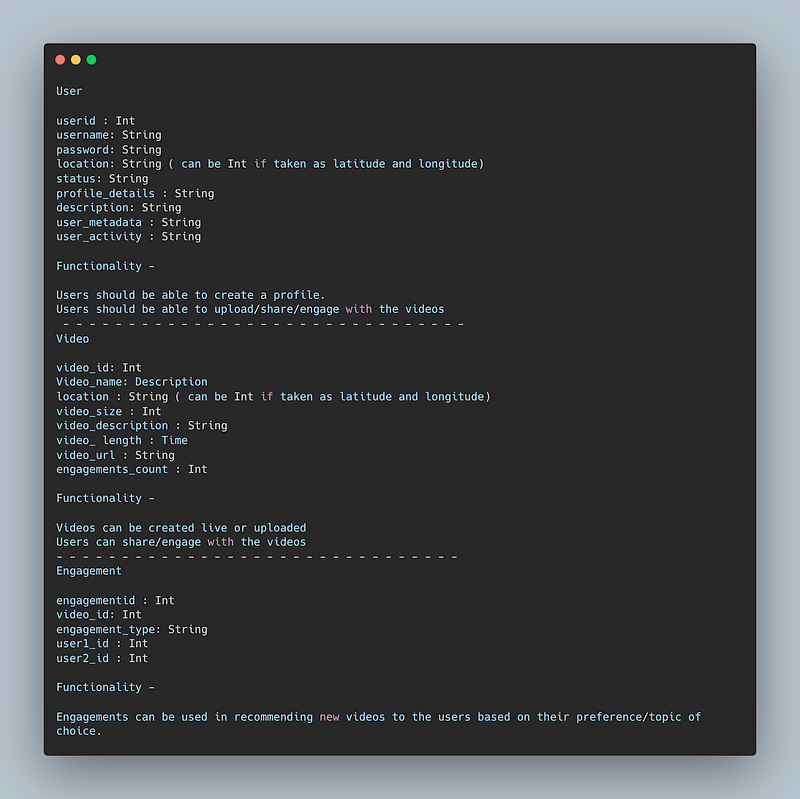
User
userid : Int
username: String
password: String
location: String ( can be Int if taken as latitude and longitude)
status: String
profile_details : String
description: String
user_metadata : String
user_activity : String
Functionality —
Users should be able to create a profile.
Users should be able to upload/share/engage with the videos
— — — — — — — — — — — — — — — — — — — — — — — — — — — — — — —
Video
video_id: Int
Video_name: Description
location : String ( can be Int if taken as latitude and longitude)
video_size : Int
video_description : String
video_ length : Time
video_url : String
engagements_count : Int
Functionality —
Videos can be created live or uploaded
Users can share/engage with the videos
— — — — — — — — — — — — — — — — — — — — — — — — — — — — — — —
Engagement
engagementid : Int
video_id: Int
engagement_type: String
user1_id : Int
user2_id : Int
Functionality —
Engagements can be used in recommending new videos to the users based on their preference/topic of choice.
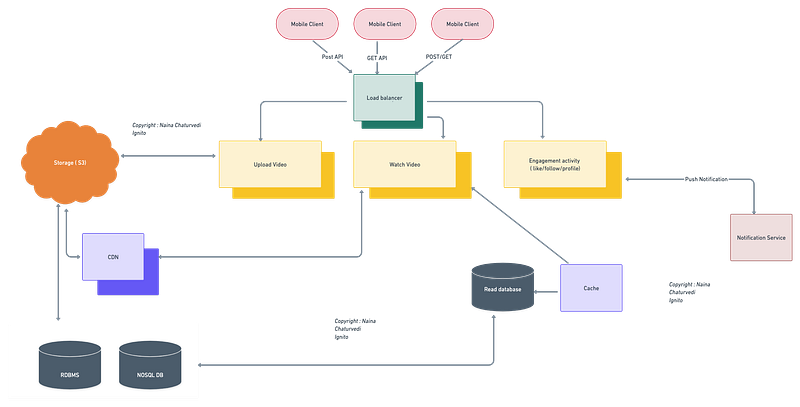
High Level Design
Assumptions/Considerations/Requirements —
- The system should be highly available and reliable.
- Videos can be stored in BLOB storage.
- Users can create live videos on the platform or upload the videos.
— — — — — — — — — — — — — — — — — — — — — — — — — — — — — — —
Components
- Clients : Users
- Load balancers
- Databases, shards and replicas
- Storage and replicas
- CDN
- Cache : To store hot/popular/highly engagement videos ( pre-cache)
— — — — — — — — — — — — — — — — — — — — — — — — — — — — — — —
Services
- video service : To let upload/create videos
- view service: To let users watch the videos
- recommendation service: To recommend videos based on the topic following/user activity
- feed service: To generate feed for the other users
- pre-cache service: To store hot/popular/high engagement videos
- notification service: To push notifications to the followers with updates ( say if new video is uploaded by the user you follow)
Implementation of a video management system in Python using the Flask web framework:
from flask import Flask, request, jsonifyapp = Flask(__name__)# Video Management System
class VideoSystem:
def __init__(self):
self.videos = {}
self.followers = {}
self.recommendations = {}
self.feed = {}
self.pre_cache = [] def upload_video(self, video_id, video_url, user_id):
self.videos[video_id] = (video_url, user_id)
self.notify_followers(user_id, video_id) def get_video(self, video_id):
if video_id in self.videos:
return self.videos[video_id][0]
return None def follow_user(self, user_id, follow_id):
if user_id in self.followers:
self.followers[user_id].append(follow_id)
else:
self.followers[user_id] = [follow_id] def get_followers(self, user_id):
if user_id in self.followers:
return self.followers[user_id]
return None def add_recommendation(self, video_id, topic):
if topic in self.recommendations:
self.recommendations[topic].append(video_id)
else:
self.recommendations[topic] = [video_id] def get_recommendations(self, topic):
if topic in self.recommendations:
return self.recommendations[topic]
return None def add_to_feed(self, video_id):
self.feed[video_id] = self.videos[video_id] def get_feed(self):
return self.feed.values() def add_to_pre_cache(self, video_id):
self.pre_cache.append(video_id) def get_pre_cache(self):
return self.pre_cache def notify_followers(self, user_id, video_id):
followers = self.get_followers(user_id)
if followers:
for follower in followers:
# push notification to the followers
print(f"Notification sent to {follower}: New video uploaded by {user_id}")# API Gateway Service
@app.route('/video', methods=['POST'])
def upload_video():
video_system = VideoSystem()
video_id = request.json['video_id']
video_url = request.json['video_url']
user_id = request.json['user_id']
video_system.upload_video(video_id, video_url, user_id)
video_system.add_to_feed(video_id)
return jsonify({'result': 'Video uploaded successfully'})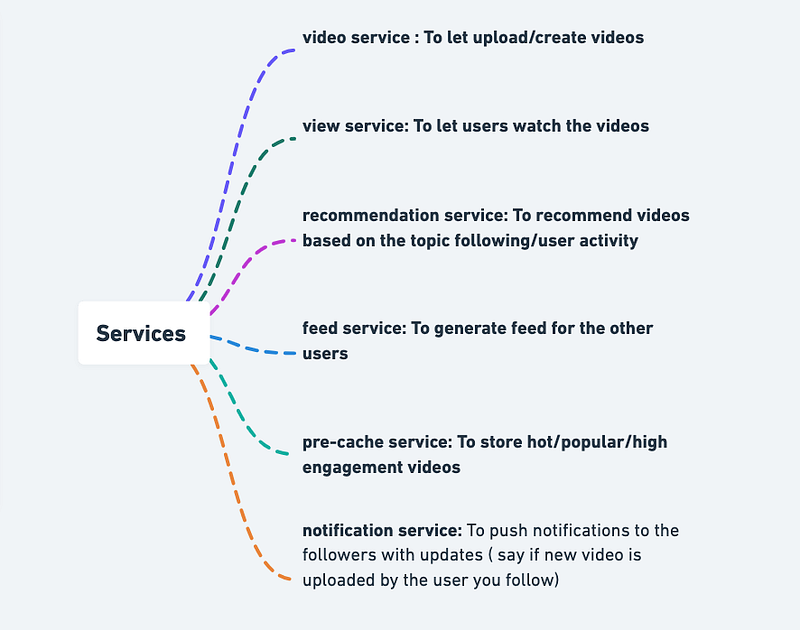
Implementation of the feed and notification services in Python:
import datetime
from typing import List, Dict
# Define a Video class to store information about a video
class Video:
def __init__(self, id: int, title: str, description: str, created_at: datetime, engagement: int):
self.id = id
self.title = title
self.description = description
self.created_at = created_at
self.engagement = engagement# Define a User class to store information about a user
class User:
def __init__(self, id: int, name: str, videos: List[Video]):
self.id = id
self.name = name
self.videos = videos# Define a global list of users and their videos
users = []# Define the upload video API
def upload_video(user_id: int, video: Video):
# Find the user who is uploading the video
user = next((user for user in users if user.id == user_id), None)
if not user:
# If the user does not exist, create a new user
user = User(user_id, "User {}".format(user_id), [])
users.append(user)
# Add the video to the user's list of videos
user.videos.append(video)# Define the feed service
def generate_feed():
# Sort the users by the engagement of their latest video
users.sort(key=lambda user: user.videos[-1].engagement, reverse=True)
# Return the latest video from each user
return [user.videos[-1] for user in users]# Define the notification service
def send_notifications(followers: List[int], video: Video):
# Get the names of the followers who should receive the notification
follower_names = [user.name for user in users if user.id in followers]
# Print the notification for each follower
for name in follower_names:
print("Notification for {}: New video '{}' uploaded by {}".format(name, video.title, video.user.name))# Example usage of the services# Upload a video for user 1
video = Video(1, "My First Video", "A video about my first day at OpenAI", datetime.datetime.now(), 10)
upload_video(1, video)# Upload a video for user 2
video = Video(2, "My Second Video", "A video about my second day at OpenAI", datetime.datetime.now(), 20)
upload_video(2, video)# Get the feed
feed = generate_feed()
for video in feed:
print("{}: {} ({} views)".format(video.user.name, video.title, video.engagement))# Send notifications to followers of user 2
send_notifications([1], video)This code implements a simple version of the feed and notification services, but it can be extended and improved as needed. The feed service generates a feed of the latest video from each user, sorted by the engagement of the video. The notification service sends notifications to the followers of a user when a new video is uploaded.
Basic Low Level Design
import java.util.HashMap;
import java.util.Map;

public class User {
    private String username;
    private String password;
    private String email;
    // ...

    public User(String username, String password, String email) {
        this.username = username;
        this.password = password;
        this.email = email;
    }

    // Getters and setters
    // ...
}

class UserManager {
    private Map<String, User> users;

    public UserManager() {
        this.users = new HashMap<>();
    }

    public void registerUser(String username, String password, String email) {
        if (!users.containsKey(username)) {
            User newUser = new User(username, password, email);
            users.put(username, newUser);
            System.out.println("User registered successfully.");
        } else {
            System.out.println("Username already exists. Please choose a different username.");
        }
    }

    public User loginUser(String username, String password) {
        User user = users.get(username);
        if (user != null && user.getPassword().equals(password)) {
            System.out.println("Login successful.");
            return user;
        } else {
            System.out.println("Invalid username or password.");
            return null;
        }
    }

    // Other user management methods
    // ...
}

public class Video {
    private String videoId;
    private String title;
    private String description;
    private String url;
    // ...

    public Video(String videoId, String title, String description, String url) {
        this.videoId = videoId;
        this.title = title;
        this.description = description;
        this.url = url;
    }

    // Getters and setters
    // ...
}

public class VideoUploadManager {
    public void uploadVideo(User user, String title, String description, String url) {
        // Generate a unique video ID
        String videoId = generateUniqueId();

        // Store video file in a distributed storage system
        boolean isStored = storeVideoInDistributedSystem(videoId, url);

        if (isStored) {
            // Create a Video object
            Video video = new Video(videoId, title, description, url);

            // Store video metadata in a database
            saveVideoMetadata(video);

            // Associate video with the user
            user.addVideo(video);

            System.out.println("Video uploaded successfully.");
        } else {
            System.out.println("Failed to store video file.");
        }
    }

    // Other video upload methods
    // ...
}

public class DistributedStorageManager {
    public boolean storeVideoInDistributedSystem(String videoId, String url) {
        // Store video file in the distributed storage system
        // ...
    }

    // Other methods for video retrieval, replication, sharding, caching, etc.
    // ...
}

public class TikTokApp {
    private UserManager userManager;
    private VideoUploadManager videoUploadManager;
    private DistributedStorageManager storageManager;
    // ...

    public TikTokApp() {
        this.userManager = new UserManager();
        this.videoUploadManager = new VideoUploadManager();
        this.storageManager = new DistributedStorageManager();
        // ...
    }

    public void registerUser(String username, String password, String email) {
        userManager.registerUser(username, password, email);
    }

    public void loginUser(String username, String password) {
        userManager.loginUser(username, password);
    }

    public void uploadVideo(User user, String title, String description, String url) {
        videoUploadManager.uploadVideo(user, title, description, url);
    }

    // Other methods for video retrieval, playback, etc.
    // ...
}

public class Main {
    public static void main(String[] args) {
        // Create an instance of the TikTok app
        TikTokApp tikTokApp = new TikTokApp();

        // Register a new user
        tikTokApp.registerUser("john_doe", "password123", "[email protected]");

        // Login with the registered user
        User loggedInUser = tikTokApp.loginUser("john_doe", "password123");

        // Upload a video for the logged-in user
        if (loggedInUser != null) {
            tikTokApp.uploadVideo(loggedInUser, "My Video", "Check out my amazing video!", "https://example.com/my_video.mp4");
        }
    }
}
API Design
Implementation —
from flask import Flask, request, jsonifyapp = Flask(__name__)# User Service API
@app.route('/users', methods=['POST'])
def create_user():
# create a new user and return user ID
# actual implementation may involve authentication and user management
return jsonify({'user_id': 'user123'})@app.route('/users/<user_id>', methods=['GET'])
def get_user_profile(user_id):
# return the profile information for the specified user ID
# actual implementation may involve retrieving profile information from a database
return jsonify({'user_id': user_id, 'username': 'johndoe', 'bio': 'I love making TikToks!', 'followers': 1000, 'following': 500})@app.route('/users/<user_id>', methods=['PUT'])
def update_user_profile(user_id):
# update the profile information for the specified user ID
# actual implementation may involve authentication and database updates
return jsonify({'user_id': user_id, 'username': 'johndoe', 'bio': 'I love making TikToks!', 'followers': 1000, 'following': 500})# Video Service API
@app.route('/videos', methods=['POST'])
def upload_video():
# upload a new video and return video ID
# actual implementation may involve video processing and database updates
return jsonify({'video_id': 'video123'})@app.route('/videos/<video_id>', methods=['GET'])
def get_video_info(video_id):
# retrieve information for the specified video ID
# actual implementation may involve retrieving video information from a database
return jsonify({'video_id': video_id, 'user_id': 'user123', 'description': 'Check out my new dance!', 'likes': 100, 'views': 1000})@app.route('/videos/<video_id>/likes', methods=['POST'])
def like_video(video_id):
# add a like for the specified video ID and return like ID
# actual implementation may involve authentication, database updates, and user management
return jsonify({'like_id': 'like123'})@app.route('/videos/<video_id>/comments', methods=['POST'])
def post_comment(video_id):
# post a comment for the specified video ID and return comment ID
# actual implementation may involve authentication, database updates, and user management
return jsonify({'comment_id': 'comment123'})@app.route('/videos/<video_id>/comments', methods=['GET'])
def get_comments(video_id):
# retrieve comments for the specified video ID
# actual implementation may involve retrieving comments from a database
return jsonify({'video_id': video_id, 'comments': [{'comment_id': 'comment123', 'user_id': 'user456', 'content': 'Awesome dance!', 'timestamp': '2023-02-19T10:15:00Z'}]})# Discover Service API
@app.route('/discover', methods=['GET'])
def get_trending_videos():
# retrieve the current trending videos
# actual implementation may involve retrieving video information from a database and applying algorithms
return jsonify({'videos': [{'video_id': 'video123', 'user_id': 'user123', 'description': 'Check out my new dance!', 'likes': 100, 'views': 1000}]})if __name__ == '__main__':
app.run(debug=True)These API will be used —
1.Upload video API
2. View video API
3. engagement API
Implementation of a video management system in Python using the Flask web framework:
from flask import Flask, request, jsonifyapp = Flask(__name__)# Video Management System
class VideoSystem:
def __init__(self):
self.videos = {}
self.engagements = {} def upload_video(self, video_id, video_url):
self.videos[video_id] = video_url def get_video(self, video_id):
if video_id in self.videos:
return self.videos[video_id]
return None def add_engagement(self, video_id, engagement_type):
if video_id in self.engagements:
self.engagements[video_id].append(engagement_type)
else:
self.engagements[video_id] = [engagement_type]
def get_engagement_details(self, video_id):
if video_id in self.engagements:
return self.engagements[video_id]
return None# API Gateway Service
@app.route('/video', methods=['POST'])
def upload_video():
video_system = VideoSystem()
video_id = request.json['video_id']
video_url = request.json['video_url']
video_system.upload_video(video_id, video_url)
return jsonify({'result': 'Video uploaded successfully'})@app.route('/video/<video_id>', methods=['GET'])
def get_video(video_id):
video_system = VideoSystem()
result = video_system.get_video(video_id)
return jsonify({'result': result})@app.route('/video/<video_id>/engagement', methods=['POST'])
def add_engagement(video_id):
video_system = VideoSystem()
engagement_type = request.json['engagement_type']
video_system.add_engagement(video_id, engagement_type)
return jsonify({'result': 'Engagement added successfully'})@app.route('/video/<video_id>/engagement', methods=['GET'])
def get_engagement_details(video_id):
video_system = VideoSystem()
result = video_system.get_engagement_details(video_id)
return jsonify({'result': result})if __name__ == '__main__':
app.run(debug=True)In this implementation, the Video System stores a dictionary of videos, where the key is the video_id and the value is the video_url. It also stores a dictionary of engagements, where the key is the video_id and the value is a list of engagement types. The API Gateway Service allows users to upload a video by sending a POST request to /video with video_id and video_url in the request body, view a video by sending a GET request to /video/<video_id>
API design discussion will be covered in the workflow video( coming soon. Subscribe Today)
Complete Detailed Design
Code
Implementation for each Python code for TikTok:
- Creating TikTok Videos:
The TikTok app allows users to create short videos up to 60 seconds in length. However, the default and most popular video length is 15 seconds. Here’s how to create a 15-second TikTok video using Python code:
import os# specify the location of the video file and audio file
video_path = 'video.mp4'
audio_path = 'audio.mp3'# use FFMPEG to combine the video and audio files into a single file
os.system(f'ffmpeg -i {video_path} -i {audio_path} -c:v copy -c:a aac -shortest output.mp4')This code uses FFMPEG to combine a video file and an audio file into a single file with the desired format. The resulting file is a 15-second TikTok video that can be shared on the platform.
- Sharing Videos with the Community:
To share a video with the TikTok community, you can use the TikTok API to upload the video to your account. Here’s an implementation Python code for sharing a video on TikTok:
from TikTokAPI import TikTokAPI# specify your TikTok username and password
username = 'your_username'
password = 'your_password'# log in to TikTokAPI
api = TikTokAPI()
api.login(username, password)# specify the path to the video file
video_path = 'video.mp4'# upload the video to your TikTok account
api.upload_video(video_path, caption='Check out my new video!')This code logs in to the TikTokAPI using your username and password, then uploads a video file to your TikTok account with a caption. The video will be visible to your followers and anyone else who comes across your profile.
- Searching for Short Videos:
To search for short videos on TikTok, you can use the TikTokAPI to search for videos by keyword or hashtag. Here’s an implementation Python code for searching for short videos on TikTok:
from TikTokAPI import TikTokAPI# specify your TikTok username and password
username = 'your_username'
password = 'your_password'# log in to TikTokAPI
api = TikTokAPI()
api.login(username, password)# search for videos by keyword
results = api.search_videos('cute animals')# print the titles of the videos
for result in results:
print(result['desc'])This code logs in to the TikTokAPI using your username and password, then searches for videos on TikTok using the keyword ‘cute animals’. The code prints the titles of the videos returned by the search.
- Engaging with Videos:
To engage with TikTok videos, you can use the TikTokAPI to like, comment, or react to videos. Here’s an implementation Python code for engaging with videos on TikTok:
from TikTokAPI import TikTokAPI# specify your TikTok username and password
username = 'your_username'
password = 'your_password'# log in to TikTokAPI
api = TikTokAPI()
api.login(username, password)# get a video by its ID
video_id = '1234567890'
video = api.get_video_by_id(video_id)# like the video
api.like_video(video['itemInfos']['id'])# comment on the video
api.comment_video(video['itemInfos']['id'], 'Great video!')# react to the video
api.send_direct_item(video['author']['id'], '❤️')- Celebrity Endorsements:
To implement celebrity endorsements on TikTok, you can use the TikTokAPI to collaborate with celebrities or influencers who have a large following on the platform. Here’s an implementation Python code for collaborating with a celebrity on TikTok:
from TikTokAPI import TikTokAPI# specify your TikTok username and password
username = 'your_username'
password = 'your_password'# log in to TikTokAPI
api = TikTokAPI()
api.login(username, password)# find a celebrity by their username
celebrity_username = 'celebrity_username'
celebrity = api.get_user(celebrity_username)# create a video promoting a product
video_path = 'product_video.mp4'
caption = 'Check out this amazing product! #product #promotion'# upload the video and tag the celebrity
api.upload_video(video_path, caption=caption, user_ids=[celebrity['userInfo']['user']['id']])This code logs in to the TikTokAPI using your username and password, then finds a celebrity by their username. The code then creates a video promoting a product and uploads it to TikTok, tagging the celebrity in the video so their followers will see it.
- Localized Content:
To create localized content for TikTok, you can use the TikTokAPI to customize your videos for different regions or languages. Here’s an implementation Python code for creating localized content on TikTok:
from TikTokAPI import TikTokAPI# specify your TikTok username and password
username = 'your_username'
password = 'your_password'# log in to TikTokAPI
api = TikTokAPI()
api.login(username, password)# create a video in English
video_path_en = 'video_en.mp4'
caption_en = 'Check out my new video in English!'# upload the video in English
api.upload_video(video_path_en, caption=caption_en)# create a video in Spanish
video_path_es = 'video_es.mp4'
caption_es = '¡Mira mi nuevo video en español!'# upload the video in Spanish
api.upload_video(video_path_es, caption=caption_es, language='es')This code logs in to the TikTokAPI using your username and password, then creates and uploads two videos with captions in different languages.
More on Tiktok System Design —
User Management and Authentication:
User management and authentication involve designing systems for user registration, login, and authentication. This includes implementing mechanisms for user profiles, preferences, and privacy settings, as well as handling user interactions and data protection.
Here’s an example of code for user registration and login using Flask and SQLAlchemy in Python:
from flask import Flask, request, jsonify
from flask_sqlalchemy import SQLAlchemyapp = Flask(__name__)
app.config['SQLALCHEMY_DATABASE_URI'] = 'sqlite:///users.db'
db = SQLAlchemy(app)class User(db.Model):
id = db.Column(db.Integer, primary_key=True)
username = db.Column(db.String(80), unique=True, nullable=False)
password = db.Column(db.String(80), nullable=False) def __init__(self, username, password):
self.username = username
self.password = password@app.route('/register', methods=['POST'])
def register():
data = request.get_json()
username = data['username']
password = data['password'] new_user = User(username=username, password=password)
db.session.add(new_user)
db.session.commit() return jsonify({'message': 'User registered successfully'})@app.route('/login', methods=['POST'])
def login():
data = request.get_json()
username = data['username']
password = data['password'] user = User.query.filter_by(username=username).first() if user:
if user.password == password:
return jsonify({'message': 'Login successful'})
else:
return jsonify({'message': 'Invalid password'})
else:
return jsonify({'message': 'User not found'})if __name__ == '__main__':
db.create_all()
app.run()Video Content Storage and Management:
Video content storage and management involve designing systems for video storage, retrieval, and transcoding. It includes implementing mechanisms for content metadata management and tagging, as well as handling data storage scalability and efficient content distribution.
Here’s an example of code using the AWS SDK (Boto3) for video storage and retrieval:
import boto3s3 = boto3.client('s3')def upload_video(video_file, video_name):
s3.upload_file(video_file, 'my-bucket', video_name)def download_video(video_name):
s3.download_file('my-bucket', video_name, 'downloaded_video.mp4')
# Perform further processing or return the video file pathdef delete_video(video_name):
s3.delete_object(Bucket='my-bucket', Key=video_name)Content Feed Generation:
Content feed generation involves designing algorithms for personalized content feeds. It includes utilizing machine learning techniques for content recommendation and personalization, incorporating factors like user interests, engagement, and social graph connections.
Here’s an example of code for generating a personalized content feed using collaborative filtering with the Surprise library in Python:
from surprise import Dataset, KNNBasic
from surprise.model_selection import train_test_split# Load dataset
data = Dataset.load_builtin('ml-100k')# Split dataset into training and testing sets
trainset, testset = train_test_split(data, test_size=0.2)# Create and train the KNNBasic algorithm
algo = KNNBasic()
algo.fit(trainset)# Get recommendations for a specific user
user_id = '42'
recommendations = algo.get_neighbors(user_id, k=10)print(recommendations)Real-time Engagement and Interactions:
Real-time engagement and interactions involve designing systems for user interactions with videos, such as likes, comments, and shares. It includes implementing features like user tagging, duets, and reactions, as well as enabling real-time engagement metrics and social interactions.
Here’s an example of code for handling user likes on videos using Flask and a relational database like PostgreSQL:
from flask import Flask, request, jsonify
from flask_sqlalchemy import SQLAlchemyapp = Flask(__name__)
app.config['SQLALCHEMY_DATABASE_URI'] = 'postgresql://username:password@localhost/mydatabase'
db = SQLAlchemy(app)class Video(db.Model):
id = db.Column(db.Integer, primary_key=True)
title = db.Column(db.String(80), nullable=False)
likes = db.Column(db.Integer, nullable=False, default=0) def __init__(self, title):
self.title = title@app.route('/like', methods=['POST'])
def like_video():
data = request.get_json()
video_id = data['video_id'] video = Video.query.get(video_id)
if video:
video.likes += 1
db.session.commit()
return jsonify({'message': 'Video liked successfully'})
else:
return jsonify({'message': 'Video not found'})if __name__ == '__main__':
db.create_all()
app.run()Trending and Discovery:
Trending and discovery involve designing algorithms to identify trending and popular videos. It includes implementing systems for hashtag tracking and trending topics, as well as enabling discovery mechanisms for exploring new content and creators.
Here’s an example of code for identifying trending videos based on view count using MongoDB and the PyMongo library:
from pymongo import MongoClient# Connect to MongoDB
client = MongoClient('mongodb://localhost:27017/')
db = client['mydatabase']def get_trending_videos():
trending_videos = db.videos.find().sort('views', -1).limit(10)
return [video['title'] for video in trending_videos]if __name__ == '__main__':
trending_videos = get_trending_videos()
print(trending_videos)Live Streaming:
Live streaming involves designing systems for live video streaming and real-time interactions. It includes implementing features like live chat, virtual gifting, and audience engagement, as well as handling scalability and latency challenges for live streaming.
Here’s an example of code for handling live chat during a live stream using Flask-SocketIO in Python:
from flask import Flask, render_template
from flask_socketio import SocketIO, emitapp = Flask(__name__)
app.config['SECRET_KEY'] = 'secret'
socketio = SocketIO(app)@app.route('/')
def index():
return render_template('index.html')@socketio.on('message')
def handle_message(message):
emit('message', message, broadcast=True)if __name__ == '__main__':
socketio.run(app)Privacy and Safety:
Privacy and safety involve designing systems for content moderation and safety. It includes implementing mechanisms to detect and prevent inappropriate content, as well as handling user reporting, content removal, and appeals processes.
Here’s an example of code for content moderation using the Perspective API in Python:
from googleapiclient import discoveryclient = discovery.build(
'commentanalyzer',
'v1alpha1',
developerKey='your-api-key'
)def analyze_content(content):
analyze_request = {
'comment': {'text': content},
'requestedAttributes': {'TOXICITY': {}}
} response = client.comments().analyze(body=analyze_request).execute()
toxicity_score = response['attributeScores']['TOXICITY']['summaryScore']['value']
if toxicity_score >= 0.8:
return 'Content is toxic'
else:
return 'Content is safe'Analytics and Insights:
Analytics and insights involve collecting and analyzing metrics to gain insights into user behavior and engagement. It includes implementing analytics tools for content performance evaluation, providing reporting functionalities, and data visualizations for creators and administrators.
Here’s an example of code for tracking video views using Redis and Flask in Python:
from flask import Flask, request
from redis import Redisapp = Flask(__name__)
redis = Redis(host='localhost', port=6379)@app.route('/video_view', methods=['POST'])
def track_video_view():
video_id = request.form.get('video_id')
redis.incr('views:' + video_id)
return 'Video view tracked successfully'@app.route('/video_views/<video_id>')
def get_video_views(video_id):
views = redis.get('views:' + video_id)
return f'Video views: {views}'if __name__ == '__main__':
app.run()Scalability and Performance:
Scalability and performance involve implementing strategies to handle a large number of users and concurrent requests, optimizing data storage and retrieval for efficient content delivery, and utilizing caching mechanisms and content delivery networks (CDNs) for improved performance.
Here’s an example of code for caching using Redis in Python:
import redis# Connect to Redis
r = redis.Redis(host='localhost', port=6379)def get_video_data(video_id):
# Check if video data exists in cache
video_data = r.get('video:' + video_id)
if video_data is None:
# Fetch video data from the database
video_data = fetch_video_data_from_database(video_id)
# Store video data in cache for future use
r.set('video:' + video_id, video_data)
return video_dataSystem Resilience and Availability:
System resilience and availability involve implementing fault-tolerant and distributed systems for high availability, handling network disruptions, server failures, and graceful degradation, as well as monitoring and alerting for system health and performance.
Here’s an example of code for implementing monitoring and alerting using Prometheus and Grafana:
from prometheus_client import Counter, start_http_server
import time# Define a counter metric
requests_counter = Counter('myapp_requests_total', 'Total number of requests received')def process_request():
# Process the request
requests_counter.inc()if __name__ == '__main__':
# Start the Prometheus metrics server
start_http_server(8000)
# Process requests
while True:
process_request()
time.sleep(1)System Design — Google Pay
We will be discussing in depth -
- What is Google Pay
- Important Features
- Scaling Requirements
- Data Model — ER requirements
- High Level Design
- Basic Low Level Design
- API Design
- Complete Detailed Design
- Complete Code Implementation

What is Google Pay
Google Pay is a mobile payment application that allows users to make payments using their smartphones. It supports both Android and iOS platforms and provides a seamless and secure payment experience. Users can link their bank accounts, credit cards, or debit cards to Google Pay and make transactions at physical stores, online merchants, and peer-to-peer transfers.
Important Features
a) Seamless Payment Integration: Google Pay integrates with various payment methods, including credit/debit cards, bank accounts, and digital wallets, providing users with flexibility and convenience in making payments.
b) NFC Contactless Payments: The application supports Near Field Communication (NFC) technology, enabling users to make secure contactless payments by tapping their smartphones on compatible payment terminals.
c) P2P Money Transfers: Google Pay facilitates peer-to-peer money transfers between users, allowing them to send and receive funds quickly and easily.
d) Bill Payments and Recharges: Users can pay their utility bills, recharge mobile phone plans, and purchase digital goods directly through the Google Pay application.
e) Loyalty Programs and Offers: Google Pay integrates with loyalty programs, enabling users to earn rewards, redeem coupons, and avail of special offers while making payments.
f) In-App and Online Payments: The platform supports payments within mobile apps and online merchants, providing a streamlined checkout experience.
Scaling Requirements — Capacity Estimation
For the sake of simplicity, let’s consider the following scale:
Total number of users: 100 million
Daily active users (DAU): 20 million
Number of transactions per user per day: 5
Total number of transactions per day: 100 million transactions/day
Since the system is read-heavy, let’s assume a read-to-write ratio of 100:1.
Total number of transactions processed per day: 100 million * 100 = 10 billion transactions/day
Storage Estimation:
Let’s assume each transaction record requires an average of 1 KB of storage.
Total storage per day: 10 billion * 1 KB = 10 TB/day
For the next 3 years, the total storage required will be: 10 TB/day * 365 days * 3 years = 10,950 TB (approximately 11 PB)
Requests per second: 100 million transactions/day / (24 hours * 60 minutes * 60 seconds) = 1,157 requests/second
a) High Availability: The system should be highly available to ensure uninterrupted payment services.
b) Scalable Infrastructure: The architecture should be scalable to handle peak loads during high-traffic periods.
c) Fault Tolerance: The system should be designed to handle failures and recover gracefully without impacting the user experience.
d) Load Balancing: Load balancing mechanisms should be implemented to distribute traffic efficiently across multiple servers and maintain performance.
e) Caching and Data Replication: Caching and data replication strategies should be employed to improve response times and data availability.
Data Model — ER requirements
Users:
- Fields:
- User ID: Integer
- Username: String
- Email: String
- Password: String
Bank Accounts:
- Fields:
- Account ID: Integer
- User ID: Integer (Foreign key from Users table)
- Account Number: String
- Bank Name: String
- Balance: Float
Transactions:
- Fields:
- Transaction ID: Integer
- Sender ID: Integer (Foreign key from Users table)
- Receiver ID: Integer (Foreign key from Users table)
- Amount: Float
- Timestamp: DateTime
High Level Design
Assumptions:
- The system should handle a large number of concurrent users.
- The system should be highly available and scalable.
- The system should have low latency for transaction processing.
- The system should prioritize security and encryption for sensitive user data.
Main Components:
- Mobile Client: Represents the users accessing Google Pay through mobile applications.
- Application Servers: Handle the core functionalities of Google Pay, including user authentication, transaction processing, and account management.
- Load Balancer: Routes and distributes incoming requests from mobile clients to the application servers, ensuring load balancing and high availability.
- Cache (Memcache or Redis): Stores frequently accessed user data and transaction details to improve system performance and reduce latency.
- CDN (Content Delivery Network): Caches and delivers static content, such as app assets and images, to mobile clients for improved speed and performance.
- Database: Stores user data, including user details, bank account information, and transaction history. Can use a combination of relational and NoSQL databases for data storage.
- Security and Encryption: Ensures the security of user data and transaction information through encryption mechanisms, secure communication protocols, and access control measures.
Services:
- User Authentication Service: Handles user authentication, registration, and login functionality, ensuring the security of user credentials and access to the system.
- Bank Account Service: Manages bank account details for users, including account creation, linking, and balance management.
- Transaction Service: Facilitates the processing of transactions between users, including sending money, requesting money, and transaction history retrieval.
- Notification Service: Sends notifications to users for transaction updates, account activities, and security alerts.
- Fraud Detection Service: Monitors transactions for suspicious activities and detects potential fraud attempts, triggering security measures and notifying users when necessary.
- Payment Gateway Integration Service: Integrates with external payment gateways or banking systems to facilitate fund transfers, payment processing, and secure transactions.
- Analytics and Reporting Service: Gathers data on user activity, transaction patterns, and system performance to generate insights and reports for business analysis and decision-making.
User Authentication Service:
class UserAuthenticationService:
def register_user(self, username, email, password):
# Logic to register a new user
# Perform necessary validations, create user record in the database, and store user credentials securely
user = User(username=username, email=email, password=hash_password(password))
user.save()
return {
'status': 'success',
'message': 'User registered successfully'
} def login_user(self, email, password):
# Logic to authenticate and login a user
# Perform necessary validations, verify user credentials, and generate a session token
user = User.objects.filter(email=email).first()
if user and verify_password(password, user.password):
session_token = generate_session_token()
user.session_token = session_token
user.save()
return {
'status': 'success',
'message': 'User logged in successfully',
'session_token': session_token
}
else:
return {
'status': 'failure',
'error_message': 'Invalid email or password'
} def logout_user(self, user_id):
# Logic to logout a user
# Invalidate the session token and perform any necessary cleanup
user = User.objects.get(id=user_id)
user.session_token = None
user.save()
return {
'status': 'success',
'message': 'User logged out successfully'
}Bank Account Service:
class BankAccountService:
def create_bank_account(self, user_id, account_number, bank_name):
# Logic to create a new bank account for a user
# Perform necessary validations, create a bank account record in the database, and link it to the user
user = User.objects.get(id=user_id)
bank_account = BankAccount(user=user, account_number=account_number, bank_name=bank_name)
bank_account.save()
return {
'status': 'success',
'message': 'Bank account created successfully'
} def get_account_balance(self, user_id):
# Logic to retrieve the account balance for a user
# Fetch the account balance from the database based on the user ID
bank_account = BankAccount.objects.filter(user_id=user_id).first()
if bank_account:
return bank_account.balance
else:
return 0 def update_account_balance(self, user_id, amount):
# Logic to update the account balance for a user
# Update the account balance in the database based on the user ID and the specified amount
bank_account = BankAccount.objects.get(user_id=user_id)
bank_account.balance += amount
bank_account.save()
return {
'status': 'success',
'message': 'Account balance updated successfully'
}Transaction Service:
class TransactionService:
def send_money(self, sender_id, receiver_id, amount):
# Logic to process a money transfer between two users
sender_balance = BankAccountService().get_account_balance(sender_id)
if sender_balance >= amount:
# Deduct the amount from the sender's account
BankAccountService().update_account_balance(sender_id, -amount)
# Credit the amount to the receiver's account
BankAccountService().update_account_balance(receiver_id, amount)
# Record the transaction in the database
self.record_transaction(sender_id, receiver_id, amount)
return {
'status': 'success',
'message': 'Money transfer successful'
}
else:
return {
'status': 'failure',
'error_message': 'Insufficient funds'
} def record_transaction(self, sender_id, receiver_id, amount):
# Logic to record the transaction in the database
# Perform necessary validations and store transaction details, including sender ID, receiver ID, and amount
transaction = Transaction(sender_id=sender_id, receiver_id=receiver_id, amount=amount)
transaction.save() def get_transaction_history(self, user_id):
# Logic to retrieve the transaction history for a user
# Fetch the transaction history from the database based on the user ID
transactions = Transaction.objects.filter(Q(sender_id=user_id) | Q(receiver_id=user_id)).order_by('-timestamp')
transaction_history = []
for transaction in transactions:
transaction_entry = {
'transaction_id': transaction.id,
'sender_id': transaction.sender_id,
'receiver_id': transaction.receiver_id,
'amount': transaction.amount,
'timestamp': transaction.timestamp
}
transaction_history.append(transaction_entry)
return transaction_historyNotification Service:
class NotificationService:
def send_notification(self, user_id, message):
# Logic to send a notification to a user
# Perform necessary validations and send the notification to the user using the preferred communication channel (e.g., email, SMS)
user = User.objects.get(id=user_id)
# Send notification using the preferred communication channel
# (e.g., email, SMS, push notification)
# Example: Sending an email notification
send_email(user.email, 'Notification', message)
return {
'status': 'success',
'message': 'Notification sent successfully'
}Fraud Detection Service:
class FraudDetectionService:
def detect_fraud(self, user_id, transaction_id):
# Logic to detect fraud for a specific transaction
# Perform fraud detection algorithms and checks based on user activity, transaction patterns, and other factors
transaction = Transaction.objects.get(id=transaction_id)
if transaction.sender_id != user_id:
return {
'status': 'failure',
'error_message': 'Unauthorized transaction'
}
# Perform fraud detection checks and algorithms
# Example: Suspicious activity detection based on transaction patterns
if transaction.amount > 10000:
# Trigger fraud alert and take appropriate actions
return {
'status': 'failure',
'error_message': 'Fraud detected'
}
else:
return {
'status': 'success',
'message': 'No fraud detected'
}Payment Gateway Integration Service:
class PaymentGatewayIntegrationService:
def process_payment(self, user_id, payment_method, amount):
# Logic to process a payment using an external payment gateway or banking system
# Perform necessary validations, communicate with the payment gateway, and complete the payment process
user = User.objects.get(id=user_id)
# Connect to the payment gateway or banking system
# Example: Simulating payment processing
payment_status = simulate_payment_gateway_process(user.email, payment_method, amount)
if payment_status == 'success':
return {
'status': 'success',
'message': 'Payment processed successfully'
}
else:
return {
'status': 'failure',
'error_message': 'Payment processing failed'
}a) User Interface: The mobile application interface through which users interact with the system.
b) Authentication and Security: Secure authentication mechanisms to protect user data and transactions.
c) Payment Gateway: Integration with various payment providers to facilitate payment processing.
d) Transaction Processing: Backend components responsible for processing and managing transactions.
e) External Integrations: Interfaces with banks, loyalty programs, and merchants for seamless transactions.
f) Analytics and Reporting: Components for generating insights and reports on user behavior and transaction patterns.
Basic Low Level Design
User Management API:
- POST /users: Create a new user account.
- POST /login: Authenticate and log in a user.
- GET /users/{userId}: Retrieve user details.
- PATCH /users/{userId}: Update user information.
- DELETE /users/{userId}: Delete a user account.
Payment Method API:
- POST /users/{userId}/payment-methods: Add a new payment method to a user’s account.
- GET /users/{userId}/payment-methods: Retrieve all payment methods associated with a user.
- GET /users/{userId}/payment-methods/{paymentMethodId}: Retrieve details of a specific payment method.
- PATCH /users/{userId}/payment-methods/{paymentMethodId}: Update payment method details.
- DELETE /users/{userId}/payment-methods/{paymentMethodId}: Remove a payment method from a user’s account.
Transaction API:
- POST /users/{userId}/transactions: Initiate a new transaction.
- GET /users/{userId}/transactions: Retrieve transaction history for a user.
- GET /users/{userId}/transactions/{transactionId}: Retrieve details of a specific transaction.
- PATCH /users/{userId}/transactions/{transactionId}: Update transaction details (e.g., refund, cancellation).
Notification API:
- POST /users/{userId}/notifications: Send a notification to a user.
- GET /users/{userId}/notifications: Retrieve a user’s notification history.
- PATCH /users/{userId}/notifications/{notificationId}: Update the status of a notification (e.g., mark as read).
Security API:
- POST /users/{userId}/change-password: Change a user’s password.
- POST /users/{userId}/reset-password: Reset a user’s password (e.g., in case of forgotten password).
class User:
def __init__(self, user_id, username, email, password):
self.user_id = user_id
self.username = username
self.email = email
self.password = password
# Additional attributes
class PaymentMethod:
def __init__(self, payment_method_id, user_id, card_number, expiration_date, cvv, bank_account):
self.payment_method_id = payment_method_id
self.user_id = user_id
self.card_number = card_number
self.expiration_date = expiration_date
self.cvv = cvv
self.bank_account = bank_account
# Additional attributes
class Transaction:
def __init__(self, transaction_id, user_id, payment_method_id, amount, timestamp):
self.transaction_id = transaction_id
self.user_id = user_id
self.payment_method_id = payment_method_id
self.amount = amount
self.timestamp = timestamp
# Additional attributesfrom flask import Flask, request
app = Flask(__name__)
users = {}
payment_methods = {}
transactions = {}
# User Management API
@app.route("/users", methods=["POST"])
def create_user():
data = request.get_json()
user_id = data["user_id"]
username = data["username"]
email = data["email"]
password = data["password"]
user = User(user_id, username, email, password)
users[user_id] = user
return {"message": "User created successfully"}, 201
@app.route("/users/<user_id>", methods=["GET"])
def get_user(user_id):
if user_id in users:
user = users[user_id]
return {
"user_id": user.user_id,
"username": user.username,
"email": user.email
# Additional attributes
}, 200
else:
return {"message": "User not found"}, 404
@app.route("/users/<user_id>", methods=["PATCH"])
def update_user(user_id):
if user_id in users:
user = users[user_id]
data = request.get_json()
# Update user attributes based on data
# user.username = data["username"]
# user.email = data["email"]
# Additional attribute updates
return {"message": "User updated successfully"}, 200
else:
return {"message": "User not found"}, 404
@app.route("/users/<user_id>", methods=["DELETE"])
def delete_user(user_id):
if user_id in users:
del users[user_id]
return {"message": "User deleted successfully"}, 200
else:
return {"message": "User not found"}, 404
# Payment Method API
@app.route("/users/<user_id>/payment-methods", methods=["POST"])
def add_payment_method(user_id):
if user_id in users:
data = request.get_json()
payment_method_id = data["payment_method_id"]
card_number = data["card_number"]
expiration_date = data["expiration_date"]
cvv = data["cvv"]
bank_account = data["bank_account"]
payment_method = PaymentMethod(payment_method_id, user_id, card_number, expiration_date, cvv, bank_account)
payment_methods[payment_method_id] = payment_method
return {"message": "Payment method added successfully"}, 201
else:
return {"message": "User not found"}, 404
@app.route("/users/<user_id>/payment-methods/<payment_method_id>", methods=["GET"])
def get_payment_method(user_id, payment_method_id):
if user_id in users and payment_method_id in payment_methods:
payment_method = payment_methods[payment_method_id]
return {
"payment_method_id": payment_method.payment_method_id,
"user_id": payment_method.user_id,
"card_number": payment_method.card_number,
"expiration_date": payment_method.expiration_date,
"cvv": payment_method.cvv,
"bank_account": payment_method.bank_account
# Additional attributes
}, 200
else:
return {"message": "Payment method not found"}, 404
# Transaction API
@app.route("/users/<user_id>/transactions", methods=["POST"])
def initiate_transaction(user_id):
if user_id in users:
data = request.get_json()
transaction_id = data["transaction_id"]
payment_method_id = data["payment_method_id"]
amount = data["amount"]
timestamp = data["timestamp"]
transaction = Transaction(transaction_id, user_id, payment_method_id, amount, timestamp)
transactions[transaction_id] = transaction
return {"message": "Transaction initiated successfully"}, 201
else:
return {"message": "User not found"}, 404
@app.route("/users/<user_id>/transactions/<transaction_id>", methods=["GET"])
def get_transaction(user_id, transaction_id):
if user_id in users and transaction_id in transactions:
transaction = transactions[transaction_id]
return {
"transaction_id": transaction.transaction_id,
"user_id": transaction.user_id,
"payment_method_id": transaction.payment_method_id,
"amount": transaction.amount,
"timestamp": transaction.timestamp
# Additional attributes
}, 200
else:
return {"message": "Transaction not found"}, 404API Design
Payment Processing API: This API handles the processing of payments and communicates with payment gateways and external systems for transaction authorization and settlement.
class PaymentProcessingAPI:
def __init__(self, payment_gateway):
self.payment_gateway = payment_gateway
def process_payment(self, user_id, amount, payment_details):
# Validate user ID and amount
# Call payment gateway API for authorization
authorization_result = self.payment_gateway.authorize_payment(user_id, amount, payment_details)
if authorization_result['status'] == 'success':
# Record successful transaction in the database
transaction_id = self._record_transaction(user_id, amount, authorization_result['transaction_id'])
# Perform settlement with payment gateway
settlement_result = self.payment_gateway.settle_payment(transaction_id, amount)
if settlement_result['status'] == 'success':
# Update transaction status to settled in the database
self._update_transaction_status(transaction_id, 'settled')
return {
'status': 'success',
'transaction_id': transaction_id
}
else:
return {
'status': 'failure',
'error_message': authorization_result['error_message']
}
def _record_transaction(self, user_id, amount, transaction_id):
# Database logic to store transaction details
transaction_id = generate_unique_transaction_id()
# Store transaction details in the database
return transaction_id
def _update_transaction_status(self, transaction_id, status):
# Database logic to update transaction status
passUser Management API: This API handles user-related operations such as user authentication, user profile retrieval, and updating user information.
class UserManagementAPI:
def authenticate_user(self, username, password):
# Authenticate user credentials
if self._validate_credentials(username, password):
# Generate and return a JWT token for authentication
token = self._generate_jwt_token(username)
return {
'status': 'success',
'token': token
}
else:
return {
'status': 'failure',
'error_message': 'Invalid credentials'
}
def get_user_profile(self, user_id):
# Retrieve user profile from the database
user_profile = self._fetch_user_profile(user_id)
if user_profile:
return {
'status': 'success',
'user_profile': user_profile
}
else:
return {
'status': 'failure',
'error_message': 'User not found'
}
def update_user_profile(self, user_id, updated_profile):
# Update user profile in the database
self._update_user_profile(user_id, updated_profile)
return {
'status': 'success'
}
def _validate_credentials(self, username, password):
# Logic to validate user credentials
pass
def _generate_jwt_token(self, username):
# Generate JWT token for authentication
pass
def _fetch_user_profile(self, user_id):
# Database logic to fetch user profile
pass
def _update_user_profile(self, user_id, updated_profile):
# Database logic to update user profile
passclass GooglePayAPI:
def __init__(self, payment_processing_api, user_management_api):
self.payment_processing_api = payment_processing_api
self.user_management_api = user_management_api
def make_payment(self, user_id, amount, payment_details):
# Authenticate user
authentication_result = self.user_management_api.authenticate_user(user_id)
if authentication_result['status'] == 'success':
# Process payment
payment_result = self.payment_processing_api.process_payment(user_id, amount, payment_details)
return payment_result
else:
return {
'status': 'failure',
'error_message': 'User authentication failed'
}
def get_user_profile(self, user_id):
# Get user profile
user_profile_result = self.user_management_api.get_user_profile(user_id)
return user_profile_result
def update_user_profile(self, user_id, updated_profile):
# Update user profile
update_result = self.user_management_api.update_user_profile(user_id, updated_profile)
return update_resultComplete Detailed Design
Coming soon! It will be covered on youtube channel.
Subscribe to youtube channel :
Complete Code implementation
a) Seamless Payment Integration:
class SeamlessPaymentIntegration:
def process_payment(self, payment_method, amount):
# Logic for processing payment using the specified payment method and amount
if payment_method == 'credit_card':
# Implement credit card payment processing
# Perform necessary validations, communicate with payment gateways, and update transaction records
return {
'status': 'success',
'message': 'Payment processed successfully'
}
elif payment_method == 'bank_account':
# Implement bank account payment processing
# Perform necessary validations, communicate with banking systems, and update transaction records
return {
'status': 'success',
'message': 'Payment processed successfully'
}
elif payment_method == 'digital_wallet':
# Implement digital wallet payment processing
# Perform necessary validations, communicate with the digital wallet provider, and update transaction records
return {
'status': 'success',
'message': 'Payment processed successfully'
}
else:
return {
'status': 'failure',
'error_message': 'Invalid payment method'
}b) NFC Contactless Payments:
class NFCContactlessPayments:
def make_contactless_payment(self, payment_terminal_id, amount):
# Logic for making contactless payments using NFC technology
if self._is_payment_terminal_compatible(payment_terminal_id):
# Implement communication with the payment terminal
# Perform necessary validations, authorize the payment, and update transaction records
return {
'status': 'success',
'message': 'Payment processed successfully'
}
else:
return {
'status': 'failure',
'error_message': 'Incompatible payment terminal'
}
def _is_payment_terminal_compatible(self, payment_terminal_id):
# Logic to check if the payment terminal is compatible with NFC contactless payments
# Implement the necessary checks and return True or False
passc) P2P Money Transfers:
class P2PMoneyTransfers:
def send_money(self, sender_id, receiver_id, amount):
# Logic for sending money from one user to another
sender_balance = self._get_user_account_balance(sender_id)
if sender_balance >= amount:
# Deduct the amount from the sender's account
self._update_account_balance(sender_id, sender_balance - amount)
# Credit the amount to the receiver's account
receiver_balance = self._get_user_account_balance(receiver_id)
self._update_account_balance(receiver_id, receiver_balance + amount)
return {
'status': 'success',
'message': 'Money transfer successful'
}
else:
return {
'status': 'failure',
'error_message': 'Insufficient funds'
}
def _get_user_account_balance(self, user_id):
# Logic to retrieve the account balance of a user
# Implement the necessary database queries or API calls to fetch the balance
pass
def _update_account_balance(self, user_id, new_balance):
# Logic to update the account balance of a user
# Implement the necessary database updates or API calls to update the balance
passd) Bill Payments and Recharges:
class BillPaymentsAndRecharges:
def pay_bill(self, bill_id, amount):
# Logic for paying utility bills
if self._validate_bill_payment(bill_id, amount):
# Deduct the amount from the user's account
self._update_account_balance(user_id, current_balance - amount)
# Process the bill payment and update the bill status
self._process_bill_payment(bill_id)
return {
'status': 'success',
'message': 'Bill payment successful'
}
else:
return {
'status': 'failure',
'error_message': 'Invalid bill payment'
}
def recharge_mobile_plan(self, mobile_number, amount):
# Logic for recharging mobile phone plans
if self._validate_mobile_recharge(mobile_number, amount):
# Deduct the amount from the user's account
self._update_account_balance(user_id, current_balance - amount)
# Process the mobile plan recharge and update the plan details
self._process_mobile_recharge(mobile_number)
return {
'status': 'success',
'message': 'Mobile recharge successful'
}
else:
return {
'status': 'failure',
'error_message': 'Invalid mobile recharge'
}
def purchase_digital_goods(self, product_id, amount):
# Logic for purchasing digital goods
if self._validate_digital_goods_purchase(product_id, amount):
# Deduct the amount from the user's account
self._update_account_balance(user_id, current_balance - amount)
# Process the purchase and deliver the digital goods
self._process_digital_goods_purchase(product_id)
return {
'status': 'success',
'message': 'Purchase successful'
}
else:
return {
'status': 'failure',
'error_message': 'Invalid purchase'
}System Design — Booking.com
We will be discussing in depth -
- What is Booking.com
- Important Features
- Scaling Requirements
- Data Model — ER requirements
- High Level Design
- Basic Low Level Design
- API Design
- Complete Detailed Design
- Complete Code Implementation

What is Booking.com
Booking.com is an online travel agency that provides a platform for users to search and book accommodations, flights, and other travel-related services. It offers a wide range of options, including hotels, vacation rentals, apartments, and hostels, catering to different customer preferences and budgets.
Important Features
a. Search and Filtering: Users can search for accommodations based on various criteria such as location, price range, amenities, and user ratings. The platform provides advanced filtering options to help users find the most suitable options.
b. Availability and Real-time Updates: The system ensures that availability of accommodations is up-to-date and provides real-time updates to users, minimizing the risk of double bookings.
c. Reviews and Ratings: Users can read reviews and ratings from other guests to make informed decisions about their bookings.
d. Secure Booking and Payment: The platform ensures secure transactions by employing industry-standard encryption protocols and supports multiple payment methods.
e. Multi-language and Multi-currency Support: Booking.com caters to a global user base by providing support for multiple languages and currencies.
Scaling Requirements — Capacity Estimation
Let’s say —
Total number of users: 500 million
Daily active users (DAU): 100 million
Number of bookings made by user/day: 2
Total number of bookings made per day: 200 million bookings/day
Assuming the system is read-heavy, let’s set the read-to-write ratio as 100:1.
Total number of accommodations listed/day = 1/100 * 200 million = 2 million accommodations/day
Storage Estimation:
Let’s assume the average size of each accommodation listing is 5 KB.
Total storage per day: 2 million * 5 KB = 10 GB/day
For the next 3 years, 10 GB * 5 * 365 = 18.25 TB
Requests per second: 200 million / (3600 seconds * 24 hours) = 2315 requests/second
a. High Traffic Handling: The system should be capable of handling a significant number of concurrent users and search requests without experiencing performance degradation.
b. Elastic Infrastructure: The system should have the ability to scale horizontally by adding more servers or instances to handle increased traffic during peak periods.
c. Database Scalability: The database should be able to handle large amounts of data efficiently, support high read and write throughput, and allow for easy horizontal scaling.
d. Caching and Content Delivery: Utilizing caching mechanisms and content delivery networks (CDNs) can improve response times and reduce load on backend systems.
Data Model — ER requirements
Users:
- Fields:
user_id,username,email,password - Relationships: None
Accommodations:
- Fields:
accommodation_id,name,location,price,amenities - Relationships: None
Bookings:
- Fields:
booking_id,user_id,accommodation_id,check_in,check_out,guests - Relationships: One-to-One (User — Bookings), One-to-One (Accommodations — Bookings)
Reviews:
- Fields:
review_id,user_id,accommodation_id,rating,comment - Relationships: One-to-One (User — Reviews), One-to-One (Accommodations — Reviews)
a. User: Represents a registered user of the platform, storing information such as name, email, password, and preferences.
b. Accommodation: Represents a listing for a specific accommodation, including details like name, location, price, amenities, and availability.
c. Booking: Represents a booking made by a user, linking the user and accommodation entities and storing additional details such as check-in/out dates, number of guests, and payment information.
d. Review: Represents a user’s review and rating for a particular accommodation, containing attributes like the review text, rating score, and associated user and accommodation entities.
High Level Design
Assumptions:
- The system is read-heavy with more users searching for accommodations than adding new accommodations.
- Availability and reliability are more important than consistency in this case.
- The system needs to handle high traffic and provide fast response times.
- Horizontal scaling (scale-out) will be employed to handle the increasing load.
Main Components:
- Mobile/Web Client: Represents the users accessing the Booking.com platform.
- Application Servers: Handle read and write operations, as well as handle notifications and other business logic.
- Load Balancer: Distributes incoming requests from clients to the appropriate application servers, ensuring load balancing and high availability.
- Cache (e.g., Memcache): Caches frequently accessed data to improve performance and reduce the load on the backend servers.
- CDN (Content Delivery Network): Improves latency and throughput by caching and serving static content (e.g., images, CSS, JavaScript).
- Database: Stores data related to users, accommodations, bookings, and reviews.
Services:
Search and Filtering Service:
- Functionality: Enables users to search for accommodations based on criteria such as location, price range, amenities, etc.
- Implementation: Utilizes search algorithms and filters to match user search parameters with available accommodations.
Availability and Real-time Updates Service:
- Functionality: Ensures the availability of accommodations is up-to-date and provides real-time updates to users, minimizing the risk of double bookings.
- Implementation: Utilizes efficient algorithms and techniques to manage and update availability status based on bookings made by users.
Reviews and Ratings Service:
- Functionality: Allows users to read and submit reviews and ratings for accommodations.
- Implementation: Provides APIs to fetch and display reviews and ratings, as well as mechanisms for users to submit new reviews.
Secure Booking and Payment Service:
- Functionality: Ensures secure transactions by employing industry-standard encryption protocols and supports multiple payment methods.
- Implementation: Integrates with payment gateways and implements secure payment processing flows.
Search and Filtering Service:
def search_accommodations(location, price_range, amenities):
# Perform search and filtering logic
# Example implementation (pseudo-code)
results = []
for accommodation in all_accommodations:
if accommodation.location == location and \
accommodation.price >= price_range[0] and \
accommodation.price <= price_range[1] and \
all(amenity in accommodation.amenities for amenity in amenities):
results.append(accommodation)
return resultsAvailability and Real-time Updates Service:
def update_availability(accommodation_id, check_in, check_out):
# Update availability for a specific accommodation
# Example implementation (pseudo-code)
accommodation = get_accommodation(accommodation_id)
if accommodation is not None:
if accommodation.is_available(check_in, check_out):
accommodation.update_availability(check_in, check_out)
return True
return FalseReviews and Ratings Service:
def get_reviews(accommodation_id):
# Retrieve reviews for a specific accommodation
# Example implementation (pseudo-code)
reviews = []
for review in all_reviews:
if review.accommodation_id == accommodation_id:
reviews.append(review)
return reviewsdef submit_review(accommodation_id, user_id, rating, comment):
# Submit a review for a specific accommodation
# Example implementation (pseudo-code)
review = Review(accommodation_id, user_id, rating, comment)
all_reviews.append(review)
return reviewSecure Booking and Payment Service:
def secure_booking(accommodation_id, user_id, check_in, check_out, payment_info):
# Process a secure booking transaction
# Example implementation (pseudo-code)
accommodation = get_accommodation(accommodation_id)
user = get_user(user_id)
if accommodation is not None and user is not None:
if accommodation.is_available(check_in, check_out):
booking = create_booking(accommodation_id, user_id, check_in, check_out)
payment_result = process_payment(payment_info)
if payment_result == 'success':
return booking
return NoneMulti-language and Multi-currency Support Service:
def set_language(user_id, language):
# Set the language preference for a specific user
# Example implementation (pseudo-code)
user = get_user(user_id)
if user is not None:
user.language = language
return True
return Falsedef set_currency(user_id, currency):
# Set the currency preference for a specific user
# Example implementation (pseudo-code)
user = get_user(user_id)
if user is not None:
user.currency = currency
return True
return Falsea. Frontend: The user-facing interface responsible for displaying search results, accommodation details, and managing user interactions.
b. Backend Services: These services handle user authentication, search queries, booking management, availability updates, and review processing.
c. Database: A scalable and highly available database system to store user data, accommodation listings, bookings, and reviews.
d. External Integrations: Integration with external services such as payment gateways, mapping APIs, and email notifications for booking confirmations.
e. Backend Services: Designing microservices or modular components responsible for handling specific functionalities, such as user management, accommodation search, booking management, and review processing.
f. Database Design: Determining the appropriate database schema, indexes, and partitions to ensure efficient storage and retrieval of data.
g. Caching: Implementing caching mechanisms using technologies like Redis or Memcached to store frequently accessed data and reduce database load.
Basic Low Level Design
User Management API:
- POST /users: Create a new user account.
- GET /users/{user_id}: Retrieve user information by user ID.
- PATCH /users/{user_id}: Update user information by user ID.
Accommodation Management API:
- POST /accommodations: Create a new accommodation listing.
- GET /accommodations/{accommodation_id}: Retrieve accommodation information by accommodation ID.
- PATCH /accommodations/{accommodation_id}: Update accommodation information by accommodation ID.
- DELETE /accommodations/{accommodation_id}: Delete an accommodation listing by accommodation ID.
Booking Management API:
- POST /bookings: Create a new booking for an accommodation.
- GET /bookings/{booking_id}: Retrieve booking information by booking ID.
- PATCH /bookings/{booking_id}: Update booking information by booking ID.
- DELETE /bookings/{booking_id}: Cancel a booking by booking ID.
Review Management API:
- POST /reviews: Submit a review for an accommodation.
- GET /reviews/{review_id}: Retrieve review information by review ID.
- PATCH /reviews/{review_id}: Update review information by review ID.
- DELETE /reviews/{review_id}: Delete a review by review ID.
class User:
def __init__(self, user_id, username, email, password):
self.user_id = user_id
self.username = username
self.email = email
self.password = password
# Other user attributes
class Accommodation:
def __init__(self, accommodation_id, name, location, price, amenities):
self.accommodation_id = accommodation_id
self.name = name
self.location = location
self.price = price
self.amenities = amenities
# Other accommodation attributes
class Booking:
def __init__(self, booking_id, user_id, accommodation_id, check_in, check_out, guests):
self.booking_id = booking_id
self.user_id = user_id
self.accommodation_id = accommodation_id
self.check_in = check_in
self.check_out = check_out
self.guests = guests
# Other booking attributes
class Review:
def __init__(self, review_id, user_id, accommodation_id, rating, comment):
self.review_id = review_id
self.user_id = user_id
self.accommodation_id = accommodation_id
self.rating = rating
self.comment = comment
# Other review attributesfrom flask import Flask, request, jsonify
app = Flask(__name__)
users = {}
accommodations = {}
bookings = {}
reviews = {}
# User Management API
@app.route('/users', methods=['POST'])
def create_user():
data = request.json
user_id = data['user_id']
username = data['username']
email = data['email']
password = data['password']
user = User(user_id, username, email, password)
users[user_id] = user
return jsonify(message='User created successfully'), 201
@app.route('/users/<user_id>', methods=['GET'])
def get_user(user_id):
user = users.get(user_id)
if user:
return jsonify(user.__dict__)
return jsonify(message='User not found'), 404
@app.route('/users/<user_id>', methods=['PATCH'])
def update_user(user_id):
user = users.get(user_id)
if user:
data = request.json
user.username = data.get('username', user.username)
user.email = data.get('email', user.email)
user.password = data.get('password', user.password)
return jsonify(message='User updated successfully')
return jsonify(message='User not found'), 404
# Accommodation Management API
@app.route('/accommodations', methods=['POST'])
def create_accommodation():
data = request.json
accommodation_id = data['accommodation_id']
name = data['name']
location = data['location']
price = data['price']
amenities = data['amenities']
accommodation = Accommodation(accommodation_id, name, location, price, amenities)
accommodations[accommodation_id] = accommodation
return jsonify(message='Accommodation created successfully'), 201
@app.route('/accommodations/<accommodation_id>', methods=['GET'])
def get_accommodation(accommodation_id):
accommodation = accommodations.get(accommodation_id)
if accommodation:
return jsonify(accommodation.__dict__)
return jsonify(message='Accommodation not found'), 404
@app.route('/accommodations/<accommodation_id>', methods=['PATCH'])
def update_accommodation(accommodation_id):
accommodation = accommodations.get(accommodation_id)
if accommodation:
data = request.json
accommodation.name = data.get('name', accommodation.name)
accommodation.location = data.get('location', accommodation.location)
accommodation.price = data.get('price', accommodation.price)
accommodation.amenities = data.get('amenities', accommodation.amenities)
return jsonify(message='Accommodation updated successfully')
return jsonify(message='Accommodation not found'), 404
@app.route('/accommodations/<accommodation_id>', methods=['DELETE'])
def delete_accommodation(accommodation_id):
if accommodation_id in accommodations:
del accommodations[accommodation_id]
return jsonify(message='Accommodation deleted successfully')
return jsonify(message='Accommodation not found'), 404
# Booking Management API
@app.route('/bookings', methods=['POST'])
def create_booking():
data = request.json
booking_id = data['booking_id']
user_id = data['user_id']
accommodation_id = data['accommodation_id']
check_in = data['check_in']
check_out = data['check_out']
guests = data['guests']
booking = Booking(booking_id, user_id, accommodation_id, check_in, check_out, guests)
bookings[booking_id] = booking
return jsonify(message='Booking created successfully'), 201
@app.route('/bookings/<booking_id>', methods=['GET'])
def get_booking(booking_id):
booking = bookings.get(booking_id)
if booking:
return jsonify(booking.__dict__)
return jsonify(message='Booking not found'), 404
@app.route('/bookings/<booking_id>', methods=['PATCH'])
def update_booking(booking_id):
booking = bookings.get(booking_id)
if booking:
data = request.json
booking.user_id = data.get('user_id', booking.user_id)
booking.accommodation_id = data.get('accommodation_id', booking.accommodation_id)
booking.check_in = data.get('check_in', booking.check_in)
booking.check_out = data.get('check_out', booking.check_out)
booking.guests = data.get('guests', booking.guests)
return jsonify(message='Booking updated successfully')
return jsonify(message='Booking not found'), 404
@app.route('/bookings/<booking_id>', methods=['DELETE'])
def delete_booking(booking_id):
if booking_id in bookings:
del bookings[booking_id]
return jsonify(message='Booking deleted successfully')
return jsonify(message='Booking not found'), 404API Design
from flask import Flask, request, jsonify
app = Flask(__name__)
@app.route('/accommodations', methods=['GET'])
def search_accommodations():
location = request.args.get('location')
check_in = request.args.get('check_in')
check_out = request.args.get('check_out')
guests = request.args.get('guests')
# Perform search and filtering based on the provided parameters
# Example implementation (pseudo-code)
accommodations = perform_search(location, check_in, check_out, guests)
# Return a list of accommodations as JSON response
return jsonify(accommodations)
@app.route('/bookings', methods=['POST'])
def create_booking():
data = request.get_json()
# Validate and process the booking data
# Example implementation (pseudo-code)
booking = process_booking(data)
# Return the created booking as JSON response
return jsonify(booking)
@app.route('/bookings/<booking_id>', methods=['GET'])
def get_booking(booking_id):
# Retrieve the booking based on the provided booking_id
# Example implementation (pseudo-code)
booking = retrieve_booking(booking_id)
if booking is None:
return jsonify({'error': 'Booking not found'}), 404
# Return the booking details as JSON response
return jsonify(booking)
# Other API endpoints for user management, review submission, etc.
if __name__ == '__main__':
app.run()The /accommodations endpoint accepts query parameters such as location, check-in/out dates, and number of guests. It performs the necessary search and filtering logic and returns a JSON response containing a list of accommodations that match the criteria.
The /bookings endpoint is used to create a new booking. It expects a JSON payload containing the necessary booking details. The endpoint validates and processes the data, creates the booking, and returns the created booking details as a JSON response.
The /bookings/<booking_id> endpoint is responsible for retrieving the details of a specific booking based on the booking ID provided as a URL parameter. It retrieves the booking from the database and returns the details as a JSON response.
from flask import Flask, request, jsonify
app = Flask(__name__)
@app.route('/accommodations', methods=['GET'])
def search_accommodations():
location = request.args.get('location')
check_in = request.args.get('check_in')
check_out = request.args.get('check_out')
guests = request.args.get('guests')
# Perform search and filtering based on the provided parameters
# Example implementation (pseudo-code)
accommodations = Accommodation.query.filter(
Accommodation.location == location,
Accommodation.available_between(check_in, check_out),
Accommodation.max_guests >= guests
).all()
# Return a list of accommodations as JSON response
return jsonify(accommodations)
@app.route('/bookings', methods=['POST'])
def create_booking():
data = request.get_json()
# Validate and process the booking data
# Example implementation (pseudo-code)
user_id = data.get('user_id')
accommodation_id = data.get('accommodation_id')
check_in = data.get('check_in')
check_out = data.get('check_out')
guests = data.get('guests')
# Perform necessary validations and create the booking
booking = Booking(
user_id=user_id,
accommodation_id=accommodation_id,
check_in=check_in,
check_out=check_out,
guests=guests
)
db.session.add(booking)
db.session.commit()
# Return the created booking as JSON response
return jsonify(booking)
# Other API endpoint implementations
if __name__ == '__main__':
app.run()Complete Detailed Design
Coming soon! It will be covered on youtube channel.
Subscribe to youtube channel :
Complete Code implementation
a. Search and Filtering:
def search_accommodations(location, price_range, amenities, user_ratings):
# Perform search and filtering logic
# Example implementation (pseudo-code)
results = []
for accommodation in all_accommodations:
if accommodation.location == location and \
accommodation.price in price_range and \
all(amenity in accommodation.amenities for amenity in amenities) and \
accommodation.user_rating in user_ratings:
results.append(accommodation)
return resultsb. Availability and Real-time Updates:
def update_availability(accommodation_id, check_in, check_out):
# Update availability for a specific accommodation
# Example implementation (pseudo-code)
accommodation = get_accommodation(accommodation_id)
if accommodation is not None:
if accommodation.is_available(check_in, check_out):
accommodation.update_availability(check_in, check_out)
return True
return Falsec. Reviews and Ratings:
def get_reviews(accommodation_id):
# Retrieve reviews for a specific accommodation
# Example implementation (pseudo-code)
reviews = []
for review in all_reviews:
if review.accommodation_id == accommodation_id:
reviews.append(review)
return reviewsdef submit_review(accommodation_id, user_id, rating, comment):
# Submit a review for a specific accommodation
# Example implementation (pseudo-code)
review = Review(accommodation_id, user_id, rating, comment)
all_reviews.append(review)
return reviewd. Secure Booking and Payment:
def secure_booking(accommodation_id, user_id, check_in, check_out, payment_info):
# Process a secure booking transaction
# Example implementation (pseudo-code)
accommodation = get_accommodation(accommodation_id)
user = get_user(user_id)
if accommodation is not None and user is not None:
if accommodation.is_available(check_in, check_out):
booking = create_booking(accommodation_id, user_id, check_in, check_out)
payment_result = process_payment(payment_info)
if payment_result == 'success':
return booking
return Nonee. Multi-language and Multi-currency Support:
def set_language(user_id, language):
# Set the language preference for a specific user
# Example implementation (pseudo-code)
user = get_user(user_id)
if user is not None:
user.language = language
return True
return Falsedef set_currency(user_id, currency):
# Set the currency preference for a specific user
# Example implementation (pseudo-code)
user = get_user(user_id)
if user is not None:
user.currency = currency
return True
return FalseSystem Design — Ola
We will be discussing in depth -
- What is Ola
- Important Features
- Scaling Requirements
- Data Model — ER requirements
- High Level Design
- Basic Low Level Design
- API Design
- Complete Detailed Design
- Complete Code Implementation

What is Ola
Ola is a technology platform that connects riders with drivers, providing convenient and reliable transportation services. It allows users to book rides through a mobile application, enabling them to easily navigate cities and reach their destinations.
Important Features
- Ride Booking: Users can book a ride by specifying their pickup and drop-off locations, selecting the type of vehicle, and viewing estimated fares.
- Real-Time Tracking: Users can track their ride in real-time on the map, allowing them to know the exact location of their assigned driver.
- Fare Estimation: Ola provides users with an estimated fare calculation based on distance, time, and selected vehicle category.
- Payment Options: Ola offers various payment methods, including cash, digital wallets, and credit/debit cards, providing flexibility and convenience to users.
- Ratings and Reviews: After completing a ride, users can rate their experience and provide feedback on the driver and the overall service.
Scaling Requirements — Capacity Estimation
For the sake of simplicity, let’s consider the following numbers:
Total number of users: 100 million
Daily active users (DAU): 10 million
Average number of rides per user per day: 2
Total number of rides per day: 20 million
Assuming the system is read-heavy with a read-to-write ratio of 100:1, we can estimate the number of rides created per day:
Number of rides created per day = Total number of rides per day / (read-to-write ratio + 1)
Number of rides created per day = 20 million / (100 + 1)
Number of rides created per day = 196,078
Storage Estimation:
Let’s assume the average size of ride data is 1 KB.
Total storage per day = Number of rides created per day * Average size of ride data
Total storage per day = 196,078 * 1 KB
Total storage per day = 196.078 MB = 0.196 TB
For the next 3 years:
Total storage for 3 years = Total storage per day * 365 days * 3 years
Total storage for 3 years = 0.196 TB * 365 * 3
Total storage for 3 years = 214.02 TB
Requests per second:
Requests per second = Total number of rides per day / (24 hours * 3600 seconds)
Requests per second = 20 million / (24 * 3600)
Requests per second = 231 requests/second
Horizontal Scaling: Ola’s system should be able to handle a large number of concurrent users, rides, and requests by horizontally scaling its infrastructure, such as adding more servers or utilizing cloud-based solutions.
Geo-Distribution: Ola operates in multiple cities and regions. Therefore, its system should support geographically distributed architecture to ensure efficient service delivery across different locations.
Elasticity: The system should be elastic, allowing it to dynamically adjust resources based on demand fluctuations. This ensures optimal performance during peak hours and minimizes costs during low-demand periods.
Data Model — ER requirements
Users:
- Fields:
- User ID: Int
- Username: String
- Email: String
- Password: String
Rides:
- Fields:
- Ride ID: Int
- User ID: Int (Foreign key from Users table)
- Pickup Location: String
- Drop-off Location: String
- Timestamp: DateTime
Driver:
- Fields:
- Driver ID: Int
- Name: String
- Rating: Float
- Availability: Boolean
High Level Design
Assumptions:
- There will be more reads than writes, so the system needs to be read-heavy.
- Scalability is achieved through horizontal scaling (scale-out).
- Services should be highly available and reliable.
- Latency for ride requests and tracking should be low.
- Consistency is more important than availability in this case.
Main Components:
- Mobile Client: The mobile application through which users interact with the Ola system.
- Application Servers: Handle read and write operations, as well as notification services.
- Load Balancer: Routes and directs requests to the appropriate servers.
- Cache (e.g., Memcache): Caches frequently accessed data for improved performance.
- CDN (Content Delivery Network): Improves latency and throughput for serving static content.
- Database: Stores user and ride data.
- Storage (e.g., Amazon S3): Stores uploaded photos and other media.
Services:
Ride Service:
- Functionality: Allows users to request rides, provides information about available drivers, and assigns drivers to rides.
- Components: Ride Management, Driver Management, User Authentication, and Rating/Review.
Tracking Service:
- Functionality: Enables real-time tracking of ride status and driver location.
- Components: Real-Time Tracking, Geolocation, and Map Integration.
Payment Service:
- Functionality: Handles payment processing for completed rides.
- Components: Payment Gateway Integration, Billing, and Transaction Management.
User Service:
- Functionality: Handles user-related operations such as registration, authentication, and user profile management.
- Components: User Registration, User Authentication, User Profile Management.
Rating and Review Service:
- Functionality: Allows users to rate their ride experience and provide feedback on drivers and the overall service.
- Components: Rating Submission, Review Submission, and Ratings/Reviews Aggregation.
Feed Generation Service:
- Functionality: Generates personalized feeds for users, showing relevant content and promotions.
- Components: Feed Aggregation, Personalization, and Content Ranking.
User Interface: The mobile application and web interfaces through which users interact with the system.
Ride Management: The core component responsible for handling ride bookings, driver assignments, and ride tracking.
Payment Gateway: Integrations with various payment providers to facilitate secure and seamless transactions.
Driver Management: A module for managing driver details, ratings, and availability.
Ride Management Component: This component may include sub-components such as ride request handling, real-time tracking, route optimization, and dispatch algorithms.
Payment Gateway Component: It may involve integration with third-party payment APIs, ensuring secure transactions, and managing payment statuses.
Driver Management Component: This component can encompass functionalities like driver registration, availability management, and performance tracking.
Analytics and Reporting: Tools and systems for gathering and analyzing data to gain insights into user behavior, service quality, and operational efficiency.
Basic Low Level Design
import java.util.*;
class User {
private String userId;
private String username;
private String password;
// other user attributes
public User(String userId, String username, String password) {
this.userId = userId;
this.username = username;
this.password = password;
// initialize other attributes
}
// Getters and setters for attributes
// ...
}
class Ride {
private String rideId;
private User user;
private String pickupLocation;
private String dropoffLocation;
// other ride attributes
public Ride(String rideId, User user, String pickupLocation, String dropoffLocation) {
this.rideId = rideId;
this.user = user;
this.pickupLocation = pickupLocation;
this.dropoffLocation = dropoffLocation;
// initialize other attributes
}
// Getters and setters for attributes
// ...
}
class Ola {
private Map<String, User> users;
private List<Ride> rides;
public Ola() {
this.users = new HashMap<>();
this.rides = new ArrayList<>();
}
public void addUser(User user) {
users.put(user.getUserId(), user);
}
public User getUserById(String userId) {
return users.get(userId);
}
public void bookRide(String userId, String pickupLocation, String dropoffLocation) {
User user = getUserById(userId);
if (user == null) {
System.out.println("User not found");
return;
}
String rideId = generateRideId(); // Generate a unique ride ID
Ride ride = new Ride(rideId, user, pickupLocation, dropoffLocation);
rides.add(ride);
// Additional logic for assigning a driver, calculating fare, etc.
// ...
}
// Additional methods for ride tracking, payment processing, rating, etc.
// ...
}
public class Main {
public static void main(String[] args) {
Ola ola = new Ola();
User user1 = new User("1", "Alice", "password");
User user2 = new User("2", "Bob", "password");
ola.addUser(user1);
ola.addUser(user2);
ola.bookRide("1", "Location A", "Location B");
}
}API Design
from flask import Flask, request, jsonify
app = Flask(__name__)
# User Registration API
@app.route('/users', methods=['POST'])
def register_user():
# Extract user information from the request body
user_data = request.json
# Perform validation and store user data in the database
# ...
return jsonify({'message': 'User registered successfully'})
# Ride Booking API
@app.route('/rides', methods=['POST'])
def book_ride():
# Extract ride details from the request body
ride_data = request.json
# Perform validations, assign a driver, and store ride data in the database
# ...
return jsonify({'message': 'Ride booked successfully'})
# Driver Management API
@app.route('/drivers/<driver_id>', methods=['GET'])
def get_driver(driver_id):
# Retrieve driver information from the database based on driver_id
# ...
return jsonify(driver_info)
# Payment Processing API
@app.route('/payment', methods=['POST'])
def process_payment():
# Extract payment details from the request body
payment_data = request.json
# Perform payment processing and update payment status in the database
# ...
return jsonify({'message': 'Payment processed successfully'})
if __name__ == '__main__':
app.run()from flask import Flask, request, jsonify
app = Flask(__name__)
# Ride Booking API
@app.route('/rides', methods=['POST'])
def book_ride():
# Extract ride details from the request body
ride_data = request.json
# Perform validations, assign a driver, and store ride data in the database
# ...
return jsonify({'message': 'Ride booked successfully'})
# Ride Tracking API
@app.route('/rides/<ride_id>/track', methods=['GET'])
def track_ride(ride_id):
# Retrieve ride information from the database based on ride_id
# ...
# Generate real-time tracking information
tracking_info = generate_tracking_info(ride_id)
return jsonify(tracking_info)
# Fare Estimation API
@app.route('/rides/estimate', methods=['POST'])
def estimate_fare():
# Extract ride details from the request body
ride_data = request.json
# Perform validations and calculate estimated fare
estimated_fare = calculate_fare(ride_data)
return jsonify({'fare': estimated_fare})
# User Authentication API
@app.route('/auth/login', methods=['POST'])
def login():
# Extract login credentials from the request body
login_data = request.json
# Validate credentials and generate authentication token
auth_token = generate_auth_token(login_data)
return jsonify({'token': auth_token})
if __name__ == '__main__':
app.run()Complete Detailed Design
Coming soon! It will be covered on youtube channel.
Subscribe to youtube channel :
Complete Code implementation
Ride Booking:
from flask import Flask, request, jsonifyapp = Flask(__name__)rides = []@app.route('/rides', methods=['POST'])
def book_ride():
ride_data = request.json
# Extract ride details from the request
pickup_location = ride_data['pickup_location']
dropoff_location = ride_data['dropoff_location']
vehicle_type = ride_data['vehicle_type']
# Estimate fare based on distance, time, and vehicle type
estimated_fare = calculate_estimated_fare(pickup_location, dropoff_location, vehicle_type)
# Create a new ride instance
new_ride = {
'pickup_location': pickup_location,
'dropoff_location': dropoff_location,
'vehicle_type': vehicle_type,
'fare': estimated_fare
}
# Add the ride to the list of rides
rides.append(new_ride)
return jsonify({'message': 'Ride booked successfully'})def calculate_estimated_fare(pickup_location, dropoff_location, vehicle_type):
# Logic for calculating the estimated fare based on distance, time, and vehicle type
# ...
return estimated_fareif __name__ == '__main__':
app.run()Real-Time Tracking:
from flask import Flask, request, jsonifyapp = Flask(__name__)ride_data = {
'ride_id': '',
'driver_location': ''
}@app.route('/rides/<ride_id>/track', methods=['GET'])
def track_ride(ride_id):
if ride_id != ride_data['ride_id']:
return jsonify({'message': 'Invalid ride ID'})
return jsonify({'driver_location': ride_data['driver_location']})def get_real_time_tracking_info(ride_id):
# Logic for generating real-time tracking information for the ride
# ...
return tracking_infoif __name__ == '__main__':
app.run()Fare Estimation:
from flask import Flask, request, jsonifyapp = Flask(__name__)@app.route('/rides/estimate', methods=['POST'])
def estimate_fare():
ride_data = request.json
# Extract ride details from the request
pickup_location = ride_data['pickup_location']
dropoff_location = ride_data['dropoff_location']
vehicle_type = ride_data['vehicle_type']
# Calculate the estimated fare based on distance, time, and vehicle type
estimated_fare = calculate_estimated_fare(pickup_location, dropoff_location, vehicle_type)
return jsonify({'fare': estimated_fare})def calculate_estimated_fare(pickup_location, dropoff_location, vehicle_type):
# Logic for calculating the estimated fare based on distance, time, and vehicle type
# ...
return estimated_fareif __name__ == '__main__':
app.run()Payment Options:
from flask import Flask, request, jsonifyapp = Flask(__name__)@app.route('/payment', methods=['POST'])
def process_payment():
payment_data = request.json
# Extract payment details from the request
payment_method = payment_data['payment_method']
amount = payment_data['amount']
# Process the payment based on payment_method and amount
payment_status = process_payment(payment_method, amount)
return jsonify({'message': 'Payment processed successfully', 'status': payment_status})def process_payment(payment_method, amount):
# Logic for processing the payment based on payment_method and amount
# ...
return payment_statusif __name__ == '__main__':
app.run()Ratings and Reviews:
from flask import Flask, request, jsonifyapp = Flask(__name__)ratings = []@app.route('/rides/<ride_id>/rating', methods=['POST'])
def rate_ride(ride_id):
rating_data = request.json
# Extract rating and review from the request
rating = rating_data['rating']
review = rating_data['review']
# Save the rating and review for the ride_id
save_rating(ride_id, rating, review)
return jsonify({'message': 'Rating and review saved successfully'})def save_rating(ride_id, rating, review):
# Logic for saving the rating and review for the ride_id
# ...
ratings.append({'ride_id': ride_id, 'rating': rating, 'review': review})if __name__ == '__main__':
app.run()from flask import Flask, request
app = Flask(__name__)
users = {
"1": {
"username": "Alice",
"password": "password",
},
"2": {
"username": "Bob",
"password": "password",
},
}
@app.route('/users', methods=['POST'])
def create_user():
user_data = request.json
user_id = str(len(users) + 1)
users[user_id] = {
"username": user_data['username'],
"password": user_data['password'],
}
return {"message": "User created successfully", "user_id": user_id}, 201
@app.route('/users/<user_id>', methods=['GET'])
def get_user(user_id):
if user_id in users:
return users[user_id], 200
else:
return {"message": "User not found"}, 404
@app.route('/rides', methods=['POST'])
def book_ride():
ride_data = request.json
user_id = ride_data['user_id']
pickup_location = ride_data['pickup_location']
dropoff_location = ride_data['dropoff_location']
# Logic for booking the ride
# ...
return {"message": "Ride booked successfully"}, 200
# Additional API endpoints for ride tracking, payment processing, rating, etc.
# ...
if __name__ == '__main__':
app.run()- User Registration API: This API allows users to create a new account in the Ola system. It receives a POST request to the
/usersendpoint, expects a JSON payload with the username and password, and creates a new user in theusersdictionary. - User Retrieval API: This API allows retrieving user information from the Ola system. It receives a GET request to the
/users/<user_id>endpoint, where<user_id>is the ID of the user. It returns the user information if found in theusersdictionary. - Ride Booking API: This API enables users to book a ride in the Ola system. It receives a POST request to the
/ridesendpoint, expects a JSON payload with the user ID, pickup location, and drop-off location. It then performs the necessary logic for booking the ride and returns a success message if the ride is booked successfully.
System Design — Groupon
We will be discussing in depth -
- What is Groupon
- Important Features
- Scaling Requirements
- Data Model — ER requirements
- High Level Design
- Basic Low Level Design
- API Design
- Complete Detailed Design
- Complete Code Implementation
What is Groupon
Groupon is a popular e-commerce platform that connects customers with local businesses by offering deals, discounts, and coupons for a wide range of products and services. The platform was launched in 2008 and has since grown into one of the most prominent daily deal websites worldwide. Users can access Groupon through its website and mobile applications to discover deals on activities, travel, goods, and services in their local area or in various cities across the globe.
Important Features
- Deal Discovery: Users can easily explore and find deals based on their location or preferences.
- Deal Purchase: Users can buy deals and coupons directly through the platform.
- Real-time Countdown: Groupon uses countdown timers to create urgency for customers to make a purchase.
- Referral System: Encourages users to invite others and earn rewards for successful referrals.
- Merchant Portal: Provides a dedicated portal for businesses to manage their deals and track performance.
- Social Integration: Allows users to share deals with friends and family on social media platforms.
- Personalization: Groupon tailors deals based on user behavior and interests, enhancing the user experience.
Scaling Requirements — Capacity Estimation
For the sake of simplicity, let’s assume the following numbers:
Total number of users: 50 Million
Daily active users (DAU): 10 Million
Number of deals viewed by user/day: 5
Total number of deals viewed per day: 50 Million deals/day
Since the system is read-heavy, let’s say the read to write ratio be 50:1
Total number of deals created/day = 1/50 * 50 Million = 1 Million/day
Storage Estimation:
Let’s say on average each deal size is 10 KB
Total Storage per day: 1 Million * 10 KB = 10 GB/day
For the next 3 years, 10 GB * 5 * 365 = 18.25 TB
Requests per second: 50 Million / 3600 seconds * 24 hours = 5787 requests/second
class GrouponSystem:
def __init__(self):
self.total_users = 50000000
self.daily_active_users = 10000000
self.deals_viewed_by_user = 5
self.total_deals_viewed_per_day = 50000000
self.read_to_write_ratio = 50
self.total_deals_created_per_day = 1000000
self.deal_size_kb = 10
self.storage_per_day_gb = self.total_deals_created_per_day * self.deal_size_kb / 1024
self.storage_next_3_years_tb = self.storage_per_day_gb * 5 * 365
self.requests_per_second = self.total_deals_viewed_per_day / 86400
def simulate(self):
print("Simulation Results for Groupon:")
print("Total Number of Users:", self.total_users)
print("Daily Active Users (DAU):", self.daily_active_users)
print("Number of Deals Viewed by User/Day:", self.deals_viewed_by_user)
print("Total Number of Deals Viewed/Day:", self.total_deals_viewed_per_day)
print("Read-to-Write Ratio:", self.read_to_write_ratio)
print("Total Number of Deals Created/Day:", self.total_deals_created_per_day)
print("Deal Size (KB):", self.deal_size_kb)
print("Storage per Day (GB):", self.storage_per_day_gb)
print("Storage for Next 3 Years (TB):", self.storage_next_3_years_tb)
print("Requests per Second:", self.requests_per_second)
if __name__ == '__main__':
groupon_system = GrouponSystem()
groupon_system.simulate()Data Model — ER requirements
- User: Stores user information, preferences, and purchase history.
- Deal: Represents individual deals with details such as discounts, expiry date, and deal category.
- Merchant: Stores business information, deal inventory, and performance metrics.
- Payment: Tracks payment details for completed transactions.
- Referral: Manages user referral details and rewards earned.
- Location: Represents different locations where deals are available.
Users:
User_ID (Primary Key)
Username
Email
Password
Profile Info (e.g., Name, Address, Contact details, etc.)
Deals:
Deal_ID (Primary Key)
Title
Description
Discount
Expiry Date
Deal Image URL
Merchant_ID (Foreign Key)
Merchants:
Merchant_ID (Primary Key)
Merchant Name
Merchant Address
Contact Details
User_Deal_Likes:
Like_ID (Primary Key)
User_ID (Foreign Key)
Deal_ID (Foreign Key)
Timestamp
User_Deal_Comments:
Comment_ID (Primary Key)
User_ID (Foreign Key)
Deal_ID (Foreign Key)
Comment_Text
Timestamp
User_Follows:
Follow_ID (Primary Key)
Follower_User_ID (Foreign Key)
Followee_User_ID (Foreign Key)
TimestampHigh Level Design
- High Availability: The system should be available 24/7 to handle a high volume of user requests.
- Scalability: The platform must scale horizontally to handle increased traffic during peak times.
- Load Balancing: Load balancing mechanisms to distribute incoming traffic across multiple servers.
- Caching: Implement caching strategies to reduce database load and improve response times.
- Data Replication: Replicate data across multiple data centers to ensure data redundancy and disaster recovery.
- Content Delivery Network (CDN): Use a CDN to deliver static assets faster to users worldwide.
- Database Schema: Define the structure and relationships between different database tables.
- Caching Strategy: Specify which data should be cached and for how long.
- API Interfaces: Design the interfaces for communication between various services.
- Data Partitioning: Divide data across multiple database instances for better performance.
- Replication Strategy: Determine how data will be replicated across data centers.
- Storage and Indexing: Plan for efficient storage and indexing of data to optimize query performance.
Assumptions:
- The system is read-heavy as users view deals more than creating new deals.
- The system should be highly available and reliable.
- Horizontal scaling will be used to handle the increasing load.
Main Components and Services:
- Mobile/Web Clients: These are users accessing the Groupon platform through mobile apps or web browsers.
- Application Servers: These servers handle read and write operations, deal creation, likes, comments, and user interactions.
- Load Balancer: Routes and distributes incoming requests to various application servers to ensure load balancing.
- Cache (Memcache or Redis): Caches frequently accessed data like deal details, user information, and feed to improve response time and reduce database load.
- CDN (Content Delivery Network): To store and deliver deal images efficiently and improve latency for users across different regions.
- Database: Stores the data using a NoSQL database for high scalability and flexibility.
- Storage (HDFS or Amazon S3): To store and serve deal images and other multimedia content.
Services:
- Deal Service: Manages deal creation, retrieval, and updating.
- User Service: Handles user authentication, user profile management, and follow/unfollow functionality.
- Like Service: Manages deal likes and tracks users’ likes.
- Comment Service: Manages deal comments and tracks users’ comments.
- Feed Service: Generates personalized feeds for users based on their preferences and the deals they follow.
Code for Services -
import requests
import json
# Define the Groupon API endpoint
base_url = 'https://api.groupon.com/v1/'
# Define the access token for the API
access_token = '<YOUR_ACCESS_TOKEN_HERE>'
# Service to get personalized feed for a user
def get_personalized_feed(user_id):
feed_endpoint = f'{base_url}feed?user_id={user_id}&access_token={access_token}'
response = requests.get(feed_endpoint)
data = json.loads(response.text)
return data['feed']
# Service to like a deal
def like_deal(user_id, deal_id):
like_endpoint = f'{base_url}deals/{deal_id}/like?user_id={user_id}&access_token={access_token}'
response = requests.post(like_endpoint)
if response.status_code == 200:
return 'Deal liked successfully!'
else:
return 'Unable to like the deal.'
# Service to follow a user
def follow_user(follower_user_id, followee_user_id):
follow_endpoint = f'{base_url}users/{followee_user_id}/follow?user_id={follower_user_id}&access_token={access_token}'
response = requests.post(follow_endpoint)
if response.status_code == 200:
return 'User followed successfully!'
else:
return 'Unable to follow the user.'
# Service to comment on a deal
def comment_on_deal(user_id, deal_id, comment_text):
comment_endpoint = f'{base_url}deals/{deal_id}/comment?user_id={user_id}&comment_text={comment_text}&access_token={access_token}'
response = requests.post(comment_endpoint)
if response.status_code == 200:
return 'Comment added successfully!'
else:
return 'Unable to add the comment.'
# Example usage
if __name__ == '__main__':
user_id = 12345 # Replace with the actual user ID
deal_id = 67890 # Replace with the actual deal ID
personalized_feed = get_personalized_feed(user_id)
print('Personalized Feed:', personalized_feed)
like_response = like_deal(user_id, deal_id)
print(like_response)
follower_user_id = 12345 # Replace with the actual follower user ID
followee_user_id = 67890 # Replace with the actual followee user ID
follow_response = follow_user(follower_user_id, followee_user_id)
print(follow_response)
comment_text = 'Great deal!'
comment_response = comment_on_deal(user_id, deal_id, comment_text)
print(comment_response)Basic Low Level Design
from flask import Flask, request, jsonify
import jwt
app = Flask(__name__)
app.config['SECRET_KEY'] = 'your_secret_key' # Replace with a strong secret key
# Sample users and deals data (replace with actual database access)
users = {
'[email protected]': 'user1password',
'[email protected]': 'user2password'
}
deals = [
{'id': 1, 'title': '50% Off Spa Treatment', 'discount': 50, 'expiry': '2023-12-31'},
{'id': 2, 'title': '20% Off Local Restaurants', 'discount': 20, 'expiry': '2023-12-31'}
# Add more deals as per the database records
]
@app.route('/api/authenticate', methods=['POST'])
def authenticate_user():
email = request.json.get('email')
password = request.json.get('password')
if email in users and users[email] == password:
token = jwt.encode({'email': email}, app.config['SECRET_KEY'], algorithm='HS256')
return jsonify({'token': token})
else:
return jsonify({'message': 'Authentication failed'}), 401
@app.route('/api/deals', methods=['GET'])
def get_deals():
return jsonify(deals)
@app.route('/api/deals/<int:deal_id>', methods=['GET'])
def get_deal(deal_id):
deal = next((deal for deal in deals if deal['id'] == deal_id), None)
if deal:
return jsonify(deal)
else:
return jsonify({'message': 'Deal not found'}), 404
@app.route('/api/pay', methods=['POST'])
def process_payment():
token = request.json.get('token')
deal_id = request.json.get('deal_id')
try:
payload = jwt.decode(token, app.config['SECRET_KEY'], algorithms=['HS256'])
except jwt.ExpiredSignatureError:
return jsonify({'message': 'Token has expired'}), 401
except jwt.InvalidTokenError:
return jsonify({'message': 'Invalid token'}), 401
deal = next((deal for deal in deals if deal['id'] == deal_id), None)
if not deal:
return jsonify({'message': 'Deal not found'}), 404
if deal['expiry'] < '2023-07-20':
return jsonify({'message': 'Deal has expired'}), 403
# Process payment logic here
# ...
return jsonify({'message': 'Payment successful'})
if __name__ == '__main__':
app.run(debug=True)API Design
from flask import Flask, request
app = Flask(__name__)
users = {}
deals = {}
merchants = {}
transactions = {}
categories = {}
# User API
@app.route('/users', methods=['POST'])
def create_user():
data = request.json
user_id = len(users) + 1
user = User(user_id, data['username'], data['password'])
users[user_id] = user
return {"message": "User created successfully", "user_id": user_id}, 201
@app.route('/users/<int:user_id>', methods=['GET'])
def get_user(user_id):
if user_id in users:
user = users[user_id]
return {"user_id": user.user_id, "username": user.username}, 200
else:
return {"message": "User not found"}, 404
# Deal API
@app.route('/deals', methods=['POST'])
def create_deal():
data = request.json
deal_id = len(deals) + 1
deal = Deal(deal_id, data['title'], data['description'], data['merchant_id'], data['price'],
data['discount_percentage'], data['deal_image_url'], data['expiry_date'], data['category'])
deals[deal_id] = deal
return {"message": "Deal created successfully", "deal_id": deal_id}, 201
@app.route('/deals/<int:deal_id>', methods=['GET'])
def get_deal(deal_id):
if deal_id in deals:
deal = deals[deal_id]
return {"deal_id": deal.deal_id, "title": deal.title, "description": deal.description}, 200
else:
return {"message": "Deal not found"}, 404
# Merchant API
@app.route('/merchants', methods=['POST'])
def create_merchant():
data = request.json
merchant_id = len(merchants) + 1
merchant = Merchant(merchant_id, data['merchant_name'], data['address'], data['contact_details'])
merchants[merchant_id] = merchant
return {"message": "Merchant created successfully", "merchant_id": merchant_id}, 201
@app.route('/merchants/<int:merchant_id>', methods=['GET'])
def get_merchant(merchant_id):
if merchant_id in merchants:
merchant = merchants[merchant_id]
return {"merchant_id": merchant.merchant_id, "merchant_name": merchant.merchant_name}, 200
else:
return {"message": "Merchant not found"}, 404
# Transaction API
@app.route('/transactions', methods=['POST'])
def create_transaction():
data = request.json
transaction_id = len(transactions) + 1
transaction = Transaction(transaction_id, data['user_id'], data['deal_id'], data['timestamp'])
transactions[transaction_id] = transaction
return {"message": "Transaction created successfully", "transaction_id": transaction_id}, 201
@app.route('/transactions/<int:transaction_id>', methods=['GET'])
def get_transaction(transaction_id):
if transaction_id in transactions:
transaction = transactions[transaction_id]
return {"transaction_id": transaction.transaction_id, "user_id": transaction.user_id,
"deal_id": transaction.deal_id, "timestamp": transaction.timestamp}, 200
else:
return {"message": "Transaction not found"}, 404
if __name__ == '__main__':
app.run()User API:
Endpoint: /users
Method: POST
Description: Create a new user account.
Request Body: JSON object containing user details (username, email, password).
Response: 201 Created if successful, along with the newly created user ID.
Endpoint: /users/{user_id}
Method: GET
Description: Get user details by user ID.
Response: User details in JSON format.
Endpoint: /users/{user_id}/deals/liked
Method: GET
Description: Get the list of deals liked by a user.
Response: List of deal details in JSON format.
Deal API:
Endpoint: /deals
Method: POST
Description: Create a new deal.
Request Body: JSON object containing deal details (title, description, merchant ID, price, discount percentage, deal image URL, expiry date, deal category).
Response: 201 Created if successful, along with the newly created deal ID.
Endpoint: /deals/{deal_id}
Method: GET
Description: Get deal details by deal ID.
Response: Deal details in JSON format.
Endpoint: /deals
Method: GET
Description: Get a list of all deals.
Response: List of deal details in JSON format.
Endpoint: /deals/categories
Method: GET
Description: Get a list of all deal categories.
Response: List of category details in JSON format.
Merchant API:
Endpoint: /merchants
Method: POST
Description: Create a new merchant account.
Request Body: JSON object containing merchant details (merchant name, address, contact details).
Response: 201 Created if successful, along with the newly created merchant ID.
Endpoint: /merchants/{merchant_id}
Method: GET
Description: Get merchant details by merchant ID.
Response: Merchant details in JSON format.
Endpoint: /merchants/{merchant_id}/deals
Method: GET
Description: Get a list of deals offered by a merchant.
Response: List of deal details in JSON format.
Transaction API:
Endpoint: /transactions
Method: POST
Description: Make a new transaction for a deal purchase.
Request Body: JSON object containing transaction details (user ID, deal ID).
Response: 201 Created if successful, along with the newly created transaction ID.
Endpoint: /transactions/{transaction_id}
Method: GET
Description: Get transaction details by transaction ID.
Response: Transaction details in JSON format.
Location API:
Endpoint: /locations
Method: POST
Description: Add a new location.
Request Body: JSON object containing location details (latitude, longitude).
Response: 201 Created if successful, along with the newly created location ID.
Endpoint: /locations/{location_id}
Method: GET
Description: Get location details by location ID.
Response: Location details in JSON format.Complete Detailed Design
Coming soon! It will be covered on youtube channel.
Subscribe to youtube channel :
Complete Code implementation
Deal Discovery: Users can easily explore and find deals based on their location or preferences.
def explore_deals(location=None, preferences=None):
# Fetch deals from the database based on the location or preferences
# Return the list of deals that match the user's criteria
# In this example, we're returning sample deals
deals = [
{'id': 1, 'title': '50% Off Spa Treatment', 'discount': 50, 'expiry': '2023-12-31'},
{'id': 2, 'title': '20% Off Local Restaurants', 'discount': 20, 'expiry': '2023-12-31'}
]
return dealsDeal Purchase: Users can buy deals and coupons directly through the platform.
def purchase_deal(user_id, deal_id):
# Check if the deal is available and not expired
# Deduct the deal amount from the user's account or payment gateway
# Record the purchase in the database
# In this example, we're assuming successful purchase and returning a success message
return f'Deal {deal_id} purchased successfully for user {user_id}.'Real-time Countdown: Groupon uses countdown timers to create urgency for customers to make a purchase.
import datetimedef get_time_remaining(deal_expiry):
# Calculate the time remaining for the deal expiry
# Return the time remaining in a suitable format (e.g., hours, minutes)
expiry_time = datetime.datetime.strptime(deal_expiry, '%Y-%m-%d')
remaining_time = expiry_time - datetime.datetime.now()
return str(remaining_time)Referral System: Encourages users to invite others and earn rewards for successful referrals.
def refer_friend(user_id, friend_email):
# Validate the friend's email and check if they are a new user
# Reward the user with referral rewards if the friend becomes a new user
# Record the referral in the database
# In this example, we're assuming successful referral and returning a success message
return f'User {friend_email} referred by user {user_id}.'Merchant Portal: Provides a dedicated portal for businesses to manage their deals and track performance.
def merchant_portal(merchant_id):
# Fetch all deals associated with the merchant from the database
# Provide various options for the merchant to manage their deals and track performance
# In this example, we're returning sample deals for the merchant
merchant_deals = [
{'id': 1, 'title': '50% Off Spa Treatment', 'discount': 50, 'expiry': '2023-12-31'},
{'id': 2, 'title': '20% Off Local Restaurants', 'discount': 20, 'expiry': '2023-12-31'}
]
return merchant_dealsSocial Integration: Allows users to share deals with friends and family on social media platforms.
def share_deal(deal_id, social_media_platform):
# Fetch the deal information from the database
# Generate the shareable link or message for the given social media platform
# Implement the functionality to share the deal
# In this example, we're returning a success message for sharing
return f'Deal {deal_id} shared on {social_media_platform}.'Personalization: Groupon tailors deals based on user behavior and interests, enhancing the user experience.
def personalize_deals(user_id):
# Analyze user behavior and interests based on previous purchases or preferences
# Fetch deals from the database that match the user's interests
# Sort and recommend personalized deals to the user
# In this example, we're returning sample personalized deals
personalized_deals = [
{'id': 1, 'title': '50% Off Spa Treatment (Personalized)', 'discount': 50, 'expiry': '2023-12-31'},
{'id': 3, 'title': '30% Off Fitness Classes (Personalized)', 'discount': 30, 'expiry': '2023-12-31'}
]
return personalized_dealsclass User:
def __init__(self, user_id, username, password):
self.user_id = user_id
self.username = username
self.password = password
self.deals_liked = []
self.deals_purchased = []
self.following = []
self.followers = []
class Deal:
def __init__(self, deal_id, title, description, merchant_id, price, discount_percentage, deal_image_url, expiry_date, category):
self.deal_id = deal_id
self.title = title
self.description = description
self.merchant_id = merchant_id
self.price = price
self.discount_percentage = discount_percentage
self.deal_image_url = deal_image_url
self.expiry_date = expiry_date
self.category = category
class Merchant:
def __init__(self, merchant_id, merchant_name, address, contact_details):
self.merchant_id = merchant_id
self.merchant_name = merchant_name
self.address = address
self.contact_details = contact_details
self.active_deals = []
class Transaction:
def __init__(self, transaction_id, user_id, deal_id, timestamp):
self.transaction_id = transaction_id
self.user_id = user_id
self.deal_id = deal_id
self.timestamp = timestamp
class Category:
def __init__(self, category_id, category_name):
self.category_id = category_id
self.category_name = category_nameSystem Design — Kaggle
We will be discussing in depth -
- What is Kaggle
- Important Features
- Scaling Requirements
- Data Model — ER requirements
- High Level Design
- Basic Low Level Design
- API Design
- Complete Detailed Design
- Complete Code Implementation

What is Kaggle
Kaggle is a renowned online platform that hosts data science competitions, provides datasets, and offers a community for data scientists and machine learning enthusiasts. It was founded in 2010 and acquired by Google in 2017. Kaggle allows users to explore, analyze, and share datasets, as well as participate in competitions to solve real-world data science challenges.
Important Features
- Competitions: Kaggle hosts various machine learning competitions where participants can submit their predictive models and compete for prizes.
- Datasets: A vast collection of datasets are available on Kaggle, covering a wide range of topics and industries.
- Kernels: Users can create and share Jupyter notebooks containing code and analysis for a dataset or competition.
- Discussion Forums: Kaggle provides discussion forums for participants to collaborate and exchange ideas.
- Data Cleaning and Visualization Tools: Kaggle offers tools to clean and visualize data without leaving the platform.
- Cloud Environment: Kaggle provides access to a cloud environment with GPUs to run machine learning models.
Scaling Requirements — Capacity Estimation
For the sake of simplicity, let’s simulate the scalability requirements for Kaggle at a smaller scale.
Assumptions:
- Total number of users: 10 Million
- Daily active users (DAU): 2 Million
- Number of competitions hosted per day: 100
- Total number of submissions per competition: 1,000
- Average submission file size: 5 MB
Storage Estimation:
Total number of submissions per day = 100 (competitions) * 1,000 (submissions) = 100,000 submissions/day
Total Storage per day = 100,000 submissions/day * 5 MB/submission = 500,000 MB/day = 500 GB/day
For the next 3 years, Total Storage = 500 GB/day * 365 days/year * 3 years = 547.5 TB
Requests per Second:
Total number of submissions per second = 100,000 submissions/day / (24 hours * 3600 seconds) ≈ 1.16 submissions/second
Data Model — ER requirements
- User: Stores user information such as username, email, and profile details.
- Competition: Contains information about each data science competition, including start/end dates, rules, and datasets.
- Submission: Stores user submissions for competitions, along with timestamps and scores.
- Dataset: Includes metadata about each dataset, such as size, format, and description.
- Forum: Stores discussion threads and comments posted by users.
Users:
UserID (Primary Key)
Username
Email
Password
RegistrationDate
Competitions:
CompetitionID (Primary Key)
Title
Description
StartDate
EndDate
Organizer (Foreign Key referencing Users.UserID)
Submissions:
SubmissionID (Primary Key)
CompetitionID (Foreign Key referencing Competitions.CompetitionID)
UserID (Foreign Key referencing Users.UserID)
SubmissionFile
SubmissionTimestamp
Likes:
LikeID (Primary Key)
UserID (Foreign Key referencing Users.UserID)
CompetitionID (Foreign Key referencing Competitions.CompetitionID)
SubmissionID (Foreign Key referencing Submissions.SubmissionID)
Comments:
CommentID (Primary Key)
UserID (Foreign Key referencing Users.UserID)
CompetitionID (Foreign Key referencing Competitions.CompetitionID)
SubmissionID (Foreign Key referencing Submissions.SubmissionID)
CaptionText
CommentTimestampHigh Level Design
- Load Balancing: Distributing incoming traffic across multiple servers to prevent overloading.
- Caching: Implementing caching mechanisms to store frequently accessed data and reduce database queries.
- Database Sharding: Partitioning the database into smaller segments (shards) to distribute the data and queries.
- Asynchronous Processing: Performing time-consuming tasks asynchronously to free up server resources.
Assumptions:
- There will be more reads than writes, so the system is read-heavy.
- Horizontal scaling (scale-out) will be employed for handling increased load.
- The system should be highly available and reliable.
- Latency for read operations should be around 350ms or lower.
- Availability and reliability are prioritized over strict consistency.
Main Components and Services:
- Mobile Client: Users accessing the Kaggle platform through mobile devices or web browsers.
- Application Servers: Handle read, write, and notification services for the platform.
- Load Balancer: Distributes incoming requests to the appropriate servers for designated services.
- Cache (Memcache): Caches frequently accessed data to improve response times for read-heavy operations.
- CDN: Utilized to improve latency and throughput by caching and delivering static content like images and CSS.
- Database (NoSQL): Stores the data based on the ER requirements mentioned above.
- Storage (HDFS or Amazon S3): Stores large files such as submission files and images.
from flask import Flask, request, jsonify
app = Flask(__name__)
# Placeholder for storing user data (in production, use a database)
users = {}
user_id_counter = 1
# Placeholder for storing competition data (in production, use a database)
competitions = {}
competition_id_counter = 1
# Placeholder for storing submission data (in production, use a database)
submissions = {}
submission_id_counter = 1
# Placeholder for storing like data (in production, use a database)
likes = {}
like_id_counter = 1
# Placeholder for storing comment data (in production, use a database)
comments = {}
comment_id_counter = 1
# API endpoints for user management
@app.route('/api/register', methods=['POST'])
def register_user():
global user_id_counter
data = request.get_json()
username = data['username']
email = data['email']
password = data['password']
user = {
'UserID': user_id_counter,
'Username': username,
'Email': email,
'Password': password,
'RegistrationDate': str(datetime.now())
}
users[user_id_counter] = user
user_id_counter += 1
return jsonify({'message': 'User registered successfully'}), 201
@app.route('/api/login', methods=['POST'])
def login_user():
data = request.get_json()
username = data['username']
password = data['password']
for user_id, user in users.items():
if user['Username'] == username and user['Password'] == password:
return jsonify({'message': 'Login successful'}), 200
return jsonify({'error': 'Invalid username or password'}), 401
@app.route('/api/profile', methods=['GET', 'PUT'])
def user_profile():
user_id = int(request.args.get('user_id'))
if user_id not in users:
return jsonify({'error': 'User not found'}), 404
if request.method == 'GET':
return jsonify(users[user_id])
# For PUT request, update user profile
data = request.get_json()
users[user_id]['email'] = data['email']
return jsonify({'message': 'Profile updated successfully'}), 200
# API endpoints for competitions
@app.route('/api/competitions', methods=['GET'])
def get_all_competitions():
return jsonify(list(competitions.values()))
@app.route('/api/competitions/<int:competition_id>', methods=['GET'])
def get_competition(competition_id):
competition = competitions.get(competition_id)
if not competition:
return jsonify({'error': 'Competition not found'}), 404
return jsonify(competition)
@app.route('/api/competitions/<int:competition_id>/submissions', methods=['GET'])
def get_competition_submissions(competition_id):
# In a real system, you would fetch submissions associated with the competition from the database.
competition_submissions = [submission for submission in submissions.values() if submission['competition_id'] == competition_id]
return jsonify(competition_submissions)
# API endpoints for submissions
@app.route('/api/submissions', methods=['POST'])
def submit_prediction():
global submission_id_counter
data = request.get_json()
competition_id = data['competition_id']
user_id = data['user_id']
submission_file = data['submission_file']
submission = {
'SubmissionID': submission_id_counter,
'CompetitionID': competition_id,
'UserID': user_id,
'SubmissionFile': submission_file,
'SubmissionTimestamp': str(datetime.now())
}
submissions[submission_id_counter] = submission
submission_id_counter += 1
return jsonify({'message': 'Submission successful'}), 200
# API endpoints for likes
@app.route('/api/likes', methods=['POST'])
def like_item():
global like_id_counter
data = request.get_json()
user_id = data['user_id']
competition_id = data.get('competition_id')
submission_id = data.get('submission_id')
like = {
'LikeID': like_id_counter,
'UserID': user_id,
'CompetitionID': competition_id,
'SubmissionID': submission_id,
'Timestamp': str(datetime.now())
}
likes[like_id_counter] = like
like_id_counter += 1
return jsonify({'message': 'Liked successfully'}), 200
# API endpoints for follows
@app.route('/api/follows', methods=['POST'])
def follow_user():
data = request.get_json()
user_id1 = data['user_id1']
user_id2 = data['user_id2']
follow = {
'User_id1': user_id1,
'User_id2': user_id2
}
# In a real system, you would perform proper checks for user existence and prevent duplicate follows.
return jsonify({'message': 'User followed successfully'}), 200
# API endpoints for comments
@app.route('/api/comments', methods=['POST'])
def post_comment():
global comment_id_counter
data = request.get_json()
user_id = data['user_id']
competition_id = data.get('competition_id')
submission_id = data.get('submission_id')
caption_text = data['caption_text']
comment = {
'CommentID': comment_id_counter,
'UserID': user_id,
'CompetitionID': competition_id,
'SubmissionID': submission_id,
'CaptionText': caption_text,
'Timestamp': str(datetime.now())
}
comments[comment_id_counter] = comment
comment_id_counter += 1
return jsonify({'message': 'Comment posted successfully'}), 200
if __name__ == '__main__':
app.run(debug=True)Basic Low Level Design
from flask import Flask, request, jsonify

app = Flask(__name__)

# Placeholder for storing user data (in production, use a database)
users = {}

# Placeholder for storing competition data (in production, use a database)
competitions = {}

# Placeholder for storing dataset data (in production, use a database)
datasets = {}

# API endpoints for user management
@app.route('/api/register', methods=['POST'])
def register_user():
    data = request.get_json()
    username = data['username']
    password = data['password']
    email = data['email']

    if username in users:
        return jsonify({'error': 'Username already exists'}), 400

    user_data = {'username': username, 'password': password, 'email': email}
    users[username] = user_data
    return jsonify({'message': 'User registered successfully'}), 201

@app.route('/api/login', methods=['POST'])
def login_user():
    data = request.get_json()
    username = data['username']
    password = data['password']

    if username not in users or users[username]['password'] != password:
        return jsonify({'error': 'Invalid username or password'}), 401

    return jsonify({'message': 'Login successful'}), 200

@app.route('/api/profile', methods=['GET', 'PUT'])
def user_profile():
    username = request.args.get('username')

    if username not in users:
        return jsonify({'error': 'User not found'}), 404

    if request.method == 'GET':
        return jsonify(users[username])

    # For PUT request, update user profile
    data = request.get_json()
    users[username]['email'] = data['email']
    return jsonify({'message': 'Profile updated successfully'}), 200

# API endpoints for competitions
@app.route('/api/competitions', methods=['GET'])
def get_all_competitions():
    return jsonify(list(competitions.values()))

@app.route('/api/competitions/<int:competition_id>', methods=['GET'])
def get_competition(competition_id):
    competition = competitions.get(competition_id)
    if not competition:
        return jsonify({'error': 'Competition not found'}), 404
    return jsonify(competition)

# Other competition-related endpoints can be similarly implemented

# API endpoints for datasets
@app.route('/api/datasets', methods=['GET'])
def get_all_datasets():
    return jsonify(list(datasets.values()))

@app.route('/api/datasets/<int:dataset_id>', methods=['GET'])
def get_dataset(dataset_id):
    dataset = datasets.get(dataset_id)
    if not dataset:
        return jsonify({'error': 'Dataset not found'}), 404
    return jsonify(dataset)

# Other dataset-related endpoints can be similarly implemented

if __name__ == '__main__':
    app.run(debug=True)
API Design
User Management:

POST /api/register: Create a new user account.
POST /api/login: Authenticate and log in a user.
GET /api/profile: Fetch the user's profile information.
PUT /api/profile: Update the user's profile information.

Competitions:

GET /api/competitions: Fetch a list of all available competitions.
GET /api/competitions/{competition_id}: Fetch details of a specific competition.
GET /api/competitions/{competition_id}/datasets: Fetch datasets associated with a competition.
GET /api/competitions/{competition_id}/leaderboard: Fetch the competition leaderboard.
Submissions:

POST /api/competitions/{competition_id}/submit: Submit a prediction for a competition.
GET /api/competitions/{competition_id}/submissions: Fetch the user's submissions for a competition.

Datasets:

GET /api/datasets: Fetch a list of all available datasets.
GET /api/datasets/{dataset_id}: Fetch details of a specific dataset.
GET /api/datasets/{dataset_id}/data: Download the dataset.

Forums:

GET /api/forums: Fetch a list of all available forum threads.
GET /api/forums/{thread_id}: Fetch details of a specific forum thread.
POST /api/forums/{thread_id}/comment: Post a comment in a forum thread.
from flask import Flask, request, jsonify
app = Flask(__name__)
# Sample data to be stored in the server
users = {
"user1": {
"name": "John Doe",
"followers": ["user2", "user3"],
"following": ["user2", "user3"],
"posts": [
{
"id": 1,
"caption": "This is my first post!",
"image_url": "https://example.com/images/post1.jpg",
"timestamp": "2022-02-18 14:30:00"
},
{
"id": 2,
"caption": "Another post!",
"image_url": "https://example.com/images/post2.jpg",
"timestamp": "2022-02-18 14:35:00"
}
]
},
"user2": {
"name": "Jane Doe",
"followers": ["user1"],
"following": ["user1"],
"posts": [
{
"id": 3,
"caption": "Hello world!",
"image_url": "https://example.com/images/post3.jpg",
"timestamp": "2022-02-18 14:40:00"
}
]
},
"user3": {
"name": "Bob Smith",
"followers": ["user1"],
"following": ["user1"],
"posts": []
}
}
@app.route('/users/<username>', methods=['GET'])
def get_user(username):
if username in users:
return jsonify(users[username]), 200
else:
return "User not found", 404
@app.route('/users/<follower>/follow/<following>', methods=['POST'])
def follow_user(follower, following):
if follower in users and following in users:
if following not in users[follower]['following']:
users[follower]['following'].append(following)
users[following]['followers'].append(follower)
return "User followed", 200
else:
return "User not found", 404
@app.route('/users/<follower>/unfollow/<following>', methods=['POST'])
def unfollow_user(follower, following):
if follower in users and following in users:
if following in users[follower]['following']:
users[follower]['following'].remove(following)
users[following]['followers'].remove(follower)
return "User unfollowed", 200
else:
return "User not found", 404
@app.route('/users/<username>/posts', methods=['POST'])
def create_post(username):
if username in users:
data = request.get_json()
caption = data.get('caption')
image_url = data.get('image_url')
timestamp = data.get('timestamp')
post_id = len(users[username]['posts']) + 1
post = {"id": post_id, "caption": caption, "image_url": image_url, "timestamp": timestamp}
users[username]['posts'].append(post)
return "Post created", 200
else:
return "User not found", 404
@app.route('/users/<username>/feed', methods=['GET'])
def get_feed(username):
if username in users:
feed = []
for user in users[username]['following']:
feed.extend(users[user]['posts'])
sorted_feed = sorted(feed, key=lambda post: post['timestamp'], reverse=True)
return jsonify({"feed": sorted_feed}), 200
else:
return "User not found", 404Complete Detailed Design
Coming soon! It will be covered on youtube channel.
Subscribe to youtube channel :
Complete Code implementation
from flask import Flask, request, jsonify

app = Flask(__name__)

# Placeholder for storing competition data (in production, use a database)
competitions = {}

# Placeholder for storing dataset data (in production, use a database)
datasets = {}

# Placeholder for storing kernels data (in production, use a database)
kernels = {}

# Placeholder for storing discussion forum data (in production, use a database)
discussion_forums = {}

# Placeholder for storing user data (in production, use a database)
users = {}

# Placeholder for storing cloud environment data (in production, use a database)
cloud_environments = {}

# API endpoints for Competitions
@app.route('/api/competitions', methods=['GET'])
def get_all_competitions():
    return jsonify(list(competitions.values()))

@app.route('/api/competitions/<int:competition_id>', methods=['GET'])
def get_competition(competition_id):
    competition = competitions.get(competition_id)
    if not competition:
        return jsonify({'error': 'Competition not found'}), 404
    return jsonify(competition)

# API endpoints for Datasets
@app.route('/api/datasets', methods=['GET'])
def get_all_datasets():
    return jsonify(list(datasets.values()))

@app.route('/api/datasets/<int:dataset_id>', methods=['GET'])
def get_dataset(dataset_id):
    dataset = datasets.get(dataset_id)
    if not dataset:
        return jsonify({'error': 'Dataset not found'}), 404
    return jsonify(dataset)

# API endpoints for Kernels
@app.route('/api/kernels', methods=['GET'])
def get_all_kernels():
    return jsonify(list(kernels.values()))

@app.route('/api/kernels/<int:kernel_id>', methods=['GET'])
def get_kernel(kernel_id):
    kernel = kernels.get(kernel_id)
    if not kernel:
        return jsonify({'error': 'Kernel not found'}), 404
    return jsonify(kernel)

# API endpoints for Discussion Forums
@app.route('/api/forums', methods=['GET'])
def get_all_discussion_forums():
    return jsonify(list(discussion_forums.values()))

@app.route('/api/forums/<int:forum_id>', methods=['GET'])
def get_discussion_forum(forum_id):
    forum = discussion_forums.get(forum_id)
    if not forum:
        return jsonify({'error': 'Discussion forum not found'}), 404
    return jsonify(forum)

# API endpoints for Data Cleaning and Visualization Tools
@app.route('/api/tools', methods=['GET'])
def get_data_tools():
    data_tools = ['Data Cleaning', 'Data Visualization']
    return jsonify(data_tools)

# API endpoints for Cloud Environment
@app.route('/api/cloud', methods=['GET'])
def get_cloud_environment():
    return jsonify(cloud_environments)

if __name__ == '__main__':
    app.run(debug=True)
System Design — IRCTC
We will be discussing in depth -
- What is IRCTC
- Important Features
- Scaling Requirements
- Data Model — ER requirements
- High Level Design
- Basic Low Level Design
- API Design
- Complete Detailed Design
- Complete Code Implementation

What is IRCTC
Important Features
Scaling Requirements — Capacity Estimation
Data Model — ER requirements
High Level Design
Basic Low Level Design
API Design
Complete Detailed Design
Coming soon! It will be covered on youtube channel.
Subscribe to youtube channel :
Complete Code implementation
System Design — Coupang
We will be discussing in depth -
- What is Coupang
- Important Features
- Scaling Requirements
- Data Model — ER requirements
- High Level Design
- Basic Low Level Design
- API Design
- Complete Detailed Design
- Complete Code Implementation

What is Coupang
Coupang is one of South Korea’s largest e-commerce companies. Founded in 2010, it has revolutionized the online shopping experience in the country with its innovative approach to fast and reliable delivery. Coupang’s platform offers a wide range of products, from electronics and fashion to groceries and daily essentials. The company has gained immense popularity for its commitment to same-day or next-day delivery services, known as “Rocket Delivery.”
Important Features
- Rocket Delivery: Coupang’s signature feature, offering swift delivery to customers, has set new industry standards.
- Personalized Recommendations: Utilizing advanced algorithms, Coupang provides tailored product recommendations to enhance user experience and increase engagement.
- One-Click Payment: The platform allows customers to make purchases with just a single click, streamlining the checkout process.
- Easy Returns and Refunds: Coupang’s customer-centric approach includes hassle-free return policies and speedy refunds for improved customer satisfaction.
- Flash Deals: Time-limited, heavily discounted flash deals attract customers and create a sense of urgency in making purchases.
- Coupang Play: An interactive feature that engages users through games, offering discounts and rewards as incentives.
Scaling Requirements — Capacity Estimation
Let me simulate a small scale scalabilty requirement scenario-
- Total number of users: 1.2 Billion
- Daily active users (DAU): 300 Million
- Number of orders placed by user/day: 2
- Total number of orders placed per day: 600 Million orders/day
- Since the system is read-heavy, let’s say the read-to-write ratio is 100:1
- Total number of products listed/day = 1/100 * 600 Million = 6 Million/day
Storage Estimation:
- Let’s assume on average each product listing data is 1KB (for simplicity).
- Total storage per day: 6 Million * 1KB = 6 GB/day
- For the next 3 years, 6 GB * 5 * 365 = 10.95 TB
Requests per second: 600 Million / (24 hours * 3600 seconds) ≈ 6,944 requests/second
from flask import Flask, request, jsonify

app = Flask(__name__)

# Simulated Scalability Requirements for Coupang
total_users = 1200000000
daily_active_users = 300000000
orders_per_user_per_day = 2
total_orders_per_day = daily_active_users * orders_per_user_per_day
read_to_write_ratio = 100
total_products_listed_per_day = total_orders_per_day // read_to_write_ratio
avg_product_data_size_kb = 1  # 1KB (for simplicity)
total_storage_per_day_gb = total_products_listed_per_day * avg_product_data_size_kb / 1024
total_storage_for_3_years_tb = total_storage_per_day_gb * 365 * 5
requests_per_second = total_orders_per_day / (24 * 3600)

# Endpoints for simulated scalability requirements

@app.route('/api/users')
def get_total_users():
    return jsonify({"total_users": total_users}), 200

@app.route('/api/dau')
def get_daily_active_users():
    return jsonify({"daily_active_users": daily_active_users}), 200

@app.route('/api/orders')
def get_total_orders():
    return jsonify({"total_orders_per_day": total_orders_per_day}), 200

@app.route('/api/products')
def get_total_products_listed():
    return jsonify({"total_products_listed_per_day": total_products_listed_per_day}), 200

@app.route('/api/storage')
def get_total_storage():
    return jsonify({"total_storage_per_day_gb": total_storage_per_day_gb, "total_storage_for_3_years_tb": total_storage_for_3_years_tb}), 200

@app.route('/api/requests')
def get_requests_per_second():
    return jsonify({"requests_per_second": requests_per_second}), 200

if __name__ == '__main__':
    app.run(debug=True)
Data Model — ER requirements
- User: Stores user information such as ID, name, email, address, and order history.
- Product: Contains details about products, including ID, name, description, price, and availability.
- Order: Captures information about each order, such as ID, user ID, product ID, quantity, total price, and delivery status.
- Inventory: Tracks available stock of products with attributes like product ID and quantity.
- Recommendation Engine: Stores data to support personalized recommendations, such as user preferences and browsing history.
User Class:

Fields:
userId: String (Unique identifier for each user)
username: String (User's username)
password: String (User's password)
email: String (User's email address)
other user attributes (e.g., name, address, etc.)

Product Class:

Fields:
productId: String (Unique identifier for each product)
name: String (Product name)
description: String (Product description)
price: Float (Product price)
stock: Integer (Available stock quantity)
other product attributes

Order Class:

Fields:
orderId: String (Unique identifier for each order)
user: User (Reference to the user who placed the order)
items: List (List of ordered items)
orderDate: DateTime (Date and time when the order was placed)
status: String (Order status - e.g., "Processing", "Shipped", "Delivered")

OrderItem Class:

Fields:
orderItemId: String (Unique identifier for each order item)
product: Product (Reference to the product in the order item)
quantity: Integer (Quantity of the product in the order item)
High Level Design
- High Availability: The system needs to be highly available to ensure uninterrupted service even during peak loads or hardware failures.
- Horizontal Scalability: The architecture should allow easy addition of new servers and resources to handle increased traffic and demands.
- Load Balancing: Implementing load balancers to distribute incoming requests across multiple servers efficiently.
- Caching Strategies: Utilizing caching mechanisms to reduce database load and improve response times.
- Database Sharding: Employing database sharding techniques to distribute data across multiple database nodes and prevent bottlenecks.
- Content Delivery Networks (CDNs): Utilizing CDNs to serve static content and reduce latency for geographically dispersed users.
Assumptions:
- The system will be designed for horizontal scalability (scale-out).
- High availability and reliability are crucial for the platform.
- The system is read-heavy as users browse products more than adding new ones.
Main Components and Services:
- Mobile/Web Clients:
- These are the users accessing the Coupang ecommerce platform through mobile apps or web browsers.
2. Application Servers:
- Application servers handle the business logic, read, write, and notification services.
- They interact with the database and perform necessary operations for user requests.
3.Load Balancer:
- The load balancer routes and directs incoming requests from clients to the appropriate application server, ensuring efficient load distribution.
4.Cache (Memcache or Redis):
- Caching is used to improve system performance and response time.
- Frequently accessed data such as product information, user sessions, etc., can be stored in the cache to reduce database queries.
5.CDN (Content Delivery Network):
- CDN is used to improve the latency and throughput for delivering product images and other static assets to users.
6.Database:
- The system utilizes NoSQL databases like MongoDB or Cassandra to store user information, product details, orders, and other relevant data.
- For relational data, RDBMS like MySQL or PostgreSQL can be used.
7.Storage (HDFS or Amazon S3):
- Large media files such as product images can be stored in distributed storage like HDFS or object storage like Amazon S3.
Services:
- Product Service:
- Responsible for managing product information (add, update, delete, search, etc.).
- Provides APIs for clients to view product details, search for products, and manage product listings.
2.Order Service:
- Manages order-related operations (create order, update order status, etc.).
- Provides APIs for clients to place orders, view order history, and track delivery status.
3.User Service:
- Handles user-related operations (user registration, login, profile management, etc.).
- Provides APIs for user authentication and user profile management.
4.Payment Service:
- Integrates with payment gateways to process payment transactions securely.
Notification Service:
- Sends out notifications to users for order updates, promotions, etc.
Feed Generation Service:
- Generates personalized product feeds for users based on their browsing history and preferences.
Recommendation Service:
- Provides personalized product recommendations to users based on their past behavior and preferences.
Inventory Service:
- Manages product stock levels and availability.
- Ensures that products are not overbooked.
Image Service:
- Manages the storage and retrieval of product images and media files.
Search Service:
- Provides fast and efficient product search functionality for users to find products.
from flask import Flask, request, jsonify

app = Flask(__name__)

# Mock databases (For simplicity, we'll use Python dictionaries as databases)
users_db = {}
products_db = {}
orders_db = {}
order_items_db = {}
like_db = {}
comment_db = {}

# Service: User Service

@app.route('/api/users', methods=['POST'])
def create_user():
    data = request.get_json()
    user_id = len(users_db) + 1
    username = data.get('username')
    email = data.get('email')
    password = data.get('password')
    users_db[user_id] = {"username": username, "email": email, "password": password}
    return jsonify({"user_id": user_id, "message": "User created successfully"}), 201

@app.route('/api/users/<int:user_id>', methods=['GET'])
def get_user(user_id):
    user = users_db.get(user_id)
    if user:
        return jsonify(user), 200
    else:
        return jsonify({"message": "User not found"}), 404

# Service: Product Service

@app.route('/api/products', methods=['POST'])
def create_product():
    data = request.get_json()
    product_id = len(products_db) + 1
    name = data.get('name')
    description = data.get('description')
    price = data.get('price')
    stock = data.get('stock')
    products_db[product_id] = {"name": name, "description": description, "price": price, "stock": stock}
    return jsonify({"product_id": product_id, "message": "Product created successfully"}), 201

@app.route('/api/products/<int:product_id>', methods=['GET'])
def get_product(product_id):
    product = products_db.get(product_id)
    if product:
        return jsonify(product), 200
    else:
        return jsonify({"message": "Product not found"}), 404

# Service: Order Service

@app.route('/api/orders', methods=['POST'])
def create_order():
    data = request.get_json()
    user_id = data.get('user_id')
    order_id = len(orders_db) + 1
    order_date = data.get('order_date')
    status = "Processing"  # Assuming initial status is Processing
    orders_db[order_id] = {"user_id": user_id, "order_date": order_date, "status": status}

    # Create order items
    order_items = data.get('order_items')
    for item in order_items:
        product_id = item['product_id']
        quantity = item['quantity']
        order_items_db[order_id] = {"product_id": product_id, "quantity": quantity}

    return jsonify({"order_id": order_id, "message": "Order created successfully"}), 201

@app.route('/api/orders/<int:order_id>', methods=['GET'])
def get_order(order_id):
    order = orders_db.get(order_id)
    if order:
        return jsonify(order), 200
    else:
        return jsonify({"message": "Order not found"}), 404

# Service: Like Service

@app.route('/api/likes', methods=['POST'])
def create_like():
    data = request.get_json()
    like_id = len(like_db) + 1
    user_id = data.get('user_id')
    post_id = data.get('post_id')
    timestamp = data.get('timestamp')
    like_db[like_id] = {"user_id": user_id, "post_id": post_id, "timestamp": timestamp}
    return jsonify({"like_id": like_id, "message": "Like created successfully"}), 201

@app.route('/api/likes/<int:like_id>', methods=['GET'])
def get_like(like_id):
    like = like_db.get(like_id)
    if like:
        return jsonify(like), 200
    else:
        return jsonify({"message": "Like not found"}), 404

# Service: Comment Service

@app.route('/api/comments', methods=['POST'])
def create_comment():
    data = request.get_json()
    comment_id = len(comment_db) + 1
    user_id = data.get('user_id')
    post_id = data.get('post_id')
    caption_text = data.get('caption_text')
    timestamp = data.get('timestamp')
    comment_db[comment_id] = {"user_id": user_id, "post_id": post_id, "caption_text": caption_text, "timestamp": timestamp}
    return jsonify({"comment_id": comment_id, "message": "Comment created successfully"}), 201

@app.route('/api/comments/<int:comment_id>', methods=['GET'])
def get_comment(comment_id):
    comment = comment_db.get(comment_id)
    if comment:
        return jsonify(comment), 200
    else:
        return jsonify({"message": "Comment not found"}), 404

if __name__ == '__main__':
    app.run(debug=True)
Basic Low Level Design
from flask import Flask, request, jsonify

app = Flask(__name__)

# Mock database for users, products, and orders
users_db = {}
products_db = {
    456: {"name": "Laptop", "price": 1200, "availability": True},
    789: {"name": "Gaming Laptop", "price": 1500, "availability": False}
}
orders_db = {}
order_id_counter = 1

# User Registration API
@app.route('/api/users/register', methods=['POST'])
def register_user():
    data = request.get_json()
    username = data.get('username')
    email = data.get('email')
    password = data.get('password')

    # Perform user registration logic and store in database
    user_id = len(users_db) + 1
    users_db[user_id] = {"username": username, "email": email, "password": password}

    return jsonify({"user_id": user_id, "message": "Registration successful"}), 201

# Product Search API
@app.route('/api/products/search', methods=['GET'])
def search_products():
    query = request.args.get('query')
    category = request.args.get('category')
    min_price = float(request.args.get('min_price', 0))
    max_price = float(request.args.get('max_price', float('inf')))

    # Perform product search logic based on parameters
    matching_products = [
        {"product_id": product_id, "name": product["name"], "price": product["price"], "availability": product["availability"]}
        for product_id, product in products_db.items()
        if (not query or query.lower() in product["name"].lower()) and
           (not category or category.lower() in product["category"].lower()) and
           (min_price <= product["price"] <= max_price)
    ]

    return jsonify({"products": matching_products}), 200

# Order Placement API
@app.route('/api/orders/place', methods=['POST'])
def place_order():
    data = request.get_json()
    user_id = data.get('user_id')
    products = data.get('products')

    # Perform order placement logic and store in database
    global order_id_counter
    order_id = order_id_counter
    order_id_counter += 1

    total_price = 0
    for product in products:
        product_id = product['product_id']
        quantity = product['quantity']
        product_info = products_db.get(product_id)
        if product_info and product_info["availability"]:
            total_price += product_info["price"] * quantity

    orders_db[order_id] = {"user_id": user_id, "products": products, "total_price": total_price}

    return jsonify({"order_id": order_id, "total_price": total_price, "message": "Order placed successfully"}), 201

if __name__ == '__main__':
    app.run(debug=True)
API Design
from flask import Flask, request, jsonify
app = Flask(__name__)
# Mock databases (For simplicity, we'll use Python dictionaries as databases)
users_db = {}
products_db = {}
orders_db = {}
order_items_db = {}
# User Management API
@app.route('/api/users', methods=['POST'])
def create_user():
data = request.get_json()
user_id = len(users_db) + 1
username = data.get('username')
password = data.get('password')
users_db[user_id] = {"username": username, "password": password}
return jsonify({"user_id": user_id, "message": "User created successfully"}), 201
@app.route('/api/users/<int:user_id>', methods=['GET'])
def get_user(user_id):
user = users_db.get(user_id)
if user:
return jsonify(user), 200
else:
return jsonify({"message": "User not found"}), 404
# Product Management API
@app.route('/api/products', methods=['POST'])
def create_product():
data = request.get_json()
product_id = len(products_db) + 1
name = data.get('name')
description = data.get('description')
price = data.get('price')
stock = data.get('stock')
products_db[product_id] = {"name": name, "description": description, "price": price, "stock": stock}
return jsonify({"product_id": product_id, "message": "Product created successfully"}), 201
@app.route('/api/products/<int:product_id>', methods=['GET'])
def get_product(product_id):
product = products_db.get(product_id)
if product:
return jsonify(product), 200
else:
return jsonify({"message": "Product not found"}), 404
# Order Management API
@app.route('/api/orders', methods=['POST'])
def create_order():
data = request.get_json()
user_id = data.get('user_id')
order_id = len(orders_db) + 1
order_date = data.get('order_date')
status = "Processing" # Assuming initial status is Processing
orders_db[order_id] = {"user_id": user_id, "order_date": order_date, "status": status}
# Create order items
order_items = data.get('order_items')
for item in order_items:
product_id = item['product_id']
quantity = item['quantity']
order_items_db[order_id] = {"product_id": product_id, "quantity": quantity}
return jsonify({"order_id": order_id, "message": "Order created successfully"}), 201
@app.route('/api/orders/<int:order_id>', methods=['GET'])
def get_order(order_id):
order = orders_db.get(order_id)
if order:
return jsonify(order), 200
else:
return jsonify({"message": "Order not found"}), 404
if __name__ == '__main__':
app.run(debug=True)Complete Detailed Design
Coming soon! It will be covered on youtube channel.
Subscribe to youtube channel :
Complete Code Implementation
from flask import Flask, request, jsonify
app = Flask(__name__)
# Rocket Delivery
@app.route('/api/rocket_delivery', methods=['POST'])
def rocket_delivery():
data = request.get_json()
user_id = data.get('user_id')
product_id = data.get('product_id')
# Implementation for Rocket Delivery goes here...
# You can use user_id and product_id to track the delivery status and update the database accordingly
return jsonify({"message": "Rocket Delivery: Swift delivery to customers"}), 200
# Personalized Recommendations
@app.route('/api/personalized_recommendations', methods=['GET'])
def personalized_recommendations():
user_id = request.args.get('user_id')
# Implementation for Personalized Recommendations goes here...
# You can use user_id to fetch user preferences and browsing history, and then provide tailored recommendations
return jsonify({"message": "Personalized Recommendations: Tailored product recommendations"}), 200
# One-Click Payment
@app.route('/api/one_click_payment', methods=['POST'])
def one_click_payment():
data = request.get_json()
user_id = data.get('user_id')
product_id = data.get('product_id')
# Implementation for One-Click Payment goes here...
# You can use user_id and product_id to process the payment and update the order status
return jsonify({"message": "One-Click Payment: Make purchases with a single click"}), 200
# Easy Returns and Refunds
@app.route('/api/easy_returns_refunds', methods=['POST'])
def easy_returns_refunds():
data = request.get_json()
user_id = data.get('user_id')
order_id = data.get('order_id')
# Implementation for Easy Returns and Refunds goes here...
# You can use user_id and order_id to process the return and refund and update the order status
return jsonify({"message": "Easy Returns and Refunds: Hassle-free return policies and speedy refunds"}), 200
# Flash Deals
@app.route('/api/flash_deals', methods=['GET'])
def flash_deals():
# Implementation for Flash Deals goes here...
# You can use date and time to determine if there are any active flash deals and return the deals accordingly
return jsonify({"message": "Flash Deals: Time-limited heavily discounted offers"}), 200
# Coupang Play
@app.route('/api/coupang_play', methods=['GET'])
def coupang_play():
user_id = request.args.get('user_id')
# Implementation for Coupang Play goes here...
# You can use user_id to track user engagement and interactions with Coupang Play features
return jsonify({"message": "Coupang Play: Interactive features with discounts and rewards"}), 200
if __name__ == '__main__':
app.run(debug=True)Read next — how to Design Reddit.
Day 21 of System Design Case Studies Series : Design Reddit
Complete Design with examples
medium.com
Let me know if you have questions in the comment section below. Subscribe/ Follow, Like/Clap and Stay Tuned!!
Day 2 : SQL Basics, Query Structure, Built In functions Conditions
Day 4 : Set Theory Operations, Stored Procedures and CASE statements in SQL
Day 6 : Subqueries, Group by, order by and Having clauses in SQL and Analytical Functions
Day 7 : Window Functions, Grouping Sets and Constraints in SQL
Day 8 : BigQuery Basics, SELECT, FROM, WHERE and Date and Extract in BigQuery
Day 9 : Common Expression Table, UNNEST Clause, SQL vs NoSQL Databases
Day 10 : Triggers, Pivot and Cursors in SQL
Day 14 : MySQL in Depth
Day 15 : PostgreSQL inDepth
Anyways, For Day 15 of 15 days of Advanced SQL, we will cover —
PostgreSQL inDepth
Github for Advanced SQL that you can follow —
All the projects, data structures, algorithms, system design, Data Science and ML, Data Engineering, MLOps and Deep Learning videos will be published on our youtube channel ( just launched).
Subscribe today!
System Design Case Studies — In Depth
Complete Data Structures and Algorithm Series
Github —
Some of the other best Series —
30 days of Data Structures and Algorithms and System Design Simplified
Data Science and Machine Learning Research ( papers) Simplified **
100 days : Your Data Science and Machine Learning Degree Series with projects
Complete Data Visualization and Pre-processing Series with projects
Exceptional Github Repos — Part 1
Exceptional Github Repos — Part 2
Tech Newsletter —
If you are interested, you can join my newsletter through which I send tech interview tips, techniques, patterns, hacks — Software Development, ML, Data Science, Startups and Technology projects to more than 30K readers. You can subscribe to Tech Brew :
30 days of Data Analytics Series —
Day 1 : Data Analytics basics and kickstart of Data analytics with projects series
Day 3 : Data Analytics Ecosystem — Data Life Cycle, Data Analysis complete process ( most important things)
Day 5 : Statistics
Day 6 : Basic and Advanced SQL
Day 8 : Pandas and Numpy
Day 9 : Data Manipulation
Day 10 : Data Visualization — Part 1
Day 11 : Project 1 : Data Visualization — Part 2
Day 12 : Data Visualization — Part 3
Day 13: Tableau — Part 1
Day 14: Tableau — Part 2
Day 15: Tableau — Part 3
Day 16 : Data Analysis Project 2
Day 17 : Data Analysis Project 3
Day 18: Data Analysis Project 4
Day 20 : Data Analysis Project 6
Day 21 : Data Analysis Project 7
Take Complete Hands On Tableau Course : Link
For Python Projects —
For complete 60 days of Data Science and ML : Day 1 — Day 60 : Quick Recap of 60 days of Data Science and ML
Follow for more updates. Stay tuned and keep coding!
For other projects, tune to —
Build Machine Learning Pipelines( With Code)
Recurrent Neural Network with Keras
Clustering Geolocation Data in Python using DBSCAN and K-Means
Facial Expression Recognition using Keras
Hyperparameter Tuning with Keras Tuner
Custom Layers in Keras


