
Day 36 of System Design Case Studies Series : Design Linkedin, Coursera, Baidu, Wikipedia, ShareChat, Hulu
Complete Design with examples
Hello peeps! Welcome to Day 36 of System Design Case studies series where we will design Linkedin, Coursera, Baidu, Wikipedia, ShareChat, Hulu.
This post covers system design for ( scroll till the end of the post) —
Note : Please read System Design Important Terms you MUST know before reading this post.
Projects Videos —
All the projects, data structures, SQL, algorithms, system design, Data Science and ML , Data Analytics, Data Engineering, , Implemented Data Science and ML projects, Implemented Data Engineering Projects, Implemented Deep Learning Projects, Implemented Machine Learning Ops Projects, Implemented Time Series Analysis and Forecasting Projects, Implemented Applied Machine Learning Projects, Implemented Tensorflow and Keras Projects, Implemented PyTorch Projects, Implemented Scikit Learn Projects, Implemented Big Data Projects, Implemented Cloud Machine Learning Projects, Implemented Neural Networks Projects, Implemented OpenCV Projects,Complete ML Research Papers Summarized, Implemented Data Analytics projects, Implemented Data Visualization Projects, Implemented Data Mining Projects, Implemented Natural Leaning Processing Projects, MLOps and Deep Learning, Applied Machine Learning with Projects Series, PyTorch with Projects Series, Tensorflow and Keras with Projects Series, Scikit Learn Series with Projects, Time Series Analysis and Forecasting with Projects Series, ML System Design Case Studies Series videos will be published on our youtube channel ( just launched).
Subscribe today!
Tech Newsletter —
If you are interested, you can join my newsletter through which I send tech interview tips, techniques, patterns, hacks — Software Development, ML, Data Science, Startups and Technology projects to more than 30K readers. You can subscribe to Tech Brew :
System Design Case Studies — In Depth
Design Tinder
Design TikTok
Design Twitter
Design URL Shortener
Design Dropbox
Design Youtube
Design API Rate Limiter
Design Web Crawler
Design Facebook’s Newsfeed
Design Yelp
Design Instagram
Design Uber
Most Popular System Design Questions
Mega Compilation : Solved System Design Case studies
We will be discussing in depth -
- What is Linkedin?
- Important Features
- Scaling Requirements — Capacity Estimation
- Data Model — ER requirements
- High Level Design
- Basic Low Level Design
- API Design
- Complete Detailed Design
- Complete Code Implementation
Pre-requisite to this post -
Complete System Design Series — Important Concepts that you should know before starting the Case studies
6. Networking, How Browsers work, Content Network Delivery ( CDN)
13. System Design Template — How to solve any System Design Question
Github —
Day 1 of System Design Case Studies can be found below-
Day 2 of System Design Case Studies can be found below-
Day 3 of System Design Case Studies can be found below-
What is Linkedin?

Linkedin is an social networking platform for professionals which lets them—
- Create a profile — Name, skills, employment history, education, accomplishments
- Search other professionals/companies by their name
- Send or accept connection requests from other Linkedin users
- Create posts on their timeline
- Post comments, share, likes or reactions on the post
- Send messages and Read Receipts
- Follow or unfollow other users
- Create a company page and add job postings
- Get notifications for new connections or messages.
Users can be both mobile based and web based.
Designing Linkedin would involve —
- Defining the target audience: Determine the demographic of users you want to target with your platform.
- Wireframing and prototyping: Create a visual representation of how the platform will function and look.
- Developing the backend: Build the server-side infrastructure that will support the platform’s functionality, such as user authentication, profile creation, and networking features.
- Designing the user interface: Create a visually appealing and user-friendly interface that is easy to navigate. This includes the layout, color scheme, typography and icons.
- Testing and debugging: Test the platform on various devices and fix any bugs or issues that arise.
- Launching and marketing: Release the platform on the web and promote it through various channels, such as social media and online advertising.
- Continuously improve: Continuously monitor the platform’s performance, gather feedback from users and make updates to improve the platform.
- Incorporate features such as job postings, company pages, and groups to make the platform more functional for job seekers and companies.
Important Features
We will consider the most important features —
Create profile/update details
Search other users, companies or jobs
Follow or unfollow other users
Send or accept connection request from other users
Create Posts
Send notifications if any new message or connection request arrives
Scaling Requirements — Capacity Estimation
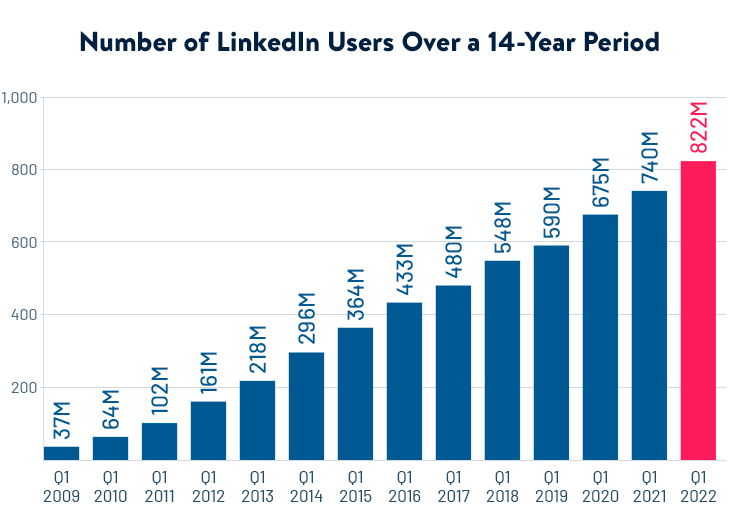
For the sake of simplicity, I’ll show a small scale simulation.
Let’s say we have —
Active users : 2 million
No of posts/day : 3 million
Avg. No of followers/user : 500
The follower and user are in the from of a graph which means if every user has 500 followers then total no of relationships : 2 million * 500 = 1 billion
Post size : 300 bytes
Total Storage per day for posts: 300 bytes * 3 million = 900 MB
For next 3 years, 900 MB* 3 * 365 = 986 GB
Data Model — ER requirements
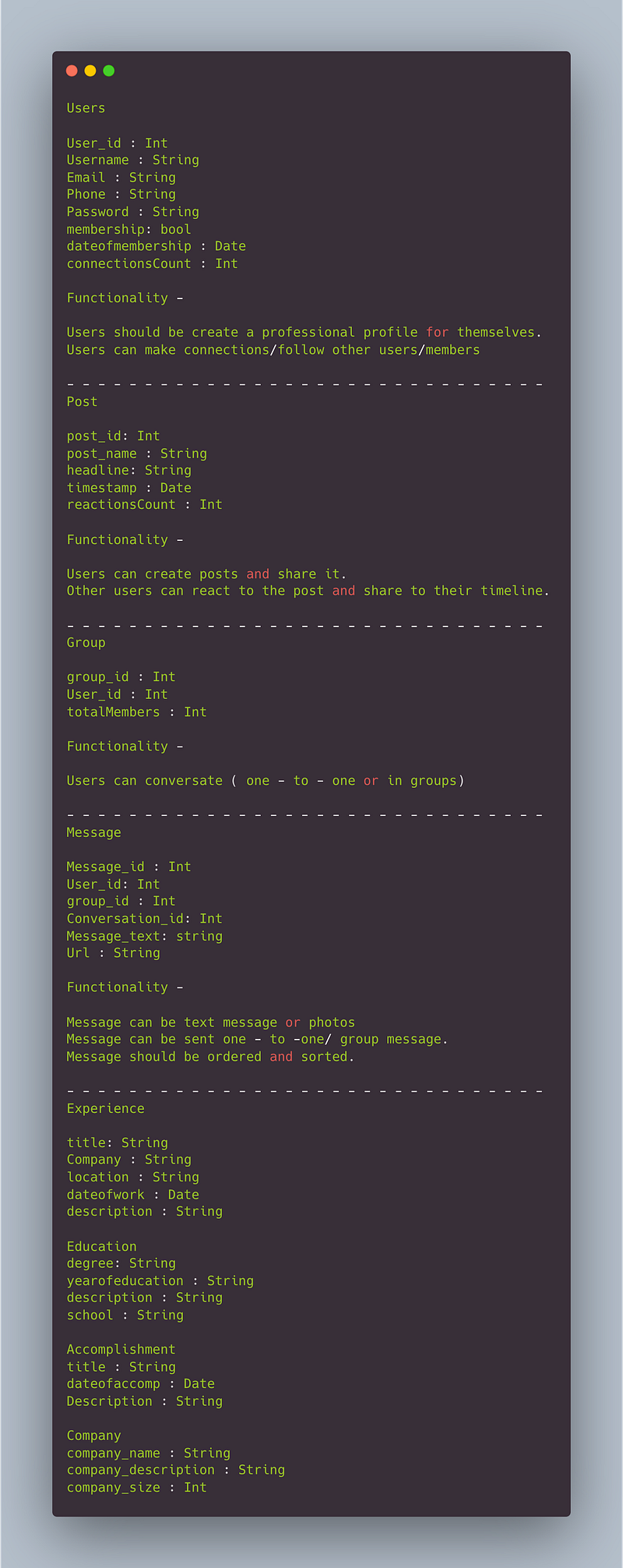
Users
User_id : Int
Username : String
Email : String
Phone : String
Password : String
membership: bool
dateofmembership : Date
connectionsCount : Int
Functionality —
- Users should be create a professional profile for themselves.
- Users can make connections/follow other users/members
— — — — — — — — — — — — — — — — — — — — — — — — — — — — — — -
Post
post_id: Int
post_name : String
headline: String
timestamp : Date
reactionsCount : Int
Functionality —
- Users can create posts and share it.
- Other users can react to the post and share to their timeline.
— — — — — — — — — — — — — — — — — — — — — — — — — — — — — — -
Group
group_id : Int
User_id : Int
totalMembers : Int
Functionality —
- Users can conversate ( one — to — one or in groups)
— — — — — — — — — — — — — — — — — — — — — — — — — — — — — — -
Message
Message_id : Int
User_id: Int
group_id : Int
Conversation_id: Int
Message_text: string
Url : String
Functionality —
- Message can be text message or photos
- Message can be sent one — to -one/ group message.
- Message should be ordered and sorted.
— — — — — — — — — — — — — — — — — — — — — — — — — — — — — — -
Experience
title: String
Company : String
location : String
dateofwork : Date
description : String
— — — — — — — — — — — — — — — — — — — — — — — — — — — — — — -
Education
degree: String
yearofeducation : String
description : String
school : String
— — — — — — — — — — — — — — — — — — — — — — — — — — — — — — -
Accomplishment
title : String
dateofaccomp : Date
Description : String
— — — — — — — — — — — — — — — — — — — — — — — — — — — — — — -
Company
company_name : String
company_description : String
company_size : Int
High Level Design
Assumptions on technical aspects —
- System should be highly reliable and available.
- System should have both mobile and web interface.
- System should have storage for chat history
- System should be able to handle huge amount of data ( text, photos, videos etc)
- Latency can be low for the real time chat.
- Consistency vs Availability : System should be highly consistent and highly availability
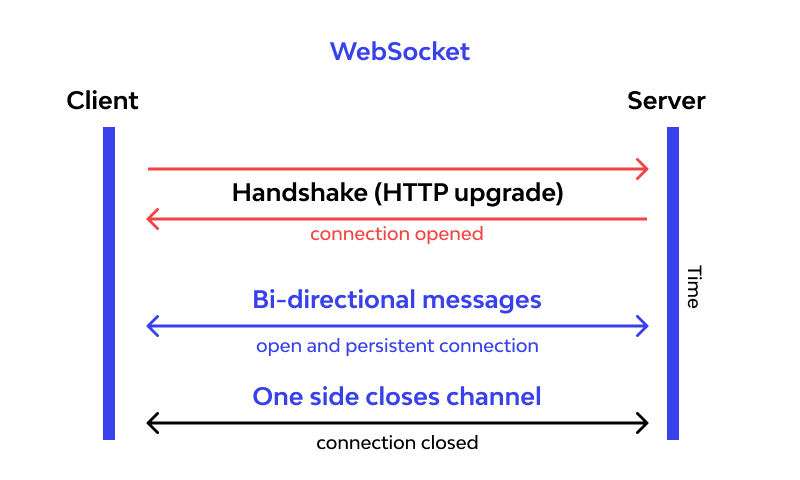
- Connection should be client initiated than server initiated ( when user send message to other user) — Long Polling or web sockets. We will be using web sockets here.
In long polling the server keeps the the client’s connection open until a timeout threshold has reached.
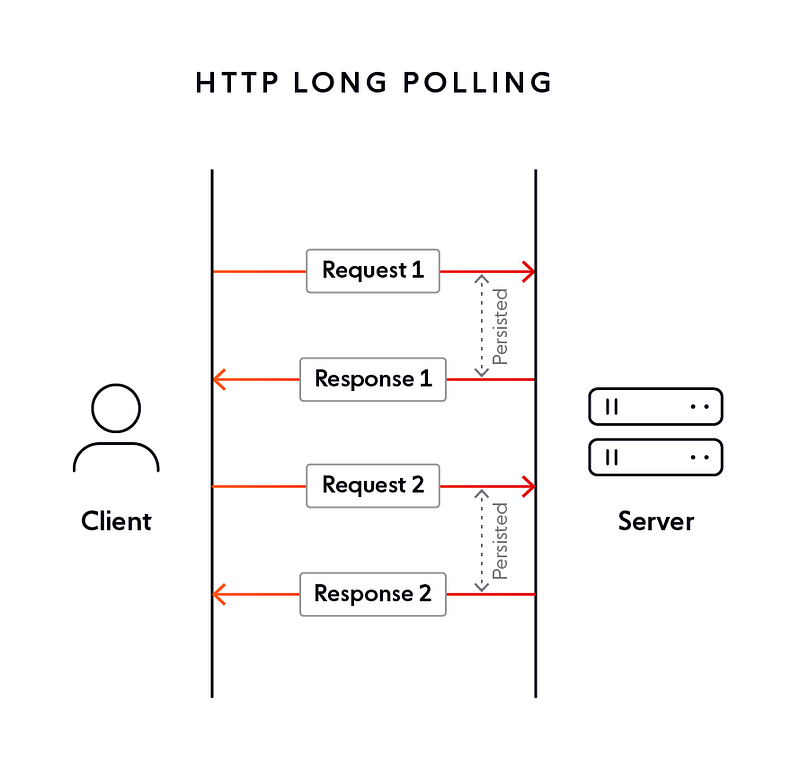
Web sockets — Using web sockets, the connection is persistent and two way ( bidirectional) using which the server can send messages/updates to client periodically.
Components
- Client : Both mobile and web Users
- Application Servers : Should be able to talk each other
- Load Balancers : To allocate requests to designated Application server using consistent hashing
- Web Sockets : For Full duplex connection
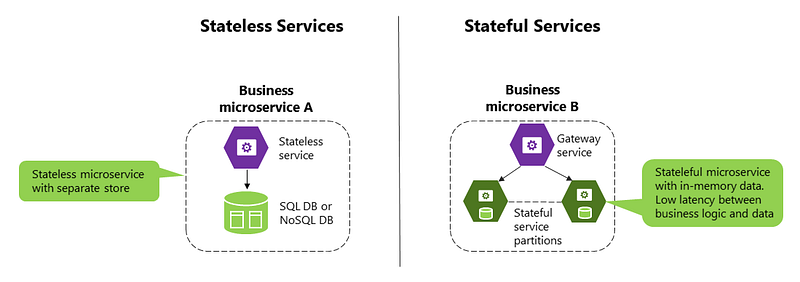
- Database : Cassandra db or Hbase — Key value stores allow for great horizontal scaling and low latency to access data. HBase is a column-oriented key-value NoSQL database.
- Cache
- Media Storage ( S3) : To store photos/videos
- Content Delivery Network
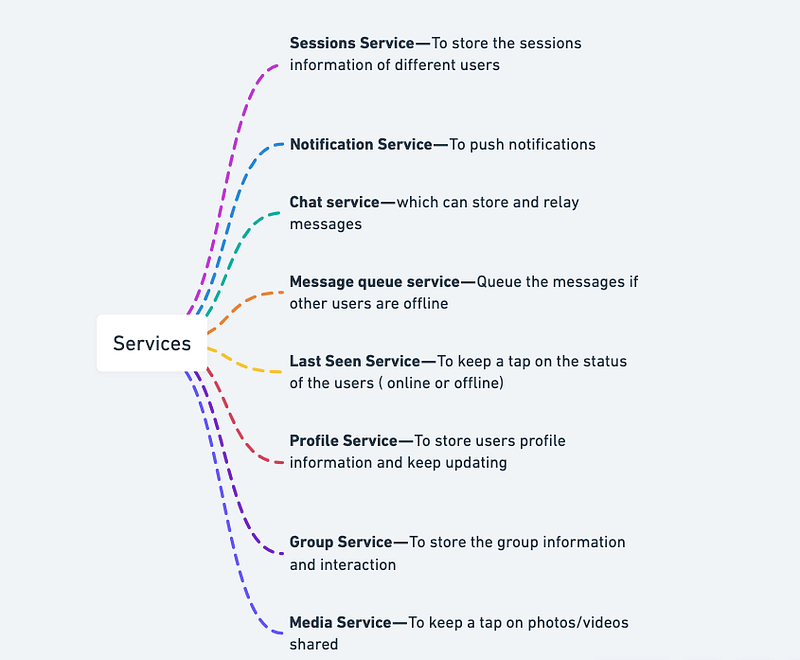
Services
- Message queue service — Queue the messages if other users are offline
- Last Seen Service — To keep a tap on the status of the users ( online or offline)
- Profile Service — To store users profile information and keep updating
- Group Service — To store the group information and interaction
- Media Service — To keep a tap on photos/videos shared
- Sessions Service — To store the sessions information of different users
- Notification Service — To push notifications
- Chat service — which can store and relay messages
Basic Low Level Design
import java.util.*;

class User {
    private String id;
    private String name;
    private String email;
    // Other user details like employment history, education, etc.
    private List<User> connections;

    public User(String name, String email) {
        this.id = UUID.randomUUID().toString();
        this.name = name;
        this.email = email;
        this.connections = new ArrayList<>();
    }

    public void addConnection(User user) {
        connections.add(user);
    }

    public void removeConnection(User user) {
        connections.remove(user);
    }

    public List<User> getConnections() {
        return connections;
    }

    // Getters and setters
}

class Post {
    private String id;
    private User author;
    private String content;
    private Date timestamp;
    // Other post details like likes, comments, etc.

    public Post(User author, String content) {
        this.id = UUID.randomUUID().toString();
        this.author = author;
        this.content = content;
        this.timestamp = new Date();
    }

    // Getters and setters
}

class LinkedInSystem {
    private Map<String, User> users;
    private List<Post> posts;

    public LinkedInSystem() {
        this.users = new HashMap<>();
        this.posts = new ArrayList<>();
    }

    public void registerUser(String name, String email) {
        User user = new User(name, email);
        users.put(user.getId(), user);
    }

    public void removeUser(String userId) {
        users.remove(userId);
    }

    public User getUser(String userId) {
        return users.get(userId);
    }

    public void createPost(User author, String content) {
        Post post = new Post(author, content);
        posts.add(post);
    }

    public List<Post> getNewsFeed(User user) {
        List<Post> newsFeed = new ArrayList<>();
        for (User connection : user.getConnections()) {
            for (Post post : posts) {
                if (post.getAuthor().equals(connection)) {
                    newsFeed.add(post);
                }
            }
        }
        return newsFeed;
    }
}

public class LinkedInApp {
    public static void main(String[] args) {
        LinkedInSystem linkedIn = new LinkedInSystem();

        // Register users
        linkedIn.registerUser("John Doe", "[email protected]");
        linkedIn.registerUser("Jane Smith", "[email protected]");

        // Add connections
        User user1 = linkedIn.getUser("user1");
        User user2 = linkedIn.getUser("user2");
        user1.addConnection(user2);

        // Create posts
        User author = linkedIn.getUser("user1");
        linkedIn.createPost(author, "Hello, everyone!");

        // Get news feed
        User user = linkedIn.getUser("user1");
        List<Post> newsFeed = linkedIn.getNewsFeed(user);
        System.out.println("News Feed for User: " + user.getName());
        for (Post post : newsFeed) {
            System.out.println(post.getContent());
        }
    }
}
API Design
API design will be further discussed in the workflow video ( Coming soon. Subscribe Today)
Complete Detailed Design
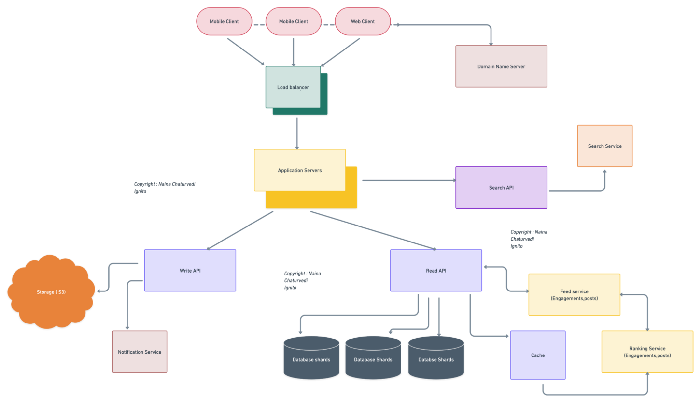
(Zoom it)
Complete Code
- Create a profile — Name, skills, employment history, education, accomplishments
Implementation code snippet to authenticate and create a LinkedIn profile:
from linkedin_api import Linkedin
import json
# Authenticate with LinkedIn's API
api = Linkedin('[email protected]', 'password')# Create a profile
profile_data = {
'firstName': 'John',
'lastName': 'Doe',
'headline': 'Software Engineer',
'summary': 'Experienced software engineer with a background in Python',
'educations': [{
'schoolName': 'University of XYZ',
'fieldOfStudy': 'Computer Science',
'degreeName': 'Bachelor of Science',
'activities': 'Computer Club',
'dateRange': {'startYear': 2015, 'endYear': 2019},
}],
'positions': [{
'title': 'Software Engineer',
'companyName': 'ABC Corp',
'locationName': 'San Francisco Bay Area',
'description': 'Developed and maintained Python applications',
'dateRange': {'startYear': 2019},
}],
'skills': ['Python', 'Java', 'SQL'],
'accomplishments': {
'publications': [{
'title': 'A guide to Python programming',
'publisher': 'O'Reilly Media',
'date': {'year': 2020},
}],
'certifications': [{
'name': 'Python Certification',
'authority': 'Python Institute',
'licenseNumber': '123456789',
'date': {'year': 2021},
}],
'patents': [{
'title': 'Method and system for improving Python performance',
'number': 'US1234567B1',
'date': {'year': 2022},
}],
},
}profile = api.create_profile(profile_data)
print(json.dumps(profile, indent=4))This code creates a LinkedIn profile for John Doe with his employment history, education, skills, and accomplishments.
- Search other professionals/companies by their name
To search for professionals or companies on LinkedIn using Python, you can use LinkedIn’s API search_people and search_companies methods. Here's an example code snippet to search for people and companies:
from linkedin_api import Linkedin# Authenticate with LinkedIn's API
api = Linkedin('[email protected]', 'password')# Search for people by name
people_results = api.search_people('John Doe')
for person in people_results:
print(person['firstName'], person['lastName'])# Search for companies by name
company_results = api.search_companies('Google')
for company in company_results:
print(company['name'])This code searches for people with the name “John Doe” and companies with the name “Google” using LinkedIn’s API search_people and search_companies methods.
- Send or accept connection requests from other LinkedIn users
from linkedin_api import Linkedin# Authenticate with LinkedIn's API
api = Linkedin('[email protected]', 'password')# Send a connection request
api.send_invitation('John Doe', 'Hi John, I would like to connect with you on LinkedIn.')# Accept a connection request
invitations = api.get_connection_invitations()
for invitation in invitations:
if invitation['status'] == 'pending':
api.accept_invitation(invitation['invitationId'])This code sends a connection request to John Doe and accepts any pending connection requests using LinkedIn’s API send_invitation, get_connection_invitations, and accept_invitation methods.
- Create posts on their timeline
To create posts on a LinkedIn user’s timeline using Python, you can use LinkedIn’s API create_post method. Here's an example code snippet to create a post:
from linkedin_api import Linkedin# Authenticate with LinkedIn's API
api = Linkedin('[email protected]', 'password')# Create a post
post_data = {
'text': 'Hello LinkedIn!',
'visibility': {'code': 'anyone'},
}
api.create_post(post_data)This code creates a post on the authenticated user’s LinkedIn timeline with the text “Hello LinkedIn!” using LinkedIn’s API create_post method.
- Post comments, share, likes or reactions on the post
To post comments, share, likes, or reactions on a LinkedIn post using Python, you can use LinkedIn’s API add_comment, share_post, like_post, and unlike_post methods. Here's an example code snippet to add a comment, share, like, and unlike a post:
from linkedin_api import Linkedin# Authenticate with LinkedIn's API
api = Linkedin('[email protected]', 'password')# Find a post to interact with
feed = api.get_home_feed()
post = feed['elements'][0]['updateContent']['company']['statusUpdate']# Add a comment
api.add_comment(post['id'], 'Great post!')# Share the post
api.share_post(post['id'], 'Check out this post!')# Like the post
api.like_post(post['id'])# Unlike the post
api.unlike_post(post['id'])This code finds the first post on the authenticated user’s LinkedIn home feed and adds a comment, shares, likes, and unlikes the post using LinkedIn’s API add_comment, share_post, like_post, and unlike_post methods.
- Send messages and Read Receipts
To send messages and read receipts on LinkedIn using Python, you can use LinkedIn’s API send_message and mark_conversation_as_read methods. Here's an example code snippet to send a message and mark a conversation as read:
from linkedin_api import Linkedin# Authenticate with LinkedIn's API
api = Linkedin('[email protected]', 'password')# Send a message
api.send_message('John Doe', 'Hello John!')# Mark conversation as read
conversations = api.get_conversations()
for conversation in conversations:
if not conversation['read']:
api.mark_conversation_as_read(conversation['entityUrn'])This code sends a message to John Doe and marks any unread conversations as read using LinkedIn’s API send_message and mark_conversation_as_read methods.
- Follow or unfollow other users
To follow or unfollow other LinkedIn users using Python, you can use LinkedIn’s API follow_entity and unfollow_entity methods. Here's an implementation code snippet to follow and unfollow a user
Here’s an implementation code snippet to follow and unfollow a user:
from linkedin_api import Linkedin# Authenticate with LinkedIn's API
api = Linkedin('[email protected]', 'password')# Follow a user
api.follow_entity('John Doe')# Unfollow a user
api.unfollow_entity('John Doe')This code follows and unfollows John Doe using LinkedIn’s API follow_entity and unfollow_entity methods.
- Create a company page and add job postings
To create a company page and add job postings on LinkedIn using Python, you can use LinkedIn’s API create_company_page and add_job methods. Here's an implementation code snippet to create a company page and add a job posting:
from linkedin_api import Linkedin# Authenticate with LinkedIn's API
api = Linkedin('[email protected]', 'password')# Create a company page
company_data = {
'name': 'Example Company',
'description': 'We are an example company.',
}
company_id = api.create_company_page(company_data)# Add a job posting
job_data = {
'companyUrn': f'urn:li:company:{company_id}',
'title': 'Software Engineer',
'description': 'We are looking for a software engineer to join our team.',
}
api.add_job(job_data)This code creates a company page for “Example Company” and adds a job posting for a software engineer using LinkedIn’s API create_company_page and add_job methods.
- Get notifications for new connections or messages using Python code
To get notifications for new connections or messages on LinkedIn using Python, you can use LinkedIn’s API get_notifications method. Here's an implementation code snippet to get notifications for new connections or messages:
from linkedin_api import Linkedin# Authenticate with LinkedIn's API
api = Linkedin('[email protected]', 'password')# Get notifications
notifications = api.get_notifications()
for notification in notifications:
if notification['type'] in ['CONNECTION_ACCEPTED', 'MESSAGE']:
print(notification['title'], notification['created_at'])This code gets notifications for new connections or messages using LinkedIn’s API get_notifications method and prints the notification title and creation date.
System Design — Coursera
We will be discussing in depth -
- What is Coursera
- Important Features
- Scaling Requirements — Capacity Estimation
- Data Model — ER requirements
- High Level Design
- Basic Low Level Design
- API Design
- Complete Detailed Design
- Complete Code Implementation

What is Coursera
Coursera is an online learning platform that provides access to a vast catalog of courses in various domains such as technology, business, arts, and more. It partners with renowned universities and institutions to offer high-quality educational content to learners worldwide. Coursera’s platform allows learners to enroll in courses, access course materials, complete assignments, participate in discussions, and earn certificates upon successful completion.
Important Features
a) Course Catalog: Coursera offers a comprehensive course catalog with diverse topics and domains to cater to the needs of learners.
b) Enrollment and Progress Tracking: Learners can easily enroll in courses, track their progress, and manage their learning journey.
c) Assignments and Assessments: Coursera provides a platform for instructors to create and evaluate assignments and assessments for learners.
d) Discussion Forums: Learners can engage in discussions with instructors and peers to seek clarification, share insights, and collaborate on course-related topics.
e) Certification: Upon completing a course, learners can obtain certificates to showcase their achievements.
Scaling Requirements — Capacity Estimation
For the sake of simplicity, let’s consider the following numbers for Coursera:
Total number of users: 100 million
Daily active users (DAU): 20 million
Number of courses taken by user/day: 2
Total number of courses taken per day: 40 million courses/day
Assuming the read-to-write ratio to be 100:1 (similar to Netflix), we can estimate the number of course uploads per day:
Total number of courses uploaded/day = 1/100 * 40 million = 400,000 courses/day
Storage Estimation:
Let’s assume, on average, each course takes up 100 MB of storage.
Total storage per day: 400,000 courses * 100 MB = 40 TB/day
For the next 3 years, the estimated storage would be:
Storage for 3 years: 40 TB * 365 * 3 = 43.8 PB
Requests per second:
To estimate the requests per second, let’s assume each user makes an average of 5 requests per day (enrollment, progress tracking, accessing materials, etc.).
Considering the DAU of 20 million:
Requests per second = (20 million * 5 requests/day) / (24 hours * 3600 seconds) ≈ 115 requests/second
a) Horizontal Scalability: The system should be able to handle increasing user demand by adding more servers and distributing the load efficiently.
b) Caching: Effective caching mechanisms should be implemented to reduce the load on databases and improve response times.
c) Content Delivery Networks (CDNs): Utilizing CDNs can help deliver course materials and media content faster by caching them closer to the learners’ locations.
d) Load Balancing: Load balancing techniques should be employed to distribute traffic evenly across multiple servers.
Data Model — ER requirements
Users: Fields:
- User_ID: Integer
- Username: String
- Email: String
- Password: String
Courses: Fields:
- Course_ID: Integer
- Title: String
- Description: String
Enrollments: Fields:
- Enrollment_ID: Integer
- User_ID: Integer (Foreign key from Users table)
- Course_ID: Integer (Foreign key from Courses table)
- Enrollment_Date: DateTime
Certificates: Fields:
- Certificate_ID: Integer
- User_ID: Integer (Foreign key from Users table)
- Course_ID: Integer (Foreign key from Courses table)
- Completion_Date: DateTime
a) User: Represents learners, instructors, and administrators.
b) Course: Contains information about the courses offered, including title, description, and enrollment details.
c) Enrollments: Represents the enrollment of users in specific courses.
d) Assignments: Contains details about course assignments, including deadlines and grading criteria.
e) Certificates: Stores information about the certificates earned by learners.
High Level Design
Assumptions:
- The system is read-heavy, with more users accessing courses and materials than creating or updating them.
- Availability and reliability are crucial for user experience.
- The system should be able to handle a large number of concurrent requests.
- Caching and load balancing should be implemented to optimize performance.
- The system should be scalable to handle increased user demand.
Main Components and Services:
Mobile Client:
- Users access Coursera through mobile applications.
- Mobile clients provide a user-friendly interface for browsing courses, enrolling, accessing materials, and interacting with the system.
Application Servers:
- Handle read and write operations from users.
- Responsible for user authentication, course enrollment, generating certificates, and managing user data.
- Implement business logic and process user requests.
Load Balancer:
- Routes incoming requests from mobile clients to the appropriate application servers.
- Distributes the workload evenly across multiple servers.
- Ensures high availability and scalability.
Cache (e.g., Memcache):
- Caches frequently accessed data, such as course information and user credentials.
- Improves response times and reduces the load on the database.
- Implements a Least Recently Used (LRU) caching mechanism.
Content Delivery Network (CDN):
- Delivers course materials, such as videos, images, and documents.
- Caches and replicates content across multiple servers globally.
- Improves latency and reduces network congestion.
Database:
- Stores and manages data related to users, courses, enrollments, and certificates.
- Supports fast and reliable read and write operations.
- Ensures data consistency and integrity.
- Can be implemented using a NoSQL database, such as MongoDB or Cassandra, for scalability and flexibility.
Services:
User Management Service:
- Handles user authentication, registration, and profile management.
- Manages user data and permissions.
- Provides APIs for user-related operations.
Course Management Service:
- Handles course creation, management, and access.
- Allows instructors to upload course materials and create assignments.
- Provides APIs for course-related operations.
Enrollment Service:
- Manages course enrollments for users.
- Handles enrollment requests, validation, and updates.
- Provides APIs for enrollment-related operations.
Certification Service:
- Generates and manages course completion certificates.
- Stores certificate data, including user and course information.
- Provides APIs for certificate-related operations.
Content Delivery Service:
- Handles the delivery of course materials, such as videos, images, and documents.
- Ensures fast and reliable content distribution.
- Integrates with the CDN for optimal performance.
Feed Generation Service:
- Generates personalized course feeds for users based on their interests, enrolled courses, and user activity.
- Curates and ranks course recommendations to improve user engagement.
- Provides APIs for retrieving personalized course feeds.
a) User Management: Handles user authentication, registration, and profile management.
b) Course Management: Manages course creation, content delivery, and enrollment management.
c) Assessment Management: Provides functionality for creating, submitting, and evaluating course assignments.
d) Certification Generation: Handles the generation and issuance of course completion certificates.
Basic Low Level Design
class User:
    def __init__(self, user_id, username, email, password):
        self.user_id = user_id
        self.username = username
        self.email = email
        self.password = password
        # other user attributes

class Course:
    def __init__(self, course_id, title, description):
        self.course_id = course_id
        self.title = title
        self.description = description
        # other course attributes

class Enrollment:
    def __init__(self, enrollment_id, user, course, enrollment_date):
        self.enrollment_id = enrollment_id
        self.user = user
        self.course = course
        self.enrollment_date = enrollment_date
        # other enrollment attributes

# Additional classes for Likes, Comments, Certificates, etc.

class Coursera:
    def __init__(self):
        self.users = {}
        self.courses = {}
        self.enrollments = {}
        # other data structures for likes, comments, certificates, etc.

    def add_user(self, user):
        self.users[user.user_id] = user

    def add_course(self, course):
        self.courses[course.course_id] = course

    def enroll_user(self, user_id, course_id, enrollment_date):
        user = self.users.get(user_id)
        course = self.courses.get(course_id)

        if user is None or course is None:
            return False

        enrollment_id = len(self.enrollments) + 1
        enrollment = Enrollment(enrollment_id, user, course, enrollment_date)
        self.enrollments[enrollment_id] = enrollment
        return True

    # Additional methods for managing likes, comments, certificates, etc.
User Management API:
POST /users: Create a new user account.
GET /users/{user_id}: Retrieve user information by user ID.
PATCH /users/{user_id}: Update user information by user ID.
Course Management API:
POST /courses: Create a new course.
GET /courses/{course_id}: Retrieve course information by course ID.
Enrollment API:
POST /enrollments: Enroll a user in a course.
GET /enrollments/{enrollment_id}: Retrieve enrollment information by enrollment ID.
Like API:
POST /likes: Like a course or a post.
GET /likes/{like_id}: Retrieve like information by like ID.
Comment API:
POST /comments: Add a comment to a course or a post.
GET /comments/{comment_id}: Retrieve comment information by comment ID.
Certificate API:
POST /certificates: Generate a certificate for a user upon course completion.
GET /certificates/{certificate_id}: Retrieve certificate information by certificate ID.from flask import Flask, request, jsonify
app = Flask(__name__)
coursera = Coursera()
# User Management API
@app.route('/users', methods=['POST'])
def create_user():
data = request.json
user_id = data.get('user_id')
username = data.get('username')
email = data.get('email')
password = data.get('password')
if user_id and username and email and password:
user = User(user_id, username, email, password)
coursera.add_user(user)
return jsonify({'message': 'User created successfully'}), 201
else:
return jsonify({'error': 'Invalid user data'}), 400
@app.route('/users/<user_id>', methods=['GET'])
def get_user(user_id):
user = coursera.users.get(user_id)
if user:
return jsonify(user.__dict__), 200
else:
return jsonify({'error': 'User not found'}), 404
@app.route('/users/<user_id>', methods=['PATCH'])
def update_user(user_id):
user = coursera.users.get(user_id)
if user:
data = request.json
user.username = data.get('username', user.username)
user.email = data.get('email', user.email)
user.password = data.get('password', user.password)
# Update other user attributes as needed
return jsonify({'message': 'User updated successfully'}), 200
else:
return jsonify({'error': 'User not found'}), 404
# Course Management API
@app.route('/courses', methods=['POST'])
def create_course():
data = request.json
course_id = data.get('course_id')
title = data.get('title')
description = data.get('description')
if course_id and title and description:
course = Course(course_id, title, description)
coursera.add_course(course)
return jsonify({'message': 'Course created successfully'}), 201
else:
return jsonify({'error': 'Invalid course data'}), 400
@app.route('/courses/<course_id>', methods=['GET'])
def get_course(course_id):
course = coursera.courses.get(course_id)
if course:
return jsonify(course.__dict__), 200
else:
return jsonify({'error': 'Course not found'}), 404
# Enrollment API
@app.route('/enrollments', methods=['POST'])
def enroll_user():
data = request.json
enrollment_id = data.get('enrollment_id')
user_id = data.get('user_id')
course_id = data.get('course_id')
enrollment_date = data.get('enrollment_date')
if enrollment_id and user_id and course_id and enrollment_date:
enrolled = coursera.enroll_user(user_id, course_id, enrollment_date)
if enrolled:
return jsonify({'message': 'User enrolled successfully'}), 200
else:
return jsonify({'error': 'User or course not found'}), 404
else:
return jsonify({'error': 'Invalid enrollment data'}), 400
@app.route('/enrollments/<enrollment_id>', methods=['GET'])
def get_enrollment(enrollment_id):
enrollment = coursera.enrollments.get(enrollment_id)
if enrollment:
return jsonify(enrollment.__dict__), 200
else:
return jsonify({'error': 'Enrollment not found'}), 404
# Like API
@app.route('/likes', methods=['POST'])
def like_content():
data = request.json
like_id = data.get('like_id')
user_id = data.get('user_id')
content_id = data.get('content_id')
if like_id and user_id and content_id:
# Logic to handle the like
return jsonify({'message': 'Content liked successfully'}), 200
else:
return jsonify({'error': 'Invalid like data'}), 400
@app.route('/likes/<like_id>', methods=['GET'])
def get_like(like_id):
like = coursera.likes.get(like_id)
if like:
return jsonify(like.__dict__), 200
else:
return jsonify({'error': 'Like not found'}), 404
# Comment API
@app.route('/comments', methods=['POST'])
def add_comment():
data = request.json
comment_id = data.get('comment_id')
content_id = data.get('content_id')
user_id = data.get('user_id')
text = data.get('text')
if comment_id and content_id and user_id and text:
# Logic to add the comment
return jsonify({'message': 'Comment added successfully'}), 200
else:
return jsonify({'error': 'Invalid comment data'}), 400
@app.route('/comments/<comment_id>', methods=['GET'])
def get_comment(comment_id):
comment = coursera.comments.get(comment_id)
if comment:
return jsonify(comment.__dict__), 200
else:
return jsonify({'error': 'Comment not found'}), 404
# Certificate API
@app.route('/certificates', methods=['POST'])
def generate_certificate():
data = request.json
certificate_id = data.get('certificate_id')
user_id = data.get('user_id')
course_id = data.get('course_id')
if certificate_id and user_id and course_id:
# Logic to generate the certificate
return jsonify({'message': 'Certificate generated successfully'}), 200
else:
return jsonify({'error': 'Invalid certificate data'}), 400
@app.route('/certificates/<certificate_id>', methods=['GET'])
def get_certificate(certificate_id):
certificate = coursera.certificates.get(certificate_id)
if certificate:
return jsonify(certificate.__dict__), 200
else:
return jsonify({'error': 'Certificate not found'}), 404
if __name__ == '__main__':
app.run()API Design
class UserManager:
    def register_user(self, user_data):
        # Logic for user registration
        pass

    def login_user(self, user_credentials):
        # Logic for user login
        pass

    def enroll_course(self, user_id, course_id):
        # Logic for course enrollment
        pass

# API Endpoints
@app.route('/register', methods=['POST'])
def register_user():
    user_data = request.get_json()
    user_manager = UserManager()
    user_manager.register_user(user_data)
    return jsonify({'message': 'User registered successfully'})

@app.route('/login', methods=['POST'])
def login_user():
    user_credentials = request.get_json()
    user_manager = UserManager()
    user_manager.login_user(user_credentials)
    return jsonify({'message': 'User logged in successfully'})

@app.route('/enroll', methods=['POST'])
def enroll_course():
    enrollment_data = request.get_json()
    user_id = enrollment_data['user_id']
    course_id = enrollment_data['course_id']
    user_manager = UserManager()
    user_manager.enroll_course(user_id, course_id)
    return jsonify({'message': 'Course enrolled successfully'})
Complete Detailed Design
Coming soon! It will be covered on youtube channel.
Subscribe to youtube channel :
Complete Code implementation
a) Course Catalog:
class CourseCatalog:
    def __init__(self):
        self.courses = []
def add_course(self, course):
self.courses.append(course) def get_all_courses(self):
return self.coursesclass Course:
def __init__(self, course_id, title, description):
self.course_id = course_id
self.title = title
self.description = description# Usage example:
catalog = CourseCatalog()course1 = Course(1, "Introduction to Python", "Learn the basics of Python programming")
course2 = Course(2, "Data Science Fundamentals", "Explore the world of data science")
course3 = Course(3, "Web Development with Django", "Build web applications using Django framework")catalog.add_course(course1)
catalog.add_course(course2)
catalog.add_course(course3)all_courses = catalog.get_all_courses()
for course in all_courses:
print(f"Course ID: {course.course_id}")
print(f"Title: {course.title}")
print(f"Description: {course.description}")
print("------")b) Enrollment and Progress Tracking:
class Learner:
    def __init__(self, learner_id, name):
        self.learner_id = learner_id
        self.name = name
        self.enrolled_courses = []
def enroll_course(self, course):
self.enrolled_courses.append(course) def get_enrolled_courses(self):
return self.enrolled_courses# Usage example:
learner1 = Learner(1, "John Doe")
learner2 = Learner(2, "Jane Smith")learner1.enroll_course(course1)
learner1.enroll_course(course3)
learner2.enroll_course(course2)courses_enrolled_by_learner1 = learner1.get_enrolled_courses()
courses_enrolled_by_learner2 = learner2.get_enrolled_courses()print(f"Learner 1 ({learner1.name}) enrolled courses:")
for course in courses_enrolled_by_learner1:
print(f"Course ID: {course.course_id}")
print(f"Title: {course.title}")
print(f"Description: {course.description}")
print("------")print(f"Learner 2 ({learner2.name}) enrolled courses:")
for course in courses_enrolled_by_learner2:
print(f"Course ID: {course.course_id}")
print(f"Title: {course.title}")
print(f"Description: {course.description}")
print("------")c) Assignments and Assessments:
class Assignment:
    def __init__(self, assignment_id, course, title, description):
        self.assignment_id = assignment_id
        self.course = course
        self.title = title
        self.description = description
class Instructor:
def __init__(self, instructor_id, name):
self.instructor_id = instructor_id
self.name = name
self.assignments = [] def create_assignment(self, course, title, description):
assignment_id = len(self.assignments) + 1
assignment = Assignment(assignment_id, course, title, description)
self.assignments.append(assignment) def get_assignments(self):
return self.assignments# Usage example:
instructor = Instructor(1, "Professor Smith")instructor.create_assignment(course1, "Python Exercise 1", "Write a program to calculate the Fibonacci sequence")
instructor.create_assignment(course2, "Data Analysis Project", "Perform data analysis on a given dataset")assignments = instructor.get_assignments()print(f"Instructor: {instructor.name}")
print("Assignments:")
for assignment in assignments:
print(f"Assignment ID: {assignment.assignment_id}")
print(f"Course: {assignment.course.title}")
print(f"Title: {assignment.title}")
print(f"Description: {assignment.description}")
print("------")d) Discussion Forums:
class DiscussionForum:
    def __init__(self):
        self.posts = []
def create_post(self, course, author, content):
post = {
'course': course,
'author': author,
'content': content
}
self.posts.append(post) def get_posts_by_course(self, course):
return [post for post in self.posts if post['course'] == course]# Usage example:
forum = DiscussionForum()forum.create_post(course1, learner1, "I'm having trouble with loops in Python. Any suggestions?")
forum.create_post(course1, learner2, "Here's a helpful resource for learning Python loops: <link>")
forum.create_post(course2, learner1, "What are some popular machine learning algorithms?")
forum.create_post(course2, learner2, "Check out the scikit-learn library for machine learning algorithms.")posts_for_course1 = forum.get_posts_by_course(course1)
posts_for_course2 = forum.get_posts_by_course(course2)print(f"Discussion Forum - Course: {course1.title}")
for post in posts_for_course1:
print(f"Author: {post['author'].name}")
print(f"Content: {post['content']}")
print("------")print(f"Discussion Forum - Course: {course2.title}")
for post in posts_for_course2:
print(f"Author: {post['author'].name}")
print(f"Content: {post['content']}")
print("------")Certification:
class Certificate:
    def __init__(self, learner, course, completion_date):
        self.learner = learner
        self.course = course
        self.completion_date = completion_date
class CertificationSystem:
def __init__(self):
self.certificates = [] def issue_certificate(self, learner, course, completion_date):
certificate = Certificate(learner, course, completion_date)
self.certificates.append(certificate) def get_certificates_for_learner(self, learner):
return [certificate for certificate in self.certificates if certificate.learner == learner]# Usage example:
certification_system = CertificationSystem()completion_date = "2023-06-30"
certification_system.issue_certificate(learner1, course1, completion_date)
certification_system.issue_certificate(learner2, course2, completion_date)certificates_for_learner1 = certification_system.get_certificates_for_learner(learner1)
certificates_for_learner2 = certification_system.get_certificates_for_learner(learner2)print(f"Certificates for Learner 1 ({learner1.name}):")
for certificate in certificates_for_learner1:
print(f"Course: {certificate.course.title}")
print(f"Completion Date: {certificate.completion_date}")
print("------")print(f"Certificates for Learner 2 ({learner2.name}):")
for certificate in certificates_for_learner2:
print(f"Course: {certificate.course.title}")
print(f"Completion Date: {certificate.completion_date}")
print("------")System Design — Baidu
We will be discussing in depth -
- What is Baidu
- Important Features
- Scaling Requirements — Capacity Estimation
- Data Model — ER requirements
- High Level Design
- Basic Low Level Design
- API Design
- Complete Detailed Design
- Complete Code Implementation

What is Baidu
Baidu is a leading technology company based in China, specializing in Internet-related services and products. It is widely recognized for its search engine, artificial intelligence (AI) capabilities, and various online platforms.
Important Features
- Search Engine: Discuss the core functionality of Baidu’s search engine, including indexing, ranking algorithms, and user interface.
- AI Capabilities: Highlight Baidu’s AI advancements, such as natural language processing, computer vision, and voice recognition, and their applications across different Baidu products.
- Online Platforms: Introduce Baidu’s online platforms, such as Baidu Maps, Baidu Cloud, and Baidu Wallet, and their key features.
Scaling Requirements — Capacity Estimation
For Baidu’s Scalability Requirements:
Total number of users: 1.5 Billion
Daily active users (DAU): 400 million
Number of searches performed by a user per day: 5
Total number of searches per day: 400 million * 5 = 2 billion searches/day
Assuming the read-to-write ratio to be 100:1:
Total number of documents indexed per day: 2 billion / 100 = 20 million documents/day
Storage Estimation:
Assuming an average document size of 1MB:
Total storage per day: 20 million documents * 1MB = 20 terabytes/day
For the next 3 years: 20 terabytes * 365 days * 3 years = 21.9 petabytes
Requests per second: 2 billion searches / (24 hours * 3600 seconds) = approximately 23,148 requests per second
a. User Base: Outline the anticipated number of users and their expected growth rate, considering Baidu’s current and future market penetration.
b. Traffic and Requests: Discuss the estimated amount of traffic and concurrent requests that the system needs to handle, considering peak usage scenarios.
c. Data Volume: Address the projected data volume, including user-generated content, indexes, and logs, and describe the expected growth pattern.
Data Model — ER requirements
Users: Fields:
- User ID: Integer
- Username: String
- Email: String
- Password: String
Functionality:
- Users can perform searches.
- Users can follow other users.
- Users can like and comment on search results.
Searches: Fields:
- Search ID: Integer
- User ID: Integer (Foreign key from Users table)
- Query: String
- Timestamp: DateTime
Functionality:
- Stores the search queries made by users.
Search Results: Fields:
- Result ID: Integer
- Search ID: Integer (Foreign key from Searches table)
- URL: String
- Title: String
- Description: String
- Timestamp: DateTime
Functionality:
- Stores the search results for each query.
Likes: Fields:
- Like ID: Integer
- User ID: Integer
- Result ID: Integer
- Timestamp: DateTime
Functionality:
- Users can like search results.
Comments: Fields:
- Comment ID: Integer
- Result ID: Integer
- User ID: Integer
- Text: String
- Timestamp: DateTime
Functionality:
- Users can comment on search results.
High Level Design
Assumptions:
- The system is read-heavy (more searches and views than writes).
- Availability and reliability are more important than consistency.
- Horizontal scalability (scale-out) is preferred.
- Latency for search results should be kept under 350ms.
Main Components:
Mobile Client: Users accessing the Baidu search engine through mobile devices.
Application Servers: Responsible for handling read and write requests, as well as notifications.
Load Balancer: Routes and directs requests to the appropriate servers based on the designated services.
Cache (Memcache): Caches frequently accessed data for fast retrieval.
CDN: Improves latency and throughput by caching and delivering static content.
Database: Stores the data based on the data model and handles data retrieval using the appropriate queries.
Storage (HDFS or Amazon S3): Stores and retrieves large amounts of data, such as user-generated content and search results.
Services:
Search Service: Handles search requests and retrieves relevant search results from the database.
Like Service: Manages user likes on search results.
Comment Service: Manages user comments on search results.
Feed Generation Service: Generates personalized feeds for users based on their search history and preferences.
import requests

class SearchEngine:
    def __init__(self, base_url, access_token):
        self.base_url = base_url
        self.access_token = access_token

    def perform_search(self, query):
        search_endpoint = f'{self.base_url}/search?q={query}&access_token={self.access_token}'
        response = requests.get(search_endpoint)
        if response.status_code == 200:
            search_results = response.json()
            return search_results
        else:
            return None

class LikeService:
    def __init__(self, base_url, access_token):
        self.base_url = base_url
        self.access_token = access_token

    def like_result(self, result_id):
        like_endpoint = f'{self.base_url}/results/{result_id}/like?access_token={self.access_token}'
        response = requests.post(like_endpoint)
        if response.status_code == 200:
            print('Result liked successfully!')
        else:
            print('Unable to like result.')

class CommentService:
    def __init__(self, base_url, access_token):
        self.base_url = base_url
        self.access_token = access_token

    def add_comment(self, result_id, comment):
        comment_endpoint = f'{self.base_url}/results/{result_id}/comments?access_token={self.access_token}'
        payload = {'comment': comment}
        response = requests.post(comment_endpoint, json=payload)
        if response.status_code == 200:
            print('Comment added successfully!')
        else:
            print('Unable to add comment.')

# Example usage
base_url = 'https://api.baidu.com'
access_token = 'your_access_token'

search_engine = SearchEngine(base_url, access_token)
search_results = search_engine.perform_search('Baidu')

if search_results:
    result_id = search_results['result_id']
    like_service = LikeService(base_url, access_token)
    like_service.like_result(result_id)

    comment_service = CommentService(base_url, access_token)
    comment_service.add_comment(result_id, 'Great search engine!')
Basic Low Level Design
from flask import Flask, request, jsonify
import uuid

app = Flask(__name__)

users = {}
search_results = []

class User:
    def __init__(self, user_id, username, password):
        self.user_id = user_id
        self.username = username
        self.password = password

class SearchQuery:
    def __init__(self, query, user):
        self.query = query
        self.user = user

class SearchResult:
    def __init__(self, result_id, search_query, url, title):
        self.result_id = result_id
        self.search_query = search_query
        self.url = url
        self.title = title

@app.route('/users', methods=['POST'])
def create_user():
    data = request.get_json()
    user_id = str(uuid.uuid4())
    username = data['username']
    password = data['password']
    user = User(user_id, username, password)
    users[user_id] = user
    return 'User created successfully', 200

@app.route('/search', methods=['POST'])
def perform_search():
    data = request.get_json()
    user_id = data['user_id']
    query = data['query']
    if user_id not in users:
        return 'User not found', 404
    result_id = str(uuid.uuid4())
    search_query = SearchQuery(query, users[user_id])
    search_result = SearchResult(result_id, search_query, '', '')  # Fill in URL and title
    search_results.append(search_result)
    return 'Search performed successfully', 200

@app.route('/users/<user_id>/search-results', methods=['GET'])
def get_search_results(user_id):
    if user_id not in users:
        return 'User not found', 404
    user_search_results = []
    for search_result in search_results:
        if search_result.search_query.user.user_id == user_id:
            user_search_results.append(search_result.__dict__)
    return jsonify(user_search_results), 200

if __name__ == '__main__':
    app.run()
API Design
Search API:
Endpoint: /search
Method: POST
Request Parameters:
query: The search query entered by the user.
filters: Optional filters to refine the search results.
Response:
status: The status of the API request (e.g., "success" or "error").
results: An array of search results matching the query.

User Management API:

Endpoint: /users
Method: GET
Request Parameters: None
Response:
status: The status of the API request (e.g., "success" or "error").
users: An array of user objects containing user details.
Content Upload API:

Endpoint: /upload
Method: POST
Request Parameters:
user_id: The ID of the user uploading the content.
content: The content to be uploaded.
Response:
status: The status of the API request (e.g., "success" or "error").
message: A message indicating the result of the content upload.
from flask import Flask, request, jsonify
app = Flask(__name__)
users = [
{'id': 1, 'name': 'John Doe'},
{'id': 2, 'name': 'Jane Smith'},
# Additional user objects
]
@app.route('/users', methods=['GET'])
def get_users():
return jsonify({
'status': 'success',
'users': users
})
@app.route('/upload', methods=['POST'])
def upload_content():
user_id = request.json.get('user_id')
content = request.json.get('content')
# Perform content upload logic here
return jsonify({
'status': 'success',
'message': 'Content uploaded successfully.'
})
if __name__ == '__main__':
app.run()Complete Detailed Design
Coming soon! It will be covered on youtube channel.
Subscribe to youtube channel :
Complete Code implementation
a. Search Engine:
class SearchEngine:
    def __init__(self):
        self.index = {}
def index_document(self, document_id, content):
# Index the document by splitting content into keywords
keywords = content.lower().split()
for keyword in keywords:
if keyword not in self.index:
self.index[keyword] = set()
self.index[keyword].add(document_id) def search(self, query):
# Search for documents containing all keywords in the query
keywords = query.lower().split()
results = None
for keyword in keywords:
if keyword in self.index:
if results is None:
results = self.index[keyword]
else:
results = results.intersection(self.index[keyword])
return resultsb. AI Capabilities:
class NaturalLanguageProcessing:
    def __init__(self):
        # Initialize NLP model
        self.model = NLPModel()
def analyze_sentiment(self, text):
# Perform sentiment analysis on the given text
sentiment_score = self.model.analyze_sentiment(text)
return sentiment_score def extract_entities(self, text):
# Extract named entities from the given text
entities = self.model.extract_entities(text)
return entitiesclass ComputerVision:
def __init__(self):
# Initialize computer vision model
self.model = CVModel() def detect_objects(self, image):
# Detect objects in the given image
detected_objects = self.model.detect_objects(image)
return detected_objects def recognize_text(self, image):
# Recognize text in the given image
extracted_text = self.model.recognize_text(image)
return extracted_textclass VoiceRecognition:
def __init__(self):
# Initialize voice recognition model
self.model = VoiceModel() def transcribe_audio(self, audio):
# Transcribe the given audio to text
transcribed_text = self.model.transcribe_audio(audio)
return transcribed_textc. Online Platforms:
class BaiduMaps:
    def __init__(self):
        # Initialize Baidu Maps
        self.api_key = 'your_api_key'
        self.client = MapsClient(api_key=self.api_key)
def search_location(self, query):
# Search for a location based on the given query
search_results = self.client.search(query)
return search_results def get_directions(self, origin, destination):
# Get directions from the origin to the destination
directions = self.client.get_directions(origin, destination)
return directionsclass BaiduCloud:
def __init__(self):
# Initialize Baidu Cloud
self.access_key = 'your_access_key'
self.secret_key = 'your_secret_key'
self.client = CloudClient(access_key=self.access_key, secret_key=self.secret_key) def upload_file(self, file):
# Upload the given file to Baidu Cloud
uploaded_file_url = self.client.upload(file)
return uploaded_file_url def download_file(self, file_url):
# Download the file from the given URL
downloaded_file = self.client.download(file_url)
return downloaded_fileclass BaiduWallet:
def __init__(self):
# Initialize Baidu Wallet
self.api_key = 'your_api_key'
self.client = WalletClient(api_key=self.api_key) def make_payment(self, amount, recipient):
# Make a payment of the given amount to the recipient
payment_status = self.client.make_payment(amount, recipient)
return payment_status def check_balance(self):
# Check the balance in the Baidu Wallet
balance = self.client.check_balance()
return balanceSystem Design —Wikipedia
We will be discussing in depth -
- What is Wikipedia
- Important Features
- Scaling Requirements — Capacity Estimation
- Data Model — ER requirements
- High Level Design
- Basic Low Level Design
- API Design
- Complete Detailed Design
- Complete Code Implementation

What is Wikipedia
Wikipedia is a free online encyclopedia that allows users to create, edit, and collaborate on articles covering a wide range of topics. It serves as a valuable resource for information, with millions of articles available in multiple languages. Wikipedia’s success lies in its ability to harness the power of a vast community of contributors, ensuring a constant flow of knowledge and diverse perspectives.
Important Features
a) Editable Content: Wikipedia enables users to contribute and modify articles, fostering a collaborative environment.
b) Versioning and Revision History: Each article maintains a version history, allowing users to track changes and revert to previous versions if needed.
c) Multilingual Support: Wikipedia supports articles in numerous languages, ensuring accessibility and inclusivity.
d) Search Functionality: Users can search for articles using keywords, facilitating quick and efficient information retrieval.
e) Categorization and Organization: Articles are structured into categories and subcategories, providing a logical framework for navigation.
Scaling Requirements — Capacity Estimation
Let’s assume —
For the simulation, let’s consider the following:
Total number of users: 500 million
Daily active users (DAU): 100 million
Number of articles read by a user per day: 5
Total number of articles read per day: 500 million articles/day
Assuming a read-to-write ratio of 100:1, we can estimate the number of articles created per day:
Total number of articles created per day = 1/100 * 500 million = 5 million articles/day
Storage Estimation:
Let’s assume an average article size of 10 KB:
Total storage per day: 5 million * 10 KB = 50 TB/day
For the next 3 years, the storage estimation would be:
Total storage for 3 years: 50 TB/day * 365 days * 3 years = 54,750 TB = 54.75 PB
Requests per second:
Considering the requests per second for accessing articles, let’s estimate the average requests per second:
Requests per second = Total articles read per day / (24 hours * 3600 seconds)
Requests per second = 500 million / (24 * 3600) ≈ 5,787 requests/second
a) Handle high read and write traffic: Wikipedia experiences a massive influx of users and edits, requiring a robust infrastructure to support concurrent read and write operations efficiently.
b) Ensure high availability: The system needs to remain accessible and responsive even during peak traffic periods or in the face of hardware failures.
c) Support distributed storage: The storage system must be distributed to handle the immense amount of data and ensure redundancy and fault tolerance.
d) Efficient caching mechanisms: Implementing caching strategies helps reduce the load on the database and improve response times.
e) Scalable search functionality: As the number of articles increases, the search functionality should scale horizontally to deliver fast and accurate search results.
Data Model — ER requirements
Users:
- Fields:
- Username: String
- Email: String
- Password: String
Articles:
- Fields:
- ArticleID: Int
- Title: String
- Content: String
Categories:
- Fields:
- CategoryID: Int
- Name: String
Article-Category Relationship:
- Fields:
- ArticleID: Int (Foreign key referencing Articles.ArticleID)
- CategoryID: Int (Foreign key referencing Categories.CategoryID)
a) User: Represents individuals who contribute to Wikipedia by creating or editing articles.
b) Article: Represents the core content of Wikipedia, containing attributes such as title, content, revision history, and metadata.
c) Category: Represents the hierarchical organization of articles into different subject areas.
d) Revision: Tracks changes made to articles over time, storing information about the editor, timestamp, and modified content.
e) Metadata: Stores additional information related to articles, such as popularity, ratings, and references.
High Level Design
Assumptions:
- More reads than writes, so the system is read-heavy.
- Horizontal scalability is desired.
- High availability and reliability are important.
- Latency should be around 350ms for article retrieval.
- Consistency, availability, and reliability are all important factors.
Main Components and Services:
Mobile Client: Represents users accessing Wikipedia through mobile devices.
Application Servers: Handle read and write operations, as well as notifications.
Load Balancer: Routes and distributes incoming requests to the appropriate servers.
Cache (Memcache): Caches frequently accessed data to improve performance.
CDN: Enhances latency and throughput by delivering static content globally.
Database: Stores and retrieves data based on the defined data model and handles complex queries.
Storage (HDFS or Amazon S3): Stores and manages file uploads, such as images and media files.
Services:
User Service: Manages user-related functionalities, including user registration, authentication, and profile management.
Article Service: Handles operations related to articles, such as creation, editing, and retrieval of articles.
Category Service: Manages categories and their relationships with articles.
Search Service: Implements search functionality, allowing users to search for articles using keywords and providing fast and accurate search results.
Comment Service: Handles user comments on articles, allowing users to add comments, reply to comments, and manage comment threads.
Like Service: Allows users to like articles and tracks the number of likes for each article.
Feed Generation Service: Generates personalized feeds for users, aggregating relevant articles based on user preferences, interests, and subscriptions.
Revision History Service: Tracks and stores the revision history of articles, enabling users to view and revert to previous versions.
a) Web Server: Handles incoming requests, serves static content, and interacts with other components.
b) Application Server: Implements the business logic, handles user authentication, and manages user sessions.
c) Database Server: Stores and retrieves article content, revision history, and user information.
d) Caching Layer: Improves performance by caching frequently accessed articles and search results.
e) Content Delivery Network (CDN): Distributes static content globally to reduce latency and enhance user experience.
Basic Low Level Design
class User:
    def __init__(self, user_id, username, password):
        self.user_id = user_id
        self.username = username
        self.password = password
        # Other user attributes

class Article:
    def __init__(self, article_id, title, content):
        self.article_id = article_id
        self.title = title
        self.content = content
        # Other article attributes

class Category:
    def __init__(self, category_id, name):
        self.category_id = category_id
        self.name = name
        # Other category attributes

class Wikipedia:
    def __init__(self):
        self.users = {}
        self.articles = {}
        self.categories = {}

    def add_user(self, user):
        self.users[user.user_id] = user

    def get_user_by_id(self, user_id):
        return self.users.get(user_id)

    def create_article(self, article_id, title, content):
        article = Article(article_id, title, content)
        self.articles[article_id] = article

    def get_article_by_id(self, article_id):
        return self.articles.get(article_id)

    def create_category(self, category_id, name):
        category = Category(category_id, name)
        self.categories[category_id] = category

    def get_category_by_id(self, category_id):
        return self.categories.get(category_id)
API Design
User Management API:
Endpoint: /users

Method: POST
Functionality: Create a new user account
Request Body:

{
  "user_id": "user1",
  "username": "JohnDoe",
  "password": "password123"
}
Response:
Status: 201 (Created)
Endpoint: /users/{user_id}

Method: GET
Functionality: Get user information by ID
Response:
Status: 200 (OK)
Body:

{
  "user_id": "user1",
  "username": "JohnDoe"
}
Article Management API:
Endpoint: /articles

Method: POST
Functionality: Create a new article
Request Body:

{
  "article_id": "article1",
  "title": "Introduction to Wikipedia",
  "content": "Wikipedia is a free online encyclopedia."
}
Response:
Status: 201 (Created)
Endpoint: /articles/{article_id}

Method: GET
Functionality: Get article information by ID
Response:
Status: 200 (OK)
Body:

{
  "article_id": "article1",
  "title": "Introduction to Wikipedia",
  "content": "Wikipedia is a free online encyclopedia."
}
Category Management API:
Endpoint: /categories

Method: POST
Functionality: Create a new category
Request Body:

{
  "category_id": "category1",
  "name": "Technology"
}
Response:
Status: 201 (Created)
Endpoint: /categories/{category_id}

Method: GET
Functionality: Get category information by ID
Response:
Status: 200 (OK)
Body:

{
  "category_id": "category1",
  "name": "Technology"
}
from flask import Flask, request, jsonify
app = Flask(__name__)
@app.route('/articles', methods=['GET'])
def get_articles():
# Logic to retrieve articles from the database
articles = retrieve_articles()
return jsonify(articles)
@app.route('/articles/<article_id>', methods=['GET'])
def get_article(article_id):
# Logic to retrieve a specific article from the database
article = retrieve_article(article_id)
return jsonify(article)
@app.route('/articles', methods=['POST'])
def create_article():
# Logic to create a new article
data = request.get_json()
article = create_new_article(data)
return jsonify(article), 201
@app.route('/articles/<article_id>', methods=['PUT'])
def update_article(article_id):
# Logic to update an existing article
data = request.get_json()
updated_article = update_existing_article(article_id, data)
return jsonify(updated_article)
@app.route('/articles/<article_id>', methods=['DELETE'])
def delete_article(article_id):
# Logic to delete an existing article
delete_existing_article(article_id)
return '', 204
if __name__ == '__main__':
app.run()Complete Detailed Design
Coming soon! It will be covered on youtube channel.
Subscribe to youtube channel :
Complete Code implementation
a) Editable Content:
class Article:
    def __init__(self, title, content):
        self.title = title
        self.content = content
def edit_content(self, new_content):
self.content = new_contentb) Versioning and Revision History:
class Article:
    def __init__(self, title, content):
        self.title = title
        self.content = content
        self.revisions = []

    def edit_content(self, new_content):
        # Save the previous version before editing
        self.revisions.append(self.content)
        self.content = new_content
def get_revision_history(self):
return self.revisions def revert_to_revision(self, revision_index):
if 0 <= revision_index < len(self.revisions):
self.content = self.revisions[revision_index]c) Multilingual Support:
class Article:
    def __init__(self, title, content, language):
        self.title = title
        self.content = content
        self.language = language
def set_language(self, language):
self.language = languaged) Search Functionality:
class Wikipedia:
    def __init__(self):
        self.articles = []
def search_articles(self, keyword):
matching_articles = []
for article in self.articles:
if keyword.lower() in article.title.lower() or keyword.lower() in article.content.lower():
matching_articles.append(article)
return matching_articlese) Categorization and Organization:
class Category:
    def __init__(self, name):
        self.name = name
        self.articles = []
def add_article(self, article):
self.articles.append(article) def remove_article(self, article):
if article in self.articles:
self.articles.remove(article)System Design — ShareChat
We will be discussing in depth -
- What is ShareChat
- Important Features
- Scaling Requirements — Capacity Estimation
- Data Model — ER requirements
- High Level Design
- Basic Low Level Design
- API Design
- Complete Detailed Design
- Complete Code Implementation

What is Sharechat
ShareChat is a popular social networking platform that allows users to create, share, and discover content in multiple regional languages. It has gained immense popularity in diverse language-speaking regions, fostering a sense of community and enabling users to express themselves freely.
Important Features
- Multilingual Support: ShareChat supports multiple regional languages, allowing users to create and consume content in their preferred language.
- Content Discovery: The platform provides robust algorithms for personalized content recommendations, ensuring users can discover relevant and engaging posts.
- User Profiles: ShareChat offers user profiles with customizable settings, enabling users to curate their content preferences and manage their interactions.
- Social Interactions: Users can engage with each other through features such as likes, comments, shares, and direct messages.
- Trending Topics: ShareChat highlights trending topics and hashtags, enabling users to stay updated with popular discussions.
- Rich Media Support: The platform supports various media formats, including images, videos, GIFs, and audio, allowing users to express themselves creatively.
- Reporting and Moderation: ShareChat incorporates reporting and moderation mechanisms to maintain a safe and healthy community environment.
Scaling Requirements — Capacity Estimation
Let’s say —
Scalability Requirements for ShareChat Simulation:
Total number of users: 100 million
Daily active users (DAU): 20 million
Number of posts viewed by a user per day: 5
Total number of posts viewed per day: 100 million posts/day
Since the system is read-heavy, let’s assume the read-to-write ratio to be 100:1.
Total number of posts uploaded per day = 1/100 * 100 million = 1 million posts/day
Storage Estimation: Let’s assume that, on average, each post size is 10 MB.
Total storage per day: 1 million * 10 MB = 10 TB/day For the next 3 years: 10 TB * 5 * 365 = 18.25 PB
Requests per second: 100 million / (3600 seconds * 24 hours) = 1,157 requests/second
User Base: ShareChat must handle a large and growing user base, requiring the system to be highly scalable and capable of accommodating millions of concurrent users.
Content Storage: The platform needs to efficiently store and retrieve a vast amount of user-generated content, including media files and text data.
Low Latency: ShareChat aims to deliver a seamless user experience, necessitating low latency in content retrieval, interactions, and recommendations.
Traffic Management: The system must handle peak traffic efficiently, ensuring the platform remains accessible and responsive during high-demand periods.
Data Model — ER requirements
Users:
- user_id (primary key)
- username
- password
Posts:
- post_id (primary key)
- user_id (foreign key referencing Users)
- photo_url
- caption
- post_timestamp
- location
Likes:
- like_id (primary key)
- user_id (foreign key referencing Users)
- post_id (foreign key referencing Posts)
- timestamp
Comments:
- comment_id (primary key)
- post_id (foreign key referencing Posts)
- user_id (foreign key referencing Users)
- caption_text
- timestamp
Follow:
- user_id1 (foreign key referencing Users)
- user_id2 (foreign key referencing Users)
User Base: ShareChat must handle a large and growing user base, requiring the system to be highly scalable and capable of accommodating millions of concurrent users.
Content Storage: The platform needs to efficiently store and retrieve a vast amount of user-generated content, including media files and text data.
Low Latency: ShareChat aims to deliver a seamless user experience, necessitating low latency in content retrieval, interactions, and recommendations.
Traffic Management: The system must handle peak traffic efficiently, ensuring the platform remains accessible and responsive during high-demand periods.
High Level Design
Assumptions:
- Read-heavy system with more reads than writes.
- Scalability through horizontal scaling (scale-out).
- Emphasis on availability and reliability over consistency.
- System latency target: ~350ms for feed generation.
- Users primarily view photos rather than posting them.
Main Components:
- Mobile Clients: Users access ShareChat through mobile apps.
- Application Servers: Handle read, write, and notification services.
- Load Balancer: Routes and directs requests to designated servers.
- Cache (e.g., Memcache): Caches data based on the Least Recently Used (LRU) policy.
- Content Delivery Network (CDN): Improves latency and throughput.
- Database: Stores data based on the defined data model.
- Storage (e.g., HDFS or Amazon S3): Stores uploaded photos.
Services:
Like Service:
- Endpoint:
/like - Functionality: Allows users to like a post.
- Method: POST
- Parameters:
user_id,post_id - Response: Success or failure message
Follow Service:
- Endpoint:
/follow - Functionality: Allows users to follow another user.
- Method: POST
- Parameters:
follower_id,following_id - Response: Success or failure message
Comment Service:
- Endpoint:
/comment - Functionality: Allows users to comment on a post.
- Method: POST
- Parameters:
user_id,post_id,comment_text - Response: Success or failure message
Post Service:
- Endpoint:
/post - Functionality: Allows users to create a new post.
- Method: POST
- Parameters:
user_id,photo_url,caption,location - Response: Success or failure message
Feed Generation Service:
- Endpoint:
/feed - Functionality: Fetches recent, popular, and relevant photos of followed users.
- Method: GET
- Parameters:
user_id - Response: List of photos (IDs, URLs, captions, timestamps)
from flask import Flask, request

app = Flask(__name__)

# Data storage
users = {}
posts = {}
likes = {}
comments = {}

# Like Service
@app.route('/like', methods=['POST'])
def like_post():
    user_id = request.form.get('user_id')
    post_id = request.form.get('post_id')

    if user_id not in users:
        return 'User not found', 404

    if post_id not in posts:
        return 'Post not found', 404

    if user_id in likes and post_id in likes[user_id]:
        return 'User already liked the post', 400

    if user_id not in likes:
        likes[user_id] = set()
    likes[user_id].add(post_id)

    return 'Post liked successfully!', 200


# Follow Service
@app.route('/follow', methods=['POST'])
def follow_user():
    follower_id = request.form.get('follower_id')
    following_id = request.form.get('following_id')

    if follower_id not in users:
        return 'Follower not found', 404

    if following_id not in users:
        return 'Following user not found', 404

    if follower_id in users and following_id in users:
        if following_id not in users[follower_id]['following']:
            users[follower_id]['following'].append(following_id)
            users[following_id]['followers'].append(follower_id)
        return 'User followed successfully!', 200
    else:
        return 'User not found', 404


# Comment Service
@app.route('/comment', methods=['POST'])
def add_comment():
    user_id = request.form.get('user_id')
    post_id = request.form.get('post_id')
    comment_text = request.form.get('comment_text')

    if user_id not in users:
        return 'User not found', 404

    if post_id not in posts:
        return 'Post not found', 404

    if post_id not in comments:
        comments[post_id] = []

    comment_id = len(comments[post_id]) + 1

    comment = {
        'comment_id': comment_id,
        'user_id': user_id,
        'comment_text': comment_text
    }

    comments[post_id].append(comment)

    return 'Comment added successfully!', 200


# Post Service
@app.route('/post', methods=['POST'])
def create_post():
    user_id = request.form.get('user_id')
    photo_url = request.form.get('photo_url')
    caption = request.form.get('caption')
    location = request.form.get('location')

    if user_id not in users:
        return 'User not found', 404

    post_id = len(posts) + 1

    post = {
        'post_id': post_id,
        'user_id': user_id,
        'photo_url': photo_url,
        'caption': caption,
        'location': location
    }

    posts[post_id] = post

    return 'Post created successfully!', 200


# Feed Generation Service
@app.route('/feed', methods=['GET'])
def generate_feed():
    user_id = request.args.get('user_id')

    if user_id not in users:
        return 'User not found', 404

    user_following = users[user_id]['following']
    user_feed = []

    for following_user_id in user_following:
        if following_user_id in posts:
            user_feed.append(posts[following_user_id])

    return {'feed': user_feed}, 200


if __name__ == '__main__':
    app.run()
Web Server: Serves client requests, handles authentication, and manages user sessions.
Application Server: Implements business logic, including content recommendations, social interactions, and trending topics.
Database: Stores user profiles, posts, comments, relationships, trending topics, and other relevant data.
Content Delivery Network (CDN): Caches and serves static content, such as media files, to reduce latency and improve performance.
Content Storage: Efficient storage and retrieval of user-generated content, leveraging distributed file systems or cloud-based storage solutions.
Content Recommendation Engine: Utilizes machine learning algorithms to personalize content suggestions based on user preferences, interactions, and trends.
Social Interactions: Enables users to engage with posts and each other through features like likes, comments, shares, and direct messaging.
Basic Low Level Design
import java.util.*;

class User {
    private String userId;
    private String username;
    private String password;
    // other user attributes

    public User(String userId, String username, String password) {
        this.userId = userId;
        this.username = username;
        this.password = password;
        // initialize other attributes
    }

    // Getters and setters for attributes
    // ...
}

class Post {
    private String postId;
    private User user;
    private String caption;
    // other post attributes

    public Post(String postId, User user, String caption) {
        this.postId = postId;
        this.user = user;
        this.caption = caption;
        // initialize other attributes
    }

    // Getters and setters for attributes
    // ...
}

class ShareChat {
    private Map<String, User> users;
    private List<Post> posts;

    public ShareChat() {
        this.users = new HashMap<>();
        this.posts = new ArrayList<>();
    }

    public void addUser(User user) {
        users.put(user.getUserId(), user);
    }

    public User getUserById(String userId) {
        return users.get(userId);
    }

    public void createPost(String userId, String caption) {
        User user = getUserById(userId);

        if (user == null) {
            System.out.println("User not found");
            return;
        }

        String postId = generatePostId(); // Generate a unique post ID
        Post post = new Post(postId, user, caption);
        posts.add(post);

        // Additional logic to update user's feed, notify followers, etc.
        // ...
    }

    // Additional methods for handling likes, comments, follow/unfollow, etc.
    // ...
}

public class Main {
    public static void main(String[] args) {
        ShareChat shareChat = new ShareChat();

        User user1 = new User("1", "Alice", "password");
        User user2 = new User("2", "Bob", "password");

        shareChat.addUser(user1);
        shareChat.addUser(user2);

        shareChat.createPost("1", "Hello, world!");

        // Additional calls to other methods and functionalities
        // ...
    }
}
from flask import Flask, request
app = Flask(__name__)
users = {
"user1": {
"name": "John Doe",
"followers": ["user2", "user3"],
"following": ["user2", "user3"],
"posts": [
{
"id": 1,
"caption": "This is my first post!",
"image_url": "https://example.com/images/post1.jpg",
"timestamp": "2022-02-18 14:30:00"
},
{
"id": 2,
"caption": "Another post!",
"image_url": "https://example.com/images/post2.jpg",
"timestamp": "2022-02-18 14:35:00"
}
]
},
"user2": {
"name": "Jane Doe",
"followers": ["user1"],
"following": ["user1"],
"posts": [
{
"id": 3,
"caption": "Hello world!",
"image_url": "https://example.com/images/post3.jpg",
"timestamp": "2022-02-18 14:40:00"
}
]
},
"user3": {
"name": "Bob Smith",
"followers": ["user1"],
"following": ["user1"],
"posts": []
}
}
# Endpoint for retrieving a user's information
@app.route('/users/<username>', methods=['GET'])
def get_user(username):
if username in users:
return users[username], 200
else:
return "User not found", 404
# Endpoint for following a user
@app.route('/users/<follower>/follow/<following>', methods=['POST'])
def follow_user(follower, following):
if follower in users and following in users:
if following not in users[follower]['following']:
users[follower]['following'].append(following)
users[following]['followers'].append(follower)
return "User followed", 200
else:
return "User not found", 404
# Endpoint for unfollowing a user
@app.route('/users/<follower>/unfollow/<following>', methods=['POST'])
def unfollow_user(follower, following):
if follower in users and following in users:
if following in users[follower]['following']:
users[follower]['following'].remove(following)
users[following]['followers'].remove(follower)
return "User unfollowed", 200
else:
return "User not found", 404
# Endpoint for creating a post
@app.route('/users/<username>/posts', methods=['POST'])
def create_post(username):
if username in users:
caption = request.json.get('caption')
image_url = request.json.get('image_url')
timestamp = request.json.get('timestamp')
postAPI Design
User Management: APIs for user registration, authentication, profile updates, and privacy settings.
Content Management: APIs for creating, retrieving, and modifying posts, comments, and media attachments.
Social Interactions: APIs for liking, commenting, sharing, and messaging functionalities.
Trending Topics: APIs for retrieving and exploring popular topics, hashtags, and associated posts.
User Management API:

Endpoint: /users
Methods:
POST: Create a new user account
GET: Retrieve user information
PUT: Update user profile
DELETE: Delete user account

Content Management API:

Endpoint: /posts
Methods:
POST: Create a new post
GET: Retrieve post information
PUT: Update post content
DELETE: Delete a post

Social Interactions API:

Endpoint: /posts/{post_id}/likes

Methods:

POST: Like a post
DELETE: Unlike a post
Endpoint: /posts/{post_id}/comments

Methods:

POST: Add a comment to a post
GET: Retrieve comments for a post
PUT: Update a comment
DELETE: Delete a comment
Endpoint: /users/{user_id}/friendship

Methods:

POST: Send a friend request
PUT: Accept or reject a friend request
DELETE: Unfriend a user

Trending Topics API:

Endpoint: /topics
Methods:
GET: Retrieve trending topics
POST: Create a new topic
DELETE: Remove a topic
from flask import Flask, request, jsonify
app = Flask(__name__)
# User Management API
users = {}
@app.route('/users', methods=['POST'])
def create_user():
user_data = request.get_json()
user_id = user_data['user_id']
if user_id in users:
return jsonify({"error": "User already exists"})
users[user_id] = {
"name": user_data['name'],
"email": user_data['email'],
# Additional user data
}
return jsonify({"message": "User created successfully"})
@app.route('/users/<user_id>', methods=['GET'])
def get_user(user_id):
if user_id not in users:
return jsonify({"error": "User not found"})
return jsonify(users[user_id])
@app.route('/users/<user_id>', methods=['PUT'])
def update_user(user_id):
if user_id not in users:
return jsonify({"error": "User not found"})
user_data = request.get_json()
users[user_id].update(user_data)
return jsonify({"message": "User profile updated successfully"})
@app.route('/users/<user_id>', methods=['DELETE'])
def delete_user(user_id):
if user_id not in users:
return jsonify({"error": "User not found"})
del users[user_id]
return jsonify({"message": "User deleted successfully"})
# Content Management API
posts = {}
@app.route('/posts', methods=['POST'])
def create_post():
post_data = request.get_json()
post_id = post_data['post_id']
if post_id in posts:
return jsonify({"error": "Post already exists"})
posts[post_id] = {
"content": post_data['content'],
"user_id": post_data['user_id'],
# Additional post data
}
return jsonify({"message": "Post created successfully"})
@app.route('/posts/<post_id>', methods=['GET'])
def get_post(post_id):
if post_id not in posts:
return jsonify({"error": "Post not found"})
return jsonify(posts[post_id])
@app.route('/posts/<post_id>', methods=['PUT'])
def update_post(post_id):
if post_id not in posts:
return jsonify({"error": "Post not found"})
post_data = request.get_json()
posts[post_id].update(post_data)
return jsonify({"message": "Post content updated successfully"})
@app.route('/posts/<post_id>', methods=['DELETE'])
def delete_post(post_id):
if post_id not in posts:
return jsonify({"error": "Post not found"})
del posts[post_id]
return jsonify({"message": "Post deleted successfully"})
if __name__ == '__main__':
app.run()Complete Detailed Design
Coming soon! It will be covered on youtube channel.
Subscribe to youtube channel :
Complete Code implementation
from flask import Flask, request, jsonify

app = Flask(__name__)

# Multilingual Support
@app.route('/posts', methods=['POST'])
def create_post():
    post_data = request.get_json()
    content = post_data['content']
    language = post_data['language']

    # Code to process and store the post in the specified language

    return jsonify({"message": "Post created successfully"})

# Content Discovery
@app.route('/posts/<user_id>/recommendations', methods=['GET'])
def get_content_recommendations(user_id):
    # Code to retrieve personalized content recommendations for the user

    recommendations = [
        {"post_id": 1, "content": "Recommended post 1"},
        {"post_id": 2, "content": "Recommended post 2"},
        {"post_id": 3, "content": "Recommended post 3"}
    ]

    return jsonify(recommendations)

# User Profiles
user_profiles = {}

@app.route('/users/<user_id>/profile', methods=['GET'])
def get_user_profile(user_id):
    if user_id not in user_profiles:
        return jsonify({"error": "User profile not found"})

    return jsonify(user_profiles[user_id])

@app.route('/users/<user_id>/profile', methods=['PUT'])
def update_user_profile(user_id):
    if user_id not in user_profiles:
        return jsonify({"error": "User profile not found"})

    profile_data = request.get_json()
    user_profiles[user_id].update(profile_data)

    return jsonify({"message": "User profile updated successfully"})

# Social Interactions
likes = {}

@app.route('/posts/<post_id>/likes', methods=['POST'])
def like_post(post_id):
    user_id = request.get_json()['user_id']

    if post_id not in likes:
        likes[post_id] = set()

    likes[post_id].add(user_id)

    return jsonify({"message": "Post liked successfully"})

@app.route('/posts/<post_id>/likes', methods=['GET'])
def get_likes(post_id):
    if post_id not in likes:
        return jsonify([])

    return jsonify(list(likes[post_id]))

# Trending Topics
trending_topics = []

@app.route('/topics', methods=['GET'])
def get_trending_topics():
    return jsonify(trending_topics)

@app.route('/topics', methods=['POST'])
def add_trending_topic():
    topic_data = request.get_json()
    topic = topic_data['topic']

    trending_topics.append(topic)

    return jsonify({"message": "Trending topic added successfully"})

# Rich Media Support
@app.route('/posts', methods=['POST'])
def create_post_with_media():
    post_data = request.get_json()
    content = post_data['content']
    media = post_data['media']

    # Code to process and store the post with media

    return jsonify({"message": "Post with media created successfully"})

# Reporting and Moderation
reports = {}

@app.route('/posts/<post_id>/report', methods=['POST'])
def report_post(post_id):
    user_id = request.get_json()['user_id']

    if post_id not in reports:
        reports[post_id] = set()

    reports[post_id].add(user_id)

    return jsonify({"message": "Post reported successfully"})

@app.route('/posts/<post_id>/report', methods=['GET'])
def get_reports(post_id):
    if post_id not in reports:
        return jsonify([])

    return jsonify(list(reports[post_id]))

if __name__ == '__main__':
    app.run()
System Design — Hulu
We will be discussing in depth -
- What is Hulu
- Important Features
- Scaling Requirements — Capacity Estimation
- Data Model — ER requirements
- High Level Design
- Basic Low Level Design
- API Design
- Complete Detailed Design
- Complete Code Implementation

What is Hulu
Hulu is a popular subscription-based streaming service that offers a vast library of TV shows, movies, and original content. With Hulu, users can access a wide range of content from various networks and studios, including current episodes of popular TV series and exclusive Hulu originals.
Important Features
- Content Library: Hulu provides an extensive collection of TV shows, movies, documentaries, and original content for its subscribers.
- Personalized Recommendations: The platform leverages user preferences, viewing history, and machine learning algorithms to suggest personalized content recommendations.
- Multiple Profiles: Hulu allows users to create individual profiles, enabling personalized content and recommendations for each user within a shared subscription.
- Live TV Streaming: In addition to on-demand content, Hulu offers live streaming of broadcast and cable networks, allowing users to watch their favorite shows in real-time.
- Ad-supported and Ad-free Options: Hulu offers both ad-supported and ad-free subscription plans to cater to different user preferences.
- Offline Downloads: Users can download select content to watch offline, providing flexibility and convenience for on-the-go viewing.
Scaling Requirements — Capacity Estimation
For the sake of simplicity, let’s consider the following metrics for a small-scale simulation of Hulu:
Total number of users: 100 million
Daily active users (DAU): 20 million
Number of videos watched by user per day: 2
Total number of videos watched per day: 40 million videos/day
Read-to-write ratio: 100:1
Storage Estimation:
Assuming an average video size of 100 MB:
- Total storage per day: 40 million * 100 MB = 4,000 TB/day
- Storage per year: 4,000 TB/day * 365 days = 1.46 PB/year
Requests per Second:
Considering the average video duration of 30 minutes (1,800 seconds) and assuming the user base is evenly distributed throughout the day:
- Requests per second: 40 million / (1,800 seconds * 24 hours) ≈ 231 requests/second
Horizontal Scalability: The system should be designed to scale horizontally to handle increased user traffic and demand. This can be achieved by adding more servers, load balancers, and leveraging distributed caching mechanisms.
Content Distribution: To ensure efficient content delivery, Hulu should leverage content delivery networks (CDNs) to distribute and cache popular content closer to users, reducing latency and improving streaming performance.
Elastic Computing Resources: Hulu should have the ability to dynamically scale its computing resources based on demand, utilizing auto-scaling groups and containerization technologies.
Database Scaling: As the user base grows, the database infrastructure must be scalable to handle increased data storage and high read/write throughput. Techniques such as sharding, replication, and distributed databases can be employed to achieve this.
Data Model — ER requirements
Users:
- Fields:
- Username: String
- Email: String
- Password: String
Content:
- Fields:
- Content ID: Int
- Title: String
- Description: String
- Duration: Int
- Release Date: Date
UserProfiles:
- Fields:
- User ID: Int
- Profile ID: Int
- Name: String
- Email: String
- Subscribed Content: List[Content]
Playlists:
- Fields:
- Playlist ID: Int
- User ID: Int
- Name: String
- Content: List[Content]
User: Represents individual users with attributes like user ID, name, email, and subscription details.
Profile: Represents user profiles associated with a user account, including attributes like profile ID, name, and personalized preferences.
Content: Represents TV shows, movies, and other media content with attributes like content ID, title, genre, and metadata.
Playlist: Represents user-created playlists to organize and manage their favorite content.
History: Tracks the viewing history of users, including details such as content ID, timestamp, and duration.
Recommendation: Stores personalized content recommendations for each user, generated based on their viewing history and preferences.
High Level Design
Assumptions:
- There will be more reads than writes, so the system needs to be optimized for read-heavy operations.
- Availability and reliability are critical for providing uninterrupted streaming services.
- The system needs to handle a large number of users and content.
- Latency should be kept low to provide a smooth streaming experience.
Main Components:
- Mobile/Web Clients: The applications used by users to access Hulu streaming services.
- Application Servers: Handle read, write, and notification requests from the users.
- Load Balancer: Routes and distributes incoming requests across multiple application servers to ensure scalability and high availability.
- Cache (Memcache): Stores frequently accessed data, such as user profiles and popular content, to improve performance and reduce database load.
- CDN (Content Delivery Network): Caches and delivers streaming content to users from nearby edge servers to reduce latency and improve streaming quality.
- Database: Stores and retrieves user data, content metadata, playlists, and other relevant information for seamless content playback and user experience.
- Storage (HDFS or Amazon S3): Stores and manages the actual video content files in a distributed and scalable manner.
Services :
Authentication Service:
- Functionality: Handles user registration, login, and authentication for secure access to Hulu services.
- Implementation: Manages user credentials, verifies login credentials, generates access tokens, and enforces secure authentication protocols.
Content Service:
- Functionality: Manages the content library, including adding new content, updating metadata, and providing access to content for streaming.
- Implementation: Handles content upload, metadata storage, retrieval of content details, and ensures content availability and reliability.
Playlist Service:
- Functionality: Allows users to create and manage playlists of their favorite content.
- Implementation: Provides functionality for creating, updating, and deleting playlists, as well as adding/removing content from playlists.
Recommendation Service:
- Functionality: Generates personalized content recommendations for users based on their viewing history, preferences, and behavior.
- Implementation: Utilizes machine learning algorithms and user data analysis to provide tailored content suggestions and improve user engagement.
Playback Service:
- Functionality: Manages content playback, including starting, pausing, seeking, and stopping content for users.
- Implementation: Handles streaming protocols, manages playback states, and ensures smooth and uninterrupted content playback.
class Authentication:
    def __init__(self):
        self.users = {}

    def register_user(self, username, email, password):
        if email in self.users:
            return "Email already registered."
        user_id = len(self.users) + 1
        self.users[email] = {
            "user_id": user_id,
            "username": username,
            "password": password
        }
        return "User registered successfully."

    def login(self, email, password):
        if email in self.users and self.users[email]["password"] == password:
            return "Login successful."
        return "Invalid credentials."

class ContentService:
    def __init__(self):
        self.content = {}

    def add_content(self, content_id, title, description, duration, release_date):
        if content_id in self.content:
            return "Content ID already exists."
        self.content[content_id] = {
            "title": title,
            "description": description,
            "duration": duration,
            "release_date": release_date
        }
        return "Content added successfully."

    def get_content(self, content_id):
        if content_id in self.content:
            return self.content[content_id]
        return "Content not found."

class PlaylistService:
    def __init__(self):
        self.playlists = {}

    def create_playlist(self, user_id, playlist_id, name):
        if user_id not in self.playlists:
            self.playlists[user_id] = {}
        if playlist_id in self.playlists[user_id]:
            return "Playlist ID already exists."
        self.playlists[user_id][playlist_id] = {
            "name": name,
            "content": []
        }
        return "Playlist created successfully."

    def add_content_to_playlist(self, user_id, playlist_id, content_id):
        if user_id not in self.playlists or playlist_id not in self.playlists[user_id]:
            return "Playlist not found."
        self.playlists[user_id][playlist_id]["content"].append(content_id)
        return "Content added to playlist successfully."

    def remove_content_from_playlist(self, user_id, playlist_id, content_id):
        if user_id not in self.playlists or playlist_id not in self.playlists[user_id]:
            return "Playlist not found."
        if content_id in self.playlists[user_id][playlist_id]["content"]:
            self.playlists[user_id][playlist_id]["content"].remove(content_id)
            return "Content removed from playlist successfully."
        return "Content not found in playlist."

class RecommendationService:
    def __init__(self):
        self.user_preferences = {}

    def update_preferences(self, user_id, preferences):
        self.user_preferences[user_id] = preferences

    def get_recommendations(self, user_id):
        if user_id in self.user_preferences:
            # Logic for generating personalized recommendations based on preferences
            recommendations = generate_recommendations(self.user_preferences[user_id])
            return recommendations
        return []

class PlaybackService:
    def start_playback(self, content_id):
        # Logic for starting content playback
        pass

    def pause_playback(self, content_id):
        # Logic for pausing content playback
        pass

    def seek_playback(self, content_id, position):
        # Logic for seeking content playback to a specific position
        pass

    def stop_playback(self, content_id):
        # Logic for stopping content playback
        pass
Client Applications: Web, mobile, and smart TV applications that provide the user interface for accessing Hulu’s content.
Content Management System (CMS): Manages the ingestion, storage, and metadata management of the content library. It also handles content transcoding and preparation for streaming.
User Management: Handles user authentication, account management, and profile management.
Recommendation Engine: Analyzes user data, viewing history, and preferences to generate personalized content recommendations.
Content Delivery System: Distributes and caches content across multiple geographically distributed CDNs for efficient content delivery.
Streaming Infrastructure: Handles the actual streaming of content to users, including adaptive bitrate streaming and handling user requests for playback control.
Basic Low Level Design
class User:
    def __init__(self, user_id, username, password):
        self.user_id = user_id
        self.username = username
        self.password = password
        # Other user attributes

class Video:
    def __init__(self, video_id, title, url):
        self.video_id = video_id
        self.title = title
        self.url = url
        # Other video attributes

class Playlist:
    def __init__(self, playlist_id, name, user):
        self.playlist_id = playlist_id
        self.name = name
        self.user = user
        self.videos = []
        # Other playlist attributes

class Hulu:
    def __init__(self):
        self.users = {}
        self.videos = {}
        self.playlists = {}

    def register_user(self, user_id, username, password):
        user = User(user_id, username, password)
        self.users[user_id] = user

    def create_video(self, video_id, title, url):
        video = Video(video_id, title, url)
        self.videos[video_id] = video

    def create_playlist(self, playlist_id, name, user_id):
        user = self.users.get(user_id)
        if user:
            playlist = Playlist(playlist_id, name, user)
            self.playlists[playlist_id] = playlist

    def add_video_to_playlist(self, playlist_id, video_id):
        playlist = self.playlists.get(playlist_id)
        video = self.videos.get(video_id)
        if playlist and video:
            playlist.videos.append(video)

    # Other methods for accessing and manipulating user, video, and playlist data
User Management API:
POST /users: Create a new user account.
GET /users/{user_id}: Get user information by user ID.
PATCH /users/{user_id}: Update user profile information.
Video Management API:
POST /videos: Upload a new video.
GET /videos/{video_id}: Get video information by video ID.
DELETE /videos/{video_id}: Delete a video by video ID.
Playlist Management API:
POST /playlists: Create a new playlist.
GET /playlists/{playlist_id}: Get playlist information by playlist ID.
PATCH /playlists/{playlist_id}: Update playlist information by playlist ID.
POST /playlists/{playlist_id}/videos: Add a video to a playlist.
DELETE /playlists/{playlist_id}/videos/{video_id}: Remove a video from a playlist.
Playback API:
POST /playback/{video_id}/start: Start playback of a video.
POST /playback/{video_id}/pause: Pause playback of a video.
POST /playback/{video_id}/seek: Seek to a specific position in a video.
POST /playback/{video_id}/stop: Stop playback of a video.
Recommendation API:
GET /recommendations/{user_id}: Get personalized video recommendations for a user.
Search API:
GET /search?q={query}: Search for videos based on a query.from flask import Flask, request, jsonify
app = Flask(__name__)
# Sample data to be stored in the server
users = {
"user1": {
"username": "john_doe",
"password": "password123"
},
"user2": {
"username": "jane_smith",
"password": "password456"
}
}
videos = {
"video1": {
"title": "Video 1",
"url": "https://example.com/videos/video1.mp4"
},
"video2": {
"title": "Video 2",
"url": "https://example.com/videos/video2.mp4"
}
}
playlists = {
"playlist1": {
"name": "Playlist 1",
"videos": ["video1", "video2"]
}
}
# User Management API
@app.route("/users", methods=["POST"])
def create_user():
data = request.json
username = data.get("username")
password = data.get("password")
if username and password:
user_id = "user" + str(len(users) + 1)
users[user_id] = {"username": username, "password": password}
return {"message": "User created successfully"}, 201
else:
return {"message": "Invalid username or password"}, 400
@app.route("/users/<user_id>", methods=["GET"])
def get_user(user_id):
if user_id in users:
return users[user_id], 200
else:
return {"message": "User not found"}, 404
@app.route("/users/<user_id>", methods=["PATCH"])
def update_user(user_id):
if user_id in users:
data = request.json
username = data.get("username")
password = data.get("password")
if username:
users[user_id]["username"] = username
if password:
users[user_id]["password"] = password
return {"message": "User updated successfully"}, 200
else:
return {"message": "User not found"}, 404
# Video Management API
@app.route("/videos", methods=["POST"])
def upload_video():
data = request.json
title = data.get("title")
url = data.get("url")
if title and url:
video_id = "video" + str(len(videos) + 1)
videos[video_id] = {"title": title, "url": url}
return {"message": "Video uploaded successfully"}, 201
else:
return {"message": "Invalid video title or URL"}, 400
@app.route("/videos/<video_id>", methods=["GET"])
def get_video(video_id):
if video_id in videos:
return videos[video_id], 200
else:
return {"message": "Video not found"}, 404
@app.route("/videos/<video_id>", methods=["DELETE"])
def delete_video(video_id):
if video_id in videos:
del videos[video_id]
return {"message": "Video deleted successfully"}, 200
else:
return {"message": "Video not found"}, 404
# Playlist Management API
@app.route("/playlists", methods=["POST"])
def create_playlist():
data = request.json
name = data.get("name")
if name:
playlist_id = "playlist" + str(len(playlists) + 1)
playlists[playlist_id] = {"name": name, "videos": []}
return {"message": "Playlist created successfully"}, 201
else:
return {"message": "Invalid playlist name"}, 400
@app.route("/playlists/<playlist_id>", methods=["GET"])
def get_playlist(playlist_id):
if playlist_id in playlists:
return playlists[playlist_id], 200
else:
return {"message": "Playlist not found"}, 404
@app.route("/playlists/<playlist_id>", methods=["PATCH"])
def update_playlist(playlist_id):
if playlist_id in playlists:
data = request.json
name = data.get("name")
if name:
playlists[playlist_id]["name"] = name
return {"message": "Playlist updated successfully"}, 200
else:
return {"message": "Playlist not found"}, 404
@app.route("/playlists/<playlist_id>/videos", methods=["POST"])
def add_video_to_playlist(playlist_id):
if playlist_id in playlists:
data = request.json
video_id = data.get("video_id")
if video_id in videos:
playlists[playlist_id]["videos"].append(video_id)
return {"message": "Video added to playlist"}, 200
else:
return {"message": "Video not found"}, 404
else:
return {"message": "Playlist not found"}, 404
@app.route("/playlists/<playlist_id>/videos/<video_id>", methods=["DELETE"])
def remove_video_from_playlist(playlist_id, video_id):
if playlist_id in playlists and video_id in videos:
if video_id in playlists[playlist_id]["videos"]:
playlists[playlist_id]["videos"].remove(video_id)
return {"message": "Video removed from playlist"}, 200
else:
return {"message": "Video not found in playlist"}, 404
else:
return {"message": "Playlist or video not found"}, 404
# Run the Flask app```python
if __name__ == "__main__":
app.run()API Design
Content API:
upload_content(file, metadata): Uploads a new content file along with its metadata.get_content(content_id): Retrieves the metadata and file path for a specific content ID.search_content(query): Searches for content based on a given query and returns a list of matching results.
User API:
register_user(name, email, password): Registers a new user with the provided name, email, and password.login_user(email, password): Authenticates a user by verifying the provided email and password.get_user_profile(user_id): Retrieves the profile information and preferences for a given user ID.
Recommendation API:
get_recommendations(user_id): Retrieves personalized content recommendations for a specific user based on their viewing history and preferences.
Playback API:
start_playback(user_id, content_id): Starts playback of a specific content ID for the given user ID.pause_playback(user_id): Pauses the playback for the user.seek_playback(user_id, position): Seeks to a specific position in the content being played for the user.stop_playback(user_id): Stops the playback for the user.
class UserAPI:
    def __init__(self):
        self.users = {}
        self.current_user = None

    def register_user(self, name, email, password):
        if email in self.users:
            return "Email already registered."

        user_id = generate_user_id()
        self.users[email] = {
            "user_id": user_id,
            "name": name,
            "email": email,
            "password": password,
            "profile": {
                "preferences": {},
            },
        }
        return "Registration successful."

    def login_user(self, email, password):
        if email in self.users and self.users[email]["password"] == password:
            self.current_user = email
            return "Login successful."
        return "Invalid email or password."

    def get_user_profile(self, user_id):
        if self.current_user and self.users[self.current_user]["user_id"] == user_id:
            return self.users[self.current_user]["profile"]
        return "Unauthorized access."

# Helper function to generate a unique user ID
def generate_user_id():
    # Implementation details of generating a unique user ID
    pass
class ContentAPI:
def __init__(self):
self.content = {}
def upload_content(self, file, metadata):
content_id = generate_content_id()
self.content[content_id] = {
"file": file,
"metadata": metadata
}
return content_id
def get_content(self, content_id):
if content_id in self.content:
return self.content[content_id]
return "Content not found."
def search_content(self, query):
results = []
for content_id, content_data in self.content.items():
metadata = content_data["metadata"]
if query in metadata:
results.append({
"content_id": content_id,
"metadata": metadata
})
return results
# Helper function to generate a unique content ID
def generate_content_id():
# Implementation details of generating a unique content ID
pass
Complete Detailed Design
Coming soon! It will be covered on youtube channel.
Subscribe to youtube channel :
Complete Code implementation
Content Library:
class ContentLibrary:
    def __init__(self):
        self.content = []
def add_content(self, content):
self.content.append(content) def get_all_content(self):
return self.content def search_content(self, query):
results = []
for content in self.content:
if query.lower() in content.title.lower():
results.append(content)
return resultsPersonalized Recommendations:
class RecommendationEngine:
    def __init__(self):
        self.user_preferences = {}
def update_user_preferences(self, user_id, preferences):
self.user_preferences[user_id] = preferences def get_recommendations(self, user_id):
preferences = self.user_preferences.get(user_id)
if preferences:
# Logic for generating personalized recommendations based on preferences and viewing history
recommendations = generate_recommendations(preferences)
return recommendations
return []Multiple Profiles:
class User:
    def __init__(self, user_id, name):
        self.user_id = user_id
        self.name = name
        self.profiles = []
def create_profile(self, profile_name):
profile = Profile(profile_name)
self.profiles.append(profile) def get_profiles(self):
return self.profiles
class Profile:
    def __init__(self, name):
        self.name = name
# Usage:
user = User("user123", "John")
user.create_profile("Profile 1")
user.create_profile("Profile 2")
profiles = user.get_profiles()Live TV Streaming:
class LiveTVStreaming:
    def __init__(self):
        self.channels = []
def add_channel(self, channel):
self.channels.append(channel) def get_all_channels(self):
return self.channels# Usage:
tv_streaming = LiveTVStreaming()
tv_streaming.add_channel("NBC")
tv_streaming.add_channel("CNN")
channels = tv_streaming.get_all_channels()Ad-supported and Ad-free Options:
class SubscriptionPlan:
    def __init__(self, name, is_ad_supported):
        self.name = name
        self.is_ad_supported = is_ad_supported
# Usage:
ad_supported_plan = SubscriptionPlan("Ad-supported Plan", True)
ad_free_plan = SubscriptionPlan("Ad-free Plan", False)Offline Downloads:
class OfflineDownloads:
    def __init__(self):
        self.downloads = []
def download_content(self, content):
self.downloads.append(content) def get_all_downloads(self):
return self.downloads# Usage:
offline_downloads = OfflineDownloads()
offline_downloads.download_content("Movie 1")
offline_downloads.download_content("TV Show 2")
downloads = offline_downloads.get_all_downloads()Read next — how to Design the Airbnb.
Day 2 : SQL Basics, Query Structure, Built In functions Conditions
Day 4 : Set Theory Operations, Stored Procedures and CASE statements in SQL
Day 6 : Subqueries, Group by, order by and Having clauses in SQL and Analytical Functions
Day 7 : Window Functions, Grouping Sets and Constraints in SQL
Day 8 : BigQuery Basics, SELECT, FROM, WHERE and Date and Extract in BigQuery
Day 9 : Common Expression Table, UNNEST Clause, SQL vs NoSQL Databases
Day 10 : Triggers, Pivot and Cursors in SQL
Day 14 : MySQL in Depth
Day 15 : PostgreSQL inDepth
Github for Advanced SQL that you can follow —
All the projects, data structures, algorithms, system design, Data Science and ML, Data Engineering, MLOps and Deep Learning videos will be published on our youtube channel ( just launched).
Subscribe today!
30 days of Data Analytics Series —
Day 1 : Data Analytics basics and kickstart of Data analytics with projects series
Day 3 : Data Analytics Ecosystem — Data Life Cycle, Data Analysis complete process ( most important things)
Day 5 : Statistics
Day 6 : Basic and Advanced SQL
Day 8 : Pandas and Numpy
Day 9 : Data Manipulation
Day 10 : Data Visualization — Part 1
Day 11 : Project 1 : Data Visualization — Part 2
Day 12 : Data Visualization — Part 3
Day 13: Tableau — Part 1
Day 14: Tableau — Part 2
Day 15: Tableau — Part 3
Day 16 : Data Analysis Project 2
Day 17 : Data Analysis Project 3
Day 18: Data Analysis Project 4
Day 20 : Data Analysis Project 6
Day 21 : Data Analysis Project 7
Take Complete Hands On Tableau Course : Link
System Design Case Studies — In Depth
Complete Data Structures and Algorithm Series
Github —
Complete System Design Series.
6. Networking, How Browsers work, Content Network Delivery ( CDN)
Github —
Subscribe/ Follow, Like/Clap and Stay Tuned!!
Some of the other best Series —
30 days of Data Structures and Algorithms and System Design Simplified
Data Science and Machine Learning Research ( papers) Simplified **
100 days : Your Data Science and Machine Learning Degree Series with projects
Complete Data Visualization and Pre-processing Series with projects
Exceptional Github Repos — Part 1
Exceptional Github Repos — Part 2
Tech Newsletter —
If you are interested, you can join my newsletter through which I send tech interview tips, techniques, patterns, hacks — Software Development, ML, Data Science, Startups and Technology projects to more than 30K readers. You can subscribe to Tech Brew :
For Python Projects —
For complete 60 days of Data Science and ML : Day 1 — Day 60 : Quick Recap of 60 days of Data Science and ML
Follow for more updates. Stay tuned and keep coding!
For other projects, tune to —
Build Machine Learning Pipelines( With Code)
Recurrent Neural Network with Keras
Clustering Geolocation Data in Python using DBSCAN and K-Means
Facial Expression Recognition using Keras
Hyperparameter Tuning with Keras Tuner
Custom Layers in Keras


