
Day 35 of System Design Case Studies Series : Design Telegram, Leetcode, Udacity, Meesho, Alipay, Zoom
Complete Design with examples
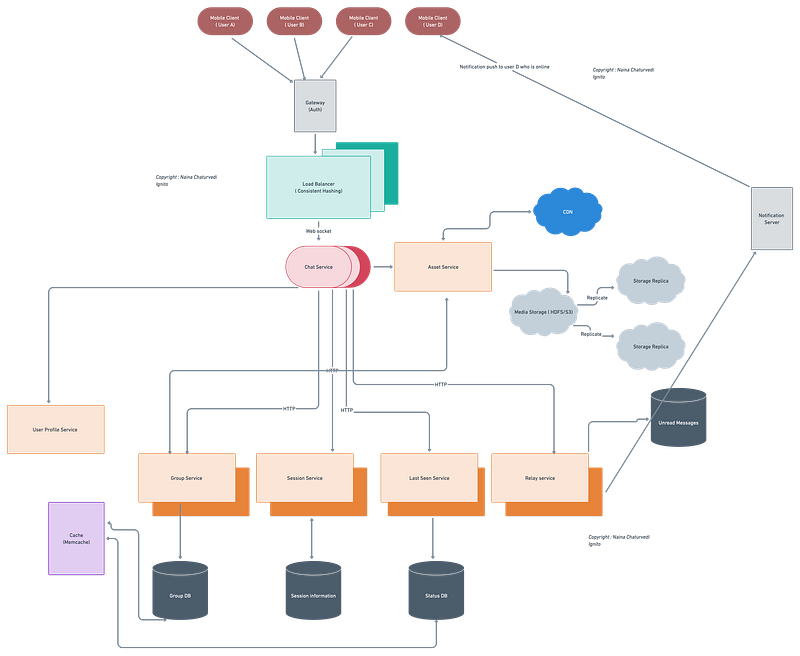
Hello peeps! Welcome to Day 35 of System Design Case studies series where we will design Telegram, Leetcode, Udacity, Meesho, Alipay, Zoom.
This post covers system design for ( scroll till the end of the post) —
Note : Please read System Design Important Terms you MUST know before reading this post.
Projects Videos —
All the projects, data structures, SQL, algorithms, system design, Data Science and ML , Data Analytics, Data Engineering, , Implemented Data Science and ML projects, Implemented Data Engineering Projects, Implemented Deep Learning Projects, Implemented Machine Learning Ops Projects, Implemented Time Series Analysis and Forecasting Projects, Implemented Applied Machine Learning Projects, Implemented Tensorflow and Keras Projects, Implemented PyTorch Projects, Implemented Scikit Learn Projects, Implemented Big Data Projects, Implemented Cloud Machine Learning Projects, Implemented Neural Networks Projects, Implemented OpenCV Projects,Complete ML Research Papers Summarized, Implemented Data Analytics projects, Implemented Data Visualization Projects, Implemented Data Mining Projects, Implemented Natural Leaning Processing Projects, MLOps and Deep Learning, Applied Machine Learning with Projects Series, PyTorch with Projects Series, Tensorflow and Keras with Projects Series, Scikit Learn Series with Projects, Time Series Analysis and Forecasting with Projects Series, ML System Design Case Studies Series videos will be published on our youtube channel ( just launched).
Subscribe today!
Tech Newsletter —
If you are interested, you can join my newsletter through which I send tech interview tips, techniques, patterns, hacks — Software Development, ML, Data Science, Startups and Technology projects to more than 30K readers. You can subscribe to Tech Brew :
System Design Case Studies — In Depth
Design Tinder
Design TikTok
Design Twitter
Design URL Shortener
Design Dropbox
Design Youtube
Design API Rate Limiter
Design Web Crawler
Design Facebook’s Newsfeed
Design Yelp
Design Instagram
Design Uber
Most Popular System Design Questions
Mega Compilation : Solved System Design Case studies
We will be discussing in depth -
- What is Telegram?
- Important Features
- Scaling Requirements — Capacity Estimation
- Data Model — ER requirements
- High Level Design
- Basic Low Level Design
- API Design
- Complete Detailed Design
- Complete Code Implementation
Pre-requisite to this post -
Complete System Design Series — Important Concepts that you should know before starting the Case studies
6. Networking, How Browsers work, Content Network Delivery ( CDN)
13. System Design Template — How to solve any System Design Question
Github —
Day 1 of System Design Case Studies can be found below-
Day 2 of System Design Case Studies can be found below-
Day 3 of System Design Case Studies can be found below-
What is Telegram?

Telegram is an app platform which lets users —
- Send and receive text/photos/videos messages
- Call — Audio or video call
- Set Status
- Create user groups and send group messages
- Read Receipts
Users can be both mobile based and web based.
Designing Telegram would involve:
- User registration and authentication: Allow users to create an account and log in to the platform, using a phone number or email address as the primary identifier.
- Contact list: Allow users to add contacts to their list, and automatically detect and suggest contacts from the user’s phone’s address book or email address book.
- Messaging: Allow users to send and receive text messages, images, videos, and other types of media.
- Media compression: Optimize the size and quality of media files to reduce data usage and improve the speed of sending and receiving messages.
- Encryption: Implement end-to-end encryption to protect the privacy and security of messages and media.
- Group chat: Allow users to create and participate in group chats with up to 200,000 participants.
- Voice and video call: Allow users to make voice and video calls to other Telegram users.
- Channels: Allow users to create and join channels to broadcast messages to large audiences.
- Bots: Allow developers to create custom bots that can automate tasks and provide services such as weather forecasts or news updates.
- Secret chat: Allow users to initiate secret chats that use end-to-end encryption and self-destruct timer.
- Multi-language support: Support multiple languages to make the platform accessible to a global audience.
- Support and customer service: Provide customer service and support, such as a help center and FAQs.
- Scalability: Design the platform to handle a large number of users and messages, and be able to scale as the platform grows.
- Data and analytics: Collect data on user behavior and usage, and use analytics to improve the platform and make data-driven decisions.
- A/B testing: Regularly perform A/B testing on different features and algorithms to ensure that the platform is providing the best possible user experience.
- Cloud-based: Telegram is cloud-based, so messages can be accessed from multiple devices, and users can log in from anywhere.
Important Features
We will consider the most important features —
One to one message
Send media ( photos)
Notifications Push
Group messaging
Scaling Requirements — Capacity Estimation
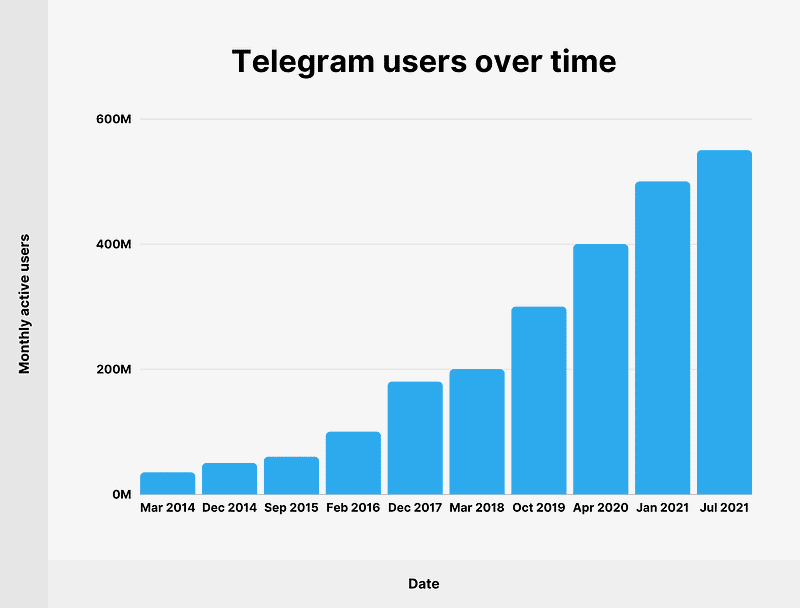
For the sake of simplicity, I’ll show a small scale simulation.
Let’s say we have —
Daily active users ( DAU) : 200 million
Messages per user ( within a day) : 20
Total messages/day : 4 Billion messages
Storage Estimation —
Message size : 80 bytes
Total Storage per day : 4 billion messages * 80 bytes = 320 GB/day
For next 3 years, 320 GB * 3 * 365 = 350 TB
Data Model — ER requirements
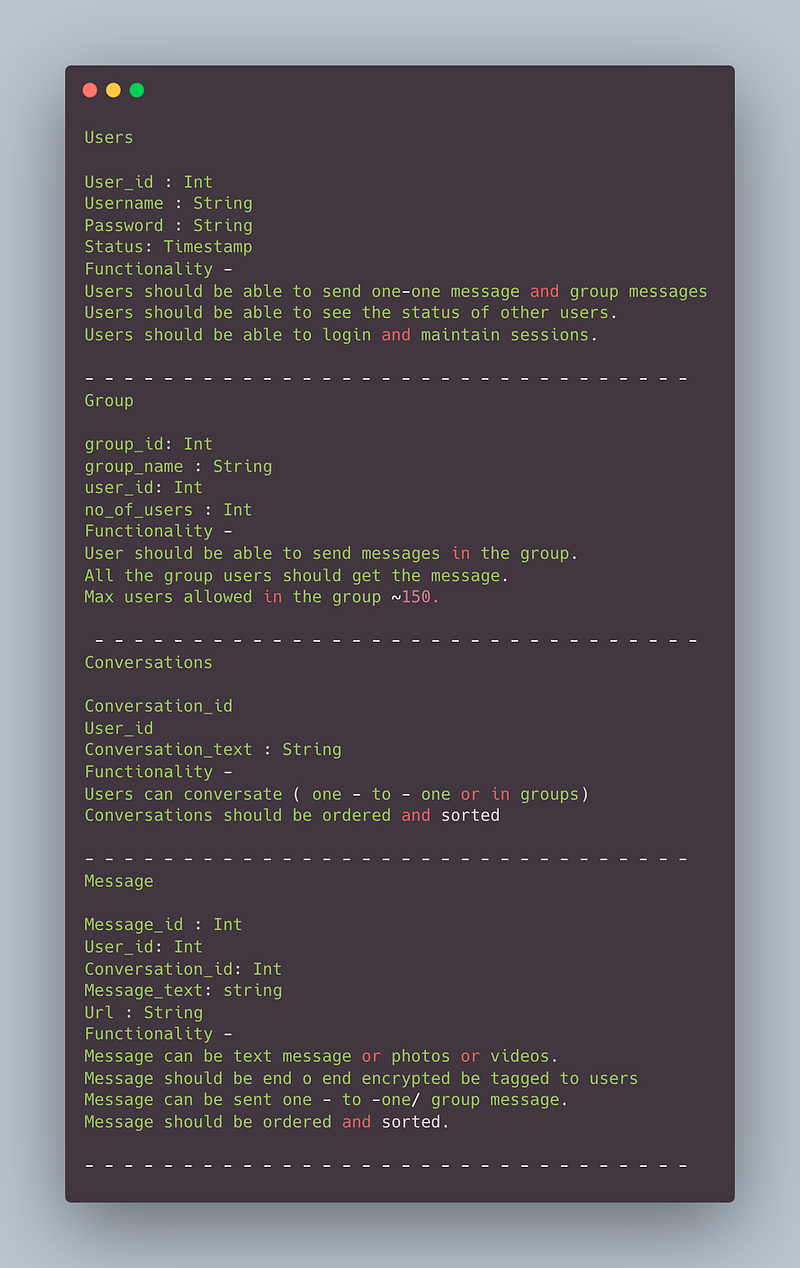
Users
User_id : Int
Username : String
Password : String
Status: Timestamp
Functionality —
- Users should be able to send one-one message and group messages
- Users should be able to see the status of other users.
- Users should be able to login and maintain sessions.
— — — — — — — — — — — — — — — — — — — — — — — — — — — — — — -
Group
group_id: Int
group_name : String
user_id: Int
no_of_users : Int
Functionality —
- User should be able to send messages in the group.
- All the group users should get the message.
- Max users allowed in the group ~150.
— — — — — — — — — — — — — — — — — — — — — — — — — — — — — — -
Conversations
Conversation_id
User_id
Conversation_text : String
Functionality —
- Users can conversate ( one — to — one or in groups)
- Conversations should be ordered and sorted
— — — — — — — — — — — — — — — — — — — — — — — — — — — — — — -
Message
Message_id : Int
User_id: Int
Conversation_id: Int
Message_text: string
Url : String
Functionality —
- Message can be text message or photos or videos.
- Message should be end o end encrypted be tagged to users
- Message can be sent one — to -one/ group message.
- Message should be ordered and sorted.
— — — — — — — — — — — — — — — — — — — — — — — — — — — — — — -
High Level Design
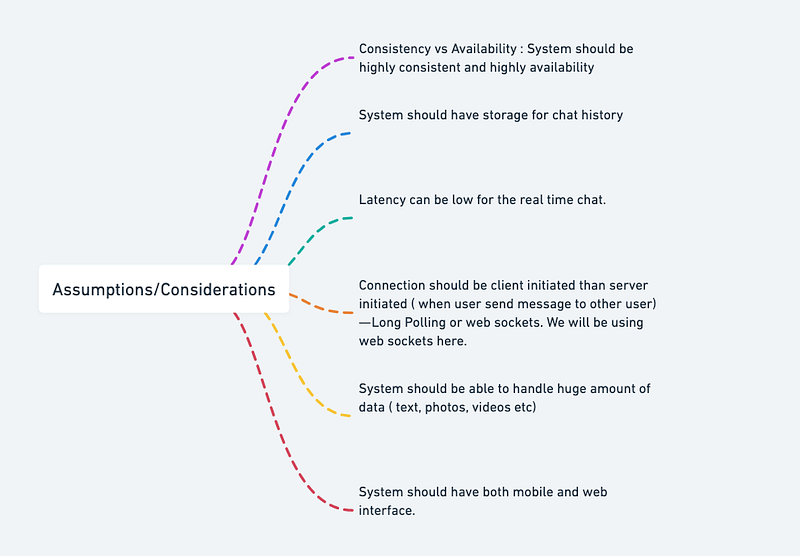
Assumptions on technical aspects —
- System should be highly reliable and available.
- System should have both mobile and web interface.
- System should have storage for chat history
- System should be able to handle huge amount of data ( text, photos, videos etc)
- End — to- End encryption
- Latency can be low for the real time chat.
- Consistency vs Availability : System should be highly consistent and highly availability
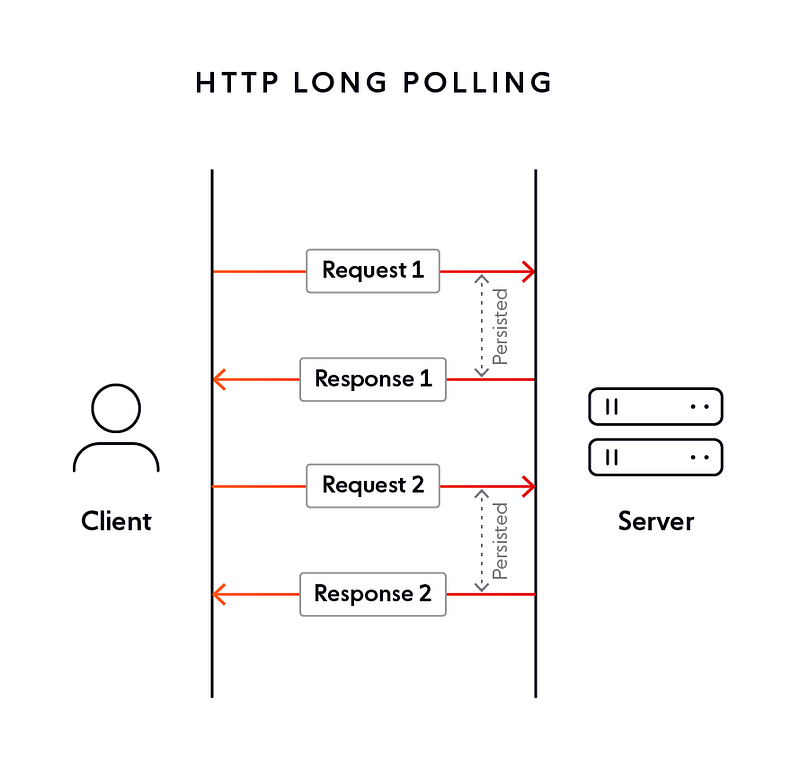
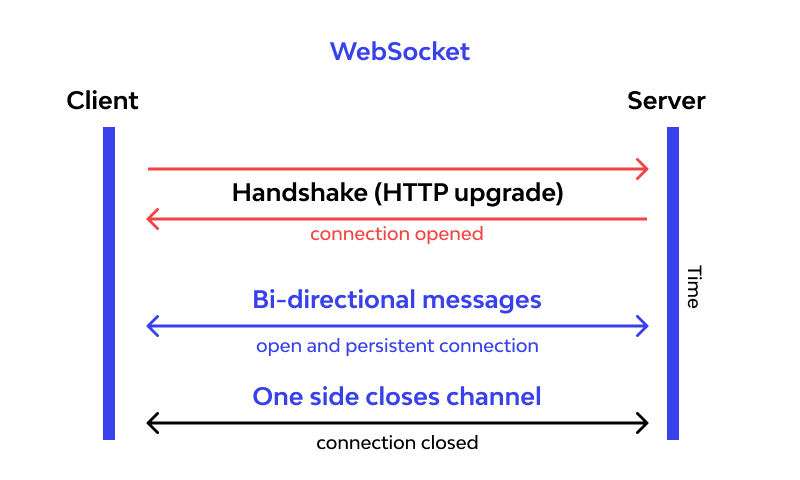
- Connection should be client initiated than server initiated ( when user send message to other user) — Long Polling or web sockets. We will be using web sockets here.
In long polling the server keeps the the client’s connection open until a timeout threshold has reached.
Web sockets — Using web sockets, the connection is persistent and two way ( bidirectional) using which the server can send messages/updates to client periodically.
Components
- Client : Both mobile and web Users
- Application Servers : Should be able to talk each other
- Load Balancers : To allocate requests to designated Application server using consistent hashing
- Chat Service : To store and relay message
- Web Sockets : For Full duplex connection
- Database : Cassandra db or Hbase — Key value stores allow for great horizontal scaling and low latency to access data. HBase is a column-oriented key-value NoSQL database.
- Sessions Service : To store the sessions information of the different users
- Cache
- Media Storage ( S3) : To store photos/videos
- Content Delivery Network
- Notification Service : To push notifications to the users when the status is offline
Services
Before we go in depth with respect to services, first understand what is stateless and stateful services. Stateless service ( which can be monolithic services) doesn’t require the server to retain any information about the state whereas Stateful services requires to save the information about the users session and the connection is persistent to a chat server.
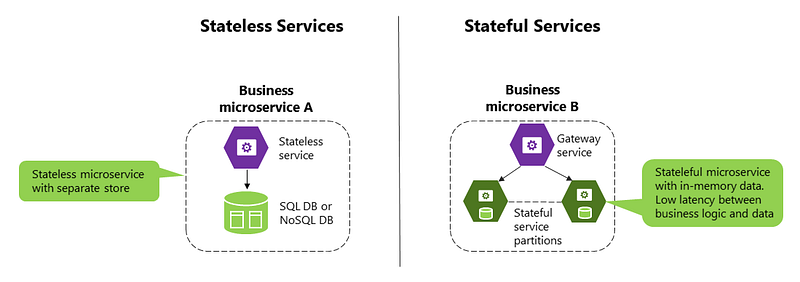
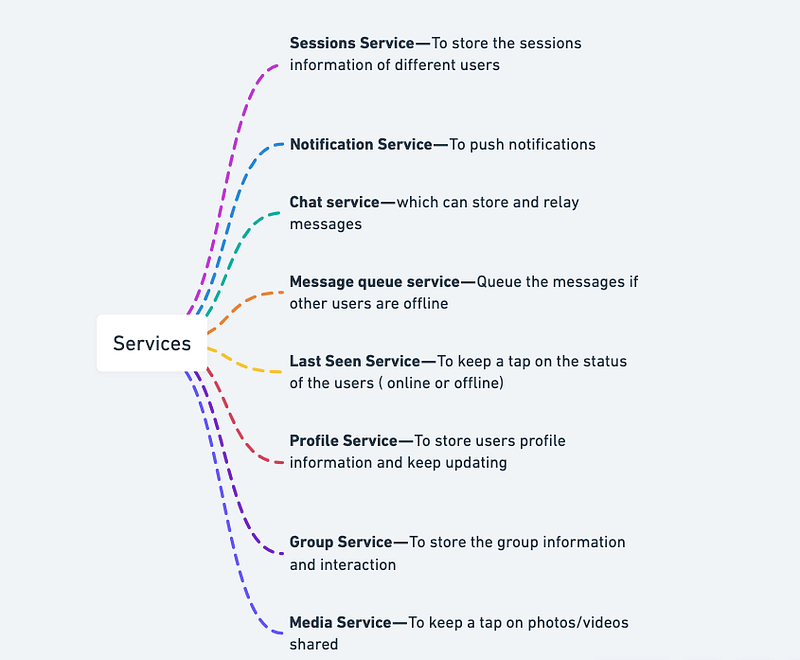
- Sessions Service — To store the sessions information of different users
- Notification Service — To push notifications
- Chat service — which can store and relay messages
- Message queue service — Queue the messages if other users are offline
- Last Seen Service — To keep a tap on the status of the users ( online or offline)
- Profile Service — To store users profile information and keep updating
- Group Service — To store the group information and interaction
- Media Service — To keep a tap on photos/videos shared
Basic Low Level Design
import java.util.*;

class User {
    private String id;
    private String username;
    private List<Message> messages;

    public User(String username) {
        this.id = UUID.randomUUID().toString();
        this.username = username;
        this.messages = new ArrayList<>();
    }

    public void sendMessage(User recipient, String content) {
        Message message = new Message(this, recipient, content);
        messages.add(message);
        recipient.receiveMessage(message);
    }

    public void receiveMessage(Message message) {
        messages.add(message);
    }

    public List<Message> getMessages() {
        return messages;
    }

    // Getters and setters
}

class Message {
    private User sender;
    private User recipient;
    private String content;
    private Date timestamp;

    public Message(User sender, User recipient, String content) {
        this.sender = sender;
        this.recipient = recipient;
        this.content = content;
        this.timestamp = new Date();
    }

    // Getters and setters
}

class TelegramSystem {
    private Map<String, User> users;

    public TelegramSystem() {
        this.users = new HashMap<>();
    }

    public void registerUser(String username) {
        User user = new User(username);
        users.put(user.getId(), user);
    }

    public void removeUser(String userId) {
        users.remove(userId);
    }

    public User getUser(String userId) {
        return users.get(userId);
    }
}

public class TelegramApp {
    public static void main(String[] args) {
        TelegramSystem telegram = new TelegramSystem();

        // Register users
        telegram.registerUser("user1");
        telegram.registerUser("user2");

        // Send messages
        User user1 = telegram.getUser("user1");
        User user2 = telegram.getUser("user2");
        user1.sendMessage(user2, "Hello, how are you?");

        // Print messages for a user
        User user = telegram.getUser("user2");
        List<Message> messages = user.getMessages();
        System.out.println("Messages for User: " + user.getUsername());
        for (Message message : messages) {
            System.out.println("Sender: " + message.getSender().getUsername());
            System.out.println("Content: " + message.getContent());
            System.out.println("Timestamp: " + message.getTimestamp());
            System.out.println();
        }
    }
}
API Design
API design will be further discussed in the workflow video ( Coming soon. Subscribe Today)
Complete Detailed Design
( Zoom it)
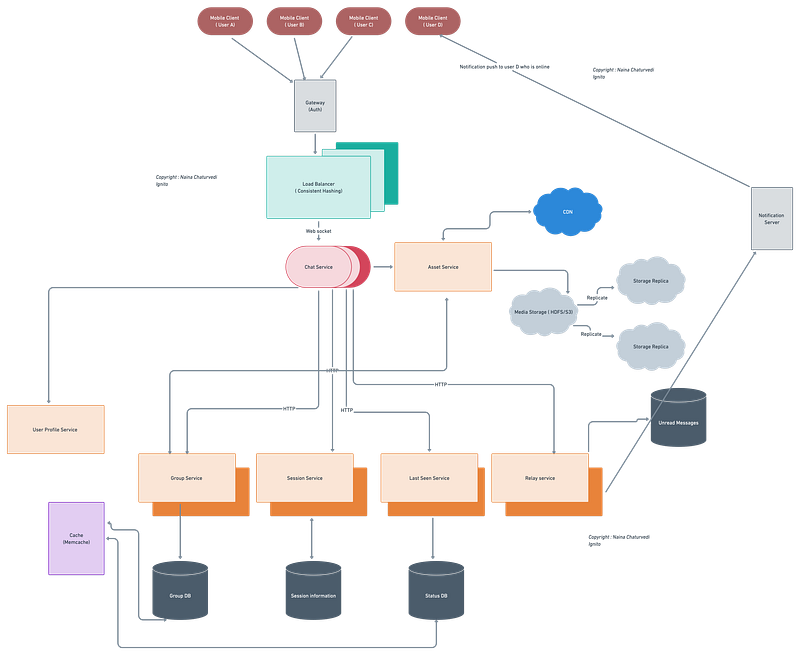
Complete Code
One-to-One Messaging
from sqlalchemy import Column, String, Integer
from sqlalchemy.ext.declarative import declarative_base

Base = declarative_base()

class User(Base):
    __tablename__ = 'users'
    id = Column(Integer, primary_key=True)
    username = Column(String)
    # Add more user fields as needed

class Message(Base):
    __tablename__ = 'messages'
    id = Column(Integer, primary_key=True)
    sender_id = Column(Integer)
    receiver_id = Column(Integer)
    content = Column(String)
    # Add more message fields as needed
Send and receive messages between users
from telegram.ext import Updater, MessageHandler, Filters

def handle_message(update, context):
    message = update.message
    sender_id = message.from_user.id
    receiver_id = message.chat_id
    content = message.text

    # Save the message to the database

    context.bot.send_message(chat_id=receiver_id, text='Reply')

updater = Updater('YOUR_TELEGRAM_API_TOKEN')
dispatcher = updater.dispatcher
dispatcher.add_handler(MessageHandler(Filters.text, handle_message))
updater.start_polling()
Sending Media (Photos)
def handle_photo(update, context):
    message = update.message
    sender_id = message.from_user.id
    receiver_id = message.chat_id
    photo = message.photo[-1].file_id

    # Save the photo to the server/cloud storage and get the URL

    # Save the URL to the database

    context.bot.send_photo(chat_id=receiver_id, photo=photo)

dispatcher.add_handler(MessageHandler(Filters.photo, handle_photo))
Push Notifications
import requests

def send_push_notification(user_id, message):
    # Send push notification using the FCM API
    # Replace with appropriate FCM API endpoint and authorization headers
    endpoint = 'https://fcm.googleapis.com/fcm/send'
    headers = {
        'Authorization': 'YOUR_FCM_AUTHORIZATION',
        'Content-Type': 'application/json'
    }
    data = {
        'to': user_id,
        'notification': {
            'body': message
        }
    }
    response = requests.post(endpoint, headers=headers, json=data)
    # Handle the response

# Call this function when a user receives a new message
send_push_notification(user_id, 'You have a new message!')
Group Messaging
class Group(Base):
    __tablename__ = 'groups'
    id = Column(Integer, primary_key=True)
    name = Column(String)

class GroupMessage(Base):
    __tablename__ = 'group_messages'
    id = Column(Integer, primary_key=True)
    group_id = Column(Integer)
    sender_id = Column(Integer)
    content = Column(String)
    # Add more group message fields as needed

def handle_group_message(update, context):
    message = update.message
    group_id = message.chat_id
    sender_id = message.from_user.id
    content = message.text

    # Save the group message to the database

    context.bot.send_message(chat_id=group_id, text='Reply')

dispatcher.add_handler(MessageHandler(Filters.group, handle_group_message))
Sending/Receiving Text, Photos, and Videos
def handle_media_message(update, context):
    message = update.message
    sender_id = message.from_user.id
    receiver_id = message.chat_id

    if message.text:
        content = message.text
        # Handle text message
    elif message.photo:
        photo = message.photo[-1].file_id
        # Save the photo to the server/cloud storage and get the URL
        # Save the URL to the database
        # Handle photo message
    elif message.video:
        video = message.video.file_id
        # Save the video to the server/cloud storage and get the URL
        # Save the URL to the database
        # Handle video message
    else:
        # Handle unsupported media types

    context.bot.send_message(chat_id=receiver_id, text='Reply')

dispatcher.add_handler(MessageHandler(Filters.media, handle_media_message))
Setting Status
class User(Base):
    __tablename__ = 'users'
    id = Column(Integer, primary_key=True)
    username = Column(String)
    status = Column(String)  # Status message field

def set_status(update, context):
    user_id = update.message.from_user.id
    new_status = update.message.text

    # Update the user's status in the database

    context.bot.send_message(chat_id=user_id, text='Status updated')

dispatcher.add_handler(MessageHandler(Filters.regex(r'^/status'), set_status))
System Design — Leetcode
We will be discussing in depth -
- What is Leetcode
- Important Features
- Scaling Requirements — Capacity Estimation
- Data Model — ER requirements
- High Level Design
- Basic Low Level Design
- API Design
- Complete Detailed Design
- Complete Code Implementation

What is Leetcode
Leetcode is an online platform that offers a vast collection of coding problems and challenges for software engineers to improve their coding skills and prepare for technical interviews. It provides a range of algorithmic and system design problems, with solutions in multiple programming languages. Leetcode also offers a built-in coding environment for users to test their code and compare it against expected outputs.
Important Features
- Problem Repository: Leetcode hosts a comprehensive collection of coding problems across various difficulty levels and categories.
- Solutions and Discussions: Users can access solutions and discussions for each problem, enabling them to learn from different approaches and gain insights from the community.
- User Profiles: Leetcode provides user profiles, allowing users to track their progress, view their submissions, and compare themselves with others.
- Interview Preparation: Leetcode offers specific interview preparation sections, including mock interviews, company-specific questions, and detailed guides for technical interviews.
Scaling Requirements — Capacity Estimation
Let’s assume —
Total number of users: 50 million
Daily active users (DAU): 10 million
Number of problems solved by user/day: 5
Total number of problems solved per day: 50 million problems/day
Read to write ratio: 100:1
Total number of problems added per day = 1/100 * 50 million = 500,000 problems/day
Storage Estimation: Let’s assume an average problem size of 1 MB.
Total storage per day: 500,000 * 1 MB = 500 GB/day
For the next 3 years, 500 GB * 5 * 365 = 912.5 TB
Requests per second: 50 million / 3600 seconds * 24 hours = 1,389 requests/second
class Leetcode:
    def __init__(self):
        self.problems = []
        self.users = []

    def add_problem(self, problem):
        self.problems.append(problem)

    def add_user(self, user):
        self.users.append(user)

    def get_total_problems_solved(self):
        total_problems_solved = sum(user.problems_solved for user in self.users)
        return total_problems_solved

    def get_total_storage_per_day(self):
        total_storage = len(self.problems) * 1  # Assuming each problem is 1 MB
        return total_storage

    def get_total_storage_for_years(self, num_of_years):
        total_storage_per_day = self.get_total_storage_per_day()
        total_storage_for_years = total_storage_per_day * num_of_years * 365
        return total_storage_for_years

    def get_requests_per_second(self):
        total_active_users = sum(user.is_active for user in self.users)
        requests_per_second = (total_active_users / 3600) * 24
        return requests_per_second


class Problem:
    def __init__(self, title, difficulty):
        self.title = title
        self.difficulty = difficulty


class User:
    def __init__(self, name, is_active, problems_solved):
        self.name = name
        self.is_active = is_active
        self.problems_solved = problems_solved


leetcode = Leetcode()

# Adding problems
leetcode.add_problem(Problem("Two Sum", "Easy"))
leetcode.add_problem(Problem("Add Two Numbers", "Medium"))
# ...

# Adding users
leetcode.add_user(User("John Doe", True, 10))
leetcode.add_user(User("Jane Smith", False, 5))
# ...

# Simulation results
total_problems_solved = leetcode.get_total_problems_solved()
total_storage_per_day = leetcode.get_total_storage_per_day()
total_storage_for_years = leetcode.get_total_storage_for_years(3)
requests_per_second = leetcode.get_requests_per_second()

print(f"Total problems solved: {total_problems_solved}")
print(f"Total storage per day: {total_storage_per_day} MB")
print(f"Total storage for 3 years: {total_storage_for_years} TB")
print(f"Requests per second: {requests_per_second}")
Load Balancing: Distributing user requests across multiple servers to handle concurrent traffic efficiently.
Caching: Implementing caching mechanisms to reduce database load and improve response times.
Database Scaling: Utilizing database scaling techniques such as sharding, replication, and indexing to handle large amounts of data and concurrent transactions.
Content Delivery Network (CDN): Utilizing a CDN to serve static content, reducing latency and improving user experience for users across different regions.
Data Model — ER requirements
Users:
- Fields: UserID (Primary Key), Username, Email, Password
- Relationships: None
Problems:
- Fields: ProblemID (Primary Key), Title, Difficulty, Category
- Relationships: None
Submissions:
- Fields: SubmissionID (Primary Key), UserID (Foreign Key from Users), ProblemID (Foreign Key from Problems), Code, Timestamp
- Relationships: One-to-Many relationship with Users (each user can have multiple submissions), One-to-Many relationship with Problems (each problem can have multiple submissions)
Discussions:
- Fields: DiscussionID (Primary Key), ProblemID (Foreign Key from Problems), UserID (Foreign Key from Users), Comment, Timestamp
- Relationships: One-to-Many relationship with Users (each user can have multiple discussions), One-to-Many relationship with Problems (each problem can have multiple discussions)
Users: Storing user information, including profile details, coding history, and subscriptions.
Problems: Storing problem details, including problem statements, categories, and difficulty levels.
Submissions: Tracking user submissions, including code solutions, timestamps, and execution results.
Discussions: Managing user discussions on specific problems, including comments, replies, and votes.
High Level Design
Assumptions:
- There will be more reads than writes, so we need to design a read-heavy system.
- We will scale horizontally (scale-out) to handle the increased load.
- Services should be highly available and reliable.
- Latency should be kept low for optimal user experience.
- Consistency and availability are prioritized over strong consistency.
Main Components and Services:
- Mobile Client: Users accessing Leetcode through mobile devices.
- Application Servers: Responsible for handling read and write operations, as well as notification services.
- Load Balancer: Routes and distributes incoming requests to the appropriate application servers.
- Cache (e.g., Memcached, Redis): Caches frequently accessed data to improve response times and reduce database load.
- Content Delivery Network (CDN): Delivers static content, such as problem statements and user avatars, to users efficiently.
- Database: Stores user data, problem information, submissions, and discussions. It should support high reliability and scalability.
- Storage (e.g., HDFS, Amazon S3): Stores code submissions, problem statements, and other large files.
Services:
- User Service: Handles user registration, authentication, and profile management.
- Problem Service: Manages problem data, including retrieving problem details and categories.
- Submission Service: Handles code submissions, execution, and storing submission records.
- Discussion Service: Manages discussions related to problems, including commenting and retrieving discussions.
- Notification Service: Sends notifications to users for activities like new comments, replies, or problem updates.
Frontend: Implementing a responsive web application with an intuitive user interface for problem browsing, code submission, and profile management.
Backend: Utilizing a microservices architecture to handle different components, such as user management, problem storage, submission processing, and discussion forums.
File Storage: Integrating a scalable and reliable file storage system to store problem statements, code submissions, and user avatars.
Database Management: Selecting an appropriate database system, such as relational or NoSQL, to store user data, problem information, and submission records.
Caching Layer: Utilizing a caching layer, such as Redis or Memcached, to improve response times for frequently accessed data.
Message Queue: Using a message queue system to handle asynchronous tasks, such as code execution, notifications, and processing user interactions.
Basic Low Level Design
User Management API:
- Create User:
POST /users - Get User by ID:
GET /users/{user_id} - Update User:
PATCH /users/{user_id} - Delete User:
DELETE /users/{user_id}
Problem API:
- Get Problem by ID:
GET /problems/{problem_id} - Get Problems by Category:
GET /problems?category={category} - Get Problems by Difficulty:
GET /problems?difficulty={difficulty}
Submission API:
- Submit Code:
POST /problems/{problem_id}/submissions - Get Submission by ID:
GET /submissions/{submission_id} - Get Submissions by User:
GET /users/{user_id}/submissions
Comment API:
- Create Comment:
POST /problems/{problem_id}/comments - Reply to Comment:
POST /comments/{comment_id}/replies - Get Comments for Problem:
GET /problems/{problem_id}/comments - Get Comments for User:
GET /users/{user_id}/comments
Like API:
- Like Submission:
POST /submissions/{submission_id}/likes - Unlike Submission:
DELETE /submissions/{submission_id}/likes - Get Likes for Submission:
GET /submissions/{submission_id}/likes
Feed API:
- Get Feed for User:
GET /users/{user_id}/feed - Get Popular Problems:
GET /problems/popular - Get Latest Submissions:
GET /submissions/latest
class User:
    def __init__(self, user_id, username, password):
        self.user_id = user_id
        self.username = username
        self.password = password
        # Other user attributes (e.g., email, progress)

class Problem:
    def __init__(self, problem_id, title, difficulty, category):
        self.problem_id = problem_id
        self.title = title
        self.difficulty = difficulty
        self.category = category

class Submission:
    def __init__(self, submission_id, user_id, problem_id, code, timestamp):
        self.submission_id = submission_id
        self.user_id = user_id
        self.problem_id = problem_id
        self.code = code
        self.timestamp = timestamp

class Comment:
    def __init__(self, comment_id, post_id, user_id, text, timestamp):
        self.comment_id = comment_id
        self.post_id = post_id
        self.user_id = user_id
        self.text = text
        self.timestamp = timestamp

# Other classes such as Post, Like, etc. can be added as needed
API Design
User Management:
POST /api/register: Register a new user.POST /api/login: Authenticate and log in a user.GET /api/users/{user_id}: Retrieve user details.PUT /api/users/{user_id}: Update user profile.
Problem Management:
GET /api/problems: Retrieve a list of all problems.GET /api/problems/{problem_id}: Retrieve details of a specific problem.GET /api/problems/categories: Retrieve problem categories.GET /api/problems/difficulties: Retrieve problem difficulty levels.
Submission Processing:
POST /api/problems/{problem_id}/submit: Submit a code solution for a problem.GET /api/submissions/{submission_id}: Retrieve details of a submission.GET /api/problems/{problem_id}/submissions: Retrieve all submissions for a problem.
Discussion Forums:
POST /api/problems/{problem_id}/discussions: Create a new discussion thread for a problem.GET /api/discussions/{discussion_id}: Retrieve details of a discussion.POST /api/discussions/{discussion_id}/comments: Add a comment to a discussion.POST /api/comments/{comment_id}/reply: Add a reply to a comment.POST /api/comments/{comment_id}/vote: Vote on a comment.
from flask import Flask, request, jsonify

app = Flask(__name__)

# Sample data for users, problems, submissions, and comments
users = {
    "user1": {
        "user_id": "user1",
        "username": "JohnDoe",
        "password": "password123"
        # Other user attributes
    },
    "user2": {
        "user_id": "user2",
        "username": "JaneSmith",
        "password": "password456"
        # Other user attributes
    }
}

problems = {
    "problem1": {
        "problem_id": "problem1",
        "title": "Two Sum",
        "difficulty": "Easy",
        "category": "Array"
        # Other problem attributes
    },
    "problem2": {
        "problem_id": "problem2",
        "title": "Add Two Numbers",
        "difficulty": "Medium",
        "category": "Linked List"
        # Other problem attributes
    }
}

submissions = {
    "submission1": {
        "submission_id": "submission1",
        "user_id": "user1",
        "problem_id": "problem1",
        "code": "print('Hello, World!')",
        "timestamp": "2022-07-01 10:00:00"
        # Other submission attributes
    },
    "submission2": {
        "submission_id": "submission2",
        "user_id": "user2",
        "problem_id": "problem2",
        "code": "def addTwoNumbers(self, l1, l2): \n    # Code logic...",
        "timestamp": "2022-07-02 14:30:00"
        # Other submission attributes
    }
}

comments = {
    "comment1": {
        "comment_id": "comment1",
        "post_id": "problem1",
        "user_id": "user2",
        "text": "Great problem!",
        "timestamp": "2022-07-01 11:00:00"
        # Other comment attributes
    },
    "comment2": {
        "comment_id": "comment2",
        "post_id": "problem2",
        "user_id": "user1",
        "text": "Nice solution!",
        "timestamp": "2022-07-02 15:00:00"
        # Other comment attributes
    }
}

# User Management API

@app.route('/users', methods=['POST'])
def create_user():
    data = request.json
    user_id = data['user_id']
    username = data['username']
    password = data['password']
    # Create user logic...
    users[user_id] = {
        'user_id': user_id,
        'username': username,
        'password': password
    }
    return jsonify({'message': 'User created successfully'})

@app.route('/users/<user_id>', methods=['GET'])
def get_user(user_id):
    if user_id in users:
        return jsonify(users[user_id])
    else:
        return jsonify({'message': 'User not found'}), 404

@app.route('/users/<user_id>', methods=['PATCH'])
def update_user(user_id):
    if user_id in users:
        data = request.json
        # Update user logic...
        users[user_id]['username'] = data['username']
        users[user_id]['password'] = data['password']
        return jsonify({'message': 'User updated successfully'})
    else:
        return jsonify({'message': 'User not found'}), 404

@app.route('/users/<user_id>', methods=['DELETE'])
def delete_user(user_id):
    if user_id in users:
        # Delete user logic...
        del users[user_id]
        return jsonify({'message': 'User deleted successfully'})
    else:
        return jsonify({'message': 'User not found'}), 404

# Problem API

@app.route('/problems/<problem_id>', methods=['GET'])
def get_problem(problem_id):
    if problem_id in problems:
        return jsonify(problems[problem_id])
    else:
        return jsonify({'message': 'Problem not found'}), 404

# Submission API

@app.route('/problems/<problem_id>/submissions', methods=['POST'])
def submit_code(problem_id):
    data = request.json
    user_id = data['user_id']
    code = data['code']
    # Submit code logic...
    submission_id = f"submission{len(submissions) + 1}"
    submissions[submission_id] = {
        'submission_id': submission_id,
        'user_id': user_id,
        'problem_id': problem_id,
        'code': code,
        'timestamp': '2022-07-05 09:00:00'
    }
    return jsonify({'message': 'Code submitted successfully'})

@app.route('/submissions/<submission_id>', methods=['GET'])
def get_submission(submission_id):
    if submission_id in submissions:
        return jsonify(submissions[submission_id])
    else:
        return jsonify({'message': 'Submission not found'}), 404

@app.route('/users/<user_id>/submissions', methods=['GET'])
def get_user_submissions(user_id):
    user_submissions = [submission for submission in submissions.values() if submission['user_id'] == user_id]
    return jsonify(user_submissions)

# Comment API

@app.route('/problems/<problem_id>/comments', methods=['POST'])
def create_comment(problem_id):
    data = request.json
    post_id = problem_id
    user_id = data['user_id']
    text = data['text']
    # Create comment logic...
    comment_id = f"comment{len(comments) + 1}"
    comments[comment_id] = {
        'comment_id': comment_id,
        'post_id': post_id,
        'user_id': user_id,
        'text': text,
        'timestamp': '2022-07-05 10:00:00'
    }
    return jsonify({'message': 'Comment created successfully'})

@app.route('/problems/<problem_id>/comments', methods=['GET'])
def get_problem_comments(problem_id):
    problem_comments = [comment for comment in comments.values() if comment['post_id'] == problem_id]
    return jsonify(problem_comments)

# Additional API endpoints can be implemented similarly

if __name__ == '__main__':
    app.run()
User Management: APIs for user registration, authentication, profile management, and subscription handling.
Problem Management: APIs for problem retrieval, searching, and categorization.
Submission Processing: APIs for submitting code solutions, executing code, and retrieving submission results.
Discussion Forums: APIs for creating and managing discussions, including commenting, voting, and notification handling.
Complete Detailed Design
Coming soon! It will be covered on youtube channel.
Subscribe to youtube channel :
Complete Code implementation
a. Problem Repository:
class Leetcode:
    def __init__(self):
        self.problems = []
def add_problem(self, problem):
self.problems.append(problem) def get_problems(self):
return self.problemsclass Problem:
def __init__(self, title, difficulty, category):
self.title = title
self.difficulty = difficulty
self.category = categoryleetcode = Leetcode()
leetcode.add_problem(Problem("Two Sum", "Easy", "Array"))
leetcode.add_problem(Problem("Add Two Numbers", "Medium", "Linked List"))problems = leetcode.get_problems()
for problem in problems:
print(f"Title: {problem.title}, Difficulty: {problem.difficulty}, Category: {problem.category}")b. Solutions and Discussions:
class Problem:
    def __init__(self, title, difficulty, category):
        self.title = title
        self.difficulty = difficulty
        self.category = category
self.solutions = []
self.discussions = [] def add_solution(self, solution):
self.solutions.append(solution) def add_discussion(self, discussion):
self.discussions.append(discussion)problem = Problem("Two Sum", "Easy", "Array")
problem.add_solution("Solution 1: Use a hash map")
problem.add_solution("Solution 2: Use two pointers")problem.add_discussion("Discussion 1: Time complexity analysis")
problem.add_discussion("Discussion 2: Optimization techniques")print(f"Problem: {problem.title}")
print("Solutions:")
for solution in problem.solutions:
print(solution)
print("Discussions:")
for discussion in problem.discussions:
print(discussion)c. User Profiles:
class User:
    def __init__(self, name, email):
        self.name = name
        self.email = email
        self.progress = 0
        self.submissions = []
def update_progress(self, new_progress):
self.progress = new_progress def add_submission(self, submission):
self.submissions.append(submission)user = User("John Doe", "[email protected]")
user.update_progress(75)
user.add_submission("Solution for Problem 1")print(f"Name: {user.name}, Email: {user.email}")
print(f"Progress: {user.progress}%")
print("Submissions:")
for submission in user.submissions:
print(submission)d. Interview Preparation:
class Leetcode:
    def __init__(self):
        self.interview_prep = []
def add_interview_prep(self, prep_item):
self.interview_prep.append(prep_item) def get_interview_prep(self):
return self.interview_prepleetcode = Leetcode()
leetcode.add_interview_prep("Mock interview with a coding challenge")
leetcode.add_interview_prep("Company-specific interview questions")interview_prep = leetcode.get_interview_prep()
print("Interview Preparation:")
for prep_item in interview_prep:
print(prep_item)System Design — Udacity
We will be discussing in depth -
- What is Udacity
- Important Features
- Scaling Requirements — Capacity Estimation
- Data Model — ER requirements
- High Level Design
- Basic Low Level Design
- API Design
- Complete Detailed Design
- Complete Code Implementation

What is Udacity
Udacity is an online learning platform that offers a wide range of courses and programs in various fields such as programming, data science, artificial intelligence, and more. It provides students with access to high-quality educational content, interactive exercises, and personalized feedback from instructors. Udacity aims to make education accessible to anyone, anywhere, and at any time.
Important Features
- Course Catalog: Udacity offers a comprehensive catalog of courses covering various subjects. Each course consists of lessons, quizzes, and projects designed to enhance the learning experience.
- Personalized Learning Paths: Students can define their learning goals and receive recommendations for courses and projects tailored to their needs. This feature ensures that learners can follow a structured path to achieve their objectives.
- Hands-on Projects: Udacity emphasizes practical learning by providing hands-on projects that allow students to apply the concepts they have learned. These projects often involve real-world scenarios and industry-relevant challenges.
- Feedback and Mentorship: Students receive feedback on their projects from qualified mentors who provide guidance and support throughout the learning journey. This feedback helps students improve their skills and gain valuable insights from industry professionals.
- Nanodegree Programs: Udacity offers specialized programs called Nanodegrees, which consist of a series of courses focused on specific skills or career paths. Nanodegrees are designed to provide in-depth knowledge and prepare students for relevant industry roles.
Scaling Requirements — Capacity Estimation
Let’s say —
Total number of users: 50 million
Daily active users (DAU): 10 million
Number of courses taken by a user per day: 2
Total number of course enrollments per day: 20 million enrollments
Since Udacity’s system is read-heavy, we’ll consider a read-to-write ratio of 100:1.
Storage Estimation:
Let’s assume the average size of a course is 200 MB.
Total storage per day: 20 million * 200 MB = 4 PB/day
For the next 3 years, 4 PB * 5 * 365 = 7,300 PB (7.3 EB)
Requests per second: 20 million / (3600 seconds * 24 hours) = 231 requests per second
Load Balancing: Implementing a load balancing mechanism allows for distributing incoming traffic across multiple servers. This ensures that the system can handle a large number of concurrent users without performance degradation.
Caching: Utilizing caching techniques, such as content delivery networks (CDNs) or in-memory caches, can reduce the load on the backend servers. Caching frequently accessed content improves response times and enhances scalability.
Horizontal Scaling: Scaling horizontally involves adding more servers to the system to handle increased traffic. This approach enables the system to handle a growing number of users by distributing the workload across multiple instances.
Database Scaling: As the user base grows, scaling the database becomes crucial. Techniques like sharding, replication, and database partitioning can be employed to ensure efficient data storage and retrieval.
Data Model — ER requirements
Users:
- Fields:
- User_id: Int
- Username: String
- Email: String
- Password: String
Courses:
- Fields:
- Course_id: Int
- Name: String
- Description: String
- Duration: String
Enrollments:
- Fields:
- Enrollment_id: Int
- User_id: Int (Foreign key from Users table)
- Course_id: Int (Foreign key from Courses table)
- Enrollment_date: Date
- Progress: Float
Lessons:
- Fields:
- Lesson_id: Int
- Course_id: Int (Foreign key from Courses table)
- Title: String
- Content: String
Quizzes:
- Fields:
- Quiz_id: Int
- Course_id: Int (Foreign key from Courses table)
- Title: String
- Questions: List[String]
Projects:
- Fields:
- Project_id: Int
- Course_id: Int (Foreign key from Courses table)
- Title: String
- Description: String
User: Represents individual users of the platform. It stores information such as name, email, password, and user preferences.
Course: Represents the courses offered by Udacity. It includes details like the course name, description, duration, and associated resources.
Lesson: Represents the individual lessons within a course. It contains information about the lesson title, content, and any associated quizzes or projects.
Project: Represents the hands-on projects associated with a course. It includes project details, requirements, and grading criteria.
Mentor: Represents the mentors who provide feedback and guidance to students. It stores mentor information, such as name, expertise, and availability.
Enrollment: Represents the enrollment of users in specific courses. It establishes a relationship between users and courses, storing additional data like enrollment date and progress.
High Level Design
Assumptions:
- The system is read-heavy, with more users accessing course content than making updates.
- High availability and reliability are important.
- Latency should be kept low for a good user experience.
- The system should be scalable and able to handle increasing user traffic.
Main Components:
- Mobile Clients: Users accessing the Udacity platform through mobile applications.
- Application Servers: Handle user requests, perform read and write operations, and manage notifications.
- Load Balancer: Routes and balances requests across multiple application servers for scalability.
- Cache (Memcache): Caches frequently accessed data to improve performance and reduce database load.
- CDN (Content Delivery Network): Improves latency and throughput by caching and delivering static content.
- Database: Stores user and course data.
- Storage (e.g., HDFS or Amazon S3): Stores uploaded files and course materials.
Services:
- User Service: Manages user registration, authentication, and profile information.
- Course Service: Handles course-related operations such as retrieving course details, lessons, quizzes, and projects.
- Enrollment Service: Handles user enrollment and progress tracking.
- Lesson Service: Provides lesson content for courses.
- Quiz Service: Handles quizzes and question management.
- Project Service: Manages project-related operations.
- Feed Generation Service: Generates personalized feeds for users based on their enrolled courses, progress, and preferences.
- Notification Service: Sends notifications to users regarding course updates, new content, etc.
- Web Application Layer: Handles user interactions and presents the user interface. It includes components such as web servers, load balancers, and content delivery networks (CDNs).
- Application Layer: Implements the business logic and handles requests from the web application layer. It includes services for course management, user authentication, project evaluation, and content delivery.
- Database Layer: Stores and manages the system’s data. It includes databases for user profiles, course content, enrollment information, and mentorship data. Distributed databases and caching mechanisms may be employed for scalability and performance.
- External Services: Integrates with external services like payment gateways, email providers, and analytics platforms to support various functionalities within the system.
- User Authentication Service: Manages user authentication and authorization, including login, registration, and password management. It interacts with the user database for user-related operations.
- Course Content Service: Handles the storage and retrieval of course content such as lessons, quizzes, and projects. It ensures fast and reliable access to course materials.
- Project Evaluation Service: Evaluates and provides feedback on student projects. It interacts with the project database and mentorship services to facilitate the feedback process.
- Enrollment Service: Manages course enrollments, progress tracking, and completion certificates. It communicates with the user database and course management services to maintain enrollment data.
Basic Low Level Design
class User:
    def __init__(self, user_id, username, password):
        self.user_id = user_id
        self.username = username
        self.password = password
        # Other user attributes

class Course:
    def __init__(self, course_id, name, description, duration):
        self.course_id = course_id
        self.name = name
        self.description = description
        self.duration = duration
        # Other course attributes

class Enrollment:
    def __init__(self, enrollment_id, user_id, course_id, enrollment_date, progress):
        self.enrollment_id = enrollment_id
        self.user_id = user_id
        self.course_id = course_id
        self.enrollment_date = enrollment_date
        self.progress = progress
        # Other enrollment attributes

class Lesson:
    def __init__(self, lesson_id, course_id, title, content):
        self.lesson_id = lesson_id
        self.course_id = course_id
        self.title = title
        self.content = content
        # Other lesson attributes

class Quiz:
    def __init__(self, quiz_id, course_id, title, questions):
        self.quiz_id = quiz_id
        self.course_id = course_id
        self.title = title
        self.questions = questions
        # Other quiz attributes

class Project:
    def __init__(self, project_id, course_id, title, description):
        self.project_id = project_id
        self.course_id = course_id
        self.title = title
        self.description = description
        # Other project attributes

class Udacity:
    def __init__(self):
        self.users = {}
        self.courses = []
        # Other class attributes and initialization logic

    def add_user(self, user):
        self.users[user.user_id] = user

    def get_user_by_id(self, user_id):
        return self.users.get(user_id)

    def create_course(self, course_id, name, description, duration):
        course = Course(course_id, name, description, duration)
        self.courses.append(course)
        # Additional logic for course creation

    # Additional methods for handling enrollments, lessons, quizzes, projects, etc.
API Design
User API: Provides endpoints for user registration, login, profile updates, and preferences management.
Course API: Offers endpoints for retrieving course information, lesson content, and project details.
Enrollment API: Enables operations related to course enrollment, progress tracking, and completion status.
Feedback API: Allows the submission and retrieval of project feedback between students and mentors.
User API:
Endpoint: /users/register

Method: POST
Description: Registers a new user.
Request Body:

{
    "name": "John Doe",
    "email": "[email protected]",
    "password": "password123"
}
Response:

{
    "user_id": "123456789",
    "message": "User registered successfully."
}
Endpoint: /users/login

Method: POST
Description: Authenticates a user and generates an access token.
Request Body:

{
    "email": "[email protected]",
    "password": "password123"
}
Response:

{
    "access_token": "eyJhbGciOiJIUzI1NiIsInR5cCI6IkpXVCJ9.eyJ1c2VyX2lkIjoiMTIzNDU2Nzg5IiwiaWF0IjoxNjI2NzIxNTI2LCJleHAiOjE2MjY3MjUxMjZ9.oUDlms1SG2lGtStYVLFTnNCDZR8F5C2GzFv1e8-5zrM",
    "message": "User logged in successfully."
}
Course API:
Endpoint: /courses

Method: GET
Description: Retrieves a list of available courses.
Response:

{
    "courses": [
        {
            "course_id": "1",
            "name": "Introduction to Python",
            "description": "Learn the basics of Python programming.",
            "duration": "6 weeks"
        },
        {
            "course_id": "2",
            "name": "Data Science Fundamentals",
            "description": "Explore the foundations of data science.",
            "duration": "8 weeks"
        }
    ]
}
Endpoint: /courses/{course_id}

Method: GET
Description: Retrieves details of a specific course.
Response:

{
    "course_id": "1",
    "name": "Introduction to Python",
    "description": "Learn the basics of Python programming.",
    "duration": "6 weeks",
    "lessons": [
        {
            "lesson_id": "1",
            "title": "Python Variables and Data Types",
            "content": "Introduction to variables and different data types in Python."
        },
        {
            "lesson_id": "2",
            "title": "Python Control Flow",
            "content": "Learn about if-else statements and loops in Python."
        }
    ]
}
Enrollment API:
Endpoint: /enrollments

Method: POST
Description: Enrolls a user in a specific course.
Request Body:

{
    "user_id": "123456789",
    "course_id": "1"
}
Response:

{
    "enrollment_id": "987654321",
    "message": "User enrolled in the course successfully."
}
Endpoint: /enrollments/{enrollment_id}

Method: GET
Description: Retrieves details of a specific enrollment.
Response:

{
    "enrollment_id": "987654321",
    "user_id": "123456789",
    "course_id": "1",
    "enrollment_date": "2023-07-07",
    "progress": 0.5
}
Complete Detailed Design
Coming soon! It will be covered on youtube channel.
Subscribe to youtube channel :
Complete Code implementation
Course Catalog:
class Course:
    def __init__(self, course_id, name, description, duration):
        self.course_id = course_id
        self.name = name
        self.description = description
        self.duration = duration
        self.lessons = []
        self.quizzes = []
        self.projects = []
def add_lesson(self, lesson):
self.lessons.append(lesson) def add_quiz(self, quiz):
self.quizzes.append(quiz) def add_project(self, project):
self.projects.append(project)
class Lesson:
    def __init__(self, lesson_id, title, content):
        self.lesson_id = lesson_id
        self.title = title
        self.content = content
class Quiz:
    def __init__(self, quiz_id, title, questions):
        self.quiz_id = quiz_id
        self.title = title
        self.questions = questions
class Project:
    def __init__(self, project_id, title, description):
        self.project_id = project_id
        self.title = title
        self.description = description
# Creating a sample course
course = Course("1", "Introduction to Python", "Learn the basics of Python programming.", "6 weeks")
# Adding lessons, quizzes, and projects to the course
lesson1 = Lesson("1", "Python Variables and Data Types", "Introduction to variables and different data types in Python.")
lesson2 = Lesson("2", "Python Control Flow", "Learn about if-else statements and loops in Python.")
course.add_lesson(lesson1)
course.add_lesson(lesson2)quiz1 = Quiz("1", "Python Variables Quiz", ["Question 1", "Question 2", "Question 3"])
course.add_quiz(quiz1)project1 = Project("1", "Data Analysis Project", "Analyze a dataset using Python.")
course.add_project(project1)# Printing the course catalog
print(f"Course ID: {course.course_id}")
print(f"Course Name: {course.name}")
print(f"Description: {course.description}")
print(f"Duration: {course.duration}")print("Lessons:")
for lesson in course.lessons:
print(f"- Lesson ID: {lesson.lesson_id}")
print(f" Title: {lesson.title}")
print(f" Content: {lesson.content}")print("Quizzes:")
for quiz in course.quizzes:
print(f"- Quiz ID: {quiz.quiz_id}")
print(f" Title: {quiz.title}")
print(f" Questions: {quiz.questions}")print("Projects:")
for project in course.projects:
print(f"- Project ID: {project.project_id}")
print(f" Title: {project.title}")
print(f" Description: {project.description}")Personalized Learning Paths:
class User:
    def __init__(self, user_id, name):
        self.user_id = user_id
        self.name = name
        self.learning_goals = []
def set_learning_goals(self, goals):
self.learning_goals = goals def get_personalized_recommendations(self):
# Logic to generate personalized course recommendations based on learning goals
recommendations = []
# Add logic to generate personalized course recommendations based on user's learning goals
return recommendations
# Creating a sample user
user = User("123", "John Doe")
# Setting learning goals for the user
learning_goals = ["Python programming", "Data science"]
user.set_learning_goals(learning_goals)# Getting personalized course recommendations for the user
recommendations = user.get_personalized_recommendations()# Printing the personalized recommendations
print(f"Personalized Course Recommendations for {user.name}:")
for recommendation in recommendations:
print(f"- {recommendation}")Hands-on Projects:
class Project:
    def __init__(self, project_id, title, description):
        self.project_id = project_id
        self.title = title
        self.description = description
def submit_project(self, project_submission):
# Logic to process the submitted project and provide feedback
feedback = ""
# Add logic to process the project submission and generate feedback
return feedback
# Creating a sample project
project = Project("1", "Data Analysis Project", "Analyze a dataset using Python")
# Simulating project submission
project_submission = "Code and analysis report"# Submitting the project and receiving feedback
feedback = project.submit_project(project_submission)# Printing the feedback
print(f"Project Feedback:\n{feedback}")Feedback and Mentorship:
class Mentor:
    def __init__(self, mentor_id, name):
        self.mentor_id = mentor_id
        self.name = name
def provide_feedback(self, project_submission):
# Logic to provide feedback on the project submission
feedback = ""
# Add logic to provide feedback on the project submission
return feedback
# Creating a sample mentor
mentor = Mentor("456", "Jane Smith")
# Simulating a project submission
project_submission = "Code and analysis report"# Receiving feedback from the mentor
feedback = mentor.provide_feedback(project_submission)# Printing the feedback
print(f"Mentor Feedback:\n{feedback}")Nanodegree Programs:
class Nanodegree:
    def __init__(self, nanodegree_id, name, description, courses):
        self.nanodegree_id = nanodegree_id
        self.name = name
        self.description = description
        self.courses = courses
# Creating a sample nanodegree
course1 = Course("1", "Introduction to Python", "Learn the basics of Python programming.", "6 weeks")
course2 = Course("2", "Data Science Fundamentals", "Explore the foundations of data science.", "8 weeks")
nanodegree = Nanodegree("ND1", "Python Developer Nanodegree", "Become a Python developer.", [course1, course2])# Printing the nanodegree details
print(f"Nanodegree ID: {nanodegree.nanodegree_id}")
print(f"Nanodegree Name: {nanodegree.name}")
print(f"Description: {nanodegree.description}")print("Courses:")
for course in nanodegree.courses:
print(f"- Course ID: {course.course_id}")
print(f" Name: {course.name}")
print(f" Description: {course.description}")
print(f" Duration: {course.duration}")System Design — Meesho
We will be discussing in depth -
- What is Meesho
- Important Features
- Scaling Requirements — Capacity Estimation
- Data Model — ER requirements
- High Level Design
- Basic Low Level Design
- API Design
- Complete Detailed Design
- Complete Code Implementation

What is Meesho
Meesho is a social commerce platform that enables individuals and small businesses to start and grow their online businesses. It provides a marketplace for resellers to connect with suppliers and manufacturers, discover products, share them with their network through social media channels, and earn profits through commissions.
Important Features
- User Management: Meesho allows users to sign up, create profiles, manage their orders, track shipments, and access customer support.
- Product Catalog: Meesho offers a wide range of products from various suppliers. Users can browse and search for products, view details, and add them to their catalogs.
- Social Sharing: Resellers can leverage their social media networks to share product catalogs, interact with potential customers, and drive sales.
- Ordering and Payment: Meesho facilitates secure ordering and payment processing, providing multiple payment options and ensuring smooth transactions.
- Inventory Management: Suppliers can manage their product inventory, update stock availability, and receive notifications for low stock levels.
- Analytics and Reporting: Meesho provides data-driven insights and reports to help resellers and suppliers track their performance, identify trends, and make informed decisions.
Scaling Requirements — Capacity Estimation
Let’s assume —
User Base:
Total number of users: 100 million
Daily active users (DAU): 10 million
System Activity: Number of products viewed per user per day: 5
Total number of product views per day: 50 million
Read-to-Write Ratio: Assuming the read-to-write ratio to be 100:1
Total number of products uploaded per day = (1/100) * 50 million = 500,000
Storage Estimation: Assuming an average product size of 10 MB
Total storage per day: 500,000 * 10 MB = 5 TB/day
For the next 3 years, the estimated storage required will be: 5 TB/day * 365 days * 3 years = 5,475 TB or 5.48 PB
Requests per Second: Assuming an average user session duration of 5 minutes and an even distribution of requests over 24 hours.
Requests per second = (50 million views / (5 minutes * 60 seconds)) / 24 hours = 115 per second
Horizontal Scaling: The system should be able to distribute the load across multiple servers to handle high concurrent user requests.
Caching: Caching mechanisms should be implemented to reduce database load and improve response times for frequently accessed data.
Message Queues: Message queuing systems, such as Apache Kafka or RabbitMQ, can be utilized to handle asynchronous communication and decouple components.
Distributed File Storage: Storing large media files, such as product images, in a distributed file storage system, like Amazon S3 or Google Cloud Storage, ensures efficient retrieval and scalability.
Data Model — ER requirements
Users:
- Fields:
- User ID (Primary Key)
- Username
- Password
Products:
- Fields:
- Product ID (Primary Key)
- Name
- Description
- Price
- Supplier ID (Foreign Key referencing Suppliers)
Suppliers:
- Fields:
- Supplier ID (Primary Key)
- Name
- Contact Information
Orders:
- Fields:
- Order ID (Primary Key)
- User ID (Foreign Key referencing Users)
- Product ID (Foreign Key referencing Products)
- Quantity
- Total Price
- Order Date
Payments:
- Fields:
- Payment ID (Primary Key)
- Order ID (Foreign Key referencing Orders)
- Payment Method
- Payment Amount
- Payment Date
Reviews:
- Fields:
- Review ID (Primary Key)
- Product ID (Foreign Key referencing Products)
- User ID (Foreign Key referencing Users)
- Rating
- Comment
- Review Date
User: Represents the resellers, suppliers, and customers using the platform.
Product: Describes the products available in the catalog, including details like name, description, price, and image.
Order: Captures information about orders placed by users, including order ID, products ordered, quantities, and status.
Supplier: Represents the suppliers providing products to Meesho. It includes details like supplier ID, name, contact information, and inventory.
Payment: Stores payment-related information, including payment ID, transaction details, and status.
High Level Design
Assumptions:
- Meesho is a read-heavy system with more product browsing and user interaction than product uploads.
- Availability and reliability are prioritized over consistency.
- The system needs to handle a large number of concurrent users.
Main Components and Services:
Mobile Client:
- Represents the users accessing the Meesho platform through a mobile application.
Application Servers:
- Responsible for handling read and write operations, as well as serving notifications.
- Implements the business logic and interacts with the database.
Load Balancer:
- Routes and directs requests from the mobile clients to the appropriate application servers based on load balancing algorithms.
Cache (Memcache):
- Utilized to store frequently accessed data and improve response times.
- Caches product information, user profiles, and other frequently accessed data.
CDN (Content Delivery Network):
- Used to improve the latency and throughput by caching and delivering static assets like product images.
Database:
- Stores the structured data of Meesho, including user information, product details, orders, payments, and reviews.
- Utilizes a NoSQL database for scalability and flexibility.
Storage (HDFS or Amazon S3):
- Stores the uploaded product images and other media files.
Services:
User Service:
- Manages user-related operations such as user registration, authentication, and profile management.
Product Service:
- Handles product-related operations, including product browsing, searching, and displaying product details.
Order Service:
- Handles order placement, tracking, and management.
Payment Service:
- Manages payment processing for orders.
Review Service:
- Enables users to leave reviews and ratings for products.
Main Components and Services for Feed Generation in Meesho:
Feed Generation Service:
- Responsible for collecting and curating product information from various suppliers and displaying them in the user’s feed.
- Filters and sorts products based on relevance, popularity, and user preferences.
Recommendation Service:
- Provides personalized product recommendations to users based on their browsing history, past orders, and preferences.
Ranking Algorithm:
- Assigns scores to products based on factors such as popularity, user activity, and relevance.
- Determines the order in which products appear in the user’s feed.
Content Delivery Network (CDN):
- Caches and delivers static content, such as product images, to improve the performance and load times of the feed.
Database and Storage:
- Stores product information, user preferences, and feed data.
- Utilizes a combination of NoSQL databases and distributed storage systems to handle the large volume of data.
Recommendation Service:
- Generates personalized recommendations for users based on their browsing history, preferences, and similar user profiles.
User Service:
# User Service
users = []
def register_user(username, email, password):
user = {
'user_id': len(users) + 1,
'username': username,
'email': email,
'password': password
}
users.append(user)def authenticate_user(username, password):
for user in users:
if user['username'] == username and user['password'] == password:
return user['user_id']
return Nonedef update_profile(user_id, profile_data):
for user in users:
if user['user_id'] == user_id:
user['profile'] = profile_data
breakdef get_user_profile(user_id):
for user in users:
if user['user_id'] == user_id:
return user
return NoneProduct Service:
# Product Service
products = []
def add_product(name, description, price, supplier_id):
product = {
'product_id': len(products) + 1,
'name': name,
'description': description,
'price': price,
'supplier_id': supplier_id
}
products.append(product)def get_product_details(product_id):
for product in products:
if product['product_id'] == product_id:
return product
return Nonedef search_products(keyword):
matching_products = []
for product in products:
if keyword.lower() in product['name'].lower() or keyword.lower() in product['description'].lower():
matching_products.append(product)
return matching_productsOrder Service:
# Order Service
orders = []
def place_order(user_id, product_id, quantity):
order = {
'order_id': len(orders) + 1,
'user_id': user_id,
'product_id': product_id,
'quantity': quantity,
'total_price': 0, # Placeholder for the total price calculation
'order_date': datetime.now()
}
orders.append(order)def calculate_total_price(order):
# Logic to calculate the total price based on the product price and quantity
product = get_product_details(order['product_id'])
if product:
order['total_price'] = product['price'] * order['quantity']def get_user_orders(user_id):
user_orders = []
for order in orders:
if order['user_id'] == user_id:
user_orders.append(order)
return user_ordersPayment Service:
# Payment Service
payments = []
def process_payment(order_id, payment_method, payment_amount):
order = get_order_details(order_id)
if order:
payment = {
'payment_id': len(payments) + 1,
'order_id': order_id,
'payment_method': payment_method,
'payment_amount': payment_amount,
'payment_date': datetime.now()
}
payments.append(payment)
return True
return Falsedef get_order_details(order_id):
for order in orders:
if order['order_id'] == order_id:
return order
return NoneReview Service:
# Review Service
reviews = []
def leave_review(product_id, user_id, rating, comment):
review = {
'review_id': len(reviews) + 1,
'product_id': product_id,
'user_id': user_id,
'rating': rating,
'comment': comment,
'review_date': datetime.now()
}
reviews.append(review)def get_product_reviews(product_id):
product_reviews = []
for review in reviews:
if review['product_id'] == product_id:
product_reviews.append(review)
return product_reviewsUser Interface: The front-end component responsible for rendering the user interface, handling user interactions, and making API requests.
Application Layer: The core business logic layer that processes user requests, manages user sessions, and interacts with the data layer.
Data Layer: The storage and retrieval layer that encompasses databases and any caching mechanisms for efficient data access.
Database Design: Designing the database schema, defining relationships between entities, and optimizing queries for efficient data retrieval.
Caching Strategy: Implementing caching mechanisms to reduce database load and improve response times, considering tools like Redis or Memcached.
Message Queues: Configuring and utilizing message queuing systems for asynchronous communication and decoupling of components.
Basic Low Level Design
from flask import Flask, request, jsonify
from datetime import datetime

app = Flask(__name__)

# Sample data for demonstration purposes
users = []
products = []
orders = []
payments = []
reviews = []

# User Class
class User:
    def __init__(self, userId, username, password, email):
        self.userId = userId
        self.username = username
        self.password = password
        self.email = email

# Product Class
class Product:
    def __init__(self, productId, name, description, price, supplierId):
        self.productId = productId
        self.name = name
        self.description = description
        self.price = price
        self.supplierId = supplierId

# Order Class
class Order:
    def __init__(self, orderId, userId, productId, quantity, totalPrice, orderDate):
        self.orderId = orderId
        self.userId = userId
        self.productId = productId
        self.quantity = quantity
        self.totalPrice = totalPrice
        self.orderDate = orderDate

# Payment Class
class Payment:
    def __init__(self, paymentId, orderId, paymentMethod, paymentAmount, paymentDate):
        self.paymentId = paymentId
        self.orderId = orderId
        self.paymentMethod = paymentMethod
        self.paymentAmount = paymentAmount
        self.paymentDate = paymentDate

# Review Class
class Review:
    def __init__(self, reviewId, productId, userId, rating, comment, reviewDate):
        self.reviewId = reviewId
        self.productId = productId
        self.userId = userId
        self.rating = rating
        self.comment = comment
        self.reviewDate = reviewDate

# User Management API
@app.route('/users', methods=['POST'])
def create_user():
    data = request.get_json()
    user = User(data['userId'], data['username'], data['password'], data['email'])
    users.append(user)
    return jsonify({'message': 'User created successfully'})

@app.route('/users/<userId>', methods=['GET'])
def get_user(userId):
    for user in users:
        if user.userId == userId:
            return jsonify({'userId': user.userId, 'username': user.username, 'email': user.email})
    return jsonify({'message': 'User not found'}), 404

# Product Catalog API
@app.route('/products', methods=['POST'])
def add_product():
    data = request.get_json()
    product = Product(data['productId'], data['name'], data['description'], data['price'], data['supplierId'])
    products.append(product)
    return jsonify({'message': 'Product added successfully'})

@app.route('/products/<productId>', methods=['GET'])
def get_product(productId):
    for product in products:
        if product.productId == productId:
            return jsonify({'productId': product.productId, 'name': product.name, 'description': product.description, 'price': product.price})
    return jsonify({'message': 'Product not found'}), 404

# Order Management API
@app.route('/orders', methods=['POST'])
def place_order():
    data = request.get_json()
    user = get_user_by_id(data['userId'])
    product = get_product_by_id(data['productId'])
    if user and product:
        orderId = str(len(orders) + 1)
        totalPrice = product.price * data['quantity']
        order = Order(orderId, user.userId, product.productId, data['quantity'], totalPrice, datetime.now().strftime("%Y-%m-%d %H:%M:%S"))
        orders.append(order)
        return jsonify({'message': 'Order placed successfully'})
    return jsonify({'message': 'User or product not found'}), 404

@app.route('/orders/<orderId>', methods=['GET'])
def get_order(orderId):
    for order in orders:
        if order.orderId == orderId:
            return jsonify({'orderId': order.orderId, 'userId': order.userId, 'productId': order.productId, 'quantity': order.quantity, 'totalPrice': order.totalPrice, 'orderDate': order.orderDate})
    return jsonify({'message': 'Order not found'}), 404

# Payment API
@app.route('/payments', methods=['POST'])
def process_payment():
    data = request.get_json()
    order = get_order_by_id(data['orderId'])
    if order:
        paymentId = str(len(payments) + 1)
        payment = Payment(paymentId, order.orderId, data['paymentMethod'], data['paymentAmount'], datetime.now().strftime("%Y-%m-%d %H:%M:%S"))
        payments.append(payment)
        return jsonify({'message': 'Payment processed successfully'})
    return jsonify({'message': 'Order not found'}), 404

@app.route('/payments/<paymentId>', methods=['GET'])
def get_payment(paymentId):
    for payment in payments:
        if payment.paymentId == paymentId:
            return jsonify({'paymentId': payment.paymentId, 'orderId': payment.orderId, 'paymentMethod': payment.paymentMethod, 'paymentAmount': payment.paymentAmount, 'paymentDate': payment.paymentDate})
    return jsonify({'message': 'Payment not found'}), 404

# Review API
@app.route('/reviews', methods=['POST'])
def leave_review():
    data = request.get_json()
    user = get_user_by_id(data['userId'])
    product = get_product_by_id(data['productId'])
    if user and product:
        reviewId = str(len(reviews) + 1)
        review = Review(reviewId, product.productId, user.userId, data['rating'], data['comment'], datetime.now().strftime("%Y-%m-%d %H:%M:%S"))
        reviews.append(review)
        return jsonify({'message': 'Review added successfully'})
    return jsonify({'message': 'User or product not found'}), 404

@app.route('/reviews/<reviewId>', methods=['GET'])
def get_review(reviewId):
    for review in reviews:
        if review.reviewId == reviewId:
            return jsonify({'reviewId': review.reviewId)
User Management API:
Endpoint: /users
POST: Create a new user.
PATCH: Update user information.
Endpoint: /users/{userId}
GET: Retrieve user information.
DELETE: Delete a user.
Product Catalog API:
Endpoint: /products
POST: Add a new product to the catalog.
GET: Get all products or search products by keyword.
Endpoint: /products/{productId}
GET: Get product details by product ID.
Order Management API:
Endpoint: /orders
POST: Place a new order.
GET: Get all orders or retrieve orders by user ID.
Endpoint: /orders/{orderId}
GET: Get order details by order ID.
Payment API:
Endpoint: /payments
POST: Process a new payment.
Endpoint: /payments/{paymentId}
GET: Get payment details by payment ID.
Review API:
Endpoint: /reviews
POST: Leave a review for a product.
Endpoint: /reviews/{reviewId}
GET: Get review details by review ID.API Design
User-related Endpoints:

/users/register (POST): Register a new user.
/users/login (POST): Authenticate and log in a user.
/users/profile (GET): Retrieve user profile information.
/users/orders (GET): Get a list of orders placed by the user.
/users/orders/{order_id} (GET): Get details of a specific order.

Product-related Endpoints:

/products (GET): Get a list of available products.
/products/{product_id} (GET): Get details of a specific product.
/products/{product_id}/add-to-cart (POST): Add a product to the users cart.
/products/{product_id}/remove-from-cart (POST): Remove a product from the users cart.

Order-related Endpoints:

/orders (POST): Place a new order.
/orders/{order_id} (GET): Get details of a specific order.
/orders/{order_id}/cancel (POST): Cancel a specific order.
/orders/{order_id}/track (GET): Get tracking information for a specific order.
Supplier-related Endpoints:

/suppliers (GET): Get a list of registered suppliers.
/suppliers/{supplier_id}/products (GET): Get products offered by a specific supplier.
/suppliers/{supplier_id}/products/{product_id} (GET): Get details of a specific product offered by a supplier.
from flask import Flask, jsonify, request
app = Flask(__name__)
# User-related Endpoints
@app.route('/users/register', methods=['POST'])
def register_user():
# Implementation details for user registration
return jsonify({'message': 'User registered successfully'})
@app.route('/users/login', methods=['POST'])
def login_user():
# Implementation details for user login
return jsonify({'message': 'User logged in successfully'})
@app.route('/users/profile', methods=['GET'])
def get_user_profile():
# Implementation details for retrieving user profile
return jsonify({'user_id': '123', 'name': 'John Doe', 'email': '[email protected]'})
@app.route('/users/orders', methods=['GET'])
def get_user_orders():
# Implementation details for retrieving user orders
return jsonify({'orders': [{'order_id': '1', 'status': 'completed'}, {'order_id': '2', 'status': 'pending'}]})
@app.route('/users/orders/<order_id>', methods=['GET'])
def get_order_details(order_id):
# Implementation details for retrieving order details
return jsonify({'order_id': order_id, 'status': 'completed', 'total_amount': 100.50})
# Product-related Endpoints
@app.route('/products', methods=['GET'])
def get_products():
# Implementation details for retrieving products
return jsonify({'products': [{'product_id': '1', 'name': 'Product 1', 'price': 10.99}, {'product_id': '2', 'name': 'Product 2', 'price': 19.99}]})
@app.route('/products/<product_id>', methods=['GET'])
def get_product_details(product_id):
# Implementation details for retrieving product details
return jsonify({'product_id': product_id, 'name': 'Product Name', 'price': 10.99})
@app.route('/products/<product_id>/add-to-cart', methods=['POST'])
def add_to_cart(product_id):
# Implementation details for adding a product to the cart
return jsonify({'message': f'Product {product_id} added to cart'})
@app.route('/products/<product_id>/remove-from-cart', methods=['POST'])
def remove_from_cart(product_id):
# Implementation details for removing a product from the cart
return jsonify({'message': f'Product {product_id} removed from cart'})
# Order-related Endpoints
@app.route('/orders', methods=['POST'])
def place_order():
# Implementation details for placing an order
return jsonify({'message': 'Order placed successfully'})
@app.route('/orders/<order_id>', methods=['GET'])
def get_order_details(order_id):
# Implementation details for retrieving order details
return jsonify({'order_id': order_id, 'status': 'completed', 'total_amount': 100.50})
@app.route('/orders/<order_id>/cancel', methods=['POST'])
def cancel_order(order_id):
# Implementation details for canceling an order
return jsonify({'message': f'Order {order_id} canceled'})
@app.route('/orders/<order_id>/track', methods=['GET'])
def track_order(order_id):
# Implementation details for tracking an order
return jsonify({'order_id': order_id, 'status': 'in-transit'})
# Supplier-related Endpoints
@app.route('/suppliers', methods=['GET'])
def get_suppliers():
# Implementation details for retrieving suppliers
return jsonify({'suppliers': [{'supplier_id': '1', 'name': 'Supplier 1'}, {'supplier_id': '2', 'name': 'Supplier 2'}]})
@app.route('/suppliers/<supplier_id>/products', methods=['GET'])
def get_supplier_products(supplier_id):
# Implementation details for retrieving supplier products
return jsonify({'products': [{'product_id': '1', 'name': 'Product 1'}, {'product_id': '2', 'name': 'Product 2'}]})
@app.route('/suppliers/<supplier_id>/products/<product_id>', methods=['GET'])
def get_supplier_product_details(supplier_id, product_id):
# Implementation details for retrieving supplier product details
return jsonify({'product_id': product_id, 'name': 'Product Name'})
if __name__ == '__main__':
app.run()Complete Detailed Design
Coming soon! It will be covered on youtube channel.
Subscribe to youtube channel :
Complete Code implementation
User Management:
# User Management
users = []
def sign_up(name, email, password):
user = {
'user_id': len(users) + 1,
'name': name,
'email': email,
'password': password,
'orders': [],
'profile': {}
}
users.append(user)def create_profile(user_id, profile_data):
for user in users:
if user['user_id'] == user_id:
user['profile'] = profile_data
breakdef manage_orders(user_id):
for user in users:
if user['user_id'] == user_id:
orders = user['orders']
# Perform order management operations
print(f"Managing orders for user with ID {user_id}")
print(f"Total orders: {len(orders)}")
breakdef track_shipment(order_id):
# Perform shipment tracking logic
print(f"Tracking shipment for order with ID {order_id}")def access_customer_support(user_id):
# Perform customer support operations
print(f"Accessing customer support for user with ID {user_id}")Product Catalog:
# Product Catalog
products = []
def browse_products():
# Return all products
return productsdef search_products(keyword):
# Perform product search based on keyword
print(f"Searching products for keyword: {keyword}")def view_product_details(product_id):
for product in products:
if product['product_id'] == product_id:
return product
return Nonedef add_to_catalog(user_id, product_id):
for user in users:
if user['user_id'] == user_id:
user.setdefault('catalog', []).append(product_id)
breakSocial Sharing:
# Social Sharing
def share_product_catalog(user_id, social_media):
    for user in users:
        if user['user_id'] == user_id:
            catalog = user.get('catalog', [])
            # Perform sharing on social media logic
            print(f"Sharing catalog for user with ID {user_id} on {social_media}")
            break
def interact_with_customers():
# Perform interactions with customers logic
print("Interacting with customers")def drive_sales():
# Perform sales-driving strategies logic
print("Driving sales")Ordering and Payment:
# Ordering and Payment
def place_order(user_id, order_data):
    for user in users:
        if user['user_id'] == user_id:
            user.setdefault('orders', []).append(order_data)
            break
def make_payment(order_id, payment_data):
# Perform payment processing logic
print(f"Making payment for order with ID {order_id}")def process_transaction(transaction_data):
# Perform transaction processing logic
print("Processing transaction")Inventory Management:
# Inventory Management
suppliers = []
def manage_inventory(supplier_id):
for supplier in suppliers:
if supplier['supplier_id'] == supplier_id:
inventory = supplier.setdefault('inventory', [])
# Perform inventory management operations
print(f"Managing inventory for supplier with ID {supplier_id}")
breakdef update_stock_availability(product_id, stock_available):
# Update stock availability for a specific product
print(f"Updating stock availability for product with ID {product_id} to {stock_available}")def receive_low_stock_notifications(supplier_id):
# Receive low stock notifications for a supplier
print(f"Receiving low stock notifications for supplier with ID {supplier_id}")System Design — Alipay
We will be discussing in depth -
- What is Alipay
- Important Features
- Scaling Requirements — Capacity Estimation
- Data Model — ER requirements
- High Level Design
- Basic Low Level Design
- API Design
- Complete Detailed Design
- Complete Code Implementation

What is Alipay
Alipay is a leading mobile and online payment platform developed by Ant Group, a subsidiary of Alibaba Group. It is widely used in China and offers a wide range of financial services, including digital payments, money transfers, bill payments, and wealth management.
Important Features
2.1. Mobile Payments: Alipay allows users to make payments using their mobile devices, enabling convenient and secure transactions.
2.2. Money Transfer: Users can transfer money to friends, family, or businesses easily through Alipay.
2.3. Bill Payments: Alipay supports the payment of utility bills, mobile phone bills, credit card bills, and other services, providing users with a centralized platform for managing their financial obligations.
2.4. Wealth Management: Alipay offers various investment options and wealth management services, allowing users to grow their savings and manage their finances efficiently.
2.5. QR Code Payments: Alipay utilizes QR codes for seamless and contactless payments, enabling users to make transactions by scanning codes displayed by merchants.
Scaling Requirements — Capacity Estimation
For the sake of simplicity, let’s consider the following numbers for Alipay:
- Total number of users: 800 million
- Daily active users (DAU): 200 million
- Number of transactions per user per day: 5
- Total number of transactions per day: 1 billion transactions
- Read to write ratio: 100:1
- Total number of transactions uploaded per day: 1/100 * 1 billion = 10 million transactions/day
Storage Estimation:
Assuming an average transaction size of 1 KB:
- Total storage per day: 10 million * 1 KB = 10 GB/day
- For the next 3 years: 10 GB * 365 * 3 = 10.95 TB
Requests per second:
- Requests per second: 1 billion / (24 hours * 3600 seconds) = 11,574 requests/second
3.1. High Availability: The system should be highly available to handle a large volume of concurrent transactions and provide uninterrupted service to users.
3.2. Scalability: The system should be designed to handle increasing user traffic and transaction volume without compromising performance.
3.3. Fault Tolerance: The system should be resilient to failures and able to recover quickly in case of any issues.
Data Model — ER requirements
User:
- username: String
- email: String
- password: String
Payment:
- payment_id: Integer
- user_id: Integer (Foreign key from the User entity)
- amount: Float
- timestamp: DateTime
Transaction:
- transaction_id: Integer
- user_id: Integer (Foreign key from the User entity)
- payment_id: Integer (Foreign key from the Payment entity)
- status: String
- timestamp: DateTime
4.1. User: Represents the users of the Alipay platform.
4.2. Account: Stores information about user accounts, including balance and transaction history.
4.3. Payment: Records details of payment transactions, such as payment amount, recipient, and timestamp.
4.4. Merchant: Stores information about registered merchants, including their identification and transaction history.
4.5. Bill: Contains information about bills to be paid, including bill amount, due date, and payment status.
High Level Design
Assumptions:
- Alipay is a read-heavy system, with more users checking their transaction history and account balances than initiating new transactions.
- High availability and reliability are crucial for Alipay to ensure uninterrupted financial services.
- The system should be scalable to handle a large number of concurrent users and transactions.
- Latency should be minimized for a seamless user experience.
Main Components and Services:
Mobile Client:
- Users access Alipay through mobile applications.
Application Servers:
- Responsible for handling read and write operations, as well as notification services.
- Implement business logic and handle user authentication and authorization.
Load Balancer:
- Routes and distributes incoming requests to different application servers, ensuring efficient utilization of resources and load distribution.
Cache (Memcache):
- Caches frequently accessed data, such as user account information and transaction history, to improve system performance and reduce database load.
CDN (Content Delivery Network):
- Improves latency and throughput by caching and serving static content, such as images and CSS files, closer to the users.
Database (NoSQL):
- Stores data related to users, payments, and transactions using a NoSQL database for scalability and flexibility.
- Ensures high reliability and availability by implementing data replication and fault-tolerant configurations.
Storage (HDFS or Amazon S3):
- Stores uploaded files and images associated with transactions securely.
Services:
- Payment Service: Handles payment-related operations, such as initiating payments, verifying transactions, and updating payment statuses.
- Transaction Service: Manages transaction-related operations, including recording transactions, retrieving transaction history, and updating transaction statuses.
- User Service: Handles user-related operations, such as user registration, authentication, and account management.
- Notification Service: Sends notifications to users regarding payment updates, transaction status changes, and account activity.
# Payment Service
def initiate_payment(user_id, amount):
    # Process payment initiation logic
    # ...
    payment_id = generate_payment_id()
    timestamp = get_current_timestamp()
    # Save payment details in the database
    save_payment(payment_id, user_id, amount, timestamp)
    return payment_id

def verify_transaction(payment_id):
    # Process transaction verification logic
    # ...
    transaction_id = generate_transaction_id()
    timestamp = get_current_timestamp()
    # Update transaction status in the database
    update_transaction_status(transaction_id, payment_id, 'verified', timestamp)
    return transaction_id

# Transaction Service
def record_transaction(user_id, payment_id, status):
    # Process transaction recording logic
    # ...
    transaction_id = generate_transaction_id()
    timestamp = get_current_timestamp()
    # Save transaction details in the database
    save_transaction(transaction_id, user_id, payment_id, status, timestamp)
    return transaction_id

def get_transaction_history(user_id):
    # Retrieve transaction history for a user from the database
    # ...
    transaction_history = fetch_transaction_history(user_id)
    return transaction_history

# User Service
def register_user(username, email, password):
    # Process user registration logic
    # ...
    user_id = generate_user_id()
    # Save user details in the database
    save_user(user_id, username, email, password)
    return user_id

def authenticate_user(username, password):
    # Process user authentication logic
    # ...
    user_id = get_user_id(username)
    return user_id

# Notification Service
def send_notification(user_id, message):
    # Process notification sending logic
    # ...
    notification_id = generate_notification_id()
    timestamp = get_current_timestamp()
    # Save notification details in the database
    save_notification(notification_id, user_id, message, timestamp)
    return notification_id
5.1. User Interface: Provides an intuitive and user-friendly interface for users to interact with the system.
5.2. Authentication and Security: Implements secure authentication mechanisms to protect user accounts and transactions.
5.3. Payment Processing: Handles payment requests, verifies transaction details, and facilitates fund transfers between accounts.
5.4. Integration with Banks: Integrates with banking systems to process transactions and ensure proper fund settlement.
Payment Service:
initiate_payment(user_id, amount): Initiates a payment transaction and saves the payment details in the database.
verify_transaction(payment_id): Verifies a payment transaction and updates the transaction status in the database.

Transaction Service:
record_transaction(user_id, payment_id, status): Records a transaction in the database with the provided user ID, payment ID, and status.
get_transaction_history(user_id): Retrieves the transaction history for a user from the database.

User Service:
register_user(username, email, password): Registers a new user and saves their details in the database.
authenticate_user(username, password): Authenticates a user based on the provided username and password.

Notification Service:
send_notification(user_id, message): Sends a notification to a user and saves the notification details in the database.
Basic Low Level Design
class User:
    def __init__(self, user_id, username, password):
        self.user_id = user_id
        self.username = username
        self.password = password
        # Additional attributes for user

class Payment:
    def __init__(self, payment_id, user_id, amount):
        self.payment_id = payment_id
        self.user_id = user_id
        self.amount = amount
        # Additional attributes for payment

class Transaction:
    def __init__(self, transaction_id, user_id, payment_id, status):
        self.transaction_id = transaction_id
        self.user_id = user_id
        self.payment_id = payment_id
        self.status = status
        # Additional attributes for transaction

class Alipay:
    def __init__(self):
        self.users = {}
        self.payments = {}
        self.transactions = {}
        # Additional attributes for Alipay

    def add_user(self, user):
        self.users[user.user_id] = user

    def get_user_by_id(self, user_id):
        return self.users.get(user_id)

    def create_payment(self, user_id, amount):
        payment_id = generate_payment_id()
        payment = Payment(payment_id, user_id, amount)
        self.payments[payment_id] = payment
        return payment_id

    def verify_transaction(self, payment_id):
        transaction_id = generate_transaction_id()
        payment = self.payments.get(payment_id)
        if payment:
            transaction = Transaction(transaction_id, payment.user_id, payment_id, 'verified')
            self.transactions[transaction_id] = transaction
            return transaction_id
        else:
            return None

    # Additional methods for handling other functionalities
API Design
User Registration API:
Endpoint: POST /api/users/register
Description: Allows users to register an account on Alipay.
Request Body:

{
  "username": "example_username",
  "password": "example_password",
  "email": "[email protected]",
  "phone": "1234567890"
}
Response:
200 OK: User registration successful.
400 Bad Request: Invalid request data or user already exists.

User Authentication API:
Endpoint: POST /api/users/login
Description: Authenticates a user and generates an access token.
Request Body:

{
  "username": "example_username",
  "password": "example_password"
}
Response:
200 OK: User authenticated. Response includes access token.
401 Unauthorized: Invalid credentials.

Payment API:
Endpoint: POST /api/payments
Description: Allows users to initiate a payment transaction.
Request Body:
{
  "amount": 100.00,
  "recipient": "merchant_id",
  "description": "Payment for purchase"
}
Headers:
Authorization: Bearer <access_token>
Response:
200 OK: Payment successful. Response includes transaction ID.
401 Unauthorized: Invalid or expired access token.
404 Not Found: Invalid recipient ID.

Transaction History API:
Endpoint: GET /api/transactions
Description: Retrieves the transaction history of a user.
Headers:
Authorization: Bearer <access_token>
Response:
200 OK: Returns a list of transaction records.
401 Unauthorized: Invalid or expired access token.
from flask import Flask, request, jsonify
app = Flask(__name__)
# User Registration API
@app.route('/api/users/register', methods=['POST'])
def register_user():
# Process request and create user
# ...
return jsonify({'message': 'User registration successful'})
# User Authentication API
@app.route('/api/users/login', methods=['POST'])
def login_user():
# Process request and authenticate user
# ...
access_token = 'generated_access_token'
return jsonify({'access_token': access_token})
# Payment API
@app.route('/api/payments', methods=['POST'])
def make_payment():
# Authenticate user with access token
# ...
if authenticated:
# Process payment request
# ...
transaction_id = 'generated_transaction_id'
return jsonify({'transaction_id': transaction_id})
else:
return jsonify({'message': 'Unauthorized'}), 401
# Transaction History API
@app.route('/api/transactions', methods=['GET'])
def get_transaction_history():
# Authenticate user with access token
# ...
if authenticated:
# Retrieve transaction history
# ...
transactions = [{'id': 1, 'amount': 100.00, 'description': 'Payment for purchase'}, ...]
return jsonify({'transactions': transactions})
else:
return jsonify({'message': 'Unauthorized'}), 401
if __name__ == '__main__':
app.run()
Complete Detailed Design
Coming soon! It will be covered on youtube channel.
Subscribe to youtube channel :
Complete Code implementation
# 2.1. Mobile Payments
def make_mobile_payment(amount, recipient):
    # Process mobile payment
    if amount > 0:
        # Perform payment processing logic
        # ...
        return True
    else:
        return False

# 2.2. Money Transfer
def transfer_money(amount, recipient):
    # Process money transfer
    if amount > 0:
        # Perform money transfer logic
        # ...
        return True
    else:
        return False

# 2.3. Bill Payments
def pay_bill(bill_amount, bill_type):
    # Process bill payment
    if bill_amount > 0:
        # Perform bill payment logic
        # ...
        return True
    else:
        return False

# 2.4. Wealth Management
class WealthManagement:
    def __init__(self):
        self.investments = []

    def add_investment(self, investment):
        # Add investment to portfolio
        if investment not in self.investments:
            self.investments.append(investment)
            return True
        else:
            return False

    def remove_investment(self, investment):
        # Remove investment from portfolio
        if investment in self.investments:
            self.investments.remove(investment)
            return True
        else:
            return False

# 2.5. QR Code Payments
def scan_qr_code(qr_code):
    # Process QR code payment
    if qr_code:
        # Perform QR code payment logic
        # ...
        return True
    else:
        return False
from flask import Flask, request
app = Flask(__name__)
# Alipay instance for handling API requests
alipay = Alipay()
# Endpoint for user registration
@app.route("/users", methods=["POST"])
def create_user():
data = request.get_json()
user_id = generate_user_id()
user = User(user_id, data["username"], data["password"])
alipay.add_user(user)
return {"message": "User created successfully"}, 201
# Endpoint for retrieving user information
@app.route("/users/<user_id>", methods=["GET"])
def get_user(user_id):
user = alipay.get_user_by_id(user_id)
if user:
return {"user_id": user.user_id, "username": user.username}, 200
else:
return {"message": "User not found"}, 404
# Endpoint for initiating a payment transaction
@app.route("/payments", methods=["POST"])
def create_payment():
data = request.get_json()
user_id = data["user_id"]
amount = data["amount"]
payment_id = alipay.create_payment(user_id, amount)
if payment_id:
return {"payment_id": payment_id}, 200
else:
return {"message": "User not found"}, 404
# Endpoint for verifying a payment transaction
@app.route("/payments/<payment_id>/verify", methods=["POST"])
def verify_payment(payment_id):
transaction_id = alipay.verify_transaction(payment_id)
if transaction_id:
return {"transaction_id": transaction_id}, 200
else:
return {"message": "Payment not found"}, 404
# Endpoint for retrieving transaction history
@app.route("/users/<user_id>/transactions", methods=["GET"])
def get_transaction_history(user_id):
# Retrieve transaction history for the user
transaction_history = alipay.get_transaction_history(user_id)
if transaction_history:
return {"transaction_history": transaction_history}, 200
else:
return {"message": "User not found"}, 404
# Endpoint for retrieving transaction details
@app.route("/transactions/<transaction_id>", methods=["GET"])
def get_transaction(transaction_id):
# Retrieve transaction details by transaction ID
transaction = alipay.get_transaction_by_id(transaction_id)
if transaction:
return {"transaction_id": transaction.transaction_id, "user_id": transaction.user_id}, 200
else:
return {"message": "Transaction not found"}, 404
if __name__ == "__main__":System Design — Zoom
We will be discussing in depth -
- What is Zoom
- Important Features
- Scaling Requirements — Capacity Estimation
- Data Model — ER requirements
- High Level Design
- Basic Low Level Design
- API Design
- Complete Detailed Design
- Complete Code Implementation

What is Zoom
Zoom is a cloud-based video conferencing platform that allows users to communicate through high-quality audio and video meetings. It offers a wide range of collaboration features such as screen sharing, virtual backgrounds, chat functionality, and recording capabilities.
Important Features
- Video Conferencing: Zoom provides seamless video conferencing capabilities, enabling participants to join meetings from various devices and platforms.
- Screen Sharing: Users can share their screens to enhance collaboration and presentations during meetings.
- Chat Functionality: Zoom’s chat feature allows participants to communicate through text messages during meetings, fostering real-time collaboration.
- Recording and Transcription: Zoom enables users to record meetings, including audio, video, and shared content. It also offers automatic transcription services.
- Breakout Rooms: Zoom allows hosts to create smaller sub-meetings within larger meetings, facilitating group discussions and collaboration.
- Virtual Backgrounds: Users can choose virtual backgrounds to enhance privacy or add visual appeal to their video feeds.
Scaling Requirements — Capacity Estimation
Let’s assume —
Total number of users: 500 million
Daily active users (DAU): 100 million
Number of meetings joined by a user per day: 2
Total number of meetings joined per day: 200 million meetings/day
Assuming a read-to-write ratio of 50:1 for Zoom’s system:
Total number of meetings created per day: 200 million / 50 = 4 million meetings/day
Storage Estimation:
Let’s assume an average meeting size of 100 MB (including audio, video, and shared content):
Total storage per day: 4 million * 100 MB = 400 TB/day
For the next 3 years, the estimated storage would be: 400 TB * 3 years * 365 days = 438,000 TB = 438 PB
Requests per second:
Assuming an average meeting duration of 1 hour (3,600 seconds):
Requests per second: 200 million / 3,600 seconds = 55,556 requests/second
Robust Infrastructure: Zoom relies on a distributed network of data centers strategically placed worldwide to handle the high volume of video and audio data.
Load Balancing: Load balancing techniques are employed to distribute the incoming traffic across multiple servers, ensuring optimal performance and availability.
Elasticity: Zoom’s infrastructure should be able to scale up or down dynamically based on the fluctuating demand to handle varying user loads efficiently.
Caching and Content Delivery Networks (CDNs): Caching mechanisms and CDNs are used to store and deliver frequently accessed content, reducing latency and improving user experience.
Data Model — ER requirements
Users:
- Fields:
- User_id: Integer (Primary Key)
- Username: String
- Email: String
- Password: String
Meetings:
- Fields:
- Meeting_id: Integer (Primary Key)
- Host_id: Integer (Foreign Key referencing Users table)
- Topic: String
- Start_time: DateTime
- Duration: Integer
Participants:
- Fields:
- Participant_id: Integer (Primary Key)
- Meeting_id: Integer (Foreign Key referencing Meetings table)
- User_id: Integer (Foreign Key referencing Users table)
Users: Represents individual Zoom users with attributes like name, email, password, and preferences.
Meetings: Represents scheduled or ongoing meetings, with attributes like meeting ID, host ID, start/end time, and associated participants.
Participants: Represents participants attending meetings, with attributes like participant ID, meeting ID, and connection details.
Chat Messages: Represents chat messages exchanged during meetings, with attributes like sender ID, receiver ID, timestamp, and message content.
High Level Design
Assumptions:
- The system will have a larger number of read operations compared to write operations.
- Horizontal scalability will be employed to handle increasing user demands.
- The system should be highly available, reliable, and scalable.
- The read latency should be kept low.
Main Components:
Client Applications:
- Mobile and desktop applications used by users to access Zoom.
Application Servers:
- Responsible for handling client requests, processing business logic, and managing interactions with other components.
- Consist of read, write, and notification servers.
Load Balancers:
- Route and distribute incoming requests to the appropriate application servers.
- Improve the system’s scalability and availability.
Cache (Memcache or Redis):
- Used to store frequently accessed data, such as user profiles, meeting details, and participant information.
- Helps improve read performance and reduces the load on the database.
CDN (Content Delivery Network):
- Enhances latency and throughput by caching and delivering static content, such as images, videos, and meeting recordings, closer to the users.
Relational Database:
- Stores structured data, including user information, meeting details, and participant relationships.
- Provides ACID-compliant transactions and supports complex queries.
Services:
Meeting Service:
- Responsible for creating, managing, and terminating meetings.
- Handles meeting-related operations like scheduling, updating, and canceling meetings.
User Service:
- Manages user-related operations such as user registration, authentication, and profile management.
- Handles user data retrieval, updates, and deletion.
Participant Service:
- Handles participant-related operations such as adding participants to a meeting and managing participant information.
- Responsible for managing the participant list, permissions, and access control.
Recording Service:
- Handles meeting recording functionality, including starting and stopping recordings.
- Manages storage and retrieval of recorded meeting data, including video, audio, and shared content.
Notification Service:
- Sends real-time notifications to users for meeting invitations, updates, and chat messages.
- Manages push notifications, email notifications, and in-app notifications.
Analytics Service:
- Collects and analyzes meeting data for generating insights and reports.
- Provides statistics on meeting usage, participant engagement, and user behavior.
Client Applications: Zoom provides client applications for various platforms, including desktop, web, and mobile devices.
Zoom Servers: These servers handle user authentication, meeting management, and real-time communication, including audio and video streaming.
Media Servers: Zoom employs media servers to process and relay audio and video data during meetings.
Server-Side Architecture: The server-side architecture involves components such as load balancers, authentication servers, media servers, and databases.
Communication Protocols: Zoom uses industry-standard communication protocols like RTP (Real-time Transport Protocol) and RTMP (Real-Time Messaging Protocol) to facilitate audio and video streaming.
Data Storage: Zoom relies on distributed databases to store user profiles, meeting details, chat messages, and other relevant data.
Basic Low Level Design
User Management API:
Endpoint: /users
Methods: POST
Functionality: Creates a new user account with attributes such as Username, Email, and Password.

Meeting Management API:
Endpoint: /meetings
Methods: POST, GET, PUT, DELETE
Functionality:
POST: Creates a new meeting with attributes such as Host ID, Topic, Start Time, and Duration.
GET: Retrieves details of a specific meeting by Meeting ID.
PUT: Updates the details of a specific meeting by Meeting ID.
DELETE: Cancels a specific meeting by Meeting ID.

Participant Management API:
Endpoint: /meetings/{meetingId}/participants
Methods: POST, DELETE
Functionality:
POST: Adds a participant to a specific meeting by Meeting ID.
DELETE: Removes a participant from a specific meeting by Meeting ID.

Recording Management API:
Endpoint: /meetings/{meetingId}/recordings
Methods: POST, GET
Functionality:
POST: Starts recording a specific meeting by Meeting ID.
GET: Retrieves the recordings of a specific meeting by Meeting ID.
from flask import Flask, request, jsonify
app = Flask(__name__)
# User Management API
@app.route('/users', methods=['POST'])
def create_user():
# Parse request parameters
username = request.json['username']
email = request.json['email']
password = request.json['password']
# Implementation logic to create a new user
# ...
user_id = "user123"
# Return the user ID
return jsonify({'user_id': user_id}), 201
# Meeting Management API
@app.route('/meetings', methods=['POST'])
def create_meeting():
# Parse request parameters
host_id = request.json['host_id']
topic = request.json['topic']
start_time = request.json['start_time']
duration = request.json['duration']
# Implementation logic to create a meeting
# ...
meeting_id = "123456"
# Return the meeting ID
return jsonify({'meeting_id': meeting_id}), 201
@app.route('/meetings/<meeting_id>', methods=['GET'])
def get_meeting(meeting_id):
# Implementation logic to retrieve the details of a meeting
# ...
meeting = {
'meeting_id': meeting_id,
'host_id': 'user123',
'topic': 'Example Meeting',
'start_time': '2023-07-09 09:00:00',
'duration': 60
}
# Return the meeting details
return jsonify(meeting)
@app.route('/meetings/<meeting_id>', methods=['PUT'])
def update_meeting(meeting_id):
# Parse request parameters
topic = request.json['topic']
start_time = request.json['start_time']
duration = request.json['duration']
# Implementation logic to update the details of a meeting
# ...
meeting = {
'meeting_id': meeting_id,
'host_id': 'user123',
'topic': topic,
'start_time': start_time,
'duration': duration
}
# Return the updated meeting details
return jsonify(meeting)
@app.route('/meetings/<meeting_id>', methods=['DELETE'])
def cancel_meeting(meeting_id):
# Implementation logic to cancel a meeting
# ...
return jsonify({'message': 'Meeting canceled'})
# Participant Management API
@app.route('/meetings/<meeting_id>/participants', methods=['POST'])
def add_participant(meeting_id):
# Parse request parameters
participant_id = request.json['participant_id']
user_id = request.json['user_id']
# Implementation logic to add a participant to a meeting
# ...
return jsonify({'message': 'Participant added'})
@app.route('/meetings/<meeting_id>/participants', methods=['DELETE'])
def remove_participant(meeting_id):
# Parse request parameters
participant_id = request.json['participant_id']
user_id = request.json['user_id']
# Implementation logic to remove a participant from a meeting
# ...
return jsonify({'message': 'Participant removed'})
# Recording Management API
@app.route('/meetings/<meeting_id>/recordings', methods=['POST'])
def start_recording(meeting_id):
# Implementation logic to start recording a meeting
# ...
recording_id = "rec123"
# Return the recording ID
return jsonify({'recording_id': recording_id}), 201
@app.route('/meetings/<meeting_id>/recordings', methods=['GET'])
def get_recordings(meeting_id):
# Implementation logic to retrieve the recordings of a meeting
# ...
recordings = [
{
'recording_id': 'rec123',
'meeting_id': meeting_id,
'recording_url': 'https://zoom.com/recording1'
},
{
'recording_id': 'rec456',
'meeting_id': meeting_id,
'recording_url': 'https://zoom.com/recording2'
}
]
# Return the recordings
return jsonify(recordings)
# Run the Flask app
if __name__ == '__main__':
app.run()API Design
Meeting API:
create_meeting(host_id, topic, start_time, duration): Creates a new meeting and returns the meeting ID.
join_meeting(meeting_id, user_id): Allows a user to join a meeting using their user ID and meeting ID.
end_meeting(meeting_id): Ends an ongoing meeting and terminates all participants' connections.

User API:
register_user(name, email, password): Registers a new user with the given name, email, and password.
authenticate_user(email, password): Authenticates a user based on their email and password.

Recording API:
start_recording(meeting_id): Starts recording a meeting and returns the recording ID.
stop_recording(recording_id): Stops recording a meeting based on the recording ID.

Webhooks:
on_meeting_started(callback_url, meeting_id): Sends a notification to the specified callback URL when a meeting starts.
on_chat_message(callback_url, meeting_id): Sends a notification to the specified callback URL when a chat message is received.
from flask import Flask, request, jsonify
app = Flask(__name__)
# Meeting API
@app.route('/meeting/create', methods=['POST'])
def create_meeting():
# Parse request parameters
host_id = request.json['host_id']
topic = request.json['topic']
start_time = request.json['start_time']
duration = request.json['duration']
# Implementation logic to create a meeting
# ...
meeting_id = "123456"
# Return the meeting ID
return jsonify({'meeting_id': meeting_id})
@app.route('/meeting/join', methods=['POST'])
def join_meeting():
# Parse request parameters
meeting_id = request.json['meeting_id']
user_id = request.json['user_id']
# Implementation logic to join a meeting
# ...
connection_url = "https://zoom.com/connection_url"
# Return a connection object or URL for the user to join
return jsonify({'connection_url': connection_url})
@app.route('/meeting/end', methods=['POST'])
def end_meeting():
# Parse request parameters
meeting_id = request.json['meeting_id']
# Implementation logic to end a meeting
# ...
# Terminate all participants' connections
return jsonify({'message': 'Meeting ended'})
# User API
@app.route('/user/register', methods=['POST'])
def register_user():
# Parse request parameters
name = request.json['name']
email = request.json['email']
password = request.json['password']
# Implementation logic to register a new user
# ...
user_id = "user123"
# Return the user ID
return jsonify({'user_id': user_id})
@app.route('/user/authenticate', methods=['POST'])
def authenticate_user():
# Parse request parameters
email = request.json['email']
password = request.json['password']
# Implementation logic to authenticate a user
# ...
# Return a user object or authentication token
return jsonify({'message': 'User authenticated'})
# Recording API
@app.route('/recording/start', methods=['POST'])
def start_recording():
# Parse request parameters
meeting_id = request.json['meeting_id']
# Implementation logic to start recording a meeting
# ...
recording_id = "rec123"
# Return the recording ID
return jsonify({'recording_id': recording_id})
@app.route('/recording/stop', methods=['POST'])
def stop_recording():
# Parse request parameters
recording_id = request.json['recording_id']
# Implementation logic to stop recording a meeting
# ...
recording_url = "https://zoom.com/recording_url"
# Return the recording URL or file location
return jsonify({'recording_url': recording_url})
# Set up webhooks
@app.route('/webhook/meeting-started', methods=['POST'])
def on_meeting_started():
# Parse request parameters
callback_url = request.json['callback_url']
meeting_id = request.json['meeting_id']
# Implementation logic to register a callback URL for meeting start event
# ...
# Send a notification to the specified callback URL
return jsonify({'message': 'Webhook registered for meeting started event'})
@app.route('/webhook/chat-message', methods=['POST'])
def on_chat_message():
# Parse request parameters
callback_url = request.json['callback_url']
meeting_id = request.json['meeting_id']
# Implementation logic to register a callback URL for chat message event
# ...
# Send a notification to the specified callback URL
return jsonify({'message': 'Webhook registered for chat message event'})
# Run the Flask app
if __name__ == '__main__':
app.run()Complete Detailed Design
Coming soon! It will be covered on youtube channel.
Subscribe to youtube channel :
Complete Code implementation
User Service:
class UserService:
    def register_user(self, username, email, password):
        # Implementation logic to register a new user
        # ...
        user_id = generate_user_id()
        save_user_to_database(user_id, username, email, password)
        return user_id
def authenticate_user(self, email, password):
# Implementation logic to authenticate a user
# ...
user = get_user_from_database(email)
if user and user.password == password:
return user
return None def get_user_profile(self, user_id):
# Implementation logic to retrieve a user's profile
# ...
user = get_user_from_database_by_id(user_id)
return user def update_user_profile(self, user_id, new_data):
# Implementation logic to update a user's profile
# ...
update_user_in_database(user_id, new_data) def delete_user(self, user_id):
# Implementation logic to delete a user
# ...
delete_user_from_database(user_id)Meeting Service:
class MeetingService:
    def create_meeting(self, host_id, topic, start_time, duration):
        # Implementation logic to create a meeting
        # ...
        meeting_id = generate_meeting_id()
        save_meeting_to_database(meeting_id, host_id, topic, start_time, duration)
        return meeting_id
def update_meeting(self, meeting_id, new_data):
# Implementation logic to update a meeting
# ...
update_meeting_in_database(meeting_id, new_data) def cancel_meeting(self, meeting_id):
# Implementation logic to cancel a meeting
# ...
cancel_meeting_in_database(meeting_id) def get_meeting_details(self, meeting_id):
# Implementation logic to retrieve meeting details
# ...
meeting = get_meeting_from_database(meeting_id)
return meeting def get_user_meetings(self, user_id):
# Implementation logic to retrieve meetings for a user
# ...
meetings = get_user_meetings_from_database(user_id)
return meetings def add_participant(self, meeting_id, user_id):
# Implementation logic to add a participant to a meeting
# ...
add_participant_to_meeting_in_database(meeting_id, user_id) def remove_participant(self, meeting_id, user_id):
# Implementation logic to remove a participant from a meeting
# ...
remove_participant_from_meeting_in_database(meeting_id, user_id)Participant Service:
class ParticipantService:
    def get_participants(self, meeting_id):
        # Implementation logic to retrieve participants of a meeting
        # ...
        participants = get_participants_from_database(meeting_id)
        return participants
def get_user_meetings(self, user_id):
# Implementation logic to retrieve meetings for a user
# ...
meetings = get_user_meetings_from_database(user_id)
return meetings def join_meeting(self, meeting_id, user_id):
# Implementation logic to join a meeting
# ...
join_meeting_in_database(meeting_id, user_id) def leave_meeting(self, meeting_id, user_id):
# Implementation logic to leave a meeting
# ...
leave_meeting_in_database(meeting_id, user_id)Recording Service:
class RecordingService:
    def start_recording(self, meeting_id):
        # Implementation logic to start recording a meeting
        # ...
        recording_id = generate_recording_id()
        start_recording_in_database(recording_id, meeting_id)
        return recording_id
def stop_recording(self, recording_id):
# Implementation logic to stop recording a meeting
# ...
stop_recording_in_database(recording_id) def get_recording_details(self, recording_id):
# Implementation logic to retrieve recording details
# ...
recording = get_recording_from_database(recording_id)
return recording def get_meeting_recordings(self, meeting_id):
# Implementation logic to retrieve recordings for a meeting
# ...
recordings = get_meeting_recordings_from_database(meeting_id)
return recordingsRead next — how to Design Reddit.
Day 21 of System Design Case Studies Series : Design Reddit
Complete Design with examples
medium.com
Day 2 : SQL Basics, Query Structure, Built In functions Conditions
Day 4 : Set Theory Operations, Stored Procedures and CASE statements in SQL
Day 6 : Subqueries, Group by, order by and Having clauses in SQL and Analytical Functions
Day 7 : Window Functions, Grouping Sets and Constraints in SQL
Day 8 : BigQuery Basics, SELECT, FROM, WHERE and Date and Extract in BigQuery
Day 9 : Common Expression Table, UNNEST Clause, SQL vs NoSQL Databases
Day 10 : Triggers, Pivot and Cursors in SQL
Day 14 : MySQL in Depth
Day 15 : PostgreSQL inDepth
Github for Advanced SQL that you can follow —
All the projects, data structures, algorithms, system design, Data Science and ML, Data Engineering, MLOps and Deep Learning videos will be published on our youtube channel ( just launched).
Subscribe today!
30 days of Data Analytics Series —
Day 1 : Data Analytics basics and kickstart of Data analytics with projects series
Day 3 : Data Analytics Ecosystem — Data Life Cycle, Data Analysis complete process ( most important things)
Day 5 : Statistics
Day 6 : Basic and Advanced SQL
Day 8 : Pandas and Numpy
Day 9 : Data Manipulation
Day 10 : Data Visualization — Part 1
Day 11 : Project 1 : Data Visualization — Part 2
Day 12 : Data Visualization — Part 3
Day 13: Tableau — Part 1
Day 14: Tableau — Part 2
Day 15: Tableau — Part 3
Day 16 : Data Analysis Project 2
Day 17 : Data Analysis Project 3
Day 18: Data Analysis Project 4
Day 20 : Data Analysis Project 6
Day 21 : Data Analysis Project 7
Take Complete Hands On Tableau Course : Link
System Design Case Studies — In Depth
Complete Data Structures and Algorithm Series
Github —
Complete System Design Series.
6. Networking, How Browsers work, Content Network Delivery ( CDN)
Github —
Subscribe/ Follow, Like/Clap and Stay Tuned!!
Some of the other best Series —
30 days of Data Structures and Algorithms and System Design Simplified
Data Science and Machine Learning Research ( papers) Simplified **
100 days : Your Data Science and Machine Learning Degree Series with projects
Complete Data Visualization and Pre-processing Series with projects
Exceptional Github Repos — Part 1
Exceptional Github Repos — Part 2
Tech Newsletter —
If you are interested, you can join my newsletter through which I send tech interview tips, techniques, patterns, hacks — Software Development, ML, Data Science, Startups and Technology projects to more than 30K readers. You can subscribe to Tech Brew :
For Python Projects —
For complete 60 days of Data Science and ML : Day 1 — Day 60 : Quick Recap of 60 days of Data Science and ML
Follow for more updates. Stay tuned and keep coding!
For other projects, tune to —
Build Machine Learning Pipelines( With Code)
Recurrent Neural Network with Keras
Clustering Geolocation Data in Python using DBSCAN and K-Means
Facial Expression Recognition using Keras
Hyperparameter Tuning with Keras Tuner
Custom Layers in Keras


