avatarNaina Chaturvedi

Free AI web copilot to create summaries, insights and extended knowledge, download it at here

55859

Abstract

<div id="b85e"><pre><span class="hljs-selector-id">#And</span>

<span class="hljs-function"><span class="hljs-title">print</span><span class="hljs-params">(<span class="hljs-string">"And result:"</span>,(x and y)</span></span>)</pre></div><div id="e1b2"><pre><span class="hljs-selector-id">#Or</span> <span class="hljs-function"><span class="hljs-title">print</span><span class="hljs-params">(<span class="hljs-string">"Or result:"</span>,(x or y)</span></span>)</pre></div><div id="3dbf"><pre><span class="hljs-selector-id">#Not</span> <span class="hljs-function"><span class="hljs-title">print</span><span class="hljs-params">(<span class="hljs-string">"Not result:"</span>,(not y)</span></span>)</pre></div><h2 id="9581">Output —</h2><div id="603e"><pre><span class="hljs-variable"><span class="hljs-keyword">And</span></span> <span class="hljs-variable"><span class="hljs-class">result</span></span>: <span class="hljs-variable"><span class="hljs-literal">False</span></span> <span class="hljs-variable"><span class="hljs-keyword">Or</span></span> <span class="hljs-variable"><span class="hljs-class">result</span></span>: <span class="hljs-variable"><span class="hljs-literal">True</span></span> <span class="hljs-variable"><span class="hljs-keyword">Not</span></span> <span class="hljs-variable"><span class="hljs-class">result</span></span>: <span class="hljs-variable"><span class="hljs-literal">True</span></span></pre></div><h2 id="c944">Implementation —</h2><div id="c80b"><pre><span class="hljs-meta"># Bitwise operators</span></pre></div><div id="155f"><pre><span class="hljs-attribute">x</span> <span class="hljs-operator">=</span> <span class="hljs-number">1001</span> <span class="hljs-attribute">y</span> <span class="hljs-operator">=</span> <span class="hljs-number">1010</span></pre></div><div id="a83c"><pre><span class="hljs-selector-id">#And</span> <span class="hljs-function"><span class="hljs-title">print</span><span class="hljs-params">(<span class="hljs-string">"And result:"</span>,(x & y)</span></span>)</pre></div><div id="cb03"><pre><span class="hljs-selector-id">#Or</span> <span class="hljs-function"><span class="hljs-title">print</span><span class="hljs-params">(<span class="hljs-string">"Or result:"</span>,(x | y)</span></span>)</pre></div><div id="3fd5"><pre><span class="hljs-selector-id">#Not</span> <span class="hljs-function"><span class="hljs-title">print</span><span class="hljs-params">(<span class="hljs-string">"Not result:"</span>,(~y)</span></span>)</pre></div><div id="0bd3"><pre><span class="hljs-selector-id">#Xor</span> <span class="hljs-function"><span class="hljs-title">print</span><span class="hljs-params">(<span class="hljs-string">"XOR result:"</span>,(x^y)</span></span>)</pre></div><div id="3c02"><pre><span class="hljs-selector-id">#Bitwise</span> <span class="hljs-attribute">right</span> shift <span class="hljs-function"><span class="hljs-title">print</span><span class="hljs-params">(<span class="hljs-string">"Bitwise right shift result:"</span>,(x>><span class="hljs-number">2</span>)</span></span>)</pre></div><div id="4cfe"><pre><span class="hljs-selector-id">#Bitwise</span> <span class="hljs-attribute">left</span> shift <span class="hljs-function"><span class="hljs-title">print</span><span class="hljs-params">(<span class="hljs-string">"Bitwise left shift result:"</span>,(x<<<span class="hljs-number">2</span>)</span></span>)</pre></div><h2 id="677e">Output —</h2><div id="76fe"><pre><span class="hljs-keyword">And</span> <span class="hljs-keyword">result</span>: <span class="hljs-number">992</span> <span class="hljs-keyword">Or</span> <span class="hljs-keyword">result</span>: <span class="hljs-number">1019</span> <span class="hljs-keyword">Not</span> <span class="hljs-keyword">result</span>: <span class="hljs-number">-1011</span> XOR <span class="hljs-keyword">result</span>: <span class="hljs-number">27</span> Bitwise <span class="hljs-keyword">right</span> shift <span class="hljs-keyword">result</span>: <span class="hljs-number">250</span> Bitwise <span class="hljs-keyword">left</span> shift <span class="hljs-keyword">result</span>: <span class="hljs-number">4004</span></pre></div><h2 id="3a8c">Implementation —</h2><div id="1442"><pre><span class="hljs-comment"># Assignment operators : used in Python to assign values to variables</span></pre></div><div id="12ad"><pre><span class="hljs-attribute">x</span>=<span class="hljs-number">5</span> <span class="hljs-attribute">x</span>+=<span class="hljs-number">5</span> <span class="hljs-attribute">x</span>-=<span class="hljs-number">2</span> <span class="hljs-attribute">x</span>=<span class="hljs-number">2</span> <span class="hljs-attribute">x</span>=<span class="hljs-number">2</span></pre></div><h2 id="9d80">Implementation —</h2><div id="0973"><pre># <span class="hljs-keyword">Identity</span> <span class="hljs-keyword">Operator</span> : <span class="hljs-keyword">is</span> <span class="hljs-keyword">and</span> <span class="hljs-keyword">is</span> <span class="hljs-keyword">not</span> are the <span class="hljs-keyword">identity</span> operators <span class="hljs-keyword">in</span> Python</pre></div><div id="d4cf"><pre><span class="hljs-attribute">x</span>=5 <span class="hljs-attribute">y</span>=5 <span class="hljs-attribute">z</span>=<span class="hljs-string">'a'</span> <span class="hljs-built_in">print</span>(<span class="hljs-string">"Is operator result:"</span>, (x is y)) <span class="hljs-built_in">print</span>(<span class="hljs-string">"Not is operator result:"</span>, (y is <span class="hljs-keyword">not</span> z))</pre></div><h2 id="f72a">Output —</h2><div id="b31a"><pre><span class="hljs-keyword">Is</span> <span class="hljs-keyword">operator</span> <span class="hljs-keyword">result</span>: <span class="hljs-keyword">True</span> <span class="hljs-keyword">Not</span> <span class="hljs-keyword">is</span> <span class="hljs-keyword">operator</span> <span class="hljs-keyword">result</span>: <span class="hljs-keyword">True</span></pre></div><h2 id="92d1">Implementation —</h2><div id="54c7"><pre>#Membership <span class="hljs-keyword">operator</span> : in <span class="hljs-keyword">operator</span></pre></div><div id="26ea"><pre>x = <span class="hljs-string">'Python Course'</span> <span class="hljs-function"><span class="hljs-title">print</span><span class="hljs-params">(<span class="hljs-string">'y'</span> in x)</span></span> <span class="hljs-function"><span class="hljs-title">print</span><span class="hljs-params">(<span class="hljs-string">'a'</span> in x)</span></span></pre></div><h2 id="3692">Output —</h2><div id="7b1b"><pre><span class="hljs-literal">True</span> <span class="hljs-literal">False</span></pre></div><h1 id="a801">Chaining Comparison Operators with Logical Operators</h1><ul><li>In python, in order to check more than two conditions, we implement chaining where two or more operators are chained together as shown in the example below</li></ul><blockquote id="bf7f"><p>if x < y < z :</p></blockquote><blockquote id="c72a"><p>{…..}</p></blockquote><ul><li>In accordance with associativity and precedence in Python, all comparison operations have the same priority. Resultant values of Comparisons yield boolean values such as either True or False</li><li>When chaining the comparison operators, the sequence can be arbitrary.</li></ul><blockquote id="0a2d"><p>Example —</p></blockquote><blockquote id="283e"><p>x > y <= c is equivalent to x > y and y <= c</p></blockquote><h2 id="afd4">Implementation —</h2><div id="5cff"><pre><span class="hljs-comment">#Chaining Comparison operators with Logical operators</span></pre></div><div id="2583"><pre><span class="hljs-attribute">a</span>, b, c, d, e, f, g = <span class="hljs-number">10</span>, <span class="hljs-number">15</span>, <span class="hljs-number">2</span>, <span class="hljs-number">1</span>, <span class="hljs-number">45</span>, <span class="hljs-number">25</span>, <span class="hljs-number">19</span> <span class="hljs-attribute">e1</span> = a <= b < c > d < e is not f is g <span class="hljs-attribute">e2</span> = a is d < f is c</pre></div><div id="51a5"><pre><span class="hljs-function"><span class="hljs-title">print</span><span class="hljs-params">(e1)</span></span> <span class="hljs-function"><span class="hljs-title">print</span><span class="hljs-params">(e2)</span></span></pre></div><h2 id="0b16">Output —</h2><div id="0492"><pre><span class="hljs-literal">False</span> <span class="hljs-literal">False</span></pre></div><h1 id="bca3">Python Lists</h1><ul><li>One of the most versatile data type in Python, Lists are used to store multiple items ( homogeneous or non-homogeneous) in a single variable.</li><li>Place the items inside the square brackets[]</li><li>Items can be of any data type</li><li>Lists are defined as objects with the data type ‘list’</li><li>Items are ordered, changeable, and allow duplicate values</li><li>list() constructor can be used when creating a new list</li><li>To access values in lists, use the square brackets for slicing along with the index to obtain item value available at a particular index</li><li>Items inside list are indexed, the first item has index [0], the second item has index [1] etc</li></ul><blockquote id="c4d5"><p>Example —</p></blockquote><blockquote id="caa6"><p>var=[1, 2 , ‘car’, ‘sunday’ , 3.14]</p></blockquote><blockquote id="9a9d"><p>empty_list = []</p></blockquote><blockquote id="cc31"><p>items = list((“apple”, “banana”, “grapes”))</p></blockquote><h2 id="5653">Implementation —</h2><div id="da4e"><pre><span class="hljs-selector-id">#Create</span> <span class="hljs-selector-tag">a</span> <span class="hljs-selector-tag">List</span></pre></div><div id="1553"><pre>list_one = <span class="hljs-selector-attr">[<span class="hljs-string">"sunday"</span>,<span class="hljs-string">"monday"</span>,<span class="hljs-string">"tuesday"</span>,<span class="hljs-string">"wednesday"</span>,<span class="hljs-string">"thursday"</span>]</span> <span class="hljs-function"><span class="hljs-title">print</span><span class="hljs-params">(list_one)</span></span></pre></div><h2 id="88cb">Output —</h2><div id="7a47"><pre>[<span class="hljs-symbol">'sunday</span>', <span class="hljs-symbol">'monday</span>', <span class="hljs-symbol">'tuesday</span>', <span class="hljs-symbol">'wednesday</span>', <span class="hljs-symbol">'thursday</span>']</pre></div><h2 id="aaaa">Implementation —</h2><div id="0f30"><pre><span class="hljs-meta">#List Length</span></pre></div><div id="265e"><pre><span class="hljs-function"><span class="hljs-title">print</span>(<span class="hljs-title">len</span>(<span class="hljs-variable">list_one</span>))</span></pre></div><h2 id="a8e5">Output —</h2><div id="7c22"><pre>5</pre></div><h2 id="e962">Implementation —</h2><div id="e847"><pre><span class="hljs-comment"># List with different data types</span></pre></div><div id="3f19"><pre>list_two = <span class="hljs-selector-attr">[<span class="hljs-string">'abc'</span>,67,True,3.14,<span class="hljs-string">"female"</span>]</span> <span class="hljs-function"><span class="hljs-title">print</span><span class="hljs-params">(list_two)</span></span></pre></div><h2 id="1ddc">Output —</h2><div id="c8a8"><pre>[<span class="hljs-symbol">'abc</span>', <span class="hljs-number">67</span>, True, <span class="hljs-number">3.14</span>, <span class="hljs-symbol">'female</span>']</pre></div><h2 id="67c8">Implementation —</h2><div id="d03d"><pre>#<span class="hljs-class"><span class="hljs-keyword">type</span>(<span class="hljs-params"></span>) <span class="hljs-keyword">with</span> <span class="hljs-title">List</span></span> print(<span class="hljs-class"><span class="hljs-keyword">type</span>(<span class="hljs-params">list_two</span>))</span></pre></div><h2 id="e5c1">Output —</h2><div id="05c8"><pre><<span class="hljs-keyword">class</span> <span class="hljs-string">'list'</span>></pre></div><h2 id="9edc">Implementation —</h2><div id="d08c"><pre>#list() <span class="hljs-function"><span class="hljs-keyword">constructor</span> <span class="hljs-title">to</span> <span class="hljs-title">make</span> <span class="hljs-title">a</span> <span class="hljs-title">List</span></span></pre></div><div id="8660"><pre>list_cons = <span class="hljs-built_in">list</span>((<span class="hljs-string">"hello"</span>,<span class="hljs-string">"World"</span>,<span class="hljs-string">"Beautiful"</span>,<span class="hljs-string">"Day"</span>)) <span class="hljs-function"><span class="hljs-title">print</span><span class="hljs-params">(list_cons)</span></span></pre></div><h2 id="3f98">Output —</h2><div id="c2b9"><pre>[<span class="hljs-symbol">'hello</span>', <span class="hljs-symbol">'World</span>', <span class="hljs-symbol">'Beautiful</span>', <span class="hljs-symbol">'Day</span>']</pre></div><h2 id="4fe2">Implementation —</h2><div id="da34"><pre><span class="hljs-meta"># nested list</span></pre></div><div id="6499"><pre>list_nest= <span class="hljs-selector-attr">[<span class="hljs-string">"hello"</span>,[8,4,6]</span>,<span class="hljs-selector-attr">[<span class="hljs-string">'World'</span>]</span>] <span class="hljs-function"><span class="hljs-title">print</span><span class="hljs-params">(list_nest)</span></span></pre></div><h2 id="6fae">Output —</h2><div id="d971"><pre>[<span class="hljs-symbol">'hello</span>', [<span class="hljs-name">8</span>, <span class="hljs-number">4</span>, <span class="hljs-number">6</span>], [<span class="hljs-symbol">'World</span>']]</pre></div><h2 id="60b0">Implementation —</h2><div id="0db1"><pre><span class="hljs-comment">#slice lists in Python : Use the slicing operator :(colon)</span></pre></div><div id="57c7"><pre>list_one = <span class="hljs-selector-attr">[<span class="hljs-string">"sunday"</span>,<span class="hljs-string">"monday"</span>,<span class="hljs-string">"tuesday"</span>,<span class="hljs-string">"wednesday"</span>,<span class="hljs-string">"thursday"</span>]</span> <span class="hljs-function"><span class="hljs-title">print</span><span class="hljs-params">(list_one[<span class="hljs-number">1</span>:<span class="hljs-number">4</span>])</span></span></pre></div><h2 id="504a">Output —</h2><div id="aac8"><pre>[<span class="hljs-symbol">'monday</span>', <span class="hljs-symbol">'tuesday</span>', <span class="hljs-symbol">'wednesday</span>']</pre></div><h2 id="e67b">Implementation —</h2><div id="f58b"><pre>#Add/<span class="hljs-built_in">Change</span> List Elements : <span class="hljs-keyword">use</span> the assignment operator = to <span class="hljs-built_in">change</span> #an item</pre></div><div id="e344"><pre>list_one = <span class="hljs-selector-attr">[<span class="hljs-string">"sunday"</span>,<span class="hljs-string">"monday"</span>,<span class="hljs-string">"tuesday"</span>,<span class="hljs-string">"wednesday"</span>,<span class="hljs-string">"thursday"</span>]</span> list_one<span class="hljs-selector-attr">[3]</span> = <span class="hljs-string">'friday'</span> <span class="hljs-function"><span class="hljs-title">print</span><span class="hljs-params">(list_one)</span></span></pre></div><h2 id="c54b">Output —</h2><div id="ac3c"><pre>[<span class="hljs-symbol">'sunday</span>', <span class="hljs-symbol">'monday</span>', <span class="hljs-symbol">'tuesday</span>', <span class="hljs-symbol">'friday</span>', <span class="hljs-symbol">'thursday</span>']</pre></div><h2 id="f098">Implementation —</h2><div id="f6c2"><pre><span class="hljs-punctuation">#</span> Appending and Extending lists in Python : Use the append() or <span class="hljs-punctuation">#</span><span class="hljs-keyword">extend</span><span class="hljs-params">()</span> method</pre></div><div id="c641"><pre>list_one = <span class="hljs-selector-attr">[<span class="hljs-string">"sunday"</span>,<span class="hljs-string">"monday"</span>,<span class="hljs-string">"tuesday"</span>,<span class="hljs-string">"wednesday"</span>,<span class="hljs-string">"thursday"</span>]</span> list_one<span class="hljs-selector-class">.append</span>(<span class="hljs-string">'friday'</span>) <span class="hljs-function"><span class="hljs-title">print</span><span class="hljs-params">(list_one)</span></span></pre></div><div id="51bb"><pre><span class="hljs-meta">#extend</span></pre></div><div id="68f5"><pre>list_one<span class="hljs-selector-class">.extend</span>(<span class="hljs-selector-attr">[<span class="hljs-string">'saturday'</span>]</span>) <span class="hljs-function"><span class="hljs-title">print</span><span class="hljs-params">(list_one)</span></span></pre></div><h2 id="ef4e">Output —</h2><div id="f842"><pre>[<span class="hljs-symbol">'sunday</span>', <span class="hljs-symbol">'monday</span>', <span class="hljs-symbol">'tuesday</span>', <span class="hljs-symbol">'wednesday</span>', <span class="hljs-symbol">'thursday</span>', <span class="hljs-symbol">'friday</span>'] [<span class="hljs-symbol">'sunday</span>', <span class="hljs-symbol">'monday</span>', <span class="hljs-symbol">'tuesday</span>', <span class="hljs-symbol">'wednesday</span>', <span class="hljs-symbol">'thursday</span>', <span class="hljs-symbol">'friday</span>', <span class="hljs-symbol">'saturday</span>']</pre></div><h2 id="32e5">Implementation —</h2><div id="90da"><pre># Concatenating <span class="hljs-keyword">and</span> <span class="hljs-keyword">repeat</span> lists : use + <span class="hljs-keyword">operator</span> <span class="hljs-keyword">to</span> concate two #lists <span class="hljs-keyword">and</span> use * <span class="hljs-keyword">operator</span> <span class="hljs-keyword">to</span> <span class="hljs-keyword">repeat</span> lists</pre></div><div id="4f86"><pre>list_one = <span class="hljs-selector-attr">[<span class="hljs-string">"sunday"</span>,<span class="hljs-string">"monday"</span>,<span class="hljs-string">"tuesday"</span>,<span class="hljs-string">"wednesday"</span>,<span class="hljs-string">"thursday"</span>]</span> <span class="hljs-function"><span class="hljs-title">print</span><span class="hljs-params">(list_one + [<span class="hljs-number">0</span>,<span class="hljs-number">1</span>,<span class="hljs-number">2</span>,<span class="hljs-number">3</span>,<span class="hljs-number">4</span>])</span></span></pre></div><div id="a967"><pre><span class="hljs-comment">#repeat operation </span> <span class="hljs-built_in">print</span>([<span class="hljs-string">'a'</span>,<span class="hljs-string">'b'</span>]<span class="hljs-number">*2</span>)</pre></div><h2 id="1d55">Output —</h2><div id="8f3f"><pre>[<span class="hljs-symbol">'sunday</span>', <span class="hljs-symbol">'monday</span>', <span class="hljs-symbol">'tuesday</span>', <span class="hljs-symbol">'wednesday</span>', <span class="hljs-symbol">'thursday</span>', <span class="hljs-number">0</span>, <span class="hljs-number">1</span>, <span class="hljs-number">2</span>, <span class="hljs-number">3</span>, <span class="hljs-number">4</span>] [<span class="hljs-symbol">'a</span>', <span class="hljs-symbol">'b</span>', <span class="hljs-symbol">'a</span>', <span class="hljs-symbol">'b</span>']</pre></div><h2 id="82ae">Implementation —</h2><div id="c5eb"><pre># <span class="hljs-keyword">Delete</span><span class="hljs-operator">/</span>Remove List Elements : <span class="hljs-keyword">delete</span> <span class="hljs-keyword">one</span> <span class="hljs-keyword">or</span> more items <span class="hljs-keyword">or</span> entire list <span class="hljs-keyword">using</span> the keyword del</pre></div><div id="c7cd"><pre><span class="hljs-selector-tag">del</span> list_one<span class="hljs-selector-attr">[2]</span> <span class="hljs-function"><span class="hljs-title">print</span><span class="hljs-params">(list_one)</span></span></pre></div><div id="05ed"><pre>#<span class="hljs-keyword">remove</span> <span class="hljs-keyword">method</span> : <span class="hljs-keyword">remove</span> the given item <span class="hljs-keyword">or</span> pop() <span class="hljs-keyword">method</span> <span class="hljs-title function_">to</span> <span class="hljs-title function_">remove</span> <span class="hljs-title function_">an</span> <span class="hljs-title function_">item</span> <span class="hljs-title function_">at</span> <span class="hljs-title function_">the</span> <span class="hljs-title function_">given</span> <span class="hljs-title function_">index</span> <span class="hljs-title function_">location</span></pre></div><div id="ce00"><pre>list_one = <span class="hljs-selector-attr">[<span class="hljs-string">"sunday"</span>,<span class="hljs-string">"monday"</span>,<span class="hljs-string">"tuesday"</span>,<span class="hljs-string">"wednesday"</span>,<span class="hljs-string">"thursday"</span>]</span> list_one<span class="hljs-selector-class">.remove</span>(<span class="hljs-string">"tuesday"</span>) <span class="hljs-function"><span class="hljs-title">print</span><span class="hljs-params">(list_one)</span></span></pre></div><div id="111f"><pre>#pop <span class="hljs-keyword">method</span></pre></div><div id="6bbb"><pre>list_one = <span class="hljs-selector-attr">[<span class="hljs-string">"sunday"</span>,<span class="hljs-string">"monday"</span>,<span class="hljs-string">"tuesday"</span>,<span class="hljs-string">"wednesday"</span>,<span class="hljs-string">"thursday"</span>]</span> list_one<span class="hljs-selector-class">.pop</span>(<span class="hljs-number">2</span>) <span class="hljs-function"><span class="hljs-title">print</span><span class="hljs-params">(<span class="hljs-string">"Pop result:"</span>, list_one)</span></span></pre></div><h2 id="4f69">Output —</h2><div id="687d"><pre><span class="hljs-selector-attr">[<span class="hljs-string">'sunday'</span>, <span class="hljs-string">'monday'</span>, <span class="hljs-string">'thursday'</span>]</span> <span class="hljs-selector-attr">[<span class="hljs-string">'sunday'</span>, <span class="hljs-string">'monday'</span>, <span class="hljs-string">'wednesday'</span>, <span class="hljs-string">'thursday'</span>]</span> <span class="hljs-selector-tag">Pop</span> <span class="hljs-selector-tag">result</span>: <span class="hljs-selector-attr">[<span class="hljs-string">'sunday'</span>, <span class="hljs-string">'monday'</span>, <span class="hljs-string">'wednesday'</span>, <span class="hljs-string">'thursday'</span>]</span></pre></div><h2 id="a47d">Implementation —</h2><div id="43ec"><pre># <span class="hljs-keyword">index</span>() <span class="hljs-keyword">method</span> : Returns the <span class="hljs-keyword">index</span> <span class="hljs-keyword">of</span> the first matched item</pre></div><div id="2774"><pre>list_one = <span class="hljs-selector-attr">[<span class="hljs-string">"sunday"</span>,<span class="hljs-string">"monday"</span>,<span class="hljs-string">"tuesday"</span>,<span class="hljs-string">"wednesday"</span>,<span class="hljs-string">"thursday"</span>]</span> <span class="hljs-function"><span class="hljs-title">print</span><span class="hljs-params">(list_one.index(<span class="hljs-string">"tuesday"</span>)</span></span>)</pre></div><h2 id="4000">Output —</h2><div id="a194"><pre>2</pre></div><h2 id="da82">Implementation —</h2><div id="e938"><pre># sort() <span class="hljs-keyword">method</span>: Sort items <span class="hljs-keyword">in</span> a list <span class="hljs-keyword">in</span> ascending <span class="hljs-keyword">order</span></pre></div><div id="c9c9"><pre>list_one = <span class="hljs-selector-attr">[<span class="hljs-string">"sunday"</span>,<span class="hljs-string">"monday"</span>,<span class="hljs-string">"tuesday"</span>,<span class="hljs-string">"wednesday"</span>,<span class="hljs-string">"thursday"</span>]</span> list_one<span class="hljs-selector-class">.sort</span>() <span class="hljs-function"><span class="hljs-title">print</span><span class="hljs-params">(list_one)</span></span></pre></div><h2 id="c15b">Output —</h2><div id="01d8"><pre>[<span class="hljs-symbol">'monday</span>', <span class="hljs-symbol">'sunday</span>', <span class="hljs-symbol">'thursday</span>', <span class="hljs-symbol">'tuesday</span>', <span class="hljs-symbol">'wednesday</span>']</pre></div><h2 id="3171">Implementation —</h2><div id="f7f2"><pre><span class="hljs-comment"># reverse() : Reverse the order of items in the list</span></pre></div><div id="daf9"><pre>list_one = <span class="hljs-selector-attr">[<span class="hljs-string">"sunday"</span>,<span class="hljs-string">"monday"</span>,<span class="hljs-string">"tuesday"</span>,<span class="hljs-string">"wednesday"</span>,<span class="hljs-string">"thursday"</span>]</span> list_one<span class="hljs-selector-class">.reverse</span>() <span class="hljs-function"><span class="hljs-title">print</span><span class="hljs-params">(list_one)</span></span></pre></div><h2 id="4223">Output —</h2><div id="bd17"><pre>[<span class="hljs-symbol">'thursday</span>', <span class="hljs-symbol">'wednesday</span>', <span class="hljs-symbol">'tuesday</span>', <span class="hljs-symbol">'monday</span>', <span class="hljs-symbol">'sunday</span>']</pre></div><h2 id="ec3e">Implementation —</h2><div id="af3e"><pre># <span class="hljs-keyword">copy</span>(): <span class="hljs-keyword">Returns</span> a shallow <span class="hljs-keyword">copy</span> <span class="hljs-keyword">of</span> the list</pre></div><div id="a1eb"><pre>list_one = <span class="hljs-selector-attr">[<span class="hljs-string">"sunday"</span>,<span class="hljs-string">"monday"</span>,<span class="hljs-string">"tuesday"</span>,<span class="hljs-string">"wednesday"</span>,<span class="hljs-string">"thursday"</span>]</span> list_two = list_one<span class="hljs-selector-class">.copy</span>() <span class="hljs-function"><span class="hljs-title">print</span><span class="hljs-params">(list_two)</span></span></pre></div><h2 id="7b25">Output —</h2><div id="c15a"><pre>[<span class="hljs-symbol">'sunday</span>', <span class="hljs-symbol">'monday</span>', <span class="hljs-symbol">'tuesday</span>', <span class="hljs-symbol">'wednesday</span>', <span class="hljs-symbol">'thursday</span>']</pre></div><h2 id="a019">Implementation —</h2><div id="7961"><pre><span class="hljs-comment">#Membership : check if an item exists in a list or not, using the keyword in</span></pre></div><div id="7edf"><pre>list_one = <span class="hljs-selector-attr">[<span class="hljs-string">"sunday"</span>,<span class="hljs-string">"monday"</span>,<span class="hljs-string">"tuesday"</span>,<span class="hljs-string">"wednesday"</span>,<span class="hljs-string">"thursday"</span>]</span> <span class="hljs-function"><span class="hljs-title">print</span><span class="hljs-params">(<span class="hljs-string">'tuesday'</span> in list_one)</span></span></pre></div><h2 id="1178">Output —</h2><div id="201c"><pre><span class="hljs-literal">True</span></pre></div><h2 id="6512">Implementation —</h2><div id="fab6"><pre># insert() <span class="hljs-keyword">method</span> : insert item at a desired location</pre></div><div id="9bfb"><pre>list_one = <span class="hljs-selector-attr">[<span class="hljs-string">"sunday"</span>,<span class="hljs-string">"monday"</span>,<span class="hljs-string">"tuesday"</span>,<span class="hljs-string">"wednesday"</span>,<span class="hljs-string">"thursday"</span>]</span> list_one<span class="hljs-selector-class">.insert</span>(<span class="hljs-number">2</span>,<span class="hljs-string">'friday'</span>) <span class="hljs-function"><span class="hljs-title">print</span><span class="hljs-params">(list_one)</span></span></pre></div><h2 id="0d1e">Output —</h2><div id="4a8a"><pre>[<span class="hljs-symbol">'sunday</span>', <span class="hljs-symbol">'monday</span>', <span class="hljs-symbol">'friday</span>', <span class="hljs-symbol">'tuesday</span>', <span class="hljs-symbol">'wednesday</span>', <span class="hljs-symbol">'thursday</span>']</pre></div><h1 id="973d">All the Complete System Design Series Parts —</h1><blockquote id="f3fb"><p><a href="https://readmedium.com/complete-system-design-series-part-1-45bf9c8654bc"><b><i>1. System design basics</i></b></a></p></blockquote><blockquote id="c535"><p><a href="https://readmedium.com/complete-system-design-series-part-2-922f45f2faaf"><b><i>2. Horizontal and vertical scaling</i></b></a></p></blockquote><blockquote id="18a1"><p><a href="https://readmedium.com/part-3-complete-system-design-series-e1362baa8a4c"><b><i>3. Load balancing and Message queues</i></b></a></p></blockquote><blockquote id="4d43"><p><a href="https://readmedium.com/part-4-complete-system-design-series-138bc9fbcfc0"><b><i>4. High level design and low level design, Consistent Hashing, Monolithic and Microservices architecture</i></b></a></p></blockquote><blockquote id="d211"><p><a href="https://readmedium.com/part-5-complete-system-design-series-4b9b04f23608"><b><i>5. Caching, Indexing, Proxies</i></b></a></p></blockquote><blockquote id="10ec"><p><a href="https://readmedium.com/part-6-complete-system-design-series-59a2d8bbf1ed"><b><i>6. Networking, How Browsers work, Content Network Delivery ( CDN)</i></b></a></p></blockquote><blockquote id="2fb1"><p><a href="https://readmedium.com/part-7-complete-system-design-series-1bef528923d6"><b><i>7. Database Sharding, CAP Theorem, Database schema Design</i></b></a></p></blockquote><blockquote id="982a"><p><a href="https://readmedium.com/part-8-complete-system-design-series-57bc88433c8e"><b><i>8. Concurrency, API, Components + OOP + Abstraction</i></b></a></p></blockquote><blockquote id="f09e"><p><a href="https://readmedium.com/part-9-complete-system-design-series-df975c85ec51"><b><i>9. Estimation and Planning, Performance</i></b></a></p></blockquote><blockquote id="9128"><p><b><i>10. <a href="https://readmedium.com/part-10-complete-system-design-series-523b4dd978bf?sk=741f92929c8639a2e4cf218521e8cc4a">Map Reduce, Patterns and Microservices</a></i></b></p></blockquote><blockquote id="f879"><p><b><i>11. <a href="https://naina0412.medium.com/part-11-complete-system-design-series-9c8efbc0237a?sk=5bddf2adc78ea4947ae88ab21c94af1c">SQL vs NoSQL and Cloud</a></i></b></p></blockquote><blockquote id="bdf5"><p><a href="https://readmedium.com/most-popular-system-design-questions-mega-compilation-45218129fe26"><b><i>12. Most Popular System Design Questions</i></b></a></p></blockquote><h1 id="a23a">Github —</h1><div id="b414" class="link-block"> <a href="https://github.com/Coder-World04/Complete-System-Design/blob/main/README.md"> <div> <div> <h2>Complete-System-Design/README.md at main · Coder-World04/Complete-System-Design</h2> <div><h3>This repository contains everything you need to become proficient in System Design Topics you should know in System…</h3></div> <div><p>github.com</p></div> </div> <div> <div style="background-image: url(https://miro.readmedium.com/v2/resize:fit:320/)"></div> </div> </div> </a> </div><h1 id="ce02">List Comprehensions</h1><ul><li>In python, list comprehensions are used to create a new list based on the values of an existing list in the most elegant and shortest way.</li><li>List comprehension consists of an expression followed by <a href="https://www.programiz.com/python-programming/for-loop">for statement</a> inside square [] brackets.</li></ul><p id="387a">One of the best article I read for <a href="https://betterprogramming.pub/python-implementation-of-data-structures-bfcfa37bfaf1">Python Data Structures</a> by <a href="undefined">Jiahui Wang</a></p><blockquote id="4af7"><p>Example :</p></blockquote><blockquote id="9953"><p>new_list = [x for x in list1 if “a” in x]</p></blockquote><h2 id="9f7e">Implementation —</h2><div id="9546"><pre>sqr = <span class="hljs-selector-attr">[2x for x in range(20)]</span> <span class="hljs-function"><span class="hljs-title">print</span><span class="hljs-params">(sqr)</span></span></pre></div><h2 id="640d">Output —</h2><div id="b507"><pre>[<span class="hljs-number">1</span>, <span class="hljs-number">2</span>, <span class="hljs-number">4</span>, <span class="hljs-number">8</span>, <span class="hljs-number">16</span>, <span class="hljs-number">32</span>, <span class="hljs-number">64</span>, <span class="hljs-number">128</span>, <span class="hljs-number">256</span>, <span class="hljs-number">512</span>, <span class="hljs-number">1024</span>, <span class="hljs-number">2048</span>, <span class="hljs-number">4096</span>, <span class="hljs-number">8192</span>, <span class="hljs-number">16384</span>, <span class="hljs-number">32768</span>, <span class="hljs-number">65536</span>, <span class="hljs-number">131072</span>, <span class="hljs-number">262144</span>, <span class="hljs-number">524288</span>]</pre></div><h1 id="9951">Python Dictionaries</h1><ul><li>In python, dictionary is an unordered collection of data values in which data values are stored in key:value pairs</li><li>Created by placing sequence of elements within curly {} braces, separated by ‘ , ‘</li><li>Values can be of any datatype and can be duplicated, whereas keys are immutable and can’t be repeated</li><li>Can be created by the built-in function dict()</li><li>Dictionaries are defined as objects with the data type ‘dict</li><li>dict() constructor can be used when creating a new dict</li><li>To access values in dict, use the keys</li><li>Key Value format makes dictionary one of the most optimized and efficient data type in Python</li></ul><blockquote id="178a"><p>Example —</p></blockquote><blockquote id="bd0f"><p>var={ ‘first_day’: ‘sunday’ , ‘second_day’: ‘monday’, ‘third_day’: ‘tuesday’}</p></blockquote><blockquote id="88cd"><p>empty_dict = {}</p></blockquote><blockquote id="e3c6"><p>class dict(**kwarg)</p></blockquote><h2 id="508d">Implementation —</h2><div id="c029"><pre><span class="hljs-selector-id">#Create</span> <span class="hljs-selector-tag">a</span> <span class="hljs-selector-tag">Dictionary</span></pre></div><div id="92d2"><pre><span class="hljs-comment">#empty dictionary</span> <span class="hljs-attr">dict_emp</span> = {}</pre></div><div id="9094"><pre><span class="hljs-selector-id">#dict</span> with items dict_one = {<span class="hljs-number">0</span>:<span class="hljs-string">'sunday'</span>, <span class="hljs-number">1</span>: <span class="hljs-string">'monday'</span>, <span class="hljs-number">2</span>: <span class="hljs-string">'tuesday'</span>, <span class="hljs-number">3</span>: <span class="hljs-string">'wednesday'</span>, <span class="hljs-number">4</span>: <span class="hljs-string">'thursday'</span>} <span class="hljs-function"><span class="hljs-title">print</span><span class="hljs-params">(dict_one)</span></span></pre></div><h2 id="b37d">Output —</h2><div id="0641"><pre>{<span class="hljs-number">0</span>: <span class="hljs-string">'sunday'</span>, <span class="hljs-number">1</span>: <span class="hljs-string">'monday'</span>, <span class="hljs-number">2</span>: <span class="hljs-string">'tuesday'</span>, <span class="hljs-number">3</span>: <span class="hljs-string">'wednesday'</span>, <span class="hljs-number">4</span>: <span class="hljs-string">'thursday'</span>}</pre></div><h2 id="46dc">Implementation —</h2><div id="3766"><pre>#Accessing Elements <span class="hljs-keyword">from</span> Dictionary : <span class="hljs-keyword">Using</span> keys <span class="hljs-keyword">or</span> get() <span class="hljs-keyword">method</span></pre></div><div id="0dc2"><pre>dict_one = {<span class="hljs-number">0</span>:<span class="hljs-string">'sunday'</span>, <span class="hljs-number">1</span>: <span class="hljs-string">'monday'</span>, <span class="hljs-number">2</span>: <span class="hljs-string">'tuesday'</span>, <span class="hljs-number">3</span>: <span class="hljs-string">'wednesday'</span>, <span class="hljs-number">4</span>: <span class="hljs-string">'thursday'</span>} <span class="hljs-function"><span class="hljs-title">print</span><span class="hljs-params">(dict_one[<span class="hljs-number">1</span>])</span></span></pre></div><div id="6e89"><pre>#get() <span class="hljs-keyword">method</span> <span class="hljs-title function_">print</span><span class="hljs-params">(dict_one.get(2)</span>)</pre></div><h2 id="87de">Output —</h2><div id="01c1"><pre><span class="hljs-attribute">monday tuesday</span></pre></div><h2 id="d6fd">Implementation —</h2><div id="abdf"><pre><span class="hljs-comment"># Length of Dictionary</span> dict_one = {<span class="hljs-number">0</span>:<span class="hljs-string">'sunday'</span>, <span class="hljs-number">1</span>: <span class="hljs-string">'monday'</span>, <span class="hljs-number">2</span>: <span class="hljs-string">'tuesday'</span>, <span class="hljs-number">3</span>: <span class="hljs-string">'wednesday'</span>, <span class="hljs-number">4</span>: <span class="hljs-string">'thursday'</span>} <span class="hljs-built_in">print</span>(<span class="hljs-built_in">len</span>(dict_one))</pre></div><h2 id="175d">Output —</h2><div id="77ed"><pre>5</pre></div><h2 id="adae">Implementation —</h2><div id="f34a"><pre><span class="hljs-comment">#Changing and Adding Dictionary elements: add new items or change the value of existing items using an = operator</span></pre></div><div id="bb64"><pre><span class="hljs-attr">dict_one</span> = {<span class="hljs-number">0</span>:<span class="hljs-string">'sunday'</span>, <span class="hljs-number">1</span>: <span class="hljs-string">'monday'</span>, <span class="hljs-number">2</span>: <span class="hljs-string">'tuesday'</span>, <span class="hljs-number">3</span>: <span class="hljs-string">'wednesday'</span>, <span class="hljs-number">4</span>: <span class="hljs-string">'thursday'</span>}</pre></div><div id="97c9"><pre><span class="hljs-selector-id">#change</span> element dict_one<span class="hljs-selector-attr">[2]</span> = <span class="hljs-string">'friday'</span> <span class="hljs-function"><span class="hljs-title">print</span><span class="hljs-params">(<span class="hljs-string">"After changing the element"</span>, dict_one)</span></span></pre></div><div id="94d6"><pre><span class="hljs-number">#Add</span> element dict_one<span class="hljs-selector-attr">[5]</span> = <span class="hljs-string">'saturday'</span> <span class="hljs-function"><span class="hljs-title">print</span><span class="hljs-params">(<span class="hljs-string">"After adding the element :"</span>, dict_one)</span></span></pre></div><h2 id="a3ba">Output —</h2><div id="60cc"><pre>After changing the element {<span class="hljs-number">0</span>: <span class="hljs-string">'sunday'</span>, <span class="hljs-number">1</span>: <span class="hljs-string">'monday'</span>, <span class="hljs-number">2</span>: <span class="hljs-string">'friday'</span>, <span class="hljs-number">3</span>: <span class="hljs-string">'wednesday'</span>, <span class="hljs-number">4</span>: <span class="hljs-string">'thursday'</span>} After adding the element : {<span class="hljs-number">0</span>: <span class="hljs-string">'sunday'</span>, <span class="hljs-number">1</span>: <span class="hljs-string">'monday'</span>, <span class="hljs-number">2</span>: <span class="hljs-string">'friday'</span>, <span class="hljs-number">3</span>: <span class="hljs-string">'wednesday'</span>, <span class="hljs-number">4</span>: <span class="hljs-string">'thursday'</span>, <span class="hljs-number">5</span>: <span class="hljs-string">'saturday'</span>}</pre></div><h2 id="6575">Implementation —</h2><div id="29db"><pre>#Removing elements <span class="hljs-keyword">from</span> Dictionary : Use the pop() <span class="hljs-keyword">or</span> popitem() #<span class="hljs-keyword">method</span></pre></div><div id="68b6"><pre>dict_one = {<span class="hljs-number">0</span>:<span class="hljs-string">'sunday'</span>, <span class="hljs-number">1</span>: <span class="hljs-string">'monday'</span>, <span class="hljs-number">2</span>: <span class="hljs-string">'tuesday'</span>, <span class="hljs-number">3</span>: <span class="hljs-string">'wednesday'</span>, <span class="hljs-number">4</span>: <span class="hljs-string">'thursday'</span>} <span class="hljs-function"><span class="hljs-title">print</span><span class="hljs-params">(dict_one.pop(<span class="hljs-number">2</span>)</span></span>)</pre></div><div id="941b"><pre>#popitem : <span class="hljs-built_in">remove</span> an arbitrary item <span class="hljs-keyword">and</span> <span class="hljs-built_in">return</span> (<span class="hljs-built_in">key</span>,value)</pre></div><div id="68e3"><pre><span class="hljs-function"><span class="hljs-title">print</span><span class="hljs-params">(dict_one.popitem()</span></span>)</pre></div><h2 id="22ec">Output —</h2><div id="1eac"><pre>tuesday (<span class="hljs-number">4</span>, 'thursday')</pre></div><h2 id="ec48">Implementation —</h2><div id="61f6"><pre># <span class="hljs-keyword">remove</span> all items : <span class="hljs-keyword">using</span> clear <span class="hljs-keyword">method</span></pre></div><div id="9c07"><pre>dict_one<span class="hljs-selector-class">.clear</span>() <span class="hljs-function"><span class="hljs-title">print</span><span class="hljs-params">(dict_one)</span></span></pre></div><h2 id="328c">Output —</h2><div id="4cc8"><pre><span class="hljs-template-variable">{}</span></pre></div><h2 id="2c54">Implementation —</h2><div id="ee4d"><pre><span class="hljs-punctuation">#</span><span class="hljs-keyword">fromkeys</span><span class="hljs-params">(<span class="hljs-variable">seq</span>[, <span class="hljs-variable">t</span>])</span><span class="hljs-punctuation">:</span> Returns a new dictionary with keys from seq and value equal to t</pre></div><div id="02c4"><pre>subjects = {}<span class="hljs-selector-class">.fromkeys</span>(<span class="hljs-selector-attr">[<span class="hljs-string">'Computer Science'</span>,<span class="hljs-string">'Space Science'</span>,<span class="hljs-string">'Math'</span>,<span class="hljs-string">'English'</span>]</span>) <span class="hljs-function"><span class="hljs-title">print</span><span class="hljs-params">(subjects)</span></span></pre></div><h2 id="7ca4">Output —</h2><div id="749b"><pre>{<span class="hljs-string">'Computer Science'</span>: <span class="hljs-built_in">None</span>, <span class="hljs-string">'Space Science'</span>: <span class="hljs-built_in">None</span>, <span class="hljs-string">'Math'</span>: <span class="hljs-built_in">None</span>, <span class="hljs-string">'English'</span>: <span class="hljs-built_in">None</span>}</pre></div><h2 id="959b">Implementation —</h2><div id="77f6"><pre>#items() <span class="hljs-keyword">method</span> : displays a list <span class="hljs-keyword">of</span> dictionary<span class="hljs-string">'s (key, value) tuple pairs</span></pre></div><div id="9f5f"><pre>dict_one = {<span class="hljs-number">0</span>:<span class="hljs-string">'sunday'</span>, <span class="hljs-number">1</span>: <span class="hljs-string">'monday'</span>, <span class="hljs-number">2</span>: <span class="hljs-string">'tuesday'</span>, <span class="hljs-number">3</span>: <span class="hljs-string">'wednesday'</span>, <span class="hljs-number">4</span>: <span class="hljs-string">'thursday'</span>} <span class="hljs-function"><span class="hljs-title">print</span><span class="hljs-params">(dict_one.items()</span></span>)</pre></div><h2 id="2fdf">Output —</h2><div id="0cbb"><pre>dict_items([(<span class="hljs-number">0</span>, 'sunday'), (<span class="hljs-number">1</span>, 'monday'), (<span class="hljs-number">2</span>, 'tuesday'), (<span class="hljs-number">3</span>, 'wednesday'), (<span class="hljs-number">4</span>, 'thursday')])</pre></div><h2 id="daa1">Implementation —</h2><div id="35da"><pre>#keys() <span class="hljs-keyword">method</span> : displays a list <span class="hljs-keyword">of</span> all the keys <span class="hljs-keyword">in</span> the dictionary</pre></div><div id="3bea"><pre>dict_one = {<span class="hljs-number">0</span>:<span class="hljs-string">'sunday'</span>, <span class="hljs-number">1</span>: <span class="hljs-string">'monday'</span>, <span class="hljs-number">2</span>: <span class="hljs-string">'tuesday'</span>, <span class="hljs-number">3</span>: <span class="hljs-string">'wednesday'</span>, <span class="hljs-number">4</span>: <span class="hljs-string">'thursday'</span>} <span class="hljs-function"><span class="hljs-title">print</span><span class="hljs-params">(dict_one.keys()</span></span>)</pre></div><h2 id="4e54">Output —</h2><div id="34d7"><pre><span class="hljs-attribute">dict_keys</span>([<span class="hljs-number">0</span>, <span class="hljs-number">1</span>, <span class="hljs-number">2</span>, <span class="hljs-number">3</span>, <span class="hljs-number">4</span>])</pre></div><h2 id="746e">Implementation —</h2><div id="5537"><pre><span class="hljs-selector-id">#values</span>() method : displays <span class="hljs-selector-tag">a</span> list of <span class="hljs-attribute">all</span> the values in the dictionary dict_one = {<span class="hljs-number">0</span>:<span class="hljs-string">'sunday'</span>, <span class="hljs-number">1</span>: <span class="hljs-string">'monday'</span>, <span class="hljs-number">2</span>: <span class="hljs-string">'tuesday'</span>, <span class="hljs-number">3</span>: <span class="hljs-string">'wednesday'</span>, <span class="hljs-number">4</span>: <span class="hljs-string">'thursday'</span>} <span class="hljs-function"><span class="hljs-title">print</span><span class="hljs-params">(dict_one.values()</span></span>)</pre></div><h2 id="f1ad">Output —</h2><div id="8bc6"><pre><span class="hljs-function"><span class="hljs-title">dict_values</span><span class="hljs-params">([<span class="hljs-string">'sunday'</span>, <span class="hljs-string">'monday'</span>, <span class="hljs-string">'tuesday'</span>, <span class="hljs-string">'wednesday'</span>, <span class="hljs-string">'thursday'</span>])</span></span></pre></div><h2 id="ae16">Implementation —</h2><div id="c86d"><pre>#setdefault() <span class="hljs-keyword">method</span> : returns the value <span class="hljs-keyword">of</span> a key. <span class="hljs-keyword">If</span> <span class="hljs-keyword">not</span> there, it inserts key <span class="hljs-keyword">with</span> a value <span class="hljs-keyword">to</span> the dictionary dict_one = <span class="hljs-comment">{0:'sunday', 1: 'monday', 2: 'tuesday', 3: 'wednesday', 4: 'thursday'}</span> element = dict_one.setdefault(<span class="hljs-number">3</span>) print(element)</pre></div><div id="59be"><pre><span class="hljs-selector-id">#If</span> key not present element = dict_one<span class="hljs-selector-class">.setdefault</span>(<span class="hljs-number">6</span>) <span class="hljs-function"><span class="hljs-title">print</span><span class="hljs-params">(<span class="hljs-string">"If key is not present:"</span>, dict_one.items()</span></span>)</pre></div><h2 id="973b">Output —</h2><div id="6dbf"><pre>wednesday If<span class="hljs-built_in"> key</span> <span class="hljs-literal">is</span><span class="hljs-built_in"> not</span> present: dict_items([(<span class="hljs-number">0</span>, <span class="hljs-string">'sunday'</span>), (<span class="hljs-number">1</span>, <span class="hljs-string">'monday'</span>), (<span class="hljs-number">2</span>, <span class="hljs-string">'tuesday'</span>), (<span class="hljs-number">3</span>, <span class="hljs-string">'wednesday'</span>), (<span class="hljs-number">4</span>, <span class="hljs-string">'thursday'</span>), (<span class="hljs-number">6</span>, None)])</pre></div><h2 id="2b39">Implementation —</h2><div id="2f7d"><pre><span class="hljs-selector-id">#Nested</span> Dictionaries people = {<span class="hljs-string">"subject"</span>: {<span class="hljs-number">0</span>:<span class="hljs-string">"Maths"</span>,<span class="hljs-number">1</span>:<span class="hljs-string">"English"</span>,<span class="hljs-number">3</span>:<span class="hljs-string">"Science"</span>}, <span class="hljs-string">"marks"</span>: {<span class="hljs-number">0</span>:<span class="hljs-number">42</span>,<span class="hljs-number">1</span>:<span class="hljs-number">36</span>,<span class="hljs-number">2</span>: <span class="hljs-number">78</span>}, <span class="hljs-string">"Age"</span>: {<span class="hljs-number">0</span>:<span class="hljs-number">12</span>,<span class="hljs-number">1</span>:<span class="hljs-number">34</span>,<span class="hljs-number">2</span>:<span class="hljs-number">19</span>} } <span class="hljs-selector-id">#print</span>(people<span class="hljs-selector-attr">[<span class="hljs-string">"marks"</span>]</span><span class="hljs-selector-attr">[0]</span>) <span class="hljs-function"><span class="hljs-title">print</span><span class="hljs-params">(people[<span class="hljs-string">"Age"</span>][<span class="hljs-number">0</span>])</span></span></pre></div><h2 id="559a">Output —</h2><div id="e69b"><pre>42</pre></div><h2 id="3ff2">Implementation —</h2><div id="63ba"><pre><span class="hljs-punctuation">#</span><span class="hljs-keyword">sorted</span><span class="hljs-params">()</span><span class="hljs-punctuation">:</span> Return a new sorted list of keys in the dictionary dict_one = {0:'sunday', 1: 'monday', 2: 'tuesday', 3: 'wednesday', 4: 'thursday'} print(sorted(dict_one))</pre></div><h2 id="9be5">Output —</h2><div id="5dfe"><pre><span class="hljs-string">[0, 1, 2, 3, 4]</span></pre></div><h2 id="5f44">Implementation —</h2><div id="a9c0"><pre><span class="hljs-meta">#Iterate through dictionay</span></pre></div><div id="070b"><pre>dict_one = {<span class="hljs-number">0</span>:<span class="hljs-string">'sunday'</span>, <span class="hljs-number">1</span>: <span class="hljs-string">'monday'</span>, <span class="hljs-number">2</span>: <span class="hljs-string">'tuesday'</span>, <span class="hljs-number">3</span>: <span class="hljs-string">'wednesday'</span>, <span class="hljs-number">4</span>: <span class="hljs-string">'thursday'</span>} <span class="hljs-keyword">for</span> <span class="hljs-selector-tag">i</span> <span class="hljs-keyword">in</span> dict_one<span class="hljs-selector-class">.items</span>(): <span class="hljs-built_in">print</span>(i)</pre></div><h2 id="8cb5">Output —</h2><div id="63c7"><pre>(<span class="hljs-name">0</span>, <span class="hljs-symbol">'sunday</span>') (<span class="hljs-name">1</span>, <span class="hljs-symbol">'monday</span>') (<span class="hljs-name">2</span>, <span class="hljs-symbol">'tuesday</span>') (<span class="hljs-name">3</span>, <span class="hljs-symbol">'wednesday</span>') (<span class="hljs-name">4</span>, <span class="hljs-symbol">'thursday</span>')</pre></div><h2 id="c5d6">Implementation —</h2><div id="82ec"><pre><span class="hljs-meta"># Dictionary Comprehension</span></pre></div><div id="253b"><pre>cubes <span class="hljs-operator">=</span> {<span class="hljs-keyword">x</span>: <span class="hljs-keyword">x</span><span class="hljs-keyword">x</span>*<span class="hljs-keyword">x</span> for <span class="hljs-keyword">x</span> in range(<span class="hljs-number">10</span>)} print(cubes)</pre></div><h2 id="843a">Output —</h2><div id="a8d5"><pre>{<span class="hljs-attr">0:</span> <span class="hljs-number">0</span>, <span class="hljs-attr">1:</span> <span class="hljs-number">1</span>, <span class="hljs-attr">2:</span> <span class="hljs-number">8</span>, <span class="hljs-attr">3:</span> <span class="hljs-number">27</span>, <span class="hljs-attr">4:</span> <span class="hljs-number">64</span>, <span class="hljs-attr">5:</span> <span class="hljs-number">125</span>, <span class="hljs-attr">6:</span> <span class="hljs-number">216</span>, <span class="hljs-attr">7:</span> <span class="hljs-number">343</span>, <span class="hljs-attr">8:</span> <span class="hljs-number">512</span>, <span class="hljs-attr">9:</span> <span class="hljs-number">729</span>}</pre></div><h2 id="a9da">Implementation —</h2><div id="7352"><pre># update() <span class="hljs-keyword">method</span> : updates the dictionary <span class="hljs-keyword">with</span> the elements <span class="hljs-keyword">from</span>

another dictionary object <span class="hljs-keyword">or</span> <span class="hljs-keyword">from</span> any other key/value pairs</pre></div><div id="fd5e"><pre><span class="hljs-attribute">dict1</span> ={<span class="hljs-number">0</span>:<span class="hljs-string">"zero"</span>,<span class="hljs-number">4</span>:<span class="hljs-string">"four"</span>,<span class="hljs-number">5</span>:<span class="hljs-string">"five"</span>}

<span class="hljs-attribute">dict2</span>={<span class="hljs-number">2</span>:<span class="hljs-string">"two"</span>} <span class="hljs-comment"># updates the value of key 2</span> <span class="hljs-attribute">dict1</span>.update(dict2) <span class="hljs-attribute">print</span>(dict1)</pre></div><h2 id="1600">Output —</h2><div id="8960"><pre>{<span class="hljs-number">0</span>: <span class="hljs-string">'zero'</span>, <span class="hljs-number">4</span>: <span class="hljs-string">'four'</span>, <span class="hljs-number">5</span>: <span class="hljs-string">'five'</span>, <span class="hljs-number">2</span>: <span class="hljs-string">'two'</span>}</pre></div><h2 id="42ec">Implementation —</h2><div id="036d"><pre># Membership Test : <span class="hljs-keyword">check</span> <span class="hljs-keyword">if</span> a key <span class="hljs-keyword">is</span> <span class="hljs-keyword">in</span> a <span class="hljs-keyword">dictionary</span> <span class="hljs-keyword">or</span> <span class="hljs-keyword">not</span> <span class="hljs-keyword">using</span> #the keyword <span class="hljs-keyword">in</span></pre></div><div id="8980"><pre>dict_one = {<span class="hljs-number">0</span>:<span class="hljs-string">'sunday'</span>, <span class="hljs-number">1</span>: <span class="hljs-string">'monday'</span>, <span class="hljs-number">2</span>: <span class="hljs-string">'tuesday'</span>, <span class="hljs-number">3</span>: <span class="hljs-string">'wednesday'</span>, <span class="hljs-number">4</span>: <span class="hljs-string">'thursday'</span>} <span class="hljs-function"><span class="hljs-title">print</span><span class="hljs-params">(<span class="hljs-number">0</span> in dict_one.keys()</span></span>)</pre></div><h2 id="91cf">Output —</h2><div id="4bd8"><pre><span class="hljs-literal">True</span></pre></div><h1 id="d3c8">Python Tuples</h1><ul><li>In python, a tuple is a collection of objects which is ordered and immutable</li><li>Created by placing sequence of elements within round () braces, separated by ‘ , ‘</li><li>Values can be of any datatype</li><li>Concatenation of tuples can be done by the use of ‘+’ operator</li><li>Tuples are just like lists except that the tuples are immutable i.e cannot be changed</li></ul><blockquote id="cde0"><p>Example —</p></blockquote><blockquote id="5dae"><p>var= (4, ‘Hello’, 5, ‘World’)</p></blockquote><blockquote id="3556"><p>empty_tuple = ()</p></blockquote><h2 id="392f">Implementation —</h2><div id="2674"><pre># Tuple <span class="hljs-keyword">with</span> items</pre></div><div id="b16e"><pre>tup= (<span class="hljs-number">10</span>,<span class="hljs-string">"Hello"</span>,<span class="hljs-number">3.14</span>,<span class="hljs-string">"a"</span>) <span class="hljs-function"><span class="hljs-title">print</span><span class="hljs-params">(tup)</span></span> <span class="hljs-function"><span class="hljs-title">print</span><span class="hljs-params">(type(tup)</span></span>)</pre></div><h2 id="d5db">Output —</h2><div id="9b8a"><pre>(<span class="hljs-number">10</span>, 'Hello', <span class="hljs-number">3.14</span>, 'a') <class 'tuple'></pre></div><h2 id="07bc">Implementation —</h2><div id="5708"><pre># Negative Indexing : <span class="hljs-built_in">index</span> of -<span class="hljs-number">1</span> refers <span class="hljs-keyword">to</span> the <span class="hljs-keyword">last</span> item, -<span class="hljs-number">2</s

Options

pan> <span class="hljs-keyword">to</span> the #second <span class="hljs-keyword">last</span> item <span class="hljs-built_in">and</span> <span class="hljs-keyword">so</span> <span class="hljs-keyword">on</span></pre></div><div id="7377"><pre><span class="hljs-attribute">tup</span> = (<span class="hljs-number">10</span>,<span class="hljs-string">"Hello"</span>,<span class="hljs-number">3</span>.<span class="hljs-number">14</span>,<span class="hljs-string">"a"</span>) <span class="hljs-attribute">print</span>(tup[-<span class="hljs-number">2</span>])</pre></div><div id="899b"><pre><span class="hljs-selector-id">#Reverse</span> the tuple <span class="hljs-function"><span class="hljs-title">print</span><span class="hljs-params">(tup[::-<span class="hljs-number">1</span>])</span></span></pre></div><h2 id="7011">Output —</h2><div id="675b"><pre><span class="hljs-number">3.14</span> (<span class="hljs-symbol">'a</span>', <span class="hljs-number">3.14</span>, <span class="hljs-symbol">'Hello</span>', <span class="hljs-number">10</span>)</pre></div><h2 id="5364">Implementation —</h2><div id="47b7"><pre><span class="hljs-comment">#concatenation and repeat in Tuples</span></pre></div><div id="8bd4"><pre><span class="hljs-comment">#concatenation using + operator</span> <span class="hljs-attribute">tup</span> = (<span class="hljs-number">10</span>,<span class="hljs-string">"Hello"</span>,<span class="hljs-number">3</span>.<span class="hljs-number">14</span>,<span class="hljs-string">"a"</span>) <span class="hljs-attribute">print</span>(tup + (<span class="hljs-number">50</span>,<span class="hljs-number">60</span>))</pre></div><div id="b846"><pre>#<span class="hljs-keyword">repeat</span> <span class="hljs-keyword">using</span> * <span class="hljs-keyword">operator</span> print(tup * <span class="hljs-number">2</span>)</pre></div><h2 id="d0d3">Output —</h2><div id="87c4"><pre>(<span class="hljs-name">10</span>, <span class="hljs-symbol">'Hello</span>', <span class="hljs-number">3.14</span>, <span class="hljs-symbol">'a</span>', <span class="hljs-number">50</span>, <span class="hljs-number">60</span>) (<span class="hljs-name">10</span>, <span class="hljs-symbol">'Hello</span>', <span class="hljs-number">3.14</span>, <span class="hljs-symbol">'a</span>', <span class="hljs-number">10</span>, <span class="hljs-symbol">'Hello</span>', <span class="hljs-number">3.14</span>, <span class="hljs-symbol">'a</span>')</pre></div><h2 id="8884">Implementation —</h2><div id="ba17"><pre><span class="hljs-comment">#membership : check if an item exists in a tuple or not, using the keyword in</span></pre></div><div id="603d"><pre>tup = (<span class="hljs-number">10</span>,<span class="hljs-string">"Hello"</span>,<span class="hljs-number">3.14</span>,<span class="hljs-string">"a"</span>) <span class="hljs-function"><span class="hljs-title">print</span><span class="hljs-params">(<span class="hljs-number">10</span> in tup)</span></span> <span class="hljs-function"><span class="hljs-title">print</span><span class="hljs-params">(<span class="hljs-string">"World"</span> in tup)</span></span></pre></div><h2 id="3755">Output —</h2><div id="873a"><pre><span class="hljs-literal">True</span> <span class="hljs-literal">False</span></pre></div><h2 id="84b5">Implementation —</h2><div id="0d9c"><pre>#Iterate through Tuple : use for <span class="hljs-keyword">loop</span> <span class="hljs-keyword">to</span> <span class="hljs-keyword">iterate</span> through each item #in a tuple</pre></div><div id="b7fb"><pre><span class="hljs-attribute">tup</span> = (<span class="hljs-number">10</span>,<span class="hljs-string">"Hello"</span>,<span class="hljs-number">3</span>.<span class="hljs-number">14</span>,<span class="hljs-string">"a"</span>) <span class="hljs-attribute">for</span> i in tup: <span class="hljs-attribute">print</span>(i)</pre></div><h2 id="8136">Output —</h2><div id="6bdd"><pre><span class="hljs-attribute">10</span> <span class="hljs-attribute">Hello</span> <span class="hljs-attribute">3</span>.<span class="hljs-number">14</span> <span class="hljs-attribute">a</span></pre></div><h2 id="e256">Implementation —</h2><div id="453d"><pre>#<span class="hljs-keyword">Nested</span> <span class="hljs-keyword">Tuple</span></pre></div><div id="806b"><pre><span class="hljs-attribute">nest_tup</span> = ((<span class="hljs-number">10</span>,<span class="hljs-string">"Hello"</span>,<span class="hljs-number">3</span>.<span class="hljs-number">14</span>,<span class="hljs-string">"a"</span>), (<span class="hljs-number">70</span>,(<span class="hljs-number">8</span>,<span class="hljs-string">"Mike"</span>))) <span class="hljs-attribute">print</span>(nest_tup)</pre></div><div id="98a2"><pre><span class="hljs-selector-tag">a</span>,<span class="hljs-selector-tag">b</span> = nest_tup <span class="hljs-function"><span class="hljs-title">print</span><span class="hljs-params">(a)</span></span> <span class="hljs-function"><span class="hljs-title">print</span><span class="hljs-params">(b)</span></span></pre></div><h2 id="47ce">Output —</h2><div id="a0d9"><pre>((<span class="hljs-name">10</span>, <span class="hljs-symbol">'Hello</span>', <span class="hljs-number">3.14</span>, <span class="hljs-symbol">'a</span>'), (<span class="hljs-name">70</span>, (<span class="hljs-name">8</span>, <span class="hljs-symbol">'Mike</span>'))) (<span class="hljs-name">10</span>, <span class="hljs-symbol">'Hello</span>', <span class="hljs-number">3.14</span>, <span class="hljs-symbol">'a</span>') (<span class="hljs-name">70</span>, (<span class="hljs-name">8</span>, <span class="hljs-symbol">'Mike</span>'))</pre></div><h2 id="d25d">Implementation —</h2><div id="3be2"><pre>#Enumerate : <span class="hljs-type">use</span> enumerate <span class="hljs-keyword">function</span></pre></div><div id="30d5"><pre><span class="hljs-attribute">tup</span> = (<span class="hljs-number">10</span>,<span class="hljs-string">"Hello"</span>,<span class="hljs-number">3</span>.<span class="hljs-number">14</span>,<span class="hljs-string">"a"</span>) <span class="hljs-attribute">for</span> i in enumerate(tup): <span class="hljs-attribute">print</span>(i)</pre></div><h2 id="5977">Output —</h2><div id="1329"><pre>(<span class="hljs-name">0</span>, <span class="hljs-number">10</span>) (<span class="hljs-name">1</span>, <span class="hljs-symbol">'Hello</span>') (<span class="hljs-name">2</span>, <span class="hljs-number">3.14</span>) (<span class="hljs-name">3</span>, <span class="hljs-symbol">'a</span>')</pre></div><h1 id="0d3d">Python Sets</h1><ul><li>In python, a set is a collection of objects which is both unindexed and unordered</li><li>Sets make sure that there are no duplicate elements in the items sequence</li><li>Created by using the built-in set() function with an iterable object by placing the items inside curly {} braces, separated by ‘,’</li><li>Items can be added to the set by using built-in add() function</li><li>Items can be accessed by looping through the set using loops or using ‘in’ keyword</li><li>Items can be removed from the set by using built-in remove()</li></ul><blockquote id="416a"><p>Example —</p></blockquote><blockquote id="2a13"><p>var= set([“Hello”, “People”, “Hello”])</p></blockquote><h2 id="6892">Implementation —</h2><div id="2fc4"><pre><span class="hljs-comment">#Create Set</span> <span class="hljs-attribute">set_one</span> = {<span class="hljs-number">10</span>, <span class="hljs-number">20</span>, <span class="hljs-number">30</span>, <span class="hljs-number">40</span>} <span class="hljs-attribute">print</span>(set_one)</pre></div><div id="b859"><pre><span class="hljs-comment">#Create set from list using set() </span> <span class="hljs-attribute">set_two</span> = set([<span class="hljs-number">10</span>, <span class="hljs-number">20</span>, <span class="hljs-number">30</span>, <span class="hljs-number">40</span>, <span class="hljs-number">30</span>, <span class="hljs-number">20</span>]) <span class="hljs-attribute">print</span>(set_two)</pre></div><h2 id="fdef">Output —</h2><div id="2940"><pre><span class="hljs-template-variable">{40, 10, 20, 30}</span><span class="language-xml"> </span><span class="hljs-template-variable">{40, 10, 20, 30}</span></pre></div><h2 id="95ec">Implementation —</h2><div id="683c"><pre># Removing elements : Use the methods discard(), pop() <span class="hljs-keyword">and</span> <span class="hljs-keyword">remove</span>() #set_one <span class="hljs-keyword">is</span> <span class="hljs-comment">{100, 70, 40, 10, 80, 20, 60, 30}</span> #discard() <span class="hljs-keyword">method</span> <span class="hljs-title function_">set_one</span>.<span class="hljs-title function_">discard</span><span class="hljs-params">(100)</span> <span class="hljs-title function_">print</span><span class="hljs-params">("After discard:",set_one)</span></pre></div><div id="8a01"><pre>#<span class="hljs-keyword">remove</span>() <span class="hljs-keyword">method</span> <span class="hljs-title function_">set_one</span>.<span class="hljs-title function_">remove</span><span class="hljs-params">(40)</span> <span class="hljs-title function_">print</span><span class="hljs-params">("After removing element :", set_one)</span></pre></div><div id="e178"><pre>#pop() <span class="hljs-keyword">method</span> <span class="hljs-title function_">set_one</span>.<span class="hljs-title function_">pop</span><span class="hljs-params">()</span> <span class="hljs-title function_">print</span><span class="hljs-params">("After removing element :", set_one)</span></pre></div><h2 id="ceda">Output —</h2><div id="589c"><pre><span class="hljs-attribute">After</span> discard: {<span class="hljs-number">70</span>, <span class="hljs-number">40</span>, <span class="hljs-number">10</span>, <span class="hljs-number">80</span>, <span class="hljs-number">20</span>, <span class="hljs-number">60</span>, <span class="hljs-number">30</span>} <span class="hljs-attribute">After</span> removing element : {<span class="hljs-number">70</span>, <span class="hljs-number">10</span>, <span class="hljs-number">80</span>, <span class="hljs-number">20</span>, <span class="hljs-number">60</span>, <span class="hljs-number">30</span>} <span class="hljs-attribute">After</span> removing element : {<span class="hljs-number">10</span>, <span class="hljs-number">80</span>, <span class="hljs-number">20</span>, <span class="hljs-number">60</span>, <span class="hljs-number">30</span>}</pre></div><h2 id="1648">Implementation —</h2><div id="826f"><pre><span class="hljs-comment">#Set operations </span> <span class="hljs-attribute">X</span> = {<span class="hljs-number">10</span>, <span class="hljs-number">20</span>, <span class="hljs-number">30</span>, <span class="hljs-number">40</span>, <span class="hljs-number">50</span>} <span class="hljs-attribute">Y</span> = {<span class="hljs-number">40</span>, <span class="hljs-number">50</span>, <span class="hljs-number">60</span>, <span class="hljs-number">70</span>, <span class="hljs-number">80</span>} <span class="hljs-attribute">Z</span> = {<span class="hljs-number">20</span>, <span class="hljs-number">30</span>, <span class="hljs-number">100</span>, <span class="hljs-number">50</span>, <span class="hljs-number">10</span>}</pre></div><div id="5e4f"><pre>#<span class="hljs-keyword">Union</span> : <span class="hljs-keyword">Union</span> <span class="hljs-keyword">of</span> X, Y, Z <span class="hljs-keyword">is</span> a <span class="hljs-keyword">set</span> <span class="hljs-keyword">of</span> all elements <span class="hljs-keyword">from</span> all three #sets <span class="hljs-keyword">using</span> | <span class="hljs-keyword">operator</span> <span class="hljs-keyword">or</span> <span class="hljs-keyword">union</span>() <span class="hljs-keyword">method</span> <span class="hljs-title function_">print</span><span class="hljs-params">("<span class="hljs-keyword">Set</span> <span class="hljs-keyword">Union</span>:", X|Y|Z)</span></pre></div><div id="48e2"><pre>#<span class="hljs-keyword">Intersection</span> :<span class="hljs-keyword">Intersection</span> <span class="hljs-keyword">of</span> X, Y, Z <span class="hljs-keyword">is</span> a <span class="hljs-keyword">set</span> <span class="hljs-keyword">of</span> <span class="hljs-keyword">all</span> elements <span class="hljs-keyword">from</span> #<span class="hljs-keyword">all</span> three sets <span class="hljs-keyword">using</span> <span class="hljs-operator">&</span> operator <span class="hljs-keyword">or</span> <span class="hljs-keyword">intersection</span>() print("Set Intersection:", X<span class="hljs-operator">&</span>Y<span class="hljs-operator">&</span>Z)</pre></div><div id="57d7"><pre><span class="hljs-selector-id">#Difference</span> : Difference of X, Y is <span class="hljs-selector-tag">a</span> set of <span class="hljs-attribute">all</span> elements from both #sets using - operator or <span class="hljs-built_in">difference</span>() <span class="hljs-function"><span class="hljs-title">print</span><span class="hljs-params">(<span class="hljs-string">"Set Difference:"</span>, X-Y)</span></span></pre></div><div id="c125"><pre><span class="hljs-punctuation">#</span> Symmetric Difference : Symmetric Difference of X, Y, Z is a set of <span class="hljs-punctuation">#</span><span class="hljs-keyword">all</span> elements from all three sets using ^ operator or <span class="hljs-punctuation">#</span><span class="hljs-keyword">symmetric_difference</span><span class="hljs-params">()</span>
print("Set Symmetric Difference:", X^Y^Z)</pre></div><h2 id="aee5">Output —</h2><div id="d3f5"><pre><span class="hljs-attribute">Set</span> Union: {<span class="hljs-number">100</span>, <span class="hljs-number">70</span>, <span class="hljs-number">40</span>, <span class="hljs-number">10</span>, <span class="hljs-number">80</span>, <span class="hljs-number">50</span>, <span class="hljs-number">20</span>, <span class="hljs-number">60</span>, <span class="hljs-number">30</span>} <span class="hljs-attribute">Set</span> Intersection: {<span class="hljs-number">50</span>} <span class="hljs-attribute">Set</span> Difference: {<span class="hljs-number">10</span>, <span class="hljs-number">20</span>, <span class="hljs-number">30</span>} <span class="hljs-attribute">Set</span> Symmetric Difference: {<span class="hljs-number">80</span>, <span class="hljs-number">50</span>, <span class="hljs-number">100</span>, <span class="hljs-number">70</span>, <span class="hljs-number">60</span>}</pre></div><h2 id="d4f4">Implementation —</h2><div id="42a0"><pre>#enumerate : Returns an enumerate object which contains the index #and value for <span class="hljs-literal">all</span> the items of the <span class="hljs-built_in">set</span> as a <span class="hljs-built_in">pair</span></pre></div><div id="c253"><pre><span class="hljs-attribute">set_one</span> = {<span class="hljs-number">10</span>, <span class="hljs-number">20</span>, <span class="hljs-number">30</span>, <span class="hljs-number">40</span>, <span class="hljs-number">50</span>, <span class="hljs-number">30</span>} <span class="hljs-attribute">for</span> i in enumerate(set_one): <span class="hljs-attribute">print</span>(i)</pre></div><h2 id="ab3b">Output —</h2><div id="ffd0"><pre>(<span class="hljs-number">0</span><span class="hljs-punctuation">,</span> <span class="hljs-number">40</span>) (<span class="hljs-number">1</span><span class="hljs-punctuation">,</span> <span class="hljs-number">10</span>) (<span class="hljs-number">2</span><span class="hljs-punctuation">,</span> <span class="hljs-number">50</span>) (<span class="hljs-number">3</span><span class="hljs-punctuation">,</span> <span class="hljs-number">20</span>) (<span class="hljs-number">4</span><span class="hljs-punctuation">,</span> <span class="hljs-number">30</span>)</pre></div><h2 id="ec4e">Implementation —</h2><div id="b4bb"><pre><span class="hljs-meta prompt_">#</span><span class="language-bash">Frozenset : <span class="hljs-built_in">set</span> <span class="hljs-built_in">which</span> has the characteristics of a <span class="hljs-built_in">set</span>, but its elements cannot be changed once assigned</span></pre></div><div id="dc05"><pre><span class="hljs-attribute">X</span> = frozenset([<span class="hljs-number">10</span>, <span class="hljs-number">20</span>, <span class="hljs-number">30</span>, <span class="hljs-number">40</span>, <span class="hljs-number">50</span>]) <span class="hljs-attribute">Y</span> = frozenset([<span class="hljs-number">40</span>, <span class="hljs-number">50</span>, <span class="hljs-number">60</span>, <span class="hljs-number">70</span>, <span class="hljs-number">80</span>])</pre></div><div id="312d"><pre><span class="hljs-function"><span class="hljs-title">print</span><span class="hljs-params">(X.union(Y)</span></span>)</pre></div><h2 id="db88">Output —</h2><div id="18c8"><pre><span class="hljs-attribute">frozenset</span>({<span class="hljs-number">70</span>, <span class="hljs-number">40</span>, <span class="hljs-number">10</span>, <span class="hljs-number">80</span>, <span class="hljs-number">50</span>, <span class="hljs-number">20</span>, <span class="hljs-number">60</span>, <span class="hljs-number">30</span>})</pre></div><h2 id="4200">Loops in Python</h2><p id="475e"><b>If, Elif and Else Statements —</b></p><ul><li>In python, If, Elif and Else statements are used to facilitate decision making i.e when we want to execute a code only if a certain condition is satisfied.</li><li>In the example below, the program evaluates the test expression and will execute statement(s) only if the test expression is True. If the test expression1 is False, then it checks elif test expression 2 and if that’s also False, then at last it goes to else and executed else statement.</li></ul><blockquote id="6d52"><p>if test_expression1:</p></blockquote><blockquote id="81c8"><p>statement(s)</p></blockquote><blockquote id="2f13"><p>elif test_expression2:</p></blockquote><blockquote id="6291"><p>statements(s)</p></blockquote><blockquote id="fadb"><p>else :</p></blockquote><blockquote id="fe32"><p>statement</p></blockquote><ul><li>Python interprets non-zero values as True. None and 0 are interpreted as False.</li><li>The if block can have only one else block but there can be multiple elif blocks.</li></ul><p id="4165"><b>While loops —</b></p><ul><li>In python, while loop is used to traverse/iterate over a block of code as long as the test condition is true</li><li>In the example below, test_expression is checked first. The body of the loop is entered only if the test_expression evaluates to True. The loop continues till the test condition becomes False.</li></ul><blockquote id="8a06"><p>while test_expression:</p></blockquote><blockquote id="4c96"><p>Do this</p></blockquote><blockquote id="6e91"><p>Example :</p></blockquote><blockquote id="11cd"><p>while i <= 10:</p></blockquote><blockquote id="0c56"><p>sum = sum — i</p></blockquote><blockquote id="3c75"><p>i = i+1</p></blockquote><p id="77fa"><b>For Loops and Range function —</b></p><ul><li>In python, for loop is used to traverse/iterate over a sequence (list, tuple, string etc)</li><li>In the example below, i is the variable that takes the value of the item inside the sequence on each iteration. Loop continues until we reach the last item in the sequence</li></ul><blockquote id="9c42"><p>for i in sequence:</p></blockquote><p id="06d9">Do this</p><ul><li>Range ( range()) is used to generate sequence of numbers where the syntax of range is</li></ul><blockquote id="05fc"><p>range(start, stop, step_size)</p></blockquote><blockquote id="5f5f"><p>Example :</p></blockquote><blockquote id="55fe"><p>for i in range(len(list1)):</p></blockquote><blockquote id="8805"><p>print(“The element is “, list1[i])</p></blockquote><h2 id="60d0">Implementation —</h2><div id="f8c5"><pre><span class="hljs-attribute">price</span> <span class="hljs-operator">=</span> <span class="hljs-number">200</span></pre></div><div id="da7e"><pre><span class="hljs-variable"><span class="hljs-keyword">if</span></span> <span class="hljs-variable">price</span> > <span class="hljs-number">120</span>: <span class="hljs-function"><span class="hljs-title">print</span>(<span class="hljs-string">"Price is greater than 120"</span>)</span> <span class="hljs-variable">elif</span> <span class="hljs-variable">price</span> == <span class="hljs-number">120</span>: <span class="hljs-function"><span class="hljs-title">print</span>(<span class="hljs-string">"Price is 120"</span>)</span> <span class="hljs-variable">elif</span> <span class="hljs-variable">price</span> < <span class="hljs-number">120</span>: <span class="hljs-function"><span class="hljs-title">print</span>(<span class="hljs-string">"Price is less than 120"</span>)</span> <span class="hljs-variable"><span class="hljs-keyword">else</span></span>: <span class="hljs-function"><span class="hljs-title">print</span>(<span class="hljs-string">"Exit"</span>)</span></pre></div><h2 id="c8c2">Output —</h2><div id="91e9"><pre>Price <span class="hljs-keyword">is</span> <span class="hljs-keyword">greater than</span> <span class="hljs-number">120</span></pre></div><h2 id="e369">Implementation —</h2><div id="713f"><pre><span class="hljs-comment"># If, Elif and Else one liner</span> x = 200

var = {x < 190: <span class="hljs-string">"Condition one satisfied"</span>, x != 200: <span class="hljs-string">"Condition two satisfied"</span>}.<span class="hljs-built_in">get</span>(<span class="hljs-literal">True</span>, <span class="hljs-string">"Condition third satisfied"</span>)

<span class="hljs-built_in">print</span>(var)</pre></div><h2 id="8fdb">Output —</h2><div id="6f67"><pre>Condition <span class="hljs-keyword">third</span> satisfied</pre></div><h2 id="2dfa">Implementation —</h2><div id="8339"><pre><span class="hljs-selector-id">#while</span> with <span class="hljs-keyword">else</span> statement <span class="hljs-selector-tag">i</span> = <span class="hljs-number">1</span> while <span class="hljs-selector-tag">i</span> < <span class="hljs-number">6</span>: <span class="hljs-built_in">print</span>(i) <span class="hljs-selector-tag">i</span> += <span class="hljs-number">1</span> <span class="hljs-keyword">else</span>: <span class="hljs-built_in">print</span>(<span class="hljs-string">"i is no longer less than 6"</span>)</pre></div><h2 id="0f5d">Output —</h2><div id="6eb0"><pre><span class="hljs-number">1</span> <span class="hljs-number">2</span> <span class="hljs-number">3</span> <span class="hljs-number">4</span> <span class="hljs-number">5</span> i <span class="hljs-keyword">is</span> no longer <span class="hljs-keyword">less than</span> <span class="hljs-number">6</span></pre></div><h2 id="84bb">Implementation —</h2><div id="e64d"><pre># <span class="hljs-keyword">for</span> <span class="hljs-keyword">loop</span> <span class="hljs-keyword">with</span> <span class="hljs-keyword">range</span> <span class="hljs-keyword">function</span></pre></div><div id="3b32"><pre>days =<span class="hljs-selector-attr">[<span class="hljs-string">'sunday'</span>,<span class="hljs-string">'monday'</span>,<span class="hljs-string">'tuesday'</span>]</span> <span class="hljs-keyword">for</span> <span class="hljs-selector-tag">i</span> <span class="hljs-keyword">in</span> <span class="hljs-built_in">range</span>(<span class="hljs-built_in">len</span>(days)): <span class="hljs-built_in">print</span>(<span class="hljs-string">"Today is"</span>, days<span class="hljs-selector-attr">[i]</span>)</pre></div><h2 id="e24a">Output —</h2><div id="5def"><pre>Today <span class="hljs-keyword">is</span> sunday Today <span class="hljs-keyword">is</span> monday Today <span class="hljs-keyword">is</span> tuesday</pre></div><h1 id="af0e">Break and Continue Statement</h1><ul><li>In python, we can use break statement when we want to terminate the current loop without checking test condition</li><li>Once terminated using the break statement, the control of the program goes to the statement immediately after the body of the loop</li></ul><blockquote id="816a"><p>Example :</p></blockquote><blockquote id="56d9"><p>for value in list1:</p></blockquote><blockquote id="63b1"><p>if value == “t”:</p></blockquote><blockquote id="262e"><p>break</p></blockquote><blockquote id="e85f"><p>print(value)</p></blockquote><ul><li>In python, we can use continue statement when we want to skip the rest of the code for the current loop iteration</li></ul><blockquote id="7fcb"><p>Example :</p></blockquote><blockquote id="8228"><p>for value in list1:</p></blockquote><blockquote id="802e"><p>if value == “t”:</p></blockquote><blockquote id="8abf"><p>continue</p></blockquote><blockquote id="ffc0"><p>print(value)</p></blockquote><h2 id="6ddd">Implementation —</h2><div id="d1ae"><pre>#<span class="hljs-keyword">break</span> statement <span class="hljs-keyword">count</span> = <span class="hljs-number">0</span> <span class="hljs-keyword">while</span> <span class="hljs-keyword">True</span>: <span class="hljs-keyword">print</span>(<span class="hljs-keyword">count</span>) <span class="hljs-keyword">count</span> += <span class="hljs-number">1</span> <span class="hljs-keyword">if</span> <span class="hljs-keyword">count</span> >= <span class="hljs-number">10</span>: <span class="hljs-keyword">break</span></pre></div><div id="8293"><pre><span class="hljs-function"><span class="hljs-title">print</span><span class="hljs-params">(<span class="hljs-string">'exit'</span>)</span></span></pre></div><h2 id="357c">Output —</h2><div id="b4dc"><pre><span class="hljs-number">0</span> <span class="hljs-number">1</span> <span class="hljs-number">2</span> <span class="hljs-number">3</span> <span class="hljs-number">4</span> <span class="hljs-number">5</span> <span class="hljs-number">6</span> <span class="hljs-number">7</span> <span class="hljs-number">8</span> <span class="hljs-number">9</span> <span class="hljs-keyword">exit</span></pre></div><h2 id="bb43">Implementation —</h2><div id="2832"><pre><span class="hljs-comment">#Continue statement</span> <span class="hljs-attribute">for</span> x in range(<span class="hljs-number">15</span>): <span class="hljs-attribute">if</span> x % <span class="hljs-number">2</span> == <span class="hljs-number">0</span>: <span class="hljs-attribute">continue</span> <span class="hljs-attribute">print</span>(x)</pre></div><h2 id="a45c">Output —</h2><div id="d483"><pre>1 3 5 7 9 11 13</pre></div><h1 id="c62f">Input Output in Python</h1><ul><li>In python, there are two inbuilt functions to read the input from the user</li></ul><blockquote id="0d35"><p>raw_input ( ) function : reads one line from user input and returns it as a string</p></blockquote><blockquote id="8269"><p>input ( ) function : Similar to raw_input, except it evaluates the user expression</p></blockquote><ul><li>For multiple user inputs, we can use —</li></ul><blockquote id="656b"><p>split() method</p></blockquote><p id="0c27">List comprehension</p><ul><li>In python, output is using the print() function</li><li>String literals in print() statement are used to format the output</li></ul><p id="deaf">\n : Add blank new line</p><p id="f8c1">“” : To print an empty line.</p><ul><li>end keyword is used to print specific content at the end of the execution of the print() function</li></ul><blockquote id="dbf4"><p>Example —</p></blockquote><blockquote id="1e5b"><p>num= input(“Enter the number: “)</p></blockquote><blockquote id="2dd7"><p>str = raw_input(“Enter your input: “)</p></blockquote><blockquote id="7026"><p>print(“Python” , end = ‘**’)</p></blockquote><p id="00c1">One of the best article I read for <a href="https://betterprogramming.pub/a-comprehensive-guide-to-pythons-built-in-data-structures-4d7ca2d242e5">Python Data Structures </a>by <a href="undefined">Eyal Trabelsi</a></p><h2 id="374d">Implementation —</h2><div id="f880"><pre><span class="hljs-meta"># input</span></pre></div><div id="d8bf"><pre><span class="hljs-variable">num</span> = <span class="hljs-function"><span class="hljs-title">int</span>(<span class="hljs-title">input</span>(<span class="hljs-string">'Enter a number: '</span>))</span></pre></div><h2 id="33fa">Output —</h2><div id="278a"><pre>Enter <span class="hljs-keyword">a</span> <span class="hljs-built_in">number</span>: <span class="hljs-number">50</span></pre></div><h2 id="16ec">Implementation —</h2><div id="28f8"><pre>num = <span class="hljs-number">5</span> <span class="hljs-function"><span class="hljs-title">print</span><span class="hljs-params">(<span class="hljs-string">'The value of num is'</span>, num)</span></span> <span class="hljs-function"><span class="hljs-title">print</span><span class="hljs-params">(<span class="hljs-string">"The value is %d"</span> %num)</span></span></pre></div><h2 id="af0d">Output —</h2><div id="1b00"><pre>The value of <span class="hljs-built_in">num</span> <span class="hljs-keyword">is</span> <span class="hljs-number">5</span> The value <span class="hljs-keyword">is</span> <span class="hljs-number">5</span></pre></div><h1 id="30a1">Python Object Oriented Programming</h1><ul><li>Python is a multi-paradigm programming language and supports Object Oriented programming. In Python everything is a object. An object has two characteristics : Attributes and Behavior</li><li>Principles of object-oriented programming system are —</li></ul><blockquote id="2f55"><p>Class</p></blockquote><blockquote id="c710"><p>Object</p></blockquote><blockquote id="2ccf"><p>Method</p></blockquote><blockquote id="a373"><p>Inheritance</p></blockquote><blockquote id="2004"><p>Polymorphism</p></blockquote><blockquote id="94f5"><p>Encapsulation</p></blockquote><ul><li>Class and constructor — It’s a blueprint for the object. In python we use the class keyword to define class. Class constructor is used to assign the values to the data members of the class when an object of the class is created.</li><li>Object — It’s an instantiation of a class.</li><li>Method — It’s a function that is associated with an object</li><li>Inheritance — Specifies that the child object acquires all the properties and behaviors of the parent object.</li><li>Polymorphism — Refers to functions having the same names but carrying different functionalities.</li><li>Encapsulation — To prevents data from direct modification, we can restrict access to methods and variables in python</li></ul><h1 id="15df">Attributes and Class in Python</h1><ul><li>In Python, a class is blueprint of the object</li><li>To define a class, we use the keyword “class” following the class name and semicolon —</li></ul><blockquote id="f6b2"><p>class class_name:</p></blockquote><blockquote id="3fec"><p>Body of the class</p></blockquote><ul><li>Object — It’s an instantiation of a class. The object instance contains real data or value</li></ul><blockquote id="522e"><p>To create an instance :</p></blockquote><blockquote id="3da9"><p>obj1 = class_name()</p></blockquote><ul><li>Class constructor — to assign the values to the data members of the class when an object of the class is created, we use constructor. The init() method is called constructor method</li></ul><blockquote id="c916"><p>class class_name:</p></blockquote><blockquote id="dac0"><p>def init(self, parameters):</p></blockquote><blockquote id="62e3"><p>self.param1 = parameters</p></blockquote><ul><li>Instance attributes refer to the attributes inside the constructor method. Class attributes refer to the attributes outside the constructor method</li><li>Method — It’s a function that is associated with an object, used to describe the behavior of the objects</li></ul><blockquote id="cbf3"><p>def method_name(self)</p></blockquote><h2 id="904a">Implementation —</h2><div id="25f1"><pre>#Class implementation <span class="hljs-keyword">class</span> <span class="hljs-symbol">cat:</span></pre></div><div id="e197"><pre><span class="hljs-keyword">def</span> <span class="hljs-title function_">init</span>(<span class="hljs-params"><span class="hljs-variable language_">self</span>, cat_name, cat_breed</span>): <span class="hljs-variable language_">self</span>.name = cat_name <span class="hljs-variable language_">self</span>.age = cat_breed</pre></div><h2 id="7ebe">Implementation —</h2><div id="b851"><pre><span class="hljs-comment">#Class attribute and Instance Attribute</span></pre></div><div id="56e6"><pre><span class="hljs-keyword">class</span> <span class="hljs-title class_">emp</span>: x = <span class="hljs-number">10</span> <span class="hljs-comment">#class attribute</span> <span class="hljs-keyword">def</span> <span class="hljs-title function_">init</span>(<span class="hljs-params">self</span>): self.name = <span class="hljs-string">'Steve'</span> self.salary = <span class="hljs-number">10000</span>

<span class="hljs-keyword">def</span> <span class="hljs-title function_">display</span>(<span class="hljs-params">self</span>):
    <span class="hljs-built_in">print</span>(self.name)
    <span class="hljs-built_in">print</span>(self.salary)

obj_emp = emp() <span class="hljs-built_in">print</span>(<span class="hljs-string">"Dictionary conversion:"</span>, <span class="hljs-built_in">vars</span>(obj_emp))</pre></div><h2 id="ad1b">Output —</h2><div id="52a2"><pre><span class="hljs-keyword">Dictionary</span> <span class="hljs-keyword">conversion</span>: {<span class="hljs-string">'name'</span>: <span class="hljs-string">'Steve'</span>, <span class="hljs-string">'salary'</span>: <span class="hljs-number">10000</span>}</pre></div><h1 id="5a70">Here are some of the most important and useful Python tricks that every developer should know:</h1><ol><li><b><i>List comprehensions:</i></b> A concise and efficient way to create a list in one line of code.</li><li><b><i>Generators and yield: </i></b>Allows creation of iterators, which can be used to efficiently process large amounts of data.</li><li><b><i>Lambda functions: </i></b>Anonymous functions that can be used to create small, throw-away functions for short, one-time use.</li><li><b><i>Decorators:</i></b> A way to modify or extend the behavior of a function or class without changing its source code.</li><li><b><i>Context managers:</i></b> A way to manage resources such as file handles, database connections, and other similar resources.</li><li><b><i>The “with” statement: </i></b>A convenient way to use context managers in a more readable way.</li><li><b><i>String formatting: </i></b>Allows you to insert values into a string in a more readable and concise way.</li><li><b><i>The “for-else” loop:</i></b> A way to use the else clause in a for loop to execute code only if the loop finishes without encountering a break statement.</li><li><b><i>Zip and enumerate: </i></b>Two built-in functions that can be used to iterate over multiple lists in parallel or to keep track of the index while iterating over a list.</li><li><b><i>Map, filter, and reduce:</i></b> Higher-order functions that allow you to perform operations on a list of values in a more functional and efficient way.</li></ol><h1 id="bff5">Advanced SQL Series</h1><blockquote id="90b5"><p><b>Day 1 : <a href="https://readmedium.com/day-1-of-15-days-of-advanced-sql-series-a3676272dd5f?sk=991e8c82a9c378675080b83254ad13a2">SQL Basics and Kick start of Advanced SQL Series</a></b></p></blockquote><blockquote id="3423"><p><b>Day 2 : <a href="https://readmedium.com/day-1-of-15-days-of-advanced-sql-series-a3676272dd5f?sk=991e8c82a9c378675080b83254ad13a2">SQL Basics, Query Structure, Built In functions Conditions</a></b></p></blockquote><blockquote id="9f47"><p><b>Day 3 : <a href="https://readmedium.com/day-3-of-15-days-of-advanced-sql-series-c2ab52598a50?sk=bf9fb75360feb5d6506d04d011414d76">Most Important Commands, Joins and Filters</a></b></p></blockquote><blockquote id="b9e1"><p><b>Day 4 : <a href="https://readmedium.com/day-4-of-15-days-of-advanced-sql-series-3c06c9e1fc26?sk=336c132c67279805ba770156ed8e506d">Set Theory Operations, Stored Procedures and CASE statements in SQL</a></b></p></blockquote><blockquote id="718d"><p><b>Day 5 : <a href="https://readmedium.com/day-5-of-15-days-of-advanced-sql-series-310023a4083?sk=81c0eed74a24f3e43e54a0f087b898e7">Wildcards, Aggregation and Sequences in SQL</a></b></p></blockquote><blockquote id="daec"><p><b>Day 6 : <a href="https://readmedium.com/day-6-of-15-days-of-advanced-sql-series-548769f14138?sk=5a1b436c8b6ca2a738ba865f1972ee19">Subqueries, Group by, order by and Having clauses in SQL and Analytical Functions</a></b></p></blockquote><blockquote id="d268"><p><b>Day 7 : <a href="https://readmedium.com/day-7-of-15-days-of-advanced-sql-series-5f93bbfa734?sk=1b0e08bb48cf75d76f327053814ad4a7">Window Functions, Grouping Sets and Constraints in SQL</a></b></p></blockquote><blockquote id="fe1f"><p><b>Day 8 : <a href="https://readmedium.com/day-8-of-15-days-of-advanced-sql-series-8387b74d270?sk=2734fb4be2e7968e0fa27612785a76ed">BigQuery Basics, SELECT, FROM, WHERE and Date and Extract in BigQuery</a></b></p></blockquote><blockquote id="653c"><p><b>Day 9 : <a href="https://readmedium.com/day-9-of-15-days-of-advanced-sql-series-6bfde9f997a6?sk=fa5b407ba124825c5b3b26109999e28b">Common Expression Table, UNNEST Clause, SQL vs NoSQL Databases</a></b></p></blockquote><blockquote id="9d00"><p><b>Day 10 : <a href="https://readmedium.com/day-10-of-15-days-of-advanced-sql-series-9cb7438b1442?sk=437428d85d85281fa9c289fbafbaaa50">Triggers, Pivot and Cursors in SQL</a></b></p></blockquote><blockquote id="badc"><p><b>Day 11 : <a href="https://readmedium.com/day-11-of-15-days-of-advanced-sql-series-fbb863662786?sk=1342587e4be148ab2931280b52a3c05d">Views, Indexes and Auto Increment in SQL</a></b></p></blockquote><blockquote id="3b11"><p><b>Day 12 : <a href="https://readmedium.com/day-12-of-15-days-of-advanced-sql-series-98654987d9aa?sk=4c294f3c9807b87cceb52d6d8d7222bc">Query optimizations, Performance tuning in SQL</a></b></p></blockquote><blockquote id="8826"><p><b>Day 13 : <a href="https://readmedium.com/day-13-of-15-days-of-advanced-sql-series-991a315b73cf?sk=caacd74f6702270130e1875932e96d39">Introduction to MySQL, PostgreSQL and Mongo DB, Comparison between MySQL and PostgreSQL and Mongo DB, Introduction to SQL and NoSQL Databases</a></b></p></blockquote><blockquote id="5e9a"><p><b>Day 14 : <a href="https://readmedium.com/day-14-of-15-days-of-advanced-sql-series-c6126c3e8601?sk=221dc236be193d224b30a9d1972d3bb5">MySQL in Depth</a></b></p></blockquote><blockquote id="06b2"><p><b>Day 15 : <a href="https://readmedium.com/day-15-of-15-days-of-advanced-sql-series-9309f860bf1c?sk=4f44ece49732072fa796334f1611fc27">PostgreSQL inDepth</a></b></p></blockquote><p id="9662">Anyways, For Day 15 of 15 days of Advanced SQL, we will cover —</p><blockquote id="6da9"><p><b>PostgreSQL inDepth</b></p></blockquote><p id="3eda"><b><i>Github for Advanced SQL that you can follow —</i></b></p><div id="325c" class="link-block"> <a href="https://github.com/Coder-World04/Complete-Advanced-SQL-Series/blob/main/README.md"> <div> <div> <h2>Complete-Advanced-SQL-Series/README.md at main · Coder-World04/Complete-Advanced-SQL-Series</h2> <div><h3>This repository contains everything you need to become proficient in Advanced SQL Structured Query Language Query…</h3></div> <div><p>github.com</p></div> </div> <div> <div style="background-image: url(https://miro.readmedium.com/v2/resize:fit:320/0*Ryx7inaYd_Q2GsQu)"></div> </div> </div> </a> </div><p id="3f6b"><b><i>All the projects, data structures, algorithms, system design, Data Science and ML, Data Engineering, MLOps and Deep Learning videos will be published on our youtube channel ( just launched).</i></b></p><p id="f10f"><b><i>Subscribe today!</i></b></p><div id="7232" class="link-block"> <a href="https://www.youtube.com/channel/UCOdLTXh9sIiBR_s9yh3-bEQ/about"> <div> <div> <h2>Ignito</h2> <div><h3>Excited to share that we have launched our Youtube channel — Ignito to cover all the projects and coding exercise for …</h3></div> <div><p>www.youtube.com</p></div> </div> <div> <div style="background-image: url(https://miro.readmedium.com/v2/resize:fit:320/0*okwkD4LOH9YJcx2S)"></div> </div> </div> </a> </div><h1 id="29d1">System Design Case Studies — In Depth</h1><blockquote id="c55d"><p><a href="https://readmedium.com/day-4-of-system-design-case-studies-series-design-instagram-part-1-10943440f29c?sk=38e68a213058e169e71754e00c501813"><b>Design Instagram</b></a></p></blockquote><blockquote id="23da"><p><a href="https://readmedium.com/day-5-of-system-design-case-studies-series-design-messenger-app-7b73c589f4a?sk=4a53b122e8f02836c17fa35622aa0309"><b>Design Messenger App</b></a></p></blockquote><blockquote id="ca00"><p><a href="https://readmedium.com/day-7-of-system-design-case-studies-series-design-twitter-fd0722d7bb7c?sk=cdfc23d38edd5f48dc30efdcc0801c3e"><b>Design Twitter</b></a></p></blockquote><blockquote id="52bb"><p><a href="https://readmedium.com/day-8-of-system-design-case-studies-series-design-url-shortener-91c812a08e0b?sk=5e20d426c91ebaacfe43031bc43642da"><b>Design URL Shortener</b></a></p></blockquote><blockquote id="dcc2"><p><a href="https://readmedium.com/day-9-of-system-design-case-studies-series-design-dropbox-ead523ccccfa?sk=03b3b4ea3633051f7a9a7d379b1066b8"><b>Design Dropbox</b></a></p></blockquote><blockquote id="25bf"><p><a href="https://readmedium.com/day-10-of-system-design-case-studies-series-design-youtube-58bc4ad09c4b?sk=18560ffcc3d7174566d38d60c99d4914"><b>Design Youtube</b></a></p></blockquote><blockquote id="6d16"><p><a href="https://readmedium.com/day-11-of-system-design-case-studies-series-design-api-rate-limiter-8627993c5a92?sk=fad32cada40f414aef47b7928dfb7e67"><b>Design API Rate Limiter</b></a></p></blockquote><blockquote id="3942"><p><a href="https://readmedium.com/day-12-of-system-design-case-studies-series-design-web-crawler-efba93f40030?sk=185e88e37fbc3d30dcaf41bc3863a868"><b>Design Web Crawler</b></a></p></blockquote><blockquote id="80bf"><p><a href="https://naina0412.medium.com/day-13-of-system-design-case-studies-series-design-facebooks-newsfeed-e96294c7d871?sk=f0956b536721902c7da6a1ec8e2f0880"><b>Design Facebook’s Newsfeed</b></a></p></blockquote><blockquote id="2353"><p><a href="https://readmedium.com/day-14-of-system-design-case-studies-series-design-yelp-af432d13e838?sk=55e19b7d8ad43c4109e9b1694678c177"><b>Design Yelp</b></a></p></blockquote><blockquote id="dcb7"><p><a href="https://readmedium.com/day-15-of-system-design-case-studies-series-design-uber-2adc612701d?sk=d1c5481fcfd4f30e84074e5a5d7c548e"><b>Design Uber</b></a></p></blockquote><blockquote id="580e"><p><a href="https://readmedium.com/day-16-of-system-design-case-studies-series-design-tinder-a0867163f449?sk=6313f0b9760c3d78a17443a98bdb3330"><b>Design Tinder</b></a></p></blockquote><blockquote id="6b84"><p><a href="https://readmedium.com/day-17-of-system-design-case-studies-series-design-tiktok-58e5a93bcfb5?sk=5eed7cbac7af8b6506951417514ec8e0"><b>Design Tiktok</b></a></p></blockquote><blockquote id="1a51"><p><a href="https://readmedium.com/day-18-of-system-design-case-studies-series-design-whatsapp-38ec39f32b44?sk=89cc7003e78917fd65330ad56a7ed8f0"><b>Design Whatsapp</b></a></p></blockquote><blockquote id="86fc"><p><a href="https://readmedium.com/most-popular-system-design-questions-mega-compilation-45218129fe26?sk=6432dd01c067dd28bc81da1dfceccdab"><b>Most Popular System Design Questions</b></a></p></blockquote><blockquote id="a7f7"><p><a href="https://readmedium.com/quick-roundup-solved-system-design-case-studies-6ad776d437cf?sk=e42f56968e1b592382f484c222e7c111"><b>Mega Compilation : Solved System Design Case studies</b></a></p></blockquote><h1 id="c325">Complete Data Structures and Algorithm Series</h1><blockquote id="c8f1"><p><a href="https://readmedium.com/day-4-of-30-days-of-data-structures-and-algorithms-and-system-design-simplified-83d4c90d9115?sk=8ab3d284915f8f28534651d1c9cf41e5"><b>Complexity Analysis</b></a></p></blockquote><blockquote id="c155"><p><a href="https://readmedium.com/day-5-of-30-days-of-data-structures-and-algorithms-and-system-design-simplified-backtracking-f7de93dbe72d?sk=08c8ce11404387e46fdd73013aec267f"><b>Backtracking</b></a></p></blockquote><blockquote id="66fd"><p><a href="https://readmedium.com/day-3-of-30-days-of-data-structures-and-algorithms-and-system-design-simplified-af62dc4aec9c?sk=704354dbc4c0048ac0a0b5c97f1eef0e"><b>Sliding Window</b></a></p></blockquote><blockquote id="da37"><p><a href="https://readmedium.com/day-6-of-30-days-of-data-structures-and-algorithms-and-system-design-simplified-greedy-technique-4b219a8488d0?sk=540b74ce2d13f345dd00cbbfb252815f"><b>Greedy Technique</b></a></p></blockquote><blockquote id="d262"><p><a href="https://readmedium.com/day-8-of-30-days-of-data-structures-and-algorithms-and-system-design-simplified-two-pointer-7c513302dfa9?sk=cc32bc3ce22139845c64d195553859e0"><b>Two pointer Technique</b></a></p></blockquote><blockquote id="43b9"><p><a href="https://readmedium.com/day-11-of-30-days-of-data-structures-and-algorithms-and-system-design-simplified-arrays-bf7045a3c98b?sk=42ad70a29aa9f7891794d7feaa63bea9"><b>Arrays</b></a></p></blockquote><blockquote id="8dbb"><p><a href="https://readmedium.com/day-13-of-30-days-of-data-structures-and-algorithms-and-system-design-simplified-linked-list-6536f0041153?sk=952899c3d2e2bd5b4dbd6c8ad7debf05"><b>Linked List</b></a></p></blockquote><blockquote id="29e2"><p><a href="https://readmedium.com/day-12-of-30-days-of-data-structures-and-algorithms-and-system-design-simplified-strings-fa27c45a5fd6?sk=f6b3fc7bf5c770d2d04107667be1c446"><b>Strings</b></a></p></blockquote><blockquote id="95aa"><p><a href="https://readmedium.com/day-14-of-30-days-of-data-structures-and-algorithms-and-system-design-simplified-stack-b26d68eb3477?sk=ed28cc4e45134ad3562a3594ddea4017"><b>Stack</b></a></p></blockquote><blockquote id="07fc"><p><a href="https://readmedium.com/day-15-of-30-days-of-data-structures-and-algorithms-and-system-design-simplified-queue-db38d5477cd5?sk=44ae516bf0f1da510ee9618b7f135995"><b>Queues</b></a></p></blockquote><blockquote id="0e08"><p><a href="https://readmedium.com/day-17-of-30-days-of-data-structures-and-algorithms-and-system-design-simplified-hash-ddfe72657211?sk=a457b598d5f5f3d2572029693c587198"><b>Hash Table/Hashing</b></a></p></blockquote><blockquote id="b6d3"><p><a href="https://readmedium.com/day-16-of-30-days-of-data-structures-and-algorithms-and-system-design-simplified-binary-search-8799ce6321cb?sk=e4ee1b96f1cd2f9531b5e739539d8b7e"><b>Binary Search</b></a></p></blockquote><blockquote id="5586"><p><a href="https://readmedium.com/day-7-of-30-days-of-data-structures-and-algorithms-and-system-design-simplified-1-d-dynamic-2560f585499?sk=0756b6bd798238d9a96fe3d161690350"><b>1- D Dynamic Programming</b></a></p></blockquote><blockquote id="be69"><p><a href="https://readmedium.com/day-10-of-30-days-of-data-structures-and-algorithms-and-system-design-simplified-divide-and-a00f7375507?sk=3d52023dade6f37c396b58e039ca29f2"><b>Divide and Conquer Technique</b></a></p></blockquote><blockquote id="b173"><p><a href="https://readmedium.com/day-9-of-30-days-of-data-structures-and-algorithms-and-system-design-simplified-recursion-ed6f7f41742?sk=bf98ce6abdb3e3f2fa71213c6ed8caa9"><b>Recursion</b></a></p></blockquote><p id="9215"><b>Github —</b></p><div id="3244" class="link-block"> <a href="https://github.com/Coder-World04/Complete-Data-Structures-and-Algorithms"> <div> <div> <h2>GitHub — Coder-World04/Complete-Data-Structures-and-Algorithms: This repository contains everything…</h2> <div><h3>This repository contains everything you need to become proficient in Data Structures and Algorithms Start here : Day 1…</h3></div> <div><p>github.com</p></div> </div> <div> <div style="background-image: url(https://miro.readmedium.com/v2/resize:fit:320/0*82WWl4vZvYx1zwkR)"></div> </div> </div> </a> </div><h1 id="5e25">Python Crash Course : Part 2</h1><div id="77b7" class="link-block"> <a href="https://naina0412.medium.com/python-crash-course-part-2-78acc9694997"> <div> <div> <h2>Python Crash Course — Part 2</h2> <div><h3>With Code Implementation…</h3></div> <div><p>naina0412.medium.com</p></div> </div> <div> <div style="background-image: url(https://miro.readmedium.com/v2/resize:fit:320/0*s9LkBay5S1x6YZKT.jpeg)"></div> </div> </div> </a> </div><h1 id="f5ed">Want to read programmers humor?</h1><div id="fd28" class="link-block"> <a href="https://readmedium.com/programming-humor-part-2-f92cf5a26f2b"> <div> <div> <h2>Programming Humor Part 2</h2> <div><h3>Keep laughing because it’s hilarious ….</h3></div> <div><p>medium.com</p></div> </div> <div> <div style="background-image: url(https://miro.readmedium.com/v2/resize:fit:320/0*xkCXqHz7vIXjmjD_.png)"></div> </div> </div> </a> </div><div id="1e2f" class="link-block"> <a href="https://readmedium.com/the-most-hilarious-code-comments-ever-bae3cb1030b5"> <div> <div> <h2>The Most Hilarious Code Comments Ever</h2> <div><h3>Programmer Humor: Yes, coders actually wrote them!</h3></div> <div><p>medium.com</p></div> </div> <div> <div style="background-image: url(https://miro.readmedium.com/v2/resize:fit:320/0*C-cPP9D2MIyeexAT.gif)"></div> </div> </div> </a> </div><div id="93a8" class="link-block"> <a href="https://readmedium.com/coding-sins-hilarious-developer-confessions-f55eb342454e"> <div> <div> <h2>Coding Sins: Hilarious Developer Confessions</h2> <div><h3>How ‘whiteboarding’ got mocked</h3></div> <div><p>medium.com</p></div> </div> <div> <div style="background-image: url(https://miro.readmedium.com/v2/resize:fit:320/0*JceCvoRHEHRXyHnb.jpeg)"></div> </div> </div> </a> </div><div id="052b" class="link-block"> <a href="https://readmedium.com/10-witty-programming-jokes-that-will-make-you-go-rofl-a53fbfb91943"> <div> <div> <h2>10 Witty Programming Jokes That Will Make You Go ROFL</h2> <div><h3>These are hilarious ….</h3></div> <div><p>medium.com</p></div> </div> <div> <div style="background-image: url(https://miro.readmedium.com/v2/resize:fit:320/0*c6MUlOF-1Z2Su0-E)"></div> </div> </div> </a> </div><h1 id="b5de">Recommended Articles -</h1><div id="f7a3" class="link-block"> <a href="https://readmedium.com/python-iterators-generators-and-decorators-made-easy-659cae26054f"> <div> <div> <h2>Python Iterators, Generators And Decorators Made Easy</h2> <div><h3>A Quick Implementation Guide</h3></div> <div><p>medium.com</p></div> </div> <div> <div style="background-image: url(https://miro.readmedium.com/v2/resize:fit:320/0*XtVnWXUTVVE13f3-.jpeg)"></div> </div> </div> </a> </div><div id="70ed" class="link-block"> <a href="https://readmedium.com/23-data-science-techniques-you-should-know-61bc2c9d1b3a"> <div> <div> <h2>23 Data Science Techniques You Should Know!</h2> <div><h3>Save your precious time by using these hacks</h3></div> <div><p>medium.com</p></div> </div> <div> <div style="background-image: url(https://miro.readmedium.com/v2/resize:fit:320/1*222j6BFuGGqZxksgOHa4kg.png)"></div> </div> </div> </a> </div><div id="b8f3" class="link-block"> <a href="https://readmedium.com/coding-sins-hilarious-developer-confessions-f55eb342454e"> <div> <div> <h2>Coding Sins: Hilarious Developer Confessions</h2> <div><h3>How ‘whiteboarding’ got mocked</h3></div> <div><p>medium.com</p></div> </div> <div> <div style="background-image: url(https://miro.readmedium.com/v2/resize:fit:320/0*JceCvoRHEHRXyHnb.jpeg)"></div> </div> </div> </a> </div><div id="c55e" class="link-block"> <a href="https://readmedium.com/5-cool-advanced-pandas-techniques-for-data-scientists-c5a59ae0625d"> <div> <div> <h2>5 Cool Advanced Pandas Techniques for Data Scientists</h2> <div><h3>Use these techniques …</h3></div> <div><p>medium.com</p></div> </div> <div> <div style="background-image: url(https://miro.readmedium.com/v2/resize:fit:320/0*nd1WG4uRgLzMQr8P.jpeg)"></div> </div> </div> </a> </div><div id="bbb9" class="link-block"> <a href="https://readmedium.com/stack-overflow-analyzed-data-from-60-000-software-developers-hours-they-work-languages-they-476ac6ca0197"> <div> <div> <h2>Stack Overflow Analyzed Data from 60,000+ Software Developers — Hours They Work, Languages They…</h2> <div><h3>Here is what they found…</h3></div> <div><p>medium.com</p></div> </div> <div> <div style="background-image: url(https://miro.readmedium.com/v2/resize:fit:320/0*LWGz2247yyjKfW6g.png)"></div> </div> </div> </a> </div><div id="4965" class="link-block"> <a href="https://readmedium.com/advanced-python-made-easy-part-4-a4996ba9fe19"> <div> <div> <h2>Advanced Python Made Easy — Part 4</h2> <div><h3>Use these hacks and techniques…</h3></div> <div><p>medium.com</p></div> </div> <div> <div style="background-image: url(https://miro.readmedium.com/v2/resize:fit:320/0*nd1WG4uRgLzMQr8P.jpeg)"></div> </div> </div> </a> </div><div id="1938" class="link-block"> <a href="https://readmedium.com/advanced-python-made-easy-part-1-ce1e2f17431e"> <div> <div> <h2>Advanced Python Made Easy — Part 1</h2> <div><h3>Use these hacks and techniques…</h3></div> <div><p>medium.com</p></div> </div> <div> <div style="background-image: url(https://miro.readmedium.com/v2/resize:fit:320/0*nd1WG4uRgLzMQr8P.jpeg)"></div> </div> </div> </a> </div></article></body>

Python Crash Course — Part 1

With Code Implementation…

Pic from Unsplash.com

Intro to Python

Python is a high-level, most widely used multi-purpose, easy to read programming language.

It is —

  • Interpreted − Python is processed at runtime by the interpreter. i.e you do not need to compile your program before executing it
  • Interactive − You can interact with the interpreter directly to write your programs
  • Portable — It can run on wide range of hardware Platforms
  • Object-Oriented − Python supports Object-Oriented style and Procedural Paradigms
  • Used as a scripting language or can be compiled to byte-code for building large applications
  • It has simple structure, and a clearly defined syntax
  • Known as Beginner’s Language − It’s a great language for the beginner-level programmers
  • Source code is comparatively easy-to-maintain
  • Provides very high-level dynamic data types and supports dynamic type checking.
  • Has a huge collection of standard library

Popular applications for Python:

  • Web Development
  • Data Science — including machine learning, data analysis, and data visualization
  • Scripting
  • Game Development
  • CAD Applications
  • Embedded Applications

Some of the other best Series —

30 Days of Natural Language Processing ( NLP) Series

How to solve any System Design Question ( approach that you can take)?

30 days of Data Engineering with projects Series

60 days of Data Science and ML Series with projects

100 days : Your Data Science and Machine Learning Degree Series with projects

23 Data Science Techniques You Should Know

Tech Interview Series — Curated List of coding questions

Complete System Design with most popular Questions Series

Complete Data Visualization and Pre-processing Series with projects

Complete Python Series with Projects

Complete Advanced Python Series with Projects

Kaggle Best Notebooks that will teach you the most

Complete Developers Guide to Git

All the Data Science and Machine Learning Resources

210 Machine Learning Projects

30 days of Machine Learning Ops

Projects Videos —

All the projects, data structures, SQL, algorithms, system design, Data Science and ML , Data Analytics, Data Engineering, , Implemented Data Science and ML projects, Implemented Data Engineering Projects, Implemented Deep Learning Projects, Implemented Machine Learning Ops Projects, Implemented Time Series Analysis and Forecasting Projects, Implemented Applied Machine Learning Projects, Implemented Tensorflow and Keras Projects, Implemented PyTorch Projects, Implemented Scikit Learn Projects, Implemented Big Data Projects, Implemented Cloud Machine Learning Projects, Implemented Neural Networks Projects, Implemented OpenCV Projects,Complete ML Research Papers Summarized, Implemented Data Analytics projects, Implemented Data Visualization Projects, Implemented Data Mining Projects, Implemented Natural Leaning Processing Projects, MLOps and Deep Learning, Applied Machine Learning with Projects Series, PyTorch with Projects Series, Tensorflow and Keras with Projects Series, Scikit Learn Series with Projects, Time Series Analysis and Forecasting with Projects Series, ML System Design Case Studies Series videos will be published on our youtube channel ( just launched).

Subscribe today!

Tech Newsletter —

If you are interested, you can join my newsletter through which I send tech interview tips, techniques, patterns, hacks — Software Development, ML, Data Science, Startups and Technology projects to more than 30K readers. You can subscribe to Tech Brew :

Python Data Types

Data Types represent the kind of value variables can hold and what all operations can be performed on a particular data.
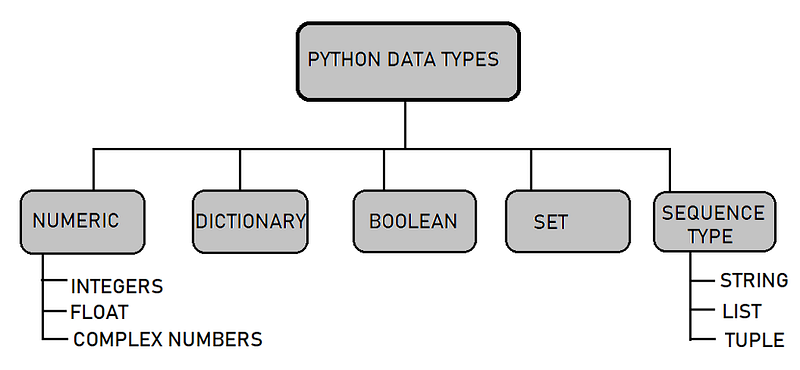
Pic credits : Geeks

Implementation —

#Int data Type
var = 5
print(var)
print(type(var))

Output —

5
<class 'int'>

Implementation —

#Float data type
var2 = 0.1234
print(var2)
print(type(var2))

Output —

0.1234
<class 'float'>

Implementation —

#Complex numbers data type
x = 2j
print(x)
print(type(x))

Output —

2j
<class 'complex'>

Implementation —

#String Data Type
str_one = "Hello World"
print(str_one)
print(type(str_one))

Output —

Hello World
<class 'str'>

Implementation —

#list Data type
list1 = ["car","bike"]
print(list1)
print(type(list1))

Output —

['car', 'bike']
<class 'list'>

Implementation —

#Tuple Data Type
tup= ("car","bike","bus")
print(tup)
print(type(tup))

Output —

('car', 'bike', 'bus')
<class 'tuple'>

Implementation —

#Dictionary Data type
dict_one = {"Name": "Steve", "Location": "NewYork"}
print(dict_one)
print(type(dict_one))

Output —

{'Name': 'Steve', 'Location': 'NewYork'}
<class 'dict'>

Implementation —

#Set Data type
set_one = set({"Hello","world","Hello"})
print(set_one)
print(type(set_one))

Output —

{'world', 'Hello'}
<class 'set'>

Implementation —

#Frozen Set
f_one = frozenset({"Hello","World","Hello"})
print(f_one)
print(type(f_one))

Output —

frozenset({'Hello', 'World'})
<class 'frozenset'>

Implementation —

#Boolean Data Type
b = True
print(b)
print(type(b))

Output —

True
<class 'bool'>

Implementation —

#Byte Data Type
byte_one = b"World"
print(type(byte_one))
print(byte_one)

Output —

<class 'bytes'>
b'World'

Python Strings

Strings are arrays of bytes representing unicode characters.

  • Strings in python are surrounded by either single quotation marks, or double quotation marks.

‘today’ is the same as “today”.

Example :

var1 = ‘Hello’

var2 = “Complete Python Course”

  • You can assign a multiline string to a variable by using three quotes.

Implementation —

#String
str1 = "Welcome to complete Python Course"
str2 = 'Welcome to the complete Python Course'
str3 = """This is a
       multiline 
       String"""

Output —

Welcome to complete Python Course
Welcome to the complete Python Course
This is a
       multiline 
       String

Indexing and Slicing with Strings —

  • In python, Indexing is used to access individual characters of a string
  • Square brackets are used to access the character of the string using Index
  • Index starts with 0
  • -1 refers to the last character, -2 refers to the second last character and so on

Example:

var[3]

var[-2]

  • In python, Slicing is used to access a range of characters in the string
  • Slicing operator colon (:) is used

Example:

var[1:4]

var[:4]

Implementation —

# Indexing : String starts with 0th Index
s= "Captain America"
print(s[4])

Output —

a

Implementation —

#Slicing : slice(start, stop, step), it returns a sliced object containing elements in the given range
s= "Captain America"
print(s[1:5:2])

Output —

at

Implementation —

#Reverse
print(s[::-1])

Output —

aciremA niatpaC

String Methods

  • istitle() : Checks for Titlecased String
  • isupper() : returns if all characters are uppercase characters
  • join() : Returns a Concatenated String
  • ljust() : returns left-justified string of given width
  • lower() : returns lowercased string
  • lstrip() : Removes Leading Characters
  • maketrans() : returns a translation table
  • replace() : Replaces Substring Inside
  • rfind() : Returns the Highest Index of Substring
  • rjust() : returns right-justified string of given width
  • rstrip() : Removes Trailing Characters
  • split() : Splits String from Left
  • splitlines() : Splits String at Line Boundaries
  • startswith() : Checks if String Starts with the Specified String
  • strip() : Removes Both Leading and Trailing Characters
  • swapcase() : swap uppercase characters to lowercase; vice versa
  • title() : Returns a Title Cased String
  • translate() : returns mapped charactered string
  • upper() : returns uppercased string
  • zfill() : Returns a Copy of The String Padded With Zeros
  • capitalize() : Converts first character to Capital Letter
  • casefold() : converts to case folded strings
  • center(): Pads string with specified character
  • count() : returns occurrences of substring in string
  • encode() : returns encoded string of given string
  • endswith(): Checks if String Ends with the Specified Suffix
  • expandtabs() : Replaces Tab character With Spaces
  • find(): Returns the index of first occurrence of substring
  • format(): formats string into nicer output
  • format_map() : Formats the String Using Dictionary
  • index(): Returns Index of Substring
  • isalnum(): Checks Alphanumeric Character
  • isalpha() : Checks if All Characters are Alphabets
  • isdecimal() : Checks Decimal Characters
  • isdigit() : Checks Digit Characters
  • isidentifier() : Checks for Valid Identifier
  • islower() : Checks if all Alphabets in a String are Lowercase
  • isnumeric() : Checks Numeric Characters
  • isprintable() : Checks Printable Character
  • isspace() : Checks Whitespace Characters

Implementation —

#capitalize() method : Returns a copy of the string with its first #character capitalized and the rest lowercased
a = "complete python course" 
print(a.capitalize())

Output —

Complete python course

Implementation —

#centre(width[, fillchar])   : Returns the string centered in a #string of length width
a = "Python" 
b = a.center(10, "*")
print(b)

Output —

**Python**

Implementation —

# casefold() method : Returns a casefolded copy of the string. #Casefolded strings may be used for caseless matching
a = "PYTHON"
print(a.casefold())

Output —

python

Implementation —

# count(sub[, start[, end]]) : Returns the number of non-overlapping #occurrences of substring (sub) in the range [start, end]
a = "Welcome to complete Python Course"
print(a.count("c"))
print(a.count("o"))
print(a.count("Python"))

Output —

2
5
1

Implementation —

# endswith(suffix[, start[, end]]) : Returns True if the string ends #with the specified suffix, otherwise it returns False
a = "Watermelon"
print(a.endswith("s"))
print(a.endswith("melon"))

Output —

False
True

Implementation —

# find(sub[, start[, end]]) : Returns the lowest index in the string # where substring sub is found within the slice s[start:end]
a = "Exercise"
print(a.find("r"))
print(a.find("e"))

Output —

3
2

Implementation —

# index(sub[, start[, end]]) : Similar to find function, except that # it raises a ValueError when the substring is not found
a = "Continent"
print(a.index("i"))
print(a.index("C"))
print(a.index("nent"))

Output —

4
0
5

Implementation —

# isalnum() : Returns True if all characters in the string are #alphanumeric, else returns False
c = "456"
d = "$*%!!**"
print(c.isalnum())
print(d.isalnum())

Output —

True
False

Implementation —

# isalpha() : Returns True if all characters in the string are #alphabetic, else returns False
c = "456"
d = "Python"
print(c.isalpha())
print(d.isalpha())

Output —

False
True

Implementation —

# isdecimal() : Returns True if all characters in the string are #decimal characters, else returns False
c = u"\u00B10"
x = "10"
print(c.isdecimal())
print(x.isdecimal())

Output —

False
True

Implementation —

# isdigit() : Returns True if all characters in the string are #digits, else returns False
c = "4567"
d = "1.65"
print(c.isdigit())
print(d.isdigit())

Output —

True
False

Implementation —

# join(iterable) : Returns a string which is the concatenation of #the strings in iterable. 
# A TypeError will be raised if there are any non-string values in #iterable
a = ","
print(a.join("CD"))

Output —

C,D

Implementation —

# partition(sep) : Splits the string at the first occurrence of sep, #and returns a 3-tuple containing the part before the separator, the #separator itself, and the part after the separator
a = "Complete.Python-course"
print(a.partition("-"))
print(a.partition("."))

Output —

('Complete.Python', '-', 'course')
('Complete', '.', 'Python-course')

Implementation —

# split(sep=None, maxsplit=-1) : Returns a list of the words in the #string,using sep as the delimiter strip.If maxsplit is given,at #most maxsplit splits are done.If maxsplit is not specified or -1, #then there is no limit on the number of splits.
a = "Welcome,,Friends,"
print(a.split(","))

Output —

['Welcome', '', 'Friends', '']

Implementation —

# strip([chars]) : Returns a copy of the string with leading and #trailing characters removed. The chars argument is a string #specifying the set of characters to be removed
a = "***Python***"
print(a.strip("*"))

Output —

Python

Implementation —

# swapcase() : Returns a copy of the string with uppercase #characters converted to lowercase and vice versa
a = "Hi Homies"
print(a.swapcase())

Output —

hI hOMIES

Implementation —

# zfill(width) : Returns a copy of the string left filled with ASCII #0 digits to make a string of length width
a = "-124"
print(a.zfill(6))

Output —

-00124

Implementation —

# lstrip([chars]) : Return a copy of the string with leading #characters removed.The chars argument is a string specifying the #set of characters to be removed.
a = "*****Python-----"
print(a.lstrip("*"))

Output —

Python-----

Implementation —

# rindex(sub[, start[, end]]) : Just like rfind() but raises #ValueError when the substring sub is not found
a = "Hi World"
print(a.rindex("d"))
print(a.rindex("W"))

Output —

7
3

Python F Strings

  • Python F-String are used to embed python expressions inside string literals for formatting, using minimal syntax.
  • It’s an expression that’s evaluated at the run time.
  • They have the f prefix and use {} brackets to evaluate values.
  • f-strings are faster than %-formatting and str.format()

Syntax —

f “string_variable”

  • In order to format and output an expression in the formatted way, you should use curly braces {}

Implementation —

def max_no(x,y):
    return x if x>y else y
f_no= 12
s_no =25
print(f'Max of {f_no} and {s_no} is {max(f_no,s_no)}')

Output —

Max of 12 and 25 is 25

Implementation —

from decimal import Decimal
width = 4
round_point = 2
value = Decimal('12.39065')
print(f'result:{value:{width}.{round_point}}')

Output —

result:  12

Operators in Python

  • In python, operators are used to perform operations on variables and values

Arithmetic operators : +, — , *, /, //, %, **

Logical operators : and, or, not

Identity operators : is, is not

Membership operators : in , not in

Bitwise operators : &, |, ^,~, << , >>

Assignment operators : =, +=, -=, *=,/= , %=, //=, **=, &=, |=, ^=, >>=, <<=

Comparison operators : ==, !=, > , <, >=, <=

  • Ternary operators are operators that evaluate things based on a condition being true or false

Syntax : [true] if [expression] else [false]

  • Operator overloading can be implemented in Python

Example —

a & b

a >> 2

a is not b

‘b’ in list1

Implementation —

#Arithmatic Operators
x=10
y=4
#Addition
print("Addition:",x+y)
#Subtraction
print("Subtraction:",x-y)
#Multiply
print("Multiply: ",x*y)
#Division
print("Division:",x/y)
#Modulus
print("Modulus:",x%y)
#Floor Division
print("Floor Division:",x//y)
#Exponent
print("Exponent:",x**y)

Output —

Addition: 14
Subtraction: 6
Multiply:  40
Division: 2.5
Modulus: 2
Floor Division: 2
Exponent: 10000

Implementation —

#Comparison Operator  : Result is either True or False
x=5
y=3
#Greater than
print("Greater than:",x>y)
#Less than
print("Greater than:",x<y)
#Greater than equal to 
print("Greater than equal to:",x>=y)
#less than equal to
print("Less than:",x<=y)
#Not equal to 
print("Not equal to:",x!=y)
#Equal to
print("Equal to:",x==y)

Output —

Greater than: True
Greater than: False
Greater than equal to: True
Less than: False
Not equal to: True
Equal to: False

Implementation —

#Logical Operators : and, or, not [Result is either True or False]
x= True
y= False
#And
print("And result:",(x and y))
#Or
print("Or result:",(x or y))
#Not
print("Not result:",(not y))

Output —

And result: False
Or result: True
Not result: True

Implementation —

# Bitwise operators
x = 1001
y = 1010
#And
print("And result:",(x & y))
#Or
print("Or result:",(x | y))
#Not
print("Not result:",(~y))
#Xor
print("XOR result:",(x^y))
#Bitwise right shift
print("Bitwise right shift result:",(x>>2))
#Bitwise left shift
print("Bitwise left shift result:",(x<<2))

Output —

And result: 992
Or result: 1019
Not result: -1011
XOR result: 27
Bitwise right shift result: 250
Bitwise left shift result: 4004

Implementation —

# Assignment operators : used in Python to assign values to variables
x=5
x+=5
x-=2
x*=2
x**=2

Implementation —

# Identity Operator : is and is not are the identity operators in Python
x=5
y=5
z='a'
print("Is operator result:", (x is y))
print("Not is operator result:", (y is not z))

Output —

Is operator result: True
Not is operator result: True

Implementation —

#Membership operator : in operator
x = 'Python Course'
print('y' in x)
print('a' in x)

Output —

True
False

Chaining Comparison Operators with Logical Operators

  • In python, in order to check more than two conditions, we implement chaining where two or more operators are chained together as shown in the example below

if x < y < z :

{…..}

  • In accordance with associativity and precedence in Python, all comparison operations have the same priority. Resultant values of Comparisons yield boolean values such as either True or False
  • When chaining the comparison operators, the sequence can be arbitrary.

Example —

x > y <= c is equivalent to x > y and y <= c

Implementation —

#Chaining Comparison operators with Logical operators
a, b, c, d, e, f, g = 10, 15, 2, 1, 45, 25, 19
e1 = a <= b < c > d < e is not f is g
e2 = a is d < f is c
print(e1)
print(e2)

Output —

False
False

Python Lists

  • One of the most versatile data type in Python, Lists are used to store multiple items ( homogeneous or non-homogeneous) in a single variable.
  • Place the items inside the square brackets[]
  • Items can be of any data type
  • Lists are defined as objects with the data type ‘list’
  • Items are ordered, changeable, and allow duplicate values
  • list() constructor can be used when creating a new list
  • To access values in lists, use the square brackets for slicing along with the index to obtain item value available at a particular index
  • Items inside list are indexed, the first item has index [0], the second item has index [1] etc

Example —

var=[1, 2 , ‘car’, ‘sunday’ , 3.14]

empty_list = []

items = list((“apple”, “banana”, “grapes”))

Implementation —

#Create a List
list_one = ["sunday","monday","tuesday","wednesday","thursday"]
print(list_one)

Output —

['sunday', 'monday', 'tuesday', 'wednesday', 'thursday']

Implementation —

#List Length
print(len(list_one))

Output —

5

Implementation —

# List with different data types
list_two = ['abc',67,True,3.14,"female"]
print(list_two)

Output —

['abc', 67, True, 3.14, 'female']

Implementation —

#type() with List
print(type(list_two))

Output —

<class 'list'>

Implementation —

#list() constructor to make a List
list_cons = list(("hello","World","Beautiful","Day"))
print(list_cons)

Output —

['hello', 'World', 'Beautiful', 'Day']

Implementation —

# nested list
list_nest= ["hello",[8,4,6],['World']]
print(list_nest)

Output —

['hello', [8, 4, 6], ['World']]

Implementation —

#slice lists in Python : Use the slicing operator :(colon)
list_one = ["sunday","monday","tuesday","wednesday","thursday"]
print(list_one[1:4])

Output —

['monday', 'tuesday', 'wednesday']

Implementation —

#Add/Change List Elements : use the assignment operator = to change #an item
list_one = ["sunday","monday","tuesday","wednesday","thursday"]
list_one[3] = 'friday'
print(list_one)

Output —

['sunday', 'monday', 'tuesday', 'friday', 'thursday']

Implementation —

# Appending and Extending lists in Python : Use the append() or #extend() method
list_one = ["sunday","monday","tuesday","wednesday","thursday"]
list_one.append('friday')
print(list_one)
#extend
list_one.extend(['saturday'])
print(list_one)

Output —

['sunday', 'monday', 'tuesday', 'wednesday', 'thursday', 'friday']
['sunday', 'monday', 'tuesday', 'wednesday', 'thursday', 'friday', 'saturday']

Implementation —

# Concatenating and repeat lists : use + operator to concate two #lists and use * operator to repeat lists
list_one = ["sunday","monday","tuesday","wednesday","thursday"]
print(list_one + [0,1,2,3,4])
#repeat operation 
print(['a','b']*2)

Output —

['sunday', 'monday', 'tuesday', 'wednesday', 'thursday', 0, 1, 2, 3, 4]
['a', 'b', 'a', 'b']

Implementation —

# Delete/Remove List Elements : delete one or more items or entire list using the keyword del
del list_one[2]
print(list_one)
#remove method : remove the given item or pop() method to remove an item at the given index location
list_one = ["sunday","monday","tuesday","wednesday","thursday"]
list_one.remove("tuesday")
print(list_one)
#pop method
list_one = ["sunday","monday","tuesday","wednesday","thursday"]
list_one.pop(2)
print("Pop result:", list_one)

Output —

['sunday', 'monday', 'thursday']
['sunday', 'monday', 'wednesday', 'thursday']
Pop result: ['sunday', 'monday', 'wednesday', 'thursday']

Implementation —

# index() method : Returns the index of the first matched item
list_one = ["sunday","monday","tuesday","wednesday","thursday"]
print(list_one.index("tuesday"))

Output —

2

Implementation —

# sort() method: Sort items in a list in ascending order
list_one = ["sunday","monday","tuesday","wednesday","thursday"]
list_one.sort()
print(list_one)

Output —

['monday', 'sunday', 'thursday', 'tuesday', 'wednesday']

Implementation —

# reverse() : Reverse the order of items in the list
list_one = ["sunday","monday","tuesday","wednesday","thursday"]
list_one.reverse()
print(list_one)

Output —

['thursday', 'wednesday', 'tuesday', 'monday', 'sunday']

Implementation —

# copy(): Returns a shallow copy of the list
list_one = ["sunday","monday","tuesday","wednesday","thursday"]
list_two = list_one.copy()
print(list_two)

Output —

['sunday', 'monday', 'tuesday', 'wednesday', 'thursday']

Implementation —

#Membership : check if an item exists in a list or not, using the keyword in
list_one = ["sunday","monday","tuesday","wednesday","thursday"]
print('tuesday' in list_one)

Output —

True

Implementation —

# insert() method : insert item at a desired location
list_one = ["sunday","monday","tuesday","wednesday","thursday"]
list_one.insert(2,'friday')
print(list_one)

Output —

['sunday', 'monday', 'friday', 'tuesday', 'wednesday', 'thursday']

All the Complete System Design Series Parts —

1. System design basics

2. Horizontal and vertical scaling

3. Load balancing and Message queues

4. High level design and low level design, Consistent Hashing, Monolithic and Microservices architecture

5. Caching, Indexing, Proxies

6. Networking, How Browsers work, Content Network Delivery ( CDN)

7. Database Sharding, CAP Theorem, Database schema Design

8. Concurrency, API, Components + OOP + Abstraction

9. Estimation and Planning, Performance

10. Map Reduce, Patterns and Microservices

11. SQL vs NoSQL and Cloud

12. Most Popular System Design Questions

Github —

List Comprehensions

  • In python, list comprehensions are used to create a new list based on the values of an existing list in the most elegant and shortest way.
  • List comprehension consists of an expression followed by for statement inside square [] brackets.

One of the best article I read for Python Data Structures by Jiahui Wang

Example :

new_list = [x for x in list1 if “a” in x]

Implementation —

sqr = [2**x for x in range(20)]
print(sqr)

Output —

[1, 2, 4, 8, 16, 32, 64, 128, 256, 512, 1024, 2048, 4096, 8192, 16384, 32768, 65536, 131072, 262144, 524288]

Python Dictionaries

  • In python, dictionary is an unordered collection of data values in which data values are stored in key:value pairs
  • Created by placing sequence of elements within curly {} braces, separated by ‘ , ‘
  • Values can be of any datatype and can be duplicated, whereas keys are immutable and can’t be repeated
  • Can be created by the built-in function dict()
  • Dictionaries are defined as objects with the data type ‘dict
  • dict() constructor can be used when creating a new dict
  • To access values in dict, use the keys
  • Key Value format makes dictionary one of the most optimized and efficient data type in Python

Example —

var={ ‘first_day’: ‘sunday’ , ‘second_day’: ‘monday’, ‘third_day’: ‘tuesday’}

empty_dict = {}

class dict(**kwarg)

Implementation —

#Create a Dictionary
#empty dictionary
dict_emp = {}
#dict with items
dict_one = {0:'sunday', 1: 'monday', 2: 'tuesday', 3: 'wednesday', 4: 'thursday'}
print(dict_one)

Output —

{0: 'sunday', 1: 'monday', 2: 'tuesday', 3: 'wednesday', 4: 'thursday'}

Implementation —

#Accessing Elements from Dictionary : Using keys or get() method
dict_one = {0:'sunday', 1: 'monday', 2: 'tuesday', 3: 'wednesday', 4: 'thursday'}
print(dict_one[1])
#get() method
print(dict_one.get(2))

Output —

monday
tuesday

Implementation —

# Length of Dictionary
dict_one = {0:'sunday', 1: 'monday', 2: 'tuesday', 3: 'wednesday', 4: 'thursday'}
print(len(dict_one))

Output —

5

Implementation —

#Changing and Adding Dictionary elements: add new items or change the value of existing items using an = operator
dict_one = {0:'sunday', 1: 'monday', 2: 'tuesday', 3: 'wednesday', 4: 'thursday'}
#change element
dict_one[2] = 'friday'
print("After changing the element", dict_one)
#Add element
dict_one[5] = 'saturday'
print("After adding the element :", dict_one)

Output —

After changing the element {0: 'sunday', 1: 'monday', 2: 'friday', 3: 'wednesday', 4: 'thursday'}
After adding the element : {0: 'sunday', 1: 'monday', 2: 'friday', 3: 'wednesday', 4: 'thursday', 5: 'saturday'}

Implementation —

#Removing elements from Dictionary : Use the pop() or popitem() #method
dict_one = {0:'sunday', 1: 'monday', 2: 'tuesday', 3: 'wednesday', 4: 'thursday'}
print(dict_one.pop(2))
#popitem : remove an arbitrary item and return (key,value)
print(dict_one.popitem())

Output —

tuesday
(4, 'thursday')

Implementation —

# remove all items : using clear method
dict_one.clear()
print(dict_one)

Output —

{}

Implementation —

#fromkeys(seq[, t]): Returns a new dictionary with keys from seq and value equal to t
subjects = {}.fromkeys(['Computer Science','Space Science','Math','English'])
print(subjects)

Output —

{'Computer Science': None, 'Space Science': None, 'Math': None, 'English': None}

Implementation —

#items() method : displays a list of dictionary's (key, value) tuple pairs
dict_one = {0:'sunday', 1: 'monday', 2: 'tuesday', 3: 'wednesday', 4: 'thursday'}
print(dict_one.items())

Output —

dict_items([(0, 'sunday'), (1, 'monday'), (2, 'tuesday'), (3, 'wednesday'), (4, 'thursday')])

Implementation —

#keys() method : displays a list of all the keys in the dictionary
dict_one = {0:'sunday', 1: 'monday', 2: 'tuesday', 3: 'wednesday', 4: 'thursday'}
print(dict_one.keys())

Output —

dict_keys([0, 1, 2, 3, 4])

Implementation —

#values() method : displays a list of all the values in the dictionary
dict_one = {0:'sunday', 1: 'monday', 2: 'tuesday', 3: 'wednesday', 4: 'thursday'}
print(dict_one.values())

Output —

dict_values(['sunday', 'monday', 'tuesday', 'wednesday', 'thursday'])

Implementation —

#setdefault() method : returns the value of a key. If not there, it inserts key with a value to the dictionary
dict_one = {0:'sunday', 1: 'monday', 2: 'tuesday', 3: 'wednesday', 4: 'thursday'}
element = dict_one.setdefault(3)
print(element)
#If key not present 
element = dict_one.setdefault(6)
print("If key is not present:", dict_one.items())

Output —

wednesday
If key is not present: dict_items([(0, 'sunday'), (1, 'monday'), (2, 'tuesday'), (3, 'wednesday'), (4, 'thursday'), (6, None)])

Implementation —

#Nested Dictionaries
people = {"subject": {0:"Maths",1:"English",3:"Science"},
          "marks": {0:42,1:36,2: 78},
          "Age": {0:12,1:34,2:19}
         }
#print(people["marks"][0])
print(people["Age"][0])

Output —

42

Implementation —

#sorted(): Return a new sorted list of keys in the dictionary
dict_one = {0:'sunday', 1: 'monday', 2: 'tuesday', 3: 'wednesday', 4: 'thursday'}
print(sorted(dict_one))

Output —

[0, 1, 2, 3, 4]

Implementation —

#Iterate through dictionay
dict_one = {0:'sunday', 1: 'monday', 2: 'tuesday', 3: 'wednesday', 4: 'thursday'}
for i in dict_one.items():
    print(i)

Output —

(0, 'sunday')
(1, 'monday')
(2, 'tuesday')
(3, 'wednesday')
(4, 'thursday')

Implementation —

# Dictionary Comprehension
cubes = {x: x*x*x for x in range(10)}
print(cubes)

Output —

{0: 0, 1: 1, 2: 8, 3: 27, 4: 64, 5: 125, 6: 216, 7: 343, 8: 512, 9: 729}

Implementation —

# update() method : updates the dictionary with the elements from 
# another dictionary object or from any other key/value pairs
dict1 ={0:"zero",4:"four",5:"five"}
dict2={2:"two"}
# updates the value of key 2
dict1.update(dict2)
print(dict1)

Output —

{0: 'zero', 4: 'four', 5: 'five', 2: 'two'}

Implementation —

# Membership Test : check if a key is in a dictionary or not using #the keyword in
dict_one = {0:'sunday', 1: 'monday', 2: 'tuesday', 3: 'wednesday', 4: 'thursday'}
print(0 in dict_one.keys())

Output —

True

Python Tuples

  • In python, a tuple is a collection of objects which is ordered and immutable
  • Created by placing sequence of elements within round () braces, separated by ‘ , ‘
  • Values can be of any datatype
  • Concatenation of tuples can be done by the use of ‘+’ operator
  • Tuples are just like lists except that the tuples are immutable i.e cannot be changed

Example —

var= (4, ‘Hello’, 5, ‘World’)

empty_tuple = ()

Implementation —

# Tuple with items
tup= (10,"Hello",3.14,"a")
print(tup)
print(type(tup))

Output —

(10, 'Hello', 3.14, 'a')
<class 'tuple'>

Implementation —

# Negative Indexing : index of -1 refers to the last item, -2 to the #second last item and so on
tup = (10,"Hello",3.14,"a")
print(tup[-2])
#Reverse the tuple
print(tup[::-1])

Output —

3.14
('a', 3.14, 'Hello', 10)

Implementation —

#concatenation and repeat in Tuples
#concatenation using + operator
tup = (10,"Hello",3.14,"a")
print(tup + (50,60))
#repeat using * operator
print(tup * 2)

Output —

(10, 'Hello', 3.14, 'a', 50, 60)
(10, 'Hello', 3.14, 'a', 10, 'Hello', 3.14, 'a')

Implementation —

#membership : check if an item exists in a tuple or not, using the keyword in
tup = (10,"Hello",3.14,"a")
print(10 in tup)
print("World" in tup)

Output —

True
False

Implementation —

#Iterate through Tuple : use for loop to iterate through each item #in a tuple
tup = (10,"Hello",3.14,"a")
for i in tup:
    print(i)

Output —

10
Hello
3.14
a

Implementation —

#Nested Tuple
nest_tup = ((10,"Hello",3.14,"a"), (70,(8,"Mike")))
print(nest_tup)
a,b = nest_tup
print(a)
print(b)

Output —

((10, 'Hello', 3.14, 'a'), (70, (8, 'Mike')))
(10, 'Hello', 3.14, 'a')
(70, (8, 'Mike'))

Implementation —

#Enumerate : use enumerate function
tup = (10,"Hello",3.14,"a")
for i in enumerate(tup):
    print(i)

Output —

(0, 10)
(1, 'Hello')
(2, 3.14)
(3, 'a')

Python Sets

  • In python, a set is a collection of objects which is both unindexed and unordered
  • Sets make sure that there are no duplicate elements in the items sequence
  • Created by using the built-in set() function with an iterable object by placing the items inside curly {} braces, separated by ‘,’
  • Items can be added to the set by using built-in add() function
  • Items can be accessed by looping through the set using loops or using ‘in’ keyword
  • Items can be removed from the set by using built-in remove()

Example —

var= set([“Hello”, “People”, “Hello”])

Implementation —

#Create Set
set_one = {10, 20, 30, 40}
print(set_one)
#Create set from list using set() 
set_two = set([10, 20, 30, 40, 30, 20])
print(set_two)

Output —

{40, 10, 20, 30}
{40, 10, 20, 30}

Implementation —

# Removing elements : Use the methods discard(), pop() and remove()
#set_one is {100, 70, 40, 10, 80, 20, 60, 30}
#discard() method
set_one.discard(100)
print("After discard:",set_one)
#remove() method
set_one.remove(40)
print("After removing element :", set_one)
#pop() method
set_one.pop()
print("After removing element :", set_one)

Output —

After discard: {70, 40, 10, 80, 20, 60, 30}
After removing element : {70, 10, 80, 20, 60, 30}
After removing element : {10, 80, 20, 60, 30}

Implementation —

#Set operations 
X = {10, 20, 30, 40, 50}
Y = {40, 50, 60, 70, 80}
Z = {20, 30, 100, 50, 10}
#Union : Union of X, Y, Z is a set of all elements from all three #sets using | operator or union() method
print("Set Union:", X|Y|Z)
#Intersection :Intersection of X, Y, Z is a set of all elements from #all three sets using & operator or intersection()
print("Set Intersection:", X&Y&Z)
#Difference : Difference of X, Y is a set of all elements from both #sets using - operator or difference()
print("Set Difference:", X-Y)
# Symmetric Difference : Symmetric Difference of X, Y, Z is a set of #all elements from all three sets using ^ operator or #symmetric_difference()            
print("Set Symmetric Difference:", X^Y^Z)

Output —

Set Union: {100, 70, 40, 10, 80, 50, 20, 60, 30}
Set Intersection: {50}
Set Difference: {10, 20, 30}
Set Symmetric Difference: {80, 50, 100, 70, 60}

Implementation —

#enumerate : Returns an enumerate object which contains the index #and value for all the items of the set as a pair
set_one = {10, 20, 30, 40, 50, 30}
for i in enumerate(set_one):
    print(i)

Output —

(0, 40)
(1, 10)
(2, 50)
(3, 20)
(4, 30)

Implementation —

#Frozenset : set which has the characteristics of a set, but its elements cannot be changed once assigned
X = frozenset([10, 20, 30, 40, 50])
Y = frozenset([40, 50, 60, 70, 80])
print(X.union(Y))

Output —

frozenset({70, 40, 10, 80, 50, 20, 60, 30})

Loops in Python

If, Elif and Else Statements —

  • In python, If, Elif and Else statements are used to facilitate decision making i.e when we want to execute a code only if a certain condition is satisfied.
  • In the example below, the program evaluates the test expression and will execute statement(s) only if the test expression is True. If the test expression1 is False, then it checks elif test expression 2 and if that’s also False, then at last it goes to else and executed else statement.

if test_expression1:

statement(s)

elif test_expression2:

statements(s)

else :

statement

  • Python interprets non-zero values as True. None and 0 are interpreted as False.
  • The if block can have only one else block but there can be multiple elif blocks.

While loops —

  • In python, while loop is used to traverse/iterate over a block of code as long as the test condition is true
  • In the example below, test_expression is checked first. The body of the loop is entered only if the test_expression evaluates to True. The loop continues till the test condition becomes False.

while test_expression:

Do this

Example :

while i <= 10:

sum = sum — i

i = i+1

For Loops and Range function —

  • In python, for loop is used to traverse/iterate over a sequence (list, tuple, string etc)
  • In the example below, i is the variable that takes the value of the item inside the sequence on each iteration. Loop continues until we reach the last item in the sequence

for i in sequence:

Do this

  • Range ( range()) is used to generate sequence of numbers where the syntax of range is

range(start, stop, step_size)

Example :

for i in range(len(list1)):

print(“The element is “, list1[i])

Implementation —

price = 200
if price > 120:
    print("Price is greater than 120")
elif price == 120:
    print("Price is 120")
elif price < 120:
    print("Price is less than 120")
else:
    print("Exit")

Output —

Price is greater than 120

Implementation —

# If, Elif and Else one liner
x = 200
  
var = {x < 190: "Condition one satisfied", 
       x != 200: "Condition two satisfied"}.get(True, "Condition third satisfied")
  
print(var)

Output —

Condition third satisfied

Implementation —

#while with else statement
i = 1
while i < 6:
  print(i)
  i += 1
else:
  print("i is no longer less than 6")

Output —

1
2
3
4
5
i is no longer less than 6

Implementation —

# for loop with range function
days =['sunday','monday','tuesday']
for i in range(len(days)):
    print("Today is", days[i])

Output —

Today is sunday
Today is monday
Today is tuesday

Break and Continue Statement

  • In python, we can use break statement when we want to terminate the current loop without checking test condition
  • Once terminated using the break statement, the control of the program goes to the statement immediately after the body of the loop

Example :

for value in list1:

if value == “t”:

break

print(value)

  • In python, we can use continue statement when we want to skip the rest of the code for the current loop iteration

Example :

for value in list1:

if value == “t”:

continue

print(value)

Implementation —

#break statement
count = 0
while True:
    print(count)
    count += 1
    if count >= 10:
        break
print('exit')

Output —

0
1
2
3
4
5
6
7
8
9
exit

Implementation —

#Continue statement
for x in range(15):
    if x % 2 == 0:
        continue
    print(x)

Output —

1
3
5
7
9
11
13

Input Output in Python

  • In python, there are two inbuilt functions to read the input from the user

raw_input ( ) function : reads one line from user input and returns it as a string

input ( ) function : Similar to raw_input, except it evaluates the user expression

  • For multiple user inputs, we can use —

split() method

List comprehension

  • In python, output is using the print() function
  • String literals in print() statement are used to format the output

\n : Add blank new line

“” : To print an empty line.

  • end keyword is used to print specific content at the end of the execution of the print() function

Example —

num= input(“Enter the number: “)

str = raw_input(“Enter your input: “)

print(“Python” , end = ‘**’)

One of the best article I read for Python Data Structures by Eyal Trabelsi

Implementation —

# input
num = int(input('Enter a number: '))

Output —

Enter a number: 50

Implementation —

num = 5
print('The value of num is', num)
print("The value is %d" %num)

Output —

The value of num is 5
The value is 5

Python Object Oriented Programming

  • Python is a multi-paradigm programming language and supports Object Oriented programming. In Python everything is a object. An object has two characteristics : Attributes and Behavior
  • Principles of object-oriented programming system are —

Class

Object

Method

Inheritance

Polymorphism

Encapsulation

  • Class and constructor — It’s a blueprint for the object. In python we use the class keyword to define class. Class constructor is used to assign the values to the data members of the class when an object of the class is created.
  • Object — It’s an instantiation of a class.
  • Method — It’s a function that is associated with an object
  • Inheritance — Specifies that the child object acquires all the properties and behaviors of the parent object.
  • Polymorphism — Refers to functions having the same names but carrying different functionalities.
  • Encapsulation — To prevents data from direct modification, we can restrict access to methods and variables in python

Attributes and Class in Python

  • In Python, a class is blueprint of the object
  • To define a class, we use the keyword “class” following the class name and semicolon —

class class_name:

Body of the class

  • Object — It’s an instantiation of a class. The object instance contains real data or value

To create an instance :

obj1 = class_name()

  • Class constructor — to assign the values to the data members of the class when an object of the class is created, we use constructor. The __init__() method is called constructor method

class class_name:

def __init__(self, parameters):

self.param1 = parameters

  • Instance attributes refer to the attributes inside the constructor method. Class attributes refer to the attributes outside the constructor method
  • Method — It’s a function that is associated with an object, used to describe the behavior of the objects

def method_name(self)

Implementation —

#Class implementation
class cat:
def __init__(self, cat_name, cat_breed):
        self.name = cat_name
        self.age = cat_breed

Implementation —

#Class attribute and Instance Attribute
class emp:
    x = 10      #class attribute
    def __init__(self):
        self.name = 'Steve'
        self.salary = 10000
  
    def display(self):
        print(self.name)
        print(self.salary)
  
obj_emp = emp()
print("Dictionary conversion:", vars(obj_emp))

Output —

Dictionary conversion: {'name': 'Steve', 'salary': 10000}

Here are some of the most important and useful Python tricks that every developer should know:

  1. List comprehensions: A concise and efficient way to create a list in one line of code.
  2. Generators and yield: Allows creation of iterators, which can be used to efficiently process large amounts of data.
  3. Lambda functions: Anonymous functions that can be used to create small, throw-away functions for short, one-time use.
  4. Decorators: A way to modify or extend the behavior of a function or class without changing its source code.
  5. Context managers: A way to manage resources such as file handles, database connections, and other similar resources.
  6. The “with” statement: A convenient way to use context managers in a more readable way.
  7. String formatting: Allows you to insert values into a string in a more readable and concise way.
  8. The “for-else” loop: A way to use the else clause in a for loop to execute code only if the loop finishes without encountering a break statement.
  9. Zip and enumerate: Two built-in functions that can be used to iterate over multiple lists in parallel or to keep track of the index while iterating over a list.
  10. Map, filter, and reduce: Higher-order functions that allow you to perform operations on a list of values in a more functional and efficient way.

Advanced SQL Series

Day 1 : SQL Basics and Kick start of Advanced SQL Series

Day 2 : SQL Basics, Query Structure, Built In functions Conditions

Day 3 : Most Important Commands, Joins and Filters

Day 4 : Set Theory Operations, Stored Procedures and CASE statements in SQL

Day 5 : Wildcards, Aggregation and Sequences in SQL

Day 6 : Subqueries, Group by, order by and Having clauses in SQL and Analytical Functions

Day 7 : Window Functions, Grouping Sets and Constraints in SQL

Day 8 : BigQuery Basics, SELECT, FROM, WHERE and Date and Extract in BigQuery

Day 9 : Common Expression Table, UNNEST Clause, SQL vs NoSQL Databases

Day 10 : Triggers, Pivot and Cursors in SQL

Day 11 : Views, Indexes and Auto Increment in SQL

Day 12 : Query optimizations, Performance tuning in SQL

Day 13 : Introduction to MySQL, PostgreSQL and Mongo DB, Comparison between MySQL and PostgreSQL and Mongo DB, Introduction to SQL and NoSQL Databases

Day 14 : MySQL in Depth

Day 15 : PostgreSQL inDepth

Anyways, For Day 15 of 15 days of Advanced SQL, we will cover —

PostgreSQL inDepth

Github for Advanced SQL that you can follow —

All the projects, data structures, algorithms, system design, Data Science and ML, Data Engineering, MLOps and Deep Learning videos will be published on our youtube channel ( just launched).

Subscribe today!

System Design Case Studies — In Depth

Design Instagram

Design Messenger App

Design Twitter

Design URL Shortener

Design Dropbox

Design Youtube

Design API Rate Limiter

Design Web Crawler

Design Facebook’s Newsfeed

Design Yelp

Design Uber

Design Tinder

Design Tiktok

Design Whatsapp

Most Popular System Design Questions

Mega Compilation : Solved System Design Case studies

Complete Data Structures and Algorithm Series

Complexity Analysis

Backtracking

Sliding Window

Greedy Technique

Two pointer Technique

Arrays

Linked List

Strings

Stack

Queues

Hash Table/Hashing

Binary Search

1- D Dynamic Programming

Divide and Conquer Technique

Recursion

Github —

Python Crash Course : Part 2

Want to read programmers humor?

Recommended Articles -

Machine Learning
Data Science
Programming
Tech
Software Development
Recommended from ReadMedium
avatarAyesha sidhikha
Numpy Introduction(Data Analysis)

NumPy

10 min read