
Project 9— Day 23 of 30 days of Data Analytics with Projects Series
Welcome back peep. Hope all’s well. This is Day 23 of 30 days of data analytics where we will be implementing a project covering —
Know your charts/plots
A detailed study of what each chart represents, implementation details and which chart to use and when.
Linear Regression
Data Profiling
Correlation Coefficients
Lets cover some of the most important concepts in brief —
- Linear Regression: is a statistical technique used to model the relationship between one or more independent variables (also called predictors or features) and a dependent variable. Linear regression assumes that the relationship between the variables is linear and can be used to make predictions about the value of the dependent variable based on the values of the independent variables.
- Data Profiling: is the process of analyzing and summarizing the main characteristics of a dataset. This can include reviewing the data types, number of records, missing values, and other statistical summaries. It is important step in understanding the data and identifying potential issues before building models.
- Correlation Coefficients: are measures of the strength and direction of the relationship between two variables. The different types are:
- Spearman’s ρ: a non-parametric measure of the correlation between two variables. This measure is used when the data is ordinal.
- Pearson’s r: a measure of the linear correlation between two variables. This measure is used when the data is interval or ratio.
- Kendall’s τ: a non-parametric measure of the correlation between two variables. This measure is used when the data is ordinal.
- Cramér’s V (φc): a measure of association between two categorical variables. It is used when the variables are nominal and the sample size is small.
- Phik (φk): a measure of association between two categorical variables. It is used when the variables are nominal and the sample size is large.
These coefficients can be used to determine whether two variables are positively or negatively correlated and the strength of this correlation.
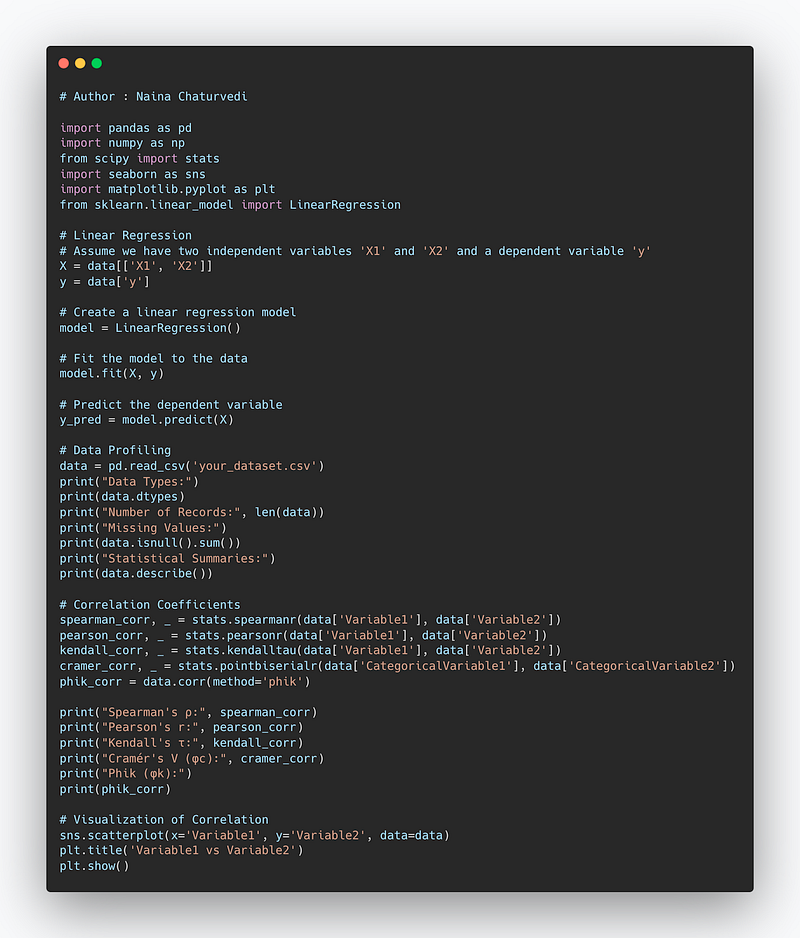
Example Code Implementation —
import pandas as pd
import numpy as np
from scipy import stats
import seaborn as sns
import matplotlib.pyplot as plt
from sklearn.linear_model import LinearRegression

# Linear Regression
# Assume we have two independent variables 'X1' and 'X2' and a dependent variable 'y'
X = data[['X1', 'X2']]
y = data['y']

# Create a linear regression model
model = LinearRegression()

# Fit the model to the data
model.fit(X, y)

# Predict the dependent variable
y_pred = model.predict(X)

# Data Profiling
data = pd.read_csv('your_dataset.csv')
print("Data Types:")
print(data.dtypes)
print("Number of Records:", len(data))
print("Missing Values:")
print(data.isnull().sum())
print("Statistical Summaries:")
print(data.describe())

# Correlation Coefficients
spearman_corr, _ = stats.spearmanr(data['Variable1'], data['Variable2'])
pearson_corr, _ = stats.pearsonr(data['Variable1'], data['Variable2'])
kendall_corr, _ = stats.kendalltau(data['Variable1'], data['Variable2'])
cramer_corr, _ = stats.pointbiserialr(data['CategoricalVariable1'], data['CategoricalVariable2'])
phik_corr = data.corr(method='phik')

print("Spearman's ρ:", spearman_corr)
print("Pearson's r:", pearson_corr)
print("Kendall's τ:", kendall_corr)
print("Cramér's V (φc):", cramer_corr)
print("Phik (φk):")
print(phik_corr)

# Visualization of Correlation
sns.scatterplot(x='Variable1', y='Variable2', data=data)
plt.title('Variable1 vs Variable2')
plt.show()
In linear regression, it is important to check the correlation between independent variables and dependent variable, because high correlation between independent variables can lead to multicollinearity which can affect the interpretation of the model.
Snippet —
What’s covered in 30 days of Data Analytics Series till now —
Day 1 : Data Analytics basics and kickstart of Data analytics with projects series
Day 3 : Data Analytics Ecosystem — Data Life Cycle, Data Analysis complete process ( most important things)
Day 5 : Statistics
Day 6 : Basic and Advanced SQL
Day 8 : Pandas and Numpy
Day 9 : Data Manipulation
Day 10 : Data Visualization — Part 1
Day 11 : Project 1 : Data Visualization — Part 2
Day 12 : Data Visualization — Part 3
Day 13: Tableau — Part 1
Day 14: Tableau — Part 2
Day 15: Tableau — Part 3
Day 16 : Data Analysis Project 2
Day 17 : Data Analysis Project 3
Day 18: Data Analysis Project 4
Day 20 : Data Analysis Project 6
Day 21 : Data Analysis Project 7
Take Complete Hands On Tableau Course : Link
All the projects, data structures, algorithms, system design, Data Science and ML, Data Engineering, MLOps and Deep Learning videos will be published on our youtube channel ( just launched).
Subscribe today!
Tech Newsletter —
If you are interested, you can join my newsletter through which I send tech interview tips, techniques, patterns, hacks — Software Development, ML, Data Science, Startups and Technology projects to more than 30K readers. You can subscribe to Tech Brew :
In the last post we covered Data Visualization and in this post we will cover a project.
(Note : Zoom all the images)
Import Necessary Libraries
import numpy as np
import pandas as pd
import seaborn as sns
from matplotlib import pyplot as plt
from matplotlib.colors import rgb2hex
import matplotlib.cm as cm
import matplotlib.colors
from collections import Counter
cmap2 = cm.get_cmap('twilight',13)
colors1= []
for i in range(cmap2.N):
    rgb= cmap2(i)[:4]
    colors1.append(rgb2hex(rgb))

from sklearn.model_selection import train_test_split
from sklearn.linear_model import LinearRegression
# Set style
sns.set(style='whitegrid')
Load the Data
We are using video games dataset, pokemon dataset and iris dataset in this project.
df= pd.read_csv('Path to file/vgsales.csv', low_memory = False)
Get information about your data
df.info()Output —
<class 'pandas.core.frame.DataFrame'>
RangeIndex: 16598 entries, 0 to 16597
Data columns (total 11 columns):
 #   Column        Non-Null Count  Dtype
---  ------        --------------  -----
 0   Rank          16598 non-null  int64
 1   Name          16598 non-null  object
 2   Platform      16598 non-null  object
 3   Year          16327 non-null  float64
 4   Genre         16598 non-null  object
 5   Publisher     16540 non-null  object
 6   NA_Sales      16598 non-null  float64
 7   EU_Sales      16598 non-null  float64
 8   JP_Sales      16598 non-null  float64
 9   Other_Sales   16598 non-null  float64
 10  Global_Sales  16598 non-null  float64
Know your charts/plots
To present your data, there are four basic presentation types :
Composition : To show part-to-whole relationship of the data variables
Distribution : To show the spread of the data values
Relationship : To establish relationship between the different data variables
Comparison : To compare one value with the other ( i.e two or more data variables)
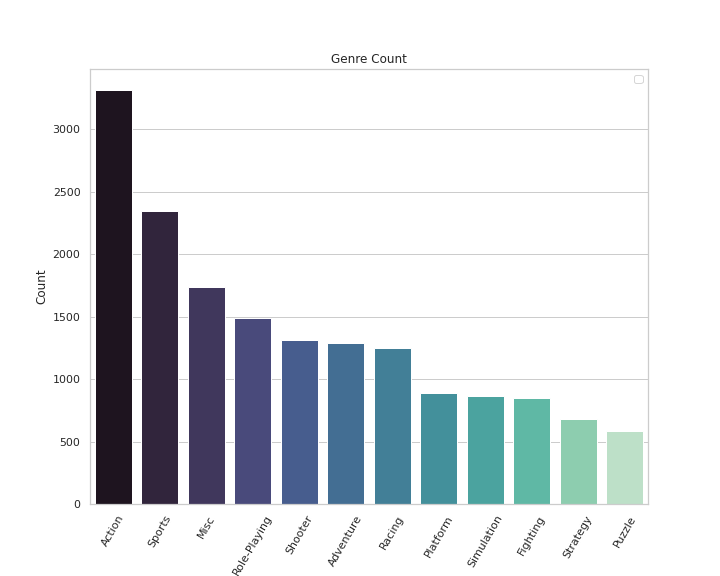
Count Plot
Count Plot shows the number of occurrences of an item based on a certain type of category.
Implementation —
#Genre Count ( Video Games Data Set)

plt.figure(figsize=(10,8))
sns.countplot(x='Genre',data=df,palette='mako',order = df['Genre'].value_counts().index)
plt.xlabel('Genre')
plt.xticks(rotation = 60)
plt.ylabel('Count')
plt.legend()
plt.title('Genre Count')


plt.show()
Output —
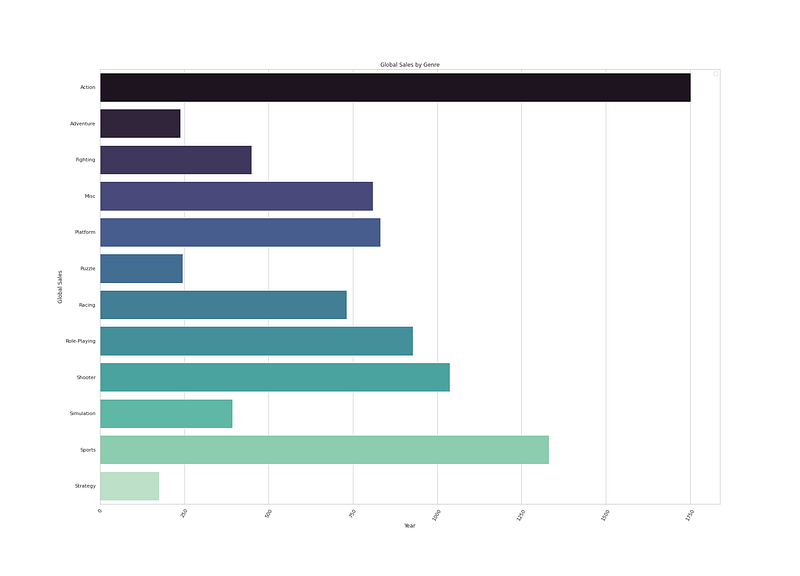
Bar plot
Bar plot is used to show categorical data with heights proportional to values and represents point estimates and estimate of central tendency.
Implementation —
# Global Sales by Genre ( video game dataset)

gg_df = df.groupby(by=['Genre'])['Global_Sales'].sum()
gg_y = gg_df.reset_index()

plt.figure(figsize=(25,18))
sns.barplot(y='Genre',x='Global_Sales', data=gg_y,palette='mako',orient='h')
plt.xlabel('Year')
plt.xticks(rotation = 60)
plt.ylabel('Global Sales')
plt.legend()
plt.title('Global Sales by Genre')


plt.show()
Output —
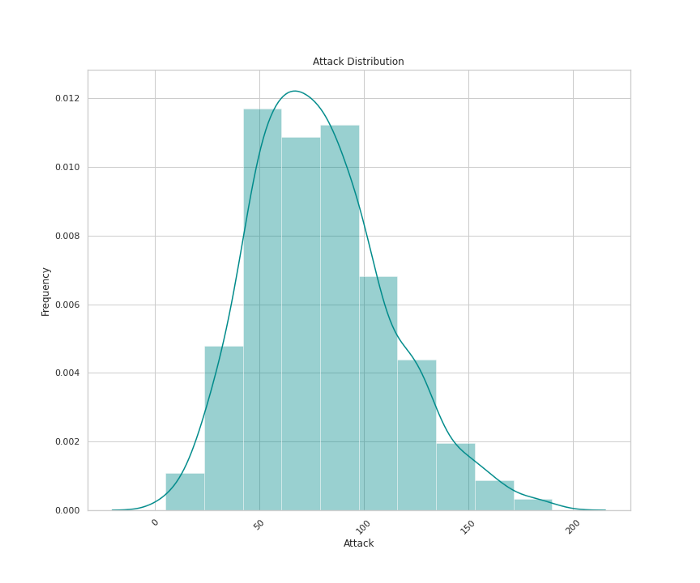
Distplot
Distplot is used to show the univariate distribution of data.
Implementation —
# Attack Distribution ( Pokemon dataset)

plt.figure(figsize=(12,10))
sns.distplot(x=df['Attack'],bins=10,color='darkcyan',kde=True,hist=True)
plt.title('Attack Distribution')
plt.xlabel('Attack')
plt.ylabel('Frequency')
plt.xticks(rotation=45)


plt.show()
Output —
Boxplot
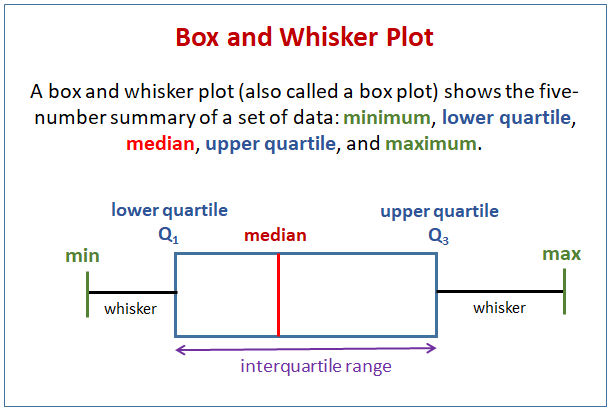
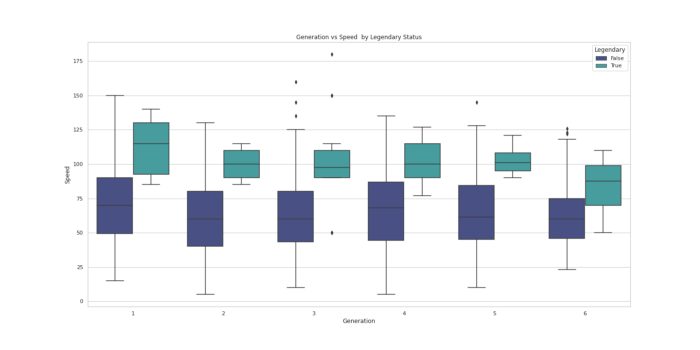
Boxplot is used to give a statistical summary of the features being plotted. Top line represent the max value, top edge of box is third Quartile, middle edge represents the median,bottom edge represents the first quartile value. #The bottom most line represent the minimum value of the feature.The height of the box is called as Interquartile range.The black dots on the plot represent the outlier values in the data.
Implementation —
#Generation vs Speed ( Pokemon dataset)

plt.figure(figsize=(20,10))
sns.boxplot(x="Generation", y="Speed", hue='Legendary', data=df, palette='mako')
plt.title('Generation vs Speed  by Legendary Status')


plt.show()
Output —
Violin Plot
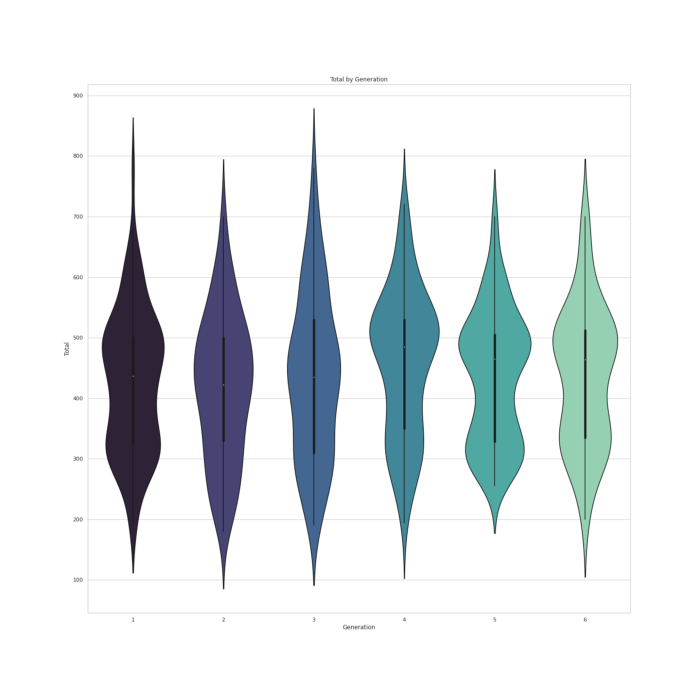
Violin Plot is used to visualize the distribution of data and its probability distribution. It’s a combination of a Box Plot and a Density Plot that is rotated and placed on each side, to show the distribution shape of the data. The thick black bar in the centre represents the interquartile range, the thin black line extended from it represents the 95% confidence intervals, and the white dot is the median.
Implementation —
#Total by Generation ( Pokemon dataset)

plt.figure(figsize=(20,20))
plt.title('Total by Generation')
sns.violinplot(x = "Generation", y = "Total",data = df,palette='mako')


plt.show()
Output —
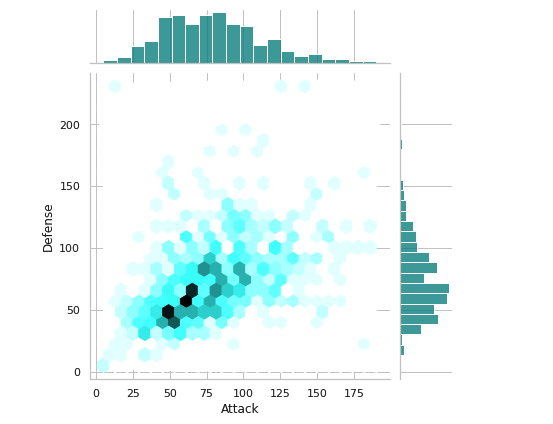
Joint Plot
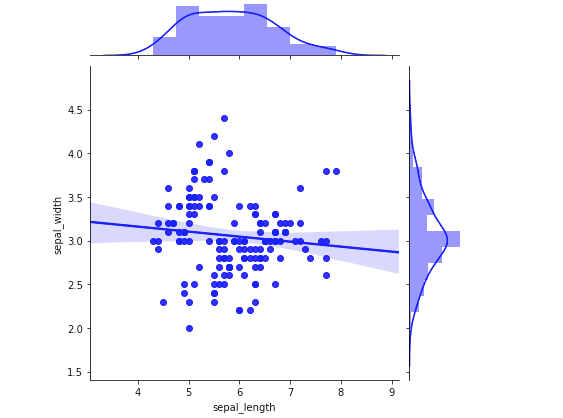
Joint Plot is used to quickly visualize and analyze the relationship between two variables and describe their individual distributions on the same plot. You can draw a plot of two variables with bivariate and univariate graphs. You can replace the scatterplots and histograms with density estimates and regression.
Implementation —
#Attack Vs Defense ( Pokemon dataset)

plt.figure(figsize=(20,20))
plt.title('Attack vs Defense')
sns.jointplot(x="Attack",y="Defense",data=df,kind="hex",color='darkcyan')


plt.show()
Output —
Another implementation —
#Sepal Length vs Sepal Width ( Iris dataset)

plt.figure(figsize=(20,20))
plt.title('Sepal Length vs Sepal Width')
sns.jointplot(x="sepal_length",y="sepal_width",data=iris_data,color="blue",kind="reg")

plt.show()
Output —
Pie chart
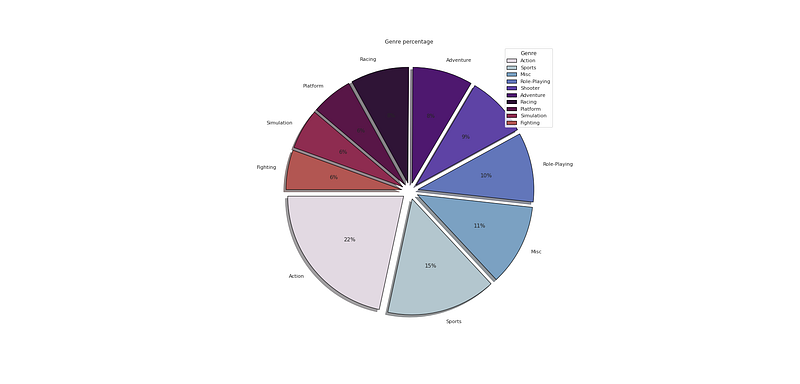
Pie chart is used to show numerical proportion of the categorical features in the data.
Implementation —
#   Genre Percentage

plt.figure(figsize=(25,12))
p_r = df['Genre'].value_counts().head(10)
plt.pie(x=p_r,labels=p_r.index,colors=colors1,autopct='%.0f%%',explode=[0.07 for i in p_r.index],startangle=180,wedgeprops={'linewidth':1,'edgecolor':'black'},shadow=True)
plt.title('Genre percentage ')
plt.legend(loc='upper right',title='Genre')


plt.show()
Output —
Line Plot
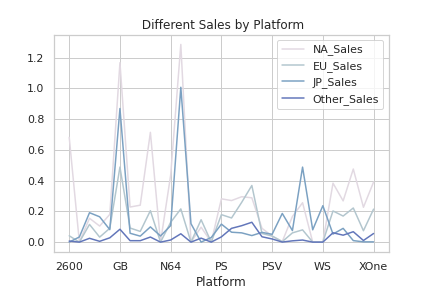
Line plot is used to show frequency of the data points and to compare those data points.
Implementation —
# Different Sales by Platform ( Video Game Dataset)
pg = df.groupby('Platform').mean()[['NA_Sales', 'EU_Sales', 'JP_Sales', 'Other_Sales' ]]

plt.figure(figsize=(20,10))
pg.plot.line(color=colors1)
plt.title(' Different Sales by Platform')
plt.legend(loc='upper right')

plt.show()
Output —
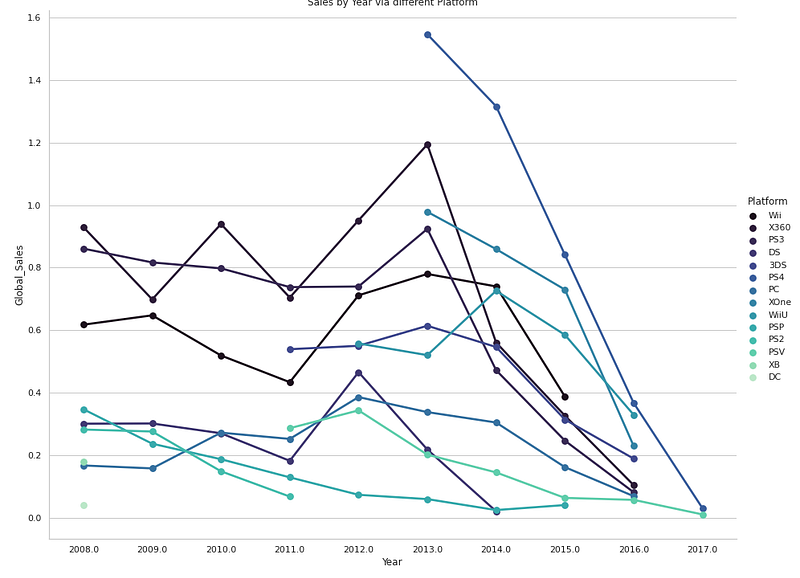
Point Plot
Point plot is used to show confidence intervals and point estimates. It creates 2D plot of points.
Implementation —
# Global Sales by Year via different Platform
plt.figure(figsize=(25,18))
sns.catplot(x="Year",y="Global_Sales",kind="point",data=df[(df.Year > 2007) & (df.Year < 2018)], hue = "Platform",
            palette='mako',ci = None,edgecolor=None,height=10, aspect=10.6/8.23)
plt.title('Sales by Year via different Platform')

plt.show()
Output —
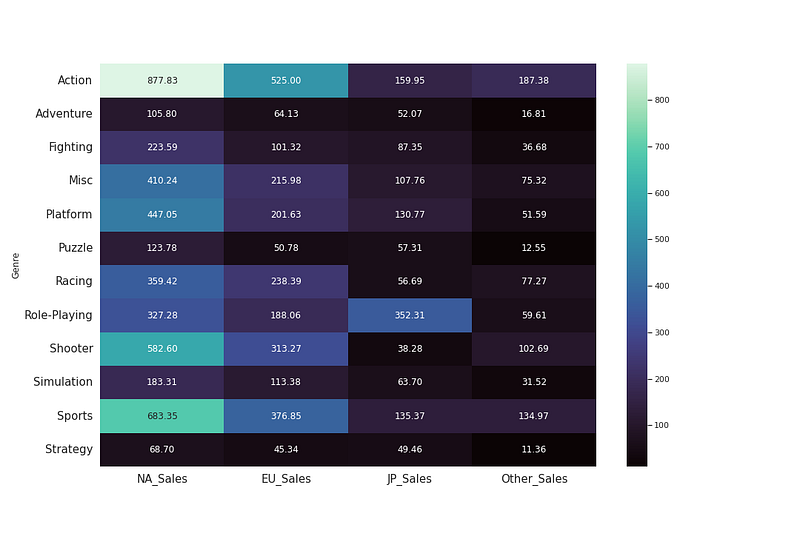
Heat Map
Heat map is used to find out the correlation between different features in the dataset. High positive or negative value shows that the features have high correlation. It helps in correlation analysis.
Implementation —
# Total Sales by Different Genre ( Video Games Dataset)
g_platform = df[['Genre', 'NA_Sales', 'EU_Sales', 'JP_Sales', 'Other_Sales']]
g_compare = g_platform.groupby(by=['Genre']).sum()

# heatmap correlation

#corrmat = df.corr()
plt.figure(figsize=(15,10))
sns.heatmap(g_compare,annot=True,fmt=".2f",cmap='mako')

plt.xticks(fontsize=15)
plt.yticks(fontsize=15)

plt.show()
Output —
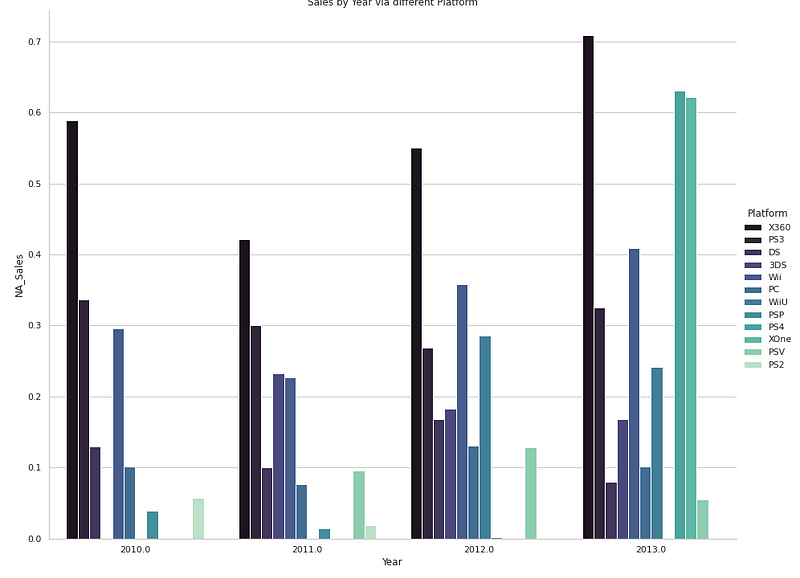
Cat plot
Cat plot is used to work with categorical data. One can use catplot to represent categorical data using scatter plot as well as point to show distribution of the data observations.
Implementation —
# NA Sales by Year via different Platform ( Video games dataset)
plt.figure(figsize=(25,18))
sns.catplot(x="Year",y="NA_Sales",kind="bar",data=df[(df.Year > 2009) & (df.Year < 2014)], hue = "Platform",
            palette='mako',ci = None,edgecolor=None,height=10, aspect=10.6/8.23)
plt.title('Sales by Year via different Platform')


plt.show()
Output —
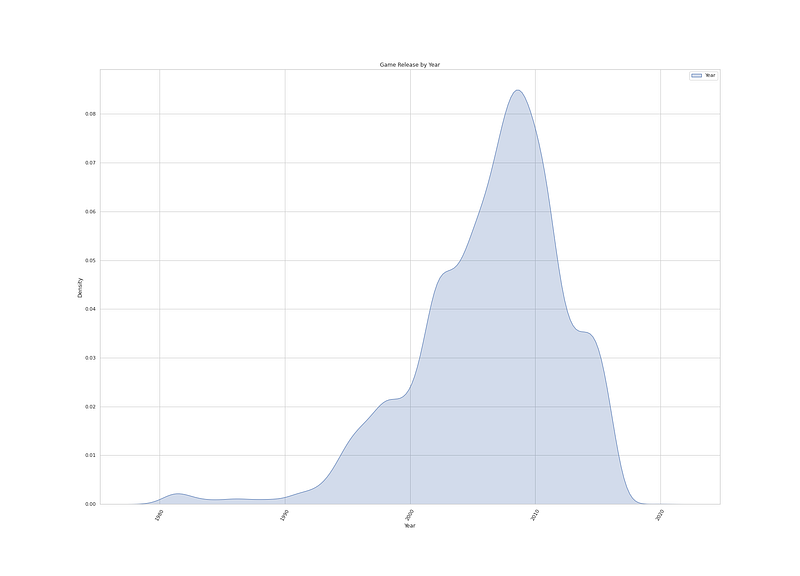
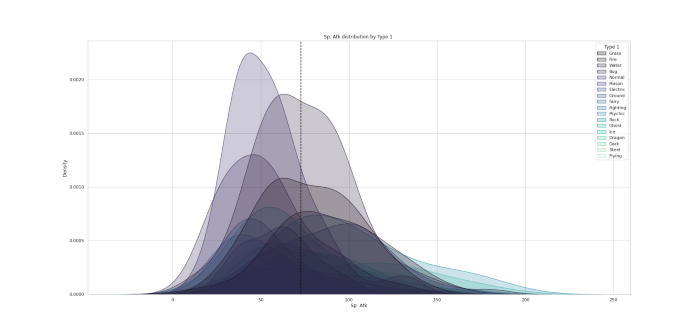
KDE plot
KDE plot is used to fit and plot a univariate or bivariate kernel density estimate. Kernel Density Estimation ( KDE) chart is used to show the the distribution of data points/values i.e. project the probability density of a continuous variable in more interpretable format.
Implementation —
# Game Release by Year ( Video Games Dataset)

plt.figure(figsize=(25,18))
sns.kdeplot(data=df['Year'], label='Year', shade=True,palette='mako')
plt.xlabel('Year')
plt.xticks(rotation = 60)
plt.legend()
plt.title('Game Release by Year')


plt.show()
Output —
Another implementation —
# Sp.Attack distribution by Type 1  ( Pokemon data set)

plt.figure(figsize=(25,12))
sns.kdeplot(df["Sp. Atk"], hue=df["Type 1"], fill=True, linewidth=1, palette='mako')
plt.axvline(df['Sp. Atk'].mean(), c='black',ls='--')
plt.title("Sp. Atk distribution by Type 1 ")


plt.show()
Output —
LMplot
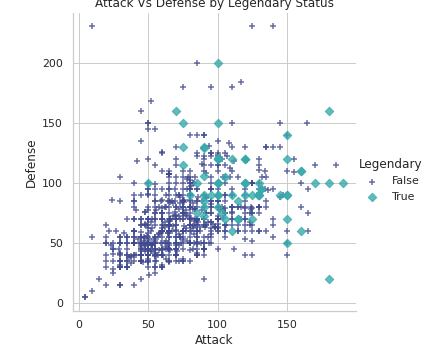
LMplot is used to fit regression models across conditional subsets of a dataset.
Implementation —
# Attack Vs Defense by Legendary Status( Pokemon data set)

plt.figure(figsize=(20,10))
sns.lmplot(x='Attack', y='Defense', hue='Legendary',  markers=['+', 'D'], fit_reg=False, data=df,palette='mako')
plt.title('Attack Vs Defense by Legendary Status')


plt.show()
Output —
Swarm Plot
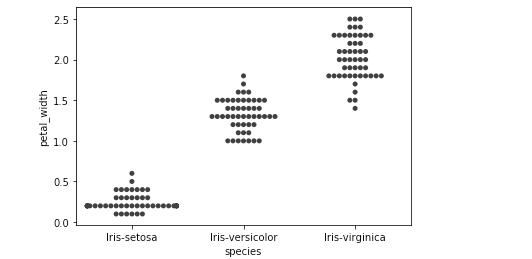
Swarm plot is used whenever you want to draw a categorical scatterplot with non-overlapping points. It gives a better representation of the distribution of values, but it does not scale well to large numbers of observations. The style of the plot is called a “beeswarm”.
Implementation —
#Species vs Petal Width ( iris dataset)

plt.figure(figsize=(10,8))
sns.swarmplot(x="species", y="petal_width", data=iris_data, color=".25")

plt.title('Species vs Petal Width')

plt.show()
Output —
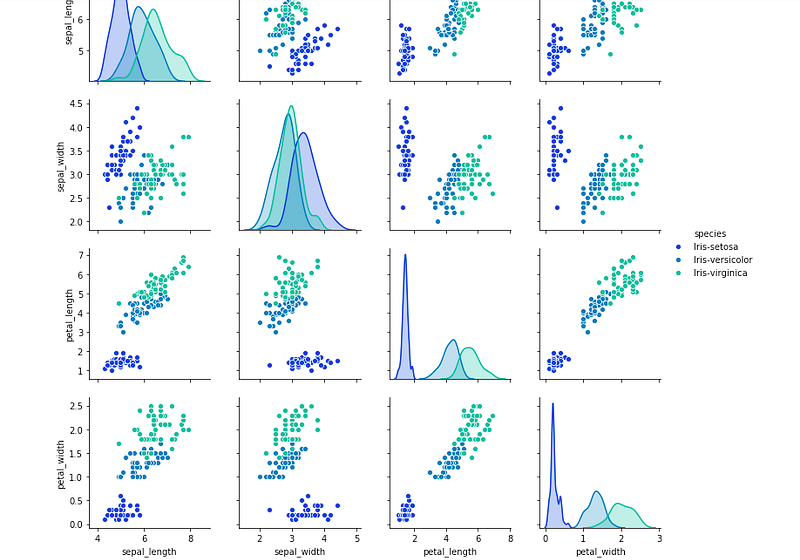
Pair Plot
Pair plot is used to show how all the features vcan be paired with all other variables. In this, one variable in the same data row is matched with another variable’s value.
Implementation —
# Pairplot using Iris Dataset

plt.figure(figsize=(50,30))
sns.pairplot(data=iris_data,kind="scatter",hue="species",dropna=True,palette="winter")


plt.show()
Output —
Strip Plot
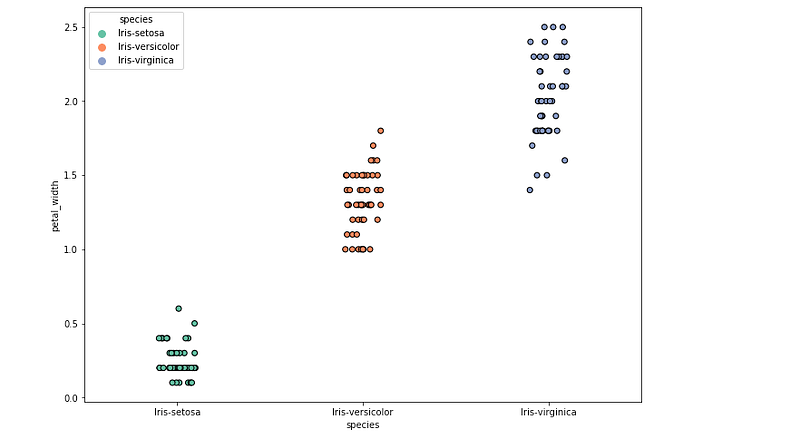
Strip plot is used when you want to show all observations along with some representation of the underlying distribution.
Implementation —
fig=sns.stripplot(x="species",y="petal_width",data=iris_data,color="blue",hue="species",order=["Iris-setosa",\
                "Iris-versicolor","Iris-virginica"],jitter=True,edgecolor="black",linewidth=1,size=6,orient='v'\
                ,palette="Set2")
Output —
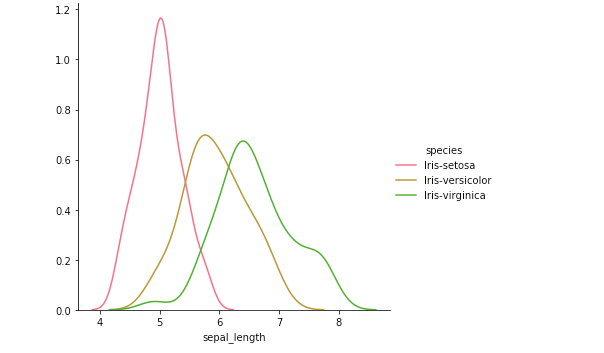
Facet grid
Facet grid is used as a Multi-plot grid for plotting conditional relationships.
Implementation —
#Iris Datset

sns.FacetGrid(iris_data,hue="species",height=5)\
             .map(sns.kdeplot,"sepal_length")\
             .add_legend()
Output —
To summarize —
- When you want to show distribution , then use -
- For single variable with few data points — Use column histogram/count plot
- For Single Variable with many data points — Use Histogram
- For two variable s — Use Scatter Chart
2. When you want to show composition, then use —
- For static composition, to show share of total — Use pie chart
3. When you want to show relationship, then use —
- When you want to show relationship between two variables — Use scatter chart
- When you want to show relationship between three variables — Use Bubble Chart
4. When you want to show Comparison, then use —
- When you want to show comparison, and have many items for few categories — Use bar chart
- When you want to show comparison, and have few items for few categories — Use Column Chart
- When you want to show comparison, and have many periods over time for cynical data — Use Area Chart
- When you want to show comparison, and have many periods over time for non- cynical data — Use Line Chart
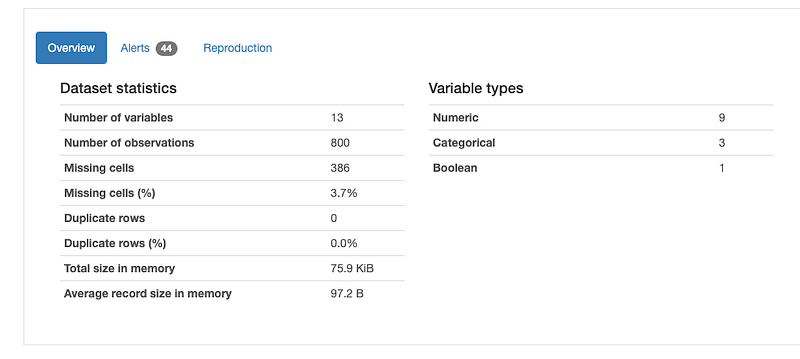
Data Profiling
It is used to generate profile reports from the input data.
The statistics include
Descriptive Statistics and Quantile Statistics.
Descriptive stats — Standard deviation, Kurtosis, mean, skewness, variance etc
Quantile Statistics — Min-max, percentiles, median, IQR etc
df.profile_report()Output —
Linear Regression
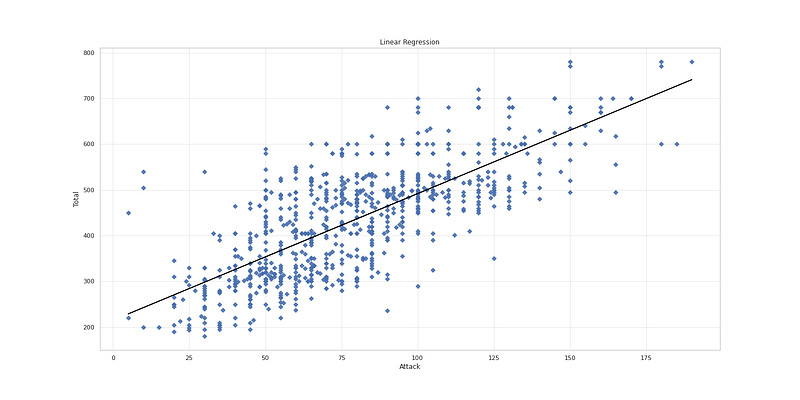
It’s a technique to estimate the relationship between two quantitative variables. It is used when you want to establish:
- Strength of the relationship — How strong the relationship is between two variables
- The value of the dependent variable at a certain value of the independent variable.
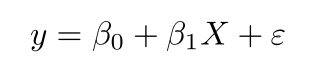
where,
y is the predicted value of the dependent variable for any given value of the independent variable which is X.
B0 is the intercept and B1 is the regression coefficient
x is the independent variable
e is the error of the estimate
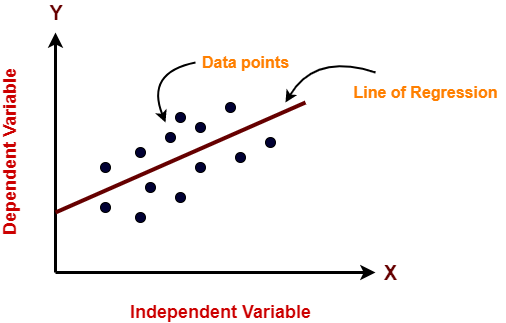
It works on the assumption that the relationship between the independent and dependent variable is linear: the line of best fit through the data points is a straight line as shown in the diagram.
# Pokemon dataset

reg_X = df.loc[:,"Attack":]
reg_y = pd.DataFrame(df.loc[:,"Total"])

X_train, X_test, y_train, y_test = train_test_split(pd.DataFrame(reg_X.loc[:,"Attack"]), reg_y,random_state = 0)
lr = LinearRegression().fit(X_train, y_train)
x = np.array(reg_X["Attack"])
# Linear Regression
plt.figure(figsize=(20,10))
plt.scatter(reg_X.loc[:,"Attack"], reg_y, marker= 'D', s=30, alpha=0.9, cmap='Blue')
plt.plot(reg_X.loc[:,"Attack"], lr.intercept_+ lr.coef_ * x.reshape(-1,1) , 'black')
ax = plt.gca()
ax.xaxis.grid(True,alpha=0.4)
ax.yaxis.grid(True,alpha=0.4)
plt.title('Linear Regression')
plt.xlabel('Attack')
plt.ylabel('Total')
plt.show()Output —
Correlation Coefficients
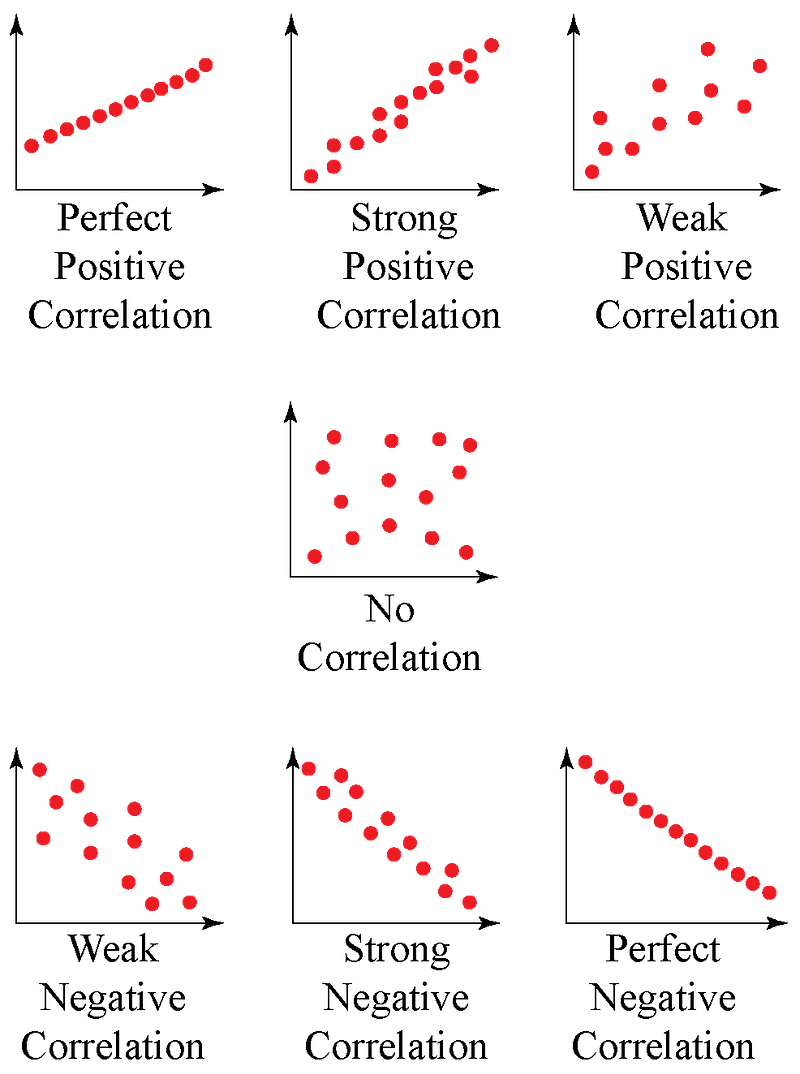
It’s the measure of the strength of the relationship between two variables.
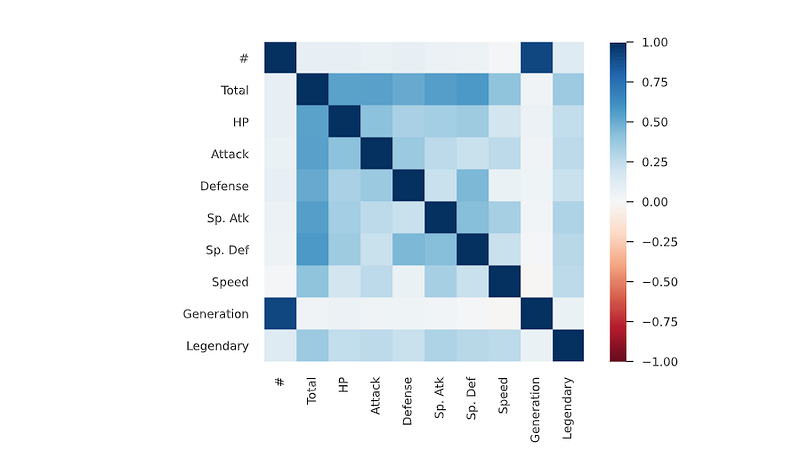
Spearman’s ρ
The Spearman’s rank correlation coefficient (ρ) is a measure of monotonic correlation between two variables, and is therefore better in catching nonlinear monotonic correlations than Pearson’s r. It’s value lies between -1 and +1, -1 indicating total negative monotonic correlation, 0 indicating no monotonic correlation and 1 indicating total positive monotonic correlation.
To calculate ρ for two variables X and Y, one divides the covariance of the rank variables of X and Y by the product of their standard deviations.
Pearson’s r
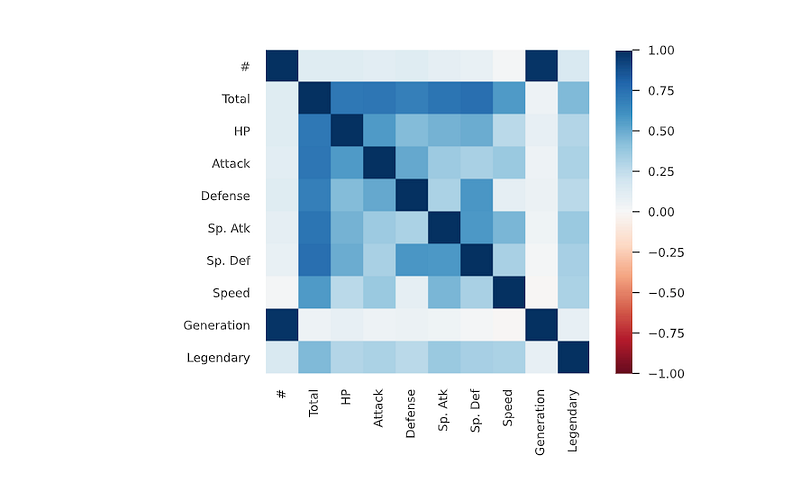
The Pearson’s correlation coefficient (r) is a measure of linear correlation between two variables. It’s value lies between -1 and +1, -1 indicating total negative linear correlation, 0 indicating no linear correlation and 1 indicating total positive linear correlation. Furthermore, r is invariant under separate changes in location and scale of the two variables, implying that for a linear function the angle to the x-axis does not affect r.
To calculate r for two variables X and Y, one divides the covariance of X and Y by the product of their standard deviations.
Kendall’s τ
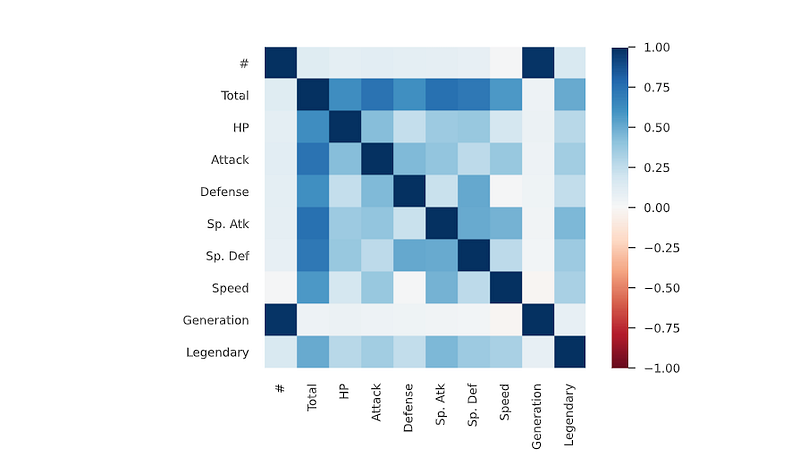
Similarly to Spearman’s rank correlation coefficient, the Kendall rank correlation coefficient (τ) measures ordinal association between two variables. It’s value lies between -1 and +1, -1 indicating total negative correlation, 0 indicating no correlation and 1 indicating total positive correlation.
To calculate τ for two variables X and Y, one determines the number of concordant and discordant pairs of observations. τ is given by the number of concordant pairs minus the discordant pairs divided by the total number of pairs.
Cramér’s V (φc)
Cramér’s V is an association measure for nominal random variables. The coefficient ranges from 0 to 1, with 0 indicating independence and 1 indicating perfect association. The empirical estimators used for Cramér’s V have been proved to be biased, even for large samples.
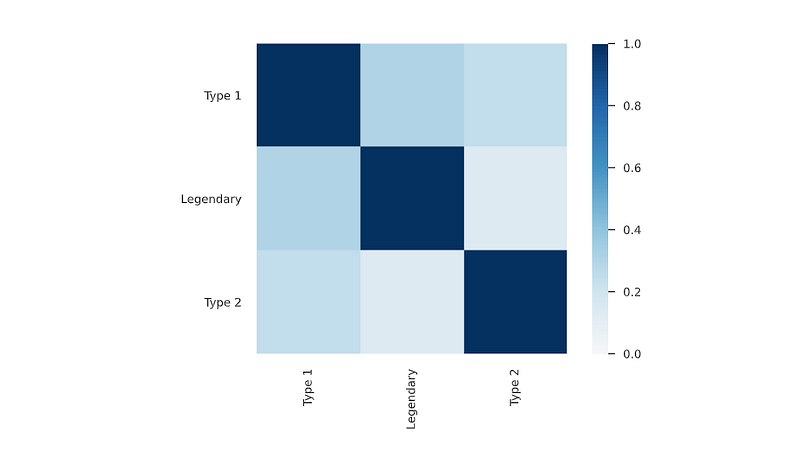
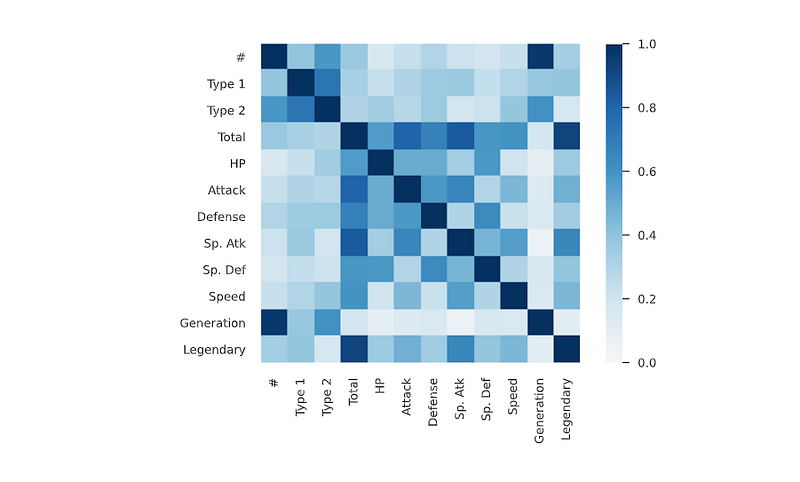
Phik (φk)
Phik (φk) is a new and practical correlation coefficient that works consistently between categorical, ordinal and interval variables, captures non-linear dependency and reverts to the Pearson correlation coefficient in case of a bivariate normal input distribution.
That’s it for now.
Find Day 24 Below: Data Analysis : Project 10
Let me know if you have questions in the comment section below. Subscribe/ Follow, Like/Clap as it would encourage me to write more in my free time
Stay Tuned!!
Read More —
11 most important System Design Base Concepts
6. Networking, How Browsers work, Content Network Delivery ( CDN)
13. System Design Template — How to solve any System Design Question
System Design Case Studies — In Depth
Complete Data Structures and Algorithm Series
Some of the other best Series —
30 days of Data Structures and Algorithms and System Design Simplified
Data Science and Machine Learning Research ( papers) Simplified **
100 days : Your Data Science and Machine Learning Degree Series with projects
Complete Data Visualization and Pre-processing Series with projects
Exceptional Github Repos — Part 1
Exceptional Github Repos — Part 2
Tech Newsletter —
If you are interested, you can join my newsletter through which I send tech interview tips, techniques, patterns, hacks — Software Development, ML, Data Science, Startups and Technology projects to more than 30K readers. You can subscribe to Tech Brew :
For Python Projects —
For complete 60 days of Data Science and ML : Day 1 — Day 60 : Quick Recap of 60 days of Data Science and ML
Follow for more updates. Stay tuned and keep coding!
For other projects, tune to —
Build Machine Learning Pipelines( With Code)
Recurrent Neural Network with Keras
Clustering Geolocation Data in Python using DBSCAN and K-Means
Facial Expression Recognition using Keras
Hyperparameter Tuning with Keras Tuner
Custom Layers in Keras


