
Day 24 of 30 days of Data Engineering Series with Projects
Welcome back peeps to Day 24 of Data Engineering Series with Projects!
In this we will cover —
Hive
Zookeeper
Pig
Cassandra
Sqoop
Pre-requisite to Day 24 is to complete Day 1–23( link below):
Day 3 : Complete Advanced Python for Data Engineering — Part 2
Day 18 : Data Visualization basics, Data Visualization Projects, Data Visualization using Plotly and Bokeh, Data Profiling, Summary Functions, Indexing, Grouping, Linear Regression, Multi Linear Regression, Polynomial Regression, Regression, Support Vector Regression, Decision Tree Regression, Random Forest Regression, Feature Engineering, GroupBy Features, Categorical and Numerical Features, Missing Value Analysis, Fill the missing Values, Unique Value Analysis, Univariate Analysis, Bivariate Analysis, Multivariate Analysis, Correlation Analysis, Spearman’s ρ, Pearson’s r, Kendall’s τ, Cramér’s V (φc), Phik (φk)
Day 20 : ETL ( Extract, Tranform and Load) basics, Why ETL is important?, How ETL works, ETL Tools
Day 21 : Structured Data, Semi Structured Data, Unstructured Data, Data Warehouse, Data Mart, Data Lake
Projects Videos —
All the projects, data structures, SQL, algorithms, system design, Data Science and ML , Data Analytics, Data Engineering, , Implemented Data Science and ML projects, Implemented Data Engineering Projects, Implemented Deep Learning Projects, Implemented Machine Learning Ops Projects, Implemented Time Series Analysis and Forecasting Projects, Implemented Applied Machine Learning Projects, Implemented Tensorflow and Keras Projects, Implemented PyTorch Projects, Implemented Scikit Learn Projects, Implemented Big Data Projects, Implemented Cloud Machine Learning Projects, Implemented Neural Networks Projects, Implemented OpenCV Projects,Complete ML Research Papers Summarized, Implemented Data Analytics projects, Implemented Data Visualization Projects, Implemented Data Mining Projects, Implemented Natural Leaning Processing Projects, MLOps and Deep Learning, Applied Machine Learning with Projects Series, PyTorch with Projects Series, Tensorflow and Keras with Projects Series, Scikit Learn Series with Projects, Time Series Analysis and Forecasting with Projects Series, ML System Design Case Studies Series videos will be published on our youtube channel ( just launched).
Subscribe today!
Tech Newsletter —
If you are interested, you can join my newsletter through which I send tech interview tips, techniques, patterns, hacks — Software Development, ML, Data Science, Startups and Technology projects to more than 30K readers. You can subscribe to Ignito:
System Design Case Studies — In Depth
Design Instagram
Design Netflix
Design Reddit
Design Amazon
Design Messenger App
Design Twitter
Design URL Shortener
Design Dropbox
Design Youtube
Design API Rate Limiter
Design Web Crawler
Design Amazon Prime Video
Design Facebook’s Newsfeed
Design Yelp
Design Uber
Design Tinder
Design Tiktok
Design Whatsapp
Most Popular System Design Questions
Mega Compilation : Solved System Design Case studies
Let’s get started!
- Hive: Apache Hive is a data warehousing tool that runs on top of Hadoop and provides a SQL-like interface for querying and managing large datasets stored in the Hadoop ecosystem. It allows for easy data summarization, querying, and analysis of large datasets stored in the Hadoop Distributed File System (HDFS) and other Hadoop-supported storage systems.
-- Create a database
CREATE DATABASE IF NOT EXISTS my_database;

-- Use the database
USE my_database;

-- Create a table
CREATE TABLE IF NOT EXISTS my_table (
    id INT,
    name STRING,
    age INT
)
ROW FORMAT DELIMITED
FIELDS TERMINATED BY ','
STORED AS TEXTFILE;

-- Load data into the table
LOAD DATA LOCAL INPATH '/path/to/data.csv' INTO TABLE my_table;

-- Show the tables in the current database
SHOW TABLES;

-- Describe the table structure
DESCRIBE my_table;

-- Select all records from the table
SELECT * FROM my_table;

-- Select specific columns
SELECT name, age FROM my_table;

-- Filter records using WHERE clause
SELECT * FROM my_table WHERE age > 30;

-- Sort records in ascending order
SELECT * FROM my_table ORDER BY age;

-- Aggregate functions
SELECT COUNT(*) FROM my_table; -- Count the number of records
SELECT AVG(age) FROM my_table; -- Calculate the average age
SELECT MAX(age) FROM my_table; -- Find the maximum age

-- Group by and having clause
SELECT age, COUNT(*) FROM my_table GROUP BY age HAVING COUNT(*) > 1;

-- Join tables
SELECT * FROM my_table t1 JOIN other_table t2 ON t1.id = t2.id;

-- Create an external table
CREATE EXTERNAL TABLE IF NOT EXISTS external_table (
    id INT,
    data STRING
)
LOCATION '/path/to/external_data/';

-- Use Hive built-in functions
SELECT CONCAT(name, ', ', age) AS info FROM my_table;

-- Create a view
CREATE VIEW my_view AS SELECT name, age FROM my_table WHERE age > 30;

-- Drop table
DROP TABLE IF EXISTS my_table;

-- Drop database
DROP DATABASE IF EXISTS my_database;- Zookeeper: Apache ZooKeeper is a distributed coordination service that provides synchronization, configuration management, and group services for distributed systems. It is often used in conjunction with other distributed systems such as Apache Hadoop and Apache Cassandra to provide a centralized and reliable way to manage configuration information and maintain consistency across distributed nodes.
from kazoo.client import KazooClient

# Connect to ZooKeeper ensemble
zk = KazooClient(hosts='127.0.0.1:2181')

# Start the ZooKeeper client
zk.start()

# Create a znode
zk.create('/my_node', b'my_data')

# Check if a znode exists
if zk.exists('/my_node'):
    print("Node '/my_node' exists.")

# Get data of a znode
data, stat = zk.get('/my_node')
print(f"Data of '/my_node': {data.decode()}")

# Set data of a znode
zk.set('/my_node', b'new_data')

# Get children of a znode
children = zk.get_children('/')
print(f"Children of '/': {children}")

# Create an ephemeral znode
zk.create('/ephemeral_node', ephemeral=True)

# Check if an ephemeral znode exists
if zk.exists('/ephemeral_node'):
    print("Ephemeral node '/ephemeral_node' exists.")

# Create a sequential znode
sequential_path = zk.create('/sequential_node_', b'sequential_data_', sequence=True)

# Get the sequential znode's path
print(f"Sequential znode's path: {sequential_path}")

# Delete a znode
zk.delete('/my_node')

# Stop the ZooKeeper client
zk.stop()- Pig: Apache Pig is a high-level platform for creating programs that run on Apache Hadoop. It provides a simple programming model for creating MapReduce programs that can process large datasets stored in HDFS and other Hadoop-supported storage systems. Pig’s language, Pig Latin, provides a more concise and expressive way to specify MapReduce transformations than writing raw MapReduce code in Java.
-- Load data from a file
data = LOAD '/path/to/input/file' USING PigStorage(',') AS (id:int, name:chararray, age:int);

-- Filter records using WHERE clause
filtered_data = FILTER data BY age > 30;

-- Group records by a key
grouped_data = GROUP filtered_data BY name;

-- Calculate average age for each group
avg_age = FOREACH grouped_data GENERATE group AS name, AVG(filtered_data.age) AS avg_age;

-- Join two datasets
other_data = LOAD '/path/to/other/file' USING PigStorage(',') AS (name:chararray, address:chararray);
joined_data = JOIN avg_age BY name, other_data BY name;

-- Store the result in a file
STORE joined_data INTO '/path/to/output/file' USING PigStorage(',');

-- Display the result
DUMP joined_data;- Cassandra: Apache Cassandra is a distributed NoSQL database that is designed to handle large amounts of data across many commodity servers, providing high availability with no single point of failure. It provides a highly scalable and high-performance data store that can be used for a wide range of use cases, such as real-time data streaming, online retail, and IoT.
from cassandra.cluster import Cluster

# Connect to Cassandra cluster
cluster = Cluster(['127.0.0.1'])
session = cluster.connect()

# Create a keyspace
session.execute("CREATE KEYSPACE IF NOT EXISTS my_keyspace WITH replication = {'class':'SimpleStrategy', 'replication_factor':1}")

# Use the keyspace
session.set_keyspace('my_keyspace')

# Create a table
session.execute("CREATE TABLE IF NOT EXISTS my_table (id UUID PRIMARY KEY, name TEXT, age INT)")

# Insert data into the table
session.execute("INSERT INTO my_table (id, name, age) VALUES (uuid(), 'John', 30)")
session.execute("INSERT INTO my_table (id, name, age) VALUES (uuid(), 'Jane', 25)")

# Select all records from the table
result_set = session.execute("SELECT * FROM my_table")
for row in result_set:
    print(row.id, row.name, row.age)

# Update a record
session.execute("UPDATE my_table SET age = 35 WHERE name = 'John'")

# Delete a record
session.execute("DELETE FROM my_table WHERE name = 'Jane'")

# Create a secondary index
session.execute("CREATE INDEX IF NOT EXISTS idx_age ON my_table (age)")

# Select records with a specific condition
result_set = session.execute("SELECT * FROM my_table WHERE age > 30")
for row in result_set:
    print(row.id, row.name, row.age)

# Drop the table
session.execute("DROP TABLE IF EXISTS my_table")

# Drop the keyspace
session.execute("DROP KEYSPACE IF EXISTS my_keyspace")

# Close the session and cluster connection
session.shutdown()
cluster.shutdown()- Sqoop: Apache Sqoop is a tool designed for efficiently transferring bulk data between Apache Hadoop and structured data stores such as relational databases. It provides a simple command-line interface for importing data from external data sources into the Hadoop ecosystem and for exporting data from Hadoop to external systems. Sqoop can also be used to perform incremental imports and exports, allowing you to keep data in Hadoop in sync with external data sources.
# Import data from a database table to Hadoop
sqoop import \
    --connect jdbc:mysql://localhost/mydatabase \
    --username myuser \
    --password mypassword \
    --table mytable \
    --target-dir /path/to/hdfs/output \
    --as-avrodatafile

# Export data from Hadoop to a database table
sqoop export \
    --connect jdbc:mysql://localhost/mydatabase \
    --username myuser \
    --password mypassword \
    --table mytable \
    --export-dir /path/to/hdfs/input \
    --input-fields-terminated-by '\t'

# Incremental import from a database table to Hadoop
sqoop import \
    --connect jdbc:mysql://localhost/mydatabase \
    --username myuser \
    --password mypassword \
    --table mytable \
    --target-dir /path/to/hdfs/output \
    --incremental append \
    --check-column id \
    --last-value 100

# Import data with a specified query
sqoop import \
    --connect jdbc:mysql://localhost/mydatabase \
    --username myuser \
    --password mypassword \
    --query "SELECT * FROM mytable WHERE id > 100 AND \$CONDITIONS" \
    --target-dir /path/to/hdfs/output \
    --split-by id

# Import data using multiple mappers
sqoop import \
    --connect jdbc:mysql://localhost/mydatabase \
    --username myuser \
    --password mypassword \
    --table mytable \
    --target-dir /path/to/hdfs/output \
    --num-mappers 5

# List available tables in a database
sqoop list-tables \
    --connect jdbc:mysql://localhost/mydatabase \
    --username myuser \
    --password mypassword

# Generate a Java class for a table schema
sqoop codegen \
    --connect jdbc:mysql://localhost/mydatabase \
    --username myuser \
    --password mypassword \
    --table mytable \
    --class-name MyTableClass
Hive
Hive, developed by Facebook is an open source data warehouse project which is built to focus on the analytics and build analytics queries using Hive QL language. It is used by Data Analysts to build analytics and insights.
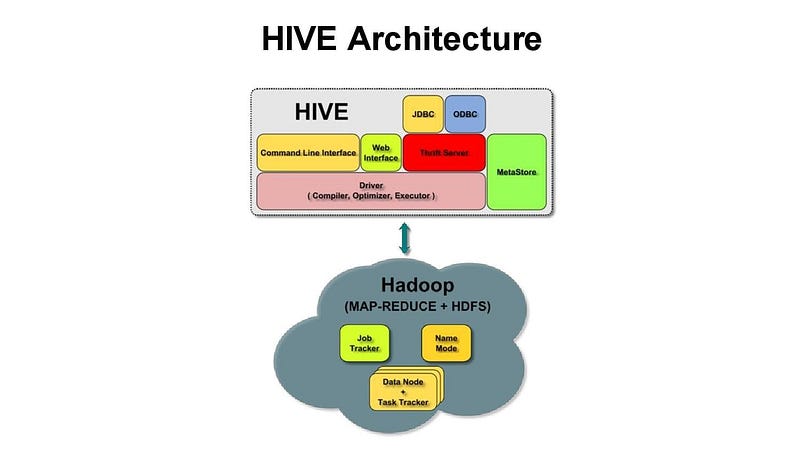
It’s operational for structured data and is compatible with Map Reduce which it uses for execution and HDFS for storage. It allows to plug in custom mappers and reducers.
- Hive allows for easy data summarization, querying, and analysis of large datasets stored in the Hadoop Distributed File System (HDFS) and other Hadoop-supported storage systems.
- When a user submits a Hive query, it is first parsed and translated into a series of MapReduce jobs. These jobs are then executed on the Hadoop cluster. Hive supports a variety of data formats, including plain text, sequence files, and RCFile (Record Columnar File).
- Hive uses a data structure called the Hive Data Model (HDM) to represent the data stored in the cluster. The HDM is a hierarchical data model that defines the structure of the data, including the table and column names, data types, and partitioning information.
- Hive also uses a component called the Hive Metastore to store metadata about the data stored in the cluster, such as the location of the data files and the schema information. The Hive Metastore is a separate service that can run on its own or be embedded in the HiveServer2 process.
- Hive also uses a component called the Hive Execution Engine to execute the MapReduce jobs generated by the query. The Execution Engine can use different execution engines like MapReduce, Tez, and Spark.
- Hive also provides a variety of data management features, such as the ability to create and alter tables, load data into tables, and perform data manipulation and analysis using SQL-like commands. In addition, Hive provides support for user-defined functions (UDFs) and user-defined aggregate functions (UDAFs), which allow users to define custom logic for processing data.
Here are some of the most important Hive commands:
- SELECT: used to retrieve data from one or more tables.
- FROM: specifies the table(s) from which to retrieve data.
- WHERE: specifies a condition to filter the data.
- GROUP BY: used to group the data based on one or more columns.
- HAVING: used to filter the data based on aggregate functions.
- ORDER BY: used to sort the data based on one or more columns.
- JOIN: used to combine data from multiple tables based on a common column.
- CREATE TABLE: used to create a new table in the Hive metastore.
- ALTER TABLE: used to modify an existing table in the Hive metastore.
- DROP TABLE: used to delete a table from the Hive metastore.
- SHOW TABLES: used to list all the tables in the Hive metastore.
- DESCRIBE: used to display the schema of a table.
- LOAD: used to load data into a table from a file or directory.
- INSERT: used to insert data into a table.
- UPDATE: used to update data in a table.
- DELETE: used to delete data from a table.
- EXPLAIN: used to display the execution plan for a query.
- SET: used to set various configuration properties in Hive.
- ADD JAR: used to add a jar file to the classpath.
- ADD FILE: used to add a file to the distributed cache.
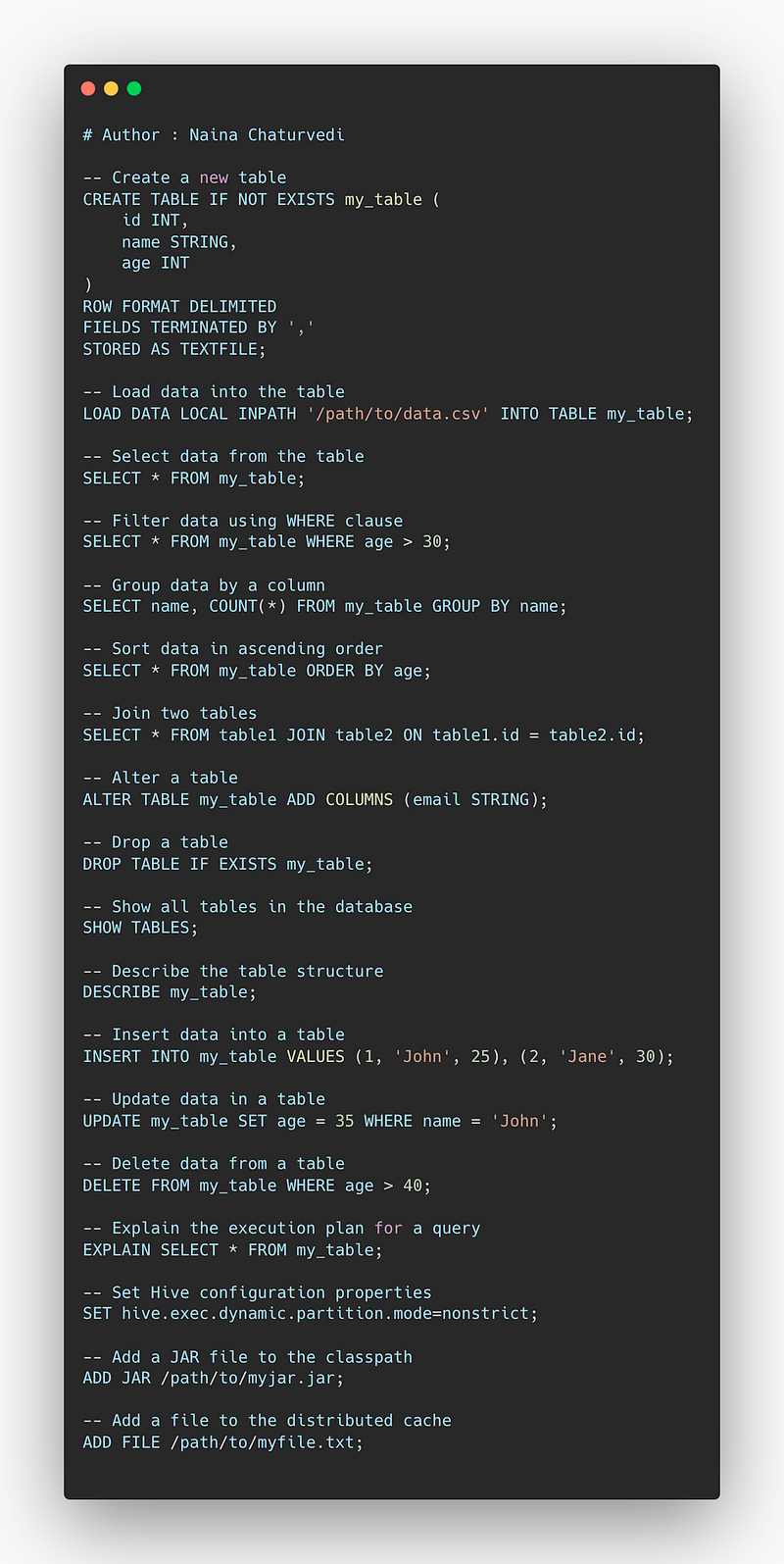
-- Create a new table
CREATE TABLE IF NOT EXISTS my_table (
    id INT,
    name STRING,
    age INT
)
ROW FORMAT DELIMITED
FIELDS TERMINATED BY ','
STORED AS TEXTFILE;

-- Load data into the table
LOAD DATA LOCAL INPATH '/path/to/data.csv' INTO TABLE my_table;

-- Select data from the table
SELECT * FROM my_table;

-- Filter data using WHERE clause
SELECT * FROM my_table WHERE age > 30;

-- Group data by a column
SELECT name, COUNT(*) FROM my_table GROUP BY name;

-- Sort data in ascending order
SELECT * FROM my_table ORDER BY age;

-- Join two tables
SELECT * FROM table1 JOIN table2 ON table1.id = table2.id;

-- Alter a table
ALTER TABLE my_table ADD COLUMNS (email STRING);

-- Drop a table
DROP TABLE IF EXISTS my_table;

-- Show all tables in the database
SHOW TABLES;

-- Describe the table structure
DESCRIBE my_table;

-- Insert data into a table
INSERT INTO my_table VALUES (1, 'John', 25), (2, 'Jane', 30);

-- Update data in a table
UPDATE my_table SET age = 35 WHERE name = 'John';

-- Delete data from a table
DELETE FROM my_table WHERE age > 40;

-- Explain the execution plan for a query
EXPLAIN SELECT * FROM my_table;

-- Set Hive configuration properties
SET hive.exec.dynamic.partition.mode=nonstrict;

-- Add a JAR file to the classpath
ADD JAR /path/to/myjar.jar;

-- Add a file to the distributed cache
ADD FILE /path/to/myfile.txt;
Overall, Hive provides a powerful and flexible data warehousing solution that allows users to easily process and analyze large datasets stored in the Hadoop ecosystem.
Snippet —
Zookeeper
Zookeeper is a basically a service which is used to provide configuration details, cluster synchronization, hierarchical key — value store.
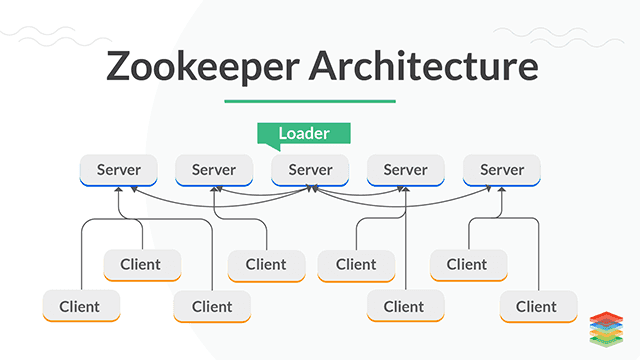
It’s responsible to maintain and manage changes in the configurations.
It uses a hierarchical namespace, similar to a file system, to store data about the state of the cluster and the services running on it.
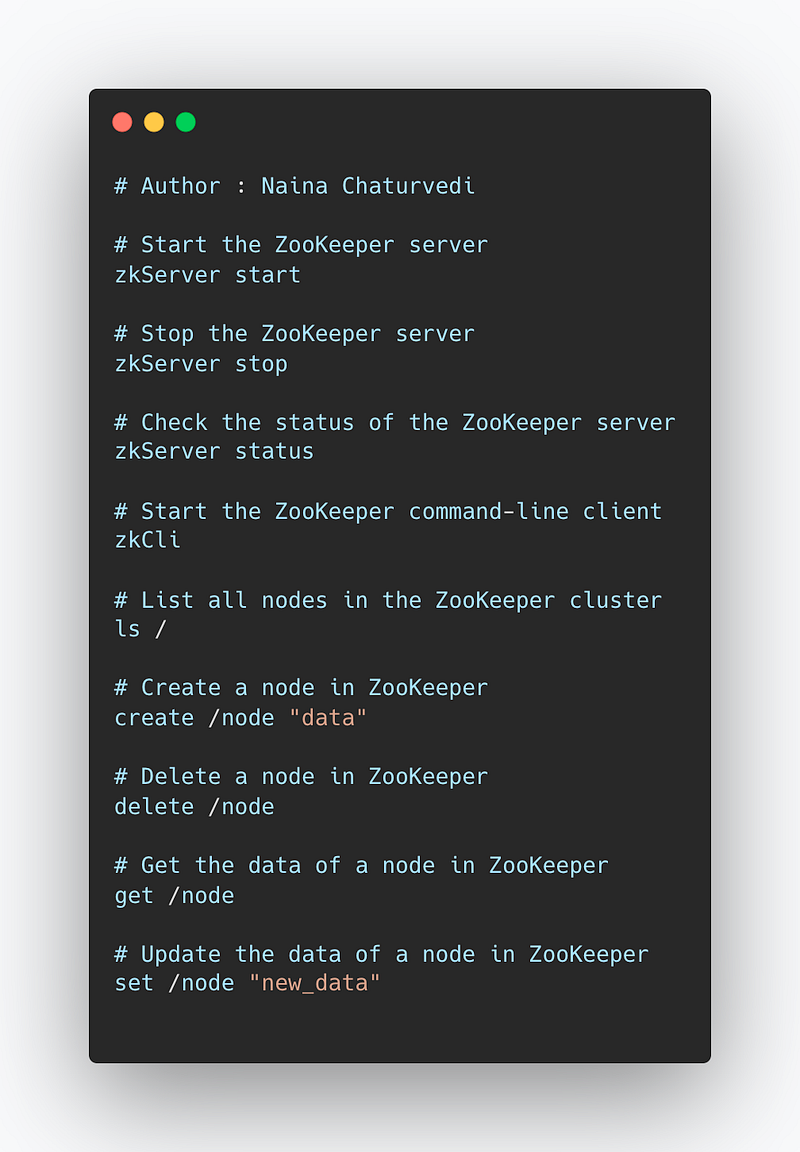
Some important commands for managing a Zookeeper cluster include:
zkServer start: starts the Zookeeper serverzkServer stop: stops the Zookeeper serverzkServer status: checks the status of the Zookeeper serverzkCli: starts the Zookeeper command-line client, which can be used to interact with the Zookeeper server and view the data stored in the cluster.zkCli ls /: List all the nodes in the zookeeper clusterzkCli create /node "data": create a node in zookeeper with the name '/node' and the data 'data'zkCli delete /node: delete the node '/node'zkCli get /node: get the data of '/node'zkCli set /node "new_data": update the data of '/node'
Implementation —
# Start the ZooKeeper server
zkServer start

# Stop the ZooKeeper server
zkServer stop

# Check the status of the ZooKeeper server
zkServer status

# Start the ZooKeeper command-line client
zkCli

# List all nodes in the ZooKeeper cluster
ls /

# Create a node in ZooKeeper
create /node "data"

# Delete a node in ZooKeeper
delete /node

# Get the data of a node in ZooKeeper
get /node

# Update the data of a node in ZooKeeper
set /node "new_data"
Snippet —
Pig
Pig, developed by Yahoo is an open source procedural data flow scripting language called as Pig Latin to work with structured and semi-structured data.
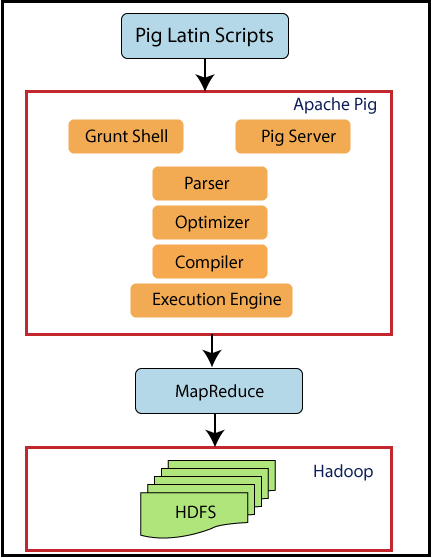
It’s compatible with map reduce, suitable for complex and nested data and used by Researchers and developers.
Apache Pig is a platform for analyzing large data sets that consists of a high-level language for expressing data analysis programs, Pig Latin, and an execution environment for running Pig Latin programs on a distributed cluster. Pig Latin programs are translated into a series of MapReduce jobs that are executed on a Hadoop cluster.
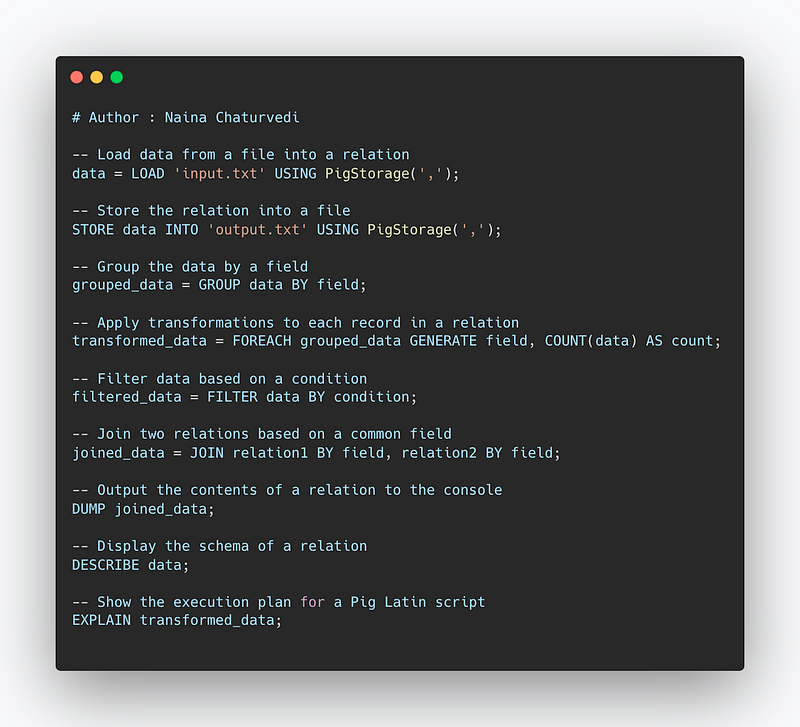
Some important Pig commands include:
LOAD: loads data into Pig from a file or directorySTORE: stores data from Pig into a file or directoryGROUP: groups data by one or more fieldsFOREACH: applies a transformation to each record in a relationFILTER: filters data based on a conditionJOIN: joins two or more relations based on a common fieldDUMP: outputs the contents of a relation to the consoleDESCRIBE: displays the schema of a relationEXPLAIN: shows the execution plan for a Pig Latin script
Implementation —
-- Load data from a file into a relation
data = LOAD 'input.txt' USING PigStorage(',');

-- Store the relation into a file
STORE data INTO 'output.txt' USING PigStorage(',');

-- Group the data by a field
grouped_data = GROUP data BY field;

-- Apply transformations to each record in a relation
transformed_data = FOREACH grouped_data GENERATE field, COUNT(data) AS count;

-- Filter data based on a condition
filtered_data = FILTER data BY condition;

-- Join two relations based on a common field
joined_data = JOIN relation1 BY field, relation2 BY field;

-- Output the contents of a relation to the console
DUMP joined_data;

-- Display the schema of a relation
DESCRIBE data;

-- Show the execution plan for a Pig Latin script
EXPLAIN transformed_data;
Snippet —
Cassandra
Cassandra, developed by Facebook is an open source, distributed, high performance, highly scalable database solution. It’s a non -relational, partitioned row store where rows are organized into tables and the data is distributed across multiple nodes cluster.
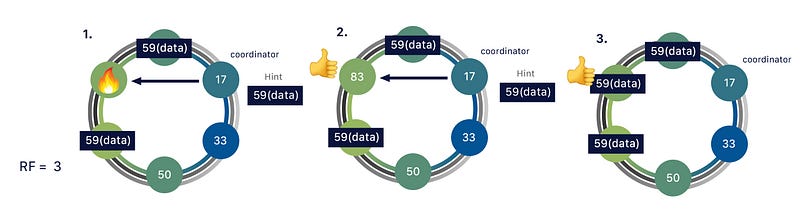
It’s responsible for its ability to scale and provide great uptime. It has master-less ring design than master slave architecture.
Main advantages of Cassandra are —
- Ease of Data Replication
- High availability
- High Scalability
- High performance
- No schema concept
- Distributed
- Fault tolerance
- Has own Cassandra Query Language
It is a column-family store, meaning it organizes data into columns rather than rows.
Data is automatically distributed across all the nodes in a cluster, and each node is responsible for a portion of the data. This allows for linear scale as more nodes are added to the cluster. Cassandra also has a built-in mechanism for data replication, ensuring that multiple copies of each piece of data are stored across different nodes in the cluster.
Queries in Cassandra are executed using a query language called CQL (Cassandra Query Language), which is similar to SQL. CQL supports inserting, updating, and deleting data, as well as querying data using a primary key or an index.
Cassandra also provides tunable consistency, allowing trade-off between consistency and availability.
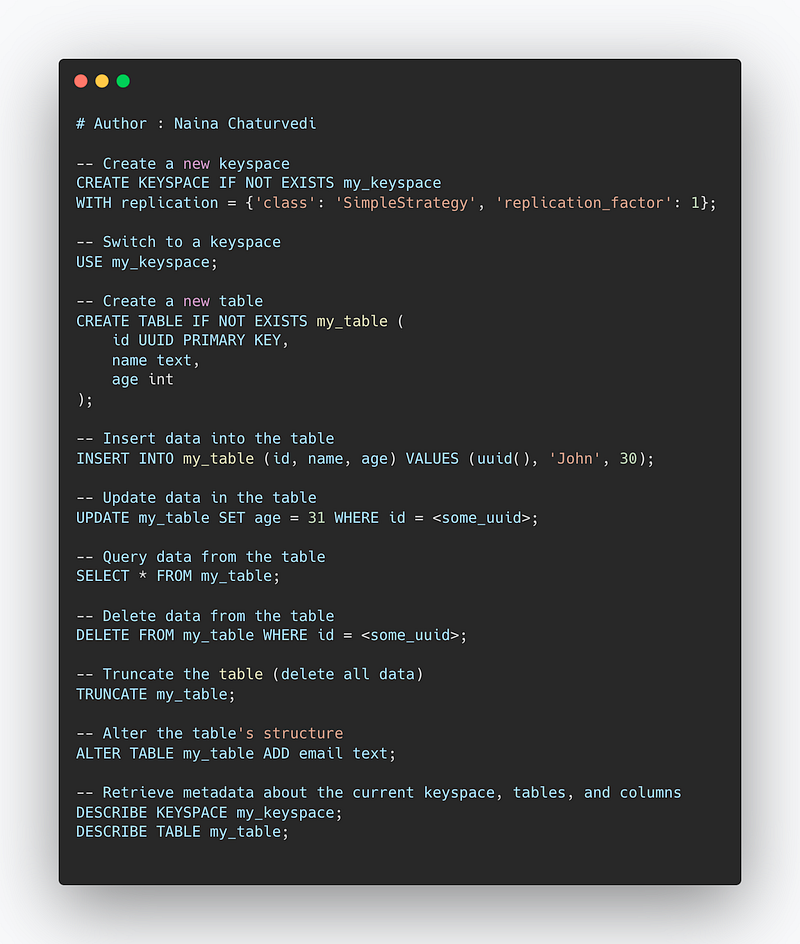
Here are some of the most important commands used in Cassandra:
CREATE KEYSPACE: This command is used to create a new keyspace (a container for a set of column families) in Cassandra.USE: This command is used to switch between different keyspaces.CREATE TABLE: This command is used to create a new table (column family) in a keyspace.INSERT INTO: This command is used to insert data into a table.UPDATE: This command is used to update data in a table.SELECT: This command is used to query data from a table.DELETE: This command is used to delete data from a table.TRUNCATE: This command is used to delete all data in a table.ALTER TABLE: This command is used to alter a table's structure, such as adding or dropping columns.DESCRIBE: This command is used to retrieve metadata about the current keyspace, tables and their columns, indexes, etc.
Implementation —
-- Create a new keyspace
CREATE KEYSPACE IF NOT EXISTS my_keyspace
WITH replication = {'class': 'SimpleStrategy', 'replication_factor': 1};

-- Switch to a keyspace
USE my_keyspace;

-- Create a new table
CREATE TABLE IF NOT EXISTS my_table (
    id UUID PRIMARY KEY,
    name text,
    age int
);

-- Insert data into the table
INSERT INTO my_table (id, name, age) VALUES (uuid(), 'John', 30);

-- Update data in the table
UPDATE my_table SET age = 31 WHERE id = <some_uuid>;

-- Query data from the table
SELECT * FROM my_table;

-- Delete data from the table
DELETE FROM my_table WHERE id = <some_uuid>;

-- Truncate the table (delete all data)
TRUNCATE my_table;

-- Alter the table's structure
ALTER TABLE my_table ADD email text;

-- Retrieve metadata about the current keyspace, tables, and columns
DESCRIBE KEYSPACE my_keyspace;
DESCRIBE TABLE my_table;
Overall, Cassandra is highly scalable, fault-tolerant and distributed database management system, which provide high performance and availability.
Snippet —
Sqoop
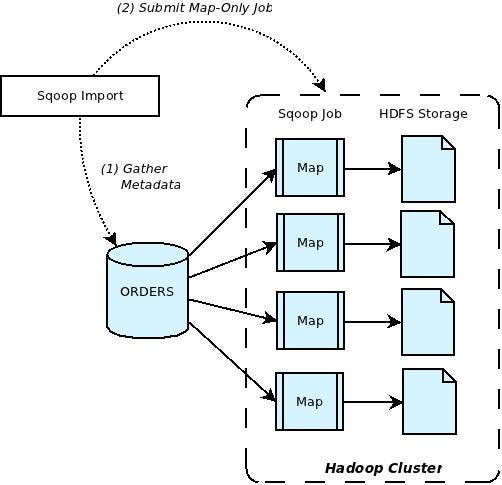
It’s a CLI tool designed to transfer bulk data between relational databases and Hadoop swiftly.
It retrieves the table metadata from RDMS, then generates a Java Class to map jobs and lastly execute the map tasks. It is event driven and has connector based architecture to connect with the right data sources to fetch the data.
It works by connecting to a structured data store and using its built-in capabilities to extract data in parallel, and then transferring the data to HDFS (Hadoop Distributed File System) or Hive (a data warehousing system for Hadoop). The data can then be processed using Hadoop MapReduce or other Hadoop ecosystem tools.
Sqoop uses a connector-based architecture, which allows it to support a wide range of data stores, including MySQL, Oracle, PostgreSQL, and SQL Server, among others.
The basic process of using Sqoop is as follows:
- Connect to a data store using connection details such as hostname, port, username, and password.
- Define the source table and target directory in HDFS or Hive.
- Import the data into HDFS or Hive using parallel processing.
- Optionally, the imported data can be transformed or processed using Hive or Pig before being loaded into a target data store.
- The exported data can be used to update the data store by using Update and Delete operations.
Sqoop can also be used in incremental imports where only new or modified rows are imported, this can be done by specifying a check column and its value.
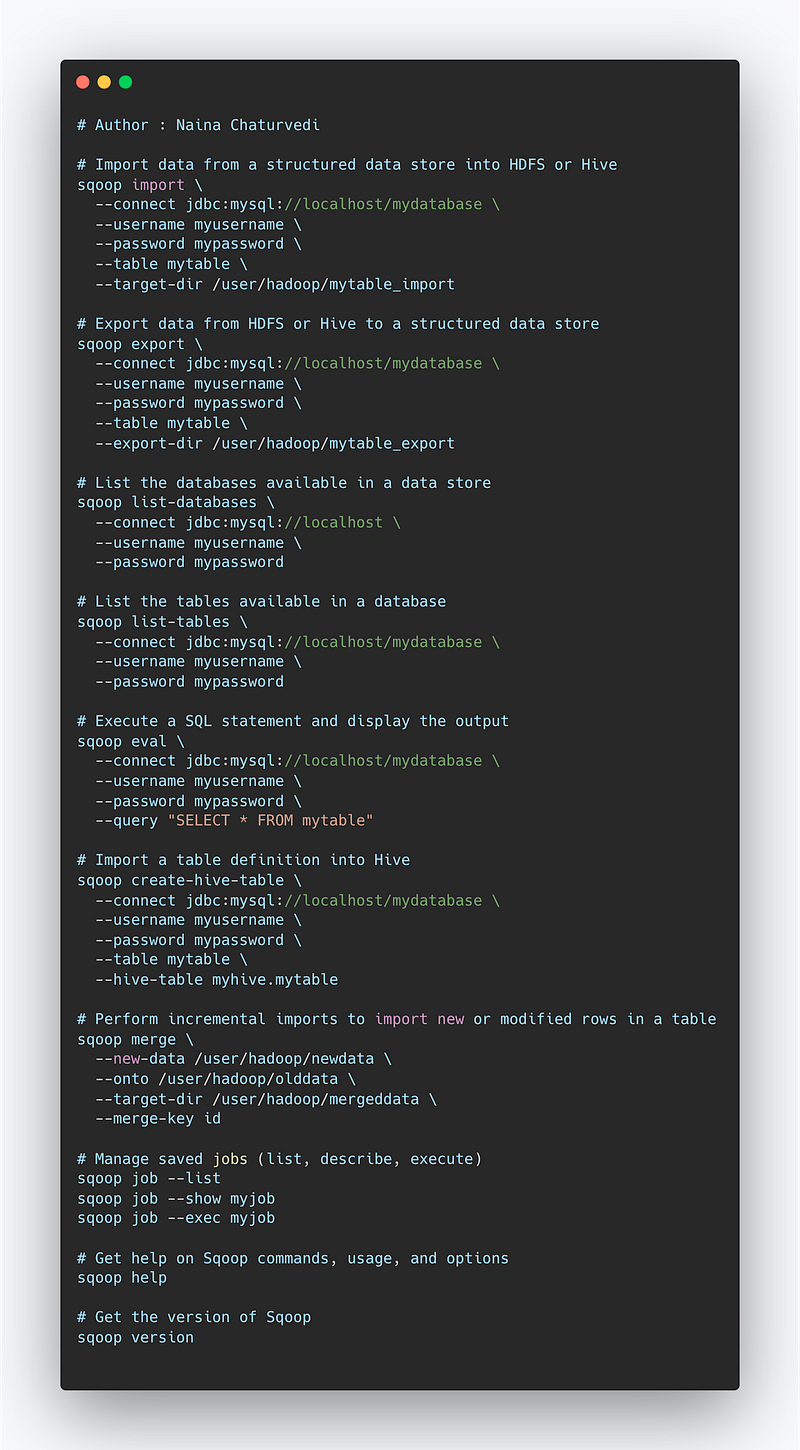
Here are some of the most important commands used in Sqoop:
sqoop import: This command is used to import data from a structured data store into HDFS or Hive.sqoop export: This command is used to export data from HDFS or Hive to a structured data store.sqoop list-databases: This command is used to list the databases available in a data store.sqoop list-tables: This command is used to list the tables available in a database.sqoop eval: This command is used to execute a SQL statement and display the output.sqoop create-hive-table: This command is used to import a table definition into Hive.sqoop merge: This command is used for incremental imports, it can be used to import new or modified rows in a table.sqoop job: This command is used to manage saved jobs, it can be used to list, describe and execute jobs.sqoop help: This command is used to get help on sqoop commands, usage and options.sqoop version: This command is used to get the version of Sqoop you are running.
Implementation —
# Import data from a structured data store into HDFS or Hive
sqoop import \
  --connect jdbc:mysql://localhost/mydatabase \
  --username myusername \
  --password mypassword \
  --table mytable \
  --target-dir /user/hadoop/mytable_import

# Export data from HDFS or Hive to a structured data store
sqoop export \
  --connect jdbc:mysql://localhost/mydatabase \
  --username myusername \
  --password mypassword \
  --table mytable \
  --export-dir /user/hadoop/mytable_export

# List the databases available in a data store
sqoop list-databases \
  --connect jdbc:mysql://localhost \
  --username myusername \
  --password mypassword

# List the tables available in a database
sqoop list-tables \
  --connect jdbc:mysql://localhost/mydatabase \
  --username myusername \
  --password mypassword

# Execute a SQL statement and display the output
sqoop eval \
  --connect jdbc:mysql://localhost/mydatabase \
  --username myusername \
  --password mypassword \
  --query "SELECT * FROM mytable"

# Import a table definition into Hive
sqoop create-hive-table \
  --connect jdbc:mysql://localhost/mydatabase \
  --username myusername \
  --password mypassword \
  --table mytable \
  --hive-table myhive.mytable

# Perform incremental imports to import new or modified rows in a table
sqoop merge \
  --new-data /user/hadoop/newdata \
  --onto /user/hadoop/olddata \
  --target-dir /user/hadoop/mergeddata \
  --merge-key id

# Manage saved jobs (list, describe, execute)
sqoop job --list
sqoop job --show myjob
sqoop job --exec myjob

# Get help on Sqoop commands, usage, and options
sqoop help

# Get the version of Sqoop
sqoop version
Overall, Sqoop is a powerful tool for transferring large amounts of data between Hadoop and structured data stores, allowing organizations to easily integrate their big data processing with their existing data infrastructure.
Snippet —
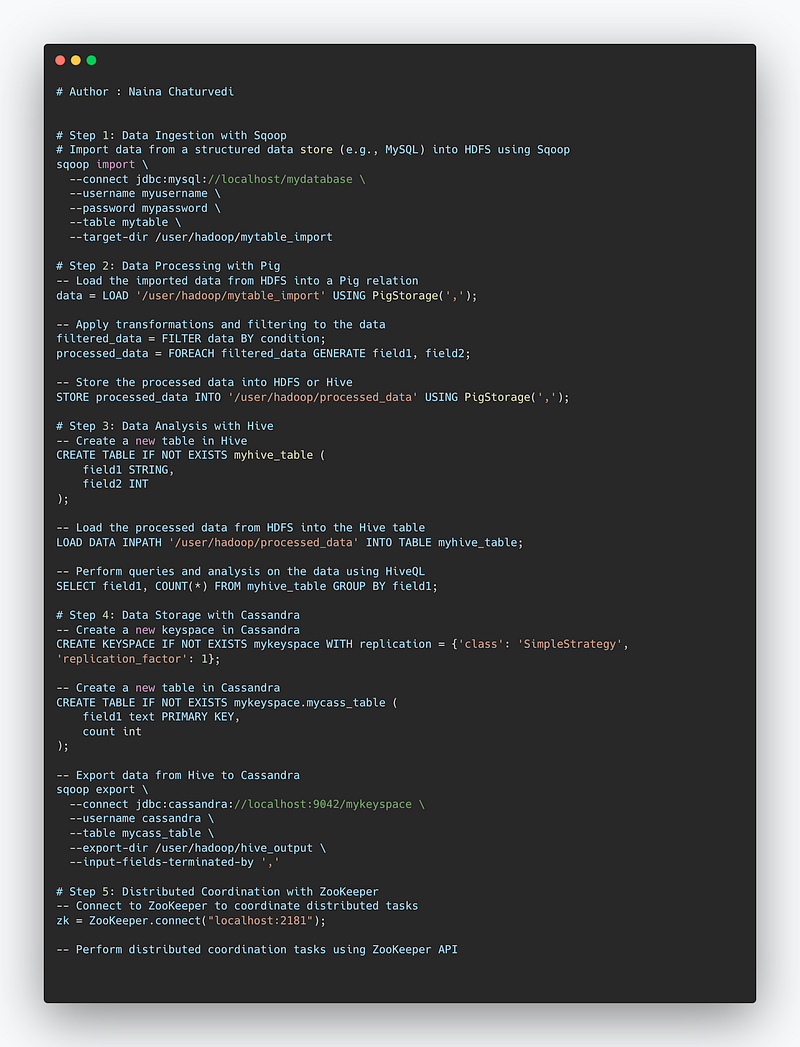
Project Code —
# Step 1: Data Ingestion with Sqoop
# Import data from a structured data store (e.g., MySQL) into HDFS using Sqoop
sqoop import \
  --connect jdbc:mysql://localhost/mydatabase \
  --username myusername \
  --password mypassword \
  --table mytable \
  --target-dir /user/hadoop/mytable_import

# Step 2: Data Processing with Pig
-- Load the imported data from HDFS into a Pig relation
data = LOAD '/user/hadoop/mytable_import' USING PigStorage(',');

-- Apply transformations and filtering to the data
filtered_data = FILTER data BY condition;
processed_data = FOREACH filtered_data GENERATE field1, field2;

-- Store the processed data into HDFS or Hive
STORE processed_data INTO '/user/hadoop/processed_data' USING PigStorage(',');

# Step 3: Data Analysis with Hive
-- Create a new table in Hive
CREATE TABLE IF NOT EXISTS myhive_table (
    field1 STRING,
    field2 INT
);

-- Load the processed data from HDFS into the Hive table
LOAD DATA INPATH '/user/hadoop/processed_data' INTO TABLE myhive_table;

-- Perform queries and analysis on the data using HiveQL
SELECT field1, COUNT(*) FROM myhive_table GROUP BY field1;

# Step 4: Data Storage with Cassandra
-- Create a new keyspace in Cassandra
CREATE KEYSPACE IF NOT EXISTS mykeyspace WITH replication = {'class': 'SimpleStrategy', 'replication_factor': 1};

-- Create a new table in Cassandra
CREATE TABLE IF NOT EXISTS mykeyspace.mycass_table (
    field1 text PRIMARY KEY,
    count int
);

-- Export data from Hive to Cassandra
sqoop export \
  --connect jdbc:cassandra://localhost:9042/mykeyspace \
  --username cassandra \
  --table mycass_table \
  --export-dir /user/hadoop/hive_output \
  --input-fields-terminated-by ','

# Step 5: Distributed Coordination with ZooKeeper
-- Connect to ZooKeeper to coordinate distributed tasks
zk = ZooKeeper.connect("localhost:2181");

-- Perform distributed coordination tasks using ZooKeeper API
Snippet —
A project video Hive, Zookeper, Pig, Cassandra, Sqoop covering coming soon ( subscribe today) —
That’s it for now.
Find Day 25 Below :
Let me know if you have questions in the comment section below. Subscribe/ Follow, Like/Clap as it would encourage me to write more in my free time
Stay Tuned!!
Read more —
All the Complete System Design Series Parts —
6. Networking, How Browsers work, Content Network Delivery ( CDN)
Github —
For Python Projects —
For complete 60 days of Data Science and ML : Day 1 — Day 60 : Quick Recap of 60 days of Data Science and ML
Follow for more updates. Stay tuned and keep coding!
For other projects, tune to —
Build Machine Learning Pipelines( With Code)
Recurrent Neural Network with Keras
Clustering Geolocation Data in Python using DBSCAN and K-Means
Facial Expression Recognition using Keras
Hyperparameter Tuning with Keras Tuner
Custom Layers in Keras


