
Day 4 of 30 days of Data Engineering Series
Techniques for optimization…

Welcome back peeps to Day 4 of Data Engineering!
What’s covered in 30 days of Data Engineering with projects Series till now —
Day 3 : Complete Advanced Python for Data Engineering — Part 2
Day 18 : Data Visualization basics, Data Visualization Projects, Data Visualization using Plotly and Bokeh, Data Profiling, Summary Functions, Indexing, Grouping, Linear Regression, Multi Linear Regression, Polynomial Regression, Regression, Support Vector Regression, Decision Tree Regression, Random Forest Regression, Feature Engineering, GroupBy Features, Categorical and Numerical Features, Missing Value Analysis, Fill the missing Values, Unique Value Analysis, Univariate Analysis, Bivariate Analysis, Multivariate Analysis, Correlation Analysis, Spearman’s ρ, Pearson’s r, Kendall’s τ, Cramér’s V (φc), Phik (φk)
System Design Case Studies — In Depth
Design Instagram
Design Messenger App
Design Twitter
Design URL Shortener
Design Dropbox
Mega Compilation : Solved System Design Case studies
Pre-requisite to Day 4 is to complete Day 1–3( link below):
Day 1 of 30 days of Data Engineering can be found below —
Day 2 of 30 days of Data Engineering can be found below —
Day 3 of 30 days of Data Engineering can be found below —
Projects Videos —
All the projects, data structures, SQL, algorithms, system design, Data Science and ML , Data Analytics, Data Engineering, , Implemented Data Science and ML projects, Implemented Data Engineering Projects, Implemented Deep Learning Projects, Implemented Machine Learning Ops Projects, Implemented Time Series Analysis and Forecasting Projects, Implemented Applied Machine Learning Projects, Implemented Tensorflow and Keras Projects, Implemented PyTorch Projects, Implemented Scikit Learn Projects, Implemented Big Data Projects, Implemented Cloud Machine Learning Projects, Implemented Neural Networks Projects, Implemented OpenCV Projects,Complete ML Research Papers Summarized, Implemented Data Analytics projects, Implemented Data Visualization Projects, Implemented Data Mining Projects, Implemented Natural Leaning Processing Projects, MLOps and Deep Learning, Applied Machine Learning with Projects Series, PyTorch with Projects Series, Tensorflow and Keras with Projects Series, Scikit Learn Series with Projects, Time Series Analysis and Forecasting with Projects Series, ML System Design Case Studies Series videos will be published on our youtube channel ( just launched).
Subscribe today!
This is Day 4 of 30 days of Data Engineering Series where we will be covering —
Techniques to write efficient and Optimized Code
Our whole syllabi for 30 days of Data Engineering —
I’l be covering only the most important topics in Data Engineering with projects ( written below) —
1. Data Engineering
2. Python for Data Engineering
3. Scripting and Automation
Shell Scripting
CRON
ETL
4. Relational Databases and SQL
RDBMS
Data Modeling
Basic SQL
Advanced SQL
5. NoSQL Data bases and Map Reduce
Unstructured Data
Advanced ETL
Map-Reduce
Data Warehouses
Data API
6.Data Analysis
Pandas
Numpy
Web Scraping
Data Visualization
7. Data Processing Techniques
Batch Processing : Apache Spark
Stream Processing — Spart Streaming
Build Data Pipelines
Target Databases
Machine learning Algorithms
8. Big Data
Big data basics
HDFS in detail
Hadoop Yarn
Sqoop Hadoop
Hadoop Yarn
Hive
Pig
Hbase
9. WorkFlows
Introduction to Airflow
Airflow hands on project
10. Infrastructure
Docker
Kubernetes
Business Intelligence
11. Cloud Computing
AWS
Google Cloud Platform
12. Research Papers — Data Engineering
Some amazing research papers- data engineering that I have read over the years to help you boot up to the industry standards and what’s next in this field.
Lets dive in!
Some of the most important optimization techniques are -
- Use built-in functions and libraries: Python has a lot of built-in functions and libraries that are optimized for performance. Using them can save a lot of time and memory.
- Avoid using global variables: Global variables can slow down the performance of your code and make it harder to debug.
- Use list comprehensions: List comprehensions are a more efficient way to create and manipulate lists in Python.
- Use generators: Generators are a way to create iterators in Python. They are more memory-efficient than lists because they only generate values on-the-fly as they are needed.
- Use the “join” method instead of “+” for strings: The “+” operator creates a new string each time it is used, which can slow down your code. The “join” method is faster and more memory-efficient.
- Use “in” operator instead of “index” method for lists: The “in” operator is faster for checking if an element is in a list.
- Avoid using unnecessary loops: Unnecessary loops can slow down your code and use up more memory.
- Use the “multiprocessing” module for parallel processing: The “multiprocessing” module allows you to run multiple processes in parallel, which can speed up your code.
- Use “numpy” for numerical computations: The numpy library is highly optimized for numerical computations and can be significantly faster than pure Python code.
- Profile and Optimize: Use profilers like cProfile, line_profiler, memory_profiler, etc. to profile and optimize your code.
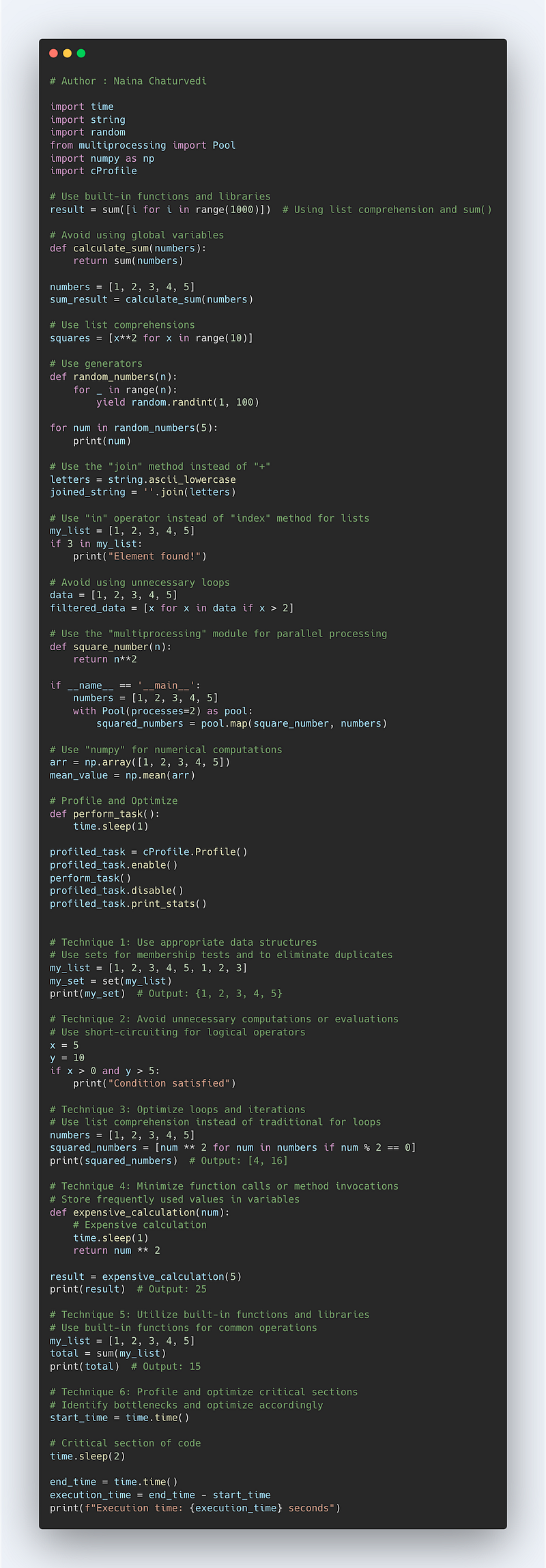
Complete Code —
import time
import string
import random
from multiprocessing import Pool
import numpy as np
import cProfile

# Use built-in functions and libraries
result = sum([i for i in range(1000)])  # Using list comprehension and sum()

# Avoid using global variables
def calculate_sum(numbers):
    return sum(numbers)

numbers = [1, 2, 3, 4, 5]
sum_result = calculate_sum(numbers)

# Use list comprehensions
squares = [x**2 for x in range(10)]

# Use generators
def random_numbers(n):
    for _ in range(n):
        yield random.randint(1, 100)

for num in random_numbers(5):
    print(num)

# Use the "join" method instead of "+"
letters = string.ascii_lowercase
joined_string = ''.join(letters)

# Use "in" operator instead of "index" method for lists
my_list = [1, 2, 3, 4, 5]
if 3 in my_list:
    print("Element found!")

# Avoid using unnecessary loops
data = [1, 2, 3, 4, 5]
filtered_data = [x for x in data if x > 2]

# Use the "multiprocessing" module for parallel processing
def square_number(n):
    return n**2

if __name__ == '__main__':
    numbers = [1, 2, 3, 4, 5]
    with Pool(processes=2) as pool:
        squared_numbers = pool.map(square_number, numbers)

# Use "numpy" for numerical computations
arr = np.array([1, 2, 3, 4, 5])
mean_value = np.mean(arr)

# Profile and Optimize
def perform_task():
    time.sleep(1)

profiled_task = cProfile.Profile()
profiled_task.enable()
perform_task()
profiled_task.disable()
profiled_task.print_stats()

import time

# Technique 1: Use appropriate data structures
# Use sets for membership tests and to eliminate duplicates
my_list = [1, 2, 3, 4, 5, 1, 2, 3]
my_set = set(my_list)
print(my_set)  # Output: {1, 2, 3, 4, 5}

# Technique 2: Avoid unnecessary computations or evaluations
# Use short-circuiting for logical operators
x = 5
y = 10
if x > 0 and y > 5:
    print("Condition satisfied")

# Technique 3: Optimize loops and iterations
# Use list comprehension instead of traditional for loops
numbers = [1, 2, 3, 4, 5]
squared_numbers = [num ** 2 for num in numbers if num % 2 == 0]
print(squared_numbers)  # Output: [4, 16]

# Technique 4: Minimize function calls or method invocations
# Store frequently used values in variables
def expensive_calculation(num):
    # Expensive calculation
    time.sleep(1)
    return num ** 2

result = expensive_calculation(5)
print(result)  # Output: 25

# Technique 5: Utilize built-in functions and libraries
# Use built-in functions for common operations
my_list = [1, 2, 3, 4, 5]
total = sum(my_list)
print(total)  # Output: 15

# Technique 6: Profile and optimize critical sections
# Identify bottlenecks and optimize accordingly
start_time = time.time()

# Critical section of code
time.sleep(2)

end_time = time.time()
execution_time = end_time - start_time
print(f"Execution time: {execution_time} seconds")
In python, Enumerate is used to write efficient python code. Many a times we need to keep a count of iterations. Python’s enumerate takes a collection i.e iterable, adds counter to it and returns it as an enumerate object
Syntax :
enumerate(iterable, start=0)
Implementation —
"""
Enumerate : Use enumerate() function : Python’s enumerate takes a collection i.e iterable, adds counter to it and returns it as an enumerate object.
"""
countries = ['USA','Canada','Singapore','Taiwan']
enum_countries = enumerate(countries)enumerate_countries = enumerate(countries,5)
print(list(enumerate_countries))
print(type(enumerate_countries))Output —
[(5, 'USA'), (6, 'Canada'), (7, 'Singapore'), (8, 'Taiwan')]
<class 'enumerate'>
Implementation 2 —
countries = ['USA','Canada','Singapore','Taiwan']
for i,item in enumerate(countries):
    print(i,item)
Output —
0 USA
1 Canada
2 Singapore
3 Taiwan
Some of the other best Series —
How to solve any System Design Question ( approach that you can take)?
30 days of Data Structures and Algorithms and System Design Simplified
Data Science and Machine Learning Research ( papers) Simplified **
100 days : Your Data Science and Machine Learning Degree Series with projects
Complete Data Visualization and Pre-processing Series with projects
Exceptional Github Repos — Part 1
Exceptional Github Repos — Part 2
Tech Newsletter —
If you are interested, you can join my newsletter through which I send tech interview tips, techniques, patterns, hacks — Software Development, ML, Data Science, Startups and Technology projects to more than 30K readers. You can subscribe to Tech Brew :
Github —
In python, Zip takes one or more iterables(list,tuples etc) and aggregates them into tuple and returns the iterator object
Syntax :
zip(*iterators)
Implementation —
# Use Zip : Zip takes one or more iterables and aggregates them into # tuple and returns the iterator objectname = ["Steve","Paul","Brad"]
roll_no = [4,1,3]
marks = [20,40,50]mapped = zip(name,roll_no,marks)
mapped = set(mapped)
print(mapped)Output —
{('Brad', 3, 50), ('Steve', 4, 20), ('Paul', 1, 40)}To make code work faster use builtin functions and libraries like map() which applies a function to every member of iterable sequence and returns the result.
Implementation —
"""
Map function : In Python, map() function applies the given function #to each item of a given iterable construct (i.e lists, tuples etc) and returns a map object.
"""
numbers =(100,200,300)
result = map(lambda x:x+x,numbers)
total = list(result)
print(total)Output —
[200, 400, 600]NumPy arrays are homogeneous and provide a fast and memory efficient alternative to Python lists.NumPy arrays vectorization technique, vectorize operations so they are performed on all elements of an object at once which allows the programmer to efficiently perform calculations over entire arrays.
Implementation —
import numpy as np
def reciprocals(values):
    output = np.empty(len(values))
    for i in range(len(values)):
        output[i] = 1.0/values[i]
    return output
values = np.random.randint(1,15,size=6)
reciprocals(values)Output —
array([0.25      , 0.5       , 0.1       , 0.16666667, 0.14285714,
       0.07142857])
To swap the variables, use multiple assignment
Implementation —
# Use multiple assignmentf_name,l_name,city = "Steve","Paul","NewYork"print(f_name,l_name,city)#To swap variablea = 5
b = 10a,b = b,a
print(a,b)Output —
Steve Paul NewYork
10 5
Use Comprehensions
Implementation —
#List Comprehensionlist_two = [5,10,15,20,20,40,50,60]
new_list = [x**3 for x in list_two]
print(new_list)#Dictionary Comprehensiondict_one = [1,2,3,4]
new_dict = {x:x**2 for x in dict_one if x%2 ==0}
print(new_dict)Output —
[125, 1000, 3375, 8000, 8000, 64000, 125000, 216000]
{2: 4, 4: 16}
Membership : To check if membership of a list, it’s generally faster to use the “in” keyword
Implementation —
days = ["sunday","monday","tuesday"]
for d in days:
    print('Today is {}'.format(d))
print('tuesday' in days)
print('friday' in days)
Output —
Today is sunday
Today is monday
Today is tuesday
True
False
Counter : Counter is one of the high performance container data types
Implementation —
from collections import Counter
sample_dict = {'a':4,'b':8,'c':2}
print(Counter(sample_dict))
Output —
Counter({'b': 8, 'a': 4, 'c': 2})Python Itertools are fast, memory efficient functions — a collection of constructs for handling iterators.
Implementation —
import itertools
for i in itertools.count(30,4):
    print(i)
    if i>30:
        break
Output —
30
34
Implementation 2 —
import itertools
countries =[("West","USA"), ("East","Singapore"),("West","Canada"),("East","Taiwan")]
iter_one = itertools.groupby(countries,lambda x:x[0])
for key,group in iter_one:
result = {key:list(group)}
print(result)Output —
{'West': [('West', 'USA')]}
{'East': [('East', 'Singapore')]}
{'West': [('West', 'Canada')]}
{'East': [('East', 'Taiwan')]}
Use sets to remove duplicates
Implementation —
s1 = {1,2,4,6,0,3,2,1,7,4,3}
s1.add(10)
s1.update([12,13])
print(s1)
Output —
{0, 1, 2, 3, 4, 6, 7, 10, 12, 13}Use Generators
Range ( range()) uses lazy evaluation, so instead of range() use xrange() which returns the generator object
Implementation —
def test_sequence():
    num = 0
    while num<10:
        yield num
        num+=1

for i in test_sequence():
    print(i,end=",")
Output —
0,1,2,3,4,5,6,7,8,9,Practice writing idiomatic code as it will make your code run faster
Examine Runtime of your code snippet
Implementation —
%timeit ('x=3; L=[x**n for n in range(20)]')Output —
12.9 ns ± 0.894 ns per loop (mean ± std. dev. of 7 runs, 10000000 loops each)Complete Python code —
System Design Case Studies — In Depth
Design Instagram
Design Messenger App
All the Complete System Design Series Parts —
6. Networking, How Browsers work, Content Network Delivery ( CDN)
Github —
Keep learning and coding ;)
Day 5 coming soon!
For Python Projects —
For complete 60 days of Data Science and ML : Day 1 — Day 60 : Quick Recap of 60 days of Data Science and ML
Follow for more updates. Stay tuned and keep coding! Disclosure: Some of the links are affiliates.
For other projects, tune to —
Build Machine Learning Pipelines( With Code)
Recurrent Neural Network with Keras
Clustering Geolocation Data in Python using DBSCAN and K-Means
Facial Expression Recognition using Keras
Hyperparameter Tuning with Keras Tuner
Custom Layers in Keras


