
Day 2 of 30 days of Data Engineering
With examples and projects…
Welcome back peeps to Day 2 of Data Engineering!
What’s covered in 30 days of Data Engineering with projects Series till now—
Day 3 : Complete Advanced Python for Data Engineering — Part 2
Day 18 : Data Visualization basics, Data Visualization Projects, Data Visualization using Plotly and Bokeh, Data Profiling, Summary Functions, Indexing, Grouping, Linear Regression, Multi Linear Regression, Polynomial Regression, Regression, Support Vector Regression, Decision Tree Regression, Random Forest Regression, Feature Engineering, GroupBy Features, Categorical and Numerical Features, Missing Value Analysis, Fill the missing Values, Unique Value Analysis, Univariate Analysis, Bivariate Analysis, Multivariate Analysis, Correlation Analysis, Spearman’s ρ, Pearson’s r, Kendall’s τ, Cramér’s V (φc), Phik (φk)
This is Day 2 of 30 days of Data Engineering Series where we will be covering —
Complete Python for Data Engineering — Part 1
Our whole syllabi for 30 days of Data Engineering —
I’l be covering only the most important topics in Data Engineering with projects ( written below) —
1. Data Engineering
2. Python for Data Engineering
3. Scripting and Automation
Shell Scripting
CRON
ETL
4. Relational Databases and SQL
RDBMS
Data Modeling
Basic SQL
Advanced SQL
5. NoSQL Data bases and Map Reduce
Unstructured Data
Advanced ETL
Map-Reduce
Data Warehouses
Data API
6.Data Analysis
Numpy
Web Scraping
Data Visualization
7. Data Processing Techniques
Batch Processing : Apache Spark
Stream Processing — Spart Streaming
Build Data Pipelines
Target Databases
Machine learning Algorithms
8. Big Data
Big data basics
HDFS in detail
Hadoop Yarn
Sqoop Hadoop
Hadoop Yarn
Hive
Pig
Hbase
9. WorkFlows
Introduction to Airflow
Airflow hands on project
10. Infrastructure
Docker
Kubernetes
Business Intelligence
11. Cloud Computing
AWS
Google Cloud Platform
12. Research Papers — Data Engineering
Some amazing research papers- data engineering that I have read over the years to help you boot up to the industry standards and what’s next in this field.
Let’s get started with Day 2 —
We will be covering below Python topics in detail with hands on coding exercise —
1. Data types, strings, operators, and Chaining Comparison Operators with Logical Operators
2. Python Lists and Dictionaries, Sets, Tuples
3. Loops, Break and Continue Statements
4. Object-Oriented Programming — Class and attributes
5. Python strings in detail
6. Python F-String
7. Map, Classes, Functions and Arguments
8. First Class functions, Private Variables, Global and Non Local Variables, __import__ function
9. Magic Functions, Tuple Unpacking
10. Static Variables and Methods in Python
11. Lambda Functions, Magic methods
12. Inheritance and Polymorphism, Errors and Exception Handling
13. User-defined functions, Python garbage collection, debugger in Python
14. Iterators, Generators, and Decorators, Memoization using Decorators
15. Ordered and Defaultdict, Coroutine
16. Regular expression, Magic methods, Closures
17. ChainMap
18. Python Itertools
19. Advanced python constructs
20. Comprehensions, Named Tuple, Type hinting in Python
21. How to write efficient Code in Python
22. Efficient Code and Optimization techniques for Python
Highly Recommended Data Science and Machine Learning Courses that you MUST take ( with certificate) —
Open up colab/jupyter notebook and start coding.
Let’s dive in!
Python is a high-level, most widely used multi-purpose, easy to read programming language.
It is —
- Interpreted − Python is processed at runtime by the interpreter. i.e you do not need to compile your program before executing it
- Interactive − You can interact with the interpreter directly to write your programs
- Portable — It can run on wide range of hardware Platforms
- Object-Oriented − Python supports Object-Oriented style and Procedural Paradigms
- Used as a scripting language or can be compiled to byte-code for building large applications
- It has simple structure, and a clearly defined syntax
- Known as Beginner’s Language − It’s a great language for the beginner-level programmers
- Source code is comparatively easy-to-maintain
- Provides very high-level dynamic data types and supports dynamic type checking.
- Has a huge collection of standard library
Popular applications for Python:
- Web Development
- Data Science — including machine learning, data analysis, and data visualization
- Scripting
- Game Development
- CAD Applications
- Embedded Applications
Complete Code —

Projects Videos —
All the projects, data structures, SQL, algorithms, system design, Data Science and ML , Data Analytics, Data Engineering, , Implemented Data Science and ML projects, Implemented Data Engineering Projects, Implemented Deep Learning Projects, Implemented Machine Learning Ops Projects, Implemented Time Series Analysis and Forecasting Projects, Implemented Applied Machine Learning Projects, Implemented Tensorflow and Keras Projects, Implemented PyTorch Projects, Implemented Scikit Learn Projects, Implemented Big Data Projects, Implemented Cloud Machine Learning Projects, Implemented Neural Networks Projects, Implemented OpenCV Projects,Complete ML Research Papers Summarized, Implemented Data Analytics projects, Implemented Data Visualization Projects, Implemented Data Mining Projects, Implemented Natural Leaning Processing Projects, MLOps and Deep Learning, Applied Machine Learning with Projects Series, PyTorch with Projects Series, Tensorflow and Keras with Projects Series, Scikit Learn Series with Projects, Time Series Analysis and Forecasting with Projects Series, ML System Design Case Studies Series videos will be published on our youtube channel ( just launched).
Subscribe today!
Some of the other best Series —
30 days of Data Structures and Algorithms and System Design Simplified
Data Science and Machine Learning Research ( papers) Simplified **
100 days : Your Data Science and Machine Learning Degree Series with projects
Complete Data Visualization and Pre-processing Series with projects
Tech Newsletter —
If you are interested, you can join my newsletter through which I send tech interview tips, techniques, patterns, hacks — Software Development, ML, Data Science, Startups and Technology projects to more than 30K readers. You can subscribe to Tech Brew :
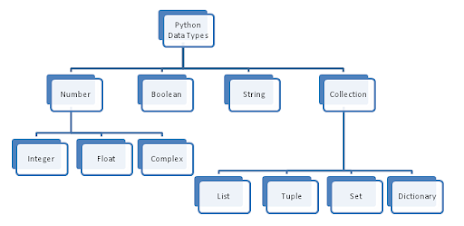
Python Data Types
Data Types represent the kind of value variables can hold and what all operations can be performed on a particular data.
Implementation —
#Int data Typevar = 5
print(var)
print(type(var))Output —
5
<class 'int'>
Implementation —
#Float data typevar2 = 0.1234
print(var2)
print(type(var2))Output —
0.1234
<class 'float'>
Implementation —
#Complex numbers data typex = 2j
print(x)
print(type(x))Output —
2j
<class 'complex'>
Implementation —
#String Data Typestr_one = "Hello World"
print(str_one)
print(type(str_one))Output —
Hello World
<class 'str'>
Implementation —
#list Data typelist1 = ["car","bike"]
print(list1)
print(type(list1))Output —
['car', 'bike']
<class 'list'>
Implementation —
#Tuple Data Typetup= ("car","bike","bus")
print(tup)
print(type(tup))Output —
('car', 'bike', 'bus')
<class 'tuple'>
Implementation —
#Dictionary Data typedict_one = {"Name": "Steve", "Location": "NewYork"}
print(dict_one)
print(type(dict_one))Output —
{'Name': 'Steve', 'Location': 'NewYork'}
<class 'dict'>
Implementation —
#Set Data typeset_one = set({"Hello","world","Hello"})
print(set_one)
print(type(set_one))Output —
{'world', 'Hello'}
<class 'set'>
Implementation —
#Frozen Setf_one = frozenset({"Hello","World","Hello"})
print(f_one)
print(type(f_one))Output —
frozenset({'Hello', 'World'})
<class 'frozenset'>
Implementation —
#Boolean Data Typeb = True
print(b)
print(type(b))Output —
True
<class 'bool'>
Implementation —
#Byte Data Typebyte_one = b"World"
print(type(byte_one))
print(byte_one)Output —
<class 'bytes'>
b'World'
Python Strings
Strings are arrays of bytes representing unicode characters.
- Strings in python are surrounded by either single quotation marks, or double quotation marks.
‘today’ is the same as “today”.
Example :
var1 = ‘Hello’
var2 = “Complete Python Course”
- You can assign a multiline string to a variable by using three quotes.
Implementation —
#String
str1 = "Welcome to complete Python Course"
str2 = 'Welcome to the complete Python Course'
str3 = """This is a
       multiline
       String"""
Output —
Welcome to complete Python Course
Welcome to the complete Python Course
This is a
       multiline
       String
Indexing and Slicing with Strings —
- In python, Indexing is used to access individual characters of a string
- Square brackets are used to access the character of the string using Index
- Index starts with 0
- -1 refers to the last character, -2 refers to the second last character and so on
Example:
var[3]
var[-2]
- In python, Slicing is used to access a range of characters in the string
- Slicing operator colon (:) is used
Example:
var[1:4]
var[:4]
Implementation —
# Indexing : String starts with 0th Indexs= "Captain America"
print(s[4])Output —
aImplementation —
#Slicing : slice(start, stop, step), it returns a sliced object containing elements in the given ranges= "Captain America"
print(s[1:5:2])Output —
atImplementation —
#Reverseprint(s[::-1])Output —
aciremA niatpaCString Methods
- istitle() : Checks for Titlecased String
- isupper() : returns if all characters are uppercase characters
- join() : Returns a Concatenated String
- ljust() : returns left-justified string of given width
- lower() : returns lowercased string
- lstrip() : Removes Leading Characters
- maketrans() : returns a translation table
- replace() : Replaces Substring Inside
- rfind() : Returns the Highest Index of Substring
- rjust() : returns right-justified string of given width
- rstrip() : Removes Trailing Characters
- split() : Splits String from Left
- splitlines() : Splits String at Line Boundaries
- startswith() : Checks if String Starts with the Specified String
- strip() : Removes Both Leading and Trailing Characters
- swapcase() : swap uppercase characters to lowercase; vice versa
- title() : Returns a Title Cased String
- translate() : returns mapped charactered string
- upper() : returns uppercased string
- zfill() : Returns a Copy of The String Padded With Zeros
- capitalize() : Converts first character to Capital Letter
- casefold() : converts to case folded strings
- center(): Pads string with specified character
- count() : returns occurrences of substring in string
- encode() : returns encoded string of given string
- endswith(): Checks if String Ends with the Specified Suffix
- expandtabs() : Replaces Tab character With Spaces
- find(): Returns the index of first occurrence of substring
- format(): formats string into nicer output
- format_map() : Formats the String Using Dictionary
- index(): Returns Index of Substring
- isalnum(): Checks Alphanumeric Character
- isalpha() : Checks if All Characters are Alphabets
- isdecimal() : Checks Decimal Characters
- isdigit() : Checks Digit Characters
- isidentifier() : Checks for Valid Identifier
- islower() : Checks if all Alphabets in a String are Lowercase
- isnumeric() : Checks Numeric Characters
- isprintable() : Checks Printable Character
- isspace() : Checks Whitespace Characters
Implementation —
#capitalize() method : Returns a copy of the string with its first #character capitalized and the rest lowercaseda = "complete python course"
print(a.capitalize())Output —
Complete python courseImplementation —
#centre(width[, fillchar]) : Returns the string centered in a #string of length widtha = "Python"
b = a.center(10, "*")
print(b)Output —
**Python**Implementation —
# casefold() method : Returns a casefolded copy of the string. #Casefolded strings may be used for caseless matchinga = "PYTHON"
print(a.casefold())Output —
pythonImplementation —
# count(sub[, start[, end]]) : Returns the number of non-overlapping #occurrences of substring (sub) in the range [start, end]a = "Welcome to complete Python Course"print(a.count("c"))
print(a.count("o"))
print(a.count("Python"))Output —
2
5
1
Implementation —
# endswith(suffix[, start[, end]]) : Returns True if the string ends #with the specified suffix, otherwise it returns Falsea = "Watermelon"
print(a.endswith("s"))
print(a.endswith("melon"))Output —
False
True
Implementation —
# find(sub[, start[, end]]) : Returns the lowest index in the string # where substring sub is found within the slice s[start:end]a = "Exercise"
print(a.find("r"))
print(a.find("e"))Output —
3
2
Implementation —
# index(sub[, start[, end]]) : Similar to find function, except that # it raises a ValueError when the substring is not founda = "Continent"
print(a.index("i"))
print(a.index("C"))
print(a.index("nent"))Output —
4
0
5
Implementation —
# isalnum() : Returns True if all characters in the string are #alphanumeric, else returns Falsec = "456"
d = "$*%!!**"
print(c.isalnum())
print(d.isalnum())Output —
True
False
Implementation —
# isalpha() : Returns True if all characters in the string are #alphabetic, else returns Falsec = "456"
d = "Python"
print(c.isalpha())
print(d.isalpha())Output —
False
True
Implementation —
# isdecimal() : Returns True if all characters in the string are #decimal characters, else returns Falsec = u"\u00B10"
x = "10"
print(c.isdecimal())
print(x.isdecimal())Output —
False
True
Implementation —
# isdigit() : Returns True if all characters in the string are #digits, else returns Falsec = "4567"
d = "1.65"
print(c.isdigit())
print(d.isdigit())Output —
True
False
Implementation —
# join(iterable) : Returns a string which is the concatenation of #the strings in iterable.
# A TypeError will be raised if there are any non-string values in #iterable
a = ","
print(a.join("CD"))Output —
C,DImplementation —
# partition(sep) : Splits the string at the first occurrence of sep, #and returns a 3-tuple containing the part before the separator, the #separator itself, and the part after the separatora = "Complete.Python-course"print(a.partition("-"))
print(a.partition("."))Output —
('Complete.Python', '-', 'course')
('Complete', '.', 'Python-course')
Implementation —
# split(sep=None, maxsplit=-1) : Returns a list of the words in the #string,using sep as the delimiter strip.If maxsplit is given,at #most maxsplit splits are done.If maxsplit is not specified or -1, #then there is no limit on the number of splits.a = "Welcome,,Friends,"
print(a.split(","))Output —
['Welcome', '', 'Friends', '']Implementation —
# strip([chars]) : Returns a copy of the string with leading and #trailing characters removed. The chars argument is a string #specifying the set of characters to be removeda = "***Python***"
print(a.strip("*"))Output —
PythonImplementation —
# swapcase() : Returns a copy of the string with uppercase #characters converted to lowercase and vice versa
a = "Hi Homies"
print(a.swapcase())
Output —
hI hOMIESImplementation —
# zfill(width) : Returns a copy of the string left filled with ASCII #0 digits to make a string of length widtha = "-124"
print(a.zfill(6))Output —
-00124Implementation —
# lstrip([chars]) : Return a copy of the string with leading #characters removed.The chars argument is a string specifying the #set of characters to be removed.a = "*****Python-----"
print(a.lstrip("*"))Output —
Python-----Implementation —
# rindex(sub[, start[, end]]) : Just like rfind() but raises #ValueError when the substring sub is not founda = "Hi World"print(a.rindex("d"))
print(a.rindex("W"))Output —
7
3
Python F Strings
- Python F-String are used to embed python expressions inside string literals for formatting, using minimal syntax.
- It’s an expression that’s evaluated at the run time.
- They have the f prefix and use {} brackets to evaluate values.
- f-strings are faster than %-formatting and str.format()
Syntax —
f “string_variable”
- In order to format and output an expression in the formatted way, you should use curly braces {}
Implementation —
def max_no(x,y):
    return x if x>y else y
f_no= 12
s_no =25
print(f'Max of {f_no} and {s_no} is {max(f_no,s_no)}')
Output —
Max of 12 and 25 is 25Implementation —
from decimal import Decimal
width = 4
round_point = 2
value = Decimal('12.39065')
print(f'result:{value:{width}.{round_point}}')
Output —
result: 12Operators in Python
- In python, operators are used to perform operations on variables and values
Arithmetic operators : +, — , *, /, //, %, **
Logical operators : and, or, not
Identity operators : is, is not
Membership operators : in , not in
Bitwise operators : &, |, ^,~, << , >>
Assignment operators : =, +=, -=, *=,/= , %=, //=, **=, &=, |=, ^=, >>=, <<=
Comparison operators : ==, !=, > , <, >=, <=
- Ternary operators are operators that evaluate things based on a condition being true or false
Syntax : [true] if [expression] else [false]
- Operator overloading can be implemented in Python
Example —
a & b
a >> 2
a is not b
‘b’ in list1
Implementation —
#Arithmatic Operatorsx=10
y=4#Addition
print("Addition:",x+y)#Subtraction
print("Subtraction:",x-y)#Multiply
print("Multiply: ",x*y)#Division
print("Division:",x/y)#Modulus
print("Modulus:",x%y)#Floor Division
print("Floor Division:",x//y)#Exponent
print("Exponent:",x**y)Output —
Addition: 14
Subtraction: 6
Multiply:  40
Division: 2.5
Modulus: 2
Floor Division: 2
Exponent: 10000
Implementation —
#Comparison Operator : Result is either True or Falsex=5
y=3#Greater than
print("Greater than:",x>y)#Less than
print("Greater than:",x<y)#Greater than equal to
print("Greater than equal to:",x>=y)#less than equal to
print("Less than:",x<=y)#Not equal to
print("Not equal to:",x!=y)#Equal to
print("Equal to:",x==y)Output —
Greater than: True
Greater than: False
Greater than equal to: True
Less than: False
Not equal to: True
Equal to: False
Implementation —
#Logical Operators : and, or, not [Result is either True or False]x= True
y= False#And
print("And result:",(x and y))#Or
print("Or result:",(x or y))#Not
print("Not result:",(not y))Output —
And result: False
Or result: True
Not result: True
Implementation —
# Bitwise operatorsx = 1001
y = 1010#And
print("And result:",(x & y))#Or
print("Or result:",(x | y))#Not
print("Not result:",(~y))#Xor
print("XOR result:",(x^y))#Bitwise right shift
print("Bitwise right shift result:",(x>>2))#Bitwise left shift
print("Bitwise left shift result:",(x<<2))Output —
And result: 992
Or result: 1019
Not result: -1011
XOR result: 27
Bitwise right shift result: 250
Bitwise left shift result: 4004
Implementation —
# Assignment operators : used in Python to assign values to variablesx=5
x+=5
x-=2
x*=2
x**=2Implementation —
# Identity Operator : is and is not are the identity operators in Pythonx=5
y=5
z='a'
print("Is operator result:", (x is y))
print("Not is operator result:", (y is not z))Output —
Is operator result: True
Not is operator result: True
Implementation —
#Membership operator : in operatorx = 'Python Course'
print('y' in x)
print('a' in x)Output —
True
False
Chaining Comparison Operators with Logical Operators
- In python, in order to check more than two conditions, we implement chaining where two or more operators are chained together as shown in the example below
if x < y < z :
{…..}
- In accordance with associativity and precedence in Python, all comparison operations have the same priority. Resultant values of Comparisons yield boolean values such as either True or False
- When chaining the comparison operators, the sequence can be arbitrary.
Example —
x > y <= c is equivalent to x > y and y <= c
Implementation —
#Chaining Comparison operators with Logical operatorsa, b, c, d, e, f, g = 10, 15, 2, 1, 45, 25, 19
e1 = a <= b < c > d < e is not f is g
e2 = a is d < f is cprint(e1)
print(e2)Output —
False
False
Python Lists
- One of the most versatile data type in Python, Lists are used to store multiple items ( homogeneous or non-homogeneous) in a single variable.
- Place the items inside the square brackets[]
- Items can be of any data type
- Lists are defined as objects with the data type ‘list’
- Items are ordered, changeable, and allow duplicate values
- list() constructor can be used when creating a new list
- To access values in lists, use the square brackets for slicing along with the index to obtain item value available at a particular index
- Items inside list are indexed, the first item has index [0], the second item has index [1] etc
Example —
var=[1, 2 , ‘car’, ‘sunday’ , 3.14]
empty_list = []
items = list((“apple”, “banana”, “grapes”))
Implementation —
#Create a Listlist_one = ["sunday","monday","tuesday","wednesday","thursday"]
print(list_one)Output —
['sunday', 'monday', 'tuesday', 'wednesday', 'thursday']Implementation —
#List Lengthprint(len(list_one))Output —
5
Implementation —
# List with different data typeslist_two = ['abc',67,True,3.14,"female"]
print(list_two)Output —
['abc', 67, True, 3.14, 'female']Implementation —
#type() with List
print(type(list_two))
Output —
<class 'list'>Implementation —
#list() constructor to make a Listlist_cons = list(("hello","World","Beautiful","Day"))
print(list_cons)Output —
['hello', 'World', 'Beautiful', 'Day']Implementation —
# nested listlist_nest= ["hello",[8,4,6],['World']]
print(list_nest)Output —
['hello', [8, 4, 6], ['World']]Implementation —
#slice lists in Python : Use the slicing operator :(colon)list_one = ["sunday","monday","tuesday","wednesday","thursday"]
print(list_one[1:4])Output —
['monday', 'tuesday', 'wednesday']Implementation —
#Add/Change List Elements : use the assignment operator = to change #an itemlist_one = ["sunday","monday","tuesday","wednesday","thursday"]
list_one[3] = 'friday'
print(list_one)Output —
['sunday', 'monday', 'tuesday', 'friday', 'thursday']Implementation —
# Appending and Extending lists in Python : Use the append() or #extend() methodlist_one = ["sunday","monday","tuesday","wednesday","thursday"]
list_one.append('friday')
print(list_one)#extendlist_one.extend(['saturday'])
print(list_one)Output —
['sunday', 'monday', 'tuesday', 'wednesday', 'thursday', 'friday']
['sunday', 'monday', 'tuesday', 'wednesday', 'thursday', 'friday', 'saturday']
Implementation —
# Concatenating and repeat lists : use + operator to concate two #lists and use * operator to repeat listslist_one = ["sunday","monday","tuesday","wednesday","thursday"]
print(list_one + [0,1,2,3,4])#repeat operation
print(['a','b']*2)Output —
['sunday', 'monday', 'tuesday', 'wednesday', 'thursday', 0, 1, 2, 3, 4]
['a', 'b', 'a', 'b']
Implementation —
# Delete/Remove List Elements : delete one or more items or entire list using the keyword deldel list_one[2]
print(list_one)#remove method : remove the given item or pop() method to remove an item at the given index locationlist_one = ["sunday","monday","tuesday","wednesday","thursday"]
list_one.remove("tuesday")
print(list_one)#pop methodlist_one = ["sunday","monday","tuesday","wednesday","thursday"]
list_one.pop(2)
print("Pop result:", list_one)Output —
['sunday', 'monday', 'thursday']
['sunday', 'monday', 'wednesday', 'thursday']
Pop result: ['sunday', 'monday', 'wednesday', 'thursday']
Implementation —
# index() method : Returns the index of the first matched itemlist_one = ["sunday","monday","tuesday","wednesday","thursday"]
print(list_one.index("tuesday"))Output —
2
Implementation —
# sort() method: Sort items in a list in ascending orderlist_one = ["sunday","monday","tuesday","wednesday","thursday"]
list_one.sort()
print(list_one)Output —
['monday', 'sunday', 'thursday', 'tuesday', 'wednesday']Implementation —
# reverse() : Reverse the order of items in the listlist_one = ["sunday","monday","tuesday","wednesday","thursday"]
list_one.reverse()
print(list_one)Output —
['thursday', 'wednesday', 'tuesday', 'monday', 'sunday']Implementation —
# copy(): Returns a shallow copy of the listlist_one = ["sunday","monday","tuesday","wednesday","thursday"]
list_two = list_one.copy()
print(list_two)Output —
['sunday', 'monday', 'tuesday', 'wednesday', 'thursday']Implementation —
#Membership : check if an item exists in a list or not, using the keyword inlist_one = ["sunday","monday","tuesday","wednesday","thursday"]
print('tuesday' in list_one)Output —
TrueImplementation —
# insert() method : insert item at a desired locationlist_one = ["sunday","monday","tuesday","wednesday","thursday"]
list_one.insert(2,'friday')
print(list_one)Output —
['sunday', 'monday', 'friday', 'tuesday', 'wednesday', 'thursday']All the Complete System Design Series Parts —
6. Networking, How Browsers work, Content Network Delivery ( CDN)
Github —
List Comprehensions
- In python, list comprehensions are used to create a new list based on the values of an existing list in the most elegant and shortest way.
- List comprehension consists of an expression followed by for statement inside square [] brackets.
Example :
new_list = [x for x in list1 if “a” in x]
Implementation —
sqr = [2**x for x in range(20)]
print(sqr)
Output —
[1, 2, 4, 8, 16, 32, 64, 128, 256, 512, 1024, 2048, 4096, 8192, 16384, 32768, 65536, 131072, 262144, 524288]Python Dictionaries
- In python, dictionary is an unordered collection of data values in which data values are stored in key:value pairs
- Created by placing sequence of elements within curly {} braces, separated by ‘ , ‘
- Values can be of any datatype and can be duplicated, whereas keys are immutable and can’t be repeated
- Can be created by the built-in function dict()
- Dictionaries are defined as objects with the data type ‘dict
- dict() constructor can be used when creating a new dict
- To access values in dict, use the keys
- Key Value format makes dictionary one of the most optimized and efficient data type in Python
Example —
var={ ‘first_day’: ‘sunday’ , ‘second_day’: ‘monday’, ‘third_day’: ‘tuesday’}
empty_dict = {}
class dict(**kwarg)
Implementation —
#Create a Dictionary#empty dictionary
dict_emp = {}#dict with items
dict_one = {0:'sunday', 1: 'monday', 2: 'tuesday', 3: 'wednesday', 4: 'thursday'}
print(dict_one)Output —
{0: 'sunday', 1: 'monday', 2: 'tuesday', 3: 'wednesday', 4: 'thursday'}Implementation —
#Accessing Elements from Dictionary : Using keys or get() methoddict_one = {0:'sunday', 1: 'monday', 2: 'tuesday', 3: 'wednesday', 4: 'thursday'}
print(dict_one[1])#get() method
print(dict_one.get(2))Output —
monday
tuesday
Implementation —
# Length of Dictionary
dict_one = {0:'sunday', 1: 'monday', 2: 'tuesday', 3: 'wednesday', 4: 'thursday'}
print(len(dict_one))
Output —
5
Implementation —
#Changing and Adding Dictionary elements: add new items or change the value of existing items using an = operatordict_one = {0:'sunday', 1: 'monday', 2: 'tuesday', 3: 'wednesday', 4: 'thursday'}#change element
dict_one[2] = 'friday'
print("After changing the element", dict_one)#Add element
dict_one[5] = 'saturday'
print("After adding the element :", dict_one)Output —
After changing the element {0: 'sunday', 1: 'monday', 2: 'friday', 3: 'wednesday', 4: 'thursday'}
After adding the element : {0: 'sunday', 1: 'monday', 2: 'friday', 3: 'wednesday', 4: 'thursday', 5: 'saturday'}
Implementation —
#Removing elements from Dictionary : Use the pop() or popitem() #methoddict_one = {0:'sunday', 1: 'monday', 2: 'tuesday', 3: 'wednesday', 4: 'thursday'}
print(dict_one.pop(2))#popitem : remove an arbitrary item and return (key,value)print(dict_one.popitem())Output —
tuesday
(4, 'thursday')
Implementation —
# remove all items : using clear methoddict_one.clear()
print(dict_one)Output —
{}Implementation —
#fromkeys(seq[, t]): Returns a new dictionary with keys from seq and value equal to tsubjects = {}.fromkeys(['Computer Science','Space Science','Math','English'])
print(subjects)Output —
{'Computer Science': None, 'Space Science': None, 'Math': None, 'English': None}Implementation —
#items() method : displays a list of dictionary's (key, value) tuple pairsdict_one = {0:'sunday', 1: 'monday', 2: 'tuesday', 3: 'wednesday', 4: 'thursday'}
print(dict_one.items())Output —
dict_items([(0, 'sunday'), (1, 'monday'), (2, 'tuesday'), (3, 'wednesday'), (4, 'thursday')])Implementation —
#keys() method : displays a list of all the keys in the dictionarydict_one = {0:'sunday', 1: 'monday', 2: 'tuesday', 3: 'wednesday', 4: 'thursday'}
print(dict_one.keys())Output —
dict_keys([0, 1, 2, 3, 4])Implementation —
#values() method : displays a list of all the values in the dictionary
dict_one = {0:'sunday', 1: 'monday', 2: 'tuesday', 3: 'wednesday', 4: 'thursday'}
print(dict_one.values())
Output —
dict_values(['sunday', 'monday', 'tuesday', 'wednesday', 'thursday'])Implementation —
#setdefault() method : returns the value of a key. If not there, it inserts key with a value to the dictionary
dict_one = {0:'sunday', 1: 'monday', 2: 'tuesday', 3: 'wednesday', 4: 'thursday'}
element = dict_one.setdefault(3)
print(element)
#If key not present
element = dict_one.setdefault(6)
print("If key is not present:", dict_one.items())Output —
wednesday
If key is not present: dict_items([(0, 'sunday'), (1, 'monday'), (2, 'tuesday'), (3, 'wednesday'), (4, 'thursday'), (6, None)])
Implementation —
#Nested Dictionaries
people = {"subject": {0:"Maths",1:"English",3:"Science"},
          "marks": {0:42,1:36,2: 78},
          "Age": {0:12,1:34,2:19}
         }
#print(people["marks"][0])
print(people["Age"][0])
Output —
42
Implementation —
#sorted(): Return a new sorted list of keys in the dictionary
dict_one = {0:'sunday', 1: 'monday', 2: 'tuesday', 3: 'wednesday', 4: 'thursday'}
print(sorted(dict_one))
Output —
[0, 1, 2, 3, 4]Implementation —
#Iterate through dictionaydict_one = {0:'sunday', 1: 'monday', 2: 'tuesday', 3: 'wednesday', 4: 'thursday'}
for i in dict_one.items():
print(i)Output —
(0, 'sunday')
(1, 'monday')
(2, 'tuesday')
(3, 'wednesday')
(4, 'thursday')
Implementation —
# Dictionary Comprehensioncubes = {x: x*x*x for x in range(10)}
print(cubes)Output —
{0: 0, 1: 1, 2: 8, 3: 27, 4: 64, 5: 125, 6: 216, 7: 343, 8: 512, 9: 729}Implementation —
# update() method : updates the dictionary with the elements from
# another dictionary object or from any other key/value pairs
dict1 ={0:"zero",4:"four",5:"five"}
dict2={2:"two"}
# updates the value of key 2
dict1.update(dict2)
print(dict1)Output —
{0: 'zero', 4: 'four', 5: 'five', 2: 'two'}Implementation —
# Membership Test : check if a key is in a dictionary or not using #the keyword indict_one = {0:'sunday', 1: 'monday', 2: 'tuesday', 3: 'wednesday', 4: 'thursday'}
print(0 in dict_one.keys())Output —
TruePython Tuples
- In python, a tuple is a collection of objects which is ordered and immutable
- Created by placing sequence of elements within round () braces, separated by ‘ , ‘
- Values can be of any datatype
- Concatenation of tuples can be done by the use of ‘+’ operator
- Tuples are just like lists except that the tuples are immutable i.e cannot be changed
Example —
var= (4, ‘Hello’, 5, ‘World’)
empty_tuple = ()
Implementation —
# Tuple with itemstup= (10,"Hello",3.14,"a")
print(tup)
print(type(tup))Output —
(10, 'Hello', 3.14, 'a')
<class 'tuple'>
Implementation —
# Negative Indexing : index of -1 refers to the last item, -2 to the #second last item and so ontup = (10,"Hello",3.14,"a")
print(tup[-2])#Reverse the tuple
print(tup[::-1])Output —
3.14
('a', 3.14, 'Hello', 10)
Implementation —
#concatenation and repeat in Tuples#concatenation using + operator
tup = (10,"Hello",3.14,"a")
print(tup + (50,60))#repeat using * operator
print(tup * 2)Output —
(10, 'Hello', 3.14, 'a', 50, 60)
(10, 'Hello', 3.14, 'a', 10, 'Hello', 3.14, 'a')
Implementation —
#membership : check if an item exists in a tuple or not, using the keyword intup = (10,"Hello",3.14,"a")
print(10 in tup)
print("World" in tup)Output —
True
False
Implementation —
#Iterate through Tuple : use for loop to iterate through each item #in a tupletup = (10,"Hello",3.14,"a")
for i in tup:
print(i)Output —
10
Hello
3.14
a
Implementation —
#Nested Tuplenest_tup = ((10,"Hello",3.14,"a"), (70,(8,"Mike")))
print(nest_tup)a,b = nest_tup
print(a)
print(b)Output —
((10, 'Hello', 3.14, 'a'), (70, (8, 'Mike')))
(10, 'Hello', 3.14, 'a')
(70, (8, 'Mike'))
Implementation —
#Enumerate : use enumerate functiontup = (10,"Hello",3.14,"a")
for i in enumerate(tup):
print(i)Output —
(0, 10)
(1, 'Hello')
(2, 3.14)
(3, 'a')
Python Sets
- In python, a set is a collection of objects which is both unindexed and unordered
- Sets make sure that there are no duplicate elements in the items sequence
- Created by using the built-in set() function with an iterable object by placing the items inside curly {} braces, separated by ‘,’
- Items can be added to the set by using built-in add() function
- Items can be accessed by looping through the set using loops or using ‘in’ keyword
- Items can be removed from the set by using built-in remove()
Example —
var= set([“Hello”, “People”, “Hello”])
Implementation —
#Create Set
set_one = {10, 20, 30, 40}
print(set_one)
#Create set from list using set()
set_two = set([10, 20, 30, 40, 30, 20])
print(set_two)Output —
{40, 10, 20, 30}
{40, 10, 20, 30}
Implementation —
# Removing elements : Use the methods discard(), pop() and remove()
#set_one is {100, 70, 40, 10, 80, 20, 60, 30}
#discard() method
set_one.discard(100)
print("After discard:",set_one)#remove() method
set_one.remove(40)
print("After removing element :", set_one)#pop() method
set_one.pop()
print("After removing element :", set_one)Output —
After discard: {70, 40, 10, 80, 20, 60, 30}
After removing element : {70, 10, 80, 20, 60, 30}
After removing element : {10, 80, 20, 60, 30}
Implementation —
#Set operations
X = {10, 20, 30, 40, 50}
Y = {40, 50, 60, 70, 80}
Z = {20, 30, 100, 50, 10}#Union : Union of X, Y, Z is a set of all elements from all three #sets using | operator or union() method
print("Set Union:", X|Y|Z)#Intersection :Intersection of X, Y, Z is a set of all elements from #all three sets using & operator or intersection()
print("Set Intersection:", X&Y&Z)#Difference : Difference of X, Y is a set of all elements from both #sets using - operator or difference()
print("Set Difference:", X-Y)# Symmetric Difference : Symmetric Difference of X, Y, Z is a set of #all elements from all three sets using ^ operator or #symmetric_difference()
print("Set Symmetric Difference:", X^Y^Z)Output —
Set Union: {100, 70, 40, 10, 80, 50, 20, 60, 30}
Set Intersection: {50}
Set Difference: {10, 20, 30}
Set Symmetric Difference: {80, 50, 100, 70, 60}
Implementation —
#enumerate : Returns an enumerate object which contains the index #and value for all the items of the set as a pairset_one = {10, 20, 30, 40, 50, 30}
for i in enumerate(set_one):
print(i)Output —
(0, 40)
(1, 10)
(2, 50)
(3, 20)
(4, 30)
Implementation —
#Frozenset : set which has the characteristics of a set, but its elements cannot be changed once assignedX = frozenset([10, 20, 30, 40, 50])
Y = frozenset([40, 50, 60, 70, 80])print(X.union(Y))Output —
frozenset({70, 40, 10, 80, 50, 20, 60, 30})Loops in Python
If, Elif and Else Statements —
- In python, If, Elif and Else statements are used to facilitate decision making i.e when we want to execute a code only if a certain condition is satisfied.
- In the example below, the program evaluates the test expression and will execute statement(s) only if the test expression is True. If the test expression1 is False, then it checks elif test expression 2 and if that’s also False, then at last it goes to else and executed else statement.
if test_expression1:
statement(s)
elif test_expression2:
statements(s)
else :
statement
- Python interprets non-zero values as True. None and 0 are interpreted as False.
- The if block can have only one else block but there can be multiple elif blocks.
While loops —
- In python, while loop is used to traverse/iterate over a block of code as long as the test condition is true
- In the example below, test_expression is checked first. The body of the loop is entered only if the test_expression evaluates to True. The loop continues till the test condition becomes False.
while test_expression:
Do this
Example :
while i <= 10:
sum = sum — i
i = i+1
For Loops and Range function —
- In python, for loop is used to traverse/iterate over a sequence (list, tuple, string etc)
- In the example below, i is the variable that takes the value of the item inside the sequence on each iteration. Loop continues until we reach the last item in the sequence
for i in sequence:
Do this
- Range ( range()) is used to generate sequence of numbers where the syntax of range is
range(start, stop, step_size)
Example :
for i in range(len(list1)):
print(“The element is “, list1[i])
Implementation —
price = 200if price > 120:
print("Price is greater than 120")
elif price == 120:
print("Price is 120")
elif price < 120:
print("Price is less than 120")
else:
print("Exit")Output —
Price is greater than 120Implementation —
# If, Elif and Else one liner
x = 200

var = {x < 190: "Condition one satisfied",
       x != 200: "Condition two satisfied"}.get(True, "Condition third satisfied")

print(var)
Output —
Condition third satisfiedImplementation —
#while with else statement
i = 1
while i < 6:
  print(i)
  i += 1
else:
  print("i is no longer less than 6")
Output —
1
2
3
4
5
i is no longer less than 6
Implementation —
# for loop with range functiondays =['sunday','monday','tuesday']
for i in range(len(days)):
print("Today is", days[i])Output —
Today is sunday
Today is monday
Today is tuesday
Break and Continue Statement
- In python, we can use break statement when we want to terminate the current loop without checking test condition
- Once terminated using the break statement, the control of the program goes to the statement immediately after the body of the loop
Example :
for value in list1:
if value == “t”:
break
print(value)
- In python, we can use continue statement when we want to skip the rest of the code for the current loop iteration
Example :
for value in list1:
if value == “t”:
continue
print(value)
Implementation —
#break statement
count = 0
while True:
    print(count)
    count += 1
    if count >= 10:
breakprint('exit')Output —
0
1
2
3
4
5
6
7
8
9
exit
Implementation —
#Continue statement
for x in range(15):
    if x % 2 == 0:
        continue
    print(x)
Output —
1
3
5
7
9
11
13
Input Output in Python
- In python, there are two inbuilt functions to read the input from the user
raw_input ( ) function : reads one line from user input and returns it as a string
input ( ) function : Similar to raw_input, except it evaluates the user expression
- For multiple user inputs, we can use —
split() method
List comprehension
- In python, output is using the print() function
- String literals in print() statement are used to format the output
\n : Add blank new line
“” : To print an empty line.
- end keyword is used to print specific content at the end of the execution of the print() function
Example —
num= input(“Enter the number: “)
str = raw_input(“Enter your input: “)
print(“Python” , end = ‘**’)
Implementation —
# inputnum = int(input('Enter a number: '))Output —
Enter a number: 50Implementation —
num = 5
print('The value of num is', num)
print("The value is %d" %num)
Output —
The value of num is 5
The value is 5
Python Object Oriented Programming
- Python is a multi-paradigm programming language and supports Object Oriented programming. In Python everything is a object. An object has two characteristics : Attributes and Behavior
- Principles of object-oriented programming system are —
Class
Object
Method
Inheritance
Polymorphism
Encapsulation
- Class and constructor — It’s a blueprint for the object. In python we use the class keyword to define class. Class constructor is used to assign the values to the data members of the class when an object of the class is created.
- Object — It’s an instantiation of a class.
- Method — It’s a function that is associated with an object
- Inheritance — Specifies that the child object acquires all the properties and behaviors of the parent object.
- Polymorphism — Refers to functions having the same names but carrying different functionalities.
- Encapsulation — To prevents data from direct modification, we can restrict access to methods and variables in python
Attributes and Class in Python
- In Python, a class is blueprint of the object
- To define a class, we use the keyword “class” following the class name and semicolon —
class class_name:
Body of the class
- Object — It’s an instantiation of a class. The object instance contains real data or value
To create an instance :
obj1 = class_name()
- Class constructor — to assign the values to the data members of the class when an object of the class is created, we use constructor. The __init__() method is called constructor method
class class_name:
def __init__(self, parameters):
self.param1 = parameters
- Instance attributes refer to the attributes inside the constructor method. Class attributes refer to the attributes outside the constructor method
- Method — It’s a function that is associated with an object, used to describe the behavior of the objects
def method_name(self)
Implementation —
#Class implementation
class cat:
def __init__(self, cat_name, cat_breed):
self.name = cat_name
self.age = cat_breedImplementation —
#Class attribute and Instance Attributeclass emp:
x = 10 #class attribute
def __init__(self):
self.name = 'Steve'
self.salary = 10000
def display(self):
print(self.name)
print(self.salary)
obj_emp = emp()
print("Dictionary conversion:", vars(obj_emp))Output —
Dictionary conversion: {'name': 'Steve', 'salary': 10000}Functions in Python
In python, functions are a convenient way to divide your code into useful blocks, allowing us to order our code, make it more readable, reuse it, define interfaces and save a lot of time
- A function can be called multiple times to provide modularity and reusability to the python program
- We can easily track a large python program easily when it is divided into multiple functions
- There are mainly two types of functions —
User-define functions — Defined by the user to perform the specific task
Built-in functions — Functions which are pre-defined
- You can define the function using the def keyword
- Arguments is the information that’s passed into the function
- The return statement is used to return the value. A function can have only one return
- Once created, we can call the function using the function name followed by the parentheses
Example :
def my_function(parameters):
print(“My first Function”)
return expression
#calling the function
my_function()
Private Variables in Python
In python, a variable is a named location used to store or hold the value/data in the memory.
- When we create a variable inside a function, it is local by default
- We create Private Variables by using underscore _ before a named prefix
- This is quite helpful for letting subclasses override methods without breaking intraclass method calls
There are three ways private variables can be implemented :
_Single Leading Underscores
__Double Leading Underscores
__Double leading and Double trailing underscores__
- __name__ is a special built-in variable which points to the name of the current module
Example :
_program
__var
__len__
Implementation —
# Private Variable
#Single underscore (_)
class test:
    def __init__(self,num):
        self._num= num#_privatemethod private method
    def _numfunc(self):
        print("Hello")obj=test(156)
#_ attributes can be accessed as normal variables
obj._numfunc()
Implementation —
# Private Variable
#Double Underscore (__)class test:
    def __init__(self,num):
        self.__num= num
    def Print(self):
        print("__num = {}".format(self.__num))obj=test(156)
Implementation —
# Private Variable
#Trailing underscore(n_)class Test:
    def __init__(self,c):
        #To avoid clash with python keyword
        self.num_= num
Global and Non Local Variables in Python
When we create a variable inside a function, it is local by default. When we define a variable outside of a function, it is global by default
- Nonlocal variables are used in nested functions whose local scope is not defined
- Global variables are those variables which are defined and declared outside a function and we can use them inside the function or we can use global keyword to make a variable global inside a function
Example :
global variable_name
Implementation —
#Local Variabledef test():
    l = "local_variable"
    return lvar=test()
print(var)
Output —
local_variableImplementation —
#Global Variablevar = 10def test():
    var = 20
    print("local variable x:", var)val=test()
print("global variable x:", var)
Output —
local variable x: 20
global variable x: 10Implementation —
#Non Local Variabledef test():
var = "local_variable"def test_one():
nonlocal var
var = "non_local_variable"
print("Non Local value:", var)
test_one()
print("Outer value:", var)
test()First Class functions in Python
In python, a function in Python is First Class Function, if it supports all of the properties of a First Class object such as —
It is an instance of an Object type
Pass First Class Function as argument of some other functions
Return Functions from other function
Store Functions in lists, sets or some other data structures
Functions can be stored as variable
- In Python, a function can be assigned as variable which is used without function parentheses
- Functions are objects you can pass them as arguments to other functions
- First-class functions allow you to pass around behavior and abstract
- Closure functions — Functions are be nested and they can carry forward parent function’s state with them
Example :
def func1(func):
var = func(‘Hello World’)
print(var)
Implementation —
#Implementation 2
def outer(a): # Outer functiondef inner(b): # Inner function
return b+10
return inner(a)a = 10
var = outer(a)
print(var)Output —
20
__import__() function
In python, the inbuilt __import__() function helps to import modules in runtime
Syntax —
__import__(name, globals, locals, fromlist, level)
- name : Name of the module to import.
- globals : Dictionary of global names used to determine how to interpret the name in a package context.
- locals : Dictionary of local names names used to determine how to interpret the name in a package context.
- fromlist : The fromlist gives the names of objects or submodules that should be imported from the module given by name.
- level : level specifies whether to use absolute or relative imports.
- To import a module by name, use importlib.import_module()
Example :
_var = __import__(‘spam.ham’, globals(), locals(), [], -1)
Implementation —
#implementation
#fabs() method is defined in the math module which returns the #absolute value of a number
math_score = __import__('math', globals(), locals(), [], 0)
print(math_score.fabs(-17.4))Output —
17.4Tuple Unpacking with Python Functions
In python, tuples are immutable data types. Python offers a very powerful tuple assignment tool that maps right hand side arguments into left hand side arguments i.e mapping is known as unpacking of a tuple of values into a normal variable.
- During the unpacking of tuple, the total number of variables on the left-hand side should be equivalent to the total number of values in given tuple
- It uses a special syntax to pass optional arguments (*args) for tuple unpacking
Example :
days = (“sunday”, “monday”, “tuesday”,”wednesday”,”thursday”)
(day1, day2, *day) = days
Implementation —
def result(a, b):
return a + b
# function with normal variables
print (result(100, 200))
# A tuple is created
c = (100, 300)
# Tuple is passed
# function unpacked them
print (result(*c))Output —
300 400
Static Variables and Methods in Python
In Python, Static variables are the variables that belong to the class and not to objects.
- Static variables are shared amongst objects of the class
- Python allows providing same variable name for a class/static variable and an instance variable
Static Method -
- In Python, Static methods are the methods which are bound to the class rather than an object of the class
- Static Methods are called using the class name and not the objects of the class
- Static methods are bound to the class
- There are two ways of defining a static method:
@staticmethod
staticmethod()
Example :
class class_name:
@staticmethod
def function_name(parameters):
print(var)
Implementation —
class test:
static_variable = 25 # Access through classprint(test.static_variable) # prints 5# Access through an instance
ins = test()
print(ins.static_variable) # still 5# Change within an instance
ins.static_variable = 14
print(ins.static_variable)
print(test.static_variable)Output —
25 25 14 25
Implementation —
# Static Method : Use @staticmethod
class sample_shape:
@staticmethod
def msgg(msg):
print(msg)
print("Triangles")
sample_shape.msgg("Welcome to sample shape class")Output —
Welcome to sample shape class
TrianglesLambda Functions in Python
In python, Lambda is used to create small anonymous functions using “lambda” keyword and can be used wherever function objects are needed.It can any number of arguments but only one expression
Syntax :
lambda argument(s): expression
- It can be used inside another function
- In python normal functions are defined using the def keyword, anonymous functions are defined using the lambda keyword
- Whenever we require a nameless function for a short period of time, we use lambda functions
Example :
var = lambda x: x * 5
Implementation —
#A lambda function that adds 10 to the number passed in as an #argument, and print the result
x = lambda a, b, c : a * b + c
print(x(5, 6, 8))Output —
38
Map and Filter Functions in Python
In python, Map allows you to process and transform the items of the iterables or collections without using a for loop.
- In Python, the map() function applies the given function to each item of a given iterable construct (i.e lists, tuples etc) and returns a map object
Syntax —
map(function, iterable)
- In python, filter() function returns an iterator when the items are filtered through a function to test if the item is true or not
Syntax —
filter(function, iterable)
where function is the to be run for each item in the iterable
iterable is the iterable to be filtered
Example :
result = map(lambda x: x+x, numbers)
var = filter(function_name, sequence)
Implementation —
#map
numbers = [1,2,3,4,5]
strings = ['s', 't', 'x', 'y', 'z']mapped_list = list(map(lambda x, y: (x, y), strings, numbers))print(mapped_list)Output —
[('s', 1), ('t', 2), ('x', 3), ('y', 4), ('z', 5)]Implementation —
#map implementation
days = ['Sunday', 'Monday', 'Tuesday', 'Wednesday']mod_days = list(map(str.swapcase, days))print(mod_days)Output —
['sUNDAY', 'mONDAY', 'tUESDAY', 'wEDNESDAY']Implementation —
#Filter functionmarks = [95, 40, 68, 95, 67, 61, 88, 23, 38, 92]def stud(score):
return score < 33fail_list = list(filter(stud, marks))
print(fail_list)Output —
[23]Complete Code —
# Data types, strings, operators, and Chaining Comparison Operators with Logical Operators
num1 = 10
num2 = 20
if num1 > num2 and num1 % 2 == 0:
print("num1 is greater than num2 and is even")
else:
print("Condition not satisfied")
# Python Lists and Dictionaries, Sets, Tuples
my_list = [1, 2, 3, 4, 5]
my_dict = {'name': 'John', 'age': 30}
my_set = {1, 2, 3, 4, 5}
my_tuple = (1, 2, 3, 4, 5)
# Loops, Break and Continue Statements
for num in my_list:
if num == 3:
break
print(num)
# Object-Oriented Programming - Class and attributes
class Car:
def __init__(self, make, model):
self.make = make
self.model = model
def start_engine(self):
print("Engine started.")
my_car = Car("Toyota", "Corolla")
print(my_car.make)
print(my_car.model)
my_car.start_engine()
# Python strings in detail
my_string = "Hello, World!"
print(len(my_string))
print(my_string.upper())
print(my_string.lower())
print(my_string.split(","))
# Python F-String
name = "John"
age = 30
print(f"My name is {name} and I am {age} years old.")
# Map, Classes, Functions and Arguments
def square(num):
return num ** 2
numbers = [1, 2, 3, 4, 5]
squared_numbers = list(map(square, numbers))
print(squared_numbers)
# First Class functions, Private Variables, Global and Non Local Variables, __import__ function
def outer_func():
x = 10
def inner_func():
nonlocal x
x += 5
print(x)
inner_func()
outer_func()
# Magic Functions, Tuple Unpacking
my_tuple = (1, 2, 3)
a, b, c = my_tuple
print(a, b, c)
# Static Variables and Methods in Python
class MathUtils:
PI = 3.14159
@staticmethod
def square(num):
return num ** 2
print(MathUtils.PI)
print(MathUtils.square(5))
# Lambda Functions, Magic methods
add = lambda x, y: x + y
print(add(2, 3))
# Inheritance and Polymorphism, Errors and Exception Handling
class Animal:
def sound(self):
raise NotImplementedError("Subclasses must implement sound() method.")
class Cat(Animal):
def sound(self):
return "Meow"
my_cat = Cat()
print(my_cat.sound())
# User-defined functions, Python garbage collection, debugger in Python
def greet(name):
print(f"Hello, {name}!")
greet("John")
# Iterators, Generators, and Decorators, Memoization using Decorators
def fibonacci():
a, b = 0, 1
while True:
yield a
a, b = b, a + b
fib_gen = fibonacci()
for _ in range(10):
print(next(fib_gen))
# Ordered and Defaultdict, Coroutine
from collections import OrderedDict, defaultdict
ordered_dict = OrderedDict()
ordered_dict['a'] = 1
ordered_dict['b'] = 2
print(ordered_dict)
default_dict = defaultdict(int)
default_dict['a'] = 1
default_dict['b'] = 2
print(default_dict['c']) # Output: 0
# Regular expression, Magic methods, Closures
import re
pattern = r'\b[A-Za-z]+\b'
text = "Hello, World! This is a sample text."
matches = re.findall(pattern, text)
print(matches)
# ChainMap
from collections import ChainMap
dict1 = {'a': 1, 'b': 2}
dict2 = {'c': 3, 'd': 4}
chain_map = ChainMap(dict1, dict2)
print(chain_map['a']) # Output: 1
print(chain_map['c']) # Output: 3
# Python Itertools
import itertools
numbers = [1, 2, 3]
letters = ['a', 'b', 'c']
combined = itertools.product(numbers, letters)
for item in combined:
print(item)
# Advanced python constructs
result = [x if x % 2 == 0 else None for x in numbers]
print(result)
# Comprehensions, Named Tuple, Type hinting in Python
from typing import List, Tuple
from collections import namedtuple
Point = namedtuple('Point', ['x', 'y'])
p = Point(1, 2)
print(p.x)
print(p.y)
def multiply(numbers: List[int]) -> Tuple[int, int]:
product = 1
for num in numbers:
product *= num
return product, len(numbers)
print(multiply([1, 2, 3, 4, 5]))
# 13. User-defined functions, Python garbage collection, debugger in Python
def greet(name):
print(f"Hello, {name}!")
greet("John")
# Python garbage collection - no specific code implementation required here
# Debugger in Python - can be done using the built-in pdb module or an IDE's debugging features
# 14. Iterators, Generators, and Decorators, Memoization using Decorators
def fibonacci():
a, b = 0, 1
while True:
yield a
a, b = b, a + b
fib_gen = fibonacci()
for _ in range(10):
print(next(fib_gen))
# Decorators
def my_decorator(func):
def wrapper():
print("Before function call")
func()
print("After function call")
return wrapper
@my_decorator
def my_function():
print("Inside decorated function")
my_function()
# Memoization using Decorators
def memoize(func):
memo = {}
def wrapper(n):
if n not in memo:
memo[n] = func(n)
return memo[n]
return wrapper
@memoize
def fibonacci(n):
if n <= 1:
return n
return fibonacci(n-1) + fibonacci(n-2)
print(fibonacci(10))
# 15. Ordered and Defaultdict, Coroutine
from collections import OrderedDict, defaultdict
ordered_dict = OrderedDict()
ordered_dict['a'] = 1
ordered_dict['b'] = 2
print(ordered_dict)
default_dict = defaultdict(int)
default_dict['a'] = 1
default_dict['b'] = 2
print(default_dict['c']) # Output: 0
# Coroutine
def coroutine():
while True:
x = yield
print(f"Received: {x}")
coro = coroutine()
next(coro)
coro.send(10)
# 16. Regular expression, Magic methods, Closures
import re
pattern = r'\b[A-Za-z]+\b'
text = "Hello, World! This is a sample text."
matches = re.findall(pattern, text)
print(matches)
# Closures
def outer_func(x):
def inner_func(y):
return x + y
return inner_func
closure = outer_func(10)
print(closure(5))
# 17. ChainMap
from collections import ChainMap
dict1 = {'a': 1, 'b': 2}
dict2 = {'c': 3, 'd': 4}
chain_map = ChainMap(dict1, dict2)
print(chain_map['a']) # Output: 1
print(chain_map['c']) # Output: 3
# 18. Python Itertools
import itertools
numbers = [1, 2, 3]
letters = ['a', 'b', 'c']
combined = itertools.product(numbers, letters)
for item in combined:
print(item)
# 19. Advanced python constructs
result = [x if x % 2 == 0 else None for x in numbers]
print(result)
# 20. Comprehensions, Named Tuple, Type hinting in Python
from typing import List, Tuple
from collections import namedtuple
Point = namedtuple('Point', ['x', 'y'])
p = Point(1, 2)
print(p.x)
print(p.y)
def multiply(numbers: List[int]) -> Tuple[int, int]:
product = 1
for num in numbers:
product *= num
return product, len(numbers)
That’s it for now!
Day 3 :
Follow for more updates. Stay tuned !
Keep learning and coding :)
Complete System Design Series Parts —
6. Networking, How Browsers work, Content Network Delivery ( CDN)
Github —
For Python Projects —
For other projects, tune to —
Build Machine Learning Pipelines( With Code)
Recurrent Neural Network with Keras
Clustering Geolocation Data in Python using DBSCAN and K-Means
Facial Expression Recognition using Keras
Hyperparameter Tuning with Keras Tuner
Custom Layers in Keras


