
Day 15 of 30 days of Data Engineering Series with Projects
Welcome back peeps to Day 15 of Data Engineering Series with Projects!
In this we will cover —
Advanced Pandas Techniques
Pre-requisite to Day 15 is to complete Day 1–14( link below):
Day 3 : Complete Advanced Python for Data Engineering — Part 2
Projects Videos —
All the projects, data structures, SQL, algorithms, system design, Data Science and ML , Data Analytics, Data Engineering, , Implemented Data Science and ML projects, Implemented Data Engineering Projects, Implemented Deep Learning Projects, Implemented Machine Learning Ops Projects, Implemented Time Series Analysis and Forecasting Projects, Implemented Applied Machine Learning Projects, Implemented Tensorflow and Keras Projects, Implemented PyTorch Projects, Implemented Scikit Learn Projects, Implemented Big Data Projects, Implemented Cloud Machine Learning Projects, Implemented Neural Networks Projects, Implemented OpenCV Projects,Complete ML Research Papers Summarized, Implemented Data Analytics projects, Implemented Data Visualization Projects, Implemented Data Mining Projects, Implemented Natural Leaning Processing Projects, MLOps and Deep Learning, Applied Machine Learning with Projects Series, PyTorch with Projects Series, Tensorflow and Keras with Projects Series, Scikit Learn Series with Projects, Time Series Analysis and Forecasting with Projects Series, ML System Design Case Studies Series videos will be published on our youtube channel ( just launched).
Subscribe today!
Tech Newsletter —
If you are interested, you can join my newsletter through which I send tech interview tips, techniques, patterns, hacks — Software Development, ML, Data Science, Startups and Technology projects to more than 30K readers. You can subscribe to Ignito:
System Design Case Studies — In Depth
Design Instagram
Design Netflix
Design Reddit
Design Amazon
Design Messenger App
Design Twitter
Design URL Shortener
Design Dropbox
Design Youtube
Design API Rate Limiter
Design Web Crawler
Design Amazon Prime Video
Design Facebook’s Newsfeed
Design Yelp
Design Uber
Design Tinder
Design Tiktok
Design Whatsapp
Most Popular System Design Questions
Mega Compilation : Solved System Design Case studies
This is Day 15 of 30 days of Data Engineering Series where we will be covering —
Advanced Pandas Techniques
Let’s get started!
Real world data is messy ( it contains null values, noises, missing values etc) and in most of the cases when we start the building the ML model we need to clean, format and pre process the data.
- Splitting data using pandas can be done using the
train_test_splitfunction from thesklearn.model_selectionmodule. This function allows you to split a dataset into training and testing sets. - Binning data involves grouping a set of continuous or numerical data into a smaller number of discrete “bins” or ranges. This can be done using the
cutorqcutfunctions in pandas, which allow you to specify the number of bins and the labels for each bin. - Mean imputation is a method of replacing missing values with the mean value of the dataset. This can be done using the
fillnafunction in pandas and passing in the mean value of the dataset. - Interpolation is a method of estimating missing values by taking the average of the values on either side of the missing data point. This can be done using the
interpolatefunction in pandas, which can use various interpolation methods such as linear or polynomial. - Combining data using pandas can be done using the
concatfunction to concatenate multiple dataframes along a particular axis, or thejoinfunction to join two dataframes on a common column or index.
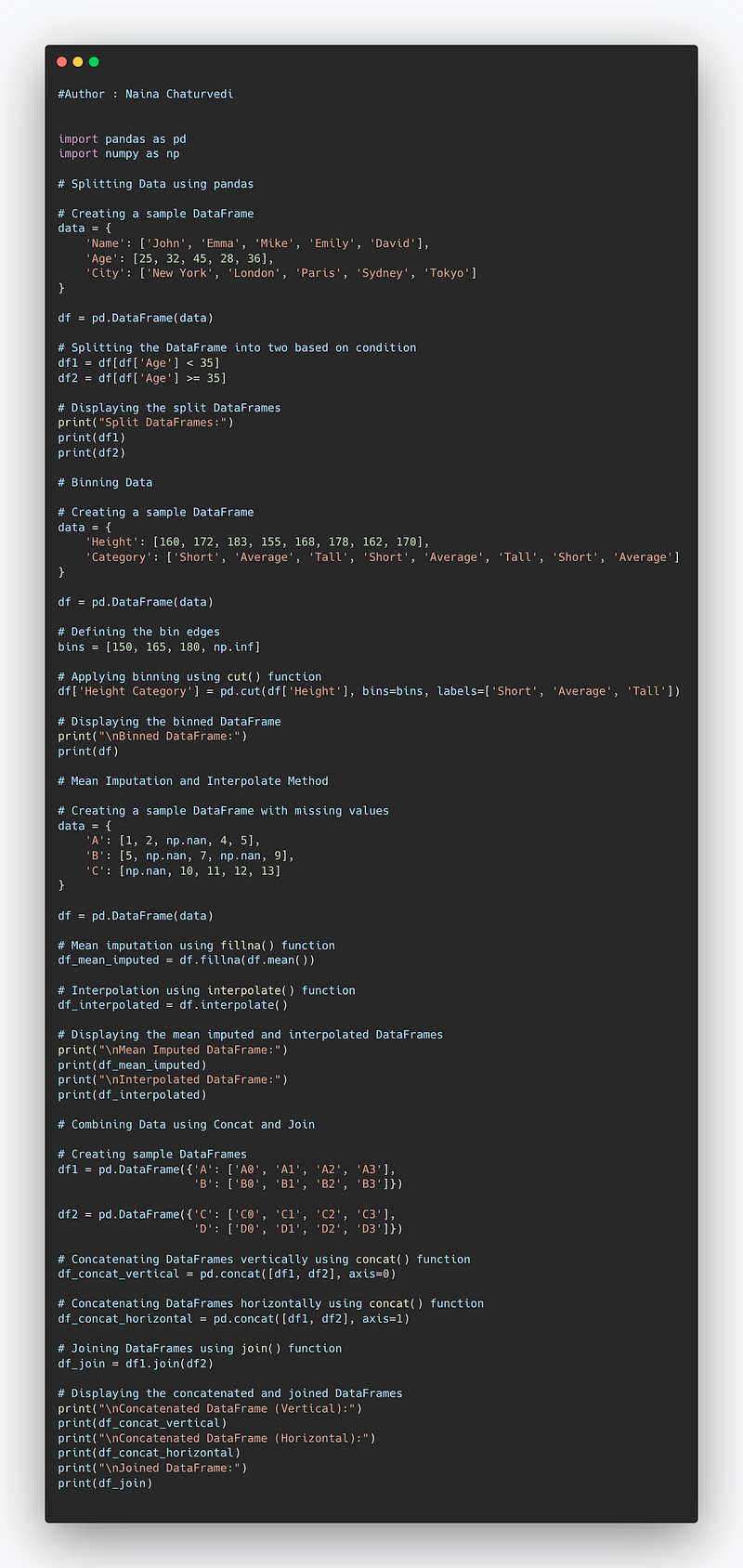
Code Implementation —
import pandas as pd
import numpy as np

# Splitting Data using pandas

# Creating a sample DataFrame
data = {
    'Name': ['John', 'Emma', 'Mike', 'Emily', 'David'],
    'Age': [25, 32, 45, 28, 36],
    'City': ['New York', 'London', 'Paris', 'Sydney', 'Tokyo']
}

df = pd.DataFrame(data)

# Splitting the DataFrame into two based on condition
df1 = df[df['Age'] < 35]
df2 = df[df['Age'] >= 35]

# Displaying the split DataFrames
print("Split DataFrames:")
print(df1)
print(df2)

# Binning Data

# Creating a sample DataFrame
data = {
    'Height': [160, 172, 183, 155, 168, 178, 162, 170],
    'Category': ['Short', 'Average', 'Tall', 'Short', 'Average', 'Tall', 'Short', 'Average']
}

df = pd.DataFrame(data)

# Defining the bin edges
bins = [150, 165, 180, np.inf]

# Applying binning using cut() function
df['Height Category'] = pd.cut(df['Height'], bins=bins, labels=['Short', 'Average', 'Tall'])

# Displaying the binned DataFrame
print("\nBinned DataFrame:")
print(df)

# Mean Imputation and Interpolate Method

# Creating a sample DataFrame with missing values
data = {
    'A': [1, 2, np.nan, 4, 5],
    'B': [5, np.nan, 7, np.nan, 9],
    'C': [np.nan, 10, 11, 12, 13]
}

df = pd.DataFrame(data)

# Mean imputation using fillna() function
df_mean_imputed = df.fillna(df.mean())

# Interpolation using interpolate() function
df_interpolated = df.interpolate()

# Displaying the mean imputed and interpolated DataFrames
print("\nMean Imputed DataFrame:")
print(df_mean_imputed)
print("\nInterpolated DataFrame:")
print(df_interpolated)

# Combining Data using Concat and Join

# Creating sample DataFrames
df1 = pd.DataFrame({'A': ['A0', 'A1', 'A2', 'A3'],
                    'B': ['B0', 'B1', 'B2', 'B3']})

df2 = pd.DataFrame({'C': ['C0', 'C1', 'C2', 'C3'],
                    'D': ['D0', 'D1', 'D2', 'D3']})

# Concatenating DataFrames vertically using concat() function
df_concat_vertical = pd.concat([df1, df2], axis=0)

# Concatenating DataFrames horizontally using concat() function
df_concat_horizontal = pd.concat([df1, df2], axis=1)

# Joining DataFrames using join() function
df_join = df1.join(df2)

# Displaying the concatenated and joined DataFrames
print("\nConcatenated DataFrame (Vertical):")
print(df_concat_vertical)
print("\nConcatenated DataFrame (Horizontal):")
print(df_concat_horizontal)
print("\nJoined DataFrame:")
print(df_join)
Snippet —
Before you start implementing these techniques, load the data of your choice in your working environment. For this post, I’m using Iris data.
Start with importing the necessary libraries such as Pandas and Numpy and loading your data set. Once done, dive in the techniques below —
1. Split data using pandas
In the code below, we are splitting the data into a random sample of rows and removing them from the original data after dropping index values.
iris_data_new= df.copy()
df1=iris_data_new.sample(frac=0.75,random_state=0)
iris_data_new=iris_data_new.drop(df1.index)df2=iris_data_new.sample(frac=0.25,random_state=0)
iris_data_new=iris_data_new.drop(df2.index)print(df1.shape)Output —
(112, 5)2. Binning Data
Binning is a technique to group/bin your data into multiple buckets which is very helpful if you dealing with continuous numeric data. In pandas you can bin the data using functions cut and cut. First check the shape of your data i.e no of rows and columns.
print(iris_data.shape)Output —
(150, 5)Then bin your data using qcut as shown below —
pd.qcut(df['sepal_width'],q=5).value_counts()Output —
(2.7, 3.0]      50
(1.999, 2.7]    33
(3.1, 3.4]      31
(3.4, 4.4]      24
(3.0, 3.1]      12
Name: sepal_width, dtype: int64
3. Slicing using loc and iloc functions
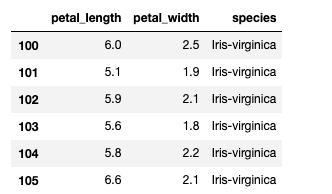
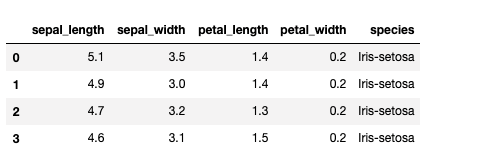
You can do position based and label based slicing using iloc and loc functions respectively.
iris_data.loc[100:105, 'petal_length':'species']Output —
iris_data.iloc[:4]Output —
4. Mean Imputation and Interpolate method
Mean Imputation is a technique in which the missing value is replaced by the mean of available data in the chosen column.
First see if your data has missing values or not.
iris_data.isnull().sum()Output —
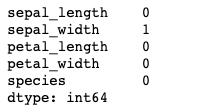
Then calculate the mean and replace the missing value —
iris_data['sepal_width'].mean()Output —
3.0516778523489942Replace the missing value
iris_data['sepal_width'].fillna(iris_data['sepal_width'].mean(), inplace=True)
iris_data.isnull().sum()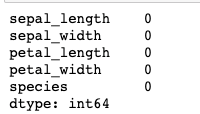
Interpolate method —
iris_data['sepal_width'].fillna(iris_data['sepal_width'].interpolate(), inplace=True)5. Combining Data using Concat and Join
Just like in numpy, pd.concat() function is used for concatenation of Series or DataFrame objects in pandas.
df4=pd.concat([df1,df2],axis=0)print(df4)Output —
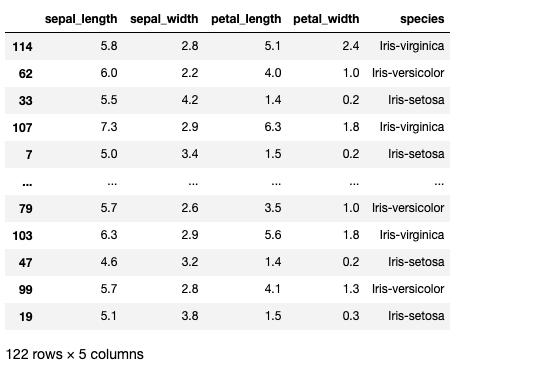
Joins —
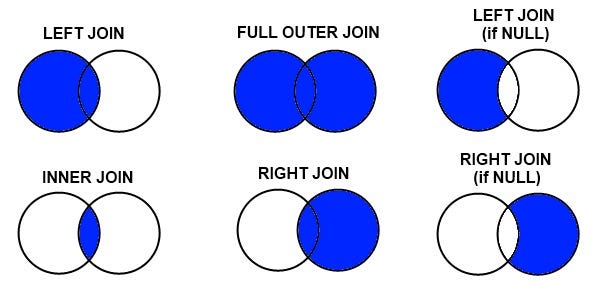
Merging and joining the data is one of the most important skill in the data science. Understanding and Implementing it right is crucial in order to analyze data well.
In this we will implement —
- Inner Join : keep rows from both the tables/data frames based on the specified merge condition.
- Full Join : keep all the rows form left table and right table with matched rows wherever possible and NaN’s elsewhere.
- Left Join : keep all the rows form left table and wherever there are missing values in the right table, put it as NaN’s, based on the specified merge condition.
- Right Join : keep all the rows form right table and wherever there are missing values in the left table, put it as NaN’s, based on the specified merge condition.
#Inner Join
df5=pd.merge(df1,df2,on='sepal_length')
print(df5)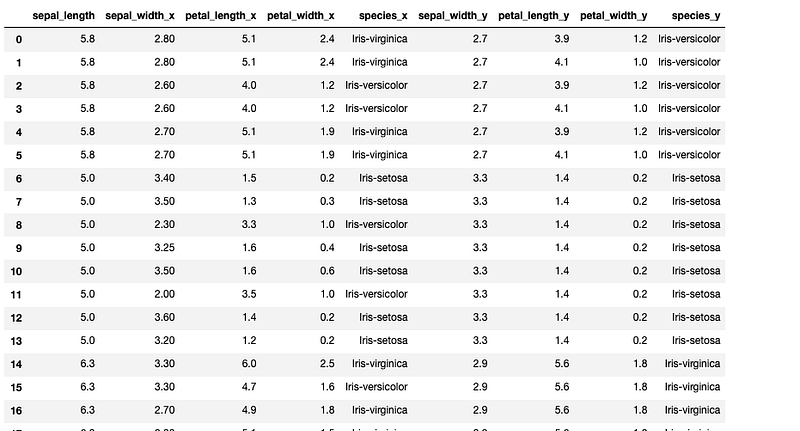
#Full outer join
df6=pd.merge(df1,df2,how='outer')
print(df6)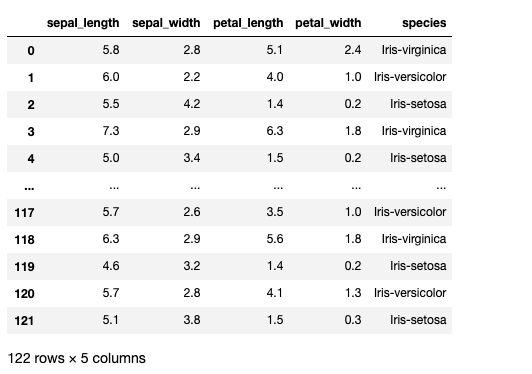
#Left Join
df7=pd.merge(df1,df2,how='left')
print(df7)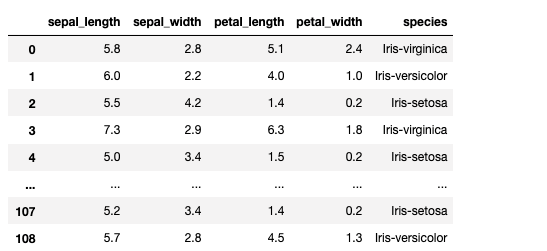
#Right Join
df8=pd.merge(df1,df2,how='right')
print(df8)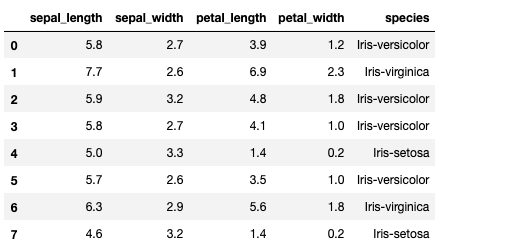
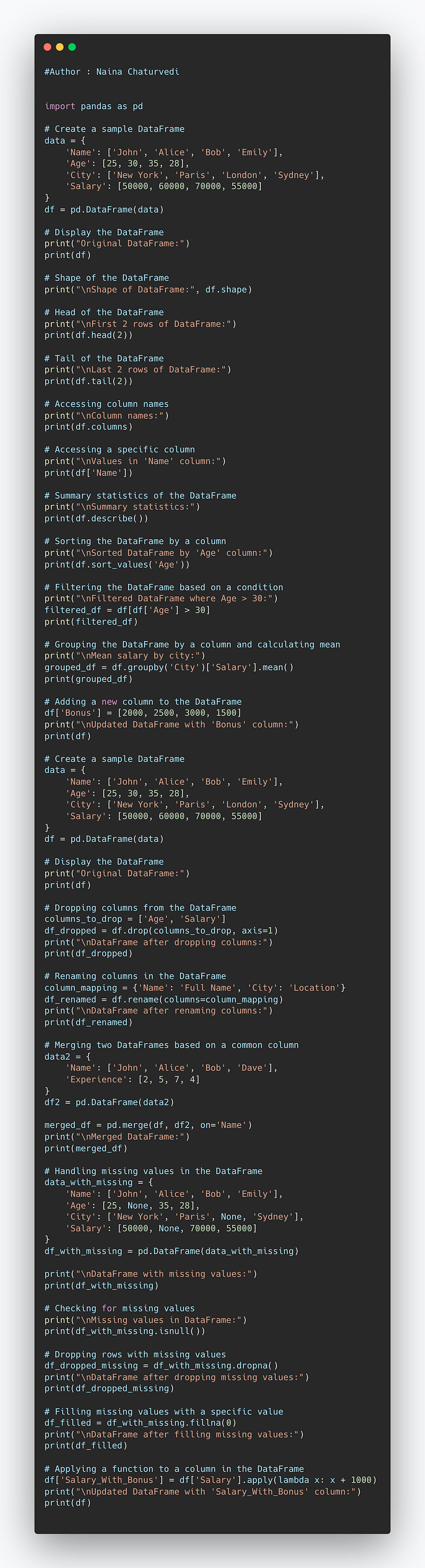
Complete Code —
import pandas as pd

# Create a sample DataFrame
data = {
    'Name': ['John', 'Alice', 'Bob', 'Emily'],
    'Age': [25, 30, 35, 28],
    'City': ['New York', 'Paris', 'London', 'Sydney'],
    'Salary': [50000, 60000, 70000, 55000]
}
df = pd.DataFrame(data)

# Display the DataFrame
print("Original DataFrame:")
print(df)

# Shape of the DataFrame
print("\nShape of DataFrame:", df.shape)

# Head of the DataFrame
print("\nFirst 2 rows of DataFrame:")
print(df.head(2))

# Tail of the DataFrame
print("\nLast 2 rows of DataFrame:")
print(df.tail(2))

# Accessing column names
print("\nColumn names:")
print(df.columns)

# Accessing a specific column
print("\nValues in 'Name' column:")
print(df['Name'])

# Summary statistics of the DataFrame
print("\nSummary statistics:")
print(df.describe())

# Sorting the DataFrame by a column
print("\nSorted DataFrame by 'Age' column:")
print(df.sort_values('Age'))

# Filtering the DataFrame based on a condition
print("\nFiltered DataFrame where Age > 30:")
filtered_df = df[df['Age'] > 30]
print(filtered_df)

# Grouping the DataFrame by a column and calculating mean
print("\nMean salary by city:")
grouped_df = df.groupby('City')['Salary'].mean()
print(grouped_df)

# Adding a new column to the DataFrame
df['Bonus'] = [2000, 2500, 3000, 1500]
print("\nUpdated DataFrame with 'Bonus' column:")
print(df)


# Create a sample DataFrame
data = {
    'Name': ['John', 'Alice', 'Bob', 'Emily'],
    'Age': [25, 30, 35, 28],
    'City': ['New York', 'Paris', 'London', 'Sydney'],
    'Salary': [50000, 60000, 70000, 55000]
}
df = pd.DataFrame(data)

# Display the DataFrame
print("Original DataFrame:")
print(df)

# Dropping columns from the DataFrame
columns_to_drop = ['Age', 'Salary']
df_dropped = df.drop(columns_to_drop, axis=1)
print("\nDataFrame after dropping columns:")
print(df_dropped)

# Renaming columns in the DataFrame
column_mapping = {'Name': 'Full Name', 'City': 'Location'}
df_renamed = df.rename(columns=column_mapping)
print("\nDataFrame after renaming columns:")
print(df_renamed)

# Merging two DataFrames based on a common column
data2 = {
    'Name': ['John', 'Alice', 'Bob', 'Dave'],
    'Experience': [2, 5, 7, 4]
}
df2 = pd.DataFrame(data2)

merged_df = pd.merge(df, df2, on='Name')
print("\nMerged DataFrame:")
print(merged_df)

# Handling missing values in the DataFrame
data_with_missing = {
    'Name': ['John', 'Alice', 'Bob', 'Emily'],
    'Age': [25, None, 35, 28],
    'City': ['New York', 'Paris', None, 'Sydney'],
    'Salary': [50000, None, 70000, 55000]
}
df_with_missing = pd.DataFrame(data_with_missing)

print("\nDataFrame with missing values:")
print(df_with_missing)

# Checking for missing values
print("\nMissing values in DataFrame:")
print(df_with_missing.isnull())

# Dropping rows with missing values
df_dropped_missing = df_with_missing.dropna()
print("\nDataFrame after dropping missing values:")
print(df_dropped_missing)

# Filling missing values with a specific value
df_filled = df_with_missing.fillna(0)
print("\nDataFrame after filling missing values:")
print(df_filled)

# Applying a function to a column in the DataFrame
df['Salary_With_Bonus'] = df['Salary'].apply(lambda x: x + 1000)
print("\nUpdated DataFrame with 'Salary_With_Bonus' column:")
print(df)
Snippet —
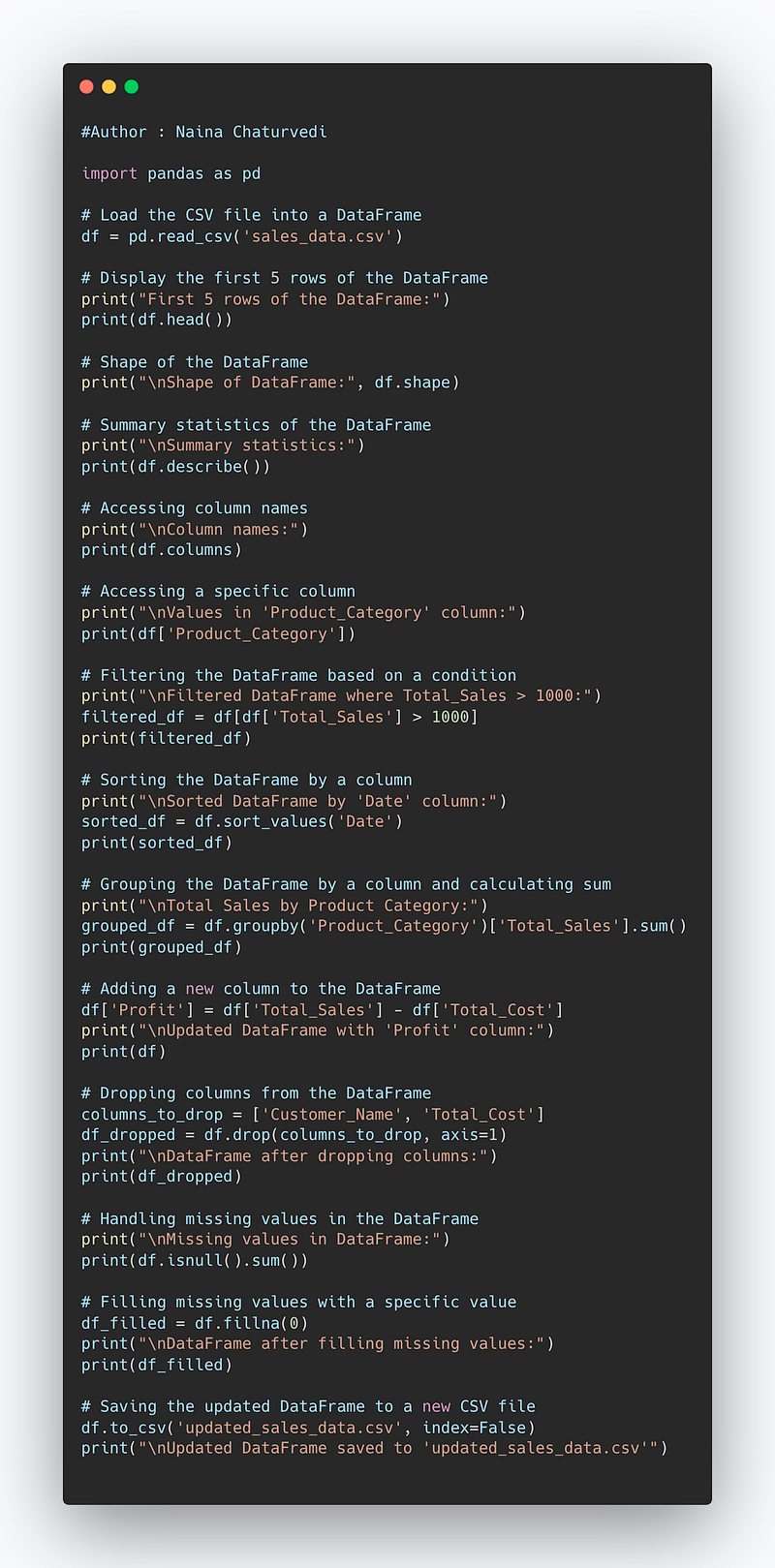
Code Implementation —
import pandas as pd

# Load the CSV file into a DataFrame
df = pd.read_csv('sales_data.csv')

# Display the first 5 rows of the DataFrame
print("First 5 rows of the DataFrame:")
print(df.head())

# Shape of the DataFrame
print("\nShape of DataFrame:", df.shape)

# Summary statistics of the DataFrame
print("\nSummary statistics:")
print(df.describe())

# Accessing column names
print("\nColumn names:")
print(df.columns)

# Accessing a specific column
print("\nValues in 'Product_Category' column:")
print(df['Product_Category'])

# Filtering the DataFrame based on a condition
print("\nFiltered DataFrame where Total_Sales > 1000:")
filtered_df = df[df['Total_Sales'] > 1000]
print(filtered_df)

# Sorting the DataFrame by a column
print("\nSorted DataFrame by 'Date' column:")
sorted_df = df.sort_values('Date')
print(sorted_df)

# Grouping the DataFrame by a column and calculating sum
print("\nTotal Sales by Product Category:")
grouped_df = df.groupby('Product_Category')['Total_Sales'].sum()
print(grouped_df)

# Adding a new column to the DataFrame
df['Profit'] = df['Total_Sales'] - df['Total_Cost']
print("\nUpdated DataFrame with 'Profit' column:")
print(df)

# Dropping columns from the DataFrame
columns_to_drop = ['Customer_Name', 'Total_Cost']
df_dropped = df.drop(columns_to_drop, axis=1)
print("\nDataFrame after dropping columns:")
print(df_dropped)

# Handling missing values in the DataFrame
print("\nMissing values in DataFrame:")
print(df.isnull().sum())

# Filling missing values with a specific value
df_filled = df.fillna(0)
print("\nDataFrame after filling missing values:")
print(df_filled)

# Saving the updated DataFrame to a new CSV file
df.to_csv('updated_sales_data.csv', index=False)
print("\nUpdated DataFrame saved to 'updated_sales_data.csv'")
Snippet —
That’s it for now.
Find Day 16 Below —
Let me know if you have questions in the comment section below. Subscribe/ Follow, Like/Clap as it would encourage me to write more in my free time
Stay Tuned!!
Read more —
All the Complete System Design Series Parts —
6. Networking, How Browsers work, Content Network Delivery ( CDN)
Github —
Keep learning and coding ;)
Day 5 coming soon!
For Python Projects —
For complete 60 days of Data Science and ML : Day 1 — Day 60 : Quick Recap of 60 days of Data Science and ML
Follow for more updates. Stay tuned and keep coding! Disclosure: Some of the links are affiliates.
For other projects, tune to —
Build Machine Learning Pipelines( With Code)
Recurrent Neural Network with Keras
Clustering Geolocation Data in Python using DBSCAN and K-Means
Facial Expression Recognition using Keras
Hyperparameter Tuning with Keras Tuner
Custom Layers in Keras


