
Day 25 of 30 days of Data Engineering Series with Projects
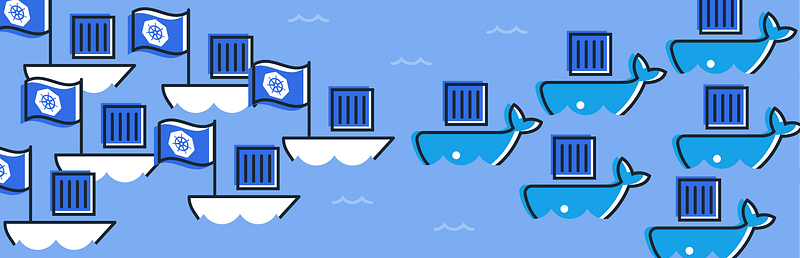
Welcome back peeps to Day 25 of Data Engineering Series with Projects!
In this we will cover —
Docker
Docker vs Virtual Machines
Most important Docker commands
Kubernetes
Snowflake
Pre-requisite to Day 25 is to complete Day 1–24( link below):
Day 3 : Complete Advanced Python for Data Engineering — Part 2
Day 18 : Data Visualization basics, Data Visualization Projects, Data Visualization using Plotly and Bokeh, Data Profiling, Summary Functions, Indexing, Grouping, Linear Regression, Multi Linear Regression, Polynomial Regression, Regression, Support Vector Regression, Decision Tree Regression, Random Forest Regression, Feature Engineering, GroupBy Features, Categorical and Numerical Features, Missing Value Analysis, Fill the missing Values, Unique Value Analysis, Univariate Analysis, Bivariate Analysis, Multivariate Analysis, Correlation Analysis, Spearman’s ρ, Pearson’s r, Kendall’s τ, Cramér’s V (φc), Phik (φk)
Day 20 : ETL ( Extract, Tranform and Load) basics, Why ETL is important?, How ETL works, ETL Tools
Day 21 : Structured Data, Semi Structured Data, Unstructured Data, Data Warehouse, Data Mart, Data Lake
Day 25: Docker, Docker vs Virtual Machines, Most important Docker commands, Kubernetes, Snowflake
Projects Videos —
All the projects, data structures, SQL, algorithms, system design, Data Science and ML , Data Analytics, Data Engineering, , Implemented Data Science and ML projects, Implemented Data Engineering Projects, Implemented Deep Learning Projects, Implemented Machine Learning Ops Projects, Implemented Time Series Analysis and Forecasting Projects, Implemented Applied Machine Learning Projects, Implemented Tensorflow and Keras Projects, Implemented PyTorch Projects, Implemented Scikit Learn Projects, Implemented Big Data Projects, Implemented Cloud Machine Learning Projects, Implemented Neural Networks Projects, Implemented OpenCV Projects,Complete ML Research Papers Summarized, Implemented Data Analytics projects, Implemented Data Visualization Projects, Implemented Data Mining Projects, Implemented Natural Leaning Processing Projects, MLOps and Deep Learning, Applied Machine Learning with Projects Series, PyTorch with Projects Series, Tensorflow and Keras with Projects Series, Scikit Learn Series with Projects, Time Series Analysis and Forecasting with Projects Series, ML System Design Case Studies Series videos will be published on our youtube channel ( just launched).
Subscribe today!
Tech Newsletter —
If you are interested, you can join my newsletter through which I send tech interview tips, techniques, patterns, hacks — Software Development, ML, Data Science, Startups and Technology projects to more than 30K readers. You can subscribe to Ignito:
System Design Case Studies — In Depth
Design Instagram
Design Netflix
Design Reddit
Design Amazon
Design Messenger App
Design Twitter
Design URL Shortener
Design Dropbox
Design Youtube
Design API Rate Limiter
Design Web Crawler
Design Amazon Prime Video
Design Facebook’s Newsfeed
Design Yelp
Design Uber
Design Tinder
Design Tiktok
Design Whatsapp
Most Popular System Design Questions
Mega Compilation : Solved System Design Case studies
Let’s get started!
Docker is a platform for developing, shipping, and running applications in containers. Containers are lightweight, portable, and self-sufficient environments that include all the dependencies required to run an application. This allows developers to easily move applications between different environments, such as development, staging, and production.
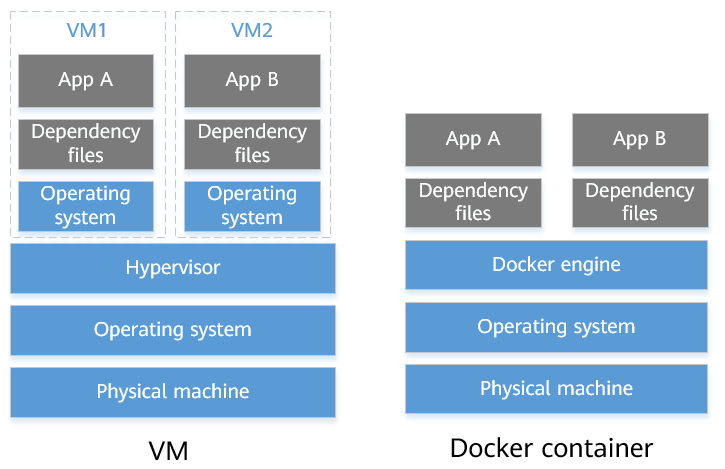
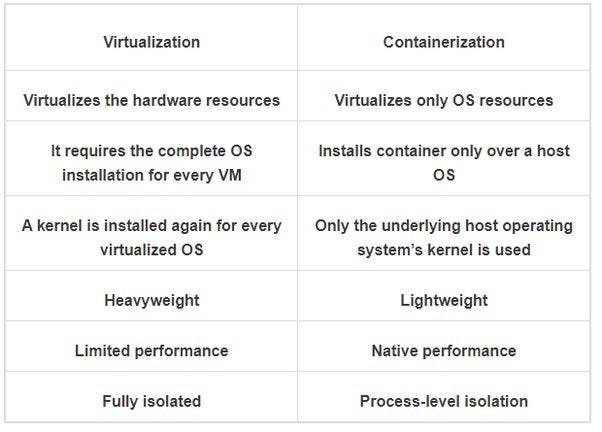
Docker vs Virtual Machines: Virtual machines (VMs) are software that emulate a physical machine, providing a separate operating system and hardware environment for each application. Docker containers, on the other hand, share the host machine’s operating system kernel and only include the libraries and dependencies needed by the application. This means that Docker containers are more lightweight and efficient than VMs, and can run on a single machine alongside other containers.
Some important Docker commands:
docker run- run a command in a new containerdocker start- start one or more stopped containersdocker stop- stop one or more running containersdocker ps- list all running containersdocker images- list all imagesdocker pull- download an image from a registrydocker push- upload an image to a registrydocker build- build an image from a Dockerfile
Implementation —
# Run a command in a new container
docker run -it ubuntu:latest /bin/bash

# Start one or more stopped containers
docker start container_name

# Stop one or more running containers
docker stop container_name

# List all running containers
docker ps

# List all images
docker images

# Download an image from a registry
docker pull image_name

# Upload an image to a registry
docker push image_name

# Build an image from a Dockerfile
docker build -t image_name /path/to/dockerfile
Kubernetes is an open-source container orchestration system for automating the deployment, scaling, and management of containerized applications. It provides a way to manage multiple containers across multiple machines, and can automatically scale resources as needed.
Implementation —
# Create a deployment
kubectl create deployment myapp --image=myimage:tag

# Scale the deployment
kubectl scale deployment myapp --replicas=3

# Expose the deployment as a service
kubectl expose deployment myapp --port=8080 --target-port=80 --type=LoadBalancer

# List all pods
kubectl get pods

# List all services
kubectl get services

# Describe a pod
kubectl describe pod pod_name

# Describe a service
kubectl describe service service_name

# Delete a deployment
kubectl delete deployment myapp

# Delete a service
kubectl delete service myapp

# Apply changes to a deployment
kubectl apply -f deployment.yaml

# Execute a command in a pod
kubectl exec pod_name -- command

# Port-forward to a pod
kubectl port-forward pod_name local_port:pod_port

# Get logs of a pod
kubectl logs pod_name

# Get the status of all resources in a namespace
kubectl get all -n namespace_name
Snowflake is a cloud-based data warehouse that allows users to store, process and analyze data using SQL. It is a fully relational ANSI SQL data warehouse as a service, it’s unique architecture allows for unlimited concurrent users, and separate compute and storage resources.
Implementation —
-- Create a database
CREATE DATABASE mydatabase;

-- Use a database
USE DATABASE mydatabase;

-- Create a schema
CREATE SCHEMA myschema;

-- Use a schema
USE SCHEMA myschema;

-- Create a table
CREATE TABLE mytable (
  column1 VARCHAR,
  column2 INT,
  column3 DATE
);

-- Insert data into a table
INSERT INTO mytable (column1, column2, column3)
VALUES ('value1', 10, '2023-05-21'),
       ('value2', 20, '2023-05-22');

-- Select data from a table
SELECT * FROM mytable;

-- Update data in a table
UPDATE mytable
SET column1 = 'new_value'
WHERE column2 = 10;

-- Delete data from a table
DELETE FROM mytable
WHERE column2 = 20;

-- Create a view
CREATE VIEW myview AS
SELECT column1, column2
FROM mytable
WHERE column3 = '2023-05-21';

-- Grant privileges to a role
GRANT SELECT, INSERT, UPDATE, DELETE ON mytable TO myrole;

-- Revoke privileges from a role
REVOKE INSERT, UPDATE ON mytable FROM myrole;

-- Show grants for a table
SHOW GRANTS ON mytable;

-- Describe a table
DESCRIBE mytable;

-- Show query history
SHOW QUERY_HISTORY;

-- Show warehouse status
SHOW WAREHOUSES;

-- Show table sizes
SHOW TABLES LIKE 'my%';
Docker
Docker is an open platform for programmers and sysadmins of distributed applications to build, ship and run any app anywhere you want.
It’s a container platform to build, configure and distribute docker containers and has its own clustering solution.
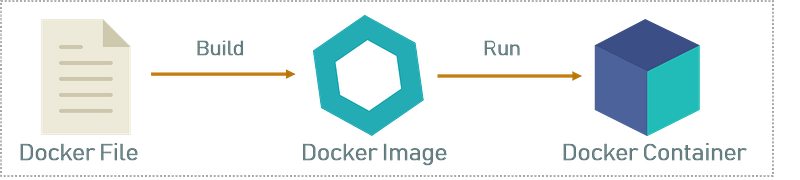
Docker file allows users to build custom docket images and can be distributed. It allows images to be distributed and scaled.
It’s highly scalable and does auto load balancing of traffic between containers in the cluster.
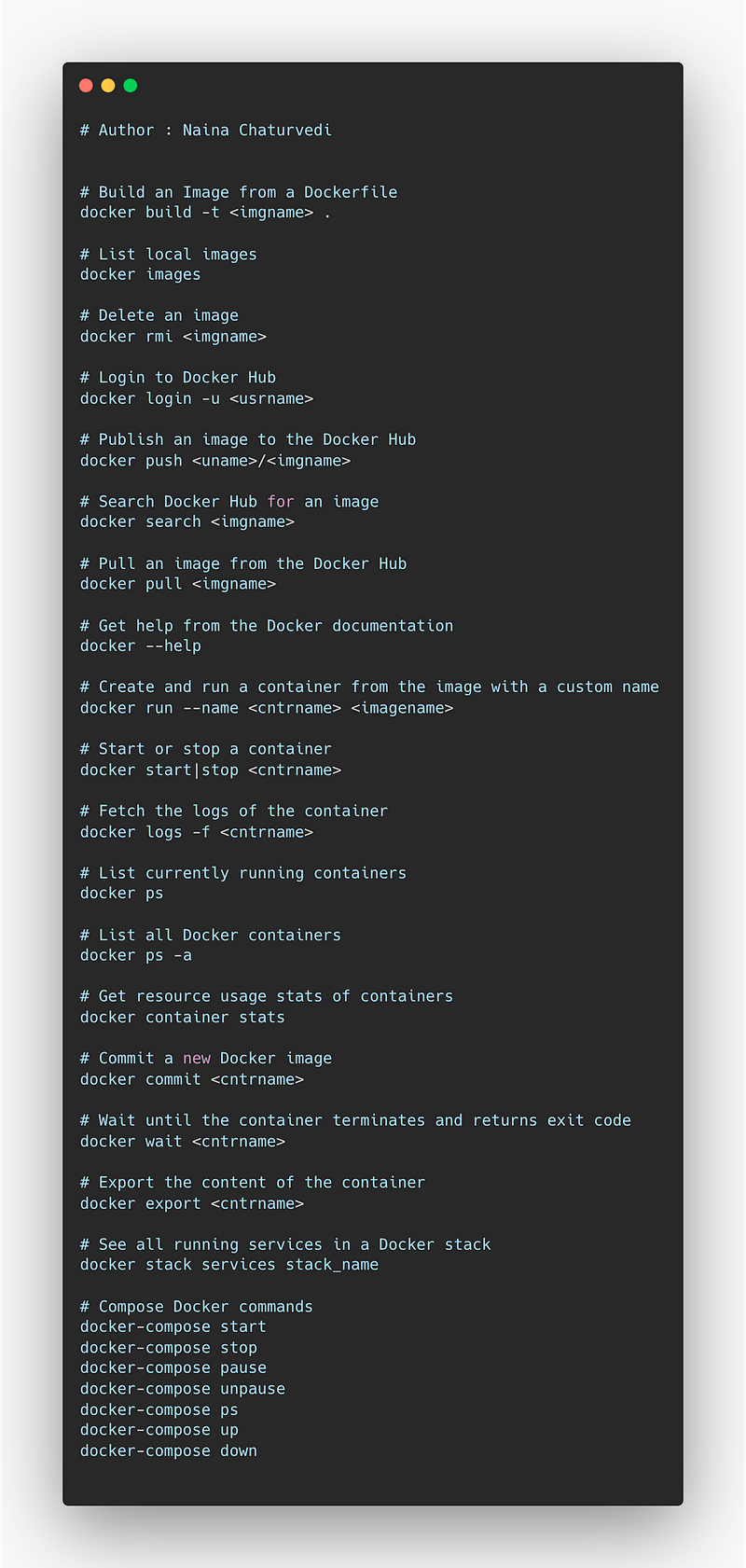
Docket most important commands —
docker build -t <imgname> : Build an Image from a Dockerfile
docker images : To list local images
docker rmi : To delete an image
docker login -u <usrname> : To login into docket
docker push <uname>/<imgname> : To publish an image to the Docket Hub
docker search <imgname> : To search hub for an image
docker pull <imgname> : To pull an image from the docker hub
docker — help : To get help from the docker documentation
docker run — name <cntrname> <imagename> : To create and run a container from the image with a custome name
docker start|stop <cntrname> : To stop or start a container
docker logs -f <cntrname> : To fetch the logs of the container
docker ps : To list currently running containers
docker ps — all : To list all the docker containers
docker container stats : To get information of the resource usage stats
docker commit <cntrimage> : To commit a new docker image
docker wait <cntrname> : To wait until the container terminates and returns exit code
docker export <cntrname> : To export the content of the container
docker stack services stack_name : To see all the running services
To compose docker —
docker — compose start
docker — compose stop
docker — compose pause
docker — compose unpause
docker — compose ps
docker — compose up
docker — compose down
Implementation —
# Build an Image from a Dockerfile
docker build -t <imgname> .

# List local images
docker images

# Delete an image
docker rmi <imgname>

# Login to Docker Hub
docker login -u <usrname>

# Publish an image to the Docker Hub
docker push <uname>/<imgname>

# Search Docker Hub for an image
docker search <imgname>

# Pull an image from the Docker Hub
docker pull <imgname>

# Get help from the Docker documentation
docker --help

# Create and run a container from the image with a custom name
docker run --name <cntrname> <imagename>

# Start or stop a container
docker start|stop <cntrname>

# Fetch the logs of the container
docker logs -f <cntrname>

# List currently running containers
docker ps

# List all Docker containers
docker ps -a

# Get resource usage stats of containers
docker container stats

# Commit a new Docker image
docker commit <cntrname>

# Wait until the container terminates and returns exit code
docker wait <cntrname>

# Export the content of the container
docker export <cntrname>

# See all running services in a Docker stack
docker stack services stack_name

# Compose Docker commands
docker-compose start
docker-compose stop
docker-compose pause
docker-compose unpause
docker-compose ps
docker-compose up
docker-compose down
Snippet —
Kubernetes
Kubernetes is an environment for managing the cluster of docker containers. It’s highly scalable and can do auto scaling.
It can also deploy rolling updates and auto rollbacks. It has in built tools for monitoring and logging and shares storage with other containers belonging to the same Pod.
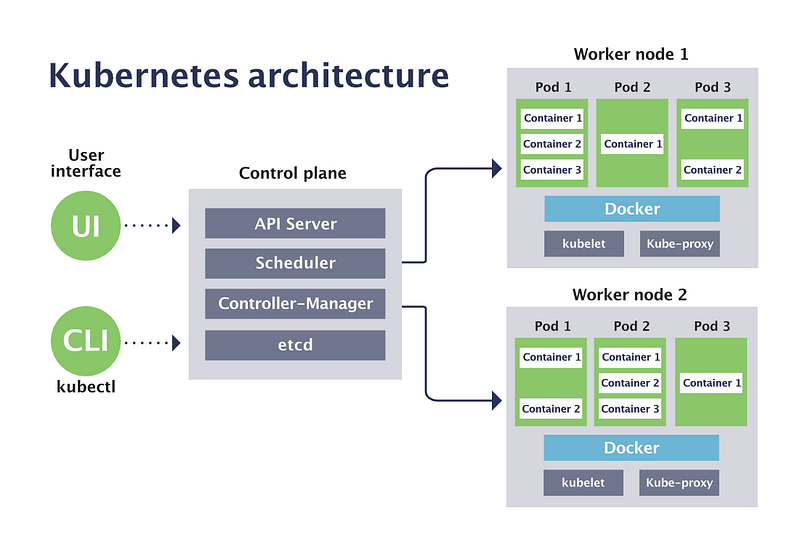
It can work with any compartment framework that fits with OCI guidelines.
Why Kubernetes —
- It optimizes the cost
- Automated provisioning
- Gives productivity boost
- Software portability
- Automated Rollback
- Auto Scaling
- Load Balancing
- Storage Orchestration
- Batch execution
Some important Kubernetes commands:
kubectl get- retrieve information about resources in a clusterkubectl describe- show detailed information about a resourcekubectl create- create a resource from a file or from stdinkubectl replace- replace a resource by filename or stdinkubectl delete- delete resources by filenames, stdin, resources and names, or label selectorkubectl apply- apply a configuration to a resource by filename or stdinkubectl exec- execute a command in a containerkubectl logs- print the logs for a container in a podkubectl scale- set a new size for a Deployment, ReplicaSet, or ReplicationControllerkubectl rolling-update- roll updates of pods in a deploymentkubectl port-forward- forward one or more local ports to a podkubectl top- show metrics for a given resource or podkubectl cluster-info- display addresses of the master and serviceskubectl config- Modify kubeconfig files using subcommands like "kubectl config view"kubectl auth- Inspect authorization.
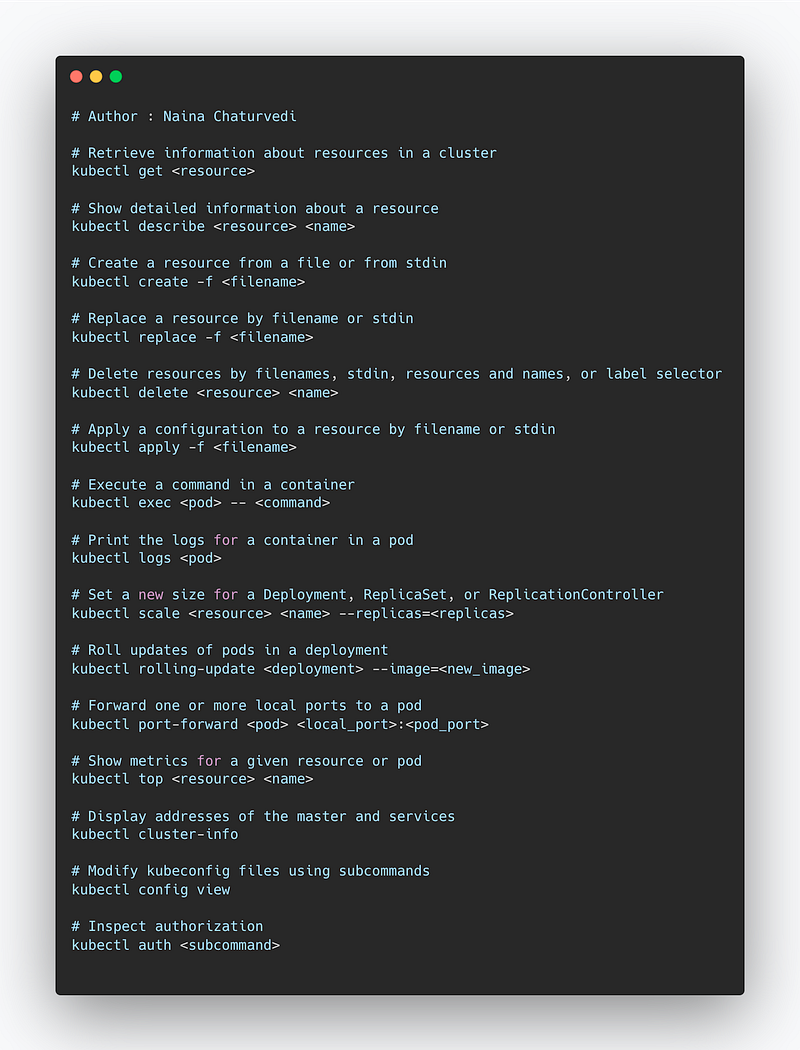
Implementation —
# Retrieve information about resources in a cluster
kubectl get <resource>

# Show detailed information about a resource
kubectl describe <resource> <name>

# Create a resource from a file or from stdin
kubectl create -f <filename>

# Replace a resource by filename or stdin
kubectl replace -f <filename>

# Delete resources by filenames, stdin, resources and names, or label selector
kubectl delete <resource> <name>

# Apply a configuration to a resource by filename or stdin
kubectl apply -f <filename>

# Execute a command in a container
kubectl exec <pod> -- <command>

# Print the logs for a container in a pod
kubectl logs <pod>

# Set a new size for a Deployment, ReplicaSet, or ReplicationController
kubectl scale <resource> <name> --replicas=<replicas>

# Roll updates of pods in a deployment
kubectl rolling-update <deployment> --image=<new_image>

# Forward one or more local ports to a pod
kubectl port-forward <pod> <local_port>:<pod_port>

# Show metrics for a given resource or pod
kubectl top <resource> <name>

# Display addresses of the master and services
kubectl cluster-info

# Modify kubeconfig files using subcommands
kubectl config view

# Inspect authorization
kubectl auth <subcommand>
Snippet —
Snowflake
Snowflake is an analytics data warehouse which is much faster, easier than traditional data warehouses and enables data storage and processing.
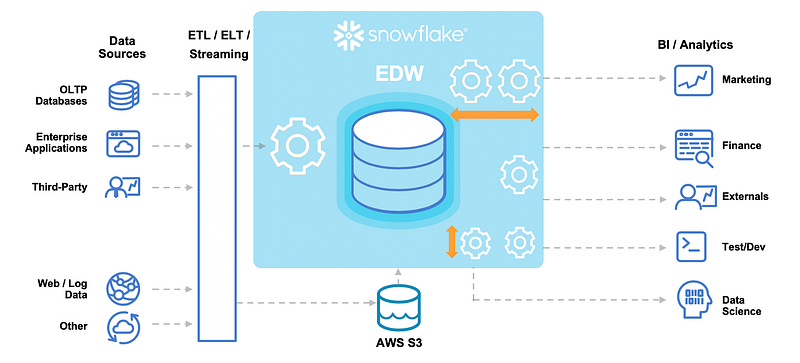
It used SQL database engine along with unique architecture designed for the clouds.
It’s architecture consists of three layers —
Db storage — To store and reorganize the data in a compressed format.
Query processing — To process queries using warehouses that are virtual and consists of multiple compute nodes
Cloud services — To manage different activities and processes across snowflake like authentication, access control, query optimization etc.
Data Files can be loaded to Snowflake through local environment as well as Amazon S3, GC Storage etc.
Some important Snowflake commands include:
- SELECT — retrieves data from one or more tables in the database
- INSERT — adds new rows of data to a table
- UPDATE — modifies existing data in a table
- DELETE — deletes data from a table
- CREATE TABLE — creates a new table in the database
- ALTER TABLE — modifies an existing table’s structure
- DROP TABLE — deletes a table from the database
- USE ROLE — changes the active role for the current session
- GRANT — grants permissions to a user or role on a specific object
- REVOKE — revokes previously granted permissions from a user or role on a specific object
It is worth noting that Snowflake also support DDL and DCL commands like:
- CREATE DATABASE
- DROP DATABASE
- CREATE SCHEMA
- DROP SCHEMA
- CREATE VIEW
- DROP VIEW
- CREATE STAGE
- DROP STAGE
- CREATE PIPE
- DROP PIPE
- CREATE INTEGRATION
- DROP INTEGRATION
- CREATE TASK
- DROP TASK
- CREATE FILE FORMAT
- DROP FILE FORMAT
- CREATE WAREHOUSE
- START/STOP/RESUME/SUSPEND WAREHOUSE
- CREATE USER
- DROP USER
- SET/ALTER/RESET PASSWORD
- GRANT/REVOKE ROLE
- GRANT/REVOKE PRIVILEGE
- GRANT/REVOKE ALL PRIVILEGE
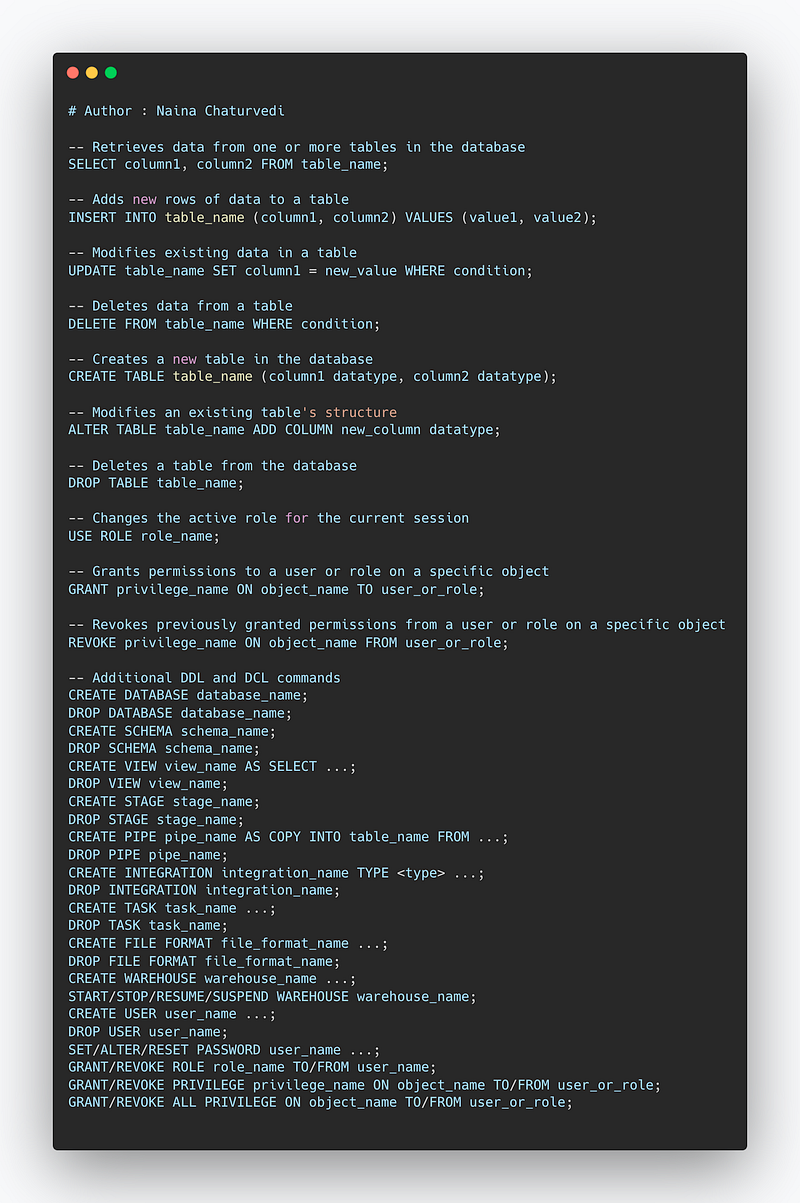
Implementation —
-- Retrieves data from one or more tables in the database
SELECT column1, column2 FROM table_name;

-- Adds new rows of data to a table
INSERT INTO table_name (column1, column2) VALUES (value1, value2);

-- Modifies existing data in a table
UPDATE table_name SET column1 = new_value WHERE condition;

-- Deletes data from a table
DELETE FROM table_name WHERE condition;

-- Creates a new table in the database
CREATE TABLE table_name (column1 datatype, column2 datatype);

-- Modifies an existing table's structure
ALTER TABLE table_name ADD COLUMN new_column datatype;

-- Deletes a table from the database
DROP TABLE table_name;

-- Changes the active role for the current session
USE ROLE role_name;

-- Grants permissions to a user or role on a specific object
GRANT privilege_name ON object_name TO user_or_role;

-- Revokes previously granted permissions from a user or role on a specific object
REVOKE privilege_name ON object_name FROM user_or_role;

-- Additional DDL and DCL commands
CREATE DATABASE database_name;
DROP DATABASE database_name;
CREATE SCHEMA schema_name;
DROP SCHEMA schema_name;
CREATE VIEW view_name AS SELECT ...;
DROP VIEW view_name;
CREATE STAGE stage_name;
DROP STAGE stage_name;
CREATE PIPE pipe_name AS COPY INTO table_name FROM ...;
DROP PIPE pipe_name;
CREATE INTEGRATION integration_name TYPE <type> ...;
DROP INTEGRATION integration_name;
CREATE TASK task_name ...;
DROP TASK task_name;
CREATE FILE FORMAT file_format_name ...;
DROP FILE FORMAT file_format_name;
CREATE WAREHOUSE warehouse_name ...;
START/STOP/RESUME/SUSPEND WAREHOUSE warehouse_name;
CREATE USER user_name ...;
DROP USER user_name;
SET/ALTER/RESET PASSWORD user_name ...;
GRANT/REVOKE ROLE role_name TO/FROM user_name;
GRANT/REVOKE PRIVILEGE privilege_name ON object_name TO/FROM user_or_role;
GRANT/REVOKE ALL PRIVILEGE ON object_name TO/FROM user_or_role;
Snippet —
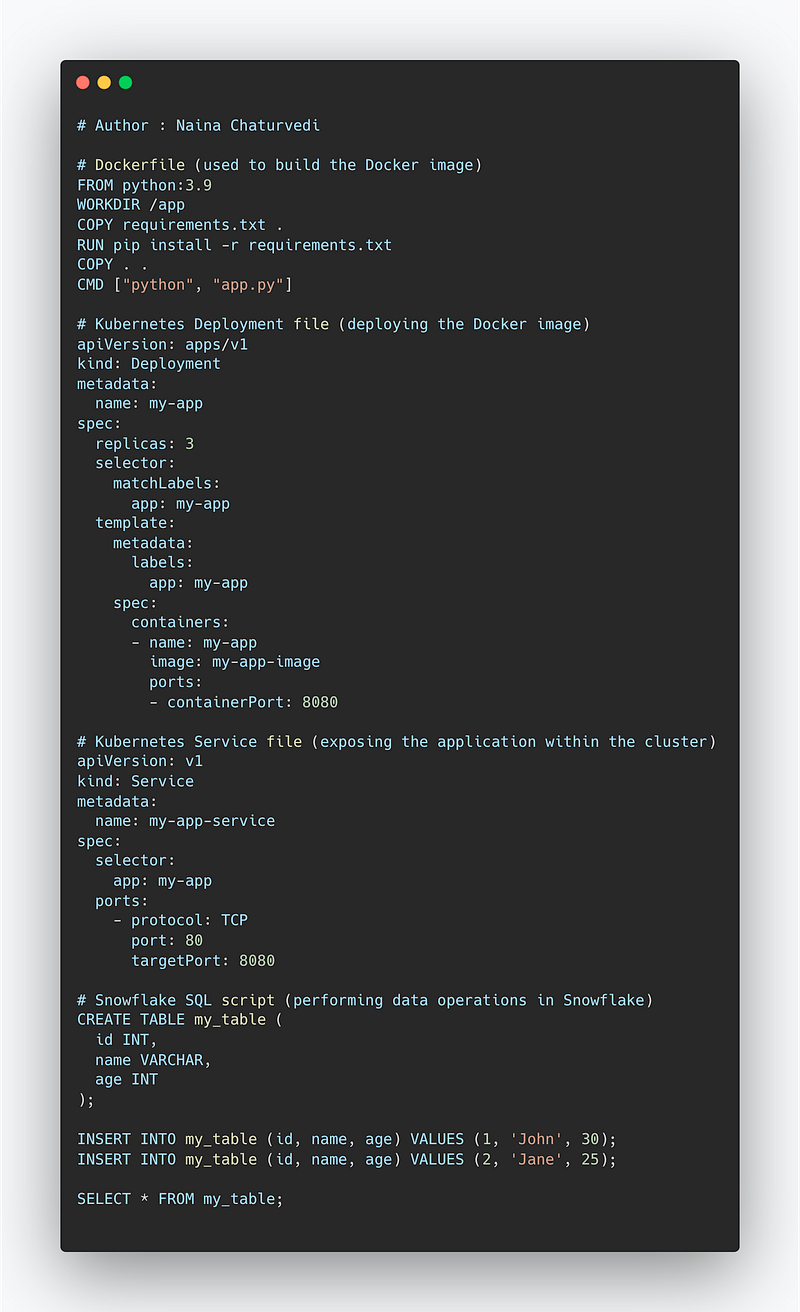
Project Code —
# Dockerfile (used to build the Docker image)
FROM python:3.9
WORKDIR /app
COPY requirements.txt .
RUN pip install -r requirements.txt
COPY . .
CMD ["python", "app.py"]

# Kubernetes Deployment file (deploying the Docker image)
apiVersion: apps/v1
kind: Deployment
metadata:
  name: my-app
spec:
  replicas: 3
  selector:
    matchLabels:
      app: my-app
  template:
    metadata:
      labels:
        app: my-app
    spec:
      containers:
      - name: my-app
        image: my-app-image
        ports:
        - containerPort: 8080

# Kubernetes Service file (exposing the application within the cluster)
apiVersion: v1
kind: Service
metadata:
  name: my-app-service
spec:
  selector:
    app: my-app
  ports:
    - protocol: TCP
      port: 80
      targetPort: 8080

# Snowflake SQL script (performing data operations in Snowflake)
CREATE TABLE my_table (
  id INT,
  name VARCHAR,
  age INT
);

INSERT INTO my_table (id, name, age) VALUES (1, 'John', 30);
INSERT INTO my_table (id, name, age) VALUES (2, 'Jane', 25);

SELECT * FROM my_table;
Snippet —
A project video Docker, Kubernetes and Snowflake covering coming soon ( subscribe today) —
That’s it for now.
Find Day 26 Below :
Let me know if you have questions in the comment section below. Subscribe/ Follow, Like/Clap as it would encourage me to write more in my free time
Stay Tuned!!
Read more —
All the Complete System Design Series Parts —
6. Networking, How Browsers work, Content Network Delivery ( CDN)
Github —
For Python Projects —
For complete 60 days of Data Science and ML : Day 1 — Day 60 : Quick Recap of 60 days of Data Science and ML
Follow for more updates. Stay tuned and keep coding!
For other projects, tune to —
Build Machine Learning Pipelines( With Code)
Recurrent Neural Network with Keras
Clustering Geolocation Data in Python using DBSCAN and K-Means
Facial Expression Recognition using Keras
Hyperparameter Tuning with Keras Tuner
Custom Layers in Keras


