
Day 32 of System Design Case Studies Series : Design BookmyShow, Zomato
Complete Design with examples
Hello peeps! Welcome to Day 32 of System Design Case studies series where we will design Book My Show and Zomato.
This post has system design for ( scroll till the end of the post) —
Note : Please read System Design Important Terms you MUST know before reading this post.
Projects Videos —
All the projects, data structures, SQL, algorithms, system design, Data Science and ML , Data Analytics, Data Engineering, , Implemented Data Science and ML projects, Implemented Data Engineering Projects, Implemented Deep Learning Projects, Implemented Machine Learning Ops Projects, Implemented Time Series Analysis and Forecasting Projects, Implemented Applied Machine Learning Projects, Implemented Tensorflow and Keras Projects, Implemented PyTorch Projects, Implemented Scikit Learn Projects, Implemented Big Data Projects, Implemented Cloud Machine Learning Projects, Implemented Neural Networks Projects, Implemented OpenCV Projects,Complete ML Research Papers Summarized, Implemented Data Analytics projects, Implemented Data Visualization Projects, Implemented Data Mining Projects, Implemented Natural Leaning Processing Projects, MLOps and Deep Learning, Applied Machine Learning with Projects Series, PyTorch with Projects Series, Tensorflow and Keras with Projects Series, Scikit Learn Series with Projects, Time Series Analysis and Forecasting with Projects Series, ML System Design Case Studies Series videos will be published on our youtube channel ( just launched).
Subscribe today!
System Design Case Studies — In Depth
Design Google Drive
Design Instagram
Design Quora
Design Foursquare
Design Flipkart
ML System Design
Design Tiny URL
Design Netflix
Design Messenger App
Design Twitter
Design Reddit
Design Amazon
Design Dropbox
Design URL Shortener
Design Youtube
Design API Rate Limiter
Design Web Crawler
Design Amazon Prime Video
Design Facebook’s Newsfeed
Design Yelp
Design Uber
Design Tinder
Design Tiktok
Design Whatsapp
Most Popular System Design Questions
Mega Compilation : Solved System Design Case studies
We will be discussing in depth -
- What is BookMyShow?
- Important Features
- Scaling Requirements — Capacity Estimation
- Data Model — ER requirements
- High Level Design
- Basic Low Level Design
- API Design
- Complete Detailed Design
Pre-requisite to this post -
Complete System Design Series — Important Concepts that you should know before starting the Case studies
6. Networking, How Browsers work, Content Network Delivery ( CDN)
13. System Design Template — How to solve any System Design Question
Github —
Day 1 of System Design Case Studies can be found below-
Day 2 of System Design Case Studies can be found below-
Day 3 of System Design Case Studies can be found below-
Day 4 of System Design Case Studies can be found below-
What is Book My Show?

Book My show is a platform which lets users —
- Browse Movies
- Purchase theatre seats
- See availability of seats
- See the available show times
- Get E-tickets for the booked movie(s)
Users can be both mobile based and web based.
Designing Book my show would involve:
- Conduct market research: Understand the target audience, their needs and preferences, and what features they expect from a ticket booking app.
- Define the concept and features: Based on the research, define the concept and features of the app, such as movie or event ticket booking, seat selection, payment options, and push notifications.
- Create a wireframe: Create a rough layout of the app, including the user interface and navigation.
- Design the UI: Use a design software to create the visual elements of the app, such as the logo, color scheme, and typography.
- Develop the app: Using a programming language such as Swift or Java, write the code for the app, integrating the features and UI designs.
- Integrate with ticket providers: Integrate the app with ticket providers such as movie theaters or event venues to allow users to easily purchase tickets.
- Test the app: Use beta testers to identify and fix any bugs or issues before releasing the app to the public.
- Launch the app: Release the app on the App Store and Google Play, and promote it through various channels, such as social media and advertising.
- Monitor and update: Monitor the performance of the app, collect feedback from users, and continue to update the app with new features and improvements based on user needs.
Important Features
We will consider the most important features —
Browse Movies
Purchase theatre seats
See availability of seats
Scaling Requirements — Capacity Estimation
For the sake of simplicity, I’ll show a small scale simulation.
Let’s say we have —
Page views per month : 1 billion
No of tickets sold/month : 7 million
No of cities : 300
No of movie theatre/city : 8
No of seats available : 1000
No of shows : 3
Seat booking information: 30 bytes
Movie information : 30 bytes
Total Storage needed per day : 8 * 300 * 1000 * 3 * 60 bytes = 432 MB/day
For next 3 years : 432MB * 365 * 3 = 472 GB
Data Model — ER requirements
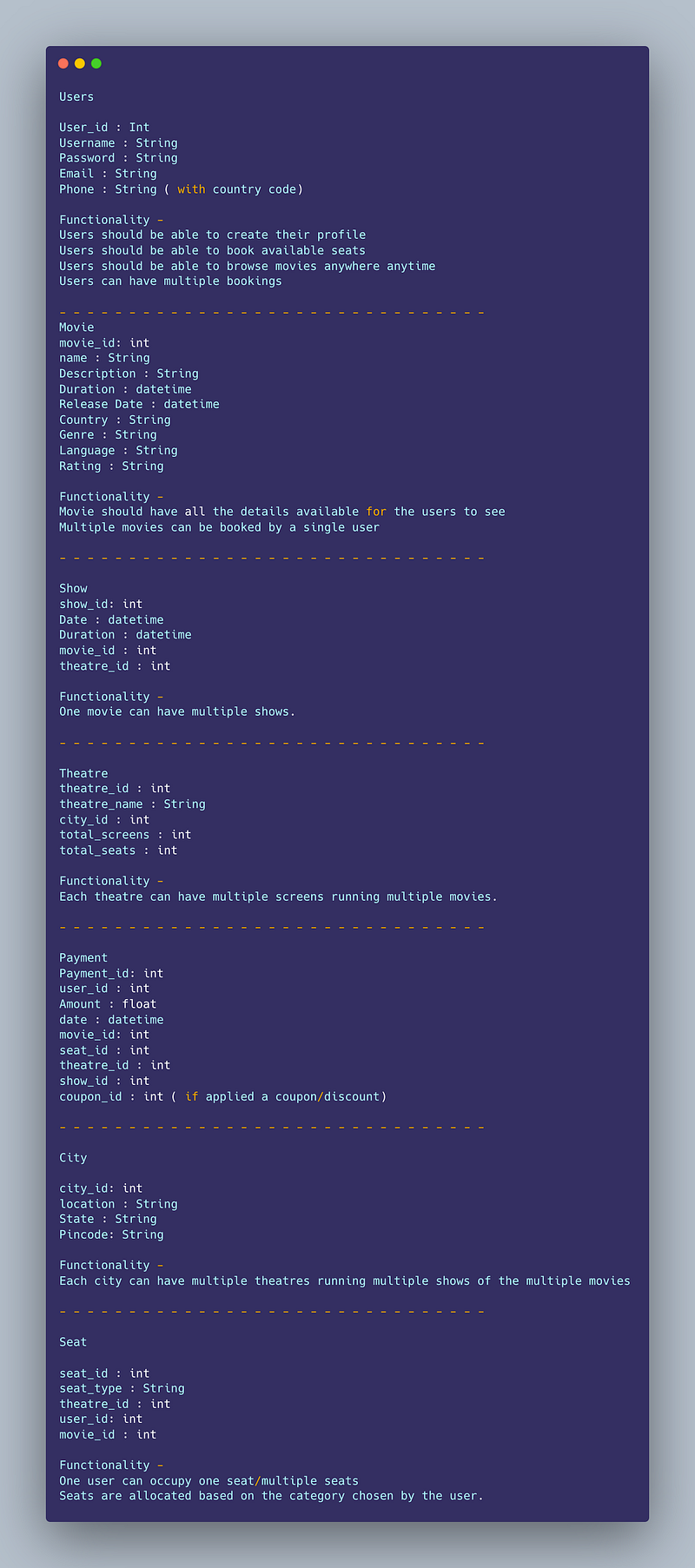
Users
User_id : Int
Username : String
Password : String
Email : String
Phone : String ( with country code)
Functionality —
- Users should be able to create their profile
- Users should be able to book available seats
- Users should be able to browse movies anywhere anytime
- Users can have multiple bookings
— — — — — — — — — — — — — — — — — — — — — — — — — — — — — — -
Movie
movie_id: int
name : String
Description : String
Duration : datetime
Release Date : datetime
Country : String
Genre : String
Language : String
Rating : String
Functionality —
- Movie should have all the details available for the users to see
- Multiple movies can be booked by a single user
— — — — — — — — — — — — — — — — — — — — — — — — — — — — — — -
Show
show_id: int
Date : datetime
Duration : datetime
movie_id : int
theatre_id : int
Functionality —
- One movie can have multiple shows.
— — — — — — — — — — — — — — — — — — — — — — — — — — — — — — -
Theatre
theatre_id : int
theatre_name : String
city_id : int
total_screens : int
total_seats : int
Functionality —
- Each theatre can have multiple screens running multiple movies.
— — — — — — — — — — — — — — — — — — — — — — — — — — — — — — -
Payment
Payment_id: int
user_id : int
Amount : float
date : datetime
movie_id: int
seat_id : int
theatre_id : int
show_id : int
coupon_id : int ( if applied a coupon/discount)
— — — — — — — — — — — — — — — — — — — — — — — — — — — — — — -
City
city_id: int
location : String
State : String
Pincode: String
Functionality —
- Each city can have multiple theatres running multiple shows of the multiple movies
— — — — — — — — — — — — — — — — — — — — — — — — — — — — — — -
Seat
seat_id : int
seat_type : String
theatre_id : int
user_id: int
movie_id : int
Functionality —
- One user can occupy one seat/multiple seats
- Seats are allocated based on the category chosen by the user.
High Level Design
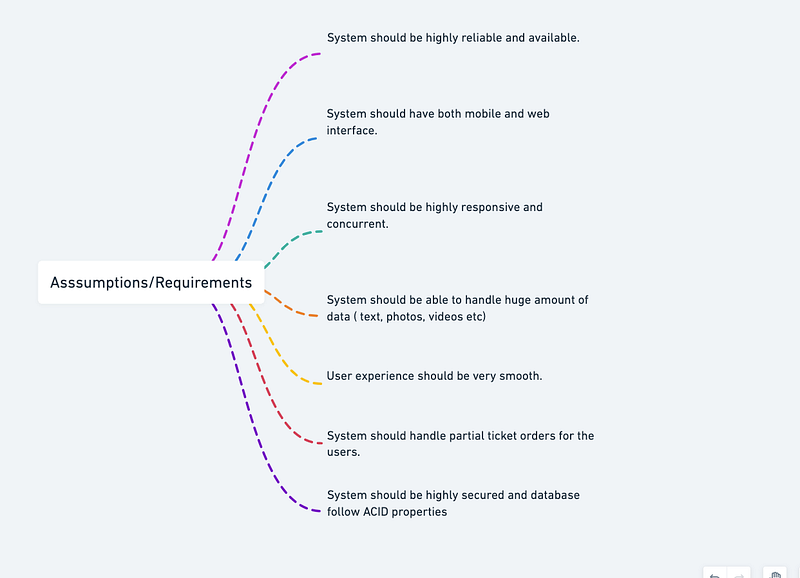
Assumptions on technical aspects —
- System should be highly reliable and available.
- System should have both mobile and web interface.
- System should be highly responsive and concurrent.
- System should be able to handle huge amount of data ( text, photos, videos etc)
- User experience should be very smooth.
- System should handle partial ticket orders for the users.
- System should be highly secured and database follow ACID properties
Components
- Client : Both mobile and web Users
- Application Servers : Should be able to talk each other
- Load Balancers : To allocate requests to designated Application server using consistent hashing
- Database : SQL as well as Cassandra db or Hbase — Key value stores allow for great horizontal scaling and low latency to access data. HBase is a column-oriented key-value NoSQL database.
- Orchestrators
- Cache
- Media Storage ( S3) : To store photos/videos
- Content Delivery Network
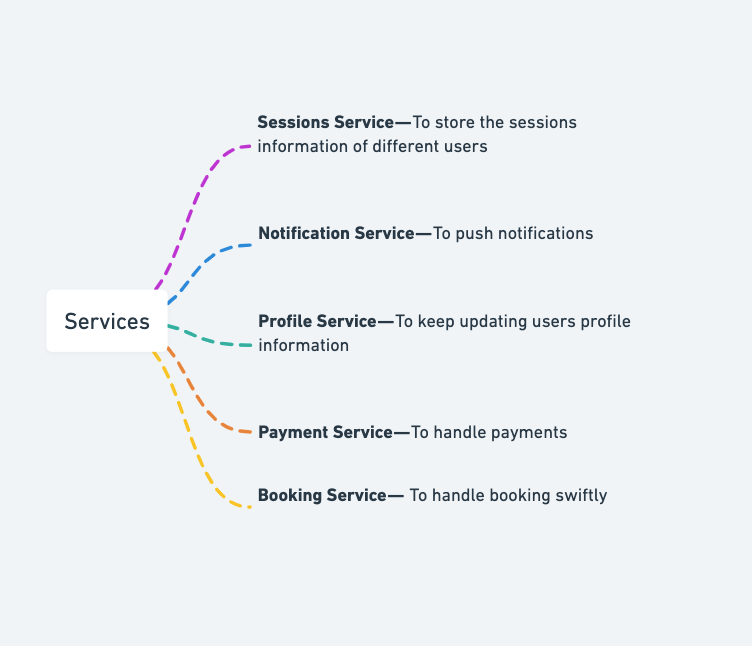
Services
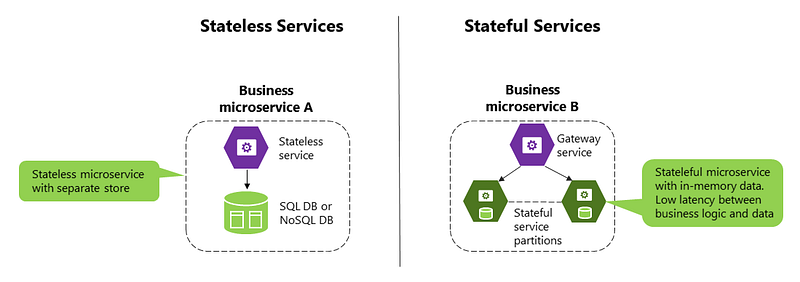
Before we go in depth with respect to services, first understand what is stateless and stateful services. Stateless service ( which can be monolithic services) doesn’t require the server to retain any information about the state whereas Stateful services requires to save the information about the users session and the connection is persistent to a chat server.
- Sessions Service — To store the sessions information of different users
- Notification Service — To push notifications
- Profile Service — To keep updating users profile information
- Payment Service — To handle payments
- Booking Service — To handle booking swiftly
Sessions Service
from flask import Flask, request, jsonify
import uuid
app = Flask(__name__)sessions = {}@app.route('/login', methods=['POST'])
def login():
data = request.get_json()
if not data.get('username') or not data.get('password'):
return jsonify({'error': 'Invalid credentials'}), 400session_id = str(uuid.uuid4())
sessions[session_id] = data['username']
return jsonify({'session_id': session_id})@app.route('/logout', methods=['POST'])
def logout():
session_id = request.headers.get('Authorization')
if session_id in sessions:
del sessions[session_id]
return jsonify({'message': 'Successfully logged out'})@app.route('/users', methods=['GET'])
def get_users():
return jsonify({'users': sessions.values()})This code sets up a simple in-memory session storage using a Python dictionary, with session IDs as keys and usernames as values. The /login endpoint receives a JSON payload with a username and password field and generates a random session ID with the uuid module. The session ID is returned in a JSON response to the client. The /logout endpoint receives the session ID in the Authorization header and removes it from the sessions dictionary. The /users endpoint returns a list of all active usernames in the sessions dictionary.
Notification Service
import requestsdef send_notification(user_id, message):
data = {'user_id': user_id, 'message': message}
response = requests.post('https://api.example.com/notifications', json=data)
response.raise_for_status()This code uses the requests module to make a POST request to an external API endpoint that handles notifications. The send_notification function receives a user_id and message parameter and sends a JSON payload to the API with the data.
Profile Service
from flask import Flask, request, jsonifyapp = Flask(__name__)users = {}@app.route('/users/<int:user_id>', methods=['GET'])
def get_user(user_id):
if user_id in users:
return jsonify(users[user_id])
else:
return jsonify({'message': 'User not found'}), 404@app.route('/users/<int:user_id>', methods=['PUT'])
def update_user(user_id):
if user_id in users:
users[user_id].update(request.get_json())
return jsonify(users[user_id])
else:
return jsonify({'message': 'User not found'}), 404This code sets up a simple in-memory user storage using a Python dictionary, with user IDs as keys and user profile data as values. The /users/<user_id> endpoint receives a GET request with a user_id parameter and returns the user profile data if it exists in the dictionary, or a JSON error response with status code 404 if it doesn't. The /users/<user_id> endpoint also receives a PUT request with a user_id parameter and a JSON payload containing the updated user data. If the user exists in the dictionary, its profile data is updated and returned in a JSON response. Otherwise, a JSON error response with status code 404 is returned.
Payment Service
import stripestripe.api_key = 'sk_test_1234567890'def process_payment(amount, currency, token):
charge = stripe.Charge.create(
amount=amount,
currency=currency,
source=token,
description='Example charge'
)
return chargeThis code uses the stripe Python library to process a payment. The process_payment function receives an amount, currency, and token parameter and uses the Stripe API to create a new charge with the specified amount and currency, using the provided payment token as the payment source. The function returns the Charge object returned by the API call.
Booking Service
from flask import Flask, request, jsonify
import uuid
app = Flask(__name__)bookings = []@app.route('/bookings', methods=['POST'])
def create_booking():
data = request.get_json()
if not data.get('user_id') or not data.get('room_id') or not data.get('check_in') or not data.get('check_out'):
return jsonify({'error': 'Invalid booking data'}), 400booking = {
'id': str(uuid.uuid4()),
'user_id': data['user_id'],
'room_id': data['room_id'],
'check_in': data['check_in'],
'check_out': data['check_out']
}
bookings.append(booking)
return jsonify(booking)@app.route('/bookings/<string:booking_id>', methods=['GET'])
def get_booking(booking_id):
booking = next((b for b in bookings if b['id'] == booking_id), None)
if booking:
return jsonify(booking)
else:
return jsonify({'message': 'Booking not found'}), 404@app.route('/bookings/<string:booking_id>', methods=['DELETE'])
def delete_booking(booking_id):
booking = next((b for b in bookings if b['id'] == booking_id), None)
if booking:
bookings.remove(booking)
return '', 204
else:
return jsonify({'message': 'Booking not found'}), 404The /bookings endpoint receives a POST request with a JSON payload containing the user ID, room ID, check-in date, and check-out date. The function generates a unique ID for the booking with the uuid module and appends the booking data to the bookings list. The function returns a JSON response with the complete booking data, including the generated ID. The /bookings/<booking_id> endpoint receives a GET request with a booking ID parameter and returns the booking data if it exists in the bookings list, or a JSON error response with status code 404 if it doesn't. The /bookings/<booking_id> endpoint also receives a DELETE request with a booking ID parameter and removes the booking from the bookings list if it exists. The function returns an empty response with status code 204 if the booking is successfully deleted, or a JSON error response with status code 404 if the booking doesn't exist.
Basic Low Level Design
import java.util.*;

class Movie {
    private String id;
    private String title;
    private String description;
    // Other movie details like duration, genre, etc.

    public Movie(String title, String description) {
        this.id = UUID.randomUUID().toString();
        this.title = title;
        this.description = description;
    }

    // Getters and setters
}

class Showtime {
    private String id;
    private Movie movie;
    private Date dateTime;
    private int availableSeats;
    private int totalSeats;

    public Showtime(Movie movie, Date dateTime, int totalSeats) {
        this.id = UUID.randomUUID().toString();
        this.movie = movie;
        this.dateTime = dateTime;
        this.availableSeats = totalSeats;
        this.totalSeats = totalSeats;
    }

    public boolean hasAvailableSeats() {
        return availableSeats > 0;
    }

    public void bookSeat() {
        if (hasAvailableSeats()) {
            availableSeats--;
            System.out.println("Seat booked successfully.");
        } else {
            System.out.println("No available seats for this showtime.");
        }
    }

    // Getters and setters
}

class Theatre {
    private String id;
    private String name;
    private String location;
    private Map<String, Showtime> showtimes;

    public Theatre(String name, String location) {
        this.id = UUID.randomUUID().toString();
        this.name = name;
        this.location = location;
        this.showtimes = new HashMap<>();
    }

    public void addShowtime(Showtime showtime) {
        showtimes.put(showtime.getId(), showtime);
    }

    public void removeShowtime(String showtimeId) {
        showtimes.remove(showtimeId);
    }

    public Showtime getShowtime(String showtimeId) {
        return showtimes.get(showtimeId);
    }

    // Getters and setters
}

class BookmyshowSystem {
    private Map<String, Theatre> theatres;
    private Map<String, Movie> movies;

    public BookmyshowSystem() {
        this.theatres = new HashMap<>();
        this.movies = new HashMap<>();
    }

    public void addTheatre(Theatre theatre) {
        theatres.put(theatre.getId(), theatre);
    }

    public void removeTheatre(String theatreId) {
        theatres.remove(theatreId);
    }

    public Theatre getTheatre(String theatreId) {
        return theatres.get(theatreId);
    }

    public void addMovie(Movie movie) {
        movies.put(movie.getId(), movie);
    }

    public void removeMovie(String movieId) {
        movies.remove(movieId);
    }

    public Movie getMovie(String movieId) {
        return movies.get(movieId);
    }
}

public class BookmyshowApp {
    public static void main(String[] args) {
        BookmyshowSystem bookmyshow = new BookmyshowSystem();

        // Create movies
        Movie movie1 = new Movie("Movie 1", "Description 1");
        Movie movie2 = new Movie("Movie 2", "Description 2");

        // Create theatres
        Theatre theatre1 = new Theatre("Theatre 1", "Location 1");
        Theatre theatre2 = new Theatre("Theatre 2", "Location 2");

        // Add movies to the system
        bookmyshow.addMovie(movie1);
        bookmyshow.addMovie(movie2);

        // Add theatres
        bookmyshow.addTheatre(theatre1);
        bookmyshow.addTheatre(theatre2);

        // Create showtimes for Theatre 1
        Showtime showtime1 = new Showtime(movie1, new Date(), 100);
        Showtime showtime2 = new Showtime(movie2, new Date(), 150);

        theatre1.addShowtime(showtime1);
        theatre1.addShowtime(showtime2);

        // Create showtimes for Theatre 2
        Showtime showtime3 = new Showtime(movie1, new Date(), 120);
        Showtime showtime4 = new Showtime(movie2, new Date(), 80);

        theatre2.addShowtime(showtime3);
        theatre2.addShowtime(showtime4);

        // Book seats for a showtime
        Showtime selectedShowtime = theatre1.getShowtime(showtime1.getId());
        if (selectedShowtime.hasAvailableSeats()) {
            selectedShowtime.bookSeat();
        }

        // Print details of a movie
        Movie selectedMovie = bookmyshow.getMovie(movie2.getId());
        System.out.println("Movie: " + selectedMovie.getTitle());
        System.out.println("Description: " + selectedMovie.getDescription());

        // Print available showtimes for a theatre
        Theatre selectedTheatre = bookmyshow.getTheatre(theatre2.getId());
        System.out.println("Theatre: " + selectedTheatre.getName());
        System.out.println("Location: " + selectedTheatre.getLocation());
        System.out.println("Available Showtimes:");
        for (Showtime showtime : selectedTheatre.getShowtimes().values()) {
            System.out.println(" - " + showtime.getDateTime());
        }
    }
}
API Design
User Authentication
- POST /login: Logs the user in with email and password
- POST /signup: Registers a new user with email, password, name, and phone number
Movie Booking
- GET /movies: Returns a list of currently showing movies with their details
- GET /movies/{id}: Returns details of a specific movie with id
- GET /cinemas: Returns a list of cinemas in the city with their details
- GET /cinemas/{id}/shows: Returns a list of shows at a specific cinema with id
- POST /bookings: Creates a new booking for the user with the given details (movie, cinema, show, seats)
- GET /bookings: Returns a list of all bookings made by the user
- GET /bookings/{id}: Returns details of a specific booking with id
- DELETE /bookings/{id}: Deletes a specific booking with id
Payment
- POST /payments: Makes a payment for a booking with the given details (booking id, card details)
- GET /payments/{id}: Returns details of a specific payment with id
Reviews
- GET /movies/{id}/reviews: Returns a list of reviews for a specific movie with id
- GET /cinemas/{id}/reviews: Returns a list of reviews for a specific cinema with id
- POST /movies/{id}/reviews: Creates a new review for a specific movie with id
- POST /cinemas/{id}/reviews: Creates a new review for a specific cinema with id
from flask import Flask, jsonify, request

app = Flask(__name__)

# Dummy data
movies = {
    1: {
        "name": "Avengers: Endgame",
        "language": "English",
        "genre": "Action, Adventure, Sci-Fi"
    },
    2: {
        "name": "KGF Chapter 2",
        "language": "Kannada",
        "genre": "Action, Drama"
    },
    3: {
        "name": "Master",
        "language": "Tamil",
        "genre": "Action, Thriller"
    }
}

theatres = {
    1: {
        "name": "PVR Cinemas",
        "city": "Bangalore",
        "location": "Orion Mall, Rajajinagar"
    },
    2: {
        "name": "INOX Cinemas",
        "city": "Mumbai",
        "location": "R-City Mall, Ghatkopar"
    },
    3: {
        "name": "Carnival Cinemas",
        "city": "Delhi",
        "location": "Pacific Mall, Tagore Garden"
    }
}

shows = {
    1: {
        "movie_id": 1,
        "theatre_id": 1,
        "date": "2023-03-01",
        "time": "15:00"
    },
    2: {
        "movie_id": 2,
        "theatre_id": 2,
        "date": "2023-03-01",
        "time": "18:00"
    },
    3: {
        "movie_id": 3,
        "theatre_id": 3,
        "date": "2023-03-01",
        "time": "21:00"
    }
}

bookings = {}

# API endpoints
@app.route('/movies', methods=['GET'])
def get_movies():
    return jsonify(movies)

@app.route('/theatres', methods=['GET'])
def get_theatres():
    return jsonify(theatres)

@app.route('/shows', methods=['GET'])
def get_shows():
    return jsonify(shows)

@app.route('/bookings', methods=['GET'])
def get_bookings():
    return jsonify(bookings)

@app.route('/bookings', methods=['POST'])
def book_ticket():
    data = request.get_json()
    show_id = data['show_id']
    seats = data['seats']

    if show_id not in shows:
        return jsonify({"error": "Invalid show ID"}), 400

    if len(seats) > 4:
        return jsonify({"error": "Maximum 4 seats can be booked at once"}), 400

    # Check if seats are available
    available_seats = 50 # Dummy value
    if available_seats < len(seats):
        return jsonify({"error": "Not enough seats available"}), 400

    # Create booking
    booking_id = len(bookings) + 1
    booking = {
        "show_id": show_id,
        "seats": seats
    }
    bookings[booking_id] = booking

    return jsonify({"booking_id": booking_id}), 201

if __name__ == '__main__':
    app.run(debug=True)
This implementation includes endpoints for getting movies, theatres, shows, and bookings, as well as an endpoint for booking tickets.
API design will be further discussed in the workflow video ( Coming soon. Subscribe Today)
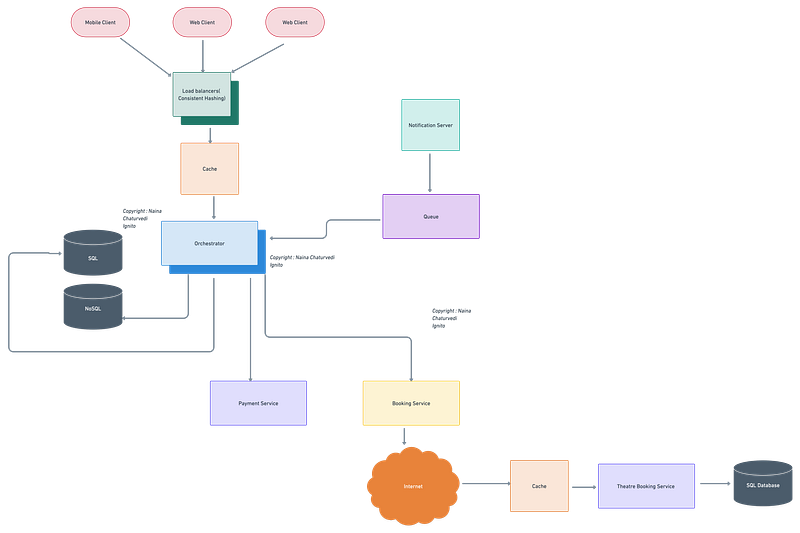
Complete Detailed Design
( Zoom it)
System Design — Zomato
We will be discussing in depth -
- What is Zomato
- Important Features
- Scaling Requirements — Capacity Estimation
- Data Model — ER requirements
- High Level Design
- Basic Low Level Design
- API Design
- Complete Detailed Design
- Complete Code Implementation

What is Zomato
Zomato is a popular online food delivery and restaurant discovery platform that operates in numerous countries around the world. It provides a user-friendly interface where users can search for restaurants, view menus, place orders, and have food delivered to their doorstep. Zomato also offers features like ratings, reviews, and recommendations to help users make informed decisions.
Important Features
Restaurant Service:
- Provides functionality to search for restaurants based on location, cuisine, price range, and other filters.
- Retrieves restaurant details including menus, prices, and user reviews.
Order Service:
- Handles online food ordering and delivery tracking.
- Manages order placement, payment processing, and order status updates.
Rating and Review Service:
- Allows users to rate and review restaurants based on their dining experiences.
- Provides functionality to retrieve and display restaurant ratings and reviews.
Recommendation Service:
- Generates personalized restaurant recommendations for users based on their preferences, past orders, and user reviews.
User Management Service:
- Manages user profiles, authentication, and authorization.
- Enables users to create profiles, save favorite restaurants, and manage their orders and reviews.
External APIs:
- Integration with external APIs for location services, payment gateways, and delivery tracking.
Database:
- Stores restaurant data, user profiles, orders, ratings, and reviews.
- Supports efficient retrieval and querying of data for various services.
Frontend Clients:
- Web or mobile applications that interact with the backend services.
- Provide user interfaces for restaurant search, online ordering, rating and reviews, and user profile management.
Scaling Requirements — Capacity Estimation
Small scale simulation.
Let’s say we have -
- Total number of users: 100 million
- Daily active users (DAU): 20 million
- Number of orders placed by user/day: 2
- Total number of orders per day: 40 million orders/day
Assuming a read-heavy system, let’s consider a read-to-write ratio of 100:1:
Total number of restaurant searches per day: 4 billion searches/day (100 million users * 2 searches)
Total number of restaurant reviews read per day: 400 million reviews/day (100 million users * 2 reviews read)
Total number of restaurant menus viewed per day: 400 million menus/day (100 million users * 2 menus viewed)
Storage Estimation:
Let’s assume an average restaurant menu size of 100 KB:
Total storage per day for restaurant menus: 40 terabytes/day (400 million menus * 100 KB)
For the next 3 years:
Total storage for restaurant menus for 3 years: 44 petabytes (40 terabytes * 365 days * 3 years)
Requests per Second:
Let’s calculate the requests per second (RPS) based on the daily active users and their activity:
Average orders placed per second: 463 orders/second (40 million orders / 24 hours / 60 minutes / 60 seconds)
Data Model — ER requirements
Users:
Fields:
- User ID: Unique identifier for each user.
- Username: User’s username.
- Email: User’s email address.
- Password: User’s password.
Restaurants:
Fields:
- Restaurant ID: Unique identifier for each restaurant.
- Name: Restaurant’s name.
- Location: Restaurant’s location.
- Cuisine: Type of cuisine offered by the restaurant.
- Rating: Average rating of the restaurant.
- Reviews: List of reviews for the restaurant.
Reviews:
Fields:
- Review ID: Unique identifier for each review.
- User ID: Foreign key referencing the user who wrote the review.
- Restaurant ID: Foreign key referencing the restaurant being reviewed.
- Rating: Rating given by the user for the restaurant.
- Comment: Text comment provided by the user.
Orders:
Fields:
- Order ID: Unique identifier for each order.
- User ID: Foreign key referencing the user who placed the order.
- Restaurant ID: Foreign key referencing the restaurant from which the order was placed.
- Items: List of items in the order.
- Status: Current status of the order (e.g., pending, delivered).
High Level Design
Assumptions:
- Zomato is a read-heavy system with more users searching for restaurants and reading reviews compared to adding new restaurants or reviews.
- High availability and reliability are crucial for the system.
- Latency should be kept low to provide a seamless user experience.
- Caching mechanisms will be employed to improve performance.
Main Components and Services for Zomato:
- Mobile/Web Clients: Users interact with Zomato through mobile or web applications.
- Application Servers: Responsible for handling user requests, processing business logic, and interacting with the database.
- Load Balancer: Routes and distributes incoming requests across multiple application servers to ensure scalability and high availability.
- Cache (e.g., Memcached or Redis): Stores frequently accessed data to reduce the load on the database and improve response times.
- CDN (Content Delivery Network): Used to cache and deliver static content (e.g., restaurant images) to users, improving latency and reducing server load.
- Database: Stores the structured data of users, restaurants, reviews, and orders. A NoSQL database (e.g., MongoDB) can be used to provide scalability and flexibility.
Services:
- Restaurant Search Service: Allows users to search for restaurants based on various criteria like location, cuisine, and ratings.
- Review Service: Enables users to read and write reviews for restaurants.
- Order Service: Handles the process of placing and tracking orders.
- Recommendation Service: Provides personalized recommendations to users based on their preferences and past activity.
- User Profile Service: Manages user profiles, including favorites, order history, and settings.
Basic Low Level Design
User Class:
class User:
    def __init__(self, user_id, username, password):
        self.user_id = user_id
        self.username = username
        self.password = password
        # Other user attributes

    # Getters and setters for attributes
    # ...
Restaurant Class:
class Restaurant:
    def __init__(self, restaurant_id, name, address):
        self.restaurant_id = restaurant_id
        self.name = name
        self.address = address
        # Other restaurant attributes

    # Getters and setters for attributes
    # ...
Order Class:
class Order:
    def __init__(self, order_id, user, restaurant, items):
        self.order_id = order_id
        self.user = user
        self.restaurant = restaurant
        self.items = items
        # Other order attributes

    # Getters and setters for attributes
    # ...
Zomato Class:
class Zomato:
    def __init__(self):
        self.users = {}
        self.restaurants = {}
        self.orders = []

    def add_user(self, user):
        self.users[user.user_id] = user

    def get_user_by_id(self, user_id):
        return self.users.get(user_id)

    def add_restaurant(self, restaurant):
        self.restaurants[restaurant.restaurant_id] = restaurant

    def get_restaurant_by_id(self, restaurant_id):
        return self.restaurants.get(restaurant_id)

    def create_order(self, user_id, restaurant_id, items):
        user = self.get_user_by_id(user_id)
        restaurant = self.get_restaurant_by_id(restaurant_id)

        if not user:
            print("User not found")
            return

        if not restaurant:
            print("Restaurant not found")
            return

        order_id = generate_order_id()  # Generate a unique order ID
        order = Order(order_id, user, restaurant, items)
        self.orders.append(order)

        # Additional logic for processing the order, calculating total, etc.
        # ...

    def get_user_orders(self, user_id):
        user_orders = []

        for order in self.orders:
            if order.user.user_id == user_id:
                user_orders.append(order)

        return user_orders

    # Additional methods for restaurant management, order tracking, etc.
    # ...
Main Function:
def main():
    zomato = Zomato()

    user1 = User("1", "Alice", "password")
    user2 = User("2", "Bob", "password")

    zomato.add_user(user1)
    zomato.add_user(user2)

    restaurant1 = Restaurant("1", "Restaurant A", "Address A")
    restaurant2 = Restaurant("2", "Restaurant B", "Address B")

    zomato.add_restaurant(restaurant1)
    zomato.add_restaurant(restaurant2)

    items = ["Item 1", "Item 2"]
    zomato.create_order("1", "1", items)

    user1_orders = zomato.get_user_orders("1")
    for order in user1_orders:
        print("User:", order.user.username)
        print("Restaurant:", order.restaurant.name)
        print("Items:", order.items)
print()- The
Userclass represents a user in the Zomato system and stores attributes such as user ID, username, and password. - The
Restaurantclass represents a restaurant in the Zomato system and stores attributes such as restaurant ID, name, and address. - The
Orderclass represents an order placed by a user at a restaurant and stores attributes such as order ID, user, restaurant, and items. - The
Zomatoclass serves as the main class for the Zomato system and contains methods for user and restaurant management, order creation, and retrieval. - The
Zomatoclass maintains dictionaries to store users and restaurants, allowing easy retrieval based on their respective IDs. - The
Zomatoclass also maintains a list of orders for tracking and retrieval purposes. - The
Zomatoclass provides methods such asadd_user,get_user_by_id,add_restaurant,get_restaurant_by_id,create_order, andget_user_ordersto perform various operations within the system. - The
mainfunction demonstrates the usage of the Zomato system by creating users, restaurants, and orders, and retrieving user orders.
API Design
User API:
/api/user/register(POST): Register a new user account./api/user/login(POST): Authenticate user and generate access token./api/user/profile(GET, PUT): Retrieve or update user profile information./api/user/orders(GET): Retrieve user's order history./api/user/favorites(GET, POST, DELETE): Get, add, or remove favorite restaurants.
Restaurant API:
/api/restaurants(GET): Retrieve a list of restaurants based on search criteria./api/restaurants/{restaurantId}(GET): Get details of a specific restaurant./api/restaurants/{restaurantId}/menu(GET): Get the menu for a specific restaurant./api/restaurants/{restaurantId}/reviews(GET): Get reviews and ratings for a specific restaurant.
Order API:
/api/orders(POST): Place a new food order./api/orders/{orderId}(GET): Get details of a specific order./api/orders/{orderId}/track(GET): Track the delivery status of a specific order./api/orders/{orderId}/pay(POST): Process the payment for a specific order.
Search API:
/api/search/restaurants(GET): Search for restaurants based on location, cuisine, price range, etc./api/search/recommendations(GET): Get personalized restaurant recommendations for the user.
Review API:
/api/reviews/{restaurantId}(POST): Post a review and rating for a specific restaurant./api/reviews/{restaurantId}(GET): Get reviews and ratings for a specific restaurant.
Restaurant API:
from flask import Flask, request, jsonifyapp = Flask(__name__)# Endpoint to retrieve a list of restaurants based on search criteria
@app.route('/restaurants', methods=['GET'])
def search_restaurants():
# Implement the logic to search for restaurants based on search criteria
# Retrieve search criteria from query parameters
location = request.args.get('location')
cuisine = request.args.get('cuisine')
price_range = request.args.get('price_range')
# Perform the restaurant search based on the provided criteria
# Return a list of matching restaurants
restaurants = [{'id': 'restaurant1', 'name': 'Restaurant A', 'location': location},
{'id': 'restaurant2', 'name': 'Restaurant B', 'location': location}]
return jsonify(restaurants)# Endpoint to retrieve details of a specific restaurant
@app.route('/restaurants/<restaurant_id>', methods=['GET'])
def get_restaurant(restaurant_id):
# Implement the logic to retrieve restaurant details from the database
# Retrieve restaurant details based on the restaurant_id
restaurant = {'id': restaurant_id, 'name': 'Restaurant A', 'location': 'City X'}
# Return the restaurant details
return jsonify(restaurant)# Endpoint to retrieve the menu for a specific restaurant
@app.route('/restaurants/<restaurant_id>/menu', methods=['GET'])
def get_menu(restaurant_id):
# Implement the logic to retrieve the menu for a specific restaurant from the database
# Retrieve menu items associated with the restaurant_id
menu_items = [{'id': 'item1', 'name': 'Item A', 'price': 10},
{'id': 'item2', 'name': 'Item B', 'price': 15}]
# Return the menu items
return jsonify(menu_items)# Endpoint to retrieve reviews and ratings for a specific restaurant
@app.route('/restaurants/<restaurant_id>/reviews', methods=['GET'])
def get_reviews(restaurant_id):
# Implement the logic to retrieve reviews and ratings for a specific restaurant from the database
# Retrieve reviews associated with the restaurant_id
reviews = [{'id': 'review1', 'rating': 4, 'comment': 'Great food'},
{'id': 'review2', 'rating': 3, 'comment': 'Average service'}]
# Return the reviews
return jsonify(reviews)# Run the Flask app
if __name__ == '__main__':
app.run(debug=True)Order API:
from flask import Flask, request, jsonifyapp = Flask(__name__)# Endpoint to place a new food order
@app.route('/orders', methods=['POST'])
def place_order():
# Implement the logic to place a new food order
# Retrieve order details from the request body
order_data = request.json
# Process the order, generate order ID, etc.
# Return the order ID
return jsonify({'order_id': 'order123'})# Endpoint to get details of a specific order
@app.route('/orders/<order_id>', methods=['GET'])
def get_order(order_id):
# Implement the logic to retrieve order details from the database
# Retrieve order details based on the order_id
order = {'id': order_id, 'restaurant': 'Restaurant A', 'status': 'Pending'}
# Return the order details
return jsonify(order)# Endpoint to track the delivery status of a specific order
@app.route('/orders/<order_id>/track', methods=['GET'])
def track_order(order_id):
# Implement the logic to track the delivery status of a specific order
# Retrieve the delivery status based on the order_id
status = 'In Transit'
# Return the delivery status
return jsonify({'status': status})# Endpoint to process the payment for a specific order
@app.route('/orders/<order_id>/pay', methods=['POST'])
def process_payment(order_id):
# Implement the logic to process the payment for a specific order
# Retrieve payment details from the request body
payment_data = request.json
# Process the payment, update the order status, etc.
# Return a success message
return jsonify({'message': 'Payment processed successfully'})# Run the Flask app
if __name__ == '__main__':
app.run(debug=True)Search API:
from flask import Flask, request, jsonifyapp = Flask(__name__)# Endpoint to search for restaurants based on location, cuisine, price range, etc.
@app.route('/search/restaurants', methods=['GET'])
def search_restaurants():
# Implement the logic to search for restaurants based on search criteria
# Retrieve search criteria from query parameters
location = request.args.get('location')
cuisine = request.args.get('cuisine')
price_range = request.args.get('price_range')
# Perform the restaurant search based on the provided criteria
# Return a list of matching restaurants
restaurants = [{'id': 'restaurant1', 'name': 'Restaurant A', 'location': location},
{'id': 'restaurant2', 'name': 'Restaurant B', 'location': location}]
return jsonify(restaurants)# Endpoint to get personalized restaurant recommendations for the user
@app.route('/search/recommendations', methods=['GET'])
def get_recommendations():
# Implement the logic to get personalized restaurant recommendations for the user
# Retrieve user preferences, past orders, etcfrom the database
# Generate personalized recommendations based on user data
# Return a list of recommended restaurants
recommendations = [{'id': 'restaurant1', 'name': 'Restaurant A', 'location': 'City X'},
{'id': 'restaurant2', 'name': 'Restaurant B', 'location': 'City Y'}]
return jsonify(recommendations)# Run the Flask app
if __name__ == '__main__':
app.run(debug=True)Review API:
from flask import Flask, request, jsonifyapp = Flask(__name__)# Endpoint to post a review and rating for a specific restaurant
@app.route('/reviews/<restaurant_id>', methods=['POST'])
def post_review(restaurant_id):
# Implement the logic to post a review and rating for a specific restaurant
# Retrieve review details from the request body
review_data = request.json
# Save the review and rating in the database, associate with the restaurant_id
# Return a success message
return jsonify({'message': 'Review posted successfully'})# Endpoint to get reviews and ratings for a specific restaurant
@app.route('/reviews/<restaurant_id>', methods=['GET'])
def get_reviews(restaurant_id):
# Implement the logic to retrieve reviews and ratings for a specific restaurant from the database
# Retrieve reviews associated with the restaurant_id
reviews = [{'id': 'review1', 'rating': 4, 'comment': 'Great food'},
{'id': 'review2', 'rating': 3, 'comment': 'Average service'}]
# Return the reviews
return jsonify(reviews)# Run the Flask app
if __name__ == '__main__':
app.run(debug=True)User API
from flask import Flask, request, jsonify
app = Flask(__name__)
# Endpoint to register a new user
@app.route('/users/register', methods=['POST'])
def register_user():
# Implement the user registration logic here
# Retrieve user details from the request body
user_data = request.json
# Perform validation, create a new user in the database, etc.
# Return the newly created user details
return jsonify({'message': 'User registered successfully'})
# Endpoint to authenticate a user and generate an access token
@app.route('/users/login', methods=['POST'])
def login_user():
# Implement the user login logic here
# Retrieve user credentials from the request body
login_data = request.json
# Verify credentials, generate an access token, etc.
# Return the access token
return jsonify({'access_token': 'your_access_token'})
# Endpoint to retrieve user information
@app.route('/users/<user_id>', methods=['GET'])
def get_user(user_id):
# Implement the logic to retrieve user information from the database
# Retrieve user details based on the user_id
user = {'id': user_id, 'name': 'John Doe', 'email': '[email protected]'}
# Return the user details
return jsonify(user)
# Endpoint to update user profile
@app.route('/users/<user_id>', methods=['PUT'])
def update_user(user_id):
# Implement the logic to update user profile in the database
# Retrieve user details and updates from the request body
user_updates = request.json
# Update the user profile based on the user_id and user_updates
# Return a success message
return jsonify({'message': 'User profile updated successfully'})
# Endpoint to get order history for a user
@app.route('/users/<user_id>/orders', methods=['GET'])
def get_user_orders(user_id):
# Implement the logic to retrieve order history from the database
# Retrieve orders associated with the user_id
orders = [{'id': 'order1', 'restaurant': 'Restaurant A', 'status': 'Delivered'},
{'id': 'order2', 'restaurant': 'Restaurant B', 'status': 'Pending'}]
# Return the list of orders
return jsonify(orders)
# Run the Flask app
if __name__ == '__main__':
app.run(debug=True)Complete Detailed Design
Coming soon! It will be covered on youtube channel.
Subscribe to youtube channel :
Complete Code implementation
Restaurant Search:
- Users can search for restaurants based on location, cuisine, price range, and other filters.
Menu and Reviews:
- Zomato provides detailed menus with prices and user reviews for each restaurant.
Online Ordering:
- Users can place food orders online and track their delivery status.
Ratings and Reviews:
- Users can rate and review restaurants based on their dining experiences.
Recommendations:
- Zomato offers personalized recommendations based on user preferences and past orders.
User Profiles:
- Users can create profiles, save favorite restaurants, and manage their orders and reviews.
from flask import Flask, request, jsonify
app = Flask(__name__)
# Restaurant Search
@app.route('/restaurants', methods=['GET'])
def search_restaurants():
# Implement the logic to search restaurants based on user filters
location = request.args.get('location')
cuisine = request.args.get('cuisine')
price_range = request.args.get('price_range')
# Perform search based on the provided filters
# Return a list of matching restaurants
restaurants = [{'name': 'Restaurant A', 'location': 'City X', 'cuisine': 'Italian'},
{'name': 'Restaurant B', 'location': 'City Y', 'cuisine': 'Indian'}]
return jsonify(restaurants)
# Menu and Reviews
@app.route('/restaurants/<restaurant_id>/menu', methods=['GET'])
def get_restaurant_menu(restaurant_id):
# Implement the logic to retrieve the menu for a specific restaurant
# Retrieve menu items associated with the restaurant_id
menu_items = [{'name': 'Item A', 'price': 10.99},
{'name': 'Item B', 'price': 15.99}]
return jsonify(menu_items)
@app.route('/restaurants/<restaurant_id>/reviews', methods=['GET'])
def get_restaurant_reviews(restaurant_id):
# Implement the logic to retrieve reviews for a specific restaurant
# Retrieve reviews associated with the restaurant_id
reviews = [{'user': 'User A', 'rating': 4, 'comment': 'Great food!'},
{'user': 'User B', 'rating': 3, 'comment': 'Average experience.'}]
return jsonify(reviews)
# Online Ordering
@app.route('/orders', methods=['POST'])
def place_order():
# Implement the logic to place a food order
order_data = request.json
# Process the order, validate inputs, calculate total amount, etc.
# Return a success message or order details
return jsonify({'message': 'Order placed successfully'})
@app.route('/orders/<order_id>', methods=['GET'])
def get_order(order_id):
# Implement the logic to retrieve order details
# Retrieve order information based on the order_id
order = {'id': order_id, 'restaurant': 'Restaurant A', 'status': 'Delivered'}
return jsonify(order)
# Ratings and Reviews
@app.route('/restaurants/<restaurant_id>/reviews', methods=['POST'])
def submit_review(restaurant_id):
# Implement the logic to submit a review for a restaurant
review_data = request.json
# Process the review, validate inputs, save it to the database, etc.
# Return a success message
return jsonify({'message': 'Review submitted successfully'})
# Recommendations
@app.route('/users/<user_id>/recommendations', methods=['GET'])
def get_recommendations(user_id):
# Implement the logic to generate personalized recommendations for a user
# Retrieve user preferences and past orders from the database
# Generate recommendations based on user data
recommendations = [{'name': 'Restaurant X', 'location': 'City Z', 'cuisine': 'Mexican'},
{'name': 'Restaurant Y', 'location': 'City Z', 'cuisine': 'Chinese'}]
return jsonify(recommendations)
# User Profiles
@app.route('/users', methods=['POST'])
def create_user():
# Implement the logic to create a new user profile
user_data = request.json
# Process user data, create a new user in the database, etc.
# Return a success message or user details
return jsonify({'message': 'User profile created successfully'})
@app.route('/users/<user_id>/favorites', methods=['POST'])
def add_favorite(user_id):
# Implement the logic to add a restaurant to the user's favorites
restaurant_id = request.json['restaurant_id']
# Add the restaurant to the user's favorites in the database
# Return a success message
return jsonify({'message': 'Restaurant added to favorites successfully'})
@app.route('/users/<user_id>/orders', methods=['GET'])
def get_user_orders(user_id):
# Implement the logic to retrieve order history for a user
# Retrieve orders associated with the user_id
orders = [{'id': 'order1', 'restaurant': 'Restaurant A', 'status': 'Delivered'},
{'id': 'order2', 'restaurant': 'Restaurant B', 'status': 'Pending'}]
return jsonify(orders)
# Run the Flask app
if __name__ == '__main__':
app.run(debug=True)Read next — Design the Google Maps.
Day 2 : SQL Basics, Query Structure, Built In functions Conditions
Day 4 : Set Theory Operations, Stored Procedures and CASE statements in SQL
Day 6 : Subqueries, Group by, order by and Having clauses in SQL and Analytical Functions
Day 7 : Window Functions, Grouping Sets and Constraints in SQL
Day 8 : BigQuery Basics, SELECT, FROM, WHERE and Date and Extract in BigQuery
Day 9 : Common Expression Table, UNNEST Clause, SQL vs NoSQL Databases
Day 10 : Triggers, Pivot and Cursors in SQL
Day 14 : MySQL in Depth
Day 15 : PostgreSQL inDepth
Anyways, For Day 15 of 15 days of Advanced SQL, we will cover —
PostgreSQL inDepth
Github for Advanced SQL that you can follow —
All the projects, data structures, algorithms, system design, Data Science and ML, Data Engineering, MLOps and Deep Learning videos will be published on our youtube channel ( just launched).
Subscribe today!
System Design Case Studies — In Depth
Complete Data Structures and Algorithm Series
Github —
Complete System Design Series.
6. Networking, How Browsers work, Content Network Delivery ( CDN)
Github —
Subscribe/ Follow, Like/Clap and Stay Tuned!!
Some of the other best Series —
30 days of Data Structures and Algorithms and System Design Simplified
Data Science and Machine Learning Research ( papers) Simplified **
100 days : Your Data Science and Machine Learning Degree Series with projects
Complete Data Visualization and Pre-processing Series with projects
Exceptional Github Repos — Part 1
Exceptional Github Repos — Part 2
Tech Newsletter —
If you are interested, you can join my newsletter through which I send tech interview tips, techniques, patterns, hacks — Software Development, ML, Data Science, Startups and Technology projects to more than 30K readers. You can subscribe to Tech Brew :
For Python Projects —
For complete 60 days of Data Science and ML : Day 1 — Day 60 : Quick Recap of 60 days of Data Science and ML
Follow for more updates. Stay tuned and keep coding!
For other projects, tune to —
Build Machine Learning Pipelines( With Code)
Recurrent Neural Network with Keras
Clustering Geolocation Data in Python using DBSCAN and K-Means
Facial Expression Recognition using Keras
Hyperparameter Tuning with Keras Tuner
Custom Layers in Keras


