
Day 31 of System Design Case Studies Series : Design Google Maps, Skyscanner, Duolingo, Food Panda, Saavn, HackerRank, IMDB, Proximity Server, Google Translate, Google Flights, Google Assistant, Amazon Frequently Viewed Product Page, Comment System, Flight System, Google Ads System
Complete Design with examples
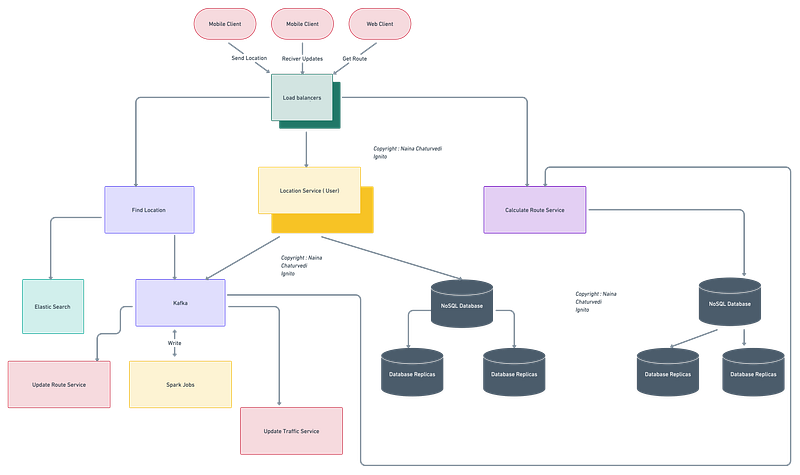
Hello peeps! Welcome to Day 31 of System Design Case studies series where we will design Google Maps, Skyscanner, Duolingo, Food Panda, Saavn, HackerRank, IMDB, Proximity Server, Google Translate, Google Flights, Google Assistant, Amazon Frequently Viewed Product Page, Comment System, Flight System, Google Ads System.
This post has system design for ( scroll till the end of the post) —
Note : Please read System Design Important Terms you MUST know before reading this post.
Projects Videos —
All the projects, data structures, SQL, algorithms, system design, Data Science and ML , Data Analytics, Data Engineering, , Implemented Data Science and ML projects, Implemented Data Engineering Projects, Implemented Deep Learning Projects, Implemented Machine Learning Ops Projects, Implemented Time Series Analysis and Forecasting Projects, Implemented Applied Machine Learning Projects, Implemented Tensorflow and Keras Projects, Implemented PyTorch Projects, Implemented Scikit Learn Projects, Implemented Big Data Projects, Implemented Cloud Machine Learning Projects, Implemented Neural Networks Projects, Implemented OpenCV Projects,Complete ML Research Papers Summarized, Implemented Data Analytics projects, Implemented Data Visualization Projects, Implemented Data Mining Projects, Implemented Natural Leaning Processing Projects, MLOps and Deep Learning, Applied Machine Learning with Projects Series, PyTorch with Projects Series, Tensorflow and Keras with Projects Series, Scikit Learn Series with Projects, Time Series Analysis and Forecasting with Projects Series, ML System Design Case Studies Series videos will be published on our youtube channel ( just launched).
Subscribe today!
System Design Case Studies — In Depth
Design Google Drive
Design Instagram
Design Quora
Design Foursquare
Design Flipkart
ML System Design
Design Tiny URL
Design Netflix
Design Messenger App
Design Twitter
Design Reddit
Design Amazon
Design Dropbox
Design URL Shortener
Design Youtube
Design API Rate Limiter
Design Web Crawler
Design Amazon Prime Video
Design Facebook’s Newsfeed
Design Yelp
Design Uber
Design Tinder
Design Tiktok
Design Whatsapp
Most Popular System Design Questions
Mega Compilation : Solved System Design Case studies
We will be discussing in depth -
- What is Google Maps?
- Important Features
- Scaling Requirements — Capacity Estimation
- Data Model — ER requirements
- High Level Design
- Basic Low Level Design
- API Design
- Complete Detailed Design
- Complete Code Implementation
Pre-requisite to this post -
Complete System Design Series — Important Concepts that you should know before starting the Case studies
6. Networking, How Browsers work, Content Network Delivery ( CDN)
13. System Design Template — How to solve any System Design Question
Github —
Day 1 of System Design Case Studies can be found below-
Day 2 of System Design Case Studies can be found below-
Day 3 of System Design Case Studies can be found below-
Day 4 of System Design Case Studies can be found below-
What is Google Maps?

Google maps is a web based service which lets users —
- Get detailed information about geographical regions
- Plan the route from source to destination
- Get distance and Estimated Time of Arrival
- Traffic Information
Users can be both mobile based and web based.
Designing Google Maps would involve creating the user interface and experience, as well as integrating various data sources such as satellite imagery, street maps, and real-time traffic information. The design would need to consider factors such as usability, accessibility, and providing relevant information to the user in an easy-to-digest format. Additionally, a search function and routing capabilities would need to be incorporated. The design would also include a way for user to add and review places, it could be also include a way for businesses and organizations to add their information to the map.
Before moving forward, understand these concepts —
- Geospatial database — It’s a database which stores, queries and indexes the spatial data in an efficient manner. It represents objects that are defined in a geo space. Example — PostGIS, Redis Geohash
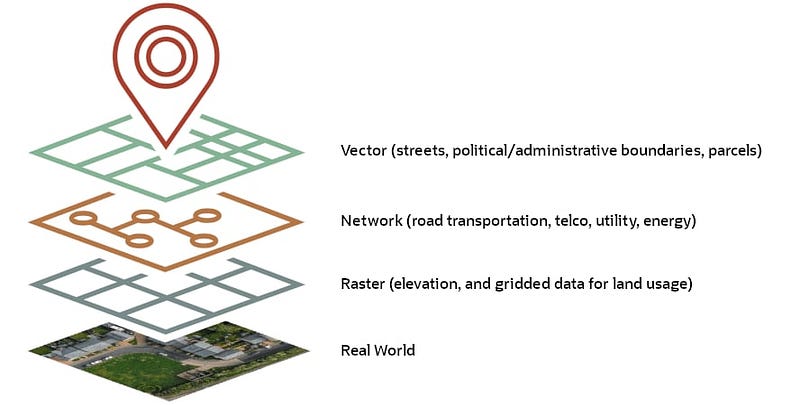
A geospatial database is a type of database that is specifically designed to store and manage geographic or spatial data. These types of data include information such as location coordinates, spatial relationships, and geographic features, such as roads, buildings, and natural features. Geospatial databases are used in a wide range of applications, including geographic information systems (GIS), location-based services, and spatial data analysis. They are often used to store and manage data from satellite imagery, aerial photography, and other geospatial data sources. Some examples of geospatial databases are PostGIS, Oracle Spatial, and SQL Server. Geospatial databases have the ability to store, index, query and analyze the data based on their spatial location and relationships, which is not possible with traditional relational databases.
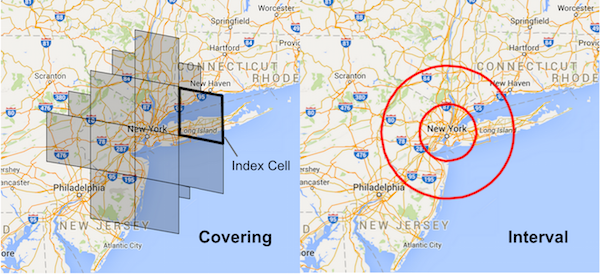
2. Geospatial Indexing — These are index that supports containment and intersection queries for various geometric shapes that are in 2D. It calculates geometries on these shapes..
- Geospatial indexing is the process of organizing and indexing geographic or spatial data in a way that allows for efficient querying and retrieval of that data. This is typically accomplished by using a specific type of index, such as a spatial index, which is designed to work with geographic or spatial data.
- Spatial indexes are used to speed up the search of spatial data by creating a hierarchical structure of the data, where each level of the hierarchy represents a larger area. This allows the search algorithm to quickly eliminate large portions of the data that are not relevant to the search, reducing the amount of data that needs to be searched.
There are several types of spatial indexes, including R-tree, Quadtree and Grid. Each of these indexes uses a different approach to organizing and indexing spatial data, but they all have the goal of allowing for fast searching and retrieval of spatial data.
3. QuadTree Indexing — In this, the quad tree divides/separates the plane into four quads. It has one root node and four sub quad tree which has exactly four children. It’s a simple technique that is used for indexing spatial data where root represents the entire area and each internal node represents one area ( quadrant) covered into half along both axes.
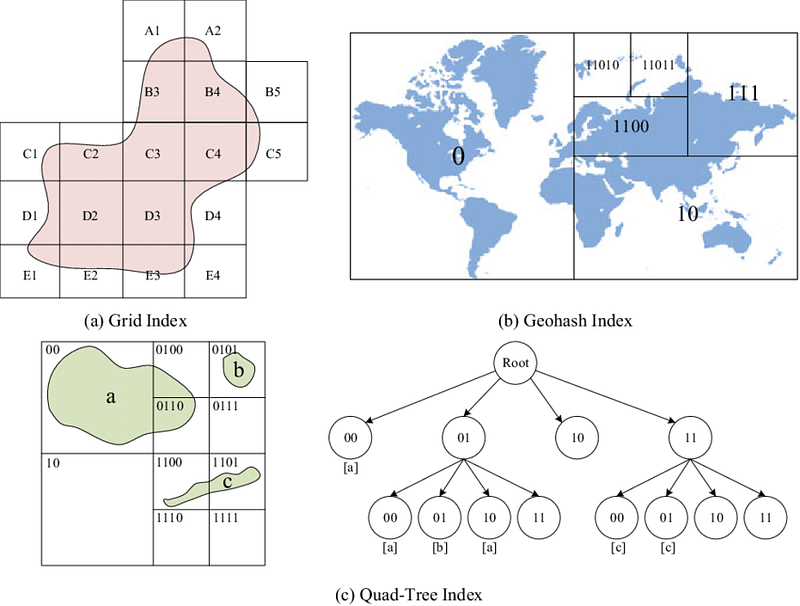
The quadtree indexing starts by dividing the entire spatial data into four equal quadrants, and then recursively subdividing each quadrant until a certain criteria is met. This criteria is typically based on the number of features or points that are contained within a quadrant. When a quadrant contains a small number of features or points, it is considered a leaf node and is not further subdivided.
The leaf nodes of a quadtree index are where the actual data is stored and can be easily searched. Queries can be performed by traversing the tree, starting at the root node, and moving down the tree to the nodes that are most likely to contain the relevant data. This allows the search algorithm to quickly eliminate large portions of the data that are not relevant to the search, reducing the amount of data that needs to be searched.
In summary, Quadtree is a spatial indexing technique that organizes spatial data into a hierarchical structure, where each node in the tree represents a rectangular region of the spatial data. It is used to improve the performance of spatial queries by creating an efficient representation of the spatial data which allows the database management system to quickly find the relevant data based on their location.
Important Features
We will consider the most important features —
Get detailed information about geographical regions
Plan the route from source to destination
Scaling Requirements — Capacity Estimation
For the sake of simplicity, I’ll show a small scale simulation.
Let’s say we have —
Earth’s Land Area to mapped : 3 million km square
Image block dimension : 6m * 6m
Size of image : 2 MB
We are going to show one building and three roads : 500 bytes per image
Blocks : 80 * 80 per sq kms = 6400 MB of pics per sq kms
Space needed for 3 million km sq = 800 PB
Zoom factor : 2.5
So, pic data for the zoom scale will be 800 PB/2.5 = 320 PB
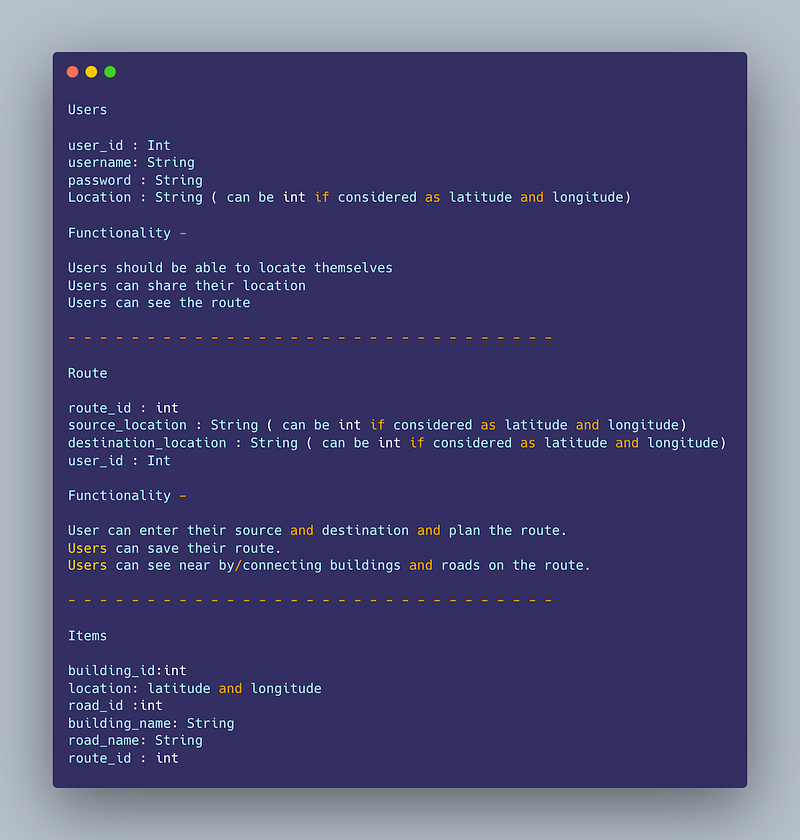
Data Model — ER requirements
Users
user_id : Int
username: String
password : String
Location : String ( can be int if considered as latitude and longitude)
Functionality —
- Users should be able to locate themselves
- Users can share their location
- Users can see the route
— — — — — — — — — — — — — — — — — — — — — — — — — — — — — — -
Route
route_id : int
source_location : String ( can be int if considered as latitude and longitude)
destination_location : String ( can be int if considered as latitude and longitude)
user_id : Int
Functionality —
- User can enter their source and destination and plan the route.
- Users can save their route.
- Users can see near by/connecting buildings and roads on the route.
— — — — — — — — — — — — — — — — — — — — — — — — — — — — — — -
Items
building_id:int
location: latitude and longitude
road_id :int
building_name: String
road_name: String
route_id : int
High Level Design
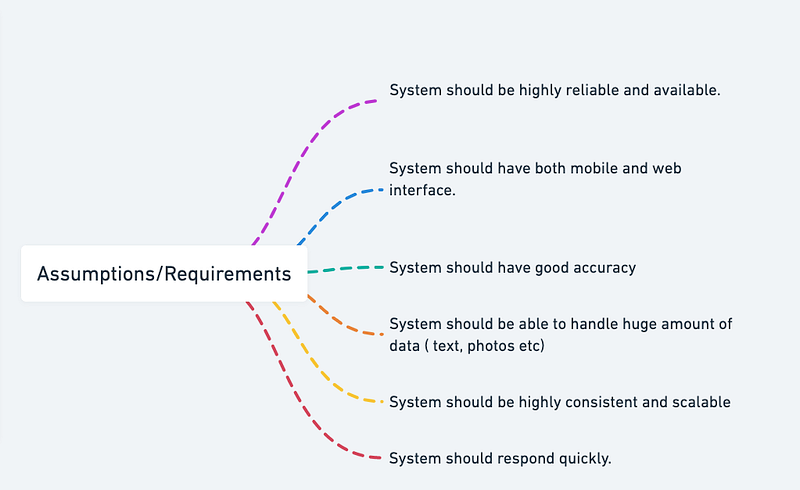
Assumptions/Requirements on technical aspects —
- System should be highly reliable and available.
- System should have both mobile and web interface.
- System should have good accuracy
- System should be able to handle huge amount of data ( text, photos etc)
- System should be highly consistent and scalable
- System should respond quickly.
Components
- Client : Both mobile and web Users
- Application Servers : Should be able to talk each other
- Load Balancers : To allocate requests to designated Application server using consistent hashing
- Database : Cassandra db or Hbase — Key value stores allow for great horizontal scaling and low latency to access data. HBase is a column-oriented key-value NoSQL database.
- Cache
- Media Storage ( S3) : To store photos/videos
- Content Delivery Network
Services
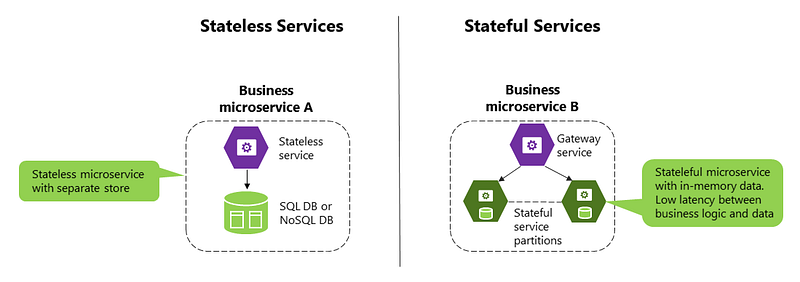
Before we go in depth with respect to services, first understand what is stateless and stateful services. Stateless service ( which can be monolithic services) doesn’t require the server to retain any information about the state whereas Stateful services requires to save the information about the users session and the connection is persistent to a chat server.
- Profile Service — To save user’s profile and their location ( history)
- Get Location Service — To get longitude and latitude coordinates information for every point on the google map.
- Traffic Update Service — To get real time traffic information in order to calculate the ETA for the users route.
- Route Processing Service — To calculate the distance between two source and destination location.
- Tracking Service — To get and monitor users in the real time.
- User Location Service — To continuously track User location in the real time.
- Route Update Service — To help build a route once the source and destination is given and constantly update the route based on the user location in the real time.
Implementation —
import requests
import time
# Profile Service
class ProfileService:
def __init__(self):
self.profiles = {}
def save_profile(self, user_id, profile):
self.profiles[user_id] = profile
def get_profile(self, user_id):
return self.profiles.get(user_id)
# Get Location Service
class GetLocationService:
def __init__(self, api_key):
self.api_key = api_key
def get_lat_long(self, address):
url = f'https://maps.googleapis.com/maps/api/geocode/json?address={address}&key={self.api_key}'
response = requests.get(url)
response_json = response.json()
if response_json['status'] == 'OK':
location = response_json['results'][0]['geometry']['location']
return (location['lat'], location['lng'])
else:
return None
# Traffic Update Service
class TrafficUpdateService:
def __init__(self, api_key):
self.api_key = api_key
def get_traffic_update(self, origin, destination):
url = f'https://maps.googleapis.com/maps/api/directions/json?origin={origin}&destination={destination}&key={self.api_key}&departure_time=now&traffic_model=best_guess'
response = requests.get(url)
response_json = response.json()
if response_json['status'] == 'OK':
traffic = response_json['routes'][0]['legs'][0]['duration_in_traffic']['text']
return traffic
else:
return None
# Route Processing Service
class RouteProcessingService:
def __init__(self, api_key):
self.api_key = api_key
def get_distance(self, origin, destination):
url = f'https://maps.googleapis.com/maps/api/distancematrix/json?origins={origin}&destinations={destination}&key={self.api_key}'
response = requests.get(url)
response_json = response.json()
if response_json['status'] == 'OK':
distance = response_json['rows'][0]['elements'][0]['distance']['text']
return distance
else:
return None
# Tracking Service
class TrackingService:
def __init__(self):
self.locations = {}
def track_user(self, user_id, location):
self.locations[user_id] = location
def get_user_location(self, user_id):
return self.locations.get(user_id)
# User Location Service
class UserLocationService:
def __init__(self, api_key):
self.api_key = api_key
def continuously_track_location(self, user_id):
while True:
location = get_location(user_id)
track_user(user_id, location)
time.sleep(60)
def get_location(self, user_id):
url = f'https://www.googleapis.com/geolocation/v1/geolocate?key={self.api_key}'
response = requests.post(url)
response_json = response.json()
if response_json.get('location'):
return response_json['location']
else:
return None
# Route Update Service
class RouteUpdateService:
def __init__(self, api_key):
self.api_key = api_key
def update_route(origin, destination, waypoints=[], mode='driving'):
    # Get directions using Google Maps API
    directions = gmaps.directions(origin, destination, mode=mode, waypoints=waypoints)

    # Extract route information
    route = directions[0]['legs'][0]
    distance = route['distance']['value']  # meters
    duration = route['duration']['value']  # seconds
    steps = route['steps']

    # Return updated route information
    return distance, duration, steps
Basic Low Level Design
import java.util.ArrayList;
import java.util.HashMap;
import java.util.List;
import java.util.Map;

class Location {
    private String name;
    private double latitude;
    private double longitude;

    public Location(String name, double latitude, double longitude) {
        this.name = name;
        this.latitude = latitude;
        this.longitude = longitude;
    }

    public String getName() {
        return name;
    }

    public double getLatitude() {
        return latitude;
    }

    public double getLongitude() {
        return longitude;
    }
}

class User {
    private String username;
    private Map<String, Location> savedLocations;

    public User(String username) {
        this.username = username;
        this.savedLocations = new HashMap<>();
    }

    public String getUsername() {
        return username;
    }

    public Map<String, Location> getSavedLocations() {
        return savedLocations;
    }

    public void saveLocation(String locationName, double latitude, double longitude) {
        Location location = new Location(locationName, latitude, longitude);
        savedLocations.put(locationName, location);
        System.out.println("Location saved successfully: " + locationName);
    }

    public void deleteLocation(String locationName) {
        if (savedLocations.containsKey(locationName)) {
            savedLocations.remove(locationName);
            System.out.println("Location deleted successfully: " + locationName);
        } else {
            System.out.println("Location not found: " + locationName);
        }
    }
}

class GoogleMapsSystem {
    private Map<String, User> users;

    public GoogleMapsSystem() {
        this.users = new HashMap<>();
    }

    public void registerUser(String username) {
        if (users.containsKey(username)) {
            System.out.println("Username already exists: " + username);
        } else {
            User user = new User(username);
            users.put(username, user);
            System.out.println("User registered successfully: " + username);
        }
    }

    public User loginUser(String username) {
        if (users.containsKey(username)) {
            User user = users.get(username);
            System.out.println("User logged in successfully: " + username);
            return user;
        }
        System.out.println("User not found: " + username);
        return null;
    }
}

public class GoogleMapsApp {
    public static void main(String[] args) {
        GoogleMapsSystem googleMaps = new GoogleMapsSystem();

        // Register users
        googleMaps.registerUser("user1");
        googleMaps.registerUser("user2");

        // Login with a user
        User user = googleMaps.loginUser("user1");
        if (user != null) {
            // Save a location
            user.saveLocation("Home", 37.7749, -122.4194);

            // Delete a location
            user.deleteLocation("Work");
        }
    }
}
API Design
- Geocoding Service: To get the longitude and latitude coordinates for a given address.
Endpoint: /geocode
Method: GET
Parameters:
- address (required): the address to be geocoded
Response:
{
    "latitude": 40.712776,
    "longitude": -74.005974
}- Route Service: To get the best route between two locations.
Endpoint: /route
Method: GET
Parameters:
- origin (required): the starting point of the route
- destination (required): the ending point of the route
Response:
{
    "distance": 12.3, # in kilometers
    "duration": 25, # in minutes
    "steps": [
        {
            "distance": 1.2, # in kilometers
            "duration": 5, # in minutes
            "instructions": "Turn left onto Main Street",
            "start_location": {
                "latitude": 40.712776,
                "longitude": -74.005974
            },
            "end_location": {
                "latitude": 40.719778,
                "longitude": -74.003902
            }
        },
        ...
    ]
}- Reverse Geocoding Service: To get the address for a given longitude and latitude coordinates.
Endpoint: /reverse-geocode
Method: GET
Parameters:
- latitude (required): the latitude coordinate
- longitude (required): the longitude coordinate
Response:
{
    "address": "123 Main St, New York, NY 10001"
}- Traffic Update Service: To get real-time traffic information along a given route.
Endpoint: /traffic-update
Method: GET
Parameters:
- route (required): the route to get traffic information for
Response:
{
    "traffic_data": [
        {
            "distance": 1.2, # in kilometers
            "duration": 5, # in minutes
            "traffic": "light",
            "start_location": {
                "latitude": 40.712776,
                "longitude": -74.005974
            },
            "end_location": {
                "latitude": 40.719778,
                "longitude": -74.003902
            }
        },
        ...
    ]
}- Place Search Service: To search for places (e.g. restaurants, gas stations) near a given location.
Endpoint: /place-search
Method: GET
Parameters:
- location (required): the location to search near
- radius (optional): the radius to search within (default is 1000 meters)
- keyword (optional): a keyword to search for (e.g. "pizza", "gas station")
Response:
{
    "places": [
        {
            "name": "Joe's Pizza",
            "location": {
                "latitude": 40.712776,
                "longitude": -74.005974
            },
            "address": "123 Main St, New York, NY 10001",
            "rating": 4.5
        },
        ...
    ]
}
API design will be further discussed in the workflow video ( Coming soon. Subscribe Today)
Complete Detailed Design
( Zoom it)
More on Google Maps System Design —
Map Data Storage and Retrieval:
Map data storage and retrieval involves designing systems to store and index map data efficiently. Here’s an example code for storing and retrieving map data using Python and a key-value store like Redis:
import redis# Connect to Redis server
r = redis.Redis(host='localhost', port=6379, db=0)# Store map data
def store_map_data(map_id, map_data):
r.set(map_id, map_data)# Retrieve map data
def retrieve_map_data(map_id):
return r.get(map_id)# Usage example
map_id = 'map1'
map_data = '...'
store_map_data(map_id, map_data)
retrieved_data = retrieve_map_data(map_id)
print(retrieved_data)Geocoding and Reverse Geocoding:
Geocoding involves converting addresses to geographic coordinates, while reverse geocoding converts geographic coordinates to addresses. Here’s an example code using the Geopy library in Python:
from geopy.geocoders import Nominatim# Create a geocoder instance
geolocator = Nominatim(user_agent='my_geocoder')# Geocoding: Address to Coordinates
def geocode(address):
location = geolocator.geocode(address)
return (location.latitude, location.longitude)# Reverse Geocoding: Coordinates to Address
def reverse_geocode(latitude, longitude):
location = geolocator.reverse((latitude, longitude))
return location.address# Usage example
address = '1600 Amphitheatre Parkway, Mountain View, CA'
coordinates = geocode(address)
print(coordinates)
retrieved_address = reverse_geocode(coordinates[0], coordinates[1])
print(retrieved_address)Routing and Directions:
Routing and directions involve calculating efficient routes and navigation. Here’s an example code using the Graphhopper library in Python:
import requests# Graphhopper API endpoint
endpoint = 'https://graphhopper.com/api/1/route'# Calculate route
def calculate_route(start, end):
params = {
'key': 'YOUR_API_KEY',
'point': [start, end],
'type': 'json'
}
response = requests.get(endpoint, params=params)
route_data = response.json()
return route_data['paths'][0]['points']# Usage example
start = '51.5074, -0.1278' # London coordinates
end = '48.8566, 2.3522' # Paris coordinates
route = calculate_route(start, end)
print(route)Real-time Traffic Updates:
Real-time traffic updates involve collecting and processing traffic data. Here’s an example code using the Google Maps Directions API in Python:
import requests# Google Maps Directions API endpoint
endpoint = 'https://maps.googleapis.com/maps/api/directions/json'# Get real-time traffic information
def get_traffic_info(origin, destination):
params = {
'origin': origin,
'destination': destination,
'key': 'YOUR_API_KEY',
'departure_time': 'now',
'traffic_model': 'best_guess',
'mode': 'driving'
}
response = requests.get(endpoint, params=params)
traffic_data = response.json()
return traffic_data['routes'][0]['legs'][0]['duration_in_traffic']# Usage example
origin = 'San Francisco, CA'
destination = 'Los Angeles, CA'
traffic_info = get_traffic_info(origin, destination)
print(traffic_info)Points of Interest (POI):
Points of Interest involve storing and retrieving data about places like restaurants, hotels, and landmarks. Here’s an example code using a simple dictionary in Python:
# POI data storage
poi_data = {
'restaurant1': {
'name': 'Restaurant A',
'location': (latitude1, longitude1),
'reviews': [review1, review2, review3],
'rating': 4.5
},
'hotel1': {
'name': 'Hotel X',
'location': (latitude2, longitude2),
'reviews': [review4, review5],
'rating': 3.8
},
# Additional POI entries
}# Search for nearby POIs
def search_nearby_pois(latitude, longitude, radius):
nearby_pois = []
for poi_id, poi_info in poi_data.items():
poi_latitude, poi_longitude = poi_info['location']
distance = calculate_distance(latitude, longitude, poi_latitude, poi_longitude)
if distance <= radius:
nearby_pois.append(poi_info)
return nearby_pois# Usage example
user_latitude = 37.7749
user_longitude = -122.4194
search_radius = 1000 # meters
nearby_pois = search_nearby_pois(user_latitude, user_longitude, search_radius)
for poi in nearby_pois:
print(poi['name'], poi['rating'])Street View:
Street View involves capturing, storing, and delivering street-level imagery. Here’s an example code using the Google Street View Image API in Python:
import requests# Google Street View Image API endpoint
endpoint = 'https://maps.googleapis.com/maps/api/streetview'# Get street view image
def get_street_view_image(location, size, heading, pitch, fov):
params = {
'location': location,
'size': size,
'heading': heading,
'pitch': pitch,
'fov': fov,
'key': 'YOUR_API_KEY'
}
response = requests.get(endpoint, params=params)
image_data = response.content
return image_data# Usage example
location = '40.7128,-74.0060' # New York City coordinates
image_size = '600x400'
image_heading = 90
image_pitch = 0
image_fov = 90
street_view_image = get_street_view_image(location, image_size, image_heading, image_pitch, image_fov)
# Save or display the imageLocalization and Internationalization:
Localization and Internationalization involve supporting multiple languages and regional preferences. Here’s an example code using the Flask framework in Python:
from flask import Flask, request
import gettextapp = Flask(__name__)# Configure localization
locales_dir = 'locales'
default_locale = 'en_US'@babel.localeselector
def get_locale():
user_locale = request.headers.get('Accept-Language')
if user_locale:
return user_locale
return default_locale# Load translations
translations = gettext.translation('messages', localedir=locales_dir, languages=[default_locale])
translations.install()# Define localized routes
@app.route('/')
def home():
welcome_message = _('Welcome to our Maps application!')
return welcome_message@app.route('/about')
def about():
about_message = _('About us')
return about_message# Usage example
if __name__ == '__main__':
app.run()Mobile Integration and Offline Maps:
Mobile Integration and Offline Maps involve supporting mobile devices and offline map access. Here’s an example code using the Mapbox SDK in Python:
import mapbox# Create a Mapbox client
access_token = 'YOUR_ACCESS_TOKEN'
client = mapbox.Mapbox(access_token)# Offline map caching
def cache_map_area(center_latitude, center_longitude, zoom_level, width, height):
area = {
'type': 'Feature',
'properties': {},
'geometry': {
'type': 'Point',
'coordinates': [center_longitude, center_latitude]
}
}
options = {
'zoom': zoom_level,
'width': width,
'height': height,
'padding': 0.1,
'optimize': True
}
response = client.static_image([area], **options)
with open('offline_map.png', 'wb') as f:
f.write(response.content)# Usage example
center_latitude = 37.7749
center_longitude = -122.4194
zoom_level = 12
map_width = 800
map_height = 600
cache_map_area(center_latitude, center_longitude, zoom_level, map_width, map_height)Place Recommendations and Personalization:
Place Recommendations and Personalization involve designing systems for personalized place recommendations. Here’s an example code using the Google Places API in Python:
import requests# Google Places API endpoint
endpoint = 'https://maps.googleapis.com/maps/api/place/nearbysearch/json'# Get personalized place recommendations
def get_place_recommendations(latitude, longitude, radius, keyword):
params = {
'location': f'{latitude},{longitude}',
'radius': radius,
'keyword': keyword,
'key': 'YOUR_API_KEY'
}
response = requests.get(endpoint, params=params)
recommendations_data = response.json()
return recommendations_data['results']# Usage example
user_latitude = 37.7749
user_longitude = -122.4194
search_radius = 1000 # meters
keyword = 'coffee'
recommendations = get_place_recommendations(user_latitude, user_longitude, search_radius, keyword)
for recommendation in recommendations:
print(recommendation['name'], recommendation['rating'])API Design and Usage:
API Design and Usage involve exploring the Google Maps API and its various services. Here’s an example code using the Google Maps Distance Matrix API in Python:
import requests# Google Maps Distance Matrix API endpoint
endpoint = 'https://maps.googleapis.com/maps/api/distancematrix/json'# Calculate distance and duration
def calculate_distance_duration(origins, destinations):
params = {
'origins': '|'.join(origins),
'destinations': '|'.join(destinations),
'key': 'YOUR_API_KEY'
}
response = requests.get(endpoint, params=params)
distance_data = response.json()
return distance_data['rows']# Usage example
origins = ['San Francisco, CA', 'Los Angeles, CA']
destinations = ['New York, NY', 'Chicago, IL']
distance_matrix = calculate_distance_duration(origins, destinations)
for row in distance_matrix:
print(row['elements'])Scalability and Performance:
Scalability and Performance involve strategies to handle a large number of concurrent map requests and optimize data storage and retrieval. Here’s an example code using Redis as a cache for map tiles:
import redis
# Connect to Redis server
r = redis.Redis(host='localhost', port=6379, db=0)
# Cache map tile
def cache_map_tile(tile_id, tile_data):
r.set(tile_id, tile_data)
# Retrieve map tile from cache
def retrieve_map_tile(tile_id):
return r.get(tile_id)
# Usage example
tile_id = 'tile_123'
tile_data = '...'
cache_map_tile(tile_id, tile_data)
retrieved_tile = retrieve_map_tile(tile_id)
print(retrieved_tile)Caching mechanisms and content delivery networks (CDNs) can also be employed to improve performance. Here's an example code for using a CDN to deliver map tiles:
import requests

# CDN endpoint for map tiles
cdn_endpoint = 'https://cdn.example.com/tiles/'

# Retrieve map tile from CDN
def retrieve_map_tile(tile_id):
    url = cdn_endpoint + tile_id
    response = requests.get(url)
    return response.content

# Usage example
tile_id = 'tile_123'
retrieved_tile = retrieve_map_tile(tile_id)
print(retrieved_tile)
Map Data Storage and Retrieval:
Designing systems for storing and indexing map data and implementing efficient mechanisms for map tile retrieval and rendering. Here’s an example code for a simple map tile storage and retrieval system using a dictionary in Python:
# Map tile storage
map_tiles = {}
# Store map tile
def store_map_tile(tile_id, tile_data):
map_tiles[tile_id] = tile_data# Retrieve map tile
def retrieve_map_tile(tile_id):
return map_tiles.get(tile_id)# Usage example
tile_id = 'tile_123'
tile_data = '...'
store_map_tile(tile_id, tile_data)
retrieved_tile = retrieve_map_tile(tile_id)
print(retrieved_tile)Geocoding and Reverse Geocoding:
Designing systems for converting addresses to geographic coordinates (geocoding) and mechanisms for converting geographic coordinates to addresses (reverse geocoding). Here’s an example code using the Geopy library in Python:
from geopy.geocoders import Nominatim# Create a geocoder instance
geolocator = Nominatim(user_agent='my_geocoder')# Geocode address to coordinates
def geocode_address(address):
location = geolocator.geocode(address)
return location.latitude, location.longitude# Reverse geocode coordinates to address
def reverse_geocode_coordinates(latitude, longitude):
location = geolocator.reverse((latitude, longitude))
return location.address# Usage example
address = '1600 Amphitheatre Parkway, Mountain View, CA'
latitude, longitude = geocode_address(address)
print(latitude, longitude)reverse_address = reverse_geocode_coordinates(latitude, longitude)
print(reverse_address)Routing and Directions:
Designing systems for efficient route calculation and navigation, implementing routing algorithms to find optimal paths and directions, and incorporating factors like traffic conditions, road restrictions, and alternative routes. Here’s an example code using the Directions API from the Google Maps API in Python:
import requests# Google Maps Directions API endpoint
endpoint = 'https://maps.googleapis.com/maps/api/directions/json'# Calculate route and directions
def calculate_route(origin, destination, mode='driving'):
params = {
'origin': origin,
'destination': destination,
'mode': mode,
'key': 'YOUR_API_KEY'
}
response = requests.get(endpoint, params=params)
directions_data = response.json()
return directions_data['routes']# Usage example
origin = 'San Francisco, CA'
destination = 'Los Angeles, CA'
routes = calculate_route(origin, destination)
for route in routes:
print(route['summary'])
for step in route['legs'][0]['steps']:
print(step['html_instructions'])System Design — Skyscanner
We will be discussing in depth -
- What is Skyscanner
- Important Features
- Scaling Requirements — Capacity Estimation
- Data Model — ER requirements
- High Level Design
- Basic Low Level Design
- API Design
- Complete Detailed Design
- Complete Code Implementation

What is Skyscanner
Skyscanner is a leading travel search engine that enables users to compare prices and find the best deals on flights, hotels, and car rentals. With its user-friendly interface and vast database of travel options, Skyscanner has become a go-to platform for millions of travelers worldwide.
Important Features
a) Flight Search: Users can search for flights based on their preferred destinations, dates, and budget constraints. Skyscanner aggregates flight information from various airlines and displays them in a unified format for easy comparison.
b) Hotel and Car Rental Search: In addition to flights, Skyscanner also provides users with the ability to search for hotels and car rentals. This feature allows travelers to plan their entire trip conveniently within a single platform.
c) Price Comparison: Skyscanner excels at comparing prices across different providers, enabling users to make informed decisions about their travel arrangements. It presents prices from multiple sources and displays them in a clear and concise manner.
d) Flexible Search Options: Skyscanner offers flexible search options, allowing users to explore alternative dates, nearby airports, and other variables to find the best possible travel options.
Scaling Requirements — Capacity Estimation
Let’s assume —
Total number of users: 100 million
Daily active users (DAU): 20 million
Number of searches performed by user/day: 2
Total number of searches per day: 40 million searches/day
Assuming a read-to-write ratio of 100:1:
Total number of searches performed per day: 40 million searches/day Total number of searches per second: 40 million / (24 hours * 3600 seconds) ≈ 462 searches/second
Storage Estimation:
Let’s assume an average search request size of 1 KB.
Total storage per day: 40 million * 1 KB = 40 GB/day For the next 3 years: 40 GB * 365 days * 3 years = 43.8 TB
Therefore, based on this small-scale simulation, Skyscanner would require around 43.8 TB of storage over the course of three years.
a) Distributed Architecture: Skyscanner utilizes a distributed architecture, where various components and services are distributed across multiple servers to handle the load efficiently.
b) Load Balancing: Skyscanner employs load balancing techniques to evenly distribute user requests across multiple servers, ensuring optimal performance and scalability.
c) Caching: Caching mechanisms are implemented to store frequently accessed data, reducing the load on backend systems and improving response times.
d) Horizontal Scaling: Skyscanner leverages horizontal scaling, allowing it to add more servers to the system as demand increases, thereby ensuring a seamless experience for users even during peak periods.
Data Model — ER requirements
Users:
- Fields:
- Username: String
- Email: String
- Password: String
Flights:
- Fields:
- FlightId: String
- Airline: String
- DepartureTime: DateTime
- ArrivalTime: DateTime
- Origin: String
- Destination: String
- Price: Decimal
Hotels:
- Fields:
- HotelId: String
- Name: String
- Location: String
- Price: Decimal
CarRentals:
- Fields:
- CarRentalId: String
- Name: String
- Location: String
- Price: Decimal
High Level Design
Assumptions:
- There will be more reads than writes, so the system should be optimized for read operations.
- High availability and reliability are crucial.
- The system is read-heavy, as users search for flights, hotels, and car rentals more often than posting.
Main Components:
Mobile/Web Clients:
- Users access Skyscanner through mobile apps or web browsers.
Application Servers:
- Handle read and write operations as well as notifications.
- Responsible for processing user requests and generating responses.
Load Balancer:
- Routes and distributes incoming requests across multiple application servers to maintain performance and scalability.
Cache (Memcache):
- Caches frequently accessed data to improve response times.
- Utilizes LRU (Least Recently Used) caching strategy.
Content Delivery Network (CDN):
- Improves latency and throughput by caching and serving static content (e.g., images, CSS, JavaScript).
Database:
- Stores and manages user data, flight information, hotel details, and car rental information.
- Utilizes NoSQL databases for scalability and capturing relationships between entities.
Storage (e.g., HDFS, Amazon S3):
- Stores and manages uploaded photos and other media files related to flights, hotels, and car rentals.
Services:
Flight Search Service:
- Enables users to search for flights based on destinations, dates, and budget constraints.
- Aggregates flight information from various airlines and presents them in a unified format for easy comparison.
Hotel and Car Rental Search Service:
- Allows users to search for hotels and car rentals based on their preferences and locations.
- Provides a convenient way for travelers to plan their entire trip within the Skyscanner platform.
Price Comparison Service:
- Compares prices across different providers for flights, hotels, and car rentals.
- Enables users to make informed decisions by presenting prices from multiple sources.
Flexible Search Options Service:
- Offers users flexible search options, such as exploring alternative dates, nearby airports, and other variables.
- Helps users find the best travel options based on their preferences.
User Interaction Services (Likes, Comments, Follows):
- Allows users to interact with flight, hotel, and car rental options.
- Users can like, comment on, and follow specific flights, hotels, and car rentals.
a) Client Interface: The client interface serves as the user-facing component, providing an intuitive and responsive interface for users to search for flights, hotels, and car rentals.
b) Search Engine: The search engine component is responsible for processing user queries, retrieving relevant data from the database, and presenting search results based on user preferences.
c) Database: Skyscanner employs a robust and scalable database system to store and manage flight, hotel, and car rental data. The database is designed to handle high read and write loads efficiently.
d) APIs: Skyscanner exposes APIs to facilitate integrations with third-party services, enabling seamless data exchange and expanding its functionality.
Basic Low Level Design
class User:
    def __init__(self, user_id, username, password):
        self.user_id = user_id
        self.username = username
        self.password = password
        # Other user attributes

class Flight:
    def __init__(self, flight_id, airline, departure_time, arrival_time, origin, destination, price):
        self.flight_id = flight_id
        self.airline = airline
        self.departure_time = departure_time
        self.arrival_time = arrival_time
        self.origin = origin
        self.destination = destination
        self.price = price
        # Other flight attributes

class Hotel:
    def __init__(self, hotel_id, name, location, price):
        self.hotel_id = hotel_id
        self.name = name
        self.location = location
        self.price = price
        # Other hotel attributes

class CarRental:
    def __init__(self, car_rental_id, name, location, price):
        self.car_rental_id = car_rental_id
        self.name = name
        self.location = location
        self.price = price
        # Other car rental attributes
API Design
Endpoint: /flights/search
- Description: This endpoint allows users to search for flights based on their preferred criteria, such as origin, destination, departure date, and number of passengers.
- HTTP Method: POST
- Request Body:
{ "origin": "New York", "destination": "London", "departure_date": "2023-07-15", "passenger_count": 2 }- Response Body:
{ "flights": [ { "airline": "British Airways", "flight_number": "BA123", "departure_time": "2023-07-15T10:00:00", "arrival_time": "2023-07-15T16:00:00", "price": 500.00 }, { "airline": "Delta Air Lines", "flight_number": "DL456", "departure_time": "2023-07-15T11:30:00", "arrival_time": "2023-07-15T18:30:00", "price": 550.00 }, ... ] }
Endpoint: /flights/{flight_id}/details
- Description: This endpoint retrieves detailed information about a specific flight based on its ID.
- HTTP Method: GET
- Request Parameters: flight_id (string)
- Response Body:
{ "airline": "British Airways", "flight_number": "BA123", "departure_time": "2023-07-15T10:00:00", "arrival_time": "2023-07-15T16:00:00", "origin": "New York", "destination": "London", "price": 500.00, "available_seats": 100, ... }
from flask import Flask, request, jsonifyapp = Flask(__name__)@app.route('/flights/search', methods=['POST'])
def search_flights():
# Extract request parameters
origin = request.json['origin']
destination = request.json['destination']
departure_date = request.json['departure_date']
passenger_count = request.json['passenger_count'] # Perform flight search logic
# ... (implementation omitted) # Prepare and return the response
flights = [
{
"airline": "British Airways",
"flight_number": "BA123",
"departure_time": "2023-07-15T10:00:00",
"arrival_time": "2023-07-15T16:00:00",
"price": 500.00
},
{
"airline": "Delta Air Lines",
"flight_number": "DL456",
"departure_time": "2023-07-15T11:30:00",
"arrival_time": "2023-07-15T18:30:00",
"price": 550.00
}
] response = {"flights": flights}
return jsonify(response)@app.route('/flights/<flight_id>/details', methods=['GET'])
def get_flight_details(flight_id):
# Retrieve flight details based on flight_id
# ... (implementation omitted) # Prepare and return the response
flight_details = {
"airline": "British Airways",
"flight_number": "BA123",
"departure_time": "2023-07-15T10:00:00",
"arrival_time": "2023-07-15T16:00:00",
"origin": "New York",
"destination": "London",
"price": 500.00,
"available_seats": 100
} return jsonify(flight_details)if __name__ == '__main__':
app.run()Complete Detailed Design
Coming soon! It will be covered on youtube channel.
Subscribe to youtube channel :
Complete Code implementation
a) Flight Search:
def search_flights(destination, departure_date, budget):
# Perform flight search logic
# ...
# Return the search results
flights = [
{
"airline": "British Airways",
"flight_number": "BA123",
"departure_time": "2023-07-15T10:00:00",
"arrival_time": "2023-07-15T16:00:00",
"price": 500.00
},
{
"airline": "Delta Air Lines",
"flight_number": "DL456",
"departure_time": "2023-07-15T11:30:00",
"arrival_time": "2023-07-15T18:30:00",
"price": 550.00
}
]
return flightsb) Hotel and Car Rental Search:
def search_hotels(destination, check_in_date, check_out_date):
# Perform hotel search logic
# ...
# Return the search results
hotels = [
{
"name": "Hotel A",
"location": "New York",
"price": 150.00
},
{
"name": "Hotel B",
"location": "London",
"price": 200.00
}
]
return hotelsdef search_car_rentals(destination, start_date, end_date):
# Perform car rental search logic
# ...
# Return the search results
car_rentals = [
{
"name": "Car Rental X",
"location": "New York",
"price": 50.00
},
{
"name": "Car Rental Y",
"location": "London",
"price": 70.00
}
]
return car_rentalsc) Price Comparison:
def compare_prices(flights, hotels, car_rentals):
# Perform price comparison logic
# ...
# Return the comparison results
comparison_results = {
"flights": flights,
"hotels": hotels,
"car_rentals": car_rentals
}
return comparison_resultsd) Flexible Search Options:
def explore_alternative_dates(origin, destination, departure_date):
# Perform alternative dates search logic
# ...
# Return the alternative dates
alternative_dates = [
"2023-07-16",
"2023-07-17",
"2023-07-18"
]
return alternative_datesdef explore_nearby_airports(location):
# Perform nearby airports search logic
# ...
# Return the nearby airports
nearby_airports = [
"JFK Airport",
"Newark Liberty International Airport",
"LaGuardia Airport"
]
return nearby_airportsSystem Design — Duolingo
We will be discussing in depth -
- What is Duolingo
- Important Features
- Scaling Requirements — Capacity Estimation
- Data Model — ER requirements
- High Level Design
- Basic Low Level Design
- API Design
- Complete Detailed Design

What is Duolingo
Duolingo is a language learning platform that offers courses in various languages. It provides interactive exercises, quizzes, and lessons to help users learn new languages efficiently. Duolingo’s gamified approach, with features such as streaks, achievements, and leaderboards, engages users and makes language learning enjoyable.
Important Features
- Courses: Duolingo offers a wide range of language courses, each consisting of multiple lessons and exercises.
- Gamification: Duolingo incorporates gamification elements like streaks, achievements, and leaderboards to motivate and engage users.
- Adaptive Learning: The platform uses algorithms to personalize learning experiences based on user performance and progress.
- Crowdsourcing: Duolingo leverages the power of its user community to create and improve course content through a crowdsourcing model.
- Mobile Applications: Duolingo provides mobile apps for iOS and Android platforms, enabling users to learn on the go.
Scaling Requirements — Capacity Estimation
Lets assume —
Total number of users: 200 million
Daily active users (DAU): 50 million
Number of lessons completed by a user per day: 5
Total number of lessons completed per day: 250 million lessons/day
Since the system is read-heavy, let’s assume the read to write ratio to be 100:1.
Total number of lessons created per day = 1/100 * 250 million = 2.5 million lessons/day
Storage Estimation:
Assuming each lesson includes multimedia content like text, images, and audio, with an average size of 10 MB per lesson.
Total storage per day: 2.5 million * 10 MB = 25 TB/day
For the next 3 years, storage estimation: 25 TB * 365 days * 3 years = 27.375 PB
Requests per second: 250 million / (24 hours * 60 minutes * 60 seconds) = ~2,900 requests/second
Scalable Infrastructure: Duolingo needs a horizontally scalable infrastructure to handle increasing user traffic and support concurrent language learning sessions.
Caching: Implementing an effective caching strategy helps minimize the load on databases and improves response times.
Content Delivery Networks (CDNs): CDNs can be used to distribute static content, such as images and audio files, across multiple edge servers globally, reducing latency for users.
Load Balancing: Load balancing techniques ensure even distribution of incoming requests across multiple servers, optimizing resource utilization and improving system performance.
Data Model — ER requirements
Users:
- Fields: User_id (Primary Key), Username, Email, Password
Courses:
- Fields: Course_id (Primary Key), Name, Description, Difficulty Level
Lessons:
- Fields: Lesson_id (Primary Key), Course_id (Foreign Key from Courses table), Name
Exercises:
- Fields: Exercise_id (Primary Key), Lesson_id (Foreign Key from Lessons table), Name
User_Course_Progress:
- Fields: User_id (Foreign Key from Users table), Course_id (Foreign Key from Courses table), Progress
User_Lesson_Progress:
- Fields: User_id (Foreign Key from Users table), Lesson_id (Foreign Key from Lessons table), Progress
User_Exercise_Progress:
- Fields: User_id (Foreign Key from Users table), Exercise_id (Foreign Key from Exercises table), Progress
High Level Design
Assumptions:
- More reads than writes, so a read-heavy system design is required.
- Horizontal scaling (scale-out) is preferred.
- Services should be highly available.
- Latency should be optimized for a seamless user experience.
- Availability and reliability are more important than consistency.
Main Components and Services:
- Mobile Client: Users accessing Duolingo through mobile applications.
- Application Servers: Responsible for handling read and write operations, as well as notification services.
- Load Balancer: Routes and directs requests to the appropriate application servers for the designated service.
- Cache (Memcache): A massive caching system that serves millions of users quickly. Data will be cached based on a Least Recently Used (LRU) strategy.
- CDN (Content Delivery Network): Improves latency and throughput by distributing static content like images and audio files across multiple edge servers.
- Relational Database: Stores data based on the ER requirements and facilitates efficient retrieval using appropriate queries.
- Storage (e.g., HDFS or Amazon S3): Uploads and stores multimedia content like lesson materials and audio files.
Services:
- Course Service: Manages course-related functionalities like creating courses, retrieving course details, and updating course information.
- Lesson Service: Handles lesson-related operations such as creating lessons, retrieving lesson details, and updating lesson progress for users.
- Exercise Service: Manages exercises within lessons, including creating exercises, retrieving exercise details, and tracking exercise progress for users.
- User Service: Handles user-related functionalities like user registration, authentication, and user profile management.
- Progress Tracking Service: Tracks and updates user progress for courses, lessons, and exercises.
- Feed Generation Service: Generates personalized feeds for users based on their progress, interests, and social connections.
from datetime import datetime
class User:
def __init__(self, user_id, username, email, password):
self.user_id = user_id
self.username = username
self.email = email
self.password = password
class Course:
def __init__(self, course_id, name, description, difficulty_level):
self.course_id = course_id
self.name = name
self.description = description
self.difficulty_level = difficulty_level
class Lesson:
def __init__(self, lesson_id, course_id, name):
self.lesson_id = lesson_id
self.course_id = course_id
self.name = name
class Exercise:
def __init__(self, exercise_id, lesson_id, name):
self.exercise_id = exercise_id
self.lesson_id = lesson_id
self.name = name
class User_Course_Progress:
def __init__(self, user_id, course_id, progress):
self.user_id = user_id
self.course_id = course_id
self.progress = progress
class User_Lesson_Progress:
def __init__(self, user_id, lesson_id, progress):
self.user_id = user_id
self.lesson_id = lesson_id
self.progress = progress
class User_Exercise_Progress:
def __init__(self, user_id, exercise_id, progress):
self.user_id = user_id
self.exercise_id = exercise_id
self.progress = progress
class CourseService:
def __init__(self):
self.courses = []
def create_course(self, course_id, name, description, difficulty_level):
course = Course(course_id, name, description, difficulty_level)
self.courses.append(course)
def get_course_details(self, course_id):
for course in self.courses:
if course.course_id == course_id:
return course
class LessonService:
def __init__(self):
self.lessons = []
def create_lesson(self, lesson_id, course_id, name):
lesson = Lesson(lesson_id, course_id, name)
self.lessons.append(lesson)
def get_lesson_details(self, lesson_id):
for lesson in self.lessons:
if lesson.lesson_id == lesson_id:
return lesson
class ExerciseService:
def __init__(self):
self.exercises = []
def create_exercise(self, exercise_id, lesson_id, name):
exercise = Exercise(exercise_id, lesson_id, name)
self.exercises.append(exercise)
def get_exercise_details(self, exercise_id):
for exercise in self.exercises:
if exercise.exercise_id == exercise_id:
return exercise
class UserService:
def __init__(self):
self.users = []
def register_user(self, user_id, username, email, password):
user = User(user_id, username, email, password)
self.users.append(user)
def authenticate_user(self, username, password):
for user in self.users:
if user.username == username and user.password == password:
return user
def get_user_profile(self, user_id):
for user in self.users:
if user.user_id == user_id:
return user
class ProgressTrackingService:
def __init__(self):
self.user_course_progress = []
self.user_lesson_progress = []
self.user_exercise_progress = []
def update_course_progress(self, user_id, course_id, progress):
user_course_progress = User_Course_Progress(user_id, course_id, progress)
self.user_course_progress.append(user_course_progress)
def update_lesson_progress(self, user_id, lesson_id, progress):
user_lesson_progress = User_Lesson_Progress(user_id, lesson_id, progress)
self.user_lesson_progress.append(user_lesson_progress)
def update_exercise_progress(self, user_id, exercise_id, progress):
user_exercise_progress = User_Exercise_Progress(user_id, exercise_id, progress)
self.user_exercise_progress.append(user_exercise_progress)
class FeedGenerationService:
def __init__(self):
self.feed_items = []
def generate_feed(self, user_id):
# Simulating feed generation based on progress and interests
# Replace the following code with the actual implementation
feed_items = []
for i in range(10):
feed_item = {
'user_id': user_id,
'post_id': i,
'caption': f'Post {i} caption',
'timestamp': datetime.now().strftime('%Y-%m-%d %H:%M:%S')
}
feed_items.append(feed_item)
self.feed_items.extend(feed_items)
def get_user_feed(self, user_id):
user_feed = []
for feed_item in self.feed_items:
if feed_item['user_id'] == user_id:
user_feed.append(feed_item)
return user_feed
# Example usage
course_service = CourseService()
course_service.create_course(1, "English Course", "Learn English", "Beginner")
lesson_service = LessonService()
lesson_service.create_lesson(1, 1, "Lesson 1")
exercise_service = ExerciseService()
exercise_service.create_exercise(1, 1, "Exercise 1")
user_service = UserService()
user_service.register_user(1, "JohnDoe", "[email protected]", "password")
progress_service = ProgressTrackingService()
progress_service.update_course_progress(1, 1, 50)
progress_service.update_lesson_progress(1, 1, 75)
progress_service.update_exercise_progress(1, 1, 100)
feed_service = FeedGenerationService()
feed_service.generate_feed(1)
user_feed = feed_service.get_user_feed(1)
print(course_service.get_course_details(1).name) # Output: English Course
print(user_service.get_user_profile(1).username) # Output: JohnDoe
print(user_feed) # Output: [{'user_id': 1, 'post_id': 0, 'caption': 'Post 0 caption', 'timestamp': '2023-07-08 14:30:00'}, ...]User Interface: The front-end component that handles user interactions and displays lessons, exercises, and progress information.
Application Servers: Backend servers that handle user authentication, course progression, and user data storage and retrieval.
Language Processing Services: Services responsible for natural language processing, pronunciation evaluation, and adaptive learning algorithms.
Databases: Storage systems to manage user profiles, course data, exercise progress, and other relevant information.
Database Schema: Defining the structure and relationships of the database tables, including indexing and partitioning strategies for efficient data retrieval.
User Session Management: Implementing session handling mechanisms to maintain user state and handle authentication and authorization.
Exercise Generation and Evaluation: Designing algorithms and services to generate exercises dynamically and evaluate user responses accurately.
Content Delivery: Optimizing the delivery of multimedia content, such as images and audio, through CDNs to minimize latency.
Caching Strategy: Employing caching mechanisms to store frequently accessed data, reducing database load and improving response times.
External Integrations: Interfaces with external services such as payment gateways and analytics platforms.
Basic Low Level Design
User Management API:
- POST /users: Create a new user.
- GET /users/{userId}: Get user details by userId.
- PATCH /users/{userId}: Update user details by userId.
- DELETE /users/{userId}: Delete a user by userId.
Course API:
- POST /courses: Create a new course.
- GET /courses/{courseId}: Get course details by courseId.
- PATCH /courses/{courseId}: Update course details by courseId.
- DELETE /courses/{courseId}: Delete a course by courseId.
Lesson API:
- POST /lessons: Create a new lesson.
- GET /lessons/{lessonId}: Get lesson details by lessonId.
- PATCH /lessons/{lessonId}: Update lesson details by lessonId.
- DELETE /lessons/{lessonId}: Delete a lesson by lessonId.
Exercise API:
- POST /exercises: Create a new exercise.
- GET /exercises/{exerciseId}: Get exercise details by exerciseId.
- PATCH /exercises/{exerciseId}: Update exercise details by exerciseId.
- DELETE /exercises/{exerciseId}: Delete an exercise by exerciseId.
User Progress API:
- POST /users/{userId}/courses/{courseId}/progress: Update user’s course progress.
- POST /users/{userId}/lessons/{lessonId}/progress: Update user’s lesson progress.
- POST /users/{userId}/exercises/{exerciseId}/progress: Update user’s exercise progress.
class User:
def __init__(self, userId, username, password, email):
self.userId = userId
self.username = username
self.password = password
self.email = email
# Additional attributes for the user
# Getters and setters for the attributes
class Course:
def __init__(self, courseId, name, description, difficultyLevel):
self.courseId = courseId
self.name = name
self.description = description
self.difficultyLevel = difficultyLevel
# Additional attributes for the course
# Getters and setters for the attributes
class Lesson:
def __init__(self, lessonId, courseId, name):
self.lessonId = lessonId
self.courseId = courseId
self.name = name
# Additional attributes for the lesson
# Getters and setters for the attributes
class Exercise:
def __init__(self, exerciseId, lessonId, name):
self.exerciseId = exerciseId
self.lessonId = lessonId
self.name = name
# Additional attributes for the exercise
# Getters and setters for the attributes
class UserCourseProgress:
def __init__(self, userId, courseId, progress):
self.userId = userId
self.courseId = courseId
self.progress = progress
# Additional attributes for user-course progress
# Getters and setters for the attributes
class UserLessonProgress:
def __init__(self, userId, lessonId, progress):
self.userId = userId
self.lessonId = lessonId
self.progress = progress
# Additional attributes for user-lesson progress
# Getters and setters for the attributes
class UserExerciseProgress:
def __init__(self, userId, exerciseId, progress):
self.userId = userId
self.exerciseId = exerciseId
self.progress = progress
# Additional attributes for user-exercise progress
# Getters and setters for the attributes
# Example usage
user1 = User(1, "JohnDoe", "password123", "[email protected]")
course1 = Course(1, "English Course", "Learn English", "Beginner")
lesson1 = Lesson(1, 1, "Lesson 1")
exercise1 = Exercise(1, 1, "Exercise 1")
user_course_progress1 = UserCourseProgress(1, 1, 50)
user_lesson_progress1 = UserLessonProgress(1, 1, 75)
user_exercise_progress1 = UserExerciseProgress(1, 1, 100)
# Accessing attributes
print(user1.username) # Output: JohnDoe
print(course1.name) # Output: English Course
print(lesson1.name) # Output: Lesson 1
print(exercise1.name) # Output: Exercise 1
print(user_course_progress1.progress) # Output: 50
print(user_lesson_progress1.progress) # Output: 75
print(user_exercise_progress1.progress) # Output: 100API Design
from flask import Flask, jsonify, request
app = Flask(__name__)
@app.route('/users/<user_id>', methods=['GET'])
def get_user_profile(user_id):
# Fetch user profile from the database based on the user_id
# Replace the following code with actual implementation
user_profile = {
"user_id": user_id,
"name": "John Doe",
"email": "[email protected]",
"language_preferences": ["English", "Spanish"],
"learning_progress": {
"course_id": "456",
"lesson_id": "789",
"exercise_id": "987"
}
}
return jsonify(user_profile)
@app.route('/users/<user_id>/courses/<course_id>', methods=['POST'])
def enroll_user_in_course(user_id, course_id):
# Access request data from the request body
enrollment_date = request.json.get('enrollment_date')
# Enroll the user in the course based on user_id and course_id
# Replace the following code with actual implementation
enrollment_data = {
"user_id": user_id,
"course_id": course_id,
"enrollment_date": enrollment_date
}
return jsonify(enrollment_data), 201
@app.route('/users/<user_id>/lessons/<lesson_id>/progress', methods=['POST'])
def update_lesson_progress(user_id, lesson_id):
# Access request data from the request body
progress = request.json.get('progress')
# Update user progress for the lesson based on user_id and lesson_id
# Replace the following code with actual implementation
progress_data = {
"user_id": user_id,
"lesson_id": lesson_id,
"progress": progress
}
return jsonify(progress_data), 200
@app.route('/users/<user_id>/exercises/<exercise_id>/submit', methods=['POST'])
def submit_exercise_response(user_id, exercise_id):
# Access request data from the request body
user_response = request.json.get('user_response')
# Process user's response for the exercise based on user_id and exercise_id
# Replace the following code with actual implementation
response_data = {
"user_id": user_id,
"exercise_id": exercise_id,
"user_response": user_response
}
return jsonify(response_data), 200
if __name__ == '__main__':
app.run(debug=True)Complete Detailed Design
Coming soon! It will be covered on youtube channel.
Subscribe to youtube channel :
Complete Code implementation
Courses:
class Course:
def __init__(self, course_id, name, lessons):
self.course_id = course_id
self.name = name
self.lessons = lessonsclass Lesson:
def __init__(self, lesson_id, name, exercises):
self.lesson_id = lesson_id
self.name = name
self.exercises = exercisesclass Exercise:
def __init__(self, exercise_id, name):
self.exercise_id = exercise_id
self.name = name# Creating a sample course
exercise1 = Exercise(1, "Exercise 1")
exercise2 = Exercise(2, "Exercise 2")
lesson = Lesson(1, "Lesson 1", [exercise1, exercise2])
course = Course(1, "Spanish Course", [lesson])print(course.name) # Output: Spanish Course
print(course.lessons[0].name) # Output: Lesson 1Gamification:
class User:
def __init__(self, user_id, name):
self.user_id = user_id
self.name = name
self.streak = 0
self.achievements = []
self.leaderboard_rank = None def increase_streak(self):
self.streak += 1 def add_achievement(self, achievement):
self.achievements.append(achievement) def set_leaderboard_rank(self, rank):
self.leaderboard_rank = rank# Creating a sample user and demonstrating gamification features
user = User(1, "John Doe")
user.increase_streak()
user.add_achievement("Completed Lesson 1")
user.set_leaderboard_rank(5)print(user.streak) # Output: 1
print(user.achievements) # Output: ['Completed Lesson 1']
print(user.leaderboard_rank) # Output: 5Adaptive Learning:
class LearningAlgorithm:
def __init__(self):
# Initialize the learning algorithm def personalize_learning(self, user):
# Implement the logic to personalize learning experience based on user performance and progress
# Replace the following code with the actual implementation
if user.streak > 10:
print("Congratulations! You have a long streak. Let's challenge you with more advanced exercises.")
else:
print("Keep up the good work! Let's continue with the next lesson.")# Creating a learning algorithm and personalizing learning for a user
algorithm = LearningAlgorithm()
algorithm.personalize_learning(user)Crowdsourcing:
class CourseContent:
def __init__(self, course_id, lessons):
self.course_id = course_id
self.lessons = lessons def add_lesson(self, lesson):
self.lessons.append(lesson)# Creating a sample course content and adding a lesson through crowdsourcing
content = CourseContent(1, [])
lesson = Lesson(2, "Lesson 2", [])
content.add_lesson(lesson)print(content.lessons[0].name) # Output: Lesson 2Mobile Applications:
class MobileApp:
def __init__(self, platform):
self.platform = platform def learn_on_the_go(self):
# Implement the logic to enable learning on the go for the specific mobile platform
# Replace the following code with the actual implementation
print(f"Learning on the go with {self.platform} app!")# Creating mobile apps for iOS and Android
ios_app = MobileApp("iOS")
android_app = MobileApp("Android")
ios_app.learn_on_the_go() # Output: Learning on the go with iOS app!
android_app.learn_on_the_go() # Output: Learning on the go with Android app!System Design — Food Panda
We will be discussing in depth -
- What is FoodPanda
- Important Features
- Scaling Requirements — Capacity Estimation
- Data Model — ER requirements
- High Level Design
- Basic Low Level Design
- API Design
- Complete Detailed Design

What is Food Panda
FoodPanda is a leading online food delivery platform that connects customers with local restaurants. With a user-friendly interface and extensive restaurant partnerships, FoodPanda offers a convenient way for customers to browse menus, place orders, and have food delivered to their doorstep. The platform operates in multiple cities, catering to a wide range of culinary preferences.
Important Features
- User Registration and Authentication: Customers can create accounts and log in to the platform, enabling personalized experiences and order tracking.
- Restaurant Listings and Menus: FoodPanda displays a comprehensive list of partner restaurants along with their menus, allowing customers to browse and choose from a wide variety of options.
- Search and Filtering: Users can search for specific cuisines, dishes, or restaurants, and apply filters based on preferences such as price range, ratings, and dietary restrictions.
- Order Placement and Payment: Customers can easily place orders and make secure online payments through various methods, including credit/debit cards, digital wallets, and cash on delivery.
- Real-Time Order Tracking: FoodPanda provides real-time updates on the status of orders, allowing customers to track their deliveries from the restaurant to their doorstep.
- Ratings and Reviews: Users can rate and review restaurants based on their dining experiences, providing valuable feedback for both the platform and other customers.
Scaling Requirements — Capacity Estimation
For the sake of simplicity, let’s consider the following numbers for FoodPanda:
Total number of users: 100 million
Daily active users (DAU): 20 million
Number of orders placed by a user per day: 2
Total number of orders placed per day: 40 million orders/day
Assuming the read-to-write ratio for FoodPanda is 50:1, we can estimate the number of writes as follows:
Total number of orders placed per day = Writes 40 million orders/day = Writes
Since the system is read-heavy, let’s assume the read-to-write ratio to be 100:1. Based on this ratio, we can estimate the number of reads as follows:
Total number of orders placed per day * 100 = Reads 40 million orders/day * 100 = Reads
Storage Estimation:
Let’s assume each order occupies an average of 1KB of storage.
Total storage per day = (Total number of orders placed per day * Size of each order) / 1024 = (40 million orders/day * 1KB) / 1024 = 39,062.5 MB/day
For the next 3 years, the total storage estimation would be:
Total storage for 3 years = Total storage per day * 365 days * 3 years = 39,062.5 MB/day * 365 days * 3 years = 42,676.5625 GB
Requests per second:
Requests per second = Total number of orders placed per day / (3600 seconds * 24 hours) = 40 million orders/day / (3600 seconds * 24 hours) ≈ 463 requests per second
Horizontal Scaling: The system should be able to scale horizontally by adding more servers or instances to distribute the load and handle increasing traffic.
Caching: Implementing caching mechanisms can significantly improve performance by storing frequently accessed data, such as restaurant listings and menus, in memory.
Load Balancing: Load balancing techniques ensure that incoming requests are evenly distributed across multiple servers, preventing any single server from becoming a bottleneck.
Database Sharding: Sharding the database allows for distributing data across multiple database servers, enabling efficient data retrieval and reducing the load on individual servers.
Asynchronous Processing: Utilizing asynchronous processing for tasks such as order placement, payment processing, and notifications can improve system responsiveness and scalability.
Data Model — ER requirements
Users:
- Fields:
- User ID: Integer (Primary Key)
- Username: String
- Email: String
- Password: String
Restaurants:
- Fields:
- Restaurant ID: Integer (Primary Key)
- Name: String
- Cuisine: String
Menu:
- Fields:
- Menu ID: Integer (Primary Key)
- Restaurant ID: Integer (Foreign Key to Restaurants)
- Item Name: String
- Price: Float
Orders:
- Fields:
- Order ID: Integer (Primary Key)
- User ID: Integer (Foreign Key to Users)
- Restaurant ID: Integer (Foreign Key to Restaurants)
- Timestamp: DateTime
- Status: String
Payments:
- Fields:
- Payment ID: Integer (Primary Key)
- Order ID: Integer (Foreign Key to Orders)
- Amount: Float
- Timestamp: DateTime
Ratings:
- Fields:
- Rating ID: Integer (Primary Key)
- Restaurant ID: Integer (Foreign Key to Restaurants)
- User ID: Integer (Foreign Key to Users)
- Rating: Integer (Between 1 and 5)
- Comment: String
- Timestamp: DateTime
High Level Design
Assumptions:
- There will be more reads than writes, so the system will be read-heavy.
- Horizontal scaling will be employed for high availability and scalability.
- Caching mechanisms will be used to improve performance.
- Data consistency is important in this system.
Main Components:
- Mobile Clients: Users accessing the FoodPanda platform via mobile applications.
- Application Servers: Handle read and write operations, business logic, and request processing.
- Load Balancer: Routes and distributes incoming requests to different application servers.
- Caching (Memcache): Stores frequently accessed data to improve response times and reduce load on the database.
- Content Delivery Network (CDN): Improves latency and throughput by caching and delivering static content.
- Database: Stores and manages user data, restaurant information, menus, orders, payments, and ratings.
- Storage (HDFS or Amazon S3): Stores uploaded photos and other media.
Services:
- User Service: Handles user registration, authentication, and profile management.
- Restaurant Service: Manages restaurant details, including name and cuisine type.
- Menu Service: Manages restaurant menus, including adding, updating, and retrieving menu items.
- Order Service: Handles order placement, processing, and status updates.
- Payment Service: Manages payment processing and transactions.
- Rating Service: Allows users to rate and review restaurants.
- Feed Service: Generates personalized feeds for users based on their preferences, followed restaurants, and ratings.
class User:
def __init__(self, username, password, email):
self.username = username
self.password = password
self.email = email
class UserService:
def __init__(self):
self.users = []
def register_user(self, username, password, email):
new_user = User(username, password, email)
self.users.append(new_user)
return new_user
def authenticate_user(self, username, password):
for user in self.users:
if user.username == username and user.password == password:
return user
return None
def update_profile(self, user, profile_data):
# Logic to update user profile
# ...
pass
class Restaurant:
def __init__(self, name, cuisine_type):
self.name = name
self.cuisine_type = cuisine_type
class RestaurantService:
def __init__(self):
self.restaurants = []
def add_restaurant(self, name, cuisine_type):
new_restaurant = Restaurant(name, cuisine_type)
self.restaurants.append(new_restaurant)
return new_restaurant
def update_restaurant(self, restaurant, update_data):
# Logic to update restaurant details
# ...
pass
def get_restaurant(self, restaurant_id):
for restaurant in self.restaurants:
if restaurant.id == restaurant_id:
return restaurant
return None
class MenuItem:
def __init__(self, name, price):
self.name = name
self.price = price
class MenuService:
def __init__(self):
self.menus = {}
def add_menu_item(self, restaurant_id, item_name, item_price):
new_item = MenuItem(item_name, item_price)
if restaurant_id in self.menus:
self.menus[restaurant_id].append(new_item)
else:
self.menus[restaurant_id] = [new_item]
return new_item
def update_menu_item(self, item, update_data):
# Logic to update a menu item
# ...
pass
def get_menu_items(self, restaurant_id):
if restaurant_id in self.menus:
return self.menus[restaurant_id]
return []
class Order:
def __init__(self, user, restaurant, items):
self.user = user
self.restaurant = restaurant
self.items = items
self.status = "Placed"
class OrderService:
def __init__(self):
self.orders = []
self.order_id_counter = 1
def place_order(self, user, restaurant, items):
new_order = Order(user, restaurant, items)
new_order.order_id = self.order_id_counter
self.order_id_counter += 1
self.orders.append(new_order)
return new_order
def process_order(self, order):
# Logic to process an order
# ...
pass
def update_order_status(self, order, status):
order.status = status
class PaymentService:
def process_payment(self, user, order, payment_details):
# Logic to process a payment
# ...
pass
def get_transaction_details(self, transaction_id):
# Logic to retrieve transaction details
# ...
pass
class RatingService:
def __init__(self):
self.ratings = {}
def rate_restaurant(self, user, restaurant, rating):
if restaurant.id in self.ratings:
self.ratings[restaurant.id].append((user.id, rating))
else:
self.ratings[restaurant.id] = [(user.id, rating)]
def get_restaurant_rating(self, restaurant):
if restaurant.id in self.ratings:
ratings = self.ratings[restaurant.id]
average_rating = sum(rating for _, rating in ratings) / len(ratings)
return average_rating
return None
def get_user_rating(self, user, restaurant):
if restaurant.id in self.ratings:
ratings = self.ratings[restaurant.id]
for user_id, rating in ratings:
if user_id == user.id:
return rating
return None
class FeedService:
def generate_personalized_feed(self, user):
# Logic to generate a personalized feed for a user
# ...
passUser Interface (UI): Handles the presentation layer, allowing users to interact with the platform through a web or mobile application.
Application Layer: Manages the business logic, including user authentication, restaurant listing, order placement, payment processing, and order tracking.
Database: Stores and manages data related to users, restaurants, menus, orders, payments, and reviews.
External Services: Integrates with external services for functionalities like payment processing, SMS notifications, and geolocation services.
Basic Low Level Design
User Registration API:
- Endpoint:
POST /users - Description: Registers a new user.
- Request Body:
{ "username": "john_doe", "password": "password123" }- Response:
- Success:
201 Created - Error:
400 Bad Request
User Login API:
- Endpoint:
POST /users/login - Description: Authenticates a user and generates an access token.
- Request Body:
{ "username": "john_doe", "password": "password123" }- Response:
- Success:
200 OKwith access token in the response body - Error:
401 Unauthorized
Restaurant Creation API:
- Endpoint:
POST /restaurants - Description: Creates a new restaurant.
- Request Body:
{ "name": "Pizza Hut", "cuisine_type": "Italian" }- Response:
- Success:
201 Createdwith the newly created restaurant ID - Error:
400 Bad Request
Place Order API:
- Endpoint:
POST /orders - Description: Places a new order.
- Request Body:
{ "user_id": "12345", "restaurant_id": "54321", "items": [ { "name": "Margherita Pizza", "quantity": 2 }, { "name": "Garlic Bread", "quantity": 1 } ] }- Response:
- Success:
201 Createdwith the newly created order ID - Error:
400 Bad Request
Get Order Details API:
- Endpoint:
GET /orders/{order_id} - Description: Retrieves the details of a specific order.
- Response:
- Success:
200 OKwith the order details in the response body - Error:
404 Not Found
Get Restaurant Menu API:
- Endpoint:
GET /restaurants/{restaurant_id}/menu - Description: Retrieves the menu of a specific restaurant.
- Response:
- Success:
200 OKwith the restaurant menu in the response body - Error:
404 Not Found
Get User Profile API:
- Endpoint:
GET /users/{user_id} - Description: Retrieves the profile of a specific user.
- Response:
- Success:
200 OKwith the user profile in the response body - Error:
404 Not Found
class User:
def __init__(self, user_id, username, password):
self.user_id = user_id
self.username = username
self.password = password
# Other user attributes
class Restaurant:
def __init__(self, restaurant_id, name, cuisine_type):
self.restaurant_id = restaurant_id
self.name = name
self.cuisine_type = cuisine_type
# Other restaurant attributes
class Order:
def __init__(self, order_id, user_id, restaurant_id, items):
self.order_id = order_id
self.user_id = user_id
self.restaurant_id = restaurant_id
self.items = items
# Other order attributes
class FoodPanda:
def __init__(self):
self.users = {}
self.restaurants = {}
self.orders = []
# Other data structures for storing users, restaurants, and orders
def register_user(self, username, password):
# Logic to register a new user
pass
def login_user(self, username, password):
# Logic to authenticate and login a user
pass
def add_restaurant(self, name, cuisine_type):
# Logic to add a new restaurant
pass
def place_order(self, user_id, restaurant_id, items):
# Logic to place a new order
pass
# Other methods for managing users, restaurants, and ordersAPI Design
User API:
- Endpoint:
/users - Methods:
GET /users/{user_id}: Retrieve user information by user ID.POST /users: Create a new user.PUT /users/{user_id}: Update user information.DELETE /users/{user_id}: Delete a user.
Restaurant API:
- Endpoint:
/restaurants - Methods:
GET /restaurants: Retrieve a list of all restaurants.GET /restaurants/{restaurant_id}: Retrieve restaurant details by restaurant ID.POST /restaurants: Add a new restaurant.PUT /restaurants/{restaurant_id}: Update restaurant information.DELETE /restaurants/{restaurant_id}: Remove a restaurant.GET /restaurants/{restaurant_id}/menu: Retrieve the menu for a specific restaurant.POST /restaurants/{restaurant_id}/menu: Add an item to a restaurant's menu.PUT /restaurants/{restaurant_id}/menu/{menu_item_id}: Update a menu item.DELETE /restaurants/{restaurant_id}/menu/{menu_item_id}: Remove a menu item.
Order API:
- Endpoint:
/orders - Methods:
GET /orders/{order_id}: Retrieve order details by order ID.POST /orders: Place a new order.PUT /orders/{order_id}: Update order status.DELETE /orders/{order_id}: Cancel an order.
Payment API:
- Endpoint:
/payments - Methods:
POST /payments: Process a payment for an order.GET /payments/{payment_id}: Retrieve payment details by payment ID.PUT /payments/{payment_id}: Update payment information.
from flask import Flask, request, jsonify
app = Flask(__name__)
# In-memory storage for simplicity (replace with a proper database in production)
users = {}
@app.route('/users/<user_id>', methods=['GET'])
def get_user(user_id):
if user_id in users:
return jsonify(users[user_id])
else:
return jsonify({'error': 'User not found'}), 404
@app.route('/users', methods=['POST'])
def create_user():
user_data = request.get_json()
user_id = user_data.get('user_id')
if user_id in users:
return jsonify({'error': 'User already exists'}), 400
users[user_id] = user_data
return jsonify({'message': 'User created successfully'})
@app.route('/users/<user_id>', methods=['PUT'])
def update_user(user_id):
if user_id in users:
user_data = request.get_json()
users[user_id].update(user_data)
return jsonify({'message': 'User updated successfully'})
else:
return jsonify({'error': 'User not found'}), 404
@app.route('/users/<user_id>', methods=['DELETE'])
def delete_user(user_id):
if user_id in users:
del users[user_id]
return jsonify({'message': 'User deleted successfully'})
else:
return jsonify({'error': 'User not found'}), 404
if __name__ == '__main__':
    app.run()
Complete Detailed Design
Coming soon! It will be covered on youtube channel.
Subscribe to youtube channel :
Complete Code implementation
User Registration and Authentication:
from flask import Flask, request, jsonifyapp = Flask(__name__)users = []@app.route('/register', methods=['POST'])
def register_user():
user_data = request.get_json()
users.append(user_data)
return jsonify({'message': 'User registered successfully'})@app.route('/login', methods=['POST'])
def login_user():
user_credentials = request.get_json()
for user in users:
if user['email'] == user_credentials['email'] and user['password'] == user_credentials['password']:
return jsonify({'message': 'Login successful'})
return jsonify({'error': 'Invalid credentials'}), 401if __name__ == '__main__':
app.run()Restaurant Listings and Menus:
from flask import Flask, jsonifyapp = Flask(__name__)restaurants = [
{
'id': 1,
'name': 'Pizza Place',
'cuisine': 'Italian',
'menu': [
{'id': 1, 'name': 'Margherita Pizza', 'price': 10.99},
{'id': 2, 'name': 'Pepperoni Pizza', 'price': 12.99},
{'id': 3, 'name': 'Vegetarian Pizza', 'price': 11.99},
]
},
{
'id': 2,
'name': 'Sushi House',
'cuisine': 'Japanese',
'menu': [
{'id': 4, 'name': 'California Roll', 'price': 8.99},
{'id': 5, 'name': 'Salmon Nigiri', 'price': 5.99},
{'id': 6, 'name': 'Tuna Sashimi', 'price': 7.99},
]
},
]@app.route('/restaurants', methods=['GET'])
def get_restaurants():
return jsonify(restaurants)@app.route('/restaurants/<int:restaurant_id>', methods=['GET'])
def get_restaurant(restaurant_id):
for restaurant in restaurants:
if restaurant['id'] == restaurant_id:
return jsonify(restaurant)
return jsonify({'error': 'Restaurant not found'}), 404if __name__ == '__main__':
app.run()Search and Filtering:
from flask import Flask, request, jsonifyapp = Flask(__name__)restaurants = [
# Restaurant data
]@app.route('/search', methods=['GET'])
def search_restaurants():
cuisine = request.args.get('cuisine')
price_range = request.args.get('price_range')
ratings = request.args.get('ratings')
# Perform search and filtering based on parameters
# ...if __name__ == '__main__':
app.run()Order Placement and Payment:
from flask import Flask, request, jsonifyapp = Flask(__name__)orders = []@app.route('/place_order', methods=['POST'])
def place_order():
order_data = request.get_json()
orders.append(order_data)
return jsonify({'message': 'Order placed successfully'})@app.route('/make_payment', methods=['POST'])
def make_payment():
payment_data = request.get_json()
# Process payment logic
# ...if __name__ == '__main__':
app.run()Real-Time Order Tracking:
from flask import Flask, jsonifyapp = Flask(__name__)orders = [
# Order data
]@app.route('/track_order/<int:order_id>', methods=['GET'])
def track_order(order_id):
for order in orders:
if order['id'] == order_id:
return jsonify(order)
return jsonify({'error': 'Order not found'}), 404if __name__ == '__main__':
app.run()Ratings and Reviews:
from flask import Flask, request, jsonifyapp = Flask(__name__)restaurants = [
# Restaurant data
]@app.route('/restaurants/<int:restaurant_id>/rate', methods=['POST'])
def rate_restaurant(restaurant_id):
rating_data = request.get_json()
for restaurant in restaurants:
if restaurant['id'] == restaurant_id:
restaurant.setdefault('ratings', []).append(rating_data)
return jsonify({'message': 'Rating added successfully'})
return jsonify({'error': 'Restaurant not found'}), 404if __name__ == '__main__':
app.run()from flask import Flask, jsonify, request
app = Flask(__name__)
# Sample data for demonstration purposes
users = [
{"user_id": 1, "name": "John Doe", "email": "[email protected]"},
{"user_id": 2, "name": "Jane Smith", "email": "[email protected]"},
# ...
]
restaurants = [
{"restaurant_id": 1, "name": "Pizza Place", "cuisine": "Italian"},
{"restaurant_id": 2, "name": "Sushi House", "cuisine": "Japanese"},
# ...
]
orders = [
{"order_id": 1, "user_id": 1, "restaurant_id": 1, "status": "pending"},
{"order_id": 2, "user_id": 2, "restaurant_id": 2, "status": "completed"},
# ...
]
payments = [
{"payment_id": 1, "order_id": 1, "amount": 25.99},
{"payment_id": 2, "order_id": 2, "amount": 42.50},
# ...
]
# User API
@app.route('/users/<int:user_id>', methods=['GET'])
def get_user(user_id):
user = next((user for user in users if user['user_id'] == user_id), None)
if user:
return jsonify(user)
return jsonify({'error': 'User not found'}), 404
@app.route('/users', methods=['POST'])
def create_user():
user_data = request.get_json()
# Perform validation and save user data
# ...
@app.route('/users/<int:user_id>', methods=['PUT'])
def update_user(user_id):
user_data = request.get_json()
# Update user data for user_id
# ...
@app.route('/users/<int:user_id>', methods=['DELETE'])
def delete_user(user_id):
# Delete user with user_id
# ...
# Restaurant API
@app.route('/restaurants', methods=['GET'])
def get_restaurants():
return jsonify(restaurants)
@app.route('/restaurants/<int:restaurant_id>', methods=['GET'])
def get_restaurant(restaurant_id):
restaurant = next((restaurant for restaurant in restaurants if restaurant['restaurant_id'] == restaurant_id), None)
if restaurant:
return jsonify(restaurant)
return jsonify({'error': 'Restaurant not found'}), 404
# Order API
@app.route('/orders/<int:order_id>', methods=['GET'])
def get_order(order_id):
order = next((order for order in orders if order['order_id'] == order_id), None)
if order:
return jsonify(order)
return jsonify({'error': 'Order not found'}), 404
# Payment API
@app.route('/payments/<int:payment_id>', methods=['GET'])
def get_payment(payment_id):
payment = next((payment for payment in payments if payment['payment_id'] == payment_id), None)
if payment:
return jsonify(payment)
return jsonify({'error': 'Payment not found'}), 404
if __name__ == '__main__':
app.run()System Design — Saavn
We will be discussing in depth -
- What is Saavn
- Important Features
- Scaling Requirements — Capacity Estimation
- Data Model — ER requirements
- High Level Design
- Basic Low Level Design
- API Design
- Complete Detailed Design

What is Saavn
Saavn is a leading music streaming platform that allows users to discover and listen to a vast collection of songs from various genres and languages. It provides a personalized music experience, enabling users to create playlists, follow artists, and share their favorite tracks with friends. Saavn offers both free and premium subscription-based services.
Important Features
a) Extensive Music Library: Saavn offers a vast collection of songs, albums, and playlists from various artists and genres.
b) Personalized Recommendations: The platform uses machine learning algorithms to provide users with personalized song recommendations based on their listening history and preferences.
c) Playlist Creation and Sharing: Users can create custom playlists, organize their favorite songs, and share them with others.
d) Offline Listening: Saavn allows users to download songs for offline listening, which is particularly useful in areas with limited or no internet connectivity.
e) Social Integration: Users can connect with friends, follow their favorite artists, and share their music activities on social media platforms.
f) Cross-Platform Support: Saavn is available on multiple platforms, including web, mobile (iOS and Android), and desktop applications.
Scaling Requirements — Capacity Estimation
For the sake of simplicity, let’s assume:
Total number of users: 100 million
Daily active users (DAU): 20 million
Number of songs listened by user/day: 5
Total number of songs listened per day: 100 million songs/day
Since the system is read-heavy, let’s assume the read-to-write ratio to be 100:1.
Total number of songs uploaded per day: 1/100 * 100 million = 1 million songs/day
Storage Estimation:
Let’s assume, on average, each song size is 10 MB.
Total storage per day: 1 million * 10 MB = 10 TB/day
For the next 3 years: 10 TB * 365 * 3 = 10.95 PB
Requests per second: 100 million / 3600 seconds * 24 hours = 2.78K/second
a) Horizontal Scalability: The system should be able to handle a growing number of concurrent users by horizontally scaling the infrastructure.
b) Data Replication and Caching: Replicating data across multiple servers and implementing caching mechanisms can improve response times and reduce the load on the database.
c) Content Delivery Network (CDN): Utilizing a CDN helps in delivering music files efficiently by caching content closer to the end-users.
Data Model — ER requirements
Users:
- Fields:
- User_id: Int (Primary Key)
- Username: String
- Email: String
- Password: String
Songs:
- Fields:
- Song_id: Int (Primary Key)
- Title: String
- Artist: String
- Genre: String
- Duration: String
- Release_year: Int
Playlists:
- Fields:
- Playlist_id: Int (Primary Key)
- Name: String
- User_id: Int (Foreign Key referencing Users User_id)
Likes:
- Fields:
- Like_id: Int (Primary Key)
- User_id: Int (Foreign Key referencing Users User_id)
- Song_id: Int (Foreign Key referencing Songs Song_id)
- Timestamp: DateTime
Comments:
- Fields:
- Comment_id: Int (Primary Key)
- User_id: Int (Foreign Key referencing Users User_id)
- Song_id: Int (Foreign Key referencing Songs Song_id)
- Caption_text: String
- Timestamp: DateTime
High Level Design
Assumptions:
- Read-heavy system, where users listen to music more than they upload songs.
- Horizontal scaling (scale-out) to handle increased traffic and users.
- High availability and reliability are prioritized over consistency.
- System latency target: ~350ms for feed generation.
Main Components and Services:
- Mobile Client: Users access Saavn music through mobile applications.
- Application Servers: Responsible for handling read, write, and notification operations.
- Load Balancer: Routes and directs requests to the appropriate servers based on their designated service.
- Cache (Memcache): Caches frequently accessed data for fast retrieval using the LRU (Least Recently Used) policy.
- CDN (Content Delivery Network): Improves latency and throughput by caching and delivering music files closer to end-users.
- Database: Stores user data, song metadata, playlist information, likes, and comments.
- Storage (HDFS or Amazon S3): Stores and retrieves the uploaded songs.
Services:
- Like Service: Allows users to like a specific song.
- Comment Service: Enables users to comment on songs and reply to existing comments.
- Follow Service: Allows users to follow other users, including artists.
- Playlist Service: Manages the creation, modification, and sharing of playlists.
- Feed Generation Service: Generates personalized feeds for users based on their listening history, preferences, and the people they follow.
Like Service:
class LikeService:
def __init__(self, database):
self.database = database
def like_song(self, user_id, song_id):
# Logic to like a song and store the like information in the database
like_id = self.database.generate_like_id()
timestamp = self.database.get_current_timestamp()
self.database.save_like(like_id, user_id, song_id, timestamp)Comment Service:
class CommentService:
def __init__(self, database):
self.database = database
def add_comment(self, user_id, song_id, caption):
# Logic to add a comment to a song and store the comment information in the database
comment_id = self.database.generate_comment_id()
timestamp = self.database.get_current_timestamp()
self.database.save_comment(comment_id, user_id, song_id, caption, timestamp)
def add_reply(self, user_id, song_id, comment_id, reply):
# Logic to add a reply to a comment and store the reply information in the database
reply_id = self.database.generate_reply_id()
timestamp = self.database.get_current_timestamp()
self.database.save_reply(reply_id, user_id, song_id, comment_id, reply, timestamp)Follow Service:
class FollowService:
def __init__(self, database):
self.database = database
def follow_user(self, user_id, target_user_id):
# Logic to allow a user to follow another user and store the relationship in the database
self.database.save_follow(user_id, target_user_id)
def unfollow_user(self, user_id, target_user_id):
# Logic to allow a user to unfollow another user and remove the relationship from the database
self.database.delete_follow(user_id, target_user_id)Playlist Service:
class PlaylistService:
def __init__(self, database):
self.database = database
def create_playlist(self, user_id, playlist_name):
# Logic to create a new playlist for a user and store it in the database
playlist_id = self.database.generate_playlist_id()
self.database.save_playlist(playlist_id, user_id, playlist_name)
def add_song_to_playlist(self, user_id, playlist_id, song_id):
# Logic to add a song to a user's playlist and store the information in the database
self.database.save_song_to_playlist(user_id, playlist_id, song_id)
def share_playlist(self, user_id, playlist_id, recipients):
# Logic to share a playlist with other users and notify them
playlist_name = self.database.get_playlist_name(playlist_id)
for recipient_id in recipients:
self.database.save_notification(recipient_id, user_id, playlist_id, playlist_name)Feed Generation Service:
class FeedGenerationService:
def __init__(self, user_data, song_data):
self.user_data = user_data
self.song_data = song_data
def generate_personalized_feed(self, user_id):
# Retrieve user's listening history and preferences
user_history = self.user_data.get_listening_history(user_id)
user_preferences = self.user_data.get_preferences(user_id)
# Fetch songs from followed artists
followed_artists = self.user_data.get_followed_artists(user_id)
followed_artists_songs = self.song_data.get_songs_by_artists(followed_artists)
# Combine songs from followed artists with user preferences
feed_songs = user_history + user_preferences + followed_artists_songs
# Shuffle the songs and select a subset for the feed
random.shuffle(feed_songs)
feed_songs = feed_songs[:50]
return feed_songsa) Frontend: Consists of web and mobile applications that provide an interface for users to interact with the system.
b) Backend: Handles user requests, manages data storage, and implements business logic.
c) Database: Stores user information, songs, playlists, and other relevant data.
d) Recommendation Engine: Utilizes machine learning algorithms to generate personalized song recommendations based on user preferences.
e) Content Delivery System: Manages the distribution of music files and caches frequently accessed content through CDN integration.
f) Social Integration: Implements features related to social interactions, including friend connections, following artists, and sharing activities.
Basic Low Level Design
User Management API:
POST /users: Create a new user account.POST /login: Log in a user.PATCH /users/{userId}: Update user profile information.GET /users/{userId}: Get user profile information.
Song Management API:
POST /songs: Upload a new song.GET /songs/{songId}: Get information about a specific song.
Playlist Management API:
POST /playlists: Create a new playlist.GET /playlists/{playlistId}: Get information about a specific playlist.PATCH /playlists/{playlistId}/songs: Add a song to a playlist.
User Management API:
POST /users: This API endpoint allows clients to create a new user account by providing the necessary user information.POST /login: Clients can use this API to authenticate and log in a user by providing their credentials.PATCH /users/{userId}: Users can update their profile information using this API by providing the updated data.GET /users/{userId}: Clients can retrieve user profile information by providing the user ID.
Song Management API:
POST /songs: This API endpoint allows clients to upload a new song by providing the song's details and audio file.GET /songs/{songId}: Clients can retrieve information about a specific song by providing the song ID.
Playlist Management API:
POST /playlists: Clients can create a new playlist by providing the necessary details such as the name and the user ID who owns the playlist.GET /playlists/{playlistId}: Clients can retrieve information about a specific playlist by providing the playlist ID.PATCH /playlists/{playlistId}/songs: Users can add a song to a playlist by providing the playlist ID and the song ID.
import java.util.*;
class User {
private String userId;
private String username;
private String password;
// other user attributes
public User(String userId, String username, String password) {
this.userId = userId;
this.username = username;
this.password = password;
// initialize other attributes
}
// Getters and setters for attributes
// ...
}
class Song {
private String songId;
private String title;
private String artist;
private String duration;
// other song attributes
public Song(String songId, String title, String artist, String duration) {
this.songId = songId;
this.title = title;
this.artist = artist;
this.duration = duration;
// initialize other attributes
}
// Getters and setters for attributes
// ...
}
class Playlist {
private String playlistId;
private String name;
private User user;
private List<Song> songs;
public Playlist(String playlistId, String name, User user) {
this.playlistId = playlistId;
this.name = name;
this.user = user;
this.songs = new ArrayList<>();
}
// Getters and setters for attributes
// ...
}
class Saavn {
private Map<String, User> users;
private Map<String, Song> songs;
private Map<String, Playlist> playlists;
public Saavn() {
this.users = new HashMap<>();
this.songs = new HashMap<>();
this.playlists = new HashMap<>();
}
public void addUser(User user) {
users.put(user.getUserId(), user);
}
public User getUserById(String userId) {
return users.get(userId);
}
public void addSong(Song song) {
songs.put(song.getSongId(), song);
}
public Song getSongById(String songId) {
return songs.get(songId);
}
public void createPlaylist(String playlistId, String name, String userId) {
User user = getUserById(userId);
if (user == null) {
System.out.println("User not found");
return;
}
Playlist playlist = new Playlist(playlistId, name, user);
playlists.put(playlistId, playlist);
// Additional logic to update user's playlists, etc.
// ...
}
public void addSongToPlaylist(String playlistId, String songId) {
Playlist playlist = playlists.get(playlistId);
Song song = songs.get(songId);
if (playlist == null || song == null) {
System.out.println("Playlist or song not found");
return;
}
playlist.getSongs().add(song);
}
// Additional methods for handling user authentication, song search, etc.
// ...
}
public class Main {
public static void main(String[] args) {
Saavn saavn = new Saavn();
User user1 = new User("1", "Alice", "password");
User user2 = new User("2", "Bob", "password");
saavn.addUser(user1);
saavn.addUser(user2);
Song song1 = new Song("1", "Song 1", "Artist 1", "3:30");
Song song2 = new Song("2", "Song 2", "Artist 2", "4:15");
saavn.addSong(song1);
saavn.addSong(song2);
saavn.createPlaylist("1", "My Playlist", "1");
saavn.addSongToPlaylist("1", "1");
}
}API Design
User Authentication:
- Endpoint:
/api/authenticate - Method: POST
- Description: Authenticates a user and returns an access token.
- Request body:
{ "username": "example_user", "password": "example_password" }- Response:
{ "access_token": "example_token", "token_type": "bearer", "expires_in": 3600 }
Music Retrieval:
- Endpoint:
/api/songs/{song_id} - Method: GET
- Description: Retrieves information about a specific song.
- Response:
{ "id": "song_id", "title": "Song Title", "artist": "Artist Name", "genre": "Genre", "duration": "00:04:30", "release_year": 2023 // additional song details... }
Playlist Management:
- Endpoint:
/api/playlists - Method: GET
- Description: Retrieves a list of playlists associated with the authenticated user.
- Response:
[ { "id": "playlist_id", "name": "My Playlist", "description": "Playlist description", "songs_count": 10 // additional playlist details... }, // additional playlists... ]
Social Interactions:
- Endpoint:
/api/users/{user_id}/follow - Method: POST
- Description: Allows the authenticated user to follow another user.
- Request body:
{ "user_id": "followed_user_id" }- Response:
{ "message": "You are now following the user with ID followed_user_id." }
User Authentication:
from flask import Flask, request, jsonifyapp = Flask(__name__)@app.route('/api/authenticate', methods=['POST'])
def authenticate_user():
username = request.json['username']
password = request.json['password']
# Perform authentication logic, validate credentials, and generate access token
access_token = generate_access_token(username)
response = {
"access_token": access_token,
"token_type": "bearer",
"expires_in": 3600
}
return jsonify(response), 200if __name__ == '__main__':
app.run()Music Retrieval:
from flask import Flask, jsonifyapp = Flask(__name__)@app.route('/api/songs/<song_id>', methods=['GET'])
def get_song(song_id):
# Retrieve song details from the database based on song_id
song = {
"id": song_id,
"title": "Song Title",
"artist": "Artist Name",
"genre": "Genre",
"duration": "00:04:30",
"release_year": 2023
# additional song details...
}
return jsonify(song), 200if __name__ == '__main__':
app.run()Playlist Management:
from flask import Flask, jsonifyapp = Flask(__name__)@app.route('/api/playlists', methods=['GET'])
def get_playlists():
# Retrieve playlists associated with the authenticated user from the database
playlists = [
{
"id": "playlist_id",
"name": "My Playlist",
"description": "Playlist description",
"songs_count": 10
# additional playlist details...
},
# additional playlists...
]
return jsonify(playlists), 200if __name__ == '__main__':
app.run()Social Interactions:
from flask import Flask, request, jsonifyapp = Flask(__name__)@app.route('/api/users/<user_id>/follow', methods=['POST'])
def follow_user(user_id):
followed_user_id = request.json['user_id']
# Perform logic to establish a follow relationship between the authenticated user and followed_user_id
response = {
"message": f"You are now following the user with ID {followed_user_id}."
}
return jsonify(response), 200if __name__ == '__main__':
app.run()Complete Detailed Design
Coming soon! It will be covered on youtube channel.
Subscribe to youtube channel :
Complete Code implementation
Extensive Music Library:
class SaavnMusicLibrary:
def __init__(self):
self.songs = []
self.albums = []
self.playlists = []
def add_song(self, song):
self.songs.append(song)
def add_album(self, album):
self.albums.append(album)
def add_playlist(self, playlist):
self.playlists.append(playlist)b) Personalized Recommendations:
class RecommendationEngine:
def __init__(self, music_library):
self.music_library = music_library
def generate_personalized_recommendations(self, user):
# Recommendation logic based on user's listening history and preferences
# Returns a list of recommended songs
# Example implementation: return a random selection of songs from the library
import random
return random.choices(self.music_library.songs, k=5)c) Playlist Creation and Sharing:
class Playlist:
def __init__(self, name, user):
self.name = name
self.user = user
self.songs = []
def add_song(self, song):
self.songs.append(song)
def share_playlist(self, friends):
# Share playlist with friends
for friend in friends:
friend.receive_shared_playlist(self)
class User:
def __init__(self, name):
self.name = name
def create_playlist(self, name):
playlist = Playlist(name, self)
return playlist
def receive_shared_playlist(self, playlist):
# Logic to receive and handle a shared playlist
print(f"{self.name} received a shared playlist: {playlist.name}")d) Offline Listening:
class Saavn:
def __init__(self, music_library):
self.music_library = music_library
self.downloaded_songs = []
def download_song(self, song):
# Logic to download a song for offline listening
self.downloaded_songs.append(song)
def play_song(self, song):
if song in self.downloaded_songs:
# Logic to play the downloaded song
print(f"Now playing: {song.title}")
else:
# Logic to handle streaming the song online
print(f"Now streaming: {song.title}")e) Social Integration:
class User:
def __init__(self, name):
self.name = name
self.friends = []
def add_friend(self, friend):
self.friends.append(friend)
def follow_artist(self, artist):
# Logic to follow an artist
artist.add_follower(self)
class Artist:
def __init__(self, name):
self.name = name
self.followers = []
def add_follower(self, follower):
self.followers.append(follower)
def notify_followers(self, song):
# Logic to notify followers about a new song release or activity
for follower in self.followers:
follower.receive_notification(song)
def receive_notification(self, song):
# Logic to handle receiving a notification about an artist's activity
print(f"{self.name} released a new song: {song.title}")f) Cross-Platform Support:
class WebApplication:
def __init__(self, saavn):
self.saavn = saavn
def play_song(self, song):
self.saavn.play_song(song)
# Logic specific to the web platform
class MobileApplication:
def __init__(self, saavn):
self.saavn = saavn
def play_song(self, song):
self.saavn.play_song(song)
# Logic specific to the mobile platform
class DesktopApplication:
def __init__(self, saavn):
self.saavn = saavn
def play_song(self, song):
self.saavn.play_song(song)# Import necessary libraries
from flask import Flask, request, jsonify
# Create Flask application
app = Flask(__name__)
# Define route for user authentication
@app.route('/api/authenticate', methods=['POST'])
def authenticate_user():
# Authentication logic
username = request.json['username']
password = request.json['password']
# Perform authentication logic, validate credentials, and generate access token
access_token = generate_access_token(username)
response = {
"access_token": access_token,
"token_type": "bearer",
"expires_in": 3600
}
return jsonify(response), 200
# Define route for music retrieval
@app.route('/api/songs/<song_id>', methods=['GET'])
def get_song(song_id):
# Retrieve song details from the database based on song_id
song = retrieve_song(song_id)
return jsonify(song), 200
# Define route for playlist management
@app.route('/api/playlists', methods=['GET'])
def get_playlists():
# Retrieve playlists associated with the authenticated user from the database
playlists = retrieve_user_playlists()
return jsonify(playlists), 200
# Define route for social interactions
@app.route('/api/users/<user_id>/follow', methods=['POST'])
def follow_user(user_id):
followed_user_id = request.json['user_id']
# Perform logic to establish a follow relationship between the authenticated user and followed_user_id
response = {
"message": f"You are now following the user with ID {followed_user_id}."
}
return jsonify(response), 200
# Main entry point of the application
if __name__ == '__main__':
app.run()import java.util.*;
import com.google.gson.Gson;
import spark.Spark;
import spark.Request;
import spark.Response;
class User {
private String userId;
private String username;
private String password;
// other user attributes
public User(String userId, String username, String password) {
this.userId = userId;
this.username = username;
this.password = password;
// initialize other attributes
}
// Getters and setters for attributes
// ...
}
class Song {
private String songId;
private String title;
private String artist;
private String duration;
// other song attributes
public Song(String songId, String title, String artist, String duration) {
this.songId = songId;
this.title = title;
this.artist = artist;
this.duration = duration;
// initialize other attributes
}
// Getters and setters for attributes
// ...
}
class Playlist {
private String playlistId;
private String name;
private User user;
private List<Song> songs;
public Playlist(String playlistId, String name, User user) {
this.playlistId = playlistId;
this.name = name;
this.user = user;
this.songs = new ArrayList<>();
}
// Getters and setters for attributes
// ...
}
class Saavn {
private Map<String, User> users;
private Map<String, Song> songs;
private Map<String, Playlist> playlists;
public Saavn() {
this.users = new HashMap<>();
this.songs = new HashMap<>();
this.playlists = new HashMap<>();
}
public void addUser(User user) {
users.put(user.getUserId(), user);
}
public User getUserById(String userId) {
return users.get(userId);
}
public void addSong(Song song) {
songs.put(song.getSongId(), song);
}
public Song getSongById(String songId) {
return songs.get(songId);
}
public void createPlaylist(String playlistId, String name, String userId) {
User user = getUserById(userId);
if (user == null) {
System.out.println("User not found");
return;
}
Playlist playlist = new Playlist(playlistId, name, user);
playlists.put(playlistId, playlist);
// Additional logic to update user's playlists, etc.
// ...
}
public void addSongToPlaylist(String playlistId, String songId) {
Playlist playlist = playlists.get(playlistId);
Song song = songs.get(songId);
if (playlist == null || song == null) {
System.out.println("Playlist or song not found");
return;
}
playlist.getSongs().add(song);
}
// Additional methods for handling user authentication, song search, etc.
// ...
}
public class Main {
private static Saavn saavn = new Saavn();
private static Gson gson = new Gson();
public static void main(String[] args) {
// Set up Spark server
Spark.port(8080);
// User Management API
Spark.post("/users", Main::createUser);
Spark.post("/login", Main::loginUser);
Spark.patch("/users/:userId", Main::updateUser);
Spark.get("/users/:userId", Main::getUser);
// Song Management API
Spark.post("/songs", Main::uploadSong);
Spark.get("/songs/:songId", Main::getSong);
// Playlist Management API
Spark.post("/playlists", Main::createPlaylist);
Spark.get("/playlists/:playlistId", Main::getPlaylist);
Spark.patch("/playlists/:playlistId/songs", Main::addSongToPlaylist);
// Additional API endpoints...
// Start the Spark server
Spark.awaitInitialization();
}
// User Management API
private static String createUser(Request request, Response response) {
User user = gson.fromJson(request.body(), User.class);
saavn.addUser(user);
response.status(201);
return "User created successfully";
}
private static String loginUser(Request request, Response response) {
// Implement login logic here
return "Login successful";
}
private static String updateUser(Request request, Response response) {
String userId = request.params("userId");
User user = saavn.getUserById(userId);
if (user == null) {
response.status(404);
return "User not found";
}
// Update user profile logic here
return "Profile updated successfully";
}
private static String getUser(Request request, Response response) {
String userId = request.params("userId");
User user = saavn.getUserById(userId);
if (user == null) {
response.status(404);
return "User not found";
}
return gson.toJson(user);
}
// Song Management API
private static String uploadSong(Request request, Response response) {
Song song = gson.fromJson(request.body(), Song.class);
saavn.addSong(song);
response.status(201);
return "Song uploaded successfully";
}
private static String getSong(Request request, Response response) {
String songId = request.params("songId");
Song song = saavn.getSongById(songId);
if (song == null) {
response.status(404);
return "Song not found";
}
return gson.toJson(song);
}
// Playlist Management API
private static String createPlaylist(Request request, Response response) {
// Implement playlist creation logic here
return "Playlist created successfully";
}
private static String getPlaylist(Request request, Response response) {
// Implement playlist retrieval logic here
return "Playlist retrieved successfully";
}
private static String addSongToPlaylist(Request request, Response response) {
// Implement adding a song to a playlist logic here
return "Song added to playlist successfully";
}
// Additional API endpoint handlers...
// Stop the Spark server
public static void stop() {
Spark.stop();
Spark.awaitStop();
}
}System Design — HackerRank
We will be discussing in depth -
- What is Hacker Rank
- Important Features
- Scaling Requirements — Capacity Estimation
- Data Model — ER requirements
- High Level Design
- Basic Low Level Design
- API Design
- Complete Detailed Design

What is HackerRank
Hackerrank is an online platform that provides coding challenges, programming contests, and job placement services. It allows developers to enhance their coding skills by solving various coding problems across different domains such as algorithms, data structures, artificial intelligence, machine learning, and more. Hackerrank also offers a platform for companies to assess and hire skilled developers through its technical screening and coding interview tools.
Important Features
a. Coding Challenges: Hackerrank offers a wide range of coding challenges that test developers’ problem-solving abilities and programming skills.
b. Contests: It conducts programming contests regularly, allowing participants to compete with other developers and showcase their expertise.
c. Skill-based Certifications: Hackerrank provides skill-based certifications in various domains, enabling developers to validate their proficiency and stand out in the job market.
d. Interview Preparation: It offers interview preparation materials, including coding questions and mock interviews, to help developers prepare for technical interviews.
e. Job Placement Services: Hackerrank partners with companies to facilitate job placements for developers based on their performance in coding challenges and contests.
Scaling Requirements — Capacity Estimation
For the sake of a small-scale simulation, let’s consider the following scalability requirements for Hackerrank:
Total number of users: 50 million
Daily active users (DAU): 10 million
Number of coding challenges solved by a user per day: 2
Total number of coding challenges solved per day: 20 million challenges/day
Assuming a read-to-write ratio of 100:1, the total number of coding challenges created per day would be:
Total number of coding challenges created per day = 1/100 * 20 million = 200,000 challenges/day
Storage Estimation:
Let’s assume that, on average, each coding challenge requires 10 KB of storage.
Total storage per day: 200,000 challenges * 10 KB = 2 GB/day
For the next 3 years, the estimated storage would be:
Estimated storage for 3 years: 2 GB/day * 365 days/year * 3 years = 2.19 TB
Requests per second:
Assuming an even distribution of requests throughout the day, we can estimate the requests per second based on the daily active users.
Requests per second = (Number of challenges solved per day) / (24 hours * 60 minutes * 60 seconds) = 20 million / (24 * 60 * 60) ≈ 230 requests per second
a. Horizontal Scalability: The system should be able to handle a growing user base by distributing the load across multiple servers and instances.
b. Caching: Implementing a caching layer can help reduce the load on the database and improve response times for frequently accessed data.
c. Load Balancing: A load balancer can distribute incoming requests across multiple servers to ensure optimal utilization of resources and prevent any single point of failure.
d. Replication and Sharding: Database replication and sharding techniques can be employed to distribute data across multiple database servers and handle increased data storage requirements.
Data Model — ER requirements
User
- User_id (Primary Key)
- Username
- Password
CodingChallenge
- Challenge_id (Primary Key)
- Problem_statement
- Constraints
- Difficulty
Follow
- User_id1 (Foreign Key — User)
- User_id2 (Foreign Key — User)
Like
- Like_id (Primary Key)
- User_id (Foreign Key — User)
- Post_id (Foreign Key — Post)
- Timestamp
Comment
- Comment_id (Primary Key)
- Post_id (Foreign Key — Post)
- User_id (Foreign Key — User)
- Caption_text
- Timestamp
a. User: Represents a registered user on the platform, storing information such as username, email, password, and profile details.
b. Coding Challenge: Contains details about a specific coding challenge, including the problem statement, input/output constraints, and difficulty level.
c. Submission: Represents a user’s submission for a coding challenge, storing information such as the code, execution status, and timestamp.
d. Contest: Represents a programming contest, including information like contest name, start time, end time, and participating users.
e. Certification: Stores details about the skill-based certifications offered by Hackerrank, including certification name, domain, and associated challenges.
High Level Design
Assumptions:
- The system is read-heavy, with more users viewing challenges than creating them.
- Availability and reliability are more important than consistency.
- The system will be scaled horizontally (scale-out) to handle increased traffic.
Main Components and Services:
- Mobile Client: Users accessing Hackerrank through mobile applications.
- Application Servers: Handle read, write, and notification functionalities.
- Load Balancer: Routes and distributes requests across application servers for load balancing.
- Cache (e.g., Memcache): Caches frequently accessed data for improved performance.
- CDN (Content Delivery Network): Enhances latency and throughput by caching and delivering static content.
- Database (NoSQL): Stores user data, coding challenges, posts, likes, comments, etc.
- Storage (e.g., Amazon S3): Stores and serves uploaded photos and other media content.
Services:
Like Service:
- Allows users to like a specific post.
- Implementation will involve handling requests to add likes to the database and updating the appropriate records.
Follow Service:
- Allows users to follow other users.
- Involves handling requests to establish the follower-followee relationship and updating the database accordingly.
Comment Service:
- Enables users to comment on posts and reply to existing comments.
- Involves handling requests to add comments to the database and managing comment threads.
Generate Feed Service:
- Generates personalized feeds for users based on the people they follow.
- Involves querying the database for recent posts by followed users, applying ranking algorithms, and storing the generated feed in a table for fast retrieval.
a. User Interface: The user interface component provides a user-friendly web interface for users to interact with the platform, including features like challenge selection, code submission, and leaderboard access.
b. Application Servers: These servers handle the core business logic of Hackerrank, including user authentication, coding challenge evaluation, and contest management.
c. Database: The database stores user information, coding challenge details, contest data, and other relevant information.
d. External Services: Hackerrank may integrate with external services for functionalities such as email notifications, payment processing for certifications, and content delivery networks (CDNs) for static content.
Basic Low Level Design
User Management API:
POST /users: Create a new user account.GET /users/{user_id}: Retrieve user information by user ID.PATCH /users/{user_id}: Update user profile information.
Challenge Management API:
POST /challenges: Create a new coding challenge.GET /challenges/{challenge_id}: Retrieve challenge information by challenge ID.GET /challenges: Retrieve a list of all challenges.
Follow API:
POST /users/{follower_id}/follow/{followee_id}: Follow a user.POST /users/{follower_id}/unfollow/{followee_id}: Unfollow a user.
Post Management API:
POST /posts: Create a new post.GET /posts/{post_id}: Retrieve post information by post ID.GET /users/{user_id}/feed: Retrieve a user's feed.
Like API:
POST /posts/{post_id}/like: Like a post.DELETE /posts/{post_id}/like: Unlike a post.
Comment API:
POST /posts/{post_id}/comments: Add a comment to a post.GET /posts/{post_id}/comments: Retrieve comments for a post.POST /comments/{comment_id}/reply: Reply to a comment.
class User:
    def __init__(self, user_id, username, password):
        self.user_id = user_id
        self.username = username
        self.password = password
        # Additional user attributes

class CodingChallenge:
    def __init__(self, challenge_id, problem_statement, constraints, difficulty):
        self.challenge_id = challenge_id
        self.problem_statement = problem_statement
        self.constraints = constraints
        self.difficulty = difficulty
        # Additional challenge attributes

class Follow:
    def __init__(self, user_id1, user_id2):
        self.user_id1 = user_id1
        self.user_id2 = user_id2

class Post:
    def __init__(self, post_id, user_id, photo_url, caption, timestamp, location):
        self.post_id = post_id
        self.user_id = user_id
        self.photo_url = photo_url
        self.caption = caption
        self.timestamp = timestamp
        self.location = location
        # Additional post attributes

class Like:
    def __init__(self, like_id, user_id, post_id, timestamp):
        self.like_id = like_id
        self.user_id = user_id
        self.post_id = post_id
        self.timestamp = timestamp

class Comment:
    def __init__(self, comment_id, post_id, user_id, caption_text, timestamp):
        self.comment_id = comment_id
        self.post_id = post_id
        self.user_id = user_id
        self.caption_text = caption_text
        self.timestamp = timestamp

class Hackerrank:
    def __init__(self):
        self.users = {}
        self.challenges = []
        self.follows = []
        self.posts = []
        self.likes = []
        self.comments = []
        # Additional data structures for efficient data retrieval and manipulation

    def add_user(self, user):
        self.users[user.user_id] = user

    def get_user_by_id(self, user_id):
        return self.users.get(user_id)

    def create_post(self, user_id, photo_url, caption, location):
        user = self.get_user_by_id(user_id)

        if user is None:
            print("User not found")
            return

        post_id = generate_unique_post_id()
        timestamp = get_current_timestamp()
        post = Post(post_id, user_id, photo_url, caption, timestamp, location)
        self.posts.append(post)

        # Additional logic for updating user's feed, notifying followers, etc.

    def get_user_feed(self, user_id):
        user_feed = []

        for post in self.posts:
            if post.user_id == user_id:
                user_feed.append(post)

        return user_feed

    # Additional methods for handling likes, comments, follows, etc.
API Design
from flask import Flask, request, jsonify

app = Flask(__name__)
hackerrank = Hackerrank()

@app.route("/users", methods=["POST"])
def create_user():
    data = request.get_json()
    user_id = data["user_id"]
    username = data["username"]
    password = data["password"]
    user = User(user_id, username, password)
    hackerrank.add_user(user)
    return jsonify(message="User created successfully"), 201

@app.route("/users/<user_id>", methods=["GET"])
def get_user(user_id):
    user = hackerrank.get_user_by_id(user_id)
    if user:
        return jsonify(user), 200
    else:
        return jsonify(message="User not found"), 404

@app.route("/challenges", methods=["POST"])
def create_challenge():
    data = request.get_json()
    challenge_id = data["challenge_id"]
    problem_statement = data["problem_statement"]
    constraints = data["constraints"]
    difficulty = data["difficulty"]
    challenge = CodingChallenge(challenge_id, problem_statement, constraints, difficulty)
    hackerrank.challenges.append(challenge)
    return jsonify(message="Challenge created successfully"), 201

@app.route("/challenges/<challenge_id>", methods=["GET"])
def get_challenge(challenge_id):
    for challenge in hackerrank.challenges:
        if challenge.challenge_id == challenge_id:
            return jsonify(challenge), 200
    return jsonify(message="Challenge not found"), 404

@app.route("/challenges", methods=["GET"])
def get_all_challenges():
    return jsonify(hackerrank.challenges), 200

# Additional API endpoints for follows, posts, likes, comments, etc.

if __name__ == "__main__":
    app.run()
User Registration API:
Endpoint: /api/users/register Method: POST Parameters:
username: Username of the user (string)email: Email address of the user (string)password: Password for user authentication (string)
Code Implementation:
from flask import Flask, request, jsonifyapp = Flask(__name__)@app.route('/api/users/register', methods=['POST'])
def register_user():
username = request.json.get('username')
email = request.json.get('email')
password = request.json.get('password') # Code to register the user and store details in the database
# ... return jsonify({'message': 'User registered successfully'})if __name__ == '__main__':
app.run()Coding Challenge Submission API:
Endpoint: /api/challenges/submit Method: POST Parameters:
user_id: ID of the user submitting the code (integer)challenge_id: ID of the coding challenge (integer)code: Code submitted by the user (string)
Code Implementation:
from flask import Flask, request, jsonifyapp = Flask(__name__)@app.route('/api/challenges/submit', methods=['POST'])
def submit_challenge():
user_id = request.json.get('user_id')
challenge_id = request.json.get('challenge_id')
code = request.json.get('code') # Code to validate the submission, evaluate the code, and store the result
# ... return jsonify({'message': 'Challenge submitted successfully'})if __name__ == '__main__':
app.run()User Registration API:
Endpoint: /api/users/register Method: POST Parameters:
username: Username of the user (string)email: Email address of the user (string)password: Password for user authentication (string)
Code Implementation:
from flask import Flask, request, jsonifyapp = Flask(__name__)@app.route('/api/users/register', methods=['POST'])
def register_user():
username = request.json.get('username')
email = request.json.get('email')
password = request.json.get('password') # Code to validate the inputs, create a new user object, and store it in the database
# ... return jsonify({'message': 'User registered successfully'})if __name__ == '__main__':
app.run()Coding Challenge Submission API:
Endpoint: /api/challenges/submit Method: POST Parameters:
user_id: ID of the user submitting the code (integer)challenge_id: ID of the coding challenge (integer)code: Code submitted by the user (string)
Code Implementation:
from flask import Flask, request, jsonifyapp = Flask(__name__)@app.route('/api/challenges/submit', methods=['POST'])
def submit_challenge():
user_id = request.json.get('user_id')
challenge_id = request.json.get('challenge_id')
code = request.json.get('code') # Code to validate the inputs, fetch the challenge details, evaluate the code, and store the result
# ... return jsonify({'message': 'Challenge submitted successfully'})if __name__ == '__main__':
app.run()Complete Detailed Design
Coming soon! It will be covered on youtube channel.
Subscribe to youtube channel :
Complete Code implementation
a. Coding Challenges:
class CodingChallenge:
    def __init__(self, challenge_id, problem_statement, constraints, difficulty):
        self.challenge_id = challenge_id
        self.problem_statement = problem_statement
        self.constraints = constraints
        self.difficulty = difficulty
def evaluate_solution(self, user_solution):
# Code to evaluate the user's solution and return the result
# ...
# Assume the solution is evaluated and a boolean result is returned
return Trueb. Contests:
class Contest:
    def __init__(self, contest_id, contest_name, start_time, end_time):
        self.contest_id = contest_id
        self.contest_name = contest_name
        self.start_time = start_time
        self.end_time = end_time
        self.participants = []
def add_participant(self, user_id):
self.participants.append(user_id) def update_leaderboard(self):
# Code to update the contest leaderboard based on participant scores
# ...
# Assume the leaderboard is updated
passc. Skill-based Certifications:
class Certification:
    def __init__(self, certification_id, certification_name, domain):
        self.certification_id = certification_id
        self.certification_name = certification_name
        self.domain = domain
def get_certification_status(self, user_id):
# Code to fetch the certification status for a user
# ...
# Assume the certification status is retrieved
return "Certified"d. Interview Preparation:
class InterviewPreparation:
    def __init__(self, interview_questions, mock_interviews):
        self.interview_questions = interview_questions
        self.mock_interviews = mock_interviews
def get_random_question(self):
# Code to retrieve a random interview question
# ...
# Assume a random interview question is selected and returned
return "Tell me about yourself." def schedule_mock_interview(self, user_id):
# Code to schedule a mock interview for a user
# ...
# Assume the mock interview is scheduled
passSystem Design — IMDB
We will be discussing in depth -
- What is IMDB
- Important Features
- Scaling Requirements — Capacity Estimation
- Data Model — ER requirements
- High Level Design
- Basic Low Level Design
- API Design
- Complete Detailed Design
- Complete Code Implementation

What is IMDB
Important Features
Scaling Requirements — Capacity Estimation
Data Model — ER requirements
High Level Design
Basic Low Level Design
API Design
Complete Detailed Design
Coming soon! It will be covered on youtube channel.
Subscribe to youtube channel :
Complete Code implementation
System Design — Proximity Server
We will be discussing in depth -
- What is Proximity Server
- Important Features
- Scaling Requirements — Capacity Estimation
- Data Model — ER requirements
- High Level Design
- Basic Low Level Design
- API Design
- Complete Detailed Design
- Complete Code Implementation
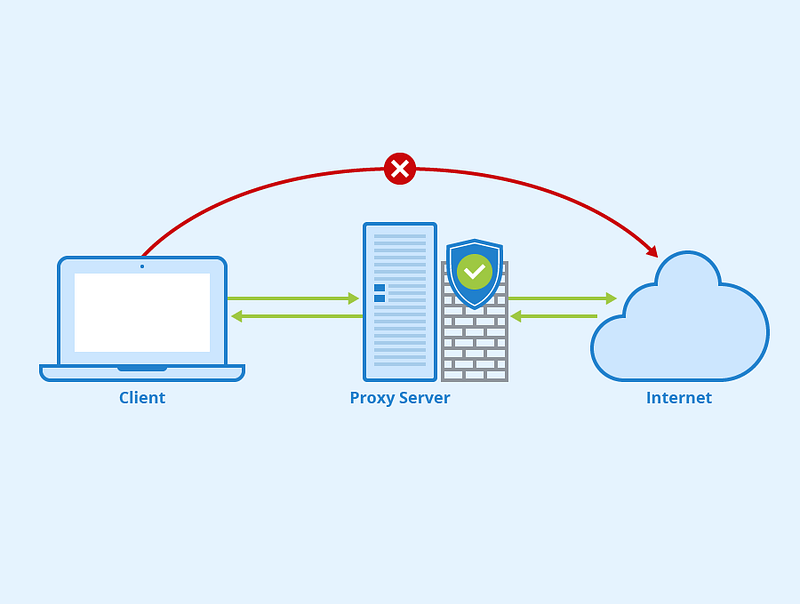
What is Proximity Server
Important Features
Scaling Requirements — Capacity Estimation
Data Model — ER requirements
High Level Design
Basic Low Level Design
API Design
Complete Detailed Design
Coming soon! It will be covered on youtube channel.
Subscribe to youtube channel :
Complete Code implementation
System Design — Google Flights
We will be discussing in depth -
- What is Google Flights
- Important Features
- Scaling Requirements — Capacity Estimation
- Data Model — ER requirements
- High Level Design
- Basic Low Level Design
- API Design
- Complete Detailed Design
- Complete Code Implementation
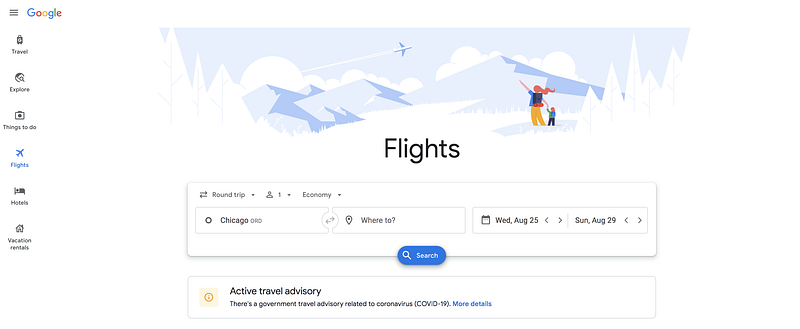
What is Google Flights
Important Features
Scaling Requirements — Capacity Estimation
Data Model — ER requirements
High Level Design
Basic Low Level Design
API Design
Complete Detailed Design
Coming soon! It will be covered on youtube channel.
Subscribe to youtube channel :
Complete Code implementation
System Design — Google Translate
We will be discussing in depth -
- What is Google Translate
- Important Features
- Scaling Requirements — Capacity Estimation
- Data Model — ER requirements
- High Level Design
- Basic Low Level Design
- API Design
- Complete Detailed Design
- Complete Code Implementation

What is Google Translate
Important Features
Scaling Requirements — Capacity Estimation
Data Model — ER requirements
High Level Design
Basic Low Level Design
API Design
Complete Detailed Design
Coming soon! It will be covered on youtube channel.
Subscribe to youtube channel :
Complete Code implementation
System Design — Google Assistant
We will be discussing in depth -
- What is Google Assistant
- Important Features
- Scaling Requirements — Capacity Estimation
- Data Model — ER requirements
- High Level Design
- Basic Low Level Design
- API Design
- Complete Detailed Design
- Complete Code Implementation
What is Google Assistant
Important Features
Scaling Requirements — Capacity Estimation
Data Model — ER requirements
High Level Design
Basic Low Level Design
API Design
Complete Detailed Design
Coming soon! It will be covered on youtube channel.
Subscribe to youtube channel :
Complete Code implementation
System Design — Comment System
We will be discussing in depth -
- What is Comment System
- Important Features
- Scaling Requirements — Capacity Estimation
- Data Model — ER requirements
- High Level Design
- Basic Low Level Design
- API Design
- Complete Detailed Design
- Complete Code Implementation
What is Comment System
Important Features
Scaling Requirements — Capacity Estimation
Data Model — ER requirements
High Level Design
Basic Low Level Design
API Design
Complete Detailed Design
Coming soon! It will be covered on youtube channel.
Subscribe to youtube channel :
Complete Code implementation
System Design — Flight System
We will be discussing in depth -
- What is Flight System
- Important Features
- Scaling Requirements — Capacity Estimation
- Data Model — ER requirements
- High Level Design
- Basic Low Level Design
- API Design
- Complete Detailed Design
- Complete Code Implementation

What is Flight System
Important Features
Scaling Requirements — Capacity Estimation
Data Model — ER requirements
High Level Design
Basic Low Level Design
API Design
Complete Detailed Design
Coming soon! It will be covered on youtube channel.
Subscribe to youtube channel :
Complete Code implementation
System Design — Amazon Frequently Viewed Product Page
We will be discussing in depth -
- What is Amazon Frequently Viewed Product Page
- Important Features
- Scaling Requirements — Capacity Estimation
- Data Model — ER requirements
- High Level Design
- Basic Low Level Design
- API Design
- Complete Detailed Design
- Complete Code Implementation

What is Amazon Frequently Viewed Product Page
Important Features
Scaling Requirements — Capacity Estimation
Data Model — ER requirements
High Level Design
Basic Low Level Design
API Design
Complete Detailed Design
Coming soon! It will be covered on youtube channel.
Subscribe to youtube channel :
Complete Code implementation
System Design — Google Ads System
We will be discussing in depth -
- What is Google Ads System
- Important Features
- Scaling Requirements — Capacity Estimation
- Data Model — ER requirements
- High Level Design
- Basic Low Level Design
- API Design
- Complete Detailed Design
- Complete Code Implementation

What is Google Ads System
Important Features
Scaling Requirements — Capacity Estimation
Data Model — ER requirements
High Level Design
Basic Low Level Design
API Design
Complete Detailed Design
Coming soon! It will be covered on youtube channel.
Subscribe to youtube channel :
Complete Code implementation
Read — how to Design the Linkedin
Day 2 : SQL Basics, Query Structure, Built In functions Conditions
Day 4 : Set Theory Operations, Stored Procedures and CASE statements in SQL
Day 6 : Subqueries, Group by, order by and Having clauses in SQL and Analytical Functions
Day 7 : Window Functions, Grouping Sets and Constraints in SQL
Day 8 : BigQuery Basics, SELECT, FROM, WHERE and Date and Extract in BigQuery
Day 9 : Common Expression Table, UNNEST Clause, SQL vs NoSQL Databases
Day 10 : Triggers, Pivot and Cursors in SQL
Day 14 : MySQL in Depth
Day 15 : PostgreSQL inDepth
Anyways, For Day 15 of 15 days of Advanced SQL, we will cover —
PostgreSQL inDepth
Github for Advanced SQL that you can follow —
All the projects, data structures, algorithms, system design, Data Science and ML, Data Engineering, MLOps and Deep Learning videos will be published on our youtube channel ( just launched).
Subscribe today!
System Design Case Studies — In Depth
Complete Data Structures and Algorithm Series
Github —
Complete System Design Series.
6. Networking, How Browsers work, Content Network Delivery ( CDN)
Github —
Subscribe/ Follow, Like/Clap and Stay Tuned!!
Some of the other best Series —
30 days of Data Structures and Algorithms and System Design Simplified
Data Science and Machine Learning Research ( papers) Simplified **
100 days : Your Data Science and Machine Learning Degree Series with projects
Complete Data Visualization and Pre-processing Series with projects
Exceptional Github Repos — Part 1
Exceptional Github Repos — Part 2
Tech Newsletter —
If you are interested, you can join my newsletter through which I send tech interview tips, techniques, patterns, hacks — Software Development, ML, Data Science, Startups and Technology projects to more than 30K readers. You can subscribe to Tech Brew :
For Python Projects —
For complete 60 days of Data Science and ML : Day 1 — Day 60 : Quick Recap of 60 days of Data Science and ML
Follow for more updates. Stay tuned and keep coding!
For other projects, tune to —
Build Machine Learning Pipelines( With Code)
Recurrent Neural Network with Keras
Clustering Geolocation Data in Python using DBSCAN and K-Means
Facial Expression Recognition using Keras
Hyperparameter Tuning with Keras Tuner
Custom Layers in Keras


