
Day 23 of System Design Case Studies Series : Design Amazon Prime Video, Twilio, Chime, Plenty of Fish, Taobao, Tencent Chat, Shopsy, Social Message Board
Complete Design with examples
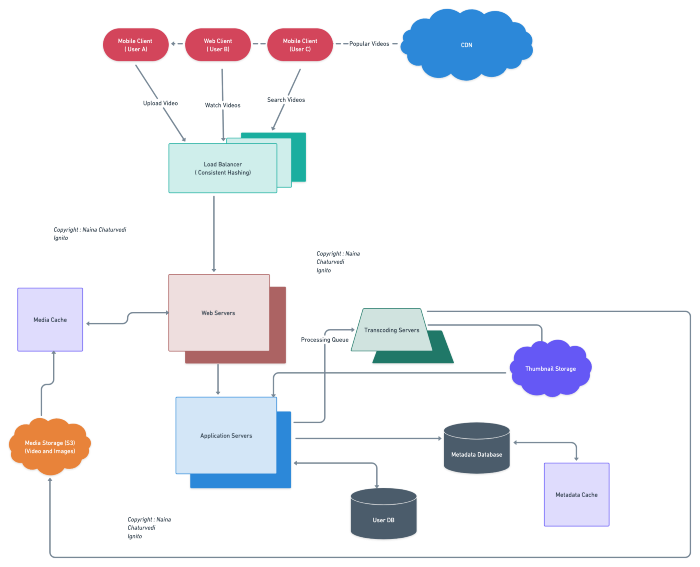
Hello peeps! Welcome to Day 23 of System Design Case studies series where we will design Amazon Prime Video, Twilio, Chime, Plenty of Fish, Taobao, Tencent Chat, Shopsy and Social Message Board.
This post has system design for ( scroll till the end of the post) —
Note : Please read System Design Important Terms you MUST know and Most Important System Design basics before reading this post.
Projects Videos —
All the projects, data structures, SQL, algorithms, system design, Data Science and ML , Data Analytics, Data Engineering, , Implemented Data Science and ML projects, Implemented Data Engineering Projects, Implemented Deep Learning Projects, Implemented Machine Learning Ops Projects, Implemented Time Series Analysis and Forecasting Projects, Implemented Applied Machine Learning Projects, Implemented Tensorflow and Keras Projects, Implemented PyTorch Projects, Implemented Scikit Learn Projects, Implemented Big Data Projects, Implemented Cloud Machine Learning Projects, Implemented Neural Networks Projects, Implemented OpenCV Projects,Complete ML Research Papers Summarized, Implemented Data Analytics projects, Implemented Data Visualization Projects, Implemented Data Mining Projects, Implemented Natural Leaning Processing Projects, MLOps and Deep Learning, Applied Machine Learning with Projects Series, PyTorch with Projects Series, Tensorflow and Keras with Projects Series, Scikit Learn Series with Projects, Time Series Analysis and Forecasting with Projects Series, ML System Design Case Studies Series videos will be published on our youtube channel ( just launched).
Subscribe today!
System Design Case Studies — In Depth
Design Tinder
Design TikTok
Design Twitter
Design URL Shortener
Design Dropbox
Design Youtube
Design API Rate Limiter
Design Web Crawler
Design Facebook’s Newsfeed
Design Yelp
Design Instagram
Design Messenger App
Design Uber
Most Popular System Design Questions
Mega Compilation : Solved System Design Case studies
We will be discussing in depth -
- What is Amazon Prime Video
- Important Features
- Scaling Requirements — Capacity Estimation
- Data Model — ER requirements
- High Level Design
- Basic Low Level Design
- API Design
- Complete Detailed Design
Pre-requisite to this post -
Complete System Design Series — Important Concepts that you should know before starting the Case studies
6. Networking, How Browsers work, Content Network Delivery ( CDN)
13. System Design Template — How to solve any System Design Question
Github —
Day 1 of System Design Case Studies can be found below-
Day 2 of System Design Case Studies can be found below-
Day 3 of System Design Case Studies can be found below-
Day 4 of System Design Case Studies can be found below-
Let’s get started.
What is Amazon Prime Video?

Amazon Prime Video is a subscription based video streaming and sharing website where users can —
- Watch/stream the videos
- Report the videos
- Create your own lists
- Search the videos using titles or tags
- Mark videos as favorites
- Like and share videos
Users can be both mobile based and web based.
Designing Amazon Prime video would involve —
- Content acquisition: You would need to acquire the rights to a variety of movies and TV shows in order to build a robust content library. This could involve negotiating deals with studios and other content providers.
- Content encoding and delivery: Once you have acquired the rights to a piece of content, you would need to encode it in a format that is suitable for streaming, such as H.264 or VP9. You would then need to deliver the content to users via a content delivery network (CDN) that is optimized for streaming.
- User registration and authentication: In order to provide a personalized experience, you would need to implement a registration and authentication system that allows users to create accounts and log in.
- Video player: You would need to build or integrate a video player that can play the encoded content on various devices and platforms.
- Content management: You would need to build a content management system that allows you to manage your content library, including adding and removing titles, updating metadata, and tracking viewing statistics.
- Personalization: You would need to build a personalization system that allows users to create watchlists and save titles for offline viewing.
- Payment gateway: You would need to integrate a payment gateway to enable users to purchase or subscribe to the service.
- User experience: You would need to design and implement a user interface that is intuitive and easy to use, with features such as search, filtering, and recommendations.
Before we take a deep dive in the design, understand HDFS.
HDFS
In system design map reduce ( HDFS systems) is a batch processing technique in which the engine takes huge amounts of data, processes ( map and reduce) and gives the output.
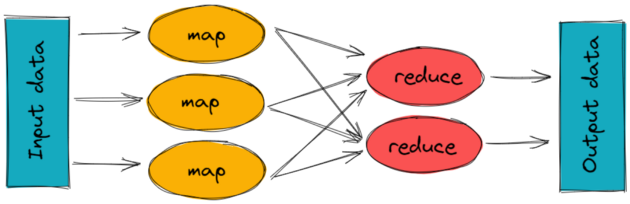
To track the progress of each job — task tracker and job tracker are used. Job tracker manages all the resources and jobs and schedules across the cluster.
The task tracker are called slaves that work on the directives of job trackers and deployed on each node in the cluster.
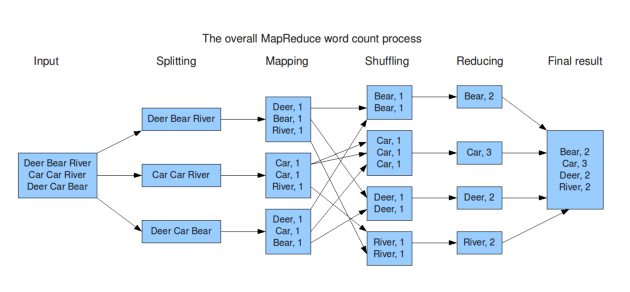
An example of MapReduce code in Python:
from collections import defaultdictdef map_func(inputs):
results = defaultdict(list)
for input in inputs:
words = input.split()
for word in words:
results[word].append(1)
return results.items()def reduce_func(item):
word, occurrences = item
return (word, sum(occurrences))def map_reduce(inputs):
mapped = map_func(inputs)
grouped = defaultdict(list)
for key, value in mapped:
grouped[key].append(value)
return [reduce_func(group) for group in grouped.items()]inputs = ["apple pear banana", "pear banana", "apple pear", "apple", "pear banana apple"]
print(map_reduce(inputs))This code implements a simple word count example, where the input is a list of strings and the output is a list of tuples (word, count) indicating the number of occurrences of each word in the input. The code uses the map_func function to map the input to intermediate key-value pairs, the reduce_func function to reduce the intermediate values for each key to a single output value, and the map_reduce function to coordinate the map and reduce phases.
Video Transcoding
Raw file cannot be accessed or distributed so we use encoding and transcoding to convert it into a desirable format which can be accessed and distributed anywhere. Encoding is the process of converting a raw video file into a desired format and transcoding is the process of decoding that file into recompressed and desired format. It helps optimize the video quality and support multiple formats.
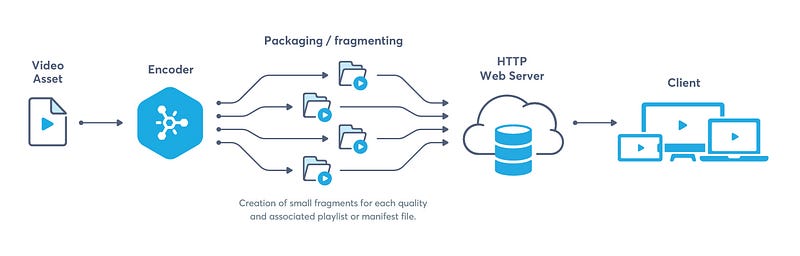
An example of how to use FFmpeg for video transcoding in Python:
import subprocessdef transcode_video(input_file, output_file):
cmd = ['ffmpeg', '-i', input_file, '-c:v', 'libx264', '-crf', '23', '-c:a', 'aac', output_file]
subprocess.run(cmd)input_file = "input.mp4"
output_file = "output.mp4"
transcode_video(input_file, output_file)In this example, we use the subprocess library to run FFmpeg as a subprocess and transcode the video. The cmd list contains the arguments passed to FFmpeg, including the input file, the output file, and the codec and compression options. The crf option sets the quality of the output video.
Streaming Protocol
It is used to control data transfer for the video streaming, support video encoding etc.
Codecs are the compression and decompression algorithms that are used to preserve the video quality when the video size is reduced.
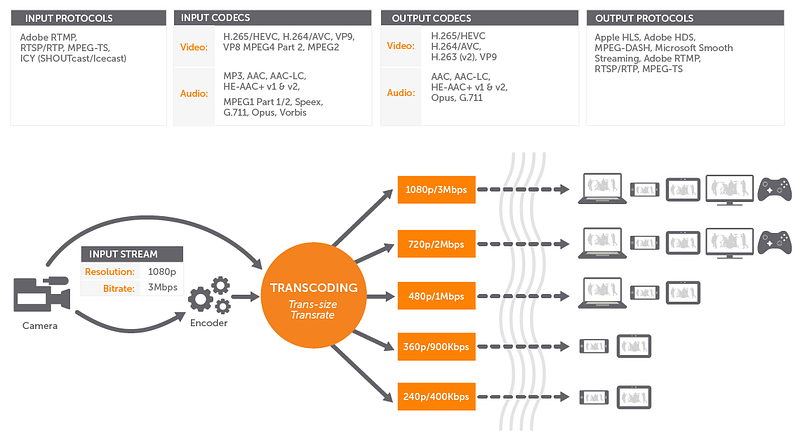
An example of how to implement a simple RTSP server in Python:
import socketRTSP_PORT = 554def start_server():
server_socket = socket.socket(socket.AF_INET, socket.SOCK_STREAM)
server_socket.bind(('', RTSP_PORT))
server_socket.listen(1)print("RTSP Server started on port {}".format(RTSP_PORT))while True:
client_socket, address = server_socket.accept()
print("Accepted connection from {}".format(address))
data = client_socket.recv(1024)
print("Received data: {}".format(data.decode()))
client_socket.sendall(b"RTSP/1.0 200 OK\r\n\r\n")
client_socket.close()if __name__ == "__main__":
start_server()In this example, we start by creating a TCP socket using the socket library and binding it to the RTSP port 554. We then start listening for incoming connections using the listen method. In the while loop, we use the accept method to accept incoming connections and receive data from the client using the recv method. We then send a response to the client using the sendall method, and close the connection using the close method. The output of this program is the RTSP response "RTSP/1.0 200 OK".
Important Features
We will consider the most important features —
Upload Videos
Watch Videos
Engagement — Interaction with the videos
Scaling Requirements — Capacity Estimation
For the sake of simplicity, I’ll show a small scale simulation.
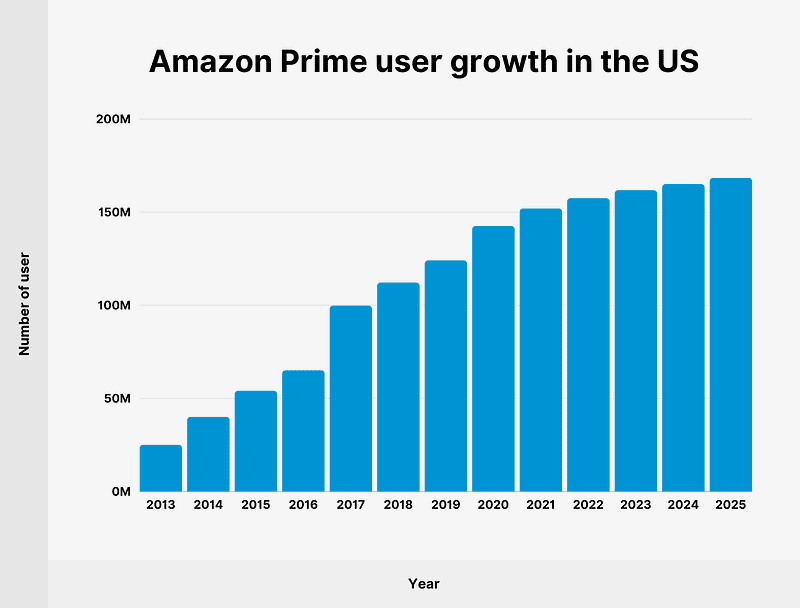
Let’s say we have —
Total no of users : 700 Million
Daily active users ( DAU) : 300 million
No of videos watched by user/day : 3
Total no of videos watched per day : 900 Million videos/day
Since the system is read -heavy, let’s say the read to write ratio be 100:1
Total no of videos uploaded/day = 1/100 * 900 Million = 9 Million/day
Storage Estimation —
Let’s say on average each video size is 80 MB
Total Storage per day : 9 Million* 80MB = 720 TB/day
For next 3 years, 720 TB* 5* 365 = 800 PB
Requests per second : 900 Million/3600 seconds * 24 hours = 10K/second
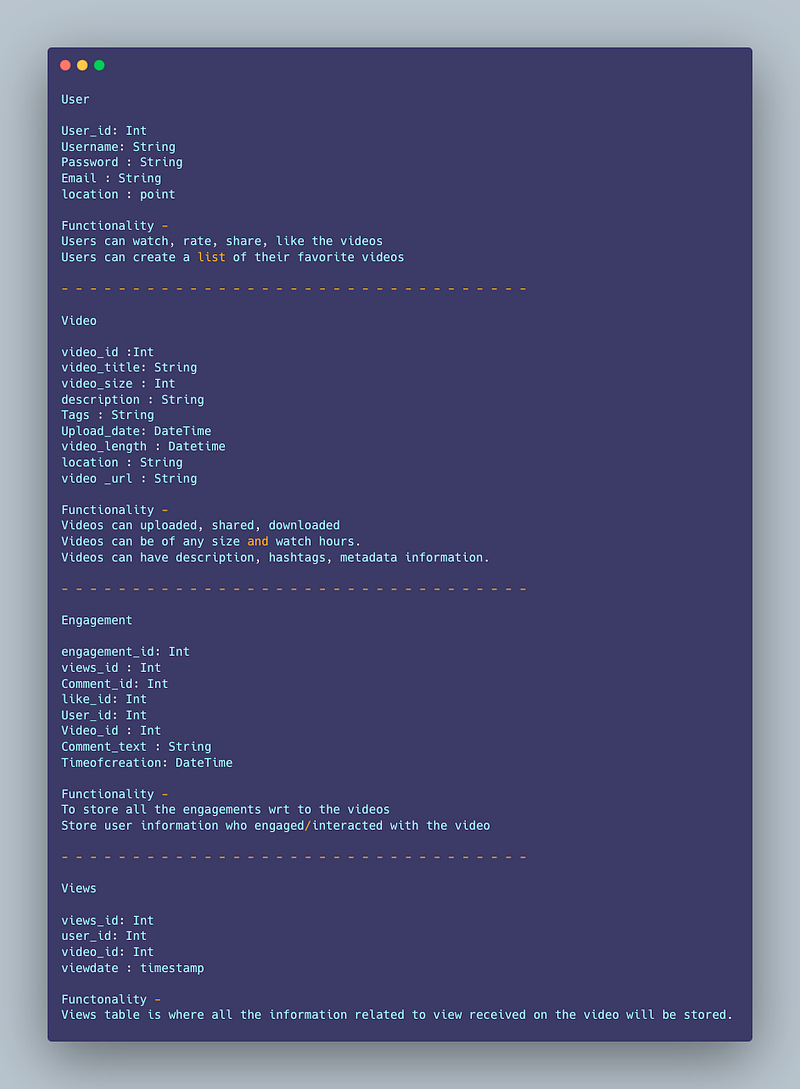
Data Model — ER requirements
User
User_id: Int
Username: String
Password : String
Email : String
location : point
Functionality —
Users can watch, rate, share, like the videos
Users can create a list of their favorite videos
— — — — — — — — — — — — — — — — — — — — — — — — — — — — — — — — —
Video
video_id :Int
video_title: String
video_size : Int
description : String
Tags : String
Upload_date: DateTime
video_length : Datetime
location : String
video _url : String
Functionality —
Videos can uploaded, shared, downloaded
Videos can be of any size and watch hours.
Videos can have description, hashtags, metadata information.
— — — — — — — — — — — — — — — — — — — — — — — — — — — — — — — — —
Engagement
engagement_id: Int
views_id : Int
Comment_id: Int
like_id: Int
User_id: Int
Video_id : Int
Comment_text : String
Timeofcreation: DateTime
Functionality —
To store all the engagements wrt to the videos
Store user information who engaged/interacted with the video
— — — — — — — — — — — — — — — — — — — — — — — — — — — — — — — — —
Views
views_id: Int
user_id: Int
video_id: Int
viewdate : timestamp
Functionality —
Views table is where all the information related to view received on the video will be stored.
High Level Design
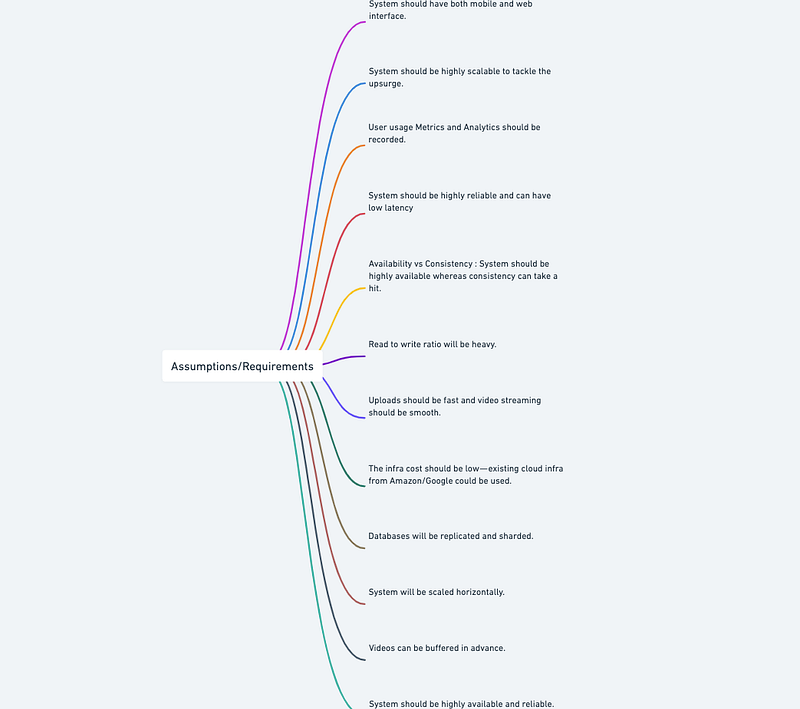
Assumptions/Requirements on technical aspects —
- System should be highly available and reliable.
- System should have both mobile and web interface.
- System should be highly scalable to tackle the upsurge.
- User usage Metrics and Analytics should be recorded.
- Availability vs Consistency : System should be highly available whereas consistency can take a hit.
- System should be highly reliable and can have low latency
- Read to write ratio will be heavy.
- Uploads should be fast and video streaming should be smooth.
- The infra cost should be low — existing cloud infra from Amazon/Google could be used.
- Databases will be replicated and sharded.
- System will be scaled horizontally.
- Videos can be buffered in advance.
— — — — — — — — — — — — — — — — — — — — — — — — — — — — — — — — -
Components
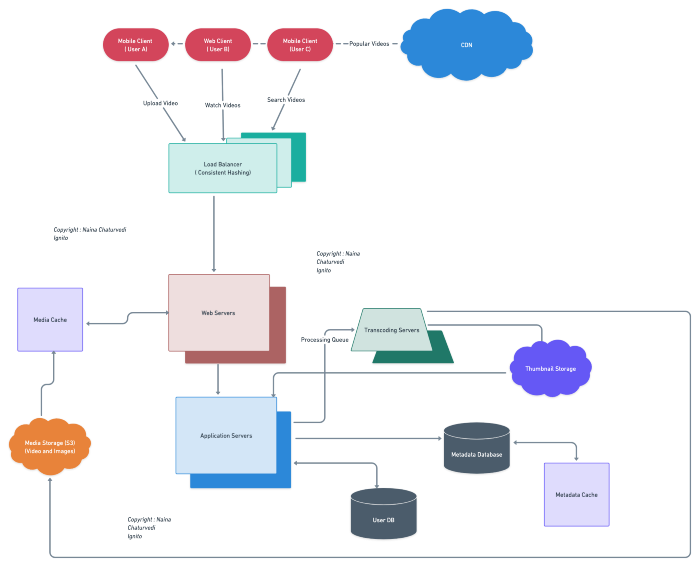
- Client : Both mobile and web Users
- User Database : To store user’s information
- Metadata Database : To store metadata information
- Content Delivery Network : To cater the most popular videos/live videos streaming ( in case of celebrity fan-out)
- File System ( HDFS)
- Encoding Queue : To encode each video into various formats
- Processing Queue : To hold and process the videos for encoding, metadata and storage
- Transcoding Servers
- Storage : For Video Metadata
- Application Servers : Should be able to talk each other
- Load Balancers : To allocate requests to designated Application server using consistent hashing
- Database : Cassandra db or Hbase — Key value stores allow for great horizontal scaling and low latency to access data. HBase is a column-oriented key-value NoSQL database.
- Sessions Service : To store the sessions information of the different users
- Cache
- Media Storage ( S3) : To store videos
- Notification Service : To push notifications to the users when the status is offline
Services
Before we go in depth with respect to services, first understand what is stateless and stateful services. Stateless service ( which can be monolithic services) doesn’t require the server to retain any information about the state whereas Stateful services requires to save the information about the users session and the connection is persistent to a chat server.
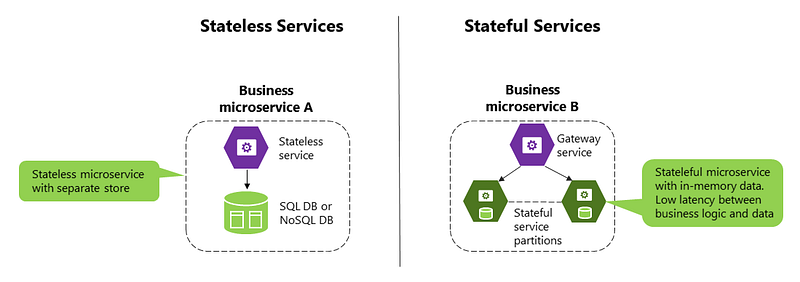
In our current case study, we would need services mentioned below —
- Sessions Service — To store the sessions information of different users
- Stream Service — To handle video streaming functionality
- User Profile Service — To store users profile information and keep updating
- Search Service — To handle search functionality.
- Media Service — To handle uploading and processing of the videos.
- Analytics Service — To store and handle analytics and metrics ( for both user and videos).
A basic structure for each service:
# User Profile Service
class UserProfileService:
    def __init__(self):
        self.user_profiles = {}
   def add_user_profile(self, user_id, profile):
        self.user_profiles[user_id] = profile
   def get_user_profile(self, user_id):
        return self.user_profiles.get(user_id, None)
# Sessions Service
class SessionsService:
def __init__(self):
self.sessions = {} def add_session(self, session_id, user_id):
self.sessions[session_id] = user_id def get_user_id(self, session_id):
return self.sessions.get(session_id, None)# Stream Service
class StreamService:
def __init__(self):
self.streams = {} def add_stream(self, stream_id, video_id):
self.streams[stream_id] = video_id def get_video_id(self, stream_id):
return self.streams.get(stream_id, None)# Search Service
class SearchService:
def __init__(self):
self.videos = [] def add_video(self, video):
self.videos.append(video) def search_videos(self, query):
return [video for video in self.videos if query in video.title or query in video.description]# Media Service
class MediaService:
def __init__(self):
self.videos = [] def add_video(self, video):
self.videos.append(video) def get_video(self, video_id):
for video in self.videos:
if video.id == video_id:
return video
return None# Analytics Service
class AnalyticsService:
def __init__(self):
self.user_analytics = {}
self.video_analytics = {} def add_user_analytics(self, user_id, analytics):
self.user_analytics[user_id] = analytics def add_video_analytics(self, video_id, analytics):
self.video_analytics[video_id] = analytics def get_user_analytics(self, user_id):
return self.user_analytics.get(user_id, None) def get_video_analytics(self, video_id):
return self.video_analytics.get(video_id, None)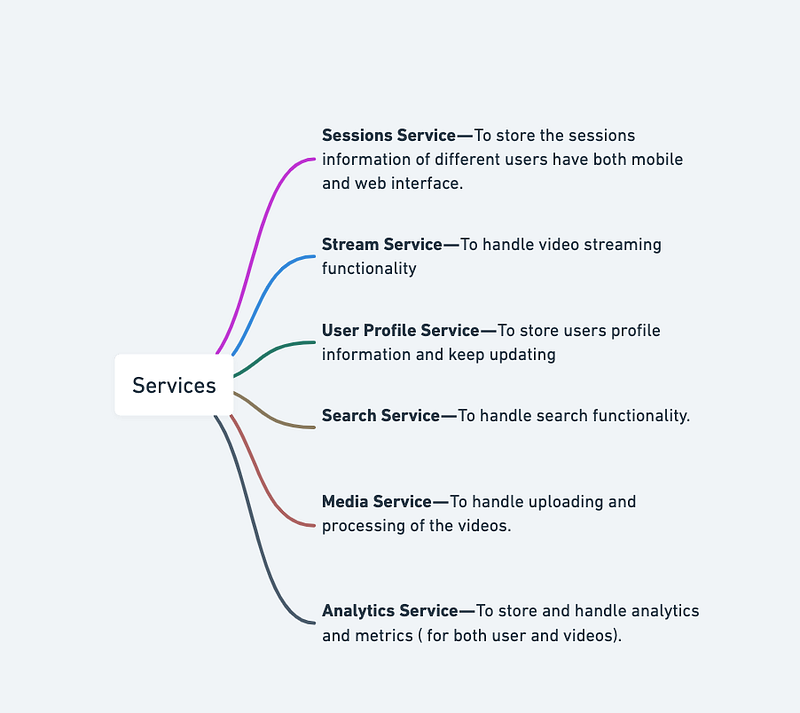
A microservice for the video catalog in Amazon Prime Video might look like in Python:
import json
from flask import Flask, request
from flask_restful import Resource, Api
app = Flask(__name__)
api = Api(app)class VideoCatalog(Resource):
def get(self, video_id=None):
if video_id:
# return information for specific video
return {'video': video_id}
else:
# return information for all videos in catalog
return {'videos': ['video1', 'video2', 'video3']}api.add_resource(VideoCatalog, '/video_catalog/<string:video_id>')if __name__ == '__main__':
app.run(debug=True)In this code, we use Flask and Flask-RESTful to create a RESTful API for our video catalog service. The VideoCatalog class is a resource that can be accessed through the /video_catalog/<video_id> endpoint. If a video_id is provided, the service returns information for that specific video. If no video_id is provided, the service returns information for all videos in the catalog.
Basic Low Level Design
import java.util.*;

class User {
    private String username;
    private String password;
    private List<Video> videos;

    public User(String username, String password) {
        this.username = username;
        this.password = password;
        this.videos = new ArrayList<>();
    }

    // Getters and setters
    // ...

    public void uploadVideo(Video video) {
        videos.add(video);
    }
}

class Video {
    private String videoId;
    private String title;
    private String description;

    public Video(String videoId, String title, String description) {
        this.videoId = videoId;
        this.title = title;
        this.description = description;
    }

    // Getters and setters
    // ...
}

class AmazonPrimeVideoSystem {
    private List<User> users;
    private List<Video> videos;

    public AmazonPrimeVideoSystem() {
        this.users = new ArrayList<>();
        this.videos = new ArrayList<>();
    }

    public void registerUser(String username, String password) {
        User newUser = new User(username, password);
        users.add(newUser);
        System.out.println("User registered successfully.");
    }

    public void uploadVideo(String username, String videoId, String title, String description) {
        User uploader = findUserByUsername(username);
        if (uploader != null) {
            Video newVideo = new Video(videoId, title, description);
            uploader.uploadVideo(newVideo);
            videos.add(newVideo);
            System.out.println("Video uploaded successfully.");
        } else {
            System.out.println("User not found.");
        }
    }

    public User findUserByUsername(String username) {
        for (User user : users) {
            if (user.getUsername().equals(username)) {
                return user;
            }
        }
        return null;
    }

    public List<Video> getAllVideos() {
        return videos;
    }
}

public class AmazonPrimeVideoApp {
    public static void main(String[] args) {
        AmazonPrimeVideoSystem amazonPrimeVideo = new AmazonPrimeVideoSystem();

        // Register users
        amazonPrimeVideo.registerUser("user1", "password1");
        amazonPrimeVideo.registerUser("user2", "password2");

        // Upload videos
        amazonPrimeVideo.uploadVideo("user1", "video1", "Video 1", "An amazing video");
        amazonPrimeVideo.uploadVideo("user2", "video2", "Video 2", "A funny video");

        // Get all videos
        List<Video> allVideos = amazonPrimeVideo.getAllVideos();
        for (Video video : allVideos) {
            System.out.println("Video ID: " + video.getVideoId());
            System.out.println("Title: " + video.getTitle());
            System.out.println("Description: " + video.getDescription());
            System.out.println();
        }
    }
}
API Design
First, we would need to install the Flask framework and import the necessary libraries.
from flask import Flask, request, jsonifyNext, we can create an instance of the Flask class and define some endpoints for our API.
app = Flask(__name__)@app.route('/api/v1/movies', methods=['GET'])
def get_movies():
# code to fetch all movies from the database
return jsonify(movies)@app.route('/api/v1/movies/<int:id>', methods=['GET'])
def get_movie(id):
# code to fetch a movie by id from the database
return jsonify(movie)@app.route('/api/v1/movies', methods=['POST'])
def add_movie():
# code to add a new movie to the database
return jsonify({'message': 'Movie added successfully'})@app.route('/api/v1/movies/<int:id>', methods=['PUT'])
def update_movie(id):
# code to update a movie by id in the database
return jsonify({'message': 'Movie updated successfully'})@app.route('/api/v1/movies/<int:id>', methods=['DELETE'])
def delete_movie(id):
# code to delete a movie by id from the database
return jsonify({'message': 'Movie deleted successfully'})In the code above, we’ve defined five endpoints for our API:
- GET /api/v1/movies: Returns a list of all movies in the database.
- GET /api/v1/movies/:id: Returns a specific movie by its ID.
- POST /api/v1/movies: Adds a new movie to the database.
- PUT /api/v1/movies/:id: Updates a specific movie by its ID.
- DELETE /api/v1/movies/:id: Deletes a specific movie by its ID.
A Python script could retrieve information about a movie using the Amazon Prime Video API:
import requests# Define the endpoint URL
url = "https://api.primevideo.com/catalog/movie/{movie_id}"# Replace {movie_id} with the actual movie ID
url = url.format(movie_id="12345")# Send a GET request to the endpoint
response = requests.get(url)# Check that the request was successful
if response.status_code == 200:
# Parse the response JSON
data = response.json() # Extract the movie information
title = data["title"]
release_date = data["release_date"]
description = data["description"] # Print the movie information
print("Title:", title)
print("Release Date:", release_date)
print("Description:", description)
else:
# Handle the error
print("Request failed with status code", response.status_code)API design will be further discussed in the workflow video ( Coming soon. Subscribe Today)
Complete Detailed Design
( Zoom it)
Code
Here’s the code for all the above mentioned features —
- Watch/Stream Videos
To watch/stream videos on Amazon Prime Video, we can use the following code:
import webbrowser# Replace with the URL of the video you want to watch
video_url = 'https://www.amazon.com/dp/B08WYS3N3P'# Open the video URL in the default web browser
webbrowser.open(video_url)This will open the specified video URL in the default web browser.
- Report Videos
To report a video on Amazon Prime Video, we can use the following code:
import requests# Replace with the ID of the video you want to report
video_id = 'B08BL3Z1K3'# Replace with your access key and secret key
access_key = 'your_access_key'
secret_key = 'your_secret_key'headers = {
'Content-Type': 'application/json',
'Accept': 'application/json',
'Authorization': 'Bearer ' + access_key
}data = {
'reason': 'Inappropriate Content'
}response = requests.post('https://api.amazon.com/user/profile/reports/' + video_id, headers=headers, data=data)if response.status_code == 204:
print('Video reported successfully')
else:
print('Error reporting video')This will report the specified video with the reason “Inappropriate Content”.
- Create Your Own Lists
To create your own lists on Amazon Prime Video, we can use the following code:
import requests# Replace with the name of the list you want to create
list_name = 'My List'# Replace with your access key and secret key
access_key = 'your_access_key'
secret_key = 'your_secret_key'headers = {
'Content-Type': 'application/json',
'Accept': 'application/json',
'Authorization': 'Bearer ' + access_key
}data = {
'name': list_name
}response = requests.post('https://api.amazon.com/user/profile/lists', headers=headers, data=data)if response.status_code == 201:
print('List created successfully')
else:
print('Error creating list')This will create a new list with the specified name.
- Search Videos Using Titles or Tags
To search for videos on Amazon Prime Video using titles or tags, we can use the following code:
import requests# Replace with the query you want to search for
query = 'The Marvelous Mrs. Maisel'# Replace with your access key and secret key
access_key = 'your_access_key'
secret_key = 'your_secret_key'headers = {
'Content-Type': 'application/json',
'Accept': 'application/json',
'Authorization': 'Bearer ' + access_key
}params = {
'query': query
}response = requests.get('https://api.amazon.com/search', headers=headers, params=params)if response.status_code == 200:
videos = response.json()['results']
for video in videos:
print(video['title'])
else:
print('Error searching videos')- Mark Videos as Favorites
To mark a video as a favorite on Amazon Prime Video, we can use the following code:
import requests# Replace with the ID of the video you want to mark as favorite
video_id = 'B08BL3Z1K3'# Replace with your access key and secret key
access_key = 'your_access_key'
secret_key = 'your_secret_key'headers = {
'Content-Type': 'application/json',
'Accept': 'application/json',
'Authorization': 'Bearer ' + access_key
}data = {
'action': 'favorite'
}response = requests.put('https://api.amazon.com/user/profile/favorites/' + video_id, headers=headers, data=data)if response.status_code == 204:
print('Video marked as favorite')
else:
print('Error marking video as favorite')This will mark the specified video as a favorite.
- Like and Share Videos
To like and share a video on Amazon Prime Video, we can use the following code:
import requests# Replace with the ID of the video you want to like and share
video_id = 'B08BL3Z1K3'# Replace with your access key and secret key
access_key = 'your_access_key'
secret_key = 'your_secret_key'headers = {
'Content-Type': 'application/json',
'Accept': 'application/json',
'Authorization': 'Bearer ' + access_key
}# Like the video
data = {
'action': 'like'
}response = requests.put('https://api.amazon.com/user/profile/likes/' + video_id, headers=headers, data=data)if response.status_code == 204:
print('Video liked')
else:
print('Error liking video')# Share the video
data = {
'message': 'Check out this great video!'
}response = requests.post('https://api.amazon.com/user/profile/shares/' + video_id, headers=headers, data=data)if response.status_code == 201:
print('Video shared')
else:
print('Error sharing video')More on Amazon Prime Video System Design —
Video Upload and Encoding:
Video uploading and encoding involve designing systems that allow users to upload video files and process them for storage and playback. Here’s an example code for handling video upload and encoding in Python:
from moviepy.editor import VideoFileClipdef upload_video(file_path):
# Upload video file to storage system
# ...def encode_video(file_path, resolutions, formats):
video = VideoFileClip(file_path)
for resolution in resolutions:
for format in formats:
# Transcode video to the desired resolution and format
transcoded_video = video.resize(resolution).write_videofile(f"{resolution}_{format}.mp4")
# Store the transcoded video in the storage system
# ...# Example usage
file_path = "path/to/video.mp4"
resolutions = [(1920, 1080), (1280, 720), (640, 480)]
formats = ["mp4", "webm"]
upload_video(file_path)
encode_video(file_path, resolutions, formats)Video Storage and Content Distribution:
Efficiently and securely storing and managing video files is crucial for a video streaming system. Implementing distributed storage systems or content delivery networks (CDNs) can help with fast content delivery. Here’s an example code:
from boto3 import clientdef store_video(video_id, file_path):
# Store the video file in the distributed storage system or CDN
# ...def get_video(video_id):
# Retrieve the video file from the distributed storage system or CDN
# ...def delete_video(video_id):
# Delete the video file from the distributed storage system or CDN
# ...# Example usage
video_id = "abc123"
file_path = "path/to/video.mp4"
store_video(video_id, file_path)
video_data = get_video(video_id)
delete_video(video_id)Video Streaming and Playback:
Efficient video streaming and playback require designing systems that can handle adaptive bitrate streaming, video buffering, seeking, and playback controls. Here’s an example code:
from flask import Flask, Response
from moviepy.editor import VideoFileClip
app = Flask(__name__)@app.route("/video/<video_id>")
def stream_video(video_id):
video_file = "path/to/videos/{}.mp4".format(video_id)
video = VideoFileClip(video_file)
return Response(video.iter_frames(), mimetype="multipart/x-mixed-replace; boundary=frame")if __name__ == "__main__":
app.run()User Engagement and Interactions:
Implementing features like likes, comments, shares, and playlists requires designing systems to handle user interactions and real-time updates. Here’s an example code:
class Video:
    def __init__(self, video_id, title):
        self.video_id = video_id
        self.title = title
        self.likes = 0
        self.comments = []
        self.shares = 0
def add_like(self):
self.likes += 1 def add_comment(self, comment):
self.comments.append(comment) def add_share(self):
self.shares += 1 def get_likes(self):
return self.likes def get_comments(self):
return self.comments def get_shares(self):
return self.sharesclass User:
def __init__(self, user_id, name):
self.user_id = user_id
self.name = name
self.playlists = [] def create_playlist(self, playlist_name):
playlist = Playlist(playlist_name)
self.playlists.append(playlist) def add_video_to_playlist(self, playlist_name, video):
for playlist in self.playlists:
if playlist.name == playlist_name:
playlist.add_video(video)class Playlist:
def __init__(self, name):
self.name = name
self.videos = [] def add_video(self, video):
self.videos.append(video)# Example usage
user = User("user123", "John")
video = Video("abc123", "Example Video")video.add_like()
video.add_comment("Great video!")
video.add_share()user.create_playlist("Favorites")
user.add_video_to_playlist("Favorites", video)print(video.get_likes()) # Output: 1
print(video.get_comments()) # Output: ["Great video!"]
print(video.get_shares()) # Output: 1Advertising and Monetization:
Integrating advertising platforms and systems for monetization involves implementing ad serving and targeting mechanisms. Here’s an example code:
class Ad:
    def __init__(self, ad_id, title, duration):
        self.ad_id = ad_id
        self.title = title
        self.duration = duration
def play_ad(self):
# Play the ad
passclass Advertiser:
def __init__(self, advertiser_id, name):
self.advertiser_id = advertiser_id
self.name = name def create_ad(self, ad_id, title, duration):
ad = Ad(ad_id, title, duration)
return ad# Example usage
advertiser = Advertiser("adv123", "Example Advertiser")
ad = advertiser.create_ad("ad001", "Ad Title", 30)
ad.play_ad()Analytics and Reporting:
Collecting and analyzing system metrics to gain insights into user behavior and content performance is essential. Implementing analytics tools for content creators and administrators and providing reporting functionalities for video views, engagement, and demographics can help. Here’s an example code:
class AnalyticsManager:
    def __init__(self):
        self.video_views = {}
        self.user_engagement = {}
def track_video_view(self, video_id, user_id):
if video_id in self.video_views:
self.video_views[video_id] += 1
else:
self.video_views[video_id] = 1 if user_id in self.user_engagement:
self.user_engagement[user_id].append(video_id)
else:
self.user_engagement[user_id] = [video_id] def get_video_views(self, video_id):
if video_id in self.video_views:
return self.video_views[video_id]
else:
return 0 def get_user_engagement(self, user_id):
if user_id in self.user_engagement:
return self.user_engagement[user_id]
else:
return []# Example usage
analytics_manager = AnalyticsManager()
analytics_manager.track_video_view("video001", "user001")
analytics_manager.track_video_view("video001", "user002")
analytics_manager.track_video_view("video002", "user001")video_views = analytics_manager.get_video_views("video001")
user_engagement = analytics_manager.get_user_engagement("user001")print(video_views) # Output: 2
print(user_engagement) # Output: ['video001', 'video002']Scalability and Performance:
Implementing scalability and performance strategies is crucial to handle increased traffic and video uploads. Caching mechanisms like CDNs (Content Delivery Networks) and in-memory caching can improve system performance. Load balancing, sharding, and replication techniques can also be used. Here’s an example code:
from flask import Flaskapp = Flask(__name__)@app.route("/")
def home():
# Handle home page request
pass@app.route("/video/upload", methods=["POST"])
def upload_video():
# Handle video upload request
pass@app.route("/video/<video_id>")
def stream_video(video_id):
# Stream video content
pass# Add more routes and functionality as requiredif __name__ == "__main__":
app.run(host="0.0.0.0", port=5000)Security and Privacy:
Implementing robust security measures to protect user data and content is essential. Addressing privacy regulations such as GDPR (General Data Protection Regulation) and ensuring compliance is necessary. Handling user authentication, authorization, and secure communication is crucial. Here’s an example code:
from flask import Flask, request
from functools import wraps
app = Flask(__name__)def authenticate_user(username, password):
# Authenticate the user based on credentials
passdef authorize_user(token):
# Authorize the user based on the provided token
passdef login_required(f):
@wraps(f)
def decorated(*args, **kwargs):
token = request.headers.get("Authorization")
if token:
user = authorize_user(token)
if user:
return f(user, *args, **kwargs)
return "Unauthorized", 401 return decorated@app.route("/login", methods=["POST"])
def login():
username = request.form.get("username")
password = request.form.get("password") if authenticate_user(username, password):
# Generate and return an authentication token
token = generate_token(username)
return {"token": token} return "Authentication Failed", 401@app.route("/protected-resource")
@login_required
def protected_resource(user):
# Access the protected resource
return "Protected Resource"System Design — Twilio
We will be discussing in depth -
- What is Twilio
- Important Features
- Scaling Requirements — Capacity Estimation
- Data Model — ER requirements
- High Level Design
- Basic Low Level Design
- API Design
- Complete Detailed Design
- Complete Code Implementation

What is Twilio
Twilio is a powerful cloud communications platform that offers a wide range of APIs for developers to build and deploy scalable communication features. It provides capabilities for voice calls, SMS messaging, video calls, chat, and more. Developers can integrate Twilio’s APIs into their applications, enabling them to establish and manage communication channels between users seamlessly.
Important Features
- Programmable Voice: Twilio’s Programmable Voice API allows developers to build voice calling functionality into their applications. It provides features like call routing, call recording, text-to-speech, and conference calls.
- Programmable Messaging: With Twilio’s Programmable Messaging API, developers can incorporate SMS and MMS capabilities into their applications. It supports features such as sending and receiving messages, media attachments, message tracking, and two-way communication.
- Programmable Video: Twilio’s Programmable Video API empowers developers to integrate real-time video communication into their applications. It provides features like video rooms, screen sharing, recording, and cross-platform compatibility.
- Chat: Twilio’s Chat API enables developers to build in-app chat functionalities. It offers features like creating channels, real-time messaging, push notifications, and message synchronization.
- Phone Number Management: Twilio provides a comprehensive phone number management system, allowing developers to purchase, configure, and manage phone numbers programmatically. This feature enables businesses to scale their communication infrastructure efficiently.
Scaling Requirements — Capacity Estimation
For the sake of simplicity, let’s consider a small-scale simulation for Twilio’s messaging service.
Total number of users: 100 million Daily active users (DAU): 20 million Average number of messages sent per user per day: 5
Total number of messages sent per day: 20 million * 5 = 100 million messages/day
Since the system is read-heavy, let’s assume a read-to-write ratio of 100:1.
Total number of messages received per day: 100 million * 100 = 10 billion messages/day
Storage Estimation:
Let’s assume an average message size of 10 KB.
Total storage per day: 10 billion * 10 KB = 100 TB/day
For the next 3 years: 100 TB * 365 * 3 = 109,500 TB or 109.5 PB
Requests per second: 100 million / (24 hours * 60 minutes * 60 seconds) = ~1,157 requests/second
import time

class TwilioMessagingService:
    def __init__(self, storage_capacity):
        self.storage_capacity = storage_capacity

    def send_message(self, from_number, to_number, body):
        # Simulate sending a message
        time.sleep(0.01)

    def receive_message(self):
        # Simulate receiving a message
        time.sleep(0.01)

    def store_message(self, message):
        # Simulate storing a message
        if self.storage_capacity >= message.size:
            self.storage_capacity -= message.size
            return True
        else:
            return False


class Message:
    def __init__(self, from_number, to_number, body):
        self.from_number = from_number
        self.to_number = to_number
        self.body = body
        self.size = self.calculate_size()

    def calculate_size(self):
        # Assume an average message size of 10 KB
        return len(self.body) * 0.01


# Example usage

twilio = TwilioMessagingService(storage_capacity=100 * 1024)  # 100 TB of storage

# Simulate sending messages
for _ in range(100 * 1000):
    message = Message('sender_number', 'recipient_number', 'This is a test message.')
    twilio.send_message(message.from_number, message.to_number, message.body)

# Simulate receiving messages
for _ in range(100 * 1000):
    twilio.receive_message()

# Simulate storing messages
messages_to_store = 100 * 1000
stored_messages = 0

for _ in range(messages_to_store):
    message = Message('sender_number', 'recipient_number', 'This is a test message.')

    if twilio.store_message(message):
        stored_messages += 1

print(f"Stored {stored_messages} out of {messages_to_store} messages.")
print(f"Remaining storage capacity: {twilio.storage_capacity} KB.")
Data Model — ER requirements
User:
user_id: int (primary key)
username: string
email: string
password: string
Phone Number:
number_id: int (primary key)
user_id: int (foreign key referencing User)
phone_number: string
verified: boolean
Message:
message_id: int (primary key)
sender_id: int (foreign key referencing User)
recipient_id: int (foreign key referencing User)
content: string
timestamp: datetime
Conversation:
conversation_id: int (primary key)
user1_id: int (foreign key referencing User)
user2_id: int (foreign key referencing User)
High Level Design
Assumptions:
Twilio will handle the telephony infrastructure, including phone number provisioning and SMS/MMS delivery.
The focus of the system design is on managing users, phone numbers, and sending/receiving messages.
The system should provide high availability, reliability, and scalability.
The system will be read-write heavy.
- Horizontal Scaling: Twilio’s services should be designed to scale horizontally, meaning that as the user base grows, the system should be able to handle increased traffic by adding more servers or resources.
- Load Balancing: Load balancers should be employed to distribute incoming requests evenly across multiple servers to avoid overwhelming any specific server.
- Caching: Implementing caching mechanisms, such as using a distributed caching system like Redis or Memcached, can help alleviate database load and reduce response times for frequently accessed data.
- Asynchronous Processing: Long-running or resource-intensive tasks, such as media transcoding or call recordings, should be offloaded to background processing systems or external services to maintain the responsiveness of the primary application.
- Auto Scaling: Utilize cloud infrastructure capabilities like auto scaling groups to automatically adjust the number of resources based on predefined metrics such as CPU usage or request rate.
- Client Applications: The client applications are developed by Twilio users and communicate with Twilio’s APIs to initiate and manage communication channels.
- Twilio API Gateway: The API gateway acts as the entry point for all incoming requests from client applications. It authenticates and authorizes requests, applies rate limiting, and routes the requests to the appropriate internal services.
- Communication Services: Twilio’s communication services handle various functionalities like voice calls, messaging, video communication, and chat. These services process the incoming requests, interact with external telecommunication carriers, and ensure seamless communication between users.
- Media Processing: If media attachments are supported, Twilio may include a media processing component responsible for storing, transcoding, and delivering media files associated with calls and messages.
- Data Storage: The data storage layer includes databases or data stores to persist user information, phone numbers, call records, message data, and any other relevant entities.
Main Components:
- Mobile Client: Users will access Twilio services through mobile apps or other client applications.
- Application Servers: These servers will handle the core functionality of user management, phone number management, and message sending/receiving. They will interact with the database and external Twilio APIs.
- Load Balancer: Responsible for distributing incoming requests across multiple application servers to achieve load balancing and scalability.
- Cache (e.g., Memcache): Caching frequently accessed user data, phone numbers, and conversations to improve performance and reduce load on the database.
- Database: A relational database (e.g., MySQL, PostgreSQL) to store user information, phone numbers, messages, and conversations. It should provide ACID properties and handle high read and write loads.
Services:
User Service:
- User registration and authentication.
- User profile management.
- User search and retrieval.
- User blocking/unblocking.
Phone Number Service:
- Phone number provisioning and management.
- Phone number verification (e.g., via SMS or call verification).
- Associating phone numbers with users.
- Checking the availability of phone numbers.
Message Service:
- Sending messages between users.
- Receiving messages from external sources (e.g., phone numbers).
- Message encryption and security.
- Message status tracking (e.g., delivered, read).
- Message search and retrieval.
Conversation Service:
- Creating and managing conversations between users.
- Adding/removing participants from conversations.
- Retrieving conversation history.
- Real-time updates for new messages.
Notification Service:
- Sending push notifications to mobile clients for new messages or other relevant events.
- Managing user notification preferences.
Basic Low Level Design
from flask import Flask, request, jsonify

app = Flask(__name__)

# In-memory storage for simplicity (replace with database in production)
calls = {}


@app.route('/voice/calls', methods=['POST'])
def initiate_voice_call():
    data = request.get_json()
    call_id = generate_unique_call_id()

    calls[call_id] = {
        'from': data['from'],
        'to': data['to'],
        'url': data['url'],
        'status': 'initiated'
    }

    response = {
        'call_id': call_id,
        'status': 'initiated'
    }

    return jsonify(response)


@app.route('/voice/calls/<call_id>', methods=['GET'])
def get_call_details(call_id):
    if call_id in calls:
        return jsonify(calls[call_id])
    else:
        return jsonify({'message': 'Call not found'}), 404


@app.route('/voice/calls/<call_id>/recordings', methods=['POST'])
def record_call(call_id):
    if call_id in calls:
        recording_id = generate_unique_recording_id()

        calls[call_id]['recording_id'] = recording_id

        response = {
            'recording_id': recording_id,
            'status': 'recording'
        }

        return jsonify(response)
    else:
        return jsonify({'message': 'Call not found'}), 404


def generate_unique_call_id():
    # Generate a unique call ID
    pass


def generate_unique_recording_id():
    # Generate a unique recording ID
    pass


if __name__ == '__main__':
    app.run()
API Design
Voice API Design
Initiate a Voice Call:
- Endpoint:
POST /voice/calls - Parameters:
from: The phone number initiating the call.to: The destination phone number.url: The URL endpoint where Twilio will send webhook callbacks for call status updates.- Response: Returns a call resource object with a unique call ID.
Get Call Details:
- Endpoint:
GET /voice/calls/{call_id} - Parameters:
call_id: The unique identifier of the call.- Response: Returns the details and status of the call.
Record a Call:
- Endpoint:
POST /voice/calls/{call_id}/recordings - Parameters:
call_id: The unique identifier of the call.- Response: Initiates call recording and returns a recording resource object with a unique recording ID.
Messaging API Design
Send an SMS Message:
- Endpoint:
POST /messaging/messages - Parameters:
from: The sender's phone number.to: The recipient's phone number.body: The content of the message.- Response: Returns a message resource object with a unique message ID.
Get Message Details:
- Endpoint:
GET /messaging/messages/{message_id} - Parameters:
message_id: The unique identifier of the message.- Response: Returns the details and status of the message.
Send an MMS Message:
- Endpoint:
POST /messaging/messages/mms - Parameters:
from: The sender's phone number.to: The recipient's phone number.body: The content of the message.media_url: The URL of the media file to be attached.- Response: Returns a message resource object with a unique message ID.
Video API Design
Create a Video Room:
- Endpoint:
POST /video/rooms - Parameters:
unique_name: A unique identifier for the room.- Response: Returns a room resource object with a unique room ID.
Get Room Details:
- Endpoint:
GET /video/rooms/{room_id} - Parameters:
room_id: The unique identifier of the room.- Response: Returns the details and participants of the room.
Start a Video Call:
- Endpoint:
POST /video/calls - Parameters:
room_id: The unique identifier of the room.to: The participant's identity or phone number.- Response: Initiates a video call and returns a call resource object with a unique call ID.
Chat API Design
Create a Chat Channel:
- Endpoint:
POST /chat/channels - Parameters:
friendly_name: A friendly name for the channel.- Response: Returns a channel resource object with a unique channel ID.
Get Channel Details:
- Endpoint:
GET /chat/channels/{channel_id} - Parameters:
channel_id: The unique identifier of the channel.- Response: Returns the details and participants of the channel.
Send a Chat Message:
- Endpoint:
POST /chat/channels/{channel_id}/messages - Parameters:
channel_id: The unique identifier of the channel.body: The content of the message.- Response: Returns a message resource object with a unique message ID.
from flask import Flask, request

app = Flask(__name__)
twilio = Twilio()

# Endpoint for user registration
@app.route('/users', methods=['POST'])
def register_user():
    data = request.json
    user_id = data.get('user_id')
    username = data.get('username')
    password = data.get('password')

    if user_id and username and password:
        user = User(user_id, username, password)
        twilio.add_user(user)
        return {'message': 'User registered successfully'}, 201
    else:
        return {'error': 'Invalid user data'}, 400

# Endpoint for sending a message
@app.route('/messages', methods=['POST'])
def send_message():
    data = request.json
    sender_id = data.get('sender_id')
    receiver_id = data.get('receiver_id')
    content = data.get('content')

    if sender_id and receiver_id and content:
        message = twilio.send_message(sender_id, receiver_id, content)
        if message:
            return {'message': 'Message sent successfully', 'message_id': message.message_id}, 200
        else:
            return {'error': 'Invalid sender or receiver'}, 404
    else:
        return {'error': 'Invalid message data'}, 400

# Endpoint for retrieving a user's messages
@app.route('/users/<user_id>/messages', methods=['GET'])
def get_user_messages(user_id):
    user = twilio.get_user_by_id(user_id)
    if user:
        user_messages = []
        for message in twilio.messages.values():
            if message.sender == user or message.receiver == user:
                user_messages.append({
                    'message_id': message.message_id,
                    'sender': message.sender.username,
                    'receiver': message.receiver.username,
                    'content': message.content,
                    'timestamp': message.timestamp.isoformat()
                })
        return {'messages': user_messages}, 200
    else:
        return {'error': 'User not found'}, 404
Complete Detailed Design
Coming soon! It will be covered on youtube channel.
Subscribe to youtube channel :
Complete Code implementation
import datetime
import random

class User:
    def __init__(self, user_id, username, password):
        self.user_id = user_id
        self.username = username
        self.password = password
        self.phone_number = None
        self.verified = False

class Message:
    def __init__(self, message_id, sender, receiver, content):
        self.message_id = message_id
        self.sender = sender
        self.receiver = receiver
        self.content = content
        self.timestamp = datetime.datetime.now()

class Twilio:
    def __init__(self):
        self.users = {}
        self.messages = {}

    def add_user(self, user):
        self.users[user.user_id] = user

    def get_user_by_id(self, user_id):
        return self.users.get(user_id)

    def send_message(self, sender_id, receiver_id, content):
        sender = self.get_user_by_id(sender_id)
        receiver = self.get_user_by_id(receiver_id)
        if sender and receiver:
            message_id = self.generate_message_id()
            message = Message(message_id, sender, receiver, content)
            self.messages[message_id] = message
            return message
        else:
            return None

    def generate_message_id(self):
        return random.randint(1000, 9999)
from twilio.rest import Client
# Twilio Account SID and Auth Token
account_sid = 'your_account_sid'
auth_token = 'your_auth_token'
client = Client(account_sid, auth_token)
# Programmable Voice
def initiate_voice_call(from_number, to_number, callback_url):
call = client.calls.create(
twiml='<Response><Say>Connecting you to the call.</Say></Response>',
to=to_number,
from_=from_number,
url=callback_url
)
return call.sid
def get_call_details(call_sid):
call = client.calls(call_sid).fetch()
return call
# Programmable Messaging
def send_sms_message(from_number, to_number, body):
message = client.messages.create(
body=body,
from_=from_number,
to=to_number
)
return message.sid
def get_message_details(message_sid):
message = client.messages(message_sid).fetch()
return message
# Programmable Video
def create_video_room(unique_name):
room = client.video.rooms.create(unique_name=unique_name)
return room.sid
def get_room_details(room_sid):
room = client.video.rooms(room_sid).fetch()
return room
# Chat
def create_chat_channel(friendly_name):
channel = client.chat.services('your_chat_service_sid').channels.create(friendly_name=friendly_name)
return channel.sid
def get_channel_details(channel_sid):
channel = client.chat.services('your_chat_service_sid').channels(channel_sid).fetch()
return channel
# Phone Number Management
def purchase_phone_number(country_code):
phone_number = client.incoming_phone_numbers.create(
phone_number='+1234567890', # Replace with the desired phone number
country_code=country_code
)
return phone_number.sid
def configure_phone_number(sid, voice_url, messaging_url):
phone_number = client.incoming_phone_numbers(sid).update(
voice_url=voice_url,
sms_url=messaging_url
)
return phone_number
# Example usage
# Programmable Voice
voice_call_sid = initiate_voice_call('your_twilio_number', 'recipient_number', 'http://example.com/voice-callback')
call_details = get_call_details(voice_call_sid)
print(call_details)
# Programmable Messaging
message_sid = send_sms_message('your_twilio_number', 'recipient_number', 'Hello, this is a test message!')
message_details = get_message_details(message_sid)
print(message_details)
# Programmable Video
video_room_sid = create_video_room('my_video_room')
room_details = get_room_details(video_room_sid)
print(room_details)
# Chat
chat_channel_sid = create_chat_channel('my_chat_channel')
channel_details = get_channel_details(chat_channel_sid)
print(channel_details)
# Phone Number Management
phone_number_sid = purchase_phone_number('US')
phone_number = configure_phone_number(phone_number_sid, 'http://example.com/voice-webhook', 'http://example.com/message-webhook')
print(phone_number)System Design — Chime: Mobile Banking
We will be discussing in depth -
- What is Chime Banking
- Important Features
- Scaling Requirements — Capacity Estimation
- Data Model — ER requirements
- High Level Design
- Basic Low Level Design
- API Design
- Complete Detailed Design
- Complete Code Implementation
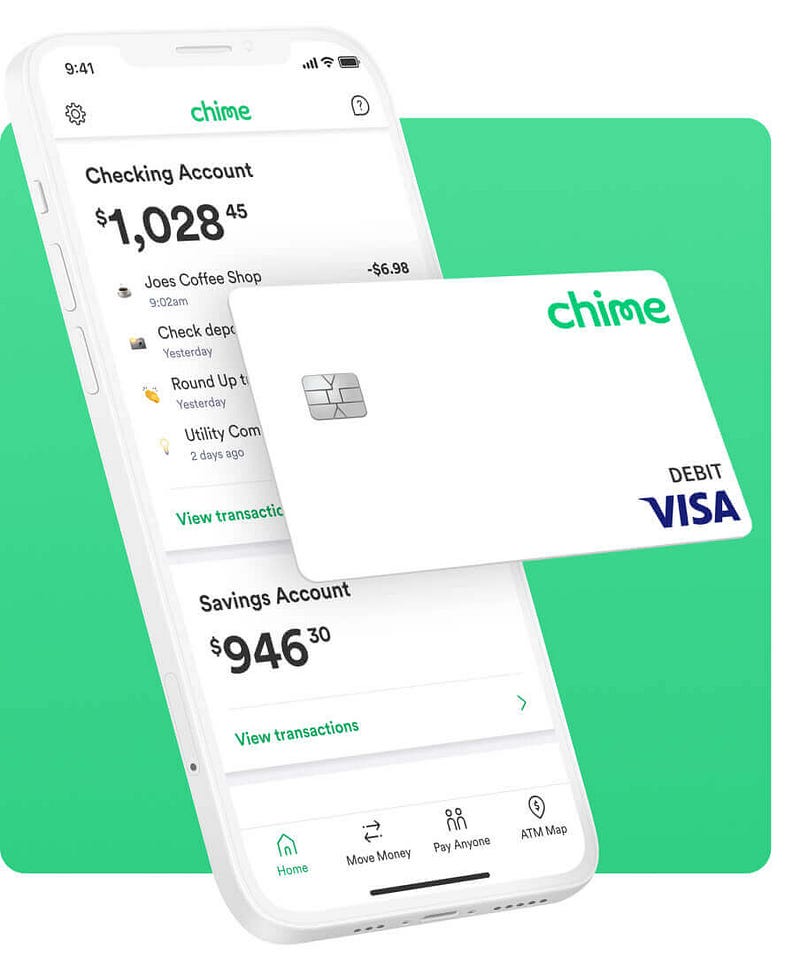
What is Chime: Mobile Banking
Important Features
Scaling Requirements — Capacity Estimation
Data Model — ER requirements
High Level Design
Basic Low Level Design
API Design
Complete Detailed Design
Coming soon! It will be covered on youtube channel.
Subscribe to youtube channel :
Complete Code implementation
System Design — Plenty of Fish : Dating
We will be discussing in depth -
- What is Plenty of Fish : Dating
- Important Features
- Scaling Requirements — Capacity Estimation
- Data Model — ER requirements
- High Level Design
- Basic Low Level Design
- API Design
- Complete Detailed Design
- Complete Code Implementation
What is Plenty of Fish : Dating
Important Features
Scaling Requirements — Capacity Estimation
Data Model — ER requirements
High Level Design
Basic Low Level Design
API Design
Complete Detailed Design
Coming soon! It will be covered on youtube channel.
Subscribe to youtube channel :
Complete Code implementation
System Design — Taobao
We will be discussing in depth -
- What is Taobao
- Important Features
- Scaling Requirements — Capacity Estimation
- Data Model — ER requirements
- High Level Design
- Basic Low Level Design
- API Design
- Complete Detailed Design
- Complete Code Implementation
What is Taobao
Important Features
Scaling Requirements — Capacity Estimation
Data Model — ER requirements
High Level Design
Basic Low Level Design
API Design
Complete Detailed Design
Coming soon! It will be covered on youtube channel.
Subscribe to youtube channel :
Complete Code implementation
System Design — Tencent Chat
We will be discussing in depth -
- What is Tencent Chat
- Important Features
- Scaling Requirements — Capacity Estimation
- Data Model — ER requirements
- High Level Design
- Basic Low Level Design
- API Design
- Complete Detailed Design
- Complete Code Implementation
What is Tencent Chat
Important Features
Scaling Requirements — Capacity Estimation
Data Model — ER requirements
High Level Design
Basic Low Level Design
API Design
Complete Detailed Design
Coming soon! It will be covered on youtube channel.
Subscribe to youtube channel :
Complete Code implementation
System Design — Shopsy
We will be discussing in depth -
- What is Shopsy
- Important Features
- Scaling Requirements — Capacity Estimation
- Data Model — ER requirements
- High Level Design
- Basic Low Level Design
- API Design
- Complete Detailed Design
- Complete Code Implementation

What is Shopsy
Important Features
Scaling Requirements — Capacity Estimation
Data Model — ER requirements
High Level Design
Basic Low Level Design
API Design
Complete Detailed Design
Coming soon! It will be covered on youtube channel.
Subscribe to youtube channel :
Complete Code implementation
System Design — Social Message Board
We will be discussing in depth -
- What is Social Message Board
- Important Features
- Scaling Requirements — Capacity Estimation
- Data Model — ER requirements
- High Level Design
- Basic Low Level Design
- API Design
- Complete Detailed Design
- Complete Code Implementation
What is Social Message Board
Important Features
Scaling Requirements — Capacity Estimation
Data Model — ER requirements
High Level Design
Basic Low Level Design
API Design
Complete Detailed Design
Coming soon! It will be covered on youtube channel.
Subscribe to youtube channel :
Complete Code implementation
Read next — how to Design the Reddit
Day 21 of System Design Case Studies Series : Design Reddit
Complete Design with examples
medium.com
Day 2 : SQL Basics, Query Structure, Built In functions Conditions
Day 4 : Set Theory Operations, Stored Procedures and CASE statements in SQL
Day 6 : Subqueries, Group by, order by and Having clauses in SQL and Analytical Functions
Day 7 : Window Functions, Grouping Sets and Constraints in SQL
Day 8 : BigQuery Basics, SELECT, FROM, WHERE and Date and Extract in BigQuery
Day 9 : Common Expression Table, UNNEST Clause, SQL vs NoSQL Databases
Day 10 : Triggers, Pivot and Cursors in SQL
Day 14 : MySQL in Depth
Day 15 : PostgreSQL inDepth
Anyways, For Day 15 of 15 days of Advanced SQL, we will cover —
PostgreSQL inDepth
Github for Advanced SQL that you can follow —
All the projects, data structures, algorithms, system design, Data Science and ML, Data Engineering, MLOps and Deep Learning videos will be published on our youtube channel ( just launched).
Subscribe today!
System Design Case Studies — In Depth
Complete Data Structures and Algorithm Series
Github —
Complete System Design Series.
6. Networking, How Browsers work, Content Network Delivery ( CDN)
Github —
Subscribe/ Follow, Like/Clap and Stay Tuned!!
Some of the other best Series —
30 days of Data Structures and Algorithms and System Design Simplified
Data Science and Machine Learning Research ( papers) Simplified **
100 days : Your Data Science and Machine Learning Degree Series with projects
Complete Data Visualization and Pre-processing Series with projects
Exceptional Github Repos — Part 1
Exceptional Github Repos — Part 2
Tech Newsletter —
If you are interested, you can join my newsletter through which I send tech interview tips, techniques, patterns, hacks — Software Development, ML, Data Science, Startups and Technology projects to more than 30K readers. You can subscribe to Tech Brew :
For Python Projects —
For complete 60 days of Data Science and ML : Day 1 — Day 60 : Quick Recap of 60 days of Data Science and ML
Follow for more updates. Stay tuned and keep coding!
For other projects, tune to —
Build Machine Learning Pipelines( With Code)
Recurrent Neural Network with Keras
Clustering Geolocation Data in Python using DBSCAN and K-Means
Facial Expression Recognition using Keras
Hyperparameter Tuning with Keras Tuner
Custom Layers in Keras


