
Day 21 of System Design Case Studies Series : Design Reddit, Truecaller, Stripe, Canva, Grammarly, Brainly, Nubank, Crypto.com, Stack Overflow
Complete Design with examples
Hello peeps! Welcome to Day 21 of System Design Case studies series where we will design Reddit, Truecaller, Stripe, Canva, Grammarly, Brainly, Nubank and Crypto.com.
This post has system design for ( scroll till the end of the post)
Note : Please read System Design Important Terms you MUST know and Most Important System Design basics before reading this post.
Projects Videos —
All the projects, data structures, SQL, algorithms, system design, Data Science and ML , Data Analytics, Data Engineering, , Implemented Data Science and ML projects, Implemented Data Engineering Projects, Implemented Deep Learning Projects, Implemented Machine Learning Ops Projects, Implemented Time Series Analysis and Forecasting Projects, Implemented Applied Machine Learning Projects, Implemented Tensorflow and Keras Projects, Implemented PyTorch Projects, Implemented Scikit Learn Projects, Implemented Big Data Projects, Implemented Cloud Machine Learning Projects, Implemented Neural Networks Projects, Implemented OpenCV Projects,Complete ML Research Papers Summarized, Implemented Data Analytics projects, Implemented Data Visualization Projects, Implemented Data Mining Projects, Implemented Natural Leaning Processing Projects, MLOps and Deep Learning, Applied Machine Learning with Projects Series, PyTorch with Projects Series, Tensorflow and Keras with Projects Series, Scikit Learn Series with Projects, Time Series Analysis and Forecasting with Projects Series, ML System Design Case Studies Series videos will be published on our youtube channel ( just launched).
Subscribe today!
System Design Case Studies — In Depth
Design Tinder
Design TikTok
Design Twitter
Design URL Shortener
Design Dropbox
Design Youtube
Design API Rate Limiter
Design Web Crawler
Design Facebook’s Newsfeed
Design Yelp
Design Instagram
Design Messenger App
Design Uber
Most Popular System Design Questions
Mega Compilation : Solved System Design Case studies
We will be discussing in depth -
- What is Reddit
- Important Features
- Scaling Requirements — Capacity Estimation
- Data Model — ER requirements
- High Level Design
- Basic Low level design
- API Design
- Complete Detailed Design
Pre-requisite to this post -
Complete System Design Series — Important Concepts that you should know before starting the Case studies
6. Networking, How Browsers work, Content Network Delivery ( CDN)
13. System Design Template — How to solve any System Design Question
Github —
Day 1 of System Design Case Studies can be found below-
Day 2 of System Design Case Studies can be found below-
Day 3 of System Design Case Studies can be found below-
Day 4 of System Design Case Studies can be found below-
What is Reddit?

Reddit is a social forum and news website which lets users —
- Create posts
- Vote — Upvote/downvote
- Engage with posts with Comments or awards or share or report
- Search the post or reddit community
- Submit or share links/pictures/text
- Create Community rules
- Advertise your product
- Save your favorite posts
- Create tags based on the content posted like OC ( Original Content), Spoiler, Flair etc
It has subreddits ( r/ ) used to create and cover the different topics like r/travel, r/USA, r/baseball etc.
The homepage has most popular posts that are trending on the site aggregated from different subreddits. One can also see the new posts or top posts via home page. The posts can be sorted by location, communities, trends etc.
Users can be both mobile based and web based.
To design Reddit, you would need to consider the following elements:
- User registration and login: Users need to be able to create accounts and log in to the website in order to submit and vote on content.
- Subreddit creation and management: Reddit is organized into “subreddits,” which are essentially sub-communities focused on specific topics. Users should be able to create and manage their own subreddits.
- Content submission and voting: Users should be able to submit text, images, and other types of content to the website, and other users should be able to vote on that content.
- Commenting: Users should be able to leave comments on content, and other users should be able to reply to those comments.
- Moderation: Reddit has a team of volunteer moderators who help to keep the website free of spam and inappropriate content. You would need to design a system for moderating content and managing moderators.
- Search and discovery: Users should be able to find content on the website by searching for keywords and browsing through different subreddits.
- Analytics: To measure the performance of the website and make data-driven decisions, you would need to include an analytics system to track user engagement, traffic, and other metrics.
- Mobile compatibility: Design a mobile-responsive website or mobile application to make it easy for users to access the website from their smartphones or tablets.
Important Features
We will consider the most important features —
Create Posts
Search Posts
Engage with the posts — Comments or awards or share or report or votes
Scaling Requirements — Capacity Estimation
For the sake of simplicity, I’ll show a small scale simulation.
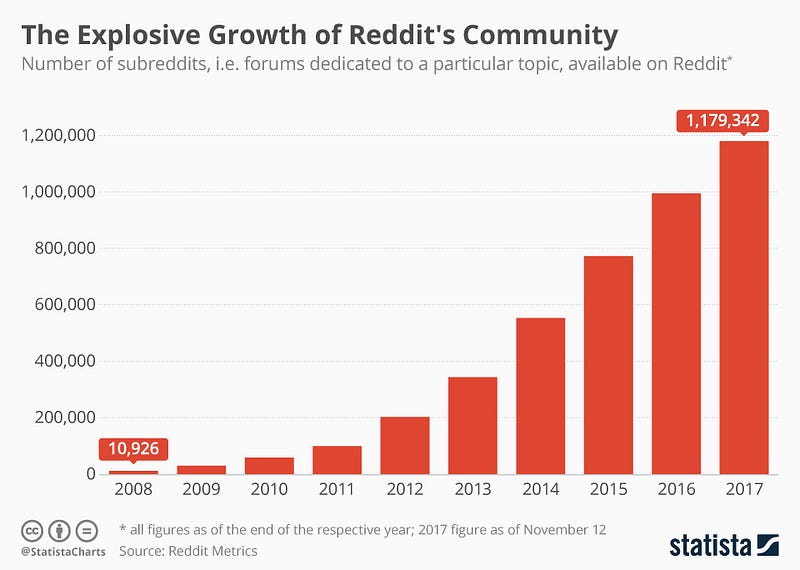
Let’s say we have —
Daily active users ( DAU) : 20 million
No of posts on the home page : 10
No of visits per user per day : 3
Total no of visits to the home page per day : 20 Million * 3 = 60 Million/day
For all 10 posts = 60 Million * 10 = 600 Million
For Posts
Post title be 30 characters * 3 bytes/character = 90 bytes
Comments be 4 bytes
Date of post be 8 bytes
Text be 500 characters so thats 500 characters * 2 bytes/character = 1000 bytes
Images be 200 KB
Total = 4 KB
Total Storage per day : 600 Million* 4 KB = 2.4 TB/day
For next 3 years, 2.4 TB* 3 * 365 = 2.62 PB
Data Model — ER requirements
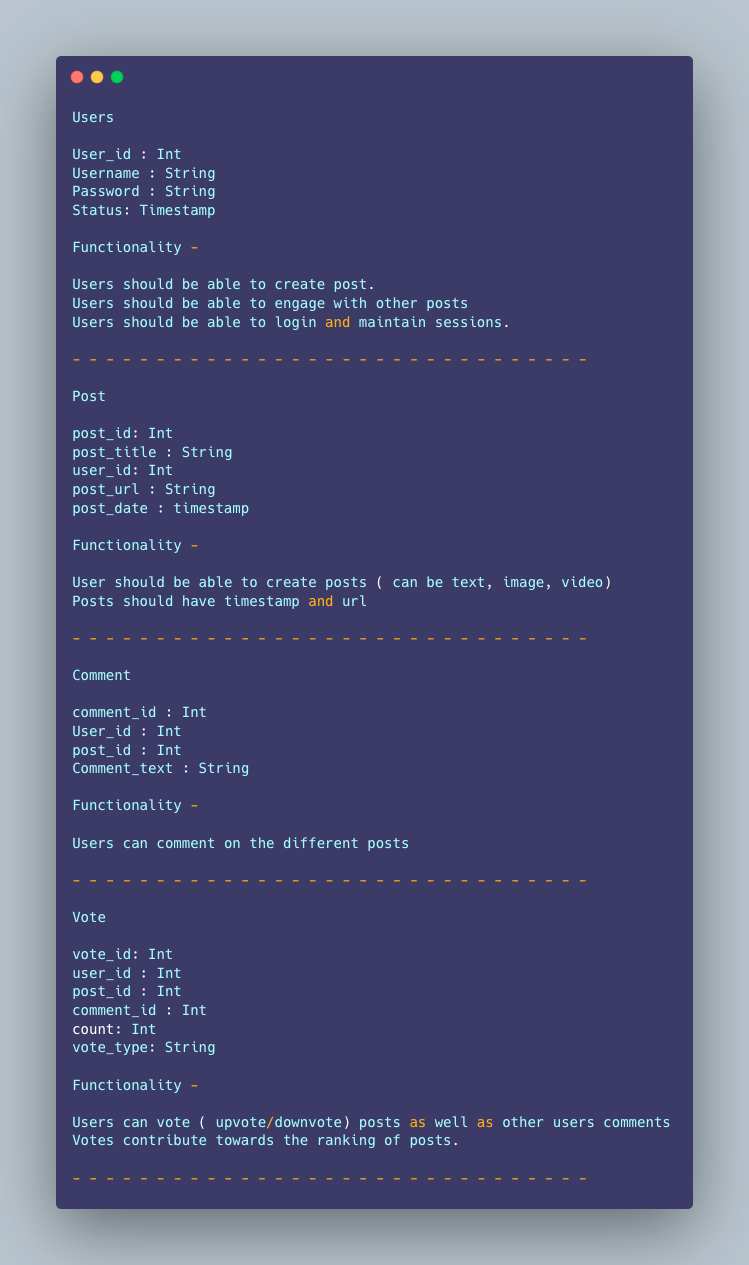
Users
User_id : Int
Username : String
Password : String
Status: Timestamp
Functionality —
- Users should be able to create post.
- Users should be able to engage with other posts
- Users should be able to login and maintain sessions.
— — — — — — — — — — — — — — — — — — — — — — — — — — — — — — -
Post
post_id: Int
post_title : String
user_id: Int
post_url : String
post_date : timestamp
Functionality —
- User should be able to create posts ( can be text, image, video)
- Posts should have timestamp and url
— — — — — — — — — — — — — — — — — — — — — — — — — — — — — — -
Comment
comment_id : Int
User_id : Int
post_id : Int
Comment_text : String
Functionality —
- Users can comment on the different posts
— — — — — — — — — — — — — — — — — — — — — — — — — — — — — — -
Vote
vote_id: Int
user_id : Int
post_id : Int
comment_id : Int
count: Int
vote_type: String
Functionality —
- Users can vote ( upvote/downvote) posts as well as other users comments
- Votes contribute towards the ranking of posts.
— — — — — — — — — — — — — — — — — — — — — — — — — — — — — — -
High Level Design
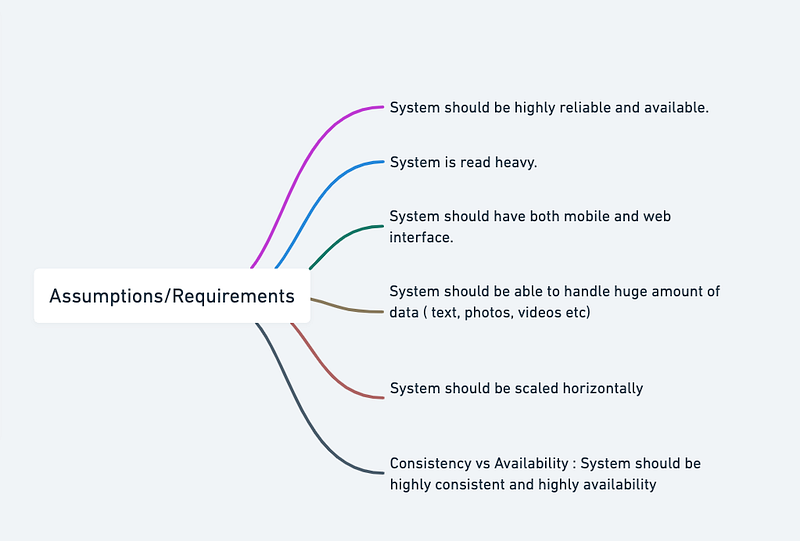
Assumptions on technical aspects —
- System should be highly reliable and available.
- System is read heavy.
- System should have both mobile and web interface.
- System should be able to handle huge amount of data ( text, photos, videos etc)
- System should be scaled horizontally
- Consistency vs Availability : System should be highly consistent and highly availability
Components
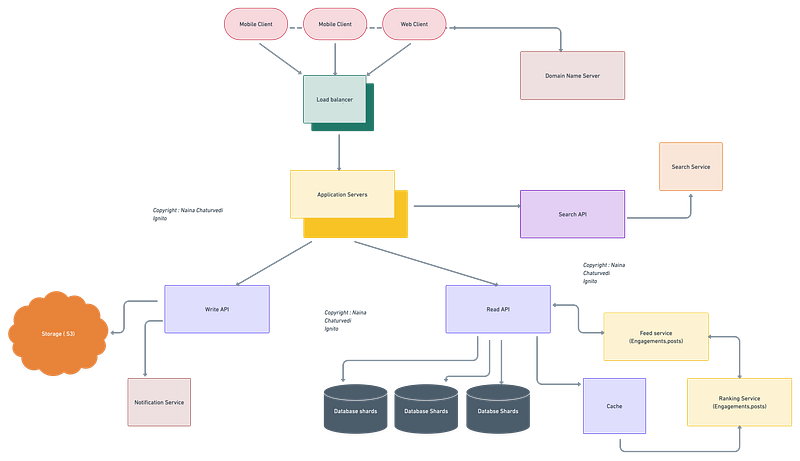
- Client : Both mobile and web Users
- Application Servers : Should be able to talk each other
- Load Balancers : To allocate requests to designated Application server using consistent hashing
- Database : Cassandra db or Hbase — Key value stores allow for great horizontal scaling and low latency to access data. HBase is a column-oriented key-value NoSQL database.
- Sessions Service : To store the sessions information of the different users
- Cache
- Media Storage ( S3) : To store photos/videos
- Content Delivery Network
- Notification Service : To push notifications to the users when the status is offline
Services
- Sessions Service — To store the sessions information of different users
- Post Service — To create and store the posts by the users.
- Notification Service — To push notifications.
- User Profile Service — To store users profile information and keep updating.
- Feed Service — To create and store feed for the users.
- Ranking Service — To rank the posts ( based on which the feed is created).
- Search Service — To handle search Functionality
Implementation of these services in Python:
import time
from datetime import datetime
# Sessions Service
class SessionsService:
def __init__(self):
self.sessions = {} def start_session(self, user_id):
session_id = self.generate_session_id()
self.sessions[session_id] = {"user_id": user_id, "start_time": time.time()}
return session_id def end_session(self, session_id):
if session_id in self.sessions:
del self.sessions[session_id] def generate_session_id(self):
# Implement a unique ID generation method
return "session-id-1"# Post Service
class PostService:
def __init__(self):
self.posts = [] def create_post(self, user_id, text):
post_id = self.generate_post_id()
post = {"id": post_id, "user_id": user_id, "text": text, "timestamp": time.time()}
self.posts.append(post)
return post_id def get_post(self, post_id):
for post in self.posts:
if post["id"] == post_id:
return post def generate_post_id(self):
# Implement a unique ID generation method
return "post-id-1"# Notification Service
class NotificationService:
def __init__(self):
self.notifications = [] def push_notification(self, user_id, text):
notification_id = self.generate_notification_id()
notification = {"id": notification_id, "user_id": user_id, "text": text}
self.notifications.append(notification)
return notification_id def generate_notification_id(self):
# Implement a unique ID generation method
return "notification-id-1"# User Profile Service
class ProfileService:
def __init__(self):
self.profiles = {} def create_profile(self, user_id, name, email):
profile = {"user_id": user_id, "name": name, "email": email}
self.profiles[user_id] = profile
return profile def update_profile(self, user_id, updates):
if user_id in self.profiles:
self.profiles[user_id].update(updates)
return self.profiles[user_id]# Feed Service
class FeedService:
def __init__(self, post_service, ranking_service):
self.post_service = post_service
self.ranking_service = ranking_service def get_feed(self, user_id):
posts = self.post_service.posts
ranked_posts = self.ranking_service.rank_posts(posts)
return [post for post in ranked_posts if post["user_id"] != user_id]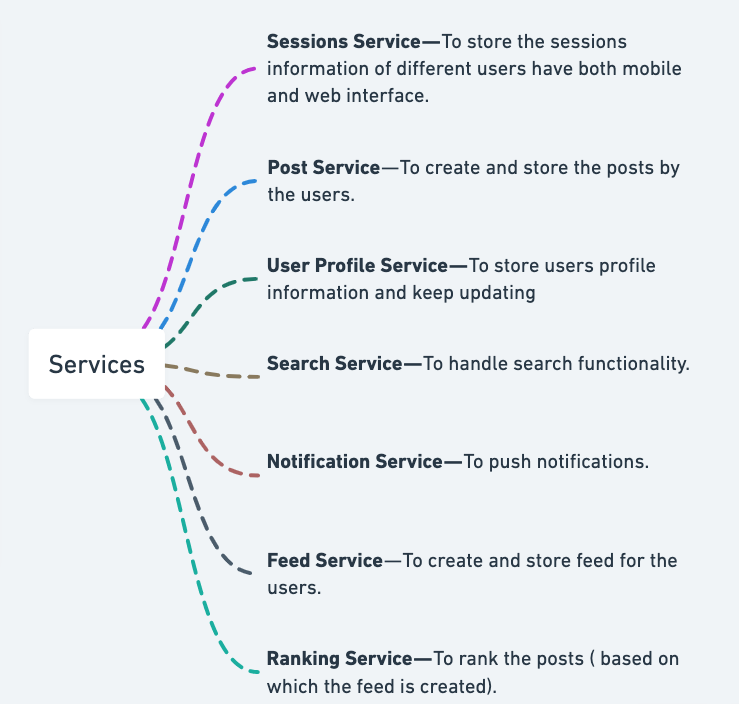
A microservice for a Reddit in Python using Flask:
import flask
import pymongo
app = flask.Flask(__name__)# Connect to the database
client = pymongo.MongoClient("mongodb://localhost:27017/")
db = client["reddit"]
posts = db["posts"]# Define an endpoint for retrieving a list of posts
@app.route("/posts", methods=["GET"])
def get_posts():
# Retrieve a list of posts from the database
post_list = list(posts.find({})) # Return the list of posts
return flask.jsonify(post_list)# Define an endpoint for creating a new post
@app.route("/posts", methods=["POST"])
def create_post():
# Retrieve the post information from the request body
post = flask.request.json # Insert the post into the database
result = posts.insert_one(post) # Return success
return flask.jsonify({})# Example usage
if __name__ == "__main__":
app.run(port=5001)In this code, the microservice provides a single endpoint for each of the following operations: retrieving a list of posts and creating a new post. The microservice communicates with a MongoDB database to perform these operations.
Basic Low Level Design
import java.util.*;

class User {
    private String username;
    private String password;
    private List<Post> posts;
    // ...

    public User(String username, String password) {
        this.username = username;
        this.password = password;
        this.posts = new ArrayList<>();
    }

    // Getters and setters
    // ...
}

class Post {
    private String postId;
    private String title;
    private String content;
    private User author;
    private List<Comment> comments;
    // ...

    public Post(String postId, String title, String content, User author) {
        this.postId = postId;
        this.title = title;
        this.content = content;
        this.author = author;
        this.comments = new ArrayList<>();
    }

    // Getters and setters
    // ...
}

class Comment {
    private String commentId;
    private String text;
    private User commenter;
    // ...

    public Comment(String commentId, String text, User commenter) {
        this.commentId = commentId;
        this.text = text;
        this.commenter = commenter;
    }

    // Getters and setters
    // ...
}

class RedditSystem {
    private List<User> users;
    private List<Post> posts;
    // ...

    public RedditSystem() {
        this.users = new ArrayList<>();
        this.posts = new ArrayList<>();
    }

    public void registerUser(String username, String password) {
        User newUser = new User(username, password);
        users.add(newUser);
        System.out.println("User registered successfully.");
    }

    public void createPost(String username, String postId, String title, String content) {
        User author = findUserByUsername(username);
        if (author != null) {
            Post newPost = new Post(postId, title, content, author);
            author.getPosts().add(newPost);
            posts.add(newPost);
            System.out.println("Post created successfully.");
        } else {
            System.out.println("User not found.");
        }
    }

    public void addComment(String postId, String commenterUsername, String commentId, String text) {
        Post post = findPostById(postId);
        User commenter = findUserByUsername(commenterUsername);
        if (post != null && commenter != null) {
            Comment newComment = new Comment(commentId, text, commenter);
            post.getComments().add(newComment);
            System.out.println("Comment added successfully.");
        } else {
            System.out.println("Post or commenter not found.");
        }
    }

    public User findUserByUsername(String username) {
        for (User user : users) {
            if (user.getUsername().equals(username)) {
                return user;
            }
        }
        return null;
    }

    public Post findPostById(String postId) {
        for (Post post : posts) {
            if (post.getPostId().equals(postId)) {
                return post;
            }
        }
        return null;
    }
}

public class RedditApp {
    public static void main(String[] args) {
        RedditSystem reddit = new RedditSystem();

        // Register users
        reddit.registerUser("user1", "password1");
        reddit.registerUser("user2", "password2");

        // Create posts
        reddit.createPost("user1", "post1", "Title 1", "Content 1");
        reddit.createPost("user2", "post2", "Title 2", "Content 2");

        // Add comments
        reddit.addComment("post1", "user2", "comment1", "Comment 1 on post 1");
        reddit.addComment("post2", "user1", "comment2", "Comment 2 on post 2");
    }
}
API Design
API design for Reddit using Python Flask framework:
from flask import Flask, request, jsonifyapp = Flask(__name__)@app.route('/api/v1/posts', methods=['GET'])
def get_posts():
# code to fetch all posts from the database
return jsonify(posts)@app.route('/api/v1/posts/<string:id>', methods=['GET'])
def get_post(id):
# code to fetch a post by id from the database
return jsonify(post)@app.route('/api/v1/posts', methods=['POST'])
def add_post():
# code to add a new post to the database
return jsonify({'message': 'Post added successfully'})@app.route('/api/v1/posts/<string:id>', methods=['PUT'])
def update_post(id):
# code to update a post by id in the database
return jsonify({'message': 'Post updated successfully'})@app.route('/api/v1/posts/<string:id>', methods=['DELETE'])
def delete_post(id):
# code to delete a post by id from the database
return jsonify({'message': 'Post deleted successfully'})In the code above, we’ve defined five endpoints for our Reddit API:
- GET /api/v1/posts: Returns a list of all posts in the database.
- GET /api/v1/posts/:id: Returns a specific post by its ID.
- POST /api/v1/posts: Adds a new post to the database.
- PUT /api/v1/posts/:id: Updates a specific post by its ID.
- DELETE /api/v1/posts/:id: Deletes a specific post by its ID.
These endpoints can be tested using a tool like Postman or by making requests to the API using Python code.
An API for a Reddit in Python using Flask:
import flask
import pymongo
app = flask.Flask(__name__)# Connect to the database
client = pymongo.MongoClient("mongodb://localhost:27017/")
db = client["reddit"]
posts = db["posts"]# Define an endpoint for retrieving a list of posts
@app.route("/posts", methods=["GET"])
def get_posts():
# Retrieve a list of posts from the database
post_list = list(posts.find({})) # Return the list of posts
return flask.jsonify(post_list)# Define an endpoint for retrieving a specific post
@app.route("/posts/<post_id>", methods=["GET"])
def get_post(post_id):
# Retrieve the specified post from the database
post = posts.find_one({"_id": post_id}) # Return the post
return flask.jsonify(post)# Define an endpoint for creating a new post
@app.route("/posts", methods=["POST"])
def create_post():
# Retrieve the post information from the request body
post = flask.request.json # Insert the post into the database
result = posts.insert_one(post) # Return success
return flask.jsonify({})# Example usage
if __name__ == "__main__":
app.run(port=5001)In this code, the API provides three endpoints for the following operations: retrieving a list of posts, retrieving a specific post, and creating a new post. The API communicates with a MongoDB database to perform these operations.
API design will be further discussed in the workflow video ( Coming soon. Subscribe Today)
Complete Detailed Design
( Zoom it)
Code
Reddit is a social news aggregation, web content rating, and discussion website. Users can create posts, vote on them (upvote/downvote), engage with them by commenting, awarding, sharing, or reporting. Reddit also has a search feature to find posts or communities, and users can submit links, pictures, or text to the site. Users can also create their own communities on Reddit, with their own set of rules, where they can share posts, engage with users, and advertise their products. Reddit allows users to save their favorite posts, and tag posts with various labels like OC (Original Content), Spoiler, Flair, etc.
In order to implement these features in Python, we need to use Reddit’s API. Reddit’s API provides a way to access Reddit’s functionality and data programmatically. We will be using the PRAW (Python Reddit API Wrapper) library to interact with Reddit’s API.
Implementation:
Here’s implementation code that demonstrates how to perform the following actions on Reddit using Python and PRAW:
- Create a post:
import praw# Authenticate with Reddit API
reddit = praw.Reddit(client_id='CLIENT_ID',
client_secret='CLIENT_SECRET',
username='USERNAME',
password='PASSWORD',
user_agent='USER_AGENT')# Create a post on a subreddit
subreddit = reddit.subreddit('SUBREDDIT_NAME')
title = 'This is the title of my post'
body = 'This is the body of my post'
subreddit.submit(title, selftext=body)- Upvote/downvote a post:
import praw# Authenticate with Reddit API
reddit = praw.Reddit(client_id='CLIENT_ID',
client_secret='CLIENT_SECRET',
username='USERNAME',
password='PASSWORD',
user_agent='USER_AGENT')# Upvote a post
post = reddit.submission(id='POST_ID')
post.upvote()# Downvote a post
post.downvote()- Engage with posts using Comments, Awards, Share, or Report:
import praw# Authenticate with Reddit API
reddit = praw.Reddit(client_id='CLIENT_ID',
client_secret='CLIENT_SECRET',
username='USERNAME',
password='PASSWORD',
user_agent='USER_AGENT')# Comment on a post
post = reddit.submission(id='POST_ID')
comment_text = 'This is my comment on the post'
post.reply(comment_text)# Give an award to a post
post.give_award('AWARD_NAME')# Share a post
post.share()# Report a post
post.report('RULE_VIOLATION')- Search for a post or Reddit community:
import praw# Authenticate with Reddit API
reddit = praw.Reddit(client_id='CLIENT_ID',
client_secret='CLIENT_SECRET',
username='USERNAME',
password='PASSWORD',
user_agent='USER_AGENT')# Search for a post
results = reddit.subreddit('SUBREDDIT_NAME').search('SEARCH_QUERY')# Search for a Reddit community
results = reddit.subreddit.search_by_name('SUBREDDIT_NAME')- Submit or share links/pictures/text:
import praw
# Authenticate with Reddit API
reddit = praw.Reddit(client_id='CLIENT_ID',
                     client_secret='CLIENT_SECRET',
                     username='USERNAME',
                     password='PASSWORD',
                     user_agent='USER_AGENT')
# Submit a picture
subreddit = reddit.subreddit('SUBREDDIT_NAME')
image_path = 'path/to/image.jpg'
subreddit.submit_image(image_path)
# Submit a text post
subreddit = reddit.subreddit('SUBREDDIT_NAME')
title = 'This is the title of my post'
body = 'This is the body of my post'
subreddit.submit(title, selftext=body)- Create community rules:
import praw
# Authenticate with Reddit API
reddit = praw.Reddit(client_id='CLIENT_ID',
                     client_secret='CLIENT_SECRET',
                     username='USERNAME',
                     password='PASSWORD',
                     user_agent='USER_AGENT')
# Create community rules
subreddit = reddit.subreddit('SUBREDDIT_NAME')
rules = [
'Rule 1: Be respectful to others',
'Rule 2: No spamming or self-promotion',
'Rule 3: No hate speech or personal attacks'
]
subreddit.mod.update(rules=rules)- Advertise your product:
import praw
# Authenticate with Reddit API
reddit = praw.Reddit(client_id='CLIENT_ID',
                     client_secret='CLIENT_SECRET',
                     username='USERNAME',
                     password='PASSWORD',
                     user_agent='USER_AGENT')
# Advertise your product on a subreddit
subreddit = reddit.subreddit('SUBREDDIT_NAME')
title = 'Check out my product'
body = 'Here is a link to my website: https://www.example.com'
subreddit.submit(title, selftext=body)- Save your favorite posts:
import praw
# Authenticate with Reddit API
reddit = praw.Reddit(client_id='CLIENT_ID',
                     client_secret='CLIENT_SECRET',
                     username='USERNAME',
                     password='PASSWORD',
                     user_agent='USER_AGENT')
# Save a post
post = reddit.submission(id='POST_ID')
post.save()- Create tags based on the content posted like OC (Original Content), Spoiler, Flair, etc:
import praw

# Authenticate with Reddit API
reddit = praw.Reddit(client_id='CLIENT_ID',
                     client_secret='CLIENT_SECRET',
                     username='USERNAME',
                     password='PASSWORD',
                     user_agent='USER_AGENT')

# Add a flair to a post
post = reddit.submission(id='POST_ID')
post.flair.select('FLAIR_NAME')
More on Reddit System Design —
User Management:
User registration, authentication, and authorization.
class User:
    def __init__(self, username, password):
        self.username = username
        self.password = password
class UserManagementSystem:
def __init__(self):
self.users = {} def register_user(self, username, password):
if username in self.users:
raise ValueError("Username already exists.")
user = User(username, password)
self.users[username] = user def authenticate_user(self, username, password):
user = self.users.get(username)
if user and user.password == password:
return True
return False def authorize_user(self, username, role):
user = self.users.get(username)
if user:
user.role = role
else:
raise ValueError("User not found.")# Example usage
user_management = UserManagementSystem()
user_management.register_user("john", "password123")
authenticated = user_management.authenticate_user("john", "password123")
user_management.authorize_user("john", "admin")User profile management and personalization.
class UserProfile:
    def __init__(self, username, name, email):
        self.username = username
        self.name = name
        self.email = email
        self.bio = ""
        self.avatar_url = ""
def update_bio(self, bio):
self.bio = bio def update_avatar(self, avatar_url):
self.avatar_url = avatar_url# Example usage
user_profile = UserProfile("john", "John Doe", "john@example.com")
user_profile.update_bio("I'm a software engineer.")
user_profile.update_avatar("https://example.com/avatar.jpg")Managing user preferences and subscriptions.
class UserPreferences:
    def __init__(self):
        self.theme = "light"
        self.timezone = "UTC"
        self.subscribed_subreddits = []
def update_theme(self, theme):
self.theme = theme def update_timezone(self, timezone):
self.timezone = timezone def subscribe_to_subreddit(self, subreddit):
if subreddit not in self.subscribed_subreddits:
self.subscribed_subreddits.append(subreddit) def unsubscribe_from_subreddit(self, subreddit):
if subreddit in self.subscribed_subreddits:
self.subscribed_subreddits.remove(subreddit)# Example usage
user_preferences = UserPreferences()
user_preferences.update_theme("dark")
user_preferences.update_timezone("GMT+1")
user_preferences.subscribe_to_subreddit("programming")
user_preferences.unsubscribe_from_subreddit("funny")Post and Comment Management:
Designing systems for creating, storing, and retrieving posts and comments.
class Post:
    def __init__(self, title, content, author):
        self.title = title
        self.content = content
        self.author = author
        self.comments = []
def add_comment(self, comment):
self.comments.append(comment)class Comment:
def __init__(self, content, author):
self.content = content
self.author = author# Example usage
post = Post("Hello, World!", "This is my first post.", "john")
comment1 = Comment("Nice post!", "alice")
comment2 = Comment("I agree with you.", "bob")
post.add_comment(comment1)
post.add_comment(comment2)Handling post categorization (subreddits) and sorting algorithms.
class Subreddit:
    def __init__(self, name):
        self.name = name
        self.posts = []
def add_post(self, post):
self.posts.append(post)def get_posts_sorted_by_date(self):
sorted_posts = sorted(self.posts, key=lambda post: post.date_created, reverse=True )
return sorted_posts subreddit = Subreddit("programming")
post1 = Post("Python Basics", "Learn the fundamentals of Python programming.", "john")
post2 = Post("Web Development", "Discover the world of web development.", "alice")
subreddit.add_post(post1)
subreddit.add_post(post2)
sorted_posts = subreddit.get_posts_sorted_by_date()Implementing features like upvoting, downvoting, and saving posts/comments.
class Post:
def __init__(self, title, content, author):
self.title = title
self.content = content
self.author = author
self.upvotes = 0
self.downvotes = 0
self.saved = False def upvote(self):
self.upvotes += 1 def downvote(self):
self.downvotes += 1 def save(self):
self.saved = True# Example usage
post = Post("Hello, World!", "This is my first post.", "john")
post.upvote()
post.upvote()
post.downvote()
post.save()Community Moderation:
Implementing moderation tools and permissions.
class Moderator:
def __init__(self, username):
self.username = username
self.permissions = [] def grant_permission(self, permission):
if permission not in self.permissions:
self.permissions.append(permission) def revoke_permission(self, permission):
if permission in self.permissions:
self.permissions.remove(permission)# Example usage
moderator = Moderator("alice")
moderator.grant_permission("delete_post")
moderator.revoke_permission("edit_user")Designing systems for flagging, reporting, and removing inappropriate content.
class FlaggedContent:
def __init__(self, content, reporter):
self.content = content
self.reporter = reporter
self.status = "pending" def mark_as_resolved(self):
self.status = "resolved" def mark_as_dismissed(self):
self.status = "dismissed"# Example usage
flagged_content = FlaggedContent("Inappropriate post.", "alice")
flagged_content.mark_as_resolved()Enforcing community guidelines and rules.
class Community:
def __init__(self, name):
self.name = name
self.guidelines = [] def add_guideline(self, guideline):
self.guidelines.append(guideline) def remove_guideline(self, guideline):
if guideline in self.guidelines:
self.guidelines.remove(guideline)# Example usage
community = Community("programming")
community.add_guideline("No spamming.")
community.add_guideline("Be respectful to others.")
community.remove_guideline("No spamming.")Ranking and Recommendations:
Designing ranking algorithms to determine post and comment visibility.
class Post:
def __init__(self, title, content, author):
self.title = title
self.content = content
self.author = author
self.upvotes = 0 def increase_upvotes(self):
self.upvotes += 1class RankingAlgorithm:
@staticmethod
def hotness(post):
return post.upvotes @staticmethod
def relevance(post):
# Custom relevance calculation
return post.upvotes * 0.5# Example usage
post1 = Post("Python Basics", "Learn the fundamentals of Python programming.", "john")
post2 = Post("Web Development", "Discover the world of web development.", "alice")
post1.increase_upvotes()
post2.increase_upvotes() # Ranking using hotness algorithm hotness_ranking = sorted([post1, post2], key=RankingAlgorithm.hotness, reverse=True) # Ranking using relevance algorithm relevance_ranking = sorted([post1, post2], key=RankingAlgorithm.relevance, reverse=True)Handling hot, top, and new sorting.
class PostManager:
def __init__(self):
self.posts = [] def add_post(self, post):
self.posts.append(post) def get_hot_posts(self, limit):
hot_posts = sorted(self.posts, key=RankingAlgorithm.hotness, reverse=True)
return hot_posts[:limit] def get_top_posts(self, limit):
top_posts = sorted(self.posts, key=RankingAlgorithm.relevance, reverse=True)
return top_posts[:limit] def get_new_posts(self, limit):
new_posts = sorted(self.posts, key=lambda post: post.date_created, reverse=True)
return new_posts[:limit]# Example usage
post_manager = PostManager()
post1 = Post("Python Basics", "Learn the fundamentals of Python programming.", "john")
post2 = Post("Web Development", "Discover the world of web development.", "alice")
post_manager.add_post(post1)
post_manager.add_post(post2)
hot_posts = post_manager.get_hot_posts(5)
top_posts = post_manager.get_top_posts(5)
new_posts = post_manager.get_new_posts(5)Utilizing user-based recommendations and content discovery techniques.
class User:
def __init__(self, username):
self.username = username
self.liked_posts = [] def like_post(self, post):
if post not in self.liked_posts:
self.liked_posts.append(post)class RecommendationSystem:
def __init__(self, post_manager):
self.post_manager = post_manager def recommend_posts(self, user, limit):
user_liked_posts = user.liked_posts
all_posts = self.post_manager.posts
recommended_posts = [post for post in all_posts if post not in user_liked_posts]
sorted_posts = sorted(recommended_posts, key=RankingAlgorithm.relevance, reverse=True)
return sorted_posts[:limit]# Example usage
user = User("john")
user.like_post(post1)
recommendation_system = RecommendationSystem(post_manager)
recommended_posts = recommendation_system.recommend_posts(user, 3)Messaging and Notifications:
Enabling messaging and communication between users.
class Message:
def __init__(self, sender, receiver, content):
self.sender = sender
self.receiver = receiver
self.content = content
self.timestamp = datetime.now()class MessagingSystem:
def __init__(self):
self.messages = [] def send_message(self, sender, receiver, content):
message = Message(sender, receiver, content)
self.messages.append(message) def get_messages(self, user):
user_messages = [message for message in self.messages if message.receiver == user]
user_messages.sort(key=lambda message: message.timestamp)
return user_messages# Example usage
messaging_system = MessagingSystem()
messaging_system.send_message("john", "alice", "Hi Alice, how are you?")
messaging_system.send_message("alice", "john", "Hi John, I'm doing great!")
user_messages = messaging_system.get_messages("john")Implementing notifications for replies, mentions, and private messages.
class Notification:
def __init__(self, recipient, content):
self.recipient = recipient
self.content = content
self.timestamp = datetime.now()
class NotificationSystem:
def __init__(self):
self.notifications = []
def send_notification(self, recipient, content):
notification = Notification(recipient, content)
self.notifications.append(notification)
def get_notifications(self, recipient):
user_notifications = [notification for notification in self.notifications if notification.recipient == recipient]
user_notifications.sort(key=lambda notification: notification.timestamp)
return user_notifications
# Example usage
notification_system = NotificationSystem()
notification_system.send_notification("john", "You have a new reply.")
notification_system.send_notification("alice", "You were mentioned in a post.")
user_notifications = notification_system.get_notifications("john")Designing systems for real-time updates and push notifications.
import pusherclass RealTimeUpdateSystem:
def __init__(self):
self.pusher = pusher.Pusher(
app_id="APP_ID",
key="KEY",
secret="SECRET",
cluster="CLUSTER",
ssl=True
) def send_realtime_update(self, channel, event, data):
self.pusher.trigger(channel, event, data)# Example usage
realtime_update_system = RealTimeUpdateSystem()
realtime_update_system.send_realtime_update("notifications", "new_notification", {"message": "You have a new notification."})Search and Discovery:
Implementing search functionalities to help users discover posts and subreddits.
class SearchEngine:
def __init__(self, post_manager):
self.post_manager = post_manager def search_posts(self, query):
all_posts = self.post_manager.posts
matching_posts = [post for post in all_posts if query.lower() in post.title.lower()]
return matching_postsclass SubredditManager:
def __init__(self):
self.subreddits = [] def create_subreddit(self, name):
subreddit = Subreddit(name)
self.subreddits.append(subreddit)
return subreddit def search_subreddits(self, query):
matching_subreddits = [subreddit for subreddit in self.subreddits if query.lower() in subreddit.name.lower()]
return matching_subreddits# Example usage
search_engine = SearchEngine(post_manager)
matching_posts = search_engine.search_posts("Python")
subreddit_manager = SubredditManager()
subreddit1 = subreddit_manager.create_subreddit("programming")
subreddit2 = subreddit_manager.create_subreddit("python")
matching_subreddits = subreddit_manager.search_subreddits("python")Designing ranking algorithms for search results.
class RankingAlgorithm:
@staticmethod
def relevance(post, query):
# Custom relevance calculation based on post content and query
return len(post.content) - post.content.lower().count(query.lower())# Example usage
matching_posts = search_engine.search_posts("Python")
sorted_posts = sorted(matching_posts, key=lambda post: RankingAlgorithm.relevance(post, "Python"), reverse=True)Utilizing search indexing and optimization techniques.
import whoosh.index as index
from whoosh.fields import Schema, TEXT, ID
from whoosh.qparser import QueryParserclass SearchIndex:
def __init__(self):
self.schema = Schema(title=TEXT(stored=True), content=TEXT(stored=True), author=ID(stored=True))
self.ix = index.create_in("index_dir", self.schema)
self.writer = self.ix.writer() def index_post(self, post):
self.writer.add_document(title=post.title, content=post.content, author=post.author)def search_posts(self, query):
with self.ix.searcher() as searcher:
query_parser = QueryParser("content", self.ix.schema)
parsed_query = query_parser.parse(query)
search_results = searcher.search(parsed_query, limit=None)
matching_posts = [dict(result) for result in search_results]
return matching_posts
# Example usage
search_index = SearchIndex()
post1 = Post("Python Basics", "Learn the fundamentals of Python programming.", "john")
post2 = Post("Web Development", "Discover the world of web development.", "alice")
search_index.index_post(post1)
search_index.index_post(post2)
matching_posts = search_index.search_posts("Python")Multilingual Support:
Designing systems to support multiple languages and character sets.
class LanguageManager:
def __init__(self):
self.supported_languages = ["English", "Spanish", "French"]
self.language_communities = {}
def create_language_community(self, language):
if language not in self.supported_languages:
return None
if language not in self.language_communities:
self.language_communities[language] = Community(language)
return self.language_communities[language]
# Example usage
language_manager = LanguageManager()
english_community = language_manager.create_language_community("English")
spanish_community = language_manager.create_language_community("Spanish")
french_community = language_manager.create_language_community("French")Handling content translation and localization.
class TranslationService:
def __init__(self):
self.translations = {}
def translate_content(self, content, source_language, target_language):
translation_key = f"{source_language}_{target_language}"
if translation_key not in self.translations:
# Implement translation logic using external translation service or library
translated_content = translate(content, source_language, target_language)
self.translations[translation_key] = translated_content
return self.translations[translation_key]
# Example usage
translation_service = TranslationService()
translated_content = translation_service.translate_content("Hello", "English", "Spanish")Enabling language-specific communities and filters.
class Community:
def __init__(self, name, language):
self.name = name
self.language = language
self.posts = []
    def add_post(self, post):
        self.posts.append(post)
def filter_posts_by_language(self, target_language):
filtered_posts = [post for post in self.posts if post.language == target_language]
return filtered_posts
# Example usage
english_community = Community("programming", "English")
english_community.add_post(post1)
english_community.add_post(post2)
filtered_posts = english_community.filter_posts_by_language("Spanish")API Design and Integration:
Designing user-friendly APIs for third-party developers to interact with Reddit's functionalities.
from flask import Flask, request, jsonify

app = Flask(__name__)

@app.route("/api/posts", methods=["GET"])
def get_posts():
    # Retrieve posts from the post_manager or search_index
    posts = post_manager.get_posts()
    return jsonify(posts)

@app.route("/api/posts", methods=["POST"])
def create_post():
    data = request.get_json()
    # Create a new post based on the data
    post = Post(data["title"], data["content"], data["author"])
    post_manager.add_post(post)
    return jsonify({"message": "Post created successfully"})

# Other API routes for different functionalities

if __name__ == "__main__":
    app.run()

# Example usage
# Make HTTP requests to the API endpoints to interact with the system
Implementing rate limiting, authentication, and data access controls.
from flask_limiter import Limiter
from flask_limiter.util import get_remote_address
limiter = Limiter(app, key_func=get_remote_address)

@app.route("/api/posts", methods=["POST"])
@limiter.limit("10/minute")
def create_post():
    # Authentication and authorization logic
    # Check user credentials, permissions, and rate limiting
    data = request.get_json()
    # Create a new post based on the data
    post = Post(data["title"], data["content"], data["author"])
    post_manager.add_post(post)
    return jsonify({"message": "Post created successfully"})

# Other API routes for different functionalities

if __name__ == "__main__":
    app.run()

# Example usage
# Make HTTP requests to the API endpoints with proper authentication headers and rate limiting
Integrating with external services and applications.
import requestsclass ExternalServiceClient:
def __init__(self, api_key):
self.api_key = api_key def send_data(self, data):
headers = {"Authorization": f"Bearer {self.api_key}"}
response = requests.post("https://external-service.com/api/data", json=data, headers=headers)
if response.status_code == 200:
return True
else:
return False# Example usage
external_service_client = ExternalServiceClient("API_KEY")
data = {"message": "Data to be sent"}
success = external_service_client.send_data(data)Caching mechanisms (e.g., in-memory caching, CDN) to improve system performance.
import redisclass CacheManager:
def __init__(self):
self.cache = redis.Redis(host="localhost", port=6379) def get_data(self, key):
cached_data = self.cache.get(key)
if cached_data is not None:
return cached_data.decode("utf-8")
else:
# Fetch data from the source and store in cache
data = fetch_data_from_source(key)
self.cache.set(key, data)
return data# Example usage
cache_manager = CacheManager()
data = cache_manager.get_data("cache_key")Implementing analytics tools for post and community-level analytics.
class CommunityAnalytics:
    def __init__(self, community):
        self.community = community
        self.activity_counts = {}
def track_activity(self, activity_type):
if activity_type in self.activity_counts:
self.activity_counts[activity_type] += 1
else:
self.activity_counts[activity_type] = 1 def get_activity_count(self, activity_type):
if activity_type in self.activity_counts:
return self.activity_counts[activity_type]
else:
return 0# Example usage
community_analytics = CommunityAnalytics("programming")
community_analytics.track_activity("post")
community_analytics.track_activity("comment")
post_count = community_analytics.get_activity_count("post")
comment_count = community_analytics.get_activity_count("comment")Providing reporting functionalities for moderators and administrators.
class ReportingSystem:
    def __init__(self):
        self.reports = []
def create_report(self, report_data):
report = Report(report_data)
self.reports.append(report) def get_reports(self):
return self.reports# Example usage
reporting_system = ReportingSystem()
reporting_system.create_report({"content": "Inappropriate post", "user": "john"})
reporting_system.create_report({"content": "Spam comments", "user": "alice"})
reports = reporting_system.get_reports()System Design — True Caller
- What is True Caller
- Important Features
- Scaling Requirements — Capacity Estimation
- Data Model — ER requirements
- High Level Design
- Basic Low level design
- API Design
- Complete Detailed Design
- Complete Code Implementation

What is True Caller
Truecaller is a mobile application and online service that enables users to identify incoming calls from unknown numbers. It uses a vast database of phone numbers and user-contributed information to provide caller identification. Truecaller also includes features such as spam blocking, call recording, and contact management.
Important Features
Caller Identification: Truecaller leverages its extensive database to identify and display information about incoming calls, including the caller’s name, profile picture, and location.
Spam Blocking: Truecaller automatically identifies and blocks spam calls, reducing unwanted interruptions for users.
Call Recording: The application allows users to record their phone conversations for future reference.
Contact Management: Users can manage their contacts efficiently, syncing them across devices and platforms.
Flash Messaging: Truecaller provides a messaging feature that enables users to send quick, pre-defined messages to their contacts.
Scaling Requirements — Capacity Estimation
For the sake of simplicity, we’ll consider the following assumptions:
- Daily active users (DAU): 100 million
- Phone calls per user (within a day): 10
- Total phone calls per day: 1 billion calls
Storage Estimation:
Assuming an average call log size of 100 bytes (metadata, timestamps, etc.), we can estimate the storage requirements.
Total Storage per day: 1 billion calls * 100 bytes = 100 GB/day
For the next 3 years, the estimated storage requirement would be:
Storage for 1 day: 100 GB Storage for 1 year: 100 GB * 365 = 36.5 TB Total storage for 3 years: 36.5 TB * 3 = 109.5 TB
Data Model — ER requirements
User:
User_ID: Unique identifier for each user (primary key)
Name: User’s name
Phone_Number: User’s phone number (unique)
Email: User’s email address
Password: User’s password
Contact:
Contact_ID: Unique identifier for each contact (primary key)
User_ID: Foreign key referencing the User table
Name: Contact’s name
Phone_Number: Contact’s phone number
Call:
Call_ID: Unique identifier for each call (primary key)
Caller_ID: Foreign key referencing the User table
Receiver_ID: Foreign key referencing the User table
Call_Duration: Duration of the call
Call_Time: Timestamp of the call
Blocked Contact:
Block_ID: Unique identifier for each blocked contact (primary key)
User_ID: Foreign key referencing the User table
Blocked_User_ID: Foreign key referencing the User table
User: Represents a registered user of the Truecaller application.
Contact: Represents a user’s contact information, including phone number, name, and profile picture.
Call: Represents a phone call record, including caller, receiver, timestamp, and call duration.
Spam Number: Stores a list of known spam numbers and associated information.
User Contributions: Stores user-contributed information, such as caller tags and feedback about phone numbers.
High Level Design
User Registration and Authentication:
- Users can register by providing their name, phone number, email, and password.
- Passwords should be securely hashed and stored.
- User authentication is required for accessing protected resources.
Contact Management:
- Users can add, update, and delete their contacts.
- Contacts are associated with a user through the User_ID foreign key.
Call Logging:
- Calls made and received by users are logged.
- Call details include caller ID, receiver ID, call duration, and call timestamp.
- The Call table stores this information, with foreign keys referencing the User table.
Caller Identification:
- Truecaller provides caller identification service to users.
- The system compares incoming calls against its database of phone numbers and associated user information to identify the caller.
- This functionality requires efficient search and matching algorithms.
Call Blocking:
- Users can block specific phone numbers from contacting them.
- Blocked contacts are stored in the Blocked Contact table, with foreign keys referencing the User table.
# caller_identification.py

# Function to identify the caller's name based on the phone number
def identify_name(phone_number):
    # Perform logic to identify the caller's name based on the phone number
    # Example code:
    if phone_number == "+1234567890":
        return "John Doe"
    else:
        return "Unknown"

# Function to identify the caller's location based on the phone number
def identify_location(phone_number):
    # Perform logic to identify the caller's location based on the phone number
    # Example code:
    if phone_number == "+1234567890":
        return "New York"
    else:
        return "Unknown"

# Function to check if the call is a spam call
def check_spam(phone_number):
    # Perform logic to check if the call is a spam call
    # Example code:
    if phone_number in spam_number_list:
        return True
    else:
        return False
Contact Management:
# contact_management.py

contacts = [
    {"name": "John Doe", "phone_number": "+1234567890"},
    {"name": "Jane Smith", "phone_number": "+9876543210"}
]

# Function to retrieve user contacts
def get_contacts():
    # Perform logic to retrieve and return user contacts
    # Example code:
    return contacts

# Function to add a new contact
def add_contact(name, phone_number):
    # Perform logic to add a new contact
    # Example code:
    new_contact = {"name": name, "phone_number": phone_number}
    contacts.append(new_contact)

# Function to update an existing contact
def update_contact(name, new_phone_number):
    # Perform logic to update an existing contact
    # Example code:
    for contact in contacts:
        if contact["name"] == name:
            contact["phone_number"] = new_phone_number
            break

# Function to delete a contact
def delete_contact(name):
    # Perform logic to delete a contact
    # Example code:
    for contact in contacts:
        if contact["name"] == name:
            contacts.remove(contact)
            break
Spam Blocking:
# spam_blocking.py

spam_number_list = ["+9999999999", "+1111111111"]  # Example list of spam numbers

def is_spam(phone_number):
    return phone_number in spam_number_list

def block_spam(phone_number):
    spam_number_list.append(phone_number)
Flash Messaging:
# flash_messaging.py

def send_flash_message(contact, message):
    print(f"Sending flash message to {contact['name']}: {message}")
Main Components
Mobile Client:
- Users interact with the Truecaller system through mobile applications.
- The mobile client allows users to register, manage contacts, make calls, and access caller identification and call blocking features.
Application Servers:
- Handle user requests, process business logic, and communicate with the database.
- Responsible for user authentication, contact management, call logging, caller identification, and call blocking.
Load Balancer:
- Distributes incoming requests across multiple application servers to ensure scalability and high availability.
Cache (Memcache):
- Caches frequently accessed user information, contact details, and caller identification results to improve system performance.
Database:
- Stores user data, contact information, call logs, and blocked contacts.
- Utilizes a relational database management system (RDBMS) or NoSQL database for efficient storage and retrieval.
Services
Search and Matching Service:
- Implements efficient search and matching algorithms to identify callers based on incoming phone numbers.
- Uses data indexing and optimization techniques to speed up the identification process.
Caller Identification Service:
- Performs the actual caller identification process by matching incoming phone numbers against the system’s database.
- Retrieves associated user information and presents it to the recipient of the call.
Call Blocking Service:
- Handles user requests to block specific phone numbers.
- Implements mechanisms to prevent blocked contacts from reaching the user, such as call rejection or silent filtering.
# Code for Caller Identification Service

class CallerIdentificationService:
    def identify_caller(self, caller_phone):
        # Query the database or external APIs to fetch caller information
        caller_info = self.get_caller_info(caller_phone)

        # Return the identified caller information
        return caller_info

    def get_caller_info(self, caller_phone):
        # Simulated implementation - returns hardcoded caller information
        return {
            'name': 'John Doe',
            'profile_picture': 'https://example.com/profiles/johndoe.jpg',
            'location': 'New York'
        }

# Usage
caller_phone = '1234567890'
identification_service = CallerIdentificationService()
caller_info = identification_service.identify_caller(caller_phone)
print(caller_info)
Basic Low level design
At a low-level, the system design of Truecaller consists of the following components:
Load Balancer: Distributes incoming requests across multiple servers to ensure optimal resource utilization.
Web Servers: Handle incoming HTTP requests from the mobile app and perform initial processing.
Application Servers: Process business logic, including caller identification, spam detection, and call recording.
Caching Layer: Stores frequently accessed data, such as user profiles and frequently queried phone numbers, to improve response times.
Database Servers: Store and retrieve data from the database, including user information, contacts, and call records.
import java.util.*;

class User {
    private String userId;
    private String name;
    private String phoneNumber;
    private List<Contact> contacts;
    private List<Call> callHistory;
    private List<String> blockedNumbers;

    public User(String userId, String name, String phoneNumber) {
        this.userId = userId;
        this.name = name;
        this.phoneNumber = phoneNumber;
        this.contacts = new ArrayList<>();
        this.callHistory = new ArrayList<>();
        this.blockedNumbers = new ArrayList<>();
    }

    // Getters and setters for attributes
    // ...
}

class Contact {
    private String contactId;
    private User user;
    private String name;
    private String phoneNumber;

    public Contact(String contactId, User user, String name, String phoneNumber) {
        this.contactId = contactId;
        this.user = user;
        this.name = name;
        this.phoneNumber = phoneNumber;
    }

    // Getters and setters for attributes
    // ...
}

class Call {
    private String callId;
    private User caller;
    private User receiver;
    private int duration;
    private Date timestamp;

    public Call(String callId, User caller, User receiver, int duration, Date timestamp) {
        this.callId = callId;
        this.caller = caller;
        this.receiver = receiver;
        this.duration = duration;
        this.timestamp = timestamp;
    }

    // Getters and setters for attributes
    // ...
}

class Truecaller {
    private Map<String, User> users;

    public Truecaller() {
        this.users = new HashMap<>();
    }

    public void addUser(User user) {
        users.put(user.getUserId(), user);
    }

    public User getUserById(String userId) {
        return users.get(userId);
    }

    // Additional methods for contact management, call logging, caller identification, call blocking, etc.
    // ...
}

public class Main {
    public static void main(String[] args) {
        Truecaller truecaller = new Truecaller();

        User user1 = new User("1", "Alice", "1234567890");
        User user2 = new User("2", "Bob", "9876543210");

        truecaller.addUser(user1);
        truecaller.addUser(user2);

        // Additional logic to interact with the Truecaller system
        // ...
    }
}
API Design
Caller Identification API: Allows developers to query Truecaller’s database to identify callers based on their phone numbers.
Spam Blocking API: Provides functionality to block spam calls by sending phone number details to Truecaller for verification.
Contact Sync API: Enables developers to sync Truecaller contacts with their own applications or platforms.
Caller Identification API: Endpoint: /api/identify_caller Method: POST
Request:
{
  "phone_number": "1234567890"
}
Response:
{
  "caller_name": "John Doe",
  "caller_location": "New York",
  "spam_call": false
}
Spam Blocking API: Endpoint: /api/block_spam_call Method: POST
Request:
{
  "phone_number": "1234567890"
}
Response:
{
  "success": true
}
Contact Management API: Endpoint: /api/manage_contacts Method: GET
Response:
{
  "contacts": [
    {
      "name": "John Doe",
      "phone_number": "1234567890"
    },
    {
      "name": "Jane Smith",
      "phone_number": "9876543210"
    }
  ]
}
Low-Level API Design:
Caller Identification API: Endpoint: /api/identify_caller Method: POST
Request Handling:
from flask import Flask, request, jsonifyapp = Flask(__name__)@app.route('/api/identify_caller', methods=['POST'])
def identify_caller():
phone_number = request.json['phone_number']
# Perform caller identification logic
caller_name = identify_name(phone_number)
caller_location = identify_location(phone_number)
spam_call = check_spam(phone_number)
response = {
"caller_name": caller_name,
"caller_location": caller_location,
"spam_call": spam_call
}
return jsonify(response)def identify_name(phone_number):
# Perform logic to identify caller name based on the phone number
# Example code:
return "John Doe"def identify_location(phone_number):
# Perform logic to identify caller location based on the phone number
# Example code:
return "New York"def check_spam(phone_number):
# Perform logic to check if the phone number is a spam call
# Example code:
return Falseif __name__ == '__main__':
app.run()Spam Blocking API: Endpoint: /api/block_spam_call Method: POST
Request Handling:
@app.route('/api/block_spam_call', methods=['POST'])
def block_spam_call():
phone_number = request.json['phone_number']
# Perform spam blocking logic
# Example code:
block_spam(phone_number)
response = {
"success": True
}
return jsonify(response)def block_spam(phone_number):
# Perform logic to block spam calls based on the phone number
# Example code:
# Add phone number to a spam number database or block list
passContact Management API: Endpoint: /api/manage_contacts Method: GET
Request Handling:
@app.route('/api/manage_contacts', methods=['GET'])
def manage_contacts():
# Perform contact management logic
# Example code:
contacts = get_contacts()
response = {
"contacts": contacts
}
return jsonify(response)def get_contacts():
# Perform logic to retrieve and return user contacts
# Example code:
return [
{"name": "John Doe", "phone_number": "1234567890"},
{"name": "Jane Smith", "phone_number": "9876543210"}
]import flask
from flask import request
app = flask.Flask(__name__)
users = {
"user1": {
"name": "Alice",
"phone_number": "1234567890",
"contacts": [],
"call_history": [],
"blocked_numbers": []
},
"user2": {
"name": "Bob",
"phone_number": "9876543210",
"contacts": [],
"call_history": [],
"blocked_numbers": []
}
}
# Endpoint for creating a new user
@app.route("/users", methods=["POST"])
def create_user():
data = request.get_json()
user_id = "user" + str(len(users) + 1)
user = {
"name": data["name"],
"phone_number": data["phone_number"],
"contacts": [],
"call_history": [],
"blocked_numbers": []
}
users[user_id] = user
return {"message": "User created successfully"}, 201
# Endpoint for retrieving user information
@app.route("/users/<user_id>", methods=["GET"])
def get_user(user_id):
if user_id in users:
return users[user_id], 200
else:
return "User not found", 404
# Endpoint for adding a contact
@app.route("/users/<user_id>/contacts", methods=["POST"])
def add_contact(user_id):
if user_id in users:
data = request.get_json()
contact_id = "contact" + str(len(users[user_id]["contacts"]) + 1)
contact = {
"name": data["name"],
"phone_number": data["phone_number"]
}
users[user_id]["contacts"].append(contact)
return "Contact added successfully", 200
else:
return "User not found", 404
# Endpoint for making a call
@app.route("/users/<caller_id>/calls/<receiver_id>", methods=["POST"])
def make_call(caller_id, receiver_id):
if caller_id in users and receiver_id in users:
data = request.get_json()
call_id = "call" + str(len(users[caller_id]["call_history"]) + 1)
call = {
"duration": data["duration"],
"timestamp": data["timestamp"]
}
users[caller_id]["call_history"].append(call)
return "Call made successfully", 200
else:
return "User not found", 404
# Endpoint for blocking a number
@app.route("/users/<user_id>/block/<phone_number>", methods=["POST"])
def block_number(user_id, phone_number):
if user_id in users:
users[user_id]["blocked_numbers"].append(phone_number)
return "Number blocked successfully", 200
else:
return "User not found", 404
# Endpoint for unblocking a number
@app.route("/users/<user_id>/unblock/<phone_number>", methods=["POST"])
def unblock_number(user_id, phone_number):
if user_id in users:
if phone_number in users[user_id]["blocked_numbers"]:
users[user_id]["blocked_numbers"].remove(phone_number)
return "Number unblocked successfully", 200
else:
return "Number not blocked", 404
else:
return "User not found", 404
if __name__ == '__main__':
app.run()# truecaller.py
# Import required modules and libraries
import requests
from flask import Flask, request, jsonify
app = Flask(__name__)
# Truecaller API endpoints
@app.route('/api/identify_caller', methods=['POST'])
def identify_caller():
phone_number = request.json['phone_number']
# Make a request to the caller identification service
response = requests.get(f'https://truecaller.com/identify_caller/{phone_number}')
# Process the response and extract caller information
caller_info = process_response(response)
return jsonify(caller_info)
@app.route('/api/block_spam_call', methods=['POST'])
def block_spam_call():
phone_number = request.json['phone_number']
# Make a request to the spam blocking service
response = requests.post(f'https://truecaller.com/block_spam_call/{phone_number}')
# Process the response and extract blocking status
status = process_response(response)
return jsonify(status)
@app.route('/api/record_call', methods=['POST'])
def record_call():
call_id = request.json['call_id']
# Make a request to the call recording service
response = requests.post(f'https://truecaller.com/record_call/{call_id}')
# Process the response and extract recording status
status = process_response(response)
return jsonify(status)
@app.route('/api/manage_contacts', methods=['GET'])
def manage_contacts():
# Make a request to the contact management service
response = requests.get('https://truecaller.com/manage_contacts')
# Process the response and extract contact information
contacts = process_response(response)
return jsonify(contacts)
@app.route('/api/send_flash_message', methods=['POST'])
def send_flash_message():
contact = request.json['contact']
message = request.json['message']
# Make a request to the flash messaging service
response = requests.post(f'https://truecaller.com/send_flash_message/{contact}', data={'message': message})
# Process the response and extract sending status
status = process_response(response)
return jsonify(status)
# Helper function to process API responses
def process_response(response):
if response.status_code == 200:
return response.json()
else:
return {'error': 'An error occurred'}
if __name__ == '__main__':
app.run()Complete Detailed Design
Coming Soon!
System Design — Stripe
- What is Stripe
- Important Features
- Scaling Requirements — Capacity Estimation
- Data Model — ER requirements
- High Level Design
- Basic Low level design
- API Design
- Complete Detailed Design
- Complete Code Implementation

What is Stripe
Stripe is a popular payment processing platform that allows businesses and individuals to accept payments over the internet. It simplifies the complex process of handling online transactions, including payments, subscriptions, and managing revenue for businesses of all sizes.
Important Features
a. Payment Processing: Stripe allows processing payments using various methods like credit/debit cards, digital wallets (e.g., Apple Pay, Google Pay), and local payment methods.
b. Subscriptions and Recurring Billing: It offers subscription management to handle recurring payments efficiently.
c. Fraud Prevention: Stripe has built-in fraud prevention mechanisms to protect businesses from fraudulent transactions.
d. Payouts and Transfers: Businesses can transfer funds to bank accounts using Stripe’s payout functionality.
e. Developer-Friendly APIs and Libraries: Stripe provides well-documented APIs and client libraries for various programming languages to facilitate easy integration.
f. Webhooks: Stripe supports webhooks to notify applications about specific events like payment success, refund, etc.
g. Customizable Checkout: It allows businesses to create custom checkout flows to match their branding.
Scaling Requirements — Capacity Estimation
Let me create a small scale simulation scenario -
- Total number of customers: 100 million
- Daily active customers (DAU): 20 million
- Average number of transactions per customer per day: 2
- Total number of transactions per day: 40 million transactions/day
Since the system is read-heavy, we’ll assume a read-to-write ratio of 100:1.
- Total number of read requests per day: 40 million * 100 = 4 billion read requests/day
- Total number of write requests per day: 40 million write requests/day
Storage Estimation:
Let’s assume the average size of a transaction record is 1KB.
- Total storage per day for transactions: 40 million * 1KB = 40 GB/day
Over the next 3 years, the total storage required for transactions:
- Total storage for transactions over 3 years: 40 GB * 5 * 365 days = 73 TB
Requests per Second:
For the sake of the simulation, we’ll assume that the requests are evenly distributed throughout the day.
- Requests per second for reads: 4 billion / 86400 seconds (24 hours) ≈ 46,300 requests/second
- Requests per second for writes: 40 million / 86400 seconds (24 hours) ≈ 463 requests/second
import time

class StripeSimulator:
    def __init__(self):
        # Simulated data
        self.total_customers = 100000000
        self.daily_active_customers = 20000000
        self.transactions_per_customer_per_day = 2

    def process_payment(self, customer_id, amount):
        # Simulating payment processing logic
        time.sleep(0.01)  # Simulate processing time
        return f"Payment of {amount} USD processed for customer {customer_id}."

    def get_transaction_history(self, customer_id):
        # Simulating reading transaction history
        time.sleep(0.001)  # Simulate read time
        return f"Transaction history for customer {customer_id}."

if __name__ == "__main__":
    stripe_sim = StripeSimulator()

    # Simulate payment processing for active customers
    for i in range(stripe_sim.daily_active_customers):
        customer_id = f"customer_{i}"
        for j in range(stripe_sim.transactions_per_customer_per_day):
            amount = (j + 1) * 10
            response = stripe_sim.process_payment(customer_id, amount)
            print(response)

    # Simulate reading transaction history for active customers
    for i in range(stripe_sim.daily_active_customers):
        customer_id = f"customer_{i}"
        response = stripe_sim.get_transaction_history(customer_id)
        print(response)
Data Model — ER requirements
Customer

customer_id: Int (Primary Key)
name: String
email: String
payment_method: String (e.g., credit card, digital wallet)
billing_address: String

Payment

payment_id: Int (Primary Key)
customer_id: Int (Foreign Key referencing Customer)
amount: Decimal
currency: String
payment_status: String (e.g., 'created', 'processing', 'succeeded', 'failed')
timestamp: DateTime

Subscription

subscription_id: Int (Primary Key)
customer_id: Int (Foreign Key referencing Customer)
plan_id: Int
status: String (e.g., 'active', 'canceled', 'paused')
start_date: Date
end_date: Date

Plan

plan_id: Int (Primary Key)
name: String
amount: Decimal
currency: String
description: String
High Level Design
a. Horizontal Scaling: By distributing the load across multiple servers and data centers, Stripe ensures smooth performance even during peak times.
b. Caching: Effective caching mechanisms help reduce database load and improve response times.
c. Load Balancing: Load balancers distribute incoming traffic across multiple servers to prevent bottlenecks.
Components —
a. Frontend: Provides the user interface for customers to initiate payments and manage subscriptions.
b. Backend APIs: Handles requests from the frontend and processes payments, manages subscriptions, and communicates with external services like payment gateways.
c. Webhooks and Event Processing: Manages and processes asynchronous events like payment success, failure, or subscription renewal.
d. Database: Stores critical data such as customer information, payment details, subscriptions, and transactions.
Assumptions:
- There will be more read operations than write operations, so the system should be read-heavy.
- Horizontal scaling (scale-out) will be used to handle increasing user base and traffic.
- Services should be highly available and reliable.
- Latency should be kept low to ensure fast payment processing and user experience.
- Data consistency and data integrity are crucial for financial transactions.
Main Components:
- Mobile/Web Clients: These are the users accessing the Stripe platform through mobile apps or web browsers.
- Application Servers: Responsible for processing user requests, handling business logic, and interacting with the database.
- Load Balancer: Routes and distributes incoming requests to multiple application servers for load distribution and redundancy.
- Cache (e.g., Redis): Used for caching frequently accessed data to improve read performance and reduce database load.
- CDN (Content Delivery Network): To optimize content delivery and reduce latency by caching and distributing static assets.
- Relational Database (e.g., MySQL or PostgreSQL): Stores structured data related to customers, payments, subscriptions, and plans.
- NoSQL Database (e.g., Redis, Cassandra): Used for storing and managing semi-structured data, such as caching and fast lookups.
- Payment Gateway API: Integrates with third-party payment processors to handle payment transactions securely.
Main Services for Stripe Payment Platform
Payment Service:
- Process payments for customers using various payment methods (credit/debit cards, digital wallets).
- Store payment details and process transactions securely.
- Maintain a record of payment history.
Subscription Service:
- Manage customer subscriptions to different plans.
- Handle subscription-related events, such as start, cancel, or pause subscriptions.
- Provide APIs for customers to manage their subscriptions.
Plan Service:
- Maintain and manage different subscription plans offered to customers.
- Allow the addition, modification, or deletion of subscription plans.
- Provide details about available plans and their pricing.
Customer Service:
- Manage customer information, including name, email, and billing address.
- Handle customer authentication and security.
Cache Service:
- Implement caching mechanisms to store frequently accessed data, such as payment information, subscriptions, and plans.
- Improve read performance by reducing database queries.
Load Balancer Service:
- Distribute incoming requests across multiple application servers to achieve load balancing.
- Monitor server health and manage traffic distribution.
Webhooks Service:
- Handle incoming webhook events from third-party payment processors to notify about payment-related events.
- Process and respond to webhook events to keep the platform up-to-date.
Reporting Service:
- Generate reports and analytics related to payments, subscriptions, and customer activity.
- Provide insights for business intelligence and decision-making.
Security Service:
- Implement security measures to ensure data privacy and protection.
- Handle authentication, authorization, and encryption for sensitive data.
import uuid
from datetime import datetime

# Sample data store (simplified)
customers = {}
payments = {}
subscriptions = {}
plans = {}

# Service functions

# Customer Service
def create_customer(name, email, billing_address):
    customer_id = str(uuid.uuid4())
    customers[customer_id] = {
        'name': name,
        'email': email,
        'billing_address': billing_address
    }
    return customer_id

def get_customer(customer_id):
    return customers.get(customer_id)

# Plan Service
def create_plan(name, amount, currency, description):
    plan_id = str(uuid.uuid4())
    plans[plan_id] = {
        'name': name,
        'amount': amount,
        'currency': currency,
        'description': description
    }
    return plan_id

def get_plan(plan_id):
    return plans.get(plan_id)

# Payment Service
def process_payment(customer_id, amount, currency, payment_method):
    payment_id = str(uuid.uuid4())
    payments[payment_id] = {
        'customer_id': customer_id,
        'amount': amount,
        'currency': currency,
        'payment_method': payment_method,
        'status': 'created',
        'timestamp': datetime.now().isoformat()
    }
    return payment_id

def get_payment(payment_id):
    return payments.get(payment_id)

# Subscription Service
def create_subscription(customer_id, plan_id, start_date, end_date):
    subscription_id = str(uuid.uuid4())
    subscriptions[subscription_id] = {
        'customer_id': customer_id,
        'plan_id': plan_id,
        'status': 'active',
        'start_date': start_date,
        'end_date': end_date
    }
    return subscription_id

def get_subscription(subscription_id):
    return subscriptions.get(subscription_id)

# Sample usage
if __name__ == '__main__':
    # Create a customer
    customer_id = create_customer('John Doe', '[email protected]', '123 Main St, City')

    # Create a plan
    plan_id = create_plan('Basic Plan', 9.99, 'USD', 'Access to basic features')

    # Process a payment
    payment_id = process_payment(customer_id, 9.99, 'USD', 'Credit Card')

    # Create a subscription
    subscription_id = create_subscription(customer_id, plan_id, '2023-07-19', '2024-07-19')

    # Get customer, plan, payment, and subscription details
    customer_details = get_customer(customer_id)
    plan_details = get_plan(plan_id)
    payment_details = get_payment(payment_id)
    subscription_details = get_subscription(subscription_id)

    # Print the details
    print("Customer Details:", customer_details)
    print("Plan Details:", plan_details)
    print("Payment Details:", payment_details)
    print("Subscription Details:", subscription_details)
Basic Low Level Design
User:

Attributes: userId, username, email, password, etc.
Functionality: Creation of user accounts, login, update user information, etc.

Payment Method:

Attributes: paymentMethodId, cardNumber, expirationDate, CVV, etc.
Functionality: Adding, updating, and retrieving payment methods for a user.

Payment:

Attributes: paymentId, userId, amount, currency, timestamp, etc.
Functionality: Processing payments, retrieving payment history, etc.

Subscription:

Attributes: subscriptionId, userId, planId, startDate, endDate, etc.
Functionality: Creating and managing user subscriptions.

Plan:

Attributes: planId, name, amount, currency, description, etc.
Functionality: Creating and retrieving available plans.
from flask import Flask, request, jsonify
import uuid
app = Flask(__name__)
# Simulated in-memory data store for payments and subscriptions
payments = {}
subscriptions = {}
def create_payment_intent(amount, currency):
payment_id = str(uuid.uuid4())
payments[payment_id] = {
'amount': amount,
'currency': currency,
'status': 'created'
}
return payment_id
def process_payment(payment_id, payment_details):
if payment_id not in payments:
raise Exception("Invalid Payment ID")
if payments[payment_id]['status'] != 'created':
raise Exception("Payment is already processed")
# Simulate payment processing here (e.g., using Stripe's actual API)
payments[payment_id]['status'] = 'processed'
return "Payment processed successfully."
def get_payment_status(payment_id):
if payment_id not in payments:
raise Exception("Invalid Payment ID")
return payments[payment_id]['status']
def create_subscription(customer_id, plan_id):
subscription_id = str(uuid.uuid4())
subscriptions[subscription_id] = {
'customer_id': customer_id,
'plan_id': plan_id,
'status': 'active'
}
return subscription_id
def webhook_endpoint(event_type, data):
# Process incoming webhook events here
print(f"Received webhook event: {event_type}, data: {data}")
# High-Level API Endpoints
@app.route('/api/payments', methods=['POST'])
def create_and_process_payment():
data = request.json
amount = data.get('amount')
currency = data.get('currency')
payment_id = create_payment_intent(amount, currency)
# Simulate payment processing
payment_details = {
"number": "4242 4242 4242 4242",
"exp_month": 12,
"exp_year": 2025,
"cvc": "123"
}
process_payment(payment_id, payment_details)
return jsonify({"payment_id": payment_id, "status": "processed"}), 200
@app.route('/api/payments/<payment_id>', methods=['GET'])
def get_payment_status_endpoint(payment_id):
status = get_payment_status(payment_id)
return jsonify({"status": status}), 200
@app.route('/api/subscriptions', methods=['POST'])
def create_subscription_endpoint():
data = request.json
customer_id = data.get('customer_id')
plan_id = data.get('plan_id')
subscription_id = create_subscription(customer_id, plan_id)
return jsonify({"subscription_id": subscription_id, "status": "active"}), 201
@app.route('/api/webhooks', methods=['POST'])
def handle_webhook():
data = request.json
event_type = data.get('event_type')
webhook_data = data.get('data')
webhook_endpoint(event_type, webhook_data)
return jsonify({"message": "Webhook event processed."}), 200
if __name__ == '__main__':
app.run(port=8000)API Design
- Create a Payment Intent: This API endpoint will be responsible for creating a payment intent for a specific amount and currency.
- Process Payment: This endpoint will handle the processing of the payment using the payment intent.
- Get Payment Status: This API will allow retrieving the status of a specific payment.
- Create Subscription: This endpoint will enable the creation of a subscription for a customer.
- Webhook Endpoint: Stripe will send asynchronous events to this endpoint to notify about various payment-related events.
User Management API:

/users (POST): Create a new user account.
/users/{userId} (GET): Retrieve user information by userId.
/users/{userId} (PATCH): Update user information (e.g., name, email, password).
Payment Method API:

/users/{userId}/payment-methods (POST): Add a new payment method for a user.
/users/{userId}/payment-methods/{paymentMethodId} (PATCH): Update a user's payment method information.
/users/{userId}/payment-methods (GET): Retrieve all payment methods for a user.

Payment API:

/payments (POST): Process a payment with the specified payment method for a user.
/users/{userId}/payments (GET): Retrieve payment history for a user.

Subscription API:

/subscriptions (POST): Create a new subscription for a user with a specific plan.
/subscriptions/{subscriptionId} (GET): Retrieve subscription details by subscriptionId.
/users/{userId}/subscriptions (GET): Retrieve all active subscriptions for a user.

Plan API:

/plans (POST): Create a new plan with a specific name, amount, currency, and description.
/plans/{planId} (GET): Retrieve plan details by planId.
/plans (GET): Retrieve all available plans.
import uuid
# Simulated in-memory data store for payments and subscriptions
payments = {}
subscriptions = {}
def create_payment_intent(amount, currency):
payment_id = str(uuid.uuid4())
payments[payment_id] = {
'amount': amount,
'currency': currency,
'status': 'created'
}
return payment_id
def process_payment(payment_id, payment_details):
if payment_id not in payments:
raise Exception("Invalid Payment ID")
if payments[payment_id]['status'] != 'created':
raise Exception("Payment is already processed")
# Simulate payment processing here (e.g., using Stripe's actual API)
payments[payment_id]['status'] = 'processed'
return "Payment processed successfully."
def get_payment_status(payment_id):
if payment_id not in payments:
raise Exception("Invalid Payment ID")
return payments[payment_id]['status']
def create_subscription(customer_id, plan_id):
subscription_id = str(uuid.uuid4())
subscriptions[subscription_id] = {
'customer_id': customer_id,
'plan_id': plan_id,
'status': 'active'
}
return subscription_id
def webhook_endpoint(event_type, data):
# Process incoming webhook events here
print(f"Received webhook event: {event_type}, data: {data}")
# Simple HTTP server to handle API requests
from flask import Flask, request, jsonify
app = Flask(__name__)
@app.route('/api/payments/create', methods=['POST'])
def create_payment():
data = request.json
amount = data.get('amount')
currency = data.get('currency')
payment_id = create_payment_intent(amount, currency)
return jsonify({"payment_id": payment_id}), 201
@app.route('/api/payments/process', methods=['POST'])
def process_payment_endpoint():
data = request.json
payment_id = data.get('payment_id')
payment_details = data.get('payment_details')
response = process_payment(payment_id, payment_details)
return jsonify({"message": response}), 200
@app.route('/api/payments/status/<payment_id>', methods=['GET'])
def get_payment_status_endpoint(payment_id):
status = get_payment_status(payment_id)
return jsonify({"status": status}), 200
@app.route('/api/subscriptions/create', methods=['POST'])
def create_subscription_endpoint():
data = request.json
customer_id = data.get('customer_id')
plan_id = data.get('plan_id')
subscription_id = create_subscription(customer_id, plan_id)
return jsonify({"subscription_id": subscription_id}), 201
@app.route('/api/webhooks', methods=['POST'])
def handle_webhook():
data = request.json
event_type = data.get('event_type')
webhook_data = data.get('data')
webhook_endpoint(event_type, webhook_data)
return jsonify({"message": "Webhook event processed."}), 200
if __name__ == '__main__':
app.run(port=8000)Complete Detailed Design
Coming soon! It will be covered on youtube channel.
Subscribe to youtube channel :
Complete Code implementation
class User:
    def __init__(self, user_id, email, password, credit_card=None, bank_account=None):
        self.user_id = user_id
        self.email = email
        self.password = password
        self.credit_card = credit_card
        self.bank_account = bank_account

    # Other methods and attributes for user management


class CreditCard:
    def __init__(self, card_number, expiration_date, cvv):
        self.card_number = card_number
        self.expiration_date = expiration_date
        self.cvv = cvv

    # Other methods and attributes for credit card management


class BankAccount:
    def __init__(self, account_number, routing_number):
        self.account_number = account_number
        self.routing_number = routing_number

    # Other methods and attributes for bank account management


class Payment:
    def __init__(self, payment_id, user_id, amount, payment_method):
        self.payment_id = payment_id
        self.user_id = user_id
        self.amount = amount
        self.payment_method = payment_method

    # Other methods and attributes for payment management


class PaymentMethod:
    CREDIT_CARD = "Credit Card"
    BANK_ACCOUNT = "Bank Account"


class StripeSystem:
    def __init__(self):
        self.users = {}
        self.payments = {}

    def create_user(self, user_id, email, password, payment_method, payment_info):
        if user_id in self.users:
            return "User already exists."

        if payment_method == PaymentMethod.CREDIT_CARD:
            payment_info = CreditCard(payment_info['card_number'], payment_info['expiration_date'], payment_info['cvv'])
        elif payment_method == PaymentMethod.BANK_ACCOUNT:
            payment_info = BankAccount(payment_info['account_number'], payment_info['routing_number'])
        else:
            return "Invalid payment method."

        user = User(user_id, email, password, payment_info)
        self.users[user_id] = user
        return "User created successfully."

    def make_payment(self, user_id, amount):
        if user_id not in self.users:
            return "User not found."

        user = self.users[user_id]
        payment_id = len(self.payments) + 1
        payment = Payment(payment_id, user_id, amount, user.payment_info)
        self.payments[payment_id] = payment
        return "Payment successful."

    # Other methods and functionalities for the Stripe system


# Example usage:
stripe_system = StripeSystem()

# Create a user with a credit card payment method
stripe_system.create_user("user1", "[email protected]", "password123", PaymentMethod.CREDIT_CARD,
                          {"card_number": "1234567890123456", "expiration_date": "12/25", "cvv": "123"})

# Create a user with a bank account payment method
stripe_system.create_user("user2", "[email protected]", "password456", PaymentMethod.BANK_ACCOUNT,
                          {"account_number": "9876543210", "routing_number": "123456789"})

# Make a payment for user1
stripe_system.make_payment("user1", 100)

# Make a payment for user2
stripe_system.make_payment("user2", 50)
# a. Payment Processing
class PaymentProcessor:
def __init__(self, api_key):
self.api_key = api_key
self.gateway_url = "https://api.stripe.com/v1/payments"
def process_payment(self, amount, currency, payment_method):
headers = {"Authorization": f"Bearer {self.api_key}"}
payload = {
"amount": amount,
"currency": currency,
"source": payment_method
}
response = requests.post(self.gateway_url, data=payload, headers=headers)
if response.status_code == 200:
return response.json()
else:
raise Exception("Payment processing failed.")
# b. Subscriptions and Recurring Billing
class SubscriptionManager:
def __init__(self, api_key):
self.api_key = api_key
self.subscription_url = "https://api.stripe.com/v1/subscriptions"
def create_subscription(self, customer_id, plan_id):
headers = {"Authorization": f"Bearer {self.api_key}"}
payload = {
"customer": customer_id,
"items": [{"plan": plan_id}]
}
response = requests.post(self.subscription_url, data=payload, headers=headers)
if response.status_code == 200:
return response.json()
else:
raise Exception("Subscription creation failed.")
# c. Fraud Prevention
class FraudPrevention:
def __init__(self, api_key):
self.api_key = api_key
self.fraud_check_url = "https://api.stripe.com/v1/radar/value_list_items"
def check_fraud(self, card_number):
headers = {"Authorization": f"Bearer {self.api_key}"}
payload = {
"value": card_number,
"value_list": "fraud_list"
}
response = requests.post(self.fraud_check_url, data=payload, headers=headers)
if response.status_code == 200:
return response.json()
else:
raise Exception("Fraud check failed.")
# d. Payouts and Transfers
class PayoutManager:
def __init__(self, api_key):
self.api_key = api_key
self.payout_url = "https://api.stripe.com/v1/payouts"
def initiate_payout(self, amount, currency, recipient_id):
headers = {"Authorization": f"Bearer {self.api_key}"}
payload = {
"amount": amount,
"currency": currency,
"destination": recipient_id
}
response = requests.post(self.payout_url, data=payload, headers=headers)
if response.status_code == 200:
return response.json()
else:
raise Exception("Payout initiation failed.")
System Design — Canva
- What is Canva
- Important Features
- Scaling Requirements — Capacity Estimation
- Data Model — ER requirements
- High Level Design
- Basic Low level design
- API Design
- Complete Detailed Design
- Complete Code Implementation

What is Canva
Canva is a cloud-based graphic design platform that allows users to create a wide range of visual content, including presentations, social media graphics, posters, flyers, and more. Launched in 2013, it has gained immense popularity due to its user-friendly interface, extensive library of templates, and a rich set of design tools.
Important Features
- User-Friendly Interface: Canva boasts an intuitive and easy-to-navigate interface, making it accessible to users of all skill levels.
- Template Library: The platform offers an extensive collection of professionally designed templates for various purposes, saving time and effort for users.
- Design Tools: Canva provides a range of editing tools, including drag-and-drop functionality, image filters, text editing, and more.
- Collaboration: Users can collaborate in real-time, allowing teams to work together on design projects efficiently.
- Integration: Canva integrates with other platforms and applications, enabling seamless importing and exporting of content.
Scaling Requirements — Capacity Estimation
For the sake of simplicity, let me simulate a small-scale scenario for Canva with the following assumptions:
- Total number of users: 100 Million
- Daily active users (DAU): 20 Million
- Number of designs created by user/day: 2
- Total number of designs created per day: 40 Million designs/day
- Since the system is read-heavy, let’s assume the read-to-write ratio as 100:1.
- Total number of designs uploaded per day: 1/100 * 40 Million = 400,000 designs/day
Storage Estimation:
Let’s assume that on average each design size is 5 MB.
Total Storage per day: 400,000 * 5 MB = 2,000 GB/day
For the next 3 years, 2,000 GB * 365 * 3 = 2.19 PB
Requests per second: 40 Million / (3600 seconds * 24 hours) ≈ 462 requests/second
class CanvaSimulation:
    def __init__(self):
        self.total_users = 100_000_000
        self.daily_active_users = 20_000_000
        self.designs_per_user_per_day = 2
        self.total_designs_per_day = self.daily_active_users * self.designs_per_user_per_day
        self.read_to_write_ratio = 100
        self.total_designs_uploaded_per_day = self.total_designs_per_day // self.read_to_write_ratio
        self.design_size_mb = 5
        self.total_storage_per_day_gb = self.total_designs_uploaded_per_day * self.design_size_mb
        self.total_storage_next_3_years_pb = self.total_storage_per_day_gb * 365 * 3
        self.requests_per_second = self.total_designs_per_day // (3600 * 24)

    def print_simulation_results(self):
        print("Simulation Results for Canva:")
        print(f"Total number of users: {self.total_users}")
        print(f"Daily active users (DAU): {self.daily_active_users}")
        print(f"Number of designs created by user/day: {self.designs_per_user_per_day}")
        print(f"Total number of designs created per day: {self.total_designs_per_day}")
        print(f"Read-to-write ratio: {self.read_to_write_ratio}")
        print(f"Total number of designs uploaded per day: {self.total_designs_uploaded_per_day}")
        print(f"Design size: {self.design_size_mb} MB")
        print(f"Total storage per day: {self.total_storage_per_day_gb} GB/day")
        print(f"Total storage for the next 3 years: {self.total_storage_next_3_years_pb} PB")
        print(f"Requests per second: {self.requests_per_second} requests/second")

if __name__ == "__main__":
    canva_simulation = CanvaSimulation()
    canva_simulation.print_simulation_results()
Data Model — ER requirements
- Users (User ID, Username, Email, etc.)
- Designs (Design ID, User ID, Title, Date Created, etc.)
- Templates (Template ID, Category, Tags, etc.)
- Assets (Asset ID, User ID, Image Data, Metadata, etc.)
User:

Username: String
Email: String
Password: String

Design:

DesignID: Integer
UserID: Integer (Foreign key from User table)
ImageURL: String
Caption: String
Timestamp: DateTime
Location: String
High Level Design
- Web Servers: Handle user requests, manage sessions, and serve static content.
- Application Servers: Process design creation, editing, and template rendering.
- Database Servers: Store user data, designs, templates, and other relevant information.
- Database Sharding: Partitioning the database to distribute data across multiple servers to handle large data volumes efficiently.
- Caching: Utilizing caching mechanisms to reduce database load and improve response times for frequently accessed data.
- Asynchronous Processing: Implementing queues and workers for time-consuming tasks like image processing and email notifications.
- Replication: Setting up database replication to ensure data redundancy and fault tolerance.
Assumptions:
- There will be more reads than writes, so the system needs to be designed as a read-heavy system.
- The system will scale horizontally (scale-out).
- Services should be highly available.
- Latency should be around 350ms for feed generation.
- Availability and reliability are more important than consistency.
- The system is read-heavy, as users view designs more than they upload designs.
Main Components and Services
- Mobile Client: Represents the users accessing Canva through mobile devices.
- Application Servers: Responsible for handling read, write, and notification requests.
- Load Balancer: Routes and directs the requests to the appropriate servers that perform the designated services.
- Cache (Memcache): A massive caching system to serve millions of users quickly. Caches data based on Least Recently Used (LRU) policy to improve efficiency.
- CDN: Content Delivery Network to improve latency and throughput, serving static content like images and designs.
- Database: NoSQL database to store user data, design metadata, likes, comments, and follows.
- Storage (HDFS or Amazon S3): To upload and store the actual design images.
Basic Low Level Design
User Class:

Attributes:
user_id: Unique identifier for the user.
username: Username of the user.
email: Email address of the user.
password: Password of the user.
Other user attributes (e.g., profile picture, bio, etc.).

Design Class:

Attributes:
design_id: Unique identifier for the design.
user: User object representing the creator of the design (Foreign key from User class).
image_url: URL of the design image.
caption: Caption or description of the design.
timestamp: Timestamp of when the design was created.

Canva Class:

Attributes:
users: A map (dictionary) to store user objects with user_id as the key.
designs: A list to store design objects.
Methods:
add_user(user): Adds a new user to the users map.
get_user_by_id(user_id): Retrieves a user object by their user_id.
create_design(user_id, image_url, caption): Creates a new design and adds it to the designs list.
get_user_feed(user_id): Retrieves the feed of designs for a user based on the designs created by users they follow.
from flask import Flask, request, jsonify
import uuid
import datetime
app = Flask(__name__)
# Sample in-memory data stores (replace these with your actual database)
users = {}
designs = {}
class User:
def __init__(self, user_id, username, password):
self.user_id = user_id
self.username = username
self.password = password
self.designs = []
def to_dict(self):
return {
"user_id": self.user_id,
"username": self.username
}
class Design:
def __init__(self, design_id, user_id, image_url, caption):
self.design_id = design_id
self.user_id = user_id
self.image_url = image_url
self.caption = caption
self.timestamp = datetime.datetime.now()
def to_dict(self):
return {
"design_id": self.design_id,
"user_id": self.user_id,
"image_url": self.image_url,
"caption": self.caption,
"timestamp": self.timestamp.isoformat()
}
@app.route('/users', methods=['POST'])
def create_user():
data = request.get_json()
user_id = str(uuid.uuid4())
user = User(user_id, data["username"], data["password"])
users[user_id] = user.to_dict()
return jsonify(user.to_dict()), 201
@app.route('/users/<string:user_id>', methods=['GET'])
def get_user(user_id):
if user_id in users:
return jsonify(users[user_id]), 200
else:
return jsonify({"message": "User not found"}), 404
@app.route('/designs', methods=['POST'])
def create_design():
data = request.get_json()
user_id = data["user_id"]
if user_id not in users:
return jsonify({"message": "User not found"}), 404
design_id = str(uuid.uuid4())
design = Design(design_id, user_id, data["image_url"], data["caption"])
designs[design_id] = design.to_dict()
users[user_id]["designs"].append(design_id)
return jsonify(design.to_dict()), 201
@app.route('/designs/<string:design_id>', methods=['GET'])
def get_design(design_id):
if design_id in designs:
return jsonify(designs[design_id]), 200
else:
return jsonify({"message": "Design not found"}), 404
@app.route('/users/<string:user_id>/designs', methods=['GET'])
def get_user_designs(user_id):
if user_id in users:
user_designs = [designs[design_id] for design_id in users[user_id]["designs"]]
return jsonify(user_designs), 200
else:
return jsonify({"message": "User not found"}), 404
if __name__ == '__main__':
app.run(debug=True)API Design
User Management API:

Endpoint: /users
Methods: POST, GET, PATCH, DELETE
Description: This API allows users to create an account, retrieve user information, update their profile, and delete their account.

Design Management API:

Endpoint: /designs
Methods: POST, GET, DELETE
Description: This API allows users to upload a new design, retrieve a specific design, and delete their own designs.

Feed API:

Endpoint: /users/{user_id}/feed
Method: GET
Description: This API allows users to retrieve their personalized feed of designs from users they follow.
from flask import Flask, request, jsonify
app = Flask(__name__)
# Sample in-memory data store (replace this with your actual database)
designs = {}
# Generate a unique design ID
def generate_design_id():
# You can implement a more robust method for generating unique IDs in a real-world scenario
return str(len(designs) + 1)
# Endpoint: Create Design
@app.route('/api/designs', methods=['POST'])
def create_design():
data = request.json
design_id = generate_design_id()
designs[design_id] = {
'design_id': design_id,
'user_id': data['user_id'],
'title': data['title'],
'content': data['content'],
# Other design properties as needed
}
return jsonify({'design_id': design_id}), 201
# Endpoint: Fetch Design
@app.route('/api/designs/<string:design_id>', methods=['GET'])
def get_design(design_id):
if design_id in designs:
return jsonify(designs[design_id])
else:
return jsonify({'message': 'Design not found'}), 404
# Endpoint: Fetch All Designs
@app.route('/api/designs', methods=['GET'])
def get_all_designs():
return jsonify(list(designs.values()))
# Endpoint: Delete Design
@app.route('/api/designs/<string:design_id>', methods=['DELETE'])
def delete_design(design_id):
if design_id in designs:
del designs[design_id]
return jsonify({'message': 'Design deleted successfully'}), 200
else:
return jsonify({'message': 'Design not found'}), 404
if __name__ == '__main__':
app.run(debug=True)Complete Detailed Design
Coming soon! It will be covered on youtube channel.
Subscribe to youtube channel :
Complete Code implementation
class Canva:
    def __init__(self):
        self.interface = "Intuitive and easy-to-navigate"
        self.templates = ["Social Media", "Presentation", "Flyers", "Posters", "Infographics"]
        self.tools = ["Drag-and-drop functionality", "Image filters", "Text editing", "Shapes and Elements"]
        self.collaboration = "real-time collaboration"
        self.integration = "seamless importing and exporting of content"

    def show_interface(self):
        return f"Canva boasts an {self.interface} interface, making it accessible to users of all skill levels."

    def show_templates(self):
        return f"The platform offers an extensive collection of professionally designed templates for various purposes: {', '.join(self.templates)}."

    def show_design_tools(self):
        return f"Canva provides a range of editing tools, including {', '.join(self.tools)} and more."

    def show_collaboration(self):
        return f"Users can collaborate in {self.collaboration}, allowing teams to work together on design projects efficiently."

    def show_integration(self):
        return f"Canva integrates with other platforms and applications, enabling {self.integration}."

if __name__ == "__main__":
    canva = Canva()

    print(canva.show_interface())
    print(canva.show_templates())
    print(canva.show_design_tools())
    print(canva.show_collaboration())
    print(canva.show_integration())
System Design — Grammarly
- What is Grammarly
- Important Features
- Scaling Requirements — Capacity Estimation
- Data Model — ER requirements
- High Level Design
- Basic Low level design
- API Design
- Complete Detailed Design
- Complete Code Implementation

What is Grammarly
Grammarly is an AI-powered writing assistant that helps users improve their writing by offering real-time grammar, spelling, punctuation, and style suggestions. It is designed to enhance communication and ensure that the text is error-free, clear, and effective. Grammarly supports various platforms, including web browsers, desktop applications, and mobile devices, making it accessible to a wide range of users.
Important Features
- Real-time Writing Suggestions: Grammarly provides instant feedback and suggestions as users type, helping them correct grammar mistakes and improve overall writing quality.
- Plagiarism Checker: Grammarly includes a plagiarism detection tool that ensures the content is original and properly cited.
- Style and Tone Adjustments: The tool can suggest improvements to the writing style and tone to match the desired context or audience.
- Multilingual Support: Grammarly supports multiple languages, catering to a diverse user base.
- Browser Extensions and Integrations: Users can access Grammarly’s features within their preferred text editors, word processors, and communication platforms.
- Grammarly for Teams: This feature allows collaborative writing, editing, and feedback for teams, making it ideal for professional settings.
Scaling Requirements — Capacity Estimation
For this simulation, let me consider a smaller user base and video processing scale:
- Total number of users: 10 Million
- Daily active users (DAU): 2 Million
- Number of documents checked by user/day: 5
- Total number of documents checked per day: 10 Million documents/day
Since the system is read-heavy, let’s assume the read to write ratio is 100:1.
Total number of documents uploaded/day = 1/100 * 10 Million = 100,000 documents/day
Storage Estimation:
Let’s assume on average each document size is 100 KB.
Total Storage per day: 100,000 * 100 KB = 10 TB/day
For the next 3 years: 10 TB * 5 * 365 = 18.25 PB
Requests per Second:
Number of document checks per second: 10 Million / 3600 seconds * 24 hours = 1157 documents/second
import time

class GrammarlySimulation:
    def __init__(self):
        # Initial storage usage in TB
        self.storage_usage = 0

    def simulate_document_check(self):
        # Simulate document check by a user
        time.sleep(1)  # Simulating the time taken for document processing
        return True

    def simulate_document_upload(self):
        # Simulate document upload by a user
        # Assuming an average document size of 100 KB
        document_size_kb = 100
        documents_uploaded = 0
        while documents_uploaded < 100000:
            self.storage_usage += document_size_kb / 1024 / 1024  # Convert KB to TB
            documents_uploaded += 1
            time.sleep(0.01)  # Simulating the time taken for document upload

    def run_simulation(self):
        # Simulate document checks by active users
        print("Simulating document checks by active users...")
        active_users = 2000000
        for i in range(active_users):
            self.simulate_document_check()
        print("Document checks simulation completed.")

        # Simulate document uploads
        print("Simulating document uploads...")
        self.simulate_document_upload()
        print("Document uploads simulation completed.")

        # Display storage usage
        print(f"Total storage usage: {self.storage_usage:.2f} TB")

if __name__ == "__main__":
    simulation = GrammarlySimulation()
    simulation.run_simulation()
Data Model — ER requirements
- User: Stores user details like name, email, preferences, and subscription information.
- Document: Represents a user’s document, containing content, metadata, and ownership information.
- Suggestions: Stores suggested corrections and improvements for specific portions of the text.
- Feedback: Enables users to provide feedback on suggestions, which helps improve the AI algorithms.
Users:

Username: String
Email: String
Password: String
Documents:

DocumentID: Int
UserID: Int (Foreign key from Users table)
Content: Text
Timestamp: DateTime
Suggestions:

SuggestionID: Int
DocumentID: Int (Foreign key from Documents table)
Type: String (e.g., Grammar, Style)
Message: Text
Timestamp: DateTime
High Level Design
- High Availability: The system must be available and responsive even during peak usage periods.
- Horizontal Scalability: Grammarly should be able to handle increasing user traffic by adding more servers or resources.
- Fault Tolerance: The system must be resilient to failures and provide graceful degradation when certain components are down.
- Data Sharding: To manage large amounts of user data efficiently, data should be partitioned and distributed across multiple database servers.
- Load Balancing: Evenly distribute incoming requests across server instances to prevent overload on specific resources.
Components —
- Web Interface: Provides an intuitive user interface accessible through web browsers and other integrations.
- Grammarly Engine: The core AI engine that processes user input, analyzes text, and generates suggestions.
- User Service: Handles user-related functionalities like authentication, preferences, and subscription management.
- Document Service: Manages the creation, retrieval, and storage of user documents.
- Suggestions Service: Stores and retrieves suggestions, as well as user feedback to improve future suggestions.
- Plagiarism Checker Service: Verifies the originality of the content by comparing it against a vast database of sources.
- Grammarly Engine: Utilizes Natural Language Processing (NLP) algorithms to analyze the text and generate suggestions.
- Document Storage: Uses a distributed file system or cloud storage to store user documents securely.
- Database: Utilizes a scalable and robust database solution for storing user-related data, suggestions, and feedback.
Assumptions:
- Grammarly is read-heavy, as users view suggestions more than making corrections.
- We will scale horizontally (scale-out).
- Services should be highly available.
- Latency should be ~350ms for providing suggestions.
- Consistency, availability, and reliability are essential.
Main Components :
- Mobile Client: These are users accessing Grammarly through mobile apps or web browsers.
- Application Servers: Responsible for processing user requests, providing suggestions, and handling user interactions.
- Load Balancer: Routes and directs incoming requests to the appropriate application servers based on the load.
- Cache (Memcache): Caches frequently accessed data to improve response times for suggestions.
- CDN (Content Delivery Network): To deliver static content (e.g., CSS, JS) and improve overall system performance.
- Database: NoSQL databases to store user data, documents, and suggestions.
- AI Engine: The core AI-powered engine responsible for analyzing user documents, generating suggestions, and improving writing.
Services for Grammarly:
User Service:
- Signup: Creates a new user account.
- Login: Authenticates and logs in a user.
Document Service:
- Upload Document: Allows users to upload their documents.
- Get Document: Retrieves the content of a specific document.
Suggestion Service:
- Get Suggestions: Provides real-time writing suggestions based on the user’s document.
Feedback Service:
- Submit Feedback: Allows users to provide feedback on suggestions to improve the AI engine.
User Service:
class UserService:
    def __init__(self):
        self.users = {}
        self.next_user_id = 1
def signup(self, username, email, password):
user_id = self.next_user_id
self.users[user_id] = {'username': username, 'email': email, 'password': password}
self.next_user_id += 1
return user_id def login(self, username, password):
for user_id, user_data in self.users.items():
if user_data['username'] == username and user_data['password'] == password:
return user_id
return None# Usage Example:
user_service = UserService()
user_id = user_service.signup('user1', '[email protected]', 'password123')
print(f"User ID: {user_id}")
authenticated_user_id = user_service.login('user1', 'password123')
print(f"Authenticated User ID: {authenticated_user_id}")2. Document Service:
class DocumentService:
def __init__(self):
self.documents = {}
self.next_document_id = 1 def upload_document(self, user_id, content):
document_id = self.next_document_id
self.documents[document_id] = {'user_id': user_id, 'content': content}
self.next_document_id += 1
return document_id def get_document(self, document_id):
return self.documents.get(document_id)# Usage Example:
document_service = DocumentService()
user_id = 1 # Assume this is the authenticated user ID
document_content = "This is the content of the document."
document_id = document_service.upload_document(user_id, document_content)
print(f"Document ID: {document_id}")
document = document_service.get_document(document_id)
print(f"Document Content: {document['content']}")3. Suggestion Service:
class SuggestionService:
def generate_suggestions(self, document_content):
# Implementation logic for generating suggestions based on the document content
# For demonstration, let's assume some suggestions
suggestions = ["Consider rephrasing this sentence.", "Check for grammar errors in paragraph 3."]
return suggestions# Usage Example:
suggestion_service = SuggestionService()
document_content = "This is a sample document for testing."
suggestions = suggestion_service.generate_suggestions(document_content)
print("Suggestions:")
for idx, suggestion in enumerate(suggestions, 1):
print(f"{idx}. {suggestion}")4. Feedback Service:
class FeedbackService:
def submit_feedback(self, user_id, suggestion_id, feedback):
# Implementation logic for submitting feedback for a suggestion
# For demonstration, let's assume the feedback is stored in a dictionary
feedback_data = {'user_id': user_id, 'suggestion_id': suggestion_id, 'feedback': feedback}
return feedback_data# Usage Example:
feedback_service = FeedbackService()
user_id = 1 # Assume this is the authenticated user ID
suggestion_id = 123 # Assume this is the ID of the suggestion the user wants to provide feedback on
feedback_text = "This is great advice! It helped me improve my writing."
feedback = feedback_service.submit_feedback(user_id, suggestion_id, feedback_text)
print("Feedback Submitted:")
print(f"User ID: {feedback['user_id']}")
print(f"Suggestion ID: {feedback['suggestion_id']}")
print(f"Feedback: {feedback['feedback']}")Basic Low Level Design
class User:
def __init__(self, user_id, username, password):
self.user_id = user_id
self.username = username
self.password = password
# Additional user attributes, if any
class Document:
def __init__(self, document_id, user, content):
self.document_id = document_id
self.user = user
self.content = content
# Additional document attributes, if any
class Suggestion:
def __init__(self, suggestion_id, document, suggestion_type, message):
self.suggestion_id = suggestion_id
self.document = document
self.suggestion_type = suggestion_type
self.message = message
# Additional suggestion attributes, if any
class GrammarlySystem:
def __init__(self):
self.users = {} # Dictionary to store users {user_id: User}
self.documents = {} # Dictionary to store documents {document_id: Document}
self.suggestions = [] # List to store suggestions [Suggestion]
def add_user(self, user):
self.users[user.user_id] = user
def add_document(self, document):
self.documents[document.document_id] = document
def generate_suggestion(self, document, suggestion_type, message):
suggestion_id = len(self.suggestions) + 1
suggestion = Suggestion(suggestion_id, document, suggestion_type, message)
self.suggestions.append(suggestion)
from flask import Flask, request, jsonify
app = Flask(__name__)
# Temporary storage for users and documents (replace with a proper database in production)
users = {}
documents = {}
# User Management API
@app.route('/api/users', methods=['POST'])
def create_user():
data = request.get_json()
user_id = data.get('user_id')
name = data.get('name')
# Perform validation on user data
if not user_id or not name:
return jsonify({'error': 'User ID and Name are required fields'}), 400
if user_id in users:
return jsonify({'error': 'User ID already exists'}), 409
users[user_id] = {'name': name}
return jsonify({'message': 'User created successfully'}), 201
@app.route('/api/users/<user_id>', methods=['GET'])
def get_user(user_id):
user = users.get(user_id)
if not user:
return jsonify({'error': 'User not found'}), 404
return jsonify(user), 200
# Document Management API
@app.route('/api/documents', methods=['POST'])
def create_document():
data = request.get_json()
user_id = data.get('user_id')
document_id = data.get('document_id')
content = data.get('content')
# Perform validation on document data
if not user_id or not document_id or not content:
return jsonify({'error': 'User ID, Document ID, and Content are required fields'}), 400
if document_id in documents:
return jsonify({'error': 'Document ID already exists'}), 409
documents[document_id] = {'user_id': user_id, 'content': content}
return jsonify({'message': 'Document created successfully'}), 201
@app.route('/api/documents/<document_id>', methods=['GET'])
def get_document(document_id):
document = documents.get(document_id)
if not document:
return jsonify({'error': 'Document not found'}), 404
return jsonify(document), 200
# Suggestions API
@app.route('/api/suggestions/<document_id>', methods=['GET'])
def get_suggestions(document_id):
document = documents.get(document_id)
if not document:
return jsonify({'error': 'Document not found'}), 404
# Replace the following line with actual suggestion retrieval logic based on the document's content
suggestions = ['Replace "good" with "excellent"', 'Fix grammar in paragraph 3']
return jsonify({'suggestions': suggestions}), 200
# Feedback API
@app.route('/api/feedback/<suggestion_id>', methods=['POST'])
def submit_feedback(suggestion_id):
data = request.get_json()
feedback = data.get('feedback')
# Perform validation on feedback data
if not feedback:
return jsonify({'error': 'Feedback is required'}), 400
# Replace the following line with actual feedback submission logic based on the suggestion ID
return jsonify({'message': 'Feedback submitted successfully'}), 201
if __name__ == '__main__':
app.run(debug=True)API Design
from flask import Flask, request, jsonify
app = Flask(__name__)
grammarly_system = GrammarlySystem()
# User Management API
@app.route('/users', methods=['POST'])
def create_user():
data = request.json
user = User(data['user_id'], data['username'], data['password'])
grammarly_system.add_user(user)
return jsonify(message='User created successfully'), 201
@app.route('/users/<int:user_id>', methods=['GET'])
def get_user(user_id):
user = grammarly_system.users.get(user_id)
if user:
return jsonify(user.__dict__), 200
else:
return jsonify(message='User not found'), 404
@app.route('/users/<int:user_id>', methods=['PATCH'])
def update_user(user_id):
user = grammarly_system.users.get(user_id)
if user:
data = request.json
user.bio = data.get('bio', user.bio)
return jsonify(message='Profile updated successfully'), 200
else:
return jsonify(message='User not found'), 404
@app.route('/login', methods=['POST'])
def login():
data = request.json
user = grammarly_system.users.get(data['user_id'])
if user and user.password == data['password']:
return jsonify(message='Login successful'), 200
else:
return jsonify(message='Login failed'), 401
# Document Management API
@app.route('/documents', methods=['POST'])
def upload_document():
data = request.json
user = grammarly_system.users.get(data['user_id'])
if user:
document_id = len(grammarly_system.documents) + 1
document = Document(document_id, user, data['content'])
grammarly_system.add_document(document)
return jsonify(message='Document uploaded successfully'), 200
else:
return jsonify(message='User not found'), 404
@app.route('/documents/<int:document_id>', methods=['GET'])
def get_document(document_id):
document = grammarly_system.documents.get(document_id)
if document:
return jsonify(document.__dict__), 200
else:
return jsonify(message='Document not found'), 404
# Suggestion API
@app.route('/documents/<int:document_id>/suggestions', methods=['POST'])
def generate_suggestion(document_id):
document = grammarly_system.documents.get(document_id)
if document:
data = request.json
suggestion_id = len(grammarly_system.suggestions) + 1
suggestion = Suggestion(suggestion_id, document, data['suggestion_type'], data['message'])
grammarly_system.suggestions.append(suggestion)
return jsonify(message='Suggestion generated successfully'), 200
else:
return jsonify(message='Document not found'), 404
if __name__ == '__main__':
app.run()User Management API:
POST /api/users: Create a new user account.
GET /api/users/{user_id}: Retrieve user details.
PUT /api/users/{user_id}: Update user information.
DELETE /api/users/{user_id}: Delete a user account.
Document Management API:
POST /api/documents: Create a new document for a user.
GET /api/documents/{document_id}: Retrieve a specific document.
PUT /api/documents/{document_id}: Update an existing document.
DELETE /api/documents/{document_id}: Delete a document.
Suggestions API:
GET /api/suggestions/{document_id}: Retrieve suggestions for a specific document.
Feedback API:
POST /api/feedback/{suggestion_id}: Submit feedback on a suggestion.Complete Detailed Design
Coming soon! It will be covered on youtube channel.
Subscribe to youtube channel :
Complete Code implementation
from flask import Flask, request, jsonify
app = Flask(__name__)
# Temporary storage for users and documents (replace with a proper database in production)
users = {}
documents = {}
# User Management API
@app.route('/api/users', methods=['POST'])
def create_user():
data = request.get_json()
user_id = data.get('user_id')
name = data.get('name')
# Perform validation on user data
if not user_id or not name:
return jsonify({'error': 'User ID and Name are required fields'}), 400
if user_id in users:
return jsonify({'error': 'User ID already exists'}), 409
users[user_id] = {'name': name}
return jsonify({'message': 'User created successfully'}), 201
@app.route('/api/users/<user_id>', methods=['GET'])
def get_user(user_id):
user = users.get(user_id)
if not user:
return jsonify({'error': 'User not found'}), 404
return jsonify(user), 200
@app.route('/api/users/<user_id>', methods=['PUT'])
def update_user(user_id):
user = users.get(user_id)
if not user:
return jsonify({'error': 'User not found'}), 404
data = request.get_json()
new_name = data.get('name')
if not new_name:
return jsonify({'error': 'Name is a required field'}), 400
user['name'] = new_name
return jsonify({'message': 'User information updated successfully'}), 200
@app.route('/api/users/<user_id>', methods=['DELETE'])
def delete_user(user_id):
if user_id not in users:
return jsonify({'error': 'User not found'}), 404
del users[user_id]
return jsonify({'message': 'User deleted successfully'}), 200
# Document Management API
@app.route('/api/documents', methods=['POST'])
def create_document():
data = request.get_json()
user_id = data.get('user_id')
document_id = data.get('document_id')
content = data.get('content')
# Perform validation on document data
if not user_id or not document_id or not content:
return jsonify({'error': 'User ID, Document ID, and Content are required fields'}), 400
if document_id in documents:
return jsonify({'error': 'Document ID already exists'}), 409
documents[document_id] = {'user_id': user_id, 'content': content}
return jsonify({'message': 'Document created successfully'}), 201
@app.route('/api/documents/<document_id>', methods=['GET'])
def get_document(document_id):
document = documents.get(document_id)
if not document:
return jsonify({'error': 'Document not found'}), 404
return jsonify(document), 200
@app.route('/api/documents/<document_id>', methods=['PUT'])
def update_document(document_id):
document = documents.get(document_id)
if not document:
return jsonify({'error': 'Document not found'}), 404
data = request.get_json()
new_content = data.get('content')
if not new_content:
return jsonify({'error': 'Content is a required field'}), 400
document['content'] = new_content
return jsonify({'message': 'Document updated successfully'}), 200
@app.route('/api/documents/<document_id>', methods=['DELETE'])
def delete_document(document_id):
if document_id not in documents:
return jsonify({'error': 'Document not found'}), 404
del documents[document_id]
return jsonify({'message': 'Document deleted successfully'}), 200
# Suggestions API
@app.route('/api/suggestions/<document_id>', methods=['GET'])
def get_suggestions(document_id):
document = documents.get(document_id)
if not document:
return jsonify({'error': 'Document not found'}), 404
# Replace the following line with actual suggestion retrieval logic based on the document's content
suggestions = ['Replace "good" with "excellent"', 'Fix grammar in paragraph 3']
return jsonify({'suggestions': suggestions}), 200
# Feedback API
@app.route('/api/feedback/<suggestion_id>', methods=['POST'])
def submit_feedback(suggestion_id):
data = request.get_json()
feedback = data.get('feedback')
# Perform validation on feedback data
if not feedback:
return jsonify({'error': 'Feedback is required'}), 400
# Replace the following line with actual feedback submission logic based on the suggestion ID
return jsonify({'message': 'Feedback submitted successfully'}), 201
if __name__ == '__main__':
app.run(debug=True)System Design — Brainly
- What is Brainly
- Important Features
- Scaling Requirements — Capacity Estimation
- Data Model — ER requirements
- High Level Design
- Basic Low level design
- API Design
- Complete Detailed Design
- Complete Code Implementation

What is Brainly
Brainly is a knowledge-sharing platform that connects students, teachers, and subject matter experts around the world. Users can ask questions, provide answers, and collaborate to help each other with their academic queries. Brainly covers a wide range of subjects, making it a valuable resource for students of all levels.
Important Features
2.1 Question and Answer (Q&A): The core feature of Brainly is its Q&A platform, where users can post questions and receive answers from the community.
2.2 Collaborative Learning: Brainly encourages collaborative learning by allowing multiple users to contribute to and improve answers.
2.3 Points and Gamification: Users earn points for their contributions, fostering a sense of achievement and gamifying the learning experience.
2.4 Moderation and Quality Control: Brainly implements a robust moderation system to ensure the quality and accuracy of the content shared on the platform.
2.5 Subject and Language Diversity: The platform supports a wide range of subjects and languages, making it accessible to a global user base.
2.6 Search and Discovery: Brainly incorporates a powerful search functionality that enables users to find existing answers efficiently.
Scaling Requirements — Capacity Estimation
Let me create a small-scale simulation for Brainly -
- Total number of users: 50 Million
- Daily active users (DAU): 15 Million
- Number of questions asked by user/day: 2
- Total number of questions asked per day: 30 Million questions/day
Assuming the system is read-heavy, let’s say the read-to-write ratio is 100:1.
- Total number of answers posted/day = 1/100 * 30 Million = 300,000 answers/day
Storage Estimation:
Let’s assume on average each question contains 1000 characters and each answer contains 800 characters.
- Average question size: 1000 bytes
- Average answer size: 800 bytes
Total Storage per day:
- Total storage for questions per day: 30 Million * 1000 bytes = 30 GB/day
- Total storage for answers per day: 300,000 * 800 bytes = 240 MB/day
For the next 3 years:
- Total storage for questions for 3 years: 30 GB/day * 365 days/year * 3 years = 32.85 TB
- Total storage for answers for 3 years: 240 MB/day * 365 days/year * 3 years = 262.8 GB
Requests per Second:
- Questions asked per second: 30 Million / 86400 seconds (24 hours) ≈ 347 questions/second
- Answers posted per second: 300,000 / 86400 seconds (24 hours) ≈ 3.47 answers/second
class Brainly:
def __init__(self):
self.users = []
self.questions = []
self.answers = []
def post_question(self, user_id, title, content, subject):
question_id = len(self.questions) + 1
self.questions.append({
"question_id": question_id,
"user_id": user_id,
"title": title,
"content": content,
"subject": subject,
"answers": []
})
return question_id
def post_answer(self, user_id, question_id, content):
if question_id > len(self.questions) or question_id < 1:
return "Invalid question_id"
answer_id = len(self.answers) + 1
self.answers.append({
"answer_id": answer_id,
"user_id": user_id,
"question_id": question_id,
"content": content
})
self.questions[question_id - 1]["answers"].append(answer_id)
return "Answer posted successfully"
# Test the Brainly class simulation
if __name__ == "__main__":
brainly = Brainly()
user1_id = 1
user2_id = 2
# Post a new question and get its question_id
question_id = brainly.post_question(user1_id, "How to solve quadratic equations?", "I need help with solving quadratic equations.", "Mathematics")
print("Question posted. Question ID:", question_id)
# Post an answer to the question
brainly.post_answer(user2_id, question_id, "To solve quadratic equations, you can use the quadratic formula.")
print("Answer posted.")Data Model — ER requirements
Users:
UserID (Primary Key)
Username
Email
Password
Questions:
QuestionID (Primary Key)
UserID (Foreign Key referencing Users.UserID)
Title
Content
Timestamp
Answers:
AnswerID (Primary Key)
UserID (Foreign Key referencing Users.UserID)
QuestionID (Foreign Key referencing Questions.QuestionID)
Content
TimestampHigh Level Design
3.1 Horizontal Scalability: The system should support seamless horizontal scaling to accommodate growing user bases and traffic spikes.
3.2 Load Balancing: Load balancers are essential to distribute incoming traffic across multiple servers, ensuring optimal resource utilization.
3.3 Caching: Implementing caching mechanisms reduces database load and speeds up response times, improving overall system performance.
3.4 Content Delivery Network (CDN): Leveraging a CDN for media files and static content enhances user experience by reducing latency and download times.
Components —
5.1 Web Servers: Responsible for handling user requests and serving responses.
5.2 Application Servers: Process business logic and interact with databases.
5.3 Database Servers: Store user-generated content, user profiles, and other essential data.
5.4 Caching Layer: Caches frequently accessed data to reduce database load.
5.5 Content Delivery Network (CDN): Hosts and serves static assets and media files.
5.6 Load Balancers: Distribute incoming traffic across multiple servers to ensure optimal performance.
Assumptions:
- The system is expected to have a high read-to-write ratio, as users consume more content than they create.
- Scalability will be achieved through horizontal scaling (scale-out).
- Services should be highly available to ensure uninterrupted access to the platform.
- Consistency and availability are more important than strong consistency.
Main Components and Services :
- Mobile and Web Clients: Users access the Brainly platform through mobile apps and web browsers.
- Application Servers: Responsible for handling user requests, read and write operations, and processing business logic.
- Load Balancer: Routes incoming user requests to the appropriate application server, ensuring load distribution and high availability.
- Cache (Memcache or Redis): Used to cache frequently accessed data and reduce database load, improving response times for read-heavy operations.
- Content Delivery Network (CDN): Stores and delivers static content (images, CSS, JavaScript) efficiently to users, reducing server load and improving content delivery speed.
- Relational Database: Stores the main data entities, such as users, questions, answers, likes, and follows.
- Database Replicas: Read-only replicas of the main database used to serve read operations, providing high availability and scaling read capacity.
- Database Sharding: Divides the database into smaller, more manageable shards based on user or content attributes, allowing horizontal scaling.
- Search Engine (Elasticsearch): Provides fast and efficient search capabilities for questions and answers, enabling users to find relevant content quickly.
- Feed Generation Service: Generates personalized feeds for users based on the people they follow and relevant content. It ranks content based on relevance, user activity, likes, and other factors.
- User Activity Service: Keeps track of user activities, such as posting questions, answers, likes, and follows, to improve content recommendation and user engagement.
- Authentication Service: Handles user authentication and authorization, ensuring secure access to the platform.
- Notification Service: Sends real-time notifications to users about new answers, likes, and followers.
- Analytics Service: Collects and analyzes user interactions, content popularity, and other metrics to gain insights into user behavior and improve the platform’s performance.
class User:
def __init__(self, user_id, username, password):
self.user_id = user_id
self.username = username
self.password = password
# Other user attributes like email, followers, following, etc.
class Question:
def __init__(self, question_id, user, title, content):
self.question_id = question_id
self.user = user
self.title = title
self.content = content
# Other question attributes like timestamp, tags, etc.
class Answer:
def __init__(self, answer_id, user, question, content):
self.answer_id = answer_id
self.user = user
self.question = question
self.content = content
# Other answer attributes like timestamp, upvotes, etc.
class Brainly:
def __init__(self):
self.users = {}
self.questions = {}
self.answers = {}
def add_user(self, user_id, username, password):
user = User(user_id, username, password)
self.users[user_id] = user
def create_question(self, question_id, user_id, title, content):
user = self.users.get(user_id)
if not user:
raise ValueError("User not found")
question = Question(question_id, user, title, content)
self.questions[question_id] = question
def create_answer(self, answer_id, user_id, question_id, content):
user = self.users.get(user_id)
question = self.questions.get(question_id)
if not user or not question:
raise ValueError("User or Question not found")
answer = Answer(answer_id, user, question, content)
self.answers[answer_id] = answer
# Other methods for handling likes, comments, follow/unfollow, etc.Basic Low Level Design
from flask import Flask, request, jsonify
app = Flask(__name__)
# Sample data storage (replace this with actual database)
users = []
questions = []
answers = []
# User Authentication API
@app.route('/api/auth/register', methods=['POST'])
def register():
data = request.get_json()
users.append(data)
return jsonify({"message": "User registered successfully"}), 201
@app.route('/api/auth/login', methods=['POST'])
def login():
data = request.get_json()
# Implement user login logic here
# Generate and return JWT token on successful login
token = "JWT_token_here"
return jsonify({"token": token}), 200
@app.route('/api/auth/logout', methods=['POST'])
def logout():
# Implement user logout logic here
return jsonify({"message": "Logged out successfully"}), 200
# Question and Answer API
@app.route('/api/questions', methods=['POST'])
def post_question():
data = request.get_json()
questions.append(data)
return jsonify({"message": "Question posted successfully"}), 201
@app.route('/api/questions/<int:question_id>', methods=['GET', 'PUT', 'DELETE'])
def question_detail(question_id):
# Check if question with question_id exists
if question_id >= len(questions) or question_id < 0:
return jsonify({"error": "Question not found"}), 404
if request.method == 'GET':
return jsonify({"question": questions[question_id]}), 200
elif request.method == 'PUT':
data = request.get_json()
questions[question_id].update(data)
return jsonify({"message": "Question updated successfully"}), 200
elif request.method == 'DELETE':
del questions[question_id]
return jsonify({"message": "Question deleted successfully"}), 200
@app.route('/api/questions/<int:question_id>/answers', methods=['POST'])
def post_answer(question_id):
data = request.get_json()
# Check if question with question_id exists
if question_id >= len(questions) or question_id < 0:
return jsonify({"error": "Question not found"}), 404
answers.append(data)
return jsonify({"message": "Answer posted successfully"}), 201
# Search API
@app.route('/api/search', methods=['GET'])
def search():
keyword = request.args.get('q')
subject = request.args.get('subject')
# Implement logic for searching questions and answers based on keyword and subject
# For this example, we will return all questions as search results
return jsonify({"results": questions}), 200
if __name__ == '__main__':
app.run(debug=True)API Design
User Authentication API
Endpoint: /api/auth/register (POST)
Description: Allows users to register a new account.
Request Body: { "username": "example_user", "email": "[email protected]", "password": "secure_password" }
Response: { "message": "User registered successfully" }
Endpoint: /api/auth/login (POST)
Description: Allows users to log in to their accounts.
Request Body: { "username": "example_user", "password": "secure_password" }
Response: { "token": "JWT_token_here" }
Endpoint: /api/auth/logout (POST)
Description: Allows users to log out and invalidate the JWT token.
Request Headers: { "Authorization": "Bearer JWT_token_here" }
Response: { "message": "Logged out successfully" }
Question and Answer API
Endpoint: /api/questions (POST)
Description: Allows users to post new questions.
Request Headers: { "Authorization": "Bearer JWT_token_here" }
Request Body: { "title": "Question Title", "content": "Question content goes here", "subject": "Mathematics" }
Response: { "message": "Question posted successfully" }
Endpoint: /api/questions/{question_id} (GET)
Description: Retrieves a specific question and its answers.
Request Headers: { "Authorization": "Bearer JWT_token_here" }
Response: { "question_id": 1, "title": "Question Title", "content": "Question content goes here", "subject": "Mathematics", "answers": [ { "answer_id": 1, "content": "Answer content goes here", "user_id": 2 }, ... ] }
Endpoint: /api/questions/{question_id} (PUT)
Description: Allows users to update their own questions.
Request Headers: { "Authorization": "Bearer JWT_token_here" }
Request Body: { "title": "Updated Question Title", "content": "Updated question content goes here" }
Response: { "message": "Question updated successfully" }
Endpoint: /api/questions/{question_id} (DELETE)
Description: Allows users to delete their own questions.
Request Headers: { "Authorization": "Bearer JWT_token_here" }
Response: { "message": "Question deleted successfully" }
Endpoint: /api/questions/{question_id}/answers (POST)
Description: Allows users to post answers to a specific question.
Request Headers: { "Authorization": "Bearer JWT_token_here" }
Request Body: { "content": "Answer content goes here" }
Response: { "message": "Answer posted successfully" }
Search API
Endpoint: /api/search (GET)
Description: Allows users to search for questions and answers based on keywords and subjects.
Query Parameters: ?q=keyword&subject=Mathematics
Response: { "results": [ { "question_id": 1, "title": "Question Title", "content": "Question content goes here" }, ... ] }from flask import Flask, request
app = Flask(__name__)
users = {}
questions = {}
answers = {}
user_counter = 1
question_counter = 1
answer_counter = 1
# Endpoint for creating a new user
@app.route('/users', methods=['POST'])
def create_user():
global user_counter
data = request.get_json()
user_id = f"user_{user_counter}"
user = User(user_id, data['username'], data['password'])
users[user_id] = user
user_counter += 1
return {"message": "User created successfully"}, 201
# Endpoint for creating a new question
@app.route('/questions', methods=['POST'])
def create_question():
global question_counter
data = request.get_json()
user_id = data['user_id']
user = users.get(user_id)
if not user:
return {"message": "User not found"}, 404
question_id = f"question_{question_counter}"
question = Question(question_id, user, data['title'], data['content'])
questions[question_id] = question
question_counter += 1
return {"message": "Question created successfully"}, 201
# Endpoint for creating a new answer
@app.route('/answers', methods=['POST'])
def create_answer():
global answer_counter
data = request.get_json()
user_id = data['user_id']
question_id = data['question_id']
user = users.get(user_id)
question = questions.get(question_id)
if not user or not question:
return {"message": "User or Question not found"}, 404
answer_id = f"answer_{answer_counter}"
answer = Answer(answer_id, user, question, data['content'])
answers[answer_id] = answer
answer_counter += 1
return {"message": "Answer created successfully"}, 201
Complete Detailed Design
Coming soon! It will be covered on youtube channel.
Subscribe to youtube channel :
Complete Code implementation
class Brainly:
def __init__(self):
self.users = []
self.questions = []
self.answers = []
self.points = {} # Dictionary to store user points
# Function to post a new question
def post_question(self, user_id, title, content, subject):
question_id = len(self.questions) + 1
self.questions.append({
"question_id": question_id,
"user_id": user_id,
"title": title,
"content": content,
"subject": subject,
"answers": []
})
return question_id
# Function to post an answer to a question
def post_answer(self, user_id, question_id, content):
if question_id > len(self.questions) or question_id < 1:
return "Invalid question_id"
answer_id = len(self.answers) + 1
self.answers.append({
"answer_id": answer_id,
"user_id": user_id,
"question_id": question_id,
"content": content
})
self.questions[question_id - 1]["answers"].append(answer_id)
return "Answer posted successfully"
# Function to get a specific question and its answers
def get_question_with_answers(self, question_id):
if question_id > len(self.questions) or question_id < 1:
return "Invalid question_id"
question = self.questions[question_id - 1]
answers = [ans for ans in self.answers if ans["question_id"] == question_id]
return {"question": question, "answers": answers}
# Function to give points to a user for contributing
def give_points_to_user(self, user_id, points):
if user_id not in self.points:
self.points[user_id] = 0
self.points[user_id] += points
# Function to get points of a user
def get_user_points(self, user_id):
return self.points.get(user_id, 0)
# Test the Brainly class
if __name__ == "__main__":
brainly = Brainly()
user1_id = 1
user2_id = 2
# 2.1 Post a new question and get its question_id
question_id = brainly.post_question(user1_id, "How to solve quadratic equations?", "I need help with solving quadratic equations.", "Mathematics")
print("Question posted. Question ID:", question_id)
# 2.2 Post an answer to the question
brainly.post_answer(user2_id, question_id, "To solve quadratic equations, you can use the quadratic formula.")
print("Answer posted.")
# 2.6 Get the question and its answers
question_data = brainly.get_question_with_answers(question_id)
print("Question:", question_data["question"])
print("Answers:", question_data["answers"])
# 2.3 Give points to users for contributing
brainly.give_points_to_user(user1_id, 5)
brainly.give_points_to_user(user2_id, 10)
# 2.7 Get points of users
print("Points of User 1:", brainly.get_user_points(user1_id))
print("Points of User 2:", brainly.get_user_points(user2_id))System Design — Nubank
- What is Nubank
- Important Features
- Scaling Requirements — Capacity Estimation
- Data Model — ER requirements
- High Level Design
- Basic Low level design
- API Design
- Complete Detailed Design
- Complete Code Implementation

What is Nubank
Nubank, founded in 2013, is a Brazilian neobank that provides its users with no-fee credit cards, digital payment accounts, personal loans, and other financial services through a seamless mobile app. With over millions of customers, Nubank has redefined the banking experience by offering transparent, customer-centric, and innovative solutions.
Important Features
a) No-Fee Credit Cards: Nubank’s credit cards come with no annual fees, hidden charges, or international transaction fees, providing customers with a cost-effective and convenient banking experience.
b) Mobile App: The intuitive mobile app allows users to manage their finances, track expenses in real-time, and perform transactions effortlessly.
c) Instant Card Blocking: In case of a lost or stolen card, users can instantly block their cards through the app, ensuring the security of their accounts.
d) Rewards Program: Nubank offers a rewards program that provides users with cashback and discounts on eligible purchases.
Scaling Requirements — Capacity Estimation
For this simulation, let me assume the following scale:
- Total number of users: 10 Million
- Daily active users (DAU): 2 Million
- Average number of financial transactions per user/day: 5
- Total number of financial transactions per day: 10 Million transactions/day
- Read to write ratio: 100:1
Storage Estimation:
Let’s assume that each financial transaction record occupies an average of 1KB.
Total Storage per day: 10 Million * 1KB = 10 GB/day
For the next 3 years: 10 GB * 365 * 3 = 10.95 TB
Requests per Second:
Let’s assume an even distribution of requests throughout the day.
Requests per second: 10 Million / (24 hours * 3600 seconds) ≈ 116 requests/second
class NubankSimulation:
def __init__(self):
self.total_users = 10000000
self.daily_active_users = 2000000
self.transactions_per_user_per_day = 5
self.total_transactions_per_day = self.daily_active_users * self.transactions_per_user_per_day
self.read_to_write_ratio = 100
self.storage_per_transaction = 1 # KB
self.storage_per_day = self.total_transactions_per_day * self.storage_per_transaction # KB
self.storage_for_three_years = self.storage_per_day * 365 * 3 # KB
self.requests_per_second = self.total_transactions_per_day / (24 * 3600)
def print_scalability_requirements(self):
print("Scalability Requirements for Nubank Simulation:")
print("Total number of users:", self.total_users)
print("Daily active users (DAU):", self.daily_active_users)
print("Total number of transactions per day:", self.total_transactions_per_day)
print("Read to write ratio:", self.read_to_write_ratio)
print("Storage per day:", self.storage_per_day, "KB")
print("Storage for the next 3 years:", self.storage_for_three_years, "KB")
print("Requests per second:", self.requests_per_second)
if __name__ == "__main__":
nubank_simulation = NubankSimulation()
nubank_simulation.print_scalability_requirements()Data Model — ER requirements
a) User Profile: The data model should include user profiles with attributes like name, email, contact information, and transaction history.
b) Credit Card: Information related to credit cards, including card number, expiration date, and associated rewards.
c) Transactions: Recording details of financial transactions, including date, amount, merchant, and transaction status.
d) Rewards: Storing data about the rewards earned and redeemed by users.
User:
User_id: Int (Primary Key)
Username: String
Email: String
Password: String
Other user attributes (e.g., Name, Phone, Address, etc.)
CreditCard:
Card_id: Int (Primary Key)
User_id: Int (Foreign Key from User table)
Card_number: String (masked)
Expiration_date: String (masked)
Other credit card attributes (e.g., Card type, CVV, etc.)
Transaction:
Transaction_id: Int (Primary Key)
User_id: Int (Foreign Key from User table)
Card_id: Int (Foreign Key from CreditCard table)
Amount: Decimal
Merchant: String
Timestamp: DateTimeHigh Level Design
a) Frontend: The user-friendly mobile app and web interfaces, allowing customers to interact with the system effortlessly.
b) Backend Services: Handling core business logic, user authentication, transaction processing, and data storage.
c) Database: A scalable and reliable database to store user information, credit card details, and transaction records.
d) Caching Layer: Implementing a caching mechanism to improve system performance and reduce database load.
a) Microservices Architecture: Breaking down the system into smaller, manageable microservices to achieve modularity and scalability.
b) Load Balancing: Distributing incoming traffic across multiple servers to prevent overloading and ensure optimal resource utilization.
c) Data Partitioning: Partitioning data to distribute the load evenly across different database nodes.
Basic Low Level Design
from flask import Flask, request, jsonify
app = Flask(__name__)
# Sample in-memory data for demonstration purposes
users = [
{"id": 1, "name": "Alice", "email": "[email protected]"},
{"id": 2, "name": "Bob", "email": "[email protected]"},
]
# Low-level API endpoints for User resource
@app.route("/api/users", methods=["GET"])
def get_users():
return jsonify(users)
@app.route("/api/users/<int:user_id>", methods=["GET"])
def get_user(user_id):
user = next((user for user in users if user["id"] == user_id), None)
if user:
return jsonify(user)
return jsonify({"message": "User not found"}), 404
@app.route("/api/users", methods=["POST"])
def create_user():
new_user = request.json
new_user["id"] = len(users) + 1
users.append(new_user)
return jsonify(new_user), 201
@app.route("/api/users/<int:user_id>", methods=["PUT"])
def update_user(user_id):
user = next((user for user in users if user["id"] == user_id), None)
if user:
updated_user = request.json
user.update(updated_user)
return jsonify(user)
return jsonify({"message": "User not found"}), 404
@app.route("/api/users/<int:user_id>", methods=["DELETE"])
def delete_user(user_id):
global users
users = [user for user in users if user["id"] != user_id]
return jsonify({"message": "User deleted"}), 200
if __name__ == "__main__":
app.run(debug=True)API Design
User Management API:
Endpoint: /users (POST)
Description: Create a new user account.
Request Body: { "username": "john_doe", "email": "[email protected]", "password": "password123" }
Endpoint: /users/{user_id} (GET)
Description: Get user details by user_id.
Endpoint: /users/{user_id} (PATCH)
Description: Update user details by user_id.
Request Body: { "email": "[email protected]" }
Credit Card API:
Endpoint: /users/{user_id}/creditcards (POST)
Description: Add a new credit card for a user.
Request Body: { "card_number": "1234-5678-9012-3456", "expiration_date": "12/25" }
Endpoint: /users/{user_id}/creditcards (GET)
Description: Get all credit cards associated with a user.
Transaction API:
Endpoint: /users/{user_id}/transactions (POST)
Description: Make a new transaction for a user.
Request Body: { "amount": 100.00, "merchant": "Online Store" }
Endpoint: /users/{user_id}/transactions (GET)
Description: Get all transactions for a user.
Feed API:
Endpoint: /users/{user_id}/feed (GET)
Description: Get the feed of transactions for a user (sorted by timestamp, latest first).
Account API:
Endpoint: /users/{user_id}/account (GET)
Description: Get the account details of a user (e.g., balance, credit limit, etc.).
Notification API:
Endpoint: /users/{user_id}/notifications (GET)
Description: Get all notifications for a user.
Endpoint: /users/{user_id}/notifications/{notification_id} (PATCH)
Description: Mark a notification as read.
Request Body: { "read": true }
from flask import Flask, request, jsonify
import uuid
import datetime
app = Flask(__name__)
# Sample data to be stored in the server
users = {}
credit_cards = {}
transactions = {}
feeds = {}
accounts = {}
notifications = {}
# User Service
@app.route('/users', methods=['POST'])
def create_user():
data = request.get_json()
user_id = str(uuid.uuid4())
users[user_id] = {
"username": data["username"],
"email": data["email"],
"password": data["password"],
}
accounts[user_id] = {
"balance": 0.0,
"credit_limit": 1000.0,
}
return jsonify({"user_id": user_id}), 201
@app.route('/users/<string:user_id>', methods=['GET'])
def get_user(user_id):
if user_id in users:
return jsonify(users[user_id]), 200
else:
return jsonify({"message": "User not found"}), 404
@app.route('/users/<string:user_id>', methods=['PATCH'])
def update_user(user_id):
if user_id in users:
data = request.get_json()
for key, value in data.items():
users[user_id][key] = value
return jsonify({"message": "User details updated successfully"}), 200
else:
return jsonify({"message": "User not found"}), 404
# Credit Card Service
@app.route('/users/<string:user_id>/creditcards', methods=['POST'])
def add_credit_card(user_id):
if user_id in users:
data = request.get_json()
card_id = str(uuid.uuid4())
credit_cards[card_id] = {
"user_id": user_id,
"card_number": data["card_number"],
"expiration_date": data["expiration_date"],
}
return jsonify({"card_id": card_id}), 201
else:
return jsonify({"message": "User not found"}), 404
@app.route('/users/<string:user_id>/creditcards', methods=['GET'])
def get_credit_cards(user_id):
if user_id in users:
user_credit_cards = [credit_cards[card_id] for card_id in credit_cards if credit_cards[card_id]["user_id"] == user_id]
return jsonify(user_credit_cards), 200
else:
return jsonify({"message": "User not found"}), 404
# Transaction Service
@app.route('/users/<string:user_id>/transactions', methods=['POST'])
def make_transaction(user_id):
if user_id in users:
data = request.get_json()
transaction_id = str(uuid.uuid4())
amount = float(data["amount"])
merchant = data["merchant"]
timestamp = datetime.datetime.now().isoformat()
transactions[transaction_id] = {
"user_id": user_id,
"amount": amount,
"merchant": merchant,
"timestamp": timestamp,
}
# Update account balance
accounts[user_id]["balance"] -= amount
return jsonify({"transaction_id": transaction_id}), 201
else:
return jsonify({"message": "User not found"}), 404
@app.route('/users/<string:user_id>/transactions', methods=['GET'])
def get_transactions(user_id):
if user_id in users:
user_transactions = [transactions[transaction_id] for transaction_id in transactions if transactions[transaction_id]["user_id"] == user_id]
return jsonify(user_transactions), 200
else:
return jsonify({"message": "User not found"}), 404
# Feed Service
@app.route('/users/<string:user_id>/feed', methods=['GET'])
def get_feed(user_id):
if user_id in users:
user_feed = [transactions[transaction_id] for transaction_id in transactions if transactions[transaction_id]["user_id"] in accounts[user_id]["following"]]
sorted_feed = sorted(user_feed, key=lambda x: x["timestamp"], reverse=True)
return jsonify(sorted_feed), 200
else:
return jsonify({"message": "User not found"}), 404
# Account Service
@app.route('/users/<string:user_id>/account', methods=['GET'])
def get_account(user_id):
if user_id in users:
return jsonify(accounts[user_id]), 200
else:
return jsonify({"message": "User not found"}), 404
# Notification Service
@app.route('/users/<string:user_id>/notifications', methods=['GET'])
def get_notifications(user_id):
if user_id in users:
user_notifications = [notification for notification in notifications.values() if notification["recipient_id"] == user_id]
return jsonify(user_notifications), 200
else:
return jsonify({"message": "User not found"}), 404
@app.route('/users/<string:user_id>/notifications/<string:notification_id>', methods=['PATCH'])
def mark_notification_as_read(user_id, notification_id):
if user_id in users and notification_id in notifications:
notifications[notification_id]["read"] = True
return jsonify({"message": "Notification marked as read"}), 200
else:
return jsonify({"message": "User or notification not found"}), 404
if __name__ == '__main__':
app.run(debug=True)Complete Detailed Design
Coming soon! It will be covered on youtube channel.
Subscribe to youtube channel :
Complete Code implementation
class CreditCard:
def __init__(self, card_number, expiration_date):
self.card_number = card_number
self.expiration_date = expiration_date
class User:
def __init__(self, name, email):
self.name = name
self.email = email
self.credit_card = None
self.transactions = []
def add_credit_card(self, card_number, expiration_date):
self.credit_card = CreditCard(card_number, expiration_date)
def block_credit_card(self):
self.credit_card = None
class NubankApp:
def __init__(self):
self.users = []
self.rewards_program = {}
def add_user(self, name, email):
user = User(name, email)
self.users.append(user)
return user
def get_user_by_email(self, email):
for user in self.users:
if user.email == email:
return user
return None
def add_reward_program(self, user_email, cashback_percent, discounts):
self.rewards_program[user_email] = {"cashback_percent": cashback_percent, "discounts": discounts}
def perform_transaction(self, user_email, amount, merchant):
user = self.get_user_by_email(user_email)
if user:
user.transactions.append({"amount": amount, "merchant": merchant})
return True
return False
if __name__ == "__main__":
# Create a NubankApp instance
nubank_app = NubankApp()
# Add users
user1 = nubank_app.add_user("Alice", "[email protected]")
user2 = nubank_app.add_user("Bob", "[email protected]")
# Add credit cards to users
user1.add_credit_card("1234567890123456", "12/25")
user2.add_credit_card("9876543210987654", "10/24")
# Block credit card for user2
user2.block_credit_card()
# Add reward program for users
nubank_app.add_reward_program("[email protected]", 5, ["Restaurant Discounts", "Travel Deals"])
nubank_app.add_reward_program("[email protected]", 3, ["Grocery Cashback"])
# Perform transactions for users
nubank_app.perform_transaction("[email protected]", 100, "Restaurant XYZ")
nubank_app.perform_transaction("[email protected]", 50, "Grocery Store ABC")
# Display user information and transactions
print("User 1:")
print("Name:", user1.name)
print("Email:", user1.email)
print("Credit Card:", user1.credit_card.card_number if user1.credit_card else "Not Available")
print("Transactions:", user1.transactions)
print()
print("User 2:")
print("Name:", user2.name)
print("Email:", user2.email)
print("Credit Card:", user2.credit_card.card_number if user2.credit_card else "Not Available")
print("Transactions:", user2.transactions)System Design — Crypto.com
- What is Crypto.com
- Important Features
- Scaling Requirements — Capacity Estimation
- Data Model — ER requirements
- High Level Design
- Basic Low level design
- API Design
- Complete Detailed Design
- Complete Code Implementation

What is Crypto.com
Crypto.com is a leading cryptocurrency platform that offers a wide range of services to its users, including cryptocurrency trading, payment solutions, a crypto wallet, and a Visa debit card that allows users to spend their cryptocurrencies at millions of merchants worldwide.
Important Features
- Cryptocurrency Exchange: Crypto.com allows users to trade a variety of cryptocurrencies with competitive fees and real-time market data.
- Crypto Wallet: The platform provides a secure digital wallet to store various cryptocurrencies, allowing users to manage their holdings with ease.
- Visa Debit Card: Crypto.com’s Visa debit card enables users to spend their cryptocurrencies for everyday purchases at any merchant that accepts Visa cards.
- Payment Gateway: Merchants can integrate Crypto.com’s payment gateway to accept cryptocurrency payments from customers.
- Earn and Staking: Users can earn rewards by staking specific cryptocurrencies on the platform.
- Crypto Earn: This feature enables users to earn interest on their cryptocurrency holdings.
- Crypto Credit: A service that allows users to borrow against their cryptocurrency holdings.
Scaling Requirements — Capacity Estimation
For the sake of simplicity, let me consider a small-scale simulation for Crypto.com:
User Metrics:
- Total number of users: 50 million
- Daily active users (DAU): 10 million
Transaction Metrics:
- Number of transactions per user per day: 5
- Total number of transactions per day: 10 million * 5 = 50 million transactions/day
Storage Estimation:
- Each transaction record size: 1 KB (for simplicity)
- Total storage per day: 50 million * 1 KB = 50 GB/day
Read-to-Write Ratio:
- Read-to-write ratio: 100:1
Scaling Requirements:
- Expected user growth in the next 3 years: 3 times the current number of users
API Requests:
- API requests per second: 100,000 requests/second
Total Storage for 3 Years:
- Total storage for the next 3 years: 50 GB * 365 days * 3 years = 54.75 TB
Daily Active Users (DAU) in the Next 3 Years:
- DAU after 3 years: 10 million * 3 = 30 million DAU
Daily Transactions in the Next 3 Years:
- Daily transactions after 3 years: 50 million * 3 = 150 million transactions/day
Read-to-Write Ratio After 3 Years:
- Assume the read-to-write ratio remains the same at 100:1
API Requests in the Next 3 Years:
- API requests per second after 3 years: 100,000 * 3 = 300,000 requests/second
Data Model — ER requirements
- User: Stores user information and links to their respective accounts.
- Account: Represents user accounts, holding various cryptocurrencies.
- Transaction: Tracks all transactions made by users, including deposits, withdrawals, and trades.
- Order: Stores buy/sell orders placed by users on the exchange.
- Payment: Records cryptocurrency-based payments made by users to merchants.
- Reward: Tracks rewards earned by users through staking and other activities.
High Level Design
- Horizontal Scaling: Implementing load balancing and distributed systems to handle increased user traffic.
- Caching Mechanism: Utilizing caching mechanisms to reduce database queries and improve response times.
- Microservices Architecture: Breaking down the system into smaller, independent services for easier management and scalability.
- Cloud Infrastructure: Leveraging cloud services to dynamically allocate resources based on demand.
Components —
- Web Server: Serves as the entry point for user requests and manages communication with clients.
- Application Layer: Contains the core business logic, handling user authentication, trading operations, and wallet management.
- Database: Stores user data, transactions, orders, and other essential information.
- External APIs: Integrates with external services such as market data providers and payment gateways.
- Caching Layer: Improves system performance by caching frequently accessed data.
Basic Low Level Design
from flask import Flask, request, jsonify
app = Flask(__name__)
# Mock data for user registration and authentication
users = []
# Mock data for cryptocurrency wallet
wallet = {}
# Mock data for open orders
open_orders = []
# Mock data for rewards
rewards = {}
# Helper function for user authentication
def authenticate_user(username, password):
for user in users:
if user['username'] == username and user['password'] == password:
return True
return False
# API endpoint for user registration
@app.route('/api/register', methods=['POST'])
def register_user():
data = request.get_json()
# Perform validation on data (e.g., username, password)
if 'username' in data and 'password' in data:
users.append(data)
return jsonify({'message': 'User registered successfully!'}), 201
return jsonify({'error': 'Invalid data. Username and password are required.'}), 400
# API endpoint for user login
@app.route('/api/login', methods=['POST'])
def login_user():
data = request.get_json()
# Perform validation on data (e.g., username, password)
if 'username' in data and 'password' in data:
if authenticate_user(data['username'], data['password']):
return jsonify({'message': 'Login successful!'}), 200
else:
return jsonify({'error': 'Invalid username or password.'}), 401
return jsonify({'error': 'Invalid data. Username and password are required.'}), 400
# API endpoint for placing a buy order
@app.route('/api/buy', methods=['POST'])
def buy_cryptocurrency():
data = request.get_json()
# Perform validation on data (e.g., user authentication, order details)
if 'username' in data and 'password' in data and 'currency' in data and 'amount' in data:
if authenticate_user(data['username'], data['password']):
# Place the buy order in the 'open_orders' list
open_orders.append(data)
return jsonify({'message': 'Buy order placed successfully!'}), 200
else:
return jsonify({'error': 'Invalid username or password.'}), 401
return jsonify({'error': 'Invalid data. Username, password, currency, and amount are required.'}), 400
# API endpoint for retrieving the user's cryptocurrency wallet balance
@app.route('/api/wallet', methods=['GET'])
def get_wallet_balance():
# Retrieve the wallet balance for the authenticated user
# For simplicity, we'll just return the mock 'wallet' data
return jsonify(wallet), 200
# API endpoint for depositing cryptocurrency to the user's wallet
@app.route('/api/wallet/deposit', methods=['POST'])
def deposit_to_wallet():
data = request.get_json()
# Perform validation on data (e.g., user authentication, deposit details)
if 'username' in data and 'password' in data and 'currency' in data and 'amount' in data:
if authenticate_user(data['username'], data['password']):
# Update the wallet balance for the authenticated user
wallet[data['currency']] = wallet.get(data['currency'], 0) + data['amount']
return jsonify({'message': 'Deposit successful!'}), 200
else:
return jsonify({'error': 'Invalid username or password.'}), 401
return jsonify({'error': 'Invalid data. Username, password, currency, and amount are required.'}), 400
# API endpoint for staking a cryptocurrency for rewards
@app.route('/api/stake', methods=['POST'])
def stake_cryptocurrency():
data = request.get_json()
# Perform validation on data (e.g., user authentication, staking details)
if 'username' in data and 'password' in data and 'currency' in data and 'amount' in data:
if authenticate_user(data['username'], data['password']):
# Store the staking information in the 'rewards' dictionary
rewards[data['currency']] = rewards.get(data['currency'], 0) + data['amount']
return jsonify({'message': 'Staking successful!'}), 200
else:
return jsonify({'error': 'Invalid username or password.'}), 401
return jsonify({'error': 'Invalid data. Username, password, currency, and amount are required.'}), 400
# API endpoint for unstaking a cryptocurrency and claiming rewards
@app.route('/api/unstake', methods=['POST'])
def unstake_cryptocurrency():
data = request.get_json()
# Perform validation on data (e.g., user authentication, unstaking details)
if 'username' in data and 'password' in data and 'currency' in data and 'amount' in data:
if authenticate_user(data['username'], data['password']):
# Update the 'rewards' dictionary and return the claimed rewards
rewards[data['currency']] -= data['amount']
return jsonify({'message': 'Unstaking successful!', 'reward': data['amount']}), 200
else:
return jsonify({'error': 'Invalid username or password.'}), 401
return jsonify({'error': 'Invalid data. Username, password, currency, and amount are required.'}), 400
if __name__ == '__main__':
app.run(debug=True)API Design
Authentication
/api/register - POST: Register a new user with the system.
/api/login - POST: User login to the platform.
/api/logout - POST: User logout and invalidate the session.
Cryptocurrency Trading
/api/buy - POST: Place a buy order for a cryptocurrency.
/api/sell - POST: Place a sell order for a cryptocurrency.
Wallet Management
/api/wallet - GET: Retrieve the user's cryptocurrency wallet balance.
/api/wallet/deposit - POST: Deposit cryptocurrency to the user's wallet.
/api/wallet/withdraw - POST: Withdraw cryptocurrency from the user's wallet.
Reward Staking
/api/stake - POST: Stake a specific cryptocurrency for rewards.
/api/unstake - POST: Unstake a cryptocurrency and claim rewards.Complete Detailed Design
Coming soon! It will be covered on youtube channel.
Subscribe to youtube channel :
Complete Code implementation
class CryptocurrencyExchange:
def __init__(self):
self.orders = []
def place_buy_order(self, user_id, currency, amount, price):
self.orders.append({'user_id': user_id, 'type': 'buy', 'currency': currency, 'amount': amount, 'price': price})
def place_sell_order(self, user_id, currency, amount, price):
self.orders.append({'user_id': user_id, 'type': 'sell', 'currency': currency, 'amount': amount, 'price': price})
def get_real_time_market_data(self):
# Implement logic to fetch real-time market data
pass
class CryptoWallet:
def __init__(self):
self.wallet = {}
def deposit(self, user_id, currency, amount):
if currency in self.wallet:
self.wallet[currency] += amount
else:
self.wallet[currency] = amount
def withdraw(self, user_id, currency, amount):
if currency in self.wallet and self.wallet[currency] >= amount:
self.wallet[currency] -= amount
else:
raise ValueError("Insufficient balance")
def get_wallet_balance(self, user_id):
return self.wallet
class VisaDebitCard:
def __init__(self):
self.balance = 0
def spend(self, amount):
if self.balance >= amount:
self.balance -= amount
return True
return False
class PaymentGateway:
def process_payment(self, user_id, currency, amount):
# Implement logic to process payment using Crypto.com's payment gateway
pass
class EarnAndStaking:
def __init__(self):
self.staking_rewards = {}
def stake_cryptocurrency(self, user_id, currency, amount):
if currency in self.staking_rewards:
self.staking_rewards[currency] += amount
else:
self.staking_rewards[currency] = amount
def unstake_cryptocurrency(self, user_id, currency, amount):
if currency in self.staking_rewards and self.staking_rewards[currency] >= amount:
self.staking_rewards[currency] -= amount
return amount * 0.1 # Assuming a fixed 10% reward for staking
return 0
def get_staking_rewards(self, user_id):
return self.staking_rewards
class CryptoEarn:
def __init__(self):
self.earn_rewards = {}
def earn_interest(self, user_id, currency, amount):
if currency in self.earn_rewards:
self.earn_rewards[currency] += amount * 0.05 # Assuming a fixed 5% annual interest
else:
self.earn_rewards[currency] = amount * 0.05
def get_earn_rewards(self, user_id):
return self.earn_rewards
class CryptoCredit:
def __init__(self):
self.credit_limit = {}
def borrow(self, user_id, currency, amount):
if currency in self.credit_limit:
self.credit_limit[currency] += amount
else:
self.credit_limit[currency] = amount
def repay(self, user_id, currency, amount):
if currency in self.credit_limit and self.credit_limit[currency] >= amount:
self.credit_limit[currency] -= amount
else:
raise ValueError("Insufficient credit limit")System Design — Stack Overflow
- What is Stack Overflow
- Important Features
- Scaling Requirements — Capacity Estimation
- Data Model — ER requirements
- High Level Design
- Basic Low level design
- API Design
- Complete Detailed Design
- Complete Code Implementation

What is Stack Overflow
Important Features
Scaling Requirements — Capacity Estimation
Data Model — ER requirements
High Level Design
Basic Low Level Design
API Design
Complete Detailed Design
Coming soon! It will be covered on youtube channel.
Subscribe to youtube channel :
Complete Code implementation
Read next — how to Design the Google Maps.
Day 2 : SQL Basics, Query Structure, Built In functions Conditions
Day 4 : Set Theory Operations, Stored Procedures and CASE statements in SQL
Day 6 : Subqueries, Group by, order by and Having clauses in SQL and Analytical Functions
Day 7 : Window Functions, Grouping Sets and Constraints in SQL
Day 8 : BigQuery Basics, SELECT, FROM, WHERE and Date and Extract in BigQuery
Day 9 : Common Expression Table, UNNEST Clause, SQL vs NoSQL Databases
Day 10 : Triggers, Pivot and Cursors in SQL
Day 14 : MySQL in Depth
Day 15 : PostgreSQL inDepth
Anyways, For Day 15 of 15 days of Advanced SQL, we will cover —
PostgreSQL inDepth
Github for Advanced SQL that you can follow —
All the projects, data structures, algorithms, system design, Data Science and ML, Data Engineering, MLOps and Deep Learning videos will be published on our youtube channel ( just launched).
Subscribe today!
System Design Case Studies — In Depth
Complete Data Structures and Algorithm Series
Github —
Complete System Design Series.
6. Networking, How Browsers work, Content Network Delivery ( CDN)
Github —
Subscribe/ Follow, Like/Clap and Stay Tuned!!
Some of the other best Series —
30 days of Data Structures and Algorithms and System Design Simplified
Data Science and Machine Learning Research ( papers) Simplified **
100 days : Your Data Science and Machine Learning Degree Series with projects
Complete Data Visualization and Pre-processing Series with projects
Exceptional Github Repos — Part 1
Exceptional Github Repos — Part 2
Tech Newsletter —
If you are interested, you can join my newsletter through which I send tech interview tips, techniques, patterns, hacks — Software Development, ML, Data Science, Startups and Technology projects to more than 30K readers. You can subscribe to Tech Brew :
For Python Projects —
For complete 60 days of Data Science and ML : Day 1 — Day 60 : Quick Recap of 60 days of Data Science and ML
Follow for more updates. Stay tuned and keep coding!
For other projects, tune to —
Build Machine Learning Pipelines( With Code)
Recurrent Neural Network with Keras
Clustering Geolocation Data in Python using DBSCAN and K-Means
Facial Expression Recognition using Keras
Hyperparameter Tuning with Keras Tuner
Custom Layers in Keras


