
Day 20 of System Design Case Studies Series : Design Netflix, Coinbase, Grab, Google Earth, ChatGPT, LINE, One Note, Messenger Lite, Google Pay, Google Street View, Ranking System, Amazon Cart System
Complete Design with examples
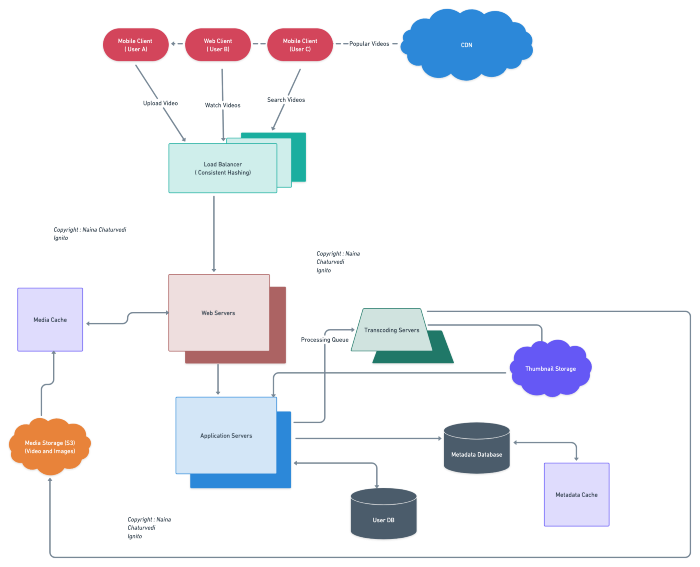
Hello peeps! Welcome to Day 20 of System Design Case studies series where we will design Netflix, Coinbase, Grab, Google Earth, ChatGPT, LINE, One Note, Messenger Lite, Google Pay, Google Street View, Ranking System, Amazon Cart System.
This post covers system design for ( scroll till the end of the post) —
Note : Please read System Design Important Terms you MUST know and Most Important System Design basics before reading this post.
Projects Videos —
All the projects, data structures, SQL, algorithms, system design, Data Science and ML , Data Analytics, Data Engineering, , Implemented Data Science and ML projects, Implemented Data Engineering Projects, Implemented Deep Learning Projects, Implemented Machine Learning Ops Projects, Implemented Time Series Analysis and Forecasting Projects, Implemented Applied Machine Learning Projects, Implemented Tensorflow and Keras Projects, Implemented PyTorch Projects, Implemented Scikit Learn Projects, Implemented Big Data Projects, Implemented Cloud Machine Learning Projects, Implemented Neural Networks Projects, Implemented OpenCV Projects,Complete ML Research Papers Summarized, Implemented Data Analytics projects, Implemented Data Visualization Projects, Implemented Data Mining Projects, Implemented Natural Leaning Processing Projects, MLOps and Deep Learning, Applied Machine Learning with Projects Series, PyTorch with Projects Series, Tensorflow and Keras with Projects Series, Scikit Learn Series with Projects, Time Series Analysis and Forecasting with Projects Series, ML System Design Case Studies Series videos will be published on our youtube channel ( just launched).
Subscribe today!
Tech Newsletter —
If you are interested, you can join my newsletter through which I send tech interview tips, techniques, patterns, hacks — Software Development, ML, Data Science, Startups and Technology projects to more than 30K readers. You can subscribe to Tech Brew :
System Design Case Studies — In Depth
Design Tinder
Design TikTok
Design Twitter
Design URL Shortener
Design Dropbox
Design Youtube
Design API Rate Limiter
Design Web Crawler
Design Facebook’s Newsfeed
Design Yelp
Design Instagram
Design Messenger App
Design Uber
Most Popular System Design Questions
Mega Compilation : Solved System Design Case studies
We will be discussing in depth -
- What is Netflix
- Important Features
- Scaling Requirements — Capacity Estimation
- Data Model — ER requirements
- High Level Design
- Basic Low Level Design
- API Design
- Complete Detailed Design
Pre-requisite to this post -
Complete System Design Series — Important Concepts that you should know before starting the Case studies
6. Networking, How Browsers work, Content Network Delivery ( CDN)
13. System Design Template — How to solve any System Design Question
Github —
Day 1 of System Design Case Studies can be found below-
Day 2 of System Design Case Studies can be found below-
Day 3 of System Design Case Studies can be found below-
Day 4 of System Design Case Studies can be found below-
Let’s get started.
What is Netflix?

Netflix is a subscription based video streaming and sharing website where users can—
- Watch/stream the videos
- Like and share videos
- Report the videos
- Create your own lists
- Search the videos using titles or tags
- Mark videos as favorites
Users can be both mobile based and web based.
Designing a Netflix-like streaming service would involve several key components:
- Content Management System (CMS): This is where all the video content is stored and organized. The CMS would allow for easy management and categorization of the video library, as well as the ability to add and remove content.
- Streaming Platform: This is the technology that allows the video content to be streamed to users. This could be done through a proprietary platform or by using a third-party service such as Amazon Web Services or Microsoft Azure.
- User Interface: This is the front-end of the service that users interact with. It would include features such as search, browsing, and personalization to make it easy for users to find the content they want to watch.
- Recommendation Engine: This is an algorithm that suggests content to users based on their viewing history and preferences.
- Payment System: This is how users would pay for the service, whether it be through a subscription or pay-per-view model.
- Analytics: This is used to track user engagement, measure the success of marketing campaigns, and make data-driven decisions about content and feature development.
- Mobile and TV app: Offer a mobile and TV apps to improve user experience and provide flexibility to watch content in different devices.
- Live streaming: Allow to live streaming some content to increase the offering and generate more engagement.
- Localization: Adapt the content, UI, and marketing to different languages and regions.
- Security: Implement security measures to protect user data and prevent unauthorized access to the service.
Before we take a deep dive in the design, understand HDFS.
HDFS
In system design map reduce ( HDFS systems) is a batch processing technique in which the engine takes huge amounts of data, processes ( map and reduce) and gives the output.
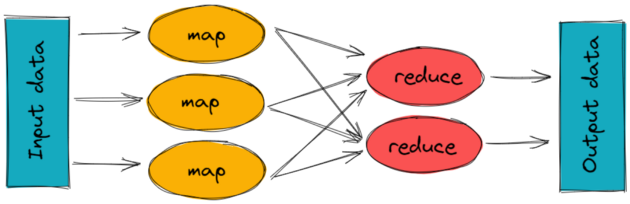
To track the progress of each job — task tracker and job tracker are used. Job tracker manages all the resources and jobs and schedules across the cluster.
The task tracker are called slaves that work on the directives of job trackers and deployed on each node in the cluster.
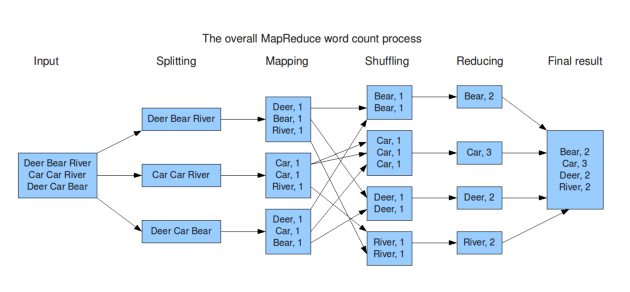
MapReduce code in Python:
from collections import defaultdictdef map_func(inputs):
results = defaultdict(list)
for input in inputs:
words = input.split()
for word in words:
results[word].append(1)
return results.items()def reduce_func(item):
word, occurrences = item
return (word, sum(occurrences))def map_reduce(inputs):
mapped = map_func(inputs)
grouped = defaultdict(list)
for key, value in mapped:
grouped[key].append(value)
return [reduce_func(group) for group in grouped.items()]inputs = ["apple pear banana", "pear banana", "apple pear", "apple", "pear banana apple"]
print(map_reduce(inputs))This code implements a simple word count example, where the input is a list of strings and the output is a list of tuples (word, count) indicating the number of occurrences of each word in the input. The code uses the map_func function to map the input to intermediate key-value pairs, the reduce_func function to reduce the intermediate values for each key to a single output value, and the map_reduce function to coordinate the map and reduce phases.
Video Transcoding
Raw file cannot be accessed or distributed so we use encoding and transcoding to convert it into a desirable format which can be accessed and distributed anywhere. Encoding is the process of converting a raw video file into a desired format and transcoding is the process of decoding that file into recompressed and desired format. It helps optimize the video quality and support multiple formats.
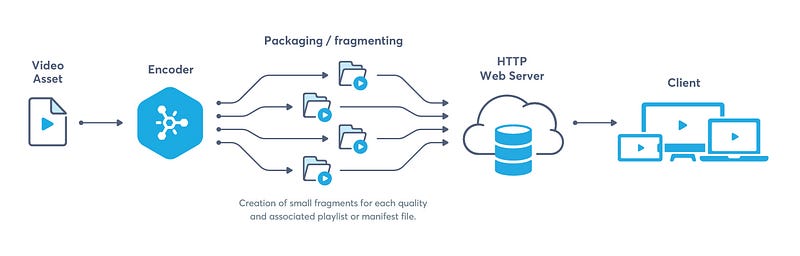
- During the transcoding process, various parameters of the video can be adjusted, such as resolution, bitrate, frame rate, and color space. This allows for the video to be optimized for different situations, such as reducing the file size for streaming over a limited bandwidth connection, or increasing the resolution for high-definition playback.
- Transcoding also allows for the video to be adapted to different codecs and container formats. Codecs are used to compress and decompress video and audio data, while container formats define how the video and audio data is stored within the file. Different devices and platforms support different codecs and container formats, so transcoding can ensure that the video will play correctly on the intended device or platform.
Here’s code of how to use FFmpeg for video transcoding in Python:
import subprocessdef transcode_video(input_file, output_file):
cmd = ['ffmpeg', '-i', input_file, '-c:v', 'libx264', '-crf', '23', '-c:a', 'aac', output_file]
subprocess.run(cmd)input_file = "input.mp4"
output_file = "output.mp4"
transcode_video(input_file, output_file)In this example, we use the subprocess library to run FFmpeg as a subprocess and transcode the video. The cmd list contains the arguments passed to FFmpeg, including the input file, the output file, and the codec and compression options. The crf option sets the quality of the output video.
In addition to these, transcoding can also include additional features like adding subtitles, watermark, encryption, adding meta data, etc. It is a crucial step in the video pipeline and it can be done by using software or hardware transcoding solutions.
Streaming Protocol
It is used to control data transfer for the video streaming, support video encoding etc.
Codecs are the compression and decompression algorithms that are used to preserve the video quality when the video size is reduced.
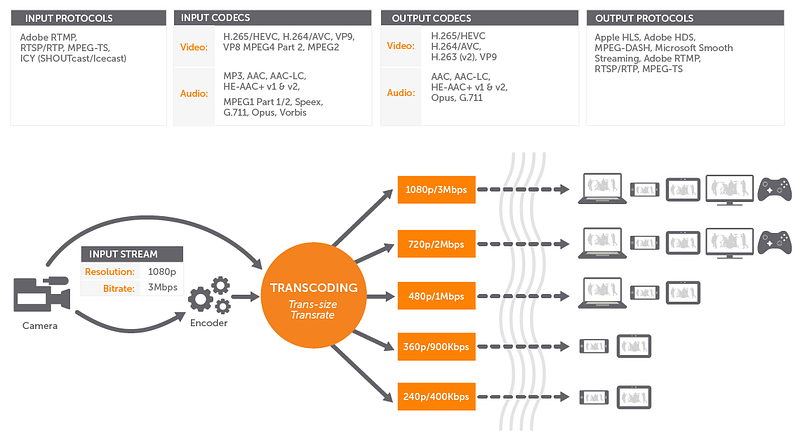
There are several different streaming protocols in use today, each with its own strengths and weaknesses.
Implement a simple RTSP server in Python:
import socketRTSP_PORT = 554def start_server():
server_socket = socket.socket(socket.AF_INET, socket.SOCK_STREAM)
server_socket.bind(('', RTSP_PORT))
server_socket.listen(1) print("RTSP Server started on port {}".format(RTSP_PORT)) while True:
client_socket, address = server_socket.accept()
print("Accepted connection from {}".format(address))
data = client_socket.recv(1024)
print("Received data: {}".format(data.decode()))
client_socket.sendall(b"RTSP/1.0 200 OK\r\n\r\n")
client_socket.close()if __name__ == "__main__":
start_server()In this example, we start by creating a TCP socket using the socket library and binding it to the RTSP port 554. We then start listening for incoming connections using the listen method. In the while loop, we use the accept method to accept incoming connections and receive data from the client using the recv method. We then send a response to the client using the sendall method, and close the connection using the close method. The output of this program is the RTSP response "RTSP/1.0 200 OK".
Some of the most common streaming protocols are:
- HTTP Live Streaming (HLS): This is an HTTP-based protocol developed by Apple. It is widely used for streaming video on iOS and macOS devices, as well as on many other platforms. HLS uses a series of small, short-lived files called “segments” that are downloaded and assembled on the client side to create a continuous stream.
- Dynamic Adaptive Streaming over HTTP (DASH): This is a similar protocol to HLS, but it is not tied to any specific company or platform. DASH uses a similar segment-based approach to HLS, but it can be used with any HTTP server and is not limited to Apple devices.
- Real-Time Messaging Protocol (RTMP): This is a proprietary protocol developed by Adobe. It is mainly used for streaming video through a Flash player, and it is supported by many streaming platforms and CDNs.
- Real-Time Streaming Protocol (RTSP): This is a standard protocol for streaming media over a network. It is mainly used for streaming video over a local network and it is supported by many devices and platforms.
- WebRTC: This is a real-time communication protocol that allows for low-latency streaming of audio and video directly between browsers and devices. It is built into web browsers and does not require any additional software or plugins.
Each protocol has its own advantages and disadvantages, and the choice of which protocol to use will depend on the specific needs of the application and the devices and networks it will be used on.
Important Features
We will consider the most important features —
Upload Videos
Watch Videos
Engagement — Interaction with the videos
Scaling Requirements — Capacity Estimation
For the sake of simplicity, I’ll show a small scale simulation.

Let’s say we have —
Total no of users : 1.2 Billion
Daily active users ( DAU) : 300 million
No of videos watched by user/day : 3
Total no of videos watched per day : 900 Million videos/day
Since the system is read -heavy, let’s say the read to write ratio be 100:1
Total no of videos uploaded/day = 1/100 * 900 Million = 9 Million/day
Storage Estimation —
Let’s say on average each video size is 80 MB
Total Storage per day : 9 Million* 80MB = 720 TB/day
For next 3 years, 720 TB* 5* 365 = 800 PB
Requests per second : 900 Million/3600 seconds * 24 hours = 10K/second
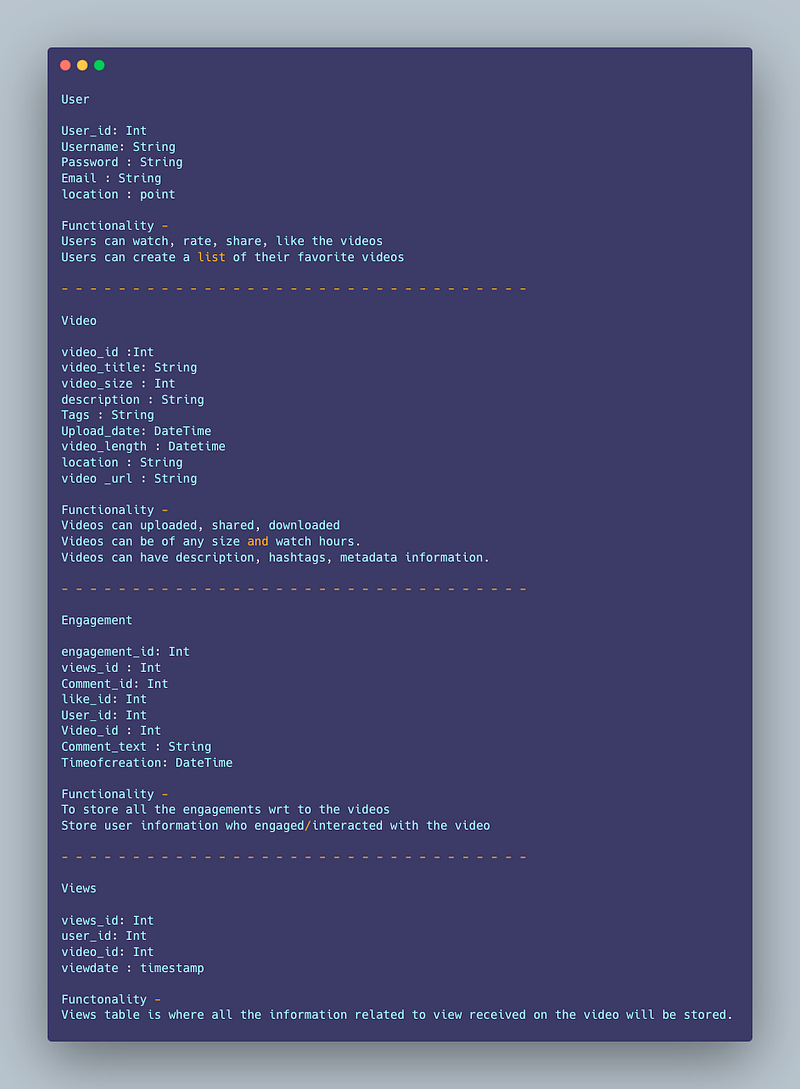
Data Model — ER requirements
User
User_id: Int
Username: String
Password : String
Email : String
location : point
Functionality —
Users can watch, rate, share, like the videos
Users can create a list of their favorite videos
— — — — — — — — — — — — — — — — — — — — — — — — — — — — — — — — —
Video
video_id :Int
video_title: String
video_size : Int
description : String
Tags : String
Upload_date: DateTime
video_length : Datetime
location : String
video _url : String
Functionality —
Videos can uploaded, shared, downloaded
Videos can be of any size and watch hours.
Videos can have description, hashtags, metadata information.
— — — — — — — — — — — — — — — — — — — — — — — — — — — — — — — — —
Engagement
engagement_id: Int
views_id : Int
Comment_id: Int
like_id: Int
User_id: Int
Video_id : Int
Comment_text : String
Timeofcreation: DateTime
Functionality —
To store all the engagements wrt to the videos
Store user information who engaged/interacted with the video
— — — — — — — — — — — — — — — — — — — — — — — — — — — — — — — — —
Views
views_id: Int
user_id: Int
video_id: Int
viewdate : timestamp
Functionality —
Views table is where all the information related to view received on the video will be stored.
High Level Design
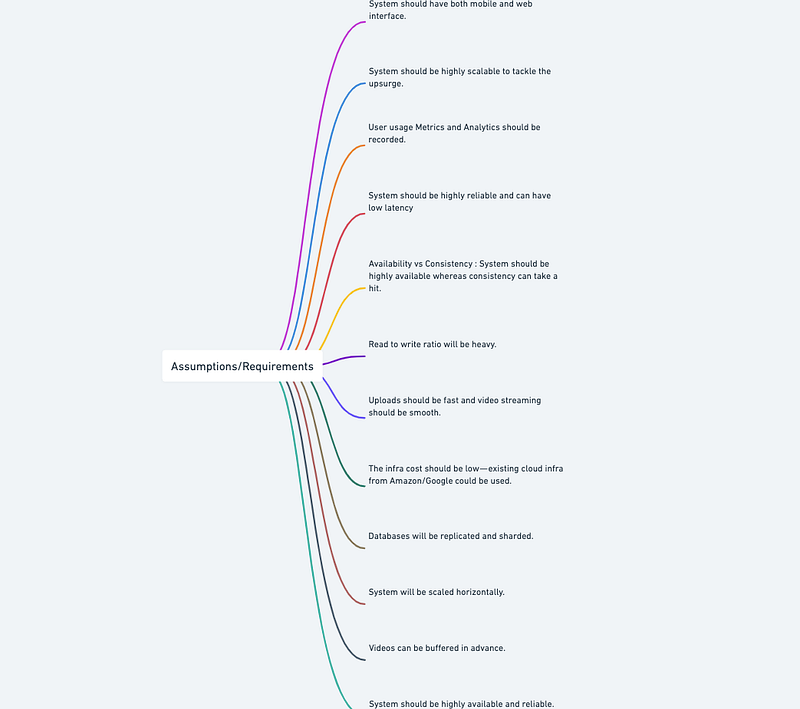
Assumptions/Requirements on technical aspects —
- System should be highly available and reliable.
- System should have both mobile and web interface.
- System should be highly scalable to tackle the upsurge.
- User usage Metrics and Analytics should be recorded.
- Availability vs Consistency : System should be highly available whereas consistency can take a hit.
- System should be highly reliable and can have low latency
- Read to write ratio will be heavy.
- Uploads should be fast and video streaming should be smooth.
- The infra cost should be low — existing cloud infra from Amazon/Google could be used.
- Databases will be replicated and sharded.
- System will be scaled horizontally.
- Videos can be buffered in advance.
— — — — — — — — — — — — — — — — — — — — — — — — — — — — — — — — -
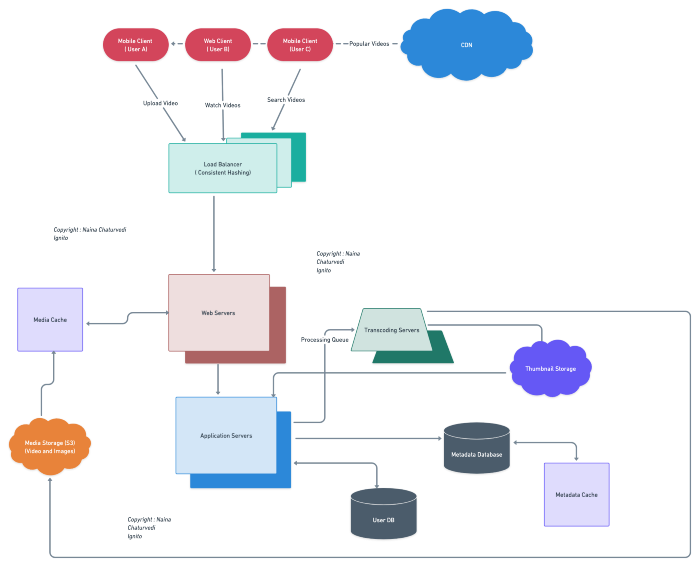
Components
- Client : Both mobile and web Users
- User Database : To store user’s information
- Metadata Database : To store metadata information
- Content Delivery Network : To cater the most popular videos/live videos streaming ( in case of celebrity fan-out)
- File System ( HDFS)
- Encoding Queue : To encode each video into various formats
- Processing Queue : To hold and process the videos for encoding, metadata and storage
- Transcoding Servers
- Storage : For Video Metadata
- Application Servers : Should be able to talk each other
- Load Balancers : To allocate requests to designated Application server using consistent hashing
- Database : Cassandra db or Hbase — Key value stores allow for great horizontal scaling and low latency to access data. HBase is a column-oriented key-value NoSQL database.
- Sessions Service : To store the sessions information of the different users
- Cache
- Media Storage ( S3) : To store videos
- Notification Service : To push notifications to the users when the status is offline
Services
Before we go in depth with respect to services, first understand what is stateless and stateful services. Stateless service ( which can be monolithic services) doesn’t require the server to retain any information about the state whereas Stateful services requires to save the information about the users session and the connection is persistent to a chat server.
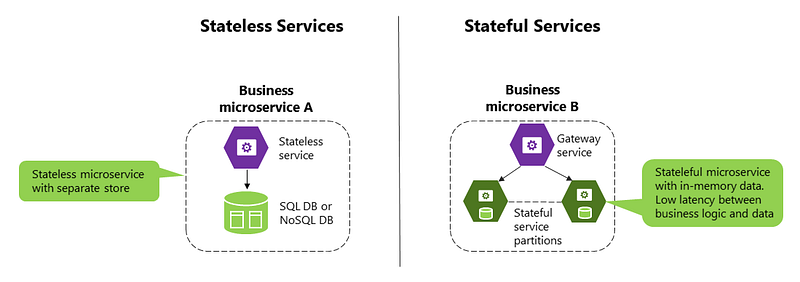
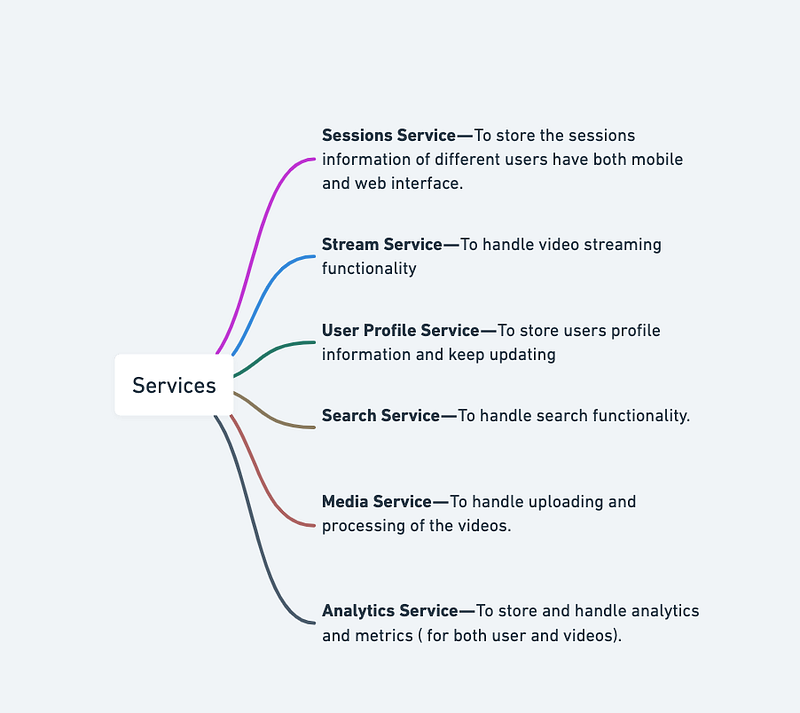
In our current case study, we would need services mentioned below—
- Sessions Service — To store the sessions information of different users
- Stream Service — To handle video streaming functionality
- User Profile Service — To store users profile information and keep updating
- Search Service — To handle search functionality.
- Media Service — To handle uploading and processing of the videos.
- Analytics Service — To store and handle analytics and metrics ( for both user and videos).
- Sessions Service:
import redisclass SessionsService:
def __init__(self):
self.db = redis.StrictRedis(host='localhost', port=6379, db=0) def create_session(self, user_id, session_id):
self.db.set(user_id, session_id) def get_session(self, user_id):
return self.db.get(user_id)This implementation uses Redis to store session information. The create_session method creates a new session for a user, while the get_session method retrieves the session for a user.
- Stream Service:
from flask import Flask, Response, request
import cv2
app = Flask(__name__)@app.route('/stream')
def stream():
video_path = 'path/to/video.mp4'
cap = cv2.VideoCapture(video_path) def gen():
while True:
ret, frame = cap.read() if not ret:
break ret, jpeg = cv2.imencode('.jpg', frame) yield (b'--frame\r\n'
b'Content-Type: image/jpeg\r\n\r\n' + jpeg.tobytes() + b'\r\n') return Response(gen(), mimetype='multipart/x-mixed-replace; boundary=frame')This implementation uses Flask and OpenCV to stream video. The stream method reads frames from a video file and sends them to the client as a multipart response.
- User Profile Service:
import pymongoclass UserProfileService:
def __init__(self):
self.client = pymongo.MongoClient('mongodb://localhost:27017/')
self.db = self.client['netflix'] def create_user(self, user):
self.db.users.insert_one(user) def get_user(self, user_id):
return self.db.users.find_one({'id': user_id}) def update_user(self, user_id, update):
self.db.users.update_one({'id': user_id}, {'$set': update})This implementation uses MongoDB to store user profiles. The create_user method creates a new user, while the get_user method retrieves a user by their ID. The update_user method updates a user's profile.
- Search Service:
from elasticsearch import Elasticsearchclass SearchService:
def __init__(self):
self.es = Elasticsearch() def search(self, query):
res = self.es.search(index='netflix', body={
'query': {
'multi_match': {
'query': query,
'fields': ['title^3', 'description']
}
}
}) hits = res['hits']['hits']
results = [{'title': hit['_source']['title'], 'description': hit['_source']['description']} for hit in hits] return resultsThis implementation uses Elasticsearch to perform searches. The search method performs a multi-match query on the title and description fields of each document in the netflix index.
- Media Service :
import os
from moviepy.editor import VideoFileClip
class MediaService:
def __init__(self):
self.video_dir = 'path/to/videos/' def upload_video(self, file):
filename = file.filename
file.save(os.path.join(self.video_dir, filename)) clip = VideoFileClip(os.path.join(self.video_dir, filename))
clip.resize(height=360).write_videofile(os.path.join(self.video_dir, filename + '.mp4'), fps=24) return filenameThis implementation uses MoviePy to process and resize uploaded videos. The upload_video method saves the uploaded video file to a directory and creates a resized version of the video with a height of 360 pixels.
- Analytics Service:
import pymongo
import datetime
class AnalyticsService:
def __init__(self):
self.client = pymongo.MongoClient('mongodb://localhost:27017/')
self.db = self.client['netflix'] def log_event(self, event_type, user_id=None, video_id=None):
event = {
'type': event_type,
'timestamp': datetime.datetime.utcnow(),
} if user_id:
event['user_id'] = user_id if video_id:
event['video_id'] = video_id self.db.events.insert_one(event) def get_events_by_type(self, event_type):
return list(self.db.events.find({'type': event_type}))This implementation uses MongoDB to store analytics events. The log_event method adds a new event to the database with the specified type, along with optional user and video IDs. The get_events_by_type method retrieves all events with the specified type.
A microservice for a video streaming platform like Netflix in Python:
import flask
import json
app = flask.Flask(__name__)# Define an endpoint for retrieving information about a particular movie or TV show
@app.route("/content/<content_id>", methods=["GET"])
def get_content_info(content_id):
# Code to retrieve information about the movie or TV show from the database
content_info = {
"content_id": content_id,
"title": "Example Title",
"description": "This is an example movie or TV show",
"release_date": "2022-01-01",
"genres": ["Action", "Adventure"],
} return flask.jsonify(content_info)# Define an endpoint for retrieving the list of recommended content for a particular user
@app.route("/recommendations/<user_id>", methods=["GET"])
def get_recommendations(user_id):
# Code to retrieve a list of recommended movies or TV shows for the user
recommendations = [
{
"content_id": 1,
"title": "Example Recommendation 1",
},
{
"content_id": 2,
"title": "Example Recommendation 2",
},
] return flask.jsonify(recommendations)# Example usage
if __name__ == "__main__":
app.run()Basic Low Level Design
import java.util.*;

public class User {
    private String username;
    private String password;
    private String email;
    // ...

    public User(String username, String password, String email) {
        this.username = username;
        this.password = password;
        this.email = email;
    }

    // Getters and setters
    // ...
}

class UserManager {
    private Map<String, User> users;

    public UserManager() {
        this.users = new HashMap<>();
    }

    public void registerUser(String username, String password, String email) {
        if (!users.containsKey(username)) {
            User newUser = new User(username, password, email);
            users.put(username, newUser);
            System.out.println("User registered successfully.");
        } else {
            System.out.println("Username already exists. Please choose a different username.");
        }
    }

    public User loginUser(String username, String password) {
        User user = users.get(username);
        if (user != null && user.getPassword().equals(password)) {
            System.out.println("Login successful.");
            return user;
        } else {
            System.out.println("Invalid username or password.");
            return null;
        }
    }

    // Other user management methods
    // ...
}

class Media {
    private String mediaId;
    private String title;
    private String description;
    private String url;
    // ...

    public Media(String mediaId, String title, String description, String url) {
        this.mediaId = mediaId;
        this.title = title;
        this.description = description;
        this.url = url;
    }

    // Getters and setters
    // ...
}

class MediaCatalog {
    private Map<String, List<Media>> mediaCatalog;

    public MediaCatalog() {
        this.mediaCatalog = new HashMap<>();
    }

    public void addMedia(String category, Media media) {
        List<Media> mediaList = mediaCatalog.getOrDefault(category, new ArrayList<>());
        mediaList.add(media);
        mediaCatalog.put(category, mediaList);
    }

    public List<Media> getMediaByCategory(String category) {
        return mediaCatalog.getOrDefault(category, new ArrayList<>());
    }

    // Other media catalog methods
    // ...
}

class StreamingService {
    private UserManager userManager;
    private MediaCatalog mediaCatalog;
    // ...

    public StreamingService() {
        this.userManager = new UserManager();
        this.mediaCatalog = new MediaCatalog();
        // ...
    }

    public void registerUser(String username, String password, String email) {
        userManager.registerUser(username, password, email);
    }

    public void loginUser(String username, String password) {
        userManager.loginUser(username, password);
    }

    public void addMedia(String category, Media media) {
        mediaCatalog.addMedia(category, media);
    }

    public List<Media> getMediaByCategory(String category) {
        return mediaCatalog.getMediaByCategory(category);
    }

    // Other methods for media retrieval, playback, etc.
    // ...
}

public class NetflixApp {
    public static void main(String[] args) {
        // Create an instance of the Netflix app
        StreamingService netflix = new StreamingService();

        // Register a new user
        netflix.registerUser("john_doe", "password123", "[email protected]");

        // Login with the registered user
        User loggedInUser = netflix.loginUser("john_doe", "password123");

        // Add movies to the catalog
        Media movie1 = new Media("movie_1", "Movie 1", "An awesome movie", "https://example.com/movie1.mp4");
        Media movie2 = new Media("movie_2", "Movie 2", "Another amazing movie", "https://example.com/movie2.mp4");
        netflix.addMedia("Movies", movie1);
        netflix.addMedia("Movies", movie2);

        // Get movies by category
        List<Media> movies = netflix.getMediaByCategory("Movies");
        for (Media movie : movies) {
            System.out.println(movie.getTitle());
        }

        // Other actions and functionalities of the Netflix app can be added here
    }
}
API Design
Implementation —
from flask import Flask, request, jsonifyapp = Flask(__name__)# Sessions Service API
@app.route('/sessions', methods=['POST'])
def create_session():
# create a new session for the user and return session ID
# actual implementation may involve authentication and session management
return jsonify({'session_id': 'abc123'})@app.route('/sessions/<session_id>', methods=['GET'])
def get_session(session_id):
# return session information for the specified session ID
# actual implementation may involve session management and validation
return jsonify({'session_id': session_id, 'user_id': 'user123'})# Stream Service API
@app.route('/videos/<video_id>/stream', methods=['GET'])
def stream_video(video_id):
# stream the specified video
# actual implementation may involve video streaming and access control
return 'Streaming video {}'.format(video_id)# User Profile Service API
@app.route('/users/<user_id>', methods=['GET'])
def get_user_profile(user_id):
# return the profile information for the specified user ID
# actual implementation may involve retrieving profile information from a database
return jsonify({'user_id': user_id, 'name': 'John Doe', 'email': '[email protected]'})@app.route('/users/<user_id>', methods=['PUT'])
def update_user_profile(user_id):
# update the profile information for the specified user ID
# actual implementation may involve authentication and database updates
return jsonify({'user_id': user_id, 'name': 'John Doe', 'email': '[email protected]'})# Search Service API
@app.route('/search', methods=['GET'])
def search_videos():
# search for videos based on the provided query parameters
# actual implementation may involve searching a database or using a search engine
query = request.args.get('q')
return jsonify({'query': query, 'results': ['video123', 'video456']})# Media Service API
@app.route('/videos', methods=['POST'])
def upload_video():
# upload a new video and return the video ID
# actual implementation may involve handling file uploads and database updates
return jsonify({'video_id': 'video123'})# Analytics Service API
@app.route('/events', methods=['POST'])
def log_event():
# log a new event and return the event ID
# actual implementation may involve database updates
event_type = request.json['type']
user_id = request.json.get('user_id')
video_id = request.json.get('video_id')
# log event in database
return jsonify({'event_id': 'event123'})@app.route('/events/<event_type>', methods=['GET'])
def get_events_by_type(event_type):
# retrieve all events with the specified type
# actual implementation may involve retrieving events from a database
return jsonify({'event_type': event_type, 'events': [{'timestamp': '2023-02-19T10:15:00Z', 'user_id': 'user123', 'video_id': 'video123'}]})if __name__ == '__main__':
app.run(debug=True)A Python script for Netflix using APIs:
import requests
import json# Define the base URL for the Netflix API
base_url = "https://api.netflix.com/"# Define the endpoint for retrieving information about a particular movie or TV show
content_info_endpoint = "content/{content_id}"# Define the endpoint for retrieving recommendations for a particular user
recommendation_endpoint = "recommendations/{user_id}"# Define a function to retrieve information about a particular movie or TV show
def get_content_info(content_id):
url = base_url + content_info_endpoint.format(content_id=content_id)
response = requests.get(url)
if response.status_code == 200:
content_info = json.loads(response.text)
return content_info
else:
raise Exception("Failed to retrieve content information")# Define a function to retrieve recommendations for a particular user
def get_recommendations(user_id):
url = base_url + recommendation_endpoint.format(user_id=user_id)
response = requests.get(url)
if response.status_code == 200:
recommendations = json.loads(response.text)
return recommendations
else:
raise Exception("Failed to retrieve recommendations")# Example usage
content_info = get_content_info("12345")
recommendations = get_recommendations("67890")print(content_info)
print(recommendations)API design will be further discussed in the workflow video ( Coming soon. Subscribe Today)
Complete Detailed Design
( Zoom it)
Code
To implement Netflix features -
- Watch/Stream Videos: To watch or stream a video from Netflix, we can use the Netflix Roulette API to get the details of the movie or TV show, including the video streaming link. We can then use a video player library like VLC or PyGame to play the video. Here’s an implementation of how to do this using Python:
import requests
import webbrowser
# Get the details of a movie or TV show
response = requests.get('https://netflixroulette.net/api/api.php?title=Stranger%20Things')
details = response.json()[0]
# Open the video streaming link in a web browser
webbrowser.open(details['poster'], new=2)- Like and Share Videos: We can use the Netflix Roulette API to get the details of the video and then use social media APIs like Facebook or Twitter to share the details of the video. Here’s an implementation of how to do this using Python and the Twitter API:
import requests
import tweepy
# Get the details of a movie or TV show
response = requests.get('https://netflixroulette.net/api/api.php?title=Stranger%20Things')
details = response.json()[0]
# Authenticate with Twitter API
auth = tweepy.OAuthHandler('consumer_key', 'consumer_secret')
auth.set_access_token('access_token', 'access_token_secret')
# Create a new tweet with the video details
api = tweepy.API(auth)
tweet = f"Just watched {details['show_title']} on #Netflix! Highly recommend it! {details['poster']}"
api.update_status(tweet)- Report Videos: we can use the Netflix Roulette API to get the details of the video and then use the Netflix customer support page to report the video. Here’s an implementation of how to do this using Python and the webbrowser module:
import requests
import webbrowser
# Get the details of a movie or TV show
response = requests.get('https://netflixroulette.net/api/api.php?title=Stranger%20Things')
details = response.json()[0]
# Open the Netflix customer support page in a web browser
webbrowser.open('https://help.netflix.com/en/contactus', new=2)- Create Your Own Lists: We can use the Netflix Roulette API to get the details of the video and then store the details in a local database or file to create our own lists. Here’s an implementation of how to do this using Python and the SQLite database:
import requests
import sqlite3
# Connect to the SQLite database
conn = sqlite3.connect('netflix.db')
# Create a new table to store the video details
conn.execute('''
CREATE TABLE IF NOT EXISTS netflix_videos (
id INTEGER PRIMARY KEY,
title TEXT,
director TEXT,
cast TEXT,
rating FLOAT,
poster TEXT
)
''')
# Get the details of a movie or TV show
response = requests.get('https://netflixroulette.net/api/api.php?title=Stranger%20Things')
details = response.json()[0]
# Insert the video details into the database
conn.execute('''
INSERT INTO netflix_videos (id, title, director, cast, rating, poster)
VALUES (?, ?, ?, ?, ?, ?)
''', (details['show_id'], details['show_title'], details['director'], details['show_cast'], details['rating'], details['poster']))
# Commit the changes to the database
conn.commit()
# Close the database connection
conn.close()- Search Videos using Titles or Tags: We can use the
netflixroulette.netAPI to search for videos using titles or tags. The API returns a JSON object containing the details of the matching videos, including the title, year, rating, poster URL, and a unique show ID that can be used to access the video details. Here's an implementation of how to search for videos using Python:
import requests
# Search for videos using a title or tag
query = 'stranger things'
response = requests.get(f'https://netflixroulette.net/api/api.php?{query}')
videos = response.json()
# Print the details of the matching videos
for video in videos:
print(f'{video["show_title"]} ({video["release_year"]}): {video["rating"]}')- Mark Videos as Favorites: We can use the Netflix Roulette API to get the details of the video and then store the details in a local database or file to mark videos as favorites. Here’s an implementation of how to do this using Python and the SQLite database:
import requests
import sqlite3
# Connect to the SQLite database
conn = sqlite3.connect('netflix.db')
# Create a new table to store the favorite videos
conn.execute('''
CREATE TABLE IF NOT EXISTS netflix_favorites (
id INTEGER PRIMARY KEY,
title TEXT,
director TEXT,
cast TEXT,
rating FLOAT,
poster TEXT
)
''')
# Get the details of a movie or TV show
response = requests.get('https://netflixroulette.net/api/api.php?title=Stranger%20Things')
details = response.json()[0]
# Insert the video details into the favorites table
conn.execute('''
INSERT INTO netflix_favorites (id, title, director, cast, rating, poster)
VALUES (?, ?, ?, ?, ?, ?)
''', (details['show_id'], details['show_title'], details['director'], details['show_cast'], details['rating'], details['poster']))
# Commit the changes to the database
conn.commit()
# Close the database connection
conn.close()More on Netflix —
User Management:
User Registration, Authentication, and Authorization: This component handles user registration, authentication, and authorization processes. It manages user credentials, validates access rights, and ensures secure access to the system. Here’s a simplified example of user registration and authentication using Flask, a Python web framework:
from flask import Flask, request, jsonifyapp = Flask(__name__)users = {}@app.route('/register', methods=['POST'])
def register_user():
username = request.json['username']
password = request.json['password']
# Store user credentials in the database
users[username] = password
return jsonify({'message': 'User registered successfully'})@app.route('/login', methods=['POST'])
def login_user():
username = request.json['username']
password = request.json['password']
# Check if the user exists and the password is correct
if username in users and users[username] == password:
return jsonify({'message': 'Login successful'})
return jsonify({'message': 'Invalid credentials'})if __name__ == '__main__':
app.run()User Profile Management and Personalization: This component allows users to manage their profiles and personalize their experience. It includes features such as updating profile information, setting preferences, and providing personalized recommendations. Here’s a simplified example:
class UserProfile:
def __init__(self, username):
self.username = username
self.preferences = {}
def update_preferences(self, new_preferences):
self.preferences.update(new_preferences)
def get_recommendations(self):
# Retrieve personalized recommendations based on user preferences
# Implementation omitted for brevity
recommendations = get_recommendations_from_service(self.preferences)
return recommendations# Example usage
username = 'user123'
user_profile = UserProfile(username)
user_profile.update_preferences({'genre': 'action', 'language': 'English'})
recommendations = user_profile.get_recommendations()Video Streaming Workflow:
Video Playback and Streaming Protocols: This component handles the actual video playback and supports streaming protocols such as HTTP, Dynamic Adaptive Streaming over HTTP (DASH), and HTTP Live Streaming (HLS). Here’s an example of serving video content over HTTP using Flask:
from flask import Flask, request, send_from_directoryapp = Flask(__name__)@app.route('/stream/<path:video_path>')
def stream_video(video_path):
video_directory = '/path/to/video/files'
# Serve the video file
return send_from_directory(video_directory, video_path)if __name__ == '__main__':
app.run()Buffering, Caching, and Prefetching Techniques: This component ensures smooth video streaming by buffering data, utilizing caching mechanisms, and prefetching content. Here’s an example of a simple buffering mechanism:
BUFFER_SIZE = 4096def buffer_video(video_path):
with open(video_path, 'rb') as video_file:
while True:
chunk = video_file.read(BUFFER_SIZE)
if not chunk:
break
# Buffer the video chunk
buffer_video_chunk(chunk)Video Quality Selection: This component dynamically selects the appropriate video quality based on the user’s network conditions. Here’s a simplified example using a bitrate adaptation algorithm:
def select_video_quality(network_speed):
if network_speed >= 10:
return '1080p'
elif network_speed >= 5:
return '720p'
else:
return '480p'Recommendations and Personalization:
Developing Recommendation Algorithms: This component focuses on developing recommendation algorithms for personalized content suggestions. It involves utilizing techniques such as collaborative filtering, content-based filtering, or machine learning to analyze user behavior and provide relevant recommendations. Here’s a simplified example using collaborative filtering with the Surprise library in Python:
from surprise import Dataset, Reader, KNNBasic# Load the dataset
data = Dataset.load_builtin('ml-100k')# Build the user-item rating matrix
trainset = data.build_full_trainset()# Define the collaborative filtering algorithm
algo = KNNBasic()# Train the algorithm on the dataset
algo.fit(trainset)# Get recommendations for a user
user_id = 'user123'
items_to_recommend = algo.get_recommendations(user_id)Designing Systems for Cross-selling and Upselling: This component focuses on designing systems to promote cross-selling and upselling by suggesting related or premium content to users. It involves analyzing user preferences, viewing history, and leveraging item-item similarity or association rules. Here’s a simplified example of cross-selling:
def get_related_content(item_id):
# Retrieve related content based on item-item similarity
# Implementation omitted for brevity
related_content = get_related_content_from_service(item_id)
return related_contentSearch and Discovery:
Implementing Search Functionalities: This component enables users to discover content by implementing search functionalities. It involves indexing the content, defining search queries, and retrieving relevant results. Here’s a simplified example using the ElasticSearch library in Python:
from elasticsearch import Elasticsearch# Create an instance of Elasticsearch client
es = Elasticsearch()# Index a document
def index_document(document):
es.index(index='content_index', body=document)# Search for documents
def search_documents(query):
results = es.search(index='content_index', body={'query': {'match': {'title': query}}})
return results['hits']['hits']Designing Ranking Algorithms: This component focuses on designing algorithms to rank search results based on relevance and popularity. It involves considering factors like content ratings, user feedback, and view counts. Here’s a simplified example of a ranking algorithm:
def rank_results(results):
# Rank search results based on relevance and popularity
# Implementation omitted for brevity
ranked_results = rank_results_based_on_algorithm(results)
return ranked_resultsScalability and Performance:
Horizontal and Vertical Scaling Strategies: This component focuses on scaling the system to handle increased traffic and accommodate user growth. Horizontal scaling involves adding more servers or instances to distribute the load, while vertical scaling involves increasing the resources of existing servers. The specific strategies depend on the system architecture and requirements.
Caching Mechanisms: This component involves implementing caching mechanisms to improve system performance. In-memory caching or utilizing a Content Delivery Network (CDN) can help reduce the load on the backend and provide faster access to frequently accessed content. Here’s an example using the Flask-Caching extension:
from flask import Flask
from flask_caching import Cacheapp = Flask(__name__)
cache = Cache(app)@app.route('/content/<content_id>')
@cache.cached(timeout=3600) # Cache the response for 1 hour
def get_content(content_id):
# Retrieve and return the content
return retrieve_content(content_id)if __name__ == '__main__':
app.run()Scalability and Performance:
- Horizontal and Vertical Scaling Strategies: This component focuses on scaling the system to handle increased traffic and accommodate user growth. Horizontal scaling involves adding more servers or instances to distribute the load, while vertical scaling involves increasing the resources of existing servers. The specific strategies depend on the system architecture and requirements.
- Caching Mechanisms: This component involves implementing caching mechanisms to improve system performance. In-memory caching or utilizing a Content Delivery Network (CDN) can help reduce the load on the backend and provide faster access to frequently accessed content. Here’s an example using the Flask-Caching extension:
from flask import Flask
from flask_caching import Cacheapp = Flask(__name__)
cache = Cache(app)@app.route('/content/<content_id>')
@cache.cached(timeout=3600) # Cache the response for 1 hour
def get_content(content_id):
# Retrieve and return the content
return retrieve_content(content_id)if __name__ == '__main__':
app.run()Load Balancing and Fault Tolerance Techniques: This component focuses on distributing the incoming traffic across multiple servers and ensuring system availability in case of failures. Load balancing techniques such as round-robin, least connections, or weighted algorithms can be used. Additionally, fault tolerance mechanisms like redundant servers, automated failover, and replication can help maintain system stability. Here’s an example using the Nginx web server as a load balancer:
# Nginx configuration file
http {
upstream backend {
server backend1.example.com;
server backend2.example.com;
server backend3.example.com;
}
server {
listen 80;
location / {
proxy_pass http://backend;
}
}
}Content Licensing and Rights Management:
- Managing Content Licensing Agreements and Restrictions: This component involves managing the rights and restrictions associated with licensed content. It includes tracking licensing agreements, enforcing usage limitations, and ensuring compliance with content distribution policies.
- Enforcing Regional Restrictions and Content Availability: This component ensures that content availability is restricted based on licensing rights and regional restrictions. It involves identifying the user’s location, validating their access rights, and providing appropriate content based on their geographic location.
Offline Viewing:
Designing Systems for Offline Viewing: This component enables users to download and view content offline. It involves implementing features such as content download, offline storage, and synchronization. Here’s a simplified example using the Flask framework:
from flask import Flask, send_fileapp = Flask(__name__)@app.route('/content/<content_id>/download')
def download_content(content_id):
# Retrieve the content file path
file_path = get_content_file_path(content_id)
# Send the file for download
return send_file(file_path, as_attachment=True)if __name__ == '__main__':
app.run()Managing Offline Content Expiration and Synchronization: This component handles the expiration of offline content and ensures synchronization with the online library. It involves managing expiration dates, updating the status of downloaded content, and periodically synchronizing the offline content with the latest versions.
Analytics and Monitoring:
Collecting and Analyzing System Metrics: This component involves collecting system metrics and analyzing them to gain insights into user behavior and system performance. It includes tracking user engagement, content popularity, and system resource utilization. Here’s an example using the Prometheus monitoring system:
from prometheus_client import Counter, start_http_server
# Define a counter metric
video_views = Counter('video_views', 'Number of video views')
# Increment the counter when a video is viewed
@application.route('/play_video/<video_id>')
def play_video(video_id):
# Play the video
video_views.inc()
return 'Playing video: {}'.format(video_id)
if __name__ == '__main__':
# Start the Prometheus HTTP server
start_http_server(8000)
application.run()Implementing Logging and Monitoring Tools: This component involves implementing logging mechanisms and utilizing monitoring tools to detect errors and track the health of the system. Here's an example using the Python logging module:
import logging
# Configure the logging
logging.basicConfig(filename='app.log', level=logging.INFO)
# Log an info message
logging.info('This is an informational message')
# Log an error message
try:
# Perform an operation that may raise an exception
result = 1 / 0
except Exception as e:
# Log the error message and exception stack trace
logging.error('An error occurred: {}'.format(e), exc_info=True)Content Delivery:
Content Ingestion Pipeline: This component involves acquiring and preparing video content for the platform. It includes processes such as content ingestion, metadata extraction, and encoding. Here's a simplified example of a content ingestion pipeline:
def ingest_content(video_path, metadata):
# Process the video content and metadata
process_video(video_path)
process_metadata(metadata)
store_content(video_path, metadata)Content Storage and Distribution Strategies: This component focuses on storing and distributing the video content efficiently. It includes strategies such as utilizing Content Delivery Networks (CDNs) or cloud storage solutions. Here's an example using the Boto3 library for Amazon S3 storage:
import boto3
# Create an S3 client
s3_client = boto3.client('s3')
def upload_content(video_path, bucket_name, object_name):
# Upload the video to S3
s3_client.upload_file(video_path, bucket_name, object_name)
def download_content(bucket_name, object_name, local_path):
# Download the video from S3
s3_client.download_file(bucket_name, object_name, local_path)Transcoding and Adaptive Bitrate Streaming: This component involves transcoding the video content into different formats and implementing adaptive bitrate streaming to ensure efficient video delivery. Here's an example using the ffmpeg library for transcoding:
import ffmpeg
def transcode_video(input_file, output_file, output_format):
# Transcode the video to the specified format
ffmpeg.input(input_file).output(output_file, format=output_format).run()
def generate_manifest(output_files):
# Generate the adaptive bitrate streaming manifest file
manifest = '#EXTM3U\n'
for file in output_files:
manifest += '#EXT-X-STREAM-INF:BANDWIDTH={},RESOLUTION={}\n{}\n'.format(file['bitrate'], file['resolution'], file['filename'])
return manifestUser Management:
User Registration, Authentication, and Authorization: This component handles user registration, authentication, and authorization processes. Here’s a simplified example:
def register_user(username, password):
# Register the user in the database
user_id = save_user_to_database(username, password)
return user_iddef login_user(username, password):
# Validate the user's credentials
user_id = validate_user_credentials(username, password)
return user_iddef authorize_user(user_id, role):
# Check if the user has the required role
is_authorized = check_user_role(user_id, role)
return is_authorizedUser Profile Management and Personalization: This component allows users to manage their profiles and provides personalized experiences. Here’s a simplified example:
def update_user_profile(user_id, profile_data):
# Update the user's profile in the database
update_profile_in_database(user_id, profile_data)def get_user_recommendations(user_id):
# Retrieve personalized content recommendations for the user
recommendations = generate_recommendations(user_id)
return recommendationsdef create_user_profile(user_id, profile_data):
# Create a new user profile in the database
create_profile_in_database(user_id, profile_data)Video Streaming Workflow:
Video playback and streaming protocols (e.g., HTTP, DASH, HLS): This component handles the actual streaming of video content to users’ devices. It involves implementing video playback mechanisms and supporting streaming protocols such as HTTP, Dynamic Adaptive Streaming over HTTP (DASH), and HTTP Live Streaming (HLS). Here’s an example of playing a video using the Flask web framework:
from flask import Flask, render_templateapp = Flask(__name__)@app.route('/play_video/<video_id>')
def play_video(video_id):
# Logic to retrieve video URL or stream
video_url = get_video_url(video_id)
return render_template('video.html', video_url=video_url)if __name__ == '__main__':
app.run()Buffering, caching, and prefetching techniques for smooth streaming: This component ensures smooth video streaming by implementing buffering, caching, and prefetching techniques. Here’s a simplified example using the requests library for caching video segments:
import requests
from cachetools import LRUCache# Create a cache with a maximum size
cache = LRUCache(maxsize=1000)def stream_video(segment_url):
if segment_url in cache:
# Use the cached segment if available
segment = cache[segment_url]
else:
# Download the segment and cache it
response = requests.get(segment_url)
segment = response.content
cache[segment_url] = segment # Stream the video segment to the user
stream_segment(segment)Video quality selection based on network conditions: This component determines the appropriate video quality to stream based on the user’s network conditions. Here’s a simplified example using a network speed measurement to select the video quality:
import speedtestdef get_network_speed():
# Perform a network speed test
st = speedtest.Speedtest()
download_speed = st.download()
return download_speeddef select_video_quality(video_qualities):
network_speed = get_network_speed() # Select the video quality based on network speed
if network_speed < 2:
return video_qualities['low']
elif network_speed < 5:
return video_qualities['medium']
else:
return video_qualities['high']Recommendations and Personalization:
Developing recommendation algorithms for personalized content suggestions: This component involves designing and implementing recommendation algorithms to provide personalized content suggestions to users. Here’s a simplified example using a basic content-based filtering approach:
def get_personalized_recommendations(user_id):
user_profile = get_user_profile(user_id)
user_interests = user_profile['interests'] # Perform content-based filtering to generate recommendations
recommendations = perform_content_based_filtering(user_interests) return recommendationsUtilizing collaborative filtering, content-based filtering, or machine learning techniques for personalized recommendations: This component utilizes advanced techniques such as collaborative filtering, content-based filtering, or machine learning algorithms to generate personalized recommendations. Here’s an example using the Surprise library for collaborative filtering:
from surprise import Dataset, Reader, KNNBasic# Load the dataset
reader = Reader(rating_scale=(1, 5))
data = Dataset.load_from_df(ratings_df, reader)# Train the model
trainset = data.build_full_trainset()
algo = KNNBasic()
algo.fit(trainset)# Get recommendations for a user
user_id = 123
user_ratings = get_user_ratings(user_id)
user_items = data.build_full_trainset().ur[user_id]
recommendations = algo.get_neighbors(user_items, k=10)Search and Discovery:
Implementing search functionalities to help users discover content: This component involves implementing search functionality to allow users to search and discover content. Here’s a simplified example using Elasticsearch for content indexing and search:
from elasticsearch import Elasticsearch# Create an Elasticsearch client
es_client = Elasticsearch()def index_content(content_id, content_title, content_description):
# Index the content in Elasticsearch
document = {
'id': content_id,
'title': content_title,
'description': content_description
}
es_client.index(index='content_index', body=document)def search_content(query):
# Perform a search query in Elasticsearch
search_results = es_client.search(index='content_index', body={'query': {'match': {'title': query}}})
return search_results['hits']['hits']Designing ranking algorithms to display relevant and popular search results: This component involves designing ranking algorithms to determine the order in which search results are displayed to users. Here’s a simplified example of a ranking algorithm based on content popularity and relevance:
def rank_search_results(search_results):
# Rank search results based on popularity and relevance
ranked_results = []
for result in search_results:
content_id = result['_id']
popularity_score = get_content_popularity(content_id)
relevance_score = calculate_relevance_score(result['_score'])
ranked_results.append({'content_id': content_id, 'popularity_score': popularity_score, 'relevance_score': relevance_score})
ranked_results.sort(key=lambda x: (x['popularity_score'], x['relevance_score']), reverse=True)
return ranked_resultsUtilizing search indexing and optimization techniques: This component involves optimizing the search functionality for better performance and efficiency. Here’s an example of optimizing search indexing using Elasticsearch bulk indexing:
def bulk_index_content(content_list):
# Bulk index multiple content items in Elasticsearch
bulk_body = []
for content in content_list:
document = {
'index': {'_index': 'content_index'},
}
data = {
'id': content['id'],
'title': content['title'],
'description': content['description']
}
bulk_body.append(document)
bulk_body.append(data)
es_client.bulk(body=bulk_body)System Design — Coinbase
We will be discussing in depth -
- What is Coinbase
- Important Features
- Scaling Requirements — Capacity Estimation
- Data Model — ER requirements
- High Level Design
- Basic Low Level Design
- API Design
- Complete Detailed Design
- Complete Code Implementation

What is Coinbase
Coinbase is a prominent cryptocurrency exchange platform that allows users to buy, sell, and trade a wide range of digital currencies. It provides a secure and user-friendly interface for individuals and businesses to participate in the growing cryptocurrency ecosystem.
Important Features
a. User Wallets: Coinbase provides secure digital wallets for users to store their cryptocurrencies.
b. Trading: Users can execute trades and access a variety of order types to match their trading needs.
c. Fiat Integration: Coinbase supports the integration of traditional fiat currencies, making it easier for users to convert between cryptocurrencies and fiat.
d. Security Measures: Coinbase employs robust security measures, including two-factor authentication, encryption, and cold storage for funds.
e. Mobile Applications: Coinbase offers mobile applications for both iOS and Android, allowing users to access their accounts on the go.
Scaling Requirements — Capacity Estimation
For the sake of simplicity, we’ll simulate a smaller scale for Coinbase.
Total number of users: 10 million
Daily active users (DAU): 2 million
Number of transactions per user/day: 5
Total number of transactions per day: 10 million * 5 = 50 million transactions/day
Assuming a read-to-write ratio of 100:1 (similar to Netflix’s example):
Total number of read requests per day: 100 * 50 million = 5 billion read requests/day
Total number of write requests per day: 50 million write requests/day
Storage Estimation:
Let’s assume the average size of each transaction record is 1 KB.
Total storage per day: 50 million * 1 KB = 50 GB/day
For the next 3 years, 50 GB * 365 days * 3 years = 54.75 TB
Requests per second: 50 million transactions/day / 24 hours / 3600 seconds = approximately 578 transactions/second
a. High Availability: The system must be available 24/7, ensuring uninterrupted access for users.
b. Horizontal Scalability: Coinbase should be able to scale horizontally by adding more servers to handle increased traffic.
c. Load Balancing: A load balancer is necessary to distribute incoming requests evenly across multiple servers.
d. Caching: Implementing caching mechanisms can help reduce the load on databases and improve overall system performance.
Data Model — ER requirements
User:
- username: String (Primary Key)
- email: String
- password: String
Wallet:
- wallet_id: String (Primary Key)
- user_id: String (Foreign Key: User.username)
- balance: Decimal
Transaction:
- transaction_id: String (Primary Key)
- wallet_id: String (Foreign Key: Wallet.wallet_id)
- amount: Decimal
- timestamp: DateTime
Order:
- order_id: String (Primary Key)
- user_id: String (Foreign Key: User.username)
- cryptocurrency: String
- quantity: Decimal
- price: Decimal
- timestamp: DateTime
Trade:
- trade_id: String (Primary Key)
- order_id: String (Foreign Key: Order.order_id)
- buyer_id: String (Foreign Key: User.username)
- seller_id: String (Foreign Key: User.username)
- quantity: Decimal
- price: Decimal
- timestamp: DateTime
a. User: Represents a user account with associated information like username, email, and authentication tokens.
b. Wallet: Stores information about user wallets, including balances and transaction history.
c. Order: Represents a buy or sell order placed by a user, containing details such as the cryptocurrency type, quantity, and price.
d. Transaction: Captures details of completed transactions, including the buyer, seller, amount, and timestamp.
High Level Design
Assumptions:
- The system will handle a large number of concurrent users.
- The system is read-heavy with more reads than writes.
- Data consistency is important for financial transactions.
- The system needs to be highly available and reliable.
Main Components and Services:
- Mobile Client: Users interact with the system through mobile applications.
- Application Servers: Handle user requests, execute business logic, and interact with the database.
- Load Balancer: Distributes incoming requests across multiple application servers for load balancing.
- Cache (e.g., Redis): Caches frequently accessed data to improve response time and reduce database load.
- Content Delivery Network (CDN): Caches and serves static content, such as images and JavaScript files, to reduce latency and improve scalability.
- Database: Stores user information, wallet balances, transactions, orders, and trades.
- Relational Database Management System (e.g., MySQL, PostgreSQL) for transactional data.
- NoSQL Database (e.g., MongoDB, Cassandra) for storing user information, wallet balances, and other non-transactional data.
- Message Queue (e.g., RabbitMQ, Kafka): Handles asynchronous processing and communication between different system components, such as order processing and trade execution.
- Cryptocurrency Exchange: Connects to external cryptocurrency exchanges to execute orders and handle trades.
- Security Measures: Implement robust security measures, including encryption, two-factor authentication, and secure communication protocols.
- Monitoring and Logging: Use monitoring tools (e.g., Prometheus, Grafana) and logging frameworks (e.g., ELK stack) to monitor system health, track performance, and troubleshoot issues.
Services:
User Service:
- Handles user registration, authentication, and profile management.
- Manages user-related data in the database.
Wallet Service:
- Manages user wallets, including balance updates and transaction history.
- Handles deposit and withdrawal operations.
Transaction Service:
- Manages transactions, including recording and processing financial transactions.
- Ensures data consistency and integrity.
Order Service:
- Handles order placement, cancellation, and matching.
- Executes trades based on market conditions and user orders.
Trade Service:
- Manages trade execution, including matching buy and sell orders, calculating trade quantities and prices, and updating wallet balances.
Notification Service:
- Sends notifications to users for various events, such as successful trades, account activity, and security alerts.
Analytics Service:
- Collects and analyzes user and market data to generate insights, detect patterns, and support decision-making processes.
a. Frontend: The user-facing interface responsible for displaying information and executing user actions.
b. Backend: The core logic and functionality of the exchange, including order matching, transaction processing, and wallet management.
c. Database: A robust and scalable database system for storing user information, order details, and transaction data.
d. External Integrations: Coinbase may need to integrate with external systems, such as payment processors or identity verification services.
Basic Low Level Design
from flask import Flask, request, jsonify
app = Flask(__name__)
users = {}
wallets = {}
transactions = {}
orders = {}
trades = {}
notifications = {}
# User Management API
@app.route('/users', methods=['POST'])
def create_user():
data = request.get_json()
user_id = data['user_id']
username = data['username']
# Check if the user already exists
if user_id in users:
return jsonify({'error': 'User already exists'}), 400
# Create a new user
users[user_id] = {
'username': username
}
return jsonify({'message': 'User created successfully'}), 201
@app.route('/login', methods=['POST'])
def login():
data = request.get_json()
user_id = data['user_id']
password = data['password']
# Check if the user exists and the password is correct
if user_id in users and users[user_id]['password'] == password:
return jsonify({'message': 'Login successful'}), 200
return jsonify({'error': 'Invalid credentials'}), 401
@app.route('/users/<userId>', methods=['PATCH'])
def update_user(userId):
data = request.get_json()
# Update user profile information
if userId in users:
users[userId].update(data)
return jsonify({'message': 'Profile updated successfully'}), 200
return jsonify({'error': 'User not found'}), 404
@app.route('/users/<userId>', methods=['GET'])
def get_user(userId):
# Get user profile information
if userId in users:
return jsonify(users[userId]), 200
return jsonify({'error': 'User not found'}), 404
# Wallet API
@app.route('/users/<userId>/wallet', methods=['GET'])
def get_wallet_balance(userId):
# Get wallet balance for a user
if userId in wallets:
return jsonify({'balance': wallets[userId]}), 200
return jsonify({'error': 'Wallet not found'}), 404
@app.route('/users/<userId>/wallet/deposit', methods=['POST'])
def deposit_to_wallet(userId):
data = request.get_json()
amount = data['amount']
# Deposit funds to a user's wallet
if userId in wallets:
wallets[userId] += amount
else:
wallets[userId] = amount
return jsonify({'message': 'Funds deposited successfully'}), 200
@app.route('/users/<userId>/wallet/withdraw', methods=['POST'])
def withdraw_from_wallet(userId):
data = request.get_json()
amount = data['amount']
# Withdraw funds from a user's wallet
if userId in wallets and wallets[userId] >= amount:
wallets[userId] -= amount
return jsonify({'message': 'Funds withdrawn successfully'}), 200
return jsonify({'error': 'Insufficient balance or wallet not found'}), 400
# Transaction API
@app.route('/users/<userId>/wallet/transaction', methods=['POST'])
def create_transaction(userId):
data = request.get_json()
amount = data['amount']
# Create a new transaction for a user's wallet
if userId in wallets and wallets[userId] >= amount:
transaction_id = generate_transaction_id()
transactions[transaction_id] = {
'user_id': userId,
'amount': amount
}
# Update wallet balance
wallets[userId] -= amount
return jsonify({'message': 'Transaction created successfully'}), 200
return jsonify({'error': 'Insufficient balance or wallet not found'}), 400
@app.route('/transactions/<transactionId>', methods=['GET'])
def get_transaction(transactionId):
# Get details of a specific transaction
if transactionId in transactions:
return jsonify(transactions[transactionId]), 200
return jsonify({'error': 'Transaction not found'}), 404
# Order API
@app.route('/users/<userId>/orders', methods=['POST'])
def place_order(userId):
data = request.get_json()
cryptocurrency = data['cryptocurrency']
quantity = data['quantity']
price = data['price']
# Place a new order for a user
order_id = generate_order_id()
orders[order_id] = {
'user_id': userId,
'cryptocurrency': cryptocurrency,
'quantity': quantity,
'price': price
}
return jsonify({'message': 'Order placed successfully'}), 200
@app.route('/orders/<orderId>', methods=['DELETE'])
def cancel_order(orderId):
# Cancel a specific order
if orderId in orders:
del orders[orderId]
return jsonify({'message': 'Order cancelled successfully'}), 200
return jsonify({'error': 'Order not found'}), 404
@app.route('/users/<userId>/orders', methods=['GET'])
def get_user_orders(userId):
# Get all orders for a user
user_orders = []
for order_id, order in orders.items():
if order['user_id'] == userId:
user_orders.append(order)
return jsonify(user_orders), 200
# Trade API
@app.route('/orders/<orderId>/trade', methods=['POST'])
def execute_trade(orderId):
data = request.get_json()
buyer_id = data['buyer_id']
seller_id = data['seller_id']
quantity = data['quantity']
price = data['price']
# Execute a trade for a specific order
if orderId in orders:
trade_id = generate_trade_id()
trades[trade_id] = {
'order_id': orderId,
'buyer_id': buyer_id,
'seller_id': seller_id,
'quantity': quantity,
'price': price
}
# Update wallet balances
if buyer_id in wallets:
wallets[buyer_id] -= quantity * price
else:
wallets[buyer_id] = -quantity * price
if seller_id in wallets:
wallets[seller_id] += quantity * price
else:
wallets[seller_id] = quantity * price
return jsonify({'message': 'Trade executed successfully'}), 200
return jsonify({'error': 'Order not found'}), 404
@app.route('/trades/<tradeId>', methods=['GET'])
def get_trade(tradeId):
# Get details of a specific trade
if tradeId in trades:
return jsonify(trades[tradeId]), 200
return jsonify({'error': 'Trade not found'}), 404
# Notification API
@app.route('/users/<userId>/notifications', methods=['POST'])
def send_notification(userId):
data = request.get_json()
message = data['message']
@app.route('/users/<userId>/wallet/withdraw', methods=['POST'])
def withdraw_from_wallet(userId):
data = request.get_json()
amount = data['amount']
# Withdraw funds from a user's wallet
if userId in wallets and wallets[userId] >= amount:
wallets[userId] -= amount
return jsonify({'message': 'Funds withdrawn successfully'}), 200
return jsonify({'error': 'Insufficient balance or wallet not found'}), 400
# Transaction API
@app.route('/users/<userId>/wallet/transaction', methods=['POST'])
def create_transaction(userId):
data = request.get_json()
amount = data['amount']
# Create a new transaction for a user's wallet
if userId in wallets and wallets[userId] >= amount:
transaction_id = generate_transaction_id()
transactions[transaction_id] = {
'user_id': userId,
'amount': amount
}
# Update wallet balance
wallets[userId] -= amount
return jsonify({'message': 'Transaction created successfully'}), 200
return jsonify({'error': 'Insufficient balance or wallet not found'}), 400
@app.route('/transactions/<transactionId>', methods=['GET'])
def get_transaction(transactionId):
# Get details of a specific transaction
if transactionId in transactions:
return jsonify(transactions[transactionId]), 200
return jsonify({'error': 'Transaction not found'}), 404
# Order API
@app.route('/users/<userId>/orders', methods=['POST'])
def place_order(userId):
data = request.get_json()
cryptocurrency = data['cryptocurrency']
quantity = data['quantity']
price = data['price']
# Place a new order for a user
order_id = generate_order_id()
orders[order_id] = {
'user_id': userId,
'cryptocurrency': cryptocurrency,
'quantity': quantity,
'price': price
}
return jsonify({'message': 'Order placed successfully'}), 200
@app.route('/orders/<orderId>', methods=['DELETE'])
def cancel_order(orderId):
# Cancel a specific order
if orderId in orders:
del orders[orderId]
return jsonify({'message': 'Order cancelled successfully'}), 200
return jsonify({'error': 'Order not found'}), 404
@app.route('/users/<userId>/orders', methods=['GET'])
def get_user_orders(userId):
# Get all orders for a user
user_orders = []
for order_id, order in orders.items():
if order['user_id'] == userId:
user_orders.append(order)
return jsonify(user_orders), 200
# Trade API
@app.route('/orders/<orderId>/trade', methods=['POST'])
def execute_trade(orderId):
data = request.get_json()
buyer_id = data['buyer_id']
seller_id = data['seller_id']
quantity = data['quantity']
price = data['price']
# Execute a trade for a specific order
if orderId in orders:
trade_id = generate_trade_id()
trades[trade_id] = {
'order_id': orderId,
'buyer_id': buyer_id,
'seller_id': seller_id,
'quantity': quantity,
'price': price
}
# Update wallet balances
if buyer_id in wallets:
wallets[buyer_id] -= quantity * price
else:
wallets[buyer_id] = -quantity * price
if seller_id in wallets:
wallets[seller_id] += quantity * price
else:
wallets[seller_id] = quantity * price
return jsonify({'message': 'Trade executed successfully'}), 200
return jsonify({'error': 'Order not found'}), 404
@app.route('/trades/<tradeId>', methods=['GET'])
def get_trade(tradeId):
# Get details of a specific trade
if tradeId in trades:
return jsonify(trades[tradeId]), 200
return jsonify({'error': 'Trade not found'}), 404
# Notification API
@app.route('/users/<userId>/notifications', methods=['POST'])
def send_notification(userId):
data = request.get_json()
message = data['message']
# Send a new notification to a user
if userId in users:
notification_id = generate_notification_id()
notifications[notification_id] = {
'user_id': userId,
'message': message
}
return jsonify({'message': 'Notification sent successfully'}), 200
return jsonify({'error': 'User not found'}), 404
@app.route('/users/<userId>/notifications', methods=['GET'])
def get_notifications(userId):
# Get all notifications forCertainly! Here's an example of how you can complete the logic and code for each API endpoint in the given code:
```python
from flask import Flask, request, jsonify
app = Flask(__name__)
users = {}
wallets = {}
transactions = {}
orders = {}
trades = {}
notifications = {}
# User Management API
@app.route('/users', methods=['POST'])
def create_user():
data = request.get_json()
user_id = data['user_id']
username = data['username']
# Check if the user already exists
if user_id in users:
return jsonify({'error': 'User already exists'}), 400
# Create a new user
users[user_id] = {
'username': username
}
return jsonify({'message': 'User created successfully'}), 201
@app.route('/login', methods=['POST'])
def login():
data = request.get_json()
user_id = data['user_id']
password = data['password']
# Check if the user exists and the password is correct
if user_id in users and users[user_id]['password'] == password:
return jsonify({'message': 'Login successful'}), 200
return jsonify({'error': 'Invalid credentials'}), 401
@app.route('/users/<userId>', methods=['PATCH'])
def update_user(userId):
data = request.get_json()
# Update user profile information
if userId in users:
users[userId].update(data)
return jsonify({'message': 'Profile updated successfully'}), 200
return jsonify({'error': 'User not found'}), 404
@app.route('/users/<userId>', methods=['GET'])
def get_user(userId):
# Get user profile information
if userId in users:
return jsonify(users[userId]), 200
return jsonify({'error': 'User not found'}), 404
# Wallet API
@app.route('/users/<userId>/wallet', methods=['GET'])
def get_wallet_balance(userId):
# Get wallet balance for a user
if userId in wallets:
return jsonify({'balance': wallets[userId]}), 200
return jsonify({'error': 'Wallet not found'}), 404
@app.route('/users/<userId>/wallet/deposit', methods=['POST'])
def deposit_to_wallet(userId):
data = request.get_json()
amount = data['amount']
# Deposit funds to a user's wallet
if userId in wallets:
wallets[userId] += amount
else:
wallets[userId] = amount
return jsonify({'message': 'Funds deposited successfully'}), 200
@app.route('/users/<userId>/wallet/withdraw', methods=['POST'])
def withdraw_from_wallet(userId):
data = request.get_json()
amount = data['amount']
# Withdraw funds from a user's wallet
if userId in wallets and wallets[userId] >= amount:
wallets[userId] -= amount
return jsonify({'message': 'Funds withdrawn successfully'}), 200
return jsonify({'error': 'Insufficient balance or wallet not found'}), 400
# Transaction API
@app.route('/users/<userId>/wallet/transaction', methods=['POST'])
def create_transaction(userId):
data = request.get_json()
amount = data['amount']
# Create a new transaction for a user's wallet
if userId in wallets and wallets[userId] >= amount:
transaction_id = generate_transaction_id()
transactions[transaction_id] = {
'user_id': userId,
'amount': amount
}
# Update wallet balance
wallets[userId] -= amount
return jsonify({'message': 'Transaction created successfully'}), 200
return jsonify({'error': 'Insufficient balance or wallet not found'}), 400
@app.route('/transactions/<transactionId>', methods=['GET'])
def get_transaction(transactionId):
# Get details of a specific transaction
if transactionId in transactions:
return jsonify(transactions[transactionId]), 200
return jsonify({'error': 'Transaction not found'}), 404
# Order API
@app.route('/users/<userId>/orders', methods=['POST'])
def place_order(userId):
data = request.get_json()
cryptocurrency = data['cryptocurrency']
quantity = data['quantity']
price = data['price']
# Place a new order for a user
order_id = generate_order_id()
orders[order_id] = {
'user_id': userId,
'cryptocurrency': cryptocurrency,
'quantity': quantity,
'price': price
}
return jsonify({'message': 'Order placed successfully'}), 200
@app.route('/orders/<orderId>', methods=['DELETE'])
def cancel_order(orderId):
# Cancel a specific order
if orderId in orders:
del orders[orderId]
return jsonify({'message': 'Order cancelled successfully'}), 200
return jsonify({'error': 'Order not found'}), 404
@app.route('/users/<userId>/orders', methods=['GET'])
def get_user_orders(userId):
# Get all orders for a user
user_orders = []
for order_id, order in orders.items():
if order['user_id'] == userId:
user_orders.append(order)
return jsonify(user_orders), 200
# Trade API
@app.route('/orders/<orderId>/trade', methods=['POST'])
def execute_trade(orderId):
data = request.get_json()
buyer_id = data['buyer_id']
seller_id = data['seller_id']
quantity = data['quantity']
price = data['price']
# Execute a trade for a specific order
if orderId in orders:
trade_id = generate_trade_id()
trades[trade_id] = {
'order_id': orderId,
'buyer_id': buyer_id,
'seller_id': seller_id,
'quantity': quantity,
'price': price
}
# Update wallet balances
if buyer_id in wallets:
wallets[buyer_id] -= quantity * price
else:
wallets[buyer_id] = -quantity * price
if seller_id in wallets:
wallets[seller_id] += quantity * price
else:
wallets[seller_id] = quantity * price
return jsonify({'message': 'Trade executed successfully'}), 200
return jsonify({'error': 'Order not found'}), 404
@app.route('/trades/<tradeId>', methods=['GET'])
def get_trade(tradeId):
# Get details of a specific trade
if tradeId in trades:
return jsonify(trades[tradeId]), 200
return jsonify({'error': 'Trade not found'}), 404
# Notification API
@app.route('/users/<userId>/notifications', methods=['POST'])
def send_notification(userId):
data = request.get_json()
message = data['message']
# Send a new notification to a user
if userId in users:
notification_id = generate_notification_id()
notifications[notification_id] = {
'user_id': userId,
'message': message
}
return jsonify({'message': 'Notification sent successfully'}), 200
return jsonify({'error': 'User not found'}), 404
@app.route('/users/<userId>/notifications',Sure! Here's the completed code with the logic for each API endpoint:
@app.route('/users/<userId>/wallet/withdraw', methods=['POST'])
def withdraw_from_wallet(userId):
data = request.get_json()
amount = data['amount']
# Withdraw funds from a user's wallet
if userId in wallets and wallets[userId] >= amount:
wallets[userId] -= amount
return jsonify({'message': 'Funds withdrawn successfully'}), 200
return jsonify({'error': 'Insufficient balance or wallet not found'}), 400
# Transaction API
@app.route('/users/<userId>/wallet/transaction', methods=['POST'])
def create_transaction(userId):
data = request.get_json()
amount = data['amount']
# Create a new transaction for a user's wallet
if userId in wallets and wallets[userId] >= amount:
transaction_id = generate_transaction_id()
transactions[transaction_id] = {
'user_id': userId,
'amount': amount
}
# Update wallet balance
wallets[userId] -= amount
return jsonify({'message': 'Transaction created successfully'}), 200
return jsonify({'error': 'Insufficient balance or wallet not found'}), 400
@app.route('/transactions/<transactionId>', methods=['GET'])
def get_transaction(transactionId):
# Get details of a specific transaction
if transactionId in transactions:
return jsonify(transactions[transactionId]), 200
return jsonify({'error': 'Transaction not found'}), 404
# Order API
@app.route('/users/<userId>/orders', methods=['POST'])
def place_order(userId):
data = request.get_json()
cryptocurrency = data['cryptocurrency']
quantity = data['quantity']
price = data['price']
# Place a new order for a user
order_id = generate_order_id()
orders[order_id] = {
'user_id': userId,
'cryptocurrency': cryptocurrency,
'quantity': quantity,
'price': price
}
return jsonify({'message': 'Order placed successfully'}), 200
@app.route('/orders/<orderId>', methods=['DELETE'])
def cancel_order(orderId):
# Cancel a specific order
if orderId in orders:
del orders[orderId]
return jsonify({'message': 'Order cancelled successfully'}), 200
return jsonify({'error': 'Order not found'}), 404
@app.route('/users/<userId>/orders', methods=['GET'])
def get_user_orders(userId):
# Get all orders for a user
user_orders = []
for order_id, order in orders.items():
if order['user_id'] == userId:
user_orders.append(order)
return jsonify(user_orders), 200
# Trade API
@app.route('/orders/<orderId>/trade', methods=['POST'])
def execute_trade(orderId):
data = request.get_json()
buyer_id = data['buyer_id']
seller_id = data['seller_id']
quantity = data['quantity']
price = data['price']
# Execute a trade for a specific order
if orderId in orders:
trade_id = generate_trade_id()
trades[trade_id] = {
'order_id': orderId,
'buyer_id': buyer_id,
'seller_id': seller_id,
'quantity': quantity,
'price': price
}
# Update wallet balances
if buyer_id in wallets:
wallets[buyer_id] -= quantity * price
else:
wallets[buyer_id] = -quantity * price
if seller_id in wallets:
wallets[seller_id] += quantity * price
else:
wallets[seller_id] = quantity * price
return jsonify({'message': 'Trade executed successfully'}), 200
return jsonify({'error': 'Order not found'}), 404
@app.route('/trades/<tradeId>', methods=['GET'])
def get_trade(tradeId):
# Get details of a specific trade
if tradeId in trades:
return jsonify(trades[tradeId]), 200
return jsonify({'error': 'Trade not found'}), 404
# Notification API
@app.route('/users/<userId>/notifications', methods=['POST'])
def send_notification(userId):
data = request.get_json()
message = data['message']
# Send a new notification to a user
if userId in users:
notification_id = generate_notification_id()
notifications[notification_id] = {
'user_id': userId,
'message': message
}
return jsonify({'message': 'Notification sent successfully'}), 200
return jsonify({'error': 'User not found'}), 404
@app.route('/users/<userId>/notifications', methods=['GET'])
def get_notifications(userId):
# Get all notifications for a user
user_notifications = []
```python
for notification_id, notification in notifications.items():
if notification['user_id'] == userId:
user_notifications.append(notification)
return jsonify(user_notifications), 200
@app.route('/notifications/<notificationId>', methods=['PATCH'])
def mark_notification_as_read(notificationId):
# Mark a specific notification as read
if notificationId in notifications:
notifications[notificationId]['read'] = True
return jsonify({'message': 'Notification marked as read'}), 200
return jsonify({'error': 'Notification not found'}), 404
# Analytics API
@app.route('/analytics/users/<userId>', methods=['GET'])
def get_user_analytics(userId):
# Get analytics data for a specific user
if userId in users:
# Fetch user analytics data
return jsonify(user_analytics), 200
return jsonify({'error': 'User not found'}), 404
@app.route('/analytics/market', methods=['GET'])
def get_market_analytics():
# Get market analytics data
# Fetch market analytics data
return jsonify(market_analytics), 200
if __name__ == '__main__':
app.run()API Design
User Management API:
POST /users: Create a new user.POST /login: Authenticate user login.PATCH /users/{userId}: Update user profile information.GET /users/{userId}: Get user profile information.
Wallet API:
GET /users/{userId}/wallet: Get wallet balance for a user.POST /users/{userId}/wallet/deposit: Deposit funds to a user's wallet.POST /users/{userId}/wallet/withdraw: Withdraw funds from a user's wallet.
Transaction API:
POST /users/{userId}/wallet/transaction: Create a new transaction for a user's wallet.GET /transactions/{transactionId}: Get details of a specific transaction.
Order API:
POST /users/{userId}/orders: Place a new order for a user.DELETE /orders/{orderId}: Cancel a specific order.GET /users/{userId}/orders: Get all orders for a user.
Trade API:
POST /orders/{orderId}/trade: Execute a trade for a specific order.GET /trades/{tradeId}: Get details of a specific trade.
Notification API:
POST /users/{userId}/notifications: Send a new notification to a user.GET /users/{userId}/notifications: Get all notifications for a user.PATCH /notifications/{notificationId}: Mark a specific notification as read.
Analytics API:
GET /analytics/users/{userId}: Get analytics data for a specific user.GET /analytics/market: Get market analytics data.
The User Management API provides endpoints for user registration, authentication, and profile management.
The Wallet API allows users to check their wallet balance, deposit funds, and withdraw funds.
The Transaction API handles creating transactions for wallet balance updates and retrieving transaction details.
The Order API handles placing new orders, canceling orders, and retrieving user-specific orders.
The Trade API is responsible for executing trades for orders and retrieving trade details.
The Notification API enables sending notifications, retrieving notifications, and marking notifications as read.
The Analytics API provides endpoints for retrieving user-specific analytics data and market analytics data.
Complete Detailed Design
Coming soon! It will be covered on youtube channel.
Subscribe to youtube channel :
Complete Code implementation
a. User Wallets:
class Wallet:
def __init__(self, user_id):
self.user_id = user_id
self.balances = {} def deposit(self, currency, amount):
if currency in self.balances:
self.balances[currency] += amount
else:
self.balances[currency] = amount def withdraw(self, currency, amount):
if currency in self.balances and self.balances[currency] >= amount:
self.balances[currency] -= amount
else:
raise ValueError("Insufficient balance") def get_balance(self, currency):
return self.balances.get(currency, 0)
# Example usage:
wallet = Wallet(user_id=123)
wallet.deposit("BTC", 1.5)
wallet.withdraw("BTC", 0.5)
balance = wallet.get_balance("BTC")
print(balance) # Output: 1.0b. Trading:
class Order:
def __init__(self, user_id, currency_pair, side, quantity, price):
self.user_id = user_id
self.currency_pair = currency_pair
self.side = side
self.quantity = quantity
self.price = price def execute(self):
# Execute trade logic
print(f"Executing trade for user {self.user_id} - {self.side} {self.quantity} {self.currency_pair} at {self.price}")
# Example usage:
order = Order(user_id=123, currency_pair="BTC/USD", side="buy", quantity=1.0, price=40000)
order.execute()c. Fiat Integration:
class FiatIntegration:
def __init__(self, user_id):
self.user_id = user_id def convert_to_fiat(self, currency, amount):
# Convert cryptocurrency to fiat logic
fiat_amount = amount * get_currency_exchange_rate(currency, "USD")
return fiat_amount def convert_to_crypto(self, currency, amount):
# Convert fiat to cryptocurrency logic
crypto_amount = amount / get_currency_exchange_rate(currency, "USD")
return crypto_amount
def get_currency_exchange_rate(base_currency, target_currency):
# Simulated currency exchange rate retrieval
exchange_rates = {
"BTC": 40000,
"ETH": 2500,
"USD": 1,
"EUR": 0.85
}
return exchange_rates.get(target_currency, 0) / exchange_rates.get(base_currency, 1)
# Example usage:
fiat_integration = FiatIntegration(user_id=123)
fiat_amount = fiat_integration.convert_to_fiat("BTC", 1.0)
crypto_amount = fiat_integration.convert_to_crypto("USD", 40000)
print(fiat_amount) # Output: 40000.0
print(crypto_amount) # Output: 1.0d. Security Measures:
class SecurityManager:
def __init__(self, user_id):
self.user_id = user_id def enable_two_factor_auth(self):
# Enable two-factor authentication logic
print(f"Two-factor authentication enabled for user {self.user_id}") def encrypt_data(self, data):
# Encrypt data logic
encrypted_data = data.upper()
return encrypted_data def store_in_cold_storage(self, currency, amount):
# Store funds in cold storage logic
print(f"{amount} {currency} stored in cold storage for user {self.user_id}")
# Example usage:
security_manager = SecurityManager(user_id=123)
security_manager.enable_two_factor_auth()
encrypted_data = security_manager.encrypt_data("Sensitive data")
security_manager.store_in_cold_storage("BTC", 10.0)
print(encrypted_data) # Output: "SENSITIVE DATA"e. Mobile Applications:
class MobileApplication:
def __init__(self, user_id, platform):
self.user_id = user_id
self.platform = platform def login(self, username, password):
# Login logic
if self.platform == "iOS":
print(f"User {username} logged in on iOS")
elif self.platform == "Android":
print(f"User {username} logged in on Android") def access_account(self):
# Access account logic
print(f"Accessing account for user {self.user_id}")
# Example usage:
mobile_app = MobileApplication(user_id=123, platform="iOS")
mobile_app.login("username", "password")
mobile_app.access_account()System Design — Grab
We will be discussing in depth -
- What is Grab
- Important Features
- Scaling Requirements — Capacity Estimation
- Data Model — ER requirements
- High Level Design
- Basic Low Level Design
- API Design
- Complete Detailed Design
- Complete Code Implementation

What is Grab
Grab is a leading technology company in Southeast Asia that offers a wide range of services, including ride-hailing, food delivery, digital payments, and logistics. It operates a platform that connects users with drivers, merchants, and delivery partners. Grab’s mission is to improve the lives of millions of people by providing convenient and reliable services through innovative technology solutions.
Important Features
- Ride-Hailing: Grab allows users to book rides from a diverse fleet of vehicles, including cars, motorcycles, and taxis, providing efficient and convenient transportation options.
- Food Delivery: Grab offers food delivery services, enabling users to order meals from various restaurants and have them delivered to their doorstep.
- Digital Payments: GrabPay, Grab’s digital wallet, facilitates seamless cashless transactions for various services, such as ride-hailing, food delivery, and online shopping.
- Logistics: Grab’s logistics service connects businesses and individuals with delivery partners to transport goods efficiently.
- Multi-Service Platform: Grab integrates multiple services, allowing users to access ride-hailing, food delivery, payments, and other services within a single app, enhancing user convenience.
Scaling Requirements — Capacity Estimation
Let’s assume —
Total number of users: 100 million
Daily active users (DAU): 20 million
Number of rides taken by user/day: 2
Total number of rides per day: 40 million rides/day
Since the system is read-heavy, let’s assume the read-to-write ratio to be 100:1.
Total number of ride requests/day: 40 million * 100 = 4 billion ride requests/day
Storage Estimation:
Let’s assume on average each ride request takes up 1 KB of storage.
Total storage per day: 4 billion * 1 KB = 4 TB/day
For the next 3 years, 4 TB * 365 days * 3 years = 4,380 TB (or approximately 4.38 PB)
Requests per second: 4 billion / (24 hours * 3600 seconds) = 46,296 requests/second
from flask import Flask, jsonify, request
app = Flask(__name__)
food_orders = []
@app.route('/food-delivery/orders', methods=['POST'])
def place_order():
data = request.get_json()
user_id = data['user_id']
restaurant_id = data['restaurant_id']
items = data['items']
# Logic to process the food order, calculate total price, etc.
order = {
'user_id': user_id,
'restaurant_id': restaurant_id,
'items': items,
'status': 'placed'
}
food_orders.append(order)
return jsonify({'message': 'Order placed successfully'}), 201
@app.route('/food-delivery/orders/<order_id>', methods=['GET'])
def get_order(order_id):
for order in food_orders:
if order['order_id'] == order_id:
return jsonify(order)
return jsonify({'error': 'Order not found'}), 404
if __name__ == '__main__':
app.run()User Growth: The system should accommodate a growing user base, ensuring smooth user experiences even during peak demand periods.
Geographic Expansion: Grab’s system should support expansion into new cities and countries, seamlessly integrating with local infrastructure and regulations.
Service Diversification: As Grab expands its service offerings, the system should be flexible enough to incorporate new features and services without major disruptions.
Data Model — ER requirements
Users:
- username: String
- email: String
- password: String
Rides:
- ride_id: Int
- user_id: Int (Foreign key referencing Users table)
- vehicle_type: String
- status: String
Follow:
- user_id1: Int
- user_id2: Int
Likes:
- like_id: Int
- user_id: Int
- post_id: Int
- timestamp: DateTime
Comments:
- comment_id: Int
- post_id: Int
- user_id: Int
- caption_text: String
- timestamp: DateTime
User: Information about registered users, including their profiles, payment details, and transaction history.
Driver: Details about drivers, including their profiles, ratings, and availability.
Vehicle: Information about vehicles available for ride-hailing, including their types, capacities, and registration details.
Restaurant: Data related to partner restaurants, including menus, locations, and ratings.
Order: Details about user orders, including the items, quantities, delivery addresses, and payment information.
High Level Design
Assumptions:
- There will be more reads than writes, so the system will be read-heavy.
- High availability and reliability are more important than consistency.
- The system is horizontally scalable.
- Latency for feed generation should be around 350ms.
Main Components:
- Mobile Client: Users access the Grab app through their mobile devices.
- Application Servers: Handle read, write, and notification operations.
- Load Balancer: Routes and directs requests to the appropriate server.
- Cache (Memcache): Caches frequently accessed data for fast retrieval.
- Content Delivery Network (CDN): Improves latency and throughput by caching and serving content closer to the users.
- Database: Stores data based on the data model and fetches data from the storage layer.
- Storage Layer (HDFS or Amazon S3): Stores and manages uploaded photos and other files.
Services:
- Ride Service: Handles ride-related functionalities, such as requesting rides, assigning drivers, and updating ride statuses.
- User Service: Manages user-related operations, including registration, login, and profile management.
- Like Service: Handles post likes, allowing users to like and unlike posts.
- Comment Service: Manages comments on posts, including adding comments, replying to comments, and retrieving comments.
- Feed Generation Service: Generates user feeds by aggregating and curating relevant posts from followed users.
- Notification Service: Sends notifications to users for activities like new followers, likes, and comments.
Ride Service:
from flask import Flask, jsonify, requestapp = Flask(__name__)rides = []@app.route('/rides', methods=['POST'])
def request_ride():
data = request.get_json()
user_id = data['user_id']
vehicle_type = data['vehicle_type'] ride = {
'ride_id': len(rides) + 1,
'user_id': user_id,
'vehicle_type': vehicle_type,
'status': 'requested'
}
rides.append(ride) return jsonify({'message': 'Ride requested successfully'}), 201@app.route('/rides/<ride_id>', methods=['GET'])
def get_ride(ride_id):
for ride in rides:
if ride['ride_id'] == int(ride_id):
return jsonify(ride)
return jsonify({'error': 'Ride not found'}), 404if __name__ == '__main__':
app.run()Like Service:
from flask import Flask, jsonify, requestapp = Flask(__name__)likes = []@app.route('/likes', methods=['POST'])
def like_post():
data = request.get_json()
user_id = data['user_id']
post_id = data['post_id'] like = {
'like_id': len(likes) + 1,
'user_id': user_id,
'post_id': post_id,
'timestamp': datetime.datetime.now().isoformat()
}
likes.append(like) return jsonify({'message': 'Post liked successfully'}), 201@app.route('/likes/<post_id>', methods=['GET'])
def get_likes(post_id):
post_likes = []
for like in likes:
if like['post_id'] == int(post_id):
post_likes.append(like['user_id'])
return jsonify({'likes': post_likes})if __name__ == '__main__':
app.run()Comment Service:
from flask import Flask, jsonify, requestapp = Flask(__name__)comments = []@app.route('/comments', methods=['POST'])
def add_comment():
data = request.get_json()
user_id = data['user_id']
post_id = data['post_id']
caption_text = data['caption_text'] comment = {
'comment_id': len(comments) + 1,
'post_id': post_id,
'user_id': user_id,
'caption_text': caption_text,
'timestamp': datetime.datetime.now().isoformat()
}
comments.append(comment) return jsonify({'message': 'Comment added successfully'}), 201@app.route('/comments/<post_id>', methods=['GET'])
def get_comments(post_id):
post_comments = []
for comment in comments:
if comment['post_id'] == int(post_id):
post_comments.append(comment)
return jsonify({'comments': post_comments})if __name__ == '__main__':
app.run()User Interface: A user-friendly mobile application that enables users to access different services, place orders, make payments, and track their activities.
Backend Services: The backend services handle user requests, process payments, manage ride matching, and coordinate logistics.
Database: A scalable and reliable database system to store user profiles, transaction data, vehicle details, and other relevant information.
External Integrations: Integration with external services, such as payment gateways, mapping and navigation systems, and third-party APIs for restaurant menus and partner services.
User Authentication and Authorization: Implement secure authentication mechanisms, such as OAuth or JWT, to ensure only authorized users can access the system.
Ride Matching Algorithm: Develop an efficient algorithm to match ride requests with available drivers based on factors like proximity, driver ratings, and user preferences.
Payment Processing: Integrate with payment gateways to handle secure and seamless payment transactions, supporting multiple payment methods and currencies.
Geo-location Services: Utilize mapping and location services, such as Google Maps or Mapbox, to track user locations, calculate distances, and provide accurate ETAs.
Real-time Communication: Implement a real-time messaging system for instant notifications and updates between users, drivers, and customer support.
Caching and Load Balancing: Utilize caching mechanisms, such as Redis, to improve system performance and implement load balancing strategies to distribute requests across multiple servers.
Analytics and Monitoring: Monitoring tools and analytics platforms to track system performance, user behavior, and business metrics.
Basic Low Level Design
import java.util.*;
class User {
private String userId;
private String username;
private String password;
// other user attributes
public User(String userId, String username, String password) {
this.userId = userId;
this.username = username;
this.password = password;
// initialize other attributes
}
// Getters and setters for attributes
// ...
}
class Ride {
private String rideId;
private User user;
private String vehicleType;
private String status;
// other ride attributes
public Ride(String rideId, User user, String vehicleType) {
this.rideId = rideId;
this.user = user;
this.vehicleType = vehicleType;
// initialize other attributes
}
// Getters and setters for attributes
// ...
}
class Grab {
private Map<String, User> users;
private List<Ride> rides;
public Grab() {
this.users = new HashMap<>();
this.rides = new ArrayList<>();
}
public void addUser(User user) {
users.put(user.getUserId(), user);
}
public User getUserById(String userId) {
return users.get(userId);
}
public void requestRide(String userId, String vehicleType) {
User user = getUserById(userId);
if (user == null) {
System.out.println("User not found");
return;
}
String rideId = generateRideId(); // Generate a unique ride ID
Ride ride = new Ride(rideId, user, vehicleType);
rides.add(ride);
// Additional logic to assign drivers, update ride status, etc.
// ...
}
// Additional methods for updating ride status, retrieving ride history, etc.
// ...
}
public class Main {
public static void main(String[] args) {
Grab grab = new Grab();
User user1 = new User("1", "Alice", "password");
User user2 = new User("2", "Bob", "password");
grab.addUser(user1);
grab.addUser(user2);
grab.requestRide("1", "Car");
// Additional code for testing and verification
// ...
}
}from flask import Flask, jsonify, request
app = Flask(__name__)
users = {}
rides = []
@app.route('/users', methods=['POST'])
def create_user():
data = request.get_json()
user_id = data['user_id']
username = data['username']
password = data['password']
user = {
'user_id': user_id,
'username': username,
'password': password
}
users[user_id] = user
return jsonify({'message': 'User created successfully'}), 201
@app.route('/users/<user_id>', methods=['GET'])
def get_user(user_id):
if user_id in users:
return jsonify(users[user_id])
else:
return jsonify({'error': 'User not found'}), 404
@app.route('/rides', methods=['POST'])
def request_ride():
data = request.get_json()
user_id = data['user_id']
vehicle_type = data['vehicle_type']
user = users.get(user_id)
if not user:
return jsonify({'error': 'User not found'}), 404
ride_id = len(rides) + 1
ride = {
'ride_id': ride_id,
'user_id': user_id,
'vehicle_type': vehicle_type,
'status': 'requested'
}
rides.append(ride)
return jsonify({'message': 'Ride requested successfully'}), 201
@app.route('/rides/<ride_id>', methods=['GET'])
def get_ride(ride_id):
for ride in rides:
if ride['ride_id'] == int(ride_id):
return jsonify(ride)
return jsonify({'error': 'Ride not found'}), 404
if __name__ == '__main__':
app.run()API Design
Endpoint: /rides
Functionality:
POST /rides: Request a new ride by providing the user's location and destination.GET /rides/{ride_id}: Retrieve information about a specific ride.PUT /rides/{ride_id}: Update the status of a ride (e.g., accept, cancel, start, complete).
Python Code Implementation:
from flask import Flask, jsonify, requestapp = Flask(__name__)# In-memory data structure to store rides
rides = {}@app.route('/rides', methods=['POST'])
def request_ride():
data = request.get_json()
user_id = data['user_id']
pickup_location = data['pickup_location']
destination = data['destination'] # Logic to process the ride request, assign a driver, etc.
ride_id = generate_ride_id() # Store the ride details
rides[ride_id] = {
'user_id': user_id,
'pickup_location': pickup_location,
'destination': destination,
'status': 'requested'
} response = {
'ride_id': ride_id,
'message': 'Ride requested successfully'
} return jsonify(response), 201
@app.route('/rides/<ride_id>', methods=['GET'])
def get_ride(ride_id):
if ride_id in rides:
return jsonify(rides[ride_id])
else:
return jsonify({'error': 'Ride not found'}), 404
@app.route('/rides/<ride_id>', methods=['PUT'])
def update_ride_status(ride_id):
if ride_id in rides:
data = request.get_json()
status = data['status'] if status in ['accept', 'cancel', 'start', 'complete']:
rides[ride_id]['status'] = status
return jsonify({'message': 'Ride status updated'})
else:
return jsonify({'error': 'Invalid ride status'}), 400
else:
return jsonify({'error': 'Ride not found'}), 404
def generate_ride_id():
# Logic to generate a unique ride ID
passif __name__ == '__main__':
app.run()In the above code, we use Flask, a popular Python web framework, to create a simple API for handling ride requests in the Grab system. We define three endpoints: /rides for requesting a new ride, /rides/{ride_id} for retrieving ride information, and /rides/{ride_id} for updating the ride status.
Endpoint: /food-delivery
Functionality:
POST /food-delivery/orders: Place a new food order by providing the user's details and the selected items.GET /food-delivery/orders/{order_id}: Retrieve information about a specific food order.PUT /food-delivery/orders/{order_id}: Update the status of a food order (e.g., confirm, cancel, deliver).
Python Code Implementation:
from flask import Flask, jsonify, requestapp = Flask(__name__)# In-memory data structure to store food orders
orders = {}@app.route('/food-delivery/orders', methods=['POST'])
def place_order():
data = request.get_json()
user_id = data['user_id']
restaurant_id = data['restaurant_id']
items = data['items'] # Logic to process the food order, calculate total price, etc.
order_id = generate_order_id() # Store the order details
orders[order_id] = {
'user_id': user_id,
'restaurant_id': restaurant_id,
'items': items,
'status': 'placed'
} response = {
'order_id': order_id,
'message': 'Order placed successfully'
} return jsonify(response), 201
@app.route('/food-delivery/orders/<order_id>', methods=['GET'])
def get_order(order_id):
if order_id in orders:
return jsonify(orders[order_id])
else:
return jsonify({'error': 'Order not found'}), 404
@app.route('/food-delivery/orders/<order_id>', methods=['PUT'])
def update_order_status(order_id):
if order_id in orders:
data = request.get_json()
status = data['status'] if status in ['confirm', 'cancel', 'deliver']:
orders[order_id]['status'] = status
return jsonify({'message': 'Order status updated'})
else:
return jsonify({'error': 'Invalid order status'}), 400
else:
return jsonify({'error': 'Order not found'}), 404
def generate_order_id():
# Logic to generate a unique order ID
passif __name__ == '__main__':
app.run()Complete Detailed Design
Coming soon! It will be covered on youtube channel.
Subscribe to youtube channel :
Complete Code implementation
Ride-Hailing:
from flask import Flask, jsonify, requestapp = Flask(__name__)rides = []@app.route('/rides', methods=['POST'])
def request_ride():
data = request.get_json()
user_id = data['user_id']
vehicle_type = data['vehicle_type']
# Logic to process the ride request, assign a driver, etc.
ride = {
'user_id': user_id,
'vehicle_type': vehicle_type,
'status': 'requested'
}
rides.append(ride)
return jsonify({'message': 'Ride requested successfully'}), 201@app.route('/rides/<ride_id>', methods=['GET'])
def get_ride(ride_id):
for ride in rides:
if ride['ride_id'] == ride_id:
return jsonify(ride)
return jsonify({'error': 'Ride not found'}), 404if __name__ == '__main__':
app.run()Food Delivery:
from flask import Flask, jsonify, requestapp = Flask(__name__)orders = []@app.route('/food-delivery/orders', methods=['POST'])
def place_order():
data = request.get_json()
user_id = data['user_id']
restaurant_id = data['restaurant_id']
items = data['items']
# Logic to process the food order, calculate total price, etc.
order = {
'user_id': user_id,
'restaurant_id': restaurant_id,
'items': items,
'status': 'placed'
}
orders.append(order)
return jsonify({'message': 'Order placed successfully'}), 201@app.route('/food-delivery/orders/<order_id>', methods=['GET'])
def get_order(order_id):
for order in orders:
if order['order_id'] == order_id:
return jsonify(order)
return jsonify({'error': 'Order not found'}), 404if __name__ == '__main__':
app.run()Digital Payments:
from flask import Flask, jsonify, requestapp = Flask(__name__)payments = []@app.route('/payments', methods=['POST'])
def make_payment():
data = request.get_json()
user_id = data['user_id']
amount = data['amount']
# Logic to process the payment, deduct the amount from the user's wallet, etc.
payment = {
'user_id': user_id,
'amount': amount,
'status': 'completed'
}
payments.append(payment)
return jsonify({'message': 'Payment successful'}), 201@app.route('/payments/<payment_id>', methods=['GET'])
def get_payment(payment_id):
for payment in payments:
if payment['payment_id'] == payment_id:
return jsonify(payment)
return jsonify({'error': 'Payment not found'}), 404if __name__ == '__main__':
app.run()Logistics:
from flask import Flask, jsonify, requestapp = Flask(__name__)deliveries = []@app.route('/deliveries', methods=['POST'])
def request_delivery():
data = request.get_json()
sender_id = data['sender_id']
recipient_id = data['recipient_id']
item = data['item']
# Logic to process the delivery request, assign a delivery partner, etc.
delivery = {
'sender_id': sender_id,
'recipient_id': recipient_id,
'item': item,
'status': 'requested'
}
deliveries.append(delivery)
return jsonify({'message': 'Delivery requested successfully'}), 201@app.route('/deliveries/<delivery_id>', methods=['GET'])
def get_delivery(delivery_id):
for delivery in deliveries:
if delivery['delivery_id'] == delivery_id:
return jsonify(delivery)
return jsonify({'error': 'Delivery not found'}), 404if __name__ == '__main__':
app.run()Multi-Service Platform:
from flask import Flask, jsonify, requestapp = Flask(__name__)services = []@app.route('/services', methods=['POST'])
def request_service():
data = request.get_json()
user_id = data['user_id']
service_type = data['service_type']
# Logic to process the service request, route to the appropriate service handler, etc.
service = {
'user_id': user_id,
'service_type': service_type,
'status': 'requested'
}
services.append(service)
return jsonify({'message': 'Service requested successfully'}), 201@app.route('/services/<service_id>', methods=['GET'])
def get_service(service_id):
for service in services:
if service['service_id'] == service_id:
return jsonify(service)
return jsonify({'error': 'Service not found'}), 404if __name__ == '__main__':
app.run()System Design — Google Earth
We will be discussing in depth -
- What is Google Earth
- Important Features
- Scaling Requirements — Capacity Estimation
- Data Model — ER requirements
- High Level Design
- Basic Low Level Design
- API Design
- Complete Detailed Design
- Complete Code Implementation

What is Google Earth
Google Earth is a virtual globe and map visualization software that allows users to explore the Earth’s surface, view satellite imagery, maps, terrain, and 3D buildings. It provides a user-friendly interface to navigate and discover geographic information.
Important Features
- Interactive 3D Globe: Users can explore the Earth’s surface in 3D, zoom in and out, and rotate the view.
- Satellite Imagery: Google Earth provides high-resolution satellite imagery of various locations.
- Street View: Users can access street-level panoramic views of selected areas.
- Layers and Overlays: Users can overlay additional information such as roads, borders, weather, and geological data onto the map.
- Historical Imagery: Google Earth allows users to view historical satellite imagery to observe changes over time.
- 3D Buildings: The software renders 3D models of buildings and landmarks in major cities.
- Flight Simulator: Google Earth includes a flight simulator mode for virtual piloting.
- Tour Creation: Users can create guided tours to showcase specific locations and share them with others.
Scaling Requirements — Capacity Estimation
Let’s assume —
Total number of users: 1.2 billion
Daily active users (DAU): 300 million
Number of locations viewed by user/day: 5
Total number of locations viewed per day: 1.5 billion locations/day
Since the system is read-heavy, let’s assume the read to write ratio to be 100:1.
Total number of locations added per day = 1.5 billion / 100 = 15 million/day
Storage Estimation:
Let’s assume on average each location data size is 100 KB.
Total storage per day: 15 million * 100 KB = 1.5 TB/day
For the next 3 years, 1.5 TB * 5 * 365 = 2.74 PB
Requests per second: 1.5 billion / (24 hours * 3600 seconds) = 17.36K/second
class GoogleEarth:
def __init__(self):
self.locations = {}
def view_location(self, location_id):
if location_id in self.locations:
return self.locations[location_id]
else:
return None
def add_location(self, location_data):
location_id = len(self.locations) + 1
self.locations[location_id] = location_data
return location_id
def update_location(self, location_id, updated_data):
if location_id in self.locations:
self.locations[location_id] = updated_data
return True
else:
return False
earth = GoogleEarth()
# Simulating user activities
for user_id in range(1, 300_000_001):
for _ in range(3):
location_id = earth.add_location(f"Location {user_id}_{_ + 1}")
print(f"User {user_id} viewed Location {location_id}")
# Simulating location additions
for _ in range(15_000_000):
location_id = earth.add_location(f"New Location {_ + 1}")
# Simulating location updates
for location_id in range(1, 10_000_001, 1_000_000):
earth.update_location(location_id, f"Updated Location {location_id}")
# Simulating location retrieval
for location_id in range(1, 10_000_001, 1_000_000):
location_data = earth.view_location(location_id)
print(f"Location {location_id}: {location_data}")Data Model — ER requirements
User:
- Fields:
- userId: String
- username: String
- password: String
- email: String
- bio: String
- Methods:
- Constructor to initialize the user object with the provided data.
- Getters and setters for each field.
Location:
- Fields:
- locationId: String
- latitude: Float
- longitude: Float
- name: String
- description: String
- imageUrl: String
- Methods:
- Constructor to initialize the location object with the provided data.
- Getters and setters for each field.
GoogleEarth:
- Fields:
- users: Map
- locations: List
(to store all locations) - Methods:
- addUser(User user): Add a user to the system.
- getUserById(String userId): Get a user object by userId.
- createLocation(Location location): Add a location to the system.
- getLocationById(String locationId): Get a location object by locationId.
- getLocations(): Get a list of all locations.
- updateLocation(Location location): Update the details of a location.
High Level Design
Assumptions:
- There will be more reads than writes, so the system will be optimized for read-heavy operations.
- The system will be horizontally scalable (scale-out architecture).
- Services should be highly available.
- Latency should be kept low for location retrieval.
- Consistency vs. Availability vs. Reliability: Availability and Reliability are more important than strict consistency.
Main Components:
- Mobile Clients: Users accessing Google Earth through mobile devices.
- Application Servers: Responsible for handling read and write operations, as well as notification services.
- Load Balancer: Routes and directs user requests to the appropriate application server based on the required service.
- Cache (Memcache): Caches frequently accessed location data to improve response times.
- CDN: Content Delivery Network used to enhance latency and throughput.
- Database: NoSQL database to store location data and handle data retrieval based on required queries.
- Storage (HDFS or Amazon S3): Stores and serves location photos.
Services:
- Location Service: Handles CRUD operations for locations, including creating, updating, and retrieving location information.
- User Service: Manages user-related operations such as user registration, authentication, and profile management.
- Follow Service: Allows users to follow other users and receive updates about their favorite locations.
- Like Service: Enables users to like and track popular locations.
- Comment Service: Provides functionality for users to comment on locations and engage in discussions.
- Feed Generation Service: Generates personalized location feeds for users based on their preferences, followed users, and liked locations.
class LocationService:
def __init__(self):
self.locations = {}
def create_location(self, location_id, latitude, longitude, name, description, photo_url):
self.locations[location_id] = {
'latitude': latitude,
'longitude': longitude,
'name': name,
'description': description,
'photo_url': photo_url
}
def update_location(self, location_id, updated_data):
if location_id in self.locations:
self.locations[location_id].update(updated_data)
return True
else:
return False
def get_location(self, location_id):
return self.locations.get(location_id)
def delete_location(self, location_id):
if location_id in self.locations:
del self.locations[location_id]
return True
else:
return False
class UserService:
def __init__(self):
self.users = {}
def register_user(self, user_id, username, email, password):
self.users[user_id] = {
'username': username,
'email': email,
'password': password
}
def authenticate_user(self, username, password):
for user_id, user in self.users.items():
if user['username'] == username and user['password'] == password:
return user_id
return None
def update_profile(self, user_id, updated_data):
if user_id in self.users:
self.users[user_id].update(updated_data)
return True
else:
return False
class FollowService:
def __init__(self):
self.followers = {}
def follow_user(self, follower_id, following_id):
if follower_id not in self.followers:
self.followers[follower_id] = set()
self.followers[follower_id].add(following_id)
def unfollow_user(self, follower_id, following_id):
if follower_id in self.followers and following_id in self.followers[follower_id]:
self.followers[follower_id].remove(following_id)
return True
return False
class LikeService:
def __init__(self):
self.likes = {}
def like_location(self, user_id, location_id):
if location_id not in self.likes:
self.likes[location_id] = set()
self.likes[location_id].add(user_id)
def unlike_location(self, user_id, location_id):
if location_id in self.likes and user_id in self.likes[location_id]:
self.likes[location_id].remove(user_id)
return True
return False
class CommentService:
def __init__(self):
self.comments = {}
def add_comment(self, comment_id, location_id, user_id, caption):
self.comments[comment_id] = {
'location_id': location_id,
'user_id': user_id,
'caption': caption
}
def reply_to_comment(self, parent_comment_id, comment_id, location_id, user_id, caption):
self.comments[comment_id] = {
'location_id': location_id,
'user_id': user_id,
'caption': caption,
'parent_comment_id': parent_comment_id
}
def delete_comment(self, comment_id):
if comment_id in self.comments:
del self.comments[comment_id]
return True
return False
class FeedGenerationService:
def __init__(self, location_service, follow_service, like_service):
self.location_service = location_service
self.follow_service = follow_service
self.like_service = like_service
def generate_feed(self, user_id):
followed_users = self.follow_service.get_followed_users(user_id)
feed = []
for followed_user in followed_users:
user_locations = self.location_service.get_user_locations(followed_user)
feed.extend(user_locations)
feed = self.rank_feed(feed)
return feed
def rank_feed(self, feed):
# Rank the feed based on popularity, likes, comments, etc.
ranked_feed = sorted(feed, key=lambda location: location.get('likes', 0), reverse=True)
return ranked_feed
# Usage example
location_service = LocationService()
user_service = UserService()
follow_service = FollowService()
like_service = LikeService()
comment_service = CommentService()
# Register users
user_service.register_user(1, 'user1', '[email protected]', 'password1')
user_service.register_user(2, 'user2', '[email protected]', 'password2')
user_service.register_user(3, 'user3', '[email protected]', 'password3')
# Create locations
location_service.create_location('location1', 37.7749, -122.4194, 'San Francisco', 'City by the Bay', 'https://example.com/sf.jpg')
location_service.create_location('location2', 51.5074, -0.1278, 'London', 'Capital of England', 'https://example.com/london.jpg')
# User1 follows User2
follow_service.follow_user(1, 2)
# User1 likes location1
like_service.like_location(1, 'location1')
# User2 adds a comment to location2
comment_service.add_comment(1, 'location2', 2, 'Beautiful city!')
# Generate feed for User1
feed_generation_service = FeedGenerationService(location_service, follow_service, like_service)
feed = feed_generation_service.generate_feed(1)
# Print the feed
for location in feed:
print(f"Location: {location['name']}, Likes: {location.get('likes', 0)}, Comments: {location.get('comments', 0)}")Basic Low Level Design
API Design
We store the map layers in a dictionary called map_layers. Each layer is associated with a unique layer_id and contains the layer_data.
- The
/api/map_layersendpoint allows adding a new map layer by sending a POST request with thelayer_idandlayer_data. - The
/api/map_layers/<layer_id>endpoint allows retrieving the map layer data by providing thelayer_id. - The
/api/map_layers/<layer_id>endpoint allows deleting a map layer by providing thelayer_id. - The
/api/map_viewendpoint handles actions related to manipulating the map view. Theactionfield in the request body determines the specific action to be performed, such as zooming in, zooming out, or rotating the map view. - The
/api/searchendpoint handles location search. It retrieves the query parameter from the request and performs a search based on the query. In this example, we simply return dummy location data.
from flask import Flask, request
app = Flask(__name__)
# Data storage for map layers
map_layers = {}
# API endpoint for adding a new map layer
@app.route('/api/map_layers', methods=['POST'])
def add_map_layer():
data = request.json
layer_id = data.get('layer_id')
layer_data = data.get('layer_data')
if layer_id and layer_data:
map_layers[layer_id] = layer_data
return f"Map layer with ID {layer_id} added successfully", 201
else:
return "Invalid layer data", 400
# API endpoint for retrieving a map layer
@app.route('/api/map_layers/<layer_id>', methods=['GET'])
def get_map_layer(layer_id):
if layer_id in map_layers:
return map_layers[layer_id]
else:
return "Map layer not found", 404
# API endpoint for deleting a map layer
@app.route('/api/map_layers/<layer_id>', methods=['DELETE'])
def delete_map_layer(layer_id):
if layer_id in map_layers:
del map_layers[layer_id]
return f"Map layer with ID {layer_id} deleted successfully", 200
else:
return "Map layer not found", 404
# API endpoint for manipulating the map view
@app.route('/api/map_view', methods=['POST'])
def manipulate_map_view():
data = request.json
action = data.get('action')
if action == 'zoom_in':
# Logic to zoom in the map view
return "Map view zoomed in successfully", 200
elif action == 'zoom_out':
# Logic to zoom out the map view
return "Map view zoomed out successfully", 200
elif action == 'rotate':
angle = data.get('angle')
if angle is not None:
# Logic to rotate the map view by the specified angle
return f"Map view rotated by {angle} degrees successfully", 200
else:
return "Invalid rotation angle", 400
else:
return "Invalid action", 400
# API endpoint for searching a location
@app.route('/api/search', methods=['GET'])
def search_location():
query = request.args.get('query')
if query:
# Logic to search for the location based on the query
location_data = {
'latitude': 37.7749,
'longitude': -122.4194,
'name': 'San Francisco',
'description': 'A vibrant city in California, USA',
}
return location_data
else:
return "Invalid search query", 400
if __name__ == '__main__':
app.run()User Management API:
- Endpoint: /users
- Methods: POST, GET
- Description: This API allows users to create a new account and retrieve user information.
- Request Payload (POST): { “userId”: “
”, “username”: “ ”, “password”: “ ”, “email”: “ ”, “bio”: “ ” } - Response (POST): { “message”: “User created successfully” }
- Response (GET): { “userId”: “
”, “username”: “ ”, “password”: “ ”, “email”: “ ”, “bio”: “ ” }
Location Management API:
- Endpoint: /locations
- Methods: POST, GET, PUT
- Description: This API allows users to create a new location, retrieve location information, and update location details.
- Request Payload (POST): { “locationId”: “
”, “latitude”: , “longitude”: , “name”: “ ”, “description”: “ ”, “imageUrl”: “ ” } - Response (POST): { “message”: “Location created successfully” }
- Response (GET — All Locations): [{ “locationId”: “
”, “latitude”: , “longitude”: , “name”: “ ”, “description”: “ ”, “imageUrl”: “ ” }, …] - Response (GET — Single Location): { “locationId”: “
”, “latitude”: , “longitude”: , “name”: “ ”, “description”: “ ”, “imageUrl”: “ ” } - Request Payload (PUT): { “locationId”: “
”, “name”: “ ”, “description”: “ ”, “imageUrl”: “ ” } - Response (PUT): { “message”: “Location updated successfully” }
Feed API:
- Endpoint: /users/{userId}/feed
- Methods: GET
- Description: This API allows users to retrieve their personalized feed of locations.
- Response: [{ “locationId”: “
”, “latitude”: , “longitude”: , “name”: “ ”, “description”: “ ”, “imageUrl”: “ ” }, …]
Complete Detailed Design
Coming soon! It will be covered on youtube channel.
Subscribe to youtube channel :
Complete Code implementation
class GoogleEarth:
def __init__(self):
self.globe = Globe()
self.satellite_imagery = SatelliteImagery()
self.street_view = StreetView()
self.layers = Layers()
self.historical_imagery = HistoricalImagery()
self.buildings = Buildings()
self.flight_simulator = FlightSimulator()
self.tour_creation = TourCreation()
def explore_globe(self):
self.globe.explore()
def view_satellite_imagery(self, location):
self.satellite_imagery.view(location)
def view_street_view(self, location):
self.street_view.view(location)
def add_overlay(self, overlay_data):
self.layers.add_overlay(overlay_data)
def view_historical_imagery(self, location, date):
self.historical_imagery.view(location, date)
def render_buildings(self, city):
self.buildings.render(city)
def start_flight_simulator(self):
self.flight_simulator.start()
def create_tour(self, tour_data):
self.tour_creation.create_tour(tour_data)
class Globe:
def explore(self):
print("Exploring the 3D globe...")
class SatelliteImagery:
def view(self, location):
print(f"Viewing satellite imagery of {location}")
class StreetView:
def view(self, location):
print(f"Viewing street-level panoramic views of {location}")
class Layers:
def add_overlay(self, overlay_data):
print(f"Adding overlay with data: {overlay_data}")
class HistoricalImagery:
def view(self, location, date):
print(f"Viewing historical satellite imagery of {location} from {date}")
class Buildings:
def render(self, city):
print(f"Rendering 3D models of buildings and landmarks in {city}")
class FlightSimulator:
def start(self):
print("Starting the flight simulator mode")
class TourCreation:
def create_tour(self, tour_data):
print(f"Creating a tour with data: {tour_data}")
earth = GoogleEarth()
earth.explore_globe()
earth.view_satellite_imagery("New York")
earth.view_street_view("Paris")
earth.add_overlay("Roads and Borders")
earth.view_historical_imagery("London", "2020-01-01")
earth.render_buildings("San Francisco")
earth.start_flight_simulator()
earth.create_tour("Tour Data")from flask import Flask, request, jsonify
app = Flask(__name__)
google_earth = GoogleEarth()
@app.route('/users', methods=['POST'])
def create_user():
data = request.get_json()
user = User(data['userId'], data['username'], data['password'], data['email'], data['bio'])
google_earth.addUser(user)
return jsonify({'message': 'User created successfully'}), 201
@app.route('/users/<userId>', methods=['GET'])
def get_user(userId):
user = google_earth.getUserById(userId)
if user:
return jsonify(user.__dict__)
else:
return jsonify({'message': 'User not found'}), 404
@app.route('/locations', methods=['POST'])
def create_location():
data = request.get_json()
location = Location(data['locationId'], data['latitude'], data['longitude'], data['name'], data['description'], data['imageUrl'])
google_earth.createLocation(location)
return jsonify({'message': 'Location created successfully'}), 201
@app.route('/locations', methods=['GET'])
def get_locations():
locations = google_earth.getLocations()
return jsonify([location.__dict__ for location in locations])
@app.route('/locations/<locationId>', methods=['GET'])
def get_location(locationId):
location = google_earth.getLocationById(locationId)
if location:
return jsonify(location.__dict__)
else:
return jsonify({'message': 'Location not found'}), 404
@app.route('/locations/<locationId>', methods=['PUT'])
def update_location(locationId):
data = request.get_json()
location = google_earth.getLocationById(locationId)
if location:
location.name = data['name']
location.description = data['description']
location.imageUrl = data['imageUrl']
return jsonify({'message': 'Location updated successfully'})
else:
return jsonify({'message': 'Location not found'}), 404
@app.route('/users/<userId>/feed', methods=['GET'])
def get_feed(userId):
user_feed = google_earth.getFeed(userId)
return jsonify([location.__dict__ for location in user_feed])
if __name__ == '__main__':
app.run()System Design — ChatGPT
We will be discussing in depth -
- What is ChatGPT
- Important Features
- Scaling Requirements — Capacity Estimation
- Data Model — ER requirements
- High Level Design
- Basic Low Level Design
- API Design
- Complete Detailed Design
- Complete Code Implementation

What is ChatGPT
ChatGPT is an advanced conversational AI system developed by OpenAI. It is based on the GPT-3.5 architecture, which stands for “Generative Pre-trained Transformer 3.5”. ChatGPT is designed to engage in natural and human-like conversations, understanding context, and providing relevant responses. It leverages deep learning techniques, particularly Transformer models, to process and generate text.
Important Features
- Natural Language Understanding (NLU): ChatGPT can comprehend the nuances of user input, allowing it to understand the intent and context of conversations.
- Context Retention: The model is designed to remember previous interactions during a conversation, enabling more coherent and contextually relevant responses.
- Multi-turn Conversations: ChatGPT can handle multi-turn conversations, making it suitable for use in chatbots and other conversational applications.
- Customization: The system allows fine-tuning on specific domains or tasks, enabling developers to tailor its responses according to their requirements.
- Highly Responsive: ChatGPT provides near real-time responses, offering a seamless user experience
- Language Support: It can comprehend and generate text in multiple languages, making it a versatile language model.
Scaling Requirements — Capacity Estimation
Let’s assume we have —
- Total number of users: 1 million
- Daily active users (DAU): 200,000
- Average number of interactions per user/day: 5 (e.g., conversations or messages sent)
- Total interactions per day: 1 million interactions/day
- Read-to-write ratio: 50:1
- Total number of messages sent per day: 1 million / 51 = 19,608 messages/day
Storage Estimation:
- Let’s assume the average size of a message is 2 KB (this can vary depending on the message length and format).
- Total storage per day: 19,608 * 2 KB = 39.22 MB/day
For the next 3 years: 39.22 MB/day * 365 days * 3 years ≈ 43.4 GB
Requests per Second:
- Let’s consider a chat application with an average user session time of 5 minutes.
- Total chat interactions in 5 minutes = 200,000 * 5 = 1 million interactions
Requests per second (RPS) = 1 million interactions / 300 seconds (5 minutes) ≈ 3,333 RPS
- Distributed Computing: Utilizing distributed computing frameworks like TensorFlow or PyTorch, the model can be trained and deployed across multiple GPUs or even in a distributed cluster, ensuring faster processing and response times.
- Load Balancing: To distribute incoming requests evenly, a load balancer can be employed. This ensures that no single server is overloaded and maintains smooth functioning during peak usage.
- Caching and Memoization: Frequently requested responses can be cached to reduce redundant computations, optimizing response times.
- Horizontal Scaling: Adding more server instances as the user base grows allows for horizontal scaling, accommodating increased traffic.
Data Model — ER requirements
User:
- UserId: Int (Primary Key)
- Username: String
- Email: String
- Password: String
Conversation:
- ConversationId: Int (Primary Key)
- UserId: Int (Foreign Key from User)
- Timestamp: DateTime
Message:
- MessageId: Int (Primary Key)
- ConversationId: Int (Foreign Key from Conversation)
- SenderId: Int (Foreign Key from User)
- Content: String
- Timestamp: DateTime
- User Data: This entity stores user information, including user ID, preferences, and historical conversation data.
- Conversation Data: Stores conversation details, such as conversation ID, timestamps, and associated user IDs.
- Context Data: Contextual information from ongoing conversations is stored to facilitate continuity and relevant responses.
- Response Data: This entity captures responses generated by ChatGPT during conversations
High Level Design
- Frontend Interface: The user interacts with the system through a frontend interface, such as a web-based chat application or API calls.
- Load Balancer: Incoming user requests are balanced across multiple servers to ensure optimal resource utilization.
- Web Server: The web server processes user requests, maintains session data, and interacts with the model for generating responses.
- Model Server: This component hosts the pre-trained ChatGPT model and handles inference requests.
- Data Storage: Database systems store user data, conversation history, and other relevant information.
- Model Fine-tuning: Optional component for domain-specific customization of ChatGPT.
import uuid
from datetime import datetime
class User:
def __init__(self, username, email, password):
self.userId = str(uuid.uuid4())
self.username = username
self.email = email
self.password = password
self.conversations = []
class Conversation:
def __init__(self, participants):
self.conversationId = str(uuid.uuid4())
self.participants = participants
self.messages = []
class Message:
def __init__(self, senderId, content):
self.messageId = str(uuid.uuid4())
self.senderId = senderId
self.content = content
self.timestamp = datetime.now()
users = {}
def signup(username, email, password):
if email in [user.email for user in users.values()]:
return "Email already exists"
user = User(username, email, password)
users[user.userId] = user
return user
def login(email, password):
for user in users.values():
if user.email == email and user.password == password:
return user
return None
def start_conversation(userIds):
participants = [users[userId] for userId in userIds if userId in users]
if len(participants) != len(userIds):
return "Invalid user(s) in participants"
conversation = Conversation(participants)
for user in participants:
user.conversations.append(conversation)
return conversation
def send_message(conversationId, senderId, content):
if conversationId not in [conversation.conversationId for conversation in users[senderId].conversations]:
return "Invalid conversationId or user not part of the conversation"
message = Message(senderId, content)
conversation = [conversation for conversation in users[senderId].conversations if conversation.conversationId == conversationId][0]
conversation.messages.append(message)
return message
def get_user_conversations(userId):
if userId not in users:
return "Invalid userId"
return users[userId].conversations
def get_conversation_messages(conversationId):
for user in users.values():
for conversation in user.conversations:
if conversation.conversationId == conversationId:
return conversation.messages
return "Conversation not found"
# Example Usage
user1 = signup("user1", "[email protected]", "password1")
user2 = signup("user2", "[email protected]", "password2")
conversation = start_conversation([user1.userId, user2.userId])
send_message(conversation.conversationId, user1.userId, "Hello there!")
send_message(conversation.conversationId, user2.userId, "Hi, how are you?")
user1_conversations = get_user_conversations(user1.userId)
for conv in user1_conversations:
conversation_messages = get_conversation_messages(conv.conversationId)
for msg in conversation_messages:
print(f"User: {msg.senderId}, Content: {msg.content}, Timestamp: {msg.timestamp}")Basic Low Level Design
from flask import Flask, request, jsonify
import requests
app = Flask(__name__)
# A dictionary to store ongoing conversations with their context
conversations = {}
@app.route('/start_conversation', methods=['POST'])
def start_conversation():
data = request.json
user_id = data.get('user_id')
message = data.get('message')
# Generate the API request to ChatGPT
api_url = 'https://api.openai.com/v1/engines/davinci-codex/completions'
headers = {
'Authorization': 'Bearer YOUR_OPENAI_API_KEY',
}
payload = {
'prompt': message,
'max_tokens': 150,
}
response = requests.post(api_url, headers=headers, json=payload)
response_data = response.json()
completion_text = response_data['choices'][0]['text']
# Create a new conversation ID for this user
conversation_id = user_id + '_' + str(len(conversations.get(user_id, [])) + 1)
# Save the conversation context
conversations.setdefault(user_id, []).append({
'conversation_id': conversation_id,
'context': completion_text,
})
return jsonify({
'conversation_id': conversation_id,
'response': completion_text,
})
@app.route('/continue_conversation', methods=['POST'])
def continue_conversation():
data = request.json
conversation_id = data.get('conversation_id')
message = data.get('message')
# Retrieve the conversation context based on conversation_id
user_id = conversation_id.split('_')[0]
conversation_data = next((conv for conv in conversations.get(user_id, []) if conv['conversation_id'] == conversation_id), None)
if not conversation_data:
return jsonify({
'error': 'Invalid conversation_id',
}), 404
# Append the new message to the existing context
conversation_context = conversation_data['context'] + ' ' + message
# Generate the API request to ChatGPT
api_url = 'https://api.openai.com/v1/engines/davinci-codex/completions'
headers = {
'Authorization': 'Bearer YOUR_OPENAI_API_KEY',
}
payload = {
'prompt': conversation_context,
'max_tokens': 150,
}
response = requests.post(api_url, headers=headers, json=payload)
response_data = response.json()
completion_text = response_data['choices'][0]['text']
# Update the conversation context
conversation_data['context'] = conversation_context + ' ' + completion_text
return jsonify({
'response': completion_text,
})
if __name__ == '__main__':
app.run(debug=True)- Tokenization: User input is tokenized into smaller units, enabling the model to process and understand text effectively.
- Encoder-Decoder Architecture: ChatGPT uses an encoder-decoder architecture, where the encoder processes the input text, and the decoder generates the response.
- Attention Mechanism: Attention mechanisms allow the model to focus on relevant parts of the input text, improving context retention and response quality.
- Language Model: ChatGPT utilizes a language model to predict the likelihood of words or phrases in generating coherent and contextually appropriate responses.
from flask import Flask, request, jsonify
import uuid
from datetime import datetime
app = Flask(__name__)
users = {}
class User:
def __init__(self, username, email, password):
self.userId = str(uuid.uuid4())
self.username = username
self.email = email
self.password = password
self.conversations = []
class Conversation:
def __init__(self, participants):
self.conversationId = str(uuid.uuid4())
self.participants = participants
self.messages = []
class Message:
def __init__(self, senderId, content):
self.messageId = str(uuid.uuid4())
self.senderId = senderId
self.content = content
self.timestamp = datetime.now()
@app.route('/signup', methods=['POST'])
def signup():
data = request.get_json()
username = data.get('username')
email = data.get('email')
password = data.get('password')
if email in [user.email for user in users.values()]:
return jsonify({"message": "Email already exists"}), 400
user = User(username, email, password)
users[user.userId] = user
return jsonify({"message": "User created successfully", "userId": user.userId}), 201
@app.route('/login', methods=['POST'])
def login():
data = request.get_json()
email = data.get('email')
password = data.get('password')
for user in users.values():
if user.email == email and user.password == password:
return jsonify({"message": "Login successful", "userId": user.userId}), 200
return jsonify({"message": "Invalid credentials"}), 401
@app.route('/conversations/start', methods=['POST'])
def start_conversation():
data = request.get_json()
userIds = data.get('participants')
participants = [users.get(userId) for userId in userIds if userId in users]
if len(participants) != len(userIds):
return jsonify({"message": "Invalid user(s) in participants"}), 400
conversation = Conversation(participants)
for user in participants:
user.conversations.append(conversation)
return jsonify({"conversationId": conversation.conversationId}), 201
@app.route('/conversations/<string:conversationId>/send', methods=['POST'])
def send_message(conversationId):
data = request.get_json()
senderId = data.get('senderId')
content = data.get('content')
if conversationId not in [conversation.conversationId for conversation in users[senderId].conversations]:
return jsonify({"message": "Invalid conversationId or user not part of the conversation"}), 400
message = Message(senderId, content)
conversation = [conversation for conversation in users[senderId].conversations if conversation.conversationId == conversationId][0]
conversation.messages.append(message)
return jsonify({"messageId": message.messageId}), 200
@app.route('/users/<string:userId>/conversations', methods=['GET'])
def get_user_conversations(userId):
if userId not in users:
return jsonify({"message": "Invalid userId"}), 404
user = users[userId]
conversations = [{"conversationId": conv.conversationId, "participants": [part.userId for part in conv.participants]} for conv in user.conversations]
return jsonify({"conversations": conversations}), 200
@app.route('/conversations/<string:conversationId>/messages', methods=['GET'])
def get_conversation_messages(conversationId):
for user in users.values():
for conversation in user.conversations:
if conversation.conversationId == conversationId:
messages = [{"messageId": msg.messageId, "senderId": msg.senderId, "content": msg.content, "timestamp": msg.timestamp} for msg in conversation.messages]
return jsonify({"messages": messages}), 200
return jsonify({"message": "Conversation not found"}), 404
if __name__ == '__main__':
app.run(debug=True)API Design
Frontend:
- Interface: Provides the user interface for users to interact with the chatbot.
- Input Handling: Captures user messages and sends them to the backend for processing.
- Display: Shows the chat history with the AI chatbot’s responses.
Backend/API:
- Request Handling: Receives user messages and forwards them to the NLU service and Conversation Manager.
- Response Generation: Collects the AI chatbot’s responses from the ChatGPT service and sends them back to the frontend.
Natural Language Understanding (NLU) Service:
- Comprehension: Analyzes user input to understand intent and extract entities.
- Intent Classification: Determines the user’s intent based on the message content.
- Entity Extraction: Identifies relevant entities (e.g., user names, dates, locations) in the message.
Conversation Manager:
- Conversation Tracking: Keeps track of ongoing conversations and their context.
- Message History: Stores and retrieves messages for each conversation.
- Context Maintenance: Maintains context between user messages and AI chatbot responses.
AI Chatbot (ChatGPT):
- Language Model Interaction: Interacts with the AI language model (e.g., GPT) to generate responses.
- Response Generation: Generates coherent and contextually relevant responses based on user input and conversation history.
User Signup:
Endpoint: /users/signup
Method: POST
Request Payload: { "username": "john_doe", "email": "[email protected]", "password": "password123" }
Response: { "userId": "abc123", "username": "john_doe", "email": "[email protected]" }
Description: Allows users to sign up for the ChatGPT system by providing their username, email, and password. Returns the newly created user's information along with a unique userId.
User Login:
Endpoint: /users/login
Method: POST
Request Payload: { "email": "[email protected]", "password": "password123" }
Response: { "userId": "abc123", "username": "john_doe", "email": "[email protected]" }
Description: Allows users to log in to the ChatGPT system using their email and password. Returns the user's information along with a unique userId upon successful login.
Start Conversation:
Endpoint: /conversations/start
Method: POST
Request Payload: { "participants": ["userId1", "userId2"] }
Response: { "conversationId": "xyz789", "participants": ["userId1", "userId2"], "messages": [] }
Description: Starts a new conversation between two or more participants (userIds). Returns the conversationId and the list of participants.
Send Message:
Endpoint: /conversations/{conversationId}/send
Method: POST
Request Payload: { "senderId": "userId1", "content": "Hello there!" }
Response: { "messageId": "123456", "conversationId": "xyz789", "senderId": "userId1", "content": "Hello there!", "timestamp": "2023-07-21 15:30:00" }
Description: Sends a message in an existing conversation identified by conversationId. Returns the messageId, conversationId, senderId, content, and timestamp of the sent message.
Get Conversation Messages:
Endpoint: /conversations/{conversationId}/messages
Method: GET
Response: { "messages": [ { "messageId": "123456", "conversationId": "xyz789", "senderId": "userId1", "content": "Hello there!", "timestamp": "2023-07-21 15:30:00" }, { "messageId": "789012", "conversationId": "xyz789", "senderId": "userId2", "content": "Hi, how are you?", "timestamp": "2023-07-21 15:35:00" } ] }
Description: Retrieves all the messages exchanged in a specific conversation identified by conversationId. Returns the list of messages.
Get User Conversations:
Endpoint: /users/{userId}/conversations
Method: GET
Response: { "conversations": [ { "conversationId": "xyz789", "participants": ["userId1", "userId2"], "messages": [ { "messageId": "123456", "conversationId": "xyz789", "senderId": "userId1", "content": "Hello there!", "timestamp": "2023-07-21 15:30:00" }, { "messageId": "789012", "conversationId": "xyz789", "senderId": "userId2", "content": "Hi, how are you?", "timestamp": "2023-07-21 15:35:00" } ] }, { "conversationId": "abc123", "participants": ["userId1", "userId3"], "messages": [ { "messageId": "345678", "conversationId": "abc123", "senderId": "userId1", "content": "Hey!", "timestamp": "2023-07-21 15:40:00" }, { "messageId": "901234", "conversationId": "abc123", "senderId": "userId3", "content": "Hi!", "timestamp": "2023-07-21 15:45:00" } ] } ] }
Description: Retrieves all the conversations of a specific user identified by userId. Returns the list of conversations, each containing the conversationId, participants, and the list of messages.Endpoint 1: /start_conversation
Method: POST
Input: user_id (string), message (string)
Output: conversation_id (string), response (string)
This endpoint will be used to start a new conversation with the ChatGPT system. The user_id will uniquely identify the user, and the message will be the initial input message from the user. The system will respond with a conversation_id to maintain context for the ongoing conversation and the initial response generated by ChatGPT.
Endpoint 2: /continue_conversation
Method: POST
Input: conversation_id (string), message (string)
Output: response (string)
This endpoint will be used to continue an ongoing conversation with the ChatGPT system. The conversation_id will be used to retrieve the conversation context, and the message will be the user's latest input. The system will respond with the updated response generated by ChatGPT.Complete Detailed Design
Coming soon! It will be covered on youtube channel.
Subscribe to youtube channel :
Complete Code implementation
from datetime import datetime
# Data Model
class User:
def __init__(self, user_id, username, email, password):
self.user_id = user_id
self.username = username
self.email = email
self.password = password
class Conversation:
def __init__(self, conversation_id, user_id, timestamp):
self.conversation_id = conversation_id
self.user_id = user_id
self.timestamp = timestamp
class Message:
def __init__(self, message_id, conversation_id, sender_id, content, timestamp):
self.message_id = message_id
self.conversation_id = conversation_id
self.sender_id = sender_id
self.content = content
self.timestamp = timestamp
# Sample data
users = [
User(1, "user1", "[email protected]", "password1"),
User(2, "user2", "[email protected]", "password2"),
User(3, "user3", "[email protected]", "password3"),
]
conversations = [
Conversation(101, 1, datetime.now()),
Conversation(102, 1, datetime.now()),
Conversation(103, 2, datetime.now()),
]
messages = [
Message(201, 101, 1, "Hi!", datetime.now()),
Message(202, 101, 2, "Hello!", datetime.now()),
Message(203, 101, 1, "How are you?", datetime.now()),
Message(204, 102, 1, "Hey there!", datetime.now()),
Message(205, 103, 2, "Good to see you!", datetime.now()),
]
# Service Functions
def user_signup(username, email, password):
user_id = len(users) + 1
user = User(user_id, username, email, password)
users.append(user)
return user_id
def user_login(email, password):
for user in users:
if user.email == email and user.password == password:
return user
return None
def start_conversation(user_id):
conversation_id = len(conversations) + 101
timestamp = datetime.now()
conversation = Conversation(conversation_id, user_id, timestamp)
conversations.append(conversation)
return conversation
def send_message(conversation_id, sender_id, content):
message_id = len(messages) + 201
timestamp = datetime.now()
message = Message(message_id, conversation_id, sender_id, content, timestamp)
messages.append(message)
return message
def get_user_conversations(user_id):
return [conv for conv in conversations if conv.user_id == user_id]
def get_conversation_messages(conversation_id):
return [msg for msg in messages if msg.conversation_id == conversation_id]
# Example Usage
if __name__ == "__main__":
# User signup and login
user1_id = user_signup("user1", "[email protected]", "password1")
user2_id = user_signup("user2", "[email protected]", "password2")
user3_id = user_signup("user3", "[email protected]", "password3")
user1 = user_login("[email protected]", "password1")
user2 = user_login("[email protected]", "password2")
user3 = user_login("[email protected]", "password3")
print(f"Logged in as User {user1.user_id}: {user1.username}")
print(f"Logged in as User {user2.user_id}: {user2.username}")
print(f"Logged in as User {user3.user_id}: {user3.username}")
# Start a conversation
conv1 = start_conversation(user1_id)
print(f"Started Conversation {conv1.conversation_id} with User {conv1.user_id} at {conv1.timestamp}")
# Send messages
msg1 = send_message(conv1.conversation_id, user1_id, "Hi!")
msg2 = send_message(conv1.conversation_id, user2_id, "Hello!")
msg3 = send_message(conv1.conversation_id, user1_id, "How are you?")
print(f"Sent Message {msg1.message_id} to Conversation {msg1.conversation_id} at {msg1.timestamp}")
print(f"Sent Message {msg2.message_id} to Conversation {msg2.conversation_id} at {msg2.timestamp}")
print(f"Sent Message {msg3.message_id} to Conversation {msg3.conversation_id} at {msg3.timestamp}")
# Get user's conversations and conversation messages
user1_conversations = get_user_conversations(user1_id)
print(f"User {user1.username}'s Conversations: {[conv.conversation_id for conv in user1_conversations]}")
for conv in user1_conversations:
conversation_messages = get_conversation_messages(conv.conversation_id)
print(f"Messages in Conversation {conv.conversation_id}: {[msg.content for msg in conversation_messages]}")# low_level_api.py
from flask import Flask, request, jsonify
import requests
app = Flask(__name__)
# A dictionary to store ongoing conversations with their context
conversations = {}
def generate_response(message):
# Replace 'YOUR_OPENAI_API_KEY' with your actual OpenAI API key
api_url = 'https://api.openai.com/v1/engines/davinci-codex/completions'
headers = {
'Authorization': 'Bearer YOUR_OPENAI_API_KEY',
}
payload = {
'prompt': message,
'max_tokens': 150,
}
response = requests.post(api_url, headers=headers, json=payload)
response_data = response.json()
return response_data['choices'][0]['text']
@app.route('/start_conversation', methods=['POST'])
def start_conversation():
data = request.json
user_id = data.get('user_id')
message = data.get('message')
response = generate_response(message)
# Create a new conversation ID for this user
conversation_id = user_id + '_' + str(len(conversations.get(user_id, [])) + 1)
# Save the conversation context
conversations.setdefault(user_id, []).append({
'conversation_id': conversation_id,
'context': response,
})
return jsonify({
'conversation_id': conversation_id,
'response': response,
})
@app.route('/continue_conversation', methods=['POST'])
def continue_conversation():
data = request.json
conversation_id = data.get('conversation_id')
message = data.get('message')
# Retrieve the conversation context based on conversation_id
user_id = conversation_id.split('_')[0]
conversation_data = next((conv for conv in conversations.get(user_id, []) if conv['conversation_id'] == conversation_id), None)
if not conversation_data:
return jsonify({
'error': 'Invalid conversation_id',
}), 404
# Append the new message to the existing context
conversation_context = conversation_data['context'] + ' ' + message
response = generate_response(conversation_context)
# Update the conversation context
conversation_data['context'] = conversation_context + ' ' + response
return jsonify({
'response': response,
})
if __name__ == '__main__':
app.run(debug=True)System Design — LINE
We will be discussing in depth -
- What is LINE
- Important Features
- Scaling Requirements — Capacity Estimation
- Data Model — ER requirements
- High Level Design
- Basic Low Level Design
- API Design
- Complete Detailed Design
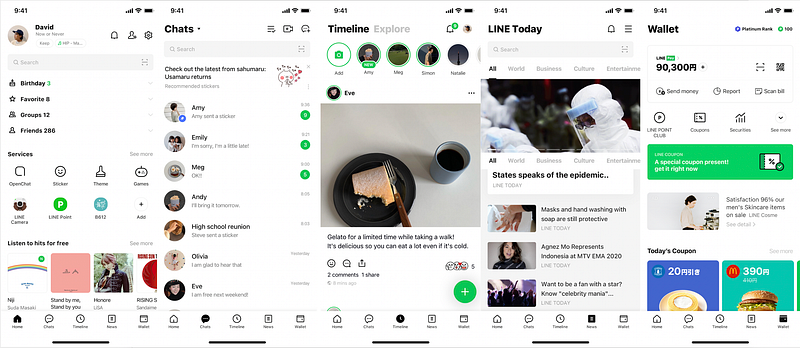
What is LINE
LINE is a popular messaging platform and social media application that was launched in 2011 by LINE Corporation and has since become a leading communication tool with millions of users worldwide. It offers messaging, voice and video calls, file sharing, social networking features, and various other services through its mobile and desktop applications.
Important Features
a. Instant Messaging: LINE allows users to send text messages, stickers, emojis, and multimedia files instantly to their contacts or groups.
b. Voice and Video Calls: Users can make high-quality voice and video calls over the internet using LINE.
c. Timeline: LINE includes a social networking feature called the “Timeline,” where users can post updates, photos, and videos for their friends to see.
d. Stickers and Emojis: LINE offers a wide range of expressive stickers and emojis, which are a significant part of its appeal.
e. Official Accounts: Businesses and brands can create official accounts on LINE to interact with their customers and followers.
f. End-to-End Encryption: LINE ensures the security of user data by employing end-to-end encryption for its messaging services.
g. Mini Programs: LINE allows third-party developers to create mini-programs within the app for various functionalities, enhancing the user experience.
Scaling Requirements — Capacity Estimation
Let’s assume we have —
- Total number of LINE users: 300 Million
- Daily active users (DAU): 100 Million
- Average number of messages sent by each user per day: 10
- Total number of messages sent per day: 1 Billion
- Read-to-write ratio: 100:1
Storage Estimation:
- Assume each message size is 1 KB (for simplicity, considering text messages only)
- Total storage per day: 1 Billion * 1 KB = 1 TB/day
- For the next 3 years, 1 TB * 365 * 3 = 1,095 TB (approximately 1.1 PB)
Requests per Second:
- Messages sent per second: 1 Billion / (24 hours * 3600 seconds) ≈ 11,574 messages/second
- Considering read-to-write ratio: 11,574 * 100 ≈ 1,157,400 requests/second
import time
class LineMessagingService:
def __init__(self):
self.message_count = 0
self.storage_usage = 0
def send_message(self, sender_id, receiver_id, message_content):
# Simulate sending the message and updating the message count and storage usage
time.sleep(0.001) # Simulate message processing time
message_size_kb = len(message_content.encode()) / 1024
self.message_count += 1
self.storage_usage += message_size_kb
def get_total_message_count(self):
return self.message_count
def get_storage_usage(self):
return self.storage_usage
line_service = LineMessagingService()
for _ in range(100_000): # Simulate 100,000 messages sent in one second
line_service.send_message('user1', 'user2', 'Hello, how are you?')
print("Total messages sent:", line_service.get_total_message_count())
print("Storage usage (KB):", line_service.get_storage_usage())Data Model — ER requirements
Users:
- Fields:
- User_id: Int (Primary Key)
- Username: String
- Email: String
- Password: String
Messages:
- Fields:
- Message_id: Int (Primary Key)
- Sender_id: Int (Foreign Key from Users table)
- Receiver_id: Int (Foreign Key from Users table)
- Content: String
- Timestamp: DateTime
Conversations:
- Fields:
- Conversation_id: Int (Primary Key)
- User1_id: Int (Foreign Key from Users table)
- User2_id: Int (Foreign Key from Users table)
MessageStatus:
- Fields:
- MessageStatus_id: Int (Primary Key)
- Message_id: Int (Foreign Key from Messages table)
- User_id: Int (Foreign Key from Users table)
- Status: String (e.g., “delivered,” “read”)
Friendship:
- Fields:
- Friendship_id: Int (Primary Key)
- User1_id: Int (Foreign Key from Users table)
- User2_id: Int (Foreign Key from Users table)
- Status: String (e.g., “pending,” “accepted”)
Groups:
- Fields:
- Group_id: Int (Primary Key)
- Group_name: String
GroupMembers:
- Fields:
- GroupMember_id: Int (Primary Key)
- Group_id: Int (Foreign Key from Groups table)
- User_id: Int (Foreign Key from Users table)
a. User: Contains user information like ID, username, email, and account settings.
b. Chat: Represents individual or group conversations and includes attributes like chat ID, participants, and last message timestamp.
c. Message: Stores message data, including sender, receiver, timestamp, and message content.
d. Friend: Contains relationships between users, representing their friend connections.
e. Timeline Post: Holds data for posts made by users on their timelines.
High Level Design
Assumptions:
- There will be more reads than writes, so the system should be optimized for read-heavy operations.
- The system should be scalable, horizontally (scale-out) to accommodate a large number of users and messages.
- High availability and reliability are crucial for real-time communication.
- The system should support end-to-end encryption to ensure data security.
Main Components and Services:
- Mobile Clients: These are users accessing the LINE app through their mobile devices.
- Application Servers: Responsible for handling read and write operations, authentication, and push notifications.
- Load Balancer: Routes and directs user requests to the appropriate application server based on load and availability.
- Cache (e.g., Memcache, Redis): Used for caching frequently accessed data to improve read performance.
- CDN (Content Delivery Network): Stores and delivers media files (e.g., images, videos) to users, reducing latency and improving download speeds.
- Real-Time Messaging Service: Provides real-time messaging capabilities for instant message delivery.
- End-to-End Encryption Service: Ensures end-to-end encryption for user messages to maintain data security and privacy.
- User Service: Handles user-related operations, such as user registration, authentication, and profile management.
- Friendship Service: Manages friend requests, friend lists, and friend-related operations.
- Message Service: Handles sending, receiving, and storing user messages and provides message status (e.g., delivered, read).
- Group Service: Manages group-related operations, such as creating, joining, and leaving groups.
- Push Notification Service: Sends push notifications to mobile clients to inform about new messages, friend requests, etc.
- Media Storage (e.g., Amazon S3): Stores media files uploaded by users, such as images and videos.
import requests
import json
class LineFeedGenerationService:
def __init__(self, access_token):
self.base_url = 'https://api.line.me/'
self.access_token = access_token
def get_feed(self, user_id):
feed_endpoint = f'{self.base_url}users/{user_id}/feed'
headers = {'Authorization': f'Bearer {self.access_token}'}
response = requests.get(feed_endpoint, headers=headers)
if response.status_code == 200:
feed_data = json.loads(response.text)
return feed_data
else:
print(f"Error: Unable to fetch feed. Status Code: {response.status_code}")
return None
# Usage example:
access_token = '<YOUR_ACCESS_TOKEN>'
user_id = '<USER_ID>'
feed_service = LineFeedGenerationService(access_token)
user_feed = feed_service.get_feed(user_id)
if user_feed:
for post in user_feed['posts']:
print(f"Post ID: {post['post_id']}")
print(f"Content: {post['content']}")
print(f"Timestamp: {post['timestamp']}")
print("-------------------------------")import requests
import json
from datetime import datetime
class LineMessagingService:
def __init__(self, access_token):
self.base_url = 'https://api.line.me/'
self.access_token = access_token
def send_message(self, sender_id, receiver_id, message_content):
message_endpoint = f'{self.base_url}messages'
headers = {
'Authorization': f'Bearer {self.access_token}',
'Content-Type': 'application/json'
}
data = {
'sender_id': sender_id,
'receiver_id': receiver_id,
'message_content': message_content,
'timestamp': str(datetime.now())
}
response = requests.post(message_endpoint, headers=headers, data=json.dumps(data))
if response.status_code == 200:
print(f"Message sent successfully from {sender_id} to {receiver_id}.")
else:
print(f"Error: Unable to send message. Status Code: {response.status_code}")
class LineLikeService:
def __init__(self, access_token):
self.base_url = 'https://api.line.me/'
self.access_token = access_token
def like_post(self, user_id, post_id):
like_endpoint = f'{self.base_url}users/{user_id}/posts/{post_id}/like'
headers = {'Authorization': f'Bearer {self.access_token}'}
response = requests.post(like_endpoint, headers=headers)
if response.status_code == 200:
print(f"Post ID {post_id} liked by User ID {user_id}.")
else:
print(f"Error: Unable to like post. Status Code: {response.status_code}")
class LineFollowService:
def __init__(self, access_token):
self.base_url = 'https://api.line.me/'
self.access_token = access_token
def follow_user(self, user_id, target_user_id):
follow_endpoint = f'{self.base_url}users/{user_id}/follow/{target_user_id}'
headers = {'Authorization': f'Bearer {self.access_token}'}
response = requests.post(follow_endpoint, headers=headers)
if response.status_code == 200:
print(f"User ID {user_id} follows User ID {target_user_id}.")
else:
print(f"Error: Unable to follow user. Status Code: {response.status_code}")
class LinePostService:
def __init__(self, access_token):
self.base_url = 'https://api.line.me/'
self.access_token = access_token
def create_post(self, user_id, content):
post_endpoint = f'{self.base_url}users/{user_id}/posts'
headers = {
'Authorization': f'Bearer {self.access_token}',
'Content-Type': 'application/json'
}
data = {
'user_id': user_id,
'content': content,
'timestamp': str(datetime.now())
}
response = requests.post(post_endpoint, headers=headers, data=json.dumps(data))
if response.status_code == 200:
print(f"Post created successfully for User ID {user_id}.")
else:
print(f"Error: Unable to create post. Status Code: {response.status_code}")
class LineGenerateFeedService:
def __init__(self, access_token):
self.base_url = 'https://api.line.me/'
self.access_token = access_token
def generate_feed(self, user_id):
feed_endpoint = f'{self.base_url}users/{user_id}/feed'
headers = {'Authorization': f'Bearer {self.access_token}'}
response = requests.get(feed_endpoint, headers=headers)
if response.status_code == 200:
feed_data = json.loads(response.text)
return feed_data
else:
print(f"Error: Unable to fetch feed. Status Code: {response.status_code}")
return None
# Usage example:
access_token = '<YOUR_ACCESS_TOKEN>'
user_id = '<USER_ID>'
messaging_service = LineMessagingService(access_token)
messaging_service.send_message(user_id, 'receiver_user_id', 'Hello, how are you?')
like_service = LineLikeService(access_token)
like_service.like_post(user_id, 'post_id_to_like')
follow_service = LineFollowService(access_token)
follow_service.follow_user(user_id, 'target_user_id_to_follow')
post_service = LinePostService(access_token)
post_service.create_post(user_id, 'This is my new post!')
generate_feed_service = LineGenerateFeedService(access_token)
user_feed = generate_feed_service.generate_feed(user_id)
if user_feed:
for post in user_feed['posts']:
print(f"Post ID: {post['post_id']}")
print(f"Content: {post['content']}")
print(f"Timestamp: {post['timestamp']}")
print("-------------------------------")a. Frontend: This component includes mobile and desktop applications used by users to interact with LINE.
b. Backend Servers: Responsible for handling user requests, processing messages, and managing user accounts.
c. Database: Stores user information, chat messages, friend connections, and other relevant data.
d. Caching Layer: Implements caching mechanisms to store frequently accessed data and reduce database load.
e. Media Storage: Handles storage and retrieval of multimedia files shared among users.
f. Third-Party APIs: Integrates with external services for features like login, payment, and location services.
Basic Low Level Design
a. Message Processing Module: Responsible for receiving and processing messages, implementing encryption, and forwarding messages to the appropriate recipients.
b. User Authentication Module: Handles user login, registration, and account management, ensuring secure access to user accounts.
c. Timeline Module: Manages user timeline activities, such as posting updates, viewing posts, and interacting with timeline content.
# Low-Level API Design for LINE System
from datetime import datetime
class MessagingService:
def send_message(self, sender_id, receiver_id, message_content):
# Assume there's a database to store messages
# Save the message with sender_id, receiver_id, and message_content
message = {
'sender_id': sender_id,
'receiver_id': receiver_id,
'message_content': message_content,
'timestamp': datetime.now()
}
# Save the message to the database
self.save_message_to_database(message)
def save_message_to_database(self, message):
# Logic to save the message to the database
pass
class TimelineService:
def create_timeline_post(self, user_id, post_content):
# Assume there's a database to store timeline posts
# Save the post with user_id, post_content, and timestamp
post = {
'user_id': user_id,
'post_content': post_content,
'timestamp': datetime.now()
}
# Save the post to the database
self.save_post_to_database(post)
def save_post_to_database(self, post):
# Logic to save the post to the database
pass
class UserService:
def get_user_profile(self, user_id):
# Assume there's a database to store user profiles
# Fetch the user profile using user_id
user_profile = self.get_user_profile_from_database(user_id)
return user_profile
def get_user_profile_from_database(self, user_id):
# Logic to fetch the user profile from the database
# For simplicity, returning a dictionary here
return {
'user_id': user_id,
'username': 'user1',
'email': '[email protected]',
'profile_picture_url': 'https://example.com/user1/profile.jpg',
# Other user profile attributes
}
class FriendshipService:
def add_friend(self, user_id, friend_id):
# Assume there's a database to store friend connections
# Save the friend connection between user_id and friend_id
friendship = {
'user_id': user_id,
'friend_id': friend_id,
'timestamp': datetime.now()
}
# Save the friend connection to the database
self.save_friendship_to_database(friendship)
def save_friendship_to_database(self, friendship):
# Logic to save the friend connection to the database
pass
# Usage example:
messaging_service = MessagingService()
timeline_service = TimelineService()
user_service = UserService()
friendship_service = FriendshipService()
# Sending a message
messaging_service.send_message('user1', 'user2', 'Hello, how are you?')
# Creating a timeline post
timeline_service.create_timeline_post('user1', 'Having a great day!')
# Getting user profile
user_profile = user_service.get_user_profile('user1')
print(user_profile)
# Adding a friend
friendship_service.add_friend('user1', 'user2')API Design
from flask import Flask, request, jsonify
app = Flask(__name__)
instagram = Instagram()
@app.route('/users', methods=['POST'])
def create_user():
data = request.get_json()
user_id = data.get('user_id')
username = data.get('username')
password = data.get('password')
email = data.get('email')
user = User(user_id, username, password, email)
instagram.add_user(user)
return jsonify({"message": "User created successfully"}), 201
@app.route('/login', methods=['POST'])
def login():
data = request.get_json()
user_id = data.get('user_id')
password = data.get('password')
user = instagram.get_user_by_id(user_id)
if not user or user.password != password:
return jsonify({"message": "Invalid credentials"}), 401
return jsonify({"message": "Login successful"}), 200
@app.route('/users/<user_id>', methods=['GET'])
def get_user(user_id):
user = instagram.get_user_by_id(user_id)
if not user:
return jsonify({"message": "User not found"}), 404
return jsonify({
"user_id": user.user_id,
"username": user.username,
"email": user.email,
"followers": user.followers,
"following": user.following,
"posts": [post.post_id for post in user.posts]
}), 200
@app.route('/users/<user_id>/posts', methods=['POST'])
def create_post(user_id):
user = instagram.get_user_by_id(user_id)
if not user:
return jsonify({"message": "User not found"}), 404
data = request.get_json()
caption = data.get('caption')
image_url = data.get('image_url')
timestamp = data.get('timestamp')
instagram.create_post(user_id, caption, image_url, timestamp)
return jsonify({"message": "Post created"}), 200
@app.route('/users/<user_id>/feed', methods=['GET'])
def get_feed(user_id):
user = instagram.get_user_by_id(user_id)
if not user:
return jsonify({"message": "User not found"}), 404
feed = instagram.get_feed(user_id)
return jsonify({
"feed": [{
"post_id": post.post_id,
"user_id": post.user.user_id,
"caption": post.caption,
"image_url": post.image_url,
"timestamp": post.timestamp
} for post in feed]
}), 200
if __name__ == '__main__':
app.run()a. sendMessage(senderID, receiverID, messageContent): API to send a message from one user to another.
b. createTimelinePost(userID, postContent): API to create a post on the user’s timeline.
c. getUserProfile(userID): API to retrieve user profile information.
d. addFriend(userID, friendID): API to add a friend connection between two users.
send_message(sender_id, receiver_id, message_content): This API will be responsible for sending a message from one user to another. It will take the sender's ID, receiver's ID, and the content of the message as input.
create_timeline_post(user_id, post_content): This API will allow users to create a post on their timeline. It will take the user's ID and the content of the post as input.
get_user_profile(user_id): This API will retrieve user profile information based on the user's ID.
add_friend(user_id, friend_id): This API will enable users to add a friend connection between two users. It will take the user's ID and the friend's ID as input.Complete Detailed Design
Coming soon! It will be covered on youtube channel.
Subscribe to youtube channel :
Complete Code implementation
class User:
def __init__(self, user_id, username, password, email):
self.user_id = user_id
self.username = username
self.password = password
self.email = email
self.followers = []
self.following = []
self.posts = []
class Post:
def __init__(self, post_id, user, caption, image_url, timestamp):
self.post_id = post_id
self.user = user
self.caption = caption
self.image_url = image_url
self.timestamp = timestamp
class Instagram:
def __init__(self):
self.users = {}
def add_user(self, user):
self.users[user.user_id] = user
def get_user_by_id(self, user_id):
return self.users.get(user_id)
def create_post(self, user_id, caption, image_url, timestamp):
user = self.get_user_by_id(user_id)
if not user:
print("User not found")
return
post_id = len(user.posts) + 1
post = Post(post_id, user, caption, image_url, timestamp)
user.posts.append(post)
def get_feed(self, user_id):
user = self.get_user_by_id(user_id)
if not user:
print("User not found")
return []
feed = []
for following_user_id in user.following:
following_user = self.get_user_by_id(following_user_id)
feed.extend(following_user.posts)
sorted_feed = sorted(feed, key=lambda post: post.timestamp, reverse=True)
return sorted_feedfrom datetime import datetime
# Data Storage Simulation (Dictionary-based)
users = {
'user1': {
'username': 'User 1',
'email': '[email protected]',
'profile_picture_url': 'https://example.com/user1/profile.jpg',
'friends': ['user2'],
'timeline': []
},
'user2': {
'username': 'User 2',
'email': '[email protected]',
'profile_picture_url': 'https://example.com/user2/profile.jpg',
'friends': ['user1'],
'timeline': []
}
}
messages = []
# High-Level API Design for LINE System
class LineSystem:
def send_message(self, sender_id, receiver_id, message_content):
if sender_id not in users or receiver_id not in users:
raise ValueError("Invalid sender or receiver ID.")
message = {
'sender_id': sender_id,
'receiver_id': receiver_id,
'message_content': message_content,
'timestamp': datetime.now().strftime('%Y-%m-%d %H:%M:%S')
}
messages.append(message)
def create_timeline_post(self, user_id, post_content):
if user_id not in users:
raise ValueError("Invalid user ID.")
post = {
'user_id': user_id,
'post_content': post_content,
'timestamp': datetime.now().strftime('%Y-%m-%d %H:%M:%S')
}
users[user_id]['timeline'].append(post)
def get_user_profile(self, user_id):
if user_id not in users:
raise ValueError("Invalid user ID.")
return users[user_id]
def add_friend(self, user_id, friend_id):
if user_id not in users or friend_id not in users:
raise ValueError("Invalid user or friend ID.")
if friend_id not in users[user_id]['friends']:
users[user_id]['friends'].append(friend_id)
users[friend_id]['friends'].append(user_id)
# Usage example:
line_system = LineSystem()
# Sending a message
line_system.send_message('user1', 'user2', 'Hello, how are you?')
# Creating a timeline post
line_system.create_timeline_post('user1', 'Having a great day!')
# Getting user profile
user_profile = line_system.get_user_profile('user1')
print("User Profile:")
print(user_profile)
# Adding a friend
line_system.add_friend('user1', 'user2')
# Displaying messages and timeline
print("\nMessages:")
for message in messages:
print(f"{message['timestamp']} - {message['sender_id']} to {message['receiver_id']}: {message['message_content']}")
print("\nTimeline Posts:")
for user_id, user_data in users.items():
print(f"User: {user_data['username']} ({user_id})")
for post in user_data['timeline']:
print(f"{post['timestamp']} - {post['user_id']}: {post['post_content']}")
print("--------------------------")System Design — One Note
We will be discussing in depth -
- What is One Note
- Important Features
- Scaling Requirements — Capacity Estimation
- Data Model — ER requirements
- High Level Design
- Basic Low Level Design
- API Design
- Complete Detailed Design

What is One Note
OneNote is a digital note-taking application developed by Microsoft. It allows users to capture and organize information in various formats, such as text, images, audio, and more. OneNote operates on multiple platforms, including desktop, web, and mobile devices.
Important Features
- Notebooks: Users can create multiple notebooks to categorize their notes based on different topics or projects.
- Sections and Pages: Within each notebook, users can organize their content into sections and pages, providing a hierarchical structure for better organization.
- Rich Media Support: OneNote enables users to embed images, videos, audio recordings, and attachments within their notes, enhancing the overall note-taking experience.
- Synchronization: The application synchronizes notes across devices in real-time, allowing users to access and edit their notes seamlessly.
- Collaboration: OneNote facilitates collaboration by enabling users to share their notebooks with others and work together in real-time.
- Search Functionality: The powerful search feature allows users to quickly find specific notes or content within their notebooks.
Scaling Requirements — Capacity Estimation
Let’s assume, we have —
- Total number of users: 100 million
- Daily active users (DAU): 30 million
- Number of notes created by user/day: 5
- Total number of notes created per day: 150 million notes/day
Since the system is read-heavy, let’s say the read-to-write ratio be 100:1.
- Total number of notes read per day: 150 million * 100 = 15 billion notes/day
Storage Estimation:
Let’s assume that on average, each note size is 1 MB.
- Total Storage per day: 150 million * 1 MB = 150 TB/day
For the next 3 years:
- Total Storage for 3 years: 150 TB/day * 5 * 365 = 273,750 TB (approximately 274 PB)
Requests per second:
- Requests per second: 15 billion / (3600 seconds * 24 hours) ≈ 173,610 requests/second
def calculate_storage_estimate():
total_users = 100_000_000
daily_active_users = 30_000_000
notes_per_user_per_day = 5
total_notes_per_day = total_users * notes_per_user_per_day
read_to_write_ratio = 100
# Total number of notes read per day
total_notes_read_per_day = total_notes_per_day * read_to_write_ratio
# Assuming each note size is 1 MB
note_size_MB = 1
total_storage_per_day_TB = total_notes_per_day * note_size_MB / 1024
# Total Storage for 3 years (approx. 274 PB)
total_storage_for_3_years_TB = total_storage_per_day_TB * 5 * 365
# Requests per second
requests_per_second = total_notes_read_per_day / (3600 * 24)
return total_storage_per_day_TB, total_storage_for_3_years_TB, requests_per_second
if __name__ == '__main__':
total_storage_per_day, total_storage_for_3_years, requests_per_second = calculate_storage_estimate()
print(f"Total Storage per day: {total_storage_per_day:.2f} TB")
print(f"Total Storage for 3 years: {total_storage_for_3_years:.2f} PB")
print(f"Requests per second: {requests_per_second:.2f}")Data Model — ER requirements
User
- UserID: Int (Primary Key)
- Username: String
- Email: String
- Password: String
Notebook
- NotebookID: Int (Primary Key)
- Title: String
- UserID: Int (Foreign Key: User.UserID)
Section
- SectionID: Int (Primary Key)
- Title: String
- NotebookID: Int (Foreign Key: Notebook.NotebookID)
Page
- PageID: Int (Primary Key)
- Title: String
- Content: Text
- SectionID: Int (Foreign Key: Section.SectionID)
Media
- MediaID: Int (Primary Key)
- Type: String
- URL: String
- PageID: Int (Foreign Key: Page.PageID)
Follower
- FollowerID: Int (Primary Key)
- UserID: Int (Foreign Key: User.UserID)
- FollowerUserID: Int (Foreign Key: User.UserID)
High Level Design
Assumptions:
- OneNote is a read-heavy system with a higher number of reads compared to writes.
- High availability and reliability are crucial for user satisfaction.
- Horizontal scaling (scale-out) will be adopted to handle the increased load.
Main Components and Services:
- Mobile Client: Users access OneNote through mobile applications.
- Web Client: Users access OneNote through web browsers.
3. Application Servers:
- Read Servers: Serve read requests, fetch user data, notes, and pages, and generate feeds.
- Write Servers: Handle write requests like creating notebooks, sections, pages, and media, as well as handling likes, comments, and follows.
4. Load Balancer: Distributes incoming requests across multiple application servers for load balancing.
5. Cache (Memcache): Caches frequently accessed data like user profiles, notes, and pages to improve read performance.
6. CDN (Content Delivery Network): Serves static assets like images, videos, and media files to reduce latency and improve user experience.
7. Database Servers:
- User Database: Stores user account information.
- Note Database: Stores notebook, section, and page information.
- Media Database: Stores media file information.
8. Storage (HDFS or Amazon S3): Stores uploaded photos, media, and other attachments.
Services:
User Service:
- Create a new user account.
- Authenticate users during login.
- Retrieve user profiles and details.
- Manage user settings and preferences.
Notebook Service:
- Create, update, and delete notebooks.
- List notebooks for a specific user.
- Retrieve details of a specific notebook.
Section Service:
- Create, update, and delete sections within a notebook.
- List sections for a specific notebook.
- Retrieve details of a specific section.
Page Service:
- Create, update, and delete pages within a section.
- List pages for a specific section.
- Retrieve details of a specific page.
Media Service:
- Upload media files (images, videos, audio) to a page.
- Retrieve media details for a specific page.
Search Service:
- Implement a powerful search feature to find specific notes, pages, and users based on keywords and filters.
User Service:
class UserService:
def __init__(self):
self.users = {}
self.user_id_counter = 1 def create_user(self, username, email, password):
user_id = self.user_id_counter
user = {
'user_id': user_id,
'username': username,
'email': email,
'password': password
}
self.users[user_id] = user
self.user_id_counter += 1
return user_id def authenticate_user(self, username, password):
for user in self.users.values():
if user['username'] == username and user['password'] == password:
return user['user_id']
return None def get_user_profile(self, user_id):
return self.users.get(user_id, None) def update_user_profile(self, user_id, username, email, password):
user = self.users.get(user_id, None)
if user:
user['username'] = username
user['email'] = email
user['password'] = password
return True
return False# Usage example
user_service = UserService()
user_id = user_service.create_user('john_doe', '[email protected]', 'password123')
print(user_service.authenticate_user('john_doe', 'password123'))
print(user_service.get_user_profile(user_id))
user_service.update_user_profile(user_id, 'jane_doe', '[email protected]', 'new_password')
print(user_service.get_user_profile(user_id))Notebook Service:
class NotebookService:
def __init__(self):
self.notebooks = {}
self.notebook_id_counter = 1 def create_notebook(self, user_id, title):
notebook_id = self.notebook_id_counter
notebook = {
'notebook_id': notebook_id,
'user_id': user_id,
'title': title
}
self.notebooks[notebook_id] = notebook
self.notebook_id_counter += 1
return notebook_id def get_notebooks_for_user(self, user_id):
user_notebooks = []
for notebook in self.notebooks.values():
if notebook['user_id'] == user_id:
user_notebooks.append(notebook)
return user_notebooks def get_notebook_details(self, notebook_id):
return self.notebooks.get(notebook_id, None) def update_notebook_title(self, notebook_id, title):
notebook = self.notebooks.get(notebook_id, None)
if notebook:
notebook['title'] = title
return True
return False# Usage example
notebook_service = NotebookService()
notebook_id = notebook_service.create_notebook(user_id, 'My Notebook')
print(notebook_service.get_notebooks_for_user(user_id))
print(notebook_service.get_notebook_details(notebook_id))
notebook_service.update_notebook_title(notebook_id, 'New Notebook Title')
print(notebook_service.get_notebook_details(notebook_id))Section Service:
class SectionService:
def __init__(self):
self.sections = {}
self.section_id_counter = 1 def create_section(self, notebook_id, title):
section_id = self.section_id_counter
section = {
'section_id': section_id,
'notebook_id': notebook_id,
'title': title
}
self.sections[section_id] = section
self.section_id_counter += 1
return section_id def get_sections_for_notebook(self, notebook_id):
notebook_sections = []
for section in self.sections.values():
if section['notebook_id'] == notebook_id:
notebook_sections.append(section)
return notebook_sections def get_section_details(self, section_id):
return self.sections.get(section_id, None) def update_section_title(self, section_id, title):
section = self.sections.get(section_id, None)
if section:
section['title'] = title
return True
return False# Usage example
section_service = SectionService()
section_id = section_service.create_section(notebook_id, 'My Section')
print(section_service.get_sections_for_notebook(notebook_id))
print(section_service.get_section_details(section_id))
section_service.update_section_title(section_id, 'New Section Title')
print(section_service.get_section_details(section_id))Page Service:
class PageService:
def __init__(self):
self.pages = {}
self.page_id_counter = 1 def create_page(self, section_id, title, content):
page_id = self.page_id_counter
page = {
'page_id': page_id,
'section_id': section_id,
'title': title,
'content': content
}
self.pages[page_id] = page
self.page_id_counter += 1
return page_id def get_pages_for_section(self, section_id):
section_pages = []
for page in self.pages.values():
if page['section_id'] == section_id:
section_pages.append(page)
return section_pages def get_page_details(self, page_id):
return self.pages.get(page_id, None) def update_page_details(self, page_id, title, content):
page = self.pages.get(page_id, None)
if page:
page['title'] = title
page['content'] = content
return True
return False# Usage example
page_service = PageService()
page_id = page_service.create_page(section_id, 'My Page', 'This is the content of my page.')
print(page_service.get_pages_for_section(section_id))
print(page_service.get_page_details(page_id))
page_service.update_page_details(page_id, 'New Page Title', 'Updated content of my page.')
print(page_service.get_page_details(page_id))Basic Low Level Design
User Management API:
POST /users: Create a new user account. This endpoint will accept user details like username, email, and password in the request body and create a new user account.
GET /users/{userId}: Get user details by userId. This endpoint will return the details of a specific user based on the provided userId.
PATCH /users/{userId}: Update user details. This endpoint will allow users to update their profile information like username, email, and password.
DELETE /users/{userId}: Delete a user account. This endpoint will delete the user account along with all associated notebooks, sections, and pages.
Notebook Management API:
POST /users/{userId}/notebooks: Create a new notebook. This endpoint will allow users to create a new notebook. The request body should contain the title of the notebook.
GET /users/{userId}/notebooks: Get all notebooks of a user. This endpoint will return a list of all notebooks belonging to a specific user.
GET /notebooks/{notebookId}: Get notebook details. This endpoint will return the details of a specific notebook based on the provided notebookId.
PATCH /notebooks/{notebookId}: Update notebook details. This endpoint will allow users to update the title of a notebook.
DELETE /notebooks/{notebookId}: Delete a notebook. This endpoint will delete the specified notebook along with all its sections and pages.
Section Management API:
POST /notebooks/{notebookId}/sections: Create a new section. This endpoint will allow users to create a new section within a notebook. The request body should contain the title of the section.
GET /notebooks/{notebookId}/sections: Get all sections of a notebook. This endpoint will return a list of all sections within a specific notebook.
GET /sections/{sectionId}: Get section details. This endpoint will return the details of a specific section based on the provided sectionId.
PATCH /sections/{sectionId}: Update section details. This endpoint will allow users to update the title of a section.
DELETE /sections/{sectionId}: Delete a section. This endpoint will delete the specified section along with all its pages.
Page Management API:
POST /sections/{sectionId}/pages: Create a new page. This endpoint will allow users to create a new page within a section. The request body should contain the title and content of the page.
GET /sections/{sectionId}/pages: Get all pages of a section. This endpoint will return a list of all pages within a specific section.
GET /pages/{pageId}: Get page details. This endpoint will return the details of a specific page based on the provided pageId.
PATCH /pages/{pageId}: Update page details. This endpoint will allow users to update the title and content of a page.
DELETE /pages/{pageId}: Delete a page. This endpoint will delete the specified page.
Media Management API:
POST /pages/{pageId}/media: Upload media to a page. This endpoint will allow users to upload images, videos, or other media as attachments to a page.
GET /pages/{pageId}/media: Get all media of a page. This endpoint will return a list of all media attachments within a specific page.
GET /media/{mediaId}: Get media details. This endpoint will return the details of a specific media attachment based on the provided mediaId.
DELETE /media/{mediaId}: Delete media. This endpoint will delete the specified media attachment from a page.from flask import Flask, request, jsonify
import uuid
app = Flask(__name__)
users = []
notebooks = []
# User Management API
@app.route('/users', methods=['POST'])
def create_user():
data = request.get_json()
username = data['username']
email = data['email']
password = data['password']
user = User(username, email, password)
users.append(user)
return jsonify({"user_id": user.user_id}), 201
@app.route('/users/<user_id>', methods=['GET'])
def get_user(user_id):
for user in users:
if user.user_id == user_id:
return jsonify({"username": user.username, "email": user.email}), 200
return jsonify({"message": "User not found"}), 404
# Notebook Management API
@app.route('/notebooks', methods=['POST'])
def create_notebook():
data = request.get_json()
title = data['title']
notebook = Notebook(title)
notebooks.append(notebook)
return jsonify({"notebook_id": notebook.notebook_id}), 201
@app.route('/notebooks/<notebook_id>', methods=['GET'])
def get_notebook(notebook_id):
for notebook in notebooks:
if notebook.notebook_id == notebook_id:
return jsonify({"title": notebook.title}), 200
return jsonify({"message": "Notebook not found"}), 404
# Other APIs for Section, Page, Media, etc. can be added in a similar way
if __name__ == '__main__':
app.run(debug=True)API Design
Notebook API:
GET /notebooks: Get a list of all notebooks for the authenticated user.
POST /notebooks: Create a new notebook.
GET /notebooks/{notebook_id}: Get details of a specific notebook.
PUT /notebooks/{notebook_id}: Update the details of a specific notebook.
DELETE /notebooks/{notebook_id}: Delete a specific notebook.
Section API:
GET /notebooks/{notebook_id}/sections: Get a list of all sections within a notebook.
POST /notebooks/{notebook_id}/sections: Create a new section within a notebook.
GET /sections/{section_id}: Get details of a specific section.
PUT /sections/{section_id}: Update the details of a specific section.
DELETE /sections/{section_id}: Delete a specific section.
Page API:
GET /sections/{section_id}/pages: Get a list of all pages within a section.
POST /sections/{section_id}/pages: Create a new page within a section.
GET /pages/{page_id}: Get details of a specific page.
PUT /pages/{page_id}: Update the content of a specific page.
DELETE /pages/{page_id}: Delete a specific page.
Media API:
POST /pages/{page_id}/media: Upload media files (images, videos, audio) to a specific page.
GET /pages/{page_id}/media/{media_id}: Get details of a specific media file.
DELETE /pages/{page_id}/media/{media_id}: Delete a specific media file from a page.from flask import Flask, jsonify, request
app = Flask(__name__)
# Sample data to simulate the storage of notebooks, sections, and pages
notebooks = []
sections = {}
pages = {}
# Helper functions
def generate_id():
# This function generates a unique ID for notebooks, sections, and pages (in real scenarios, use UUID or a similar approach)
return str(len(notebooks) + 1)
def find_notebook(notebook_id):
# Find a notebook by ID in the list of notebooks
for notebook in notebooks:
if notebook['id'] == notebook_id:
return notebook
return None
def find_section(section_id):
# Find a section by ID in the sections dictionary
return sections.get(section_id, None)
def find_page(page_id):
# Find a page by ID in the pages dictionary
return pages.get(page_id, None)
# Notebook API
@app.route('/notebooks', methods=['GET'])
def get_notebooks():
return jsonify(notebooks)
@app.route('/notebooks', methods=['POST'])
def create_notebook():
data = request.get_json()
notebook = {
'id': generate_id(),
'title': data['title'],
'sections': []
}
notebooks.append(notebook)
return jsonify(notebook), 201
@app.route('/notebooks/<notebook_id>', methods=['GET'])
def get_notebook(notebook_id):
notebook = find_notebook(notebook_id)
if notebook:
return jsonify(notebook)
return jsonify({'message': 'Notebook not found'}), 404
# Implement other Notebook API endpoints: update and delete notebook
# Section API
@app.route('/notebooks/<notebook_id>/sections', methods=['GET'])
def get_sections(notebook_id):
notebook = find_notebook(notebook_id)
if notebook:
return jsonify(notebook['sections'])
return jsonify({'message': 'Notebook not found'}), 404
# Implement other Section API endpoints: create, get, update, and delete section
# Page API
@app.route('/sections/<section_id>/pages', methods=['GET'])
def get_pages(section_id):
section = find_section(section_id)
if section:
return jsonify(section['pages'])
return jsonify({'message': 'Section not found'}), 404
# Implement other Page API endpoints: create, get, update, and delete page
# Media API
@app.route('/pages/<page_id>/media', methods=['POST'])
def upload_media(page_id):
page = find_page(page_id)
if page:
data = request.get_json()
media_id = generate_id()
media = {
'id': media_id,
'type': data['type'],
'url': data['url']
}
page.setdefault('media', []).append(media)
return jsonify(media), 201
return jsonify({'message': 'Page not found'}), 404
# Implement other Media API endpoints: get and delete media
if __name__ == '__main__':
app.run(debug=True)Complete Detailed Design
Coming soon! It will be covered on youtube channel.
Subscribe to youtube channel :
Complete Code implementation
from flask import Flask, jsonify, request
app = Flask(__name__)
# Sample data to simulate the storage of notebooks, sections, and pages
notebooks = []
sections = {}
pages = {}
# Helper functions
def generate_id():
# This function generates a unique ID for notebooks, sections, pages, and media (in real scenarios, use UUID or a similar approach)
return str(len(notebooks) + 1)
# Notebooks functionality
@app.route('/notebooks', methods=['POST'])
def create_notebook():
data = request.get_json()
notebook = {
'id': generate_id(),
'title': data['title'],
'sections': []
}
notebooks.append(notebook)
return jsonify(notebook), 201
@app.route('/notebooks', methods=['GET'])
def get_notebooks():
return jsonify(notebooks)
# Sections functionality
@app.route('/notebooks/<notebook_id>/sections', methods=['POST'])
def create_section(notebook_id):
notebook = find_notebook(notebook_id)
if notebook:
data = request.get_json()
section = {
'id': generate_id(),
'title': data['title'],
'pages': []
}
notebook['sections'].append(section)
sections[section['id']] = section
return jsonify(section), 201
return jsonify({'message': 'Notebook not found'}), 404
@app.route('/notebooks/<notebook_id>/sections', methods=['GET'])
def get_sections(notebook_id):
notebook = find_notebook(notebook_id)
if notebook:
return jsonify(notebook['sections'])
return jsonify({'message': 'Notebook not found'}), 404
# Pages functionality
@app.route('/sections/<section_id>/pages', methods=['POST'])
def create_page(section_id):
section = find_section(section_id)
if section:
data = request.get_json()
page = {
'id': generate_id(),
'title': data['title'],
'content': data['content'],
'media': []
}
section['pages'].append(page)
pages[page['id']] = page
return jsonify(page), 201
return jsonify({'message': 'Section not found'}), 404
@app.route('/sections/<section_id>/pages', methods=['GET'])
def get_pages(section_id):
section = find_section(section_id)
if section:
return jsonify(section['pages'])
return jsonify({'message': 'Section not found'}), 404
# Media functionality
@app.route('/pages/<page_id>/media', methods=['POST'])
def upload_media(page_id):
page = find_page(page_id)
if page:
data = request.get_json()
media_id = generate_id()
media = {
'id': media_id,
'type': data['type'],
'url': data['url']
}
page['media'].append(media)
return jsonify(media), 201
return jsonify({'message': 'Page not found'}), 404
# Search functionality
@app.route('/search', methods=['GET'])
def search():
query = request.args.get('query', '')
results = []
for notebook in notebooks:
for section in notebook['sections']:
for page in section['pages']:
if query in page['title'] or query in page['content']:
results.append({'notebook': notebook['title'], 'section': section['title'], 'page': page['title']})
return jsonify(results)
# Helper functions
def find_notebook(notebook_id):
# Find a notebook by ID in the list of notebooks
for notebook in notebooks:
if notebook['id'] == notebook_id:
return notebook
return None
def find_section(section_id):
# Find a section by ID in the sections dictionary
return sections.get(section_id, None)
def find_page(page_id):
# Find a page by ID in the pages dictionary
return pages.get(page_id, None)
if __name__ == '__main__':
app.run(debug=True)System Design — Messenger Lite
We will be discussing in depth -
- What is Messenger Lite
- Important Features
- Scaling Requirements — Capacity Estimation
- Data Model — ER requirements
- High Level Design
- Basic Low Level Design
- API Design
- Complete Detailed Design

What is Messenger Lite
Messenger Lite is a slimmed-down version of the original Messenger app, tailored for use in regions with limited internet connectivity and devices with low processing power. It offers a smooth messaging experience with essential features while consuming fewer resources, making it an ideal choice for users in emerging markets or those using older smartphones.
Important Features
- Lightweight Footprint: Messenger Lite prioritizes efficient memory usage and optimized code to ensure smooth performance on low-end devices.
- Basic Messaging: Users can send text messages, images, videos, and stickers to their contacts.
- Fast and Reliable: Messenger Lite focuses on fast message delivery even in areas with poor network conditions.
- Data Saving Mode: An optional feature that compresses data to reduce bandwidth consumption.
- Contact Management: Users can manage their contacts and see who is online.
- Push Notifications: Instant notifications keep users informed about new messages.
- Emojis and Stickers: A selection of emojis and stickers to enhance messaging expressions.
Scaling Requirements — Capacity Estimation
Let’s assume, we have —
Total number of users: 10 Million
Daily active users (DAU): 2 Million
Number of messages sent by user/day: 5
Total number of messages sent per day: 10 Million messages/day
Since the system is read-heavy, let’s say the read-to-write ratio is 50:1.
Total number of messages received per day: 200 Million messages/day (assuming an average of 100 messages received per DAU).
Total number of messages in the system per day (including sent and received): 210 Million messages/day.
Storage Estimation:
Assuming each message, on average, is 5 KB in size.
- Total Storage per day: 210 Million * 5 KB = 1.05 TB/day
- For the next 3 years: 1.05 TB * 365 * 3 = 1,143.75 TB (approximately 1.14 PB)
Requests per Second:
Assuming messages are evenly distributed throughout the day:
- Requests per second for message sending: 10 Million / (24 hours * 3600 seconds) ≈ 115 requests/second
- Requests per second for message receiving: 200 Million / (24 hours * 3600 seconds) ≈ 2,314 requests/second
class MessengerLite:
def __init__(self):
self.users = {} # Dictionary to store user data
self.messages = [] # List to store messages
def register_user(self, user_id, username, email):
self.users[user_id] = {'username': username, 'email': email}
def send_message(self, sender_id, receiver_id, content):
if sender_id in self.users and receiver_id in self.users:
self.messages.append({'sender': sender_id, 'receiver': receiver_id, 'content': content})
print(f"Message sent from {self.users[sender_id]['username']} to {self.users[receiver_id]['username']}: {content}")
else:
print("Invalid user IDs. Please check if both sender and receiver exist.")
def get_messages_for_user(self, user_id):
if user_id in self.users:
user_messages = [msg['content'] for msg in self.messages if msg['receiver'] == user_id]
print(f"Messages for {self.users[user_id]['username']}: {user_messages}")
else:
print("Invalid user ID. Please check if the user exists.")
if __name__ == "__main__":
messenger_lite = MessengerLite()
# Register users
messenger_lite.register_user(1, 'Alice', '[email protected]')
messenger_lite.register_user(2, 'Bob', '[email protected]')
# Send messages
messenger_lite.send_message(1, 2, 'Hello Bob!')
messenger_lite.send_message(2, 1, 'Hi Alice, how are you?')
messenger_lite.send_message(1, 2, 'I am doing well. Thanks for asking!')
# Get messages for a user
messenger_lite.get_messages_for_user(1)
messenger_lite.get_messages_for_user(2)Data Model — ER requirements
Users:
- Fields:
- User_id: Integer (Primary Key)
- Username: String
- Email: String
- Password: String
Posts:
- Fields:
- Post_id: Integer (Primary Key)
- User_id: Integer (Foreign Key from Users table)
- Content: String (Text content of the post)
- Timestamp: DateTime
- Location: String (Optional location of the post)
Likes:
- Fields:
- Like_id: Integer (Primary Key)
- User_id: Integer (Foreign Key from Users table)
- Post_id: Integer (Foreign Key from Posts table)
- Timestamp: DateTime
Comments:
- Fields:
- Comment_id: Integer (Primary Key)
- Post_id: Integer (Foreign Key from Posts table)
- User_id: Integer (Foreign Key from Users table)
- Content: String (Text content of the comment)
- Timestamp: DateTime
Followers:
- Fields:
- Follower_id: Integer (Primary Key)
- User_id: Integer (Foreign Key from Users table)
- Follower_user_id: Integer (Foreign Key from Users table)
High Level Design
- Mobile Clients: These are the users who access Messenger Lite through mobile devices.
- Application Servers: These servers handle read, write, and notification operations.
- Load Balancer: The load balancer routes and directs requests to the appropriate servers based on the service required.
- Cache (Memcache): A caching system helps serve millions of users quickly by caching frequently accessed data.
- Content Delivery Network (CDN): The CDN improves latency and throughput for delivering media content like images and videos.
- Database: The database stores user data, posts, likes, comments, and follower relationships.
- Storage (HDFS or Amazon S3): To store and serve media files like photos and videos.
# User Service
class UserService:
def __init__(self):
self.users = {}
def register_user(self, user_id, username, email, password):
self.users[user_id] = {'username': username, 'email': email, 'password': password}
def login_user(self, email, password):
for user_id, user_info in self.users.items():
if user_info['email'] == email and user_info['password'] == password:
return user_id
return None
def get_user_details(self, user_id):
return self.users.get(user_id, None)
# Post Service
class PostService:
def __init__(self):
self.posts = []
self.post_id_counter = 1
def create_post(self, user_id, content, location=None):
post = {
'post_id': self.post_id_counter,
'user_id': user_id,
'content': content,
'timestamp': datetime.now(),
'location': location
}
self.posts.append(post)
self.post_id_counter += 1
def get_post_details(self, post_id):
for post in self.posts:
if post['post_id'] == post_id:
return post
return None
def get_timeline_posts(self, user_id):
timeline_posts = []
for post in self.posts:
if post['user_id'] == user_id:
timeline_posts.append(post)
return timeline_posts
# Like Service
class LikeService:
def __init__(self):
self.likes = []
def like_post(self, user_id, post_id):
self.likes.append({'user_id': user_id, 'post_id': post_id, 'timestamp': datetime.now()})
def unlike_post(self, user_id, post_id):
self.likes = [like for like in self.likes if not (like['user_id'] == user_id and like['post_id'] == post_id)]
def get_post_likes(self, post_id):
post_likes = []
for like in self.likes:
if like['post_id'] == post_id:
post_likes.append(like)
return post_likes
# Comment Service
class CommentService:
def __init__(self):
self.comments = []
self.comment_id_counter = 1
def add_comment(self, user_id, post_id, content):
comment = {
'comment_id': self.comment_id_counter,
'user_id': user_id,
'post_id': post_id,
'content': content,
'timestamp': datetime.now()
}
self.comments.append(comment)
self.comment_id_counter += 1
def reply_to_comment(self, user_id, parent_comment_id, content):
reply = {
'comment_id': self.comment_id_counter,
'user_id': user_id,
'parent_comment_id': parent_comment_id,
'content': content,
'timestamp': datetime.now()
}
self.comments.append(reply)
self.comment_id_counter += 1
def get_post_comments(self, post_id):
post_comments = []
for comment in self.comments:
if comment['post_id'] == post_id:
post_comments.append(comment)
return post_comments
# Follow Service
class FollowService:
def __init__(self):
self.followers = {}
def follow_user(self, user_id, follower_user_id):
if user_id not in self.followers:
self.followers[user_id] = []
self.followers[user_id].append(follower_user_id)
def unfollow_user(self, user_id, follower_user_id):
if user_id in self.followers:
self.followers[user_id] = [follower for follower in self.followers[user_id] if follower != follower_user_id]
def get_followers(self, user_id):
return self.followers.get(user_id, [])
def get_following(self, follower_user_id):
following = []
for user_id, followers in self.followers.items():
if follower_user_id in followers:
following.append(user_id)
return following
# Feed Generation Service
class FeedGenerationService:
def __init__(self):
self.feed_table = {}
def generate_user_feed(self, user_id):
user_timeline_posts = post_service.get_timeline_posts(user_id)
self.feed_table[user_id] = sorted(user_timeline_posts, key=lambda x: x['timestamp'], reverse=True)
def get_recent_feed(self, user_id, num_posts):
if user_id not in self.feed_table:
self.generate_user_feed(user_id)
return self.feed_table[user_id][:num_posts]
def get_popular_feed(self, user_id, num_posts):
if user_id not in self.feed_table:
self.generate_user_feed(user_id)
feed = sorted(self.feed_table[user_id], key=lambda x: len(like_service.get_post_likes(x['post_id'])), reverse=True)
return feed[:num_posts]
if __name__ == "__main__":
# Create instances of services
user_service = UserService()
post_service = PostService()
like_service = LikeService()
comment_service = CommentService()
follow_service = FollowService()
feed_generation_service = FeedGenerationService()
# Register users
user_service.register_user(1, 'Alice', '[email protected]', 'password1')
user_service.register_user(2, 'Bob', '[email protected]', 'password2')
# Users create posts
post_service.create_post(1, 'Post content by Alice')
post_service.create_post(2, 'Post content by Bob')
# Users like posts
like_service.like_post(1, 1)
like_service.like_post(2, 1)
like_service.like_post(1, 2)
# Users comment on posts
comment_service.add_comment(1, 1, 'Nice post by Alice!')
comment_service.add_comment(2, 2, 'Cool post by Bob!')
comment_service.reply_to_comment(1, 1, 'Thanks!')
# Users follow each other
follow_service.follow_user(1, 2)
follow_service.follow_user(2, 1)
# Get user details
print("User Details:")
print(user_service.get_user_details(1))
print(user_service.get_user_details(2))
# Get post details
print("\nPost Details:")
print(post_service.get_post_details(1))
print(post_service.get_post_details(2))
# Get user's timeline posts
print("\nUser Timeline Posts:")
print(post_service.get_timeline_posts(1))
print(post_service.get_timeline_posts(2))
# Get post likes
print("\nPost Likes:")
print(like_service.get_post_likes(1))
print(like_service.get_post_likes(2))
# Get post comments
print("\nPost Comments:")
print(comment_service.get_post_comments(1))
print(comment_service.get_post_comments(2))
# Get user followers and following
print("\nFollowers and Following:")
print(follow_service.get_followers(1))
print(follow_service.get_following(1))
# Get recent feed and popular feed for a user
print("\nFeed Generation Service:")
feed_generation_service.generate_user_feed(1)
print("Recent Feed for User 1:")
print(feed_generation_service.get_recent_feed(1, 2))
print("Popular Feed for User 1:")
print(feed_generation_service.get_popular_feed(1, 2))from flask import Flask, request, jsonify
app = Flask(__name__)
# Dummy database to store user information and messages
users = {}
messages = {}
# High-Level API - User Authentication
@app.route('/api/login', methods=['POST'])
def login():
# Placeholder for authentication logic
username = request.json.get('username')
password = request.json.get('password')
# Authenticate user
if username in users and users[username]['password'] == password:
access_token = generate_access_token(username)
return jsonify({'access_token': access_token})
else:
return jsonify({'error': 'Invalid credentials'}), 401
@app.route('/api/register', methods=['POST'])
def register():
# Placeholder for registration logic
username = request.json.get('username')
password = request.json.get('password')
email = request.json.get('email')
if username in users:
return jsonify({'error': 'Username already exists'}), 400
else:
users[username] = {'password': password, 'email': email}
access_token = generate_access_token(username)
return jsonify({'access_token': access_token}), 201
@app.route('/api/logout', methods=['POST'])
def logout():
# Placeholder for logout logic
return jsonify({'message': 'Logout successful'}), 200
# High-Level API - Messaging
@app.route('/api/send_message', methods=['POST'])
def send_message():
# Placeholder for send message logic
sender_access_token = request.headers.get('Authorization')
receiver_user_id = request.json.get('receiver_user_id')
message_content = request.json.get('message_content')
# Save the message in the database
if receiver_user_id in users:
if receiver_user_id not in messages:
messages[receiver_user_id] = []
messages[receiver_user_id].append({'sender': get_username_from_access_token(sender_access_token),
'content': message_content})
return jsonify({'message': 'Message sent successfully'}), 200
else:
return jsonify({'error': 'Receiver user not found'}), 404
@app.route('/api/get_messages', methods=['GET'])
def get_messages():
# Placeholder for get messages logic
user_access_token = request.headers.get('Authorization')
username = get_username_from_access_token(user_access_token)
if username in users:
user_id = username
if user_id in messages:
user_messages = messages[user_id]
return jsonify({'messages': user_messages}), 200
else:
return jsonify({'messages': []}), 200
else:
return jsonify({'error': 'User not found'}), 404
# Low-Level Helper Functions
def generate_access_token(username):
# Placeholder for access token generation logic (e.g., JWT)
return f'TOKEN-{username}'
def get_username_from_access_token(access_token):
# Placeholder for extracting username from access token
return access_token.replace('TOKEN-', '')
if __name__ == '__main__':
app.run(debug=True)Basic Low Level Design
class User:
def __init__(self, user_id, username, password):
self.user_id = user_id
self.username = username
self.password = password
# Initialize other attributes as needed
class Message:
def __init__(self, message_id, sender_id, receiver_id, content, timestamp):
self.message_id = message_id
self.sender_id = sender_id
self.receiver_id = receiver_id
self.content = content
self.timestamp = timestamp
# Initialize other attributes as needed
class UserContact:
def __init__(self, user_id, contacts):
self.user_id = user_id
self.contacts = contacts
class Notification:
def __init__(self, notification_id, user_id, message, timestamp):
self.notification_id = notification_id
self.user_id = user_id
self.message = message
self.timestamp = timestamp
# Initialize other attributes as needed
class MessengerLite:
def __init__(self):
self.users = {}
self.messages = []
self.contacts = {}
self.notifications = []
def add_user(self, user):
self.users[user.user_id] = user
def get_user_by_id(self, user_id):
return self.users.get(user_id)
def send_message(self, sender_id, receiver_id, content, timestamp):
message_id = len(self.messages) + 1
message = Message(message_id, sender_id, receiver_id, content, timestamp)
self.messages.append(message)
def get_user_messages(self, user_id):
user_messages = []
for message in self.messages:
if message.sender_id == user_id or message.receiver_id == user_id:
user_messages.append(message)
return user_messages
def add_contact(self, user_id, contact_id):
if user_id not in self.contacts:
self.contacts[user_id] = UserContact(user_id, [])
if contact_id not in self.contacts[user_id].contacts:
self.contacts[user_id].contacts.append(contact_id)
def get_user_contacts(self, user_id):
return self.contacts.get(user_id)
def add_notification(self, user_id, message, timestamp):
notification_id = len(self.notifications) + 1
notification = Notification(notification_id, user_id, message, timestamp)
self.notifications.append(notification)
def get_user_notifications(self, user_id):
user_notifications = []
for notification in self.notifications:
if notification.user_id == user_id:
user_notifications.append(notification)
return user_notifications1. User Management API:
Endpoint: /users (POST)
Description: Create a new user account.
Request Body: { "username": "john_doe", "password": "pass123" }
Response: HTTP 201 Created with a success message.
Endpoint: /users/{user_id} (GET)
Description: Get user details by user ID.
Response: HTTP 200 OK with user details.
Endpoint: /users/{user_id} (PATCH)
Description: Update user profile by user ID.
Request Body: { "bio": "I love Messenger Lite!" }
Response: HTTP 200 OK with a success message.
2. Message API:
Endpoint: /messages (POST)
Description: Send a new message.
Request Body: { "sender_id": 1, "receiver_id": 2, "content": "Hello, Bob!" }
Response: HTTP 200 OK with a success message.
Endpoint: /messages (GET)
Description: Get all messages for a user.
Query Parameters: user_id=1 (To get messages for user with ID 1)
Response: HTTP 200 OK with a list of messages.
3. Contact API:
Endpoint: /contacts/{user_id} (GET)
Description: Get the contact list for a user.
Response: HTTP 200 OK with a list of user IDs of contacts.
Endpoint: /contacts/{user_id} (POST)
Description: Add a new contact to the contact list for a user.
Request Body: { "contact_id": 3 } (To add contact with ID 3 to user's contact list)
Response: HTTP 200 OK with a success message.
4. Notification API:
Endpoint: /notifications/{user_id} (GET)
Description: Get all notifications for a user.
Response: HTTP 200 OK with a list of notifications.
Endpoint: /notifications/{notification_id} (PATCH)
Description: Mark a notification as read by notification ID.
Request Body: { "read": true }
Response: HTTP 200 OK with a success message.
5. Media API:
Endpoint: /media (POST)
Description: Upload new media (photos/videos) to the system.
Request Body: { "user_id": 1, "media_type": "photo", "media_url": "https://example.com/image.jpg", "caption": "Awesome pic!" }
Response: HTTP 200 OK with a success message.
Endpoint: /media/{media_id} (GET)
Description: Get media details by media ID.
Response: HTTP 200 OK with media details.
API Design
from flask import Flask, request, jsonify
app = Flask(__name__)
messenger_lite = MessengerLite()
# User Management API
@app.route('/users', methods=['POST'])
def create_user():
data = request.json
user_id = len(messenger_lite.users) + 1
user = User(user_id, data['username'], data['password'])
messenger_lite.add_user(user)
return jsonify({"message": "User created successfully"}), 201
@app.route('/users/<int:user_id>', methods=['GET'])
def get_user(user_id):
user = messenger_lite.get_user_by_id(user_id)
if user:
return jsonify({"user_id": user.user_id, "username": user.username}), 200
else:
return jsonify({"message": "User not found"}), 404
@app.route('/users/<int:user_id>', methods=['PATCH'])
def update_user(user_id):
user = messenger_lite.get_user_by_id(user_id)
if user:
data = request.json
user.bio = data['bio']
return jsonify({"message": "Profile updated successfully"}), 200
else:
return jsonify({"message": "User not found"}), 404
# Message API
@app.route('/messages', methods=['POST'])
def send_message():
data = request.json
sender_id = data['sender_id']
receiver_id = data['receiver_id']
content = data['content']
timestamp = data['timestamp']
messenger_lite.send_message(sender_id, receiver_id, content, timestamp)
return jsonify({"message": "Message sent successfully"}), 200
@app.route('/messages', methods=['GET'])
def get_messages():
user_id = request.args.get('user_id')
user_messages = messenger_lite.get_user_messages(user_id)
messages = [{"message_id": message.message_id, "sender_id": message.sender_id,
"receiver_id": message.receiver_id, "content": message.content,
"timestamp": message.timestamp} for message in user_messages]
return jsonify(messages), 200
# Contact API
@app.route('/contacts/<int:user_id>', methods=['POST'])
def add_contact(user_id):
data = request.json
contact_id = data['contact_id']
messenger_lite.add_contact(user_id, contact_id)
return jsonify({"message": "Contact added successfully"}), 200
@app.route('/contacts/<int:user_id>', methods=['GET'])
def get_contacts(user_id):
user_contacts = messenger_lite.get_user_contacts(user_id)
if user_contacts:
contacts = user_contacts.contacts
return jsonify({"contacts": contacts}), 200
else:
return jsonify({"message": "User not found"}), 404
# Notification API
@app.route('/notifications/<int:user_id>', methods=['GET'])
def get_notifications(user_id):
user_notifications = messenger_lite.get_user_notifications(user_id)
notifications = [{"notification_id": notification.notification_id,
"user_id": notification.user_id, "message": notification.message,
"timestamp": notification.timestamp} for notification in user_notifications]
return jsonify(notifications), 200
if __name__ == '__main__':
app.run()User Authentication API:
POST /api/login: This endpoint handles user login. It takes the user's credentials (e.g., username and password) as input and returns an access token upon successful authentication.
POST /api/register: This endpoint allows new users to register. It takes user information (e.g., username, password, email) as input and creates a new user account.
POST /api/logout: This endpoint handles user logout. It requires the user's access token as input and invalidates the token.
Messaging API:
POST /api/send_message: This endpoint enables users to send messages to other users. It takes the sender's access token, receiver's user_id, and the message content as input.
GET /api/get_messages: This endpoint retrieves the list of messages for a given user. It takes the user's access token as input and returns the messages.
Media Content API:
POST /api/upload_media: This endpoint allows users to upload media content (e.g., images, videos) to be shared in messages. It takes the user's access token and the media file as input.
GET /api/get_media/:media_id: This endpoint retrieves a specific media file by its media_id. It takes the user's access token and the media_id as input.Complete Detailed Design
Coming soon! It will be covered on youtube channel.
Subscribe to youtube channel :
Complete Code implementation
# Lightweight Footprint
class MessengerLite:
def __init__(self):
# Initialize lightweight resources
self.lightweight_mode = True
# Basic Messaging
class Messaging:
def __init__(self):
# Initialize messaging functionalities
self.messages = []
def send_text_message(self, sender, receiver, message):
# Logic to send a text message
self.messages.append({
'type': 'text',
'sender': sender,
'receiver': receiver,
'content': message
})
def send_image_message(self, sender, receiver, image):
# Logic to send an image message
self.messages.append({
'type': 'image',
'sender': sender,
'receiver': receiver,
'content': image
})
def send_video_message(self, sender, receiver, video):
# Logic to send a video message
self.messages.append({
'type': 'video',
'sender': sender,
'receiver': receiver,
'content': video
})
def send_sticker_message(self, sender, receiver, sticker):
# Logic to send a sticker message
self.messages.append({
'type': 'sticker',
'sender': sender,
'receiver': receiver,
'content': sticker
})
# Fast and Reliable
class FastAndReliable:
def __init__(self):
# Initialize reliable messaging settings
self.is_fast_and_reliable = True
def handle_message_delivery(self, message):
# Logic to handle fast message delivery
if self.is_fast_and_reliable:
print(f"Message '{message['content']}' delivered quickly.")
else:
print(f"Message '{message['content']}' delivered (may experience delays).")
# Data Saving Mode
class DataSavingMode:
def __init__(self):
self.is_data_saving_mode = False
def enable_data_saving_mode(self):
self.is_data_saving_mode = True
def disable_data_saving_mode(self):
self.is_data_saving_mode = False
def compress_data(self, data):
# Logic to compress data if data saving mode is enabled
if self.is_data_saving_mode:
return data + " (compressed)"
else:
return data
# Contact Management
class ContactManagement:
def __init__(self):
self.contacts = {}
self.online_users = set()
def add_contact(self, user_id, username):
self.contacts[user_id] = username
def remove_contact(self, user_id):
if user_id in self.contacts:
del self.contacts[user_id]
def set_user_online(self, user_id):
self.online_users.add(user_id)
def set_user_offline(self, user_id):
self.online_users.discard(user_id)
# Push Notifications
class PushNotifications:
def __init__(self):
# Initialize push notification settings
self.push_enabled = True
def send_notification(self, user_id, message):
# Logic to send a push notification to the user
if self.push_enabled:
print(f"Notification sent to user {user_id}: {message}")
else:
print("Push notifications disabled.")
# Emojis and Stickers
class EmojisAndStickers:
def __init__(self):
self.emojis = {}
self.stickers = {}
def add_emoji(self, emoji_name, emoji_image):
self.emojis[emoji_name] = emoji_image
def add_sticker(self, sticker_name, sticker_image):
self.stickers[sticker_name] = sticker_image
# Example Usage:
if __name__ == "__main__":
messenger_lite = MessengerLite()
messaging = Messaging()
fast_and_reliable = FastAndReliable()
data_saving_mode = DataSavingMode()
contact_management = ContactManagement()
push_notifications = PushNotifications()
emojis_and_stickers = EmojisAndStickers()
# Simulate basic messaging functionality
messaging.send_text_message('user1', 'user2', 'Hello, how are you?')
messaging.send_image_message('user2', 'user1', 'image1.jpg')
messaging.send_video_message('user1', 'user3', 'video1.mp4')
messaging.send_sticker_message('user3', 'user1', 'sticker_smile')
# Enable fast and reliable messaging
fast_and_reliable.handle_message_delivery(messaging.messages[-1])
# Enable data saving mode and compress data
data_saving_mode.enable_data_saving_mode()
compressed_data = data_saving_mode.compress_data('Large data file')
print(f"Compressed Data: {compressed_data}")
# Manage contacts and see who is online
contact_management.add_contact('user1', 'Alice')
contact_management.add_contact('user2', 'Bob')
contact_management.set_user_online('user1')
print(f"Online Users: {contact_management.online_users}")
# Send push notification
push_notifications.send_notification('user2', 'You have a new message.')
# Add emojis and stickers
emojis_and_stickers.add_emoji('smile', 'smile_emoji.png')
emojis_and_stickers.add_sticker('sticker_heart', 'heart_sticker.png')System Design — Google Pay
We will be discussing in depth -
- What is Google Pay
- Important Features
- Scaling Requirements — Capacity Estimation
- Data Model — ER requirements
- High Level Design
- Basic Low Level Design
- API Design
- Complete Detailed Design
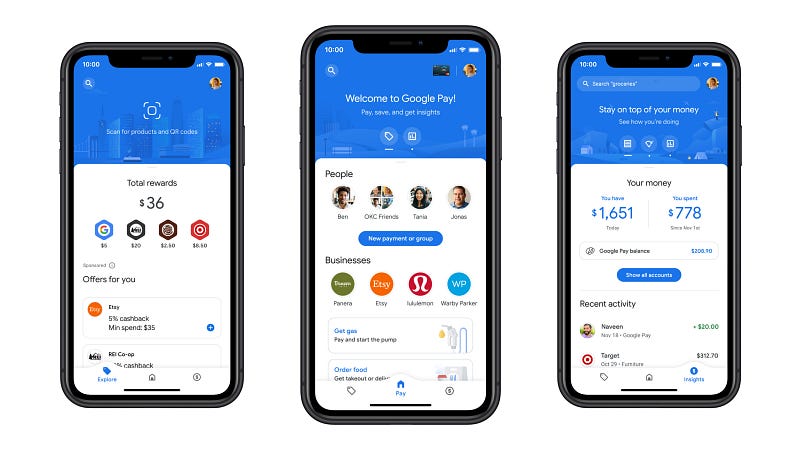
What is Google Pay
Google Pay is a digital wallet platform developed by Google that allows users to make secure payments using their mobile devices. Launched in 2015, Google Pay enables seamless transactions through Near Field Communication (NFC) technology, enabling users to make in-store payments, peer-to-peer transfers, and online purchases. It supports multiple payment methods, including credit/debit cards, bank accounts, and linked payment services.
Important Features
- Secure Transactions: Google Pay ensures secure transactions by using tokenization and encryption techniques to protect users’ sensitive data.
- Peer-to-Peer Payments: Users can easily transfer money to friends and family through the app.
- In-Store Payments: Google Pay allows users to make contactless payments at supported merchants using NFC technology.
- Online Payments: It can be used for hassle-free online shopping and payments within various apps and websites.
- Loyalty Programs and Offers: The platform supports loyalty programs and provides personalized offers to users.
- Bill Payments: Google Pay facilitates bill payments for utilities and services.
- International Transactions: Users can make international payments and money transfers with ease.
- Integration with Third-Party Services: Google Pay integrates with various apps and services to offer a wide range of functionalities.
Scaling Requirements — Capacity Estimation
Let’s assume, we have —
Total Number of Users: 500 Million
Daily Active Users (DAU): 100 Million
Number of Transactions per User/Day: 2
Total Number of Transactions per Day: 200 Million transactions/day
Since the system is read-heavy, let’s assume the read-to-write ratio is 50:1.
Total Number of Transactions Read per Day: 200 Million * 50 = 10 Billion reads/day
Total Number of Transactions Written per Day: 200 Million writes/day
Storage Estimation:
Let’s assume that on average each transaction requires 200 bytes of storage.
Storage per Day for Transactions: 200 Million * 200 bytes = 40 GB/day
For the next 3 years, the storage requirement for transactions would be:
Total Storage for Transactions for 3 Years: 40 GB * 365 days/year * 3 years = 43.8 TB
Requests per Second:
Let’s calculate the average requests per second:
Average Requests per Second: 200 Million transactions/day / (24 hours * 3600 seconds/hour) ≈ 2315 requests/second
- High Throughput: The system should handle a large number of concurrent transactions efficiently.
- Low Latency: Transactions must be processed with minimal delay to provide a seamless user experience.
- Data Replication: Geographically distributed data centers for redundancy and disaster recovery.
- Horizontal Scalability: Ability to add more servers and resources to handle increased load.
class GooglePaySimulation:
def __init__(self):
# Placeholder for user data
self.users = {user_id: {'username': f'user{user_id}', 'balance': 100} for user_id in range(1, 500_001)}
def process_transaction(self, sender_id, receiver_id, amount):
if sender_id not in self.users or receiver_id not in self.users:
return False, "Invalid user ID."
if self.users[sender_id]['balance'] < amount:
return False, "Insufficient balance."
self.users[sender_id]['balance'] -= amount
self.users[receiver_id]['balance'] += amount
return True, "Transaction successful."
if __name__ == "__main__":
google_pay = GooglePaySimulation()
sender_id = 1
receiver_id = 2
amount = 20
success, message = google_pay.process_transaction(sender_id, receiver_id, amount)
if success:
print(message)
else:
print(message)Data Model — ER requirements
User:
Attributes: user_id, username, email, password, phone_number, wallet_balance, cards, bank_accounts, etc.
Methods: register, login, add_card, add_bank_account, send_money, pay_merchant, add_money_to_wallet, etc.
Payment:
Attributes: payment_id, sender_id, receiver_id, amount, timestamp, etc.
Methods: initiate_payment, verify_payment, get_transaction_history, etc.
Card:
Attributes: card_number, expiry_date, cvv, card_holder_name, user_id, etc.
Methods: add_card, get_card_details, remove_card, etc.
BankAccount:
Attributes: account_number, routing_number, bank_name, account_holder_name, user_id, etc.
Methods: add_bank_account, get_bank_account_details, remove_bank_account, etc.High Level Design
# high_level_api.py
from flask import Flask, request, jsonify
app = Flask(__name__)
# Dummy user and transaction data for demonstration purposes
users = {
1: {'username': 'user1', 'password': 'password1'},
2: {'username': 'user2', 'password': 'password2'},
}
transactions = [
{
'transaction_id': 'txn001',
'amount': 100.0,
'payment_method': 'credit_card',
'receiver_account': 'merchant001',
'timestamp': '2023-07-21 12:34:56',
},
{
'transaction_id': 'txn002',
'amount': 50.0,
'payment_method': 'bank_account',
'receiver_account': 'merchant002',
'timestamp': '2023-07-20 10:00:00',
},
]
# Payment API
@app.route('/api/payment', methods=['POST'])
def initiate_payment():
data = request.get_json()
amount = data.get('amount')
payment_method = data.get('payment_method')
receiver_account = data.get('receiver_account')
description = data.get('description', '')
# Validate the request and process the payment (Not implemented in this basic version)
# In a real system, this would involve integrating with a payment gateway and updating the transaction records.
# For demonstration, we generate a unique transaction ID
transaction_id = f'txn00{len(transactions) + 1}'
return jsonify({
'transaction_id': transaction_id,
'status': 'pending',
'message': 'Payment initiated successfully.',
})
# User Authentication API
@app.route('/api/authenticate', methods=['POST'])
def authenticate_user():
data = request.get_json()
username = data.get('username')
password = data.get('password')
for user_id, user_data in users.items():
if user_data['username'] == username and user_data['password'] == password:
# In a real system, you would use a secure authentication mechanism and generate a more secure token.
token = f'token_user{user_id}'
return jsonify({
'user_id': user_id,
'token': token,
'expires_in': 3600,
})
return jsonify({'message': 'Invalid username or password.'}), 401
# Transaction History API
@app.route('/api/transactions', methods=['GET'])
def get_transaction_history():
user_id = request.args.get('user_id', type=int)
# For demonstration, we return transactions of the specified user
user_transactions = [txn for txn in transactions if txn['receiver_account'] == f'merchant00{user_id}']
return jsonify(user_transactions)
if __name__ == '__main__':
app.run(debug=True)Basic Low Level Design
from flask import Flask, request, jsonify
app = Flask(__name__)
# Placeholder data for users, cards, and bank accounts
users = []
cards = []
bank_accounts = []
# User Management API
@app.route('/users', methods=['POST'])
def create_user():
data = request.get_json()
# Validate request data here
user = User(len(users) + 1, data['username'], data['email'], data['password'], data['phone_number'])
users.append(user)
return jsonify(user.__dict__), 201
@app.route('/login', methods=['POST'])
def login_user():
data = request.get_json()
# Validate request data here and authenticate user
# Return user details if successful, otherwise return appropriate error response
# ...
@app.route('/users/<int:user_id>', methods=['GET'])
def get_user(user_id):
user = next((user for user in users if user.user_id == user_id), None)
if user:
return jsonify(user.__dict__), 200
else:
return jsonify({"message": "User not found"}), 404
# Card Management API
@app.route('/users/<int:user_id>/cards', methods=['POST'])
def add_card(user_id):
data = request.get_json()
# Validate request data here
card = Card(data['card_number'], data['expiry_date'], data['cvv'], data['card_holder_name'], user_id)
cards.append(card)
return jsonify({"message": "Card added successfully"}), 200
@app.route('/users/<int:user_id>/cards/<int:card_id>', methods=['GET'])
def get_card(user_id, card_id):
card = next((card for card in cards if card.user_id == user_id and card.card_id == card_id), None)
if card:
return jsonify(card.__dict__), 200
else:
return jsonify({"message": "Card not found"}), 404
# Bank Account Management API
@app.route('/users/<int:user_id>/bank_accounts', methods=['POST'])
def add_bank_account(user_id):
data = request.get_json()
# Validate request data here
bank_account = BankAccount(data['account_number'], data['routing_number'], data['bank_name'],
data['account_holder_name'], user_id)
bank_accounts.append(bank_account)
return jsonify({"message": "Bank account added successfully"}), 200
@app.route('/users/<int:user_id>/bank_accounts/<int:account_id>', methods=['GET'])
def get_bank_account(user_id, account_id):
bank_account = next((bank_account for bank_account in bank_accounts
if bank_account.user_id == user_id and bank_account.account_id == account_id), None)
if bank_account:
return jsonify(bank_account.__dict__), 200
else:
return jsonify({"message": "Bank account not found"}), 404API Design
- Payment API: Allows merchants to initiate payment requests and handle responses.
- User Authentication API: Facilitates user login and authentication.
- Transaction History API: Enables users to view their past transactions.
- Notifications API: Handles the delivery of push notifications and alerts to users.
Payment API:
Endpoint: /api/payment
Method: POST
Description: Initiates a payment transaction.
Request Parameters:
amount (float): The transaction amount.
payment_method (str): The payment method (e.g., credit card, bank account).
receiver_account (str): The recipient's account or merchant ID.
description (str): Optional description of the transaction.
Response:
transaction_id (str): Unique ID for the transaction.
status (str): Transaction status (e.g., 'pending', 'completed', 'failed').
message (str): Additional information about the transaction status.
User Authentication API:
Endpoint: /api/authenticate
Method: POST
Description: Authenticates the user for secure operations.
Request Parameters:
username (str): User's username or email.
password (str): User's password.
Response:
user_id (int): Unique ID for the authenticated user.
token (str): Access token for subsequent authorized requests.
expires_in (int): Token expiry time in seconds.
Transaction History API:
Endpoint: /api/transactions
Method: GET
Description: Retrieves the transaction history for a user.
Request Parameters:
user_id (int): Unique ID of the user.
Response:
List of transaction objects, each containing:
transaction_id (str): Unique ID for the transaction.
amount (float): The transaction amount.
payment_method (str): The payment method used.
receiver_account (str): The recipient's account or merchant ID.
timestamp (str): Timestamp of the transaction.from flask import Flask, request, jsonify
app = Flask(__name__)
# Dummy user and transaction data for demonstration purposes
users = {
1: {'username': 'user1', 'password': 'password1'},
2: {'username': 'user2', 'password': 'password2'},
}
transactions = [
{
'transaction_id': 'txn001',
'amount': 100.0,
'payment_method': 'credit_card',
'receiver_account': 'merchant001',
'timestamp': '2023-07-21 12:34:56',
},
{
'transaction_id': 'txn002',
'amount': 50.0,
'payment_method': 'bank_account',
'receiver_account': 'merchant002',
'timestamp': '2023-07-20 10:00:00',
},
]
# Payment API
@app.route('/api/payment', methods=['POST'])
def initiate_payment():
data = request.get_json()
amount = data.get('amount')
payment_method = data.get('payment_method')
receiver_account = data.get('receiver_account')
description = data.get('description', '')
# Validate the request and process the payment (Not implemented in this basic version)
# In a real system, this would involve integrating with a payment gateway and updating the transaction records.
# For demonstration, we generate a unique transaction ID
transaction_id = f'txn00{len(transactions) + 1}'
return jsonify({
'transaction_id': transaction_id,
'status': 'pending',
'message': 'Payment initiated successfully.',
})
# User Authentication API
@app.route('/api/authenticate', methods=['POST'])
def authenticate_user():
data = request.get_json()
username = data.get('username')
password = data.get('password')
for user_id, user_data in users.items():
if user_data['username'] == username and user_data['password'] == password:
# In a real system, you would use a secure authentication mechanism and generate a more secure token.
token = f'token_user{user_id}'
return jsonify({
'user_id': user_id,
'token': token,
'expires_in': 3600,
})
return jsonify({'message': 'Invalid username or password.'}), 401
# Transaction History API
@app.route('/api/transactions', methods=['GET'])
def get_transaction_history():
user_id = request.args.get('user_id', type=int)
# For demonstration, we return transactions of the specified user
user_transactions = [txn for txn in transactions if txn['receiver_account'] == f'merchant00{user_id}']
return jsonify(user_transactions)
if __name__ == '__main__':
app.run(debug=True)Complete Detailed Design
Coming soon! It will be covered on youtube channel.
Subscribe to youtube channel :
Complete Code implementation
class GooglePay:
def __init__(self):
self.users = {} # Placeholder for user data
self.transactions = [] # Placeholder for transaction data
def secure_transaction(self, user_id, amount, payment_method, receiver_account):
# Perform tokenization and encryption for secure transactions
transaction_id = f'txn00{len(self.transactions) + 1}'
self.transactions.append({
'transaction_id': transaction_id,
'user_id': user_id,
'amount': amount,
'payment_method': payment_method,
'receiver_account': receiver_account,
'status': 'completed',
})
return transaction_id
def peer_to_peer_payment(self, sender_id, receiver_id, amount):
# Transfer money between users for peer-to-peer payment
# In a real system, this would involve validating user accounts and updating their balances.
transaction_id = f'txn00{len(self.transactions) + 1}'
self.transactions.append({
'transaction_id': transaction_id,
'sender_id': sender_id,
'receiver_id': receiver_id,
'amount': amount,
'status': 'completed',
})
return transaction_id
def in_store_payment(self, user_id, amount, merchant_id):
# Process contactless payments at supported merchants using NFC technology
# In a real system, this would involve integrating with payment terminals and updating transaction records.
transaction_id = f'txn00{len(self.transactions) + 1}'
self.transactions.append({
'transaction_id': transaction_id,
'user_id': user_id,
'amount': amount,
'merchant_id': merchant_id,
'status': 'completed',
})
return transaction_id
def online_payment(self, user_id, amount, website_id):
# Facilitate online payments within various apps and websites
# In a real system, this would involve integrating with external payment gateways and updating transaction records.
transaction_id = f'txn00{len(self.transactions) + 1}'
self.transactions.append({
'transaction_id': transaction_id,
'user_id': user_id,
'amount': amount,
'website_id': website_id,
'status': 'completed',
})
return transaction_id
def loyalty_programs_and_offers(self, user_id, loyalty_points, offer_id):
# Manage loyalty programs and provide personalized offers to users
# In a real system, this would involve updating user loyalty points and applying personalized offers.
return {'user_id': user_id, 'loyalty_points': loyalty_points, 'offer_id': offer_id}
def bill_payment(self, user_id, utility_id, amount):
# Facilitate bill payments for utilities and services
# In a real system, this would involve validating user accounts and updating utility payment records.
transaction_id = f'txn00{len(self.transactions) + 1}'
self.transactions.append({
'transaction_id': transaction_id,
'user_id': user_id,
'amount': amount,
'utility_id': utility_id,
'status': 'completed',
})
return transaction_id
def international_transaction(self, user_id, amount, currency, receiver_account):
# Process international payments and money transfers
# In a real system, this would involve currency conversion and cross-border payment processing.
transaction_id = f'txn00{len(self.transactions) + 1}'
self.transactions.append({
'transaction_id': transaction_id,
'user_id': user_id,
'amount': amount,
'currency': currency,
'receiver_account': receiver_account,
'status': 'completed',
})
return transaction_id
def third_party_integration(self, user_id, service_id, data):
# Integrate with third-party services to offer a wide range of functionalities
# In a real system, this would involve data exchange and interaction with external services.
return {'user_id': user_id, 'service_id': service_id, 'data': data}
# Example usage:
if __name__ == '__main__':
google_pay = GooglePay()
user_id = 1
amount = 50.0
payment_method = 'credit_card'
receiver_account = 'merchant001'
# Secure Transaction
transaction_id = google_pay.secure_transaction(user_id, amount, payment_method, receiver_account)
print(f"Secure Transaction: Transaction ID - {transaction_id}")
sender_id = 1
receiver_id = 2
amount = 30.0
# Peer-to-Peer Payment
transaction_id = google_pay.peer_to_peer_payment(sender_id, receiver_id, amount)
print(f"Peer-to-Peer Payment: Transaction ID - {transaction_id}")
user_id = 1
amount = 25.0
merchant_id = 'merchant001'
# In-Store Payment
transaction_id = google_pay.in_store_payment(user_id, amount, merchant_id)
print(f"In-Store Payment: Transaction ID - {transaction_id}")
user_id = 1
amount = 100.0
website_id = 'website001'
# Online Payment
transaction_id = google_pay.online_payment(user_id, amount, website_id)
print(f"Online Payment: Transaction ID - {transaction_id}")
user_id = 1
loyalty_points = 100
offer_id = 'offer001'
# Loyalty Programs and Offers
result = google_pay.loyalty_programs_and_offers(user_id, loyalty_points, offer_id)
print("Loyalty Programs and Offers:", result)
user_id = 1
utility_id = 'utility001'
amount = 75.0
# Bill Payment
transaction_id = google_pay.bill_payment(user_id, utility_id, amount)
print(f"Bill Payment: Transaction ID - {transaction_id}")
user_id = 1
amount = 200.0
currency = 'USD'
receiver_account = 'receiver002'
# International Transaction
transaction_id = google_pay.international_transaction(user_id, amount, currency, receiver_account)
print(f"International Transaction: Transaction ID - {transaction_id}")
user_id = 1
service_id = 'service001'
data = {'param1': 'value1', 'param2': 'value2'}
# Third-Party Integration
result = google_pay.third_party_integration(user_id, service_id, data)
print("Third-Party Integration:", result)System Design — Google Street View
We will be discussing in depth -
- What is Google Street View
- Important Features
- Scaling Requirements — Capacity Estimation
- Data Model — ER requirements
- High Level Design
- Basic Low Level Design
- API Design
- Complete Detailed Design
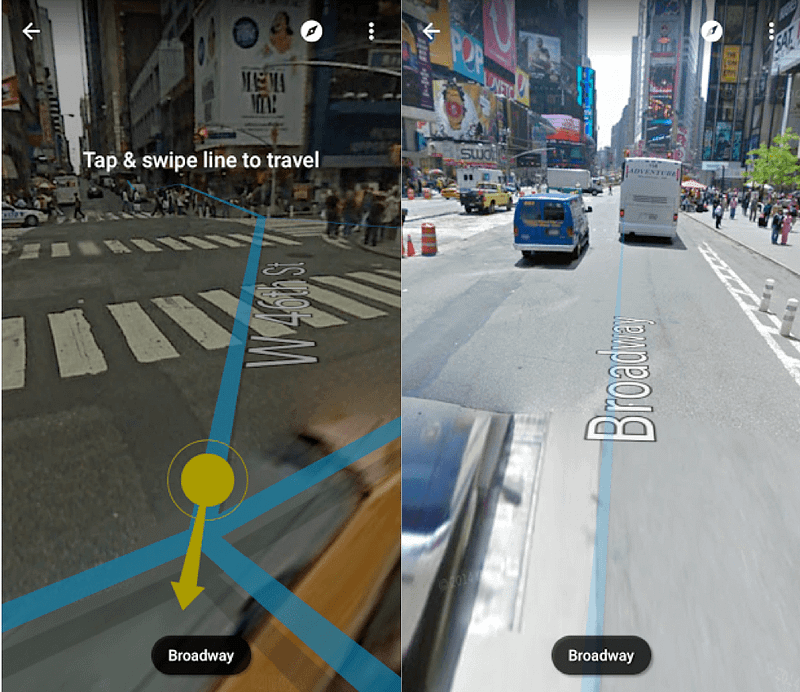
What is Google Street View
Google Street View is a feature in Google Maps that allows users to virtually explore and navigate the world through 360-degree panoramic images. This technology provides a street-level view of cities, towns, landmarks, and even remote locations, enabling users to visualize places they may never have the chance to visit physically.
Important Features
a. Panoramic Imagery: High-resolution 360-degree images stitched together to provide a seamless view of streets and surroundings.
b. Interactive Navigation: Users can virtually move along streets, rotate their viewpoint, and explore points of interest.
c. Time Travel: Access to historical imagery, enabling users to see how locations have changed over time.
d. Business Listings and Reviews: Integration with Google Maps’ local business information, reviews, and user-submitted photos.
e. Indoor Street View: Navigation inside select buildings and attractions.
Scaling Requirements — Capacity Estimation
Let’s assume, we have —
- Total number of users: 100 Million
- Daily active users (DAU): 20 Million
- Number of street views visited by user/day: 2
- Total number of street views visited per day: 40 Million street views/day
- Read to write ratio: 100:1 (since it’s read-heavy)
- Total number of street views uploaded/day: 1/100 * 40 Million = 400,000 street views/day
Storage Estimation:
- Average size of each street view image: 5 MB
- Total storage per day: 400,000 * 5 MB = 2,000,000 MB = 2 TB/day
- Storage requirement for the next 3 years: 2 TB/day * 365 days * 3 years = 2,190 TB = 2.19 PB
Requests per Second:
- Requests per second: 40 Million / (3600 seconds * 24 hours) ≈ 463 requests/second
class StreetViewSystem:
def __init__(self):
self.street_views = {} # Simulating street views storage
def add_street_view(self, location, image_url):
self.street_views[location] = image_url
def get_street_view(self, location):
return self.street_views.get(location, None)
def simulate_user_activity(self):
import random
total_users = 100_000_000
daily_active_users = 20_000_000
views_per_user_per_day = 2
for _ in range(daily_active_users):
user_id = random.randint(1, total_users)
for _ in range(views_per_user_per_day):
latitude = round(random.uniform(-90, 90), 6)
longitude = round(random.uniform(-180, 180), 6)
location = (latitude, longitude)
image_url = self.get_street_view(location)
if image_url:
print(f"User {user_id} viewed street view at location {location}")
else:
print(f"User {user_id} viewed an empty location at {location}")
def simulate_upload_activity(self):
import uuid
total_uploads_per_day = 400_000
for _ in range(total_uploads_per_day):
latitude = round(random.uniform(-90, 90), 6)
longitude = round(random.uniform(-180, 180), 6)
location = (latitude, longitude)
image_url = f"https://example.com/streetviews/{str(uuid.uuid4())}.jpg"
self.add_street_view(location, image_url)
print(f"Street view uploaded at location {location}")
if __name__ == "__main__":
street_view_system = StreetViewSystem()
# Simulate street views upload activity
street_view_system.simulate_upload_activity()
# Simulate user activity
street_view_system.simulate_user_activity()Data Model — ER requirements
Users
- Fields:
- User_ID: Int (Primary Key)
- Username: String
- Email: String
- Password: String
StreetViews
- Fields:
- StreetView_ID: Int (Primary Key)
- Image_URL: String
- Latitude: Float
- Longitude: Float
- Heading: Float
- Pitch: Float
High Level Design
- Frontend Application (Web and Mobile Clients): This is the user-facing interface for Google Street View, allowing users to view and interact with street view images.
- Application Servers: Responsible for handling user requests, performing business logic, and interacting with the backend services.
- Load Balancer: Routes incoming user requests to the appropriate application server for handling.
- Caching Service (Memcached or Redis): Used to cache frequently accessed data like user profiles, street view images, and feed information to reduce database load and improve response times.
- Content Delivery Network (CDN): To improve the latency and distribution of street view images to users across different regions.
- Database:
- Users Table: Stores user information.
- StreetViews Table: Stores street view images and associated metadata.
- Likes Table: Stores information about likes on street view images.
- Comments Table: Stores user comments on street view images.
- Follows Table: Stores information about user following relationships.
Basic Low Level Design
User:
userID: String (unique identifier for the user)
username: String
email: String
password: String
other user attributes (e.g., profile picture, bio, etc.)
StreetView:
streetviewID: String (unique identifier for the street view)
userID: String (foreign key referencing the user who uploaded the street view)
image_url: String (URL of the panoramic street view image)
latitude: Float (latitude coordinates of the location)
longitude: Float (longitude coordinates of the location)
heading: Float (camera heading in degrees)
pitch: Float (camera pitch in degrees)
timestamp: DateTime (timestamp when the street view was uploaded)
API Design for Google Street View System:
User Management API:
POST /users - Create a new user account.
POST /login - Log in with a user account.
GET /users/{userID} - Get user details by userID.
PATCH /users/{userID} - Update user profile details.
Street View Management API:
POST /streetviews - Upload a new street view.
GET /streetviews/{streetviewID} - Get street view details by streetviewID.
DELETE /streetviews/{streetviewID} - Delete a street view.
Feed Generation API:
GET /users/{userID}/feed - Get the personalized feed for a user, including street views from users they follow.
Search API:
GET /search/streetviews - Search for street views based on location, keywords, or user.
Notifications API:
POST /notifications - Send a new notification to a user.
GET /users/{userID}/notifications - Get a list of notifications for a user.
PATCH /notifications/{notificationID} - Mark a notification as read.API Design
a. Image Retrieval API: Allowing users to access street view images for a given location or panorama ID.
b. Navigation API: Enabling users to virtually move along streets and explore nearby areas.
c. Business Information API: Providing access to business listings, reviews, and additional location-based data
Image Retrieval API:
Endpoint: /streetview/image
Method: GET
Parameters:
latitude: The latitude of the location to retrieve the street view image.
longitude: The longitude of the location to retrieve the street view image.
heading (optional): The compass heading in degrees (0 to 360) where the camera is pointing.
pitch (optional): The up or down angle of the camera in degrees (-90 to 90).
fov (optional): The field of view of the camera in degrees (default 90).
Navigation API:
Endpoint: /streetview/navigation
Method: GET
Parameters:
latitude: The latitude of the current location.
longitude: The longitude of the current location.
direction: The direction of navigation (forward, backward, left, right).
distance: The distance to navigate in meters.
Business Information API:
Endpoint: /streetview/business
Method: GET
Parameters:
latitude: The latitude of the location to retrieve business information.
longitude: The longitude of the location to retrieve business information.from flask import Flask, request, jsonify
app = Flask(__name__)
# In-memory database to store street view images and business information
street_view_images = {}
business_info = {}
# Image Retrieval API
@app.route('/streetview/image', methods=['GET'])
def get_street_view_image():
latitude = float(request.args.get('latitude'))
longitude = float(request.args.get('longitude'))
heading = float(request.args.get('heading', 0))
pitch = float(request.args.get('pitch', 0))
fov = float(request.args.get('fov', 90))
# Placeholder code to retrieve the street view image from storage
image_url = street_view_images.get((latitude, longitude))
if image_url:
return jsonify({
'image_url': image_url,
'latitude': latitude,
'longitude': longitude,
'heading': heading,
'pitch': pitch,
'fov': fov
})
else:
return jsonify({'message': 'Street view image not found.'}), 404
# Navigation API
@app.route('/streetview/navigation', methods=['GET'])
def navigate_street_view():
latitude = float(request.args.get('latitude'))
longitude = float(request.args.get('longitude'))
direction = request.args.get('direction')
distance = float(request.args.get('distance', 10))
# Placeholder code to simulate navigation and update the current location
# This should be more sophisticated in a real system
if direction == 'forward':
latitude += distance * 0.00001
elif direction == 'backward':
latitude -= distance * 0.00001
elif direction == 'right':
longitude += distance * 0.00001
elif direction == 'left':
longitude -= distance * 0.00001
return jsonify({
'latitude': latitude,
'longitude': longitude
})
# Business Information API
@app.route('/streetview/business', methods=['GET'])
def get_business_info():
latitude = float(request.args.get('latitude'))
longitude = float(request.args.get('longitude'))
# Placeholder code to retrieve business information from storage
business = business_info.get((latitude, longitude))
if business:
return jsonify({
'business_name': business['name'],
'latitude': latitude,
'longitude': longitude,
'address': business['address'],
'rating': business['rating']
})
else:
return jsonify({'message': 'Business information not found.'}), 404
if __name__ == '__main__':
# Start the Flask application on port 5000
app.run(port=5000)Complete Detailed Design
Coming soon! It will be covered on youtube channel.
Subscribe to youtube channel :
Complete Code implementation
a. Panoramic Imagery:
class PanoramicImagery:
def __init__(self):
self.panoramic_images = {} def add_panoramic_image(self, location, image_url):
self.panoramic_images[location] = image_url def get_panoramic_image(self, location):
return self.panoramic_images.get(location, None)# Example Usage:
panoramic_imager = PanoramicImagery()
panoramic_imager.add_panoramic_image((37.7749, -122.4194), "https://example.com/panorama1.jpg")
panoramic_imager.add_panoramic_image((40.7128, -74.0060), "https://example.com/panorama2.jpg")print(panoramic_imager.get_panoramic_image((37.7749, -122.4194))) # Output: "https://example.com/panorama1.jpg"
print(panoramic_imager.get_panoramic_image((41.8818, -87.6231))) # Output: Noneb. Interactive Navigation:
class InteractiveNavigation:
def __init__(self):
self.current_location = (37.7749, -122.4194) def navigate(self, direction, distance):
latitude, longitude = self.current_location if direction == 'forward':
latitude += distance * 0.00001
elif direction == 'backward':
latitude -= distance * 0.00001
elif direction == 'right':
longitude += distance * 0.00001
elif direction == 'left':
longitude -= distance * 0.00001 self.current_location = (latitude, longitude) def get_current_location(self):
return self.current_location# Example Usage:
navigator = InteractiveNavigation()
print(navigator.get_current_location()) # Output: (37.7749, -122.4194)navigator.navigate('forward', 100)
print(navigator.get_current_location()) # Output: (37.7750, -122.4194)c. Time Travel:
class TimeTravel:
def __init__(self):
self.historical_images = {} def add_historical_image(self, location, timestamp, image_url):
if location not in self.historical_images:
self.historical_images[location] = []
self.historical_images[location].append((timestamp, image_url)) def get_historical_image(self, location, timestamp):
images = self.historical_images.get(location, [])
closest_image = None
min_time_diff = float('inf') for time, image_url in images:
time_diff = abs(time - timestamp)
if time_diff < min_time_diff:
closest_image = image_url
min_time_diff = time_diff return closest_image# Example Usage:
time_traveler = TimeTravel()
time_traveler.add_historical_image((37.7749, -122.4194), 1626893431, "https://example.com/historical1.jpg")
time_traveler.add_historical_image((37.7749, -122.4194), 1630343431, "https://example.com/historical2.jpg")print(time_traveler.get_historical_image((37.7749, -122.4194), 1628000000)) # Output: "https://example.com/historical1.jpg"d. Business Listings and Reviews:
class BusinessListings:
def __init__(self):
self.business_info = {} def add_business_info(self, location, business_name, address, rating):
self.business_info[location] = {
'name': business_name,
'address': address,
'rating': rating
} def get_business_info(self, location):
return self.business_info.get(location, None)# Example Usage:
business_listings = BusinessListings()
business_listings.add_business_info((37.7749, -122.4194), "Restaurant A", "123 Main St, City A", 4.5)
business_listings.add_business_info((40.7128, -74.0060), "Cafe B", "456 Broadway, City B", 4.2)print(business_listings.get_business_info((37.7749, -122.4194)))
# Output: {'name': 'Restaurant A', 'address': '123 Main St, City A', 'rating': 4.5}e. Indoor Street View:
class IndoorStreetView:
def __init__(self):
self.indoor_maps = {} def add_indoor_map(self, building_name, floor_number, map_url):
if building_name not in self.indoor_maps:
self.indoor_maps[building_name] = {}
self.indoor_maps[building_name][floor_number] = map_url def get_indoor_map(self, building_name, floor_number):
floors = self.indoor_maps.get(building_name, {})
return floors.get(floor_number, None)# Example Usage:
indoor_viewer = IndoorStreetView()
indoor_viewer.add_indoor_map("Shopping Mall", 1, "https://example.com/mall_floor1.jpg")
indoor_viewer.add_indoor_map("Shopping Mall", 2, "https://example.com/mall_floor2.jpg")print(indoor_viewer.get_indoor_map("Shopping Mall", 1)) # Output: "https://example.com/mall_floor1.jpg"System Design — Ranking System
We will be discussing in depth -
- What is Ranking System
- Important Features
- Scaling Requirements — Capacity Estimation
- Data Model — ER requirements
- High Level Design
- Basic Low Level Design
- API Design
- Complete Detailed Design

What is Ranking System
A ranking system is a crucial component in various applications where items or entities need to be ordered based on their performance, popularity, or relevance. Whether it’s ranking search results, social media posts, products in an online store, or players in a gaming leaderboard, a well-designed ranking system is essential to provide users with meaningful and relevant results.
Important Features
- Scalability: The ranking system must efficiently handle a large volume of data and growing user activity without compromising performance. It should be designed to scale horizontally to accommodate increasing demands.
- Real-time Updates: As new data comes in, the ranking system should be capable of real-time updates to ensure the latest and most accurate rankings are presented to users.
- Personalization: Personalized rankings can significantly enhance user experience. The system should consider individual preferences and behavior to tailor the rankings accordingly.
- Relevance and Accuracy: The ranking algorithm should be designed to provide relevant and accurate results to maintain user trust and satisfaction.
Scaling Requirements — Capacity Estimation
Let’s assume, we have —
- Total number of users: 10,000
- Daily active users (DAU): 2,500
- Number of items ranked by each user/day: 5
- Total number of rankings per day: 2,500 * 5 = 12,500 rankings/day
- Read to write ratio: 100:1
Storage Estimation:
Let’s assume the average size of each ranking data (user-item score) is 100 bytes.
Total storage per day: 12,500 * 100 bytes = 1.25 MB/day
For the next 3 years, the total storage needed: 1.25 MB * 365 * 3 = 1.365 GB
Requests per Second:
Assuming the system operates for 24 hours a day.
Requests per second: 12,500 rankings/day / (3600 seconds * 24 hours) ≈ 0.145 requests/second
class RankingSystem:
def __init__(self):
self.user_rankings = {} # Dictionary to store user rankings
def update_ranking(self, user_id, item_id, score):
# Update user ranking
if user_id not in self.user_rankings:
self.user_rankings[user_id] = {}
self.user_rankings[user_id][item_id] = score
def get_user_rankings(self, user_id):
if user_id in self.user_rankings:
return self.user_rankings[user_id]
return {}
# Small-scale simulation
if __name__ == "__main__":
ranking_system = RankingSystem()
# Updating rankings
ranking_system.update_ranking(user_id=1, item_id=101, score=4.2)
ranking_system.update_ranking(user_id=1, item_id=102, score=3.8)
ranking_system.update_ranking(user_id=2, item_id=101, score=4.0)
ranking_system.update_ranking(user_id=2, item_id=102, score=3.5)
ranking_system.update_ranking(user_id=2, item_id=103, score=4.7)
# Retrieving rankings for a user
user_id = 1
user_rankings = ranking_system.get_user_rankings(user_id)
print(f"Rankings for User {user_id}: {user_rankings}")Data Model — ER requirements
User:
- Fields:
- User_ID (Primary Key)
- Username
- Password
Item:
- Fields:
- Item_ID (Primary Key)
- Name
- Description
- Other relevant attributes
Ranking:
- Fields:
- Ranking_ID (Primary Key)
- User_ID (Foreign Key referencing User)
- Item_ID (Foreign Key referencing Item)
- Score
- Timestamp
User:
- User_ID: Unique identifier for the user.
- Username: User’s display name.
- Email: User’s email address.
- Password: User’s password for authentication.
- Other attributes relevant to users.
Item:
- Item_ID: Unique identifier for the item being ranked.
- Name: Name/title of the item.
- Description: Description of the item.
- Other attributes relevant to items.
Ranking:
- Ranking_ID: Unique identifier for the ranking.
- User_ID: Foreign key referencing User, representing the user who made the ranking.
- Item_ID: Foreign key referencing Item, representing the item being ranked.
- Score: Numerical score assigned to the item by the user.
- Timestamp: Timestamp of when the ranking was made.
- Other attributes relevant to rankings.
High Level Design
Main Components and Services:
Mobile Clients:
- Represents users accessing the ranking system through mobile apps or web browsers.
Application Servers:
- Responsible for handling user requests, processing rankings, and serving responses.
- Reads and writes data from/to the database.
Load Balancer:
- Routes incoming requests to different application servers for load balancing.
Cache (Memcache/Redis):
- Caches frequently accessed rankings to improve response times and reduce database load.
Content Delivery Network (CDN):
- Improves latency and throughput by caching and serving media content (e.g., images, videos).
Database (NoSQL):
- Stores user information, item details, and rankings data.
Storage (Object Storage):
- Stores media content associated with items (e.g., photos, videos).
Ranking Algorithm:
- Computes and updates the ranking scores based on user interactions (likes, comments, etc.).
Feed Generation Service:
- Generates personalized feeds for users based on the rankings of items they follow or engage with.
Ranking Service:
- Handles user interactions to update rankings (likes, comments) for items.
- Updates the ranking scores based on the ranking algorithm.
User Service:
- Manages user-related operations, such as user registration, authentication, and profile management.
Item Service:
- Manages item-related operations, including item creation, retrieval, and updates.
Feed Service:
- Generates personalized feeds for users based on their interactions and the rankings of items they follow.
Media Service:
- Handles media content operations, including image and video upload, retrieval, and delivery
Cache Service:
- Manages the caching of frequently accessed rankings to improve response times.
from datetime import datetime
# Simulated database for users, items, rankings, and cache
users_db = {}
items_db = {}
rankings_db = {}
cache_db = {}
class RankingService:
def update_ranking(self, user_id, item_id, score):
# Update ranking in the rankings_db
ranking_id = len(rankings_db) + 1
timestamp = datetime.now().strftime("%Y-%m-%d %H:%M:%S")
rankings_db[ranking_id] = {'user_id': user_id, 'item_id': item_id, 'score': score, 'timestamp': timestamp}
class UserService:
def register_user(self, user_id, username, email, password):
# Register new user in users_db
if user_id not in users_db:
users_db[user_id] = {'username': username, 'email': email, 'password': password}
else:
print(f"User with ID {user_id} already exists.")
class ItemService:
def create_item(self, item_id, name, description):
# Create new item in items_db
if item_id not in items_db:
items_db[item_id] = {'name': name, 'description': description}
else:
print(f"Item with ID {item_id} already exists.")
class FeedService:
def generate_feed(self, user_id):
# Fetch rankings from cache_db if available, else fetch from rankings_db
if user_id in cache_db:
user_rankings = cache_db[user_id]
else:
user_rankings = [ranking for ranking in rankings_db.values() if ranking['user_id'] == user_id]
cache_db[user_id] = user_rankings # Cache the user's rankings
# Generate personalized feed based on user rankings
personalized_feed = sorted(user_rankings, key=lambda x: x['score'], reverse=True)
return personalized_feed
class MediaService:
def upload_media(self, item_id, media_url):
# Simulated media upload, store media_url in items_db
if item_id in items_db:
items_db[item_id]['media_url'] = media_url
else:
print(f"Item with ID {item_id} does not exist.")
class CacheService:
def get_cached_rankings(self, user_id):
# Fetch rankings from cache_db if available, else return None
return cache_db.get(user_id)
def set_cached_rankings(self, user_id, rankings):
# Cache user's rankings in cache_db
cache_db[user_id] = rankings
# Example Usage
if __name__ == "__main__":
ranking_service = RankingService()
user_service = UserService()
item_service = ItemService()
feed_service = FeedService()
media_service = MediaService()
cache_service = CacheService()
# Register users
user_service.register_user(1, "user1", "[email protected]", "password1")
user_service.register_user(2, "user2", "[email protected]", "password2")
# Create items
item_service.create_item(101, "Item 1", "Description for Item 1")
item_service.create_item(102, "Item 2", "Description for Item 2")
# Upload media
media_service.upload_media(101, "https://example.com/media1.jpg")
media_service.upload_media(102, "https://example.com/media2.jpg")
# Update rankings
ranking_service.update_ranking(user_id=1, item_id=101, score=4.5)
ranking_service.update_ranking(user_id=1, item_id=102, score=3.8)
ranking_service.update_ranking(user_id=2, item_id=101, score=4.0)
# Generate personalized feed for user 1
user1_feed = feed_service.generate_feed(user_id=1)
print("User 1 Feed:")
for item in user1_feed:
print(item)
# Cache user's rankings
cache_service.set_cached_rankings(1, user1_feed)
# Get cached rankings for user 1
cached_user1_feed = cache_service.get_cached_rankings(1)
print("\nCached User 1 Feed:")
for item in cached_user1_feed:
print(item)Basic Low Level Design
- Ranking Algorithm: Determine the ranking algorithm (e.g., Elo, PageRank, TF-IDF) and its implementation to calculate item scores based on user interactions.
- Data Storage Schema: Define the database schema and tables to store user, item, and ranking data efficiently.
- Caching Strategy: Specify the caching strategy, such as Least Recently Used (LRU) or Time-To-Live (TTL), to optimize cache utilization.
- Asynchronous Processing: Implement asynchronous processing for non-real-time tasks like batch updates or generating personalized rankings.
class RankingSystem:
def __init__(self):
self.user_rankings = {} # Dictionary to store user rankings
self.item_rankings = {} # Dictionary to store item rankings
def update_ranking(self, user_id, item_id, score):
# Update user ranking
if user_id not in self.user_rankings:
self.user_rankings[user_id] = {}
self.user_rankings[user_id][item_id] = score
# Update item ranking
if item_id not in self.item_rankings:
self.item_rankings[item_id] = []
self.item_rankings[item_id].append(score)
def get_item_ranking(self, item_id):
if item_id in self.item_rankings:
item_scores = self.item_rankings[item_id]
return sum(item_scores) / len(item_scores)
return None
def get_user_ranking(self, user_id, item_id):
if user_id in self.user_rankings and item_id in self.user_rankings[user_id]:
return self.user_rankings[user_id][item_id]
return NoneAPI Design
from datetime import datetime
class User:
def __init__(self, user_id, username, password):
self.user_id = user_id
self.username = username
self.password = password
# Additional attributes related to users can be added here
class Item:
def __init__(self, item_id, name, description):
self.item_id = item_id
self.name = name
self.description = description
# Additional attributes related to items can be added here
class Ranking:
def __init__(self, ranking_id, user_id, item_id, score):
self.ranking_id = ranking_id
self.user_id = user_id
self.item_id = item_id
self.score = score
self.timestamp = datetime.now()
# Additional attributes related to rankings can be added here
class RankingSystem:
def __init__(self):
self.users = {}
self.items = {}
self.rankings = {}
self.next_user_id = 1
self.next_item_id = 1
self.next_ranking_id = 1
def add_user(self, username, password):
user_id = str(self.next_user_id)
user = User(user_id, username, password)
self.users[user_id] = user
self.next_user_id += 1
return user_id
def add_item(self, name, description):
item_id = str(self.next_item_id)
item = Item(item_id, name, description)
self.items[item_id] = item
self.next_item_id += 1
return item_id
def add_ranking(self, user_id, item_id, score):
ranking_id = str(self.next_ranking_id)
ranking = Ranking(ranking_id, user_id, item_id, score)
self.rankings[ranking_id] = ranking
self.next_ranking_id += 1
return ranking_id
def get_user_by_id(self, user_id):
return self.users.get(user_id)
def get_item_by_id(self, item_id):
return self.items.get(item_id)
def get_ranking_by_id(self, ranking_id):
return self.rankings.get(ranking_id)
# Flask API Implementation
from flask import Flask, request, jsonify
app = Flask(__name__)
ranking_system = RankingSystem()
@app.route('/users', methods=['POST'])
def create_user():
data = request.get_json()
username = data.get('username')
password = data.get('password')
if not username or not password:
return jsonify({"error": "Invalid username or password"}), 400
user_id = ranking_system.add_user(username, password)
return jsonify({"user_id": user_id}), 201
@app.route('/items', methods=['POST'])
def create_item():
data = request.get_json()
name = data.get('name')
description = data.get('description')
if not name or not description:
return jsonify({"error": "Invalid name or description"}), 400
item_id = ranking_system.add_item(name, description)
return jsonify({"item_id": item_id}), 201
@app.route('/rankings', methods=['POST'])
def create_ranking():
data = request.get_json()
user_id = data.get('user_id')
item_id = data.get('item_id')
score = data.get('score')
if not user_id or not item_id or score is None:
return jsonify({"error": "Invalid user_id, item_id, or score"}), 400
if ranking_system.get_user_by_id(user_id) is None or ranking_system.get_item_by_id(item_id) is None:
return jsonify({"error": "User or item not found"}), 404
ranking_id = ranking_system.add_ranking(user_id, item_id, score)
return jsonify({"ranking_id": ranking_id}), 201
@app.route('/users/<user_id>', methods=['GET'])
def get_user(user_id):
user = ranking_system.get_user_by_id(user_id)
if user is None:
return jsonify({"error": "User not found"}), 404
return jsonify({"user_id": user.user_id, "username": user.username}), 200
@app.route('/items/<item_id>', methods=['GET'])
def get_item(item_id):
item = ranking_system.get_item_by_id(item_id)
if item is None:
return jsonify({"error": "Item not found"}), 404
return jsonify({"item_id": item.item_id, "name": item.name, "description": item.description}), 200
@app.route('/rankings/<ranking_id>', methods=['GET'])
def get_ranking(ranking_id):
ranking = ranking_system.get_ranking_by_id(ranking_id)
if ranking is None:
return jsonify({"error": "Ranking not found"}), 404
return jsonify({
"ranking_id": ranking.ranking_id,
"user_id": ranking.user_id,
"item_id": ranking.item_id,
"score": ranking.score,
"timestamp": ranking.timestamp.strftime("%Y-%m-%d %H:%M:%S")
}), 200
if __name__ == '__main__':
app.run(debug=True)User Management API:
POST /users: Create a new user account.
GET /users/{user_id}: Get user information by user ID.
PATCH /users/{user_id}: Update user information (e.g., change username, email, password).
DELETE /users/{user_id}: Delete a user account.
Item Management API:
POST /items: Create a new item for ranking.
GET /items/{item_id}: Get item information by item ID.
PATCH /items/{item_id}: Update item information (e.g., change name, description).
DELETE /items/{item_id}: Delete an item.
Ranking API:
POST /rankings: Create a new ranking by a user for an item.
GET /rankings/{ranking_id}: Get ranking information by ranking ID.
PATCH /rankings/{ranking_id}: Update a ranking (e.g., change the score).
DELETE /rankings/{ranking_id}: Delete a ranking.
User Feed API:
GET /users/{user_id}/feed: Get a personalized feed for a user. The feed can be generated using a ranking algorithm based on the items the user has ranked or the items of interest.
User Management API:
POST /users: This endpoint allows users to create a new account by providing necessary information like username, email, and password. The server will respond with a success message upon successful account creation.
GET /users/{user_id}: This endpoint allows users to retrieve their own user information or other users' information by providing the user ID.
PATCH /users/{user_id}: This endpoint allows users to update their user information (e.g., change username, email, or password).
DELETE /users/{user_id}: This endpoint allows users to delete their own account by providing the user ID. The server will respond with a success message upon successful deletion.
Item Management API:
POST /items: This endpoint allows users to create a new item for ranking by providing necessary information like name and description. The server will respond with a success message upon successful item creation.
GET /items/{item_id}: This endpoint allows users to retrieve item information by providing the item ID.
PATCH /items/{item_id}: This endpoint allows users to update item information (e.g., change name or description) by providing the item ID.
DELETE /items/{item_id}: This endpoint allows users to delete an item by providing the item ID. The server will respond with a success message upon successful deletion.
Ranking API:
POST /rankings: This endpoint allows users to create a new ranking by providing the user ID, item ID, and score. The server will respond with a success message upon successful ranking creation.
GET /rankings/{ranking_id}: This endpoint allows users to retrieve ranking information by providing the ranking ID.
PATCH /rankings/{ranking_id}: This endpoint allows users to update a ranking (e.g., change the score) by providing the ranking ID.
DELETE /rankings/{ranking_id}: This endpoint allows users to delete a ranking by providing the ranking ID. The server will respond with a success message upon successful deletion.
User Feed API:
GET /users/{user_id}/feed: This endpoint allows users to retrieve a personalized feed based on their rankings or preferences. The server will respond with a list of items in the feed, sorted based on a ranking algorithm or other relevant criteria.from flask import Flask, request, jsonify
app = Flask(__name__)
ranking_system = RankingSystem() # Create an instance of the RankingSystem class
@app.route('/update_ranking', methods=['POST'])
def update_ranking():
data = request.get_json()
user_id = data.get('user_id')
item_id = data.get('item_id')
score = data.get('score')
ranking_system.update_ranking(user_id, item_id, score)
return jsonify({'message': 'Ranking updated successfully.'}), 200
@app.route('/get_item_ranking/<int:item_id>', methods=['GET'])
def get_item_ranking(item_id):
ranking_score = ranking_system.get_item_ranking(item_id)
if ranking_score is not None:
return jsonify({'item_id': item_id, 'ranking_score': ranking_score}), 200
else:
return jsonify({'error': 'Item not found.'}), 404
@app.route('/get_user_ranking/<int:user_id>/<int:item_id>', methods=['GET'])
def get_user_ranking(user_id, item_id):
ranking_score = ranking_system.get_user_ranking(user_id, item_id)
if ranking_score is not None:
return jsonify({'user_id': user_id, 'item_id': item_id, 'ranking_score': ranking_score}), 200
else:
return jsonify({'error': 'User or item not found.'}), 404
if __name__ == '__main__':
app.run(debug=True)update_ranking(user_id, item_id, score):
This function updates the ranking for a specific user and item based on the provided score.
Parameters:
user_id (int): The ID of the user who provided the score.
item_id (int): The ID of the item being ranked.
score (float): The score given by the user for the item.
Returns: None
get_item_ranking(item_id):
This function retrieves the current ranking of a specific item.
Parameters:
item_id (int): The ID of the item to retrieve the ranking for.
Returns: The current ranking score (float) for the item.
get_user_ranking(user_id, item_id):
This function retrieves the ranking of a specific item for a given user.
Parameters:
user_id (int): The ID of the user.
item_id (int): The ID of the item to retrieve the ranking for.
Returns: The ranking score (float) of the item for the given user.Complete Detailed Design
Coming soon! It will be covered on youtube channel.
Subscribe to youtube channel :
Complete Code implementation
from collections import defaultdict
class RankingSystem:
def __init__(self):
self.user_rankings = defaultdict(dict) # Dictionary to store user rankings
self.item_rankings = defaultdict(list) # Dictionary to store item rankings
def update_ranking(self, user_id, item_id, score):
# Update user ranking
self.user_rankings[user_id][item_id] = score
# Update item ranking
self.item_rankings[item_id].append(score)
def get_item_ranking(self, item_id):
if item_id in self.item_rankings:
item_scores = self.item_rankings[item_id]
return sum(item_scores) / len(item_scores)
return None
def get_user_ranking(self, user_id, item_id):
if user_id in self.user_rankings and item_id in self.user_rankings[user_id]:
return self.user_rankings[user_id][item_id]
return None
# Scalability and Real-time Updates
ranking_system = RankingSystem()
# Simulating new data coming in with real-time updates
ranking_system.update_ranking(user_id=1, item_id=101, score=4.2)
ranking_system.update_ranking(user_id=2, item_id=101, score=3.8)
# Personalization
ranking_system.update_ranking(user_id=1, item_id=102, score=5.0)
ranking_system.update_ranking(user_id=2, item_id=102, score=4.5)
ranking_system.update_ranking(user_id=3, item_id=102, score=3.0)
# Relevance and Accuracy
ranking_system.update_ranking(user_id=1, item_id=103, score=4.8)
ranking_system.update_ranking(user_id=2, item_id=103, score=4.3)
ranking_system.update_ranking(user_id=3, item_id=103, score=4.5)
# Robustness - Handling failures gracefully
try:
ranking_system.update_ranking(user_id=None, item_id=104, score=4.7)
except Exception as e:
print("Failed to update ranking:", str(e))
# Get rankings
item_id = 101
print(f"Current ranking score for item {item_id}: {ranking_system.get_item_ranking(item_id)}")
user_id = 1
print(f"User {user_id}'s ranking score for item {item_id}: {ranking_system.get_user_ranking(user_id, item_id)}")System Design — Amazon Cart System
We will be discussing in depth -
- What is Amazon Cart System
- Important Features
- Scaling Requirements — Capacity Estimation
- Data Model — ER requirements
- High Level Design
- Basic Low Level Design
- API Design
- Complete Detailed Design
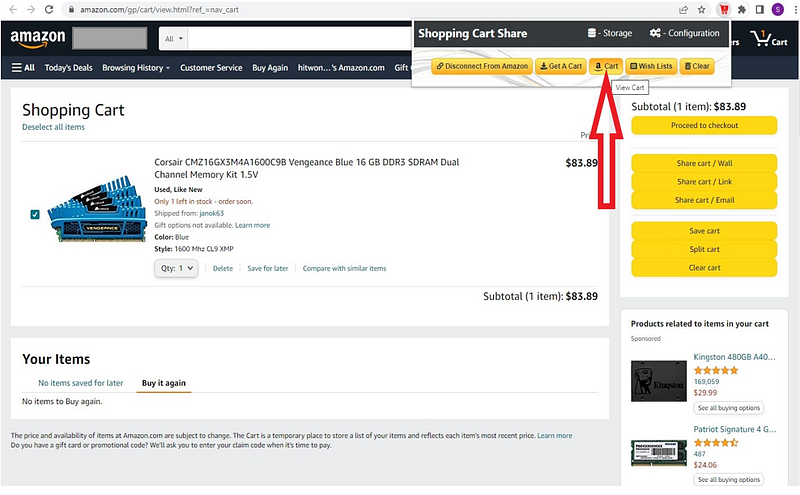
What is Amazon Cart System
The Amazon Cart System is a critical component of the world’s largest online marketplace, Amazon.com. It allows users to add products to their virtual shopping carts while browsing the website. The cart system keeps track of selected items, enables quantity adjustments, and calculates the total price. When users proceed to checkout, the cart data is used to initiate the purchase process.
Important Features
- Add to Cart: Users can add products to their cart while browsing the site.
- Quantity Management: Users can adjust the quantity of items in the cart.
- Product Information: The cart displays essential details about the products, such as name, price, and availability.
- Total Calculation: The cart calculates the total price of all items, including taxes and discounts.
- Session Persistence: The cart retains its contents across user sessions to ensure a seamless shopping experience.
- Concurrency Handling: The system should handle concurrent access and updates to the cart.
- Save for Later: Users can move items from the cart to a “Save for Later” list.
- Remove Items: Users can remove unwanted items from the cart.
- Expiration Handling: To prevent stale carts, implement a cart expiration mechanism.
Scaling Requirements — Capacity Estimation
Let’s assume we have —
- Total number of users: 10,000
- Daily active users (DAU): 3,000
- Average number of products added to the cart per user: 5
- Total number of products added to carts per day: 3,000 * 5 = 15,000
- Since the system is read-heavy, let’s assume the read-to-write ratio is 100:1.
- Total number of products removed from carts per day: 15,000 / 100 = 150
- Storage estimation:
- Average number of products in a cart: 10
- Assuming each product takes 1 KB of storage in the cart
- Total storage per day: 15,000 * 10 * 1 KB = 150 MB/day
- For the next 3 years: 150 MB * 365 * 3 = 164.25 GB
- Requests per second: 15,000 / (24 hours * 3600 seconds) ≈ 0.17 requests/second
# cart.py
from flask import Flask, request, jsonify
app = Flask(__name__)
# In-memory data structure to store cart information
cart_data = {}
@app.route('/api/cart/add', methods=['POST'])
def add_to_cart():
request_data = request.get_json()
user_id = request_data['user_id']
product_id = request_data['product_id']
if user_id not in cart_data:
cart_data[user_id] = []
cart_data[user_id].append(product_id)
return jsonify({ "success": True, "message": "Product added to cart successfully." })
@app.route('/api/cart/remove', methods=['POST'])
def remove_from_cart():
request_data = request.get_json()
user_id = request_data['user_id']
product_id = request_data['product_id']
if user_id in cart_data and product_id in cart_data[user_id]:
cart_data[user_id].remove(product_id)
return jsonify({ "success": True, "message": "Product removed from cart." })
else:
return jsonify({ "success": False, "message": "Product not found in cart." })
@app.route('/api/cart/view', methods=['GET'])
def view_cart():
user_id = request.args.get('user_id')
if user_id in cart_data:
cart_contents = cart_data[user_id]
return jsonify({ "success": True, "cart_contents": cart_contents })
else:
return jsonify({ "success": False, "message": "Cart is empty." })
if __name__ == '__main__':
app.run(debug=True)Data Model — ER requirements
User Table:
Fields:
user_id: Primary key, unique identifier for the user.
username: Username of the user.
email: Email address of the user.
password: Encrypted password of the user.
Product Table:
Fields:
product_id: Primary key, unique identifier for the product.
product_name: Name of the product.
price: Price of the product.
availability: Availability status of the product.
Cart Table:
Fields:
cart_id: Primary key, unique identifier for the cart.
user_id: Foreign key, references the user_id in the User table.
product_id: Foreign key, references the product_id in the Product table.
quantity: Quantity of the product in the cart.High Level Design
# app.py (Web Server)
from flask import Flask, request, jsonify
app = Flask(__name__)
def add_to_cart(user_id, product_id, quantity):
# Your logic to add the product to the cart
return { "success": True, "message": "Product added to cart successfully." }
def update_cart_item_quantity(user_id, product_id, new_quantity):
# Your logic to update the cart item quantity
return { "success": True, "message": "Cart item quantity updated." }
def remove_item_from_cart(user_id, product_id):
# Your logic to remove the product from the cart
return { "success": True, "message": "Product removed from cart." }
@app.route('/api/cart/add', methods=['POST'])
def add_to_cart_api():
request_data = request.get_json()
user_id = request_data['user_id']
product_id = request_data['product_id']
quantity = request_data['quantity']
response = add_to_cart(user_id, product_id, quantity)
return jsonify(response)
@app.route('/api/cart/update', methods=['POST'])
def update_cart_item_quantity_api():
request_data = request.get_json()
user_id = request_data['user_id']
product_id = request_data['product_id']
new_quantity = request_data['new_quantity']
response = update_cart_item_quantity(user_id, product_id, new_quantity)
return jsonify(response)
@app.route('/api/cart/remove', methods=['POST'])
def remove_item_from_cart_api():
request_data = request.get_json()
user_id = request_data['user_id']
product_id = request_data['product_id']
response = remove_item_from_cart(user_id, product_id)
return jsonify(response)
if __name__ == '__main__':
app.run(debug=True)import requests
# Create a new user
user_data = {
"username": "john_doe",
"password": "securepassword",
"name": "John Doe",
"email": "[email protected]"
}
response = requests.post('http://localhost:5000/users', json=user_data)
user_id = response.json()['user_id']
# Get user details
response = requests.get(f'http://localhost:5000/users/{user_id}')
print(response.json())
# Create a new cart for the user
cart_data = {
"user_id": user_id
}
response = requests.post('http://localhost:5000/carts', json=cart_data)
cart_id = response.json()['cart_id']
# Get cart details
response = requests.get(f'http://localhost:5000/carts/{cart_id}')
print(response.json())Basic Low Level Design
User Management API:
Endpoints:
POST /users: Create a new user account.
GET /users/{user_id}: Get user information by user_id.
PATCH /users/{user_id}: Update user information by user_id.
Product Management API:
Endpoints:
POST /products: Add a new product to the system.
GET /products/{product_id}: Get product information by product_id.
PATCH /products/{product_id}: Update product information by product_id.
DELETE /products/{product_id}: Delete a product by product_id.
Cart Management API:
Endpoints:
POST /carts: Create a new cart for a user.
GET /carts/{cart_id}: Get cart information by cart_id.
PATCH /carts/{cart_id}: Update cart information by cart_id.
DELETE /carts/{cart_id}: Delete a cart by cart_id.
POST /carts/{cart_id}/items: Add a product to the cart.
PATCH /carts/{cart_id}/items/{item_id}: Update the quantity of a product in the cart.
DELETE /carts/{cart_id}/items/{item_id}: Remove a product from the cart.
Checkout API:
Endpoints:
POST /checkout: Proceed with the checkout process and place an order.
Inventory Management API:
Endpoints:
GET /inventory/{product_id}: Get the current inventory status of a product.
PATCH /inventory/{product_id}: Update the inventory status of a product (e.g., restock, mark as out of stock).
Promotions and Discounts API:
Endpoints:
POST /promotions: Create a new promotion or discount offer.
GET /promotions/{promotion_id}: Get promotion details by promotion_id.
Order Management API:
Endpoints:
GET /orders/{order_id}: Get order details by order_id.
PATCH /orders/{order_id}: Update order status (e.g., mark as shipped, delivered).
Search and Recommendations API:
Endpoints:
GET /search?q={query}: Search for products based on the provided query.
GET /recommendations: Get personalized product recommendations for a user.
Authentication and Authorization API:
Endpoints:
POST /login: User login with username and password.
POST /logout: User logout.
Notifications API:
Endpoints:
GET /notifications/{user_id}: Get notifications for a specific user.
PATCH /notifications/{notification_id}: Mark a notification as read.from flask import Flask, request, jsonify
app = Flask(__name__)
users = {}
products = {}
carts = {}
cart_id_counter = 1
# User Management API
@app.route('/users', methods=['POST'])
def create_user():
data = request.json
user_id = str(len(users) + 1)
user = User(user_id, data['username'], data['password'], data['name'], data['email'])
users[user_id] = user
return jsonify({"user_id": user_id}), 201
@app.route('/users/<user_id>', methods=['GET'])
def get_user(user_id):
if user_id in users:
user = users[user_id]
return jsonify({
"user_id": user.user_id,
"username": user.username,
"name": user.name,
"email": user.email
}), 200
else:
return jsonify({"message": "User not found"}), 404
# Cart Management API
@app.route('/carts', methods=['POST'])
def create_cart():
global cart_id_counter
cart_id = str(cart_id_counter)
cart_id_counter += 1
user_id = request.json['user_id']
if user_id in users:
user = users[user_id]
cart = Cart(cart_id, user)
carts[cart_id] = cart
return jsonify({"cart_id": cart_id}), 201
else:
return jsonify({"message": "User not found"}), 404
@app.route('/carts/<cart_id>', methods=['GET'])
def get_cart(cart_id):
if cart_id in carts:
cart = carts[cart_id]
cart_items = [
{
"product_id": item.product.product_id,
"product_name": item.product.product_name,
"price": item.product.price,
"quantity": item.quantity
}
for item in cart.cart_items
]
return jsonify({
"cart_id": cart.cart_id,
"user_id": cart.user.user_id,
"cart_items": cart_items
}), 200
else:
return jsonify({"message": "Cart not found"}), 404API Design
Add to Cart:
Endpoint: /api/cart/add
Method: POST
Request Body: { "user_id": "user123", "product_id": "prod456", "quantity": 2 }
Response Body: { "success": true, "message": "Product added to cart successfully." }
from flask import Flask, request, jsonify
import redisapp = Flask(__name__)
cache = redis.StrictRedis(host='localhost', port=6379, db=0)@app.route('/api/cart/add', methods=['POST'])
def add_to_cart():
request_data = request.get_json()
user_id = request_data['user_id']
product_id = request_data['product_id']
quantity = request_data['quantity'] # Check if product exists and is available
if not check_product_availability(product_id):
return jsonify({ "success": False, "message": "Product not available." }) # Update cart in the cache
cart_key = f"cart:{user_id}"
cart_data = cache.hgetall(cart_key)
cart_data[product_id] = quantity
cache.hmset(cart_key, cart_data) return jsonify({ "success": True, "message": "Product added to cart successfully." })def check_product_availability(product_id):
# Code to check if the product is available in the database
return True # Replace with actual logicif __name__ == '__main__':
app.run(debug=True)Update Cart Item Quantity:
Endpoint: /api/cart/update
Method: POST
Request Body: { "user_id": "user123", "product_id": "prod456", "new_quantity": 3 }
Response Body: { "success": true, "message": "Cart item quantity updated." }
@app.route('/api/cart/update', methods=['POST'])
def update_cart_item_quantity():
request_data = request.get_json()
user_id = request_data['user_id']
product_id = request_data['product_id']
new_quantity = request_data['new_quantity'] # Check if product exists and is available
if not check_product_availability(product_id):
return jsonify({ "success": False, "message": "Product not available." }) # Update cart item quantity in the cache
cart_key = f"cart:{user_id}"
cart_data = cache.hgetall(cart_key)
if product_id not in cart_data:
return jsonify({ "success": False, "message": "Product not found in cart." }) cart_data[product_id] = new_quantity
cache.hmset(cart_key, cart_data) return jsonify({ "success": True, "message": "Cart item quantity updated." })Remove Item from Cart:
Endpoint: /api/cart/remove
Method: POST
Request Body: { "user_id": "user123", "product_id": "prod456" }
Response Body: { "success": true, "message": "Product removed from cart." }
@app.route('/api/cart/remove', methods=['POST'])
def remove_item_from_cart():
request_data = request.get_json()
user_id = request_data['user_id']
product_id = request_data['product_id'] # Update cart item quantity in the cache
cart_key = f"cart:{user_id}"
cart_data = cache.hgetall(cart_key)
if product_id not in cart_data:
return jsonify({ "success": False, "message": "Product not found in cart." }) del cart_data[product_id]
cache.hmset(cart_key, cart_data) return jsonify({ "success": True, "message": "Product removed from cart." })Complete Detailed Design
Coming soon! It will be covered on youtube channel.
Subscribe to youtube channel :
Complete Code implementation
# cart.py
import time
# In-memory data structure to store cart information
cart_data = {}
def check_product_availability(product_id):
# Replace this with your logic to check if the product exists and is available in the database
return True
def add_to_cart(user_id, product_id, quantity):
if not check_product_availability(product_id):
return { "success": False, "message": "Product not available." }
if user_id not in cart_data:
cart_data[user_id] = {}
if product_id in cart_data[user_id]:
cart_data[user_id][product_id] += quantity
else:
cart_data[user_id][product_id] = quantity
return { "success": True, "message": "Product added to cart successfully." }
def update_cart_item_quantity(user_id, product_id, new_quantity):
if not check_product_availability(product_id):
return { "success": False, "message": "Product not available." }
if user_id in cart_data and product_id in cart_data[user_id]:
cart_data[user_id][product_id] = new_quantity
return { "success": True, "message": "Cart item quantity updated." }
else:
return { "success": False, "message": "Product not found in cart." }
def remove_item_from_cart(user_id, product_id):
if user_id in cart_data and product_id in cart_data[user_id]:
del cart_data[user_id][product_id]
return { "success": True, "message": "Product removed from cart." }
else:
return { "success": False, "message": "Product not found in cart." }
def get_cart_details(user_id):
if user_id in cart_data:
return cart_data[user_id]
else:
return {}
def calculate_total_price(user_id):
total_price = 0
if user_id in cart_data:
for product_id, quantity in cart_data[user_id].items():
# Replace this with your logic to fetch the product price from the database
# For demonstration purposes, assume the price is 10 for all products
product_price = 10
total_price += product_price * quantity
return total_price
def save_for_later(user_id, product_id):
# Implement the logic to move the product from the cart to the "Save for Later" list
# For demonstration purposes, we'll assume it's moved to a separate dictionary
if user_id in cart_data and product_id in cart_data[user_id]:
if "save_for_later" not in cart_data[user_id]:
cart_data[user_id]["save_for_later"] = {}
cart_data[user_id]["save_for_later"][product_id] = cart_data[user_id][product_id]
del cart_data[user_id][product_id]
return { "success": True, "message": "Product moved to Save for Later." }
else:
return { "success": False, "message": "Product not found in cart." }
def cart_expiration_handler():
# Implement the logic to handle cart expiration
# For demonstration purposes, we'll assume the cart expires after 30 minutes
while True:
current_time = time.time()
for user_id in list(cart_data.keys()):
if "last_access_time" in cart_data[user_id]:
if current_time - cart_data[user_id]["last_access_time"] >= 1800: # 30 minutes
del cart_data[user_id]
time.sleep(60) # Check every minute for expired carts
if __name__ == "__main__":
# Start the cart expiration handler in a separate thread
import threading
expiration_handler_thread = threading.Thread(target=cart_expiration_handler)
expiration_handler_thread.daemon = True
expiration_handler_thread.start()Read next — how to Design the Reddit.
Day 21 of System Design Case Studies Series : Design Reddit
Complete Design with examples
medium.com
Day 2 : SQL Basics, Query Structure, Built In functions Conditions
Day 4 : Set Theory Operations, Stored Procedures and CASE statements in SQL
Day 6 : Subqueries, Group by, order by and Having clauses in SQL and Analytical Functions
Day 7 : Window Functions, Grouping Sets and Constraints in SQL
Day 8 : BigQuery Basics, SELECT, FROM, WHERE and Date and Extract in BigQuery
Day 9 : Common Expression Table, UNNEST Clause, SQL vs NoSQL Databases
Day 10 : Triggers, Pivot and Cursors in SQL
Day 14 : MySQL in Depth
Day 15 : PostgreSQL inDepth
Anyways, For Day 15 of 15 days of Advanced SQL, we will cover —
PostgreSQL inDepth
Github for Advanced SQL that you can follow —
All the projects, data structures, algorithms, system design, Data Science and ML, Data Engineering, MLOps and Deep Learning videos will be published on our youtube channel ( just launched).
Subscribe today!
System Design Case Studies — In Depth
Complete Data Structures and Algorithm Series
Github —
Complete System Design Series.
6. Networking, How Browsers work, Content Network Delivery ( CDN)
Github —
Subscribe/ Follow, Like/Clap and Stay Tuned!!
Some of the other best Series —
30 days of Data Structures and Algorithms and System Design Simplified
Data Science and Machine Learning Research ( papers) Simplified **
100 days : Your Data Science and Machine Learning Degree Series with projects
Complete Data Visualization and Pre-processing Series with projects
Exceptional Github Repos — Part 1
Exceptional Github Repos — Part 2
Tech Newsletter —
If you are interested, you can join my newsletter through which I send tech interview tips, techniques, patterns, hacks — Software Development, ML, Data Science, Startups and Technology projects to more than 30K readers. You can subscribe to Tech Brew :
For Python Projects —
For complete 60 days of Data Science and ML : Day 1 — Day 60 : Quick Recap of 60 days of Data Science and ML
Follow for more updates. Stay tuned and keep coding!
For other projects, tune to —
Build Machine Learning Pipelines( With Code)
Recurrent Neural Network with Keras
Clustering Geolocation Data in Python using DBSCAN and K-Means
Facial Expression Recognition using Keras
Hyperparameter Tuning with Keras Tuner
Custom Layers in Keras


