
Day 13 of System Design Case Studies Series : Design Facebook’s Newsfeed, Stock Exchange System, Zerodha, Viber, Google Classroom, Shazam, Class Pass, Last Pass
Complete Design with examples
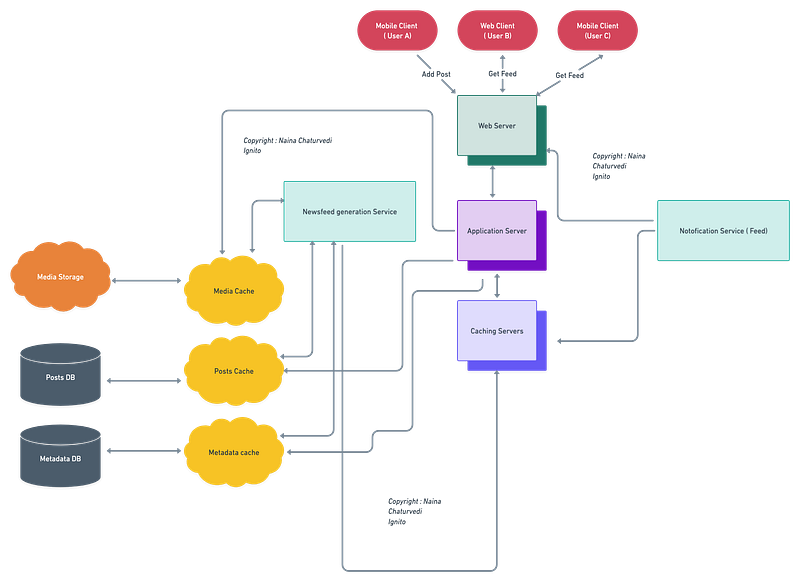
Hello peeps! Welcome to Day 13 of System Design Case studies series where we will design Facebook Newsfeed and Stock exchange Design System, Zerodha, Viber, Google Classroom, Shazam, Class Pass, Last Pass.
This post has system design for ( scroll till the end of the post) —
Note : Please read System Design Important Terms you MUST know and Most Important System Design basics before reading this post.
Projects Videos —
All the projects, data structures, SQL, algorithms, system design, Data Science and ML , Data Analytics, Data Engineering, , Implemented Data Science and ML projects, Implemented Data Engineering Projects, Implemented Deep Learning Projects, Implemented Machine Learning Ops Projects, Implemented Time Series Analysis and Forecasting Projects, Implemented Applied Machine Learning Projects, Implemented Tensorflow and Keras Projects, Implemented PyTorch Projects, Implemented Scikit Learn Projects, Implemented Big Data Projects, Implemented Cloud Machine Learning Projects, Implemented Neural Networks Projects, Implemented OpenCV Projects,Complete ML Research Papers Summarized, Implemented Data Analytics projects, Implemented Data Visualization Projects, Implemented Data Mining Projects, Implemented Natural Leaning Processing Projects, MLOps and Deep Learning, Applied Machine Learning with Projects Series, PyTorch with Projects Series, Tensorflow and Keras with Projects Series, Scikit Learn Series with Projects, Time Series Analysis and Forecasting with Projects Series, ML System Design Case Studies Series videos will be published on our youtube channel ( just launched).
Subscribe today!
Solved System Design Case Studies — In depth
Design Instagram
Design Messenger App
Design Twitter
Design URL Shortener
Design Dropbox
Design Youtube
Design API Rate Limiter
Design Web Crawler
Design Facebook’s Newsfeed
Design Yelp
Design Uber
Design Tinder
Design Tiktok
Design Whatsapp
Most Popular System Design Questions
Mega Compilation : Solved System Design Case studies
We will be discussing in depth -
- What is Facebook News feed
- Important Features
- Scaling Requirements
- Data Model — ER requirements
- High Level Design
- Basic Low level Design
- API Design
- Complete Detailed Design
- Code Implementation
Pre-requisite to this post -
Complete System Design Series — Important Concepts that you should know before starting the Case studies
6. Networking, How Browsers work, Content Network Delivery ( CDN)
13. System Design Template — How to solve any System Design Question
Github —
Day 1 of System Design Case Studies can be found below-
Day 2 of System Design Case Studies can be found below-
Day 3 of System Design Case Studies can be found below-
Day 4 of System Design Case Studies can be found below-
What is Facebook NewsFeed?

A newsfeed is nothing but a compilation of of your friends or followers posts/stories and constantly updating list of posts and on the facebook’s homepage.
It include any updates with respect to —
- Status
- Photos, Videos
- Engagements — Likes, comments, activity on the posts
- Updates from any groups/pages you are a part of.
Users can be mobile based or web based.
Designing the Facebook newsfeed involves —
- User data collection: Collect data on users’ activity on the platform, such as posts they’ve made, pages they’ve liked, and groups they are a member of.
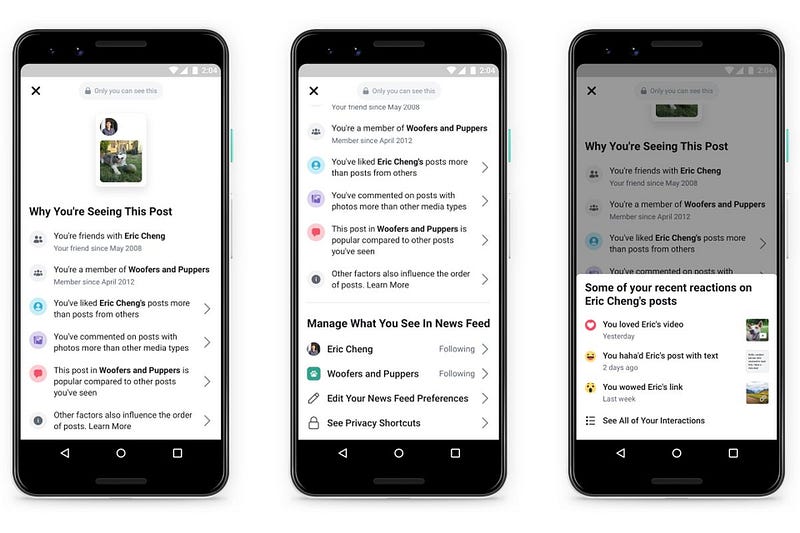
- Content filtering: Use algorithms to filter and rank the content that appears in the newsfeed based on relevance and popularity.
- Personalization: Personalize the content that appears in each user’s newsfeed based on their individual preferences and activity.
- Relevance and engagement: Use engagement metrics such as likes, comments, and shares to determine the relevance and popularity of content.
- Real-time updating: Continuously update the newsfeed in real-time to ensure that users are seeing the most recent and relevant content.
- Handling privacy: Implement privacy settings that allow users to control the content they see and who can see it.
- Ad integration: Integrate ads into the newsfeed in a way that is relevant and non-intrusive.
- A/B testing: Regularly perform A/B testing on different features and algorithms to ensure that the newsfeed is providing the best possible user experience.
- Monitoring and maintenance: Continuously monitor the performance of the newsfeed and make updates as necessary to ensure that it is functioning properly.
- Scalability: Design the system to scale and handle a large number of users and content.
Important Features
Publish posts ( which can be status update, videos, photos, activity etc)
See their friends/groups/pages posts on the news feed.
Scaling Requirements
Lets say,
No of active users per day ( DAU) : 100 Million
No of times we aggregate the timeline per day : 7
Total newsfeed requests per day : 700 Million
Total newsfeed requests per second : 700 Million/24/3600 = ~8100 requests/second
Lets say, a user has -
Average no of friends : 400
Average number of pages the user follow : 100
Average no of groups the user has : 50
No of posts in the users feed : 300
Size of each post : 2 KB
So total data needed per user : 600 KB
Storage Estimate —
600 KB * 100 Million active users = 60 TB
Data Model — ER requirements
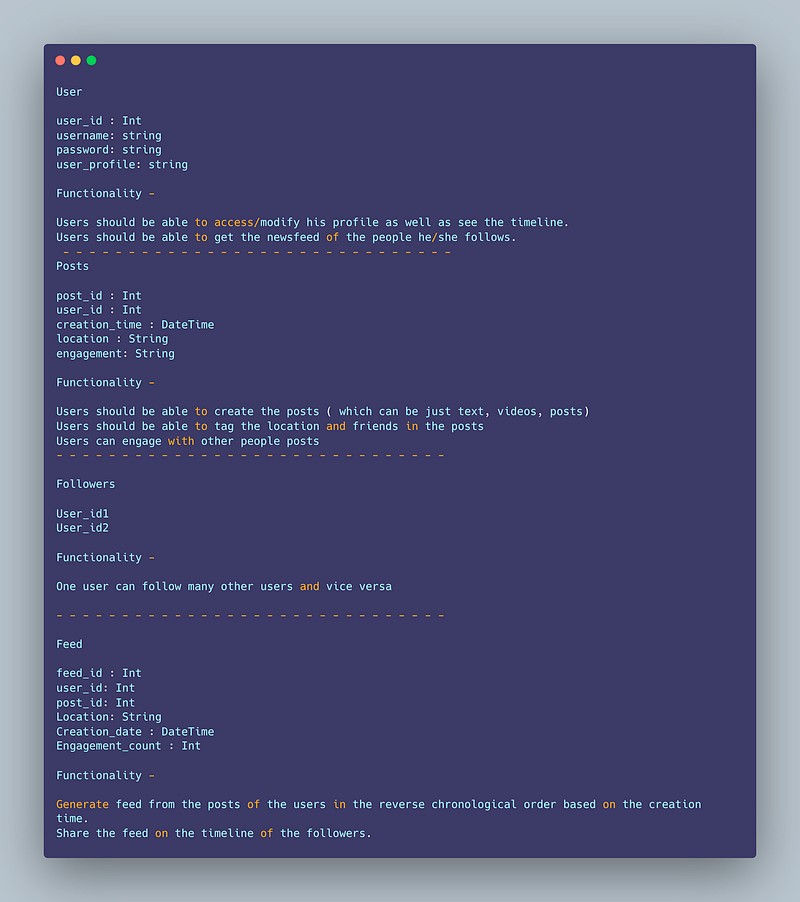
User
user_id : Int
username: string
password: string
user_profile: string
Functionality —
Users should be able to access/modify his profile as well as see the timeline.
Users should be able to get the newsfeed of the people he/she follows.
— — — — — — — — — — — — — — — — — — — — — — — — — — — — — —
Posts
post_id : Int
user_id : Int
creation_time : DateTime
location : String
engagement: String
Functionality —
Users should be able to create the posts ( which can be just text, videos, posts)
Users should be able to tag the location and friends in the posts
Users can engage with other people posts
Posts can be mapped to one or many users.
— — — — — — — — — — — — — — — — — — — — — — — — — — — — — —
Followers
User_id1
User_id2
Functionality —
One user can follow many other users and vice versa
— — — — — — — — — — — — — — — — — — — — — — — — — — — — — —
Feed
feed_id : Int
user_id: Int
post_id: Int
Location: String
Creation_date : DateTime
Engagement_count : Int
Functionality —
Generate feed from the posts of the users in the reverse chronological order based on the creation time.
Share the feed on the timeline of the followers.
High Level Design
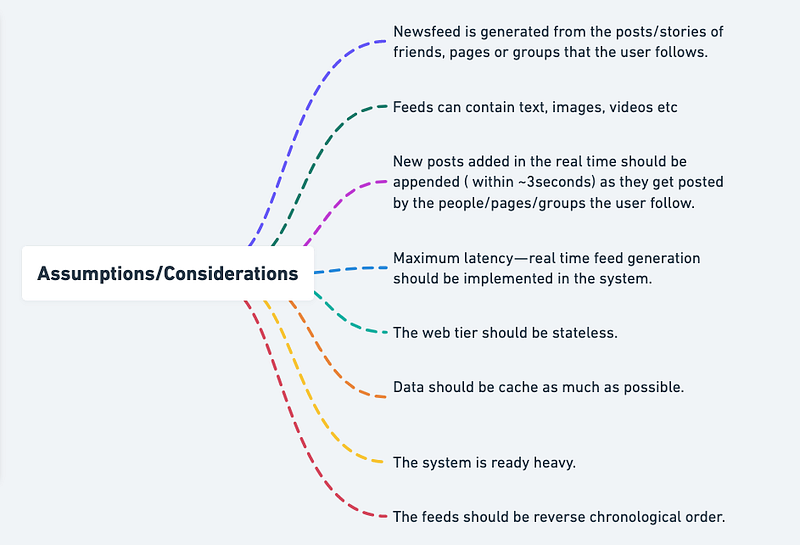
Assumptions/Consideration
- Newsfeed is generated from the posts/stories of friends, pages or groups that the user follows.
- Feeds can contain text, images, videos etc
- New posts added in the real time should be appended ( within ~3seconds) as they get posted by the people/pages/groups the user follow.
- Maximum latency — real time feed generation should be implemented in the system.
- The web tier should be stateless.
- Data should be cache as much as possible.
- The system is ready heavy.
- The feeds should be reverse chronological order.
— — — — — — — — — — — — — — — — — — — — — — — — — — — — — — — — — — — — — —
Components
There are two things —
- Newsfeed generation : By aggregating/accumulating friend’s posts in teh reverse chronological order.
- Newsfeed publishing : Cache the data as soon as the posts are published and distributed/populated on the friends timeline.
- Clients : Users ( can be both mobile based or web based)
- Load Balancer
- CDN
- Web Servers
- Rate Limiter
- Cache — for both news feed cacahe, post cache and user cache
- Database and replicas — User Database, Posts database
- Message Queues
- Graph database
- Storage ( s3)
— — — — — — — — — — — — — — — — — — — — — — — — — — — — — — — — — — — — — —
Services
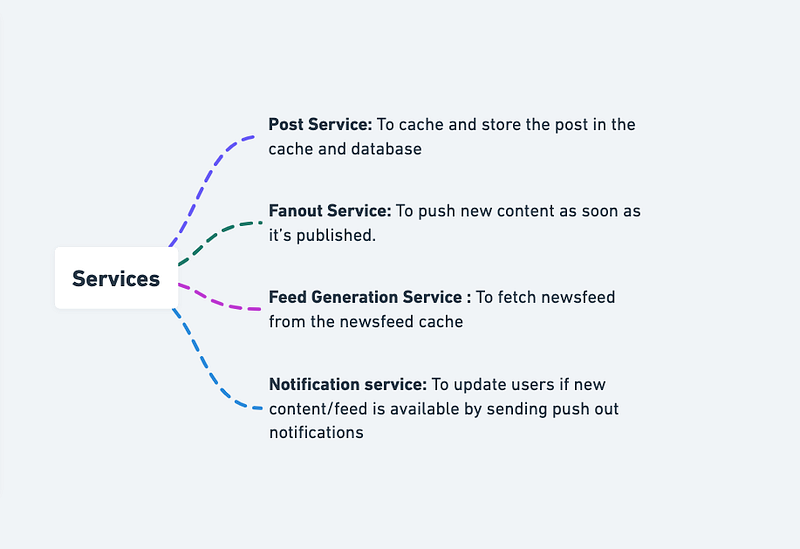
Post Service: To cache and store the post in the cache and database
Fanout Service: To push new content as soon as it’s published.
Feed Generation Service : To fetch newsfeed from the newsfeed cache
Notification service: To update users if new content/feed is available by sending push out notifications
User Service:
import jwt
import datetime
from flask import Flask, request
app = Flask(__name__)# Data structure to store user information
users = {
1: {
'id': 1,
'username': 'user1',
'email': '[email protected]',
'password': 'secret1'
},
2: {
'id': 2,
'username': 'user2',
'email': '[email protected]',
'password': 'secret2'
}
}# Function to handle user signup
@app.route('/signup', methods=['POST'])
def signup():
# Extract user information from the request
data = request.get_json()
username = data['username']
email = data['email']
password = data['password'] # Generate a new user id
user_id = max(users.keys()) + 1 # Store the new user information
users[user_id] = {
'id': user_id,
'username': username,
'email': email,
'password': password
} # Return success message
return {'message': 'User created successfully'}# Function to handle user login
@app.route('/login', methods=['POST'])
def login():
# Extract user information from the request
data = request.get_json()
email = data['email']
password = data['password'] # Search for the user in the data store
user = None
for user_id, user_data in users.items():
if user_data['email'] == email and user_data['password'] == password:
user = user_data
break # If the user is not found, return an error
if not user:
return {'error': 'Invalid email or password'}, 401 # Generate a JWT token
payload = {
'sub': user['id'],
'iat': datetime.datetime.utcnow(),
'exp': datetime.datetime.utcnow() + datetime.timedelta(days=7)
}
token = jwt.encode(payload, 'secret', algorithm='HS256') # Return the JWT token
return {'token': token.decode('utf-8')}if __name__ == '__main__':
app.run(debug=True)Newsfeed Service:
class NewsfeedService:
def __init__(self):
self.newsfeeds = {}
def create_newsfeed(self, user_id, newsfeed):
if user_id not in self.newsfeeds:
self.newsfeeds[user_id] = []
self.newsfeeds[user_id].append(newsfeed)
def get_newsfeeds(self, user_id):
return self.newsfeeds.get(user_id, [])
def update_newsfeed(self, user_id, newsfeed_id, newsfeed):
if user_id in self.newsfeeds:
for i, nf in enumerate(self.newsfeeds[user_id]):
if nf["id"] == newsfeed_id:
self.newsfeeds[user_id][i] = newsfeed
breakNotification Service:
class NotificationService:
def __init__(self):
self.notifications = {}
def create_notification(self, user_id, notification):
if user_id not in self.notifications:
self.notifications[user_id] = []
self.notifications[user_id].append(notification)
def get_notifications(self, user_id):
return self.notifications.get(user_id, [])
def update_notification(self, user_id, notification_id, notification):
if user_id in self.notifications:
for i, nf in enumerate(self.notifications[user_id]):
if nf["id"] == notification_id:
self.notifications[user_id][i] = notification
breakAnalytics Service:
class AnalyticsService:
def __init__(self):
self.metrics = {}
def store_metric(self, metric_name, value):
self.metrics[metric_name] = value
def process_metrics(self):
# Do some processing on the stored metrics to generate insights
pass
def get_metric(self, metric_name):
return self.metrics.get(metric_name, None)Post Service:
from datetime import datetimeclass Post:
def __init__(self, title, content, author_id, created_at=None):
self.title = title
self.content = content
self.author_id = author_id
self.created_at = created_at or datetime.now()class PostService:
def __init__(self):
self.posts = []
def create_post(self, title, content, author_id):
post = Post(title, content, author_id)
self.posts.append(post)
return post
def get_posts(self):
return self.posts
def update_post(self, post_id, title=None, content=None):
for index, post in enumerate(self.posts):
if post.id == post_id:
if title:
post.title = title
if content:
post.content = content
self.posts[index] = post
return post
return None
def delete_post(self, post_id):
for index, post in enumerate(self.posts):
if post.id == post_id:
del self.posts[index]
return True
return FalseThis implementation uses a class Post to represent a single post, and a class PostService to handle the operations of creating, retrieving, updating, and deleting posts. The PostService maintains a list of Post objects and implements methods for each of the operations.
Basic Low Level Design
import java.util.*;
class User {
private String username;
private String password;
private List<Post> posts;
private List<User> friends;
public User(String username, String password) {
this.username = username;
this.password = password;
this.posts = new ArrayList<>();
this.friends = new ArrayList<>();
}
// Getters and setters
// ...
public void addPost(Post post) {
posts.add(post);
}
public void addFriend(User friend) {
friends.add(friend);
}
}
class Post {
private String postId;
private String content;
private User author;
public Post(String postId, String content, User author) {
this.postId = postId;
this.content = content;
this.author = author;
}
// Getters and setters
// ...
}
class FacebookSystem {
private List<User> users;
public FacebookSystem() {
this.users = new ArrayList<>();
}
public void registerUser(String username, String password) {
User newUser = new User(username, password);
users.add(newUser);
System.out.println("User registered successfully.");
}
public void addFriend(String username, String friendUsername) {
User user = findUserByUsername(username);
User friend = findUserByUsername(friendUsername);
if (user != null && friend != null) {
user.addFriend(friend);
friend.addFriend(user);
System.out.println("Friend added successfully.");
} else {
System.out.println("User or friend not found.");
}
}
public void createPost(String username, String postId, String content) {
User author = findUserByUsername(username);
if (author != null) {
Post newPost = new Post(postId, content, author);
author.addPost(newPost);
System.out.println("Post created successfully.");
} else {
System.out.println("User not found.");
}
}
public List<Post> getNewsFeed(String username) {
User user = findUserByUsername(username);
List<Post> newsFeed = new ArrayList<>();
if (user != null) {
List<User> friends = user.getFriends();
for (User friend : friends) {
newsFeed.addAll(friend.getPosts());
}
Collections.sort(newsFeed, (p1, p2) -> p2.getPostId().compareTo(p1.getPostId()));
}
return newsFeed;
}
public User findUserByUsername(String username) {
for (User user : users) {
if (user.getUsername().equals(username)) {
return user;
}
}
return null;
}
}
public class FacebookApp {
public static void main(String[] args) {
FacebookSystem facebook = new FacebookSystem();
// Register users
facebook.registerUser("user1", "password1");
facebook.registerUser("user2", "password2");
// Add friends
facebook.addFriend("user1", "user2");
// Create posts
facebook.createPost("user1", "post1", "Hello, everyone!");
facebook.createPost("user2", "post2", "Happy weekend!");
// Get news feed
List<Post> newsFeed = facebook.getNewsFeed("user1");
// Display news feed
for (Post post : newsFeed) {
System.out.println("Post ID: " + post.getPostId());
System.out.println("Content: " + post.getContent());
System.out.println("Author: " + post.getAuthor().getUsername());
System.out.println();
}
}
}API Design
Implementation —
from flask import Flask, jsonify, requestapp = Flask(__name__)# Endpoint for getting user information
@app.route('/users/<int:user_id>', methods=['GET'])
def get_user(user_id):
# Code to get user information using user_id
user = {'name': 'John Doe', 'location': 'New York', 'age': 35}
return jsonify(user)# Endpoint for getting a user's newsfeed
@app.route('/newsfeed/<int:user_id>', methods=['GET'])
def get_newsfeed(user_id):
# Code to get user's newsfeed using user_id
newsfeed = [{'id': 1, 'message': 'Check out my new blog post!'},
{'id': 2, 'message': 'Just finished a great workout!'}]
return jsonify(newsfeed)# Endpoint for posting to a user's newsfeed
@app.route('/newsfeed/<int:user_id>', methods=['POST'])
def post_to_newsfeed(user_id):
# Code to add a post to user's newsfeed using user_id and message in request body
message = request.json['message']
post_id = 3 # Generate a unique post ID
return jsonify({'message': f'Post added to newsfeed with ID {post_id}!'})if __name__ == '__main__':
app.run(debug=True)In this implementation, we have three endpoints:
/users/<int:user_id>(GET): This endpoint is used to get user information. The user_id is passed as a parameter in the URL./newsfeed/<int:user_id>(GET): This endpoint is used to get a user's newsfeed. The user_id is passed as a parameter in the URL./newsfeed/<int:user_id>(POST): This endpoint is used to post to a user's newsfeed. The user_id and message are passed in the request body as JSON.
There are API’s needed for newsfeed generation and publishing —
- Posts aggregation — newsfeed building
- Posts retrieval
- Feed publishing
A basic outline of a news feed API in Python using Flask as the web framework:
from flask import Flask, requestapp = Flask(__name__)# A dummy data store to store news feed data
news_feed_data = [
{
"id": 1,
"author": "John Doe",
"content": "Hello, World!"
},
{
"id": 2,
"author": "Jane Doe",
"content": "Hi there!"
}
]# Endpoint to retrieve all news feed data
@app.route("/newsfeed", methods=["GET"])
def get_news_feed():
# Return the entire news feed data store
return {"news_feed": news_feed_data}# Endpoint to add a new post to the news feed
@app.route("/newsfeed", methods=["POST"])
def add_post():
# Get the data from the request body
data = request.get_json() # Add the new post to the news feed data store
news_feed_data.append(data) # Return a success message
return {"message": "Post added successfully"}if __name__ == "__main__":
app.run(debug=True)In this example, we have a news_feed_data data store to store the news feed data. The API has two endpoints - /newsfeed which retrieves all news feed data and /newsfeed which adds a new post to the news feed.
A simple implementation in Python for Posts aggregation, Posts retrieval, and Feed publishing:
class PostsService:
def __init__(self):
self.posts = {} def add_post(self, post_id, post_content):
self.posts[post_id] = post_content def get_post(self, post_id):
return self.posts.get(post_id)class FeedService:
def __init__(self, posts_service):
self.posts_service = posts_service
self.feed = [] def add_to_feed(self, post_id):
post = self.posts_service.get_post(post_id)
if post:
self.feed.append(post) def get_feed(self):
return self.feed# Example usage
posts_service = PostsService()
posts_service.add_post(1, "Hello World!")
posts_service.add_post(2, "How are you?")feed_service = FeedService(posts_service)
feed_service.add_to_feed(1)
feed_service.add_to_feed(2)print(feed_service.get_feed())
# Output: ["Hello World!", "How are you?"]In this implementation, the PostsService class provides functionality for adding and retrieving posts. The FeedService class uses the PostsService instance to retrieve posts and build the feed. The feed is stored as a list of posts. The add_to_feed method appends a post to the feed, and the get_feed method returns the feed.
API design will be covered in detail in the workflow video ( coming soon. Subscribe today to Ignito).
Complete Detailed Design
Code Implementation
- Posting: The next step is to allow the user to create a post. This can be done using the
put_objectmethod of the Graph API.
Here’s an implementation of how to create a status update using the Graph API:
# Create a status update
status = 'Hello, World!'
graph.put_object(parent_object='me', connection_name='feed', message=status)- Retrieving Posts: The next step is to allow the user to view their friends/groups/pages’ posts. This can be done using the
get_connectionsmethod of the Graph API.
Here’s an implementation of how to retrieve a user’s home feed using the Graph API:
# Retrieve user's home feed
feed = graph.get_connections('me', 'home')# Print the posts
for post in feed['data']:
print(post['message'])The above code will retrieve only the posts that the user has access to.
- Displaying Posts: The last step is to display the retrieved posts in a user-friendly manner. This can be done using any Python library or framework for building the user interface. Here’s an implementation of how to display the posts using the
tkinterlibrary:
import tkinter as tk# Create a window
window = tk.Tk()# Retrieve user's home feed
feed = graph.get_connections('me', 'home')# Display the posts in a listbox
listbox = tk.Listbox(window)
for post in feed['data']:
listbox.insert(tk.END, post['message'])
listbox.pack()# Run the window
window.mainloop()This will display the retrieved posts in a listbox widget.
- Retrieving Posts: The next step is to retrieve the posts from the user’s friends/groups/pages. This can be done using the
get_connectionsmethod of the Graph API.
Here’s an implementation of how to retrieve posts from a user’s friend:
# Retrieve user's friend list
friends = graph.get_connections('me', 'friends')# Retrieve friend's posts
for friend in friends['data']:
friend_id = friend['id']
friend_name = friend['name']
friend_posts = graph.get_connections(friend_id, 'posts')
# Print the posts
for post in friend_posts['data']:
print(friend_name + ': ' + post['message'])Note: The above code will retrieve only the posts that the user has access to.
- Displaying Posts: The last step is to display the retrieved posts in a user-friendly manner. This can be done using any Python library or framework for building the user interface. Here’s an implementation of how to display the posts using the
tkinterlibrary:
import tkinter as tk# Create a window
window = tk.Tk()# Retrieve user's friend list
friends = graph.get_connections('me', 'friends')# Retrieve friend's posts
posts = []
for friend in friends['data']:
friend_id = friend['id']
friend_name = friend['name']
friend_posts = graph.get_connections(friend_id, 'posts')
# Add the posts to the list
for post in friend_posts['data']:
posts.append(friend_name + ': ' + post['message'])# Display the posts in a listbox
listbox = tk.Listbox(window)
for post in posts:
listbox.insert(tk.END, post)
listbox.pack()# Run the window
window.mainloop()This will display the retrieved posts in a listbox widget.
More on Facebook Newsfeed System Design —
Data Modeling:
Data modeling involves designing the structure and organization of the data used in the newsfeed system. This includes defining the entities (such as users, posts, activities) and their relationships. Here’s an example of data modeling using Python classes:
class User:
def __init__(self, user_id, name):
self.user_id = user_id
self.name = name
self.posts = []
self.activities = []class Post:
def __init__(self, post_id, content, user_id):
self.post_id = post_id
self.content = content
self.user_id = user_id
self.timestamp = datetime.datetime.now()class Activity:
def __init__(self, activity_id, description, user_id):
self.activity_id = activity_id
self.description = description
self.user_id = user_id
self.timestamp = datetime.datetime.now()Content Ranking and Personalization:
Content ranking involves determining the order in which posts appear in the newsfeed. Personalization ensures that the content is tailored to the user’s preferences. Here’s an example of a content ranking function:
def rank_posts(user, posts):
ranked_posts = []
for post in posts:
# Apply ranking algorithm (e.g., machine learning model) based on user preferences and post features
rank_score = rank_algorithm(user, post)
ranked_posts.append((post, rank_score))
# Sort posts based on rank score in descending order
ranked_posts.sort(key=lambda x: x[1], reverse=True)
return [post for post, _ in ranked_posts]Real-time Updates:
Real-time updates ensure that the newsfeed is updated in real-time when new posts or activities occur. Here’s an example using WebSockets for real-time updates:
import asyncio
import websocketsasync def handle_newsfeed_updates(websocket, path):
while True:
# Wait for new posts or activities to arrive
new_data = await get_new_data()
# Send the new data to the connected clients
await websocket.send(new_data)start_server = websockets.serve(handle_newsfeed_updates, 'localhost', 8765)
asyncio.get_event_loop().run_until_complete(start_server)
asyncio.get_event_loop().run_forever()Newsfeed Aggregation:
Newsfeed aggregation involves merging and presenting posts from different sources, such as friends, pages, and groups. Here’s an example of aggregating posts:
def aggregate_posts(user):
aggregated_posts = []
for friend in user.friends:
friend_posts = friend.posts
aggregated_posts.extend(friend_posts)
for page in user.liked_pages:
page_posts = page.posts
aggregated_posts.extend(page_posts)
# Perform deduplication to remove duplicate posts
# Shuffle the posts for diverse content representation
return aggregated_postsFiltering and Privacy Controls:
Filtering and privacy controls ensure that the newsfeed respects user preferences and filters out irrelevant or sensitive content. Here’s an example of content filtering based on user-defined rules:
def filter_posts(user, posts):
filtered_posts = []
for post in posts:
if check_privacy_settings(user, post):
if check_user_defined_rules(user, post):
filtered_posts.append(post)
return filtered_postsScalability and Performance:
To handle a large number of users and posts, scalability and performance optimizations are crucial. Here’s an example of using Redis for caching:
import rediscache = redis.Redis(host='localhost', port=6379, db=0)def get_cached_posts(user_id):
cached_posts = cache.get(user_id)
if cached_posts:
return cached_posts
# If posts are not cached, retrieve them from the database or another source
posts = fetch_posts_from_database(user_id)
# Cache the retrieved posts for future use
cache.set(user_id, posts)
return postsUser Engagement and Interactions:
User engagement involves handling user interactions like likes, comments, and shares with newsfeed content. Here’s an example of handling likes and updating engagement metrics:
def like_post(user, post):
# Update post's likes count
post.likes += 1
# Update user's liked posts
user.liked_posts.append(post.post_id)def comment_post(user, post, comment):
# Add comment to post's comments list
post.comments.append(comment)
# Update user's commented posts
user.commented_posts.append(post.post_id)Content Moderation and Safety:
Content moderation ensures the newsfeed system maintains a safe and appropriate environment. Here’s an example of a function to detect and prevent inappropriate content:
def detect_inappropriate_content(post):
# Use algorithms or models to detect inappropriate content
if is_inappropriate(post.content):
post.mark_as_inappropriate()def prevent_spam(user, post):
if is_spam(user, post):
post.mark_as_spam()Analytics and Insights:
Analytics and insights provide valuable information about user behavior and post performance. Here’s an example of collecting metrics and generating reports:
def track_post_engagement(post):
# Track post reach and engagement metrics
post.views += 1
post.likes += get_likes_count(post)
post.comments += get_comments_count(post)
post.shares += get_shares_count(post)def generate_post_report(post):
report = {
'post_id': post.post_id,
'reach': post.views,
'engagement': post.likes + post.comments + post.shares
}
return reportMobile Optimization:
Mobile optimization ensures the newsfeed system works efficiently on mobile devices. Here’s an example of optimizing data transfer and rendering:
def fetch_posts_for_mobile(user):
# Retrieve optimized data for mobile devices
mobile_posts = fetch_optimized_posts(user)
# Render posts for mobile display
rendered_posts = render_posts_for_mobile(mobile_posts)
return rendered_postsSystem Resilience and Availability:
System resilience and availability involve implementing mechanisms to handle failures and maintain high availability. Here’s an example of handling system failures and load balancing:
def handle_failure():
try:
# Attempt to recover from failure or switch to backup system
recover_from_failure()
except Exception as e:
# Notify system administrators and log the error
notify_administrators(e)
log_error(e)def load_balancing():
# Implement load balancing strategy to distribute incoming requests
load_balancer = create_load_balancer()
load_balancer.route_request()Monitoring and Alerting:
Monitoring and alerting help maintain the health and performance of the newsfeed system. Here’s an example of monitoring system health:
def monitor_system_health():
while True:
# Monitor system metrics (e.g., CPU usage, memory usage)
cpu_usage = get_cpu_usage()
memory_usage = get_memory_usage()
# Send alerts if metrics exceed thresholds
if cpu_usage > 90:
send_alert('High CPU usage detected')
if memory_usageSystem Design — Stock Exchange System
We will be discussing in depth -
- What is Stock Exchange System
- Important Features
- Scaling Requirements
- Data Model — ER requirements
- High Level Design
- Basic Low level Design
- API Design
- Complete Detailed Design
- Code Implementation

What is Stock Exchange System
A stock exchange is a centralized marketplace where buyers and sellers trade various financial instruments such as stocks, bonds, derivatives, and commodities. It provides a platform for investors to buy and sell securities, facilitating transparent and efficient transactions.
Important Features
- Order Matching: The stock exchange system should support order matching algorithms to match buy and sell orders based on predefined rules.
- Real-time Data: Real-time stock quotes, trade execution updates, and market data dissemination are essential features to provide accurate information to traders and investors.
- Trade Settlement: The system should handle trade settlement by ensuring the transfer of securities and funds between buyers and sellers.
- Regulatory Compliance: Compliance with regulatory requirements, such as Know Your Customer (KYC) and Anti-Money Laundering (AML) policies, is crucial for a stock exchange.
- Market Surveillance: Monitoring and detecting suspicious trading activities to prevent market manipulation and ensure fair trading practices.
- Reporting and Analytics: Generating comprehensive reports and analytics to assist traders, investors, and regulators in analyzing market trends and making informed decisions.
Scaling Requirements
Here’s a small-scale simulation for a stock exchange system:
Let’s say we have —
Daily active users (DAU): 10,000
Number of trades per user (within a day): 5
Total trades per day: 10,000 users * 5 trades = 50,000 trades
Storage Estimation:
Trade information size: 200 bytes
Total Storage per day: 50,000 trades * 200 bytes = 10,000,000 bytes = 10 MB/day
For the next 3 years: 10 MB/day * 3 * 365 = 10.95 GB
This simulation represents a small-scale stock exchange system with 10,000 daily active users and an estimated 10 MB of data generated per day, resulting in a storage requirement of approximately 10.95 GB over the course of three years.
Data Model — ER requirements
Users:
UserID (Primary Key)
Username
Password
Stocks:
StockID (Primary Key)
Ticker Symbol
Company Name
Orders:
OrderID (Primary Key)
UserID (Foreign Key referencing Users.UserID)
StockID (Foreign Key referencing Stocks.StockID)
Order Type (Buy or Sell)
Quantity
Price
Timestamp
Trades:
TradeID (Primary Key)
BuyOrderID (Foreign Key referencing Orders.OrderID)
SellOrderID (Foreign Key referencing Orders.OrderID)
Quantity
Price
Timestamp
High Level Design
- The system needs to handle a high volume of trading activity.
- Real-time order matching and trade execution are required.
- High reliability and availability are essential.
- Latency should be minimized for trade execution.
Main Components and Services:
Order Matching Engine:
- Responsible for matching buy and sell orders based on predefined rules.
- Processes incoming orders and matches compatible orders.
- Executes trades based on matched orders.
Real-Time Data System:
- Provides real-time stock quotes, trade execution updates, and market data dissemination to traders and investors.
- Integrates with data providers to fetch real-time stock prices and market information.
- Publishes updates and notifications to connected clients.
Trade Settlement System:
- Handles trade settlement by ensuring the transfer of securities and funds between buyers and sellers.
- Integrates with clearinghouses and payment systems to facilitate settlement processes.
- Updates user account balances and stock holdings after successful trades.
Regulatory Compliance:
- Ensures compliance with regulatory requirements, such as Know Your Customer (KYC) and Anti-Money Laundering (AML) policies.
- Verifies user identities and performs necessary checks during user onboarding and trading activities.
- Maintains records and audit trails for regulatory purposes.
Market Surveillance:
- Monitors and detects suspicious trading activities to prevent market manipulation and ensure fair trading practices.
- Analyzes trade data and market trends to identify potential irregularities or anomalies.
- Generates alerts and reports for further investigation.
Reporting and Analytics:
- Generates comprehensive reports and analytics to assist traders, investors, and regulators in analyzing market trends and making informed decisions.
- Provides historical trade data, market statistics, and performance metrics.
- Offers data visualization tools for interactive analysis.
Basic Low level Design
from flask import Flask, request, jsonify
from flask_jwt_extended import JWTManager, jwt_required, create_access_token
from flask_sqlalchemy import SQLAlchemy
app = Flask(__name__)
app.config['SQLALCHEMY_DATABASE_URI'] = 'sqlite:///stock_exchange.db'
app.config['JWT_SECRET_KEY'] = 'your-secret-key'
db = SQLAlchemy(app)
jwt = JWTManager(app)
# Database Models
class User(db.Model):
id = db.Column(db.Integer, primary_key=True)
username = db.Column(db.String(50), unique=True, nullable=False)
password = db.Column(db.String(80), nullable=False)
# Routes
@app.route('/register', methods=['POST'])
def register():
username = request.json['username']
password = request.json['password']
user = User(username=username, password=password)
db.session.add(user)
db.session.commit()
return jsonify(message='User successfully registered'), 201
@app.route('/login', methods=['POST'])
def login():
username = request.json['username']
password = request.json['password']
user = User.query.filter_by(username=username).first()
if user and user.password == password:
access_token = create_access_token(identity=user.id)
return jsonify(access_token=access_token), 200
return jsonify(message='Invalid username or password'), 401
@app.route('/orders', methods=['POST'])
@jwt_required()
def place_order():
symbol = request.json['symbol']
side = request.json['side']
quantity = request.json['quantity']
price = request.json['price']
# Implementation logic for placing an order
return jsonify(message='Order successfully placed'), 201
@app.route('/orders/<int:order_id>', methods=['GET'])
@jwt_required()
def get_order(order_id):
# Implementation logic for retrieving order details
return jsonify(order_details), 200
@app.route('/orders/<int:order_id>', methods=['DELETE'])
@jwt_required()
def cancel_order(order_id):
# Implementation logic for canceling an order
return jsonify(message='Order successfully canceled'), 204
@app.route('/account/balance', methods=['GET'])
@jwt_required()
def get_account_balance():
# Implementation logic for retrieving account balance
return jsonify(account_balance), 200
if __name__ == '__main__':
db.create_all()
app.run()import java.util.*;
class User {
private String userId;
private String username;
private String password;
// other user attributes
public User(String userId, String username, String password) {
this.userId = userId;
this.username = username;
this.password = password;
// initialize other attributes
}
// Getters and setters for attributes
// ...
}
class Stock {
private String stockId;
private String name;
private double price;
// other stock attributes
public Stock(String stockId, String name, double price) {
this.stockId = stockId;
this.name = name;
this.price = price;
// initialize other attributes
}
// Getters and setters for attributes
// ...
}
class Order {
private String orderId;
private User user;
private Stock stock;
private double quantity;
private double price;
private OrderType type;
// other order attributes
public Order(String orderId, User user, Stock stock, double quantity, double price, OrderType type) {
this.orderId = orderId;
this.user = user;
this.stock = stock;
this.quantity = quantity;
this.price = price;
this.type = type;
// initialize other attributes
}
// Getters and setters for attributes
// ...
}
enum OrderType {
BUY,
SELL
}
class StockExchange {
private Map<String, User> users;
private Map<String, Stock> stocks;
private List<Order> orders;
public StockExchange() {
this.users = new HashMap<>();
this.stocks = new HashMap<>();
this.orders = new ArrayList<>();
}
public void addUser(User user) {
users.put(user.getUserId(), user);
}
public User getUserById(String userId) {
return users.get(userId);
}
public void addStock(Stock stock) {
stocks.put(stock.getStockId(), stock);
}
public Stock getStockById(String stockId) {
return stocks.get(stockId);
}
public void placeOrder(String userId, String stockId, double quantity, double price, OrderType type) {
User user = getUserById(userId);
Stock stock = getStockById(stockId);
if (user == null || stock == null) {
System.out.println("User or stock not found");
return;
}
String orderId = generateOrderId(); // Generate a unique order ID
Order order = new Order(orderId, user, stock, quantity, price, type);
orders.add(order);
// Additional logic to match orders, update stock prices, etc.
// ...
}
public List<Order> getUserOrders(String userId) {
List<Order> userOrders = new ArrayList<>();
for (Order order : orders) {
if (order.getUser().getUserId().equals(userId)) {
userOrders.add(order);
}
}
return userOrders;
}
// Additional methods for handling market data, order book, trade history, etc.
// ...
}
public class Main {
public static void main(String[] args) {
StockExchange stockExchange = new StockExchange();
User user1 = new User("1", "Alice", "password");
User user2 = new User("2", "Bob", "password");
stockExchange.addUser(user1);
stockExchange.addUser(user2);
Stock stock1 = new Stock("1", "AAPL", 150.0);
Stock stock2 = new Stock("2", "GOOG", 2500.0);
stockExchange.addStock(stock1);
stockExchange.addStock(stock2);
// Place orders, retrieve user orders, etc.
// ...
}
}API Design
User Registration and Authentication:
- Endpoint: POST /register
- Description: Registers a new user in the system.
- Request Body: { “username”: “example_user”, “password”: “example_password” }
- Response: 201 Created (User successfully registered)
User Login:
- Endpoint: POST /login
- Description: Authenticates a user and returns an access token.
- Request Body: { “username”: “example_user”, “password”: “example_password” }
- Response: 200 OK (Login successful) with access token in response body
Place an Order:
- Endpoint: POST /orders
- Description: Places a new order to buy or sell a stock.
- Request Header: Authorization: Bearer
- Request Body: { “symbol”: “AAPL”, “side”: “buy”, “quantity”: 10, “price”: 150.50 }
- Response: 201 Created (Order successfully placed) with order ID in response body
Get Order Details:
- Endpoint: GET /orders/{order_id}
- Description: Retrieves the details of a specific order.
- Request Header: Authorization: Bearer
- Response: 200 OK with order details in response body
Cancel an Order:
- Endpoint: DELETE /orders/{order_id}
- Description: Cancels a specific order.
- Request Header: Authorization: Bearer
- Response: 204 No Content (Order successfully canceled)
Get Account Balance:
- Endpoint: GET /account/balance
- Description: Retrieves the account balance for the authenticated user.
- Request Header: Authorization: Bearer
- Response: 200 OK with account balance in response body
Complete Detailed Design
Coming soon! It will be covered on youtube channel.
Subscribe to youtube channel :
Code Implementation
Order Matching:
class StockOrder:
def __init__(self, symbol, price, quantity):
self.symbol = symbol
self.price = price
self.quantity = quantityclass StockExchange:
def __init__(self):
self.buy_orders = []
self.sell_orders = [] def add_buy_order(self, order):
self.buy_orders.append(order)
self.match_orders() def add_sell_order(self, order):
self.sell_orders.append(order)
self.match_orders() def match_orders(self):
for buy_order in self.buy_orders:
for sell_order in self.sell_orders:
if buy_order.price >= sell_order.price:
self.execute_trade(buy_order, sell_order)
self.buy_orders.remove(buy_order)
self.sell_orders.remove(sell_order) def execute_trade(self, buy_order, sell_order):
print(f"Trade executed - Buy: {buy_order.symbol} at {buy_order.price}, Sell: {sell_order.symbol} at {sell_order.price}")# Example usage
exchange = StockExchange()
order1 = StockOrder("AAPL", 150.50, 10)
order2 = StockOrder("AAPL", 150.25, 5)
order3 = StockOrder("AAPL", 151.00, 8)
order4 = StockOrder("AAPL", 149.75, 12)exchange.add_buy_order(order1)
exchange.add_sell_order(order2)
exchange.add_sell_order(order3)
exchange.add_buy_order(order4)Real-time Data:
import timeclass StockExchange:
def __init__(self):
self.subscribers = [] def subscribe(self, subscriber):
self.subscribers.append(subscriber) def unsubscribe(self, subscriber):
self.subscribers.remove(subscriber) def publish_data(self, data):
for subscriber in self.subscribers:
subscriber.receive_data(data)# Example subscriber class
class StockDataSubscriber:
def receive_data(self, data):
print(f"Received data: {data} at {time.time()}")# Example usage
exchange = StockExchange()
subscriber1 = StockDataSubscriber()
subscriber2 = StockDataSubscriber()exchange.subscribe(subscriber1)
exchange.subscribe(subscriber2)# Simulate receiving real-time stock data
data = {"symbol": "AAPL", "price": 150.25}
exchange.publish_data(data)exchange.unsubscribe(subscriber1)data = {"symbol": "GOOGL", "price": 2500.50}
exchange.publish_data(data)Trade Settlement:
class Trade:
def __init__(self, buyer, seller, security, price, quantity):
self.buyer = buyer
self.seller = seller
self.security = security
self.price = price
self.quantity = quantityclass TradeSettlement:
def __init__(self):
self.pending_trades = [] def process_trade(self, trade):
self.pending_trades.append(trade)
self.settle_trades() def settle_trades(self):
for trade in self.pending_trades:
print(f"Trade settled - Buyer: {trade.buyer}, Seller: {trade.seller}, Security: {trade.security}, Price: {trade.price}, Quantity: {trade.quantity}")
# Perform trade settlement process (transfer of securities and funds)# Example usage
settlement = TradeSettlement()
trade1 = Trade("John", "Alice", "AAPL", 150.25, 10)
trade2 = Trade("Bob", "Carol", "GOOGL", 2500.50, 5)settlement.process_trade(trade1)
settlement.process_trade(trade2)Regulatory Compliance:
class RegulatoryCompliance:
def __init__(self):
self.kyc_compliant_customers = []
self.aml_compliant_customers = [] def check_kyc_compliance(self, customer):
return customer in self.kyc_compliant_customers def check_aml_compliance(self, customer):
return customer in self.aml_compliant_customers def update_kyc_compliance(self, customer):
self.kyc_compliant_customers.append(customer) def update_aml_compliance(self, customer):
self.aml_compliant_customers.append(customer)# Example usage
compliance = RegulatoryCompliance()compliance.update_kyc_compliance("John")
compliance.update_kyc_compliance("Alice")
compliance.update_aml_compliance("John")print(compliance.check_kyc_compliance("Alice")) # True
print(compliance.check_kyc_compliance("Bob")) # False
print(compliance.check_aml_compliance("John")) # True
print(compliance.check_aml_compliance("Carol")) # FalseMarket Surveillance:
class MarketSurveillance:
def __init__(self):
self.trade_data = [] def monitor_trades(self, trade):
self.trade_data.append(trade)
self.detect_suspicious_activities() def detect_suspicious_activities(self):
# Analyze trade data to detect suspicious trading activities
print("Suspicious activities detected!")# Example usage
surveillance = MarketSurveillance()trade1 = Trade("John", "Alice", "AAPL", 150.25, 10)
trade2 = Trade("Bob", "Carol", "GOOGL", 2500.50, 5)surveillance.monitor_trades(trade1)
surveillance.monitor_trades(trade2)Reporting and Analytics:
class ReportingAndAnalytics:
def generate_reports(self):
# Generate comprehensive reports based on market data
print("Generating reports...")
def perform_analysis(self):
# Perform data analysis for market trends and decision-making
print("Performing analysis...")
# Example usage
analytics = ReportingAndAnalytics()
analytics.generate_reports()
analytics.perform_analysis()System Design — Zerodha
We will be discussing in depth -
- What is Zerodha
- Important Features
- Scaling Requirements
- Data Model — ER requirements
- High Level Design
- Basic Low level Design
- API Design
- Complete Detailed Design
- Code Implementation

What is Zerodha
Zerodha is a leading online brokerage platform based in India. Zerodha’s main objective is to democratize finance and provide easy access to financial markets for individual investors and traders.
Important Features
- User-friendly Interface: Zerodha offers an intuitive and user-friendly web and mobile interface that allows investors to trade stocks, commodities, currencies, and more with ease.
- Zero Commission Trades: One of the main attractions of Zerodha is its zero brokerage on equity delivery trades, which makes it cost-effective for retail investors.
- Direct Market Access: Zerodha provides direct market access, enabling clients to place trades directly on the stock exchanges, reducing latency and ensuring faster execution.
- Real-time Market Data: The platform provides real-time market data and advanced charting tools to help users make informed decisions.
- Algorithmic Trading: Zerodha supports algorithmic trading for advanced users, allowing them to automate their trading strategies.
Scaling Requirements — Capacity Estimation
For the sake of simplicity, I will consider a small scale simulation for Zerodha.
- Total number of users: 10 Million
- Daily active users (DAU): 2 Million
- No of trades executed by user/day: 5
- Total number of trades executed per day: 10 Million trades/day
- Read to write ratio: 100:1
Storage Estimation:
Assuming each trade data is approximately 1 KB in size:
- Total storage per day: 10 Million trades * 1 KB = 10 GB/day
- For the next 3 years, 10 GB * 365 * 3 = 10.95 TB
Requests per Second:
Assuming the trading activity is evenly distributed throughout the day:
- Requests per second: 10 Million trades / (24 hours * 3600 seconds) ≈ 115 requests/second
import time
import random
TOTAL_USERS = 10000000
DAU = 2000000
TRADES_PER_USER_PER_DAY = 5
TOTAL_TRADES_PER_DAY = DAU * TRADES_PER_USER_PER_DAY
READ_TO_WRITE_RATIO = 100
def simulate_zerodha():
storage_per_day = TOTAL_TRADES_PER_DAY * 1024 # Assume each trade data is 1 KB in size
storage_for_three_years = storage_per_day * 365 * 3 / (1024 * 1024) # Convert to TB
print(f"Storage Per Day: {storage_per_day / (1024 * 1024):.2f} MB")
print(f"Storage for Next 3 Years: {storage_for_three_years:.2f} TB")
requests_per_second = TOTAL_TRADES_PER_DAY / (24 * 3600)
print(f"Requests Per Second: {requests_per_second:.2f}")
# Simulating trading activity
for i in range(1, 4 * 365 + 1):
trades_today = random.randint(DAU * TRADES_PER_USER_PER_DAY - 5000, DAU * TRADES_PER_USER_PER_DAY + 5000)
storage_used_today = trades_today * 1024 # Assume each trade data is 1 KB in size
requests_per_second_today = trades_today / (24 * 3600)
print(f"\nDay {i}:")
print(f"Trades Today: {trades_today}")
print(f"Storage Used Today: {storage_used_today / (1024 * 1024):.2f} MB")
print(f"Requests Per Second Today: {requests_per_second_today:.2f}")
time.sleep(0.1) # Simulate processing time for a day
if __name__ == "__main__":
simulate_zerodha()Data Model — ER requirements
- User: Stores user information like username, email, and password. Each user can have multiple trading accounts.
- Trading Account: Represents a user’s trading account with Zerodha, linked to a unique user ID. It holds details of the user’s holdings, funds, and transaction history.
- Stocks: Contains information about various stocks available for trading, including their symbols, current prices, and market performance data.
- Orders: Represents a user’s buy or sell orders, including the stock symbol, quantity, price, and timestamp.
- Market Data: Stores real-time market data for different stocks, commodities, and currencies, which is updated regularly.
High Level Design
- High Throughput: The system should handle a large number of concurrent users executing trades and accessing market data without delays.
- Low Latency: To provide a seamless trading experience, the platform must maintain low latency in order execution and market data retrieval.
- Fault Tolerance: The system should be designed to handle hardware failures and network disruptions to ensure continuous service availability.
- Horizontal Scalability: Zerodha should be able to scale horizontally by adding more servers to the system as the user base grows.
Components —
- Frontend: The user interfaces, including web and mobile applications, providing seamless access to the platform’s features.
- Backend Servers: Handle user authentication, order processing, and execute market-related operations.
- Database: Stores user data, market data, orders, and other relevant information in a relational database.
- Market Data Provider: External service that fetches and updates real-time market data from various stock exchanges.
- Message Queue: To decouple components and handle asynchronous processing, a message queue system may be used.
Basic Low Level Design
User Management API:
POST /users: This API allows users to create a new account by providing their username, email, and password.
POST /login: This API allows users to log in by providing their username and password.
PATCH /users/{user_id}: This API allows users to update their profile information, such as their bio or profile picture.
GET /users/{user_id}: This API allows users to retrieve their own profile information or view other users' profiles.
Account Management API:
POST /accounts: This API allows users to create a new trading account by providing their user ID and initial balance.
GET /accounts/{account_id}: This API allows users to retrieve their account information, such as the current balance and transaction history.
PATCH /accounts/{account_id}: This API allows users to deposit or withdraw funds from their account.
Trading API:
POST /buy: This API allows users to place a buy order for a specific quantity of a stock at a given price.
POST /sell: This API allows users to place a sell order for a specific quantity of a stock at a given price.
GET /portfolio/{account_id}: This API allows users to view their current stock portfolio, including the stocks they hold and the quantities.from flask import Flask, request, jsonify
app = Flask(__name__)
# Dummy data for user authentication and profile
users = {
"your_username": {
"password": "your_password",
"email": "your_email",
"balance": 10000.00
}
}
# Sample orders data (This is a simplified example; in a real system, this data should be stored in a database)
orders = {}
# User Authentication API
@app.route('/api/login', methods=['POST'])
def login():
data = request.get_json()
username = data['username']
password = data['password']
if username in users and users[username]['password'] == password:
return jsonify({"access_token": "your_access_token"}), 200
else:
return jsonify({"error": "Invalid credentials"}), 401
# Get User Profile API
@app.route('/api/user/profile', methods=['GET'])
def get_user_profile():
# Get the user from the access token or other authentication mechanism
# For simplicity, let's assume the user is already authenticated and stored in the 'current_user' variable.
current_user = "your_username"
if current_user in users:
return jsonify(users[current_user]), 200
else:
return jsonify({"error": "User not found"}), 404
# Place Order API
@app.route('/api/order', methods=['POST'])
def place_order():
# Get the user from the access token or other authentication mechanism
# For simplicity, let's assume the user is already authenticated and stored in the 'current_user' variable.
current_user = "your_username"
data = request.get_json()
symbol = data['symbol']
quantity = data['quantity']
price = data['price']
side = data['side']
# Process the order and update the orders data (This is a simplified example)
order_id = len(orders) + 1
orders[order_id] = {
"symbol": symbol,
"quantity": quantity,
"price": price,
"side": side,
"status": "pending"
}
return jsonify({"order_id": order_id, "status": "pending"}), 200
# Get Order Status API
@app.route('/api/order/<int:order_id>', methods=['GET'])
def get_order_status(order_id):
if order_id in orders:
return jsonify(orders[order_id]), 200
else:
return jsonify({"error": "Order not found"}), 404
if __name__ == '__main__':
app.run(debug=True)API Design
User Authentication:
Endpoint: /api/login
Method: POST
Description: Handles user authentication and returns an access token for further API calls.
Request Body: { "username": "your_username", "password": "your_password" }
Response: { "access_token": "your_access_token" }
Get User Profile:
Endpoint: /api/user/profile
Method: GET
Description: Retrieves the user's profile information.
Authorization: Bearer Token (Include the access token obtained after login in the Authorization header)
Response: { "username": "your_username", "email": "your_email", "balance": "your_account_balance" }
Place Order:
Endpoint: /api/order
Method: POST
Description: Allows users to place buy or sell orders.
Authorization: Bearer Token
Request Body: { "symbol": "AAPL", "quantity": 10, "price": 150.50, "side": "buy" }
Response: { "order_id": "your_order_id", "status": "pending" }
Get Order Status:
Endpoint: /api/order/<order_id>
Method: GET
Description: Retrieves the status of a specific order.
Authorization: Bearer Token
Response: { "order_id": "your_order_id", "status": "completed", "filled_quantity": 10, "remaining_quantity": 0 }Complete Detailed Design
Coming soon! It will be covered on youtube channel.
Subscribe to youtube channel :
Complete Code implementation
from flask import Flask, request
app = Flask(__name__)
# Sample data to be stored in the server
users = {
"user1": {
"name": "John Doe",
"email": "[email protected]",
"password": "password123",
"accounts": ["account1"]
}
}
accounts = {
"account1": {
"user_id": "user1",
"balance": 10000.0,
"stocks": {"AAPL": 10, "GOOGL": 5}
}
}
# User Management API
@app.route('/users', methods=['POST'])
def create_user():
data = request.get_json()
user_id = "user" + str(len(users) + 1)
users[user_id] = {
"name": data["name"],
"email": data["email"],
"password": data["password"],
"accounts": []
}
return {"message": "User created successfully", "user_id": user_id}, 201
@app.route('/login', methods=['POST'])
def login():
data = request.get_json()
for user_id, user in users.items():
if user["email"] == data["email"] and user["password"] == data["password"]:
return {"message": "Login successful", "user_id": user_id}, 200
return {"message": "Login failed"}, 401
@app.route('/users/<user_id>', methods=['GET'])
def get_user(user_id):
if user_id in users:
return users[user_id], 200
return {"message": "User not found"}, 404
# Account Management API
@app.route('/accounts', methods=['POST'])
def create_account():
data = request.get_json()
account_id = "account" + str(len(accounts) + 1)
user_id = data["user_id"]
users[user_id]["accounts"].append(account_id)
accounts[account_id] = {
"user_id": user_id,
"balance": data["initial_balance"],
"stocks": {}
}
return {"message": "Account created successfully", "account_id": account_id}, 201
@app.route('/accounts/<account_id>', methods=['GET'])
def get_account(account_id):
if account_id in accounts:
return accounts[account_id], 200
return {"message": "Account not found"}, 404
@app.route('/accounts/<account_id>', methods=['PATCH'])
def update_account(account_id):
if account_id in accounts:
data = request.get_json()
accounts[account_id]["balance"] = data["balance"]
return {"message": "Account updated successfully"}, 200
return {"message": "Account not found"}, 404
# Trading API
@app.route('/buy', methods=['POST'])
def buy_stock():
data = request.get_json()
account_id = data["account_id"]
stock_symbol = data["stock_symbol"]
quantity = data["quantity"]
stock_price = data["stock_price"]
if account_id not in accounts:
return {"message": "Account not found"}, 404
total_cost = quantity * stock_price
if total_cost > accounts[account_id]["balance"]:
return {"message": "Insufficient funds"}, 400
accounts[account_id]["balance"] -= total_cost
if stock_symbol in accounts[account_id]["stocks"]:
accounts[account_id]["stocks"][stock_symbol] += quantity
else:
accounts[account_id]["stocks"][stock_symbol] = quantity
return {"message": "Stock bought successfully"}, 200
@app.route('/sell', methods=['POST'])
def sell_stock():
data = request.get_json()
account_id = data["account_id"]
stock_symbol = data["stock_symbol"]
quantity = data["quantity"]
stock_price = data["stock_price"]
if account_id not in accounts:
return {"message": "Account not found"}, 404
if stock_symbol not in accounts[account_id]["stocks"] or accounts[account_id]["stocks"][stock_symbol] < quantity:
return {"message": "Insufficient stocks"}, 400
total_earning = quantity * stock_price
accounts[account_id]["balance"] += total_earning
accounts[account_id]["stocks"][stock_symbol] -= quantity
return {"message": "Stock sold successfully"}, 200
if __name__ == '__main__':
app.run(debug=True)System Design — Viber
We will be discussing in depth -
- What is Viber
- Important Features
- Scaling Requirements
- Data Model — ER requirements
- High Level Design
- Basic Low level Design
- API Design
- Complete Detailed Design
- Code Implementation

What is Viber
Viber is a popular messaging and Voice over IP (VoIP) application that allows users to send messages, make voice and video calls, share multimedia files, and engage in group chats.
Important Features
- Messaging: Viber enables users to send text messages, emojis, stickers, and multimedia attachments to their contacts.
- Voice and Video Calls: Users can make HD-quality voice and video calls over the internet, both on one-on-one and group calls.
- Group Chats: Viber supports group chats with a large number of participants, making it convenient for users to communicate with multiple people simultaneously.
- End-to-End Encryption: Viber ensures secure communication through end-to-end encryption, protecting user data and conversations from unauthorized access.
- Public Accounts: Viber allows businesses and public figures to create public accounts to interact with their followers and customers.
- Stickers and GIFs: Users can express themselves using a vast collection of stickers and GIFs available within the app.
- Media Sharing: Viber supports the sharing of photos, videos, contacts, location, and other multimedia files.
Scaling Requirements — Capacity Estimation
For the sake of simplicity, let’s assume the following:
- Total number of users: 500 million
- Daily active users (DAU): 100 million
- Number of messages sent by user/day: 5
- Total number of messages sent per day: 500 million messages/day
Since the system is read-heavy, let’s assume the read-to-write ratio to be 50:1.
- Total number of messages received per day: 50 * 500 million = 25 billion messages/day
Storage Estimation:
Let’s say on average each message size is 50 KB.
- Total storage per day: 25 billion * 50 KB = 1.25 PB/day
For the next 3 years:
- Total storage for 3 years: 1.25 PB/day * 365 days/year * 3 years = 1,369.5 PB (approximately 1.37 Exabytes)
Requests per Second:
Assuming an even distribution of requests throughout the day:
- Requests per second: 500 million / (24 hours * 3600 seconds) ≈ 5,787 requests/second
Data Model — ER requirements
- User: Stores user information like username, phone number, and authentication details.
- Contact: Represents a user’s contact list with references to other users.
- Message: Stores message content, sender and receiver details, timestamps, and delivery status.
- Group: Represents a group chat, with references to participating users and messages.
- Media: Stores multimedia content such as images, videos, and GIFs shared among users.
Users:
Fields:
User_ID: Integer (Primary Key)
Username: String
Email: String
Password: String
Functionality:
Users can send messages to each other.
Users can make voice and video calls to each other.
Messages:
Fields:
Message_ID: Integer (Primary Key)
Sender_ID: Integer (Foreign Key from Users table)
Receiver_ID: Integer (Foreign Key from Users table)
Content: String
Timestamp: DateTime
Functionality:
Users can send text, emojis, stickers, and multimedia attachments.
Voice_Calls:
Fields:
Call_ID: Integer (Primary Key)
Caller_ID: Integer (Foreign Key from Users table)
Recipient_ID: Integer (Foreign Key from Users table)
Start_Time: DateTime
End_Time: DateTime
Functionality:
Users can make HD-quality voice calls.
Video_Calls:
Fields:
Call_ID: Integer (Primary Key)
Caller_ID: Integer (Foreign Key from Users table)
Recipient_ID: Integer (Foreign Key from Users table)
Start_Time: DateTime
End_Time: DateTime
Functionality:
Users can make HD-quality video calls.High Level Design
- Load Balancing: Implementing load balancing techniques to distribute incoming traffic across multiple servers, ensuring optimal resource utilization.
- Caching: Caching frequently accessed data to reduce database load and improve response times.
- Horizontal Scaling: Scaling the system horizontally by adding more servers to handle increased user demand.
- Database Sharding: Partitioning the database into smaller shards to distribute the data and queries across multiple nodes efficiently.
- Content Delivery Network (CDN): Utilizing a CDN to serve static content, reducing latency and load on the main servers.
Components —
- Client Applications: The mobile and desktop applications that users interact with to send messages, make calls, and access other features.
- Viber Servers: Responsible for handling user authentication, message routing, and managing user data.
- Database Cluster: Stores user information, messages, contacts, and other relevant data.
- Media Storage: Dedicated storage to store multimedia files shared among users.
- Message Handling: When a user sends a message, the client app communicates with the Viber servers over secured channels. The server then processes the message and forwards it to the recipient(s).
- User Authentication: The system authenticates users using secure authentication mechanisms like OAuth.
- Media Storage Management: Media files shared by users are stored in the media storage, accessible via unique URLs.
- Contact Management: Users can add or remove contacts, which is handled by the Viber servers and synced across devices.
Assumptions:
- The system is read-heavy as users spend more time viewing messages and call history than making new calls.
- The system needs to handle a large number of concurrent voice and video calls.
- High reliability and low latency are essential for real-time communication.
Main Components:
- Mobile Client: The Viber mobile app used by users for messaging and VoIP calls.
- Application Servers: Servers responsible for handling user interactions, message and call processing, and routing.
- Load Balancer: Routes and distributes incoming requests across multiple application servers to maintain high availability and load distribution.
- Cache (Memcache): Caches frequently accessed data, such as user profiles, call history, and recent messages, to improve response times and reduce database load.
- WebSockets: Used for real-time bidirectional communication for VoIP calls and messaging.
- VoIP Engine: The component responsible for handling VoIP call signaling, codecs, and packet routing to ensure high-quality voice and video calls.
- Database: Stores user data, call history, and message logs.
Services:
Messaging Service:
- Provides functionalities for sending and receiving messages between users.
- Utilizes the cache for storing and retrieving recent messages for faster access.
VoIP Service:
- Manages the setup, maintenance, and teardown of voice and video calls.
- Utilizes WebSockets for real-time signaling during calls.
- Utilizes the VoIP Engine for voice and video codecs and packet routing.
User Service:
- Handles user authentication and profile management.
Notification Service:
- Sends push notifications for new messages and incoming calls to mobile clients.
Basic Low Level Design
# Import necessary libraries
from flask import Flask, request, jsonify
app = Flask(__name__)
# Simulated in-memory database for group chats
group_chats = {}
# Authentication API
@app.route('/authenticate', methods=['POST'])
def authenticate():
data = request.json
phone = data['phone']
password = data['password']
user = authenticate_user(phone, password)
if user:
return jsonify({'message': 'Authentication successful', 'user': user}), 200
else:
return jsonify({'message': 'Authentication failed'}), 401
# Send message API
@app.route('/send_message', methods=['POST'])
def send_viber_message():
data = request.json
sender = data['sender']
receiver = data['receiver']
message = data['message']
if send_message(sender, receiver, message):
return jsonify({'message': 'Message sent successfully'}), 200
else:
return jsonify({'message': 'Message sending failed'}), 400
# Add contact API
@app.route('/add_contact', methods=['POST'])
def add_viber_contact():
data = request.json
user = data['user']
contact = data['contact']
if add_contact(user, contact):
return jsonify({'message': 'Contact added successfully'}), 200
else:
return jsonify({'message': 'Contact addition failed'}), 400
# Get user contacts API
@app.route('/get_contacts', methods=['GET'])
def get_viber_contacts():
user = request.args.get('user')
contacts = get_user_contacts(user)
return jsonify({'contacts': contacts}), 200
# Group chat creation API
@app.route('/create_group_chat', methods=['POST'])
def create_viber_group_chat():
data = request.json
name = data['name']
participants = data['participants']
group_chat = create_group_chat(name, participants)
group_chats[group_chat['group_id']] = group_chat
return jsonify({'message': 'Group chat created', 'group_chat': group_chat}), 201
if __name__ == '__main__':
app.run(debug=True)API Design
- Authentication API: Allows third-party apps to authenticate users using OAuth.
- Message API: Enables sending and receiving messages programmatically.
- Contact API: Provides functionalities to manage user contacts.
- Group Chat API: Allows third-party apps to create and manage group chats.
- Media API: Provides access to upload and download media files.
import random
# Simulated in-memory user database
users = {
'user1': {'id': 1, 'name': 'John Doe', 'phone': '+1234567890', 'password': 'pass1'},
'user2': {'id': 2, 'name': 'Jane Smith', 'phone': '+0987654321', 'password': 'pass2'}
}
# User authentication
def authenticate_user(phone, password):
for user in users.values():
if user['phone'] == phone and user['password'] == password:
return user
return None
# Send message API
def send_message(sender, receiver, message):
# Simulate message sending logic
if receiver in users:
return True
return False
# Add contact API
def add_contact(user, contact):
if contact not in users:
return False
# Simulate contact addition logic
return True
# Get user contacts API
def get_user_contacts(user):
return [contact for contact in users.values() if contact != user]
# Group chat creation API
def create_group_chat(name, participants):
# Simulate group chat creation logic
group_id = random.randint(1000, 9999)
return {'group_id': group_id, 'name': name, 'participants': participants}
# Sample usage of the low-level APIs
if __name__ == "__main__":
# User authentication example
authenticated_user = authenticate_user('+1234567890', 'pass1')
if authenticated_user:
print(f"Authentication successful for {authenticated_user['name']}")
else:
print("Authentication failed")
# Sending message example
sender = 'user1'
receiver = 'user2'
message = "Hello, Viber!"
if send_message(sender, receiver, message):
print(f"Message sent from {sender} to {receiver}")
else:
print("Message sending failed")
# Adding a contact example
user = 'user1'
contact = 'user2'
if add_contact(user, contact):
print(f"{user} added {contact} as a contact")
else:
print("Adding contact failed")
# Getting user contacts example
user = 'user1'
contacts = get_user_contacts(user)
print(f"{user}'s contacts: {contacts}")
# Creating a group chat example
name = 'Python Enthusiasts'
participants = ['user1', 'user2']
group_chat = create_group_chat(name, participants)
print(f"Group chat created - ID: {group_chat['group_id']}, Name: {group_chat['name']}, Participants: {group_chat['participants']}")Complete Detailed Design
Coming soon! It will be covered on youtube channel.
Subscribe to youtube channel :
Complete Code implementation
import random
# Messaging
def send_message(sender, receiver, message):
print(f"Message sent from {sender} to {receiver}: {message}")
# Voice and Video Calls
def make_voice_call(caller, recipient):
print(f"{caller} is making a voice call to {recipient}")
def make_video_call(caller, recipient):
print(f"{caller} is making a video call to {recipient}")
# Group Chats
def create_group_chat(participants):
group_chat_id = random.randint(1000, 9999)
print(f"Group chat created - ID: {group_chat_id}, Participants: {participants}")
# End-to-End Encryption
def encrypt_message(message, key):
encrypted_message = f"Encrypted: {message} (key: {key})"
return encrypted_message
# Public Accounts
class PublicAccount:
def __init__(self, name):
self.name = name
def interact_with_followers(self):
print(f"{self.name} is interacting with their followers")
# Stickers and GIFs
class Sticker:
def __init__(self, name):
self.name = name
def send_sticker(self, recipient):
print(f"Sticker '{self.name}' sent to {recipient}")
class GIF:
def __init__(self, name):
self.name = name
def send_gif(self, recipient):
print(f"GIF '{self.name}' sent to {recipient}")
# Media Sharing
def share_media(sender, receiver, media_type, media_url):
print(f"{sender} shared {media_type} (URL: {media_url}) with {receiver}")
# Sample usage of each functionality
if __name__ == "__main__":
# Messaging
send_message("Alice", "Bob", "Hello, how are you?")
# Voice and Video Calls
make_voice_call("Alice", "Bob")
make_video_call("Alice", "Bob")
# Group Chats
create_group_chat(["Alice", "Bob", "Charlie"])
# End-to-End Encryption
encrypted_message = encrypt_message("Sensitive information", "my_secret_key")
print(encrypted_message)
# Public Accounts
business_account = PublicAccount("BusinessX")
business_account.interact_with_followers()
# Stickers and GIFs
sticker = Sticker("Happy Emoji")
gif = GIF("Dancing Cat")
sticker.send_sticker("Bob")
gif.send_gif("Alice")
# Media Sharing
share_media("Alice", "Bob", "Photo", "https://example.com/photo.jpg")System Design — Google Classroom
We will be discussing in depth -
- What is Google Classroom
- Important Features
- Scaling Requirements
- Data Model — ER requirements
- High Level Design
- Basic Low level Design
- API Design
- Complete Detailed Design
- Code Implementation

What is Google Classroom
Google Classroom is an educational platform developed by Google that allows teachers to create, manage, and organize assignments, course materials, and communication with students in a virtual classroom setting. It aims to streamline the educational process, enhance collaboration, and simplify the sharing of educational content.
Important Features
- Course Creation and Management: Teachers can create virtual classrooms, manage students, and organize assignments efficiently.
- Assignment Distribution: Teachers can distribute assignments, quizzes, and other learning materials to students digitally.
- Submission and Grading: Students can submit their completed assignments, and teachers can review, grade, and provide feedback online.
- Announcements and Communication: Teachers can make important announcements, and students can communicate with teachers and classmates within the platform.
- Integration with Google Suite: Seamless integration with Google Drive, Docs, and other G Suite applications simplifies content sharing and collaboration.
- Streamlined Feedback: Teachers can provide personalized feedback and track student progress effectively.
Scaling Requirements — Capacity Estimation
Let me create a small sclae simulation as follows -
Total Number of Users: 100 Million
Daily Active Users (DAU): 20 Million
Number of Classes Joined by a User: 3
Total Number of Classes: 60 Million (assuming an average of 20 classes per user)
Number of Assignments/Quizzes Submitted by User: 2 per day
Total Number of Assignments/Quizzes Submitted per day: 40 Million
Read to Write Ratio: 100:1 (Assuming the system is read-heavy)
Total Number of Assignments/Quizzes Created per day = 1/100 * 40 Million = 400,000
Storage Estimation:
- Average Assignment/Quiz Size: 1 MB
- Total Storage per day: 400,000 * 1MB = 400 GB/day
- Storage for the Next 3 Years: 400 GB * 365 days * 3 years = 438 TB
Requests per Second:
Total Requests per second = 40 Million / (3600 seconds * 24 hours) = 463 requests per second
Data Model — ER requirements
- User: This entity represents both teachers and students and includes attributes like UserID, Name, Email, and Role (teacher/student).
- Course: Represents individual virtual classrooms with attributes such as CourseID, Title, Description, and TeacherID (foreign key to User).
- Assignment: This entity includes details about assignments, including AssignmentID, Title, Description, DueDate, CourseID (foreign key to Course), and Status.
- Submission: Represents the submissions made by students, with SubmissionID, StudentID (foreign key to User), AssignmentID (foreign key to Assignment), Timestamp, and Content.
Users
User_id: Int (Primary Key)
Username: String
Email: String
Password: String
Classes
Class_id: Int (Primary Key)
Class_name: String
Teacher_id: Int (Foreign Key referencing Users.User_id)
Students: List of Integers (Foreign Key referencing Users.User_id)
Assignments
Assignment_id: Int (Primary Key)
Assignment_name: String
Description: String
Class_id: Int (Foreign Key referencing Classes.Class_id)
Due_date: DateTime
Submissions
Submission_id: Int (Primary Key)
Assignment_id: Int (Foreign Key referencing Assignments.Assignment_id)
Student_id: Int (Foreign Key referencing Users.User_id)
Submission_text: String
Timestamp: DateTimeHigh Level Design
- User Scalability: The system must handle a large number of users, including teachers and students, as Google Classroom is widely used in educational institutions.
- Storage Scalability: Given the potential for a vast amount of educational content, the platform must efficiently scale storage capacity.
- High Availability: Google Classroom needs to be highly available to ensure uninterrupted access to educational resources.
Components -
- Frontend: Use HTML, CSS, and JavaScript to create an intuitive and responsive user interface.
- Backend Application: Utilize a web framework like Django or Node.js to handle HTTP requests and implement business logic.
- Database: Use a relational database like MySQL or PostgreSQL for storing user data, course information, assignments, and submissions.
- File Storage: Integrate with cloud-based file storage services like Amazon S3 or Google Cloud Storage to handle file uploads.
- Notification Service: Implement a notification service using technologies like Firebase Cloud Messaging.
Assumptions:
- Google Classroom primarily deals with educational content and interactions.
- The system is expected to be read-heavy with many students accessing course material.
- High availability and reliability are critical for an uninterrupted learning experience.
Main Components:
Mobile Client (Web and Mobile Apps):
- Allows users (teachers and students) to access the Google Classroom platform, view courses, assignments, and interact with the system.
Application Servers:
- Handle user requests, process business logic, and interact with the database.
Load Balancer:
- Distributes incoming requests across multiple application servers to ensure even load distribution.
Cache (Memcache or Redis):
- Caches frequently accessed data (e.g., course information, assignment details) to reduce database load and improve response times.
CDN (Content Delivery Network):
- Improves the performance and reliability of content delivery, especially for media-rich educational resources.
Database:
- NoSQL or Relational database to store user information, course data, assignments, and submissions.
Storage (HDFS or Amazon S3):
- To store and serve multimedia content such as documents, videos, and other learning materials.
Services:
Authentication Service:
- Handles user authentication and authorization to ensure secure access to the platform.
Course Management Service:
- Allows teachers to create and manage courses.
- Students can view and join courses.
Assignment Service:
- Facilitates the creation and management of assignments.
- Allows students to submit assignments.
Submission Service:
- Manages assignment submissions by students.
- Provides features like submission timestamps and feedback.
Notification Service:
- Sends notifications to users regarding upcoming assignments, announcements, and other important events.
Content Management Service:
- Handles the storage and retrieval of educational content, such as documents, videos, etc.
Feed Generation Service:
- Generates personalized feeds for students, showing upcoming assignments, announcements, and relevant course materials.
Analytics Service:
- Provides insights into user engagement, assignment completion rates, and course performance.
Search Service:
- Enables users to search for courses, assignments, and other content within the platform.
Basic Low Level Design
from flask import Flask, request, jsonify
app = Flask(__name__)
# Sample data (to be replaced with database interactions)
users = {}
courses = {}
assignments = {}
submissions = {}
announcements = {}
# Course Creation and Management
@app.route('/courses', methods=['POST'])
def create_course():
course_data = request.json
course_id = len(courses) + 1
course_data['id'] = course_id
courses[course_id] = course_data
return jsonify({'message': 'Course created successfully', 'course_id': course_id}), 201
@app.route('/courses/<int:course_id>', methods=['GET'])
def get_course(course_id):
if course_id not in courses:
return jsonify({'message': 'Course not found'}), 404
return jsonify(courses[course_id])
@app.route('/courses/<int:course_id>', methods=['PUT'])
def update_course(course_id):
if course_id not in courses:
return jsonify({'message': 'Course not found'}), 404
course_data = request.json
courses[course_id].update(course_data)
return jsonify({'message': 'Course updated successfully'}), 200
# Assignment Distribution
@app.route('/assignments', methods=['POST'])
def create_assignment():
assignment_data = request.json
assignment_id = len(assignments) + 1
assignment_data['id'] = assignment_id
assignments[assignment_id] = assignment_data
return jsonify({'message': 'Assignment created successfully', 'assignment_id': assignment_id}), 201
@app.route('/assignments/<int:assignment_id>', methods=['GET'])
def get_assignment(assignment_id):
if assignment_id not in assignments:
return jsonify({'message': 'Assignment not found'}), 404
return jsonify(assignments[assignment_id])
@app.route('/assignments/<int:assignment_id>', methods=['PUT'])
def update_assignment(assignment_id):
if assignment_id not in assignments:
return jsonify({'message': 'Assignment not found'}), 404
assignment_data = request.json
assignments[assignment_id].update(assignment_data)
return jsonify({'message': 'Assignment updated successfully'}), 200
# Submission and Grading
@app.route('/submissions', methods=['POST'])
def create_submission():
submission_data = request.json
submission_id = len(submissions) + 1
submission_data['id'] = submission_id
submissions[submission_id] = submission_data
return jsonify({'message': 'Submission created successfully', 'submission_id': submission_id}), 201
@app.route('/submissions/<int:submission_id>', methods=['GET'])
def get_submission(submission_id):
if submission_id not in submissions:
return jsonify({'message': 'Submission not found'}), 404
return jsonify(submissions[submission_id])
@app.route('/submissions/<int:submission_id>', methods=['PUT'])
def update_submission(submission_id):
if submission_id not in submissions:
return jsonify({'message': 'Submission not found'}), 404
submission_data = request.json
submissions[submission_id].update(submission_data)
return jsonify({'message': 'Submission updated successfully'}), 200
# Announcements and Communication
@app.route('/announcements', methods=['POST'])
def create_announcement():
announcement_data = request.json
announcement_id = len(announcements) + 1
announcement_data['id'] = announcement_id
announcements[announcement_id] = announcement_data
return jsonify({'message': 'Announcement created successfully', 'announcement_id': announcement_id}), 201
@app.route('/announcements/<int:announcement_id>', methods=['GET'])
def get_announcement(announcement_id):
if announcement_id not in announcements:
return jsonify({'message': 'Announcement not found'}), 404
return jsonify(announcements[announcement_id])
# Integration with Google Suite
# Sample endpoint for demonstration purposes. In reality, it would require Google API integration.
@app.route('/share_google_doc', methods=['POST'])
def share_google_doc():
# Implementation to share a Google document with students
pass
# Streamlined Feedback
@app.route('/feedback/<int:student_id>', methods=['GET'])
def get_student_feedback(student_id):
# Implementation to get feedback for a student by ID
pass
@app.route('/feedback/<int:student_id>', methods=['POST'])
def provide_student_feedback(student_id):
feedback_data = request.json
# Implementation to provide feedback to a student
pass
if __name__ == '__main__':
app.run(debug=True)API Design
from flask import Flask, request, jsonify
import datetime
app = Flask(__name__)
# Sample data to be stored in the server
users = {
"user1": {
"user_id": 1,
"username": "JohnDoe",
"email": "[email protected]",
"password": "password123",
"bio": "I love learning and teaching!",
},
"user2": {
"user_id": 2,
"username": "JaneSmith",
"email": "[email protected]",
"password": "password456",
"bio": "Exploring the world of science!",
},
}
courses = {
"course1": {
"course_id": 1,
"course_name": "Mathematics 101",
"teacher_id": 1,
"students": [2],
},
"course2": {
"course_id": 2,
"course_name": "Science 202",
"teacher_id": 2,
"students": [1],
},
}
assignments = {
"assignment1": {
"assignment_id": 1,
"assignment_name": "Homework 1",
"description": "Complete exercises 1 to 5",
"course_id": 1,
"due_date": "2023-07-31 23:59:59",
},
"assignment2": {
"assignment_id": 2,
"assignment_name": "Lab Report",
"description": "Conduct experiments and submit a report",
"course_id": 2,
"due_date": "2023-08-15 23:59:59",
},
}
submissions = {}
# User API
@app.route('/users', methods=['POST'])
def create_user():
data = request.json
user_id = len(users) + 1
new_user = {
"user_id": user_id,
"username": data["username"],
"email": data["email"],
"password": data["password"],
"bio": "",
}
users[data["username"]] = new_user
return {"message": "User created successfully"}, 201
@app.route('/login', methods=['POST'])
def login():
data = request.json
username = data["username"]
password = data["password"]
if username in users and users[username]["password"] == password:
return {"message": "Login successful"}, 200
else:
return {"message": "Login failed"}, 401
@app.route('/users/<int:user_id>', methods=['PATCH'])
def update_user(user_id):
data = request.json
for user in users.values():
if user["user_id"] == user_id:
user["bio"] = data["bio"]
return {"message": "Profile updated successfully"}, 200
return {"message": "User not found"}, 404
@app.route('/users/<int:user_id>', methods=['GET'])
def get_user(user_id):
for user in users.values():
if user["user_id"] == user_id:
return jsonify(user), 200
return {"message": "User not found"}, 404
# Course API
@app.route('/courses', methods=['POST'])
def create_course():
data = request.json
course_id = len(courses) + 1
new_course = {
"course_id": course_id,
"course_name": data["course_name"],
"teacher_id": data["teacher_id"],
"students": data["students"],
}
courses[f"course{course_id}"] = new_course
return {"message": "Course created successfully", "course_id": course_id}, 201
@app.route('/courses/<int:course_id>', methods=['GET'])
def get_course(course_id):
for course in courses.values():
if course["course_id"] == course_id:
return jsonify(course), 200
return {"message": "Course not found"}, 404
@app.route('/courses/<int:course_id>', methods=['PUT'])
def update_course(course_id):
data = request.json
for course in courses.values():
if course["course_id"] == course_id:
course["course_name"] = data["course_name"]
course["students"] = data["students"]
return {"message": "Course updated successfully"}, 200
return {"message": "Course not found"}, 404
# Assignment API
@app.route('/assignments', methods=['POST'])
def create_assignment():
data = request.json
assignment_id = len(assignments) + 1
new_assignment = {
"assignment_id": assignment_id,
"assignment_name": data["assignment_name"],
"description": data["description"],
"course_id": data["course_id"],
"due_date": data["due_date"],
}
assignments[f"assignment{assignment_id}"] = new_assignment
return {"message": "Assignment created successfully", "assignment_id": assignment_id}, 201
@app.route('/assignments/<int:assignment_id>', methods=['GET'])
def get_assignment(assignment_id):
for assignment in assignments.values():
if assignment["assignment_id"] == assignment_id:
return jsonify(assignment), 200
return {"message": "Assignment not found"}, 404
@app.route('/assignments/<int:assignment_id>', methods=['PUT'])
def update_assignment(assignment_id):
data = request.json
for assignment in assignments.values():
if assignment["assignment_id"] == assignment_id:
assignment["description"] = data["description"]
assignment["due_date"] = data["due_date"]
return {"message": "Assignment updated successfully"}, 200
return {"message": "Assignment not found"}, 404
# Submission API
@app.route('/submissions', methods=['POST'])
def create_submission():
data = request.json
submission_id = len(submissions) + 1
new_submission = {
"submission_id": submission_id,
"assignment_id": data["assignment_id"],
"student_id": data["student_id"],
"submission_text": data["submission_text"],
"timestamp": datetime.datetime.now().strftime("%Y-%m-%d %H:%M:%S"),
}
submissions[f"submission{submission_id}"] = new_submission
return {"message": "Submission created successfully", "submission_id": submission_id}, 201
@app.route('/submissions/<int:submission_id>', methods=['GET'])
def get_submission(submission_id):
if f"submission{submission_id}" in submissions:
return jsonify(submissions[f"submission{submission_id}"]), 200
return {"message": "Submission not found"}, 404
if __name__ == "__main__":
app.run(debug=True)User API:
POST /users:
Endpoint for creating a new user account.
Request body: { "username": "user1", "email": "[email protected]", "password": "password123" }
Response: { "message": "User created successfully" }
Explanation: This API allows users to create a new account with a unique username, email, and password.
POST /login:
Endpoint for user login.
Request body: { "username": "user1", "password": "password123" }
Response: { "message": "Login successful" }
Explanation: This API allows users to log in using their username and password.
GET /users/{user_id}:
Endpoint for retrieving user profile information.
Response: { "user_id": 1, "username": "user1", "email": "[email protected]" }
Explanation: This API allows users to view their own profile information based on their user_id.
PATCH /users/{user_id}:
Endpoint for updating user profile information.
Request body: { "bio": "I am a student at XYZ University" }
Response: { "message": "Profile updated successfully" }
Explanation: This API allows users to update their profile information, such as adding a bio or changing their email.
Course API:
POST /courses:
Endpoint for creating a new course.
Request body: { "course_name": "Mathematics 101", "teacher_id": 1, "students": [2, 3, 4] }
Response: { "message": "Course created successfully", "course_id": 1 }
Explanation: This API allows teachers to create a new course with a course name, teacher_id, and a list of student_ids.
GET /courses/{course_id}:
Endpoint for retrieving course information.
Response: { "course_id": 1, "course_name": "Mathematics 101", "teacher_id": 1, "students": [2, 3, 4] }
Explanation: This API allows users to view course information based on the course_id.
PUT /courses/{course_id}:
Endpoint for updating course information.
Request body: { "course_name": "Mathematics 102", "students": [3, 4, 5] }
Response: { "message": "Course updated successfully" }
Explanation: This API allows teachers to update course information, such as changing the course name or adding/removing students.
Assignment API:
POST /assignments:
Endpoint for creating a new assignment.
Request body: { "assignment_name": "Homework 1", "description": "Complete exercises 1 to 5", "course_id": 1, "due_date": "2023-07-31 23:59:59" }
Response: { "message": "Assignment created successfully", "assignment_id": 1 }
Explanation: This API allows teachers to create a new assignment for a specific course with a due date.
GET /assignments/{assignment_id}:
Endpoint for retrieving assignment details.
Response: { "assignment_id": 1, "assignment_name": "Homework 1", "description": "Complete exercises 1 to 5", "course_id": 1, "due_date": "2023-07-31 23:59:59" }
Explanation: This API allows users to view assignment details based on the assignment_id.
PUT /assignments/{assignment_id}:
Endpoint for updating assignment details.
Request body: { "description": "Complete exercises 1 to 10" }
Response: { "message": "Assignment updated successfully" }
Explanation: This API allows teachers to update assignment details, such as changing the description or due date.
Submission API:
POST /submissions:
Endpoint for submitting a new assignment.
Request body: { "assignment_id": 1, "student_id": 2, "submission_text": "Completed exercises 1 to 5", "timestamp": "2023-07-30 20:00:00" }
Response: { "message": "Submission created successfully", "submission_id": 1 }
Explanation: This API allows students to submit their assignments with the submission text and timestamp.
GET /submissions/{submission_id}:
Endpoint for retrieving submission details.
Response: { "submission_id": 1, "assignment_id": 1, "student_id": 2, "submission_text": "Completed exercises 1 to 5", "timestamp": "2023-07-30 20:00:00" }
Explanation: This API allows users to view submission details based on the submission_id.
PUT /submissions/{submission_id}:
Endpoint for updating submission details.
Request body: { "submission_text": "Completed exercises 1 to 10" }
Response: { "message": "Submission updated successfully" }
Explanation: This API allows students to update their submission text for an assignment.
Feed API:
GET /feed/{user_id}:
Endpoint for retrieving the user's feed.
Response: { "feed": [ ... ] }
Explanation: This API allows users to view their feed, which includes updates on courses, assignments, and submissions from the courses they are enrolled in.
Notification API:
GET /notifications/{user_id}:
Endpoint for retrieving user notifications.
Response: { "notifications": [ ... ] }
Explanation: This API allows users to view their notifications, such as assignment due date reminders or new course announcements.
PUT /notifications/{notification_id}:
Endpoint for marking a notification as read.
Request body: { "read": true }
Response: { "message": "Notification marked as read" }
Explanation: This API allows users to mark a notification as read once they have viewed it.
Complete Detailed Design
Coming soon! It will be covered on youtube channel.
Subscribe to youtube channel :
Complete Code implementation
from flask import Flask, request, jsonify

app = Flask(__name__)

# Sample data (to be replaced with database interactions)
users = {}
courses = {}
assignments = {}
submissions = {}


# User API
@app.route('/users', methods=['POST'])
def create_user():
    user_data = request.json
    user_id = len(users) + 1
    user_data['id'] = user_id
    users[user_id] = user_data
    return jsonify({'message': 'User created successfully', 'user_id': user_id}), 201


@app.route('/users/<int:user_id>', methods=['GET'])
def get_user(user_id):
    if user_id not in users:
        return jsonify({'message': 'User not found'}), 404
    return jsonify(users[user_id])


@app.route('/users/<int:user_id>', methods=['PUT'])
def update_user(user_id):
    if user_id not in users:
        return jsonify({'message': 'User not found'}), 404

    user_data = request.json
    users[user_id].update(user_data)
    return jsonify({'message': 'User updated successfully'}), 200


# Course API
@app.route('/courses', methods=['POST'])
def create_course():
    course_data = request.json
    course_id = len(courses) + 1
    course_data['id'] = course_id
    courses[course_id] = course_data
    return jsonify({'message': 'Course created successfully', 'course_id': course_id}), 201


@app.route('/courses/<int:course_id>', methods=['GET'])
def get_course(course_id):
    if course_id not in courses:
        return jsonify({'message': 'Course not found'}), 404
    return jsonify(courses[course_id])


@app.route('/courses/<int:course_id>', methods=['PUT'])
def update_course(course_id):
    if course_id not in courses:
        return jsonify({'message': 'Course not found'}), 404

    course_data = request.json
    courses[course_id].update(course_data)
    return jsonify({'message': 'Course updated successfully'}), 200


# Assignment API
@app.route('/assignments', methods=['POST'])
def create_assignment():
    assignment_data = request.json
    assignment_id = len(assignments) + 1
    assignment_data['id'] = assignment_id
    assignments[assignment_id] = assignment_data
    return jsonify({'message': 'Assignment created successfully', 'assignment_id': assignment_id}), 201


@app.route('/assignments/<int:assignment_id>', methods=['GET'])
def get_assignment(assignment_id):
    if assignment_id not in assignments:
        return jsonify({'message': 'Assignment not found'}), 404
    return jsonify(assignments[assignment_id])


@app.route('/assignments/<int:assignment_id>', methods=['PUT'])
def update_assignment(assignment_id):
    if assignment_id not in assignments:
        return jsonify({'message': 'Assignment not found'}), 404

    assignment_data = request.json
    assignments[assignment_id].update(assignment_data)
    return jsonify({'message': 'Assignment updated successfully'}), 200


# Submission API
@app.route('/submissions', methods=['POST'])
def create_submission():
    submission_data = request.json
    submission_id = len(submissions) + 1
    submission_data['id'] = submission_id
    submissions[submission_id] = submission_data
    return jsonify({'message': 'Submission created successfully', 'submission_id': submission_id}), 201


@app.route('/submissions/<int:submission_id>', methods=['GET'])
def get_submission(submission_id):
    if submission_id not in submissions:
        return jsonify({'message': 'Submission not found'}), 404
    return jsonify(submissions[submission_id])


@app.route('/submissions/<int:submission_id>', methods=['PUT'])
def update_submission(submission_id):
    if submission_id not in submissions:
        return jsonify({'message': 'Submission not found'}), 404

    submission_data = request.json
    submissions[submission_id].update(submission_data)
    return jsonify({'message': 'Submission updated successfully'}), 200


if __name__ == '__main__':
    app.run(debug=True)
System Design — Shazam
We will be discussing in depth -
- What is Shazam
- Important Features
- Scaling Requirements
- Data Model — ER requirements
- High Level Design
- Basic Low level Design
- API Design
- Complete Detailed Design
- Code Implementation
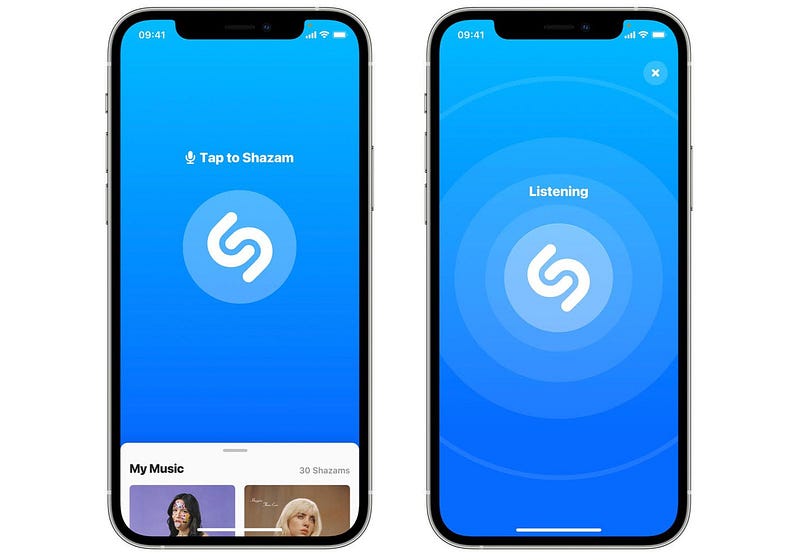
What is Shazam
Shazm is a cutting-edge music recognition platform that allows users to identify songs by simply recording a short audio clip. The system uses advanced audio fingerprinting and matching algorithms to compare the user’s clip against a vast database of songs, providing real-time results and song information.
Important Features
Real-time Audio Recognition: Shazm excels in providing instantaneous song recognition, allowing users to get results within seconds of recording the audio clip.
Vast Music Database: The platform boasts a massive and continuously updated music database, enabling it to recognize a broad spectrum of songs from various genres and languages.
User Accounts and History: Shazm allows users to create accounts to store their recognition history, providing a personalized experience and the ability to revisit their identified songs.
Integration with Music Platforms: Seamless integration with popular music platforms enables users to directly access recognized songs, discover more tracks, and share their findings with friends.
Voice Assistant Integration: Shazm can be integrated with voice assistants, enabling users to identify songs by voice commands through virtual assistants like Siri, Google Assistant, or Alexa.
Scaling Requirements — Capacity Estimation
For Shazm, I’ll assume the following numbers:
- Total number of users: 100 million
- Daily active users (DAU): 25 million
- Number of songs recognized by user/day: 2
- Total number of song recognitions per day: 50 million songs/day
- Read to write ratio: 100:1
Now, let’s estimate the storage requirements:
- Let’s assume an average audio clip size is 3 MB.
- Total storage per day: 50 million * 3MB = 150 TB/day
- For the next 3 years: 150 TB * 5 * 365 = 273.75 PB
Requests per second:
- Requests per second: 50 million / (3600 seconds * 24 hours) ≈ 578 requests/second
class ShazmSimulation:
    def __init__(self):
        # Simulated numbers for Shazm
        self.total_users = 100_000_000
        self.daily_active_users = 25_000_000
        self.songs_recognized_per_user_per_day = 2
        self.total_songs_recognized_per_day = self.daily_active_users * self.songs_recognized_per_user_per_day

        # Storage estimation
        self.average_audio_clip_size_MB = 3
        self.total_storage_per_day_TB = self.total_songs_recognized_per_day * self.average_audio_clip_size_MB / 1_000
        self.total_storage_next_3_years_PB = self.total_storage_per_day_TB * 5 * 365

        # Requests per second estimation
        self.requests_per_second = self.total_songs_recognized_per_day / (3600 * 24)

    def print_simulation_results(self):
        print("Simulated Shazm Scalability:")
        print(f"Total number of users: {self.total_users}")
        print(f"Daily active users (DAU): {self.daily_active_users}")
        print(f"Songs recognized by user/day: {self.songs_recognized_per_user_per_day}")
        print(f"Total songs recognized per day: {self.total_songs_recognized_per_day}")
        print(f"Storage per day: {self.total_storage_per_day_TB:.2f} TB")
        print(f"Storage for the next 3 years: {self.total_storage_next_3_years_PB:.2f} PB")
        print(f"Requests per second: {self.requests_per_second:.2f} requests/second")


if __name__ == "__main__":
    shazm_sim = ShazmSimulation()
    shazm_sim.print_simulation_results()
Data Model — ER requirements
Users

Username: String
Email: String
Password: String
Songs

SongID: Integer (Primary Key)
Title: String
Artist: String
Album: String
ReleaseYear: Integer
AudioFingerprint: String (Unique)
Recognitions (Recognition History)

RecognitionID: Integer (Primary Key)
Timestamp: DateTime
UserID: Integer (Foreign Key - Users)
SongID: Integer (Foreign Key - Songs)
High Level Design
Load Balancing : Implementing load balancing techniques to distribute incoming requests evenly across multiple servers to prevent overload on any single server.
Caching : Utilizing caching mechanisms to store frequently accessed data and reduce the load on the database, improving response times.
Horizontal Scaling: Scaling out the system by adding more servers to handle increased user traffic and maintain high availability.
Asynchronous Processing :Using asynchronous processing for tasks such as audio fingerprinting and database updates to optimize performance and responsiveness.
Components —
Mobile/Web Application: The user interacts with the Shazm platform through a user-friendly mobile or web application.
Audio Recorder: The audio recorder component captures the short audio clip from the user’s device.
Audio Fingerprinting: The audio fingerprinting module processes the audio clip and generates a unique fingerprint, which is then compared against the database.
Database: The database stores information about users, songs, and recognition history.
Music Database: This external database holds the vast collection of audio fingerprints for songs.
Matching Engine: The matching engine performs the comparison of the user’s audio fingerprint with the music database to identify the song.
Assumptions and Considerations:
The Shazm system is read-heavy, as users recognize songs more often than they upload new songs.
The system is designed to be highly available and reliable.
Latency for audio recognition should be kept low for a seamless user experience.
Consistency and availability are prioritized over strict consistency.
Horizontal scaling is preferred for handling increased user load.
Main Components and Services
- Mobile Client: The interface used by users to access the Shazm platform and recognize songs.
- Audio Recognition Service: Responsible for processing and recognizing audio clips uploaded by users.
- User Management Service: Handles user account creation, login, and user authentication.
- Song Database: Stores song metadata (Title, Artist, Album, etc.) and their unique audio fingerprints.
- Recognition History Database: Stores the recognition history of users, mapping recognized songs to users.
- Load Balancer: Routes and balances incoming requests across different servers.
- Cache (Memcache or Redis): Caches frequently accessed data to improve response times.
- CDN (Content Delivery Network): Used to cache and deliver frequently accessed song metadata and audio clips.
- Database Cluster: A NoSQL database cluster to store user information, song metadata, and recognition history.
- Feed Generation Service: Generates personalized user feeds with recognized songs, recommendations, and trending tracks.
- Recommendation Service: Analyzes user listening patterns and provides song recommendations.
- Ranking Service: Ranks recognized songs based on user activity, likes, comments, and popularity.
Basic Low Level Design
from flask import Flask, request, jsonify
import uuid
import datetime

app = Flask(__name__)

# Dummy data for demonstration purposes
users = {}
songs = {}
recognitions = []

# User Registration Service
@app.route('/users/register', methods=['POST'])
def register_user():
    data = request.json
    username = data.get('username')
    email = data.get('email')
    password = data.get('password')

    if email in users:
        return jsonify({"error": "User with the same email already exists."}), 400

    user_id = str(uuid.uuid4())
    users[email] = {
        "user_id": user_id,
        "username": username,
        "email": email,
        "password": password
    }
    return jsonify({"message": "User registered successfully"}), 201

# Song Recognition Service
@app.route('/songs/recognize', methods=['POST'])
def recognize_song():
    data = request.json
    user_id = data.get('user_id')
    audio_clip = data.get('audio_clip')

    # Perform audio recognition here (dummy implementation)
    song_id = str(uuid.uuid4())
    songs[song_id] = {
        "song_id": song_id,
        "title": "Song Title",
        "artist": "Artist Name",
        "timestamp": datetime.datetime.now().strftime("%Y-%m-%d %H:%M:%S")
    }

    recognition_id = str(uuid.uuid4())
    recognition = {
        "recognition_id": recognition_id,
        "user_id": user_id,
        "song_id": song_id,
        "timestamp": datetime.datetime.now().strftime("%Y-%m-%d %H:%M:%S")
    }
    recognitions.append(recognition)

    return jsonify({
        "song_id": song_id,
        "title": "Song Title",
        "artist": "Artist Name",
        "timestamp": recognition["timestamp"]
    }), 200

# User Recognition History Service
@app.route('/users/<string:user_id>/recognition-history', methods=['GET'])
def get_recognition_history(user_id):
    recognition_history = []
    for recognition in recognitions:
        if recognition['user_id'] == user_id:
            song_id = recognition['song_id']
            song = songs.get(song_id)
            if song:
                recognition_history.append({
                    "song_id": song_id,
                    "title": song["title"],
                    "artist": song["artist"],
                    "timestamp": recognition["timestamp"]
                })

    if not recognition_history:
        return jsonify({"error": "User not found or no recognition history."}), 404

    return jsonify({"user_id": user_id, "recognitions": recognition_history}), 200

# Song Metadata Service
@app.route('/songs/<string:song_id>', methods=['GET'])
def get_song_metadata(song_id):
    song = songs.get(song_id)
    if not song:
        return jsonify({"error": "Song not found."}), 404

    return jsonify({
        "song_id": song_id,
        "title": song["title"],
        "artist": song["artist"],
        "album": song.get("album"),
        "release_year": song.get("release_year"),
        "genre": song.get("genre")
    }), 200

if __name__ == '__main__':
    app.run(debug=True)
API Design
Audio Recognition Endpoint

Endpoint: /recognize
Method: POST
Description: This endpoint allows users to submit an audio clip for recognition.
Request Body:
Audio file (multipart/form-data)
Response:
200 OK: Successfully recognized the song.
400 Bad Request: Invalid or unsupported audio format.
404 Not Found: Song not recognized.
User Account Endpoint

Endpoint: /users
Method: POST
Description: Create a new user account.
Request Body:
User details (JSON)
Username
Email
Password
Response:
201 Created: Account successfully created.
400 Bad Request: Invalid user details.
409 Conflict: User already exists.
User History Endpoint

Endpoint: /users/{user_id}/history
Method: GET
Description: Get the recognition history for a specific user.
Response:
200 OK: Successfully retrieved the user's history.
404 Not Found: User not found.
from flask import Flask, request, jsonify
from flask_sqlalchemy import SQLAlchemy
from werkzeug.security import generate_password_hash
from datetime import datetime
app = Flask(__name__)
app.config['SQLALCHEMY_DATABASE_URI'] = 'sqlite:///shazm.db'
db = SQLAlchemy(app)
# Database Models
class User(db.Model):
id = db.Column(db.Integer, primary_key=True)
username = db.Column(db.String(80), unique=True, nullable=False)
email = db.Column(db.String(120), unique=True, nullable=False)
password = db.Column(db.String(128), nullable=False)
recognition_history = db.relationship('RecognitionHistory', backref='user', lazy=True)
class Song(db.Model):
id = db.Column(db.Integer, primary_key=True)
title = db.Column(db.String(200), nullable=False)
artist = db.Column(db.String(200), nullable=False)
album = db.Column(db.String(200))
release_year = db.Column(db.Integer)
audio_fingerprint = db.Column(db.String(200), unique=True, nullable=False)
class RecognitionHistory(db.Model):
id = db.Column(db.Integer, primary_key=True)
timestamp = db.Column(db.DateTime, nullable=False, default=datetime.utcnow)
user_id = db.Column(db.Integer, db.ForeignKey('user.id'), nullable=False)
song_id = db.Column(db.Integer, db.ForeignKey('song.id'), nullable=False)
# Audio Processing Functions (dummy implementation)
def process_audio(audio_file):
# Implement audio processing and fingerprinting here
# Return song_info if recognized, otherwise return None
song_info = {
'title': 'Song Title',
'artist': 'Artist Name',
'album': 'Album Name',
}
return song_info
# User Account Functions
def create_user_account(username, email, password):
if User.query.filter_by(username=username).first() or User.query.filter_by(email=email).first():
return None
new_user = User(username=username, email=email, password=generate_password_hash(password))
db.session.add(new_user)
db.session.commit()
return new_user.id
def get_user_history(user_id):
user = User.query.get(user_id)
if user is None:
return []
return [{
'timestamp': entry.timestamp,
'song_title': entry.song.title,
'artist': entry.song.artist,
'album': entry.song.album
} for entry in user.recognition_history]
# API Endpoints
@app.route('/recognize', methods=['POST'])
def recognize_audio():
if 'audio' not in request.files:
return jsonify({'error': 'No audio file provided.'}), 400
audio_file = request.files['audio']
if audio_file.filename == '':
return jsonify({'error': 'No selected file.'}), 400
song_info = process_audio(audio_file)
if song_info is None:
return jsonify({'error': 'Song not recognized.'}), 404
# In a real system, you would store the recognized song in the database.
# For simplicity, we're just returning the song_info for this example.
return jsonify(song_info), 200
@app.route('/users', methods=['POST'])
def create_user():
data = request.get_json()
if not data or 'username' not in data or 'email' not in data or 'password' not in data:
return jsonify({'error': 'Invalid user details.'}), 400
user_id = create_user_account(data['username'], data['email'], data['password'])
if user_id is None:
return jsonify({'error': 'User already exists.'}), 409
return jsonify({'user_id': user_id}), 201
@app.route('/users/<int:user_id>/history', methods=['GET'])
def get_history(user_id):
user = User.query.get(user_id)
if user is None:
return jsonify({'error': 'User not found.'}), 404
history = get_user_history(user_id)
return jsonify(history), 200
if __name__ == '__main__':
db.create_all()
app.run()Complete Detailed Design
Coming soon! It will be covered on youtube channel.
Subscribe to youtube channel :
Complete Code implementation
from flask import Flask, request, jsonify
import uuid
import datetime

app = Flask(__name__)

# Dummy data for demonstration purposes
users = {}
songs = {}
recognitions = []

# User Registration Service
@app.route('/users/register', methods=['POST'])
def register_user():
    data = request.json
    username = data.get('username')
    email = data.get('email')
    password = data.get('password')

    if email in users:
        return jsonify({"error": "User with the same email already exists."}), 400

    user_id = str(uuid.uuid4())
    users[email] = {
        "user_id": user_id,
        "username": username,
        "email": email,
        "password": password
    }
    return jsonify({"message": "User registered successfully"}), 201

# Song Recognition Service
@app.route('/songs/recognize', methods=['POST'])
def recognize_song():
    data = request.json
    user_id = data.get('user_id')
    audio_clip = data.get('audio_clip')

    # Perform audio recognition here (dummy implementation)
    song_id = str(uuid.uuid4())
    songs[song_id] = {
        "song_id": song_id,
        "title": "Song Title",
        "artist": "Artist Name",
        "timestamp": datetime.datetime.now().strftime("%Y-%m-%d %H:%M:%S")
    }

    recognition_id = str(uuid.uuid4())
    recognition = {
        "recognition_id": recognition_id,
        "user_id": user_id,
        "song_id": song_id,
        "timestamp": datetime.datetime.now().strftime("%Y-%m-%d %H:%M:%S")
    }
    recognitions.append(recognition)

    return jsonify({
        "song_id": song_id,
        "title": "Song Title",
        "artist": "Artist Name",
        "timestamp": recognition["timestamp"]
    }), 200

# User Recognition History Service
@app.route('/users/<string:user_id>/recognition-history', methods=['GET'])
def get_recognition_history(user_id):
    recognition_history = []
    for recognition in recognitions:
        if recognition['user_id'] == user_id:
            song_id = recognition['song_id']
            song = songs.get(song_id)
            if song:
                recognition_history.append({
                    "song_id": song_id,
                    "title": song["title"],
                    "artist": song["artist"],
                    "timestamp": recognition["timestamp"]
                })

    if not recognition_history:
        return jsonify({"error": "User not found or no recognition history."}), 404

    return jsonify({"user_id": user_id, "recognitions": recognition_history}), 200

# Song Metadata Service
@app.route('/songs/<string:song_id>', methods=['GET'])
def get_song_metadata(song_id):
    song = songs.get(song_id)
    if not song:
        return jsonify({"error": "Song not found."}), 404

    return jsonify({
        "song_id": song_id,
        "title": song["title"],
        "artist": song["artist"],
        "album": song.get("album"),
        "release_year": song.get("release_year"),
        "genre": song.get("genre")
    }), 200

if __name__ == '__main__':
    app.run(debug=True)
System Design — Class Pass
We will be discussing in depth -
- What is Class Pass
- Important Features
- Scaling Requirements
- Data Model — ER requirements
- High Level Design
- Basic Low level Design
- API Design
- Complete Detailed Design
- Code Implementation
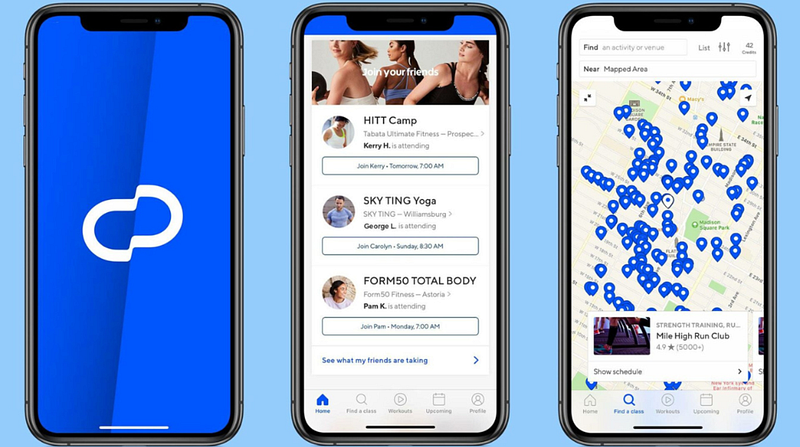
What is Class Pass
Important Features
Scaling Requirements — Capacity Estimation
Data Model — ER requirements
High Level Design
Basic Low Level Design
API Design
Complete Detailed Design
Coming soon! It will be covered on youtube channel.
Subscribe to youtube channel :
Complete Code implementation
System Design — Last Pass
We will be discussing in depth -
- What is Last Pass
- Important Features
- Scaling Requirements
- Data Model — ER requirements
- High Level Design
- Basic Low level Design
- API Design
- Complete Detailed Design
- Code Implementation
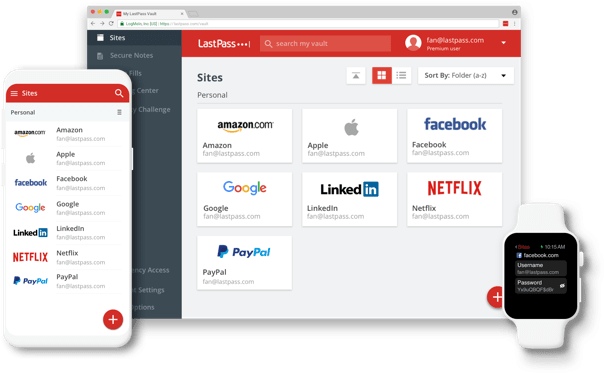
What is Last Pass
Important Features
Scaling Requirements — Capacity Estimation
Data Model — ER requirements
High Level Design
Basic Low Level Design
API Design
Complete Detailed Design
Coming soon! It will be covered on youtube channel.
Subscribe to youtube channel :
Complete Code implementation
Read — how to Design Yelp.
Day 14 of System Design Case Studies Series : Design Yelp
Complete Design with examples..
medium.com
Let me know if you have any questions in the comment section below. Subscribe/ Follow, Like/Clap and Stay Tuned!!
Day 2 : SQL Basics, Query Structure, Built In functions Conditions
Day 4 : Set Theory Operations, Stored Procedures and CASE statements in SQL
Day 6 : Subqueries, Group by, order by and Having clauses in SQL and Analytical Functions
Day 7 : Window Functions, Grouping Sets and Constraints in SQL
Day 8 : BigQuery Basics, SELECT, FROM, WHERE and Date and Extract in BigQuery
Day 9 : Common Expression Table, UNNEST Clause, SQL vs NoSQL Databases
Day 10 : Triggers, Pivot and Cursors in SQL
Day 14 : MySQL in Depth
Day 15 : PostgreSQL inDepth
Anyways, For Day 15 of 15 days of Advanced SQL, we will cover —
PostgreSQL inDepth
Github for Advanced SQL that you can follow —
All the projects, data structures, algorithms, system design, Data Science and ML, Data Engineering, MLOps and Deep Learning videos will be published on our youtube channel ( just launched).
Subscribe today!
System Design Case Studies — In Depth
Complete Data Structures and Algorithm Series
Github —
Some of the other best Series —
30 days of Data Structures and Algorithms and System Design Simplified
Data Science and Machine Learning Research ( papers) Simplified **
100 days : Your Data Science and Machine Learning Degree Series with projects
Complete Data Visualization and Pre-processing Series with projects
Exceptional Github Repos — Part 1
Exceptional Github Repos — Part 2
Tech Newsletter —
If you are interested, you can join my newsletter through which I send tech interview tips, techniques, patterns, hacks — Software Development, ML, Data Science, Startups and Technology projects to more than 30K readers. You can subscribe to Tech Brew :
For Python Projects —
For complete 60 days of Data Science and ML : Day 1 — Day 60 : Quick Recap of 60 days of Data Science and ML
Follow for more updates. Stay tuned and keep coding!
For other projects, tune to —
Build Machine Learning Pipelines( With Code)
Recurrent Neural Network with Keras
Clustering Geolocation Data in Python using DBSCAN and K-Means
Facial Expression Recognition using Keras
Hyperparameter Tuning with Keras Tuner
Custom Layers in Keras


