
Day 33 of System Design Case Studies Series : Design One Drive, Webull, Hotstar, SoundCloud, Deliveroo, Lazada, Grubhub
Complete Design with examples
Hello peeps! Welcome to Day 33 of System Design Case studies series where we will design One Drive, Webull, Hotstar, SoundCloud, Deliveroo, Lazada, Grubhub.
This post covers system design for ( scroll till the end of the post) —
Note : Please read System Design Important Terms you MUST know before reading this post.
Projects Videos —
All the projects, data structures, SQL, algorithms, system design, Data Science and ML , Data Analytics, Data Engineering, , Implemented Data Science and ML projects, Implemented Data Engineering Projects, Implemented Deep Learning Projects, Implemented Machine Learning Ops Projects, Implemented Time Series Analysis and Forecasting Projects, Implemented Applied Machine Learning Projects, Implemented Tensorflow and Keras Projects, Implemented PyTorch Projects, Implemented Scikit Learn Projects, Implemented Big Data Projects, Implemented Cloud Machine Learning Projects, Implemented Neural Networks Projects, Implemented OpenCV Projects,Complete ML Research Papers Summarized, Implemented Data Analytics projects, Implemented Data Visualization Projects, Implemented Data Mining Projects, Implemented Natural Leaning Processing Projects, MLOps and Deep Learning, Applied Machine Learning with Projects Series, PyTorch with Projects Series, Tensorflow and Keras with Projects Series, Scikit Learn Series with Projects, Time Series Analysis and Forecasting with Projects Series, ML System Design Case Studies Series videos will be published on our youtube channel ( just launched).
Subscribe today!
Solved System Design Case Studies — In depth
Design Instagram
Design Netflix
Design Reddit
Design Amazon
Design Messenger App
Design Twitter
Design URL Shortener
Design Youtube
Design API Rate Limiter
Design Web Crawler
Design Amazon Prime Video
Design Facebook’s Newsfeed
Design Yelp
Design Uber
Design Tinder
Design Tiktok
Design Whatsapp
Most Popular System Design Questions
Mega Compilation : Solved System Design Case studies
We will be discussing in depth -
- What is One Drive?
- Important Features
- Scaling Requirements
- Data Model — ER requirements
- High Level Design
- Basic Low Level Design
- API Design
- Complete Detailed Design
- Complete Code Implementation
Pre-requisite to this post -
Complete System Design Series — Important Concepts that you should know before starting the Case studies
6. Networking, How Browsers work, Content Network Delivery ( CDN)
13. System Design Template — How to solve any System Design Question
Github —
Day 1 of System Design Case Studies can be found below-
Day 2 of System Design Case Studies can be found below-
Day 3 of System Design Case Studies can be found below-
Day 4 of System Design Case Studies can be found below-
What is One Drive?

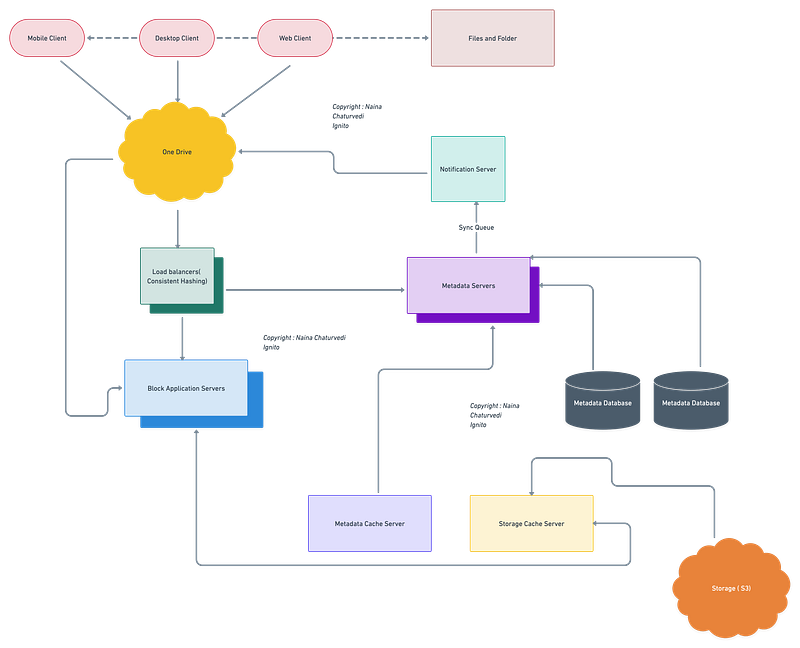
One Drive is a cloud file storage and file sharing sync service which is used to —
- Store files ( documents/photos/videos etc)
- Access/download the files from any machine
- Sync all the files
- Edit/collaborate docs with other users
- Share the files with anyone
- Search for the files etc
Users can be mobile or web based. It supports all file formats and the files in the storage must be encrypted.
Designing One drive would involve:
- File and folder organization: Users can create folders and subfolders to organize their files.
- Search function: OneDrive has a built-in search function that allows users to quickly find the files they need.
- File sharing: Users can share files and folders with others by creating a link, granting permissions, or inviting others to collaborate on a document.
- File syncing: OneDrive can automatically sync files across all of a user’s devices, so that they always have the latest version of a file.
- Backup and restore: OneDrive can be set up to automatically back up files and photos, and users can restore previous versions of files if they need to.
- Mobile apps: OneDrive has mobile apps for iOS and Android, which allows users to access their files and photos on the go.
- Security: OneDrive provides various security features like encryption, password protected sharing links and two-factor authentication.
- Integrations: OneDrive also integrates with Microsoft Office Suite, allowing users to edit and collaborate on documents and presentations in real time.
But why Cloud based Storage?
- Scalability — Highly scalable i.e as long as you pay for the storage you will never run out of storage.
- Availability — Data availability everywhere and anytime.
- Reliability — Cloud storage ensures there’s no data loss by creating replicas of the data stored on different servers located at different places geographically.
Before we take a deep dive in the design, understand HDFS.
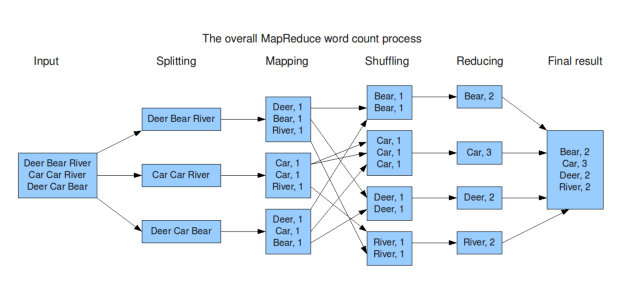
In system design map reduce ( HDFS systems) is a batch processing technique in which the engine takes huge amounts of data, processes ( map and reduce) and gives the output.
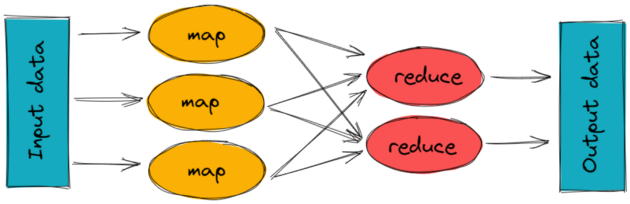
To track the progress of each job — task tracker and job tracker are used. Job tracker manages all the resources and jobs and schedules across the cluster.
The task tracker are called slaves that work on the directives of job trackers and deployed on each node in the cluster.
Important Features
Upload and Download Files/Folders
See file history and revisions
Synchronize Folders
Send notification to the user if any edits have been made on the file(s)
Scaling Requirements — Capacity Estimation
For the sake of simplicity, we will make a small scale simulation.
Let’s say, we have —
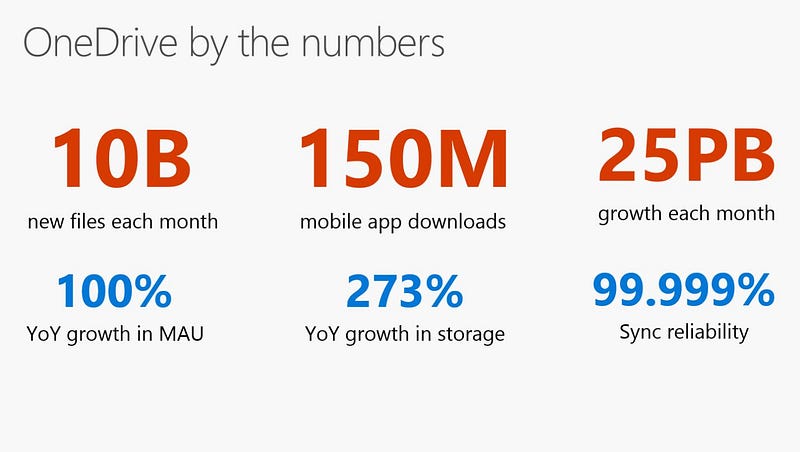
No of users per day ( DAU) : 20 Million
Read to the write ratio is 1:1
No of signed up users : 40 Million
Every user gets free space : 15 GB
No of files users upload per day : 4
Size of the file : 800KB
Total Storage needed is 40 Million * 15 GB = 600 PB
Number of request/query/transactions per second for upload —
20 Million * 4 /24/3600 = 926
Peak rate = 926 * 2 = 1852
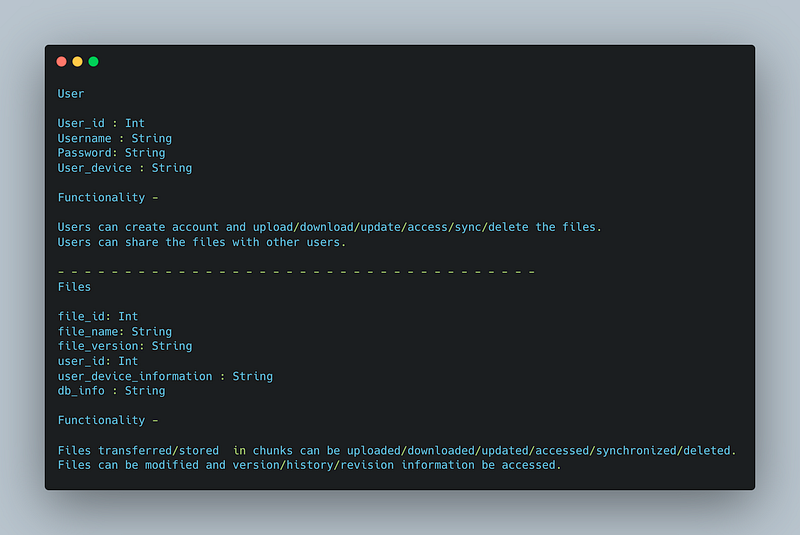
Data Model — ER requirements
User
user_id : Int
Username : String
Password: String
User_device : String
Functionality —
Users can create account and upload/download/update/access/sync/delete the files.
Users can share the files with other users.
— — — — — — — — — — — — — — — — — — — — — — — — — — — — — — — — — — — —
Files
file_id: Int
file_name: String
file_version: String
user_id: Int
user_device_information : String
db_info : String
Functionality —
Files transferred/stored in chunks can be uploaded/downloaded/updated/accessed/synchronized/deleted.
Files can be modified and version/history/revision information be accessed.
High Level Design
Assumptions
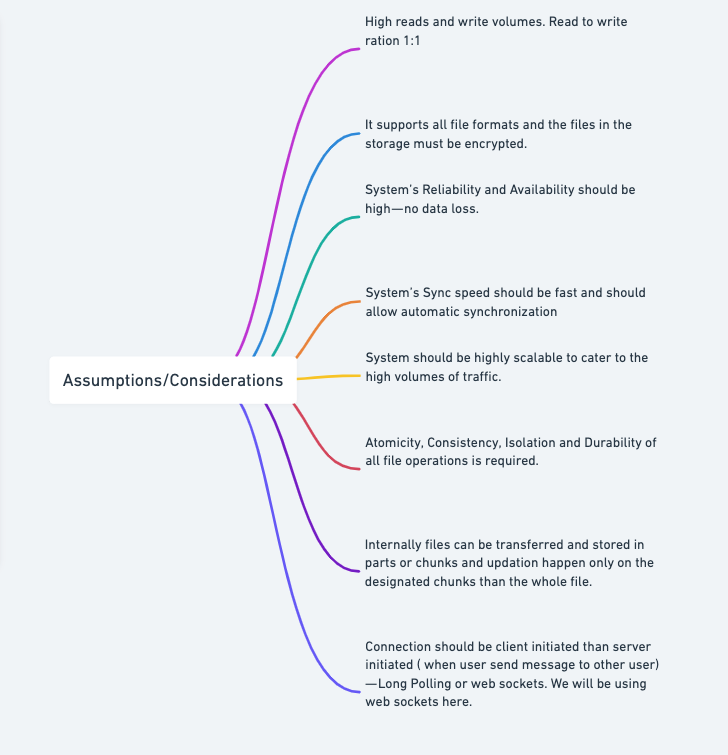
- High reads and write volumes. Read to write ration 1:1
- It supports all file formats and the files in the storage must be encrypted.
- Files must be less than 15GB
- System’s Reliability and Availability should be high — no data loss.
- System’s Sync speed should be fast and should allow automatic synchronization
- System should be highly scalable to cater to the high volumes of traffic.
- Atomicity, Consistency, Isolation and Durability of all file operations is required.
- Internally files can be transferred and stored in parts or chunks and updation happen only on the designated chunks than the whole file ( HDFS)
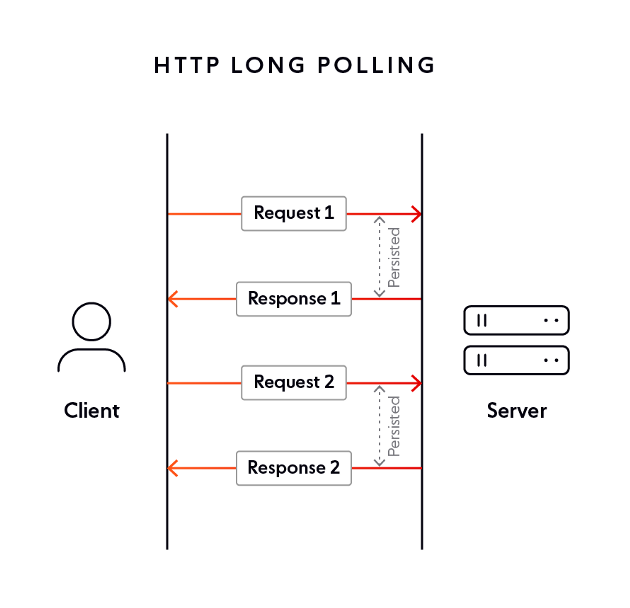
- Connection should be client initiated than server initiated ( when user send message to other user) — Long Polling or web sockets. We will be using web sockets here.
In long polling the server keeps the the client’s connection open until a timeout threshold has reached.
— — — — — — — — — — — — — — — — — — — — — — — — — — — — — — — — — — — —
Components
Client Application : Users
Load balancers : To allocate requests to designated server using consistent hashing
Servers : Metadata Server ( Store metadata information of files, version information), Sync server ( notify all the users about the changes/updates on the files and sync efficiently) and Block server ( to upload/download files)
Cloud Storage ( S3) : To store the files and folders
Database : Cassandra ( The metadata database should store information like — 1. Chunks 2. File version information 3. User information 4. Device information)
Cache : Store hot entries
— — — — — — — — — — — — — — — — — — — — — — — — — — — — — — — — — — — —
Services
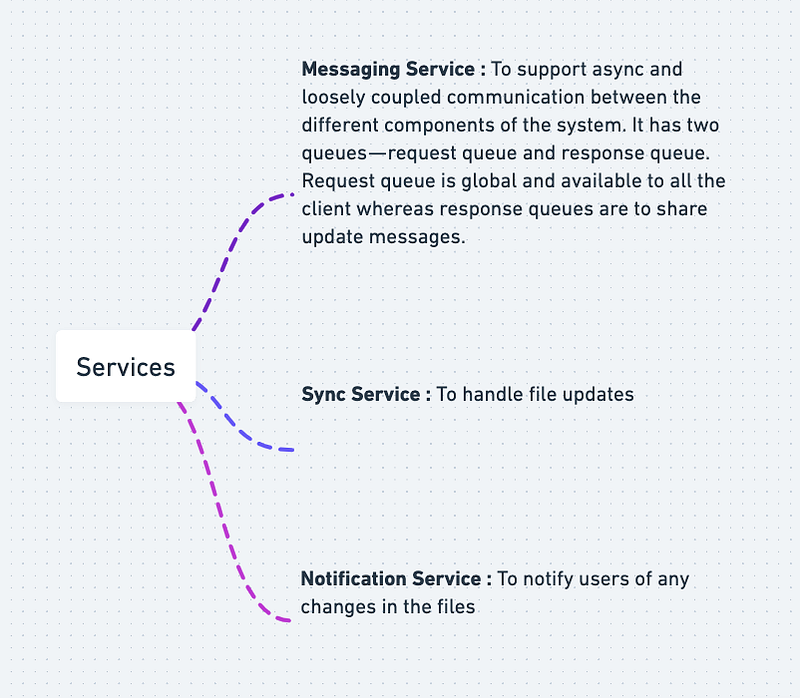
Messaging Service : To support async and loosely coupled communication between the different components of the system. It has two queues — request queue and response queue. Request queue is global and available to all the client whereas response queues are to share update messages.
Sync Service : To handle file updates
Notification Service : To notify users of any changes in the files
Messaging Service:
import queueclass RequestQueue:
def __init__(self):
self.queue = queue.Queue() def add_request(self, request):
self.queue.put(request) def get_request(self):
return self.queue.get()class ResponseQueue:
def __init__(self):
self.queue = queue.Queue() def add_response(self, response):
self.queue.put(response) def get_response(self):
return self.queue.get()Sync Service:
class SyncService:
    def __init__(self):
        self.files = {}
def add_file(self, filename, content):
self.files[filename] = content def get_file(self, filename):
return self.files.get(filename) def update_file(self, filename, content):
if filename in self.files:
self.files[filename] = content
return True
return FalseNotification Service:
class NotificationService:
    def __init__(self):
        self.subscribers = {}
def subscribe(self, user_id):
if user_id not in self.subscribers:
self.subscribers[user_id] = [] def unsubscribe(self, user_id):
if user_id in self.subscribers:
self.subscribers.pop(user_id) def notify_subscribers(self, user_id, message):
if user_id in self.subscribers:
for subscriber in self.subscribers[user_id]:
subscriber.notify(message)class User:
def __init__(self, user_id):
self.user_id = user_id def notify(self, message):
print(f"Received notification: {message}")To use these services in your OneDrive API, you can instantiate and use them like this:
request_queue = RequestQueue()
response_queue = ResponseQueue()
sync_service = SyncService()
notification_service = NotificationService()
# Add a file to the sync service
sync_service.add_file("file1.txt", "Hello, world!")# Subscribe a user to the notification service
user = User("user1")
notification_service.subscribe(user.user_id)# Add a request to the request queue
request_queue.add_request({
"type": "get_file",
"filename": "file1.txt"
})# Process requests and send responses
while True:
request = request_queue.get_request() if request["type"] == "get_file":
filename = request["filename"]
content = sync_service.get_file(filename) response_queue.add_response({
"type": "file_content",
"filename": filename,
"content": content
}) # Notify subscribers of any file updates
for filename, content in sync_service.files.items():
notification_service.notify_subscribers(user.user_id, f"File '{filename}' has been updated.")API Design
API will be needed for 3 tasks —
- Upload a file
- Download a file
- Get file history information
# Upload a file to OneDrive
POST /api/onedrive/upload
Parameters:
- access_token (string, required): Access token for authentication
- file (file, required): File to upload

Response:
- Status code 200 OK on successful upload
- Status code 401 Unauthorized if access_token is invalid or expired
- Status code 500 Internal Server Error if upload fails for any reason


# Download a file from OneDrive
GET /api/onedrive/download
Parameters:
- access_token (string, required): Access token for authentication
- file_id (string, required): ID of file to download

Response:
- File stream on successful download
- Status code 401 Unauthorized if access_token is invalid or expired
- Status code 404 Not Found if file_id is invalid
- Status code 500 Internal Server Error if download fails for any reason


# Get file history information from OneDrive
GET /api/onedrive/file_history
Parameters:
- access_token (string, required): Access token for authentication
- file_id (string, required): ID of file to retrieve history for

Response:
- List of file versions with metadata (timestamp, user, etc.)
- Status code 401 Unauthorized if access_token is invalid or expired
- Status code 404 Not Found if file_id is invalid
- Status code 500 Internal Server Error if history retrieval fails for any reason
API design will be elaborately discussed in the workflow video (coming soon). Subscribe below!
Basic Low Level Design
import java.util.ArrayList;
import java.util.HashMap;
import java.util.List;
import java.util.Map;

class User {
    private String username;
    private String password;
    private Map<String, File> files;

    public User(String username, String password) {
        this.username = username;
        this.password = password;
        this.files = new HashMap<>();
    }

    public String getUsername() {
        return username;
    }

    public String getPassword() {
        return password;
    }

    public Map<String, File> getFiles() {
        return files;
    }

    public void uploadFile(String fileName, String content) {
        File file = new File(fileName, content);
        files.put(fileName, file);
        System.out.println("File uploaded successfully: " + fileName);
    }

    public void deleteFile(String fileName) {
        if (files.containsKey(fileName)) {
            files.remove(fileName);
            System.out.println("File deleted successfully: " + fileName);
        } else {
            System.out.println("File not found: " + fileName);
        }
    }

    public void downloadFile(String fileName) {
        if (files.containsKey(fileName)) {
            File file = files.get(fileName);
            System.out.println("File downloaded successfully: " + fileName);
            System.out.println("Content: " + file.getContent());
        } else {
            System.out.println("File not found: " + fileName);
        }
    }
}

class File {
    private String name;
    private String content;

    public File(String name, String content) {
        this.name = name;
        this.content = content;
    }

    public String getName() {
        return name;
    }

    public String getContent() {
        return content;
    }
}

class OneDriveSystem {
    private Map<String, User> users;

    public OneDriveSystem() {
        this.users = new HashMap<>();
    }

    public void registerUser(String username, String password) {
        if (users.containsKey(username)) {
            System.out.println("Username already exists: " + username);
        } else {
            User user = new User(username, password);
            users.put(username, user);
            System.out.println("User registered successfully: " + username);
        }
    }

    public User loginUser(String username, String password) {
        if (users.containsKey(username)) {
            User user = users.get(username);
            if (user.getPassword().equals(password)) {
                System.out.println("User logged in successfully: " + username);
                return user;
            } else {
                System.out.println("Incorrect password for user: " + username);
            }
        }
        System.out.println("User not found: " + username);
        return null;
    }
}

public class OneDriveApp {
    public static void main(String[] args) {
        OneDriveSystem oneDrive = new OneDriveSystem();

        // Register users
        oneDrive.registerUser("user1", "password1");
        oneDrive.registerUser("user2", "password2");

        // Login with a user
        User user = oneDrive.loginUser("user1", "password1");
        if (user != null) {
            // Upload a file
            user.uploadFile("file1.txt", "This is the content of file 1");

            // Download a file
            user.downloadFile("file1.txt");

            // Delete a file
            user.deleteFile("file1.txt");
        }
    }
}
Complete Detailed Design
(Zoom it)
System Design — Webull
We will be discussing in depth -
- What is WeBull
- Important Features
- Scaling Requirements
- Data Model — ER requirements
- High Level Design
- Basic Low Level Design
- API Design
- Complete Detailed Design
- Complete Code Implementation
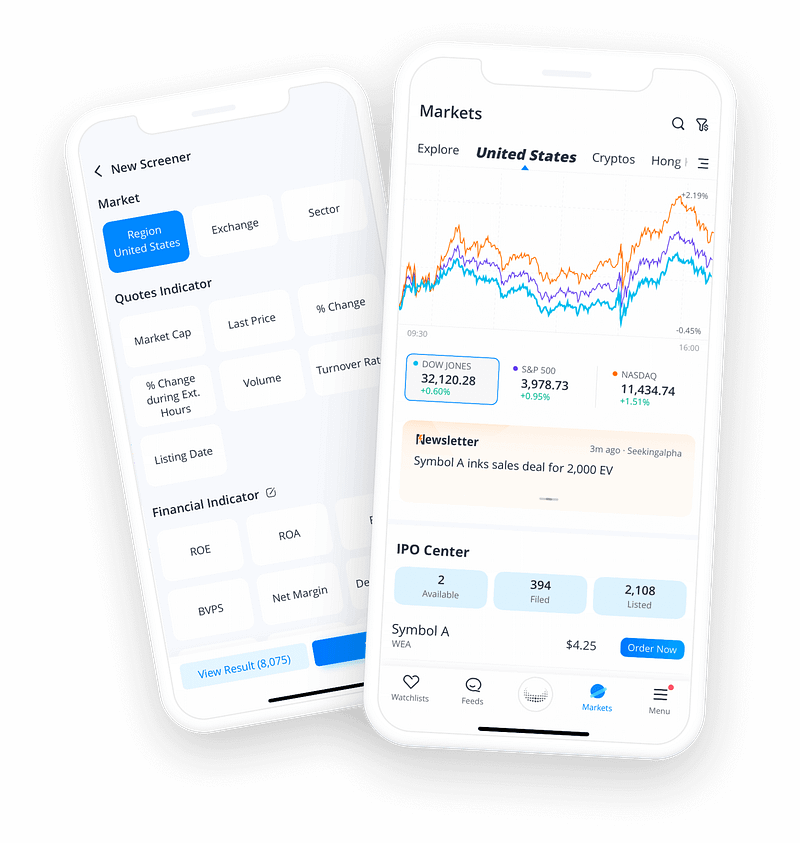
What is Webull
Webull is a comprehensive online brokerage platform that empowers investors and traders with a range of powerful tools and features. It provides real-time market data, intuitive charts, research and analysis tools, and the ability to trade stocks, options, and ETFs. Webull aims to democratize finance by offering commission-free trading and a seamless user experience.
Important Features
- Real-time Market Data: Webull provides users with real-time stock quotes, news, and financial information to help them make informed investment decisions.
- Advanced Charting: Traders can leverage Webull’s advanced charting capabilities to perform technical analysis, draw trend lines, apply indicators, and visualize price movements.
- Paper Trading: Webull offers a simulated trading environment where users can practice trading strategies without risking real money. This feature is particularly useful for novice traders.
- Trading Tools: Webull equips users with a variety of trading tools, such as customizable watchlists, stock screeners, and alerts, enabling them to stay informed and react to market events promptly.
- Margin Trading: Webull allows qualified users to trade on margin, giving them the ability to borrow funds to amplify their trading potential.
- Extended Trading Hours: Unlike traditional brokerages, Webull offers extended trading hours, allowing users to trade before the market opens and after it closes.
- Community and Social Features: Webull fosters a vibrant trading community by providing features like discussion boards, user-generated content, and the ability to follow other traders.
Scaling Requirements — Capacity Estimation
Let’s say —
Total number of users: 10 million
Daily active users (DAU): 2 million
Number of trades executed by user/day: 5
Total number of trades executed per day: 10 million trades/day
Read to write ratio: 100:1
Storage Estimation:
Let’s assume on average each trade’s data size is 1 KB.
Total storage per day: 10 million * 1 KB = 10 GB/day
For the next 3 years: 10 GB * 365 * 3 = 10.95 TB
Requests per second: 10 million trades / 24 hours / 3600 seconds = ~116 trades/second
class WebullSimulation:
    def __init__(self, total_users, daily_active_users, trades_per_user, read_write_ratio):
        self.total_users = total_users
        self.daily_active_users = daily_active_users
        self.trades_per_user = trades_per_user
        self.read_write_ratio = read_write_ratio

    def simulate_storage(self):
        trade_data_size_kb = 1  # Average size of each trade's data in KB
        total_trades_per_day = self.daily_active_users * self.trades_per_user
        total_storage_per_day = total_trades_per_day * trade_data_size_kb
        total_storage_3_years = total_storage_per_day * 365 * 3

        print(f"Total Storage per day: {total_storage_per_day} KB")
        print(f"Total Storage for 3 years: {total_storage_3_years} KB")

    def simulate_requests_per_second(self):
        total_trades_per_day = self.daily_active_users * self.trades_per_user
        requests_per_second = total_trades_per_day / 24 / 3600

        print(f"Requests per second: {requests_per_second} trades/second")


# Simulate Webull scalability requirements
webull_sim = WebullSimulation(total_users=10000000, daily_active_users=2000000,
                             trades_per_user=5, read_write_ratio=100)

# Simulate storage requirements
webull_sim.simulate_storage()

# Simulate requests per second
webull_sim.simulate_requests_per_second()
Horizontal Scalability: The system should be designed to scale horizontally by adding more servers or containers to handle increased user traffic and data processing demands.
Load Balancing: A load balancer should distribute incoming requests across multiple servers to prevent overload and ensure even resource utilization.
Caching: Implementing a caching layer can reduce the load on backend systems by storing frequently accessed data in memory, improving response times.
Asynchronous Processing: Utilize message queues or event-driven architectures to handle asynchronous processing of tasks, such as order executions and data updates.
Auto-scaling: Implement auto-scaling mechanisms to dynamically adjust the number of resources based on real-time user demand, optimizing cost and performance.
Data Model — ER requirements
User: Represents a registered user on the Webull platform.
- Attributes: UserID (Primary Key), Username, Email, Password, Name, Address, Phone, AccountType, Balance, etc.
Account: Represents a user’s trading account on the Webull platform.
- Attributes: AccountID (Primary Key), UserID (Foreign Key), AccountType, Balance, PortfolioValue, Status, etc.
Stock: Represents a tradable stock on the Webull platform.
- Attributes: StockID (Primary Key), TickerSymbol, CompanyName, Sector, Industry, Price, etc.
Order: Represents a trading order placed by a user.
- Attributes: OrderID (Primary Key), UserID (Foreign Key), StockID (Foreign Key), OrderType, Quantity, Price, Timestamp, Status, etc.
Transaction: Represents a completed transaction of a user’s order.
- Attributes: TransactionID (Primary Key), OrderID (Foreign Key), UserID (Foreign Key), StockID (Foreign Key), Quantity, Price, Timestamp, Status, etc.
User: Represents a registered user with attributes like username, email, password, and account information.
Stock: Represents a tradable stock with attributes such as ticker symbol, company name, industry, and historical price data.
Order: Represents a trade order placed by a user, including details like order type, quantity, price, and status.
Portfolio: Represents a user’s portfolio, containing information about the stocks owned, quantity held, and historical performance.
Watchlist: Represents a user’s personalized watchlist, consisting of stocks they wish to track.
News: Represents news articles and updates related to stocks and financial markets.
High Level Design
User Management:
- User Registration: Allows users to create a new account.
- User Authentication: Handles user login and authentication.
- Profile Management: Enables users to update their profile information.
- Account Management: Handles the creation and management of user trading accounts.
Stock Management:
- Stock Listing: Provides a list of available stocks for trading.
- Stock Information: Retrieves detailed information about a specific stock.
Order Management:
- Order Placement: Allows users to place buy/sell orders for stocks.
- Order Execution: Matches and executes orders based on market conditions.
- Order Status Tracking: Enables users to track the status of their orders.
Portfolio Management:
- Portfolio Summary: Provides an overview of the user’s portfolio and holdings.
- Portfolio Valuation: Calculates the current value of the user’s portfolio.
- Transaction History: Retrieves the user’s transaction history.
Market Data:
- Real-time Stock Prices: Fetches and displays real-time stock prices and market data.
- Historical Stock Data: Retrieves historical price and volume data for analysis.
Main Components and Services :
Mobile and Web Clients:
- Interfaces for users to access the platform, place orders, and manage their accounts.
Application Servers:
- Handle user requests, process business logic, and interact with databases and external services.
Load Balancer:
- Distributes incoming requests across multiple application servers to ensure scalability and availability.
Cache (Memcache or Redis):
- Stores frequently accessed data (e.g., stock prices, user profiles) to improve system performance.
Database:
- Stores persistent data, such as user information, stock details, orders, transactions, and portfolio data.
- Utilizes a relational or NoSQL database based on the requirements and scalability needs.
Market Data Providers:
- Integrates with external services or APIs to retrieve real-time and historical market data.
Trade Execution System:
- Handles order matching, execution, and settlement with appropriate stock exchanges.
Notification Service:
- Sends notifications to users about order status updates, account activities, and market events.
Frontend Layer: A web-based and mobile application interface that allows users to interact with the platform, access real-time data, and place trades.
Application Layer: This layer contains the business logic and core functionalities of Webull. It handles user authentication, order processing, data aggregation, and external API integrations.
Data Storage Layer: Stores user information, market data, order history, and other relevant data. It can utilize a combination of relational databases, distributed file systems, and caching systems.
Authentication Service: Handles user registration, login, and session management to ensure secure access to user accounts.
Order Management Service: Manages the lifecycle of trade orders, validates user requests, and communicates with external trade execution systems.
Data Aggregation Service: Collects real-time market data from various sources, normalizes and stores it in the data storage layer, and provides the information to the frontend.
Database Systems: Utilizes a combination of relational databases and distributed file systems to store user data, market data, and other relevant information.
Caching Layer: Implements a caching system to store frequently accessed data, reducing the load on backend systems and improving response times.
External APIs: Integration with external services such as market data providers, payment gateways, and trade execution platforms.
Messaging System: Enables asynchronous communication and processing of events, such as order executions and data updates.
Scalability and Load Balancing: Incorporates horizontal scaling, load balancing, and caching mechanisms to ensure high performance and availability.
Basic Low Level Design
import uuid

class User:
    def __init__(self, user_id, username, password):
        self.user_id = user_id
        self.username = username
        self.password = password
        # Other user attributes

class Stock:
    def __init__(self, stock_id, name, symbol):
        self.stock_id = stock_id
        self.name = name
        self.symbol = symbol
        # Other stock attributes

class Webull:
    def __init__(self):
        self.users = {}  # Map of user_id to User object
        self.stocks = {}  # Map of stock_id to Stock object

    def create_user(self, username, password):
        user_id = str(uuid.uuid4())
        user = User(user_id, username, password)
        self.users[user_id] = user
        return user_id

    def get_user(self, user_id):
        return self.users.get(user_id)

    def create_stock(self, name, symbol):
        stock_id = str(uuid.uuid4())
        stock = Stock(stock_id, name, symbol)
        self.stocks[stock_id] = stock
        return stock_id

    def get_stock(self, stock_id):
        return self.stocks.get(stock_id)

    # Additional methods for handling user actions, stock data, etc.
    # ...
API Design
User Management API:
/users(POST): Create a new user./users/{user_id}(GET): Retrieve user information.
Stock Management API:
/stocks(POST): Create a new stock./stocks/{stock_id}(GET): Retrieve stock information.
User Actions API:
/users/{user_id}/follow/{stock_id}(POST): Follow a stock./users/{user_id}/unfollow/{stock_id}(POST): Unfollow a stock./users/{user_id}/stocks(GET): Retrieve stocks followed by a user.
Stock Data API:
/stocks/{stock_id}/price(GET): Retrieve the current price of a stock./stocks/{stock_id}/historical(GET): Retrieve historical price data of a stock.
User Management API:
/users(POST): This endpoint allows clients to create a new user by providing a username and password. It returns the generateduser_idfor the newly created user.
Stock Management API:
/stocks(POST): Clients can use this endpoint to create a new stock by providing a name and symbol. It returns the generatedstock_idfor the newly created stock.
User Actions API:
/users/{user_id}/follow/{stock_id}(POST): Clients can use this endpoint to make a user follow a specific stock. It takes theuser_idandstock_idas parameters./users/{user_id}/unfollow/{stock_id}(POST): This endpoint allows clients to make a user unfollow a specific stock. It takes theuser_idandstock_idas parameters./users/{user_id}/stocks(GET): Clients can use this endpoint to retrieve the list of stocks followed by a user. It takes theuser_idas a parameter and returns the list of followed stocks.
Stock Data API:
/stocks/{stock_id}/price(GET): Clients can use this endpoint to retrieve the current price of a stock by providing thestock_id./stocks/{stock_id}/historical(GET): This endpoint allows clients to retrieve the historical price data of a stock by providing thestock_id.
from flask import Flask, request, jsonify

app = Flask(__name__)

# In-memory data placeholders (for illustration purposes)
users = {
    "1": {
        "id": "1",
        "username": "[email protected]",
        "name": "John Doe",
        "email": "[email protected]"
    }
}

portfolio = {
    "1": {
        "user_id": "1",
        "portfolio_value": 10000.0,
        "positions": [
            {
                "symbol": "AAPL",
                "quantity": 10,
                "average_price": 150.0,
                "current_price": 160.0,
                "total_value": 1600.0
            },
            {
                "symbol": "GOOGL",
                "quantity": 5,
                "average_price": 2200.0,
                "current_price": 2300.0,
                "total_value": 11500.0
            }
        ]
    }
}

orders = {
    "1": {
        "order_id": "1",
        "symbol": "AAPL",
        "side": "buy",
        "quantity": 5,
        "price": 160.0,
        "order_type": "limit",
        "status": "pending"
    }
}

market_data = {
    "AAPL": {
        "symbol": "AAPL",
        "last_price": 160.0,
        "volume": 100000,
        "change": 2.0
    }
}

# Endpoint: /auth/login
@app.route('/auth/login', methods=['POST'])
def login():
    # Perform authentication logic
    username = request.json['username']
    password = request.json['password']

    # Generate and return an access token (dummy implementation)
    access_token = generate_access_token(username)

    return jsonify({'access_token': access_token})


# Endpoint: /users/{user_id}
@app.route('/users/<user_id>', methods=['GET'])
def get_user_profile(user_id):
    # Fetch user profile information from the database
    user = fetch_user(user_id)

    return jsonify(user)


# Endpoint: /users/{user_id}/portfolio
@app.route('/users/<user_id>/portfolio', methods=['GET'])
def get_user_portfolio(user_id):
    # Fetch user's portfolio information from the database
    user_portfolio = fetch_portfolio(user_id)

    return jsonify(user_portfolio)


# Endpoint: /users/{user_id}/orders
@app.route('/users/<user_id>/orders', methods=['POST'])
def place_order(user_id):
    # Validate the order details from the request body
    symbol = request.json['symbol']
    side = request.json['side']
    quantity = request.json['quantity']
    price = request.json['price']
    order_type = request.json['order_type']

    # Perform order placement logic
    order_id = place_order_logic(user_id, symbol, side, quantity, price, order_type)

    # Return the order details
    order = fetch_order(order_id)

    return jsonify(order)


# Endpoint: /market/quotes/{symbol}
@app.route('/market/quotes/<symbol>', methods=['GET'])
def get_market_quote(symbol):
    # Fetch real-time market data for the given symbol
    quote = fetch_market_quote(symbol)

    return jsonify(quote)


# Helper functions
def generate_access_token(username):
    # Token generation logic (dummy implementation)
    return "dummy-access-token"


def fetch_user(user_id):
    # Fetch user from the database or data placeholder
    return users.get(user_id)


def fetch_portfolio(user_id):
    # Fetch user's portfolio from the database or data placeholder
    return portfolio.get(user_id)


def place_order_logic(user_id, symbol, side, quantity, price, order_type):
    # Perform order placement logic (dummy implementation)
    order_id = str(len(orders) + 1)
    order = {
        "order_id": order_id,
        "symbol": symbol,
        "side": side,
        "quantity": quantity,
        "price": price,
        "order_type": order_type,
        "status": "pending"
    }
    orders[order_id] = order
    return order_id


def fetch_order(order_id):
    # Fetch order details from the database or data placeholder
    return orders.get(order_id)


def fetch_market_quote(symbol):
    # Fetch market data from a data provider or data placeholder
    return market_data.get(symbol)


# Run the Flask application
if __name__ == '__main__':
    app.run()
Complete Detailed Design
Coming soon! It will be covered on youtube channel.
Subscribe to youtube channel :
Complete Code implementation
from flask import Flask, jsonify, request

app = Flask(__name__)
webull = Webull()

# User Management API
@app.route('/users', methods=['POST'])
def create_user():
    data = request.json
    username = data.get('username')
    password = data.get('password')
    user_id = webull.create_user(username, password)
    return jsonify({'user_id': user_id}), 201

@app.route('/users/<user_id>', methods=['GET'])
def get_user(user_id):
    user = webull.get_user(user_id)
    if user:
        return jsonify(user.__dict__), 200
    else:
        return jsonify({'message': 'User not found'}), 404

# Stock Management API
@app.route('/stocks', methods=['POST'])
def create_stock():
    data = request.json
    name = data.get('name')
    symbol = data.get('symbol')
    stock_id = webull.create_stock(name, symbol)
    return jsonify({'stock_id': stock_id}), 201

@app.route('/stocks/<stock_id>', methods=['GET'])
def get_stock(stock_id):
    stock = webull.get_stock(stock_id)
    if stock:
        return jsonify(stock.__dict__), 200
    else:
        return jsonify({'message': 'Stock not found'}), 404

# User Actions API
@app.route('/users/<user_id>/follow/<stock_id>', methods=['POST'])
def follow_stock(user_id, stock_id):
    user = webull.get_user(user_id)
    stock = webull.get_stock(stock_id)
    if user and stock:
        # Logic to make user follow the stock
        return jsonify({'message': 'User followed the stock'}), 200
    else:
        return jsonify({'message': 'User or stock not found'}), 404

@app.route('/users/<user_id>/unfollow/<stock_id>', methods=['POST'])
def unfollow_stock(user_id, stock_id):
    user = webull.get_user(user_id)
    stock = webull.get_stock(stock_id)
    if user and stock:
        # Logic to make user unfollow the stock
        return jsonify({'message': 'User unfollowed the stock'}), 200
    else:
        return jsonify({'message': 'User or stock not found'}), 404

@app.route('/users/<user_id>/stocks', methods=['GET'])
def get_user_stocks(user_id):
    user = webull.get_user(user_id)
    if user:
        # Logic to retrieve stocks followed by the user
        return jsonify({'stocks': []}), 200
    else:
        return jsonify({'message': 'User not found'}), 404

# Stock Data API
@app.route('/stocks/<stock_id>/price', methods=['GET'])
def get_stock_price(stock_id):
    stock = webull.get_stock(stock_id)
    if stock:
        # Logic to retrieve the current price of the stock
        return jsonify({'price': 100.0}), 200
    else:
        return jsonify({'message': 'Stock not found'}), 404

@app.route('/stocks/<stock_id>/historical', methods=['GET'])
def get_stock_historical_data(stock_id):
    stock = webull.get_stock(stock_id)
    if stock:
        # Logic to retrieve historical price data of the stock
        return jsonify({'historical_data': []}), 200
    else:
        return jsonify({'message': 'Stock not found'}), 404

if __name__ == '__main__':
    app.run()
System Design — Hotstar
We will be discussing in depth -
- What is Hotstar
- Important Features
- Scaling Requirements
- Data Model — ER requirements
- High Level Design
- Basic Low Level Design
- API Design
- Complete Detailed Design
- Complete Code Implementation

What is Hotstar
Hotstar is a leading online streaming platform that provides users with access to a diverse range of content, including movies, TV shows, sports events, news, and original productions. It caters to a large user base, offering both free and subscription-based content, allowing users to stream videos on-demand or watch live events in real-time.
Important Features
a. Content Catalog: Hotstar boasts a vast content library with a wide variety of genres and languages, ensuring a diverse selection for its users.
b. Live Streaming: Users can enjoy live sports events, news broadcasts, and other real-time content through Hotstar’s streaming capabilities.
c. Personalization: Hotstar employs recommendation algorithms to personalize content suggestions based on user preferences, viewing history, and demographics.
d. Multi-device Support: Users can access Hotstar on various devices, including smartphones, tablets, smart TVs, and web browsers.
e. Offline Downloads: Hotstar allows users to download content for offline viewing, enabling uninterrupted entertainment even without an internet connection.
Scaling Requirements — Capacity Estimation
Let’s assume:
Total number of users: 1.2 Billion
Daily active users (DAU): 300 million
Number of videos watched by user/day: 3
Total number of videos watched per day: 900 Million videos/day
Read to write ratio: 100:1
Let’s calculate the storage estimation:
- Total number of videos uploaded per day: (1/100) * 900 Million = 9 Million videos/day
- Average video size: 80 MB
- Total storage per day: 9 Million * 80 MB = 720 TB/day
- Storage estimation for the next 3 years: 720 TB * 365 days * 3 years = 788,400 TB (788.4 PB)
Now, let’s consider the request rate:
Requests per second: 900 Million / (3600 seconds * 24 hours) = 10,416 requests/second
import random

class HotstarSimulation:
    def __init__(self, total_users, daily_active_users, videos_watched_per_user):
        self.total_users = total_users
        self.daily_active_users = daily_active_users
        self.videos_watched_per_user = videos_watched_per_user

    def simulate(self):
        # Simulate requests for each active user
        for _ in range(self.daily_active_users):
            user_id = random.randint(1, self.total_users)
            self.process_user_requests(user_id)

    def process_user_requests(self, user_id):
        # Simulate requests for videos watched by a user
        for _ in range(self.videos_watched_per_user):
            video_id = self.generate_video_id()
            self.process_video_request(user_id, video_id)

    def process_video_request(self, user_id, video_id):
        # Simulate processing of video request
        print(f"User {user_id} is watching Video {video_id}")

    def generate_video_id(self):
        # Simulate generation of video ID
        return random.randint(1, 100000)

# Example usage:
simulation = HotstarSimulation(total_users=1200000000, daily_active_users=300000000, videos_watched_per_user=3)
simulation.simulate()
a. High Traffic: The platform should be able to handle millions of concurrent users streaming videos and interacting with the application simultaneously.
b. Content Delivery: Efficient content delivery networks (CDNs) are crucial to ensure fast and reliable streaming experiences across geographically dispersed users.
c. Scalable Storage: Hotstar needs a scalable storage infrastructure to accommodate the ever-growing content library and handle high read and write loads.
d. User Management: The system must efficiently manage user profiles, authentication, and authorization to handle user registration, subscriptions, and preferences.
Data Model — ER requirements
Users:
- username: String (Primary Key)
- email: String
- password: String
Videos:
- video_id: String (Primary Key)
- title: String
- description: String
- duration: Integer
- genre: String
- language: String
UserVideoInteraction:
- interaction_id: Integer (Primary Key)
- user_id: String (Foreign Key — Users)
- video_id: String (Foreign Key — Videos)
- interaction_type: String
- timestamp: DateTime
Subscriptions:
- subscription_id: Integer (Primary Key)
- user_id: String (Foreign Key — Users)
- subscription_type: String
- start_date: DateTime
- end_date: DateTime
a. User: Represents individual users and contains information like user ID, name, email, password, preferences, and subscription details.
b. Content: Represents movies, TV shows, live events, and other types of content. Contains attributes such as content ID, title, description, duration, genre, and release date.
c. Watch History: Tracks user viewing history, including the content they have watched, the timestamp, and playback progress.
d. Recommendations: Stores personalized content recommendations for each user, generated based on their preferences and viewing habits.
e. Subscriptions: Manages user subscriptions, including subscription plans, billing information, and renewal dates.
High Level Design
Assumptions:
- The system is read-heavy, with more users watching videos than uploading.
- Scalability is achieved through horizontal scaling (scale-out).
- Services need to be highly available and reliable.
- Latency target for feed generation is around 350ms.
- Availability and reliability are prioritized over consistency.
- The system employs caching (e.g., Memcache) to serve millions of users quickly.
- A CDN (Content Delivery Network) is used to improve latency and throughput.
- Data is stored in a NoSQL database for efficient key-value storage.
Main Components and Services:
- Mobile Client: Users access the Hotstar streaming service using mobile applications.
- Application Servers: Responsible for handling read and write operations, as well as notifications.
- Load Balancer: Routes and distributes requests to the appropriate servers based on the designated service.
- Cache (e.g., Memcache): A large-scale caching system to serve millions of users quickly. Data is cached based on the Least Recently Used (LRU) policy.
- CDN: Improves latency and throughput by caching and delivering frequently accessed content closer to users.
- Database: Stores data based on the defined data model. Utilizes NoSQL databases for efficient key-value storage.
- Storage (e.g., HDFS or Amazon S3): Uploads and stores video files for streaming.
a. User Interface (UI): The UI allows users to browse and search for content, manage their profiles, and access various features offered by Hotstar.
b. Content Management System (CMS): The CMS enables content upload, metadata management, categorization, and approval workflows.
c. Video Encoding and Storage: Videos are encoded in various formats and stored in a scalable distributed storage system to ensure efficient retrieval and delivery.
d. Content Delivery Network (CDN): A CDN is employed to cache and distribute content to edge servers located in different regions for faster delivery to users.
e. Recommendation Engine: Utilizes machine learning algorithms to analyze user data and generate personalized content recommendations.
f. User Management and Authentication: Handles user registration, authentication, profile management, and subscription billing.
g. Content Streaming: Utilizes streaming protocols such as HTTP Live Streaming (HLS) or Dynamic Adaptive Streaming over HTTP (DASH) to deliver video content to users in a scalable manner.
h. Distributed Storage: Hotstar uses distributed file systems or cloud-based object storage systems to store videos, ensuring high availability and durability.
i. Load Balancing: Distributes user requests across multiple application servers to handle high traffic and improve system performance.
j. Caching: Implements caching mechanisms to store frequently accessed content and metadata closer to users, reducing latency and network traffic.
k. Database Management: Utilizes scalable databases to store user data, content metadata, recommendations, and other relevant information.
Basic Low Level Design
User Management API: Handles user account creation, retrieval, update, and deletion.
Video Management API: Manages video uploads, retrieval, update, and deletion.
Interaction API: Handles user interactions with videos, such as liking, disliking, and viewing. Also retrieves user interactions for a specific video.
Subscription API: Manages user subscriptions, including creation, retrieval, update, and cancellation.
Search API: Allows users to search for videos based on a search query.
User Management API:
- POST /users: Create a new user account.
- GET /users/{user_id}: Retrieve user information by user ID.
- PATCH /users/{user_id}: Update user information (e.g., username, email, password).
- DELETE /users/{user_id}: Delete a user account.
Video Management API:
- POST /videos: Upload a new video.
- GET /videos/{video_id}: Retrieve video information by video ID.
- PATCH /videos/{video_id}: Update video information (e.g., title, description, genre).
- DELETE /videos/{video_id}: Delete a video.
Interaction API:
- POST /users/{user_id}/videos/{video_id}/like: Like a video.
- POST /users/{user_id}/videos/{video_id}/dislike: Dislike a video.
- POST /users/{user_id}/videos/{video_id}/view: View a video.
- GET /users/{user_id}/videos/{video_id}/interactions: Retrieve user interactions for a specific video.
Subscription API:
- POST /users/{user_id}/subscription: Create a new subscription for a user.
- GET /users/{user_id}/subscription: Retrieve user’s subscription information.
- PATCH /users/{user_id}/subscription: Update user’s subscription information.
- DELETE /users/{user_id}/subscription: Cancel user’s subscription.
Search API:
- GET /videos?query={search_query}: Search for videos based on a search query (e.g., title, genre).
class User:
    def __init__(self, user_id, username, email, password, subscription_type):
        self.user_id = user_id
        self.username = username
        self.email = email
        self.password = password
        self.subscription_type = subscription_type
        self.last_login = None
        # other user attributes

class Video:
    def __init__(self, video_id, title, description, duration, genre, language):
        self.video_id = video_id
        self.title = title
        self.description = description
        self.duration = duration
        self.genre = genre
        self.language = language
        # other video attributes

class UserVideoInteraction:
    def __init__(self, interaction_id, user_id, video_id, interaction_type, timestamp):
        self.interaction_id = interaction_id
        self.user_id = user_id
        self.video_id = video_id
        self.interaction_type = interaction_type
        self.timestamp = timestamp

class Subscription:
    def __init__(self, subscription_id, user_id, subscription_type, start_date, end_date):
        self.subscription_id = subscription_id
        self.user_id = user_id
        self.subscription_type = subscription_type
        self.start_date = start_date
        self.end_date = end_date

class Hotstar:
    def __init__(self):
        self.users = {}
        self.videos = []
        self.interactions = []
        self.subscriptions = []

    def add_user(self, user):
        self.users[user.user_id] = user

    def get_user_by_id(self, user_id):
        return self.users.get(user_id)

    def add_video(self, video):
        self.videos.append(video)

    def get_video_by_id(self, video_id):
        for video in self.videos:
            if video.video_id == video_id:
                return video
        return None

    def create_interaction(self, user_id, video_id, interaction_type):
        interaction_id = len(self.interactions) + 1
        timestamp = datetime.now()
        interaction = UserVideoInteraction(interaction_id, user_id, video_id, interaction_type, timestamp)
        self.interactions.append(interaction)

    def get_interactions_for_video(self, video_id):
        return [interaction for interaction in self.interactions if interaction.video_id == video_id]

    def create_subscription(self, user_id, subscription_type):
        subscription_id = len(self.subscriptions) + 1
        start_date = datetime.now()
        end_date = start_date + timedelta(days=30)  # Assuming a 30-day subscription period
        subscription = Subscription(subscription_id, user_id, subscription_type, start_date, end_date)
        self.subscriptions.append(subscription)

    def get_subscription_for_user(self, user_id):
        for subscription in self.subscriptions:
            if subscription.user_id == user_id:
                return subscription
        return None

# Usage example:
hotstar = Hotstar()

user1 = User("1", "Alice", "[email protected]", "password123", "Premium")
user2 = User("2", "Bob", "[email protected]", "password456", "Free")

hotstar.add_user(user1)
hotstar.add_user(user2)

video1 = Video("v1", "Video 1", "Description 1", 120, "Drama", "English")
video2 = Video("v2", "Video 2", "Description 2", 90, "Comedy", "Hindi")

hotstar.add_video(video1)
hotstar.add_video(video2)

hotstar.create_interaction("1", "v1", "like")
hotstar.create_interaction("1", "v2", "view")

video1_interactions = hotstar.get_interactions_for_video("v1")

hotstar.create_subscription("1", "Premium")

user1_subscription = hotstar.get_subscription_for_user("1")
API Design
User Management API:
- Endpoint:
/users - Methods:
POST: Create a new user account.GET: Retrieve user information.PUT: Update user information.DELETE: Delete a user account.
Content API:
- Endpoint:
/content - Methods:
GET: Retrieve a list of available content.POST: Upload new content.PUT: Update content information.DELETE: Remove content.
Recommendation API:
- Endpoint:
/recommendations - Methods:
GET: Get personalized content recommendations for a user.
Video Streaming API:
- Endpoint:
/stream/<content_id> - Methods:
GET: Stream the video content with the givencontent_id.
from flask import Flask, request, Response

app = Flask(__name__)

@app.route('/stream/<content_id>', methods=['GET'])
def stream_content(content_id):
    # Logic to retrieve video file and stream it
    video_file_path = get_video_file_path(content_id)
    return Response(stream_video(video_file_path),
                    mimetype='video/mp4')

def get_video_file_path(content_id):
    # Logic to fetch the video file path based on the content_id
    return f'/path/to/video/{content_id}.mp4'

def stream_video(video_file_path):
    with open(video_file_path, 'rb') as video_file:
        while True:
            video_chunk = video_file.read(1024)
            if not video_chunk:
                break
            yield video_chunk

if __name__ == '__main__':
    app.run()
Complete Detailed Design
Coming soon! It will be covered on youtube channel.
Subscribe to youtube channel :
Complete Code implementation
a. Content Catalog:
class Content:
    def __init__(self, content_id, title, description, genre, language):
        self.content_id = content_id
        self.title = title
        self.description = description
        self.genre = genre
        self.language = language
class ContentCatalog:
def __init__(self):
self.contents = [] def add_content(self, content):
self.contents.append(content) def get_content_by_genre(self, genre):
return [content for content in self.contents if content.genre == genre] def get_content_by_language(self, language):
return [content for content in self.contents if content.language == language]# Usage example:
catalog = ContentCatalog()
content1 = Content(1, "Movie 1", "Description 1", "Action", "English")
content2 = Content(2, "Movie 2", "Description 2", "Comedy", "Hindi")
content3 = Content(3, "Movie 3", "Description 3", "Drama", "English")catalog.add_content(content1)
catalog.add_content(content2)
catalog.add_content(content3)action_movies = catalog.get_content_by_genre("Action")
english_movies = catalog.get_content_by_language("English")b. Live Streaming:
class LiveEvent:
    def __init__(self, event_id, title, description):
        self.event_id = event_id
        self.title = title
        self.description = description
class LiveStreamingService:
def __init__(self):
self.live_events = [] def add_live_event(self, event):
self.live_events.append(event) def get_live_events(self):
return self.live_events# Usage example:
streaming_service = LiveStreamingService()
event1 = LiveEvent(1, "Sports Event 1", "Description 1")
event2 = LiveEvent(2, "News Event 1", "Description 2")
event3 = LiveEvent(3, "Sports Event 2", "Description 3")streaming_service.add_live_event(event1)
streaming_service.add_live_event(event2)
streaming_service.add_live_event(event3)live_events = streaming_service.get_live_events()c. Personalization:
class User:
    def __init__(self, user_id, name, preferences, viewing_history, demographics):
        self.user_id = user_id
        self.name = name
        self.preferences = preferences
        self.viewing_history = viewing_history
        self.demographics = demographics
class RecommendationEngine:
def __init__(self):
# Initialize recommendation engine def get_personalized_recommendations(self, user):
# Generate personalized recommendations based on user preferences, viewing history, and demographics
return recommendations# Usage example:
engine = RecommendationEngine()
user1 = User(1, "John", ["Action", "Comedy"], ["Movie 1", "Movie 2"], "Male, 25-34")
recommendations = engine.get_personalized_recommendations(user1)d. Multi-device Support:
class UserDevice:
    def __init__(self, device_id, device_type):
        self.device_id = device_id
        self.device_type = device_type
class UserDevicesManager:
def __init__(self):
self.user_devices = {} def add_user_device(self, user_id, device):
if user_id not in self.user_devices:
self.user_devices[user_id] = []
self.user_devices[user_id].append(device) def get_user_devices(self, user_id):
return self.user_devices.get(user_id, [])# Usage example:
devices_manager = UserDevicesManager()
device1 = UserDevice("device1", "Smartphone")
device2 = UserDevice("device2", "Smart TV")devices_manager.add_user_device(1, device1)
devices_manager.add_user_device(1, device2)user1_devices = devices_manager.get_user_devices(1)e. Offline Downloads:
class DownloadManager:
    def __init__(self):
        self.downloads = {}
def download_content(self, user_id, content_id):
if user_id not in self.downloads:
self.downloads[user_id] = []
self.downloads[user_id].append(content_id) def get_user_downloads(self, user_id):
return self.downloads.get(user_id, [])# Usage example:
download_manager = DownloadManager()
download_manager.download_content(1, 1)
download_manager.download_content(1, 2)
download_manager.download_content(2, 3)user1_downloads = download_manager.get_user_downloads(1)System Design — SoundCloud
We will be discussing in depth -
- What is SoundCloud
- Important Features
- Scaling Requirements
- Data Model — ER requirements
- High Level Design
- Basic Low Level Design
- API Design
- Complete Detailed Design
- Complete Code Implementation

What is SoundCloud
SoundCloud is a cloud-based audio streaming and sharing platform that enables creators, musicians, and artists to upload, promote, and distribute their audio content. It serves as a global community for discovering and sharing music, podcasts, and other audio creations. With millions of users worldwide, SoundCloud offers a vast library of audio content across various genres, providing a platform for emerging talent and established artists alike.
Important Features
a) User Accounts: SoundCloud allows users to create accounts, personalize profiles, and follow other users to discover their latest uploads.
b) Audio Upload and Streaming: Users can upload audio files in various formats, which are then streamed to listeners in real-time.
c) Social Interactions: Users can like, comment on, and share audio tracks, fostering engagement and collaboration within the community.
d) Playlists and Reposts: Users can create playlists of their favorite tracks and repost them on their own profiles, amplifying content discovery.
e) Recommendations and Discovery: SoundCloud employs algorithms to recommend tracks based on user preferences, promoting personalized content discovery.
f) APIs: SoundCloud provides APIs for developers to integrate SoundCloud functionalities into their applications.
Scaling Requirements — Capacity Estimation
Let’s assume —
Total number of users: 500 million
Daily active users (DAU): 100 million
Number of audio tracks listened by user/day: 5
Total number of audio tracks listened per day: 500 million tracks/day
Since the system is read-heavy, let’s assume the read-to-write ratio to be 100:1.
Total number of audio tracks uploaded per day = 1/100 * 500 million = 5 million/day
Storage Estimation:
Assuming an average audio track size of 10 MB:
Total storage per day: 5 million * 10 MB = 50 TB/day
For the next 3 years: 50 TB * 5 * 365 = 91.25 PB
Requests per second: 500 million / (3600 seconds * 24 hours) = 5.8K/second
a) Horizontal Scalability: The system must support a distributed architecture to handle a large number of concurrent audio streams and user interactions.
b) Content Delivery Network (CDN): Employing a CDN allows efficient and fast delivery of audio content to users across the globe.
c) Caching: Implementing caching mechanisms helps reduce database load and improves response times for frequently accessed content.
d) Load Balancing: Distributing incoming requests across multiple servers ensures optimal resource utilization and improved system performance.
Data Model — ER requirements
User:
- Fields:
- Username: String
- Email: String
- Password: String
Track:
- Fields:
- TrackID: Integer
- Title: String
- Artist: String
- Duration: Integer
- Genre: String
Playlist:
- Fields:
- PlaylistID: Integer
- Name: String
Comment:
- Fields:
- CommentID: Integer
- TrackID: Integer (Foreign key from Track)
- UserID: Integer (Foreign key from User)
- Content: String
- Timestamp: DateTime
Like:
- Fields:
- LikeID: Integer
- TrackID: Integer (Foreign key from Track)
- UserID: Integer (Foreign key from User)
- Timestamp: DateTime
a) User: Stores user information, including profile details and authentication credentials.
b) Track: Represents an audio file uploaded by a user, containing metadata such as title, artist, duration, and genre.
c) Playlist: A collection of tracks created by a user, facilitating personalized content organization.
d) Comment: Captures user comments associated with a particular track.
e) Like: Tracks the relationship between users and their liked tracks.
f) Follow: Establishes relationships between users, allowing one user to follow another and receive updates on their uploads.
High Level Design
Assumptions:
- The system is read-heavy, with more users streaming music and interacting with existing tracks than uploading new tracks.
- Availability and reliability are critical factors.
- The system needs to handle high concurrency and scaling requirements.
- The latency for streaming music should be low, targeting around 500ms or less.
- Data consistency is important to ensure accurate recommendations and interactions.
Main Components and Services:
Mobile/Web Clients: These are the users accessing SoundCloud through mobile apps or web browsers.
Application Servers:
- Handle user authentication, authorization, and account management.
- Process user requests, such as uploading tracks, adding comments, and liking tracks.
- Serve streaming requests by retrieving audio files and delivering them to users.
- Generate recommendations based on user preferences, history, and collaborations.
Load Balancer:
- Distributes incoming requests across multiple application servers to ensure optimal resource utilization and scalability.
- Monitors the health of application servers and redirects traffic in case of failures or increased load.
Cache (Memcache or Redis):
- Caches frequently accessed data, such as user profiles, track metadata, and playlists, to reduce database load and improve response times.
- Improves overall system performance and scalability.
Content Delivery Network (CDN):
- Caches and delivers audio files efficiently to users across different regions.
- Reduces latency and improves streaming performance.
Database (NoSQL or SQL):
- Stores user profiles, track metadata, comments, likes, playlists, and other relevant data.
- Supports efficient querying and retrieval of data for various operations and recommendations.
- Ensures data consistency and reliability.
Storage (HDFS or Amazon S3):
- Stores audio files uploaded by users.
- Provides reliable and scalable storage for the growing collection of tracks.
Services:
User Service:
- Handles user registration, authentication, and account management.
- Manages user profiles, including personal information, preferences, and followers/following relationships.
Track Service:
- Manages track metadata, including title, artist, duration, and genre.
- Handles track upload, storage, and retrieval.
- Supports audio streaming and delivery to users.
Comment Service:
- Manages user comments on tracks.
- Stores comment content, associated track and user IDs, and timestamps.
- Supports features like replying to comments and threaded discussions.
Like Service:
- Handles track likes by users.
- Records likes by associating track and user IDs with timestamps.
- Enables users to like and unlike tracks.
Playlist Service:
- Manages user-created playlists.
- Stores playlist metadata, including name and associated track IDs.
- Supports playlist creation, modification, and deletion.
Recommendation Service:
- Analyzes user preferences, track metadata, and user interactions to generate personalized recommendations.
- Uses machine learning algorithms to suggest tracks based on user behavior, collaborations, and genre preferences.
- Provides recommendations for discovery and enhanced user experience.
User Service:
class User:
    def __init__(self, username, email, password):
        self.username = username
        self.email = email
        self.password = password
        self.followers = []
        self.following = []
def follow_user(self, user):
user.followers.append(self)
self.following.append(user)# Example usage:
user1 = User("john_doe", "john@example.com", "password123")
user2 = User("jane_smith", "jane@example.com", "password456")
user1.follow_user(user2)Track Service:
class Track:
    def __init__(self, title, artist, duration, genre):
        self.title = title
        self.artist = artist
        self.duration = duration
        self.genre = genre
def upload(self):
# Upload track to storage
# ... def stream(self):
# Stream audio to listeners
# ...# Example usage:
track1 = Track("Song 1", "Artist 1", 180, "Pop")
track1.upload()
track1.stream()Comment Service:
class Comment:
    def __init__(self, track, user, content):
        self.track = track
        self.user = user
        self.content = content
        self.timestamp = datetime.now()
# Example usage:
user1 = User("john_doe", "[email protected]", "password123")
track1 = Track("Song 1", "Artist 1", 180, "Pop")
comment1 = Comment(track1, user1, "Great track!")Like Service:
class Like:
    def __init__(self, track, user):
        self.track = track
        self.user = user
        self.timestamp = datetime.now()
# Example usage:
user1 = User("john_doe", "[email protected]", "password123")
track1 = Track("Song 1", "Artist 1", 180, "Pop")
like1 = Like(track1, user1)Playlist Service:
class Playlist:
    def __init__(self, name):
        self.name = name
        self.tracks = []
def add_track(self, track):
self.tracks.append(track) def remove_track(self, track):
self.tracks.remove(track)# Example usage:
playlist1 = Playlist("My Favorites")
playlist1.add_track(track1)
playlist1.remove_track(track1)Recommendation Service:
class RecommendationService:
    def __init__(self, tracks, user_preferences):
        self.tracks = tracks
        self.user_preferences = user_preferences
def generate_recommendations(self):
# Generate recommendations based on user preferences and track data
recommendations = []
# ...
return recommendations# Example usage:
track1 = Track("Song 1", "Artist 1", 180, "Pop")
track2 = Track("Song 2", "Artist 2", 240, "Rock")
tracks = [track1, track2]
user_preferences = ["Pop"]
recommendation_service = RecommendationService(tracks, user_preferences)
recommendations = recommendation_service.generate_recommendations()a) Web Server: Handles user requests, serves static content, and manages user authentication and authorization.
b) Application Server: Manages the core functionalities of SoundCloud, including audio streaming, user management, and data storage.
c) Database: Stores user profiles, audio metadata, user interactions, and other relevant data.
d) Content Delivery Network (CDN): Caches and delivers audio files efficiently to users across different regions.
Basic Low Level Design
User Management API:
- POST /users: Creates a new user.
- GET /users/{userId}: Retrieves user information by userId.
- GET /users/{userId}/followers: Retrieves the list of followers for a given user.
- GET /users/{userId}/following: Retrieves the list of users that a given user is following.
- POST /users/{userId}/follow: Allows a user to follow another user.
- POST /users/{userId}/unfollow: Allows a user to unfollow another user.
Track Management API:
- POST /tracks: Creates a new track.
- GET /tracks/{trackId}: Retrieves track information by trackId.
- GET /users/{userId}/tracks: Retrieves all tracks uploaded by a specific user.
- GET /tracks/{trackId}/comments: Retrieves all comments for a specific track.
- POST /tracks/{trackId}/comments: Adds a comment to a specific track.
- POST /tracks/{trackId}/like: Adds a like to a specific track.
- DELETE /tracks/{trackId}/like: Removes a like from a specific track.
Playlist Management API:
- POST /playlists: Creates a new playlist.
- GET /playlists/{playlistId}: Retrieves playlist information by playlistId.
- GET /users/{userId}/playlists: Retrieves all playlists created by a specific user.
- POST /playlists/{playlistId}/addTrack/{trackId}: Adds a track to a specific playlist.
- POST /playlists/{playlistId}/removeTrack/{trackId}: Removes a track from a specific playlist.
Recommendation API:
- GET /users/{userId}/recommendations: Retrieves personalized track recommendations for a specific user.
- GET /tracks/{trackId}/related: Retrieves a list of related tracks for a specific track.
from flask import Flask, jsonify, request

app = Flask(__name__)

# Sample data for users, tracks, and playlists
users = {}
tracks = {}
playlists = {}

# User Management API
@app.route('/users', methods=['POST'])
def create_user():
    # Create a new user based on request data
    user_data = request.get_json()
    user_id = user_data['userId']
    users[user_id] = user_data
    return jsonify({'message': 'User created successfully'})

@app.route('/users/<userId>', methods=['GET'])
def get_user(userId):
    # Retrieve user information by userId
    if userId in users:
        return jsonify(users[userId])
    else:
        return jsonify({'message': 'User not found'}), 404

# Track Management API
@app.route('/tracks', methods=['POST'])
def create_track():
    # Create a new track based on request data
    track_data = request.get_json()
    track_id = track_data['trackId']
    tracks[track_id] = track_data
    return jsonify({'message': 'Track created successfully'})

@app.route('/tracks/<trackId>', methods=['GET'])
def get_track(trackId):
    # Retrieve track information by trackId
    if trackId in tracks:
        return jsonify(tracks[trackId])
    else:
        return jsonify({'message': 'Track not found'}), 404

# Playlist Management API
@app.route('/playlists', methods=['POST'])
def create_playlist():
    # Create a new playlist based on request data
    playlist_data = request.get_json()
    playlist_id = playlist_data['playlistId']
    playlists[playlist_id] = playlist_data
    return jsonify({'message': 'Playlist created successfully'})

@app.route('/playlists/<playlistId>', methods=['GET'])
def get_playlist(playlistId):
    # Retrieve playlist information by playlistId
    if playlistId in playlists:
        return jsonify(playlists[playlistId])
    else:
        return jsonify({'message': 'Playlist not found'}), 404

# Additional endpoints and logic for managing comments, likes, follow/unfollow, recommendations, etc.

if __name__ == '__main__':
    app.run()
API Design
User Authentication: Endpoint: POST /api/auth/login
from flask import Flask, request, jsonifyapp = Flask(__name__)@app.route('/api/auth/login', methods=['POST'])
def login():
# Get login credentials from the request body
username = request.json.get('username')
password = request.json.get('password')
# Authenticate user
# ...
# Generate and return an authentication token
auth_token = generate_auth_token(username)
return jsonify({'token': auth_token}), 200if __name__ == '__main__':
app.run()Upload Track: Endpoint: POST /api/tracks
from flask import Flask, request, jsonifyapp = Flask(__name__)@app.route('/api/tracks', methods=['POST'])
def upload_track():
# Get track details from the request body
title = request.json.get('title')
artist = request.json.get('artist')
audio_file = request.files['audio']
# Save the audio file and extract its metadata
file_path = save_audio_file(audio_file)
duration = extract_audio_duration(file_path)
# Create a new track in the database
track_id = create_track(title, artist, file_path, duration)
return jsonify({'track_id': track_id}), 201if __name__ == '__main__':
app.run()Fetch Track Details: Endpoint: GET /api/tracks/{track_id}
from flask import Flask, request, jsonifyapp = Flask(__name__)@app.route('/api/tracks/<track_id>', methods=['GET'])
def get_track_details(track_id):
# Fetch track details from the database
track = fetch_track(track_id)
# Prepare the response
response = {
'title': track.title,
'artist': track.artist,
'duration': track.duration,
'url': generate_track_url(track_id),
# additional track details
}
return jsonify(response), 200if __name__ == '__main__':
app.run()Like a Track: Endpoint: POST /api/tracks/{track_id}/like
from flask import Flask, request, jsonifyapp = Flask(__name__)@app.route('/api/tracks/<track_id>/like', methods=['POST'])
def like_track(track_id):
# Get user authentication token from request headers
auth_token = request.headers.get('Authorization')
# Verify and extract user details from the authentication token
user = verify_auth_token(auth_token)
# Check if the user has already liked the track
if has_liked_track(user, track_id):
return jsonify({'message': 'Track already liked'}), 400
# Like the track
like_track(user, track_id)
return jsonify({'message': 'Track liked successfully'}), 200if __name__ == '__main__':
app.run()Complete Detailed Design
Coming soon! It will be covered on youtube channel.
Subscribe to youtube channel :
Complete Code implementation
a) User Accounts:
class User:
    def __init__(self, username, email, password):
        self.username = username
        self.email = email
        self.password = password
        self.following = []
def personalize_profile(self, profile_info):
# Update user profile with personalized information
self.profile_info = profile_info def follow_user(self, user):
# Add user to the following list
self.following.append(user)# Example usage:
user1 = User("john_doe", "[email protected]", "password123")
user1.personalize_profile("Music enthusiast")
user2 = User("jane_smith", "[email protected]", "password456")
user1.follow_user(user2)b) Audio Upload and Streaming:
class AudioTrack:
    def __init__(self, title, artist, audio_file):
        self.title = title
        self.artist = artist
        self.audio_file = audio_file
def upload(self):
# Upload audio file to SoundCloud storage
uploaded_file = upload_to_soundcloud_storage(self.audio_file)
self.audio_file = uploaded_file def stream(self):
# Stream audio to listeners in real-time
stream_audio(self.audio_file)# Example usage:
track1 = AudioTrack("Song 1", "Artist 1", "song1.mp3")
track1.upload()
track1.stream()c) Social Interactions:
class AudioTrack:
    def __init__(self, title, artist, audio_file):
        self.title = title
        self.artist = artist
        self.audio_file = audio_file
        self.likes = []
        self.comments = []
def like(self, user):
# Add user to the list of users who liked the track
self.likes.append(user) def comment(self, user, comment):
# Add user's comment to the track's comments section
self.comments.append((user, comment)) def share(self, user, recipient):
# Share the track with another user
send_track_share_notification(user, recipient, self)# Example usage:
user1 = User("john_doe", "[email protected]", "password123")
user2 = User("jane_smith", "[email protected]", "password456")
track1 = AudioTrack("Song 1", "Artist 1", "song1.mp3")
track1.like(user1)
track1.comment(user2, "Great track!")
track1.share(user1, user2)d) Playlists and Reposts:
class Playlist:
    def __init__(self, name):
        self.name = name
        self.tracks = []
def add_track(self, track):
# Add track to the playlist
self.tracks.append(track) def repost_track(self, track, user):
# Repost track on user's profile
user.reposted_tracks.append(track)# Example usage:
user1 = User("john_doe", "[email protected]", "password123")
track1 = AudioTrack("Song 1", "Artist 1", "song1.mp3")
playlist1 = Playlist("My Favorites")
playlist1.add_track(track1)
playlist1.repost_track(track1, user1)e) Recommendations and Discovery:
class SoundCloud:
    def __init__(self):
        self.tracks = []
def recommend_tracks(self, user):
# Use recommendation algorithms to suggest tracks based on user preferences
recommended_tracks = recommendation_algorithm(user)
return recommended_tracks# Example usage:
soundcloud = SoundCloud()
user1 = User("john_doe", "[email protected]", "password123")
user1.personalize_profile("Music enthusiast")
track1 = AudioTrack("Song 1", "Artist 1", "song1.mp3")
soundcloud.tracks.append(track1)
recommended_tracks = soundcloud.recommend_tracks(user1)f) APIs:
from flask import Flask, jsonifyapp = Flask(__name__)@app.route('/api/tracks', methods=['GET'])
def get_tracks():
# Retrieve tracks from the database
tracks = retrieve_tracks_from_database()
# Prepare tracks for JSON response
response = []
for track in tracks:
response.append({
'title': track.title,
'artist': track.artist,
# additional track details
})
# Return tracks as JSON response
return jsonify(response)if __name__ == '__main__':
app.run()System Design — Deliveroo
We will be discussing in depth -
- What is Deliveroo
- Important Features
- Scaling Requirements
- Data Model — ER requirements
- High Level Design
- Basic Low Level Design
- API Design
- Complete Detailed Design
- Complete Code Implementation
What is Deliveroo
Deliveroo is a renowned food delivery platform that connects customers with local restaurants and facilitates the delivery of their favorite meals straight to their doorsteps. With a user-friendly interface and an extensive network of partner restaurants, Deliveroo has become a leading player in the online food delivery industry.
Important Features
- Restaurant and Menu Management: Restaurants can manage their menus, update prices, and track orders seamlessly through the Deliveroo partner portal.
- User-friendly Ordering: The platform provides a simple and intuitive ordering process, allowing customers to browse menus, select dishes, customize orders, and choose delivery options effortlessly.
- Real-time Tracking: Customers can track the status of their orders in real-time, from the moment it is accepted by the restaurant to the delivery executive’s location.
- Secure Payment Integration: Deliveroo supports secure payment options, ensuring the confidentiality and integrity of users’ financial information.
- Rating and Review System: Users can provide feedback on their dining experiences, enabling other customers to make informed decisions while selecting restaurants.
- Delivery Optimization: The system optimizes delivery routes, taking into account factors such as restaurant location, traffic conditions, and order priority, to ensure timely and efficient deliveries.
Scaling Requirements — Capacity Estimation
For the sake of simplicity, let’s consider the following assumptions:
Total number of users: 10 million
Daily active users (DAU): 2 million
Number of orders placed by user/day: 2
Total number of orders placed per day: 4 million orders/day
Since the system is read-heavy, let’s assume the read-to-write ratio to be 100:1.
- Total number of orders read per day: 4 million * 100 = 400 million reads/day
Storage Estimation:
- Let’s assume on average each order size is 10 KB (considering the order details and metadata).
- Total storage per day: 4 million * 10 KB = 40 GB/day
- For the next 3 years, 40 GB * 365 days * 3 years = 43.8 TB
Requests per Second:
- Requests per second: 400 million reads / (24 hours * 3600 seconds) = ~4,630 requests/second
High Availability: The system should be highly available, ensuring minimal downtime and uninterrupted service even during peak hours.
Scalability: The architecture must support horizontal scalability to accommodate increasing user demand, allowing the platform to handle a large number of concurrent orders.
Geographical Expansion: The system should be designed to easily expand to new cities, integrating new restaurants and delivery partners seamlessly.
Performance Optimization: To ensure efficient order processing, the system needs to optimize the performance of critical components such as order management, delivery assignment, and real-time tracking.
Data Model — ER requirements
Users:
- Fields:
- User ID: Integer
- Username: String
- Email: String
- Password: String
Restaurants:
- Fields:
- Restaurant ID: Integer
- Name: String
- Location: String
Menu:
- Fields:
- Item ID: Integer
- Restaurant ID: Integer (Foreign key from Restaurants table)
- Item Name: String
- Price: Float
Orders:
- Fields:
- Order ID: Integer
- User ID: Integer (Foreign key from Users table)
- Restaurant ID: Integer (Foreign key from Restaurants table)
- Status: String
- Total Amount: Float
Order Items:
- Fields:
- Order Item ID: Integer
- Order ID: Integer (Foreign key from Orders table)
- Item ID: Integer (Foreign key from Menu table)
- Quantity: Integer
User: Represents customers, delivery executives, and restaurant owners. It includes attributes such as name, email, address, and contact information.
Restaurant: Contains information about partner restaurants, including name, location, cuisine type, and ratings.
Menu: Defines the menu items offered by restaurants, including their names, descriptions, prices, and availability.
Order: Represents customer orders, including details such as order ID, timestamp, items ordered, and delivery address.
Delivery: Contains information about the delivery process, including assigned delivery executives, delivery status, and estimated time of arrival.
High Level Design
Assumptions:
- The system is read-heavy, with more users browsing menus and placing orders compared to restaurant and menu management.
- The system should be highly available, reliable, and scalable to handle a large number of users and orders.
Main Components and Services:
- Mobile Clients: These are the users accessing the Deliveroo application via mobile devices.
- Application Servers: These servers handle the read and write operations, as well as notifications related to orders, menus, and user activities.
- Load Balancer: The load balancer distributes incoming requests across multiple application servers to ensure even distribution of the workload.
- Cache (e.g., Memcache): Caching systems like Memcache are used to store frequently accessed data, such as restaurant menus and user information, to improve system performance and reduce database load.
- CDN (Content Delivery Network): CDN is used to improve the latency and throughput of static content, such as images and restaurant menus, by caching them in edge servers closer to the users.
- Relational Database: The database stores structured data, such as user information, restaurant details, menus, orders, and order items. It provides ACID properties for data integrity and consistency.
Services:
User Service:
- User registration and authentication.
- User profile management.
Restaurant Service:
- Restaurant management, including adding, updating, and deleting restaurant information.
- Menu management, including adding, updating, and deleting menu items for a restaurant.
Order Service:
- Placing new orders.
- Tracking order status and history.
- Managing order items, including adding, updating, and deleting items in the order.
Payment Service:
- Secure payment integration to handle payment transactions for orders.
Notification Service:
- Sending notifications to users regarding order status updates, promotions, and offers.
Search Service:
- Providing search functionality for users to find restaurants based on location, cuisine, and other filters.
Recommendation Service:
- Generating personalized recommendations for users based on their preferences and order history.
Analytics Service:
- Collecting and analyzing user data, order patterns, and feedback to gain insights and improve the system’s performance and user experience.
from flask import Flask, jsonify, request

app = Flask(__name__)

# Mock data for demonstration purposes
users = []
restaurants = []
orders = []
menu_items = []

# User Service
@app.route("/users", methods=["POST"])
def register_user():
    data = request.get_json()
    username = data.get("username")
    email = data.get("email")
    password = data.get("password")

    user = {"username": username, "email": email, "password": password}
    users.append(user)
    return jsonify({"message": "User registered successfully."}), 201

@app.route("/users/<int:user_id>", methods=["GET"])
def get_user(user_id):
    for user in users:
        if user["id"] == user_id:
            return jsonify(user)
    return jsonify({"message": "User not found."}), 404

# Restaurant Service
@app.route("/restaurants", methods=["POST"])
def add_restaurant():
    data = request.get_json()
    name = data.get("name")
    location = data.get("location")

    restaurant = {"name": name, "location": location}
    restaurants.append(restaurant)
    return jsonify({"message": "Restaurant added successfully."}), 201

@app.route("/restaurants/<int:restaurant_id>", methods=["PUT"])
def update_restaurant(restaurant_id):
    data = request.get_json()
    name = data.get("name")
    location = data.get("location")

    for restaurant in restaurants:
        if restaurant["id"] == restaurant_id:
            restaurant["name"] = name
            restaurant["location"] = location
            return jsonify({"message": "Restaurant updated successfully."}), 200
    return jsonify({"message": "Restaurant not found."}), 404

# Menu Service
@app.route("/restaurants/<int:restaurant_id>/menu", methods=["POST"])
def add_menu_item(restaurant_id):
    data = request.get_json()
    item_name = data.get("name")
    price = data.get("price")

    for restaurant in restaurants:
        if restaurant["id"] == restaurant_id:
            item = {"name": item_name, "price": price}
            menu_items.append(item)
            return jsonify({"message": "Menu item added successfully."}), 201
    return jsonify({"message": "Restaurant not found."}), 404

@app.route("/restaurants/<int:restaurant_id>/menu/<int:item_id>", methods=["PUT"])
def update_menu_item(restaurant_id, item_id):
    data = request.get_json()
    item_name = data.get("name")
    price = data.get("price")

    for item in menu_items:
        if item["id"] == item_id:
            item["name"] = item_name
            item["price"] = price
            return jsonify({"message": "Menu item updated successfully."}), 200
    return jsonify({"message": "Menu item not found."}), 404

# Order Service
@app.route("/users/<int:user_id>/orders", methods=["POST"])
def place_order(user_id):
    data = request.get_json()
    restaurant_id = data.get("restaurant_id")
    items = data.get("items")

    for user in users:
        if user["id"] == user_id:
            order = {"user_id": user_id, "restaurant_id": restaurant_id, "items": items, "status": "Placed"}
            orders.append(order)
            return jsonify({"message": "Order placed successfully."}), 201
    return jsonify({"message": "User not found."}), 404

@app.route("/users/<int:user_id>/orders", methods=["GET"])
def get_user_orders(user_id):
    user_orders = []
    for order in orders:
        if order["user_id"] == user_id:
            user_orders.append(order)
    return jsonify(user_orders)

@app.route("/orders/<int:order_id>", methods=["GET"])
def get_order(order_id):
    for order in orders:
        if order["id"] == order_id:
            return jsonify(order)
    return jsonify({"message": "Order not found."}), 404

# Payment Service
@app.route("/payments", methods=["POST"])
def make_payment():
    data = request.get_json()
    order_id = data.get("order_id")
    payment_details = data.get("payment_details")

    for order in orders:
        if order["id"] == order_id:
            order["payment_details"] = payment_details
            return jsonify({"message": "Payment successful."}), 200
    return jsonify({"message": "Order not found."}), 404

# Notification Service
@app.route("/users/<int:user_id>/notifications", methods=["POST"])
def send_notification(user_id):
    data = request.get_json()
    message = data.get("message")

    for user in users:
        if user["id"] == user_id:
            # Send notification to user using appropriate mechanism (e.g., email, push notification)
            return jsonify({"message": "Notification sent successfully."}), 200
    return jsonify({"message": "User not found."}), 404

# Search Service
@app.route("/restaurants", methods=["GET"])
def search_restaurants():
    location = request.args.get("location")
    cuisine = request.args.get("cuisine")

    filtered_restaurants = []
    for restaurant in restaurants:
        if location and location.lower() not in restaurant["location"].lower():
            continue
        if cuisine and cuisine.lower() not in restaurant["cuisine"].lower():
            continue
        filtered_restaurants.append(restaurant)
    return jsonify(filtered_restaurants)

# Recommendation Service
@app.route("/users/<int:user_id>/recommendations", methods=["GET"])
def get_recommendations(user_id):
    # Generate personalized recommendations based on user's preferences and order history
    recommendations = []
    # Add relevant recommendations to the list
    return jsonify(recommendations)

if __name__ == "__main__":
    app.run()
User Interface: The front-end layer that enables users to interact with the platform, place orders, and track deliveries.
Application Layer: The core logic layer that handles business rules, order management, delivery assignment, and communication with external services.
Delivery Partner API: Integration with delivery partners’ APIs to facilitate real-time tracking and coordination with delivery executives.
Database Schema: Designing the database schema to efficiently store and retrieve data, ensuring data integrity and performance.
API Contracts: Defining the interfaces and contracts for communication between different components, such as the user interface, application layer, and external APIs.
Algorithms and Business Logic: Implementing algorithms for order assignment, delivery route optimization, and real-time tracking.
Restaurant Partner API: Integration with restaurant partners’ APIs to manage menus, receive order notifications, and update order status.
Database: The persistent storage layer that stores user data, order details, menus, and other relevant information.
Basic Low Level Design
from flask import Flask, jsonify, request

app = Flask(__name__)

# Mock data for demonstration purposes
users = []
restaurants = []
orders = []
menu_items = []

# User class
class User:
    def __init__(self, user_id, username, email, password):
        self.user_id = user_id
        self.username = username
        self.email = email
        self.password = password
        # Other user attributes

# Restaurant class
class Restaurant:
    def __init__(self, restaurant_id, name, location):
        self.restaurant_id = restaurant_id
        self.name = name
        self.location = location
        # Other restaurant attributes

# Menu class
class MenuItem:
    def __init__(self, menu_id, restaurant_id, item_name, price):
        self.menu_id = menu_id
        self.restaurant_id = restaurant_id
        self.item_name = item_name
        self.price = price
        # Other item attributes

# Order class
class Order:
    def __init__(self, order_id, user_id, restaurant_id, status, total_amount):
        self.order_id = order_id
        self.user_id = user_id
        self.restaurant_id = restaurant_id
        self.status = status
        self.total_amount = total_amount
        # Other order attributes

# API endpoints

# User Management API
@app.route("/users", methods=["POST"])
def create_user():
    data = request.get_json()
    user_id = generate_user_id()  # Function to generate a unique user ID
    username = data.get("username")
    email = data.get("email")
    password = data.get("password")

    user = User(user_id, username, email, password)
    users.append(user)
    return jsonify({"message": "User created successfully"}), 201

@app.route("/users/<user_id>", methods=["GET"])
def get_user(user_id):
    for user in users:
        if user.user_id == user_id:
            return jsonify(user.__dict__)
    return jsonify({"message": "User not found"}), 404

# Restaurant Management API
@app.route("/restaurants", methods=["POST"])
def add_restaurant():
    data = request.get_json()
    restaurant_id = generate_restaurant_id()  # Function to generate a unique restaurant ID
    name = data.get("name")
    location = data.get("location")

    restaurant = Restaurant(restaurant_id, name, location)
    restaurants.append(restaurant)
    return jsonify({"message": "Restaurant added successfully"}), 201

@app.route("/restaurants/<restaurant_id>", methods=["PUT"])
def update_restaurant(restaurant_id):
    data = request.get_json()
    name = data.get("name")
    location = data.get("location")

    for restaurant in restaurants:
        if restaurant.restaurant_id == restaurant_id:
            restaurant.name = name
            restaurant.location = location
            return jsonify({"message": "Restaurant updated successfully"}), 200
    return jsonify({"message": "Restaurant not found"}), 404

# Menu Management API
@app.route("/restaurants/<restaurant_id>/menu", methods=["POST"])
def add_menu_item(restaurant_id):
    data = request.get_json()
    menu_id = generate_menu_id()  # Function to generate a unique menu ID
    item_name = data.get("name")
    price = data.get("price")

    for restaurant in restaurants:
        if restaurant.restaurant_id == restaurant_id:
            menu_item = MenuItem(menu_id, restaurant_id, item_name, price)
            menu_items.append(menu_item)
            return jsonify({"message": "Menu item added successfully"}), 201
    return jsonify({"message": "Restaurant not found"}), 404

@app.route("/restaurants/<restaurant_id>/menu/<menu_id>", methods=["PUT"])
def update_menu_item(restaurant_id, menu_id):
    data = request.get_json()
    item_name = data.get("name")
    price = data.get("price")

    for menu_item in menu_items:
        if menu_item.restaurant_id == restaurant_id and menu_item.menu_id == menu_id:
            menu_item.item_name = item_name
            menu_item.price = price
            return jsonify({"message": "Menu item updated successfully"}), 200
    return jsonify({"message": "Menu item not found"}), 404

# Order Management API
@app.route("/users/<user_id>/orders", methods=["POST"])
def place_order(user_id):
    data = request.get_json()
    order_id = generate_order_id()  # Function to generate a unique order ID
    restaurant_id = data.get("restaurant_id")
    status = "Placed"
    total_amount = calculate_total_amount(data.get("items"))  # Function to calculate the total order amount

    for user in users:
        if user.user_id == user_id:
            order = Order(order_id, user_id, restaurant_id, status, total_amount)
            orders.append(order)
            return jsonify({"message": "Order placed successfully"}), 201
    return jsonify({"message": "User not found"}), 404

@app.route("/users/<user_id>/orders", methods=["GET"])
def get_user_orders(user_id):
    user_orders = []
    for order in orders:
        if order.user_id == user_id:
            user_orders.append(order.__dict__)
    return jsonify(user_orders)

@app.route("/orders/<order_id>", methods=["GET"])
def get_order(order_id):
    for order in orders:
        if order.order_id == order_id:
            return jsonify(order.__dict__)
    return jsonify({"message": "Order not found"}), 404

# Other API endpoints for payment, notification, search, recommendation, etc.
# ...

if __name__ == "__main__":
    app.run()
User Management API:
POST /users: Create a new user.GET /users/{user_id}: Retrieve user information.PATCH /users/{user_id}: Update user information.
Restaurant Management API:
POST /restaurants: Add a new restaurant.PUT /restaurants/{restaurant_id}: Update restaurant information.DELETE /restaurants/{restaurant_id}: Delete a restaurant.GET /restaurants/{restaurant_id}: Retrieve restaurant information.GET /restaurants: Get a list of restaurants based on filters (e.g., location, cuisine).
Menu Management API:
POST /restaurants/{restaurant_id}/menu: Add a new menu item to a restaurant.PUT /restaurants/{restaurant_id}/menu/{menu_id}: Update menu item information.DELETE /restaurants/{restaurant_id}/menu/{menu_id}: Delete a menu item.GET /restaurants/{restaurant_id}/menu: Get the menu for a specific restaurant.
Order Management API:
POST /users/{user_id}/orders: Place a new order.GET /users/{user_id}/orders: Get a list of orders for a user.GET /users/{user_id}/orders/{order_id}: Get details of a specific order.PUT /users/{user_id}/orders/{order_id}: Update order status (e.g., confirm, cancel).
Payment API:
POST /payments: Process payment for an order.
Notification API:
POST /users/{user_id}/notifications: Send a notification to a user.GET /users/{user_id}/notifications: Get a list of notifications for a user.PATCH /users/{user_id}/notifications/{notification_id}: Mark a notification as read.
Search API:
GET /restaurants: Search for restaurants based on filters (e.g., location, cuisine).
Recommendation API:
GET /users/{user_id}/recommendations: Get personalized recommendations for a user.
API Design
Order API
Endpoint: /orders
GET /orders: Retrieve a list of orders.GET /orders/{order_id}: Retrieve details of a specific order.POST /orders: Place a new order.PATCH /orders/{order_id}: Update the status of an order.DELETE /orders/{order_id}: Cancel an order.
from flask import Flask, jsonify

app = Flask(__name__)

# Mock data for demonstration purposes
orders = [
    {"id": 1, "status": "Pending"},
    {"id": 2, "status": "Delivered"},
    {"id": 3, "status": "In Progress"}
]

@app.route("/orders", methods=["GET"])
def get_orders():
    return jsonify(orders)

if __name__ == "__main__":
    app.run()
Restaurant API
Endpoint: /restaurants
GET /restaurants: Retrieve a list of restaurants.GET /restaurants/{restaurant_id}: Retrieve details of a specific restaurant.POST /restaurants: Add a new restaurant.PATCH /restaurants/{restaurant_id}: Update details of a restaurant.DELETE /restaurants/{restaurant_id}: Remove a restaurant.
from flask import Flask, jsonify

app = Flask(__name__)

# Mock data for demonstration purposes
restaurants = [
    {"id": 1, "name": "Restaurant A", "location": "City X"},
    {"id": 2, "name": "Restaurant B", "location": "City Y"},
    {"id": 3, "name": "Restaurant C", "location": "City Z"}
]

@app.route("/restaurants/<int:restaurant_id>", methods=["GET"])
def get_restaurant(restaurant_id):
    for restaurant in restaurants:
        if restaurant["id"] == restaurant_id:
            return jsonify(restaurant)
    return jsonify({"message": "Restaurant not found."}), 404

if __name__ == "__main__":
    app.run()
from flask import Flask, request, jsonify
app = Flask(__name__)
# Mock data for demonstration purposes
restaurants = [
{"id": 1, "name": "Restaurant A", "location": "City X"},
{"id": 2, "name": "Restaurant B", "location": "City Y"},
{"id": 3, "name": "Restaurant C", "location": "City Z"}
]
@app.route("/restaurants/<int:restaurant_id>", methods=["PATCH"])
def update_restaurant(restaurant_id):
data = request.get_json()
name = data.get("name")
location = data.get("location")
for restaurant in restaurants:
if restaurant["id"] == restaurant_id:
if name:
restaurant["name"] = name
if location:
restaurant["location"] = location
return jsonify({"message": "Restaurant updated successfully."}), 200
return jsonify({"message": "Restaurant not found."}), 404
if __name__ == "__main__":
app.run()Delivery API
Endpoint: /deliveries
GET /deliveries: Retrieve a list of deliveries.GET /deliveries/{delivery_id}: Retrieve details of a specific delivery.POST /deliveries: Assign a delivery executive to an order.PATCH /deliveries/{delivery_id}: Update the status of a delivery.DELETE /deliveries/{delivery_id}: Cancel a delivery.
from flask import Flask, request, jsonify

app = Flask(__name__)

# Mock data for demonstration purposes
deliveries = []

@app.route("/deliveries", methods=["POST"])
def assign_delivery():
    data = request.get_json()
    order_id = data.get("order_id")
    delivery_executive_id = data.get("delivery_executive_id")

    if order_id and delivery_executive_id:
        delivery = {"order_id": order_id, "delivery_executive_id": delivery_executive_id}
        deliveries.append(delivery)
        return jsonify({"message": "Delivery assigned successfully."}), 201
    else:
        return jsonify({"message": "Invalid data provided."}), 400

if __name__ == "__main__":
    app.run()
Complete Detailed Design
Coming soon! It will be covered on youtube channel.
Subscribe to youtube channel :
Complete Code implementation
from flask import Flask, jsonify, request

app = Flask(__name__)

# Mock data for demonstration purposes
restaurants = [
    {"id": 1, "name": "Restaurant A", "location": "City X", "menu": []},
    {"id": 2, "name": "Restaurant B", "location": "City Y", "menu": []},
    {"id": 3, "name": "Restaurant C", "location": "City Z", "menu": []}
]

orders = []
deliveries = []

# Restaurant and Menu Management
@app.route("/restaurants/<int:restaurant_id>/menu", methods=["GET"])
def get_menu(restaurant_id):
    for restaurant in restaurants:
        if restaurant["id"] == restaurant_id:
            return jsonify(restaurant["menu"])
    return jsonify({"message": "Restaurant not found."}), 404

@app.route("/restaurants/<int:restaurant_id>/menu", methods=["POST"])
def add_item_to_menu(restaurant_id):
    data = request.get_json()
    item_name = data.get("name")
    price = data.get("price")

    for restaurant in restaurants:
        if restaurant["id"] == restaurant_id:
            item = {"name": item_name, "price": price}
            restaurant["menu"].append(item)
            return jsonify({"message": "Item added to the menu successfully."}), 201
    return jsonify({"message": "Restaurant not found."}), 404

@app.route("/restaurants/<int:restaurant_id>/menu/<int:item_id>", methods=["PATCH"])
def update_item_price(restaurant_id, item_id):
    data = request.get_json()
    new_price = data.get("price")

    for restaurant in restaurants:
        if restaurant["id"] == restaurant_id:
            menu = restaurant["menu"]
            for item in menu:
                if item["id"] == item_id:
                    item["price"] = new_price
                    return jsonify({"message": "Item price updated successfully."}), 200
            return jsonify({"message": "Item not found in the menu."}), 404
    return jsonify({"message": "Restaurant not found."}), 404

# User-friendly Ordering
@app.route("/orders", methods=["POST"])
def place_order():
    data = request.get_json()
    restaurant_id = data.get("restaurant_id")
    items = data.get("items")

    for restaurant in restaurants:
        if restaurant["id"] == restaurant_id:
            order = {"restaurant": restaurant, "items": items, "status": "Pending"}
            orders.append(order)
            return jsonify({"message": "Order placed successfully."}), 201
    return jsonify({"message": "Restaurant not found."}), 404

@app.route("/orders/<int:order_id>", methods=["GET"])
def get_order(order_id):
    for order in orders:
        if order["id"] == order_id:
            return jsonify(order)
    return jsonify({"message": "Order not found."}), 404

@app.route("/orders/<int:order_id>", methods=["PATCH"])
def update_order_status(order_id):
    data = request.get_json()
    new_status = data.get("status")

    for order in orders:
        if order["id"] == order_id:
            order["status"] = new_status
            return jsonify({"message": "Order status updated successfully."}), 200
    return jsonify({"message": "Order not found."}), 404

# Real-time Tracking
@app.route("/orders/<int:order_id>/track", methods=["GET"])
def track_order(order_id):
    for order in orders:
        if order["id"] == order_id:
            return jsonify({"status": order["status"], "location": "Current location of the delivery executive"})
    return jsonify({"message": "Order not found."}), 404

# Secure Payment Integration
@app.route("/payments", methods=["POST"])
def make_payment():
    data = request.get_json()
    order_id = data.get("order_id")
    payment_details = data.get("payment_details")

    for order in orders:
        if order["id"] == order_id:
            order["payment_details"] = payment_details
            return jsonify({"message": "Payment successful."}), 200
    return jsonify({"message": "Order not found."}), 404

# Rating and Review System
@app.route("/restaurants/<int:restaurant_id>/reviews", methods=["POST"])
def add_review(restaurant_id):
    data = request.get_json()
    rating = data.get("rating")
    comment = data.get("comment")

    for restaurant in restaurants:
        if restaurant["id"] == restaurant_id:
            review = {"rating": rating, "comment": comment}
            if "reviews" not in restaurant:
                restaurant["reviews"] = [review]
            else:
                restaurant["reviews"].append(review)
            return jsonify({"message": "Review added successfully."}), 201
    return jsonify({"message": "Restaurant not found."}), 404

@app.route("/restaurants/<int:restaurant_id>/reviews", methods=["GET"])
def get_reviews(restaurant_id):
    for restaurant in restaurants:
        if restaurant["id"] == restaurant_id:
            if "reviews" in restaurant:
                return jsonify(restaurant["reviews"])
            else:
                return jsonify([])
    return jsonify({"message": "Restaurant not found."}), 404

# Delivery Optimization
@app.route("/deliveries", methods=["GET"])
def get_deliveries():
    return jsonify(deliveries)

@app.route("/deliveries/<int:delivery_id>", methods=["GET"])
def get_delivery(delivery_id):
    for delivery in deliveries:
        if delivery["id"] == delivery_id:
            return jsonify(delivery)
    return jsonify({"message": "Delivery not found."}), 404

@app.route("/deliveries", methods=["POST"])
def assign_delivery():
    data = request.get_json()
    order_id = data.get("order_id")
    delivery_executive_id = data.get("delivery_executive_id")

    for order in orders:
        if order["id"] == order_id:
            delivery = {"order_id": order_id, "delivery_executive_id": delivery_executive_id, "status": "Assigned"}
            deliveries.append(delivery)
            return jsonify({"message": "Delivery assigned successfully."}), 201
    return jsonify({"message": "Order not found."}), 404

@app.route("/deliveries/<int:delivery_id>", methods=["PATCH"])
def update_delivery_status(delivery_id):
    data = request.get_json()
    new_status = data.get("status")

    for delivery in deliveries:
        if delivery["id"] == delivery_id:
            delivery["status"] = new_status
            return jsonify({"message": "Delivery status updated successfully."}), 200
    return jsonify({"message": "Delivery not found."}), 404

@app.route("/deliveries/<int:delivery_id>", methods=["DELETE"])
def cancel_delivery(delivery_id):
    for delivery in deliveries:
        if delivery["id"] == delivery_id:
            deliveries.remove(delivery)
            return jsonify({"message": "Delivery canceled successfully."}), 200
    return jsonify({"message": "Delivery not found."}), 404

if __name__ == "__main__":
    app.run()
from flask import Flask, jsonify
app = Flask(__name__)
# Mock data for demonstration purposes
orders = [
{"id": 1, "status": "Pending"},
{"id": 2, "status": "Delivered"},
{"id": 3, "status": "In Progress"}
]
restaurants = [
{"id": 1, "name": "Restaurant A", "location": "City X"},
{"id": 2, "name": "Restaurant B", "location": "City Y"},
{"id": 3, "name": "Restaurant C", "location": "City Z"}
]
deliveries = []
# Order API
@app.route("/orders", methods=["GET"])
def get_orders():
return jsonify(orders)
@app.route("/orders/<int:order_id>", methods=["GET"])
def get_order(order_id):
for order in orders:
if order["id"] == order_id:
return jsonify(order)
return jsonify({"message": "Order not found."}), 404
@app.route("/orders/<int:order_id>", methods=["PATCH"])
def update_order_status(order_id):
data = request.get_json()
new_status = data.get("status")
for order in orders:
if order["id"] == order_id:
order["status"] = new_status
return jsonify({"message": "Order status updated successfully."}), 200
return jsonify({"message": "Order not found."}), 404
@app.route("/orders/<int:order_id>", methods=["DELETE"])
def cancel_order(order_id):
for order in orders:
if order["id"] == order_id:
orders.remove(order)
return jsonify({"message": "Order canceled successfully."}), 200
return jsonify({"message": "Order not found."}), 404
# Restaurant API
@app.route("/restaurants", methods=["GET"])
def get_restaurants():
return jsonify(restaurants)
@app.route("/restaurants/<int:restaurant_id>", methods=["GET"])
def get_restaurant(restaurant_id):
for restaurant in restaurants:
if restaurant["id"] == restaurant_id:
return jsonify(restaurant)
return jsonify({"message": "Restaurant not found."}), 404
@app.route("/restaurants", methods=["POST"])
def add_restaurant():
data = request.get_json()
name = data.get("name")
location = data.get("location")
if name and location:
new_restaurant = {"id": len(restaurants) + 1, "name": name, "location": location}
restaurants.append(new_restaurant)
return jsonify({"message": "Restaurant added successfully."}), 201
else:
return jsonify({"message": "Invalid data provided."}), 400
@app.route("/restaurants/<int:restaurant_id>", methods=["PATCH"])
def update_restaurant(restaurant_id):
data = request.get_json()
name = data.get("name")
location = data.get("location")
for restaurant in restaurants:
if restaurant["id"] == restaurant_id:
if name:
restaurant["name"] = name
if location:
restaurant["location"] = location
return jsonify({"message": "Restaurant updated successfully."}), 200
return jsonify({"message": "Restaurant not found."}), 404
@app.route("/restaurants/<int:restaurant_id>", methods=["DELETE"])
def remove_restaurant(restaurant_id):
for restaurant in restaurants:
if restaurant["id"] == restaurant_id:
restaurants.remove(restaurant)
return jsonify({"message": "Restaurant removed successfully."}), 200
return jsonify({"message": "Restaurant not found."}), 404
# Delivery API
@app.route("/deliveries", methods=["POST"])
def assign_delivery():
data = request.get_json()
order_id = data.get("order_id")
delivery_executive_id = data.get("delivery_executive_id")
if order_id and delivery_executive_id:
delivery = {"order_id": order_id, "delivery_executive_id": delivery_executive_id}
deliveries.append(delivery)
return jsonify({"message": "Delivery assigned successfully."}), 201
else:
return jsonify({"message": "Invalid data provided."}), 400
@app.route("/deliveries/<int:delivery_id>", methods=["GET"])
def get_delivery(delivery_id):
for delivery in deliveries:
if delivery["id"] == delivery_id:
return jsonify(delivery)
return jsonify({"message": "Delivery not found."}), 404
@app.route("/deliveries/<int:delivery_id>", methods=["PATCH"])
def update_delivery_status(delivery_id):
data = request.get_json()
new_status = data.get("status")
for delivery in deliveries:
if delivery["id"] == delivery_id:
delivery["status"] = new_status
return jsonify({"message": "Delivery status updated successfully."}), 200
return jsonify({"message": "Delivery not found."}), 404
@app.route("/deliveries/<int:delivery_id>", methods=["DELETE"])
def cancel_delivery(delivery_id):
for delivery in deliveries:
if delivery["id"] == delivery_id:
deliveries.remove(delivery)
return jsonify({"message": "Delivery canceled successfully."}), 200
return jsonify({"message": "Delivery not found."}), 404
if __name__ == "__main__":
app.run()System Design — Lazada
We will be discussing in depth -
- What is Lazada
- Important Features
- Scaling Requirements
- Data Model — ER requirements
- High Level Design
- Basic Low Level Design
- API Design
- Complete Detailed Design
- Complete Code Implementation

What is Lazada
Lazada is an online marketplace that connects buyers and sellers in Southeast Asia. It offers a wide range of products, including electronics, fashion, home appliances, and more. Lazada provides a user-friendly platform for customers to browse and purchase products from various sellers, ensuring a seamless shopping experience.
Important Features
- User Registration and Authentication: Lazada allows users to register and create accounts, ensuring secure authentication mechanisms to protect user data.
- Product Catalog: Lazada offers an extensive product catalog with various categories and subcategories, enabling users to search, filter, and browse products efficiently.
- Product Listing and Management: Sellers can list their products on Lazada, managing inventory, pricing, and product descriptions. This feature allows seamless product updates and ensures accurate availability information.
- Shopping Cart and Checkout: Lazada provides a shopping cart feature that allows users to add multiple items and proceed to a secure checkout process, including payment and order confirmation.
- Reviews and Ratings: Lazada allows users to leave reviews and ratings for products and sellers, facilitating informed purchasing decisions.
- Order Management: Sellers can manage and fulfill orders efficiently through Lazada’s order management system, tracking the status of orders and coordinating with logistics partners.
- Payment Gateway Integration: Lazada integrates with various payment gateways to provide secure and convenient payment options for users, including credit/debit cards, e-wallets, and bank transfers.
Scaling Requirements — Capacity Estimation
Let’s assume —
Total number of users: 300 million
Daily active users (DAU): 75 million (assuming 25% of total users are active daily)
Number of products viewed by user/day: 5
Total number of products viewed per day: 375 million products/day
Since the system is read-heavy, let’s assume the read-to-write ratio to be 100:1
Total number of products uploaded/day = 1/100 * 375 million = 3.75 million/day
Storage Estimation:
Let’s assume on average each product listing size is 2MB
Total Storage per day: 3.75 million * 2MB = 7.5 TB/day
For the next 3 years, 7.5 TB * 5 * 365 = 13.7 PB
Requests per second: 375 million / (3600 seconds * 24 hours) = 4.34K/second
Horizontal Scalability: The system should be designed to scale horizontally by adding more servers and distributing the workload across them to handle increased traffic.
Caching: Implementing a caching layer helps reduce database load and improve response times for frequently accessed data, such as product details and user information.
Load Balancing: Load balancers distribute incoming requests across multiple servers to optimize resource utilization and handle high traffic efficiently.
Distributed File Storage: Lazada can employ a distributed file storage system to store product images and other media, ensuring fast retrieval and high availability.
Database Sharding: As the user base grows, sharding the database allows for horizontal partitioning of data across multiple database servers, enhancing scalability and performance.
Data Model — ER requirements
Users: Fields:
- Username: String
- Email: String
- Password: String
Products: Fields:
- Product ID: Int
- Name: String
- Description: String
- Price: Float
- Inventory: Int
Orders: Fields:
- Order ID: Int
- User ID: Int (Foreign key from Users table)
- Product ID: Int (Foreign key from Products table)
- Quantity: Int
- Timestamp: DateTime
User: Stores user details such as name, email, address, and authentication credentials.
Product: Represents the products available on Lazada, including attributes like name, description, price, and inventory count.
Order: Captures information about customer orders, including the associated user, products, quantity, payment details, and delivery status
Seller: Stores details about sellers registered on Lazada, including their information and products they offer.
Review: Records user reviews and ratings for products and sellers, allowing users to share their experiences.
High Level Design
Assumptions:
- The system is read-heavy, with more product browsing and searching than product uploads and updates.
- High availability and reliability are crucial for the system.
- Latency should be within an acceptable range for a smooth user experience.
Main Components and Services:
- Mobile Client: Users access Lazada through the mobile application.
- Application Servers: Responsible for handling user requests, read and write operations, and processing business logic. It includes services like user management, product management, order management, and feed generation.
- Load Balancer: Routes and distributes incoming requests across multiple application servers to ensure high availability and even load distribution.
- Cache (Memcache or Redis): Caches frequently accessed data, such as user profiles, product listings, and feed data, to improve performance and reduce the load on the database.
- CDN (Content Delivery Network): Improves latency and throughput by caching and serving static content, such as product images, from edge servers located closer to the users.
Database: Consists of both SQL and NoSQL databases.
- SQL Database: Stores structured data, such as user information, orders, and transactional data.
- NoSQL Database: Stores unstructured or semi-structured data, such as product listings, reviews, and metadata.
Storage (HDFS or Amazon S3): Stores product images and other media files uploaded by sellers.
Services:
User Service: Handles user registration, authentication, and profile management.
- User Registration: Allows users to create new accounts with unique usernames and email addresses.
- Authentication: Verifies user credentials during login and maintains session management.
- Profile Management: Enables users to update their personal information, addresses, and payment methods.
Product Service: Manages product listings, inventory, and search functionalities.
- Product Listing: Allows sellers to create, update, and delete product listings.
- Inventory Management: Tracks and manages product quantities to prevent overselling.
- Search and Filtering: Provides search capabilities based on keywords, categories, and filters to help users find relevant products.
Order Service: Handles the entire order lifecycle, from placing an order to order fulfillment and delivery.
- Order Placement: Allows users to add products to their cart, review the order details, and place the order.
- Order Fulfillment: Manages the processing, packaging, and shipment of orders.
- Order Tracking: Provides order tracking information and updates to users.
Feed Generation Service: Generates personalized feeds for users based on their preferences, followed sellers, and browsing history.
- Feed Aggregation: Collects and curates product recommendations and popular items based on user behavior and preferences.
- Ranking Algorithm: Ranks and sorts the feed items based on relevance, popularity, and user interactions.
Review Service: Handles user reviews and ratings for products and sellers.
- Review Submission: Allows users to submit reviews and ratings for products they have purchased or sellers they have interacted with.
- Review Aggregation: Collects and aggregates reviews to provide an overall rating and feedback for products and sellers.
from flask import Flask, jsonify, request

app = Flask(__name__)

# Sample data structures to simulate database storage
users = []
products = []
orders = []

# User Service
@app.route('/users', methods=['POST'])
def register_user():
    data = request.get_json()
    new_user = {
        'user_id': len(users) + 1,
        'username': data['username'],
        'password': data['password'],
        'email': data['email']
    }
    users.append(new_user)
    return jsonify(new_user), 201

# Product Service
@app.route('/products', methods=['POST'])
def create_product():
    data = request.get_json()
    new_product = {
        'product_id': len(products) + 1,
        'name': data['name'],
        'description': data['description'],
        'price': data['price'],
        'inventory': data['inventory']
    }
    products.append(new_product)
    return jsonify(new_product), 201

# Order Service
@app.route('/orders', methods=['POST'])
def place_order():
    data = request.get_json()
    user_id = data['user_id']
    product_id = data['product_id']
    quantity = data['quantity']

    # Check if the user and product exist
    user = next((user for user in users if user['user_id'] == user_id), None)
    product = next((product for product in products if product['product_id'] == product_id), None)

    if user and product and product['inventory'] >= quantity:
        new_order = {
            'order_id': len(orders) + 1,
            'user_id': user_id,
            'product_id': product_id,
            'quantity': quantity
        }
        orders.append(new_order)

        # Reduce product inventory
        product['inventory'] -= quantity

        return jsonify(new_order), 201
    else:
        return jsonify({'message': 'Order placement failed. Invalid user, product, or insufficient inventory.'}), 404

# Feed Generation Service
@app.route('/feed/<int:user_id>', methods=['GET'])
def generate_feed(user_id):
    # Retrieve user's preferences, followed sellers, and browsing history
    # Perform feed aggregation and ranking algorithm
    # Return personalized feed for the user
    return jsonify({'message': f'Feed generated for user {user_id}'}), 200

# Review Service
@app.route('/products/<int:product_id>/reviews', methods=['POST'])
def leave_review(product_id):
    data = request.get_json()
    user_id = data['user_id']
    rating = data['rating']
    comment = data['comment']

    # Check if the product exists
    product = next((product for product in products if product['product_id'] == product_id), None)

    if product:
        new_review = {
            'user_id': user_id,
            'product_id': product_id,
            'rating': rating,
            'comment': comment
        }
        # Save the review to the database or data storage

        return jsonify(new_review), 201
    else:
        return jsonify({'message': 'Product not found'}), 404

if __name__ == '__main__':
    app.run(debug=True)
Web Application: A front-end web application that provides a user interface for browsing products, managing accounts, and placing orders.
Application Servers: These servers handle user requests, process business logic, and interact with the database.
Database Server: Stores user data, product information, order details, and other relevant data using a relational database management system (RDBMS).
Caching Layer: Implements a cache to store frequently accessed data and improve response times.
Application Layer: Implements business logic, including user authentication, product search, cart management, and order processing.
Database Schema: Defines the structure of the database tables and establishes relationships between entities for efficient data storage and retrieval.
Payment Gateway Integration: Integrates with external payment gateways to handle secure and convenient payment transactions.
Basic Low Level Design
class User:
    def __init__(self, user_id, username, password):
        self.user_id = user_id
        self.username = username
        self.password = password
        # Other user attributes

class Product:
    def __init__(self, product_id, name, description, price, inventory):
        self.product_id = product_id
        self.name = name
        self.description = description
        self.price = price
        self.inventory = inventory
        # Other product attributes

class Order:
    def __init__(self, order_id, user, product, quantity):
        self.order_id = order_id
        self.user = user
        self.product = product
        self.quantity = quantity
        # Other order attributes

class Lazada:
    def __init__(self):
        self.users = {}
        self.products = {}
        self.orders = []

    def add_user(self, user):
        self.users[user.user_id] = user

    def get_user_by_id(self, user_id):
        return self.users.get(user_id)

    def add_product(self, product):
        self.products[product.product_id] = product

    def create_order(self, user_id, product_id, quantity):
        user = self.get_user_by_id(user_id)
        product = self.products.get(product_id)

        if user is None or product is None:
            print("User or product not found")
            return

        order_id = len(self.orders) + 1
        order = Order(order_id, user, product, quantity)
        self.orders.append(order)
from flask import Flask, jsonify, request
app = Flask(__name__)
lazada = Lazada()
@app.route('/users', methods=['POST'])
def create_user():
data = request.get_json()
user_id = data['user_id']
username = data['username']
password = data['password']
user = User(user_id, username, password)
lazada.add_user(user)
return jsonify({'message': 'User created successfully'}), 201
@app.route('/users/<int:user_id>', methods=['GET'])
def get_user(user_id):
user = lazada.get_user_by_id(user_id)
if user is None:
return jsonify({'message': 'User not found'}), 404
return jsonify({'user_id': user.user_id, 'username': user.username}), 200
@app.route('/products', methods=['POST'])
def create_product():
data = request.get_json()
product_id = data['product_id']
name = data['name']
description = data['description']
price = data['price']
inventory = data['inventory']
product = Product(product_id, name, description, price, inventory)
lazada.add_product(product)
return jsonify({'message': 'Product created successfully'}), 201
@app.route('/orders', methods=['POST'])
def create_order():
data = request.get_json()
user_id = data['user_id']
product_id = data['product_id']
quantity = data['quantity']
lazada.create_order(user_id, product_id, quantity)
return jsonify({'message': 'Order created successfully'}), 201
if __name__ == '__main__':
app.run(debug=True)API Design
User API:

Endpoint: /users
Functionality:
GET /users/{user_id}: Get user details by user ID.
POST /users: Create a new user.
PUT /users/{user_id}: Update user details by user ID.
DELETE /users/{user_id}: Delete a user by user ID.
Product API:

Endpoint: /products
Functionality:
GET /products/{product_id}: Get product details by product ID.
POST /products: Create a new product.
PUT /products/{product_id}: Update product details by product ID.
DELETE /products/{product_id}: Delete a product by product ID.
Order API:

Endpoint: /orders
Functionality:
GET /orders/{order_id}: Get order details by order ID.
POST /orders: Create a new order.
PUT /orders/{order_id}: Update order details by order ID.
DELETE /orders/{order_id}: Delete an order by order ID.
Review API:

Endpoint: /reviews
Functionality:
GET /reviews/{review_id}: Get review details by review ID.
POST /reviews: Create a new review.
PUT /reviews/{review_id}: Update review details by review ID.
DELETE /reviews/{review_id}: Delete a review by review ID.
from flask import Flask, jsonify, request
app = Flask(__name__)
# Sample User Model
class User:
def __init__(self, user_id, name, email, address):
self.user_id = user_id
self.name = name
self.email = email
self.address = address
@classmethod
def get_by_id(cls, user_id):
# Logic to fetch user details from the database by user ID
# Sample implementation:
users = [
User(1, 'John Doe', '[email protected]', '123 Main St'),
User(2, 'Jane Smith', '[email protected]', '456 Elm St')
]
for user in users:
if user.user_id == user_id:
return user
return None
def save(self):
# Logic to save/update user details in the database
# Sample implementation: In this example, we don't persist the data, just return the user object as is.
return self
def delete(self):
# Logic to delete the user from the database
# Sample implementation: In this example, we don't persist the data, just return None.
return None
def to_dict(self):
# Convert User object to a dictionary
return {
'user_id': self.user_id,
'name': self.name,
'email': self.email,
'address': self.address
}
# User API
@app.route('/users/<int:user_id>', methods=['GET'])
def get_user(user_id):
user = User.get_by_id(user_id)
if user:
return jsonify(user.to_dict()), 200
else:
return jsonify({'message': 'User not found'}), 404
@app.route('/users', methods=['POST'])
def create_user():
data = request.get_json()
new_user = User(None, data['name'], data['email'], data['address'])
saved_user = new_user.save()
return jsonify(saved_user.to_dict()), 201
@app.route('/users/<int:user_id>', methods=['PUT'])
def update_user(user_id):
user = User.get_by_id(user_id)
if user:
data = request.get_json()
user.name = data['name']
user.email = data['email']
user.address = data['address']
updated_user = user.save()
return jsonify(updated_user.to_dict()), 200
else:
return jsonify({'message': 'User not found'}), 404
@app.route('/users/<int:user_id>', methods=['DELETE'])
def delete_user(user_id):
user = User.get_by_id(user_id)
if user:
deleted_user = user.delete()
return jsonify({'message': 'User deleted successfully'}), 200
else:
return jsonify({'message': 'User not found'}), 404
if __name__ == '__main__':
app.run(debug=True)Complete Detailed Design
Coming soon! It will be covered on youtube channel.
Subscribe to youtube channel :
Complete Code implementation
from flask import Flask, jsonify, request

app = Flask(__name__)

# Sample data structures to simulate database storage
users = []
products = []
cart = []

# User Registration and Authentication
@app.route('/users', methods=['POST'])
def register_user():
    data = request.get_json()
    new_user = {
        'user_id': len(users) + 1,
        'username': data['username'],
        'password': data['password'],
        'email': data['email']
    }
    users.append(new_user)
    return jsonify(new_user), 201

# Product Catalog
@app.route('/products', methods=['GET'])
def get_products():
    return jsonify(products), 200

# Product Listing and Management
@app.route('/products', methods=['POST'])
def list_product():
    data = request.get_json()
    new_product = {
        'product_id': len(products) + 1,
        'name': data['name'],
        'price': data['price'],
        'description': data['description'],
        'inventory': data['inventory']
    }
    products.append(new_product)
    return jsonify(new_product), 201

@app.route('/products/<int:product_id>', methods=['PUT'])
def update_product(product_id):
    product = next((product for product in products if product['product_id'] == product_id), None)
    if product:
        data = request.get_json()
        product['name'] = data['name']
        product['price'] = data['price']
        product['description'] = data['description']
        product['inventory'] = data['inventory']
        return jsonify(product), 200
    else:
        return jsonify({'message': 'Product not found'}), 404

# Shopping Cart and Checkout
@app.route('/cart', methods=['GET'])
def view_cart():
    return jsonify(cart), 200

@app.route('/cart', methods=['POST'])
def add_to_cart():
    data = request.get_json()
    product_id = data['product_id']
    quantity = data['quantity']
    product = next((product for product in products if product['product_id'] == product_id), None)
    if product and product['inventory'] >= quantity:
        cart.append({
            'product_id': product['product_id'],
            'name': product['name'],
            'price': product['price'],
            'quantity': quantity
        })
        return jsonify({'message': 'Product added to cart successfully'}), 200
    else:
        return jsonify({'message': 'Product not found or insufficient inventory'}), 404

@app.route('/checkout', methods=['POST'])
def checkout():
    # Perform payment and order confirmation logic
    # ...

# Reviews and Ratings
@app.route('/products/<int:product_id>/reviews', methods=['POST'])
def leave_review(product_id):
    data = request.get_json()
    review = {
        'product_id': product_id,
        'rating': data['rating'],
        'comment': data['comment']
    }
    # Save the review to the database or data storage
    # ...

# Order Management
@app.route('/orders', methods=['GET'])
def get_orders():
    # Retrieve and return the list of orders from the database or data storage
    # ...

# Payment Gateway Integration
@app.route('/payment', methods=['POST'])
def make_payment():
    data = request.get_json()
    # Process payment using the payment gateway API
    # ...

if __name__ == '__main__':
    app.run(debug=True)
from flask import Flask, jsonify, request
app = Flask(__name__)
# Sample data structures to simulate a database
users = []
products = []
orders = []
reviews = []
# User API
@app.route('/users/<int:user_id>', methods=['GET'])
def get_user(user_id):
user = next((user for user in users if user['user_id'] == user_id), None)
if user:
return jsonify(user), 200
else:
return jsonify({'message': 'User not found'}), 404
@app.route('/users', methods=['POST'])
def create_user():
data = request.get_json()
new_user = {
'user_id': len(users) + 1,
'name': data['name'],
'email': data['email'],
'address': data['address']
}
users.append(new_user)
return jsonify(new_user), 201
@app.route('/users/<int:user_id>', methods=['PUT'])
def update_user(user_id):
user = next((user for user in users if user['user_id'] == user_id), None)
if user:
data = request.get_json()
user['name'] = data['name']
user['email'] = data['email']
user['address'] = data['address']
return jsonify(user), 200
else:
return jsonify({'message': 'User not found'}), 404
@app.route('/users/<int:user_id>', methods=['DELETE'])
def delete_user(user_id):
user = next((user for user in users if user['user_id'] == user_id), None)
if user:
users.remove(user)
return jsonify({'message': 'User deleted successfully'}), 200
else:
return jsonify({'message': 'User not found'}), 404
# Product API
@app.route('/products/<int:product_id>', methods=['GET'])
def get_product(product_id):
product = next((product for product in products if product['product_id'] == product_id), None)
if product:
return jsonify(product), 200
else:
return jsonify({'message': 'Product not found'}), 404
@app.route('/products', methods=['POST'])
def create_product():
data = request.get_json()
new_product = {
'product_id': len(products) + 1,
'name': data['name'],
'price': data['price'],
'description': data['description']
}
products.append(new_product)
return jsonify(new_product), 201
@app.route('/products/<int:product_id>', methods=['PUT'])
def update_product(product_id):
product = next((product for product in products if product['product_id'] == product_id), None)
if product:
data = request.get_json()
product['name'] = data['name']
product['price'] = data['price']
product['description'] = data['description']
return jsonify(product), 200
else:
return jsonify({'message': 'Product not found'}), 404
@app.route('/products/<int:product_id>', methods=['DELETE'])
def delete_product(product_id):
product = next((product for product in products if product['product_id'] == product_id), None)
if product:
products.remove(product)
return jsonify({'message': 'Product deleted successfully'}), 200
else:
return jsonify({'message': 'Product not found'}), 404
# Order API
@app.route('/orders/<int:order_id>', methods=['GET'])
def get_order(order_id):
order = next((order for order in orders if order['order_id'] == order_id), None)
if order:
return jsonify(order), 200
else:
return jsonify({'message': 'Order not found'}), 404
@app.route('/orders', methods=['POST'])
def create_order():
data = request.get_json()
new_order = {
'order_id': len(orders) + 1,
'user_id': data['user_id'],
'product_id': data['product_id'],
'quantity': data['quantity']
}
orders.append(new_order)
return jsonify(new_order), 201
@app.route('/orders/<int:order_id>', methods=['PUT'])
def update_order(order_id):
order = next((order for order in orders if order['order_id'] == order_id), None)
if order:
data = request.get_json()
order['user_id'] = data['user_id']
order['product_id'] = data['product_id']
order['quantity'] = data['quantity']
return jsonify(order), 200
else:
return jsonify({'message': 'Order not found'}), 404
@app.route('/orders/<int:order_id>', methods=['DELETE'])
def delete_order(order_id):
order = next((order for order in orders if order['order_id'] == order_id), None)
if order:
orders.remove(order)
return jsonify({'message': 'Order deleted successfully'}), 200
else:
return jsonify({'message': 'Order not found'}), 404
# Review API
@app.route('/reviews/<int:review_id>', methods=['GET'])
def get_review(review_id):
review = next((review for review in reviews if review['review_id'] == review_id), None)
if review:
return jsonify(review), 200
else:
return jsonify({'message': 'Review not found'}), 404
@app.route('/reviews', methods=['POST'])
def create_review():
data = request.get_json()
new_review = {
'review_id': len(reviews) + 1,
'user_id': data['user_id'],
'product_id': data['product_id'],
'rating': data['rating'],
'comment': data['comment']
}
reviews.append(new_review)
return jsonify(new_review), 201
@app.route('/reviews/<int:review_id>', methods=['PUT'])
def update_review(review_id):
review = next((review for review in reviews if review['review_id'] == review_id), None)
if review:
data = request.get_json()
review['user_id'] = data['user_id']
review['product_id'] = data['product_id']
review['rating'] = data['rating']
review['comment'] = data['comment']
return jsonify(review), 200
else:
return jsonify({'message': 'Review not found'}), 404
@app.route('/reviews/<int:review_id>', methods=['DELETE'])
def delete_review(review_id):
review = next((review for review in reviews if review['review_id'] == review_id), None)
if review:
reviews.remove(review)
return jsonify({'message': 'Review deleted successfully'}), 200
else:
return jsonify({'message': 'Review not found'}), 404
if __name__ == '__main__':
app.run(debug=True)System Design — Grubhub
We will be discussing in depth -
- What is Grubhub
- Important Features
- Scaling Requirements
- Data Model — ER requirements
- High Level Design
- Basic Low Level Design
- API Design
- Complete Detailed Design
- Complete Code Implementation

What is GrubHub
Grubhub is an on-demand food delivery platform that connects diners with local restaurants. Through its user-friendly mobile app and website, Grubhub enables customers to browse restaurant menus, place orders, and have meals delivered to their doorstep. The platform operates in multiple cities, providing a seamless and convenient experience for users to discover and enjoy a wide variety of cuisines.
Important Features
- Restaurant Discovery: Grubhub offers a comprehensive database of restaurants, allowing users to explore different options based on their location, cuisine preferences, ratings, and reviews.
- Menu Management: Restaurants can manage their menus, update item availability, and specify customizations or dietary restrictions to ensure accurate order placement.
- Order Placement and Tracking: Grubhub enables users to place orders seamlessly, providing real-time updates on the status of their order and estimated delivery times.
- Secure Payment Processing: The platform supports secure payment transactions, allowing users to pay conveniently through various payment methods.
- Ratings and Reviews: Users can provide feedback and ratings for restaurants, helping others make informed decisions while selecting their desired eatery.
Scaling Requirements — Capacity Estimation
For the sake of simplicity, let’s consider the following parameters:
Total number of users: 50,000
Daily active users (DAU): 10,000
Average number of orders placed by a user per day: 2
Total number of orders placed per day: 20,000
Read-to-write ratio: 100:1
Total number of restaurants: 5,000
Average number of menu items per restaurant: 20
Average order size: 4 menu items
Storage Estimation: Assuming an average menu item size of 500 KB:
Total storage per day: 20,000 orders * 4 items * 500 KB = 40 GB/day
For the next 3 years: 40 GB/day * 3 years * 365 days = 43.8 TB
Requests per second: Assuming a uniform distribution of orders throughout the day:
Requests per second = (20,000 orders / 86400 seconds) * 24 hours = 55.56 requests/second
Horizontal Scaling: Utilize load balancers and distributed systems to handle increased traffic and distribute requests across multiple servers.
Caching: Implement a caching layer to store frequently accessed data, reducing database load and improving response times.
Asynchronous Processing: Employ message queues to decouple components and process tasks asynchronously, improving system responsiveness.
Database Sharding: Divide the database into smaller shards to distribute data across multiple servers, ensuring efficient storage and retrieval.
Data Model — ER requirements
Users:
- Fields:
- User ID: Integer
- Username: String
- Email: String
- Password: String
Restaurants:
- Fields:
- Restaurant ID: Integer
- Name: String
- Cuisine: String
- Rating: Float
Menu Items:
- Fields:
- Item ID: Integer
- Restaurant ID: Integer (Foreign key to Restaurants table)
- Name: String
- Price: Float
- Availability: Boolean
Orders:
- Fields:
- Order ID: Integer
- User ID: Integer (Foreign key to Users table)
- Restaurant ID: Integer (Foreign key to Restaurants table)
- Item ID: Integer (Foreign key to Menu Items table)
- Quantity: Integer
- Timestamp: DateTime
High Level Design
Assumptions:
- Read operations are more frequent than write operations.
- Horizontal scalability is preferred.
- High availability and reliability are important.
Main Components and Services:
- Mobile Client: Users access the Grubhub platform through a mobile application.
- Application Servers: Handle read and write operations, as well as notification services.
- Load Balancer: Routes requests to the appropriate servers based on designated services.
- Cache (Memcache): Caches frequently accessed data using the Least Recently Used (LRU) strategy.
- CDN (Content Delivery Network): Improves latency and throughput by serving static content.
- Database: Stores and retrieves data based on the defined data model using NoSQL databases for scalability and reliability.
- Storage (HDFS or Amazon S3): Stores and manages uploaded photos and associated metadata.
Services:
- User Service: Handles user-related functionalities such as registration, login, and profile management.
- Restaurant Service: Manages restaurant-related functionalities, including restaurant information, menus, and availability.
- Order Service: Handles order placement, tracking, and history functionalities.
- Payment Service: Manages secure payment processing for orders.
- Feed Generation Service: Generates personalized feeds for users based on their preferences and followed restaurants.
- Rating and Review Service: Enables users to provide feedback, ratings, and reviews for restaurants.
class UserService:
    def register_user(self, username, email, password):
        # Logic to register a new user
        user_id = generate_user_id()  # Generate a unique user ID
        # Save user details in the database or data store
        user = {"user_id": user_id, "username": username, "email": email, "password": password}
        save_user(user)
        return user_id

    def login_user(self, email, password):
        # Logic to authenticate and login a user
        user = get_user_by_email(email)
        if user and user["password"] == password:
            return user["user_id"]
        return None

    def get_user_profile(self, user_id):
        # Logic to retrieve user profile details
        return get_user_by_id(user_id)


class RestaurantService:
    def add_restaurant(self, name, cuisine, rating):
        # Logic to add a new restaurant
        restaurant_id = generate_restaurant_id()  # Generate a unique restaurant ID
        # Save restaurant details in the database or data store
        restaurant = {"restaurant_id": restaurant_id, "name": name, "cuisine": cuisine, "rating": rating}
        save_restaurant(restaurant)
        return restaurant_id

    def get_restaurant_menu(self, restaurant_id):
        # Logic to retrieve the menu of a restaurant
        return get_menu_items_by_restaurant_id(restaurant_id)

    def update_menu_item_availability(self, menu_item_id, availability):
        # Logic to update the availability of a menu item
        update_menu_item_availability_in_db(menu_item_id, availability)


class OrderService:
    def place_order(self, user_id, restaurant_id, item_id, quantity):
        # Logic to place an order
        order_id = generate_order_id()  # Generate a unique order ID
        timestamp = generate_timestamp()  # Generate the current timestamp
        # Save order details in the database or data store
        order = {"order_id": order_id, "user_id": user_id, "restaurant_id": restaurant_id, "item_id": item_id,
                 "quantity": quantity, "timestamp": timestamp}
        save_order(order)
        return order_id

    def track_order(self, order_id):
        # Logic to track an order
        return get_order_by_id(order_id)

    def get_user_orders(self, user_id):
        # Logic to retrieve all orders for a user
        return get_orders_by_user_id(user_id)


class PaymentService:
    def process_payment(self, user_id, order_id, amount):
        # Logic to process payment for an order
        transaction_id = generate_transaction_id()  # Generate a unique transaction ID
        # Save payment details in the database or data store
        payment = {"transaction_id": transaction_id, "user_id": user_id, "order_id": order_id, "amount": amount}
        save_payment(payment)
        return transaction_id


class FeedGenerationService:
    def generate_feed(self, user_id):
        # Logic to generate the personalized feed for a user
        followed_restaurants = get_followed_restaurants(user_id)
        feed = []
        for restaurant_id in followed_restaurants:
            menu_items = get_menu_items_by_restaurant_id(restaurant_id)
            feed.extend(menu_items)
        return feed


class RatingAndReviewService:
    def add_review(self, user_id, restaurant_id, rating, comment):
        # Logic to add a review for a restaurant
        review_id = generate_review_id()  # Generate a unique review ID
        timestamp = generate_timestamp()  # Generate the current timestamp
        # Save review details in the database or data store
        review = {"review_id": review_id, "user_id": user_id, "restaurant_id": restaurant_id, "rating": rating,
                  "comment": comment, "timestamp": timestamp}
        save_review(review)
        return review_id

    def add_reply(self, review_id, user_id, reply):
        # Logic to add a reply to a review
        reply_id = generate_reply_id()  # Generate a unique reply ID
        timestamp = generate_timestamp()  # Generate the current timestamp
        # Save reply details in the database or data store
        reply = {"reply_id": reply_id, "review_id": review_id, "user_id": user_id, "reply": reply,
                 "timestamp": timestamp}
        save_reply(reply)
        return reply_id
Basic Low Level Design
User Management API:
POST /users: Create a new user.POST /login: Log in a user.PATCH /users/{user_id}: Update user profile information.GET /users/{user_id}: Retrieve user profile information.
Restaurant Management API:
POST /restaurants: Add a new restaurant.GET /restaurants/{restaurant_id}: Retrieve restaurant details.PUT /restaurants/{restaurant_id}: Update restaurant details.
Menu Management API:
POST /restaurants/{restaurant_id}/menu: Add a new menu item.GET /restaurants/{restaurant_id}/menu/{item_id}: Retrieve menu item details.PUT /restaurants/{restaurant_id}/menu/{item_id}: Update menu item details.
Order Management API:
POST /users/{user_id}/orders: Place a new order.GET /users/{user_id}/orders/{order_id}: Retrieve order details.PUT /users/{user_id}/orders/{order_id}: Update order details.
Payment API:
POST /users/{user_id}/orders/{order_id}/payment: Process payment for an order.GET /users/{user_id}/orders/{order_id}/payment: Retrieve payment details for an order.
Feed API:
GET /users/{user_id}/feed: Retrieve personalized feed for a user.
Rating and Review API:
POST /restaurants/{restaurant_id}/rating: Add a rating for a restaurant.POST /restaurants/{restaurant_id}/review: Add a review for a restaurant.GET /restaurants/{restaurant_id}/reviews: Retrieve reviews for a restaurant.
Delivery Tracking API:
POST /users/{user_id}/orders/{order_id}/track: Start tracking the delivery for an order.GET /users/{user_id}/orders/{order_id}/track: Retrieve delivery tracking details.
class User:
    def __init__(self, user_id, username, password):
        self.user_id = user_id
        self.username = username
        self.password = password
        # Other user attributes

class Restaurant:
    def __init__(self, restaurant_id, name, cuisine):
        self.restaurant_id = restaurant_id
        self.name = name
        self.cuisine = cuisine
        # Other restaurant attributes

class MenuItem:
    def __init__(self, item_id, restaurant_id, name, price):
        self.item_id = item_id
        self.restaurant_id = restaurant_id
        self.name = name
        self.price = price
        # Other menu item attributes

class Order:
    def __init__(self, order_id, user_id, restaurant_id, item_id, quantity):
        self.order_id = order_id
        self.user_id = user_id
        self.restaurant_id = restaurant_id
        self.item_id = item_id
        self.quantity = quantity
        # Other order attributes

class Payment:
    def __init__(self, payment_id, user_id, order_id, amount):
        self.payment_id = payment_id
        self.user_id = user_id
        self.order_id = order_id
        self.amount = amount
        # Other payment attributes

# Additional classes for Feed, Rating, etc.
API Design
from flask import Flask, jsonify, request

app = Flask(__name__)

# Sample data for demonstration purposes
users = [
    {"id": "12345", "name": "John Doe", "email": "[email protected]", "password": "secretpassword"}
]

restaurants = [
    {"id": "54321", "name": "Example Restaurant", "cuisine": "Italian", "rating": 4.5},
    {"id": "67890", "name": "Another Restaurant", "cuisine": "Mexican", "rating": 4.2}
]

menu_items = [
    {"id": "111", "name": "Margherita Pizza", "price": 10.99},
    {"id": "222", "name": "Chicken Tikka Masala", "price": 12.99}
]

orders = []

# User Registration API
@app.route('/api/users', methods=['POST'])
def register_user():
    new_user = {
        "id": str(len(users) + 1),
        "name": request.json["name"],
        "email": request.json["email"],
        "password": request.json["password"]
    }
    users.append(new_user)
    return jsonify({"message": "User registered successfully", "user_id": new_user["id"]}), 201

# Restaurant Search API
@app.route('/api/restaurants', methods=['GET'])
def search_restaurants():
    location = request.args.get('location')
    cuisine = request.args.get('cuisine')

    filtered_restaurants = []
    for restaurant in restaurants:
        if (not cuisine or cuisine.lower() == restaurant["cuisine"].lower()) and (not location or location.lower() in restaurant["name"].lower()):
            filtered_restaurants.append(restaurant)

    return jsonify({"restaurants": filtered_restaurants}), 200

# Order Placement API
@app.route('/api/orders', methods=['POST'])
def place_order():
    user_id = request.json["user_id"]
    restaurant_id = request.json["restaurant_id"]
    items = request.json["items"]

    # Check if user and restaurant exist
    user = next((user for user in users if user["id"] == user_id), None)
    restaurant = next((restaurant for restaurant in restaurants if restaurant["id"] == restaurant_id), None)

    if not user or not restaurant:
        return jsonify({"error": "User or restaurant not found"}), 404

    # Validate menu items
    valid_items = []
    total_price = 0
    for item in items:
        menu_item = next((menu_item for menu_item in menu_items if menu_item["id"] == item["menu_item_id"]), None)
        if menu_item:
            valid_items.append({
                "menu_item_id": item["menu_item_id"],
                "quantity": item["quantity"]
            })
            total_price += menu_item["price"] * item["quantity"]

    # Create new order
    new_order = {
        "order_id": str(len(orders) + 1),
        "user_id": user_id,
        "restaurant_id": restaurant_id,
        "items": valid_items,
        "total_price": total_price
    }
    orders.append(new_order)

    return jsonify({"message": "Order placed successfully", "order_id": new_order["order_id"]}), 201

if __name__ == '__main__':
    app.run(debug=True)
Complete Detailed Design
Coming soon! It will be covered on youtube channel.
Subscribe to youtube channel :
Complete Code implementation
Restaurant Discovery:
class Restaurant:
    def __init__(self, name, cuisine, rating, reviews):
        self.name = name
        self.cuisine = cuisine
        self.rating = rating
        self.reviews = reviews
class Grubhub:
def __init__(self):
self.restaurants = [] def add_restaurant(self, restaurant):
self.restaurants.append(restaurant) def search_restaurants(self, location, cuisine=None):
results = []
for restaurant in self.restaurants:
if (not cuisine or cuisine.lower() == restaurant.cuisine.lower()) and (location.lower() in restaurant.name.lower()):
results.append(restaurant)
return resultsMenu Management:
class MenuItem:
    def __init__(self, name, availability, customizations=None):
        self.name = name
        self.availability = availability
        self.customizations = customizations or []
class Restaurant:
def __init__(self, name, cuisine, rating, reviews):
self.name = name
self.cuisine = cuisine
self.rating = rating
self.reviews = reviews
self.menu = [] def add_menu_item(self, menu_item):
self.menu.append(menu_item) def update_menu_item_availability(self, menu_item_name, availability):
for menu_item in self.menu:
if menu_item.name == menu_item_name:
menu_item.availability = availability
break def add_customization_to_menu_item(self, menu_item_name, customization):
for menu_item in self.menu:
if menu_item.name == menu_item_name:
menu_item.customizations.append(customization)
breakOrder Placement and Tracking:
class Order:
    def __init__(self, user_id, restaurant_id, items):
        self.user_id = user_id
        self.restaurant_id = restaurant_id
        self.items = items
        self.status = "Placed"
def update_status(self, status):
self.status = statusclass Grubhub:
def __init__(self):
self.orders = [] def place_order(self, user_id, restaurant_id, items):
new_order = Order(user_id, restaurant_id, items)
self.orders.append(new_order)
return new_order def track_order(self, order_id):
for order in self.orders:
if order.id == order_id:
return order
return NoneSecure Payment Processing:
class PaymentProcessor:
    def __init__(self):
        # Initialize payment processor
def process_payment(self, user_id, amount, payment_method):
# Process payment using the specified payment method and return transaction details
transaction_id = "123456789"
return transaction_idRatings and Reviews:
class Restaurant:
    def __init__(self, name, cuisine, rating, reviews):
        self.name = name
        self.cuisine = cuisine
        self.rating = rating
        self.reviews = reviews
def add_review(self, review):
self.reviews.append(review)class Review:
def __init__(self, user_id, rating, comment):
self.user_id = user_id
self.rating = rating
self.comment = commentfrom flask import Flask, request, jsonify
app = Flask(__name__)
# Sample data to be stored in the server
users = {
"user1": {
"name": "John Doe",
"email": "[email protected]",
"password": "password123"
},
"user2": {
"name": "Jane Smith",
"email": "[email protected]",
"password": "password456"
}
}
restaurants = {
"restaurant1": {
"name": "Restaurant A",
"cuisine": "Italian"
},
"restaurant2": {
"name": "Restaurant B",
"cuisine": "Mexican"
}
}
menu_items = {
"menu_item1": {
"name": "Pizza",
"price": 9.99
},
"menu_item2": {
"name": "Taco",
"price": 5.99
}
}
orders = {
"order1": {
"user_id": "user1",
"restaurant_id": "restaurant1",
"item_id": "menu_item1",
"quantity": 2
}
}
@app.route("/users", methods=["POST"])
def create_user():
user_id = request.json.get("user_id")
name = request.json.get("name")
email = request.json.get("email")
password = request.json.get("password")
users[user_id] = {
"name": name,
"email": email,
"password": password
}
return jsonify({"message": "User created successfully"}), 201
@app.route("/users/<user_id>", methods=["GET"])
def get_user(user_id):
if user_id in users:
return jsonify(users[user_id]), 200
else:
return jsonify({"message": "User not found"}), 404
@app.route("/restaurants", methods=["POST"])
def add_restaurant():
restaurant_id = request.json.get("restaurant_id")
name = request.json.get("name")
cuisine = request.json.get("cuisine")
restaurants[restaurant_id] = {
"name": name,
"cuisine": cuisine
}
return jsonify({"message": "Restaurant added successfully"}), 201
@app.route("/restaurants/<restaurant_id>", methods=["GET"])
def get_restaurant(restaurant_id):
if restaurant_id in restaurants:
return jsonify(restaurants[restaurant_id]), 200
else:
return jsonify({"message": "Restaurant not found"}), 404
@app.route("/restaurants/<restaurant_id>/menu", methods=["POST"])
def add_menu_item(restaurant_id):
item_id = request.json.get("item_id")
name = request.json.get("name")
price = request.json.get("price")
menu_items[item_id] = {
"name": name,
"price": price
}
return jsonify({"message": "Menu item added successfully"}), 201
@app.route("/restaurants/<restaurant_id>/menu/<item_id>", methods=["GET"])
def get_menu_item(restaurant_id, item_id):
if item_id in menu_items:
return jsonify(menu_items[item_id]), 200
else:
return jsonify({"message": "Menu item not found"}), 404
@app.route("/users/<user_id>/orders", methods=["POST"])
def place_order(user_id):
order_id = request.json.get("order_id")
restaurant_id = request.json.get("restaurant_id")
item_id = request.json.get("item_id")
quantity = request.json.get("quantity")
orders[order_id] = {
"user_id": user_id,
"restaurant_id": restaurant_id,
"item_id": item_id,
"quantity": quantity
}
return jsonify({"message": "Order placed successfully"}), 201
@app.route("/users/<user_id>/orders/<order_id>", methods=["GET"])
def get_order(user_id, order_id):
if order_id in orders:
return jsonify(orders[order_id]), 200
else:
return jsonify({"message": "Order not found"}), 404
if __name__ == "__main__":
app.run()Read next — how to Design Quora .
Let me know if you have any questions in the comment section below. Subscribe/ Follow, Like/Clap and Stay Tuned!!
Day 2 : SQL Basics, Query Structure, Built In functions Conditions
Day 4 : Set Theory Operations, Stored Procedures and CASE statements in SQL
Day 6 : Subqueries, Group by, order by and Having clauses in SQL and Analytical Functions
Day 7 : Window Functions, Grouping Sets and Constraints in SQL
Day 8 : BigQuery Basics, SELECT, FROM, WHERE and Date and Extract in BigQuery
Day 9 : Common Expression Table, UNNEST Clause, SQL vs NoSQL Databases
Day 10 : Triggers, Pivot and Cursors in SQL
Day 14 : MySQL in Depth
Day 15 : PostgreSQL inDepth
Anyways, For Day 15 of 15 days of Advanced SQL, we will cover —
PostgreSQL inDepth
Github for Advanced SQL that you can follow —
All the projects, data structures, algorithms, system design, Data Science and ML, Data Engineering, MLOps and Deep Learning videos will be published on our youtube channel ( just launched).
Subscribe today!
System Design Case Studies — In Depth
Complete Data Structures and Algorithm Series
Github —
Some of the other best Series —
30 days of Data Structures and Algorithms and System Design Simplified
Data Science and Machine Learning Research ( papers) Simplified **
100 days : Your Data Science and Machine Learning Degree Series with projects
Complete Data Visualization and Pre-processing Series with projects
Exceptional Github Repos — Part 1
Exceptional Github Repos — Part 2
Tech Newsletter —
If you are interested, you can join my newsletter through which I send tech interview tips, techniques, patterns, hacks — Software Development, ML, Data Science, Startups and Technology projects to more than 30K readers. You can subscribe to Tech Brew :
For Python Projects —
For complete 60 days of Data Science and ML : Day 1 — Day 60 : Quick Recap of 60 days of Data Science and ML
Follow for more updates. Stay tuned and keep coding!
For other projects, tune to —
Build Machine Learning Pipelines( With Code)
Recurrent Neural Network with Keras
Clustering Geolocation Data in Python using DBSCAN and K-Means
Facial Expression Recognition using Keras
Hyperparameter Tuning with Keras Tuner
Custom Layers in Keras


