
Day 27 of System Design Case Studies Series : Design Flickr
Complete Design with examples
Hello peeps! Welcome to Day 27 of System Design Case studies series where we will design Flickr.
Note : Please read System Design Important Terms you MUST know before reading this post.
Projects Videos —
All the projects, data structures, SQL, algorithms, system design, Data Science and ML , Data Analytics, Data Engineering, , Implemented Data Science and ML projects, Implemented Data Engineering Projects, Implemented Deep Learning Projects, Implemented Machine Learning Ops Projects, Implemented Time Series Analysis and Forecasting Projects, Implemented Applied Machine Learning Projects, Implemented Tensorflow and Keras Projects, Implemented PyTorch Projects, Implemented Scikit Learn Projects, Implemented Big Data Projects, Implemented Cloud Machine Learning Projects, Implemented Neural Networks Projects, Implemented OpenCV Projects,Complete ML Research Papers Summarized, Implemented Data Analytics projects, Implemented Data Visualization Projects, Implemented Data Mining Projects, Implemented Natural Leaning Processing Projects, MLOps and Deep Learning, Applied Machine Learning with Projects Series, PyTorch with Projects Series, Tensorflow and Keras with Projects Series, Scikit Learn Series with Projects, Time Series Analysis and Forecasting with Projects Series, ML System Design Case Studies Series videos will be published on our youtube channel ( just launched).
Subscribe today!
Tech Newsletter —
If you are interested, you can join my newsletter through which I send tech interview tips, techniques, patterns, hacks — Software Development, ML, Data Science, Startups and Technology projects to more than 30K readers. You can subscribe to Tech Brew :
Solved System Design Case Studies
Design Google Drive
Design Flipkart
Design Netflix
Design Tiny URL
Design Reddit
Design Messenger App
Design Twitter
Design Dropbox
Design Youtube
Design API Rate Limiter
Design Web Crawler
Design Amazon Prime Video
Design Facebook’s Newsfeed
Design Yelp
Design Uber
Design Amazon
Design Tinder
Design Tiktok
Design URL Shortener
Design Whatsapp
Most Popular System Design Questions
Mega Compilation : Solved System Design Case studies
Complete Data Structures and Algorithm Series
Github —
We will be discussing in depth -
- What is Flickr
- Important Features
- Scaling Requirements
- Data Model — ER requirements
- High Level Design
- Basic Low level Design
- API Design
- Complete Detailed Design
Pre-requisite to this post is Day1 and Day 2 of System Design Case Studies-
Day 1 of System Design Case Studies can be found below-
Day 2 of System Design Case Studies can be found below-
Day 3 of System Design Case Studies can be found below-
What is Flickr?

Flickr is a photo sharing platform where users can —
- Upload and share Photos and videos
- Follow other users
- Chat with other people
- Can control the visibility of their content by making it public ( accessible to everyone) or private ( accessible to the people who follow)
- Tag another user/location in the post ( photo/video)
- Watch the feed of other users they follow.
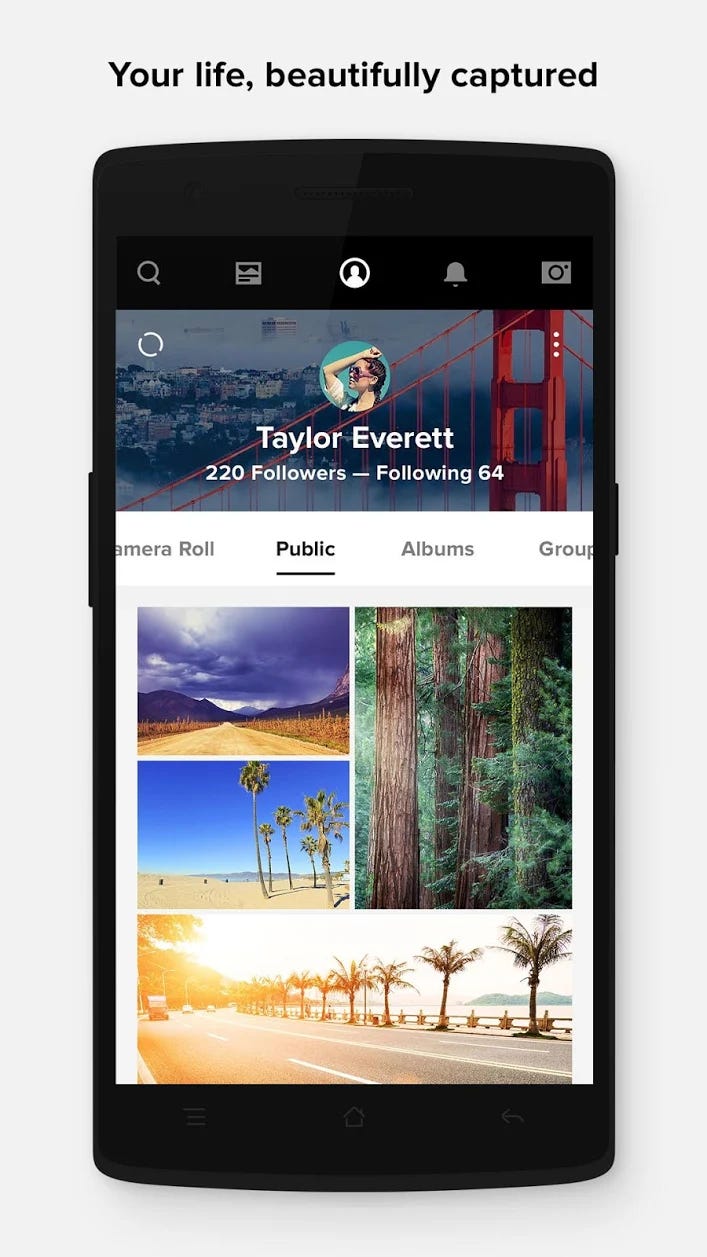
Designing Flickr would involve —
- Photo and video upload: Users should be able to easily upload photos and videos to the platform, with options for adding titles, descriptions, and tags to each upload.
- Photo and video browsing: Users should be able to browse photos and videos by keyword, tag, or user, with options for sorting and filtering the results.
- Photo and video viewing: Users should be able to view photos and videos in high resolution and with a variety of interactive features such as zoom and slide show
- Account management: Users should be able to create an account and manage their uploaded photos and videos, including editing and deleting them, and setting privacy settings.
- Mobile optimization: The website or application should be optimized for mobile devices, so users can easily upload and view photos and videos on the go.
- Social features: Users should be able to share photos and videos on social media platforms, and also users can like and comment on the photos and videos.
- Groups and communities: Users can create and join groups and communities based on specific interests or themes, and share photos and videos within those groups.
- Personalized photo recommendations: Users can receive personalized photo recommendations based on their interests and past photo views.
In this post we will design Flickr ( simple version) with the most important features and components.
Lets dive in!
Important Features
We will pick most important features based on the functionality of the flickr.
Follow other flickr users
Like and comments
Upload Images
Generate feed for the users
Scaling Requirements
Let’s say, we have —
No of photos uploaded by each user/month = 3
No of active users/month = 30 million
Size of each Photo : 10 MB
Total = 3⁰⁷ * 10 * 3 = 900 TB of storage is what we need every month
Storage space ( for photos) needed for 5 years :
900 * 12 * 5 = 54 PB
Data Model-Entity Relationship
We will be using NoSQL databases to store the photo data in the form of a key value store as well capture the relationship between the different entities. We need high reliability wrt data.
— — — — — — — — — — — — — — — — — — — — — — — — — — — — — — — —
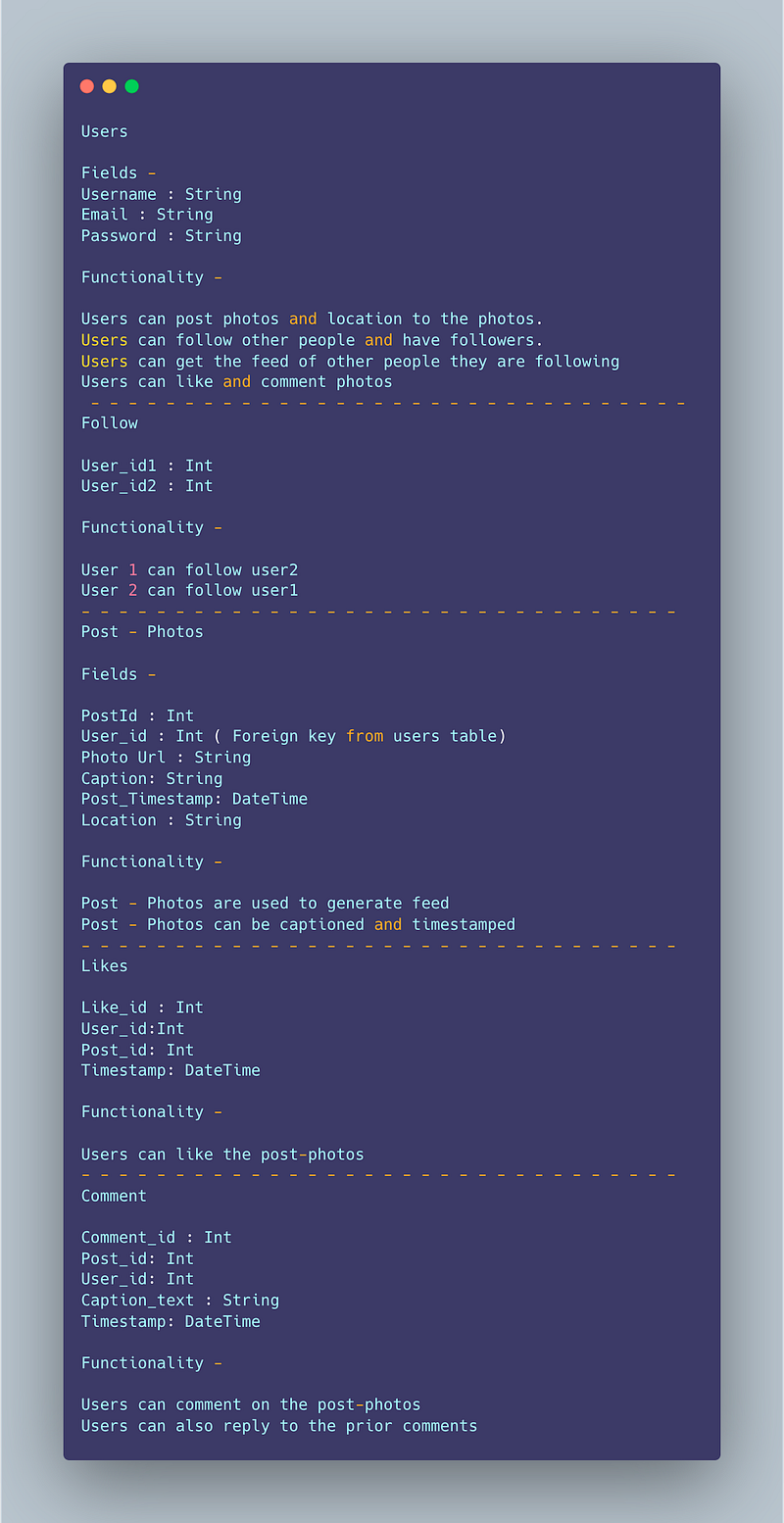
Users
Fields -
Username : String
Email : String
Password : String
Functionality —
Users can post photos and location to the photos.
Users can follow other people and have followers.
Users can get the feed of other people they are following
Users can like and comment photos
— — — — — — — — — — — — — — — — — — — — — — — — — — — — — — — —
Follow
User_id1 : Int
User_id2 : Int
Functionality —
User 1 can follow user2
User 2 can follow user1
— — — — — — — — — — — — — — — — — — — — — — — — — — — — — — — —
Post — Photos
Fields —
PostId : Int
User_id : Int ( Foreign key from users table)
Photo Url : String
Caption: String
Post_Timestamp: DateTime
Location : String
Functionality —
Post — Photos are used to generate feed
Post — Photos can be captioned and timestamped
— — — — — — — — — — — — — — — — — — — — — — — — — — — — — — — —
Likes
Like_id : Int
User_id:Int
Post_id: Int
Timestamp: DateTime
Functionality —
Users can like the post-photos
— — — — — — — — — — — — — — — — — — — — — — — — — — — — — — — —
Comment
Comment_id : Int
Post_id: Int
User_id: Int
Caption_text : String
Timestamp: DateTime
Functionality —
Users can comment on the post-photos
Users can also reply to the prior comments
High Level Design
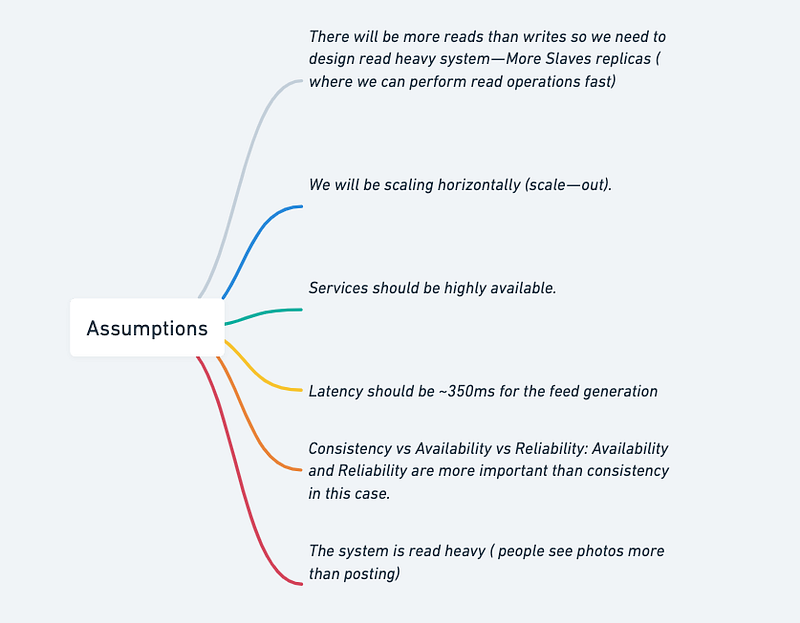
Assumptions
- There will be more reads than writes so we need to design read heavy system — More Slaves replicas ( where we can perform read operations fast)
- We will be scaling horizontally (scale — out).
- Services should be highly available.
- Latency should be ~350ms for the feed generation.
- Consistency vs Availability vs Reliability: Availability and Reliability are more important than consistency in this case.
- The system is read heavy ( people see photos more than posting)
— — — — — — — — — — — — — — — — — — — — — — — — — — — — — — — —
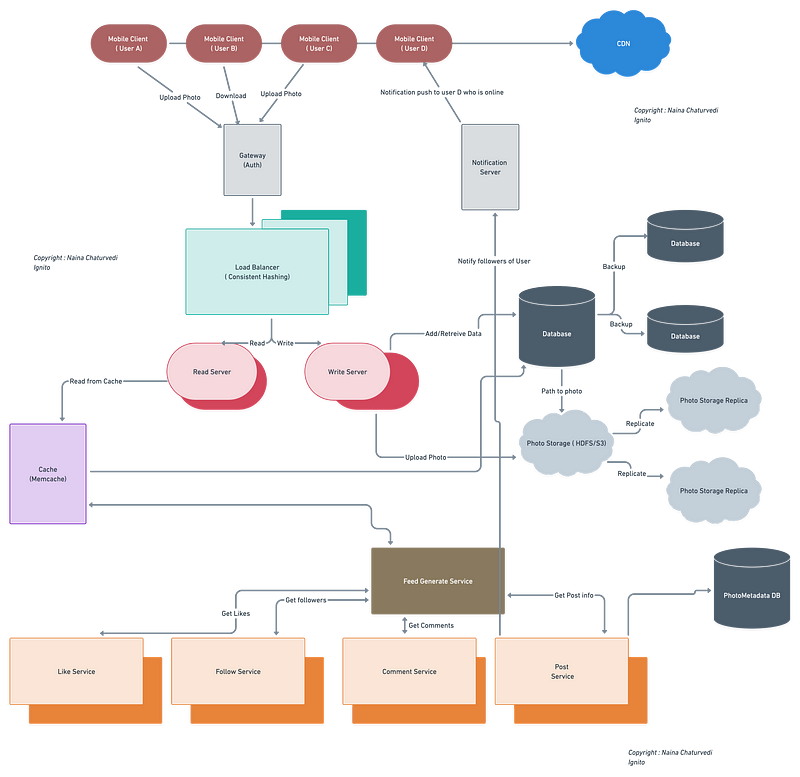
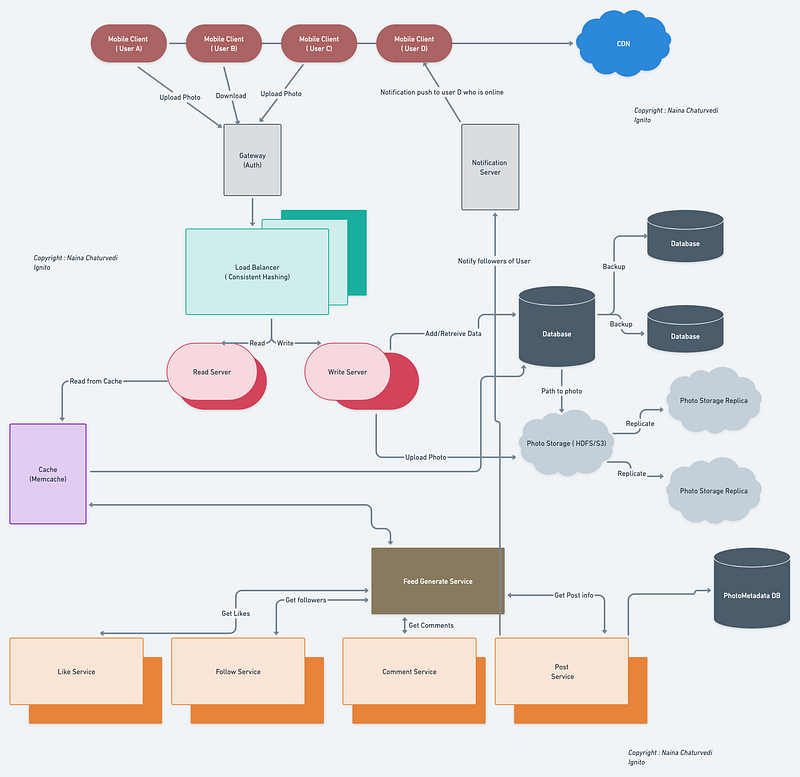
Main Components —
Mobile Client : These are users accessing flickr
Application Servers : Read, write and notification server
Load Balancer : Route and direct the requests to the required server performing designated service.
Cache (Memcache) : It’s a massive system to serve million of users fast. We will be caching the data based on LRU.
CDN : To improve the latency and throughput.
Database : To store the data based on the Data model above and fetch data from the Storage using the required path.
Storage (HDFS or Amazon S3) : To upload and store the photos.
— — — — — — — — — — — — — — — — — — — — — — — — — — — — — — — —
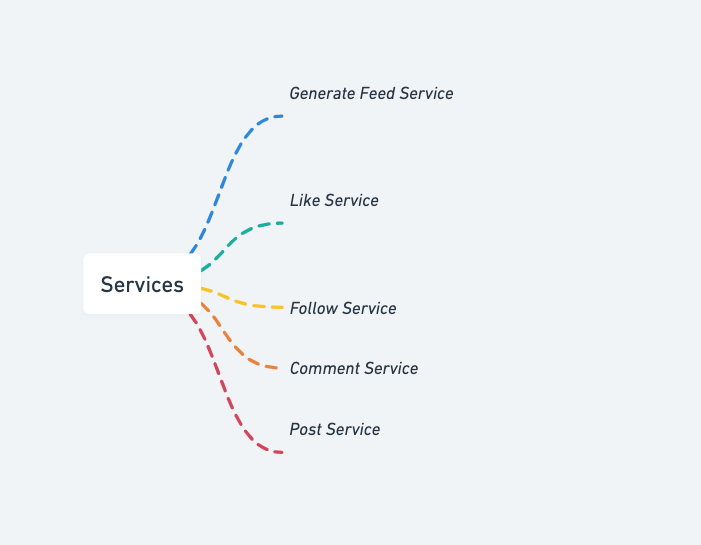
Services we need —
- Like Service
- Follow Service
- Comment Service
- Post Service
- Generate Feed service
To fetch the recent, most popular and relevant photos of people user follows
Let’s say to create the news feed, the system pulls 50 photos on the timeline. To do so, the application server will fetch the metadata of recent 50 photos from the people’s post which the user follows.
Then submit these 50 photos to the ranking algorithm which will score it based on the likeness, comments, user activity etc.
To achieve great efficiency in feed generation, we should dedicate designated servers which continuously keep generating the feed for the users and store it in a table.
The moment user login the system, the servers fetch the feed by querying the above table and show the results and store the timestamp.
Implementation of above mentioned services using Flask and SQLAlchemy with a PostgreSQL database:
from flask import Flask, request, jsonify
from flask_sqlalchemy import SQLAlchemy
app = Flask(__name__)
app.config['SQLALCHEMY_DATABASE_URI'] = 'your_postgresql_connection_string'
db = SQLAlchemy(app)# User model
class User(db.Model):
id = db.Column(db.Integer, primary_key=True)
name = db.Column(db.String(50), nullable=False)
# define relationships with other models
liked_posts = db.relationship('PostLike', backref='user', lazy=True)
followed_users = db.relationship('Follow', foreign_keys='Follow.follower_id', backref='follower', lazy=True)
followers = db.relationship('Follow', foreign_keys='Follow.followed_id', backref='followed', lazy=True)
comments = db.relationship('Comment', backref='user', lazy=True)
posts = db.relationship('Post', backref='user', lazy=True)# Post model
class Post(db.Model):
id = db.Column(db.Integer, primary_key=True)
user_id = db.Column(db.Integer, db.ForeignKey('user.id'), nullable=False)
title = db.Column(db.String(100), nullable=False)
body = db.Column(db.Text, nullable=False)
# define relationships with other models
likes = db.relationship('PostLike', backref='post', lazy=True)
comments = db.relationship('Comment', backref='post', lazy=True)# PostLike model
class PostLike(db.Model):
id = db.Column(db.Integer, primary_key=True)
user_id = db.Column(db.Integer, db.ForeignKey('user.id'), nullable=False)
post_id = db.Column(db.Integer, db.ForeignKey('post.id'), nullable=False)# Follow model
class Follow(db.Model):
id = db.Column(db.Integer, primary_key=True)
follower_id = db.Column(db.Integer, db.ForeignKey('user.id'), nullable=False)
followed_id = db.Column(db.Integer, db.ForeignKey('user.id'), nullable=False)# Comment model
class Comment(db.Model):
id = db.Column(db.Integer, primary_key=True)
user_id = db.Column(db.Integer, db.ForeignKey('user.id'), nullable=False)
post_id = db.Column(db.Integer, db.ForeignKey('post.id'), nullable=False)
body = db.Column(db.Text, nullable=False)# Post Service
@app.route('/create_post', methods=['POST'])
def create_post():
# create post in database
post = Post(
user_id=request.json['user_id'],
title=request.json['title'],
body=request.json['body']
)
db.session.add(post)
db.session.commit()
return 'Post created successfully'@app.route('/get_posts', methods=['GET'])
def get_posts():
# retrieve all posts from database
posts = Post.query.all()
# return posts in JSON format
return jsonify([post.__dict__ for post in posts])# Like Service
@app.route('/like_post', methods=['POST'])
def like_post():
# create like in database
like = PostLike(
user_id=request.json['user_id'],
post_id=request.json['post_id']
)
db.session.add(like)
db.session.commit()
return 'Post liked successfully'
Implementation for the Follow Service:
# Follow Service
@app.route('/follow_user', methods=['POST'])
def follow_user():
    # create follow in database
    follow = Follow(
        follower_id=request.json['follower_id'],
        followed_id=request.json['followed_id']
    )
    db.session.add(follow)
    db.session.commit()
return 'User followed successfully'@app.route('/get_followed_users', methods=['GET'])
def get_followed_users():
# retrieve all followed users for a given user
user_id = request.args.get('user_id')
followed_users = Follow.query.filter_by(follower_id=user_id).all()
# return followed users in JSON format
return jsonify([followed_user.followed.__dict__ for followed_user in followed_users])@app.route('/get_followers', methods=['GET'])
def get_followers():
# retrieve all followers for a given user
user_id = request.args.get('user_id')
followers = Follow.query.filter_by(followed_id=user_id).all()
# return followers in JSON format
return jsonify([follower.follower.__dict__ for follower in followers])This implementation allows users to follow each other, and retrieve a list of followed users and followers for a given user.
Implementation for feed generation service using Flask and SQLAlchemy:
# Generate Feed service
@app.route('/generate_feed', methods=['GET'])
def generate_feed():
    user_id = request.args.get('user_id')
    followed_users = Follow.query.filter_by(follower_id=user_id).all()
    post_ids = [followed_user.followed.posts for followed_user in followed_users]
    post_ids = list(set([post.id for sublist in post_ids for post in sublist]))
    posts = Post.query.filter(Post.id.in_(post_ids)).order_by(Post.timestamp.desc()).all()
    feed = []
    for post in posts:
        likes = Like.query.filter_by(post_id=post.id).all()
        comments = Comment.query.filter_by(post_id=post.id).all()
        post_dict = post.__dict__
        post_dict.pop('_sa_instance_state')
        post_dict['likes'] = [like.user_id for like in likes]
        post_dict['comments'] = [comment.__dict__ for comment in comments]
        feed.append(post_dict)
    return jsonify(feed)
This implementation retrieves all the users that a given user is following, gets all the posts for those users, orders the posts by timestamp, and returns them with their associated likes and comments as a feed in JSON format.
Basic Low Level Design
public class User {
    private String username;
    private String password;
    private String email;
    // ...

    public User(String username, String password, String email) {
        this.username = username;
        this.password = password;
        this.email = email;
    }

    // Getters and setters
    // ...
}

public class UserManager {
    private Map<String, User> users;

    public UserManager() {
        this.users = new HashMap<>();
    }

    public void registerUser(String username, String password, String email) {
        if (!users.containsKey(username)) {
            User newUser = new User(username, password, email);
            users.put(username, newUser);
            System.out.println("User registered successfully.");
        } else {
            System.out.println("Username already exists. Please choose a different username.");
        }
    }

    public User loginUser(String username, String password) {
        User user = users.get(username);
        if (user != null && user.getPassword().equals(password)) {
            System.out.println("Login successful.");
            return user;
        } else {
            System.out.println("Invalid username or password.");
            return null;
        }
    }

    // Other user management methods
    // ...
}
public class Media {
    private String mediaId;
    private String title;
    private String description;
    private List<String> tags;
    // ...

    public Media(String mediaId, String title, String description, List<String> tags) {
        this.mediaId = mediaId;
        this.title = title;
        this.description = description;
        this.tags = tags;
    }

    // Getters and setters
    // ...
}

public class MediaUploadManager {
    public void uploadMedia(User user, String title, String description, List<String> tags, InputStream mediaStream) {
        // Generate a unique media ID
        String mediaId = generateUniqueId();

        // Store media file in a distributed storage system
        boolean isStored = storeMediaInDistributedSystem(mediaId, mediaStream);

        if (isStored) {
            // Create a Media object
            Media media = new Media(mediaId, title, description, tags);

            // Store media metadata in a database
            saveMediaMetadata(media);

            // Associate media with the user
            user.addMedia(media);

            System.out.println("Media uploaded successfully.");
        } else {
            System.out.println("Failed to store media file.");
        }
    }

    // Other media upload methods
    // ...
}
API Design
API design will be further discussed in the workflow video ( Coming soon. Subscribe Today)
- Endpoint to search for photos:
Endpoint: GET /search/photos
Parameters:
- query: string (required)
- page: integer (optional, default=1)
- per_page: integer (optional, default=10)
Returns:
- List of photo objects in JSON format:
    - photo_id: string
    - owner: string
    - secret: string
    - server: integer
    - farm: integer
- title: string- Endpoint to get photo details:
Endpoint: GET /photos/<photo_id>
Parameters:
- photo_id: string (required)
Returns:
- Photo object in JSON format:
    - photo_id: string
    - owner: string
    - secret: string
    - server: integer
    - farm: integer
    - title: string
    - description: string
- tags: list of strings- Endpoint to get user information:
Endpoint: GET /users/<user_id>
Parameters:
- user_id: string (required)
Returns:
- User object in JSON format:
    - user_id: string
    - username: string
    - realname: string
    - location: string
- profile_image: string- Endpoint to get user photos:
Endpoint: GET /users/<user_id>/photos
Parameters:
- user_id: string (required)
- page: integer (optional, default=1)
- per_page: integer (optional, default=10)
Returns:
- List of photo objects in JSON format:
    - photo_id: string
    - owner: string
    - secret: string
    - server: integer
    - farm: integer
- title: string- Endpoint to get popular tags:
Endpoint: GET /tags/popular
Parameters:
- limit: integer (optional, default=10)
Returns:
- List of tag objects in JSON format:
    - name: string
    - count: integer
Implementation of the Flickr App API using Flask and the Flickr API:
import requests
from flask import Flask, jsonify
app = Flask(__name__)# API key for the Flickr API
api_key = 'your_api_key'# Endpoint to search for photos
@app.route('/search/photos')
def search_photos():
query = request.args.get('query')
page = request.args.get('page', 1)
per_page = request.args.get('per_page', 10)
url = f'https://api.flickr.com/services/rest/?method=flickr.photos.search&api_key={api_key}&text={query}&page={page}&per_page={per_page}&format=json&nojsoncallback=1'
response = requests.get(url)
data = response.json()
photos = data['photos']['photo']
result = []
for photo in photos:
photo_dict = {
'photo_id': photo['id'],
'owner': photo['owner'],
'secret': photo['secret'],
'server': photo['server'],
'farm': photo['farm'],
'title': photo['title']
}
result.append(photo_dict)
return jsonify(result)# Endpoint to get photo details
@app.route('/photos/<photo_id>')
def get_photo(photo_id):
url = f'https://api.flickr.com/services/rest/?method=flickr.photos.getInfo&api_key={api_key}&photo_id={photo_id}&format=json&nojsoncallback=1'
response = requests.get(url)
data = response.json()
photo = data['photo']
photo_dict = {
'photo_id': photo['id'],
'owner': photo['owner']['nsid'],
'secret': photo['secret'],
'server': photo['server'],
'farm': photo['farm'],
'title': photo['title']['_content'],
'description': photo['description']['_content'],
'tags': [tag['_content'] for tag in photo['tags']['tag']]
}
return jsonify(photo_dict)# Endpoint to get user information
@app.route('/users/<user_id>')
def get_user(user_id):
url = f'https://api.flickr.com/services/rest/?method=flickr.people.getInfo&api_key={api_key}&user_id={user_id}&format=json&nojsoncallback=1'
response = requests.get(url)
data = response.json()
user = data['person']
user_dict = {
'user_id': user['id'],
'username': user['username']['_content'],
'realname': user['realname']['_content'],
'location': user['location']['_content'],
'profile_image': f'https://farm{user["iconfarm"]}.staticflickr.com/{user["iconserver"]}/buddyicons/{user["nsid"]}.jpg'
}
return jsonify(user_dict)
# Endpoint to get user photos
@app.route('/users/<user_id>/photos')
def get_user_photos(user_id):
page = request.args.get('page', 1)
per_page = request.args.get('per_page', 10)
url = f'https://api.flickr.com/services/rest/?method=flickr.people.getPublicPhotos&api_key={api_key}&user_id={user_id}&page={page}&per_page={per_page}&format=json&nojsoncallback=1'
response = requests.get(url)
data = response.json()
photos = data['photos']['photo']
result = []
for photo in photos:
photo_dict = {
'photo_id': photo['id'],
'owner': photo['owner'],
'secret': photo['secret'],
'server': photo['server'],
'farm': photo['farm'],
'title': photo['title']
}
result.append(photo_dict)
return jsonify(result)Complete (Detailed) Design
(Zoom it)
In the next part of Complete System Design Case Studies we will see how to Design Zoom.
Complete System Design Series.
6. Networking, How Browsers work, Content Network Delivery ( CDN)
Github —
Subscribe/ Follow, Like/Clap and Stay Tuned!!
Day 2 : SQL Basics, Query Structure, Built In functions Conditions
Day 4 : Set Theory Operations, Stored Procedures and CASE statements in SQL
Day 6 : Subqueries, Group by, order by and Having clauses in SQL and Analytical Functions
Day 7 : Window Functions, Grouping Sets and Constraints in SQL
Day 8 : BigQuery Basics, SELECT, FROM, WHERE and Date and Extract in BigQuery
Day 9 : Common Expression Table, UNNEST Clause, SQL vs NoSQL Databases
Day 10 : Triggers, Pivot and Cursors in SQL
Day 14 : MySQL in Depth
Day 15 : PostgreSQL inDepth
Anyways, For Day 15 of 15 days of Advanced SQL, we will cover —
PostgreSQL inDepth
Github for Advanced SQL that you can follow —
All the projects, data structures, algorithms, system design, Data Science and ML, Data Engineering, MLOps and Deep Learning videos will be published on our youtube channel ( just launched).
Subscribe today!
System Design Case Studies — In Depth
Complete Data Structures and Algorithm Series
Github —
Some of the other best Series —
30 days of Data Structures and Algorithms and System Design Simplified
Data Science and Machine Learning Research ( papers) Simplified **
100 days : Your Data Science and Machine Learning Degree Series with projects
Complete Data Visualization and Pre-processing Series with projects
Exceptional Github Repos — Part 1
Exceptional Github Repos — Part 2
Tech Newsletter —
If you are interested, you can join my newsletter through which I send tech interview tips, techniques, patterns, hacks — Software Development, ML, Data Science, Startups and Technology projects to more than 30K readers. You can subscribe to Tech Brew :
For Python Projects —
For complete 60 days of Data Science and ML : Day 1 — Day 60 : Quick Recap of 60 days of Data Science and ML
Follow for more updates. Stay tuned and keep coding!
For other projects, tune to —
Build Machine Learning Pipelines( With Code)
Recurrent Neural Network with Keras
Clustering Geolocation Data in Python using DBSCAN and K-Means
Facial Expression Recognition using Keras
Hyperparameter Tuning with Keras Tuner
Custom Layers in Keras


