
Day 22 of System Design Case Studies Series : Design Amazon
Complete Design with examples
Hello peeps! Welcome to Day 22 of System Design Case studies series where we will design Amazon.
Note : Please read System Design Important Terms you MUST know and Most Important System Design basics before reading this post.
Projects Videos —
All the projects, data structures, SQL, algorithms, system design, Data Science and ML , Data Analytics, Data Engineering, , Implemented Data Science and ML projects, Implemented Data Engineering Projects, Implemented Deep Learning Projects, Implemented Machine Learning Ops Projects, Implemented Time Series Analysis and Forecasting Projects, Implemented Applied Machine Learning Projects, Implemented Tensorflow and Keras Projects, Implemented PyTorch Projects, Implemented Scikit Learn Projects, Implemented Big Data Projects, Implemented Cloud Machine Learning Projects, Implemented Neural Networks Projects, Implemented OpenCV Projects,Complete ML Research Papers Summarized, Implemented Data Analytics projects, Implemented Data Visualization Projects, Implemented Data Mining Projects, Implemented Natural Leaning Processing Projects, MLOps and Deep Learning, Applied Machine Learning with Projects Series, PyTorch with Projects Series, Tensorflow and Keras with Projects Series, Scikit Learn Series with Projects, Time Series Analysis and Forecasting with Projects Series, ML System Design Case Studies Series videos will be published on our youtube channel ( just launched).
Subscribe today!
System Design Case Studies — In Depth
Design Tinder
Design TikTok
Design Twitter
Design URL Shortener
Design Dropbox
Design Youtube
Design API Rate Limiter
Design Web Crawler
Design Facebook’s Newsfeed
Design Yelp
Design Instagram
Design Messenger App
Design Uber
Most Popular System Design Questions
Mega Compilation : Solved System Design Case studies
We will be discussing in depth -
- What is Amazon
- Important Features
- Scaling Requirements — Capacity Estimation
- Data Model — ER requirements
- High Level Design
- API Design
- Complete Detailed Design
Pre-requisite to this post -
Complete System Design Series — Important Concepts that you should know before starting the Case studies
6. Networking, How Browsers work, Content Network Delivery ( CDN)
13. System Design Template — How to solve any System Design Question
Github —
Day 1 of System Design Case Studies can be found below-
Day 2 of System Design Case Studies can be found below-
Day 3 of System Design Case Studies can be found below-
Day 4 of System Design Case Studies can be found below-
What is Amazon?

Amazon is a platform which lets users —
- Buy items
- Search for the items
- Add the items to the cart or put them as a wishlist
- Gives catalog of all the items/products
- View Order history
- Track their orders
- Add inventory ( on sellers side)
Users can be both mobile based and web based.
Designing Amazon would involve —
- Product catalog: You would need to create a catalog of products that users can browse and purchase. This could involve negotiating deals with manufacturers and suppliers, or developing your own products.
- Inventory management: You would need to create a system for managing your inventory, including tracking stock levels, processing orders, and handling returns.
- Payment gateway: You would need to integrate a payment gateway that allows users to securely make payments using various methods such as credit cards, debit cards, and electronic funds transfer.
- Shipping and logistics: You would need to develop a system for handling shipping and logistics, including calculating shipping costs, creating shipping labels, and tracking packages.
- User registration and authentication: You would need to implement a registration and authentication system that allows users to create accounts and log in.
- User experience: You would need to design and implement a user interface that is intuitive and easy to use, with features such as search, filtering, and recommendations.
- Customer service: You would need to create a customer service system that can handle inquiries, complaints, and returns.
- Marketing: You would need to develop a marketing strategy to drive traffic to your site, including SEO, PPC, and affiliate marketing.
- Quality assurance: You would need to test the platform to ensure that it is stable and reliable, and make any necessary changes.
Important Features
We will consider the most important features —
Buy items
Search Items
Cart — Add and Remove
Scaling Requirements — Capacity Estimation
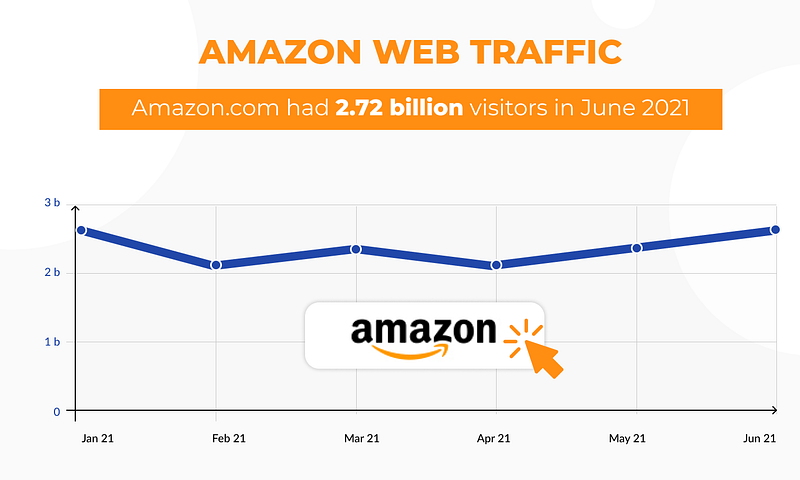
For the sake of simplicity, I’ll show a small scale simulation.
Let’s say we have —
Total No of users : 400 Million
Daily active users ( DAU) : 200 Million/day
No of users/month : 200 Million * 30 days = 6 Billion/month
User profile : 200 KB
Product profile : 500 KB
No of products on Amazon : 10000/day
Storage Estimation —
Total Storage per day for products : 100 * 500 KB = 50 GB
Total storage per day for users : 200 Million * 200 KB = 40 TB
For next 30 days, Total storage needed for users = 40 TB * 30 = 1.2 PB
Data Model — ER requirements
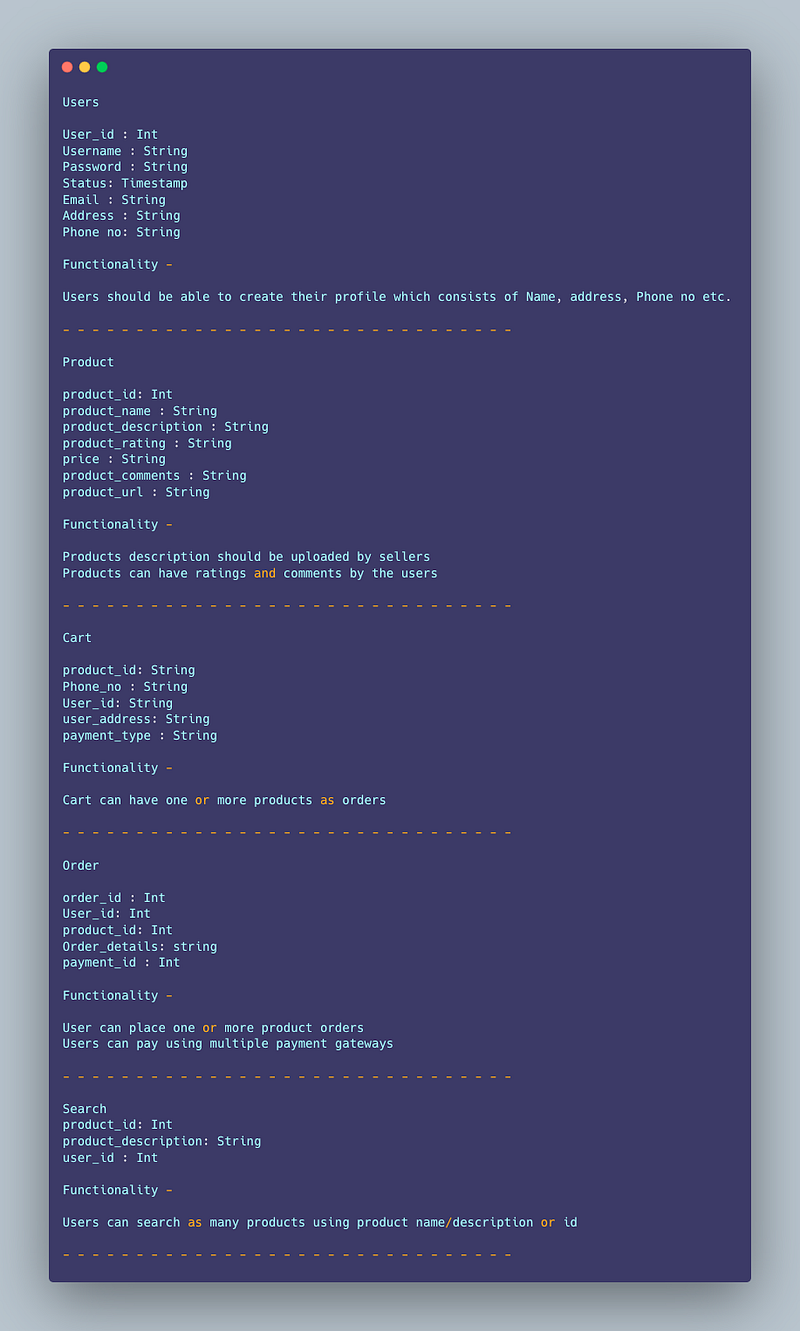
Users
User_id : Int
Username : String
Password : String
Status: Timestamp
Email : String
Address : String
Phone no: String
Functionality —
- Users should be able to create their profile which consists of Name, address, Phone no etc.
— — — — — — — — — — — — — — — — — — — — — — — — — — — — — — -
Product
product_id: Int
product_name : String
product_description : String
product_rating : String
price : String
product_comments : String
product_url : String
Functionality —
- Products description should be uploaded by sellers
- Products can have ratings and comments by the users
— — — — — — — — — — — — — — — — — — — — — — — — — — — — — — -
Cart
product_id: String
Phone_no : String
User_id: String
user_address: String
payment_type : String
Functionality —
- Cart can have one or more products as orders
— — — — — — — — — — — — — — — — — — — — — — — — — — — — — — -
Order
order_id : Int
User_id: Int
product_id: Int
Order_details: string
payment_id : Int
Functionality —
- User can place one or more product orders
- Users can pay using multiple payment gateways
— — — — — — — — — — — — — — — — — — — — — — — — — — — — — — -
Search
product_id: Int
product_description: String
user_id : Int
Functionality —
- Users can search as many products using product name/description or id
— — — — — — — — — — — — — — — — — — — — — — — — — — — — — — -
High Level Design
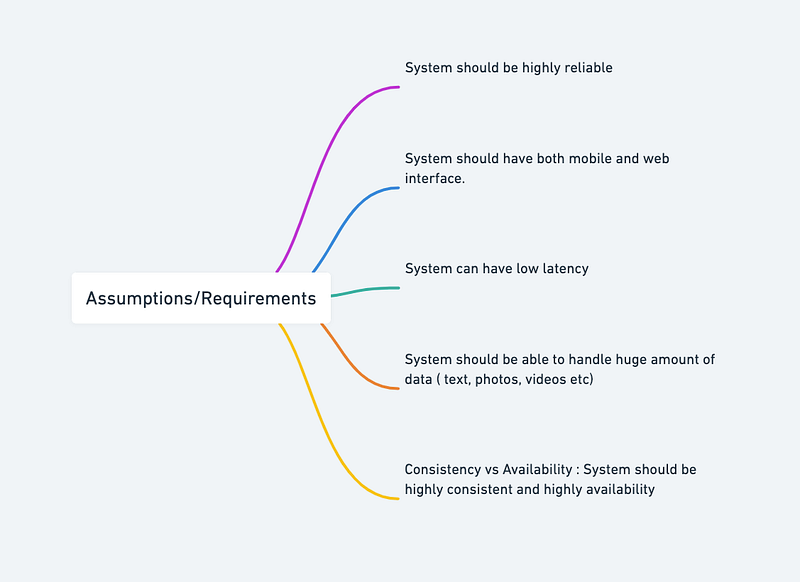
Assumptions on technical aspects —
- System should be highly reliable.
- System should have both mobile and web interface.
- System can have low latency.
- System should be able to handle huge amount of data ( text, photos, videos etc)
- Consistency vs Availability : System should be highly consistent and highly availability
Components
- Client : Both mobile and web Users
- Application Servers : Should be able to talk each other
- Load Balancers : To allocate requests to designated Application server using consistent hashing
- Database : MongoDB, Redis Cluster, Cassandra db or Hbase — Key value stores allow for great horizontal scaling and low latency to access data. HBase is a column-oriented key-value NoSQL database.
- HDFS Cluster
- Speark Job server — To provide RESTful API to manage spark jobs
- Cache
- Media Storage ( S3) : To store photos/videos
- Content Delivery Network
Services
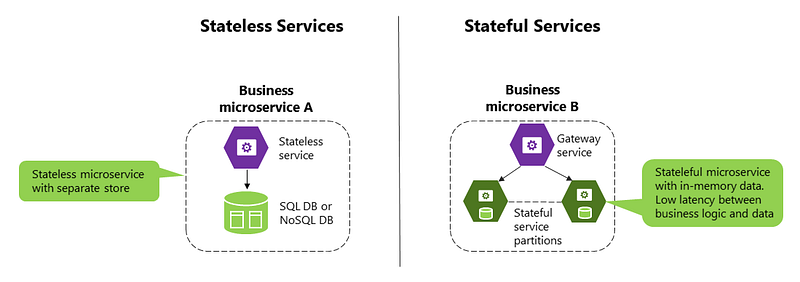
Before we go in depth with respect to services, first understand what is stateless and stateful services. Stateless service ( which can be monolithic services) doesn’t require the server to retain any information about the state whereas Stateful services requires to save the information about the users session and the connection is persistent to a chat server.
- Sessions Service — To store the sessions information of different users
- Cart Service — To handle cart related actions
- Product Onboard service — To handle product related actions
- Payment service — To handle payment related actions
- User Profile Service — To handle users profile information
- Inventory Service — To handle the inventory information.
- Order tracking Service — To keep a tap on order tracking
An implementation of the mentioned services in Python:
class SessionsService:
    def __init__(self):
        self.sessions = {}

    def add_session(self, user_id, session_id):
        self.sessions[user_id] = session_id

    def remove_session(self, user_id):
        if user_id in self.sessions:
            del self.sessions[user_id]

    def get_session(self, user_id):
        if user_id in self.sessions:
            return self.sessions[user_id]
        return None
class CartService:
    def __init__(self):
        self.carts = {}

    def add_to_cart(self, user_id, product_id):
        if user_id in self.carts:
            self.carts[user_id].append(product_id)
        else:
            self.carts[user_id] = [product_id]

    def remove_from_cart(self, user_id, product_id):
        if user_id in self.carts and product_id in self.carts[user_id]:
            self.carts[user_id].remove(product_id)

    def get_cart(self, user_id):
        if user_id in self.carts:
            return self.carts[user_id]
        return []

    def clear_cart(self, user_id):
        if user_id in self.carts:
            del self.carts[user_id]
class ProductOnboardingService:
    def __init__(self):
        self.products = {}

    def add_product(self, product_id, product_info):
        self.products[product_id] = product_info

    def remove_product(self, product_id):
        if product_id in self.products:
            del self.products[product_id]

    def get_product(self, product_id):
        if product_id in self.products:
            return self.products[product_id]
        return None
class PaymentService:
    def __init__(self):
        self.payments = {}

    def add_payment(self, order_id, payment_info):
        self.payments[order_id] = payment_info

    def get_payment(self, order_id):
        if order_id in self.payments:
            return self.payments[order_id]
        return None
class UserProfileService:
    def __init__(self):
        self.profiles = {}

    def add_profile(self, user_id, profile_info):
        self.profiles[user_id] = profile_info

    def update_profile(self, user_id, profile_info):
        if user_id in self.profiles:
            self.profiles[user_id].update(profile_info)

    def get_profile(self, user_id):
        if user_id in self.profiles: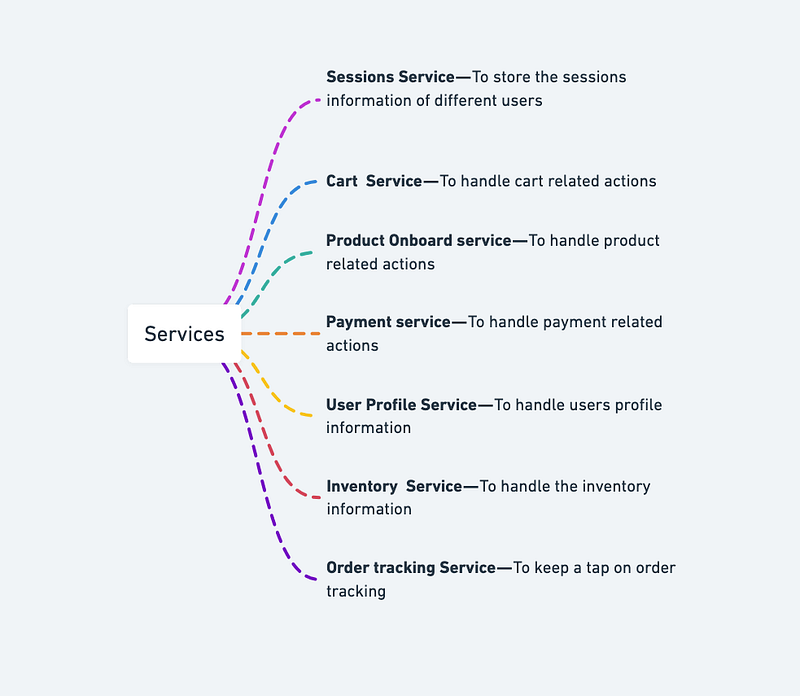
Implementation in Python for Inventory Service and Order Tracking Service:
class InventoryService:
    def __init__(self):
        self.inventory = {}
def add_product(self, product_id, quantity):
if product_id in self.inventory:
self.inventory[product_id] += quantity
else:
self.inventory[product_id] = quantity def reduce_product(self, product_id, quantity):
if product_id in self.inventory and self.inventory[product_id] >= quantity:
self.inventory[product_id] -= quantity
else:
raise Exception("Product not available in required quantity.") def check_product_availability(self, product_id):
if product_id in self.inventory:
return self.inventory[product_id]
else:
return 0class OrderTrackingService:
def __init__(self):
self.orders = [] def place_order(self, order_id, product_id, quantity):
inventory_service = InventoryService()
available_quantity = inventory_service.check_product_availability(product_id)
if available_quantity >= quantity:
inventory_service.reduce_product(product_id, quantity)
self.orders.append((order_id, product_id, quantity))
return order_id
else:
raise Exception("Product not available in required quantity.") def check_order_status(self, order_id):
for order in self.orders:
if order[0] == order_id:
return "Order placed successfully."
return "Order not found."A microservice for Amazon in Python:
import flask
import json
app = flask.Flask(__name__)# Define an endpoint for retrieving information about a particular product
@app.route("/product/<product_id>", methods=["GET"])
def get_product_info(product_id):
# Code to retrieve product information from the database
product_info = {
"product_id": product_id,
"name": "Example Product",
"price": 999.99,
"description": "This is an example product",
} return flask.jsonify(product_info)# Define an endpoint for updating the availability of a particular product
@app.route("/product/<product_id>/availability", methods=["POST"])
def update_product_availability(product_id):
# Code to update the availability of the product in the database return flask.jsonify({"status": "success"})# Example usage
if __name__ == "__main__":
app.run()API Design
We would need to first define the endpoints we want to expose to our users.
Here is an implementation of some endpoints :
from flask import Flask, request, jsonifyapp = Flask(__name__)@app.route('/api/v1/products', methods=['GET'])
def get_products():
# code to fetch all products from the database
return jsonify(products)@app.route('/api/v1/products/<string:id>', methods=['GET'])
def get_product(id):
# code to fetch a product by id from the database
return jsonify(product)@app.route('/api/v1/products', methods=['POST'])
def add_product():
# code to add a new product to the database
return jsonify({'message': 'Product added successfully'})@app.route('/api/v1/products/<string:id>', methods=['PUT'])
def update_product(id):
# code to update a product by id in the database
return jsonify({'message': 'Product updated successfully'})@app.route('/api/v1/products/<string:id>', methods=['DELETE'])
def delete_product(id):
# code to delete a product by id from the database
return jsonify({'message': 'Product deleted successfully'})In the code above, we’ve defined five endpoints:
- GET /api/v1/products: Returns a list of all products in the database.
- GET /api/v1/products/:id: Returns a specific product by its ID.
- POST /api/v1/products: Adds a new product to the database.
- PUT /api/v1/products/:id: Updates a specific product by its ID.
- DELETE /api/v1/products/:id: Deletes a specific product by its ID.
A Python script for Amazon using APIs:
import requests
import json
# Define the base URL for the Amazon API
base_url = "https://api.amazon.com/"# Define the endpoint for retrieving information about a particular product
product_info_endpoint = "product/{product_id}"# Define the endpoint for retrieving recommendations for a particular user
recommendation_endpoint = "recommendations/{user_id}"# Define a function to retrieve information about a particular product
def get_product_info(product_id):
url = base_url + product_info_endpoint.format(product_id=product_id)
response = requests.get(url)
if response.status_code == 200:
product_info = json.loads(response.text)
return product_info
else:
raise Exception("Failed to retrieve product information")# Define a function to retrieve recommendations for a particular user
def get_recommendations(user_id):
url = base_url + recommendation_endpoint.format(user_id=user_id)
response = requests.get(url)
if response.status_code == 200:
recommendations = json.loads(response.text)
return recommendations
else:
raise Exception("Failed to retrieve recommendations")# Example usage
product_info = get_product_info("ABC123")
recommendations = get_recommendations("DEF456")print(product_info)
print(recommendations)API design will be further discussed in the workflow video ( Coming soon. Subscribe Today)
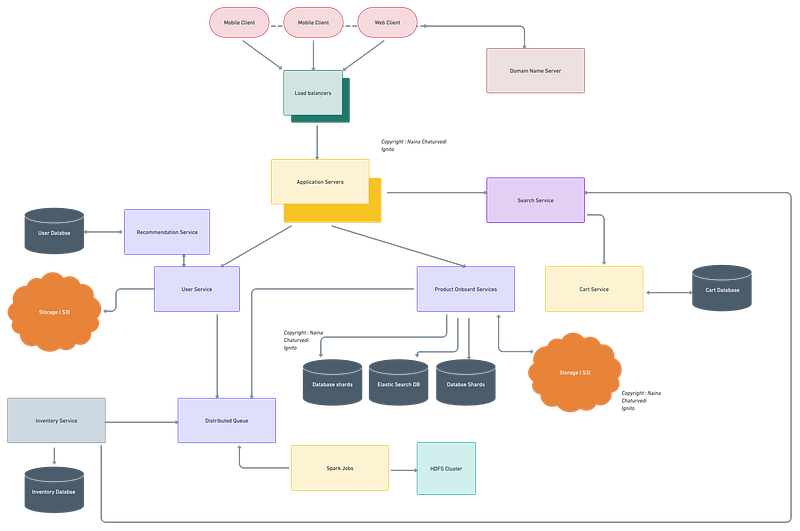
Complete Detailed Design
( Zoom it)
Code
Code implementation for above mentioned features —
- Search for the items: To search for items on Flipkart, we can use the requests and BeautifulSoup libraries in Python to scrape the search results page. Here is a code implementation to search for “apple watch” on Flipkart:
import requests
from bs4 import BeautifulSoup
url = "https://www.flipkart.com/search?q=apple+watch&otracker=search&otracker1=search&marketplace=FLIPKART&as-show=on&sort=relevance"
response = requests.get(url)
soup = BeautifulSoup(response.text, 'html.parser')# Get all the product names from the search result page
product_names = [item.text for item in soup.find_all('div', {'class': '_4rR01T'})]
print(product_names)- Add items to cart or wishlist: To add items to the cart or wishlist, we need to simulate the user’s actions using Selenium or any other web automation library. Here is a code implementation to add the first item in the search results to the cart:
from selenium import webdriver
from selenium.webdriver.common.keys import Keys

driver = webdriver.Chrome()
driver.get(url)

# Click on the first product in the search results
driver.find_element_by_css_selector('.s-result-item .a-link-normal').click()

# Click on the "Add to Cart" button
driver.find_element_by_id('add-to-cart-button').click()- Gives catalog of all the items/products: We can scrape the Amazon category pages to get a list of all the products in a particular category. Here is a code implementation to get a list of all the products in the "Electronics" category:
import requests
from bs4 import BeautifulSoup

url = "https://www.amazon.com/s?i=electronics"
headers = {
    'User-Agent': 'Mozilla/5.0 (Windows NT 10.0; Win64; x64) AppleWebKit/537.36 (KHTML, like Gecko) Chrome/58.0.3029.110 Safari/537.36'}
response = requests.get(url, headers=headers)
soup = BeautifulSoup(response.text, 'html.parser')

# Get all the product names from the category page
product_names = [item.text.strip() for item in soup.select('.s-result-item .a-text-normal')]
print(product_names)- View Order history: To view the order history, we need to log in to the Amazon account using Selenium or any other web automation library and navigate to the "Your Orders" page. Here is a code implementation to navigate to the "Your Orders" page:
from selenium import webdriver
from selenium.webdriver.common.keys import Keys

driver = webdriver.Chrome()
driver.get('https://www.amazon.com/')

# Login to the Amazon account
driver.find_element_by_id('nav-link-accountList-nav-line-1').click()
email = '[email protected]'
password = 'your-password'
driver.find_element_by_id('ap_email').send_keys(email)
driver.find_element_by_id('continue').click()
driver.find_element_by_id('ap_password').send_keys(password)
driver.find_element_by_id('signInSubmit').click()

# Navigate to the "Your Orders" page
driver.find_element_by_id('nav-orders').click()- Track their orders: To track orders, we need to navigate to the “Track Package” page for a particular order using Selenium or any other web automation library. Here is a code implementation to track the first order in the “Your Orders” page:
from selenium import webdriver
from selenium.webdriver.common.keys import Keys
driver = webdriver.Chrome()
driver.get('https://www.amazon.com/')# Login to the Amazon account
# ...# Navigate to the "Your Orders" page
driver.find_element_by_id('nav-orders').click()# Track the first order in the list
order_number = driver.find_element_by_css_selector('.a-link-normal .a-color-secondary').text
driver.get(f'https://www.amazon.com/progress-tracker/package/ref=oh_aui_ajax_dpi?_encoding=UTF8&itemId=&orderId={order_number}')- Add inventory (on sellers side) using python code: To add inventory on the seller’s side, we need to log in to the seller account using Selenium or any other web automation library and navigate to the “Manage Inventory” page. Here is a code implementation to navigate to the “Manage Inventory” page:
from selenium import webdriver
from selenium.webdriver.common.keys import Keys

driver = webdriver.Chrome()
driver.get('https://sellercentral.amazon.com/')

# Login to the seller account
email = '[email protected]'
password = 'your-password'
driver.find_element_by_id('ap_email').send_keys(email)
driver.find_element_by_id('ap_password').send_keys(password)
driver.find_element_by_id('signInSubmit').click()

# Navigate to the "Manage Inventory" page
driver.find_element_by_id('inventory-link').click()- Add inventory to a specific product: To add inventory to a specific product, we need to navigate to the product detail page using Selenium or any other web automation library and update the available quantity. Here is a code implementation to add 10 units of inventory to a specific product:
from selenium import webdriver
from selenium.webdriver.common.keys import Keys
driver = webdriver.Chrome()
driver.get('https://sellercentral.amazon.com/')# Login to the seller account
# ...# Navigate to the "Manage Inventory" page
# ...# Navigate to the product detail page
asin = 'B07N4M9V8P'
driver.get(f'https://www.amazon.com/dp/{asin}')# Update the available quantity
driver.find_element_by_id('quantity').clear()
driver.find_element_by_id('quantity').send_keys('10')
driver.find_element_by_id('submit-button').click()More about Amazon System Design—
User Management:
class User:
    def __init__(self, username, password):
        self.username = username
        self.password = password
def authenticate(self, password):
return self.password == password def change_password(self, new_password):
self.password = new_password# Usage example
user = User("john_doe", "password123")
authenticated = user.authenticate("password123")
user.change_password("new_password123")Product Catalog:
class Product:
    def __init__(self, name, price, category):
        self.name = name
        self.price = price
        self.category = category
class ProductCatalog:
def __init__(self):
self.products = [] def add_product(self, product):
self.products.append(product) def search_products(self, keyword):
return [product for product in self.products if keyword in product.name]# Usage example
catalog = ProductCatalog()
product1 = Product("iPhone X", 999, "Electronics")
product2 = Product("Samsung Galaxy", 899, "Electronics")
catalog.add_product(product1)
catalog.add_product(product2)
results = catalog.search_products("iPhone")Inventory Management:
class Inventory:
    def __init__(self, product, stock):
        self.product = product
        self.stock = stock
def update_stock(self, quantity):
self.stock += quantity# Usage example
product = Product("iPhone X", 999, "Electronics")
inventory = Inventory(product, 10)
inventory.update_stock(5)Order Processing:
class Order:
    def __init__(self, user, products):
        self.user = user
        self.products = products
def process(self):
# Logic for order processing# Usage example
user = User("john_doe", "password123")
products = [product1, product2]
order = Order(user, products)
order.process()Recommendation and Personalization:
class RecommendationEngine:
    def __init__(self, products):
        self.products = products
def recommend_products(self, user):
# Recommendation algorithm logic# Usage example
product1 = Product("iPhone X", 999, "Electronics")
product2 = Product("Samsung Galaxy", 899, "Electronics")
products = [product1, product2]
engine = RecommendationEngine(products)
recommended_products = engine.recommend_products(user)Customer Reviews and Ratings:
class Review:
    def __init__(self, user, product, rating, content):
        self.user = user
        self.product = product
        self.rating = rating
        self.content = content
class ReviewSystem:
def __init__(self):
self.reviews = [] def add_review(self, review):
self.reviews.append(review) def get_reviews_for_product(self, product):
return [review for review in self.reviews if review.product == product]# Usage example
review1 = Review(user, product1, 5, "Great product!")
review2 = Review(user, product2, 4, "Good value for money.")
review_system = ReviewSystem()
review_system.add_review(review1)
review_system.add_review(review2)
reviews = review_system.get_reviews_for_product(product1)Payment Processing:
import randomclass PaymentGateway:
def process_payment(self, amount, card_number):
# Logic for processing payment
transaction_id = random.randint(1000, 9999)
return transaction_id# Usage example
payment_gateway = PaymentGateway()
transaction_id = payment_gateway.process_payment(100.0, "1234-5678-9012-3456")Customer Support and Messaging:
class CustomerSupport:
    def __init__(self):
        self.tickets = []
def create_ticket(self, user, issue):
ticket_id = len(self.tickets) + 1
ticket = {"ticket_id": ticket_id, "user": user, "issue": issue}
self.tickets.append(ticket)
return ticket_id# Usage example
customer_support = CustomerSupport()
ticket_id = customer_support.create_ticket(user, "I have an issue with my order.")Seller Management:
class Seller:
    def __init__(self, name, products):
        self.name = name
        self.products = products
def add_product(self, product):
self.products.append(product)# Usage example
seller = Seller("ABC Electronics", [])
seller.add_product(product1)
seller.add_product(product2)Scalability and Performance:
class CachingMechanism:
    def __init__(self):
        self.cache = {}
def get(self, key):
return self.cache.get(key) def set(self, key, value):
self.cache[key] = value# Usage example
cache = CachingMechanism()
cache.set("product_1", product1)
cached_product = cache.get("product_1")Analytics and Reporting:
class AnalyticsEngine:
    def __init__(self):
        self.sales_data = []
def track_sale(self, product, quantity, price):
sale = {"product": product, "quantity": quantity, "price": price}
self.sales_data.append(sale) def calculate_total_revenue(self):
return sum(sale["quantity"] * sale["price"] for sale in self.sales_data)# Usage example
analytics = AnalyticsEngine()
analytics.track_sale(product1, 2, 999)
analytics.track_sale(product2, 1, 899)
total_revenue = analytics.calculate_total_revenue()Scalability and Performance:
class CachingMechanism:
    def __init__(self):
        self.cache = {}
def get(self, key):
return self.cache.get(key) def set(self, key, value):
self.cache[key] = value# Usage example
cache = CachingMechanism()
cache.set("product_1", product1)
cached_product = cache.get("product_1")Customer Support and Messaging:
class CustomerSupport:
    def __init__(self):
        self.tickets = []
def create_ticket(self, user, issue):
ticket_id = len(self.tickets) + 1
ticket = {"ticket_id": ticket_id, "user": user, "issue": issue}
self.tickets.append(ticket)
return ticket_id# Usage example
customer_support = CustomerSupport()
ticket_id = customer_support.create_ticket(user, "I have an issue with my order.")Scalability and Performance:
Horizontal and vertical scaling strategies for handling increased traffic and user growth. Caching mechanisms (e.g., in-memory caching, CDN) to improve system performance. Load balancing, sharding, and replication techniques.
class CachingMechanism:
    def __init__(self):
        self.cache = {}
def get(self, key):
return self.cache.get(key) def set(self, key, value):
self.cache[key] = value# Usage example
cache = CachingMechanism()
cache.set("product_1", product1)
cached_product = cache.get("product_1")Analytics and Reporting:
Collecting and analyzing system metrics to gain insights into user behavior and sales performance. Implementing analytics tools for sales, inventory, and customer behavior. Providing reporting functionalities for sellers.
class AnalyticsEngine:
    def __init__(self):
        self.sales_data = []
def track_sale(self, product, quantity, price):
sale = {"product": product, "quantity": quantity, "price": price}
self.sales_data.append(sale) def calculate_total_revenue(self):
return sum(sale["quantity"] * sale["price"] for sale in self.sales_data)# Usage example
analytics = AnalyticsEngine()
analytics.track_sale(product1, 2, 999)
analytics.track_sale(product2, 1, 899)
total_revenue = analytics.calculate_total_revenue()Read next — how to Design the Amazon Prime Video.
Day 2 : SQL Basics, Query Structure, Built In functions Conditions
Day 4 : Set Theory Operations, Stored Procedures and CASE statements in SQL
Day 6 : Subqueries, Group by, order by and Having clauses in SQL and Analytical Functions
Day 7 : Window Functions, Grouping Sets and Constraints in SQL
Day 8 : BigQuery Basics, SELECT, FROM, WHERE and Date and Extract in BigQuery
Day 9 : Common Expression Table, UNNEST Clause, SQL vs NoSQL Databases
Day 10 : Triggers, Pivot and Cursors in SQL
Day 14 : MySQL in Depth
Day 15 : PostgreSQL inDepth
Anyways, For Day 15 of 15 days of Advanced SQL, we will cover —
PostgreSQL inDepth
Github for Advanced SQL that you can follow —
All the projects, data structures, algorithms, system design, Data Science and ML, Data Engineering, MLOps and Deep Learning videos will be published on our youtube channel ( just launched).
Subscribe today!
System Design Case Studies — In Depth
Complete Data Structures and Algorithm Series
Github —
Complete System Design Series.
6. Networking, How Browsers work, Content Network Delivery ( CDN)
Github —
Subscribe/ Follow, Like/Clap and Stay Tuned!!
Some of the other best Series —
30 days of Data Structures and Algorithms and System Design Simplified
Data Science and Machine Learning Research ( papers) Simplified **
100 days : Your Data Science and Machine Learning Degree Series with projects
Complete Data Visualization and Pre-processing Series with projects
Exceptional Github Repos — Part 1
Exceptional Github Repos — Part 2
Tech Newsletter —
If you are interested, you can join my newsletter through which I send tech interview tips, techniques, patterns, hacks — Software Development, ML, Data Science, Startups and Technology projects to more than 30K readers. You can subscribe to Tech Brew :
For Python Projects —
For complete 60 days of Data Science and ML : Day 1 — Day 60 : Quick Recap of 60 days of Data Science and ML
Follow for more updates. Stay tuned and keep coding!
For other projects, tune to —
Build Machine Learning Pipelines( With Code)
Recurrent Neural Network with Keras
Clustering Geolocation Data in Python using DBSCAN and K-Means
Facial Expression Recognition using Keras
Hyperparameter Tuning with Keras Tuner
Custom Layers in Keras


