
Day 23 of 30 days of Data Engineering Series with Projects
Welcome back peeps to Day 23 of Data Engineering Series with Projects!
In this we will cover —
Batch Processing
Stream Processing
Apache Spark
Apache Spark Commands
Apache Kafka
How Apache Kafka works
Pre-requisite to Day 23 is to complete Day 1–22( link below):
Day 3 : Complete Advanced Python for Data Engineering — Part 2
Day 18 : Data Visualization basics, Data Visualization Projects, Data Visualization using Plotly and Bokeh, Data Profiling, Summary Functions, Indexing, Grouping, Linear Regression, Multi Linear Regression, Polynomial Regression, Regression, Support Vector Regression, Decision Tree Regression, Random Forest Regression, Feature Engineering, GroupBy Features, Categorical and Numerical Features, Missing Value Analysis, Fill the missing Values, Unique Value Analysis, Univariate Analysis, Bivariate Analysis, Multivariate Analysis, Correlation Analysis, Spearman’s ρ, Pearson’s r, Kendall’s τ, Cramér’s V (φc), Phik (φk)
Day 20 : ETL ( Extract, Tranform and Load) basics, Why ETL is important?, How ETL works, ETL Tools
Day 21 : Structured Data, Semi Structured Data, Unstructured Data, Data Warehouse, Data Mart, Data Lake
Projects Videos —
All the projects, data structures, SQL, algorithms, system design, Data Science and ML , Data Analytics, Data Engineering, , Implemented Data Science and ML projects, Implemented Data Engineering Projects, Implemented Deep Learning Projects, Implemented Machine Learning Ops Projects, Implemented Time Series Analysis and Forecasting Projects, Implemented Applied Machine Learning Projects, Implemented Tensorflow and Keras Projects, Implemented PyTorch Projects, Implemented Scikit Learn Projects, Implemented Big Data Projects, Implemented Cloud Machine Learning Projects, Implemented Neural Networks Projects, Implemented OpenCV Projects,Complete ML Research Papers Summarized, Implemented Data Analytics projects, Implemented Data Visualization Projects, Implemented Data Mining Projects, Implemented Natural Leaning Processing Projects, MLOps and Deep Learning, Applied Machine Learning with Projects Series, PyTorch with Projects Series, Tensorflow and Keras with Projects Series, Scikit Learn Series with Projects, Time Series Analysis and Forecasting with Projects Series, ML System Design Case Studies Series videos will be published on our youtube channel ( just launched).
Subscribe today!
Tech Newsletter —
If you are interested, you can join my newsletter through which I send tech interview tips, techniques, patterns, hacks — Software Development, ML, Data Science, Startups and Technology projects to more than 30K readers. You can subscribe to Ignito:
System Design Case Studies — In Depth
Design Instagram
Design Netflix
Design Reddit
Design Amazon
Design Messenger App
Design Twitter
Design URL Shortener
Design Dropbox
Design Youtube
Design API Rate Limiter
Design Web Crawler
Design Amazon Prime Video
Design Facebook’s Newsfeed
Design Yelp
Design Uber
Design Tinder
Design Tiktok
Design Whatsapp
Most Popular System Design Questions
Mega Compilation : Solved System Design Case studies
Let’s get started!
- Batch processing and stream processing are two different ways of processing data. Batch processing involves processing large amounts of data in batches, typically on a scheduled basis. This method is well-suited for tasks such as data aggregation, data mining, and data warehousing.
# Batch Processing
import time

# Define a function to process a batch of data
def process_batch(batch_data):
    # Process the batch data
    for data in batch_data:
        # Perform your desired operations on the data
        print("Processing data:", data)
        time.sleep(1)  # Simulate processing time

# Define the batch size
batch_size = 10

# Generate sample data
data = list(range(100))

# Process the data in batches
for i in range(0, len(data), batch_size):
    # Get the current batch
    batch = data[i:i+batch_size]

    # Process the batch
process_batch(batch)- Stream processing, on the other hand, involves processing data as it is generated, in real-time. This method is well-suited for tasks such as real-time analytics, anomaly detection, and fraud detection.
import time

# Define a function to process a single data item
def process_data(data):
    # Perform your desired operations on the data
    print("Processing data:", data)
    time.sleep(1)  # Simulate processing time

# Generate a stream of data
data_stream = range(100)

# Process the data stream
for data in data_stream:
    # Process each data item
process_data(data)- Apache Spark is a powerful, open-source, and general-purpose data processing engine designed for big data. It can be used for batch processing, stream processing, and interactive data processing. It is built on top of the Hadoop Distributed File System (HDFS) and can process data stored in HDFS, as well as other storage systems such as Amazon S3, Azure Data Lake Storage, and Google Cloud Storage.
Apache Spark commands include:
readandwritecommands for reading and writing data from various data sourcesselect,filter,groupBy,aggcommands for data transformationjoinandunioncommands for combining datasetscount,first,showcommands for data analysissave,saveAsTableandwritecommands to save the data
Implementation —
from pyspark.sql import SparkSession

# Create a SparkSession
spark = SparkSession.builder.appName("SparkExample").getOrCreate()

# Read and write commands
df = spark.read.format("csv").option("header", "true").load("data.csv")
df.write.format("parquet").save("output.parquet")

# Data transformation commands
df_transformed = df.select("column1", "column2").filter(df.column1 > 100).groupBy("column1").agg({"column2": "sum"})

# Join and union commands
df1 = spark.read.format("csv").option("header", "true").load("data1.csv")
df2 = spark.read.format("csv").option("header", "true").load("data2.csv")
joined_df = df1.join(df2, df1.id == df2.id, "inner")
union_df = df1.union(df2)

# Data analysis commands
count = df.count()
first_row = df.first()
df.show()

# Save commands
df.write.mode("overwrite").parquet("output.parquet")
df.write.mode("overwrite").saveAsTable("my_table")
df.write.format("csv").option("header", "true").save("output.csv")

# Stop the SparkSession
spark.stop()
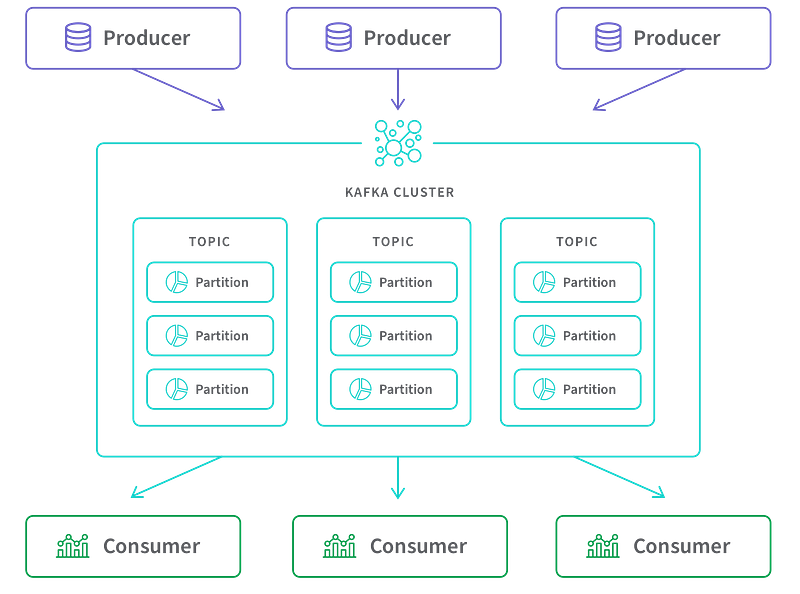
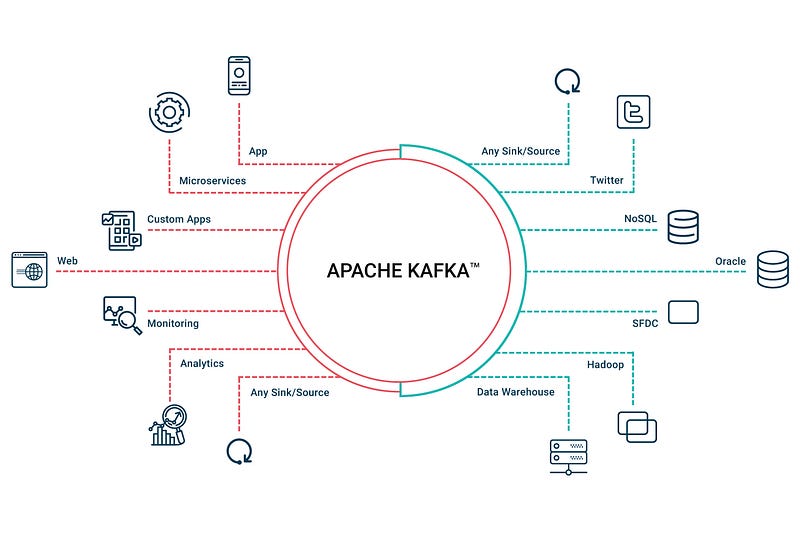
Apache Kafka is an open-source, distributed event streaming platform that can handle real-time data feeds. It is used to build real-time data pipelines and streaming applications. It is a publish-subscribe based messaging system that allows the sending of messages from one application to one or more applications.
- Apache Kafka works by allowing producers to send data to topics, which are partitions of a logical log. Consumers can then subscribe to these topics and receive the data in real-time.
- Kafka stores all published records — whether or not they have been consumed — using a configurable retention period. This allows real-time data streaming as well as batch processing. Apache Kafka uses a publish-subscribe pattern and it is designed to handle high-throughput, low-latency, and fault-tolerant data streams.
Batch Processing
In batch processing, the jobs with similar resource requirements are batched together, processed and run together as a group. It’s one of the simplest and economical method of job processing with no time limit for any batch.
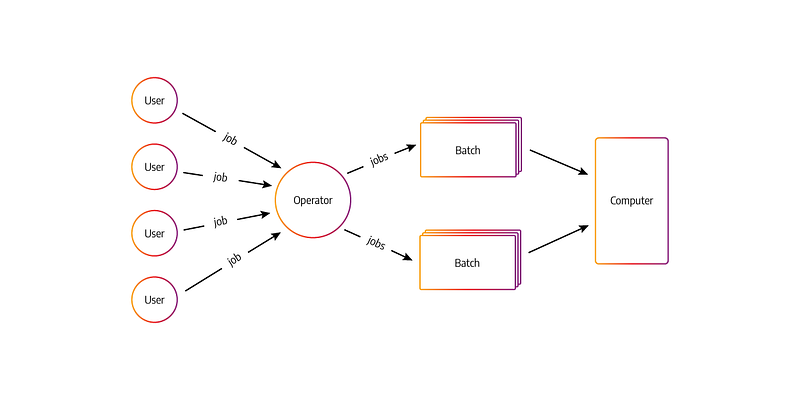
The jobs/transactions are sorted and grouped/batched together then transaction files are created as well as sorted and lastly the master file is updated with the time of processing/run.
The general process of batch processing works as follows:
- Data Collection: Data is collected from various sources, such as databases, files, or APIs, and stored in a temporary location, such as a file system or a data lake.
- Data Processing: The collected data is processed by a batch processing engine, such as Apache Hadoop or Apache Spark. This step may include tasks such as data validation, data mapping, data manipulation, and data analysis.
- Data Loading: The processed data is loaded into the destination system, such as a data warehouse or a data lake.
- Data Archiving: The processed data is archived for future reference.
import pandas as pd
from pyspark.sql import SparkSession

# Data Collection
# Assume we have collected data from various sources and stored it in temporary files
source_files = ["data_source1.csv", "data_source2.csv", "data_source3.json"]

# Data Processing
# Create a SparkSession
spark = SparkSession.builder.appName("BatchProcessingExample").getOrCreate()

# Read and process data using Spark
df = spark.read.format("csv").option("header", "true").load(source_files)
# Perform data validation, mapping, manipulation, and analysis using Spark DataFrame operations

# Data Loading
# Write the processed data to the destination system (e.g., data warehouse or data lake)
df.write.format("parquet").save("processed_data.parquet")

# Data Archiving
# Archive the processed data for future reference (e.g., move it to a different location or store in a separate directory)
archived_data_path = "archive/processed_data.parquet"
df.write.format("parquet").save(archived_data_path)

# Stop the SparkSession
spark.stop()
The batch processing is usually scheduled to run at specific intervals, such as daily or weekly. The interval is chosen based on the nature of the data and the requirements of the business. The processing can be done on a single machine or distributed across a cluster of machines for better performance and scalability.
Batch processing is well-suited for tasks such as data aggregation, data mining, and data warehousing. These tasks require large amounts of data to be processed and analyzed, and the results are not needed in real-time.
The advantage is that many jobs/transactions are completed at one time in one go.
Examples -
Credit card transactions
Bill generation etc
Stream Processing
This is also called as real time processing in which transactions/jobs are accepted and processed in the real time and with certain deadlines. It’s action or event oriented. Stream processing systems feed themselves on real time actions and the handles the records in micro batches.
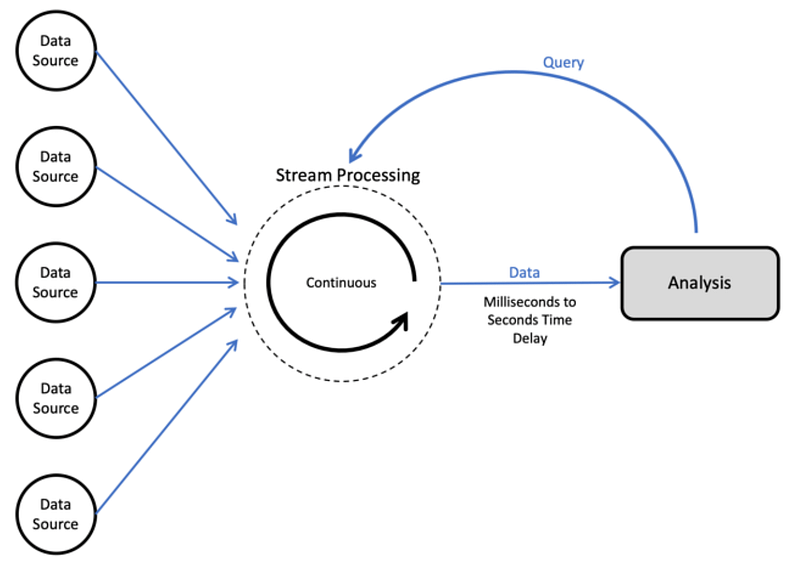
It queries over the rolling over period and latencies are in seconds or milliseconds.
It’s a costly and complex processing which requires unique hardwares and OS programs.
The general process of stream processing works as follows:
- Data Ingestion: Data is ingested from various sources, such as sensors, log files, or social media, and is sent to a stream processing engine, such as Apache Kafka or Apache Storm.
- Data Processing: The incoming data is processed by the stream processing engine in real-time. This step may include tasks such as data validation, data mapping, data manipulation, and data analysis.
- Data Output: The processed data is then sent to a destination system, such as a data warehouse or a data lake, for further analysis or to trigger an action.
The stream processing is designed to handle high-throughput, low-latency, and fault-tolerant data streams. The data is processed as it arrives, rather than waiting for a batch of data to be collected. Stream processing is well-suited for tasks such as real-time analytics, anomaly detection, and fraud detection. These tasks require data to be analyzed and acted on immediately, in real-time.
Implementation —
from pyspark.sql import SparkSession
from pyspark.sql.functions import *

# Data Ingestion
# Assume we have a streaming source, such as Apache Kafka, that provides continuous data streams
spark = SparkSession.builder.appName("StreamProcessingExample").getOrCreate()

# Read data from the streaming source
streaming_df = spark.readStream.format("kafka") \
    .option("kafka.bootstrap.servers", "localhost:9092") \
    .option("subscribe", "topic_name") \
    .load()

# Data Processing
# Perform real-time data processing using Spark DataFrame operations
processed_df = streaming_df.selectExpr("CAST(key AS STRING)", "CAST(value AS STRING)") \
    .withColumn("processed_value", upper(col("value"))) \
    .select("key", "processed_value")

# Data Output
# Write the processed data to a destination system or perform some action
query = processed_df.writeStream.outputMode("update") \
    .format("console") \
    .start()

# Await termination
query.awaitTermination()
Stream processing engines like Apache Kafka or Apache Storm uses a publish-subscribe pattern, where the data is sent to topics, and the consumers can subscribe to these topics and receive the data in real-time. This allows for multiple consumers to receive the data and process it independently.
Examples of Stream Processing —
POS terminals
Reservation Systems etc
Apache Spark
Apache spark is a distributed parallel processing system for big data and machine learning. It can quickly process the tasks with large volume of data. It provides high level API and optimized engine based on hadoop map reduce.
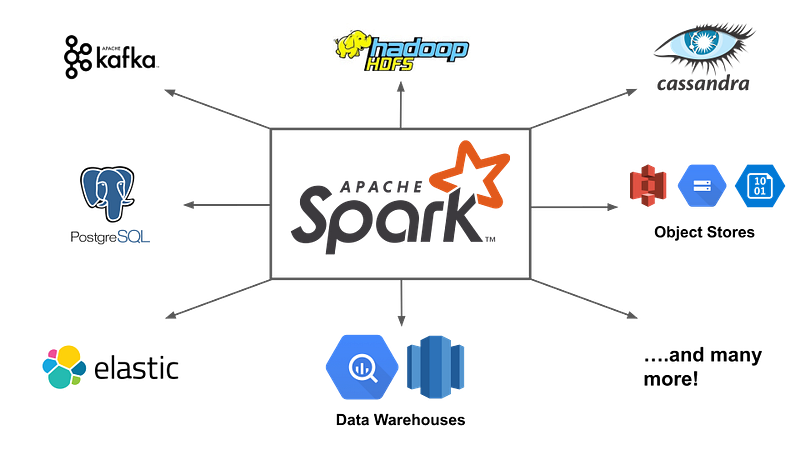
The general process of how Apache Spark works is as follows:
- Data Input: Data is input into Spark from various sources, such as files, databases, or streams.
- Data Resilience: Spark automatically replicates the data across multiple nodes in a cluster, ensuring that the data is available even if a node fails.
- Data Processing: Spark applies a series of operations to the data, such as filtering, mapping, and aggregating, using a core component called Resilient Distributed Datasets (RDD). RDDs are fault-tolerant and can be cached in memory for faster processing.
- Data Output: The processed data is then output to a variety of storage systems, such as HDFS, S3, or databases.
- Job Scheduling: Spark uses a scheduler called the cluster manager to schedule the execution of tasks across the cluster. The scheduler also handles the distribution of data across the nodes, and it can use various scheduling algorithms such as FIFO, Fair Scheduler, and Capacity Scheduler.
Implementation —
from pyspark.sql import SparkSession

# Data Input
# Create a SparkSession
spark = SparkSession.builder.appName("SparkExample").getOrCreate()

# Read data from various sources, such as files, databases, or streams
data = spark.read.csv("input.csv", header=True, inferSchema=True)

# Data Processing
# Apply various operations to the data using Resilient Distributed Datasets (RDD) or DataFrames
filtered_data = data.filter(data["age"] > 30)
aggregated_data = filtered_data.groupBy("country").count()

# Data Output
# Write the processed data to various storage systems
aggregated_data.write.csv("output.csv")

# Stop the SparkSession
spark.stop()- Apache Spark also offers a high-level API for data manipulation and analysis, called DataFrames and Datasets, which is built on top of RDDs. DataFrames and Datasets provide a more expressive, higher-level API for data manipulation and analysis, and it can leverage Spark SQL for querying data using SQL syntax.
- Apache Spark also offers a machine learning library called MLlib, which provides a variety of machine learning algorithms and tools for data analysis and modeling.
Implementation —
from pyspark.sql import SparkSession
from pyspark.sql.functions import col, count, sum, avg

# Create a SparkSession
spark = SparkSession.builder.appName("SparkExample").getOrCreate()

# Read data from a CSV file
data = spark.read.csv("data.csv", header=True, inferSchema=True)

# Basic Functions

# Show the schema of the DataFrame
data.printSchema()

# Show the first few rows of the DataFrame
data.show()

# Select specific columns from the DataFrame
selected_data = data.select("col1", "col2")

# Filter rows based on a condition
filtered_data = data.filter(col("age") > 30)

# Group by a column and perform aggregation
grouped_data = data.groupBy("country").agg(count("age"), avg("salary"))

# Advanced Functions

# Perform a join operation with another DataFrame
joined_data = data.join(other_data, on=["key"])

# Perform a union operation with another DataFrame
union_data = data.union(other_data)

# Apply a user-defined function to a column
udf_function = lambda x: x * 2
transformed_data = data.withColumn("new_col", udf_function(col("col1")))

# Perform a window function
from pyspark.sql.window import Window
window_spec = Window.partitionBy("country").orderBy("age")
ranked_data = data.withColumn("rank", rank().over(window_spec))

# Write the DataFrame to a Parquet file
data.write.parquet("output.parquet")

# Stop the SparkSession
spark.stop()- Apache Spark can be used to process data in batch, real-time, and near-real-time processing use cases, it also support various programming languages like Python, Java, R, SQL and Scala.
Advantages of Spark —
- Fault tolerant
- Great Speed
- Real time stream processing
- Dynamic Nature
- Provides advanced analytics
To start with, open Interactive CLI and if the Spark is already installed then type
pyspark
Pyspark is the Spark Python API which provides spark programming model to the Python. It also provides spark SQL which is Apache spark module to work with structured data.
To import pyspark, spark context and spark conf use —
from pyspark import SparkContext
s = SparkContext(master = 'local[4]')
Some of the most useful commands that you must know —
sc.appName : To return application name
sc.applicationID : To return application ID
sc.version : To see Spark Context Version
sc.master : To connect to the master URL
sc.sparkUser() : To get the name of the spark user
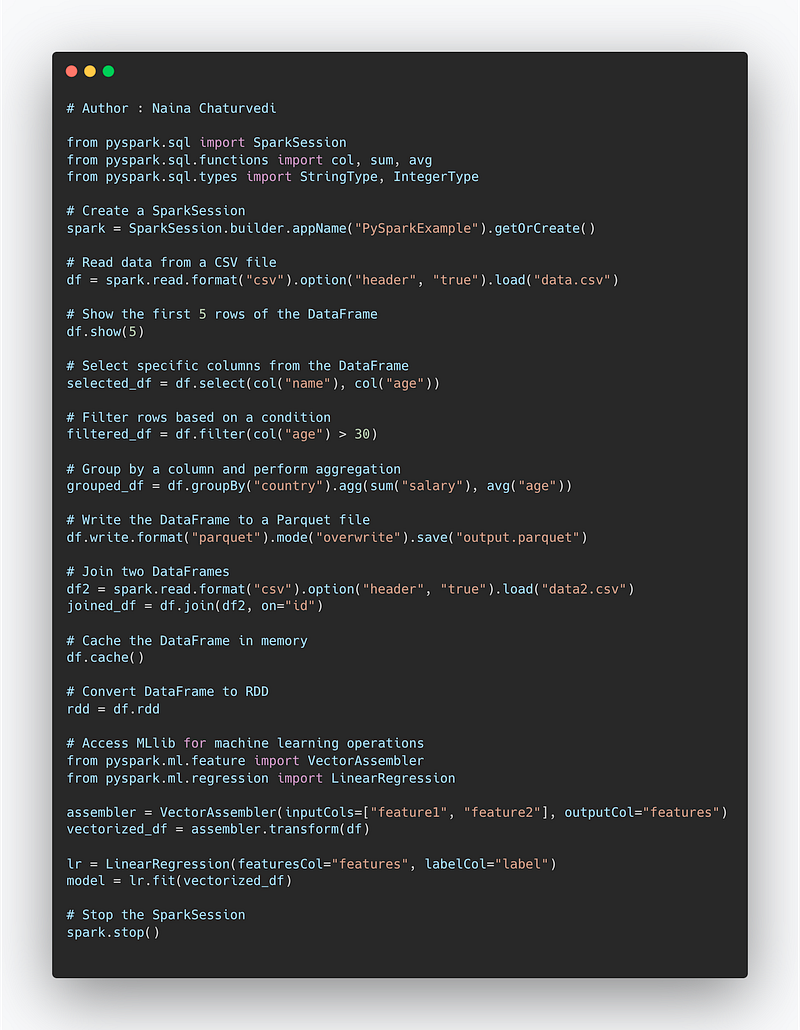
Here are some of the most important commands in PySpark:
SparkSession: This is the entry point to any Spark functionality. It is used to configure the Spark application and connect to the Spark cluster.read: This command is used to read data from various sources, such as CSV files, JSON files, or databases, and return a DataFrame.show: This command is used to display the first n rows of a DataFrame.select: This command is used to select specific columns from a DataFrame.filter: This command is used to filter rows from a DataFrame based on a given condition.groupBy: This command is used to group rows in a DataFrame based on a given column.agg: This command is used to perform aggregation operations on a DataFrame, such as sum, count, or average.write: This command is used to write the DataFrame to a variety of storage systems, such as HDFS, S3, or databases.join: This command is used to join two DataFrames based on a common column.cache: This command is used to cache a DataFrame in memory for faster access.rdd: This command is used to convert a DataFrame to an RDD (Resilient Distributed Dataset)ml: This command is used to access the machine learning library MLlib, which provides a variety of machine learning algorithms and tools for data analysis and modeling.
That said, one can also parallelize the collections, apply functions, select, filter the data, Sort and Iterate over the data. All this we will cover through a project to be housed here ( coming soon)
Implementation —
from pyspark.sql import SparkSession
from pyspark.sql.functions import col, sum, avg
from pyspark.sql.types import StringType, IntegerType

# Create a SparkSession
spark = SparkSession.builder.appName("PySparkExample").getOrCreate()

# Read data from a CSV file
df = spark.read.format("csv").option("header", "true").load("data.csv")

# Show the first 5 rows of the DataFrame
df.show(5)

# Select specific columns from the DataFrame
selected_df = df.select(col("name"), col("age"))

# Filter rows based on a condition
filtered_df = df.filter(col("age") > 30)

# Group by a column and perform aggregation
grouped_df = df.groupBy("country").agg(sum("salary"), avg("age"))

# Write the DataFrame to a Parquet file
df.write.format("parquet").mode("overwrite").save("output.parquet")

# Join two DataFrames
df2 = spark.read.format("csv").option("header", "true").load("data2.csv")
joined_df = df.join(df2, on="id")

# Cache the DataFrame in memory
df.cache()

# Convert DataFrame to RDD
rdd = df.rdd

# Access MLlib for machine learning operations
from pyspark.ml.feature import VectorAssembler
from pyspark.ml.regression import LinearRegression

assembler = VectorAssembler(inputCols=["feature1", "feature2"], outputCol="features")
vectorized_df = assembler.transform(df)

lr = LinearRegression(featuresCol="features", labelCol="label")
model = lr.fit(vectorized_df)

# Stop the SparkSession
spark.stop()
Snippet —
Apache Kafka
In simple words, Apache Kafka is a open source distributed data streaming platform which is used for stream processing, build real time pipelines, process jobs in real time and for data integration.
Advantages of Apache Kafka —
- Low latency
- High throughput
- Fault tolerant
- Highly scalable
- Distributed
- Provides High Concurrency
How Apache Kafka works?
The producers spread message over many block partitions on various machines. Each partition is nothing but a small queue. Consumers are then fed with topic records from each queue/kafka cluster.
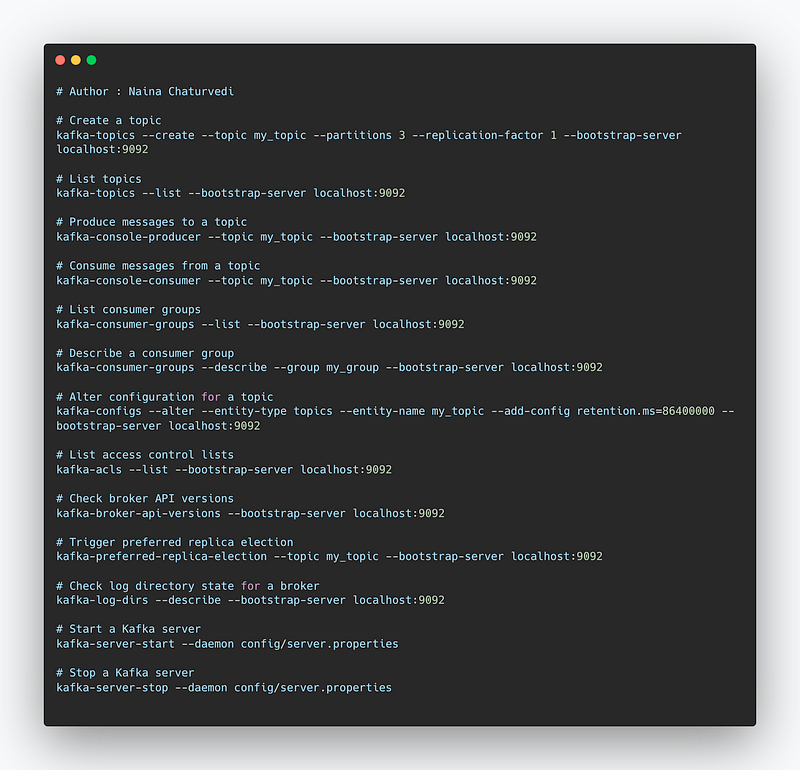
Here are some of the most important commands in Apache Kafka:
kafka-topics: This command is used to create, delete, or list topics in a Kafka cluster.kafka-console-producer: This command is used to produce messages to a topic.kafka-console-consumer: This command is used to consume messages from a topic.kafka-consumer-groups: This command is used to list, describe, or reset consumer groups.kafka-configs: This command is used to list, describe, or alter configuration for topics, brokers, or clients.kafka-acls: This command is used to manage and list access control lists for Kafka resources.kafka-broker-api-versions: This command is used to check the version of the api that a broker supports.kafka-preferred-replica-election: This command is used to trigger a preferred replica election for all replicas for a given topic or topics.kafka-log-dirs: This command is used to check the state of the log directories for a broker.kafka-server-start: This command is used to start a Kafka server.kafka-server-stop: This command is used to stop a Kafka server.
Implementation —
# Create a topic
kafka-topics --create --topic my_topic --partitions 3 --replication-factor 1 --bootstrap-server localhost:9092

# List topics
kafka-topics --list --bootstrap-server localhost:9092

# Produce messages to a topic
kafka-console-producer --topic my_topic --bootstrap-server localhost:9092

# Consume messages from a topic
kafka-console-consumer --topic my_topic --bootstrap-server localhost:9092

# List consumer groups
kafka-consumer-groups --list --bootstrap-server localhost:9092

# Describe a consumer group
kafka-consumer-groups --describe --group my_group --bootstrap-server localhost:9092

# Alter configuration for a topic
kafka-configs --alter --entity-type topics --entity-name my_topic --add-config retention.ms=86400000 --bootstrap-server localhost:9092

# List access control lists
kafka-acls --list --bootstrap-server localhost:9092

# Check broker API versions
kafka-broker-api-versions --bootstrap-server localhost:9092

# Trigger preferred replica election
kafka-preferred-replica-election --topic my_topic --bootstrap-server localhost:9092

# Check log directory state for a broker
kafka-log-dirs --describe --bootstrap-server localhost:9092

# Start a Kafka server
kafka-server-start --daemon config/server.properties

# Stop a Kafka server
kafka-server-stop --daemon config/server.properties
Snippet —
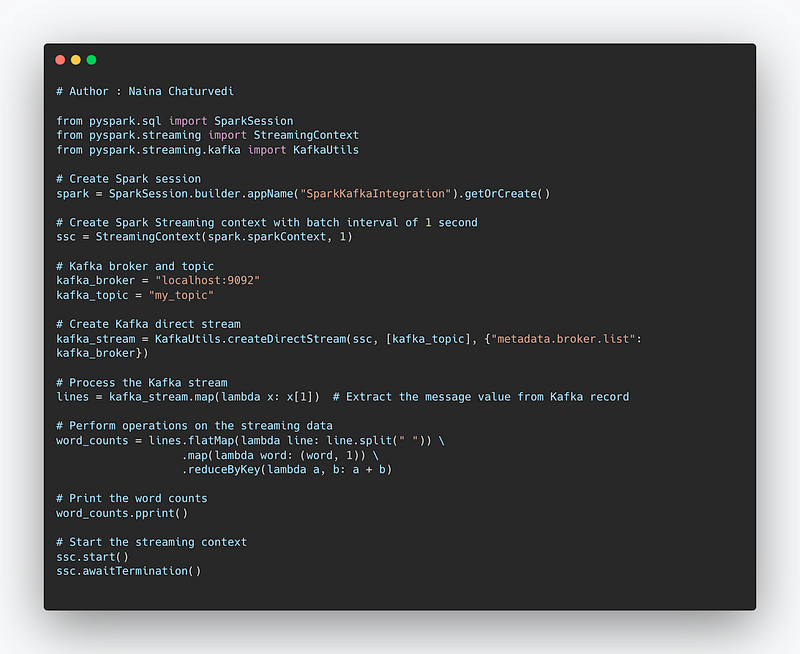
Project Code—
from pyspark.sql import SparkSession
from pyspark.streaming import StreamingContext
from pyspark.streaming.kafka import KafkaUtils

# Create Spark session
spark = SparkSession.builder.appName("SparkKafkaIntegration").getOrCreate()

# Create Spark Streaming context with batch interval of 1 second
ssc = StreamingContext(spark.sparkContext, 1)

# Kafka broker and topic
kafka_broker = "localhost:9092"
kafka_topic = "my_topic"

# Create Kafka direct stream
kafka_stream = KafkaUtils.createDirectStream(ssc, [kafka_topic], {"metadata.broker.list": kafka_broker})

# Process the Kafka stream
lines = kafka_stream.map(lambda x: x[1])  # Extract the message value from Kafka record

# Perform operations on the streaming data
word_counts = lines.flatMap(lambda line: line.split(" ")) \
                   .map(lambda word: (word, 1)) \
                   .reduceByKey(lambda a, b: a + b)

# Print the word counts
word_counts.pprint()

# Start the streaming context
ssc.start()
ssc.awaitTermination()
Snippet —
A project video covering Stream processing, Apache spark and Kafka coming soon ( subscribe today) —
That’s it for now.
Find Day 24 Below —
Let me know if you have questions in the comment section below. Subscribe/ Follow, Like/Clap as it would encourage me to write more in my free time
Stay Tuned!!
Read more —
All the Complete System Design Series Parts —
6. Networking, How Browsers work, Content Network Delivery ( CDN)
Github —
For Python Projects —
For complete 60 days of Data Science and ML : Day 1 — Day 60 : Quick Recap of 60 days of Data Science and ML
Follow for more updates. Stay tuned and keep coding!
For other projects, tune to —
Build Machine Learning Pipelines( With Code)
Recurrent Neural Network with Keras
Clustering Geolocation Data in Python using DBSCAN and K-Means
Facial Expression Recognition using Keras
Hyperparameter Tuning with Keras Tuner
Custom Layers in Keras


