
Day 22 of 30 days of Data Engineering Series with Projects

Welcome back peeps to Day 22 of Data Engineering Series with Projects!
In this we will cover —
Big Data
Types of Big Data
Big data tools
SQL and NoSQL Databases
Hadoop
Hadoop HDFS
Hadoop Yarn
Hadoop Map Reduce
Pre-requisite to Day 22 is to complete Day 1–21( link below):
Day 3 : Complete Advanced Python for Data Engineering — Part 2
Day 18 : Data Visualization basics, Data Visualization Projects, Data Visualization using Plotly and Bokeh, Data Profiling, Summary Functions, Indexing, Grouping, Linear Regression, Multi Linear Regression, Polynomial Regression, Regression, Support Vector Regression, Decision Tree Regression, Random Forest Regression, Feature Engineering, GroupBy Features, Categorical and Numerical Features, Missing Value Analysis, Fill the missing Values, Unique Value Analysis, Univariate Analysis, Bivariate Analysis, Multivariate Analysis, Correlation Analysis, Spearman’s ρ, Pearson’s r, Kendall’s τ, Cramér’s V (φc), Phik (φk)
Day 20 : ETL ( Extract, Tranform and Load) basics, Why ETL is important?, How ETL works, ETL Tools
Day 21 : Structured Data, Semi Structured Data, Unstructured Data, Data Warehouse, Data Mart, Data Lake
Projects Videos —
All the projects, data structures, SQL, algorithms, system design, Data Science and ML , Data Analytics, Data Engineering, , Implemented Data Science and ML projects, Implemented Data Engineering Projects, Implemented Deep Learning Projects, Implemented Machine Learning Ops Projects, Implemented Time Series Analysis and Forecasting Projects, Implemented Applied Machine Learning Projects, Implemented Tensorflow and Keras Projects, Implemented PyTorch Projects, Implemented Scikit Learn Projects, Implemented Big Data Projects, Implemented Cloud Machine Learning Projects, Implemented Neural Networks Projects, Implemented OpenCV Projects,Complete ML Research Papers Summarized, Implemented Data Analytics projects, Implemented Data Visualization Projects, Implemented Data Mining Projects, Implemented Natural Leaning Processing Projects, MLOps and Deep Learning, Applied Machine Learning with Projects Series, PyTorch with Projects Series, Tensorflow and Keras with Projects Series, Scikit Learn Series with Projects, Time Series Analysis and Forecasting with Projects Series, ML System Design Case Studies Series videos will be published on our youtube channel ( just launched).
Subscribe today!
Tech Newsletter —
If you are interested, you can join my newsletter through which I send tech interview tips, techniques, patterns, hacks — Software Development, ML, Data Science, Startups and Technology projects to more than 30K readers. You can subscribe to Ignito:
System Design Case Studies — In Depth
Design Instagram
Design Netflix
Design Reddit
Design Amazon
Design Messenger App
Design Twitter
Design URL Shortener
Design Dropbox
Design Youtube
Design API Rate Limiter
Design Web Crawler
Design Amazon Prime Video
Design Facebook’s Newsfeed
Design Yelp
Design Uber
Design Tinder
Design Tiktok
Design Whatsapp
Most Popular System Design Questions
Mega Compilation : Solved System Design Case studies
Let’s get started!
- Big Data refers to extremely large and complex sets of data that cannot be easily processed or analyzed using traditional data processing tools.
- There are several types of big data, including structured data (such as data in a relational database), semi-structured data (such as data in a CSV or JSON file), and unstructured data (such as data in a text document or image).
- Big data tools include technologies such as Hadoop, Spark, and Storm, which are designed to process and analyze large amounts of data in a distributed computing environment. Other tools include NoSQL databases, such as MongoDB and Cassandra, and SQL databases, such as MySQL and PostgreSQL.
- SQL (Structured Query Language) databases are used for managing and querying structured data, and are based on the relational model. NoSQL databases, on the other hand, are designed to handle large amounts of unstructured and semi-structured data and are based on a variety of data models, such as document, key-value, and graph.
- Hadoop is an open-source software framework for distributed storage and processing of large data sets on clusters of commodity hardware. It includes two core components: HDFS (Hadoop Distributed File System) and YARN (Yet Another Resource Negotiator).
- HDFS is a distributed file system that stores data across multiple machines in a cluster. It is designed to handle large amounts of data and allows for high throughput access to this data.
- YARN is a resource management system that coordinates the allocation of resources across the cluster for running big data applications.
- Hadoop MapReduce is a programming model for processing large data sets that is built on top of HDFS and YARN. It allows developers to write parallelized code that can be run on a cluster of machines, making it well-suited for big data processing tasks.
Big Data
Big data is all about handling large amount of data and. process huge volumes and generate insights. Tools that are used for big data — Hadoop, spark, flink etc
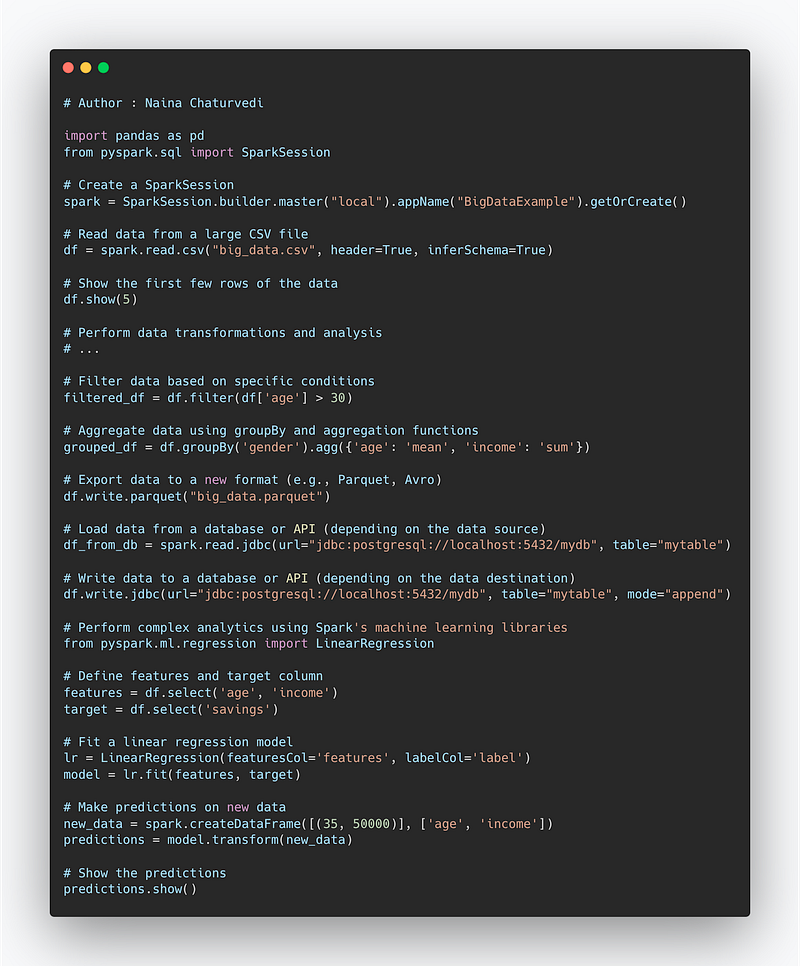
Code Example —
import pandas as pd
from pyspark.sql import SparkSession

# Create a SparkSession
spark = SparkSession.builder.master("local").appName("BigDataExample").getOrCreate()

# Read data from a large CSV file
df = spark.read.csv("big_data.csv", header=True, inferSchema=True)

# Show the first few rows of the data
df.show(5)

# Perform data transformations and analysis
# ...

# Filter data based on specific conditions
filtered_df = df.filter(df['age'] > 30)

# Aggregate data using groupBy and aggregation functions
grouped_df = df.groupBy('gender').agg({'age': 'mean', 'income': 'sum'})

# Export data to a new format (e.g., Parquet, Avro)
df.write.parquet("big_data.parquet")

# Load data from a database or API (depending on the data source)
df_from_db = spark.read.jdbc(url="jdbc:postgresql://localhost:5432/mydb", table="mytable")

# Write data to a database or API (depending on the data destination)
df.write.jdbc(url="jdbc:postgresql://localhost:5432/mydb", table="mytable", mode="append")

# Perform complex analytics using Spark's machine learning libraries
from pyspark.ml.regression import LinearRegression

# Define features and target column
features = df.select('age', 'income')
target = df.select('savings')

# Fit a linear regression model
lr = LinearRegression(featuresCol='features', labelCol='label')
model = lr.fit(features, target)

# Make predictions on new data
new_data = spark.createDataFrame([(35, 50000)], ['age', 'income'])
predictions = model.transform(new_data)

# Show the predictions
predictions.show()
Huge amount of data is used to derive insights in order to take informed decisions and make strategic moves.
Snippet —
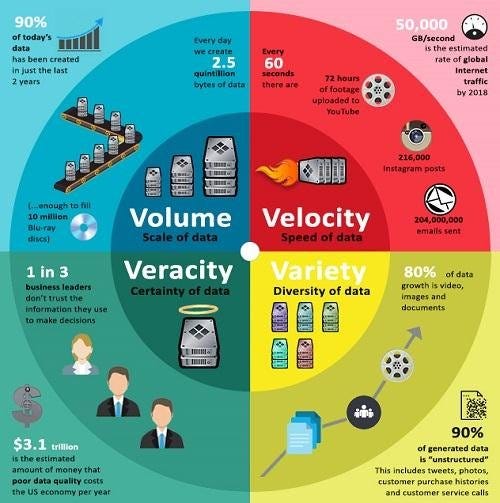
There are 6 main points wrt Big data —
Volume — Huge amount of data
Variety — Data from various sources in different formats
Value — Extract useful data
Velocity — High speed processing of the data
Veracity — It covers inconsistencies in the data
Variability — It covers the ways in which the big data can be used in different formats.
Types of Big Data —
It can Structured Data, unstructured data, semi-structured, geospatial data, Operational data and Open source data.
It is used to identify bottleneck for highly scalable distributed systems.
Big data tools include —
Cassandra as NoSQL Database
from cassandra.cluster import Cluster

# Connect to Cassandra cluster
cluster = Cluster(['127.0.0.1'])
session = cluster.connect()

# Create a keyspace
session.execute("CREATE KEYSPACE IF NOT EXISTS my_keyspace WITH replication = {'class': 'SimpleStrategy', 'replication_factor': '1'}")

# Create a table
session.execute("CREATE TABLE IF NOT EXISTS my_keyspace.my_table (id UUID PRIMARY KEY, name TEXT)")

# Insert data into the table
session.execute("INSERT INTO my_keyspace.my_table (id, name) VALUES (uuid(), 'John Doe')")

# Retrieve data from the table
result = session.execute("SELECT * FROM my_keyspace.my_table")
for row in result:
    print(row.id, row.name)

# Close the session and cluster
session.shutdown()
cluster.shutdown()
Apache Spark for Realtime Processing
from pyspark.sql import SparkSession

# Create SparkSession
spark = SparkSession.builder.appName("Real-time Processing").getOrCreate()

# Read data from a streaming source
df = spark.readStream.format("csv").option("header", "true").load("input.csv")

# Perform transformations on the streaming data
transformed_df = df.select("name", "age").filter("age >= 18")

# Write the transformed data to an output sink
query = transformed_df.writeStream.format("console").outputMode("append").start()

# Start the streaming query
query.awaitTermination()

# Stop the SparkSession
spark.stop()
Kafka for Messaging System
from kafka import KafkaProducer, KafkaConsumer

# Create a Kafka producer
producer = KafkaProducer(bootstrap_servers='localhost:9092')

# Send a message to a Kafka topic
producer.send('my_topic', b'Hello, Kafka!')

# Create a Kafka consumer
consumer = KafkaConsumer('my_topic', bootstrap_servers='localhost:9092')

# Consume messages from the Kafka topic
for message in consumer:
    print(message.value)

# Close the Kafka producer and consumer
producer.close()
consumer.close()
Splunk for Log analysis platform
Hive for data warehousing
from pyhive import hive

# Connect to Hive server
connection = hive.connect(host='localhost', port=10000, username='hiveuser')

# Create a Hive table
cursor = connection.cursor()
cursor.execute("CREATE TABLE IF NOT EXISTS my_table (id INT, name STRING)")

# Insert data into the table
cursor.execute("INSERT INTO my_table VALUES (1, 'John Doe')")

# Query data from the table
cursor.execute("SELECT * FROM my_table")
result = cursor.fetchall()
for row in result:
    print(row)

# Close the cursor and connection
cursor.close()
connection.close()
Hadoop for Data storage and processing
# Mapper (map.py)
import sys

# Iterate over each line of input
for line in sys.stdin:
    # Split the line into fields
    fields = line.strip().split(',')

    # Extract the customer and revenue
    customer = fields[0]
    revenue = float(fields[2])

    # Emit key-value pair: customer as key and revenue as value
    print(customer + '\t' + str(revenue))

# Reducer (reduce.py)
import sys

current_customer = None
total_revenue = 0.0

# Iterate over each line of input
for line in sys.stdin:
    # Split the line into key and value
    customer, revenue = line.strip().split('\t')

    # Convert revenue to float
    revenue = float(revenue)

    # If it's the same customer, accumulate the revenue
    if current_customer == customer:
        total_revenue += revenue
    # If it's a new customer, emit the total revenue for the previous customer
    else:
        if current_customer:
            print(current_customer + '\t' + str(total_revenue))
        current_customer = customer
        total_revenue = revenue

# Emit the total revenue for the last customer
if current_customer:
    print(current_customer + '\t' + str(total_revenue))
Pig for Data Analysis
-- Load data from HDFS
data = LOAD '/path/to/input/data' USING PigStorage(',');

-- Filter data
filtered_data = FILTER data BY age >= 18;

-- Group data by gender
grouped_data = GROUP filtered_data BY gender;

-- Calculate average age per gender
avg_age = FOREACH grouped_data GENERATE group AS gender, AVG(filtered_data.age) AS avg_age;

-- Store the result in HDFS
STORE avg_age INTO '/path/to/output/result' USING PigStorage(',');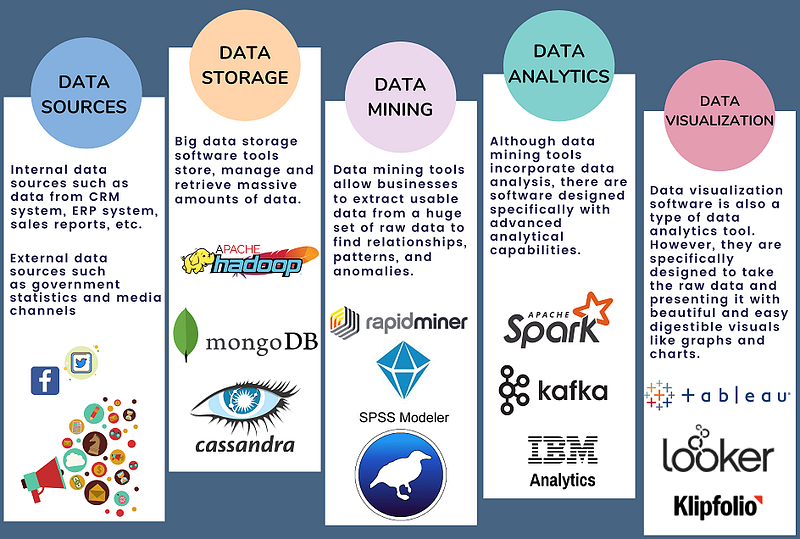
SQL and NoSQL Databases
SQL
As you design large systems ( or even smaller ones), you need to decide the inflow-processing and outflow of data coming- and getting processed in the system.
Data is generally organized in tables as rows and columns where columns represents attributes and rows represent records and keys have logical relationships. The SQL db schema always shows relational, tabular data following the ACID properties.
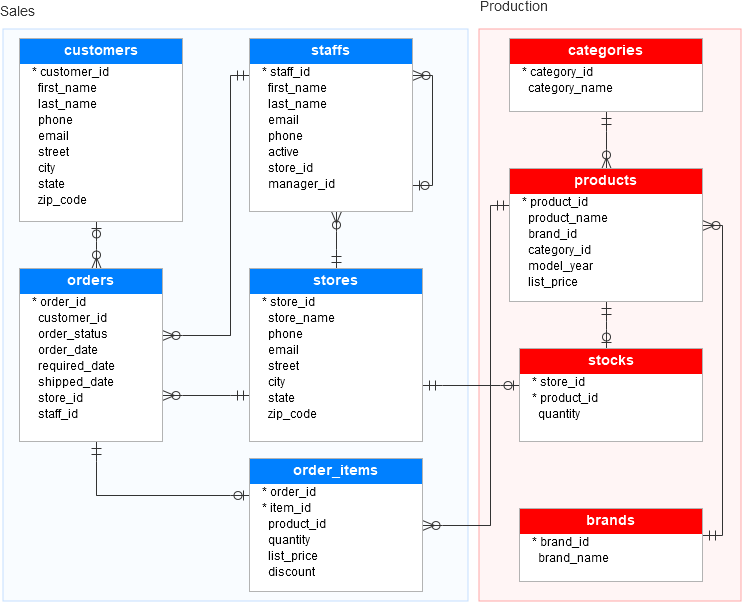
There are two types of databases to consider — SQL and NoSQL databases.
SQL databases have predefined schema and the data is organized/displayed in the form of tables. These databases use SQL ( Structured Query Language) to define, manipulate, update the data.
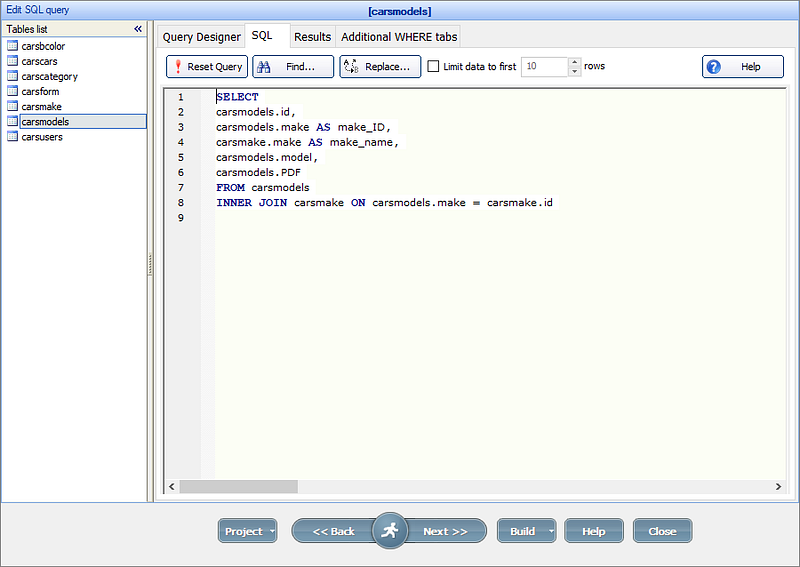
Relational databases like MS SQL Server, PostgreSQL, Sybase, MySQL Database, Oracle, etc. use SQL.
Implementation —
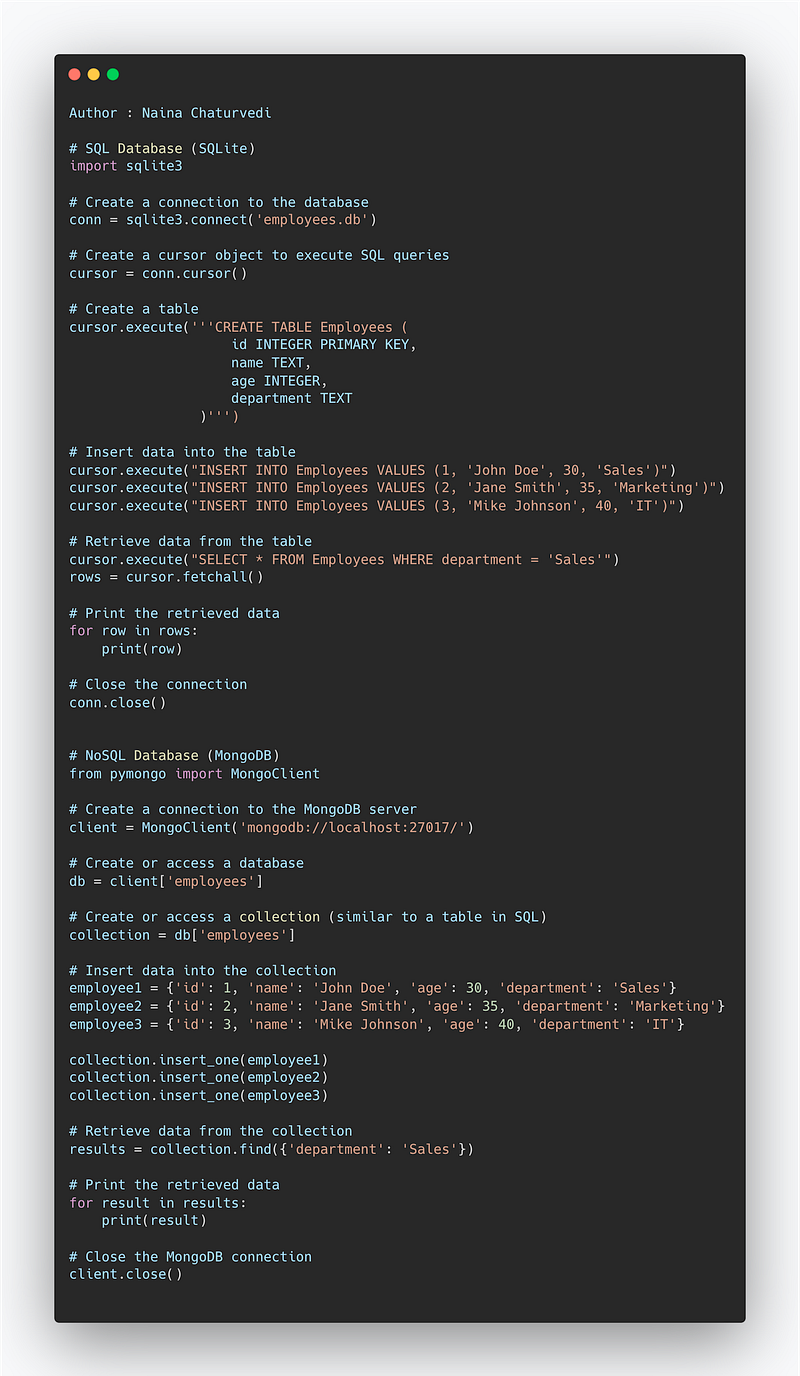
# SQL Database (SQLite)
import sqlite3

# Create a connection to the database
conn = sqlite3.connect('employees.db')

# Create a cursor object to execute SQL queries
cursor = conn.cursor()

# Create a table
cursor.execute('''CREATE TABLE Employees (
                    id INTEGER PRIMARY KEY,
                    name TEXT,
                    age INTEGER,
                    department TEXT
                )''')

# Insert data into the table
cursor.execute("INSERT INTO Employees VALUES (1, 'John Doe', 30, 'Sales')")
cursor.execute("INSERT INTO Employees VALUES (2, 'Jane Smith', 35, 'Marketing')")
cursor.execute("INSERT INTO Employees VALUES (3, 'Mike Johnson', 40, 'IT')")

# Retrieve data from the table
cursor.execute("SELECT * FROM Employees WHERE department = 'Sales'")
rows = cursor.fetchall()

# Print the retrieved data
for row in rows:
    print(row)

# Close the connection
conn.close()


# NoSQL Database (MongoDB)
from pymongo import MongoClient

# Create a connection to the MongoDB server
client = MongoClient('mongodb://localhost:27017/')

# Create or access a database
db = client['employees']

# Create or access a collection (similar to a table in SQL)
collection = db['employees']

# Insert data into the collection
employee1 = {'id': 1, 'name': 'John Doe', 'age': 30, 'department': 'Sales'}
employee2 = {'id': 2, 'name': 'Jane Smith', 'age': 35, 'department': 'Marketing'}
employee3 = {'id': 3, 'name': 'Mike Johnson', 'age': 40, 'department': 'IT'}

collection.insert_one(employee1)
collection.insert_one(employee2)
collection.insert_one(employee3)

# Retrieve data from the collection
results = collection.find({'department': 'Sales'})

# Print the retrieved data
for result in results:
    print(result)

# Close the MongoDB connection
client.close()
NoSQL
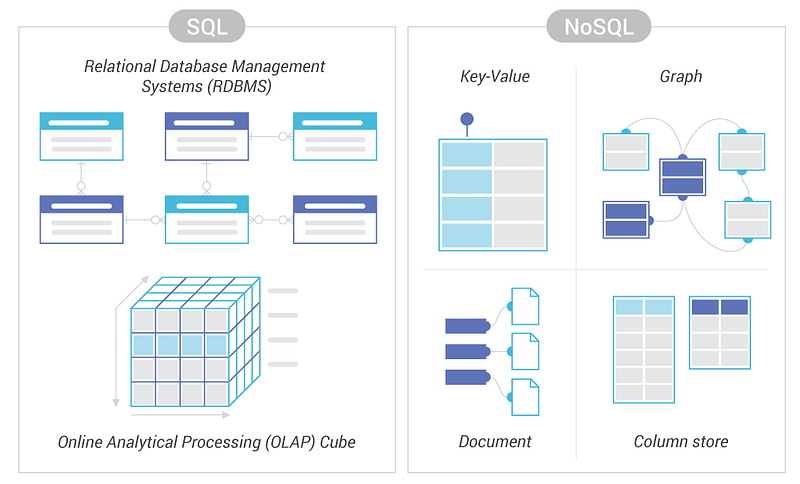
NoSQL databases on the other side, have no predefined schema which adds to more flexibility to use the formats that best suits the data — Work with graphs, column-oriented data, key-value and documents etc. They are generally preferred for hierarchical data, graphs ( e.g. social network) and to work with large data.
Some examples — Wide-column use Cassandra and HBase, Graph use Neo4j, Document use MongoDB and CouchDB, Key-value use Redis and DynamoDB,
A good comparison —
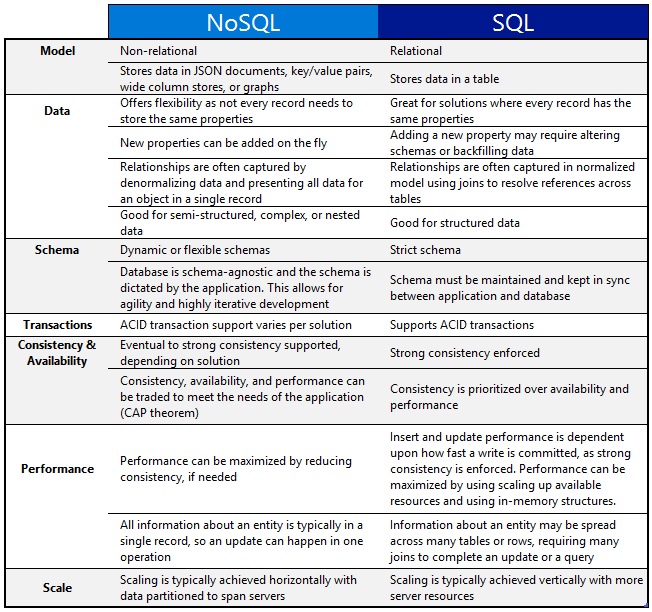
One of the important question that you might be asked, when to use which db?
When use SQL databases?
When you want to —
1. Scale Vertically — increase the processing power of your hardware
2. Work with predefined schema
3. Process queries and joins against structured data
4. Optimize the storage
5. Data is small
When to use NoSQL databases?
When you want to —
1. Scale horizontally
2. Work with graphs, column-oriented data, key-value and documents etc
3. Use multiple languages to query
4. Work with dynamic schema that has no predefined schema
5. Large Data
Snippet —
Hadoop
Hadoop is a open source fraework which is used for storing data and running applications on clusters that has master slave architecture. It supports processing large amount of data in a distributed environment.
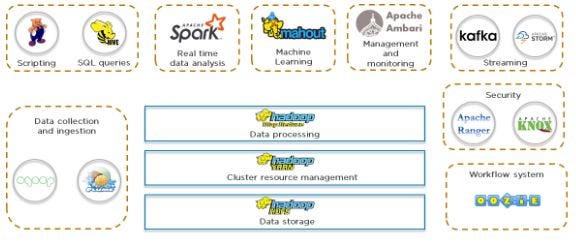
Advantages of Hadoop —
- Highly scalable
- Great Performance
- Good Data Locality
- Fault Tolerant
- Very Cost Effective
- Very High Throughput and Low Latency
- Schema Independent
- Supports various languages
It has three layers —
Hadoop HDFS — As a storage layer
# Import the required Hadoop libraries
from hdfs import InsecureClient

# Connect to the HDFS cluster
client = InsecureClient('http://localhost:50070')

# Create a new directory in HDFS
client.makedirs('/my_directory')

# Upload a file to HDFS
client.upload('/my_directory', 'local_file.txt')

# List files in a directory in HDFS
files = client.list('/my_directory')
for file in files:
    print(file)

# Download a file from HDFS
client.download('/my_directory/local_file.txt', 'local_destination.txt')

# Delete a file from HDFS
client.delete('/my_directory/local_file.txt')

# Close the connection
client.close()
Hadoop Yarn — As a resource management layer
# Import the required YARN libraries
from yarn_api_client import ApplicationMaster, ApplicationMasterConfig

# Configure the YARN application
config = ApplicationMasterConfig('my_application', memory='2g', vcores=2)

# Create the YARN application master
app_master = ApplicationMaster(config)

# Start the YARN application
app_master.start()

# Monitor the YARN application status
status = app_master.get_status()
print('YARN Application Status:', status)

# Stop the YARN application
app_master.stop()
Hadoop Map Reduce — Application Layer
# Import the required MapReduce libraries
from mrjob.job import MRJob

# Define a MapReduce job
class WordCount(MRJob):

    def mapper(self, _, line):
        words = line.split()
        for word in words:
            yield word, 1

    def reducer(self, key, values):
        yield key, sum(values)

# Create an instance of the WordCount job
job = WordCount(args=['input_file.txt'])

# Run the MapReduce job
with job.make_runner() as runner:
    runner.run()

    # Retrieve the output
    for key, value in job.parse_output(runner.cat_output()):
        print(key, value)
Snippet —
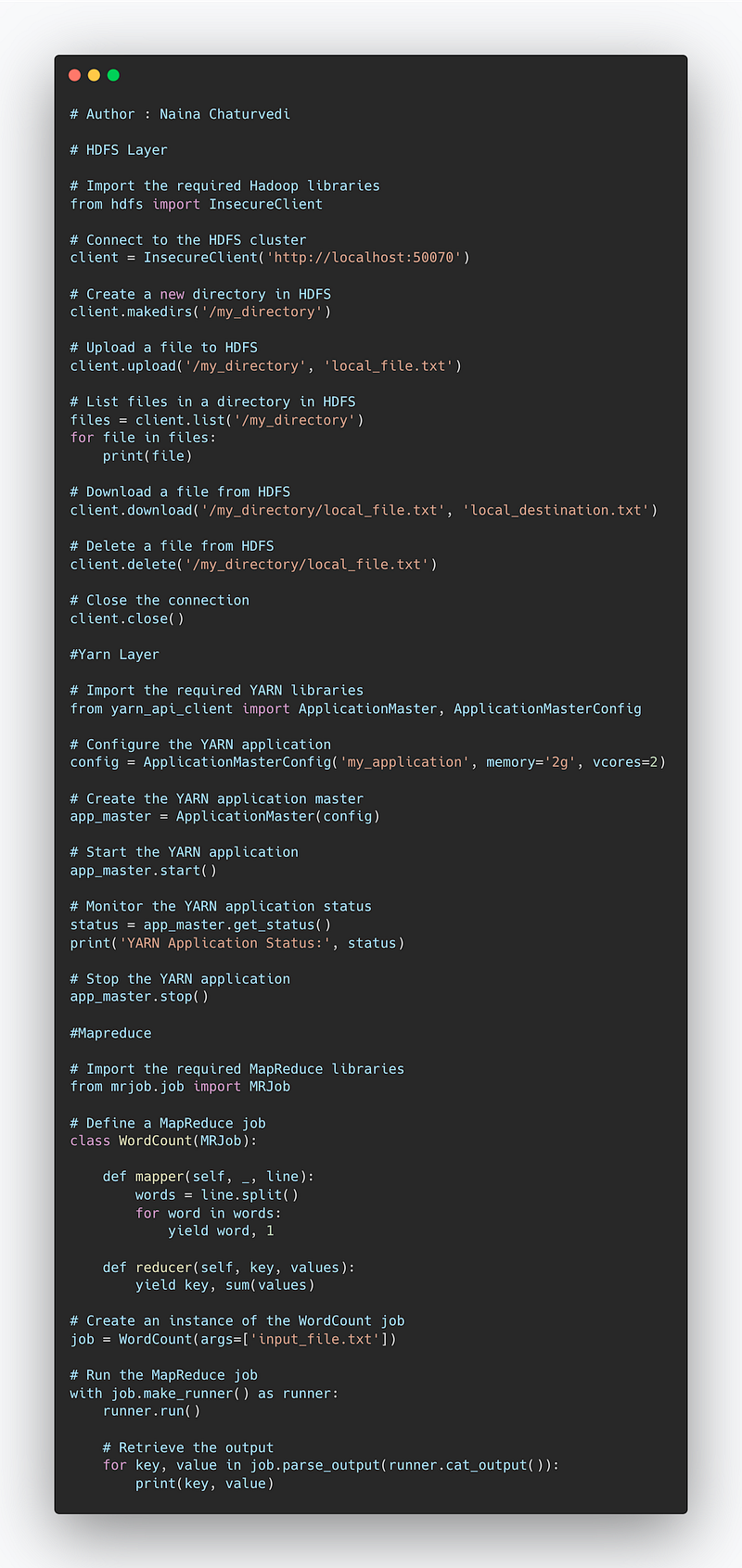
Hadoop HDFS —
HDFS stores large files reliably even in case of hardware failure. It provides high throughput by providing parallel processing capabilties.
Hadoop Yarn —
It is responsible to dynamically allocate pools of resources to the applications.
Map Reduce —
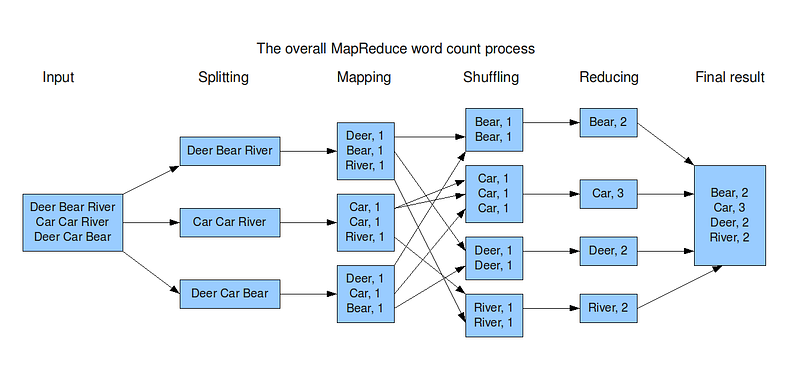
It’s a batch processing technique in which the engine takes huge amounts of data, processes ( map and reduce) and gives the output.
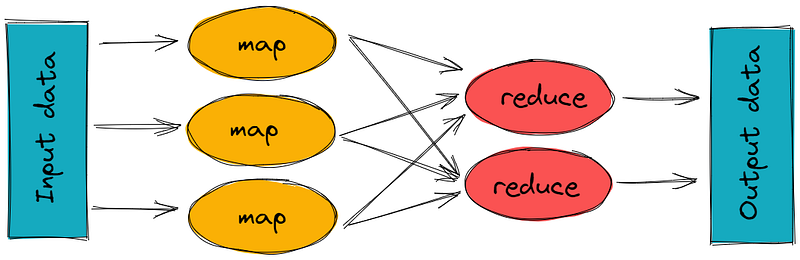
There are 2 stages of Map Reduce —
Map — the mapper takes the input, divides it into different tiny jobs and processes it as key-value pair( i.e the input data is stored in HDFS and given to the mapper)
Reduce, Shuffle and Sort — the reducer takes the data from mapper and processes the results which can be stored in HDFS. The combined or aggregated key-value pairs are shuffled, sorted and grouped together and sent as the output
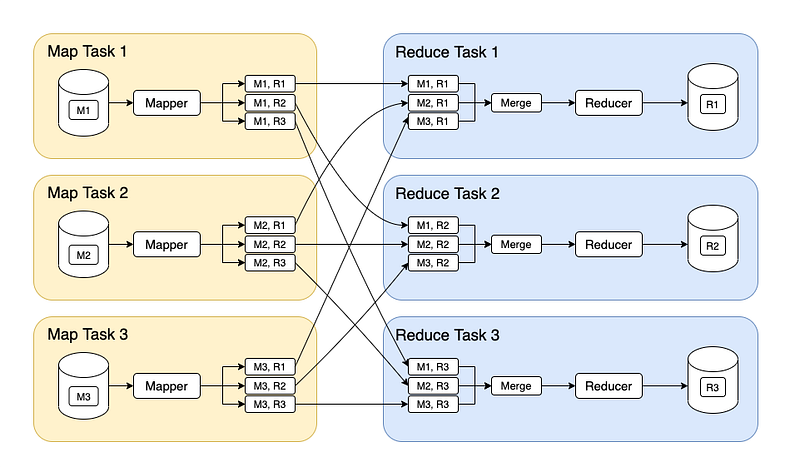
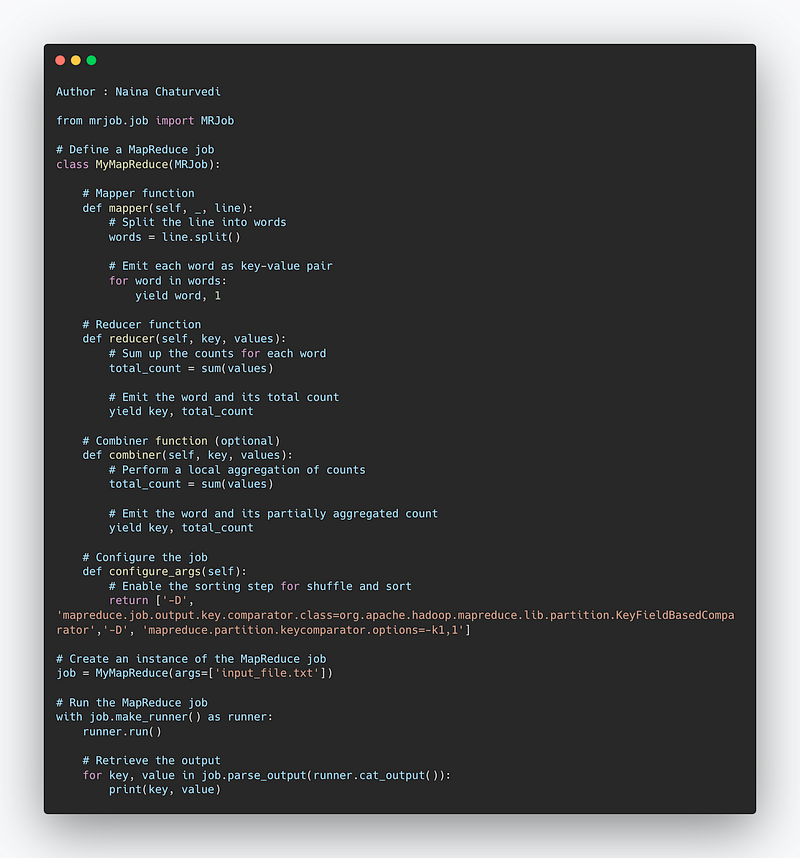
Implementation —
from mrjob.job import MRJob

# Define a MapReduce job
class MyMapReduce(MRJob):

    # Mapper function
    def mapper(self, _, line):
        # Split the line into words
        words = line.split()

        # Emit each word as key-value pair
        for word in words:
            yield word, 1

    # Reducer function
    def reducer(self, key, values):
        # Sum up the counts for each word
        total_count = sum(values)

        # Emit the word and its total count
        yield key, total_count

    # Combiner function (optional)
    def combiner(self, key, values):
        # Perform a local aggregation of counts
        total_count = sum(values)

        # Emit the word and its partially aggregated count
        yield key, total_count

    # Configure the job
    def configure_args(self):
        # Enable the sorting step for shuffle and sort
        return ['-D', 'mapreduce.job.output.key.comparator.class=org.apache.hadoop.mapreduce.lib.partition.KeyFieldBasedComparator',
                '-D', 'mapreduce.partition.keycomparator.options=-k1,1']

# Create an instance of the MapReduce job
job = MyMapReduce(args=['input_file.txt'])

# Run the MapReduce job
with job.make_runner() as runner:
    runner.run()

    # Retrieve the output
    for key, value in job.parse_output(runner.cat_output()):
        print(key, value)
Apart from this, to track the progress of each job — task tracker and job tracker are used. Job tracker manages all the resources and jobs and schedules across the cluster. The task tracker are called slaves that work on the directives of job trackers and deployed on each node in the cluster.
Snippet —
Why Map Reduce?
Helps in scalability
Helps in processing large amount of data in short amount of time
Helps is parallel processing
Extremely cost effective
Faster execution ( for both unstructured and semi-structured data)
Improves resilience and availability
Examples — Amazon’s Elastic Map Reduce and GCP’s Cloud Dataproc
A project video covering HDFS, YARN and Map reduce coming soon ( subscribe today) —
That’s it for now.
Find Day 23 Below :
Let me know if you have questions in the comment section below. Subscribe/ Follow, Like/Clap as it would encourage me to write more in my free time
Stay Tuned!!
Read more —
All the Complete System Design Series Parts —
6. Networking, How Browsers work, Content Network Delivery ( CDN)
Github —
For Python Projects —
For complete 60 days of Data Science and ML : Day 1 — Day 60 : Quick Recap of 60 days of Data Science and ML
Follow for more updates. Stay tuned and keep coding!
For other projects, tune to —
Build Machine Learning Pipelines( With Code)
Recurrent Neural Network with Keras
Clustering Geolocation Data in Python using DBSCAN and K-Means
Facial Expression Recognition using Keras
Hyperparameter Tuning with Keras Tuner
Custom Layers in Keras


