
Day 14 of 30 days of Data Analytics with Projects Series
Welcome back peeps. This is Day 14 of 30 days of data analytics.
What’s covered in 30 days of Data Analytics Series till now —
Day 1 : Data Analytics basics and kickstart of Data analytics with projects series
Day 3 : Data Analytics Ecosystem — Data Life Cycle, Data Analysis complete process ( most important things)
Day 5 : Statistics
Day 6 : Basic and Advanced SQL
Day 8 : Pandas and Numpy
Day 9 : Data Manipulation
Day 10 : Data Visualization — Part 1
Day 11 : Data Visualization — Part 2
Day 12 : Data Visualization — Part 3
Day 13: Tableau — Part 1
Day 14: Tableau — Part 2
Day 15: Tableau — Part 3
Take Complete Hands On Tableau Course : Link
Projects Videos —
All the projects, data structures, SQL, algorithms, system design, Data Science and ML , Data Analytics, Data Engineering, , Implemented Data Science and ML projects, Implemented Data Engineering Projects, Implemented Deep Learning Projects, Implemented Machine Learning Ops Projects, Implemented Time Series Analysis and Forecasting Projects, Implemented Applied Machine Learning Projects, Implemented Tensorflow and Keras Projects, Implemented PyTorch Projects, Implemented Scikit Learn Projects, Implemented Big Data Projects, Implemented Cloud Machine Learning Projects, Implemented Neural Networks Projects, Implemented OpenCV Projects,Complete ML Research Papers Summarized, Implemented Data Analytics projects, Implemented Data Visualization Projects, Implemented Data Mining Projects, Implemented Natural Leaning Processing Projects, MLOps and Deep Learning, Applied Machine Learning with Projects Series, PyTorch with Projects Series, Tensorflow and Keras with Projects Series, Scikit Learn Series with Projects, Time Series Analysis and Forecasting with Projects Series, ML System Design Case Studies Series videos will be published on our youtube channel ( just launched).
Subscribe today!
Tech Newsletter —
If you are interested, you can join my newsletter through which I send tech interview tips, techniques, patterns, hacks — Software Development, ML, Data Science, Startups and Technology projects to more than 30K readers. You can subscribe to Tech Brew :
In the last posts we covered Data Visualization and Tableau — Part 1.
Take Complete Hands On Tableau Course : Link
In this post we will cover Tableau — Part 2 as follows —
Tableau Basics
Create trend lines and understand the relevant statistical metrics such as p-value and R-squared
Create forecasts, Barcharts, Area Charts, Box and Whisker
Create Histogram, Bullet Chart, Bubbles Chart, Funnel Charts, Advanced Charts
Create Scatterplots , Piecharts, Treemaps
Create Maps — Detailed Maps, Symbol Maps, Density Maps
Create Advanced Maps
Create Interactive Dashboards
Create Storylines
Work with Data Blending in Tableau
Create Table Calculations
Create Dual Axis Charts
Create Calculated Fields
Create Visualizations using Calculated Fields
Tableau String Functions
Tableau Date Functions
Tableau Type Conversion
Tableau Reporting
Implement Aggregation, Granularity, and Level of Detail
Create and use Groups
Create and add Filters and Quick Filters
Create Reference Lines with Parameters
Implement Clustering
Implement Filters, including the context filter
Implement Grouping & Sets
Let’s get started with Tableau — Part 2.
Join Data in Tableau
Tableau provides an important functionality used to join two or more tables having common fields
You can join data from multiple sources or join data from different tables in a single source
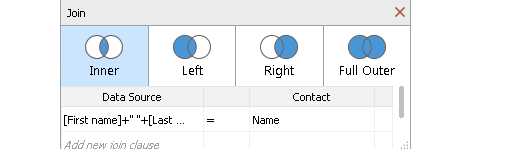
Types of Joins
- Left Join : all records from the left/first table are selected and the records which have the same values on the right side/second table are selected. No records will be selected from the right, if there are no equal values
- Right Join: all the records from the right side/second table are selected and the records which have the same values on the left side table are selected. No records will be selected from the first table if there are no equal values
- Inner Join : only the records which have the same values on both tables get selected
- Full Outer Join : records from both left and right table are evaluated, all the records are selected and displayed, missing attributes are allocated NULL values
Type Conversion in Tableau
Type conversion functions allow you to convert fields from one data type to another
- You can convert numbers to strings, date to strings etc
- The conversion functions are STR(), DATE(), DATETIME(), INT(), and FLOAT()
Tableau User Functions
It’s used to create user filters or row-level security filters that affect visualizations
FULLNAME( ) : Gives the full name for the current user
ISFULLNAME(string) : Gives true if the current user’s full name matches the specified full name or else False
ISMEMBEROF(string): Gives true if the person currently using Tableau is a member of a group that matches the given string
ISUSERNAME(string) : Gives true if the current user’s username matches the specified username, or else false
USERDOMAIN() : Gives domain for the current user
USERNAME( ) : Gives the username for the current user
Tableau Logical Functions
Logical functions/calculations allow you to determine if a certain condition is true or false ( boolean).
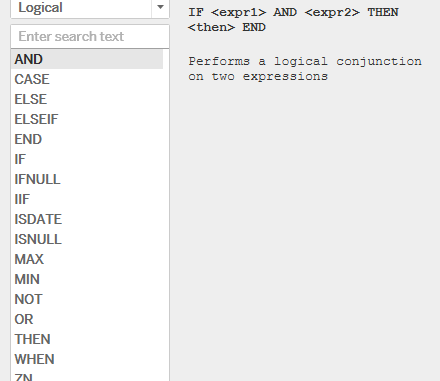
Tableau provides Logical Functions such as AND, NOT, OR, IF, ELSEIF, IF Else, CASE, ISNULL, IFNULL, ZN, IIF, etc. to perform logical operations on our data.
AND Function : Expression_1 AND Expression_2
OR Function : Expression_1 OR Expression_2
NOT Function : NOT(Expression)
IIF(Expression, True_statement, False_Statement)
ISNULL(Expression)
ZN(Expression)
IFNULL(Expression, Value)
CASE [
]
WHEN <expression> THEN <expression>
WHEN <expression> THEN <expression>
ELSE <expression>
END
Calculated Fields
When you create a calculated field, you are actually creating a new field (or column) in your data source, the values or members of which are determined by a calculation that you control. This new calculated field is saved to your data source in Tableau, and can be used to create more robust interactive visualizations.
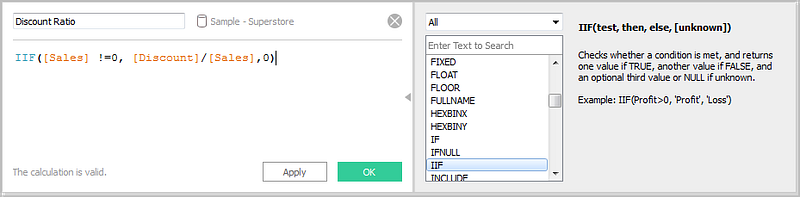
- With Calculated fields you can —
Aggregate data
Filter results
Calculate ratios
Segment data
Convert the data type of a field
Tableau Field Operations
We can rename, combine, or create a field using the filed operation feature. It helps in better organization of the dimension and measure variables and also helps in accommodating two or more fields with the same name for better data analysis.
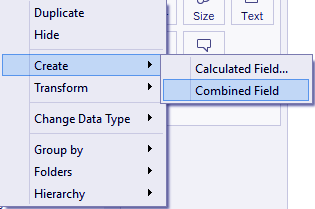
Some of the field operations are —
Combining Two Fields
Set of Two Fields
Grouping of fields
Adding Field to Worksheet in Tableau
Take Complete Hands On Tableau Course : Link
That’s it for now. Day 15: Tableau — Part 3!
Let me know if you have questions in the comment section below. Subscribe/ Follow, Like/Clap as it would encourage me to write more in my free time
Stay Tuned!!
Read More —
11 most important System Design Base Concepts
6. Networking, How Browsers work, Content Network Delivery ( CDN)
13. System Design Template — How to solve any System Design Question
System Design Case Studies — In Depth
Complete Data Structures and Algorithm Series
Some of the other best Series —
30 days of Data Structures and Algorithms and System Design Simplified
Data Science and Machine Learning Research ( papers) Simplified **
100 days : Your Data Science and Machine Learning Degree Series with projects
Complete Data Visualization and Pre-processing Series with projects
Exceptional Github Repos — Part 1
Exceptional Github Repos — Part 2
Tech Newsletter —
If you are interested, you can join my newsletter through which I send tech interview tips, techniques, patterns, hacks — Software Development, ML, Data Science, Startups and Technology projects to more than 30K readers. You can subscribe to Tech Brew :
For Python Projects —
For complete 60 days of Data Science and ML : Day 1 — Day 60 : Quick Recap of 60 days of Data Science and ML
Follow for more updates. Stay tuned and keep coding!
For other projects, tune to —
Build Machine Learning Pipelines( With Code)
Recurrent Neural Network with Keras
Clustering Geolocation Data in Python using DBSCAN and K-Means
Facial Expression Recognition using Keras
Hyperparameter Tuning with Keras Tuner
Custom Layers in Keras


