
Day 7 of 30 days of Data Analytics with Projects Series
Welcome back peeps. Happy to share that we have finished —
Finished Series —
60 Days of Data Science and Machine Learning with projects Series
What’s covered in the Data Analytics Series till now—
Day 1 : Data Analytics basics and kickstart of Data analytics with projects series
Day 3 : Data Analytics Ecosystem — Data Life Cycle, Data Analysis complete process ( most important things)
Day 5 : Statistics
Day 6 : Basic and Advanced SQL
Day 8 : Pandas and Numpy
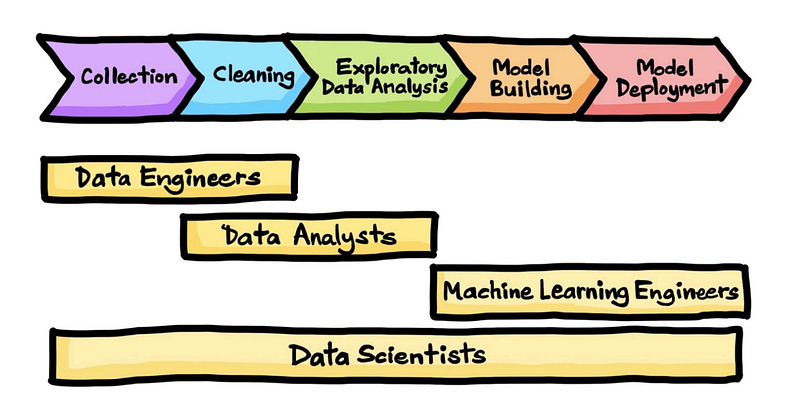
In this post we will cover Data Collection and Cleaning for the day 7 of the Data Analytics Series.
Data Collection
Data Cleaning
Python
Projects Videos —
All the projects, data structures, SQL, algorithms, system design, Data Science and ML , Data Analytics, Data Engineering, , Implemented Data Science and ML projects, Implemented Data Engineering Projects, Implemented Deep Learning Projects, Implemented Machine Learning Ops Projects, Implemented Time Series Analysis and Forecasting Projects, Implemented Applied Machine Learning Projects, Implemented Tensorflow and Keras Projects, Implemented PyTorch Projects, Implemented Scikit Learn Projects, Implemented Big Data Projects, Implemented Cloud Machine Learning Projects, Implemented Neural Networks Projects, Implemented OpenCV Projects,Complete ML Research Papers Summarized, Implemented Data Analytics projects, Implemented Data Visualization Projects, Implemented Data Mining Projects, Implemented Natural Leaning Processing Projects, MLOps and Deep Learning, Applied Machine Learning with Projects Series, PyTorch with Projects Series, Tensorflow and Keras with Projects Series, Scikit Learn Series with Projects, Time Series Analysis and Forecasting with Projects Series, ML System Design Case Studies Series videos will be published on our youtube channel ( just launched).
Subscribe today!
Let’s get started!
Data collection is the process of gathering and measuring information on variables of interest, in an established systematic fashion that enables one to answer stated research questions, test hypotheses, and evaluate outcomes.
- The data collection process can be divided into two main types: primary data collection and secondary data collection. Primary data collection involves collecting data directly from the source, while secondary data collection involves collecting data that has already been collected by someone else.
Data cleaning is the process of identifying and correcting errors, inconsistencies, and outliers in a dataset. This process is important to ensure that the data is accurate, complete, and consistent.
- This process can include tasks such as removing duplicate data, filling in missing values, and correcting data entry errors.
Data Collection
It is the first step of data analytics life cycle which is nothing but a process to gather data from the relevant sources. The data can structured, semi structured and unstructured as well as can be in different formats.
Data is collected after understanding the business requirements. Some of the sources can be —
- Customer forms
- Transaction Records
- Research
- Cookies and Website visits
- Social Media
- Surveys
- Loyalty programs
- Keywords and search results
- CRM and open source online repositories
There are several ways to collect data in Python, including:
Web scraping: This involves using Python libraries such as Beautiful Soup, Scrapy, and Selenium to extract data from websites. These libraries allow you to navigate through a website’s HTML structure and extract specific elements such as text, images, and links.
import requests
from bs4 import BeautifulSoup

# Send a GET request to the website
response = requests.get("https://example.com")

# Create a BeautifulSoup object to parse the HTML
soup = BeautifulSoup(response.text, "html.parser")

# Extract specific elements from the HTML
title = soup.title.text
paragraphs = soup.find_all("p")

# Print the extracted data
print("Title:", title)
for p in paragraphs:
    print("Paragraph:", p.text)
APIs: Many websites and online services provide APIs (Application Programming Interfaces) that allow you to access their data programmatically. Python libraries such as requests and json can be used to make API calls and process the resulting data.
import requests
import json

# Make an API request
response = requests.get("https://api.example.com/data")

# Process the JSON response
data = json.loads(response.text)
# Access specific data from the response
value = data["key"]

# Print the extracted data
print("Value:", value)
Reading from files: Python’s built-in open() function can be used to read data from various file formats such as CSV, Excel, and JSON. The pandas library also provides functions to read data from these file formats, which makes it easier to work with the data in Python.
import csv
import pandas as pd

# Read data from a CSV file using the csv module
with open("data.csv", "r") as file:
    reader = csv.reader(file)
    for row in reader:
        print(row)

# Read data from an Excel file using pandas
data_frame = pd.read_excel("data.xlsx")
print(data_frame.head())
Database: Python libraries like sqlite3 and pyodbc can be used to connect to databases, and perform queries to extract data.
import sqlite3
import pyodbc

# Connect to a SQLite database
conn = sqlite3.connect("example.db")
cursor = conn.cursor()

# Execute a query
cursor.execute("SELECT * FROM table_name")
rows = cursor.fetchall()

# Print the retrieved data
for row in rows:
    print(row)

# Close the connection
conn.close()
Scipy’s io library: Scipy’s io library provides a way to read and write data in various file formats, such as Matlab, IDL, and Fortran.
from scipy import io

# Read data from a Matlab file
data = io.loadmat("data.mat")

# Access specific variables from the loaded data
variable1 = data["variable1"]
variable2 = data["variable2"]

# Write data to a Fortran file
io.savemat("output.dat", {"variable1": variable1, "variable2": variable2})
Collecting data through Surveys: Python libraries like pydata-google-auth, google-auth-oauthlib, google-auth-httplib2 can be used to collect data from Google Sheets and Google Forms.
from pydata_google_auth import get_user_credentials
import pandas as pd

# Authenticate and get user credentials
creds = get_user_credentials(["https://www.googleapis.com/auth/spreadsheets.readonly"])

# Read data from a Google Sheet
spreadsheet_id = "your_spreadsheet_id"
sheet_name = "Sheet1"
df = pd.read_excel(f"https://docs.google.com/spreadsheets/d/{spreadsheet_id}/gviz/tq?tqx=out:csv&sheet={sheet_name}")

# Print the retrieved data
print(df.head())

# Collect data from a Google Form (requires google-auth-oauthlib and google-auth-httplib2)
from googleapiclient.discovery import build

service = build("forms", "v1", credentials=creds)
response = service.forms().get(formId="your_form_id").execute()

# Process the response data
form_title = response["title"]
print("Form Title:", form_title)
Data Cleaning
It is the process of figuring out incomplete, missing, incorrect and inaccurate records in the data and then fixing/correcting them.
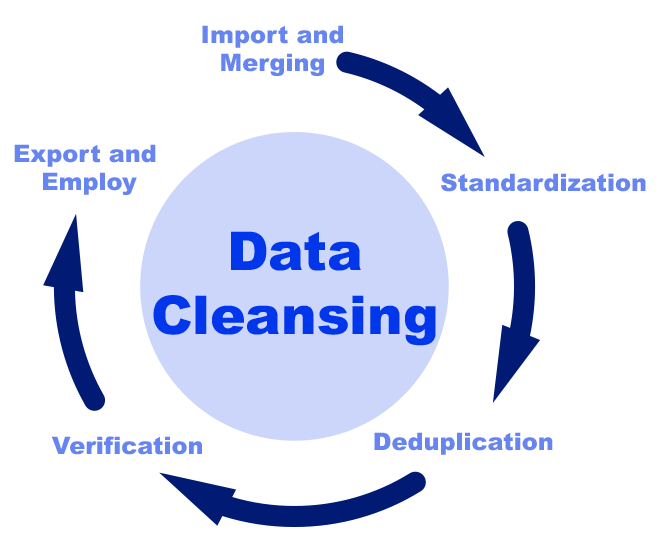
It involves —
- Removal of unwanted and invalid information
- Fixing issues of unknown missing values
- Fixing problems with mislabeled features, classes
- Handling the outliers
It ensures —
- The data is valid and up to date.
- Data doesn’t contain any duplicates or missing values
- Data doesn’t contain any numerical outliers
- It helps define valid data labels for the data which is categorical in nature.
Here are some common data cleaning tasks and the corresponding Python methods:
Removing duplicate rows: The drop_duplicates() function in pandas can be used to remove duplicate rows from a DataFrame.
import pandas as pd

# Create a DataFrame with duplicate rows
data = {'col1': [1, 2, 3, 3, 4, 5, 5],
        'col2': ['A', 'B', 'C', 'C', 'D', 'E', 'E']}
df = pd.DataFrame(data)

# Remove duplicate rows
df = df.drop_duplicates()

# Print the DataFrame without duplicate rows
print(df)
Handling missing data: The fillna() function in pandas can be used to replace missing values with a specific value or using a forward or backward fill. The dropna() function can be used to remove rows or columns that contain missing values.
import pandas as pd

# Create a DataFrame with missing values
data = {'col1': [1, 2, None, 4, 5],
        'col2': ['A', 'B', None, 'D', 'E']}
df = pd.DataFrame(data)

# Replace missing values with a specific value
df_filled = df.fillna('Unknown')

# Remove rows with missing values
df_dropped = df.dropna()

# Print the DataFrames
print("DataFrame with filled missing values:")
print(df_filled)
print("\nDataFrame with dropped missing values:")
print(df_dropped)
Data conversion: The astype() function in pandas can be used to convert columns to a specific data type.
import pandas as pd

# Create a DataFrame with columns of different data types
data = {'col1': [1, 2, 3],
        'col2': ['A', 'B', 'C'],
        'col3': [True, False, True]}
df = pd.DataFrame(data)

# Convert col1 to float data type
df['col1'] = df['col1'].astype(float)

# Print the updated DataFrame
print(df.dtypes)
Outlier detection: The zscore() function in NumPy can be used to calculate the z-score of each value in a dataset, which can be used to identify outliers.
import numpy as np

# Create a NumPy array with values
data = np.array([10, 15, 20, 25, 100])

# Calculate the z-score for each value
z_scores = np.abs((data - np.mean(data)) / np.std(data))

# Identify outliers based on a threshold
threshold = 2.5
outliers = data[z_scores > threshold]

# Print the outliers
print(outliers)
Data normalization: The minmax_scale() function in SciPy can be used to normalize a dataset so that all values are between 0 and 1.
from scipy import stats

# Create a NumPy array with values
data = np.array([10, 20, 30, 40, 50])

# Normalize the data between 0 and 1
normalized_data = stats.minmax_scale(data)

# Print the normalized data
print(normalized_data)
Data transformation: The apply() function in pandas can be used to apply a custom function to each element in a DataFrame.
import pandas as pd

# Create a DataFrame with a column
data = {'col1': [1, 2, 3, 4, 5]}

df = pd.DataFrame(data)

# Square each value in col1 using a custom function
df['col1_squared'] = df['col1'].apply(lambda x: x**2)

# Print the transformed DataFrame
print(df)
Data validation: The isnull() function in pandas can be used to check for missing values in a DataFrame and the nunique() function can be used to check for duplicate values.
import pandas as pd

# Create a DataFrame with missing values and duplicate values
data = {'col1': [1, 2, None, 4, 5],
        'col2': ['A', 'B', None, 'D', 'E'],
        'col3': ['X', 'Y', 'Z', 'X', 'Y']}
df = pd.DataFrame(data)

# Check for missing values
missing_values = df.isnull().any()
print("Missing Values:")
print(missing_values)

# Check for duplicate values
duplicate_values = df.nunique()
print("\nDuplicate Values:")
print(duplicate_values)
Data cleaning using regular expressions: python re module can be used to perform data cleaning operations using regular expressions.
import re

# Define a string with dirty data
data = "abc123def456ghi"

# Remove all numbers from the string
clean_data = re.sub(r'\d+', '', data)

# Print the cleaned data
print(clean_data)
In the upcoming posts we will see in details how to perform data collection and cleaning using Python, Pandas and Numpy.
Python
Python is the language of data. In this series we will code in Python and having said that you need to know what is important to learn in Python.
These are the topics you must know in python to move ahead. As the part of Data Engineering Series we have covered all these in detail, so I have linked each of these topics.
1. Data types, strings, operators, and Chaining Comparison Operators with Logical Operators
8. First Class functions, Private Variables, Global and Non Local Variables, __import__ function
12. Inheritance and Polymorphism, Errors and Exception Handling
13. User-defined functions, Python garbage collection, debugger in Python
14. Iterators, Generators, and Decorators, Memoization using Decorators
17. ChainMap
18. Python Itertools
That’s it for now. Day 8: Coming Soon!
Let me know if you have questions in the comment section below. Subscribe/ Follow, Like/Clap as it would encourage me to write more in my free time
Stay Tuned!!
Read More —
11 most important System Design Base Concepts
6. Networking, How Browsers work, Content Network Delivery ( CDN)
13. System Design Template — How to solve any System Design Question
System Design Case Studies — In Depth
Complete Data Structures and Algorithm Series
Some of the other best Series —
30 days of Data Structures and Algorithms and System Design Simplified
Data Science and Machine Learning Research ( papers) Simplified **
100 days : Your Data Science and Machine Learning Degree Series with projects
Complete Data Visualization and Pre-processing Series with projects
Exceptional Github Repos — Part 1
Exceptional Github Repos — Part 2
Tech Newsletter —
If you are interested, you can join my newsletter through which I send tech interview tips, techniques, patterns, hacks — Software Development, ML, Data Science, Startups and Technology projects to more than 30K readers. You can subscribe to Tech Brew :
For Python Projects —
For complete 60 days of Data Science and ML : Day 1 — Day 60 : Quick Recap of 60 days of Data Science and ML
Follow for more updates. Stay tuned and keep coding!
For other projects, tune to —
Build Machine Learning Pipelines( With Code)
Recurrent Neural Network with Keras
Clustering Geolocation Data in Python using DBSCAN and K-Means
Facial Expression Recognition using Keras
Hyperparameter Tuning with Keras Tuner
Custom Layers in Keras


