
Blazor Server Project #9: How to Avoid SQL Injection Attacks
Dynamic SQL queries are vulnerable to SQL injection. One way to prevent attacks is to implement input validation using character encoding
Table of Contents
· Introduction · SQL Injection Attacks ∘ Viewing data more than it should ∘ Viewing the list of database objects ∘ Inserting commands ∘ Inserting comment separator · Avoiding SQL Injection Attacks · Implementing Avoidance of SQLi Attacks · Summary · References

This article is the ninth in a series covering the Blazor Server Project: (1) How to create a CRUD operation using Dapper (2) Building a dropdown list involves a 1:N relationship (3) How to implement a checkbox list involving an M:N relationships (4) Understanding URL routing and navigation (5) Creating and using page layout (6) How to create a reusable modal dialog component (7) Practical guide to making a master-detail page (8) Master-detail page using dynamic query (9) How to avoid SQL injection attacks (10) Hiding/showing HTML elements (11) Migrate to ASP.NET Core 6.0 (12) Installing ASP.NET Core Identity (13) Integrating Identity tables into the existing project database (14) Authentication and authorization (15) Role-based authorization (16) How to implement Google Authentication (17) Facebook Authentication and Authorization (18) How to configure Twitter Authentication (19) How to Customize Password Policy (20) Account Lockout Policy
These articles are for anyone who wants to learn how to build Blazor Server applications in a practical approach through some sample projects. It will be straightforward if you have some experience with C#, HTML, CSS, and SQL.
Introduction
SQL injection (SQLi) is an attack in which malicious code is inserted into SQL strings that are later passed to a database server for parsing and execution. Attackers can use SQL injection vulnerabilities to bypass application security measures and view, add, modify, and delete objects in the database.
Refer back to the previous article, Blazor Server Project #8: Master-Detail Page Using Dynamic Query. We use dynamic queries to display various book lists based on dynamic criteria using only one component and one query. See Figure 1 below.
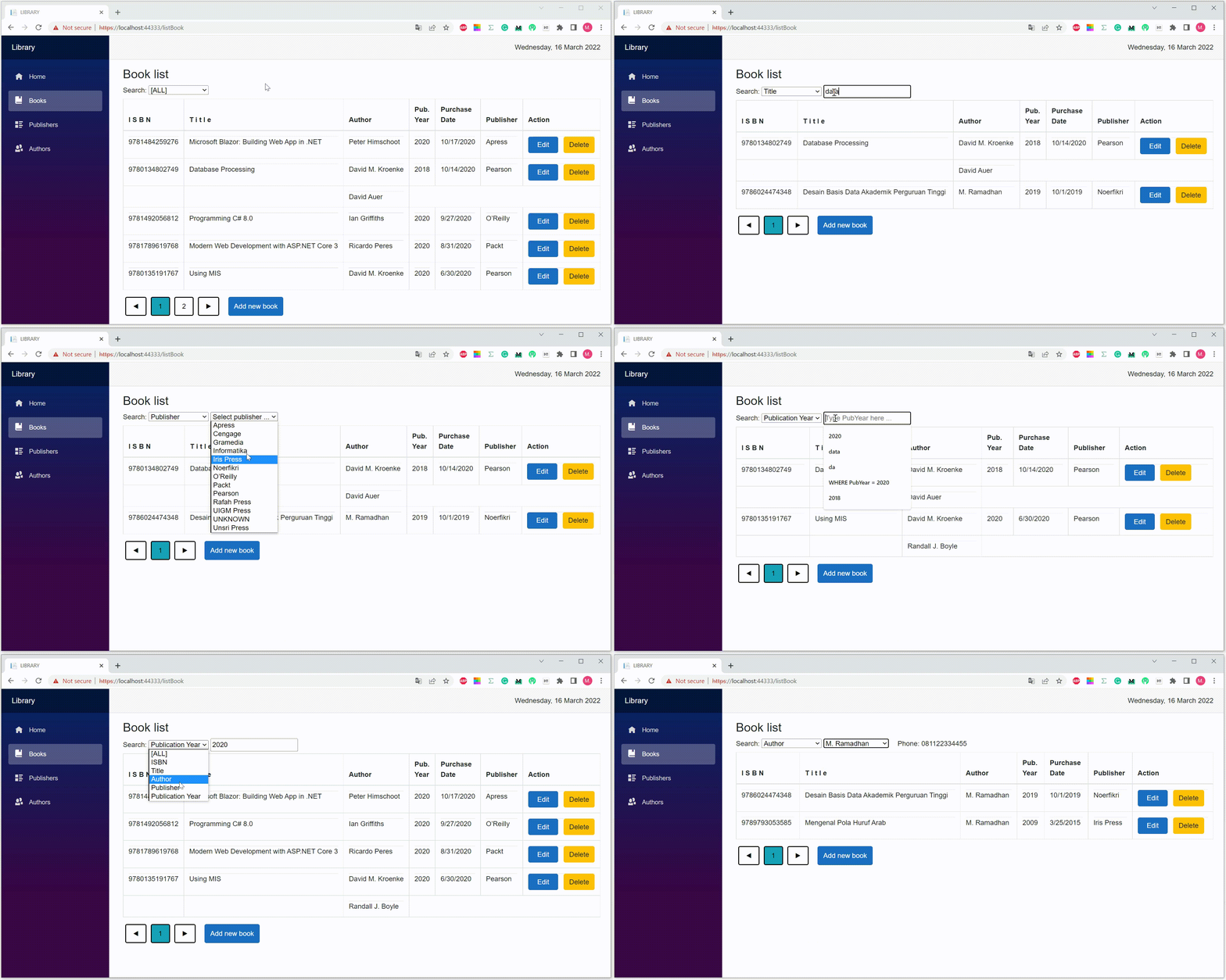
A dynamic query allows you to construct query statements dynamically at runtime. It will enable you to create more generalized and flexible query statements, but it is vulnerable to SQL injection. This article discusses some examples of SQL injection attacks in the Blazor Server Project #8 and how to avoid them. You can download the source code via the following link.
SQL Injection Attacks
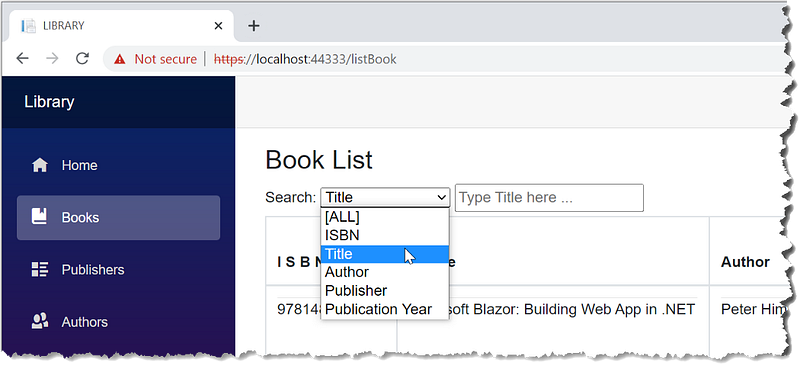
See Figure 2. There are two types of input.
- Non-editable input. Attackers can't modify this type directly. For example, they only can select Author and Publisher from dropdown lists.
- Editable input. Attackers inject malicious code via the input box of ISBN, title, or publication year.
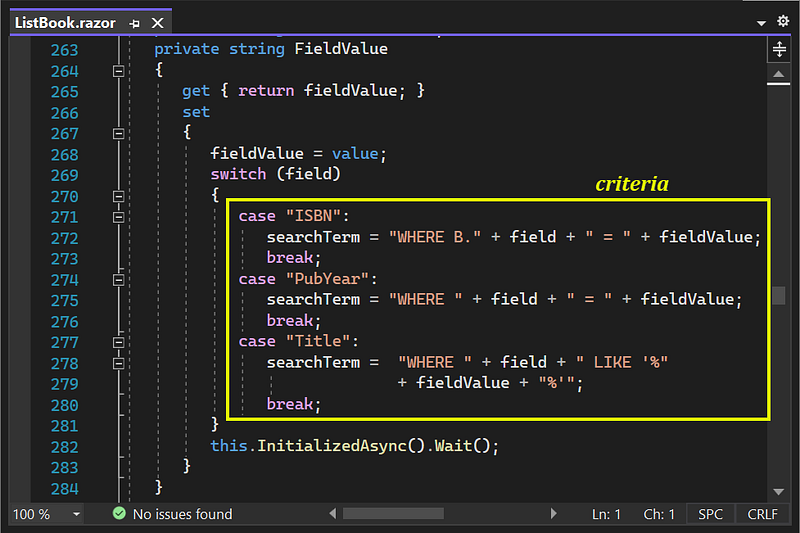
The injected malicious code pass to the query via search parameter of the ListAll method in BookService.cs.
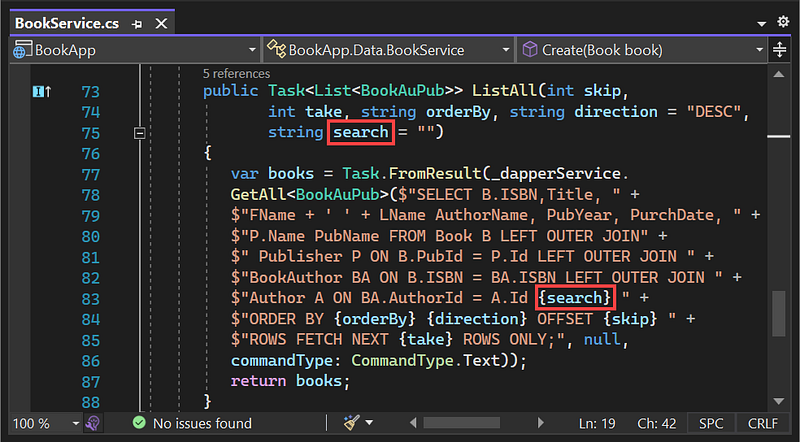
With default value of arguments: {orderBy}= “PurchDate”, {direction} = “DESC”, {skip}= 0, and {take} = 6; the following is the query in a more readable format.
SELECT B.ISBN,Title,FName + ' ' + LName AuthorName,
       PubYear, PurchDate, P.Name PubName
FROM Book B LEFT OUTER JOIN
     Publisher P ON B.PubId = P.Id LEFT OUTER JOIN
     BookAuthor BA ON B.ISBN = BA.ISBN LEFT OUTER JOIN
     Author A ON BA.AuthorId = A.Id
{search}
ORDER BY PurchDate DESC
OFFSET 0 ROWS FETCH NEXT 6 ROWS ONLY;
Attackers insert the following code into the SQL string:
- a logical expression that always returns true,
- the single quote (‘) or the double quote (“); used as a delimiter for text values within queries,
- the comment separator (--) which makes the next part of the SQL query useless, because the system will treat it as a comment
- UNION operator to retrieve data from different database tables or to view the list of database objects,
- the semicolon (;) that is used to separate different commands.
Here are some examples.
Viewing data more than it should
(a) inject a logical expression
Before injection
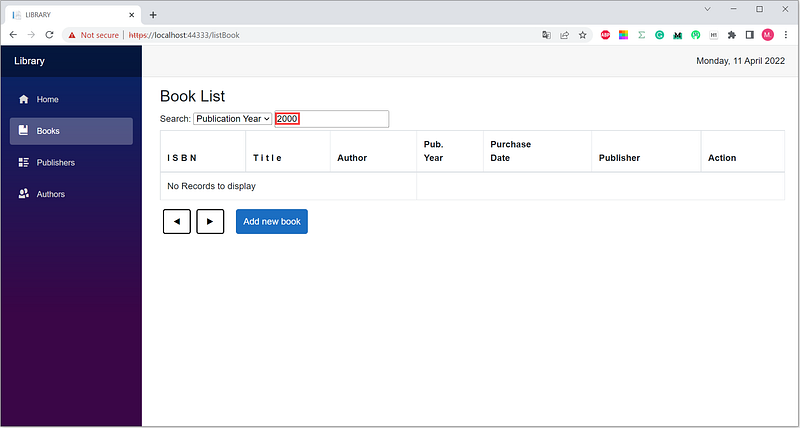
There are no books published in 2000. The query is:
SELECT B.ISBN,Title,FName + ' ' + LName AuthorName,
       PubYear, PurchDate, P.Name PubName
FROM Book B LEFT OUTER JOIN
     Publisher P ON B.PubId = P.Id LEFT OUTER JOIN
     BookAuthor BA ON B.ISBN = BA.ISBN LEFT OUTER JOIN
     Author A ON BA.AuthorId = A.Id
WHERE PubYear = 2000
ORDER BY PurchDate DESC
OFFSET 0 ROWS FETCH NEXT 6 ROWS ONLY;
After injection: OR 0=0
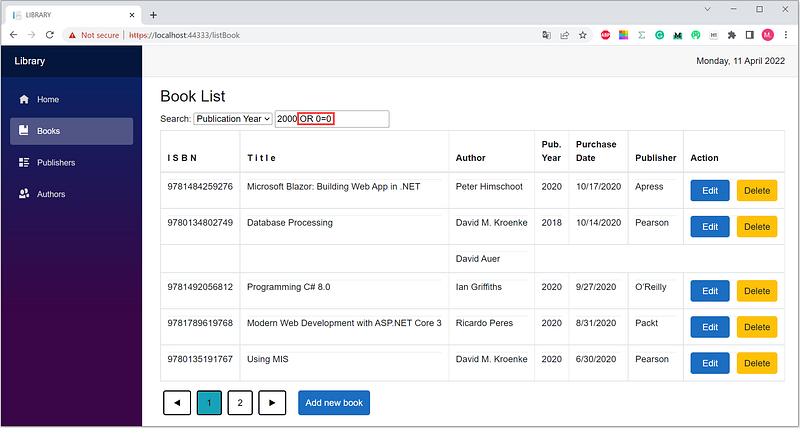
Here is the query.
SELECT B.ISBN,Title,FName + ' ' + LName AuthorName,
       PubYear, PurchDate, P.Name PubName
FROM Book B LEFT OUTER JOIN
     Publisher P ON B.PubId = P.Id LEFT OUTER JOIN
     BookAuthor BA ON B.ISBN = BA.ISBN LEFT OUTER JOIN
     Author A ON BA.AuthorId = A.Id
WHERE PubYear = 2000 OR 0=0
ORDER BY PurchDate DESC
OFFSET 0 ROWS FETCH NEXT 6 ROWS ONLY;
The injection, OR 0=0, causes the criteria always return true, so the page displays a list of all books. So do the following injections:
OR 1>0
OR 1<2
OR 1!=2
OR 1 IN (1,2)
OR 1 BETWEEN 1 AND 2
OR '1' LIKE '1'
OR NULL IS NULL
(b) inject a single quote ('), a logical expression, and comment separator (--)
Before injection
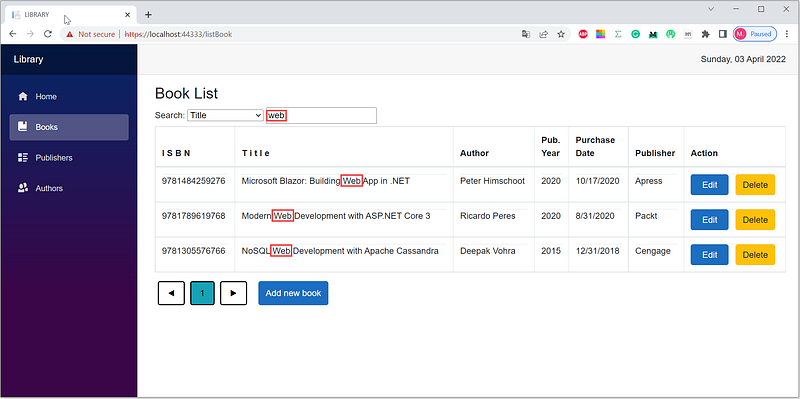
'%web%' (before injection)The query is:
SELECT B.ISBN,Title,FName + ' ' + LName AuthorName,
       PubYear, PurchDate, P.Name PubName
FROM Book B LEFT OUTER JOIN
     Publisher P ON B.PubId = P.Id LEFT OUTER JOIN
     BookAuthor BA ON B.ISBN = BA.ISBN LEFT OUTER JOIN
     Author A ON BA.AuthorId = A.Id
WHERE Title Like '%web%'
ORDER BY PurchDate DESC
OFFSET 0 ROWS FETCH NEXT 6 ROWS ONLY;
After injection: ' OR 0=0 --
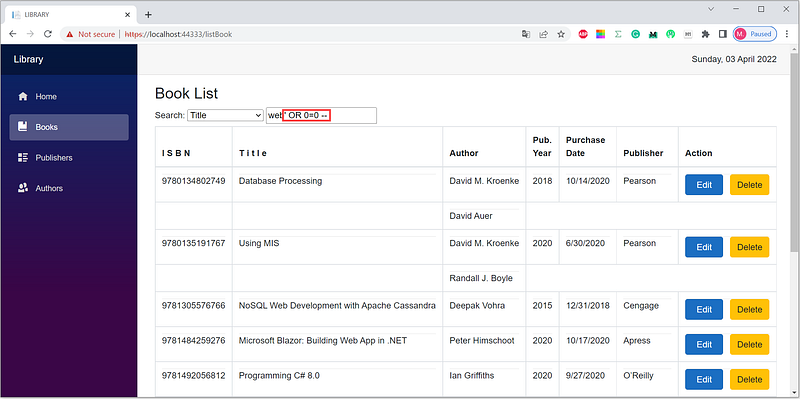
' OR 0=0 --The query is as follows:
SELECT B.ISBN,Title,FName + ' ' + LName AuthorName,
       PubYear, PurchDate, P.Name PubName
FROM Book B LEFT OUTER JOIN
     Publisher P ON B.PubId = P.Id LEFT OUTER JOIN
     BookAuthor BA ON B.ISBN = BA.ISBN LEFT OUTER JOIN
     Author A ON BA.AuthorId = A.Id
WHERE Title LIKE '%web%' OR 0=0
--'ORDER BY PurchDate DESC OFFSET 0 ROWS FETCH NEXT 6 ROWS ONLY;
The injection, 'OR 0=0 --, causes the criteria always return true, so the page displays the list of all books, and the comment separator (--) makes the next part of the SQL query useless because the system will treat it as a comment. So do the following injections:
' OR 1>0 --
' OR 1<2 --
' OR 1!=2 --
' OR 1 IN (1,2) --
' OR 1 BETWEEN 1 AND 2 --
' OR '1' LIKE '1' --
' OR NULL IS NULL --
Viewing the list of database objects
Attackers inject the UNION operator to view the list of database objects: tables, views, stored procedures, and user-defined functions. Union operator combines the results of two or more SELECT statements. For example, if you copy the following injection code:
0 UNION
SELECT -1,'_TABLE_SCHEMA','_TABLE_NAME',NULL,GetDate(),NULL
UNION
SELECT ROW_NUMBER() OVER(ORDER BY TABLE_NAME)
     , TABLE_SCHEMA,TABLE_NAME,NULL,GetDate(),NULL
FROM information_schema.tables;
--
and paste it into the input box, you will get the page that displays the list of database tables. See Figure 9 below.
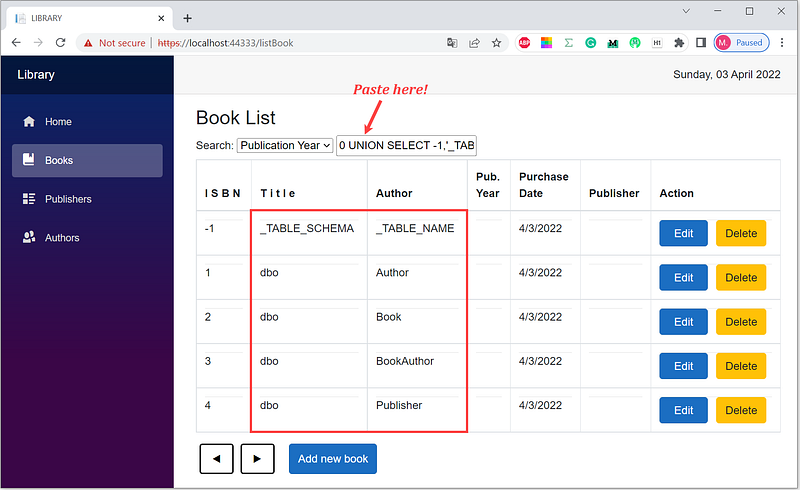
The query is:
SELECT B.ISBN,Title,FName + ' ' + LName AuthorName,
       PubYear, PurchDate, P.Name PubName
FROM Book B LEFT OUTER JOIN
     Publisher P ON B.PubId = P.Id LEFT OUTER JOIN
     BookAuthor BA ON B.ISBN = BA.ISBN LEFT OUTER JOIN
     Author A ON BA.AuthorId = A.Id
WHERE PubYear = 0
UNION
SELECT -1,'_TABLE_SCHEMA','_TABLE_NAME',NULL,GetDate(),NULL
UNION
SELECT ROW_NUMBER() OVER(ORDER BY TABLE_NAME)
     , TABLE_SCHEMA,TABLE_NAME,NULL,GetDate(),NULL
FROM information_schema.tables
--ORDER BY PurchDate DESC OFFSET 0 ROWS FETCH NEXT 6 ROWS ONLY;
Next, you can get the table columns info. The following injection code is for displaying the ordinal position, name, and data type of the Author table columns.
0 UNION
SELECT -1,'COLUMN_NAME','DATA_TYPE',NULL,GetDate(),NULL
UNION
SELECT ORDINAL_POSITION,COLUMN_NAME,DATA_TYPE
      ,CHARACTER_MAXIMUM_LENGTH,GetDate(),NULL
FROM INFORMATION_SCHEMA.COLUMNS
WHERE TABLE_NAME = 'Author'
--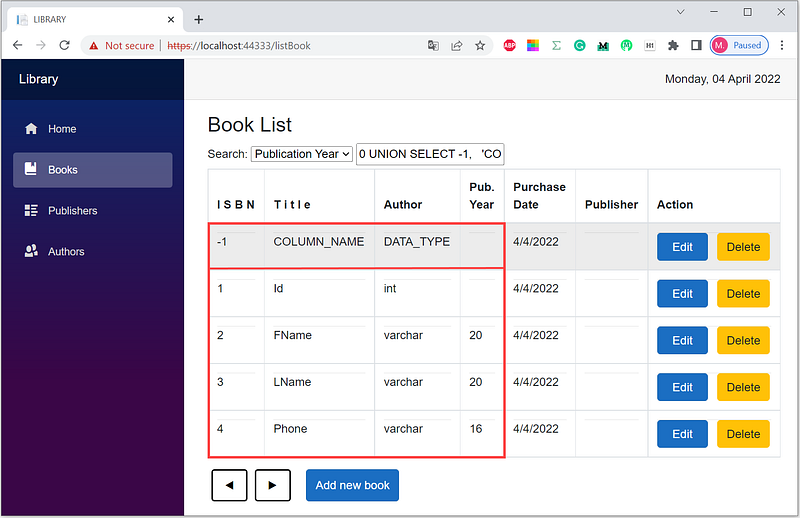
The 1st, 2nd, and 3rd columns are the ordinal position, name, and data type of columns, resulting from the following query:
SELECT B.ISBN,Title,FName + ' ' + LName AuthorName,
       PubYear, PurchDate, P.Name PubName
FROM Book B LEFT OUTER JOIN
     Publisher P ON B.PubId = P.Id LEFT OUTER JOIN
     BookAuthor BA ON B.ISBN = BA.ISBN LEFT OUTER JOIN
     Author A ON BA.AuthorId = A.Id
WHERE PubYear = 0
UNION
SELECT -1,'COLUMN_NAME','DATA_TYPE',NULL,GetDate(),NULL
UNION
SELECT ORDINAL_POSITION,COLUMN_NAME,DATA_TYPE
      ,CHARACTER_MAXIMUM_LENGTH,GetDate(),NULL
FROM INFORMATION_SCHEMA.COLUMNS
WHERE TABLE_NAME = 'Author'
--ORDER BY PurchDate DESC OFFSET 0 ROWS FETCH NEXT 6 ROWS ONLY;
Inserting commands
Attackers use the semicolon (;) to separate different commands. They can insert, update, and delete data; create, alter, drop tables, etc. After viewing a list of database tables, an attacker can drop one of them; for example, the following malicious command drops the BookAuthor table.
0;
DROP TABLE BookAuthor;
--
The query and the SQL command are:
SELECT B.ISBN,Title,FName + ' ' + LName AuthorName,
       PubYear, PurchDate, P.Name PubName
FROM Book B LEFT OUTER JOIN
     Publisher P ON B.PubId = P.Id LEFT OUTER JOIN
     BookAuthor BA ON B.ISBN = BA.ISBN LEFT OUTER JOIN
     Author A ON BA.AuthorId = A.Id
WHERE PubYear = 0;
DROP TABLE dbo.BookAuthor;
--ORDER BY PurchDate DESC OFFSET 0 ROWS FETCH NEXT 6 ROWS ONLY;
Inserting comment separator
The comment separator (--) makes the next part of the SQL query useless because the system will treat it as a comment. See the examples in points (1b) and (3).
Avoiding SQL Injection Attacks
To avoid SQL injection attacks, you can implement input validation, parameterized queries, and character encoding (Galluccio et al., 2020). There are two approaches to validate input: (1) blacklist determines what characters are refused, and (2) whitelist defines what characters are allowed. This project has used parameterized queries, but it is still vulnerable to SQL injection attacks. We need to validate the input; we will implement a blacklist approach for now.
(1) Preventing logical expression injection
The malicious logical expression injections are as follows:
 OR 1>0
 OR 1<2
 OR 1!=2
 OR 1 IN (1,2)
 OR 1 BETWEEN 1 AND 2
 OR '1' LIKE '1'
 OR NULL IS NULL
'OR 1>0 --
'OR 1<2 --
'OR 1!=2 --
'OR 1 IN (1,2) --
'OR 1 BETWEEN 1 AND 2 --
'OR '1' LIKE '1' --
'OR NULL IS NULL --
Preventing injection, encode the single quote (') and \WOR\W to an empty string with \W as a non-alphanumeric character.
(2) Preventing the UNION operator injection
Attackers inject the UNION operator to view the list of database objects. Encode the \WUNION\W to an empty string.
(3) Preventing commands injection Attackers use the semicolon (;) to separate different commands. Encode the semicolon (;) to the empty string.
(4) Preventing the comment separator (--) injection The comment separator (--) makes the next part of the SQL query useless because the system will treat it as a comment. Encode the hyphen (-) to the empty string.
Character encoding uses the statement below.
Regex.Replace(string input, string pattern, string replacement, RegexOptions.IgnoreCase);- string input: the string to search for a match. Ini adalah string kriteria dinamis berdasarkan ISBN, judul, atau tahun penerbitan.
- string pattern: the regular expression pattern to match. The pattern is
@”([‘;-]|\WOR\W|\WUNION\W)”. - string replacement: the replacement string is the empty string.
- IgnoreCase specifies case-insensitive matching.
Implementing Avoidance of SQLi Attacks
Add/modify the code in the ListBook.razor file. The following bold texts are the added/modified code.
ListBook.razor
@page "/listBook"
@using System.Text.RegularExpressions
@inject IBookService bookService
@inject IAuthorService authorService
:
:
@if (books == null)
{
   <p><em>Loading...</em></p>
}
else
{
   <h3>Book List</h3>
   <label for="Search">Search:</label>
   <select for="Field" @bind="Field" @bind:event="onchange">
      <option value="All">[ALL]</option>
      <option value="ISBN">ISBN</option>
      <option value="Title">Title</option>
      <option value="AuthorId">Author</option>
      <option value="PubId">Publisher</option>
      <option value="PubYear">Publication Year</option>
   </select>
<input type="text" id="txtValue"
placeholder="Type @field here ..." hidden="@valueIsHidden"
@bind="ValidValue" @bind:event="oninput"
@onchange="FieldValue" /><select for="Publisher" hidden="@pubIsHidden"
:
:
@code {
Author author = new Author();
Publisher publisher = new Publisher();
:
:
private string field = "All";
private string Field
{
get { return field; }
set
{
field = value;
valueIsHidden = field == "All" || field == "PubId"
|| field == "AuthorId";
pubIsHidden = field != "PubId";
authorIsHidden = field != "AuthorId";
pubDataIsHidden = true;
authorDataIsHidden = true;
idAuthorFilter = -1;
idPubFilter = -1;
if (field == "All")
{
searchTerm = "";
this.InitializedAsync().Wait();
}
}
}private string _validValue = "";
string ValidValue
{
get { return _validValue; }
set
{
string pattern = @"([';-]|\WOR\W|\WUNION\W)";
_validValue = Regex.Replace(value, pattern, ""
, RegexOptions.IgnoreCase);
}
}private void FieldValue()
{
switch (field)
{
case "ISBN":
searchTerm = "WHERE B." + field + " = " + _validValue;
break;
case "PubYear":
searchTerm = "WHERE " + field + " = " + _validValue;
break;
case "Title":
searchTerm = "WHERE " + field + " LIKE '%"
+ _validValue + "%'";
break;
}
this.InitializedAsync().Wait();
_validValue = "";
} private int idPubFilter = -1;
private int IdPubFilter
{
:
:Summary
Attackers inject malicious SQL code via an editable input; this project is via the input box of ISBN, title, or publication year. One way to prevent attacks is to validate the input with a blacklist approach using character encoding. The Regex.Replace method cleans the input by encoding the @”([‘;-]|\WOR\W|\WUNION\W)” blacklist to the empty string.
Is it entirely safe? Maybe. If you find out any other SQLi attacks, let me know. Your review will be precious.


