
Blazor Server Project #3: How to Implement a Checkbox List
On CRUD operation involves an M:N (many-to-many) relationship using Dapper with SQL Server database
This article is the third in a series covering the Blazor Server Project: (1) How to create a CRUD operation using Dapper (2) Building a dropdown list involves a 1:N relationship (3) How to implement a checkbox list involving an M:N relationships (4) Understanding URL routing and navigation (5) Creating and using page layout (6) How to create a reusable modal dialog component (7) Practical guide to making a master-detail page (8) Master-detail page using dynamic query (9) How to avoid SQL injection attacks (10) Hiding/showing HTML elements (11) Migrate to ASP.NET Core 6.0 (12) Installing ASP.NET Core Identity (13) Integrating Identity tables into the existing project database (14) Authentication and authorization (15) Role-based authorization (16) How to implement Google Authentication (17) Facebook Authentication and Authorization (18) How to configure Twitter Authentication (19) How to Customize Password Policy (20) Account Lockout Policy
These articles are for anyone who wants to learn how to build Blazor Server applications in a practical approach through some sample projects. It will be straightforward if you have some experience with C#, HTML, CSS, and SQL.
This article focuses on implementing checkbox lists on CRUD operation that involves an M:N (many-to-many) Author-write-Book relationship, as shown in the following ER diagram.
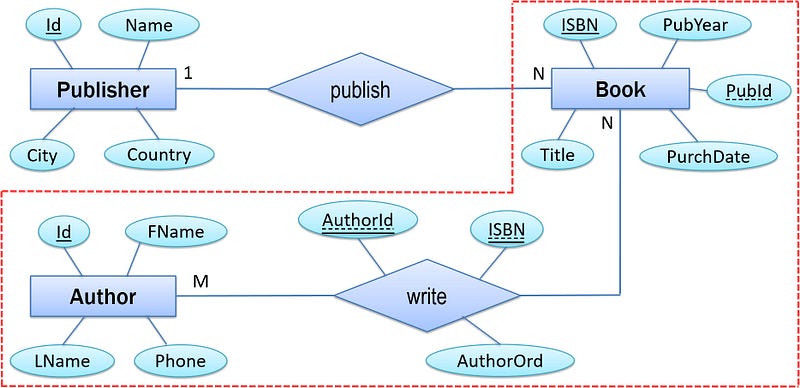
The Author-write-Book relationship generates three tables, namely Book, BookAuthor, and Author.
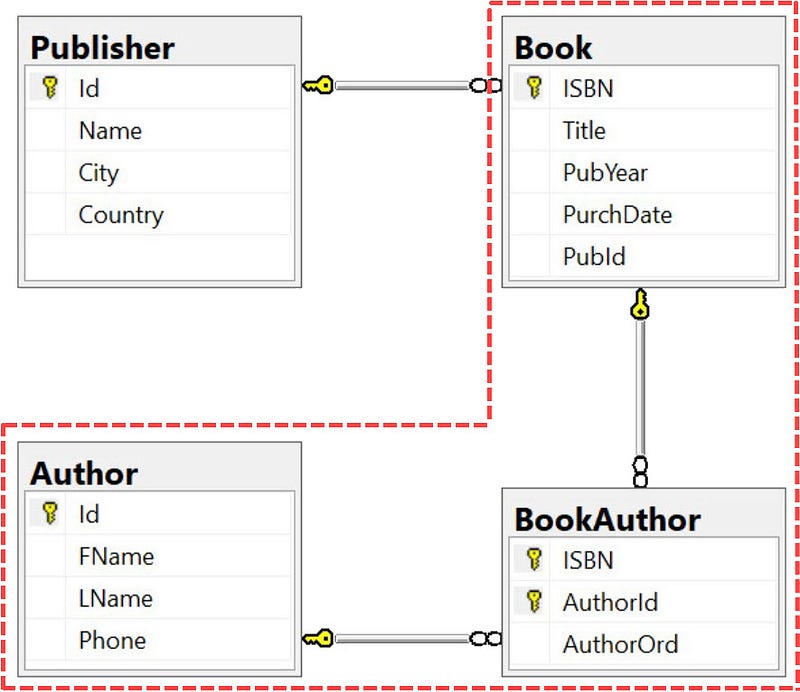
I modified almost all of the previous project code, Blazor Server Project #1 and Blazor Server Project #2, so that the page component displays are much tidier, and the method names are more consistent.
Overview
List of Books
Below is a screenshot of the book list involving the M:N relationship (Author-write-Book) and 1:N relationship (Publisher-publish-book). For the 1:N relationship, please read the previous article here.
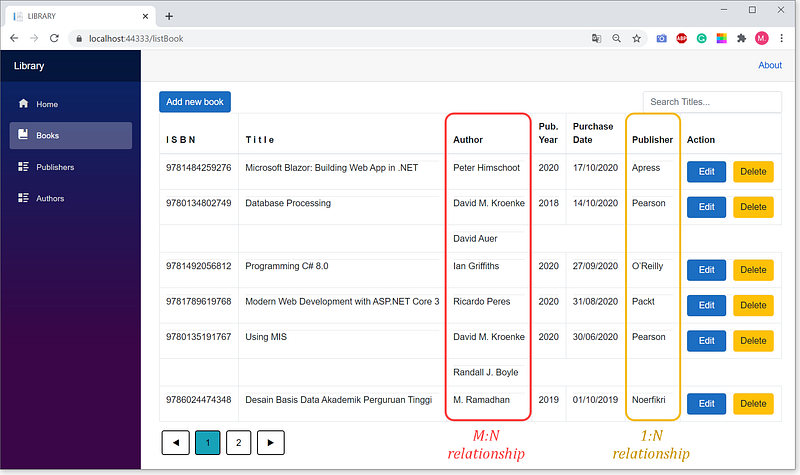
- The
Authorauthor in the third column shows M:N relationship. An author may write many books; for example, David M. Kroenke wrote two books. Instead, one book may be written by many authors; for example, Database Processing was written by two authors. - The list is sorted descending by
Purchase Date. By clicking on thePurchase Datecolumn heading, the order changes from descending to ascending. The same applies to other columns. - Navigation button:
◄go to the previous page►go to the next page1,2,3, ... page number - To search books base on title criterium, type a title in the search box. The title does not have to complete.
- To add new book data, click
Add new book - To change existing data, click
Edit - To delete, click
Delete
Adding Book Data
Below is an illustration page for adding book data. There is no data input for the author. Authors’ data can be input after the book is saved.
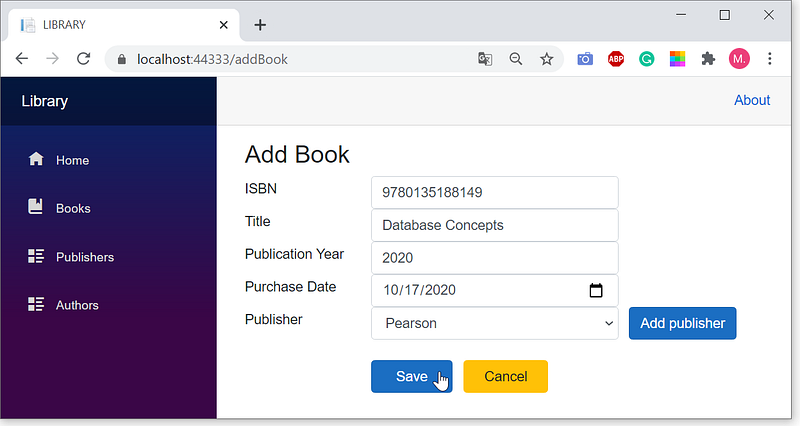
- Click
Save, the checkbox list of authors appears.

- Enter the author order and click the checkbox as shown in the figure above.
- Three authors wrote the book. The third author isn’t on the list yet, so click the
Add authorbutton.

- Click
Save, the new author appears on the list.
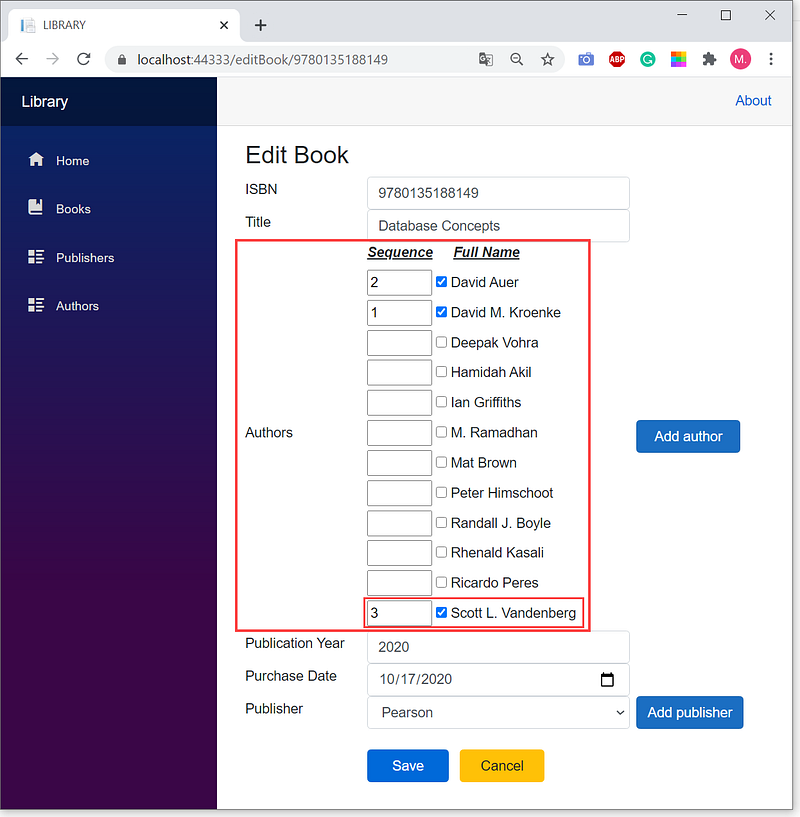
- As shown in the figure above, enter the third author order and click the checkbox.
Editing Book Data
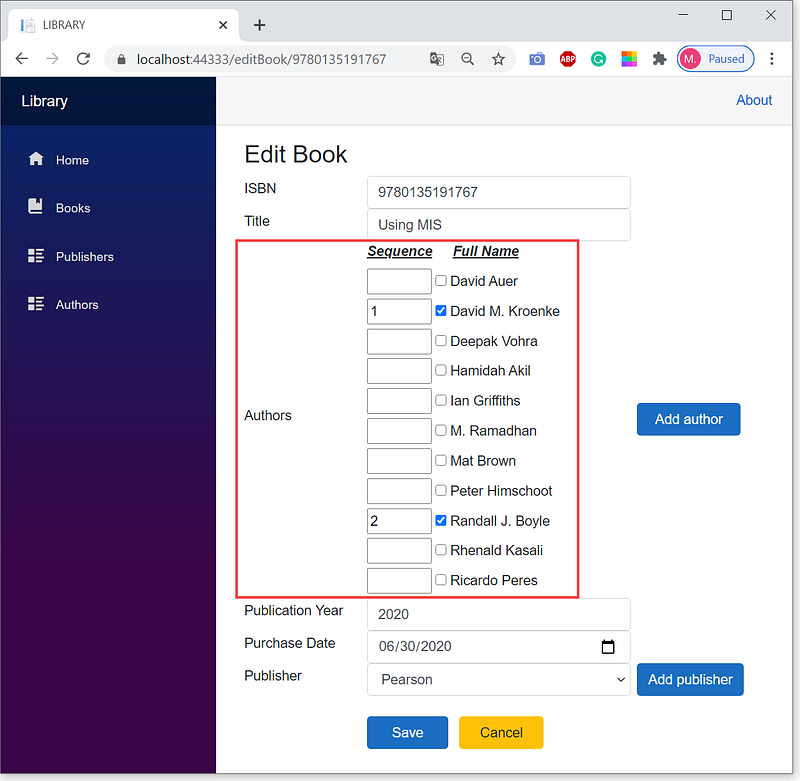
Here is an example page for editing a book’s data. You can edit any field including the ISBN primary key. There is a checkbox list for editing the author of the book.
Creating the BookDB Database
First of all, we need to write and execute SQL scripts for creating the BookDB database, tables, data, stored procedures, and functions.
- Open SQL Server Management Studio.
- Copy the scripts below, paste it into the query editor.
CREATE DATABASE BookDB
GO
USE BookDB
GOCREATE TABLE Publisher (
[Id] [Int] IDENTITY(0,1),
[Name] [VarChar](20),
[City] [VarChar](20),
[Country] [VarChar](20),
CONSTRAINT [pkPublisher] PRIMARY KEY ([Id])
)
GOCREATE TABLE Author(
[Id] [Int] IDENTITY(1,1),
[FName] [VarChar](20),
[LName] [VarChar](20),
[Phone] [VarChar](16),
CONSTRAINT [pkAuthor] PRIMARY KEY ([Id])
)
GOCREATE TABLE Book(
[ISBN] [BigInt],
[Title] [VarChar](80),
[PubYear] [SmallInt],
[PurchDate] [Date],
[PubId] [Int] DEFAULT 0,
CONSTRAINT [pkBook] PRIMARY KEY ([ISBN]),
CONSTRAINT [fkBookPub] FOREIGN KEY ([PubId])
REFERENCES [dbo].[Publisher]([Id])
ON UPDATE CASCADE ON DELETE SET DEFAULT
)
GOCREATE TABLE BookAuthor(
[ISBN] [BigInt],
[AuthorId] [Int],
[AuthorOrd] [TinyInt],
CONSTRAINT [pkBookAuthor] PRIMARY KEY ([ISBN],[AuthorId]),
CONSTRAINT [fkBookAuthor_Book] FOREIGN KEY([ISBN])
REFERENCES [dbo].[Book] ([ISBN])
ON UPDATE CASCADE ON DELETE CASCADE,
CONSTRAINT [fkBookAuthor_Author] FOREIGN KEY ([AuthorId])
REFERENCES [dbo].[Author] ([Id])
ON UPDATE CASCADE ON DELETE CASCADE
)
GOINSERT INTO Publisher ([Name], [City], [Country])
VALUES ('Unknown', NULL, NULL),
('Unsri Press', 'Palembang', 'Indonesia'),
('Gramedia', 'Jakarta', 'Indonesia'),
('Apress', 'New York', 'USA'),
('UIGM Press', 'Palembang', 'Indonesia'),
('Packt', 'Birmingham', 'UK'),
('Rafah Press', 'Palembang', 'Indonesia'),
('O’Reilly','Sebastopol','USA'),
('Informatika', 'Bandung', 'Indonesia'),
('Pearson', 'London', 'UK'),
('Cengage', 'Boston', 'USA'),
('Noerfikri', 'Palembang', 'Indonesia'),
('Iris Press','Bandung','Indonesia')
GOINSERT INTO Book (ISBN, PubYear, PurchDate, Title, PubId)
VALUES (9789791339957, 2013, '2019-02-12', 'Pranata Sosial', 6),
(9780134802749, 2018, '2020-10-14',
'Database Processing', 9),
(9786024474348, 2019, '2019-10-01',
'Desain Basis Data Akademik Perguruan Tinggi', 11),
(9781305576766, 2015, '2018-12-31',
'NoSQL Web Development with Apache Cassandra', 10),
(9780135191767, 2020, '2020-06-30',
'Using MIS',9),
(9781789619768, 2020, '2020-08-31',
'Modern Web Development with ASP.NET Core 3', 5),
(9789793053585, 2009, '2015-03-25',
'Mengenal Pola Huruf Arab',12),
(9781492056812, 2020, '2020-09-27', 'Programming C# 8.0',7),
(9781783989201, 2015, '2017-07-23',
'Learning Apache Cassandra', 5),
(9781484259276, 2020, '2020-10-17',
'Microsoft Blazor: Building Web App in .NET', 3),
(9786020338682, 2017, '2018-08-10', 'Disruption', 2)
GOINSERT INTO Author ([FName], [LName], [Phone])
VALUES ('Rhenald', 'Kasali', 'Unknown'),
('David M.', 'Kroenke ', 'Unknown'),
('M.', 'Ramadhan', '081122334455'),
('Randall J.', 'Boyle', 'Unknown'),
('Deepak', 'Vohra', 'Unknown'),
('Hamidah', 'Akil', '08123456789'),
('David','Auer','Unknown'),
('Ricardo', 'Peres', 'Unknown'),
('Ian', 'Griffiths', 'Unknown'),
('Mat', 'Brown', 'Unknown'),
('Peter', 'Himschoot', 'Unknown')
GOINSERT INTO BookAuthor ([ISBN],[AuthorId],[AuthorOrd])
VALUES (9780134802749, 2, 1),(9780134802749, 7, 2),
(9789791339957, 6, 1),(9781789619768, 8, 1),
(9781305576766, 5, 1),(9781492056812, 9, 1),
(9780135191767, 2, 1),(9780135191767, 4, 2),
(9786020338682, 1, 1),(9789793053585, 3, 1),
(9786024474348, 3, 1),(9781783989201, 10, 1),
(9781484259276, 11, 1)
GOCREATE PROCEDURE dbo.spAddPublisher
@Name VarChar(20),
@City VarChar(20),
@Country VarChar(20)
AS
BEGIN
DECLARE @Id Int;
INSERT INTO Publisher([Name], [City], [Country])
VALUES (@Name, @City, @Country);
SET @Id = SCOPE_IDENTITY();
END
GOCREATE PROCEDURE dbo.spUpdatePublisher
@Id Int,
@Name VarChar(20),
@City VarChar(20),
@Country VarChar(20)
AS
UPDATE Publisher
SET [Name] = @Name,
[City] = @City,
[Country] = @Country
WHERE [Id] = @Id
GOCREATE PROCEDURE dbo.spAddBook
@ISBN Bigint,
@Title VarChar(80),
@PubYear SmallInt,
@PurchDate Date,
@PubId Int
AS
INSERT INTO dbo.Book (ISBN, Title, PubYear, PurchDate, PubId)
VALUES (@ISBN, @Title, @PubYear, @PurchDate, @PubId)
GOCREATE PROCEDURE dbo.spUpdateBook
@ISBN Bigint,
@Title VarChar(80),
@PubYear SmallInt,
@PurchDate Date,
@PubId Int,
@Pk Bigint
AS
UPDATE Book
SET [ISBN] = @ISBN,
[Title] = @Title,
[PubYear] = @PubYear,
[PurchDate] = @PurchDate,
[PubId] = @PubId
WHERE [ISBN] = @Pk
GOCREATE PROCEDURE dbo.spAddAuthor
@FName VarChar(20),
@LName VarChar(20),
@Phone VarChar(20)
AS
BEGIN
DECLARE @Id as Int;
INSERT INTO Author([FName], [LName], [Phone])
VALUES (@FName, @LName, @Phone);
SET @Id = SCOPE_IDENTITY();
END
GOCREATE PROCEDURE dbo.spUpdateAuthor
@Id Int,
@FName VarChar(20),
@LName VarChar(20),
@Phone VarChar(20)
AS
UPDATE Author
SET [FName] = @FName,
[LName] = @LName,
[Phone] = @Phone
WHERE [Id] = @Id
GOCREATE PROCEDURE dbo.spAddBookAuthor
@ISBN BigInt,
@AuthorId Int,
@AuthorOrd TinyInt
AS
INSERT INTO [dbo].[BookAuthor]([ISBN],[AuthorId],[AuthorOrd])
VALUES (@ISBN, @AuthorId, @AuthorOrd)
GOCREATE PROCEDURE dbo.spUpdateBookAuthor
@ISBN BigInt,
@AuthorId Int,
@AuthorOrd TinyInt
AS
UPDATE BookAuthor
SET [AuthorOrd] = @AuthorOrd
WHERE [ISBN] = @ISBN and AuthorId = @AuthorId
GOCREATE FUNCTION dbo.AuthorOfBook (@ISBN BigInt) RETURNS Table AS
RETURN
SELECT ISBN, AuthorId AuId, AuthorOrd
FROM BookAuthor WHERE ISBN=@ISBN
GOCREATE FUNCTION dbo.BookAuthorName (@ISBN BigInt) Returns Table AS
RETURN
SELECT ISBN, Id AuthorId, AuthorOrd, FName + ' ' + LName AuthorName
FROM Author LEFT OUTER JOIN dbo.AuthorOfBook (@ISBN) On Id = AuId- Select menu:
Query|Execute, or pressF5key to execute the script above. - Pay attention to the last two functions above. The
BookAuthorNamefunction calls theAuthorOfBookfunction. TheAddBook.razorcomponent displays a checkbox list of book authors by callingTaskinBookAuthorService.csthat use theBookAuthorNamefunction. Thus users can select one or more book authors from the list. The same is true forEditBook.razor.
Creating the Blazor Server Project
1. Open Visual Studio 2019, create a Blazor Server project named BookApp.
2. Delete the five files that are not needed.
3. Delete lines of codes in the related deleted files.
4. Create database connection strings.
5. Install Dapper and Microsoft.EntityFrameworkCore.SqlServer package.
For the details, please read the previous article here.
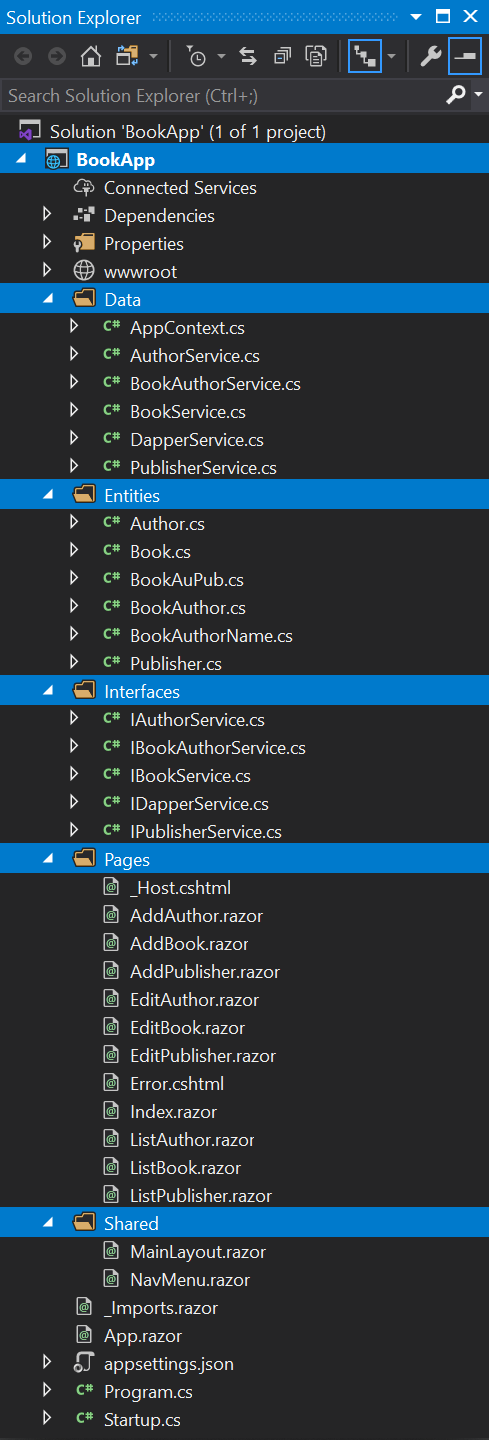
The following is the overall project structure.
Files Supporting CRUD Operation
Besides the SQL script above, CRUD operation need files of entities, interfaces, implementation of interfaces, razor components, and code modification of some existing files.
Entity Files
- There are six classes in the
Entitiesfolder:Author.cs,Book.cs,BookAuthor.cs,Publisher.cs,BookAuthorName.cs, andBookAuPub.cs, - The four entity classes —
Author.cs,Book.cs,BookAuthor.cs, andPublisher.cs— map the database tables with the same name. - The
BookAuthorName.csentity class maps the joining two database tables;AuthorandBookAuthor. - The
BookAuPub.csentity class maps the joining four database tables;Book,Publisher,BookAuthor, andAuthor.
Below are the code lists.
Author.cs
using System.ComponentModel.DataAnnotations;namespace BookApp.Entities
{
public class Author
{
[Key]
public int Id { get; set; }
public string FName { get; set; }
public string LName { get; set; }
public string Phone { get; set; }
}
}Book.cs
using System;
using System.ComponentModel.DataAnnotations;
namespace BookApp.Entities
{
   public class Book
   {
      [Key]
      public long? ISBN { get; set; }
      public string Title { get; set; }
      public short? PubYear { get; set; }
      public DateTime PurchDate { get; set; }
      public int PubId { get; set; }
   }
}
BookAuthor.cs
using System.ComponentModel.DataAnnotations;namespace BookApp.Entities
{
public class BookAuthor
{
[Key]
public long ISBN { get; set; }
public int AuthorId { get; set; }
public byte? AuthorOrd { get; set; }
}
}Publisher.cs
using System.ComponentModel.DataAnnotations;namespace BookApp.Entities
{
public class Publisher
{
[Key]
public int Id { get; set; }
public string Name { get; set; }
public string City { get; set; }
public string Country { get; set; }
}
}BookAuthorName.cs
namespace BookApp.Entities
{
   public class BookAuthorName : BookAuthor
   {
      public string AuthorName { get; set; }
   }
}
BookAuPub.cs
namespace BookApp.Entities
{
   public class BookAuPub : Book
   {
      public string AuthorName { get; set; }
      public string PubName { get; set; }
   }
}
Interface Files
The interface files declare methods. There are five interface files: IAuthorService.cs, IBookService.cs, IBookAuthorService.cs, IDapperService.cs, and IPublisherService.cs. The files exist in the Interfaces folder.
IAuthorService.cs
using BookApp.Entities;
using System.Collections.Generic;
using System.Threading.Tasks;
namespace BookApp.Interfaces
{
public interface IAuthorService
{
Task<int> Create(Author author);
Task<Author> ReadByPk(int Id);
Task<int> Update(Author author);
Task<int> Delete(int Id);
Task<int> Count(string search);
Task<List<Author>> ListAll(int skip,
int take,
string orderBy,
string direction,
string search);
}
}IBookService.cs
using BookApp.Entities;
using System;
using System.Collections.Generic;
using System.Threading.Tasks;
namespace BookApp.Interfaces
{
public interface IBookService
{
Task<long> Create(Book book);
Task<Book> ReadByPk(long isbn);
Task<int> Update(Book book, long pk);
Task<int> Delete(long id);
Task<int> Count(string search);
Task<List<BookAuPub>> ListAll(int skip,
int take,
string orderBy,
string direction,
string search);
}
}IBookAuthorService.cs
using BookApp.Entities;
using System.Collections.Generic;
using System.Threading.Tasks;
namespace BookApp.Interfaces
{
public interface IBookAuthorService
{
Task<int> Create(BookAuthorName bookAuthorNamer);
Task<int> Delete(long isbn, int authorId);
Task<List<BookAuthorName>> FetchAll(long isbn);
}
}IDapperService.cs
using Dapper;
using System;
using System.Collections.Generic;
using System.Data;
using System.Data.Common;
namespace BookApp.Interfaces
{
public interface IDapperService : IDisposable
{
DbConnection GetConnection();
T Get<T>(string sp, DynamicParameters parms,
CommandType commandType = CommandType.StoredProcedure);
List<T> GetAll<T>(string sp, DynamicParameters parms,
CommandType commandType = CommandType.StoredProcedure);
int Execute(string sp, DynamicParameters parms,
CommandType commandType = CommandType.StoredProcedure);
T Insert<T>(string sp, DynamicParameters parms,
CommandType commandType = CommandType.StoredProcedure);
T Update<T>(string sp, DynamicParameters parms,
CommandType commandType = CommandType.StoredProcedure);
}
}IPublisherService.cs
using BookApp.Entities;
using System.Collections.Generic;
using System.Threading.Tasks;
namespace BookApp.Interfaces
{
public interface IPublisherService
{
Task<int> Create(Publisher publisher);
Task<Publisher> ReadByPk(int Id);
Task<int> Update(Publisher publisher);
Task<int> Delete(int Id);
Task<int> Count(string search);
Task<List<Publisher>> FetchAll();
Task<List<Publisher>> ListAll(int skip,
int take,
string orderBy,
string direction,
string search);
}
}Method Files
- Method files implement the methods declared in the interface files.
- There are five method files:
AuthorService.cs,BookService.cs,BookAuthorService.cs,DapperService.cs, andPublisherService.cs. - There is also
AppContext.csfile, which contains information and configuration for accessing the database. - All six files exist in the
Datafolder.
AuthorService.cs
AuthorService.csimplements the methods declared in theIAuthorService.csfile.
using BookApp.Interfaces;
using BookApp.Entities;
using Dapper;
using System.Collections.Generic;
using System.Data;
using System.Threading.Tasks;
namespace BookApp.Data
{
public class AuthorService : IAuthorService
{
private readonly IDapperService _dapperService; public AuthorService(IDapperService dapperService)
{
this._dapperService = dapperService;
} public Task<int> Create(Author author)
{
var dbPara = new DynamicParameters();
dbPara.Add("FName", author.FName, DbType.String);
dbPara.Add("LName", author.LName, DbType.String);
dbPara.Add("Phone", author.Phone, DbType.String);
var authorId = Task.FromResult(_dapperService.Insert<int>
("[dbo].[spAddAuthor]", dbPara,
commandType: CommandType.StoredProcedure));
return authorId;
} public Task<Author> ReadByPk(int id)
{
var author = Task.FromResult(_dapperService.Get<Author>
($"select * from [Author] where Id = {id}", null,
commandType: CommandType.Text));
return author;
} public Task<int> Update(Author author)
{
var dbPara = new DynamicParameters();
dbPara.Add("Id", author.Id);
dbPara.Add("FName", author.FName, DbType.String);
dbPara.Add("LName", author.LName, DbType.String);
dbPara.Add("Phone", author.Phone, DbType.String);
var updateAuthor = Task.FromResult(_dapperService.
Update<int>("[dbo].[spUpdateAuthor]", dbPara,
commandType: CommandType.StoredProcedure));
return updateAuthor;
} public Task<int> Delete(int id)
{
var deleteAuthor = Task.FromResult(_dapperService.Execute
($"Delete [Author] where Id = {id}", null,
commandType: CommandType.Text));
return deleteAuthor;
} public Task<int> Count(string search)
{
var totAuthor = Task.FromResult(_dapperService.Get<int>
($"select COUNT(*) from [Author] WHERE LName like " +
$"'%{search}%'", null, commandType: CommandType.Text));
return totAuthor;
} public Task<List<Author>> ListAll (int skip, int take,
string orderBy, string direction = "DESC",
string search = "")
{
var authors = Task.FromResult(_dapperService.GetAll<Author>
($"SELECT * FROM [Author] WHERE LName like " +
$"'%{search}%' ORDER BY {orderBy} {direction} " +
$"OFFSET {skip} ROWS FETCH NEXT {take} ROWS ONLY; ",
null, commandType: CommandType.Text));
return authors;
}
}
}BookService.cs
BookService.csimplements the methods declared in theIBookService.csfile.
using BookApp.Interfaces;
using BookApp.Entities;
using Dapper;
using System.Collections.Generic;
using System.Data;
using System.Threading.Tasks;
namespace BookApp.Data
{
public class BookService : IBookService
{
private readonly IDapperService _dapperService; public BookService(IDapperService dapperService)
{
this._dapperService = dapperService;
} public Task<long> Create(Book book)
{
var dbPara = new DynamicParameters();
dbPara.Add("ISBN", book.ISBN, DbType.Int64);
dbPara.Add("Title", book.Title, DbType.String);
dbPara.Add("PubYear", book.PubYear, DbType.Int16);
dbPara.Add("PurchDate", book.PurchDate, DbType.Date);
dbPara.Add("PubId", book.PubId, DbType.Int32);
var bookId = Task.FromResult(_dapperService.
Insert<long>("[dbo].[spAddBook]", dbPara,
commandType: CommandType.StoredProcedure));
return bookId;
} public Task<Book> ReadByPk(long isbn)
{
var book = Task.FromResult(_dapperService.Get<Book>
($"select * from [Book] where ISBN = {isbn}",
null, commandType: CommandType.Text));
return book;
} public Task<int> Update(Book book, long pk)
{
var dbPara = new DynamicParameters();
dbPara.Add("ISBN", book.ISBN, DbType.Int64);
dbPara.Add("Title", book.Title, DbType.String);
dbPara.Add("PubYear", book.PubYear, DbType.Int16);
dbPara.Add("PurchDate", book.PurchDate, DbType.Date);
dbPara.Add("PubId", book.PubId, DbType.Int32);
dbPara.Add("Pk", pk, DbType.Int64);
var updateBook = Task.FromResult(_dapperService.
Update<int>("[dbo].[spUpdateBook]", dbPara,
commandType: CommandType.StoredProcedure));
return updateBook;
} public Task<int> Delete(long id)
{
var deleteBook = Task.FromResult(_dapperService.Execute
($"Delete [Book] where ISBN = {id}", null,
commandType: CommandType.Text));
return deleteBook;
} public Task<int> Count(string search)
{
var totBook = Task.FromResult(_dapperService.Get<int>
($"select COUNT(*) from [Book] " +
$"WHERE Title like '%{search}%'", null,
commandType: CommandType.Text));
return totBook;
} public Task<List<BookAuPub>> ListAll (int skip,
int take, string orderBy, string direction = "DESC",
string search = "")
{
var books = Task.FromResult(_dapperService.
GetAll<BookAuPub>($"SELECT B.*, FName + ' ' + LName " +
$"AuthorName, P.Name PubName FROM Book B LEFT OUTER JOIN" +
$" Publisher P ON B.PubId=P.Id LEFT OUTER JOIN " +
$"BookAuthor BA ON B.ISBN = BA.ISBN LEFT OUTER JOIN " +
$"Author A ON BA.AuthorId = A.Id " +
$"WHERE Title like '%{search}%' ORDER BY {orderBy} " +
$"{direction} OFFSET {skip} ROWS FETCH NEXT {take} " +
$"ROWS ONLY;", null, commandType: CommandType.Text));
return books;
}
}
}BookAuthorService.cs
BookAuthorService.csimplements the methods declared in theIBookAuthorService.csfile.
using BookApp.Interfaces;
using BookApp.Entities;
using Dapper;
using System.Collections.Generic;
using System.Data;
using System.Threading.Tasks;
namespace BookApp.Data
{
public class BookAuthorService : IBookAuthorService
{
private readonly IDapperService _dapperService; public BookAuthorService(IDapperService dapperService)
{
this._dapperService = dapperService;
} public Task<int> Create(BookAuthorName bookAuthorName)
{
var dbPara = new DynamicParameters();
dbPara.Add("ISBN", bookAuthorName.ISBN, DbType.Int64);
dbPara.Add("AuthorId", bookAuthorName.AuthorId,
DbType.Int32);
dbPara.Add("AuthorOrd", bookAuthorName.AuthorOrd,
DbType.Byte);
var bookAuthorId = Task.FromResult(_dapperService.
Insert<int>("[dbo].[spAddBookAuthor]", dbPara,
commandType: CommandType.StoredProcedure));
return bookAuthorId;
} public Task<int> Delete(long isbn, int authorId)
{
var deleteBookAuthor = Task.FromResult(_dapperService.
Execute($"Delete [BookAuthor] where ISBN = {isbn} " +
$"and AuthorId = {authorId}", null,
commandType: CommandType.Text));
return deleteBookAuthor;
} public Task<List<BookAuthorName>> FetchAll(long isbn)
{
var bookAuthorNames = Task.FromResult(_dapperService.GetAll
<BookAuthorName>($"select * from BookAuthorName " +
$"({isbn}) order by AuthorName; ", null,
commandType: CommandType.Text));
return bookAuthorNames;
}
}
}DapperService.cs
DapperService.csimplements the methods declared in theIDapperService.csfile.
using BookApp.Interfaces;
using Dapper;
using Microsoft.Data.SqlClient;
using Microsoft.Extensions.Configuration;
using System;
using System.Collections.Generic;
using System.Data;
using System.Data.Common;
using System.Linq;
namespace BookApp.Data
{
public class DapperService : IDapperService
{
private readonly IConfiguration _config;
public DapperService(IConfiguration config)
{
_config = config;
} public DbConnection GetConnection()
{
return new SqlConnection(_config.GetConnectionString
("DefaultConnection"));
} public T Get<T>(string sp, DynamicParameters parms,
CommandType commandType = CommandType.StoredProcedure)
{
using IDbConnection db = new SqlConnection
(_config.GetConnectionString("DefaultConnection"));
return db.Query<T>(sp, parms, commandType: commandType).
FirstOrDefault();
} public List<T> GetAll<T>(string sp, DynamicParameters parms,
CommandType commandType = CommandType.StoredProcedure)
{
using IDbConnection db = new SqlConnection
(_config.GetConnectionString("DefaultConnection"));
return db.Query<T>(sp, parms, commandType: commandType).
ToList();
} public int Execute(string sp, DynamicParameters parms,
CommandType commandType = CommandType.StoredProcedure)
{
using IDbConnection db = new SqlConnection
(_config.GetConnectionString("DefaultConnection"));
return db.Execute(sp, parms, commandType: commandType);
} public T Insert<T>(string sp, DynamicParameters parms,
CommandType commandType = CommandType.StoredProcedure)
{
T result;
using IDbConnection db = new SqlConnection
(_config.GetConnectionString("DefaultConnection"));
try
{
if (db.State == ConnectionState.Closed)
db.Open();
            using var tran = db.BeginTransaction();
            try
            {
               result = db.Query<T>(sp, parms,
                        commandType: commandType, transaction: tran)
                        .FirstOrDefault();
               tran.Commit();
            }
            catch (Exception ex)
            {
               tran.Rollback();
               throw ex;
            }
         }
         catch (Exception ex)
         {
            throw ex;
         }
         finally
         {
            if (db.State == ConnectionState.Open)
               db.Close();
         }
return result;
} public T Update<T>(string sp, DynamicParameters parms,
CommandType commandType = CommandType.StoredProcedure)
{
T result;
using IDbConnection db = new SqlConnection
(_config.GetConnectionString("DefaultConnection"));
try
{
if (db.State == ConnectionState.Closed)
db.Open(); using var tran = db.BeginTransaction();
try
{
result = db.Query<T>(sp, parms,
commandType: commandType, transaction: tran)
.FirstOrDefault();
tran.Commit();
}
catch (Exception ex)
{
tran.Rollback();
throw ex;
}
}
catch (Exception ex)
{
throw ex;
}
finally
{
if (db.State == ConnectionState.Open)
db.Close();
} return result;
} public void Dispose()
{
}
}
}PublisherService.cs
PublisherService.csimplements the methods declared in theIPublisherService.csfile.
using BookApp.Interfaces;
using BookApp.Entities;
using Dapper;
using System.Collections.Generic;
using System.Data;
using System.Threading.Tasks;
namespace BookApp.Data
{
public class PublisherService : IPublisherService
{
private readonly IDapperService _dapperService; public PublisherService(IDapperService dapperService)
{
this._dapperService = dapperService;
} public Task<int> Create(Publisher publisher)
{
var dbPara = new DynamicParameters();
dbPara.Add("Name", publisher.Name, DbType.String);
dbPara.Add("City", publisher.City, DbType.String);
dbPara.Add("Country", publisher.Country, DbType.String);
var publisherId = Task.FromResult(_dapperService.
Insert<int>("[dbo].[spAddPublisher]", dbPara,
commandType: CommandType.StoredProcedure));
return publisherId;
} public Task<Publisher> ReadByPk(int id)
{
var publisher = Task.FromResult(_dapperService.Get
<Publisher>($"select * from [Publisher] where Id = {id}",
null, commandType: CommandType.Text));
return publisher;
} public Task<int> Update(Publisher publisher)
{
var dbPara = new DynamicParameters();
dbPara.Add("Id", publisher.Id);
dbPara.Add("Name", publisher.Name, DbType.String);
dbPara.Add("City", publisher.City, DbType.String);
dbPara.Add("Country", publisher.Country, DbType.String);
var updatePublisher = Task.FromResult(_dapperService.
Update<int>("[dbo].[spUpdatePublisher]", dbPara,
commandType: CommandType.StoredProcedure));
return updatePublisher;
} public Task<int> Delete(int id)
{
var deletePublisher = Task.FromResult(_dapperService.
Execute($"Delete [Publisher] where Id = {id}", null,
commandType: CommandType.Text));
return deletePublisher;
} public Task<int> Count(string search)
{
var totPublisher = Task.FromResult(_dapperService.Get<int>
($"select COUNT(*) from [Publisher] WHERE Name like " +
$"'%{search}%'", null, commandType: CommandType.Text));
return totPublisher;
} public Task<List<Publisher>> FetchAll()
{
var publishers = Task.FromResult
(_dapperService.GetAll<Publisher>
($"SELECT * FROM [Publisher] ORDER BY Name; ",
null, commandType: CommandType.Text));
return publishers;
} public Task<List<Publisher>> ListAll (int skip, int take,
string orderBy, string direction = "DESC",
string search = "")
{
var publishers = Task.FromResult(_dapperService.GetAll
<Publisher>($"SELECT * FROM [Publisher] WHERE Name " +
$"like '%{search}%' ORDER BY {orderBy} {direction} " +
$"OFFSET {skip} ROWS FETCH NEXT {take} ROWS ONLY; ",
null, commandType: CommandType.Text));
return publishers;
}
}
}Component Files *. razor
There are nine razor files added to the Page folder: AddAuthor.razor, AddBook.razor, AddPublisher.razor,EditAuthor.razor,EditBook.razor, EditPublisher.razor, ListAuthor.razor, ListBook.razor, and ListPublisher.razor. All nine razor files contain I/O code.
AddAuthor.razor
- It displays a page for adding a new author.
- It may be called from:
(1) menu (
NavMenu.razor), or (2) booklist page (ListBook.razor)
@page "/addAuthor/{isbnDummy:long}"
@inject IAuthorService authorService
@inject Microsoft.AspNetCore.Components.NavigationManager navigationManager
<h3>
   Add Author
</h3><form>
<table width="100%" cellpadding="0" cellspacing="0" border="0">
<tbody>
<tr>
<td>
<label for="FName" class="control-label">
First Name
</label>
</td>
<td>
<input for="FName" class="form-control"
@bind="@author.FName" />
</td>
</tr>
<tr>
<td>
<label for="LName" class="control-label">
Last Name
</label>
</td>
<td>
<input for="LName" class="form-control"
@bind="@author.LName" />
</td>
</tr>
<tr>
<td>
<label for="Phone" class="control-label">
Phone
</label>
</td>
<td>
<input for="Phone" class="form-control"
@bind="@author.Phone" />
</td>
</tr>
<tr>
<td></td>
<td>
<br />
<button type="button" class="btn btn-primary"
@onclick="() => CreateAuthor()">
 Save 
</button> 
<button type="button" class="btn btn-warning"
@onclick="() => Cancel()">
  Cancel  
</button>
</td>
</tr>
</tbody>
</table>
</form>@code { [Parameter]
public long isbnDummy { get; set; } Author author = new Author(); protected async Task CreateAuthor()
{
await authorService.Create(author);
Cancel();
} void Cancel()
{
if (isbnDummy > 0)
navigationManager.NavigateTo("/editBook/" + isbnDummy);
else
navigationManager.NavigateTo("/listAuthor");
}
}AddBook.razor
- It’s for adding a book data.
- Pay attention to the bold text below. The authors’ checkbox list appears if and only if the book data has been added.
- The list consists of three columns. The first is the author's sequence of the book, the second is checkboxes, and the third is the author's name.
- Change on a checkbox triggers the
CheckChangedmethod on the C#Codeblock. Check a checkbox to include an author of the book or uncheck to exclude it.
@page "/addBook"
@inject IBookService bookService
@inject IPublisherService publisherService
@inject IBookAuthorService bookAuthorService
@inject Microsoft.AspNetCore.Components.NavigationManager navigationManager
<h3>
Add Book
</h3><form>
<table width="100%" cellpadding="0" cellspacing="0" border="0">
<tbody>
<tr>
<td><label for="ISBN" class="control-label">ISBN</label>
</td>
<td><input for="ISBN" class="form-control"
@bind="@book.ISBN" /></td>
</tr>
<tr>
<td><label for="Title" class="control-label">
Title</label></td>
<td><input for="Title" class="form-control"
@bind="@book.Title" /></td>
</tr>
@if (@hasAdded)
{
<tr>
<td><label for="Authors" class="control-label">
Authors</label></td>
<td><label style="width: 95px;">
<u><i><b>Sequence</b></i></u></label>
<label><u><i><b>Full Name</b></i></u></label><br/>
@foreach (var bookAuthorName in bookAuthorNames)
{
<input type="number"
@bind="@bookAuthorName.AuthorOrd"
@bind:event="oninput"
style="width: 75px;" min="0" max="5" />
@if (@bookAuthorName.ISBN > 0)
{
<input name="AreChecked" type="checkbox"
value="@bookAuthorName.AuthorId" checked
@onchange = "eventArgs => { CheckChanged
(bookAuthorName, eventArgs.Value);}" />
}
else
{
<input name="AreChecked" type="checkbox"
value="@bookAuthorName.AuthorId"
@onchange="eventArgs => { CheckChanged
(bookAuthorName, eventArgs.Value);}" />
}
<label for="AuthorName" style="width: 150px;">
@bookAuthorName.AuthorName</label><br />
}
</td>
<td>
 
<a class="btn btn-primary"
href='/addAuthor/@book.ISBN'>
 Add author 
</a><br />
</td>
</tr>
}
<tr>
<td><label for="PubYear" class="control-label">
Publication Year</label></td>
<td><input for="PubYear" class="form-control"
@bind="@book.PubYear" /></td>
</tr>
<tr>
<td><label for="PurchDate" class="control-label">
Purchase Date</label></td>
<td><input type="date" class="form-control"
@bind="@book.PurchDate" /></td>
</tr>
<tr>
<td><label for="Publisher" class="control-label">
Publisher</label></td>
<td>
<select for="Publisher" class="form-control"
@bind="@book.PubId">
<option value=0 disabled selected hidden>
[Select Publisher]</option>
@foreach (var publisher in publishers)
{
<option value="@publisher.Id">
@publisher.Name</option>
}
</select>
</td>
<td>
 
<a class="btn btn-primary"
href='/addPublisher/@book.ISBN'>Add publisher</a>
</td>
</tr>
<tr>
<td></td>
<td>
<br />
<button type="button" class="btn btn-primary"
@onclick="() => CreateBook()">
 Save 
</button> 
<button type="button" class="btn btn-warning"
@onclick="() => Cancel()">
  Cancel  
</button>
</td>
</tr>
</tbody>
</table>
</form>@code { Book book = new Book();
BookAuthorName bookAuthorName = new BookAuthorName();
List<Publisher> publishers = new List<Publisher>();
List<BookAuthorName>bookAuthorNames = new List<BookAuthorName>();
List<Book> books = new List<Book>();
bool hasAdded = false; protected override async Task OnInitializedAsync()
{
//book.PubYear = (short)DateTime.Now.Year;
book.PurchDate = DateTime.Now;
publishers = await publisherService.FetchAll();
} protected async Task CreateBook()
{
if (hasAdded)
{
navigationManager.NavigateTo("/listBook");
}
else
{
await bookService.Create(book);
bookAuthorNames = await bookAuthorService.FetchAll(0);
hasAdded = !hasAdded;
}
} protected async Task CheckChanged(BookAuthorName bookAuthorName,
object checkValue)
{
long isbn = 0;
if (book.ISBN > isbn)
{
isbn = (long)book.ISBN;
bookAuthorNames = await bookAuthorService.FetchAll(isbn);
if ((bool)checkValue)
{
// insert
bookAuthorName.ISBN = isbn;
await bookAuthorService.Create(bookAuthorName);
}
else
{
//delete
bookAuthorName.AuthorOrd = 0;
await bookAuthorService.Delete
(isbn, bookAuthorName.AuthorId);
}
bookAuthorNames = await bookAuthorService.FetchAll(isbn);
}
} void Cancel()
{
navigationManager.NavigateTo("/listBook");
}
}AddPublisher.razor
- It shows a page for adding an author.
- It may be called from:
(1) menu (
NavMenu.razor), or (2) booklist page (ListBook.razor)
@page "/addPublisher/{isbnDummy:long}"
@inject IPublisherService publisherService
@inject Microsoft.AspNetCore.Components.NavigationManager navigationManager
<h3>
Add Publisher
</h3><form>
<table width="100%" cellpadding="0" cellspacing="0" border="0">
<tbody>
<tr>
<td>
<label for="Name" class="control-label">Name</label>
</td>
<td>
<input for="Name" class="form-control"
@bind="@publisher.Name" />
</td>
</tr>
<tr>
<td>
<label for="City" class="control-label">City</label>
</td>
<td>
<input for="City" class="form-control"
@bind="@publisher.City" />
</td>
</tr>
<tr>
<td>
<label for="Country" class="control-label">
Country
</label>
</td>
<td>
<input for="Country" class="form-control"
@bind="@publisher.Country" />
</td>
</tr>
<tr>
<td></td>
<td>
<br />
<button type="button" class="btn btn-primary"
@onclick="() => CreatePublisher()">
 Save 
</button> 
<button type="button" class="btn btn-warning"
@onclick="() => Cancel()">
  Cancel  
</button>
</td>
</tr>
</tbody>
</table>
</form>@code {
   [Parameter]
public long isbnDummy { get; set; } Publisher publisher = new Publisher(); protected async Task CreatePublisher()
{
await publisherService.Create(publisher);
Cancel();
} void Cancel()
{
if (isbnDummy > 0)
navigationManager.NavigateTo("/editBook/" + isbnDummy);
else
navigationManager.NavigateTo("/listPublisher");
}
}EditAuthor.razor
- It displays a page for editing author data.
@page "/editAuthor/{id:int}"
@inject IAuthorService authorService
@inject Microsoft.AspNetCore.Components.NavigationManager navigationManager
<h2>
   Edit Author
</h2><form>
<table width="100%" cellpadding="0" cellspacing="0" border="0">
<tbody>
<tr>
<td>
<label for="FName" class="control-label">
First Name
</label>
</td>
<td>
<input for="FName" class="form-control"
@bind="@author.FName" />
</td>
</tr>
<tr>
<td>
<label for="LName" class="control-label">
Last Name
</label>
</td>
<td>
<input for="LName" class="form-control"
@bind="@author.LName" />
</td>
</tr>
<tr>
<td>
<label for="Phone" class="control-label">
Phone
</label>
</td>
<td>
<input for="Phone" class="form-control"
@bind="@author.Phone" />
</td>
</tr>
<tr>
<td></td>
<td>
<br />
<button type="button" class="btn btn-primary"
@onclick="() => UpdateAuthor()">
 Save 
</button> 
<button type="button" class="btn btn-warning"
@onclick="() => Cancel()">
  Cancel  
</button>
</td>
</tr>
</tbody>
</table>
</form>@code { [Parameter]
public int id { get; set; } Author author = new Author(); protected override async Task OnInitializedAsync()
{
author = await authorService.ReadByPk(id);
} protected async Task UpdateAuthor()
{
await authorService.Update(author);
navigationManager.NavigateTo("/listAuthor");
} void Cancel()
{
navigationManager.NavigateTo("/listAuthor");
}
}EditBook.razor
- Focus your mind on the bold text below. The codes are for displaying the checkbox list of book authors.
- The list consists of three columns. The first is the author's sequence of the book, the second is checkboxes, and the third is the author's name.
- Change on a checkbox triggers the
CheckChangedmethod on the c# @code block. Check a checkbox to include an author of the book or uncheck to exclude it.
@page "/editBook/{isbn:long}"
@inject IBookService bookService
@inject IPublisherService publisherService
@inject IBookAuthorService bookAuthorService
@inject Microsoft.AspNetCore.Components.NavigationManager navigationManager
<h3>
Edit Book
</h3>
<form>
<table width="100%" cellpadding="0" cellspacing="0" border="0">
<tbody>
<tr>
<td>
<label for="ISBN" class="control-label">
ISBN
</label>
</td>
<td><input for="ISBN" class="form-control"
@bind="@book.ISBN" /></td>
</tr>
<tr>
<td><label for="Title" class="control-label">
Title</label></td>
<td><input for="Title" class="form-control"
@bind="@book.Title" /></td>
</tr>
<tr>
<td><label for="Authors" class="control-label">
Authors</label></td>
<td>
<label style="width: 95px;">
<u><i><b>Sequence</b></i></u></label>
<label><u><i><b>Full Name</b></i></u></label><br />
@foreach (var bookAuthorName in bookAuthorNames)
{
<input type="number"
@bind="@bookAuthorName.AuthorOrd"
@bind:event="oninput"
style="width: 75px;" min="0" max="5" />
@if (@bookAuthorName.ISBN > 0)
{
<input name="AreChecked" type="checkbox"
value="@bookAuthorName.AuthorId" checked
@onchange="eventArgs => { CheckChanged
(bookAuthorName, eventArgs.Value);}" />
}
else
{
<input name="AreChecked" type="checkbox"
value="@bookAuthorName.AuthorId"
@onchange="eventArgs => { CheckChanged
(bookAuthorName, eventArgs.Value);}" />
}
<label for="AuthorName" style="width: 150px;">
@bookAuthorName.AuthorName</label><br />
}
</td>
<td>
 
<a class="btn btn-primary"
href='/addAuthor/@book.ISBN'>
 Add author </a><br />
</td>
</tr>
<tr>
<td><label for="PubYear" class="control-label">
Publication Year</label></td>
<td><input for="PubYear" class="form-control"
@bind="@book.PubYear" /></td>
</tr>
<tr>
<td><label for="PurchDate" class="control-label">
Purchase Date</label></td>
<td><input type="date" class="form-control"
@bind="@book.PurchDate" /></td>
</tr>
<tr>
<td><label for="Publisher" class="control-label">
Publisher</label></td>
<td>
<select for="Publisher" class="form-control"
@bind="@book.PubId">
@foreach (var publisher in publishers)
{
<option value="@publisher.Id">
@publisher.Name</option>
}
</select>
</td>
<td>
 
<a class="btn btn-primary"
href='/addPublisher/@book.ISBN'>Add publisher</a>
</td>
</tr>
<tr>
<td></td>
<td>
<br />
<button type="button" class="btn btn-primary"
@onclick="() => UpdateBook()">
 Save 
</button> 
<button type="button" class="btn btn-warning"
@onclick="() => Cancel()">
  Cancel  
</button>
</td>
</tr>
</tbody>
</table>
</form>@code { [Parameter] public long isbn { get; set; } Book book = new Book();
BookAuthorName bookAuthorName = new BookAuthorName();
List<Publisher> publishers = new List<Publisher>();
List<BookAuthorName>bookAuthorNames = new List<BookAuthorName>(); protected override async Task OnInitializedAsync()
{
book = await bookService.ReadByPk(isbn);
bookAuthorNames = await bookAuthorService.FetchAll(isbn);
publishers = await publisherService.FetchAll();
} protected async Task CheckChanged(BookAuthorName bookAuthorName,
object checkValue)
{
if ((bool)checkValue)
{
// insert
bookAuthorName.ISBN = isbn;
await bookAuthorService.Create(bookAuthorName);
}
else
{
// delete
bookAuthorName.AuthorOrd = null;
await bookAuthorService.Delete
(isbn, bookAuthorName.AuthorId);
}
bookAuthorNames = await bookAuthorService.FetchAll(isbn);
} protected async Task UpdateBook()
{
await bookService.Update(book, isbn);
navigationManager.NavigateTo("/listBook");
} void Cancel()
{
navigationManager.NavigateTo("/listBook");
}
}EditPublisher.razor
- The component is for editing the data of publishers.
@page "/editPublisher/{id:int}"
@inject IPublisherService publisherService
@inject Microsoft.AspNetCore.Components.NavigationManager navigationManager
<h2>
   Edit Publisher
</h2><form>
<table width="100%" cellpadding="0" cellspacing="0" border="0">
<tbody>
<tr>
<td>
<label for="Name" class="control-label">
Name
</label>
</td>
<td>
<input for="Name" class="form-control"
@bind="@publisher.Name" />
</td>
</tr>
<tr>
<td>
<label for="City" class="control-label">
City
</label>
</td>
<td>
<input for="City" class="form-control"
@bind="@publisher.City" />
</td>
</tr>
<tr>
<td>
<label for="Country" class="control-label">
Country
</label>
</td>
<td>
<input for="Country" class="form-control"
@bind="@publisher.Country" />
</td>
</tr>
<tr>
<td></td>
<td>
<br />
<button type="button" class="btn btn-primary"
@onclick="() => UpdatePublisher()">
 Save 
</button> 
<button type="button" class="btn btn-warning"
@onclick="() => Cancel()">
  Cancel  
</button>
</td>
</tr>
</tbody>
</table>
</form>@code { [Parameter]
public int id { get; set; } Publisher publisher = new Publisher(); protected override async Task OnInitializedAsync()
{
publisher = await publisherService.ReadByPk(id);
} protected async Task UpdatePublisher()
{
await publisherService.Update(publisher);
navigationManager.NavigateTo("/listPublisher");
} void Cancel()
{
navigationManager.NavigateTo("/listPublisher");
}
}ListAuthor.razor
- It displays a list of authors
@page "/listAuthor"
@inject IAuthorService authorService
<link href="https://stackpath.bootstrapcdn.com/font-awesome/4.7.0/css/font-awesome.min.css" rel="stylesheet"><style>
.sort-th {
cursor: pointer;
} .fa {
float: right;
} .btn-custom {
color: black;
float: left;
padding: 8px 16px;
text-decoration: none;
transition: background-color .3s;
border: 2px solid #000;
margin: 0px 5px 0px 5px;
}
</style><a class="btn btn-primary" href='/addAuthor/0'>Add new author</a>@if (authors == null)
{
<p><em>Loading...</em></p>
}
else
{
<div class="row col-md-3 pull-right">
<input type="text" id="txtSearch"
placeholder="Search Names..." class="form-control"
@bind="SearchTerm" @bind:event="oninput" />
</div>
<table class="table table-bordered table-hover">
<thead>
<tr>
<th class="sort-th" @onclick="@(() => SortTable("Id"))">
Id<span class="fa @(SetSortIcon("Id"))"></span>
</th>
<th class="sort-th"
@onclick="@(() => SortTable("FName"))">First Name
<span class="fa @(SetSortIcon("FName"))"></span>
</th>
<th class="sort-th"
@onclick="@(() => SortTable("LName"))">Last Name
<span class="fa @(SetSortIcon("LName"))"></span>
</th>
<th class="sort-th"
@onclick="@(() => SortTable("Phone"))">Phone
<span class="fa @(SetSortIcon("Phone"))"></span>
</th>
<th>Action</th>
</tr>
</thead>
<tbody>
@if (authors == null || authors.Count == 0)
{
<tr>
<td colspan="3">
No Records to display
</td>
</tr>
}
else
{
foreach (var author in authors)
{
<tr>
<td><hr style="padding:0px; margin:0px;">
@author.Id
</td>
<td><hr style="padding:0px; margin:0px;">
@author.FName
</td>
<td><hr style="padding:0px; margin:0px;">
@author.LName
</td>
<td><hr style="padding:0px; margin:0px;">
@author.Phone
</td>
<td><hr style="padding:0px; margin:0px;">
<a class="btn btn-primary"
href='/editAuthor/@author.Id'>
 Edit </a> 
<a class="btn btn-warning" @onclick="() =>
DeleteAuthor(author.Id)">Delete</a>
</td>
</tr>
}
}
</tbody>
</table>
<div class="pagination">
<button class="btn btn-custom" @onclick=@(async ()=>
await NavigateToPage("previous"))>◀</button> @for (int i = startPage; i <= endPage; i++)
{
var currentPage = i;
<button class="btn btn-custom pagebutton
@(currentPage==curPage?"btn-info":"")"
@onclick =@(async () =>
await refreshRecords(currentPage))>@currentPage
</button>
}
<button class="btn btn-custom" @onclick=@(async ()=>
await NavigateToPage("next"))>▶</button>
</div>
}@code {
private string searchTerm;
private string SearchTerm
{
get { return searchTerm; }
set { searchTerm = value; FilterRecords(); }
} List<Author> authors; #region Pagination int totalPages;
int totalRecords;
int curPage;
int pagerSize;
int pageSize;
int startPage;
int endPage;
string sortColumnName = "Id";
string sortDir = "ASC"; #endregion protected override async Task OnInitializedAsync()
{
//display total page buttons
pagerSize = 3;
pageSize = 5;
curPage = 1;
authors = await authorService.ListAll((curPage - 1) *
pageSize, pageSize, sortColumnName, sortDir, searchTerm);
totalRecords = await authorService.Count(searchTerm);
totalPages = (int)Math.Ceiling
(totalRecords / (decimal)pageSize);
SetPagerSize("forward");
} protected async Task DeleteAuthor(int id)
{
await authorService.Delete(id);
authors = await authorService.ListAll((curPage - 1) *
pageSize, pageSize, sortColumnName, sortDir, searchTerm);
} private bool isSortedAscending;
private string activeSortColumn; private async Task<List<Author>>
SortRecords(string columnName, string dir)
{
return await authorService.ListAll((curPage - 1) * pageSize,
pageSize, columnName, dir, searchTerm);
} private async Task SortTable(string columnName)
{
if (columnName != activeSortColumn)
{
authors = await SortRecords(columnName, "ASC");
isSortedAscending = true;
activeSortColumn = columnName;
}
else
{
if (isSortedAscending)
{
authors = await SortRecords(columnName, "DESC");
}
else
{
authors = await SortRecords(columnName, "ASC");
} isSortedAscending = !isSortedAscending;
}
sortColumnName = columnName;
sortDir = isSortedAscending ? "ASC" : "DESC";
} private string SetSortIcon(string columnName)
{
if (activeSortColumn != columnName)
{
return string.Empty;
}
if (isSortedAscending)
{
return "fa-sort-up";
}
else
{
return "fa-sort-down";
}
} public async Task refreshRecords(int currentPage)
{
authors = await authorService.ListAll((currentPage - 1)
* pageSize, pageSize, sortColumnName, sortDir, searchTerm);
curPage = currentPage;
this.StateHasChanged();
} public void SetPagerSize(string direction)
{
if (direction == "forward" && endPage < totalPages)
{
startPage = endPage + 1;
if (endPage + pagerSize < totalPages)
{
endPage = startPage + pagerSize - 1;
}
else
{
endPage = totalPages;
}
this.StateHasChanged();
}
else if (direction == "back" && startPage > 1)
{
endPage = startPage - 1;
startPage = startPage - pagerSize;
}
else
{
startPage = 1;
endPage = totalPages;
}
} public async Task NavigateToPage(string direction)
{
if (direction == "next")
{
if (curPage < totalPages)
{
if (curPage == endPage)
{
SetPagerSize("forward");
}
curPage += 1;
}
}
else if (direction == "previous")
{
if (curPage > 1)
{
if (curPage == startPage)
{
SetPagerSize("back");
}
curPage -= 1;
}
}
await refreshRecords(curPage);
} public void FilterRecords()
{
endPage = 0;
this.OnInitializedAsync().Wait();
}
}ListBook.razor
- It shows a list of books includes its authors and publisher.
@page "/listBook"
@inject IBookService bookService
<link href="https://stackpath.bootstrapcdn.com/font-awesome/4.7.0/css/font-awesome.min.css" rel="stylesheet"><style>
.sort-th {
cursor: pointer;
} .fa {
float: right;
} .btn-custom {
color: black;
float: left;
padding: 8px 16px;
text-decoration: none;
transition: background-color .3s;
border: 2px solid #000;
margin: 0px 5px 0px 5px;
}
</style><a class="btn btn-primary" href='/addBook'>Add new book</a>@if (books == null)
{
<p><em>Loading...</em></p>
}
else
{
<div class="row col-md-3 pull-right">
<input type="text" id="txtSearch"
placeholder="Search Titles..." class="form-control"
@bind="SearchTerm" @bind:event="oninput" />
</div>
<table class="table table-bordered table-hover">
<thead>
<tr>
<th class="sort-th"
@onclick="@(() => SortTable("ISBN"))">I S B N
<span class="fa @(SetSortIcon("ISBN"))"></span>
</th>
<th class="sort-th"
@onclick="@(() => SortTable("Title"))">
T i t l e
<span class="fa @(SetSortIcon("Title"))"></span>
</th>
<th class="sort-th"
@onclick="@(() => SortTable("AuthorName"))">Author
<span class="fa @(SetSortIcon("AuthorName"))"></span>
</th>
<th class="sort-th"
@onclick="@(() => SortTable("PubYear"))">Pub.<br />
Year
<span class="fa @(SetSortIcon("PubYear"))"></span>
</th>
<th class="sort-th"
@onclick="@(() => SortTable("PurchDate"))">
Purchase<br />Date
<span class="fa @(SetSortIcon("PurchDate"))"></span>
</th>
<th class="sort-th"
@onclick="@(() => SortTable("PubName"))">Publisher
<span class="fa @(SetSortIcon("PubName"))"></span>
</th>
<th>Action</th>
</tr>
</thead>
<tbody>
@if (books == null || books.Count == 0)
{
<tr>
<td colspan="3">
No Records to display
</td>
</tr>
}
else
{
long prevISBN = 0;
foreach (var book in books)
{
if (@book.ISBN != prevISBN)
{
<tr>
<td><hr style="padding:0px; margin:0px;">
@book.ISBN</td>
<td><hr style="padding:0px; margin:0px;">
@book.Title</td>
<td><hr style="padding:0px; margin:0px;">
@book.AuthorName</td>
<td><hr style="padding:0px; margin:0px;">
@book.PubYear</td>
<td><hr style="padding:0px; margin:0px;">
@book.PurchDate.ToShortDateString()</td>
<td><hr style="padding:0px; margin:0px;">
@book.PubName</td>
<td><hr style="padding:0px; margin:0px;">
<a class="btn btn-primary"
href='/editBook/@book.ISBN'>
 Edit </a> 
<a class="btn btn-warning" @onclick="() =>
DeleteBook((long)book.ISBN)">Delete</a>
</td>
</tr>
}
else
{
<tr>
<td></td>
<td></td>
<td><hr style="padding:0px; margin:0px;">
@book.AuthorName</td>
</tr>
}
prevISBN = (long)@book.ISBN;
}
}
</tbody>
</table>
<div class="pagination">
<button class="btn btn-custom" @onclick=@(async ()=>
await NavigateToPage("previous"))>◀</button> @for (int i = startPage; i <= endPage; i++)
{
var currentPage = i;
<button class="btn btn-custom pagebutton
@(currentPage==curPage?"btn-info":"")"
@onclick=@(async () =>
await refreshRecords(currentPage))>@currentPage
</button>
}
<button class="btn btn-custom" @onclick=@(async ()=>
await NavigateToPage("next"))>▶</button>
</div>
}@code {
private string searchTerm;
private string SearchTerm
{
get { return searchTerm; }
set { searchTerm = value; FilterRecords(); }
} List<BookAuPub> books; #region Pagination int totalPages;
int totalRecords;
int curPage;
int pagerSize;
int pageSize;
int startPage;
int endPage;
string sortColumnName = "PurchDate";
string sortDir = "DESC"; #endregion protected override async Task OnInitializedAsync()
{
//display total page buttons
pagerSize = 3;
pageSize = 8;
curPage = 1;
books = await bookService.ListAll((curPage - 1) * pageSize,
pageSize, sortColumnName, sortDir, searchTerm);
totalRecords = await bookService.Count(searchTerm);
totalPages = (int)Math.Ceiling
(totalRecords / (decimal)pageSize);
SetPagerSize("forward");
} protected async Task DeleteBook(long isbn)
{
await bookService.Delete(isbn);
books = await bookService.ListAll((curPage - 1) * pageSize,
pageSize, sortColumnName, sortDir, searchTerm);
} private bool isSortedAscending;
private string activeSortColumn; private async Task<List<BookAuPub>> SortRecords
(string columnName, string dir)
{
return await bookService.ListAll((curPage - 1) * pageSize,
pageSize, columnName, dir, searchTerm);
} private async Task SortTable(string columnName)
{
if (columnName != activeSortColumn)
{
books = await SortRecords(columnName, "ASC");
isSortedAscending = true;
activeSortColumn = columnName;
}
else
{
if (isSortedAscending)
{
books = await SortRecords(columnName, "DESC");
}
else
{
books = await SortRecords(columnName, "ASC");
} isSortedAscending = !isSortedAscending;
}
sortColumnName = columnName;
sortDir = isSortedAscending ? "ASC" : "DESC";
} private string SetSortIcon(string columnName)
{
if (activeSortColumn != columnName)
{
return string.Empty;
}
if (isSortedAscending)
{
return "fa-sort-up";
}
else
{
return "fa-sort-down";
}
} public async Task refreshRecords(int currentPage)
{
books = await bookService.ListAll((currentPage - 1)
* pageSize, pageSize, sortColumnName, sortDir, searchTerm);
curPage = currentPage;
this.StateHasChanged();
} public void SetPagerSize(string direction)
{
if (direction == "forward" && endPage < totalPages)
{
startPage = endPage + 1;
if (endPage + pagerSize < totalPages)
{
endPage = startPage + pagerSize - 1;
}
else
{
endPage = totalPages;
}
this.StateHasChanged();
}
else if (direction == "back" && startPage > 1)
{
endPage = startPage - 1;
startPage = startPage - pagerSize;
}
else
{
startPage = 1;
endPage = totalPages;
}
} public async Task NavigateToPage(string direction)
{
if (direction == "next")
{
if (curPage < totalPages)
{
if (curPage == endPage)
{
SetPagerSize("forward");
}
curPage += 1;
}
}
else if (direction == "previous")
{
if (curPage > 1)
{
if (curPage == startPage)
{
SetPagerSize("back");
}
curPage -= 1;
}
}
await refreshRecords(curPage);
} public void FilterRecords()
{
endPage = 0;
this.OnInitializedAsync().Wait();
}
}ListPublisher.razor
- It lists publishers.
@page "/listPublisher"
@inject IPublisherService publisherService
<link href="https://stackpath.bootstrapcdn.com/font-awesome/4.7.0/css/font-awesome.min.css" rel="stylesheet"><style>
.sort-th {
cursor: pointer;
} .fa {
float: right;
} .btn-custom {
color: black;
float: left;
padding: 8px 16px;
text-decoration: none;
transition: background-color .3s;
border: 2px solid #000;
margin: 0px 5px 0px 5px;
}
</style><a class="btn btn-primary" href='/addPublisher/0'>
Add new publisher</a>@if (publishers == null)
{
<p><em>Loading...</em></p>
}
else
{
<div class="row col-md-3 pull-right">
<input type="text" id="txtSearch"
placeholder="Search Names..." class="form-control"
@bind="SearchTerm" @bind:event="oninput" />
</div>
<table class="table table-bordered table-hover">
<thead>
<tr>
<th class="sort-th" @onclick="@(() => SortTable("Id"))">
Id<span class="fa @(SetSortIcon("Id"))"></span>
</th>
<th class="sort-th"
@onclick="@(() => SortTable("Name"))">Name
<span class="fa @(SetSortIcon("Name"))"></span>
</th>
<th class="sort-th"
@onclick="@(() => SortTable("City"))">City
<span class="fa @(SetSortIcon("City"))"></span>
</th>
<th class="sort-th"
@onclick="@(() => SortTable("Country"))">Country
<span class="fa @(SetSortIcon("Country"))"></span>
</th>
<th>Action</th>
</tr>
</thead>
<tbody>
@if (publishers == null || publishers.Count == 0)
{
<tr>
<td colspan="3">
No Records to display
</td>
</tr>
}
else
{
foreach (var publisher in publishers)
{
<tr>
<td> <hr style="padding:0px; margin:0px;">
@publisher.Id
</td>
<td><hr style="padding:0px; margin:0px;">
@publisher.Name
</td>
<td><hr style="padding:0px; margin:0px;">
@publisher.City
</td>
<td><hr style="padding:0px; margin:0px;">
@publisher.Country
</td>
<td><hr style="padding:0px; margin:0px;">
<a class="btn btn-primary"
href='/editPublisher/@publisher.Id'>
 Edit </a> 
<a class="btn btn-warning" @onclick="() =>
DeletePublisher(publisher.Id)">Delete</a>
</td>
</tr>
}
}
</tbody>
</table>
<div class="pagination">
<button class="btn btn-custom" @onclick=@(async ()=>
await NavigateToPage("previous"))>◀</button> @for (int i = startPage; i <= endPage; i++)
{
var currentPage = i;
<button class="btn btn-custom pagebutton
@(currentPage==curPage?"btn-info":"")"
@onclick =@(async () =>
await refreshRecords(currentPage))>@currentPage
</button>
}
<button class="btn btn-custom" @onclick=@(async ()=>
await NavigateToPage("next"))>▶</button>
</div>
}@code {
private string searchTerm;
private string SearchTerm
{
get { return searchTerm; }
set { searchTerm = value; FilterRecords(); }
} List<Publisher> publishers; #region Pagination int totalPages;
int totalRecords;
int curPage;
int pagerSize;
int pageSize;
int startPage;
int endPage;
string sortColumnName = "Id";
string sortDir = "ASC"; #endregion protected override async Task OnInitializedAsync()
{
//display total page buttons
pagerSize = 3;
pageSize = 5;
curPage = 1;
publishers = await publisherService.ListAll((curPage - 1) *
pageSize, pageSize, sortColumnName, sortDir, searchTerm);
totalRecords = await publisherService.Count(searchTerm);
totalPages = (int)Math.Ceiling
(totalRecords / (decimal)pageSize);
SetPagerSize("forward");
} protected async Task DeletePublisher(int id)
{
await publisherService.Delete(id);
publishers = await publisherService.ListAll((curPage - 1) *
pageSize, pageSize, sortColumnName, sortDir, searchTerm);
} private bool isSortedAscending;
private string activeSortColumn; private async Task<List<Publisher>>
SortRecords(string columnName, string dir)
{
return await publisherService.ListAll((curPage - 1)*pageSize,
pageSize, columnName, dir, searchTerm);
} private async Task SortTable(string columnName)
{
if (columnName != activeSortColumn)
{
publishers = await SortRecords(columnName, "ASC");
isSortedAscending = true;
activeSortColumn = columnName;
}
else
{
if (isSortedAscending)
{
publishers = await SortRecords(columnName, "DESC");
}
else
{
publishers = await SortRecords(columnName, "ASC");
} isSortedAscending = !isSortedAscending;
}
sortColumnName = columnName;
sortDir = isSortedAscending ? "ASC" : "DESC";
} private string SetSortIcon(string columnName)
{
if (activeSortColumn != columnName)
{
return string.Empty;
}
if (isSortedAscending)
{
return "fa-sort-up";
}
else
{
return "fa-sort-down";
}
} public async Task refreshRecords(int currentPage)
{
publishers = await publisherService.ListAll((currentPage - 1)
* pageSize, pageSize, sortColumnName, sortDir, searchTerm);
curPage = currentPage;
this.StateHasChanged();
} public void SetPagerSize(string direction)
{
if (direction == "forward" && endPage < totalPages)
{
startPage = endPage + 1;
if (endPage + pagerSize < totalPages)
{
endPage = startPage + pagerSize - 1;
}
else
{
endPage = totalPages;
}
this.StateHasChanged();
}
else if (direction == "back" && startPage > 1)
{
endPage = startPage - 1;
startPage = startPage - pagerSize;
}
else
{
startPage = 1;
endPage = totalPages;
}
} public async Task NavigateToPage(string direction)
{
if (direction == "next")
{
if (curPage < totalPages)
{
if (curPage == endPage)
{
SetPagerSize("forward");
}
curPage += 1;
}
}
else if (direction == "previous")
{
if (curPage > 1)
{
if (curPage == startPage)
{
SetPagerSize("back");
}
curPage -= 1;
}
}
await refreshRecords(curPage);
} public void FilterRecords()
{
endPage = 0;
this.OnInitializedAsync().Wait();
}
}Code Modification
File NavMenu.razor Modify the code so it becomes as follows.
<div class="top-row pl-4 navbar navbar-dark">
   <a class="navbar-brand" href="">Library</a>
   <button class="navbar-toggler" @onclick="ToggleNavMenu">
      <span class="navbar-toggler-icon"></span>
   </button>
</div><div class="@NavMenuCssClass" @onclick="ToggleNavMenu">
<ul class="nav flex-column">
<li class="nav-item px-3">
<NavLink class="nav-link" href="" Match="NavLinkMatch.All">
<span class="oi oi-home" aria-hidden="true"></span>
Home
</NavLink>
</li>
<li class="nav-item px-3">
<NavLink class="nav-link" href="listBook">
<span class="oi oi-book" aria-hidden="true"></span>
Books
</NavLink>
</li>
<li class="nav-item px-3">
<NavLink class="nav-link" href="listPublisher">
<span class="oi oi-list-rich" aria-hidden="true"></span>
Publishers
</NavLink>
</li>
<li class="nav-item px-3">
<NavLink class="nav-link" href="listAuthor">
<span class="oi oi-list-rich" aria-hidden="true"></span>
Authors
</NavLink>
</li>
</ul>
</div>@code {
private bool collapseNavMenu = true; private string NavMenuCssClass =>
collapseNavMenu ? "collapse" : null; private void ToggleNavMenu()
{
collapseNavMenu = !collapseNavMenu;
}
}_Imports.razor Add the following namespace.
@using BookApp
@using BookApp.Shared
@using BookApp.Data
@using BookApp.Interfaces
@using BookApp.Entities
Startup.cs Add the following namespace.
using BookApp.Interfaces;
using BookApp.Data;
Add the following service.
//BookAuthor service
services.AddScoped<IBookAuthorService, BookAuthorService>();
//Author service
services.AddScoped<IAuthorService, AuthorService>();
//Publisher service
services.AddScoped<IPublisherService, PublisherService>();
//Book service
services.AddScoped<IBookService, BookService>();
//Register dapper in scope
services.AddScoped<IDapperService, DapperService>();
There may be better ways to implement the checkbox list on CRUD operation that involves an M:N (many-to-many) relationship. Please inform me if you know it.


