
Blazor Server Project #19: How to Customize Password Policy
A step-by-step guide to configuring ASP.NET Core Identity for the password policy
Table of Contents
· Introduction · Password Policy in ASP.NET Core Identity · Customizing Password · Summary · References

This article is the nineteenth in a series covering the Blazor Server Project: (1) How to create a CRUD operation using Dapper (2) Building a dropdown list involves a 1:N relationship (3) How to implement a checkbox list involving an M:N relationships (4) Understanding URL routing and navigation (5) Creating and using page layout (6) How to create a reusable modal dialog component (7) Practical guide to making a master-detail page (8) Master-detail page using dynamic query (9) How to avoid SQL injection attacks (10) Hiding/showing HTML elements (11) Migrate to ASP.NET Core 6.0 (12) Installing ASP.NET Core Identity (13) Integrating Identity tables into the existing project database (14) Authentication and authorization (15) Role-based authorization (16) How to implement Google Authentication (17) Facebook Authentication and Authorization (18) How to configure Twitter Authentication (19) How to Customize Password Policy (20) Account Lockout Policy
These articles are for anyone who wants to learn how to build Blazor Server applications in a practical approach through some sample projects. It will be straightforward if you have some experience with C#, HTML, CSS, and SQL.
Introduction
A password policy is a set of rules and guidelines that an organization or system administrator sets to define how users should create, manage, and use passwords. A password policy aims to increase the security of computer systems, applications, and online accounts by ensuring that passwords are strong, unique, and protected.
Here are some critical elements of a typical password policy.
- Password length and complexity requirements. A password policy may specify minimum length and complexity requirements for passwords. For example, passwords must be at least eight characters long and include a mix of upper and lowercase letters, numbers, and symbols. It prevents password guessing and cracking.
- Password expiration and renewal. A password policy may require users to change their passwords regularly, such as every 90 days, to reduce the risk of compromised passwords. Passwords may also need reset if they are suspected to be compromised.
- Password history and reuse. A password policy may restrict users from reusing old passwords or using similar passwords to prevent attackers from guessing passwords.
A password policy is essential because passwords are the primary method for protecting access to personal and sensitive information. A strong password policy can help to prevent unauthorized access, data breaches, and identity theft. By enforcing a password policy, organizations can reduce the risk of security incidents, comply with regulations and standards, and protect their reputation and customers.
Password Policy in ASP.NET Core Identity
- Open Blazor Server Project #18 with Visual Studio.
- Select Debug > Start.
- Click the Register button.
- Type in the password and confirm password text box; for example,
ajaraja, click the Register button, and the system will display messages. - Retype the password, for example,
ajar, and the system will show notes.
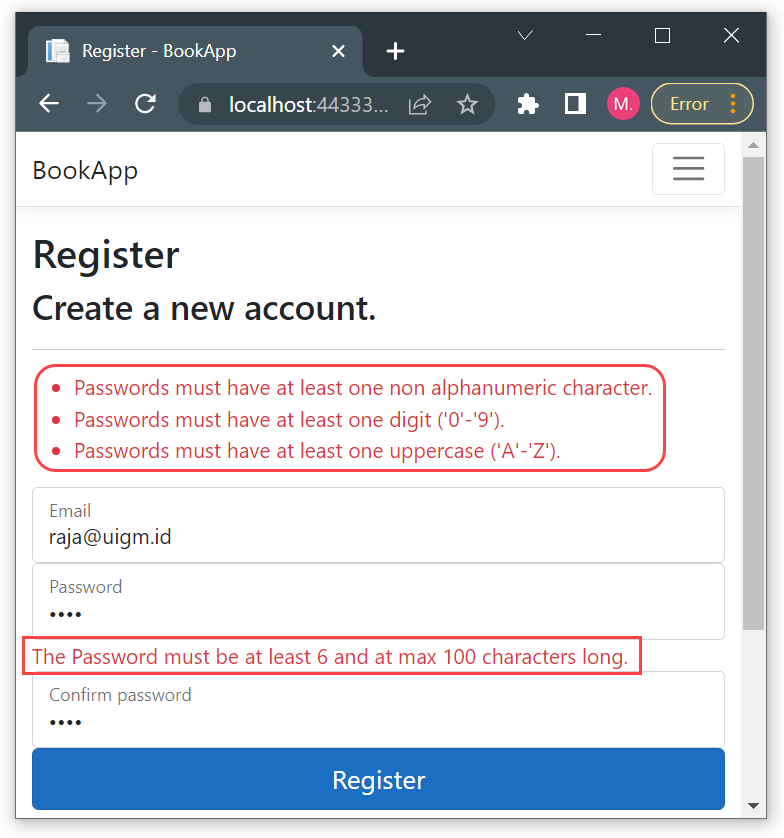
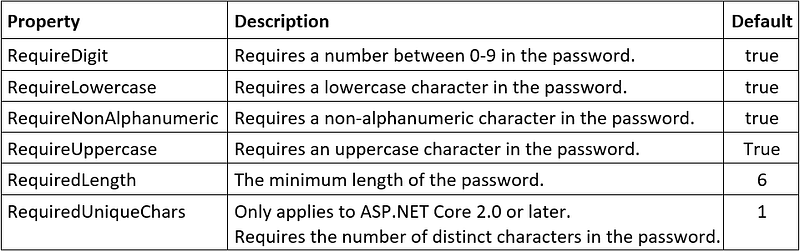
- The project uses ASP.NET Core Identity that supports the following default password policies: ▸ one non-alphanumeric character ▸ one digit ▸ one uppercase ▸ one lowercase ▸ at least six and at max 100 characters long.
- Table 1 shows the PasswordOptions properties of the IdentityOptions.Password and their default value
Customizing Password
You can configure the password policy in the IdentityOptions class in the Startup.cs file of your Blazor Server application.
Listing 1 The contents of Startup.cs
...
    ...
    public void ConfigureServices(IServiceCollection services)
    ...
       // Add ASP.NET Core Identity
       services.Configure<IdentityOptions>(options =>
       {
          options.Password.RequireDigit = true;
          options.Password.RequireLowercase = true;
          options.Password.RequireNonAlphanumeric = true;
          options.Password.RequireUppercase = true;
          options.Password.RequiredLength = 10;
          options.Password.RequiredUniqueChars = 5;
       });
    ...
...
This code configures the password policy to require the following:
- At least one digit, one lowercase letter, one uppercase letter, and one non-alphanumeric character.
- A minimum of 10 characters.
- At least five unique characters.
Summary
Implementing a password policy in your Blazor Server application is essential for maintaining the security of user accounts and preventing unauthorized access. By enforcing a password policy, you can ensure that users create strong and unique passwords, reduce the risk of password guessing and cracking, and protect against data breaches and identity theft.
Hopefully beneficial. Your feedback will be precious.


