avatarM. Ramadhan

Free AI web copilot to create summaries, insights and extended knowledge, download it at here

6141

Abstract

the <code><b>@layout SimpleLayout</b></code> directive to the <code><b>Index.razor</b></code> page.</p><p id="68e5"><b>Listing 2</b><i> BookApp\Pages\Index.razor</i></p><div id="19c6"><pre><span class="hljs-variable">@layout</span> SimpleLayout <span class="hljs-variable">@page</span> <span class="hljs-string">"/"</span></pre></div><div id="70c5"><pre><span class="hljs-tag"><<span class="hljs-name">h1</span>></span>Hello, world!<span class="hljs-tag"></<span class="hljs-name">h1</span>></span></pre></div><div id="4772"><pre>Welcome <span class="hljs-keyword">to</span> your <span class="hljs-keyword">new</span> app.</pre></div><p id="9110">At run time, it displays the following homepage.</p><figure id="5dab"><img src="https://cdn-images-1.readmedium.com/v2/resize:fit:800/1*qyXId0fQjNIcncA0dmtZTw.jpeg"><figcaption></figcaption></figure><h1 id="c129">Specifying a default layout for all pages in an app</h1><h2 id="c539">MainLayout component</h2><p id="5bc5">When you create a Blazor app using one of the Blazor project templates, the <code><b>MainLayout.razor</b></code> component is automatically installed into the <code><b>Shared</b></code> folder.</p><p id="4609"><b>Listing 3</b><i> BookApp\Shared\MainLayout.razor</i></p><div id="c45e"><pre><span class="hljs-meta">@inherits</span> LayoutComponentBase</pre></div><div id="8222"><pre><div <span class="hljs-keyword">class</span>="<span class="hljs-symbol">sidebar</span>"> <<span class="hljs-symbol">NavMenu</span> /> </<span class="hljs-symbol">div</span>></pre></div><div id="7fd5"><pre><<span class="hljs-keyword">div</span> <span class="hljs-built_in">class</span>=<span class="hljs-string">"main"</span>> <<span class="hljs-keyword">div</span> <span class="hljs-built_in">class</span>=<span class="hljs-string">"top-row px-4"</span>> <a href=<span class="hljs-string">"https://docs.microsoft.com/aspnet/"</span> target=<span class="hljs-string">"_blank"</span>>About</a> </<span class="hljs-keyword">div</span>> <<span class="hljs-keyword">div</span> <span class="hljs-built_in">class</span>=<span class="hljs-string">"content px-4"</span>> @Body </<span class="hljs-keyword">div</span>> </<span class="hljs-keyword">div</span>></pre></div><p id="0cb8">The Router component in the <code><b>App.razor</b></code> file sets the default layout to the <code><b>MainLayout</b></code> component.</p><p id="25fe"><b>Listing 4</b><i> BookApp\App.razor</i></p><div id="4ec0"><pre><span class="hljs-tag"><<span class="hljs-name">Router</span> <span class="hljs-attr">AppAssembly</span>=<span class="hljs-string">"@typeof(Program).Assembly"</span>></span> <span class="hljs-tag"><<span class="hljs-name">Found</span> <span class="hljs-attr">Context</span>=<span class="hljs-string">"routeData"</span>></span> <span class="hljs-tag"><<span class="hljs-name">RouteView</span> <span class="hljs-attr">RouteData</span>=<span class="hljs-string">"@routeData"</span> <span class="hljs-attr">DefaultLayout</span>=<span class="hljs-string">"@typeof(MainLayout)"</span> /></span> <span class="hljs-tag"></<span class="hljs-name">Found</span>></span> <span class="hljs-tag"><<span class="hljs-name">NotFound</span>></span> <span class="hljs-tag"><<span class="hljs-name">LayoutView</span> <span class="hljs-attr">Layout</span>=<span class="hljs-string">"@typeof(MainLayout)"</span>></span> <span class="hljs-tag"><<span class="hljs-name">p</span>></span>Sorry, there's nothing at this address.<span class="hljs-tag"></<span class="hljs-name">p</span>></span> <span class="hljs-tag"></<span class="hljs-name">LayoutView</span>></span> <span class="hljs-tag"></<span class="hljs-name">NotFound</span>></span> <span class="hljs-tag"></<span class="hljs-name">Router</span>></span></pre></div><p id="5f59">Each page that is not specified to any layout will apply the default layout. We will apply it to <code><b>Index.razor</b></code> as an example.</p><ul><li>Open the <code><b>Index.razor</b></code> file. The <code><b>@layout SimpleLayout</b></code> directive shows the <code><b>Index.razor</b></code> still references <code><b>SimpleLayout.razor</b></code>.</li><li>Delete the first line code — <code><b>@layout SimpleLayout</b></code> directive — automatically the <code><b>Index.razor</b></code> references default layout (<code><b>MainLayout.razor</b></code>).</li><li>At run time, the <code><b>Index.razor</b></code> component applies the default layout and displays the following homepage.</li></ul><figure id="fddf"><img src="https://cdn-images-1.readmedium.com/v2/resize:fit:800/1*ex909ShQry33tF5PLkcSZQ.jpeg"><figcaption></figcaption></figure><ul><li>Delete the <code><b>SimpleLayout.razor</b></code> file because the project doesn't need it anymore.</li></ul><h1 id="a564">Specifying the layout for all components in a folder and subfolders</h1><p id="48fc">You can create a template file named <code><b>_Imports.razor</b></code> in a folder if all components in the folder and recursively in all of its subfolders use the same layout. For example, all components in a folder named <code><b>Superuser</b></code> and recursively in all of its subfolders use the same layout named <code><b>SpecialLayout.razor</b></code>.</p><ul><li>Create a file named <code><b>_Imports.razor</b></code> in the <code><b>Superuser</b></code> folder.</li><li>Add the <code><b>@layout SpecialLayout</b></code> directive into the file.</li></ul><p id="491d">There’s no need to add <code><b>@layout SpecialLayout</b></code> repeatedly to all of the <code><b>.razor</b></code> files within the folder and subfolders, and so do <code>@<b>using</b></code> directives.</p><h1 id="fe16">Modifying MainLayout.razor</h1><p id="e715">We needn’t <code><b>About</b></code> element, so we replace it with the current day and date. Below is the modified <code><b>MainLayout.razor</b></code>.</p><p id="535f"><b>Listing 5</b><i> BookApp\Shared\MainLayout.razor</i></p><div id="54ed">

Options

<pre><span class="hljs-meta">@inherits</span> LayoutComponentBase</pre></div><div id="71e6"><pre>&lt;div <span class="hljs-keyword">class</span>="<span class="hljs-symbol">sidebar</span>"&gt;

<<span class="hljs-symbol">NavMenu</span> /> </<span class="hljs-symbol">div</span>></pre></div><div id="74bf"><pre><<span class="hljs-keyword">div</span> <span class="hljs-built_in">class</span>=<span class="hljs-string">"main"</span>> <<span class="hljs-keyword">div</span> <span class="hljs-built_in">class</span>=<span class="hljs-string">"top-row px-4"</span>> <a>@today.ToString(<span class="hljs-string">"dddd, dd MMMM yyyy"</span>)</a> </<span class="hljs-keyword">div</span>></pre></div><div id="a509"><pre><<span class="hljs-keyword">div</span> <span class="hljs-built_in">class</span>=<span class="hljs-string">"content px-4"</span>> @Body </<span class="hljs-keyword">div</span>> </<span class="hljs-keyword">div</span>></pre></div><div id="b2a3"><pre><span class="hljs-meta">@code</span> { <span class="hljs-built_in">DateTime</span> today = <span class="hljs-built_in">DateTime</span>.Today; }</pre></div><h1 id="df3f">Nested Layouts</h1><p id="3956">Layout components can also be nested. A page component can reference a layout, which in turn references another layout. For example, the <code><b>Index.razor</b></code> component references a layout named <code><b>GreetingLayout.razor</b></code> which references <code><b>MainLayout.razor</b></code>. The <code><b>GreetingLayout.razor</b></code> layout displays greetings at the top of the page content, inside the <code><b>MainLayout.razor</b></code> layout. The following are the steps.</p><ul><li>Create a layout file named <code><b>GreetingLayout.razor</b></code> in the <code><b>Shared</b></code> folder.</li><li>Please copy the following code, then paste it into the <code><b>GreetingLayout.razor</b></code> file.</li></ul><p id="fabc"><b>Listing 6</b><i> BookApp\Shared\GreetingLayout..razor</i></p><div id="a09c"><pre><span class="hljs-variable">@layout</span> MainLayout @* references MainLayout.razor @ <span class="hljs-variable">@inherits</span> LayoutComponentBase</pre></div><div id="fab0"><pre><span class="hljs-tag"><<span class="hljs-name">h5</span>></span>Good @time!<span class="hljs-tag"></<span class="hljs-name">h5</span>></span> <span class="hljs-tag"><<span class="hljs-name">br</span> /></span></pre></div><div id="6ecb"><pre>@<span class="hljs-keyword">Body</span></pre></div><div id="95d8"><pre>@code { <span class="hljs-keyword">private</span> <span class="hljs-built_in">string</span> time; <span class="hljs-function"><span class="hljs-keyword">protected</span> <span class="hljs-keyword">override</span> <span class="hljs-keyword">void</span> <span class="hljs-title">OnInitialized</span>()</span> { <span class="hljs-built_in">int</span> hour = DateTime.Now.Hour; <span class="hljs-keyword">if</span> (hour < <span class="hljs-number">5</span> && hour > <span class="hljs-number">17</span>) time = <span class="hljs-string">"Evening"</span>; <span class="hljs-keyword">else</span> <span class="hljs-keyword">if</span> (hour < <span class="hljs-number">12</span>) time = <span class="hljs-string">"Morning"</span>; <span class="hljs-keyword">else</span> time = <span class="hljs-string">"Afternoon"</span>; } }</pre></div><ul><li>Add the following code into the <code><b>Index.razor</b></code> file so that the contents are as follows.</li></ul><p id="8ec2"><b>Listing 7</b><i> BookApp\Shared\GreetingLayout..razor</i></p><div id="2d06"><pre><span class="hljs-keyword">@page</span> <span class="hljs-string">"/"</span> <span class="hljs-variable">@layout</span> GreetingLayout @ references GreetingLayout.razor *@</pre></div><div id="6079"><pre><span class="hljs-tag"><<span class="hljs-name">h1</span>></span>Hello, world!<span class="hljs-tag"></<span class="hljs-name">h1</span>></span></pre></div><div id="f353"><pre>Welcome <span class="hljs-keyword">to</span> your <span class="hljs-keyword">new</span> app.</pre></div><ul><li>At run time, the <code><b>Index.razor</b></code> component applies the nested layout and displays the following homepage.</li></ul><figure id="c3d0"><img src="https://cdn-images-1.readmedium.com/v2/resize:fit:800/1*EdFBD88Bwgp3G7jUZS1BVQ.png"><figcaption></figcaption></figure><p id="db2e">A layout — like another component — can use data binding, dependency injection, and nesting other components. The two layouts above, the modified <code><b>MainLayout.razor</b></code> and <code><b>GreetingLayout.razor.razor</b></code>, use <i>one-way data binding</i>.</p><h1 id="58fb">References</h1><div id="4352" class="link-block"> <a href="https://readmedium.com/one-way-data-binding-and-event-binding-on-asp-net-core-blazor-b3165349e73d"> <div> <div> <h2>One-way Data Binding and Event Binding on ASP NET Core Blazor</h2> <div><h3>Create and use components</h3></div> <div><p>medium.com</p></div> </div> <div> <div style="background-image: url(https://miro.readmedium.com/v2/resize:fit:320/0*R8bTz_Kb4YRxW-T8.gif)"></div> </div> </div> </a> </div><div id="43d9" class="link-block"> <a href="https://docs.microsoft.com/en-us/aspnet/core/blazor/layouts?view=aspnetcore-5.0"> <div> <div> <h2>ASP.NET Core Blazor layouts</h2> <div><h3>By Rainer Stropek and Luke Latham Some app elements, such as menus, copyright messages, and company logos, are usually…</h3></div> <div><p>docs.microsoft.com</p></div> </div> <div> <div style="background-image: url(https://miro.readmedium.com/v2/resize:fit:320/0*0g6rAE3v0BX-1jXM)"></div> </div> </div> </a> </div></article></body>

Blazor Server Project #5: Creating and Using Page Layout

Applying a layout to an individual page, all pages in an app, and all components in a folder and subfolders

This article is the fifth in a series covering the Blazor Server Project: (1) How to create a CRUD operation using Dapper (2) Building a dropdown list involves a 1:N relationship (3) How to implement a checkbox list involving an M:N relationships (4) Understanding URL routing and navigation (5) Creating and using page layout (6) How to create a reusable modal dialog component (7) Practical guide to making a master-detail page (8) Master-detail page using dynamic query (9) How to avoid SQL injection attacks (10) Hiding/showing HTML elements (11) Migrate to ASP.NET Core 6.0 (12) Installing ASP.NET Core Identity (13) Integrating Identity tables into the existing project database (14) Authentication and authorization (15) Role-based authorization (16) How to implement Google Authentication (17) Facebook Authentication and Authorization (18) How to configure Twitter Authentication (19) How to Customize Password Policy (20) Account Lockout Policy

These articles are for anyone who wants to learn how to build Blazor Server applications in a practical approach through some sample projects. It will be straightforward if you have some experience with C#, HTML, CSS, and SQL.

Blazor Server and Blazor WebAssembly support page layout. The layout has been highlighted at a glance in the previous article, Blazor Server Project #4, that discussed routes.

A layout is a template with one or more elements placeholders such as a header, footer, copyright, menu, etc. Every page may use the same layout and or a different layout. Like on the page components, you can do a layout component like dependency injection, data binding, and nesting other components. The difference is the layout has to inherit from the LayoutComponentBase class.

There are three ways to apply a layout to pages. (1) Specifying a layout explicitly for an individual page. (2) Specifying a default layout for all pages in an app. (3) Specifying the layout for all components in a folder and subfolders.

All of the following reviews base on the application built in the previous article, Blazor Server Project #3. Please download the source code via the link below.

Specifying a layout explicitly for an individual page

As an example, we will create a simple layout and apply it to a page.

Create a simple layout

  • Open BookApp using Visual Studio 2019.
  • In the Solution Explorer panel on the right side of the screen, select Pages| Add|Razor Component...
  • Type SimpleLayout.razor as the file name, click Add.
  • Please copy the following code, paste it to the SimpleLayout.razor panel on the left side of the screen.

Listing 1 BookApp\Shared\SimpleLayout.razor

@inherits LayoutComponentBase
@Body

The SimpleLayout.razor above has only one element using the Razor syntax @Body to specify the layout markup's location where the content is rendered.

Apply a layout explicitly to a page

Every page may select which layout to use by stating the name of the layout with the @layout directive. For example, add the @layout SimpleLayout directive to the Index.razor page.

Listing 2 BookApp\Pages\Index.razor

@layout SimpleLayout
@page "/"
<h1>Hello, world!</h1>
Welcome to your new app.

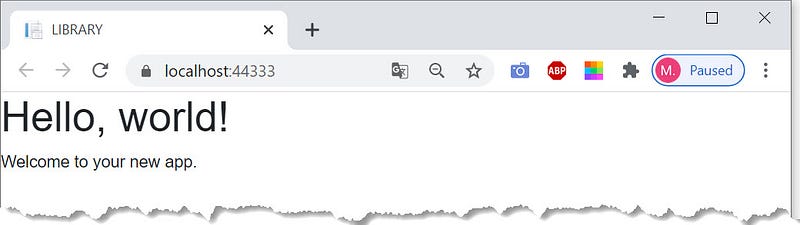
At run time, it displays the following homepage.
Specifying a default layout for all pages in an app

MainLayout component

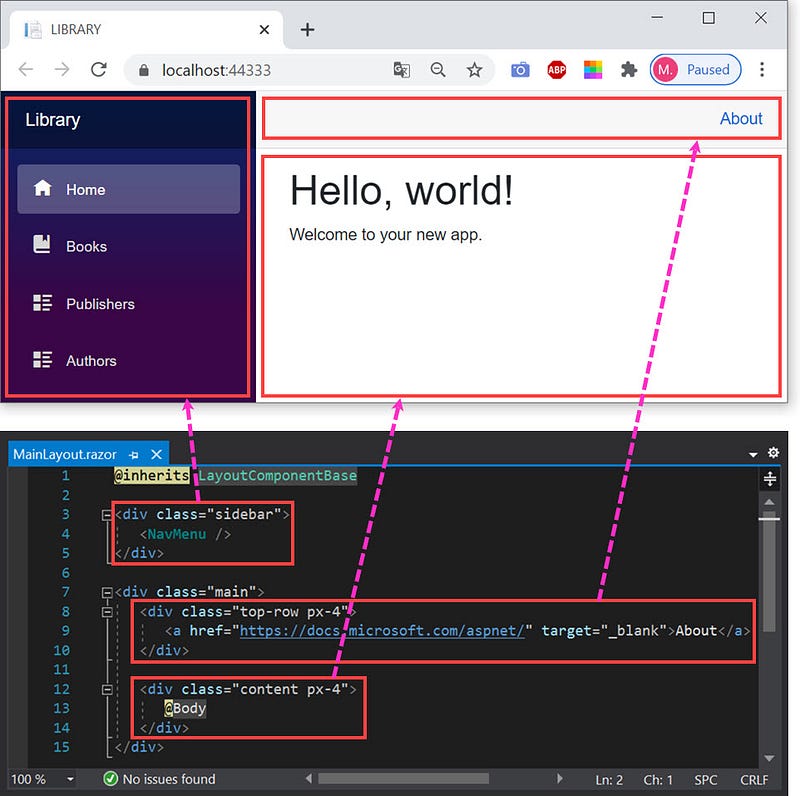
When you create a Blazor app using one of the Blazor project templates, the MainLayout.razor component is automatically installed into the Shared folder.

Listing 3 BookApp\Shared\MainLayout.razor

@inherits LayoutComponentBase
<div class="sidebar">
   <NavMenu />
</div>
<div class="main">
   <div class="top-row px-4">
      <a href="https://docs.microsoft.com/aspnet/"
         target="_blank">About</a>
   </div>
   <div class="content px-4">
      @Body
   </div>
</div>

The Router component in the App.razor file sets the default layout to the MainLayout component.

Listing 4 BookApp\App.razor

<Router AppAssembly="@typeof(Program).Assembly">
   <Found Context="routeData">
      <RouteView RouteData="@routeData"
                 DefaultLayout="@typeof(MainLayout)" />
   </Found>
   <NotFound>
      <LayoutView Layout="@typeof(MainLayout)">
         <p>Sorry, there's nothing at this address.</p>
      </LayoutView>
   </NotFound>
</Router>

Each page that is not specified to any layout will apply the default layout. We will apply it to Index.razor as an example.

  • Open the Index.razor file. The @layout SimpleLayout directive shows the Index.razor still references SimpleLayout.razor.
  • Delete the first line code — @layout SimpleLayout directive — automatically the Index.razor references default layout (MainLayout.razor).
  • At run time, the Index.razor component applies the default layout and displays the following homepage.
  • Delete the SimpleLayout.razor file because the project doesn't need it anymore.

Specifying the layout for all components in a folder and subfolders

You can create a template file named _Imports.razor in a folder if all components in the folder and recursively in all of its subfolders use the same layout. For example, all components in a folder named Superuser and recursively in all of its subfolders use the same layout named SpecialLayout.razor.

  • Create a file named _Imports.razor in the Superuser folder.
  • Add the @layout SpecialLayout directive into the file.

There’s no need to add @layout SpecialLayout repeatedly to all of the .razor files within the folder and subfolders, and so do @using directives.

Modifying MainLayout.razor

We needn’t About element, so we replace it with the current day and date. Below is the modified MainLayout.razor.

Listing 5 BookApp\Shared\MainLayout.razor

@inherits LayoutComponentBase
<div class="sidebar">
   <NavMenu />
</div>
<div class="main">
   <div class="top-row px-4">
      <a>@today.ToString("dddd, dd MMMM yyyy")</a>
   </div>
<div class="content px-4">
      @Body
   </div>
</div>
@code {
   DateTime today = DateTime.Today;
}

Nested Layouts

Layout components can also be nested. A page component can reference a layout, which in turn references another layout. For example, the Index.razor component references a layout named GreetingLayout.razor which references MainLayout.razor. The GreetingLayout.razor layout displays greetings at the top of the page content, inside the MainLayout.razor layout. The following are the steps.

  • Create a layout file named GreetingLayout.razor in the Shared folder.
  • Please copy the following code, then paste it into the GreetingLayout.razor file.

Listing 6 BookApp\Shared\GreetingLayout..razor

@layout MainLayout               @* references MainLayout.razor *@
@inherits LayoutComponentBase
<h5>Good @time!</h5>
<br />
@Body
@code {
   private string time;
   protected override void OnInitialized()
   {
      int hour = DateTime.Now.Hour;
      if (hour < 5 && hour > 17)
         time = "Evening";
      else if (hour < 12)
         time = "Morning";
      else
         time = "Afternoon";
   }
}
  • Add the following code into the Index.razor file so that the contents are as follows.

Listing 7 BookApp\Shared\GreetingLayout..razor

@page "/"
@layout GreetingLayout        @* references GreetingLayout.razor *@
<h1>Hello, world!</h1>
Welcome to your new app.
  • At run time, the Index.razor component applies the nested layout and displays the following homepage.
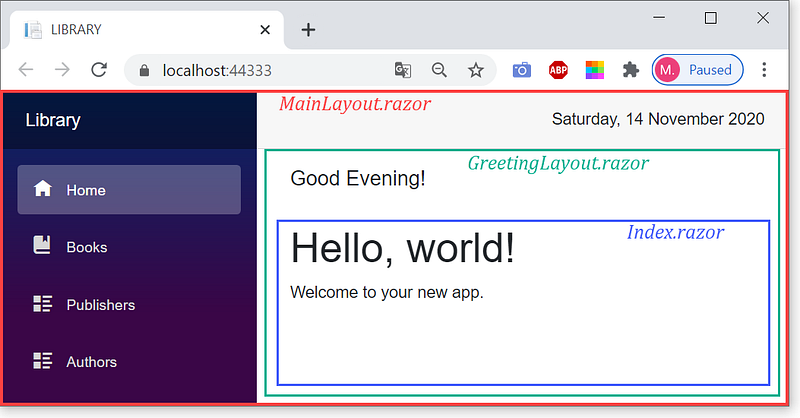
A layout — like another component — can use data binding, dependency injection, and nesting other components. The two layouts above, the modified MainLayout.razor and GreetingLayout.razor.razor, use one-way data binding.

References

Blazor
Layout
Nested Layout
Page Layout
Razor Component
Recommended from ReadMedium