
Blazor Server Project #7: Practical Guide to Make Master-Detail Page
Implementation of CRUD operation for 1:N (one-to-many) & M:N (many-to-many) relationship and dynamic navigation using parameterized route
Table of Contents
• Overview • Implementing Master-Detail Page • How It Works • Summary • References

This article is the seventh in a series covering the Blazor Server Project: (1) How to create a CRUD operation using Dapper (2) Building a dropdown list involves a 1:N relationship (3) How to implement a checkbox list involving an M:N relationships (4) Understanding URL routing and navigation (5) Creating and using page layout (6) How to create a reusable modal dialog component (7) Practical guide to making a master-detail page (8) Master-detail page using dynamic query (9) How to avoid SQL injection attacks (10) Hiding/showing HTML elements (11) Migrate to ASP.NET Core 6.0 (12) Installing ASP.NET Core Identity (13) Integrating Identity tables into the existing project database (14) Authentication and authorization (15) Role-based authorization (16) How to implement Google Authentication (17) Facebook Authentication and Authorization (18) How to configure Twitter Authentication (19) How to Customize Password Policy (20) Account Lockout Policy
These articles are for anyone who wants to learn how to build Blazor Server applications in a practical approach through some sample projects. It will be straightforward if you have some experience with C#, HTML, CSS, and SQL.
All of the following discusses base on the source code in the previous article, Blazor Server Project #6. Please download the source code via the link below.
Overview
CRUD (Create, Read, Update, Delete) are features that must be present in an application that uses a database. In the previous articles, we discussed how to implement CRUD operations involving: (1) only one table (2) two tables with N:1 (many to one) relationships (3) three tables with M:N (many-to-many) relationships.
The application that had been built uses a database based on the following ERD.
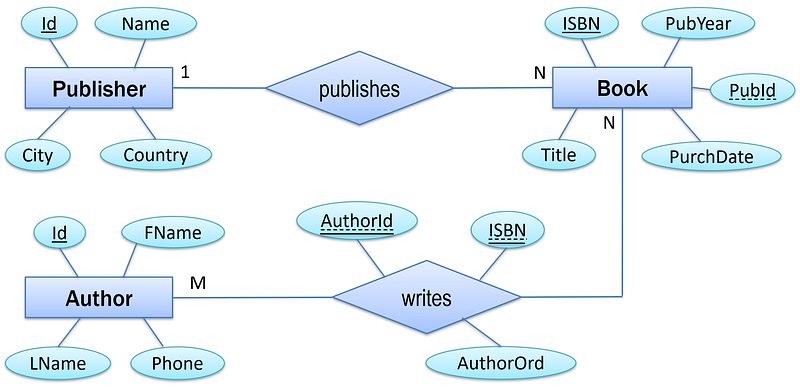
This time we’ll cover how to create two master-details pages:
- Booklist per publisher as an implementation of the 1:N relationship, Publisher-publishes-Book.
- Booklist per author as an implementation of the M:N relationship, Author-writes-Book.
Booklist per publisher
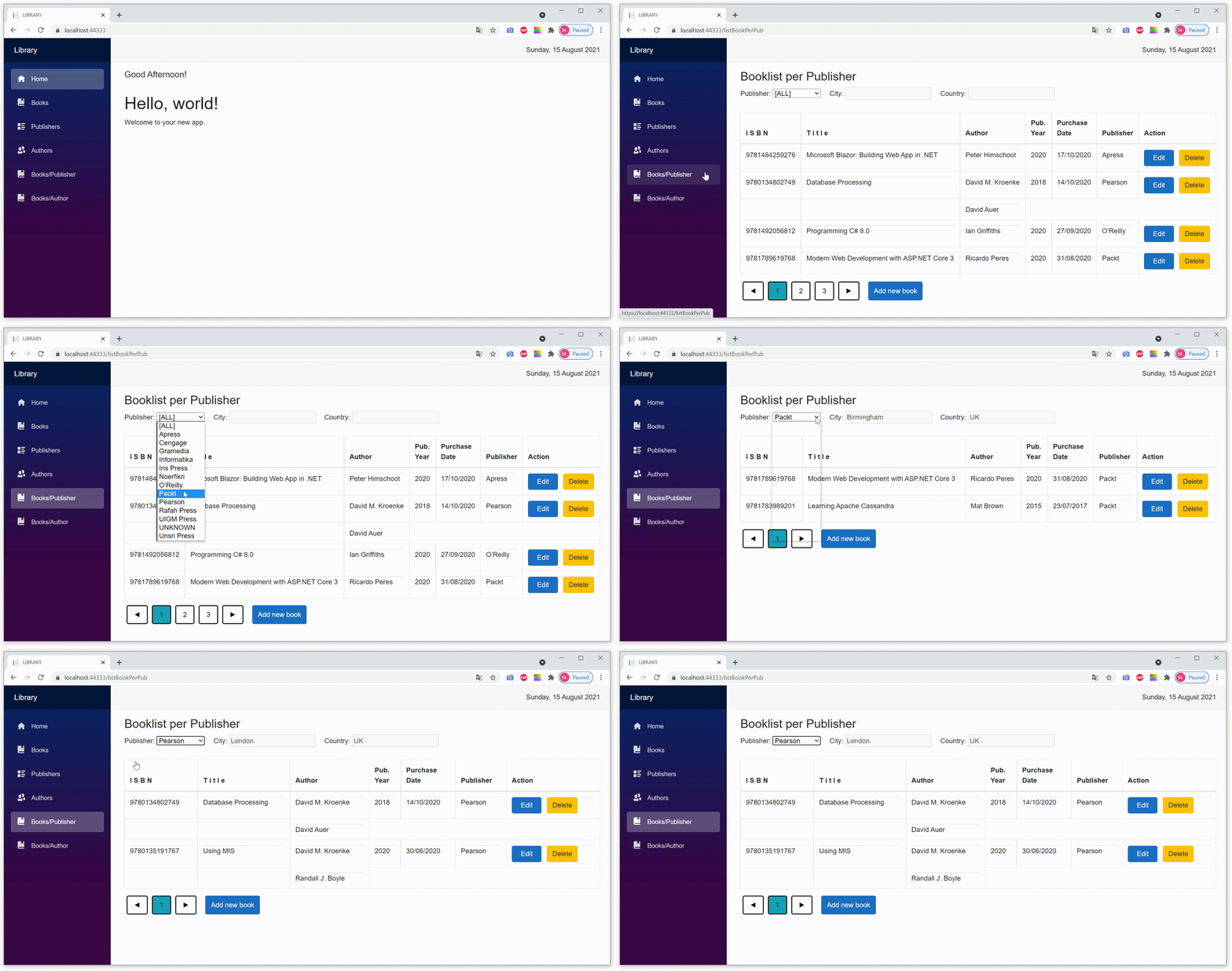
- By default, the option in the dropdown list is
[All]; all existing books are shown in the list. - You can display a booklist of a specific publisher by selecting a publisher from the dropdown list.
Booklist per author
First version
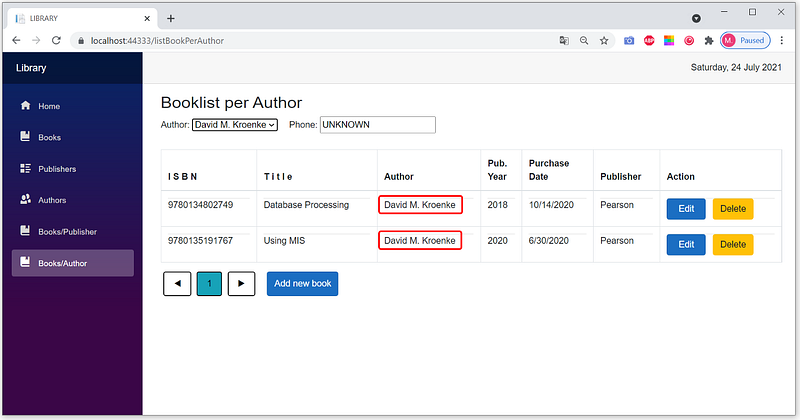
The two books in the list above feature only one author, whereas two authors wrote both. The M:N relationship is not depicted in the figure above.
Second version
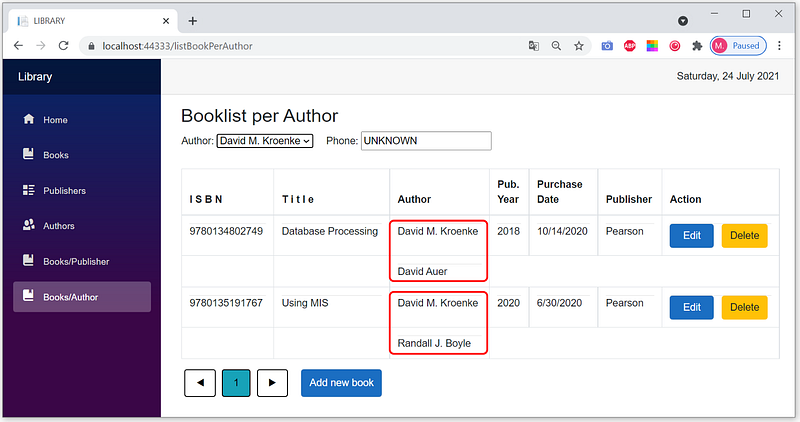
The second version describes the M:N relationship more clearly. An author can write many books; conversely, one book can be written by many authors. So we will create this one.
Implementing Master-Detail Pages
(1) Opening the BookApp project
- Right-click the file
BookApp.sln. It’s one of the files that you downloaded before.
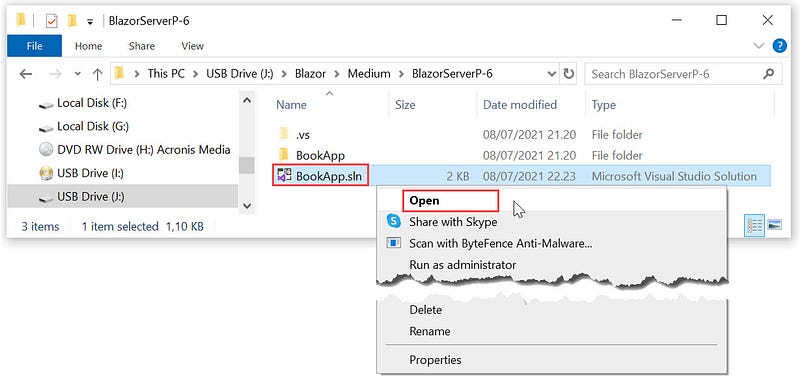
BookApp Application- Click
Opencontext menu to openBookAppapplication.
(2) Creating BookDB database
(a) Opening the SQL Server Object Explorer pane
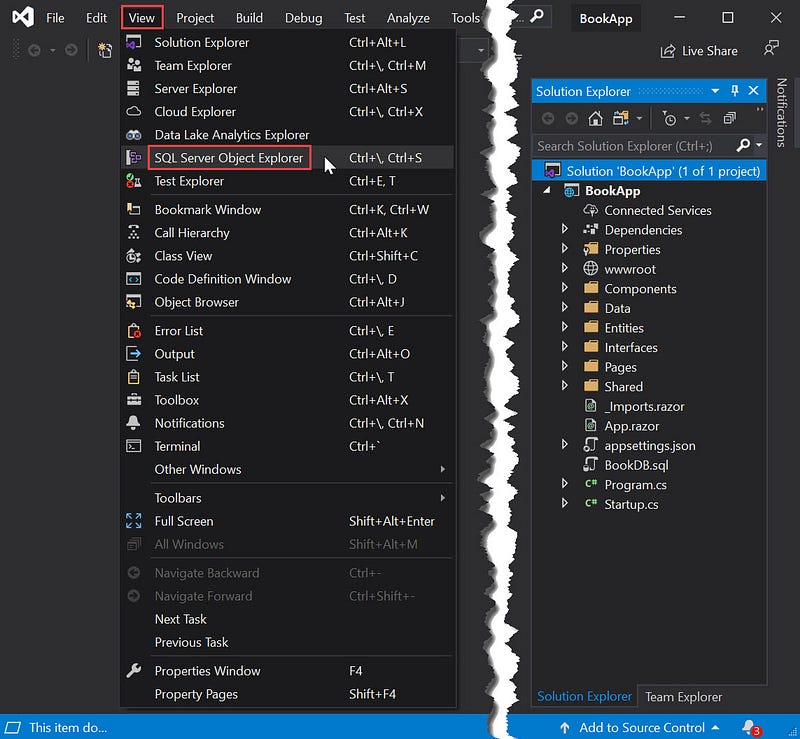
SQL Server Object Explorer- Click the menu:
View|SQL Server Object Explorer - Look into the
SQL Server Object Explorerpane on the left. If there is theBookDBdatabase, go to step (3). Otherwise, do the following step.
(b) Opening and executing the BookDB.sql file
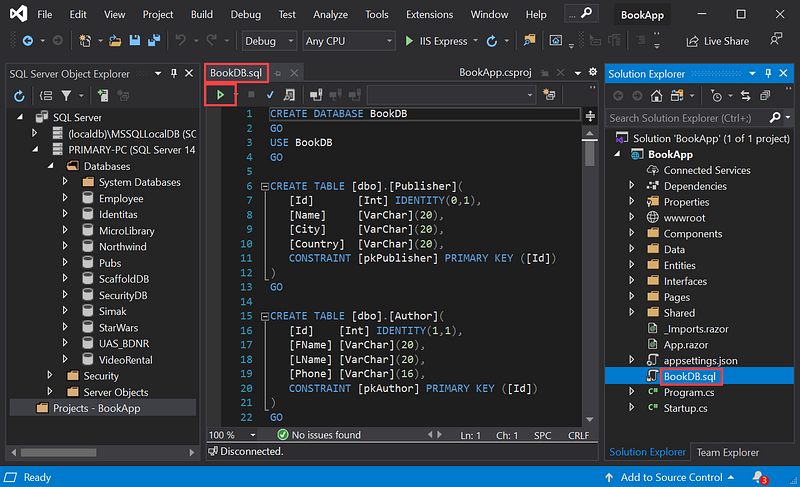
BookDB.sql file- In the
Solution Explorerpane, clickBookDB.sqlto open the SQL script file. - Click the
▶button to execute the whole of the SQL scripts in theBookDB.sqlfile. - The following similar screen appears.
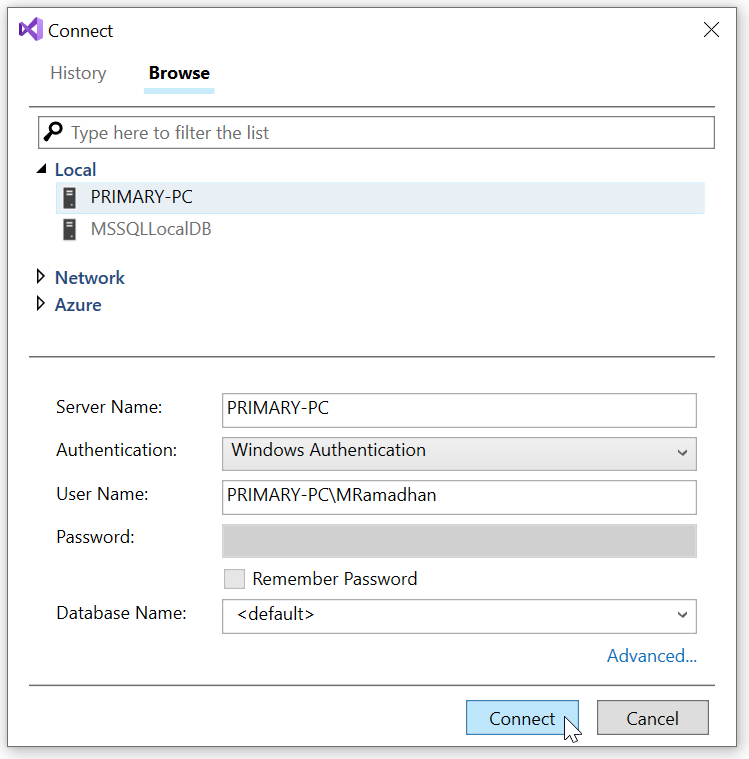
- Choose your server, click the
Connectbutton.
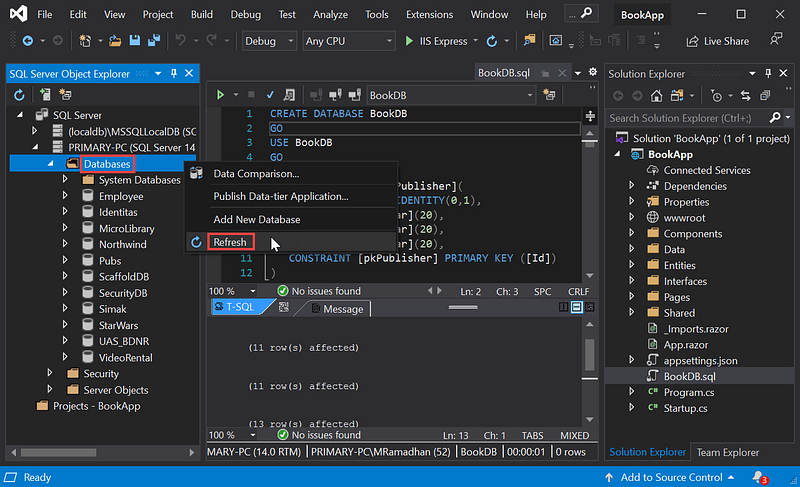
- In the
SQL Server Object Explorerpane, right-clickDatabases, then clickRefresh.
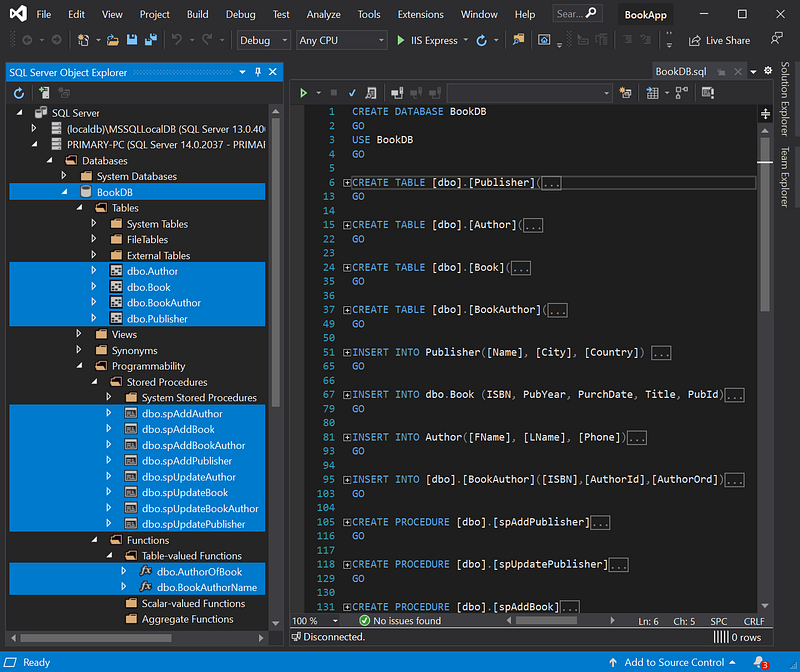
BookDB database objects(3) Adding interfaces and methods
- Add the following interfaces into
IBookService.csfile
Task<List<BookAuPub>> ListPerPub(int skip,
                                 int take,
                                 string orderBy,
                                 string direction,
                                 int idPub);

Task<List<BookAuPub>> ListPerAuthor(int skip,
                                    int take,
                                    string orderBy,
                                    string direction,
                                    int idAuthor);

Task<int> CountBookPerPub(int idPub);Task<int> CountBookPerAuthor(int idAuthor);- Add the following code into
BookService.csfile.
public Task<List<BookAuPub>> ListPerPub(int skip, int take,
       string orderBy, string direction = "DESC", int idPub = 0)
{
   var books = Task.FromResult(_dapperService.
       GetAll<BookAuPub>($"SELECT B.*, FName + ' ' + LName " +
       $"AuthorName, P.Name PubName FROM Book B LEFT OUTER JOIN" +
       $" Publisher P ON B.PubId=P.Id LEFT OUTER JOIN " +
       $"BookAuthor BA ON B.ISBN = BA.ISBN LEFT OUTER JOIN " +
       $"Author A ON BA.AuthorId = A.Id " +
       $"WHERE PubId = {idPub} ORDER BY {orderBy} " +
       $"{direction} OFFSET {skip} ROWS FETCH NEXT {take} " +
       $"ROWS ONLY;", null, commandType: CommandType.Text));
       return books;
}
public Task<List<BookAuPub>> ListPerAuthor(int skip, int take,
string orderBy, string direction = "DESC", int idAuthor = 0)
{
var books = Task.FromResult(_dapperService.
GetAll<BookAuPub>($"SELECT B.*, FName + ' ' + LName " +
$"AuthorName, P.Name PubName FROM Book B LEFT OUTER JOIN" +
$" Publisher P ON B.PubId=P.Id LEFT OUTER JOIN " +
$"BookAuthor BA ON B.ISBN = BA.ISBN LEFT OUTER JOIN " +
$"Author A ON BA.AuthorId = A.Id WHERE B.ISBN IN (" +
$"SELECT ISBN From BookAuthor WHERE AuthorId={idAuthor}" +
$") ORDER BY {orderBy} {direction} OFFSET {skip} " +
$"ROWS FETCH NEXT {take} ROWS ONLY;", null,
commandType: CommandType.Text));
return books;
}public Task<int> CountBookPerPub(int idPub)
{
var totBook = Task.FromResult(_dapperService.Get<int>
($"select COUNT(*) from [Book] " +
"WHERE PubId = {idPub}", null,
commandType: CommandType.Text));
return totBook;
}public Task<int> CountBookPerAuthor(int idAuthor)
{
var totBook = Task.FromResult(_dapperService.Get<int>
($"SELECT COUNT(*) FROM Book B INNER JOIN BookAuthor BA" +
$" ON B.ISBN = BA.ISBN WHERE AuthorId = {idAuthor}", null,
commandType: CommandType.Text));
return totBook;
}- The
ListPerPub()method retrieves booklist published by a publisher. - The
ListPerAuthor()method retrieves a booklist written by an author. - The
CountBookPerPub()method counts the number of books published by a publisher. - The
CountBookPerAuthor()method counts the number of books written by an author.
(4) Creating the ListBookPerPub.razor component file
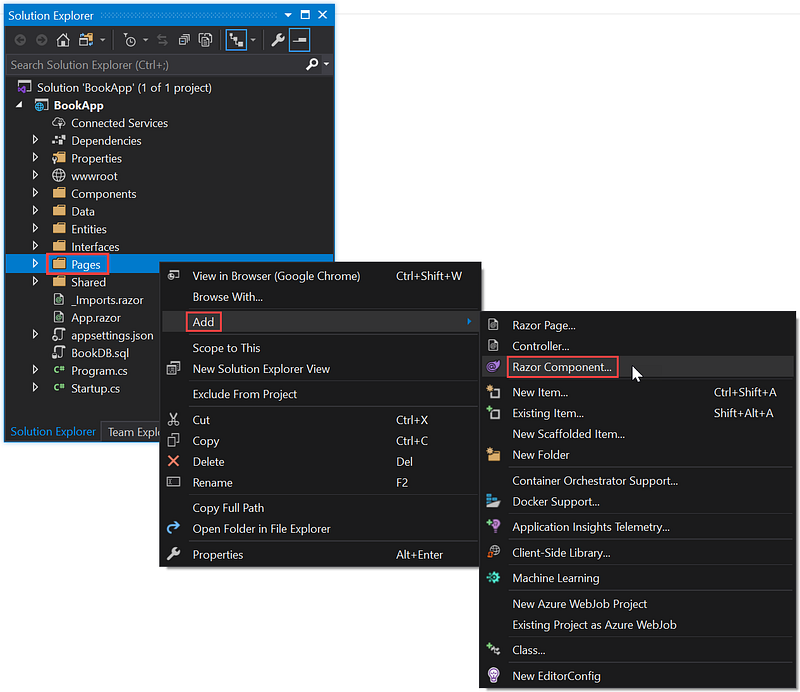
- In the
Solution Explorerpane, right-click thePagefolder. - Select submenu:
Add|Razor Component...
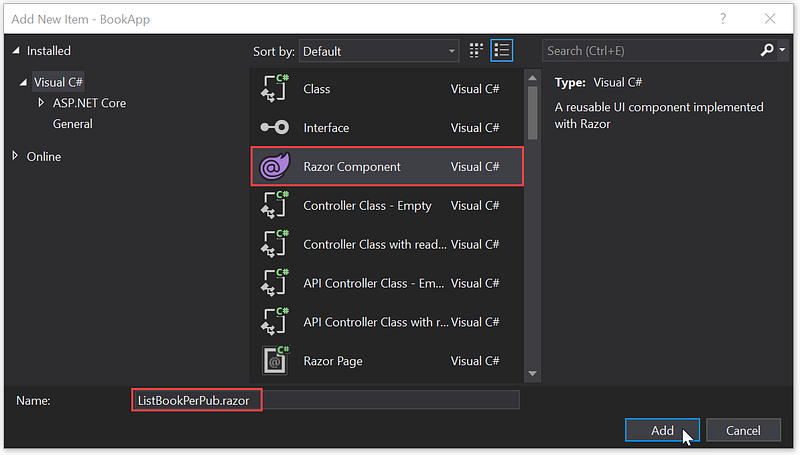
ListBookPerPub.razor component file- Click
Razor Component. - In the
Nametext box, typeListBookPerPub.razoras the component filename. - Click the
Addbutton.
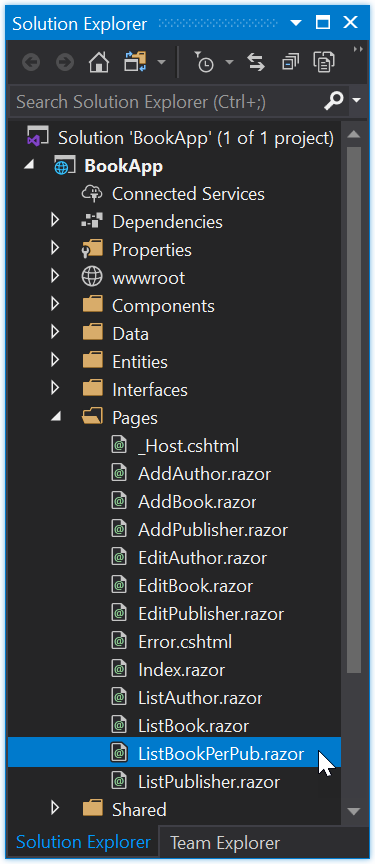
ListBookPerPub.razor file in the Page folder- Click
ListBookPerPub.razorto open the file.
Base on Figure 4, the master part is the publisher, and the detail is the list of books. Please copy the code below and paste it into the ListBookPerPub.razor file.
ListBookPerPub.razor
@page "/listBookPerPub"
@inject IBookService bookService
@inject IPublisherService publisherService
<link href="https://stackpath.bootstrapcdn.com/font-awesome/4.7.0/css/font-awesome.min.css" rel="stylesheet"><h3>
Booklist per publisher
</h3><style>
.sort-th {
cursor: pointer;
} .fa {
float: right;
} .btn-custom {
color: black;
float: left;
padding: 8px 16px;
text-decoration: none;
transition: background-color .3s;
border: 2px solid #000;
margin: 0px 5px 0px 5px;
}
</style><form>
<label for="Publisher">Publisher:</label>
<select for="Publisher" @bind="IdPubFilter"
@bind:event="onchange">
<option value=@All>[ALL]</option>
@foreach (var publisher in publishers)
{
<option value="@publisher.Id">@publisher.Name</option>
}
</select> 
<label for="City">City:</label>
<input for="City" @bind="@publisher.City" disabled/> 
<label for="Country">Country:</label>
<input for="Country" @bind="@publisher.Country" disabled/>
</form>
<br />@if (books == null)
{
<p><em>Loading...</em></p>
}
else
{
<table class="table table-bordered table-hover">
<thead>
<tr>
<th class="sort-th"
@onclick="@(() => SortTable("ISBN"))">
I S B N
<span class="fa @(SetSortIcon("ISBN"))"></span>
</th>
<th class="sort-th"
@onclick="@(() => SortTable("Title"))">
T i t l e
<span class="fa @(SetSortIcon("Title"))"></span>
</th>
<th class="sort-th"
@onclick="@(() => SortTable("AuthorName"))">
Author
<span class="fa @(SetSortIcon("AuthorName"))"></span>
</th>
<th class="sort-th"
@onclick="@(() => SortTable("PubYear"))">
Pub.<br />
Year
<span class="fa @(SetSortIcon("PubYear"))"></span>
</th>
<th class="sort-th"
@onclick="@(() => SortTable("PurchDate"))">
Purchase<br />Date
<span class="fa @(SetSortIcon("PurchDate"))"></span>
</th>
<th class="sort-th"
@onclick="@(() => SortTable("PubName"))">
Publisher
<span class="fa @(SetSortIcon("PubName"))"></span>
</th>
<th>Action</th>
</tr>
</thead>
<tbody>
@if (books == null || books.Count == 0)
{
<tr>
<td colspan="3">
No Records to display
</td>
</tr>
}
else
{
long prevISBN = 0;
foreach (var book in books)
{
if (@book.ISBN != prevISBN)
{
<tr>
<td>
<hr style="padding:0px; margin:0px;">
@book.ISBN
</td>
<td>
<hr style="padding:0px; margin:0px;">
@book.Title
</td>
<td>
<hr style="padding:0px; margin:0px;">
@book.AuthorName
</td>
<td>
<hr style="padding:0px; margin:0px;">
@book.PubYear
</td>
<td>
<hr style="padding:0px; margin:0px;">
@book.PurchDate.ToShortDateString()
</td>
<td>
<hr style="padding:0px; margin:0px;">
@book.PubName
</td>
<td>
<hr style="padding:0px; margin:0px;">
<a class="btn btn-primary"
href='/editBook/@name/@book.ISBN'>
 Edit 
</a> 
<a class="btn btn-warning" @onclick="() =>
OpenDialog((long)book.ISBN,book.Title)">
Delete</a>
</td>
</tr>
}
else
{
<tr>
<td></td>
<td></td>
<td>
<hr style="padding:0px; margin:0px;">
@book.AuthorName
</td>
</tr>
}
prevISBN = (long)@book.ISBN;
}
}
</tbody>
</table>
<div class="pagination">
<button class="btn btn-custom" @onclick=@(async ()=>
await NavigateToPage("previous"))>◀</button> @for (int i = startPage; i <= endPage; i++)
{
var currentPage = i;
<button class="btn btn-custom pagebutton
@(currentPage==curPage?"btn-info":"")"
@onclick=@(async () =>
await refreshRecords(currentPage))>@currentPage
</button>
}
<button class="btn btn-custom" @onclick=@(async ()=>
await NavigateToPage("next"))>▶</button> 
<button class="btn btn-primary"
onclick="window.location.href='/addBook/@name'">
Add new book
</button>
</div>
}@if (DialogIsOpen)
{
<Dialog Caption="Delete a book"
Message="@message"
OnClose="@OnDialogClose"
Type="Dialog.Category.DeleteNot">
</Dialog>
}@code {
private const string name = "listBookPerPub";
Publisher publisher = new Publisher();
List<BookAuPub> books;
List<Publisher> publishers = new List<Publisher>();
private long idBook;
private string message;
private bool DialogIsOpen = false; const int All = -1;
private int idPubFilter = All;
private int IdPubFilter
{
get { return idPubFilter; }
set { idPubFilter = value; this.InitializedAsync().Wait(); }
} #region Pagination int totalPages;
int totalRecords;
int curPage;
int pagerSize;
int pageSize;
int startPage;
int endPage;
string sortColumnName = "PurchDate";
string sortDir = "DESC"; #endregion protected override async Task OnInitializedAsync()
{
publishers = await publisherService.FetchAll();
await InitializedAsync();
} protected async Task InitializedAsync()
{
//display total page buttons
pagerSize = 3;
pageSize = 5;
curPage = 1;
endPage = 0;
if (idPubFilter == All)
{
books = await bookService.ListAll((curPage - 1) * pageSize,
pageSize, sortColumnName, sortDir, "");
totalRecords = await bookService.Count("");
publisher.City = "";
publisher.Country = "";
}
else
{
publisher = await publisherService.ReadByPk(idPubFilter);
books = await bookService.ListPerPub((curPage - 1) *
pageSize, pageSize, sortColumnName, sortDir,idPubFilter);
totalRecords = await bookService.CountResult(idPubFilter);
}
totalPages = (int)Math.Ceiling
(totalRecords / (decimal)pageSize);
SetPagerSize("forward");
} private void OpenDialog(long isbn, string title)
{
DialogIsOpen = true;
idBook = isbn;
message = "Do you want to delete the book \"" + title + "\"?";
} private async Task OnDialogClose(bool isOk)
{
if (isOk)
{
await bookService.Delete(idBook);
if (idPubFilter == All)
{
books = await bookService.ListAll((curPage - 1) *
pageSize, pageSize, sortColumnName, sortDir, "");
}
else
{
books = await bookService.ListPerPub((curPage - 1) *
pageSize, pageSize, sortColumnName, sortDir,
idPubFilter);
}
}
DialogIsOpen = false;
} private bool isSortedAscending;
private string activeSortColumn; private async Task<List<BookAuPub>> SortRecords
(string columnName, string dir)
{
if (idPubFilter == All)
{
return await bookService.ListAll((curPage - 1) *
pageSize, pageSize, columnName, dir, "");
}
else
{
return await bookService.ListPerPub((curPage - 1) *
pageSize, pageSize, columnName, dir, idPubFilter);
}
} private async Task SortTable(string columnName)
{
if (columnName != activeSortColumn)
{
books = await SortRecords(columnName, "ASC");
isSortedAscending = true;
activeSortColumn = columnName;
}
else
{
if (isSortedAscending)
{
books = await SortRecords(columnName, "DESC");
}
else
{
books = await SortRecords(columnName, "ASC");
}
isSortedAscending = !isSortedAscending;
}
sortColumnName = columnName;
sortDir = isSortedAscending ? "ASC" : "DESC";
} private string SetSortIcon(string columnName)
{
if (activeSortColumn != columnName)
{
return string.Empty;
}
if (isSortedAscending)
{
return "fa-sort-up";
}
else
{
return "fa-sort-down";
}
} public async Task refreshRecords(int currentPage)
{
if (idPubFilter == All)
{
books = await bookService.ListAll((curPage - 1) *
pageSize, pageSize, sortColumnName, sortDir, "");
}
else
{
books = await bookService.ListPerPub((curPage - 1) *
pageSize, pageSize, sortColumnName, sortDir, idPubFilter);
}
curPage = currentPage;
this.StateHasChanged();
} public void SetPagerSize(string direction)
{
if (direction == "forward" && endPage < totalPages)
{
startPage = endPage + 1;
if (endPage + pagerSize < totalPages)
{
endPage = startPage + pagerSize - 1;
}
else
{
endPage = totalPages;
}
this.StateHasChanged();
}
else if (direction == "back" && startPage > 1)
{
endPage = startPage - 1;
startPage = startPage - pagerSize;
}
else
{
startPage = 1;
endPage = totalPages;
}
} public async Task NavigateToPage(string direction)
{
if (direction == "next")
{
if (curPage < totalPages)
{
if (curPage == endPage)
{
SetPagerSize("forward");
}
curPage += 1;
}
}
else if (direction == "previous")
{
if (curPage > 1)
{
if (curPage == startPage)
{
SetPagerSize("back");
}
curPage -= 1;
}
}
await refreshRecords(curPage);
}
}(5) Creating the ListBookPerAuthor.razor component file.
- Same as in step (4), create a component file named
ListBookPerAuthor.razor. - Base on Figure 5 above, the master is the author, and the detail is the list of books. Please copy the code below and paste it into the
ListBookPerAuthor.razorfile.
ListBookPerAuthor.razor
@page "/listBookPerAuthor"
@inject IBookService bookService
@inject IAuthorService authorService
<link href="https://stackpath.bootstrapcdn.com/font-awesome/4.7.0/css/font-awesome.min.css" rel="stylesheet"><h3>
Booklist per Author
</h3><style>
.sort-th {
cursor: pointer;
} .fa {
float: right;
} .btn-custom {
color: black;
float: left;
padding: 8px 16px;
text-decoration: none;
transition: background-color .3s;
border: 2px solid #000;
margin: 0px 5px 0px 5px;
}
</style><form>
<label for="Author">Author:</label>
<select for="Author" @bind="IdAuthorFilter"
@bind:event="onchange">
<option value=@All>[ALL]</option>
@foreach (var author in authors)
{
<option value="@author.Id">
@author.FName @author.LName
</option>
}
</select> 
<label for="Phone">Phone:</label>
<input for="Phone" @bind="@author.Phone" disabled />
</form>
<br />@if (books == null)
{
<p><em>Loading...</em></p>
}
else
{
<table class="table table-bordered table-hover">
<thead>
<tr>
<th class="sort-th"
@onclick="@(() => SortTable("ISBN"))">
I S B N
<span class="fa @(SetSortIcon("ISBN"))"></span>
</th>
<th class="sort-th"
@onclick="@(() => SortTable("Title"))">
T i t l e
<span class="fa @(SetSortIcon("Title"))"></span>
</th>
<th class="sort-th"
@onclick="@(() => SortTable("AuthorName"))">
Author
<span class="fa @(SetSortIcon("AuthorName"))">
</span>
</th>
<th class="sort-th"
@onclick="@(() => SortTable("PubYear"))">
Pub.<br />Year
<span class="fa @(SetSortIcon("PubYear"))"></span>
</th>
<th class="sort-th"
@onclick="@(() => SortTable("PurchDate"))">
Purchase<br />Date<span class=
"fa @(SetSortIcon("PurchDate"))"></span>
</th>
<th class="sort-th"
@onclick="@(() => SortTable("PubName"))">
Publisher<span class=
"fa @(SetSortIcon("PubName"))"></span>
</th>
<th>Action</th>
</tr>
</thead>
<tbody>
@if (books == null || books.Count == 0)
{
<tr>
<td colspan="3">
No Records to display
</td>
</tr>
}
else
{
long prevISBN = 0;
foreach (var book in books)
{
if (@book.ISBN != prevISBN)
{
<tr>
<td>
<hr style="padding:0px; margin:0px;">
@book.ISBN
</td>
<td>
<hr style="padding:0px; margin:0px;">
@book.Title
</td>
<td>
<hr style="padding:0px; margin:0px;">
@book.AuthorName
</td>
<td>
<hr style="padding:0px; margin:0px;">
@book.PubYear
</td>
<td>
<hr style="padding:0px; margin:0px;">
@book.PurchDate.ToShortDateString()
</td>
<td>
<hr style="padding:0px; margin:0px;">
@book.PubName
</td>
<td>
<hr style="padding:0px; margin:0px;">
<a class="btn btn-primary"
href='/editBook/@name/@book.ISBN'>
 Edit 
</a> 
<a class="btn btn-warning" @onclick="() =>
OpenDialog((long)book.ISBN,book.Title)">
Delete
</a>
</td>
</tr>
}
else
{
<tr>
<td></td>
<td></td>
<td>
<hr style="padding:0px; margin:0px;">
@book.AuthorName
</td>
</tr>
}
prevISBN = (long)@book.ISBN;
}
}
</tbody>
</table>
<div class="pagination">
<button class="btn btn-custom" @onclick=@(async ()=>
await NavigateToPage("previous"))>◀</button> @for (int i = startPage; i <= endPage; i++)
{
var currentPage = i;
<button class="btn btn-custom pagebutton
@(currentPage==curPage?"btn-info":"")"
@onclick=@(async () =>
await refreshRecords(currentPage))>@currentPage
</button>
}
<button class="btn btn-custom" @onclick=@(async ()=>
await NavigateToPage("next"))>▶</button> 
<button class="btn btn-primary"
onclick="window.location.href='/addBook/@name'">
Add new book
</button>
</div>
}@if (DialogIsOpen)
{
<Dialog Caption="Delete a book"
Message="@message"
OnClose="@OnDialogClose"
Type="Dialog.Category.DeleteNot">
</Dialog>
}@code {
private const string name = "listBookPerAuthor";
Author author = new Author();
List<BookAuPub> books;
List<Author> authors = new List<Author>();
private long idBook;
private string message;
private bool DialogIsOpen = false; const int All = -1;
private int idAuthorFilter = All;
private int IdAuthorFilter
{
get { return idAuthorFilter; }
set { idAuthorFilter = value; this.InitializedAsync().Wait(); }
} #region Pagination int totalPages;
int totalRecords;
int curPage;
int pagerSize;
int pageSize;
int startPage;
int endPage;
string sortColumnName = "PurchDate";
string sortDir = "DESC"; #endregion protected override async Task OnInitializedAsync()
{
authors = await authorService.FetchAll();
await InitializedAsync();
} protected async Task InitializedAsync()
{
//display total page buttons
pagerSize = 3;
pageSize = 5;
curPage = 1;
endPage = 0;
if (idAuthorFilter == All)
{
books = await bookService.ListAll((curPage - 1) * pageSize,
pageSize, sortColumnName, sortDir, "");
totalRecords = await bookService.Count("");
author.Phone = "";
}
else
{
author = await authorService.ReadByPk(idAuthorFilter);
books = await bookService.ListPerAuthor((curPage - 1) *
pageSize, pageSize, sortColumnName, sortDir,
idAuthorFilter);
totalRecords = await bookService.CountResult
(idAuthorFilter);
}
totalPages = (int)Math.Ceiling
(totalRecords / (decimal)pageSize);
SetPagerSize("forward");
} private void OpenDialog(long isbn, string title)
{
DialogIsOpen = true;
idBook = isbn;
message = "Do you want to delete the book \"" + title + "\"?";
} private async Task OnDialogClose(bool isOk)
{
if (isOk)
{
await bookService.Delete(idBook);
if (idAuthorFilter == All)
{
books = await bookService.ListAll((curPage - 1) *
pageSize, pageSize, sortColumnName, sortDir, "");
}
else
{
books = await bookService.ListPerAuthor((curPage - 1) *
pageSize, pageSize, sortColumnName, sortDir,
idAuthorFilter);
}
}
DialogIsOpen = false;
} private bool isSortedAscending;
private string activeSortColumn; private async Task<List<BookAuPub>> SortRecords
(string columnName, string dir)
{
if (idAuthorFilter == All)
{
return await bookService.ListAll((curPage - 1) *
pageSize, pageSize, columnName, dir, "");
}
else
{
return await bookService.ListPerAuthor((curPage - 1) *
pageSize, pageSize, columnName, dir, idAuthorFilter);
}
} private async Task SortTable(string columnName)
{
if (columnName != activeSortColumn)
{
books = await SortRecords(columnName, "ASC");
isSortedAscending = true;
activeSortColumn = columnName;
}
else
{
if (isSortedAscending)
{
books = await SortRecords(columnName, "DESC");
}
else
{
books = await SortRecords(columnName, "ASC");
}
isSortedAscending = !isSortedAscending;
}
sortColumnName = columnName;
sortDir = isSortedAscending ? "ASC" : "DESC";
} private string SetSortIcon(string columnName)
{
if (activeSortColumn != columnName)
{
return string.Empty;
}
if (isSortedAscending)
{
return "fa-sort-up";
}
else
{
return "fa-sort-down";
}
} public async Task refreshRecords(int currentPage)
{
if (idAuthorFilter == All)
{
books = await bookService.ListAll((curPage - 1) * pageSize,
pageSize, sortColumnName, sortDir, "");
}
else
{
books = await bookService.ListPerAuthor((curPage - 1) *
pageSize, pageSize, sortColumnName, sortDir,
idAuthorFilter);
}
curPage = currentPage;
this.StateHasChanged();
} public void SetPagerSize(string direction)
{
if (direction == "forward" && endPage < totalPages)
{
startPage = endPage + 1;
if (endPage + pagerSize < totalPages)
{
endPage = startPage + pagerSize - 1;
}
else
{
endPage = totalPages;
}
this.StateHasChanged();
}
else if (direction == "back" && startPage > 1)
{
endPage = startPage - 1;
startPage = startPage - pagerSize;
}
else
{
startPage = 1;
endPage = totalPages;
}
} public async Task NavigateToPage(string direction)
{
if (direction == "next")
{
if (curPage < totalPages)
{
if (curPage == endPage)
{
SetPagerSize("forward");
}
curPage += 1;
}
}
else if (direction == "previous")
{
if (curPage > 1)
{
if (curPage == startPage)
{
SetPagerSize("back");
}
curPage -= 1;
}
}
await refreshRecords(curPage);
}
}(6) Modifying routes and their navigations
In the previous project, the AddBook.razor and EditBook.razor files are only called by ListBook.razor; see the following figure.

AddBook.razor and EditBook.razor are called by the only single componentThe navigations use a static route, as shown in the following figure.
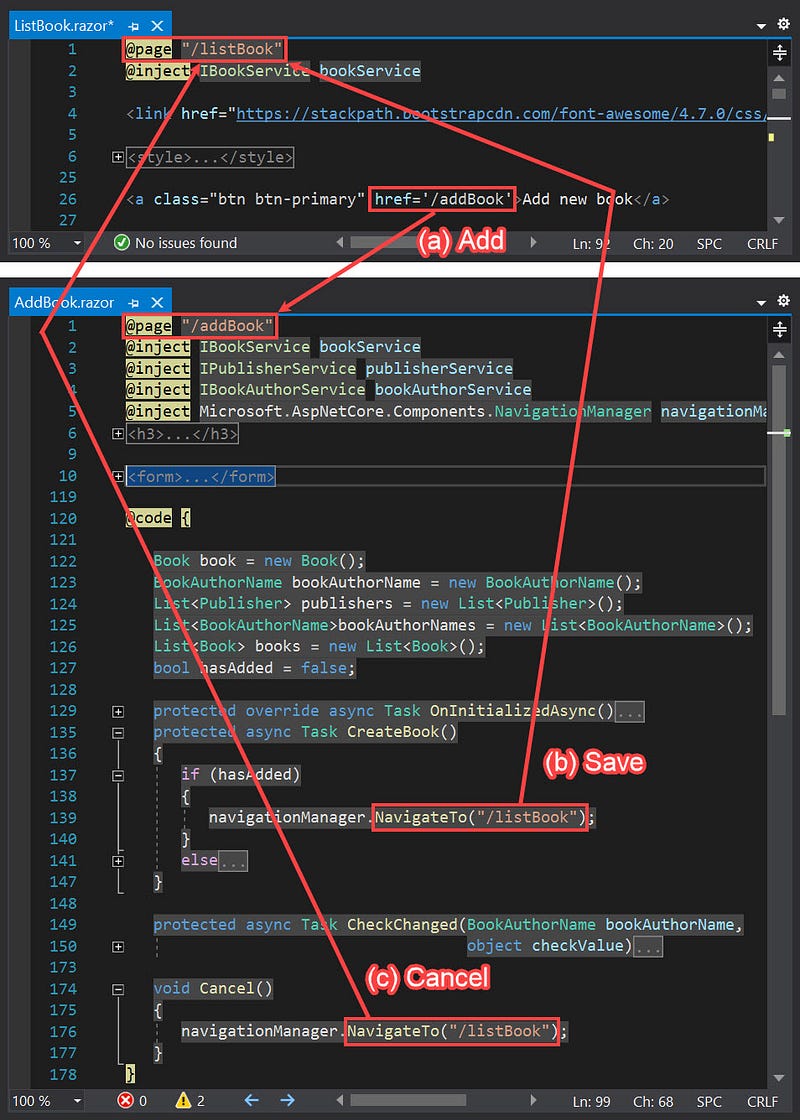
In this project, the pages — AddBook.razor and EditBook.razor — are called by ListBook.razor, ListBookPerPub.razor, and ListBookPerAuthor.razor.
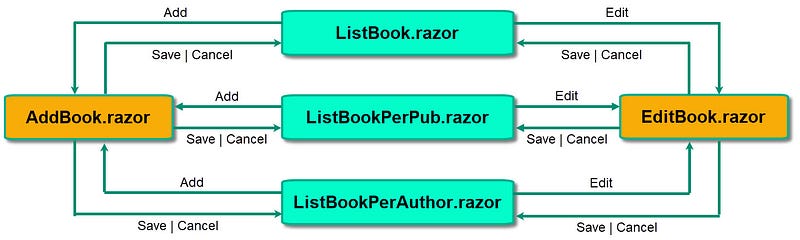
AddBook.razor and EditBook.razor are called by the three componentsSo we must modify routes and navigations in both components files, AddBook.razor and EditBook.razor. This time, as shown in the code below, we use parameterized routes to navigate dynamically.
AddBook.razor
@page "/addBook/{PrevPage}"
@inject IBookService bookService
@inject IPublisherService publisherService
@inject IBookAuthorService bookAuthorService
@inject Microsoft.AspNetCore.Components.NavigationManager navigationManager
<h3>
   Add Book
</h3><form>
<table width="100%" cellpadding="0" cellspacing="0" border="0">
<tbody>
<tr>
<td><label for="ISBN" class="control-label">ISBN</label>
</td>
<td><input for="ISBN" class="form-control"
@bind="@book.ISBN" /></td>
</tr>
<tr>
<td><label for="Title" class="control-label">
Title</label></td>
<td><input for="Title" class="form-control"
@bind="@book.Title" /></td>
</tr>
@if (@hasAdded)
{
<tr>
<td><label for="Authors" class="control-label">
Authors</label></td>
<td>
<label style="width: 95px;">
<u><i><b>Sequence</b></i></u>
</label>
<label><u><i><b>Full Name</b></i></u></label>
<br />
@foreach (var bookAuthorName in bookAuthorNames)
{
<input type="number"
@bind="@bookAuthorName.AuthorOrd"
@bind:event="oninput"
style="width: 75px;" min="0" max="5" />
@if (@bookAuthorName.ISBN > 0)
{
<input name="AreChecked" type="checkbox"
value="@bookAuthorName.AuthorId" checked
@onchange="eventArgs => { CheckChanged
(bookAuthorName, eventArgs.Value);}" />
}
else
{
<input name="AreChecked" type="checkbox"
value="@bookAuthorName.AuthorId"
@onchange="eventArgs => { CheckChanged
(bookAuthorName, eventArgs.Value);}" />
}
<label for="AuthorName" style="width: 150px;">
@bookAuthorName.AuthorName
</label><br />
}
</td>
<td>
 
<a class="btn btn-primary"
href='/addAuthor/@book.ISBN'>
 Add author 
</a><br />
</td>
</tr>
}
<tr>
<td><label for="PubYear" class="control-label">
Publication Year</label></td>
<td><input for="PubYear" class="form-control"
@bind="@book.PubYear" /></td>
</tr>
<tr>
<td><label for="PurchDate" class="control-label">
Purchase Date</label></td>
<td><input type="date" class="form-control"
@bind="@book.PurchDate" /></td>
</tr>
<tr>
<td><label for="Publisher" class="control-label">
Publisher</label></td>
<td>
<select for="Publisher" class="form-control"
@bind="@book.PubId">
<option value=0 disabled selected hidden>
[Select Publisher]</option>
@foreach (var publisher in publishers)
{
<option value="@publisher.Id">
@publisher.Name</option>
}
</select>
</td>
<td>
 
<a class="btn btn-primary"
href='/addPublisher/@book.ISBN'>Add publisher</a>
</td>
</tr>
<tr>
<td></td>
<td>
<br />
<button type="button" class="btn btn-primary"
@onclick="() => CreateBook()">
 Save 
</button> 
<button type="button" class="btn btn-warning"
@onclick="() => Cancel()">
  Cancel  
</button>
</td>
</tr>
</tbody>
</table>
</form>@code { [Parameter] public string PrevPage { get; set; }
Book book = new Book();
BookAuthorName bookAuthorName = new BookAuthorName();
List<Publisher> publishers = new List<Publisher>();
List<BookAuthorName>bookAuthorNames = new List<BookAuthorName>();
List<Book> books = new List<Book>();
bool hasAdded = false; protected override async Task OnInitializedAsync()
{
book.PurchDate = DateTime.Now;
publishers = await publisherService.FetchAll();
} protected async Task CreateBook()
{
if (hasAdded)
{
navigationManager.NavigateTo(PrevPage);
}
else
{
await bookService.Create(book);
bookAuthorNames = await bookAuthorService.FetchAll(0);
hasAdded = !hasAdded;
}
} protected async Task CreateBook()
{
if (hasAdded)
{
navigationManager.NavigateTo(PrevPage);
}
else
{
await bookService.Create(book);
bookAuthorNames = await bookAuthorService.FetchAll(0);
hasAdded = !hasAdded;
}
} protected async Task CheckChanged(BookAuthorName bookAuthorName,
object checkValue)
{
long isbn = 0;
if (book.ISBN > isbn)
{
isbn = (long)book.ISBN;
bookAuthorNames = await bookAuthorService.FetchAll(isbn);
if ((bool)checkValue)
{
// insert
bookAuthorName.ISBN = isbn;
await bookAuthorService.Create(bookAuthorName);
}
else
{
//delete
bookAuthorName.AuthorOrd = 0;
await bookAuthorService.Delete
(isbn, bookAuthorName.AuthorId);
}
bookAuthorNames = await bookAuthorService.FetchAll(isbn);
}
} void Cancel()
{
navigationManager.NavigateTo(PrevPage);
}
}EditBook.razor
@page "/editBook/{PrevPage}/{Isbn:long}"
@inject IBookService bookService
@inject IPublisherService publisherService
@inject IBookAuthorService bookAuthorService
@inject Microsoft.AspNetCore.Components.NavigationManager navigationManager;<h3>
Edit Book
</h3>
<form>
<table width="100%" cellpadding="0" cellspacing="0" border="0">
<tbody>
<tr>
<td>
<label for="ISBN" class="control-label">
ISBN
</label>
</td>
<td>
<input for="ISBN" class="form-control"
@bind="@book.ISBN" />
</td>
</tr>
<tr>
<td>
<label for="Title" class="control-label">
Title
</label>
</td>
<td>
<input for="Title" class="form-control"
@bind="@book.Title" />
</td>
</tr>
<tr>
<td>
<label for="Authors" class="control-label">
Authors
</label>
</td>
<td>
<label style="width: 95px;">
<u><i><b>Sequence</b></i></u>
</label>
<label><u><i><b>Full Name</b></i></u></label><br />
@foreach (var bookAuthorName in bookAuthorNames)
{
<input type="number"
@bind="@bookAuthorName.AuthorOrd"
@bind:event="oninput"
style="width: 75px;" min="0" max="5" />
@if (@bookAuthorName.ISBN > 0)
{
<input name="AreChecked" type="checkbox"
value="@bookAuthorName.AuthorId" checked
@onchange="eventArgs => { CheckChanged
(bookAuthorName, eventArgs.Value);}" />
}
else
{
<input name="AreChecked" type="checkbox"
value="@bookAuthorName.AuthorId"
@onchange="eventArgs => { CheckChanged
(bookAuthorName, eventArgs.Value);}" />
}
<label for="AuthorName" style="width: 150px;">
@bookAuthorName.AuthorName
</label><br />
}
</td>
<td>
 
<a class="btn btn-primary"
href='/addAuthor/@book.ISBN'>
 Add new author 
</a><br />
</td>
</tr>
<tr>
<td>
<label for="PubYear" class="control-label">
Publication Year
</label>
</td>
<td>
<input for="PubYear" class="form-control"
@bind="@book.PubYear" />
</td>
</tr>
<tr>
<td>
<label for="PurchDate" class="control-label">
Purchase Date
</label>
</td>
<td>
<input type="date" class="form-control"
@bind="@book.PurchDate" />
</td>
</tr>
<tr>
<td>
<label for="Publisher" class="control-label">
Publisher
</label>
</td>
<td>
<select for="Publisher" class="form-control"
@bind="@book.PubId">
@foreach (var publisher in publishers)
{
<option value="@publisher.Id">
@publisher.Name
</option>
}
</select>
</td>
<td>
 
<a class="btn btn-primary"
href='/addPublisher/@book.ISBN'>Add new publisher
</a>
</td>
</tr>
<tr>
<td></td>
<td>
<br />
<button type="button" class="btn btn-primary"
@onclick="() => OpenDialog(book.Title)">
 Save 
</button> 
<button type="button" class="btn btn-warning"
@onclick="() => Cancel()">
  Cancel  
</button>
</td>
</tr>
</tbody>
</table>
</form>
@if (DialogIsOpen)
{
<Dialog
Caption="Update a book"
Message="@message"
OnClose="@OnDialogClose"
Type="Dialog.Category.SaveNot">
</Dialog>
}@code { [Parameter] public string PrevPage { get; set; }
[Parameter] public long Isbn { get; set; } Book book = new Book();
BookAuthorName bookAuthorName = new BookAuthorName();
List<Publisher> publishers = new List<Publisher>();
List<BookAuthorName> bookAuthorNames=new List<BookAuthorName>();
private string message;
private bool DialogIsOpen = false; protected override async Task OnInitializedAsync()
{
book = await bookService.ReadByPk(Isbn);
bookAuthorNames = await bookAuthorService.FetchAll(Isbn);
publishers = await publisherService.FetchAll();
} protected async Task CheckChanged(BookAuthorName bookAuthorName,
object checkValue)
{
if ((bool)checkValue)
{
// insert
bookAuthorName.ISBN = Isbn;
await bookAuthorService.Create(bookAuthorName);
}
else
{
//delete
bookAuthorName.AuthorOrd = null;
await bookAuthorService.Delete
(Isbn, bookAuthorName.AuthorId);
}
bookAuthorNames = await bookAuthorService.FetchAll(Isbn);
} private void OpenDialog(string title)
{
DialogIsOpen = true;
message = "Do you want to save the updates of the book \"" +
title + "\"?";
} private async Task OnDialogClose(bool isOk)
{
if (isOk)
{
await bookService.Update(book,Isbn);
navigationManager.NavigateTo(PrevPage);
}
DialogIsOpen = false;
} void Cancel()
{
navigationManager.NavigateTo(PrevPage);
}
}The modified code is in bold.
How It Works
Booklist per publisher
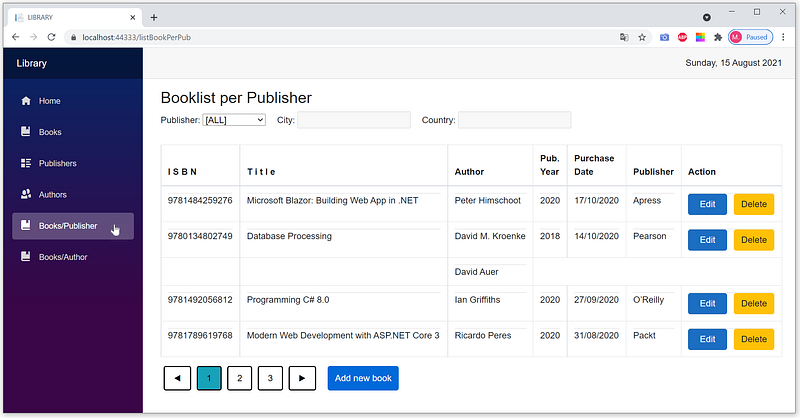
- Click the
Book/Publishermenu to open theListBookPerBook.razorpage. - By default, the option in the dropdown list is
[All]; all existing books are shown in the list.
(1) Opening the page
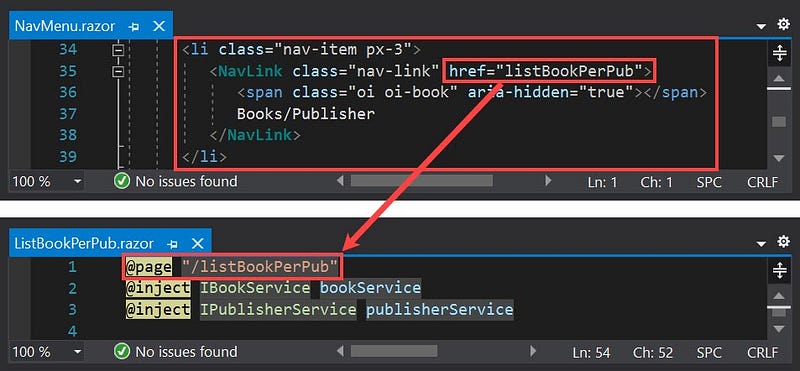
- The page is opened via the
NavMenu.razorcomponent using/listBookPerPubroute.
(2) Creating the dropdown list and set the default option to [All]
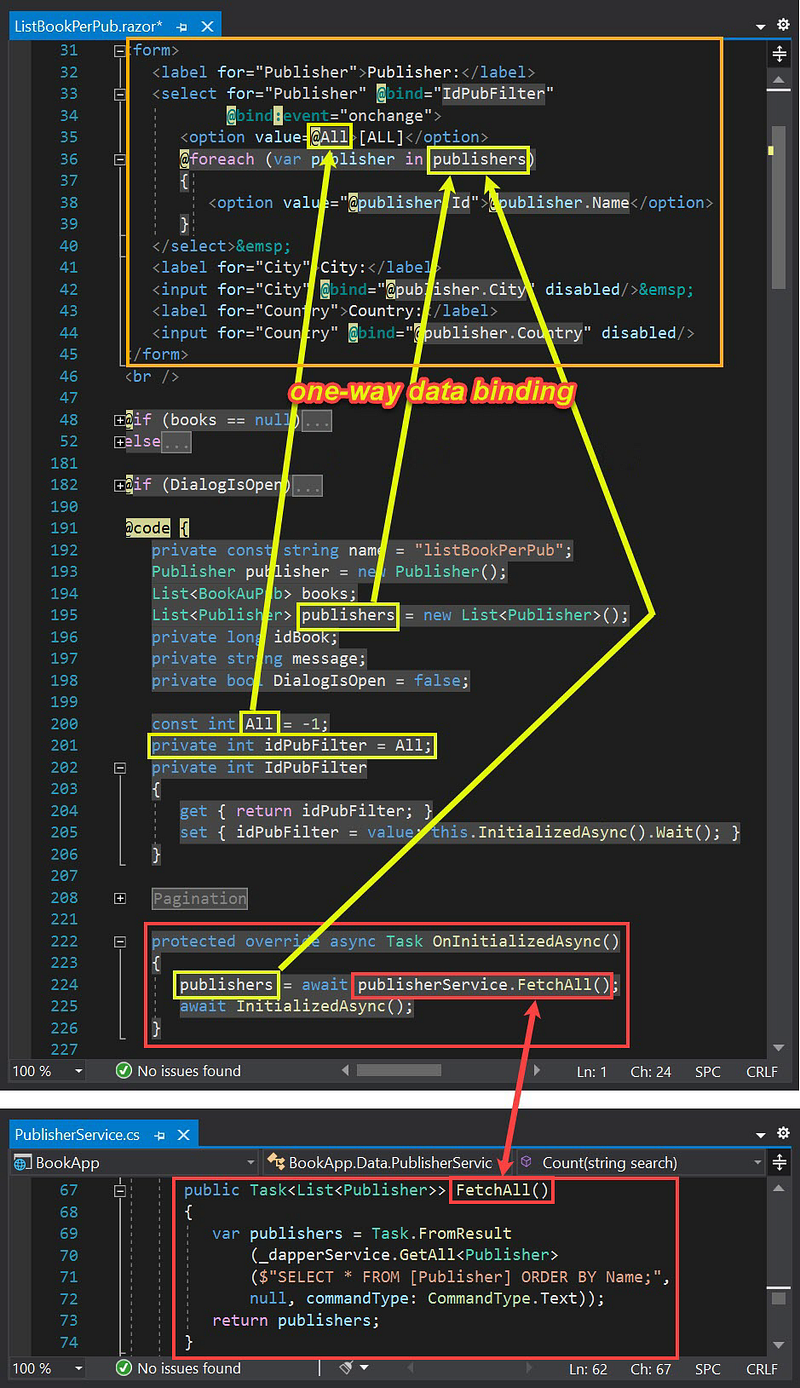
[All]- When the
ListBookPerPub.razorpage is opened, the app callsOnInitializedAsync()method and executes the SQL script in theFetchAll()method and stores the results in thepublishersvariable. - Through one-way data binding, the drop-down list in the HTML block automatically contains data according to the processing results in the code block.
- Setting the default option to
[All]is obtained via the statement on line 201 in theListBookPerBook.razorfile:private int idPubFilter = All;
(3) Displaying all the existing books
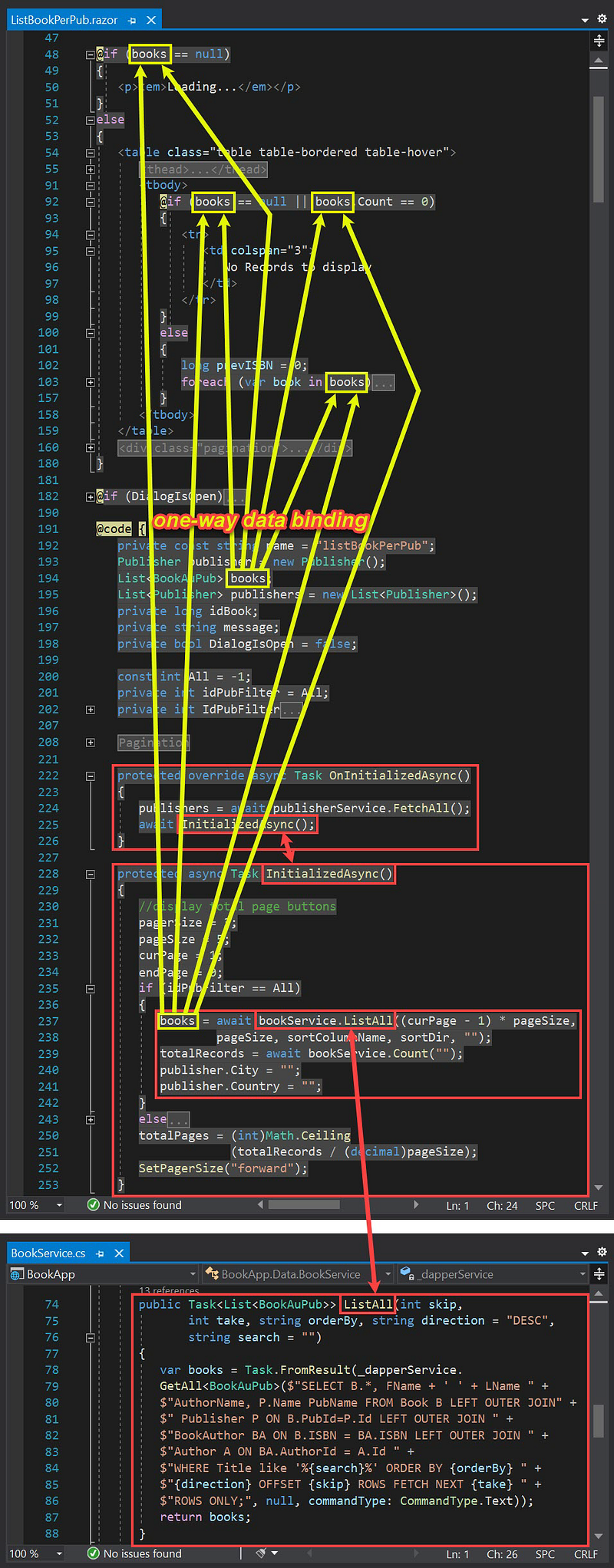
- By default, the option in the dropdown list is
[All]; all existing books are shown in the list. - The app calls
InitializedAsync()method and executes the SQL script in theListAll()method in theBookService.csfile. - Through one-way data binding, the HTML block automatically shows the details of the booklist (if any) according to the code block's processing results. Otherwise, it displays the message
No Records to display.
(4) Displaying booklist of a publisher
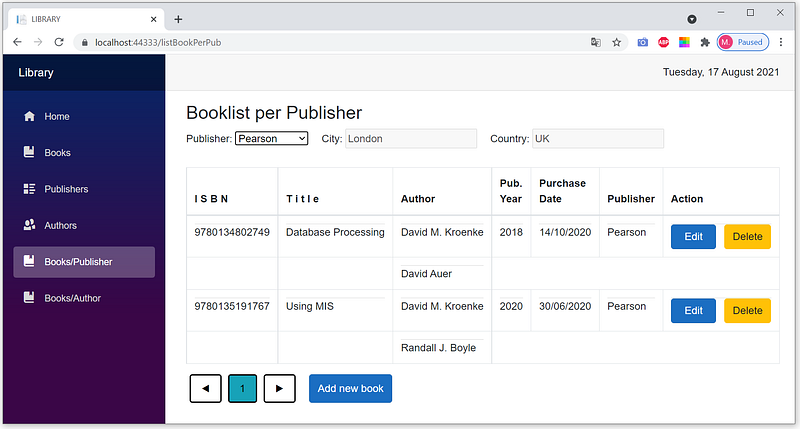
- Select a publisher from the dropdown list to display its booklist.
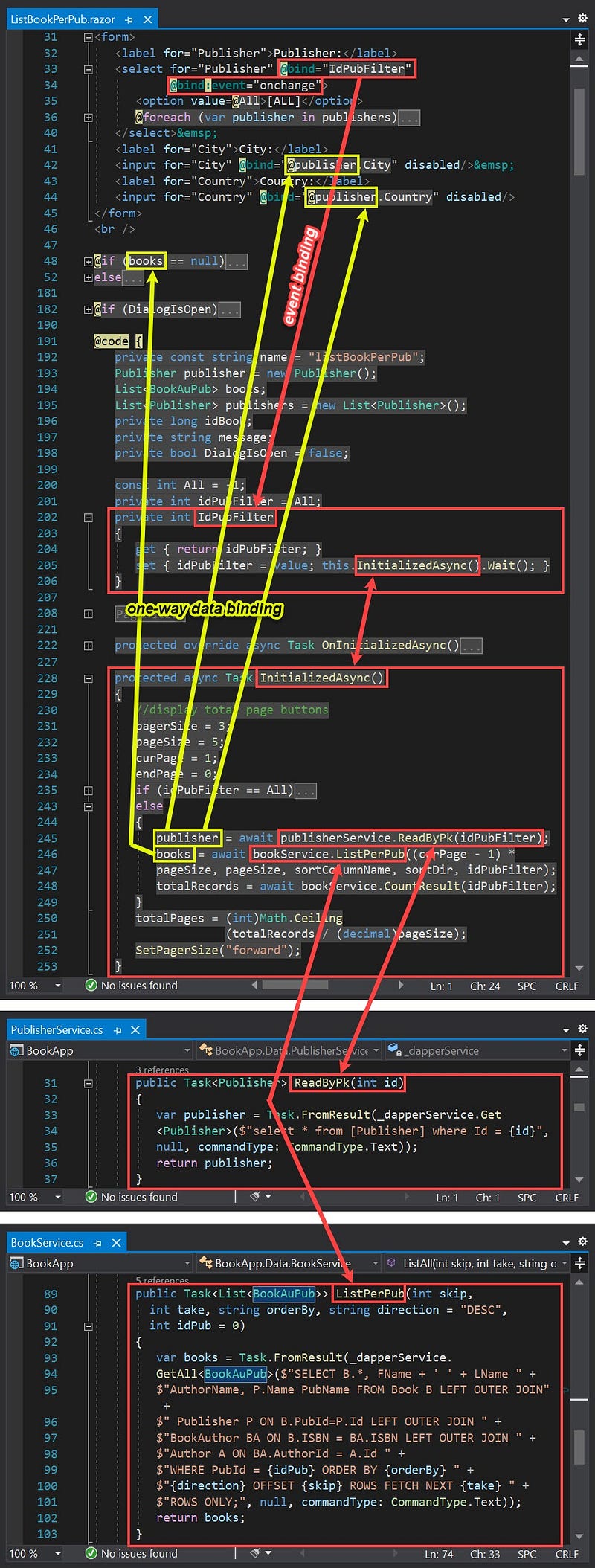
- Selecting a publisher from the dropdown list raises the
onchangeevent that callsIdPubFilterproperty. - The
IdPubFilterproperty sets theidPubFilterfield and calls theInitalizedAsyncmethod that executes the SQL script in theReadByPkand theListPerPubmethods. - Through one-way data binding, the HTML block displays the city and country of the selected publisher. It automatically shows the booklist details (if any) according to the processing results in the code block. Otherwise, it displays the message
No Records to display.
Booklist per author
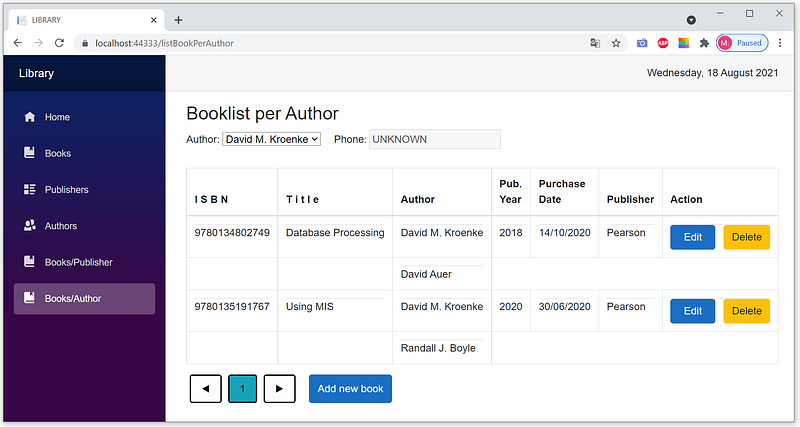
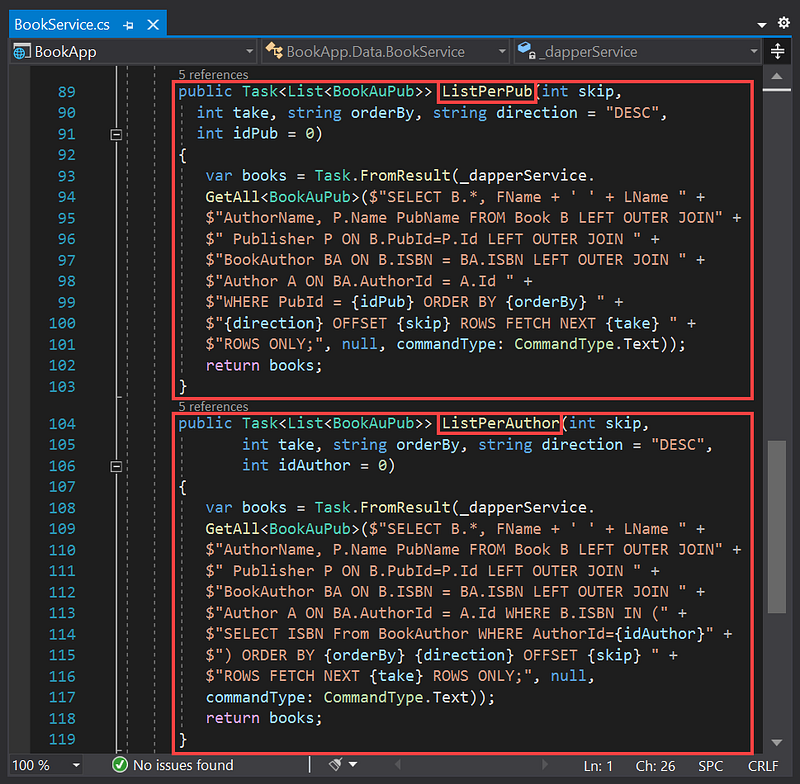
It works similar to the booklist per publisher. In the master section, the publisher is replaced by the author. In the details section of the book, there are slight differences in the SQL script. In the booklist per author, SQL scripts use not only outer joins but also subquery.
Summary
In this article, we have learned how to create and implement two master-detail pages.
- Booklist per publisher as an implementation of the 1:N relationship. The master section shows the publisher, and the details section displays its booklist.
- Booklist per author as an implementation of the M:N relationship. The master section shows the author, and the details section displays its booklist.
We also have implemented dynamic navigations using parameterized routes.
Thanks for reading. Hopefully beneficial.


