
Blazor Server Project #8: Master-Detail Page Using Dynamic Query
How to dynamically build criteria for a query string with values from a textbox and dropdown list
Table of Contents
- Overview
- Implementing Dynamic Query
(1) Download and open the BookApp project
(2) Create the BookDB database
(3) Add/modify the code
(a) Getting dynamic query
(b) Building dynamic criteria
(c) Add
ListAll()method (d) Implementing polymorphism - How It Works
- What’s Next?
- References

This article is the eighth in a series covering the Blazor Server Project: (1) How to create a CRUD operation using Dapper (2) Building a dropdown list involves a 1:N relationship (3) How to implement a checkbox list involving an M:N relationships (4) Understanding URL routing and navigation (5) Creating and using page layout (6) How to create a reusable modal dialog component (7) Practical guide to making a master-detail page (8) Master-detail page using dynamic query (9) How to avoid SQL injection attacks (10) Hiding/showing HTML elements (11) Migrate to ASP.NET Core 6.0 (12) Installing ASP.NET Core Identity (13) Integrating Identity tables into the existing project database (14) Authentication and authorization (15) Role-based authorization (16) How to implement Google Authentication (17) Facebook Authentication and Authorization (18) How to configure Twitter Authentication (19) How to Customize Password Policy (20) Account Lockout Policy
These articles are for anyone who wants to learn how to build Blazor Server applications in a practical approach through some sample projects. It will be straightforward if you have some experience with C#, HTML, CSS, and SQL.
Overview
A dynamic query is a programming technique that allows you to construct query statements dynamically at runtime. It will enable you to create more general and flexible query statements because the full text of the query statements may be unknown at compilation.
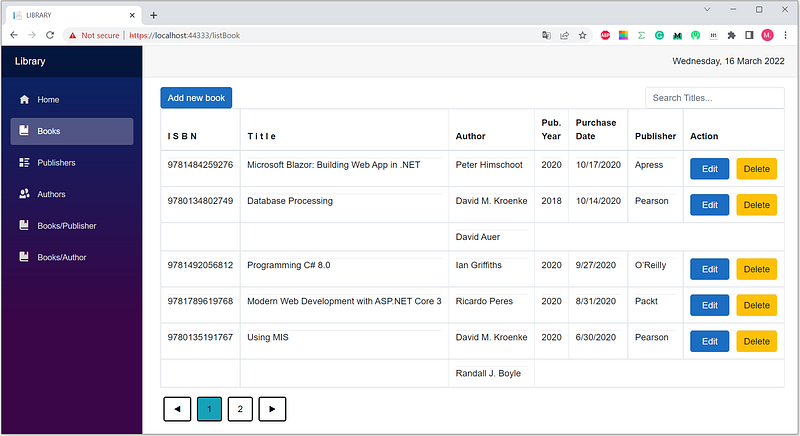
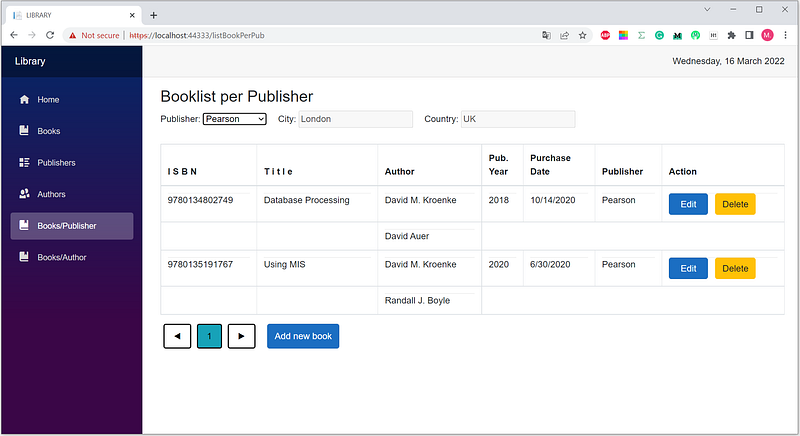
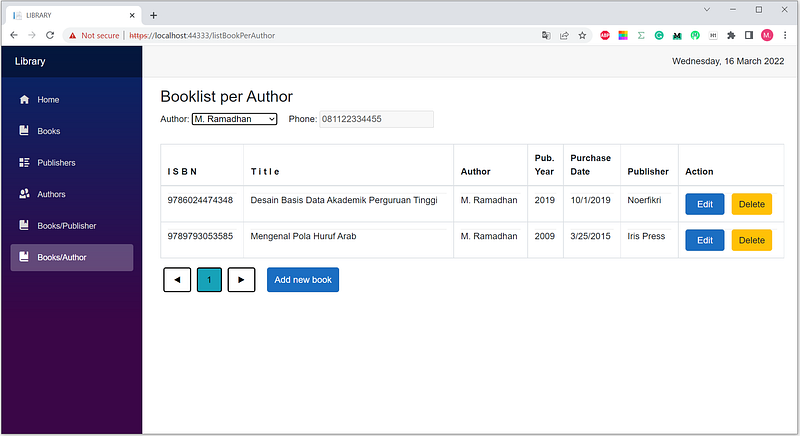
Look back at Blazor Project #7 in the previous article. There are three types of displaying booklists: (1) all books, (2) per publisher, and (3) per author. The three use three different components and three different queries. See Figures 1, 2, and 3.
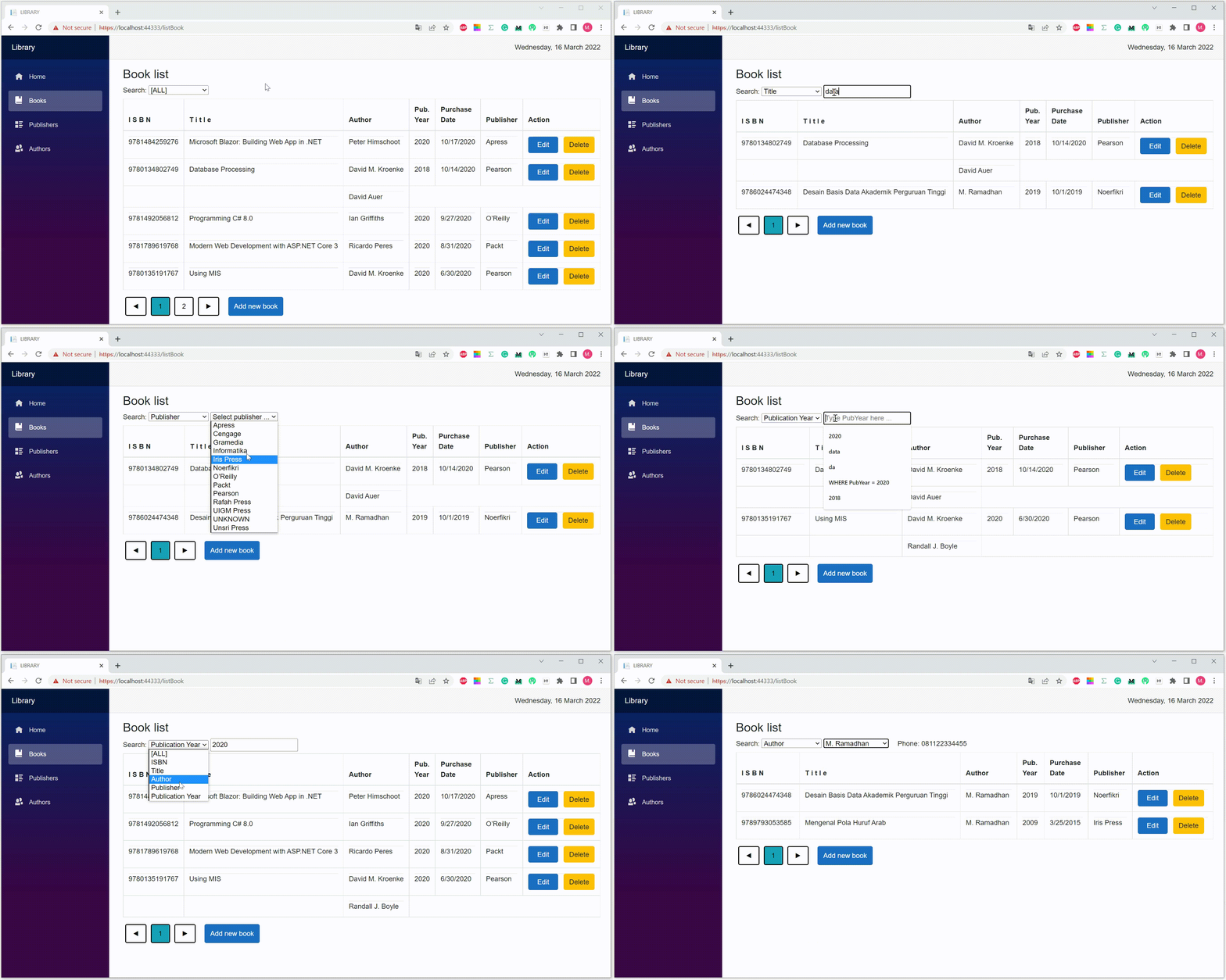
You can display various book lists based on dynamic criteria using only one component and one query with dynamic queries. See Figure 4.
The following discussions are based on the source code in the previous article, Blazor Server Project #6.
Implementing Dynamic Query
(1) Download and open the BookApp project
- Please download the source code of Blazor Server Project #6 via the link below.
- Right-click the BookApp.sln file to open the context menu.
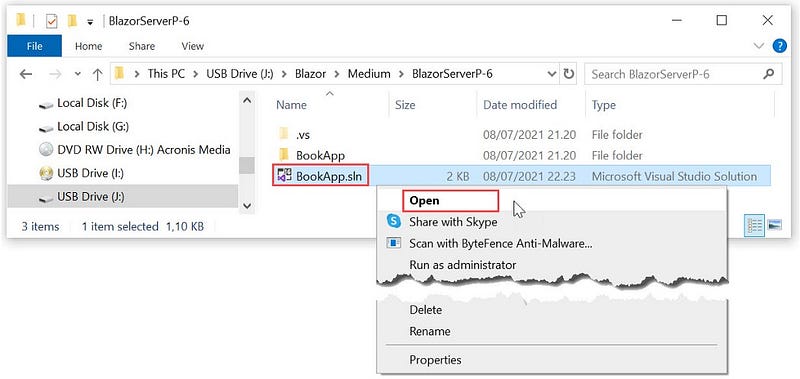
BookApp Application- Open the BookApp project by selecting the Open menu.
(2) Create the BookDB database
(a) Opening the SQL Server Object Explorer pane
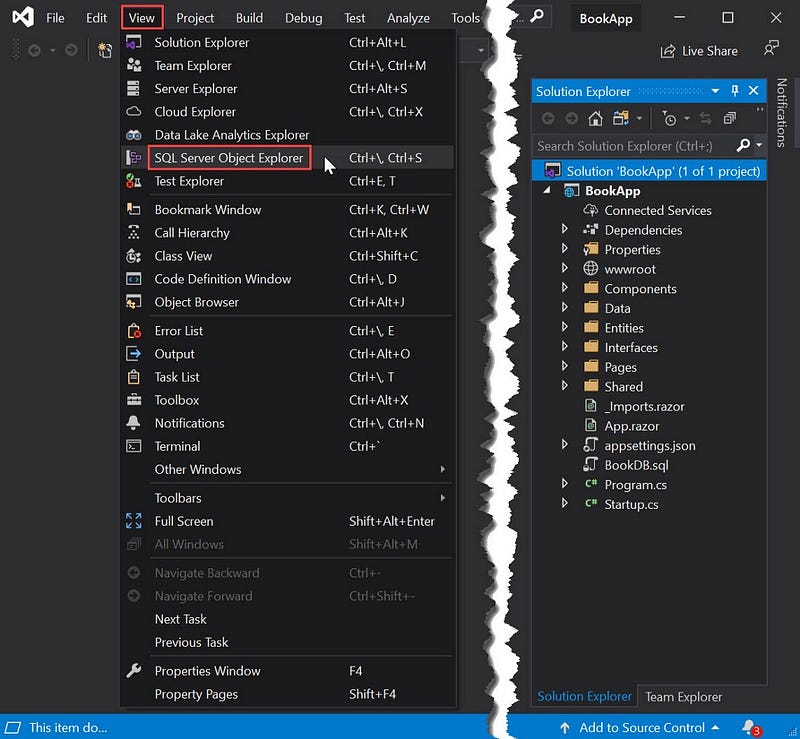
SQL Server Object Explorer- Click the menu:
View|SQL Server Object Explorer - Look into the SQL Server Object Explorer pane on the left. If there is the BookDB database, go to step (3). Otherwise, do the following step.
(b) Opening and executing the BookDB.sql file
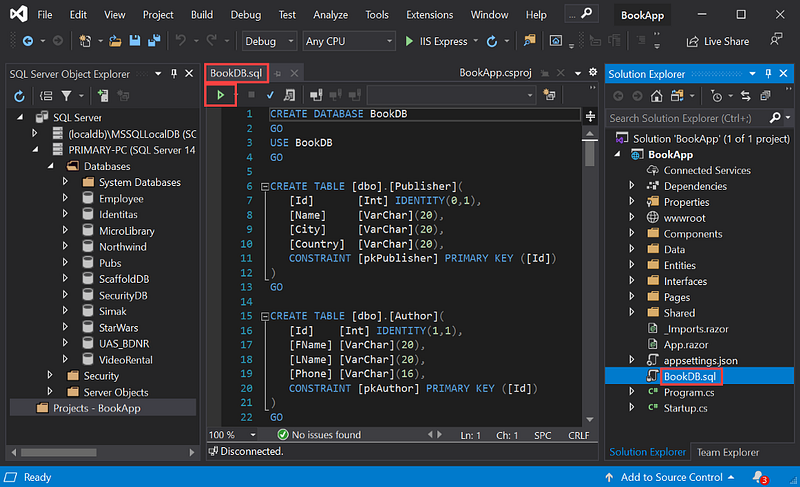
BookDB.sql file- In the
Solution Explorerpane, clickBookDB.sqlto open the SQL script file. - Click the
▶button to execute the whole of the SQL scripts in theBookDB.sqlfile. - The following similar screen appears.
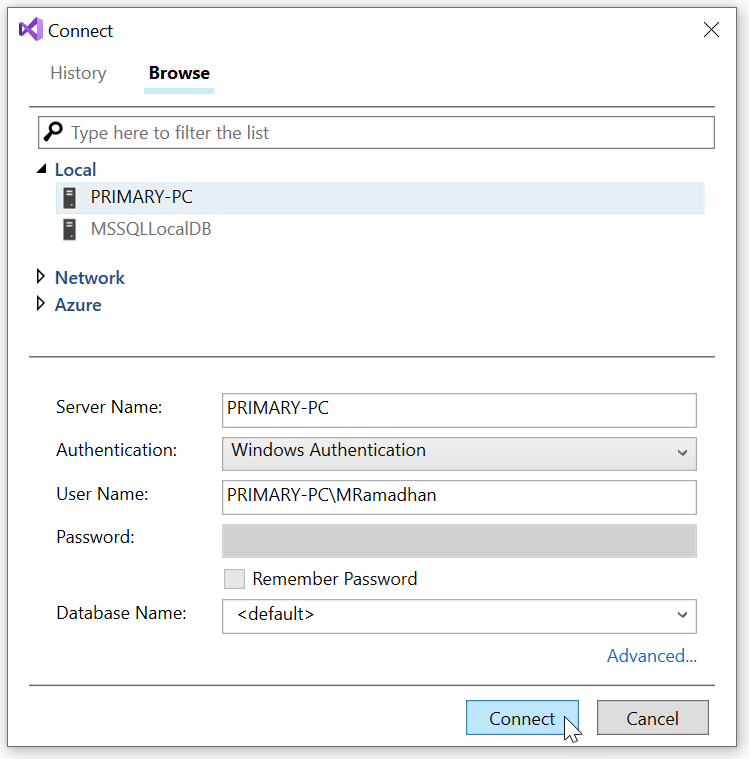
- Choose your server, click the
Connectbutton.
- In the
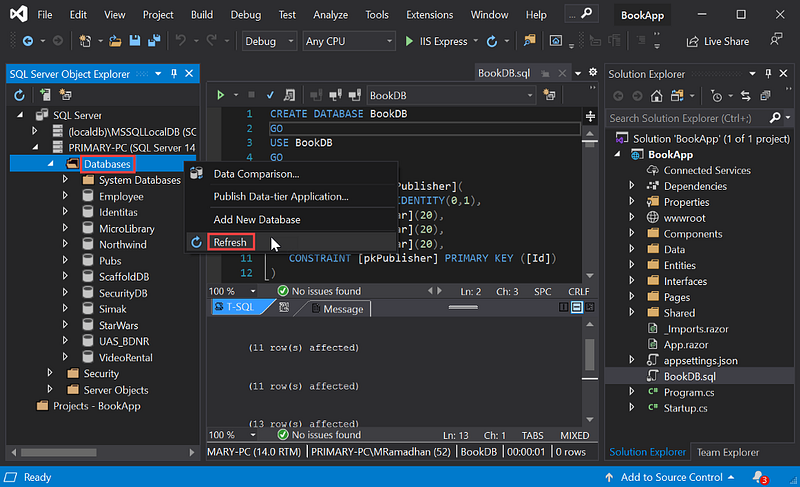
SQL Server Object Explorerpane, right-clickDatabases, then clickRefresh.
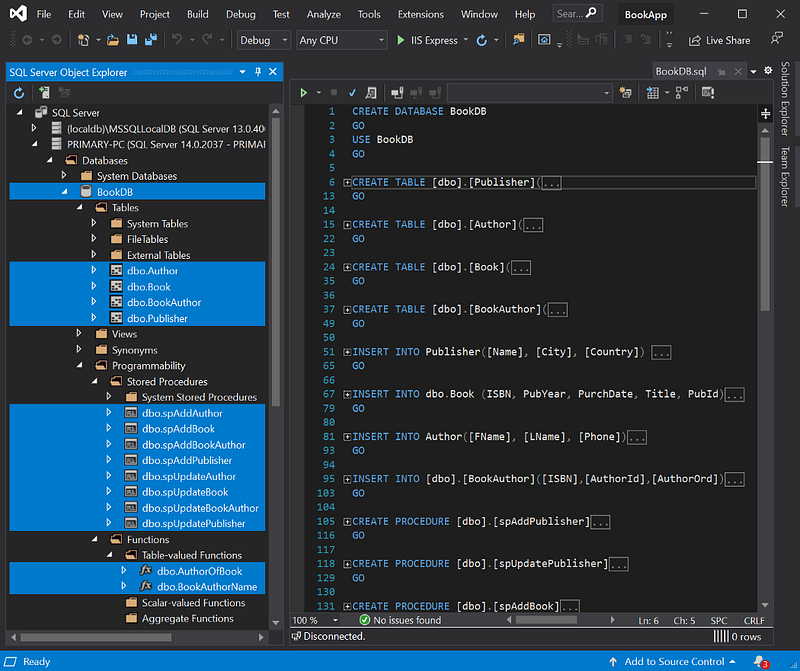
BookDB database objectsOn the left pane in Figure 10 above, you can see the object list of the BookDB database: four tables, eight stored procedures, and two user-defined functions.
(3) Add/modify the code
Adding/modifying the codes are for:
(a) getting dynamic query
(b) building dynamic criteria
(c) adding ListAll() method
(d) implementing polymorphism concept.
The complete codes are as follows. The texts in bold are the added/modified code.
(a) Getting dynamic query
BookService.razor
using BookApp.Interfaces;
using BookApp.Entities;
using Dapper;
using System.Collections.Generic;
using System.Data;
using System.Threading.Tasks;
namespace BookApp.Data
{
public class BookService : IBookService
{
private readonly IDapperService _dapperService; public BookService(IDapperService dapperService)
{
this._dapperService = dapperService;
} public Task<long> Create(Book book)
{
var dbPara = new DynamicParameters();
dbPara.Add("ISBN", book.ISBN, DbType.Int64);
dbPara.Add("Title", book.Title, DbType.String);
dbPara.Add("PubYear", book.PubYear, DbType.Int16);
dbPara.Add("PurchDate", book.PurchDate, DbType.Date);
dbPara.Add("PubId", book.PubId, DbType.Int32);
var bookId = Task.FromResult(_dapperService.
Insert<long>("[dbo].[spAddBook]", dbPara,
commandType: CommandType.StoredProcedure));
return bookId;
} public Task<Book> ReadByPk(long isbn)
{
var book = Task.FromResult(_dapperService.Get<Book>
($"select * from [Book] where ISBN = {isbn}",
null, commandType: CommandType.Text));
return book;
} public Task<int> Update(Book book, long pk)
{
var dbPara = new DynamicParameters();
dbPara.Add("ISBN", book.ISBN, DbType.Int64);
dbPara.Add("Title", book.Title, DbType.String);
dbPara.Add("PubYear", book.PubYear, DbType.Int16);
dbPara.Add("PurchDate", book.PurchDate, DbType.Date);
dbPara.Add("PubId", book.PubId, DbType.Int32);
dbPara.Add("Pk", pk, DbType.Int64); var updateBook = Task.FromResult(_dapperService.
Update<int>("[dbo].[spUpdateBook]", dbPara,
commandType: CommandType.StoredProcedure));
return updateBook;
} public Task<int> Delete(long id)
{
var deleteBook = Task.FromResult(_dapperService.Execute
($"Delete [Book] where ISBN = {id}", null,
commandType: CommandType.Text));
return deleteBook;
} public Task<int> Count(string search)
{
var totBook = Task.FromResult(_dapperService.Get<int>
($"SELECT COUNT(*) FROM Book B {search}", null,
commandType: CommandType.Text));
return totBook;
} public Task<List<BookAuPub>> ListAll(int skip,
int take, string orderBy, string direction = "DESC",
string search = "")
{
var books = Task.FromResult(_dapperService.
GetAll<BookAuPub>($"SELECT B.*, FName + ' ' + LName " +
$"AuthorName, P.Name PubName FROM Book B LEFT OUTER JOIN" +
$" Publisher P ON B.PubId = P.Id LEFT OUTER JOIN " +
$"BookAuthor BA ON B.ISBN = BA.ISBN LEFT OUTER JOIN " +
$"Author A ON BA.AuthorId = A.Id {search} " +
$"ORDER BY {orderBy} {direction} OFFSET {skip} " +
$"ROWS FETCH NEXT {take} ROWS ONLY;", null,
commandType: CommandType.Text));
return books;
}
}
}(b) Building dynamic criteria
ListBook.razor
@page "/listBook"
@inject IBookService bookService
@inject IAuthorService authorService
@inject IPublisherService publisherService
<link href="https://stackpath.bootstrapcdn.com/font-awesome/4.7.0/css/font-awesome.min.css" rel="stylesheet"><style>
.sort-th {
cursor: pointer;
} .fa {
float: right;
} .btn-custom {
color: black;
float: left;
padding: 8px 16px;
text-decoration: none;
transition: background-color .3s;
border: 2px solid #000;
margin: 0px 5px 0px 5px;
}
</style>@if (books == null)
{
<p><em>Loading...</em></p>
}
else
{
<h3>Book List</h3>
<label for="Search">Search:</label>
<select for="Field" @bind="Field" @bind:event="onchange">
<option value="All">[ALL]</option>
<option value="ISBN">ISBN</option>
<option value="Title">Title</option>
<option value="AuthorId">Author</option>
<option value="PubId">Publisher</option>
<option value="PubYear">Publication Year</option>
</select> <input type="text" id="txtValue"
placeholder="Type @field here ..." hidden="@valueIsHidden"
@bind="FieldValue" @bind:event="onchange" /> <select for="Publisher" hidden="@pubIsHidden"
@bind="@IdPubFilter" @bind:event="onchange">
<option value=-1 disabled selected hidden>
Select publisher ...
</option>
@foreach (var publisher in publishers)
{
<option value="@publisher.Id">@publisher.Name</option>
}
</select>
<label hidden="@pubDataIsHidden">
 City, Country: @publisher.City, @publisher.Country
</label> <select for="Author" hidden="@authorIsHidden"
@bind="IdAuthorFilter" @bind:event="onchange">
<option value=-1 disabled selected hidden>
Select author ...
</option>
@foreach (var author in authors)
{
<option value="@author.Id">
@author.FName @author.LName
</option>
}
</select>
<label for="Phone" hidden="@authorDataIsHidden">
 Phone: @author.Phone
</label>
<br /> <table class="table table-bordered table-hover">
<thead>
<tr>
<th class="sort-th"
@onclick="@(() => SortTable("ISBN"))">
I S B N
<span class="fa @(SetSortIcon("ISBN"))"></span>
</th>
<th class="sort-th"
@onclick="@(() => SortTable("Title"))">
T i t l e
<span class="fa @(SetSortIcon("Title"))"></span>
</th>
<th class="sort-th"
@onclick="@(() => SortTable("AuthorName"))">
Author
<span class="fa @(SetSortIcon("AuthorName"))"></span>
</th>
<th class="sort-th"
@onclick="@(() => SortTable("PubYear"))">
Pub.<br />Year
<span class="fa @(SetSortIcon("PubYear"))"></span>
</th>
<th class="sort-th"
@onclick="@(() => SortTable("PurchDate"))">
Purchase<br />Date
<span class="fa @(SetSortIcon("PurchDate"))"></span>
</th>
<th class="sort-th"
@onclick="@(() => SortTable("PubName"))">
Publisher
<span class="fa @(SetSortIcon("PubName"))"></span>
</th>
<th>Action</th>
</tr>
</thead>
<tbody>
@if (books == null || books.Count == 0)
{
<tr>
<td colspan="3">
No Records to display
</td>
</tr>
}
else
{
long prevISBN = 0;
foreach (var book in books)
{
if (@book.ISBN != prevISBN)
{
<tr>
<td>
<hr style="padding:0px; margin:0px;">
@book.ISBN
</td>
<td>
<hr style="padding:0px; margin:0px;">
@book.Title
</td>
<td>
<hr style="padding:0px; margin:0px;">
@book.AuthorName
</td>
<td>
<hr style="padding:0px; margin:0px;">
@book.PubYear
</td>
<td>
<hr style="padding:0px; margin:0px;">
@book.PurchDate.ToShortDateString()
</td>
<td>
<hr style="padding:0px; margin:0px;">
@book.PubName
</td>
<td>
<hr style="padding:0px; margin:0px;">
<a class="btn btn-primary"
href='/editBook/@book.ISBN'>
 Edit 
</a> 
<a class="btn btn-warning" @onclick="() =>
OpenDialog((long)book.ISBN,book.Title)">
Delete
</a>
</td>
</tr>
}
else
{
<tr>
<td></td>
<td></td>
<td>
<hr style="padding:0px; margin:0px;">
@book.AuthorName
</td>
</tr>
}
prevISBN = (long)@book.ISBN;
}
}
</tbody>
</table>
<div class="pagination">
<button class="btn btn-custom" @onclick=@(async ()=>
await NavigateToPage("previous"))>
◀
</button> @for (int i = startPage; i <= endPage; i++)
{
var currentPage = i;
<button class="btn btn-custom pagebutton
@(currentPage==curPage?"btn-info":"")"
@onclick=@(async () =>
await refreshRecords(currentPage))>
@currentPage
</button>
}
<button class="btn btn-custom" @onclick=@(async ()=>
await NavigateToPage("next"))>
▶
</button> 
<button class="btn btn-primary"
onclick="window.location.href='/addBook'">
Add new book
</button>
</div>
@if (dialogIsOpen)
{
<Dialog
Caption="Delete a book"
Message = "@message"
OnClose = "@OnDialogClose"
Type = "Dialog.Category.DeleteNot">
</Dialog>
}
}@code {
Author author = new Author();
Publisher publisher = new Publisher();
List<Author> authors = new List<Author>();
List<Publisher> publishers = new List<Publisher>();
List<BookAuPub> books;
private long idBook;
private string message;
private bool dialogIsOpen = false;
private bool valueIsHidden = true;
private bool pubIsHidden = true;
private bool pubDataIsHidden = true;
private bool authorIsHidden = true;
private bool authorDataIsHidden = true;
private string searchTerm = ""; private string field = "All";
private string Field
{
get { return field; }
set
{
field = value;
valueIsHidden = field == "All" || field == "PubId"
|| field == "AuthorId";
pubIsHidden = field != "PubId";
authorIsHidden = field != "AuthorId";
pubDataIsHidden = true;
authorDataIsHidden = true;
idAuthorFilter = -1;
idPubFilter = -1;
fieldValue = "";
if (field == "All")
{
searchTerm = "";
this.InitializedAsync().Wait();
}
}
} private string fieldValue = "";
private string FieldValue
{
get { return fieldValue; }
set
{
fieldValue = value;
switch (field)
{
case "ISBN":
searchTerm = "WHERE B." + field + " = " + fieldValue;
break;
case "PubYear":
searchTerm = "WHERE " + field + " = " + fieldValue;
break;
case "Title":
searchTerm = "WHERE " + field + " LIKE '%"
+ fieldValue + "%'";
break;
}
this.InitializedAsync().Wait();
}
} private int idPubFilter = -1;
private int IdPubFilter
{
get { return idPubFilter; }
set
{
idPubFilter = value;
this.GetPublisher().Wait();
searchTerm = "WHERE " + field + " = " + idPubFilter;
this.InitializedAsync().Wait();
}
} private int idAuthorFilter = -1;
private int IdAuthorFilter
{
get { return idAuthorFilter; }
set
{
idAuthorFilter = value;
this.GetAuthor().Wait();
searchTerm =
"WHERE B.ISBN IN (SELECT ISBN From BookAuthor WHERE "
+ field + " = " + idAuthorFilter + ")";
this.InitializedAsync().Wait();
}
} protected async Task GetPublisher()
{
pubDataIsHidden = false;
publisher = await publisherService.ReadByPk(idPubFilter);
} protected async Task GetAuthor()
{
authorDataIsHidden = false;
author = await authorService.ReadByPk(idAuthorFilter);
} #region Pagination int totalPages;
int totalRecords;
int curPage;
int pagerSize;
int pageSize;
int startPage;
int endPage;
string sortColumnName = "PurchDate";
string sortDir = "DESC"; #endregion protected override async Task OnInitializedAsync()
{
authors = await authorService.ListAll
(0,Byte.MaxValue,"FName","ASC","");
publishers = await publisherService.ListAll
(0,Byte.MaxValue,"Name","ASC","");
await InitializedAsync();
} protected async Task InitializedAsync()
{
pagerSize = 3;
pageSize = 6;
curPage = 1;
endPage = 0;
books = await bookService.ListAll((curPage - 1) * pageSize,
pageSize, sortColumnName, sortDir, searchTerm);
totalRecords = await bookService.Count(searchTerm);
totalPages = (int)Math.Ceiling
(totalRecords / (decimal)pageSize);
SetPagerSize("forward");
} private void OpenDialog(long isbn,string title)
{
dialogIsOpen = true;
idBook = isbn;
message = "Do you want to delete the book \"" + title + "\"?";
} private async Task OnDialogClose(bool isOk)
{
if (isOk)
{
await bookService.Delete(idBook);
books = await bookService.ListAll((curPage - 1) * pageSize,
pageSize, sortColumnName, sortDir, searchTerm);
}
dialogIsOpen = false;
} private bool isSortedAscending;
private string activeSortColumn; private async Task<List<BookAuPub>> SortRecords
(string columnName, string dir)
{
return await bookService.ListAll((curPage - 1) * pageSize,
pageSize, columnName, dir, searchTerm);
} private async Task SortTable(string columnName)
{
if (columnName != activeSortColumn)
{
books = await SortRecords(columnName, "ASC");
isSortedAscending = true;
activeSortColumn = columnName;
}
else
{
if (isSortedAscending)
{
books = await SortRecords(columnName, "DESC");
}
else
{
books = await SortRecords(columnName, "ASC");
} isSortedAscending = !isSortedAscending;
}
sortColumnName = columnName;
sortDir = isSortedAscending ? "ASC" : "DESC";
} private string SetSortIcon(string columnName)
{
if (activeSortColumn != columnName)
{
return string.Empty;
}
if (isSortedAscending)
{
return "fa-sort-up";
}
else
{
return "fa-sort-down";
}
} public async Task refreshRecords(int currentPage)
{
books = await bookService.ListAll((currentPage - 1)
* pageSize, pageSize, sortColumnName, sortDir, searchTerm);
curPage = currentPage;
this.StateHasChanged();
} public void SetPagerSize(string direction)
{
if (direction == "forward" && endPage < totalPages)
{
startPage = endPage + 1;
if (endPage + pagerSize < totalPages)
{
endPage = startPage + pagerSize - 1;
}
else
{
endPage = totalPages;
}
this.StateHasChanged();
}
else if (direction == "back" && startPage > 1)
{
endPage = startPage - 1;
startPage = startPage - pagerSize;
}
else
{
startPage = 1;
endPage = totalPages;
}
} public async Task NavigateToPage(string direction)
{
if (direction == "next")
{
if (curPage < totalPages)
{
if (curPage == endPage)
{
SetPagerSize("forward");
}
curPage += 1;
}
}
else if (direction == "previous")
{
if (curPage > 1)
{
if (curPage == startPage)
{
SetPagerSize("back");
}
curPage -= 1;
}
}
await refreshRecords(curPage);
}
}(c) Add ListAll() method
IAuthorService.cs
using BookApp.Entities;
using System.Collections.Generic;
using System.Threading.Tasks;
namespace BookApp.Interfaces
{
public interface IAuthorService
{
Task<int> Create(Author author);
Task<Author> ReadByPk(int Id);
Task<int> Update(Author author);
Task<int> Delete(int Id);
Task<int> Count(string search);
Task<List<Author>> ListAll();
Task<List<Author>> ListAll(int skip,
int take,
string orderBy,
string direction,
string search);
}
}AuthorService.cs
using BookApp.Interfaces;
using BookApp.Entities;
using Dapper;
using System.Collections.Generic;
using System.Data;
using System.Threading.Tasks;
namespace BookApp.Data
{
public class AuthorService : IAuthorService
{
private readonly IDapperService _dapperService; public AuthorService(IDapperService dapperService)
{
this._dapperService = dapperService;
} public Task<int> Create(Author author)
{
var dbPara = new DynamicParameters();
dbPara.Add("FName", author.FName, DbType.String);
dbPara.Add("LName", author.LName, DbType.String);
dbPara.Add("Phone", author.Phone, DbType.String);
var authorId = Task.FromResult(_dapperService.Insert<int>
("[dbo].[spAddAuthor]", dbPara,
commandType: CommandType.StoredProcedure));
return authorId;
} public Task<Author> ReadByPk(int id)
{
var author = Task.FromResult(_dapperService.Get<Author>
($"select * from [Author] where Id = {id}", null,
commandType: CommandType.Text));
return author;
} public Task<int> Update(Author author)
{
var dbPara = new DynamicParameters();
dbPara.Add("Id", author.Id);
dbPara.Add("FName", author.FName, DbType.String);
dbPara.Add("LName", author.LName, DbType.String);
dbPara.Add("Phone", author.Phone, DbType.String);
var updateAuthor = Task.FromResult(_dapperService.
Update<int>("[dbo].[spUpdateAuthor]", dbPara,
commandType: CommandType.StoredProcedure));
return updateAuthor;
} public Task<int> Delete(int id)
{
var deleteAuthor = Task.FromResult(_dapperService.Execute
($"Delete [Author] where Id = {id}", null,
commandType: CommandType.Text));
return deleteAuthor;
} public Task<int> Count(string search)
{
var totAuthor = Task.FromResult(_dapperService.Get<int>
($"SELECT COUNT(*) FROM [Author] WHERE LName like " +
$"'%{search}%'", null, commandType: CommandType.Text));
return totAuthor;
} public Task<List<Author>> ListAll()
{
var authors = Task.FromResult(_dapperService.GetAll<Author>
($"SELECT * FROM [Author] ORDER BY FName; ", null,
commandType: CommandType.Text));
return authors;
} public Task<List<Author>> ListAll(int skip, int take,
string orderBy, string direction = "DESC",
string search = "")
{
var authors = Task.FromResult(_dapperService.GetAll<Author>
($"SELECT * FROM [Author] WHERE LName like " +
$"'%{search}%' ORDER BY {orderBy} {direction} " +
$"OFFSET {skip} ROWS FETCH NEXT {take} ROWS ONLY; ",
null, commandType: CommandType.Text));
return authors;
}
}
}(d) Implementing polymorphism
There are methods to retrieve records using two different names, FetchAll() and ListAll(). It’s a good idea to implement polymorphism. In this case, use the same name for similar methods.
- Rename method —
FetchAllwithListAll— in these files: -IPublisherService.csandPublisherService.cs-IBookAuthorService.csandBookAuthorService.csAnd so does any code that refers to that method. - The easiest way is using
Find and Replacefeature.
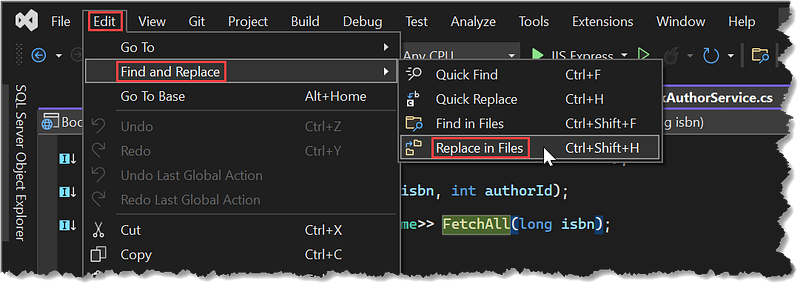
Find and Replace menu- Select menu:
Edit|Find and Replace|Replace in Files
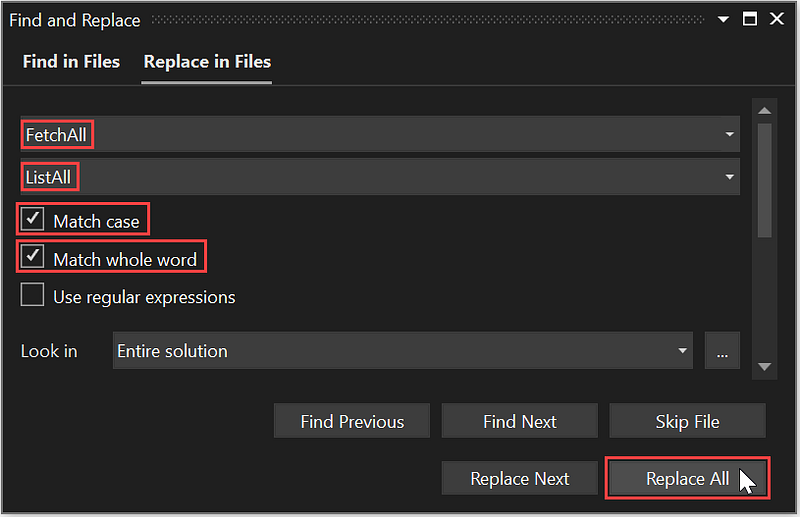
Find and Replace form- Fill in the form as shown in Figure 12 above.
- Click the
Replace Allbutton. - The following are the complete code in files: IPublisherService.cs, PublisherService.cs, IBookAuthorService.cs, and BookAuthorService.cs after you rename the methods.
IPublisherService.cs
using BookApp.Entities;
using System.Collections.Generic;
using System.Threading.Tasks;
namespace BookApp.Interfaces
{
public interface IPublisherService
{
Task<int> Create(Publisher publisher);
Task<Publisher> ReadByPk(int Id);
Task<int> Update(Publisher publisher);
Task<int> Delete(int Id);
Task<int> Count(string search);
Task<List<Publisher>> ListAll();
Task<List<Publisher>> ListAll(int skip,
int take,
string orderBy,
string direction,
string search);
}
}PublisherService.cs
using BookApp.Interfaces;
using BookApp.Entities;
using Dapper;
using System.Collections.Generic;
using System.Data;
using System.Threading.Tasks;
namespace BookApp.Data
{
public class PublisherService : IPublisherService
{
private readonly IDapperService _dapperService; public PublisherService(IDapperService dapperService)
{
this._dapperService = dapperService;
} public Task<int> Create(Publisher publisher)
{
var dbPara = new DynamicParameters();
dbPara.Add("Name", publisher.Name, DbType.String);
dbPara.Add("City", publisher.City, DbType.String);
dbPara.Add("Country", publisher.Country, DbType.String);
var publisherId = Task.FromResult(_dapperService.
Insert<int>("[dbo].[spAddPublisher]", dbPara,
commandType: CommandType.StoredProcedure));
return publisherId;
} public Task<Publisher> ReadByPk(int id)
{
var publisher = Task.FromResult(_dapperService.Get
<Publisher>($"select * from [Publisher] where Id = {id}",
null, commandType: CommandType.Text));
return publisher;
} public Task<int> Update(Publisher publisher)
{
var dbPara = new DynamicParameters();
dbPara.Add("Id", publisher.Id);
dbPara.Add("Name", publisher.Name, DbType.String);
dbPara.Add("City", publisher.City, DbType.String);
dbPara.Add("Country", publisher.Country, DbType.String);
var updatePublisher = Task.FromResult(_dapperService.
Update<int>("[dbo].[spUpdatePublisher]", dbPara,
commandType: CommandType.StoredProcedure));
return updatePublisher;
}
public Task<int> Delete(int id)
{
var deletePublisher = Task.FromResult(_dapperService.
Execute($"Delete [Publisher] where Id = {id}", null,
commandType: CommandType.Text));
return deletePublisher;
} public Task<int> Count(string search)
{
var totPublisher = Task.FromResult(_dapperService.Get<int>
($"select COUNT(*) from [Publisher] WHERE Name like " +
$"'%{search}%'", null, commandType: CommandType.Text));
return totPublisher;
} public Task<List<Publisher>> ListAll()
{
var publishers = Task.FromResult
(_dapperService.GetAll<Publisher>
($"SELECT * FROM [Publisher] ORDER BY Name; ",
null, commandType: CommandType.Text));
return publishers;
} public Task<List<Publisher>> ListAll(int skip, int take,
string orderBy, string direction = "DESC",
string search = "")
{
var publishers = Task.FromResult(_dapperService.GetAll
<Publisher>($"SELECT * FROM [Publisher] WHERE Name " +
$"like '%{search}%' ORDER BY {orderBy} {direction} " +
$"OFFSET {skip} ROWS FETCH NEXT {take} ROWS ONLY; ",
null, commandType: CommandType.Text));
return publishers;
}
}
}IBookAuthorService.cs
using BookApp.Entities;
using System.Collections.Generic;
using System.Threading.Tasks;
namespace BookApp.Interfaces
{
public interface IBookAuthorService
{
Task<int> Create(BookAuthorName bookAuthorNamer);
Task<int> Delete(long isbn, int authorId);
Task<List<BookAuthorName>> ListAll(long isbn);
}
}BookAuthorService.cs
using BookApp.Interfaces;
using BookApp.Entities;
using Dapper;
using System.Collections.Generic;
using System.Data;
using System.Threading.Tasks;
namespace BookApp.Data
{
public class BookAuthorService : IBookAuthorService
{
private readonly IDapperService _dapperService; public BookAuthorService(IDapperService dapperService)
{
this._dapperService = dapperService;
} public Task<int> Create(BookAuthorName bookAuthorName)
{
var dbPara = new DynamicParameters();
dbPara.Add("ISBN", bookAuthorName.ISBN, DbType.Int64);
dbPara.Add("AuthorId", bookAuthorName.AuthorId,
DbType.Int32);
dbPara.Add("AuthorOrd", bookAuthorName.AuthorOrd,
DbType.Byte);
var bookAuthorId = Task.FromResult(_dapperService.
Insert<int>("[dbo].[spAddBookAuthor]", dbPara,
commandType: CommandType.StoredProcedure));
return bookAuthorId;
} public Task<int> Delete(long isbn, int authorId)
{
var deleteBookAuthor = Task.FromResult(_dapperService.
Execute($"Delete [BookAuthor] where ISBN = {isbn} " +
$"and AuthorId = {authorId}", null,
commandType: CommandType.Text));
return deleteBookAuthor;
} public Task<List<BookAuthorName>> ListAll(long isbn)
{
var bookAuthorNames = Task.FromResult(_dapperService.GetAll
<BookAuthorName>($"select * from BookAuthorName " +
$"({isbn}) order by AuthorName; ", null,
commandType: CommandType.Text));
return bookAuthorNames;
}
}
}How It Works
You may display a booklist (1) by default, (2) based on dynamic criteria
(1) Booklist by default
When you select Books menu, by default, the page displays the list of all books.
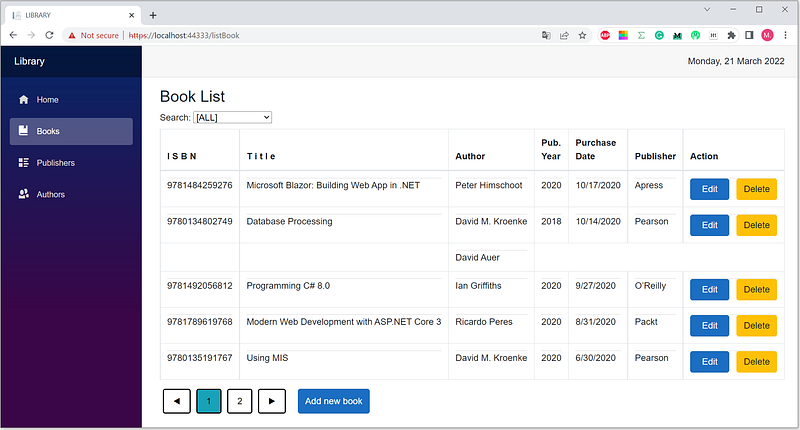
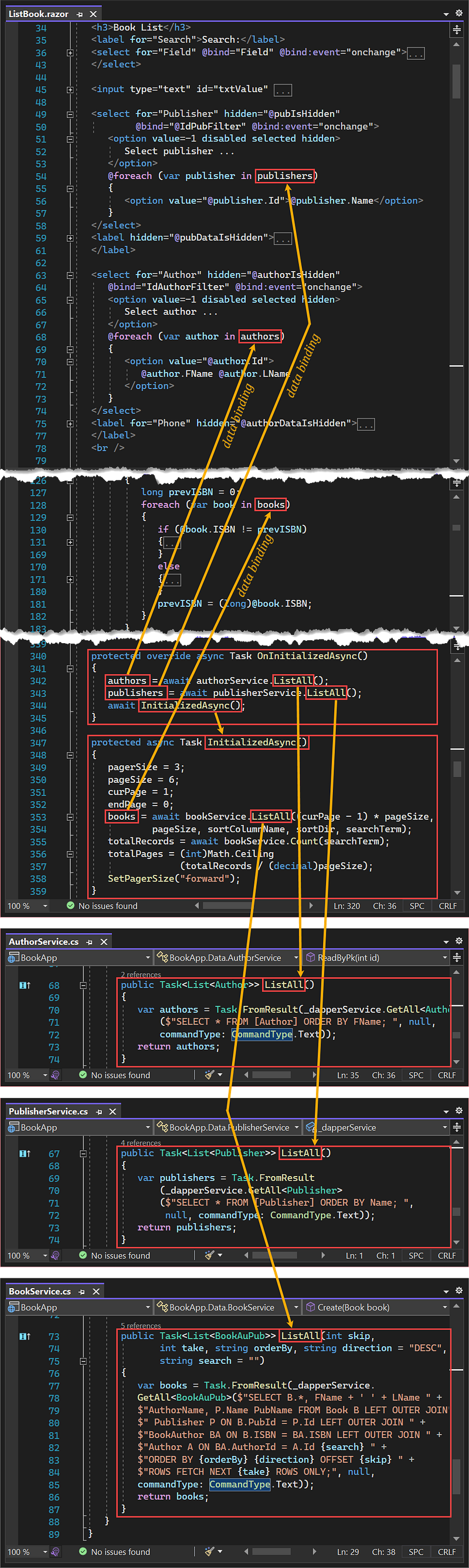
The app executes the OnInitializedAsync() method, retrieves authors, publishers, and books from the database and outputs them into the author dropdown list, publisher dropdown list, and booklist page.
(2) Booklist based on dynamic criteria The app can build dynamic criteria based on: (a) ISBN, title, or publication year, (b) an author, (c) a publisher, and (d) no criteria.
(a) Booklist based on ISBN, title, or publication year criteria
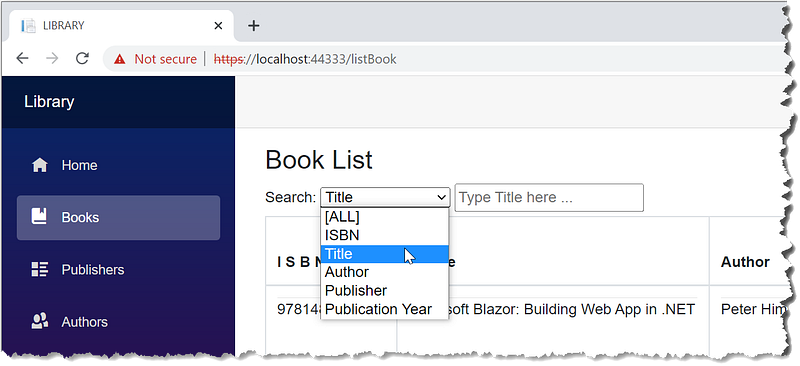
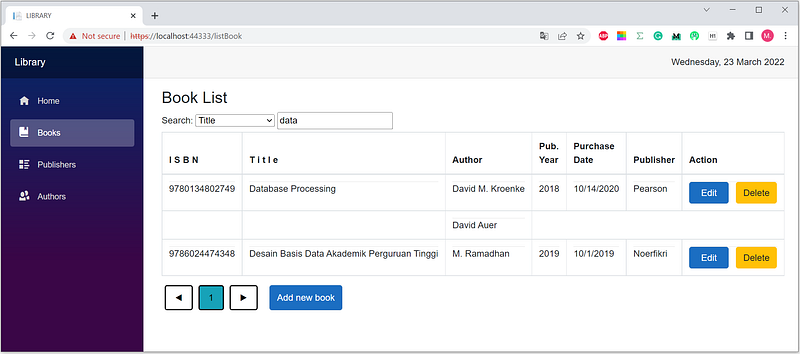
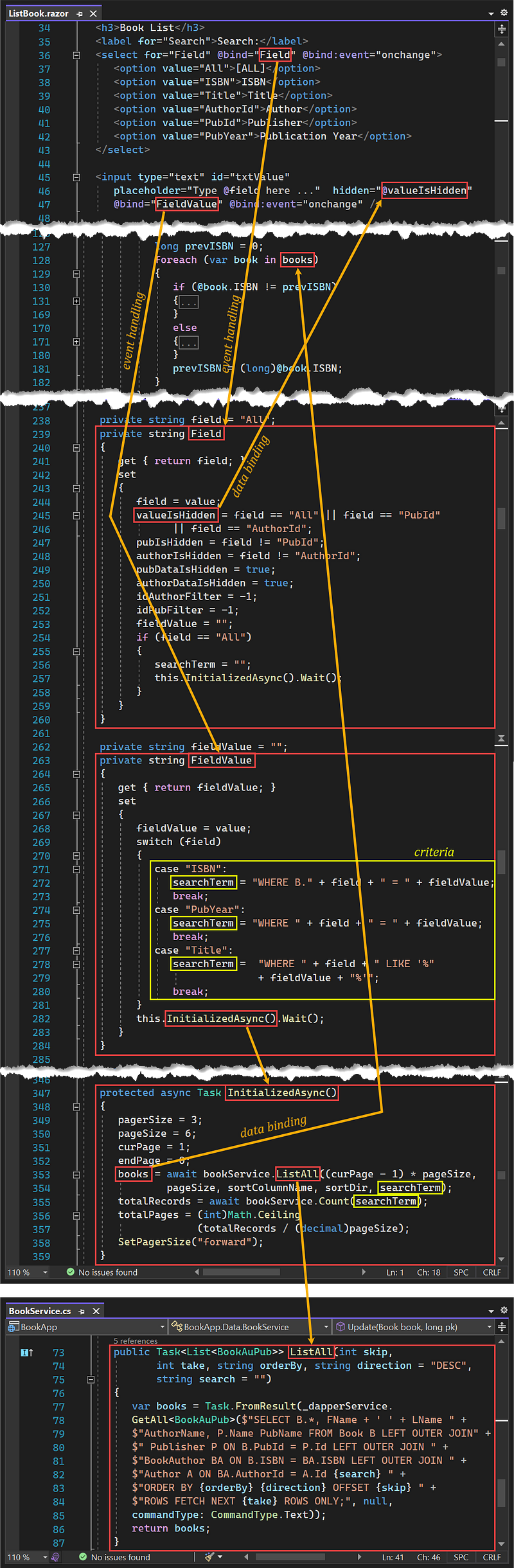
You may display a booklist based on ISBN, title, or publication year criteria. See the FieldValue method on lines 263–284 in Figure 17 above.
(b) Booklist based on an author
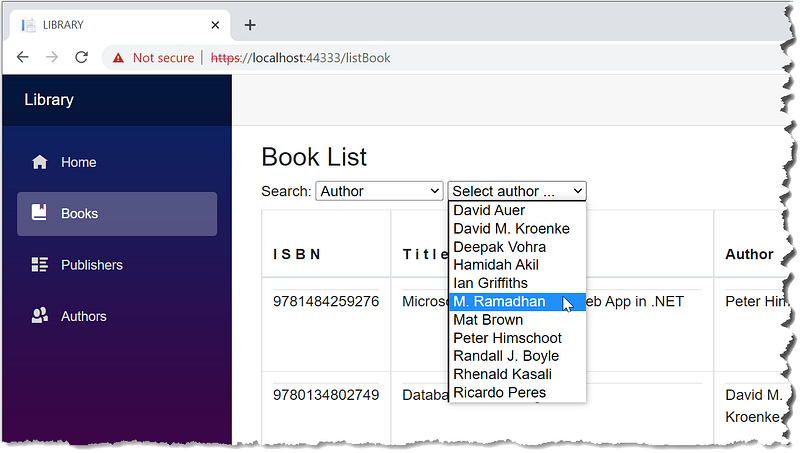
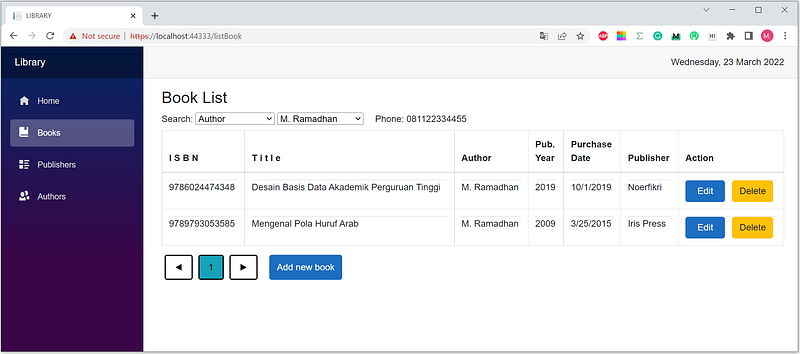
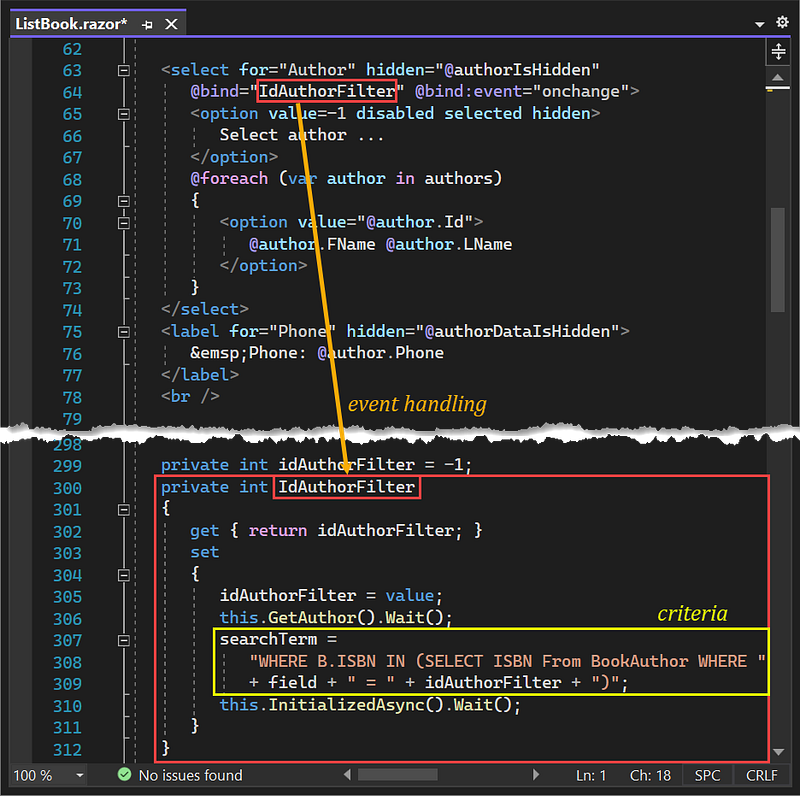
It works similarly to the booklist (2b). The difference is only the criteria. See the IdAuthorFilter method on lines 300–312 in Figure 20 above.
(c) Booklist based on a publisher
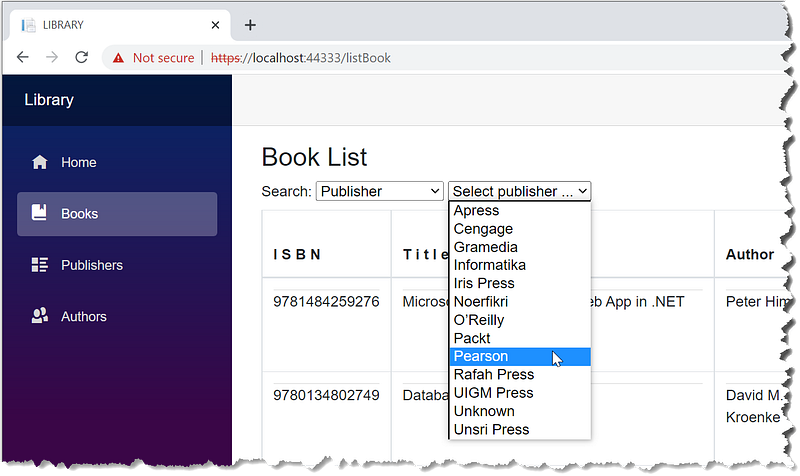
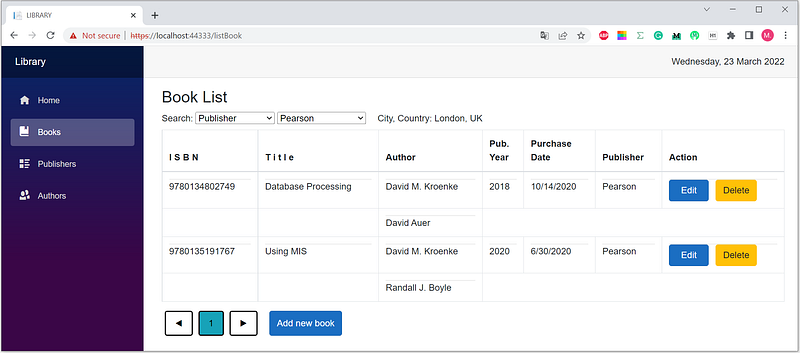
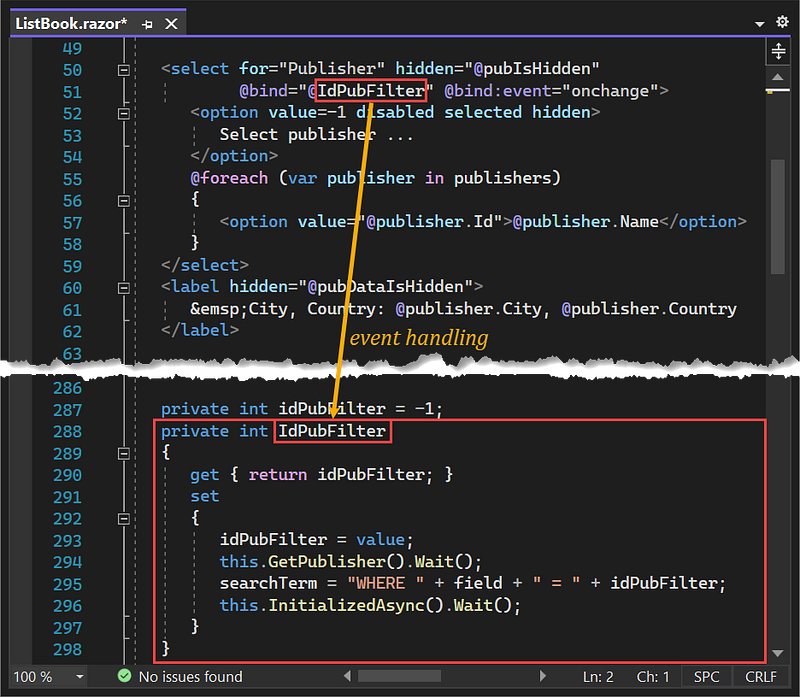
How it works is similar to the booklist (2b). The difference is only the criteria. See the IdPubFilter method on lines 288–298 in Figure 23 above.
(d) Booklist without criteria
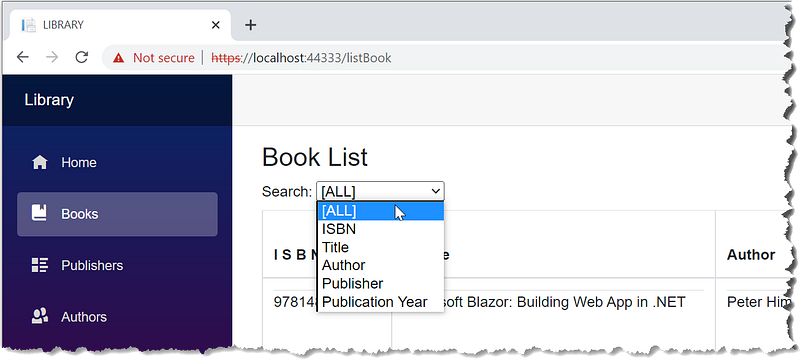
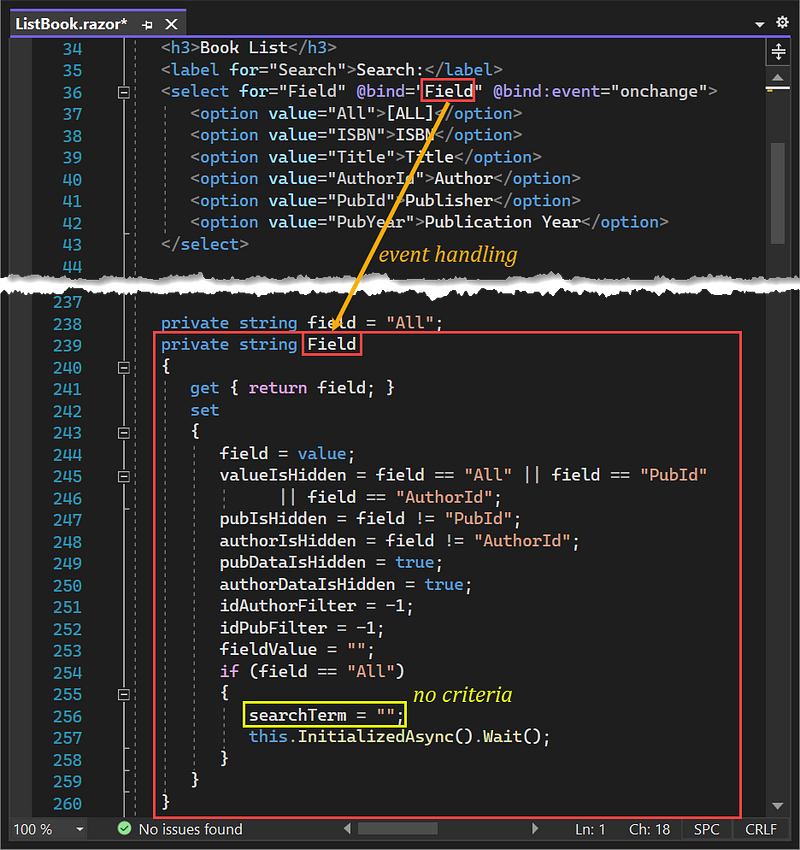
- Select
[ALL]. The page shows a list of books without any criteria, the same as by default; see Figure 13.
What’s Next?
A dynamic query allows you to construct query statements dynamically at runtime. It will enable you to create more generalized and flexible query statements. How about the security? I haven’t analyzed whether the dynamic query implementation in this project is vulnerable to SQL injection. Maybe another time, I’ll write about it.
Thanks for reading. Your feedback will be precious.


