
Your Phone Is A Distraction Only If You Want It To Be
“Screen Time” Feature From Apple
Since Apple launched the “Screen Time” feature in 2018 iOS software update, I was interested in only one application: compare my weekly screen-time trends. Every Sunday a notification pops up that reads “your screen time was up/down x% in the previous week”.
In college, it didn’t matter because after entering the pre-final year (the year 2017, before the feature was launched) most of the students (including me) toiled every day in prepping for the ideal after-college life we had in mind, i.e., getting a job. I said “had” because the picture changes with time as you realise while living the “ideal” life how less exciting it is. This is a solid perspective I am hearing from everyone.
Time To Experiment With Phone For Productivity
While in the job, I realised how much my phone was interfering with productive time and how easily I give in to the temptation to check it whenever I thought of taking even the slightest detour. The detour was just an understatement back then. Hours of social media engagement does no good if you are using it as a break from work pressure. It is not just a “break”, it is exhausting on top of that pressure. The brain is also drained from social media scrolling and it is a strain for eyes too.
I have experimented with my phone to make it a productivity tool instead of a distraction. Although I use an iPhone, these practices apply to Android users also as they all end up talking about eliminating clutter from your phone to use it for efficient task management.
Customise Notifications
We love apps. They save us the trouble of launching the browser and entering our login credentials every time. They even have an engaging user interface, I get it. But when almost every app floods your notifications centre with its update, gleaning the right information becomes more of a quest. Perhaps you might realize later that you have missed any important information. Or even if the information was worth missing, the overloaded notification centre is a source of anxiety just like watching excess news nowadays. I have rarely seen any friend with a clean notification centre, everyone’s is stacked with pop-ups they don’t even know what to do with them.
Limiting only important apps for notifications helps here. Allowing only those apps to inform you which help in maintaining your schedule, instead of disturbing it. I receive notifications only for these 3 apps: email, reminders and Whatsapp. And that also when my phone is unlocked. No notifications in the lock screen. I don’t need Instagram to tell me that someone mentioned me in a comment. I know to check it during leisure time.
Declutter The Home Screen
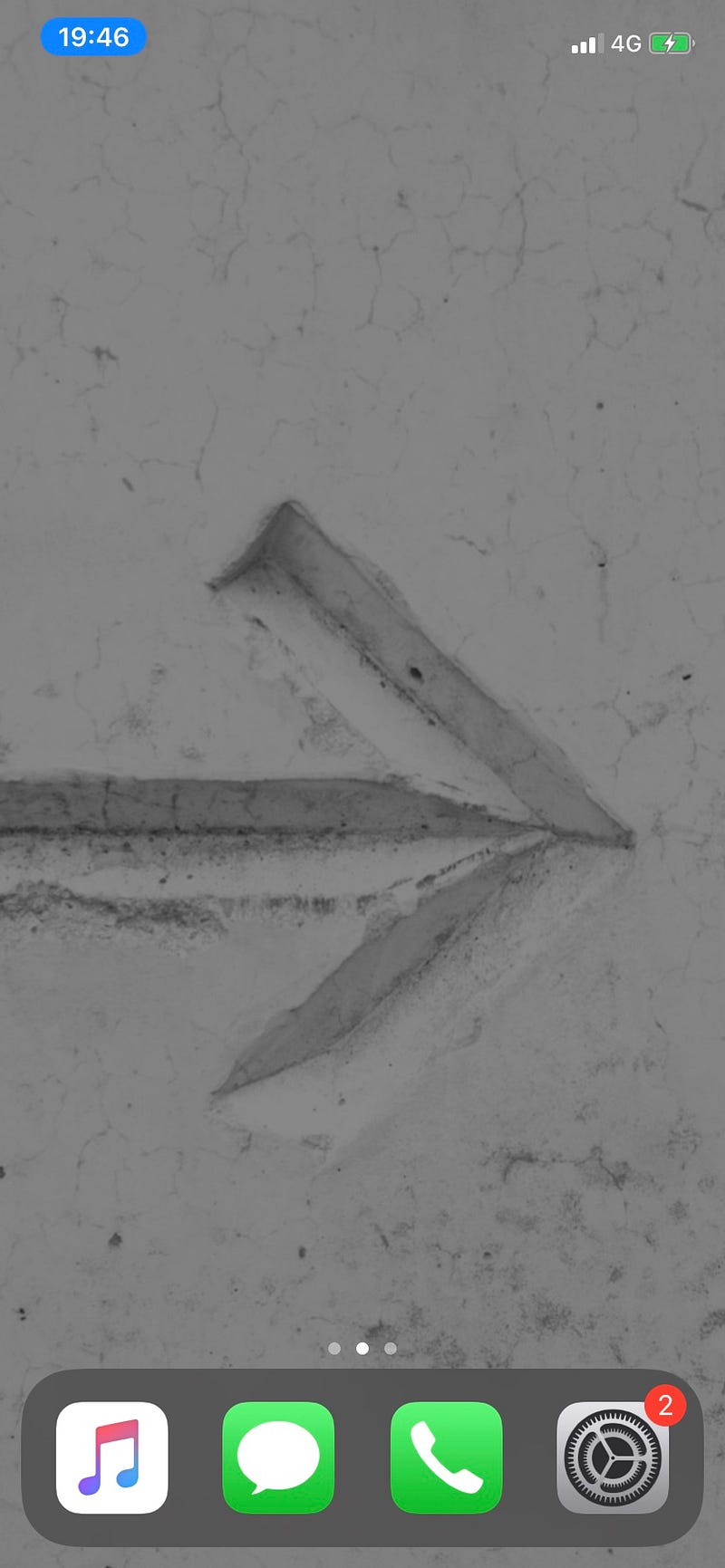
Your brain remembers what you see repeatedly. If Facebook is in the first screen after unlocking your phone, chances are you will end up using it more than you are supposed to. Moving such apps to a secondary screen helps a lot. You won’t swipe frequently to open it. And even you do, you know to organise in such way that the effort to open won’t feel worth it.
When you unlock your phone, you should see important apps or no apps at all. If you see above, my home screen is blank. I have all my apps on the next screen inside a single folder. All the important ones are in the dock. I wish I could remove those 2 red annoying circles from Settings also. But the iPhone does not have that level of customisation.
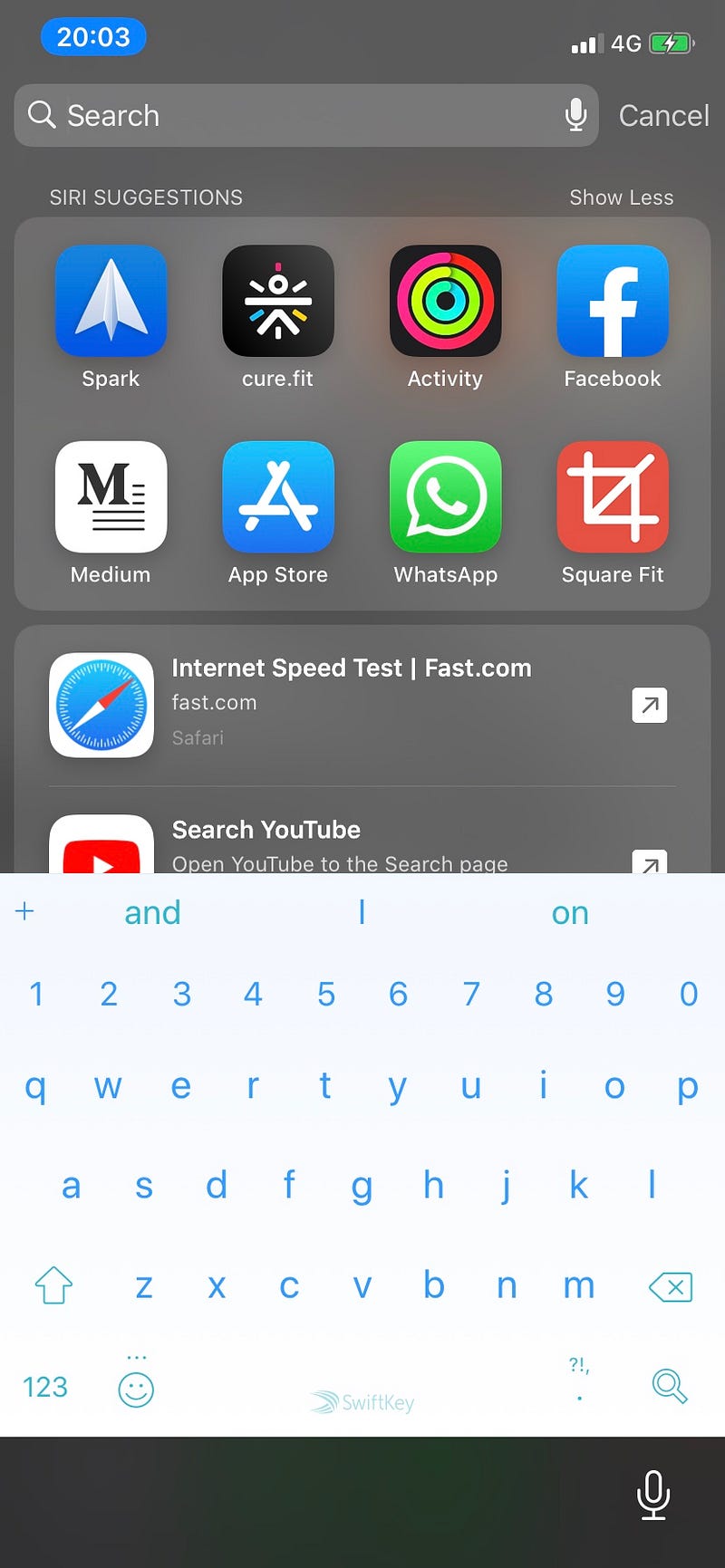
Whenever I need to open any app, I just type in the first few letters and based on my activity Siri knows which apps to suggest. These are my most frequently used apps today.
Be Selective With Social Media
Why is there a need to put the same story on all the social network? You resonated with great thought and you want everyone to know about how much it psyched you. You share it on every platform that has stories: Facebook, Instagram, Whatsapp, Snapchat. Wait for it, Twitter is also testing its own stories feature called “Fleets”.
Unless you are a social media manager at some organisation, posting updates on every platform will just keep you busy with social media a lot. You will see the viewers update on every network, although more than 50% audience will overlap across. Pick the network you are most comfortable with sharing status based on the audience and your content. Good with photos, break Instagram. Good with words, document your experiences on Medium. Ads-free network and privacy come first? Share on Whatsapp.
My go-to social networks are Instagram and Medium. Whenever I want to hold myself accountable publicly for a task I want to accomplish, I share it on Instagram the first thing. Nowadays my activity on Medium is also increasing. These are the two social networks that keep me on track and I have my life journey on both of them. Instagram for a visual version and Medium for the collection of thoughts in words. It is so pleasing every time I say, “thoughts in words”.
They Help With Habit Development Too
Reminders. The simplest yet the most under-rated apps used by most people I have seen. Nowadays reminders are so customisable, you can set recurring ones and forget the idea of maintaining a pen-paper task planner.
I use reminders for habit development too. As I mentioned my method of maintaining consistency through The Seinfeld Strategy, I have added my calendar in this blog where I check off every day I finish a set of predetermined tasks. But that is just a ritual I follow before sleeping every night to update myself consistently. It is a part of even a bigger system. I use reminders to assist me to stay on track every day.
I brainstormed how to use them effectively. I have reminders all day long, starting 4:30 AM till 9:30 PM. You must be thinking: “How does a person manage so much scattered reminders throughout the day”. The catch is, they are not scattered. They are scheduled in groups to appear at specific times. Like all the morning reminders come at 4 AM. The same grouping is for the rest of the day. My reminders are broadly categorised into three categories: morning, work and evening. Reminders are scheduled to appear at specific times. As I keep adopting them as habits I purge my schedule at the start of every month and add new reminders to track new habits.
Block An Off-Time Every Day
There are two times where I avoid screen-time for long term maintenance. Before 1 hour of sleep onset and within one hour of waking up, I don’t use my phone. Even if I do use it, it is mostly for reading on Medium. And now that I have Kindle, I reach for the phone less often. Because seeing the notifications first thing in the morning increases cortisol levels (the stress hormone) just after waking up while seeing it just before bedtime makes it harder to sleep. The stress hormone is the reason both times.
These all methods work when you practice it, say for at least one week, and see the improvement in your time management. Then you can judge for yourself which method comes easiest for you. Who knows you might come up with your unique way to use your phone as productivity wizard? Experiment with that device. It is not a door to the internet, it has a lot to improve your lifestyle.
My 21-day writing streak is finished and this is the 22nd article in the streak. This is the one that started the best streak of 2020 so far. The next target is 100. I will add a list below which will be updated as I publish till day 100. It will have 78 (100 minuses 21 minus this current one = 78) articles on day100. That is an achievable dream with eyes open. 💡
- Day 23: Getting Back To Schedule By Prioritising Again
- Day 24: Lucky Are Those Who Have Unlimited Family Support
- Day 25: Self-Transformation As A Way Of Changing The World
- Day 26: The First Time Someone Is Proud Of You
- Day 27: Selectively Absorbing Feedbacks is a Skill
- Day 28: 6 Years Without Hospitalisation
- Day 29: If You Think Life Is Boring, Retrospect
- Day 30: Coming Out as a Different Person after Quarantine
- Day 31: Listening to My Mind and Nature’s Song that is Rain
- Day 32: You Are Not Too Young To Write A Book
- Day 33: Pushing Blogging Further by Creating a Medium Publication
- Day 34: On Unconventional Paths, There is No Right or Wrong Way; There is Only Your Way
- Day 35: How to Convince Your Family If You are The Youngest
- Day 36: Permanent Solution to My Writer’s Block is The Journey’s Visualisation
- Day 37: Reducing Daily Writing Sessions from 2 Hours to 30 Minutes for Quality Work
- Day 38: Deciding To Freelance Away From Hometown
- Day 39: Embracing The Positive Cues When Starting Builds Immense Gratitude
- Day 40: From Wishing Life To Action Life
- Day 41: The Dream of Becoming An Editor in One Month
- Day 42: Building Fake Pressure To Meet A Tight Deadline
- Day 43: How I Manage so much Time for Writing?
- Day 44: This Is What Happens When Doing 30 Days News Detox
- Day 45: What Sacrifices Can You Make To Become Financially Strong?
- Day 46: Writing and Extroversion, The Fearless Combination Rarely Discussed
- Day 47: Creativity is Your Curiosity Coupled with Craziness on Auto-Pilot
- Day 48: From The One Who Hasn’t Celebrated Mother’s Day in 15 Years
- Day 49: 3 Ways a Close Friend Transforms Your Life
- Day 50: Why Should You Schedule Dark Mode Instead of Using it 24 Hours?
- Day 51: If Avoiding Screen Time is Difficult, Try Doing This Instead
- Day 52: Journal of Dreams to Find How The Mind Wanders When The Body is Still
- Day 53: How to Measure Consistency for The Impatient Being?
- Day 54: How to Use Power Hours to Rule The Day in Less Time?
- Day 55: The Beauty in Telling Stories of Struggle
- Day 56: The Regret in Not Taking the First Step
- Day 57: How Listening to Sad Songs Can Actually Make You Happy?
- Day 58: What To Do When You Are Out of Ideas?
- Day 59: Why Some Self-Aware People Have a Hard Time Giving Advice?
- Day 60: The Untold Benefits of Being The Youngest Kid in The Family
- Day 61: How Talking to Strangers Can Broaden Your Worldview?
- Day 62: Boredom is Temporary and We Don’t Acknowledge It Often
- Day 63: Your Art Makes You Observant, Which is a Sign of a Conversationalist
- Day 64: Finding a Reason to Smile Will Only Jinx The Fun
- Day 65: How to Overcome The Loss Aversion When You Miss A Daily Routine?
- Day 66: What Being a Responsible Kid Can Teach You about Adulthood?
- Day 67: How Binary Thinking is a Bad Decision Making Choice?
- Day 68: How Uncertainty is Advantageous in a New Creative Career?
- Day 69: Why the Youth Wants Adventure Instead of Stability?
- Day 70: Don’t Quit Because You Haven’t Reached Your Full Potential Yet
- Day 71: How to Come Up With Unique Headlines by Just Reading Your Article
- Day 72: How Many Idols Should You Have?
- Day 73: If You’re Not Courageous, You’ll Never Be Free
- Day 74: Only Show What You Can Explain Fluently to Establish Trust with The Audience
- Day 75: How to Learn Storytelling If You Didn’t Grow Up With It
- Day 76: The Stereotypes Are Scared If You Have This One Attitude
- Day 77: What To Do If Your Parents Don’t Support Your Dream Career
- Day 78: How to Remove the Major Finance Burner in Less Than a Week of Tracking
- Day 79: How to Know When Silence is Definitely Not the Right Answer
- Day 80: Find the Balance Before You Start Hating Your Job
- Day 81: How to See Rejection as a Declutter Mechanism
- Day 82: It Takes Minimal Efforts to Be a Reliable Shoulder
- Day 83: How to Let Go of External Expectations by Objectifying Feedback
- Day 84: How Speed-Writing Can Test Your Creative Muscles
- Day 85: How Daily Reading for a Year Can Transform Your Imagination
- Day 86: If Rules aren’t Fail-Proof, Break Them
- Day 87: Motivational Quotes Resonate Differently With Everyone
- Day 88: What Does Working in Sleep-Deprivation Look Like?
- Day 89: My Father Doesn’t Admit He Needs a Car, So I Played a Game for Father’s Day
- Day 90: How Long Does It Take to Build an Audience
- Day 91: Want Some Healthy Instant Gratification? Clean Your Inbox
- Day 92: Why Some of the Best Thoughts Come in Cold Shower
- Day 93: Want to Start a Fire Discussion in India? Talk About Religion
- Day 94: Forget About Time Management, Focus on Energy Management Instead
- Day 95: 3 Ways How Some Creatives Never Go Out of Ideas
- Day 96: Writing is a Service to Humanity
- Day 97: How Curiosity Makes You Fearless
- Day 98: Neuroplasticity: The Human Brain Outsmarts Itself with Lifelong Learning
- Day 99: Multitasking Gives You a False Sense of Productivity


