
Part 11— Complete System Design Series
System Design Made Easy…
Welcome back peeps. In the last part ( links below) we covered in detail ( with examples) —
Projects Videos —
All the projects, data structures, SQL, algorithms, system design, Data Science and ML , Data Analytics, Data Engineering, , Implemented Data Science and ML projects, Implemented Data Engineering Projects, Implemented Deep Learning Projects, Implemented Machine Learning Ops Projects, Implemented Time Series Analysis and Forecasting Projects, Implemented Applied Machine Learning Projects, Implemented Tensorflow and Keras Projects, Implemented PyTorch Projects, Implemented Scikit Learn Projects, Implemented Big Data Projects, Implemented Cloud Machine Learning Projects, Implemented Neural Networks Projects, Implemented OpenCV Projects,Complete ML Research Papers Summarized, Implemented Data Analytics projects, Implemented Data Visualization Projects, Implemented Data Mining Projects, Implemented Natural Leaning Processing Projects, MLOps and Deep Learning, Applied Machine Learning with Projects Series, PyTorch with Projects Series, Tensorflow and Keras with Projects Series, Scikit Learn Series with Projects, Time Series Analysis and Forecasting with Projects Series, ML System Design Case Studies Series videos will be published on our youtube channel ( just launched).
Subscribe today!
Solved System Design Case Studies — In depth
Design Instagram
Design Messenger App
Design Twitter
Design URL Shortener
Design Dropbox
Design Youtube
Design API Rate Limiter
Design Web Crawler
Design Facebook’s Newsfeed
Design Yelp
Design Uber
Design Tinder
Design Tiktok
Design Whatsapp
Most Popular System Design Questions
Mega Compilation : Solved System Design Case studies
6. Networking, How Browsers work, Content Network Delivery ( CDN)
Moving forward, this is the part 11 of the system design series where we will be covering —
- SQL vs NoSQL
- Cloud
Part 1 of this series can be found here —
Part 2 of this series can be found here —
Part 3 of this series can be found here —
Part 4 of this series can be found here —
Part 5 of this series can be found here —
Part 6 of this series can be found here —
Part 7 of this series can be found here —
Part 8 of this series can be found here —
Part 9 of this series can be found here —
Part 10 of this series can be found here —
And Most popular System Design Questions —
Let’s dive in!
Note : Please read System Design Important Terms you MUST know before reading this post.
SQL
As you design large systems ( or even smaller ones), you need to decide the inflow-processing and outflow of data coming- and getting processed in the system.
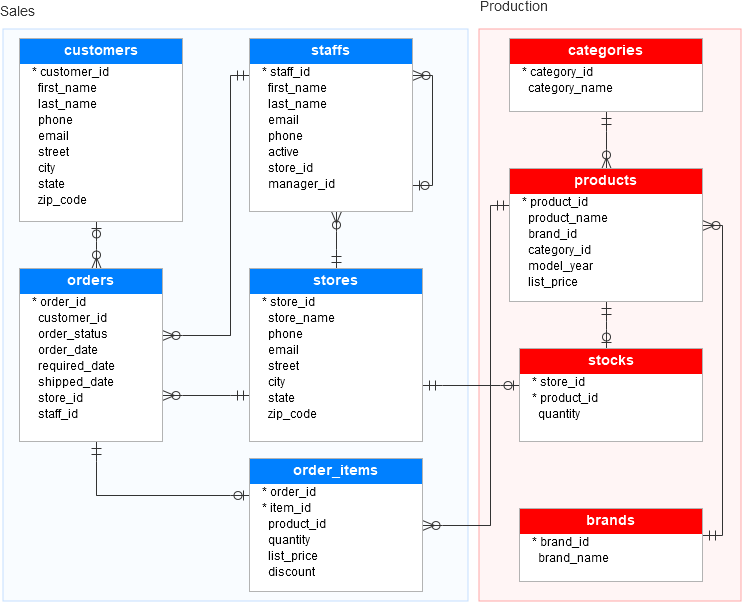
Data is generally organized in tables as rows and columns where columns represents attributes and rows represent records and keys have logical relationships. The SQL db schema always shows relational, tabular data following the ACID properties.
There are two types of databases to consider — SQL and NoSQL databases.
SQL databases have predefined schema and the data is organized/displayed in the form of tables. These databases use SQL ( Structured Query Language) to define, manipulate, update the data.
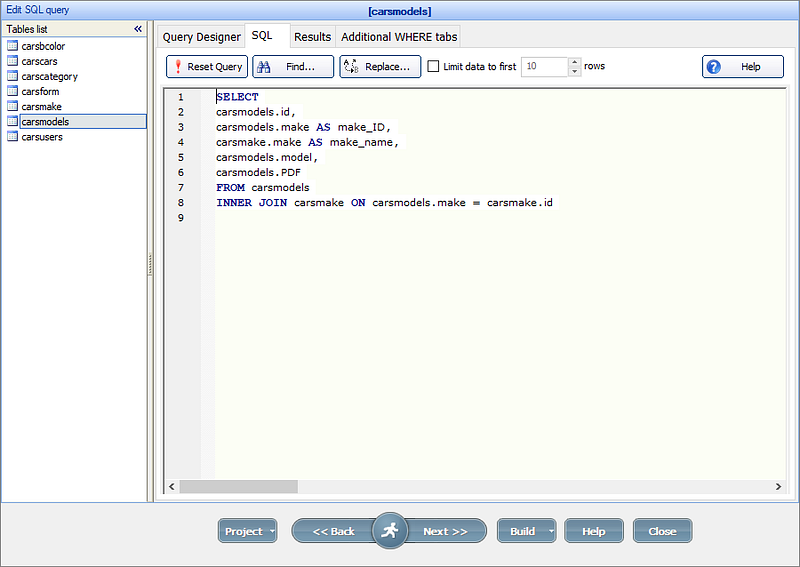
Relational databases like MS SQL Server, PostgreSQL, Sybase, MySQL Database, Oracle, etc. use SQL.
NoSQL
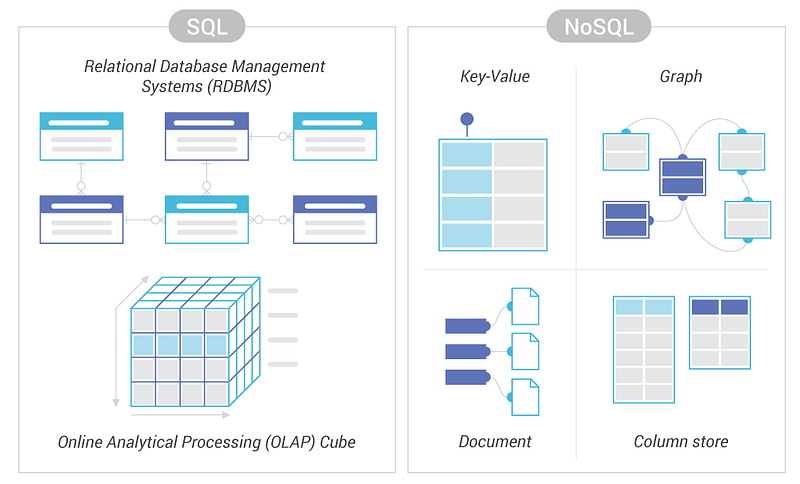
NoSQL databases on the other side, have no predefined schema which adds to more flexibility to use the formats that best suits the data — Work with graphs, column-oriented data, key-value and documents etc. They are generally preferred for hierarchical data, graphs ( e.g. social network) and to work with large data.
Some examples — Wide-column use Cassandra and HBase, Graph use Neo4j, Document use MongoDB and CouchDB, Key-value use Redis and DynamoDB,
- SQL databases are based on a relational model, where data is organized into tables with rows and columns, and relationships between tables are defined using foreign keys. SQL databases are known for their consistency and reliability, and are used for applications that require complex transactions, joins, and data integrity. Examples of SQL databases include MySQL, PostgreSQL, and Microsoft SQL Server.
- NoSQL databases, on the other hand, are based on a non-relational model and do not use a fixed schema. Data is stored in a variety of ways, such as key-value pairs, documents, or graphs. NoSQL databases are known for their scalability and performance, and are used for applications that require high availability, low latency, and large amounts of unstructured data. Examples of NoSQL databases include MongoDB, Cassandra, and Redis.
Apache Cassandra, a highly scalable and distributed NoSQL database

- Cassandra Data Modelling: Refers to the process of designing and organizing data in a Cassandra database to meet the requirements of a specific application. Cassandra’s data model is based on the concept of a column family, which is a group of related columns.
- Faster writes than Traditional RDBMS: Cassandra writes faster than traditional relational databases because it was designed to handle large amounts of write-intensive data, and it uses a write-optimized data structure known as a Log Structured Merge Tree (LSMT). This allows writes to be appended to disk sequentially, rather than being randomly accessed as in a traditional RDBMS.
- When to use Cassandra: Cassandra is a good choice for use cases that require high availability, scalability, and low latency, such as real-time data processing and handling large amounts of unstructured data. On the other hand, it may not be the best choice for applications that require complex transactions or complex relational data relationships.
- Log Structured Merge Trees (LSMT): A data structure used by Cassandra for write-optimized storage and retrieval of data. LSMTs use a combination of memory and disk storage to achieve high write performance and low latency.
- How data is read: In Cassandra, data is read using a process called a read repair. The read repair process involves multiple nodes in a Cassandra cluster reading the data and returning the most recent version. This ensures that the data remains consistent and up-to-date across all nodes in the cluster.
In summary, SQL and NoSQL are two different types of databases, SQL databases are based on a relational model, where data is organized into tables with rows and columns and relationships between tables are defined using foreign keys, SQL databases are known for their consistency and reliability, and are used for applications that require complex transactions, joins, and data integrity. NoSQL databases, on the other hand, are based on a non-relational model and do not use a fixed schema, NoSQL databases are known for their scalability and performance, and are used for applications that require high availability, low latency, and large amounts of unstructured data.
A good comparison —
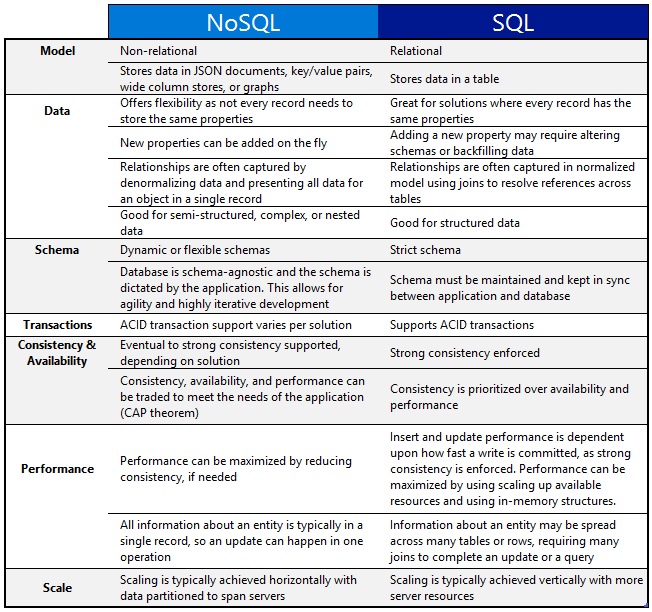
One of the important question that you might be asked, when to use which db?
When use SQL databases?
When you want to —
1. Scale Vertically — increase the processing power of your hardware
2. Work with predefined schema
3. Process queries and joins against structured data
4. Optimize the storage
5. Data is small
When to use NoSQL databases?
When you want to —
1. Scale horizontally
2. Work with graphs, column-oriented data, key-value and documents etc
3. Use multiple languages to query
4. Work with dynamic schema that has no predefined schema
5. Large Data
Code —
Implementation of a SQL database using MySQL:
CREATE TABLE customers (
  id INT PRIMARY KEY,
  name VARCHAR(50),
  email VARCHAR(50),
  phone VARCHAR(15)
);
CREATE TABLE orders (
id INT PRIMARY KEY,
customer_id INT,
order_date DATE,
total DECIMAL(10, 2),
FOREIGN KEY (customer_id) REFERENCES customers(id)
);In this implementation, we create two tables: customers and orders. The customers table has four columns: id, name, email, and phone. The id column is defined as the primary key, which means it uniquely identifies each row in the table. The orders table has four columns as well, with a foreign key constraint referencing the id column in the customers table.
Implementation of a NoSQL database using MongoDB:
db.createCollection("customers");db.customers.insertOne({
"_id": ObjectId("60ac737c3856b418bf6a0765"),
"name": "John Doe",
"email": "[email protected]",
"phone": "555-555-5555"
});db.createCollection("orders");db.orders.insertOne({
"_id": ObjectId("60ac73b33856b418bf6a0766"),
"customer_id": ObjectId("60ac737c3856b418bf6a0765"),
"order_date": ISODate("2022-02-18T00:00:00Z"),
"total": 100.00
});In this implementation, we create two collections: customers and orders. The customers collection has a document with four fields: _id, name, email, and phone. The _id field is a unique identifier for the document, and is automatically generated by MongoDB when the document is inserted. The orders collection has a document with four fields as well, including a reference to the _id field of a document in the customers collection.
Mongo DB : MongoDB is a NoSQL database that is designed for scalability and performance. It uses a document-based data model, which allows for flexible and dynamic schemas. MongoDB can be used for a wide range of applications, including big data, real-time analytics, and content management.
Connecting to MongoDB
To connect to MongoDB from Python, you can use the PyMongo driver. You can install it using pip:
pip install pymongo
Connect to a local MongoDB instance:
from pymongo import MongoClient# connect to MongoDB
client = MongoClient()# select database and collection
db = client['mydatabase']
collection = db['mycollection']Inserting Data
To insert data into a MongoDB collection, you can use the insert_one() method:
# insert a document into the collection
document = {"name": "John Doe", "age": 30}
collection.insert_one(document)
You can also insert multiple documents at once using the insert_many() method:
# insert multiple documents into the collection
documents = [
    {"name": "Jane Doe", "age": 25},
    {"name": "Bob Smith", "age": 40},
    {"name": "Alice Brown", "age": 35},
]
collection.insert_many(documents)
Querying Data
To query data from a MongoDB collection, you can use the find() method:
# find all documents in the collection
documents = collection.find()
# find documents that match a specific criteria
documents = collection.find({"age": {"$gte": 30}})The find() method returns a cursor, which you can iterate over to access the individual documents. You can also use various modifiers and operators to refine your query.
Updating Data
To update data in a MongoDB collection, you can use the update_one() or update_many() method:
# update a single document in the collection
collection.update_one({"name": "John Doe"}, {"$set": {"age": 35}})
# update multiple documents in the collection
collection.update_many({"age": {"$lt": 30}}, {"$inc": {"age": 5}})The update_one() method updates the first document that matches the query, while the update_many() method updates all documents that match the query.
Deleting Data
To delete data from a MongoDB collection, you can use the delete_one() or delete_many() method:
# delete a single document from the collection
collection.delete_one({"name": "John Doe"})
# delete multiple documents from the collection
collection.delete_many({"age": {"$lt": 30}})The delete_one() method deletes the first document that matches the query, while the delete_many() method deletes all documents that match the query.
Cassandra : Apache Cassandra is a NoSQL database that is designed to handle large amounts of data across many commodity servers, providing high availability with no single point of failure. Cassandra is a distributed, decentralized and highly-scalable database that is able to handle large amounts of data and provide high availability.
Connect to a local Cassandra cluster:
from cassandra.cluster import Cluster# connect to Cassandra
cluster = Cluster()# create a session
session = cluster.connect()Creating a Keyspace
In Cassandra, a keyspace is a namespace that defines the replication strategy and other options for a set of tables. To create a keyspace, you can use the CREATE KEYSPACE statement:
# create a keyspace
session.execute("""
    CREATE KEYSPACE mykeyspace
    WITH replication = {'class': 'SimpleStrategy', 'replication_factor': '1'}
""")
This creates a keyspace with the name mykeyspace and a replication strategy of SimpleStrategy with a replication factor of 1.
Creating a Table
In Cassandra, a table is defined by a set of columns and a primary key. To create a table, you can use the CREATE TABLE statement:
# create a table
session.execute("""
    CREATE TABLE mytable (
        id int PRIMARY KEY,
        name text,
        age int
    )
""")
This creates a table with the name mytable, with columns for id, name, and age. The id column is the primary key for the table.
Inserting Data
To insert data into a Cassandra table, you can use the INSERT statement:
# insert data into the table
session.execute("""
    INSERT INTO mytable (id, name, age)
    VALUES (1, 'John Doe', 30)
""")
You can also insert multiple rows at once using the execute_batch() method:
# insert multiple rows into the table
rows = [
    (2, 'Jane Doe', 25),
    (3, 'Bob Smith', 40),
    (4, 'Alice Brown', 35),
]
query = "INSERT INTO mytable (id, name, age) VALUES (?, ?, ?)"
session.execute_batch(query, rows)
Querying Data
To query data from a Cassandra table, you can use the SELECT statement:
# select all rows from the table
rows = session.execute("SELECT * FROM mytable")
# select rows that match a specific criteria
rows = session.execute("SELECT * FROM mytable WHERE age >= 30")The execute() method returns a ResultSet, which you can iterate over to access the individual rows. You can also use various clauses and operators to refine your query.
Updating Data
To update data in a Cassandra table, you can use the UPDATE statement:
# update data in the table
session.execute("""
    UPDATE mytable SET age = 35 WHERE id = 1
""")
Pig: Pig is a high-level platform for creating MapReduce programs used with Hadoop. Pig allows for the creation of complex data pipelines using a simple SQL-like language called Pig Latin. Pig can also be used to process data on a single machine or a cluster of machines.
Implementation of a Pig Latin script:
Suppose we have a dataset with the following fields: user_id, age, gender, city, and state. We want to calculate the average age of users in each state. The Pig Latin script to accomplish this would be:
-- Load the data from the input file
input_data = LOAD 'input_file.txt' USING PigStorage(',') AS (user_id:int, age:int, gender:chararray, city:chararray, state:chararray);
-- Group the data by state
grouped_data = GROUP input_data BY state;-- Calculate the average age for each group
average_age = FOREACH grouped_data GENERATE group AS state, AVG(input_data.age) AS avg_age;-- Store the results in an output file
STORE average_age INTO 'output_file.txt' USING PigStorage(',');In this script, we first load the data from the input file using the LOAD statement. We specify that the fields in the input file are comma-separated and define the schema of the input data using the AS statement. Next, we group the input data by state using the GROUP statement. This creates a set of groups, one for each unique state value. We then calculate the average age for each group using the AVG function in the FOREACH statement. This creates a new relation with two fields: state and avg_age. Finally, we store the results in an output file using the STORE statement. We specify that the fields in the output file should be comma-separated and use the USING statement to specify the output file format.
Hive: Hive is a data warehousing and SQL-like query language for Hadoop. It provides a way to organize and query large data sets stored in Hadoop Distributed File System (HDFS) and other storage systems.
Implementation of a Hive query:
Suppose we have a dataset with the following fields: user_id, age, gender, city, and state. We want to calculate the total number of male and female users in each state. The Hive query to accomplish this would be:
-- Create an external table to map to the input data
CREATE EXTERNAL TABLE users (user_id int, age int, gender string, city string, state string)
ROW FORMAT DELIMITED
FIELDS TERMINATED BY ','
LOCATION '/path/to/input/data';
-- Create a new table to store the results
CREATE TABLE user_counts (state string, male_count int, female_count int);-- Insert the results of the query into the new table
INSERT INTO user_counts
SELECT state,
COUNT(CASE WHEN gender = 'M' THEN 1 END) AS male_count,
COUNT(CASE WHEN gender = 'F' THEN 1 END) AS female_count
FROM users
GROUP BY state;In this query, we first create an external table to map to the input data. We specify that the input data is delimited by commas and located in the HDFS file system. Next, we create a new table to store the results of the query. We define the schema of the table with three fields: state, male_count, and female_count. Finally, we insert the results of the query into the new table using the INSERT INTO statement. We use the SELECT statement to specify the query to execute. In this query, we use the CASE statement to count the number of male and female users in each state, and then group the results by state using the GROUP BY statement.
Spark: Apache Spark is an open-source, distributed computing system that is designed for big data processing. Spark provides an in-memory data processing engine that can run on top of Hadoop Distributed File System (HDFS), Amazon S3, and other storage systems. Spark can process data much faster than Hadoop MapReduce because it keeps data in memory.
Implementation of a Spark application using PySpark:
Suppose we have a dataset of customer orders with the following fields: order_id, customer_id, order_date, and order_amount. We want to calculate the total revenue generated from each customer in the dataset. The PySpark code to accomplish this would be:
from pyspark.sql import SparkSession
from pyspark.sql.functions import sum
# Create a SparkSession
spark = SparkSession.builder.appName("CustomerRevenue").getOrCreate()# Read the dataset into a DataFrame
orders = spark.read.format("csv").option("header", True).load("/path/to/orders")# Calculate the total revenue generated from each customer
customer_revenue = orders.groupBy("customer_id").agg(sum("order_amount").alias("total_revenue"))# Write the results to a file
customer_revenue.write.format("csv").option("header", True).mode("overwrite").save("/path/to/output")# Stop the SparkSession
spark.stop()In this code, we first create a SparkSession, which is the entry point to programming Spark with the Dataset and DataFrame API. Next, we read the input data into a DataFrame using the read method and specify the format and location of the input file. We also specify that the input file has a header row. Then, we group the orders by customer_id using the groupBy method and aggregate the order amounts using the agg method and the sum function. We also give the resulting column a meaningful name using the alias method. Finally, we write the results to a file using the write method and specifying the format, location, and options for the output file. We also stop the SparkSession using the stop method.
Yarn: Yarn is a resource manager for Hadoop that allows for the allocation of resources such as CPU and memory to various applications running on a cluster. Yarn also manages the scheduling of tasks and the monitoring of their progress.
Implementation of YARN:
Suppose we have a Spark application that needs to be run on a YARN cluster. The following code can be used to submit the application:
$ spark-submit --master yarn \
               --deploy-mode cluster \
               --num-executors 10 \
               --executor-memory 4G \
               --executor-cores 4 \
               --driver-memory 2G \
               --class com.example.MyApp \
               myapp.jar
In this code, we use the spark-submit command-line tool to submit the Spark application. The --master option is set to yarn to indicate that the application should run on a YARN cluster. The --deploy-mode option is set to cluster to run the application in a distributed mode on the cluster. The --num-executors option specifies the number of executors to be used to run the application, while the --executor-memory option sets the amount of memory allocated to each executor. The --executor-cores option sets the number of cores allocated to each executor, while the --driver-memory option sets the amount of memory allocated to the driver program. Finally, the --class option specifies the fully-qualified class name of the main class of the application, and myapp.jar is the location of the JAR file containing the application code.
Hadoop: Hadoop is an open-source, distributed computing system that is designed for big data processing. It allows for the storage and processing of large data sets across a cluster of commodity servers. Hadoop includes the Hadoop Distributed File System (HDFS) for storage and the MapReduce programming model for processing.
Implementation of Hadoop:
Suppose we have a large file that needs to be processed using Hadoop. The following code can be used to upload the file to HDFS:
$ hdfs dfs -put /path/to/local/file /path/to/hdfs/directory/fileIn this code, we use the hdfs dfs command to interact with HDFS. The -put option is used to upload a file from the local file system to HDFS. The first argument /path/to/local/file specifies the location of the file on the local file system, while the second argument /path/to/hdfs/directory/file specifies the location of the file in HDFS.
Once the file is uploaded to HDFS, we can process it using MapReduce. The following is an example implementation of MapReduce:
from mrjob.job import MRJobclass WordCount(MRJob):def mapper(self, _, line):
for word in line.split():
yield word, 1def reducer(self, word, counts):
yield word, sum(counts)if __name__ == '__main__':
WordCount.run()In this code, we define a MapReduce job to count the occurrences of each word in the input file. The mapper function reads each line of the input file and emits each word with a count of 1. The reducer function receives the output of the mapper function, which consists of a list of values for each word, and sums the counts to obtain the total count for each word.
To run this job on Hadoop, we can use the following command:
$ python wordcount.py -r hadoop hdfs://<namenode>/path/to/input/file -o hdfs://<namenode>/path/to/output/directoryIn this code, we use the mrjob library to define and run the MapReduce job. The -r option specifies the runner, which in this case is set to hadoop to indicate that the job should be run on Hadoop. The first argument hdfs://<namenode>/path/to/input/file specifies the location of the input file in HDFS, while the second argument hdfs://<namenode>/path/to/output/directory specifies the location of the output directory in HDFS.
Advanced SQL Series
Day 2 : SQL Basics, Query Structure, Built In functions Conditions
Day 4 : Set Theory Operations, Stored Procedures and CASE statements in SQL
Day 6 : Subqueries, Group by, order by and Having clauses in SQL and Analytical Functions
Day 7 : Window Functions, Grouping Sets and Constraints in SQL
Day 8 : BigQuery Basics, SELECT, FROM, WHERE and Date and Extract in BigQuery
Day 9 : Common Expression Table, UNNEST Clause, SQL vs NoSQL Databases
Day 10 : Triggers, Pivot and Cursors in SQL
Day 14 : MySQL in Depth
Day 15 : PostgreSQL inDepth
Github for Advanced SQL that you can follow —
All the projects, data structures, algorithms, system design, Data Science and ML, Data Engineering, MLOps and Deep Learning videos will be published on our youtube channel ( just launched).
Subscribe today!
Complete Data Structures and Algorithm Series
Github —
Some of the other best Series —
30 days of Data Structures and Algorithms and System Design Simplified
100 days : Your Data Science and Machine Learning Degree Series with projects
Complete Data Visualization and Pre-processing Series with projects
Cloud
These days almost all the large systems use cloud in some or the other way. While there are many cloud providers, but the market is well dominated by AWS.
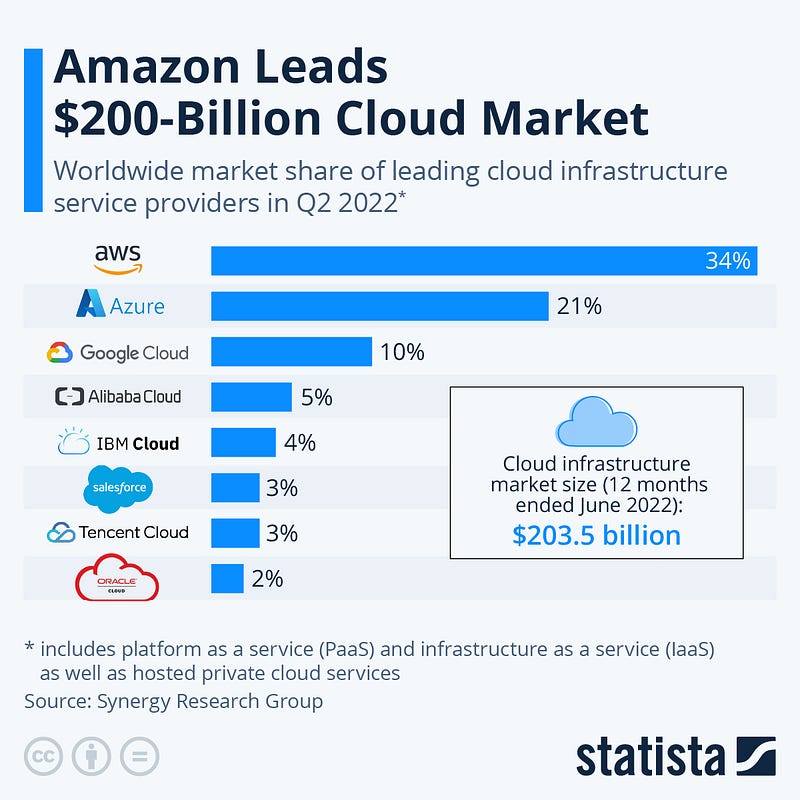
So What is Cloud?
In simple terms, it’s a way of providing virtualized services and resources as per the demand. The cloud computing services are used to address the scalability, availability, cost management and disaster recovery etc of the application as the user base grows exponentially.
Using cloud, you can share or access the data, resources or applications modules/sub systems from anywhere and anytime in the world.
A good knowledge of AWS and GCP will take you very far wrt system design.
If you want to read and dig Google Cloud Platform, then start with bigquery ( link below) —
This is the last topic of Complete System Design Series after which we will start with System Design Most popular questions — i.e design systems with concepts that we have learnt in the whole series.
- Google Cloud Platform is a collection of cloud computing services that run on the same infrastructure that Google uses for its own products. It offers a variety of services for compute, storage, networking, and big data, as well as machine learning and AI capabilities. GCP is known for its strong focus on data analytics and machine learning, and its global network of data centers.
- AWS is a collection of remote computing services (also called web services) that make up a cloud computing platform, offered by Amazon.com. It offers a wide range of services for compute, storage, databases, analytics, mobile, IoT, and more. AWS is known for its large and growing ecosystem of tools and services, as well as its strong focus on security.
- Azure is a cloud computing platform and infrastructure created by Microsoft for building, deploying, and managing applications and services through a global network of Microsoft-managed data centers. It offers a wide range of services for compute, storage, databases, analytics, IoT, and more. Azure is known for its strong integration with other Microsoft products, such as Active Directory and Visual Studio, and its wide range of services for enterprise customers.
In summary, GCP, AWS, and Azure are three major cloud computing platforms, GCP is a collection of cloud computing services that run on the same infrastructure that Google uses for its own products, it has strong focus on data analytics and machine learning, and its global network of data centers, AWS is a collection of remote computing services offered by Amazon.com, it has a large and growing ecosystem of tools and services and strong focus on security, Azure is a cloud computing platform and infrastructure created by Microsoft for building, deploying, and managing applications and services through a global network of Microsoft-managed data centers, it has strong integration with other Microsoft products and wide range of services for enterprise customers.
AWS (Amazon Web Services) is a collection of cloud-based services that provide a variety of different capabilities to help developers and organizations build, deploy, and manage their applications and services.
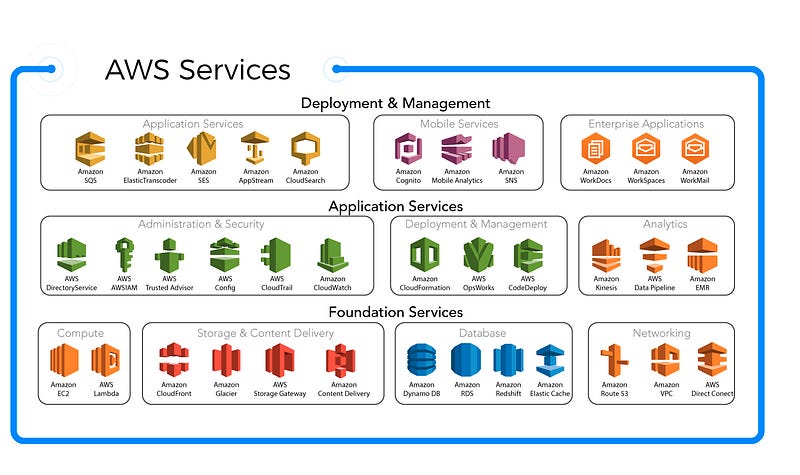
These services are organized into several different categories, including:
- Compute: This category includes services that provide the ability to run and manage compute resources, such as Amazon Elastic Compute Cloud (EC2), Amazon Elastic Container Service (ECS), and AWS Lambda. These services enable customers to run virtual machines and containers in the cloud, and to run serverless functions.
- Storage: This category includes services that provide storage for data, such as Amazon Simple Storage Service (S3), Amazon Elastic Block Store (EBS), and Amazon Elastic File System (EFS). These services enable customers to store and retrieve data in the cloud, and to perform various types of data management.
- Database: This category includes services that provide various types of databases, such as Amazon Relational Database Service (RDS), Amazon DocumentDB, Amazon DynamoDB, and Amazon ElastiCache. These services enable customers to create and manage databases, and to access data stored in the cloud.
- Networking & Content Delivery: This category includes services that provide the ability to create and manage networks, and to deliver content to customers. Services in this category include Amazon Virtual Private Cloud (VPC), Amazon CloudFront, and Amazon Route 53.
- Analytics: This category includes services that provide the ability to process, analyze, and visualize data, such as Amazon Redshift, Amazon Kinesis, and Amazon QuickSight. These services enable customers to perform data analysis, data warehousing, and other types of data processing in the cloud.
- Machine Learning: This category includes services that provide the ability to build, deploy, and manage machine learning models, such as Amazon SageMaker, Amazon Transcribe, and Amazon Translate. These services enable customers to perform machine learning and natural language processing tasks in the cloud.
- Security, Identity, & Compliance: This category includes services that provide security, identity, and compliance capabilities, such as Amazon Identity and Access Management (IAM), Amazon Cognito, and Amazon GuardDuty. These services enable customers to secure their applications and data, and to comply with various regulatory requirements.
That’s it for now!
Coming up next : Most popular system design Questions
Keep learning and coding :)
For Python Projects —
For complete 60 days of Data Science and ML : Day 1 — Day 60 : Quick Recap of 60 days of Data Science and ML
Follow for more updates. Stay tuned and keep coding!
For other projects, tune to —
Build Machine Learning Pipelines( With Code)
Recurrent Neural Network with Keras
Clustering Geolocation Data in Python using DBSCAN and K-Means
Facial Expression Recognition using Keras
Hyperparameter Tuning with Keras Tuner
Custom Layers in Keras


