
Build Single page application with React and Django Part 11 - Theming with Redux and styled-component
Introduction
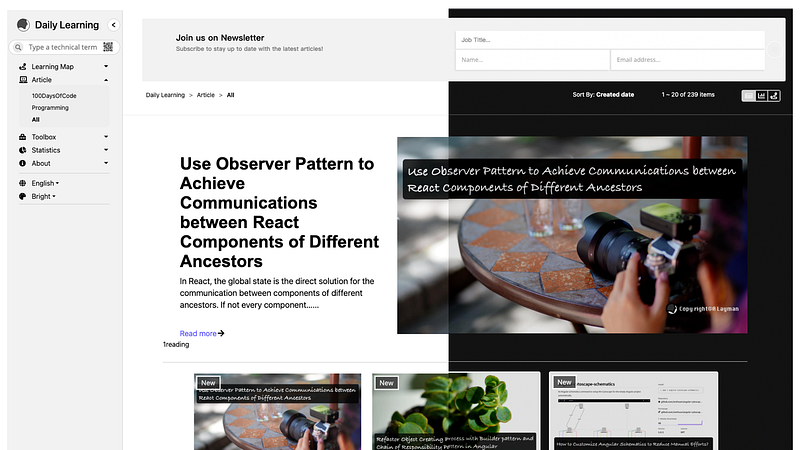
Theme switching is an optional but useful feature. It can make our websites flexible and no longer boring. However, this task could be complex because styles may be added in different ways. e.g., SCSS, CSS module, etc.
The purpose of this article is to add the switchable theme for existed Next.js websites.
Agenda
About this series
The target of this series is to build a ReactJS single page application(SPA) with Django API server and deploy on Heroku.
- Part 1: Deploy Django application to Heroku and migrate PostgreSQL
- Part 2: Connect React App with Django App
- Part 3: Use JWT with DRF and tests endpoints on Travis-CI
- Part 4: Create Endpoints to Manipulate Resources
- Part 5.1: Exchange Facebook’s access token to JWT from Django/DRF
- Part 5.2: Exchange Github’s access token to JWT from Django/DRF
- Part 6: Create Django Application’s sitemap on Heroku for SEO
- Part 7: How to Refactor Function Components with HOC?
- Part 8: Static Rendering with Next.js and Django on Heroku
- Part 9: Access Redux on the Next.js page-level
- Part 10: Improve SEO with Pyppeteer in Django
- Part 11. this article
Architecture
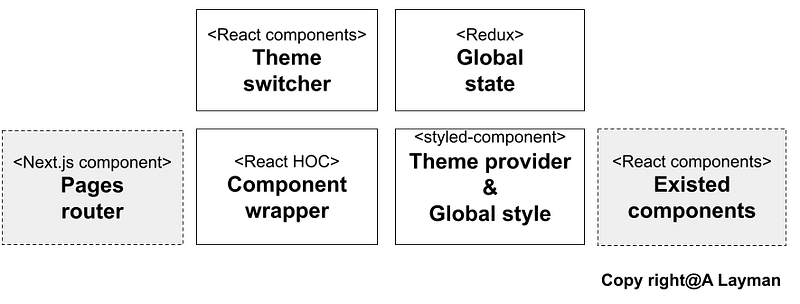
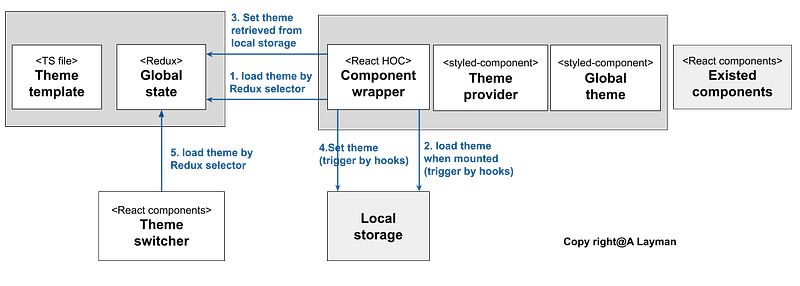
The following diagram shows the libraries and components we need for add the switchable theme.
Redux/RTK
For syncing the theme between components, we will need the reactivity provided by Redux global state and React hooks. It means that the user interface should react immediately after the specific theme was used.
We can just assign the global state as the theme parameter of the Theme provider of the styled-component.
There is an article I wrote before for learning Redux RTK.
styled-component
The styled-component provides a few important items.
- The
Theme providercan accept a theme parameter - The
Global styleis a function to return a style according to the theme parameter
The usage for using these items is to wrap components and the Global style with the Theme provider. There is an article I wrote before for learning styled-component.
Higher Order Component (HOC)
Consider to the Next.js pages router, we may have several components need to be wrap with the Theme provider and the Global style. We also have to retrieve the global state and uses React hooks in these components.
For the reusing purpose, we can create a component wrapper in the concept of HOC. There is an article I wrote before for learning HOC.
Theme switcher
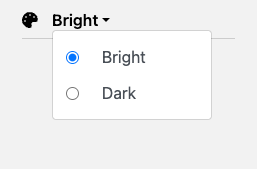
We may need a component to allow users to switch the current theme.
Workflow
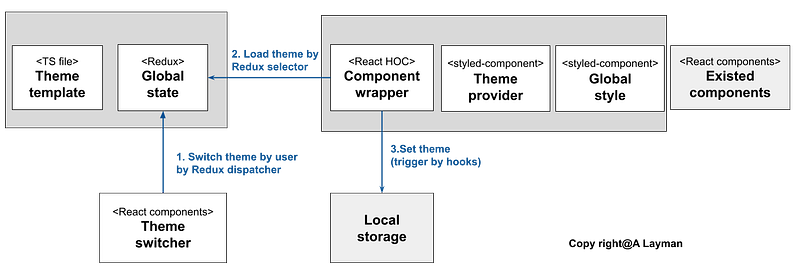
1. Switch and store the global style
When the user switches the theme on the Theme Switcher, the Global theme will be changed with the Redux global state.
Second, we have to store the style in the localStorage for the persistency. The user can still get the style even the tab was closed.
2. Load the stored global style
After the component was mounted, it will have to retrieve the theme from the localStorage. And then set the retrieved theme to the Redux store if it got the stored theme.
The Theme switcher also need to load the theme from the Redux store for displaying the current selected theme.
Implementations
1. Create the theme template
The theme template provides default stylesheets for different themes. In the following example code, we specify the body, icon, and image style for the light and dark theme.
2. Create the Global Style
createGlobalStyle is a function to return the real stylesheets and it can override the existed style on components.
3. Update Redux/RTK state and the slice
To understand the basic concepts of Redux/RTK, feel free to refer to this article. Here we just have to update the state and slice.
- Update state
- Update slice
4. Create the utility for localStorage
Create functions for getting and setting items to localStorage.
5. Create the component wrapper
There are a few thing we have to do in the component wrapper.
- Retrieve the theme from
Redux(line 13 ~ line 18) - Retrieve the theme from localStorage and set it to the
Redux(line 24 ~ line 32) - When the
Reduxstate was updated, set the state to the localStorage (line 34 ~ line 38) - Wrap components and the Global style with the
Theme provider(line 42 ~ line 46)
6. Create the Theme switcher component
There are a few thing we have to do in the component wrapper.
- Retrieve the theme from
Redux(line 14 ~ line 18) - When the user chooses the specific theme, set it to the
Redux(line 39)
Reference
- 使用 CreateGlobalStyle 在 React Styled-Components 取代 CSS Reset 與 CSS Normalize
- Theming and Theme Switching with React and styled-components
- A Complete Guide to Dark Mode on the Web
Summary
Thanks for your patient. I am Sean. I work as a software engineer.
This article is my note. Please feel free to give me advice if any mistakes. I am looking forward to your feedback.
- The Facebook page for articles
- The latest side project: Daily Learning
Related topics
How to use the two-way binding in Knout.js and ReactJS?
Learn how to use SignalR to build a chatroom application
My reflection of
IT & Network:
Database:
Software testing:
Debugging:
DevOps:


